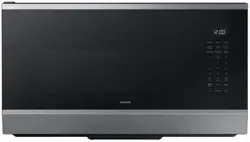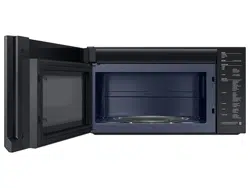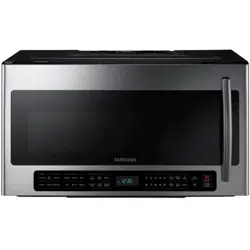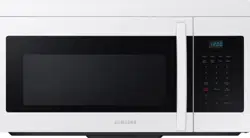
Microwave Oven
user manual
ME16A4021A*
imagine the possibilities
Thank you for purchasing this Samsung product.
English - 2
IMPORTANT SAFETY
SYMBOLS AND
PRECAUTIONS
What the icons and signs in this user
manual mean:
WARNING
Hazards or unsafe practices that
may result in severe personal
injury or death.
CAUTION
Hazards or unsafe practices that
may result in minor personal
injury or property damage.
CAUTION
To reduce the risk of re,
explosion, electric shock, or
personal injury when using your
microwave oven, follow these
basic safety precautions.
Do NOT attempt.
Do NOT disassemble.
Do NOT touch.
Follow directions explicitly.
Unplug the power plug from the wall
socket.
Make sure the machine is grounded to
prevent electric shock.
Call the service center for help.
Note
These warning signs are here to prevent injury
to you and others. Please follow them explicitly.
After reading this section, keep it in a safe place
for future reference.
1. FCC Notice
FCC STATEMENT:
This appliance has been tested and found to comply with the
limits for a class B digital device, pursuant to Part 18 of the FCC
rules. These limits are designed to provide reasonable protection
against harmful interference in a residential installation. This unit
generates, uses and can radiate radio frequency energy and, if not
installed and used in accordance with the instructions, may cause
harmful interference to radio communications. However there
is no guarantee that interference will not occur in a particular
installation. If this unit does cause harmful interference to radio
or television reception, which can be determined by turning
the unit off and on, the user is encouraged to try to correct the
interference by one or more of the following measures:
•Reorient or relocate the receiving antennae.
• Increase the distance between the unit and receiver.
• Connect the unit into an outlet or a circuit different from that to
which the receiver is connected.
safety
information
Congratulations on your new Samsung microwave
oven. This manual contains important information
on the installation, use and care of your appliance.
Please take time to read this manual to take
full advantage of your microwave oven’s many
benets and features.
WHAT YOU NEED TO
KNOW ABOUT SAFETY
INSTRUCTIONS
Warnings and Important Safety Instructions in this manual
do not cover all possible conditions and situations that may
occur. It is your responsibility to use common sense, caution,
and care when installing, maintaining, and operating your
microwave oven.
PRECAUTIONS TO AVOID
POSSIBLE EXPOSURE TO
EXCESSIVE MICROWAVE
ENERGY
A. Do not attempt to operate this oven with the door open
since open-door operation can result in harmful exposure
to microwave energy. It is important not to defeat or
tamper with the safety interlocks.
B. Do not place any object between the oven front face and
the door or allow soil or cleaner residue to accumulate on
the sealing surface.
C. Do not operate the oven if it is damaged. It is particularly
important that the oven door closes properly and that:
1. The door is not bent or damaged
2. The hinges and latches are not broken or loosened
3. The door seals and sealing surface are clean and
operative.
D. Only properly qualied service personnel should adjust
or repair the oven. Do not attempt to adjust or repair the
oven yourself.
SAVE THESE INSTRUCTIONS
English - 3
IMPORTANT SAFETY
INSTRUCTIONS
When using any electrical appliance, basic safety precautions
should be followed, including the following:
WARNING
To reduce risk of burns, electric shock, re, personal
injury or exposure to excessive microwave energy:
1. Read all safety instructions before using the appliance.
2. Read and follow the specic “Precautions to avoid
possible exposure to excessive microwave energy” on
this page.
3. This appliance must be grounded. Connect only to
properly grounded outlets. See Important “Grounding
instructions” on page 4 of this manual.
4. Install or locate this appliance only in accordance with
the provided installation instructions.
5. Some products such as whole eggs and sealed containers
(for example, sealed glass jars), can explode if heated
rapidly. Never heat them in a microwave oven.
6. Use this appliance only for its intended use as described
in the manual. Do not put corrosive chemicals or vapors
in or on this appliance. This type of oven is specically
designed to heat, cook, or dry food. It is not designed for
industrial or laboratory use.
7. As with any appliance, close supervision is necessary
when it is used by children.
8. Do not operate this appliance if it has a damaged power
cord or plug, if it is not working properly, or if it has been
damaged or dropped.
9. This appliance should be repaired or serviced only
by qualied service personnel. Contact the nearest
authorized service facility for examination, repair, or
adjustment.
10. Do not cover or block any openings on the appliance.
11. Do not tamper with or make any adjustments or repairs to
the door.
12. Do not store this appliance outdoors. Do not use this
product near water, for example, near a kitchen sink,
in a wet basement, near a swimming pool, or similar
locations.
13. Do not immerse the power cord or plug in water.
14. Keep the cord away from heated surfaces. (including the
back of the oven).
15. Do not let the cord hang over the edge of a table or
counter.
16. When cleaning surfaces of the door and oven that
come together when the door closes, use only mild,
nonabrasive soaps, or detergents applied with a sponge
or soft cloth. Unplug the microwave before cleaning.
SAVE THESE INSTRUCTIONS
17. To reduce the risk of re in the oven cavity:
a. Do not overcook food. Carefully attend appliance
when paper, plastic, or other combustible materials
are placed inside the oven to facilitate cooking.
b. Remove wire twist-ties from paper or plastic bags
before placing the bags in the oven.
c. If materials inside the oven ignite, keep the oven
door closed, turn the oven off, and disconnect the
power cord, or shut off the power at the fuse or circuit
breaker panel. If the door is opened, the re may
spread.
d. Do not use the cavity for storage purposes. Do not
leave paper products, cooking utensils, or food in the
cavity when it is not in use.
18. Liquids, such as water, milk, coffee, or tea can be
overheated beyond the boiling point without appearing
to be boiling. Visible bubbling or boiling when the
container is removed from the microwave oven is
not always present. THIS COULD RESULT IN VERY
HOT LIQUIDS SUDDENLY BOILING OVER WHEN THE
CONTAINER IS DISTURBED OR A SPOON OR OTHER
UTENSIL IS INSERTED INTO THE LIQUID. To reduce the
risk of injury:
a. Do not overheat liquid.
b. Stir liquid both before and halfway through heating it.
c. Do not use straight-sided containers with narrow
necks.
d. After heating, allow the container to stand in the
microwave oven for a short time before removing the
container.
e. Use extreme care when inserting a spoon or other
utensil into the container.
CAUTION
1. Clean Ventilating Hoods Frequently - Grease should not
be allowed to accumulate on the hood or lter.
2. When aming foods under the hood, turn the fan on.
3. Use care when cleaning the vent-hood lter. Corrosive
cleaning agent, such as lye-based oven cleaner, may
damage the lter.
English - 4
GROUNDING INSTRUCTIONS
This appliance must be grounded. In the event of an
electrical short circuit, grounding reduces the risk of
electric shock by providing an escape wire for the electrical
current. This appliance is equipped with a cord that includes
a grounding wire and a grounding plug. The plug must
be plugged into an outlet that is properly installed and
grounded.
WARNING
Improper use of the grounding plug can result in a risk of
electric shock.
• Plug into a grounded 3 pronged outlet. Do not remove the
third (grounding) prong. Do not use an adaptor or otherwise
defeat the safety function of the grounding plug.
• Consult a qualied electrician or service person if you do
not understand the grounding instructions or if you are
not sure if the appliance is properly grounded.
• We do not recommend using an extension cord with this
appliance. If the power-supply cord is too short, have
a qualied electrician or serviceman install an outlet
near the appliance. However, if it is necessary to use an
extension cord, read and follow the “Use of Extension
Cords” section below.
Use of Extension Cords
A short power-supply cord is provided to reduce the risk of
your becoming entangled in or tripping over a longer cord.
Longer cord sets or extension cords are available and you
can use them if you exercise care. If you use a long cord or
extension cord:
1. The marked electrical rating of the cord set or extension
cord should be at least as great as the electrical rating of
the appliance.
2. The extension cord must be a grounding-type 3-wire cord
and it must be plugged into a 3-slot outlet.
3. The longer cord should be arranged so that it will not
drape over the counter top or tabletop where it can be
pulled on by children or tripped over accidentally. If you
use an extension cord, the interior light may icker and
the speed of the blower may vary when the microwave
oven is on. Cooking times may be longer, too.
CRITICAL INSTALLATION
WARNINGS
This appliance must be installed by a qualied
technician or service company.
• Failing to have a qualied technician install the
oven may result in electric shock, re, an explosion,
problems with the product, or injury.
Unpack the oven, remove all packaging material and
examine the oven for any damage such as dents on the
interior or exterior of the oven, broken door latches,
cracks in the door, or a door that is not lined up correctly.
If there is any damage, do not operate the oven and
notify your dealer immediately.
Make sure to install your oven in a location with
adequate space.
Remove all foreign substances such as dust or water
from the power plug terminals and contact points using
a dry cloth on a regular basis.
• Unplug the power plug and clean it with a dry cloth.
• Failing to do so may result in electric shock or re.
Plug the power cord into a properly grounded 3
pronged outlet. Your oven should be the only appliance
connected to this circuit.
• Sharing a wall socket with other appliances, using a
power strip, or extending the power cord may result
in electric shock or re.
• Do not use an electric transformer. It may result in
electric shock or re.
• Ensure that the voltage, frequency and current
provided match the product’s specications. Failing
to do so may result in electric shock or re.
Keep all packaging materials out of the reach of
children. Children may use them for play.
This appliance must be properly grounded. Read and
follow the specic “Grounding instructions” found in the
beginning of this section. Do not ground the appliance
to a gas pipe, plastic water pipe, or telephone line.
• This may result in electric shock, re, an explosion, or
problems with the product
• Never plug the power cord into a socket that is
not grounded correctly and make sure that it is in
accordance with local and national codes.
Do not cut or remove the third (ground) prong from the
power cord under any circumstances.
The microwave requires a separate branch circuit single
grounded outlet that provides a minimum of 15A and a
maximum of 20A.
Do not install this appliance in a humid, oily, or dusty
location, or in a location exposed to direct sunlight or
water (rain drops).
• This may result in electric shock or re.
Plug the power plug into the wall socket rmly. Do not
use a damaged power plug, damaged power cord, or
loose wall socket.
• This may result in electric shock or re.
Do not mount over a sink.
Do not pull or excessively bend the power cord.
Do not twist or tie the power cord.
Do not hook the power cord over a metal object, place
a heavy object on the power cord, insert the power cord
between objects, or push the power cord into the space
behind the appliance.
• This may result in electric shock or re.
Do not pull the power cord when you unplug the oven.
• Unplug the oven by pulling the plug only.
• Failing to do so may result in electric shock or re.
If the power plug or power cord is damaged, contact
your nearest Samsung service center for a replacement
or repair.
SAVE THESE INSTRUCTIONS
English - 5
INSTALLATION
CAUTIONS
Position the oven so that the plug is easily accessible.
• Failing to do so may result in electric shock or re
due to electric leakage.
Unplug the oven when it is not being used for long
periods of time or during a thunder/lightning storm.
• Failing to do so may result in electric shock or re.
CRITICAL USAGE
WARNINGS
If the microwave is ooded, please contact your nearest
Samsung service center : Failing to do so may result in
electric shock or re.
Read and follow the specic “Precautions to Avoid
Possible Exposure to Excessive Microwave Energy”,
found in the beginning of this section.
If the microwave generates a strange noise, a burning
smell, or smoke, unplug it immediately and contact your
nearest service center.
• Failing to do so may result in electric shock or re.
In the event of a gas leak (propane gas, LP gas, etc.),
ventilate the room immediately. Do not touch the
microwave, power cord, or plug.
• Do not use a ventilating fan.
• A spark may result in an explosion or re.
Take care that the door or any of the other parts do not
come into contact with your body while cooking or just
after cooking.
• Failing to do so may result in burns.
In the event of a grease re on the surface units below
the oven, smother the aming pan on the surface unit
by covering the pan completely with a lid, a cookie sheet
or a at tray.
Never leave surface units beneath your oven unattended
at high heat settings. Boil overs cause smoking and
greasy spillovers that may ignite and spread if the vent
fan is operating. To minimize automatic fan operation,
use adequate sized cookware and use high heat on
surface units only when necessary.
If materials inside the oven should ignite, keep the oven
door closed, turn the oven off, and disconnect the power
cord, or shut off power at the fuse or circuit breaker
panel. If the door is opened, the re may spread.
Use of inadequately sized cookware on top of the
stove may result in melting of microwave door or other
damage.
• Always observe safety precautions when using your
oven. Never try to repair the oven on your own. There
is dangerous voltage inside. If the oven needs to be
repaired, contact an authorized Samsung service
center near you.
Do not attempt to repair, disassemble, or modify the
appliance yourself.
• Because a high voltage current enters the product
chassis during operation, opening the chassis can
result in electric shock or re.
• You may be exposed to electromagnetic waves.
• If the oven requires repair, contact your nearest
Samsung service center.
If any foreign substance such as water enters the
microwave, unplug the it and contact your nearest
service center.
• Failing to do so may result in electric shock or re.
Do not touch the power plug with wet hands.
• This may result in electric shock.
Do not turn the appliance off by unplugging the power
plug while the appliance is in operation.
• Plugging the power plug into the wall socket again
may cause a spark and result in electric shock or re.
Keep all packaging materials well out of the reach of
children. Packaging materials can be dangerous to
children.
• If a child places a bag over his or her head, the child
can suffocate.
Do not let children or any person with reduced physical,
sensory, or mental capabilities use this appliance
unsupervised.
Make sure that the appliance is out of the reach of
children.
• Failing to do so may result in electric shock, burns,
or injury.
• Keep children away from the door when opening or
closing it as they may bump themselves on the door
or catch their ngers in the door.
Do not touch the inside of the appliance immediately
after cooking. The inside of the appliance will be hot.
• The heat on the inside of the oven can cause burns.
Do not put aluminum foil (except as specically directed
in this manual), metal objects (such as containers, forks,
etc.), or containers with golden or silver rims into the
microwave.
• These objects can cause sparks or a re.
Do not use or place ammable sprays or objects near
the oven.
• Heat from the microwave can cause ammable
sprays to explode or burn.
• Failing to do so may result in electric shock or injury.
Do not tamper with or make any adjustments or repairs
to the door. Under no circumstances should you remove
the outer cabinet.
Do not store or use the oven outdoors.
SAVE THESE INSTRUCTIONS
English - 6
USAGE CAUTIONS
If the surface of the microwave is cracked, turn it off.
• Failing to do so may result in electric shock.
Dishes and containers can become hot. Handle with
care.
Hot foods and steam can cause burns. Carefully remove
container coverings, directing steam away from your
hands and face.
Remove lids from baby food before heating. After
heating baby food, stir well to distribute the heat evenly.
Always test the temperature by tasting before feeding
the baby. The glass jar or surface of the food may appear
to be cooler than the food in the interior, which can be
so hot that it will burn the infant’s mouth.
Make sure all cookware used in the oven is suitable for
microwaving.
Use microwavable cookware in strict compliance with
such manufacturer’s recommendations.
Do not stand on top of the microwave or place objects
(such as laundry, oven covers, lighted candles, lighted
cigarettes, dishes, chemicals, metal objects, etc.) on the
appliance.
• Items, such as a cloth, may get caught in the door.
• This may result in electric shock, re, problems with
the product, or injury.
Do not operate the appliance with wet hands.
• This may result in electric shock.
Do not spray volatile material such as insecticide onto
the surface of the appliance.
• As well as being harmful to humans, it may also
result in electric shock, re, or problems with the
product.
Do not place the appliance over a fragile object such as
a sink or glass object.
• This may result in damage to the sink or glass object.
Do not put your face or body close to the appliance while
cooking or when opening the door just after cooking.
• Take care that children do not come too close to the
appliance.
• Failing to do so may result in children burning
themselves.
Do not place food or heavy objects over the door.
• When you open the door, the food or object may fall
and this may result in burns or injury.
Do not abruptly cool the door, the inside of the
appliance, or the dish by pouring water over it during or
just after cooking.
• This may result in damage to the appliance. The
steam or water spray may result in burns or injury.
Do not try to preheat the microwave or operate it while
empty.
Do not cook without the glass tray in place on the oven
oor. Food will not cook properly without the tray.
Do not defrost frozen beverages in narrow-necked
bottles. The containers can break.
Do not scratch the glass of the oven door with a sharp
object.
• This may result in the glass being damaged or
broken.
Do not store anything directly on top of the appliance
when it is in operation.
Do not use sealed containers. Remove seals and lids
before use. Sealed containers can explode due to a
buildup of pressure even after the oven has been turned
off.
CRITICAL CLEANING
INSTRUCTIONS
Do not clean the appliance by spraying water directly
onto it.
Do not use benzene, thinner, or alcohol to clean the
appliance.
• This may result in discoloration, deformation,
damage, electric shock, or re.
Before cleaning or performing maintenance, unplug the
appliance from the wall socket and remove food waste
from the door and cooking compartment.
• Failing to do so may result in electric shock or re.
Take care not to hurt yourself when cleaning the
appliance (external/internal)
• You may hurt yourself on the sharp edges of the
appliance.
Do not clean the appliance with a steam cleaner.
• This may result in corrosion.
Keep the inside of the oven clean. Food particles or
spattered oils stuck to the oven walls or oor can cause
paint damage and reduce the efciency of the oven.
CALIFORNIA
PROPOSITION
65WARNING
WARNING: Cancer and Reproductive Harm -
www.P65Warnings.ca.gov
SAVE THESE INSTRUCTIONS

English - 7
contents
SAFETY INFORMATION
2
2 What you need to know
about safety instructions
2 Precautions to avoid possible
exposure to excessive
microwave energy
2 Important safety symbols
and precautions
3 Important safety instructions
4 Grounding instructions
4
critical installation warnings
5 installation cautions
5 critical usage warnings
6 usage cautions
6 critical cleaning instructions
6 california proposition
65warning
SETTING UP YOUR MICROWAVE OVEN
8
8 Checking the parts
8 Warranty and service
information
8 Setting up your microwave
oven
9 Features
9 Checking the control panel
10 Setting the time
10 Child lock
USING YOUR MICROWAVE OVEN
10
10 Kitchen timer button
10 Add 30 sec button
10 Vent buttons ( )
10 Light hi/lo/off button
11 Cooking presets buttons
12 Reheat button
12 Auto defrost button
13 Soften/melt button
14 Microwave cooking times &
Power levels
14 Eco mode
COOKWARE GUIDE
15
15 Microwave-safe utensils
COOKING GUIDE
16
16 General microwave tips
16 Cooking meat
17 Cooking poultry
17 Cooking seafood
17 Cooking eggs
17 Cooking vegetables
18 Recipes
CLEANING AND MAINTAINING YOUR
MICROWAVE OVEN
19
19 Cleaning the exterior
19 Cleaning the interior
19 Cleaning the turntable and
roller rings
19 Storing and repairing your
microwave oven
19 Replacing the cooktop/night
light
19 Replacing the oven light
20 Cleaning the grease lter
20 Replacing the charcoal lter
TROUBLESHOOTING
21
APPENDIX
21
WARRANTY (USA)
22
WARRANTY (CANADA)
23
English - 8
setting up your
microwave oven
Be sure to follow these instructions closely so that
your new microwave oven works properly.
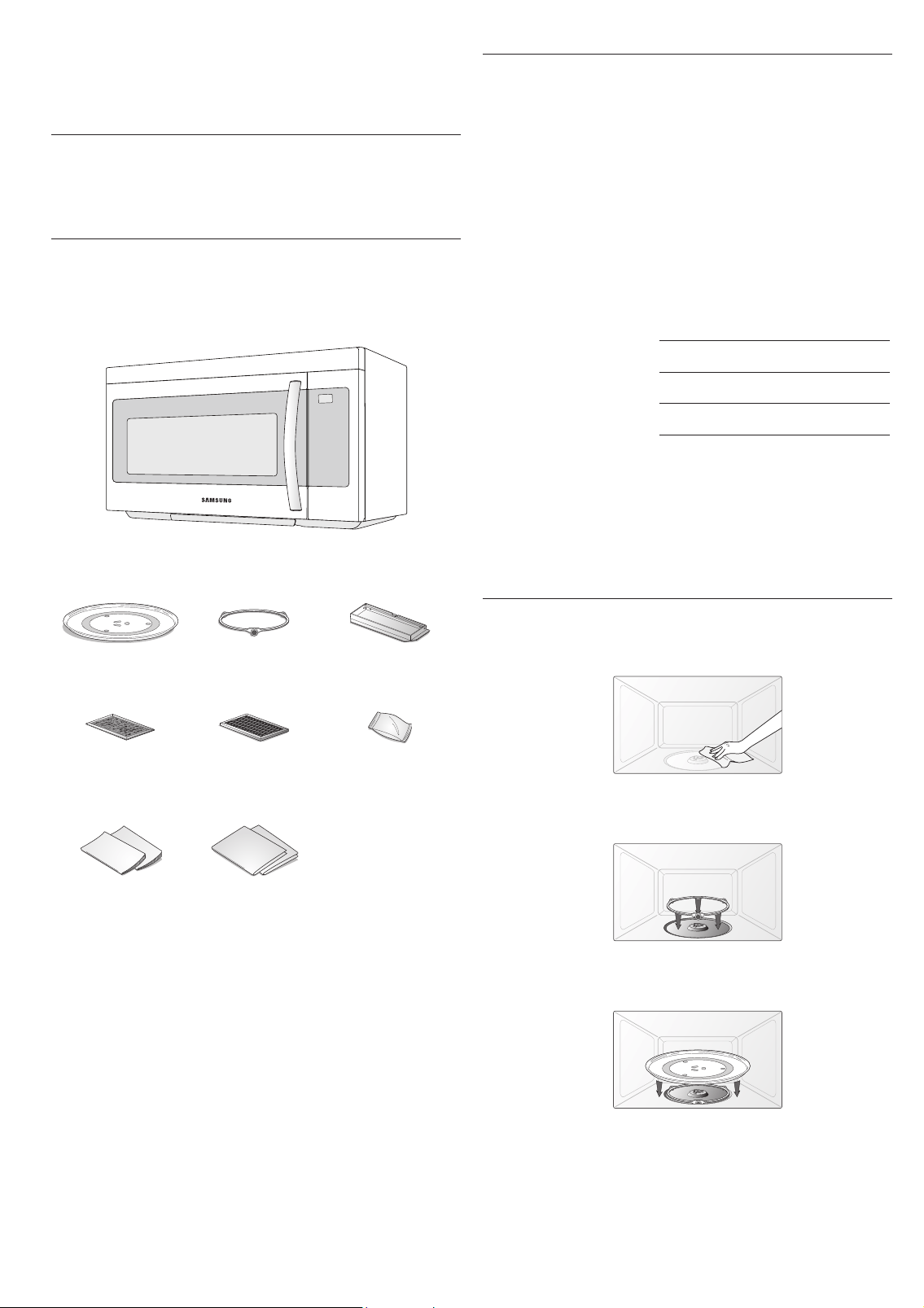
CHECKING THE PARTS
Carefully unpack your microwave oven, and make sure you’ve
received all the parts shown below. If your microwave oven
was damaged during shipping, or if you do not have all the
parts, contact Samsung Customer Care at 1-800-SAMSUNG
(726-7864).
Microwave oven (ME16A4021A*)
* Glass Tray * Roller Guide Ring * Exhaust adaptor
* Grease Filters
(2ea)
* Charcoal lter * Hardware kit
(Screws & Brackets)
Manuals
(User &
Installation)
Templates
(Top & Wall)
If you need an accessory marked with a *, you can buy it from
the Samsung Contact Center (1-800-726-7864).
WARRANTY AND SERVICE INFORMATION
To help us to serve you better, please complete the enclosed
registration card and promptly return it by mail. If the
registration card is missing, you can call Samsung Electronics,
Inc., at 1-800-SAMSUNG (726-7864) or register online at
www.samsung.com/register.
When contacting Samsung, please provide the specic model
and serial number information which is usually located on the
back or bottom of the product. Please record these numbers
in the spaces provided below, along with the other requested
information. Keep this information in a safe place as a
permanent record of your purchase to aid in identication in
case of theft or loss. Also keep a copy of your sales receipt as a
proof of purchase if warranty service is needed.
MODEL NUMBER
SERIAL NUMBER
DATE PURCHASED
PURCHASED FROM
Warranty service can only be performed by a Samsung
Authorized Service Center. If you should require warranty
service, provide the above information with a copy of your
sales receipt to the Samsung Authorized Service Center.
For service assistance and the location of the nearest service
center, please call 1-800-SAMSUNG (726-7864).
SETTING UP YOUR MICROWAVE OVEN
1. Open the door by pulling the handle on the right side of
the door.
2. Wipe the inside of the oven with a damp cloth.
3. Install the pre-assembled ring into the indentation at the
center of the microwave oven.
4. Place the glass tray securely in the center of the pre-
assembled roller ring.
English - 9
01 SETTING UP YOUR MICROWAVE OVEN
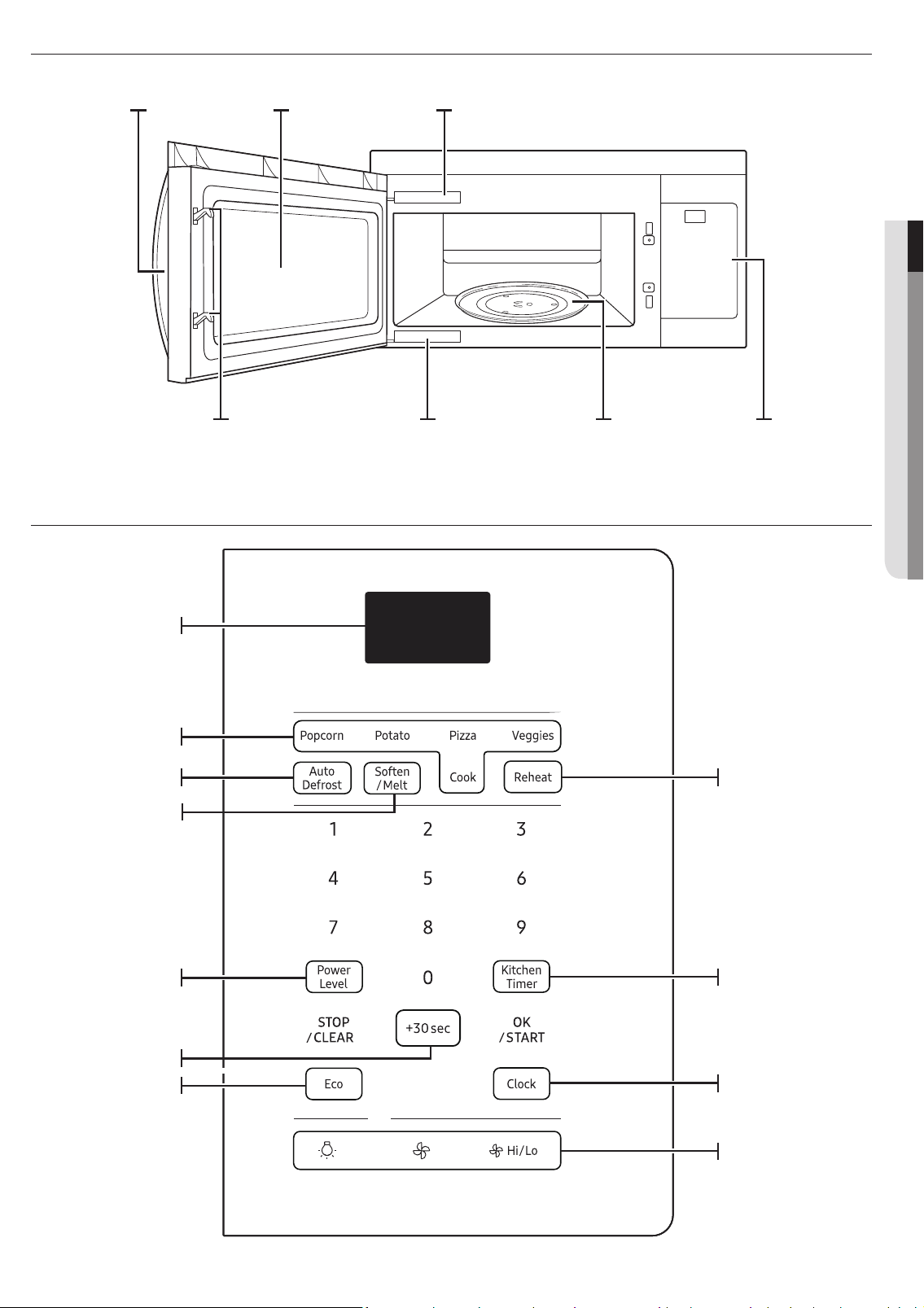
CHECKING THE CONTROL PANEL
FEATURES
Display
See page 11
See page 12
See page 14
See page 14
See page 10
See page 10
See page 13
See page 10
See page 10
See page 12
Oven Control
Panel
Glass
Turntable
Door Safety
Lock System
Model and Serial
Number Plate
Cooking Guide
Window with
Metal Shield
Door Handle
English - 10
SETTING THE TIME
Your microwave oven is equipped with a built-in clock. Set the clock when rst installing your microwave oven, after a power
failure, and after you have unplugged and then plugged in the power cord. The time is displayed whenever the microwave oven
is not being used.
1. Press the Clock button.
2. Use the number buttons to enter the current time.
3. Press the OK/START button.
CHILD LOCK
The Child Lock function allows you to lock the buttons so that the microwave oven cannot be operated accidentally. The oven
can be locked at any time.
Activating/Deactivating
If you want to activate or deactivate the child lock function, press the OK/START button for 3 seconds.
using your microwave oven
Cooking has never been easier than with your new Samsung microwave oven.
The following section describes everything you need to know about using your microwave oven.
KITCHEN TIMER BUTTON
Use the Kitchen Timer for timing up to 99 minutes, 99 seconds.
1. Press the Kitchen Timer button.
2. Use the number buttons to set the length of time you want the timer to run.
3. Press the OK/START button.
4. The display counts down and beeps when the time has elapsed.
5. To cancel the timer setting: Press the STOP/CLEAR button once.
ADD 30 SEC BUTTON
This simplied control saves you time, letting you quickly start cooking at 100 % power.
1. Press the Add 30 sec button for each 30 seconds you want food to cook. For example, press it twice to cook for one
minute, and then press the OK/START button to start cooking.
2. Add 30 sec to a cooking program already in progress by pressing the Add 30 sec button for every additional 30seconds
you want to add.
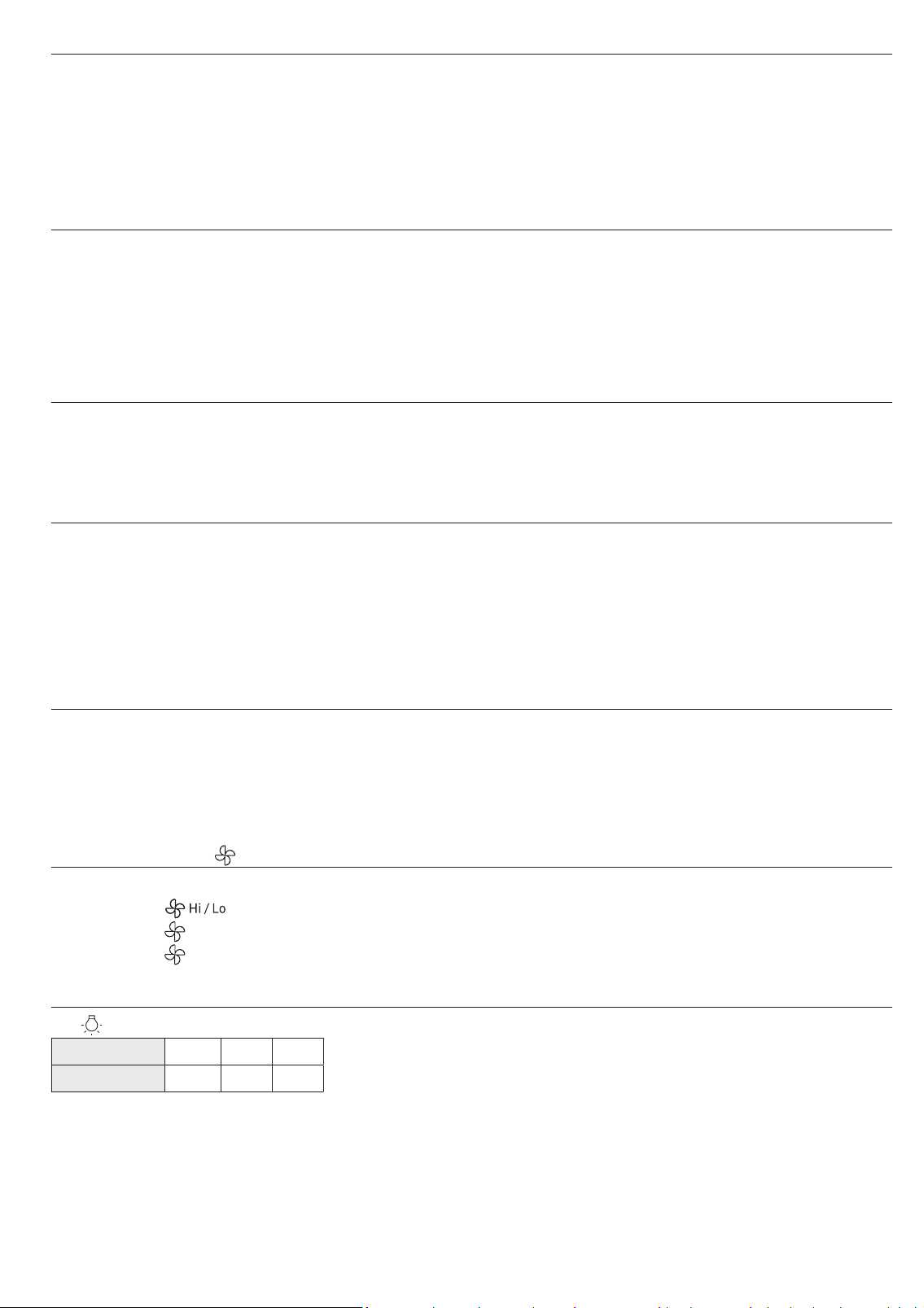
VENT BUTTONS ( )
The vent removes steam and other vapors from the cooking surface. You can manually select the vent setting.
1. Press the
button to set the speed level.
2. Press the
button to turn the vent on.
3. Press the
button again to turn the vent off.
LIGHT HI/LO/OFF BUTTON
The button allows you to select a light setting for your microwave.
Press (times) 1 2 3
Light High Low Off
English - 11
02 USING YOUR MICROWAVE OVEN
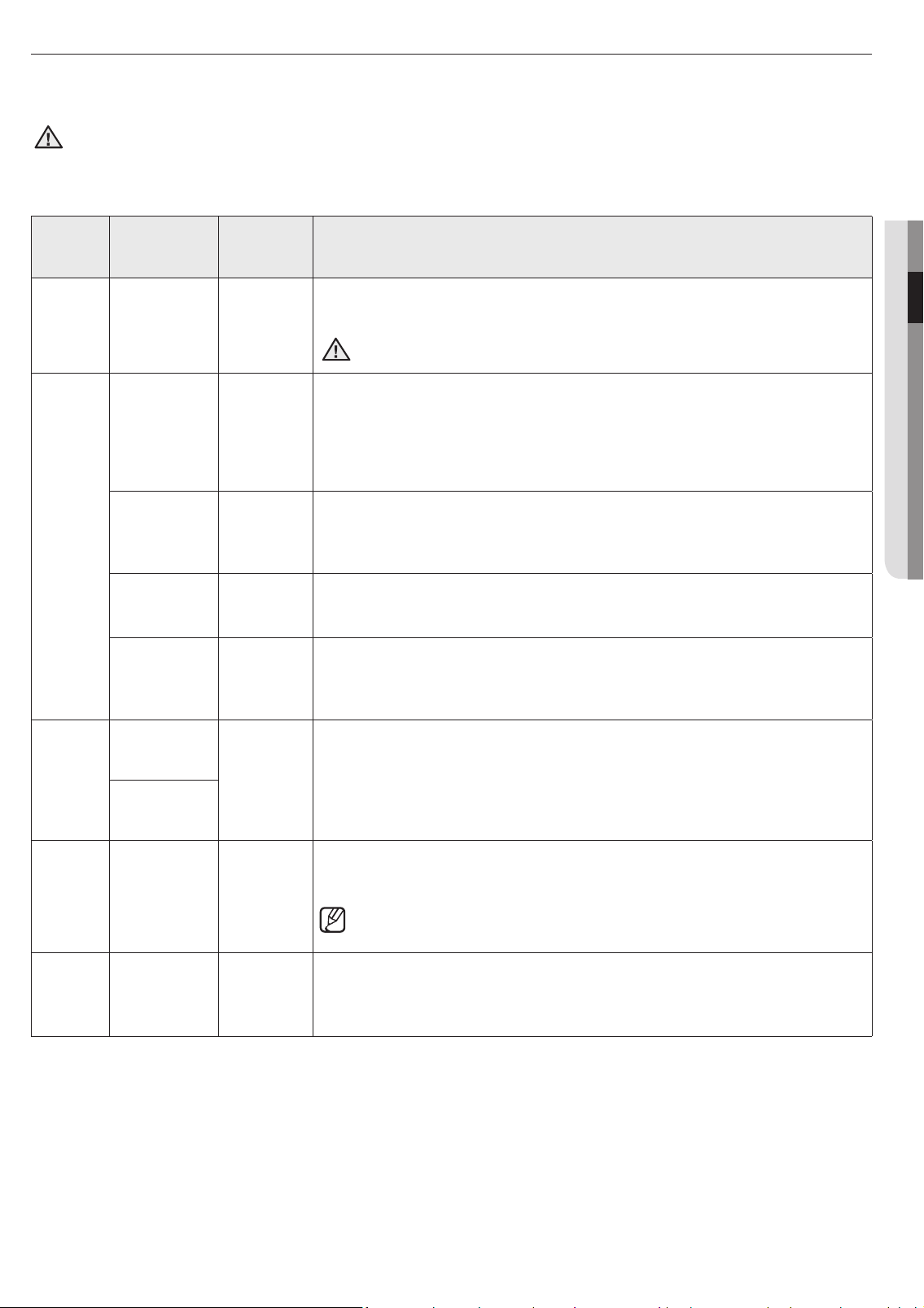
COOKING PRESETS BUTTONS
The Cooking Presets buttons let you cook favorite foods using preset power levels and times at the touch of a button. If the food
is not thoroughly cooked or reheated when you use the Preset buttons, complete the cooking process by selecting a power level
and cooking the food for an additional amount of time.
CAUTION
Do not use the Cooking Presets buttons continuously. You must let the oven cool for 5 minutes between uses or the food
will overcook.
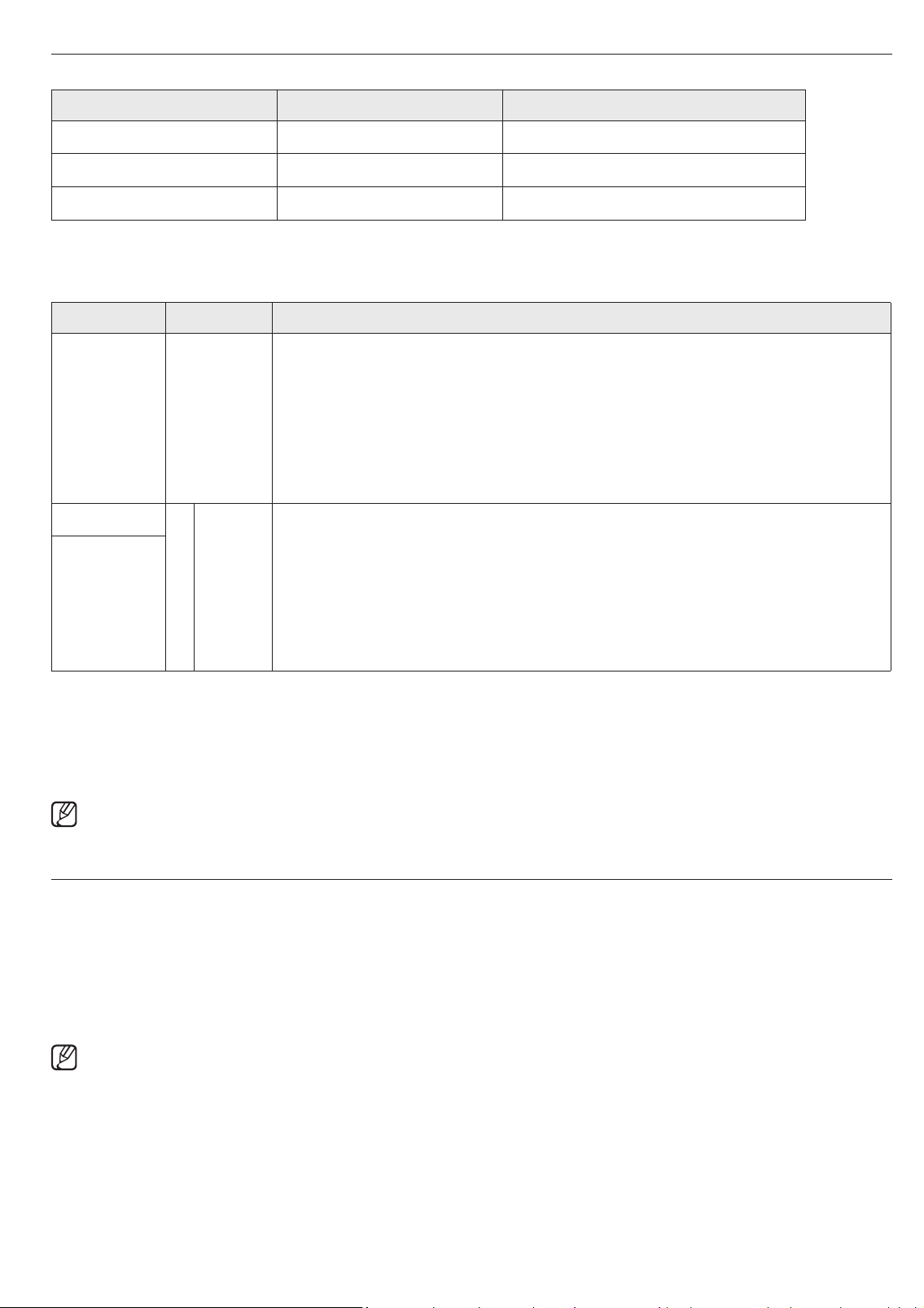
Auto cook table
Cooking
Preset
Button
Amount or
Type
Number of
Times to
Press
Instructions
Popcorn
3.5 oz.
1 package
once
Heat only one microwave popcorn bag at a time. Be careful when removing and
opening the heated bag from the oven. Let the oven cool for at least 5minutes
before using it again.
CAUTION
Do not leave the microwave oven unattended while popcorn is being cooked!
3.0-3.5 oz.
1 package
twice
Cook
Beverage
Display: Ac-1
once
Use a measuring cup or mug. Do not cover. Place the beverage in the oven. After
heating, stir well. Let oven cool for at least 5 minutes before using again.
Note: • Reheat times are based on an 8 ounce cup.
• Beverages heated with the beverage feature may be very hot.
• Remove the container with care.
Amount : 0.5 cup, 1 cup, 2 cup.
Bacon
Display: Ac-2
twice
Place 2 paper towels on a plate and arrange bacon on towels. Do not overlap.
Cover with additional paper towel. Remove the paper towels immediately after
cooking.
Amount : 2 to 6 slices.
Frozen Dinner
Display: Ac-3
three times
Remove food from outer wrapping and follow box instructions for covering and
standing. Let oven cool for at least 5 minutes before using again.
Amount : 8 to 14 oz.
Frozen
Breakfast
Display: Ac-4
four times
Use this button for frozen sandwiches, breakfast entrees, pancakes, wafes, etc.
Follow the package instructions for covering and standing. Let oven cool for at
least 5minutes before using again.
Amount : 4 to 8 oz.
Veggies
Fresh
vegetables :
Fr-1
once
Place 1 to 4 servings of fresh / frozen vegetables in a microwave-safe ceramic,
glass, or plastic dish and add 2-4 Tbs. water. Cover with lid or vented plastic wrap
to cook. Stir before letting stand for 3 to 5 minutes. Let oven cool for at least 5
minutes before using again.
Frozen
vegetables :
Fr-2
twice
Potato
1 potato once
Pierce each potato several times with a fork. Place them on the turntable in a
spoke-like fashion. After cooking, let the potatoes stand for 3-5 minutes. Let the
oven cool for at least 5 minutes before using it again.
Pierce the potatoes with a fork several times before putting them in the
microwave oven. The cooking times are based on average 8-10 oz. potatoes.
2 potatoes twice
3 potatoes three times
4 potatoes four times
Pizza
1 slice once
Put 1-3 slices of pizza on a microwave-safe plate with the wide end of each slice
toward the outside edge of the plate. Do not let slices overlap. Do not cover. Let
the oven cool for at least 5 minutes before using again.
2 slice twice
3 slice three times
English - 12
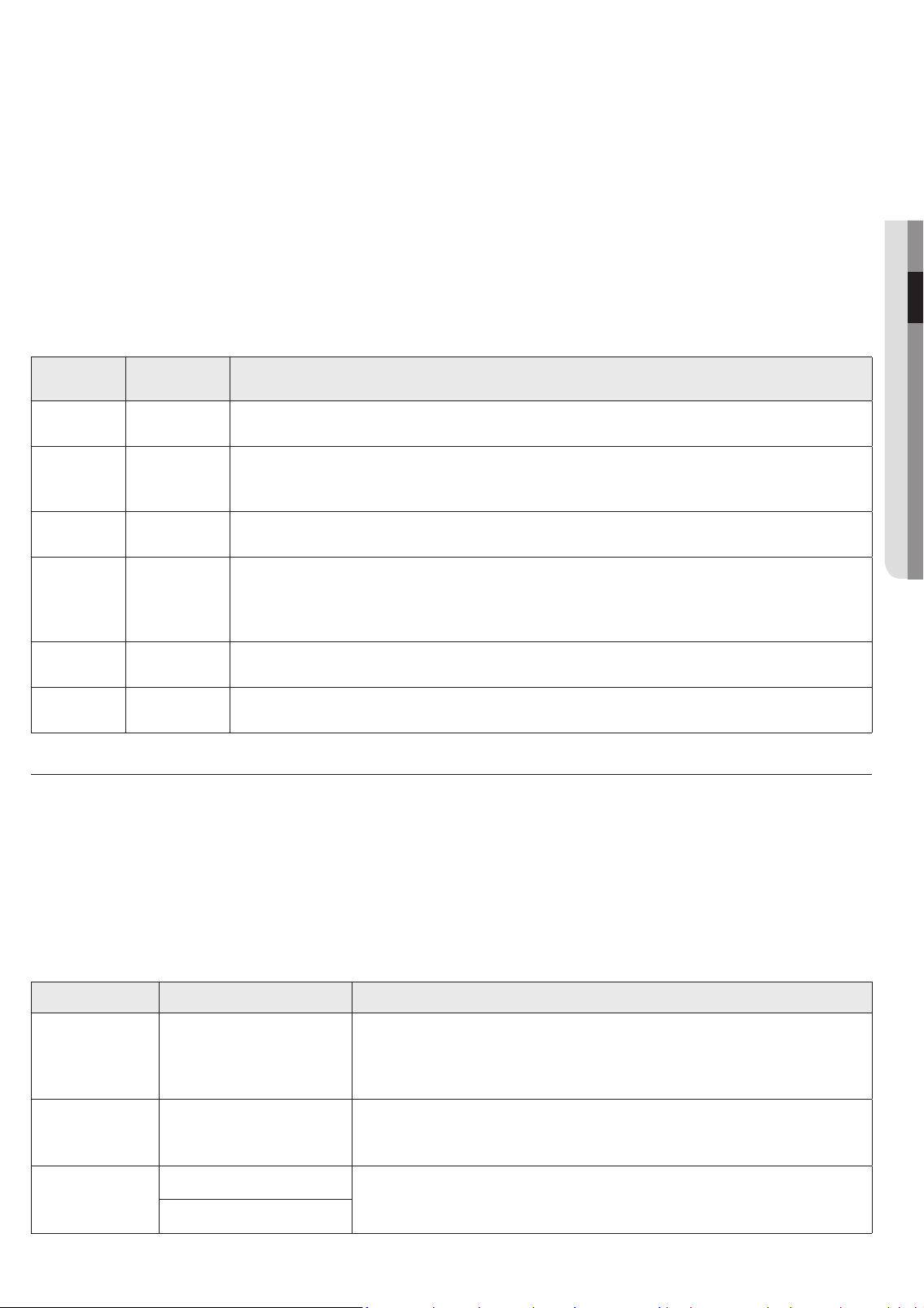
REHEAT BUTTON
The Reheat button provides three preset reheating categories.
Category Number of Times to Press Display
Plate of food once rh-1
Casserole twice rh-2
Pasta three times rh-3
Reheating table
Follow the instructions below when reheating different types of food.
Category Amount Directions
Plate of food
1 serving
(1 plate)
Use only pre-cooked, refrigerated foods. Cover the plate with a vented plastic wrap or
waxed paper tucked under the plate. If the food is not as hot as you would like after using
the reheat function, continue heating using additional time and power.
Contents:
3-4 oz. meat, poultry, or sh (up to 6 oz. with bone)
½ cup starch (potatoes, pasta, rice, etc.)
½ cup vegetables (about 3-4 oz.)
Casserole
1 1 serving
Cover the plate with a lid or vented plastic wrap. If the food is not as hot as you would like
after using the reheat function, continue heating using additional time and power. Stir the
food once before serving.
Contents:
3-4 oz. meat, poultry or sh (up to 6 oz. with bone)
½ cup starch (potatoes, pasta, rice, etc.)
½ cup vegetables (about 3-4 oz.)
Pasta
2
2 servings
3
3 servings
4
4 servings
Example: Reheating 3 servings of casserole.
1. Press the Reheat button twice.
2. Press the number 3 button.
3. Press the OK/START button.
4. When the cooking time is over, the oven will beep 4 times and display End.
The ‘right’ temperature of the food varies from person to person. Allow food to stand 1 to 5 minutes before serving.
AUTO DEFROST BUTTON
The auto defrost cycle, with its preset settings, provides you with the best defrosting method for frozen foods, because the oven
automatically sets the defrosting times according to the weight you enter. For added convenience, the auto defrost function
beeps to remind you to check or turn over the food during the defrost cycle.
Press the Auto Defrost button once, and then select the food weight. The available weights range from 0.1 to 6.0 lbs.
1. Press the Auto Defrost button.
2. Use the number buttons to enter the weight.
3. Press the OK/START button.
After pressing the OK/START button, the display counts down the defrosting time. The oven will beep twice during the
defrost cycle. When the oven beeps twice, open the door and turn the food as needed. Remove any thawed portions, then
return the frozen portions to the oven and press the OK/START button to resume the defrost cycle. Note that the defrost
cycle remains active while the oven is beeping, pauses when you open the door to turn the food, and then continues again
when you press OK/START.
English - 13
02 USING YOUR MICROWAVE OVEN
Defrosting tips
When using auto defrost, the entered weight is the net weight in pounds and tenths of pounds (the weight of the food minus
the container).
Use the auto defrost cycle for raw food only. The auto defrost cycle gives best results when the food you want to thaw is no
colder than 0 °F (taken directly from a true freezer). If food has been stored in a refrigerator-freezer that does not maintain
a temperature of 5 °F or below, always program a lower food weight (for a shorter defrosting time) to prevent the food from
cooking.
If the food is left outside the freezer for more than 20 minutes, enter a lower food weight.
The shape of the package alters the defrosting time. Shallow rectangular packets defrost more quickly than a thick block.
Separate the pieces as they begin to defrost. Separated pieces defrost more easily.
Shield areas of food with small pieces of foil if they start to become warm.
You can use small pieces of aluminum foil to shield food such as chicken wings, leg tips, and sh tails, but the foil must not
touch the sides of the oven as foil causes arcing, which can damage the oven lining.
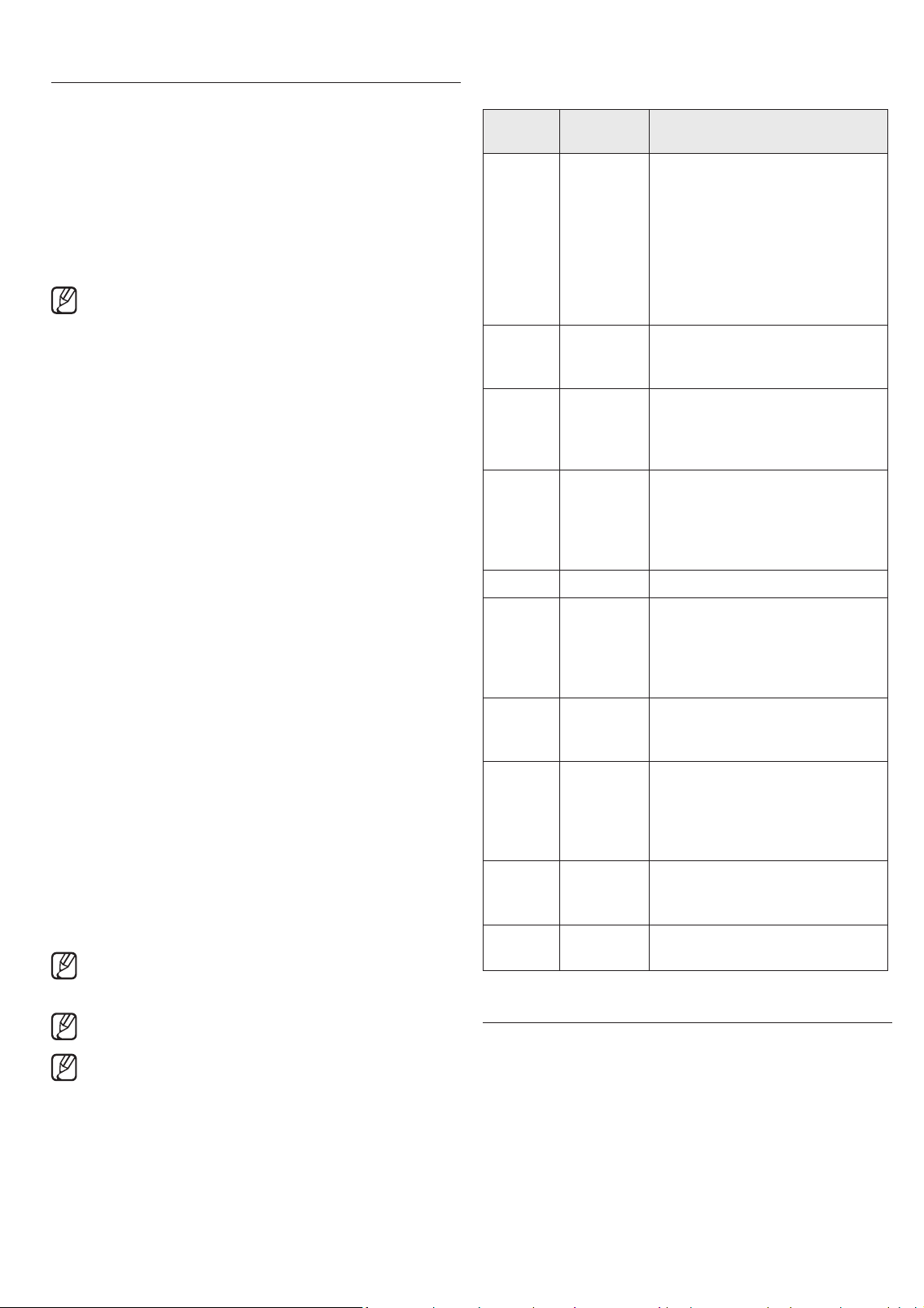
Auto defrosting table
Follow the instructions below when defrosting different types of food.
category
Standard
amount
Procedure
Roast Beef,
Pork
2.5-6.0 lbs.
Start with the food placed fat side down. After each stage, turn the food over and shield any
warm portions with narrow strips of aluminum foil.
Steaks,
Chops, Fish
0.5-3.0 lbs.
After each stage, rearrange the food. If there are any warm or thawed portions of food, shield
them with narrow, at pieces of aluminum foil. Remove any pieces of food that are nearly
defrosted. Let stand, covered for 5 - 10 minutes.
Ground
Meat
0.5-3.0 lbs.
After each stage, remove any pieces of food that are nearly defrosted. Let stand covered with
foil for 5 - 10 minutes.
Whole
Chicken
2.5-6.0 lbs.
Remove giblets before defrosting poultry. Start defrosting with the breast side down. After the
rst stage, turn the chicken over and shield any warm portions with narrow strips of aluminum
foil. After the second stage, again shield any warm portions with narrow strips of aluminum
foil. Let stand, covered, for 30 - 60 minutes in the refrigerator.
Chicken
Pieces
0.5-3.0 lbs.
After each stage, rearrange or remove any pieces of food that are nearly defrosted. Let stand for
10 - 20 minutes.
Bread 0.1 - 2.0 lbs.
Arrange the rolls in a circle on kitchen paper in the middle of the turntable.
Turn over halfway through the defrosting time.
SOFTEN/MELT BUTTON
SOFTEN/MELT lets you melt chocolate, soften cream cheese, and melt butter.
Example: To melt chocolate.
1. Touch the Soften/Melt button.
2. Choose the food category by pressing the Soften/Melt button repeatedly.
3. If required, choose the food amount (1 or 2) by pressing a number button.
4. Touch the OK/START button.
Soften / Melt table
Function Amount or servings Remarks
Melt chocolate
(St-1)
2 squares or 1 cup chips
Place chocolate chips or square in a microwave-safe dish.
Stir well at half time when the oven beeps, and re-start the oven.
Unless stirred, the chocolate keeps its shape even when heating time is
over.
Soften cream
cheese
(St-2)
1 package (8 oz.)
Unwrap the cream cheese and place on microwave-safe dish.
Let stand 1-2 minutes.
Melt butter
(St-3)
1 stick (1/4 lb.)
Remove wrapping and cut butter in half vertically.
Place butter in dish, cover with wax paper.
Stir well after nishing and let stand 1-2 minutes.
2 sticks (1/2 lb.)
English - 14
Power Levels
The 10 power levels allow you to choose the optimal power
level for your cooking needs.
Power
level
Microwave
output
Use
10
(High)
100 %
Boiling water.
Cooking ground beef.
Making candy.
Cooking fresh fruit and
vegetables.
Cooking sh and poultry.
Preheating browning dish.
Reheating beverages.
Bacon slices.
9 90 %
Reheating meat slices quickly.
Sautéing onions, celery, and
green pepper
8 80 %
Reheating all types of items
(Dinner plate, pasta, meat, soup
or sauce, etc,).
Cooking scrambled eggs.
7 70 %
Cooking breads and cereal
products.
Cooking cheese dishes, veal.
Cooking cakes, mufns, brownies,
cupcakes.
6 60 % Cooking pasta.
5 50 %
Cooking meats, whole poultry.
Heating custard
Cooking whole chickens, turkey,
spare ribs, rib roasts, sirloin
roasts.
4 40 %
Cooking less tender cuts of meat.
Reheating frozen convenience
foods.
3 30 %
Thawing meat, poultry, and
seafood.
Cooking small quantities of food.
Finishing cooking casserole, stew,
and some sauces.
2 20 %
Softening butter and cream
cheese.
Heating small amounts of food.
1 10 %
Softening ice cream.
Raising yeast dough.
ECO MODE
Eco Mode reduces standby power usage.
When you press the Eco button once, the display will go out
and the microwave shifts to Eco mode which minimizes power
usage.
To cancel the Eco Mode, press the Eco button once again, or
press any other button.
MICROWAVE COOKING TIMES & POWER
LEVELS
The power level lets you control the heating intensity from
Warm (1) to High (10).
Cooking at the high power level (10)
1. Use the number buttons to enter the cooking time.
2. Press the OK/START button.
3. When the cooking time is over, the oven beeps four
times and displays End.
If you do not enter a power level, the microwave oven
cooks at the High Power Level by default.
Cooking at lower power levels
Cooking at high power does not always give you the best
results with foods that require slower cooking, such as roasts,
baked goods, or custards. Your oven has 9 additional power
settings in addition to High.
1. Use the number buttons to enter the cooking time.
2. Press the Power Level button.
3. Use the number buttons to enter the power level.
4. Press the OK/START button.
5. When the cooking time is over, the oven beeps four
times and displays End.
Cooking with more than one cook stage
For best results, some recipes call for one Power Level for a
certain length of time, and another Power Level for another
length of time. Your oven can be set to change from one to
another automatically.
1. Use the number buttons to enter the cook time.
2. Press the Power Level button.
3. Use the number buttons to enter the power level.
4. Use the number buttons to enter the second cook time.
5. Press the Power Level button.
6. Use the number buttons to enter the power level.
7. Press the OK/START button.
8. When the cooking time is over, the oven beeps four
times and displays End.
When selecting more than one cooking stage, you must
press the Power Level button before you can enter the
second cooking stage time and power level.
Press the Power Level button twice to set the power
level to High for a cooking stage.
You cannot use the Auto Defrost function with the multi-
stage cooking function.
English - 15
03 COOKWARE GUIDE
cookware guide
For food to cook in the microwave oven, the
microwaves must be able to penetrate the food
without being reected or absorbed by the dish.
It is important to choose the correct cookware,
therefore, look for cookware that is marked
microwave-safe.
The following table lists various types of cookware
and indicates if and how they should be used in a
microwave oven.
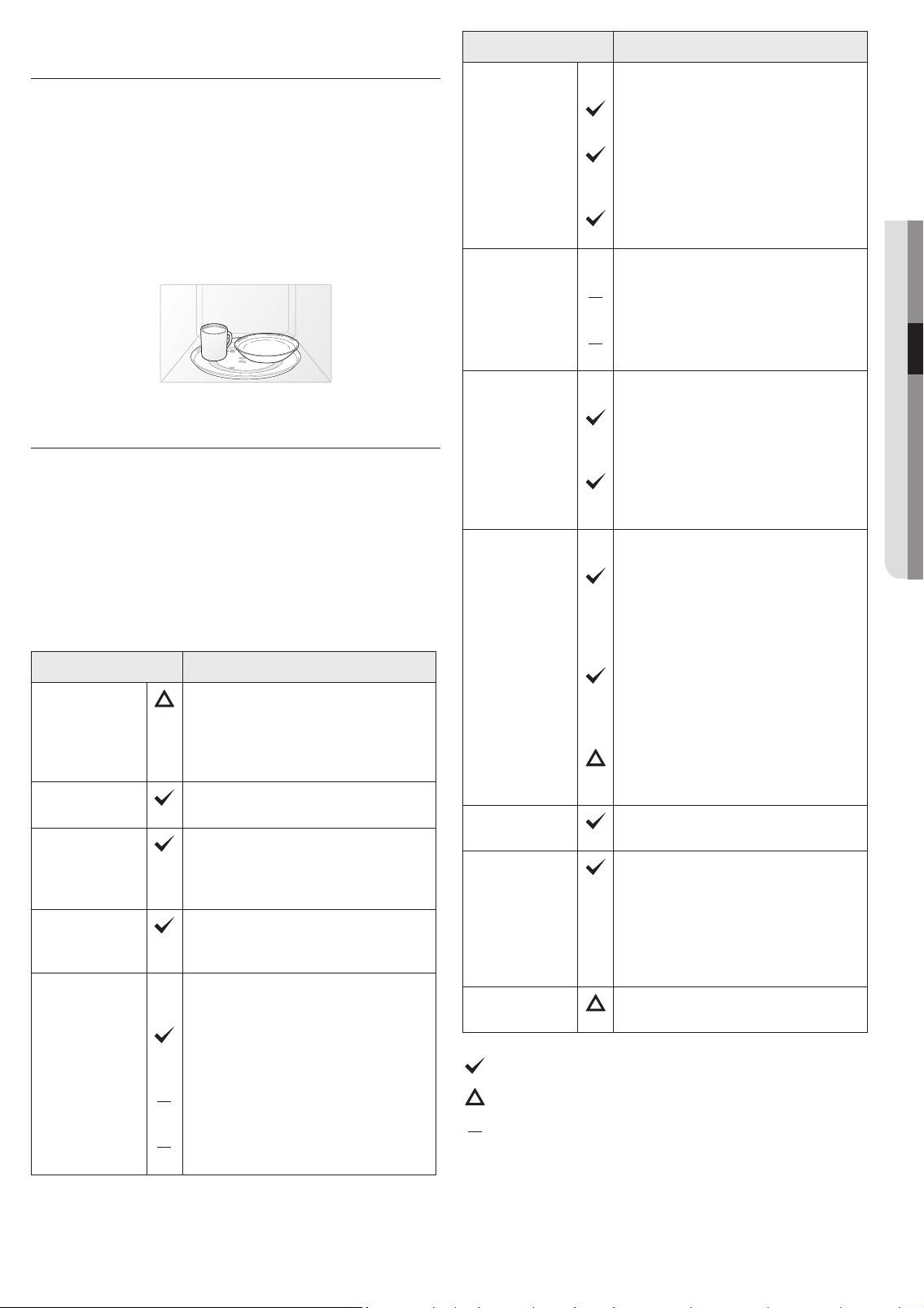
MICROWAVE-SAFE UTENSILS
If you are not sure whether an item is microwave-safe, you
can perform the following simple test:
1. Place 1 cup of water (in a glass-measuring cup) inside your
oven next to the item to be tested.
2. Press the Add 30 sec button twice to heat them both for
one minute at high power.
After one minute, the water should be warm and the item
you are testing should be cool. If the dish is warm, then it is
absorbing microwave energy and is not microwave-safe.
Cookware Comments
Aluminum foil
Can be used in small quantities to
protect areas against overcooking.
Arcing can occur if the foil is too
close to the oven wall or you use too
much foil.
Browning
plate
Do not preheat for more than eight
minutes.
Ceramic,
porcelain, and
stoneware
Porcelain, pottery, glazed
earthenware, and bone china are
usually suitable, unless decorated
with a metal trim.
Disposable
polyester
cardboard
Some frozen foods are packaged in
these materials.
Fast-food
packaging
Polystyrene
cups/
containers
Can be used to warm food.
Overheating may cause the
polystyrene to melt.
Paper bags or
newspaper
May catch re.
Recycled paper
or metal trims
May cause arcing.
Cookware Comments
Glassware
Oven-to-table
ware
Can be used, unless decorated with
a metal trim.
Fine glassware
Can be used to warm foods or
liquids. Delicate glass may break or
crack if heated suddenly.
Glass jars
Regular glass is too thin to be used
in a microwave, and can shatter.
Metal
Dishes,
Utensils
May cause arcing or re.
Freezer bag
twist ties
May cause arcing or re.
Paper
Plates, cups,
napkins, and
kitchen paper
For short cooking times and
warming. Also to absorb excess
moisture.
Recycled paper
Do not use recycled paper towels,
which may contain metal and may
catch re or cause arcing.
Plastic
Containers
Can be used if heat-resistant
thermoplastic. Some plastics
may warp or discolor at high
temperatures. Do not use Melamine
plastic.
Cling lm
Can be used to retain moisture.
Avoid wrapping the food too tightly.
Take care when removing the lm.
Hot steam will escape.
Freezer bags
Only if boilable or oven-proof.
Should not be airtight. Pierce with a
fork if necessary.
Wax or grease-
proof paper
Can be used to retain moisture and
prevent spattering.
Thermometer
Use only those marked “Microwave-
safe” and follow the directions.
Check the temperature in several
places. You can use conventional
thermometers on the food once the
food has been removed from the
oven.
Straw, wicker,
and wood
Use only for short-term heating, as
these materials are ammable.
: Recommended to use
: Use with Caution
: Unsafe to use / Do not use
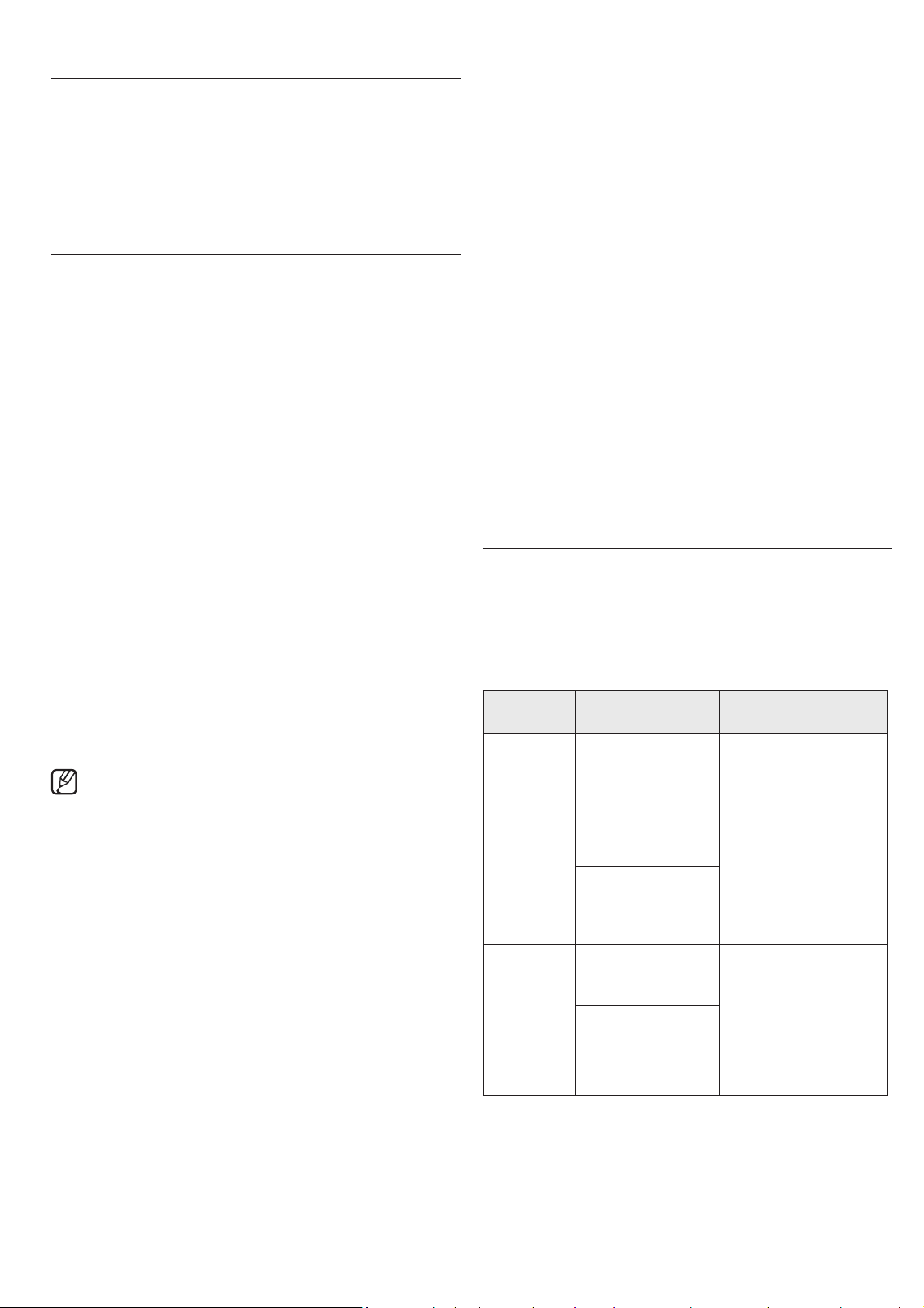
English - 16
cooking guide
Microwave energy actually penetrates food,
attracted and absorbed by the water, fat, and sugar
in the food. The microwaves cause the molecules
in the food to move rapidly. The rapid movement of
these molecules creates friction and the resulting
heat cooks the food.
GENERAL MICROWAVE TIPS
Dense foods, such as potatoes, take longer to heat than
lighter foods. Foods with a delicate texture should be heated
at a low power level to avoid becoming tough.
Foods with a non-porous skin such as potatoes or hot dogs,
should be pierced to prevent bursting.
Putting heating oil or fat in the microwave is not
recommended. Fat and oil can suddenly boil over and cause
severe burns.
Some ingredients heat faster than others. For example, the
jelly in the jelly doughnut will be hotter than the dough. Keep
this in mind to avoid burns.
The altitude and the type of cookware you are using can affect
the cooking time. When trying a new recipe, use the minimum
cooking time and check the food occasionally to prevent
overcooking.
Home canning in the microwave oven is not recommended
because not all harmful bacteria may be destroyed by the
microwave heating process.
Although microwaves do not heat the cookware, the heat
from the food is often transferred to the cookware. Always
use pot holders when removing food from the microwave and
instruct children to do the same.
Making candy in the microwave is not recommended as candy
can be heated to very high temperatures. Keep this in mind to
avoid injury.
Cooking techniques
If the oven is set to cook for more than 25 minutes, it
will automatically adjust to 70 percent power after 25
minutes to avoid overcooking.
Stirring
Open the microwave door and stir foods such as casseroles
and vegetables occasionally while cooking to distribute heat
evenly. Food at the outside of the dish absorbs more energy
and heats more quickly, so stir from the outside towards the
center. The oven will turn off when you open the door to stir
your food.
Arrangement
Arrange unevenly shaped foods, such as chicken pieces or
chops, with the thicker, meatier parts toward the outside of
the turntable where they can receive more microwave energy.
To prevent overcooking, place thin or delicate parts towards
the center of the turntable.
Shielding
Shield food with narrow strips of aluminum foil to prevent
overcooking. Areas that need shielding include poultry wing-
tips, the ends of poultry legs, and corners of square baking
dishes. Use only small amounts of aluminum foil. Larger
amounts can damage your oven.
Turning
Turn foods over midway through the cooking cycle to expose
all parts to the microwave energy. This is especially important
with large items such as roasts.
Standing
Foods cooked in the microwave build up internal heat and
continue to cook for a few minutes after the oven stops. Let
foods stand to complete the cooking process, especially foods
such as roasts and whole vegetables. Roasts need this time to
complete cooking in the center without overcooking the outer
areas. All liquids, such as soup or hot chocolate should be
shaken or stirred when cooking is complete. Let liquids stand
a moment before serving. When heating baby food, stir well
and test the temperature before serving.
Adding moisture
Microwave energy is attracted to water molecules. Food that
is uneven in moisture content should be covered or allowed to
stand so that the heat disperses evenly. Add a small amount
of water to dry food to help it cook.
Venting
After covering a dish with plastic wrap, vent the plastic wrap
by turning back one corner to let excess steam escape.
COOKING MEAT
Place the meat fat side down on a microwave-safe roasting
rack in a microwave-safe dish. Use narrow strips of aluminum
foil to shield any bone tips or thin pieces of meat. Check the
temperature in several places before letting the meat stand
the recommended time.
The following temperatures are the removal temperatures.
The temperature of the food will rise during standing time.
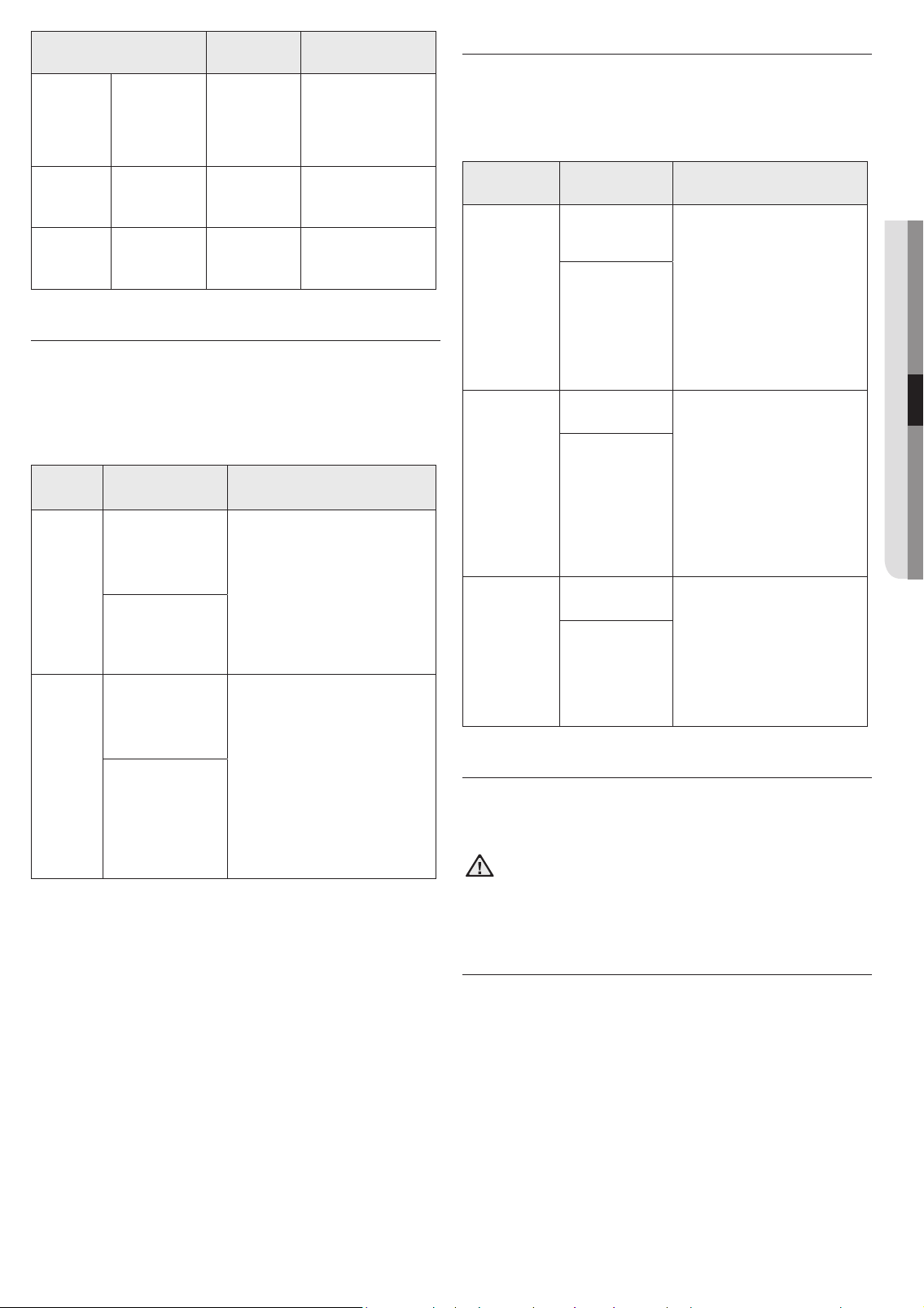
Food
Cooking time/
Power level
Instructions
Roast beef
(boneless)
Up to 4 lbs.
Cooking Time:
10-15 min./lb. for
145 °F - Rare
12-17 min./lb. for
160 °F - Medium
14-19 min./lb. for
170 °F - Well Done
Place the roast fat-side
down on the roasting
rack and cover with
wax paper. Turn over
halfway through the
cooking process.
Let stand for 10 to 15
minutes.
Power Level:
High (10) for rst
5 minutes, then
Medium (5).
Pork
(boneless or
bone-in)
Up to 4 lbs.
Cooking Time:
15-20 min./lb. at
170 °F Well Done
Place the pork fat-side
down on the roasting
rack and cover with
wax paper. Turn over
halfway through
cooking process.
Let stand for 10 to
15minutes.
Power Level:
High (10) for rst
5 minutes, then
Medium (5).
The following temperatures are the removal temperatures.
The temperature of the food will rise during standing time.
Expect a 10 °F rise in temperature during the standing time.
English - 17
04 COOKING GUIDE
Food
Remove
from oven
After standing
(10 MIN.)
Beef
Rare 135 °F 145 °F
Medium 150 °F 160 °F
Well Done 160 °F 170 °F
Pork
Medium 150 °F 160 °F
Well Done 160 °F 170 °F
Poultry
Dark meat 170 °F 180 °F
Light meat 160 °F 170 °F
COOKING POULTRY
Place the poultry on a microwave-safe roasting rack in a
microwave-safe dish and cover with wax paper to prevent
spattering. Use aluminum foil to shield the bone tips, thin
pieces of meat, or areas that may start to overcook.
Check the temperature in several places before letting the
poultry stand the recommended time.
Food
Cooking time/
Power level
Instructions
Whole
chicken
Up to 4
lbs.
Cooking Time:
6-10 min./lb.
180 °F dark meat
170 °F light meat
Place the chicken breast-side
down on the roasting rack.
Cover with wax paper. Turn
over half way through cooking
process. Cook until the juices
run clear and the meat near
the bone is no longer pink. Let
stand for 5-10 minutes.
Power Level:
Medium High (7).
Chicken
pieces
Up to 2
lbs.
Cooking Time:
6-9 min./lb.
180 °F dark meat
170 °F light meat
Place the chicken bone-side
down on the dish, with the
thickest portions towards the
outside of the dish. Cover with
wax paper. Turn over halfway
through the cooking process.
Cook until the juices run clear
and the meat near the bone is
no longer pink. Let stand for
5-10 minutes.
Power Level:
Medium High (7).
COOKING SEAFOOD
Place the sh on a microwave-safe roasting rack in a
microwave-safe dish. Use a tight cover to steam the sh.
A lighter cover of wax paper or paper towel will decrease
steaming. Cook the sh until it akes easily with a fork. Do not
overcook sh. Check it after the minimum cooking time.
Food
Cooking time/
Power level
Instructions
Tuna steaks
and salmon
steaks
Up to 1.5 lbs.
Cooking Time:
7-11 min./lb.
Arrange the steaks on
a roasting rack with the
meaty portions towards
the outside of the rack.
Cover with wax paper. Turn
them over halfway through
the cooking process. Cook
until the sh akes easily
with a fork. Let stand for
3-5minutes.
Power Level:
Medium-High
(7).
Fillets
Up to 1.5 lbs.
Cooking Time:
4-8 min./lb.
Arrange the llets in a
baking dish, tucking any
thin pieces under. Cover
with wax paper. If the llets
are thicker than ½ in., turn
them over halfway through
the cooking process. Cook
until the sh akes easily
with a fork. Let stand for
2-3minutes.
Power Level:
Medium-High
(7).
Shrimp
Up to 1.5 lbs.
Cooking Time:
4-6½ min./lb.
Arrange the shrimp in
a baking dish without
overlapping or layering
them. Cover with wax
paper. Cook until rm
and opaque, stirring 2
or 3 times. Let stand for
5minutes.
Power Level:
Medium-High
(7).
COOKING EGGS
You can use your microwave oven to cook eggs. Cook them
until they are just set as they become tough if they are
overcooked.
WARNING
Never cook eggs in their shells and never warm up
hard-boiled eggs in their shells. Eggs cooked or
warmed up in their shells can explode. Always pierce
whole eggs to keep them from bursting.
COOKING VEGETABLES
Vegetables should be washed prior to cooking. Usually, no
extra water is needed. When cooking dense vegetables such
as potatoes, carrots, and green beans, add about ¼ cup water.
Small vegetables (sliced carrots, peas, lima beans, etc.) will
cook faster than larger ones.
Whole vegetables, such as potatoes, acorn squash, or corn on
the cob, should be arranged in a circle on the turntable before
cooking. They will cook more evenly if turned over halfway
through the cooking process.
Always place vegetables such as asparagus and broccoli with
the stems pointing towards the edge of the dish and the tips
toward the center.
When cooking cut vegetables, always cover the dish with a lid
or vented microwavable plastic wrap.
Whole, unpeeled vegetables such as potatoes, squash,

English - 18
eggplant, etc., should have their skins pierced in several spots
before cooking to prevent them from bursting.
For a more even cooking result, stir or rearrange whole
vegetables halfway through the cook time.
Generally, the denser the food, the longer the standing time.
(The standing time refers to the time necessary for dense,
large foods and vegetables to nish cooking after they come
out of the oven.) A baked potato can stand on the counter for
ve minutes before cooking is completed, while a dish of peas
can be served immediately.
RECIPES
Beef and barley stew
1 ½ lbs. beef stew cubes, cut into ½-inch pieces
½ cup chopped onion
2 Tbs. all-purpose our
1 Tbs. Worcestershire sauce
1 can (13.75-14.5 oz.) beef broth
2 medium carrots, cut into ½-inch slices (about 1 cup)
½ cup barley
1 bay leaf
¼ tsp. pepper
1 pkg. (9-10 oz.) frozen peas, thawed
1. In a 2-quart casserole, combine the beef, onion, our, and
Worcestershire sauce and mix well. Cover with lid. Cook
at High for 6 to 8 minutes until the beef is no longer pink,
stirring once.
2. Stir in beef broth, carrots, barley, bay leaves, and pepper.
Cover with lid. Cook at Medium for 1 to 1½ hours until
carrots and beef are tender, stirring 2 to 3 times.
3. Stir in peas. Cover with lid. Cook at Medium for 10 minutes.
Let stand for 10 minutes. Remove bay leaves before
serving.
Makes 6 servings.
Broccoli and cheese casserole
¼ cup butter or margarine
¼ cup chopped onion
1 ½ Tbs. our
½ tsp. salt
¼ tsp. dry mustard
⅛ tsp. pepper
1 ½ cups milk
¼ cup chopped red pepper
8 oz. (2 cups) cheddar cheese, shredded
1 pkg. (9-10 oz.) frozen chopped broccoli, thawed
4 cups cooked spiral shaped pasta (8 oz. dry)
1. In a 2-quart casserole, cook butter and onion at High for 1
to 2 minutes until the onion is soft, stirring once.
2. Add our, salt, mustard, and pepper; mix well. Cook at
High for 30 to 60 seconds until mixture boils. Stir in milk
until smooth.
3. Stir in red pepper. Cook at High for 2 to 3 minutes until
mixture boils and thickens slightly, stirring twice. Stir in
cheese until melted.
4. Add broccoli and pasta, mix well. Cover with lid. Cook
at High for 4 to 6 minutes until heated through, stirring
once. Stir before serving.
Makes 6 servings.
Warm potato salad
2 lbs. small red potatoes, cut into ½-inch pieces
4 slices bacon (uncooked), cut into ½-inch pieces
¼ cup chopped onion
2 tsp. sugar
1 tsp. salt
1 tsp. our
½ tsp. celery seed
⅛ tsp. pepper
2 ½ Tbs. apple cider vinegar
1. In a 2-quart casserole, combine the potatoes and ¼ cup
water. Cover with lid. Cook at High until the potatoes are
tender (7-10 minutes); stir twice. Drain and set aside to
cool slightly.
2. In a medium bowl, cook the bacon at High until crisp (2½-
3½ minutes); stir once. Place the bacon on a paper towel.
Reserve 1 Tbs. drippings.
3. Combine the drippings and onion. Cover with plastic
wrap; turn a corner back to vent steam. Cook at High until
tender (1 ½-2 ½ minutes); stir once.
4. Stir in sugar, salt, our, celery seed, and pepper. Cook at
High until mixture boils (30-40 seconds). Stir in vinegar
and ½ cup water. Cook at High until liquid boils and
thickens slightly (1-2 minutes); stir once. Add bacon to
dressing. Pour dressing over potatoes. Stir well.
Makes 6 servings.
Black bean soup
1 cup chopped onion
1 clove garlic, minced
2 cans (15 oz. each) black beans, drained
1 can (14-16 oz.) stewed tomatoes, chopped
1 can (13.75-14.5 oz.) chicken broth
1 can (7-8.5 oz.) corn
1 can (4 oz.) chopped green chilies
1-2 tsp. ground cumin
1. Place the onion and garlic in a 3-quart casserole. Cover
with lid. Cook at High for 2 to 4 minutes until tender.
2. Add one can of beans, and mash the beans with a fork.
Add remaining ingredients and mix well.
3. Cook uncovered at High for 10 minutes; stir. Reduce power
to Medium and cook for 5 minutes. Stir before serving.
Makes about 2 quarts.
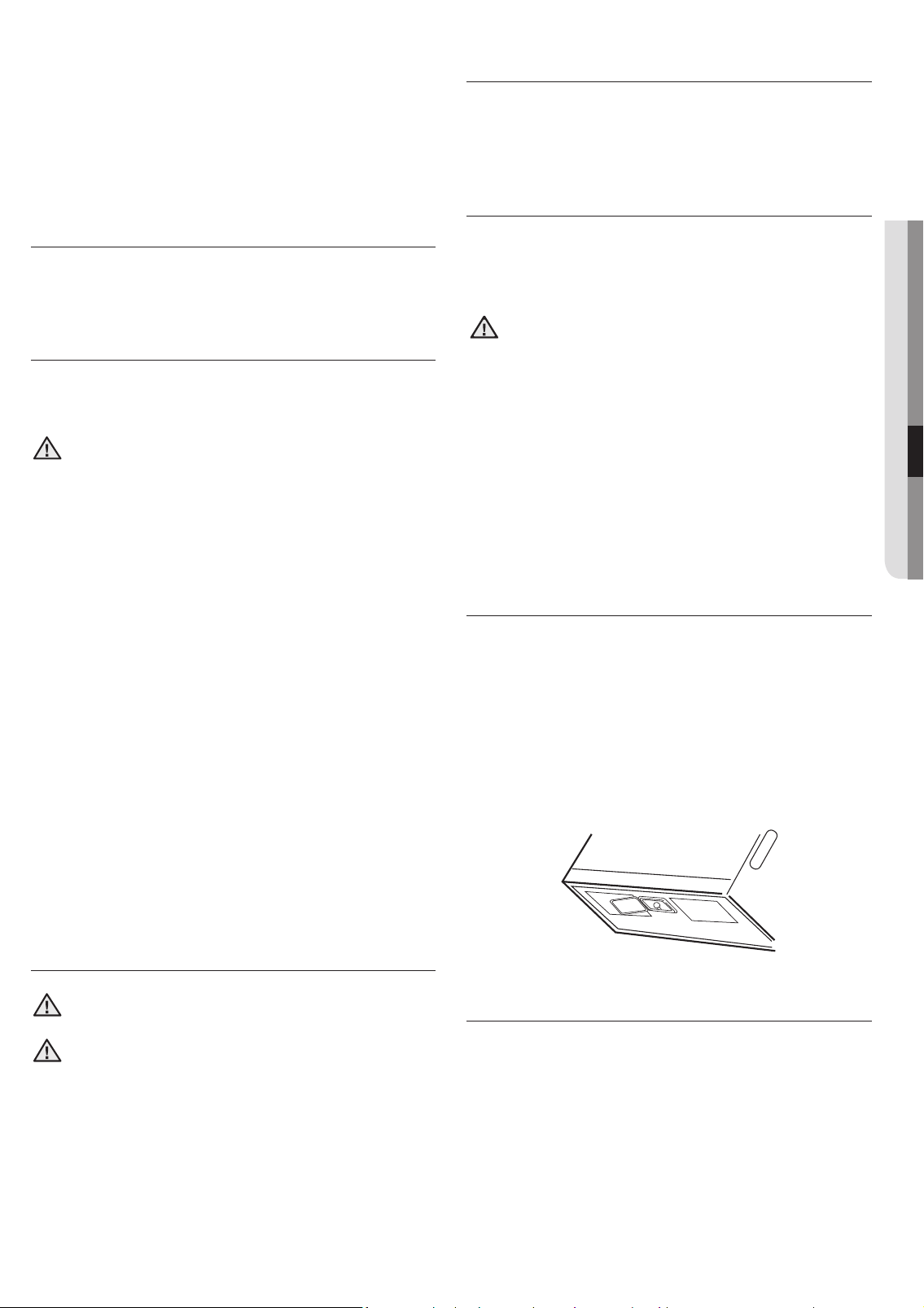
English - 19
05 CLEANING AND MAINTAINING
cleaning and
maintaining
your microwave
oven
Keeping your microwave oven clean improves its
performance, wards off unnecessary repairs, and
lengthens its life.
CLEANING THE EXTERIOR
It’s best to clean spills on the outside of your microwave oven
as they occur. Use a soft cloth and warm, soapy water. Rinse
and dry.
CAUTION
Do not get water into the vents. Never use abrasive
products or chemical solvents such as ammonia or
alcohol as they can damage the appearance of your
microwave.
Cleaning under your microwave oven
Regularly clean grease and dust from the bottom of your
microwave using a solution of warm water and detergent.
Cleaning the control panel
Wipe with a damp cloth and dry thoroughly. Do not use
cleaning sprays, large amounts of soap and water, abrasives,
or sharp objects on the panel as it is easily damaged.
Cleaning the door and door seals
Always ensure that the door seals are clean and that the door
closes properly. Take particular care when cleaning the door
seals to ensure that no particles accumulate and prevent
the door from closing correctly. Wash the glass door with
very mild soap and water. Be sure to use a soft cloth to avoid
scratching.
If a thin lm of water accumulates on the inside or outside of
the oven door, wipe it off with a soft cloth. A thin water lm
can accumulate when you operate the oven when humidity is
high and in no way indicates microwave leakage.
CLEANING THE INTERIOR
CAUTION
Ensure that the microwave oven has cooled down
before cleaning it to avoid injury.
CAUTION
Remove the glass tray from the oven when cleaning
the oven or tray. To prevent the tray from breaking,
handle it with care and do not put it in water
immediately after cooking. Wash the tray carefully in
warm sudsy water or in the dishwasher.
Clean the interior surfaces (oven cavity) of your microwave
oven periodically to remove any splashes or stains. To
remove hardened food articles and remove smells, place
2 cups of water (add lemon juice for extra freshness) into a
four-cup measuring glass. Run the microwave at High power
for 5 minutes or until the water boils. Let the water stand in
the oven for one or two minutes.
CLEANING THE TURNTABLE AND ROLLER
RINGS
Clean the roller rings periodically and wash the turntable
as required. You can wash the turntable safely in your
dishwasher.
STORING AND REPAIRING YOUR
MICROWAVE OVEN
If you need to store your microwave oven for a short or
extended period of time, choose a dust-free, dry location.
Dust and dampness may adversely affect the ability of the
microwave parts.
WARNING
• Do not repair, replace, or service any part of your
microwave oven yourself. Allow only a qualied
service technician to perform repairs. If the oven is
faulty and needs servicing, or you are in doubt about
its condition, unplug the oven from the power outlet
and contact your nearest Samsung service center.
• Do not use the oven if it is damaged, in particular, if
the door or door seals are damaged. Door damage
includes a broken hinge, a worn out seal, or a
distorted/bent casing.
• Do not remove the oven from its casing.
• This microwave oven is for home use only and is not
intended for commercial use.
REPLACING THE COOKTOP/NIGHT LIGHT
When replacing the cooktop/night light, make sure that you
are wearing gloves to avoid injury from the heat of the bulb.
1. Unplug the oven or turn off the power at the main power
supply.
2. Remove the screw from the light cover and lower the
cover.
3. Replace the bulb with a 40 watt incandescent bulb.
4. Replace the light cover and mounting screw.
5. Turn the power back on at the main power supply or plug
the microwave in.
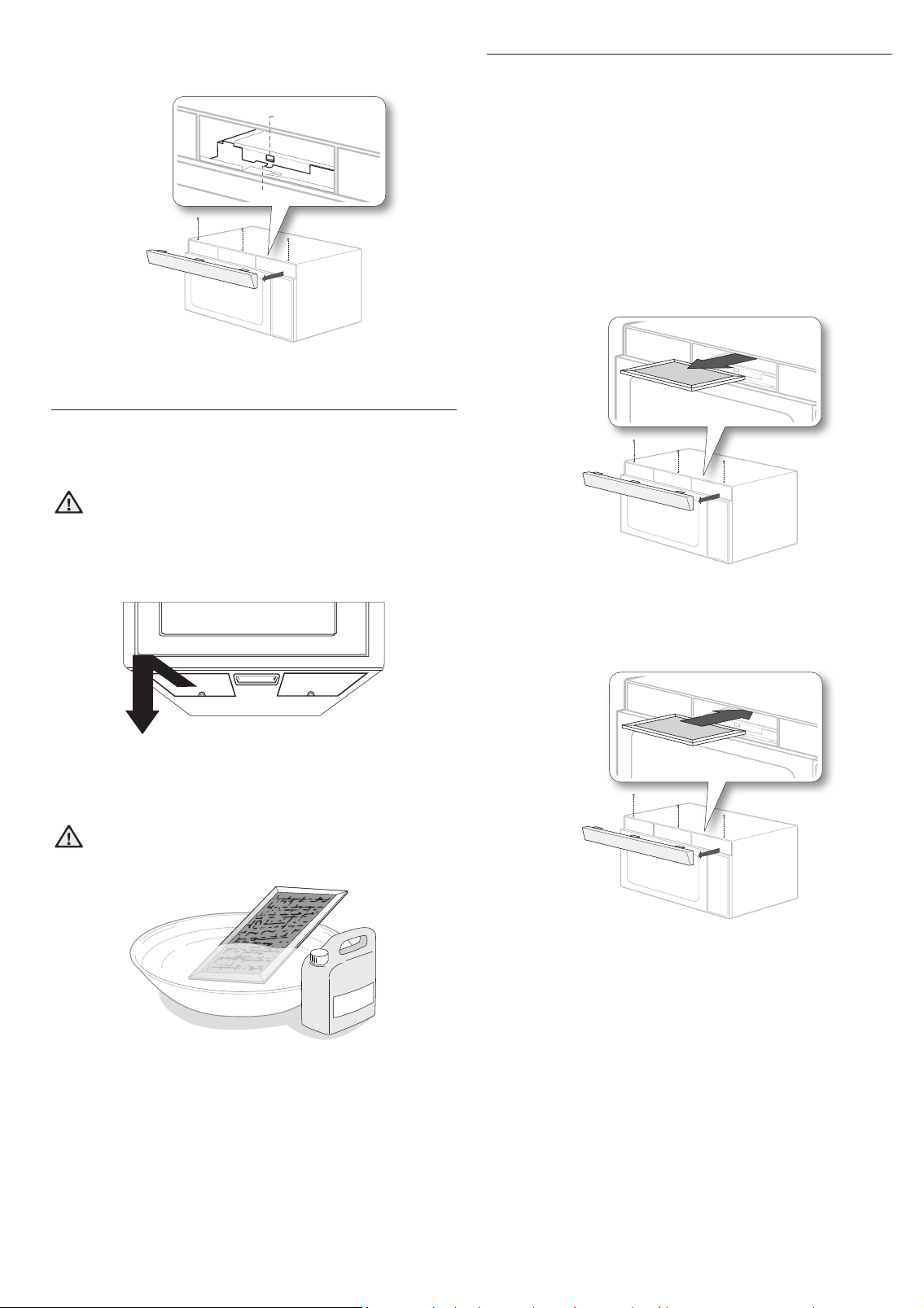
REPLACING THE OVEN LIGHT
When replacing the oven light, make sure that you are
wearing gloves to avoid injury from the heat of the bulb.
1. Unplug the oven or turn off the power at the main power
supply.
2. Open the door.
3. Remove the vent cover mounting screws (3 middle screws).
4. Slide the vent grille to the left, then pull it straight out.
5. Remove the charcoal lter, if present.
6. Remove the cover by pushing the hook and pulling up the lever.
7. Remove the bulb by turning it gently.
8. Replace the bulb with a 40 watt appliance bulb.
English - 20
9. Replace the bulb holder.
10. Replace the vent grille and the 3 screws.
11. Turn the power back on or plug the microwave in.
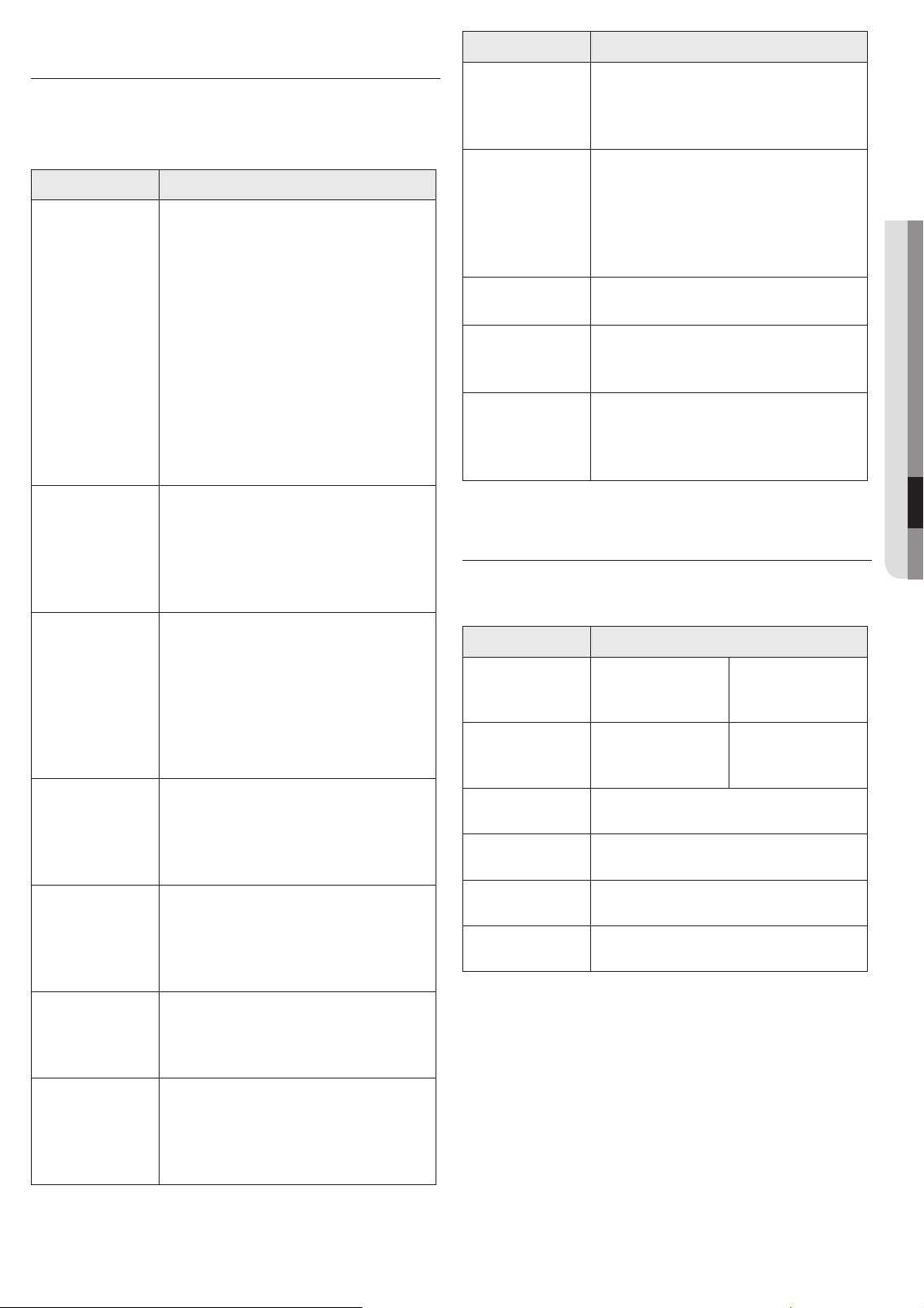
1. Push
2. Pull up
CLEANING THE GREASE FILTER
Your microwave oven has two metal reusable grease lters.
The grease lters should be removed and cleaned at least
once a month or as required.
WARNING
To avoid risk of personal injury or property damage, do
not operate the oven hood without the lters in place.
1. To remove the lter, slide it to the left (or right) using the
tab.
2. Soak the grease lter in hot water and a mild detergent.
Rinse well and shake to dry. Brushing the lter lightly
can remove embedded dirt.
WARNING
Do not use ammonia or try to dry the grease lter in
the microwave oven. The aluminum will darken.
3. To re-install the lter, slide it into the frame slot on the
left (or right), and then push it upwards and to the right
(or left) to lock it.
REPLACING THE CHARCOAL FILTER
If your oven is vented to the inside, the charcoal lter
should be replaced every 6 to 12 months and more often if
necessary. The charcoal lter cannot be cleaned. To order a
new charcoal lter, contact SamsungParts at 1-800-627-4368
or your Samsung dealer. You can also order online at www.
samsungparts.com
1. Unplug the oven or turn off the power at the main power
supply.
2. Open the door.
3. Remove the vent grille mounting screws (3 middle
screws).
4. Slide the vent grille to the left, then pull it straight out.
5. Push the hook, and then remove the old lter.
6. Slide a new charcoal lter into place. The lter should
rest at the angle shown.
7. Replace the vent grille and 3 screws, and then close the
door. Turn the power back on, and then set the clock.
English - 21
06 TROUBLESHOOTING & APPENDIX
troubleshooting
Check these solutions if you have a problem with
your microwave:
Problem
Solutions
The display and/
or the oven is
not working.
Make sure the plug is properly
connected to a grounded outlet.
If the wall outlet is controlled by a wall
switch, make sure the wall switch is
turned on.
Remove the plug from the outlet, wait
ten seconds, and plug it in again.
Reset the circuit breaker or replace any
blown fuses.
Plug a different appliance into the
outlet. If the other appliance doesn’t
work, call a qualied electrician to repair
the wall outlet.
Plug the oven into a different outlet.
The display is
working, but
the power won’t
come on.
Make sure the door is closed securely.
Check if any packaging material or
anything else is stuck in the door seal.
Check if the door is damaged.
Touch Cancel twice and enter all the
cooking instructions again.
Is the power
going off before
the set time has
elapsed?
If there was a power outage, the time
indicator will display: 88:88.
If no power outage occurred, remove the
plug from the outlet, wait ten seconds,
and plug it in again. Reset the clock and
any cooking instructions.
Reset the circuit breaker or replace any
blown fuses.
Cooks food too
slowly.
Make sure the oven has its own 15 or
20 amp circuit line. Operating another
appliance on the same circuit can cause
a voltage drop. If necessary, move the
oven to its own circuit.
Has sparks or
arcing.
Remove any metallic utensils, cookware,
or metal ties. If using foil, use only
narrow strips and allow at least one inch
between the foil and the interior oven
walls.
The turntable
makes noise or
becomes stuck.
Clean the turntable, roller ring, and oven
oor.
Make sure the turntable and roller ring
are positioned correctly.
Causes TV
or radio
interference.
This is similar to interference caused
by other small appliances, such as
hair dryers. Move your microwave (or
appliance) away from the affected
appliances, such as your TV or radio.
Problem
Solutions
Vent Motor
suction force is
too weak.
Set the vent mode to high.
The Vent Fan will only operate in low
speed mode while the microwave is
working.
Operating noise
is too loud.
The microwave makes noise during
operation. This is normal.
If you hear an abnormal sound
continuously, please contact the
Samsung Call Center (1-800-726-
7864).
Cook top lamp
is too dim.
Set the lamp brightness level to high.
Difcult
to replace
Charcoal Filter.
Please refer to the instructions for
replacing the charcoal lter in the
user’s manual.
Turntable
rotates
improperly.
Make sure you have not put too much
food on the turntable.
If the food is too large or too heavy, the
turntable may operate improperly.
appendix
Specications
Model number ME16A4021A*/AA/A2
Oven Cavity : 1.6
cu ft
Timer : 99
minutes, 99
seconds
Controls : 10
power levels,
including defrost
Power Source :
120 V AC, 60 Hz
Power Output :
1000 Watts
Power
Consumption :
1580 Watts
Net/Shipping
Weight
ST : 44.2 / 51.8 lbs
B/W : 43.3 / 50.8 lbs
Outside
Dimensions
29
7
/
8
”(W) X 16
1
/
2
”(H) X 15
1
/
8
”(D)
Oven Cavity
Dimensions
19
5
/
16
”(W) X 9
5
/
8
”(H) X 14
3
/
8
”(D)
Shipping
Dimensions
33
3
/
8
”(W) X 19
15
/
16
”(H) X 19
13
/
32
”(D)

English - 22
warranty (USA)
SAMSUNG MICROWAVE OVEN
LIMITED WARRANTY TO ORIGINAL
PURCHASER WITH PROOF OF PURCHASE
This SAMSUNG brand product, as supplied and distributed
by SAMSUNG ELECTRONICS AMERICA, INC. (SAMSUNG) and
delivered new, in the original carton to the original consumer
purchaser, is warranted by SAMSUNG against manufacturing
defects in materials or workmanship for the limited warranty
period, starting on the date of delivery to the original
consumer purchaser, of:
One (1) Year Parts and Labor
Ten (10) Years Magnetron Part (Part Only)
This limited warranty is valid only on products purchased and
used in the United States that have been installed, operated, and
maintained according to the instructions attached to or furnished
with the product. To receive warranty service, the purchaser must
contact SAMSUNG at the address or phone number provided below
for problem determination and service procedures. Warranty service
can only be performed by a SAMSUNG authorized service center. The
original dated bill of sale and/or proof of delivery must be presented
upon request as proof of purchase to SAMSUNG or SAMSUNG’s
authorized service center to receive warranty service.
SAMSUNG will provide in-home service within the contiguous
United States during the warranty period at no charge, subject to
availability of SAMSUNG authorized servicers within the customer’s
geographic area. If in-home service is not available, SAMSUNG may
elect, at its option, to provide transportation of the product to and
from an authorized service center. If the product is located in an area
where service by a SAMSUNG authorized servicer is not available,
you may be responsible for a trip charge or required to bring the
product to a SAMSUNG authorized service center for service.
To receive in-home service, product must be unobstructed and
accessible to the service agent.
During the applicable warranty period, a product will be repaired,
replaced, or the purchase price refunded, at the sole option
of SAMSUNG. SAMSUNG may use new or reconditioned parts
in repairing a product, or replace the product with a new or
reconditioned product. Replacement parts and products are
warranted for the remaining portion of the original product’s
warranty or ninety (90) days, whichever is longer. All replaced parts
and products are the property of SAMSUNG and you must return
them to SAMSUNG.
This limited warranty covers manufacturing defects in materials or
workmanship encountered in normal household, noncommercial use
of this product and shall not cover the following: damage that occurs
in shipment, delivery, installation, and uses for which this product
was not intended; damage caused by unauthorized modication or
alteration of the product; product where the original factory serial
numbers have been removed, defaced, changed in any way, or
cannot be readily determined; cosmetic damage including scratches,
dents, chips, and other damage to the product’s nishes; damage
caused by abuse, misuse, overheating due to overcooking, glass
tray or turntable, pest infestations, accident, re, oods, or other
acts of nature or God; damage caused by use of equipment, utilities,
services, parts, supplies, accessories, applications, installations,
repairs, external wiring or connectors not supplied or authorized
by SAMSUNG; damage caused by incorrect electrical line current,
voltage, uctuations and surges; damage caused by failure to
operate and maintain the product according to instructions; in-home
instruction on how to use your product; service to correct installation
not in accordance with electrical or plumbing codes or correction of
household electrical or plumbing (i.e., house wiring, fuses, or water
inlet hoses); and reduced magnetron power output related to normal
aging.
The cost of repair or replacement under these excluded
circumstances shall be the customer’s responsibility.
Visits by an authorized servicer to explain product functions,
maintenance or installation are not covered by this limited warranty.
Please contact SAMSUNG at the number below for assistance with
any of these issues.
Samsung will charge a repair fee for replacing an accessory or
repairing cosmetic damage if the damage to the unit and/or damage
to or loss of the accessory was caused by the customer. Items this
covers include:
• Dented, scratched, or broken door, handle, out-panel, or
control panel
• Broken or lost tray, guide roller, coupler, lter, or wire rack
Parts that SAMSUNG has determined can be replaced by the
user may be sent to the customer for installation. In SAMSUNG’s
discretion, an authorized servicer can be dispatched to perform such
installation.
EXCLUSION OF IMPLIED WARRANTIES
IMPLIED WARRANTIES, INCLUDING THE IMPLIED
WARRANTIES OF MERCHANTABILITY OR FITNESS FOR A
PARTICULAR PURPOSE, ARE LIMITED TO ONE YEAR OR THE
SHORTEST PERIOD ALLOWED BY LAW. Some states do not
allow limitations on how long an implied warranty lasts, so
the above limitations or exclusions may not apply to you. This
warranty gives you specic rights, and you may also have
other rights, which vary from state to state.
LIMITATION OF REMEDIES
YOUR SOLE AND EXCLUSIVE REMEDY IS PRODUCT REPAIR,
PRODUCT REPLACEMENT, OR REFUND OF THE PURCHASE
PRICE AT SAMSUNG’S OPTION, AS PROVIDED IN THIS LIMITED
WARRANTY. SAMSUNG SHALL NOT BE LIABLE FOR SPECIAL,
INCIDENTAL OR CONSEQUENTIAL DAMAGES, INCLUDING
BUT NOT LIMITED TO TIME WAY FROM WORK, HOTELS AND/
OR RESTAURANT MEALS, REMODELING EXPENSES, LOSS OF
REVENUE OR PROFITS, FAILURE TO REALIZE SAVINGS OR
OTHER BENEFITS REGARDLESS OF THE LEGAL THEORY ON
WHICH THE CLAIM IS BASED, AND EVEN IF SAMSUNG HAS
BEEN ADVISED OF THE POSSIBILITY OF SUCH DAMAGES.
Some states do not allow exclusion or limitation of incidental
or consequential damages, so the above limitations or
exclusions may not apply to you. This warranty gives you
specic rights, and you may also have other rights, which vary
from state to state.
SAMSUNG does not warrant uninterrupted or error-free
operation of the product. No warranty or guarantee given
by any other person, rm, or corporation with respect to this
product shall be binding on SAMSUNG.
To obtain warranty service, please contact SAMSUNG at:
Samsung Electronics America, Inc.
85 Challenger Road
Ridgeeld Park, NJ 07660
1-800-SAMSUNG (726-7864) and www.samsung.
com/us/support
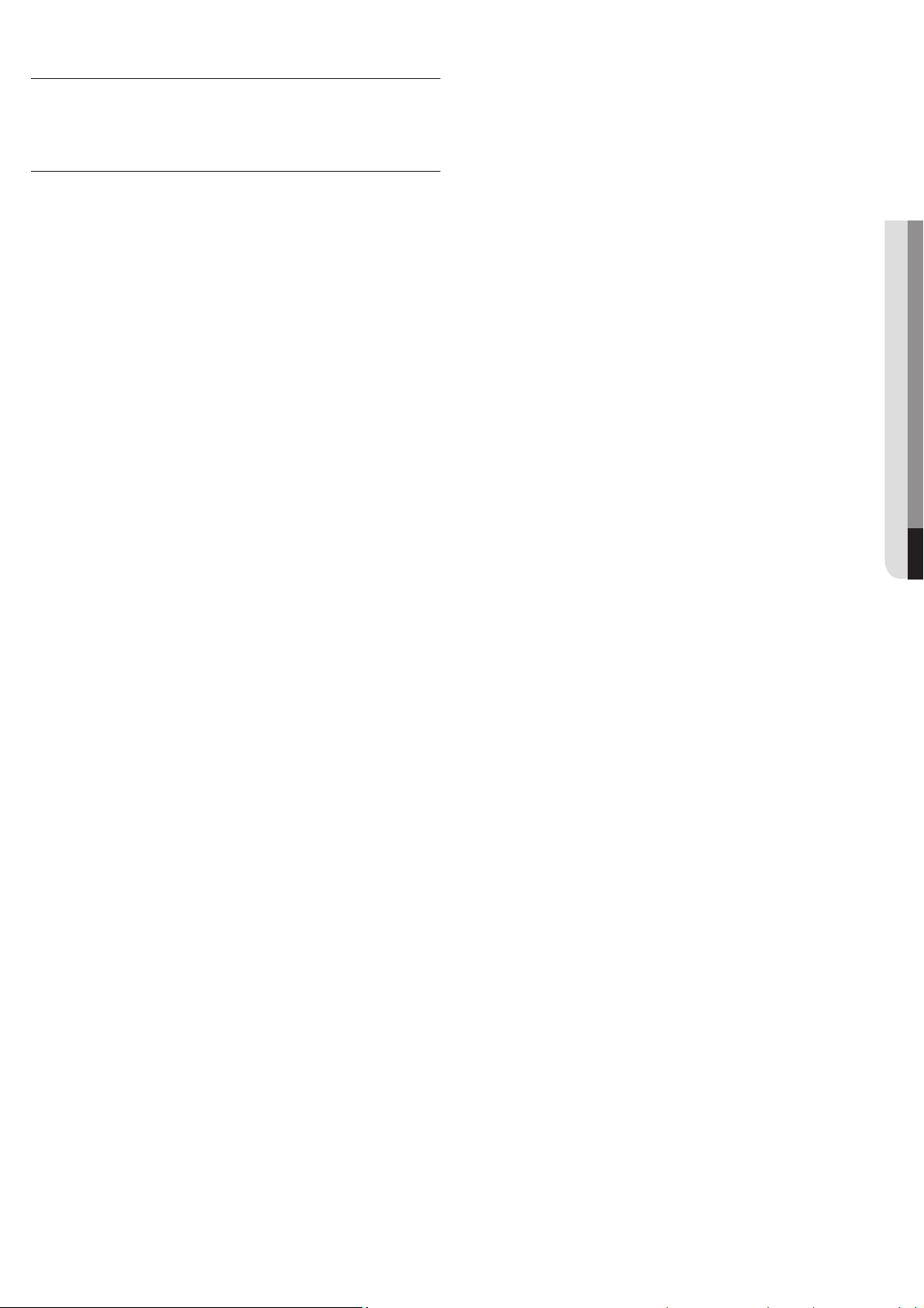
English - 23
07 WARRANTY
warranty (Canada)
SAMSUNG OVER-THE-RANGE (OTR)
MICROWAVE OVEN
Limited warranty to original purchaser
This SAMSUNG brand product, as supplied and distributed by
Samsung Electronics Canada, Inc. (SAMSUNG) and delivered new, in
the original carton to the original consumer purchaser, is warranted
by SAMSUNG against manufacturing defects in materials and
workmanship for a limited warranty period of:
ONE (1) YEAR PARTS AND LABOR, FIVE (5) YEARS PARTS
WARRANTY FOR MAGNETRON
Samsung will charge a repair fee for replacing an accessory or
repairing a cosmetic defect if the damage to the unit and/or damage
to or loss of the accessory was caused by the customer. Items this
stipulation covers include:
- A Dented, Scratched, or Broken Door, Handle, Out-Panel, or Control
Panel
- A Broken or missing Tray, Guide Roller, Coupler, Filter, or Wire Rack
User Replaceable Parts may be sent to the customer for unit repair. If
necessary, a Service Engineer can be dispatched to perform service.
This limited warranty begins on the original date of purchase, and
is valid only on products purchased and used in the Canada. To
receive warranty service, the purchaser must contact SAMSUNG for
problem determination and service procedures. Warranty service
can only be performed by a SAMSUNG authorized service center. The
original dated bill of sale must be presented upon request as proof of
purchase to SAMSUNG or SAMSUNG’s authorized service center.
SAMSUNG will repair or replace this product, at our option and at
no charge as stipulated herein, with new or reconditioned parts or
products if found to be defective during the limited warranty period
specied above. All replaced parts and products become the property
of SAMSUNG and must be returned to SAMSUNG. Replacement parts
and products assume the remaining original warranty, or ninety (90)
days, whichever is longer.
In-home service will be provided during the warranty labor period
subject to availability within the contiguous Canada. In-home
service is not available in all areas. To receive in-home service, the
product must be unobstructed and accessible to service personnel.
If during in-home service repair can not be completed, it may be
necessary to remove, repair and return the product. If in-home
service is unavailable, SAMSUNG may elect, at our option, to provide
for transportation of our choice to and from a SAMSUNG authorized
service center. Otherwise, transportation to and from the SAMSUNG
authorized service center is the responsibility of the purchaser.
This limited warranty covers manufacturing defects in materials
and workmanship encountered in normal, noncommercial use of
this product and shall not apply to the following, including, but
not limited to: damage which occurs in shipment; delivery and
installation; applications and uses for which this product was not
intended; altered product or serial numbers; cosmetic damage or
exterior nish; accidents, abuse, neglect, re, water, lightning or
other acts of nature; use of products, equipment, systems, utilities,
services, parts, supplies, accessories, applications, installations,
repairs, external wiring or connectors not supplied or authorized by
SAMSUNG which damage this product or result in service problems;
incorrect electrical line voltage, uctuations and surges; customer
adjustments and failure to follow operating instructions, cleaning,
maintenance and environmental instructions that are covered
and prescribed in the instruction book; problems caused by pest
infestations, and overheating or overcooking by user; glass tray or
turntable; reduced magnetron power output related to normal aging.
SAMSUNG does not warrant uninterrupted or error-free operation of
the product.
THERE ARE NO EXPRESS WARRANTIES OTHER THAN THOSE LISTED
AND DESCRIBED ABOVE, AND NO WARRANTIES WHETHER EXPRESS
OR IMPLIED, INCLUDING, BUT NOT LIMITED TO, ANY IMPLIED
WARRANTIES OF MERCHANTABILITY OR FITNESS FOR A PARTICULAR
PURPOSE, SHALL APPLY AFTER THE EXPRESS WARRANTY PERIODS
STATED ABOVE, AND NO OTHER EXPRESS WARRANTY OR GUARANTY
GIVEN BY ANY PERSON, FIRM OR CORPORATION WITH RESPECT TO
THIS PRODUCT SHALL BE BINDING ON SAMSUNG. SAMSUNG SHALL
NOT BE LIABLE FOR LOSS OF REVENUE OR PROFITS, FAILURE TO
REALIZE SAVINGS OR OTHER BENEFITS, OR ANY OTHER SPECIAL,
INCIDENTAL OR CONSEQUENTIAL DAMAGES CAUSED BY THE
USE, MISUSE OR INABILITY TO USE THIS PRODUCT, REGARDLESS
OF THE LEGAL THEORY ON WHICH THE CLAIM IS BASED, AND
EVEN IF SAMSUNG HAS BEEN ADVISED OF THE POSSIBILITY OF
SUCH DAMAGES. NOR SHALL RECOVERY OF ANY KIND AGAINST
SAMSUNG BE GREATER IN AMOUNT THAN THE PURCHASE PRICE
OF THE PRODUCT SOLD BY SAMSUNG AND CAUSING THE ALLEGED
DAMAGE. WITHOUT LIMITING THE FOREGOING, PURCHASER
ASSUMES ALL RISK AND LIABILITY FOR LOSS, DAMAGE OR INJURY
TO PURCHASER AND PURCHASER’S PROPERTY AND TO OTHERS AND
THEIR PROPERTY ARISING OUT OF THE USE, MISUSE OR INABILITY
TO USE THIS PRODUCT SOLD BY SAMSUNG NOT CAUSED DIRECTLY
BY THE NEGLIGENCE OF SAMSUNG. THIS LIMITED WARRANTY SHALL
NOT EXTEND TO ANYONE OTHER THAN THE ORIGINAL PURCHASER
OF THIS PRODUCT, IS NONTRANSFERABLE AND STATES YOUR
EXCLUSIVE REMEDY.
Some provinces or territories may or may not allow limitations on
how long an implied warranty lasts, or the exclusion or limitation
of incidental or consequential damages, so the above limitations
or exclusions may not apply to you. This warranty gives you specic
legal rights, and you may also have other rights which vary from state
to state.
To obtain warranty service, please contact SAMSUNG at:
1-800-SAMSUNG (726-7864) or
www.samsung.com/ca/support (English)
www.samsung.com/ca_fr/support (French)
Please be advised that the Samsung warranty does NOT cover service calls to explain product operation, correct
improper installation, or perform normal cleaning or maintenance.
QUESTIONS OR COMMENTS?
COUNTRY CALL OR VISIT US ONLINE AT
U.S.A
Consumer Electronics
1-800-SAMSUNG (726-7864) www.samsung.com/us/support
CANADA 1-800-SAMSUNG (726-7864)
www.samsung.com/ca/support (English)
www.samsung.com/ca_fr/support (French)
Scan the QR code* or visit
www.samsung.com/spsn
to view our helpful
How-to Videos and Live Shows
* Requires reader to be installed on your
smartphone
Scan this with your smartphone