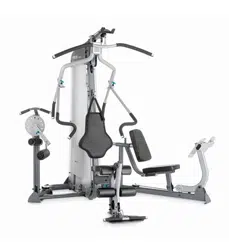
Assembly Instructions
S3.15/S3.19
Leg Press Option

S3.15/S3.19 Leg Press Option Assembly Instructions
page 2
IMPORTANT SAFETY INSTRUCTIONS
Important Safety Instructions
Important Safety Instructions
Before beginning any fitness program, see your
physician for a complete physical examination.
Il est conseillé de subir un examen médical complet
avant d’entreprendre tout programme d’exercise. Si
vous avez des étourdissements ou des faiblesses,
arrêtez les exercices immédiatement.
When using exercise equipment, basic precautions
should always be taken, including the following:
• Read all instructions before using the Leg Press
Option equipment. These instructions are written
for your safety and to protect the unit.
• Do not allow children or those unfamiliar with its
operation on or near the equipment. Do not leave
children unsupervised around the unit.
• Use the equipment only for its intended purpose as
described in this manual. Do not use accessory
attachments that are not recommended by the
manufacturer, as such attachments may cause
injuries.
• Wear proper exercise clothing and shoes for your
workout and avoid loose clothing. Tie long hair
back.
• Use care when getting on or off the unit.
• Do not overexert yourself or work to exhaustion.
• If you feel any pain or abnormal symptoms,
stop your workout immediately and consult
your physician.
• Never operate the unit when it has been dropped
or damaged. Return the equipment to a service
center for examination and repair.
• Never drop or insert objects into any opening.
Keep hands away from moving parts.
• Always check the unit and its cables before each
use. Make sure that all fasteners and cables are
secure and in good working condition.
• Do not use outdoors.
Personal Safety During Assembly
• It is strongly recommended that a qualified
dealer assemble the equipment.
Assistance is
required.
• Read each step in the assembly instructions and
follow the steps in sequence. Do not skip ahead. If
you skip ahead, you may learn later that you have
to disassemble components and that you may
have damaged the equipment.
• Assemble and operate the Leg Press Option on a
solid, level surface. Locate the unit a few feet from
walls or furniture to provide easy access.
Obtaining Service
Do not attempt to service the Leg Press
Option yourself except for the maintenance
tasks described in this guide. This unit does
not contain any user-serviceable parts.
For information about product operation,
or service, refer to the Precor web site at
www.precor.com. Should you need more
information regarding customer support
numbers or a list of Precor authorized
service centers, visit the Precor web site
at www.precor.com/cons.
If you call or e-mail Customer Support,
have the serial number and part numbers
available.
You can find the serial number printed on
a label affixed to the base of the Leg Press
Option. For future reference, write the serial
number in the space provided below.
Serial number: _______________________

S3.15/S3.19 Leg Press Option Assembly Instructions
page 3
Table of Contents
1
2
3
Important Safety Instructions ....................................................................... 2
Personal Safety During Assembly ........................................................................................... 2
Obtaining Service .................................................................................................................... 2
Before You Begin ........................................................................................... 4
Unpacking the Equipment ....................................................................................................... 4
Preparations................................................................................................... 5
Required Tools......................................................................................................................... 5
Installation Requirements ........................................................................................................ 5
Assembly Tips ......................................................................................................................... 5
Assembly Instructions .................................................................................. 6
1. Attach the Leg Press to the Main Unit .......................................................................... 7
2. Assemble the Seat Pads and Handle ........................................................................... 8
3. Install the Leg Press Arm and Footrest ........................................................................ 9
4. Install the Leg Press Cable ........................................................................................... 10
Warranty ......................................................................................................... 12
Limited Warranty Statement .................................................................................................... 12
Warranty Registration Card ..................................................................................................... 13
Specifications ............................................................................................................. Back cover
4
Table of Contents
S3.15/S3.19 Leg Press Option Assembly Instructions
page 4
1
Before You Begin
Before You Begin
Thank you for purchasing the Leg Press Option. This
option will add a new dimension to your strength-
training regimen. For proper installation, please read
this guide thoroughly and follow the assembly
instructions.
Unpacking the Equipment
The Leg Press Option is carefully tested and inspected
before shipment. Precor Strength ships the unit in
several pieces that require assembly. Ask for
assistance during the assembly process.
• Review the
Installation Requirements
.
• Carefully unpack the pieces and lay them on the
floor near the location where you plan to use the
equipment.
If any items are missing, contact the dealer from whom
you purchased the unit. For more information, refer to
Obtaining Service
.
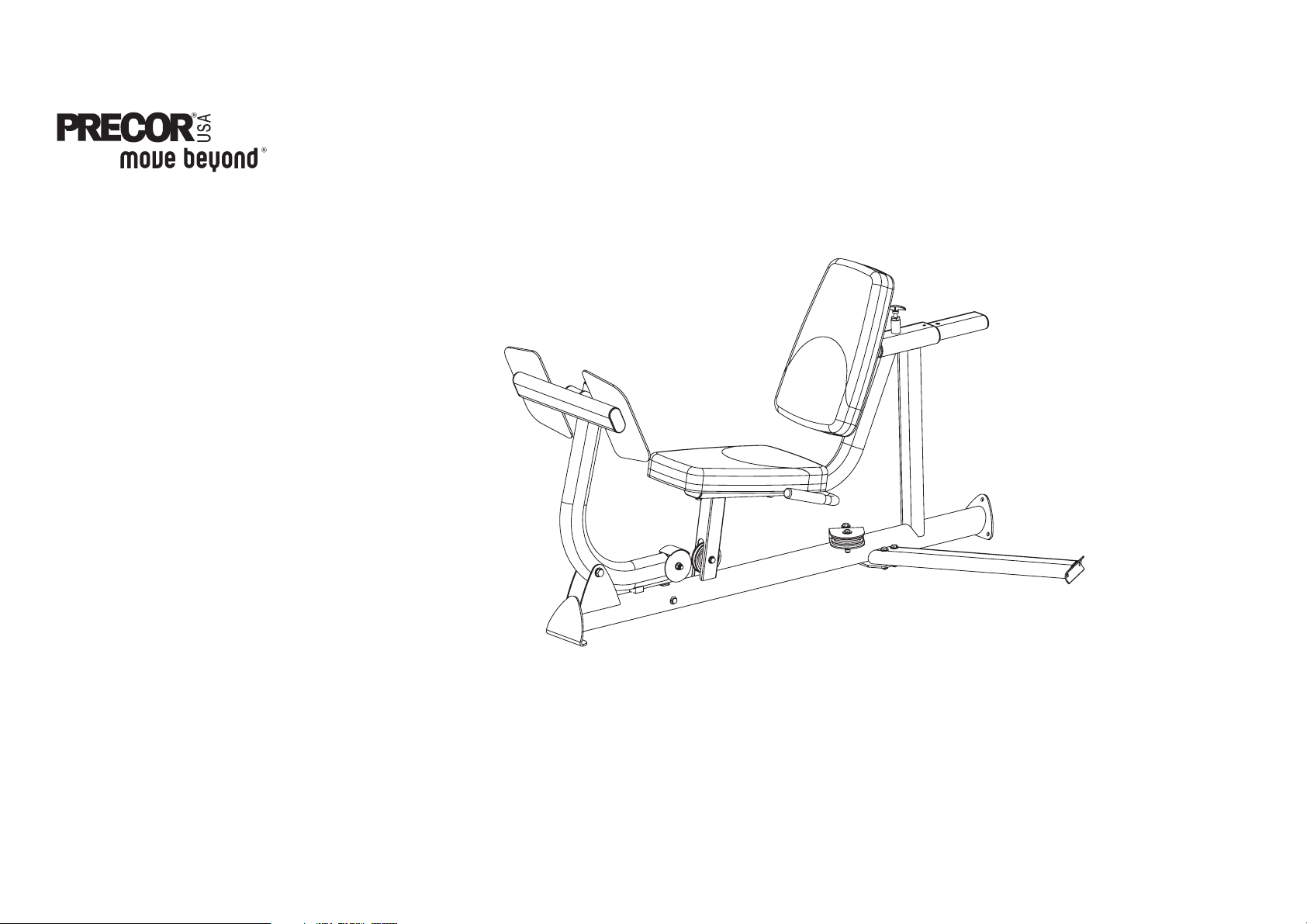
S3.15
Leg Press Option
The S3.15 is shown throughout these assembly instructions.
S3.15/S3.19 Leg Press Option Assembly Instructions
page 5
2
Preparations
Preparations
You must review and follow the instructions in this
guide. If you do not assemble and use the Leg Press
Option according to the following guidelines, you could
void the Precor Limited Warranty.
Required Tools
Tools that you need to obtain before assembling the
unit include:
❏ ⁹⁄₁₆-inch socket
❏ ³⁄₄-inch socket
❏ ⁹⁄₁₆-inch box-end wrench
❏ ³⁄₄-inch box-end wrench
❏ Crescent wrench
❏ Wire tie cutter (cuts plastic tie wraps)
❏ Utility knife
Installation Requirements
Follow these installation requirements when
assembling the unit:
• Fill out and mail the warranty registration card.
• Set up the Leg Press Option on a solid, flat
surface. A smooth, flat surface under the unit
helps keep it level.
• Provide ample space around the machine.
Open space around the machine allows for easier
access.
• Insert all fasteners in the same direction. For
aesthetic purposes, insert all the fasteners in the
same direction unless specified (in text or
illustrations) to do otherwise.
• Leave room for adjustments. Tighten fasteners
(such as screws, nuts, and bolts), so the unit is
stable, but leaves room for adjustments. Do not
fully tighten fasteners until instructed (in the steps)
to do so.
Assembly Tips
• Fasteners may become loose and fall off during
shipment. Inspect the plastic wrap and packaging
for loose parts. To alleviate confusion during
assembly, reattach the loose fasteners and pulleys
found in the packaging.
• A black 6-inch scale with white numbers is
provided at the bottom of every assembly
instruction page. Use this scale to identify the
correct fastener size. The head of a fastener is not
used in measuring the length.
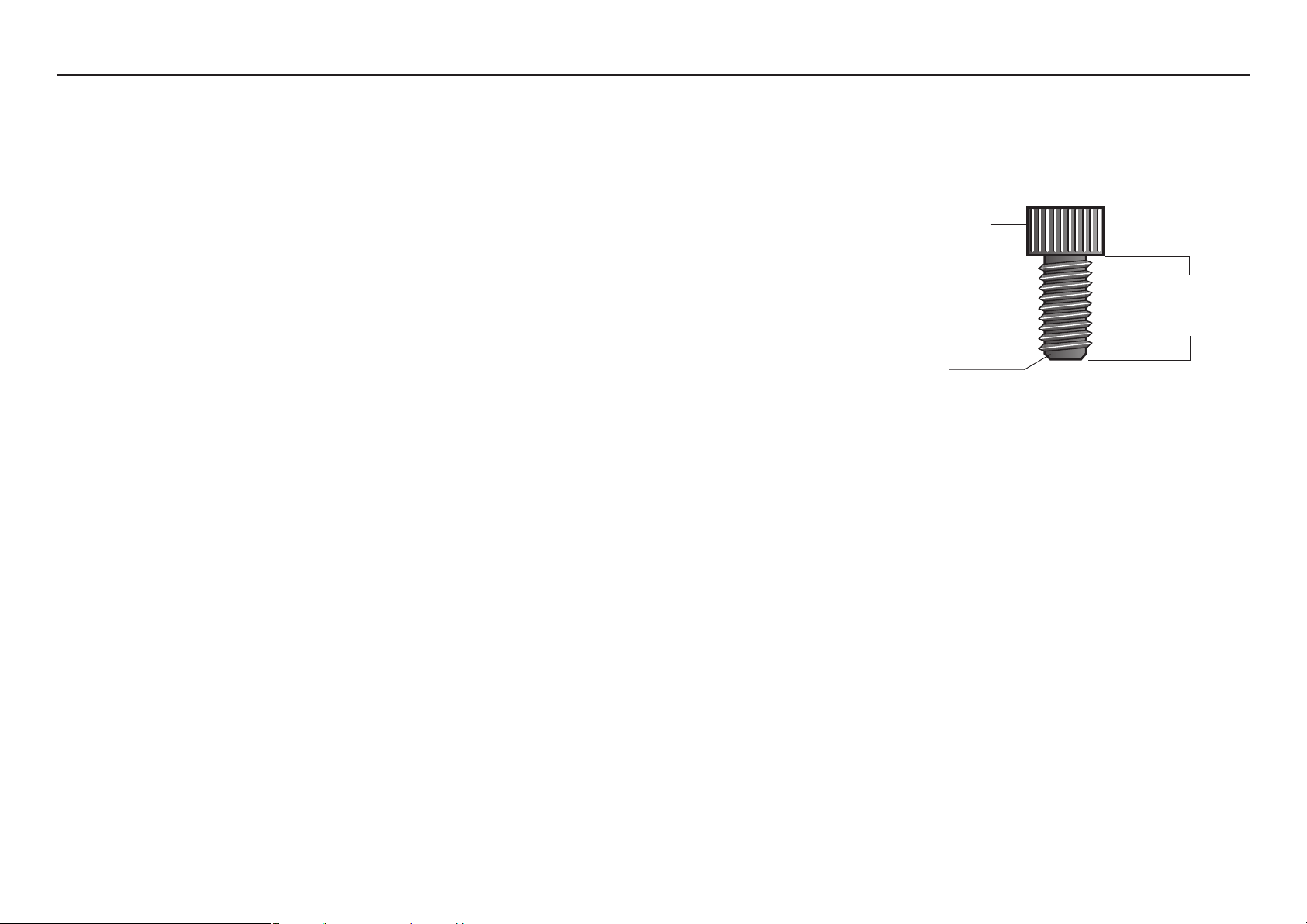
• Most fasteners are ³⁄₈-inch unless otherwise noted.
To find out the length of a particular fastener,
measure its shank (the long, narrow part beneath
the head). Refer to the following diagram:
• Zinc fasteners are used with the titanium parts.
Black fasteners are used when assembling the
stone gray painted surfaces.
• Most fasteners are fitted to the frame or pulley, you
will need to disassemble the fasteners before
proceeding with each step. Some pieces have
extra holes that you will not use. Use only those
holes indicated in the instructions and illustrations.
• Read all caution notes on each page before
completing that step.
• While you may be able to assemble the Leg Press
Option by reading the illustrations only, refer to the
text for important safety cautions and notes. The
S3.15 is shown throughtout the assembly
instructions. If you purchased the S31.9, the Leg
Press Option assembly is identical.
Fastener head
Fastener threads
Shank
To determine the
length of a fastener,
measure its shank.
S3.15/S3.19 Leg Press Option Assembly Instructions
page 6
1 2 3 4 5 6
3
Assembly
Instructions
Assembly Instructions
Assembly of the Leg Press Option takes professional
installers about ¹⁄₂ hour to complete. If this is the first
time you have assembled this type of equipment, plan
on significantly more time.
Professional installers are highly recommended!
However, if you acquire the appropriate tools, obtain
assistance, and follow the assembly steps sequentially,
the process will take time, but is fairly easy.
CAUTION: Obtain assistance! Do not attempt to
assemble the Leg Press Option by yourself. Review
the
Installation Requirements
before proceeding
with the following steps.
With so many assembled parts, proper alignment and
adjustment is critical. While tightening the fasteners, be
sure to leave room for adjustments. Do not fully tighten
fasteners until instructed to do so.
Important: Be careful to assemble components in the
sequence presented in this manual.
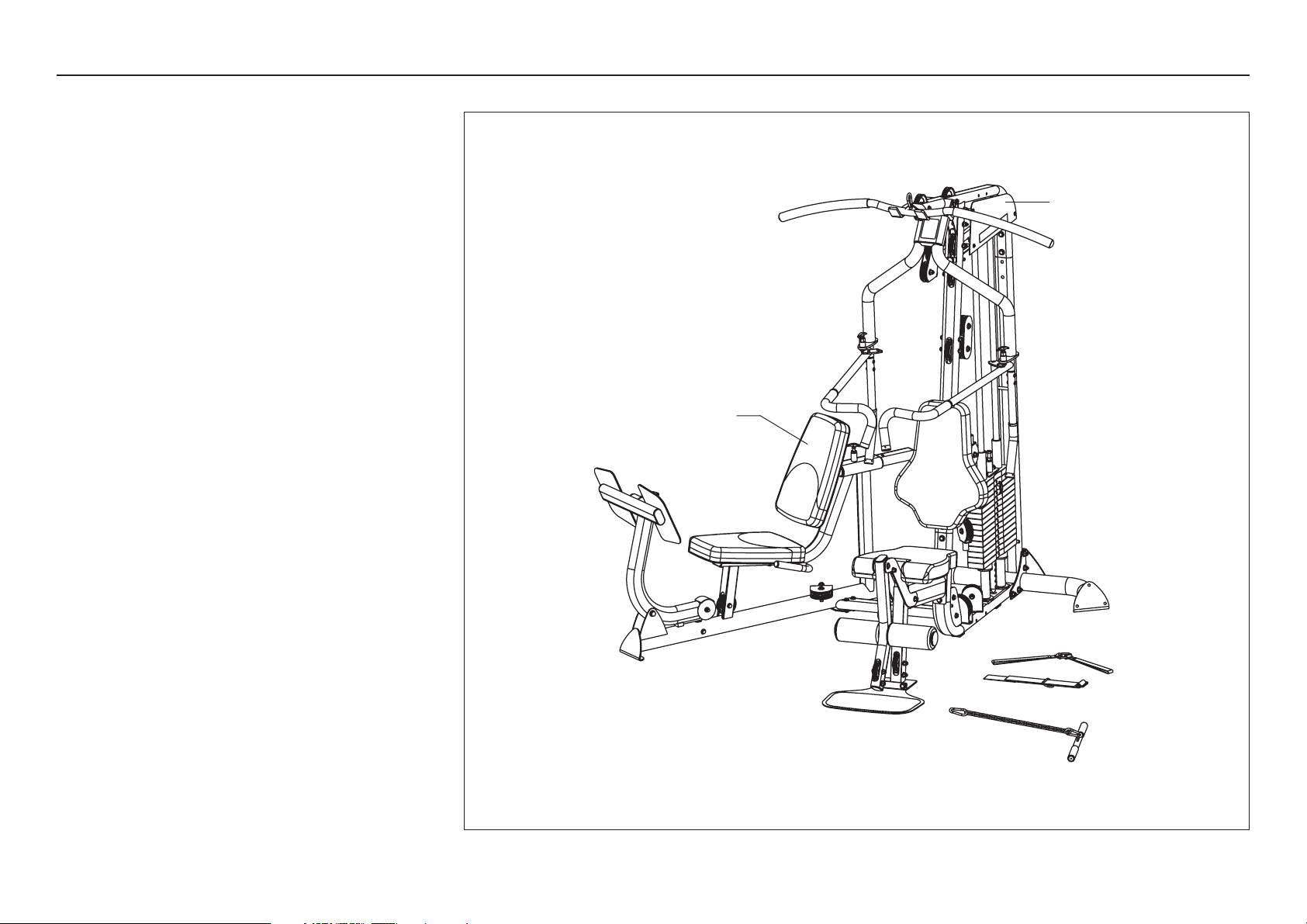
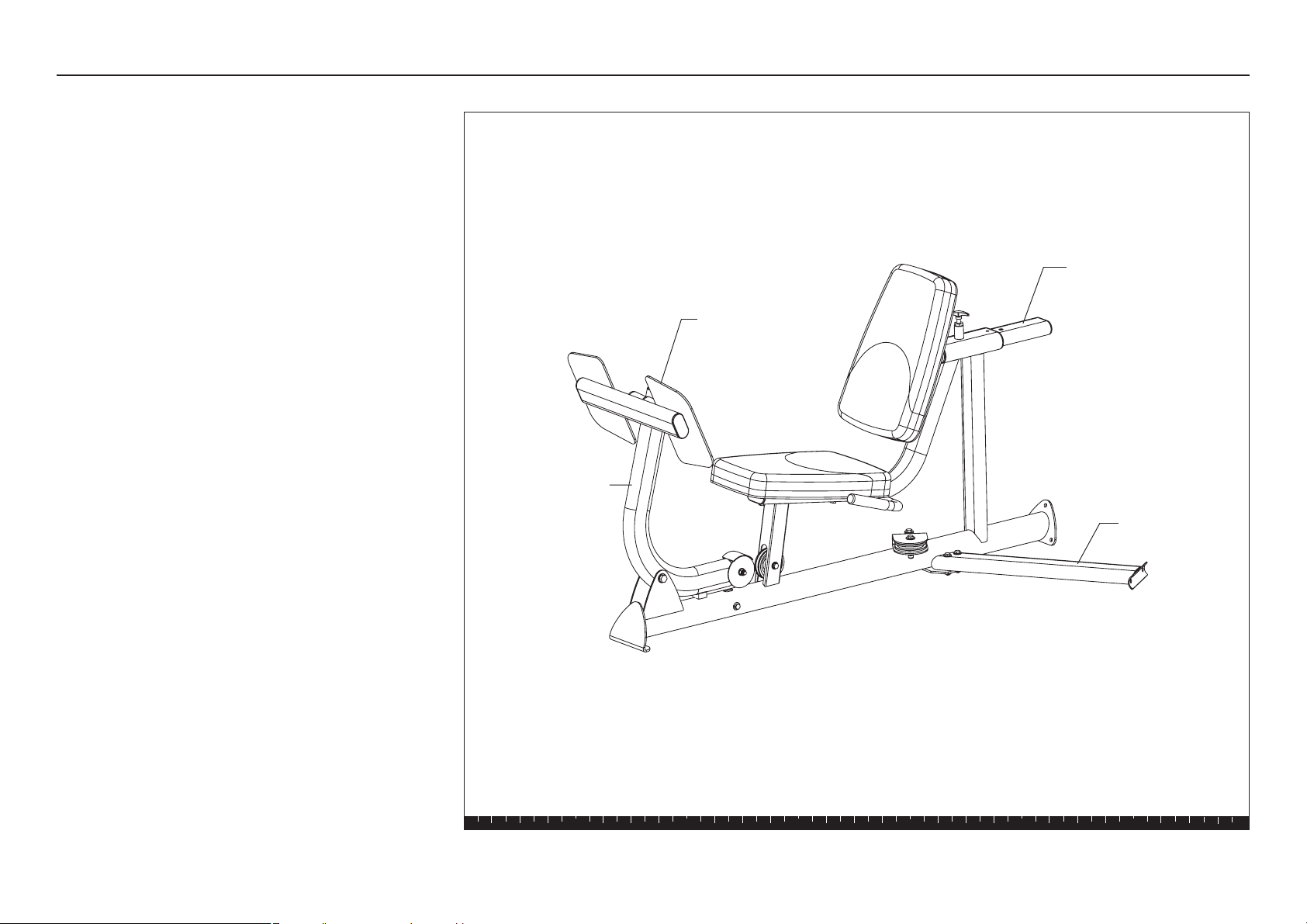
Seat Bracket
Support
Crossbrace
Footrest
Leg Press Arm
S3.15 Leg Press Option Assembly Instructions
page 7
1 2 3 4 5 6
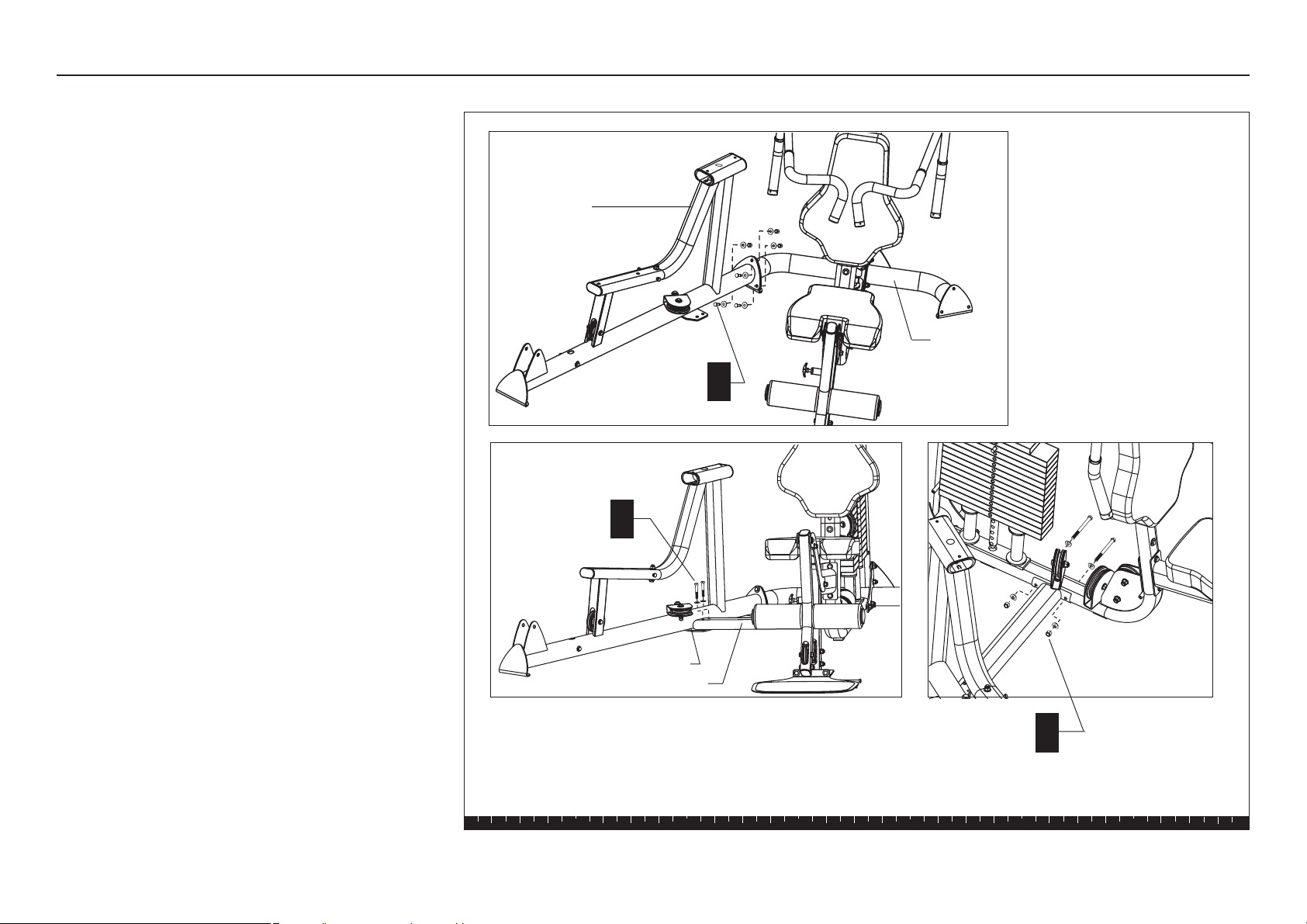
Step 1. Attach the Leg Press to the Main Unit
1. Attach the Leg Press to
the Main Unit
Important: Most fasteners are fitted to the frame or
pulleys, you may need to disassemble the fasteners
before proceeding with each step.
A. Attach the Leg Press Base to the Rear Crossbar
using
three 1¼-inch hex head bolts
three flat washers
three spring washers
three locknuts
B. Position the Crossbrace against the Main Base
and place it on top of the Leg Press flange. Attach
the Crossbrace to the Leg Press using
two 2¹⁄₄-inch hex head bolts
two flat washers
Note: If the Multi-Hip is already attached to the
S3.15 then, skip step C. You will need to remove
two washers and locknuts to attach the Leg Press.
Then, replace the washers and locknuts onto the
two existing 4¹⁄₄-inch hex head bolts.
C. Attach the Crossbrace to the Main Base using
two 4¹⁄₄-inch hex head bolts
four radius washers
two locknuts
D. Wrench tighten all fasteners.
Note: If you plan to install the S3.15 Multi-Hip
Option immediately after you complete the Leg
Press Option assembly, place the two washers and
locknuts on the fastener ends finger tight so they
provide stability, but can easily be removed.
B
A
3 - 1¼" bolts
3 - flat washers
3 - spring washers
3 - locknuts
2 - 4¹⁄₄" bolts
4 - radius washers
2 - locknuts
C
2 - 2¹⁄₄" bolts
2 - washers
Rear
Crossbar
Leg Press
Crossbrace
Leg Press flange
S3.15 Leg Press Option Assembly Instructions
page 8
1 2 3 4 5 6
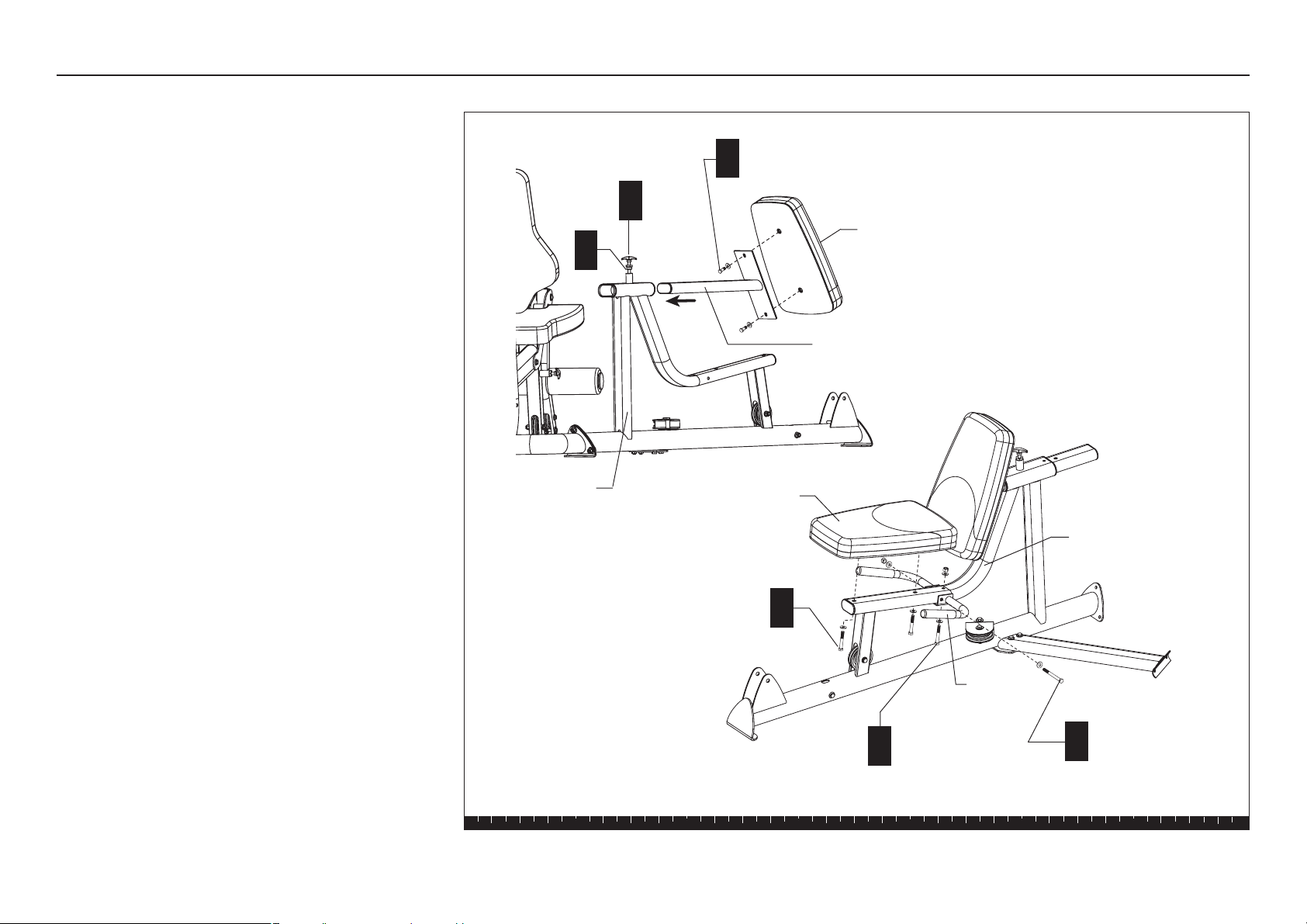
2. Assemble the Seat Pads and
Handle
A. Thread the T-handle into the Seat Frame and
wrench tighten.
B. Determine which Seat Pad you want to use as the
Back Pad. Attach it to the Seat Bracket Support
using
two 1-inch zinc bolts
two flat zinc washers
Wrench tighten.
C. Lift the T-handle and slide the Back Pad out of
the way to mount the Seat Pad and Handlebar.
D. Attach the Handlebar to the side of the Seat Frame
using
one 4¹⁄₄-inch bolt
two flat washers
one locknut
Wrench tighten.
E. Secure the base of the Handlebar using
one 2¹⁄₂-inch bolt
two flat washers
one locknut
Wrench tighten.
F. Attach the Seat Pad to the Seat Frame using
two 2½-inch bolts
two flat washers
Wrench tighten.
Step 2. Assemble the Seat Pads and Handle
A
1 - 4¹₄" bolt
2 - washers
1- locknut
B
2 - 1" zinc bolts
2 - zinc washers
D
T-handle
1 - 2¹⁄₂" bolt
2 - washers
1- locknut
E
2 - 2½" bolt
2 - washers
F
Back Pad
Seat Bracket Support
Seat Pad
Handlebar
Seat Frame
C
Seat Frame
S3.15 Leg Press Option Assembly Instructions
page 9
1 2 3 4 5 6
3. Install the Leg Press Arm and
Footrest
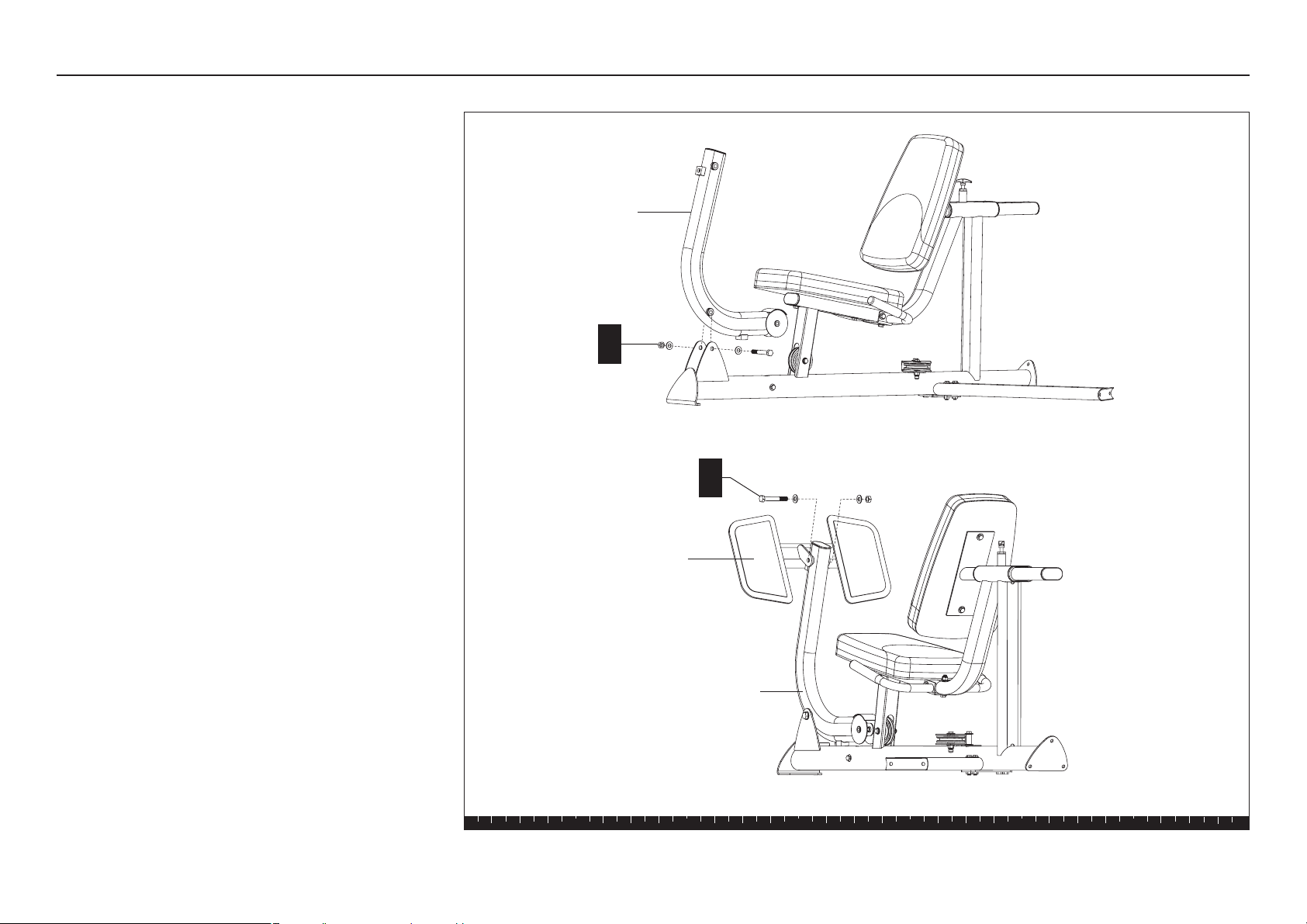
A. Attach the Leg Press Arm to the Leg Press using
one ¹⁄₂-inch x 3¹⁄₂-inch bolt
two flat washers
one ¹⁄₂-inch locknut
Tighten the fasteners so that the Leg Press Arm is
secure and pivots easily.
CAUTION: The Footrest assembly is heavy
and the Leg Press Arm may drop suddenly
and cause injury. Ask an adult assistant to
hold on to the Leg Press Arm while you attach
the Footrest.
B. Attach the Footrest to the Leg Press Arm.
Have an assistant stabilize the Leg Press Arm
while you attach the Footrest using
one ½-inch by 3½-inch large zinc bolt
two ½-inch zinc washers
one ½-inch zinc locknut
Wrench tighten.
Step 3. Install the Leg Press Arm and Footrest
A
Leg Press Arm
1 - ¹⁄₂" x 3¹⁄₂" bolt
2 - washers
1 - ¹⁄₂" locknut
B
1 - ¹⁄₂" x 3¹⁄₂" zinc bolt
2 - ¹⁄₂" zinc washers
1 - ¹⁄₂" zinc locknut
Leg Press Arm
Footrest
S3.15 Leg Press Option Assembly Instructions
page 10
1 2 3 4 5 6
4. Install the Leg Press Cable
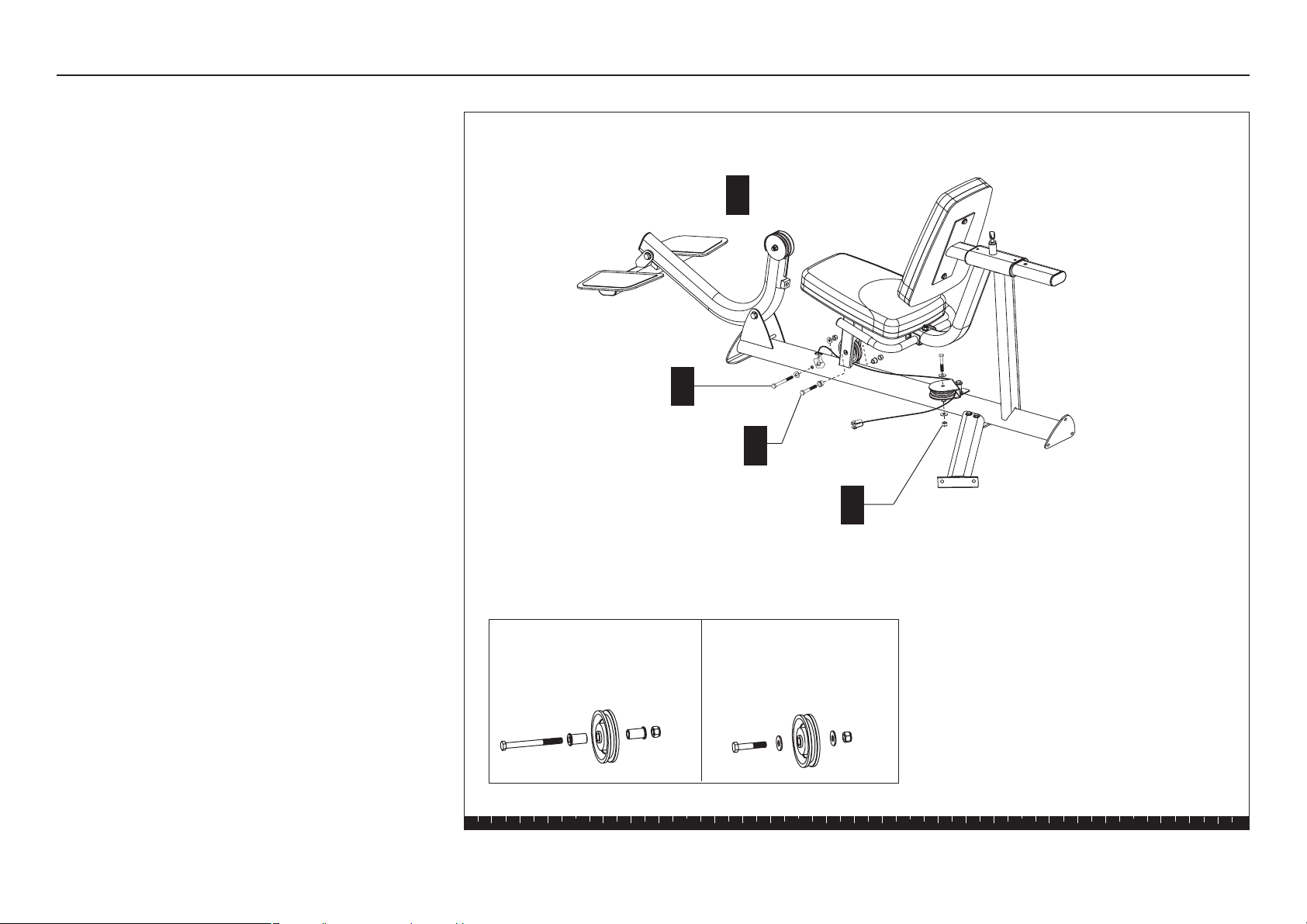
A. Lower the Leg Press Arm and rest it on the floor.
B. Attach the Leg Press Cable 130193 to the base of
the Leg Press using
one ³⁄₈-inch x 3³⁄₄-inch hex head bolt
two washers
one ½-inch locknut
Wrench tighten.
C. Remove one 3¹⁄₂-inch pulley on the Seat Base
Upright. Feed the cable through the seat base and
under the pulley. Reattach the 3¹⁄₂-inch pulley using
one 2³⁄₄-inch hex head bolt
two ½-inch shoulder spacers
one locknut
Wrench tighten.
D. Remove the 3¹⁄₂-inch pulley from the adjustable
Pulley Bracket. Feed the cable around it and
reattach it using
one 2¼-inch zinc hex head bolt
two zinc washers
one zinc locknut
Wrench tighten.
Step 4. Install the Leg Press Cable
B
C
D
1 - ³⁄₈" x 3¾" bolt
2 - washers
1 - locknut
1 - 2¾" bolt
2 - ½-inch shoulder spacers
1 - locknut
1 - 2¼" zinc bolt
2 - zinc washers
1 - zinc locknut
A
Lower the Leg
Press Arm.
3½-inch Pulley (used on gray
painted parts)
1 - bolt
2 - shoulder spacers
1 - locknut
Pulley assemblies
3½-inch Pulley (used on
titanium parts)
1 - zinc bolt
2 - zinc washers
1 - zinc locknut

S3.15 Leg Press Option Assembly Instructions
page 11
1 2 3 4 5 6
D. Attach the end of the Leg Press Cable to the S3.15
Cable using
one 1-inch zinc hex head bolt
one locknut
E. Remove the 3¹⁄₂-inch pulley from the Leg Press
Arm. Feed the cable around it and reattach it using
one 2¹⁄₂-inch zinc hex head bolt
two ¹⁄₂-inch zinc shoulder spacers
one zinc locknut
Wrench tighten.
This completes the assembly of the Leg Press Option.
Before using the S3.15
or S3.19 with the Leg Press
Option, check the cable tension. Refer to
Cable
Adjustments and Maintenance
in the
Assembly and
Maintenance Guide.
E
1 - 2½" zinc bolt
2 - ½" zinc shoulder spacers
1 - zinc locknut
D
1 - 1" zinc bolt
1 - zinc locknut
Step 4. Install the Leg Press Cable, continued

Effective 01 January 2003
P/N 36287-110
Precor Residential Equipment Limited Warranty
PLEASE READ THESE WARRANTY TERMS AND CONDITIONS CAREFULLY BEFORE USING
YOUR PRECOR INCORPORATED PRODUCT. BY USING THE EQUIPMENT, YOU ARE
CONSENTING TO BE BOUND BY THE FOLLOWING WARRANTY TERMS AND CONDITIONS.
Limited Warranty.
Precor Incorporated warrants all new Precor products to be free from defects in materials and
manufacture for the warranty period set forth below. The warranty period commences on the
invoice date of original purchase. This warranty applies only against defects discovered within
the warranty period and extends only to the original purchaser of the product. Parts repaired or
replaced under the terms of this warranty will be warranted for the remainder of the original
warranty period only. To make claim under warranty, the buyer must notify Precor or their
authorized Precor dealer within 30 days after the date of discovery of any nonconformity and
make the affected product available for inspection by Precor or its service representative.
Precor’s obligations under this warranty are limited and set forth below.
Warranty Periods and Coverage
All residential products and commercial products used in the home are warranted for the
following periods:
• Lifetime frame and welds
• 10 years parts and wear items
• 1 year labor
• Coverage for options and accessories defined below.
Options / Accessories
Many options or accessories have components that are connected internally or mounted inside the
electronic console. The following guidelines determine the warranty for these components. If the
internal components are installed by the factory or by an authorized dealer as part of the original
sale and delivery, they have a warranty that is identical to the warranty of the equipment in which
they are connected or mounted. If the internal components are not installed by the factory or by an
authorized dealer as part of the original sale and delivery, they have a 90-day parts and labor
limited warranty. All components that are not internally connected have 90-day parts only limited
warranty. Satisfactory proof of purchase is required in all cases.
Conditions and Restrictions
This warranty is valid only in accordance with the conditions set forth below:
1. The warranty applies to the Precor product only while:
a. It remains in the possession of the original purchaser and proof of purchase is
demonstrated
b. It has not been subjected to accident, misuse, abuse, improper service, or non-Precor
modifications
c. Claims are made within the warranty period
2. This warranty does not cover damage or equipment failure caused by electrical wiring not in
compliance with electrical codes or Precor owner’s manual specifications, or failure to provide
reasonable and necessary maintenance as outlined in the owner’s manual.
3. Warranty of all Precor products applies to residential use only and is void when products are
used in a nonresidential environment or installed in a country other than where sold.
4. Except in Canada, Precor does not pay labor outside the United States.
5. Warranties outside the United States and Canada may vary. Please contact your local Dealer
for details.
This limited warranty shall not apply to:
1. Software version upgrades
2. Cosmetic items, including, but not limited to the following: grips, seats, and labels.
3. Repairs performed on Precor equipment missing a serial number or with a serial tag that has
been altered or defaced.
4. Service calls to correct installation of the equipment or instruct owners on how to use the
equipment.
5. Pickup, delivery, or freight charges involved with repairs.
6. Any labor costs incurred beyond the applicable labor warranty period.
Disclaimer and Release
The warranties provided herein are the exclusive warranties given by Precor and supersede any prior,
contrary or additional representations, whether oral or written.
ANY IMPLIED WARRANTIES, INCLUDING THE
WARRANTY OF MERCHANTABILITY OR FITNESS FOR A PARTICULAR PURPOSE THAT APPLY TO ANY PARTS DESCRIBED ABOVE
ARE LIMITED IN DURATION TO THE PERIODS OF EXPRESS WARRANTIES GIVEN ABOVE FOR THOSE SAME PARTS. PRECOR
HEREBY DISCLAIMS AND EXCLUDES THOSE WARRANTIES THEREAFTER.
Some states do not allow limitation on how
long an implied warranty lasts, so the above limitation may not apply to you.
PRECOR ALSO HEREBY DISCLAIMS
AND EXCLUDES ALL OTHER OBLIGATIONS OR LIABILITIES, EXPRESS OR IMPLIED, ARISING BY LAW OR OTHERWISE, WITH
RESPECT TO ANY NONCONFORMANCE OR DEFECT IN ANY PRODUCT, INCLUDING BUT NOT LIMITED TO: (A) ANY OBLIGATION,
LIABILITY, RIGHT, CLAIM OR REMEDY IN TORT, WHETHER OR NOT ARISING FROM THE NEGLIGENCE OF PRECOR OR ITS
SUPPLIERS (WHETHER ACTIVE, PASSIVE OR IMPUTED); AND (B) ANY OBLIGATION, LIABILITY, RIGHT, CLAIM, OR REMEDY FOR
LOSS OF OR DAMAGE TO ANY EQUIPMENT.
This disclaimer and release shall apply even if the express warranty set
forth above fails of its essential purpose.
Exclusive Remedies
For any product described above that fails to conform to its warranty, Precor will provide, at their option, one of
the following: (1) repair; (2) replacement; or (3) refund of the purchase price. Precor Limited Warranty service
may be obtained by contacting the authorized dealer from whom you purchased the item. Precor
compensates Servicers for warranty trips within their normal service area to repair equipment at the owner’s
location. You may be charged a trip charge outside the service area.
THESE SHALL BE THE SOLE AND EXCLUSIVE
REMEDIES OF THE BUYER FOR ANY BREACH OF WARRANTY.
Exclusion of Consequential and Incidental Damages
PRECOR AND/OR ITS SUPPLIERS SHALL HAVE NO OBLIGATION OR LIABILITY, WHETHER ARISING IN CONTRACT
(INCLUDING WARRANTY), TORT (INCLUDING ACTIVE, PASSIVE, OR IMPUTED NEGLIGENCE AND STRICT LIABILITY), OR
OTHERWISE, FOR DAMAGE TO THE EQUIPMENT, PROPERTY DAMAGE, LOSS OF USE, REVENUE OR PROFIT, COST OF
CAPITAL, COST OF SUBSTITUTE EQUIPMENT, ADDITIONAL COST INCURRED BY BUYER (BY WAY OF CORRECTION OR
OTHERWISE) OR ANY OTHER INCIDENTAL, SPECIAL, INDIRECT, OR CONSEQUENTIAL DAMAGES, WHETHER
RESULTING FROM NONDELIVERY OR FROM THE USE, MISUSE OR INABILITY TO USE THE PRODUCT.
This exclusion
applies even if the above warranty fails of its essential purpose and regardless of whether such damages
are sought for breach of warranty, breach of contract, negligence, or strict liability in tort or under any other
legal theory. Some states do not allow the exclusion or limitation of incidental or consequential damages,
so the above limitation might not apply.
This warranty gives you specific legal rights, and you may also have other rights, which vary state
to state.
Complete this portion and keep for your records.
Purchased From: ____________________________ Example: Dealer or store name.
Phone Number: _____________________________ Example: Dealer or store telephone number.
Product/model: _____________________________ Example: M9.31
Serial number: ______________________________ The serial number is found on the shipping container
page 12

Fold along dotted line and tape closed before mailing.
RET.
To allow us to serve you better, please take a few moments to
complete and return your warranty registration.
YOU MAY ALSO REGISTER ONLINE AT
www.precor.com/warranty
If you have questions or need additional information, contact your
local dealer or call Precor Customer Support at 800-347-4404.
Thank You and Welcome to Precor
Precor Incorporated
20031 142nd Avenue NE
PO Box 7202
Woodinville, WA 98072-4002
PLACE
STAMP
HERE

TELL US ABOUT YOUR NEW PRECOR PRODUCT
Purchased
from:
The serial number is located on the shipping box and on the product.
Product
Serial
Number:
Please indicate the type of product purchased:
❑ Elliptical Fitness CrossTrainer (EFX
®
)
❑ Treadmill
❑ Strength Training System
TELL US ABOUT YOU
Date of
Purchase:
❑ Mr.
❑ Mrs.
❑ Ms.
First Name
Apt./Suite:
TELL US ABOUT YOUR PURCHASE
Please detach and mail in the warranty registration within ten days of purchase.
❑ StretchTrainer
TM
❑ Cycle
❑ Stair Climber
Middle Initial Last Name
Street Address
Zip CodeCity State
Gender: Marital status: Age: Annual household income: What are your fitness goals?
❑ Male ❑ Married ❑ Under 18 ❑ Under $50,000 ❑ Weight loss/management
❑ Female ❑ Divorced ❑ 18-24 ❑ $51,000-75,000 ❑ Muscle tone enhancement
❑ Widowed ❑ 25-34 ❑ $76,000-100,000 ❑ Cardiovascular improvement
❑ Never been married ❑ 35-44 ❑ $101,000-150,000 ❑ Overall health
❑ 45-54 ❑ $151,000+ ❑ Increase energy and flexibility
❑ 55-64 ❑ Stress reduction
❑ 65+ ❑ Rehabilitation
❑ Other
Purchase (check all that apply): How did you FIRST become aware of Precor
❑ First Precor product products (choose only one):
❑ Replaces a Precor product of the same type ❑ A gift
❑ Replaces same type of product – different brand ❑ Friend/relative
❑ Addition to equipment currently owned ❑ Physician
❑ Fitness club
❑ Internet
What factors MOST influenced your decision to ❑ News report or product review
purchase your Precor product (choose up to three): ❑ Magazine advertisement or article
❑ Precor reputation ❑ Print advertisement
❑ Prior use of Precor product(s) ❑ In-store display or demonstration
❑ Design/appearance ❑ Other
❑ Value for the price
❑ Special product features
❑ Rebate or sale price
❑ Quality/durability
❑ Warranty
❑ Physician recommendation
Month
Day
Year
Your Email Address
Area Code
Telephone
Dealer Name
Effective 01 July 2004
P/N 45623-102


Precor is a registered trademark of Precor Incorporated.
Specifications subject to change without notice.
Copyright 2006 Precor Incorporated.
www.precor.com
Precor Incorporated
20031 142nd Avenue NE
P.O. Box 7202
Woodinville, WA USA 98072-4002
NOTICE:
Precor is widely recognized for its innovative, award winning designs of exercise equipment. Precor aggressively seeks U.S. and foreign patents for
both the mechanical construction and the visual aspects of its product design. Any party contemplating the use of Precor’s product designs is hereby
forewarned that Precor considers the unauthorized appropriation of its proprietary rights to be a very serious matter. Precor will vigorously pursue all
unauthorized appropriation of its proprietary rights.
S3.15/S3.19 Leg Press Option Specifications
Length: 59 inches (149 cm)
Height: 35 inches (89 cm)
Width: 33 inches (83 cm)
Shipping weight: 115 lb (52 kg)
Leg Press Option Literature Kit 49455-102
Leg Press Assembly Instructions 49454-
102
Warranty Registration 45623-101
Warranty Card 36287-110
06 November 2006