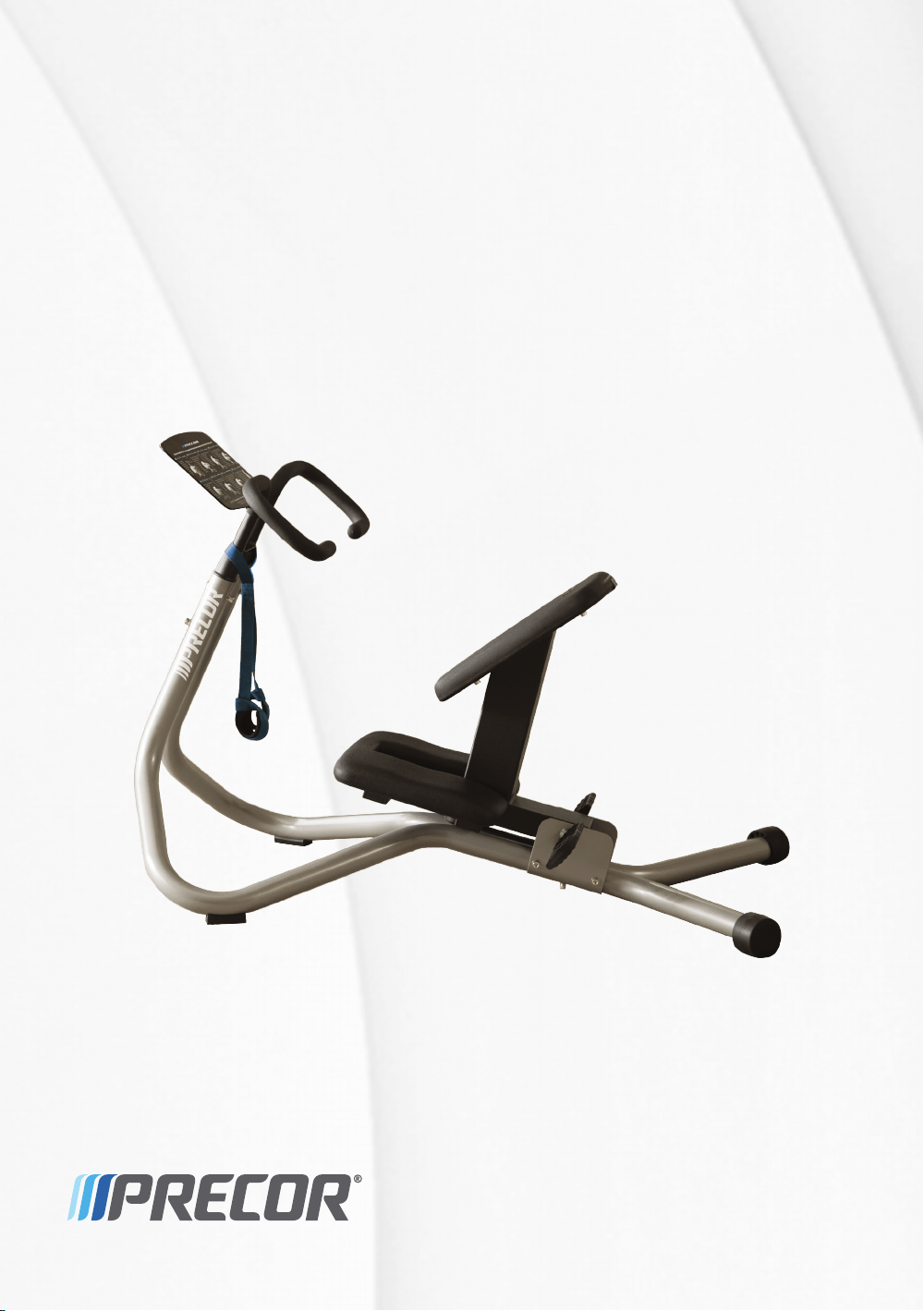
Assembling and Maintaining
the StretchTrainer™
Precor Incorporated
20031 142nd Avenue NE
P.O. Box 7202
Woodinville, WA USA 98072-4002
StretchTrainer OAG 38875-111 rev A, en
Warranty P/N CW39141-101
25 August 2013


Edition Information
ASSEMBLING AND MAINTAINING THE STRETCHTRAINER
P/N 38875-111 rev A
Copyright © August 2013 Precor Incorporated. All rights
reserved. Specifications subject to change without notice.
Trademark Note
Precor® is a registered trademark and StretchTrainer™ is a
trademark of Precor Incorporated. Other names in this
document may be the trademarks or registered trademarks of
their respective owners.
Intellectual Property Notice
Precor is widely recognized for its innovative, award-winning
designs of exercise equipment. Precor aggressively seeks U.S.
and foreign patents for both the mechanical construction and
the visual aspects of its product design. Any party
contemplating the use of Precor product designs is hereby
forewarned that Precor considers the unauthorized
appropriation of its proprietary rights to be a very serious
matter. Precor will vigorously pursue all unauthorized
appropriation of its proprietary rights.
Precor Incorporated
20031 142nd Ave NE, P.O. Box 7202
Woodinville, WA 98072-4002
1-800-347-4404
http://www.precor.com


Important Safety Instructions
Follow these guidelines to maintain proper working condition
of the equipment:
Important: Do not modify the equipment or any of its parts, or
permanently remove any part from the equipment. Do not use
accessory attachments that are not recommended by Precor, as
such attachments might cause injuries.
You should not attempt to service the StretchTrainer
yourself.
Do not allow children or those unfamiliar with its
operation on or near the StretchTrainer. Do not leave
children unsupervised around the unit.
Before using the StretchTrainer, examine it thoroughly.
Make sure that all fasteners are securely tightened and
the instructional placard is attached to the unit. Inspect
the wrist straps for wear. Replace them if they are frayed,
worn, or missing.
Make sure that trainers and facility personnel advise
users to always hold the handlebars while stretching and
do not attempt to use only the wrist straps to perform
stretches.
Make sure that trainers, facility personnel, and
maintenance technicians understand how to use the
equipment, know important safety guidelines, and can
recognize potential problems such as a cracked weld or
worn wrist strap.
Strength training requires a significant focus by the facility
and its staff to maintain the quality of the fitness
environment. If possible, the facility should provide direct
supervision of the fitness equipment at all times by people
knowledgeable about the safe operation of the equipment
and trained to recognize potential problems.

4 Assembling and Maintaining the StretchTrainer
If any facility personnel witness unsafe use of the
equipment, the staff member should address the user
directly, demonstrate the proper technique, and review
the Safety Information for Users. Precor recommends
posting a copy of the Safety Information for Users near the
equipment in a prominent location.
Assemble and operate the StretchTrainer on a solid, level
surface. Make sure that the unit is installed with enough
free space for safe operation. As a general rule, allow
about a 4-foot (1 meter) circle of space from the user’s
center.
Check the equipment thoroughly based on the
recommended maintenance schedule outlined in this
manual.
Place an “out-of-order” sign on the equipment during
maintenance of the equipment or the surrounding area.
Users should never be allowed to operate the equipment
until it has been inspected and works properly. If a piece
of equipment needs service, keep it out of use until
repaired. Make sure the facility’s personnel know not to
allow anyone to use the equipment until it is working
properly.
Do not attempt to free any jammed assemblies alone as
this may cause injury. With the help of another person,
carefully return the mechanism to its proper resting
position.
Do not place the equipment outdoors or on wet surfaces.

Table of Contents
Important Safety Instructions ................................................... 3
Safety Information for Users ..................................................... 7
Assembling the StretchTrainer ................................................. 9
Unpacking the StretchTrainer ........................................................... 9
Obtaining Service ................................................................................ 10
Assembling the StretchTrainer ......................................................... 11
Using Your StretchTrainer ...................................................... 21
Maintenance ............................................................................ 23
Clean and Inspect Pads ..................................................................... 23
Clean and Inspect Frames ................................................................ 23
Inspect Warning Labels .................................................................... 24
Inspect all Fasteners .......................................................................... 24
Commercial StretchTrainer Equipment Limited Warranty ..... 25

6 Assembling and Maintaining the StretchTrainer

Chapter 1
Safety Information for Users
Before beginning any fitness program, you should obtain a
complete physical examination from your physician.
When using exercise equipment, you should always take
basic precautions, including the following:
If you do not understand how to operate a piece of
equipment, ask someone from the facility (such as a
trainer) to demonstrate how to use it and explain any
safety instructions.
Do not allow children on or near the equipment. Do not
leave children unsupervised around the equipment.
Do not overexert yourself or try to do all the stretches
shown on the instructional placard the first time you use
the StretchTrainer. Start your stretching routine slowly
and conservatively. With practice and increased
flexibility, you can add more stretches and repetitions to
your routine.
Do not rock the equipment. Do not stand on the
handlebars, instructional placard, or the padded seat.
Use the equipment only for its intended purpose. Do not
use accessory attachments that are not recommended by
the manufacturer, as such attachments may cause
injuries.
Wear proper exercise clothing and shoes for your
workout—no loose clothing.
Do not overexert yourself or work to exhaustion.
Always hold the handlebars while stretching. Do not
attempt a stretch using only the wrist straps.
8 Assembling and Maintaining the StretchTrainer
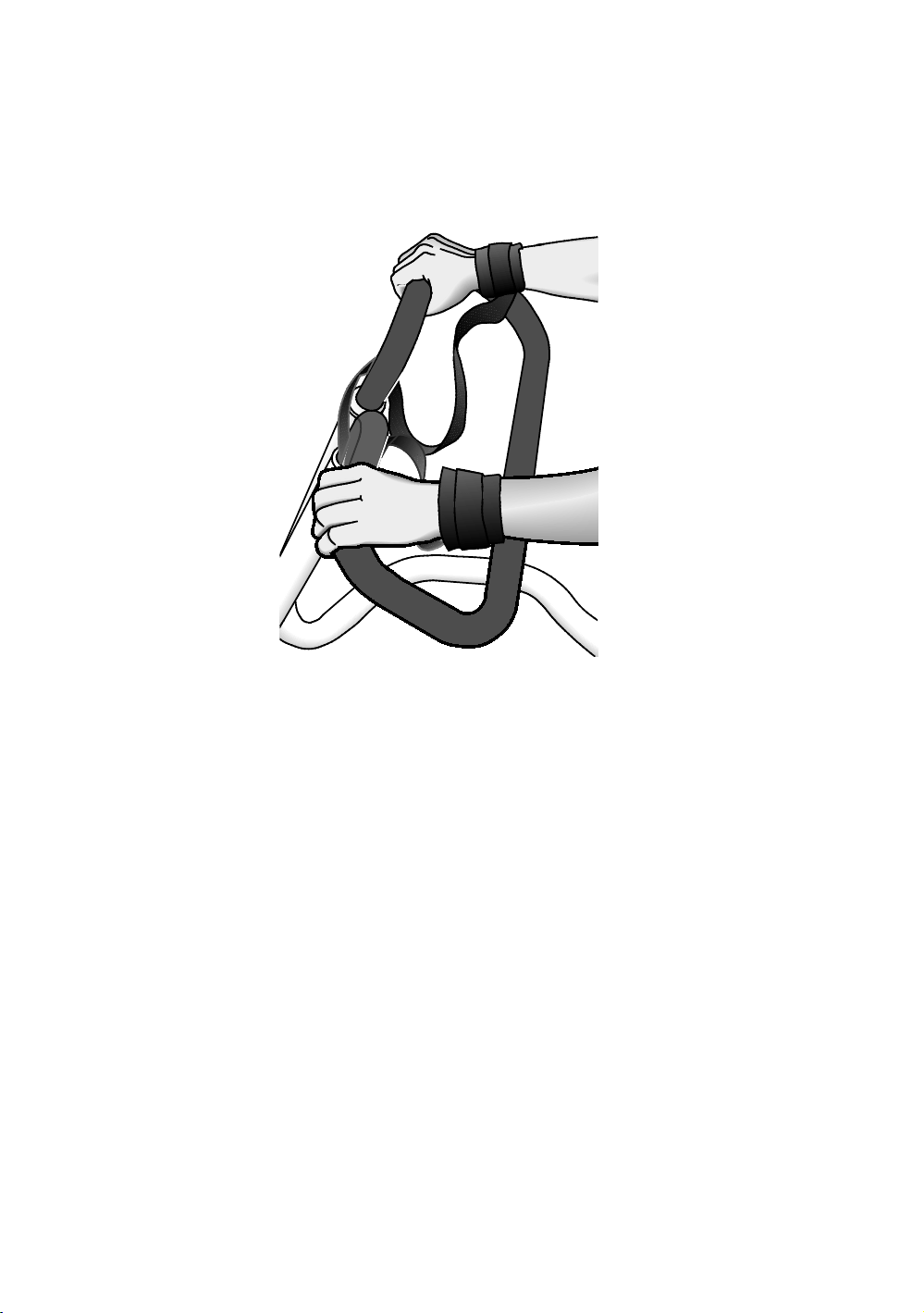
Use the wrist straps at all times while on the
StretchTrainer. The wrist straps reduce the risk of injury
by decreasing the chance of overstretching or falling if
you lose your grip on the handlebar.
Figure 1: Proper placement of wrist straps
Do not overstretch, force a stretch, or bounce during a
stretch.
If you feel pain or abnormal symptoms, stop exercising
immediately and consult your physician.
Always check the equipment before using it. If you spot a
potential problem, contact someone in the facility
immediately. Do not use the equipment until the facility
has verified that the equipment is working properly. Do
not attempt to fix broken or jammed equipment.
Do not use the equipment outdoors or on wet surfaces.
Do not use the equipment if an "out-of-order" sign has
been placed on it.
When you have completed your stretching routine, make
sure that the seat has returned to the forward position.
Read all posted instructions, including all safety
instructions and warnings.

Chapter 2
Assembling the
StretchTrainer
Unpacking the StretchTrainer
Carefully unpack the parts and lay them on the floor near the
location where you plan to assemble the equipment.
If any items are missing, contact the dealer from whom you
purchased the StretchTrainer or use the Precor web site at
www.precor.com to find the dealer nearest you.
Important: Be aware that the lubrication on the fasteners can
stain carpeting and clothing. Precor recommends that you set the
fasteners on a piece of cardboard packaging during assembly.
The following pieces of hardware are shipped with your
StretchTrainer.
Seat frame
Padded seat (includes 4 bolts and 4 washers)
Knee pad (includes 4 bolts and 4 washers)
Two base rails (includes one bolt and washer per rail)
Handlebar (includes wrist straps)
Instructional placard
StretchTrainer documentation including warranty
Two rear level adjusters
Seat bumper
Alignment bracket
Seat bracket
Hardware kit
– 3mm hex wrench
– 6mm hex wrench
10 Assembling and Maintaining the StretchTrainer
– Two E-clips
– Two foot rests
– Axle
– Two 5-inch bolts
– Four 1¹₄-inch bolts
– Two lock nuts
– Eight flat washers
– Four lock washers
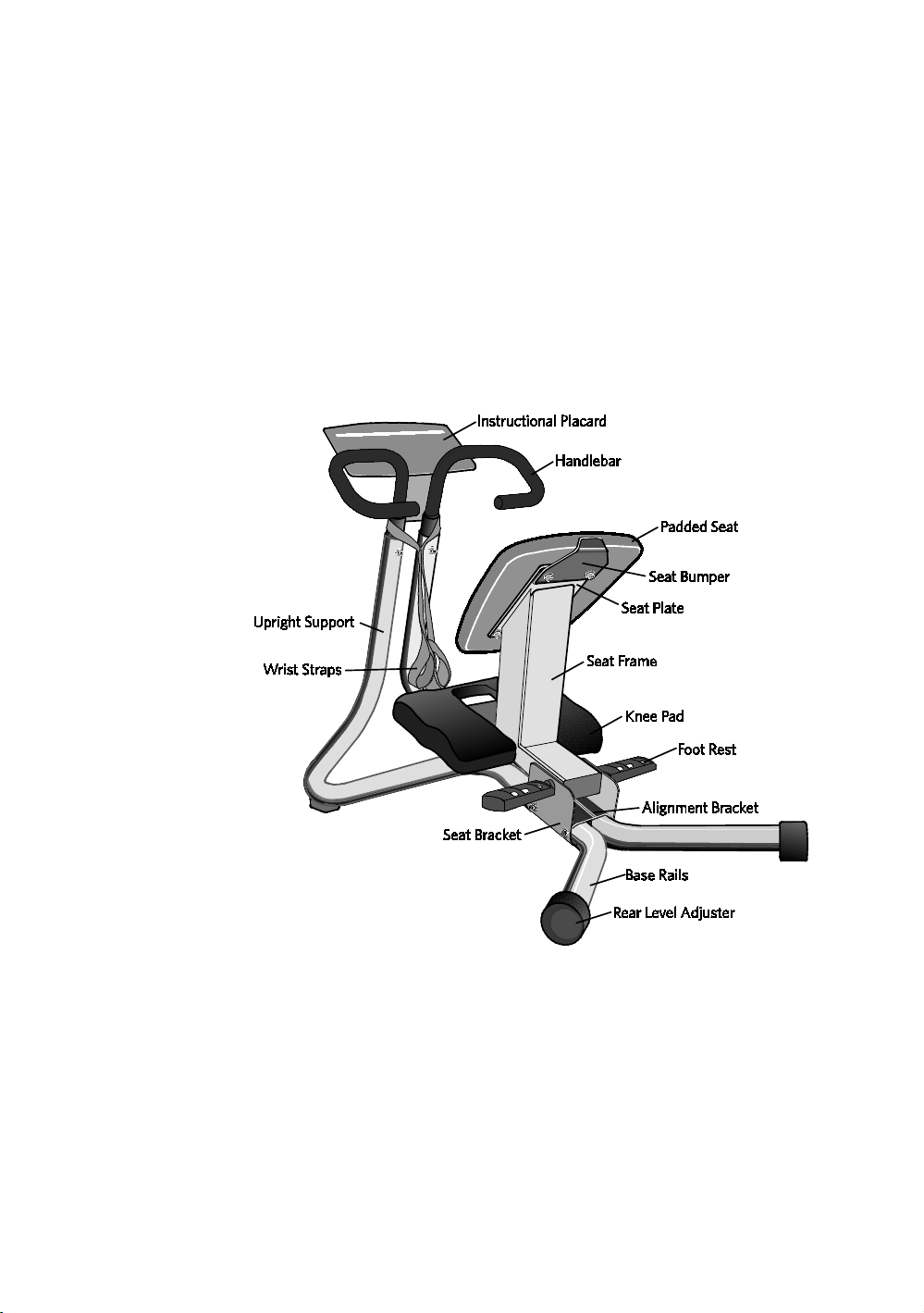
The following figure shows the names used in this manual for
the major components of the equipment.
Figure 2: Parts of the StretchTrainer
Obtaining Service
Do not attempt to service the equipment except for
maintenance tasks. If any items are missing, contact your
dealer. For more information regarding customer support
numbers or a list of Precor authorized service centers, visit
the Precor web site at http://www.precor.com.
Assembling the StretchTrainer 11
Assembling the StretchTrainer
CAUTION: At least two people are required to position the parts
of this equipment successfully. Do not attempt to assemble the
equipment by yourself. Fully assembled, the StretchTrainer
weighs over 60 pounds.
Proper alignment and adjustment of the equipment is critical.
When you install fasteners, leave room for adjustments. Do not
tighten the fasteners completely until you are instructed to do so.
Make sure the equipment is stable and placed on a solid surface.
Optional tools:
Open-end adjustable wrench
Pair of needle-nose pliers
To begin assembly:
1. Set the base rails on the floor and remove the two bolts
and two flat washers on the underside of the rails.
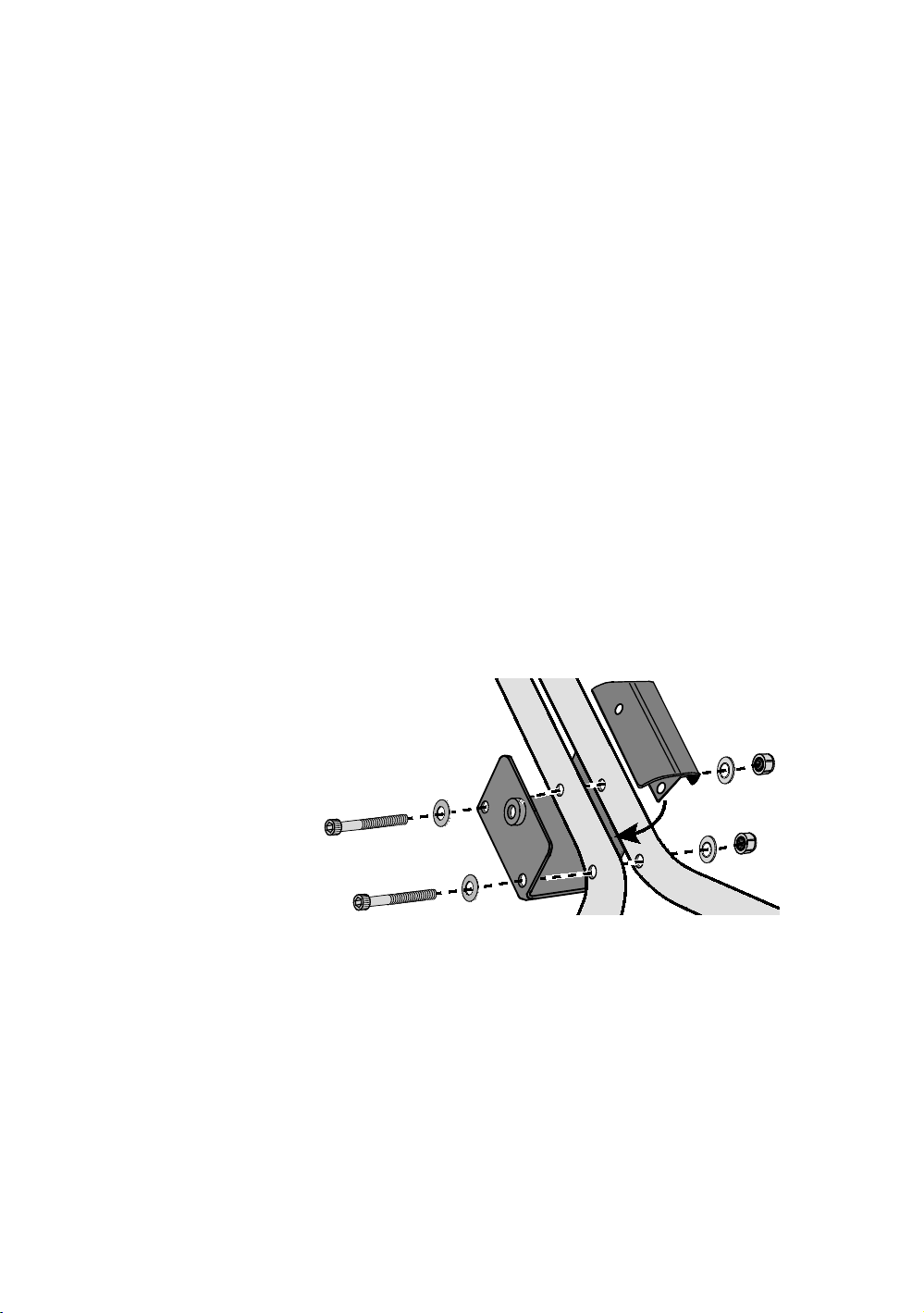
2. While your assistant holds the upright supports, slide the
seat bracket under the base rails and align the mounting
holes. Place the alignment bracket in between the base
rails and secure it using the two 5-inch bolts, four flat
washers, and two locknuts from the hardware kit.
Figure 3: Alignment bracket and base rail assembly
12 Assembling and Maintaining the StretchTrainer
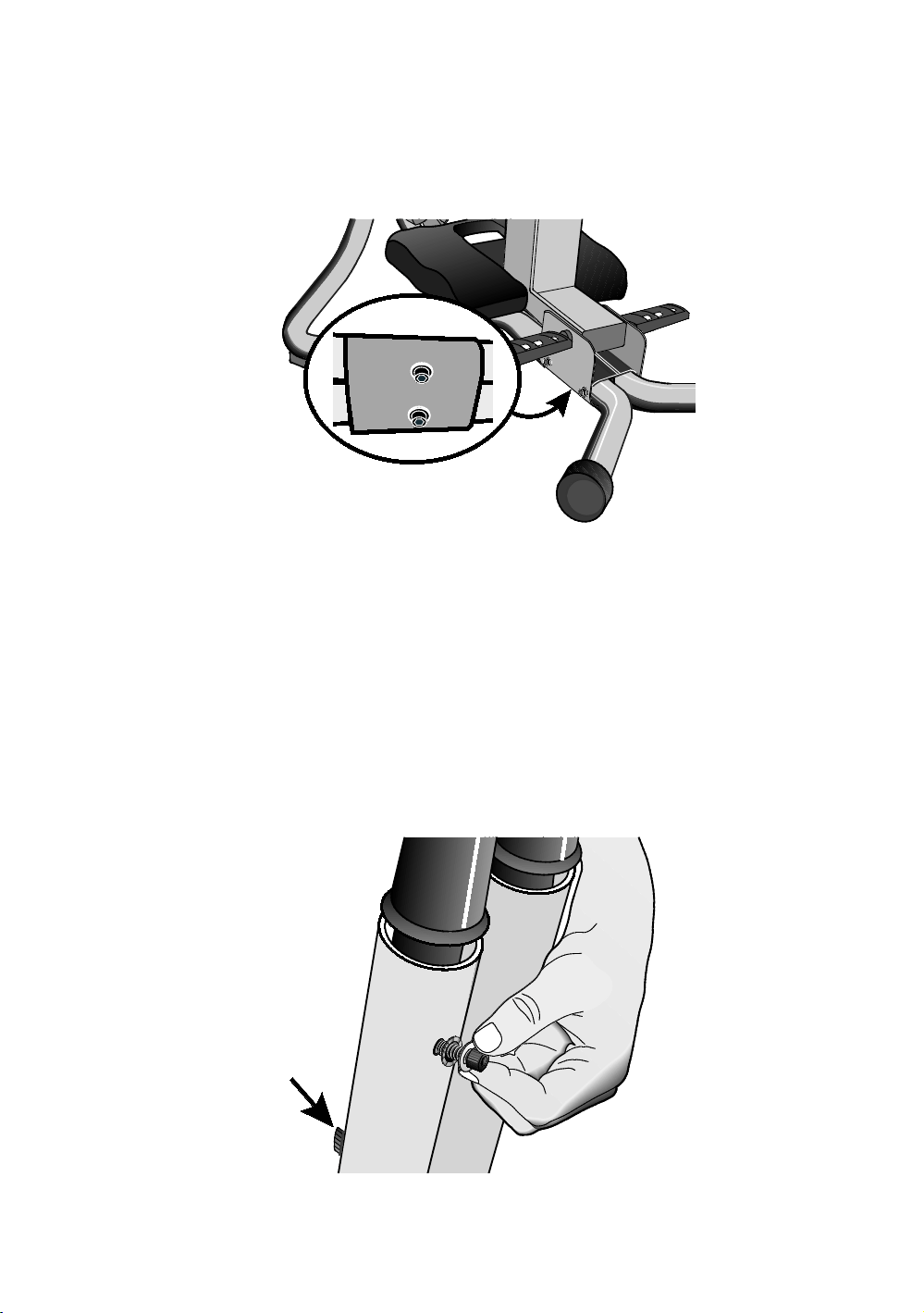
3. Attach the seat bracket on the underside of the rails using
the hardware removed from the base rails. Secure the
seat bracket using the two bolts and two flat washers
removed in step 1. Finger tighten the bolts.
Figure 4: Position of bolts on underside of base rails
4. Position the handlebar over the upright supports and slide
it into place.
Note: The wrist straps on the handlebars should face
toward the rear of the equipment (see figure 2).
5. Align the holes in the front and back of the handlebar with
the holes in the upright supports. Secure them using four
1¹₄-inch bolts, four lock washers, and four flat washers
from the hardware kit.
Note: Do not fully tighten the bolts at this time. This will
make it easier to install the seat frame.
Figure 5: Bolt locations on upright supports
Assembling the StretchTrainer 13
Assembling the Seat Frame and Pads
Put the seat frame assembly (seat frame, padded seat, seat
bumper, and knee pad) together before you attach it to the
base rails.
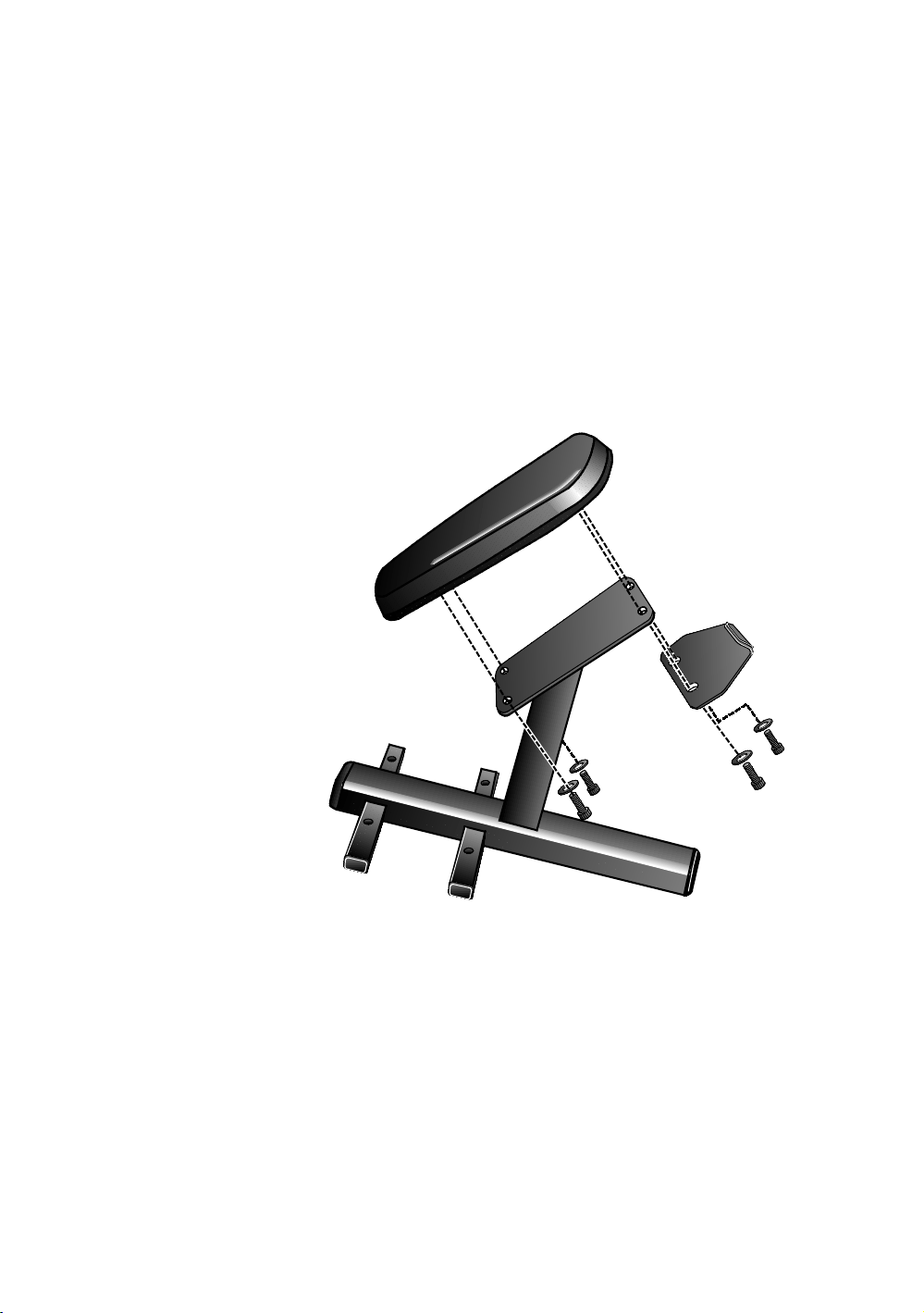
To attach the padded seat:
1. Remove the four bolts and four flat washers from the
underside of the padded seat.
2. Position the padded seat on the seat plate with the
narrow end of the seat toward the floor. Secure the lower
end of the padded seat to the seat plate using two bolts
and two washers removed in step 1.
Figure 6: Padded seat attachment
14 Assembling and Maintaining the StretchTrainer
3. Position the seat bumper against the back of the seat
plate so that the holes align with the holes in the seat
plate and padded seat. Secure it using two bolts and two
washers removed in step 1. To keep the padded seat
aligned properly, alternately finger tighten each bolt.
Note: There will be a small space (about ¹₈ inch) between
the bumper and the padded seat.
4. After the padded seat is secured and properly aligned,
tighten each bolt using a 6mm hex wrench.
Important: Do not overtighten the bolts.
To attach the knee pad:
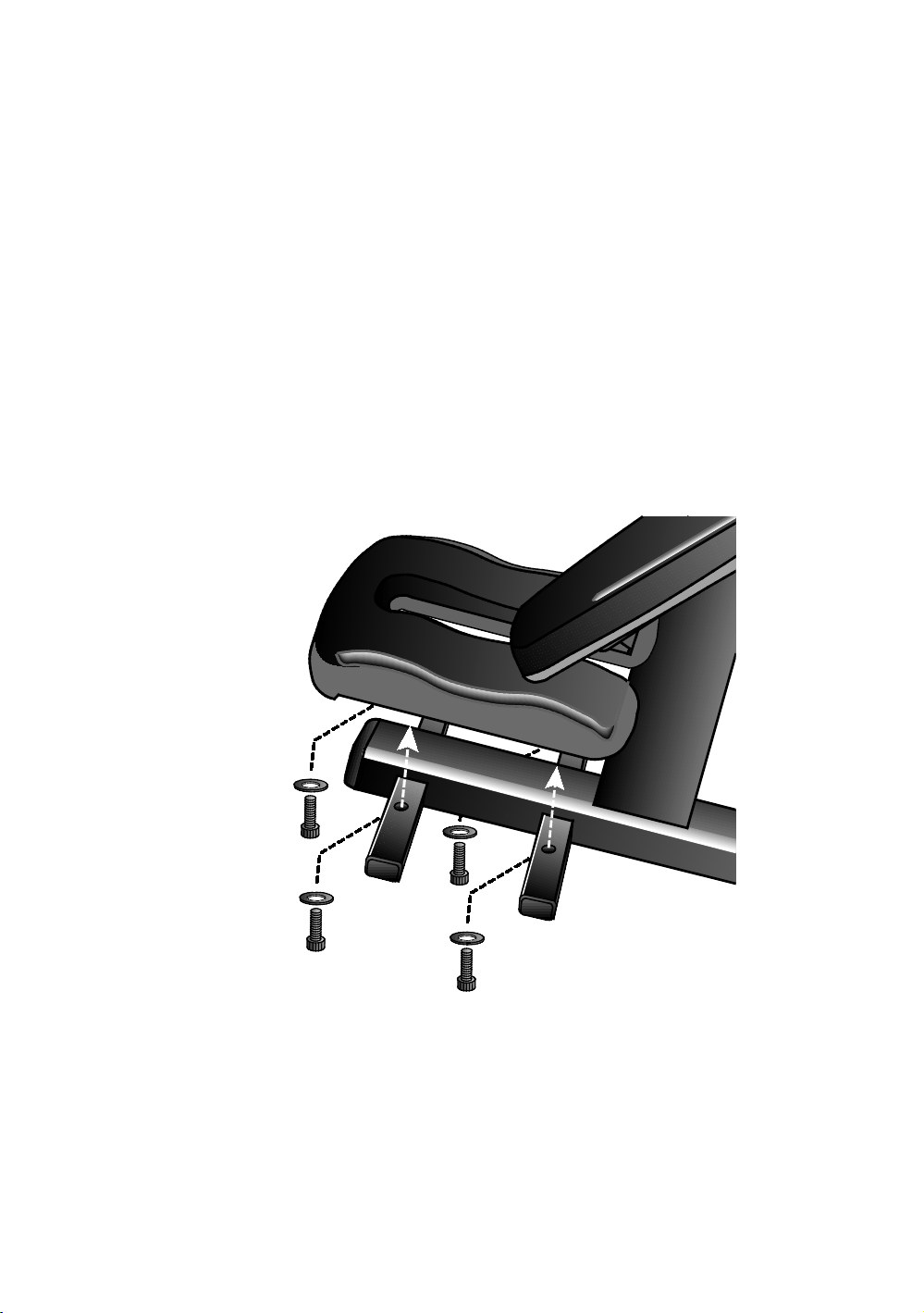
1. Remove the four bolts and four flat washers from the
underside of the knee pad.
2. Align the holes on the bottom of the knee pad with the
mounting holes in the crossbar.
Figure 7: Knee pad attachment to crossbar

Assembling the StretchTrainer 15
3. To attach the knee pad, slide a washer onto each of the
four bolts removed in step 1. Place a bolt and washer on
the end of the 6mm hex wrench and insert it through the
crossbar.
4. To keep the knee pad properly aligned, thread all four
bolts, then alternately tighten each bolt securely.
Note: If you lose a bolt in the crossbar, tip the seat frame
on its side and shake it until the bolt drops out of the hole.
Figure 8: Knee pad attachment
To attach the axle:
1. Position the seat frame between the seat bracket and
align the axle mounting hole. Slide the axle half way
through the bracket and seat frame.
Figure 9: Axle placement
16 Assembling and Maintaining the StretchTrainer
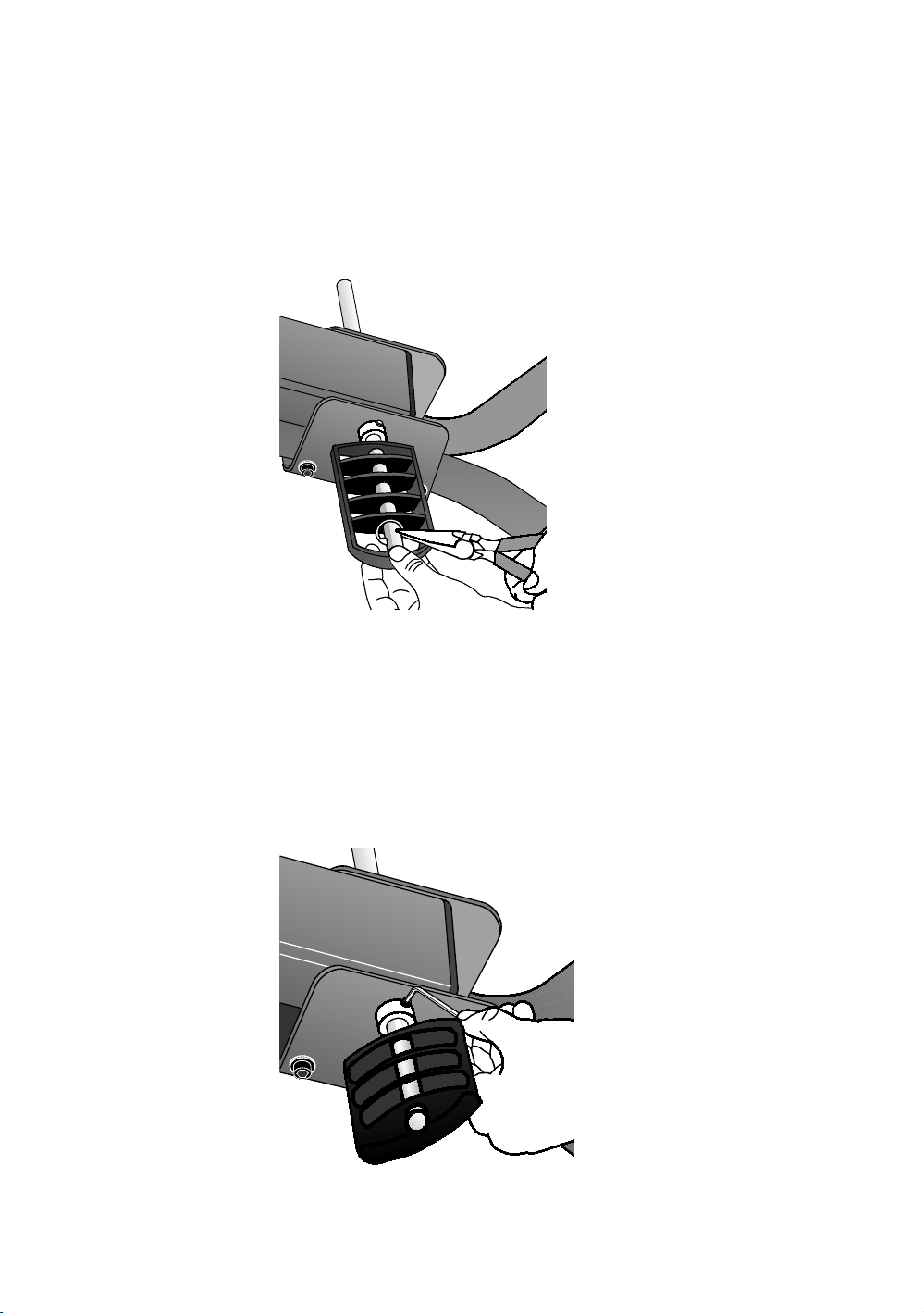
2. Slide a foot rest onto one end of the axle.
3. Position an E-clip from the hardware kit on the foot rest as
shown in the following figure and push it into position.
Note: A notch has been cut into the axle to position the
E-clip. You may need pliers to push the E-clip into
position.
Figure 10: Position of E-clip on the foot rest
4. Slide a foot rest onto the other side of the axle and repeat
step 3.
5. After the foot rests are securely fastened to the axle,
check that the axle is centered through the seat frame.
Then tighten the two small set screws that hold the axle
in position using a 3mm hex wrench.
Note: Do not overtighten the screws.
Figure 11: Tighten set screws on axle
Assembling the StretchTrainer 17
To complete the assembly:
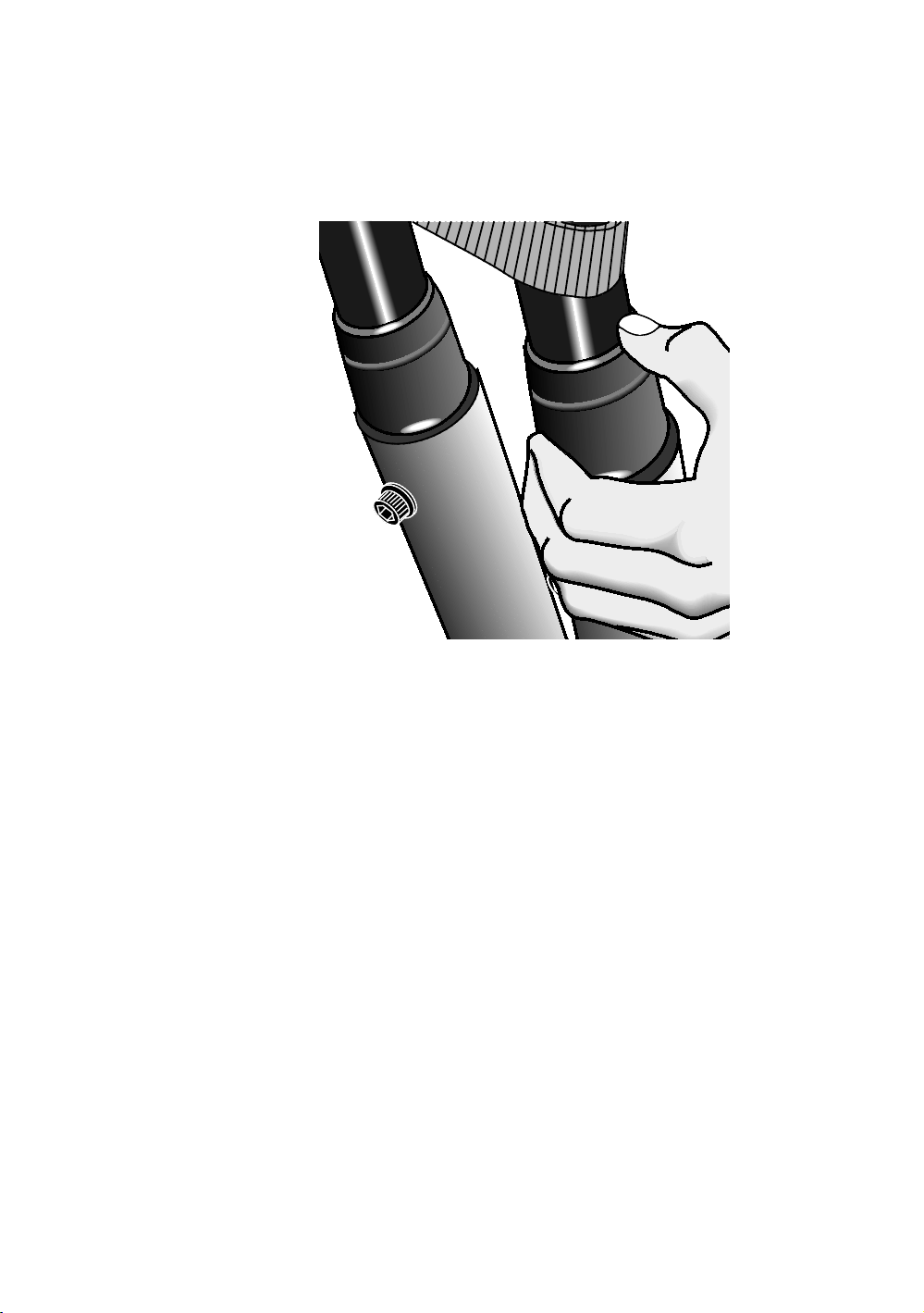
1. Slide the handlebar caps onto the upright supports, then
fully tighten the handlebar bolts using a 6mm hex wrench.
Figure 12: Handlebar cap attachment
2. Fully tighten all seat bracket bolts.
Important: Do not overtighten the bolts. Doing so may
compress or crack the plastic alignment bracket.
18 Assembling and Maintaining the StretchTrainer
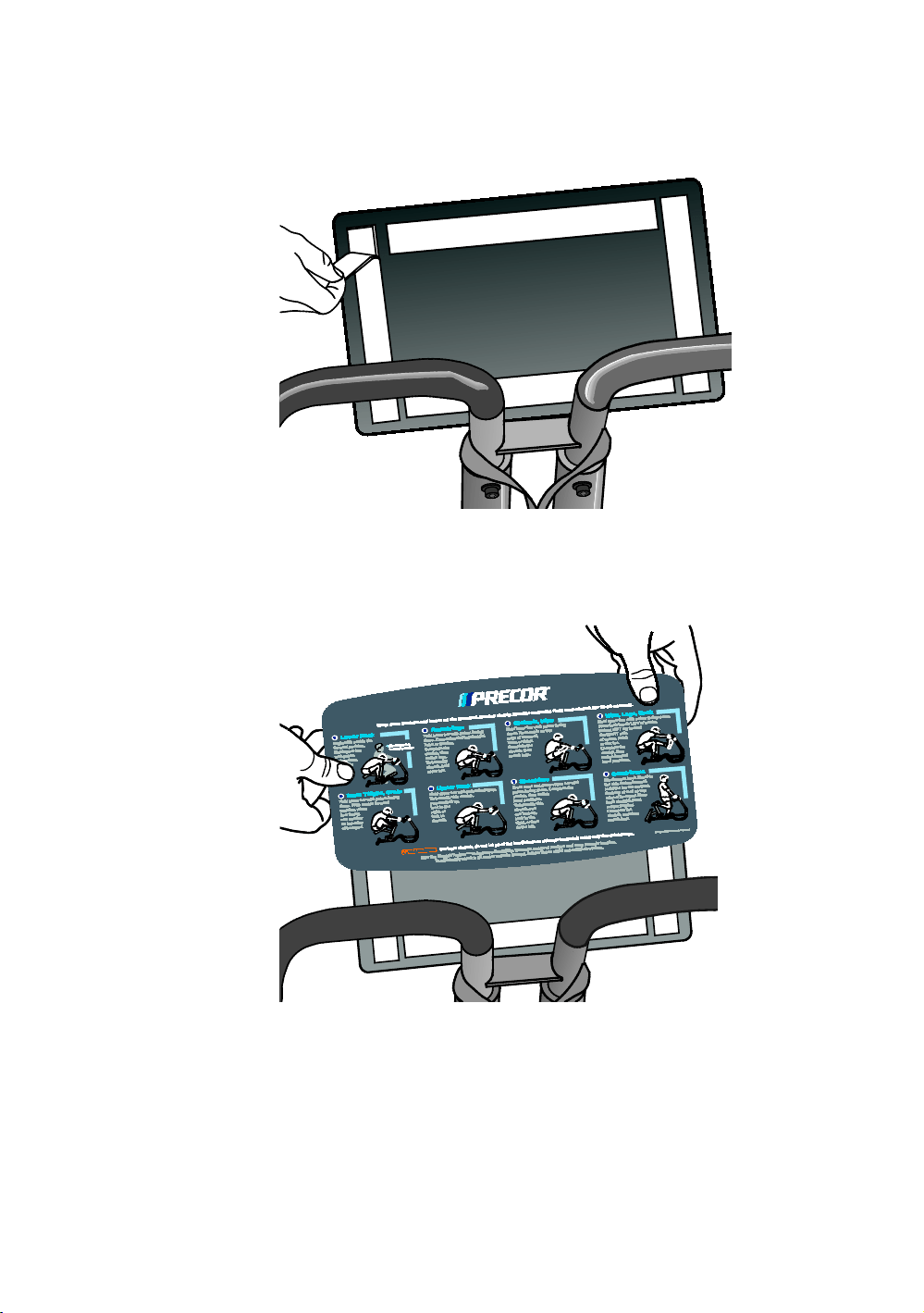
3. Remove the paper backing from the adhesive tape on the
placard mount.
Figure 13: Adhesive tape removal
4. Carefully center the instructional placard on the placard
mount and press firmly into place.
Figure 14: Placard attachment
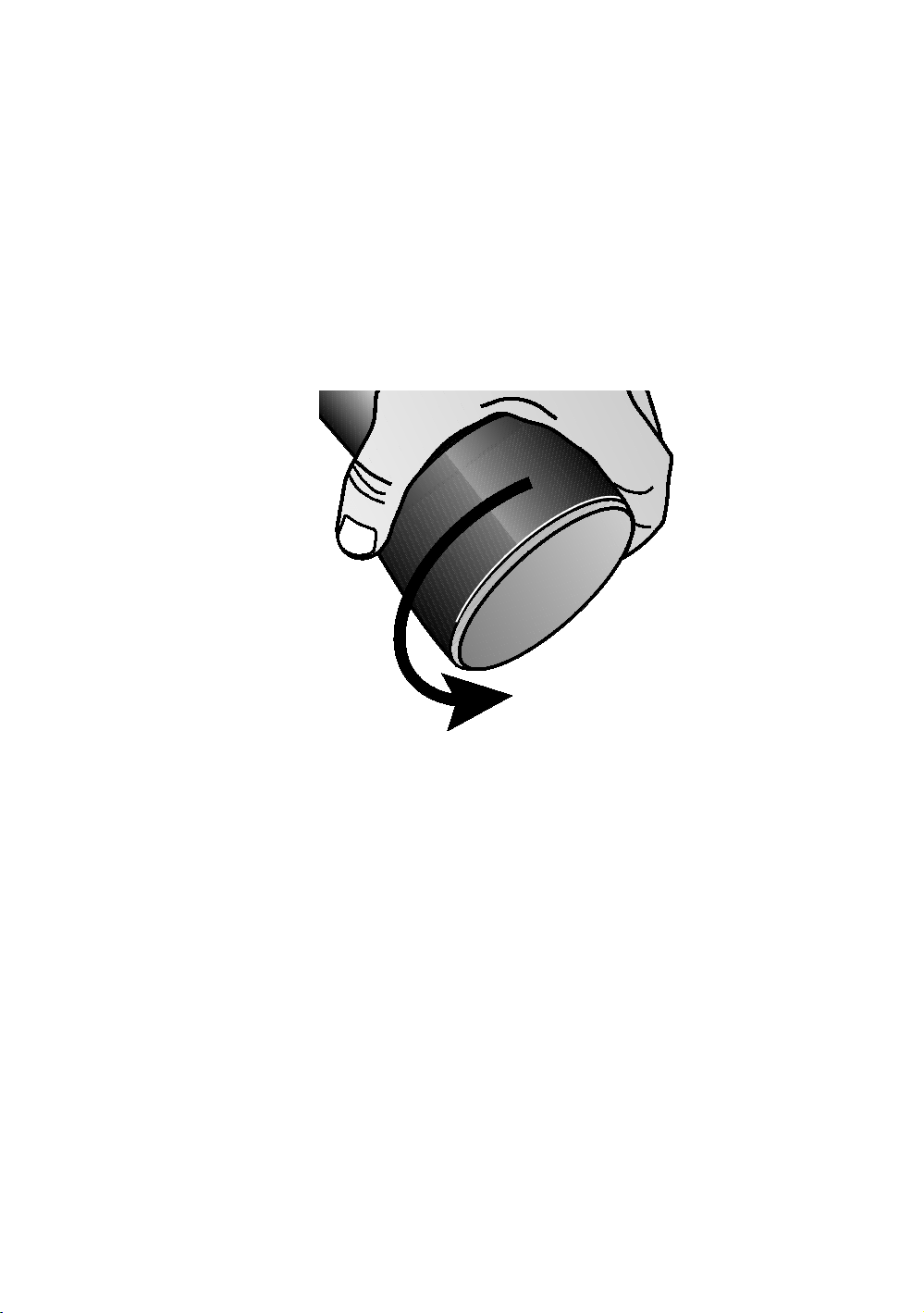
5. To attach the rear level adjusters, raise the rear end of the
StretchTrainer slightly off the floor. Slide a rubber level
adjuster onto one side of the rear base rail.
Assembling the StretchTrainer 19
6. Slide the other level adjuster onto the opposite base rail.
7. Carefully lower the equipment onto the floor. Avoid
pinching your fingers.
Important: If the equipment is placed on a slightly, uneven
surface, rotating the rear level adjusters can help, but will not
compensate for extremely uneven surfaces. The maximum
height that you can compensate for using the rear level
adjusters is about
¹₄
inch (6 mm).
8. To level the equipment, sit on the StretchTrainer. If it
wobbles slightly, rotate the rear level adjusters until the
equipment is stable.
Figure 15: Rear level adjuster
9. Use a cloth dampened with a non-abrasive degreaser to
clean any parts of the equipment that have been
blackened by grease from the bolts.
Important: Do not discard the hex wrenches supplied with the
equipment. Maintain the integrity of the StretchTrainer by
occasionally checking and tightening the hardware. Use the hex
wrenches to tighten any bolts that become loose.

20 Assembling and Maintaining the StretchTrainer

Chapter 3
Using Your StretchTrainer
Stretching is an important component in a proper warm up
and cool down at the start and end of each workout.
Refer to this section to learn more about muscle groups and
how to use the StretchTrainer to help you achieve your
workout goals.
Before you begin your stretching routine, review the following
guidelines.
Always use the wrist straps during your stretching
routine.
Warm up and start slowly. Warm muscles are easier to
stretch and are less prone to injury.
Learn how to perform each stretch correctly. Always keep
your arms straight. Pay close attention to the position of
each body part.
For most stretching positions, make sure that your knees
rest on the knee pads, your lower legs are parallel to the
knee pads, and your feet are properly positioned in the
foot rests.
Do not overstretch. Do not hold stretches for longer than
3 to 5 seconds. Pay attention to exactly how your body
feels. The amount of movement should be determined by
your comfort level. Stop when you feel tension in the
muscle.
Do not bounce while stretching. The stretching routines
should always be done in a controlled manner, using slow,
smooth movements.
Use your abdominal and gluteal muscles to move into and
out of each stretch. Do not use your arms to pull yourself
to the starting position.
Do not hold your breath. Remember to relax and breathe
normally while stretching.
22 Assembling and Maintaining the StretchTrainer
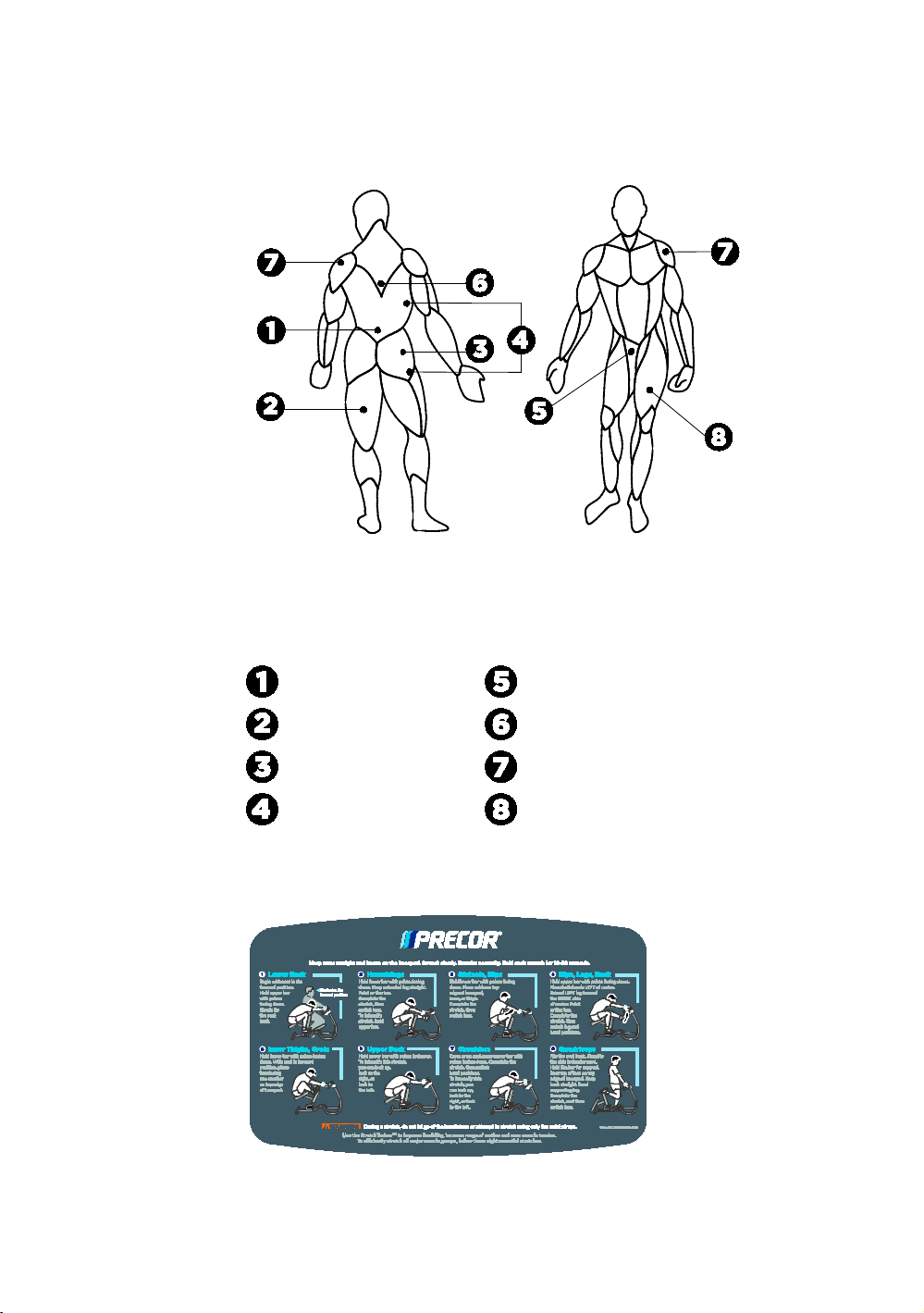
The numerical callouts on the following figure correspond to
the eight stretches on the instructional placard.
Figure 16: Targeted muscles
Table 1. Targeted muscle group names
Number Muscle Group Number Muscle Group
Lower Back
Inner Thighs, Groin
Hamstrings
Upper Back
Gluteals, Hips
Shoulders
Hips, Legs, Back
Quadriceps
For example, callout 1 refers to the muscles that are targeted
in the first stretch (Lower Back) on the instructional placard.
Figure 17: Instructional placard

Chapter 4
Maintenance
You will need to perform the following tasks each day to
maintain the equipment and keep it operating smoothly:
Clean any upholstery on the equipment.
Inspect pads for wear.
Clean and inspect frames.
Check warning and instructional labels.
Check that all fasteners are properly secured.
Clean and Inspect Pads
To remove surface dirt and perspiration, clean upholstery
daily with a mild soap and water solution in a spray bottle.
Spray upholstered surfaces lightly and wipe dry with a clean
cloth.
Important: To clean the upholstery, do not use cleaning products
that have any of these ingredients: solvents, alcohol, ammonia, or
petroleum. Use a mild detergent-based cleaner instead.
Inspect pads for cracks in the upholstery, broken and loose
stitching, loose staples, and loose mounting bolts. Replace
pads as needed (refer to Obtaining Service to purchase new
pads).
Important: Do not reupholster pads or use pads not approved by
Precor.

24 Assembling and Maintaining the StretchTrainer
Clean and Inspect Frames
To remove grease and dirt, clean frames daily with a mild
soap and water solution in a spray bottle. Wipe the
equipment down with a damp cloth and dry completely. Be
sure to wipe down both painted parts and chrome or plated
parts.
To restore and maintain the luster of chrome parts, use a
commercial chrome cleaner. As you clean, inspect the frames
for cracks, rust, or other damage. Make sure welds are solid
and fasteners are properly secured.
Inspect Warning Labels
Inspect warning and instructional labels daily to make sure
that the information can be clearly read. If any portion is not
visible or part of the label is not adhered properly, replace the
label immediately (refer to Obtaining Service for purchase
information). Clean labels as needed with a mild soap and
water solution in a spray bottle and dry thoroughly with a soft
cloth.
Inspect all Fasteners
Fasteners can loosen with normal use. Inspect all nuts, bolts,
screws, and other fasteners to make sure they are tight and
installed correctly.
Be sure to check fasteners at bolted joints to make sure the
connections are secure. If a fastener is loose but in good
condition, retighten it. If you are concerned about the integrity
of the fastener, remove it, clean the threads, and inspect it for
any damage such as cracks, bad threads, corrosion, or rust.
Reinstall the fastener if it appears to be in good condition.
Otherwise, remove the equipment from service until a new
fastener can be installed properly. You can order new
fasteners from Customer Support. For additional information,
refer to Obtaining Service.
Important: Fastener quality and specifications vary considerably.
Replace only with the Precor approved fastener specifically
engineered for the precise application. Failure to do so will void the
Precor Limited Warranty.

Chapter 5
Commercial StretchTrainer
Equipment Limited Warranty
PLEASE READ THESE WARRANTY TERMS AND CONDITIONS CAREFULLY BEFORE
USING YOUR PRECOR INCORPORATED PRODUCT. BY USING THE EQUIPMENT, YOU
ARE CONSENTING TO BE BOUND BY THE FOLLOWING WARRANTY TERMS AND
CONDITIONS.
Limited Warranty.
Precor Incorporated warrants all new Precor products to be free from defects in materials
and manufacture for the warranty periods set forth below. The warranty periods
commence on the invoice date of the original purchase. This warranty applies only against
defects discovered within the warranty period and extends only to the original purchaser
of the product. Parts repaired or replaced under the terms of this warranty will be
warranted for the remainder of the original warranty period only. To claim under this
warranty, the buyer must notify Precor or your authorized Precor dealer within 30 days
after the date of discovery of any nonconformity and make the affected product available
for inspection by Precor or it service representative. Precor’s obligations under this
warranty are limited as set forth below.
Warranty Periods and Coverage:
Commercial StretchTrainers manufactured and sold after August 2013.
Frame parts and weldments:
10 years
All surface areas to include painted and plated surfaces:
1 year
Upholstery pads and wrist straps:
6 months
All other parts (including hand grips, end caps):
1 year
Labor:
1 year

26 Assembling and Maintaining the StretchTrainer
Conditions and Restrictions.
This warranty is valid only in accordance with the conditions set forth below:
1. The warranty applies to the Precor product only while
a. it remains in the possession of the original purchaser and proof of purchase is
demonstrated,
b. it has not been subjected to accident, misuse, abuse, improper service, or
non-Precor modification,
c. claims are made within the warranty period.
2. Except in Canada, Precor does not pay labor outside the United States.
3. Warranties outside the United States and Canada may vary. Please contact your local
Dealer for details.
This Limited Warranty shall not apply to:
1. Normal wear and tear, consumables and cosmetic items, including, but not limited to
the following: seats and labels.
2. Repairs performed on Precor equipment missing a serial number or with a serial tag
that has been altered or defaced.
3. Service calls to correct installation of the equipment or instruct owners on how to use
the equipment.
4. Pickup and delivery involved with repairs.
5. Any labor costs incurred beyond the applicable labor warranty period.
Complete this portion and keep for your records.
Purchased From:
Example: Dealer or store name.
Phone Number:
Example: Dealer or store telephone number.
Product/model:
Example: StretchTrainer
The serial number is found on the shipping container.

Commercial StretchTrainer Equipment Limited Warranty 27
Disclaimer and Release.
The warranties provided herein are the exclusive warranties given by Precor and
supersede any prior, contrary or additional representations, whether oral or written. ANY
IMPLIED WARRANTIES, INCLUDING THE WARRANTY OF MERCHANTABILITY OR
FITNESS FOR A PARTICULAR PURPOSE THAT APPLY TO ANY PARTS DESCRIBED
ABOVE ARE LIMITED IN DURATION TO THE PERIODS OF EXPRESS WARRANTIES
GIVEN ABOVE FOR THOSE SAME PARTS. PRECOR HEREBY DISCLAIMS AND
EXCLUDES THOSE WARRANTIES THEREAFTER. Some States do not allow limitations on
how long an implied warranty lasts, so the above limitation may not apply to you. PRECOR
ALSO HEREBY DISCLAIMS AND EXCLUDES ALL OTHER OBLIGATIONS OR LIABILITIES,
EXPRESS OR IMPLIED, ARISING BY LAW OR OTHERWISE, WITH RESPECT TO ANY
NONCONFORMANCE OR DEFECT IN ANY PRODUCT, INCLUDING BUT NOT LIMITED
TO: (A) ANY OBLIGATION, LIABILITY, RIGHT, CLAIM OR REMEDY IN TORT, WHETHER
OR NOT ARISING FROM THE NEGLIGENCE OF PRECOR OR ITS SUPPLIERS (WHETHER
ACTIVE, PASSIVE OR IMPUTED); AND (B) ANY OBLIGATION, LIABILITY, RIGHT,
CLAIM OR REMEDY FOR LOSS OF OR DAMAGE TO ANY EQUIPMENT. This disclaimer
and release shall apply even if the express warranty set forth above fails of its essential
purpose.
Exclusive Remedies.
For any product described above that fails to conform to its warranty, Precor will provide,
at their option, one of the following: (1) repair; (2) replacement; or (3) refund of the
purchase price. Precor Limited Warranty service may be obtained by contacting the
authorized dealer from whom you purchased the item. Precor compensates Servicers for
warranty trips within their normal service area to repair commercial equipment at the
customer’s location. You may be charged a trip charge outside the service area. THESE
SHALL BE THE SOLE AND EXCLUSIVE REMEDIES OF THE BUYER FOR ANY BREACH OF
WARRANTY.

28 Assembling and Maintaining the StretchTrainer
Exclusion of Consequential and Incidental
Damages.
PRECOR AND/OR ITS SUPPLIERS SHALL HAVE NO OBLIGATION OR LIABILITY,
WHETHER ARISING IN CONTRACT (INCLUDING WARRANTY), TORT (INCLUDING
ACTIVE, PASSIVE, OR IMPUTED NEGLIGENCE AND STRICT LIABILITY), OR
OTHERWISE, FOR DAMAGE TO THE EQUIPMENT, PROPERTY DAMAGE, LOSS OF USE,
REVENUE OR PROFIT, COST OF CAPITAL, COST OF SUBSTITUTE EQUIPMENT,
ADDITIONAL COSTS INCURRED BY BUYER (BY WAY OF CORRECTION OR
OTHERWISE) OR ANY OTHER INCIDENTAL, SPECIAL, INDIRECT, OR CONSEQUENTIAL
DAMAGES, WHETHER RESULTING FROM NONDELIVERY OR FROM THE USE, MISUSE
OR INABILITY TO USE THE PRODUCT. This exclusion applies even if the above warranty
fails of its essential purposes and regardless of whether such damages are sought for
breach of warranty, breach of contract, negligence, or strict liability in tort or under any
other legal theory. Some states do not allow the exclusion or limitation of incidental or
consequential damages, so the above limitation may not apply to you.
This warranty gives you specific legal rights, and you may also have other rights, which
vary from state to state.
Effective August 2013
P/N CW39141-101

Assembling and Maintaining
the StretchTrainer™
Precor Incorporated
20031 142nd Avenue NE
P.O. Box 7202
Woodinville, WA USA 98072-4002
StretchTrainer OAG 38875-111 rev A, en
Warranty P/N CW39141-101
25 August 2013