3787131-6A
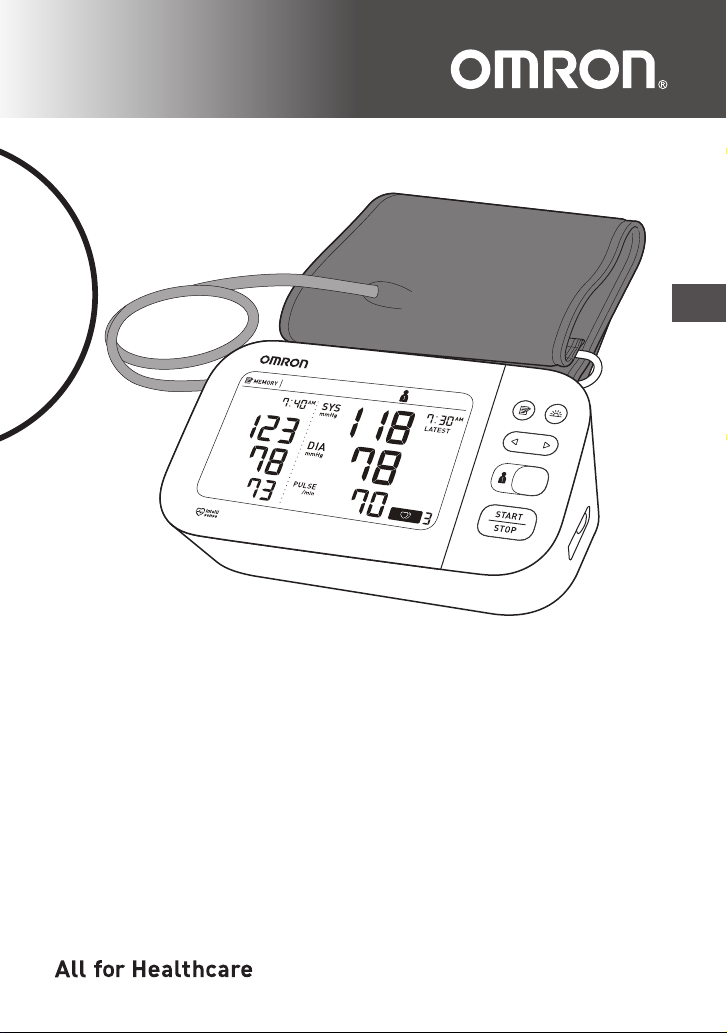
Gold Upper Arm
Blood Pressure Monitor
Model BP5350
Instruction Manual
EN

1
EN
Table of Contents
Introduction ................................................2
Safety Instructions ...............................2
Intended Use .......................................2
Receiving and Inspection .....................2
Symbols Glossary ................................2
Important Safety Information ....................3
1. Know Your Monitor ...............................7
1.1 Contents/Product Includes ..........7
1.2 Monitor and Arm Cuff ..................7
1.3 Display and Symbols ...................9
1.4 Classification of BP (Blood
Pressure) ...................................13
2. Preparation ..........................................14
2.1 Installing Batteries .....................14
2.2 Setting the Date and Time .........15
2.3 Blood Pressure Measurement
Tips ............................................17
2.4 Applying the Arm Cuff ...............18
2.5 Sitting Correctly .........................21
2.6 Selecting a User ID ...................21
3. Using Your Monitor without a
Smart Device .......................................22
3.1 Taking a Measurement ..............22
4. Using Your Monitor with a Smart
Device ..................................................25
4.1 Pairing Your Monitor with a
Smart Device .............................25
4.2 Taking a Measurement ..............26
4.3 Disabling/Enabling Bluetooth ....27
5. Using Memory Function .....................28
5.1 Viewing the Readings Stored in
Memory .....................................28
5.2 Viewing the Average Reading ...29
5.3 Viewing Morning Weekly
Averages ...................................30
6. Other Settings .....................................32
6.1 Deleting All Readings Stored in
Memory .....................................32
6.2 Restoring Your Monitor to the
Default Settings .........................33
7. Error Messages and
Troubleshooting .................................35
8. Maintenance ........................................39
8.1 Maintenance ..............................39
8.2 Storage ......................................39
8.3 Cleaning .................................... 40
8.4 Disposal .................................... 40
9. Optional Accessories ......................... 41
Using the AC Adapter (optional
accessory) ......................................... 42
10. Specifications ..................................... 43
11. FCC/ISED Statement .......................... 47
12. Limited Warranty ................................ 49
13. Guidance and Manufacturer’s
Declaration .......................................... 51

2
Introduction
Thank you for purchasing the OMRON BP5350 Blood Pressure
Monitor. This monitor can be used by multiple users. This blood
pressure monitor uses the oscillometric method of blood pressure
measurement. This means this monitor detects your blood movement
through your brachial artery and converts the movements into a
digital reading.
Safety Instructions
This instruction manual provides you with important information about
the OMRON BP5350 Blood Pressure Monitor. To ensure the safe and
proper use of this monitor, READ and UNDERSTAND all of these
instructions. If you do not understand these instructions or have
any questions, contact 1-800-634-4350 before attempting to use
this monitor. For specific information about your own blood
pressure, consult with your physician.
Intended Use
This device is a digital monitor intended for use in measuring blood
pressure and pulse rate in adult patient population. The device
detects the appearance of irregular heartbeats during measurement
and gives a warning signal with readings.
Environments of Use: Home
Patient Population: Adult
Receiving and Inspection
Remove this monitor and other components from the packaging and
inspect for damage. If this monitor or any other components is
damaged, DO NOT USE and contact 1-800-634-4350.
Symbols Glossary
For symbol information, visit:
OmronHealthcare.com/symbols-glossary
Contraindications
• This monitor is contraindicated for use in ambulatory environments.
• This monitor is contraindicated for use on aircraft.

3
EN
Important Safety Information
Read the Important Safety Information in this instruction manual
before using this monitor.
Follow this instruction manual thoroughly for your safety.
Keep for future reference. For specific information about your own
blood pressure, CONSULT WITH YOUR PHYSICIAN.
Warning
Indicates a potentially hazardous situation which, if not
avoided, could result in death or serious injury.
• DO NOT use this monitor on infants, toddlers, children or persons who cannot
express themselves.
• DO NOT adjust medication based on readings from this blood pressure
monitor. Take medication as prescribed by your physician. ONLY a physician
is qualified to diagnose and treat high blood pressure.
• DO NOT use this monitor on an injured arm or an arm under medical
treatment.
• DO NOT apply the arm cuff on your arm while on an intravenous drip or blood
transfusion.
• DO NOT use this monitor in areas containing high frequency (HF) surgical
equipment, magnetic resonance imaging (MRI) equipment, computerized
tomography (CT) scanners. This may result in incorrect operation of the
monitor and/or cause an inaccurate reading.
• DO NOT use this monitor in oxygen rich environments or near flammable gas.
• Consult with your physician before using this monitor if you have common
arrhythmias such as atrial or ventricular premature beats or atrial fibrillation;
arterial sclerosis; poor perfusion; diabetes; pregnancy; pre-eclampsia or
renal disease. NOTE that any of these conditions in addition to patient motion,
trembling, or shivering may affect the measurement reading.
• NEVER diagnose or treat yourself based on your readings. ALWAYS consult
with your physician.
• To help avoid strangulation, keep the air tube and AC adapter cable away from
infants, toddlers and children.
• This product contains small parts that may cause a choking hazard if
swallowed by infants, toddlers and children.
Data Transmission
• This product emits radio frequencies (RF) in the 2.4 GHz band. DO NOT use
this product in locations where RF is restricted, such as on an aircraft or in
hospitals. Turn off the Bluetooth
®
feature in this monitor, remove batteries
and/or unplug the AC adapter when in RF restricted areas. For further
information on potential restrictions refer to documentation on the Bluetooth
usage by the FCC/ISED.

4
Important Safety Information
AC Adapter (optional accessory) Handling and Usage
• DO NOT use the AC adapter if this monitor or the AC adapter cable is
damaged. If this monitor or the cable is damaged, turn off the power and
unplug the AC adapter immediately.
• Plug the AC adapter into the appropriate voltage outlet. DO NOT use in a
multi-outlet plug.
• NEVER plug in or unplug the AC adapter from the electric outlet with wet
hands.
• DO NOT disassemble or attempt to repair the AC adapter.
Battery Handling and Usage
• Keep batteries out of the reach of infants, toddlers and children.
Caution
Indicates a potentially hazardous situation which, if not
avoided, may result in minor or moderate injury to the user or
patient, or cause damage to the equipment or other property.
• Stop using this monitor and consult with your physician if you experience
skin irritation or discomfort.
• Consult with your physician before using this monitor on an arm where
intravascular access or therapy, or an arterio-venous (A-V) shunt, is present
because of temporary interference to blood flow which could result in injury.
• Consult with your physician before using this monitor if you have had a
mastectomy.
• Consult with your physician before using this monitor if you have severe
blood flow problems or blood disorders as cuff inflation can cause bruising.
• DO NOT take measurements more often than necessary because bruising,
due to blood flow interference, may occur.
• ONLY inflate the arm cuff when it is applied on your upper arm.
• Remove the arm cuff if it does not start deflating during a measurement.
• DO NOT use this monitor for any purpose other than measuring blood
pressure.
• During measurement, make sure that no mobile device or any other electrical
device that emits electromagnetic fields is within 12 inches (30 cm) of this
monitor. This may result in incorrect operation of the monitor and/or cause an
inaccurate reading.
• DO NOT disassemble or attempt to repair this monitor or other components.
This may cause an inaccurate reading.
• DO NOT use in a location where there is moisture or a risk of water splashing
this monitor. This may damage this monitor.
• DO NOT use this monitor in a moving vehicle such as in a car.
• DO NOT drop or subject this monitor to strong shocks or vibrations.
• DO NOT use this monitor in places with high or low humidity or high or low
temperatures. Refer to section 10.

Important Safety Information
5
EN
• During measurement, observe the arm to ensure that the monitor is not
causing prolonged impairment to blood circulation.
• DO NOT use this monitor in high-use environments such as medical clinics or
physician offices.
• DO NOT use this monitor with other medical electrical (ME) equipment
simultaneously. This may result in incorrect operation of the monitor and/or
cause an inaccurate reading.
• Avoid bathing, drinking alcohol or caffeine, smoking, exercising and eating
for at least 30 minutes before taking a measurement.
• Rest for at least 5 minutes before taking a measurement.
• Remove tight-fitting or thick clothing from your arm while taking a
measurement.
• Remain still and DO NOT talk while taking a measurement.
• ONLY use the arm cuff on persons whose arm circumference is within the
specified range of the cuff.
• Ensure that this monitor has acclimated to room temperature before taking a
measurement. Taking a measurement after an extreme temperature change
could lead to an inaccurate reading. OMRON recommends waiting for
approximately 2 hours for the monitor to warm up or cool down when the
monitor is used in an environment within the temperature specified as
operating conditions after it is stored either at the maximum or at the
minimum storage temperature. For additional information on operating and
storage/transport temperature, refer to section 10.
• DO NOT use this monitor after the durable period has ended. Refer to
section 10.
• DO NOT crease the arm cuff or the air tube excessively.
• DO NOT fold or kink the air tube while taking a measurement. This may cause
an injury by interrupting blood flow.
• To unplug the air plug, pull on the plastic air plug at the base of the tube, not
the tube itself.
• ONLY use the AC adapter, arm cuff, batteries and accessories specified for
this monitor. Use of unsupported AC adapters, arm cuffs and batteries may
damage and/or may be hazardous to this monitor.
• ONLY use the approved arm cuff for this monitor. Use of other arm cuffs may
result in incorrect readings.
• Inflating to a higher pressure than necessary may result in bruising of the arm
where the cuff is applied. NOTE: refer to “If your systolic pressure is more
than 210 mmHg” in section 3 of this instruction manual for additional
information.
Data Transmission
• DO NOT replace batteries or unplug the AC adapter while your readings are
being transferred to your smart device. This may result in incorrect operation
of this monitor and failure to transfer your blood pressure data.

6
Important Safety Information
AC Adapter (optional accessory) Handling and Usage
• Fully insert the AC adapter into the outlet.
• When unplugging the AC adapter from the outlet, be sure to safely pull from
the AC adapter. DO NOT pull from the AC adapter cable.
• When handling the AC adapter cable:
DO NOT damage it.
DO NOT break it.
DO NOT tamper with it.
DO NOT forcibly bend or pull it.
DO NOT twist it.
DO NOT use it if it is gathered in a bundle.
DO NOT pinch it.
DO NOT place it under heavy objects.
• Wipe any dust off of the AC adapter.
• Unplug the AC adapter when not in use.
• Unplug the AC adapter before cleaning this monitor.
Battery Handling and Usage
• DO NOT insert batteries with their polarities incorrectly aligned.
• ONLY use 4 “AA” alkaline or manganese batteries with this monitor. DO NOT
use other types of batteries. DO NOT use new and used batteries together. DO
NOT use different brands of batteries together.
• Remove batteries if this monitor will not be used for a long period of time.
• If battery fluid should get in your eyes, immediately rinse with plenty of clean
water. Consult with your physician immediately.
• If battery fluid should get on your skin, wash your skin immediately with
plenty of clean, lukewarm water. If irritation, injury or pain persists, consult
with your physician.
• DO NOT use batteries after their expiration date.
• Periodically check batteries to ensure they are in good working condition.
7
EN
1. Know Your Monitor
1.1 Contents/Product Includes
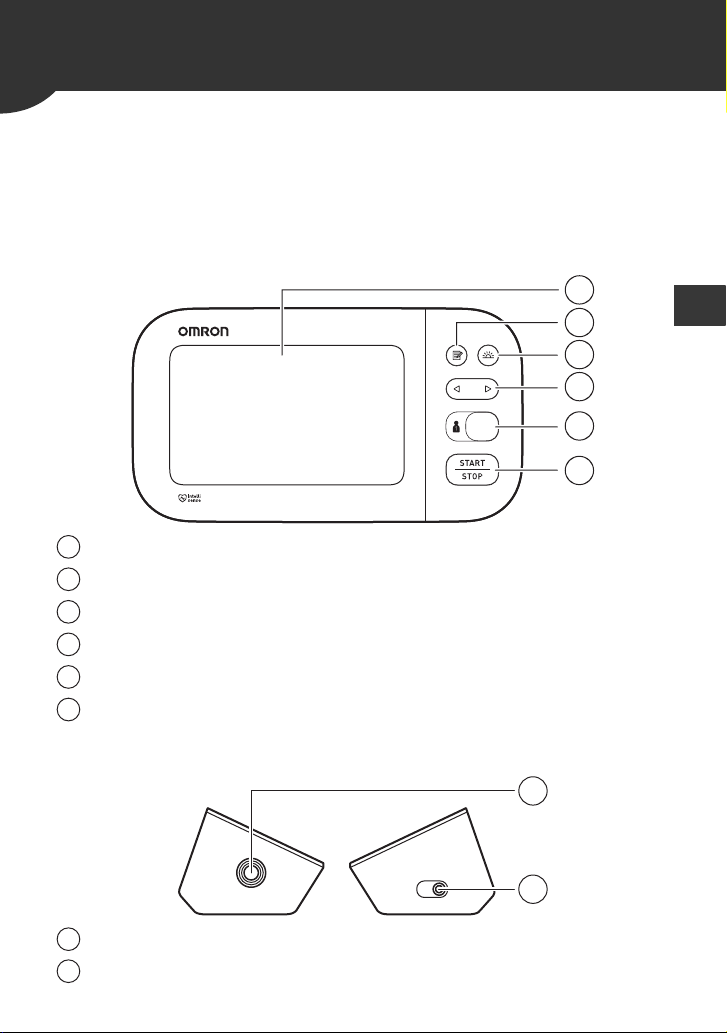
Monitor, Wide-Range D-Ring Cuff, 4 “AA” batteries, storage case,
instruction manual, quick start guide
1.2 Monitor and Arm Cuff
Front of the monitor
Left and right side of the monitor
Display
[Memory] button
[Morning average] button
[Forward/Backward] buttons
[User ID selection] switch
[START/STOP] button
Air jack
AC adapter jack
f
a
d
c
b
e
a
b
c
d
e
f
g
h
g
h
8
1. Know Your Monitor
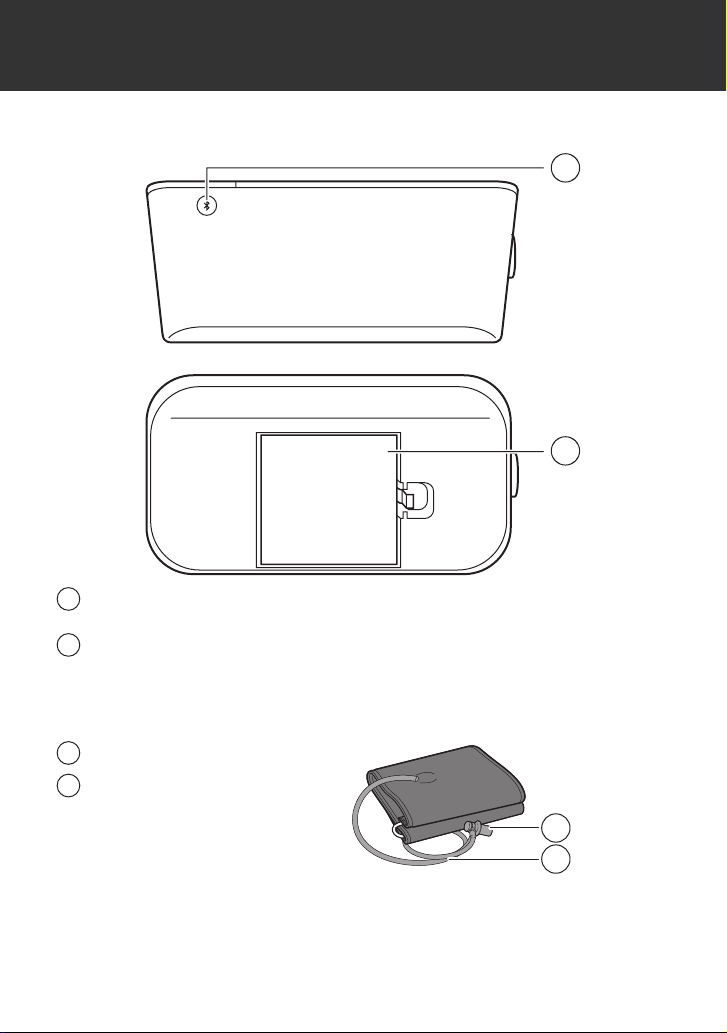
Back and bottom of the monitor
Arm cuff
(Upper arm circumference: 9" - 17" (22 - 42 cm))
[Connection] button
(Date/Time)
Battery compartment
Air plug
Air tube
i
j
i
j
k
k
l
l
1. Know Your Monitor
9
EN
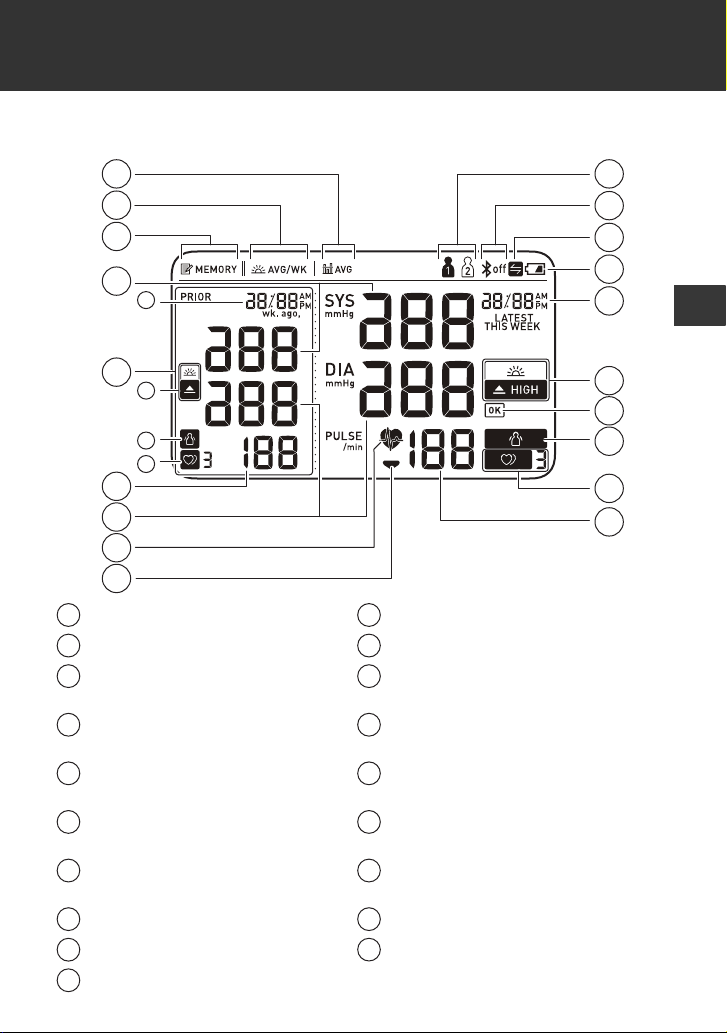
1.3 Display and Symbols
Average value symbol Bluetooth ON / OFF symbol
Morning average symbol Sync symbol
Memory symbol Low battery symbol /
Depleted battery symbol
Systolic blood pressure
reading
Date / Time display
Comparison display High symbol /
High morning average symbol
Pulse display / Memory
number
OK symbol
Diastolic blood pressure
reading
Movement error symbol
Heartbeat symbol Irregular heartbeat symbol
Deflation symbol Pulse display
User ID symbol
A
C
B
D
E
J
K
R
S
M
N
O
P
Q
L
F
G
H
I
R
O
Q
N
A
K
B
L
C
M
D
N
E
O
F
P
G
Q
H
R
I
S
J
10
1. Know Your Monitor
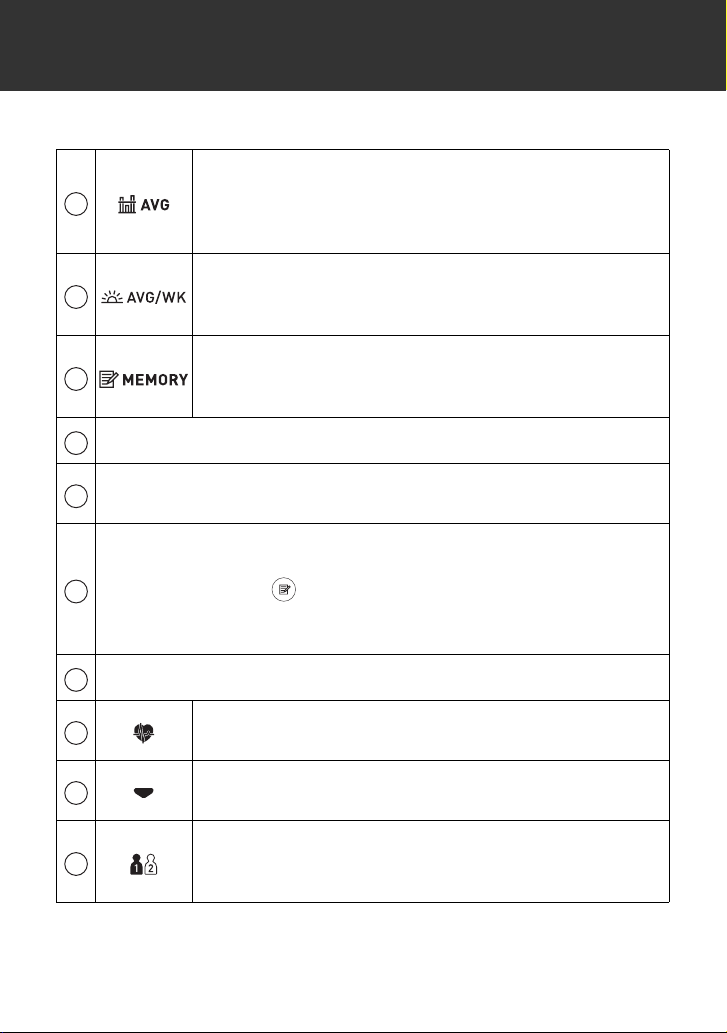
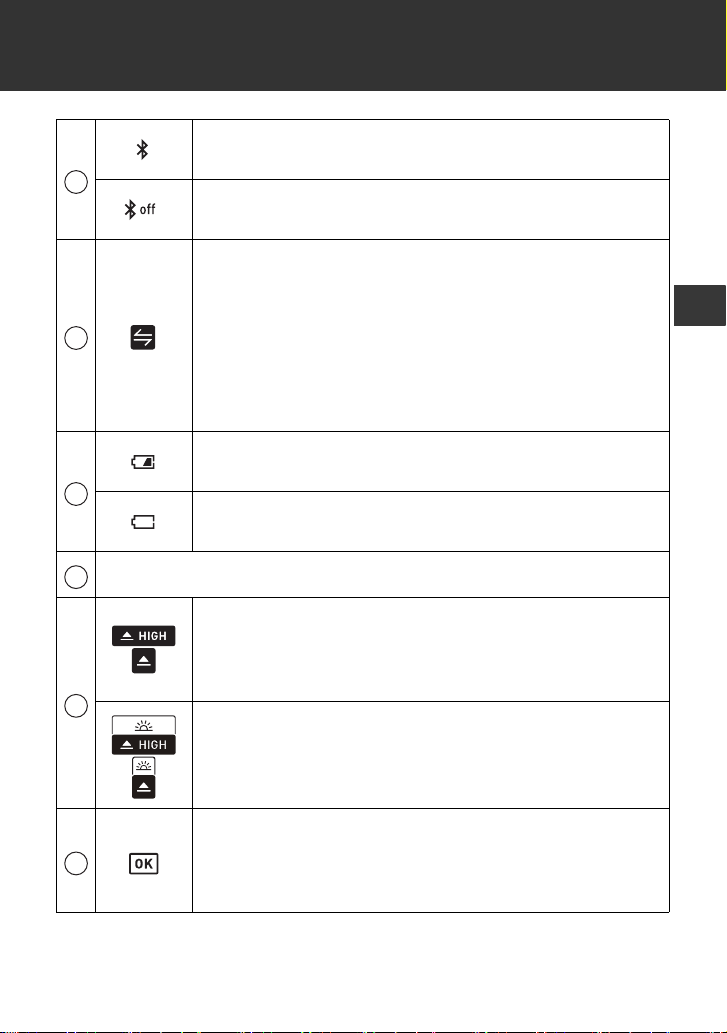
Average value symbol
Flashes when viewing the average of the latest 2 or 3
readings taken within the most recent 10 minute
timeframe.
Morning average symbol
Appears when viewing the weekly average readings
taken in the morning over the past 7 weeks.
Memory symbol
Appears when viewing readings stored in the
memory.
Systolic blood pressure reading
Comparison display
Displays past readings. Refer to section 5 for more information.
Pulse display / Memory number
Pulse rate appears after the measurement.
When pressing the button, the memory number appears for
approximately 1.5 seconds before the pulse rate appears on the
display.
Diastolic blood pressure reading
Heartbeat symbol
Flashes while taking a measurement.
Deflation symbol
Appears during cuff deflation.
User ID symbol
The user ID number appears when selecting the user
with the [user ID selection] switch.
A
B
C
D
E
F
G
H
I
J
1. Know Your Monitor
11
EN
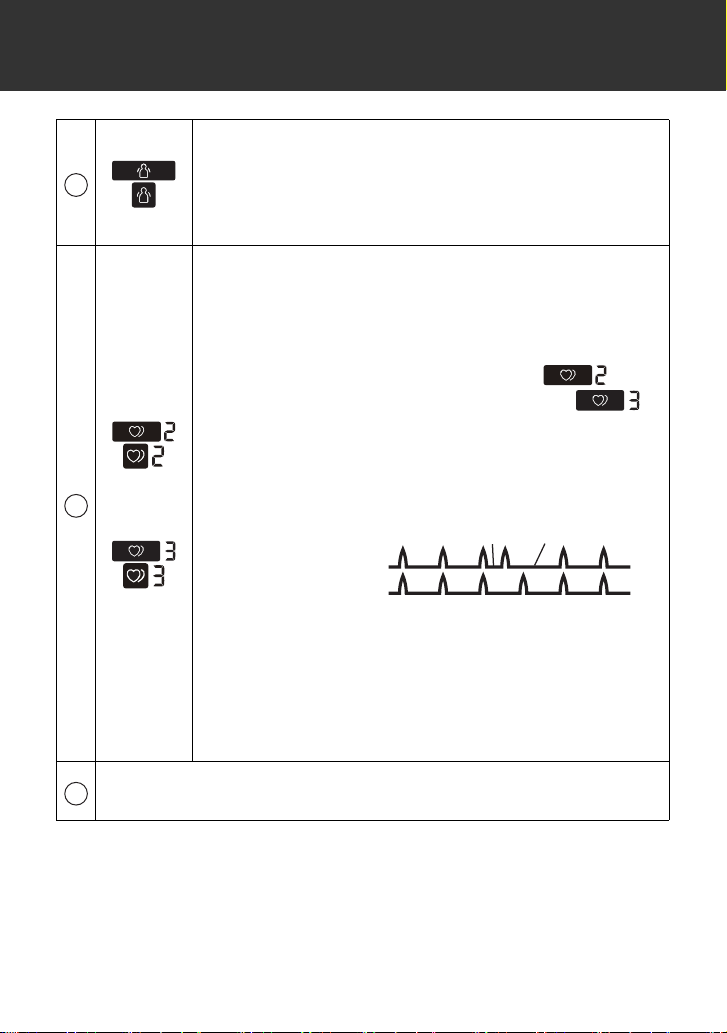
Bluetooth ON symbol
Appears when your readings are being transferred.
Bluetooth OFF symbol
Appears when Bluetooth is disabled.
Sync symbol
Flashes/appears when your data needs to be
transferred because the stored memory is either
almost, or completely full. Once you pair your monitor
with your smart device, transfer your readings
immediately before the monitor deletes the oldest
reading. Up to 60 readings can be stored in the
internal memory of your monitor per user.
Low battery symbol
Flashes when batteries are low.
Depleted battery symbol
Appears when batteries are depleted.
Date / Time display
High symbol
Appears if your systolic blood pressure is ≥ 130
mmHg or the diastolic blood pressure is ≥ 80 mmHg.
Refer to sub-section 1.4 for more information.
High morning average symbol
Appears when the morning weekly average is 130/
80 mmHg or above.
OK symbol
Flashes when your monitor is connected to your
smart device or readings are transferred
successfully.
K
L
M
N
O
P
12
1. Know Your Monitor
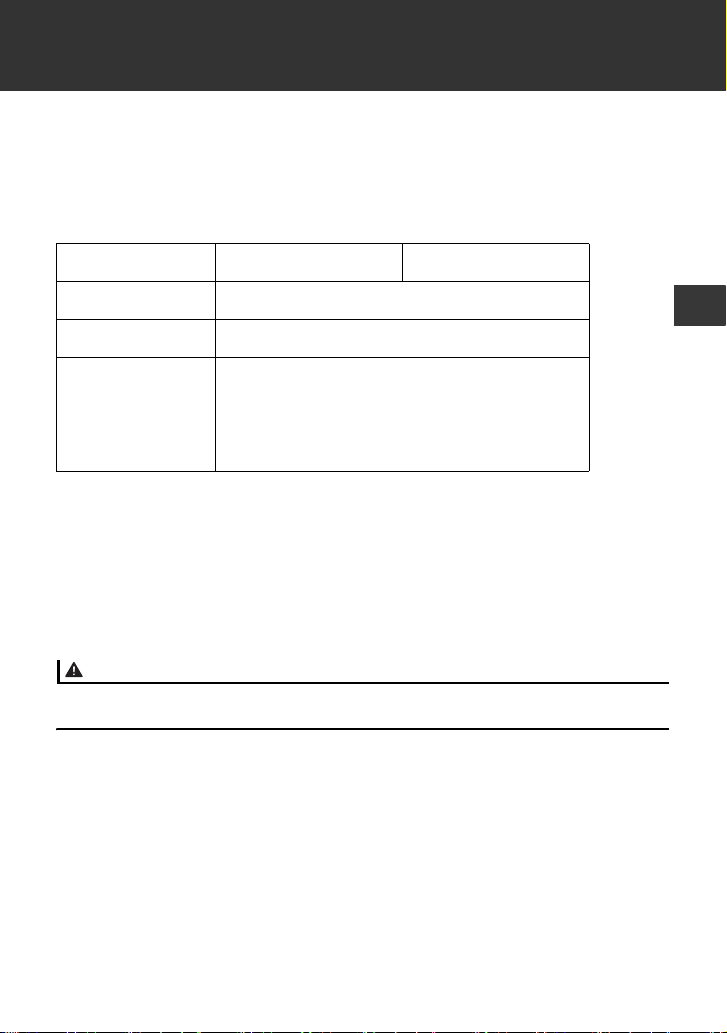
Movement error symbol
Appears with your reading when your body is moving
during a measurement. If it appears, remove the arm
cuff and wait for 2 to 3 minutes. Then, reapply the
cuff, remain still and take another measurement.
or
Irregular heartbeat symbol
Appears when irregular rhythm is detected 2 or more
times during a measurement. The symbol with the
number appears as below:
Irregular heartbeat is detected 2 times:
Irregular heartbeat is detected 3 times or more:
An irregular heartbeat rhythm is defined as a rhythm
that is 25 % less or 25 % more than the average
rhythm detected while your monitor is measuring
blood pressure.
Irregular heartbeat symbol may be displayed when
the monitor detects arm movements. Refer to
section 7 for more information.
If it continues to appear, we recommend you to
consult with and follow the directions of your
physician.
Pulse display
Pulse rate appears after the measurement.
Q
R
Short
Long
Irregular Heartbeat
Normal Heartbeat
S
1. Know Your Monitor
13
EN
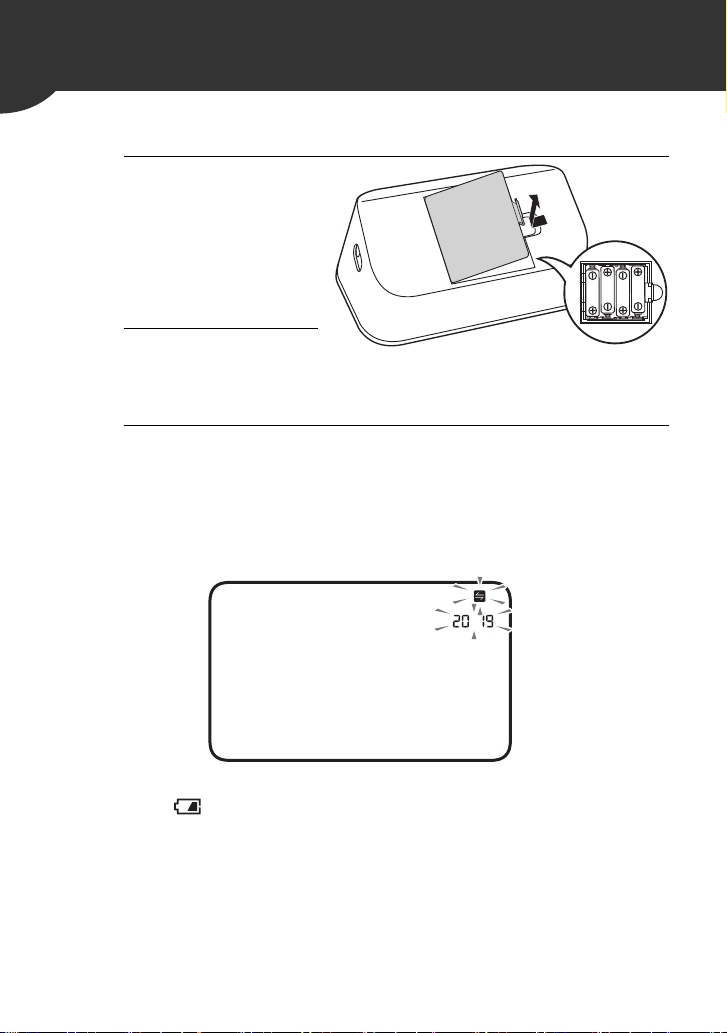
1.4 Classification of BP (Blood Pressure)
ACC/AHA 2017 Hypertension guidelines define categories of BP in
adults as below.
Categories of BP in Adults*
Warning
• NEVER diagnose or treat yourself based on your readings. ALWAYS consult
with your physician.
BP Category Systolic BP Diastolic BP
Normal < 120 mmHg and < 80 mmHg
Elevated 120 - 129 mmHg and < 80 mmHg
Hypertension
Stage 1 130 - 139 mmHg or 80 - 89 mmHg
Stage 2 ≥ 140 mmHg or ≥ 90 mmHg
* Individuals with Systolic BP and Diastolic BP in 2 categories should
be designated to the higher BP category.
BP indicates blood pressure (based on an average of ≥ 2 careful
readings obtained on ≥ 2 occasions).
Source: ACC/AHA 2017 High Blood Pressure Clinical Practice
Guideline
14
2. Preparation
2.1 Installing Batteries
1. Push down on
the hook of the
battery cover
and pull
downward.
2. Insert 4 “AA”
batteries as
indicated in the battery compartment.
3. Close the battery cover.
As soon as batteries are correctly installed, the year flashes
on the display.
Refer to sub-section 2.2 to set the date and time manually, or
refer to sub-section 4.1 to pair your monitor to set the date
and time automatically.
Note
•When the “ ” symbol flashes on the display, it is recommended
you replace batteries.
•To replace batteries, turn your monitor off and remove all batteries.
Then replace with 4 new batteries at the same time.
•Replacing batteries will not delete previous readings.
•The supplied batteries may have a shorter life span than new
batteries.
•Disposal of used batteries should be carried out in accordance with
local regulations.
2. Preparation
15
EN
2.2 Setting the Date and Time
Note
•Set your monitor to the correct date and time before taking a
measurement for the first time.
•The date and time will automatically be set when the monitor is
paired with “OMRON connect US/CAN” app. Refer to sub-section
4.1.
•As soon as batteries are correctly installed, the year flashes on the
display of your monitor.
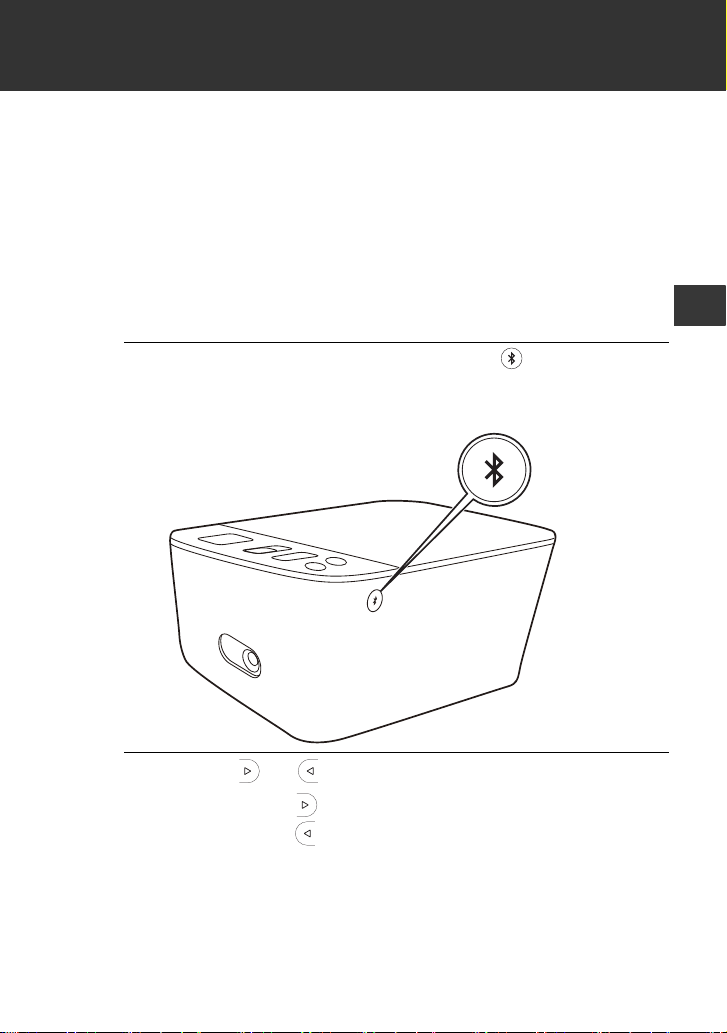
1. If nothing is displayed, press the button (rear
surface of the monitor) to display the year.
If the year is already displayed, skip this step.
2. Press the or button to adjust the year.
Press and hold the button to quickly advance the years.
Press and hold the button to quickly go backwards through
the years.
16
2. Preparation
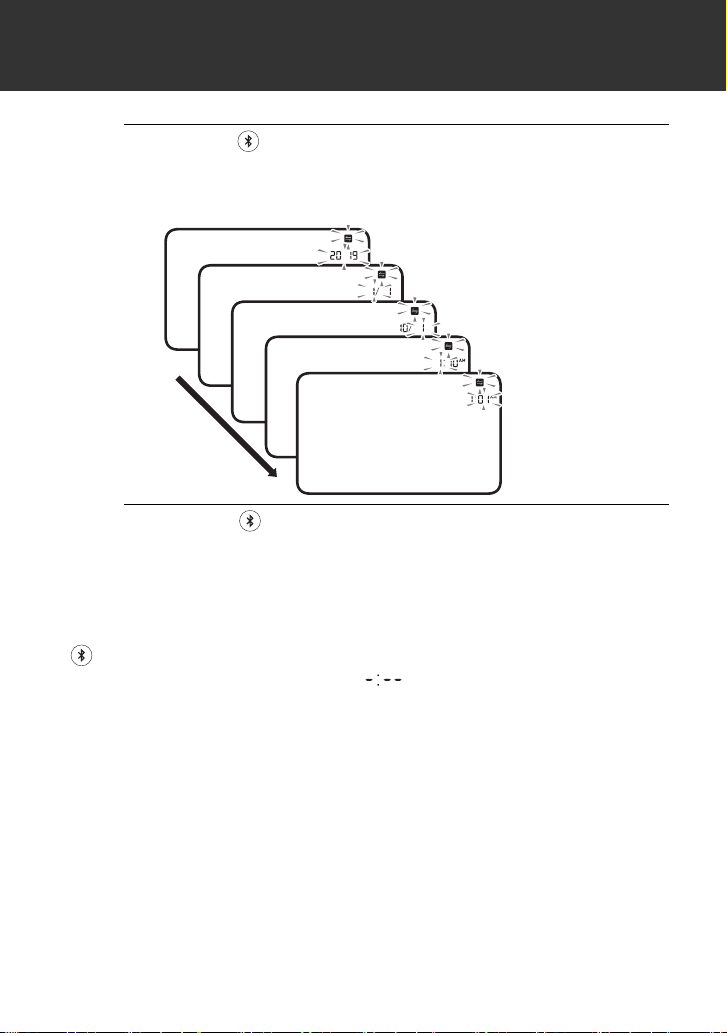
3. Press the button to confirm the year, then the
month will flash. Repeat the same steps to
adjust the month, day, hour, and minute.
4. Press the button to store the setting.
Your monitor automatically turns off 3 seconds after the
minutes have been set in this sequence.
Note
•If you need to reset the date and time, replace batteries or press the
button, then set the date and time as shown in above steps.
•If the date and time are not set, “ ” flashes during or after
measurement.
Year
Month
Day
Hour
Minute
2. Preparation
17
EN
2.3 Blood Pressure Measurement Tips
To help ensure an accurate reading, follow these directions:
•Stress raises blood pressure. Avoid taking measurements during
stressful times.
•Measurements should be taken in a quiet place.
•It is important to take measurements at the same times each day.
Taking measurements in the morning and in the evening is
recommended.
•Remember to have a record of your blood pressure and pulse
readings for your physician. A single measurement does not provide
an accurate indication of your true blood pressure. You need to take
and record several readings over a period of time.
Caution
• Avoid bathing, drinking alcohol or caffeine, smoking, exercising and eating
for at least 30 minutes before taking a measurement.
• Rest for at least 5 minutes before taking a measurement.
18
2. Preparation
2.4 Applying the Arm Cuff
Note
•The following steps are for applying the arm cuff to your left arm.
When you take a measurement on your right arm, follow the cuff
wrap instructions for a right arm use mentioned under “To take a
measurement on your right arm” located at the end of this sub-
section.
•The blood pressure can differ between the right arm and the left
arm, and the measured blood pressure readings can be different.
OMRON recommends to always use the same arm for
measurement. If the readings between both arms differ
substantially, check with your physician to determine as to which
arm to use for your measurements.
Caution
• Remove tight-fitting or thick clothing from your arm while taking a
measurement.
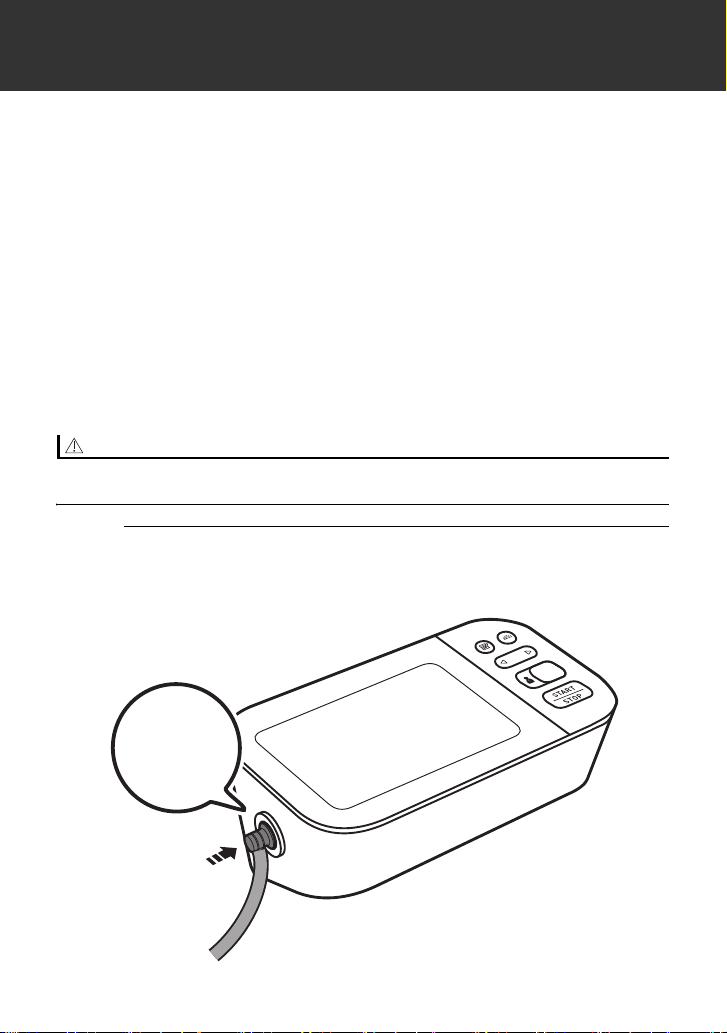
1. Plug the arm cuff into your monitor by inserting
the air plug into the air jack securely until it
clicks.
Click
2. Preparation
19
EN
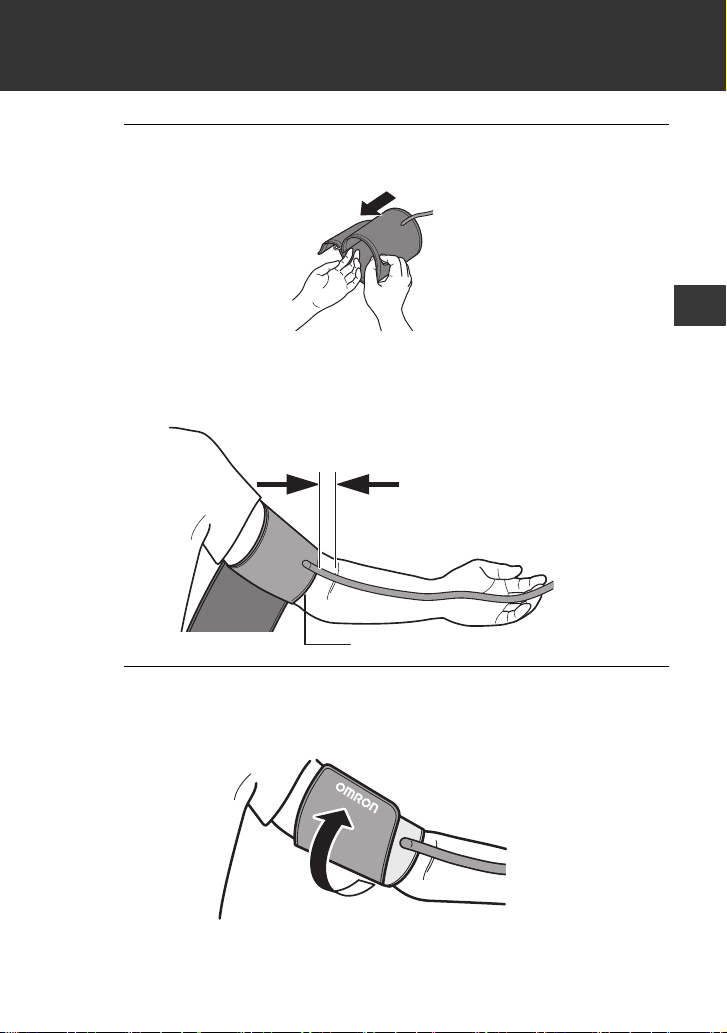
2. Place your hand through the cuff loop. Pull the
cuff until it reaches your upper left arm.
Note
• The bottom edge of the arm cuff should be 0.5 inch (1 to 2
cm) above the inside elbow. The air tube is on the inside of
your arm and aligned with your middle finger.
3. Make sure that the air tube is positioned on the
inside of your arm and wrap the cuff securely,
so it can not move around your arm.
Bottom edge
0.5 inch (1 to 2 cm)
Bottom edge

20
2. Preparation
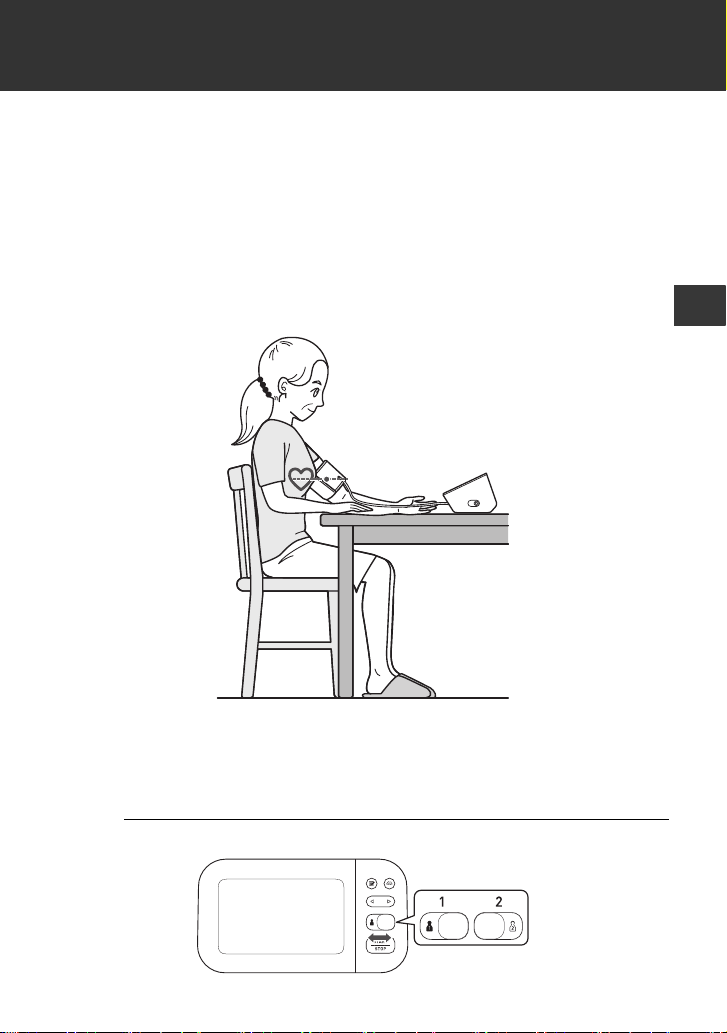
To take a measurement on your right arm
When you take a measurement on your right arm, the air tube should
run along the side of your elbow, along the bottom of your arm. Be
careful not to rest your arm on the air tube.
2. Preparation
21
EN
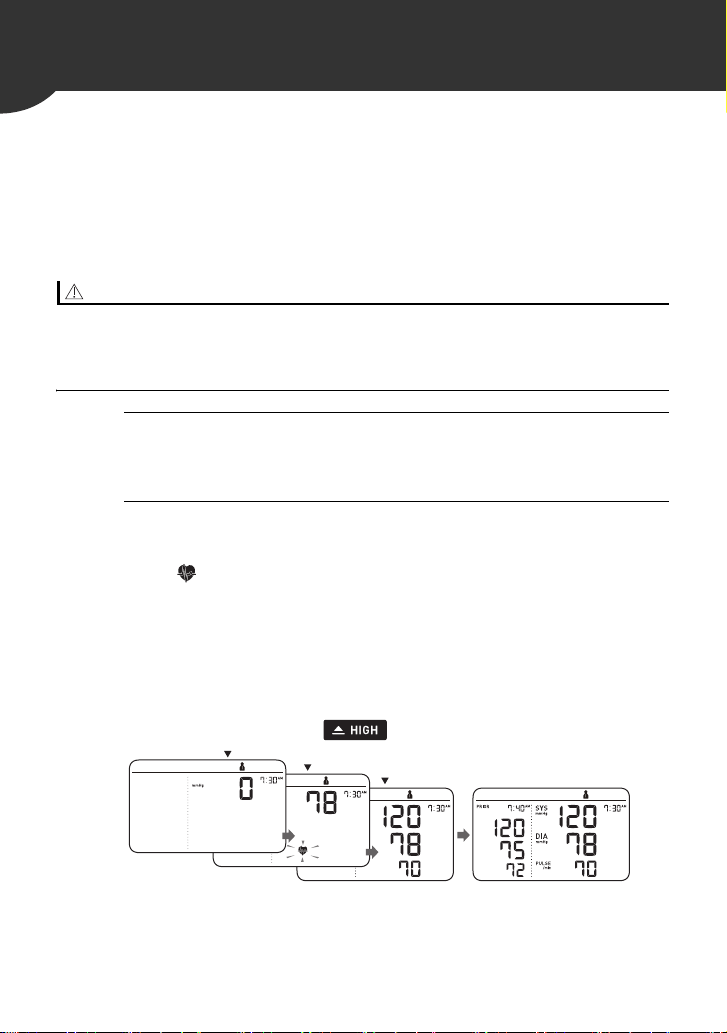
2.5 Sitting Correctly
To take a measurement, you need to be relaxed and comfortably
seated in a room with a comfortable temperature. Place your arm on
the table.
•Sit in a comfortable chair with your back and arm supported.
•Keep your feet flat and your legs uncrossed.
•The arm cuff should be placed on your arm at the same level as
your heart, with the arm resting comfortably on a table.
2.6 Selecting a User ID
Your monitor is designed to take measurements and store the
readings in the memory for 2 people using the [user ID selection]
switch.
1. Select your user ID (1 or 2).
22
3.
Using Your Monitor without a Smart Device
3.1 Taking a Measurement
You can use your monitor without pairing to a smart device. To pair
your monitor with a smart device, refer to sub-section 4.1.
Note
•To stop the measurement, press the [START/STOP] button once to
deflate the arm cuff.
Caution
• DO NOT use this monitor with other medical electrical (ME) equipment
simultaneously. This may result in incorrect operation of the monitor and/or
cause an inaccurate reading.
• Remain still and DO NOT talk while taking a measurement.
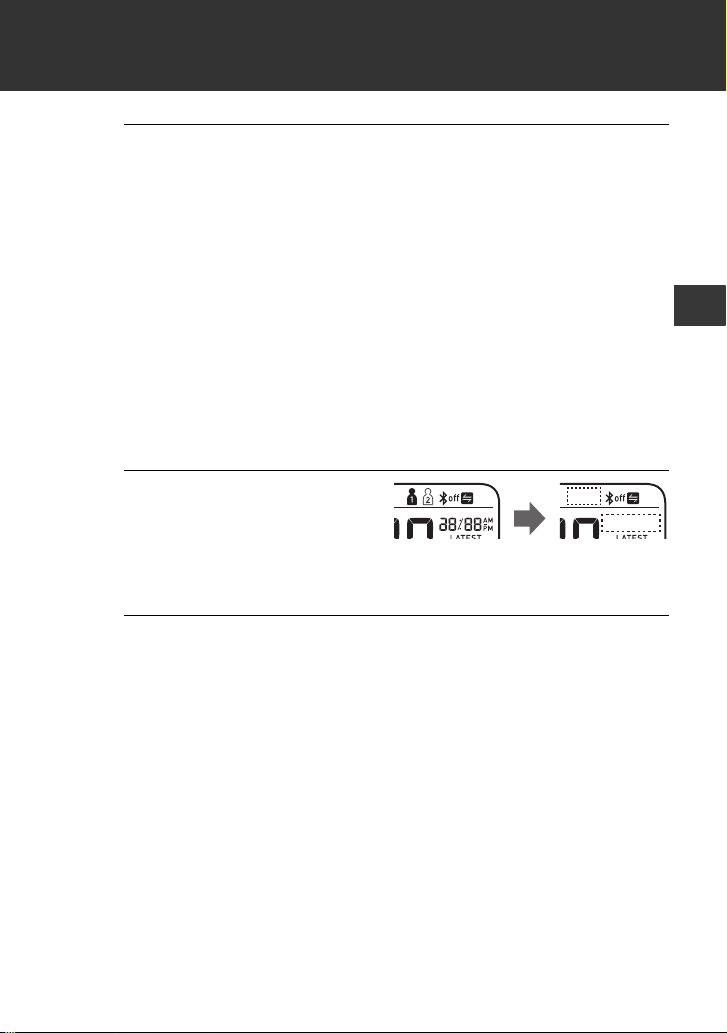
1. Press the [START/STOP] button.
All symbols appear on the display before starting the
measurement.
2. Remain still and do not talk until the entire
measurement process is complete.
The “ ” symbol flashes at every heartbeat.
After your monitor has detected your blood pressure and
pulse rate, the cuff automatically deflates. Your blood
pressure and pulse rate are displayed with the previous
reading.
If either the systolic or the diastolic reading is high (refer to
sub-section 1.3), the “ ” symbol appears.
INFLATING
START
COMPLETED
3. Using Your Monitor without a Smart Device
23
EN
3. Press the [START/STOP] button to turn your
monitor off.
Note
• Your monitor automatically turns off after 3 minutes.
• Wait 2 - 3 minutes between measurements. The wait time
allows the arteries to decompress and return to their pre-
measurement state. You may need to increase the wait time
depending on your individual physiological characteristics.
Using the Guest Mode
Your monitor stores readings for 2 users in the memory. The guest
mode can be used to take a single measurement for another user.
Note
•No readings are stored in the memory.
1. Press and hold the
[START/STOP] button
for more than 3
seconds.
The user ID symbol and the date/time display will disappear.
2. Release the [START/STOP] button when the
user ID and date/time display turn off.
The arm cuff automatically starts to inflate.

24
3. Using Your Monitor without a Smart Device
If your systolic pressure is more than 210 mmHg
If your systolic pressure is more than 210 mmHg, take a
measurement manually.
After the arm cuff starts to inflate, press and hold the [START/STOP]
button until the monitor inflates 30 to 40 mmHg higher than your
expected systolic pressure.
Note
•Do not inflate above 299 mmHg.
Caution
• Inflating to a higher pressure than necessary may result in bruising of the arm
where the cuff is applied.
25
EN
4.
Using Your Monitor with a Smart Device
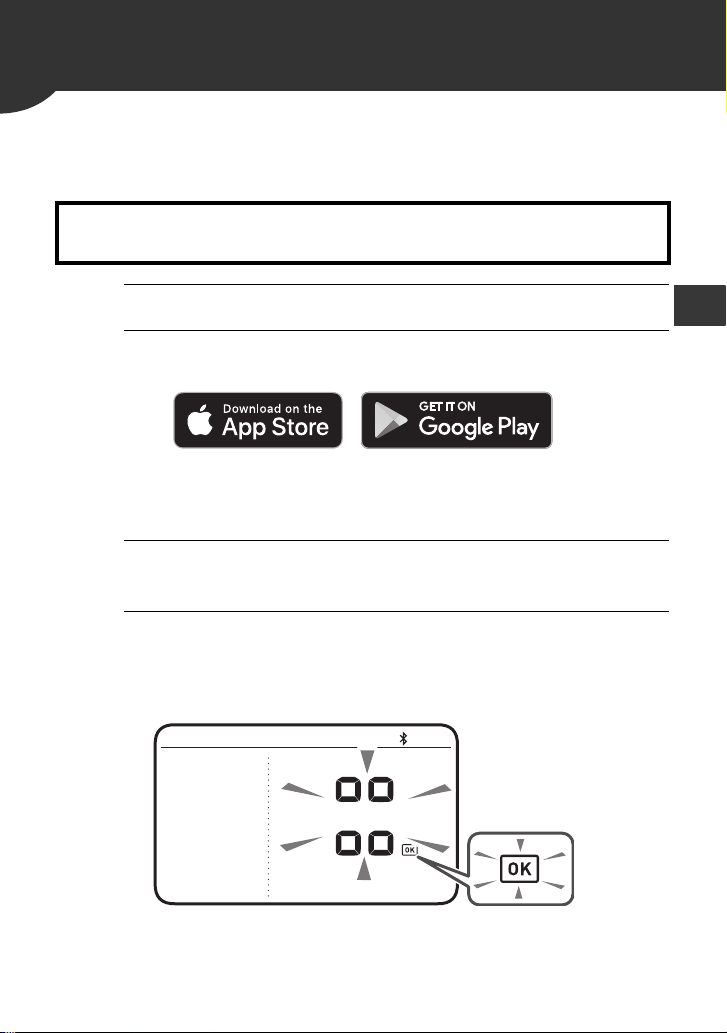
4.1 Pairing Your Monitor with a Smart Device
The date and time on your monitor will automatically be set when you
pair your monitor with your smart device.
1. Enable Bluetooth on your smart device.
2. Download and install the free “OMRON connect
US/CAN” app onto your smart device.
If you already have the “OMRON connect US/CAN” app and
have created your account, open the app and add your new
monitor.
3. Open the app and follow the pairing
instructions shown on your smart device.
4. Confirm that your monitor is connected
successfully.
When your monitor is connected successfully to your smart
device, the OK symbol appears.
Review the list of compatible smart devices at
OmronHealthcare.com
26
4. Using Your Monitor with a Smart Device
5. Press the [START/STOP] button to turn your
monitor off.
Note
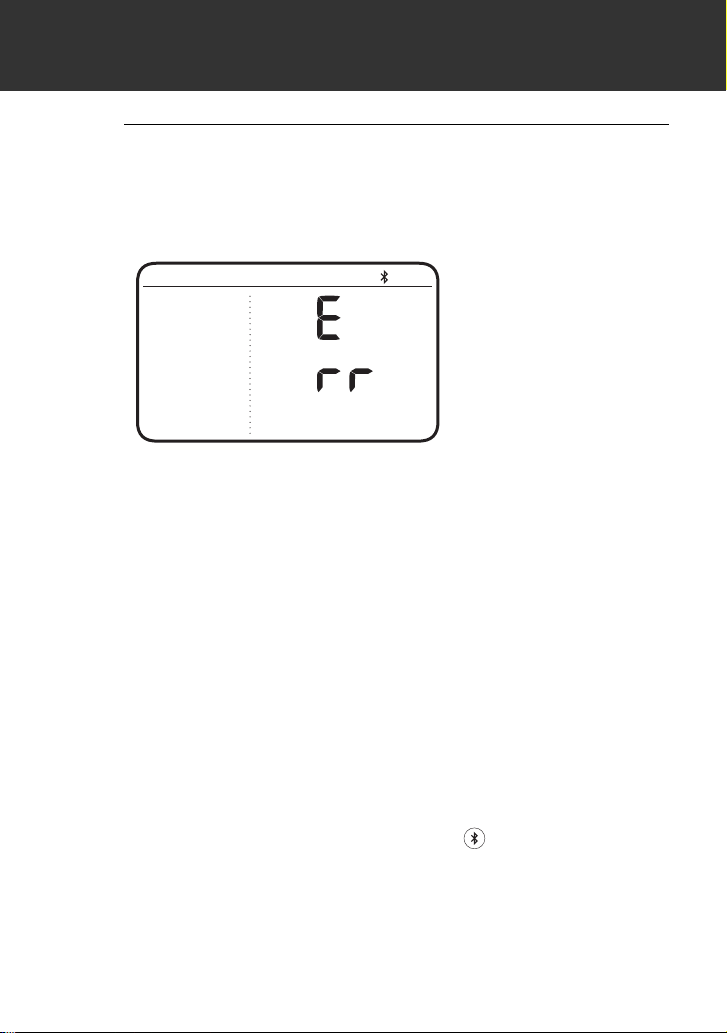
• If the “Err” symbol appears, follow the instructions in the
“OMRON connect US/CAN” app.
• Your monitor automatically turns off after 2 minutes.
• Be aware that OMRON will not be responsible for the loss of
data and/or information in the app.
• “OMRON connect US/CAN” is the only app that we
recommend to use with your monitor to transfer data
correctly.
4.2 Taking a Measurement
Refer to sub-section 3.1 to start a measurement. Open the app on
your smart device and follow the instructions.
Note
•Make sure that your monitor is within 16 ft. (5 m) of your smart
device.
Transferring Data Automatically/Manually
•The readings will be transferred to your smart device within 1 hour
after taking a measurement.
•To transfer the readings manually, press the button.
4. Using Your Monitor with a Smart Device
27
EN
4.3 Disabling/Enabling Bluetooth
Warning
• This product emits radio frequencies (RF) in the 2.4 GHz band. DO NOT use
this product in locations where RF is restricted, such as on an aircraft or in
hospitals. Turn off the Bluetooth feature in this monitor and remove batteries
when in RF restricted areas. For further information on potential restrictions
refer to documentation on the Bluetooth usage by the FCC/ISED.
Bluetooth is enabled as default.
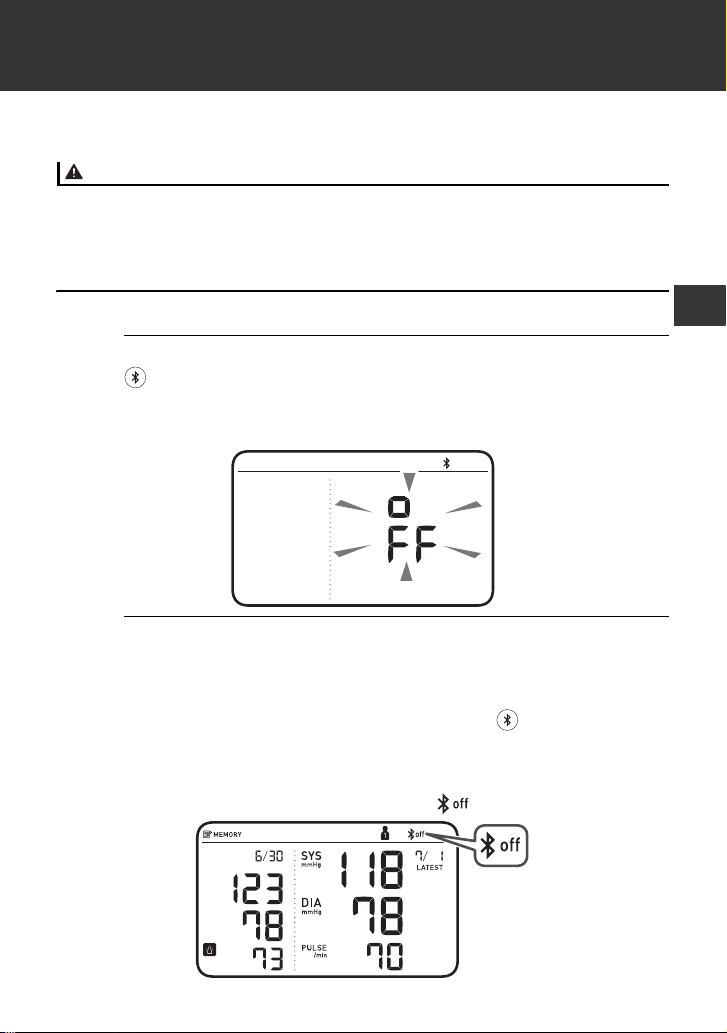
1. When your monitor is off, press and hold the
button (rear surface of the monitor) for more
than 10 seconds.
“oFF” flashes 3 times.
2. Press the [START/STOP] button to turn your
monitor off.
Note
• To enable Bluetooth, press and hold the button for more
than 2 seconds. “on” appears on the display.
• Your monitor automatically turns off 2 minutes after the
completion.
• When Bluetooth is disabled, the “ ” symbol appears.
28
5. Using Memory Function
Your monitor automatically stores up to 60 readings per user.
Note
•This monitor can be used by multiple users. Refer to sub-section 2.6
to switch user. Make sure which user ID stores your own readings.
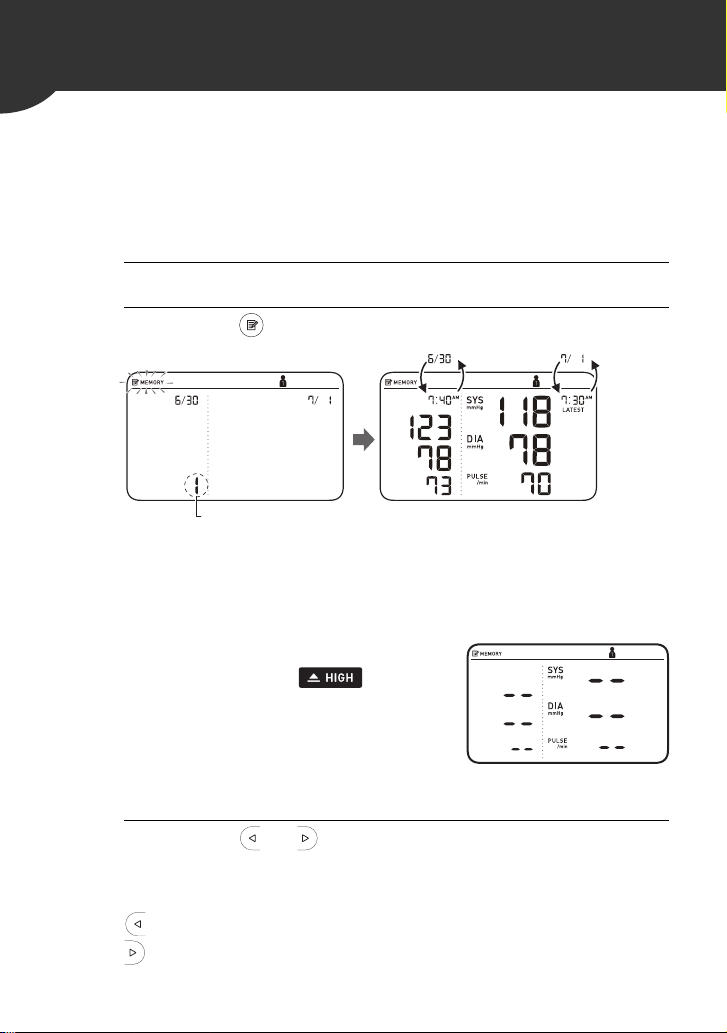
5.1 Viewing the Readings Stored in Memory
1. Select your user ID.
2. Press the button.
After a memory number appears, the latest reading will
appear with a past reading. A past reading will appear in the
comparison display on the left.
Note
• If the reading is high (refer to sub-
section 1.3), the “ ” symbol
appears.
• If there are no readings stored in
the memory, the screen to the right
is displayed.
• If the memory is full, new readings
will replace the old readings, starting with the oldest reading.
3. Press the or button repeatedly to scroll
through the previous readings stored in the
memory.
: To view the older readings
: To view the more recent readings
1 sec.
Memory number
Past reading Latest reading
Alternating
date/time
display
5. Using Memory Function
29
EN
5.2 Viewing the Average Reading
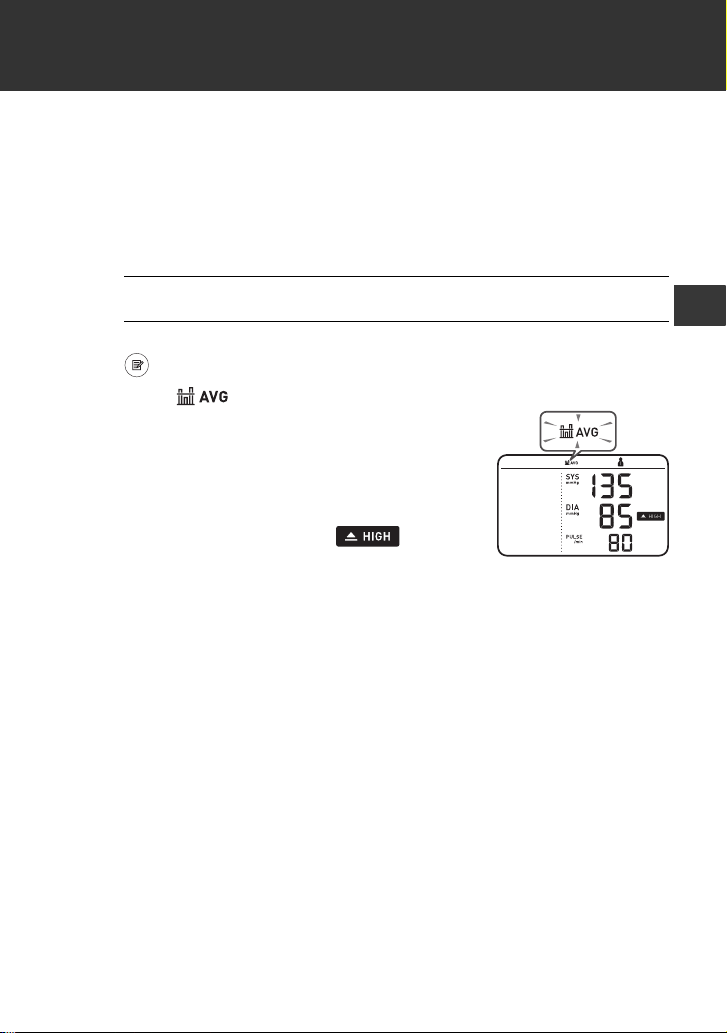
Your monitor can calculate an average reading based on the latest 2
or 3 readings taken within the most recent 10 minute timeframe.
Note
•Set your monitor to the correct date and time before taking a
measurement to view the average readings.
1. Select your user ID.
2. When your monitor is off, press and hold the
button for more than 3 seconds.
The “ ” symbol flashes.
Note
• If there are only 2 readings in the
memory for that period, the average
will be based on these 2 readings.
• If the average reading is high (refer to
sub-section 1.3), the “ ” symbol
appears.
30
5. Using Memory Function
5.3 Viewing Morning Weekly Averages
Your monitor calculates and displays weekly averages for the
measurements taken in the morning for 7 weeks per user.
Note
•Set your monitor to the correct date and time before taking a
measurement to view the morning weekly average readings.
Morning Weekly Average Calculation
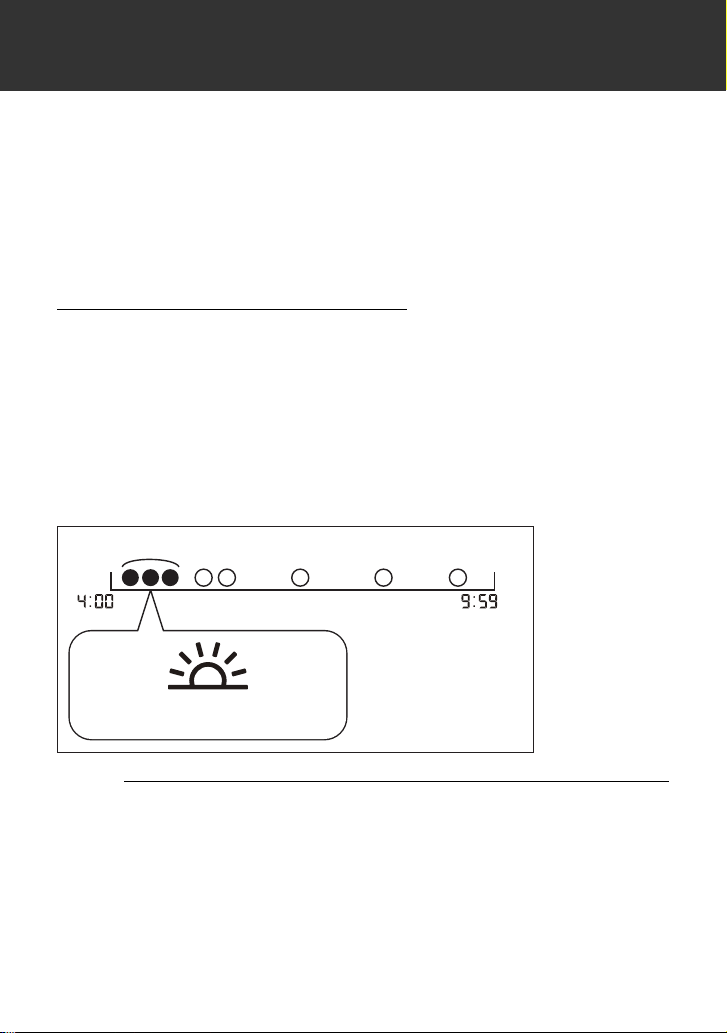
This is the average for the measurements taken during the morning
(4:00 am - 9:59 am) between Sunday and Saturday. The 2 or 3
readings taken within the first 10 minute timeframe in the morning
between 4:00 am - 9:59 am will be used to calculate the morning
average for each day.
Note
•When the measurements taken from Thursday, the average is
calculated between Thursday and Saturday.
1. Select your user ID.
Within 10 min.
amam
Measurements in the morning
5. Using Memory Function
31
EN
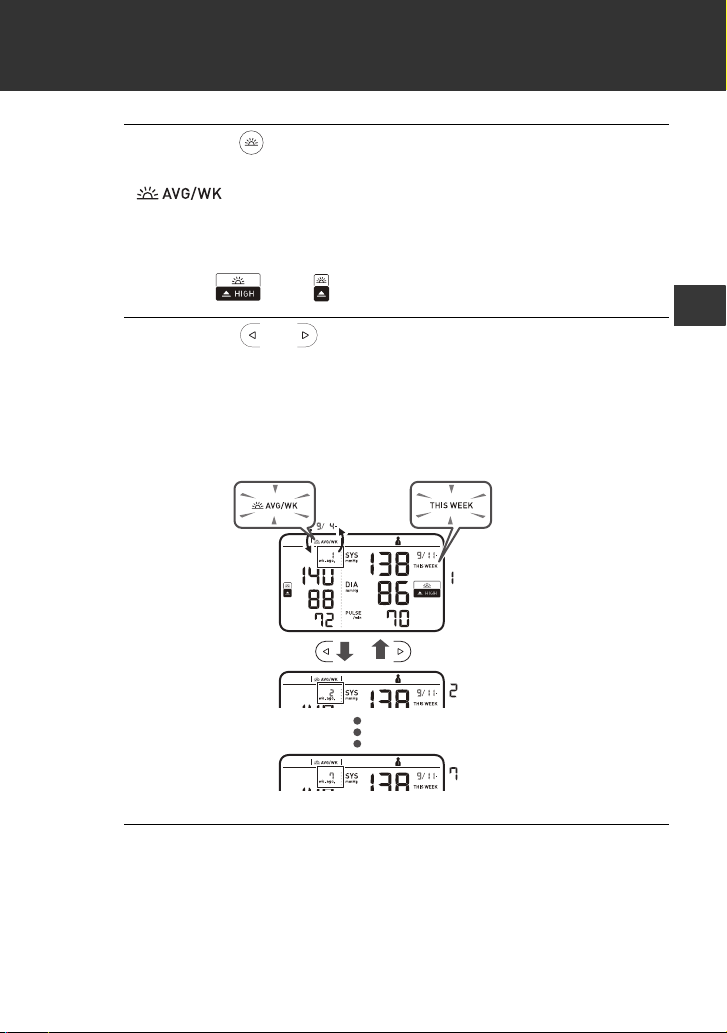
2. Press the button once.
The morning weekly average for the current week, the
“ ” symbol and “THIS WEEK” appear on the display.
A past reading will appear in the comparison display on the
left.
If the morning weekly average is high (refer to sub-section
1.3), the “ ” or “ ” symbol appears.
3. Press the or button repeatedly to scroll
through the previous readings stored in the
memory.
Your monitor displays “1 wk. ago,” for the previous week's
average, to “7 wk. ago,” for the oldest set of averages.
4. Press the [START/STOP] button to turn off your
monitor.
wk. ago
wk. ago
wk. ago
Alternating
week/date
display
32
6. Other Settings
6.1 Deleting All Readings Stored in Memory
1. Select your user ID.
2. Press the button.
After a memory number appears, the latest reading will
appear with a past reading.
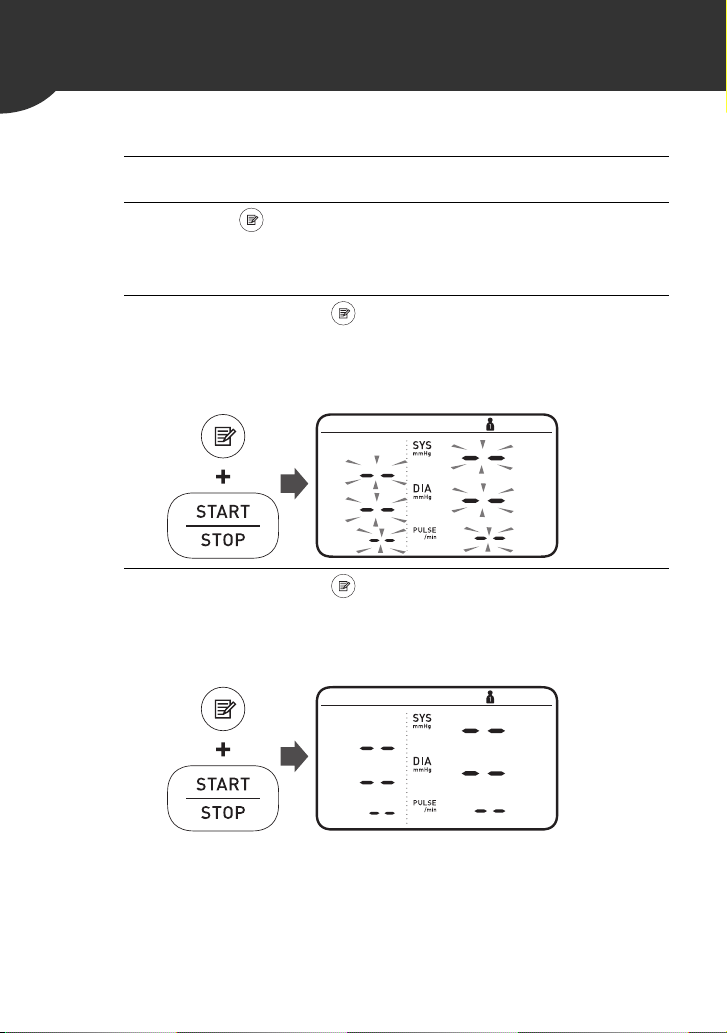
3. While holding the button down, press and
hold the [START/STOP] button for more than 3
seconds.
The display to the right flashes.
4. While holding the button down again, press
and hold the [START/STOP] button for more
than 3 seconds.
The display stops flashing, then all readings are deleted.

6. Other Settings
33
EN
5. Press the [START/STOP] button to turn your
monitor off.
Note
• All readings will be deleted. You cannot partially delete the
readings stored in the memory.
• Your monitor automatically turns off after 2 minutes.
6.2 Restoring Your Monitor to the Default Settings
To delete all the information stored in your monitor, follow the
instructions below. Make sure that your monitor is turned off.
1. While holding the button (rear surface of the
monitor) down, press and hold the [START/
STOP] button for more than 3 seconds.
The display to the right flashes.
2. While holding the button down again, press
and hold the [START/STOP] button for more
than 3 seconds.
The display stops flashing, then your monitor is restored to
the default settings.

34
6. Other Settings
3. Press the [START/STOP] button to turn your
monitor off.
Note
• After the completion, the year flashes on the display. Refer
to sub-section 2.2 to set the date and time manually, or refer
to sub-section 4.1 to pair your monitor to set the date and
time automatically.
• Reverting to the default setting of your monitor does not
delete the information in the app.
35
EN
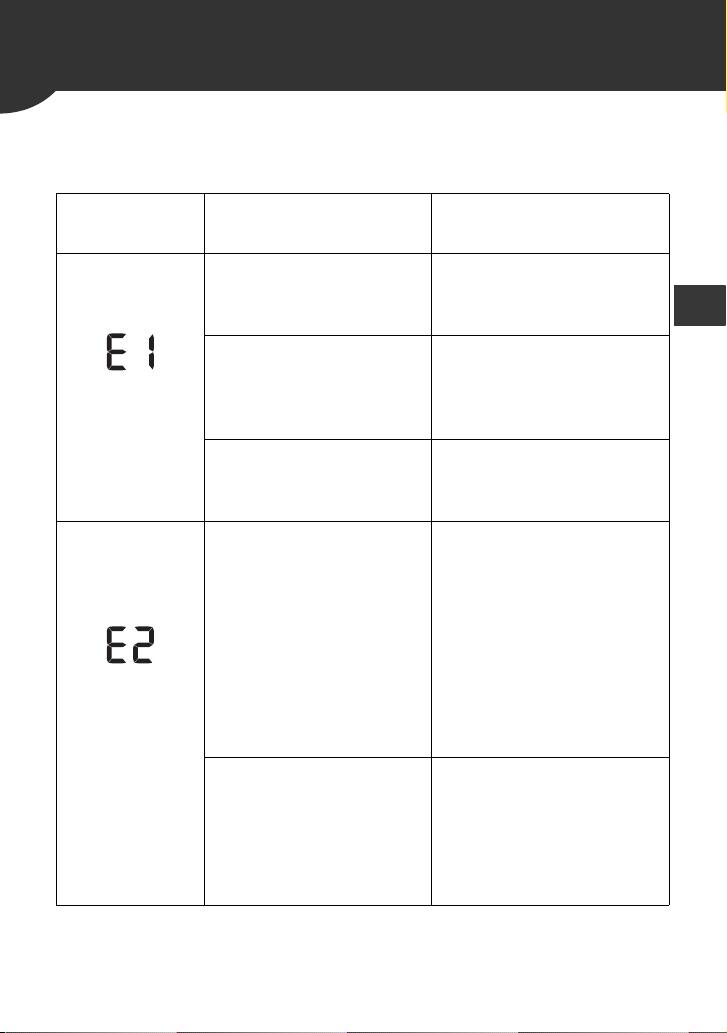
7.
Error Messages and Troubleshooting
If any of the below problems occur during measurement, check to
make sure that no other electrical device is within 12 inches (30 cm).
If the problem persists, refer to the table below.
Display/
Problem
Possible Cause Solution
appears or the
arm cuff does
not inflate.
Air plug is not
completely plugged into
the monitor.
Insert the air plug
securely. Refer to
sub-section 2.4.
The arm cuff is not
applied correctly.
Apply the arm cuff
correctly, then take
another measurement.
Refer to sub-section 2.4.
Air is leaking from the
arm cuff.
Replace the arm cuff with
a new one. Refer to
section 9.
appears or a
measurement
cannot be
complete after
the arm cuff
inflates.
You move or talk during
a measurement and the
arm cuff does not inflate
sufficiently.
Remain still and do not
talk during a
measurement. If “E2”
appears repeatedly,
inflate the arm cuff
manually until the systolic
pressure is 30 to
40 mmHg above your
previous readings. Refer
to sub-section 3.1.
The systolic pressure is
above 210 mmHg and a
measurement cannot be
taken.
Inflate the arm cuff
manually until the systolic
pressure is 30 to
40 mmHg above your
previous readings. Refer
to sub-section 3.1.
36
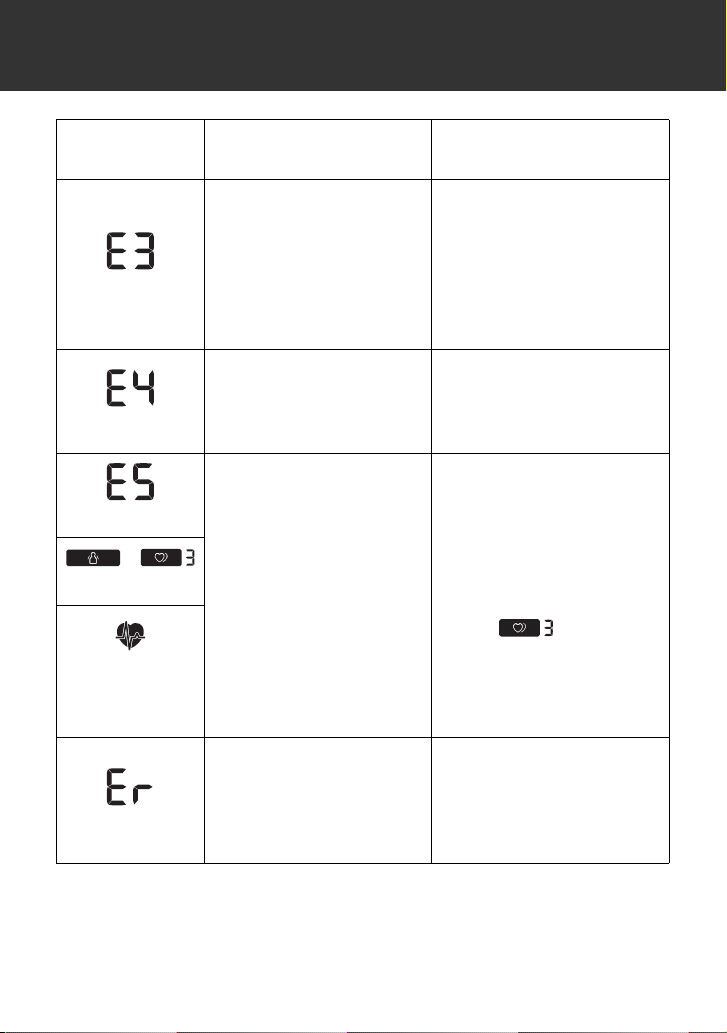
7. Error Messages and Troubleshooting
appears
The arm cuff is inflated
exceeding the maximum
allowable pressure.
Do not touch the arm cuff
and/or bend the air tube
while taking a
measurement.
If inflating the arm cuff
manually, refer to the end
of sub-section 3.1.
appears
You move or talk during
a measurement.
Vibrations disrupt a
measurement.
Remain still and do not
talk during a
measurement.
appears
The pulse rate is not
detected correctly.
Apply the arm cuff
correctly, then take
another measurement.
Refer to sub-section 2.4.
Remain still and sit
correctly during a
measurement.
If the “ ” symbol
continues to appear, we
recommend you to
consult with your
physician.
/
appears
does not flash
during a
measurement
appears
The monitor has
malfunctioned.
Press the [START/STOP]
button again. If “Er” still
appears, contact
customer service. Refer
to section 12.
Display/
Problem
Possible Cause Solution
7. Error Messages and Troubleshooting
37
EN
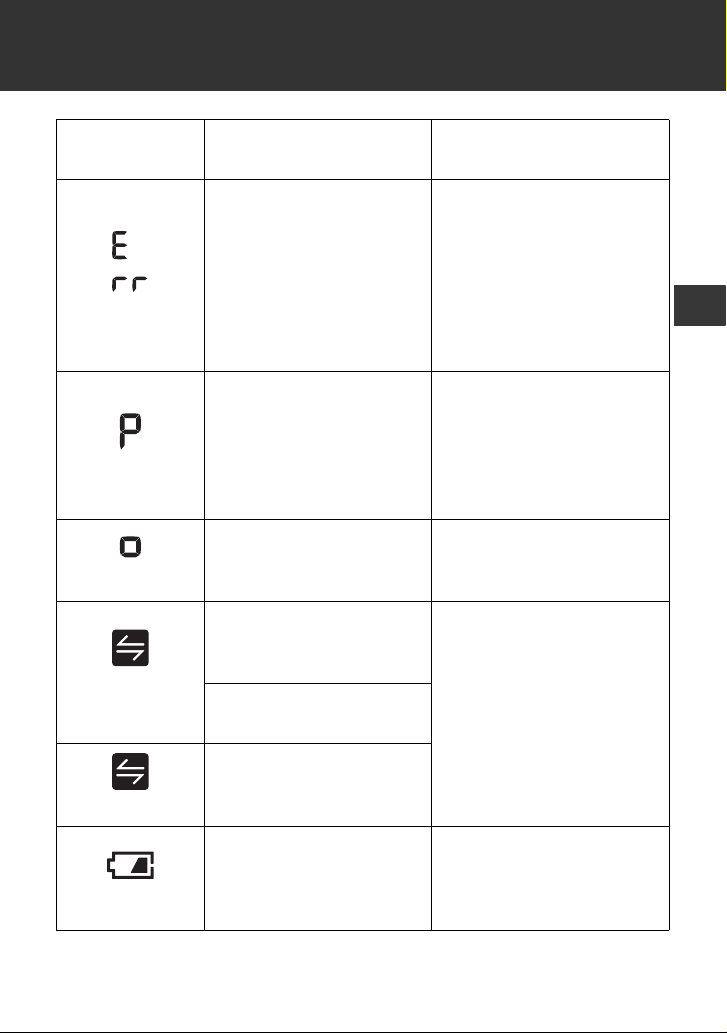
appears
The monitor cannot
connect to a smart
device or transmit data
correctly.
Follow the instructions
shown in the “OMRON
connect US/CAN” app. If
the “Err” symbol still
appears after checking
the app, contact customer
service. Refer to
section 12.
flashes
The monitor is waiting
for pairing with the smart
device.
Refer to sub-section 4.1
for pairing your monitor
with your smart device, or
press the [START/STOP]
button to cancel pairing
and turn your monitor off.
flashes
The monitor is ready to
transfer your readings to
the smart device.
Open the “OMRON
connect US/CAN” app to
transfer your readings.
flashes
There are more than 48
readings in memory to
be transferred.
Pair or transfer your
readings to the “OMRON
connect US/CAN” app so
you can keep them in
memory in the app, and
this error symbol
disappears.
The date and time is not
set.
appears
There are 60 readings in
memory to be
transferred.
flashes
Batteries are low.
Replacing all 4 batteries
with new ones is
recommended. Refer to
sub-section 2.1.
Display/
Problem
Possible Cause Solution
38
7. Error Messages and Troubleshooting
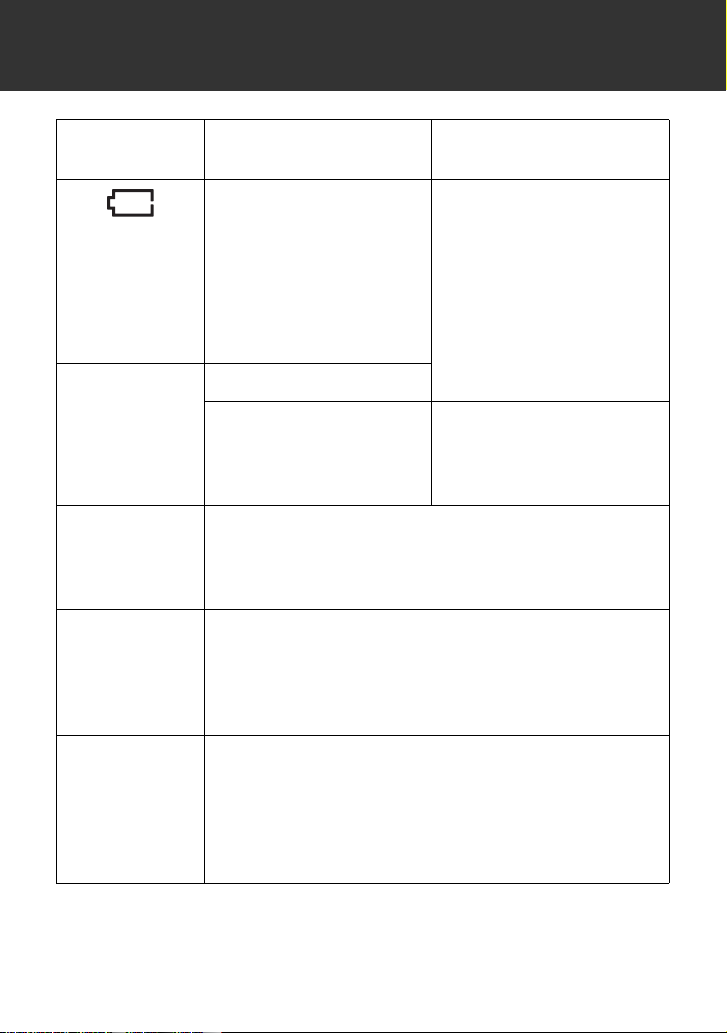
appears or the
monitor is
turned off
unexpectedly
during a
measurement.
Batteries are depleted.
Immediately replace all 4
batteries with new ones.
Refer to sub-section 2.1.
Nothing
appears on the
display of the
monitor.
Batteries are depleted.
Battery polarities are not
properly aligned.
Check the battery
installation for proper
placement.
Refer to sub-section 2.1.
Readings
appear too high
or too low.
Blood pressure varies constantly. Many factors
including stress, time of day, and/or how you apply
the arm cuff, may affect your blood pressure.
Review sub-sections 2.3 - 2.5 and section 3.
Any other
communication
issue occurs.
Follow the instructions shown in the smart device,
or visit the “Support” section in the “OMRON
connect US/CAN” app for further help. If the
problem still persists, contact customer service.
Refer to section 12.
Any other
problems
occur.
Press the [START/STOP] button to turn the monitor
off, then press it again to take a measurement. If the
problem continues, remove all batteries and wait for
30 seconds. Then re-install batteries.
If the problem still persists, contact customer
service. Refer to section 12.
Display/
Problem
Possible Cause Solution
39
EN
8. Maintenance
8.1 Maintenance
To protect your monitor from damage, follow the directions below:
Caution
• DO NOT disassemble or attempt to repair this monitor or other components.
This may cause an inaccurate reading.
8.2 Storage
Keep your monitor and other components in the storage case when
not in use.
Store your monitor and other components in a clean, safe location.
1. Remove the arm cuff from the monitor.
Caution
• To unplug the air plug, pull on the plastic air plug at the base of the tube, not
the tube itself.
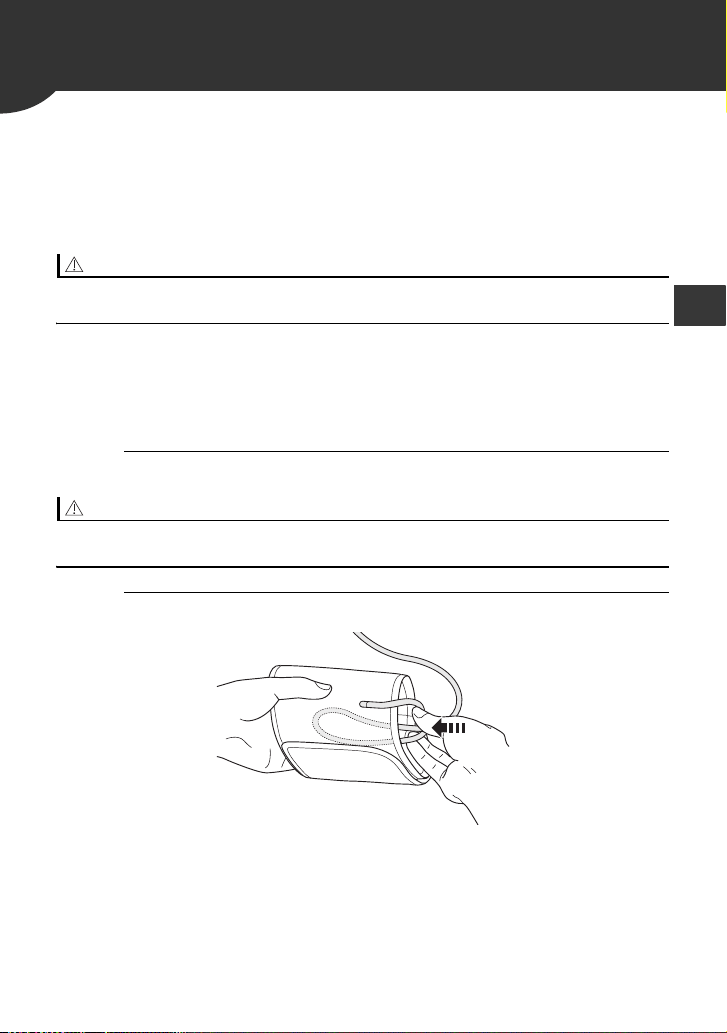
2. Gently fold the air tube into the arm cuff.
Note
• Do not bend or crease the air tube excessively.
•Changes or modifications not approved by the manufacturer will
void the user warranty.

40
8. Maintenance
3. Place your monitor and other components in
the storage case.
Do not store your monitor and other components:
8.3 Cleaning
•Do not use any abrasive or volatile cleaners.
•Use a soft dry cloth or a soft cloth moistened with mild (neutral)
detergent to clean your monitor and arm cuff and then wipe them
with a dry cloth.
•Do not wash or immerse your monitor and arm cuff or other
components in water.
•Do not use gasoline, thinners or similar solvents to clean your
monitor and arm cuff or other components.
8.4 Disposal
Dispose of your monitor, other components and optional accessories
according to applicable local regulations.
Unlawful disposal may cause environmental pollution.
•If your monitor and other components are wet.
•In locations exposed to extreme temperatures, humidity, direct
sunlight, dust or corrosive vapors such as bleach.
•In locations exposed to vibrations or shocks.
41
EN
9. Optional Accessories
Note
•Do not throw the air plug away. The air plug can be applicable to the
optional cuff.
For further information, visit our website at OmronHealthcare.com
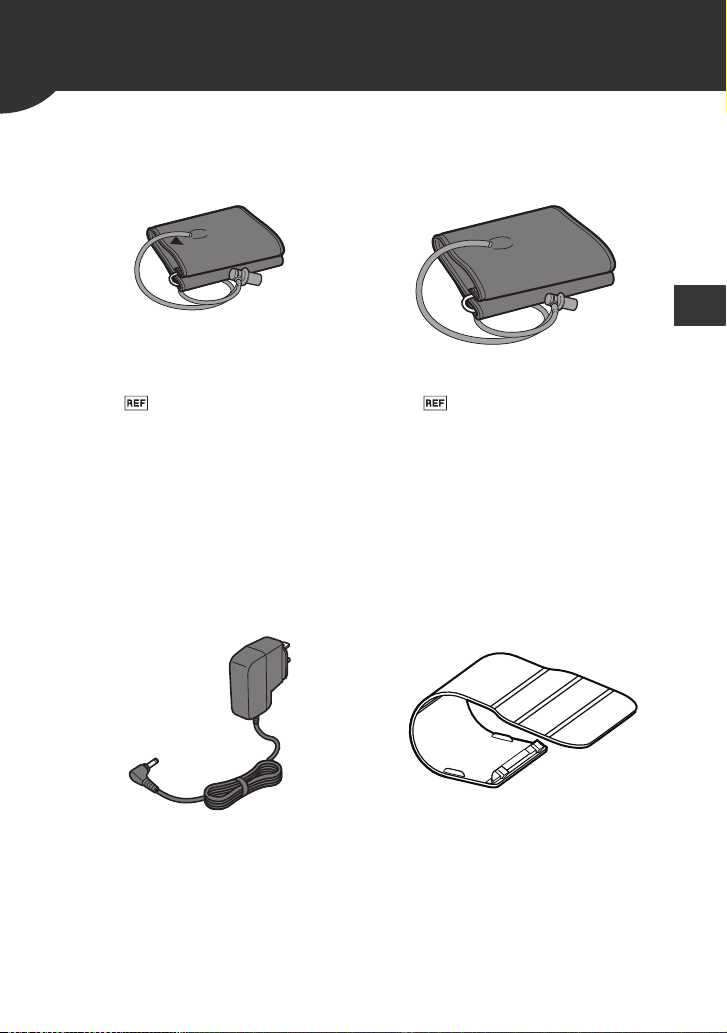
Small D-Ring Cuff Wide-Range D-Ring Cuff
Arm circumference
7" - 9" (17 - 22 cm)
Arm circumference
9" - 17" (22 - 42 cm)
Model:
HEM-CS24-B
HEM-CS24-BZ
Model:
HEM-RML31-B
HEM-RML31-BZ
•Same as the arm cuff provided
with the product.
AC Adapter Protective LCD Cover
Model: HEM-ADPTW5 Model: HEM-CACO-734
42
9. Optional Accessories
Using the AC Adapter (optional accessory)
Note
•Make sure not to place your monitor in a location where it is difficult
to plug and unplug the AC adapter.
•We recommend keeping batteries in your monitor at all times, even
if you choose to use the AC adapter. If only the AC adapter is used
without keeping batteries in your monitor, you may need to reset the
date and time each time you unplug and plug back the AC adapter.
The readings will not be deleted.
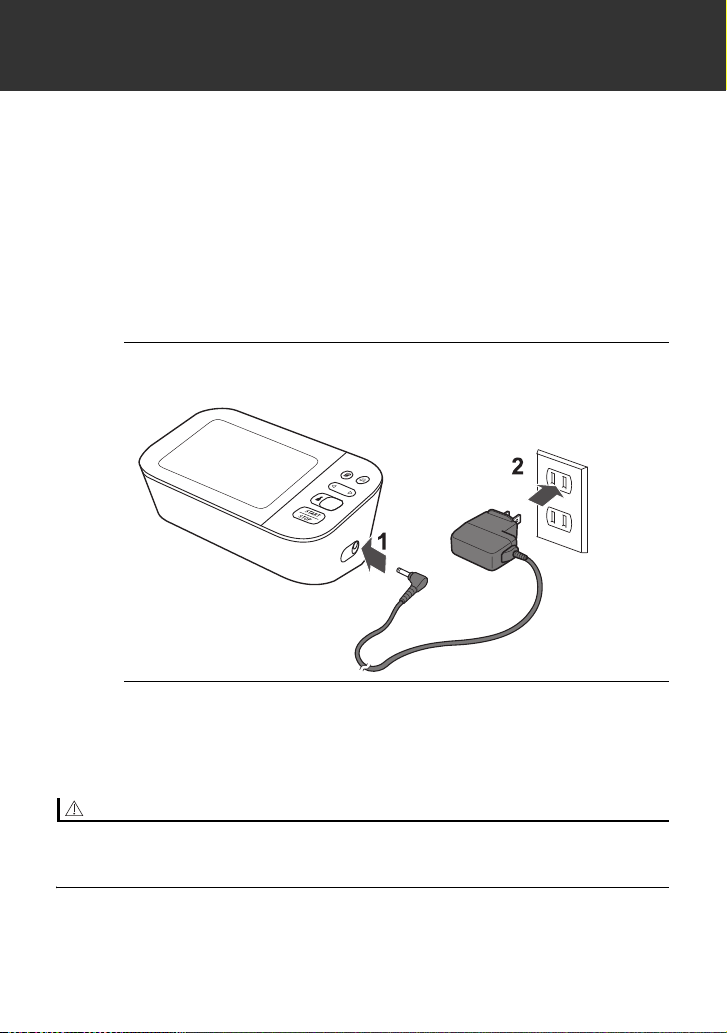
1. Insert the AC adapter plug into the AC adapter
jack on the right side of your monitor.
2. Plug the AC adapter into an electrical outlet.
To unplug the AC adapter, unplug the AC adapter from the
electrical outlet and then remove the AC adapter plug from
the monitor.
Caution
• ONLY use the AC adapter, arm cuff, batteries and accessories specified for
this monitor. Use of unsupported AC adapters, arm cuffs and batteries may
damage and/or may be hazardous to this monitor.
43
EN
10. Specifications
Model BP5350 HEM-7341T-Z
Display LCD digital display
Cuff pressure range 0 to 299 mmHg
Blood pressure
measurement range
SYS: 60 to 260 mmHg
DIA: 40 to 215 mmHg
Pulse measurement
range
40 to 180 beats / min.
Accuracy
Pressure: ±3 mmHg
Pulse: ±5 % of display reading
Inflation Automatic by electric pump
Deflation Automatic pressure release valve
Measurement method Oscillometric method
Transmission method
Bluetooth
®
Low Energy
Wireless
communication
Frequency range: 2.4 GHz
(2400 - 2483.5 MHz)
Modulation: GFSK
Effective radiated power: < 20 dBm
Operation mode Continuous operation
IP classification
Monitor: IP20
Optional AC adapter: IP21
Rating DC6 V 4.0 W
Power source
4 “AA” batteries 1.5 V or optional AC adapter
(INPUT AC100 - 240 V 50 - 60 Hz
0.12 - 0.065 A)
Battery life
Approximately 1000 measurements (using
new alkaline batteries)
Durable period
(Service life)
Monitor: 5 years
Arm cuff: 5 years
Optional AC adapter: 5 years
Operating conditions
+50 °F to +104 °F (+10 °C to +40 °C) / 15 to
90 % RH (non-condensing) / 800 to
1060 hPa
Storage / Transport
conditions
-4 °F to +140 °F (-20 °C to +60 °C) / 10 to
90 % RH (non-condensing)

44
10. Specifications
Note
•These specifications are subject to change without notice.
•This monitor complies with the requirements of ISO 81060-2:2013.
In the clinical validation study, K5 was used on 85 subjects for
determination of diastolic blood pressure.
•This monitor has not been validated for use on pregnant patients.
•IP classification is degrees of protection provided by enclosures in
accordance with IEC 60529. This monitor and optional AC adapter
are protected against solid foreign objects of 0.5 inch (12.5 mm)
diameter and greater such as a finger. The optional AC adapter is
protected against vertically falling water drops which may cause
issues during a normal operation.
Weight
Monitor: Approximately 16.2 oz. (460 g) not
including batteries
Arm cuff: Approximately 6 oz. (170 g)
Dimensions
Monitor: Approximately 7.5" (w) × 3.1" (h) ×
4.1" (l) (191 mm × 79 mm × 105 mm)
Arm cuff: Approximately 5.7" × 23.4" (air
tube: 29.5") (145 mm × 594 mm (air tube:
750 mm))
Cuff circumference
applicable to the
monitor
7" to 17" (170 to 420 mm) (included arm cuff:
9" to 17" (220 to 420 mm))
Memory Stores up to 60 readings per user
Contents
Monitor, Wide-Range D-Ring Cuff, 4 “AA”
batteries, storage case, instruction manual,
quick start guide
Protection against
electric shock
Internally powered ME equipment (When
using only batteries)
Class II ME equipment (Optional AC
adapter)
Applied part Type BF (arm cuff)
10. Specifications
45
EN
About a wireless communication interference
This product operates in an unlicensed ISM band at 2.4 GHz. In the
event this product is used near other wireless devices such as
microwave and wireless LAN, which operate on the same frequency
band as this product, there is a possibility that interference may
occur.
If interference occurs, stop the operation of the other devices or
relocate this product away from other wireless devices before
attempting to use it.
46
10. Specifications
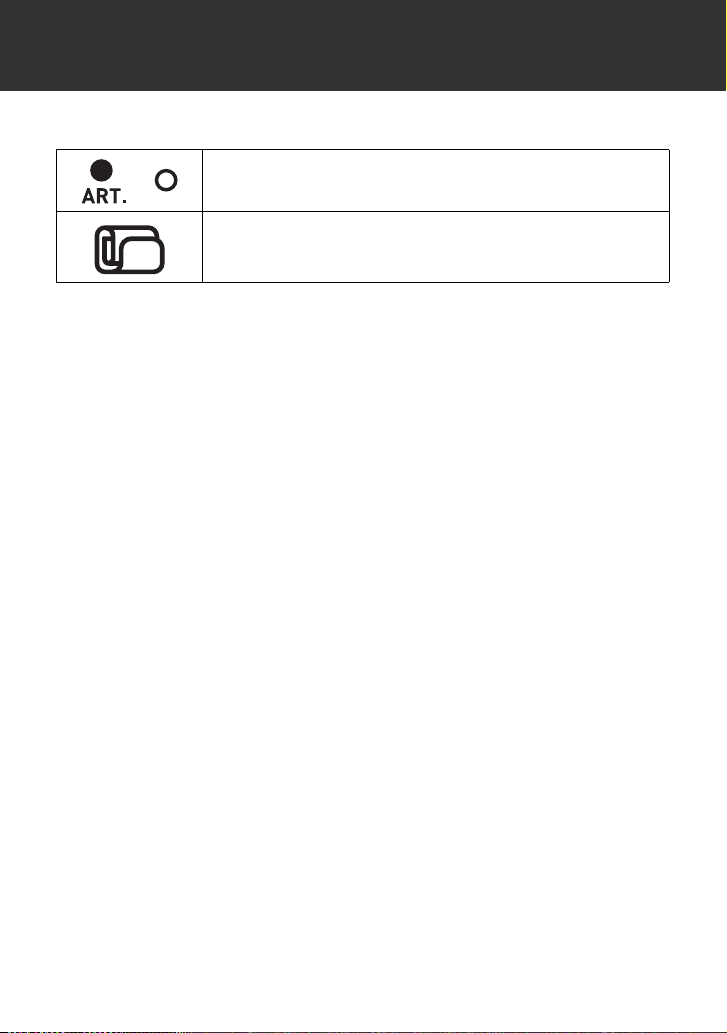
Pictogram on the Product
or
Types of marks used to indicate the correct
positioning of the artery for the upper arm
Identifies the type of cuff that is compatible with the
blood pressure monitor

47
EN
11. FCC/ISED Statement
FCC CAUTION
Changes or modifications not expressly approved by the party
responsible for compliance could void the user's authority to operate
the equipment.
This device complies with part 15 of FCC Rules and Innovation,
Science and Economic Development Canada’s licence-exempt
RSS(s). Operation is subject to the following two conditions: (1) this
device may not cause harmful interference, and (2) this device must
accept any interference received, including interference that may
cause undesired operation.
Note
•This equipment has been tested and found to comply with the limits
for a Class B digital device, pursuant to part 15 of the FCC Rules.
These limits are designed to provide reasonable protection against
harmful interference in a residential installation. This equipment
generates, uses and can radiate radio frequency energy and, if not
installed and used in accordance with the instructions, may cause
harmful interference to radio communications. However, there is no
guarantee that interference will not occur in a particular installation.
If this equipment does cause harmful interference to radio or
television reception, which can be determined by turning the
equipment off and on, the user is encouraged to try to correct the
interference by one or more of the following measures:
This transmitter must not be co-located or operated in conjunction
with any other antenna or transmitter.
•Reorient or relocate the receiving antenna.
•Increase the separation between the equipment and receiver.
•Connect the equipment into an outlet on a circuit different from
that to which the receiver is connected.
•Consult the dealer or an experienced radio/TV technician for
help.

48
11. FCC/ISED Statement
This equipment complies with FCC/ISED radiation exposure limits set
forth for an uncontrolled environment and meets the FCC radio
frequency (RF) Exposure Guidelines and RSS-102 of the ISED radio
frequency (RF) Exposure rules as this equipment has very low levels
of RF energy.

49
EN
12. Limited Warranty
Your BP5350 Blood Pressure Monitor, excluding the arm cuff and
batteries is warranted to be free from defects in materials and
workmanship appearing within 5 years from the date of purchase,
when used in accordance with the instructions provided with the
monitor. The arm cuff is warranted to be free from defects in materials
and workmanship appearing within 1 year from the date of purchase
when the monitor is used in accordance with the instructions provided
with the monitor. The above warranty extends only to the original
retail purchaser.
We will, at our option, replace without charge any monitor or arm cuff
covered by the above warranty. Replacement is our only
responsibility and your only remedy under the above warranty.
To obtain warranty service contact Customer Service by calling
1-800-634-4350 for the address of the inspection center and the
return shipping and handling fee that may apply.
Enclose the original printed receipt. Include a letter, with your name,
address, phone number, and description of the specific problem.
Pack the product carefully to prevent damage in transit. Because of
possible loss in transit, we recommend insuring the product with
return receipt requested.
THE FOREGOING IS THE SOLE WARRANTY PROVIDED BY
OMRON IN CONNECTION WITH THIS PRODUCT, AND OMRON
HEREBY DISCLAIMS ANY OTHER WARRANTIES, EXPRESS OR
IMPLIED, INCLUDING IMPLIED WARRANTIES OF
MERCHANTABILITY AND FITNESS FOR A PARTICULAR
PURPOSE. IMPLIED WARRANTIES AND OTHER TERMS THAT
MAY BE IMPOSED BY LAW, IF ANY, ARE LIMITED IN DURATION
TO THE PERIOD OF THE ABOVE EXPRESS WARRANTY.
SOME STATES DO NOT ALLOW LIMITATIONS ON HOW LONG
AN IMPLIED WARRANTY LASTS, SO THE ABOVE LIMITATION
MAY NOT APPLY TO YOU.
OMRON SHALL NOT BE LIABLE FOR LOSS OF USE OR ANY
OTHER SPECIAL, INCIDENTAL, CONSEQUENTIAL OR INDIRECT
COSTS, EXPENSES OR DAMAGES.
SOME STATES DO NOT ALLOW THE EXCLUSION OR
LIMITATION OF INCIDENTAL OR CONSEQUENTIAL DAMAGES,
SO THE ABOVE LIMITATION OR EXCLUSION MAY NOT APPLY
TO YOU.
50
12. Limited Warranty
This warranty provides you with specific legal rights, and you may
have other rights that vary by jurisdiction. Because of special local
requirements, some of the above limitations and exclusions may not
apply to you.
FOR CUSTOMER SERVICE
Visit our web site at:
For USA - OmronHealthcare.com
For Canada - OmronHealthcare.ca
Call toll free: 1-800-634-4350
51
EN
13.
Guidance and Manufacturer’s Declaration
OMRON Battery-operated / AC Adapter-operated Blood Pressure
Monitor Information for Accompanying Documents in the Scope of
IEC60601-1-2:2014
Important information regarding Electromagnetic Compatibility
(EMC)
BP5350 conforms to IEC60601-1-2:2014 Electromagnetic Compatibility (EMC) standard.
Further documentation in accordance with this EMC standard is available at
OmronHealthcare.com/emc. Refer to the EMC information for BP5350 on the website.
The Bluetooth
®
word mark and logos are registered trademarks
owned by the Bluetooth SIG, Inc. and any use of such marks by
OMRON HEALTHCARE Co., Ltd. is under license. Other trademarks
and trade names are those of their respective owners.
App Store and App Store logo are service marks of Apple Inc.,
registered in the U.S and other countries.
Google Play and the Google Play logo are trademarks of Google
LLC.

52
Notes

Made in Vietnam
OMRON HEALTHCARE Co., Ltd.
53, Kunotsubo, Terado-cho, Muko, Kyoto, 617-0002 JAPAN
Distributed by :
OMRON HEALTHCARE, INC.
1925 West Field Court, Lake Forest, IL 60045 U.S.A.
For USA - OmronHealthcare.com
For Canada - OmronHealthcare.ca
© 2019 OMRON HEALTHCARE, INC.