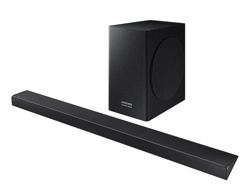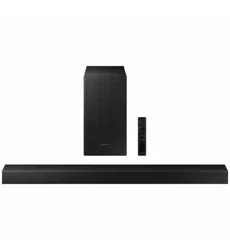

FULL MANUAL
HW-Q800A
Imagine the possibilities
Thank you for purchasing this Samsung product.
To receive more complete service, please register your product at
www.samsung.com/register
Para evitar cualquier avería o daños, lea detalladamente este manual de instrucciones antes de conectar y utilizar este aparato.
Conserve el manual para referencia futura. (Sólo México)
ENG - 2
SAFETY INFORMATION
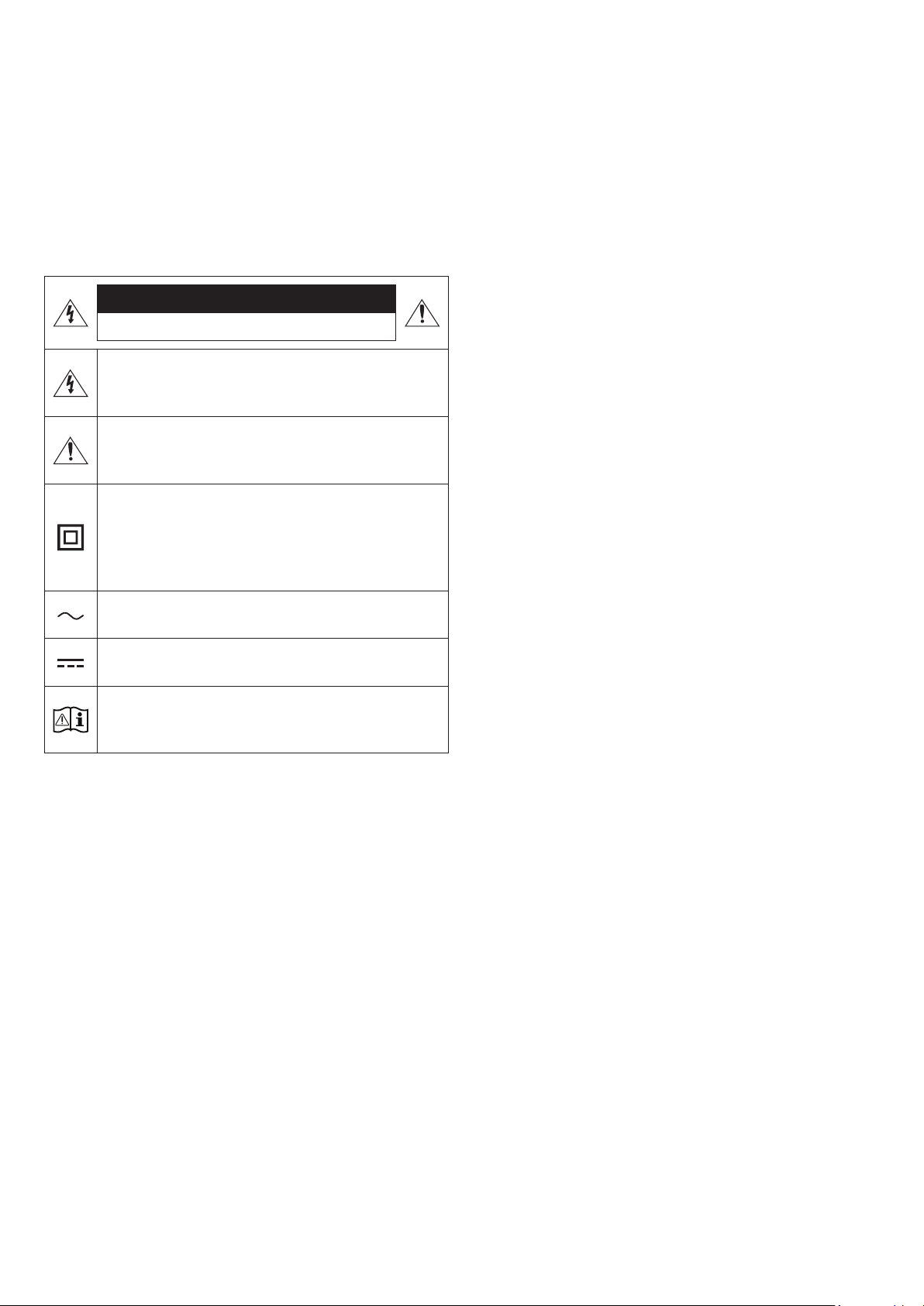
SAFETY WARNINGS
TO REDUCE THE RISK OF ELECTRIC SHOCK, DO NOT REMOVE THE
COVER (OR BACK).
NO USER-SERVICEABLE PARTS ARE INSIDE. REFER SERVICING TO
QUALIFIED SERVICE PERSONNEL.
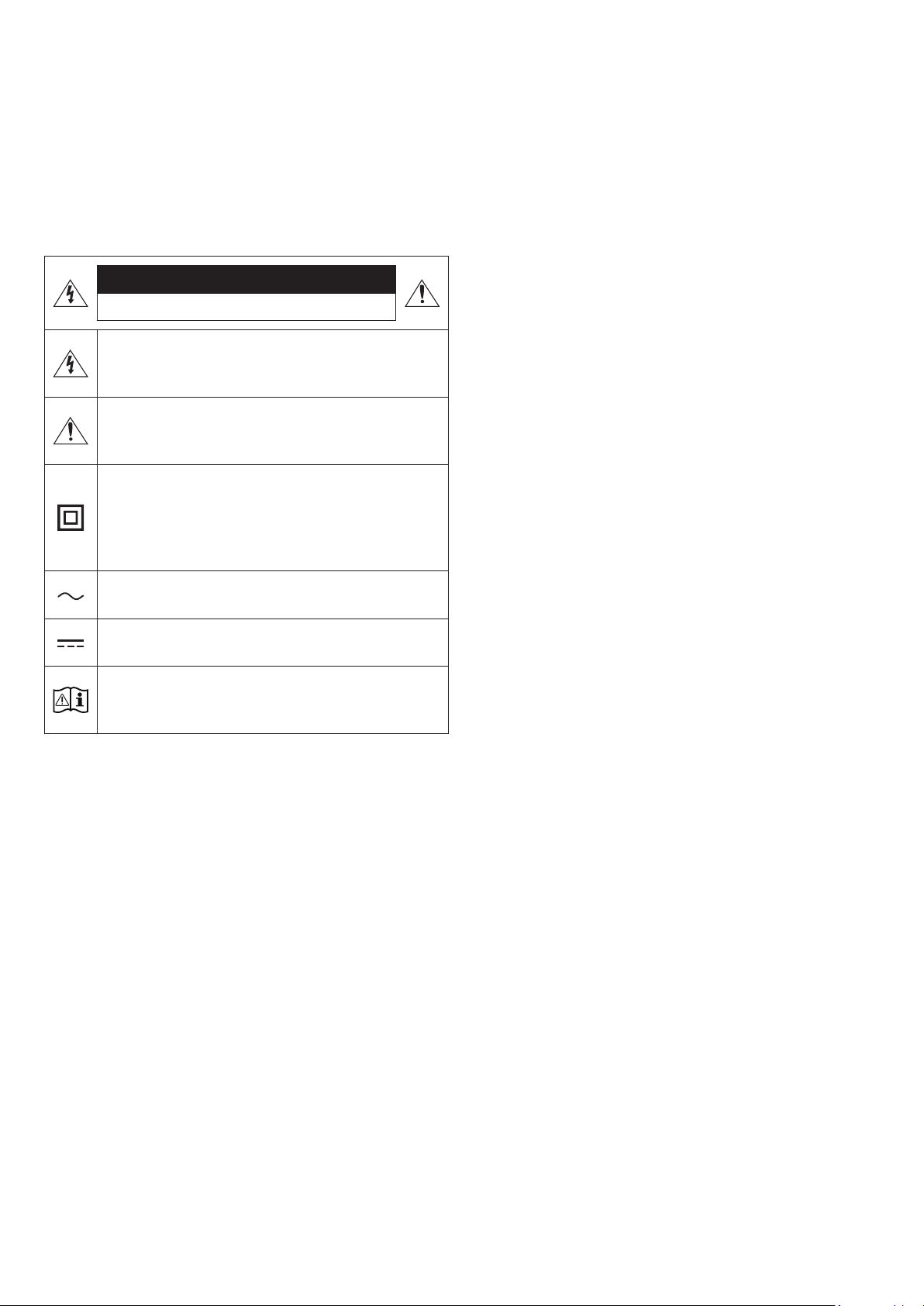
Refer to the table below for an explanation of symbols which may be
on your Samsung product.
CAUTION
RISK OF ELECTRIC SHOCK. DO NOT OPEN.
This symbol indicates that high voltage is present inside.
It is dangerous to make any kind of contact with any
internal part of this product.
This symbol indicates that this product has included
important literature concerning operation and
maintenance.
Class II product : This symbol indicates that a safety
connection to electrical earth (ground) is not required.
If this symbol is not present on a product with a power
cord, the product MUST have a reliable connection to
protective earth (ground).
AC voltage : Rated voltage marked with this symbol is AC
voltage.
DC voltage : Rated voltage marked with this symbol is DC
voltage.
Caution. Consult Instructions for use : This symbol
instructs the user to consult the user manual for further
safety related information.
WARNING
• To reduce the risk of re or electric shock, do not expose this
appliance to rain or moisture.
CAUTION
• TO PREVENT ELECTRIC SHOCK, MATCH WIDE BLADE OF PLUG TO
WIDE SLOT, FULLY INSERT.
• This apparatus shall always be connected to a AC outlet with a
protective grounding connection.
• To disconnect the apparatus from the mains, the plug must be
pulled out from the mains socket, therefore the mains plug shall
be readily operable.
• Do not expose this apparatus to dripping or splashing. Do not put
objects lled with liquids, such as vases, on the apparatus.
• To turn this apparatus off completely, you must pull the power
plug out of the wall socket. Consequently, the power plug must be
easily and readily accessible at all times.

ENG - 3
PRECAUTIONS
1. Ensure that the AC power supply in your house complies with the
power requirements listed on the identication sticker located
on the bottom of your product. Install your product horizontally,
on a suitable base (furniture), with enough space around it for
ventilation (7~10 cm). Make sure the ventilation slots are not
covered. Do not place the unit on ampliers or other equipment
which may become hot. This unit is designed for continuous use.
To fully turn off the unit, disconnect the AC plug from the wall
outlet. Unplug the unit if you intend to leave it unused for a long
period of time.
2. During thunderstorms, disconnect the AC plug from the wall
outlet. Voltage peaks due to lightning could damage the unit.
3. Do not expose the unit to direct sunlight or other heat sources.
This could lead to overheating and cause the unit to malfunction.
4. Protect the product from moisture (i.e. vases), and excess heat
(e.g. a replace) or equipment creating strong magnetic or electric
elds. Unplug the power cable from the AC wall socket if the unit
malfunctions. Your product is not intended for industrial use. It is
for personal use only. Condensation may occur if your product has
been stored in cold temperatures. If transporting the unit during
the winter, wait approximately 2 hours until the unit has reached
room temperature before using.
5. The battery used with this product contains chemicals that are
harmful to the environment. Do not dispose of the battery in the
general household trash. Do not expose the battery to excess
heat, direct sunlight, or re. Do not short circuit, disassemble, or
overheat the battery.
CAUTION : Danger of explosion if the battery is replaced
incorrectly. Replace only with the same or equivalent type.

ENG - 4
CONTENTS
01 Checking the Components 6
02 Product Overview 7
Front Panel / Top Panel of the Soundbar . . . . . . . . . . . . . . . . . . . . . . . . . . . . . . . . . . . . . . . . . . . . . . . . . . . . . . . . . . . . . . . . . . . . . . . . . . . . . . . . . . . . . . . . .7
Bottom Panel of the Soundbar . . . . . . . . . . . . . . . . . . . . . . . . . . . . . . . . . . . . . . . . . . . . . . . . . . . . . . . . . . . . . . . . . . . . . . . . . . . . . . . . . . . . . . . . . . . . . . . . . .7
03 Using the Soundbar Remote Control 9
Inserting Batteries before using the Remote Control (AA batteries X 2). . . . . . . . . . . . . . . . . . . . . . . . . . . . . . . . . . . . . . . . . . . . . . . . . . . . . . . . . . . . 9
How to Use the Remote Control . . . . . . . . . . . . . . . . . . . . . . . . . . . . . . . . . . . . . . . . . . . . . . . . . . . . . . . . . . . . . . . . . . . . . . . . . . . . . . . . . . . . . . . . . . . . . . . . 9
Active Voice Amplier (AVA) . . . . . . . . . . . . . . . . . . . . . . . . . . . . . . . . . . . . . . . . . . . . . . . . . . . . . . . . . . . . . . . . . . . . . . . . . . . . . . . . . . . . . . . . . . . . . . . . . . 10
Using the Hidden Buttons (Buttons with more than one function). . . . . . . . . . . . . . . . . . . . . . . . . . . . . . . . . . . . . . . . . . . . . . . . . . . . . . . . . . . . . . . . 10
Output specications for the different sound effect modes. . . . . . . . . . . . . . . . . . . . . . . . . . . . . . . . . . . . . . . . . . . . . . . . . . . . . . . . . . . . . . . . . . . . . . .11
Adjusting the Soundbar volume with a TV remote control . . . . . . . . . . . . . . . . . . . . . . . . . . . . . . . . . . . . . . . . . . . . . . . . . . . . . . . . . . . . . . . . . . . . . . . .11
04 Connecting the Soundbar 12
Connecting the power and units. . . . . . . . . . . . . . . . . . . . . . . . . . . . . . . . . . . . . . . . . . . . . . . . . . . . . . . . . . . . . . . . . . . . . . . . . . . . . . . . . . . . . . . . . . . . . . . .12
‒ Manually connecting the Subwoofer. . . . . . . . . . . . . . . . . . . . . . . . . . . . . . . . . . . . . . . . . . . . . . . . . . . . . . . . . . . . . . . . . . . . . . . . . . . . . . . . . . . . . . . . .12
‒ LED Indicator Lights on the Rear of Subwoofer. . . . . . . . . . . . . . . . . . . . . . . . . . . . . . . . . . . . . . . . . . . . . . . . . . . . . . . . . . . . . . . . . . . . . . . . . . . . . . . 13
Connecting an SWA-9500S (Sold Separately) to your Soundbar . . . . . . . . . . . . . . . . . . . . . . . . . . . . . . . . . . . . . . . . . . . . . . . . . . . . . . . . . . . . . . . . . . 14
05 Using a wired connection to the TV 15
Method 1. Connecting with HDMI . . . . . . . . . . . . . . . . . . . . . . . . . . . . . . . . . . . . . . . . . . . . . . . . . . . . . . . . . . . . . . . . . . . . . . . . . . . . . . . . . . . . . . . . . . . . . . 15
‒ Connecting the TV that supports HDMI ARC (Audio Return Channel) . . . . . . . . . . . . . . . . . . . . . . . . . . . . . . . . . . . . . . . . . . . . . . . . . . . . . . . . . . 15
Method 2. Connecting using an Optical Cable . . . . . . . . . . . . . . . . . . . . . . . . . . . . . . . . . . . . . . . . . . . . . . . . . . . . . . . . . . . . . . . . . . . . . . . . . . . . . . . . . . 16
06 Using a wireless connection to the TV 17
Method 1. Connecting via Bluetooth . . . . . . . . . . . . . . . . . . . . . . . . . . . . . . . . . . . . . . . . . . . . . . . . . . . . . . . . . . . . . . . . . . . . . . . . . . . . . . . . . . . . . . . . . . . .17
Method 2. Connecting via Wi-Fi . . . . . . . . . . . . . . . . . . . . . . . . . . . . . . . . . . . . . . . . . . . . . . . . . . . . . . . . . . . . . . . . . . . . . . . . . . . . . . . . . . . . . . . . . . . . . . . 18
07 Connecting an External Device 19
Method 1. Connecting using an HDMI Cable (Capable of Dolby Atmos decoding and playback) . . . . . . . . . . . . . . . . . . . . . . . . . . . . . . . . . . . . . . 19
Method 2. Connecting using an Optical Cable . . . . . . . . . . . . . . . . . . . . . . . . . . . . . . . . . . . . . . . . . . . . . . . . . . . . . . . . . . . . . . . . . . . . . . . . . . . . . . . . . . 20
08 Connecting a Mobile Device 21
Method 1. Connecting via Bluetooth . . . . . . . . . . . . . . . . . . . . . . . . . . . . . . . . . . . . . . . . . . . . . . . . . . . . . . . . . . . . . . . . . . . . . . . . . . . . . . . . . . . . . . . . . . . .21
Method 2. Connecting via Wi-Fi (Wireless Network). . . . . . . . . . . . . . . . . . . . . . . . . . . . . . . . . . . . . . . . . . . . . . . . . . . . . . . . . . . . . . . . . . . . . . . . . . . . . 22
Getting Started with Amazon Alexa (Built-in Alexa). . . . . . . . . . . . . . . . . . . . . . . . . . . . . . . . . . . . . . . . . . . . . . . . . . . . . . . . . . . . . . . . . . . . . . . . . . . . . 23
Getting Started with Alexa on Amazon Product (Works with Alexa). . . . . . . . . . . . . . . . . . . . . . . . . . . . . . . . . . . . . . . . . . . . . . . . . . . . . . . . . . . . . . . 24
Using the Tap Sound . . . . . . . . . . . . . . . . . . . . . . . . . . . . . . . . . . . . . . . . . . . . . . . . . . . . . . . . . . . . . . . . . . . . . . . . . . . . . . . . . . . . . . . . . . . . . . . . . . . . . . . . . 25
09 Connecting To Apple AirPlay 2 26
Connect and use with an Apple product. . . . . . . . . . . . . . . . . . . . . . . . . . . . . . . . . . . . . . . . . . . . . . . . . . . . . . . . . . . . . . . . . . . . . . . . . . . . . . . . . . . . . . . . 26
10 Installing the Wall Mount 27
Installation Precautions . . . . . . . . . . . . . . . . . . . . . . . . . . . . . . . . . . . . . . . . . . . . . . . . . . . . . . . . . . . . . . . . . . . . . . . . . . . . . . . . . . . . . . . . . . . . . . . . . . . . . . 27
Wallmount Components. . . . . . . . . . . . . . . . . . . . . . . . . . . . . . . . . . . . . . . . . . . . . . . . . . . . . . . . . . . . . . . . . . . . . . . . . . . . . . . . . . . . . . . . . . . . . . . . . . . . . . 27

ENG - 5
11 Installing the Soundbar above a TV Stand 28
Component . . . . . . . . . . . . . . . . . . . . . . . . . . . . . . . . . . . . . . . . . . . . . . . . . . . . . . . . . . . . . . . . . . . . . . . . . . . . . . . . . . . . . . . . . . . . . . . . . . . . . . . . . . . . . . . . . 28
12 Software Update 29
Auto Update. . . . . . . . . . . . . . . . . . . . . . . . . . . . . . . . . . . . . . . . . . . . . . . . . . . . . . . . . . . . . . . . . . . . . . . . . . . . . . . . . . . . . . . . . . . . . . . . . . . . . . . . . . . . . . . . . 29
USB Update . . . . . . . . . . . . . . . . . . . . . . . . . . . . . . . . . . . . . . . . . . . . . . . . . . . . . . . . . . . . . . . . . . . . . . . . . . . . . . . . . . . . . . . . . . . . . . . . . . . . . . . . . . . . . . . . . 29
Initialization. . . . . . . . . . . . . . . . . . . . . . . . . . . . . . . . . . . . . . . . . . . . . . . . . . . . . . . . . . . . . . . . . . . . . . . . . . . . . . . . . . . . . . . . . . . . . . . . . . . . . . . . . . . . . . . . . 30
13 Troubleshooting 30
14 License 32
15 Open Source License Notice 32
16 Important Notes About Service 32
17 Specications and Guide 33
Specications . . . . . . . . . . . . . . . . . . . . . . . . . . . . . . . . . . . . . . . . . . . . . . . . . . . . . . . . . . . . . . . . . . . . . . . . . . . . . . . . . . . . . . . . . . . . . . . . . . . . . . . . . . . . . . . 33

ENG - 6
01 CHECKING THE COMPONENTS
VOL WOOFER
SOUNDBAR
SOUND
MODE
PAIR
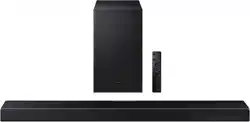
Soundbar Main Unit
Samsung Smart Remote &
Batteries (Not available in some locations or
models)
Subwoofer
x 2
Power Cord (Subwoofer, Soundbar) AC/DC Adapter (Soundbar) HDMI Cable
x 2
x 2
(M4 x L10)
Wall Mount Guide Holder-Screw Screw
x 2
x 4
Bracket-Wall Mount Rubber-Foot
• For more information about the power supply and power consumption, refer to the label attached to the product. (Label: Bottom of the
Soundbar Main Unit)
• To purchase additional components or optional cables, contact a Samsung Service Center or Samsung Customer Care.
• For more information about the wallmount or rubber-foot, see pages 27~29.
• Design, specications, and App screen are subject to change without prior notice.
• The appearance of the accessories may differ slightly from the illustrations above.
ENG - 7
02 PRODUCT OVERVIEW
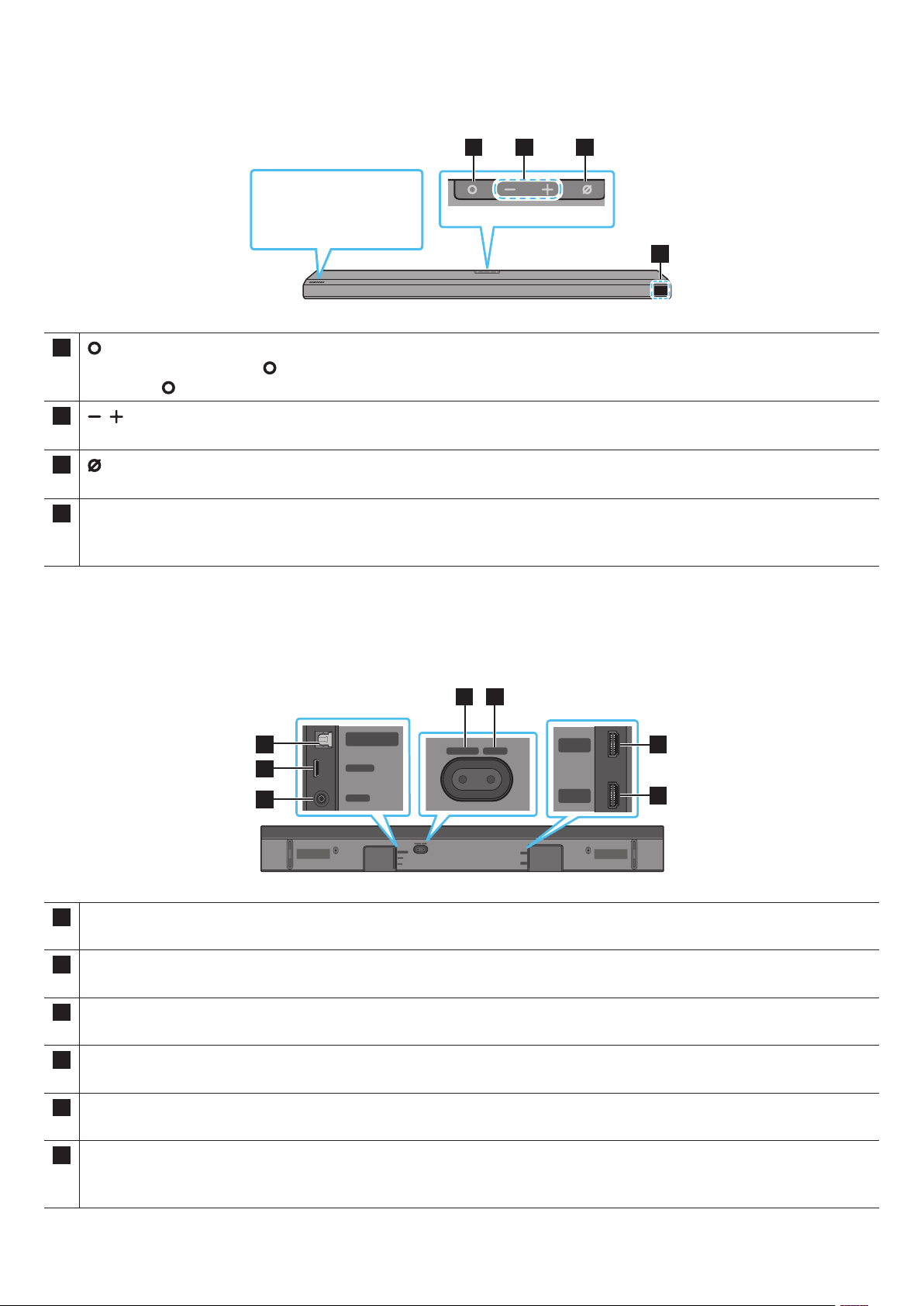
Front Panel / Top Panel of the Soundbar
1 2 3
4
Position the product so
that the SAMSUNG logo is
located on the top.
1
(Multi Function) Button
• In standby mode, press the (Multi Function) button to turn on the Soundbar.
• Press the (Multi Function) button to change the input source.
2
(Volume) Button
Adjusts the volume.
3
(Mic On/Off) Button
Press the button to turn the microphone on or off.
4 Display
Displays the product’s status and current mode.
D.IN → HDMI → Wi-Fi → BT
• When you plug in the AC cord, the power button will begin working in 4 to 6 seconds.
• When you turn on this unit, there will be a 4 to 5 second delay before it produces sound.
• If you hear sounds from both the TV and Soundbar, go to the Settings menu for the TV audio and change the TV speaker to External Speaker.
Bottom Panel of the Soundbar
DIGITAL AUDIO IN
(OPTICAL)
SERVICE
DC 19V
HDMI
NETWORK ID SET
DIGITAL AUDIO IN
(OPTICAL)
SERVICE
NETWORK ID SET
HDMI TO TV
(eARC/ARC)
HDMI IN
HDMI OUT
(TV-ARC)
DIGITAL AUDIO IN
(OPTICAL)
SERVICE
DC 19V
DIGITAL AUDIO IN
(OPTICAL)
SERVICE
DC 19V
HDMI
HDMI TO TV
(eARC/ARC)
DIGITAL AUDIO IN
(OPTICAL)
SERVICE
DC 19V
HDMI
NETWORK ID SET
DIGITAL AUDIO IN
(OPTICAL)
SERVICE
NETWORK ID SET
HDMI TO TV
(eARC/ARC)
HDMI IN
HDMI OUT
(TV-ARC)
DIGITAL AUDIO IN
(OPTICAL)
SERVICE
DC 19V
DIGITAL AUDIO IN
(OPTICAL)
SERVICE
DC 19V
HDMI
HDMI TO TV
(eARC/ARC)
DIGITAL AUDIO IN
(OPTICAL)
SERVICE
DC 19V
HDMI
NETWORK ID SET
DIGITAL AUDIO IN
(OPTICAL)
SERVICE
NETWORK ID SET
HDMI TO TV
(eARC/ARC)
HDMI IN
HDMI OUT
(TV-ARC)
DIGITAL AUDIO IN
(OPTICAL)
SERVICE
DC 19V
DIGITAL AUDIO IN
(OPTICAL)
SERVICE
DC 19V
HDMI
HDMI TO TV
(eARC/ARC)
DIGITAL AUDIO IN
(OPTICAL)
SERVICE
DC 19V
HDMI
NETWORK ID SET
DIGITAL AUDIO IN
(OPTICAL)
SERVICE
NETWORK ID SET
HDMI TO TV
(eARC/ARC)
HDMI IN
HDMI OUT
(TV-ARC)
DIGITAL AUDIO IN
(OPTICAL)
SERVICE
DC 19V
DIGITAL AUDIO IN
(OPTICAL)
SERVICE
DC 19V
HDMI
HDMI TO TV
(eARC/ARC)
1
2
3
4 5
6
7
1 DIGITAL AUDIO IN (OPTICAL)
Connect to the digital (optical) output of an external device. (See page 20)
2 SERVICE
Connect a USB storage device to upgrade the product’s software.
3 DC 19V (Power Supply In)
Connect the AC/DC power adapter. (See page 12)
4 NETWORK
Press to connect to a wireless network (Wi-Fi) via the SmartThings app.
5 ID SET
Press to connect the Soundbar to surround speakers and a subwoofer wirelessly. (The surround speaker is sold separately.)
6 HDMI
Inputs digital video and audio signals simultaneously using an HDMI cable.
Connect to the HDMI output of an external device. (See page 19)

ENG - 8
7 HDMI TO TV (eARC/ARC)
Connect to the HDMI jack on a TV. (See page 15)
• When disconnecting the power cable of the AC/DC power adaptor from a wall outlet, pull the plug.
Do not pull the cable.
• Do not connect this unit or other components to an AC outlet until all connections between components are complete.

ENG - 9
03 USING THE SOUNDBAR REMOTE CONTROL
Inserting Batteries before using the Remote Control (AA batteries X 2)
Slide the back cover in the direction of the arrow until it is completely removed. Insert 2 AA batteries
(1.5V) oriented so that their polarity is correct. Slide the battery cover back into position.
How to Use the Remote Control
1
2
3
4
5
6
7
8
9
10
1
Power
Turns the Soundbar on and off.
• Auto Power Down Function
The unit turns off automatically in the following situations:
• In D.IN / HDMI / Wi-Fi / BT mode if there is no audio signal for 18
minutes.
2
Source
Press to select a source connected to the Soundbar.
3
Mute
Press the
(Mute) button to mute the sound.
Press it again to unmute the sound.
4
SOUND MODE
You can select the desired sound mode by choosing STANDARD,
SURROUND, GAME PRO, or ADAPTIVE SOUND.
• STANDARD
Outputs the original sound.
• SURROUND
Provides a wider sound eld than standard.
• GAME PRO
Provides stereoscopic sound to immerse you in the action while
gaming.
• ADAPTIVE SOUND
Analyzes the content in real time and automatically provides the
optimal sound eld based on the characteristics of the content.
5
Bluetooth PAIR
Switch the Soundbar to Bluetooth pairing mode. Press the button and
wait for the “BT PAIRING” screen to connect to a new Bluetooth device.
6
Play / Pause
You can also play or pause music by pressing the button.
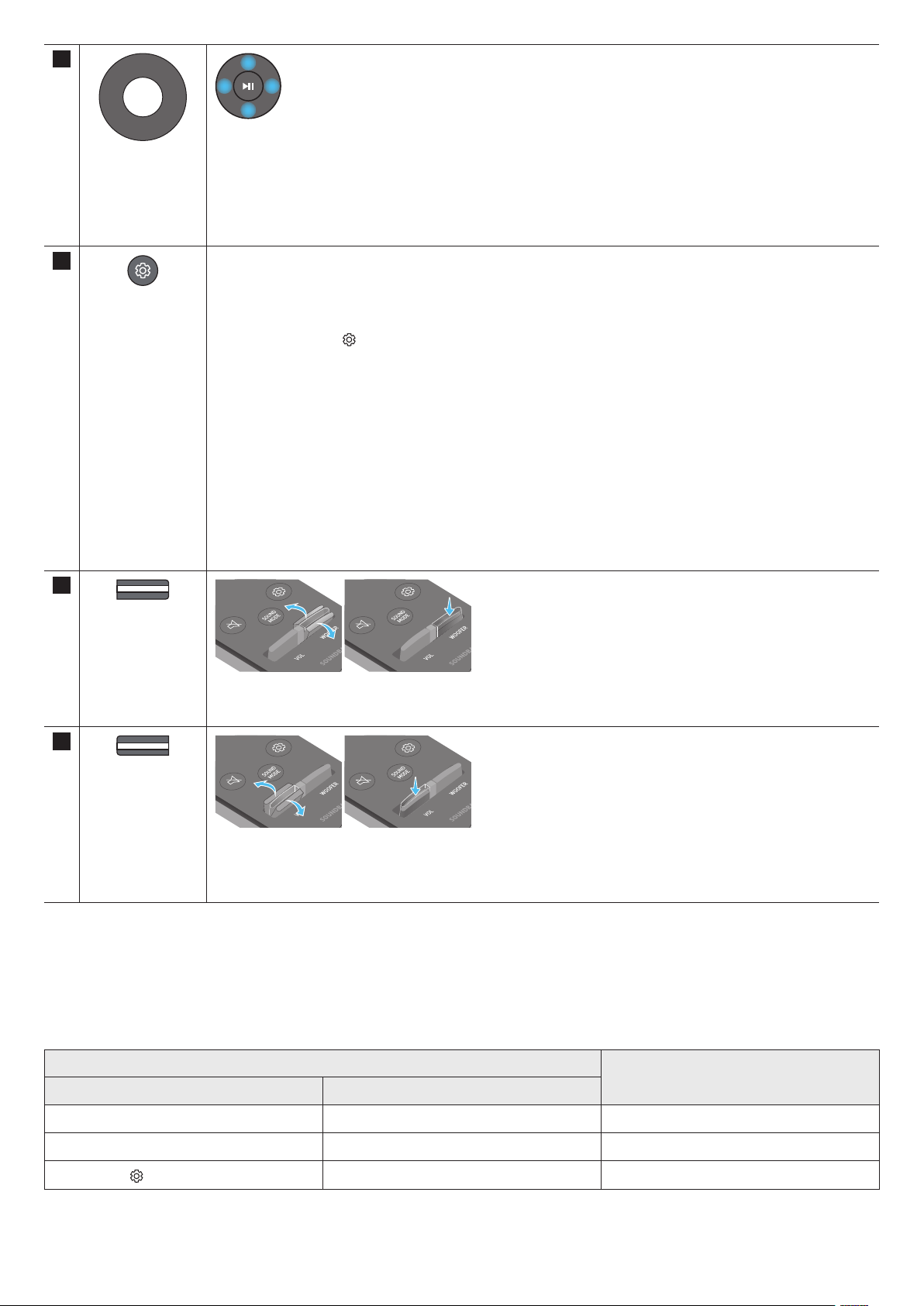
ENG - 10
7
Up/Down/Left/
Right
Press the indicated areas to select Up/Down/Left/Right.
Press Up/Down/Left/Right on the button to select or set functions.
• Music Skip
Press the Right button to select the next music le. Press the Left button to select the previous music le.
• ID SET
Use this option when the Subwoofer or Surround Speakers are not connected or need reconnection.
While powered off, press and hold the Up button for 5 seconds to perform ID SET. (See page 13.)
8
Sound Control
When pressed, the setting items such as AVA, TREBLE, BASS, SYNC, CENTER LEVEL, FRONT TOP LEVEL, and
VIRTUAL ON/OFF are displayed in sequence. The desired item can be adjusted using the Up/Down buttons.
• To control the volume of the treble or bass sound, select TREBLE or BASS in Sound Settings, and then adjust
the volume between -6~+6 by using the Up/Down buttons.
• Press and hold the
(Sound Control) button for about 5 seconds to adjust the sound for each frequency band.
150Hz, 300Hz, 600Hz, 1.2kHz, 2.5kHz, 5kHz, and 10kHz are selectable using the Left/Right buttons and each
can be adjusted to a setting between -6 to +6 using the Up/Down buttons.
(Make sure the Sound mode is set to “STANDARD”.)
• To control the volume of the each speaker select CENTER LEVEL, or FRONT TOP LEVEL in Sound Settings, and
then adjust the volume between -6~+6 by using the Up/Down buttons.
• If the video on the TV and audio from the Soundbar are not synchronized, select SYNC in Sound Control, and
then set the audio delay between 0~300 milliseconds by using the Up/Down buttons.
• SYNC is only supported for some functions.
• If Surround Speakers are connected, select REAR LEVEL, REAR TOP LEVEL, and then use the Up/Down buttons
to adjust the volume within a -6 to +6 range.
• The VIRTUAL Speaker function can be turned ON/OFF by using the Up/Down buttons.
9
WOOFER (BASS)
LEVEL
Push the button up or down to adjust the level of the woofer (bass) to -12 or between -6 to +6. To set the woofer
(bass) volume level to 0 (Default), press the button.
10
VOLUME
Push the button up or down to adjust the volume.
• Mute
Press the VOL button to mute the sound. Press it again to unmute the sound.
Active Voice Amplier (AVA)
• Analyses external noise in real time while soundbar is playing, so that voice audio can always be heard clearly.
• No data is saved during the analysis.
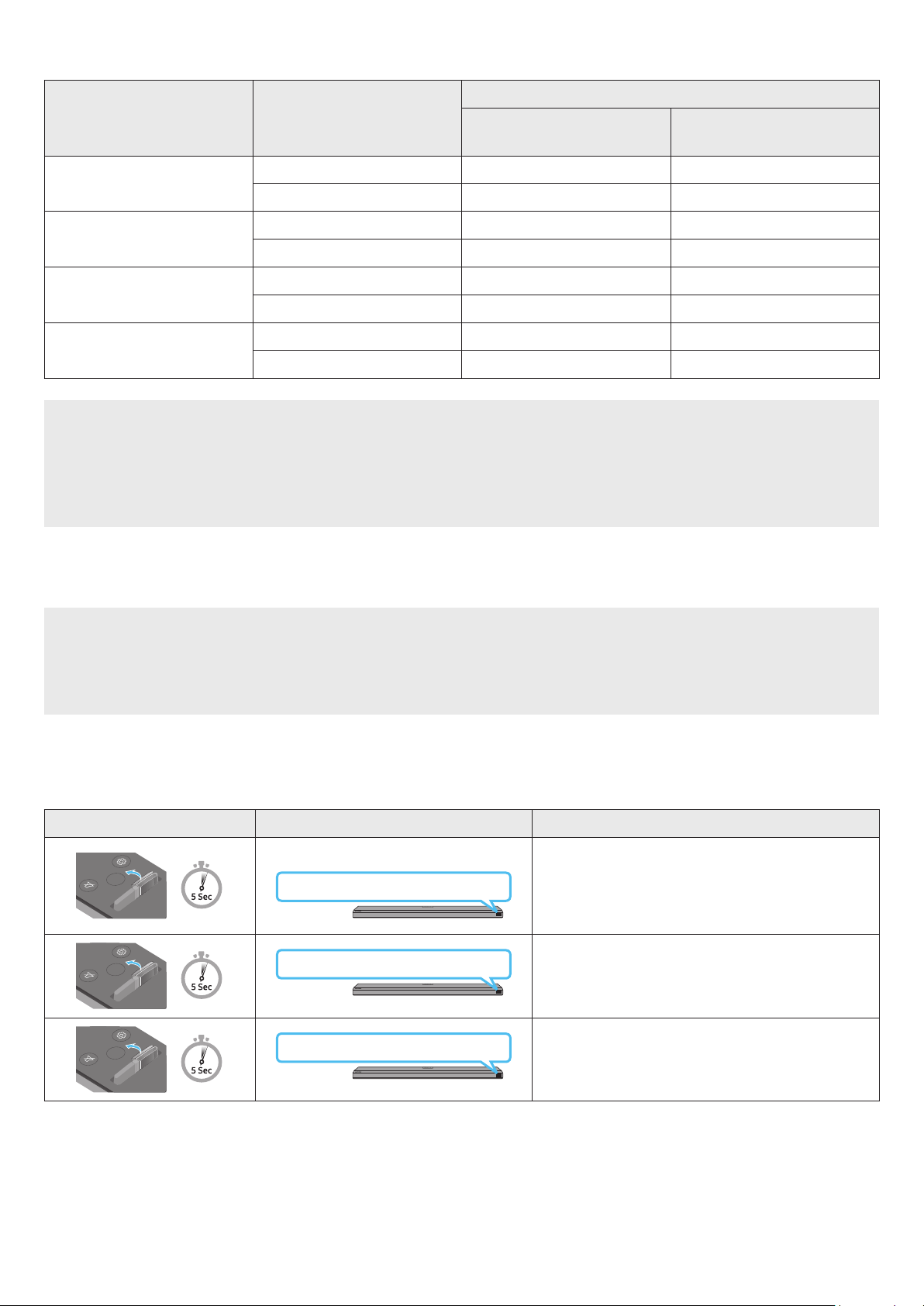
Using the Hidden Buttons (Buttons with more than one function)
Hidden Button
Reference page
Remote Control Button Function
WOOFER (Up) TV remote control On/Off (Standby) page 11
Up ID SET page 13
(Sound Control)
7 Band EQ page 10
ENG - 11
Output specications for the different sound effect modes
Effect Input
Output
With Subwoofer Only
With Subwoofer & Wireless Rear
Speaker Kit
STANDARD
2.0 ch 2.1 ch 2.1 ch
5.1 ch 3.1 ch 5.1 ch
SURROUND
2.0 ch 3.1.2 ch 5.1.4 ch
5.1 ch 3.1.2 ch 5.1.4 ch
GAME PRO
2.0 ch 3.1.2 ch 5.1.4 ch
5.1 ch 3.1.2 ch 5.1.4 ch
ADAPTIVE SOUND
2.0 ch 3.1.2 ch 5.1.4 ch
5.1 ch 3.1.2 ch 5.1.4 ch
• When the input source is Dolby Atmos®, DTS:X, the Subwoofer-only setup provides 3.1.2 channel audio, while the Subwoofer & Wireless
Rear Speaker Kit setup provides 5.1.4 channel audio.
• The Samsung Wireless Rear Speaker Kit can be purchased separately. To purchase a Kit or the Subwoofer, contact the vendor you purchased
the Soundbar from.
• The Surround Speakers will not produce sounds for 2 channel output while STANDARD mode is in use. To enable sound for the Surround
Speakers, change the effect mode to SURROUND.
Adjusting the Soundbar volume with a TV remote control
Adjust the Soundbar volume using the TV’s remote control.
• This function can be used with IR remote controls only. Bluetooth remote controls (remote controls that require pairing) are not
supported.
• Set the TV speaker to External Speaker to use this function.
• Manufacturers supporting this function:
VIZIO, LG, Sony, Sharp, PHILIPS, PANASONIC, TOSHIBA, Hisense, RCA
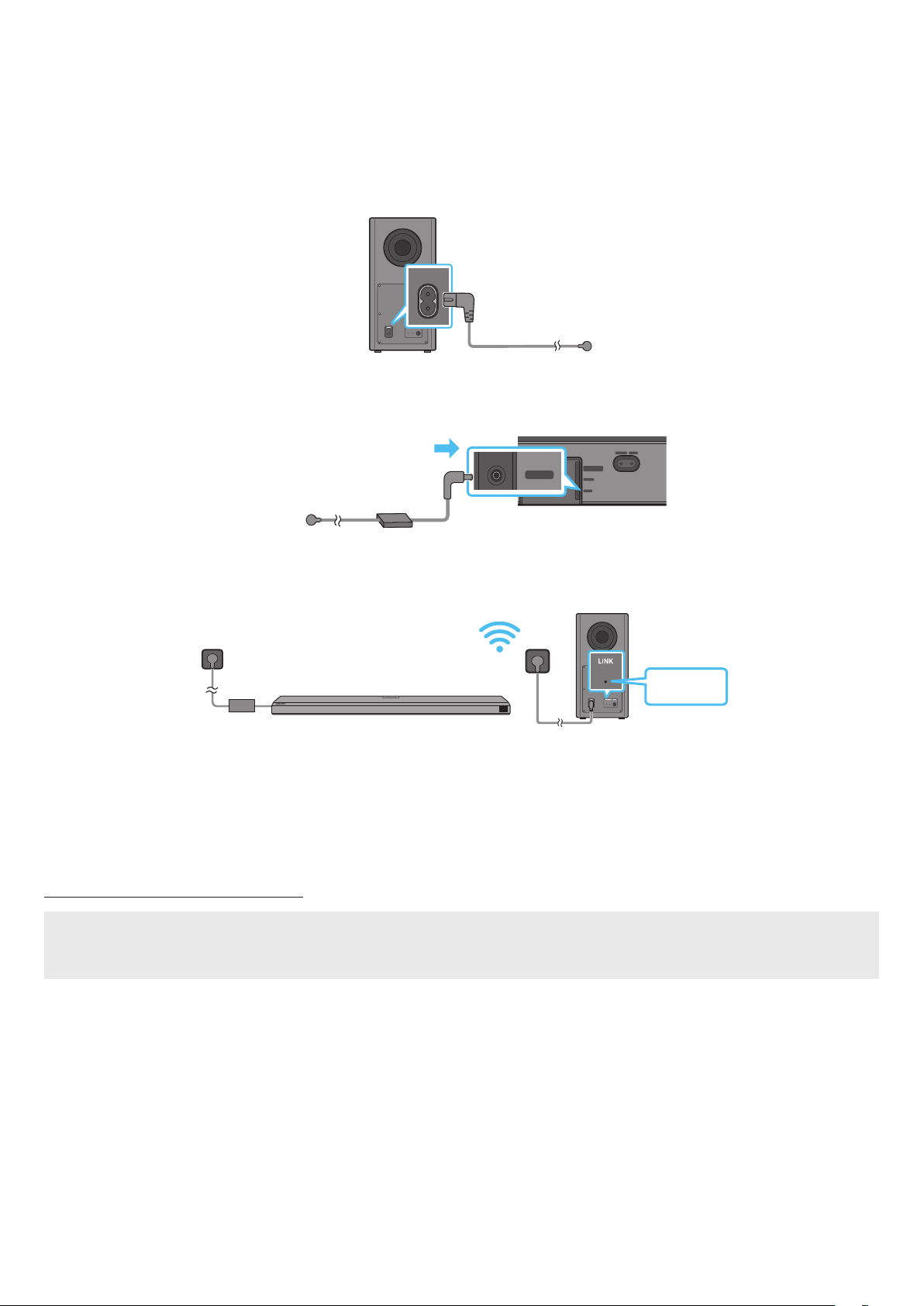
1. Turn Off the Soundbar.
2. Push up and hold the WOOFER button for 5 seconds.
Each time you push the WOOFER button up and hold it for 5 seconds, the mode switches in the following order: “OFF-TV REMOTE” (Default
mode), “SAMSUNG-TV REMOTE”, “ALL-TV REMOTE”.
Remote Control Button Display Status
SOUND
MODE
VOL
WOOFER
SOUNDBAR
(Default mode)
OFF-TV REMOTE
Disable the TV remote control.
SOUND
MODE
VOL
WOOFER
SOUNDBAR
SAMSUNG-TV REMOTE
Enable a Samsung TV’s IR remote control.
SOUND
MODE
VOL
WOOFER
SOUNDBAR
ALL-TV REMOTE
Enable a third-party TV’s IR remote control.
ENG - 12
04 CONNECTING THE SOUNDBAR
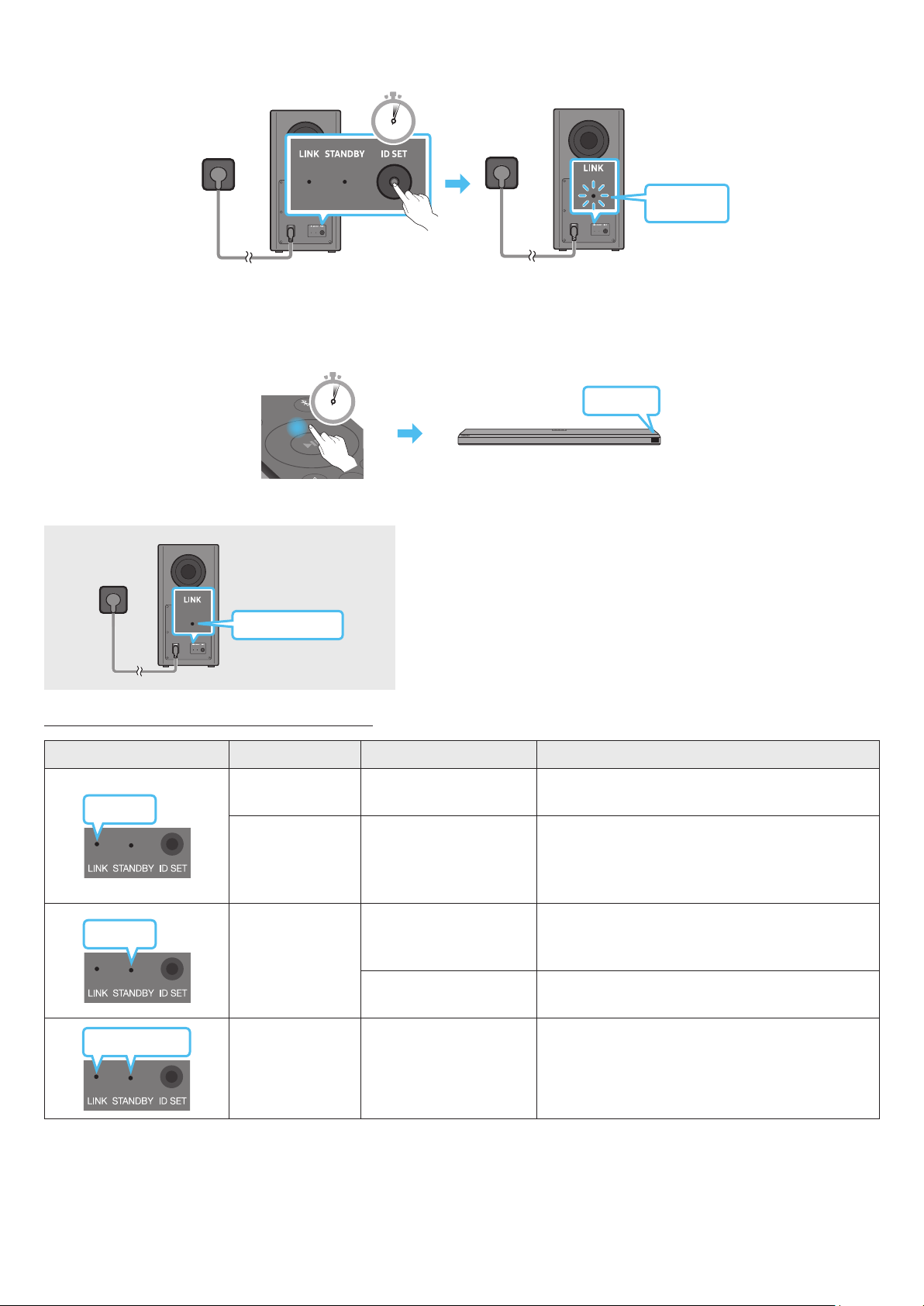
Connecting the power and units
Use the power components to connect the Subwoofer and Soundbar to an electrical outlet in the following order:
• For more information about the required electrical power and power consumption, refer to the label attached to the product. (Label: Bottom
of the Soundbar Main Unit)
1. Connect the Power cord to the Subwoofer.
POWER
Rear of Subwoofer
Power Cord
2. First connect the power cable to the AC/DC adapter.
Connect the AC/DC adapter (with the power cable) to the Soundbar.
DIGITAL AUDIO IN
(OPTICAL)
SERVICE
DC 19V
HDMI
NETWORK ID SET
DIGITAL AUDIO IN
(OPTICAL)
SERVICE
NETWORK ID SET
HDMI TO TV
(eARC/ARC)
HDMI IN
HDMI OUT
(TV-ARC)
DIGITAL AUDIO IN
(OPTICAL)
SERVICE
DC 19V
DIGITAL AUDIO IN
(OPTICAL)
SERVICE
DC 19V
HDMI
HDMI TO TV
(eARC/ARC)
DIGITAL AUDIO IN
(OPTICAL)
SERVICE
DC 19V
HDMI
NETWORK ID SET
DIGITAL AUDIO IN
(OPTICAL)
SERVICE
NETWORK ID SET
HDMI TO TV
(eARC/ARC)
HDMI IN
HDMI OUT
(TV-ARC)
DIGITAL AUDIO IN
(OPTICAL)
SERVICE
DC 19V
DIGITAL AUDIO IN
(OPTICAL)
SERVICE
DC 19V
HDMI
HDMI TO TV
(eARC/ARC)
DC 19V
Bottom of the Soundbar
Main Unit
AC/DC Adapter
Power Cord
3. Connect power to the Soundbar and Subwoofer. The Subwoofer is automatically connected when the Soundbar is turned on.
Blue is On
NOTE
• Connect the Subwoofer power before connecting to the Soundbar.
The Subwoofer will be automatically connected when turning on the Soundbar.
• If you unplug and reconnect the power cord when the product is turned on, the Soundbar turns on automatically.
• Make sure to rest the AC/DC Adapter at on a table or the oor. If you place the AC/DC Adapter so that it is hanging with the AC cord input
facing upwards, water or other foreign substances could enter the Adapter and cause the Adapter to malfunction.
Manually connecting the Subwoofer
Before performing the manual connection procedure below:
• Check whether the power cables for the Soundbar and subwoofer are connected properly.
• Make sure that the Soundbar is turned off.
1. Turn off the Soundbar main.
ENG - 13
2. Press and hold ID SET on the rear of the subwoofer for at least 5 seconds.
• The red indicator on the rear of the subwoofer turns off and the blue indicator blinks.
5 Sec
Blinking
blue fast
Rear of Subwoofer Rear of Subwoofer
3. Press the Up button on the remote control for 5 seconds.
• The ID SET message appears on the display of the Soundbar for a moment, and then it disappears.
• The Soundbar will automatically power on when ID SET is complete.
SOUND
MODE
PAIR
5 Sec
ID SET
4. Check if the LINK LED is solid blue (connection complete).
Blue is On
The LINK LED indicator stops blinking and glows a solid blue when a connection
is established between the Soundbar and the Wireless Subwoofer.
LED Indicator Lights on the Rear of Subwoofer
LED Status Description Resolution
Blue
On
Successfully connected
(normal operation)
-
Blinking Recovering the connection
Check if the power cable attached to the main Soundbar
unit is connected properly or wait about 5 minutes.
If blinking persists, try manually connecting the
subwoofer. See page 12.
Red
On
Standby (with the
Soundbar main unit turned
off)
Check if the power cable attached to the main Soundbar
unit is connected properly.
Connection failed
Connect again. See the instructions for manual
connection on page 12.
Red and blue
Blinking Malfunction
See the contact information for the Samsung Service
Center in this manual.
NOTE
• If the main unit is powered off, the wireless subwoofer will go into stand-by mode and the STANDBY LED on the rear of the sub-woofer will
turn red after blinking in blue several times.
• If you use a device that uses the same frequency as the Soundbar near the Soundbar, interference may cause some sound interruption.

ENG - 14
• The maximum transmission distance of the main unit’s wireless signal is about 10 m, but may vary depending on your operating environment.
If a steel-concrete or metallic wall is between the main unit and the wireless subwoofer, the system may not operate at all because the
wireless signal cannot penetrate metal.
CAUTION
• Wireless receiving antennas are built into the wireless subwoofer. Keep the unit away from water and moisture.
• For optimal listening performance, make sure that the area around the wireless subwoofer and the Wireless Receiver Module (sold separately)
is clear of any obstructions.
Connecting an SWA-9500S (Sold Separately) to your Soundbar
Expand to true wireless surround sound by connecting the Samsung Wireless Rear Speaker Kit (SWA-9500S, sold separately) to your Soundbar.
For detailed information on connections, see the Samsung Wireless Rear Speaker Kit manual.
ENG - 15
05 USING A WIRED CONNECTION TO THE TV
Method 1. Connecting with HDMI
CAUTION
• When both the HDMI cable and optical cable are connected, the HDMI signal is received rst.
• To connect the HDMI cable between the TV and Soundbar, be sure to connect the terminals marked ARC. Otherwise, the TV sound may not
be output.
• The recommended cable is High Speed HDMI Cable with Ethernet.
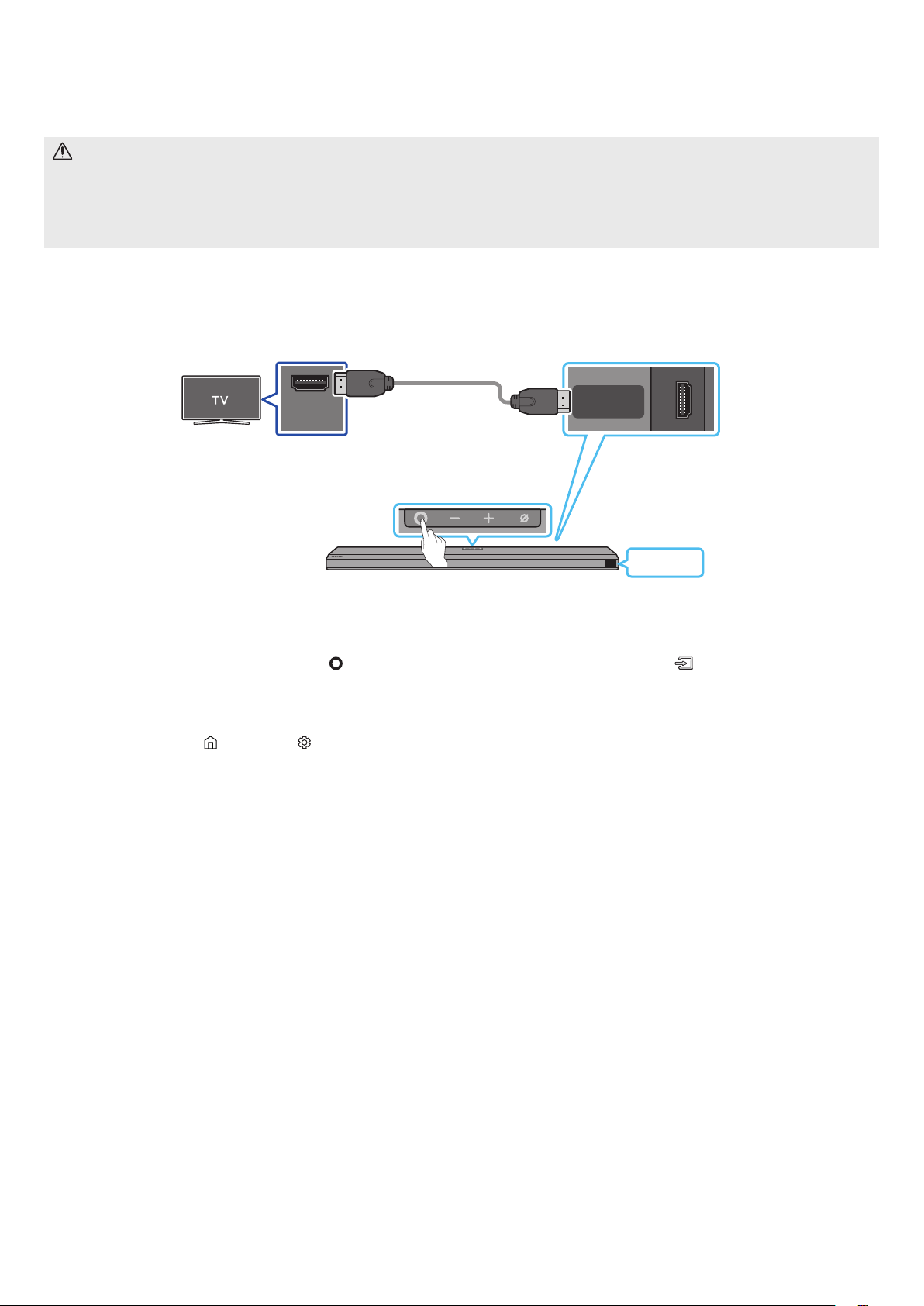
Connecting the TV that supports HDMI ARC (Audio Return Channel)
HDMI IN
(ARC)
HDMI TO TV
(eARC/ARC)
SERVICE
DC 19V
TV ARC
Connect to the HDMI TO
TV (eARC/ARC) port of the
Soundbar main unit.
Top of the Soundbar
Connect to the HDMI IN
(ARC) port of your TV.
HDMI Cable
Bottom of the Soundbar
1. With the Soundbar and TV turned off, connect the HDMI cable as shown in the gure.
2. Turn on the Soundbar and TV.
3. “TV ARC” appears in the display window of the Soundbar main unit and the Soundbar plays TV sound.
• When the TV sound is not output, press the
(Multi Function) button at the top of the Soundbar or the (Source) button on the remote
control to select the “D.IN” mode. The screen displays “D.IN” and “TV ARC” in sequence, and TV sound is played.
• When connecting a TV that supports the eARC function, “eARC” appears on the display and the sound is heard.
• To connect with eARC, the eARC function in the TV menu should be set to On. Refer to the TV user manual for details on setting. (e.g.
Samsung TV : Home ( ) → Settings ( ) → Sound → Expert Settings → HDMI-eARC Mode (Auto))
• If “TV ARC” does not appear in the display window of the Soundbar main unit, conrm that the HDMI cable is connected to the correct port.
• Use the volume buttons on the TV’s remote control to change the volume on the Soundbar.
NOTE
• When you connect the TV that supports the HDMI ARC (Audio Return Channel) to the Soundbar with an HDMI cable, you can transmit the
digital video and audio data without connecting a separate optical cable.
• We recommend you use a coreless HDMI cable if possible. If you use a cored HDMI cable, use one whose diameter is less than 14 mm.
• This function is not available if the HDMI cable does not support ARC.
• When the audio in a broadcast is encoded in Dolby Digital and the “Digital Output Audio Format” on your TV is set to PCM, we recommend that
you change the setting to Dolby Digital. When the setting on the TV is changed, you will experience better sound quality. (The TV menu may
use different words for Dolby Digital and PCM depending on the TV manufacturer.)
ENG - 16
Method 2. Connecting using an Optical Cable
Pre-connection Checklist
• When both the HDMI cable and optical cable are connected, the HDMI signal is received rst.
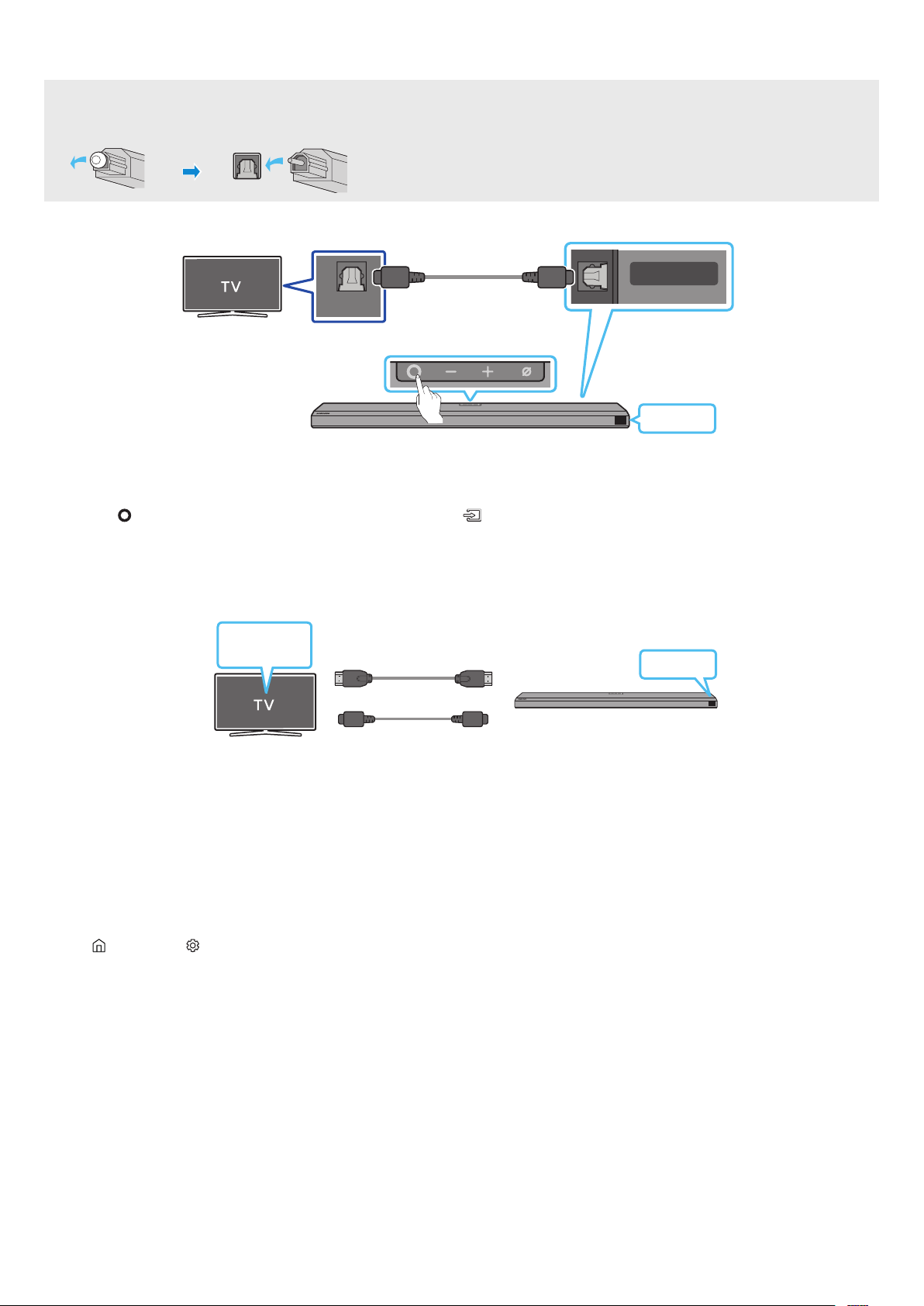
• When you use an optical cable and the terminals have covers, be sure to remove the covers.
OPTICAL OUT
DIGITAL AUDIO IN
(OPTICAL)
SERVICE
DC 19V
D.IN
Bottom of the Soundbar
Top of the Soundbar
Optical Cable (not supplied)
1. With the TV and Soundbar turned off, connect the DIGITAL AUDIO IN (OPTICAL) port on the Soundbar and the OPTICAL output port on the TV
with the optical cable (not supplied), as shown in the gure.
2. Turn on the Soundbar and TV.
3. Press the
(Multi Function) button at the top of the Soundbar or the (Source) button on the remote control to select the “D.IN” mode.
4. The TV sound is output from the Soundbar.
Using the Q-Symphony Function
For Q-Symphony, the Soundbar syncs with a Samsung TV to output sound through two devices for optimum surround effect. When the Soundbar
is connected, the menu, “TV+Soundbar” appears under the Sound Output menu of the TV. Select the corresponding menu.
Optical Cable (not supplied)
HDMI Cable
OR
D.IN
TV menu
• TV menu example: TV + [AV] Soundbar series name (HDMI)
NOTE
• It can operate according to the Codec supported by TV.
• This function is supported only when the HDMI Cable or Optical Cable (not supplied) is connected.
• This function is available in some Samsung TVs and some Soundbar models.
Using the Spacet sound
Provides optimized sound quality by analyzing the listening spaces.
To enable this function, turn on the Adaptive Sound+ mode on your Samsung TV menu.
(Home ( ) → Settings ( ) → General → Intelligent Mode Settings → Adaptive Sound+)
NOTE
• The sound mode on your Soundbar will automatically change to Adaptive Sound+ if you enable the Adaptive Sound+ mode on your TV.
• This function works when the Soundbar connects to some of the Samsung TVs.
ENG - 17
06 USING A WIRELESS CONNECTION TO THE TV
Method 1. Connecting via Bluetooth
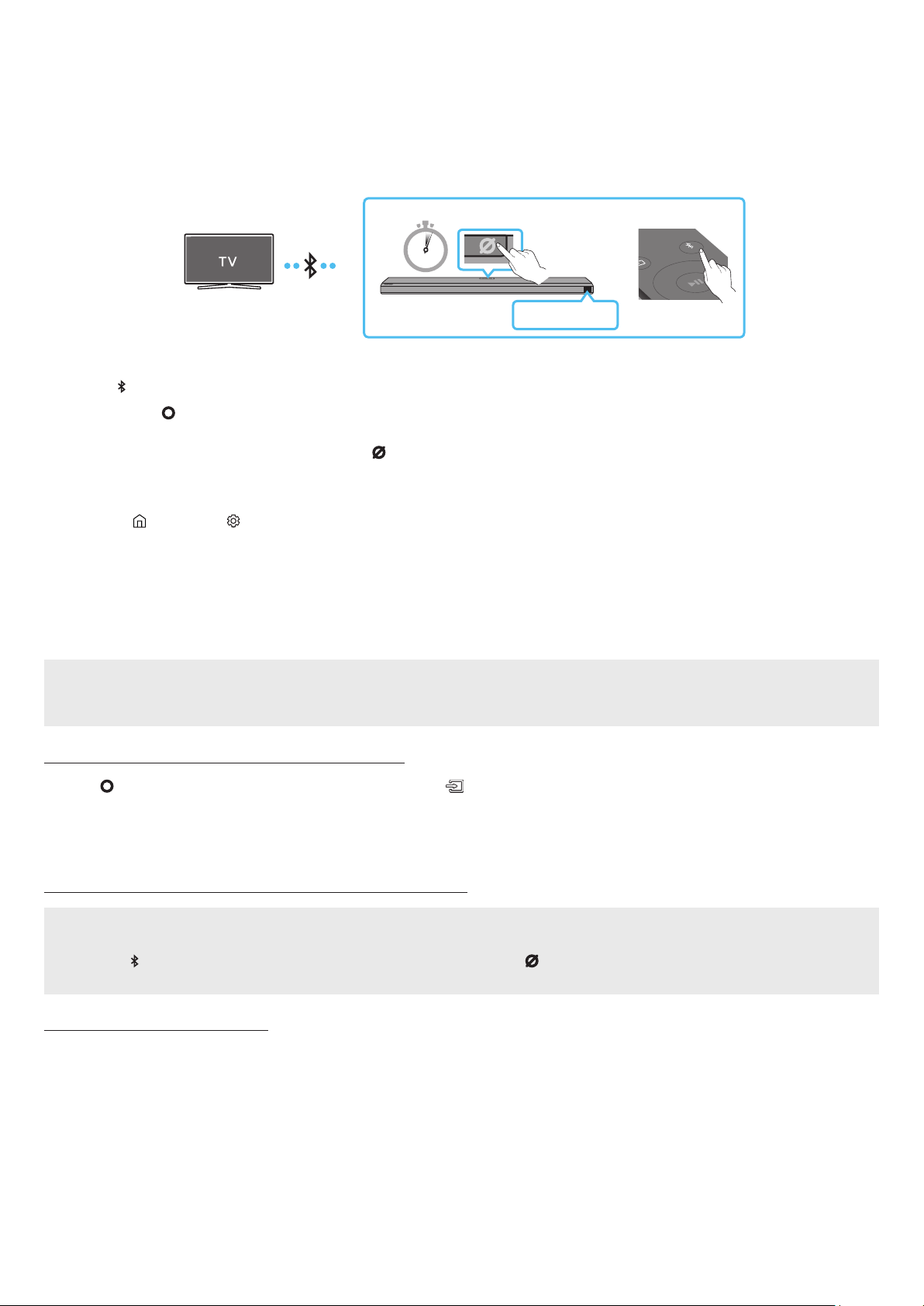
When a Samsung TV is connected using Bluetooth, you can hear stereo sound without the hassle of cabling.
• Only one Samsung TV can be connected at a time.
• Samsung TV that supports Bluetooth can be connected. Check the specications of your TV.
5 Sec
SOUND
MODE
PAIR
Top of the Soundbar
OR
BT PAIRING
The initial connection
1. Press the PAIR button on the Soundbar remote control to enter the “BT PAIRING” mode.
(OR)
a. Press the
(Multi Function) button on the top panel and then select “BT”.
“BT” changes to “BT PAIRING” in a few seconds automatically or changes to “BT READY” if there is a connect record.
b. When “BT READY” appears, press and hold the (Mic On/Off) button on the top panel of the Soundbar for more than 5 seconds to
display “BT PAIRING”.
2. Select Bluetooth mode on the Samsung TV.
(e.g. Home (
) → Settings ( ) → Sound → Sound Output → Bluetooth Speaker List → [AV] Samsung Soundbar Q800A (Bluetooth))
3. Select “[AV] Samsung Soundbar Q800A” from the list on TV’s screen.
An available Soundbar is indicated with “Need Pairing” or “Paired” on the TV’s Bluetooth device list. To connect the Samsung TV to the
Soundbar, select the message, and then establish a connection.
• When the Samsung TV is connected, [TV Name] → “BT” appears on the Soundbar’s front display.
4. You can now hear Samsung TV sound from the Soundbar.
• After you have connected the Soundbar to your Samsung TV the rst time, use the “BT READY” mode to reconnect.
If the device fails to connect
• If you have an existing Soundbar (e.g., [AV] Samsung Soundbar Q800A) on the list of speakers on the Samsung TV, delete it.
• Then repeat steps 1 through 3.
Disconnecting the Soundbar from the Samsung TV
Press the (Multi Function) button at the top of the Soundbar or the (Source) button on the remote control to select the mode other than
“BT”.
• Disconnecting takes time because the Samsung TV must receive a response from the Soundbar.
(The time required may differ, depending on the Samsung TV model.)
What is the difference between BT READY and BT PAIRING?
• BT READY : In this mode, you can reconnect any Samsung TV or mobile device that was connected before.
• BT PAIRING : In this mode, you can connect a new device to the Soundbar.
(Press the PAIR button on the Soundbar remote control or press and hold the (Mic On/Off) button on the top of the Soundbar for more
than 5 seconds while the Soundbar is in “BT” mode.)
Notes on Bluetooth connection
• Locate a new device within 1 m to connect via Bluetooth communication.
• If asked for a PIN code when connecting a Bluetooth device, enter <0000>.
• The Soundbar automatically turns off after 18 minutes in the Ready state.
• The Soundbar may not perform Bluetooth search or connection correctly under the following circumstances:
‒ If there is a strong electrical eld around the Soundbar.
‒ If several Bluetooth devices are simultaneously paired with the Soundbar.
‒ If the Bluetooth device is turned off, not in place, or malfunctions.
• Electronic devices may cause radio interference. Devices that generate electromagnetic waves must be kept away from the Soundbar main
unit - e.g., microwaves, wireless LAN devices, etc.

ENG - 18
Method 2. Connecting via Wi-Fi
Pre-connection Checklist
• Wi-Fi connection is available only on Samsung TV.
• Check whether the wireless router (Wi-Fi) is turned on and the TV is connected to the router.
• The TV and Soundbar must be connected to the same wireless network (Wi-Fi).
• If your wireless router (Wi-Fi) uses a DFS channel, you will not be able to establish a Wi-Fi connection between the TV and Soundbar.
Contact your Internet service provider for details.
• Because the menus may differ depending on the year of manufacture, refer to your TV manual.
• To connect the TV to the Soundbar via Wi-Fi, connect the Soundbar to the wireless router rst. See page 22, for details on how to
establish a Wi-Fi connection.
1. For more information about Wi-Fi connection to the Soundbar, see page 22, “Method 2. Connecting via Wi-Fi (Wireless Network)”.
2. Change the input source of the TV by using the Audio menu to Soundbar.
• Samsung TVs released in 2017 or later
Home (
) → Settings ( ) → Sound → Sound Output → [AV] Samsung Soundbar Q800A (Wi-Fi)
ENG - 19
07 CONNECTING AN EXTERNAL DEVICE
Method 1. Connecting using an HDMI Cable (Capable of Dolby Atmos decoding and
playback)
Pre-connection Checklist
• If the Audio Output options include Secondary Audio, make sure Secondary Audio is set to Off.
• Make sure that the content supports Dolby Atmos®.
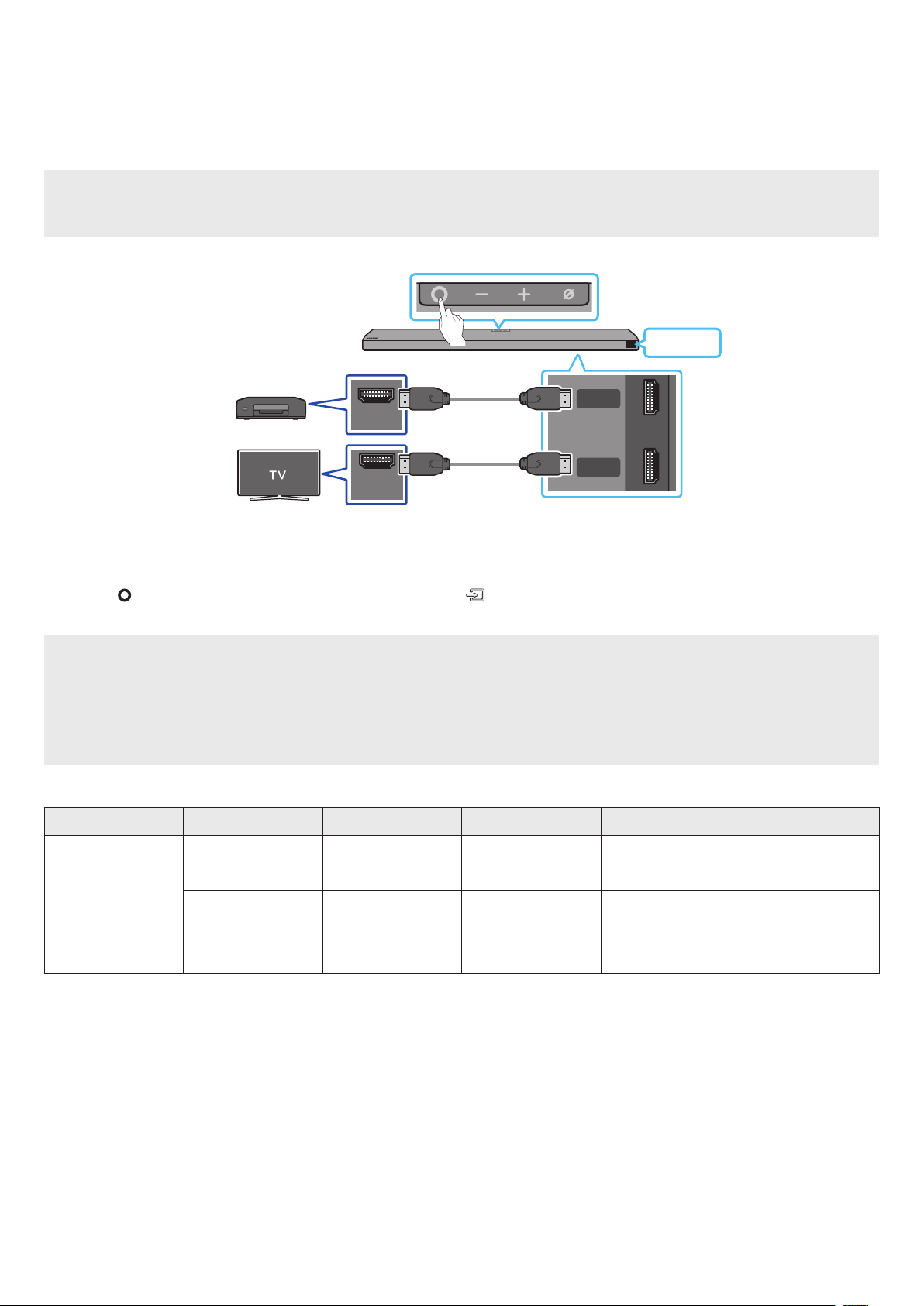
HDMI IN
(ARC)
HDMI
HDMI TO TV
(eARC/ARC)
DIGITAL AUDIO IN
(OPTICAL)
SERVICE
DC 19V
HDMI OUT
Top of the Soundbar
HDMI
HDMI Cable
External Device
HDMI Cable
1. Use an HDMI cable to connect the HDMI OUT port on the external device and the HDMI port on the bottom of the Soundbar.
2. Use an HDMI cable to connect the HDMI IN port of the TV and the HDMI TO TV (eARC/ARC) port on the bottom of the Soundbar.
3. Turn on the Soundbar, TV, and the external device.
4. Press the
(Multi Function) button on the top of the Soundbar or the (Source) button on the remote control to select “HDMI” mode.
5. The Soundbar display indicates that “HDMI” mode is currently selected and the Soundbar will start playing sounds.
NOTE
• When you use Dolby Atmos®: If the input source is Dolby Atmos®, 3.1.2 channels are outputted.
• When Dolby Atmos® is activated, “DOLBY ATMOS” appears in the front display.
• Conguring Dolby Atmos® on your BD player or other device
Open the audio output options on the settings menu of your BD player or other device and make sure that “No Encoding” is selected for
Bitstream. For example, on a Samsung BD Player, go to Home Menu → Sound → Digital Output and then select Bitstream (unprocessed).
Supported UHD Signals Specication (3840 x 2160p)
Frame rate (fps) Color depth RGB 4:4:4 YCbCr 4:4:4 YCbCr 4:2:2 YCbCr 4:2:0
< 60
8 bit O O O O
10 bit - - O O
12 bit - - O O
120
8 bit - - - -
10 bit - - - -
• Supported specication may vary depending on the connected external device or usage conditions.
ENG - 20
Method 2. Connecting using an Optical Cable
OPTICAL OUT
DIGITAL AUDIO IN
(OPTICAL)
SERVICE
Top of the Soundbar
BD / DVD player / Set-
top box / Game console
D.IN
Bottom of the Soundbar
Optical Cable (not
supplied)
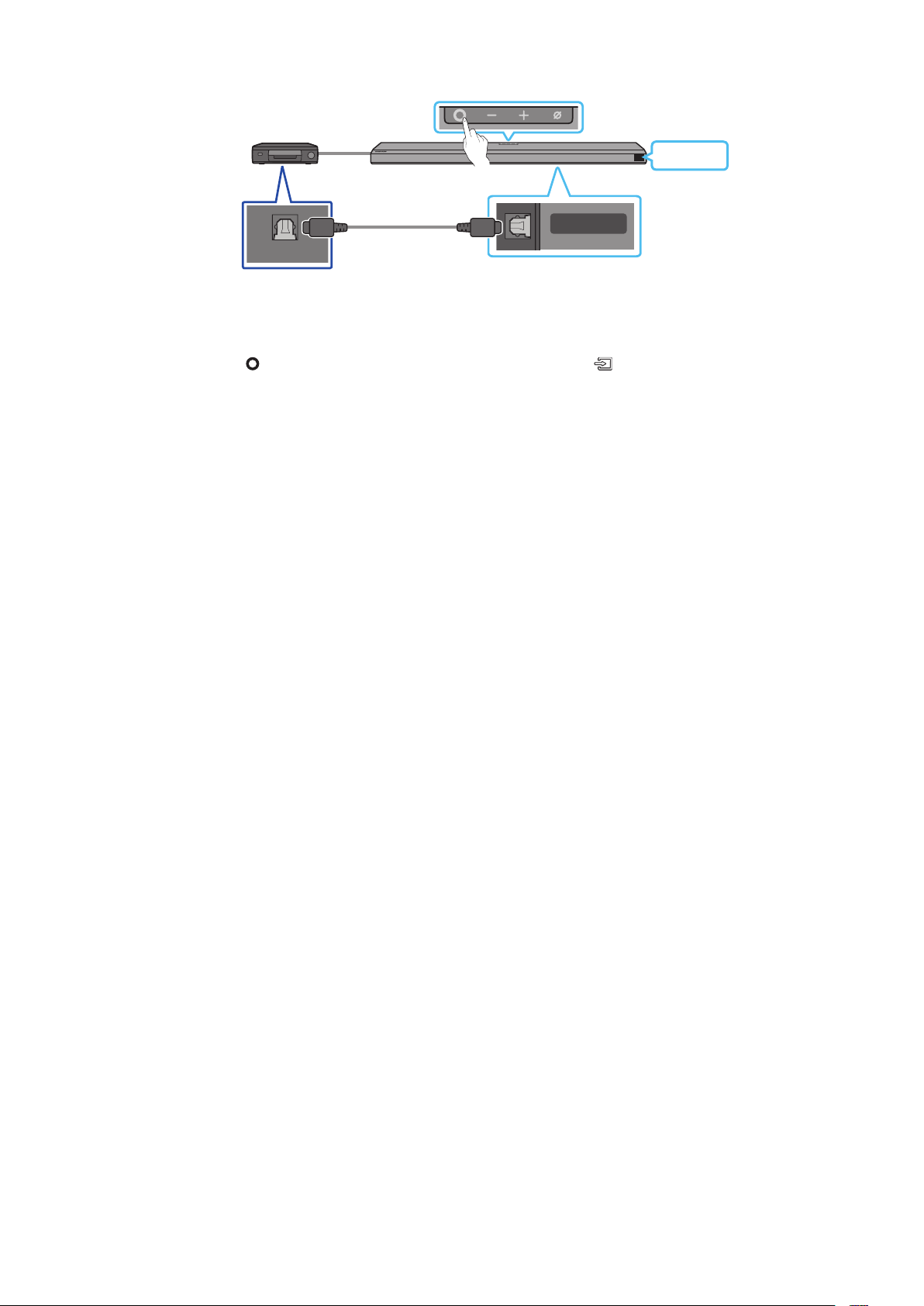
1. Use an optical cable (not supplied) to connect the DIGITAL AUDIO IN (OPTICAL) on the Soundbar main and the OPTICAL OUT port on the
external device.
2. Turn on the Soundbar and external device.
3. To select “D.IN” mode, press the
(Multi Function) button on the top of the Soundbar or the (Source) button on the remote control.
4. Your Soundbar will play sounds from the external device.

ENG - 21
08 CONNECTING A MOBILE DEVICE
Method 1. Connecting via Bluetooth
When a mobile device is connected using Bluetooth, you can hear stereo sound without the hassle of cabling.
• When you connect a paired Bluetooth device with the Soundbar off, the Soundbar automatically turns on.
5 Sec
SOUND
MODE
PAIR
Mobile device
Top of the Soundbar
OR
BT PAIRING
The initial connection
• When connecting to a new Bluetooth device, make sure the device is within 1 m distance.
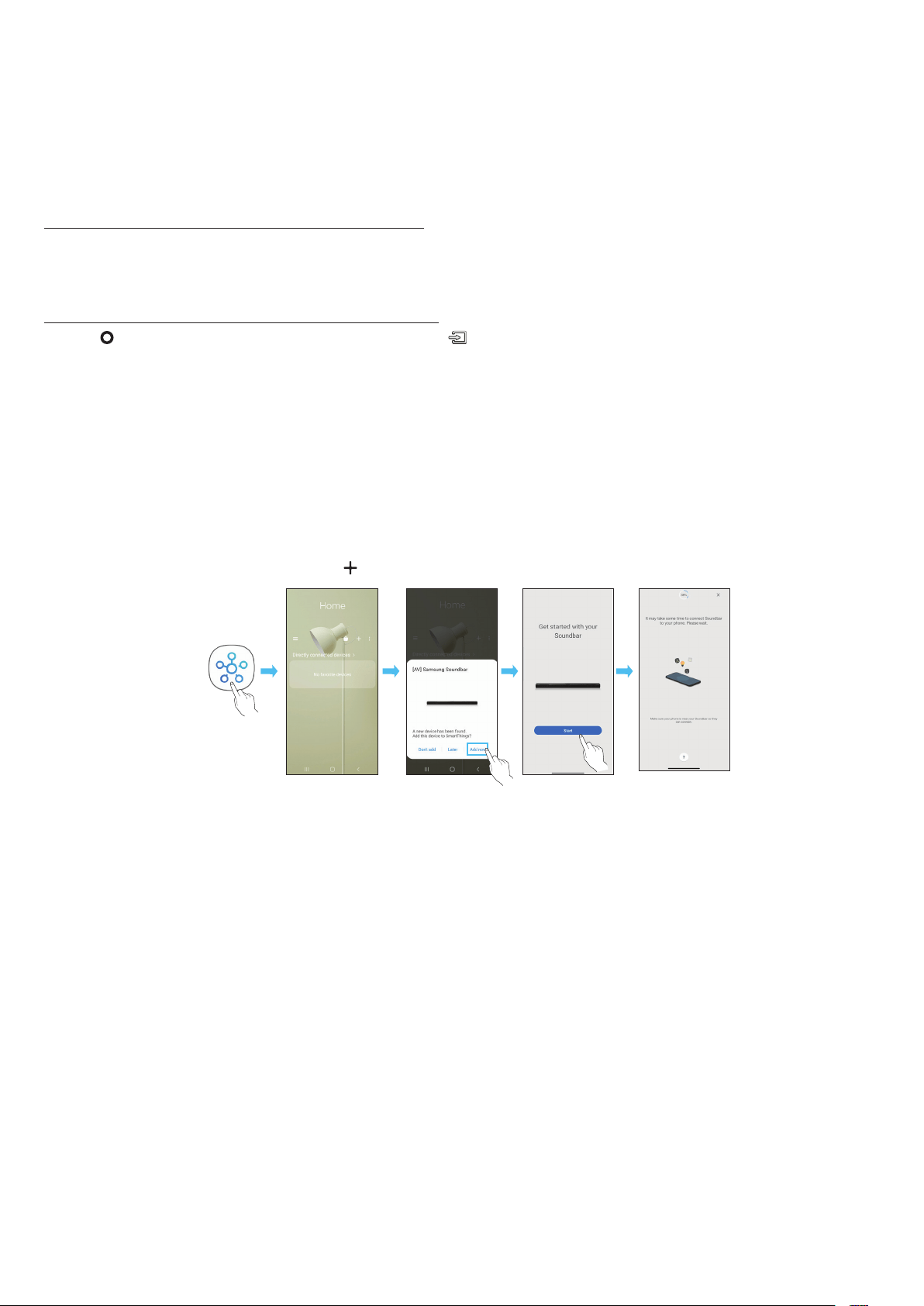
1. Press the PAIR button on the Soundbar remote control to enter the “BT PAIRING” mode.
(OR)
a. Press the
(Multi Function) button on the top panel and then select “BT”.
“BT” changes to “BT PAIRING” in a few seconds automatically or changes to “BT READY” if there is a connect record.
b. When “BT READY” appears, press and hold the (Mic On/Off) button on the top panel of the Soundbar for more than 5 seconds to
display “BT PAIRING”.
2. On your device, select “[AV] Samsung Soundbar Q800A” from the list that appears.
• When the Soundbar is connected to the Mobile device, [Mobile Device Name] → “BT” appears in the front display.
3. Play music les from the device connected via Bluetooth through the Soundbar.
• After you have connected the Soundbar to your mobile device the rst time, use the “BT READY” mode to reconnect.
If the device fails to connect
• If you have an existing Soundbar (e.g., “[AV] Samsung Soundbar Q800A”) in the list of speakers on the Mobile device, delete it.
• Repeat steps 1 and 2.
What is the difference between BT READY and BT PAIRING?
• BT READY : In this mode, you can reconnect any Samsung TV or mobile device that was connected before.
• BT PAIRING : In this mode, you can connect a new device to the Soundbar.
(Press the PAIR button on the Soundbar remote control or press and hold the (Mic On/Off) button on the top of the Soundbar for more
than 5 seconds while the Soundbar is in “BT” mode.)
Notes on Bluetooth connection
• Locate a new device within 1 m to connect via Bluetooth communication.
• If asked for a PIN code when connecting a Bluetooth device, enter <0000>.
• The Soundbar automatically turns off after 18 minutes in the Ready state.
• The Soundbar may not perform Bluetooth search or connection correctly under the following circumstances:
‒ If there is a strong electrical eld around the Soundbar.
‒ If several Bluetooth devices are simultaneously paired with the Soundbar.
‒ If the Bluetooth device is turned off, not in place, or malfunctions.
• Electronic devices may cause radio interference. Devices that generate electromagnetic waves must be kept away from the Soundbar main
unit - e.g., microwaves, wireless LAN devices, etc.
• The Soundbar supports SBC data (44.1kHz, 48kHz).
• Connect only to a Bluetooth device that supports the A2DP (AV) function.
• You cannot connect the Soundbar to a Bluetooth device that supports only the HF (Hands Free) function.
• When connecting the Soundbar to a Bluetooth device, place them as close to each other as possible.
• The farther the Soundbar and Bluetooth device are from each other, the lower the sound quality will become.
The Bluetooth connection may break when the devices are out of the effective range.
• The Bluetooth connection may not function as intended in areas with poor reception.
ENG - 22
• A Bluetooth device may experience noise or malfunction under in the following conditions:
‒ When the body is in contact with the signal transceiver on the Bluetooth device or Soundbar
‒ In corners or when there is an obstacle in proximity, such as a wall or partition, where electrical changes may occur.
‒ When exposed to radio interferences by other products operating on the same frequency ranges, such as medical equipment, microwave
ovens, and wireless LAN devices.
‒ Obstacles such as doors and walls may still impact the sound quality even when the devices are within the effective range.
• Note that your Soundbar cannot be paired with other Bluetooth devices while using the Bluetooth option.
• This wireless device may cause electrical interference during operation.
Disconnecting the Bluetooth device from a Soundbar
You can disconnect a Bluetooth device from the Soundbar. For instructions, see the Bluetooth device’s user manual.
• The Soundbar will be disconnected.
• When the Soundbar is disconnected from the Bluetooth device, the Soundbar will display “BT DISCONNECTED” on the front display.
Disconnecting the Soundbar from the Bluetooth device
Press the (Multi Function) button on the top of the Soundbar or the (Source) button on the remote control to switch the mode from “BT”.
• Disconnecting takes time because the Bluetooth device must receive a response from the Soundbar. (Disconnection time may differ,
depending on the Bluetooth device)
• When the Soundbar is disconnected from the Bluetooth device, the Soundbar will display “BT DISCONNECTED” on the front display
Method 2. Connecting via Wi-Fi (Wireless Network)
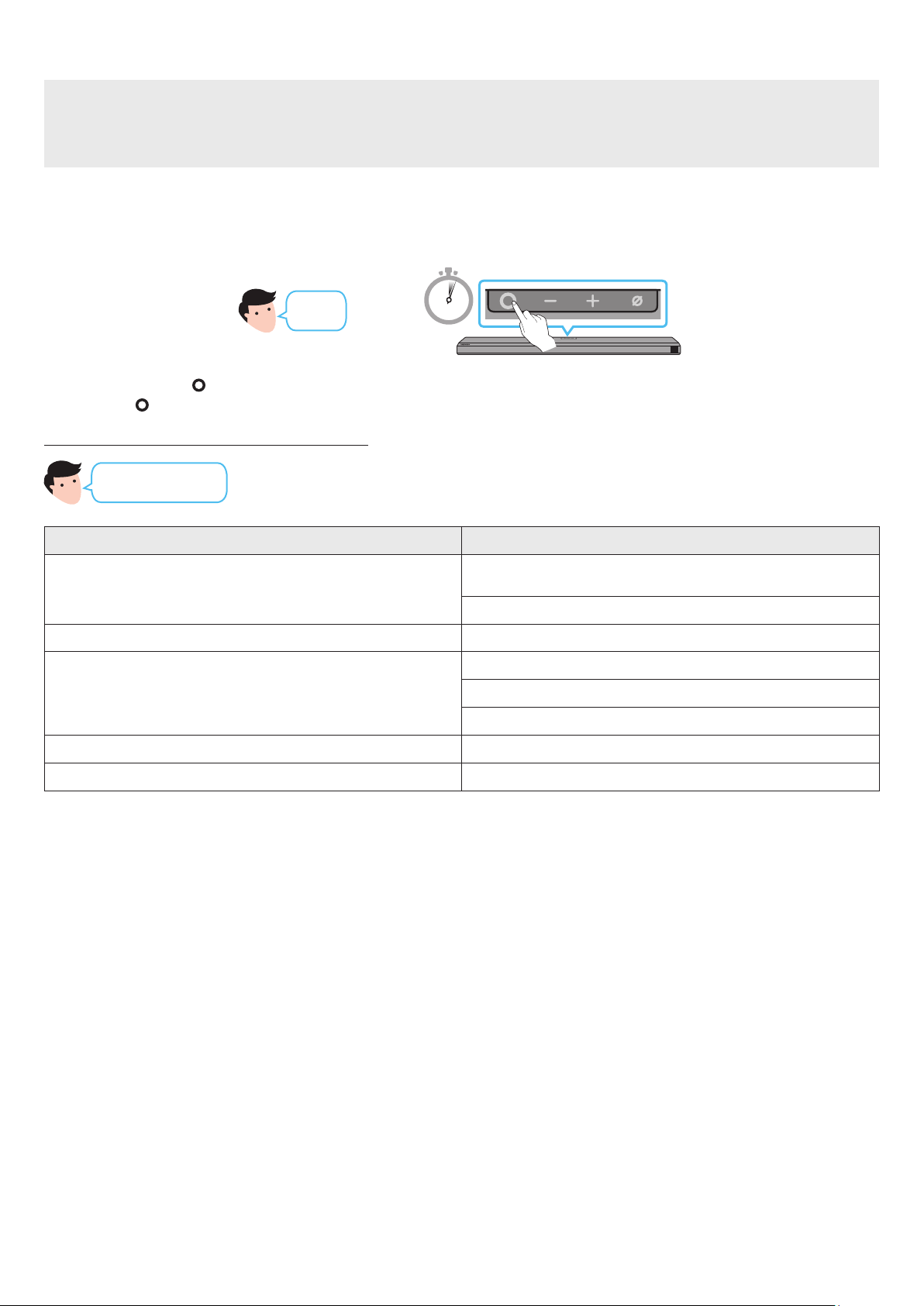
To connect a Soundbar to a mobile device via a wireless network (Wi-Fi), the SmartThings app is required.
The initial connection
1. Install and launch the SmartThings app from your mobile device (smartphone or tablet).
2. On the app, follow the screen instructions to add the Soundbar.
• The automatic pop-up (the second screenshot below) may not show on some devices.
If the pop-up window does not appear, press “ ” on the Home screen. The Soundbar is added to the app.
Launch App Auto pop-up Add device
SmartThings
App
ENG - 23
Getting Started with Amazon Alexa (Built-in Alexa)
• Amazon Alexa is a service provided by Amazon.
• This function may not be supported depending on the model or geographical area.
• This function only supports some languages, and the supported functions may differ depending on the geographical area.
• For product specication or compatibility, refer to the Samsung website (www.samsung.com).
Using Alexa, you can play music, listen to news, see weather forecasts, and control home appliances.
To use Amazon Alexa, an Amazon account is required to connect the Soundbar over the network.
1. Install the SmartThings app on your mobile device and then launch it.
2. Enter the Alexa account by following the instructions on the app and then log in the service.
3 Sec
“Alexa” OR
Top of the Soundbar
3. Call Alexa or press the
(Multi Function) button on the Soundbar for 3 seconds to use the Alexa service.
• Press the (Multi Function) button for 3 seconds to call Alexa. Say with the button pressed to enable voice recognition.
Use voice commands to control the Soundbar
Trigger + Command
Things to try Example of what to say
Volume control
“Alexa, turn up the volume.”
“Alexa, turn down the volume”
Listening to streaming content from Amazon Music “Alexa, play some jazz music”
Playback control
“Alexa, play next song.”
“Alexa, stop the music.”
“Alexa, what is this song?”
Weather information “Alexa, what’s the weather?”
Timer scheduling “Alexa, set a timer for 10 minutes.”

ENG - 24
Getting Started with Alexa on Amazon Product (Works with Alexa)
• This function may not be supported depending on the model or geographical area.
• This function only supports some languages, and the supported functions may differ depending on the geographical area.
• For product specication or compatibility, refer to the Samsung website (www.samsung.com).
• This service is provided by Amazon and can be terminated at any time. Samsung does not assume responsibility for service availability.
• Amazon Alexa app screen is subject to change without prior notice.
Connect and use with an Amazon product (Amazon Echo)
Use an Amazon Echo product to control your Soundbar and enjoy music services provided by Amazon Echo.
To use Amazon Alexa, an Amazon account is required to connect the Soundbar over the network.
1. Install the SmartThings app on your mobile device and then launch it.
2. Enter the Alexa account by following the instructions on the app and then log in the service.
Use voice commands to control the Soundbar
• The Amazon Echo service you can use with your Soundbar is limited to music. Other services provided by Amazon Echo, such as news and
weather, can only be accessed through your Amazon Echo product.
Trigger + Command + Speaker name
* To use voice commands for the Soundbar named “Living room”
Action Voice Command
To set the volume level to 5 “Alexa Set the volume to 5 on Living room”
To increase the volume level “Alexa Volume up on Living room”
To mute the sound “Alexa Mute on Living room”
To listen to a radio station named KISS FM “Alexa Play Kiss FM on Living room”
To play the next song “Alexa Next song on Living room”
To stop the audio “Alexa Stop on Living room”
To turn the audio off “Alexa Turn off on Living room”
ENG - 25
Using the Tap Sound
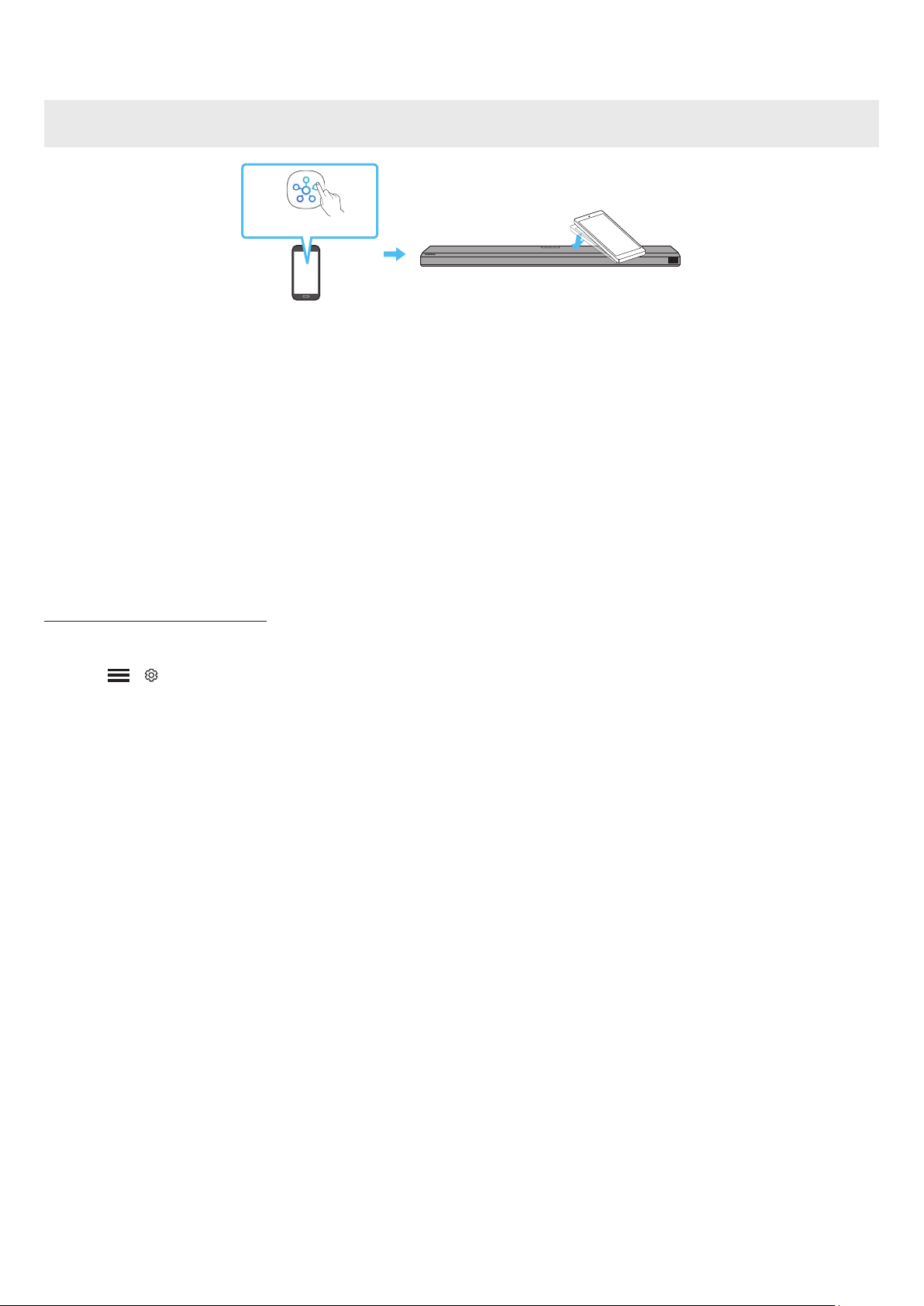
Tap the Soundbar with your mobile device to play the sound of content on the mobile device through the Soundbar.
• This function may not be supported, depending on the mobile device.
• This function is only compatible with Samsung mobile devices with Android 8.1 or later.
Top of the Soundbar
Mobile device
SmartThings App
1. Turn on the Tap Sound function on your mobile device.
• For details on how to turn on the function, refer to “Setting the Tap Sound function” below.
2. Tap the Soundbar with the mobile device. Select “Start now” in the displayed message window.
A connection is established between the mobile device and Soundbar via Bluetooth.
3. Play the sound of content on the mobile device through the Soundbar.
• This function connects a mobile device to the Soundbar via Bluetooth by detecting vibration that occurs when the device touches the
Soundbar.
• Make sure the mobile device does not tap a sharp corner of the Soundbar. The Soundbar or mobile device may become scratched or
damaged.
• It is recommended that the mobile device be covered with a case. Lightly tap the wide area in the upper portion of the Soundbar, without
using excessive force.
• To use this function, update the SmartThings app to the latest version.
The function may not be supported, depending on the app version.
Setting the Tap Sound function
Use the SmartThings app to turn on the Tap View, Tap Sound function.
1. On the mobile device, run the SmartThings app.
2. Select ( → ) in the SmartThings app screen displayed on the mobile device.
3. Set “Tap View, Tap Sound” to On to allow the function to work when a mobile device moves close to the Soundbar. The function is turned on.
NOTE
• When the mobile device is in power-saving mode, the Tap Sound function does not work.
• The Tap Sound function may not work if there are devices near the Soundbar that cause radio interference such as electric devices. Make sure
devices that may cause radio interference are placed at a sufcient distance away from the Soundbar.

ENG - 26
09 CONNECTING TO APPLE AIRPLAY 2
This feature may not be available in some countries.
Connect and use with an Apple product
• With AirPlay 2, you can control your home’s audio system from your iPhone, iPad, HomePod, or Apple TV.
• This Samsung Soundbar supports AirPlay 2 and requires iOS 11.4 or later.
NOTE
• Conrm that the Soundbar is connected to Wi-Fi. (Refer to Method 2. Connecting via Wi-Fi (Wireless Network))
ENG - 27
10 INSTALLING THE WALL
MOUNT
Installation Precautions
• Install on a vertical wall only.
• Do not install in a place with high temperature or humidity.
• Verify whether the wall is strong enough to support the product’s
weight. If not, reinforce the wall or choose another installation
point.
• Purchase and use the xing screws or anchors appropriate for
the kind of wall you have (plaster board, iron board, wood, etc.). If
possible, x the support screws into wall studs.
• Purchase wall mounting screws according to the type and
thickness of the wall you want to mount the Soundbar on.
‒ Diameter: M5
‒ Length: 35 mm or longer recommended.
• Connect cables from the unit to external devices before you install
the Soundbar on the wall.
• Make sure the unit is turned off and unplugged before you install
it. Otherwise, it may cause an electric shock.
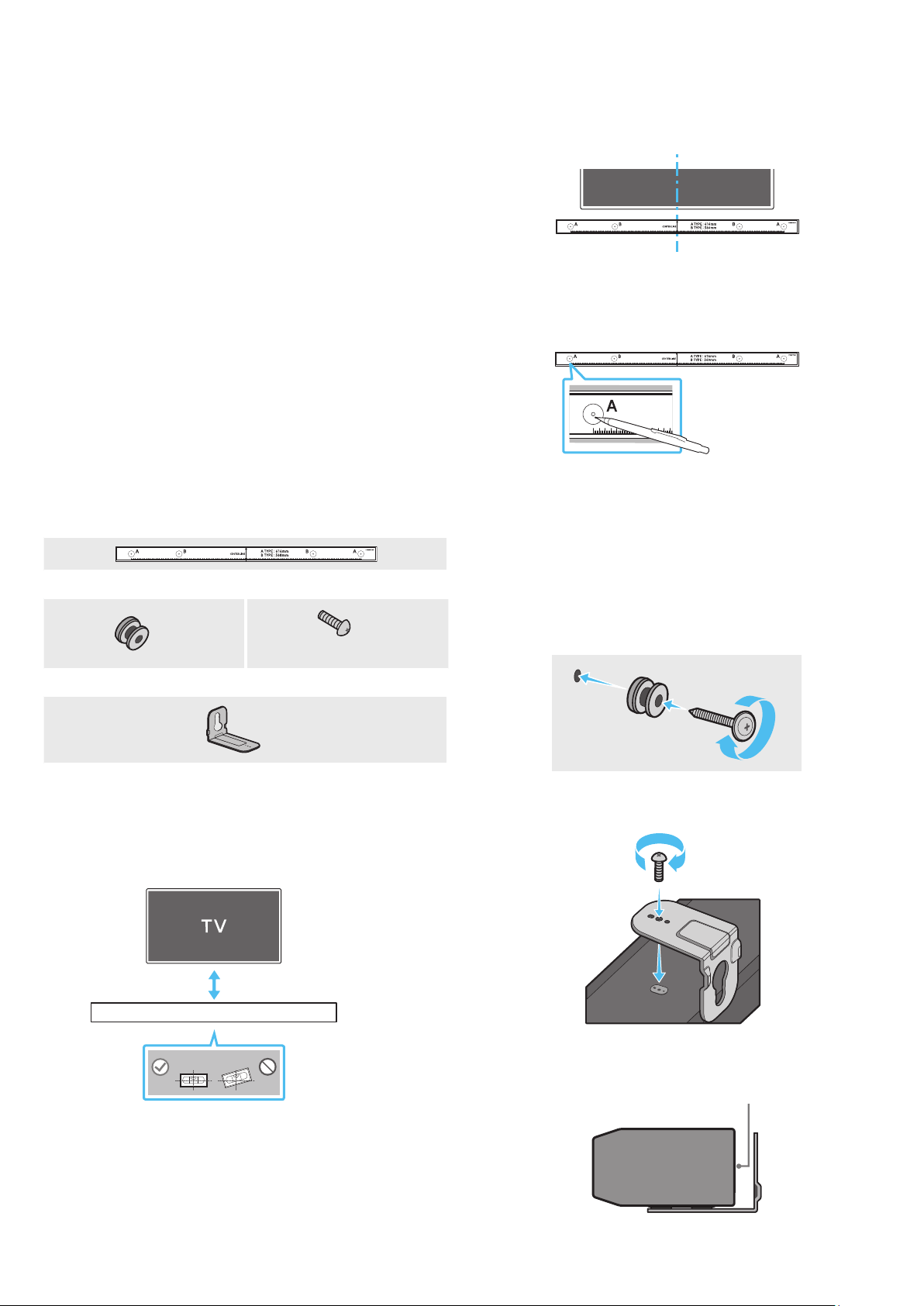
Wallmount Components
Wall Mount Guide
x 2
x 2
(M4 x L10)
Holder-Screw Screw
x 2
Bracket-Wall Mount
1. Place the Wall Mount Guide against the wall surface.
• The Wall Mount Guide must be level.
• If your TV is mounted on the wall, install the Soundbar at least
5 cm below the TV.
5 cm or more
2. Align the Wall Mount Guide’s Center Line with the center of your
TV (if you are mounting the Soundbar below your TV), and then x
the Wall Mount Guide to the wall using tape.
• If you are not mounting below a TV, place the Center Line in the
center of the installation area.
Center Line
3. Push a pen tip or sharpened pencil tip through the center of the
A-TYPE images on each end of the Guide to mark the holes for the
supporting screws, and then remove the Wall Mount Guide.
4. Using an appropriately sized drill bit, drill a hole in the wall at each
marking.
• If the markings do not correspond to the positions of studs,
make sure you insert appropriate anchors or mollies into the
holes before you insert the support screws. If you use anchors
or mollies, make sure the holes you drill are large enough for
the anchors or mollies you use.
5. Push a screw (not supplied) through each Holder-Screw, and then
screw each screw rmly into a support screw hole.
6. Install the 2 Bracket-Wall Mounts in the correct orientation on the
bottom of the Soundbar using 2 Screws.
• When assembling, make sure the hanger part of the Bracket-
Wall Mounts are located behind the rear of the Soundbar.
Rear of Soundbar
Right end of Soundbar
ENG - 28
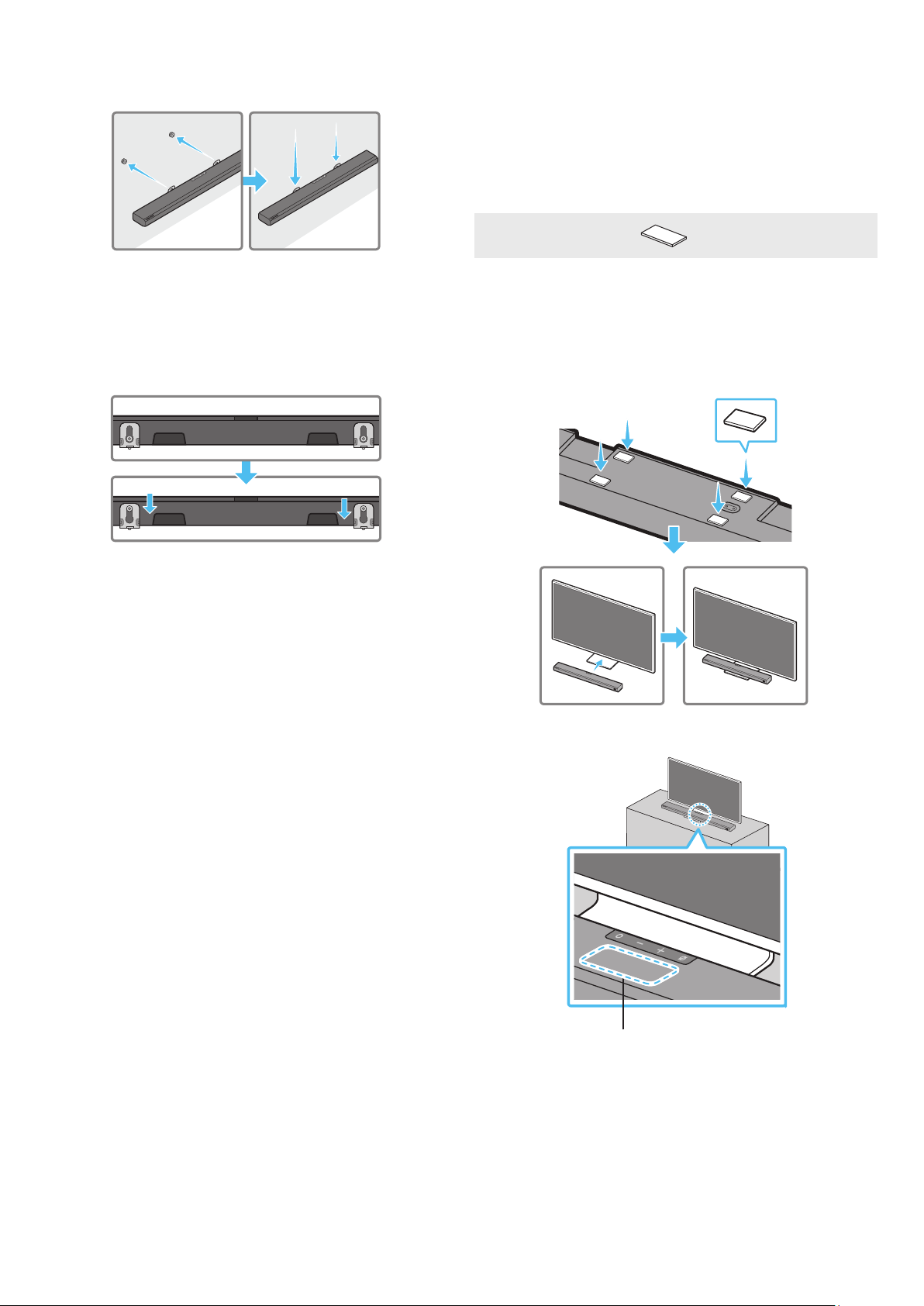
7. Install the Soundbar with the attached Bracket-Wall Mounts by
hanging the Bracket-Wall Mounts on the Holder-Screws on the
wall.
8. Slide the Soundbar down as shown below so that the Bracket-Wall
Mounts rest securely on the Holder-Screws.
• Insert the Holder-Screws into the wide (bottom) part of the
Bracket-Wall Mounts, and then slide the Bracket-Wall Mounts
down so that the Bracket-Wall Mounts rest securely on the
Holder-Screws.
11 INSTALLING THE
SOUNDBAR ABOVE A TV
STAND
Component
x 4
Rubber-Foot
To install, attach the Rubber-Feet to the bottom of the Soundbar
before placing it in position above the TV stand. Make sure you attach
the Rubber-Feet so they do not lie outside the edges of the TV stand.
Refer to the gure below.
Rubber-Foot
Place the Soundbar on a TV stand.
Microphone
ENG - 29
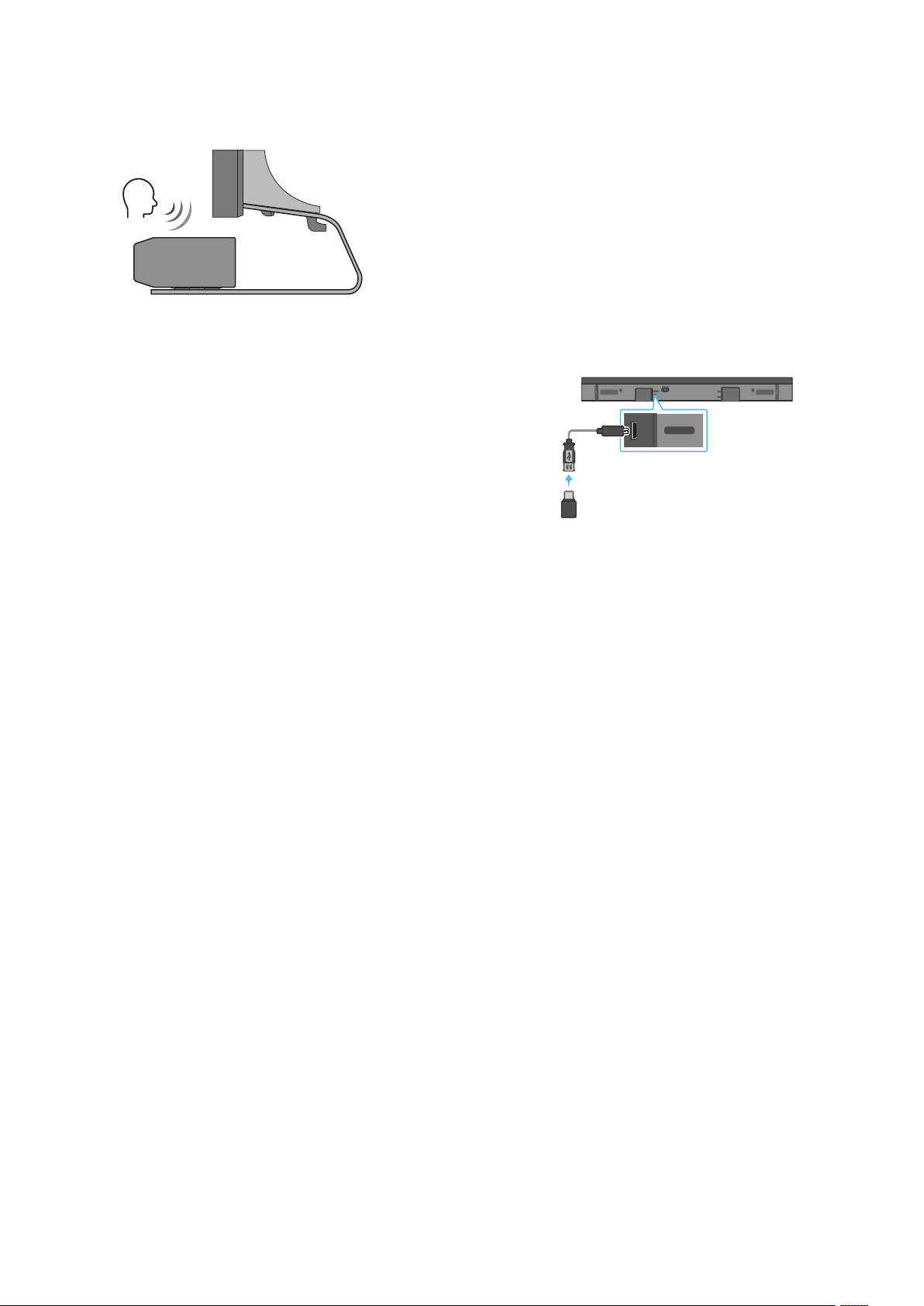
As illustrated in the image, align the center of the Soundbar with the
center of the TV, carefully place the Soundbar onto the TV stand.
At this time, place the microphone at the front of the stand not to
interfere with voice recognition.
Right end of Soundbar
TV
NOTE
• Make sure the Soundbar is placed on a at and solid surface.
• Insufcient gap from the TV may cause voice recognition and
acoustic problems.
12 SOFTWARE UPDATE
Auto Update
When the Soundbar is connected to the Internet, software updates
automatically occur even when the Soundbar is turned off.
• To use the Auto Update function, the Soundbar must be connected
to the Internet.
The Wi-Fi connection to the Soundbar will be terminated if
the Soundbar’s power cord is disconnected or the power is cut
off. If the power is cut off, when the power comes back on or
you reconnect the power cord, turn on the Soundbar, and then
reconnect it to the Internet.
USB Update
DIGITAL AUDIO IN
(OPTICAL)
SERVICE
DC 19V
HDMI
NETWORK ID SET
HDMI TO TV
(eARC/ARC)
HDMI IN
HDMI OUT
(TV-ARC)
DIGITAL AUDIO IN
(OPTICAL)
SERVICE
DC 19V
Bottom of the Soundbar
Micro USB to USB adapter Cable
(not supplied)
Samsung may offer updates for the Soundbar’s system rmware in
the future.
When an update is available, you can update the Soundbar by
connecting the USB drive that contains the update rmware to the
SERVICE port of the Soundbar.
1. Go to the Samsung Electronics website (www.samsung.com) →
search for the model name from the customer support menu
option.
• For more information about update, refer to Upgrade Guide.
2. Download the upgrade le (USB type).
3. Unzip the le to create a folder with the le name.
4. Store the created folder in a USB and then connect it to the
Soundbar.
5. Turn on the Soundbar. Then the product is updated within 3
minutes with displaying the message, “UPDATE”.
• During update, do not turn it off or remove the USB.
• If “UPDATE” does not appear on the display window, remove the
power cord from the Soundbar and then reconnect it.
• When the latest version is installed, no update is performed.
• Depending on the USB type, update may not be supported.
ENG - 30
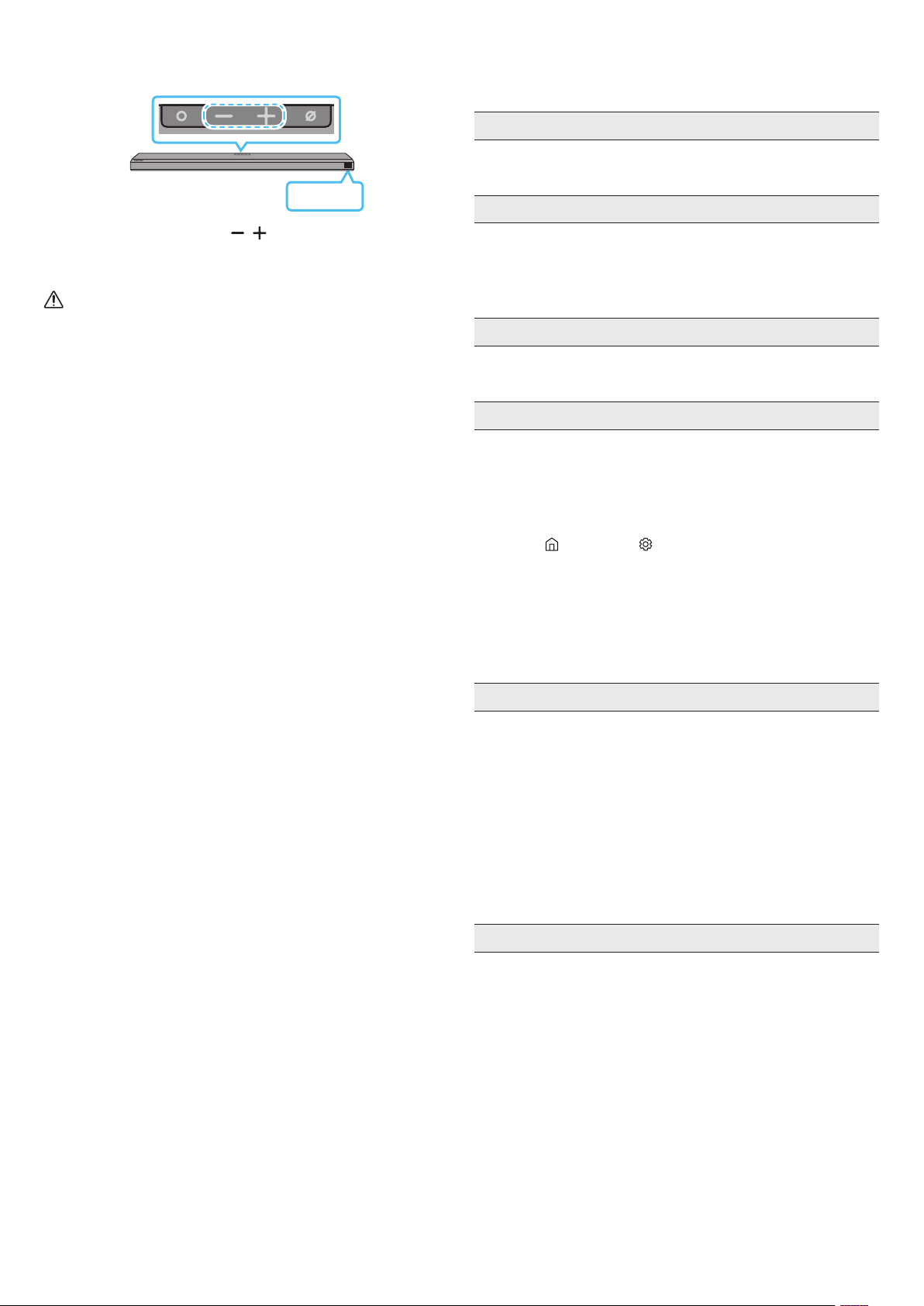
Initialization
Top of the Soundbar
INIT
With the Soundbar on, press the (Volume) buttons on the body
at the same time for at least 5 seconds. “INIT” appears on the display
and then the Soundbar is initialized.
CAUTION
• All the settings of the Soundbar are initialized. Be sure to
perform this only when initialization is required.
13 TROUBLESHOOTING
Before seeking assistance, check the following.
Soundbar does not turn on
• Check whether the power cord of the Soundbar is correctly
inserted into the outlet.
Soundbar works erratically
• After removing the power cord, insert it again.
• Remote the power cord from the external device and try again.
• If there is no signal, the Soundbar automatically turns off after a
certain period of time. Turn on the power. (See page 9.)
In case the remote control does not work
• Point the remote directly at the Soundbar.
• Replace the batteries with new ones.
The Soundbar does not output any sound
• The volume of the Soundbar is too low or muted. Adjust the
volume.
• When any external device (STB, Bluetooth device, mobile device,
etc.) is connected, adjust the volume of the external device.
• For sound output of the TV, select Soundbar. (Samsung TV:
Home (
) → Settings ( ) → Sound → Sound Output → Select
Soundbar)
• The cable connection to the Soundbar may not be loose. Remove
the cable and connect again.
• Remove the power cord completely, reconnect, and turn the
power on.
• Initialize the product and try again. (See page 30.)
The Subwoofer does not output any sound
• Check whether the LED indicator on the rear of the Subwoofer
is on in blue. Reconnect the Soundbar and Subwoofer if the
indicator is blinking in blue or turned red. (See page 12.)
• You may experience an issue if there is an obstacle between the
Soundbar and Subwoofer. Move devices to an area away from
obstacles.
• Other devices sending radio frequency signals in proximity may
interrupt the connection.
Keep your speaker away from such devices.
• Remove and reconnect the power plug.
The Subwoofer volume is too low
• The original volume of the content you are playing may be low.
Try adjusting the Subwoofer level. (See page 10.)
• Bring the Subwoofer speaker closer to you.

ENG - 31
In case the TV is not connected via HDMI TO TV (eARC/ARC)
• Check whether the HDMI cable is correctly connected to the ARC
terminal. (See page 15.)
• Connection may not be possible due to the connected external
device (set-top box, game machine, etc.). Directly connect the
Soundbar.
• HDMI-CEC may not be activated on the TV. Turn on the CEC on the
TV menu. (Samsung TV: Home (
) → Settings ( ) → General →
External Device Manager → Anynet+ (HDMI-CEC) ON)
• To connect with eARC, the eARC function in the TV menu should
be set to On. (Samsung TV: Home ( ) → Settings ( ) → Sound
→ Expert Settings → HDMI-eARC Mode (Auto))
There is no sound in when connecting to the TV in HDMI TO TV
(eARC/ARC) mode
• Your device is unable to play the input signal. Change the
TV’s audio output to PCM or Dolby Digital. (For a Samsung TV:
Home (
) → Settings ( ) → Sound → Expert Settings → Digital
Output Audio Format)
The Soundbar will not connect via Bluetooth
• When connecting a new device, switch to “BT PAIRING” for
connection. (Press the
PAIR button on the remote control
or press the (Mic On/Off) button on the body for at least 5
seconds.)
• If the Soundbar is connected to another device, disconnect that
device rst to switch the device.
• Reconnect it after removing the Bluetooth speaker list on the
device to connect. (Samsung TV: Home ( ) → Settings ( ) →
Sound → Sound Output → Bluetooth Speaker List)
• The automatic TV connection may be disabled. While the
Soundbar is in “BT READY”, press and hold the Left button on
the Soundbar remote control for 5 seconds to select ON-TV
CONNECT. If you see OFF-TV CONNECT, press and hold Left
button again for 5 seconds to switch the selection.
• Remove and reconnect the power plug, then try again.
• Initialize the product and try again. (See page 30.)
The sound drops out when connected via Bluetooth
• Some devices can cause radio interference if they are located too
close to the Soundbar. e. g. microwaves, wireless routers, etc.
• If your device that is connected via Bluetooth moves too far away
from the soundbar, it may cause the sound to drop out. Move the
device closer to the soundbar.
• If a part of your body is in contact with the Bluetooth transceiver
or the product is installed on metal furniture, the sound may drop
out. Check the installation environment and conditions for use.
Unable to connect to Wi-Fi
• Check whether your wireless router is on.
• Turn off the router, turn it back on, and then try again.
• The soundbar will not connect if the wireless signal is too weak.
Try moving the router closer to the soundbar, or eliminating
any obstacles that are between the soundbar and the router, if
possible.
• If your wireless router is new, you will need to recongure the
speaker’s network settings.
The Soundbar does not turn on automatically with the TV
• When you turn off the Soundbar while watching TV, power
synchronization with the TV is disabled. First turn off the TV.
The AVA function is not available in the following cases.
• The AVA function will not be available using Q-symphony
function.
• The AVA function will not be available when the microphone is
turned off.
ENG - 32
14 LICENSE
Dolby, Dolby Atmos, and the double-D symbol are registered
trademarks of Dolby Laboratories Licensing Corporation.
Manufactured under license from Dolby Laboratories. Condential
unpublished works. Copyright © 2012-2020 Dolby Laboratories. All
rights reserved.
For DTS patents, see http://patents.dts.com. Manufactured under
license from DTS, Inc. (for companies headquartered in the U.S./
Japan/Taiwan) or under license from DTS Licensing Limited
(for all other companies). DTS, DTS:X Pro, DTS:X, and the DTS:X
logo are registered trademarks or trademarks of DTS, Inc. in the
United States and other countries. © 2020 DTS, Inc. ALL RIGHTS
RESERVED.
The terms HDMI and HDMI High-Denition Multimedia Interface,
and the HDMI Logo are trademarks or registered trademarks of
HDMI Licensing Administrator, Inc. in the United States and other
countries.
• Use your phone, tablet or computer as a remote control for
Spotify. Go to spotify.com/connect to learn how
• The Spotify Software is subject to third party licenses found
here: https://www.spotify.com/connect/third-party-licenses.
• Apple, AirPlay, iPhone, iPad, HomePod, and Apple TV are
trademarks of Apple Inc., registered in the U.S. and other
countries.
• Use of the Works with Apple badge means that an accessory
has been designed to work specically with the technology
identied in the badge and has been certied by the developer
to meet Apple performance standards.
15 OPEN SOURCE LICENSE
NOTICE
To send inquiries and requests for questions regarding open sources,
contact Samsung Open Source (http://opensource.samsung.com)
16 IMPORTANT NOTES
ABOUT SERVICE
Figures and illustrations in this User Manual are provided for
reference only and may differ from actual product appearance.

ENG - 33
17 SPECIFICATIONS AND GUIDE
Specications
Model Name HW-Q800A
Weight 3.6 kg
Dimensions (W x H x D) 980.0 x 60.0 x 115.0 mm
Operating Temperature Range +5°C to +35°C
Operating Humidity Range 10 % ~ 75 %
AMPLIFIER
Rated Output power ((30 W x 4) + (20 W x 2) + 10 W) + 160 W
Supported play formats
Dolby 5.1ch / Dolby Digital Plus / Dolby TRUE HD / Dolby ATMOS
DTS 5.1ch / DTS HD / DTS-HD Master Audio / DTS:X / LPCM 8Ch
Subwoofer Name PS-WA85B
Weight 9.8 kg
Dimensions (W x H x D) 210.0 x 403.0 x 403.0 mm
AMPLIFIER
Rated Output power 160 W
NOTE
• Samsung Electronics Co., Ltd reserves the right to change the specications without notice.
• Weight and dimensions are approximate.
Precaution : The Soundbar will restart automatically if you turn on/turn off Wi-Fi.
Wi-Fi
Port deactivation method
Press the ID SET button on the bottom panel of the Soundbar for 30 seconds to turn Wi-
Fi On / Off.
Bluetooth
Port deactivation method
Press the NETWORK button on the bottom panel of the Soundbar for 30 seconds to turn
Bluetooth On / Off.
SPA - 2
INFORMACIÓN DE SEGURIDAD
ADVERTENCIAS DE SEGURIDAD
PARA REDUCIR EL RIESGO DE DESCARGA ELÉCTRICA, NO QUITE LA TAPA
(O LA PARTE TRASERA).
NO CONTIENE PIEZAS QUE PUEDAN SER REPARADAS O REEMPLAZADAS
POR EL USUARIO. TODAS LAS REPARACIONES DEBEN SER REALIZADAS
POR PERSONAL CAPACITADO.
Consulte la tabla a continuación para obtener una explicación de los
símbolos que podrían aparecer en su producto Samsung.
PRECAUCIÓN
RIESGO DE DESCARGA ELÉCTRICA. NO ABRIR.
Este símbolo indica que hay alta tensión en el interior del
producto. Es peligroso hacer contacto con cualquier pieza
interna de este producto.
Este símbolo indica que, con este producto, se incluye
documentación importante correspondiente a su
funcionamiento y mantenimiento.
Producto de Clase II: Este símbolo indica que no se requiere
una conexión de seguridad de puesta a tierra (toma de tierra).
Si un producto con un cable de alimentación no tiene este
símbolo, el producto DEBE tener una conexión segura a una
puesta a tierra.
Tensión de CA: La tensión nominal marcada con este símbolo
es tensión de CA.
Tensión de CC: La tensión nominal marcada con este símbolo
es tensión de CC.
Precaución. Consulte las instrucciones antes de usar: Este
símbolo indica que se debe consultar el manual del usuario
para obtener más información relativa a la seguridad.
ADVERTENCIA
• Para reducir el riesgo de incendio o descarga eléctrica, no exponga este
dispositivo a la lluvia o la humedad.
PRECAUCIÓN
• A FIN DE EVITAR UNA DESCARGA ELÉCTRICA, HAGA COINCIDIR EL
CONTACTO MÁS ANCHO DEL ENCHUFE CON LA RANURA ANCHA E
INSERTE EL ENCHUFE POR COMPLETO.
• Este aparato debe conectarse siempre a un tomacorriente de CA que
tenga conexión a tierra por protección.
• Para desconectar el aparato de la red eléctrica, debe sacar el enchufe de
la toma de alimentación; por lo tanto, el enchufe de alimentación debe
poder accionarse fácilmente.
• No exponga este aparato a goteos o salpicaduras. No coloque objetos
llenos de líquidos, por ejemplo, un orero, sobre el aparato.
• Para apagar este aparato por completo, debe sacar el enchufe del
tomacorriente de la pared. Por lo tanto, el enchufe debe estar ubicado
de forma tal que siempre se pueda acceder a él fácil y rápidamente.

SPA - 3
PRECAUCIONES
1. Asegúrese de que el suministro eléctrico de CA en su hogar cumpla con
los requisitos de energía enumerados en la etiqueta de identicación
ubicada en la parte inferior de su producto. Instale su producto de
manera horizontal, sobre una base adecuada (mueble), con suciente
espacio alrededor para su ventilación (7 a 10 cm). Asegúrese de que las
ranuras de ventilación no estén cubiertas. No coloque la unidad sobre
amplicadores u otros equipos que puedan levantar temperatura. Esta
unidad está diseñada para uso continuo.
Para apagar la unidad por completo, desconecte el enchufe de CA
del tomacorriente. Desenchufe la unidad si tiene intenciones de no
utilizarla por un período largo de tiempo.
2. En caso de haber tormenta eléctrica, desconecte el enchufe de CA del
tomacorriente. Los cambios de voltaje que se producen a causa de la
actividad eléctrica de la tormenta pueden dañar la unidad.
3. No exponga la unidad a la luz solar directa ni a otras fuentes de calor.
Esto puede causar sobrecalentamiento y el mal funcionamiento de la
unidad.
4. Proteja el producto contra la humedad (por ejemplo, los oreros) y el
exceso de temperatura (por ejemplo, una chimenea) o equipos que
generen campos eléctricos o magnéticos fuertes. Desconecte el cable
de alimentación de la toma de corriente de CA si la unidad no funciona
correctamente. Su producto no está diseñado para uso industrial. Es
para uso personal únicamente. Si el producto estuvo almacenado a
bajas temperaturas, puede producirse condensación. Si transporta la
unidad durante el invierno, espere 2 horas aproximadamente hasta que
la unidad alcance la temperatura ambiente antes de utilizarla.
5. La batería empleada en este producto contiene sustancias químicas
que son dañinas para el medioambiente. No deseche la batería junto
con los residuos generales del hogar. No exponga la batería a la luz
solar directa, al fuego ni a temperaturas altas extremas. No ocasione un
cortocircuito, no desensamble ni sobrecaliente la batería.
PRECAUCIÓN: Existe peligro de explosión si se cambia la batería por
una de tipo incorrecto. Reemplácelas solo con el mismo tipo o un tipo
equivalente de baterías.

SPA - 4
CONTENIDO
01
02
Panel frontal/panel superior de la Soundbar. . . . . . . . . . . . . . . . . . . . . . . . . . . . . . . . . . . . . . . . . . . . . . . . . . . . . . . . . . . . . . . . . . . . . . . . . . . . . . . . . . . . . . . . . . . . . . . . 7
Panel inferior de la Soundbar . . . . . . . . . . . . . . . . . . . . . . . . . . . . . . . . . . . . . . . . . . . . . . . . . . . . . . . . . . . . . . . . . . . . . . . . . . . . . . . . . . . . . . . . . . . . . . . . . . . . . . . . . . . . . . 7
03
Colocación de las baterías antes de utilizar el control remoto (2 baterías AA) . . . . . . . . . . . . . . . . . . . . . . . . . . . . . . . . . . . . . . . . . . . . . . . . . . . . . . . . . . . . . . . . . 9
Cómo usar el control remoto. . . . . . . . . . . . . . . . . . . . . . . . . . . . . . . . . . . . . . . . . . . . . . . . . . . . . . . . . . . . . . . . . . . . . . . . . . . . . . . . . . . . . . . . . . . . . . . . . . . . . . . . . . . . . . . 9
Amplicador de voz activo (AVA). . . . . . . . . . . . . . . . . . . . . . . . . . . . . . . . . . . . . . . . . . . . . . . . . . . . . . . . . . . . . . . . . . . . . . . . . . . . . . . . . . . . . . . . . . . . . . . . . . . . . . . . . . 10
Uso de los botones ocultos (botones con más de una función). . . . . . . . . . . . . . . . . . . . . . . . . . . . . . . . . . . . . . . . . . . . . . . . . . . . . . . . . . . . . . . . . . . . . . . . . . . . . . . 10
Especicaciones de salida para los diferentes modos de efectos de sonido. . . . . . . . . . . . . . . . . . . . . . . . . . . . . . . . . . . . . . . . . . . . . . . . . . . . . . . . . . . . . . . . . . . 11
Ajuste del volumen de la Soundbar con un control remoto de TV . . . . . . . . . . . . . . . . . . . . . . . . . . . . . . . . . . . . . . . . . . . . . . . . . . . . . . . . . . . . . . . . . . . . . . . . . . . . 11
04
Conexión de las unidades a la fuente de alimentación . . . . . . . . . . . . . . . . . . . . . . . . . . . . . . . . . . . . . . . . . . . . . . . . . . . . . . . . . . . . . . . . . . . . . . . . . . . . . . . . . . . . . . 12
‒ Conexión manual del Subwoofer. . . . . . . . . . . . . . . . . . . . . . . . . . . . . . . . . . . . . . . . . . . . . . . . . . . . . . . . . . . . . . . . . . . . . . . . . . . . . . . . . . . . . . . . . . . . . . . . . . . . . . . 12
‒ Luces del indicador LED en la parte posterior del Subwoofer . . . . . . . . . . . . . . . . . . . . . . . . . . . . . . . . . . . . . . . . . . . . . . . . . . . . . . . . . . . . . . . . . . . . . . . . . . . . . 13
Cómo conectar la Soundbar a un SWA-9500S (se vende por separado) . . . . . . . . . . . . . . . . . . . . . . . . . . . . . . . . . . . . . . . . . . . . . . . . . . . . . . . . . . . . . . . . . . . . . . . 14
05
Método 1. Conexión con HDMI . . . . . . . . . . . . . . . . . . . . . . . . . . . . . . . . . . . . . . . . . . . . . . . . . . . . . . . . . . . . . . . . . . . . . . . . . . . . . . . . . . . . . . . . . . . . . . . . . . . . . . . . . . . . 15
‒ Conexión al TV que es compatible con HDMI ARC (Retorno del canal de audio) . . . . . . . . . . . . . . . . . . . . . . . . . . . . . . . . . . . . . . . . . . . . . . . . . . . . . . . . . . . . 15
Método 2. Conexión con un cable óptico . . . . . . . . . . . . . . . . . . . . . . . . . . . . . . . . . . . . . . . . . . . . . . . . . . . . . . . . . . . . . . . . . . . . . . . . . . . . . . . . . . . . . . . . . . . . . . . . . . . 16
Método 1. Conexión a través de Bluetooth . . . . . . . . . . . . . . . . . . . . . . . . . . . . . . . . . . . . . . . . . . . . . . . . . . . . . . . . . . . . . . . . . . . . . . . . . . . . . . . . . . . . . . . . . . . . . . . . . 17
Método 2. Conexión mediante Wi-Fi. . . . . . . . . . . . . . . . . . . . . . . . . . . . . . . . . . . . . . . . . . . . . . . . . . . . . . . . . . . . . . . . . . . . . . . . . . . . . . . . . . . . . . . . . . . . . . . . . . . . . . . 18
Método 1. Conexión con un cable HDMI (capaz de decodicar y reproducir Dolby Atmos) . . . . . . . . . . . . . . . . . . . . . . . . . . . . . . . . . . . . . . . . . . . . . . . . . . . . . . 19
Método 2. Conexión con un cable óptico . . . . . . . . . . . . . . . . . . . . . . . . . . . . . . . . . . . . . . . . . . . . . . . . . . . . . . . . . . . . . . . . . . . . . . . . . . . . . . . . . . . . . . . . . . . . . . . . . . .20
08
Método 1. Conexión a través de Bluetooth . . . . . . . . . . . . . . . . . . . . . . . . . . . . . . . . . . . . . . . . . . . . . . . . . . . . . . . . . . . . . . . . . . . . . . . . . . . . . . . . . . . . . . . . . . . . . . . . . 21
Método 2. Conexión a través de wi (Red inalámbrica). . . . . . . . . . . . . . . . . . . . . . . . . . . . . . . . . . . . . . . . . . . . . . . . . . . . . . . . . . . . . . . . . . . . . . . . . . . . . . . . . . . . . . 22
Introducción a Amazon Alexa (Alexa integrada) . . . . . . . . . . . . . . . . . . . . . . . . . . . . . . . . . . . . . . . . . . . . . . . . . . . . . . . . . . . . . . . . . . . . . . . . . . . . . . . . . . . . . . . . . . . . 23
Introducción a Alexa en productos Amazon (funciona con Alexa) . . . . . . . . . . . . . . . . . . . . . . . . . . . . . . . . . . . . . . . . . . . . . . . . . . . . . . . . . . . . . . . . . . . . . . . . . . . . 24
Uso de Tap Sound. . . . . . . . . . . . . . . . . . . . . . . . . . . . . . . . . . . . . . . . . . . . . . . . . . . . . . . . . . . . . . . . . . . . . . . . . . . . . . . . . . . . . . . . . . . . . . . . . . . . . . . . . . . . . . . . . . . . . . . . 25
Conectar y usar con un producto de Apple . . . . . . . . . . . . . . . . . . . . . . . . . . . . . . . . . . . . . . . . . . . . . . . . . . . . . . . . . . . . . . . . . . . . . . . . . . . . . . . . . . . . . . . . . . . . . . . . . 26
10
Precauciones durante la instalación. . . . . . . . . . . . . . . . . . . . . . . . . . . . . . . . . . . . . . . . . . . . . . . . . . . . . . . . . . . . . . . . . . . . . . . . . . . . . . . . . . . . . . . . . . . . . . . . . . . . . . . 27
Componentes para montaje en la pared . . . . . . . . . . . . . . . . . . . . . . . . . . . . . . . . . . . . . . . . . . . . . . . . . . . . . . . . . . . . . . . . . . . . . . . . . . . . . . . . . . . . . . . . . . . . . . . . . . . 27

SPA - 5
11
Componente . . . . . . . . . . . . . . . . . . . . . . . . . . . . . . . . . . . . . . . . . . . . . . . . . . . . . . . . . . . . . . . . . . . . . . . . . . . . . . . . . . . . . . . . . . . . . . . . . . . . . . . . . . . . . . . . . . . . . . . . . . . . 28
12
Actualización automática . . . . . . . . . . . . . . . . . . . . . . . . . . . . . . . . . . . . . . . . . . . . . . . . . . . . . . . . . . . . . . . . . . . . . . . . . . . . . . . . . . . . . . . . . . . . . . . . . . . . . . . . . . . . . . . . 29
Actualización mediante USB. . . . . . . . . . . . . . . . . . . . . . . . . . . . . . . . . . . . . . . . . . . . . . . . . . . . . . . . . . . . . . . . . . . . . . . . . . . . . . . . . . . . . . . . . . . . . . . . . . . . . . . . . . . . . . 29
Inicialización . . . . . . . . . . . . . . . . . . . . . . . . . . . . . . . . . . . . . . . . . . . . . . . . . . . . . . . . . . . . . . . . . . . . . . . . . . . . . . . . . . . . . . . . . . . . . . . . . . . . . . . . . . . . . . . . . . . . . . . . . . . .30
13
14
15
Especicaciones. . . . . . . . . . . . . . . . . . . . . . . . . . . . . . . . . . . . . . . . . . . . . . . . . . . . . . . . . . . . . . . . . . . . . . . . . . . . . . . . . . . . . . . . . . . . . . . . . . . . . . . . . . . . . . . . . . . . . . . . . 33

SPA - 6
01 VERIFICACIÓN DE LOS COMPONENTES
VOL WOOFER
SOUNDBAR
SOUND
MODE
PAIR
(M4 x L10)
• Para obtener más información acerca del suministro eléctrico y el consumo de energía, consulte la etiqueta del producto. (Etiqueta: parte inferior de la
unidad principal de la Soundbar)
• Para comprar componentes adicionales o cables opcionales, póngase en contacto con un Centro de soporte técnico de Samsung o con el Centro de
atención al cliente de Samsung.
• Para obtener más información sobre el montaje en la pared o el pie de goma, consulte las páginas 27~29.
• El diseño, las especicaciones y la pantalla de la aplicación están sujetos a cambios sin previo aviso.
• La apariencia de los accesorios puede diferir ligeramente de las ilustraciones de arriba.
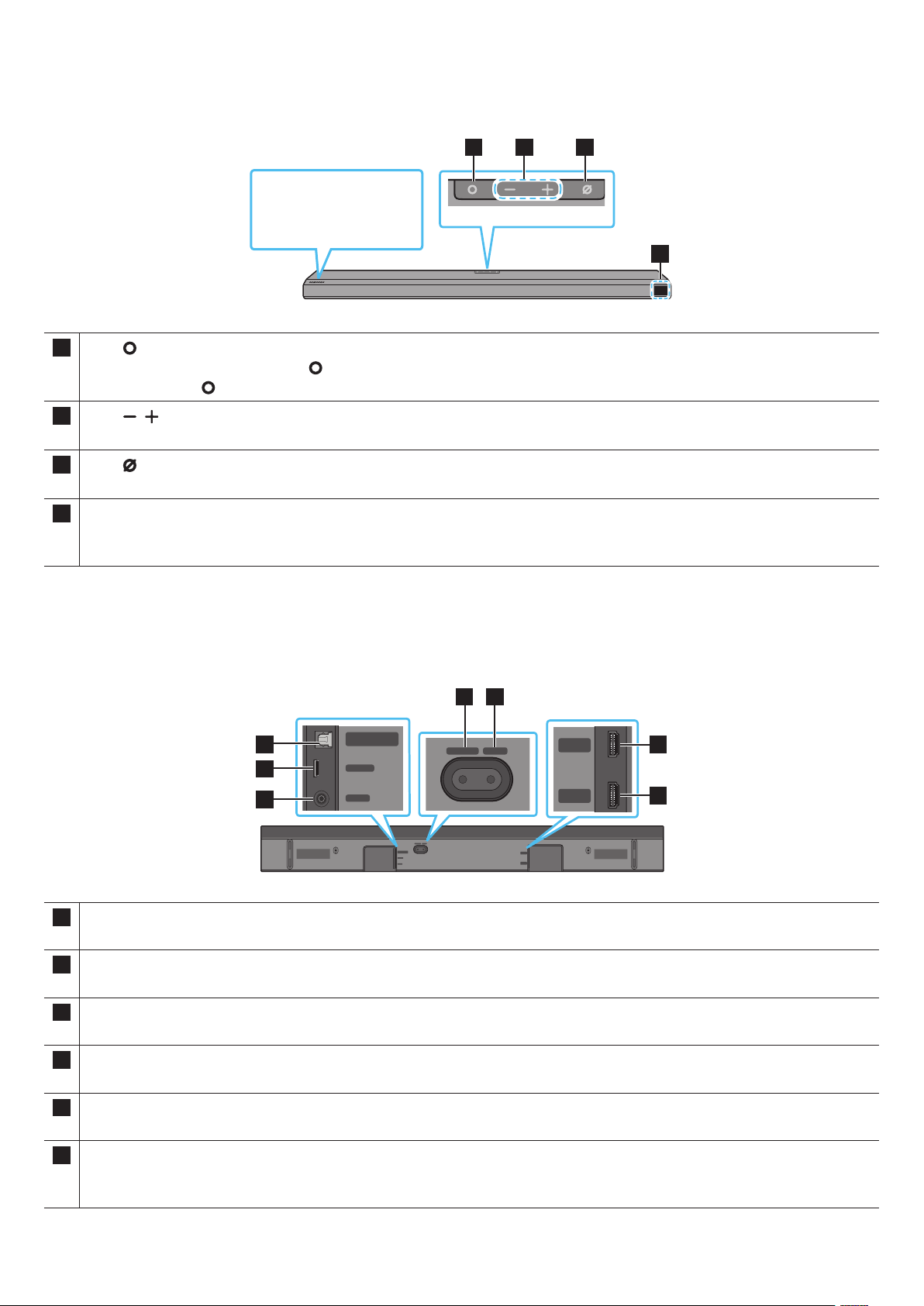
SPA - 7
02 INFORMACIÓN GENERAL DEL PRODUCTO
1 2 3
4
1
• En modo de espera, presione el botón para encender la Soundbar.
• Presione el botón para cambiar la fuente de entrada.
2
Permite ajustar el volumen.
3
Presione el botón para encender o apagar el micrófono.
4
Muestra el estado del producto y el modo actual.
D.IN → → Wi-Fi → BT
• Cuando conecte el cable de CA, el botón de encendido comenzará a funcionar luego de 4 a 6 segundos.
• Cuando encienda esta unidad, habrá un retraso de 4 a 5 segundos antes de que emita sonido.
• Si oye sonidos tanto del TV como de la Soundbar, vaya al menú , busque la opción de audio del TV y cambie el altavoz del TV a .
DIGITAL AUDIO IN
(OPTICAL)
SERVICE
DC 19V
HDMI
NETWORK ID SET
DIGITAL AUDIO IN
(OPTICAL)
SERVICE
NETWORK ID SET
HDMI TO TV
(eARC/ARC)
HDMI IN
HDMI OUT
(TV-ARC)
DIGITAL AUDIO IN
(OPTICAL)
SERVICE
DC 19V
DIGITAL AUDIO IN
(OPTICAL)
SERVICE
DC 19V
HDMI
HDMI TO TV
(eARC/ARC)
DIGITAL AUDIO IN
(OPTICAL)
SERVICE
DC 19V
HDMI
NETWORK ID SET
DIGITAL AUDIO IN
(OPTICAL)
SERVICE
NETWORK ID SET
HDMI TO TV
(eARC/ARC)
HDMI IN
HDMI OUT
(TV-ARC)
DIGITAL AUDIO IN
(OPTICAL)
SERVICE
DC 19V
DIGITAL AUDIO IN
(OPTICAL)
SERVICE
DC 19V
HDMI
HDMI TO TV
(eARC/ARC)
DIGITAL AUDIO IN
(OPTICAL)
SERVICE
DC 19V
HDMI
NETWORK ID SET
DIGITAL AUDIO IN
(OPTICAL)
SERVICE
NETWORK ID SET
HDMI TO TV
(eARC/ARC)
HDMI IN
HDMI OUT
(TV-ARC)
DIGITAL AUDIO IN
(OPTICAL)
SERVICE
DC 19V
DIGITAL AUDIO IN
(OPTICAL)
SERVICE
DC 19V
HDMI
HDMI TO TV
(eARC/ARC)
DIGITAL AUDIO IN
(OPTICAL)
SERVICE
DC 19V
HDMI
NETWORK ID SET
DIGITAL AUDIO IN
(OPTICAL)
SERVICE
NETWORK ID SET
HDMI TO TV
(eARC/ARC)
HDMI IN
HDMI OUT
(TV-ARC)
DIGITAL AUDIO IN
(OPTICAL)
SERVICE
DC 19V
DIGITAL AUDIO IN
(OPTICAL)
SERVICE
DC 19V
HDMI
HDMI TO TV
(eARC/ARC)
1
2
3
4 5
1
Conecte a la salida digital (óptica) de un dispositivo externo. (Consulte la página 20).
2 SERVICE
Conecte un dispositivo de almacenamiento USB para actualizar el software del producto.
3
Conecte el adaptador eléctrico de CA/CC. (Consulte la página 12).
4 NETWORK
Presione aquí para conectarse a una red inalámbrica (wi) a través de la aplicación .
5 ID SET
Presione aquí para conectar la Soundbar a parlantes cercanos y un subwoofer de forma inalámbrica. (El altavoz surround se vende por separado).
Entrada simultánea de señales digitales de audio y video a través de un cable HDMI.
Conecte a la salida HDMI de un dispositivo externo. (Consulte la página 19).

SPA - 8
Conecte al puerto HDMI de un TV. (Consulte la página 15).
• Cuando desconecte el cable de alimentación del adaptador de energía CA/CC de una toma de la pared, tire del enchufe.
No tire del cable.
• No conecte esta unidad ni otros componentes a un tomacorriente de CA antes de completar todas las conexiones entre los componentes.
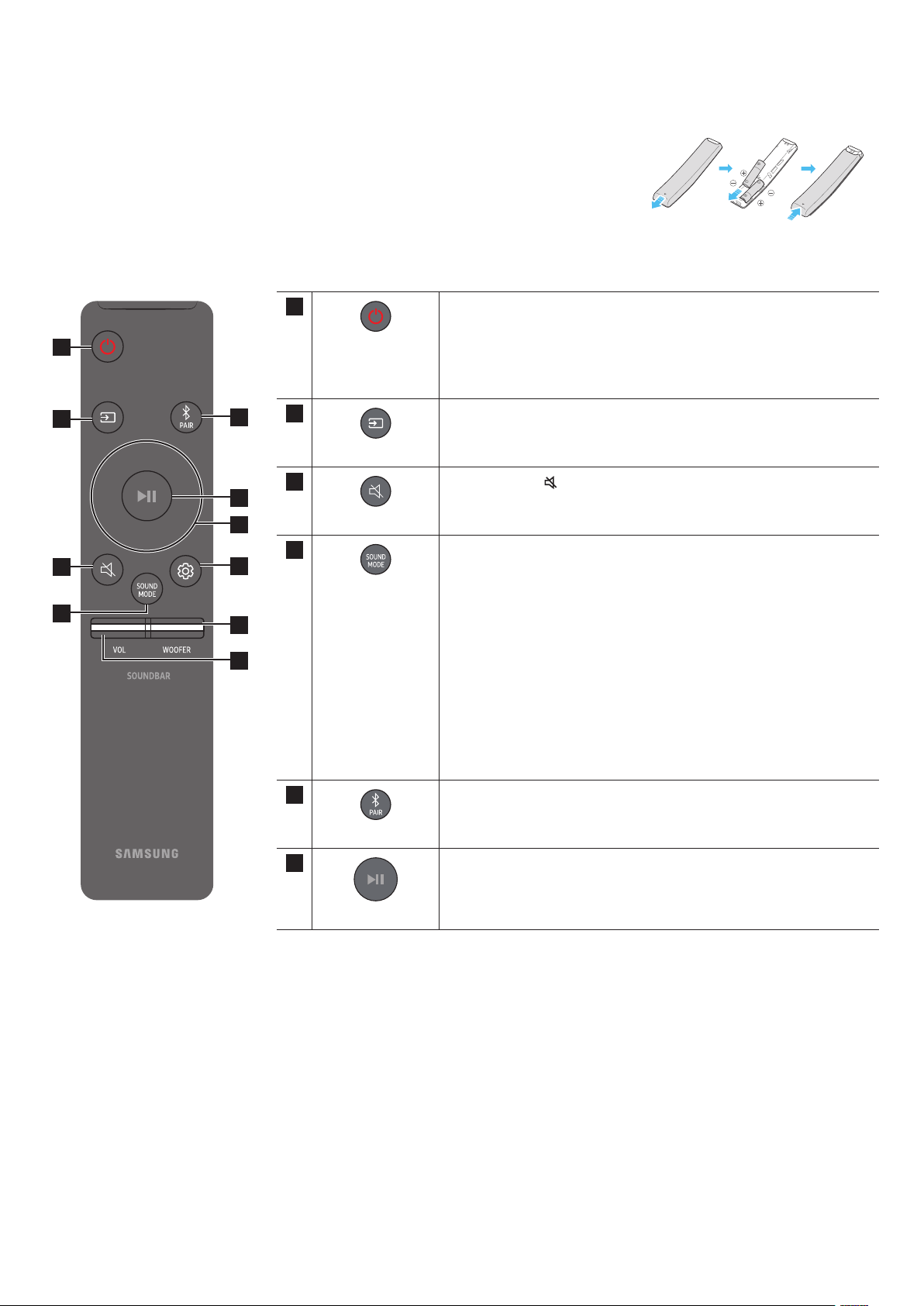
SPA - 9
03 USO DEL CONTROL REMOTO DE LA SOUNDBAR
Deslice la cubierta posterior en la dirección de la echa hasta retirarla completamente. Inserte 2 baterías AA
(1,5 V) correctamente según su polaridad. Vuelva a deslizar la cubierta de las baterías a su posición inicial.
1
2
3
4
5
8
10
1
Enciende y apaga la Soundbar.
•
La unidad se apaga automáticamente en las siguientes situaciones:
• En modo D.IN / / Wi-Fi / BT si no hay señal de audio por
18 minutos.
2
Presione aquí para elegir una fuente conectada a la Soundbar.
3
Presione el botón
para silenciar el sonido.
Vuelva a presionarlo para reanudar el sonido.
4
SOUND MODE
Puede seleccionar el modo de sonido deseado eligiendo STANDARD,
SURROUND, GAME PRO o ADAPTIVE SOUND.
• STANDARD
Emite el sonido original.
• SURROUND
Proporciona un campo sonoro más amplio que el estándar.
• GAME PRO
Proporciona sonido estereoscópico para sumergirlo en la acción mientras
juega.
• ADAPTIVE SOUND
Analiza el contenido en tiempo real y automáticamente proporciona el
campo sonoro óptimo según las características del sonido.
5
Cambie la Soundbar a modo de conexión Bluetooth. Presione el botón y espere
a que aparezca la pantalla “BT PAIRING” para conectarse a un dispositivo
Bluetooth nuevo.
También puede presionar este botón para reproducir o pausar música.
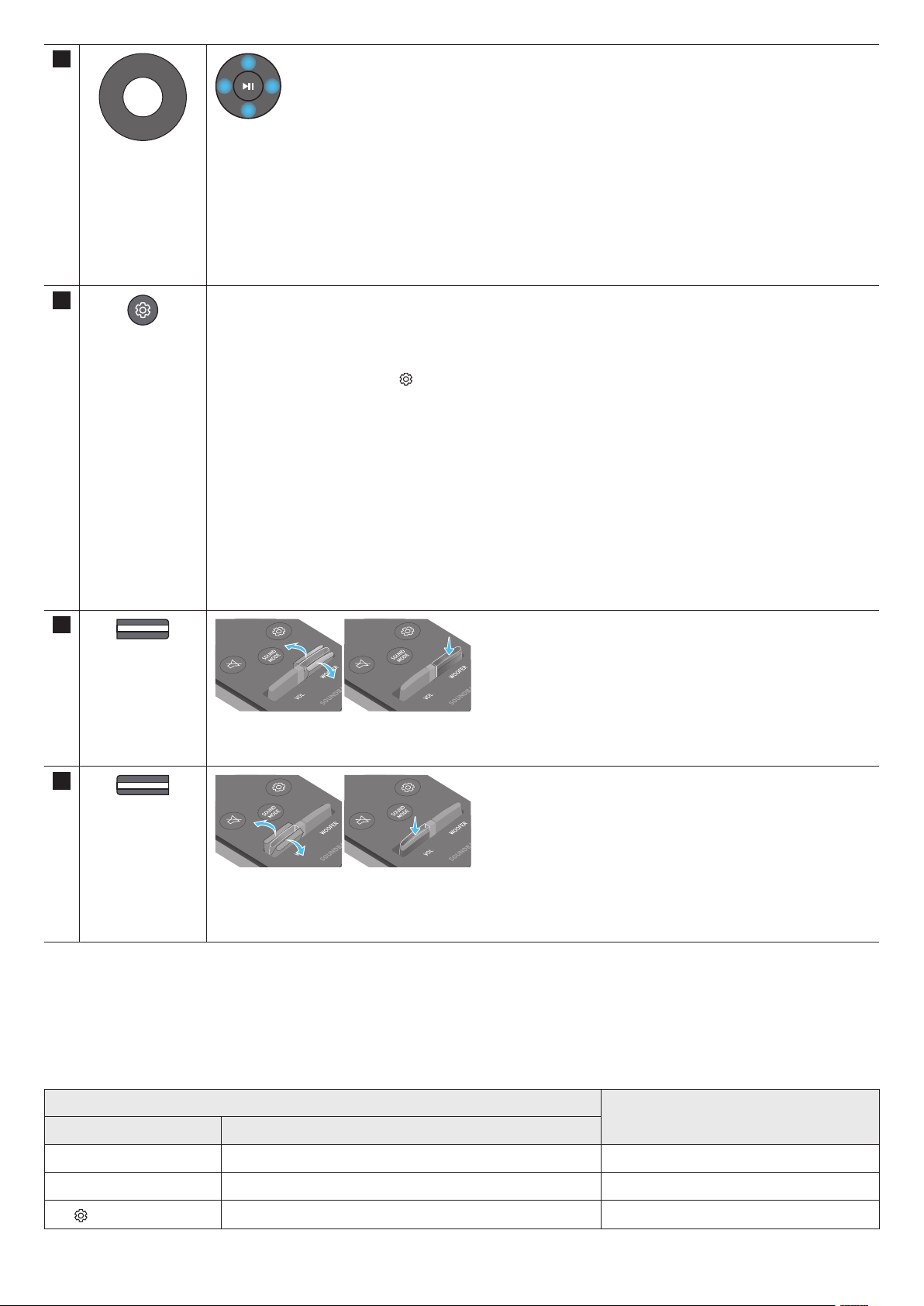
SPA - 10
Presione arriba/abajo/izquierda/derecha en el botón para seleccionar o congurar las funciones.
•
Para seleccionar el siguiente archivo de música, presione el botón . Para seleccionar el archivo de música
anterior, presione el botón .
• ID SET
Use esta opción cuando los altavoces de graves o Surround no estén conectados o necesiten reconexión.
Mientras está apagado, mantenga presionado el botón durante 5 segundos para realizar la ID SET. (Consulte la
página 13).
8
Cuando presiona esta tecla, se muestran los elementos de conguración tales como AVA, TREBLE, BASS, SYNC, CENTER LEVEL,
FRONT TOP LEVEL y en secuencia. Se puede ajustar el elemento deseado con los botones .
• Para controlar el volumen de los sonidos agudos o bajos, seleccione TREBLE o BASS en Ajustes de sonido, y luego
ajuste el volumen entre -6~ y +6 con los botones /.
• Mantenga presionado el botón durante aproximadamente 5 segundos para ajustar el sonido
de cada banda de frecuencia. Puede elegir 150 Hz, 300 Hz, 600 Hz, 1,2 kHz, 2,5 kHz, 5 kHz y 10 kHz usando los botones
/ y puede congurar cada uno entre -6 y +6 con los botones /.
(Asegúrese de que el modo de sonido se establezca como “STANDARD”)
• Para controlar el volumen de cada altavoz, seleccione CENTER LEVEL o FRONT TOP LEVEL en Ajustes de sonido, y luego
ajuste el volumen entre -6~ y +6 mediante los botones /.
• Si el video en el TV y el audio de la Soundbar no están sincronizados, seleccione SYNC en Control de sonido y, luego,
dena la demora de audio entre 0 y 300 milisegundos utilizando los botones /.
• La opción SYNC solo es compatible con algunas funciones.
• Si los altavoces surround están conectados, seleccione REAR LEVEL o REAR TOP LEVEL y, luego, utilice los botones
/ para ajustar el volumen entre el rango -6 y +6.
• La función de altavoz VIRTUAL se puede congurar en ON/OFF con los botones /.
NIVEL DE WOOFER
Pulse este botón para subir o bajar el nivel de los graves (bajos) a -12 o entre -6 y +6. Para congurar el nivel de volumen de
graves (bajos) en 0 (Predeterminado), presione el botón.
10
VOLUMEN
Mueva el botón hacia arriba o hacia abajo para ajustar el volumen.
•
Presione el botón VOL para silenciar el sonido. Vuelva a presionarlo para reanudar el sonido.
• Analiza el ruido externo en tiempo real mientras se está reproduciendo la Soundbar, para que el audio de voz siempre pueda oírse con claridad.
• No se guardan datos durante este análisis.
WOOFER (Arriba) Control remoto del televisor encendido/apagado (modo de espera) página 11
Arriba ID SET página 13
(Control de sonido)
Ecualización de 7 bandas página 10
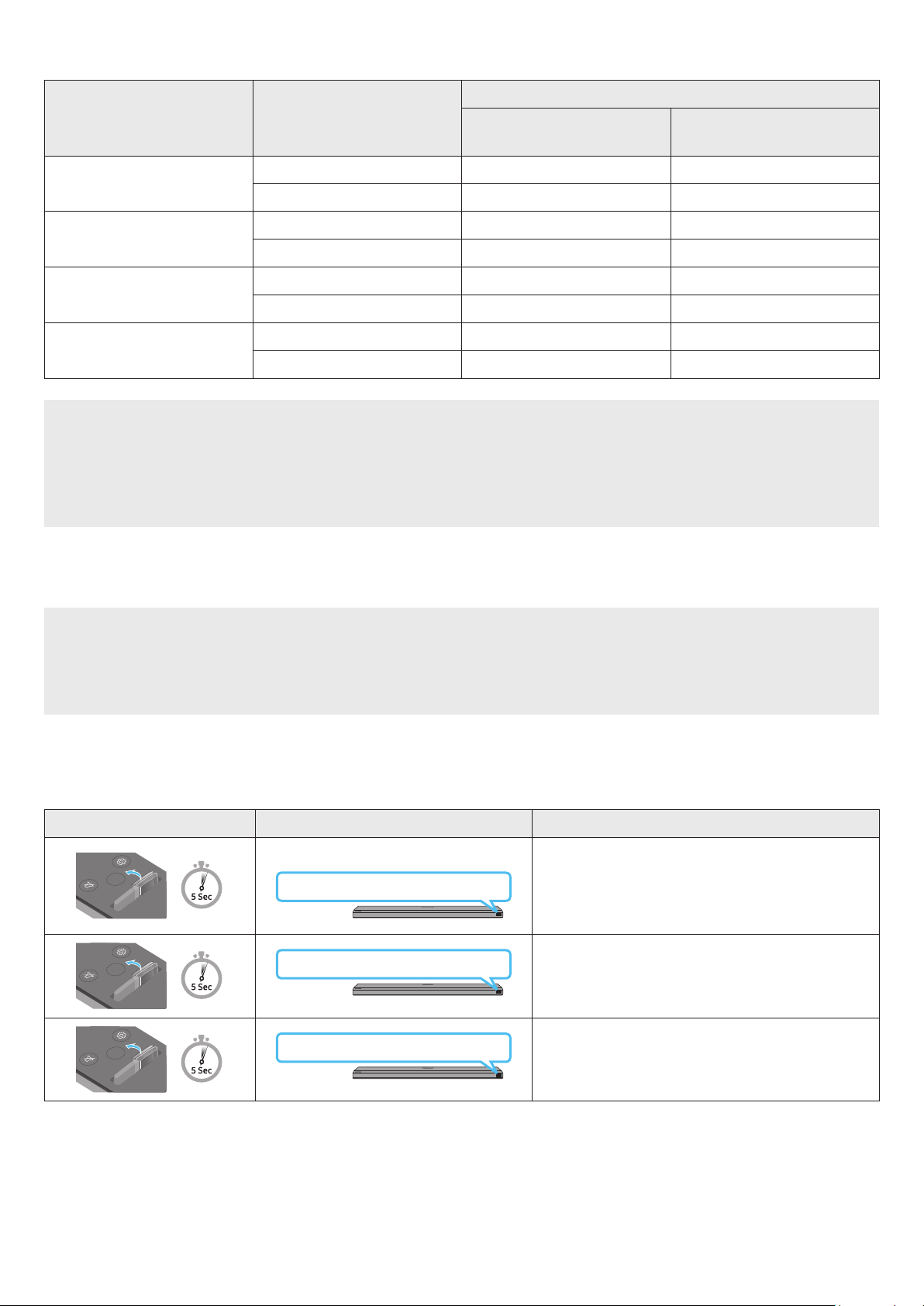
SPA - 11
STANDARD
2.0 canales 2.1 canales 2.1 canales
5.1 canales 3.1 canales 5.1 canales
SURROUND
2.0 canales 3.1.2 canales 5.1.4 canales
5.1 canales 3.1.2 canales 5.1.4 canales
GAME PRO
2.0 canales 3.1.2 canales 5.1.4 canales
5.1 canales 3.1.2 canales 5.1.4 canales
ADAPTIVE SOUND
2.0 canales 3.1.2 canales 5.1.4 canales
5.1 canales 3.1.2 canales 5.1.4 canales
• Cuando la fuente de entrada es Dolby Atmos®, DTS:X, la conguración que incluye solo el altavoz de graves proporciona canal de audio de 3.1.2,
mientras que la conguración del kit de altavoz trasero inalámbrico proporciona audio de canales 5.1.4.
• El kit de altavoz trasero inalámbrico de Samsung se puede comprar por separado. Para comprar un kit o el subwoofer, comuníquese con el vendedor a
quien le compró la Soundbar.
• Los altavoces surround no emitirán sonido para la salida de 2 canales mientras el modo STANDARD esté en uso. Para habilitar el sonido hacia los
altavoces surround, cambie el modo de efecto a SURROUND.
Ajuste el volumen de la Soundbar utilizando el control remoto del TV.
• Esta función solo se puede usar con controles remotos IR. Los controles remotos Bluetooth (controles remotos que requieren emparejamiento) no son
compatibles.
• Congure el altavoz del TV en para usar esta función.
• Fabricantes que admiten esta función:
VIZIO, LG, Sony, Sharp, PHILIPS, PANASONIC, TOSHIBA, Hisense, RCA
1. Apague la Soundbar.
2. Mantenga presionado el botón WOOFER durante 5 segundos.
Cada vez que mantiene presionado el botón WOOFER durante 5 segundos, el modo cambia en el siguiente orden: “OFF-TV REMOTE” (Modo
predeterminado), “SAMSUNG-TV REMOTE”, “ALL-TV REMOTE”.
SOUND
MODE
VOL
WOOFER
SOUNDBAR
(Modo predeterminado)
OFF-TV REMOTE
Deshabilita el control remoto del TV.
SOUND
MODE
VOL
WOOFER
SOUNDBAR
SAMSUNG-TV REMOTE
Habilita el control remoto IR de un TV Samsung.
SOUND
MODE
VOL
WOOFER
SOUNDBAR
ALL-TV REMOTE
Habilita el control remoto IR de un TV de otra marca.
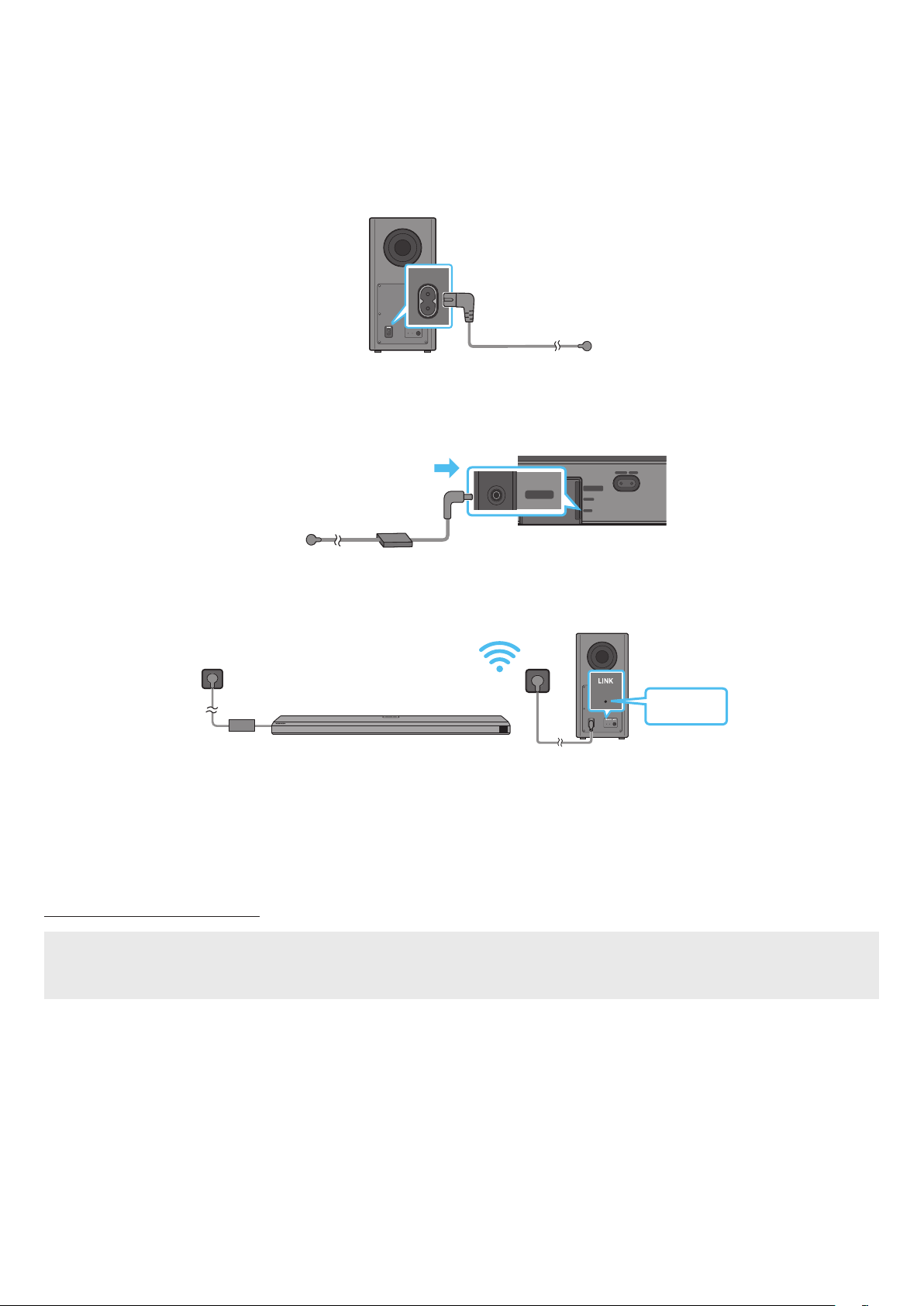
SPA - 12
04 CONEXIÓN DE LA SOUNDBAR
Use los componentes de alimentación para conectar el altavoz de graves y la Soundbar a un tomacorriente eléctrico en el siguiente orden:
• Para obtener más información acerca del suministro eléctrico necesario y el consumo de energía, consulte la etiqueta del producto. (Etiqueta: parte
inferior de la unidad principal de la Soundbar)
1. Conecte el cable de alimentación al altavoz de graves.
POWER
2. Primero conecte el cable de alimentación al adaptador de CA/CC.
Conecte el adaptador de CA/CC (con el cable de alimentación) a la Soundbar.
DIGITAL AUDIO IN
(OPTICAL)
SERVICE
DC 19V
HDMI
NETWORK ID SET
DIGITAL AUDIO IN
(OPTICAL)
SERVICE
NETWORK ID SET
HDMI TO TV
(eARC/ARC)
HDMI IN
HDMI OUT
(TV-ARC)
DIGITAL AUDIO IN
(OPTICAL)
SERVICE
DC 19V
DIGITAL AUDIO IN
(OPTICAL)
SERVICE
DC 19V
HDMI
HDMI TO TV
(eARC/ARC)
DIGITAL AUDIO IN
(OPTICAL)
SERVICE
DC 19V
HDMI
NETWORK ID SET
DIGITAL AUDIO IN
(OPTICAL)
SERVICE
NETWORK ID SET
HDMI TO TV
(eARC/ARC)
HDMI IN
HDMI OUT
(TV-ARC)
DIGITAL AUDIO IN
(OPTICAL)
SERVICE
DC 19V
DIGITAL AUDIO IN
(OPTICAL)
SERVICE
DC 19V
HDMI
HDMI TO TV
(eARC/ARC)
DC 19V
3. Conecte la alimentación a la Soundbar y al altavoz de graves. El altavoz de graves se conecta automáticamente cuando se enciende la Soundbar.
NOTA
• Conecte la alimentación del Subwoofer antes de conectarlo a la Soundbar.
El Subwoofer se conectará automáticamente cuando se encienda la Soundbar.
• Si desenchufa el cable de alimentación y vuelve a conectarlo cuando el producto está encendido, la Soundbar se encenderá automáticamente.
• Asegúrese de colocar el adaptador de CA/CC en posición plana sobre una mesa o el piso. Si coloca el adaptador de CA/CC de manera que quede colgando
con la entrada del cable de CA apuntando hacia arriba, puede ingresar agua u otras sustancias ajenas al adaptador y provocar fallas en el funcionamiento.
• Compruebe si los cables de alimentación para la Soundbar y el subwoofer están conectados correctamente.
• Asegúrese de que la Soundbar esté apagada.
1. Apague la unidad principal de la Soundbar.
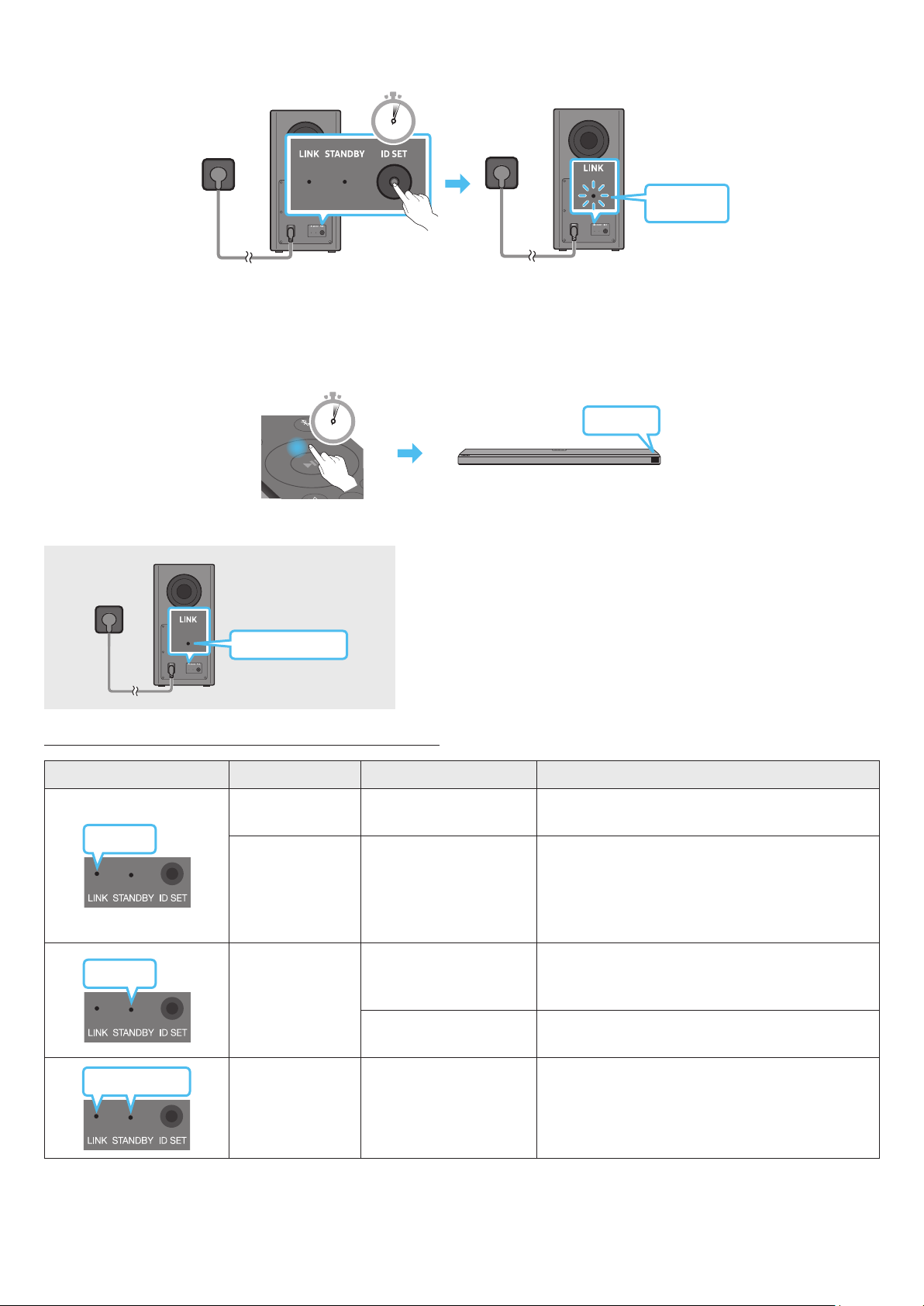
SPA - 13
2. Mantenga presionado el botón ID SET en la parte posterior del subwoofer, al menos, 5 segundos.
• El indicador rojo de la parte posterior del subwoofer se apaga y el indicador azul parpadea.
5 Sec
3. Presione el botón en el control remoto durante 5 segundos.
• El mensaje ID SET aparece en la pantalla de la Soundbar por un momento y luego desaparece.
• La Soundbar se enciende automáticamente cuando se completa la ID SET.
SOUND
MODE
PAIR
5 Sec
ID SET
4. Compruebe si el LED DE VINCULACIÓN es azul (conexión completa).
El indicador LED DE VINCULACIÓN deja de parpadear y queda encendido en azul
cuando se establece una conexión entre la Soundbar y el Subwoofer inalámbrico.
LED
Encendido
Conectado correctamente
(operación normal)
-
Parpadeante Recuperando la conexión
Compruebe si el cable de alimentación conectado a
la unidad principal de la Soundbar está conectado
correctamente o espere unos 5 minutos. Si el parpadeo
continua, intente conectar el subwoofer de forma manual.
Consulte la página 12.
Encendido
Modo Standby (De espera)
(con la unidad principal de la
Soundbar apagada)
Compruebe si el cable de alimentación conectado a
la unidad principal de la Soundbar está conectado
correctamente.
Se produjo un error en la
conexión
Conecte de nuevo. Consulte las instrucciones de conexión
manual en la página 12.
Parpadeante Problema de funcionamiento
Consulte la información de contacto del Centro de soporte
técnico de Samsung en este manual.
NOTA
• Si la unidad principal está apagada, el altavoz de graves inalámbrico se pondrá en modo de espera y el STANDBY LED que se encuentra en la parte
posterior del altavoz de graves se pondrá rojo luego de parpadear en azul varias veces.

SPA - 14
• Si cerca de la Soundbar, utiliza algún dispositivo que usa la misma frecuencia que la Soundbar, las interferencias pueden interrumpir el sonido.
• La distancia de transmisión máxima de la señal inalámbrica de la unidad principal es de aproximadamente 10 metros, pero puede variar según el entorno
operativo. Si hay una pared metálica o de acero y hormigón entre la unidad principal y el altavoz de graves inalámbrico, es posible que el sistema no
funcione debido a que la señal inalámbrica no puede penetrar el metal.
PRECAUCIÓN
• Las antenas inalámbricas están incorporadas en el subwoofer inalámbrico. Mantenga la unidad lejos del agua y la humedad.
• Para obtener un sonido óptimo, asegúrese de que no haya obstrucciones en el área alrededor de la ubicación del altavoz de graves inalámbrico y el
módulo receptor inalámbrico (se vende por separado).
Conecte a la Soundbar el kit de altavoz trasero inalámbrico de Samsung (SWA-9500S, se vende por separado) para lograr un verdadero sonido envolvente
inalámbrico.
Para obtener información más detallada sobre las conexiones, consulte el manual del kit de altavoz trasero inalámbrico de Samsung.
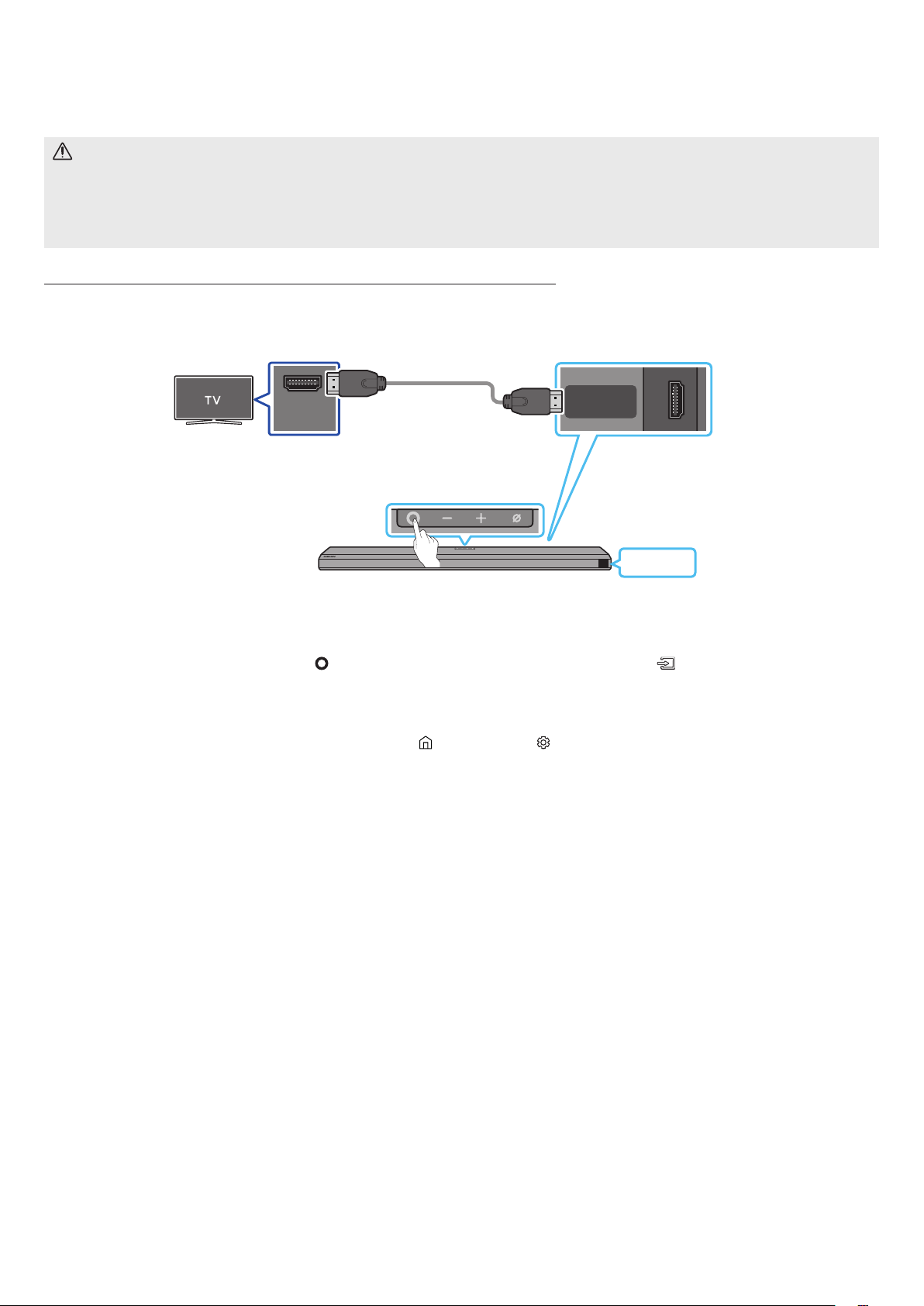
SPA - 15
05 USO DE UNA CONEXIÓN CON CABLE AL TV
PRECAUCIÓN
• Cuando el cable HDMI y el cable óptico estén conectados al mismo tiempo, la señal HDMI se recibe primero.
• Para conectar el cable HDMI entre el TV y la Soundbar, asegúrese de conectar las terminales marcadas como ARC. De lo contrario, es posible que el
sonido del TV no se escuche.
• El cable recomendado es .
HDMI IN
(ARC)
HDMI TO TV
(eARC/ARC)
SERVICE
DC 19V
TV ARC
1. Con la Soundbar y el TV apagados, conecte el cable HDMI como se indica en la imagen.
2. Encienda la Soundbar y el TV.
3. En la ventana de visualización de la unidad principal de la Soundbar aparece “TV ARC” y la Soundbar reproducirá el sonido del TV.
• Si no sale el sonido del TV, presione el botón
en la parte superior de la Soundbar o el botón del control remoto para
seleccionar el modo "D.IN". En la pantalla aparece “D.IN” y “TV ARC” en secuencia, y se escucha el sonido del televisor.
• Cuando conecte un TV compatible con la función eARC, aparece "eARC" en la pantalla y se oye un sonido.
• Para establecer la conexión con eARC, la función eARC en el menú del TV debe estar encendida. Consulte el manual de usuario del televisor para ver
más detalles sobre la conguración. (p. ej., TV Samsung: Inicio ( ) → Conguración ( ) → Sonido → Conguración experta → Modo HDMI-eARC
(Automático))
• Si no aparece “TV ARC” en la ventana de visualización de la unidad principal de la Soundbar, verique que el cable HDMI esté conectado en el puerto
correcto.
• Use los botones de volumen en el control remoto del TV para cambiar el volumen de la Soundbar.
NOTA
• Cuando conecte el TV que es compatible con HDMI ARC a la Soundbar con un cable de HDMI, puede transmitir los datos de audio y video digitales sin
conectar un cable óptico aparte.
• Le recomendamos que use un cable HDMI sin núcleo, si es posible. Si usa un cable HDMI con núcleo, use uno cuyo diámetro sea menor de 14 mm.
• Esta función no está disponible si el cable HDMI no es compatible con ARC.
• Cuando el audio en una transmisión está codicado en Dolby Digital y el “Formato de audio de salida digital” de su TV está congurado como PCM, le
recomendamos que cambie la conguración a Dolby Digital. Cuando cambie la conguración en el TV, la calidad del sonido será mejor. (Es posible que en
el menú del TV se usen palabras distintas para Dolby Digital y PCM según el fabricante del TV.)
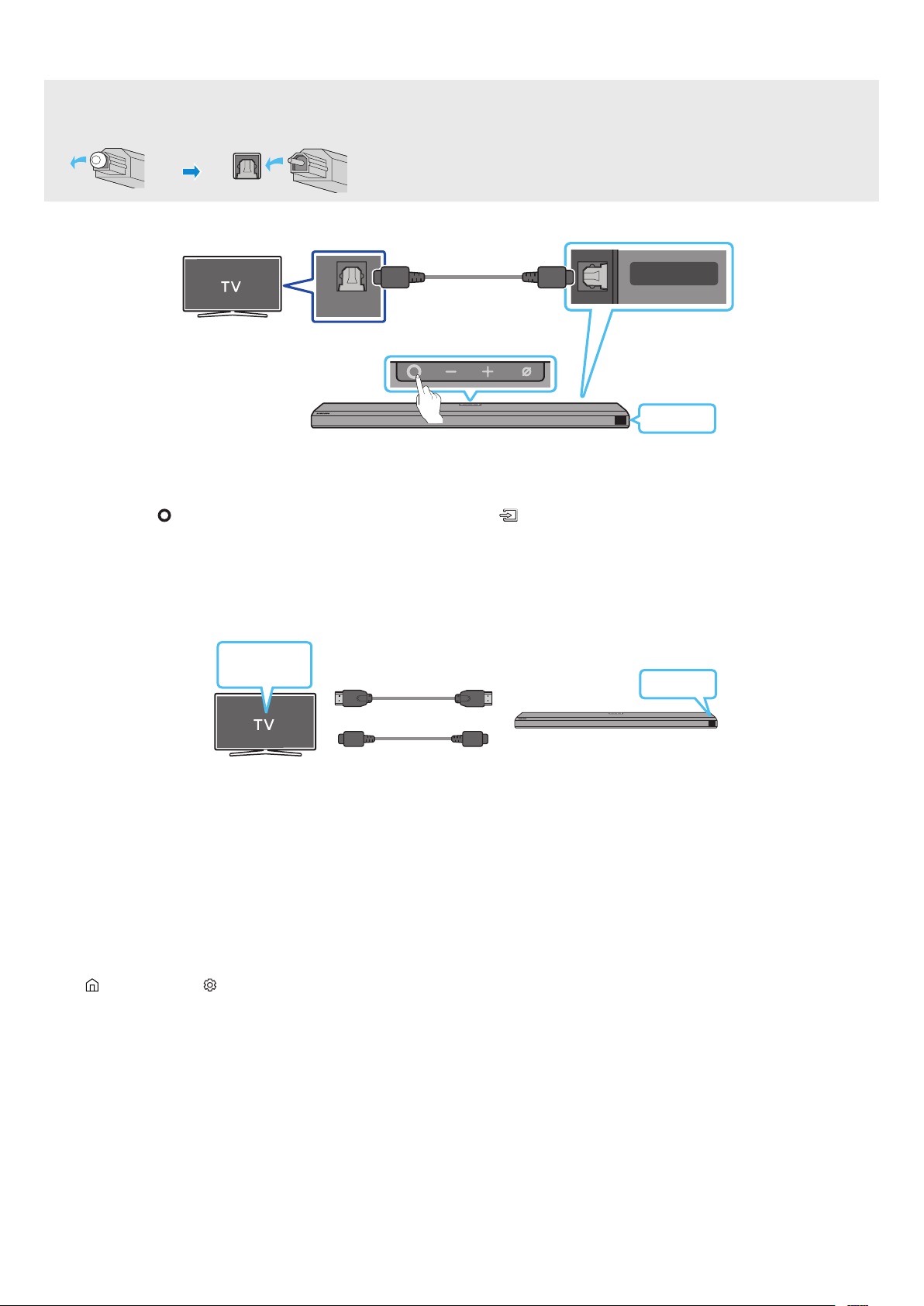
SPA - 16
• Cuando el cable HDMI y el cable óptico estén conectados al mismo tiempo, la señal HDMI se recibe primero.
• Si usa un cable óptico y las terminales tienen cubiertas, quítelas.
OPTICAL OUT
DIGITAL AUDIO IN
(OPTICAL)
SERVICE
DC 19V
D.IN
1. Con la Soundbar y el TV apagados, conecte el puerto de la Soundbar y el puerto de salida OPTICAL del TV con el cable óptico
(no suministrado) como se muestra en la imagen.
2. Encienda la Soundbar y el TV.
3. Presione el botón
en la parte superior de la Soundbar o el botón en el control remoto para seleccionar el modo "D.IN".
4. El sonido del TV saldrá de la Soundbar.
En el caso de Q-Symphony, la Soundbar se sincroniza con un TV Samsung para emitir el sonido a través de dos dispositivos a n de brindar un efecto
envolvente óptimo. Cuando la Soundbar está conectada, aparece el menú "" debajo del menú del TV. Seleccione el menú
correspondiente.
O
D.IN
TV
• Ejemplo del menú del TV:
NOTA
• Puede funcionar según el códec que admita el TV.
• Esta función solo se admite cuando se conecta el cable HDMI o el cable óptico (no suministrado).
• Esta función está disponible en algunos TV Samsung y en algunos modelos de Soundbar.
Brinda una calidad de sonido optimizada mediante el análisis de los espacios de escucha.
Para habilitar esta función, active el modo en el menú de su TV Samsung.
(Inicio ( ) → Conguración ( ) → General → Ajustes del modo Inteligente → Adaptive Sound+)
NOTA
• El modo de sonido en su Soundbar automáticamente pasará a ser si habilita el modo en su TV.
• Esta función solo está disponible cuando la Soundbar se conecta a un TV Samsung.
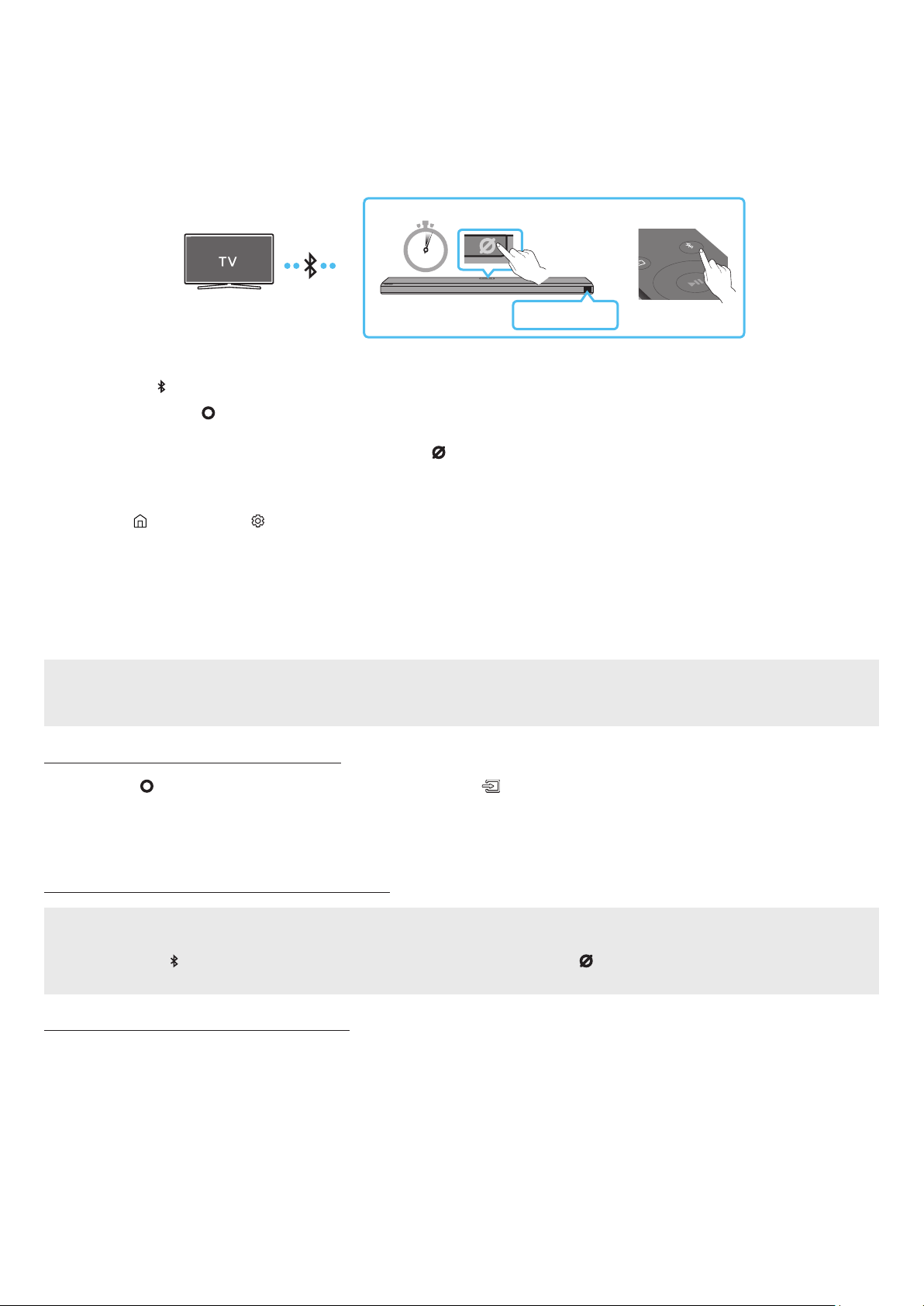
SPA - 17
USO DE UNA CONEXIÓN INALÁMBRICA AL TV
Cuando se conecta un TV Samsung a través de Bluetooth, puede escuchar sonido en estéreo sin cables de por medio.
• Solo se puede conectar un TV Samsung por vez.
• Se puede conectar un TV Samsung que sea compatible con Bluetooth. Compruebe las especicaciones de su TV.
5 Sec
SOUND
MODE
PAIR
O
BT PAIRING
1. Presione el botón PAIR del control remoto de la Soundbar para entrar al modo “BT PAIRING”.
Presione el botón
en el panel superior y luego seleccione "BT".
“BT” cambia automáticamente a “BT PAIRING” en pocos segundos o cambia a “BT READY” si existe un registro de conexión.
Cuando aparezca “BT READY”, mantenga presionado el botón en el panel superior de la Soundbar durante
más de 5 segundos hasta que aparezca “BT PAIRING”.
2. Seleccione el modo Bluetooth en el TV Samsung.
(p. ej., Inicio (
) → Conguración ( ) → Sonido → Salida del sonido → Lista de altavoces Bluetooth → [AV] Samsung Soundbar Q800A (Bluetooth))
3. Seleccione “” de la lista que aparece en la pantalla del TV.
Se indicará la Soundbar disponible con “” o “” en la lista de dispositivos Bluetooth del TV. Para conectar el TV
Samsung a la Soundbar, seleccione el mensaje y establezca una conexión.
• Cuando el TV Samsung esté conectado, aparecerá [] → “BT” en la pantalla frontal de la Soundbar.
4. Podrá escuchar el sonido del TV Samsung en la Soundbar.
• Luego de haber conectado por primera vez la Soundbar a su TV Samsung, use el modo “BT READY” para volver a conectar.
• Si ya tiene una Soundbar existente (p. ej., ) en la lista de altavoces del TV Samsung, elimínela.
• Luego, repita los pasos 1 a 3.
Presione el botón en la parte superior de la Soundbar o el botón en el control remoto para seleccionar otro modo que no sea
"BT".
• La desconexión toma tiempo porque el TV Samsung debe recibir la respuesta de la Soundbar.
(El tiempo requerido puede variar según el modelo del TV Samsung).
• BT READY: en este modo, puede reconectar cualquier dispositivo móvil o TV Samsung que se haya conectado antes.
• BT PAIRING: en este modo, puede conectar un dispositivo nuevo a la Soundbar.
(Presione el botón PAIR en el control remoto de la Soundbar o mantenga presionado el botón en la parte
superior de la Soundbar durante más de 5 segundos mientras la Soundbar está en modo "BT").
• Ubique un dispositivo nuevo en un radio de 1 m para conectarlo a través de Bluetooth.
• Si le pide un código PIN cuando conecta un dispositivo Bluetooth, ingrese <0000>.
• La Soundbar se apaga automáticamente después de estar 18 minutos en estado Ready (Listo).
• Es posible que la Soundbar no realice la conexión o la búsqueda de Bluetooth correctamente en los siguientes casos:
‒ Si hay un campo eléctrico fuerte cerca de la Soundbar.
‒ Si varios dispositivos Bluetooth se emparejan en simultáneo con la Soundbar.
‒ Si el dispositivo Bluetooth se apaga, no está en el lugar o no funciona correctamente.
• Los dispositivos electrónicos pueden ocasionar interferencias de radio. Los dispositivos que generan ondas electromagnéticas deberán mantenerse
alejados de la unidad principal de la Soundbar, p. ej., dispositivos con redes LAN inalámbricas, microondas, etc.

SPA - 18
• La conexión Wi-Fi solo está disponible en el TV Samsung.
• Compruebe si está encendido y si .
• El TV y la Soundbar deben estar conectados a la misma red inalámbrica (Wi-Fi).
• Si su enrutador inalámbrico (Wi-Fi) usa un canal de DFS, no podrá establecer una conexión Wi-Fi entre el TV y la Soundbar. Comuníquese con su
proveedor de servicio de Internet para obtener más detalles.
• Dado que los menús pueden ser diferentes según el año de fabricación, consulte el manual correspondiente a su TV.
• Para conectar el TV a la Soundbar mediante Wi-Fi, conecte primero la Soundbar al enrutador inalámbrico. Consulte la página 22 para ver detalles
sobre cómo establecer una conexión Wi-Fi.
1. Para obtener más información sobre cómo establecer una conexión Wi-Fi con la Soundbar, consulte la página 22, "
".
2. Cambie la fuente de entrada del TV a la Soundbar mediante el menú de audio.
•
Inicio (
) → Conguración ( ) → Sonido → Salida del sonido → → [AV] Samsung Soundbar Q800A (Wi-Fi)
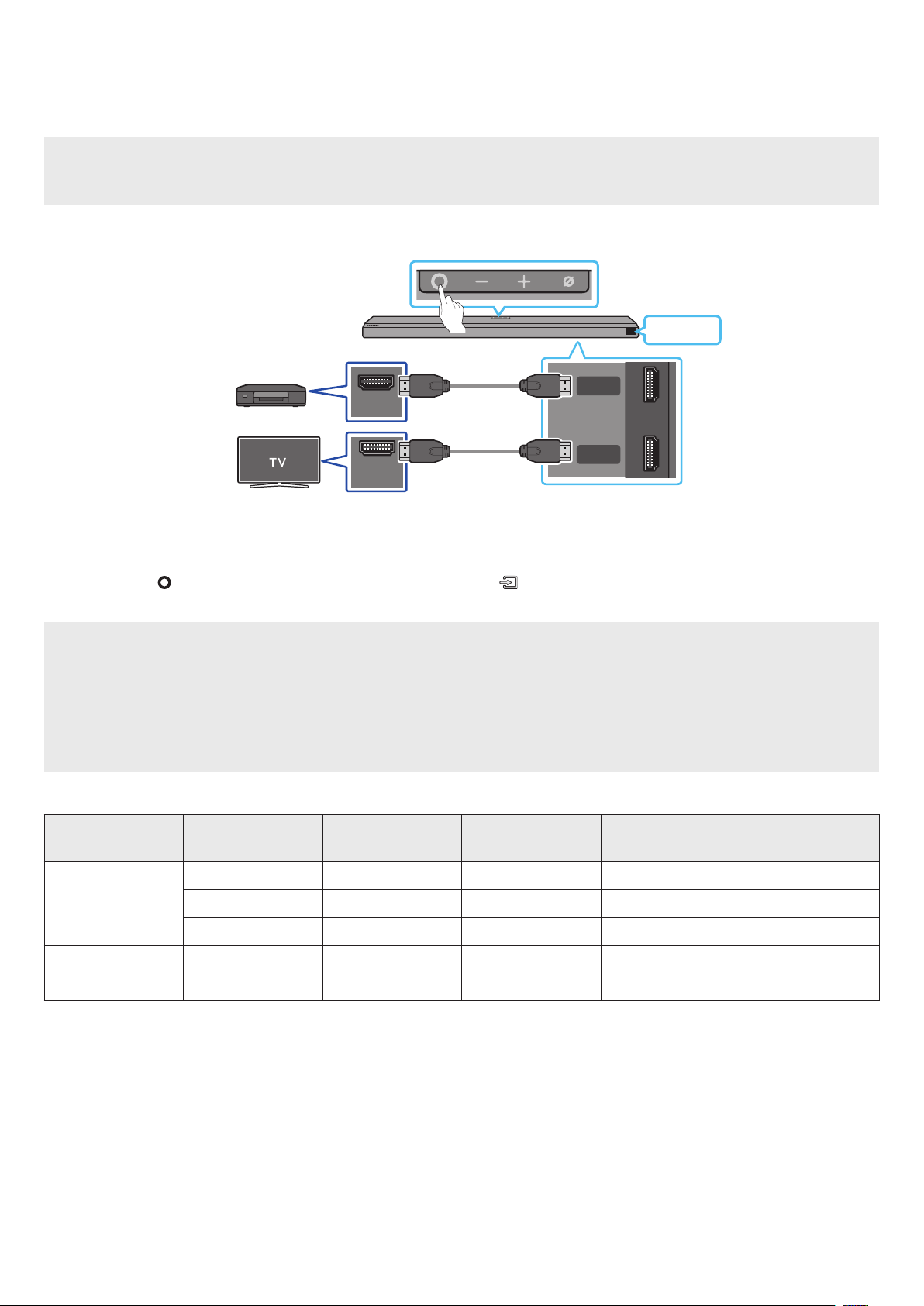
SPA - 19
CONEXIÓN A UN DISPOSITIVO EXTERNO
• Si las opciones de Salida de audio incluyen Audio secundario, asegúrese de que esté en la posición Apagado.
• Asegúrese de que el contenido admita Dolby Atmos®.
HDMI IN
(ARC)
HDMI
HDMI TO TV
(eARC/ARC)
DIGITAL AUDIO IN
(OPTICAL)
SERVICE
DC 19V
HDMI OUT
1. Utilice un cable HDMI para conectar el puerto de HDMI OUT del dispositivo externo y el puerto ubicado en la base de la Soundbar.
2. Utilice un cable HDMI para conectar el puerto de HDMI IN del televisor y el puerto ubicado en la base de la Soundbar.
3. Encienda la Soundbar, el televisor y el dispositivo externo.
4. Presione el botón
en la parte superior de la Soundbar o el botón en el control remoto para seleccionar el modo “”.
5. La pantalla de la Soundbar indica que el modo "" se encuentra actualmente seleccionado, y la Soundbar comenzará a reproducir sonidos.
NOTA
• : (:) Si la fuente de entrada es Dolby Atmos®, se utilizan los canales 3.1.2 como salida.
• Cuando se activa Dolby Atmos®, aparece “DOLBY ATMOS” en la pantalla frontal.
•
Abra las opciones de salida de audio en el menú de conguraciones de su reproductor de Blu-ray u otro dispositivo, y asegúrese de que esté
seleccionada la opción “Sin codicación” para el ujo de bit. Por ejemplo, en un reproductor de Blu-ray de Samsung, vaya a Menú de inicio → Sonido →
Salida digital y luego seleccione Flujo de bit (no procesado).
< 60
8 bits O O O O
10 bits - - O O
12 bits - - O O
120
8 bits - - - -
10 bits - - - -
• La especicación admitida puede variar en función del dispositivo externo conectado o las condiciones de uso.
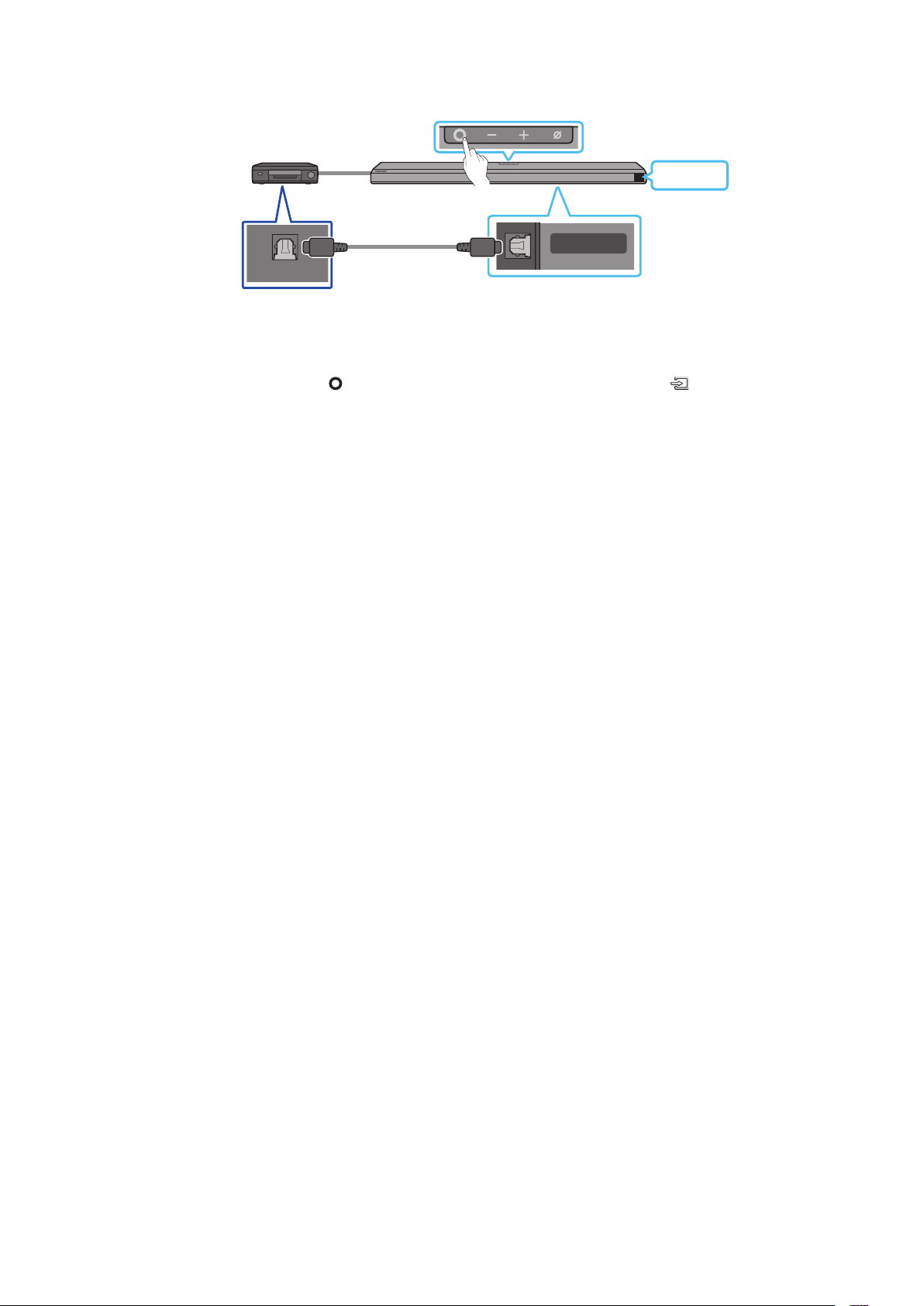
SPA - 20
OPTICAL OUT
DIGITAL AUDIO IN
(OPTICAL)
SERVICE
D.IN
1. Use un cable óptico (no suministrado) para conectar en el puerto principal de la Soundbar y OPTICAL OUT en el dispositivo
externo.
2. Encienda la Soundbar y el dispositivo externo.
3. Para seleccionar el modo “D.IN”, presione el botón
en la parte superior de la Soundbar o el botón en el control remoto.
4. La Soundbar reproducirá sonidos del dispositivo externo.
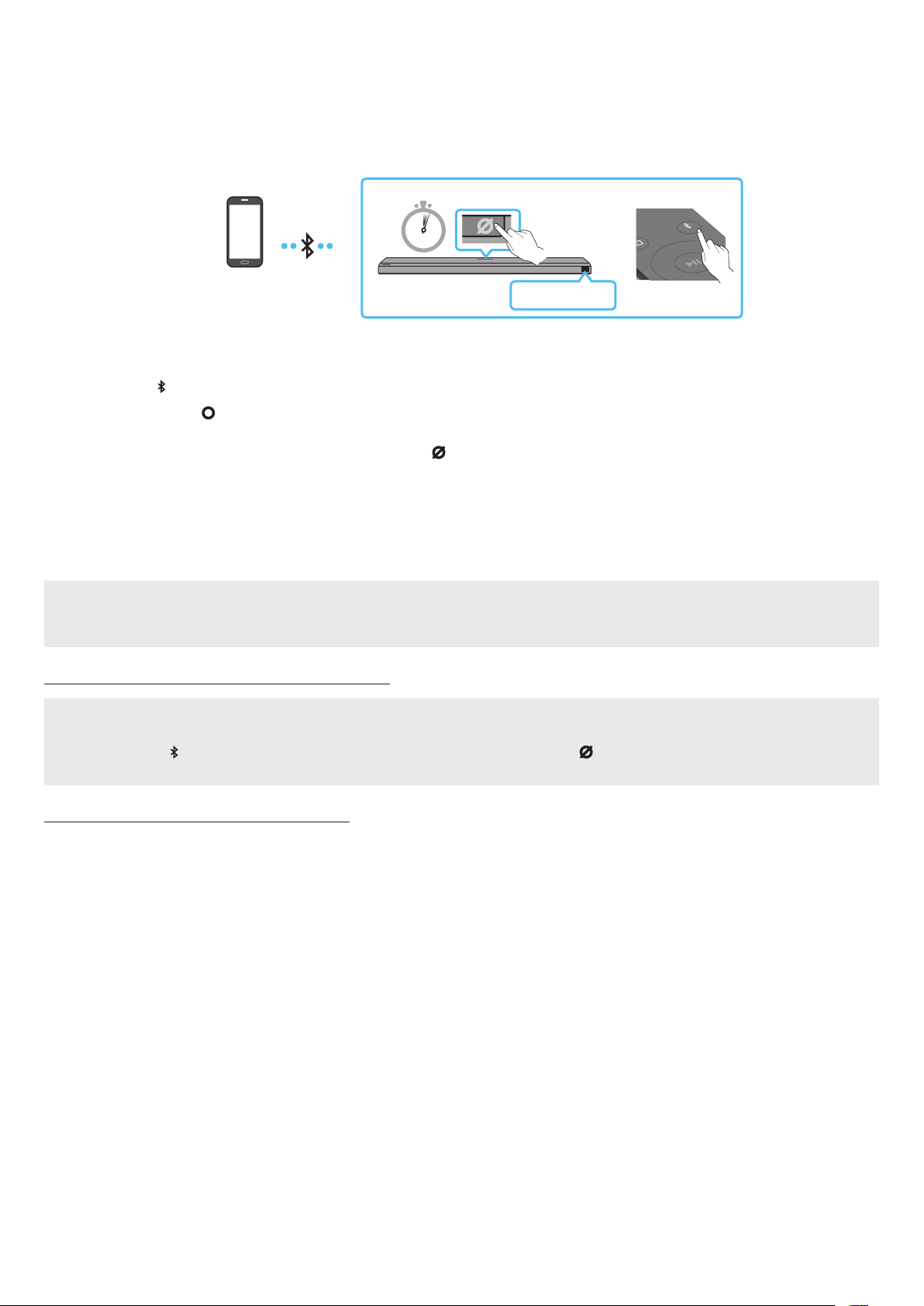
SPA - 21
08 CONEXIÓN A UN DISPOSITIVO MÓVIL
Cuando se conecta un dispositivo móvil a través de Bluetooth, puede escuchar sonido en estéreo sin cables de por medio.
• Cuando conecta un dispositivo Bluetooth emparejado y la Soundbar está apagada, la Soundbar se enciende automáticamente.
5 Sec
SOUND
MODE
PAIR
O
BT PAIRING
• Cuando conecte un dispositivo Bluetooth nuevo, asegúrese de que el dispositivo esté en un radio de 1 m de distancia.
1. Presione el botón PAIR del control remoto de la Soundbar para entrar al modo “BT PAIRING”.
Presione el botón
en el panel superior y luego seleccione "BT".
“BT” cambia automáticamente a “BT PAIRING” en pocos segundos o cambia a “BT READY” si existe un registro de conexión.
Cuando aparezca “BT READY”, mantenga presionado el botón en el panel superior de la Soundbar durante
más de 5 segundos hasta que aparezca “BT PAIRING”.
2. En su dispositivo, seleccione “” de la lista que aparece.
• Cuando la Soundbar se conecta al dispositivo móvil, aparece [] → “BT” en la pantalla frontal.
3. Reproduzca archivos de música desde el dispositivo conectado por Bluetooth a través de la Soundbar.
• Luego de haber conectado la Soundbar a su dispositivo móvil por primera vez, use el modo BT READY para volver a conectarla.
• Si ya tiene una Soundbar existente (p. ej., "") en la lista de altavoces del dispositivo móvil, elimínela.
• Repita los pasos 1 y 2.
• BT READY: en este modo, puede reconectar cualquier dispositivo móvil o TV Samsung que se haya conectado antes.
• BT PAIRING: en este modo, puede conectar un dispositivo nuevo a la Soundbar.
(Presione el botón PAIR en el control remoto de la Soundbar o mantenga presionado el botón en la parte
superior de la Soundbar durante más de 5 segundos mientras la Soundbar está en modo "BT").
• Ubique un dispositivo nuevo en un radio de 1 m para conectarlo a través de Bluetooth.
• Si le pide un código PIN cuando conecta un dispositivo Bluetooth, ingrese <0000>.
• La Soundbar se apaga automáticamente después de estar 18 minutos en estado Ready (Listo).
• Es posible que la Soundbar no realice la conexión o la búsqueda de Bluetooth correctamente en los siguientes casos:
‒ Si hay un campo eléctrico fuerte cerca de la Soundbar.
‒ Si varios dispositivos Bluetooth se emparejan en simultáneo con la Soundbar.
‒ Si el dispositivo Bluetooth se apaga, no está en el lugar o no funciona correctamente.
• Los dispositivos electrónicos pueden ocasionar interferencias de radio. Los dispositivos que generan ondas electromagnéticas deberán mantenerse
alejados de la unidad principal de la Soundbar, p. ej., dispositivos con redes LAN inalámbricas, microondas, etc.
• La Soundbar admite datos SBC (44,1 kHz, 48 kHz).
• Conéctese solo a un dispositivo Bluetooth que admita la función A2DP (AV).
• No puede conectar la Soundbar a un dispositivo Bluetooth que solo admita la función HF (manos libres).
• Cuando conecte la Soundbar a un dispositivo Bluetooth, colóquelos lo más cerca posible entre sí.
• Cuanto más lejos estén la Soundbar y el dispositivo Bluetooth, menor será la calidad del sonido.
La conexión Bluetooth se puede interrumpir cuando los dispositivos están fuera del alcance efectivo.
• La conexión Bluetooth puede no funcionar según lo previsto en zonas con poca señal.
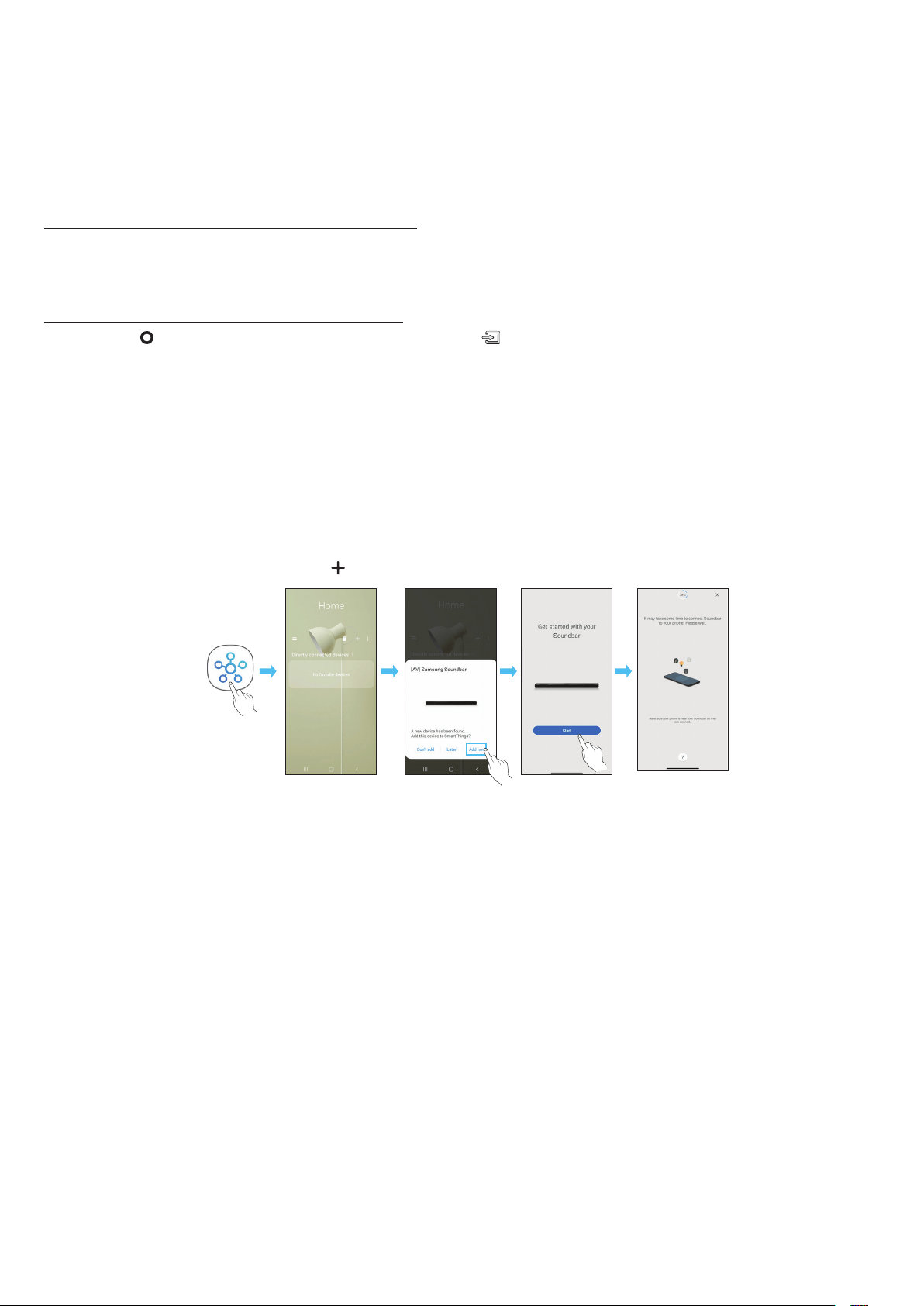
SPA - 22
• Un dispositivo Bluetooth puede presentar ruido o puede no funcionar correctamente en las siguientes condiciones:
‒ Si una parte de su cuerpo está en contacto con el transceptor de señal del dispositivo Bluetooth o la Soundbar
‒ En esquinas o lugares donde hay un obstáculo cerca, como en las paredes o divisiones, donde puedan producirse cambios eléctricos.
‒ Cuando se expone a interferencias de radio de otros productos que operan en los mismos rangos de frecuencia, como equipos médicos, hornos
microondas y dispositivos de LAN inalámbrica.
‒ Los obstáculos como puertas y paredes pueden afectar la calidad del sonido incluso cuando los dispositivos están dentro del alcance efectivo.
• Tenga en cuenta que la Soundbar no se puede emparejar con otros dispositivos Bluetooth mientras usa la opción Bluetooth.
• Este dispositivo inalámbrico puede causar interferencia eléctrica durante el funcionamiento.
Puede desconectar un dispositivo Bluetooth de la Soundbar. Para obtener instrucciones, consulte el manual de usuario del dispositivo Bluetooth.
• La Soundbar se desconectará.
• Cuando la Soundbar se desconecta del dispositivo Bluetooth, la Soundbar mostrará "BT DISCONNECTED" en la pantalla delantera.
Presione el botón en la parte superior de la Soundbar o el botón en el control remoto para salir del modo “BT”.
• La desconexión toma tiempo porque el dispositivo Bluetooth debe recibir la respuesta de la Soundbar. (El tiempo de desconexión puede variar según el
modelo de dispositivo Bluetooth).
• Cuando la Soundbar se desconecta del dispositivo Bluetooth, la Soundbar mostrará "BT DISCONNECTED" en la pantalla delantera.
Para conectar la Soundbar a un dispositivo móvil a través de una red inalámbrica (wi), se necesita la aplicación .
1. Instale e inicie la aplicación en su dispositivo móvil (teléfono inteligente o tableta).
2. En la aplicación, siga las instrucciones de la pantalla para agregar la Soundbar.
• Es posible que la ventana emergente automática (la segunda captura de pantalla a continuación) no se muestre en algunos dispositivos.
Si no aparece la ventana emergente, presione “ ” en la pantalla . La Soundbar se agrega a la aplicación.
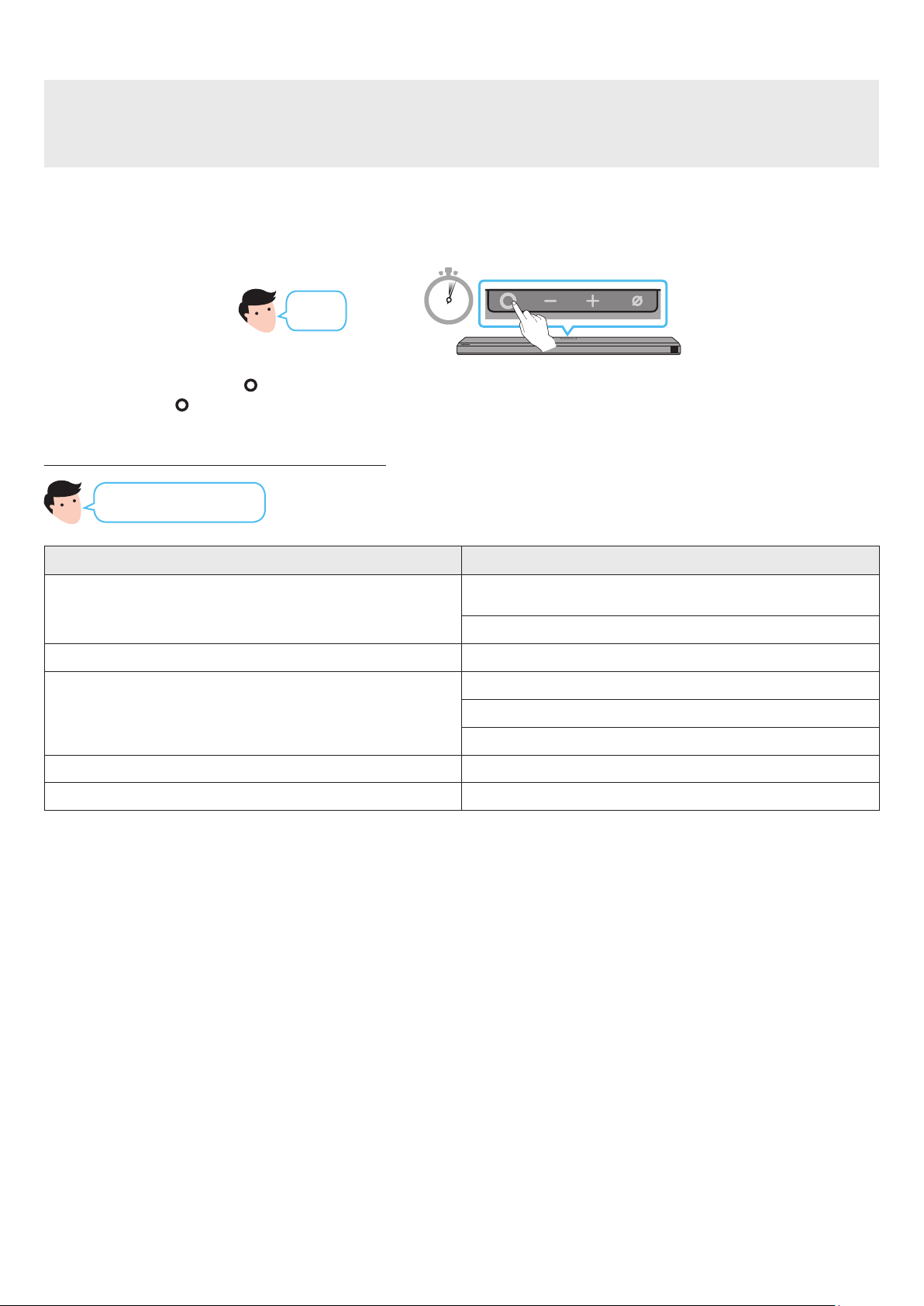
SPA - 23
• Amazon Alexa es un servicio proporcionado por Amazon.
•
•
•
Con Alexa, puede reproducir música, escuchar las noticias, consultar el pronóstico del clima y controlar los electrodomésticos de su hogar.
Para utilizar Amazon Alexa, se necesita una cuenta de Amazon a n de conectar la Soundbar a través de la red.
1. Instale y abra la aplicación en su dispositivo móvil.
2. Ingrese a la cuenta de Alexa siguiendo las instrucciones que se brindan en la aplicación. Luego, inicie sesión en el servicio.
3 Sec
O
3. Llame a Alexa o presione el botón
en la Soundbar durante 3 segundos para usar el servicio de Alexa.
• Presione el botón durante 3 segundos para llamar a Alexa. Hable mientras tiene el botón presionado para activar el reconocimiento
de voz.
Control del volumen
".
".
Escuchar contenido que se transmite desde Amazon Music ”.
Control de reproducción
”.
”.
”
Información del tiempo ”
Programación del temporizador ".
SPA - 24
•
•
•
• Este servicio es ofrecido por Amazon y se puede cancelar en cualquier momento. Samsung no asume ninguna responsabilidad por la disponibilidad
del servicio.
• La pantalla de la aplicación Amazon Alexa está sujeta a cambios sin previo aviso.
Utilice un producto de Amazon Echo para controlar su Soundbar y disfrute de los servicios de música provistos por Amazon Echo.
Para utilizar Amazon Alexa, se necesita una cuenta de Amazon a n de conectar la Soundbar a través de la red.
1. Instale y abra la aplicación en su dispositivo móvil.
2. Ingrese a la cuenta de Alexa siguiendo las instrucciones que se brindan en la aplicación. Luego, inicie sesión en el servicio.
• El servicio de Amazon Echo que puede utilizar con su Soundbar solo se limita a música. Otros servicios brindados por Amazon Echo, como las noticias
y el clima, solo se pueden utilizar mediante su producto Amazon Echo.
+
”
Establecer el volumen en 5 "
Subir el volumen "
Silenciar el sonido "
Escuchar una estación de radio llamada KISS FM "
Reproducir la siguiente canción "
Detener el audio "
Desactivar el audio "
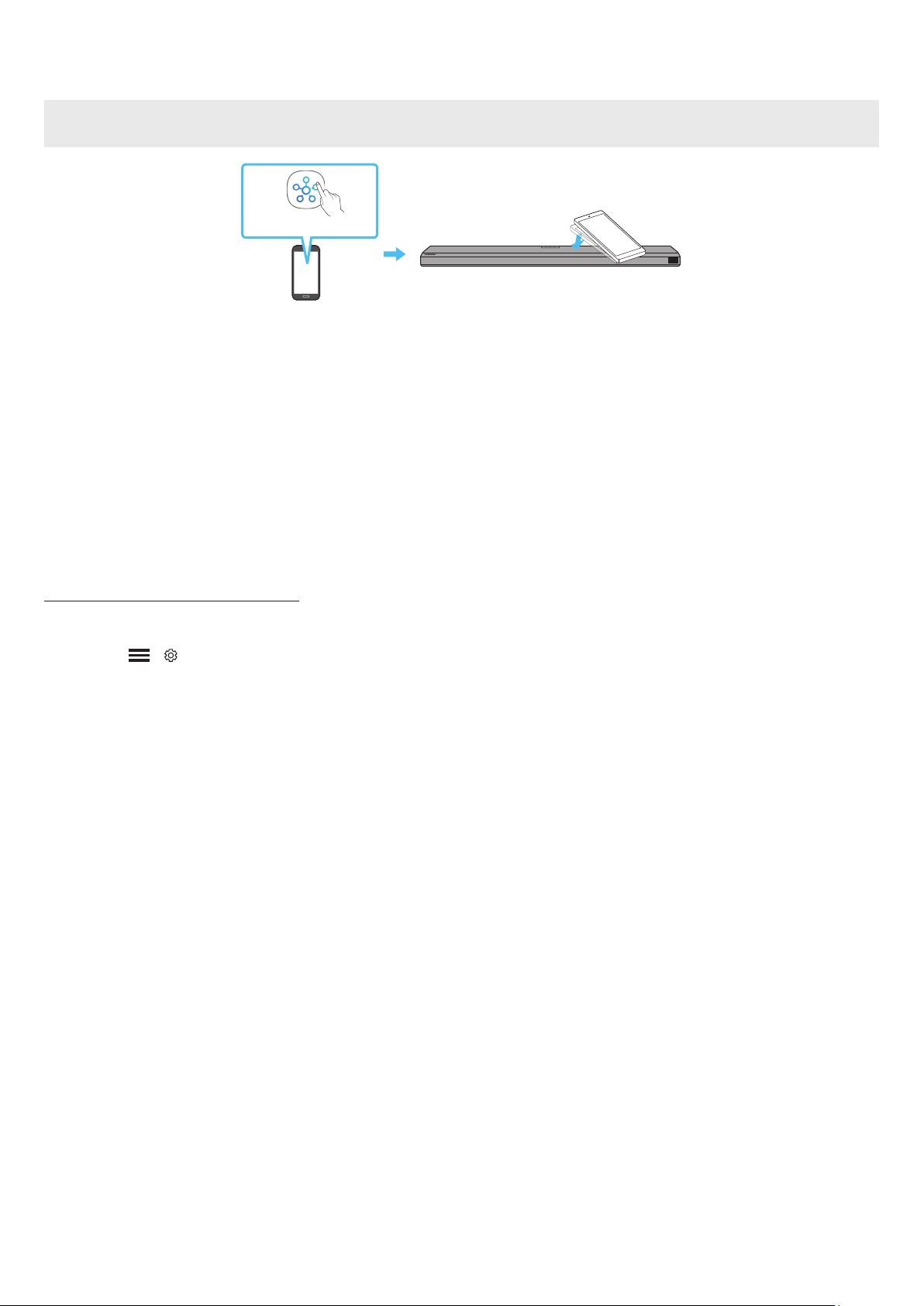
SPA - 25
Toque la Soundbar con su dispositivo móvil para reproducir el sonido del contenido del dispositivo móvil a través de la Soundbar.
• Es posible que esta función no sea compatible, según el dispositivo móvil.
• Esta función solo es compatible con dispositivos móviles Samsung con Android 8.1 o una versión posterior.
1. Active la función en su dispositivo móvil.
• Para obtener información detallada acerca de cómo activar la función, consulte “” a continuación.
2. Toque la Soundbar con el dispositivo móvil. Seleccione “” en la ventana de visualización.
Se establece una conexión entre el dispositivo móvil y la Soundbar a través de Bluetooth.
3. Reproduzca el sonido del contenido del dispositivo móvil a través de la Soundbar.
• Esta función conecta un dispositivo móvil a la Soundbar a través de Bluetooth detectando vibraciones que se producen cuando el dispositivo toca la
Soundbar.
• Asegúrese de que el dispositivo móvil no toque una esquina na de la Soundbar. La Soundbar o el dispositivo móvil podrían rayarse o dañarse.
• Se recomienda cubrir el dispositivo móvil con una funda. Toque ligeramente el área ancha en la parte superior de la Soundbar sin aplicar fuerza
excesiva.
• Para utilizar esta función, actualice la aplicación a la última versión.
Es posible que la función no sea compatible, según la versión de la aplicación.
Utilice la aplicación para activar la función .
1. En el dispositivo móvil, ejecute la aplicación .
2. Seleccione ( → ) en la pantalla de la aplicación que aparece en el dispositivo móvil.
3. Congure “” a Activado para permitir que la función pueda usarse cuando acerca un dispositivo móvil a la Soundbar. La función está
activada.
NOTA
• Cuando el dispositivo móvil está en modo ahorro de energía, la función no funciona.
• Es posible que la función no funcione si hay dispositivos cerca de la Soundbar que generan interferencias de radio como dispositivos
eléctricos. Asegúrese de que los dispositivos que pueden generar interferencias de radio estén colocados a suciente distancia de la Soundbar.

SPA - 26
CONEXIÓN A APPLE AIRPLAY 2
Es posible que esta función no esté disponible en algunos países.
• Con AirPlay 2, puede controlar el sistema de audio de su hogar desde su iPhone, iPad, HomePod o Apple TV.
• La Samsung Soundbar admite AirPlay 2 y requiere iOS 11.4 o posterior.
NOTA
• Conrme que la Soundbar esté conectada a la red de Wi-Fi. (Consulte ).
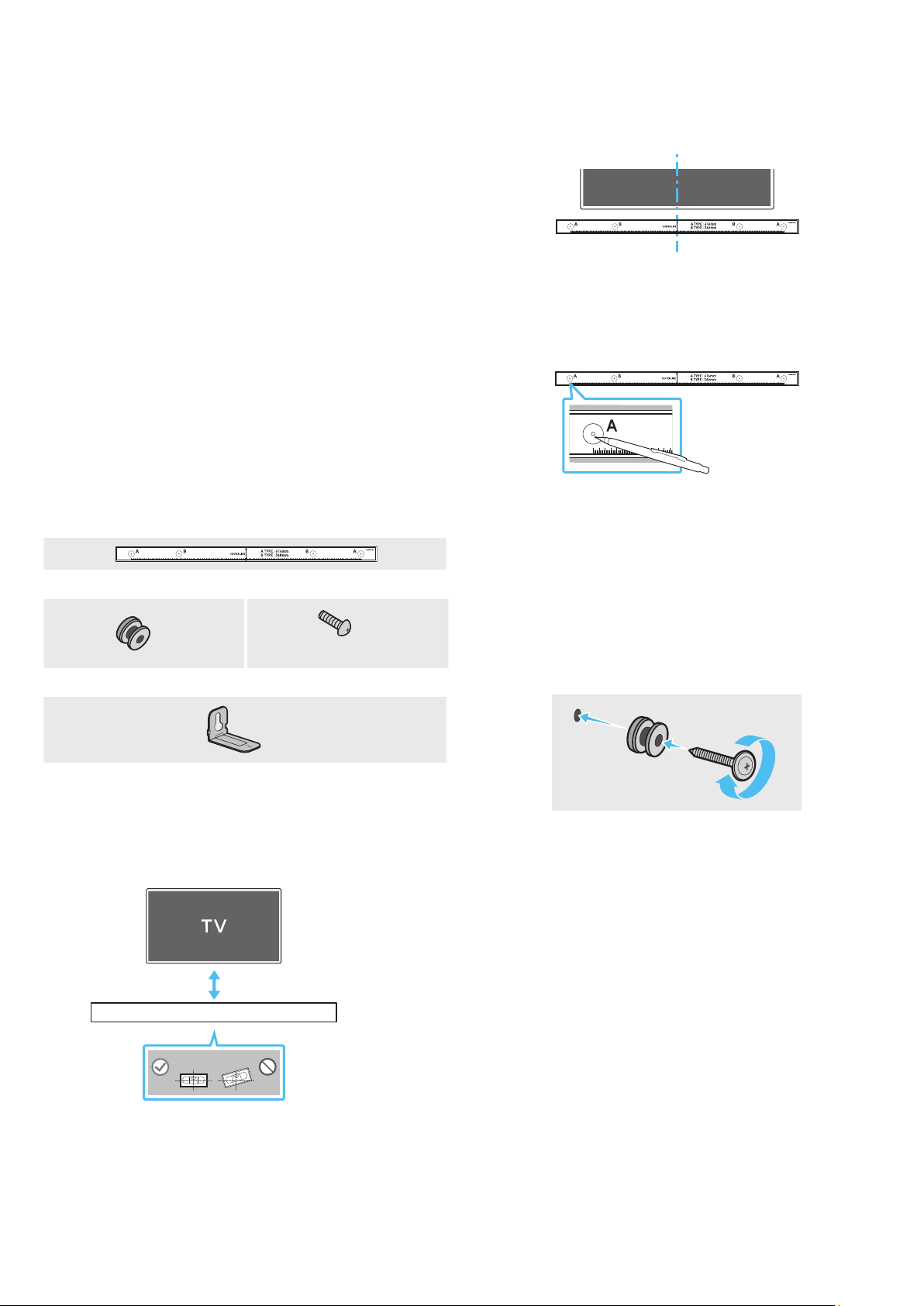
SPA - 27
10 INSTALACIÓN DEL SOPORTE
DE MONTAJE EN LA PARED
• Instálelo solo en una pared vertical.
• No lo instale en un lugar con altas temperaturas o humedad.
• Verique si la pared es lo sucientemente resistente como para
soportar el peso del producto. Si no lo es, refuerce la pared o elija otro
lugar para realizar la instalación.
• Compre y utilice tornillos de jación o pernos adecuados para el tipo
de pared que tiene (placa de sello, placa de hierro, madera, etc.). Si es
posible, je los tornillos de sujeción en los pernos de la pared.
• Compre tornillos para montaje en la pared según el tipo y el grosor de la
pared en la que desea montar la Soundbar.
‒ Diámetro: M5
‒ Longitud: se recomienda 35 mm o más.
• Conecte los cables de la unidad a los dispositivos externos antes de
instalar la Soundbar en la pared.
• Asegúrese de que la unidad esté apagada y desconéctela antes de
instalarla. De lo contrario, se puede producir una descarga eléctrica.
(M4 x L10)
1. Coloque la sobre la supercie de la pared.
• La debe estar nivelada.
• Si su TV está montado en la pared, instale la Soundbar al menos 5 cm
debajo del TV.
2. Haga coincidir la con el
centro del TV (si va a montar la Soundbar debajo del TV) y luego je la
a la pared con cinta adhesiva.
• Si no la va a montar debajo de un TV, coloque la en el
centro del área de instalación.
3. Pase la punta de una lapicera o la punta de un lápiz no por el centro
de las imágenes TIPO A en cada extremo de la Guía para marcar los
oricios en donde irán los tornillos de sujeción. Luego, quite la
.
4. Utilizando una broca del tamaño adecuado, taladre un oricio en la
pared en cada una de las marcas.
• Si las marcas no coinciden con la posición de los pernos, asegúrese
de colocar tacos o pernos de expansión tipo Molly adecuados
dentro de los oricios antes de colocar los tornillos de soporte. Si
utiliza tacos o pernos de expansión tipo Molly, asegúrese de que los
oricios que taladre sean lo sucientemente grandes para los tacos
o pernos que va a utilizar.
5. Pase un tornillo (no suministrado) por cada y luego
atornille cada tornillo con rmeza en un oricio de soporte del tornillo.
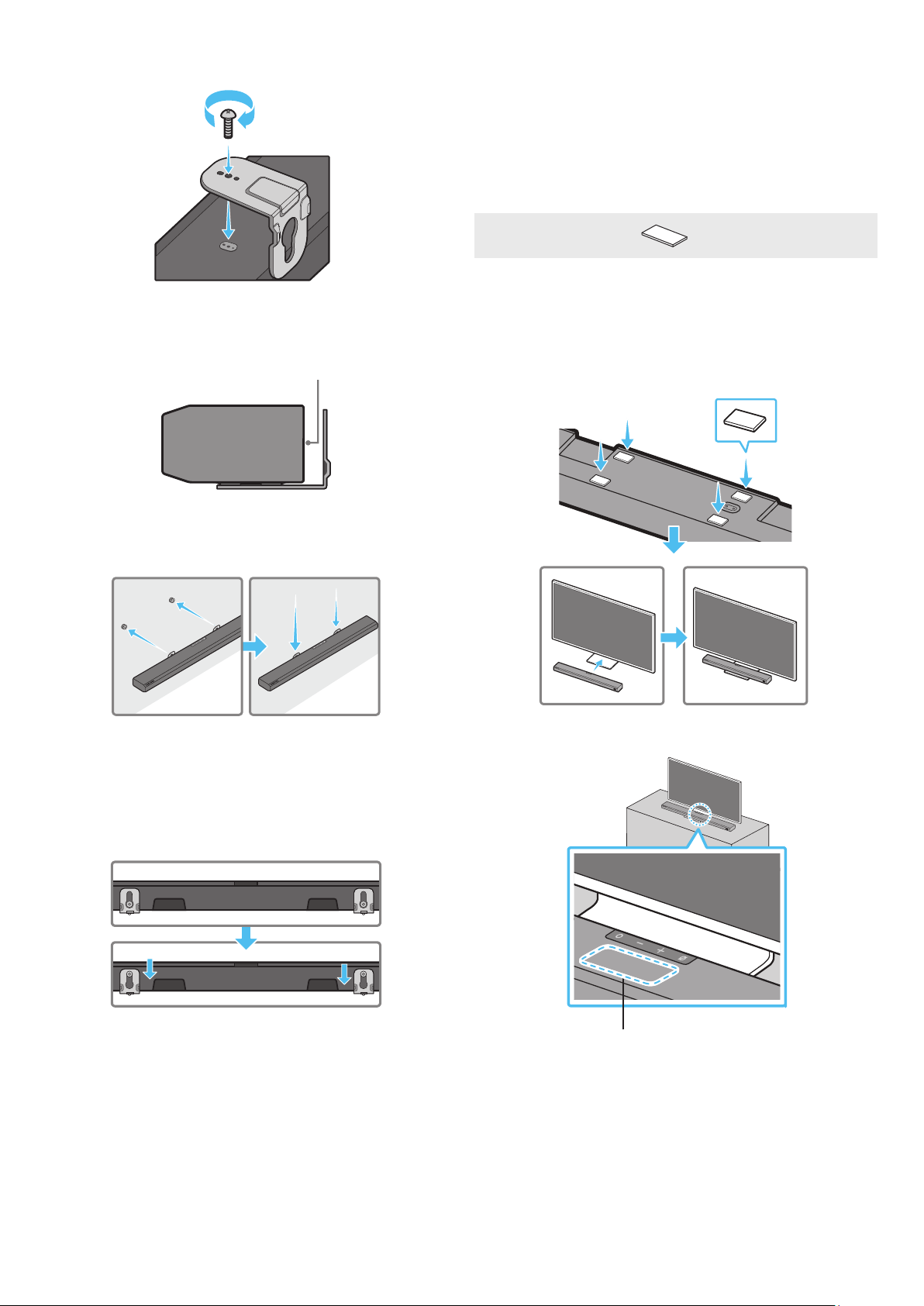
SPA - 28
Instale los en la orientación correcta en la parte
inferior de la Soundbar utilizando 2 .
• Al realizar el montaje, asegúrese de que la parte de los ganchos
para colgar queden ubicados detrás de la parte
posterior de la Soundbar.
Para instalar la Soundbar con los ya colocados,
cuélguelos en los que están en la pared.
8. Deslice la Soundbar hacia abajo como se muestra a continuación de
manera que los queden asentados de forma segura
sobre los .
• Inserte los en la parte ancha (inferior) de los
y luego deslícelos hacia abajo de manera que
queden asentados de manera segura sobre los .
11 INSTALACIÓN DE LA
SOUNDBAR SOBRE UN
SOPORTE PARA TV
Para instalarla, adhiera los a la parte inferior de la Soundbar
antes de colocarla sobre el soporte para TV. Asegúrese de colocar los
de forma tal que no sobresalgan de los bordes del soporte del TV.
Consulte la imagen a continuación.
Coloque la Soundbar en un soporte para TV.
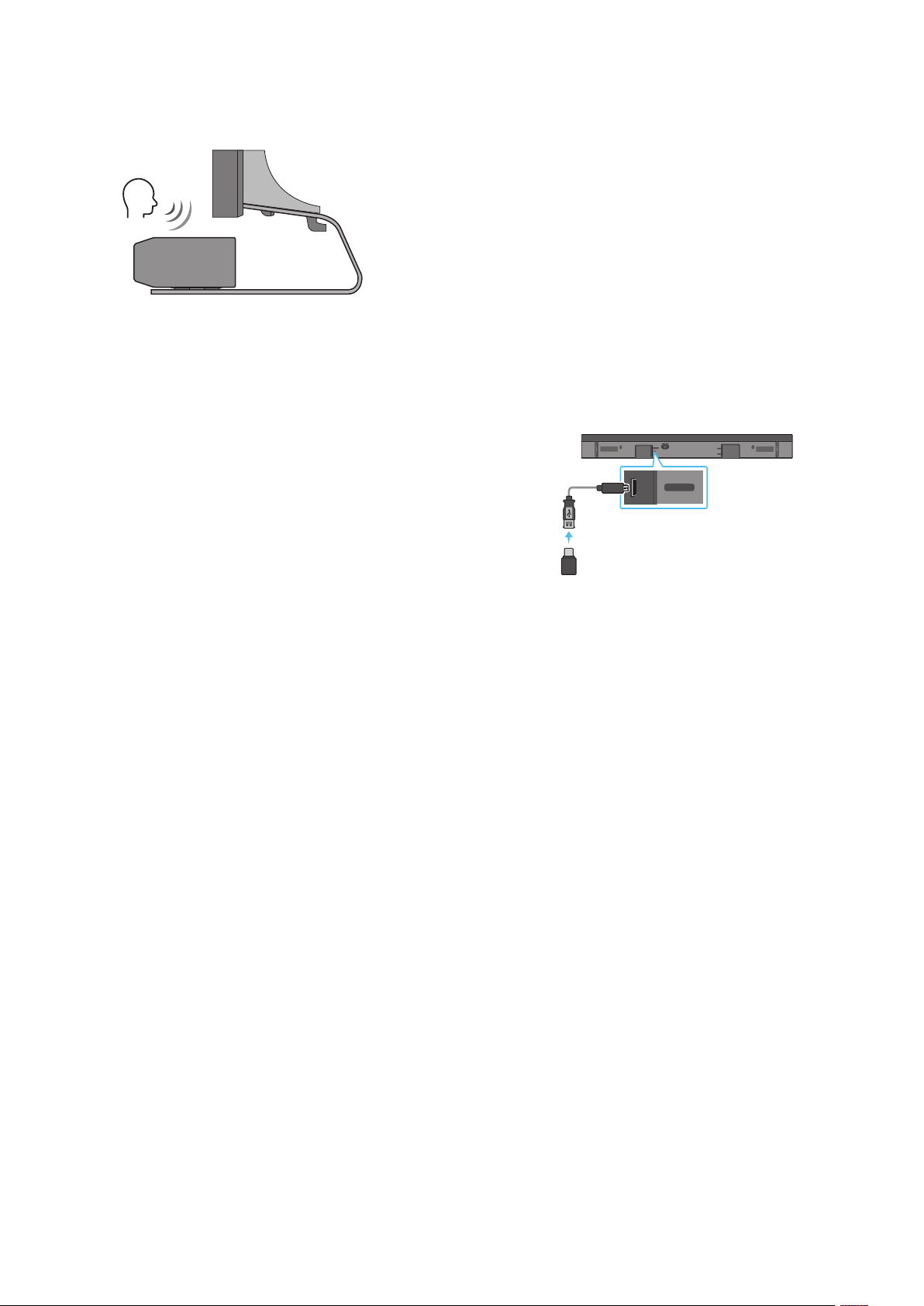
SPA - 29
Como se indica en la imagen, alinee el centro de la Soundbar con el centro
del TV, y coloque con cuidado la Soundbar en el soporte para TV.
En ese momento, coloque el micrófono en la parte delantera del soporte a
n de que no interera con el reconocimiento de voz.
TV
NOTA
• Asegúrese de que la Soundbar esté colocada sobre una supercie plana
y sólida.
• Si no hay espacio suciente desde el TV, puede haber problemas
acústicos y con el reconocimiento de voz.
12 ACTUALIZACIÓN DE
SOFTWARE
Cuando la Soundbar está conectada a Internet, las actualizaciones de
software se realizan de forma automática, incluso cuando la Soundbar está
apagada.
• Para usar la función de actualización automática, la Soundbar debe estar
conectada a Internet.
La conexión wi de la Soundbar se anulará si se desconecta el cable de
alimentación o si se corta la corriente eléctrica. Si se corta la corriente
eléctrica, cuando se restaure, o si usted vuelve a conectar el cable de
alimentación, encienda la Soundbar y, luego, vuelva a conectarla a
Internet.
DIGITAL AUDIO IN
(OPTICAL)
SERVICE
DC 19V
HDMI
NETWORK ID SET
HDMI TO TV
(eARC/ARC)
HDMI IN
HDMI OUT
(TV-ARC)
DIGITAL AUDIO IN
(OPTICAL)
SERVICE
DC 19V
Cuando haya una actualización disponible, puede actualizar la Soundbar
conectando la unidad USB que contiene el rmware de actualización al
puerto SERVICE de la Soundbar.
1. Vaya al sitio web de Samsung Electronics (www.samsung.com) →
busque el nombre del modelo en la opción del menú de atención al
cliente.
• Para obtener más información sobre la actualización, consulte la
Guía de Actualización.
2. Descargue el archivo de actualización (por ejemplo, en una memoria
USB).
3. Descomprima el archivo para crear una carpeta con el nombre del
archivo.
4. Guarde la carpeta creada en una memoria USB y luego conéctela a la
Soundbar.
5. Encienda la Soundbar. El producto se actualiza en 3 minutos, y se
muestra el mensaje “UPDATE”.
• Durante la actualización, no lo apague ni retire la memoria USB.
• Si no aparece la leyenda “UPDATE” en la ventana de visualización,
retire el cable de alimentación de la Soundbar y luego vuelva a
conectarlo.
• Cuando está instalada la última versión, no se realiza ninguna
actualización.
• Según el tipo de memoria USB, es posible que no se admita la
actualización.
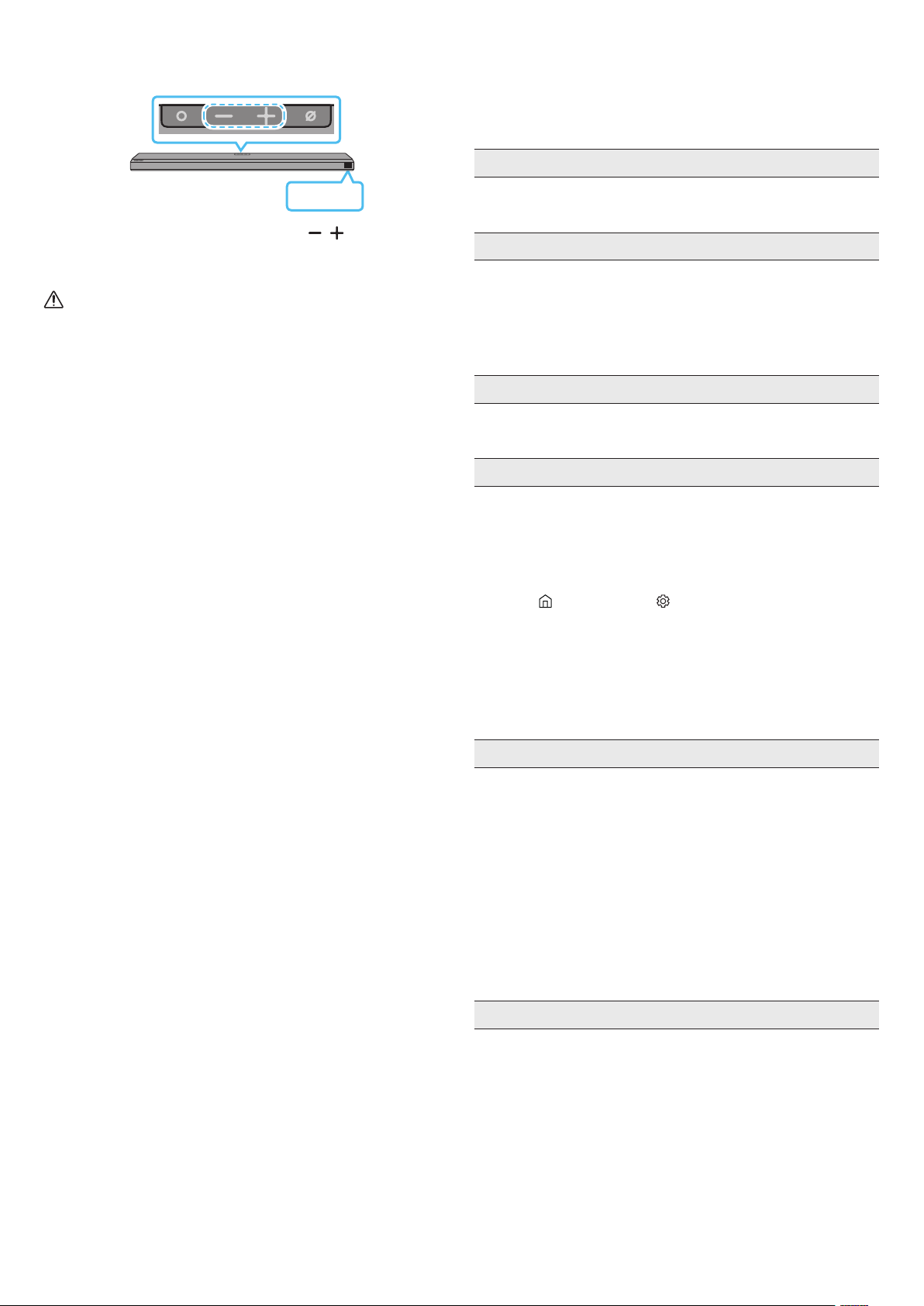
SPA - 30
INIC
Con la Soundbar encendida, presione los botones al
mismo tiempo durante un mínimo de 5 segundos. Aparece “INIT” en la
pantalla y se inicia la Soundbar.
PRECAUCIÓN
• Todas las conguraciones de la Soundbar están inicializadas.
Asegúrese de realizar esto solo cuando sea necesario inicializar.
13 RESOLUCIÓN DE
PROBLEMAS
Antes de buscar ayuda, compruebe lo siguiente.
• Compruebe si el cable de alimentación de la Soundbar se insertó
correctamente en el enchufe.
• Después de quitar el cable de alimentación, vuelva a insertarlo.
• Retire el cable de alimentación del dispositivo externo e intente
nuevamente.
• Si no hay señal, la Soundbar se apaga automáticamente después de un
período determinado. Encienda la Soundbar. (Consulte la página 9).
• Apunte el control remoto directamente a la Soundbar.
• Cambie las pilas por unas nuevas.
• El volumen de la Soundbar está muy bajo o en silencio. Ajuste el
volumen.
• Si hay un dispositivo externo (STB, dispositivo Bluetooth, dispositivo
móvil, etc.) conectado, ajuste el volumen del dispositivo externo.
• Para la salida del sonido del TV, seleccione Soundbar. (TV Samsung:
Inicio (
) → Conguración ( ) → Sonido → Salida del sonido →
Seleccione Soundbar)
• La conexión del cable a la Soundbar no debe estar oja. Retire el cable
y vuelva a conectar.
• Retire el cable de alimentación por completo, vuelva a conectarlo y
enciéndalo.
• Inicie el producto e intente nuevamente. (Consulte la página 30).
• Compruebe si el indicador LED en la parte posterior del altavoz de
graves está encendido en color azul. Vuelva a conectar la Soundbar
y el altavoz de graves si el indicador parpadea en azul o está en rojo.
(Consulte la página 12).
• Puede haber problemas de funcionamiento si hay un obstáculo entre
la Soundbar y el altavoz de graves. Mueva los dispositivos a un área
alejada de los obstáculos.
• Otros dispositivos que envían señales de radiofrecuencia en las
proximidades pueden interrumpir la conexión.
Mantenga su altavoz alejado de tales dispositivos.
• Retire y vuelva a conectar el enchufe de alimentación.
• El volumen original del contenido que está reproduciendo puede
ser bajo. Intente ajustar el nivel del altavoz de graves. (Consulte la
página 10).
• Acerque el altavoz de graves hacia usted.

SPA - 31
• Compruebe si el cable HDMI se conectó correctamente a la terminal
ARC (Consulte la página 15).
• Si hay un dispositivo externo conectado (decodicador, consola de
juegos, etc.), es posible que no se pueda realizar la conexión. Conecte
la Soundbar directamente.
• Es posible que HDMI-CEC no esté activado en el TV. Encienda el CEC
en el menú del TV. (TV Samsung: Inicio (
) → Conguración ( ) →
General → Gestión de dispositivos externos → Anynet+ (HDMI-CEC)
ON)
• Para establecer la conexión con eARC, la función eARC en el
menú del TV debe estar encendida. (TV Samsung: Inicio ( ) →
Conguración ( ) → Sonido → Conguración experta → Modo HDMI-
eARC (Automático))
• Es posible que su dispositivo no pueda reproducir la señal de entrada.
Cambie la salida de audio del TV a PCM o Dolby Digital. (Si se trata
de un TV Samsung: Inicio (
) → Conguración ( ) → Sonido →
Conguración experta → Formato de audio de salida digital)
• Cuando conecte un dispositivo nuevo, cambie a “BT PAIRING” para
establecer la conexión. (Presione el botón
PAIR del control remoto o
presione el botón ) en el cuerpo de
la Soundbar por al menos 5 segundos).
• Si la Soundbar está conectada a otro dispositivo, primero desconéctelo
para poder cambiarlo.
• Vuelva a conectarlo después de quitar la lista de parlantes Bluetooth
del dispositivo al que se quiere conectar. (TV Samsung: Inicio ( ) →
Conguración ( ) → Sonido → Salida del sonido → Lista de altavoces
Bluetooth)
• La conexión de TV automática puede estar deshabilitada. Mientras la
Soundbar está en modo “BT READY”, mantenga presionado el botón
en el control remoto de la Soundbar durante 5 segundos
para seleccionar ON-TV CONNECT. Si ve la leyenda OFF-TV CONNECT,
mantenga presionado el botón nuevamente durante
5 segundos para cambiar la selección.
• Retire y vuelva a conectar el enchufe de alimentación; luego, intente
nuevamente.
• Inicie el producto e intente nuevamente. (Consulte la página 30).
• Algunos dispositivos, p. ej., microondas, enrutador inalámbrico, etc.,
pueden generar interferencias de radio si están ubicados demasiado
cerca de la Soundbar.
• Si el dispositivo que está conectado mediante Bluetooth se aleja
demasiado de la Soundbar, eso puede hacer que no haya sonido.
Acerque el dispositivo a la Soundbar.
• Si parte de su cuerpo está en contacto con el transceptor Bluetooth o
si el producto está sobre un mueble de metal, eso puede hacer que no
haya sonido. Compruebe el entorno de instalación y las condiciones
de uso.
• Compruebe si su enrutador inalámbrico está encendido.
• Apague el enrutador, vuelva a encenderlo e intente nuevamente.
• La Soundbar no se conecta si la señal inalámbrica es demasiado débil.
Intente acercar el enrutador a la Soundbar o eliminar los obstáculos
que pudiera haber entre la Soundbar y el enrutador de ser posible.
• Si su enrutador inalámbrico es nuevo, deberá volver a congurar la red
del altavoz.
• Cuando apaga la Soundbar mientras mira TV, se desactiva la
sincronización de encendido con el TV. Primero, apague el TV.
• La función AVA no está disponible cuando se usa la función
Q-symphony.
• La función AVA no está disponible cuando el micrófono está apagado.
SPA - 32
14 LICENCIA
Dolby, Dolby Atmos, and the double-D symbol are registered
trademarks of Dolby Laboratories Licensing Corporation. Manufactured
under license from Dolby Laboratories. Condential unpublished works.
Copyright © 2012-2020 Dolby Laboratories. All rights reserved.
For DTS patents, see http://patents.dts.com. Manufactured under license
from DTS, Inc. (for companies headquartered in the U.S./Japan/Taiwan)
or under license from DTS Licensing Limited (for all other companies).
DTS, DTS:X Pro, DTS:X, and the DTS:X logo are registered trademarks or
trademarks of DTS, Inc. in the United States and other countries. © 2020
DTS, Inc. ALL RIGHTS RESERVED.
The terms HDMI and HDMI High-Denition Multimedia Interface,
and the HDMI Logo are trademarks or registered trademarks of HDMI
Licensing Administrator, Inc. in the United States and other countries.
• Usa tu teléfono, tablet o computadora como control remoto de
Spotify. Para más información, entra a spotify.com/connect
• El software de Spotify está sujeto a licencias de terceros que puedes
encontrar aquí: https://www.spotify.com/connect/third-party-
licenses.
• Apple, AirPlay, iPhone, iPad, HomePod, and Apple TV are trademarks
of Apple Inc., registered in the U.S. and other countries.
• Use of the Works with Apple badge means that an accessory has
been designed to work specically with the technology identied
in the badge and has been certied by the developer to meet Apple
performance standards.
15 AVISO SOBRE LA LICENCIA
DE CÓDIGO ABIERTO
Para enviar consultas y solicitudes relacionadas con el código abierto,
comuníquese con Samsung Open Source (http://opensource.samsung.
com).
NOTAS IMPORTANTES
SOBRE EL SERVICIO
Las guras e ilustraciones se proporcionan en este manual de usuario solo
a modo de referencia y pueden ser diferentes del aspecto real del producto.

SPA - 33
ESPECIFICACIONES Y GUÍA
Nombre del modelo HW-Q800A
Requisitos de electricidad 19 V
(solo México)
Consumo de energía 28 W (solo México)
Peso 3.6 kg
Dimensiones (An. x Al. x Prof.) 980.0 x 60.0 x 115.0 mm
Rango de temperatura de funcionamiento De +5 °C a +35 °C
Rango de humedad de funcionamiento 10 % ~ 75 %
AMPLIFICADOR
Potencia de salida nominal ((30 W x 4) + (20 W x 2) + 10 W) + 160 W
Formatos de reproducción admitidos
Dolby 5.1ch / Dolby Digital Plus / Dolby TRUE HD / Dolby ATMOS
DTS 5.1ch / DTS HD / DTS-HD Master Audio / DTS:X / LPCM 8Ch
Nombre del altavoz de graves PS-WA85B
Requisitos de electricidad 110-127 V ~50/60 Hz (solo México)
Consumo de energía 28 W (solo México)
Peso 9.8 kg
Dimensiones (An. x Al. x Prof.) 210.0 x 403.0 x 403.0 mm
AMPLIFICADOR
Potencia de salida nominal 160 W
NOTA
• Samsung Electronics Co., Ltd se reserva el derecho de cambiar las especicaciones sin previo aviso.
• El peso y las dimensiones son aproximados.
• La operación de este equipo está sujeta a las siguientes dos condiciones:
(1) es posible que este equipo o dispositivo no cause interferencia perjudicial y
(2) este equipo o dispositivo debe aceptar cualquier interferencia, incluyendo la que pueda causar su operación no deseada.
Wi-Fi
Método de desactivación del puerto
Presione el botón ID SET en el panel inferior de la Soundbar durante 30 segundos para activar/
desactivar el Wi-Fi.
Bluetooth
Método de desactivación del puerto
Presione el botón NETWORK en el panel inferior de la Soundbar durante 30 segundos para
activar/desactivar el Bluetooth.
© 2021 Samsung Electronics Co., Ltd. All rights reserved.
Contact SAMSUNG WORLD WIDE
If you have any questions or comments relating to Samsung products, please contact the SAMSUNG customer care Center.
Country Samsung Service Center
Web Site
MEXICO 800-SAMSUNG
www.samsung.com/mx/support
BRAZIL
0800 555 0000 (Demais cidades e regiões)
4004-0000 (Capitais e grandes centros)
www.samsung.com/br/support
COSTA RICA 00-800-1-SAMSUNG (726-7864)
www.samsung.com/latin/support (Spanish)
www.samsung.com/latin_en/support (English)
DOMINICAN REPUBLIC 1-800-751-2676
ECUADOR 1-800-SAMSUN (72-6786)
EL SALVADOR 8000-SAMSUNG (726-7864)
GUATEMALA 1-800-299-0033
HONDURAS 800-2791-9111
JAMAICA 1-800-SAMSUNG (726-7864)
www.samsung.com/latin_en/support (English)
NICARAGUA 001-800-5077267
www.samsung.com/latin/support (Spanish)
www.samsung.com/latin_en/support (English)
PANAMA 800-0101
PUERTO RICO 1-800-682-3180
TRINIDAD & TOBAGO 1-800-SAMSUNG(726-7864)
VENEZUELA 0-800-100-5303
COLOMBIA
Bogotá en el 600 12 72
Sin costo en todo el pais 01 8000 112 112
Y desde tu celular #726
www.samsung.com/co/support
CHILE 800 726 786
www.samsung.com/cl/support
BOLIVIA 800 107 260
PERU 080077708 Desde teléfonos jos, públicos o celulares
www.samsung.com/pe/support
ARGENTINA 0800-555-SAMS(7267)
www.samsung.com/ar
URUGUAY 0800-SAMS(7267)
www.samsung.com/uy
PARAGUAY 0800-11-SAMS(7267)
www.samsung.com/py
--------------SOLO MÉXICO---------------
IMPORTADO POR : SAMSUNG ELECTRONICS MÉXICO S.A. DE C.V.
GENERAL MARIANO ESCOBEDO 476 PISO 8
COL. ANZURES, DELEGACIÓN MIGUEL HIDALGO MÉXICO, CIUDAD DE MÉXICO C.P. 11590
TEL : 01 (55) 5747-5100 / 01 800 726 7864