
Preparation
Introduction
4
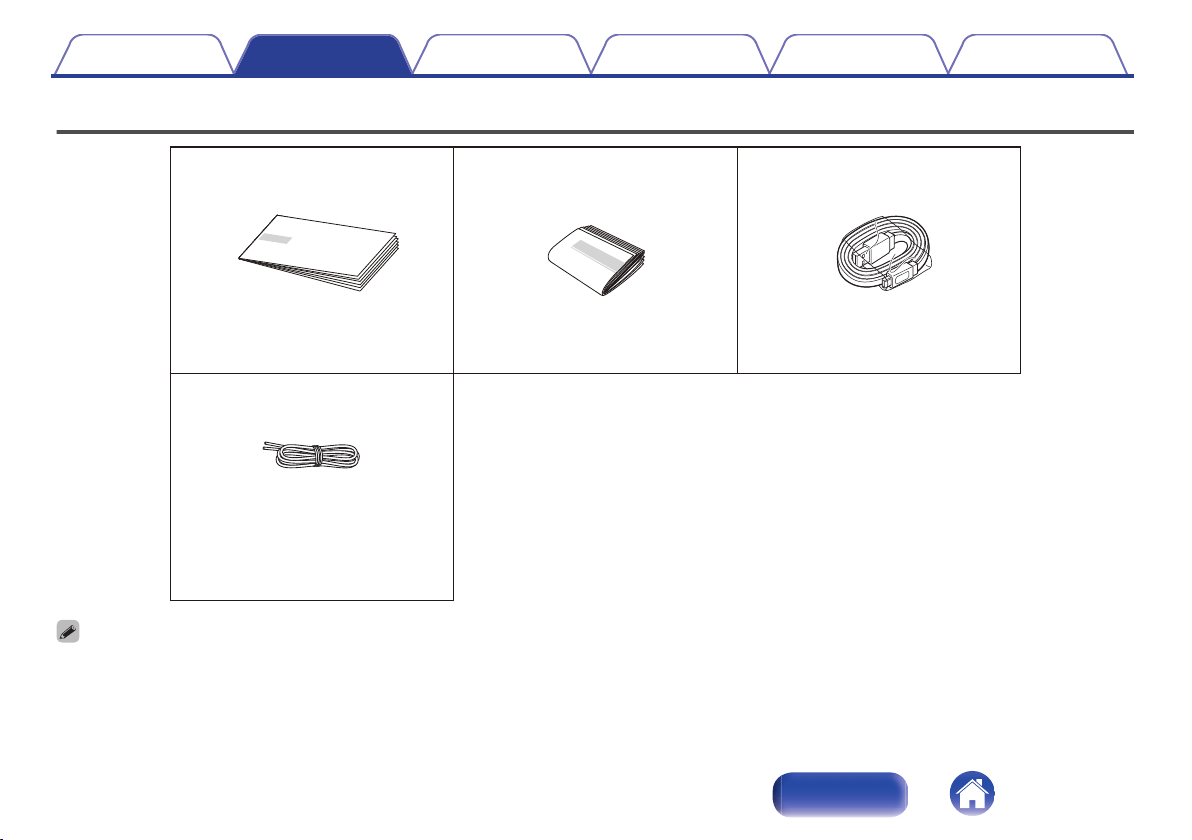
Unpacking
5
Overview
6
Sound Quality
6
Design
6
Operation
6
Features and functions
7
Attaching the Strap
9
Charging
10
Turning the power on
14
Turning the power off
14
Connections
Bluetooth operation
15
Pairing
15
Connecting
15
1: Connecting for the first time
16
2: Reconnecting paired devices
18
Simultaneously connecting multiple Bluetooth devices (Multipoint
function)
19
Envaya Link (DSB50BT)
20
Envaya Link (DSB150BT/DSB250BT)
21
Operation
Adjusting the volume
22
Listening to music using a wired connection
23
Voice Control Using Siri
24
Conducting hands-free phone calls using Envaya
25
Troubleshooting
Tips
27
Troubleshooting
28
Speaker does not turn on
28
Envaya cannot be charged
28
No sound from the speaker
29
Sound is distorted, noisy, or cuts in and out
29
Cannot pair a Bluetooth device with the speaker
30
Speaker is turning off automatically
31
Speaker is malfunctioning
31
Cannot conduct a call
31
Restarting the Envaya
32
Contents Preparation Connections Operation Troubleshooting Appendix
2
Index

Introduction
This manual is for all three models.
For the purposes of this manual, the name “Envaya” is used to refer to the three products.
Their respective model names are used in the model-specific manuals.
.
DSB50BT (Envaya Pocket)
DSB150BT (Envaya Mini)
DSB250BT (Envaya)
Contents
Preparation Connections Operation Troubleshooting Appendix
4
Index
Overview
Sound Quality
0
Despite the compact size of Envaya, powerful playback sound is
produced by using neodymium magnets in the magnetic circuit
and utilizing an original surround shape in the passive radiator.
0
Envaya is compatible with a wide range of codecs, including the
high sound quality Qualcomm
®
aptX™, AAC and SBC.
Envaya automatically selects the optimum compatible codec for
your Bluetooth device (smartphone or tablet) so you can enjoy
high-grade wireless sound.
aptX is also Low Latency compatible to minimize lag in the
picture and audio (Not supported during stereo pairing).
Design
0
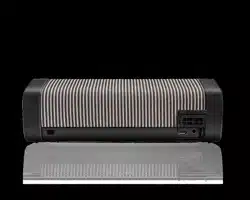
Envaya has a slim stick design for easy carrying.
0
Envaya has a waterproof and dustproof design to keep the unit
safe if it gets wet or is exposed to dust clouds.
This allows it to be used in a wider range of areas, such as by a
pool or in dusty outdoor environments.
Operation
0
Hands-free phone calls can be conducted using Envaya by
pairing with a Bluetooth-compatible mobile phone.
0
If you have two Envaya units*, you can make a stereo pair
connection between them to create spatial stereo sound.
* The two units must be the same model.
* Stereo pair connection does not support aptX’s Low Latency
function.
Contents Preparation Connections Operation Troubleshooting Appendix
6
Index


.
q w e r
A
Call button (T)
Answers incoming calls and ends calls. (v p. 25)
B
Volume adjustment buttons (–,+)
Adjusts the volume up and down. (v
p. 22)
C
Power button (X)
Turns the power on/off. (v
p. 14)
D
Bluetooth button (V)
Press this to start pairing. (v p. 15)
.
q
w
e
r
A
Strap loop
Attach the provided strap here.
B
Cap
Close this cap securely to ensure proper dustproof and waterproof
performance.
C
Micro USB port
Connect Envaya to the USB to AC power adapter (not included) using
the supplied USB cable to charge this unit. (v
p. 10)
D
AUX Input connector
Used to connect an external audio player with an analog output.
(v
p. 23)
Contents Preparation Connections Operation Troubleshooting Appendix
8
Index

Attaching the Strap
The strap can be attached more easily by using the twist tie that holds it in place.
1
Loop the twist tie around the strap.
.
2
Pass the twist tie through the strap loop of this unit.
.
3
When the loop of the strap appears on the other side,
insert both ends of the strap through the loop to secure
it in place.
.
4
Tie the ends of the strap securely.
.
NOTE
0
Do not spin Envaya around holding the strap, as doing so may cause injury or
damage.
Contents Preparation Connections Operation Troubleshooting Appendix
9
Index
Charging
Envaya can be charged and operated on battery power. It can also be operated from an AC power source by connecting it to the USB to AC power
adapter (available commercially) using the supplied USB cable.
Please make sure you charge the battery completely before listening on battery power.
0
After purchase, charge this unit before use.
DSB50BT DSB150BT DSB250BT
Operating life
*1
(hours)
10 11 13
Charging time
*2
(hours)
2.5 3.0 3.5
z1
The playback time may differ depending on the ambient temperature, playback volume, and usage conditions.
z2
If using a USB to AC power adapter with an output of 2.1A or higher.
NOTE
0
Only use the supplied USB cable.
0
Rating of adapter should be DC 5 V, and between 2.1 A and 2.4 A.
0
Must be used with an approved adapter suitable for the countries where the requirement will be applied.
Contents Preparation Connections Operation Troubleshooting Appendix
10
Index
o
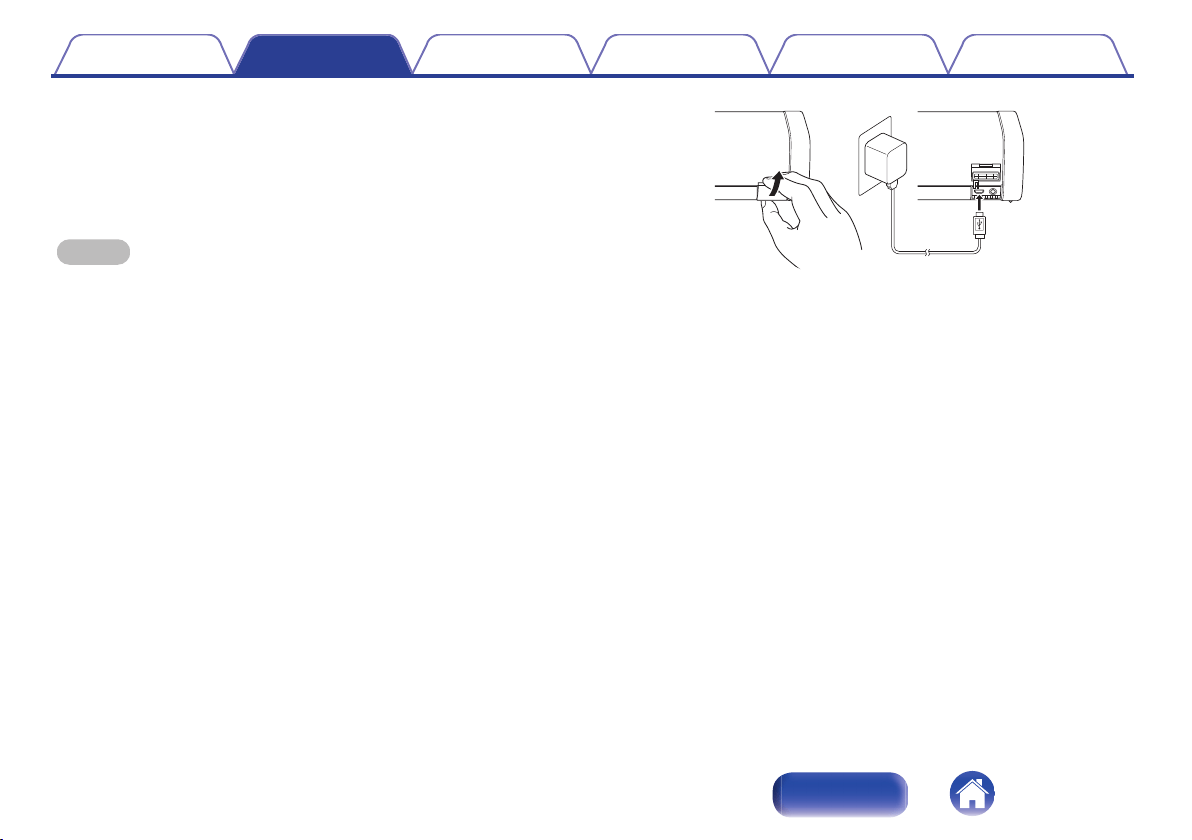
Charging the speaker
A
Open the cap on the rear side.
B
Connect the small end of USB cable to the speaker.
C
Connect the large end of the USB cable to a USB to AC power adapter
and a power source.
NOTE
0
When connecting the dedicated charging cable to the charging port, be sure to
match the cable connector with the shape of the socket. Forcing the connector into
the socket will cause damage.
0
Remove the USB cable and firmly close the cap when charging is completed.
.
Contents Preparation Connections Operation Troubleshooting Appendix
11
Index
o
Battery indicator
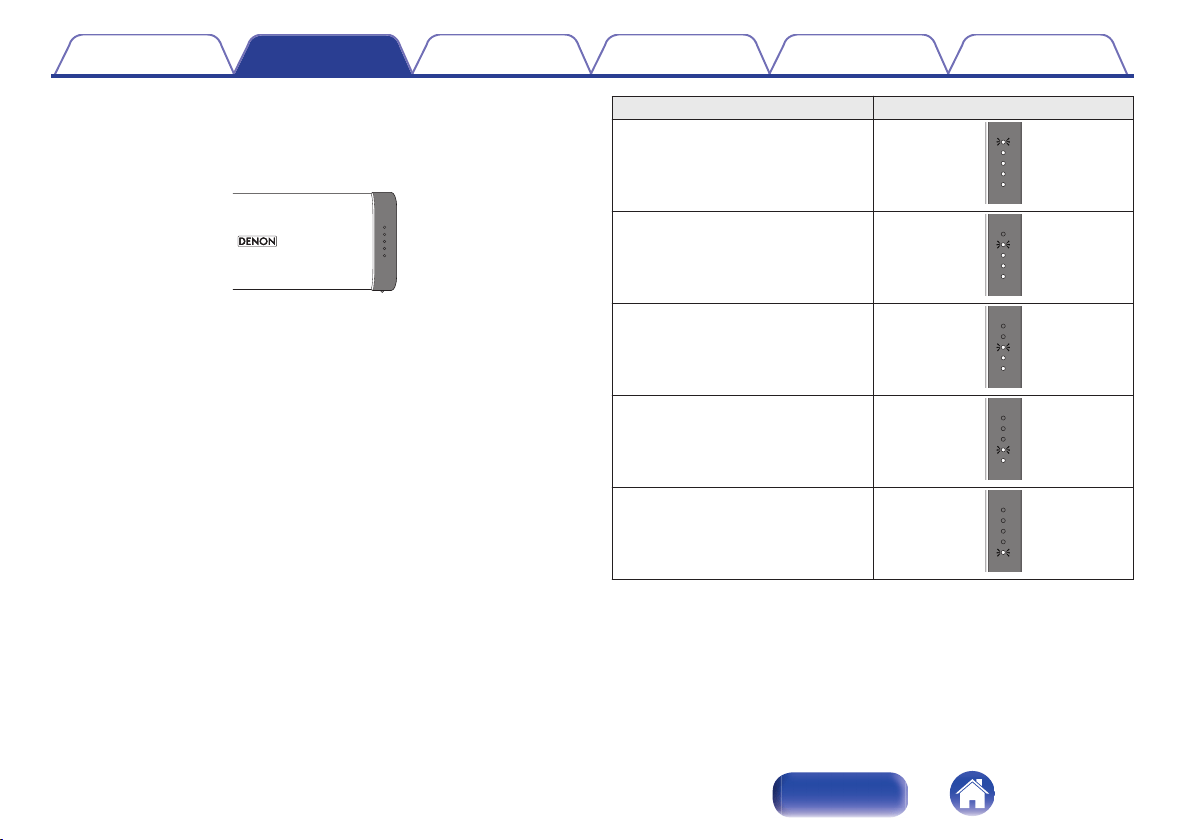
The battery indicator uses 5 LEDs to indicate the status of the charge
process when connected to the USB to AC power adapter.
.
When connected to the USB to AC power adapter (charging)
The battery indicator is always lit when charging.
The battery indicator turns off when charging is complete.
Charging status (Approximate) Status Indicator
81 - 99 %
.
61 - 80 %
.
41 - 60 %
.
21 - 40 %
.
Less than 20 %
.
Contents Preparation Connections Operation Troubleshooting Appendix
12
Index
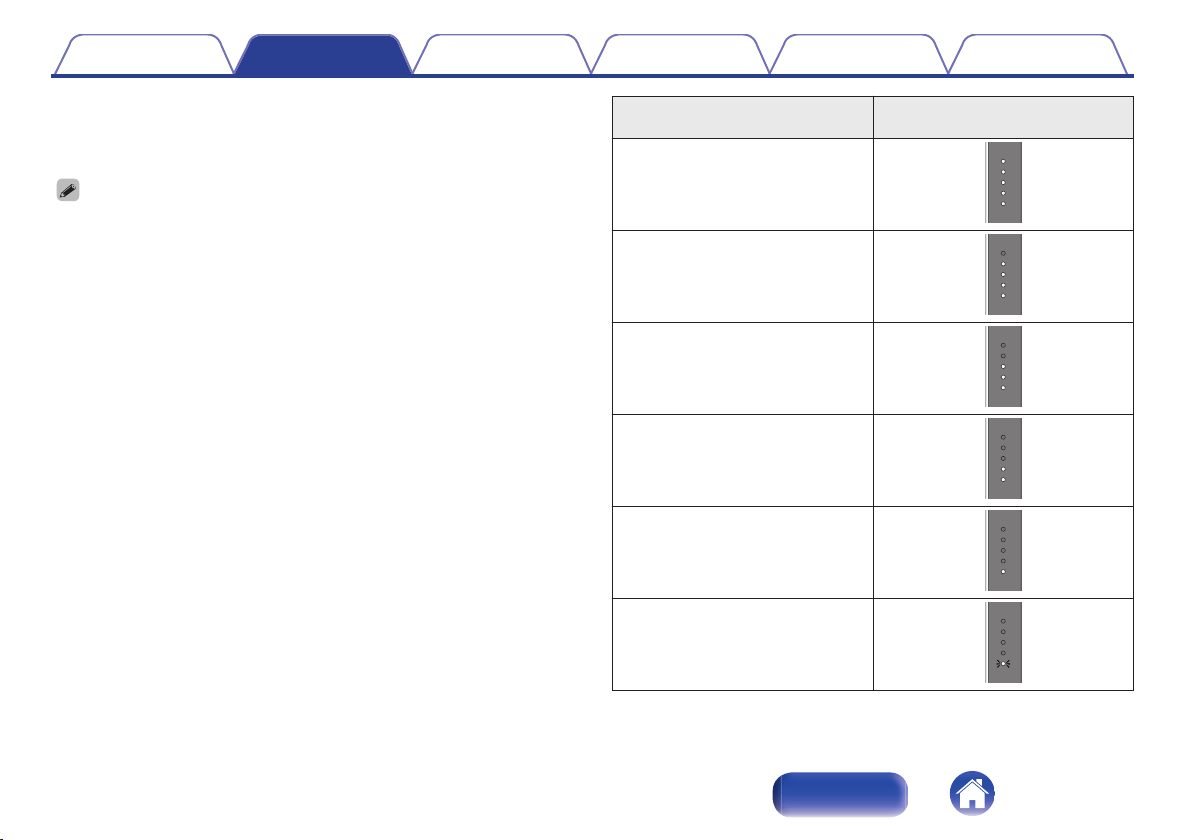
When running on battery power
Press and release the X button to check the remaining battery. The
remaining battery level is displayed for approximately 2 seconds.
0
When the battery indicator flashes on battery power, connect Envaya to the USB
to AC power adapter.
Remaining battery
(Approximate)
Status Indicator
81 - 100 %
.
61 - 80 %
.
41 - 60 %
.
21 - 40 %
.
7 - 20 %
.
Less than 7 %
.
Contents Preparation Connections Operation Troubleshooting Appendix
13
Index
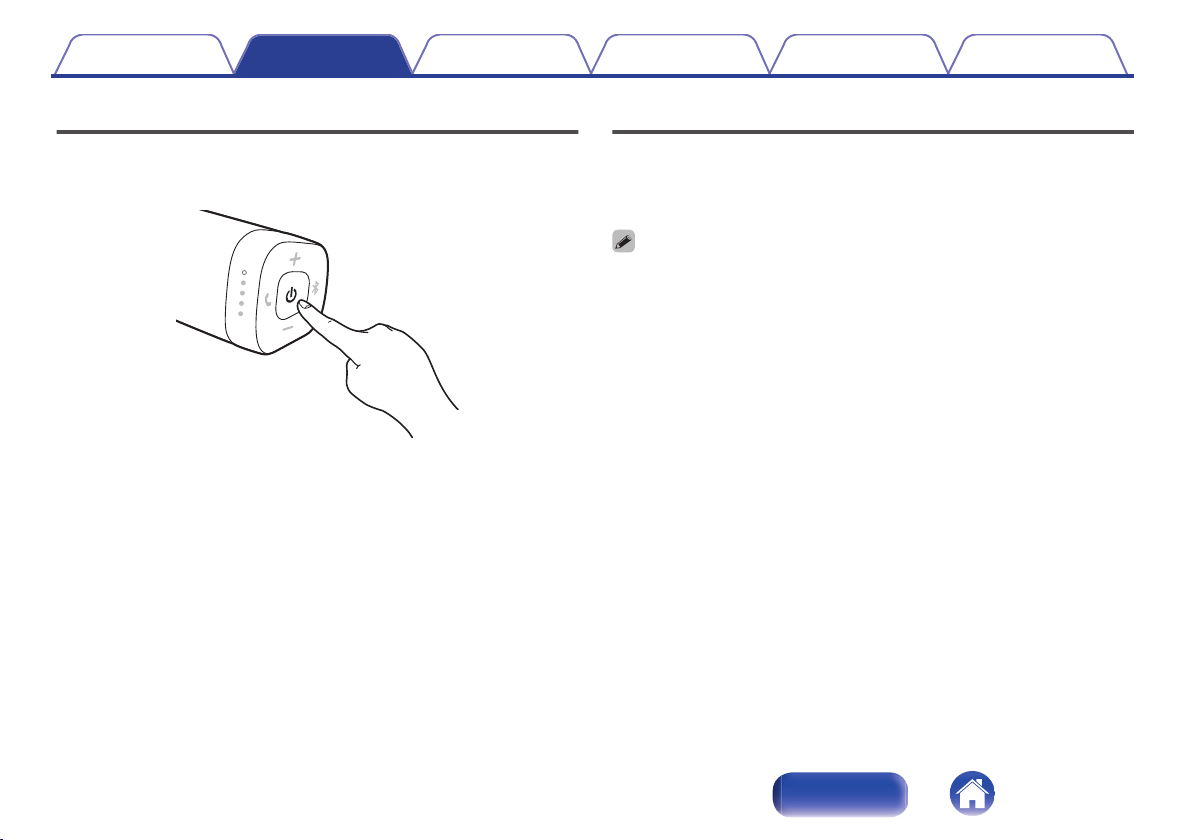
Turning the power on
1
Press and hold X until a notification sound is heard.
The status indicator illuminates and Envaya turns on.
.
Turning the power off
1
Press and hold X until a notification sound is heard.
The status indicator lights turn off and the speaker’s power is turned
off.
0
Envaya automatically turns off when there is no audio output from a Bluetooth
device for approximately 15 minutes and the unit is not operated during this time.
0
If the stereo mini plug cable is connected to Envaya for approximately 8 hours,
Envaya automatically turns off (AUX auto off function).
Contents
Preparation Connections Operation Troubleshooting Appendix
14
Index

Bluetooth operation
You can enjoy listening to music wirelessly by connecting Envaya to your Bluetooth device.
Pairing
Pairing (registration) is an operation that is required in order to connect a
Bluetooth device to Envaya.
When using Bluetooth for the first time, you need to pair Envaya and your
Bluetooth device so they can communicate with each other.
Envaya can store pairing information for up to 8 devices.
.
NOTE
0
Multiple Bluetooth devices cannot be played back at the same time.
Connecting
There are two methods for connecting with Bluetooth devices:
1
Connecting for the first time (v p. 16)
2
Reconnecting paired devices (v p. 18)
Contents Preparation Connections Operation Troubleshooting Appendix
15
Index
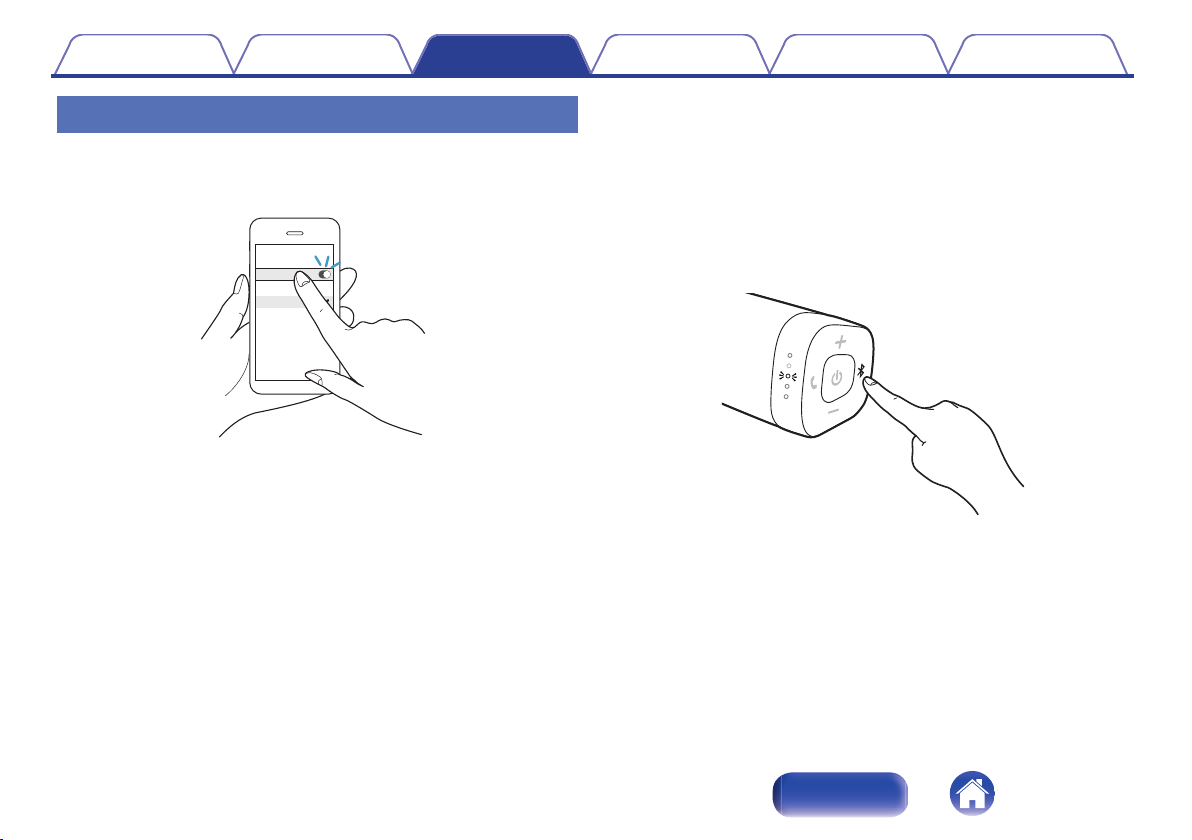
1: Connecting for the first time
1
Turn on Bluetooth on your mobile device.
0
For details, see the Owner’s Manual of your Bluetooth device.
.
Bluetooth
Bluetooth
CHOOSE
Denon xxx
2
Press and hold X until a notification sound is heard.
The status indicator illuminates and Envaya turns on.
0
Envaya automatically enters pairing mode the first time the power
is turned on after purchase. In this case, you do not need to
perform step 3.
3
Press the V button.
The status indicator blinks rapidly and Envaya enters pairing mode.
.
Contents
Preparation Connections Operation Troubleshooting Appendix
16
Index
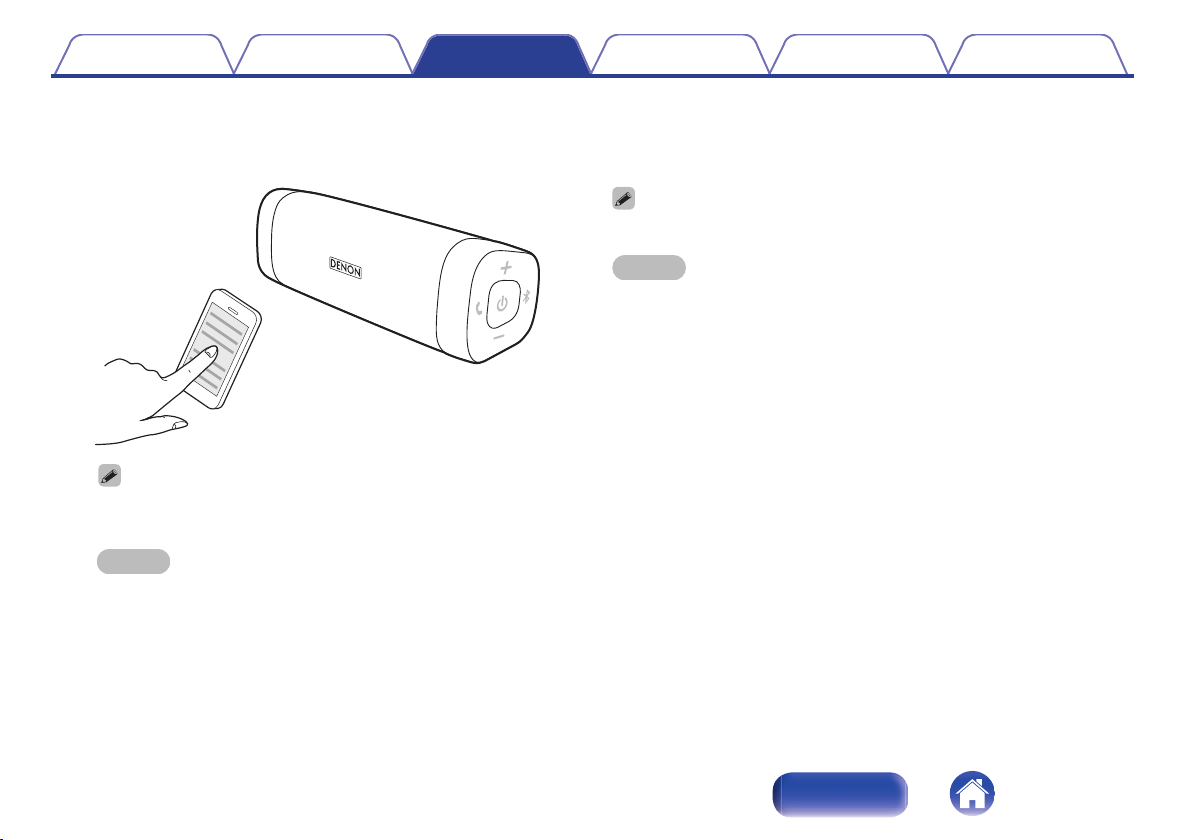
4
Select “Denon Envaya xxx”
*1
from the list of devices
displayed on the screen of your Bluetooth device.
When pairing is complete a notification sound is heard.
.
0
If you are asked to enter a pass key in the Bluetooth device screen, enter
“0000”.
NOTE
0
*1:The name displayed depends on the model.
DSB50BT:Denon Envaya Pocket
DSB150BT:Denon Envaya Mini
DSB250BT:Denon Envaya
5
Listening to music.
Music played back on the Bluetooth device will now play through
your Envaya speaker.
0
Adjust the volume to an appropriate level.
NOTE
0
Envaya remains in the pairing mode for approximately 5 minutes and then will exit
pairing mode. If your device could not connect, please try again from step 3.
0
Envaya cannot pair with Bluetooth devices that require a pass key other than
“0000”.
Contents
Preparation Connections Operation Troubleshooting Appendix
17
Index
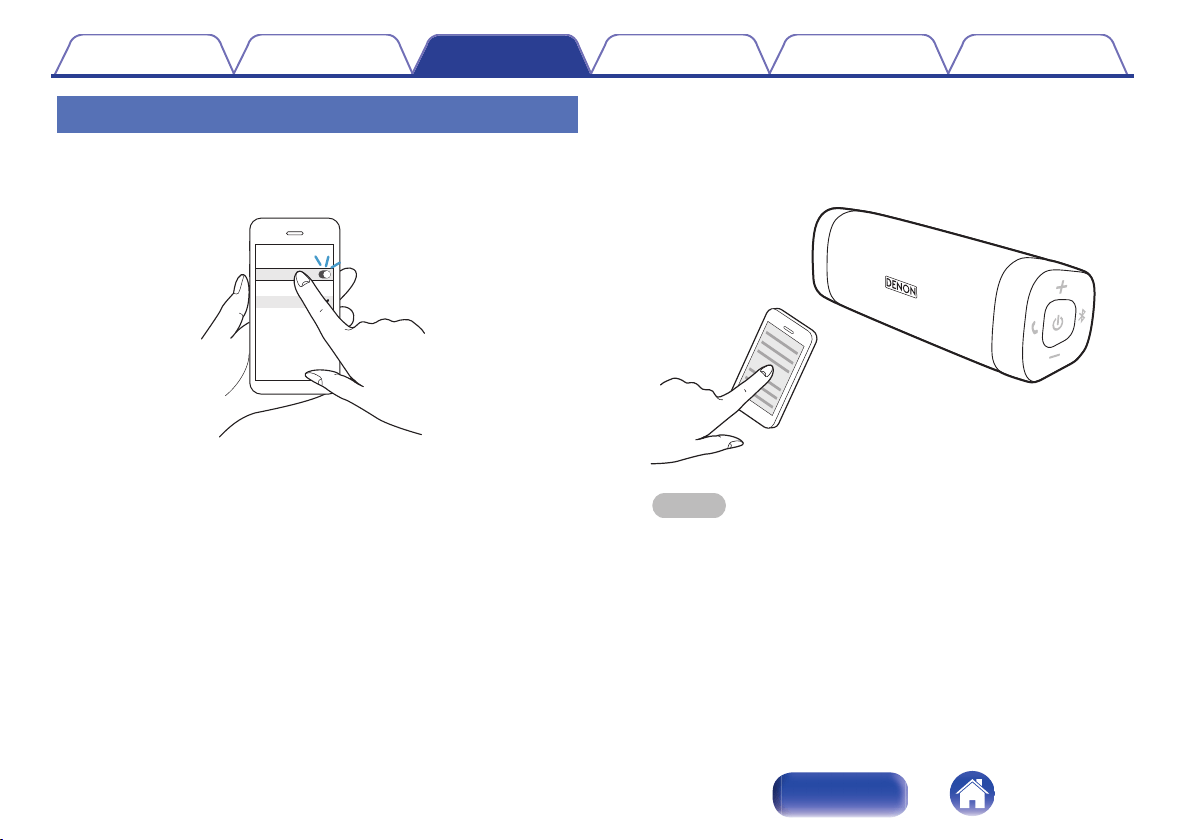
2: Reconnecting paired devices
1
Turn on Bluetooth on your mobile device.
0
For details, see the Owner’s Manual of your Bluetooth device.
.
Bluetooth
Bluetooth
CHOOSE
Denon xxx
2
Press and hold X until a notification sound is heard.
The status indicator illuminates and Envaya turns on.
0
If the last device which was connected to Envaya is turned on, in
range, and has Bluetooth enabled, it automatically connects to
Envaya.
0
If the stereo mini plug cable is connected to Envaya, remove the
cable to switch to the Bluetooth input.
3
Select “Denon Envaya xxx”
*1
from the list of devices
displayed on the screen of your Bluetooth device.
When a device is connected by Bluetooth, a notification sound is
heard.
.
NOTE
0
*1:The name displayed depends on the model.
DSB50BT:Denon Envaya Pocket
DSB150BT:Denon Envaya Mini
DSB250BT:Denon Envaya
4
Listening to music.
Music played back on the Bluetooth device will now play through
your Envaya speaker.
Contents
Preparation Connections Operation Troubleshooting Appendix
18
Index
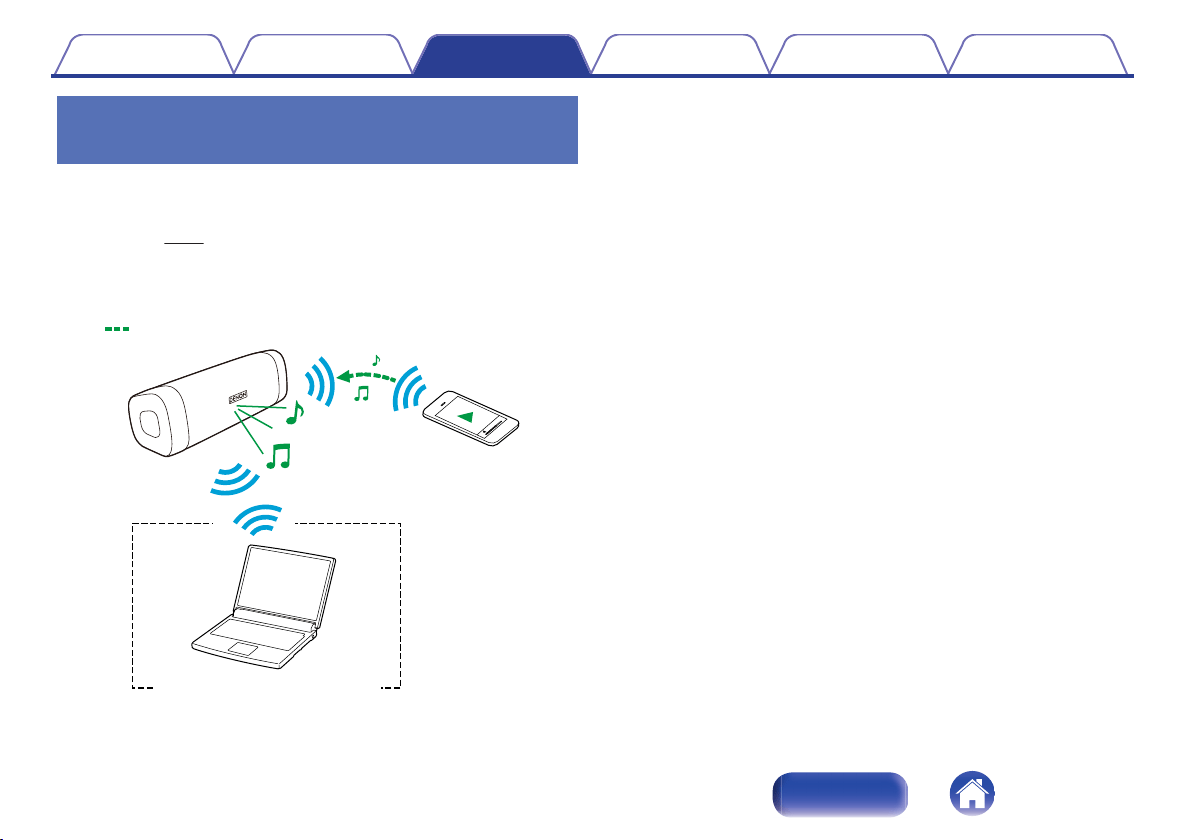
Simultaneously connecting multiple
Bluetooth devices (Multipoint function)
Two Bluetooth devices can be simultaneously connected to Envaya so
you can easily switch between multiple Bluetooth audio sources without
having to disconnect and reconnect each device. (“Bluetooth
operation” (v p. 15))
It is convenient to connect devices that you use frequently so that you do
not need to re-connect each time you want to switch playback devices.
Pair the devices that you want to connect in advance.
.
Audio signal
During
playback
During Bluetooth connection
o
Switching playback devices
1
Stop or pause playback on the device that you are
currently listening to.
2
Begin playback on the device that you want to listen to.
o
Disconnecting the bluetooth connection
Disconnect the Bluetooth connection by turning off the Bluetooth function
of the Bluetooth device.
Contents Preparation Connections Operation Troubleshooting Appendix
19
Index
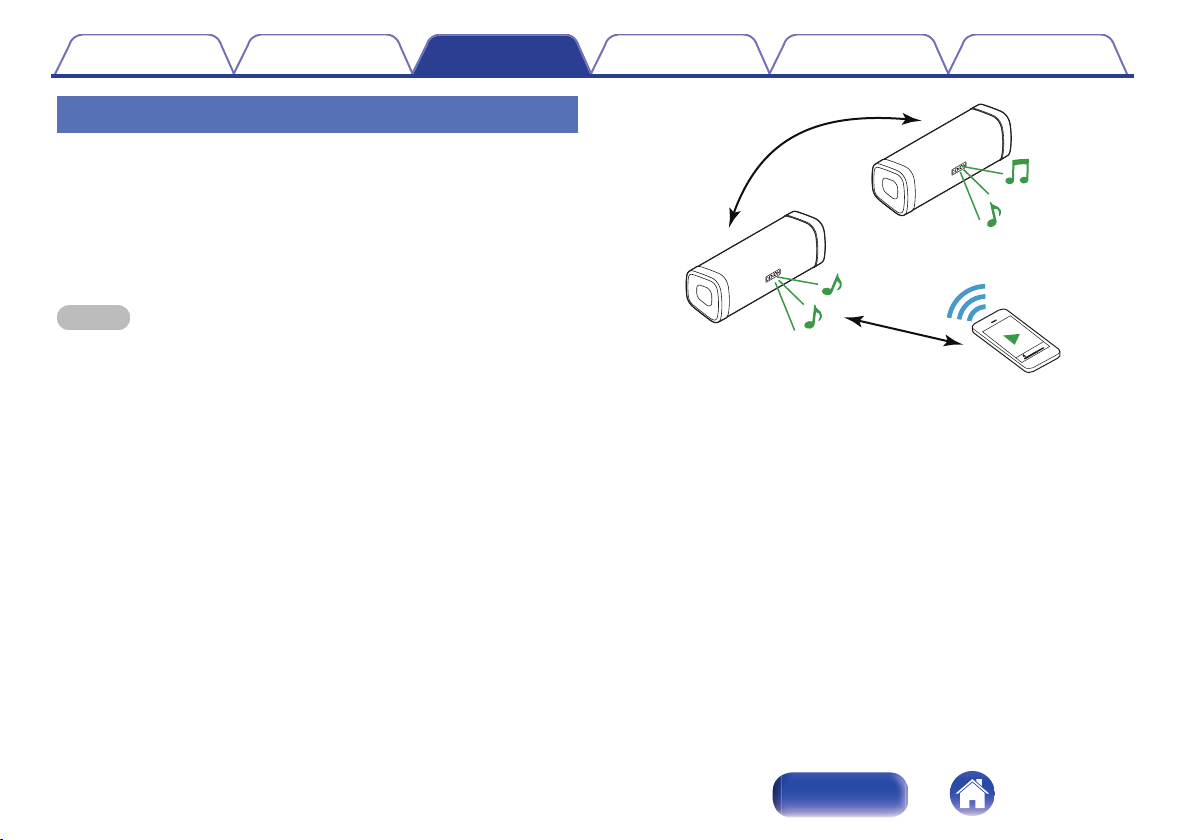
Envaya Link (DSB50BT)
If you have two of the same speakers, you can use them as a pair of
stereo speakers.
1
Connect the first Envaya to the Bluetooth device.
2
Press and hold the Bluetooth buttons simultaneously
on both Envayas for approximately 6 seconds.
NOTE
0
Adjust the volume on the Bluetooth device.
0
Envaya Link is disconnected when the Envaya power is turned off. You need to
reconnect Envaya Link in order to use it again.
0
Envaya Link does not support aptX’s Low Latency function.
.
Contents
Preparation Connections Operation Troubleshooting Appendix
20
Index
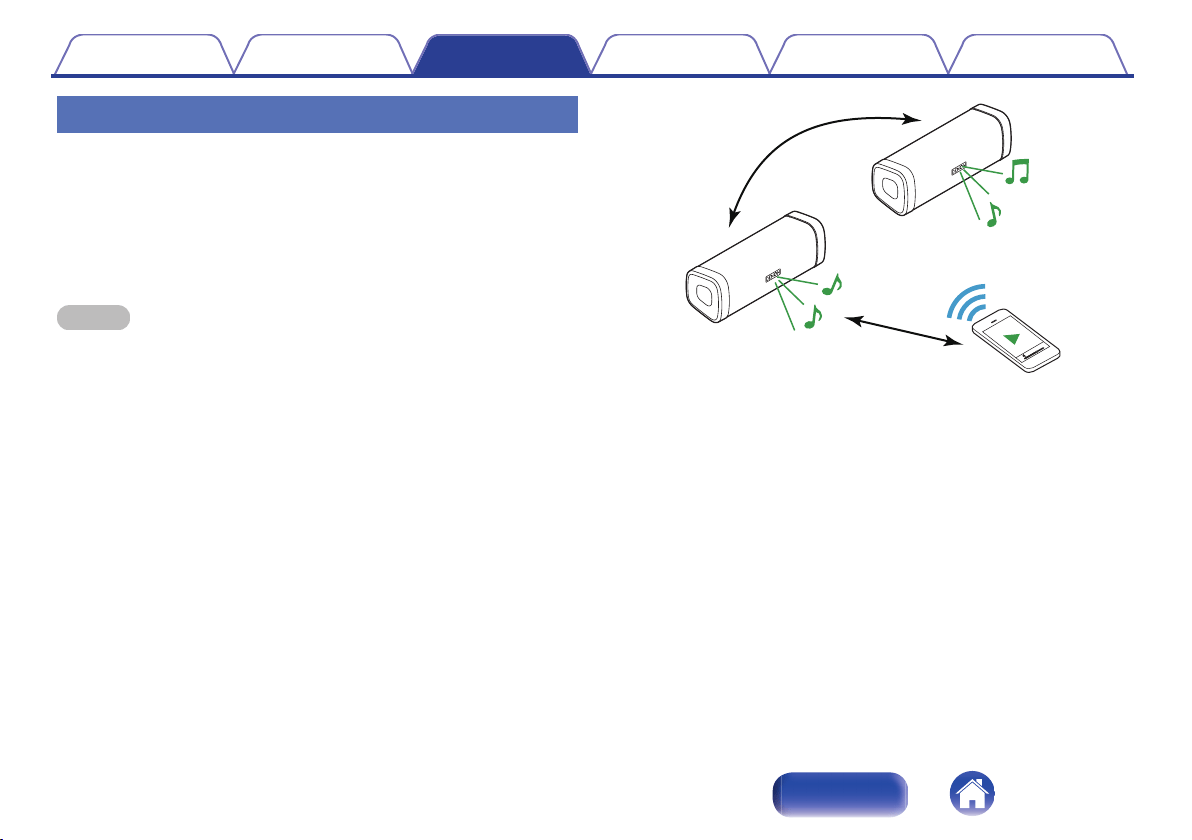
Envaya Link (DSB150BT/DSB250BT)
If you have two of the same speakers, you can use them as a pair of
stereo speakers.
1
Connect the first Envaya to the Bluetooth device.
2
Press and hold the Bluetooth buttons simultaneously
on both Envayas for approximately 6 seconds.
NOTE
0
When Envaya Link is connected, the volume of each Envaya is fixed to the
maximum value. Adjust the volume on the Bluetooth device.
0
Lower the volume on the Bluetooth device initially before playing music, then
adjust the volume to the appropriate level.
0
Envaya Link is disconnected when the Envaya power is turned off. You need to
reconnect Envaya Link in order to use it again.
0
Envaya Link does not support aptX’s Low Latency function.
.
Contents
Preparation Connections Operation Troubleshooting Appendix
21
Index
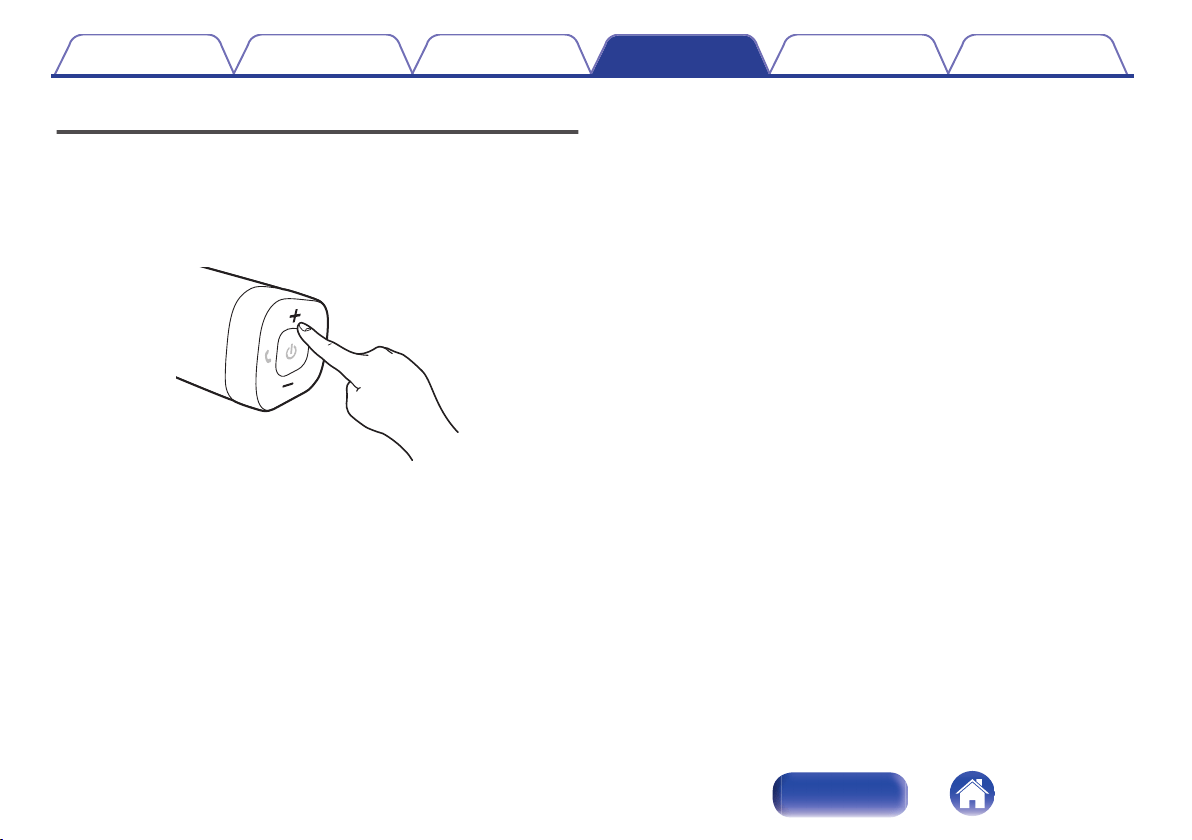
Adjusting the volume
1
While playing music, press the + button to increase the
volume. Press the – button to decrease the volume.
0
For the best signal to noise ratio, you may have to raise the
volume of your connected music player up to an appropriate level
then adjust the volume of the speaker up or down.
.
Contents
Preparation Connections Operation Troubleshooting Appendix
22
Index
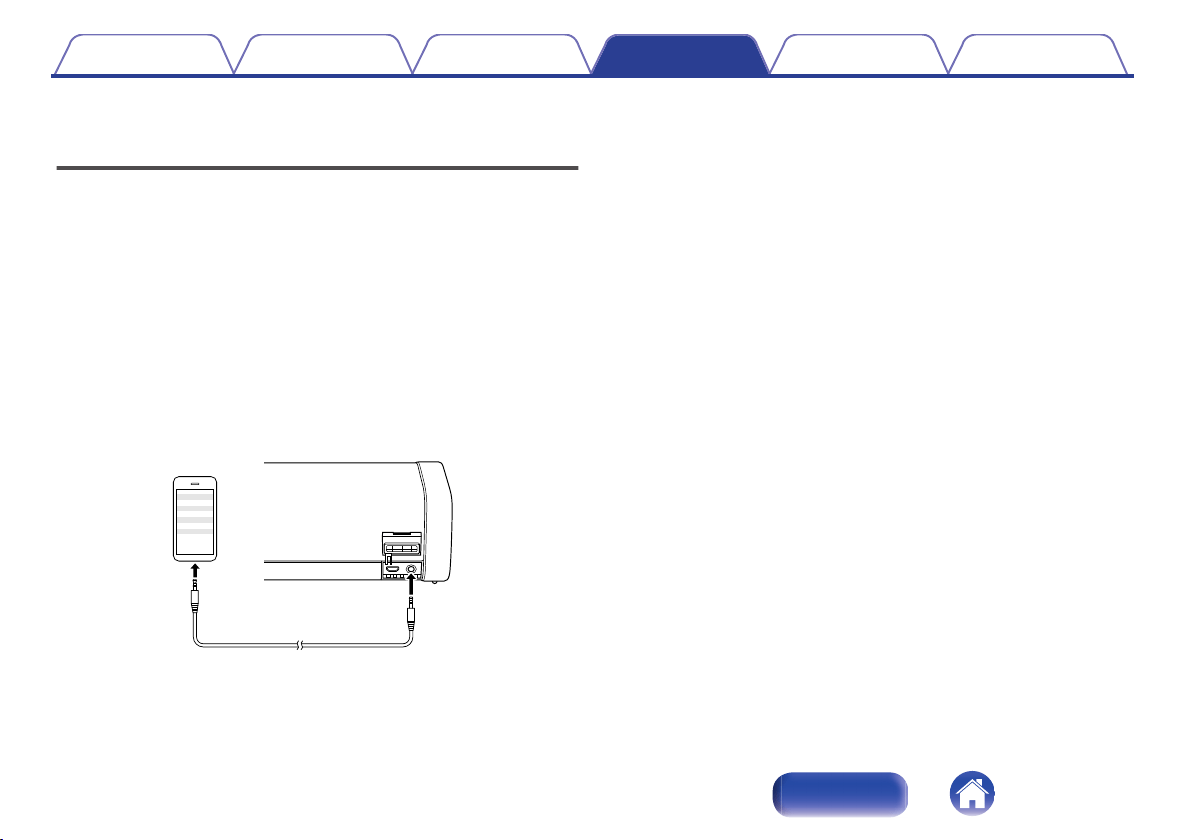
Listening to music using a wired
connection
You can enjoy listening to music from devices that do not support
Bluetooth audio by connecting to Envaya using a stereo mini plug cable
(available commercially).
1
Press and hold X until a notification sound is heard.
The status indicator illuminates and Envaya turns on.
2
Connect the AUX input connector on Envaya to the
headphones jack of the portable music player using a
stereo mini plug cable (available commercially).
When a Bluetooth device is playing back music, Bluetooth playback
takes priority. Stop playback on the Bluetooth device and then
connect the mini plug cable.
.
Stereo mini plug cable
(available commercially)
3
Start playing music from the device. You may need to
adjust the volume up on the connected device, then
adjust the volume on Envaya.
Bluetooth connection takes priority on Envaya. If Bluetooth playback
is started while a cable is connected, input switches to Bluetooth.
Contents Preparation Connections Operation Troubleshooting Appendix
23
Index
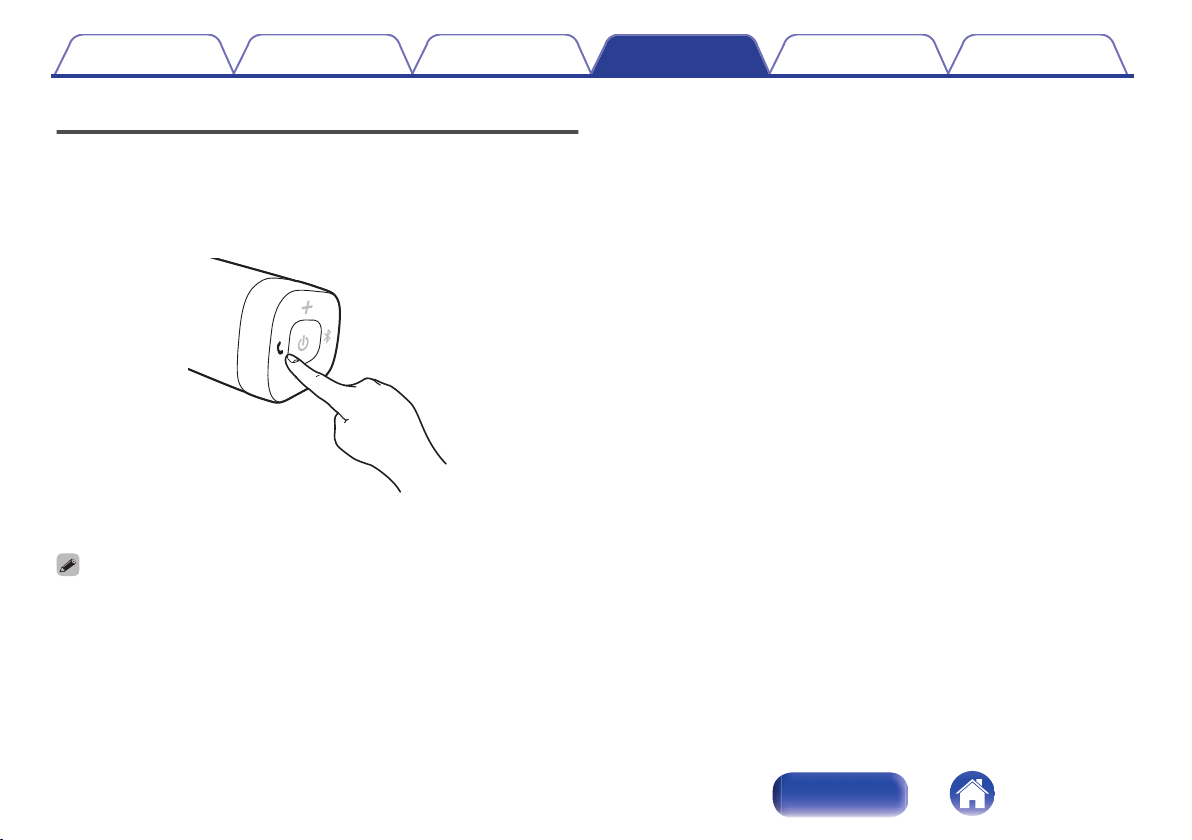
Voice Control Using Siri
If the Bluetooth device is an iPhone or iPad (iOS device), you can use Siri
to control Envaya.
1
Press and hold the T button.
Siri starts.
.
2
Speak into the Envaya microphone.
0
iPhone, iPad and Siri are trademarks of Apple Inc., registered in the U.S. and other
countries.
Contents Preparation Connections Operation Troubleshooting Appendix
24
Index
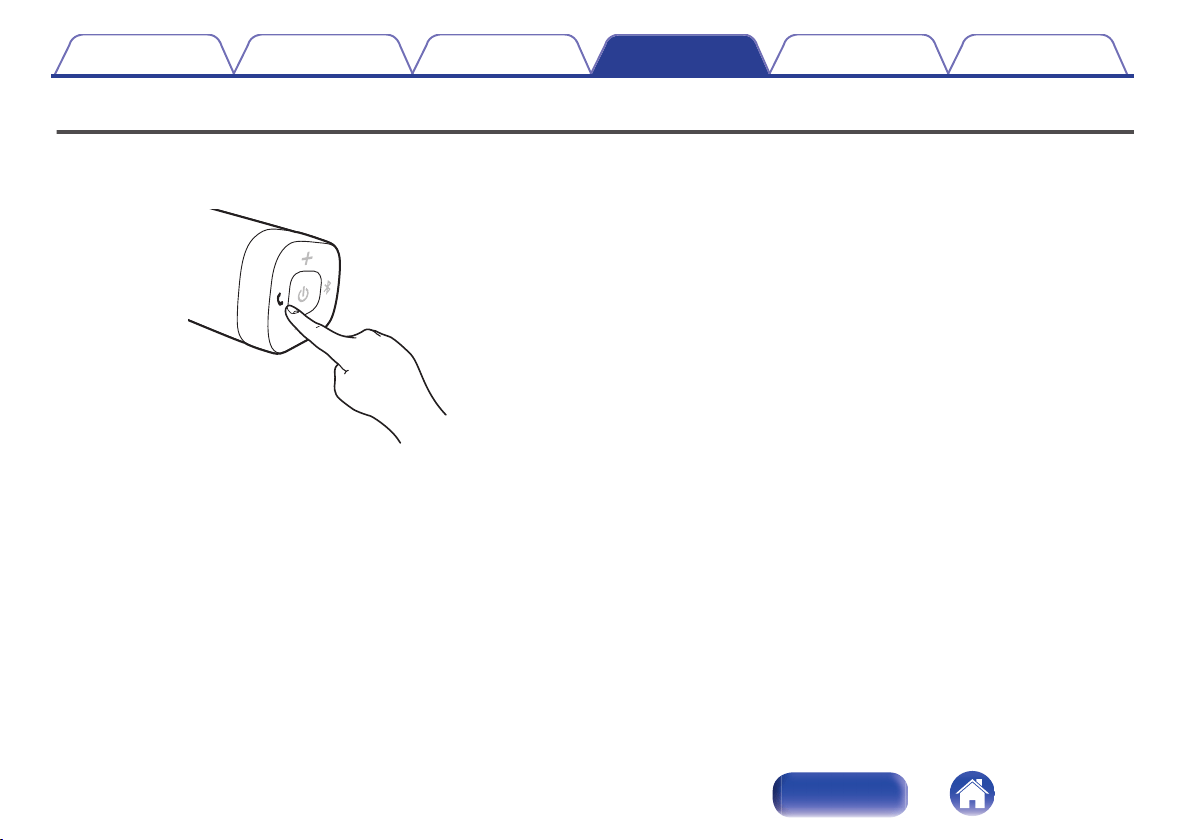
Conducting hands-free phone calls using Envaya
If your mobile phone supports the Hands-Free profile (HFP), you can
answer incoming calls to your mobile phone from Envaya when the
devices are connected by Bluetooth.
.
o
Answering an incoming call
If a mobile phone connected to Envaya receives an incoming call, the
music being played is paused and Envaya plays a ring tone.
Press and release the T button on Envaya while the ring tone plays to
answer an incoming call.
Speak into the microphone on Envaya.
o
Ending a call
Press the T button on Envaya while a call is in progress to end the call.
If you were playing music before the call, playback of the music resumes.
o
Canceling an incoming call
Press and hold the T button on Envaya for approximately two seconds
while the ring tone plays to cancel an incoming call.
Contents
Preparation Connections Operation Troubleshooting Appendix
25
Index
Tips
I want to answer incoming calls to my mobile phone on Envaya 27
Connecting multiple Bluetooth devices and switching easily
between them 27
Troubleshooting
Speaker does not turn on 28
Envaya cannot be charged 28
No sound from the speaker 29
Sound is distorted, noisy, or cuts in and out 29
Cannot pair a Bluetooth device with the speaker 30
Speaker is turning off automatically 31
Speaker is malfunctioning 31
Cannot conduct a call 31
Contents Preparation Connections Operation Troubleshooting Appendix
26
Index

Tips
I want to answer incoming calls to my mobile phone on Envaya
0
If a mobile phone connected by Bluetooth receives an incoming call, the music being played is paused and a ring tone plays.
Press and release the T button on Envaya to answer the call.
(v p. 25)
Connecting multiple Bluetooth devices and switching easily between them
0
Music can only be output from Envaya from one Bluetooth device connected using Bluetooth, but two Bluetooth devices can be simultaneously
connected to Envaya. To switch easily between connections, connect Bluetooth devices that you use frequently to Envaya. To switch playback to a
different Bluetooth device when multiple Bluetooth devices are connected, stop or pause playback on the device that is currently playing back, and then
start playback on a different Bluetooth device. (v
p. 19)
Contents Preparation Connections Operation Troubleshooting Appendix
27
Index
Troubleshooting
Check all connections.
If Envaya does not operate properly, check the items listed in the table below.
Should the problem persist, there may be a malfunction. In this case, disconnect the power immediately and contact your store of purchase.
z
If you need additional help in solving problems, contact Denon customer service in your area.
For more information, visit www.denon.com.
Speaker does not turn on
Speaker does not turn on. (AC power)
0
To turn on the speaker, press and hold the power button for 2 seconds. (v p. 14)
Speaker does not turn on. (Battery power)
0
The battery is completely discharged. Connect Envaya to the USB to AC power adapter to charge Envaya. (v
p. 11)
Envaya cannot be charged
Envaya cannot be charged.
0
The speaker is not connected to a USB to AC power adapter.
Make sure the USB to AC power adapter is connected to a working power source (AC wall outlet). (v p. 11)
0
Make sure the supplied USB cable is correctly connected to Envaya. (v p. 11)
Contents
Preparation Connections Operation Troubleshooting Appendix
28
Index
No sound from the speaker
No sound from the speaker.
0
The speaker is not connected to USB to AC power adapter or the battery is not charged. Connect power and turn on the speaker. (v
p. 14)
0
The volume is too low on your connected device. Turn up the volume on your device to about 90 % and then adjust the volume on the speaker.
(v p. 22)
0
There is no connected Bluetooth device. Pair and connect a Bluetooth device and try again. (v
p. 15)
0
There is no connected AUX device. Connect an audio device to the AUX input using a stereo 3.5mm cable and make sure music playing music on your
device. (v p. 23)
0
The AUX input connector of Envaya is compatible with stereo mini plug cables that have 3-conductor plugs. Be sure to use a 3-conductor stereo mini
plug cable. (v
p. 23)
Sound is distorted, noisy, or cuts in and out
Sound is distorted, noisy, or cuts in and out.
0
The volume is too low on your connected device. Turn up the volume on your device to about 90 % and then adjust the volume on the speaker.
(v p. 22)
0
The Bluetooth device is out of range. Bring the Bluetooth device closer to the speaker.
0
The Bluetooth connection is experiencing wireless interference. Move the speaker away from appliances such as microwave ovens and other wireless
devices.
0
The Bluetooth device is having connectivity issues. Cycle the power on the Bluetooth and reconnect to the speaker.
0
Depending on the type of USB to AC power adapter connected to Envaya, a small amount of noise may occur during charging. This is not a
malfunction.
Contents
Preparation Connections Operation Troubleshooting Appendix
29
Index
Cannot pair a Bluetooth device with the speaker
Cannot pair a Bluetooth device with the speaker.
0
Power On the speaker then press the V button. Make sure your mobile device has Bluetooth On and select “Denon Envaya ***” from the list of
Bluetooth devices.
0
The Bluetooth connection is experiencing wireless interference.
Move the speaker away from appliances such as microwave ovens and other wireless devices.
0
The Bluetooth device is out of range. Bring the Bluetooth device closer to the speaker.
0
The Bluetooth device is malfunctioning. Power cycle the device and try again.
0
The Bluetooth device is malfunctioning. Power cycle the device, remove the pairing information (Forget this Device on iOS and Unpair on Android) and
re-pair the speaker to the device.
0
Bluetooth is off on the device. Make sure Bluetooth is set to ON on your device.
0
If the stereo mini plug cable is connected, remove the cable.
Contents
Preparation Connections Operation Troubleshooting Appendix
30
Index
Speaker is turning off automatically
Speaker is turning off automatically.
0
To save battery power, the speaker is designed to turn off when no audio is played via Bluetooth for approximately 15 minutes. Power on the speaker
by pressing and holding the power button for 2 seconds. (v p. 14)
0
If the input of Envaya is set to AUX for approximately 8 hours, Envaya automatically turns off. Power on the speaker by pressing and holding the power
button for 2 seconds. (v p. 14)
The power turns off quickly.
0
If usage time is extremely short even when the battery has been fully charged, the battery may be near the end of its life. In this case, please contact
Denon service center.
Speaker is malfunctioning
Speaker is malfunctioning.
0
To reset the speaker, turn on the speaker then, press and release the T, X and V button simultaneously.
Envaya is reset. (Note: The battery protection circuit activates after resetting. To restart this unit, charge the battery)
0
The speaker needs to be reset to the factory default settings. Turn on the speaker. Press and hold the VOLUME+, VOLUME- and T buttons together for
approximately 5 seconds.
(Note: All pairing information from Bluetooth devices will be erased. The battery protection circuit activates after resetting. To restart this unit, charge the
battery).
Cannot conduct a call
Cannot conduct a call
0
Not all mobile phones and Apps support Hands-free phone calling.
Contents
Preparation Connections Operation Troubleshooting Appendix
31
Index
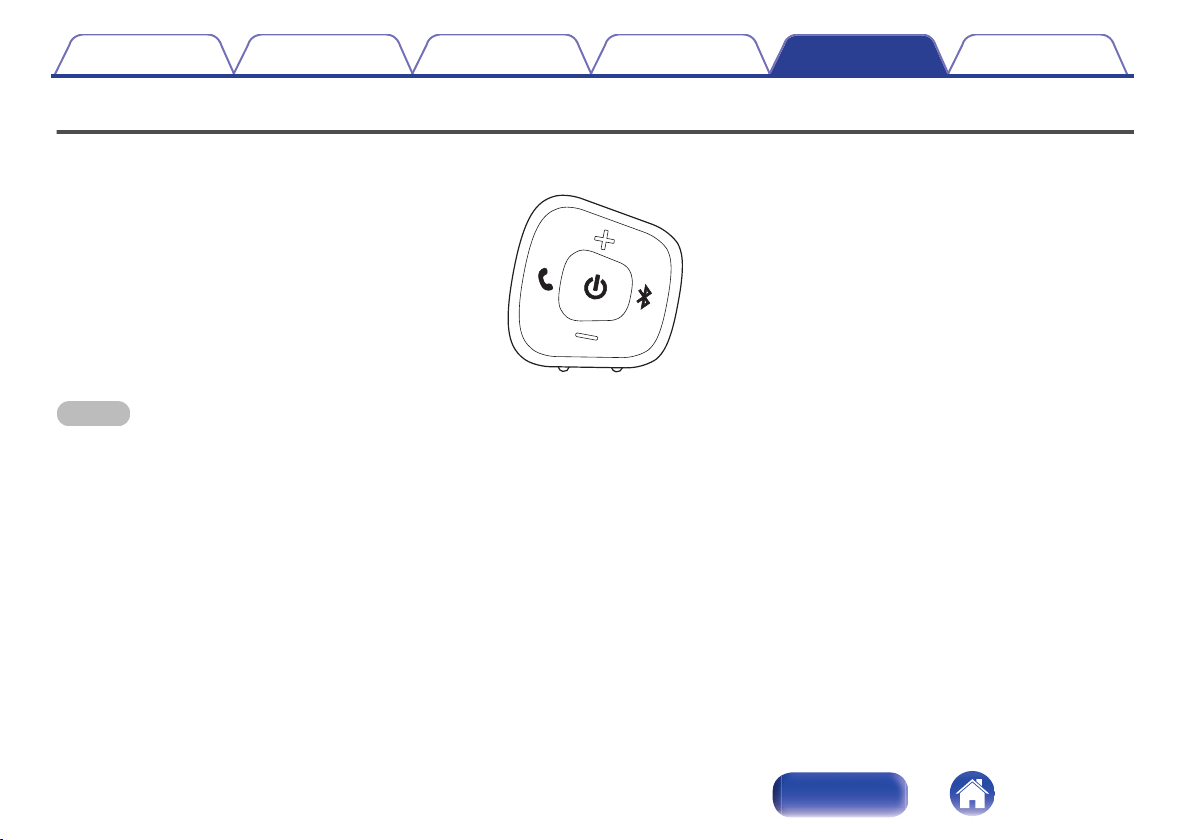
Restarting the Envaya
To reset the speaker, turn on the speaker then, press and release the T, X and V button simultaneously.
Envaya is reset.
.
NOTE
0
The battery protection circuit activates after resetting. To restart this unit, charge the battery.
Contents Preparation Connections Operation Troubleshooting Appendix
32
Index

Playing back a Bluetooth device
Envaya supports the following Bluetooth profile.
0
A2DP (Advanced Audio Distribution Profile):
When a Bluetooth device that supports this standard is connected,
monaural and stereo sound data can be streamed at a high quality.
0
AVRCP (Audio/Video Remote Control Profile):
When a Bluetooth device that supports this standard is connected, the
Bluetooth device can be operated from Envaya.
0
HFP (Hands-Free profile):
When a Bluetooth device that supports this standard is connected,
hands-free calls can be conducted via Envaya.
o
About Bluetooth Communications
Radio waves broadcast from Envaya may interfere with the operation of
medical devices. Make sure you turn off the power of Envaya and
Bluetooth device in the following locations as radio wave interference may
cause malfunctions.
0
Hospitals, trains, aircraft, petrol kiosks and places where flammable
gases are generated
0
Near automatic doors and fire alarms
Precautions for Dust Resistance
and Water Resistance
Envaya has IP67 water and dust resistance.
IP6X: Protection level against dust: Protected from total dust ingress
IPX7: Protection level against water: Can withstand being submerged in
1m of static water for up to 30 minutes without water entering the device.
0
Envaya is not completely water resistant, and therefore cannot be used
in water.
0
Dust and water resistance cannot be guaranteed when the cap is open.
Fasten the cap tightly.
0
Resistance to liquids other than tap water at normal temperature (such
as liquid soap, detergent solution, bath water, shampoo, spa water, hot
water, swimming pool water, sea water, etc.) is not guaranteed.
0
In the unlikely event that water gets into Envaya, stop use immediately
and contact the vendor. Please note that any water damage occurring
as a results of the mistaken use of Envaya is not covered by the
warranty.
0
If this unit gets dirty, wipe the dirt off with a soft, dry cloth. If it is badly
soiled, wipe it with a cloth soaked in diluted neutral detergent and then
wipe it dry with a dry cloth.
Contents
Preparation Connections Operation Troubleshooting Appendix
33
Index
Trademark information
.
The Bluetooth
®
word mark and logos are registered trademarks owned
by Bluetooth SIG, Inc. and any use of such marks by D&M Holdings Inc.
is under license. Other trademarks and trade names are those of their
respective owners.
.
Qualcomm aptX is a product of Qualcomm Technologies International,
Ltd.
Qualcomm is a trademark of Qualcomm Incorporated, registered in the
United States and other countries, used with permission. aptX is a
trademark of Qualcomm Technologies International, Ltd., registered in
the United States and other countries, used with permission.
Contents Preparation Connections Operation Troubleshooting Appendix
34
Index
Specifications
DSB50BT
o
Speaker section
Type: 40 mm full range × 2
40 × 83 mm passive radiator × 1
o
Bluetooth section
Communication system: Bluetooth Specification version 4.2
Compatible Bluetooth profiles: A2DP/AVRCP/HFP
Supported codecs: aptX Low Latency/AAC/SBC
Supported content protection: SCMS-T method
o
General
Input
5 V I 2.1 A
Power consumption (power off) 12 mW
Battery
Operating life 10 hours
Charging time 2.5 hours
Dustproof specifications Equivalent to IP6X
Waterproof specifications Equivalent to IPX7
z
For purposes of improvement, specifications and design are subject to change without notice.
Contents
Preparation Connections Operation Troubleshooting Appendix
35
Index

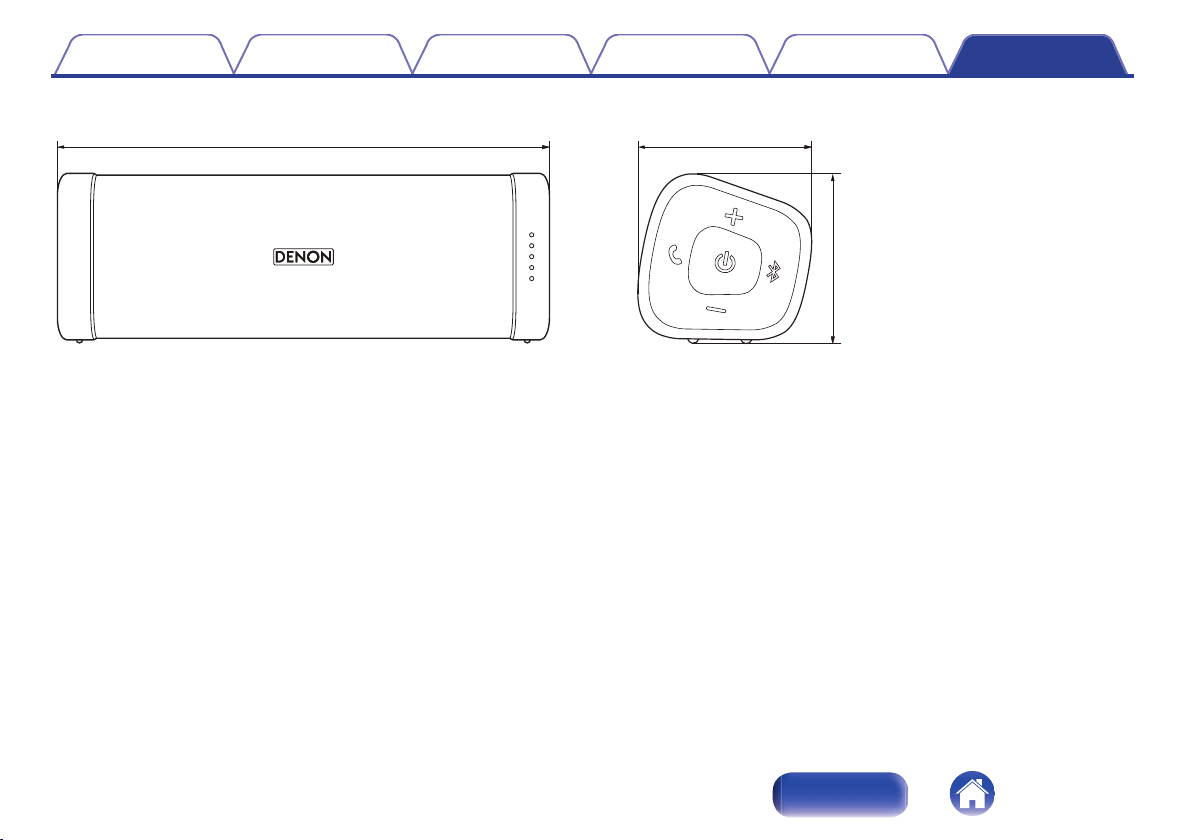
DSB150BT
o
Speaker section
Type: 40 mm full range × 2
40 × 83 mm passive radiator × 1
o
Bluetooth section
Communication system: Bluetooth Specification version 4.2
Compatible Bluetooth profiles: A2DP/AVRCP/HFP
Supported codecs: aptX Low Latency/AAC/SBC
Supported content protection: SCMS-T method
o
General
Input
5 V I 2.1 A
Power consumption (power off) 12 mW
Battery
Operating life 11 hours
Charging time 3.0 hours
Dustproof specifications Equivalent to IP6X
Waterproof specifications Equivalent to IPX7
z
For purposes of improvement, specifications and design are subject to change without notice.
Contents
Preparation Connections Operation Troubleshooting Appendix
37
Index
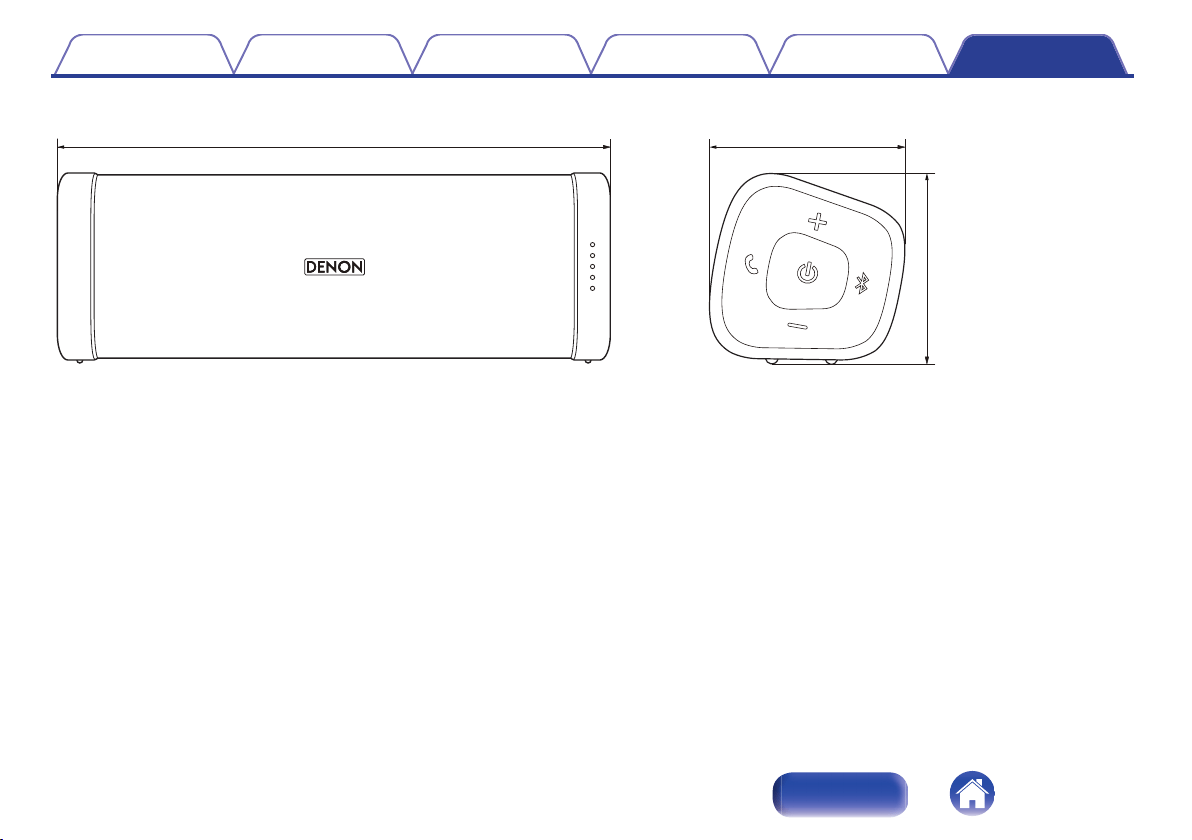
DSB250BT
o
Speaker section
Type: 40 mm full range × 2
53 × 135 mm passive radiator × 1
o
Bluetooth section
Communication system: Bluetooth Specification version 4.2
Compatible Bluetooth profiles: A2DP/AVRCP/HFP
Supported codecs: aptX Low Latency/AAC/SBC
Supported content protection: SCMS-T method
o
General
Input
5 V I 2.1 A
Power consumption (power off) 24 mW
Battery
Operating life 13 hours
Charging time 3.5 hours
Dustproof specifications Equivalent to IP6X
Waterproof specifications Equivalent to IPX7
z
For purposes of improvement, specifications and design are subject to change without notice.
Contents
Preparation Connections Operation Troubleshooting Appendix
39
Index
Index
v A
Accessories ..................................................... 5
AUX auto off function ..................................... 14
v C
Charging ........................................................ 10
v F
Features and functions ..................................... 7
v H
Hands-free function ........................................ 25
v M
Multipoint function .......................................... 19
v P
Pairing ............................................................ 15
Playback Bluetooth device ............................. 15
v R
Remaining battery indicator ........................... 12
Restarting the unit .......................................... 32
v S
Stereo mini plug cable .................................... 23
v T
Troubleshooting ............................................. 28
Turning the power off ..................................... 14
Turning the power on ..................................... 14
v U
USB Cable ..................................................... 11
v V
Volume adjustment ........................................ 22
v W
Wired connection (AUX) ................................. 23
Contents
Preparation Connections Operation Troubleshooting Appendix
41
Index

www.denon.com
D&M Holdings Inc.
3520 10564 00ADC
42
