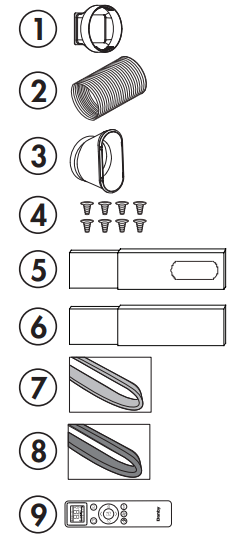
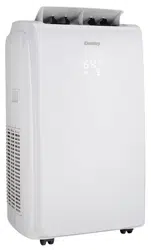
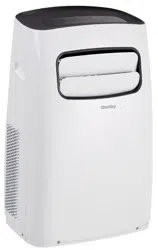
1. Air outlet adapter 2. Exhaust hose 3. Window slider adapter 4. 8 bolts 5. Window slider A and B 6. Window slider C and D 7. Foam seal A and B (adhesive) 8. Foam seal C (non-adhesive) 9. Remote control and batteries
REQUIRED TOOLS
Medium sized Phillips screwdriver
Tape measure or ruler
Knife or scissors
Saw (in the event that the window sliders need to be cut to size)
ASSEMBLING THE WINDOW KIT
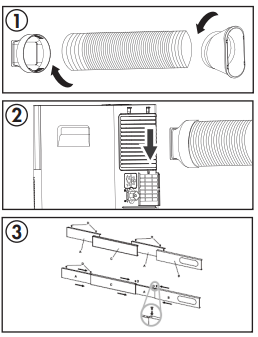
Attach the air outlet adapter and the window slider adapter onto either end of the exhaust hose.
Insert the air outlet adapter into the back of the appliance by placing over the air exhaust and then pushing in the direction of the arrow to lock into place.
Measure the window opening where the window kit will be installed. Assemble as many sliders as necessary to fit the window. If the length of the window requires all three sliders, use two bolts to fasten the sliders at the correct length. If the window opening is less that the minimum length of a single slider, use the slider that has the hole in it and cut it to the correct length. Make sure not to cut the end that has the hole as this is necessary to attach the exhaust hose adapter.
INSTALLING THE WINDOW KIT
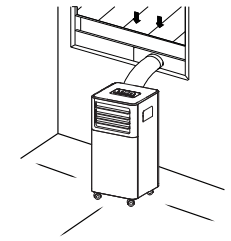
The window kit can be used in either a hung window or a sliding window application. The images at the right are for a hung window. The steps for a sliding window are the same.
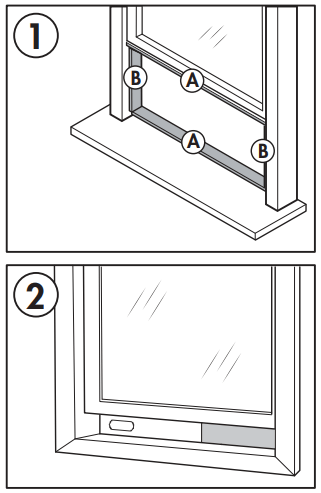
Cut the adhesive foam seals A and B to the correct length for the window. Attach them to the window sash and frame as shown.
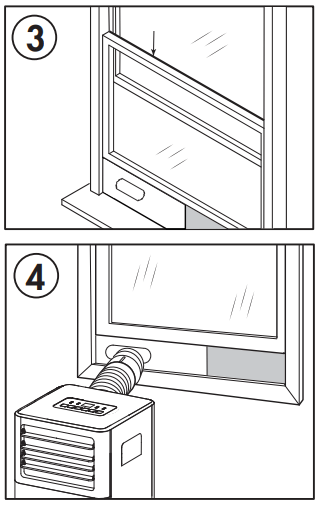
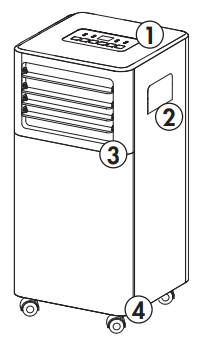
Insert the assembled window slider kit into the window opening.
Cut the non-adhesive foam seal C to match the width of the window. Insert the foam seal between the glass and the window frame to prevent air and insects from getting into the room.
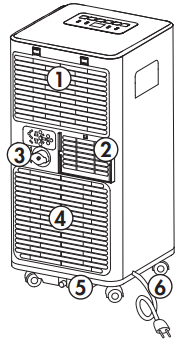
Attach the window slider adapter to the hole in the window slider kit.
Note: It may be easier to attach the window slider adapter to the window slider kit before placing the kit in the window.
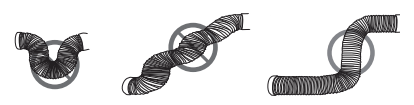
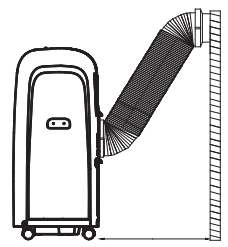
Note: Do not over-extend or bend the hose as this will impede air flow.
IMPORTANT WARNING Do not leave this appliance unattended in a space where people or animals who cannot react to a malfunction are located. A malfunction such as the exhaust hose becoming dislocated, can cause extreme overheating or death in an enclosed, unattended space.
OPERATING INSTRUCTIONS
FEATURES
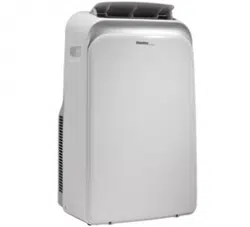
Front
Control panel
Handle (both sides)
Air exhaust
Casters
Rear
Air intake
Air outlet
Continuous drain
Air intake
Lower drain
Power cord
LOCATION
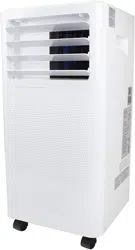
Place the air conditioner on a smooth, level floor that is strong enough to support it and all included accessories.
Make sure the appliance is level to minimize noise and vibration.
The appliance must be installed near a grounded receptacle and the overflow drain outlet on the rear of the appliance must be accessible.
Do not cover air inlets or outlets or the remote control receiver on the control panel.
The appliance requires 45 cm (17.7 inches) of clearance on the front and sides.
The appliance requires at least 50 cm (20 inches) of clearance on the back.
CONTROL PANEL
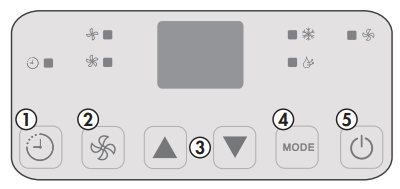
Timer button: Used to set the automatic timer.
Fan button: Used to choose the fan speed.
Temperature control buttons: Used to increase or decrease the set temperature.
Mode button: Used to choose the mode; cool, fan or dry.
Power button: Used to turn the appliance on or off.
Note: Certain functions can only be accessed through the remote control.
OPERATING MODES
Cool Mode
Press the mode button to choose cool mode.
Use the temperature control buttons to choose the desired temperature.
Use the fan button to choose the desired fan speed.
The temperature can be set within a range of 18 - 32°C (64 - 90°F).
The exhaust hose should be installed during cool mode to ensure the best results.
Dry Mode
Press the mode button to choose dry mode.
The fan speed will be set to auto.
The exhaust hose should be installed during dry mode to ensure the best results.
Fan Mode
Press the mode button to choose fan mode.
Press the fan button to choose the desired fan speed.
The exhaust hose does not need to be installed during fan mode.
TIMER
The timer function can be used to turn the appliance on or off after a period of time to conserve energy.
To set the timer to turn the appliance off:
While the appliance is running, press the timer button. The time display will flash.
Press the timer button to choose the number of hours before the appliance will turn off.
Wait 5 seconds to confirm the setting. The timer icon will illuminate.
To set the timer to turn the appliance on:
Turn the appliance on and choose the desired mode and settings. Turn the appliance off.
While the appliance is turned off, press the timer button. The time display will flash.
Press the timer button to choose the number of hours before the appliance will turn on.
Wait 5 seconds to confirm the setting. The timer icon will illuminate.
Notes: Turning the appliance on or off at any time or adjusting the timer setting to 0 hours will cancel the timer settings.
CHILD LOCK
The child lock can be activated by pressing the temperature control buttons on the remote control at the same time for 3 seconds. The buttons on the remote control cannot be used while the child lock is active. To deactivate the child lock, press and hold the temperature control buttons at the same time for 3 seconds.
The child lock can only be activated or deactivated using the remote control.
SLEEP
The sleep function can be used to conserve energy during sleeping hours. The sleep function can only be used during cool mode.
When selected, the set temperature will increase by 1 degree per hour for 2 hours. The appliance will hold the new set temperature for 6 hours before automatically returning to normal operation.
The sleep function can only be activated with the remote control and can be canceled at any time by pressing the sleep button.
REMOTE CONTROL
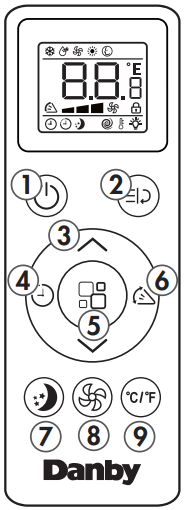
Power button: Used to turn the appliance on or off.
Turbo button: The turbo feature is not available on this model.
Temperature control buttons: Used to increase or decrease the set temperature.
Timer button: Used to set the timer function.
Mode button: Used to choose the mode.
Swing button: The swing feature is not available on this model.
Sleep button: Used to set the sleep function.
Fan button: Used to set the fan speed.
°C/°F button: Used to change the temperature scale between Celsius and Fahrenheit.
Note: The remote control will function within a range of 7 meters (23 feet) of the appliance.
REMOTE DISPLAY
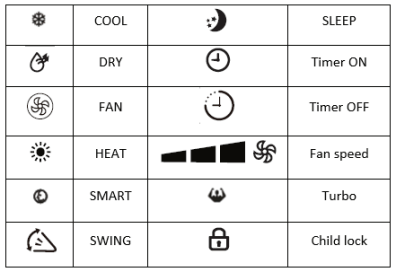
The digital display on the remote control will show the below symbols. Please note that not all features may be available on your model. If you try to use a feature that your model does not support, the appliance will default to fan mode.
REPLACING THE REMOTE BATTERIES
This air conditioner comes with two AAA batteries. Place the batteries in the remote control before use.
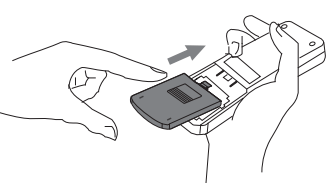
Slide the back cover from the remote downward to expose the battery compartment.
Insert the batteries, ensure to match the (+) and (-) symbols on the ends of the batteries with the symbols inside the battery compartment.
Slide the battery cover back into place.
Notes:
The air conditioner will not respond if curtains, doors or other materials block the signal from the remote control to the unit.
Prevent any liquid from contact with the remote control. Do not expose the remote control to direct sunlight or heat.
If the infrared signal receiver on the indoor unit is exposed to direct sunlight, the air conditioner may not function properly. Use curtains to prevent the sunlight from falling on the receiver.
Do not mix old and new batteries or batteries of different types.
Do not leave the batteries in the remote control if it is not going to be used for more than 2 months.
This equipment has been tested and found to comply with the limits for a Class B digital device, pursuant to Part 15 of the FCC Rules. These limits are designed to provide reasonable protection against harmful interference in a residential installation. This equipment generates, uses and can radiate radio frequency energy and, if not installed and used in accordance with the instructions, may cause harmful interference to radio communications. However, there is no guarantee that interference will not occur in a particular installation.
If this equipment does cause harmful interference to radio or television reception, which can be determined by turning the equipment off and on, the user is encouraged to try to correct the interference by one or more of the following measures:
Reorient or relocate the receiving antenna.
Increase the separation between the equipment and receiver.
Connect the equipment into an outlet on a circuit different from that to which the receiver is connected.
Consult the dealer or an experienced radio/TV technician for help.
Changes or modifications not approved by the party responsible for FCC compliance could void the user’s authority to operate the equipment. This appliance complies with Part 15 of the FCC Rules.
Operation is subject to the following conditions:
This device may not cause harmful interference.
This device must accept any interference received, including interference that may cause undesired operation.
This device complies with Canadian CAN ICES-3 (B) / NMB-3 (B)
IMPORTANT Do not dispose of batteries as unsorted municipal waste. Refer to local laws for proper disposal of batteries.
WATER DRAINAGE
When the internal drain pan becomes full the appliance will stop operating and the display will show error code “Ft”. The air conditioning or dehumidifying action will stop but the fan may continue to operate.
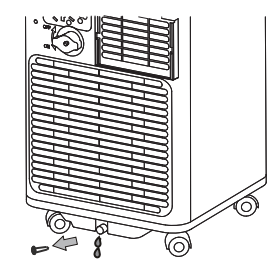
Drain Plug
Turn the appliance off and unplug it from the power source.
Carefully move the appliance to a location where the water can be drained.
Remove the drain plug and allow the water to completely drain.
Replace the bottom drain plug, pressing fi rmly to ensure a tight fi t and no leaks.
The “Ft” error symbol will disappear and the appliance will resume regular function once power is restored.
CARE & MAINTENANCE
CLEANING
Unplug the appliance before cleaning or servicing.
Clean the cabinet with a lukewarm damp cloth and neutral detergent. Dry the cabinet with a lint-free dry cloth.
Do not use gasoline, paint thinner or other chemicals to clean the appliance.
Do not wash the appliance directly under a tap or using a hose. It may cause electrical damage.
AIR FILTER
The filter in this appliance should be cleaned every two weeks to ensure efficient performance.
In households with animals, the air filters may need to be cleaned more often and the external grills may need to be wiped to prevent blocked airflow.
LONG-TERM STORAGE
Drain all water from the appliance.
Run the appliance on fan mode for half a day in a warm room to dry the inside of the appliance and prevent mold formation.
Turn off the appliance and unplug it, wrap the cord and bundle it with tape.
Remove the battery from the remote control.
Clean the air filters and reinstall them.
Store the appliance in a cool, dark place. Prolonged exposure to direct sunlight or extreme heat can shorten the lifespan of the appliance.
DISPOSAL
This appliance should not be treated as regular household waste. Check for local regulatory compliance regarding the approved and safe disposal of this appliance.
Do not dispose of batteries as unsorted municipal waste. Refer to local laws for proper disposal of batteries.
ERROR CODES
Lt - low temperature - the appliance will pause functioning if ice forms on the internal structure; the appliance will resume normal functioning automatically when the ice melts
PF - sensor failure - unplug the appliance for 5 minutes to reset the internal sensors; if the error code persists after plugging the appliance back in, please contact consumer care for servicing information
Ft - water tray is full
FREQUENTLY ASKED QUESTIONS
Can I leave my AC in place through the winter?
This is not recommended.
What are the standard wattage and amps used?
Information pertaining to watts and amps can be found on the rating plate located on the side of the unit.
When should I use the exhaust hose?
The exhaust hose should be used in cool, dry, heat and auto modes. It is not required in fan mode.
Can I use an extension cord?
No, an extension cord may not be used.
Can I extend the length of the exhaust hose?
No. The unit was designed with the length of the hose in mind and has only been tested under those conditions. Instead use an additional fan to blow the cool air to other locations.
When should I use the drain hose?
The drain hose should be used in heat mode, dry mode or if using the continuous drain.
Where do I drain water from?
The water drains from the drainage port. If you are not using the continuous drain, the internal pan drains from the bottom outlet.
Odors
Odour is caused by the formation of mold or mildew on internal surfaces. This can happen when there is poor air circulation, a dirty filter or the air conditioner was not used for a period of time.
Ensure the filter is clean.
Run the unit on fan mode to remove any internal moisture.
Check for any blockages in the drain lines and ensure there are no obstructions.
Please give your unit a hard reboot. Unplug it and plug it back in after 15-20 minutes. This allows the unit to warm and drain if there is any frost stopping draining and go back to factory settings
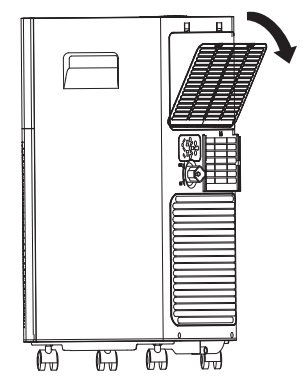
For odour in a unit, we suggest using an algaecide tablet. You first need to turn the unit off, remove the lower grill and filter from the grill at the base of the unit, and then place the tablet in base.
TROUBLESHOOTING
Appliance will not operate
Plug is not fully inserted into the wall outlet
Blown fuse or circuit breaker
Insufficient cooling
Air filter is dirty
Blocked air flow
Appliance size is too small for application
Noise
The ground is not level
The air filter is dirty or blocked
Gurgling sounds are normal, this is coolant moving inside the appliance
Odors
Formation of mold or mildew on internal wet surfaces
Place an algaecide tablet in the base pan; ensure the appliance is unplugged, remove the upper grille and filter, place the tablet in the middle water tray and replace the grille and filter.