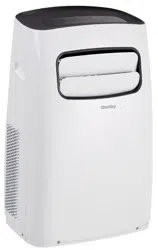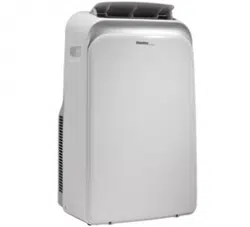

Thank you for purchasing a Danby air conditioner. Please
read this onwer’s manual carefully before using your new
air conditioner.
Remote Control Instructions
MODEL
AIR CONDITIONER
DPA120HB1WDB
DPA140HB1WDD
02.01.14
DPA140HB1BDD

1
2
3
4
6
7
7
7
8
8
9
12
Handling the Remote Control...................................................
Function Buttons ......................................................................
Indicators on LCD Display .......................................................
Operating the Buttons ..............................................................
Auto Operation Setting .............................................................
Swing Setting.............................................................................
Timer Setting..............................................................................
Economy Setting........................................................................
CONTENTS
Remote Control Specifications................................................
Cooling/ Fan Setting .................................................................
Dehumidifier Setting .................................................................
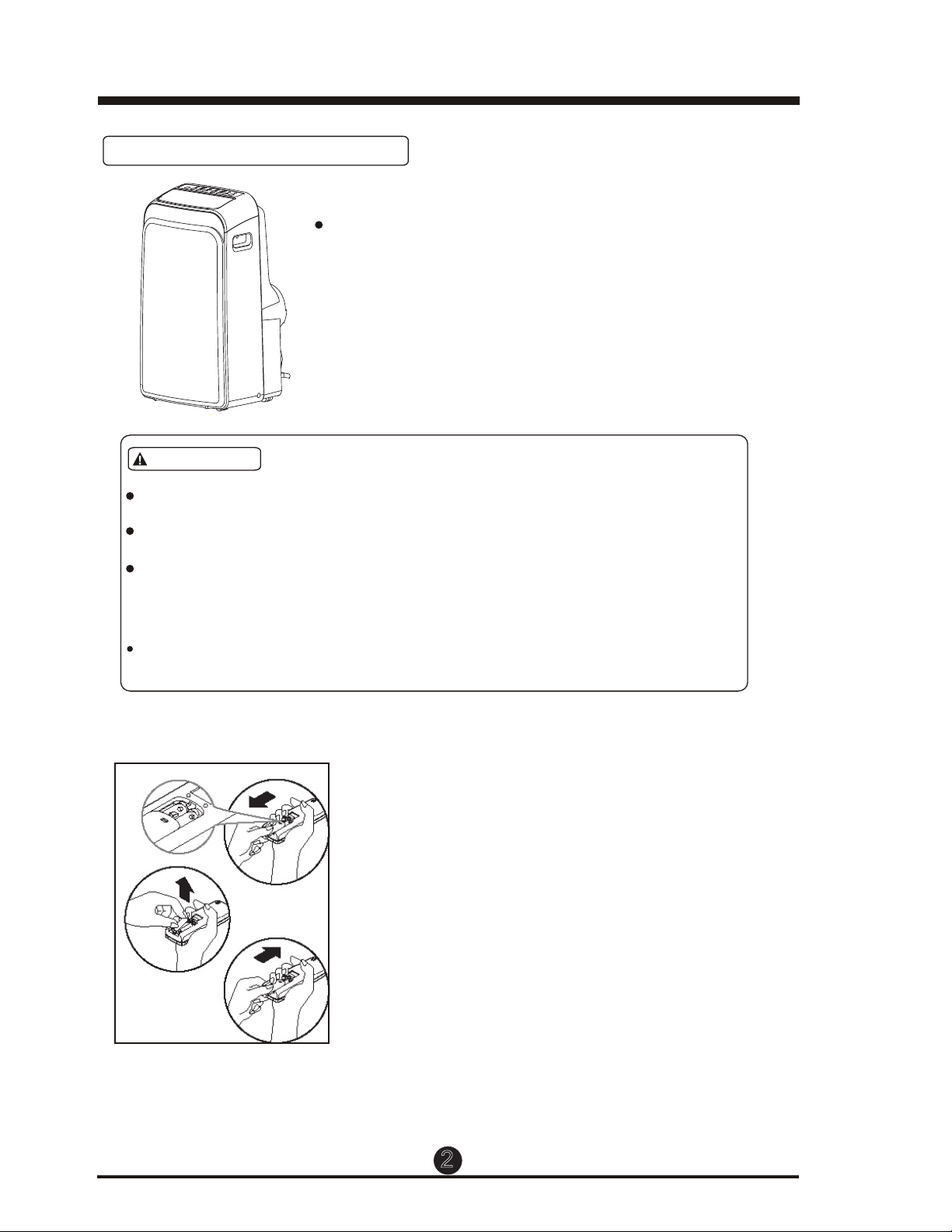
Use the remote control within a distance of 8
meters from the appliance, pointing it towards the
receiver. Reception is confirmed by a beep.
Location of the Remote Control.
CAUTIONS
The air condiitioner will not respond if curtains, doors or other materials
block the signal from the remote control to the unit.
esopxe ton oD .lortnoc etomer eht htiw tcatnoc morf diuqil yna tneverP
the remote control to direct sunlight or heat.
If the infrared signal receiver on the indoor unit is exposed to direct
sunlight, the air conditioner may not function properly. Use curtains to
prevent the sunlight from falling on the receiver.
If other electrical appliances react to the remote control, either move
these appliances to another location or consult your local dealer..
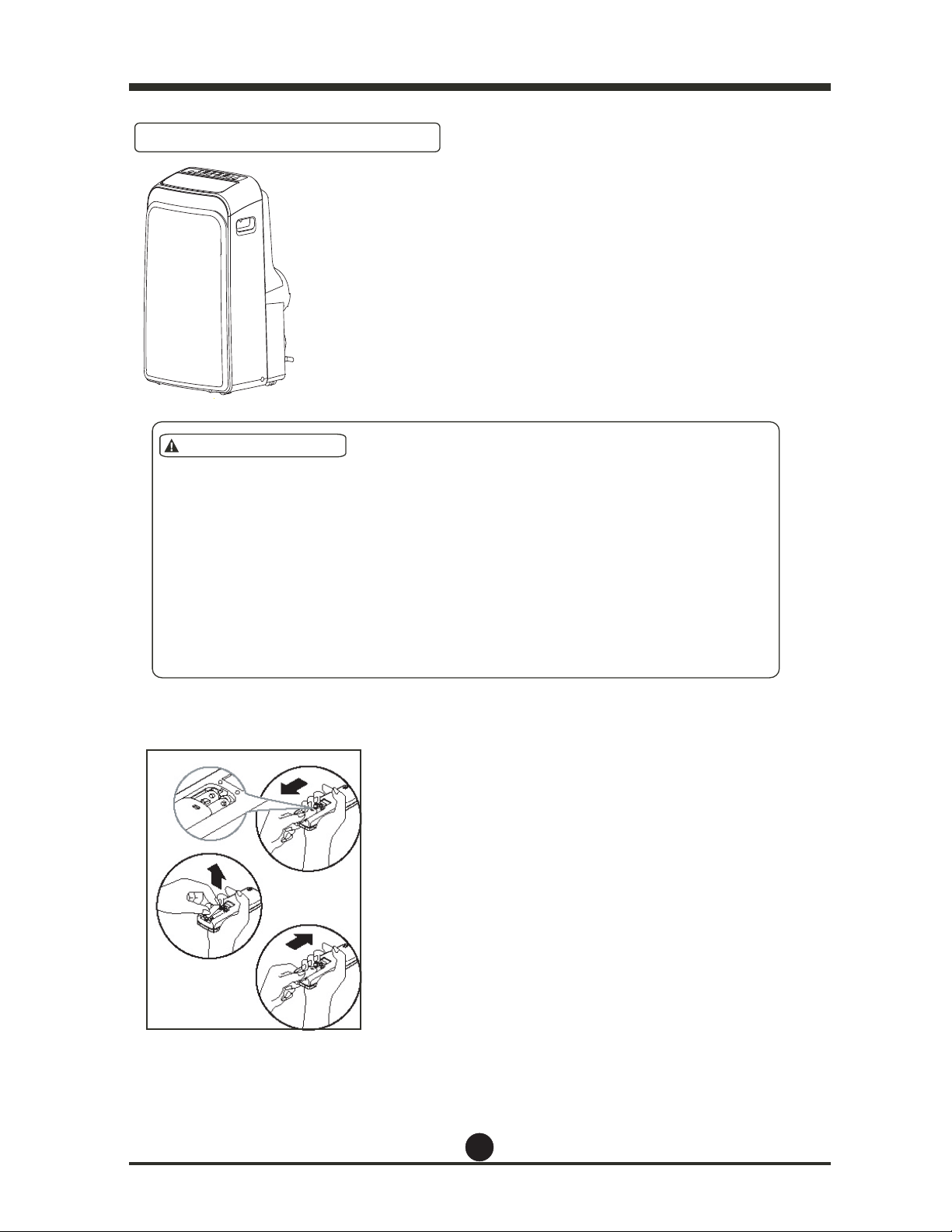
The remote control is powered by two dry
part and protected by a cover.
(1) Remove the cover by pressing down and sliding it off.
(2) Remove the old batteries and insert the new
batteries,placing the(+) and (-) ends correctly.
(3) Reattach the cover by sliding it back into
position.
NOTE: When the batteries are removed, the
remote control erases all programming.
After inserting new batteries, the remote
controll must be reprogrammed.
Replacing the Batteries
.
Handling the Remote Control
2
batteries(2-AAA) located in the rear

Model
Rated Voltage
Remote Control Specifications
2. Timer Setting Function in 24 hours.
3. Indoor Setting Temperature Range: 17°C ~30°C (62°F~86°F).
4. Full Function of LCD (Liquid Crystal Display)
Environment
Signal Receiving Range
Performance Feature
CAUTION
Do not mix old and new batteries or batteries of dif
ferent types.
Do not leave the batteries in the remote controller if it is not going
to be used for more than 2 months.
Dispose of the old batteries in special containers such as those
found
in the sales outlets.
3
NOTE:
All the illustrations in this manual are for explanatory purposes only.
Your air conditioner may be
NOTE :
3.0V(
2-AAA
8m
)
1. Operating Mode: AUTO, COO
L, DRY,
and FAN.
RG 51I46/ BGE
-5°C to 60°C (-41°F to 140°F)
NOTE: This equipment has been tested and found to comply with the limits for a Class B digital device,
pursuant to Part 15 of the FCC Rules. These limits are designed to provide reasonable protection against
harmful interference in a residential installation. This equipment generates, uses and can radiate radio
frequency energy and, if not installed and used in accordance with the instructions, may cause harmful
interference to radio communications. However, there is no guarantee that interference will not occur in a
particular installation. If this equipment does cause harmful interference to radio or television reception, which
can be determined by turning the equipment off and on, the user is encouraged to try to correct the interference
by one or more of the following measures:
1) Reorient or relocate the receiving antenna
2) Increase the separation between the equipment and receiver
3) Connect the equipment into an outlet on a circuit different from that to which the receiver is connected
4) Consult the dealer or an experienced radio/TV technician for help
Changes or modifications not approved by the party responsible for FCC compliance could void the user’s
authority to operate the equipment.
This appliance complies with Part 15 of the FCC Rules. Operation is subject to the following two conditions:
1) This device may not cause harmful interference.
2) This device must accept any interference received, including interference that may cause undesired
operation.
CAN ICES-3 (B) / NMB-3 (B)
Temperature setting display: press and hold the UP and DOWN buttons at the same time for
3 seconds to alternate the temperature display between °C and °F.
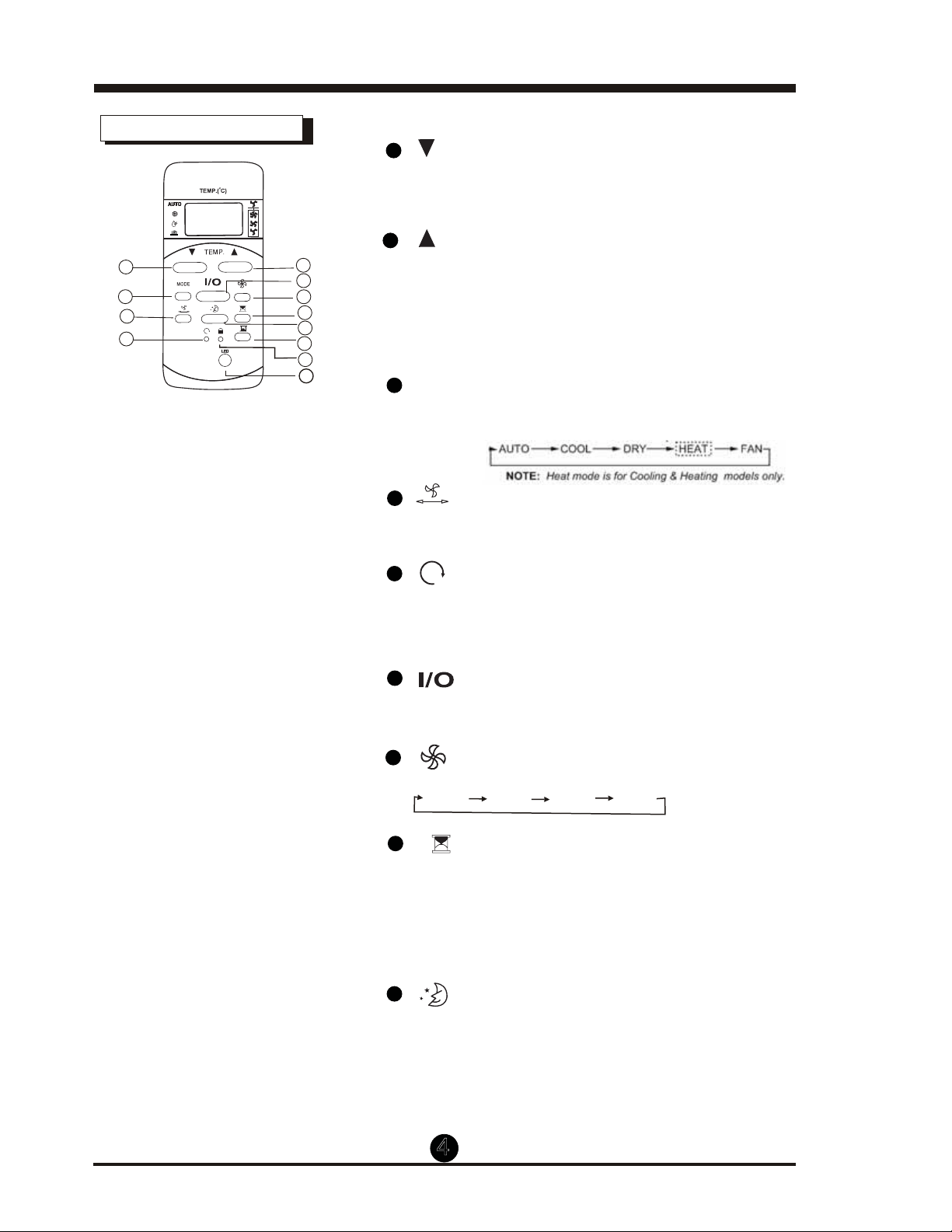
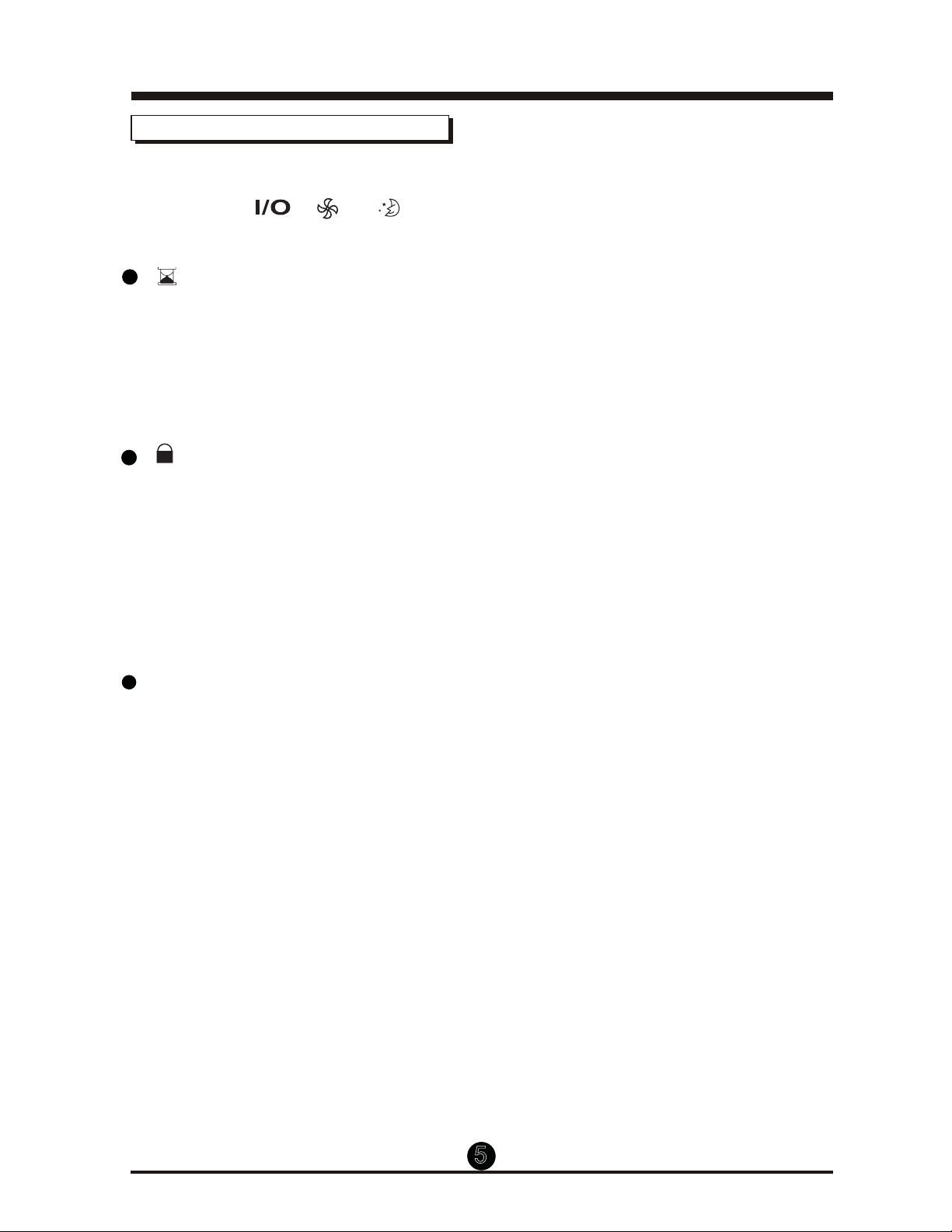
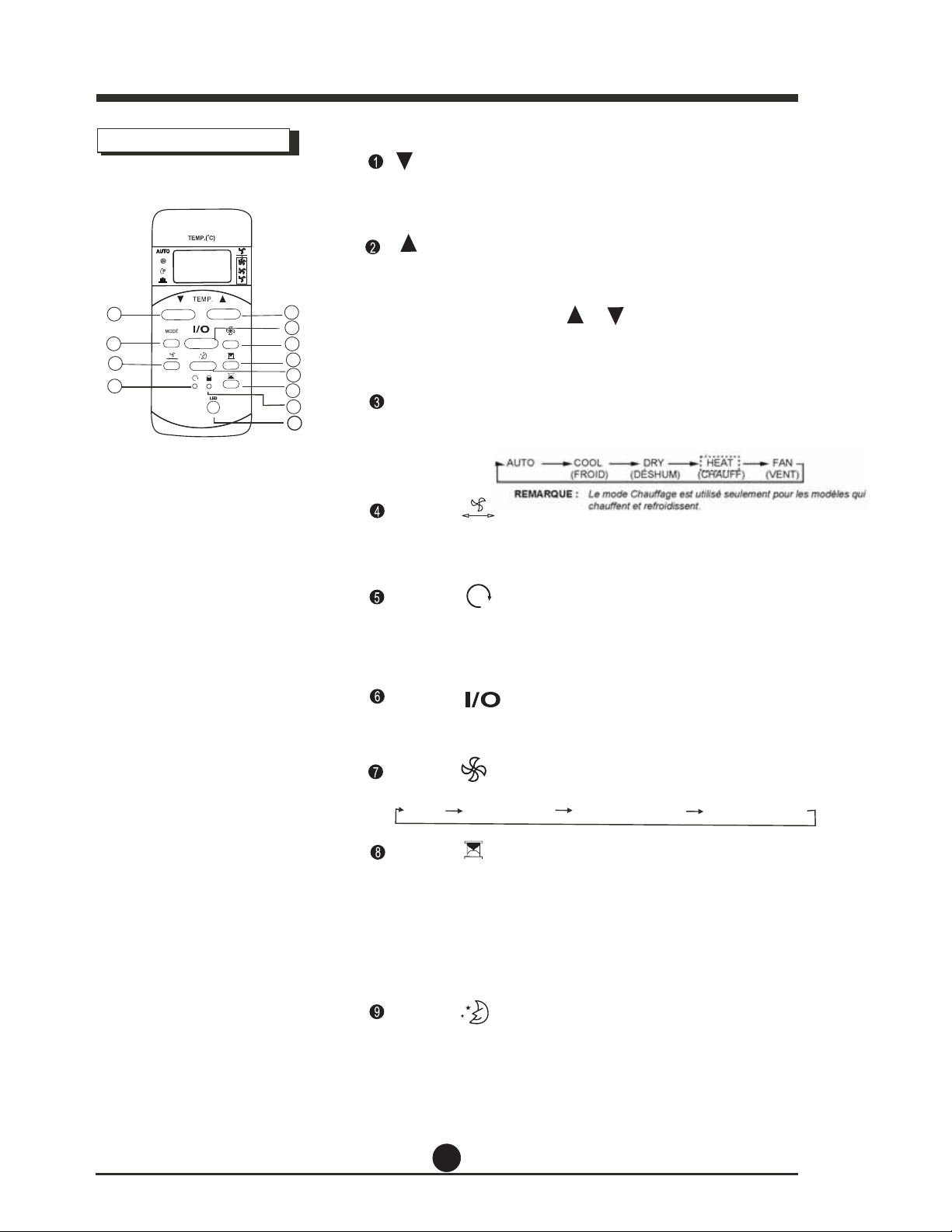
Function Buttons
1
nottuB NWOD PMET
Push this button to decrease the indoor temper-
ature setting by 1°C (2°F) increments to 30°C (86°F)
2
nottuB PU PMET
Push this button to increase the indoor temper-
ature setting by 1°C (2°F) increments to 17°C (62°F)
Each time the button is pressed, the operation
mode changes in the following sequence:
3
MODE Button
4
4
Used to stop or start louver movement and
move the airflow direction up/down as desired.
5
6
Button
Once the recessed RESET button is pressed,
all of the current settings will be cancelled
and the controller will return to default settings.
7
Button
Operation starts when this button is pressed
and stops when the button is pressed again.
AUTO
COOL
DRY
FAN
Used to select the fan speed in four steps:
Auto Low Med High
Button
Button
8
Press this button to activate the Auto-on time
setting. Each time it’s pressed will increase the start
time by 30 minute increments, up to 10 hours, then
by 1 hour increments up to 24 hours. To cancel the
Auto-on time setting, just press the button until
the time setting is 0.0.
9
Button
Select this function if you want the unit to maintain
a comfortable setting and save energy while you sleep.
mode only.
1
2
4
3
6
5
7
8
9
10
11
12
Model: RG51I46/BGE
Button
This function is available on COOL, or AUTO
Press and hold the UP and DOWN buttons at the same
time for 3 seconds to alternate the temperature display
between °C and °F.
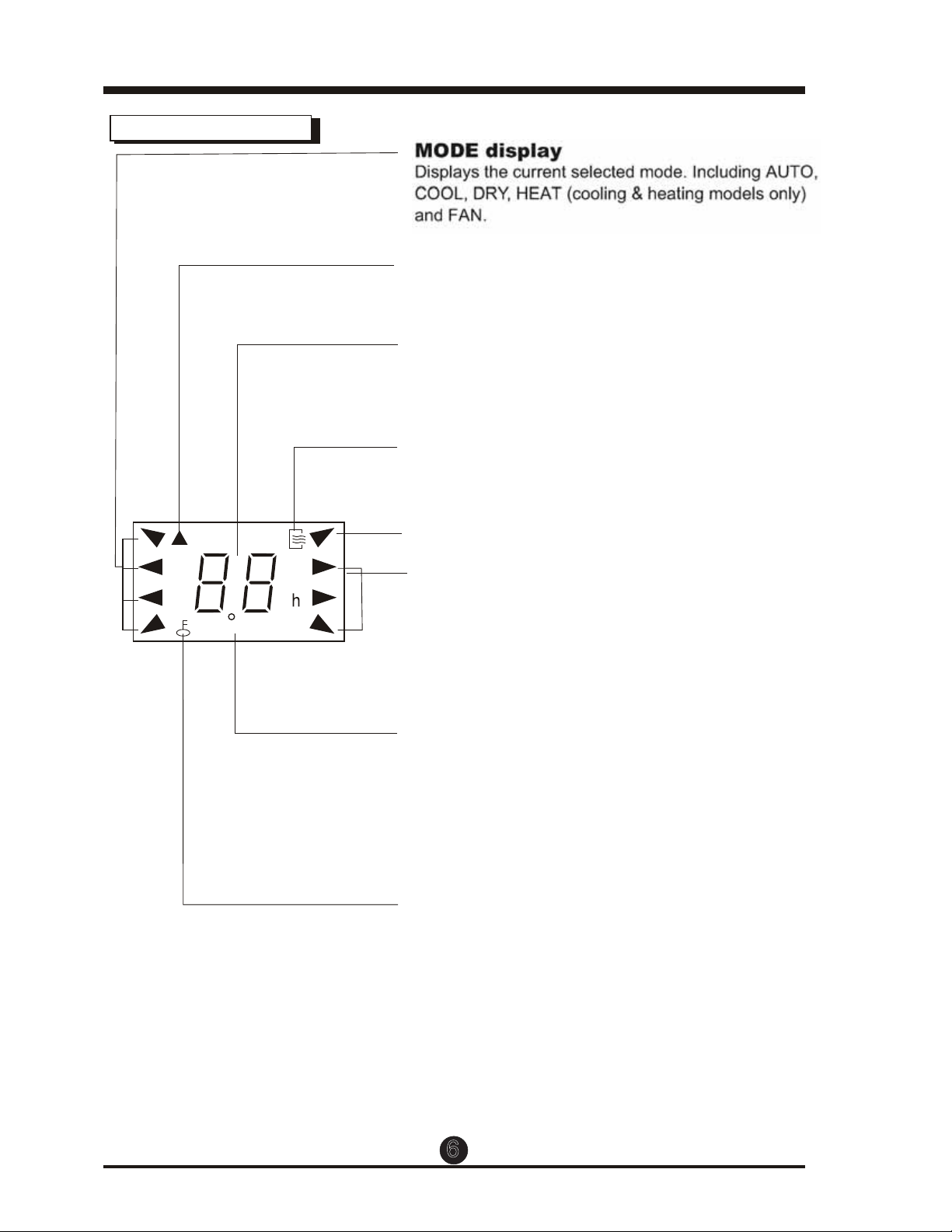
Function Buttons (continued)
Button: Press the timer button to activate
the AUTO-OFF setting. Each time it’s pressed
increases the time setting by 30 minute increments
for the first 10 hours, then by 1 hour increments up
to 24 hours. To cancel the AUTO-OFF setting, press
the button until the setting displays 0.0.
Button: Press this recessed button to lock all
current settings, and the remote control will not
accept any changes except for unlocking. Use the
LOCK mode when you want to prevent settings from
changing accidentally. Press the LOCK button again
to cancel the LOCK function. A LOCK symbol will
appear on the remote control display when the
LOCK function is activated.
5
10
11
.
LED Display Button: Press this button to clear the
unit’s display, press it again to light the display.
12
NOTE: While the unit is running in sleep mode, it
MODE buttons
are pressed.
ro , , fi lecnac lliw
6
TIMER ON OFF
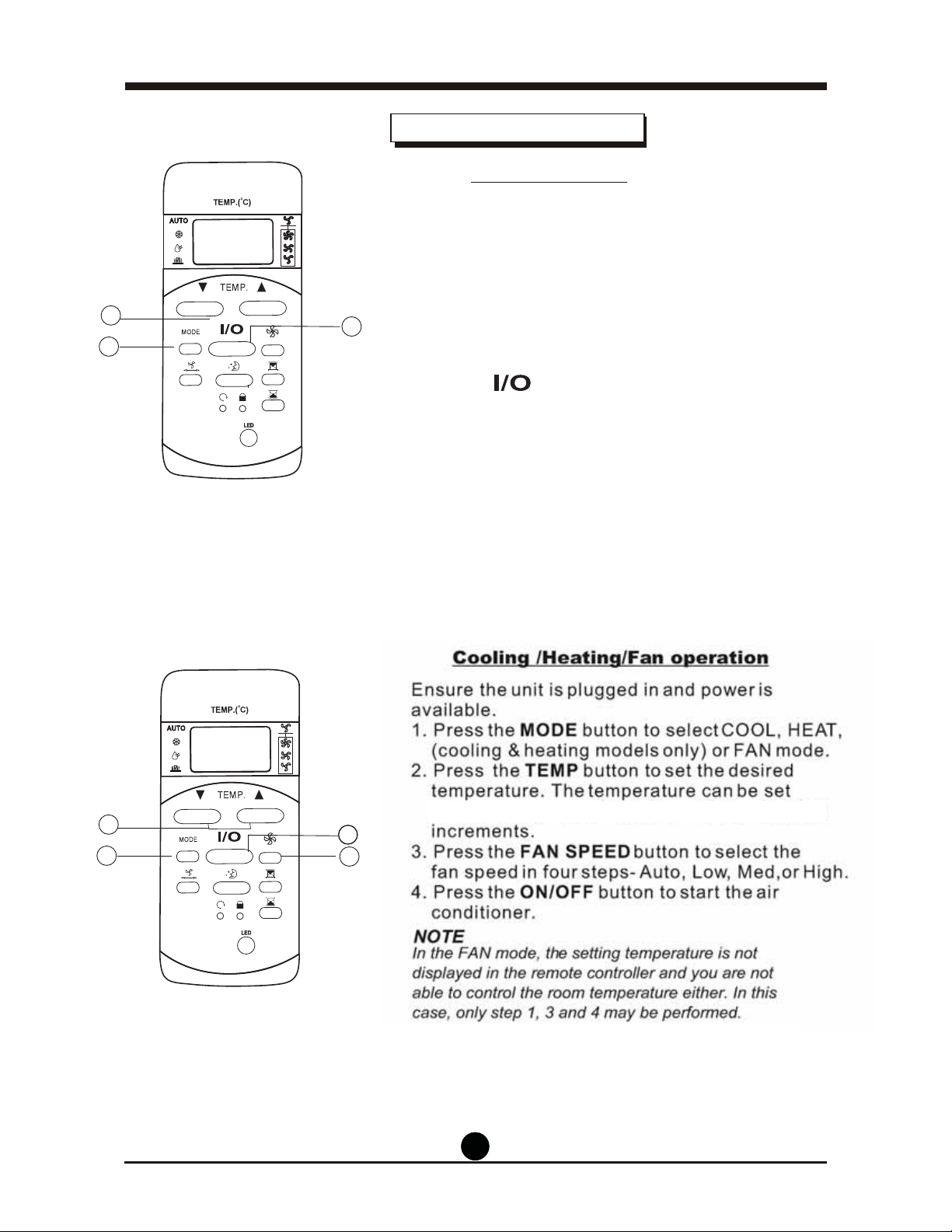
SET TEMPERATURE
Transmission Indicator
Temp./Timer Display
FAN SPEED Display
MODE display
ON/OFF Display
This transmission indicator will light up when the remote
control transmits signals to the indoor unit.
Displays the current selected mode. Including AUTO,
COOL, DRY
,
and FAN.
The temperature setting, from 17°C (62°F)
30°C (86°F) or timer setting (0~24h) will be displayed.
If FAN mode is selected, there will be no display
.
This indicator will be displayed when the unit is
operating.
Displays the selected fan speed: AUTO, HIGH, MED
or LOW. Nothing is displayed when the fan speed is
on AUTO speed. When AUTO or DRY Mode are
selected, there will be no signs displayed.
MODE Display
(FAN mode)
Indicators on the LCD
TIMER DISPLAY:
This display area shows the TIMER settings. That is, if
only the Auto-on function is set, it will display TIMER
ON. If only the Auto-off time function is set, it will
display TIMER OFF. If both functions are set, it will
display TIMER ON OFF which indicates you have
chosen both the Auto-on and Auto-off setting.
LOCK INDICATOR:
The LOCK icon is displayed after pushing the LOCK
button. Push the LOCK button again to clear display.
7
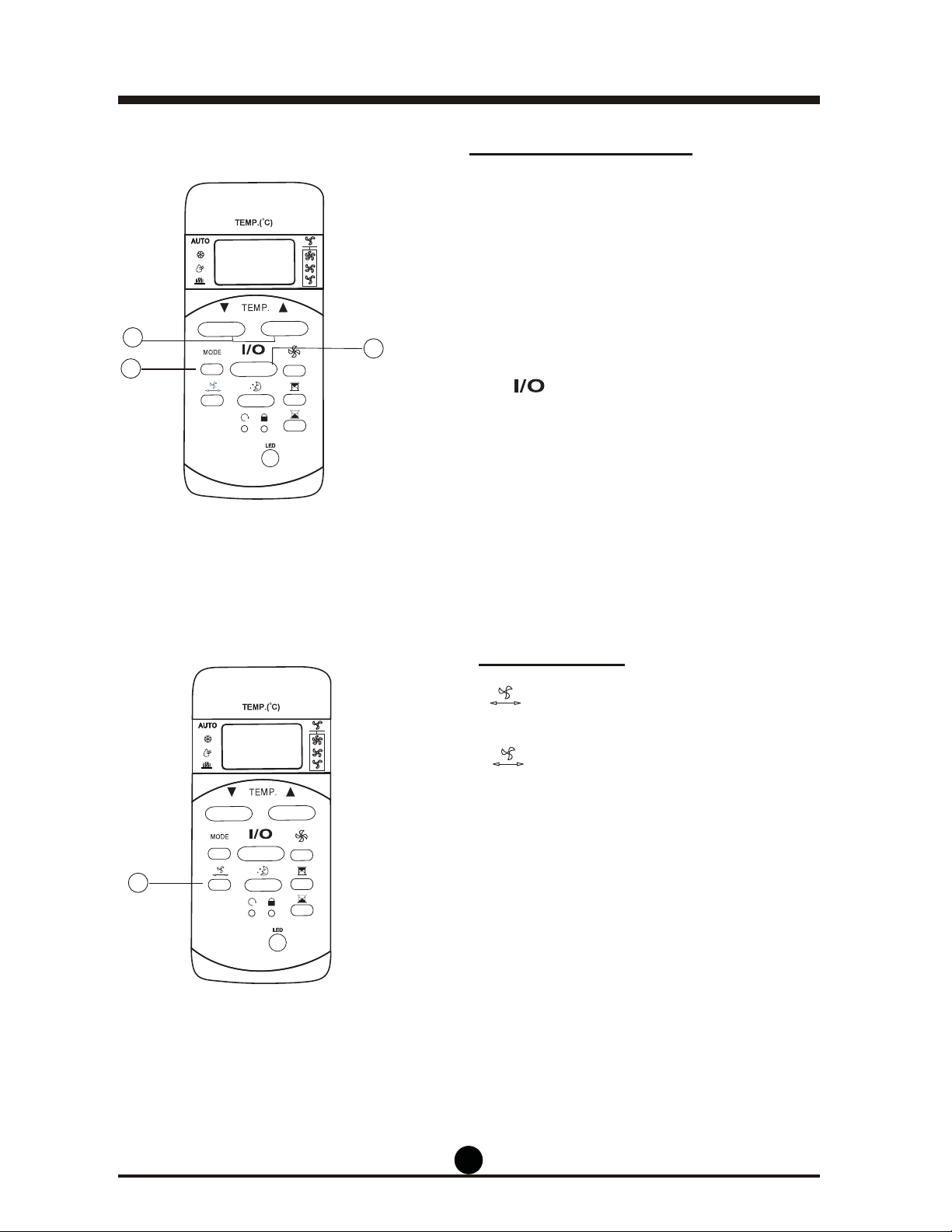
Ensure the unit is plugged in and has power.
How to use the buttons
4
Auto Operation
Ensure that the unit is plugged in and has power.
The OPERATION indicator will illuminate on the
display panel of the unit.
1. Press the MODE button until AUTO is selected.
2. Press the TEMP button to set the desired
temperature. The temperature can be set within a
range of 17°C (62°F) to 30°C (86°F) by 1°C (2°F)
increments.
conditioner.
NOTE
1. In the auto mode, the air conditioner can
automatically choose the mode of Cooling, Fan,
difference between
the actual room temperature
and the set
temperatrue on the remote control.
2. In the auto mode, you can’t switch the fan speed.
3. If the auto mode doesn’t suit you, the desired
mode can be controlled manually.
Cooling / Fan Operation
1. Press the MODE button to select COOL,
FAN mode.
2. Press the TEMP button to set the desired
temperature. The temperature can be set within a
range of 17°C (62°F) to 30°C (86°F) in 1°C (2°F)
increments.
3. Press the button to select one of
4 fan speeds -Auto, Low, Med, or High.
4. Press the button to start the air
conditioner.
NOTE
In the FAN mode, the temperature setting is not
displayed in the remote control and you are not
able to control the room temperature either. In this
case, only step 1, 3, and 4 may be performed.
1
3
2
Dehumidifying by sensing the
1
3
2
3. Press the button to start the air
)F°2( C°1 ni )F°68( C°03 ~ )F°26( C°71 fo egnar a nihtiw
8
Ensure the unit is plugged in and has power.
The
OPERATION
indicator on
the display
panel
of
the unit
illuminates.
Swing Setting
airflow direction .
2 seconds, the auto-swing feature of the louver
is activated. The horizontal louver will swing
up/down automatically. Press it again to stop.
NOTE: When the louver swings or moves to a
position which would affect the cooling
it will
automatically change the swing/
moving
direction.
Dehumidifying Setting
selected.
2. Press the TEMP button to set the desired
temperature. The temperature can be set within a
range of 17°C (62°F) to 30°C (86°F) by 1°C (2°F)
increments.
ing mode.
1
3
2
1
Use the button to adjust the Up/Down
ability of the air conditioner,
1. Press the MODE button until DRY mode si
3. Press the
button to start dehumidify-
1. If the button is held down for more than
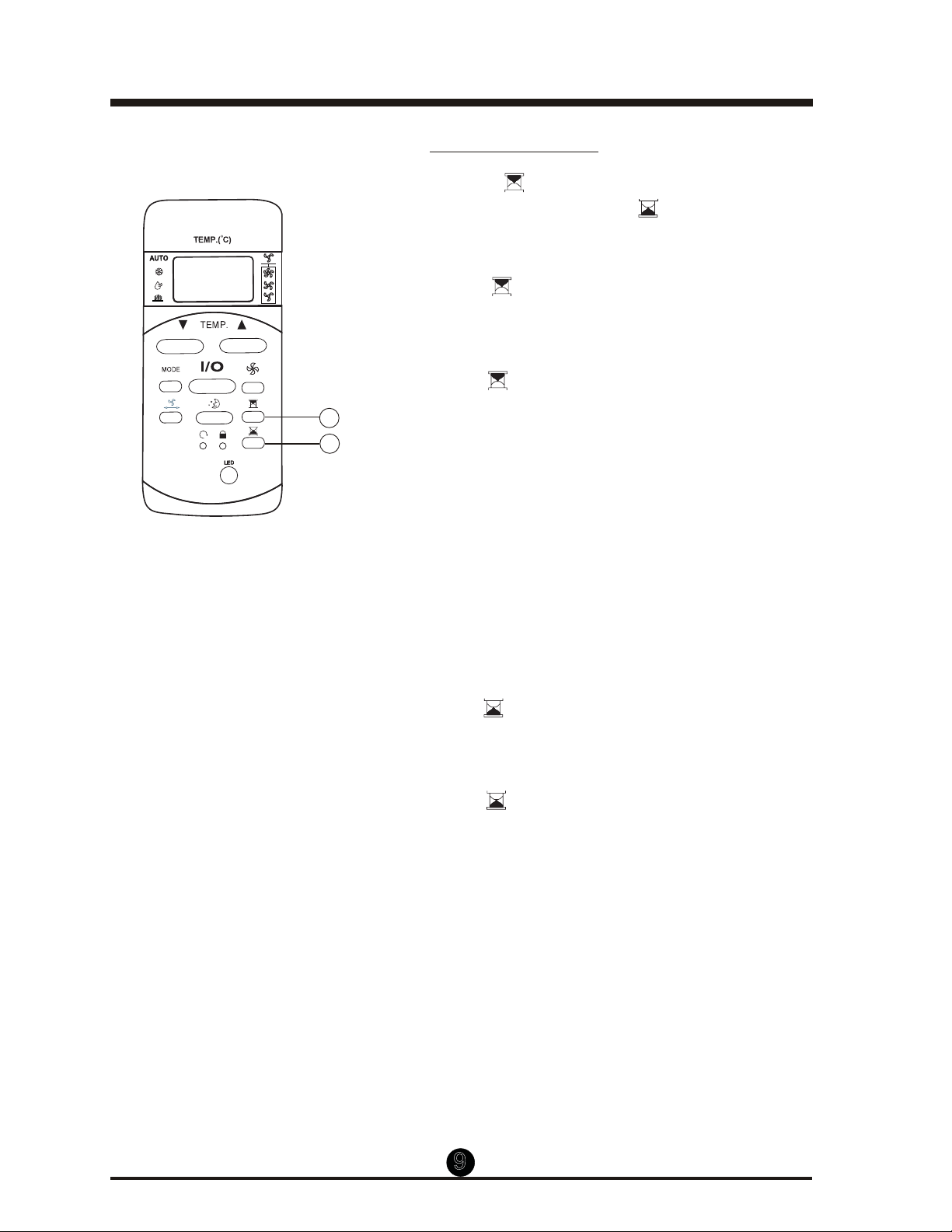
time of the unit. Pressing the button
9
Timer Setting
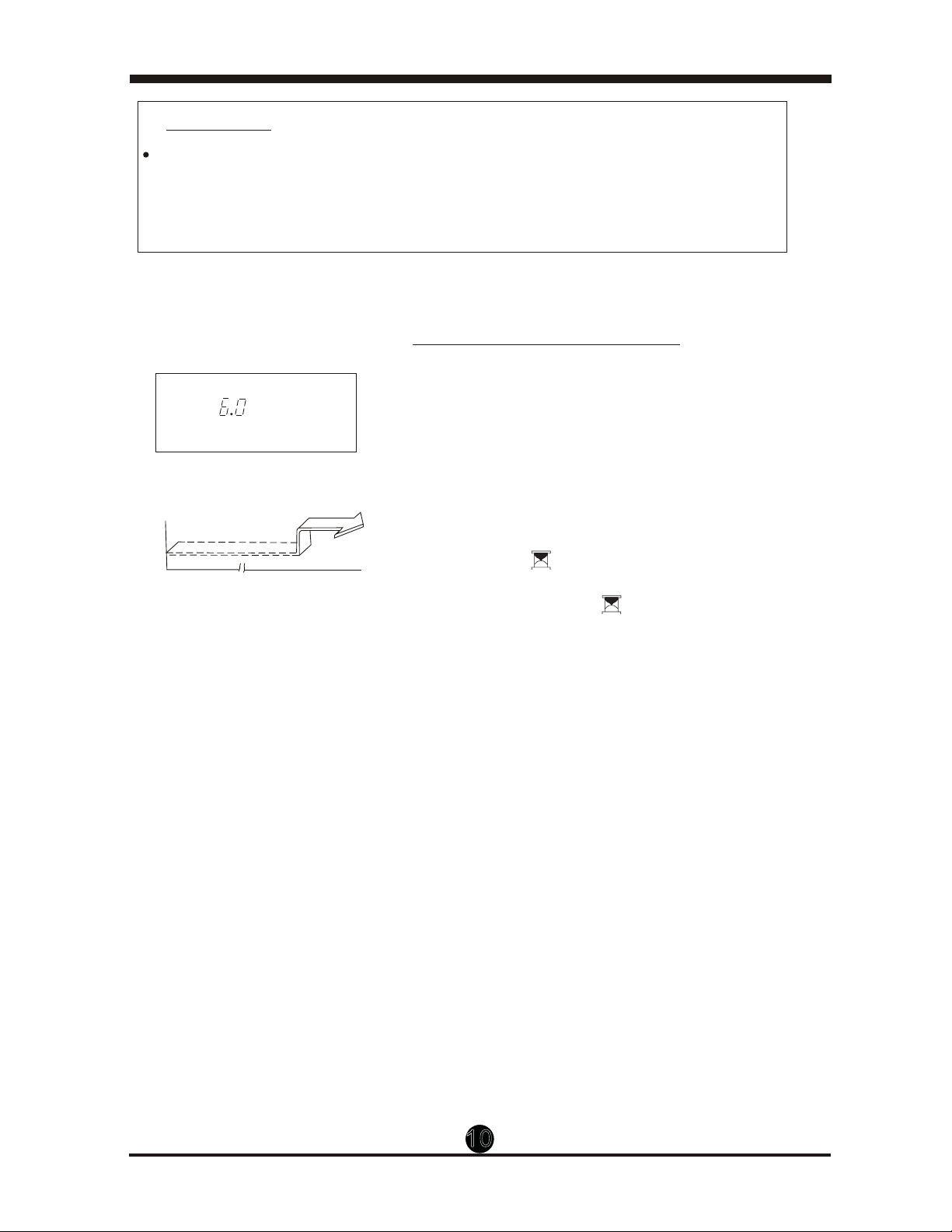
will set the auto-off time of the unit.
control will display TIMER ON, the last auto-on
time setting and the LCD display area will show
an ‘h.’ Now it’s ready to reset the auto-on time.
auto-on time. Each time you press the button,
the time increases by 30 minute increments, up
to 10 hours, then by 1 hour increments up to 24
hours.
3. After turning the TIMER ON, there will be a one-
half second delay before the remote control
transmits the signal to the air conditioner. Then,
after approximately 2 more seconds, the “h”
will disappear and the set temperature will
re-appear on the LCD display window.
To Set the Auto-On Time.
To Set the Auto-Off Time.
control will show TIMER OFF, the last auto-off
time setting, and the LCD display area will show
an “h.” Now it is ready to reset the auto-off time.
desired auto-off time. Each time you press the
button, the time increases by 30 minute
increments up to 10 hours, then by 1 hour
increments up to 24 hours.
3. After setting the TIMER OFF ,there will be a one-
half second delay before the remote controller
transmits the signal to the air conditioner. Then,
after approximately another 2 seconds, the
signal "h" will disappear and the set temperature
will re-appear on the LCD display window.
1
2
Pressing the
button will set the auto-on
1. Press the button. The remote
2. Push the button again to set the desired
1. Press the button. The remote
2. Push the button again to set the
10
The automatic operation time set by the remote control for the timer
function is limited to the following hourly settings: 0.5, 1.0, 1.5, 2.0, 2.5, 3.0,
3.5, 4.0, 4.5, 5.0, 5.5, 6.0, 6.5, 7.0, 7.5, 8.0, 8.5, 9.0, 9.5, 10, 11, 12, 13, 14,
15,16,17, 18, 19, 20, 21, 22, 23 and 24.
IMPORTANT
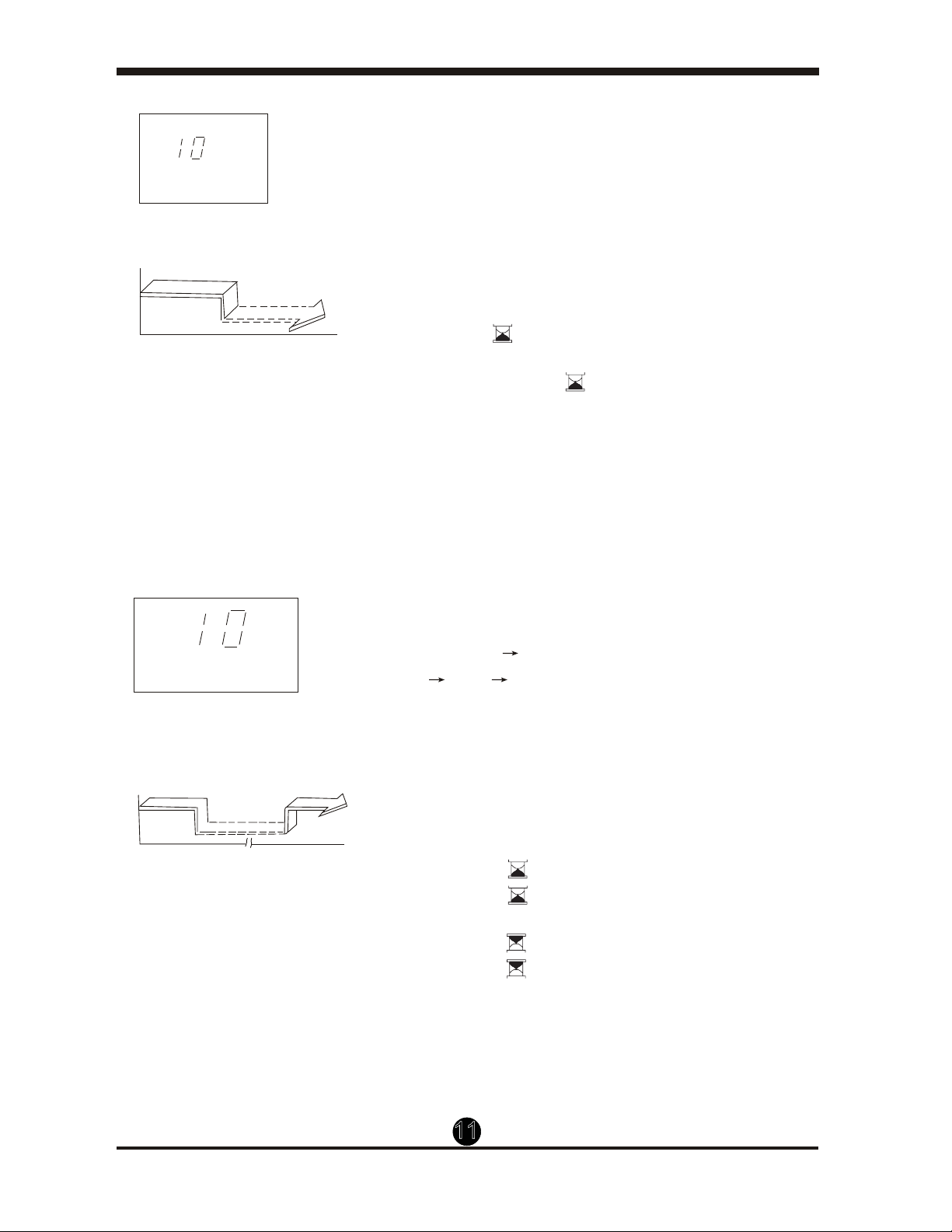
Example of Timer Operation
TIMER ON
Start
Off
6 hours later
(Auto-On Operation)
The TIMER ON feature is useful when you want
the unit to turn on automatically, for example, right
before you return home. The air conditioner will
automatically start operating at the set time.
To start the air conditioner 6 hours ahead.
setting and an "h" will show in the display area.
displays “6:0” on the TIMER ON display of the
remote control.
3. Wait about 3 seconds and the digital display
area will show the temperature again. The
auto-on function has now been activated.
TIMER ON
Example:
h
Set
1. Press the button. The last start time
2. Keep pressing the button until it
11
TIMER OFF
Stop
On
Set 10 hours later
(Auto-off Operation)
The TIMER OFF feature is useful when you want
the unit to turn off automatically, for example, after
you go to bed. The air conditioner will stop
automatically at the set time.
To stop the air conditioner in 10 hours.
setting and an “h” will appear in the display area.
display reaches “10h” on the TIMER OFF display
of the remote controller.
3. Wait for about 3 seconds and the digital display
area will show the temperature again. Now, the
TIMER OFF setting has been activated.
TIMER OFF
Example:
h
TIMER ON OFF
h
On
Stop
2 hours later
after setting
Set
To stop the air conditioner after 2 hours of
operation and start it again after another 10 hours.
2.0h appears on the TIMER OFF display.
. .yalpsid NO REMIT eht no deyalpsid si h01
5. Wait for the remote control to display
the setting temperature.
TIMER OFF
TIMER ON
(On Stop Start Operation)
This feature is useful when you want to stop the air
conditioner after you go to bed, and start it again in
the morning when you wake up or when you return
home.
Example:
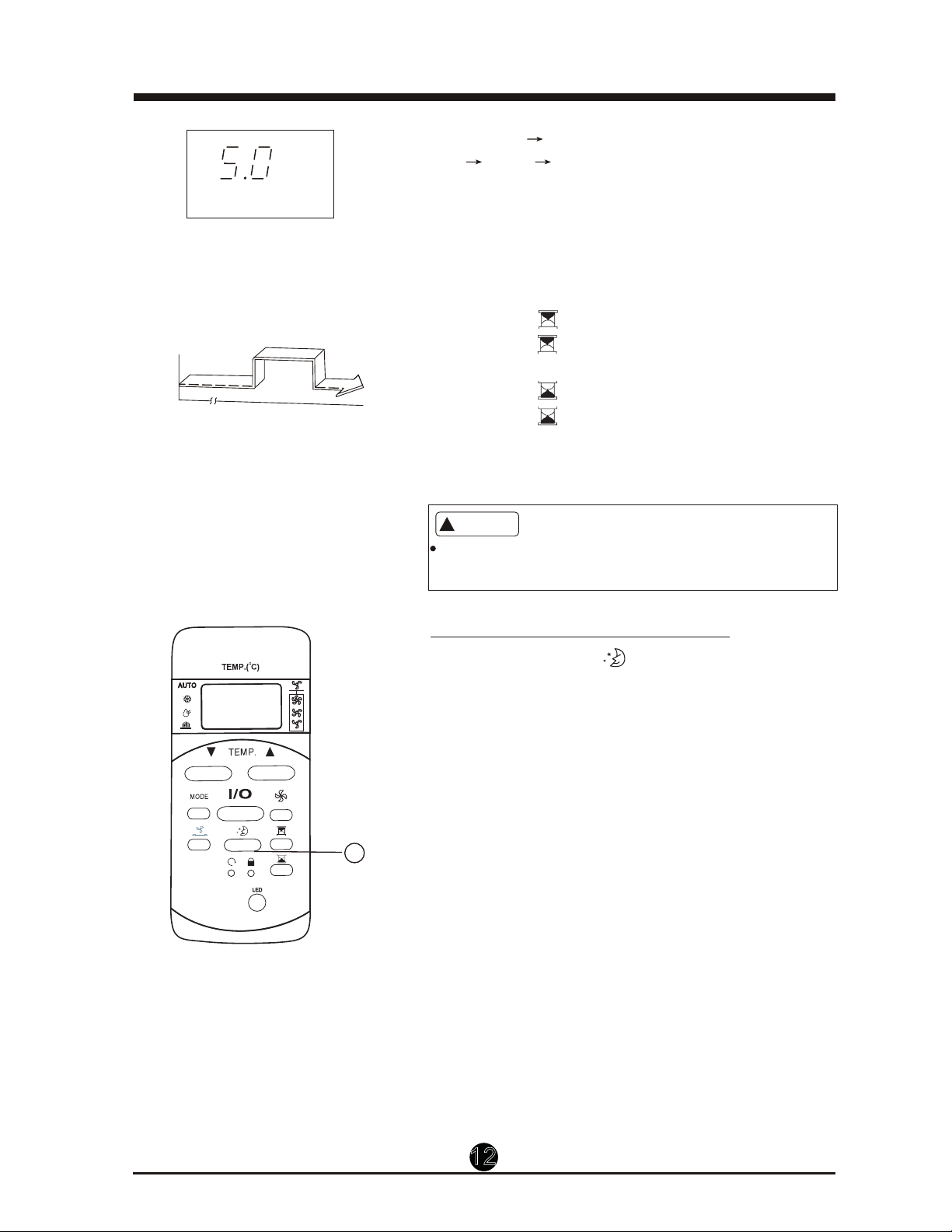
COMBINED TIMER
(Setting the ON and OFF timers simultaneously)
Start
10 hours later
after setting
1. Press the button, the last stop time
2. Keep pressing the button until the
1. Press the button.
2. Press the button again until
3. Press the button.
4. Press the button again until
12
Example:
TIMER ON TIMER OFF
(Off Start Stop operation)
This feature is useful when you want to start
the air conditioner before you wake up and
stop it after you leave the house, for example.
To start the air conditioner 2 hours after being
set, and stop it 5 hours after it starts.
2.0h on the TIMER ON display.
5.0h on the TIMER OFF display .
5. Wait for the remote control to display
the setting temperature.
Off
Stop
Start
TIMER ON OFF
h
2 hours later
after setting
5 hours later
after setting
Set
The timer setting(TIMER ON or TIMER OFF) must
be cancelled before other settings can be applied.
CAUTION
!
1
ECONOMY(SLEEP) Setting
When you press the button, the
ECONOMY
setting will be activated.
next 30 minutes and by
revo )F °2( C °1 rehtona
another 30 minutes.
This new temperature
hours before it returns to the originally selected
NOTE: The ECONOMY/SLEEP function is only
AUTO settings.
°
by 1 C (2° F) over the
will be maintained for 6
temperature.
available under COOLING and
1. Press the button.
syalpsid ti litnu nottub
eht sserP .2
3. Press the button.
4. Press the button until it displays
The temperature setting will increase (cooling)

The design and specifications of this unit are subject to
change without prior notice for the purpose of product
improvement. Consult the sales agency or manufacturer
for details.

Merci d'avoir acheté un climatiseur Danby. Veuillez lire ce
mode d'emploi attentivement avant d'utiliser votre
nouveau climatiseur.
Instructions pour la télécommande
MODÈLE
CLIMATISEUR
DPA120HB1WDB
DPA140HB1WDD
02.01.14
DPA140HB1WDD
DPA140HB1BDD

TABLE DES MATIÈRES
Manutention de la télécommande ....................................
Caractéristiques de la télécommande ............................. 17
Boutons de fonction .......................................................... 18
Indicateurs sur l'afficheur ACL ........................................ 20
Fonctionnement des boutons .......................................... 21
Réglage de fonctionnement automatique ....................... 21
Réglages de refroidissement/ventilateur ...... 21
Réglage de déshumidification ......................................... 22
Réglage de la rotation ....................................................... 22
Réglage de la minuterie .................................................... 23
Réglage du mode économie ............................................. 26
..................
15
16
MISES EN GARDE
Remplacement des piles
.
Manutention de la télécommande
Emplacement de la télécommande.
Ɣ Utilisez la télécommande à une distance de 8 mètres ou
moins de l'appareil, en l'orientant dans la direction du
récepteur. La réception est confirmée par un bip sonore.
Ɣ Le climatiseur ne fonctionne pas si le signal envoyé par la télécommande à
l'appareil est bloqué par des rideaux, des portes ou d'autres matériaux.
Ɣ Évitez que la télécommande n'entre en contact avec du liquide. N'exposez pas
la télécommande à la chaleur ou à la lumière directe du soleil.
Ɣ Si le récepteur du signal infrarouge qui se trouve sur l'unité intérieure est
exposé à la lumière directe du soleil, il est possible que le climatiseur ne
fonctionne pas correctement. Tirez les rideaux pour empêcher que la lumière
ne tombe sur le récepteur.
Ɣ Si d'autres appareils électroménagers réagissent à la télécommande, déplacez
ces appareils à un autre endroit ou consultez votre détaillant local.
La télécommande est alimentée par deux piles
arrière et protégées par un couvercle.
(1) Enlevez le couvercle en appuyant dessus et
en le faisant glisser.
(2) Retirez les vieilles piles et insérez les
nouvelles piles, en positionnant correctement
les extrémités (+) et (-).
(3) Remettez le couvercle en le faisant glisser en
place.
REMARQUE : Lorsque les piles sont enlevées,
toute la programmation de la télécommande est
effacée. Après l'insertion de nouvelles piles, la
télécommande doit être reprogrammée.
sèches (2-AAA) situées dans la partie
16
Model
Tension nominale
De -5 °C à 60 °C (de -41 °F à 140 °F)
Caractéristiques de la télécommande
et VENT.
2. Fonction de réglage de la minuterie sur 24 heures.
3. Plage de réglage des températures intérieures : de 17 °C à 30 °C (de 62 °F à 86 °F)
4. Afficheur ACL (affichage à cristaux liquides) à fonctions complètes
Environnement
Plage de réception du signal
Caractéristiques de rendement
MISE EN GARDE
REMARQUE :
REMARQUE : Toutes les illustrations contenues dans ce manuel servent
à des fins d'explication seulement. Votre climatiseur peut
être légèrement différent.
Ɣ Ne mélangez pas des piles neuves et des piles usées, ou des piles de types différents.
Ɣ Ne laissez pas les piles dans la télécommande si celle-ci ne servira pas plus de 2 mois.
Ɣ Jetez les piles dans des contenants spéciaux, comme ceux qui sont disponibles dans les magasins.
3 V (2-AAA)
8 m
1. Modes de fonctionnement : AUTO, FROID, DÉSHUM,
17
Affichage du réglage de la température : appuyez sur les boutons et au même
moment et maintenez-les enfoncés pendant 3 secondes pour passer de l’affichage en degrés
Celsius à l’affichage en degrés Fahrenheit.
RG5 GEB/46 I1
Des changements ou modifications non approuvés par l'autorité ayant confirmé la conformité de l’appareil aux
règlements de la FCC pourraient faire retirer l'autorisation d'utilisation de l'appareil. Cet appareil est conforme à
la Section 15 des réglementations de la FCC. Son utilisation est soumise aux deux conditions suivantes:
1) Cet appareil ne doit pas causer d'interférences nuisibles, et
2) Cet appareil doit accepter toute interférence reçue, y compris les interférences
qui pourraient causer un fonctionnement non souhaité.
CAN ICES-3 (B) / NMB-3 (B)
Remarque : Cet appareil a été testé et déclaré conforme aux limites imposées aux appareils numériques
de classe B, en vertu de l’alinéa 15 du règlement de la FCC. Ces limites sont destinées à assurer une
protection raisonnable contre les interférences nuisibles dans un environnement résidentiel. Cet appareil
génère, utilise et peut émettre de l’énergie radiofréquence et, s’il n’est pas installé et utilisé conformément
aux instructions, risque de provoquer des interférences nuisibles lors de la réception d’émissions de radio
ou de télévision (il suffit, pour le vérifier, d’allumer et d’éteindre successivement l’appareil); s’il constate de
telles interférences, l’utilisateur devra prendre les mesures nécessaires pour les éliminer. À cette fin, il
devra :
1) Réorienter ou déplacer l’antenne réceptrice.
2) Accroître la distance entre l’appareil et le récepteur.
3) Brancher l’appareil sur une prise de courant appartenant à un autre circuit que celui du récepteur.
4) Chercher de l’aide auprès du détaillant ou d’un technicien en radio ou en télévision expérimenté.
Boutons de fonction
Bouton TEMP DOWN (BAISSER LA TEMPÉRATURE)
Appuyez sur ce bouton pour baisser le réglage de la
température intérieure par paliers de 1 °C (2 °F) jusqu'à 30 °C (86 °F)
Bouton TEMP UP (AUGMENTER LA TEMPÉRATURE)
Appuyez sur ce bouton pour augmenter le réglage de la
température intérieure par paliers de 1 °C (2 °F) jusqu'à 17 °C (62 °F)
Chaque fois que l'on appuie sur un bouton,
le mode de fonctionnement change dans l'ordre suivant :
AUTO
Bouton MODE
Bouton
Utilisé pour commencer ou arrêter le mouvement des registres et
changer la direction de la circulation de l'air vers le haut ou le bas,
au besoin.
Bouton (RÉINITIALISATION)
Une fois que l'on a appuyé sur le bouton renfoncé RESET
(RÉINITIALISATION), tous les réglages actuels sont annulés
et la commande retourne aux réglages par défaut.
Bouton (MARCHE/ARRÊT)
Le climatiseur se met en marche lorsque l'utilisateur appuie sur
ce bouton et s'arrête lorsque l'utilisateur appuie dessus à nouveau.
COOL
(FROID)
DRY
(DÉSHUM)
FAN
(VENT)
Utilisé pour choisir la vitesse du ventilateur en quatre étapes :
Auto Low (Basse) Med (Moyenne) High (Élevée)
Bouton (VITESSE DU VENTILATEUR)
Bouton (MISE EN MARCHE MINUTERIE)
Appuyez sur ce bouton pour activer le réglage du délai de mise
en marche automatique. Chaque pression sur ce bouton fait
augmenter le délai de mise en marche par paliers de 30 minutes,
jusqu'à 10 heures, puis par paliers d'une heure jusqu'à 24 heures.
Pour annuler le réglage du délai de mise en marche automatique,
il suffit d'appuyer sur le bouton jusquà ce que la valeur affichée
soit 0.0.
Bouton (ÉCONOMIE VEILLE)
Choisissez cette fonction si vous souhaitez que l'appareil
maintienne une température confortable et économise de
l'énergie pendant que vous dormez.Cette fonction est disponible
1
2
4
3
6
5
7
8
9
10
11
12
RG51I46/BGE
Modèle :
en mode COOL (FROID), ou AUTO seulement.
18
Appuyez sur les boutons et au même moment et maintenez-les
enfoncés pendant 3 secondes pour passer de l’affichage en degrés
Celsius à l’affichage en degrés Fahrenheit.
Boutons de fonction (suite)
REMARQUE : Lorsque l'appareil fonctionne en mode veille,
ce mode sera annulé si l'utilisateur appuie sur les boutons
,
ou MODE.
Bouton : Appuyez
sur le bouton pour activer le réglage
AUTO-OFF
(ARRÊT AUTOMATIQUE). Chaque pression sur
le
bouton augmente le réglage de du délai par paliers de
30 minutes pendant les 10 premières heures, puis par
paliers d'une heure jusqu'à 24 heures. Pour annuler le
réglage AUTO-OFF (ARRÊT AUTOMATIQUE), appuyez
sur le bouton jusqu'à ce que la valeur affichée soit 0.0.
Bouton : Appuyez sur ce bouton
renfoncé pour verrouiller tous les réglages actuels, et la
télécommande n'acceptera plus de changements, sauf
une demande de déverrouillage. Utilisez le mode LOCK
(VERROU) lorsque vous voulez éviter que les réglages
soient changés accidentellement. Appuyez sur le
bouton LOCK (VERROU) de nouveau pour annuler la
fonction LOCK (VERROU). Un symbole de cadenas
apparaîtra sur l'afficheur de la télécommande lorsque la
fonction LOCK (VERROU) est activée.
Bouton LED DISPLAY (AFFICHAGE À DEL) : Appuyez
sur ce bouton pour effacer l'afficheur de l'appareil,
appuyez dessus de nouveau pour éclairer l'afficheur.
,
19
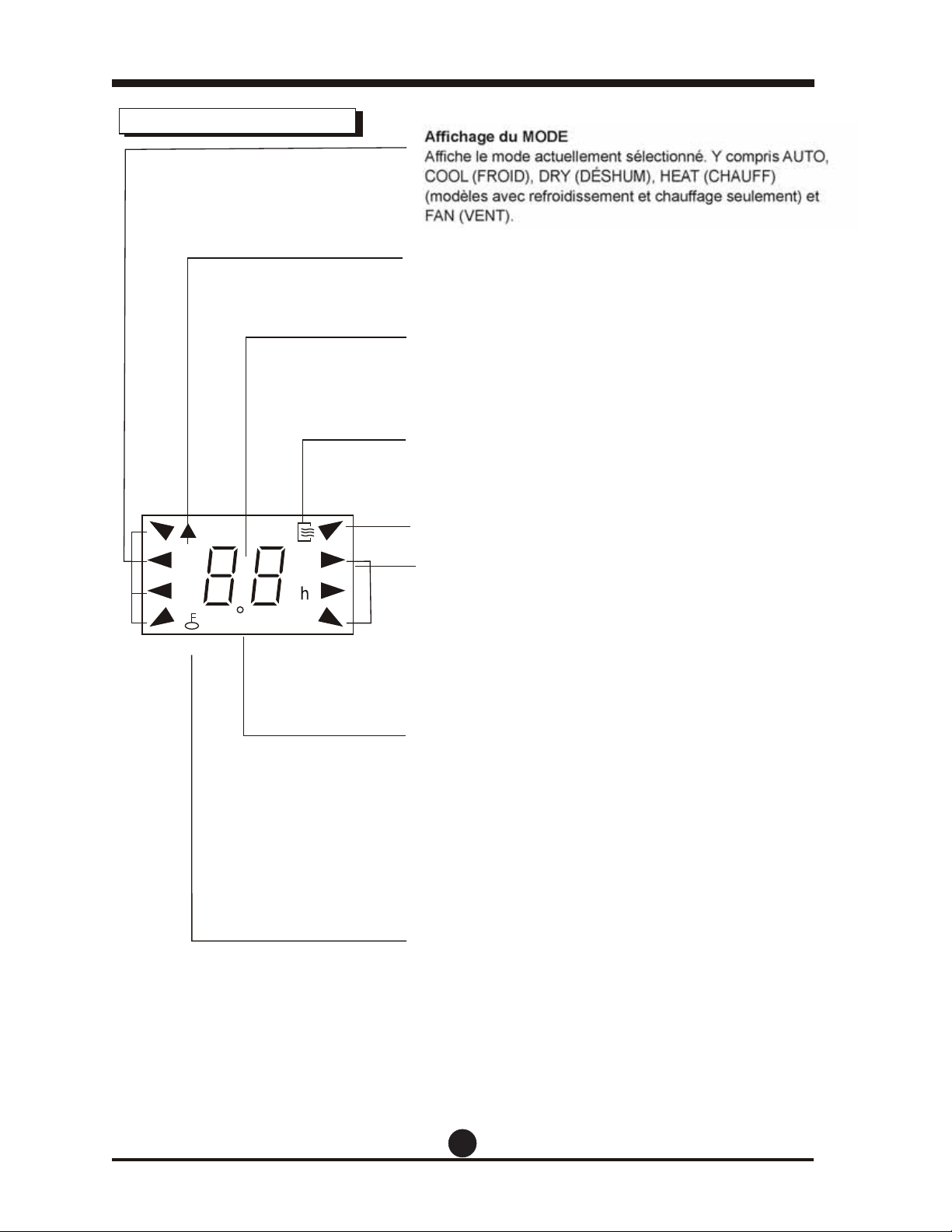
TIMER ON OFF
(MISE EN MARCHE/ARRÊT
MINUTERIE)
SET TEMPERATURE
(RÉGLAGE TEMPÉRATURE)
Indicateurs sur l'afficheur ACL
Affichage du MODE
Affiche le mode actuellement sélectionné. Y compris AUTO,
COOL (FROID), DRY (DÉSHUM),
et
FAN (VENT).
Indicateur de transmission
L'indicateur de transmission s'allume lorsque la télécom-
mande transmet des signaux à l'unité intérieure.
Affichage de la température/minuterie
Le réglage de la température, de 17 °C (62 °F) à 30 °C
(86 °F) ou le réglage de la minuterie (de 0 à 24 h)
s'affichera. Si le mode FAN (VENT) est sélectionné,
rien ne sera affiché
Affichage ON/OFF (MARCHE/ARRÊT)
Cet indicateur s'affiche lorsque l'appareil fonctionne.
Affichage du MODE (Mode FAN [VENT])
Affichage de la vitesse du ventilateur
Affiche la vitesse sélectionnée du ventilateur : AUTO, HIGH
(ÉLEVÉE), MED (MOYENNE) ou LOW (BASSE). Rien ne
s'affiche lorsque la vitesse du ventilateurest AUTO Lorsque
le mode AUTO ou DRY (DÉSHUM) est sélectionné, aucun
indicateur n'est affiché.
AFFICHAGE DE LA MINUTERIE :
Les réglages de la MINUTERIE s'affichent dans cette zone.
Si seulement la fonction de mise en marche automatique
est activée, TIMER ON (MISE EN MARCHE MINUTERIE)
s'affiche. Si seulement la fonction d'arrêt automatique est
activée, TIMER OFF (ARRÊT MINUTERIE) s'affiche. Si les
deux fonctions sont réglées, TIMER ON OFF (MISE EN
MARCHE/ARRÊT MINUTERIE) s'affiche pour indiquer que
vous avez choisi le réglage du délai de mise en marche
automatique ET le réglage du délai d'arrêt automatique.
INDICATEUR DE VERROUILLAGE :
L'icône du cadenas est affichée après que l'on a appuyé sur
le bouton LOCK (VERROU). Appuyez sur le bouton LOCK
(VERROU) à nouveau pour effacer l'affichage.
20
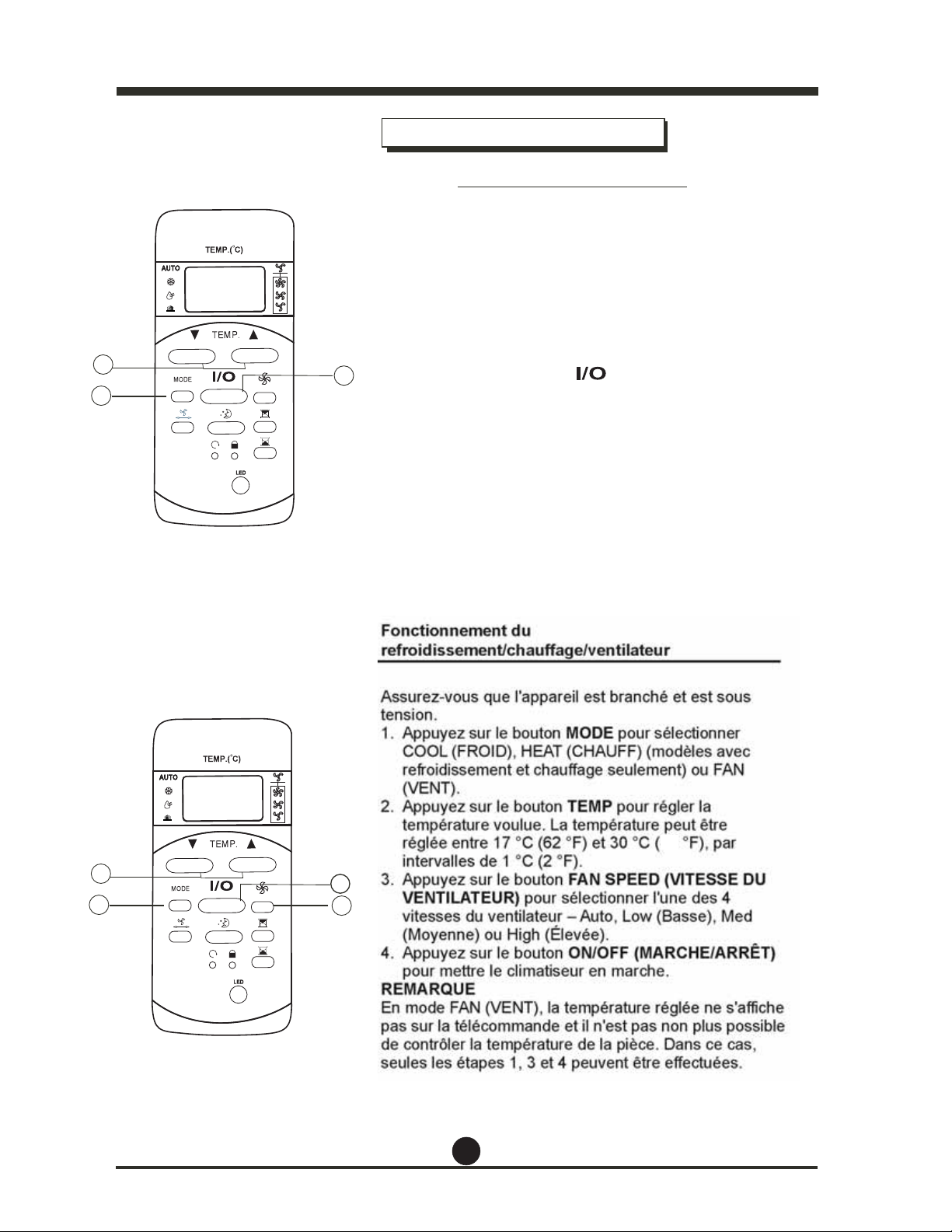
Comment utiliser les boutons
Fonctionnement automatique
Assurez-vous que l'appareil est branché et est sous
tension.
1. Appuyez sur le bouton MODE pour sélectionner
COOL (FROID),
ou FAN
(VENT).
2. Appuyez sur le bouton TEMP pour régler la
température voulue. La température peut être
réglée entre 17 °C (62 °F) et 30 °C (86 °F), par
intervalles de 1 °C (2 °F).
3. Appuyez sur le bouton (VITESSE DU
VENTILATEUR) pour sélectionner l'une des 4
vitesses du ventilateur – Auto, Low (Basse), Med
(Moyenne) ou High (Élevée).
4. Appuyez sur le bouton (MARCHE/ARRÊT)
pour mettre le climatiseur en marche.
REMARQUE
En mode FAN (VENT), la température réglée ne s'affiche
pas sur la télécommande et il n'est pas non plus possible
de contrôler la température de la pièce. Dans ce cas,
seules les étapes 1, 3 et 4 peuvent être effectuées.
Assurez-vous que l'appareil est branché et est sous
tension. L'indicateur FONCTIONNEMENT s'allume sur le
panneau d'affichage de l'appareil.
1. Appuyez sur le bouton MODE jusqu'à ce qu'AUTO soit
sélectionné.
2. Appuyez sur le bouton TEMP pour régler la température
au niveau souhaité. La température peut être réglée entre
17 °C (62 °F) et 30 °C (86 °F), par intervalles de
1 °C (2 °F).
3. Appuyez sur le bouton (MARCHE/ARRÊT) pour
mettre le climatiseur en marche.
REMARQUE
1. En mode Auto, le climatiseur peut choisir de façon
automatique le mode Refroidissement, Ventilateur,
différence entre
la température réelle de la pièce et la
température
réglée au moyen de la télécommande.
2. En mode Auto, vous ne pouvez pas changer la vitesse
du ventilateur.
3. Si le mode Auto ne vous convient pas, le mode
souhaité peut être sélectionné manuellement.
Fonctionnement du
4
1
3
2
1
3
2
refroidissement/ventilateur
et Déshumidfication en détectant la
21
86
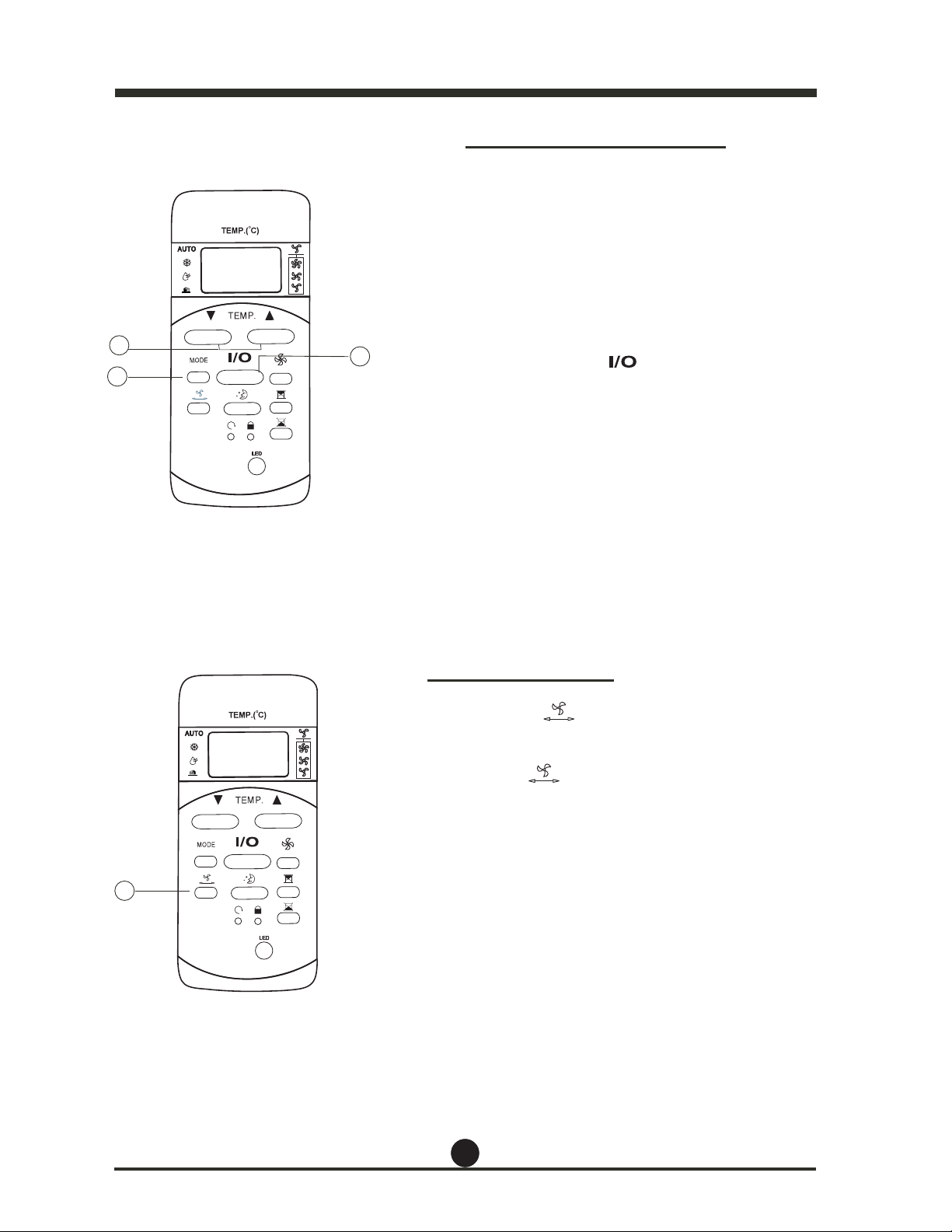
Réglage de rotation
Réglage de déshumidification
Utilisez le bouton pour ajuster la
direction de la
circulation de l'air (vers la droite ou vers
la gauche).
est tenu enfoncé
pendant plus de
2 secondes, la fonction de rotation
automatique du
registre est activée. Le registre
horizontal pivote
automatiquement vers le haut/le bas.
Appuyez dessus à nouveau pour désactiver la fonction.
REMARQUE : Lorsque le registre pivote ou prend une
position qui affecterait la capacité de
refroidissement du
climatiseur, il change
automatiquement
la direction de la
rotation/du mouvement.
Assurez-vous que l'appareil est branché et est sous
tension. L'indicateur FONCTIONNEMENT s'allume sur
le panneau d'affichage de l'appareil.
1. Appuyez sur le bouton MODE jusqu'à ce que DRY
(DÉSHUM) soit sélectionné.
2. Appuyez sur le bouton TEMP pour régler la
température au niveau souhaité. La température
peut être réglée entre 17 °C (62 °F) et 30 °C
(86 °F), par intervalles de 1 °C (2 °F).
3. Appuyez sur le bouton (MARCHE/ARRÊT)
pour activer la fonction de déshumidification.
1
3
2
1
. Si le bouton
1
22
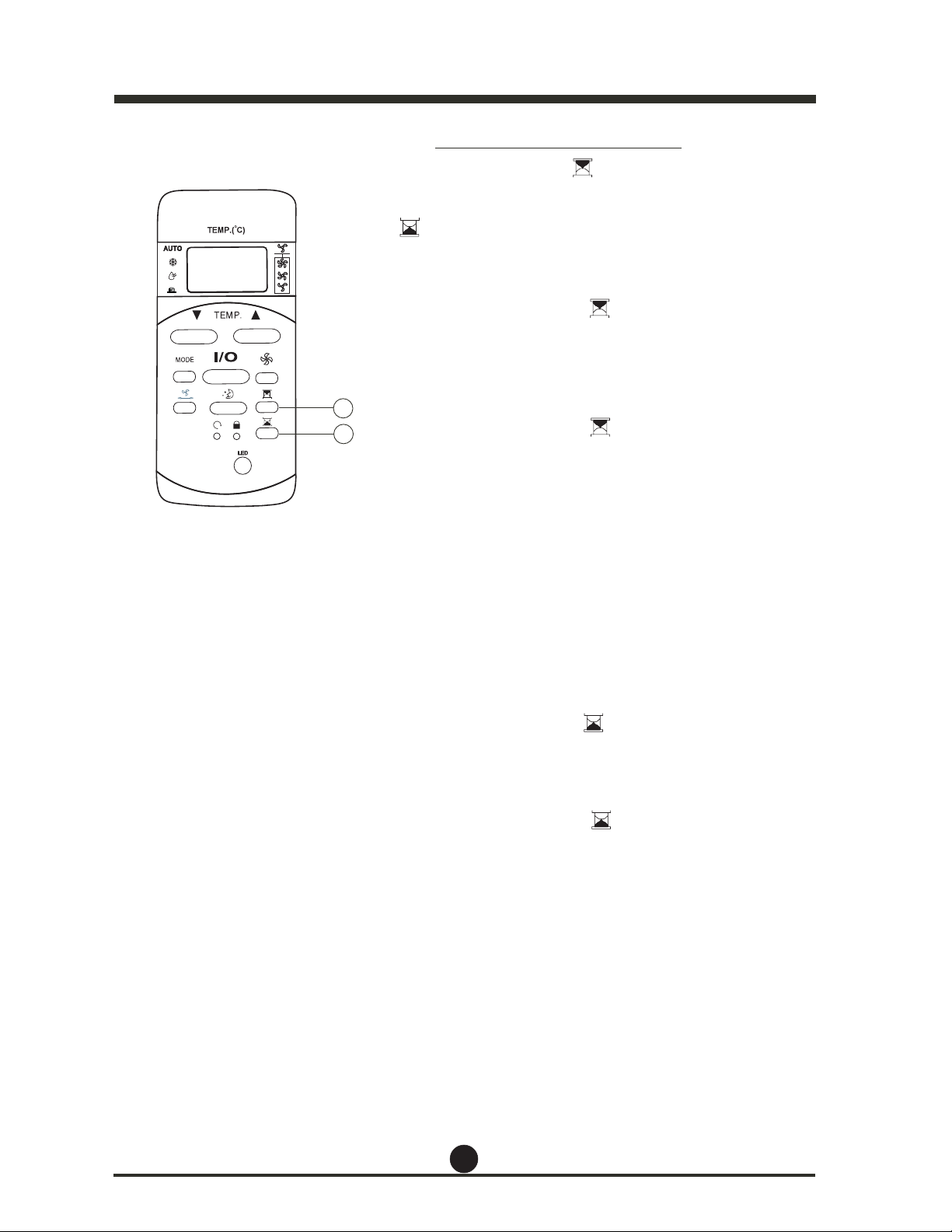
Réglage de la minuterie
Appuyez sur le bouton (MISE EN MARCHE
MINUTERIE) pour régler le délai de mise en marche
automatique de l'appareil. Appuyez sur le bouton
(ARRÊT MINUTERIE) pour régler le délai d'arrêt
automatique de l'appareil.
Pour régler le délai de mise en marche automatique.
1. Appuyez sur le bouton (MISE EN MARCHE
MINUTERIE). La télécommande affiche TIMER ON
(MISE EN MARCHE MINUTERIE) et le dernier réglage
du délai de mise en marche automatique, et l'afficheur
ACL affiche un « h ». Vous pouvez maintenant
réinitialiser le délai de mise en marche automatique.
2. Appuyez sur le bouton (MISE EN MARCHE
MINUTERIE) de nouveau pour régler le délai de mise
en marche automatique souhaitée. Chaque fois que
vous appuyez sur le bouton, l'heure augmente par
paliers de 30 minutes, jusqu'à 10 heures, puis par
paliers d'une heure, jusqu'à 24 heures.
3. Après avoir activé TIMER ON (MISE EN MARCHE
MINUTERIE), il y aura un délai d'une demi-seconde
avant que la télécommande transmette le signal au
climatiseur. Ensuite, après environ 2 secondes de plus,
le « h » disparaîtra et la température réglée réapparaîtra
sur l'afficheur ACL.
Pour réglerle délai d'arrêt automatique.
1. Appuyez sur le bouton (ARRÊT MINUTE-
RIE). La télécommande affiche TIMER OFF (ARRÊT
MINUTERIE) et le dernier réglage du délai d'arrêt
automatique, et l'afficheur ACL affiche un « h ». Vous
pouvez maintenant réinitialiser le délai d'arrêt automatique.
2. Appuyez sur le bouton (ARRÊT MINUTE-
RIE) de nouveau pour régler le délai d'arrêt automatique
souhaité. Chaque fois que vous appuyez sur le bouton,
le délai augmente par paliers de 30 minutes, jusqu'à 10
heures, puis par paliers d'une heure, jusqu'à 24 heures.
3. Après avoir activé TIMER OFF (ARRÊT MINUTERIE), il
y aura un délai d'une demi-seconde avant que la
télécommande transmette le signal au climatiseur.
Ensuite, après environ 2 secondes de plus, le « h »
disparaîtra et la température réglée réapparaîtra sur
l'afficheur ACL.
1
2
23
IMPORTANT
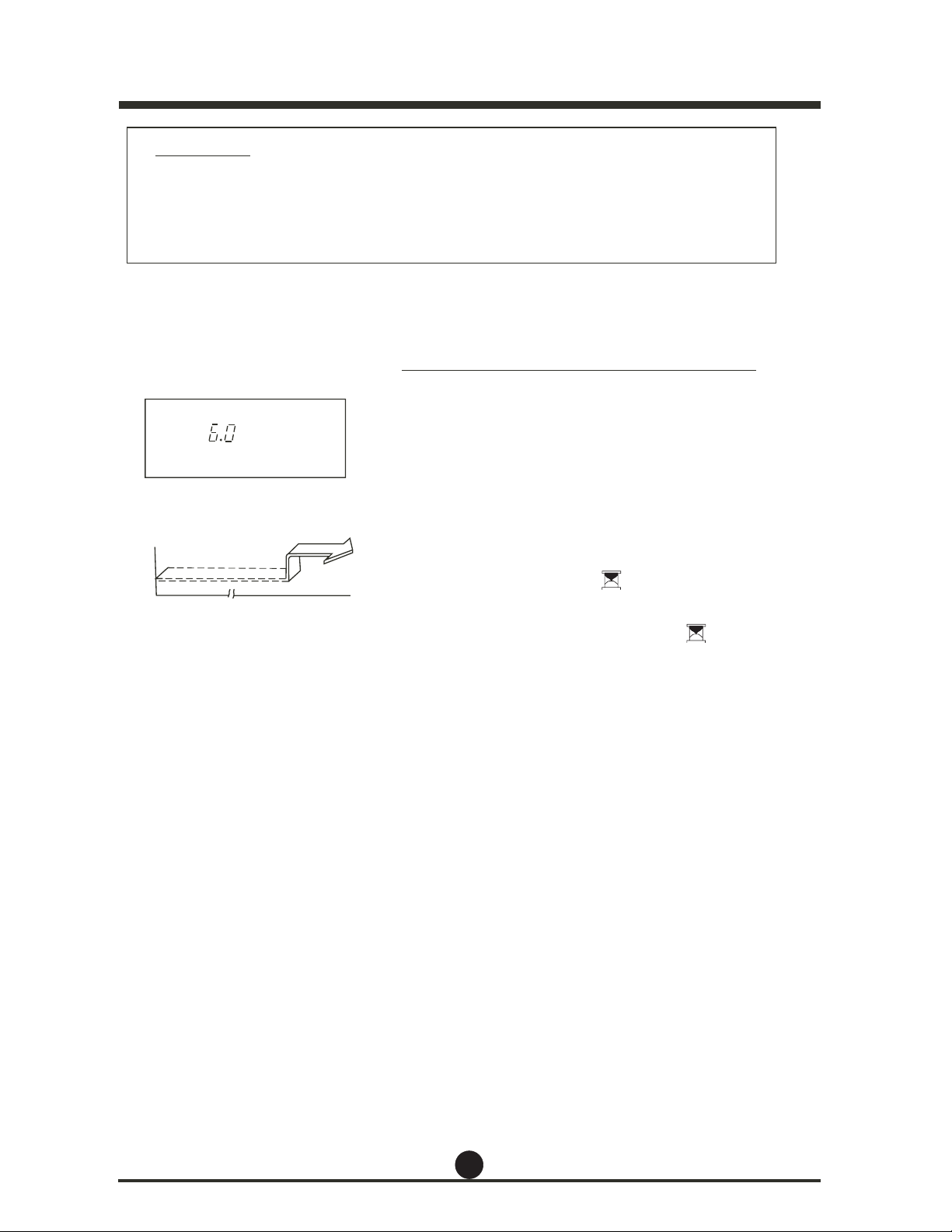
Exemple de fonctionnement de la minuterie
TIMER ON (MISE EN MARCHE MINUTERIE)
Mise en marche
Arrêt
6 heures plus tard
h
Ɣ Le délai de fonctionnement automatique réglé par la télécommande pour la
minuterie est limité aux réglages suivants de l'heure : 0.5, 1.0, 1.5, 2.0, 2.5, 3.0,
3.5, 4.0, 4.5, 5.0, 5.5, 6.0, 6.5, 7.0, 7.5, 8.0, 8.5, 9.0, 9.5, 10, 11, 12, 13, 14,
15,16,17, 18, 19, 20, 21, 22, 23 et 24.
TIMER ON (MISE EN MARCHE MINUTERIE)
(Fonction de mise en marche automatique)
La fonction TIMER ON (MISE EN MARCHE MINUTERIE)
est utile lorsque vous souhaitez que l'appareil se mette en
marche automatiquement, par exemple juste avant que
vous rentriez à la maison. Le climatiseur commencera
automatiquement à fonctionner après le délai réglé.
Exemple :
Pour mettre en marche le climatiseur dans 6 heures :
1. Appuyez sur le bouton (MISE EN MARCHE
MINUTERIE). Le dernier réglage du délai et un « h »
s'affichent dans l'afficheur.
2. Continuez à appuyer sur le bouton (MISE
EN MARCHE MINUTERIE) jusqu'à ce que « 6.0 »
s'affiche dans la zone TIMER ON (MISE EN MARCHE
MINUTERIE) de la télécommande.
3. Attendez environ 3 secondes, et la zone de l'afficheur
numérique affichera de nouveau la température. La
fonction de mise en marche automatique est maintenant
activée.
Set (Régler)
24
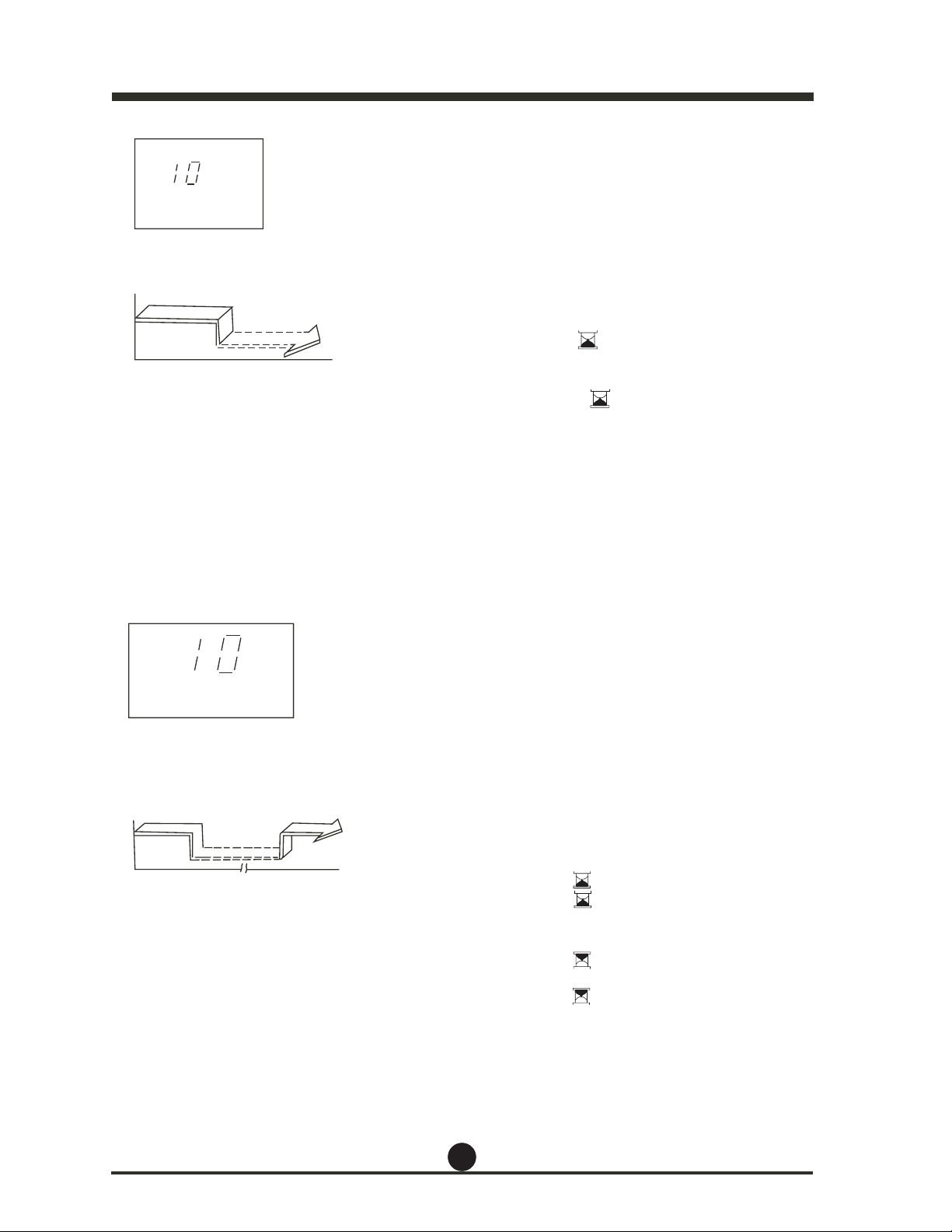
TIMER OFF
(ARRÊT MINUTERIE)
Arrêt
Mise en
marche
Réglage 10 heures plus tard
h
TIMER ON OFF (MISE EN
MARCHE/ARRÊT MINUTERIE)
h
Mise en
marche
Arrêt
2 heures plus tard
après le réglage
Réglage
Mise en marche
10 heures plus tard
après le réglage
TIMER OFF (ARRÊT MINUTERIE)
(Fonction d'arrêt automatique)
La fonction TIMER OFF (ARRÊT MINUTERIE) est utile
lorsque vous souhaitez que l'appareil s'éteigne automa-
tiquement, par exemple après que vous vous couchez. Le
climatiseur cessera automatiquement de fonctionner après
le délai réglé.
Exemple :
Pour arrêter le climatiseur dans 10 heures.
1. Appuyez sur le bouton (ARRÊT MINUTE-
RIE), le dernier délai d'arrêt automatique et un « h »
s'afficheront dans la zone d'affichage.
2. Continuez à appuyer sur (ARRÊT
MINUTERIE) jusqu'à ce que la valeur « 10h » s'affiche
dans la zone d'affichage TIMER OFF (ARRÊT
MINUTERIE) de la télécommande.
3. Attendez environ 3 secondes, et la zone de l'afficheur
numérique affichera de nouveau la température. La
fonction TIMER OFF (ARRÊT MINUTERIE) est
maintenant activée.
MINUTERIE COMBINÉE
(Réglage des minuteurs de mise en marche et d'arrêt en
même temps)
TIMER OFF (ARRÊT MINUTERIE) Æ TIMER ON (MISE
EN MARCHE MINUTERIE)
(fonctionnement Mise en marche Æ Arrêt Æ Mise en marche)
Cette fonction est utile lorsque vous souhaitez éteindre le
climatiseur après vous être couché et le remettre en marche
le matin à votre réveil ou lorsque vous rentrez à la maison.
Exemple :
Pour éteindre le climatiseur au bout de 2 heures de
fonctionnement et le remettre en marche au bout de 10
heures supplémentaires.
1. Appuyez sur le bouton (ARRÊT MINUTERIE).
2. Appuyez sur le bouton (ARRÊT MINUTE-
RIE) de nouveau jusqu'à ce que « 2.0h » s'affiche dans
la zone d'affichage TIMER OFF (ARRÊT MINUTERIE).
EHCRAM NE ESIM( notuob el rus zeyuppA .3
MINUTERIE).
4. Appuyez sur le bouton (MISE EN MARCHE
MINUTERIE) de nouveau jusqu'à ce que « 10h »
s'affiche dans la zone d'affichage TIMER ON (MISE EN
MARCHE MINUTERIE).
5. Attendez que la télécommande affiche la température
réglée.
25
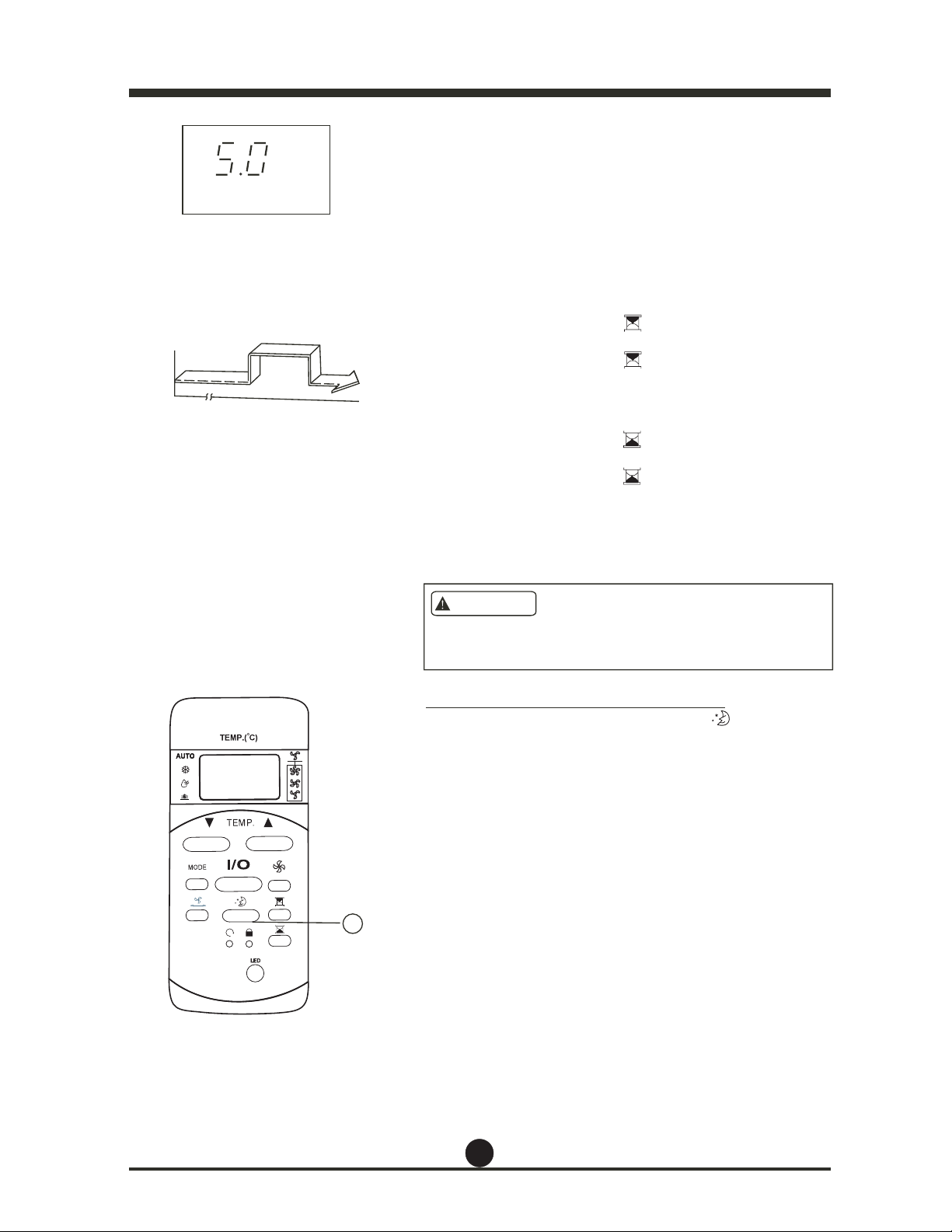
Arrêt
Arrêt
Mise en marche
TIMER ON OFF (MISE EN
MARCHE/ARRÊT MINUTERIE)
h
2 heures plus tard
après le réglage
5 heures plus tard
après le réglage
Réglage
MISE EN GARDE
TIMER ON (MISE EN MARCHE MINUTERIE) Æ
TIMER OFF (ARRÊT MINUTERIE)
(fonctionnement Arrêt Æ Mise en marche Æ Arrêt)
Cette fonction est utile lorsque vous souhaitez, par
exemple, que l'appareil se mette en marche automa-
tiquement avant que vous vous leviez et s'arrête
lorsque vous quittez la maison.
Exemple :
Pour mettre en marche le climatiseur 2 heures après le
réglage et l'arrêter 5 heures après la mise en marche.
1. Appuyez sur le bouton (MISE EN
MARCHE MINUTERIE).
2. Appuyez sur le bouton (MISE EN
MARCHE MINUTERIE) jusqu'à ce que « 2.0h »
s'affiche sur l'affichage TIMER ON (MISE EN
MARCHE MINUTERIE).
3. Appuyez sur le bouton (ARRÊT
MINUTERIE).
4. Appuyez sur le bouton (ARRÊT
MINUTERIE) jusqu'à ce que « 5.0 » s'affiche sur
l'affichage TIMER OFF (ARRÊT MINUTERIE).
5. Attendez que la télécommande affiche la tempéra-
ture réglée.
/HUpJODJHGHODPLQXWHULH7,0(521>0,6((10$5&+(
0,187(5,(@RX7,0(52))>$55Ç70,187(5,(@GRLWrWUH
annulé avant que d'autres réglages puissent être effectués.
Réglage ECONOMY (SLEEP) (ÉCONOMIE/VEILLE)
/orsque vous appuyez sur le bouton
,
le réglage
ECONOMY (ÉCONOMIE)
sera activé.
/e réglage de la température augmentera
(refroidissement) de 1 °C
(2 °F) au cours des 30
prochaines minutes et d'un
autre 1 °C (2 °F) au
cours des 30 minutes
suivantes. Cette nouvelle
température sera
maintenue pendant 6 heures
avant de revenir à la température
initialement choisie. (REMARQUE : Sur certains
modèles, la température augmentera
(refroidissement) de 1 ° C
tnadnep
e
rueh rap )F° 2(
2 heures. Cette nouvelle
température sera
maintenue pendant 5 heures,
après quoi l'appareil
s'éteint.)
REMARQUE : /a fonction ECONOMY/S/EEP
(ÉCONOMIE/VEI//E) n'est
disponible qu'en mode REFROID-
1
ISSEMENT, ou AUTO.
26

La conception et les caractéristiques de cet appareil sont
sujettes à modification sans préavis, aux fins d'amélioration
du produit. Pour en savoir plus, consultez l'agence de vente
ou le fabricant.