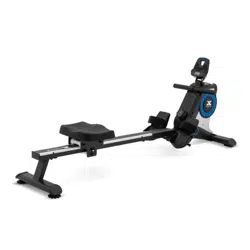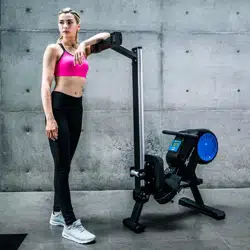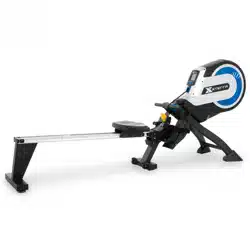
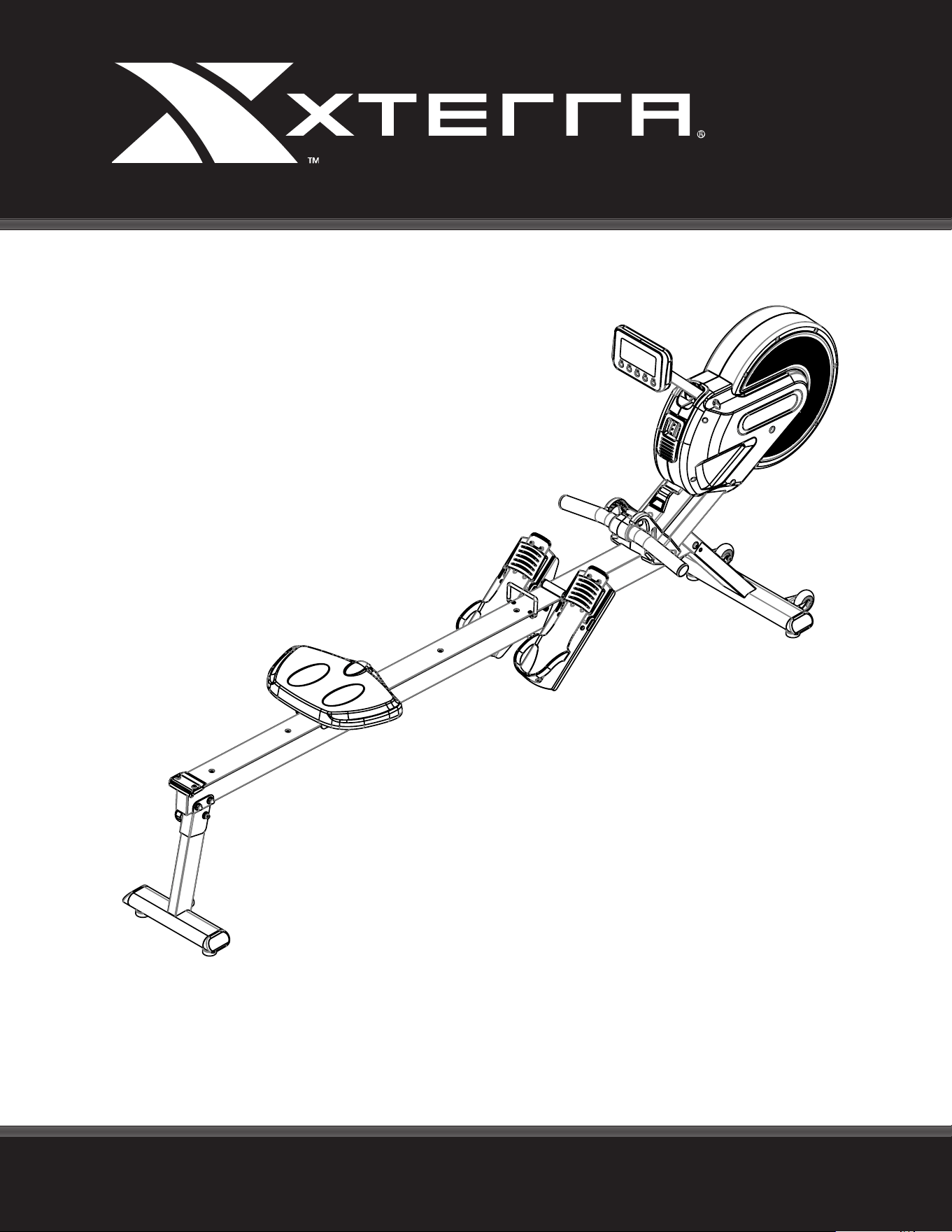
ERG700 ROWER
OWNER’S MANUAL
PLEASE CAREFULLY READ THIS ENTIRE MANUAL BEFORE OPERATING YOUR NEW ROWER
FITNESS

Table Of Contents
1
2
4
8
22
ATTENTION
THIS ROWER IS INTENDED FOR RESIDENTIAL USE ONLY AND IS WARRANTED FOR THE
APPLICATION. ANY OTHER APPLICATION VOIDS THIS WARRANTY IN ITS ENTIRETY.
Product Registration
Important Safety Instructions
ERG700 Assembly Instructions
Console Operation
Manufacturer’s Limited Warranty
Thank you for your purchase of this quality rower from XTERRA Fitness. Your new
rower has been manufactured by one of the leading tness manufacturers in the world.
XTERRA Fitness will do all we can to make your ownership experience as pleasant as
possible for many years to come. If you have questions, or if parts are missing or damaged,
or you require customer service, call (870) 336 - 4286. Please have your model number and
serial number handy when you call.
Please take a moment to record where you purchased your machine, as well as the date of
purchase for future reference. We appreciate your condence in XTERRA Fitness and we
will always remember that you are the reason that we are in business. Please complete and
mail your registration card today and enjoy your new rower.
Yours in Health,
XTERRA Fitness
Congratulations On Your New Rower and Welcome to the XTERRA Fitness Family!
ERG700_VER5_20200706
ERG700 Rowe r
1
Record Your Serial Number
Please record the Serial Number of this tness product
in the space provided below.
Serial Number
Register Your Purchase
The self-addressed product registration card must be completed in full and returned to
XTERRA Fitness. You can also go to www.xterratness.com/warrantyreg.html
to register online.
Product Registration
Purchase Location
Purchase Date
This product uses an external power supply. The power supply must rst be
plugged into the power jack on the unit. Next, plug the power supply into the ap-
propriate wall outlet. When not in use, it is recommended to unplug the power
supply from the wall outlet.
IMPORTANT: If the product has been exposed to cold temperatures, allow the
product sit in room temperature to warm up before plugging in the power supply.
Failure to do so may result in damage to the display or electronic components.
IMPORTANT: Do not operate the product if the power supply, its plug, or its cord
has been damaged.
Power
2
ERG700 Rower
• Do not operate equipment on deeply padded, plush or shag carpet. Damage to both carpet and
equipment may result.
• Before beginning this or any exercise program, consult a physician. This is especially important for
persons over the age of 35 or persons with pre-existing health conditions.
• Keep hands away from all moving parts.
• Do not attempt to use your equipment for any purpose other than for the purpose it is intended.
• Wear proper shoes. High heels, dress shoes, sandals or bare feet are not suitable for use on your
equipment. Quality athletic shoes are recommended to avoid leg fatigue.
• Wear proper clothing for exercising, loose clothing could become caught in the machine.
• Only one person at a time should use the machine.
• If the user experiences dizziness, nausea, chest pain, or any other abnormal symptoms, STOP the workout
at once. CONSULT A PHYSICIAN IMMEDIATELY.
• Do not place any sharp object around the machine.
Important Safety Instructions
When using an appliance, basic precautions should always be followed, including the following:
Read all instructions before using this appliance.
WARNING - To reduce the risk of burns, re electric shock, or injury to persons:
1. Do not operate under blanket or pillow. Excessive heating can occur and cause re, electric shock, or injury
to persons.
2. This exercise equipment is not intended for use by persons with reduced physical, sensory or mental
capabilities, or lack of experience and knowledge.
3. Keep children and pets away from the machine at all times. DO NOT leave children unattended in the same
room with the machine.
4. Use this appliance only for its intended use as described in this manual. Do not use attachments not
recommended by the manufacturer.
5. Never operate this appliance is not working properly, if it has been dropped or damaged, or dropped into
water. Return the appliance to a service center for examination and repair.
6. Keep the appliance away from heated surfaces.
7. Never operate the appliance with the air openings blocked. Keep the air openings free of lint, hair, and the
like.
8. Never drop or insert any object into any opening.
9. Do not use outdoors.
10. Do not operate where aerosol (spray) products are being use or where oxygen is being administered.
11. The appliance is intended for household use.
SAVE THESE INSTRUCTIONS - THINK SAFETY!
Fitness Equipment Safety Instructions
CAUTION!! Please be careful when unpacking the carton.
Failure to follow all guidelines may compromise the eectiveness of the exercise experience, expose
yourself (and possibly others) to injury, and reduce the longevity of the equipment.
WARNING: This product can expose you to chemicals including Toluene and Acrylamide which are
known to the State of California to cause cancer and birth defects or other reproductive harm.
For more information go to www.P65Warnings.ca.gov
ERG700 Rowe r
3
Before you begin
Thank you for selecting our revolutionary XTERRA ERG700 Fitness Rower. A rower is an eective exercise
for increasing cardiovascular tness, building endurance, and toning the body. Our tness rower provides an
impressive selection of features designed to make your workouts at home more eective and enjoyable.
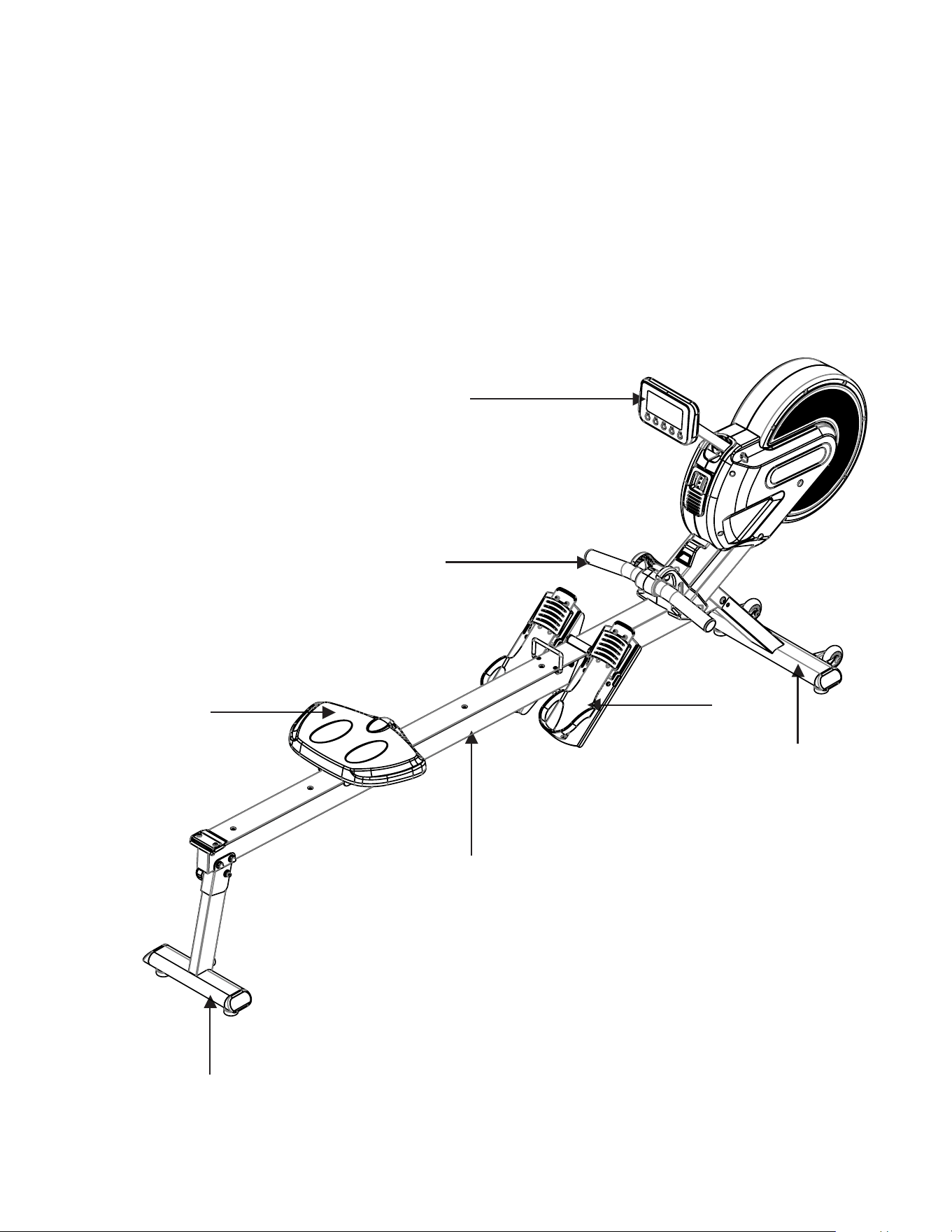
For your benet, read this manual carefully before you use the ERG700 Fitness Rower. To help us assist
you, note the product model number and serial number before contacting us. Before reading further, please
familiarize yourself with the parts that are labeled in the drawing below.
Console
Handle Bar
Pedals
Seat
Rear Stabilizer
Sliding Rail
Front Stabilizer
4
ERG700 Rower
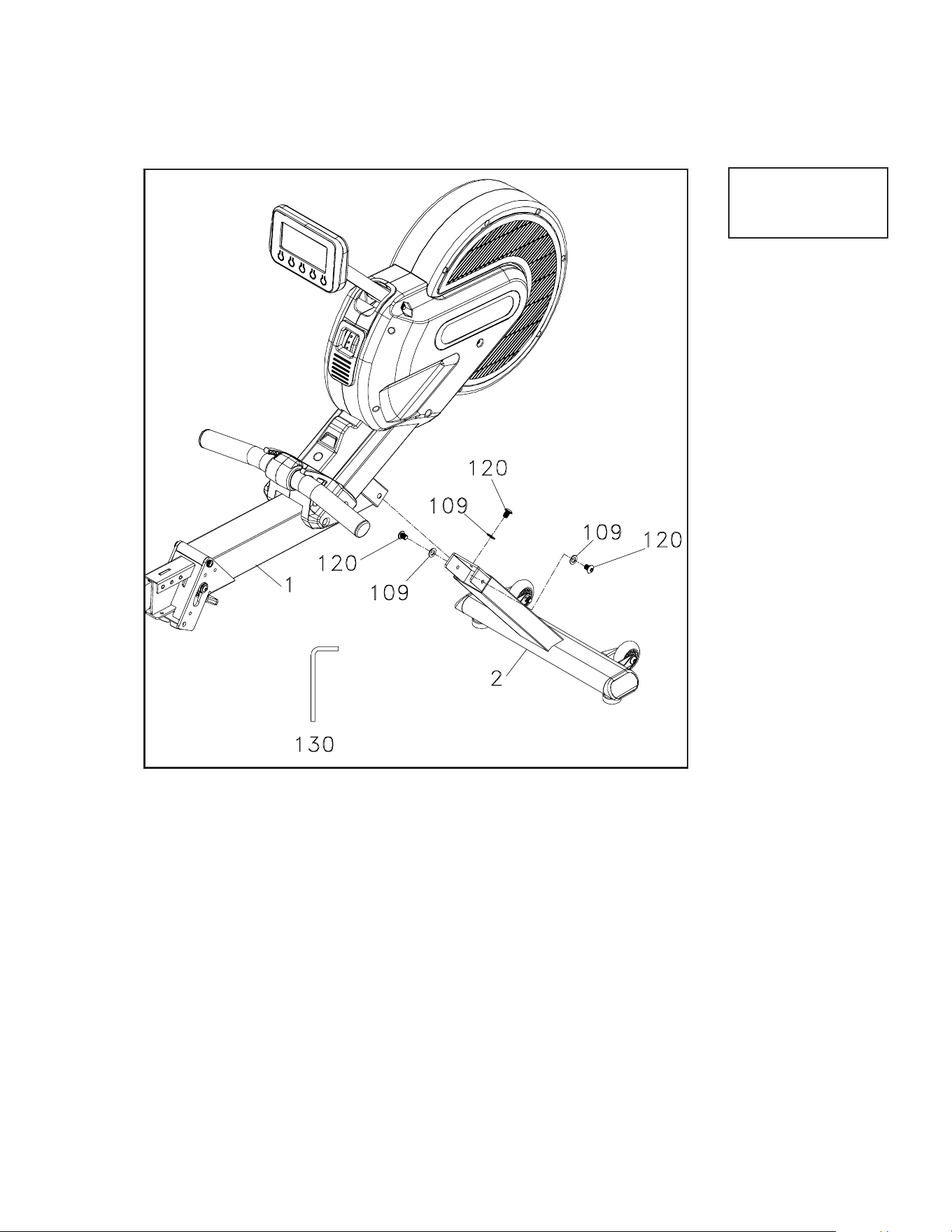
1. Use the WRENCH (130) to tighten 3 BOLTS (120) together
with 3 FLAT WASHERS (109) to secure the MAIN FRAME
(1) and FRONT STABILIZER (2) together. There is a bolt on
each side and one on the front.
ERG700 Assembly Instructions
Attaching the Front Stabilizer
1
3 Flat Washer (#109)
3 Bolt (#120)
Hardware Step 1
ERG700 Rowe r
5
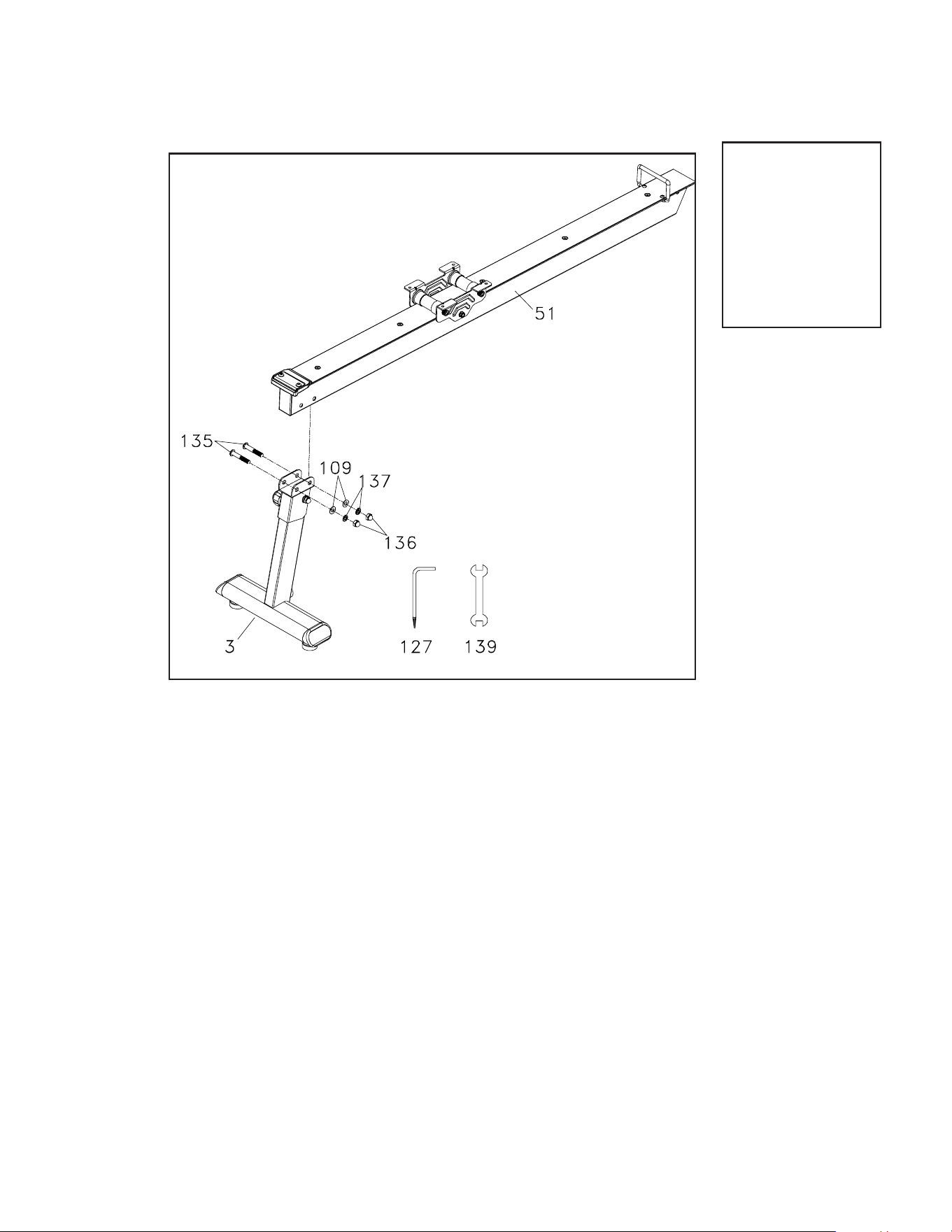
2 Flat Head Socket
Bolts (#135)
2 Flat Washers
(#109)
2 Spring Washers
(#137)
2 Cap Nuts (#136)
Attaching the Rear Stabilizer
2
Hardware Step 2
1. Use the WRENCH (139) to tighten 2 BOLTS (135) through where
the ALUMINUM TRACK (51) meets the REAR STABILIZER (3)
and secure with 2 WASHERS (109), 2 WASHERS (137), and 2
NUTS (136).
6
ERG700 Rower
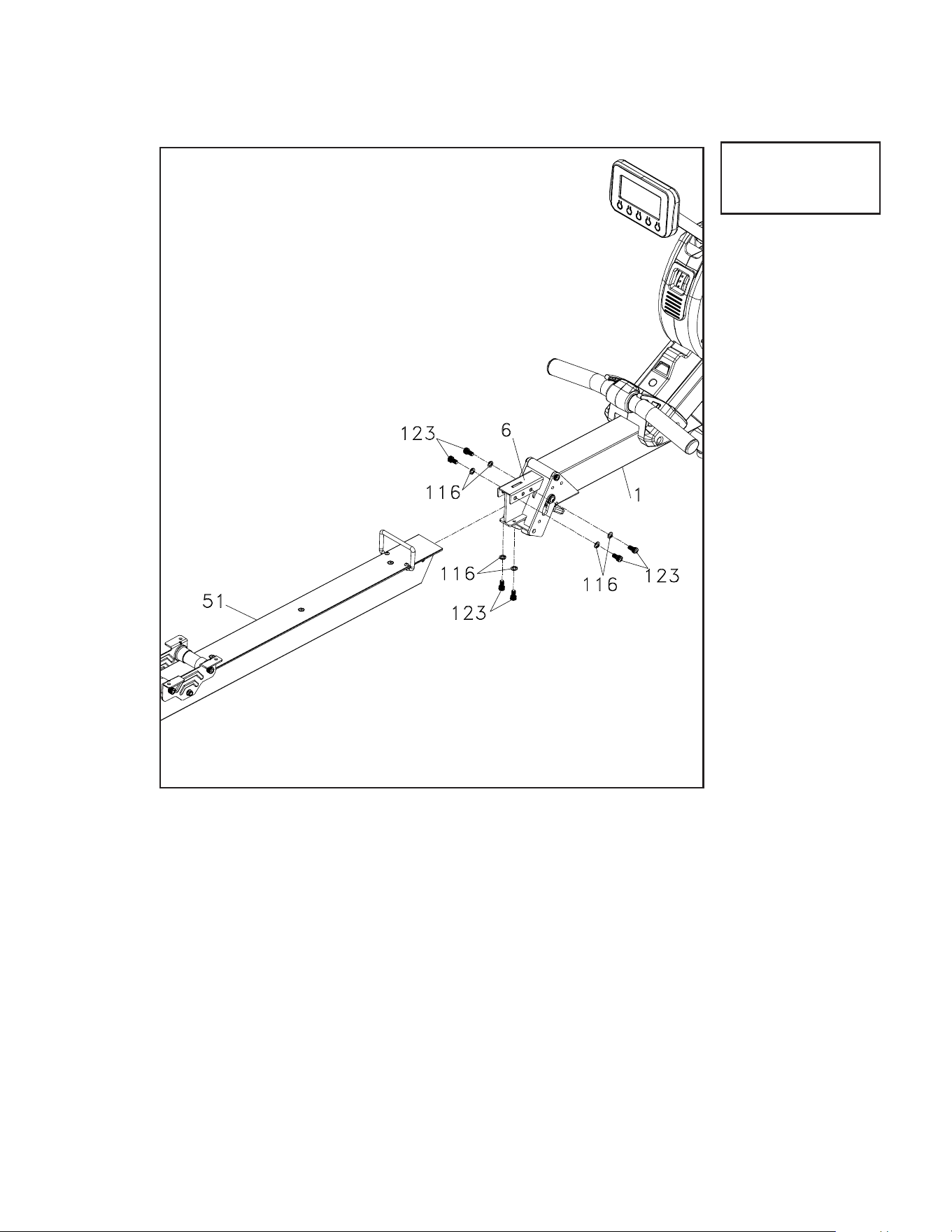
1. Attach the other end of the ALUMINUM TRACK (51) to
FOLDING END ASSEMBLY (6) of the Main Frame (1) and use
ALLEN WRENCH (130) to tighten the 6 BOLTS (123) together
with 6 WASHERS (116).
6 Split Washer (#116)
6 Bolt (#123)
Attaching the Slide Rail
3
Hardware Step 3
ERG700 Rowe r
7
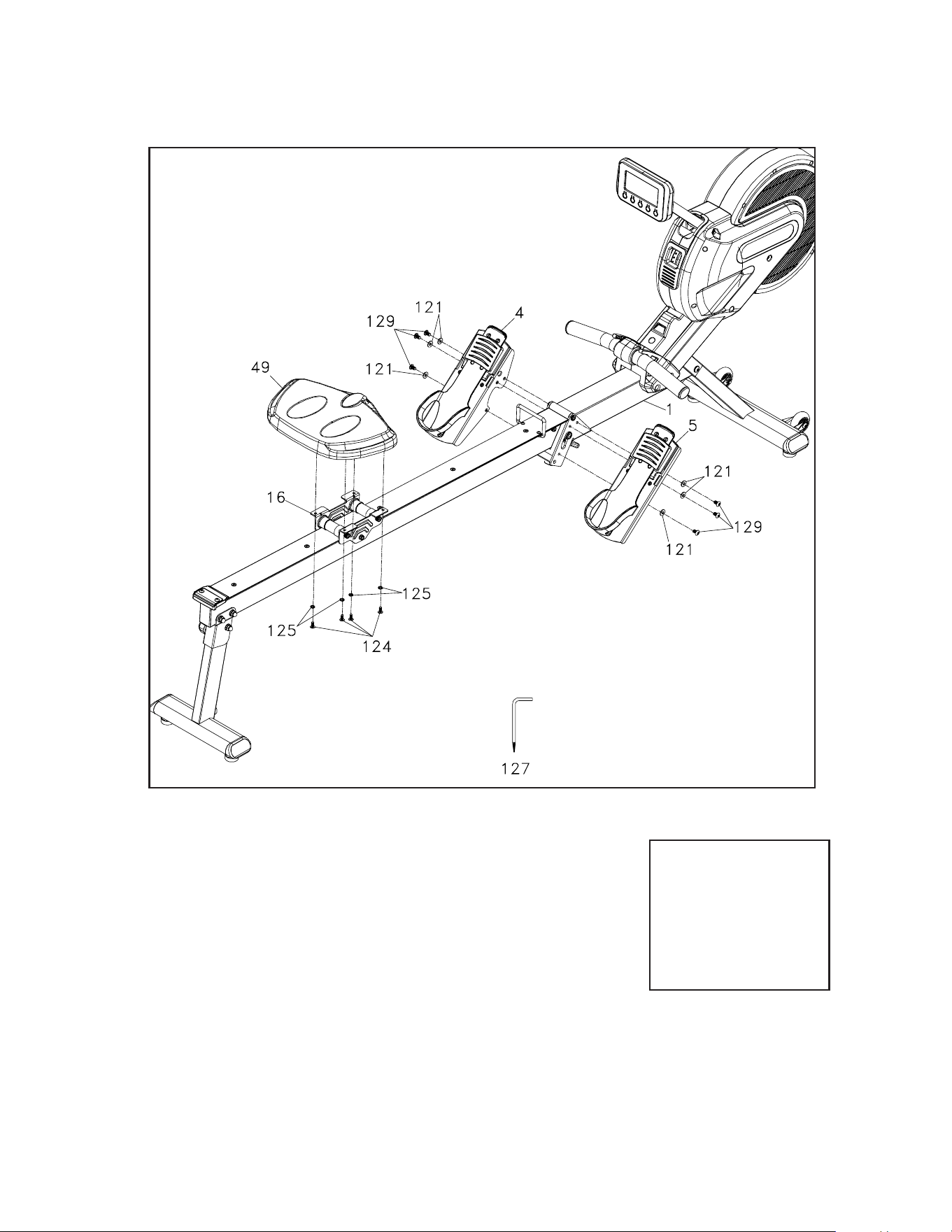
1. Use ALLEN WRENCH & SCREW DRIVER (127) to
tighten 6 BOLTS(129) and 6 WASHERS (121) to install
then LEFT AND RIGHT PEDALS (4,5) on the MAIN
FRAME(1). Use again ALLEN WRENCH & SCREW
DRIVER (127) to tighten 4 SCREWS (124) together
with 4 WASHERS (125) to install the SEAT (49) onto
the SEAT ATTACHING BOARD (16).
6 Flat Washer (#121)
4 Philips Head Screw
(#124)
4 Spring Washers (#125)
6 Button Head Socket
Bolts (#129)
Hardware Step 4
Attaching the Seat and Pedals
4
8
ERG700 Rower
DOWNMODES TA R T UP
WAT T LEVELCALORIESHEARTRATE
DISTANCETIMESTROKES MIN
STOP
RESET
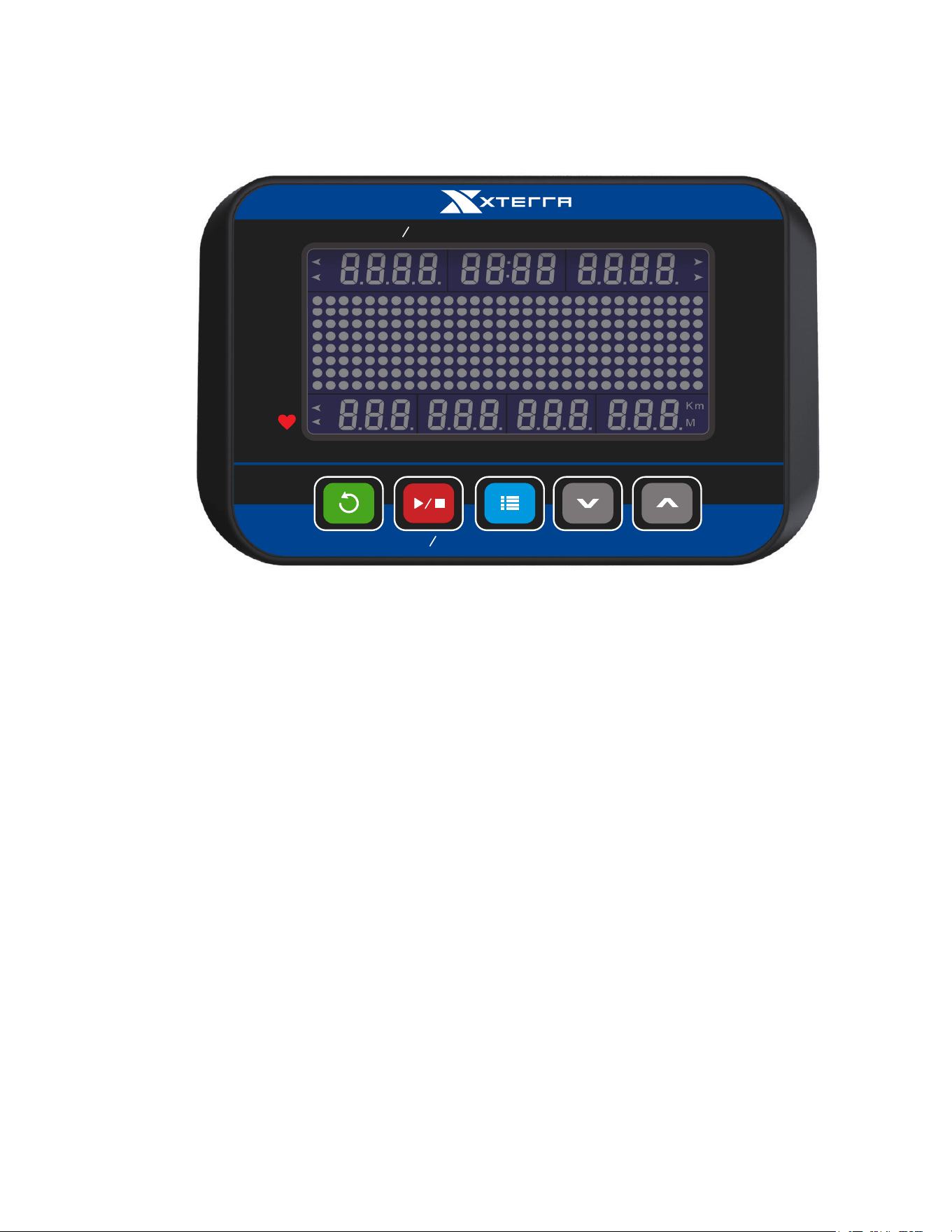
Operation of Your Console
ERG700 Console
When Pressing any key button wakes up the console which has been turned o, the console LCD
will turn on with full display and beeps for 2 seconds then enters idle mode. When there is speed
signal input with the speed sensors or detected, it directly enters Manual workout mode.
Power o: In any mode during turning on, if there is not any button activated or no rowing activity
lasts for 1 minute, it turns o automatically.
Window Functions:
Stroke/min
• S/M value shows the equivalent strokes per minute.
Time
• It shows the time elapsed.3.
• Range of time: 00:00~99:59(minute: second)
• The time is accumulated for each workout mode.
• When time is set to count down, it shows the time remaining.
Distance
• The distance range is 0~9999 and switches to the format of 1X.XX when the value is over
9999.
Power:

ERG700 Rowe r
9
• The distance will be accumulated for each workout mode.
• When the distance is set to count down, it shows the remaining distance.
Heart Rate
• The heart rate range is 40~220 bpm
• When the heart rate signal is detected, the small dot at lower right corner of the heart rate
window will be blinking together with heart rate value showing.
• When there is no heart rate signal detected, the heart rate window shows nothing.
Calories
• The calorie window shows the value of calories burned.
• The calorie range is 0~999.
• The calorie value is based on built in estimates of the average user and may not reect
accuracy. To have a more accurate basis of caloric burn - please contact your physician
and they can assist you.
Watts
• The Watts window shows Watt value for each stroke.
• The Watt range is 0 ~ 2000.
• When the numbers show over 999 (four digits), the display uses a decimal to show in
thousands. E.g. 1000 shows as 1.00, 1240 reads as 1.24, 1250 as 1.25, 2000 as 2.00,
etc.
Level
• The level window shows the current resistance level.
• The level range is 1~16
• Level 1 and 2 would light the rst dot, level 3 and 4 would light the second dot, etc.
500M/Time
• Only workout modes of Manual, Distance, Time and Calorie are with this display function.
• For Manual workout mode as an example: When the console starts, Matrix in the middle
of LCD will show the wave pattern then switch to 500M/TIME 00:00 across center display
after 5 seconds then switch again back to the wave pattern after another 5 seconds and
continue to repeat the cycle. This is the function of SCAN.
• The console goes directly into SCAN mode after start. If MODE button is pressed, it shows
the wave pattern. Pressing the MODE button again, it displays 500M/TIME and repeat
again by pressing “MODE” button it goes back with “SCAN” function (recyclable).
RESET: Press and hold this button for 2 seconds to reset all of the value to Zero.
UP:Increase the setting value of the following functions.
TIME, COUNT, DISTANCE, CALORIES, and PULSE.
DOWN: Decrease the setting value of the following functions.
TIME, COUNT, DISTANCE, CALORIES, and PULSE.

10
ERG700 Rower
Key button Function:
• Any valid key button pressed will generate a beep sound.
• When in power o mode, pressing any key button turns on the console.
Mode Key
• Under idle mode, pressing MODE key each time switches the workout mode with the
following sequence:
• MANUAL » DISTANCE » TIME » CALORIES » 20/10 INTERVAL » 10/20 INTERVAL »
CUSTOM INTERVAL » Fat Burn » Cardio » Strength » Game
• The default workout mode after turning on the unit is Manual mode.
• To choose the target workout mode, when the matrix window shows the desired workout
pattern and parameter window value to be set will be blinking each second.
Up Key
• Under the setting mode of the target workout, the parameter is will be counted up.
• The value increases one increment when “UP” key is pressed once.
Down Key
• Under the setting mode of the target workout, the parameter is will be counted down.
• The value decreases one increment when DOWN key is pressed once.
Start/Stop Key
• Under idle mode, pressing Start/Stop key button enters Manual workout mode.
• To conrm the value the window is showing when setting the parameter under each target
workout mode and to start the workout mode.
• Press to end the current workout mode and all message windows stop counting.
Reset Key
• Pressing this key button under stopping mode, the image switches to the idle mode.
• The reset key button is valid only in stopping mode.
• Under any mode, pressing this key button for 3 seconds turns on the console again.
ERG700 Rowe r
11
Operating Instruction:
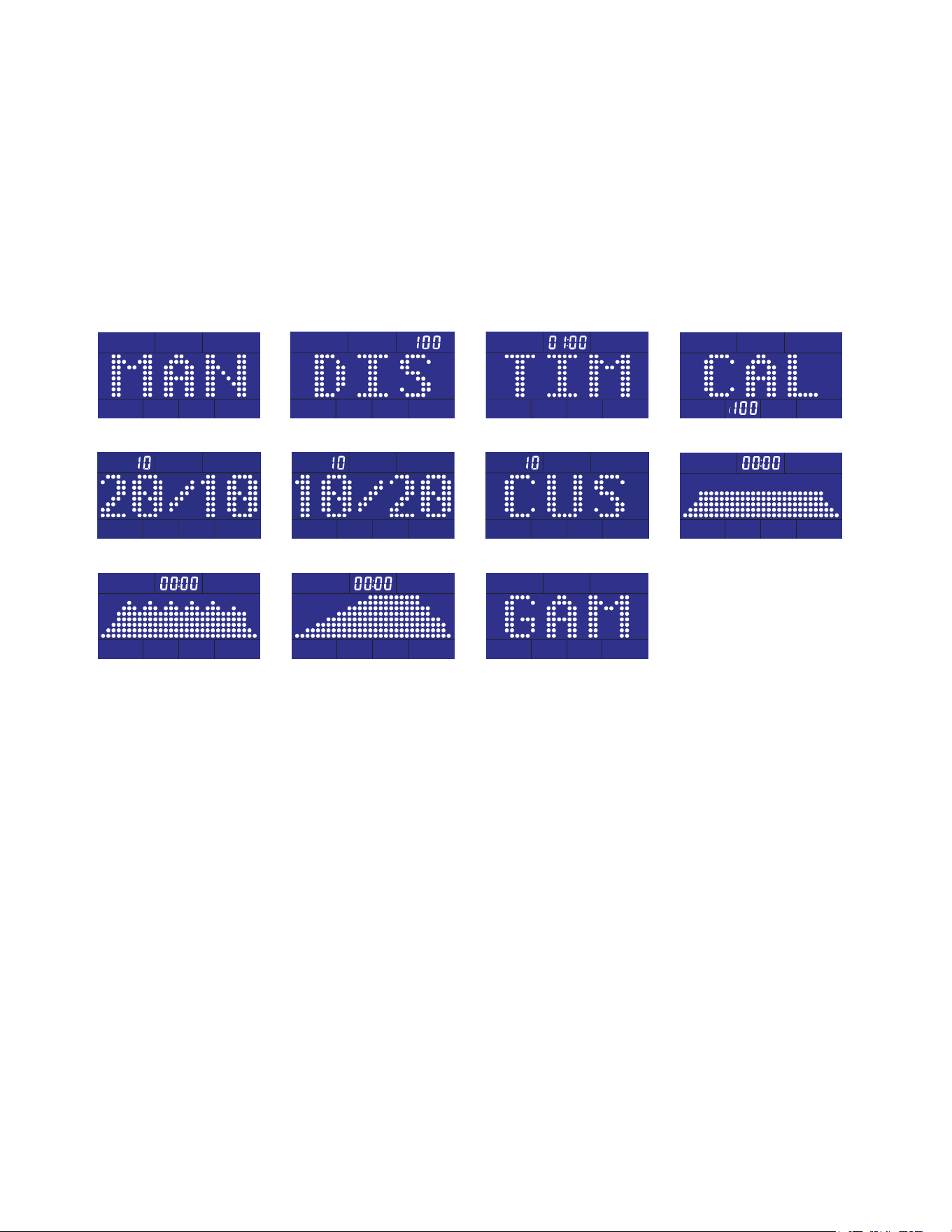
The screen is with full display and the buzzer beeps for two seconds after turning on.
Pressing Start button goes directly to Manual workout mode or pressing MODE button to
switch and select a workout mode with the workout sequence shown as below:
MANUAL » DISTANCE » TIME » CALORIES » 20/10 INTERVAL » 10/20 INTERVAL »
CUSTOM INTERVAL » Fat Burn » Cardio » Strength » Game
The program name will scroll from left to right to tell the user what it is.
Manual
20/10 Interval
Cardio
Distance
10/20 Interval
Strength
Time
Custom Interval
Game
Calories
Fat Burn
12
ERG700 Rower
Manual Mode
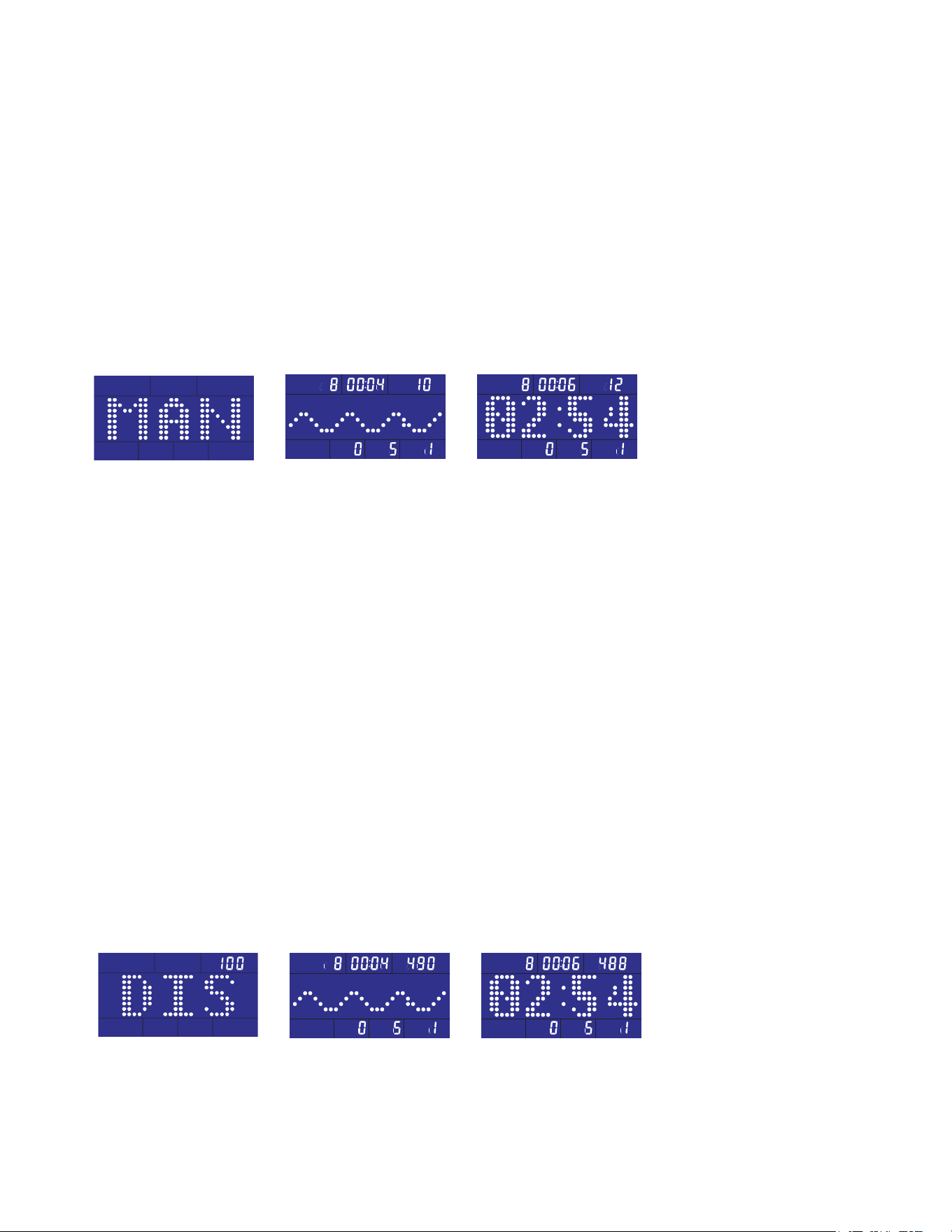
To choose MANUAL mode (Fig. 1-1)
Pressing Start/Stop button begins the workout mode or pulling the handlebar under the idle
mode enters directly into Manual workout mode.
The image at the center of LCD will scan every 5 seconds to show the stroke speed with
wave pattern (Fig. 1-2) and 500M/TIME (Fig. 1-3) or pressing MODE button to cancel
scanning with wave pattern only. Pressing MODE again switches the image to show 500M/
TIME.
Pressing UP or DOWN button and adjusts the resistance level which is shown at bottom right
corner of LEVEL window.
Target Distance
To choose target distance count-down Distance workout mode (Fig. 2-1)
Use UP/DOWN buttons to adjust and set the workout distance. The default distance is 100M
with increment of 50M up or down. Press Start/Stop button to conrm the setting and start
the workout mode.
The image at the center of LCD will scan every 5 seconds to show the stroke speed with
wave pattern (Fig. 2-2) and 500M/TIME (Fig. 2-3) or pressing MODE button to cancel
scanning with wave pattern only. Pressing MODE again switches the image to show 500M/
TIME.
Distance window counts down from target distance setting value and shows the remaining
distance of the workout.
Under the workout mode, pressing UP or DOWN key button adjusts the resistance level.
When the distance is counted down to 0, the workout completes and the buzzer sounds with
a long beep. If rowing continues, the distance count-down repeats.
Fig 1-1 Fig 1-2 Fig 1-3
Fig 2-1 Fig 2-2 Fig 2-3
ERG700 Rowe r
13
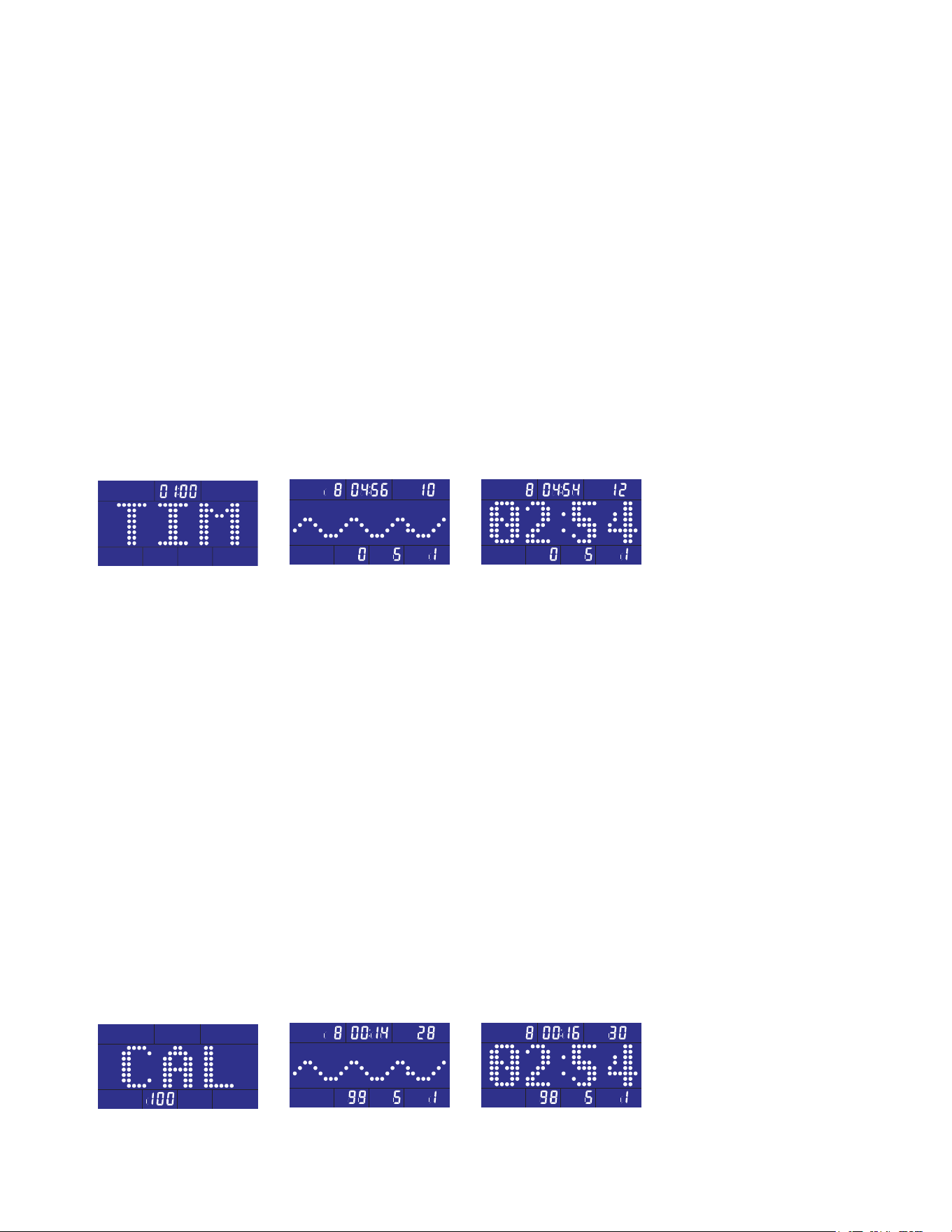
Target Time
To choose target time count-down Time workout mode (Fig. 3-1)
Use UP/DOWN buttons to adjust and set the workout time. The default distance is 1:00 with
1-minute increment of up or down (99:00 maximum). Press Start/Stop button to conrm the
setting and start the workout mode.
The image at the center of LCD will scan every 5 seconds to show the stroke speed with
wave pattern (Fig. 3-2) and 500M/TIME (Fig. 3-3) or pressing MODE button to cancel
scanning with wave pattern only. Pressing MODE again switches the image to show 500M/
TIME.
Under the workout mode, pressing UP or DOWN key button adjusts the resistance level.
Time window counts down from the setting time value and shows the remaining time of the
workout.
When time is counted down to 0:00, the workout completes and the buzzer sounds with a
long beep. If rowing continues, the time count-down repeats.
Target Calorie
To choose target calorie count-down Calories workout mode (Fig. 4-1)
Use UP/DOWN buttons to adjust and set the target calorie. The default value is 100 with
increment of 10 up or down. Press Start/Stop button to conrm the setting and start the
workout mode.
The image at the center of LCD will scan every 5 seconds to show the stroke speed with
wave pattern (Fig. 4-2) and 500M/TIME (Fig. 4-3) or pressing MODE button to cancel
scanning with wave pattern only. Pressing MODE again switches the image to show 500M/
TIME.
Calorie window counts down from the setting target calorie value and shows the remaining
calorie of the workout.
Under the workout mode, pressing UP or DOWN key button adjusts the resistance level.
When calorie is counted down to 0, the workout completes and the buzzer sounds with a long
beep. If rowing continues, the time count-down repeats.
Fig 3-1 Fig 3-2 Fig 3-3
Fig 4-1 Fig 4-2 Fig 4-3
14
ERG700 Rower
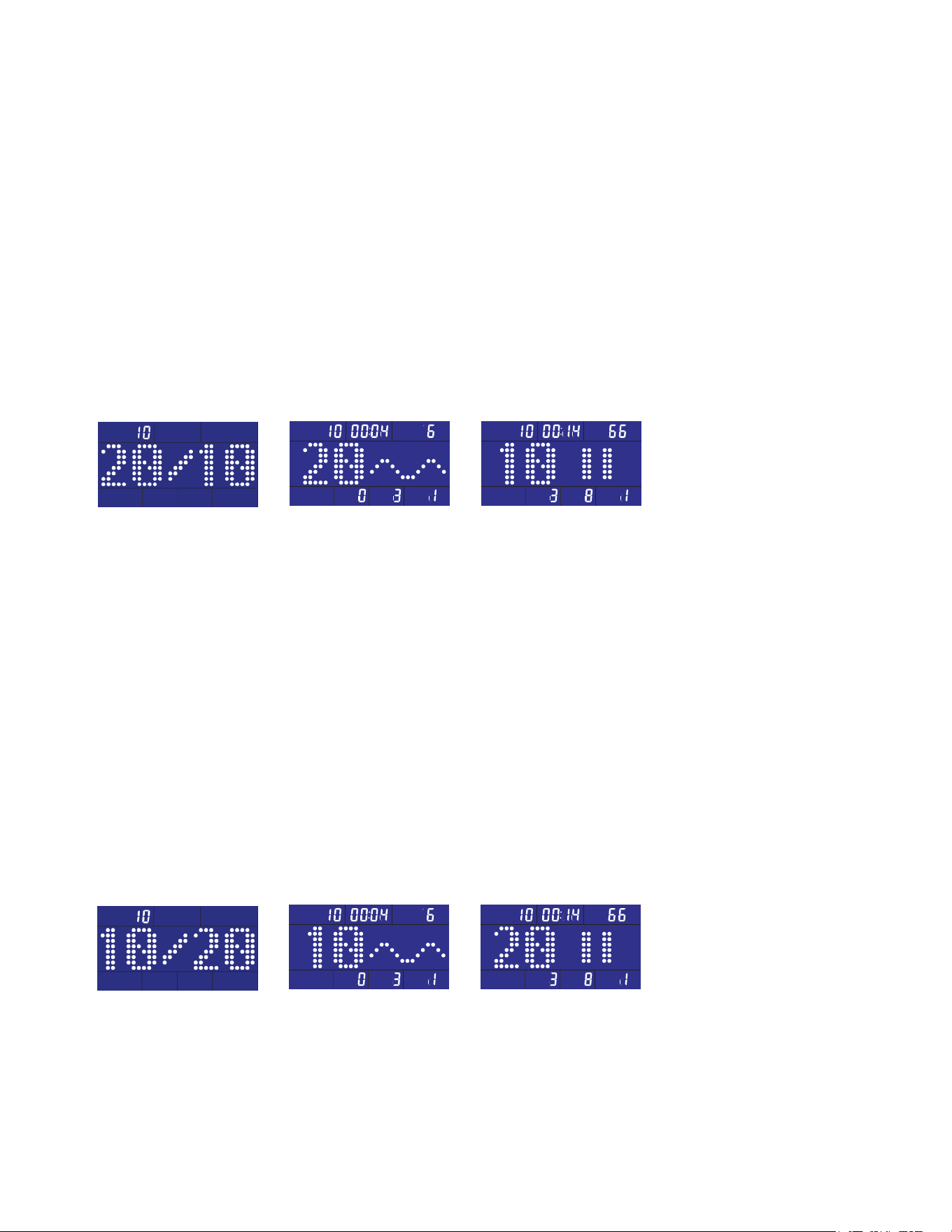
20/10 Interval
To choose 20/10 INTERVAL workout mode (Fig. 5-1)
The image at the center of LCD: 20 seconds (Exercise)/10 seconds (Rest)
Pressing Start/Stop button starts the workout mode.
The image at the center of LCD shows time count-down of current workout and wave
(Fig. 5-2) or rest time count-down and mark (Fig. 5-3).
Under the workout mode, pressing UP or DOWN key button adjusts the resistance level.
There are 10 Exercise/Rest cycles for each workout time.
When workout completes, the buzzer sounds with a long beep. If rowing continues, the
time count-down repeats.
10/20 Interval
To choose 10/20 INTERVAL workout mode (Fig. 6-1)
The image at the center of LCD: 10 seconds (Exercise)/20 seconds (Rest)
Pressing Start/Stop button starts the workout mode.
The image at the center of LCD shows time count-down of current workout and wave (Fig.
6-2) or rest time count-down and mark (Fig. 6-3).
Under the workout mode, pressing UP or DOWN key button adjusts the resistance level.
There are 10 Exercise/Rest cycles for each workout time.
When workout completes, the buzzer sounds with a long beep. If rowing continues, the time
count-down repeats.
Fig 5-1 Fig 5-2 Fig 5-3
Fig 6-1 Fig 6-2 Fig 6-3
ERG700 Rowe r
15
Custom Interval
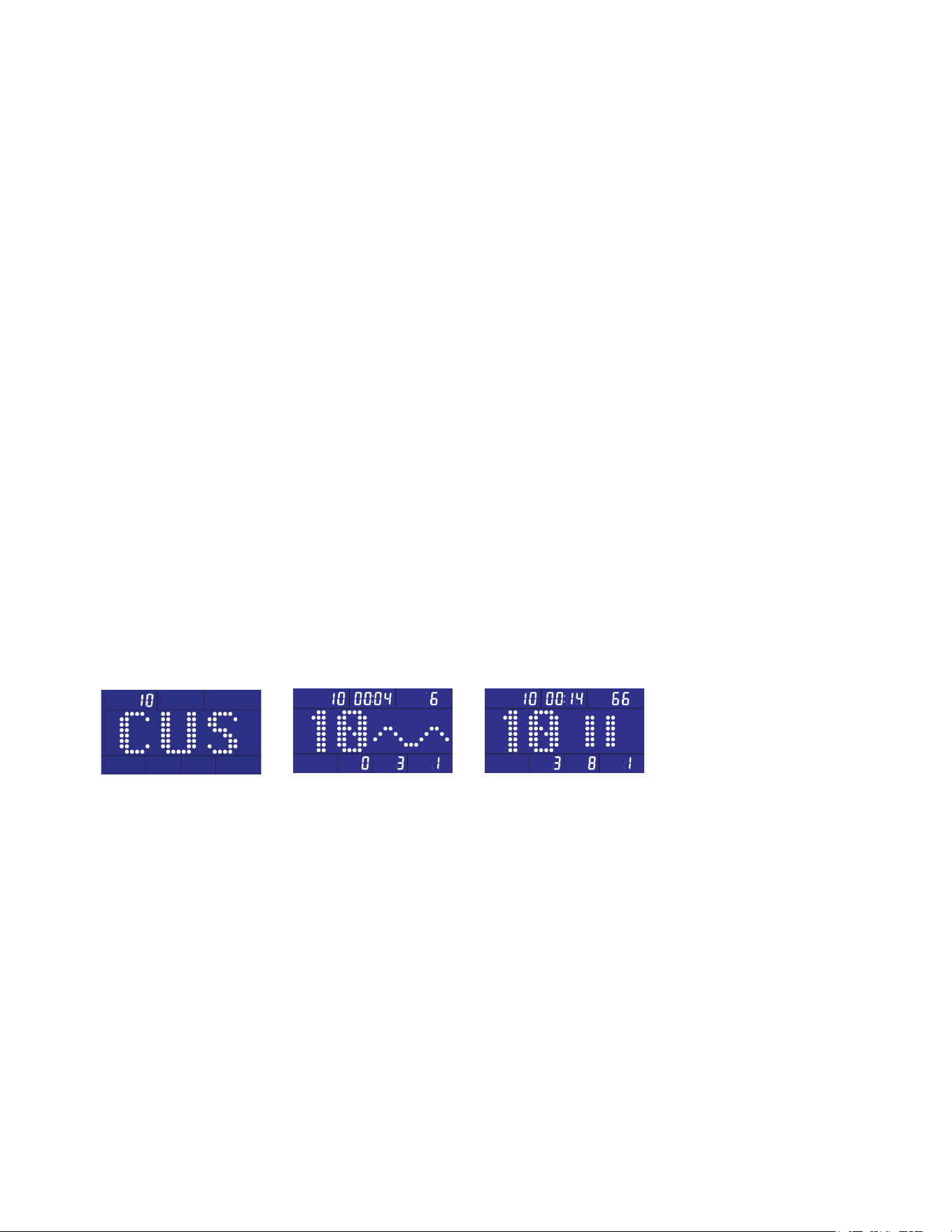
To choose CUSTOM INTERVAL workout mode (Fig. 7-1)
User-dene time (Exercise)/time (Rest): the default is 10 seconds (Exercise)/10 seconds
(Rest)
The value at left side of the matrix window ashes for setting the exercise time. Use UP/
DOWN buttons to adjust and set the workout time. The default time is 10 seconds with
1-second increment of up or down. Press Start/Stop button to conrm the setting and start
the workout mode.
The value at right side of the matrix window ashes for setting the rest time. Use UP/DOWN
buttons to adjust and set the workout time. The default time is 10 seconds with 1-second
increment of up or down. Press Start/Stop button to conrm the setting and start the workout
mode.
The image at the center of LCD: 10 seconds (Exercise)/10 seconds (Rest)
Pressing Start/Stop button starts the workout mode.
The image at the center of LCD shows time count-down of current workout and wave (Fig.
7-2) or rest time count-down and mark (Fig. 7-3).
Under the workout mode, pressing UP or DOWN key button adjusts the resistance level.
There are 10 Exercise/Rest cycles for each workout time.
When workout completes, the buzzer sounds with a long beep. If rowing continues, the time
count-down repeats.
Fig 7-1 Fig 7-2 Fig 7-3
16
ERG700 Rower
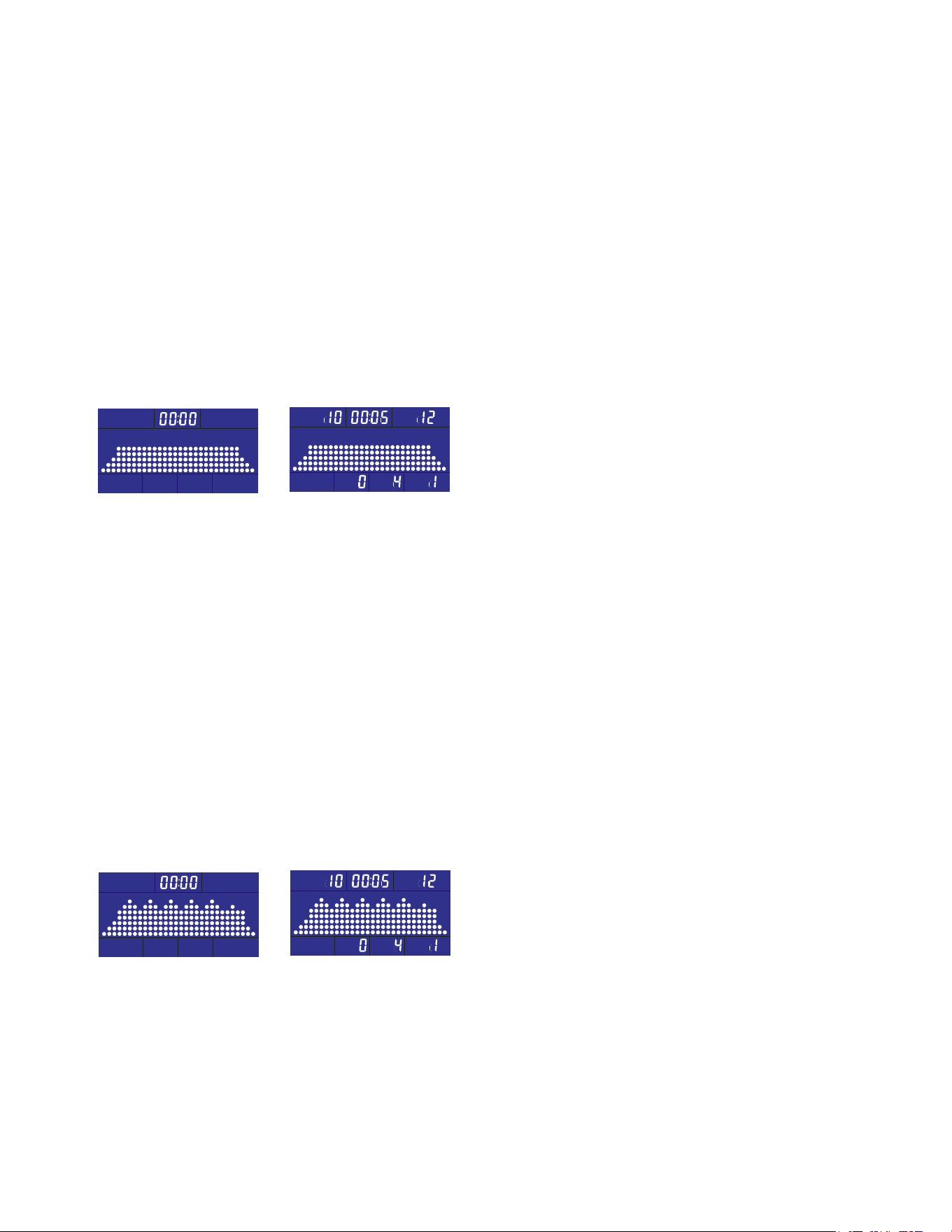
Fat Burn
To choose Fat Burn workout mode (Fig. 8-1)
Pressing Start/Stop button and begins the workout mode or setting the workout time. Use
UP/DOWN buttons to adjust the time. The increment of adjustment is 5-minute (99:00
maximum). Press Start/Stop button to start the workout mode.
The image at the center of LCD shows the fat burn prole (Fig. 8-2)
Under the workout mode, pressing UP or DOWN key button adjusts the resistance level.
Time window starts count-down from the setting time and shows the remaining workout time.
When time is counted down to 0:00, the workout completes and the buzzer sounds with a
long beep. If rowing continues, the time count-down repeats.
Cardio Workout
To choose cardio workout mode (Fig. 9-1)
Pressing Start/Stop button and begins the workout mode or setting the workout time. Use
UP/DOWN buttons to adjust the time. The increment of adjustment is 5-minute (99:00
maximum). Press Start/Stop button to start the workout mode.
The image at the center of LCD shows the cardio prole (Fig. 9-2)
Under the workout mode, pressing UP or DOWN key button adjusts the resistance level.
Time window starts count-down from the setting time and shows the remaining workout time.
When time is counted down to 0:00, the workout completes and the buzzer sounds with a
long beep. If rowing continues, the time count-down repeats.
Fig 8-1 Fig 8-2
Fig 9-1 Fig 9-2
ERG700 Rowe r
17
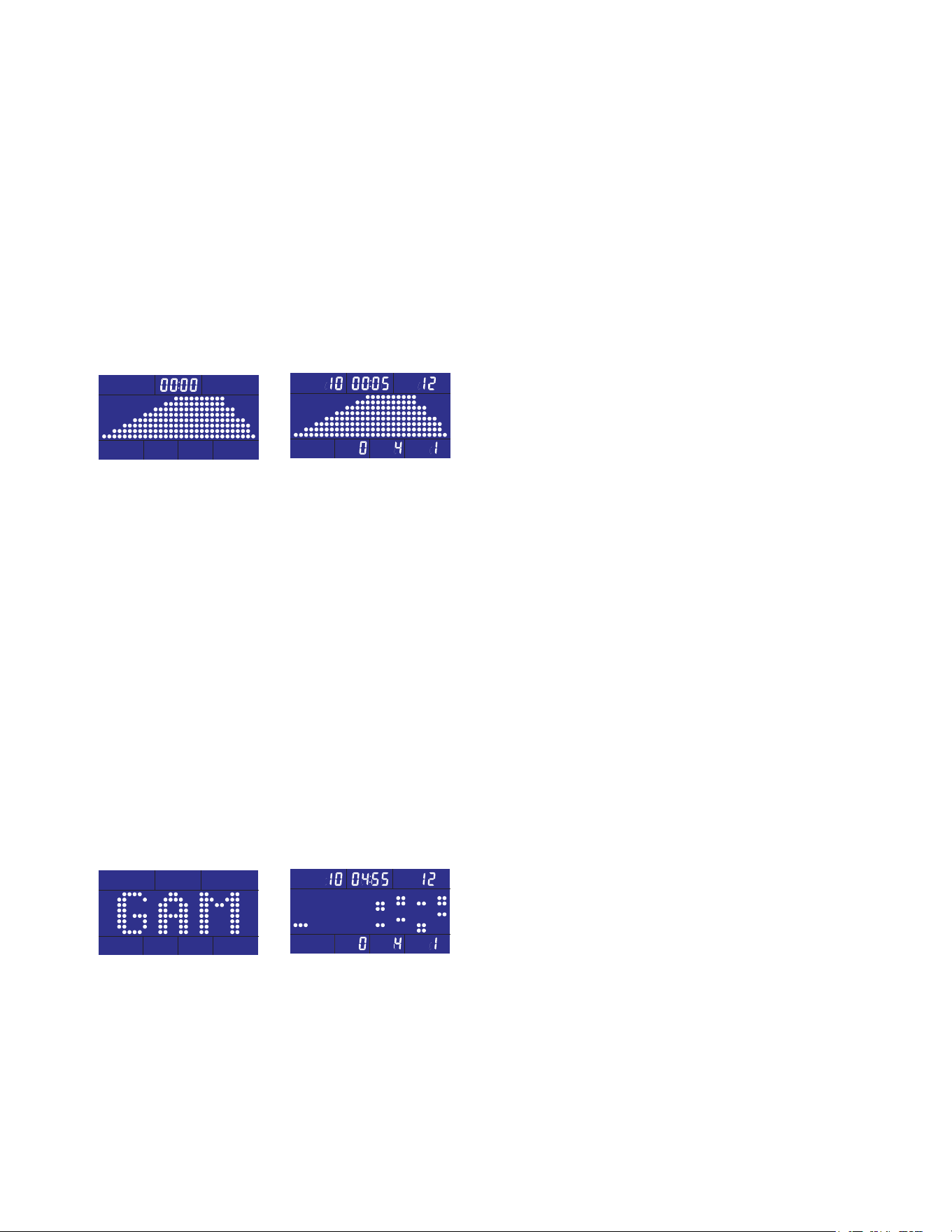
Strength Workout
To choose Strength workout mode (Fig. 10-1)
Pressing Start/Stop button and begins the workout mode or setting the workout time. Use
UP/DOWN buttons to adjust the time. The increment of adjustment is 5-minute (99:00
maximum). Press Start/Stop button to start the workout mode.
The image at the center of LCD shows the strength prole (Fig. 10-2)
Time window starts count-down from the setting time and shows the remaining workout time.
When time is counted down to 0:00, the workout completes and the buzzer sounds with a
long beep. If rowing continues, the time count-down repeats.
Fig 10-1 Fig 10-2
Game Workout
To choose GAME workout mode (Fig. 11-1)
Pressing Start/Stop button and begins the GAME workout mode (11-2). Game mode is a bit
dierent from the other workout modes because it is an actual game!
Three dots at left side represents the user position and the image shift one prole left per
second and continue to scroll.
The position of the user will not shift. However, the faster the user rows, the higher the user’s
position. When there is no input, the position of the user goes down to the lowest. The height
of the user’s position is equivalent to the speed the user strokes.
Avoid obstacles by rowing faster and slower to move the user block up and down.
The time for the game workout starts counting down from 5 minutes and ends when time is
up.
Fig 11-1 Fig 11-2
18
ERG700 Rower
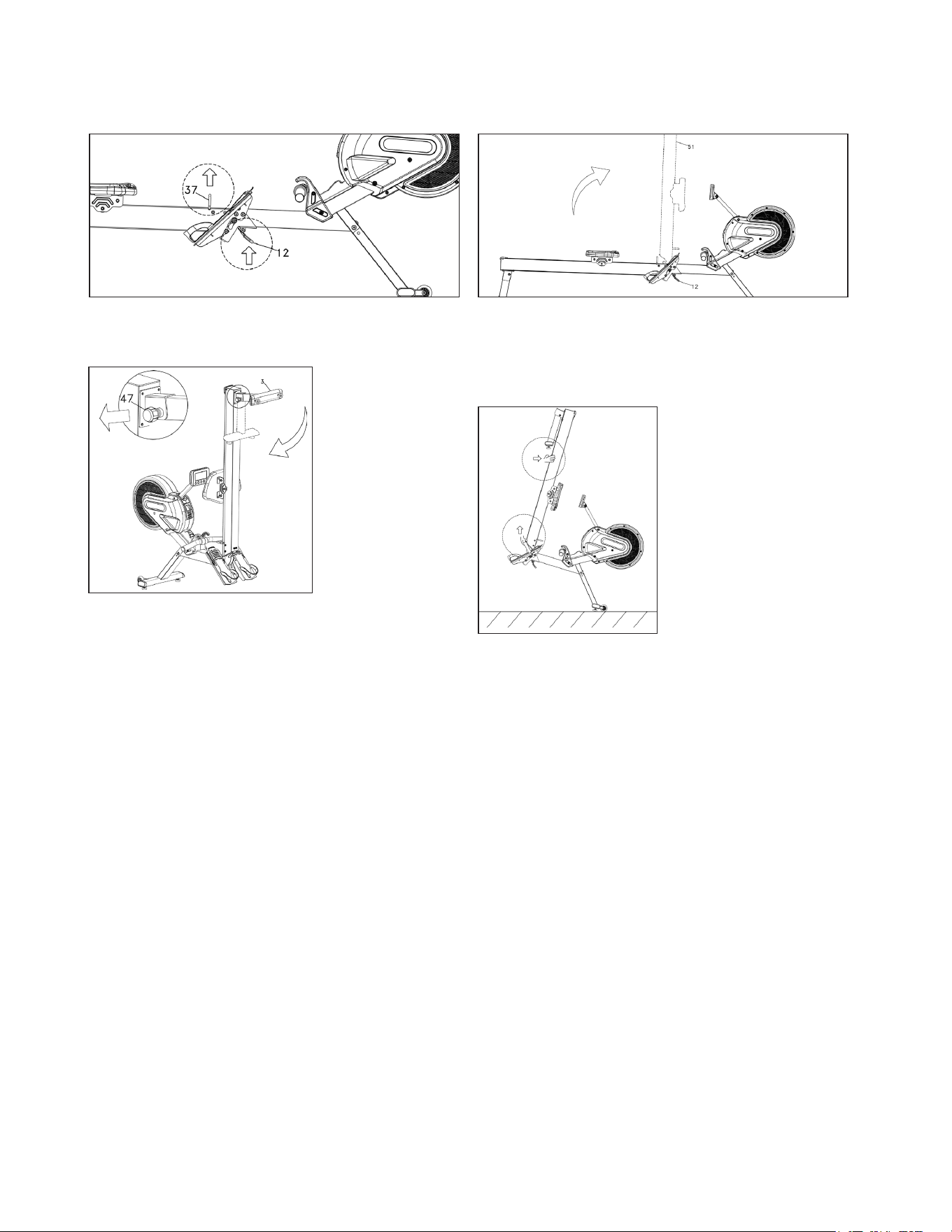
Folding/Unfolding Procedures
Moving Procedures
1. Hold the Handlebar (37) to lift the rower slightly
and press the Release Lever (12).
2. Lift and fold the Aluminum Track until it locks into
place.
3. To fold Rear
Stabilizer, turn
Knob (47)
counterclockwise
until loosened.
Pull Knob to
release and fold
Rear Stabilizer.
4. To unfold Rower,
reverse steps.
1. Fold the aluminum
rail assembly up.
2. Lift the rear and roll
away.
ERG700 Rowe r
19
Heart Rate Monitoring (chest strap not included)
The old motto, “no pain, no gain”, is a myth that has been overpowered by the benets
of exercising comfortably. A great deal of this success has been promoted by the use of
heart rate monitors. With the proper use of a heart rate monitor, many people nd that their
usual choice of exercise intensity was either too high or too low and exercise is much more
enjoyable by maintaining their heart rate in the desired benet range.
To determine the benet range in which you wish to train, you must rst determine your
Maximum Heart Rate. This can be accomplished by using the following formula: 220 minus
your age. This will give you the Maximum Heart Rate (MHR)for someone of your age. To
determine the eective heart rate range for specic goals you simply calculate a percentage
of your MHR. Your Heart rate training zone is 50% to 90% of your maximum heart rate.
60% of your MHR is the recommended for burning
fat while 80% is recommended for strengthening the
cardio vascular system. This 60% to 80% is the zone
to stay in for maximum benet.
For someone who is 40 years old their
target heart rate zone is calculated:
220 – 40 = 180 (maximum heart rate)
180 x .6 = 108 beats per minute (60% of maximum)
180 X .8 = 144 beats per minute (80% of maximum)
So for a 40 year old the training zone would
be 108 to 144 beats per minute.
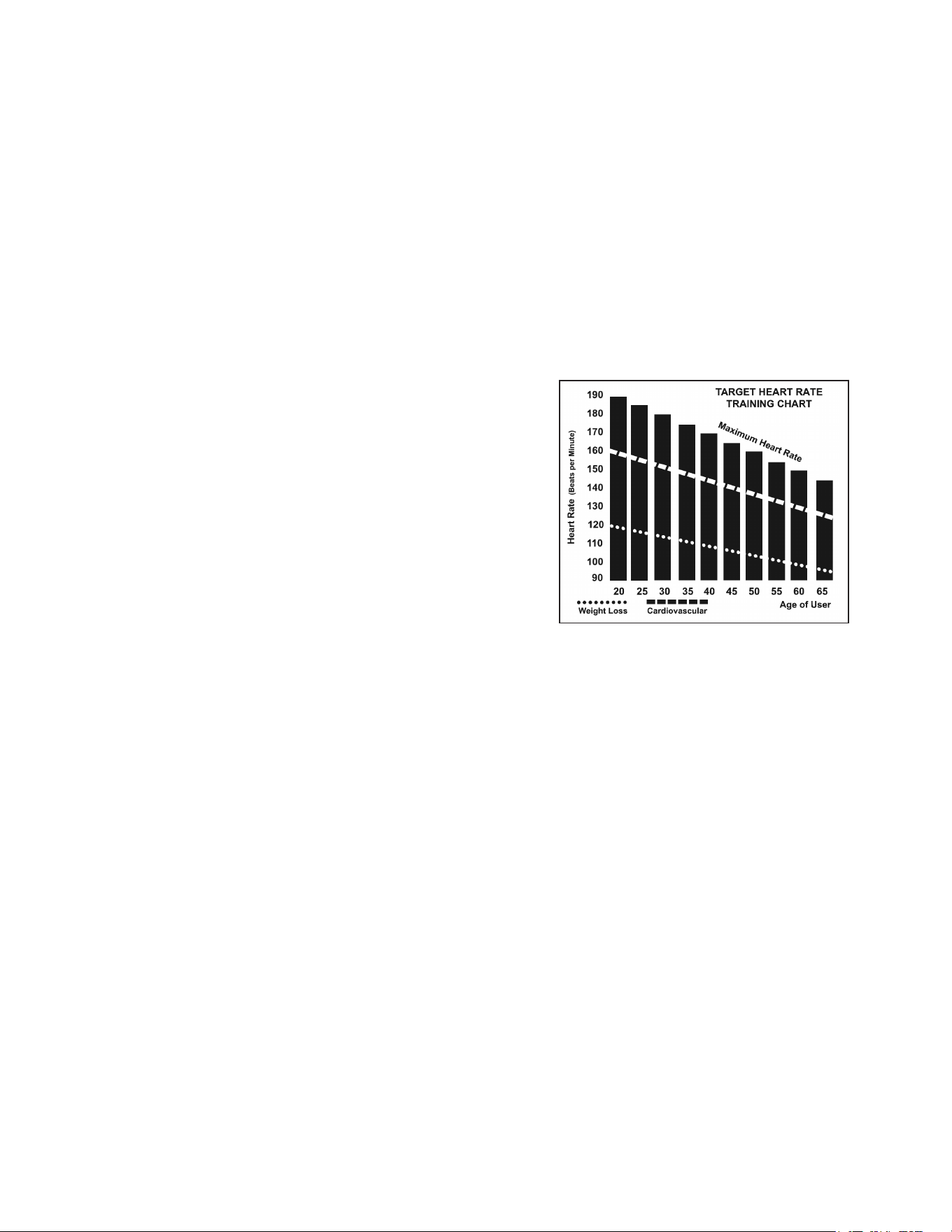
The two most popular reasons for, or goals, of exercise are cardiovascular tness (training
for the heart and lungs) and weight control. The black columns on the chart above
represent the MHR for a person whose age is listed at the bottom of each column. The
training heart rate, for either cardiovascular tness or weight loss, is represented by two
dierent lines that cut diagonally through the chart. A denition of the lines’ goal is in the
bottom left-hand corner of the chart. If your goal is cardiovascular tness or if it is weight
loss, it can be achieved by training at 80% or 60%, respectively, of your MHR on a schedule
approved by your physician. Consult your physician before participating in any exercise
program.
20
ERG700 Rower
Rate of Perceived Exertion
Heart rate is important but listening to your body also has a lot of advantages. There are more variables
involved in how hard you should workout than just heart rate. Your stress level, physical health, emotional
health, temperature, humidity, the time of day, the last time you ate and what you ate, all contribute to the
intensity at which you should workout. If you listen to your body, it will tell you all of these things.
The rate of perceived exertion (RPE), also know as the Borg scale, was developed by Swedish physiologist
G.A.V. Borg. This scale rates exercise intensity from 6 to 20 depending upon how you feel or the perception of
your eort.
The scale is as follows:
Rating Perception of Eort
6 Minimal
7 Very, very light
8 Very, very light +
9 Very light
10 Very light +
11 Fairly light
12 Comfortable
13 Somewhat hard
14 Somewhat hard +
15 Hard
16 Hard +
17 Very hard
18 Very hard +
19 Very, very hard
20 Maximal
You can get an approximate heart rate level for each rating by simply adding a zero to each rating. For
example a rating of 12 will result in an approximate heart rate of 120 beats per minute. Your RPE will vary
depending up the factors discussed earlier. That is the major benet of this type of training. If your body is
strong and rested, you will feel strong and your pace will feel easier. When your body is in this condition, you
are able to train harder and the RPE will support this. If you are feeling tired and sluggish, it is because your
body needs a break. In this condition, your pace will feel harder. Again, this will show up in your RPE and you
will train at the proper level for that day.
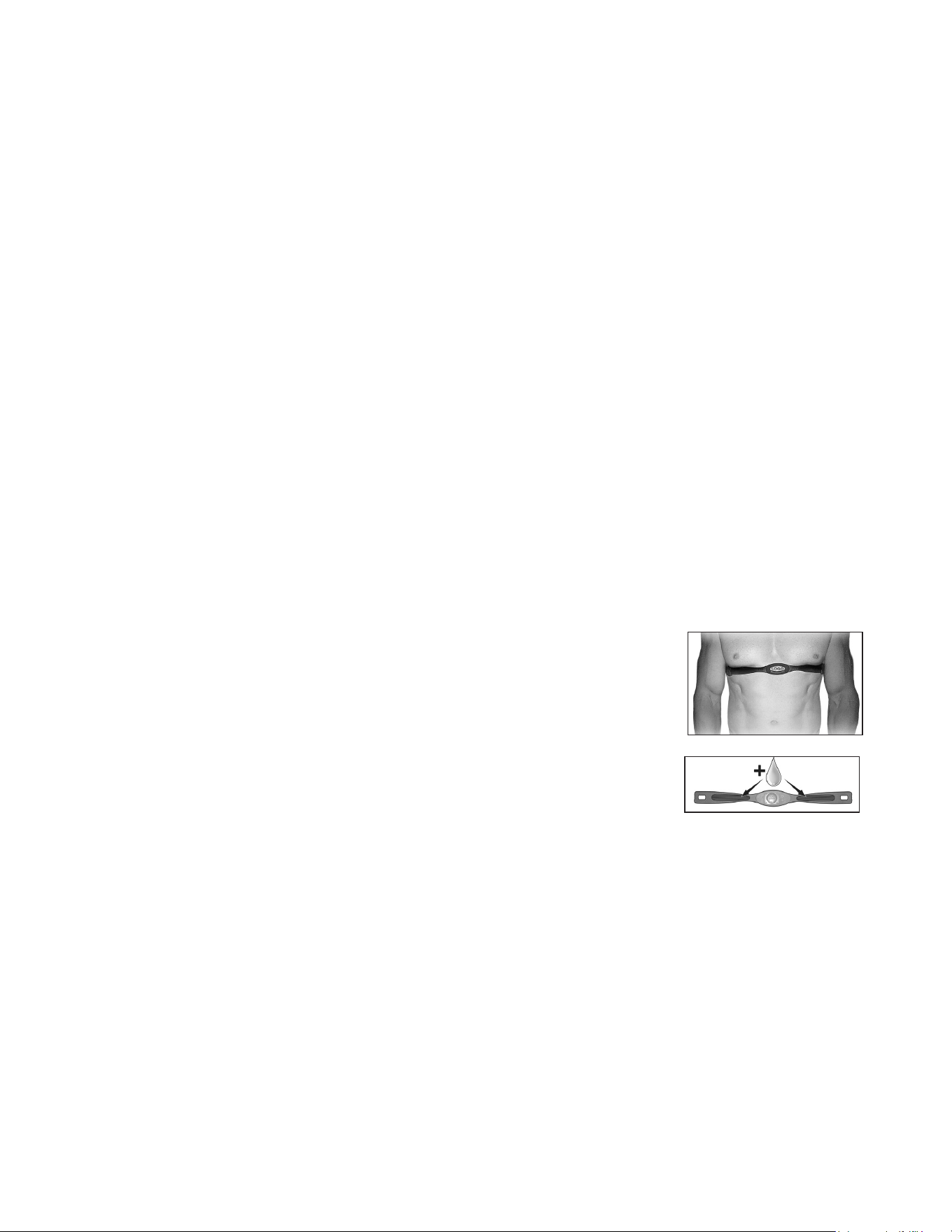
Wearing The Chest Strap
1. Attach the transmitter to the elastic strap using the interlocking key.
2. Adjust the strap as tightly as possible as long as the strap is not too tight to remain
comfortable.
3. Position the transmitter with the logo centered in the middle of your torso facing
away from your chest (some people must position the transmitter slightly left of
center). Attach the nal end of the elastic strap by inserting the round end and,
using the locking parts, secure the transmitter and strap around your chest.
4. Position the transmitter directly below the pectoral muscles.
5. Sweat is the best conductor to measure very minute heart beat electrical signals.
However, plain water can also be used to pre-wet the electrodes (2 ribbed
oval areas on the reverse side of the belt and both sides of the transmitter).
It’s also recommended that you wear the transmitter strap a few minutes before your work out. Some
users, because of body chemistry, have a more dicult time in achieving a strong, steady signal at the
beginning. After “warming up”, this problem lessens.
6. Your workout must be within range - distance between transmitter/receiver – to achieve a strong steady
signal. The length of range may vary somewhat but generally stay close enough to the console to
maintain good, strong, reliable readings. Wearing the transmitter directly on bare skin assures you of
proper operation. If you wish, you may wear the transmitter over a shirt. To do so, wet the areas of the
shirt that the electrodes will rest upon.
Note: The transmitter is automatically activated when it detects activity from the user’s heart. Additionally, it
automatically deactivates when it does not receive any activity. Although the transmitter is water resistant,
moisture can have the eect of creating false signals, so you should take precautions to completely dry the
transmitter after use to prolong battery life (estimated transmitter battery life is 2500 hours).
* Sold Separately

ERG700 Rowe r
21
Erratic Operation
Caution! Do not use this Rower for Heart Rate monitoring unless a steady, solid Actual
Heart Rate value is being displayed. High, wild, random numbers being displayed indicate a
problem.
Areas to look for interference which may cause erratic heart rate:
1. Microwave ovens, TV’s, small appliances, etc.
2. Fluorescent lights.
3. Some household security systems.
4. Perimeter fence for a pet.
5. Some people have problems with the transmitter picking up a signal from their skin. If
you have problems try wearing the transmitter upside down. Normally the transmitter will
be oriented so the Spirit Fitness logo is right side up.
6. The antenna that picks up your heart rate is very sensitive. If there is an outside noise
source, turning the whole machine 90 degrees may de-tune the interference.
7. Another Individual wearing a transmitter within 3’ of your machine’s console.
If you continue to experience problems contact your dealer.
GENERAL MAINTENANCE
1. Wipe down all areas in the sweat path with a damp cloth after each workout.
2. If a squeak, thump, clicking or rough feeling develops the main cause is most likely one of
three reasons:
I. The hardware was not suciently tightened during assembly. All bolts that were in-
stalled during assembly need to be tightened as much as possible. It may be neces-
sary to use a larger wrench than the one provided if you cannot tighten the bolts suf-
ciently. I cannot stress this point enough; 90% of calls to the service department for
noise issues can be traced to loose hardware.
II. The crank arm nut needs to be retightened.
III. If squeaks or other noises persist, check that the unit is properly leveled. There are 2
leveling pads on the bottom of the rear stabilizer, use a 14mm wrench (or adjustable
wrench) to adjust the levelers.

22
ERG700 Rower
Manufacturer’s Limited Warranty
Eective July 06, 2020 - ROWER LIMITED WARRANTY
Home Use Limited Warranty
Frame
Lifetime
Parts
5 Years
XTERRA Fitness Inc. warrants all its home use Rower parts for a period of time listed below, from the date of retail sale, as determined by a
sales receipt or in the absence of a sales receipt, eighteen (18) months from the original factory shipping date. XTERRA Fitness’
responsibilities include providing new or remanufactured parts, at XTERRA Fitness’ option, and technical support to our independent dealers
and servicing organizations. In the absence of a dealer or service organization, these warranties will be administered by XTERRA Fitness
directly to a consumer. The warranty period applies to the following components:
NORMAL RESPONSIBILITIES OF THE CONSUMER
This warranty applies only to products in ordinary household use. The consumer is responsible for the items listed below:
1. The warranty registration card must be completed and returned to the address listed on the card within 10 days of the original purchase
to validate the manufacturer’s limited warranty or register online at the XTERRA Fitness website.
2. Proper use of the Rower in accordance with the instructions provided in this manual, including maintenance.
3. Proper connection to a power supply of sucient voltage, replacement of blown fuses, repair of loose connections or defects in house/
facility wiring.
4. Expenses for making the Rower accessible for servicing, including any item that was not part of the Rower at the time it was shipped
from the factory.
5. Damages to the Rower nish during shipping, installation or following installation.
EXCLUSIONS
This warranty does not cover the following:
1. CONSEQUENTIAL, COLLATERAL, OR INCIDENTAL DAMAGES SUCH AS PROPERTY DAMAGE AND INCIDENTAL
EXPENSES RESULTING FROM ANY BREACH OF THIS WRITTEN OR ANY IMPLIED WARRANTY. Note: Some states do not allow
the exclusion or limitation of incidental or consequential damages, so this limitation or exclusion may not apply to you.
2. Service call reimbursement to the consumer. Service call reimbursement to the dealer that does not involve malfunction or defects in
workmanship or material, for units that are beyond the warranty period, for units that are beyond the service call reimbursement period,
for Rowers not requiring component replacement, or Rowers not in ordinary household use.
3. Damages caused by services performed by persons other than authorized XTERRA Fitness service companies, use of parts other than
original XTERRA Fitness parts, or external causes such as alterations, modications, abuse, misuse, accident, improper maintenance,
inadequate power supply, or acts of God.
4. Products with original serial numbers that have been removed or altered.
5. Products that have been; sold, transferred, bartered, or given to a third party.
6. Products that are used as store display models.
7. Products that do not have a warranty registration on le at XTERRA Fitness Inc. XTERRA Fitness reserves the right to request proof of
purchase if no warranty record exists for the product.
8. Product use in any environment other than a residential setting.
9. THIS WARRANTY IS EXPRESSLY IN LIEU OF ALL OTHER WARRANTIES EXPRESSED OR IMPLIED, INCLUDING THE
WARRANTIES OF MERCHANTABILITY AND/OR FITNESS FOR A PARTICULAR PURPOSE.
SERVICE
Keep your bill of sale. Twelve (12) months from the date on the bill of sale or eighteen (18) months from the date of factory shipping as
determined by the serial number establishes the warranty period should service be required. If service is performed, it is in your best interest
to obtain and keep all receipts. This written warranty gives you specic legal rights. You may also have other rights that vary from state to
state. Service under this warranty must be obtained by following these steps, in order:
1. Contact your selling authorized XTERRA Fitness dealer. OR
2. Contact your local authorized XTERRA Fitness service organization.
3. If there is a question as to where to obtain service, contact our service department at (870)333-5500
4. XTERRA Fitness’ obligation under this warranty is limited to repairing or replacing, at XTERRA Fitness’ option, the product through one
of our authorized service centers. All repairs must be preauthorized by XTERRA Fitness. If the product is shipped to a service center
freight charges to and from the service center will be the customer’s responsibility. For replacement parts shipped while the product is
under warranty, the customer will be responsible for shipping and handling charges. For in-home service, the customer will be respon-
sible for a trip charge. There will be an additional trip charge if the customer is located over 100 miles from the nearest service center.
5. The owner is responsible for adequate packaging upon return to XTERRA Fitness. XTERRA Fitness is not responsible for damages in
shipping. Make all freight damage claims with the appropriate freight carrier. DO NOT SHIP ANY UNIT TO OUR FACTORY WITHOUT
A RETURN AUTHORIZATION NUMBER. All units arriving without a return authorization number will be refused.
6. For any further information, or to contact our service department by mail, send your correspondence to:
Product features or specications as described or illustrated are subject to change without notice. All warranties are made by
XTERRA Fitness, Inc. This warranty applies only in the 48 contiguous United States. NOTE: This does not include Alaska or Hawaii.
XTERRA Fitness, Inc.
P.O. Box 2037
Jonesboro, AR 72402-2037
Labor
1 Year

ERG700 Rowe r
23

24
ERG700 Rower

ERG700 Rowe r
25
www.xterrafitness.com
©2020 All RIghts Reserved. ERG700 Owner’s Manual
3000 Nestle Road Jonesboro, AR 72401 - Phone:870-336-4286 - Fax:870-935-7611