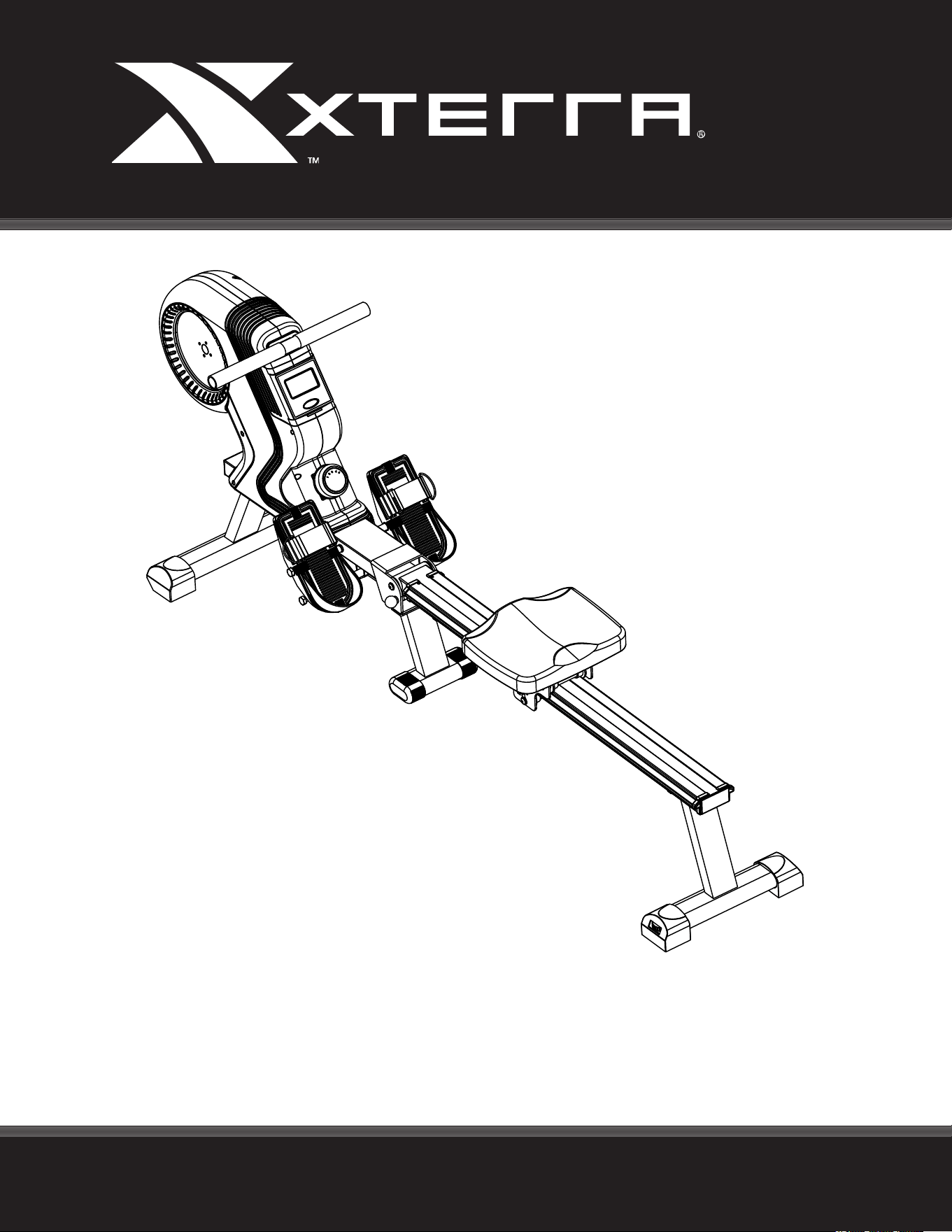
ERG220 ROWER
OWNER’S MANUAL
PLEASE CAREFULLY READ THIS ENTIRE MANUAL BEFORE OPERATING YOUR NEW ROWER
FITNESS
Table Of Contents
1
2
4
14
16
18
19
Product Registration
Important Safety Instructions
ERG220 Assembly Instructions
Adjustment Guides
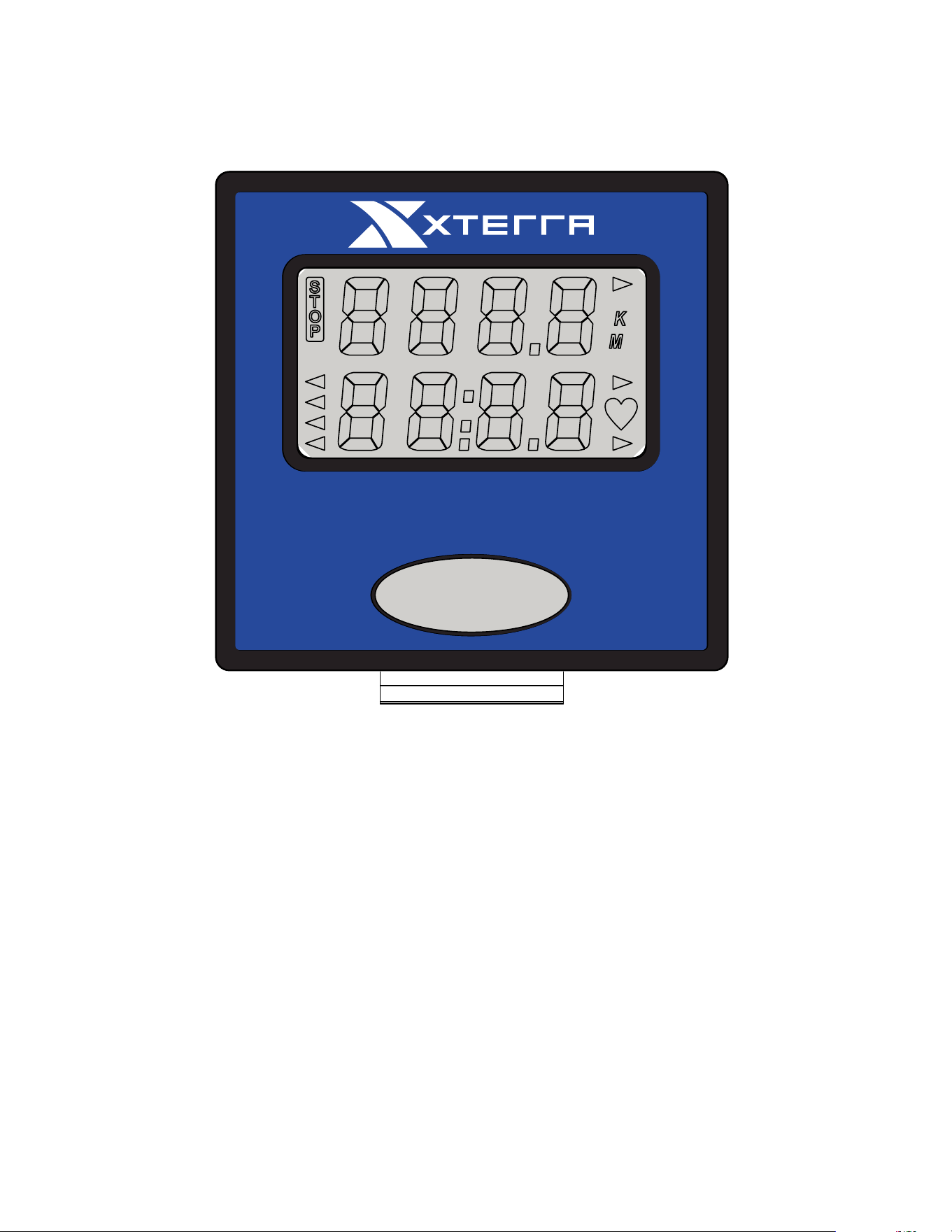
Operation of Your Console
Troubleshooting
Manufacturer’s Limited Warranty
Thank you for your purchase of this quality rower from XTERRA Fitness. Your new
rower has been manufactured by one of the leading tness manufacturers in the world.
XTERRA Fitness will do all we can to make your ownership experience as pleasant as
possible for many years to come. If you have questions, or if parts are missing or damaged,
or you require customer service, call (870) 333-5500. Please have your model number and
serial number handy when you call.
Please take a moment to record where you purchased your machine, as well as the date of
purchase for future reference. We appreciate your condence in XTERRA Fitness and we
will always remember that you are the reason that we are in business. Please complete and
mail your registration card today and enjoy your new rower.
Yours in Health,
XTERRA Fitness
Congratulations On Your New Rower and Welcome to the XTERRA Fitness Family!
ERG220_VER2_20190603
ERG220 Rower
1
Manufacture’s One-Year Limited Warranty
ATTENTION
THIS ROWER IS INTENDED FOR RESIDENTIAL USE ONLY AND IS WARRANTED FOR THE
APPLICATION. ANY OTHER APPLICATION VOIDS THIS WARRANTY IN ITS ENTIRETY.
Record Your Serial Number
Please record the Serial Number of this tness product
in the space provided below.
Serial Number
Register Your Purchase
The self-addressed product registration card must be completed in full and returned to
XTERRA Fitness. You can also go to www.xterratness.com/warrantyreg.html
to register online.
Product Registration
Purchase Location
Purchase Date
Your XTERRA rower machine is warranted for one year from the date of purchase against
defects in material when used for the purpose intended, under normal conditions and pro-
vided it receives proper care. Any part found defective or missing will be sent at no cost
when returned in accordance with the terms of this warranty.
This warranty is not transferable and is extended only to the original owner.
The warranty shall not apply to exercise units which are (1) used for commercial or other
income producing purposes, or (2) subject to misuse, neglect, accident or unauthorized
repair and alterations.
This warranty provided herein is lieu of all other express warranties, any implied warran-
ties, including any implied warranties of merchantability of tness for particular purpose,
are limited in duration to the rst 12 months from date of purchase. All other obligations or
liabilities, including liability for consequential damages are hereby excluded.
2
ERG220 Rower
• To disconnect, turn all controls to the off position, then remove the plug from the outlet.
• Do not operate equipment on deeply padded, plush or shag carpet. Damage to both carpet and
equipment may result.
• Before beginning this or any exercise program, consult a physician. This is especially important for
persons over the age of 35 or persons with pre-existing health conditions.
• Keep hands away from all moving parts.
• The pulse sensors are not medical devices. Various factors, including the user’s movement, may affect the
accuracy of heart rate readings. The pulse sensors are intended only as exercise aids in determining heart
rate trends in general.
• Do not attempt to use your equipment for any purpose other than for the purpose it is intended.
• Wear proper shoes. High heels, dress shoes, sandals or bare feet are not suitable for use on your
equipment. Quality athletic shoes are recommended to avoid leg fatigue.
• Weight Limit: 300 lbs
Important Safety Instructions
When using an electrical appliance, basic precautions should always be followed.
Read all instructions before using this appliance. Some warnings below pertain to plug-in models only. Please
use similar precautions when operating any machinery with a power source.
DANGER - To reduce the risk of electric shock always unplug this appliance from the electrical outlet
immediately after using and before cleaning.
WARNING - To reduce the risk of burns, re, electric shock, or injury to persons:
1. An appliance should never be left unattended when plugged in. Unplug from outlet when not in use, and
before putting on or taking off parts.
2. Do not operate under blanket or pillow. Excessive heating can occur and cause re, electric shock, or injury
to persons.
3. This exercise equipment is not intended for use by persons with reduced physical, sensory or mental
capabilities, or lack of experience and knowledge.
4. Use this appliance only for its intended use as described in this manual. Do not use attachments not
recommended by the manufacturer.
5. Never operate this appliance if it has a damaged cord or plug, if it is not working properly, if it has been
dropped or damaged, or dropped into water. Return the appliance to a service center for examination and
repair.
6. Do not carry this appliance by the power supply cord or use cord as a handle.
7. Keep the cord away from heated surfaces.
8. Never operate the appliance with the air openings blocked. Keep the air openings free of lint, hair, and the
like.
9. Never drop or insert any object into any opening.
10. Do not use outdoors.
11. Do not operate where aerosol (spray) products are being use or where oxygen is being administered.
12. Connect this appliance to a properly grounded outlet only.
13. The appliance is intended for household use.
SAVE THESE INSTRUCTIONS - THINK SAFETY!
Fitness Equipment Safety Instructions
CAUTION!! Please be careful when unpacking the carton.
Failure to follow all guidelines may compromise the effectiveness of the exercise experience, expose
yourself (and possibly others) to injury, and reduce the longevity of the equipment.
WARNING: This product can expose you to chemicals including Toluene and Acrylamide which are
known to the State of California to cause cancer and birth defects or other reproductive harm.
For more information go to www.P65Warnings.ca.gov
ERG220 Rower
3
Before you begin
Thank you for selecting our revolutionary XTERRA ERG220 Fitness Rower. A rower is an effective exercise
for increasing cardiovascular tness, building endurance, and toning the body. Our tness rower provides an
impressive selection of features designed to make your workouts at home more effective and enjoyable.
For your benet, read this manual carefully before you use the ERG220 Fitness Rower. To help us assist
you, note the product model number and serial number before contacting us. Before reading further, please
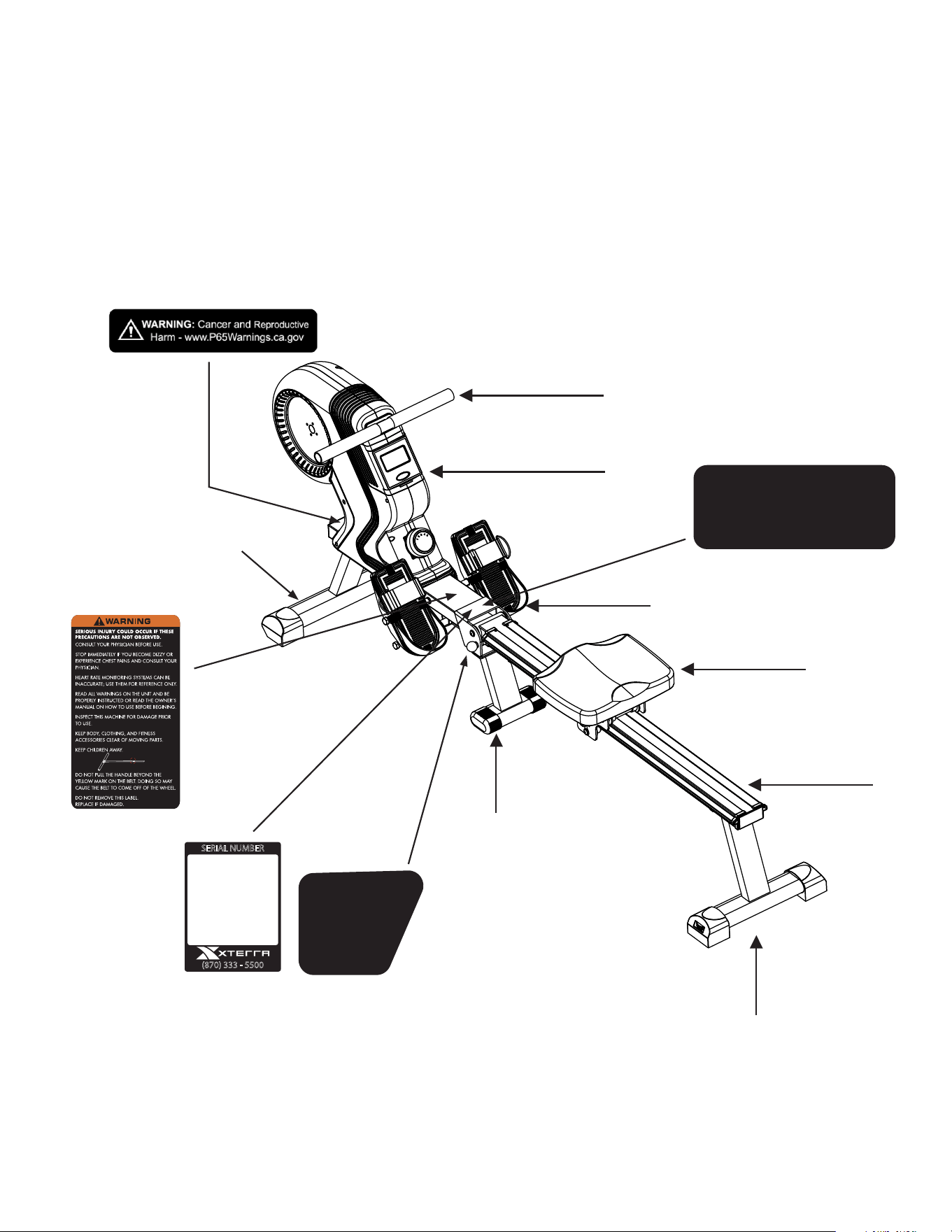
familiarize yourself with the parts that are labeled in the drawing below.
Console
Handle Bars
Pedals
Pivot Point Sticker
Ball Head Locking Pin
Sticker
Serial Number
Sticker
Warning Label
Seat
Rear Stabilizer
Sliding Rail
Mid-Stabilizer
Front Stabilizer
Prop 65 Warning Label
LOCKING PIN
MUST BE FULLY
ENGAGED
DURING USE
AND WHEN
FOLDED UP
LIFT CENTER OF FRAME
TO HELP LINE UP
LOCKING PIN HOLES
SERIAL NUMBER
(870) 333 - 5500
4
ERG220 Rower
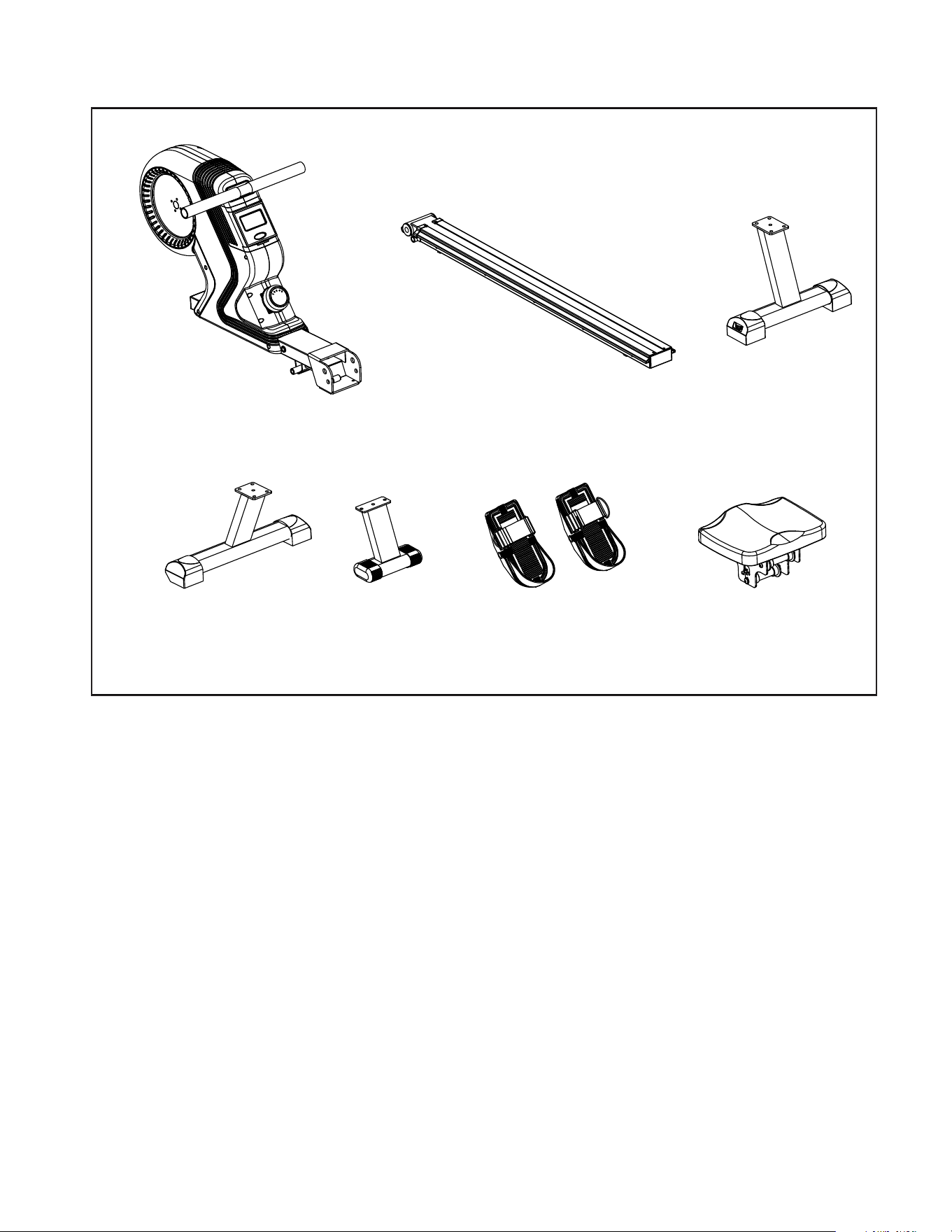
ERG220 Assembly Pack Checklist
NO.1 NO.2 NO.4
NO.3 NO.7 NO.12
NO.38
1 Main Frame 1
2 Slide Rail 1
3 Front Stabilizer 1
4 Rear Stabilizer 1
7 Middle Support 1
12 Pedals 2
38 Seat Assembly 1
Hardware Bag 1
Manual 1
Part No. Description Quantity
Note: Above parts are all needed to assemble this machine. Before you start to assemble, please check the hardware
packing to make sure they are included.
ERG220 Rower
5
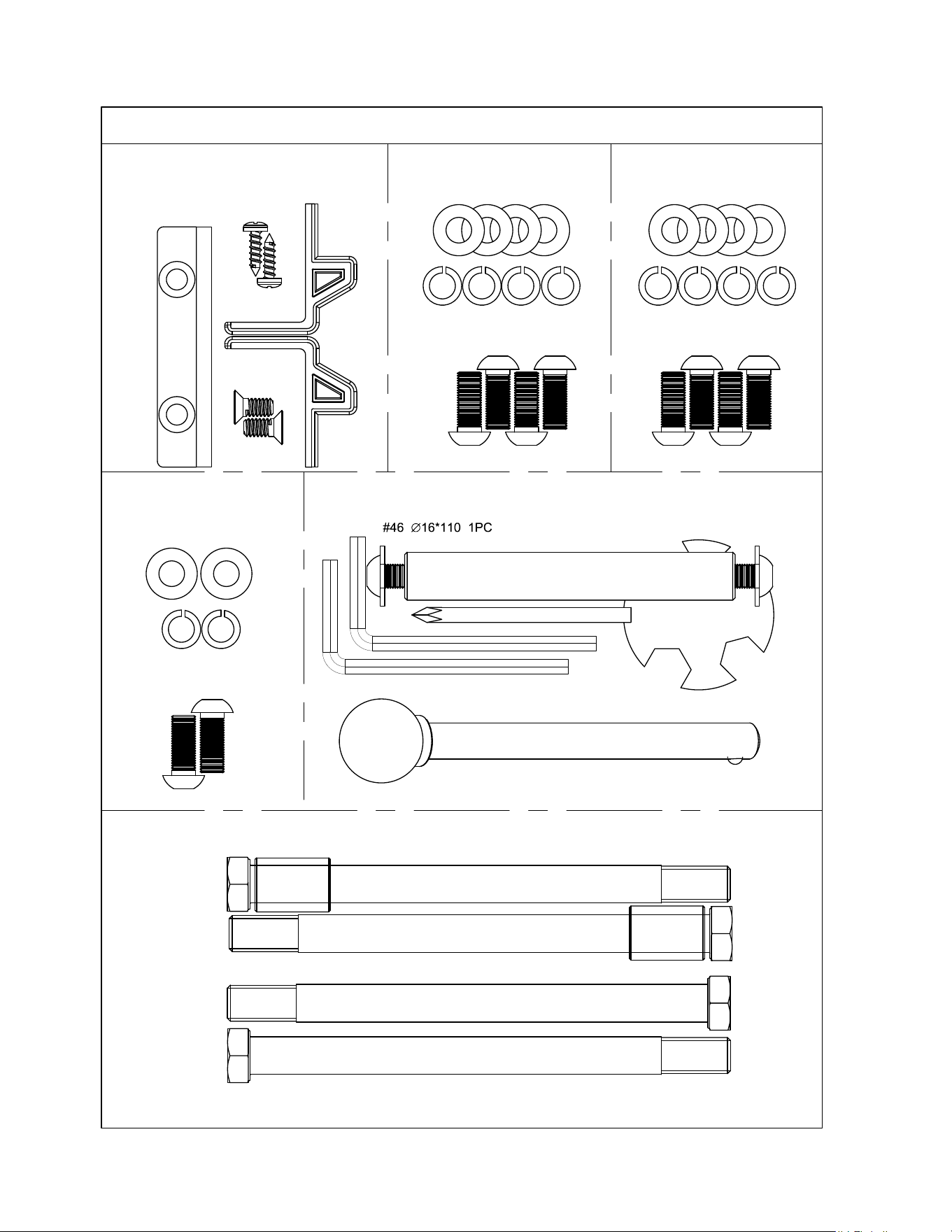
ERG220 Assembly Pack Checklist
#44 OD20*ID8.5*1.5 2PCS
RE-6030
STEP-1
STEP-5
#81 M8*20 2PCS
STEP-3
#52 ID8.5 4PCS
#55 OD16*ID8.5*1.5 4PCS
#81 M8*20 4PCS
#55 OD16*ID8.5*1.5 4PCS
#52 ID8.5 4PCS
#81 M8*20 4PCS
#65 ∅12 1PC
STEP-6
#64 ∅18*∅13*26 2PCS
#50 M12*160 4pcs
#34 1PC
#11 1PC
#15 1PC
#59 2PCS
#62 2PCS
# 98 S13-14-19 1PC
TOOL
# 97 S6 2PCS
#55 OD16*ID8.5*1.5 2PCS
STEP-4
#52 ID8.5 2PCS
#81 M8*20 2PCS
STEP-2
#97
#97
#65 Ball Head Pin
#50 Long Screw
#64
Spacer
#98
#46 Axis, #81 Screws, #44 Washers
6
ERG220 Rower
ERG220 Assembly Instructions
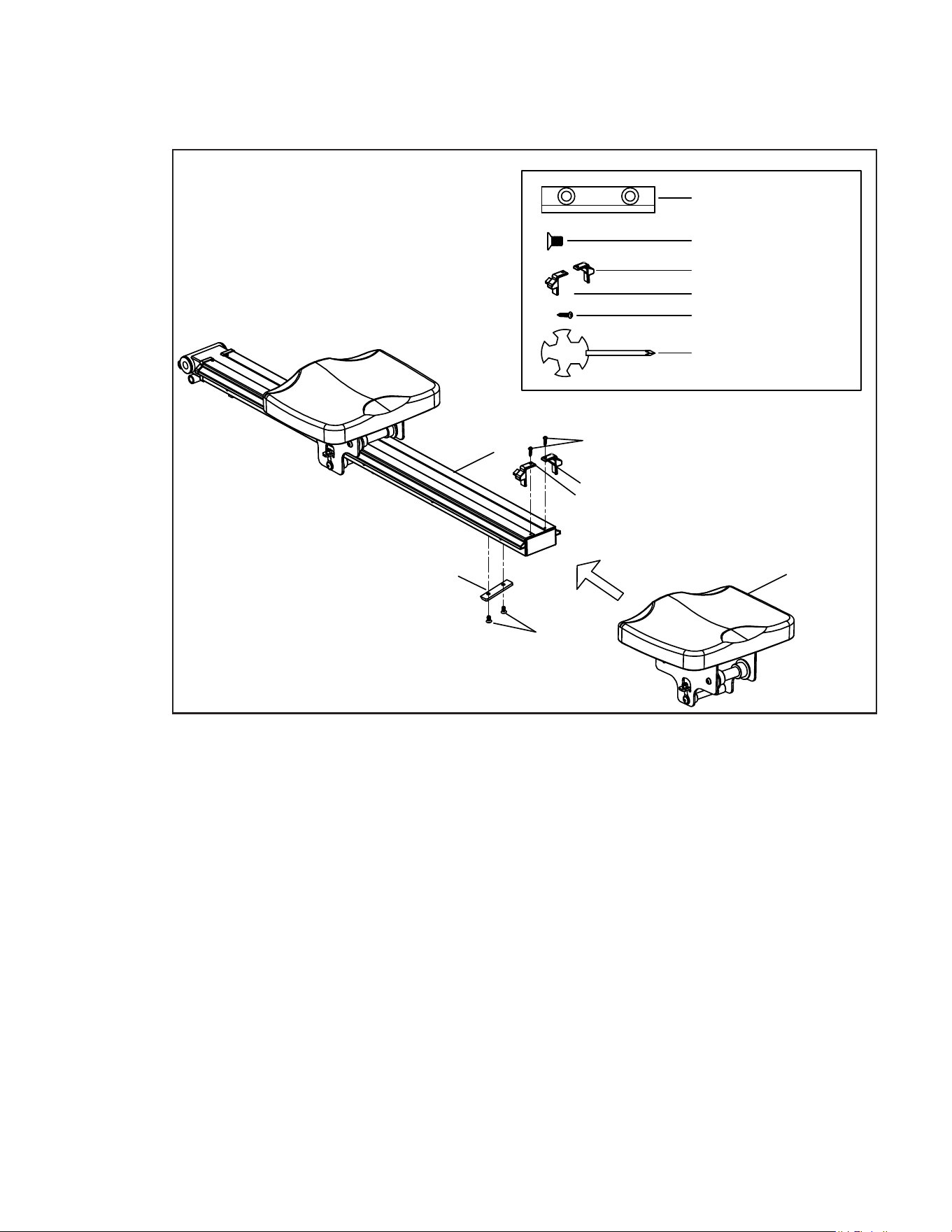
34
62
38
2
#34 Limit pad 1pc
#62 M6*10 2pcs
#99 1pc
59
15
11
#59 ST4.0*16 2pcs
#11 1pc
#15 1pc
STEP-1
Seat Assembly
1
1. Slide the Seat Assembly (38) onto the Seat Rail (2). Make sure that the seat
faces the hinge.
2. Use 2 M6 x 10 Button Head Screws (62) to secure the Limit Pad (34) to the
Slide Rail (2).
3. Secure the Stop Brackets (11, 15) to the Seat Rail (2) using 2 ST4.0 x 16
Screws (59) to prevent the seat from sliding off the rail.
ERG220 Rower
7
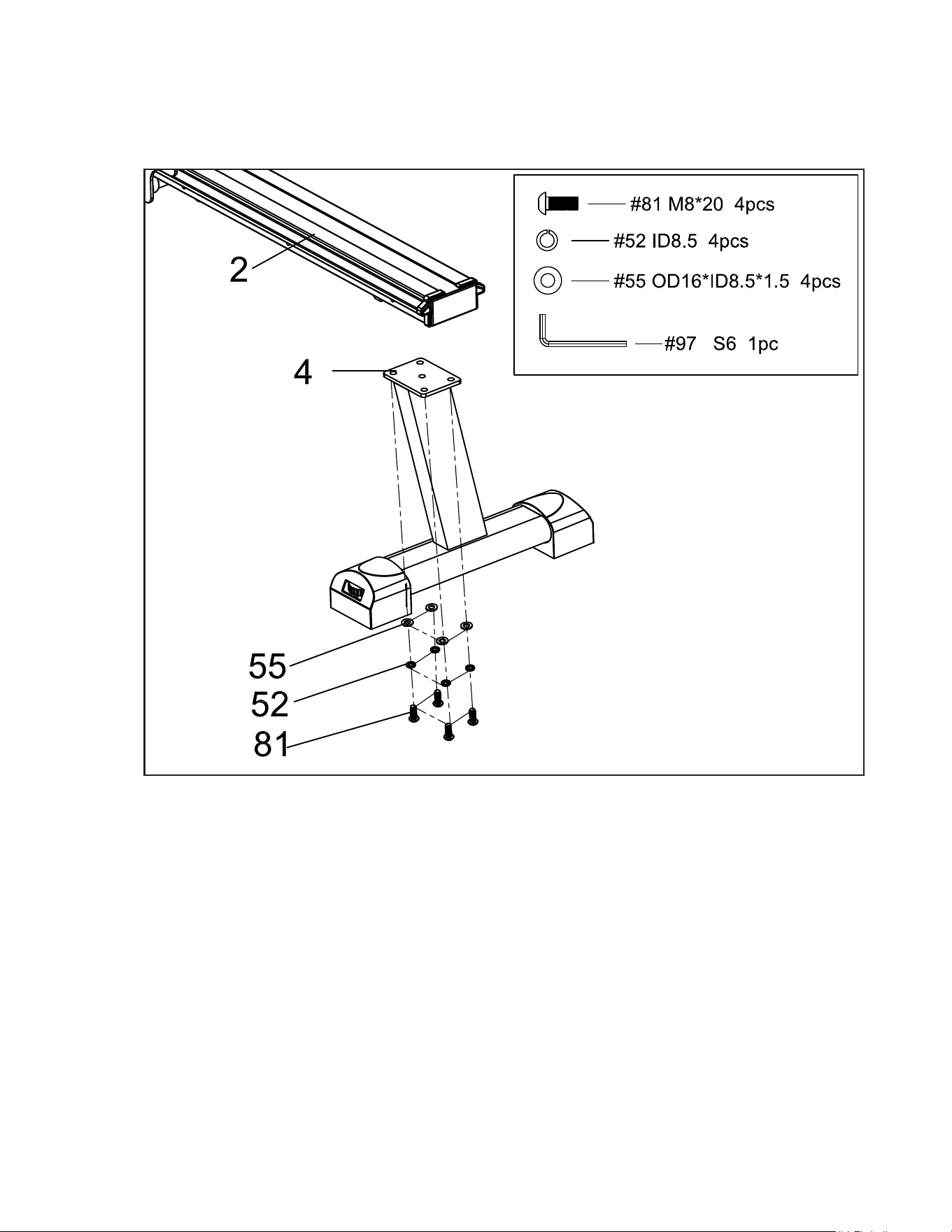
1. Attach the Rear Stabilizer (4) to the Slide Rail (2). Secure using 4 Screws (81), 4
Spring Washers (52) and 4 Washers (55) with the provided Allen Wrench (97).
Rear Stabilizer
2
8
ERG220 Rower
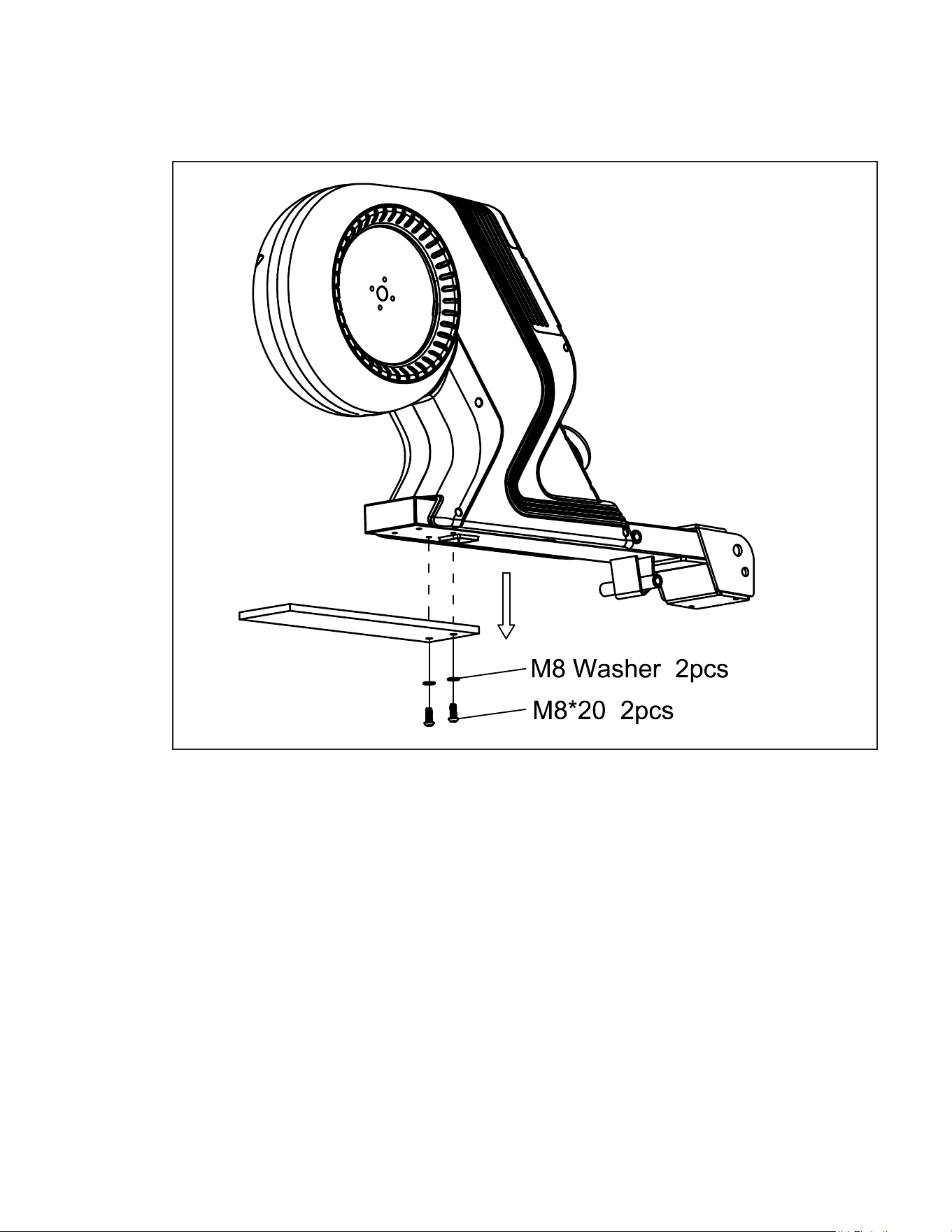
1. A piece of plywood has been attached to the Main Frame (1) to stabilize it during
shipping.
2. Remove the 2 Bolts and 2 Washers using the Allen Wrench (97).
3. The plywood, bolts, and washers are not needed in further assembly and can be
recycled.
ERG220 Assembly Instructions
Packaging Removal
3
ERG220 Rower
9
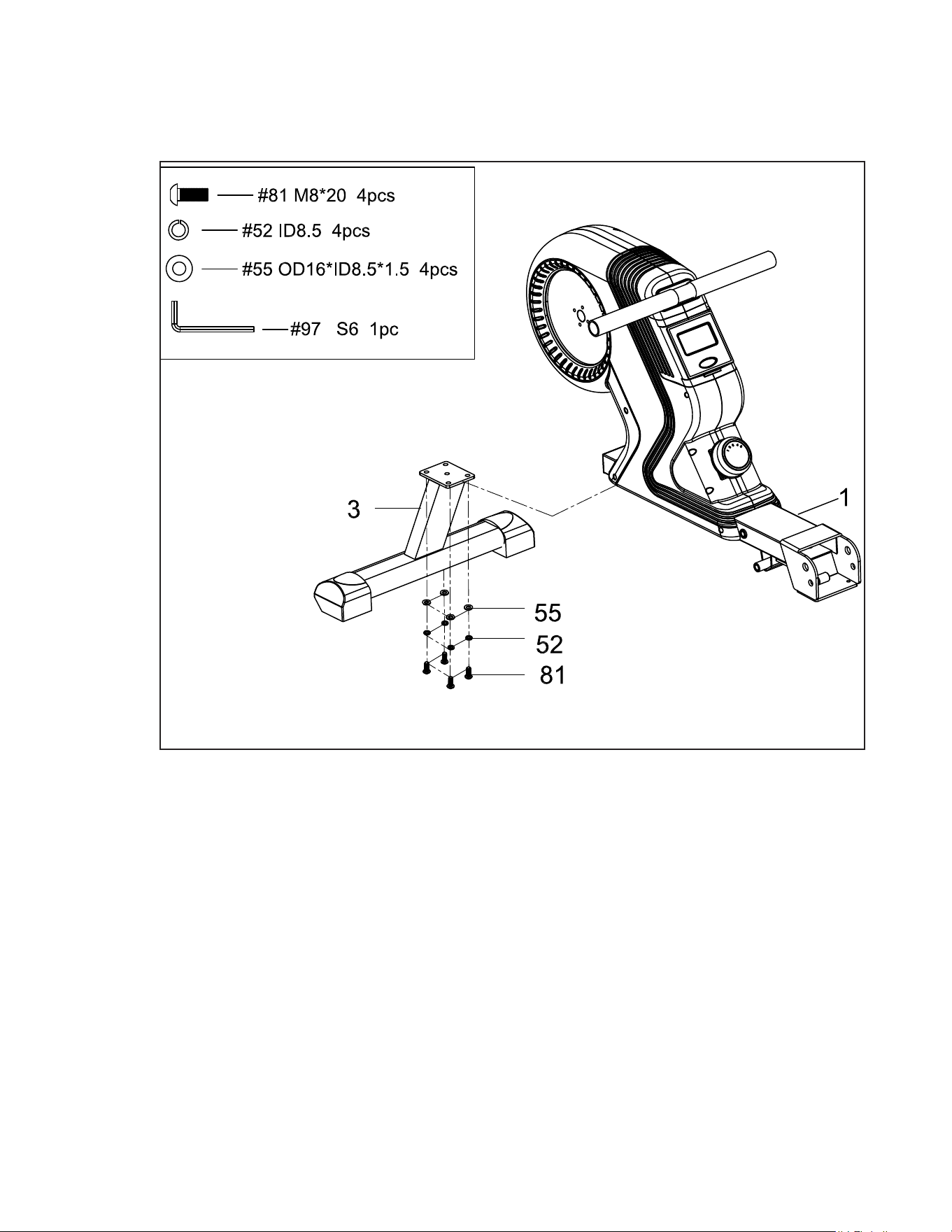
1. Attach the Front Stabilizer (3) to the Main Frame (1). Secure using 4 Screws
(81), 4 Spring Washers (52) and 4 Washers (55) with the provided Allen
Wrench (97).
ERG220 Assembly Instructions
Front Stabilizer
4
10
ERG220 Rower
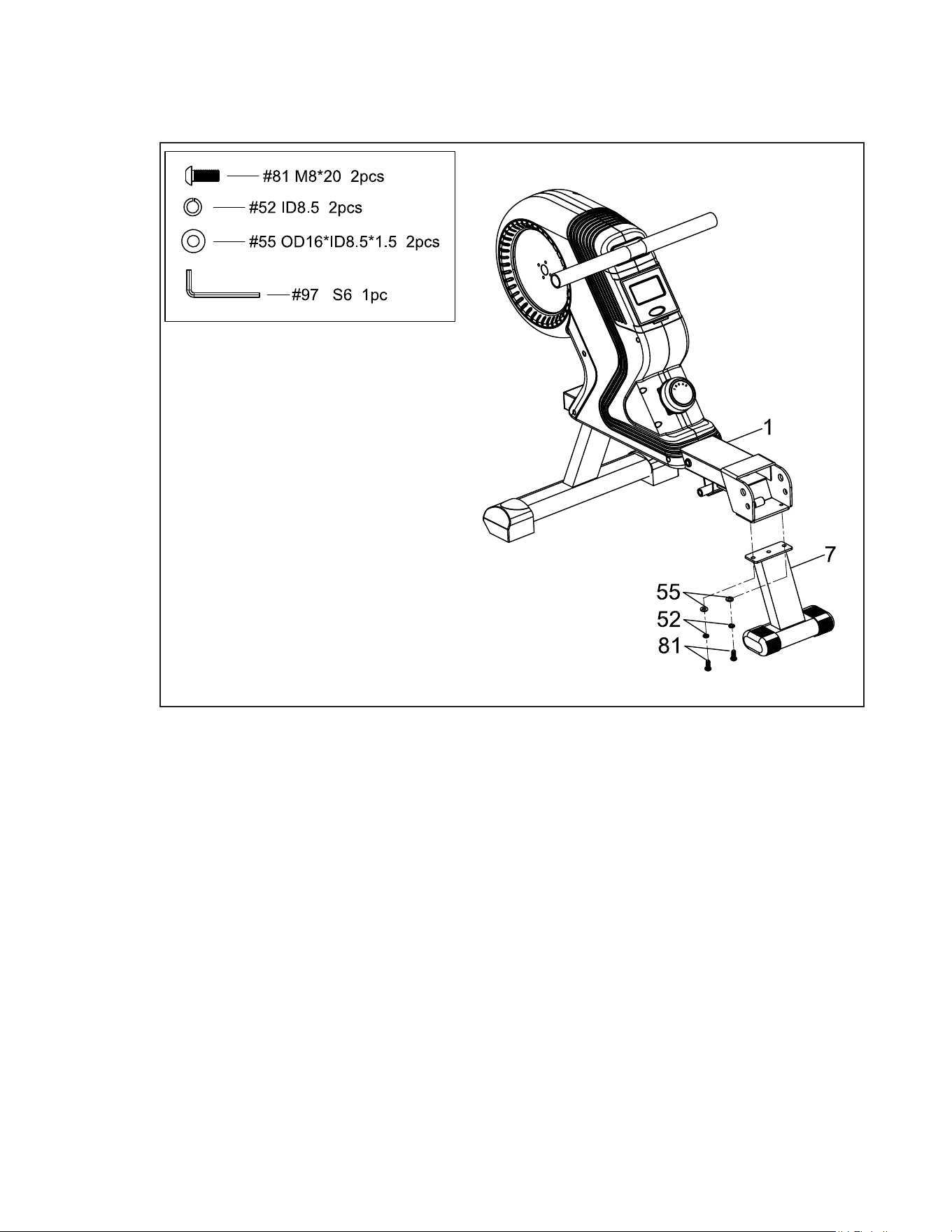
Middle Support
5
1. Attach the Middle Support (7) to the Main Frame (1). Secure using 2 Screws
(81), 2 Spring Washers (52) and 2 Washers (55) with the provided Allen
Wrench (97).
ERG220 Rower
11
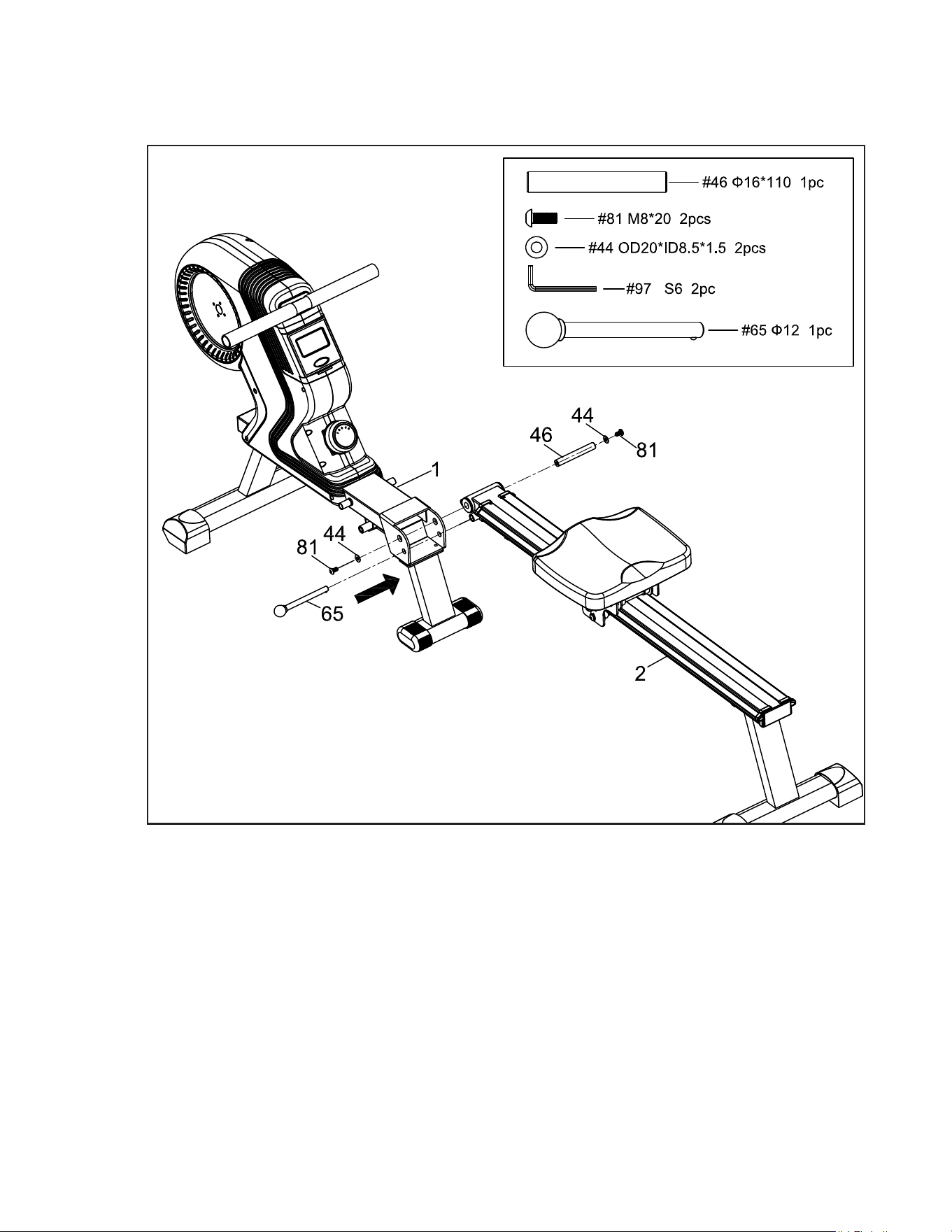
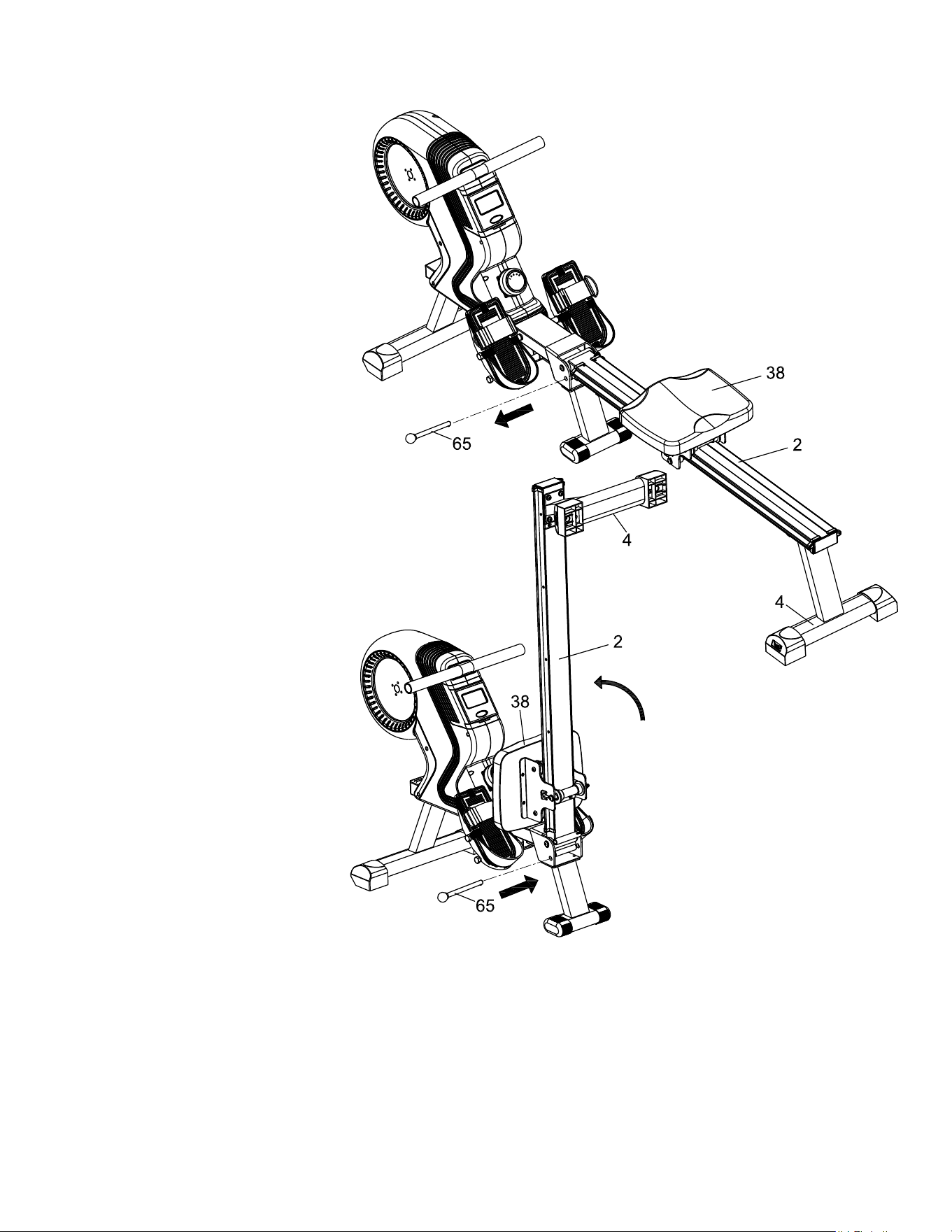
Connecting the Main Frame to the Slide Rail
6
1. Attach the Slide Rail (2) to the Main Frame (1). Insert the Axis (46) and secure
using 2 Screws (81) and 2 Washers (44) with the provided Allen Wrench (97).
2. Insert the Ball Head Pin (65) into the lower slot on the Main Frame (1) & Slide
Rail (2). Lift center of frame to help line up locking pin holes. This locks the rower in
the unfolded position and can be removed to fold the rower up.
12
ERG220 Rower
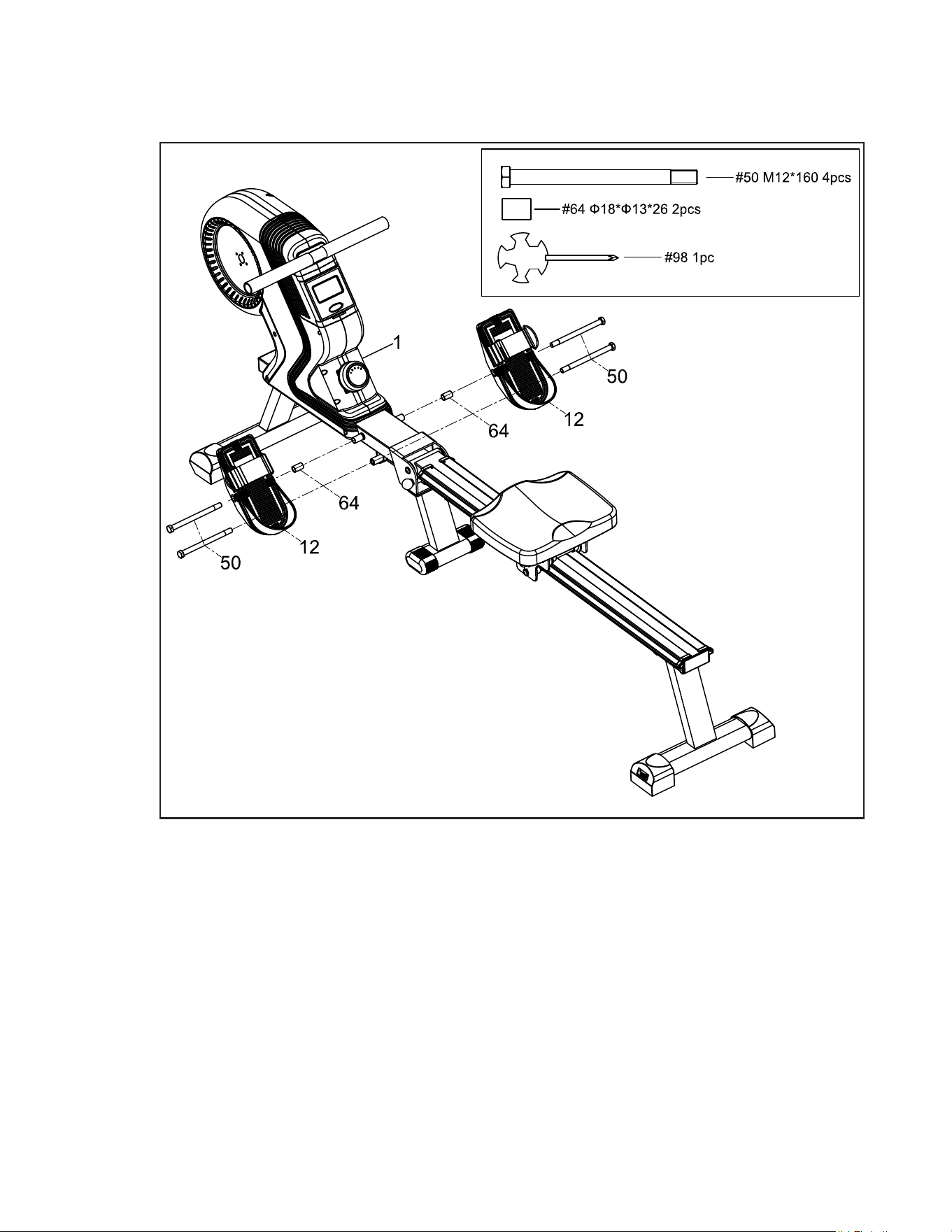
1. Slide the Long Screw (50) through the Pedal (12), then through a Spacer Sleeve
(64) before attaching and securing to the Main Frame (1) using the Screw Driver
(98). A second Long Screw (50) is directly secured onto the Main Frame (1) in
the lower half of the Pedal (12).
2. Repeat for the other Pedal (12).
Attaching the Pedals
7
ERG220 Rower
13
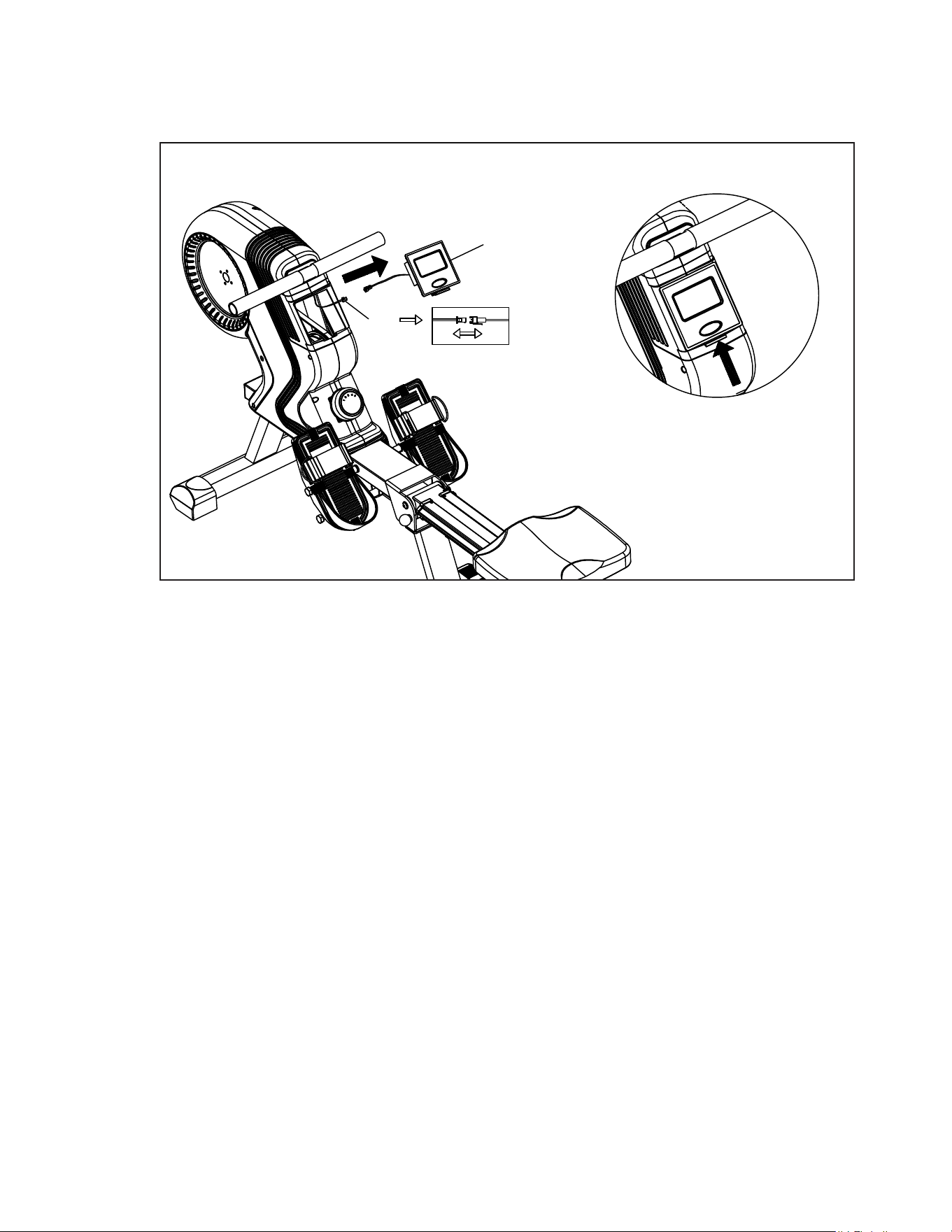
Console Connection
8
1. To insert / remove batteries, the Console (95) can be removed from the Main
Frame (1).
2. Pop the Console (95) out via the hinge (shown above) and be careful to not
damage the connection wires. Unclip the wires and the Console (95) can be
moved around freely. Insert the 2 AA batteries to activate the Console (95).
95
40
A
14
ERG220 Rower
Adjustment Guides
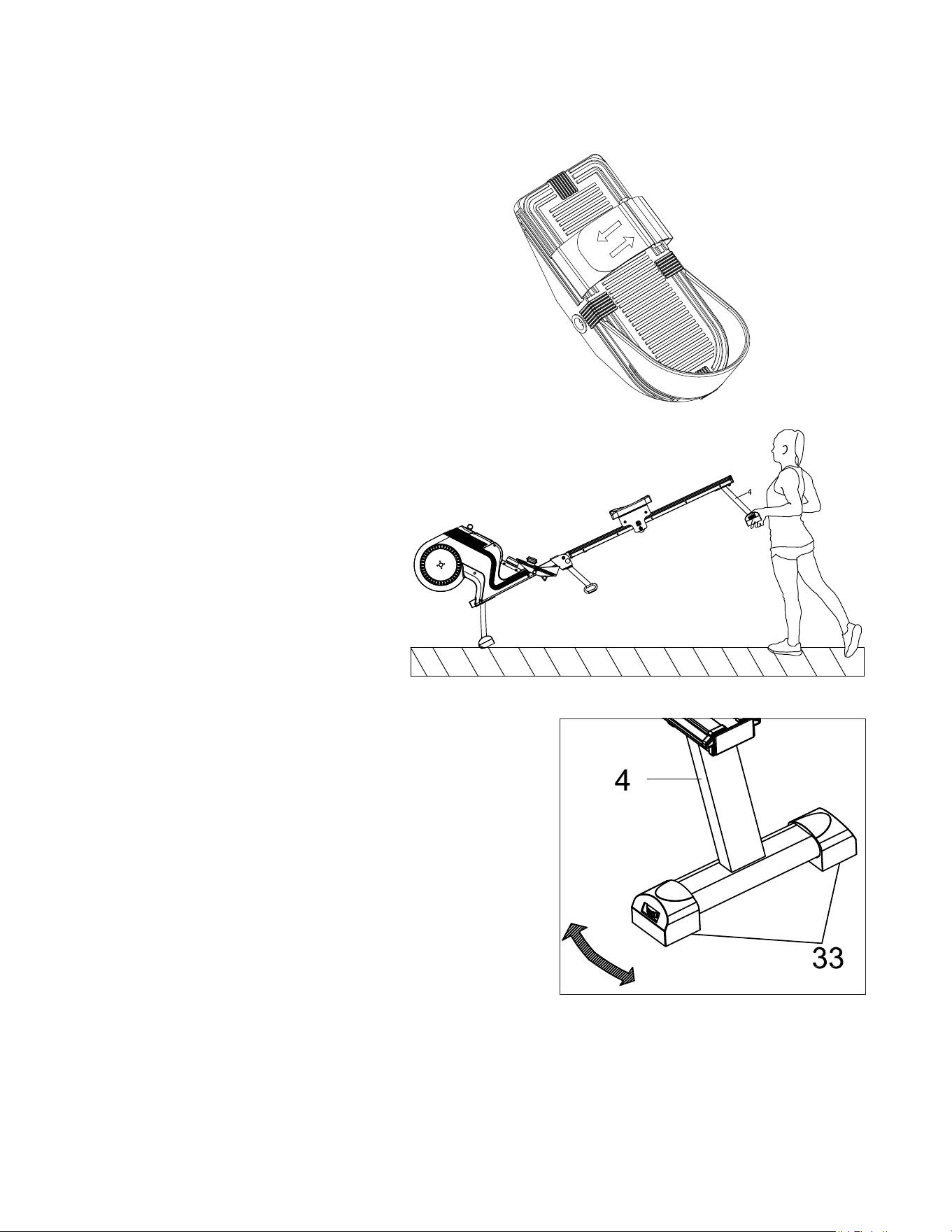
Pedal Adjustment
Moving the Machine
Adjusting the Balance
To move the machine, lift up
the rear stabilizer until the
transportation wheels on the
front stand touch the ground.
With the wheels on the ground,
you can transport the rower to
the desired location with ease.
Levers are found on the Rear
Stabilizer (4) of the machine.
If you nd the machine is
unbalanced before or during
your workout, the Levelers
(33) can be used to correct this
issue. Continuously working
out on an unbalanced machine
may cause damage to the
machine.
To adjust the pedal strap, remove the
Velcro end of the strap from the mesh
side by pulling it upward then to the left.
Once removed, you may increase the
opening of the pedal strap by pulling the
mesh end up and to the right.
To tighten, pull the Velcro end of the pedal
strap upward then to the right and down
to secure it to the mesh side of the strap.
ERG220 Rower
15
Folding the Rower
When not in use, the rower
can be folded to save space.
You can fold the rower by
locating the Ball Head Pin
(65) on the Slide Rail (2) and
removing it. Then, take the
Slide Rail (2) and move it into
a vertical position.
CAUTION: The Seat (38) will
glide down when the Slide
Rail (2) is raised.
Also take care to avoid the
Rear Stabilizer (4) when
moving the Slide Rail (2).
Once the Slide Rail (2) is in
the vertical position, re-insert
the Ball Head Pin (65) into its
slot on the Slide Rail (2).
This locks the rower into the
folded position.
CAUTION: The Slide Rail
(2) will not stay in the vertical
position before the Ball Head
Pin (65) is inserted. Make
sure to not let go of it before
it is secured or the Slide Rail
(2) may fall.
16
ERG220 Rower
Operation of Your Console
ERG220 Console
Batteries Installation
Please install 2 AA batteries in the battery case on the back of the Console (95).
(Whenever batteries are removed, all values will be reset to zero.)
Auto On/Off
Whenever a user starts to do exercise, the display will light up and show the workout values
automatically. After 4.5 minutes of no exercise input, the display will shut off. When a user
begins to exercise again the workout values will continue to from where they left off.
(Holding the MODE button for 2 seconds will cause all the values, except odometer, to reset
to zero.)
Auto Scan
After the Console (95) is powered on or when the Mode button is pressed, the display will
cycle through all functions values “Time - Distance - Calories - SPM - Pulse”. Each value will
be held for 6 seconds.
Functions and Operations
DIST
COUNT
CAL
SPM
SCAN
TIME
MODE
PULSE
ERG220
ERG220 Rower
17
Distance
Displays the distance from 0 to 9999 meters. In “Autoscan” mode, the value will hold for 6
seconds before continuing to the next value, users also can press the MODE button to cycle
through the other values until the ARROW icon ◄ points to display the distance value. This
will end “Autoscan” mode and only the selected value will display continuously.
Time
Displays the workout time from 00:00 to 99:59. Users can press the MODE button to cycle
through the other values until an ARROW icon ◄ points to “Time” to display the workout time
value.
Count
Displays the step from 0 to 9999. Users also can press the Mode button to cycle through the
other values until an ARROW icon ► points to “Count”.
Calories
Displays the calories burned during training from 0.0 to 9999. Users also can press the
MODE button to cycle through other values until an ARROW icon ◄ points the calories.
SPM
Displays current Strokes Per Minute from 0 to 120. Users also can press the MODE button to
cycle through the other values until an ARROW icon ◄ points to display “SPM”.
Pulse
Displays the current heart rate in beats per minute. Users also can press the MODE button to
cycle through other values until an ARROW icon ► points to display “Pulse”.
Reset
Hold the button for 2 seconds. All the function values, except odometer, will be reset to zero.
Note:
If the console displays abnormally, please re-install the batteries and try again. Please
properly dispose of your batteries after use.
18
ERG220 Rower
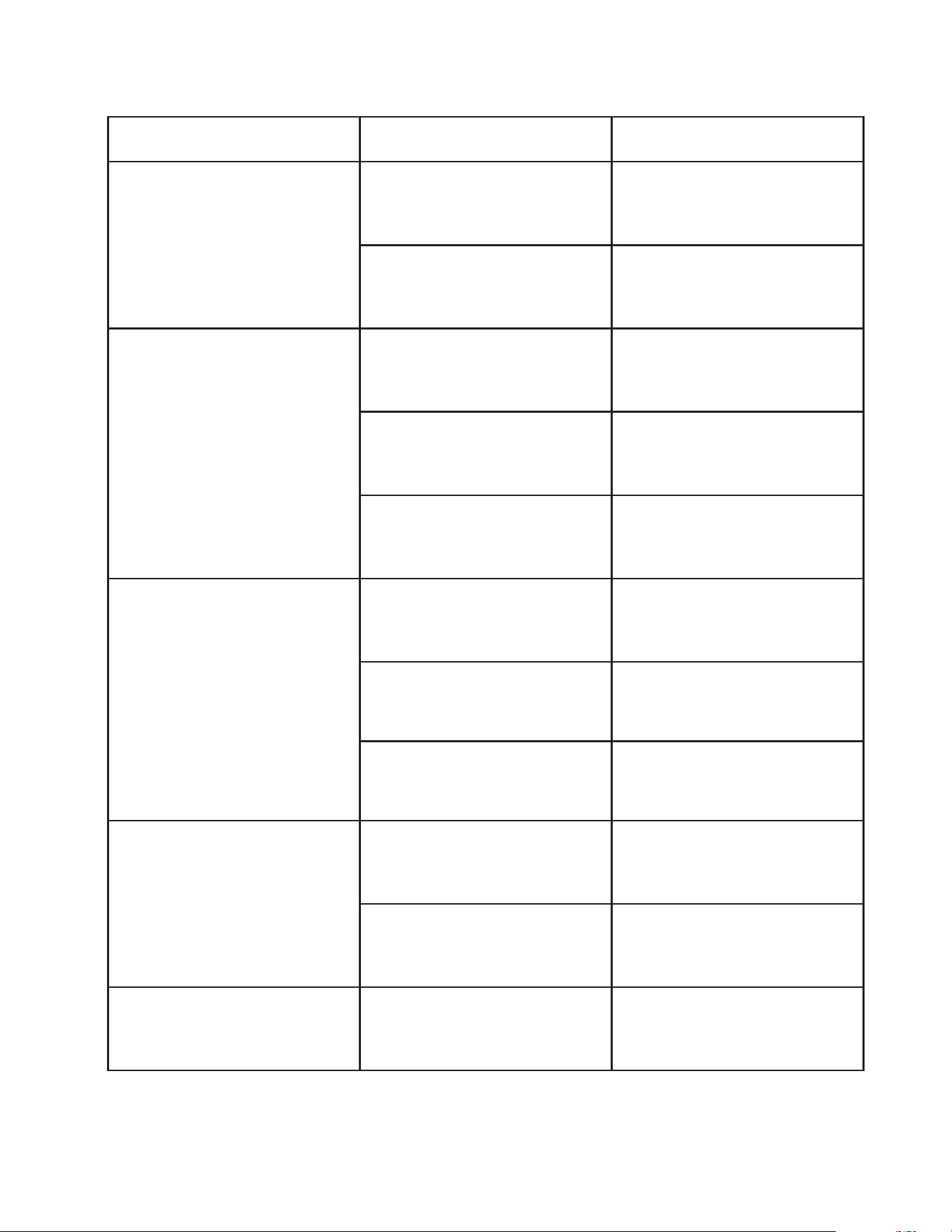
Troubleshooting
Problem Cause Solution
Console does not turn on
Battery not Installed Install Battery
Computer Wires not con-
nected
Ensure the computer wires
are connected properly at
the upright and computer
Console does not display
speed or distance
Sensor wire not connected
Ensure the computer wires
are connected properly at
the upright and the computer
Sensor wire not working
properly
Replace sensor wire
Monitor not working properly Replace monitor
No tension
Magnetic wheel not working
properly
Replace magnetic wheel
Computer wires not
connected properly
Ensure the computer wires
are connected properly at
the upright and the computer
Tension needs adjustment
Turn tension adjustment
knob accordingly
Grinding noise
Idler pulley defective Replace idler pulley
Flywheel defective Replace ywheel
Squeaking or squealing
noise
V-belt slipping Adjust v-belt
ERG220 Rower
19
Manufacturer’s Limited Warranty
Effective May 7th, 2019 - ROWER LIMITED WARRANTY
Home Use Limited Warranty
Frame
1 Year
Parts
1 Year
XTERRA Fitness Inc. warrants all its home use Rower parts for a period of time listed below, from the date of retail sale, as determined by a
sales receipt or in the absence of a sales receipt, eighteen (18) months from the original factory shipping date. XTERRA Fitness’
responsibilities include providing new or remanufactured parts, at XTERRA Fitness’ option, and technical support to our independent dealers
and servicing organizations. In the absence of a dealer or service organization, these warranties will be administered by XTERRA Fitness
directly to a consumer. The warranty period applies to the following components:
NORMAL RESPONSIBILITIES OF THE CONSUMER
This warranty applies only to products in ordinary household use. The consumer is responsible for the items listed below:
1. The warranty registration card must be completed and returned to the address listed on the card within 10 days of the original purchase
to validate the manufacturer’s limited warranty or register online at the XTERRA Fitness website.
2. Proper use of the Rower in accordance with the instructions provided in this manual, including maintenance.
3. Proper connection to a power supply of sufcient voltage, replacement of blown fuses, repair of loose connections or defects in house/
facility wiring.
4. Expenses for making the Rower accessible for servicing, including any item that was not part of the Rower at the time it was shipped
from the factory.
5. Damages to the Rower nish during shipping, installation or following installation.
EXCLUSIONS
This warranty does not cover the following:
1. CONSEQUENTIAL, COLLATERAL, OR INCIDENTAL DAMAGES SUCH AS PROPERTY DAMAGE AND INCIDENTAL
EXPENSES RESULTING FROM ANY BREACH OF THIS WRITTEN OR ANY IMPLIED WARRANTY. Note: Some states do not allow
the exclusion or limitation of incidental or consequential damages, so this limitation or exclusion may not apply to you.
2. Service call reimbursement to the consumer. Service call reimbursement to the dealer that does not involve malfunction or defects in
workmanship or material, for units that are beyond the warranty period, for units that are beyond the service call reimbursement period,
for Rowers not requiring component replacement, or Rowers not in ordinary household use.
3. Damages caused by services performed by persons other than authorized XTERRA Fitness service companies, use of parts other than
original XTERRA Fitness parts, or external causes such as alterations, modications, abuse, misuse, accident, improper maintenance,
inadequate power supply, or acts of God.
4. Products with original serial numbers that have been removed or altered.
5. Products that have been; sold, transferred, bartered, or given to a third party.
6. Products that are used as store display models.
7. Products that do not have a warranty registration on le at XTERRA Fitness Inc. XTERRA Fitness reserves the right to request proof of
purchase if no warranty record exists for the product.
8. Product use in any environment other than a residential setting.
9. THIS WARRANTY IS EXPRESSLY IN LIEU OF ALL OTHER WARRANTIES EXPRESSED OR IMPLIED, INCLUDING THE
WARRANTIES OF MERCHANTABILITY AND/OR FITNESS FOR A PARTICULAR PURPOSE.
SERVICE
Keep your bill of sale. Twelve (12) months from the date on the bill of sale or eighteen (18) months from the date of factory shipping as
determined by the serial number establishes the warranty period should service be required. If service is performed, it is in your best interest
to obtain and keep all receipts. This written warranty gives you specic legal rights. You may also have other rights that vary from state to
state. Service under this warranty must be obtained by following these steps, in order:
1. Contact your selling authorized XTERRA Fitness dealer. OR
2. Contact your local authorized XTERRA Fitness service organization.
3. If there is a question as to where to obtain service, contact our service department at (870)333-5500
4. XTERRA Fitness’ obligation under this warranty is limited to repairing or replacing, at XTERRA Fitness’ option, the product through one
of our authorized service centers. All repairs must be preauthorized by XTERRA Fitness. If the product is shipped to a service center
freight charges to and from the service center will be the customer’s responsibility. For replacement parts shipped while the product is
under warranty, the customer will be responsible for shipping and handling charges. For in-home service, the customer will be respon-
sible for a trip charge. There will be an additional trip charge if the customer is located over 100 miles from the nearest service center.
5. The owner is responsible for adequate packaging upon return to XTERRA Fitness. XTERRA Fitness is not responsible for damages in
shipping. Make all freight damage claims with the appropriate freight carrier. DO NOT SHIP ANY UNIT TO OUR FACTORY WITHOUT
A RETURN AUTHORIZATION NUMBER. All units arriving without a return authorization number will be refused.
6. For any further information, or to contact our service department by mail, send your correspondence to:
Product features or specications as described or illustrated are subject to change without notice. All warranties are made by
XTERRA Fitness, Inc. This warranty applies only in the 48 contiguous United States. NOTE: This does not include Alaska or Hawaii.
XTERRA Fitness, Inc.
P.O. Box 2037
Jonesboro, AR 72402-2037
Labor
None
20
ERG220 Rower
Notes
ERG220 Rower
21
www.xterrafitness.com
©2019 All RIghts Reserved. ERG220 Owner’s Manual
3000 Nestle Road Jonesboro, AR 72401 - Phone:870-333-5500 - Fax:870-935-7611