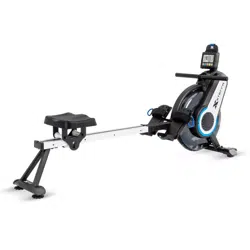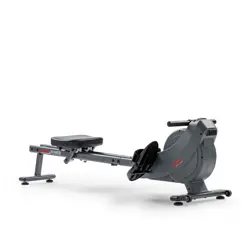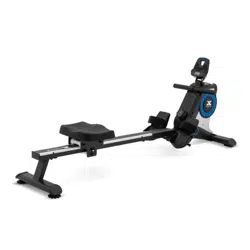

ERG180
MAGNETIC
ROWER
Scan to quickly and easily
register your new XTERRA
Fitness machine.
If you require assistance or are
experiencing issues with your
XTERRA Machine, please contact
customer care for additional help.
1-800-258-8511
questions@xterratness.com
Online Support
Warranty Registration
ERG180_118092_OM_20230801

2
Table of Contents
Product Registration .........................................................3
Warning / Safety Instructions
Product Label .......................................................................4
Warning, Compliances, and Notices .............................5
Safety Instructions ............................................................ 6
Parts and Assembly
Parts of your Rower ............................................................7
Parts Included ..................................................................... 8
Assembly ............................................................................. 10
Adjusting Your Machine ..................................................16
Technology and Features
About Your Machine ........................................................19
Using the XTERRA+ App ...............................................20
Console Screen - Overview ........................................... 22
Specications .................................................................... 23
Function Buttons ............................................................. 24
Programs
Target Buttons .................................................................. 25
Heart Rate Chest Strap .................................................. 26
Heart Rate Chest Strap Warnings............................... 27
Heart Rate Exertion ........................................................ 28
Maintenance & Care ........................................................30
Exploded View Diagram .................................................31
Warranty............................................................................. 32
3
PRODUCT REGISTRATION
WARRANTY REGISTRATION
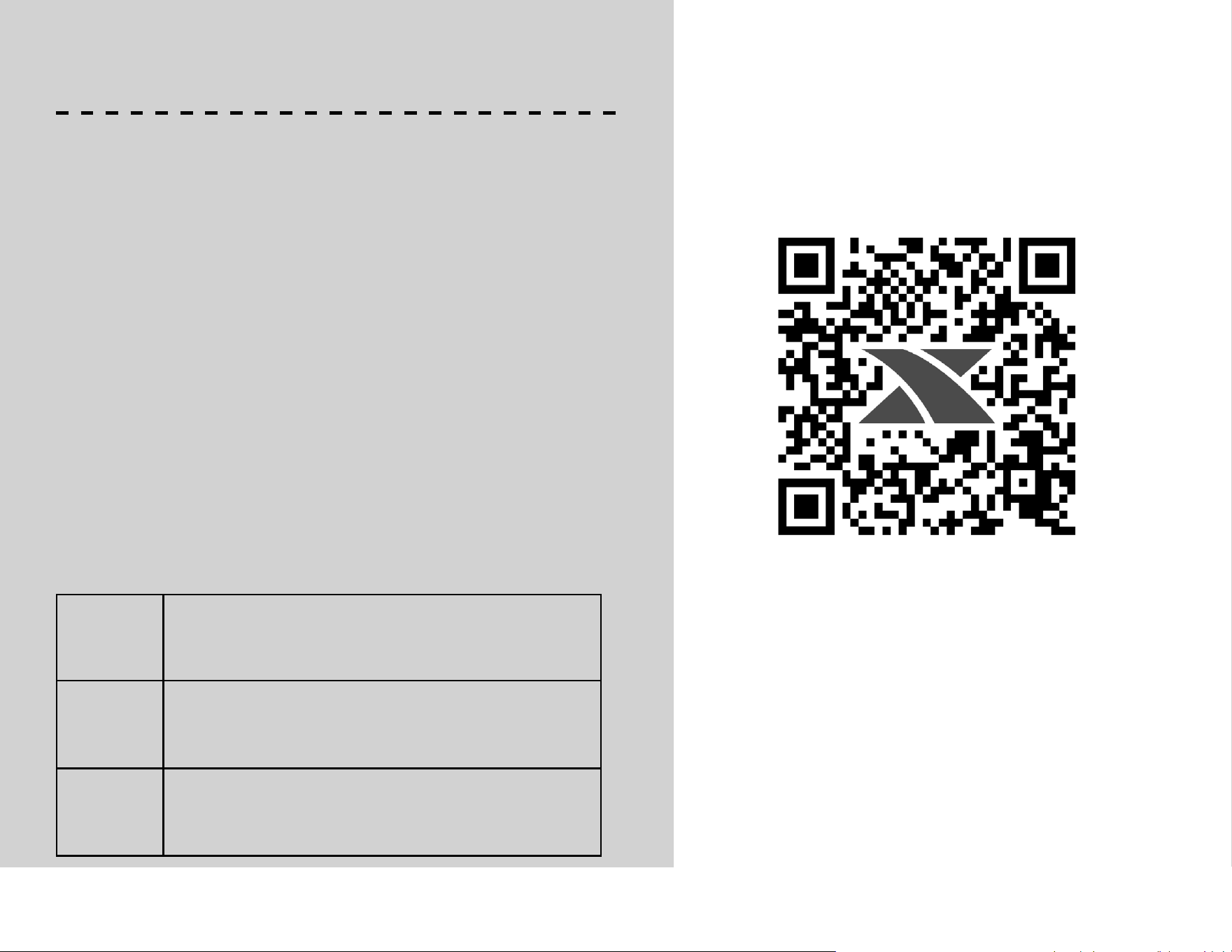
Use your smartphone to scan the QR code
above to quickly and easily register your
new XTERRA Fitness machine.
You can also go to xterratness.com/
warranty under the Support tab to
register online.
Congratulations on your new Rower, and welcome to the XTERRA
Fitness family!
Thank you for your purchase of this quality unit from XTERRA
Fitness. Your new unit was manufactured by one of the leading
tness manufacturers in the world and is backed by one of the most
comprehensive warranties available. XTERRA Fitness will do all we can
to make your ownership experience as pleasant as possible for many
years to come.
If you have questions, or if parts are missing or damaged, or you require
customer service, call (870) 333-5500. Please have your model number
and serial number handy when you call.
Please take a moment at this time to record the name of the dealer,
their telephone number, and the date of purchase below to make any
future, needed contact easy. We appreciate your support and we will
always remember that you are the reason that we are in business.
Serial
Number
Date of
Purchase
Dealer /
Place of
Purchase
Version: 1.0
Revision: 08/01/23
4
SERIAL NUMBER
X XXXXXXXXX X
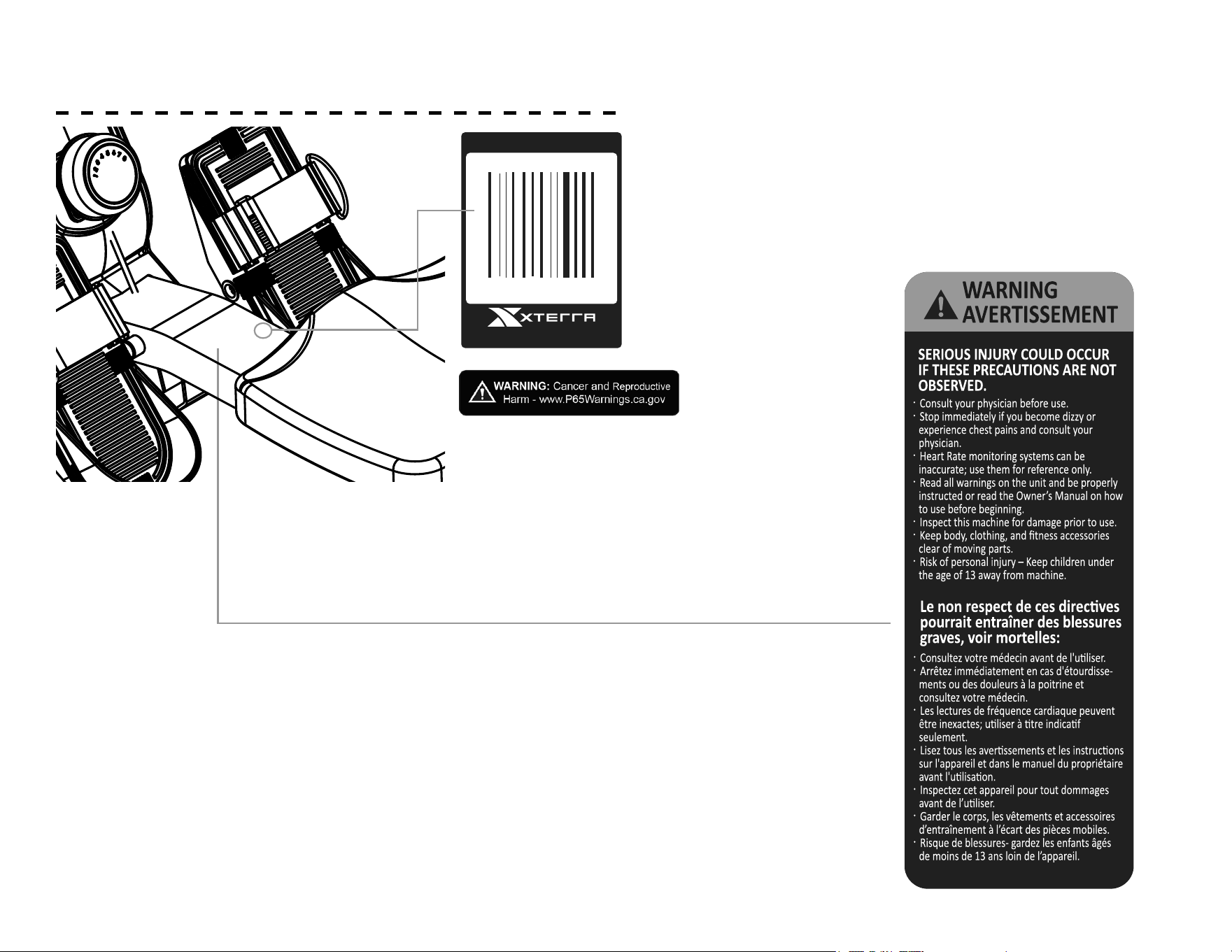
PRODUCT LABELS
SERIAL NUMBER STICKER
This sticker will be found on the center frame, near the pedals.
Please record the number below the barcode for the purpose
of registering your rower’s warranty.
PROPOSITION 65 WARNING
This sticker will be found on the center frame,
near the pedals. The State of California requires
us to inform you that this unit was manufactured
using chemicals that could cause harm with
improper use.
SAFETY WARNING STICKER
This sticker will be found on the center frame,
near the pedals. The same warning can be
found in this manual. Please read and be aware
of the precautions before operating your unit.
870-333-5500
5
WARNINGS, COMPLIANCE AND NOTICES
NOTE: This equipment has been tested and found to comply
with the limits for a Class B digital device, pursuant to Part
15 of the FCC Rules. These limits are designed to provide
reasonable protection against harmful interference in a
residential installation. This equipment generates, uses and
can radiate radio frequency energy and, if not installed and
used in accordance with the instructions, may cause harmful
interference to radio communications. However, there is
no guarantee that interference will not occur in a particular
installation. If this equipment does cause harmful interference
to radio or television reception, which can be determined by
turning the equipment o and on, the user is encouraged to
try to correct the interference by one or more of the following
measures:
1. Reorient or relocate the receiving antenna.
2. Increase the separation between the equipment and
receiver.
3. Connect the equipment to an outlet on a circuit dierent
from that to which the receiver is connected.
4. Consult the dealer or an experienced radio/TV technician for
help.
CAUTION:
• To comply with FCC RF exposure compliance requirements,
a separation distance of at least 20 cm must be maintained
between the antenna of this device and all persons.
• This transmitter must not be co-located or operating in
conjunction with any other antenna or transmitter
This product has been certied to meet the following
standards:
• FCC part 15
• Bluetooth (with FTMS)
This device complies with part 15 of the FCC Rules.
Operation is subject to the following two conditions: (1)
this device must not cause harmful interference, and (2)
this device must not accept any interference received,
including interference that may cause undesired
operation.
6
SAFETY INSTRUCTIONS
When using an appliance, basic precautions should always be
followed, including the following:
Read all instructions before using this appliance.
WARNING - To reduce the risk injury to persons:
1. Do not operate under blanket.
2. Operate the machinery with ample free space around it to
easily get on and o the machine.
3. This exercise equipment is not intended for use by persons
with reduced physical, sensory or mental capabilities, or lack
of experience and knowledge.
4. Keep children and pets away from the machine at all times.
DO NOT leave children unattended in the same room with the
machine.
5. Use this appliance only for its intended use as described in this
manual. Do not use attachments not
recommended by the manufacturer.
6. Never operate this appliance if it is not working properly, if it
has been dropped or damaged, or dropped into water. Return
the appliance to a service center for examination and repair.
7. Keep the appliance away from heated surfaces.
8. Never operate the appliance with the air openings blocked.
Keep the air openings free of lint, hair, and the like.
9. Never drop or insert any object into any opening.
10. Do not use outdoors.
11. The appliance is intended for household use.
12. After assembly, make sure to tighten all nuts and bolts.
!
Please ensure that you review and adhere to the user
weight restrictions and power requirements of your
new machine. Failure to do so may result in serious
injury or damage to your machine.
!
• Do not operate equipment on deeply padded, plush or shag carpet.
Damage to both carpet and
equipment may result.
• Before beginning this or any exercise program, consult a physician.
This is especially important for
persons over the age of 35 or persons with pre-existing health condi-
tions.
• Keep hands away from all moving parts.
• Do not attempt to use your equipment for any purpose other than for
the purpose it is intended.
• Wear proper shoes. High heels, dress shoes, sandals or bare feet are
not suitable for use on your
equipment. Quality athletic shoes are recommended to avoid leg
fatigue.
• Wear proper clothing for exercising, loose clothing could become
caught in the machine.
• Only one person at a time should use the machine.
• If the user experiences dizziness, nausea, chest pain, or any other
abnormal symptoms, STOP the workout at once. CONSULT A PHYSI-
CIAN IMMEDIATELY.
• Do not place any sharp object around the machine.
• Always use caution when moving and storing your equipment.
• User Weight Limit: 300 LB
7
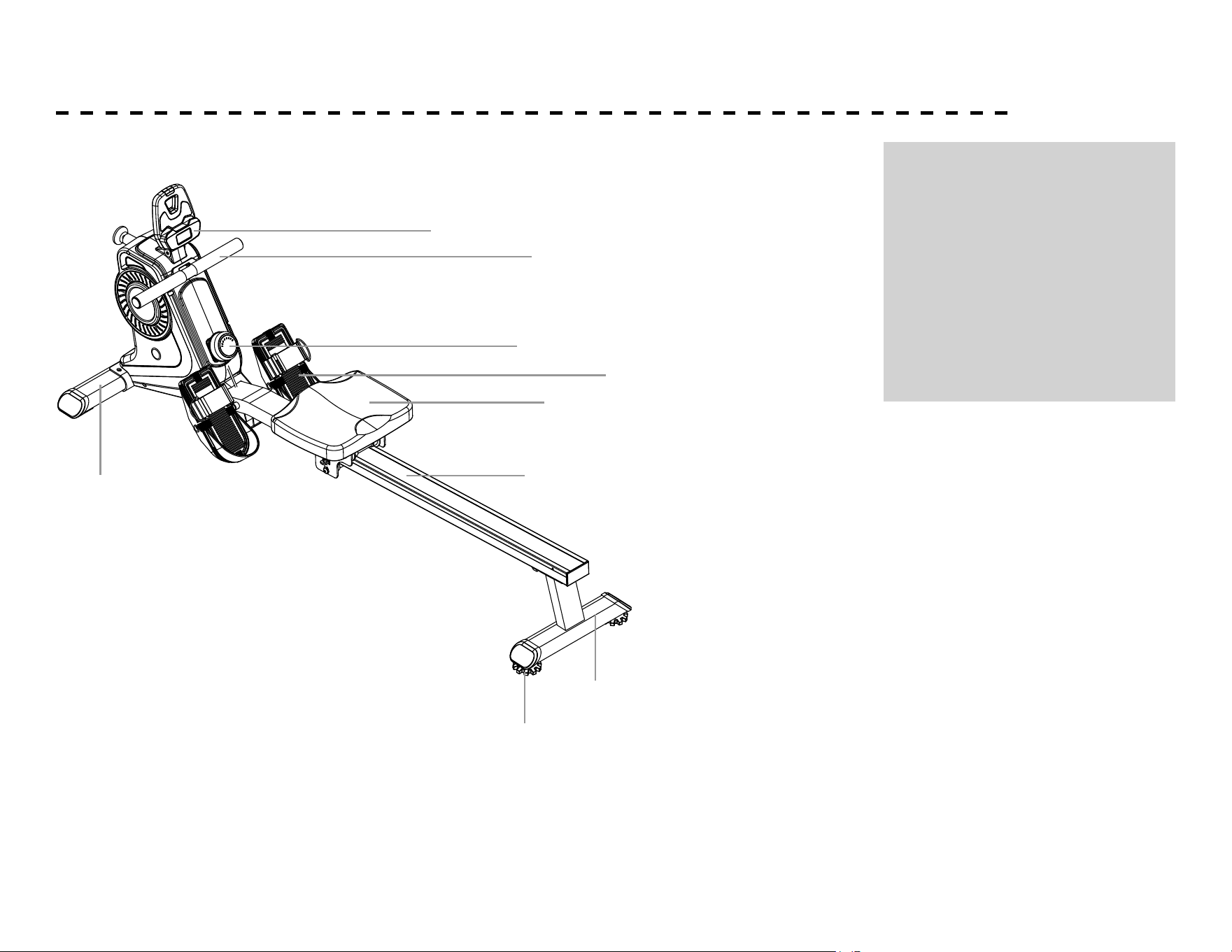
PARTS OF YOUR ROWER
A. Console
B. Handlebar
C. Resistance Knob
D. Pedals
E. Seat
F. Slide Rail
G. Rear Stabilizer
H. Front Stabilizer
I. Levelers
A
B
C
D
F
G
H
I
E
8
PARTS INCLUDED
TOOLS INCLUDED:
Allen Wrench
Wrench
PARTS INCLUDED:
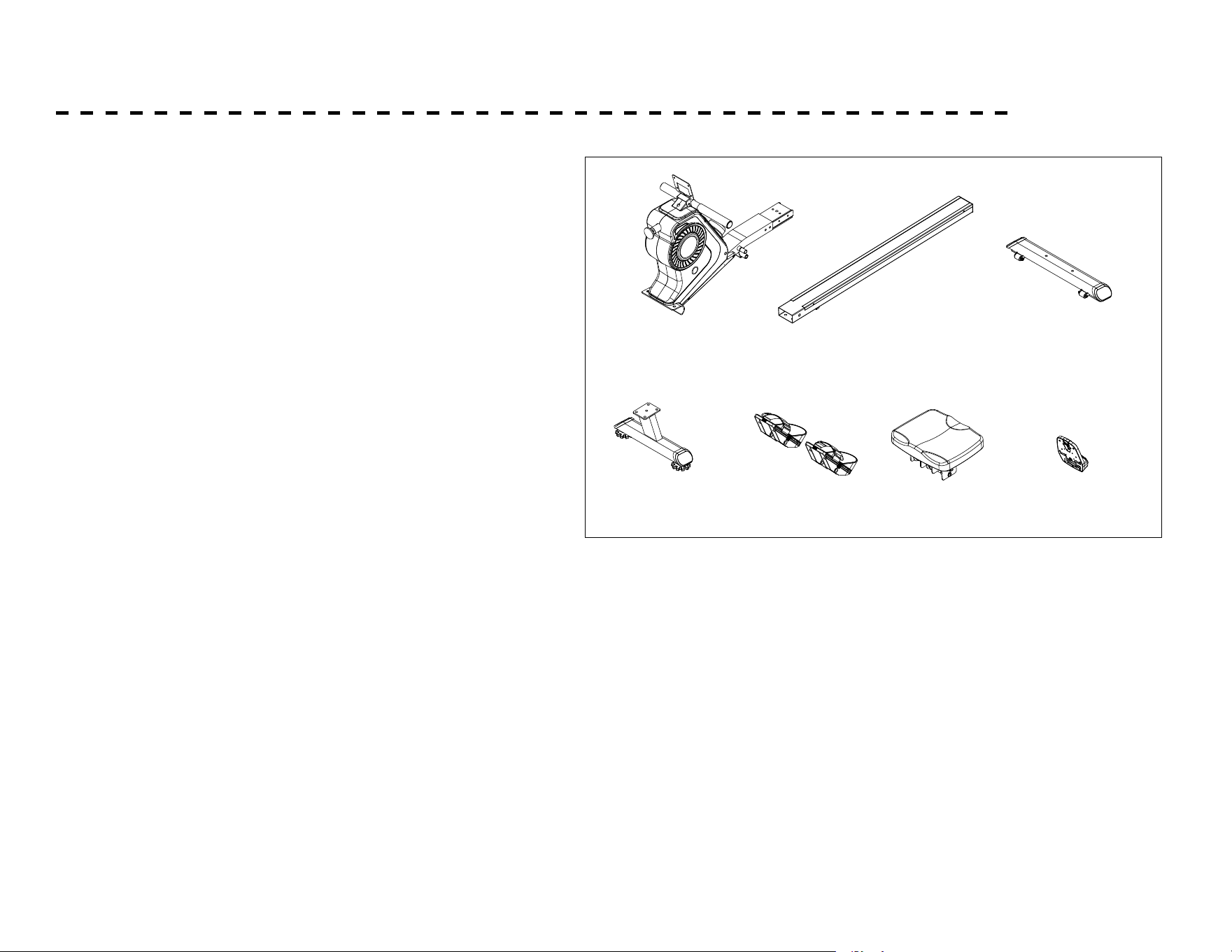
Main Frame
Slide Rail
Front Stabilizer
Rear Stabilizer
Pedals (L , R)
Seat
Console
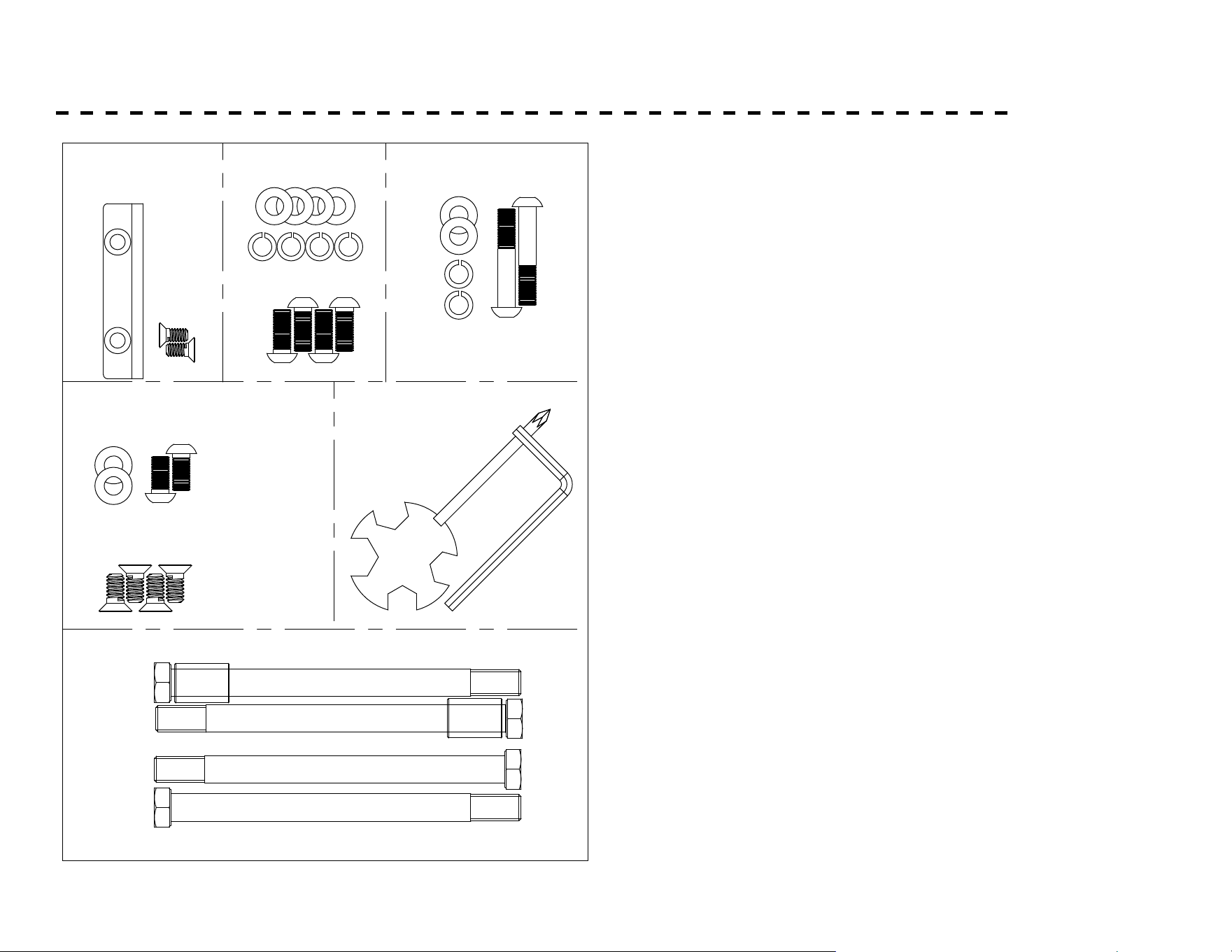
NO.1 NO.2
NO.4
NO.3
NO.12
NO.38
NO.91
9
PARTS INCLUDED
STEP-1 STEP-3
#52 ID8.5
4PCS
#55 OD16*ID8.5*1.5
4PCS
#81 M8*20 4PCS
#55 OD16×ID8.5×1.5 2PCS
#92 M8*15 4PCS
STEP-5
#64 Φ18* Φ13*26
2PCS
#50 M12*160 4pcs
#34 1PC
#65 2PCS
# 63 S13-14-19 1PC
TOOL
# 84 S5 1PCS
#55 OD16*ID8.5*1.5
2PCS
STEP-4
#52 ID8.5 2PCS
# 45 M8*45
2PCS
STEP-2
# 46 M8*15 2PCS
10
ASSEMBLY
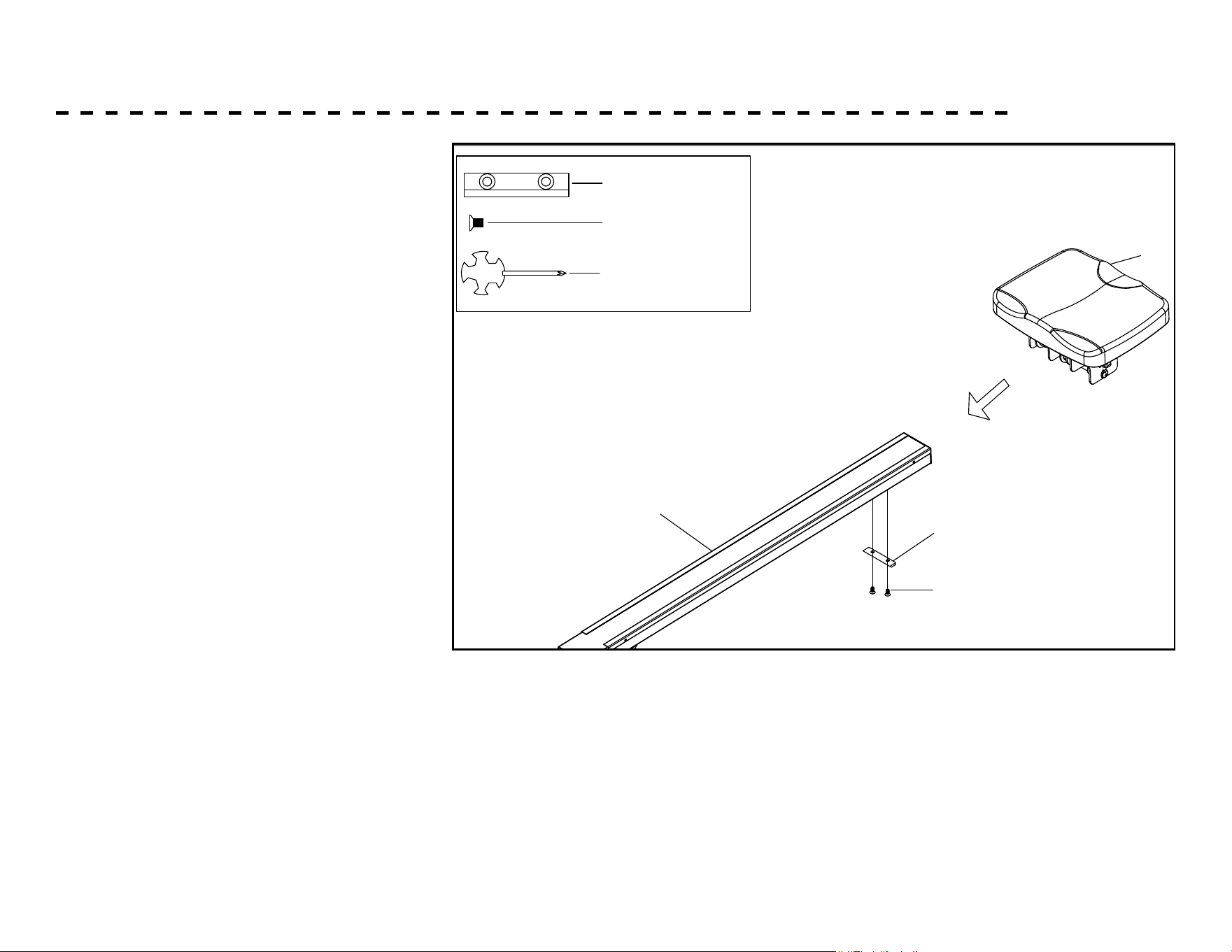
1. Slide the Seat (38) onto the Slide
Rail (2). Attach Limited Pad (34) to
the back of Slide Rail (2) and secure
with two Cross-head Screws (65).
STEP-1
#34 1pc
#65 M6*10 2pcs
#65 1pc
2
38
65
34
11
ASSEMBLY - CONTINUED
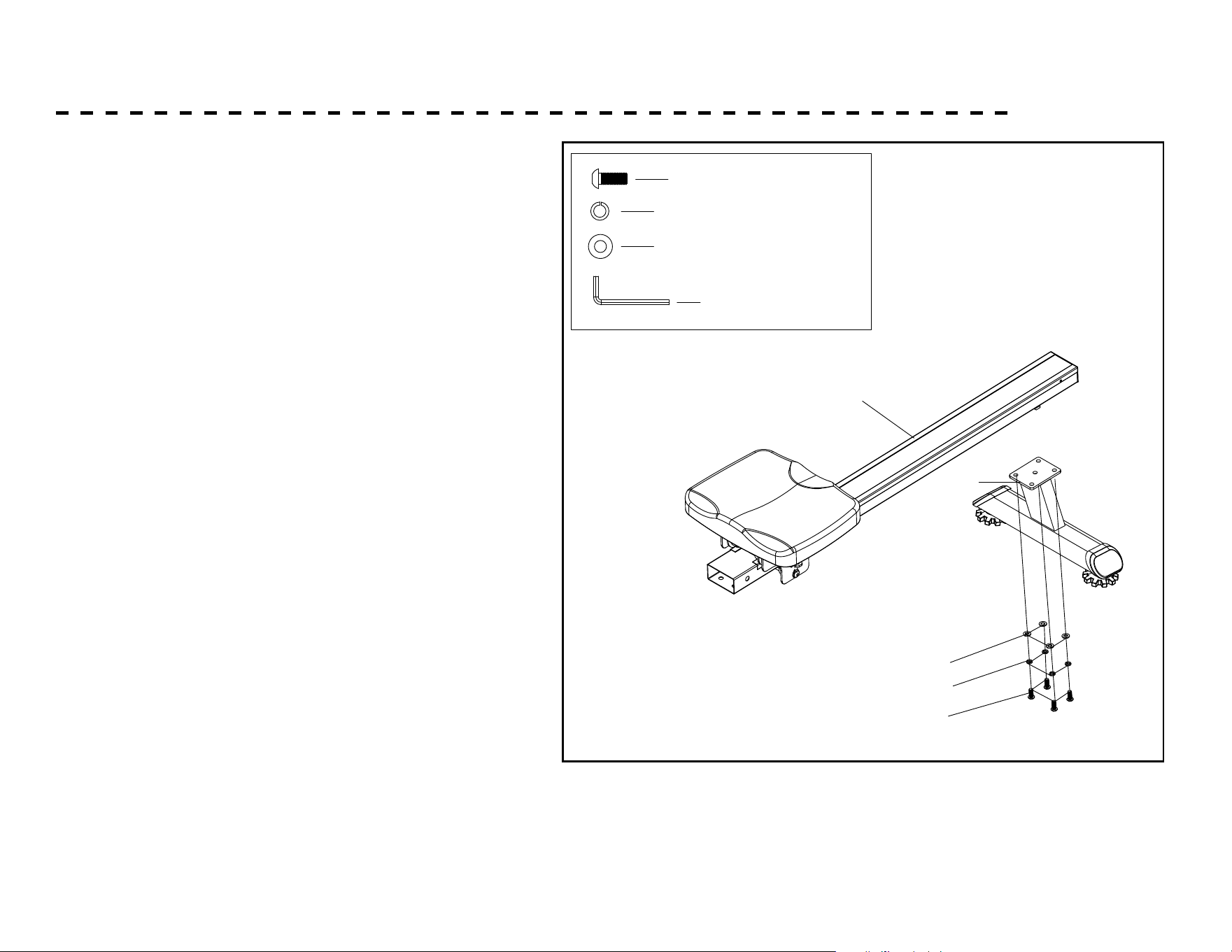
2. Attach the Rear Support tube (4) to the Slide Rail
(2), tighten with 4 Flat Washers (55) and 4 Spring
Washers (52) and 4 Allen bolts (81).
55
81
52
#84 S5 1pc
#81 M8*20 4pcs
#52 ID8.5 4pcs
#55 OD16*ID8.5*1.5 4pcs
STEP-2
2
4
12
ASSEMBLY - CONTINUED
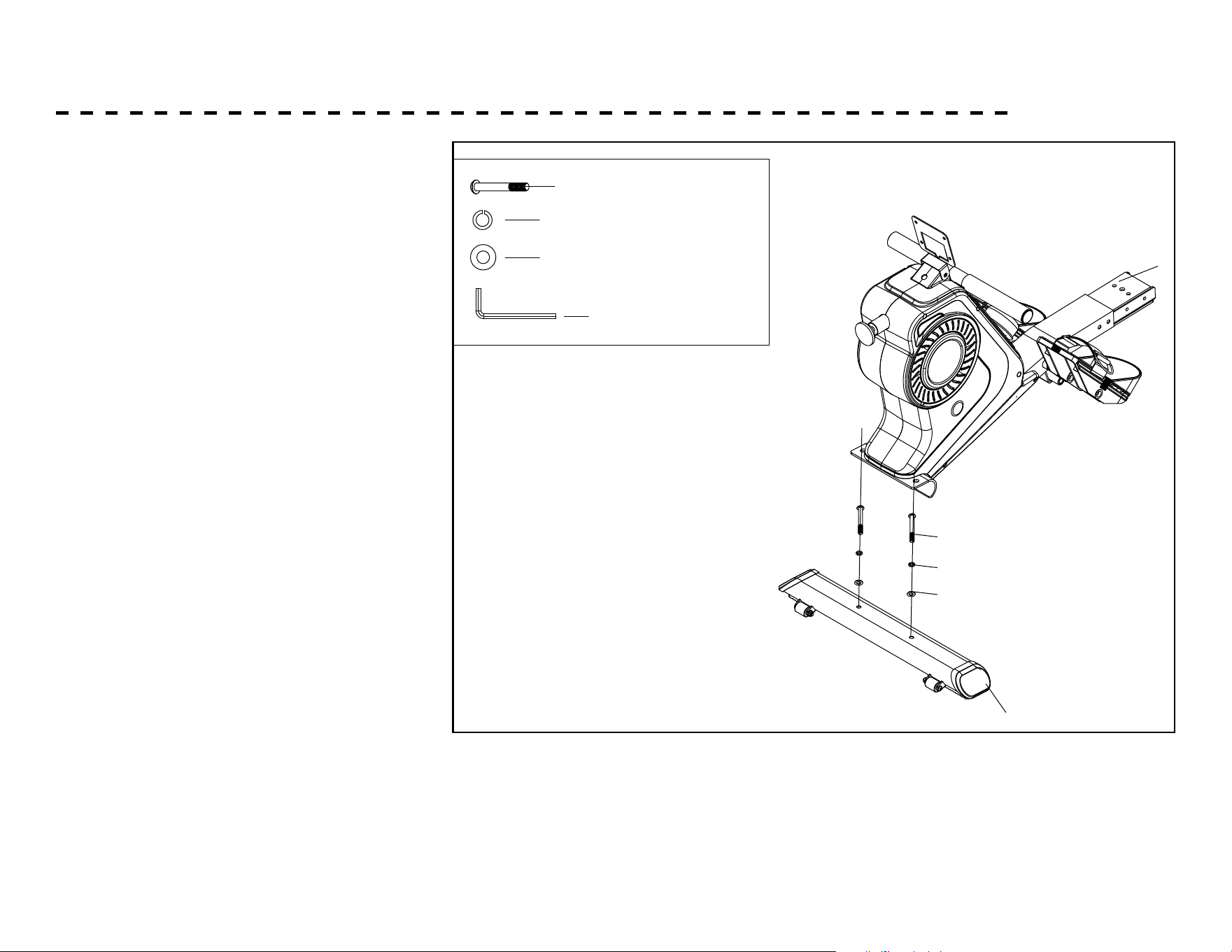
3. Attach the Front Stabilizer tube (3) to
the Main frame (1), tighten with 2 Flat
Washers (55) and 2 Spring Washers (52)
and 2 Allen bolts (45).
55
45
52
3
1
#84 S5 1pc
#45 M8*45 2pcs
#52 ID8.5 2pcs
#55 OD16*ID8.5*1.5 2pcs
STEP-3
13
ASSEMBLY - CONTINUED
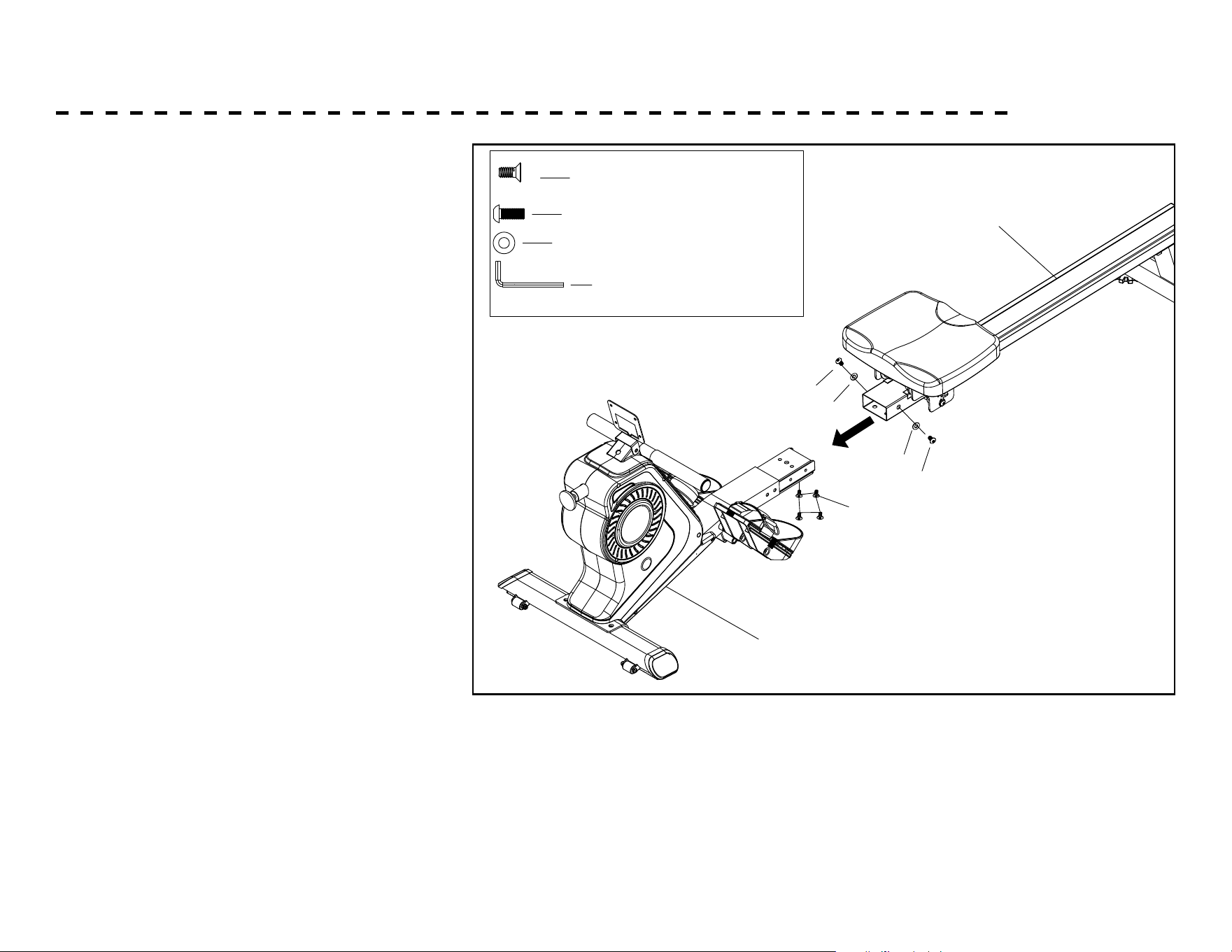
4. Insert the Slide Rail (2) into the Main frame
(1), tighten with 2 Flat Washers (55) and 2
Allen bolts (46) and 4 Allen bolts (92).
#46 M8*15 2pcs
#84 S5 1pc
#55 OD16*ID8.5*1.5 2pcs
#92 M8*15 4pcs
STEP-4
46
55
46
55
92
2
1
14
ASSEMBLY - CONTINUED
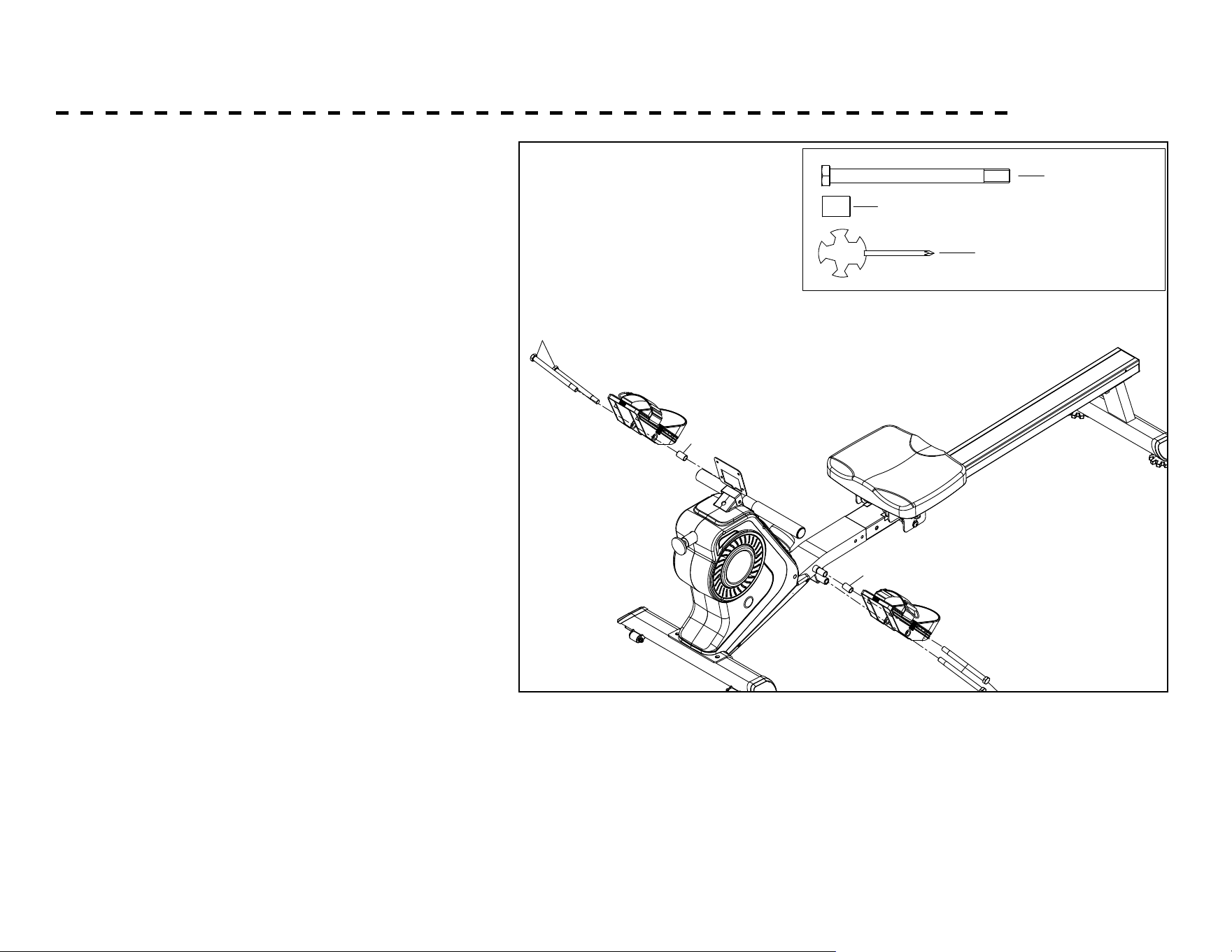
5. Screw 1 Hex Head Bolt (50) to upper hole of
Main Frame (1) through left Pedal (12L) and a
Sleeve (64). Then screw another Hex Head Bolt
(50) to lower hole of Main Frame (1).
Repeat for right Pedal (12R) to Main Frame (1).
#65 1pc
#50 M12*160 4pcs
#64 Ф18*Ф13*26 2pcs
STEP-5
50
50
64
64
15
ASSEMBLY - CONTINUED
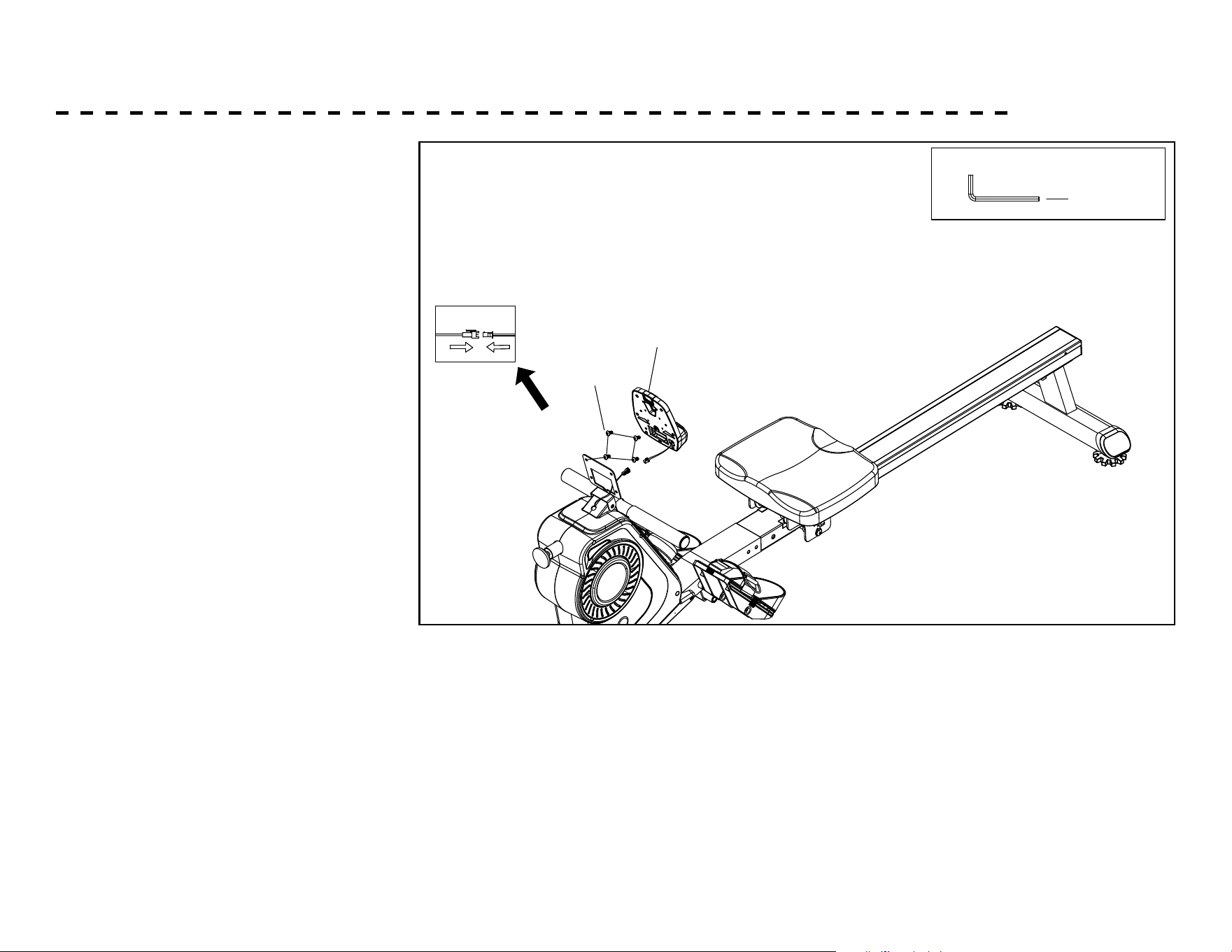
6. Take o 4 Cross-Head Screws (65)
which are pre-assembled on the back
of Console (91).Connect Sensor
Wires (40) with sensor wires from
the back of Console (91).
STEP-6
91
65
#84 S5 1pc
16
ADJUSTING YOUR MACHINE
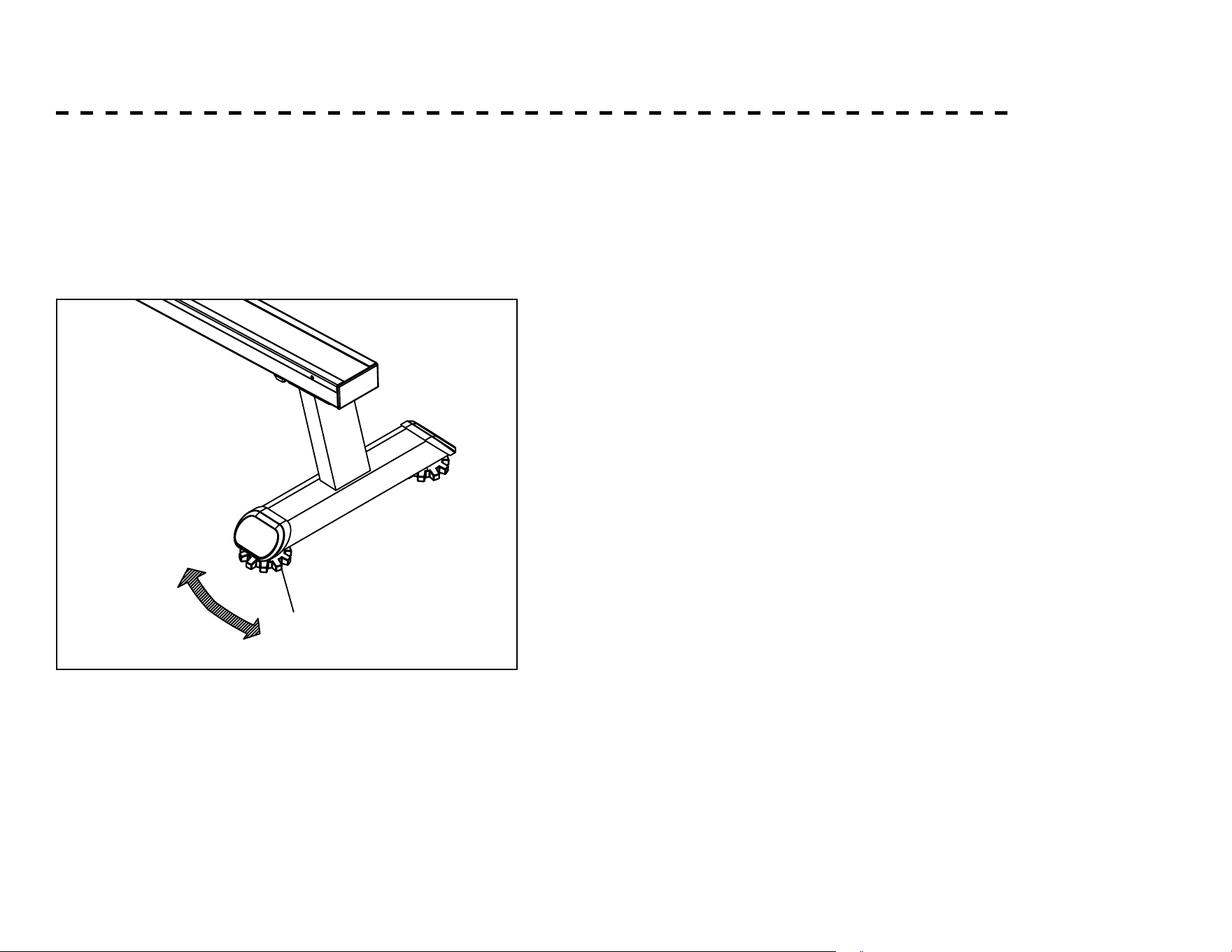
Adjusting the Balance Pedal Adjustment
Adjust the end cap for Rear Support Tube (79) of the
machine if the machine is unbalanced during use.
To adjust the pedal strap, remove the Velcro end of the strap
from the mesh side by pulling it upward then to the left.
Once removed, you may increase the opening of the pedal
strap by pulling the mesh end up and to the right.
To tighten, pull the Velcro end of the pedal strap upward
then to the right and down to secure it to the mesh side of
the strap.
79
17
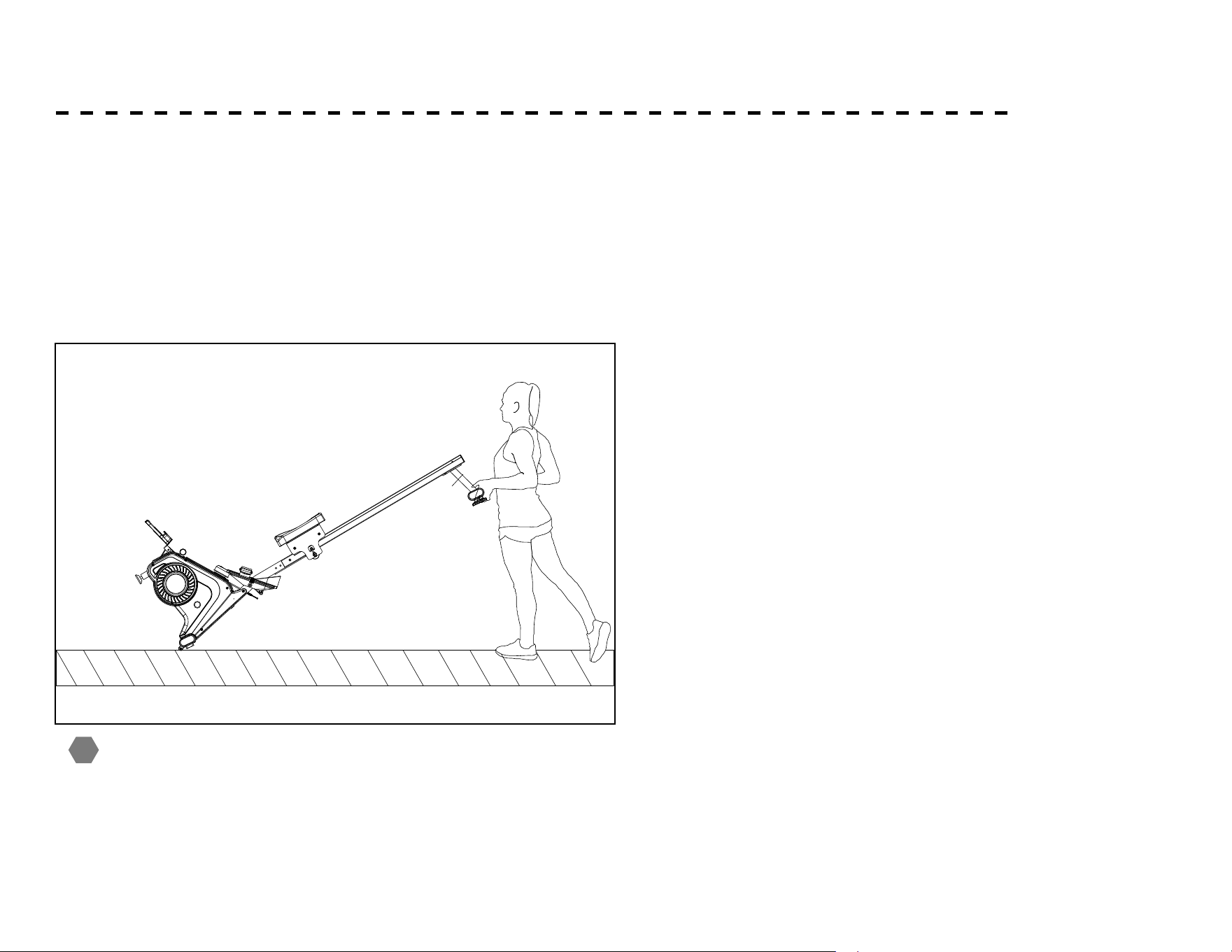
The front stabilizer has built-in transport wheels. Stand at the
front of the machine and lift it up until the weight of the machine is
transferred to the transport wheels. You can now easily move the
machine to a new location.
Moving parts, such as the seat, could crush and cut your
body. Please do not touch the slide rail when using the machine!
ADJUSTING YOUR MACHINE - CONTINUED
Moving the Machine
4
!
18
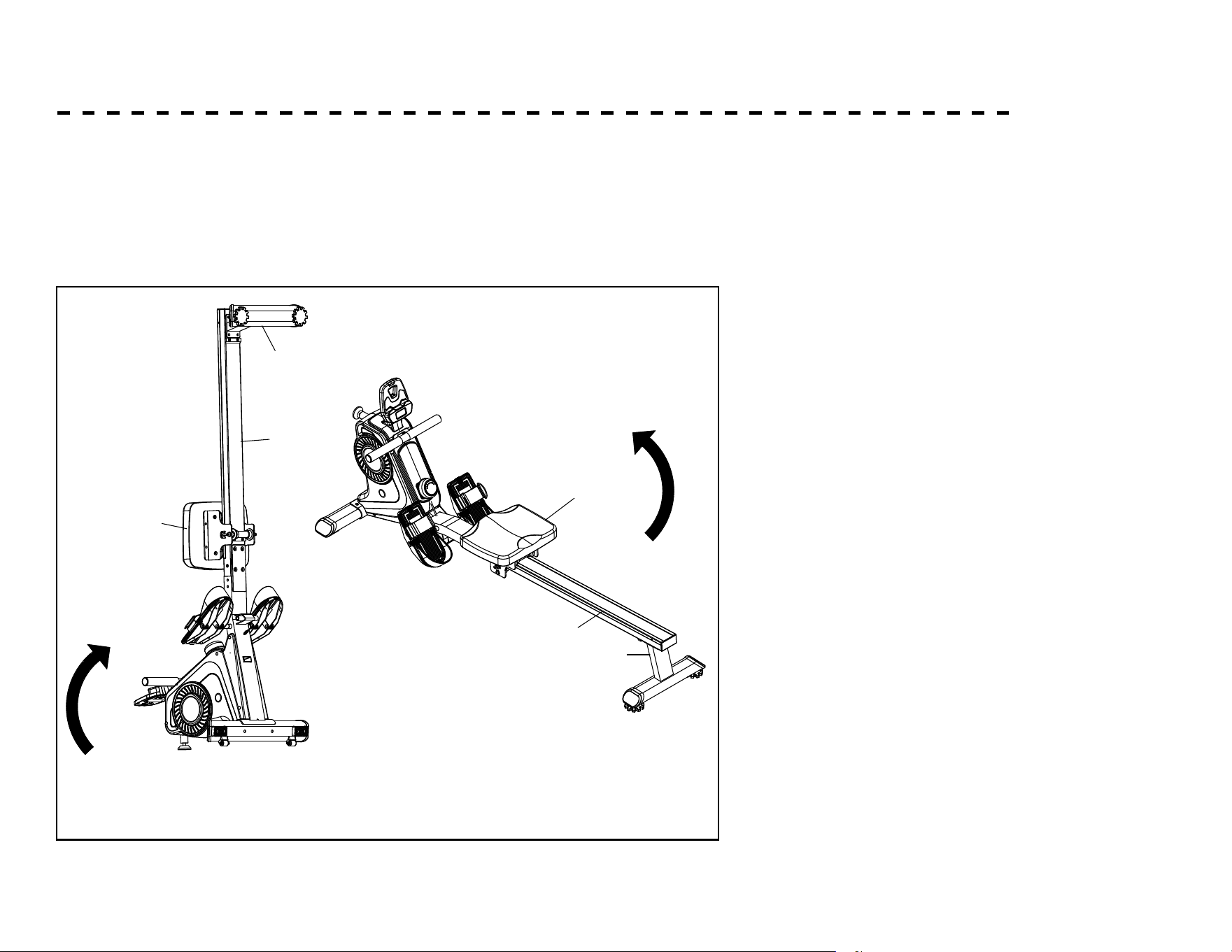
When not in use, you can save space by storing the rower vertically. Move
with caution when you raise the rower up, as your head may touch the Rear
Stabilizer. When you stand the rower up, the seat will slide down.
ADJUSTING YOUR MACHINE - CONTINUED
Storing the Machine
4
38
2
38
2
4
19
ABOUT YOUR MACHINE
Always use care and caution when operating your
machine. Follow instruction in this manual to ensure safe
operation and maintenance of your rower
Your new XTERRA Fitness rower has Bluetooth connectivity
to give you access to the most advanced workout
experiences available. Follow the instructions on page 20 &
21 to learn more about using the Bluetooth capabilities to
their fullest potential.
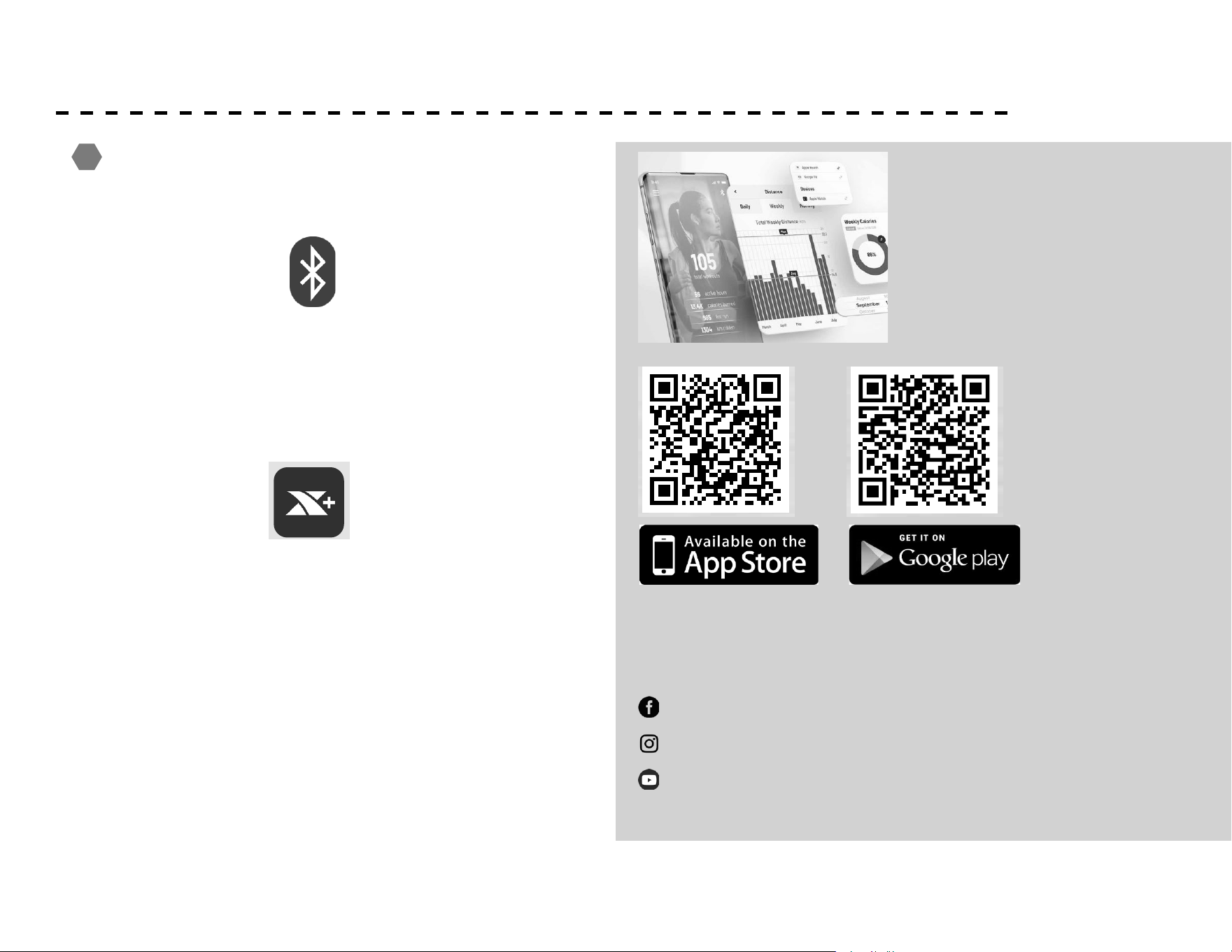
Downloading the XTERRA+ app will help unlock more fea-
tures - such as tracking workouts and sharing data via Goo-
gle Fit and Apple Fitness. Simply search for “XTERRA+” in
the app store on your smartphone or tablet, or scan the QR
code on the right
!
The XTERRA Fitness app is
available on Google Play and
the Apple App Store. Scan
the QR Code below, and
quickly and easily sign up to
start taking your workout
experience to a whole new
level.
Be sure to follow XTERRA Fitness on your favorite social
media platforms to view and share the latest tness videos,
images, and news.
ANALYZE YOUR PERFORMANCE
BASED ON TRAINING PROGRESS
FITNESS TRACKERS CONNECTIVITY
Google Fit
TRX5500
Xterra Fitness App data can be exported to the 3rd party App
3rd party App data can be imported to the Xterra Fitness App
iHealth
Garmin
Connect
facebook.com/XterraFitness
www.instagram.com/XterraFitness
youtube.com/user/XterraFitnessOnline
XTERRA+ App offers a new exercise tracking experience
for everyone. The App features intuitive navigation, an
informative dashboard, and a goal-setting program -
everything to stay motivated during the fitness journey.
XTERRA+
XTERRA+ App offers a new exercise tracking experience
for everyone. The App features intuitive navigation, an
informative dashboard, and a goal-setting program -
everything to stay motivated during the fitness journey.
XTERRA+
20
USING THE XTERRA+ APP
In order to help you achieve your exercise goals, your new exercise machine
comes equipped with a Bluetooth® transceiver that will allow it to interact
with selected phones or tablet computers via the XTERRA+ App. Just
download the free XTERRA+ App from the Apple Store or Google Play, and
then follow the instructions in the App to sync with your exercise machine.
Press the “DISPLAY” button from the APP to view the display of the current
workout data. When your exercise is complete, choose “END & SAVE
WORKOUT” to store the workout data.
1. Download the App by scanning the QR code on the right.
2. Open the App on your device (phone or tablet) and make sure Bluetooth® is
enabled on your device (phone or tablet).
3. In the App click the Bluetooth® icon to search for your XTERRA + equipment.
4. Under the Bluetooth® scan result list, select the machine for connect. When the
App and equipment are synced, the Bluetooth® icon on the equipment’s console
display will light up. Click “DISPLAY”, you may now start using your XTERRA +
App.
5. When your exercise is complete, choose “END & SAVE WORKOUT” to store
the workout data. You will be prompted to sync your data with each available
tness cloud site. Please note, you will have to download the applicable
compatible tness App, such as Strava, MapMyFitness,
Fitbit, etc., in order for the icon to be active and available.
Note: Your device will need to be running on a minimum operating system of IOS
13.1 or Android 8.0 for the XTERRA + App to operate properly.
FITNESS TRACKERS CONNECTIVITY
Google Fit
TRX5500
Xterra Fitness App data can be exported to the 3rd party App
3rd party App data can be imported to the Xterra Fitness App
iHealth
Garmin
Connect
XTERRA+ App offers a new exercise tracking experience
for everyone. The App features intuitive navigation, an
informative dashboard, and a goal-setting program -
everything to stay motivated during the fitness journey.
XTERRA+
XTERRA+ App offers a new exercise tracking experience
for everyone. The App features intuitive navigation, an
informative dashboard, and a goal-setting program -
everything to stay motivated during the fitness journey.
XTERRA+
21
APP CONNECTION
KINOMAP
This console connects to 3rd party tness apps on your phone or tablet via Bluetooth. Once console is connected to your
phone or tablet via Bluetooth, the console will not display. Your workout feedback will be displayed on your device.
Note: This machine is compatible with other 3rd party tness apps using FTMS protocol.
1. Open the Kinomap App and click in the lower right corner to add devices.
2. Click equipment management, then click the “+” to start adding equipment.
3. Click the “Rower” graphic, then scroll through brand connection screen to nd and select FTMS or XTERRA.
4. Select Rower Machine, then Bluetooth device.
5. Press the Home Button to return to the Home screen after adding the device.
6. To select a training video, you must select the type of walk and press the button to enter the training screen.
7. When stop exercising for 4 seconds, the display will stop calculating and a ”STOP” will be displayed.
8. From the pause screen you can continue the workout or exit to end the workout.
22
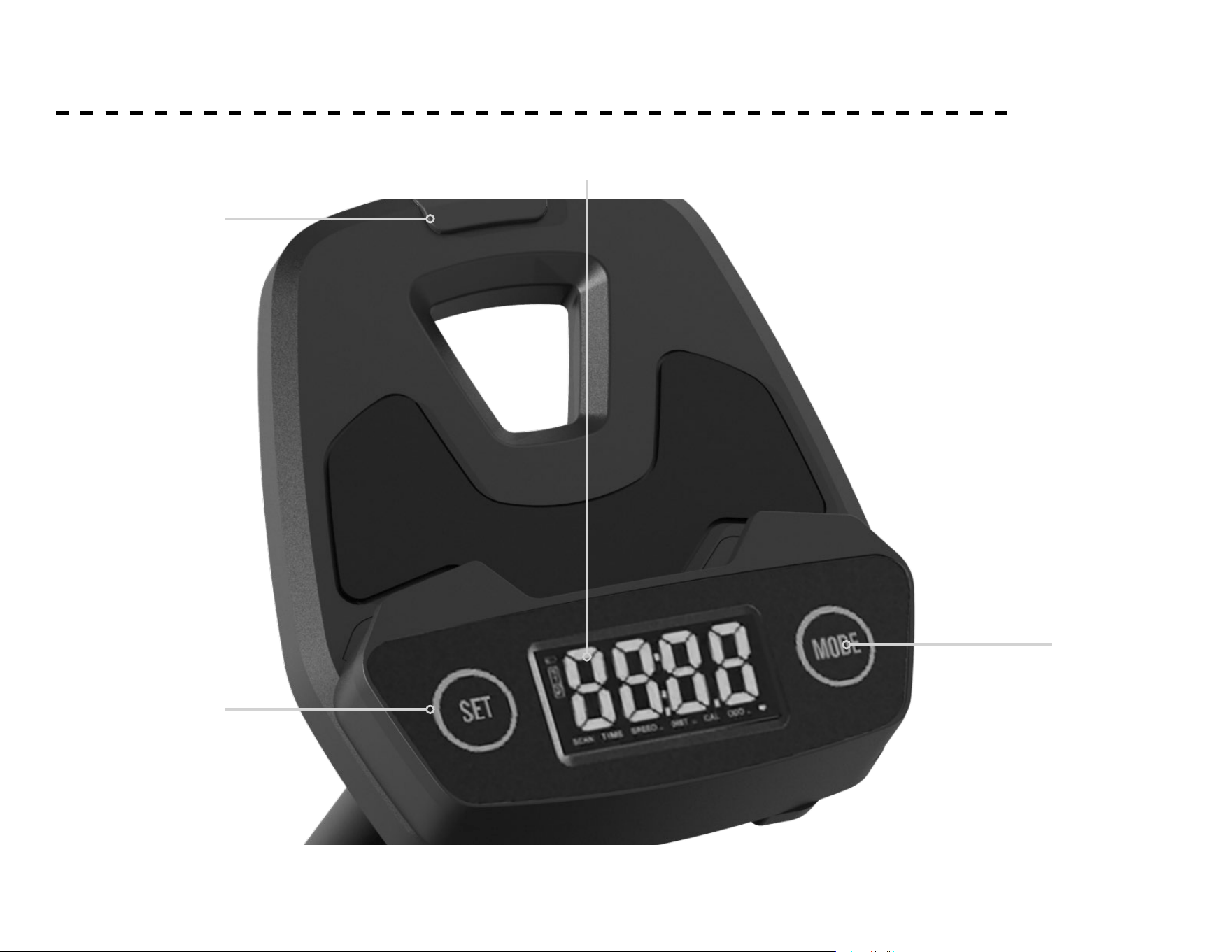
CONSOLE SCREEN - OVERVIEW
LED Window
Set
Buttons
Elastic
Tablet
Holder
Mode
Button
23
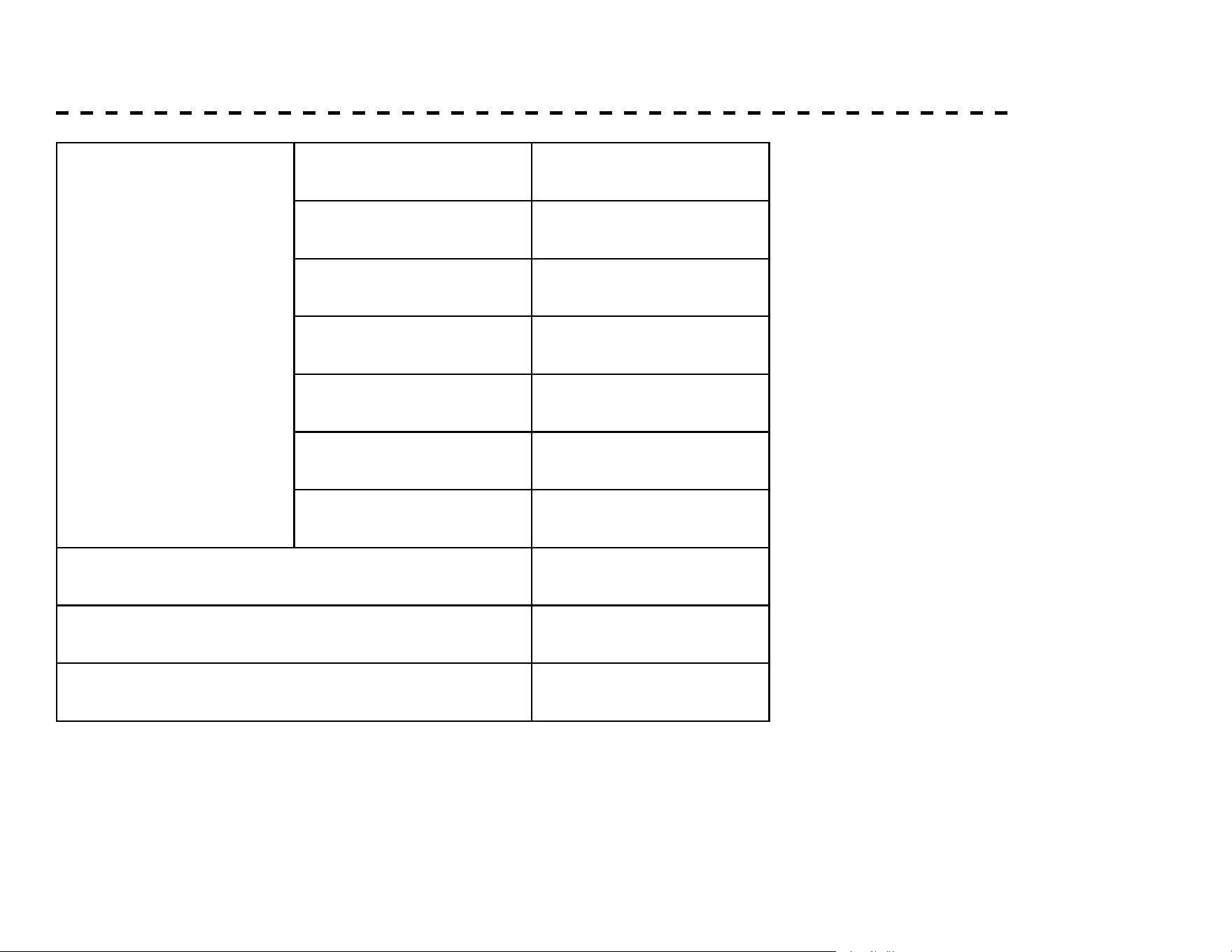
SPECIFICATIONS
Function
Scan Every 6 Seconds
Time 0:00 - 99:59
Count 0 - 9999 Times
Distance 0 - 9999 Meters
Calories 0 - 9999 Cal
SPM 0 - 999 Times / Min
Pulse 60 - 240 BPM
Battery Type 2pcs of Size AA
Operating Temperature 0c - +40c
Storage Temperature -10c - +60c
24
FUNCTION BUTTONS
• MODE – Push down to select functions.
Push down to reset time, count, distance and calories for 2 seconds.
• SET – To set the values of time, count, distance and calories when not in scan mode.
FUNCTIONS AND OPERATIONS:
1. SCAN: Press the “MODE” button to select the function to “TIME”, at which time the “SCAN” words appear on the left of the
monitor and monitor will rotate through all the 6 functions:Time, count, distance, calorie, SPM and pulse. Each display will be hold 6
seconds. In the process of cyclic display of Each function, press “MODE” button once to make the “SCAN” disappear in any function
mode to display this function.If you want to return to “SCAN” again, press the “MODE” button to select the function to “TIME”.In
“SCAN” mode, the “SCAN” word on the left of the monitor ashes continuously.
2. TIME: Display the time from exercise start to end.
3. COUNT: Display the number of counts from exercise start to end.
4. DISTANCE: Display the distances from exercise start to end.
5. CALORIES: Display the calories burned from exercise start to end.
6. SPM: Display the strokes per minute.
7. PULSE: Display the current heart rate value of the user (Please wear the wireless heartbeat chest belt before measuring the heart
rate,the measurement value can not be regarded as the basis of medical treatment).
25
This computer has four target training modes: time, count, distance
and calories (when switching to the target function, if there is “SCAN”
font ashing on the display, you need to press the “MODE” button
again to make the “SCAN” font disappear before setting)
1. TIME target training mode: rst press the “MODE” button to
switch to the “TIME” function, and then press the “SET” button to
set the target time (Press and hold the SET button to speed up the
setting). when it reaches the required time, stop the button. Then
start to use the machine, and the display will start to count down.
When the count down reaches zero, the time function ashes to
indicate the completion of the training target. At this time, if you
continue to train, the computer will automatically start to count
up from zero.
2. COUNT target training mode: rst press the “MODE” button to
switch to the “COUNT” function, and then press the “SET” button
to set the target count (Press and hold the SET button to speed up
the setting). when it reaches the required count, stop the button.
Then start to use the machine, and the display will start to count
down. When the count down reaches zero, the count function
ashes to indicate the completion of the training target, if you
continue to train, the computer will automatically start to count
up from zero.
3. DISTANCE target training mode: rst press the “MODE” button
to switch to the “DIST” function, and then press the “SET” button
to set the target distance (Press and hold the SET button to speed
up the setting). when it reaches the required distance, stop the
button. Then start to use the machine, and the display will start
to count down. When the count down reaches zero, the distance
function ashes to indicate the completion of the training target.
TARGET TRAINING SETTINGS
At this time, if you continue to train, the computer will automatically
start to count up from zero.
4. CALORIE target training mode: rst press the “MODE” button to
switch to the “CAL” function, and then press the “SET” button to set
the target calorie (Press and hold the SET button to speed up the
setting). when it reaches the required calorie, stop the button. Then
start to use the machine, and the display will start to count down.
When the count down reaches zero, the calorie function ashes to
indicate the completion of the training target. At this time, if you
continue to train, the computer will automatically start to count up
from zero.
5. If you want to modify the target value during or after setting, please
press and hold the “MODE” button for about 2 seconds to clear
all settings, and then reset according to the previous description.
If you want to modify the target data after the setting process or
completion, press “RESET” button directly to clear all settings, and
then reset according to the previous description.
NOTE
1. If the battery symbol on the display lights up, please replace the
battery.
2. The monitor will automatically shut o if there is no signal received
after 2 minutes.
3. The monitor will be auto powered on when starting to exercise push
button signal in.
4. When you stop exercising for 4 seconds, the display will stop
calculating and a ”STOP” will be displayed on the screen. When you
start exercising, the display will automatically start calculating and
the ”STOP” will disappear.
26
HEART RATE CHEST STRAP* (NOT INCLUDED)
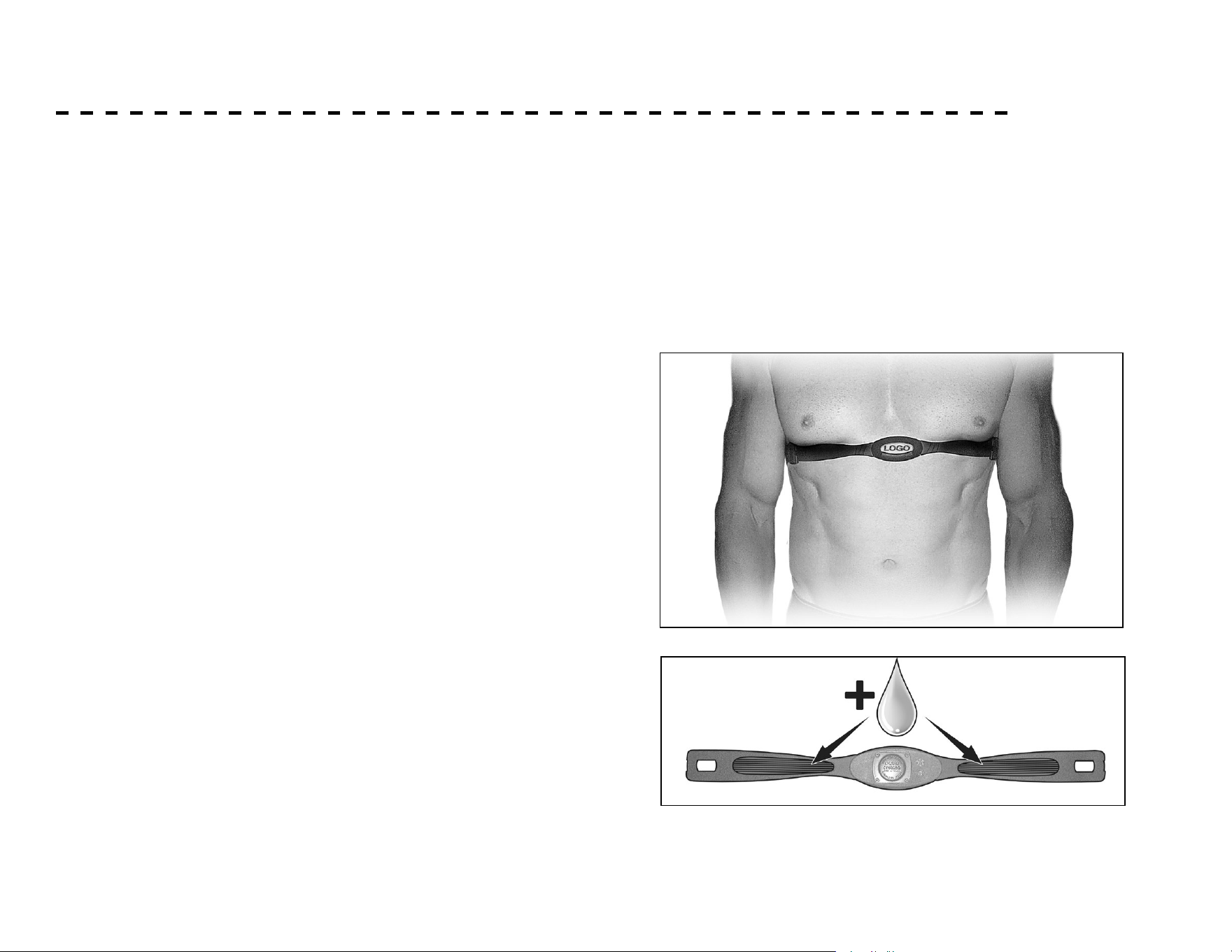
1. Attach the transmitter to the elastic strap using the
interlocking key.
2. Adjust the strap as tightly as possible as long as the strap
is not too tight to remain comfortable.
3. Position the transmitter with the logo centered in
the middle of your torso facing away from your chest
(some people must position the transmitter slightly
left of center). Attach the nal end of the elastic strap
by inserting the round end and, using the locking parts,
secure the transmitter and strap around your chest.
4. Position the transmitter directly below the pectoral
muscles.
5. Sweat is the best conductor to measure very minute
heart beat electrical signals. However, plain water can
also be used to pre-wet the electrodes (2 ribbed oval
areas on the reverse side of the belt and both sides of
the transmitter). It’s also recommended that you wear
the transmitter strap a few minutes before your work
out. Some users, because of body chemistry, have a more
dicult time in achieving a strong, steady signal at the
beginning. After “warming up”, this problem lessens.
6. Your workout must be within range - distance between
transmitter/receiver – to achieve a strong steady signal.
The length of range may vary somewhat but generally
stay close enough to the console to maintain good,
strong, reliable readings. Wearing the transmitter directly
on bare skin assures you of proper operation. If you wish,
you may wear the transmitter over a shirt. To do so, wet
the areas of the shirt that the electrodes will rest upon.
Note: The transmitter is automatically activated when it detects
activity from the user’s heart. Additionally, it automatically
deactivates when it does not receive any activity. Although the
transmitter is water resistant, moisture can have the eect of
creating false signals, so you should take precautions to completely
dry the transmitter after use to prolong battery life (estimated
transmitter battery life is 2500 hours). The replacement battery is
Panasonic CR2032.
27
CHEST STRAP WARNING* (NOT INCLUDED)
Erratic Operation
Caution! Do not use this rower for Heart Rate
programs unless a steady, solid Actual Heart Rate value is
being displayed. High, wild, random numbers being displayed
indicate a problem.
Areas to look for interference which may cause erratic heart
rate:
1. Microwave ovens, TV’s, small appliances, etc.
2. Fluorescent lights.
3. Some household security systems.
4. Perimeter fence for a pet.
5. Some people have problems with the transmitter
picking up a signal from their skin. If you have problems
try wearing the transmitter upside down. Normally the
transmitter will be oriented so the XTERRA Fitness
logo is right side up.
6. The antenna that picks up your heart rate is very
sensitive. If there is an outside noise source,
turning the whole machine 90 degrees may de-tune
the interference.
7. Another Individual wearing a transmitter within 3’ of
your machine’s console.
If you continue to experience problems contact XTERRA
Fitness.
!
28
HEART RATE EXERTION
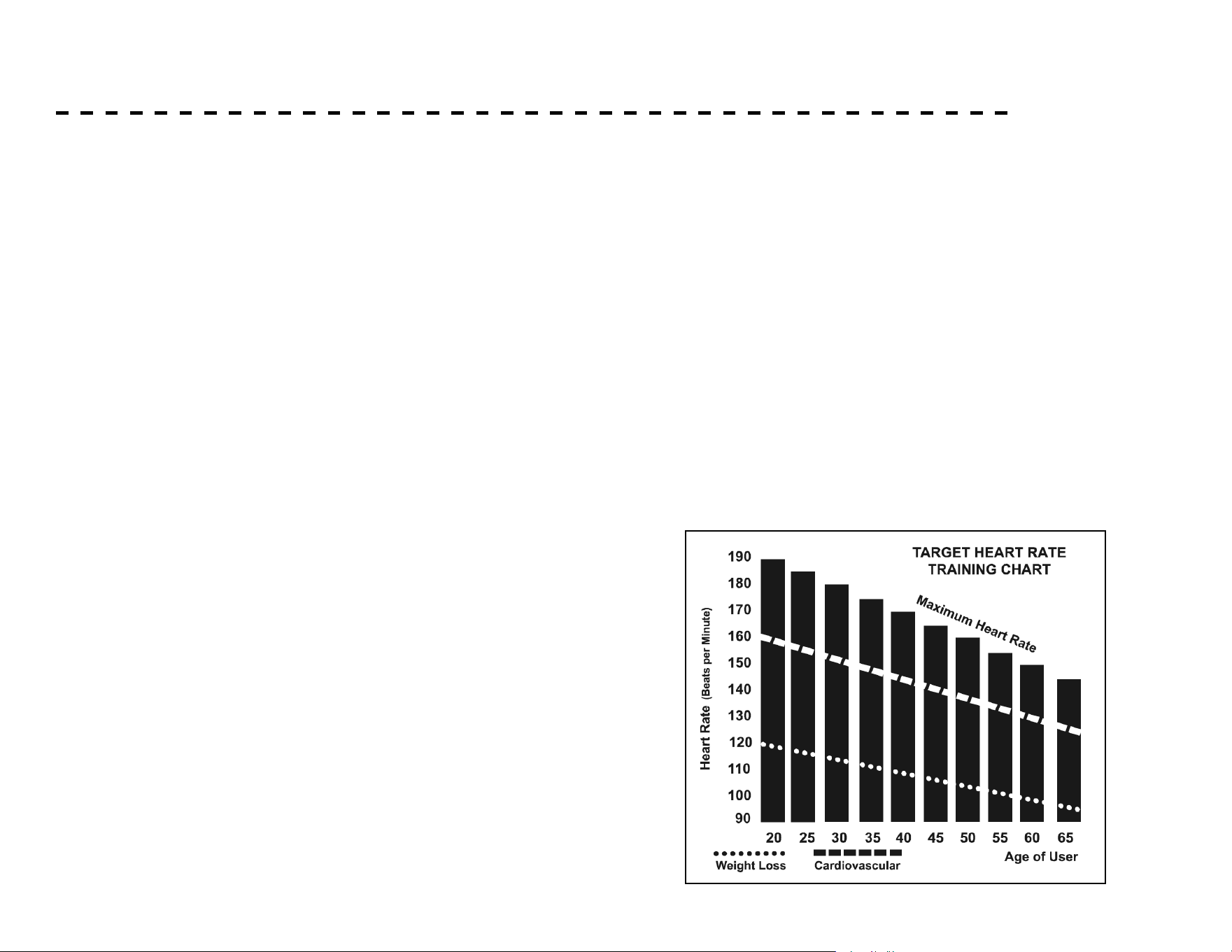
The two most popular reasons for, or goals, of exercise are cardiovascular
tness (training for the heart and lungs) and weight control. The black
columns on the chart represent the MHR for a person whose age is
listed at the bottom of each column. The training heart rate, for either
cardiovascular tness or weight loss, is represented by two dierent lines
that cut diagonally through the chart. A denition of the lines’ goal is in
the bottom left-hand corner of the chart. If your goal is cardiovascular
tness or if it is weight loss, it can be achieved by training at 80% or 60%,
respectively, of your MHR on a schedule approved by your physician.
Consult your physician before participating in any exercise program.
With this XTERRA Fitness unit you may use the heart rate monitor
feature without using the Heart Rate program. However, when using the
heart rate monitor feature in conjunction with the Heart Rate programs,
the machine will automatically adjust speed or incline to maintain the
desired heart rate.
The old motto, “no pain, no gain”, is a myth that has been
overpowered by the benets of exercising comfortably. A great deal
of this success has been promoted by the use of heart rate monitors.
With the proper use of a heart rate monitor, many people nd that
their usual choice of exercise intensity was either too high or too low
and exercise is much more enjoyable by maintaining their heart rate in
the desired benet range.
To determine the benet range in which you wish to train, you must
rst determine your Maximum Heart Rate. This can be accomplished
by using the following formula: 220 minus your age. This will give
you the Maximum Heart Rate (MHR)for someone of your age. To
determine the eective heart rate range for specic goals you simply
calculate a percentage of your MHR. Your Heart rate training zone
is 50% to 90% of your maximum heart rate. 60% of your MHR is
the recommended for burning fat while 80% is recommended for
strengthening the cardio vascular system. This 60% to 80% is the
zone to stay in for maximum benet.
For someone who is 40 years old their
target heart rate zone is calculated:
220 – 40 = 180 (maximum heart rate)
180 x .6 = 108 beats per minute (60% of maximum)
180 X .8 = 144 beats per minute (80% of maximum)
So for a 40 year old the training zone would
be 108 to 144 beats per minute.
If you enter your age during programming the console will perform
this calculation automatically. Entering your age is used for the Heart
Rate programs. After calculating your MHR you can decide upon
which goal you would like to pursue.
29
HEART RATE - PERCEIVED EXERTION
Heart rate is important but listening to your body also has a lot
of advantages. There are more variables involved in how hard
you should workout than just heart rate. Your stress level, phys-
ical health, emotional health, temperature, humidity, the time of
day, the last time you ate and what you ate all contribute to the
intensity at which you should workout. If you listen to your body
it will tell you all of these things.
The rate of perceived exertion (RPE), also known as the Borg
scale, was developed by Swedish physiologist G.A.V. Borg.
This scale rates exercise intensity from 6 to 20 depending upon
how you feel or the perception of your eort.
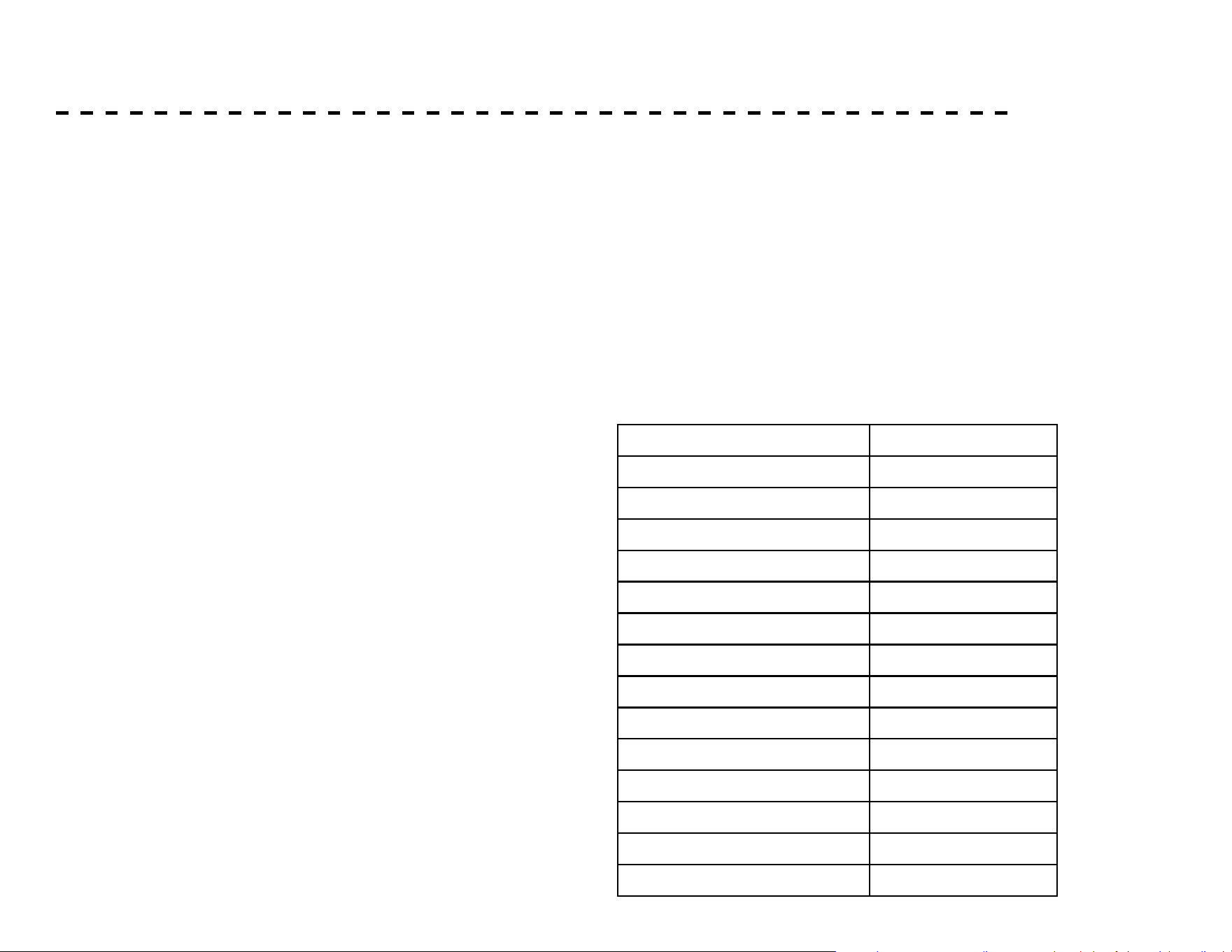
The scale is found to the side of the page:
You can get an approximate heart rate level for each rating by
simply adding a zero to each rating. For example a rating of 12 will
result in an approximate heart rate of 120 beats per minute. Your
RPE will vary depending on the factors discussed earlier. If your
body is strong and rested, you will feel strong and your pace will
feel comfortable. When your body is in this condition, you are able
to train harder and the RPE will support this. If you are feeling tired
and sluggish, it is because your body needs a break. In this
condition, your pace will feel dicult. Again, this will show up in
your RPE and you will train at the proper level for that day.
6 Minimal
7 Very, Very Light
8 Very, Very Light +
9 Very Light
10 Very Light +
11 Fairly Light
12 Comfortable
13 Somewhat Hard
14 Somewhat Hard +
15 Hard
16 Hard +
17 Very Hard
18 Very Hard +
19 Very, Very Hard
20 Maximal
Rating Perception of Eort
30
1. Store your machine in a dry and clean area when not in
use.
2. Use a slightly damp cloth to clean areas where sweat or
oil made contact with the machine.
3. Use a microber cloth to clean the display and remove
unwanted oils and other things that may damage the
screen.
4. Avoid leaving paper or other small debris in the
cupholders.
MAINTENANCE & CARE
Post-Workout Machine Care Sanitizing Your XTERRA Fitness Equipment
• Unupholstered high-contact surfaces (hard plastics) can be
sanitized using a 75% isopropyl alcohol solution and a clean, dry
cloth.Spray surfaces to be sanitized, and use the dry cloth to
wipe clean. Allow surfaces to dry before using.
• For upholstered or soft-plastic surfaces, use a conditioner
after sanitizing.Be sure to follow the instructions provided
by the conditioner manufacturer to ensure proper use of the
conditioner.
• Alternatively, you can make your own spray by mixing the
proper ratio of isopropyl alcohol and distilled water to reach a
75% solution.
31
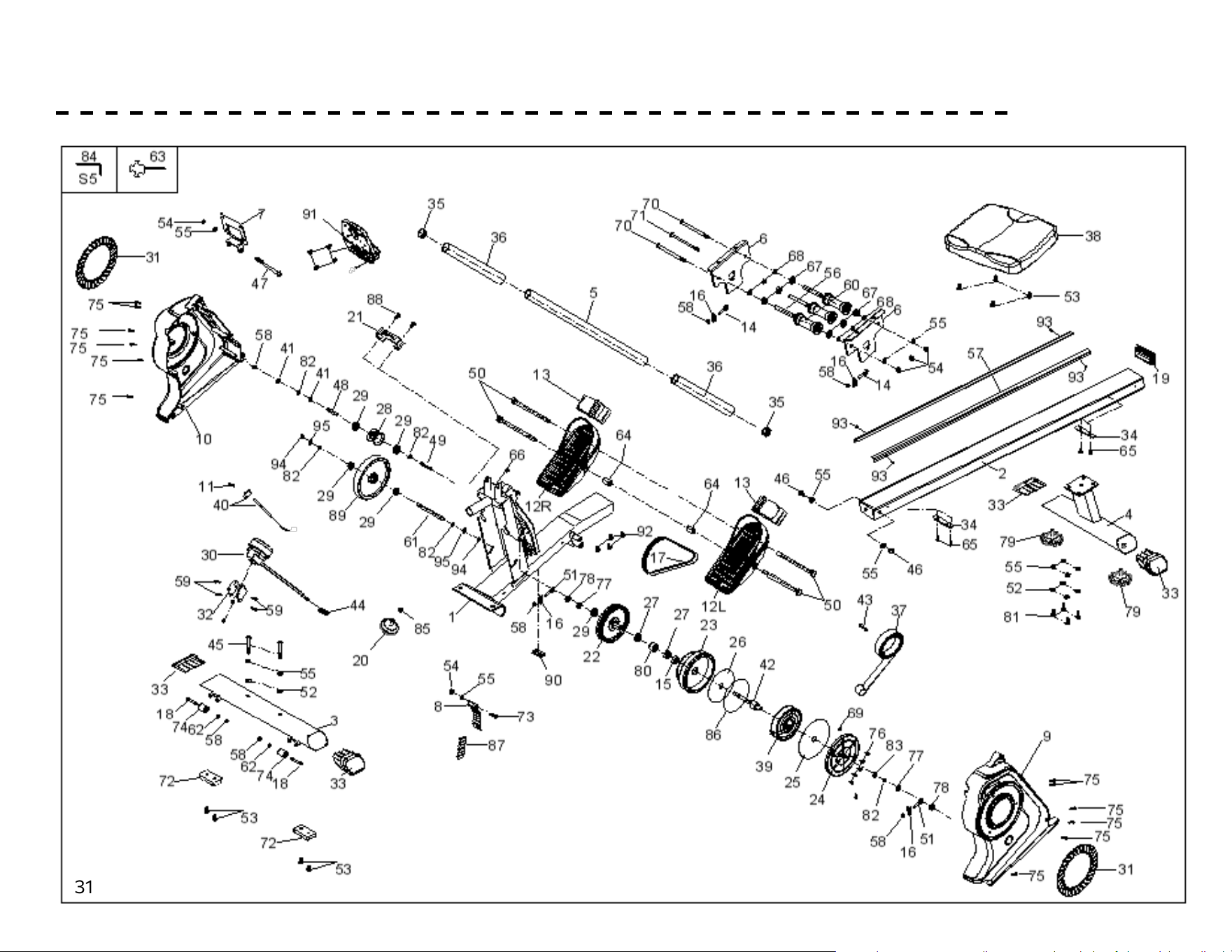
EXPLODED VIEW DIAGRAM
32
WARRANTY - RESIDENTIAL
Eective August 01, 2023- ERG180 Rower LIMITED WARRANTY
Home Use Limited Warranty
XTERRA Fitness Inc. warrants all its home use Rower parts for a period of time listed below, from the date of retail sale, as determined
by a sales receipt or in the absence of a sales receipt, eighteen (18) months from the original factory shipping date. XTERRA Fitness’s
responsibilities include providing new or remanufactured parts, at XTERRA Fitness’s option, and technical support to our independent
dealers and servicing organizations. In the absence of a dealer or service organization, these warranties will be administered by XTER-
RA Fitness directly to a consumer. The warranty period applies to the following components:
Warranty
Residential
Frame
1 Year
Parts
90 Days
RESPONSIBILITIES OF THE CONSUMER
This warranty applies only to products in ordinary household use, and the consumer/facility is responsible for the items listed below:
1. Proper use of the Rower in accordance with the instructions provided in this manual
2. Proper installation in accordance with instructions provided with the Rower and with all local electric codes.
3. Expenses for making the Rower accessible for servicing, including any item that was not part of the Rower at the time it was shipped
from the factory.
4. Damages to the Rower nish during shipping, installation or following installation.
5. Routine maintenance of this unit as specied in this manual.
33
WARRANTY - CONTINUED
What is not covered?
EXCLUSIONS
This warranty does not cover the following:
1. CONSEQUENTIAL, COLLATERAL, OR INCIDENTAL DAMAGES SUCH AS PROPERTY DAMAGE AND INCIDENTAL EXPENSES
RESULTING FROM ANY BREACH OF THIS WRITTEN OR ANY IMPLIED WARRANTY.
Note: Some states do not allow the exclusion or limitation of incidental or consequential damages, so this limitation or exclusion
may not apply to you.
2. Service call reimbursement to the consumer. Service call reimbursement to the dealer that does not involve malfunction or defects
in workmanship or material, for units that are beyond the warranty period, for units that are beyond the service call reimbursement
period, for Rower not requiring component replacement, or Rower not in ordinary household or light commercial use.
3. Damages caused by services performed by persons other than authorized XTERRA Fitness service companies; use of parts other
than original XTERRA Fitness parts; or external causes such as corrosion, discoloration of paint or plastic, alterations, modica-
tions, abuse, misuse, accident, improper maintenance, inadequate power supply, or acts of God.
4. Products with original serial numbers that have been removed or altered.
5. Products that have been: sold, transferred, bartered, or given to a third party.
6. XTERRA Fitness reserves the right to request proof of purchase if no warranty record exists for the product.
7. THIS WARRANTY IS EXPRESSLY IN LIEU OF ALL OTHER WARRANTIES EXPRESSED OR IMPLIED, INCLUDING THE WARRAN-
TIES OF MERCHANTABILITY AND/OR FITNESS FOR A PARTICULAR PURPOSE.
8. Product use in any environment other than a residential setting or non-dues paying facility with 5 hours use or less per day.
9. Warranties outside of the United States may vary. Please contact your local dealer for details.
Product features or specications as described or illustrated are subject to change without notice. All warranties are made by XTERRA Fitness, Inc. This warranty
applies only in the 48 contiguous United States. NOTE: This does not include Alaska or Hawaii.
34
Responsibilities of the Owner
SERVICE
Keep your bill of sale. Twelve (12) months from the date on the bill of sale or eighteen (18) months from the date of factory shipping as
determined by the serial number establishes the labor warranty period should service be required. If service is performed, it is in your
best interest to obtain and keep all receipts. This written warranty gives you specic legal rights. You may also have other rights that
vary from state to state. Service under this warranty must be obtained by following these steps, in order:
1. Contact your selling authorized XTERRA Fitness dealer. OR
2. Contact your local authorized XTERRA Fitness service organization.
3. If there is a question as to where to obtain service, contact our service department at (870) 935-1107.
4. XTERRA Fitness’ obligation under this warranty is limited to repairing or replacing, at XTERRA Fitness’ option, the product through
one of our authorized service centers. All repairs must be preauthorized by XTERRA Fitness. If the product is shipped to a service
center freight charges to and from the service center will be the customer’s responsibility. For replacement parts shipped while the
product is under warranty, the customer will be responsible for shipping and handling charges. For in-home service, the customer
will be responsible for a trip charge. There will be an additional trip charge if the customer is located over 100 miles from the
nearest service center.
5. The owner is responsible for adequate packaging upon return to XTERRA Fitness. XTERRA Fitness is not responsible for damages
in shipping. Make all freight damage claims with the appropriate freight carrier. DO NOT SHIP ANY UNIT TO OUR FACTORY
WITHOUT A RETURN AUTHORIZATION NUMBER. All units arriving without a return authorization number will be refused.
For any further information, or to contact our service department by mail, send your correspondence to:
XTERRA Fitness, Inc.
P.O. Box 2037
Jonesboro, AR 72402-2037
Product features or specications as described or illustrated are subject to change without notice. All warranties are made by XTERRA
Fitness, Inc. This warranty applies only in the 48 contiguous United States. NOTE: This does not apply to Alaska or Hawaii.
WARRANTY - CONTINUED

35
www.xterrafitness.com
©2023 All Rights Reserved. ERG180 Owner’s Manual
3000 Nestle Road Jonesboro, AR 72401 | Phone: 800-258-8511 | Fax: 870-935-7611