ENGLISH
FRANÇAIS
www.lg.com
Copyright © 2020 LG Electronics Inc. All Rights Reserved.
Read this owner's manual thoroughly before operating the
appliance and keep it handy for reference at all times.
Veuillez lire attentivement le présent manuel de l’utilisateur
avant de faire fonctionner l’appareil et conservez-le à
portée de la main pour le consulter en tout temps.
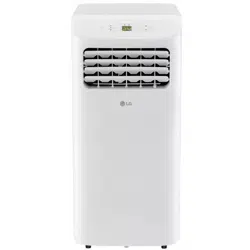
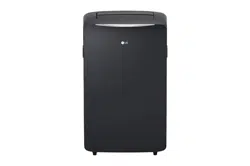
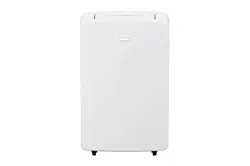
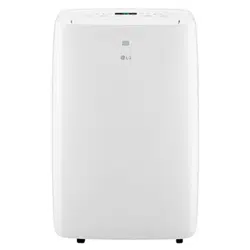
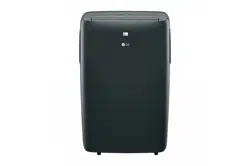
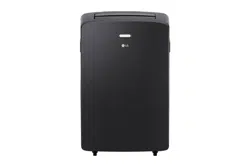
TYPE : PORTABLE AIR CONDITIONER
TYPE : CLIMATISEUR PORTATIF
OWNER'S MANUAL
AIR CONDITIONER
MANUEL D’UTILISATION
CLIMATISEUR
COV34636805 18. 10. 25. 오오 11:05 Page 1
2
.................................8
........................................10
...................................................................12
........................................7
...........................................................6
......................................3
...........................................15
.............................16
..............................16
........................17
....................18
................20
........................22
.....................................................23
..............................................23
.......................................24
........................................25
............................27
Arbitration Notice..................................……………..28
TABLE OF CONTENTS
Important Safety Instructions
Electrical Safety
Before Using the Air Conditioner
Control Panel and Remote
Operation
Installation in Vertical-Sliding Windows
Installation in Horizontal-Sliding Windows
Emptying the Water Collection Tank
.................................13
Using Smart ThinQ Application
SMART FUNCTIONS
COV34636805 18. 10. 25. 오오 11:05 Page 2
SAFETY INSTRUCTIONS
IMPORTANT SAFETY INSTRUCTIONS
WARNING
Installation
Your safety and the safety of others are very important.
We have provided many important safety messages in this manual and on your appliance. Always read and
follow all safety messages.
This is the safety alert symbol.
This symbol alerts you to potential hazards that can kill or injure you and others.
All safety messages will follow the safety alert symbol and either the word WARNING or CAUTION.
WARNING
If you do not follow instructions, it could result in death or serious injury.
CAUTION
If you do not follow instructions, it could result in minor or moderate injury or damage to the
product.
All safety messages will tell you what the potential hazard is, tell you how to reduce the chance of injury,
and tell you what may happen if the instructions are not followed.
To reduce the risk of explosion, fire, death, electric shock, injury or scalding to persons when using this product,
follow basic precautions, including the following:
• Before use, the appliance must be properly installed as described in this manual.
• Connect to a properly rated, protected, and sized power circuit to avoid electrical overload.
• Always plug into a grounded outlet.
• Do not, under any circumstances, cut or remove the third (ground) prong from the power cord.
• When installing or moving the appliance, be careful not to pinch, crush, or damage the power cord.
• Do not modify or extend the power cord.
• Do not disassemble or modify the product.
• Adhere to all industry recommended safety procedures including the use of long-sleeved gloves and safety
glasses.
• Use care when unpacking and installing. The edges of the product may be sharp.
• Disconnect the power cord or circuit breaker before installing or servicing the appliance.
• Keep packaging materials out of the reach of children. These materials can pose a suffocation risk to
children.
• Store and install the product where it will not be exposed to temperatures below freezing or exposed to
outdoor weather conditions.
• Do not store or use gasoline or other flammable vapors and liquids in the vicinity of this or any other
appliance.
ENGLISH
3
COV34636805 18. 10. 25. 오오 11:05 Page 3
4
SAFETY INSTRUCTIONS
Operation
• Use this appliance only for its intended purpose.
• Never attempt to operate this appliance if it is damaged, malfunctioning, partially disassembled, or has
missing or broken parts, including a damaged cord or plug.
• Repair or immediately replace all power cords that have become frayed or otherwise damaged. Do not use a
cord that shows cracks or abrasion damage along its length or at either end.
• Do not run cord under carpets or mats where it could be stepped on and damaged.
• Keep the cord out from under heavy objects like tables or chairs.
• Do not place the power cord near a heat source.
• Do not use an adaptor or plug the product into a shared outlet.
• If you detect a strange sound, a chemical or burning smell, or smoke coming from the appliance, unplug it
immediately, and contact an LG Electronics Customer Information Center.
• Never unplug the appliance by pulling on the power cord. Always grip the plug firmly and pull straight out
from the outlet.
• Do not grasp the power cord or touch the appliance controls with wet hands.
• If water enters the product, turn off the power at the main circuit, then unplug the product and call for service.
• If the product has been submerged, contact an LG Electronics Customer Information Center for instructions
before resuming use.
• Unplug the product when unused for long periods.
• Unplug the product before cleaning.
• In the event of a gas leak (propane gas, etc.) do not operate this or any other appliance. Open a window or
door to ventilate the area immediately.
• This appliance is not intended for use by persons (including children) with reduced physical, sensory or
mental capabilities, or lack of experience and knowledge, unless they have been given supervision or
instruction concerning the use of the appliance by a person responsible for their safety.
• Do not tamper with controls.
• The interior of the product must only be cleaned by an authorized service center or a dealer.
• Do not use solvent-based detergent on the product. Doing so can cause corrosion or damage, product
failure, electrical shock, or fire.
COV34636805 18. 10. 25. 오오 11:05 Page 4
ENGLISH
5
SAFETY INSTRUCTIONS
CAUTION
Operation
To reduce the risk of minor injury to persons, malfunction, or damage to the product or property when using this
product, follow basic precautions, including the following:
• This appliance is not intended for use as a precision refrigeration system. Do not use it for special purposes
such as maintaining pets, food, precision machinery, or art objects.
• Make sure the air inlet and outlet are free from obstructions.
• Use a soft cloth to clean the appliance. Do not use waxes, thinners, or harsh detergents.
• Do not step on or place heavy objects on top of the appliance.
• Do not operate the appliance without the filter securely installed.
• Clean the filter every two weeks.
• Do not drink water drained from the appliance.
• If the batteries leak onto your clothes or skin, remove contaminated clothing and rinse skin thoroughly with
soap and water. Do not use the remote if the battery has leaked.
• If the battery or the liquid inside it are ingested, do not induce vomiting or give food or drink. Contact a
physician immediately.
COV34636805 18. 10. 25. 11:05 Page 5
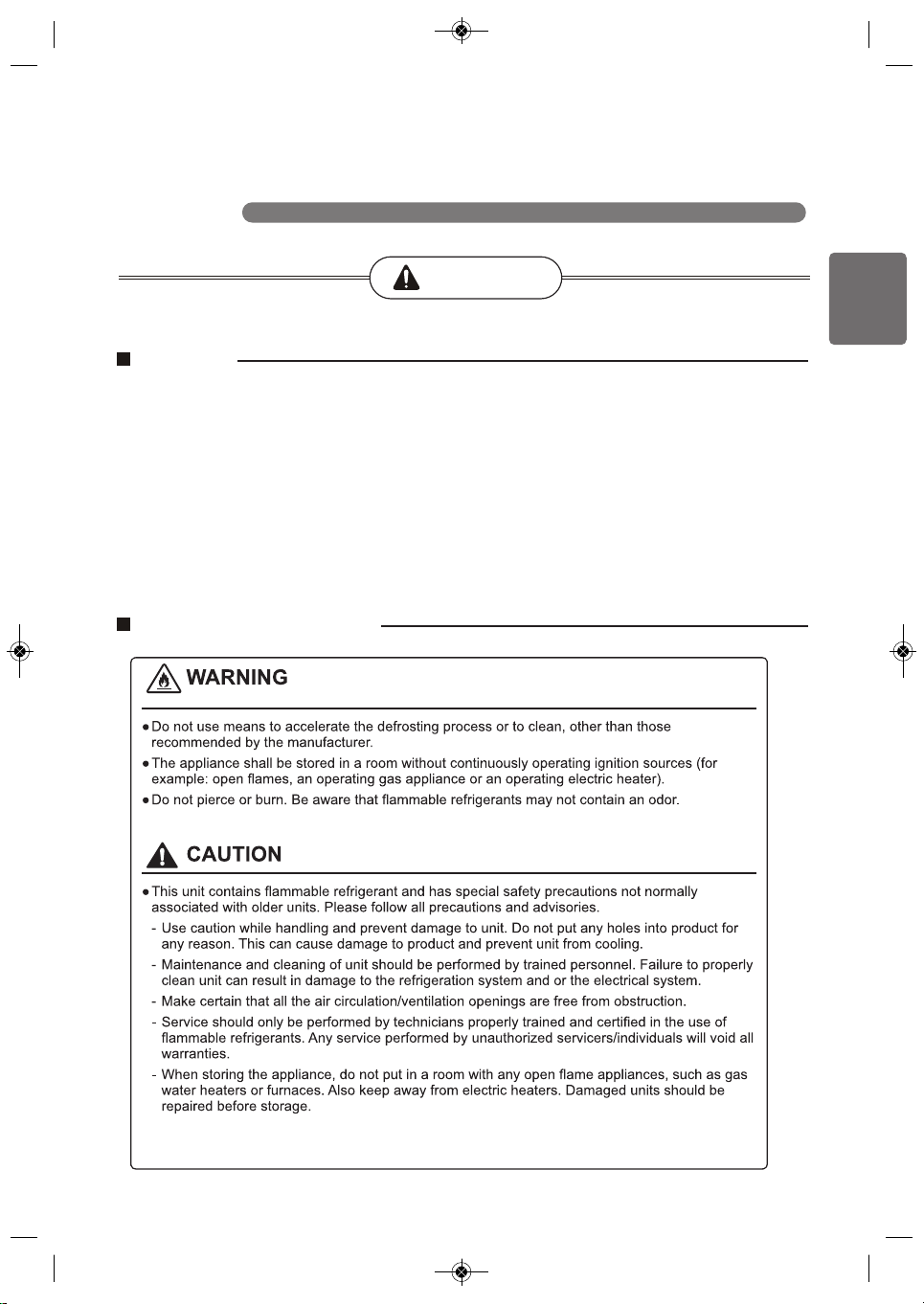
Caution, risk of fire
- The maximum refrigerant charge amount. (Refer to nameplate marking refrigerant amount.)
- The appliance shall be suitable stored to prevent mechanical damage from occurring.
Refrigerant (For R32 Only)
6
SAFETY INSTRUCTIONS
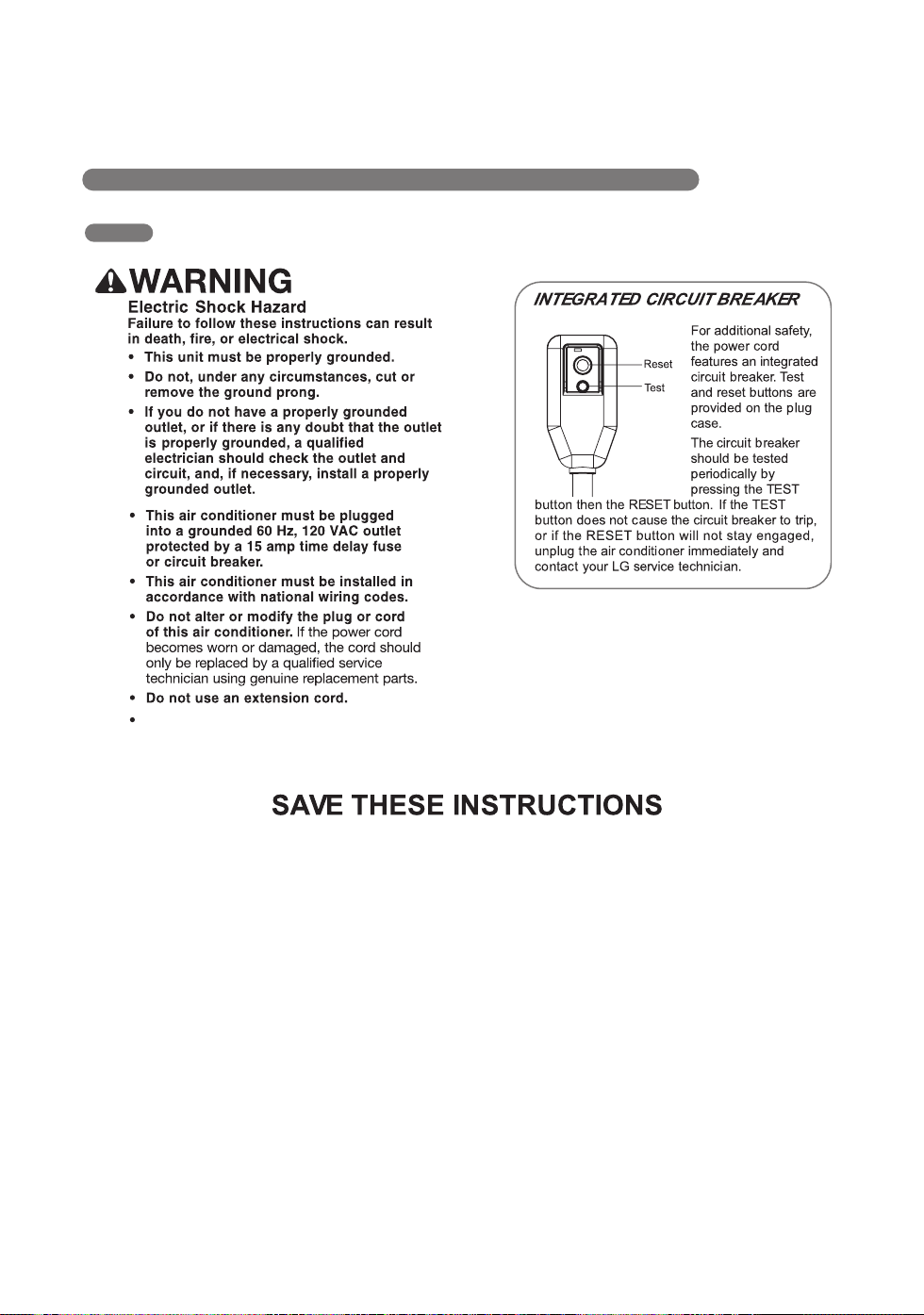
ELECTRICAL SAFETY
Do not use an adapter with this appliance.
COV34636805 18. 10. 25. 오오 11:05 Page 6
ENGLISH
7
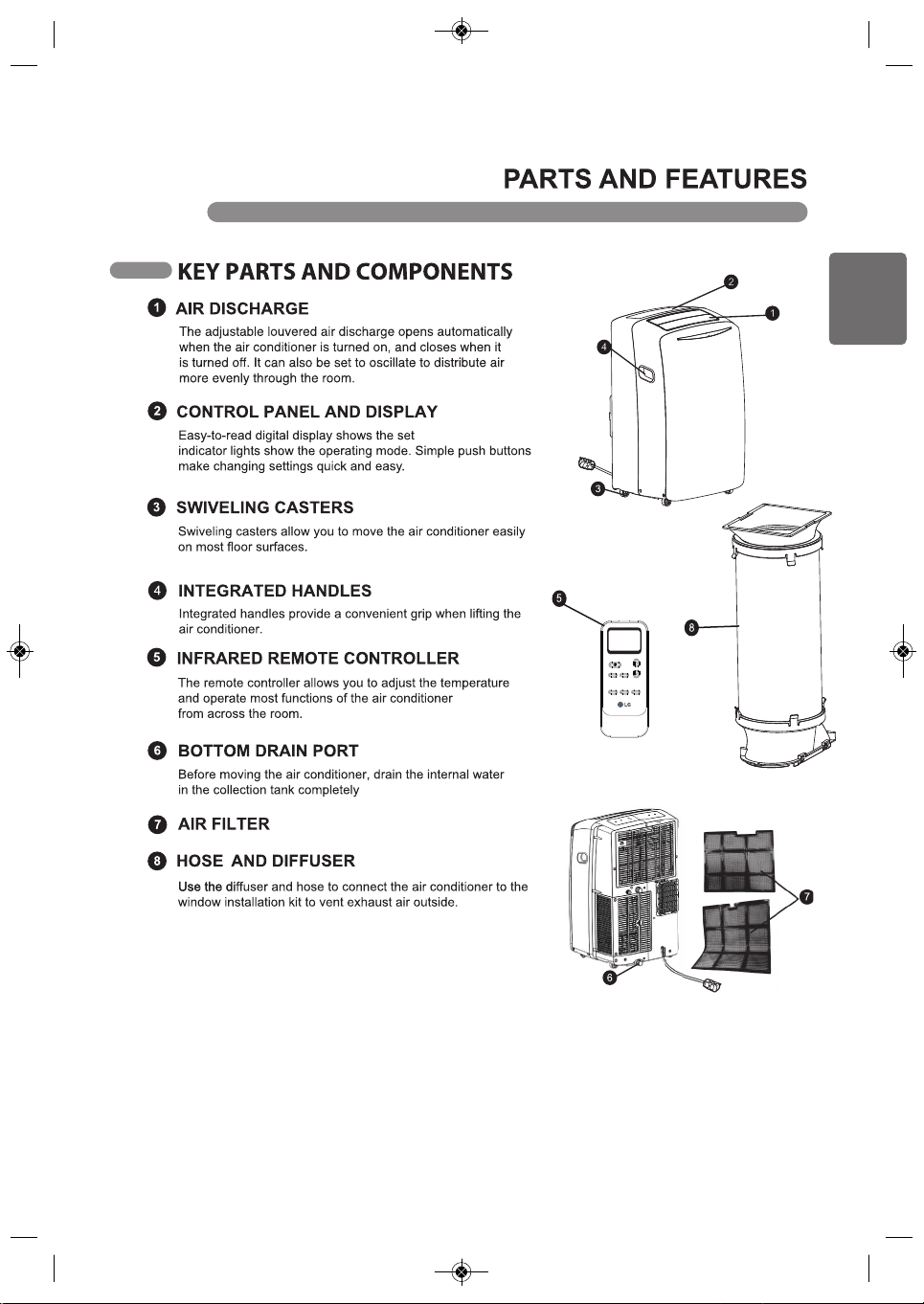
temperature, and
using the bottom drain port.
COV34636805 18. 10. 25. 11:05 Page 7
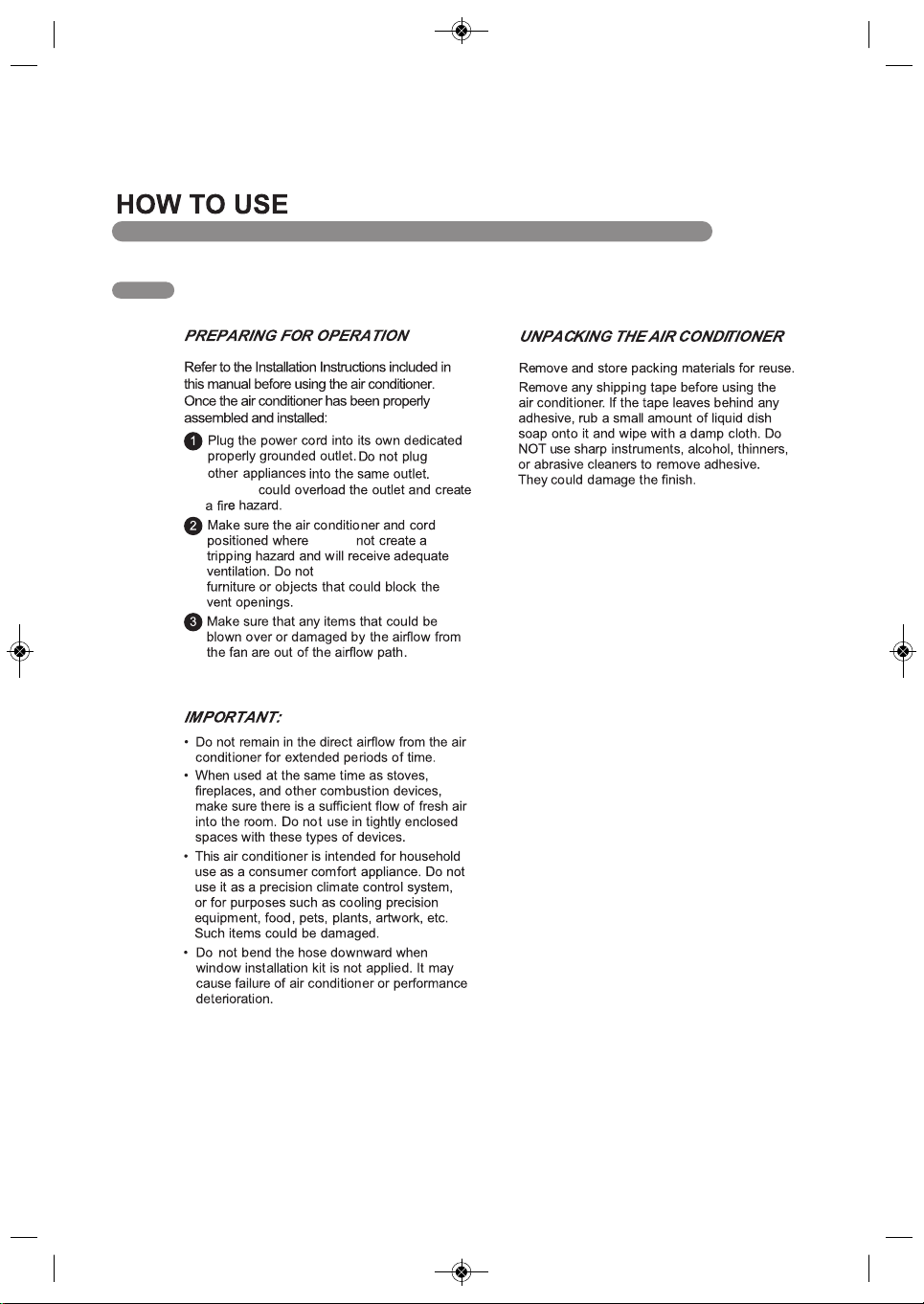
Swing Timer Light
Mode Fan
℃←℉(5s)
←
Sleep(5s)
8
BEFORE USING THE AIR CONDITIONER
Doing so
are
they do
place the appliance near
COV34636805 18. 10. 25. 오오 11:05 Page 8
ENGLISH
9
BEFORE USING THE AIR CONDITIONER
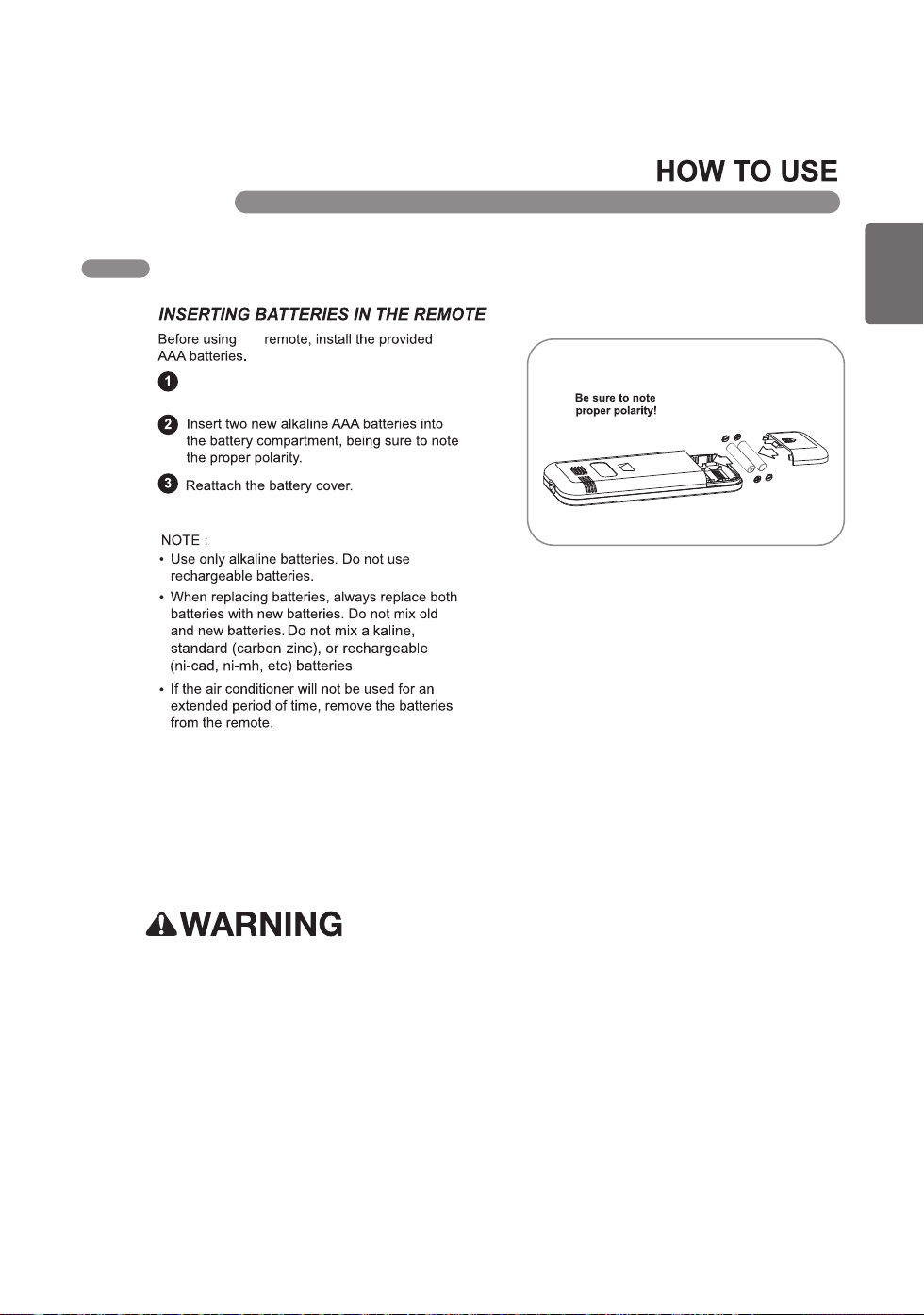
the
Press and slide to remove the battery cover
on the back of the remote.
• If the batteries leak onto your clothes or skin, remove contaminated clothing and rinse skin
thoroughly with soap and water. Do not use the remote if the battery has leaked.
• If the battery or the liquid inside it are ingested, do not induce vomiting or give food or drink. Contact
a physician immediately.
COV34636805 18. 10. 25. 오오 11:05 Page 9
COV34636805 18. 10. 25. 11:05 Page 10
10
information.
using the remote. See the Operation section for more
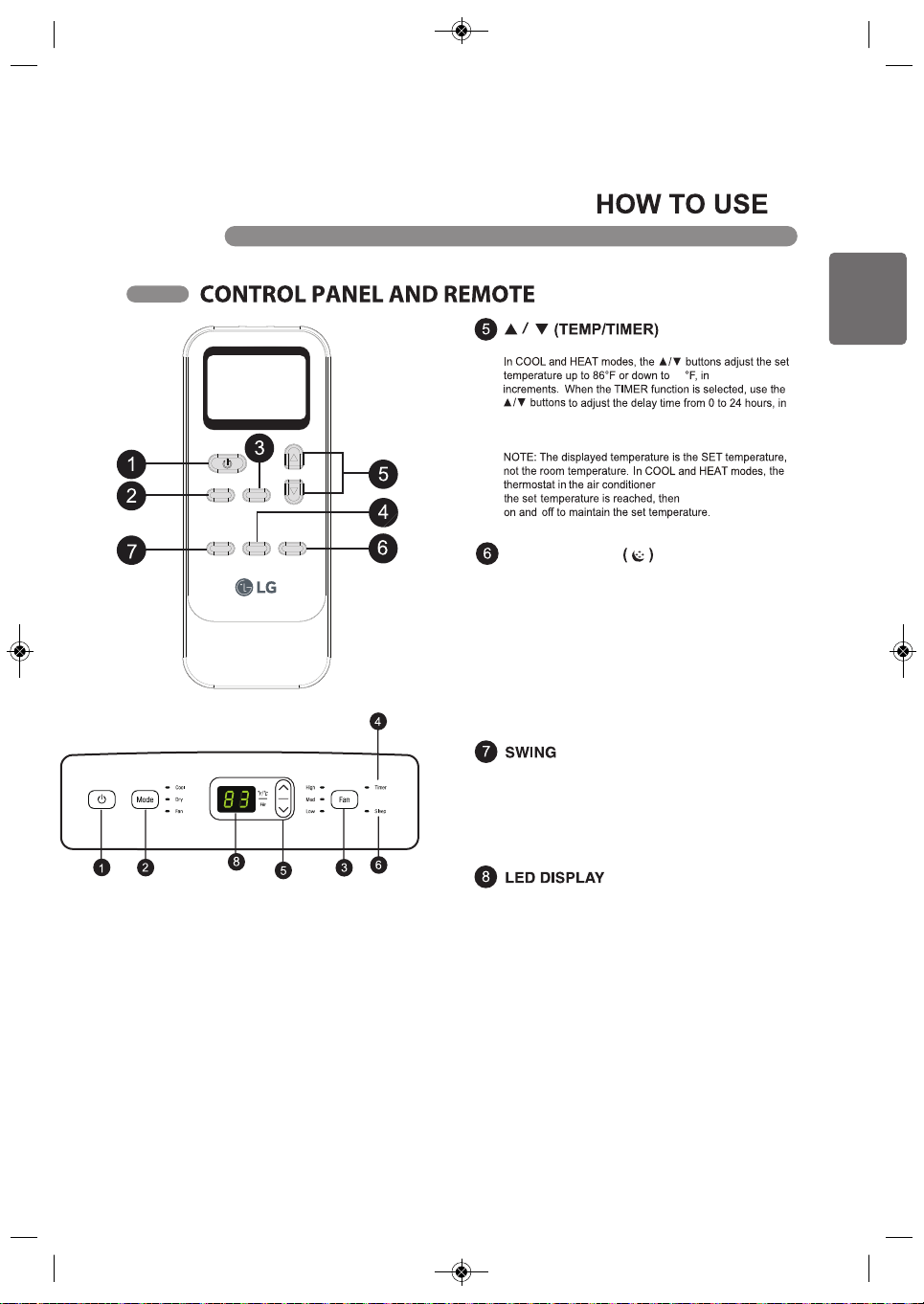
or off at a desired time. The timer function can only be set
Use the timer function to set the air conditioner to turn on
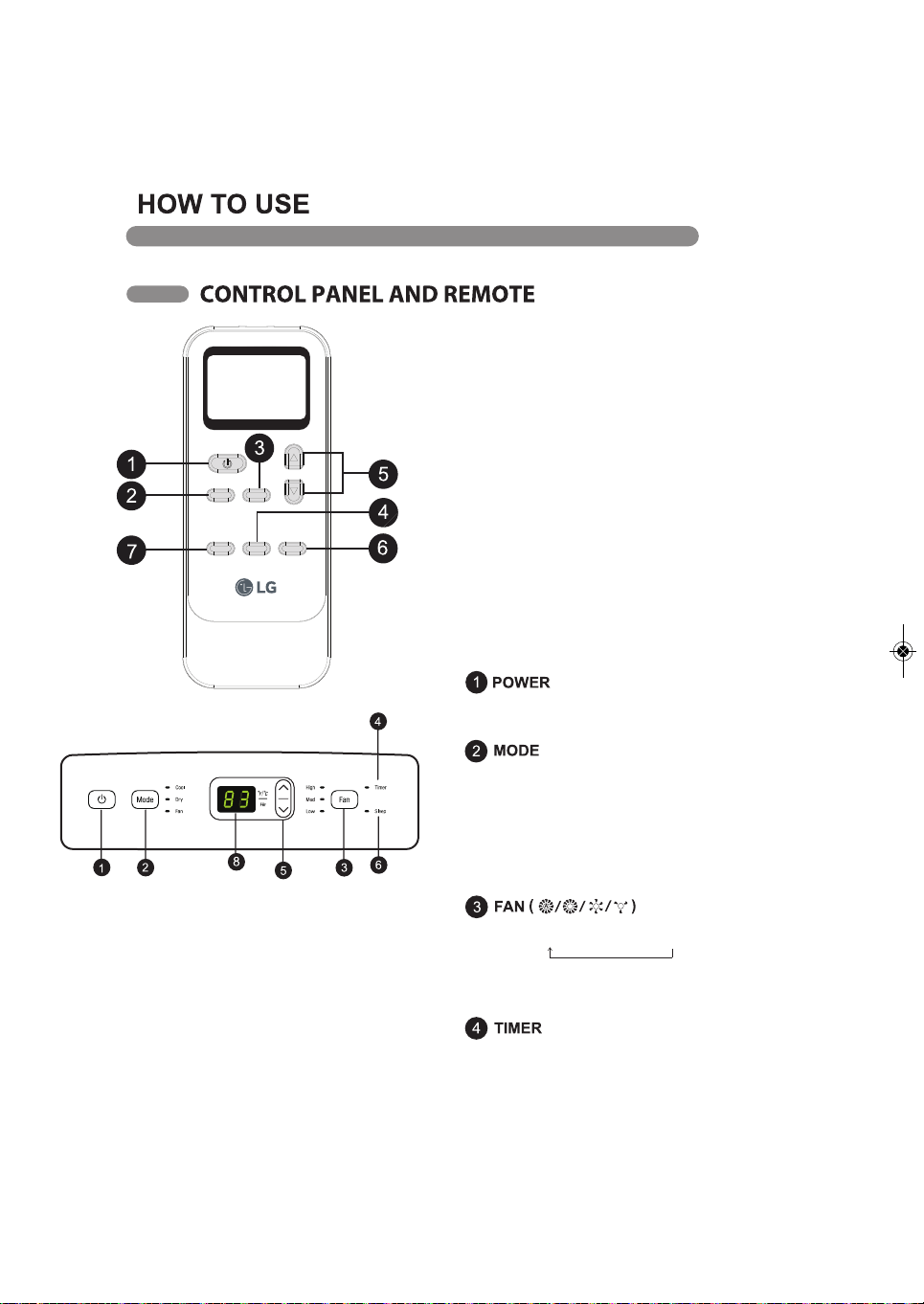
Press FAN button, Choose desired fan speed.
Auto → High → Med → Low
Auto-Automatically controls fan speed depending on current
room temperature and temperature control setting.
NOTE: Auto fan speed cannot be selected in Fan Only mode.
NOTE: Press and hold the Mode button on the remote for
5 seconds to switch the temperature display from degrees
Celsius (°C) to degrees Fahrenheit (°F).
Press this button repeatedly to toggle through and select
the operating mode. Modes include Cool, Dry (dehumidi-
fy), Fan, and Heat. An LED illuminates to indicate the
selected mode. The default mode is Cool. See the
Operation section for more information.
Turns the air conditioner on and off.
A chime sounds to confirm you have turned it on or off.
NOTE:
The remote sensor is located on the front panel of
the air conditioner. Point the remote from anywhere
at the sensor.
The remote may not work if the sensor is in bright
light or if there is not a clear path between the
remote and the sensor.
Some functions may not be supported, depending
on the model.
Operation of functions is the same when using the
remote or the control panel, unless otherwise stated.
The remote and the control panel are not in sync.
For best results when using the remote, remember
to check that all desired settings are correct on the
remote as well as on the control panel.
Swing Timer Light
Mode Fan
℃←℉(5s)
←
Sleep(5s)
ENGLISH
11
one-degree
one-hour increments.
runs the compressor until
cycles the compressor
Press the Light button to turn off the control panel display.
When display is turned off, new control inputs will return
display to normal.
Press and hold the Light button on the remote for 5 seconds
to enter Sleep mode. Sleep mode can only be set in Cooling,
Heating or Drying modes When in Sleep mode the unit will
utillize lower, quieter fanspeeds and automatic temperature
adjustments offering 8 houts of optimal sleeping conditons
before shutting off.
Sets the air discharge louvers to open and shut,
circulating the air more effectively through the room.
This function can only be set from the remote.
If the louvers do not move properly, unplug and plug in
the power cord.
LED display shows the set temperature, fan speed, or
the selected TIMER delay.
LEDs illuminate to indicate the active Mode, fan speed,
and other settings. An E5 error code displays when the
water drain tank needs to be emptied.
COV34636805 18. 10. 25. 11:05 Page 11
Swing Timer Light
Mode Fan
℃←℉(5s)
←
Sleep(5s)
61
LIGHT & SLEEP
12
HOW TO USE
OPERATION
MODES
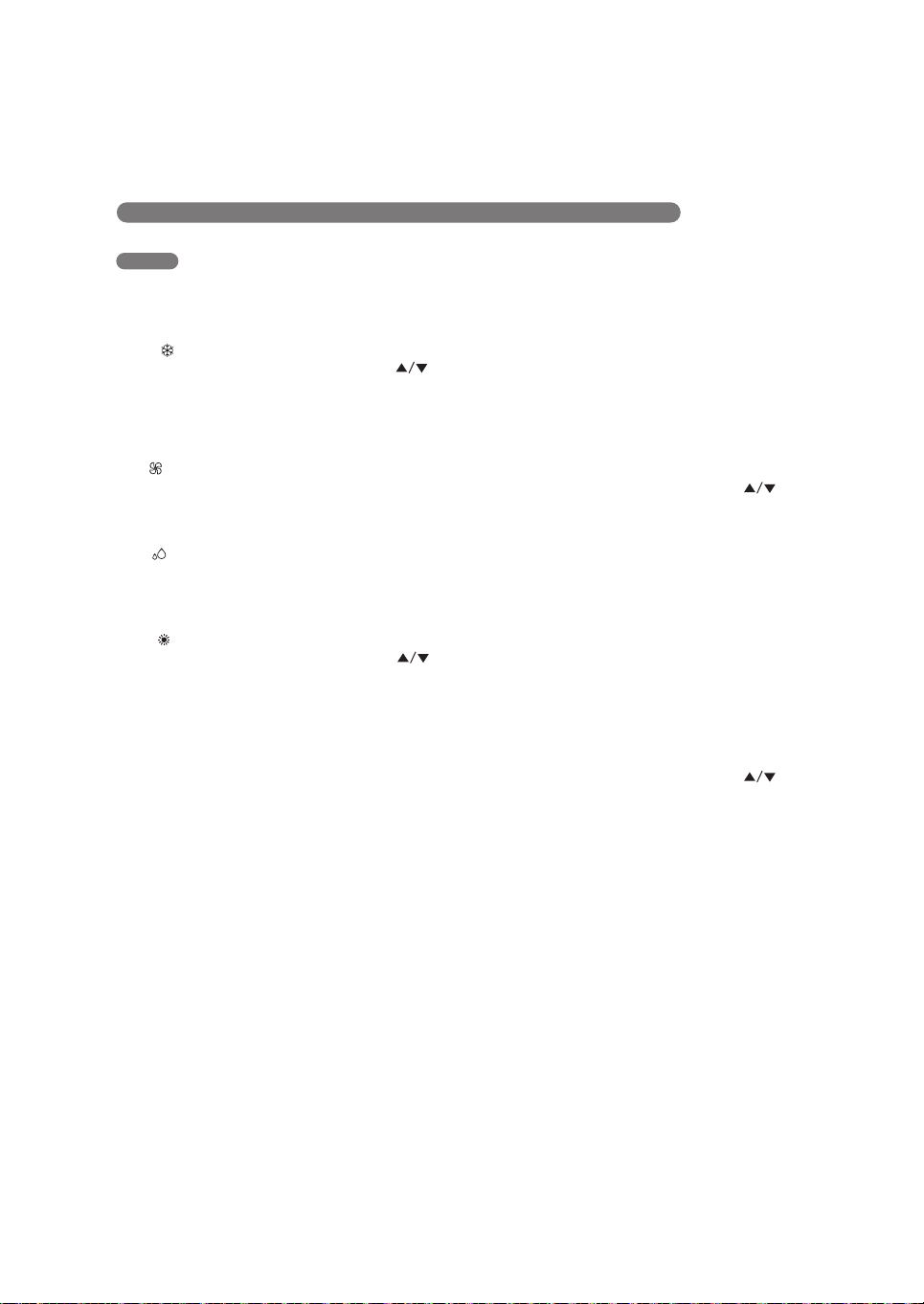
COOL( )
Compressor runs and cools the room. Use the
and FAN buttons to set the desired temperature and
fan speed. The desired temperature can be set from
61°F to 86°F (16°C to 30°C) in one-degree
increments.
FAN( )
Fan circulates air but compressor does not run. Use
the FAN button to set the desired fan speed to High,
Mid or Low.
DRY( )
Use the Dry mode to remove humidity from the room
without additional cooling. The fan speed is preset
on Low and cannot be adjusted.
HEAT( ) (Optional)
Compressor runs and heats the room. Use the
and FAN buttons to set the desired temperature and
fan speed. The desired temperature can be set from
61°F to 86°F (16°C to 30°C) in one-degree
increments.
TIMER
Use the Timer function to turn the air conditioner
ON/OFF automatically.
Setting the Air Conditioner to Turn ON
1. Plug in the air conditioner and use the remote to
power it ON.
2. Use the remote to set the desired mode,
temperature, fan speed, etc.
3. Use the remote to power OFF the air conditioner.
4. Press TIMER on the remote and use the
buttons to set the desired delay time until the air
conditioner turns ON. The delay time can be set
from 0 to 24 hours in one-hour increments.
5. Press TIMER again to enter the delay time. The
TIMER LED on the air conditioner illuminates, and
the delay time appears on the remote and in the
control panel.
6. To cancel the Timer function, press TIMER on the
remote.
Setting the Air Conditioner to Turn OFF
1. Plug in the air conditioner and use the remote to
power it ON.
2. Use the remote to set the desired mode,
temperature, fan speed, etc.
3. Press TIMER on the remote and use the
buttons to set the desired delay time until the air
conditioner turns OFF. The delay time can be set
from 0 to 24 hours in one-hour increments.
4. Press TIMER again to enter the delay time. The
TIMER LED on the air conditioner illuminates, and
the delay time appears on the remote. The delay
time appears briefly in the control panel and is then
replaced by the set temperature.
5. To cancel the Timer function, press TIMER on the
remote.
ENGLISH
15
COV34636805 18. 10. 25. 11:05 Page 15
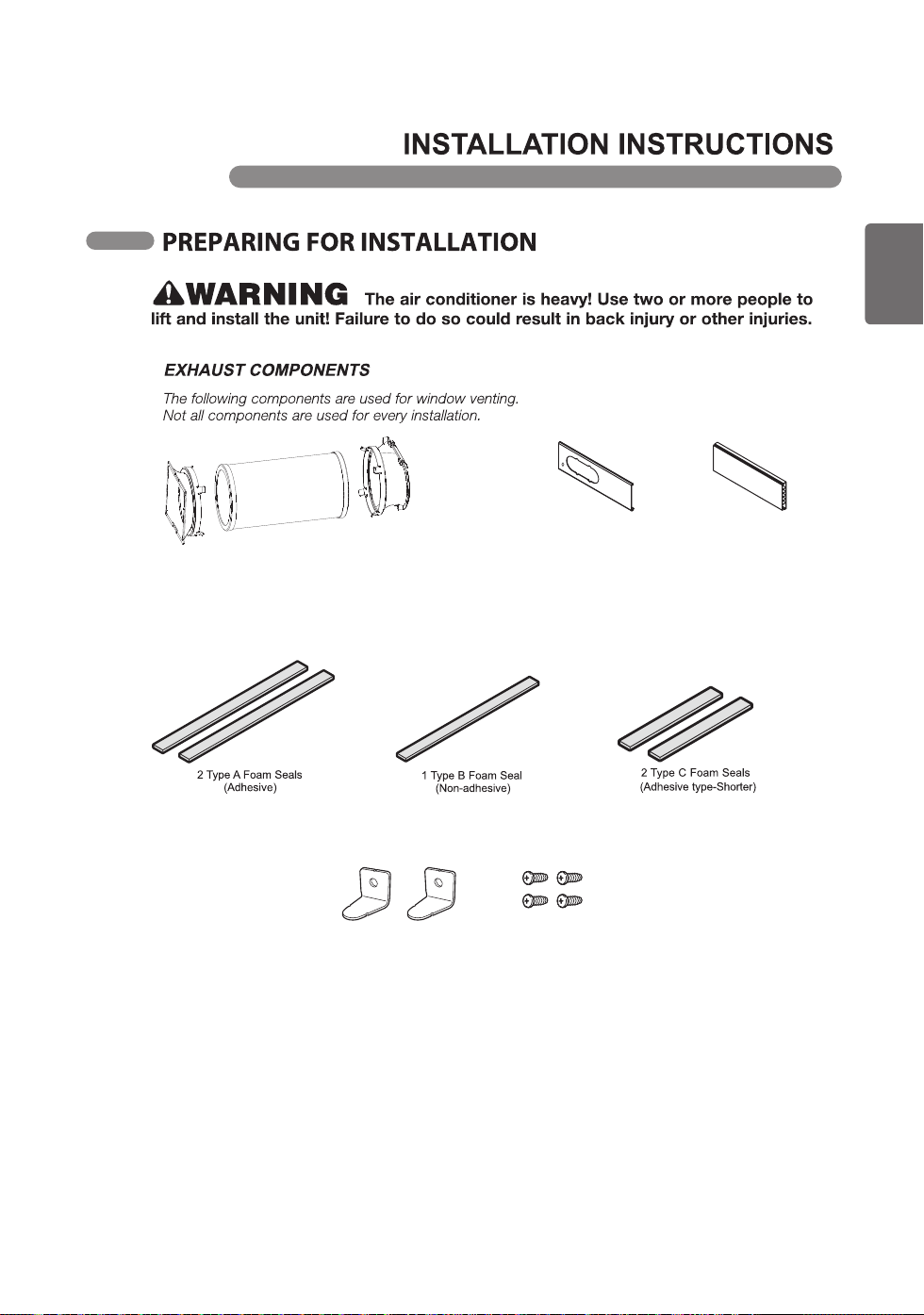
2 Security Brackets
4 Screws
Window Slider Kit
(includes 1 Panel A and 1 Panel B)
1 Panel A (24.4’’) 1 Panel B (24.4’’)
Mounting
Bracket
Flexible Vent
Hose
Diffuser
16
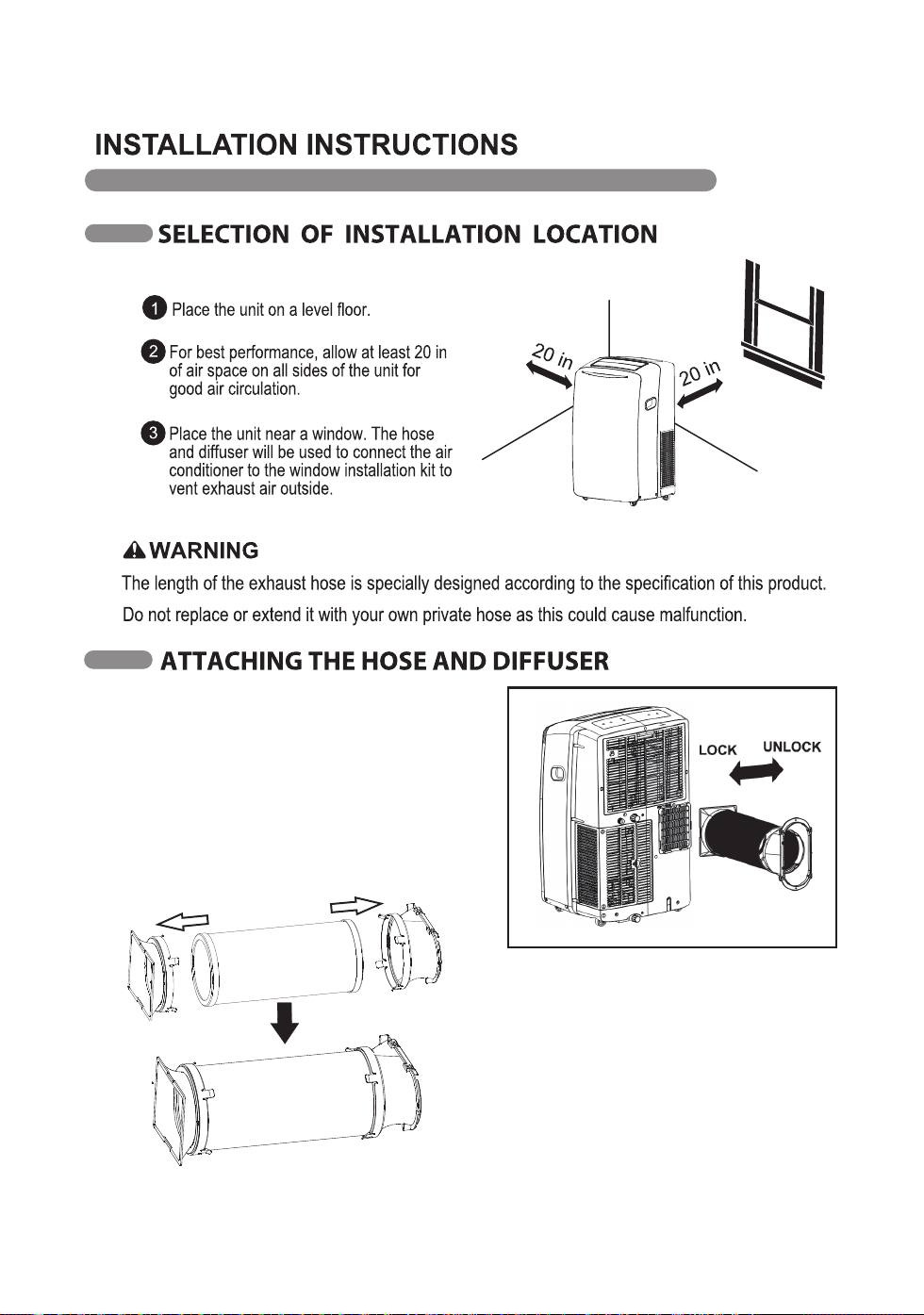
Assembling the Mounting Bracket, Diffuser, and
Vent Hose
Attach the hose assembly onto the back of
the air conditioner by inserting the edges of
the mounting bracket behind the tabs at the
top and bottom and sliding the mounting
bracket to the left until it snaps into place.
COV34636805 18. 10. 25. 11:05 Page 16
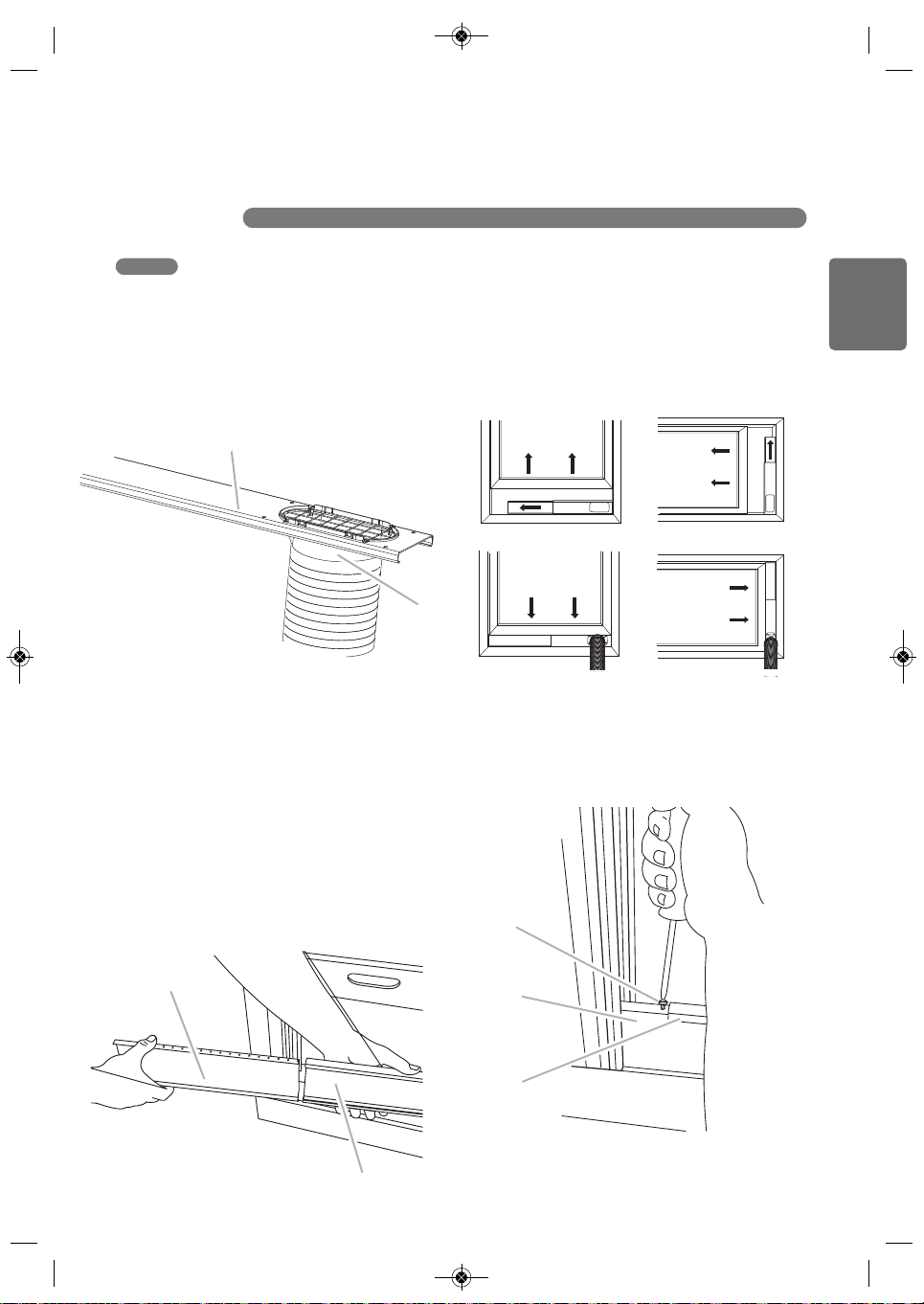
1. Preparing the exhaust hose assembly:
Press the mounting bracket and the diffuser into the flexible
exhaust hose. Both mounting bracket and diffuser have integral
clips that snap onto the hose.
2. Insert the mounting bracket into the slot on the back of the air
conditioner.
3. Slide down to lock the hose into place.
4. Confirm the hose is locked in place before operating.
Mounting
Bracket
Flexible Vent Hose
Diffuser
exhaust hose assembly
ENGLISH
17
INSTALLATION INSTRUCTIONS
COV34636805 18. 10. 25. 11:05 Page 17
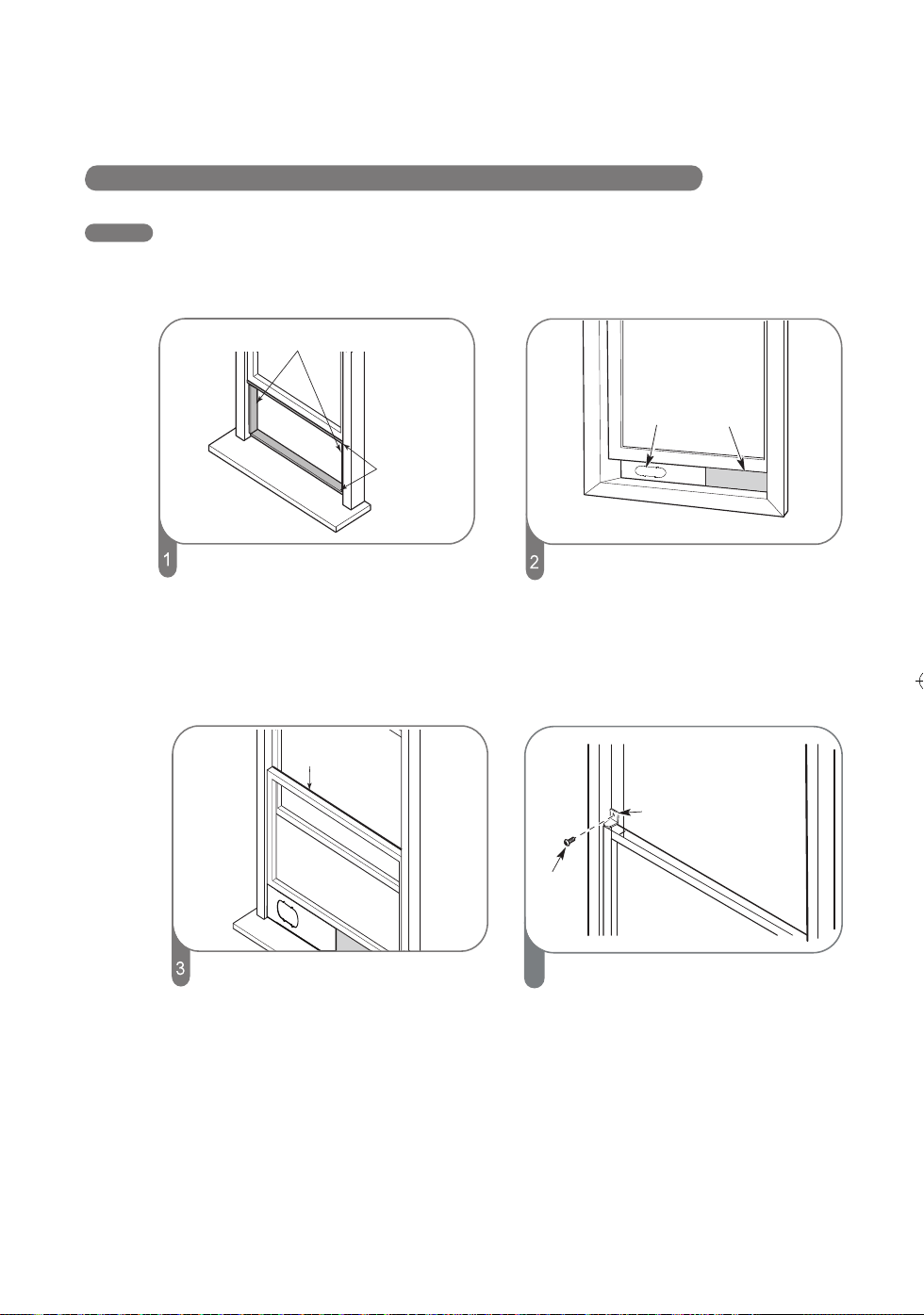
A. Panel A
B. Diffuser
A
B
A. Panel A
B. Panel B
B
A
A. Panel A
B. Panel B
C. Screw (provide)
C
B
A
Your window installation kit has been designed to fit most
standard vertical and horizontal window applications.
1. Attach the diffuser to the outer slider
Note: Product must be used with included Duct Window
Installation kit for effective cooling.
2. Open the window.
3. Measure the window opening.
If the window opening is too narrow for the window slider
kit, remove the panel B from the window slider kit.
Using a saw, cut the Panel B to fit the window opening.
Slide the Panel B into Panel A of the window slider kit.
4. Place the window slider kit into the window, extending it
to fit the width of the window. Be sure the rain cover is on
the outside of the window.
Note: For casement window installation, the window slider
kit may be installed vertically with the window slider kit
opening at the bottom.
5. Inset screw (provide) into the hole in the Panel B that is
closest to the end of the Panel A.
WINDOW INSTALLATION
18
INSTALLATION INSTRUCTIONS
INSTALLATION IN VERTICAL-SLIDING WINDOWS
NOTE : The window installation kit can be used with vertical-sliding windows between 25” and 47” wide.
COV34636805 18. 10. 25. 11:05 Page 18
Foam seal C
(Adhesive type-shorter)
Foam seal B
(Non-adhesive type)
Foam seal A
(Adhesive type)
Cut the foam seal A (adhesive type) & C
(adhesive type-shorter) to the proper length
and attach them to the window sash and frame.
Cut the foam seal B (Non0adhesive type) to
the window width. Stuff the foam seal B
between the glass and the window to
prevent air and insects from getting into the
room.
Install the security bracket with a screw as
shown if you need.
4
Security Bracket
Panel A
Panel B
(if required)
Insert the panel assembly, including panel B,
if needed, into the window opening. Extend
the panel B, if used.
Screw
19
INSTALLATION INSTRUCTIONS
INSTALLATION IN VERTICAL-SLIDING WINDOWS
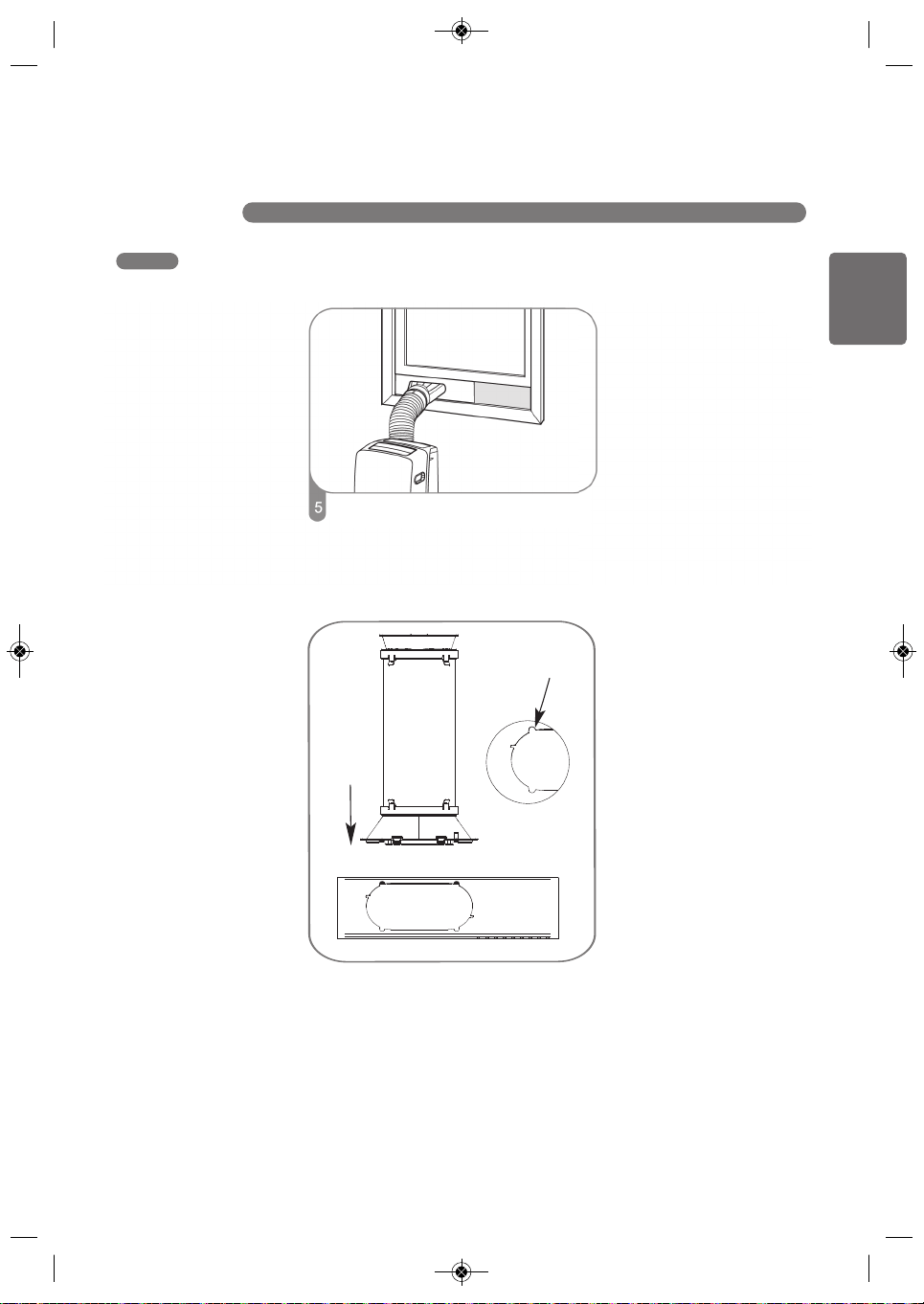
Insert the diffuser into the opening in the vent
panel and slide it to lock it into place.
COV34636805 18. 10. 25. 11:05 Page 19
Slot
Insert
Align the tabs on the diffuser with slots in the
outer slide section. Insert the diffuser into the
opening in the vent panel.
ENGLISH
20
INSTALLATION INSTRUCTIONS
INSTALLATION IN HORIZONTAL-SLIDING WINDOWS
NOTE : The window installation kit can be used with horizontal-sliding windows between 25” and 47” tall.
COV34636805 18. 10. 25. 11:05 Page 20
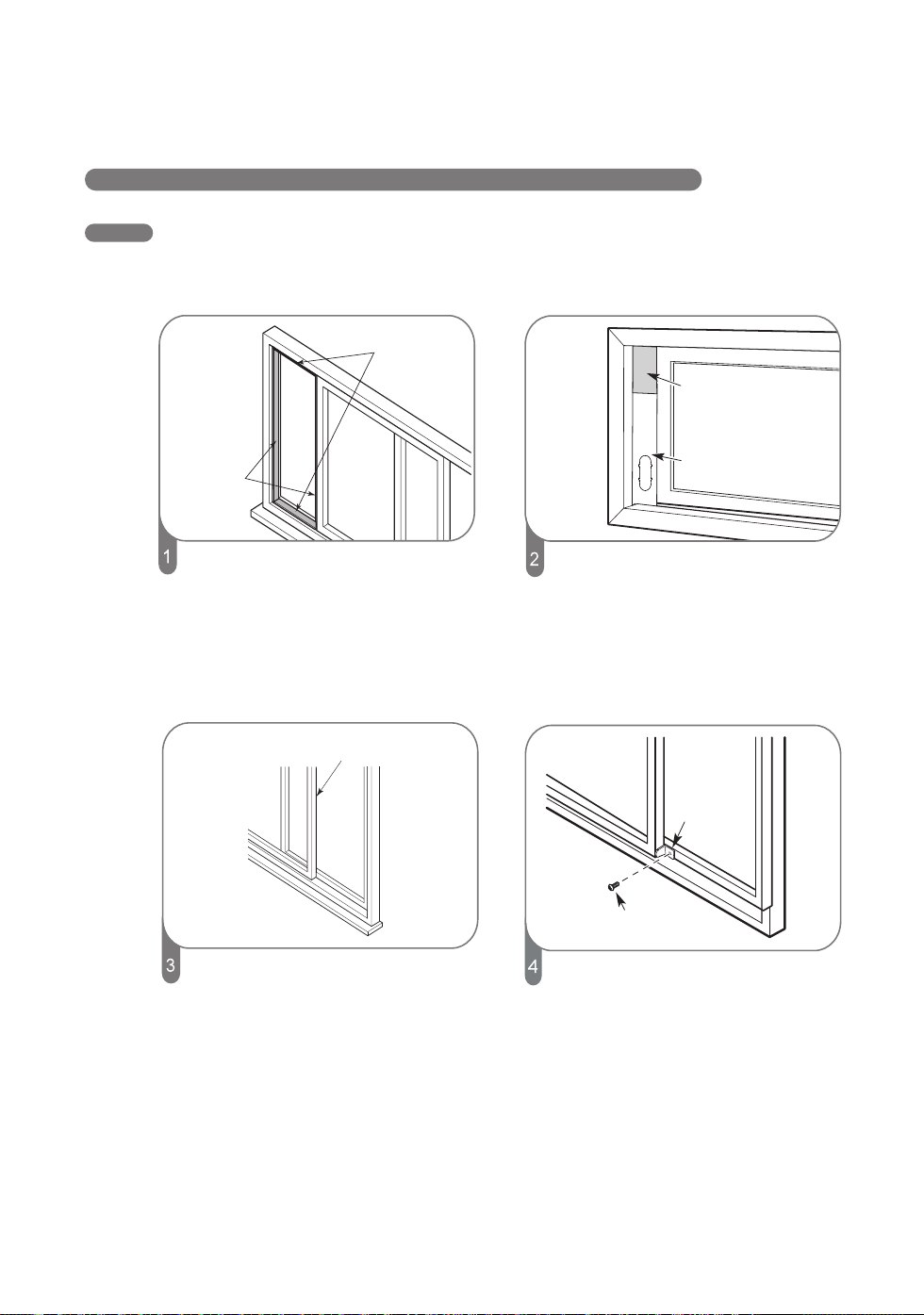
Foam seal C
(Adhesive type-shorter)
Foam seal A
(Adhesive type)
Cut the foam seal A (adhesive type) & C
(adhesive type-shorter) to the proper length,
and attach them to the window sash and frame.
Cut the foam seal B to the window height.
Stuff the foam seal B between the glass and
the window to prevent air and insects from
getting into the room
Install the window security bracket with
a screw as shown.
Foam seal B
(Non-adhesive type)
Screw
Security bracket
Panel B
Panel B
(if required)
Insert the panel assembly, including
panel B, if needed, into the window
opening. Extend the panel B, if used.
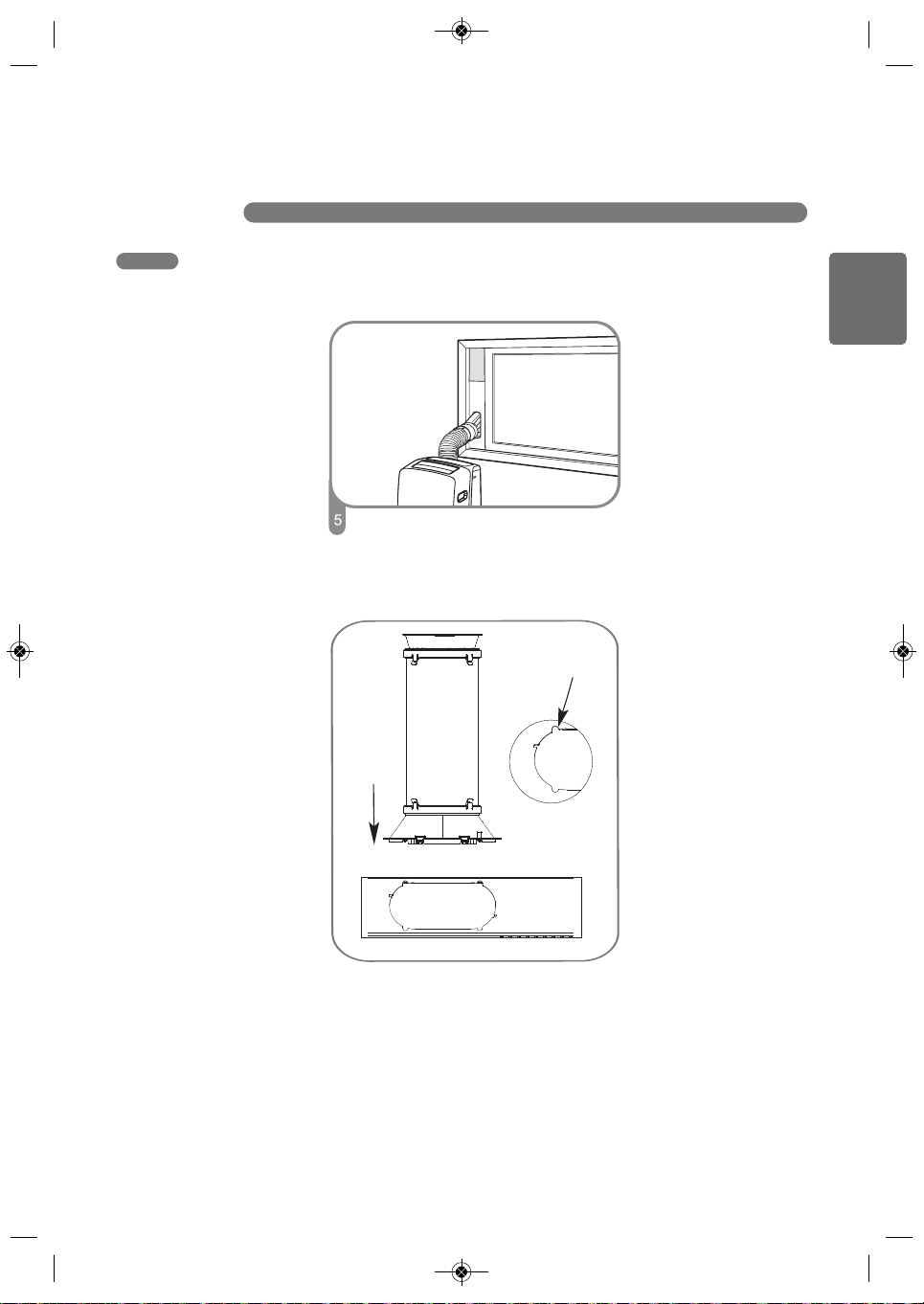
ENGLISH
21
INSTALLATION IN HORIZONTAL-SLIDING WIDOWS
INSTALLATION INSTRUCTIONS
Insert the diffuser into the opening in the vent
panel and slide it to lock it into place.
COV34636805 18. 10. 25. 11:05 Page 21
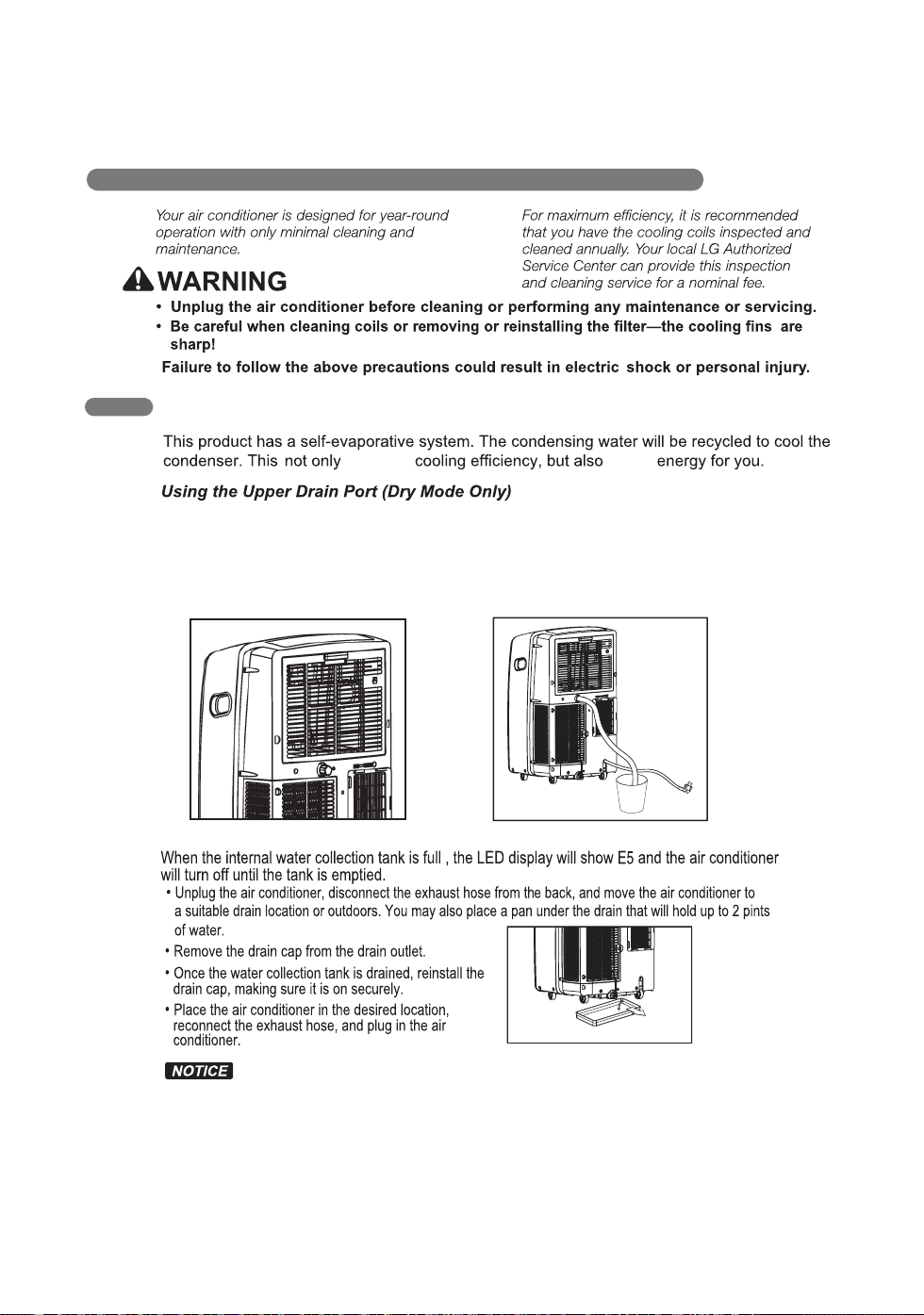
Slot
Insert
Align the tabs on the diffuser with slots in the
outer slide section. Insert the diffuser into the
opening in the vent panel.
22
CARE AND CLEANING
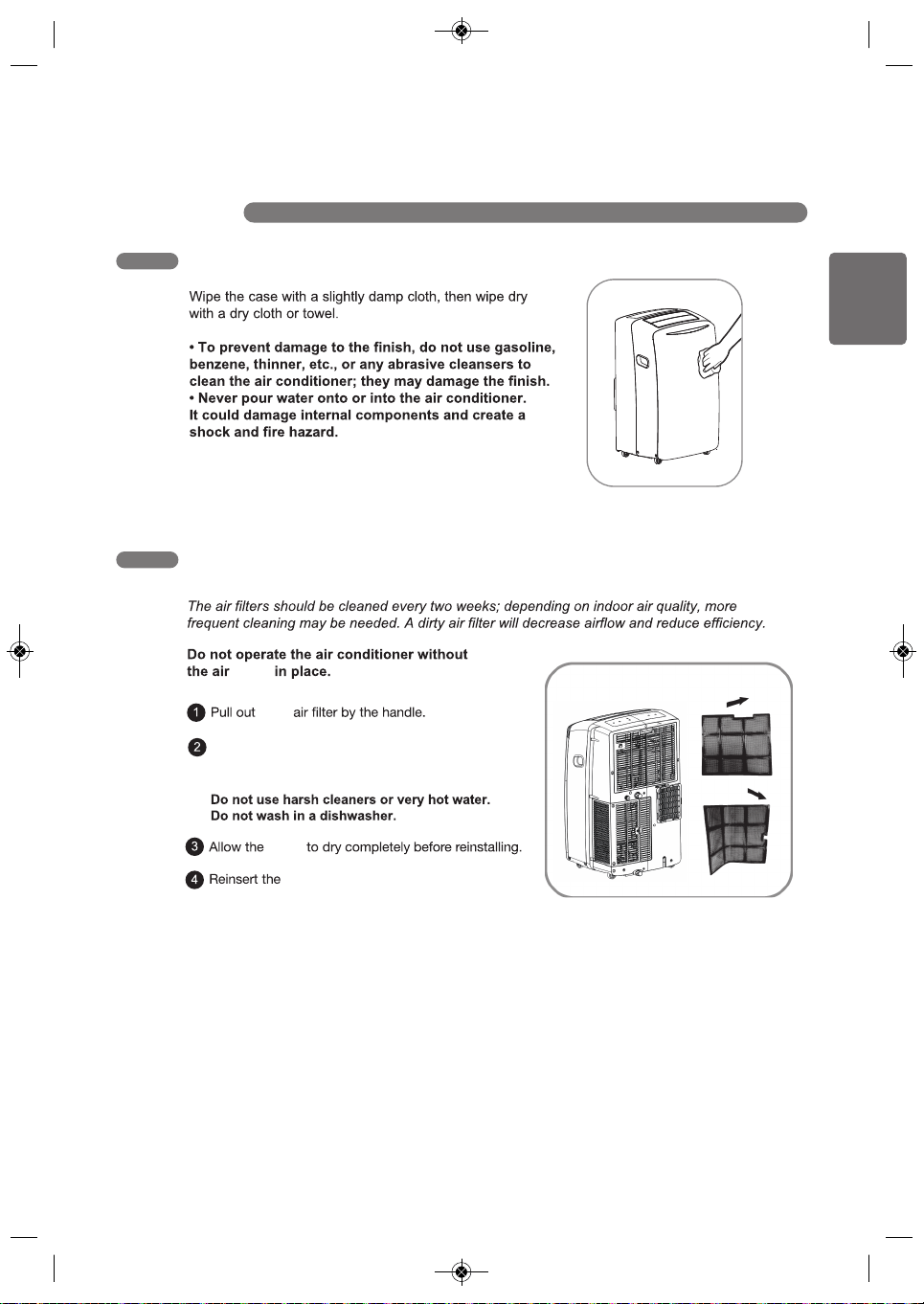
EMPTYING THE WATER COLLECTION TANK
improves saves
• This can be used when you need dehumidification in high humidity.
• The upper drain port is not used in the Cool or Fan mode.
• Remove the drain plug when using the Dry (dehumidifying) mode.
• Install a drain hose (16mm [5/8”] inside diameter) and place the open end of the hose over a drain or
bucket or out the window.
Using the Lower Drain Port
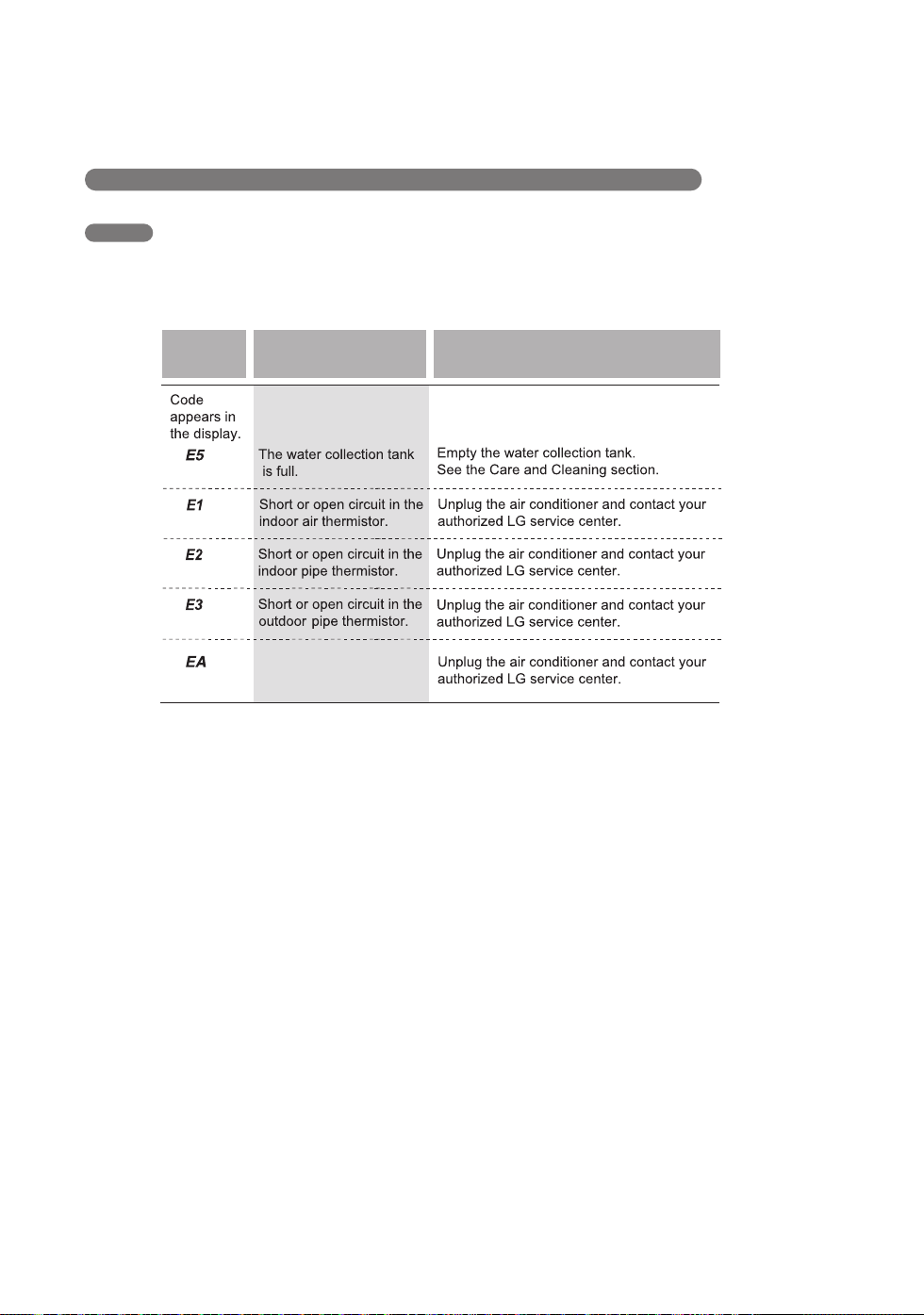
If the E5 error appears in the display:
The water collection tank is full. Unplug the air conditioner, drain the tank, then plug the air conditioner
back in and restart it.
NOTE: After the air conditioner is unplugged, it defaults to the Cool mode with a temperature setting
of 75°F (24°C) once restarted.
COV34636805 18. 10. 25. 오오 11:05 Page 22
ENGLISH
23
CARE AND CLEANING
CLEANING THE CASE
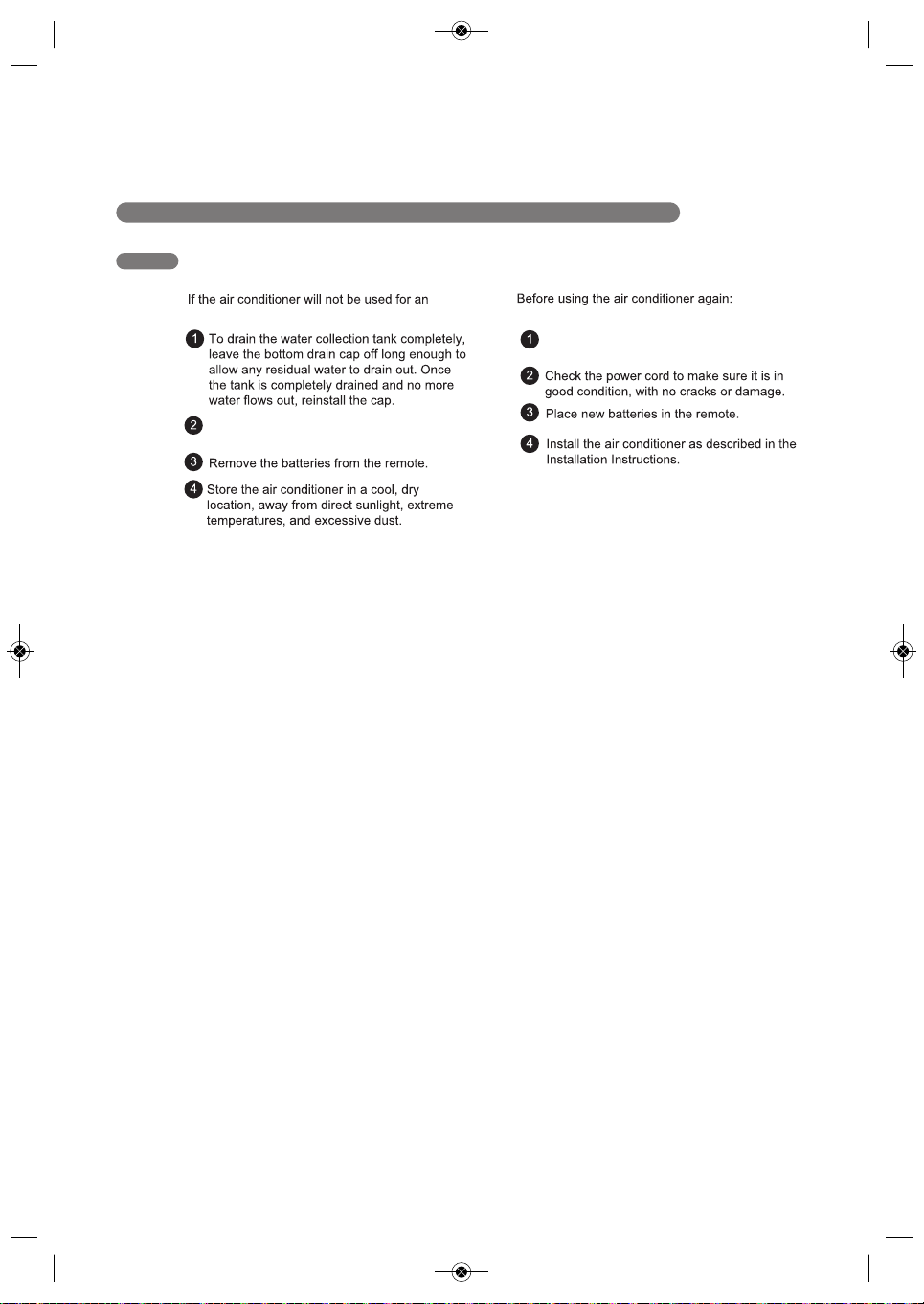
CLEANING THE AIR FILTER
filters
each
filters
filters.
Use a vacuum cleaner to clean the filters. If the
filters are heavily soiled, they can be washed in
warm water using a mild detergent.
COV34636805 18. 10. 25. 오오 11:05 Page 23
24
CARE AND CLEANING
STORING THE AIR CONDITIONER
Remove and clean the filters, allow them to
dry completely, then reinstall them.
Make sure the filters and drain cap are in
place
extended period of time:
COV34636805 18. 10. 25. 오오 11:05 Page 24
ENGLISH
25
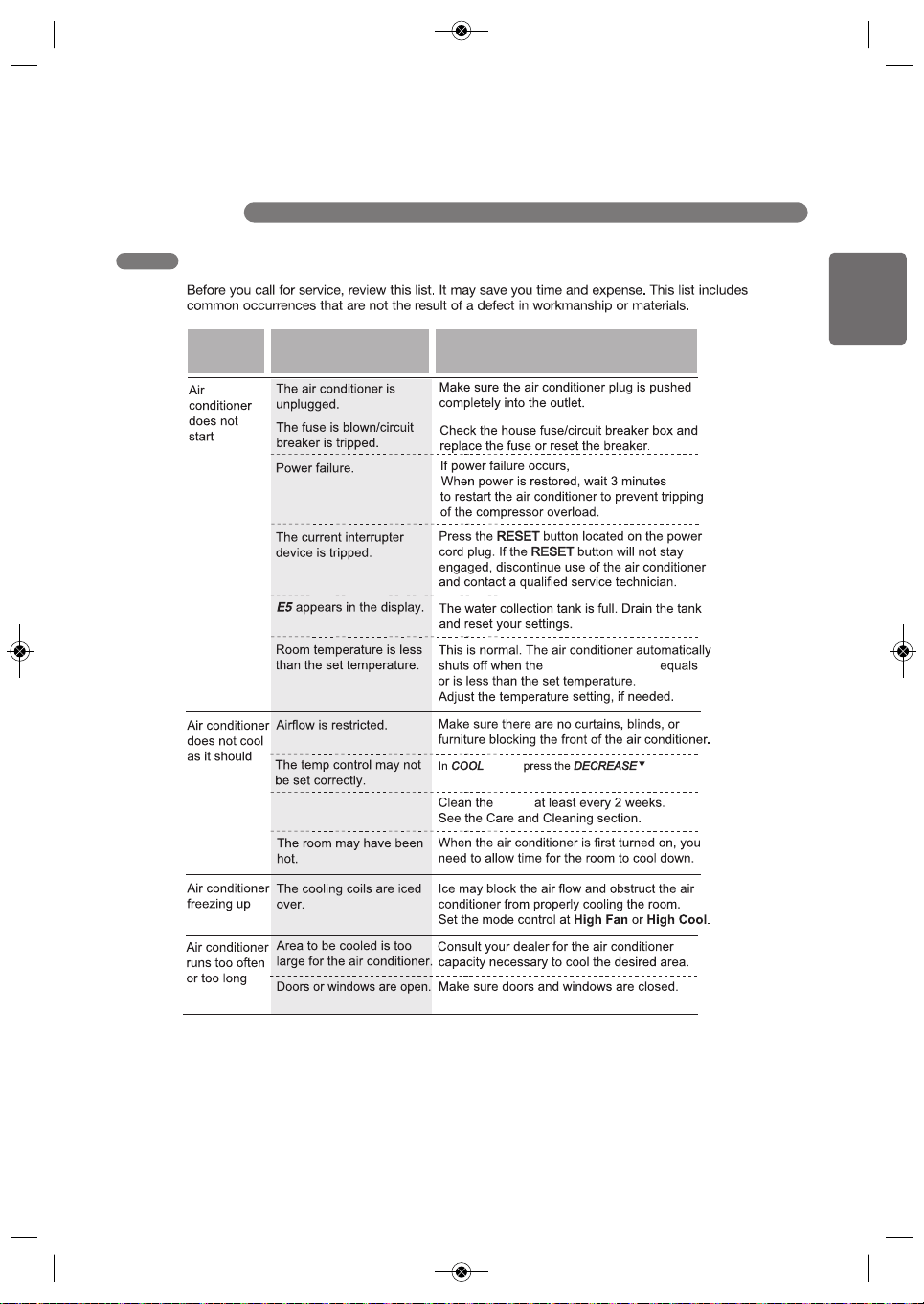
TROUBLESHOOTING
BEFORE CALLING FOR SERVICE
Problem Corrective ActionPossible causes
unplug the unit.
room temperature
mode, button.
The air filters are dirty.
filters
COV34636805 18. 10. 25. 오오 11:05 Page 25
26
TROUBLESHOOTING
BEFORE CALLING FOR SERVICE
Error
Code
Corrective ActionPossible causes
Software problem.
NOTE
• Some functions may not be supported, depending on the model.
COV34636805 18. 10. 25. 오오 11:05 Page 26
27
ENGLISH
COV34636805 18. 10. 25. 11:05 Page 27
WHAT THIS WARRANTY COVERS:
LG Electronics Canada, Inc. (“LG”) warrants your LG Room Air Conditioner ("product") against defect in
materials or workmanship under normal household use, during the warranty period set forth below, LG
will, at its option, repair or replace the product. This limited warranty is (except to some extent in Quebec
and where otherwise prohibited) valid only to the original retail purchaser of the product, is not assignable
or transferrable to any subsequent purchaser or user, and applies only when the product is purchased
through an LG authorized dealer or distributor and used within Canada.
NOTE
Replacement products and repair parts may be new or factory-remanufactured at LG’s option and are
warranted for the remaining portion of the original unit’s warranty period or ninety (90) days, whichever
is longer. Please retain dated receipt or delivery ticket as evidence of the Date of Purchase for proof of
warranty (you may be required to submit a copy to LG or authorized representative). If the Date of
Purchase cannot be verified, the warranty period will begin 15 months from the date of manufacture.
WARRANTY PERIOD:
1 year from the Date of Purchase: Any internal/ functional Parts and Labor.
HOW SERVICE IS HANDLED: In-Home Service or Swap SVC
LG may elect, at our option, to provide Swap or In home Service. To receive in-home service, the
product must be unobstructed and accessible to service personnel. If during in-home service repair
cannot be completed, it may be necessary to remove, repair and return the product. OR LG may elect,
at our option, to provide Swap Service by providing an authorized service exchange through the
distribution center you originally purchased the product from.
THIS LIMITED WARRANTY DOES NOT COVER:
Service trips to deliver, pick up, or install or set up the Product; Instruction on Product use.
Adjustments of user controls.
Products that have had a serial number or any part thereof altered, defaced or removed.
Property damages, malfunction or failure of the product, or personal injury caused by or resulting from:
(a) accident, abuse, negligence or misuse;
(b) operating the Product in a corrosive or wet environment containing chlorine, fluorine or any other
hazardous chemicals;
(c) installation, alteration, repair or service by anyone other than a licensed, authorized LG contractor
(d) improper matching of Product components;
(e) improper sizing or design of the Product;
(f) improper or deferred maintenance contrary to the manufacturer’s instructions;
(g) physical abuse to or misuse of the Product (including failure to perform any maintenance as
(h) Product used in other than normal use or in any manner contrary to the Operation Manual;
(i) freight damage or damage caused by force majeure or other factors such as power surge damage
or other than pursuant to the manufacturer’s instructions, including installation not in accordance
described in the Operation Manual such as air filter cleaning, or any Product damaged by
caused by lightning and fluctuations in or interruptions of electrical power.
excessive physical or electrical stress);
with applicable laws, codes and standards applying in the province in which the Product is installed;
28
WARRANTY
COV34636805 18. 10. 25. 11:05 Page 28
THIS LIMITED WARRANTY SHALL NOT BE ENLARGED, EXTENDED OR AFFECTED BY, AND
NO OBLIGATION OR LIABILITY SHALL ARISE OR GROW OUT OF, LG PROVIDING, DIRECTLY
OR INDIRECTLY, ANY TECHNICAL ADVICE, INFORMATION AND/OR SERVICE TO OWNER IN
CONNECTION WITH THE PRODUCT. EXCEPT AS OTHERWISE PROVIDED IN THIS LIMITED
WARRANTY, LG MAKES NO OTHER WARRANTIES OR CONDITIONS OF ANY KIND
WHATSOEVER REGARDING THE PRODUCT. LG DISCLAIMS AND EXCLUDES ALL WARRANTIES
AND CONDITIONS NOT EXPRESSLY PROVIDED HEREIN AND ALL REMEDIES WHICH, BUT
FOR THIS PROVISION, MIGHT ARISE BY IMPLICATION OR OPERATION OF LAW, INCLUDING,
WITHOUT LIMITATION, THE IMPLIED WARRANTIES AND CONDITIONS OF MERCHANTABILITY
AND (EXCEPT IN QUEBEC AND WHERE OTHERWISE PROHIBITED) OF FITNESS FOR ANY
PARTICULAR PURPOSE. NO ONE IS AUTHORIZED TO CHANGE THIS LIMITED WARRANTY IN
ANY RESPECT OR TO CREATE ANY OTHER OBLIGATION OR LIABILITY FOR LG IN CONNECTION
WITH THE PRODUCT. LG DISCLAIMS ALL LIABILITY FOR THE ACTS, OMISSIONS AND CONDUCT
OF ALL THIRD PARTIES (including, without limitation, the installing contractor) IN CONNECTION
WITH OR RELATED TO THE PRODUCT.
UNDER NO CIRCUMSTANCES SHALL LG BE LIABLE FOR ANY INCIDENTAL, SPECIAL, PUNITIVE,
EXEMPLARY OR CONSEQUENTIAL DAMAGES INCLUDING, WITHOUT LIMITATION, LOST
GOODWILL, LOST REVENUES OR PROFITS, WORK STOPPAGE, PRODUCT FAILURE, IMPAIRMENT
OF OTHER GOODS, COSTS OF REMOVAL AND REINSTALLATION OF THE PRODUCT, LOSS OF
USE, INJURY TO PERSONS OR PROPERTY ARISING OUT OR RELATED TO THE PRODUCT
WHETHER BASED ON BREACH OF WARRANTY, BREACH OF CONTRAC
T, TORT OR OTHERWISE,
EVEN IF LG HAS BEEN ADVISED OF THE POSSIBILITY OF SUCH DAMAGE. IN NO EVENT SHALL
LG’S LIABILITY EXCEED THE ACTUAL PURCHASE PRICE OF THE PRODUCT WITH RESPECT TO
WHICH ANY CLAIM IS MADE.
SOME PROVINCES (INCLUDING QUEBEC) DO NOT ALLOW LIMITATIONS ON WARRANTIES OR
EXCLUSIONS OR LIMITATION OF DAMAGES, SO THE ABOVE LIMITATIONS OR EXCLUSIONS MAY
NOT APPLY. Where any term of this warranty is prohibited by such laws, it shall be null and void,
but the remainder of this warranty shall remain in effect. THIS LIMITED WARRANTY GIVES THE
OWNER SPECIFIC LEGAL RIGHTS AND THE OWNER MAY ALSO HAVE OTHER RIGHTS THAT
VARY FROM PROVINCE TO PROVINCE.
HOW TO OBTAIN WARRANTY SERVICE & ADDITIONAL INFORMATION:
Call 1-888-LG-CANADA (542 2623) or visit our website at www.lg.com.
Mail to: LG Electronics Canada Inc.
20 Norelco Drive
North York, ON M9L 2X6
FOR YOUR RECORDS
Write the model and serial numbers here:
Model No.
Serial No.
Dealer's Name
Date Purchased
Staple your receipt to this page in the event you need it to prove date of purchase or for warranty
issues.
27
ENGLISH
COV34636805 18. 10. 25. 11:05 Page 27
ARBITRATION NOTICE: THIS LIMITED WARRANTY CONTAINS AN ARBITRATION PROVISION THAT REQUIRES YOU AND LG TO RESOLVE
PROCEDURE FOR RESOLVING DISPUTES:
EXCEPT WHERE PROHIBITED AT LAW, ALL DISPUTES BETWEEN YOU AND LG ARISING OUT OF OR RELATING IN ANY WAY TO THIS
Definitions. For the purposes of this section, references to “LG” mean LG Electronics Canada, Inc., its parents, subsidiaries and affiliates, and each
of their officers, directors, employees, agents, beneficiaries, predecessors in interest, successors, assigns and suppliers; references to “dispute” or
“claim” shall include any dispute, claim or controversy of any kind whatsoever (whether based in contract, tort, statute, regulation, ordinance, fraud,
misrepresentation or any other legal or equitable theory) arising out of or relating in any way to the sale, condition or performance of the product or
this Limited Warranty.
Notice of Dispute. In the event you intend to commence an arbitration proceeding, you must first notify LG in writing at least 30 days in advance of
initiating the arbitration by sending a letter to LGECI Legal Team at 20 Norelco Drive, North York, Ontario, Canada M9L 2X6 (the “Notice of Dispute”).
You and LG agree to engage in good faith discussions in an attempt to amicably resolve your claim. The notice must provide your name, address,
and telephone number; identify the product that is the subject of the claim; and describe the nature of the claim and the relief being sought. If you
are unable to resolve the dispute within 30 days of LG’s receipt of the Notice of Dispute, the dispute shall be resolved by binding arbitration in
and LG accordance with the procedure set out herein. You and LG both agree that, during the arbitration proceeding, the terms (including any
amount) of any settlement offer made by either you or LG will not be disclosed to the arbitrator until the arbitrator determines the dispute.
Agreement to Binding Arbitration and Class Action Waiver. Upon failure to resolve the dispute during the 30 day period after LG’s receipt of the
Notice of Dispute, you and LG agree to resolve any claims between you and LG only by binding arbitration on an individual basis, unless you opt out
as provided below, or you reside in a jurisdiction that prevents full application of this clause in the circumstances of the claims at issue (in which case
if you are a consumer, this clause will only apply if you expressly agree to the arbitration). To the extent permitted by applicable law, any dispute
between you and LG shall not be combined or consolidated with a dispute involving any other person’s or entity’s product or claim. More specifically,
without limitation of the foregoing, except to the extent such a prohibition is not permitted at law, any dispute between you and LG shall not under any
circumstances proceed as part of a class or representative action. Instead of arbitration, either party may bring an individual action in small claims court,
but that small claims court action may not be brought on a class or representative basis except to the extent this prohibition is not permitted at law in
your province or territory of jurisdiction as it relates to the claims at issue between you and LG.
Arbitration Rules and Procedures. To begin arbitration of a claim, either you or LG must make a written demand for arbitration. The arbitration
will be private and confidential, and conducted on a simplified and expedited basis before a single arbitrator chosen by the parties under the provincial
Governing Law. The law of the province or territory of your purchase shall govern this Limited Warranty and any disputes between you and LG except
to the extent that such law is preempted by or inconsistent with applicable federal or provincial/territorial law. Should arbitration not be permitted for
any claim, action, dispute or controversy between you and LG, you and LG attorn to the exclusive jurisdiction of the courts of the province or territory
of your purchase for the resolution of the claim, action, dispute or controversy between you and LG.
or territorial commercial arbitration law and rules of the province or territory of your residence. You must also send a copy of your written demand to
LG at LG Electronics, Canada, Inc., Attn: Legal Department- Arbitration, 20 Norelco Drive, North York, Ontario M9L 2X6. This arbitration provision is
governed by your applicable provincial or territorial commercial arbitration legislation. Judgment may be entered on the arbitrator’s award in any court
of competent jurisdiction. All issues are for the arbitrator to decide, except that, issues relating to the scope and enforceability of the arbitration
provision and to the arbitrability of the dispute are for the court to decide. The arbitrator is bound by the terms of this provision.
Fees/Costs. You do not need to pay any fee to begin an arbitration. Upon receipt of your written demand for arbitration, LG will promptly pay all
arbitration filing fees unless you seek more than $25,000 in damages, in which case the payment of these fees will be governed by the applicable
arbitration rules. Except as otherwise provided for herein, LG will pay all filing, administration and arbitrator fees for any arbitration initiated in
accordance with the applicable arbitration rules and this arbitration provision. If you prevail in the arbitration, LG will pay your attorneys’ fees and
expenses as long as they are reasonable, by considering factors including, but not limited to, the purchase amount and claim amount. Notwithstanding
the foregoing, if applicable law allows for an award of reasonable attorneys’ fees and expenses, an arbitrator can award them to the same extent that
a court would. If the arbitrator finds either the substance of your claim or the relief sought in the demand is frivolous or brought for an improper purpose
(as measured by the applicable laws), then the payment of all arbitration fees will be governed by the applicable arbitration rules. In such a situation,
you agree to reimburse LG for all monies previously disbursed by it that are otherwise your obligation to pay under the applicable arbitration rules.
Except as otherwise provided for, LG waives any rights it may have to seek attorneys’ fees and expenses from you if LG prevails in the arbitration.
Hearings and Location. If your claim is for $25,000 or less, you may choose to have the arbitration conducted solely (1) on the basis of documents
submitted to the arbitrator, (2) through a telephonic hearing, or (3) by an in-person hearing as established by the applicable arbitration rules. If your
claim exceeds $25,000, the right to a hearing will be determined by the applicable arbitration rules. Any in-person arbitration hearings will be held at
the nearest, most mutually-convenient arbitration location available within the province or territory in which you reside unless you and LG both agree
to another location or agree to a telephonic arbitration.
Severability and Waiver. If any portion of this Limited Warranty (including these arbitration procedures) is unenforceable, the remaining provisions
will continue in full force and effect to the maximum extent permitted by applicable law. Should LG fail to enforce strict performance of any provision
of this Limited Warranty (including these arbitration procedures), it does not mean that LG intends to waive or has waived any provision or part of this
Limited Warranty.
LIMITED WARRANTY OR THE PRODUCT SHALL BE RESOLVED EXCLUSIVELY THROUGH BINDING ARBITRATION, AND NOT IN A COURT
OF GENERAL JURISDICTION. EXCEPT WHERE PROHIBITED AT LAW, YOU AND LG BOTH IRREVOCABLY AGREE TO WAIVE THE RIGHT
TO A JURY TRIAL AND TO BRING OR PARTICIPATE IN A CLASS ACTION.
DISPUTES BY BINDING ARBITRATION INSTEAD OF IN COURT, UNLESS THE LAWS OF YOUR PROVINCE OR TERRITORY DO NOT PERMIT
THAT, OR, IN OTHER JURISDICTIONS, IF YOU CHOOSE TO OPT OUT. IN ARBITRATION, CLASS ACTIONS AND JURY TRIALS ARE NOT
PERMITTED. PLEASE SEE THE SECTION TITLED “PROCEDURE FOR RESOLVING DISPUTES” BELOW.

28
WARRANTY
COV34636805 18. 10. 25. 11:05 Page 28
Opt Out. You may opt out of this dispute resolution procedure. If you opt out, neither you nor LG can require the other to participate in an arbitration
proceeding. To opt out, you must send notice to LG no later than 30 calendar days from the date of the first consumer purchaser’s purchase of the
product by either (i) sending an e-mail to [email protected], with the subject line: “Arbitration Opt Out;” or (ii) calling 1-800-980-2973. You must include
in the opt out e-mail or provide by telephone: (a) your name and address; (b) the date on which the product was purchased; (c) the product model
name or model number; and (d) the serial number (the serial number can be found (i) on the product; or (ii) online by accessing
https://www.lg.com/ca_en/support/repair-service/schedule-repair and clicking on “Find My Model & Serial Number”).
Conflict of Terms. In the event of a conflict or inconsistency between the terms of this Limited Warranty and the End User License Agreement
(“EULA”) in regards to dispute resolution, the terms of this Limited Warranty shall control and govern the rights and obligations of the parties and shall
take precedence over the EULA.
In the event that you “Opt Out”, the law of the province or territory of your residence shall govern this Limited Warranty and any disputes between you
and LG except to the extent that such law is preempted by or inconsistent with applicable federal or provincial/territorial law. Should arbitration not be
permitted for any claim, action, dispute or controversy between you and LG, you and LG agree to attorn to the exclusive jurisdiction of the courts of
the province or territory of your residence for the resolution of the claim, action, dispute or controversy between you and LG.
You may only opt out of the dispute resolution procedure in the manner described above (that is, by e-mail or telephone); no other form of notice will
be effective to opt out of this dispute resolution procedure. Opting out of this dispute resolution procedure will not affect the coverage of the Limited
Warranty in any way, and you will continue to enjoy the full benefits of the Limited Warranty. If you keep this product and do not opt out, then you
accept all terms and conditions of the arbitration provision described above.
ENGLISH
29
Memo
COV34636805 18. 10. 25. 오오 11:05 Page 29
1-888-LG-CANADA (542 2623)
LG Customer Information Center
Centre D'information Client LG
Register your product Online!
Enregistrez votre produit en ligne!
www.lg.com
LG Electronics Canada Inc.
20 Norelco Drive
North York, ON M9L 2X6
COV34636805 18. 10. 25. 오오 11:05 Page 60