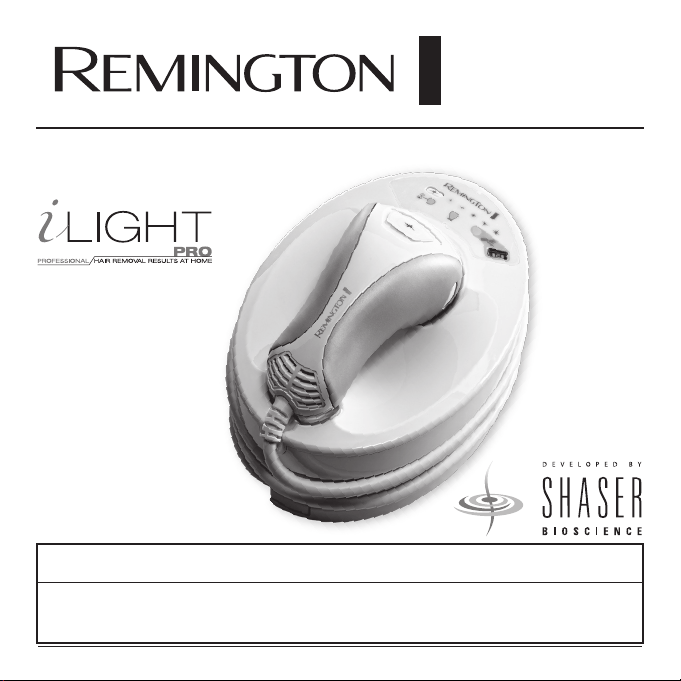
IPL6000
Use and
Care Guide
Register Your New Product Today!
By registering your new Remington
®
product, you will receive these important benefits:
Proof of Ownership • Product Protection • Product Registration • Special Offers
Register online at: www.RemingtonProducts.com
®
®

Contents
PAGE
4 Introduction
5 How Does the i-Light® Pro IPL System work?
6 i-Light® Pro System Diagram Reference
7 Getting to Know Your i-Light® Pro System
8 QUICK REFERENCE GUIDE
10 What is the Intended Use for i-Light® Pro IPL System? (Indications)
12 Contraindications
13 WARNINGS
16 Benefits and Risks
18 What to Expect with i-Light® Pro IPL System
20 How to Use Your i-Light® Pro IPL System
20 Set-up
21 Each Time You Use i-Light® Pro IPL System
21 Between Treatments

Contents
PAGE
22 Using i-Light® Pro IPL System for the First Time
22 Testing on a patch of skin
23 Using i-Light® Pro IPL System Every Time
23 Getting Ready to Use
23 Unlocking the i-Light® Pro IPL system using the Skin Tone Sensor
26 Setting the ENERGY LEVEL
28 Begin Treatment
31 After Use
32 Getting the Best Results
32 Taking Care of Your i-Light® Pro IPL System
32 Cleaning
32 Replacing the Disposable Cartridge
36 Disposing of Your i-Light® Pro IPL system
36 Troubleshooting
42 Performance Guarantee
44 Contact Information

4
Introduction
Congratulations on the purchase of your
new i-Light® Pro Intense Pulsed Light
(IPL) Hair Removal system! You’re on
your way to being liberated from the daily
chore of hair removal.
The i-Light® Pro IPL system is a revolu-
tionary light-based device designed for
the removal of unwanted body hair at
home. It uses the same Intense Pulsed
Light (IPL) technology that professional
dermatologists and salons use, but is
optimized for use in the privacy and com-
fort of your own home.
Unlike most at-home hair removal meth-
ods, the i-Light® Pro IPL system doesn’t
cut or pull out hair—it actually works
below the skin’s surface to disable active
hairs and helps prevent new ones from
growing. This is a gradual process. You’ll
start to see results within two weeks
after your initial treatment and results will
improve gradually over time.

5
How does the i-Light® Pro IPL System Work?
The process of light-based hair removal is
well-known and has been clinically prov-
en around the world for over 15 years.
The i-Light® Pro system uses this same
proven technology to emit an intense
pulse of light (IPL) to heat up and dis-
able active hair follicles. The light energy
targets dark coloring in body hair, which
is why it works best on lighter skin tones
and naturally dark hair. To determine if
your skin and hair color are ok to use
with the i-Light® Pro IPL system, refer to
information provided on page 10 and 11.
Every hair in our body goes through a
continuous growth cycle, from active
to resting phases. The time it takes to
complete a full hair growth cycle varies,
but is typically 18-24 months. Light-
based treatments only affect hairs in
the active phase, which can account for
up to 90% of hair follicles. That’s why
we recommend using the i-Light® Pro
system three times in the first month to
ensure you hit every active hair. After that,
use the i-Light® Pro system as needed
for any missed hairs or hairs that have
recently become active.
• The first 3 sessions with the i-Light®
Pro IPL system should be 2 weeks apart.
• After that, use the i-Light® Pro system
when you start to see hair re-growth in
the treated area.
• Do NOT treat the same body part more
often than every 2 weeks.
After a hair follicle is treated, it can take
one to two weeks for the hair to fall out.
During this time, it may look like hair is
still growing, but really the hair is being
“pushed out.” You may or may not see
these stubs pushed out from the skin.
If you start treating a different body part,
start the process over for that body part.
6
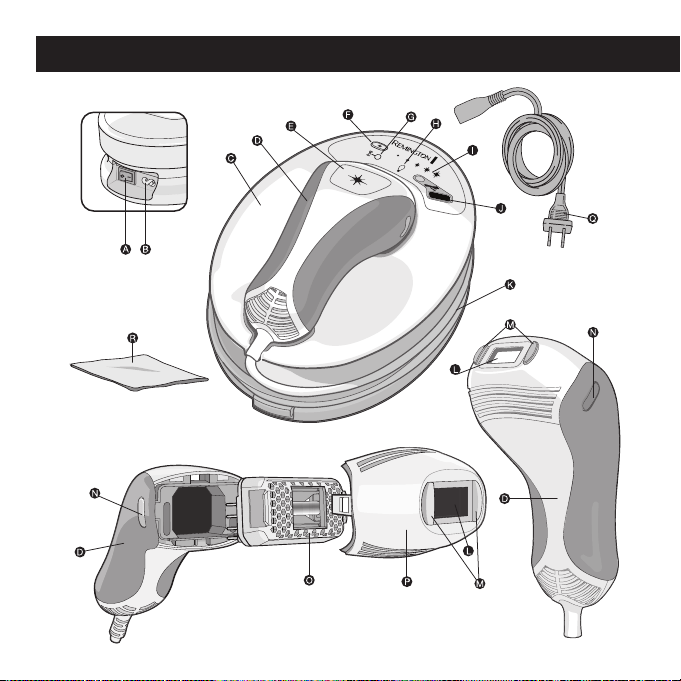
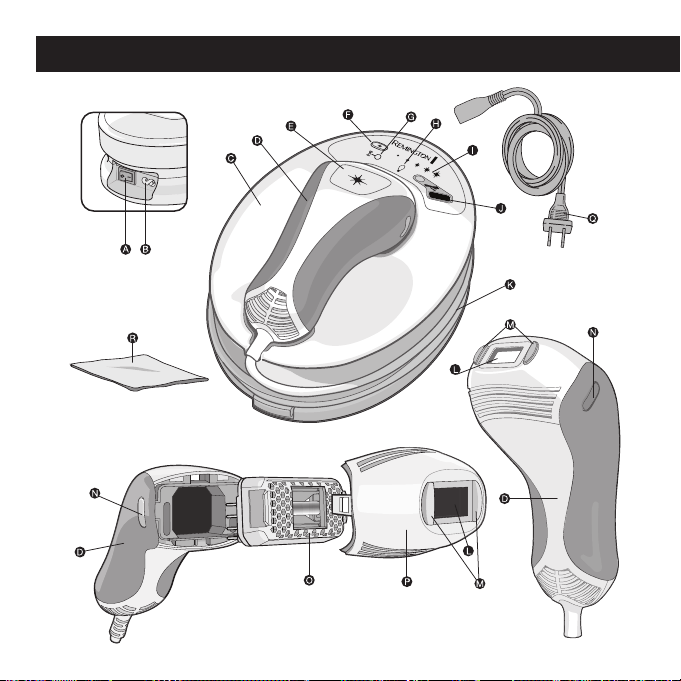
Figure1
i-Light® Pro System Diagram Reference
7
Inside the packaging for your i-Light®
Pro IPL system you will find a BASE
UNIT with HAND PIECE and POWER
CORD. You will also find a LINT FREE
CLOTH, Instructional DVD and this Use
& Care Guide. The i-Light® Pro system
comes equipped with a disposable
REPLACEMENT CARTRIDGE (inside
HAND PIECE underneath NOSE CONE).
Each Disposable Cartridge provides 1,500
flashes before it needs to be replaced.
On the BASE UNIT, there is a SKIN TONE
SENSOR (fig1. J) to test for appropriate
skin tone before usage. You control the
ENERGY LEVEL (fig1. F & I) and choose
the level that’s most comfortable
for you.
The POWER SWITCH (fig1. A) is located
on the side near the top of the unit, next
to the POWER INLET (fig1. B).
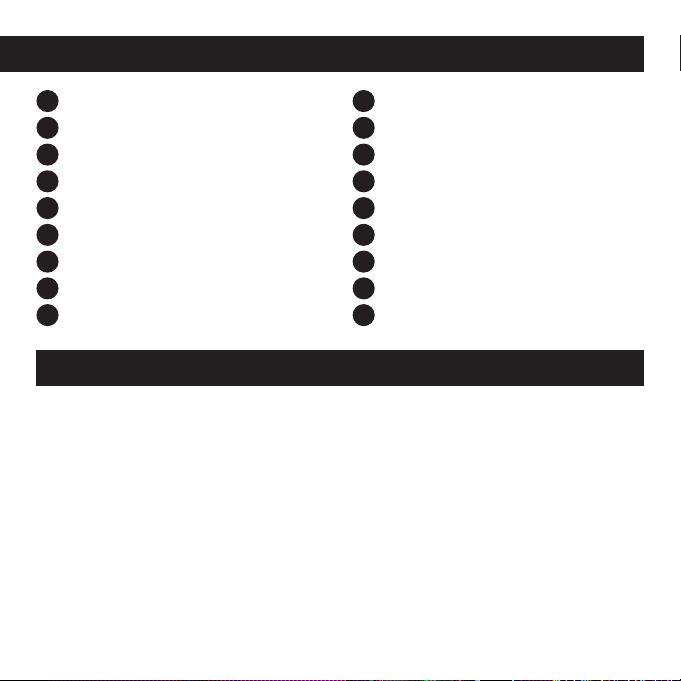
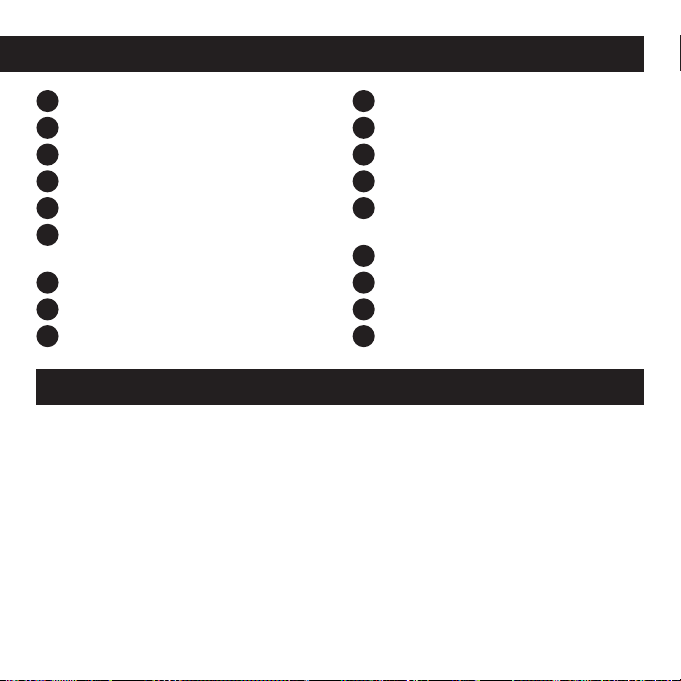
A
Power Switch
B
Power Inlet
C
Base Unit
D
Hand Piece
E
Flash Button
F
Energy Level Selection Button
G
Cool Down Mode Indicator
H
Cartridge Status Indicator Display
I
Energy Level Selection Display
J
Skin Tone Sensor
K
Hand Piece Cord
L
Flash Window
M
Skin Contact Sensors
N
Nose Cone Release Buttons
O
Replacement Cartridge
P
Nose Cone
Q
Power Cord
R
Lint Free Cloth
i-Light® Pro System Diagram Reference
Getting to Know Your i-Light® Pro IPL System
8
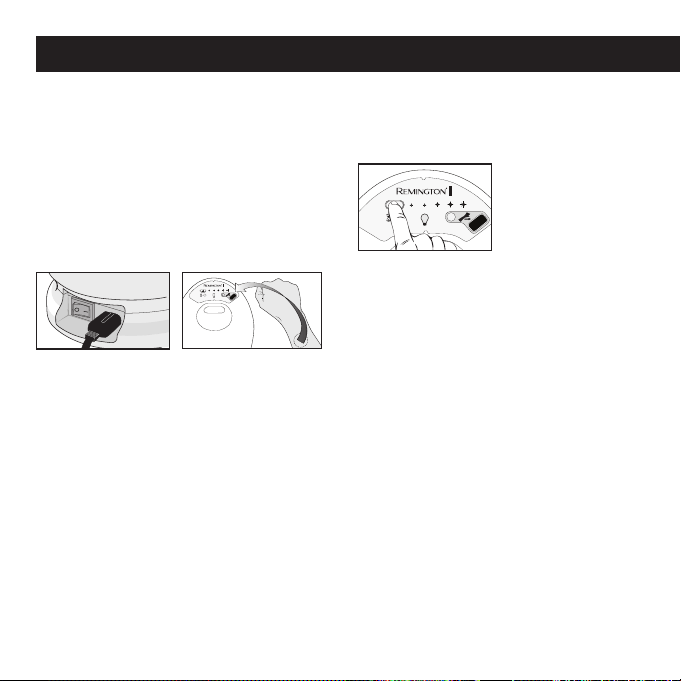
1. PREPARE SKIN (see page 23)
• Shave the hair in the treatment area
• Wipe skin clean and dry completely
2. TURN ON & UNLOCK THE
I-LIGHT® PRO IPL SYSTEM
(see page 23)
• Turn POWER SWITCH on
• Place skin in the intended treatment
area on SKIN TONE SENSOR for a
few seconds (TOUCHING SKIN TONE
SENSOR)
• UNSUITABLE skin = "BUZZ"
• SUITABLE skin = "BEEP-BEEP" and
the system will unlock
• You must unlock i-Light® Pro on each
body part you intend to treat
3. SELECT ENERGY LEVEL
(see page 26-27)
• The i-Light® Pro IPL system starts out
at the lowest level
• Test your skin at
lower levels before
increasing
• Higher energy levels improve results
but may be less comfortable
• To increase, press the ENERGY LEVEL
SELECTION BUTTON
• For best results use the highest setting
that is comfortable
QUICK REFERENCE GUIDE (see fig. 1, page 6)
9
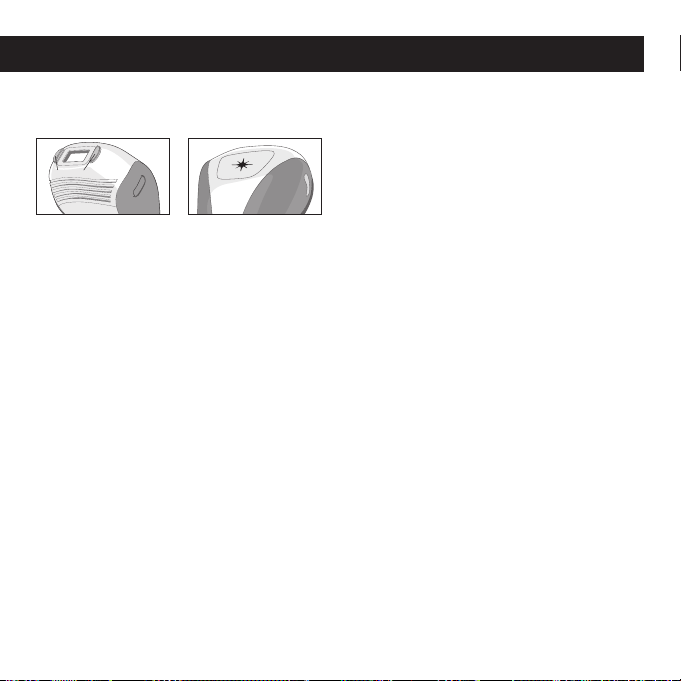
4. PLACE HAND PIECE ON AREA TO BE
TREATED (see page 28)
• If SKIN CONTACT SENSORS are NOT
in contact with skin the system will
"buzz" and will not operate if you
press the FLASH BUTTON. Double
check that the contact sensors are in
full contact with the skin.
• If CONTACT SENSORS are in full
contact with skin the system will
"CHIRP" and is ready to flash
• If you're having trouble, try pressing
the hand piece firmly against the skin
5. TREAT YOUR SKIN (see page 28-31)
• After you hear the "CHIRP" press the
FLASH BUTTON to treat skin
• When a flash is delivered, you will:
– See a bright flash of light
– Hear a "POP" sound
(the disposable cartridge)
– Feel a mild sensation of
warmth and tingling
• LIFT the HAND PIECE off the skin and
move it to a new treatment area
• DO NOT flash the same treatment spot
multiple times during one session
• Try to treat in a GRID PATTERN
Note: DO NOT physically mark the
treatment area with grid pattern as this
could cause injury to the skin.
Note: This guide is intended to be a quick
reference for experienced users of the
i-Light® Pro. If this is your first time using
the i-Light® Pro it is critical that you read
the entire Use and Care Guide for com-
plete directions for important contraindi-
cations, warnings, benefits and risks and
detailed use instructions.
QUICK REFERENCE GUIDE (see fig. 1, page 6)
SKIN CONTACT SENSORS

10
The i-Light® Pro IPL system is an over-
the-counter device intended for removal
of unwanted hair.
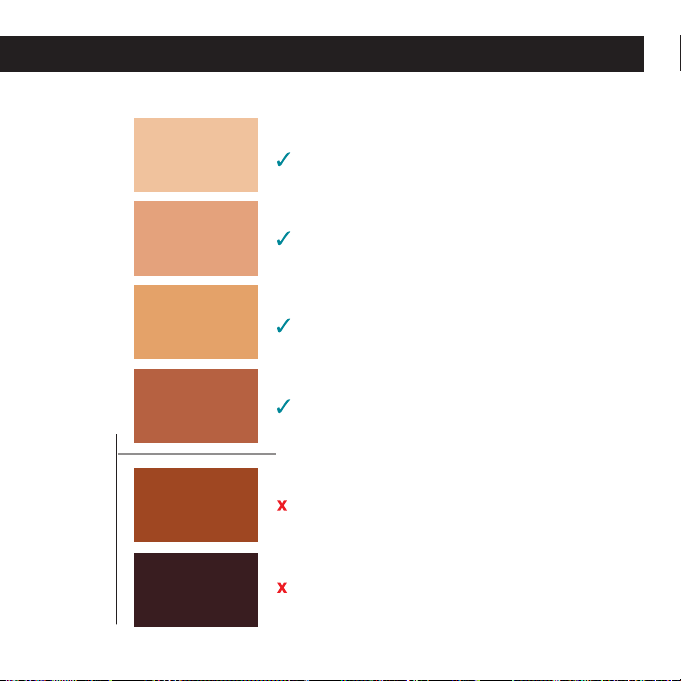
Skin Tone
It is intended for use only on light to
medium skin colors. To determine if
your Skin Tone is suitable to use with
i-Light® Pro place skin in each intended
treatment area next to the Skin Tone
Chart on page 11. If your Skin Tone
matches panels 1-4, you can use the
i-Light® Pro IPL system. If your Skin
Tone matches 5-6, DO NOT use the
system.
The i-Light® Pro system is also equipped
with a built-in SKIN TONE SENSOR that is
designed to help prevent flashing on skin
that is too dark or too tanned for treat-
ment. See page 24-25 for details. Always
test each different area you wish to treat
with the Skin Tone Chart and Skin Tone
Sensor before treating. Some areas are
darker than others.
What Is the Intended Use for the i-Light® Pro IPL System? (Indications)
Hair Color
It is intended for use on naturally black
or brown hair. Do not use i-Light® Pro
on white or gray hair because it will not
work. IPL is less effective on lighter colors,
such as blond or red hair.
Body Areas
It is intended for use by women and men
on body hair below the neck, including
legs, underarms, bikini line, chest, stom-
ach, and arms. It has NOT been cleared
in the U.S. for use on the face, head, ears,
back or neck.
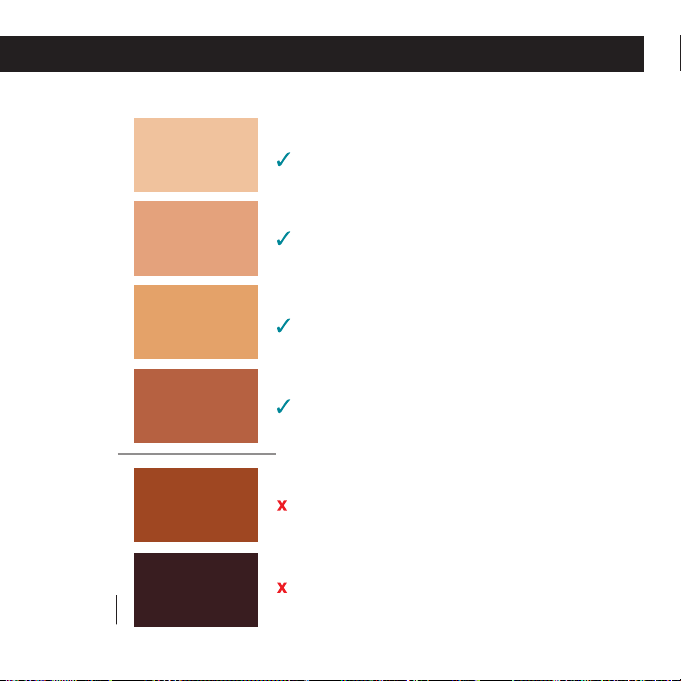
11
1
2
3
4
5
6
NOT Suitable for Use Suitable for Use
SKIN TONE CHART
What Is the Intended Use for the i-Light® Pro IPL System? (Indications)
12
Important Safety Information –
Read Before Use!
The i-Light® Pro IPL system is not
designed for everyone. Please read and
consider the information in the following
section before use.
DO NOT use i-Light® Pro on Dark
Skin. Darker skin may absorb too
much light energy which could cause
skin swelling, temporary blisters, or
could change the color of your skin.
Refer to the Chart on page 11 to
determine if skin tone in the intended
treatment area is suitable for use
with the i-Light® Pro IPL system.
You should test each different area of
skin you want to treat. Some areas are
darker than others.
DO NOT use on tattoos, dark brown
or black spots (such as dark freckles,
birthmarks, moles or warts). Tattoos
or dark spots may absorb too much
light energy which could cause skin
swelling, temporary blisters or could
change the color of your skin. Refer to
the chart on page 11 to determine if
tattoos or dark spots in the intended
treatment area are suitable for use
with i-Light® Pro. You should test each
different area of skin you want to treat.
Some areas are darker than others.
DO NOT use on the face, head, ears,
neck, nipples, genitalia, or around
the anus. These areas may have
darker skin and using the i-Light®
Pro there could cause skin swelling,
temporary blisters, or could change
the color of your skin.
DO NOT use on or around the eyes,
eyebrows or eyelashes. Doing so
can cause serious and permanent
eye injury.
Contraindications
13
WARNINGS
The i-Light® Pro IPL system is a powerful
device. As such it should be used with
special attention to safety. Please read all
warnings and safety precautions before
use and strictly follow them when using
the i-Light® Pro system.
DO NOT flash the i-Light® Pro on the
identical treatment spot multiple times
during the same session, as this could
cause skin swelling, temporary blisters or
could change the color of your skin.
See instructions on page 28-31 for
more information on how to administer
treatment.
DO NOT use if the skin tone chart on
page 11 shows that your skin tone is
not suitable. If you are African-American,
East Indian, Native American, or Pacific
Islander, you may have a skin tone that is
not suitable. Darker skin tones can absorb
too much light energy, which can injure
the skin.
DO NOT use on damaged skin, includ-
ing open wounds, cold sores, sunburns,
or areas where you have had a skin peel
or other skin resurfacing procedures
within the last 6-8 weeks (check with
your doctor). DO NOT use on irritated skin,
including rashes or swollen skin. These
conditions can make the skin more sensi-
tive to the light treatment. Wait for the
affected area to heal before using.
DO NOT use if your skin is sensitive
to light. In order to determine if you can
use, perform a test on a small patch of
skin and wait 24 hours to determine if
there are any adverse reactions before
using more broadly. See steps for testing
on a patch of skin on page 22. Contact
Customer Service (see page 44) for assis-
tance if you experience any of the issues
described on page 22.
14
DO NOT use if you are or may be
pregnant, or are breast-feeding. The
i-Light® Pro IPL system has not been
tested on pregnant women. Hormonal
changes could increase skin sensitivity
and the risk of skin injury.
DO NOT use for any purpose other
than hair removal.
DO NOT flash the i-Light® Pro against
any material other than skin.
DO NOT flash in an environment
where a spark could cause an explosion,
such as near a gas leak.
DO NOT use on any area where you
may someday want your hair to grow
back. The results may be permanent and
irreversible.
WARNINGS
15
WARNINGS
DO NOT use the system if it appears
damaged, and DO NOT attempt to open
or repair the i-Light® Pro IPL system.
These actions increase the risk of skin
or eye injury from the flash cartridge.
Contact Customer Service for assistance
(see page 44).
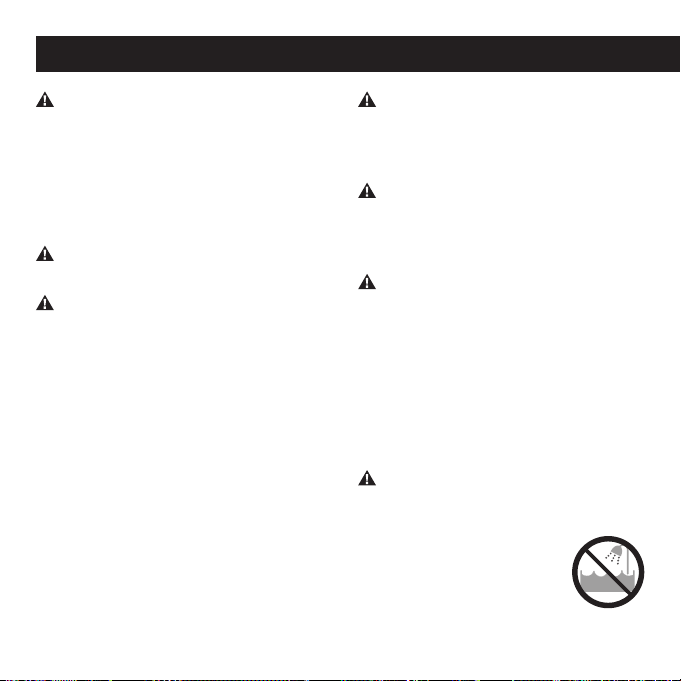
DO NOT allow the hand
piece or base to become
damp or wet. DO NOT use
near bathtubs,
showers, basins, or other
vessels containing water.
DO NOT operate with a damaged plug
or cord. Keep the cord away from heated
surfaces (such as stoves, fireplaces, radi-
ators or furnaces). DO NOT use if any part
of the i-Light® Pro system is cracked
or broken. Contact Customer Service for
assistance (see page 44).
DO NOT open the unit (except to
replace the CARTRIDGE) or attempt to
repair your system as there are no user
serviceable parts inside the i-Light® Pro
system. Trying to open it may also dam-
age the system and will void your war-
ranty. Please contact Customer Service
(see page 44) if you have a broken or
damaged system in need of repair. Failure
to follow these precautions can cause
electrocution or electric shock.
DO NOT cover any part of the i-Light®
Pro BASE UNIT or HAND PIECE ventilation
slots during use, as they help to keep the
system cool during operation. Covering
the ventilation slots could result in over-
heating.
KEEP OUT OF REACH OF CHILDREN!
The i-Light® Pro IPL system is a powerful
device and should not be used by anyone
under the age of 18. DO NOT leave the
system unattended around children, as
the cords represent a choking hazard.
Children should be supervised to ensure
that they do not play with the appliance.

16
Benefits and Risks
A medically-supervised clinical study
showed that the i-Light® Pro IPL system
was effective in the removal of unwanted
hair when used as directed.
60 participants entered the clinical trial
with the i-Light® Pro and treated 3 times
over a 4 week period. Treatments were
performed on underarms, legs, bikini area,
stomach, chest and arms. Hair counts were
performed on site before treatment and
again 3 and 6 months after the final treat-
ment. Any side effects observed or reported
were documented by medical personnel.
This study showed the benefits and risks of
hair removal with the i-Light® Pro system.
The following sites are contraindicated and
were therefore excluded from treatment:
face, head, ears, neck, nipple, genitalia,
anus, eyes, eyebrows or eye lashes.
Benefits
When used as directed, i-Light® Pro
IPL system helps remove unwanted hair
without the need for daily shaving, wax-
ing, or plucking. In a clinical study, after
just three treatments, participants show
an average of 37% less hair 3-months
after the last treatment and 48% less
hair 6-months after last treatment.
Actual results vary from person to per-
son, depend on the body area being
treated, and whether instructions were
followed correctly.
Risks
It is important to use the i-Light® Pro
IPL system properly. Make sure that you
read and follow all the warnings (pages
13-15) and that you don’t use the device
if it isn’t right for you (see pages 10-12).
If you don't understand any of the warn-
ings or have any questions, please con-
tact Customer Service (page 44).
If you use the i-Light® Pro system as
directed, the risks are low:
• In a clinical study, most users reported
mild or no discomfort at all from treat-
ments, with sensation decreasing over
multiple treatment sessions. This is
normal. You may feel warmth, burn-
ing, tingling, or itching; some users
described feeling the same level of

17
discomfort as when a rubber band is
lightly snapped against the skin. If the
pain is too intense or persists after
a treatment, stop using and contact
Customer Service (page 44).
• Your skin may become red within 24
hours after treatment. This redness
generally clears up within a few hours.
See your doctor if the redness does not
go away within 2–3 days.
• Temporary blisters. These are unlikely
for people with a light or medium skin
tone. If you do develop a blister, stop
using i-Light® Pro, clean the blister
with soap or antiseptic and cover the
blister with a bandage and change
daily to help prevent the blister from
becoming infected. Contact Customer
Service on page 44 if you need more
information.
• In rare cases, some users may see an
increase in the number of hairs in the
treated area after treatment. Since hair
grows in cycles, this increase is gener-
ally temporary. If at any time after you
begin using i-Light® Pro you believe
that the number of hairs regrowing in
the treatment area is greater than the
number that existed before you started
treatment, stop using i-Light® Pro and
contact Customer Service (page 44). If
this increase persists over several treat-
ments, stop using and see your doctor.
The following symptoms affected no
participants in the clinical study, but have
been reported with other hair removal
lasers or IPL devices:
• Skin swelling, especially around the hair
follicle. If the swelling doesn’t go away
within 2–3 days, stop using and contact
Customer Service (page 44).
• Skin discoloration. If you notice that
your Skin Tone in the treatment area
has changed, stop using and contact
Customer Service (page 44).
•
Eye injury. Flashing any laser or IPL
device near or around the eyes could
cause serious and permanent eye injury.
This is very unlikely so long as the device
is used below the neck as indicated.
Benefits and Risks

18
During Treatment
The i-Light® Pro IPL system has been
designed for ease of use, and hair
removal sessions should go by quickly.
During a session it is normal to experi-
ence and feel:
■ A Fan Noise: the fan starts up once the
Skin Tone Sensor is unlocked. The
noise is similar to, but quieter than a
hairdryer. This is normal and is key to
keeping the unit and flash lamp cool.
■ A Flash of Light: the Skin Contact
Sensors ensure that most of the light
is directed into the skin. The remaining
visible light will not harm the eyes
when applied to non-facial sites, and
special eye protection is not needed
as long as you follow directions in this
Use and Care Guide.
■ A Sound with Each Flash: When a flash
of light is activated, it is normal to
hear a subtle “pop” sound as the light
flashes.
■ A Sensation of Warmth and Tingling:
Actual sensations felt by users will
vary by person and body part being
treated. Many people describe each
flash like a rubber band being lightly
snapped against the skin. If the
sensation is too intense or painful, stop
using and contact Customer Service
(page 44).
■ Some Mild Redness: During and
just after your IPL session, it is not
uncommon to see some very mild
redness , mostly noticeable around the
hairs themselves. This is normal and
typically clears up within a few hours.
However, contact Customer Service
(page 44) if the redness does not go
away within 2-3 days.
What to Expect with the i-Light® Pro IPL System
19
Note:
• You should complete your first three treatments over the first month to ensure that
you have hit all hairs in the growth phase in the targeted area.
• After the third treatment it’s important to continue your treatments only as-needed to
target hairs that have recently entered the active cycle.
• Repeat the process for every body part with unwanted hair.
Immediately
After First
Treatment
1 to 2 Weeks
After Initial
Treatments
One Month
After Initial
Treatments
Three Months
After Initial
Treatments
Completed
•
There will be no
visible change to
the hair or appear-
ance of the skin.
• On occasion,
some users
experience mild
redness that
usually dissipates
within a few hours.
• Hairs in treated
area will begin to
fall out gradually.
• You will not
likely notice sig-
nificant reduction
in hair at this
early stage.
• You should see a
noticeable reduction
in hair re-growth in
the treated area.
• Any hair re-growth
should be lighter
and finer.
• Enjoy the
freedom!
• Only use i-Light®
Pro IPL system for
occasional
touch-ups where
necessary.
What to Expect with the i-Light® Pro IPL System
Treatment Expectations
Figure 2
20
Set-Up
1.
2.
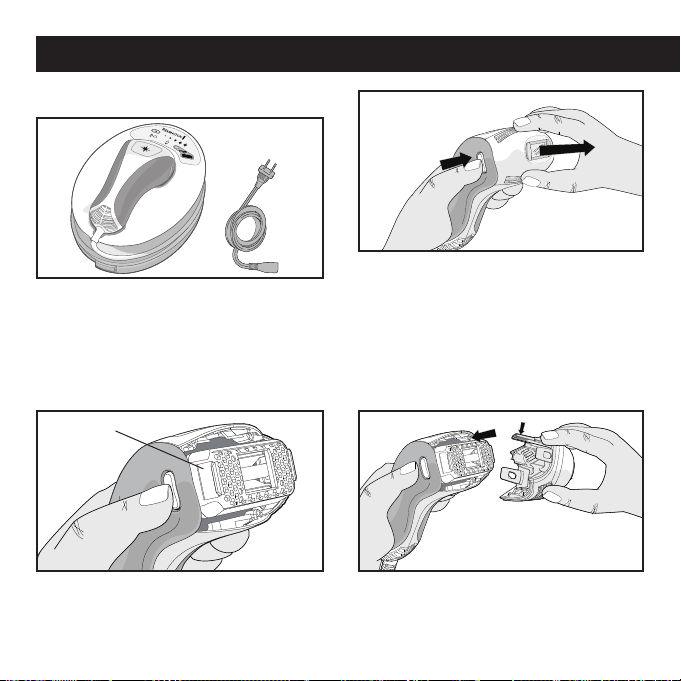
1. Remove base unit, power cord and
other components from the box.
Note: before plugging in system, check
to ensure that the cartridge is properly
inserted (steps 2-4 following).
3. Verify that the disposable cartridge is
inserted correctly and fits snuggly into
hand piece.
2. Press both nose cone release buttons
with your thumb and index finger. (1)
Then, with both buttons pressed, gently
remove the nose cone with your other
hand. (2) Note: set the nose cone in a
safe location taking care not to damage
the flash window and other components.
4.
Gently snap the nose cone back into the
hand piece. Note: the longer tab (with gold
circuits) must be on top to properly fit.
Disposable Cartridge
How to Use Your i-Light® Pro IPL System
21
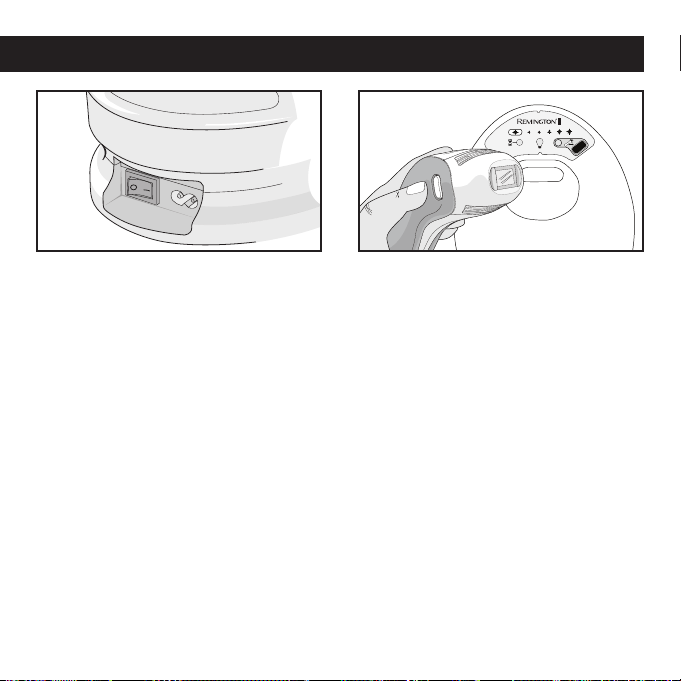
5. Plug the power cord into the system
socket, plug the other end of the power
cord into an electrical outlet, and press
the power switch to start up the system.
6. Your i-Light® Pro IPL system is now
ready to start. Before your first use, test
a small patch of skin and wait 24 hours
(see page 22).
How to Use Your i-Light® Pro IPL System
• Clean, shave and dry your skin before
treatment (page 23)
• Clean the system (including Hand
Piece, Flash Window, Skin Contact
Sensor and Skin Tone Sensor Window)
(page 32)
• Unlock the system using the Skin Tone
Sensor (page 23)
• Set the system to the desired
ENERGY LEVEL (page 26)
• Use in a cool place (< 80° F / 27° C)
and follow our tips for best results
(page 32)
Each Time You Use the i-Light® Pro IPL System
• You can shave, but don’t wax, epilate or
pluck hair because removing the hair
root will disrupt the IPL process
• After about 1-2 weeks, hair in the treat-
ed areas will start to fall out naturally
Between Treatments

22
Testing on a Patch of Skin
As with any new skin care product, we
recommend testing on a patch of skin
before your first full treatment, or before
using in any new body area. You may
want to use different energy levels for
different areas since sensitivity may vary
by body part.
Note: you will get better results
by using the system at higher
energy levels.
• Get your skin ready (see page 23) and
unlock the system with the Skin Tone
Sensor (see page 23). The system will
default to energy level 1.
• In energy level 1, treat your skin with
one single flash. Mild to moderate
pain is normal – if you feel more than
moderate pain, stop using immediately
and call customer service (see page 44)
for help.
• If it feels tolerable on energy level 1,
press the energy level button once to
change to energy level 2 (see “setting
the energy level” on page 26). Move the
system to a different spot and flash one
more time. If you don’t feel comfortable
using the system at energy level 2, then
energy level 1 is the right setting to
start out with.
• Repeat this process until you find the
setting that feels right for you.
• Wait 24 hours and then look at the test
area. If the skin appears normal, pro-
ceed with your treatment at the setting
that’s right for you.
If you notice skin swelling, temporary
blisters or change in the color of your
skin, or any other side effects, or if you
are not sure about the outcome of the
test, do not use and contact Customer
Service (see page 44) or call your doctor
for assistance.
• Repeat the test if you decide to try the
system on a different part of the body,
or if your skin tone has changed (for
example, from a sun tan).
Using the i-Light® Pro IPL System for the First Time

23
Using the i-Light® Pro IPL System Every Time
Getting Ready to Use
Before using, shave the hair in the treat-
ment area to minimize the sensation felt
from the flashes. IPL works below the
skin, so the system is still effective even
if hairs are not clearly visible. After shav-
ing, wipe the skin clean and completely
dry the area before using.
Use in a cooler environment, where the
temperature is less than 80° F or 27° C
to help keep the system from
overheating.
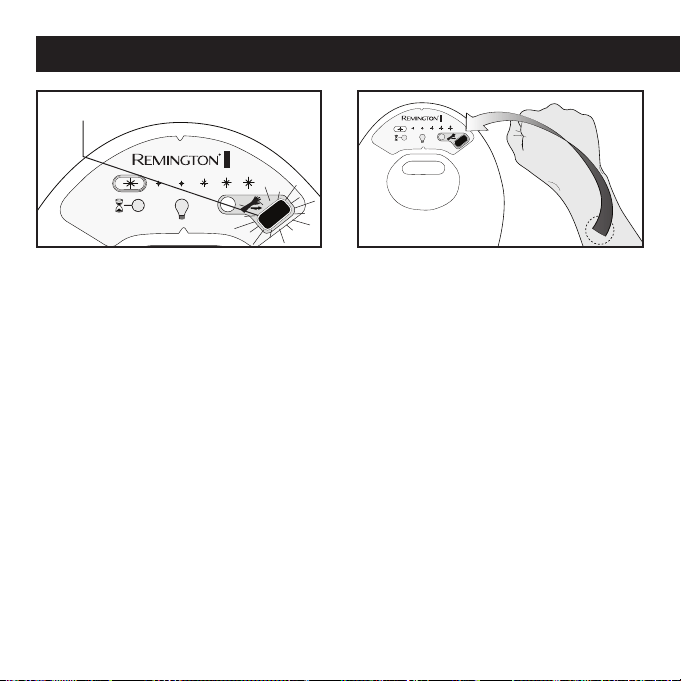
Unlocking the i-Light® Pro IPL System
Using the Skin Tone Sensor
Every time you turn on the system, it
starts in locked mode. This Skin Tone
Sensor LED will be blinking and you will
hear a series of audible "beeps." The
i-Light® Pro cannot be used until it is
unlocked. You need to unlock the system
with the SKIN TONE SENSOR every time
you want to use the device and you must
use the skin tone sensor to test each
body part you intend to treat.
Using the i-Light® Pro device on darker
skin could cause skin swelling, temporary
blisters, or could change the color of your
skin. The skin tone sensor helps confirm
whether your skin is too dark to treat with
the i-Light® Pro. Since some areas are
darker than others, you should use the
skin tone sensor on each different area of
skin you wish to treat. Make sure your skin
is clean and dry and shave, if necessary, to
be sure it is free of hair.
24
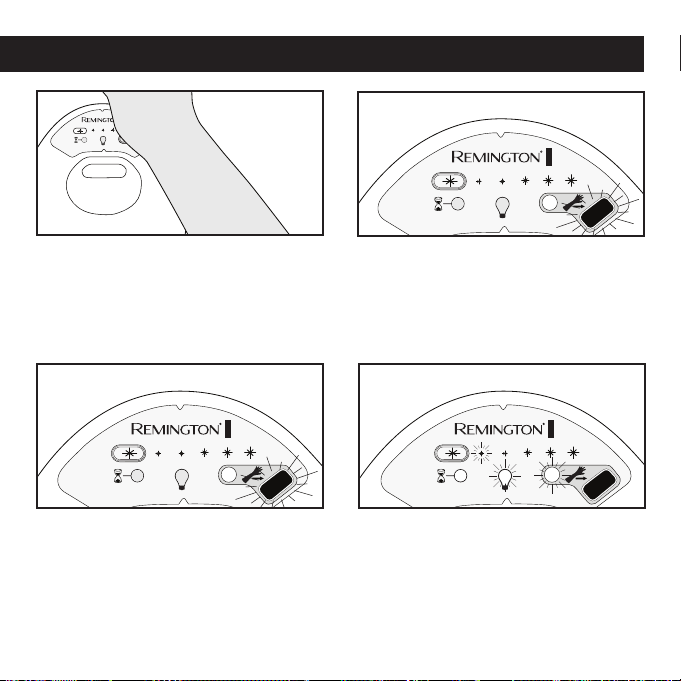
2. Always place the skin tone sensor
window directly on the area of skin
you plan to treat. The reading will take
place automatically.
Note: You must use the Skin Tone Sensor
to test color on each body part you plan
to treat.
Using the i-Light® Pro IPL System Every Time
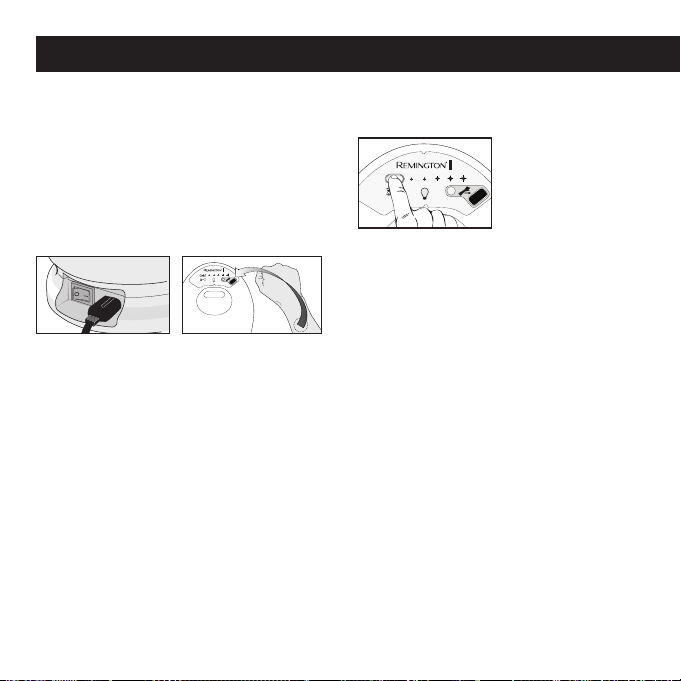
1. Turn the POWER SWITCH on. The
SKIN TONE SENSOR LED will flash
ORANGE. You will hear a series of
audible “BEEPS” every 5 seconds to
remind you to take the test. For safety
reasons, after 30 seconds of inactivity,
the audible “BEEPS” will increase in
frequency until the test is taken or the
machine is turned off.
SKIN TONE SENSOR LED
will be blinking orange
25
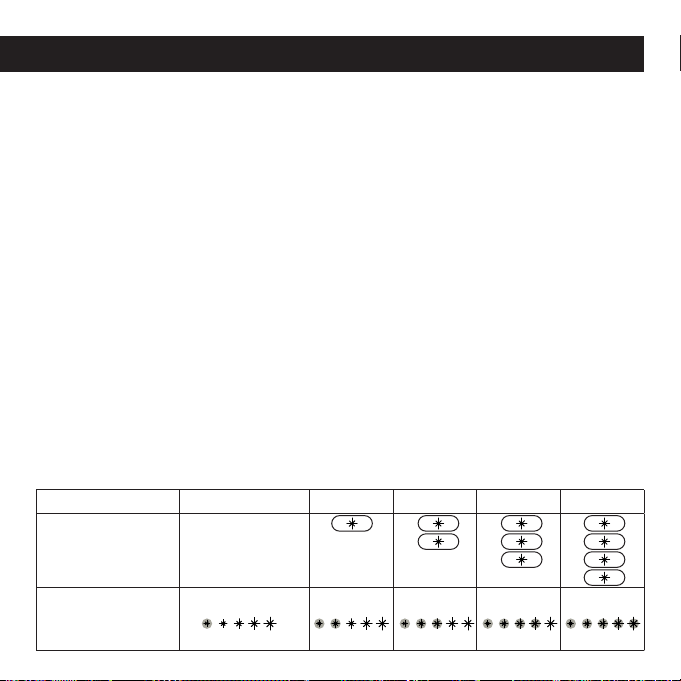
3. Place the body part to be treated over
the SKIN TONE SENSOR (touching the
unit) the Sensor will immediately read
the skin type.
3b. If your Skin Tone is suitable for use, a
high-pitched “BEEP” will sound and
the LED will turn green and the sys-
tem will be enabled.
3a.
If your Skin Tone is NOT suitable for use,
the SKIN
TONE
SENSOR LED turns solid
ORANGE and the system will “BUZZ”
once for 5 seconds. After 5 seconds,
you may re-try the SKIN
TONE
SENSOR.
4. Once the system is enabled, the
ENERGY LEVEL LIGHT and CARTRIDGE
STATUS INDICATOR LIGHT will turn on
and the internal fan will start. Your sys-
tem is now unlocked, set to the lowest
energy level setting, and ready for use!
Using the i-Light® Pro IPL System Every Time

26
Notes:
• Some areas are darker than others.
You must use the skin sensor on each
different area you intend to treat.
• If you feel the SKIN TONE SENSOR
has not made a proper reading, you
may try again after 5 seconds. If you
believe your skin is suitable based on
the Skin Tone chart on page 11 but the
SKIN TONE SENSOR will not enable the
system, contact Customer Service (see
page 44).
• If you have gotten a sun tan since the
last time you used the system, your
skin may be too dark to treat. You may
need to wait until the sun tan fades to
continue your hair removal treatments.
Use the SKIN TONE SENSOR to deter-
mine if the area is too dark to treat.
• For safety reasons, the system will
re-lock after 5 minutes of inactivity.
If you take a break in the middle of a
treatment, or if you turn off the system,
you will need to use the SKIN TONE
SENSOR to unlock the IPL again.
Setting the Energy Level
Energy Level Selection Display lights
determine the intensity of the light flash
delivered to your skin, from the lowest
level (*) to the highest level (*****). Higher
levels improve hair removal results, but
may be less comfortable. To get the best
results, you should use the highest setting
that’s comfortable.
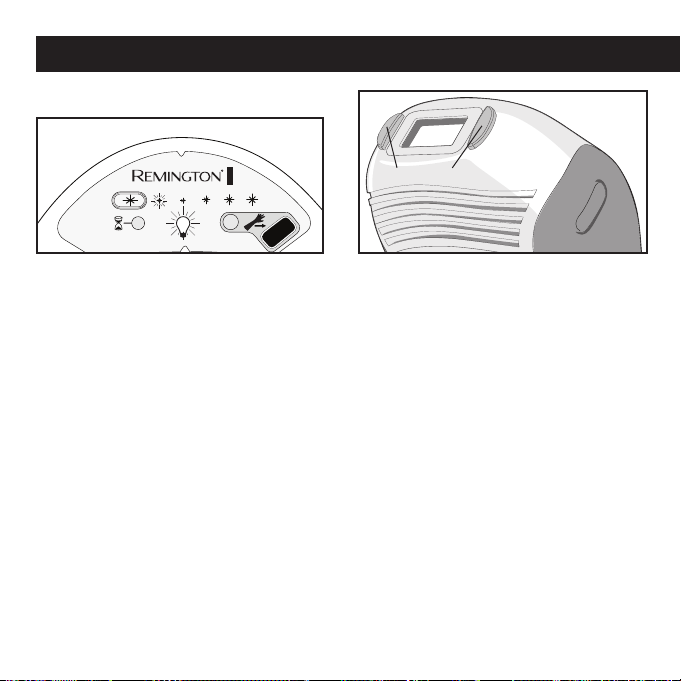
There are 5 energy level settings on
the i-Light® Pro system. Whenever the
i-Light® Pro IPL system is turned on, the
device is automatically set to the lowest
energy level and only one ENERGY LEVEL
INDICATOR SELECTION light will be on
(ENERGY LEVEL 1 in the table on page
27).
To modify the energy level, press the
ENERGY LEVEL SELECTION BUTTON to
increase the energy level. Once the
energy level has reached level 5,
pressing the ENERGY LEVEL SELECTION
BUTTON will return the system to energy
level 1. The number of ENERGY LEVEL
SELECTION DISPLAY lights will coincide
with the change in energy level.
Using the i-Light® Pro IPL System Every Time
27
setting is selected. After reaching
Level 5, pressing the ENERGY LEVEL
SELECTION BUTTON an additional time
will reset to Level 1.
Note:
• Periodically, the hand piece or base unit
will hit a certain temperature and will go
into a cool down state and temporarily
stop working. The COOL DOWN MODE
INDICATOR will flash and the unit will
beep. Simply wait for the system to regu-
late itself to the appropriate temperature.
The light will turn off and you will be able
to continue treatment.
• The number of flashes delivered before
the cool down state initiates depends
on several factors, including energy
level, how fast you apply the treat-
ments, and the room temperature.
Energy Level 1 2 3 4 5
Press Energy
Level Setting
Button
Defaults to Level
1 upon start-up.
Energy Level
Selection Display
Lights:
Figure 3
Using the i-Light® Pro IPL System Every Time
1. Upon start-up, the system sets itself to
the lowest energy level (Level 1). The
system is now ready.
2. To change the energy level press
the ENERGY LEVEL SELECTION
BUTTON to increase the energy level
until the desired energy level is set.
Selection Display lights will coincide
with the energy level setting. For
example, pressing the ENERGY LEVEL
SELECTION BUTTON once will increase
from Level 1 to Level 2; pressing
another time will increase to Level 3.
3. If a higher energy level was previously
selected and a lower energy level
is desired, continue to press the
ENERGY LEVEL SELECTION BUTTON
until the desired lower energy
28
Begin Treatment
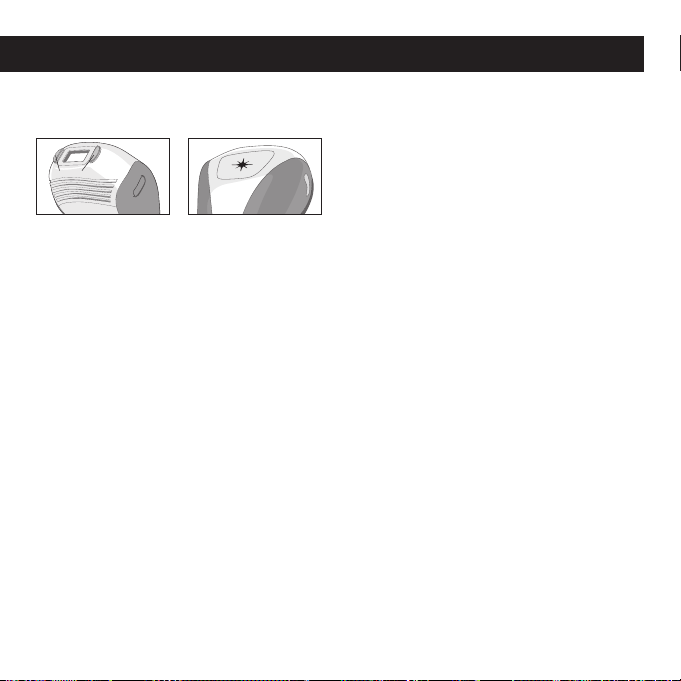
1. Ensure that the ENERGY LEVEL is on a
comfortable setting (See “Setting the
Energy Level” on Page 26 for details
about the different settings).
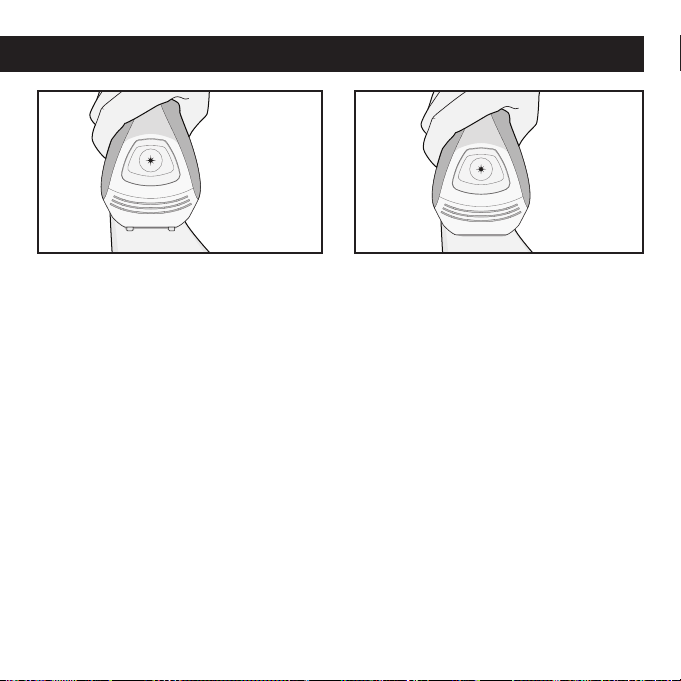
2. Apply the HAND PIECE to the skin
making sure the skin is spread evenly
and smoothly. Make sure the SKIN
CONTACT SENSORS on the NOSE
CONE are in full contact with the skin.
SKIN CONTACT SENSORS
Using the i-Light® Pro IPL System Every Time
29
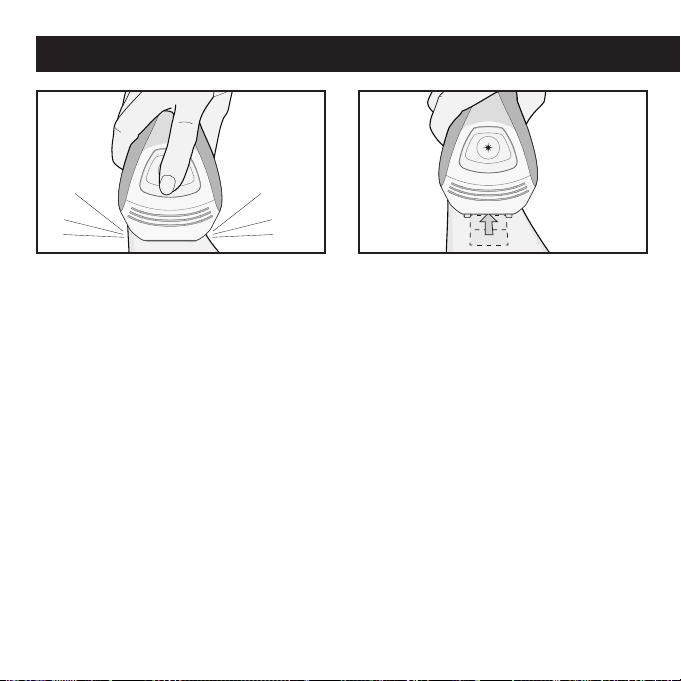
3. If the SKIN CONTACT SENSORS are
NOT in full contact with the skin, the
system will "buzz" and will not oper-
ate if you press the FLASH BUTTON.
Double check that the contact sensors
are in full contact with the skin.
Note: DO NOT press HAND PIECE too
firmly against skin in order to make con-
tact. Doing so may cause the skin to be
too close to the flash window and could
cause skin swelling, temporary blisters or
could change the color of your skin. Try
changing the orientation of the device for
better skin contact.
4. If the SKIN CONTACT SENSORS on the
NOSE CONE are in full contact with the
skin, a series of high-pitched beeps will
sound, indicating the system is OK to
flash.
Note: Do not block the ventilation slots on
the HAND PIECE as these help cool the
system during use.
Using the i-Light® Pro IPL System Every Time
30
Using the i-Light® Pro IPL System Every Time
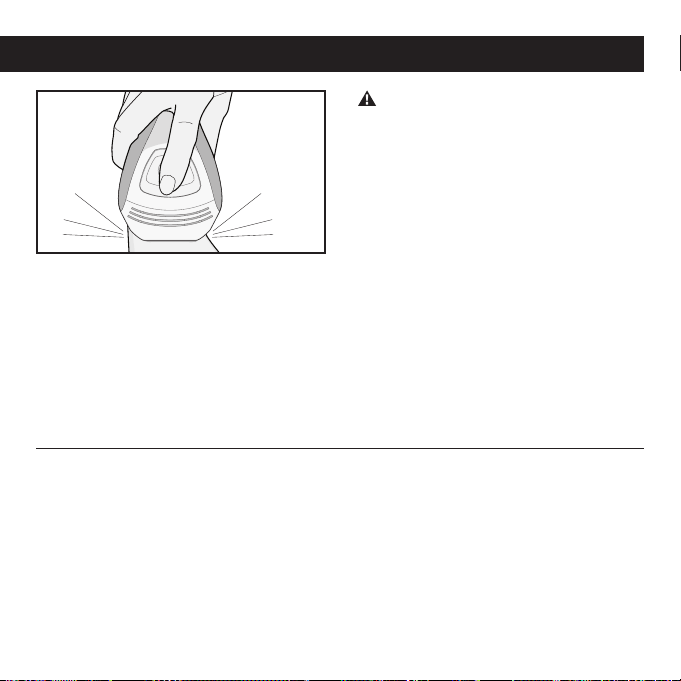
5. Press the FLASH BUTTON. The system
will flash a pulse of light onto your skin.
You will see a bright flash of light and
simultaneously hear a sound, which is
normal for the device. You may feel a
mild sensation of warmth and tingling.
6. I
mmediately after a flash is delivered,
move the HAND PIECE to a new treat-
ment location while keeping the FLASH
BUTTON pressed down. If the NOSE
CONE is in full contact with the skin and
the FLASH BUTTON is pressed down
the system will beep and another flash
will be delivered in approximately 2
seconds.
31
DO NOT flash on the same treatment
spot multiple times during the same ses-
sion, as this could cause skin swelling,
temporary blisters or could change the
color of your skin.
Note: For faster coverage, hold down
the FLASH BUTTON while you lift the
HANDPIECE and place it back in contact
with the new area to be treated. After
about 2 seconds, the unit will deliver a
flash to the skin as soon as full contact
between the skin and the HAND PIECE is
established.
7. Try to treat in an organized, grid-like
pattern to ensure you cover all the
hairs in the intended treatment area.
Repeat step 6 until the desired treat-
ment area is fully covered. Depending
on the body part, the treatment time
will vary.
Using the i-Light® Pro IPL System Every Time
After Use
• When your session has been com-
pleted turn off the system by turning
the POWER SWITCH off. (Be sure to
remember the last energy level setting
you used as it will not be restored when
turning the system on again).
• Unplug the power cord from the
electrical outlet.
• After each hair removal session it is
recommended that you clean your
system, especially the NOSE CONE and
FLASH WINDOW (See “Cleaning”
page 32)
• After cleaning, we recommend that
you store your i-Light® Pro system in
its original box and keep it away from
water.

32
• Shave immediately before treating the
area. Doing this will let you use a higher
energy level, because there will be less
hair to heat up and the treatment will be
more comfortable. How well you shave
will make a big difference in how the
treatment feels. See page 23.
• Use the highest energy level setting
that’s comfortable for you. Higher energy
levels are more effective. See page 26.
• Have a plan to work each treatment
area in an organized, grid-like pattern to
ensure that you don’t overlap treatment
spots.
Note: DO NOT physically mark the
treatment area with grid pattern as this
could cause injury to the skin.
• If you’ve waxed, tweezed or epilated the
hair in the treatment area, wait 6 weeks
before using the system. IPL uses the
hair under your skin to disable your hair
follicles, so it is not effective if the hair
has been pulled out.
• Stick with the full treatment for
each body area.
Cleaning
After each session, it is recommended
that you clean your system, especially
the HAND PIECE, the FLASH WINDOW, the
SKIN CONTACT SENSORS, and the SKIN
TONE SENSOR window.
DO NOT place any part of the device
in water or other liquids. If any part of the
device gets wet, DO NOT USE. Contact
Customer Service (see page 44) for help.
As with any electrical device, a wet sys-
tem could cause electrocution or electric
shock.
• Make sure the device is turned off.
Remove the POWER CORD from the
BASE UNIT and Wall Socket before
cleaning.
• Use a clean, lint-free cloth (one is
provided with the unit) to gently wipe
the surface and especially the NOSE
CONE, FLASH WINDOW, SKIN CONTACT
SENSORS and the SKIN TONE SENSOR
window. If needed, you can dampen the
Getting the Best Results

33
Replacing the Disposable
Cartridge
The DISPOSABLE CARTRIDGE can deliver
1,500 light flashes regardless of the
energy level setting. Flash intensity is
determined only according to the energy
level setting of the system. There is no
significant decrease of energy during
the usable lifetime of the DISPOSABLE
CARTRIDGE.
When a DISPOSABLE CARTRIDGE has
reached 90% of its possible lifetime the
CARTRIDGE STATUS INDICATOR DISPLAY
light will turn yellow indicating that the
DISPOSABLE CARTRIDGE should soon
be replaced. Once all 1,500 flashes in
a DISPOSABLE CARTRIDGE have been
used, the CARTRIDGE STATUS INDICATOR
DISPLAY light will flash yellow indicating
that further flashes cannot be delivered.
In order to continue the hair removal ses-
sion, it will now be necessary to replace
the DISPOSABLE CARTRIDGE. Note:
A DISPOSABLE CARTRIDGE must be
replaced if the LAMP TUBE is broken.
Taking Care of Your i-Light® Pro IPL System
cloth with water and mild soap. Allow
the unit to dry completely before using
again.
• Inspect the vents in the unit and hand-
piece for lint and debris. Vacuum out
periodically.
• If you still need to remove dirt or debris,
you can use your fingernail or a firm
piece of plastic like a credit card. Be
careful not to damage the FLASH
WINDOW.
DO NOT attempt to open or repair
your i-Light® Pro system. Contact cus-
tomer service for more information
(see page 44).
34
Flash Bulb Usage
0 – 90% 90 – 100% > 100%
Flashes
0 – 1,350 flashes
1,351 – 1,500
flashes
> 1,500 flashes
Cartridge Status
Indicator Display
Cartridge Status
Indicator Display
Flash & Audible Tone
Cartridge Status
Indicator LED will
be lit solid GREEN,
with no audible
tone.
Cartridge Status
Indicator LED will
be lit solid YELLOW,
with no
audible tone.
Cartridge Status
Indicator LED will
flash YELLOW, with
an audible beep
every 0.5 seconds
until cartridge is
replaced.
Note: Allow the system to cool down for
5 minutes before attempting to change the
DISPOSABLE CARTRIDGE.
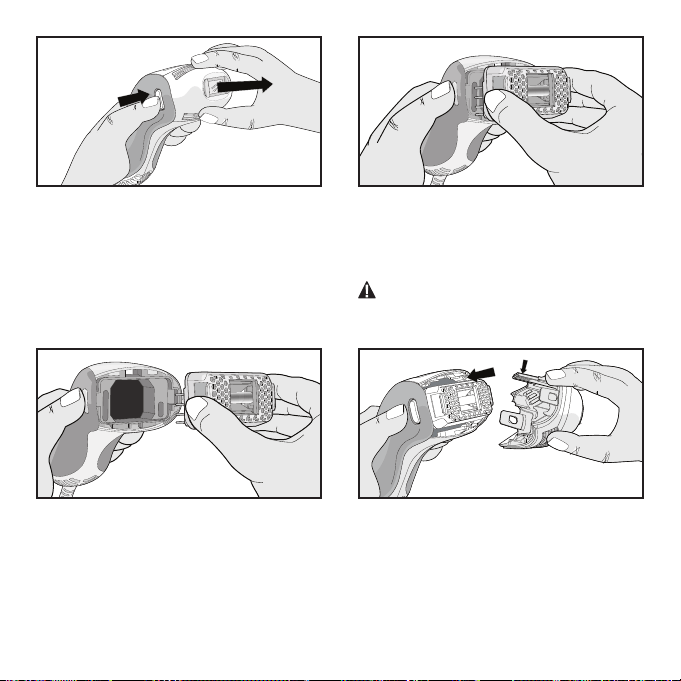
2. Turn the POWER SWITCH off and unplug
the POWER CORD from the electrical
outlet.
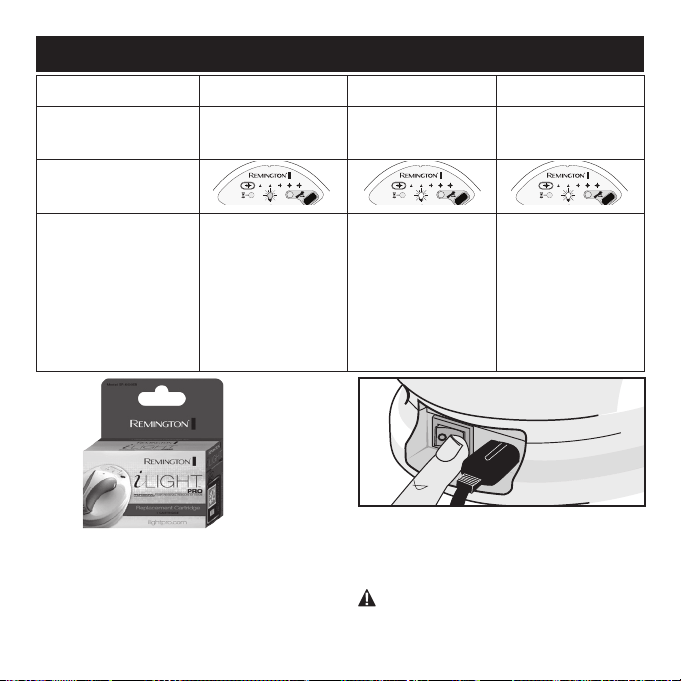
1. Obtain a new DISPOSABLE CARTRIDGE
(SP-6000SB). Check with your local
retailer or visit RemingtonProducts.com
for purchase.
Taking Care of Your i-Light® Pro IPL System
35
Flash Bulb Usage
0 – 90% 90 – 100% > 100%
Flashes
0 – 1,350 flashes
1,351 – 1,500
flashes
> 1,500 flashes
Cartridge Status
Indicator Display
Cartridge Status
Indicator Display
Flash & Audible Tone
Cartridge Status
Indicator LED will
be lit solid GREEN,
with no audible
tone.
Cartridge Status
Indicator LED will
be lit solid YELLOW,
with no
audible tone.
Cartridge Status
Indicator LED will
flash YELLOW, with
an audible beep
every 0.5 seconds
until cartridge is
replaced.
4. Grasp the DISPOSABLE CARTRIDGE
and gently pull away from the HAND
PIECE. Discard the used cartridge in
accordance with local regulations.
WARNING: Ensure cartridge has cooled
for 5 minutes before handling. Exercise
care when replacing cartridge.
5.
Push the new DISPOSABLE CARTRIDGE gently
into place, taking care not to touch the LAMP
TUBES or damage the pins
on the cartridge. Note: the DISPOSABLE
CARTRIDGE must be oriented so that
the side with 4-pins is on the left, and the
side with 1-pin is on the right.
6. Gently push the NOSE CONE back into
the HAND PIECE making sure both
sides click into place.
Note:
the longer
tab (with gold circuits) must be on top
to properly fit.
3. Grasp the NOSE CONE with one hand
while pressing both NOSE CONE
RELEASE BUTTONS with the other
hand and pull gently. Set the NOSE
CONE in a safe location taking care not
to damage the FLASH WINDOW and
other components.
1.
2.
36
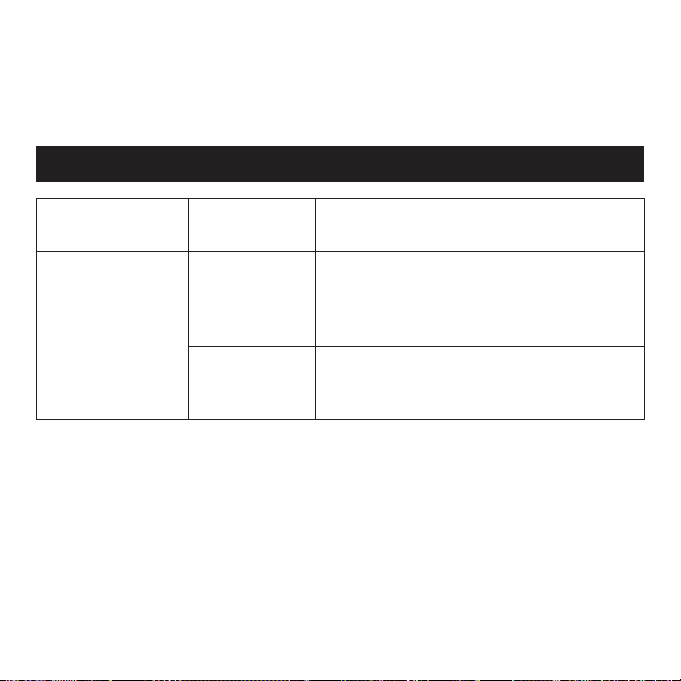
PROBLEM POSSIBLE
CAUSE
WHAT YOU SHOULD DO
My i-Light® Pro
IPL system does
not start.
The system isn’t
connected
properly.
Make sure the power cord is properly con-
nected to the i-Light® Pro system and that
the power cord is plugged into an electrical
outlet on the wall.
The outlet isn’t
working.
Check if a wall switch controls the power to
the wall outlet, or try plugging another system
into the outlet and seeing if it works.
Troubleshooting
Disposing of your i-Light® Pro IPL System
Please follow the regulations where you live for disposal of electric systems when
recycling or disposing of your i-Light® Pro base unit, hand piece or disposable cartridge.
37
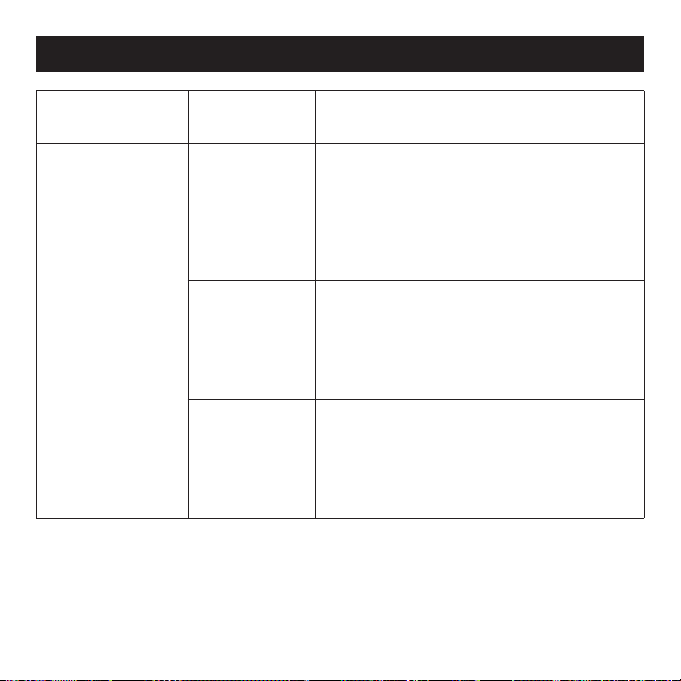
PROBLEM POSSIBLE
CAUSE
WHAT YOU SHOULD DO
When I place
the HAND PIECE
against my skin,
nothing happens.
The HAND PIECE
doesn’t beep,
even after a
few seconds.
The system is
locked.
Unlock the system with the SKIN TONE
SENSOR, using the steps on page 24-25.
Note that the system must be unlocked again
if you don’t use it for 5 minutes. If you take a
break in the middle of a treatment, or turn off
the system, you will need to unlock it again.
The SKIN CON-
TACT SENSORS
aren’t in full contact
with the skin
.
Check that both SKIN CONTACT SENSORS are
touching your skin. The system won’t work
unless it’s flat against your skin.
You are trying
to treat a small
area, such as
fingers or toes.
You can try pulling your skin taut to make a
bigger flat area, so that the window can reach
it. If you can’t get the entire window to touch
your skin, the system will not work.
Troubleshooting
38
Troubleshooting
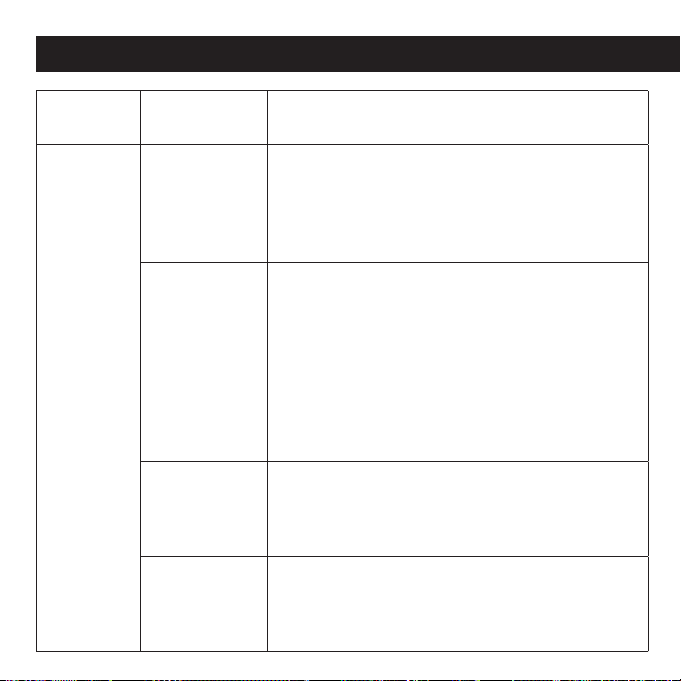
PROBLEM POSSIBLE
CAUSE
WHAT YOU SHOULD DO
A light flash
is not
emitted
when I press
the FLASH
BUTTON.
You have not
waited enough
time between
flashes for the
bulb to recover.
The system requires about 2 seconds to recover
between flashes. When your i-Light® Pro system
is ready to flash (and assuming the SKIN CONTACT
SENSORS are flush against the skin), the system will
emit three “BEEPS” to confirm that it is ready to flash.
The DISPOSABLE
CARTRIDGE
has
flashed 1,500
times and needs
to be replaced.
You should see
the Light Bulb
flashing YELLOW.
Make sure that the CARTRIDGE STATUS INDICATOR
LIGHT is either solid green or solid yellow. If it is
flashing yellow, disconnect the system and replace
the DISPOSABLE CARTRIDGE. Refer to “Replacing the
DISPOSABLE CARTRIDGE” on page 33.
Cartridge has
misflashed.
Occasionally the cartridge may misflash. Attempt to flash
5 more times. If still no flash, disconnect the system and
replace the DISPOSABLE CARTRIDGE. Refer to "Replacing
the DISPOSABLE CARTRIDGE" on page 33.
The cartridge is
damaged.
I
f the unit emits a "chirp" but does not flash the disposable
cartridge may be damaged. Disconnect the system and
replace the DISPOSABLE CARTRIDGE. Refer to "Replacing
the DISPOSABLE CARTRIDGE" on page 33.
39
PROBLEM POSSIBLE
CAUSE
WHAT YOU SHOULD DO
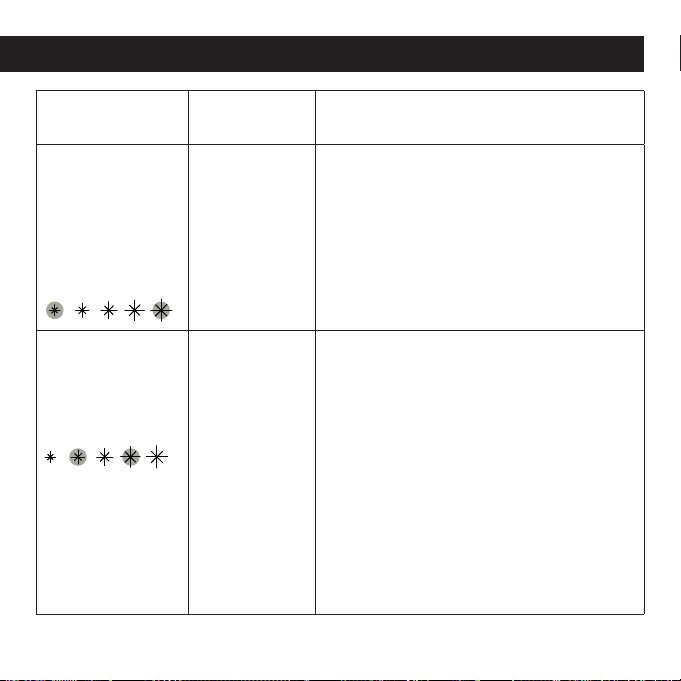
The outer ENERGY
LEVEL lights are
flashing alternately
and the i-Light®
Pro system is
beeping every ½
second.
The i-Light®
Pro
system isn’t
working
properly.
Contact Customer Service (see page 44)
for help.
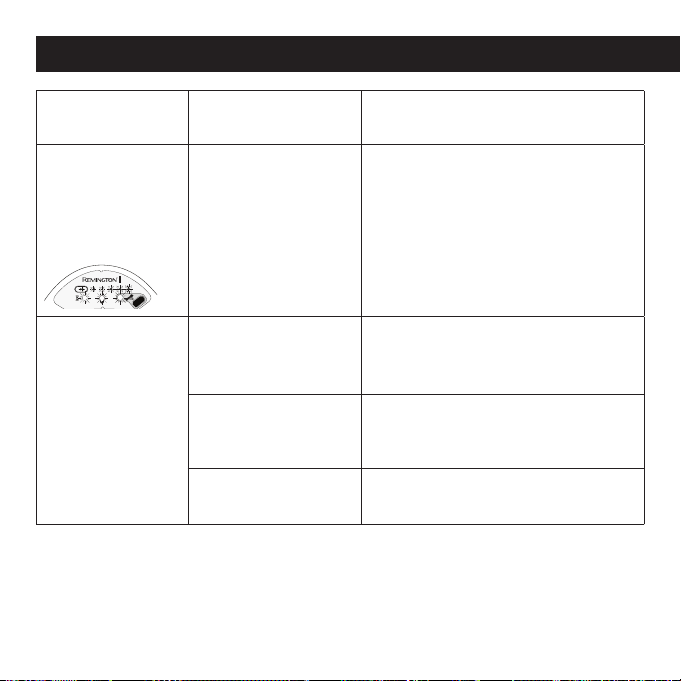
The second and
fourth ENERGY
LEVEL lights are
flashing and the
system is beeping.
The SKIN
CONTACT
SENSORS may
be stuck.
Lift the HAND PIECE from the BASE UNIT and
check the SKIN CONTACT SENSORS. The
CONTACT SENSORS should slightly protrude
from the sides of the HANDPIECE. You should
be able to press the CONTACT SENSORS down
so that they are flush with the HAND PIECE.
They should spring back to about 2mm when
released. If the CONTACT SENSORS do not
depress or spring back they may be stuck and
may require cleaning. See page 32 for instruc-
tions on how to clean your i-Light® Pro IPL
system. If you still can’t get it clean, contact
Customer Service on page 44 for help.
Troubleshooting
40
PROBLEM POSSIBLE
CAUSE
WHAT YOU SHOULD DO
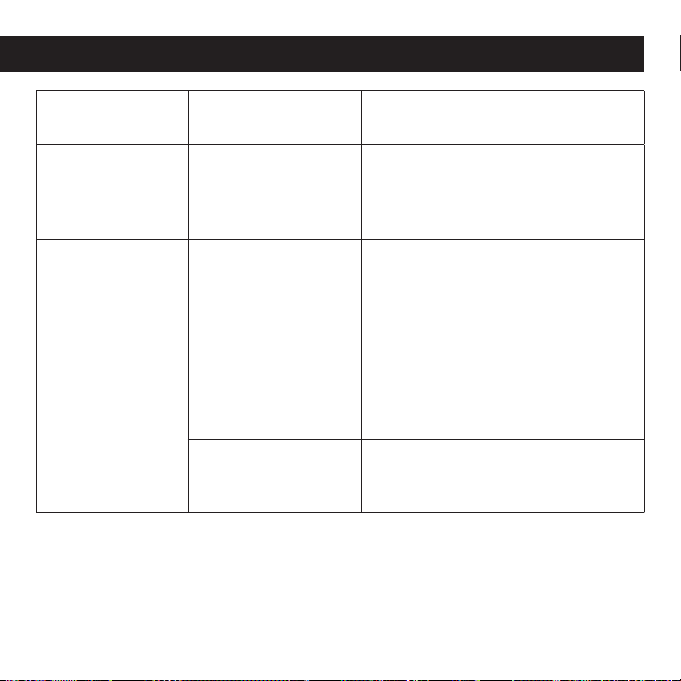
All the lights on
the system are
flashing and the
unit is beeping
constantly.
The NOSE CONE is
removed or not on
properly.
Check to ensure that the NOSE CONE
is properly affixed to the HAND PIECE.
You should hear a “click” when the
HAND PIECE is properly assembled.
See steps in “Set-Up” on page 20 for
instructions on how to check that the
NOSE CONE is properly affixed.
I used the SKIN
TONE SENSOR
and it showed an
ORANGE light. I
can’t unlock the
system.
Your skin is too dark
(see the Skin Tone
Chart on Page 11).
You cannot use the system with your
Skin Tone. Please contact Customer
Service (see page 44) for help.
You didn’t use the
SKIN TONE SENSOR
correctly.
Try using the SKIN TONE SENSOR again
– refer to page 23-25 for instructions
on using the SKIN TONE SENSOR.
The SKIN TONE
SENSOR isn’t working.
Please contact Customer Service
(see page 44) for help.
Troubleshooting
41
Troubleshooting
PROBLEM POSSIBLE
CAUSE
WHAT YOU SHOULD DO
Dirt or debris
is stuck to the
window.
The i-Light® Pro
system needs to be
cleaned.
See page 32 for instructions on how
to clean your IPL system. If you still
can’t get it clean, contact Customer
Service (see page 44) for help.
The Cool Down
Mode Indicator
icon is flashing
yellow and the
system is
beeping.
The hand piece needs
some time to cool down.
Under normal operating
conditions this is an
uncommon occurrence.
However this situation
can arise if either the
hand piece or base unit
become too hot.
Wait for a few minutes for the system
to cool down. There is no need to
shut the unit down, as the Cool Down
Mode Indicator light will turn off when
the i-Light® Pro IPL system is ready
to
use again.
The room is too warm. Use the system in a cooler environ-
ment, where the temperature is less
than 80° F or 27° C.

42
DO NOT attempt to open or repair
your system.
Opening the device may expose you to
dangerous electrical components and
to flashed light energy, either of which
may cause serious bodily damage and/or
permanent eye injury. Trying to open the
i-Light® Pro IPL system may also dam-
age the system and will void your war-
ranty. Please contact Customer Service
(see page 44) if you have a broken
or damaged device in need of repair.
Limited Two-Year Warranty
Spectrum Brands, Inc. warrants this
product against any defects that are due
to faulty material or workmanship for a
two-year period from the original date of
consumer purchase. This warranty does
not include damage to the product result-
ing from accident or misuse.
If the product should become defec-
tive within the warranty period, we will
replace it free of charge. Return your
product and sales receipt with your
name, address and day time phone
number to: Remington Returns Center,
507 Stokely Dr., P.O. Box 1, Deforest,
WI 53532. For more information call
800-736-4648.
KEEP ORIGINAL SALES RECEIPT AS PROOF
OF PURCHASE FOR WARRANTY PURPOSES.
This warranty does not cover products
damaged by the following:
• Accident, misuse, abuse or alteration of
the product
• Servicing by unauthorized persons
• Use with unauthorized accessories
• Connecting it to incorrect current and
voltage
• Any other conditions beyond our control
Performance Guarantee

43
SPECTRUM BRANDS, INC. SHALL NOT
BE RESPONSIBLE FOR ANY INCIDENTAL,
SPECIAL OR CONSEQUENTIAL DAMAGES
RESULTING FROM THE USE OF THIS
PRODUCT. ALL IMPLIED WARRANTIES,
INCLUDING BUT NOT LIMITED TO
IM PLIED WARRANTIES OF FITNESS AND
MERCHANTABILITY, ARE LIMITED IN
DURATION TO TWO YEARS FROM DATE OF
ORIGINAL PURCHASE.
This warranty gives you specific legal
rights and you may also have other rights
which vary from state to state. Some
states do not allow the exclusion or limi-
tation of incidental, special or consequen-
tial damages.
Performance Guarantee
Spectrum Brands, Inc. Money-back Offer
If within 90 days after you have pur-
chased your Remington
®
branded
product, you are not satisfied and would
like a refund, return it with the sales slip
indicating purchase price and date of
purchase to the retailer from whom it
was purchased. Spectrum Brands, Inc.
will reimburse all retailers who accept
the product within 90 days from the date
of purchase. If you have any questions
concerning the money-back guarantee,
please call 800-736-4648 in the U.S.
120-230 VAC, 50/60 Hz
® Registered Trademark of
Spectrum Brands, Inc., (SBI)
Questions or comments:
For more information please visit
www.RemingtonProducts.com. If your
i-Light® Pro system is broken, damaged, in
need of repair, or for any other user assis-
tance, please contact Customer Service:
800-736-4648 or visit
www.RemingtonProducts.com
Dist. by:
Spectrum Brands, Inc.,
Middleton, WI 53562
06/14 Job# 2014-1-20-77_RevE
Made in China.
T22-31664
© 2014 SBI
Performance Guarantee
4000884

44
Customer Service 800-736-4648
Online: www.RemingtonProducts.com
Address: Spectrum Brands, Inc.,
3001 Deming Way
Middleton, WI 53562
Contact Information
Specifications
Spot Size
Speed
Technology
Max Energy Level
Wavelength
Electrical Requirements
Operation and Safety
Package Size
2cm
2
2.25 sec
Xenon Flash Lamp (IPL)
8 J/cm
2
650-1200 nm
120 VAC
UL 60335, EN 60335, CSA STD C22.2 No. 60335-1
10.125" x 9.625" x 8.3125"
Labeling
EC Declaration of Conformity
45
IP6000
Guía de
uso y
cuidado
¡Registre su nuevo producto hoy!
Al registrar su nuevo producto Remington
®
recibirá importantes beneficios:
Prueba de pertenencia • Protección del producto • Registro del producto • Ofertas especiales
Regístrese en línea en: www.RemingtonProducts.com
DESARROLLADO POR
PROFESIONAL FOTO DEPILACIÓN RÁPIDA, CÓMODA Y EN CASA
®
®

Índice
Página
48 Introducción
49 ¿Cómo funciona el Sistema i-Light® Pro IPL?
50 Diagrama del Sistema i-Light® Pro
51 Familiarizándose con su Sistema i-Light® Pro
52 Guía rápida de REFERENCIA
54 Para que sirve el sistema i-Light® Pro IPL? (Indicaciones)
56 Contraindicaciones
57 Advertencias
60 Beneficios y riesgos
62 Qué esperar del Sistema i-Light® Pro IPL
64 Cómo utilizar su Sistema i-Light® Pro IPL
64 Configuración
65 Cada vez que utilice su Sistema i-Light® Pro IPL
65 Entre tratamientos
66 Primer uso del Sistema i-Light® Pro IPL
66 Prueba en una zona de la piel

Índice
Página
67 Cada vez que utilice el Sistema i-Light® Pro IPL
67 Preparándose para su uso
67 Desbloqueo del Sistema i-Light® Pro IPL mediante la utilización del
Sensor de Tono de Piel
70 Configuración del NIVEL DE ENERGÍA
72 Inicio del tratamiento
75 Luego de su uso
76 Obtención de los mejores resultados
77 Cómo cuidar su Sistema i-Light® Pro IPL
77 Limpieza
77 Reemplazo del cartucho desechable de la lámpara
80 Eliminación de su sistema i-Light® Pro IPL
80 Detección de problemas
86 Garantía
88 Información de contacto

48
Introducción
¡Felicitaciones por la compra de su nuevo
sistema de Depilación de Luz Pulsada
Intensa i-Light® Pro! Esta a un paso de
liberarse de la tarea diaria de depilación.
El sistema i-Light® Pro IPL es un revolu-
cionario dispositivo basado en el uso de
luz, diseñado para una depilación durade-
ra en casa del vello no deseado. Utiliza la
misma tecnología de Luz Pulsada Intensa
(IPL) que utilizan los salones de belleza y
dermatólogos profesionales, pero ha sido
optimizada para su uso en la privacidad y
comodidad de su propio hogar.
A diferencia de la mayoría de los méto-
dos de depilación caseros, el sistema
i-Light® Pro IPL no corta o tira el vello
- lo que hace es trabajar bajo la super-
ficie de la piel para desactivarlo y evitar
que crezcan nuevos vellos. Este es un
proceso gradual. Comenzará a ver los
resultados dos semanas de iniciado el
tratamiento y éstos mejorarán gradual-
mente con el tiempo.

49
¿Cómo funciona el Sistema i-Light® Pro IPL?
El proceso de depilación en base al uso
de luz es conocido y ha sido clínicamente
probado en todo el mundo por más de
15 años. El sistema i-Light® Pro utiliza la
misma tecnología que emite un intenso
haz de luz (IPL) que calienta y desactiva
los folículos pilosos. La energía lumínica
actúa sobre la coloración oscura en el vello
corporal, razón por la cual tiene mejores
resultados en pieles claras con vellos
naturalmente oscuros. Para determinar si
su piel y color de vello es el correcto para
el sistema i-Light® Pro IPL, consulte
la información proporcionada en la
página 54-55.
Todo el vello en su cuerpo atraviesa un
ciclo continuo de crecimiento: de fases
activas a fases pasivas. El tiempo que
tarda en completar un ciclo completo de
crecimiento varía, pero típicamente es de
18-24 meses. Los tratamientos basados
en el uso de luz sólo afectan los vellos en
la fase activa, que representa el 90% de
los folículos pilosos. Por eso es que reco-
mendamos utilizar el sistema i-Light® Pro
tres veces el primer mes, para garantizar
que actúe sobre todo vello activo. Luego
de ello, utilice el sistema i-Light® Pro
cuando lo necesite para aplicar en los vel-
los que no hayan sido tratados o reciente-
mente hayan entrado en una fase activa.
1. Las primeras 3 sesiones con el sistema
i-Light® Pro IPL deberán hacerse cada
2 semanas.
2. Luego de ello, utilice el sistema i-Light®
Pro cuando empiece a ver que el vello
vuelve a crecer en el área tratada.
3. NO trate la misma zona del cuerpo
con una frecuencia superior a las 2
semanas.
Luego de que se ha tratado un folículo
piloso, el vello puede tardar hasta dos
semanas en caer. Durante este tiempo
podría parecer que el vello sigue creciendo,
pero en realidad está siendo “empujado” y
usted podría ser o no testigo de ello.
Si comienza a tratar una zona distinta del
cuerpo, inicie nuevamente el proceso para
dicha parte del cuerpo.
50
Figura 1
Diagrama del Sistema i-Light® Pro
51
Al interior de la caja de su sistema
i-Light® Pro IPL encontrará una UNIDAD
BASE con un DISPOSITIVO MANUAL y
un CABLE DE ALIMENTACIÓN. También
encontrará un PAÑO LIBRE DE PELUSAS,
un DVD con instrucciones y esta Guía de
Uso y Cuidado. El sistema i-Light® Pro
viene equipado con un CARTUCHO DE
REEMPLAZO desechable (al interior del
DISPOSITIVO MANUAL, bajo la CUBIERTA
CÓNICA). Cada Cartucho Desechable pro-
porciona 1.500 descargas de luz antes de ser
necesario reemplazarlo.
En la UNIDAD BASE hay un SENSOR DE
TONO DE PIEL (Fig. 1. J) para comprobar
el adecuado tipo de piel antes de su uso.
Usted controla el NIVEL DE ENERGÍA (Fig.
1 F e I) y elige el nivel que más le acomoda.
El INTERRUPTOR DE ENCENDIDO (Fig. 1 A)
se ubica en el costado, cerca de la parte
superior de la unidad, junto a la TOMA DE
ENERGÍA (Fig. 1 B).
A
Interruptor de encendido
B
Toma de energía
C
Unidad base
D
Dispositivo manual
E
Botón de disparo del flash
F
Botón de selección del nivel
de energía
G
Indicador de modo de enfriamiento
H
Indicador del estado del cartucho
I
Indicador del nivel de energía
J
Sensor tono de piel
K
Cable dispositivo manual
L
Ventana flash
M
Sensores de contacto con la piel
N
Botones de liberación
cubierta cónica
O
Cartucho de reemplazo
P
Cubierta cónica
Q
Cable de alimentación
R
Paño libre de pelusas
Diagrama del Sistema i-Light® Pro
Familiarizándose con su Sistema i-Light® Pro IPL
52
1. PREPARE LA PIEL (ver página 67)
• Afeite el vello en la zona a tratar.
• Limpie la piel y seque completamente.
2. ENCIENDA Y DESBLOQUEE EL
SISTEMA i-Light® Pro IPL
(ver página 67).
• Active el INTERRUPTOR DE ENCENDIDO.
• Coloque la piel en la zona a tratar en
el SENSOR DE TONO DE PIEL por unos
segundos (TOCANDO EL SENSOR DE
TONO DE PIEL).
• Piel NO ADECUADA = “ZUMBIDO”.
• Piel ADECUADA = “BIP-BIP” y el
sistema de desbloqueará.
• Debe desbloquear el sistema
i-Light® Pro en cada parte del cuerpo
que desee tratar.
3. SELECCIONE EL NIVEL DE ENERGÍA
(Ver página 70)
• El sistema
i-Light® Pro IPL
se inicia en el
nivel más bajo.
• Ponga a prueba su piel en los niveles
más bajos antes de aumentarlos.
• Los niveles más altos de energía
mejoran los resultados pero pueden
incomodar.
• Para aumentar el nivel, presione el
BOTÓN DE SELECCIÓN NIVEL DE
ENERGÍA.
• Para mejores resultados utilice la
configuración más alta que le acomode.
Guía rápida de REFERENCIA (ver Fig. 1, página 50)
53
4. COLOQUE EL DISPOSITIVO MANUAL
EN EL ÁREA A TRATAR (Ver página 72)
• Si los SENSORES DE CONTACTO CON
LA PIEL NO están en contacto con ésta,
el sistema emitirá un “zumbido” y no
funcionará si presiona el BOTÓN FLASH.
Verifique que los sensores de contacto
estén en pleno contacto con la piel.
• Si los SENSORES DE CONTACTO están
en pleno contacto con la piel, el sistema
emitirá un “SONIDO” y estará listo para
funcionar.
• Si está teniendo problemas, intente
presionando firmemente el dispositivo
manual contra la piel.
5. TRATE SU PIEL (Ver página 72-75)
• Luego de oír el “SONIDO” presione el
BOTÓN FLASH para tratar la piel.
• Cuando se emita un destello (flash)
pasara lo siguiente:
- Vera una luz brillante.
- Escuchara otro “SONIDO” del cartucho
desechable.
- Sentirá una leve sensación de calidez
y cosquilleo.
• LEVANTE el DISPOSITIVO MANUAL
y muévalo a una nueva zona de tratamiento.
• Intente aplicar el tratamiento en un
PATRÓN CUADRICULADO*.
•
NO aplique el sistema en un mismo lugar
múltiples veces durante una sesión.
NOTA: NO haga marcas físicas en la piel a
ser tratada con un patrón cuadriculado dado
que esto podría provocar un daño a ésta.
Guía rápida de REFERENCIA (ver Fig. 1, página 50)
NOTA: Esta es una guía de referencia rápida para usuarios experimentados del sistema
i-Light® Pro. Si está utilizando el sistema por primera vez, es crucial que lea toda la Guía de
Uso y Cuidado para obtener instrucciones completas sobre importantes contraindicaciones,
advertencias, beneficios y riesgos, además de indicaciones de uso detalladas.
SENSORES DE CONTACTO CON LA PIEL

54
El sistema i-Light® Pro IPL es un disposi-
tivo de venta libre diseñado para la remo-
ción a largo plazo del vello no deseado.
Tono de piel
Ha sido diseñado para ser utilizado sólo
en pieles de tono claro a medio. Para
determinar si su Tono de Piel es el adec-
uado, coloque una porción de piel del
área a tratar junto a la Tabla de Tonos de
Piel que se encuentra en la página 55. Si
su Tono de Piel coincide con los paneles
1-4, puede utilizar el sistema i-Light® Pro
IPL. Si su Tono de Piel coincide con los
paneles 5-6, NO utilice el sistema.
El sistema i-Light® Pro también está
equipado con un SENSOR DE TONO DE
PIEL, diseñado para evitar tratar pieles
muy oscuras o bronceadas. Ver página
67-68 para mayores detalles. Siempre
someta a prueba cada una de las dis-
tintas áreas que desee tratar con la Tabla
de Tonos de Piel y el Sensor de Tono de
Piel antes de aplicar el sistema. Algunas
áreas son más oscuras que otras.
Para que sirve el sistema i-Light® Pro IPL? (Indicaciones)
Color del vello
El sistema está diseñado para ser uti-
lizado en vellos naturalmente negros o
castaños. No utilice el sistema i-Light®
Pro en vellos blancos o grises, porque
no funcionará. El IPL es menos efectivo
en vellos más claros, como los rubios o
colorines.
Zonas del cuerpo
El sistema ha sido diseñado para ser
utilizado por mujeres y hombres en el
vello corporal que se encuentra por deba-
jo del cuello, incluyendo piernas, axilas,
línea del bikini, pecho, estómago,
y brazos. NO ha sido aprobado en
EE.UU. para ser utilizado en rostro,
cabeza, orejas, espalda o cuello.
55
1
2
3
4
5
6
NO apropiado para su uso Apropiado para su uso
TABLA DE TONO DE PIEL
Para que sirve el sistema i-Light® Pro IPL? (Indicaciones)
56
Información de seguridad importante -
¡Leer antes de usar!
El sistema i-Light® Pro no está diseñado
para todos. Le rogamos leer y considerar la
información en la siguiente sección antes
de usarlo.
NO UTILIZAR el sistema i-Light®
Pro si tiene un Tono de Piel Oscuro.
La piel más oscura puede absorber
mucha energía lumínica, lo que
podría causar inflamación de la piel,
ampollas temporales o cambios de
coloración de la piel. Consulte la Tabla
que se incluye en la Página 55 para
determinar si su Tono de Piel en la
zona a tratar es adecuado para el uso
del sistema i-Light® Pro IPL. Deberá
efectuar pruebas en cada una de
las distintas áreas de piel que desea
tratar. Algunas áreas son más oscuras
que otras.
NO UTILIZAR en tatuajes, pieles
café oscuro o puntos negros (como
pecas, marcas de nacimiento, lunares
o verrugas). Los tatuajes o puntos
negros pueden absorber demasiada
energía lumínica, lo que podría
ocasionar inflamación de la piel,
ampollas temporales o cambio en la
coloración de su piel. Consulte la tabla
de la página 55 para determinar si los
tatuajes o puntos negros en las zonas
a tratar pueden recibir tratamiento
con el sistema i-Light® Pro. Deberá
efectuar pruebas en cada una de
las distintas áreas de piel que desea
tratar. Algunas áreas son más oscuras
que otras.
NO UTILIZAR en rostro, cabeza, orejas,
cuello, pezones, genitales o alrededor
de la zona anal. Estas áreas pueden
tener piel más oscura y la utilización
del sistema i-Light® Pro podría
ocasionar inflamación de la piel,
ampollas temporales o cambios en la
coloración de su piel.
NO UTILIZAR en ojos o alrededor de
éstos, cejas o pestañas. Su aplicación
en dichas áreas podría causar lesiones
graves y permanentes en los ojos.
Contraindicaciones
57
ADVERTENCIAS
El sistema i-Light® Pro IPL es un disposi-
tivo poderoso. Como tal, se deberá utili-
zar con especial atención a la seguridad.
Le rogamos leer todas las advertencias
y precauciones de seguridad antes de
utilizar y seguirlas estrictamente al aplicar
el sistema i-Light® Pro.
NO APLIQUE el sistema i-Light®
Pro en zonas de tratamiento
idénticas múltiples veces durante la
misma sesión, ya que esto podría
causar inflamación de la piel,
ampollas temporales o cambios
en la coloración de su piel. Lea las
instrucciones de las páginas 67-75
para mayor información respecto a
cómo aplicar el tratamiento.
NO UTILIZAR
si la tabla de Tono de Piel
en la página 55 indica que su piel no
es adecuada. Si Ud es afroamericano,
indonesio, americano nativo o isleño del
pacífico, es posible que su piel tenga
un Tono de Piel no adecuado. Los
Tonos de Piel Más Oscuros pueden
absorber demasiada energía lumínica,
ocasionando lesiones en la piel.
NO UTILIZAR en piel dañada, incluy-
endo heridas abiertas, aftas, quemadu-
ras de sol o áreas donde haya recibido
tratamientos exfoliantes u otros pro-
cedimientos de renovación de la piel en
las últimas 6-8 semanas (consultar con
su doctor). NO utilizar en piel irritada,
incluyendo erupciones cutáneas o piel
inflamada. Estas condiciones pueden
hacer la piel más sensible al tratamien-
to con luz. Espere que la zona afectada
se cure antes de utilizar el sistema.
NO UTILIZAR
si su piel es sensible a la
luz. Para determinar si puede utilizarlo,
realice una prueba en una pequeña
porción de piel y espere 24 horas para
determinar si se producen reacciones
adversas antes de utilizarlo en áreas
más extensas. En la página 66 veri-
fique los pasos a seguir para realizar
una prueba en una porción de piel.
Comuníquese con Servicio al Cliente (ver
páginas 86-89) para obtener asistencia
en caso de experimentar cualquiera de
los problemas descritos en la página 66.
58
NO UTILIZAR si está embarazada o
existe la posibilidad de estar embarazada,
o si está amamantando. El sistema
i-Light® Pro IPL no ha sido probado en
mujeres embarazadas. Los cambios hor-
monales podrían aumentar la sensibilidad
de la piel y el riesgo de lesiones.
NO UTILIZAR para otro propósito que
no sea el de la depilación.
NO DESCARGAR el sistema i-Light®
Pro contra otro material que no sea piel.
NO DESCARGAR en una atmósfera
donde una chispa podría causar una
explosión, como por ejemplo, cerca de
una fuga de gas.
NO UTILIZAR en un área donde en el
futuro quiera que el vello vuelva a crecer.
Los resultados pueden ser permanentes e
irreversibles.
NO UTILIZAR el sistema si parece
estar dañado y NO intente abrir o repa-
rar el sistema i-Light® Pro IPL. Estas
acciones aumentan el riesgo de lesiones
en la piel o en los ojos que pueden ser
provocadas por el flash emitido por el
cartucho de reemplazo. Comuníquese con
Servicio al Cliente para obtener asistencia
(consulte la páginas 86-89).
NO PERMITIR que el dispositivo
manual o base esté en contacto con la
humedad o se moje. NO UTILIZAR cerca
de bañeras, duchas, lavatorios
u otros recipientes que
contengan agua.
ADVERTENCIAS

59
NO OPERAR con el enchufe o cable
dañado. Mantener el cable alejado de
superficies calientes (tales como cocinas,
chimeneas, radiadores u hornos).
NO UTILIZAR si alguna de las piezas
del sistema i-Light® Pro está dañado
o descompuesto. Comuníquese con
Servicio al Cliente para obtener asisten-
cia – consultar la páginas 86-89 para
obtener la información de contacto.
NO ABRIR (excepto para reemplazar
el CARTUCHO de reemplazo) o intentar
reparar su sistema, ya que no hay pie-
zas reparables al interior del sistema
i-Light® Pro. Intentar abrirlo podría
dañar el sistema y dejar nula su garantía.
Comuníquese con el Servicio al Cliente
(ver páginas 86-89) si su sistema está
dañado o descompuesto y necesita
reparación. El incumplimiento de estas
precauciones puede ocasionar descargas
eléctricas o electrocución.
NO CUBRIR los componentes de las
ranuras de ventilación de la UNIDAD BASE
o DISPOSITIVO MANUAL del sistema
i-Light® Pro durante su uso, ya que ayu-
dan a mantener frío el sistema durante
su operación. Cubrir la UNIDAD BASE o
DISPOSITIVO MANUAL podría resultar en
un recalentamiento.
SE DEBE Mantener lejos del alcance
de los niños! El sistema i-Light® Pro IPL
es un poderoso dispositivo y no deberá
ser utilizado por personas menores de 18
años. NO DEJAR el sistema desatendido
en presencia de niños, ya que los cables
representan un peligro de asfixia. Los
niños deberán ser supervisados para
garantizar que no jueguen con el sistema.
Este aparato NO esta diseñado para
ser usado por personas (incluidos niños)
con capacidades fisicas, mentales o de
sensibilidad disminuidas o con falta de
experiencia o conocimiento que les impi-
da utilizar el aparato con toda seguridad
sin supervisiòn o instrucción.
ADVERTENCIAS

60
Beneficios y riesgos
Un estudio clínico supervisado médicamente
demostró que el sistema i-Light® Pro IPL
proporcionó una depilación duradera cuando
se utilizó según lo indicado.
60 participantes ingresaron al estudio clínico
con i-Light® Pro y fueron tratados 3 veces
en un período de 4 semanas. Los tratamien-
tos se realizaron en axilas, piernas, línea del
bikini, estómago, pecho y brazos. Se efectuó
un conteo de los vellos en el lugar antes
del tratamiento y nuevamente 3 y 6 meses
después del tratamiento final. Todos los efec-
tos secundarios observados o informados
fueron documentados por el personal medico.
Este estudio demostró científicamente los
beneficios y riesgos de la depilación con el
sistema i-Light® Pro. Los siguientes lugares
están contraindicados y, por lo tanto, fueron
excluidos del tratamiento: rostro, cabeza, ore-
jas, cuello, pezones, genitales, zona anal, cejas
o pestañas.
Beneficios
Cuando se utiliza según lo indicado, el sistema
i-Light® Pro IPL ayuda a remover el vello no
deseado sin la necesidad de afeitarlo, retirarlo
con cera o pinzas todos los días. En un estudio
clínico, luego de sólo tres tratamientos, los
participantes evidenciaron en promedio 37%
menos vellos 3 meses después del último
tratamiento y 48% menos vellos 6 meses
después del último tratamiento. Los resul-
tados reales varían de persona a persona,
dependiendo del área del cuerpo a tratar y
de si se aplicaron correctamente las instruc-
ciones.
Riesgos
Es importante utilizar adecuadamente el
sistema i-Light® Pro IPL. Asegúrese de leer y
seguir todas las advertencias (páginas 57-59)
y no utilizar el sistema si no es adecuado para
usted (ver páginas 54-55). Si no comprende
alguna de las advertencias o tiene dudas,
comuníquese con el Servicio al Cliente en la
páginas 86-89. Si utiliza el sistema i-Light®
Pro según lo indicado, los riesgos son bajos:
• En un estudio clínico, la mayoría de los usu-
arios informó cero incomodidad o incomo-
didad leve en los tratamientos, con una dis-
minución de la sensación luego de múltiples
tratamientos. Esto es normal. Puede sentir
calor, ardor, hormigueo o picazón; algunos
usuarios describieron la sensación como el
mismo nivel de incomodidad que provoca
una banda elástica cuando golpea leve-

61
mente la piel. Si el dolor es muy intenso o
persiste luego del tratamiento, debe dejar de
usar el sistema y comunicarse con Servicio
al Cliente (páginas 86-89).
• Su piel podría enrojecerse 24 horas después
del tratamiento. Este enrojecimiento general-
mente desaparece en unas horas. Consulte
con su doctor si éste no desaparece luego
de 2-3 días.
• Ampollas temporales. Es poco probable
que le aparezcan a personas con tonos
de piel claros o intermedios. Si le aparece
una ampolla, deje de utilizar el sistema
i-Light® Pro, limpie la ampolla con jabón
o antiséptico, cúbrala con un vendaje y
cámbielo diariamente para evitar que se
infecte. Comuníquese con Servicio al Cliente
en la páginas 86-89 si necesita mayor
información.
• En casos poco frecuentes, algunos usuarios
podrían ver un aumento en la cantidad de
vellos en el área luego del tratamiento
inicial. Como los vellos crecen en ciclos,
generalmente este aumento es temporal.
Si en cualquier momento luego de utilizar
el sistema i-Light® Pro cree que el número
de vellos que están volviendo a crecer en el
área de tratamiento es superior al número
existente antes de iniciado el tratamiento,
deje de utilizar el sistema y comuníquese con
Servicio al Cliente (páginas 86-89). Si este
aumento persiste luego de varios tratamien-
tos, deje de utilizar el sistema y consulte a
su doctor.
Los siguientes síntomas no afectaron a los
participantes del estudio clínico, pero se han
informado luego del uso de otros sistemas de
depilación laser o dispositivos IPL:
•
Inflamación de la piel, especialmente alred-
edor del folículo piloso. Si no cede en 2-3 días,
deje de utilizar el sistema y comuníquese con
Servicio al Cliente (páginas 86-89).
•
Decoloración de la piel. Si nota que su Tono
de Piel cambia, deje de utilizar el sistema
y comuníquese con Servicio al Cliente
(páginas 86-89).
• Lesión ocular. La descarga de luz emitida por
un láser o dispositivo IPL cerca o alrededor
de la zona de los ojos podría causar lesiones
oculares graves y permanentes. Esto es muy
poco probable siempre y cuando el dispositi-
vo se utilice bajo el cuello, tal como se indica.
Beneficios y riesgos

62
Durante el tratamiento
El sistema i-Light® Pro ha sido diseñado
para utilizar con facilidad y las sesiones
de depilación deberían hacerse con
rapidez. Durante una sesión es normal
experimentar y sentir lo siguiente:
• Un ruido de ventilador: el ventilador se
activa una vez que el Sensor de Tono
de Piel está desbloqueado. El ruido es
similar al de un secador de pelo, pero
no tan intenso. Esto es normal y muy
importante para mantener frías la uni-
dad y la ampolleta del flash.
• Un destello de luz: los Sensores de
Contacto con la Piel garantizan que
gran parte de la luz esté dirigida hacia
la piel. El resto de la luz visible no
dañará los ojos cuando se aplique en
áreas no cercanas al rostro y no se
necesita protección especial para los
ojos en tanto siga las instrucciones de
la Guía de Uso y Cuidado.
• Un sonido con cada descarga (flash):
Cuando se emite una descarga de luz,
es normal escuchar un leve sonido
cuando la ampolleta emite el destello
de luz.
• Una sensación de calor y hormigueo:
Las sensaciones de los usuarios vari-
arán según la persona y la parte del
cuerpo que se está tratando. Muchas
personas describen cada descarga de
luz como la sensación de una banda
elástica golpeando la piel. Si la sen-
sación es muy intensa o dolorosa, deje
de utilizar el sistema y comuníquese
con Servicio al Cliente (páginas 86-89).
• Un enrojecimiento leve:
Durante y justo después de su sesión
con IPL, no es poco común experi-
mentar un enrojecimiento leve que es
más notorio alrededor de los vellos.
Esto es normal y generalmente desa-
parece en unas horas. Sin embargo,
comuníquese con Servicio al Cliente
(páginas 86-89) si el enrojecimiento no
desaparece en 2-3 días.
¿Qué esperar del Sistema i-Light® Pro IPL?
63
NOTA:
• Deber completar los primeros tres tratamientos durante el primer mes para
garantizar que trate todos los vellos en fase de crecimiento en el área objetivo.
• Luego del tercer tratamiento, es importante continuar con sus tratamientos si es
necesario para depilar los vellos que recientemente han ingresado al ciclo activo.
• Repita el proceso para toda parte del cuerpo con vellos no deseados.
Inmediatamente
después del trat-
amiento inicial
1 a 2 semanas
después del trat-
amiento inicial
Un mes luego del
tratamiento inicial
Tres meses luego de
completar los trata-
mientos iniciales
• No hay cambio
visible en el
vello o aparien-
cia de la piel.
• En ocasiones,
algunos usuari-
os experimentan
enrojecimiento
leve, que usual-
mente se disipa
en unas horas.
• Los vellos en
el área tratada
comenzarán a
caer gradual-
mente.
• Probablemente
no notará una
reducción sig-
nificativa de los
vellos en esta
etapa temprana.
• Luego de los tres
tratamientos ini-
ciales deberá notar
una reducción sig-
nificativa en el cre-
cimiento de vellos
en la zona tratada.
• El vello que vuelva
a crecer será más
fino y escaso.
• ¡Disfrute la lib-
ertad!
• Sólo utilice el
sistema i-Light®
Pro IPL para
retoques
ocasionales si
es necesario.
¿Qué esperar del Sistema i-Light® Pro IPL?
EXPECTATIVAS DEL TRATAMIENTO
Figura 2
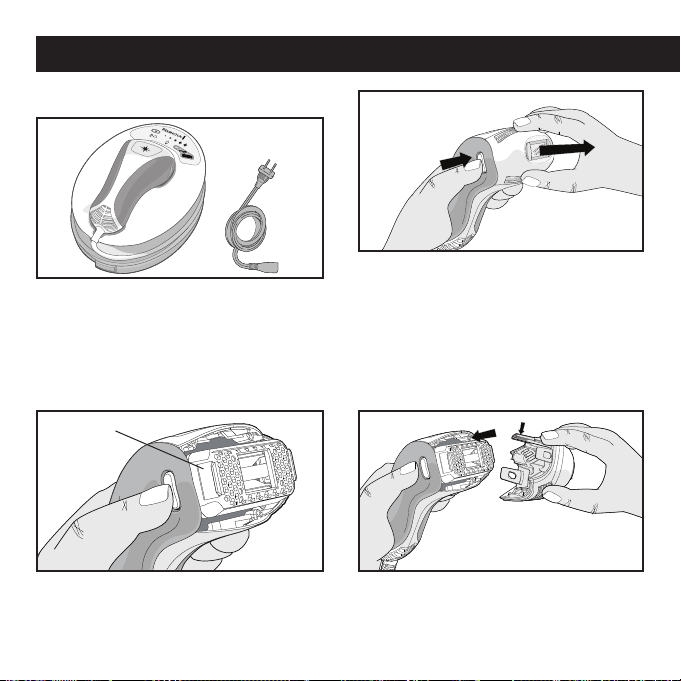
64
Configuración
1.
2.
1. Saque la unidad base, el cable de alimen-
tación y otros componentes de la caja.
Nota: antes de conectar el sistema, revíselo
para asegurarse de que el cartucho de la
lámpara esté insertado adecuadamente
(pasos 2-4).
3. Verifique que el cartucho desechable esté
insertado correctamente y se ajuste al dis-
positivo manual.
2. Presione ambos botones de liberación de la
cubierta cónica con su pulgar y dedo índice.
Luego, con ambos botones presionados retire
suavemente la cubierta cónica con su otra
mano. Nota: coloque la cubierta cónica en un
lugar seguro, teniendo cuidado de no dañar
la ventana del flash y otros componentes.
4.
Suavemente encaje la cubierta cónica en el
dispositivo manual. Nota: la lengüeta más
larga (con circuitos dorados) debe estar en la
parte superior para un ajuste adecuado.
Cartucho de la Lámpara
Cómo utilizar su Sistema i-Light® Pro IPL
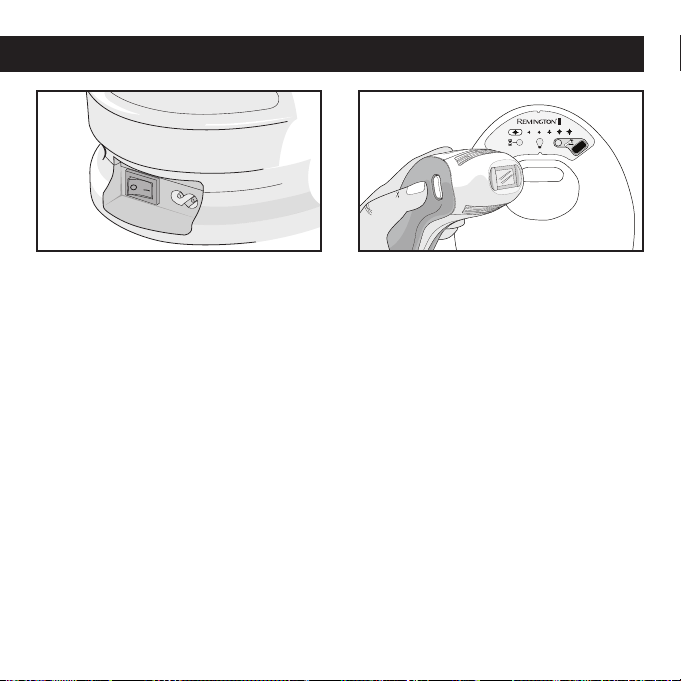
65
5. Conecte el cable de alimentación en el
enchufe del sistema, conecte el otro extremo
del cable de alimentación en una toma eléc-
trica y presione el interruptor de encendido
para activar el sistema.
6. Ahora su sistema i-Light® Pro IPL está listo
para ser usado. Antes ponga a prueba una
pequeña porción de piel y espere 24 horas
(ver página 66).
Cómo utilizar su Sistema i-Light® Pro IPL
• Limpie, afeite y seque su piel antes del trata-
miento (página 67).
• Limpie el sistema incluido el dispositivo
manual, ventana flash, sensor de contacto a
la piel y ventana del sensor de tono de piel
(página 68).
• Desbloquee el sistema utilizando el Sensor
de Tono de Piel (página 67).
• Configure el sistema al NIVEL DE ENERGÍA
deseado (página 67)
• Utilice en un lugar fresco (< 80° F / 27° C) y
siga nuestros consejos para mejores resulta-
dos (página 70).
Cada vez que utilice el Sistema i-Light® IPL
• Puede afeitarse, pero no retire el vello con
cera, depiladotes eléctricos o pinzas, ya que
sacar el vello de raíz interrumpirá el
proceso IPL.
• Luego de 1-2 semanas, el vello en las áreas
tratadas comenzará a caer naturalmente.
Entre tratamientos

66
Realización de una prueba en una
porción de piel
Al igual que con un nuevo producto para la
piel, recomendamos poner a prueba en una
porción de piel antes de iniciar el tratamiento
completo o de utilizar el sistema en una nueva
zona del cuerpo. Es posible que desee utilizar
distintos niveles de energía para distintas
áreas, ya que la sensibilidad puede variar
según la parte del cuerpo.
• Prepare su piel (ver página 67) y desbloquee
el sistema con el Sensor de Tono de Piel (ver
página 69). El sistema se configurará por
defecto en el nivel de energía 1.
• En el nivel de energía 1, trate su piel con
una sola descarga de luz. Un dolor leve a
moderado es normal – si siente más que un
dolor moderado, deje de usar el sistema de
inmediato y llame a servicio al cliente (ver
páginas 86-89) para obtener ayuda.
• Si puede tolerar el nivel de energía 1, pre-
sione el botón de nivel de energía una vez
para cambiar al nivel de energía 2 (ver “con-
figuración del nivel de energía” en la página
70). Mueva el sistema a un lugar diferente y
emita una descarga de luz una vez más. Si
no se siente cómodo(a) utilizando el sistema
en el nivel de energía 2, entonces el nivel de
energía 1 es la configuración correcta para
comenzar.
• Repita este proceso hasta que encuentre la
configuración adecuada para usted.
• Espere 24 horas, luego mire el área de
piel donde se efectuó la prueba. Si la piel
tiene un aspecto normal, proceda con el
tratamiento con la configuración adecuada
para Usted.
SI NOTA una inflamación de la piel, la
aparición de ampolllas temporales o cam-
bios en la coloración de su piel, o cualquier
otro efecto secundario, o si no está seguro
acerca del resultado de la prueba, no utilice el
sistema y comuníquese con Servicio al Cliente
(ver páginas 86-89) o llame a su doctor para
obtener asistencia.
Nota: obtendrá mejores resultados y más
duraderos utilizando el sistema en niveles de
energía superiores.
• Repita la prueba si decide intentar el uso del
sistema en una parte distinta del cuerpo, o si
su tono de piel ha cambiado (por ejemplo, de
un bronceado).
Utilización del Sistema i-Light® Pro IPL por Primera Vez

67
Cada vez que usa el Sistema i-Light® Pro IPL
Preparándose para su uso
Antes de utilizar el sistema, afeite el vello en
el área de tratamiento para minimizar la sen-
sación de la descarga de luz. El sistema IPL
trabaja bajo la piel , por lo tanto, sigue siendo
eficaz si los vellos no son visibles. Luego de
afeitarse, limpie la piel y seque completa-
mente el área antes de usar el sistema.
Utilice en un entorno fresco, donde la tem-
peratura sea inferior a 80º F ó 27º C para
evitar que el sistema se sobrecaliente.
Desbloqueo del Sistema i-Light® Pro IPL
mediante la utilización del Sensor de
Tono de Piel
Cada vez que enciende el sistema éste
arranca en modo de bloqueo. El LED del
Sensor de Tono de Piel parpadeará y
escuchará una serie de “bips” audibles.
El sistema i-Light® Pro no puede utilizarse
mientras no haya sido desbloqueado. Cada
vez que desee utilizar el dispositivo debe
desbloquear el sistema con el SENSOR DE
TONO DE PIEL, el que también deberá utilizar
para someter a prueba cada parte del cuerpo
que desee tratar. La utilización del sistema
i-Light® Pro en tonos de piel más oscuras
podría causar inflamación de la piel, ampoll-
las temporales o cambios en la coloración
de la piel.
El sensor de tono de piel ayuda a confirmar
si su piel es demasiado oscura como para
tratarla con el Sistema i-Light® Pro. Como
algunas áreas son más oscuras que otras,
deberá utilizar el sensor de tono de piel en
cada área de piel distinta que desee tratar.
Si es necesario, verifique que su piel esté
limpia, seca y afeitada, libre de vellos.
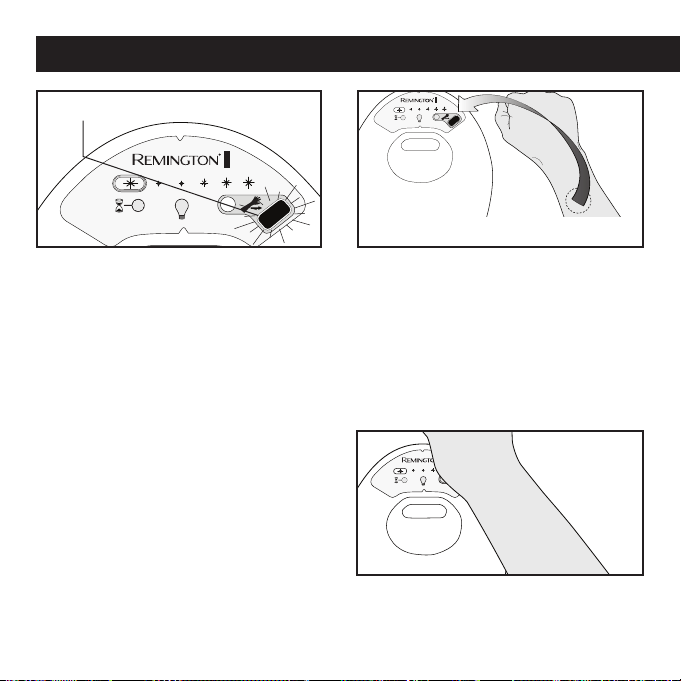
68
2. Siempre coloque la ventana del sensor
de tono de piel directamente en el área
de piel que piensa tratar. La lectura se
realizará automáticamente.
Nota: debe utilizar el Sensor de Tono de
Piel para probar el color en cada parte del
cuerpo que piense tratar.
3. Coloque el brazo sobre el SENSOR DE
TONO DE PIEL (tocando la unidad). El
Sensor de inmediato leerá el tipo de piel.
Cada vez que usa el Sistema i-Light® Pro IPL
1. Accione el INTERRUPTOR DE
ENCENDIDO. El INDICADOR LED DEL
SENSOR DE TONO DE PIEL parpadeará
en NARANJO. Escuchará una serie
de “BIPS” audibles cada 5 segundos
para recordarle que realice la prueba.
Por razones de seguridad, luego de 30
segundos de inactividad, los “BIPS”
audibles aumentarán en frecuencia
hasta que se haga la prueba o la
máquina se apague.
El INDICADOR LED DEL
SENSOR DE TONO DE PIEL
parpadeará en naranjo

69
3a.
Si su Tono de Piel NO es adecuado
para el uso del sistema, el INDICADOR
LED DEL SENSOR DE TONO DE PIEL se
coloca NARANJO y el sistema emitirá un
“ZUMBIDO” durante 5 segundos. Luego
de 5 segundos puede volver a intentarlo
con el SENSOR DE TONO DE PIEL.
4. Una vez que el sistema se habilita, la
LUZ DE NIVEL DE ENERGÍA y la LUZ
INDICADORA DE LA VIDA ÚTIL DEL
CARTUCHO se encenderán y se acti-
vará el ventilador interno. ¡Ahora su
sistema está desbloqueado y listo para
ser utilizado!
3b. Si su Tono de Piel es adecuado para
utilizar el sistema, se escuchará un
“BIP” agudo, el indicador LED se tor-
nará verde y el sistema se habilitará.
Cada vez que usa el Sistema i-Light® Pro IPL

70
Notas:
• Si cree que el SENSOR DE TONO DE PIEL
no ha efectuado una lectura correcta, puede
intentarlo de nuevo luego de 5 segundos. Si
cree que su piel es adecuada en base a la
tabla de Tonos de Piel de la página 55, pero
el SENSOR DE TONO DE PIEL no habilita
el sistema, comuníquese con el Servicio al
Cliente (ver páginas 86-89).
• Si se ha bronceado desde la última vez que
utilizó el sistema, su piel puede ser muy
oscura como para recibir el tratamiento. Es
posible que tenga que esperar hasta que
el bronceado se atenúe para continuar con
sus tratamientos de depilación. Utilice el
SENSOR DE TONO DE PIEL para determinar
si el área es demasiado oscura como para
tratar.
• Por razones de seguridad, el sistema se
volverá a bloquear luego de 5 minutos de
inactividad. Si se toma una pausa en medio
de un tratamiento o si apaga el sistema,
necesitará utilizar el SENSOR DE TONO DE
PIEL para desbloquear nuevamente
el sistema IPL.
Configuración del nivel de energía
Las luces de la Pantalla de Selección de Nivel
de Energía determinan la intensidad del destel-
lo de luz aplicado a su piel, desde el nivel más
bajo (*) al nivel más alto (*****). Los niveles más
altos mejoran los resultados de depilación, pero
son menos agradables. Para obtener mejores
resultados deberá utilizar la configuración más
alta posible que no le moleste.
Hay 5 configuraciones de nivel de energía en
el sistema i-Light® Pro. Cuando el sistema
i-Light® Pro IPL se enciende, el dispositivo
se configura automáticamente en el nivel de
energía más bajo y sólo una luz de SELECCIÓN
DEL INDICADOR DE NIVEL DE ENERGÍA estará
encendida (NIVEL DE ENERGÍA 1 en la tabla
de la página 71). Para modificar el nivel de
energía, presione el BOTÓN DE SELECCIÓN
DE NIVEL DE ENERGÍA para aumentar el nivel
de energía. Una vez que el nivel de energía ha
alcanzado el nivel 5, presionando el BOTÓN
DE SELECCIÓN DE NIVEL DE ENERGÍA volverá
el sistema al nivel de energía 1. El número
de luces de la PANTALLA DE SELECCIÓN DEL
NIVEL DE ENERGÍA coincidirá con el cambio en
el nivel de energía.
Cada vez que usa el Sistema i-Light® Pro IPL
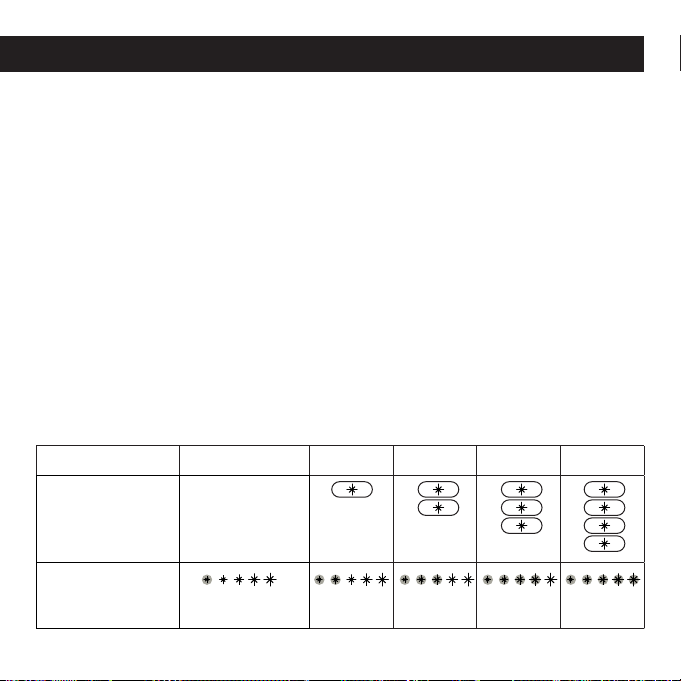
71
1. Al arrancar, el sistema se configura a si
mismo en el nivel de energía más bajo
(Nivel 1). Ahora está listo para descargar
el primer destello de luz (flash).
2. Para cambiar el nivel de energía,
presione el BOTÓN DE SELECCIÓN DE
NIVEL DE ENERGÍA para aumentar hasta
el nivel deseado. Las luces de la Pantalla
de Selección coincidirán con el nivel de
energía configurado.
3. Si previamente se seleccionó un nivel
de energía más alto y se desea uno más
bajo, siga presionando el BOTÓN DE
SELECCIÓN DE NIVEL DE ENERGÍA hasta
que se configure el nivel de energía más
bajo.
Notas:
• Periódicamente el dispositivo manual o
unidad base alcanzará cierta temperatura
y entrará en un estado de enfriamiento,
deteniendo temporalmente su funciona-
miento. El indicador de modo de enfria-
miento parpadeará y la unidad emitirá un
bip. Simplemente espere que el sistema
se regule a la temperatura apropiada.
La luz se apagará y podrá continuar el
tratamiento.
• El número de descargas de luz antes
de entrar en un estado de enfriamiento
depende de varios factores, incluyendo el
nivel de energía, cuán rápido aplica los
tratamientos y la temperatura ambiente.
Figura 3
Cada vez que usa el Sistema i-Light® Pro IPL
Nivel de energía 1 2 3 4 5
Presione Botón
de Configuración
Nivel de Energía
Nivel 1 por defecto
al arrancar el
sistema
Luces de la Pantalla
de Selección de
Nivel de Energía:
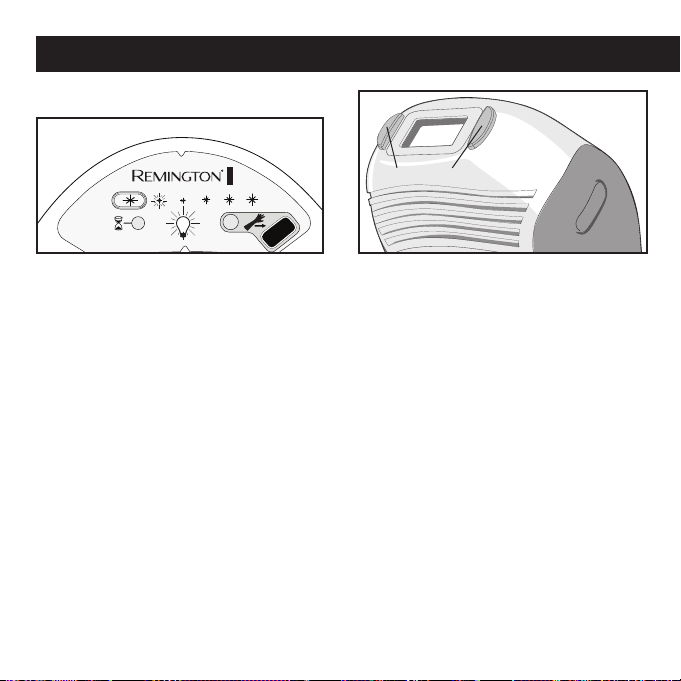
72
Inicio del tratamiento
1. Procure que el NIVEL DE ENERGÍA se
encuentre en una configuración
cómoda (Ver “Configuración del Nivel
de Energía” en la Página 70 para
mayores detalles sobre las distintas
configuraciones).
2. Aplique el DISPOSITIVO MANUAL
en la piel, procurando que ésta se
extienda de manera pareja y uniforme.
Asegúrese de que los SENSORES
DE CONTACTO CON LA PIEL en la
CUBIERTA CÓNICA estén en pleno
contacto con la piel.
SENSORES DE CONTACTO CON LA PIEL
Cada vez que usa el Sistema i-Light® Pro IPL
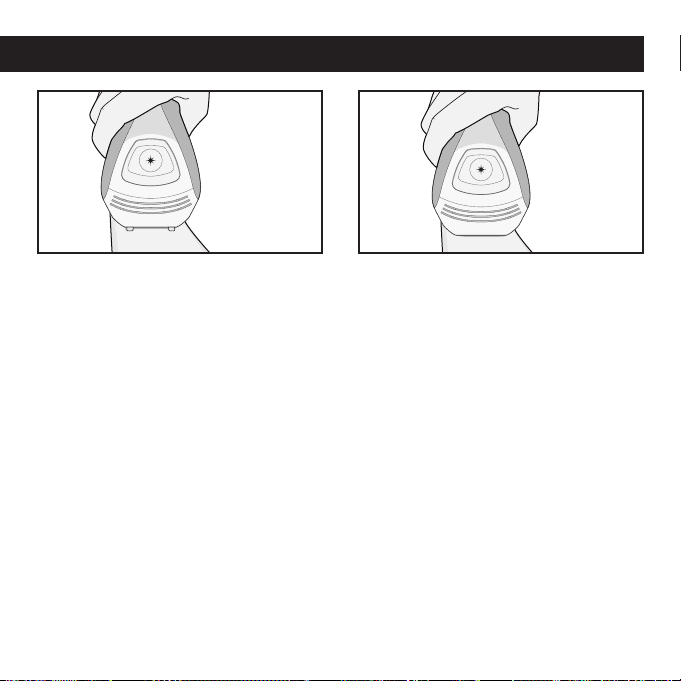
73
3. Si los SENSORES DE CONTACTO CON
LA PIEL NO están en pleno contacto
con esta última, el sistema emitirá un
“sonido” y no funcionará cuando pre-
sione el BOTÓN FLASH. Vuelva a veri-
ficar que los sensores estén en pleno
contacto con la piel.
Nota: No presione la pieza de mano con
demasiada firmeza en la piel con el fin de
hacer contacto. Hacerlo puede causar que
la piel este demasiado cerca de la ven-
tana del flash y puede causar inflamación
de la piel, ampollas temporales o podría
cambiar el color de su piel. Pruebe cam-
biar la orientación del dispositivo para un
mejor contacto con la piel.
4. Si los SENSORES DE CONTACTO CON
LA PIEL en la CUBIERTA CÓNICA están
en pleno contacto con esta última, se
escucharán una serie de bips agudos,
indicando que el sistema está en
condiciones de emitir una descarga
de luz.
Nota: no bloquee las ranuras de venti-
lación en el DISPOSITIVO MANUAL, ya
que éstas ayudan a enfriar el sistema
durante su uso.
Cada vez que usa el Sistema i-Light® Pro IPL
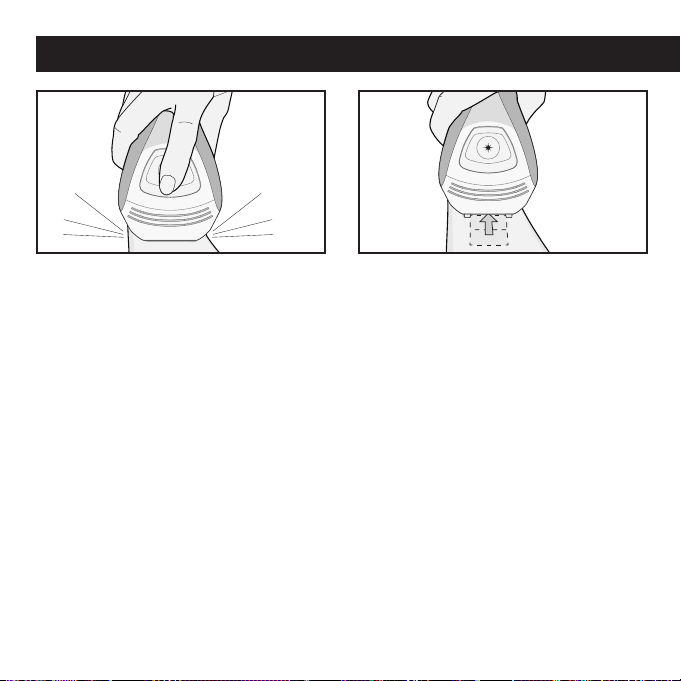
74
Cada vez que usa el Sistema i-Light® Pro IPL
5.
Presione el BOTÓN FLASH. El sistema
emitirá una descarga de luz en su piel.
Verá un haz de luz brillante y simul-
táneamente escuchará un sonido, que
es normal para el sistema. Es posible
que tenga una leve sensación de calor
y hormigueo.
6. Inmediatamente luego de la descarga
de luz, mueva el DISPOSITIVO MANUAL
a una nueva posición de tratamiento
mientras mantiene presionado el
BOTÓN FLASH. Si la CUBIERTA CÓNICA
está en pleno contacto con la piel y
el BOTÓN FLASH está presionado,
el sistema emitirá un sonido “bip”
y se aplicará otra descarga en menos
de 2 segundos.
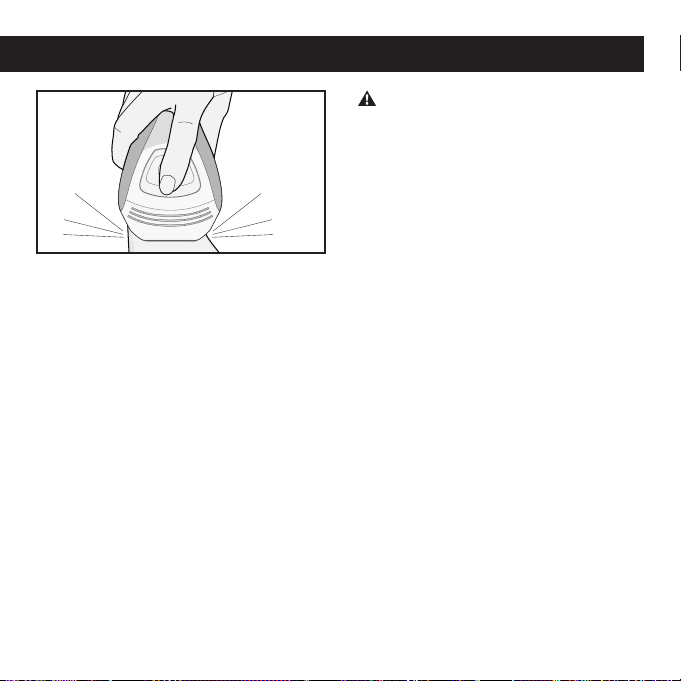
75
7.
Intente aplicar el tratamiento en forma
organizada, en un patrón cuadriculado,
con el fin de garantizar que cubra todos
los vellos en el área de tratamiento.
Repita el paso 6 hasta que el área de trat-
amiento deseada haya sido cubierta en
su totalidad. Dependiendo de la parte del
cuerpo, el tiempo de tratamiento variará.
Cada vez que usa el Sistema i-Light® Pro IPL
NO
APLIQUE
una descarga de luz en
la misma zona de tratamiento durante la
misma sesión, ya que esto podría causar
inflamación de la piel, ampollas tempora-
les o cambios en la coloración de su piel.
Nota: para una cobertura más rápida
mantenga presionado el BOTÓN FLASH
mientras levanta el DISPOSITIVO MANUAL
y lo vuelve a poner en contacto con la
nueva área a tratar. Esto hará que la
unidad aplique una descarga de luz sobre
la piel tan pronto como se establezca
pleno contacto entre esta última y el
DISPOSITIVO MANUAL.
Luego de su uso
• Cuando haya completado su sesión,
apague el sistema con el INTERRUPTOR
DE ENCENDIDO. (Procure recordar
la última configuración de nivel de
energía, ya que no se restaurará al
encender nuevamente el sistema).
• Desconecte el cable de alimentación de
la toma eléctrica.
• Luego de cada sesión de depilación,
se recomienda que limpie su sistema,
especialmente la CUBIERTA CÓNICA y
la VENTANA FLASH (Ver “Limpieza” en
página 76).
•
Luego de la limpieza, le recomendamos
guardar su sistema i-Light® Pro en su caja
original y mantenerla alejada del agua.

76
• Afeite la zona a tratar antes de empezar el
tratamiento. Hacer esto le permitirá utilizar
un nivel de energía superior, debido a que
habrá menos vellos que calentar y el trata-
miento molestara menos. Si se afeita habrá
una gran diferencia en la forma en que se
siente el tratamiento. Ver página 67.
• Utilice la configuración de nivel de energía
más alta que no implique una molestia para
usted. Mientras mayores sean los niveles de
energía, mayor es la eficacia. Ver página 70.
• Tenga un plan para trabajar cada área de
tratamiento en forma organizada, con un
patrón cuadriculado, de manera que no
superponga lugares de tratamiento.
• Si ha retirado el vello del área de tratamiento
con cera, pinzas o aparatos de depilación
eléctricos, espere 6 semanas antes de
utilizar el sistema. La tecnología IPL utiliza el
vello bajo su piel para inhabilitar los folículos
pilosos, de manera que si el cabello ha sido
sacado de raíz el tratamiento no será eficaz.
Nota: NO marque físicamente el área de trata-
miento con el patrón cuadriculado, ya que esto
podría dañar la piel.
• Siga el tratamiento completo para cada área
del cuerpo. Ver figura 2 en la página 63.
Limpieza
Luego de cada sesión, se recomienda
que limpie su sistema, especialmente el
DISPOSITIVO MANUAL, la VENTANA DEL
FLASH, los SENSORES DE CONTACTO CON
LA PIEL y la ventana del SENSOR DE TONO
DE PIEL.
NO coloque ninguna parte del dispositivo
en agua u otros líquidos. Si cualquiera de
las partes del dispositivo se moja, NO LA
UTILICE. Comuníquese con Servicio al Cliente
(ver páginas 86-89) para obtener ayuda.
Como con cualquier dispositivo eléctrico, un
sistema mojado podría causar electrocución o
una descarga eléctrica.
• Verifique que el dispositivo esté apagado.
Saque el CABLE DE ALIMENTACIÓN de la
UNIDAD BASE y del enchufe de la pared
antes de efectuar la limpieza.
• Utilice un paño limpio, libre de pelusas (el
que se proporciona con la unidad) para
limpiar con suavidad la superficie y, espe-
cialmente, la CUBIERTA CÓNICA, VENTANA
Obtención de los mejores resultados

77
Reemplazo del cartucho desechable de la
lámpara Cartucho
El CARTUCHO DESECHABLE entregará aprox-
imadamente 1.500 descargas de luz, indepen-
dientemente de la configuración del nivel de
energía. La intensidad del flash se determina
sólo de acuerdo a la configuración del nivel de
energía del sistema. No hay una disminución
significativa de la energía durante la vida útil
del CARTUCHO DESECHABLE.
Cuando un CARTUCHO DESECHABLE ha
alcanzado el 90% de su posible vida útil,
la LUZ INDICADORA DE LA VIDA ÚTIL DEL
CARTUCHO se tornará amarilla, indicando que
el CARTUCHO DESECHABLE pronto deberá
ser reemplazado. Una vez que se han utilizado
las 1.500 descargas de luz en un CARTUCHO
DESECHABLE , la LUZ INDICADORA DE LA
VIDA ÚTIL DEL CARTUCHO se tornará amarilla
y parpadeará, indicando que no se pueden
emitir nuevas descargas de luz. Para continuar
con la sesión de depilación será necesario
reemplazar el CARTUCHO DESECHABLE .
Nota: UN CARTUCHO DESECHABLE debe
reemplazarse si la AMPOLLETA DE LA
LÁMPARA está rota.
Cómo cuidar de su Sistema i-Ligt PRO IPL
DEL FLASH, SENSORES DE CONTACTO CON
LA PIEL y la ventana del SENSOR DE TONO
DE PIEL. Si es necesario, puede sumergir
el paño en agua y jabón suave. Deje que la
unidad se seque completamente antes de
volver a utilizar.
• Inspeccione las ranuras de ventilación en la
unidad y el dispositivo manual para descartar
la presencia de pelusas y residuos. Aspire
periódicamente.
• Si aún necesita eliminar polvo o residuos,
puede utilizar sus uñas o un trozo de plástico
duro, como una tarjeta de crédito. Tenga cui-
dado de no dañar la VENTANA DEL FLASH.
NO INTENTE abrir o reparar su sistema
i-Light® Pro. Comuníquese con servicio al
cliente para mayor información (ver páginas
86-89).
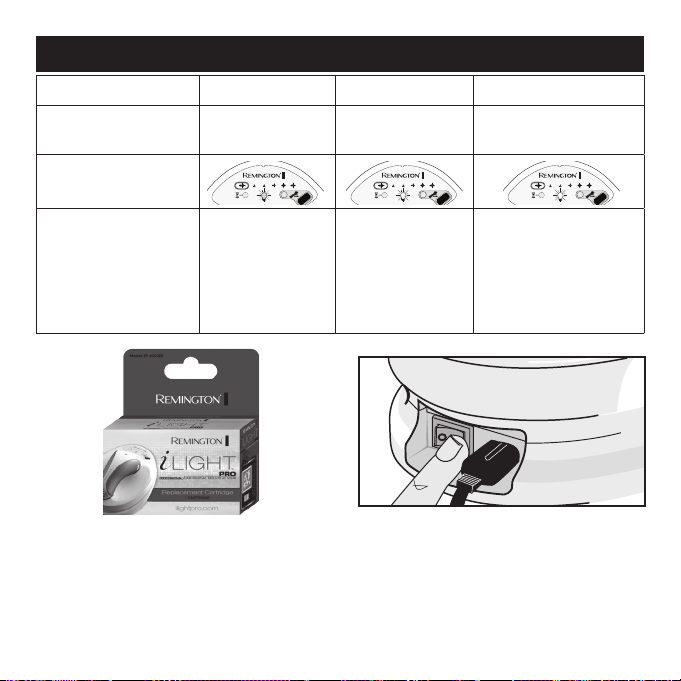
78
Uso ampolleta flash
0 – 90% 90 – 100% > 100%
Flashes
0 – 1.350 flashes
1,351 – 1,500
flashes
> 1,500 flashes
Luz indicadora de vida
útil del cartucho
Luz indicadora de vida
útil del cartucho, tono
audible
El indicador LED
de vida útil del car-
tucho, se encend-
erá en VERDE, sin
tono audible.
El indicador LED
de vida útil del car-
tucho se encenderá
en AMARILLO sin
tono audible.
El indicador LED de
vida útil del cartucho se
encenderá en AMARILLO,
con un bip audible cada
0,5 segundos, hasta que
se reemplace el cartucho.
Nota: Permita que el sistema se enfríe durante
5 minutos antes de intentar cambiar
el CARTUCHO DESECHABLE.
2. Apague el sistema mediante el INTERRUPTOR
DE ENCENDIDO, desconecte el CABLE DE
ALIMENTACIÓN de la toma eléctrica.
1. Obtenga un nuevo CARTUCHO DESECHABLE
(SP-60000SB). Consulte con su vendedor
de retail local o visitando
ProductosRemington.com
para efectuar compras.
Cómo cuidar su Sistema i-Light® Pro IPL
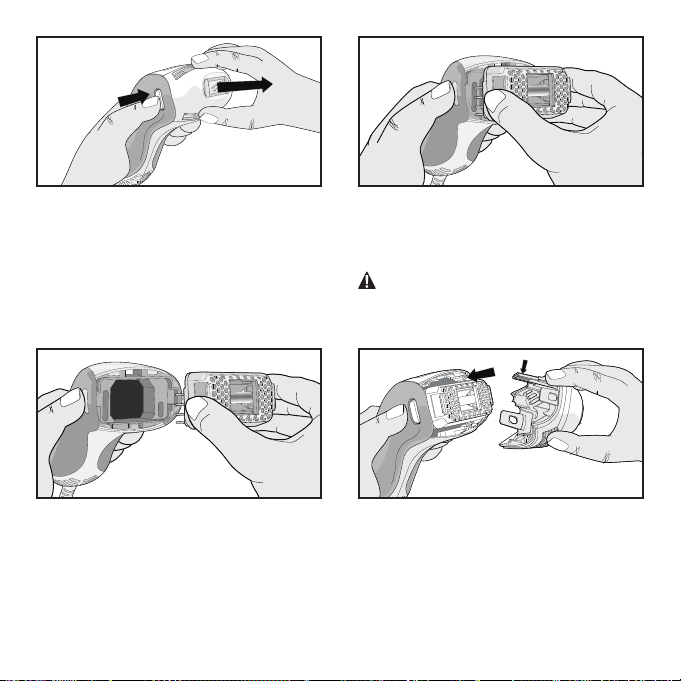
79
Uso ampolleta flash
0 – 90% 90 – 100% > 100%
Flashes
0 – 1.350 flashes
1,351 – 1,500
flashes
> 1,500 flashes
Luz indicadora de vida
útil del cartucho
Luz indicadora de vida
útil del cartucho, tono
audible
El indicador LED
de vida útil del car-
tucho, se encend-
erá en VERDE, sin
tono audible.
El indicador LED
de vida útil del car-
tucho se encenderá
en AMARILLO sin
tono audible.
El indicador LED de
vida útil del cartucho se
encenderá en AMARILLO,
con un bip audible cada
0,5 segundos, hasta que
se reemplace el cartucho.
4. Tome el CARTUCHO DESECHABLE y retírelo
suavemente del DISPOSITIVO MANUAL.
Bote el cartucho a la basura de acuerdo a
las regulaciones locales.
ADVERTENCIA: Procure que el cartucho
se haya enfriado por 5 minutos antes de
manipularlo. Tenga cuidado cuando
reemplace el cartucho.
5.
Coloque en su lugar el nuevo CARTUCHO
DESECHABLE, cuidando de no tocar las
AMPOLLETAS DE LA LÁMPARA o dañar los
pasadores en el cartucho.
Nota:
el CARTUCHO
DESECHABLE debe estar orientado de manera tal
que el costado con 4 pasadores quede a la izqui-
erda y el con 1 pasador a la derecha.
6. Suavemente empuje la CUBIERTA CÓNICA
para encajarla en el DISPOSITIVO MANUAL,
procurando que ambos lados hagan clic.
NOTA: la lengüeta más larga (con circuitos
dorados) debe estar en la parte superior
para un calce adecuado.
3. Tome la CUBIERTA CÓNICA con una mano
mientras presiona ambos BOTONES DE
LIBERACIÓN DE LA CUBIERTA CÓNICA con
la otra mano y tire suavemente. Coloque
la CUBIERTA CÓNICA en un lugar seguro,
cuidando de no dañar la VENTANA DEL
FLASH y otros componentes.
1.
2.
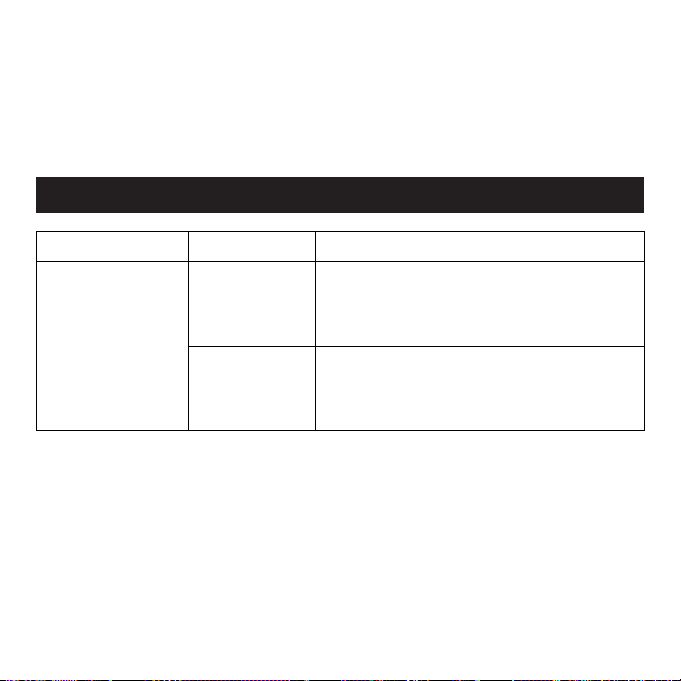
80
Eliminación de su Sistema i-Light® Pro IPL
Sírvase respetar las normas del lugar donde vive respecto a la eliminación de sistemas elé-
ctricos al momento de reciclar o desechar su unidad base i-Light® Pro, dispositivo manual
o cartucho desechable.
PROBLEMA POSIBLE CAUSA QUÉ DEBE HACER
Mi sistema i-Light®
Pro IPL no arranca.
El sistema no
está conectado
correctamente.
Asegúrese de que el cable de alimentación esté
adecuadamente conectado al sistema i-Light®
Pro y que este cable esté enchufado en la toma
corriente de la pared.
La toma de cor-
riente no está
funcionando.
Verifique si un interruptor de pared controla la
energía de la toma de corriente o intente enchu-
far otro sistema a la toma de corriente para ver
si funciona.
Detección de problemas

81
PROBLEMA POSIBLE CAUSA QUÉ DEBE HACER
Cuando coloco
el DISPOSITIVO
MANUAL contra mi
piel, no pasa nada.
El DISPOSITIVO
MANUAL no emite
un bip, incluso
después de unos
segundos.
El sistema está
bloqueado.
Desbloquee el sistema con el SENSOR DE TONO
DE PIEL siguiendo los pasos de la página 68.
Tenga en cuenta que el sistema debe volver a
desbloquearse si no lo utiliza durante 5 minutos.
Si se toma un descanso en medio del tratamien-
to, o apaga el sistema, necesitará desbloquearlo
nuevamente.
Los SENSORES
DE CONTACTO
CON LA PIEL no
están en pleno
contacto con la
piel.
Verifique que ambos SENSORES DE CONTACTO
CON LA PIEL estén tocando esta última. El sis-
tema no funcionará a menos que esté paralelo y
en contacto con su piel.
Está inten-
tando tratar una
pequeña área,
como por ejem-
plo, dedos de
manos o pies.
Puede intentar estirar su piel para formar un área
plana más extensa, de manera que la ventana
pueda alcanzarla. Si no logra que toda la ventana
toque su piel, el sistema no funcionará.
82
Detección de problemas
PROBLEMA POSIBLE CAUSA QUÉ DEBE HACER
No se emite
una descarga
de luz cuando
presiono
el BOTÓN
FLASH.
No ha esperado
tiempo suficiente
entre descargas de
luz para que la
ampolleta se recu-
pere.
El sistema requiere menos de 2 segundos para
recuperarse entre descargas de luz. Cuando su
sistema i-Light® Pro esté listo para una nueva
descarga de luz (y suponiendo que los SENSORES
DE CONTACTO CON LA PIEL están en pleno
contacto con esta última), el sistema emitirá tres
“BIPS” para confirmar que está listo para emitir
una descarga.
El CARTUCHO
DESECHABLE ha
sido utilizado más de
1.500 veces y nece-
sita ser reemplazado.
Debería ver parpadear
la luz AMARILLA.
Verifique que la LUZ INDICADORA DE LA VIDA
ÚTIL DEL CARTUCHO sea verde o amarilla. Si es
amarilla y parpadea, desconecte el sistema y
reemplace el CARTUCHO DESECHABLE. Consulte
“Reemplazo del CARTUCHO DESECHABLE” en
la página 78.
El cartucho no ha
emitido una descarga
de luz
Ocasionalmente el cartucho podría no emitir una
descarga. Intente 5 veces más. Si aún no logra emitir
una descarga de luz, desconecte el sistema y cambie
el CARTUCHO DESECHABLE. Refiérase a “Reemplazo
del CARTUCHO DESECHABLE” en la página 78.
El cartucho está
dañado.
Si la unidad emite un “sonido” pero no una des-
carga de luz, el cartucho desechable podría estar
dañado. Desconecte el sistema y reemplace el
CARTUCHO DESECHABLE . Consulte “Reemplazo
del CARTUCHO DESECHABLE ” en la página 78.
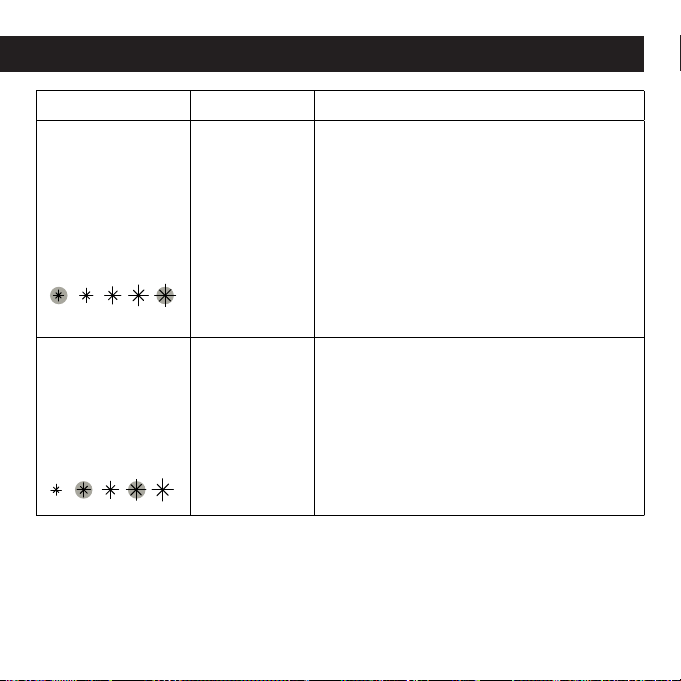
83
PROBLEMA POSIBLE CAUSA QUÉ DEBE HACER
Las luces exteriores
de NIVEL DE
ENERGÍA están
parpadeando
alternadamente y
el sistema i-Light®
emite sonidos de bip
cada ½ segundo.
El sistema i-
Light® no está
funcionando ad-
ecuadamente.
Comuníquese con Servicio al Cliente para
obtener ayuda (ver páginas 86-89).
La segunda y cuarta
luz de NIVEL DE
ENERGÍA están
parpadeando y
el sistema está
emitiendo sonidos
de bip.
Los SENSORES
DE CONTACTO
CON LA PIEL
se han cortado
desde que se
encendió la
máquina.
Levante el DISPOSITIVO MANUAL desde la UNI-
DAD BASE y verifique los SENSORES DE CON-
TACTO CON LA PIEL para ver si están trabados
o si necesitan limpieza. Consulte la página 76
para mayores instrucciones sobre cómo lim-
piar su sistema i-Light® IPL. Si aún no puede
limpiarlo, comuníquese con Servicio al Cliente
en la páginas 86-89 para obtener ayuda.
Detección de problemas
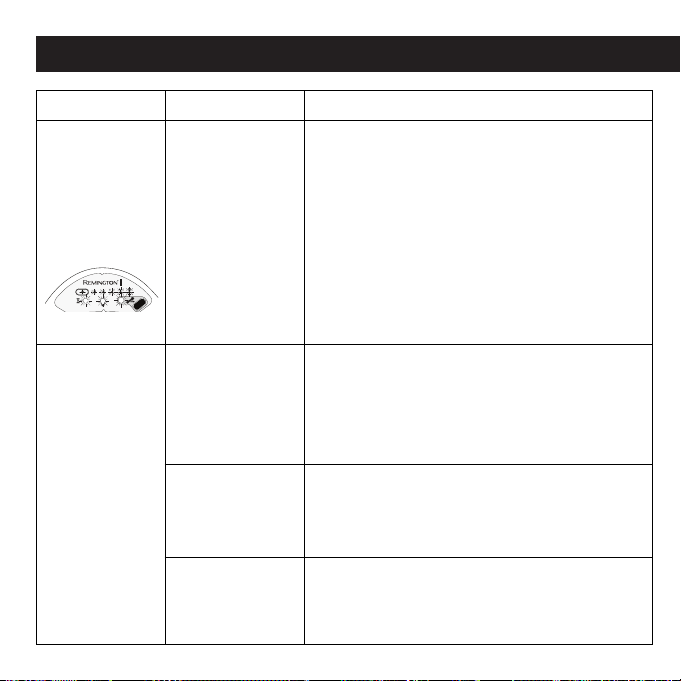
84
Detección de problemas
PROBLEMA POSIBLE CAUSA QUÉ DEBE HACER
Todas las luces
en el sistema es-
tán parpadeando
y la unidad emite
constantemente
sonidos de bip
No ha esperado
tiempo suficiente
entre descargas
de luz para que la
ampolleta se
recupere.
El sistema requiere de al menos 2 segundos para
recuperarse entre descargas de luz. Cuando su
sistema i-Light® Pro esté listo para una nueva
descarga de luz (y suponiendo que los SENSORES
DE CONTACTO CON LA PIEL están en pleno
contacto con esta última), el sistema emitirá tres
“BIPS” para confirmar que está listo para emitir
una descarga.
Utilicé el SENSOR
DE TONO DE PIEL
y prendió una luz
NARANJA. No
puede desblo-
quear el sistema.
Su piel es
demasiado oscura
(ver la Tabla de
Tono de Piel en
la Página 52).
Verifique que la LUZ INDICADORA DE LA VIDA ÚTIL
DEL CARTUCHO sea verde o amarilla. Si es amaril-
la y parpadea, desconecte el sistema y reemplace
el CARTUCHO DESECHABLE. Consulte “Reemplazo
del CARTUCHO DESECHABLE” en la página 78.
No utilizó correcta-
mente el SENSOR
DE TONO DE PIEL.
Intente usar nuevamente el SENSOR DE TONO DE
PIEL – consulte la página 68 para obtener instrucciones
sobre cómo utilizar el SENSOR DE TONO DE PIEL.
El SENSOR DE
TONO DE PIEL no
está funcionando.
Comuníquese con Servicio al Cliente (ver páginas
86-89) para obtener ayuda.
85
PROBLEMA POSIBLE CAUSA QUÉ DEBE HACER
La ventana tiene
polvo o residuos.
El sistema i-Light®
Pro necesita una
limpieza.
Consulte la página 76 para obtener
instrucciones sobre cómo limpiar su
sistema IPL. Si aún no puede limpiarlo,
comuníquese con Servicio al Cliente
(ver páginas 86-89 para obtener ayuda).
El ícono del
Indicador de Modo
de Enfriamiento está
parpadeando en
amarillo y el sistema
está emitiendo un
sonido de bip.
El dispositivo manual
necesita tiempo para
enfriarse. Bajo condi-
ciones de funciona-
miento normales, es
algo poco común. Sin
embargo, esta situ-
ación puede ocurrir si
el dispositivo manual o
unidad base se calien-
tan demasiado.
Espere unos cuantos minutos para que
el sistema se enfríe. No es necesario
apagar la unidad, ya que la luz Indicado-
ra de Modo de Enfriamiento se apagará
cuando el sistema i-Light® Pro IPL esté
listo para ser usado nuevamente.
La habitación es
demasiado calurosa.
Utilice el sistema en un ambiente más
frío, donde la temperatura ambiente sea
inferior a 80° F ó 27° C.
Detección de problemas

86
NO intente abrir o reparar su sistema.
Abrir el dispositivo podría exponerlo a com-
ponentes eléctricos peligrosos y a energía
lumínica de descarga; cualquiera de éstos
podría causar graves daños corporales y/o
lesiones oculares permanentes. Intentar abrir
el sistema i-Light® Pro IPL también podría
causar daños en el aparato y dejar nula la
garantía. Comuníquese con Servicio al Cliente
(ver páginas 86-89) si tiene un dispositivo
descompuesto o dañado que necesite
reparación.
Este producto por un periodo de 2 años en todas sus partes, contra
cualquier defecto de fabricación y funcionamiento a partir de la fecha
de compra.
MEXICO GARANTIA
Rayovac de México, S.A. de C.V. Garantiza este producto por un periodo
de 2 años en todas sus partes, contra cualquier defecto de fabricación
y funcionamiento a partir de la fecha de compra.
CONDICIONES:
1. Para hacer efectiva esta garantía deberá presentar esta póliza
sellada por la tienda o unidad vendedora, o acompañada de la nota de
compra o factura correspondiente, junto con el producto en nuestras
oficinas en:
Autopista México Querétaro No 3069-C Oficina 004
Colonia San Andrés Atenco, Tlalnepantla
Estado de México, C.P. 54040
Mexico.
Teléfono: (55) 5831 – 7070
Para atención de garantía marque: 01 800 714 2503
2. Rayovac de México, S.A. de C.V. se compromete a reparar o
sustituir el producto, así como las piezas o componentes defectuosos
del mismo sin ningún costo para el consumidor y a reembolsar al
consumidor los gastos de envío o transportación del producto.
3. El tiempo de reparación en ningún caso será mayor a 30 treinta días
contados a partir de la fecha de recepción del producto en nuestro
domicilio.
4. RAY O VAC de México, S.A. de C.V. se compromete a cambiar el
producto, si la falla es atribuible a defecto de fabricación, durante
los 30 días inmediatos posteriores a la compra del producto si esta
garantía se hace válida en la misma tienda en la que se adquirió el
producto, presentando la presente garantía y la nota de compra o
factura correspondiente.
Esta garantía será nula en los siguientes casos:
1. Cuando el producto se hubiese utilizado en condiciones distintas a
las normales.
2. Cuando el producto no hubiese sido operado de acuerdo con el
instructivo de uso que se acompaña.
3. Cuando el producto hubiese sido alterado o reparado por personas
no autorizadas por Rayovac de México, S.A. de C.V.
NOTA: En caso de extravío de la presente póliza de garantía, el
consumidor puede recurrir a la tienda o proveedor para que se le
expida otra póliza de garantía previa presentación a la nota de compra
o factura.
Aparato: ___________________________________
Modelo: ____________________________________
Nombre y/o razón social del distribuidor.
_____ _____________________________________
Dirección y teléfono: ___________________________
Fecha de Entrega: ____________________________
Sello y Frima: ________________________________
COLOMBIA POLIZA DE GARANTIA
FELICITACIONES, el artículo que usted acaba de adquirir ha sido
diseñado y construido con la más avanzada tecnología Remington
y sometido a un estricto control de calidad. Recomendamos leer
cuidadosamente el manual de uso, en el cual se indica el plazo de
vigencia de esta garantía antes de usar su nuevo producto. Todo
uso por fuera del Manual de Uso dejará sin vigencia la garantía del
producto.
COLOMBIA (REGIÓN ANDINA)
Rayovac – Varta S.A.
Carrera 17 No 89-40
Bogota D.C, Colombia
(57-1) 644-4848
Línea Servicio al Cliente: 018000510012
Garantía

87
Para hacer uso de su GARANTIA:
- Deberá presentar esta tarjeta. En caso que ella no esté fechada y
timbrada al momento de la compra deberá ser acompañada de la
factura de su compra.
- Antes que nada, fíjese que el enchufe al cual conecta el producto
esté en buenas condiciones. Si se calienta es indicación que hay mal
contacto que podría causar dificultades y peligro.
- Como condición de la garantía, se debe dar un uso adecuado al
producto, acorde al manual de uso incluido en el empaque.
- Si el producto después de seguir todas las instrucciones del manual
no funciona correctamente, comuníquese a nuestro número de atención
al cliente # 6231310
Ficha de Garantía
Período de Garantía: ___________________________
Producto: ___________________________________
Modelo: ____________________________________
Número de Serie: _____________________________
Lugar de Compra: ____________________________
Ciudad: ____________________________________
Fecha de Compra: ____________________________
No. Factura: _________________________________
Datos del Consumidor _________________________
Nombre: ___________________________________
__________________________________________
Dirección: __________________________________
__________________________________________
Teléfono: ___________________________________
Ciudad: ____________________________________
Depto. _____________________________________
VENEZUELA
GARANTIA
RAYOVAC VENEZUELA, S.A., garantiza este producto por un periodo de
2 años en todas sus partes, contra cualquier defecto de fabricación y
funcionamiento a partir de la fecha de compra.
CONDICIONES:
1. Para hacer efectiva esta garantía deberá presentar esta póliza sellada
por la tienda o unidad vendedora, o acompañada de la nota de compra
o factura correspondiente, junto con el producto en nuestras oficinas en:
Rayovac Venezuela S.A.
RIF. No. J- 07506682-0
Edificio Torre Venezuela, Piso 4, Oficina 4-D;
Avenida Bolívar Norte cruce con Calle 154
(Misael Delgado), Urbanización La Alegría, Valencia, Estado Carabobo,
Venezuela
58 424 452 6797 o 58 241 417 9407
2. RAYOVAC VENEZUELA, S.A., se compromete a reparar o sustituir el
producto, así como las piezas o componentes defectuosos del mismo
sin ningún costo para el consumidor.
3. El tiempo de reparación en ningún caso será mayor a 30 treinta días
contados a partir de la fecha de recepción del producto en nuestro
domicilio.
4. RAYOVAC VENEZUELA S.A., se compromete a cambiar el producto,
si la falla es atribuible a defecto de fabricación, durante los 30 días
inmediatos posteriores a la compra del producto si esta garantía se
hace válida en la misma tienda en la que se adquirió el producto,
presentando la presente garantía y la nota de compra o factura
correspondiente.
Esta garantía será nula en los siguientes casos:
1. Cuando el producto se hubiese utilizado en condiciones distintas a
las normales.
2. Cuando el producto no hubiese sido operado de acuerdo con el
instructivo de uso que se acompaña.
3. Cuando el producto hubiese sido alterado o reparado por personas
no autorizadas por
RAYOVAC VENEZUELA, S.A.
NOTA: En caso de extravío de la presente póliza de garantía, el
consumidor puede recurrir a la tienda o proveedor para que se le
expida otra póliza de garantía previa presentación a la nota de compra
o factura.
Aparato: ___________________________________
Modelo: ____________________________________
Nombre y/o razón social del distribuidor.
_____ _____________________________________
Dirección y teléfono: ___________________________
Fecha de Entrega: ____________________________
Sello y Frima: ________________________________
88
ARGENTINA GARANTIA
Importado en Argentina Por:
Rayovac Argentina S.R.L.Humboldt 2495 Piso #3
(C1425FUG) C.A.B.A. Argentina.
C.U.I.T No. 30-70706168-1
CHILE GARANTIA
Household Products Chile Comercial Ltda.
Avenida del Valle 570 oficina 704,
Ciudad Empresarial, Huechuraba
Santiago, Chile
Servicio al cliente: 800171051
(56-2) 5713701
GARANTIA PARA PRODUCTOS REMINGTON
EN CENTRO AMERICA
RAYOVAC CENTRO AMERICA Garantiza este producto por un periodo de
2 años en todas sus partes, contra cualquier defecto de fabricación a
partir de la fecha de compra.
CONDICIONES:
1. Para hacer efectiva esta garantía deberá presentar la nota de compra
o factura correspondiente, junto con el producto en nuestras oficinas:
a. Guatemala
17 avenida 24-75 zona 11
C. Comercial Novicentro 2do Nivel. Local #37
Guatemala City, Guatemala
Tel. 1-800-Rayovac / Tel. (502) 2222-7200
b. El Salvador
Blvd. Merliot, Jardines de la Libertad Ciudad Merliot, Santa Tecla
Apartado Postal 2079
El Salvador, C.A.
Tel. (503) 2278-9466
c. Honduras
Distribuidora Rayovac Honduras, S.A.
Boulevard Suyapa 100 metros al Norte de Emisoras Unidas frente a
Sears
Apartado Postal 499
Tegucigalpa, M.D.C. Honduras C.A.
Tel. (504) 231-3542
d. Costa Rica
Rayovac Costa Rica ,S.A.
San Francisco de Dos Rios de la Bomba La Pacifica,
400 Este carretera a Curridabat,
San Jose Costa Rica
Apartado Postal 52-2010 Zapote
Tel. 506 2272 2242
e. Nicaragua
FImportadora y Distribuidora Ocal, S.A.
Km 17 Carretera a Masaya
Tip Top Industrial, 300 metros al este
Nindirí, Masaya, Nicaragua
Tel. (505) 276-9400
2. RAYOVAC CENTRO AMERICA. se compromete sustituir el producto por
uno igual o similar, y a rembolsar al consumidor los gastos razonables
de envío o transportación del producto.
3. RAYOVAC CENTRO AMERICA se compromete a cambiar el producto,
si la falla es atribuible a defecto de fabricación. Durante los 30 días
inmediatos posteriores a la compra del producto esta garantía se hace
válida en la misma tienda en la que se adquirió el producto, presentando
la presente garantía y la nota de compra o factura correspondiente.

89
Después de ese tiempo deberá contactar a las oficinas de Rayovac a
las direcciones antes mencionadas, presentando la presente garantía, la
nota de compra o factura y el producto.
Esta garantía será nula en los siguientes casos:
1. Cuando el producto se hubiese utilizado en condiciones distintas a
las normales.
2. Cuando el producto no hubiese sido operado de acuerdo con el
instructivo de uso que se acompaña.
3. Cuando el producto hubiese sido alterado o
reparado por personas no autorizadas por
RAYOVAC CENTRO AMERICA
NOTA: En caso de extravío de la presente póliza de garantía, el
consumidor puede recurrir a la tienda o proveedor para que se le
expida otra póliza de garantía previa presentación a la nota de compra
o factura.
Aparato: ____________________________________
Modelo: _____________________________________
Nombre y/o razón social del distribuidor.
___________________________________________
Dirección y teléfono: ____________________________
Fecha de Entrega: _____________________________
Sello y Frima: _________________________________
La Garantía no cubre los siguientes daños
- Cuando el producto no se hubiese sido operado normalmente, abuso
o alteración de producto.
- Cuando el producto es serviciado por personas no autorizadas.
- Cuando el producto es utilizado con accesorios no autorizados.
- Conectando el artefacto al un voltaje incorrecto.
- Enrollando el cable alrededor del artefacto causando que el cable se
gaste y re rompa prematuramente.
- Cualquier otra condición fuera de nuestro
control.
REPÚBLICA DOMINICANA
Rayovac Republica Dominicana S.A.
Prolongación Ave. Rómulo Betancourt Zona Industrial de Herrera
Santo Domingo, Republica Dominicana
Tel. (1-809) 530-5409
ECUADOR
Línea de servicio al cliente
593 2 326 1638
Quito-Ecuador
PANAMA
DISTRIBUIDORA J MALLOL E HIJOS
Parque Industrial Costa del Este
Teléfono: (507) 2715000
Cuidad de Panama-Panama
VIDA PANAMA
Calle 16 Av Enrrique A Jimenez. Apartado Postal 0203-00535
Teléfono: (507) 4339000
Zona libre Colon-Panamá
PERU
Spectrum Brands del Peru S.A.C
Av. Angamos 2431, Torres de Limatambo,
San Borja, Perú
Telef. 511-225-1388
LA CORPORACION RAYOVAC NO SE RESPONSABILIZA POR NINGUN
INCIDENTE, ESPECIALMENTE DEBIDO AL USO DE ESTE PRODUCTO.
TODAS LAS GARANTIAS SON LIMITADAS A 2 AÑOS EMPEZANDO EN LA
FECHA DE COMPRA.
Comentarios o sugerencias:
Visite www.ProductosRemington.com
® Marca Registrada de Spectrum Brands, Inc., (SBI)
Distribuido por: Spectrum Brands, Inc.
Middleton, WI 53562
© 2014 SBI
06/14 Job#2014-1-20-77_RevE T22-31664
Diseñado en USA
Fabricado bajo las
especificaciones de Remington.
HECHO EN CHINA
120-230V~, 50/60Hz, 1.3A
Especificaciones Eléctricas 220V: CHILE
115-230V~, 50/60Hz, 1.3A
Especificaciones Eléctricas 220V: ARGENTINA
115-230V~, 50/60Hz, 1.3A, 300W
90
Especificaciones
2cm
2
2,25 sec
Lámpara de Luz de Xenón (IPL)
8 J/cm
2
650-1200 nm
120 VAC
UL 60335, EN 60335, CSA STD C22.2 No. 60335-1
10,125" x 9,625" x ,3125"
Etiquetado
Declaración De Conformidad EC
Tamaño del haz
Velocidad
Tecnología
Nivel de energía máxima
Longitud de onda
Requisitos eléctricos
Operación y seguridad
Tamaño del envase
Servicio al cliente:
En línea: www.ProductosRemington.com
Dirección: Spectrum Brands, Inc.,
3001 Deming Way
Middleton, WI 53562
Información de contacto
Importado por: RAYOVAC ARGENTINA S.R.L.
Humboldt 2495 Piso #3, Buenos Aires – ARGENTINA
CUIT No: 30-70706168-1
Hecho en CHINA. Certificado: No: T 3250/1