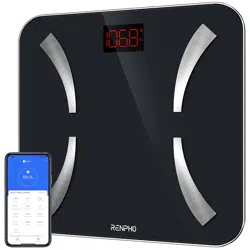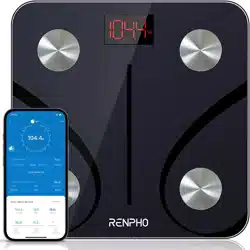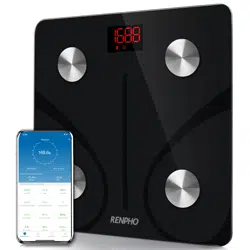

Renpho Bluetooth Body Fat Scale
User Manual
This manual is for following scale models: ES-CS20M / ES-CS20M-W /
ES-32MD; ES-24M / ES-26GB-B / ES-BR003 / ES-28ML / ES-30M ...
PRECAUTION FOR USE
Safety Precautions
When using digital scale, certain basic safety precautions must be followed,
including the following:
1. The Bluetooth scale should not be used to diagnose or treat any medical
condition. You should consult a doctor prior to undertaking any diet or exercise
program.
2. If you are pregnant or suffer from Osteoporosis or have a pacemaker or
other internal device, you should not use the body fat function of this smart
scale. All body composition data is for reference and should not be used as a
substitute for advice from a licensed health care professional.
3. If the scale malfunctions, first check the battery power. Replace or charge
the batteries as necessary.
4. Check the device before every use. Do not use the device if damaged. The
continuous use of damaged unit may cause injury or improper results.
5. Please keep the scale dry. Be careful when use on the wet and slippery
surface.
6. Fragile, handle with care.
7. Scale is a high-precision measuring device. Never jump or stomp on the
scale or disassemble. Please handle the scale carefully to avoid breakage.
8. The scale is not waterproof, never immerse the scale in water. To clean the
surface, use a damp cloth or glass cleaner. Do not use soap or other
chemicals.
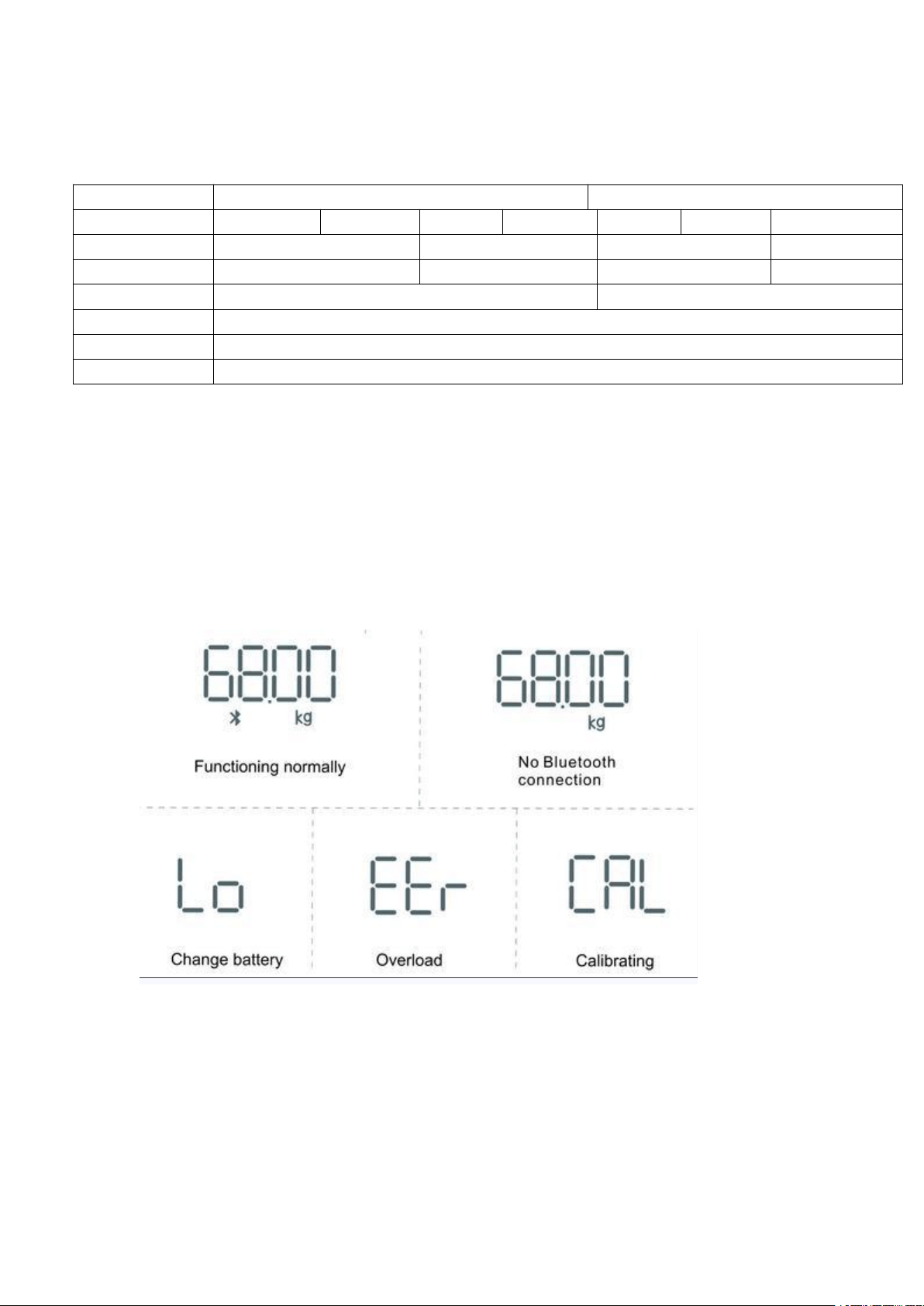
Know Your Renpho Scale
Specification
Battery Model
AAA Battery Model
Rechargeable Model
Model
ES-CS20M
ES-32MD
ES-24M
ES-26GB
ES-30M
ES-28ML
ES-BR003
Size(inch)
11*11*1
10.2*10.2*0.91
11*11*1
10.2*10.2*0.91
Weight
2.86lbs/1.3kg
2.43lbs/1.1kg
3.09 lb
2.43lbs/1.1kg
Batteries
3*1.5V AAA
Li-ion battery
Capacity
6.6-396lbs/3-180kg
Division
0.2lb/0.05kg
Unit
Lb/kg/st ( Switch via RENPHO App in the Settings)
Accuracy Range
50kg±0.3kg 100kg±0.4kg 150kg±0.5kg
110lbs±0.66lb 220lbs±0.88lb 330lbs±1.1lbs
Troubleshooting
[For Batteries Models]:
[For rechargeable Models]:
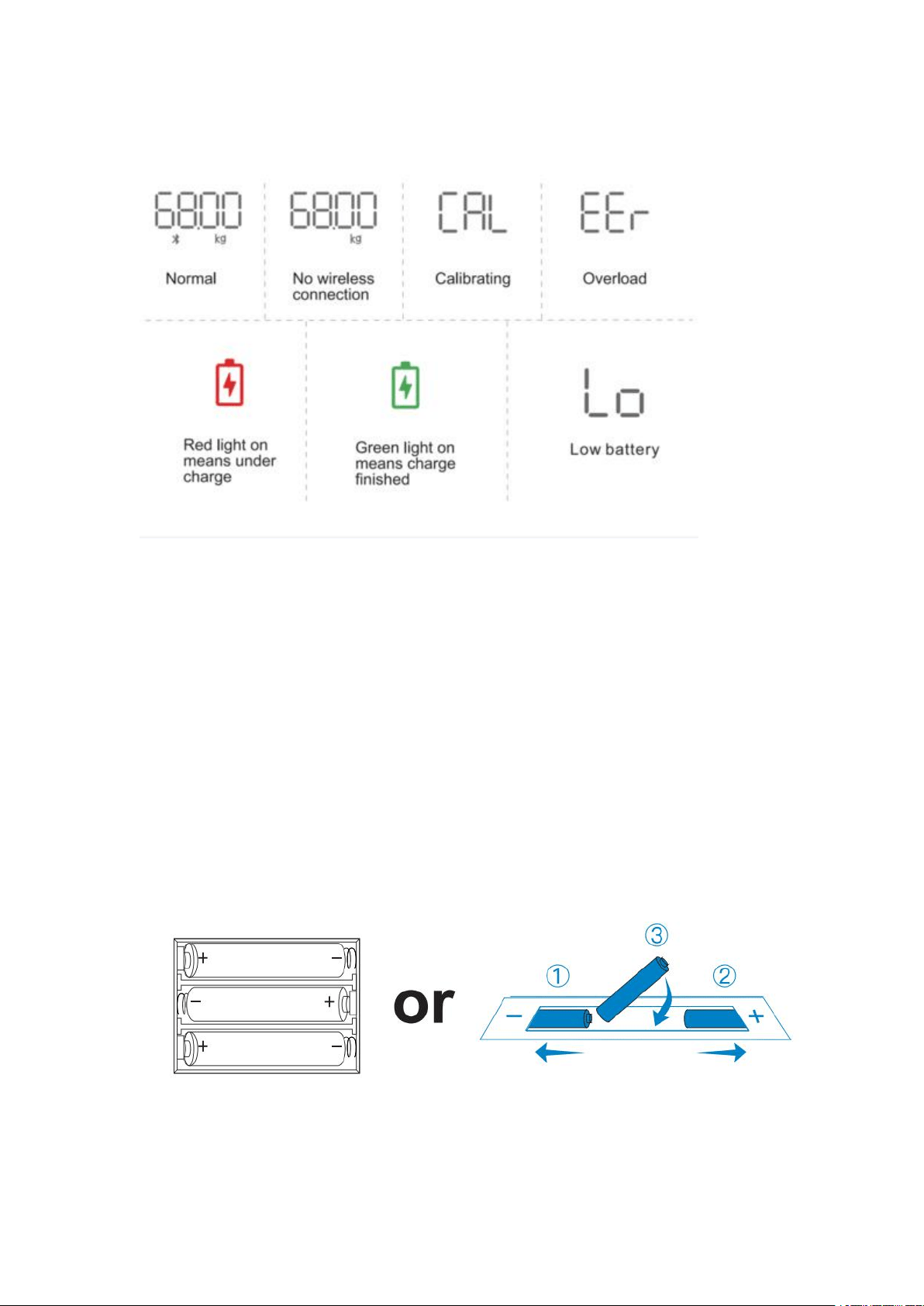
Getting Started
Step 1
Battery model:
1. Insert AAA batteries as indicated by the polarity symbols (+ and -) marked
inside.
2. The original batteries provided are NOT rechargeable. DO NOT
attempt to recharge the batteries.
3. If "LO" appears on the display, please replace the batteries.
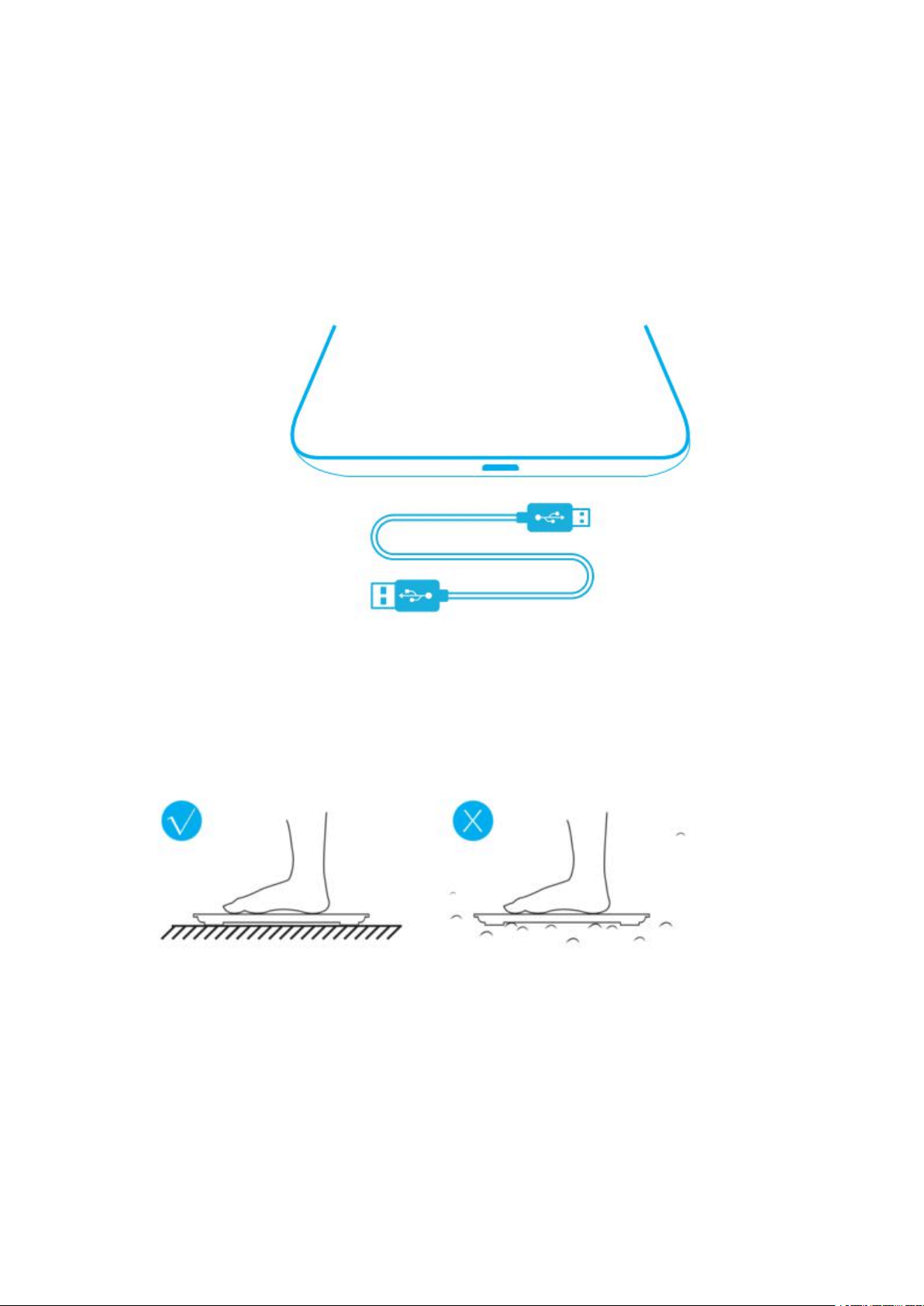
Rechargeable model: (Model number: ES-28ML / ES-30M / ES-BR003)
Please charge 2-3 hours before first use with the USB cable in the package.
Step 2
Use the scale in a flat and stable location. Avoid any carpeting.
Step 3:
Download the app: go to the app store on your device (App Store for iOS or
Play Store for Android) and search for “Renpho”, or follow these links:
https://apps.apple.com/us/app/renpho/id1219889310
https://play.google.com/store/apps/details?id=com.qingniu.renpho
Or scan this QR code with your smartphone.
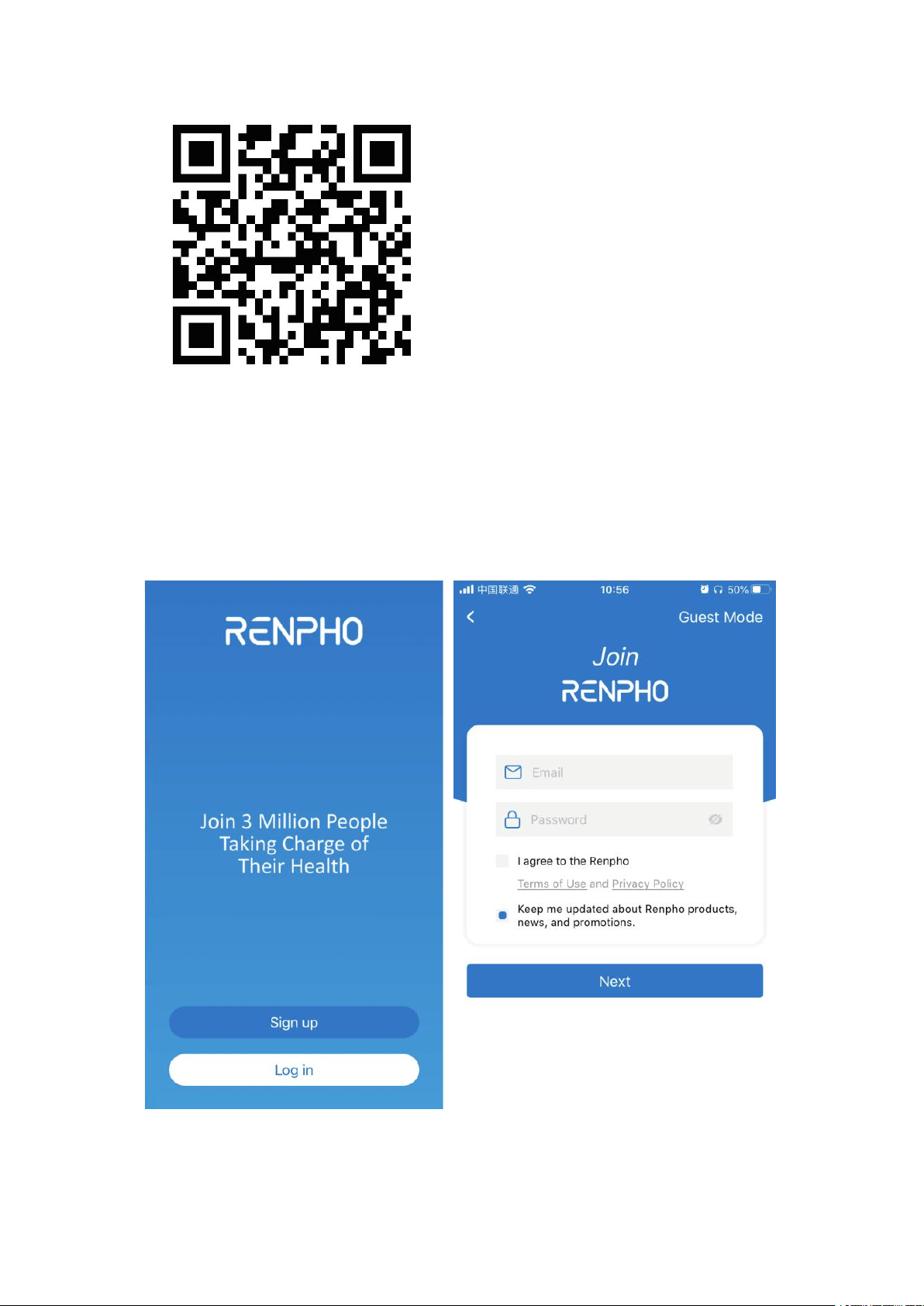
Step 4:
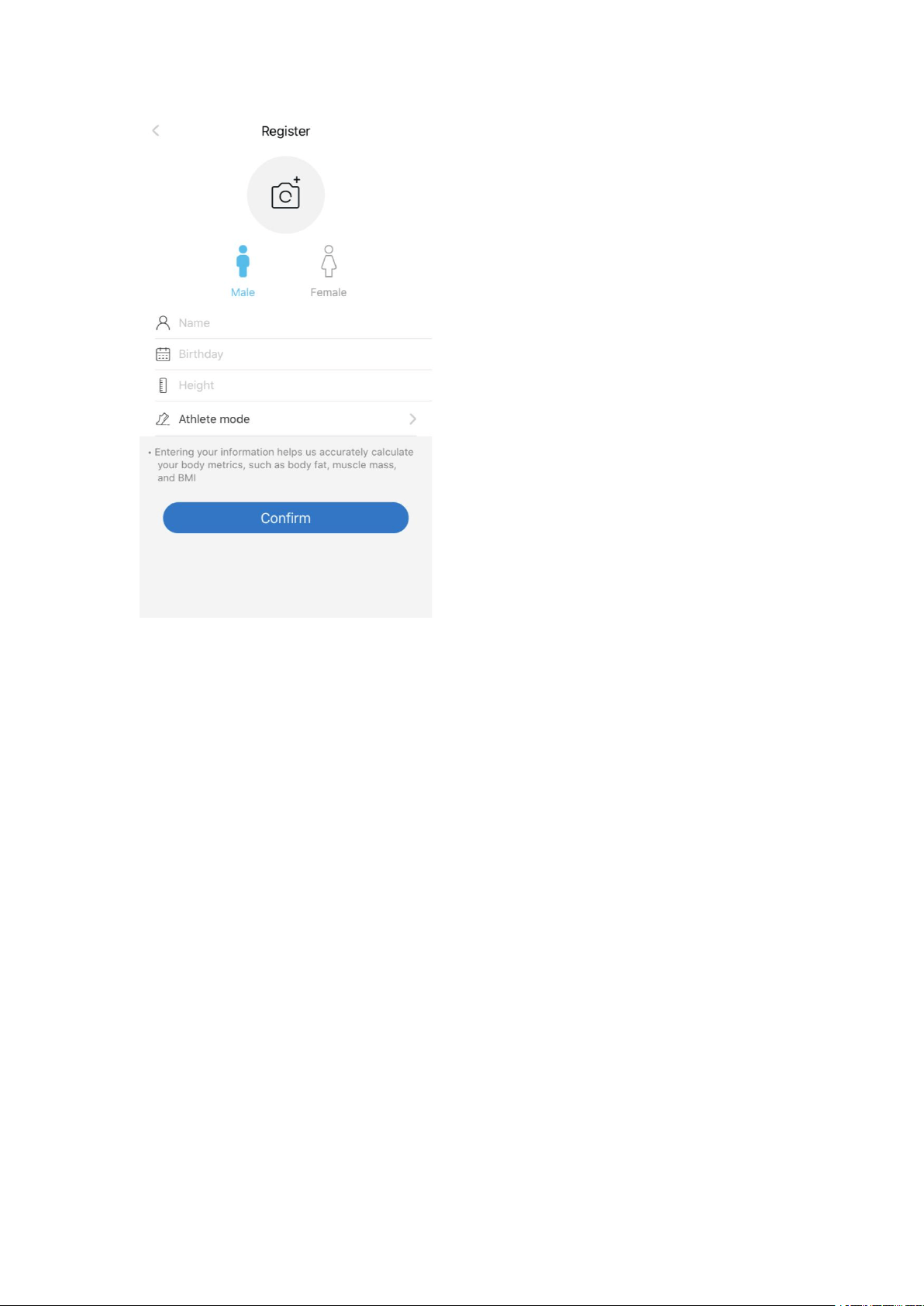
1. Create an account in the Renpho App with email. Or you could login as
Guest mode if you don’t want to register.
2. Fill out the information (The app needs this information in order to calculate
your body composition more precise).
Step 5:
Turn on Bluetooth on your smartphone. Location also needs to be turned on
for Android 6.0 or higher. (Location is required by Android System)
*For iOS 13 users, please go to setting menu on your iPhone, find Renpho App,
turn on the Bluetooth first.
Step 6:
With the Bluetooth on, you can begin the pairing process between Renpho
scale and Renpho App.
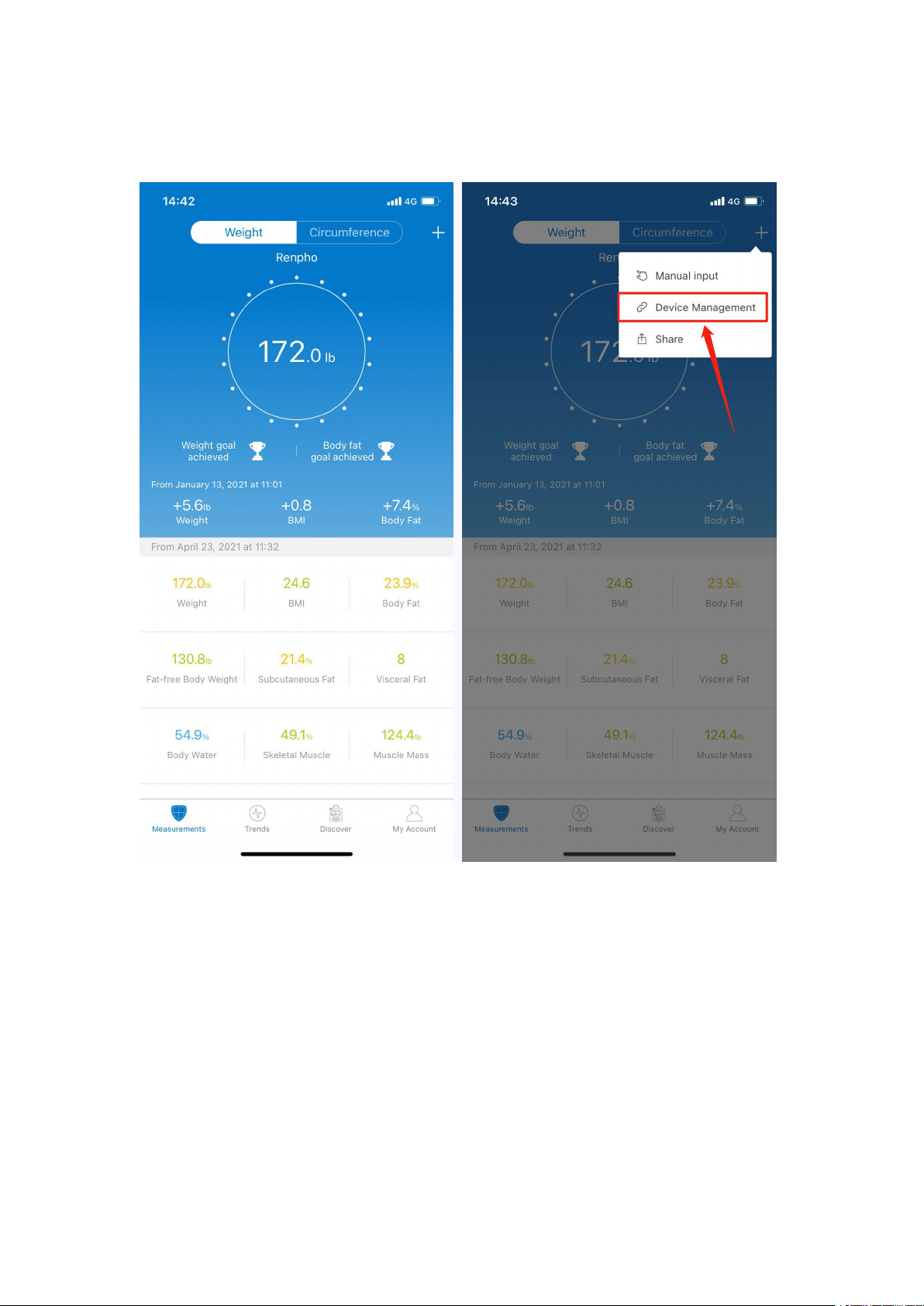
Tap + and choose "Device management" on the measuring page.
Step onto the scale with bare and dry feet on the scale's conductive area.
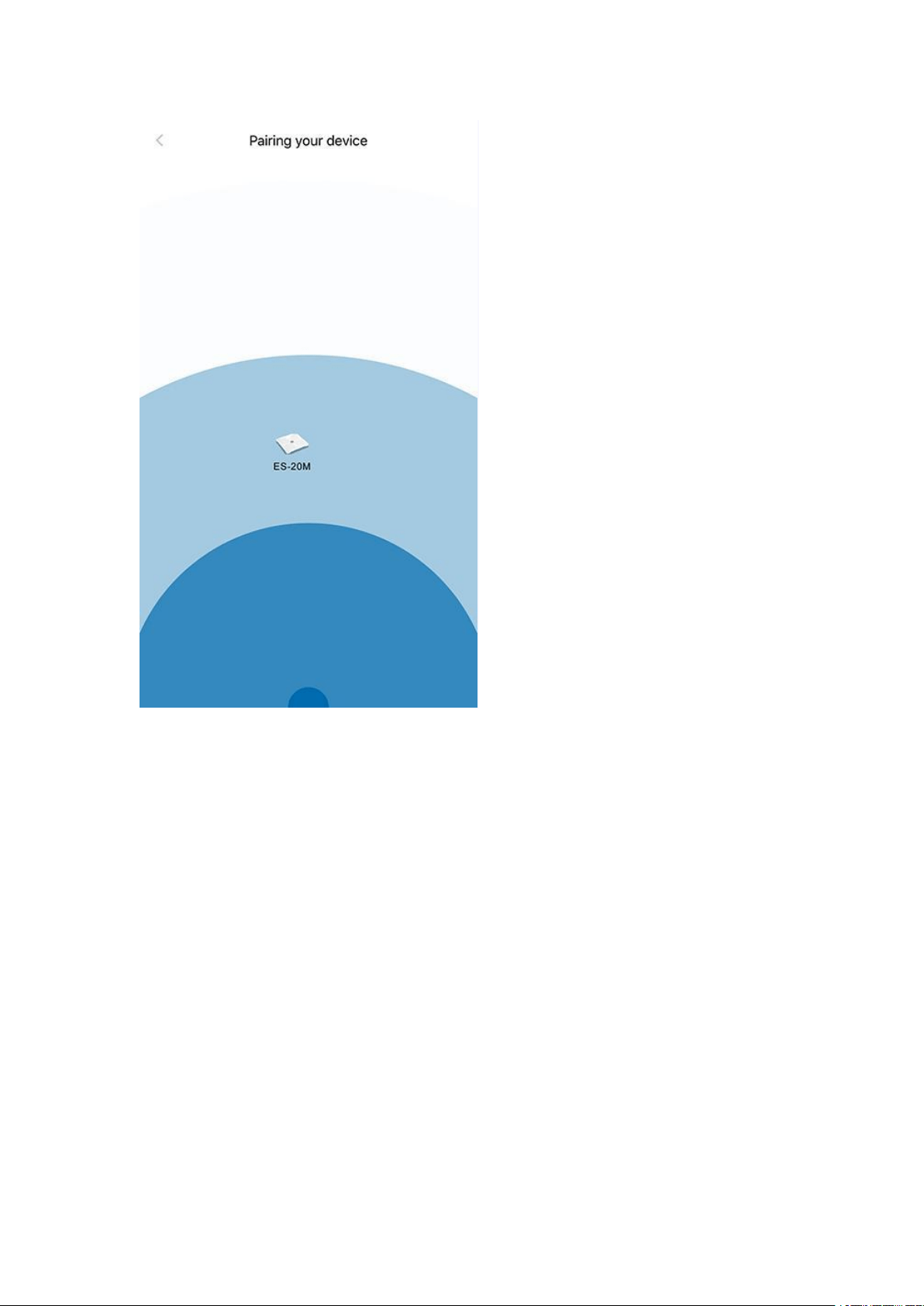
Tap the device name on the pairing page.
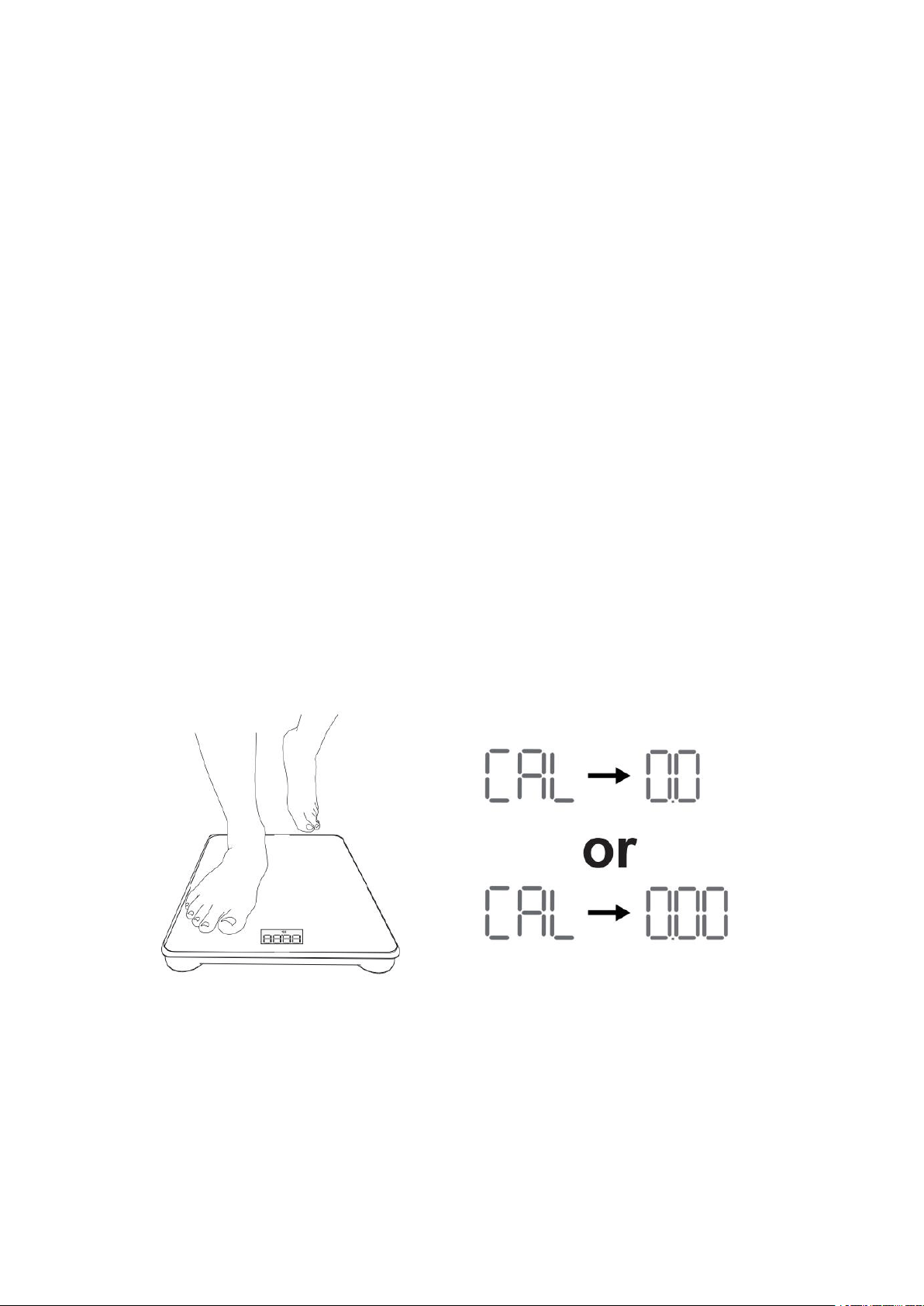
Keep standing on the scale for 5-10 seconds. The weighing is finished after
"000" has displayed twice.
You have successfully complete the first measurement, now you can check the
metrics on the App.
You can step onto the scale anytime for your body weight, the body
composition data will sync to the app once it is connected again.
Bluetooth Troubleshooting
Bluetooth connection
If the regular connection to Bluetooth failed, please try the below steps:
1. Reset the scale.
For batteries models: Taking out one battery for 5 seconds and putting it back in; For
rechargeable models: Press the reset button for 5 seconds.
2. Reset the Bluetooth connection.
Ensure Bluetooth and GPS (Android only) are enabled on your phone.
*Open the RENPHO app
*Under the "Measurements" section, select the top right “+”.
*Select "Device Management".
*Find the model number that begins with "ES" and slide it left to forget the device.
*Tap "+" on the top right to enter pairing mode.
*Step one foot on the scale surface to wake it up.
*After a few seconds of loading, the scale model number will appear, tap it.
*Step on the scale again to complete the pairing.
If none of the above steps resolves your connectivity issues, try the ”Bluetooth
anomaly detection” function:
1. Open the RENPHO app.
2. Go to “My Account”select “Settings”.
3. Select the "Bluetooth anomaly detection" and follow up the instructions.
4. Submit the abnormality report.
Our tech team will further diagnose the problem within 24 hours.
Recalibration:
If the scale has been moved or turned upside down, it must be calibrated to
ensure accurate results.
1. Please place your scale in a firm, flat and stable location, avoid any
carpet;
2. Step on with one foot to wake up the scale;
3. When the monitor shows digits, then step off;
4. Then scale will show "CAL", then "0.0" or "0.00", the calibration process
is complete.
Ensure Bluetooth is enabled and working.
Ensure personal data is entered.
Integrate with multiple fitness App
Sync with Samsung Health (Only for Android phone)
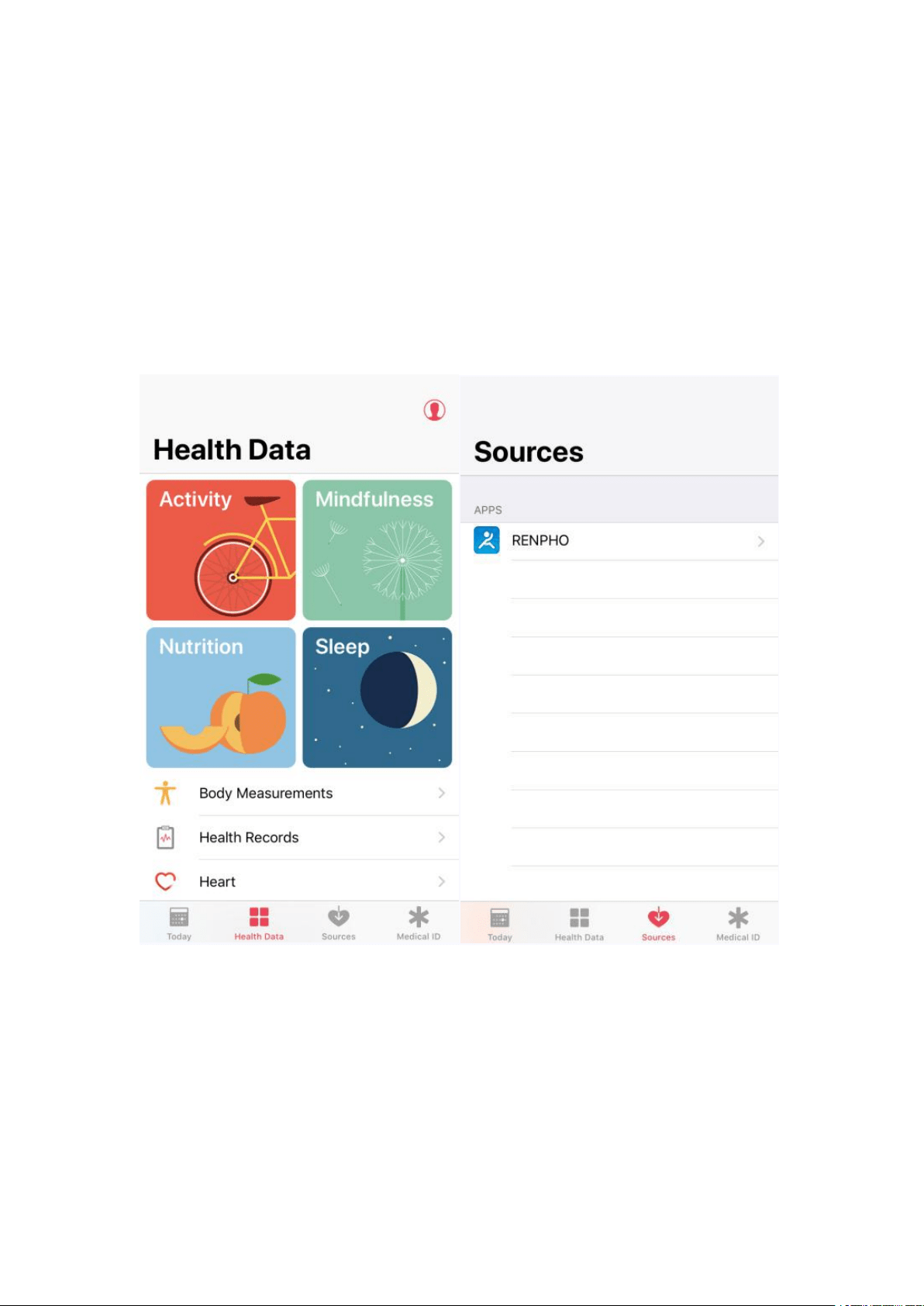
For previous versions of iOS 13, please use the following steps to sync with Apple
Health:
1. Open the "Health" app on your iPhone or iPad.
2. Tap on the"Data Sources"
3. Select "RENPHO" from the sources list.
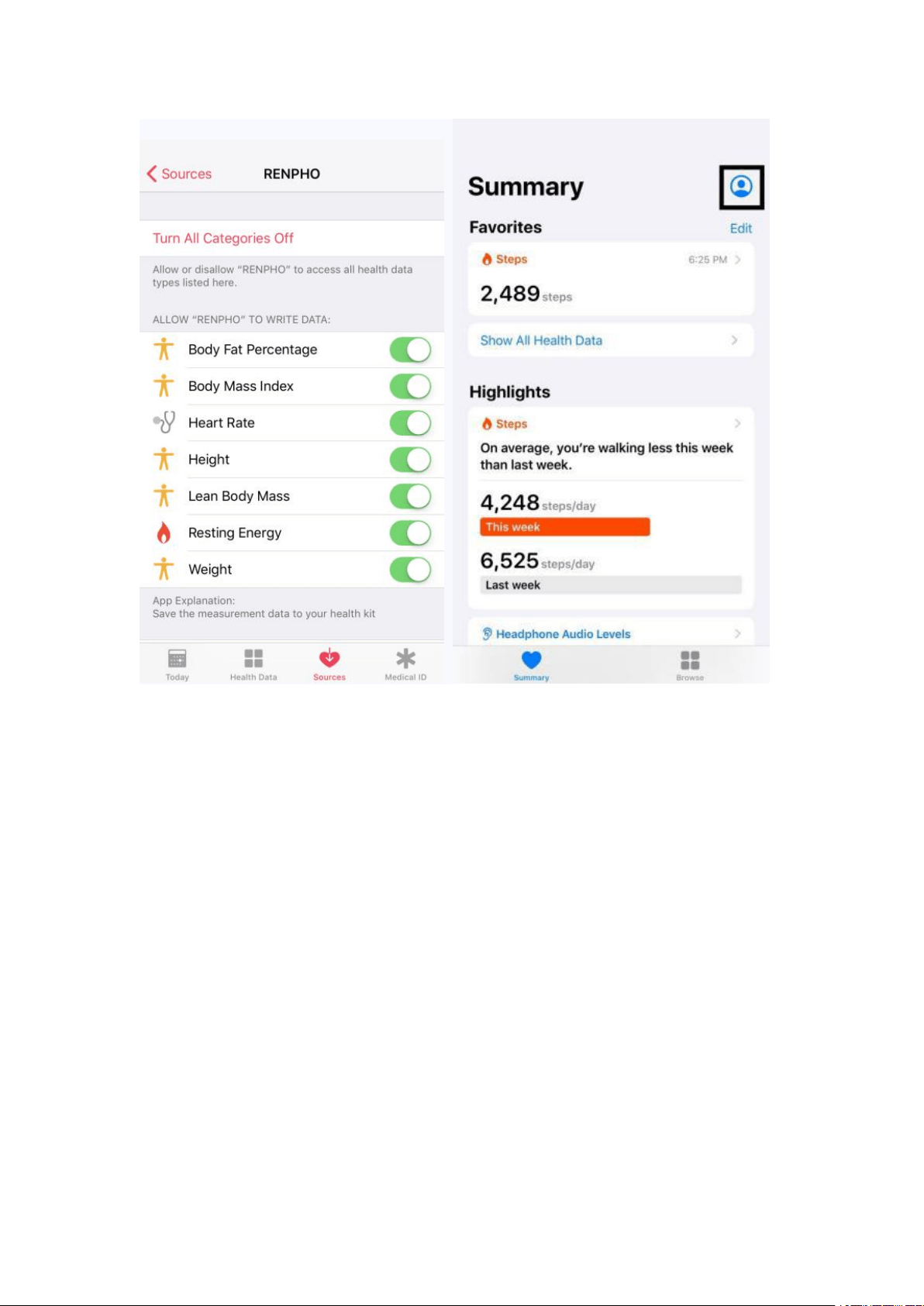
4. RENPHO will synchronize the following data with Apple Health once you connect.
You can customize what you want to share using the switches on the right.
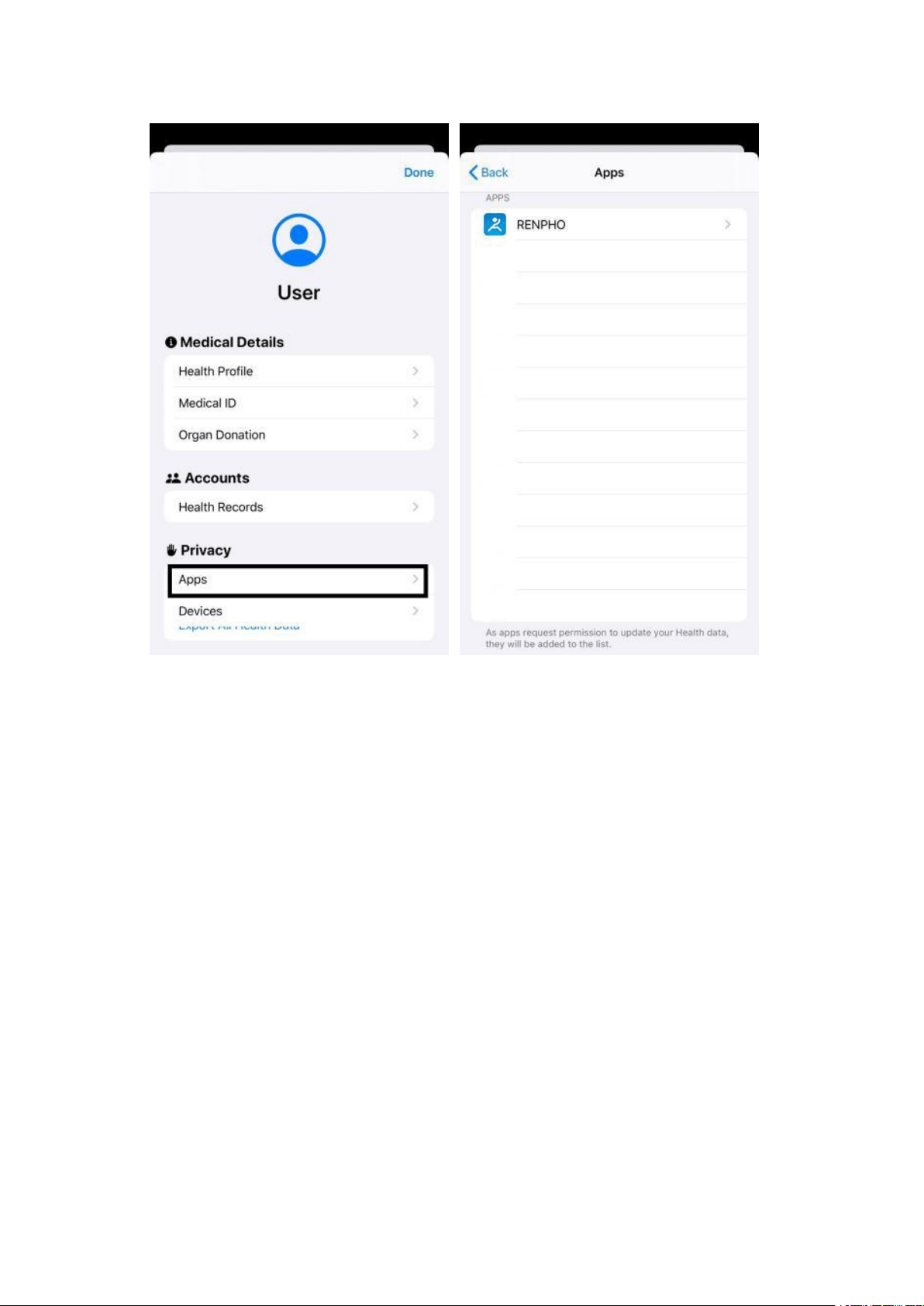
For iOS 13 or above versions, please use the following steps to sync with
Apple Health:
Open the "Health" App on your iPhone, click the user image at the top right
corner
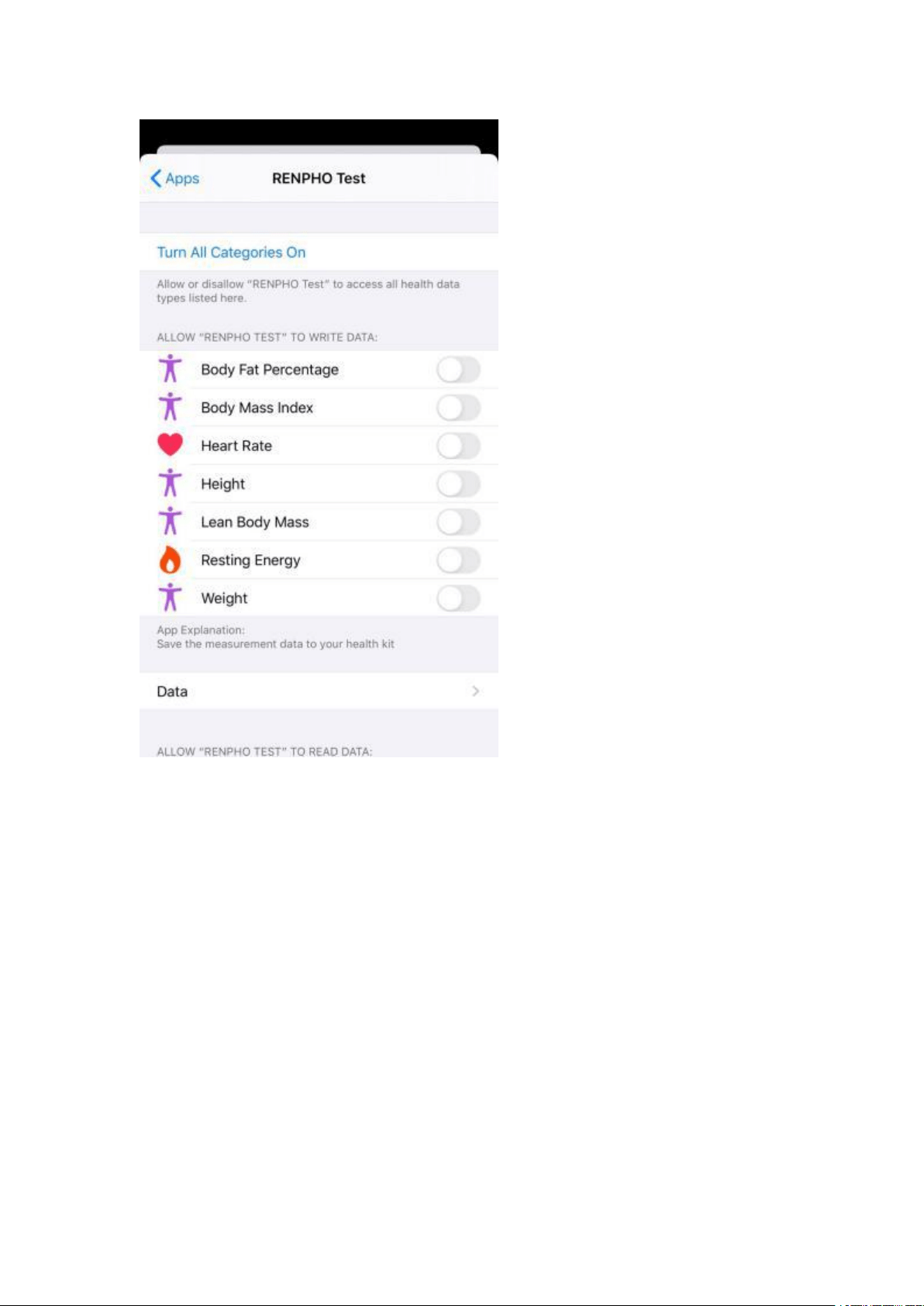
Select “Apps” under Privacy and select “Renpho”
Enable all categories to allow the Renpho App to transfer data to Apple
Health
Sync with Google Fit
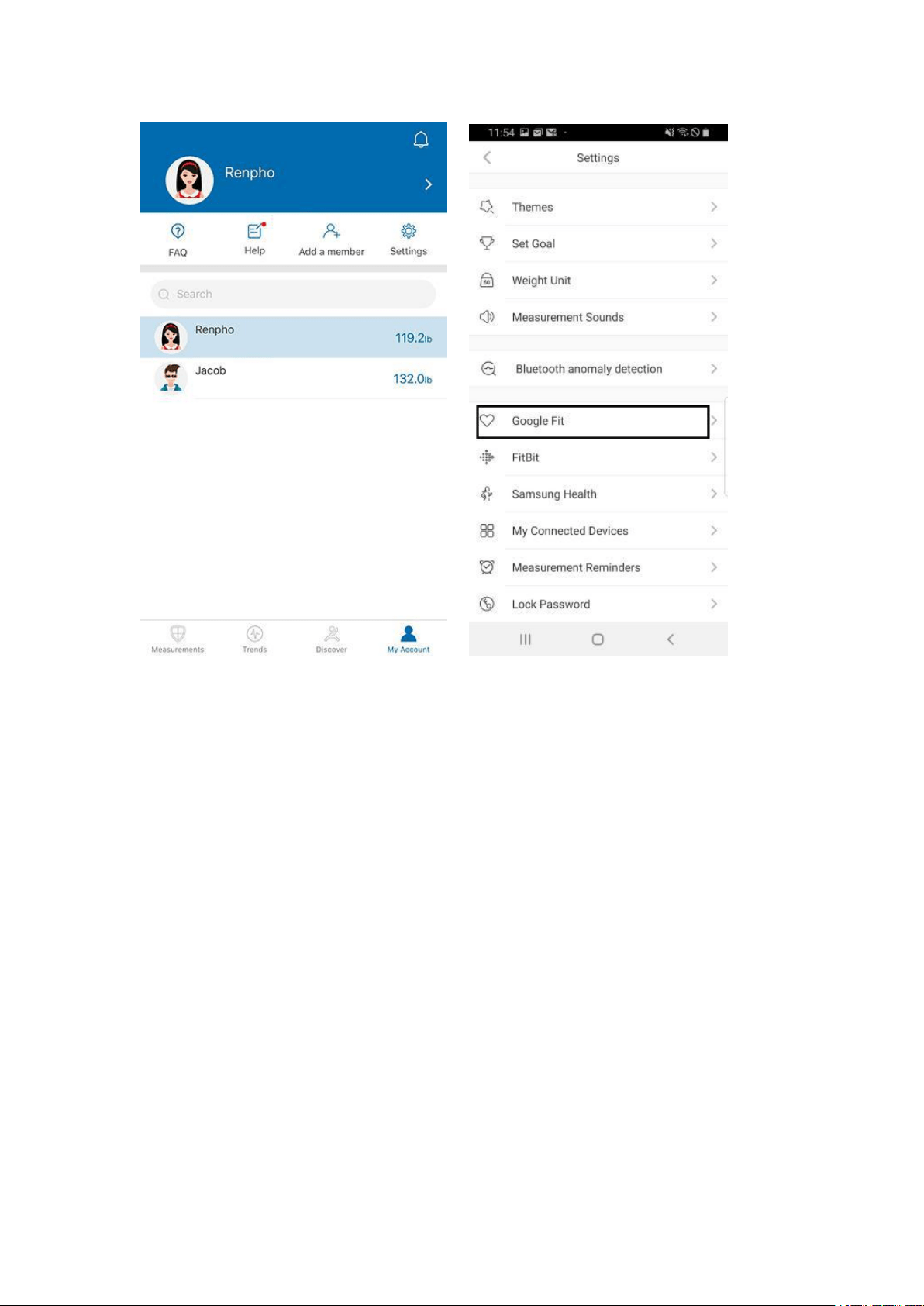
Open the Renpho app
Select/tap the "My Account" tab
Select/tap “Settings” in the upper right
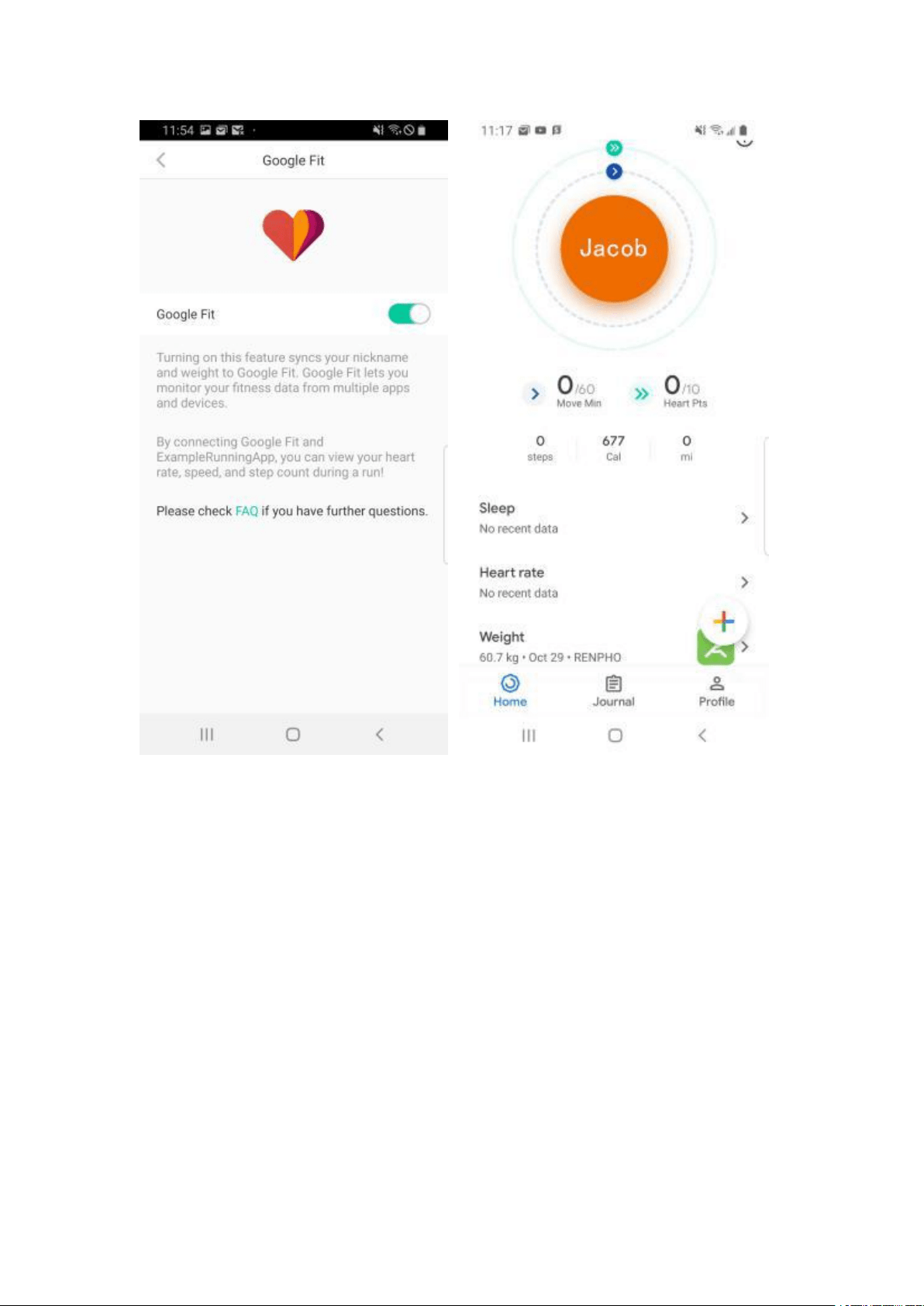
Select Google Fit and login to your Google Fit account and allow Renpho
to access your Google Fit account.
After you use the scale, the data will be uploaded to Google Fit. You can
login to your app to view your data.
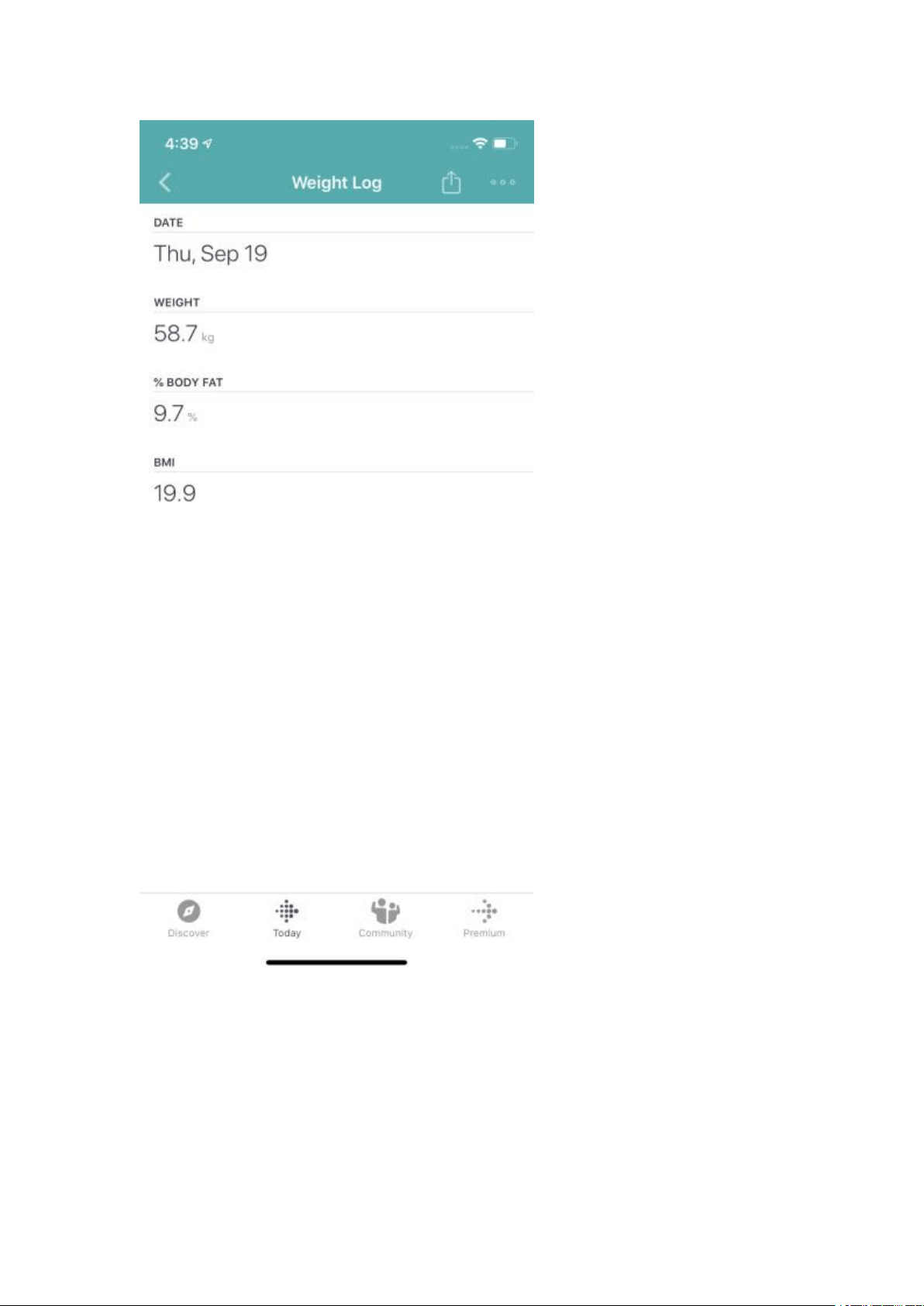
Sync with Fitbit App
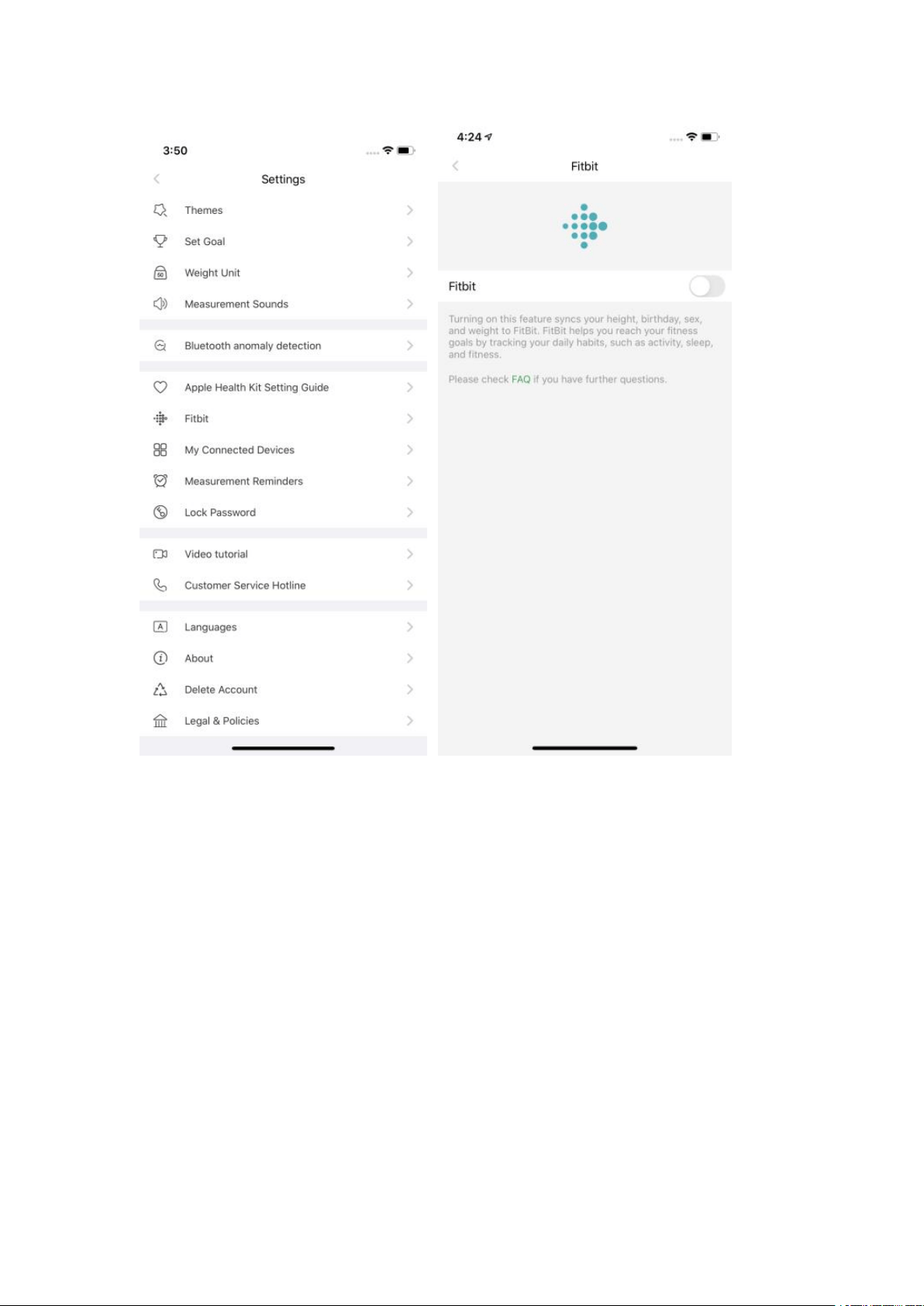
Enter Settings page in Renpho App, select "Fitbit".
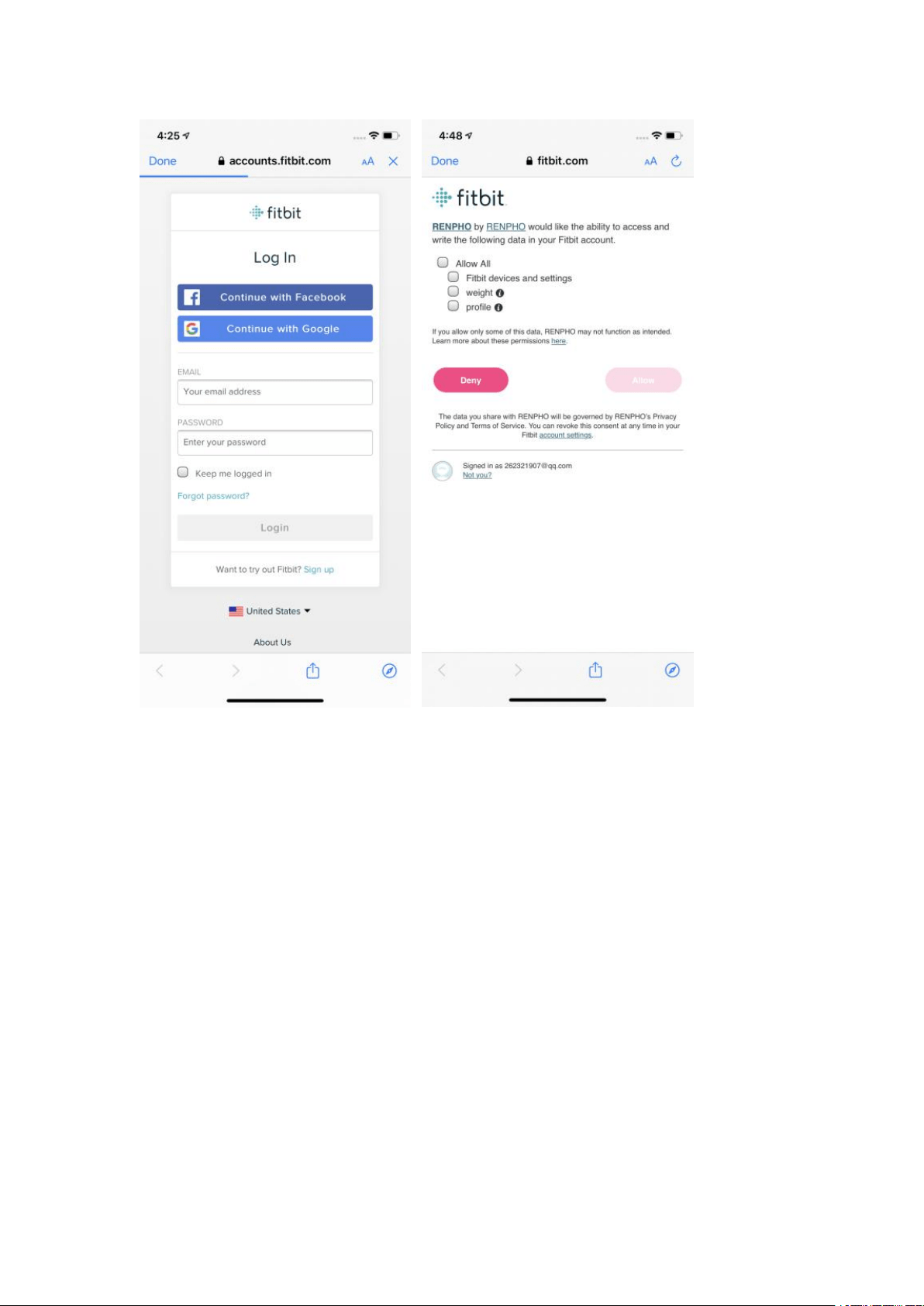
Tap on "Fitbit", turn on Fitbit button, log in your Fitbit account.
Select "Allow" to access Fitbit App.
After connection, all the data(Weight, BMI) will sync to Fitbit app. You can
view both on app and web.

Use Apple Watch with Renpho Smart Scale
Before you can use the Renpho scale on your Apple Watch, ensure you
have the Renpho App downloaded on your phone and you have the scale
paired with the Renpho app on your phone first. Once that is done, you can
use the Renpho scale on your Apple Watch with the following steps.
Install and open the Renpho Apple Watch App. On the main interface, tap
"Measuring".
Step onto the scale and stand still.
After standing still for several seconds, you will see "Connecting" followed
by the status "Measuring". Your measurements will appear after 5-10
seconds.
Tap the back arrow to view your measurement history.
Other tips:
1. You can use the Apple Watch with your smartphone under these
following conditions:
When the Apple Watch is disconnected with smartphone.
When the watch is offline (i.e. it is not connected to WiFi).
When the Apple Watch is offline and disconnected with smartphone, after
restarting the watch.
2. Ensure you keep the watch screen on during the entire measurement
process.
To use the Renpho ES-26BB Scale, ensure your Watch has iOS 4.0 or
above.
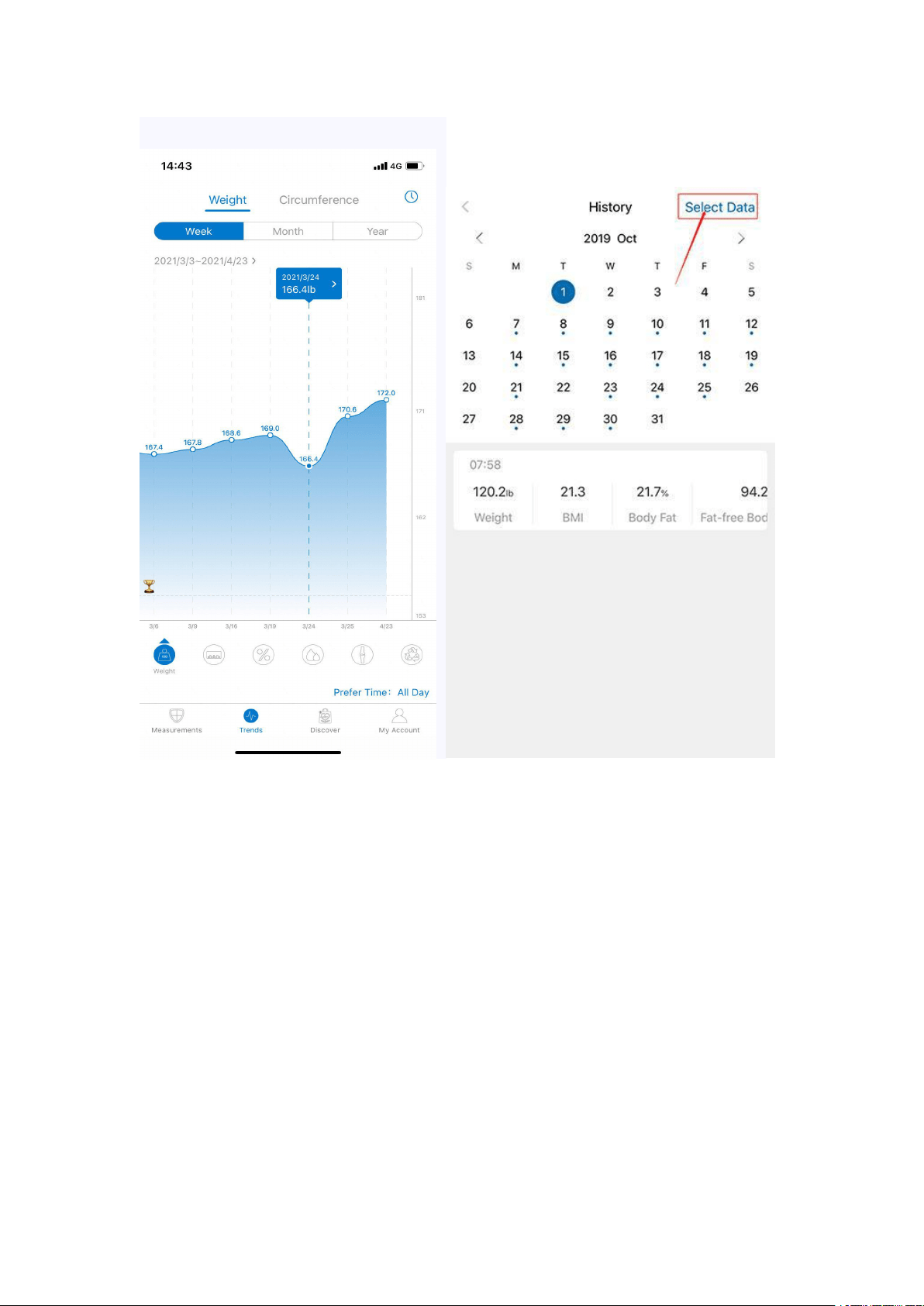
How can I view the measurement and share progress?
Click "Trends" to view your progress history.
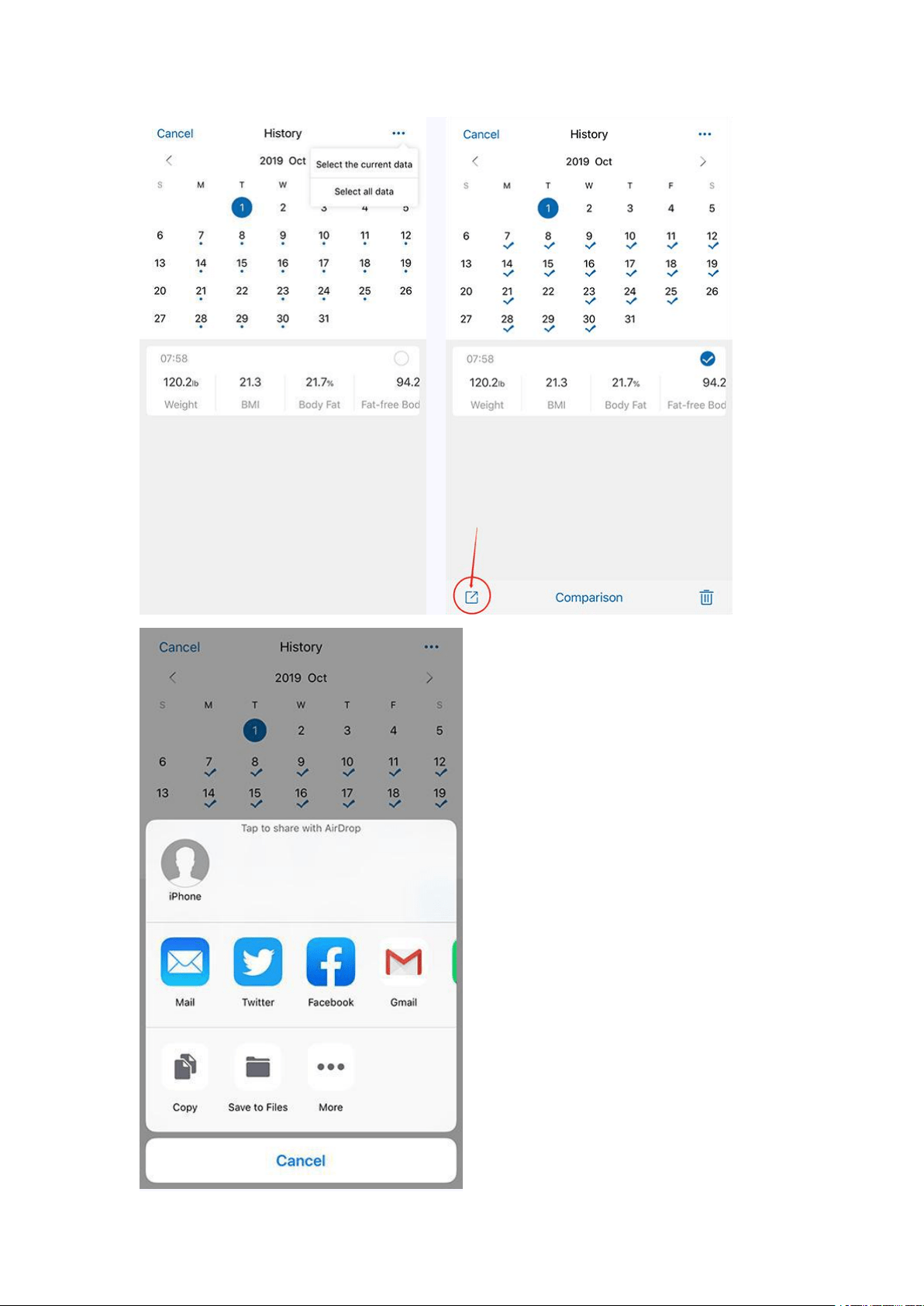
Enter it into the calendar to form a list and select a data or all data you
want to compare with or delete.
You can also download and send the data to your email address in CSV
format.
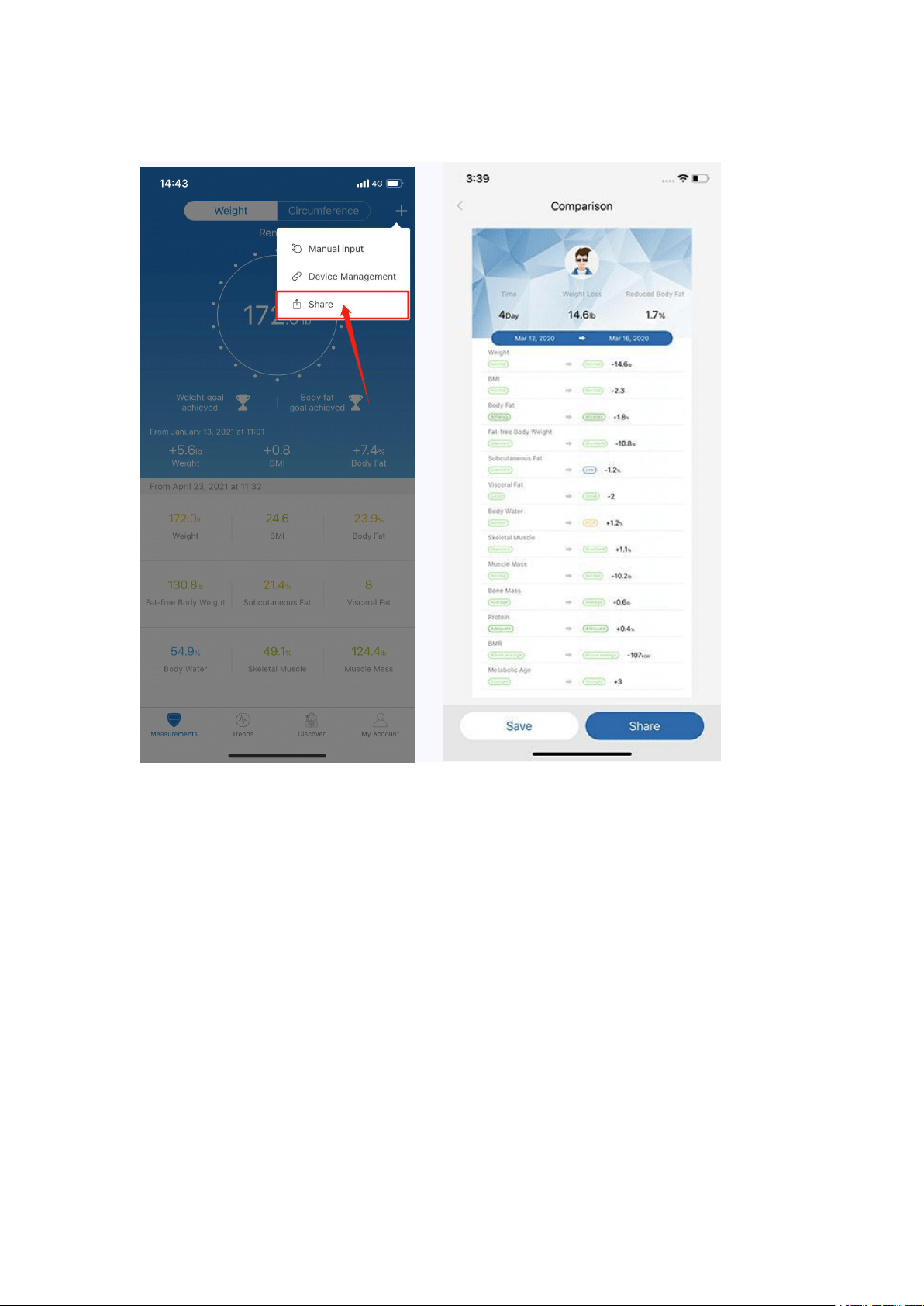
You can click [Share] to share your fitness data with friends via Facebook,
Instagram on the Measuring page.
How to add “Measurement Users” or “Friends”?
Q: What’s the difference between “Measurement Users” and “Friends”?
A: Measurement Users is different users using one scale, such as family
members or roommates.
Friends is another user using other Renpho scale, you can only have the
access to view his/her data. Keep motivated with your friends!
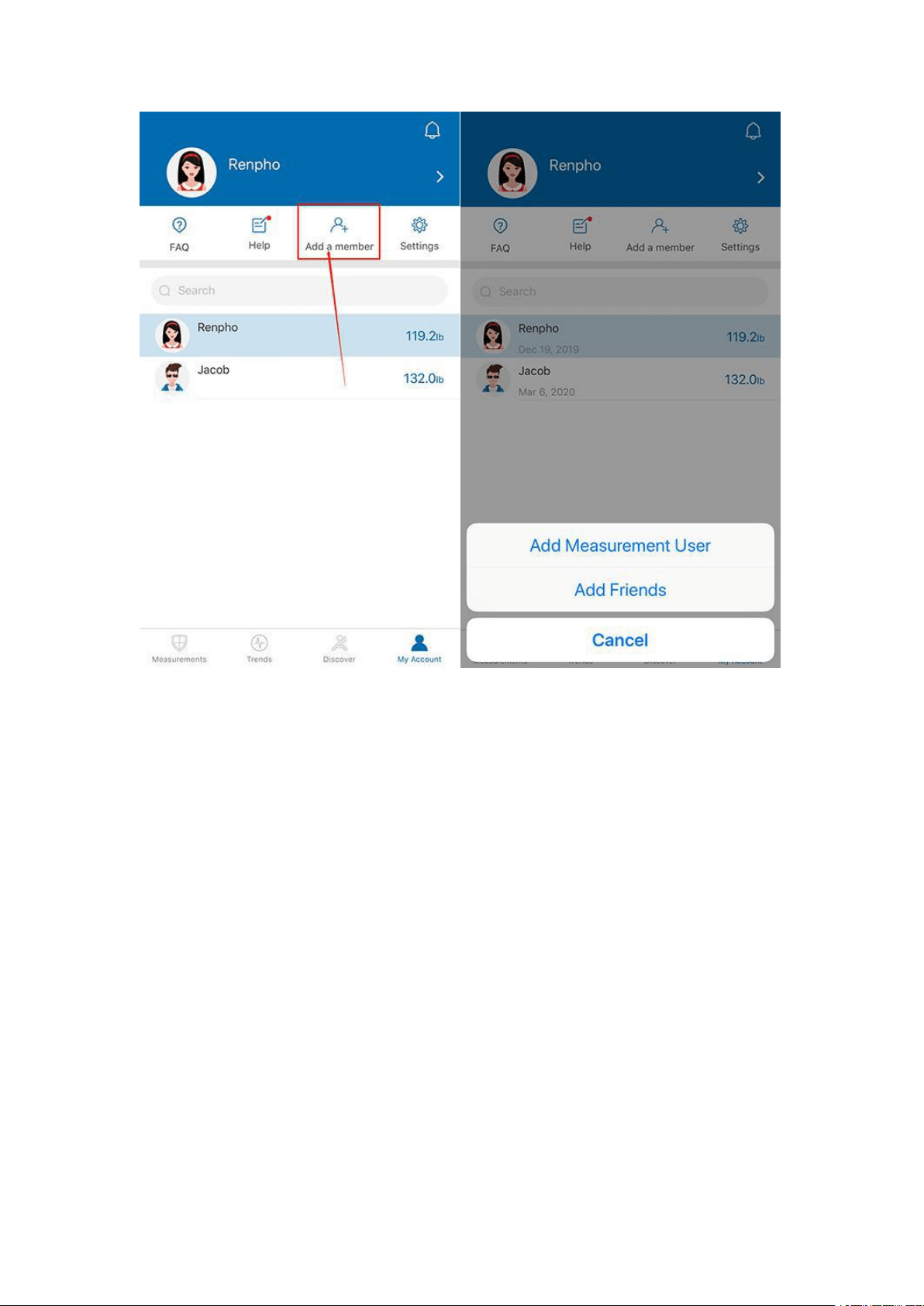
Under "My Account" you can add user(s) - Add Measurement Users / Add
Friends.
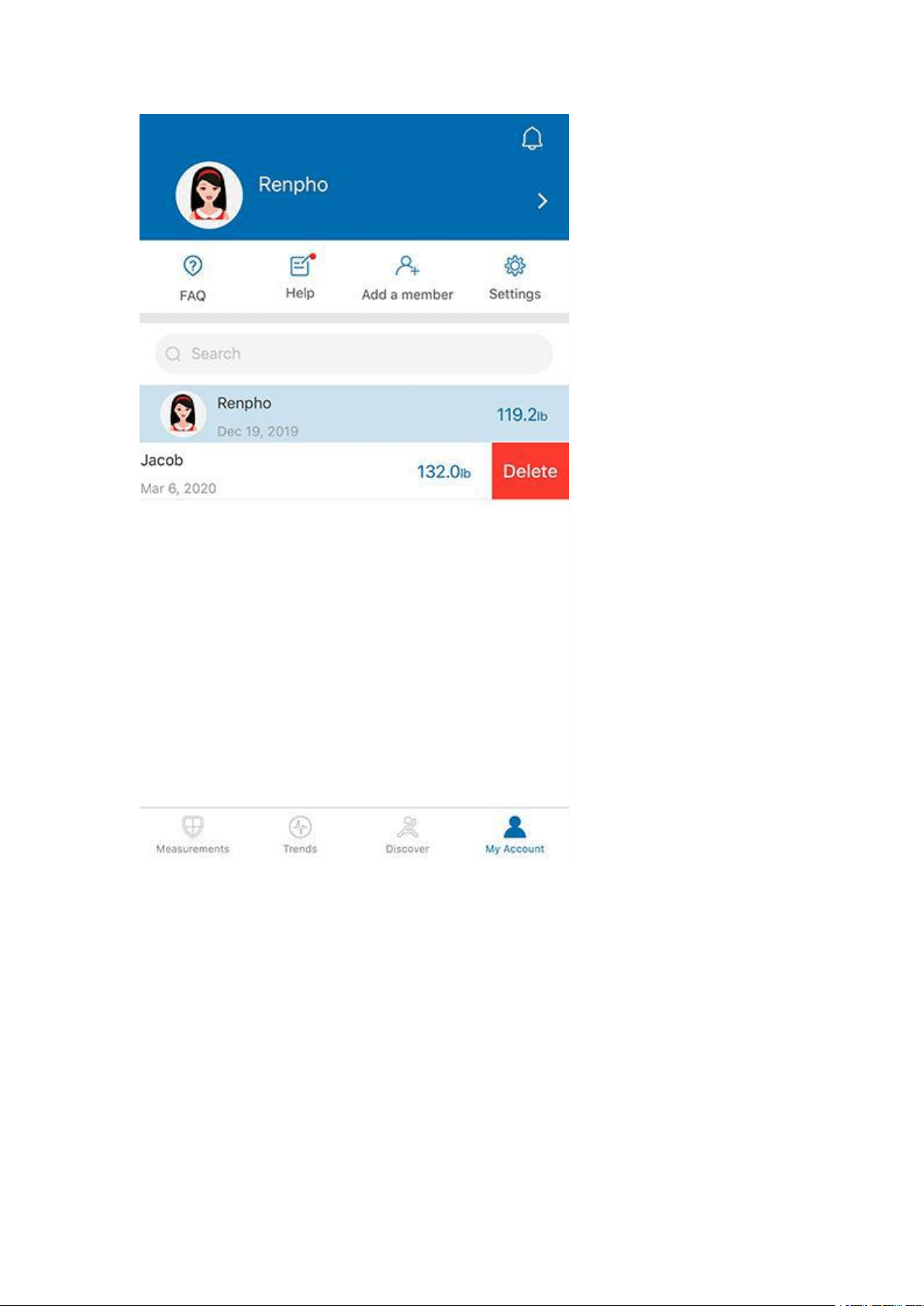
To delete an account, swipe the account to the left and select "Delete".
Contact Us
Feedback Through App
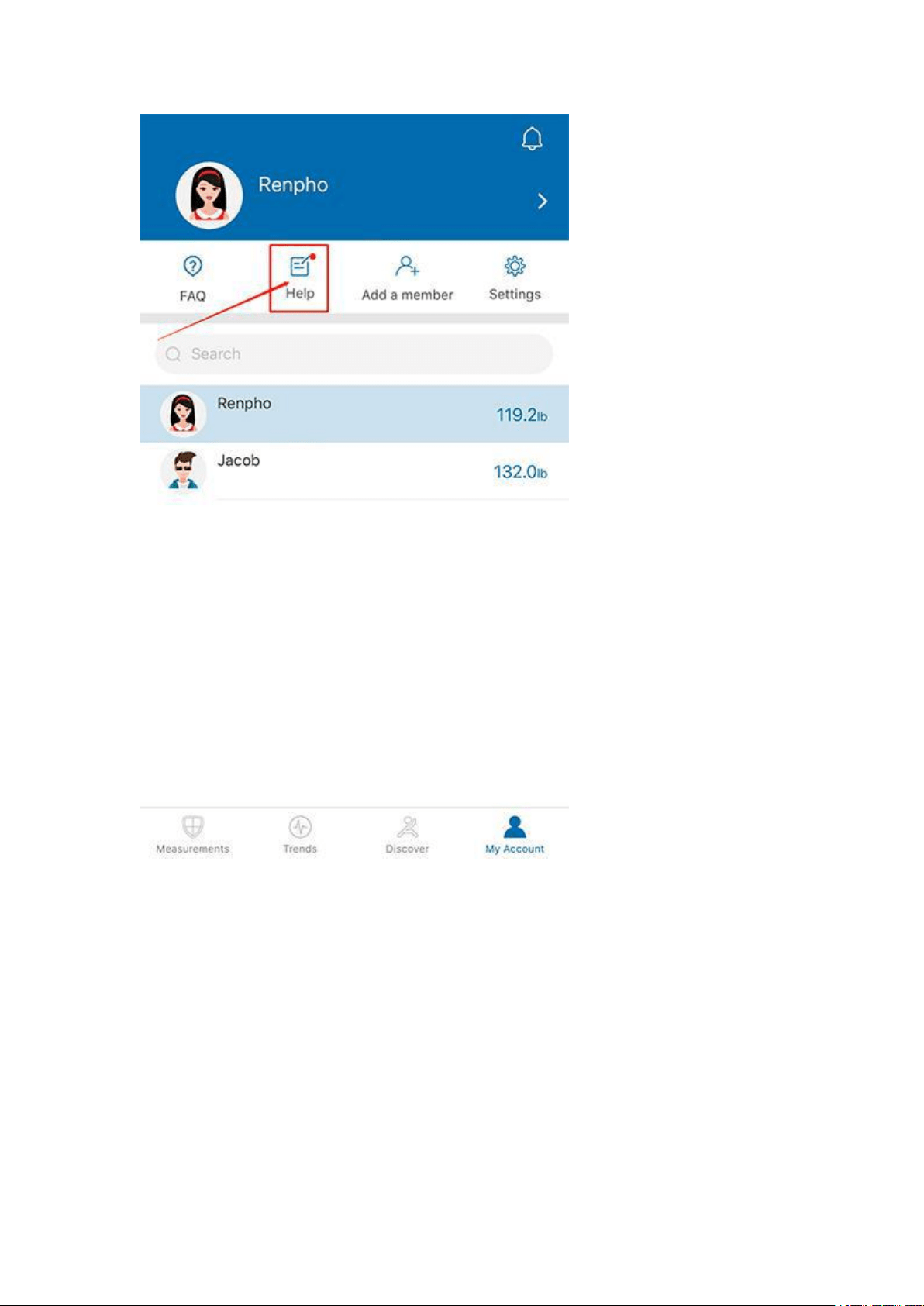
Open Renpho App, at “My Account” page, tap on [Help] to get in touch with
us,we will get back to you within 24 hours.

FAQ
Why is my body weight not accurate?
Q: Why is my body weight not accurate?
A: If you think you are getting a inaccurate weight measurement, please try
below steps to fix the problem inaccurate issues:
1. Place the scale on a hard and flat surface. Softer floors such as carpet
can cause inaccuracies.
2. Step on the scale with one foot until the LED screen lights up. Then step
off and wait for the LED screen to display “CAL”. When "0.00" is displayed,
the scale is calibrated and you could step on it for measurement.
3. During the measurement, try to keep your weight centered directly
above and over the scale as much as possible.
4. Try waiting for the scale to auto-shutoff (about 10 seconds) and you
should be able to view accurate results via app.
If you think you're still getting inaccurate results, it may be caused by the
following factors:
A. A type of internal error.
[For Batteries Models]:
Try resetting the scale by taking one battery out for 5 seconds and putting
it back in.
[For rechargeable Models]:
There is a [RESET] button on the back of the scale, please press it for 5
seconds to restart the scale.
B. The unbalanced surface could also cause inaccurate results. Always try
using the scale on a flat surface. Putting it on a softer surface such as
carpet can also cause inaccuracies.
C. Check the legs/pads of the scale for any obstruction that may cause an
imbalance.
Additional tips:
1. Avoid moving the scale. Moving the scale frequently increases the risk
of inaccuracy.
2. Everyone's weight fluctuates throughout a typical day. Muscle usage
and basic consumption of food and water will cause some weight
fluctuation no matter what. Thus, if you weigh yourself multiple times
during the day, you will see some differences. To minimize the fluctuations,
weigh yourself the same time each day (such as the morning)
3. Accuracy Range:
50kgs: ± 0.3kg
100kgs ± 0.4kg

150kgs ± 0.5kg
110lbs: ± 0.66lb
220lbs ± 0.88lb
330lbs ± 1.1lbs
We hope these tips are helpful and they address your issues.
Why my scale won’t turn on?
Q: Why my scale won’t turn on?
A:
[For Batteries Models]:
Please make sure the batteries is placed correctly, if it is, please put a
different set of batteries in the scale and try step on again. If the scale still
won’t turn on, please contact us via [Contact Us] menu.
[For rechargeable Models]:
Please charge the scale until the scale's display shows the green battery
icon, indicating that the scale is fully charged. If the scale still won’t turn on,
please contact us via [Contact Us] menu.
I'm having trouble getting my scale connected. Any tips?
Q: I'm having trouble getting my scale connected. Any tips?
A: Please go to the [Bluetooth Troubleshooting] menu, if the Bluetooth still
won’t connect after the troubleshooting process, please contact us through
[support@renpho.com], our tech team will help you with your problem
ASAP.
No body fat measured when weighing, what’s wrong?
Q: No body fat measured when I am weighing.
A: Step on with dry and bare feet.
Ensure Bluetooth is enabled and working.
Ensure personal data is entered.
What is "Athlete Mode" ?
Q: I saw "Athlete Mode" option when I create my profile, what is it? Should
I turn it on?
- What is the definition of an Athlete?
A: The general consensus among researchers is that a quantitative
dimension could be used to define an athlete. An athlete is defined for this
scale as a person who consistently works out for approximately 3 times per
week at 2 hours for each occurrence. These individuals should select
Athlete Mode for the most accurate measurement results.
Please note that scale is not calibrated for professional athletes or body
builders.

Why is the Athlete Mode necessary in a Body Fat Scale?
- It has been found that body fat estimation using BIA could overestimate
the percentage body fat of adult elite athletes. The physiological variation
of athletes in bone density and level of hydration are two of the reasons
said to account for the difference.
How to restart the scale?
Q: How to restart the scale?
A:
[For Batteries Models]:
- First, took one of the batteries out of the scale.
- Then, put back the batteries and wait for 5 seconds.
- Now the scale has been automatic restart, you can step onto the scale.
[For rechargeable Models]:
There is a [RESET] button on the back of the scale, please press it for 5
seconds to restart the scale.
Body Composition Inaccurate?
Q: Why are my body composition numbers different than the ones I see at
my gym, doctor, etc.?
A: Body composition analysis is an inexact science, regardless of the
manufacturer or method of measurement. Because your scale combines
the measurements it takes with variables stored in your user profile
according to our algorithm, the numbers you see may vary from those you
see using other measurement methods—which is completely normal.
When you’re measuring body composition, it’s more important to pay
attention to overall trends than day-to-day numbers. (Tracking in the
Renpho app helps with that.)
How to change the unit?
Q: How to change the unit?
A: Please go to Renpho App, "My account
>
Settings
>
Weight Unit"
Privacy
Q: How do I trust that my data is secured?
A: We know that the information you share with us is sensitive, and it's
important to us that we honor your trust. Your scale creates a secure,
one-to-one connection to your account on a device of your choice to sync
your results, which are then backed up to our servers. We don't allow any
third parties access to your data unless required to by law. Check out our
privacy policy (https://renpho.com/pages/renpho-privacy-policy) for more
information.

Password setting
Q: How to set my password for App?
A: You can find “Lock Passord” under Settings menu.
Change batteries[For Batteries Models]
Q: When do I change the batteries?
A: When you step on the scale and it shows ”LO”, it means low batteries, it
requires you to change batteries.
When to charge[For Rechargeable Models]
Q: When do I need to charge the scale?
A: When you step on the scale and it shows ”LO”, it means low batteries, it
requires you to charge.