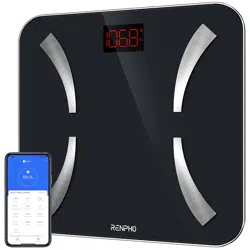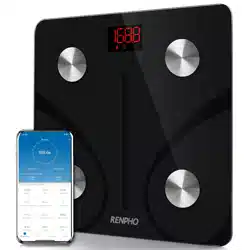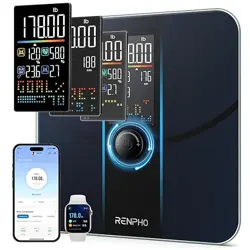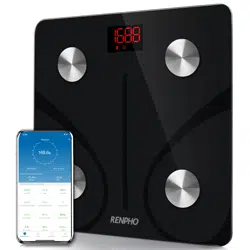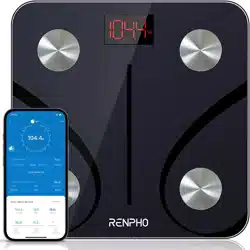
Smart Body Composition Scale
Model: ES-CS20M ES-24M ES-26M ES-32MD
RENPHO Bluetooth Scale User Manual
Thank you for choosing RENPHO! This scale is your personal
health assistant. It uses bio-electrical impedance analysis (BIA)
technology to offer you the data you need to keep track of your
personal health metrics: BMI(Body Mass Index), Body Fat %, Body
Water, Muscle Mass, Bone Mass, Protein, and much more! We
sincerely hope that you enjoy using your new RENPHO scale!
01
02
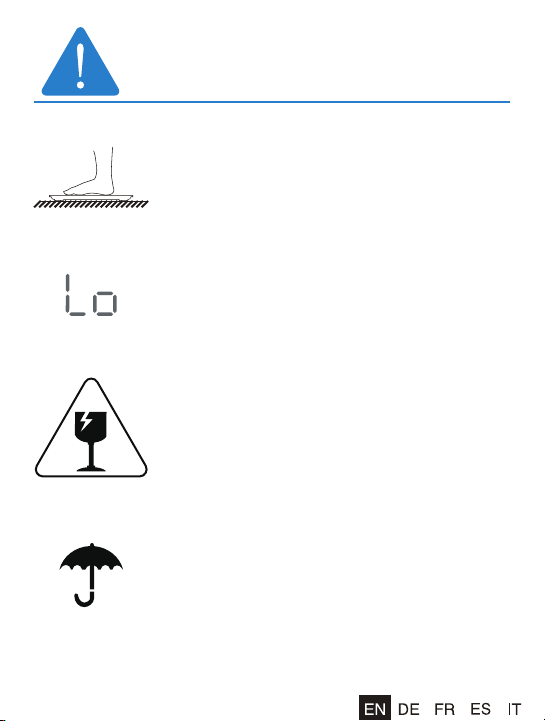
1. To avoid slipping, do not weigh with wet feet.
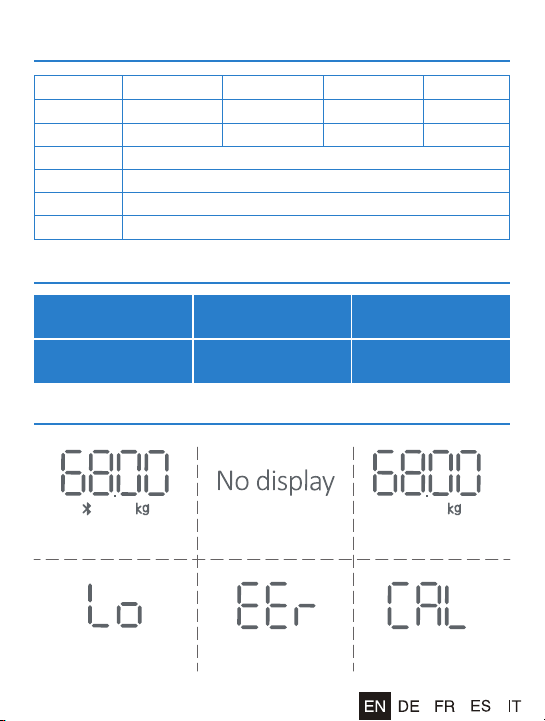
2. "Lo" symbol on the display indicates that the
battery power is low. Please replace the batteries.
(If it is not used for a long time, please remove
the battery to avoid battery leakage.)
3. Avoid hitting or dropping the scale as it is a
highly precise electronic instrument.
4. Do not expose to excessively wet environments.

03
FCC Warranty
This device complies with part 15 of the FCC Rules. Operation is
subject to the following two conditions: (1) this device may not cause
harmful interference, and (2) this device must accept any interfer-
ence received, including interference that may cause undesired
operation.
Any changes or modifications not expressly approved by the party
responsible for compliance could void the user's authority to operate
the equipment.
NOTE: This equipment has been tested and found to comply with the
limits for a Class B digital device, pursuant to Part 15 of the FCC
Rules. These limits are designed to provide reasonable protection
against harmful interference in a residential installation. This
equipment generates, uses and can radiate radio frequency energy
and, if not installed and used in accordance with the instructions,
may cause harmful interference to radio communications. However,
there is no guarantee that interference will not occur in a particular
installation.
If this equipment does cause harmful interference to radio or
television reception, which can be determined by turning the
equipment off and on, the user is encouraged to try to correct the
interference by one or more of the following measures:
- Reorient or relocate the receiving antenna.
- Increase the separation between the equipment and receiver.
- Connect the equipment into an outlet on a circuit different from
that to which the receiver is connected.
- Consult the dealer or an experienced radio/TV technician for help.
The device has been evaluated to meet general RF exposure
requirement.
The device can be used in portable exposure condition without
restriction.
FCC ID: 2APXUES-CS20M

04
Caution
When using digital scale, certain basic safety precautions must be
followed, including the following:
1. The Bluetooth scale should not be used to diagnose or treat any
medical condition. You should consult a doctor when undertak-
ing any diet or exercise program.
2. If you are pregnant or have a pacemaker or other internal
device, you should not over rely on the data provided by this
product. All data is for reference and is not a substitute for
advice from a licensed health care professional.
3. If the scale malfunction, first check the batteries and replace if
needed.
4. Check the device before each use. Do not use the device if
damaged. The continuous use of damaged unit may cause
injury or improper results.
5. Please keep the scale dry. Take care on the wet and slippery
surface.
6. When not in use, please remove the batteries and place the
device in a dry room and protect it against extreme moisture,
heat, lint, dust and direct sunlight Never place any heavy objects
on the equipment.
7. Scale is a high-precision measuring device. Never jump or
stomp on the scale or disassemble. Please handle the scale
carefully to avoid breakage.
8. The scale is not waterproof, never immerse the scale in water, lb
clean the surface, use a damp cloth or glass cleaner. Do not use
soap or othe chemicals.
05
Specifications
Accuracy Range
Trouble Shooting
Model
Size(inch)
Weight
ES-CS20M
11x11x1
2.86lbs/1.3kg
ES-24M
10.2x10.2x0.91
2.43lbs/1.1kg
ES-26M
10.2x10.2x0.91
2.43lbs/1.1kg
ES-32MD
11x11x1
2.86lbs/1.3kg
Batteries
Capacity
Division
Unit
3*1.5V AAA
6.6-396lbs/3-180kg
0.2lb/0.05kg
Lb/kg/st ( Switch via RENPHO App in the Settings)
50kg:±0.3kg
110lbs:±0.66lb
100kg:±0.4kg
220lbs:±0.88lb
150kg:±0.5kg
330lbs:±1.1lbs
Functioning normally
No wireless
connection
Change battery
Change battery CalibratingOverload
06
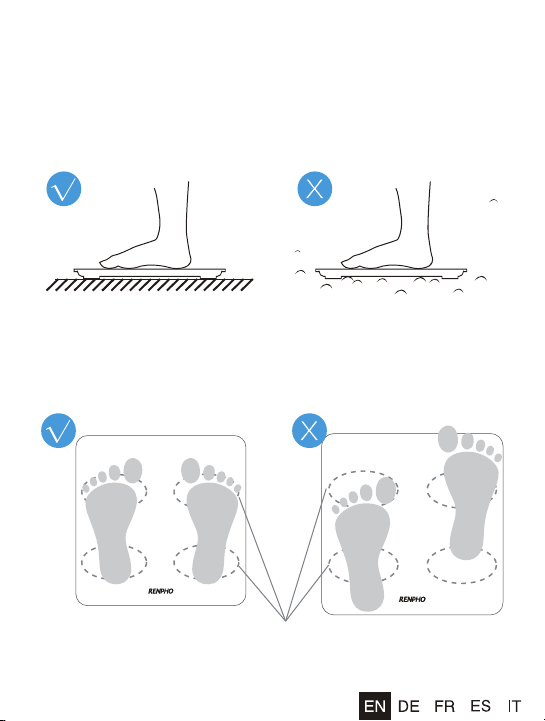
For body weight: Place the scale on an even surface, step on the
scale with one foot until the LED screen lights up. Then step off
and wait for the LED screen to display "CAL". When "0.00 kg/0.00
lb" is displayed, the scale is calibrated and you can step on it for
measurement.
For body fat and other body composition analysis: Stand straight
on scale and uniformly touched the electrodes with bare and dry
feet as shown below.
Conductive areas
07
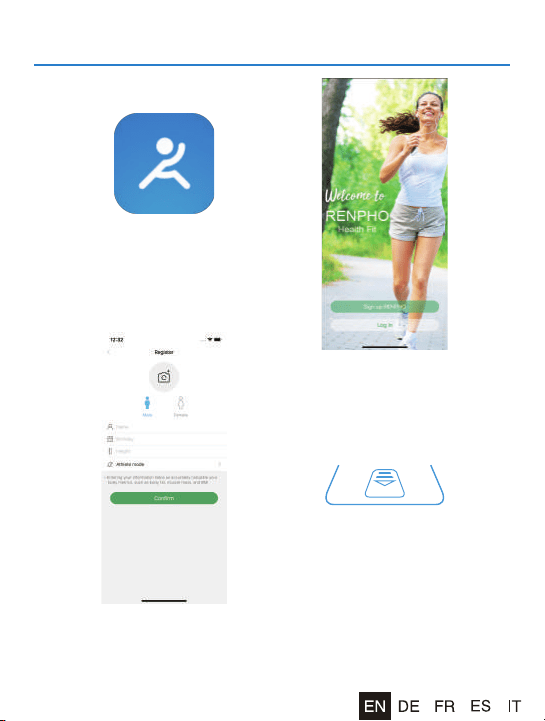
Download App and install the batteries
1. Download "RENPHO" via
App Store or Google Play.
4. Install original battery set,
please note the batteries
offered are trial version,
please replace them within
2 months in order to avoid
leakage and damage the
scale.
2. Sign up for a new
RENPHO account.
3. Then add required data
and confirmed OK.
08
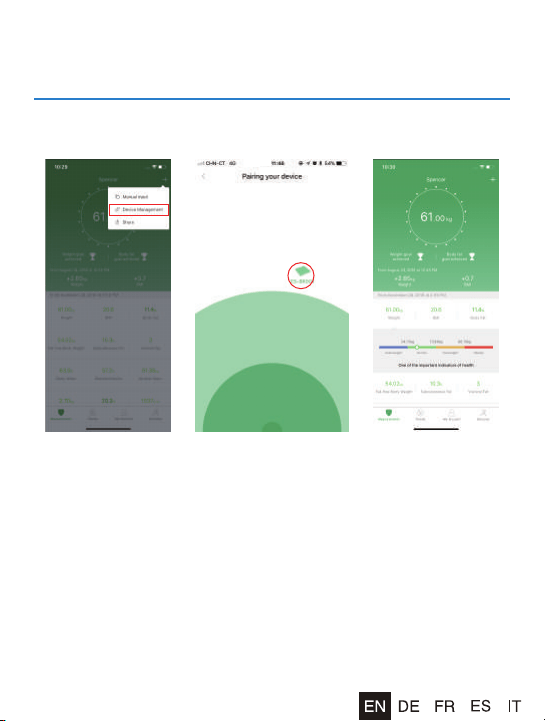
Turn on Bluetooth on your smartphone. Location also needs to be
turned on for Android 6.0 or higher.(Required by Android System)
1. Press [+] and Device
management to be
redirected to pairing
your devices.
2. Step onto the scale
with dry and bare
feet. Tap the device
name on the pairing
page.
3. Remain standing on
the scale for 5-10
seconds. The weighing
is finished after "000"
has displayed twice.
Pairing the RENPHO scale with your
smartphone

09
Bluetooth Connection
If the regular connection to Bluetooth failed, please try the below
steps:
1. Reset the scale for taking out one battery for 5 seconds and
putting it back in.
2. Reset the Bluetooth connection.
Turn on Bluetooth on your Smartphone. Location also needs to
be turned on for Android 6.0 or higher.(Required by Android
System)
> Open the RENPHO App.
> Under the "Measurements" section, select the top right "+".
> Select "Device Management".
> Find the model number that begins with "ES" and slide it left to
forget the device.
> Tap "+" on the top right to enter pairing mode.
> Step one foot on the scale surface to wake it up.
> After a few seconds of loading, the scale model number will
appear (begins with "ES"), tap it.
> Step on the scale again to complete the pairing.
If none of the above steps resolves your connectivity issues, try the
"Bluetooth anomaly detection" function:
1. Open the RENPHO App.
2. Go to "My Account" and select "Settings".
3. Select the "Bluetooth anomaly detection" and follow up the
instructions.
4. Submit the abnormality report.
5. Share your App account to support team.
Our tech team will diagnose the Bluetooth connection problem
further.
10
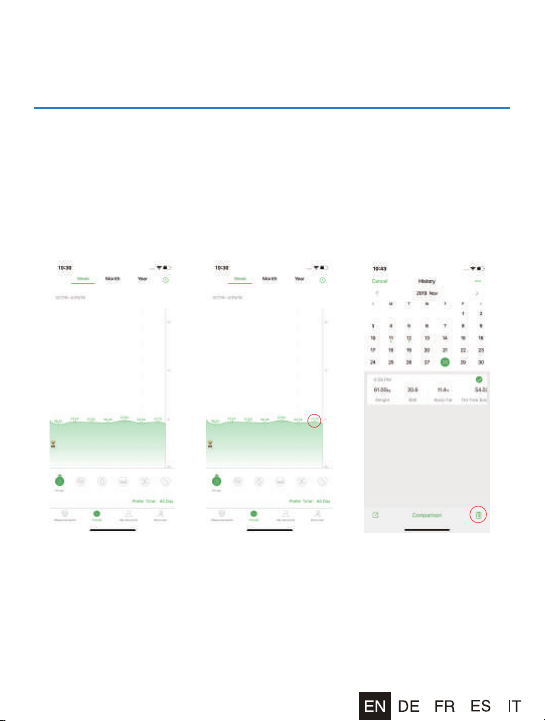
Click "Chart" to view your progress history. Enter it into the
calendar to form a list and select a data or all data you want to
delete. You can also download and send the data to your email
address in CSV format.
View reports, deleted data, download
CSV, set reference data, share progress
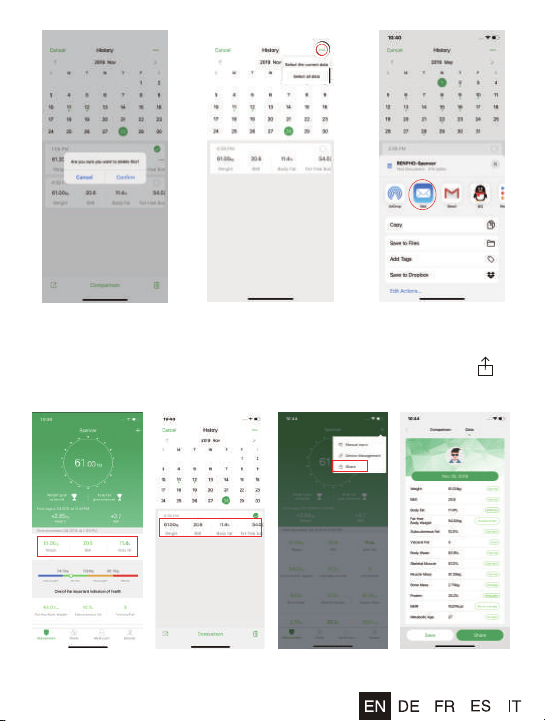
11
At the bottom, you will find a bar where you can select different
types of data to display. You can share your fitness data with friends
via Facebook, Instagram, or SMS by clicking the share button
and share on the Measuring page.
12
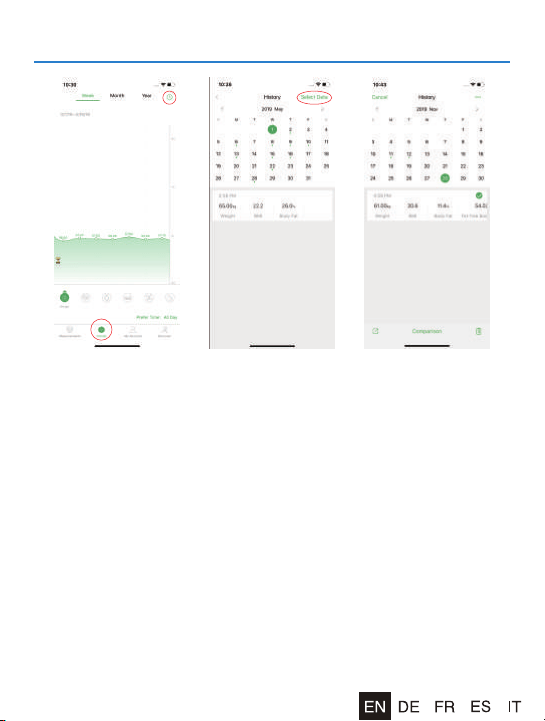
1. Tap on the "Trends"
icon (bottom center
of main screen), then
choose the right
corner on top.
Tap on the "Select
Data".
2. Tab, or click on any
point in the chart to
view details.
3. Select a calendar
date or select any
data that you want
to delete. Tap on
"Delete" to remove
the selected data.
How to delete data?
13
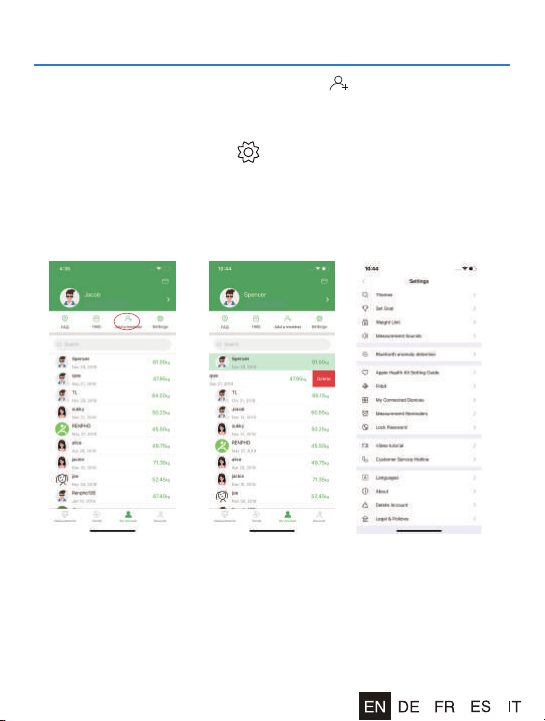
Add/Delete Users & Basic Settings
Under "My Account" you can add user(s) To delete an account,
swipe the account to the left and select "Delete". Themes, Set goals,
Weight units, Measurements Sounds, Languages, Passwords can
all be set under the Setting " " page. Please note that you can
change the weighing unit under "My account >Settings >Weight
Unit".
14
Syncs to Fitness App
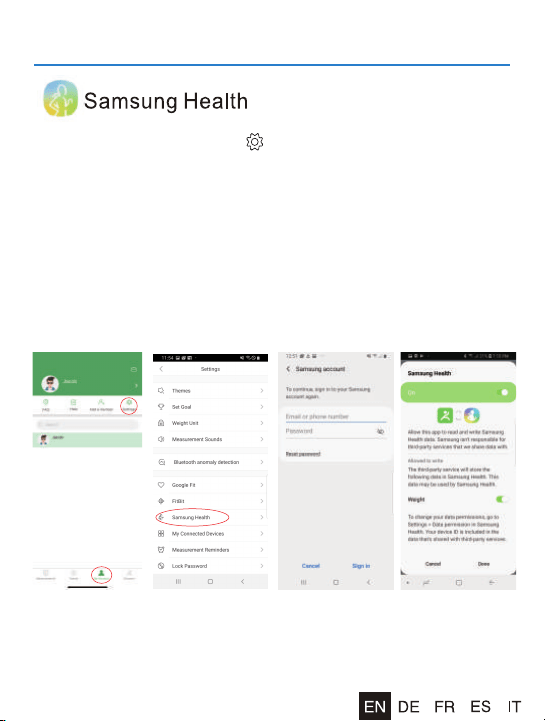
1) Tap on the "Settings" icon " " at the top right corner of the "My
Account" screen.
2) Under "Settings", tap on "Samsung Health".
3) After you log in your Samsung Health account, please go back
to the Authorization page. Now please switch on the "Samsung
Health" button again, then it will pop up the specific information
to access authority, ensure all permissions are enabled, then
click confirm. Try using the App again. Data from the RENPHO
App should now sync with Samsung Health.
15
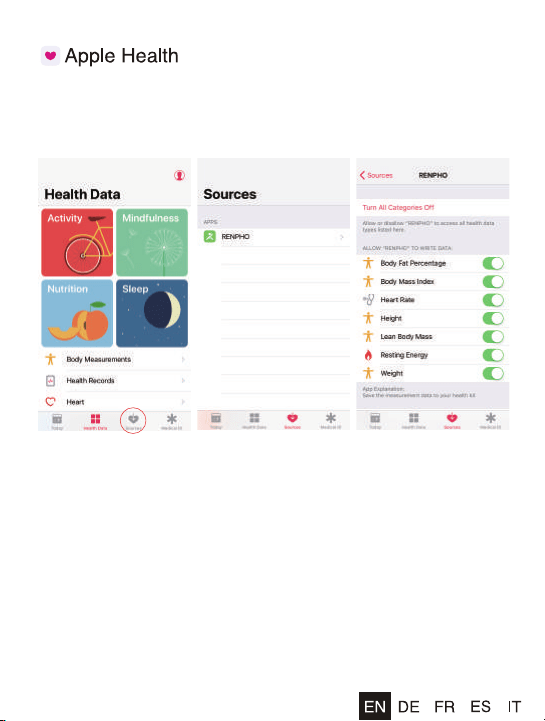
1) Open the "Health" App on your iPhone, select "Data Sources".
2) Select "RENPHO" from the sources list.
3) Turn on all categories to allow the RENPHO App to work.
For iOS Newest software version, please take the following steps
to sync data in RENPHO App to Apple Health.
1) Open the "Health" App on your iPhone, click the user image at
the right corner.
2) Click the "Apps" under Privacy, select "RENPHO".
3) Turn on all Categories to allow the RENPHO App to work.
16
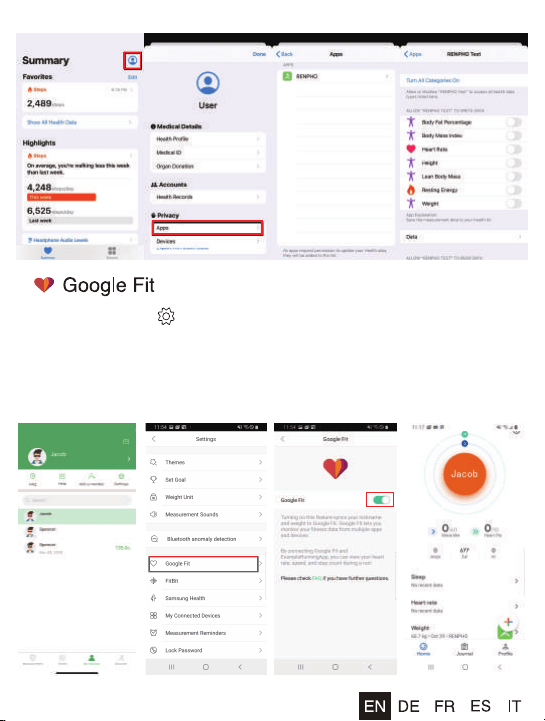
1) Enter Setting " " page, select "Google Fit".
2) Turn on "Google Fit" button, login to your Google account.
3) It will now automatically redirect you to the "Google Fit" page.
4) After the connection has been established, the data "weight" will
sync to Google Fit.
17
Apple Watch
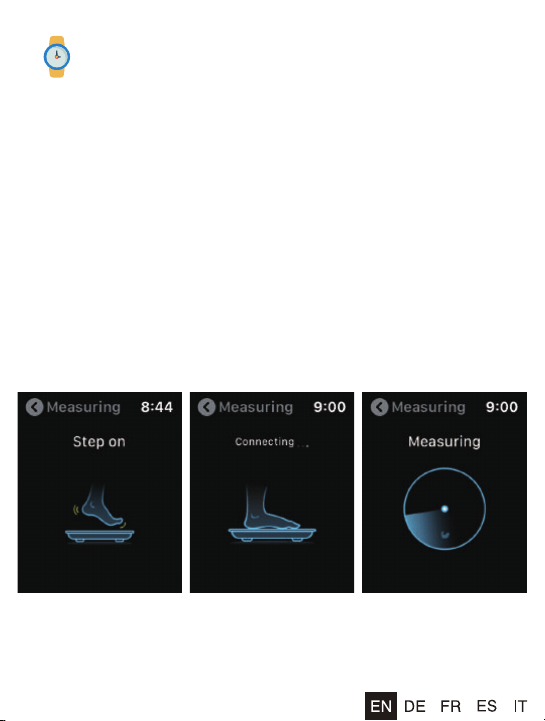
Using the Apple Watch with your Renpho scale.
Before you can use the Renpho scale on your Apple Watch, ensure you
have the Renpho App downloaded on your phone and you have the scale
paired with the Renpho app on your phone first. Once that is done, you can
use the Renpho scale on your Apple Watch with the following steps.
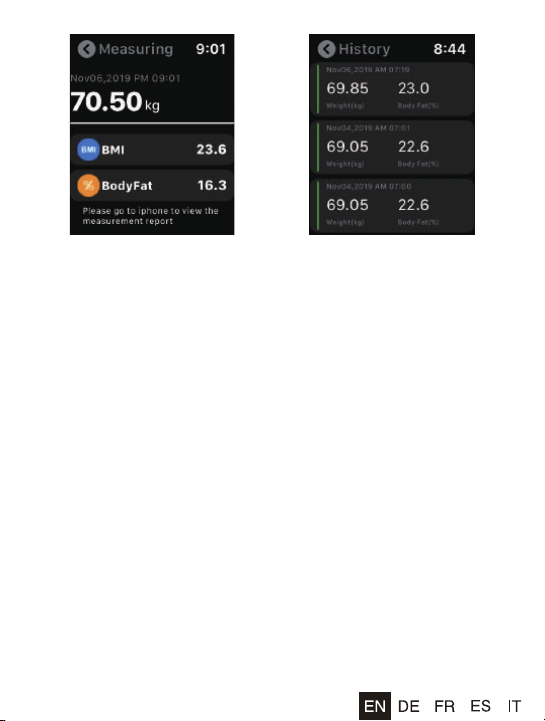
1) Install and open the Renpho Apple Watch App. On the main interface,
tap "Measuring".
2) Step onto the scale and stand still.
3) After standing still for several seconds, you will see "Connecting" followed
by the status "Measuring". Your measurements will appear after 5-10
seconds.
4) Tap the back arrow to view your measurement history.
1 2 3
18
4 5
1. The Renpho Apple Watch is only available in English for now, please stay
tuned for other languages.
2. You can use the Apple Watch with your smartphone under these following
conditions:
When the Apple Watch is disconnected with smartphone.
When the watch is offline (i.e. it is not connected to WiFi).
When the Apple Watch is offline and disconnected with smartphone, after
restarting the watch.
3. To use the Renpho Scale, ensure your Watch has iOS 4.0 or
above.
4. Ensure you keep the watch screen on during the entire measurement
process.
19
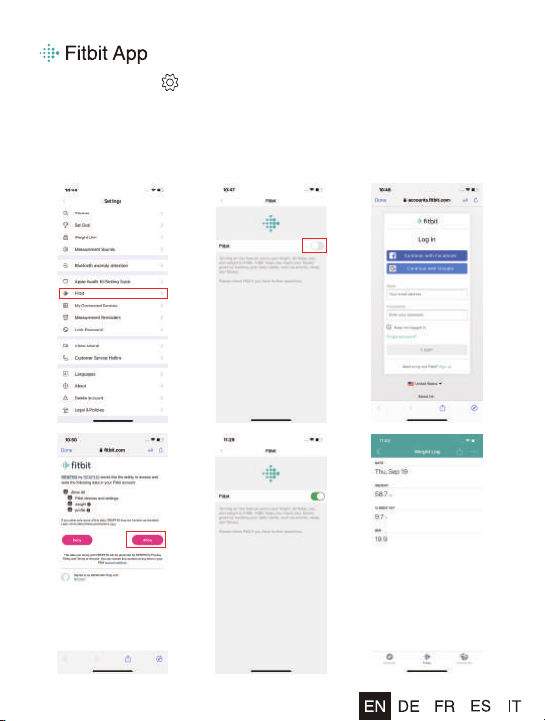
1) Enter Setting " " page, select "Fitbit".
2) Turn on "Fitbit" button, login to your Fitbit account.
3) Select "Allow" to access Fitbit App.
4) After connection, the data (Weight, Body Fat%, BMI) will sync to
Fitbit App. You can view both on App and web.

20
Frequently asked questions & answers
1. How to get the most accurate result?
- Stand on the scale firmly, do not shake your body when weigh in.
- Lake your measurement at the same time each day to ensure
the most accurate results.
Please place your scale on the hard/flat ground, then step on
the scale with bare feet, then the display will be turned on. And
the warm tips before using the scale:
- Check your profile information (gender, age and height), make
sure all the data is accurate.
- Check the place, make sure it is hard/flat, some place seems
flat, but actually not, you could try remove different hard surface
until it gets the same result
- Check the legs of the scale before your measure, if it is not
balanced, the data won't be accurate.
- Make sure that "CAL" and "0.0" shown on the display, before
each time use.
- Keeps bare feet, with each foot touching both the top and bottom
electrode.
2. Why doesn't the scale work?
Why does the data on the screen disappear in a
flash?
- Please check the batteries are installed properly, replace
batteries if necessary.
- Please restart the scale: Take out ONE battery for 5 seconds.
Put the battery back in the scale, then step on the scale.
3. No body fat measured when weighing.
- Step on with dry and bare feet.
- Ensure Bluetooth is enabled and working.
- Ensure personal data is entered.

21
4. I saw "Athlete Mode" option when I create my
profile, what is it? Should I open it ?
What is the definition of an Athlete?
- The general consensus among researchers is that a quantitative
dimension could be used to define an athlete. An athlete is
defined for this scale as a person who consistently works out for
approximately 3 times per week at 2 hours for each occurrence.
These individuals should select Athlete Mode for the most
accurate measurement results.
Please note that scale is not calibrated for profes-
sional athletes or body builders.
5. Why is the Athlete Mode necessary in a Body Fat
Scale?
- It has been found that body fat estimation using BIA could
overestimate the percentage body fat of adult elite athletes. The
physiological variation of athletes in bone density and level of
hydration are two of the reasons said to account for the
difference.
6. How to restart the scale?
- First, took one of the batteries out of the scale.
- Then, put back the batteries and wait for 5 seconds.
- Now the scale has been automatic restart, you can step onto the
scale.
22
Your RENPHO Bluetooth scale box included:
RENPHO Bluetooth scale
Batteries: 3*1.5V AAA
User Manual
For more information, please check from
RENPHO App. "My Account > FAQ"
What’s Included?
NA3
JOICOM CORPORATION
165 E. Freedom Ave., Anaheim, CA 92801
Email: [email protected] (US)
Tel: 1-(844)-417-0149(US)
EU Representative:
BellaCocool GmbH
Address: Pettenkoferstraße 18,
10247, Berlin, Germany
Email: [email protected](EU)
Tel: 44-785-555-5664(UK)
EC REP