1. Overview

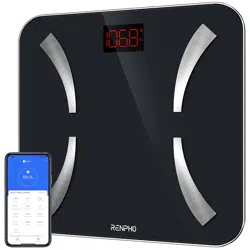
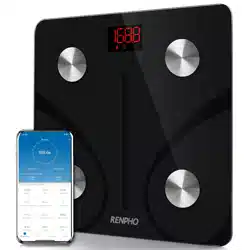
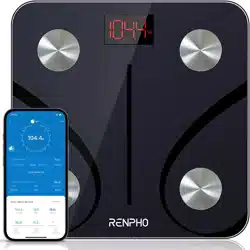
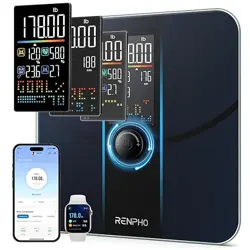
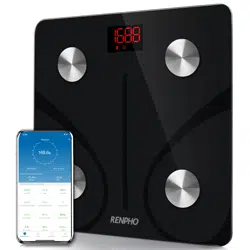
The RENPHO Elis 1 is a USB-rechargeable smart scale that measures body weight and 12 additional body composition metrics. It connects via Bluetooth to the RENPHO Health app on your smartphone to track and analyze your data over time.
The scale features a 5mm tempered glass platform, four high-precision sensors, and four metal electrodes for body composition analysis.
2. Box Contents
- RENPHO Rechargeable Bluetooth Scale (1 unit)
- USB Charging Cable (1.0 meter)
- User Manual (this document)
3. Key Features
3.1 Body Composition Analysis
The scale provides measurements for 13 metrics:
- Weight
- BMI (Body Mass Index)
- Body Fat Percentage
- Water Percentage
- Skeletal Muscle
- Fat-Free Body Weight
- Muscle Mass
- Bone Mass
- Protein
- Basal Metabolism (BMR)
- Visceral Fat
- Subcutaneous Fat
- Body Age
3.2 App Connectivity & Data Sync
- Syncs data to the RENPHO Health app via Bluetooth.
- The app can sync data with third-party fitness apps: Samsung Health, Apple Health, and Fitbit.
- An app for Apple Watch is available.
- You can weigh yourself without your phone present. Data is stored on the scale and syncs to the app the next time it is connected.
3.3 Design and Power
- USB Rechargeable: Built-in lithium battery. A full charge provides approximately 2-3 months of typical use.
- High Accuracy: Four auto-calibrated sensors. Measures in increments of 0.2 lb / 0.05 kg.
- Capacity: 400 lbs / 180 kg.
- Platform: 5mm tempered glass with four integrated metal electrodes.
3.4 Multi-User Support
- Supports unlimited users. Each user's data is stored separately in the app.
- The app provides progress tracking with charts and graphs.
- Includes a Baby Mode for recording the weight of infants and pets.
4. Getting Started
4.1 Installing the App
- On your smartphone, download the "RENPHO Health" app from the Apple App Store or Google Play Store.
- Create a RENPHO account or log in within the app.
4.2 Charging the Scale
- Before first use, fully charge the scale using the provided USB cable.
- Connect the cable to the scale's charging port and a standard USB power adapter (not included) or computer USB port.
- The scale is fully charged when the battery indicator on the display stops flashing.
4.3 Pairing the Scale with the App
- Open the RENPHO Health app.
- Ensure Bluetooth is enabled on your phone.
- Step onto the scale to turn it on. The scale's Bluetooth signal will activate.
- Follow the in-app instructions to pair and identify the scale (model: ES-30M-US).
- Set up your user profile in the app, including gender, height, age, and weight goal.
5. Using the Scale
5.1 For Accurate Measurements
- Place the scale on a hard, flat surface (e.g., tile, hardwood). Avoid carpets or uneven floors.
- Use the scale at the same time each day, preferably in the morning before eating or drinking and after using the bathroom.
- Step onto the scale with bare, dry feet, ensuring your feet make full contact with the four metal electrodes.
- Stand still, with your feet apart, until your weight stabilizes and the measurement is complete.
5.2 Understanding the Display
The LED display will show:
- "0.0" or "Lo": When first activated or if weight is under capacity.
- Flashing Numbers: During measurement calculation.
- Stable Number: Your final weight measurement.
- Battery Icon: Indicates battery level. A flashing icon means the battery is low and needs charging.
- "Err": An error has occurred (e.g., overload, unstable surface). Step off and try again.
5.3 Weighing Without Your Phone
You can use the scale as a standard digital scale without your phone. The data will be stored and automatically synced to the app the next time you open it nearby with Bluetooth enabled.
5.4 Adding Additional Users
Other household members can use the same scale. Each person must:
- Download the RENPHO Health app on their own phone and create a profile.
- Pair with the scale following the steps in section 4.3.
- The app will recognize different users based on their weight and stored profile data.
6. Using the RENPHO Health App
The app is the central hub for viewing and understanding your data.
6.1 Dashboard
- View your latest measurements and trends.
- See a graph of your progress over time for any metric.
- Set goals and track your achievement.
6.2 Data Sync with Other Apps
To sync data with Apple Health, Samsung Health, or Fitbit:
- Go to Me > Settings > Third-Party Apps in the RENPHO app.
- Select the app you wish to sync with.
- Follow the on-screen permissions to authorize data sharing.
6.3 Baby Mode
To weigh an infant or pet:
- In the app, activate Baby Mode for your profile.
- Step onto the scale alone to get your weight. Record it.
- Then, hold your baby or pet and step onto the scale again.
- The app will calculate the difference and record the baby's/pet's weight.
7. Care and Maintenance
- Cleaning: Wipe the glass platform and electrodes with a slightly damp cloth. Do not use abrasive cleaners or submerge the scale in water.
- Storage: Store in a dry place. Avoid extreme temperatures or humidity.
- Battery: Recharge using the provided USB cable when the low battery indicator appears.
- Calibration: The scale auto-calibrates each time it is turned on. Ensure it is on a flat, stable surface when powering on.
8. Troubleshooting
Scale does not turn on:
- Ensure the scale is charged. Connect to USB power.
- Try a different USB cable or power source.
"Err" appears on display:
- Step off the scale. Ensure it is on a hard, flat surface.
- Check if the weight exceeds 400 lbs / 180 kg.
- Wait for the display to clear before stepping on again.
App cannot find/connect to the scale:
- Ensure Bluetooth is enabled on your phone.
- Ensure the scale is awake (step on it briefly to activate).
- Restart the RENPHO Health app and your phone's Bluetooth.
- Move your phone closer to the scale.
- Delete the scale from the app's device list and re-pair.
Inconsistent or inaccurate readings:
- Use on a hard, flat surface (not carpet).
- Ensure your feet are dry and making full contact with all four electrodes.
- Check that the scale's feet are clean and free of debris.
9. Specifications
- Model: ES-30M-US
- Weight Capacity: 400 lbs / 180 kg
- Increment: 0.2 lb / 0.05 kg
- Power: Built-in rechargeable lithium battery (USB charging)
- Connectivity: Bluetooth
- Platform Material: 5mm Tempered Glass
- Product Dimensions: 27.94 x 27.94 x 2.54 cm
- Product Weight: 1.2 kg
10. Compliance & Disposal
This device complies with relevant RF and safety standards.
At the end of its life, do not dispose of this product with household waste. Please recycle or dispose of it according to your local regulations for electronic equipment.