UserManual
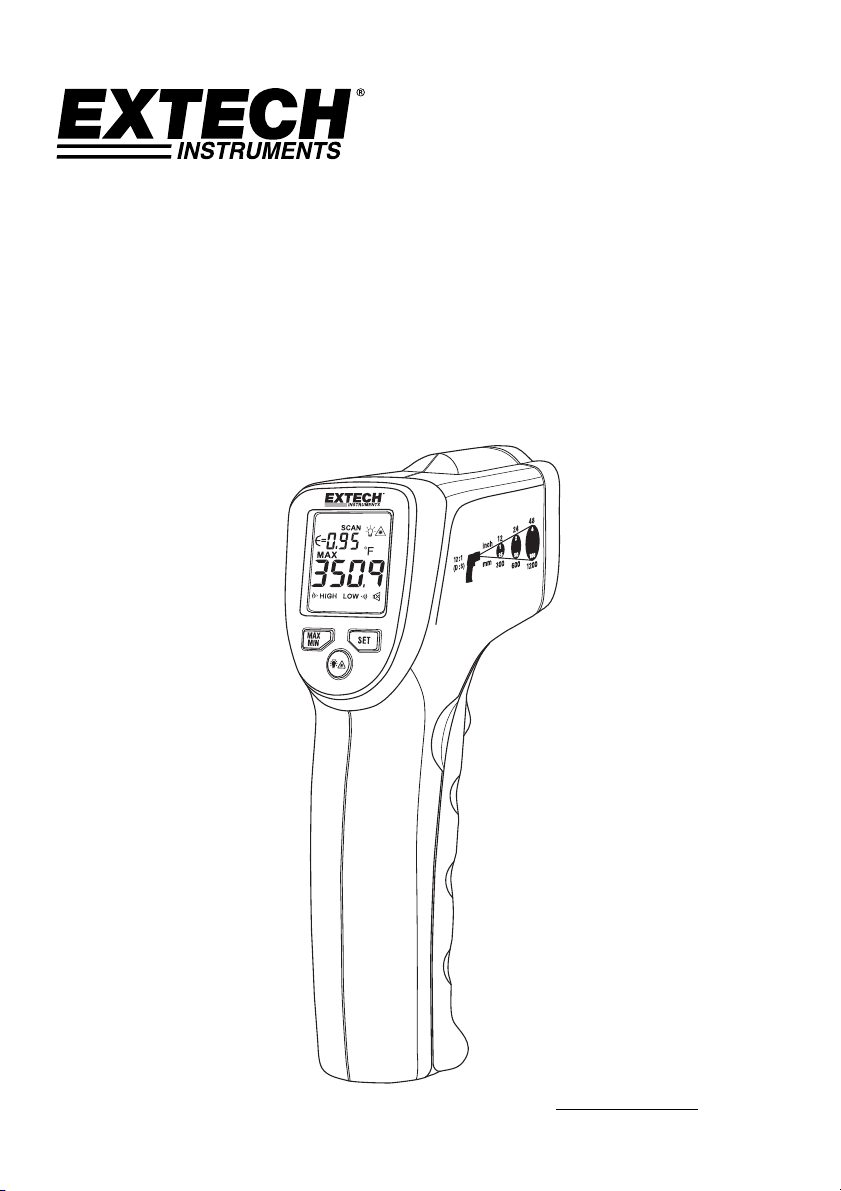
MiniInfraRedThermometer
WithLaserPointerandHigh‐LowAlarms
ModelIRT25
AdditionalUserManualTranslationsavailableatwww.extech.com

EXTECHINSTRUMENTS
2IRT25‐en‐GB_V1.02/17
Introduction
CongratulationsonyourpurchaseoftheIRT25IRThermometer.Thisthermometermakesnon‐
contact(infrared)temperaturemeasurementsatthetouchofabutton.Thebuilt‐inlaserpointer
increasestargetaccuracywhilethebacklitLCDandhandypushbuttonscombineforconvenient,
ergonomicoperation.Thisdeviceisshippedfullytestedandcalibratedand,withproperuse,will
provideyearsofreliableservice.Pleasevisitourwebsite(www.extech.com)tocheckforthe
latestversionofthisUserGuide,ProductUpdates,andCustomerSupport.
Features
Measuresnon‐contactsurfacetemperatureupto371°C(400°F)
12:1DistancetoSpotRatio(FieldofView)
Single‐pointlasertargeting
AutomaticDataHoldwhentriggerisreleased
DisplayBacklight
Maximum‐Minimumtemperaturefunction
Selectabletemperatureunits(°F/°C)
Dynamicbatterystatus
indication
Adjustableemissivity
AudibleandvisiblealarmindicationforHighandLowTemperatureAlarm
Safety
InternationalSafetySymbols
Thissymbol,adjacenttoanothersymbolorterminal,indicatestheusermustrefertothemanualfor
furtherinformation
Warnings
o Donotdirectlyorindirectlypointthelaserattheeyesofapersonorananimal
o Inspectfordamageorforanyshortageofpartsoraccessoriesbeforeuse
o Replacethebatteriesimmediatelyafterthebatteryindicatorflashes
o Donotusethethermometernearexplosivegases,
steam,ordust
o Note that an object with high reflectivity will normally cause the
measured temperature value to read much lower than the actual
temperature
o UsethedeviceonlyasdescribedinthisUserGuide
Cautions
Toavoidthermometerdamage,pleaseavoidthefollowinghazards:
o EMFfromweldingequipmentorelectro‐inductionheaters
o Staticelectricity
o Thermal shock caused by large or abrupt environmental temperature changes; wait 30 minutes to
allowthethermometertostabilizetonewenvironmentalconditions
o Donotusethisdevice
inexcessivelyhightemperatureenvironments
<1mW Output at 650nm
EXTECHINSTRUMENTS
3IRT25‐en‐GB_V1.02/17
Description
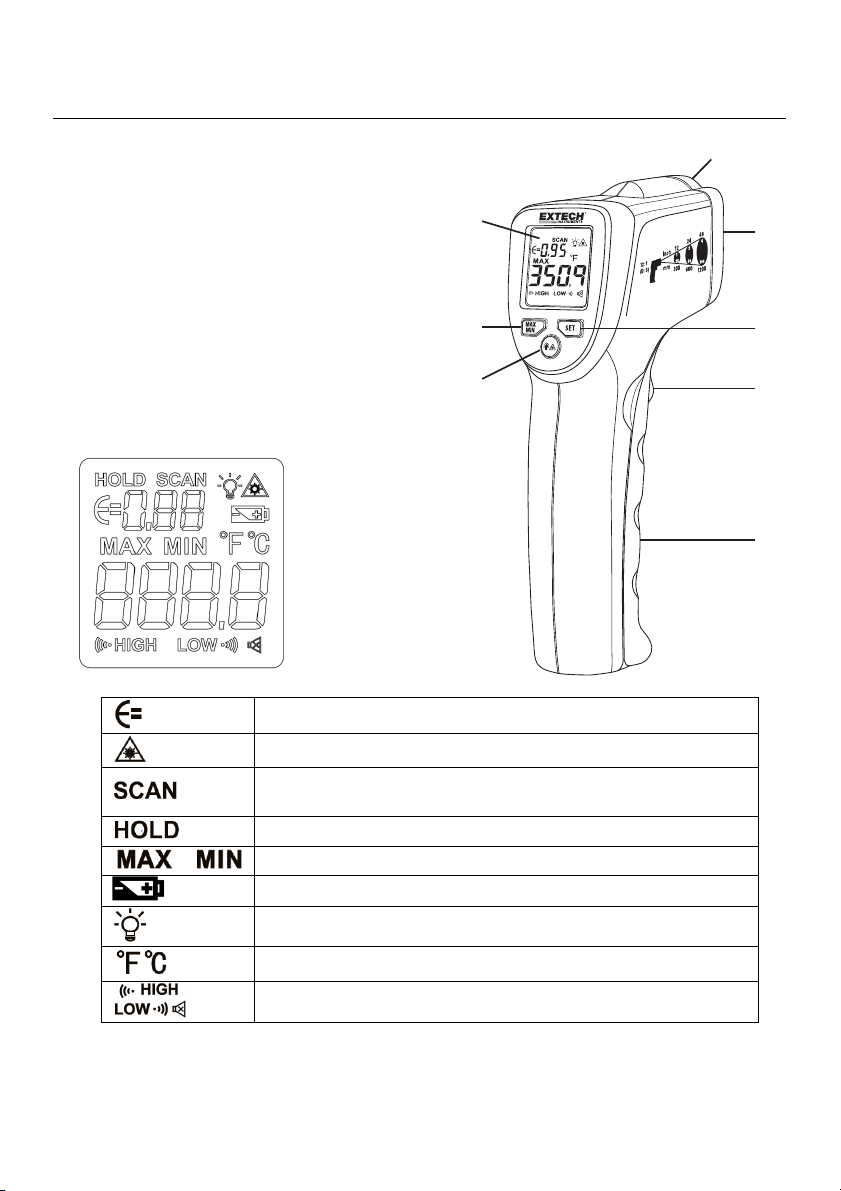
MeterDescription
1. LCDDisplay
2. MAX‐MIN/DownButton
3. Backlight‐LaserPointer/UpButton
4. Laserpointerlens
5. IRThermometerlens
6. SETButton
7. MeasurementScanTrigger
8. BatteryCompartment
DisplayDescription
Emissivityvalueindication
Laserpointeractiveicon
Scanmode(activewhilethetriggerispulled;displayed
temperaturetracksthetemperatureofthescannedsurfaces)
Holdmode(displayedtemperaturefreezeswithtriggerrelease)
Maximum/Minimumtemperatureicons
Batterycapacityindicator(flasheswhenbatteryvoltageiscritical)
DisplayBacklighticon
Temperatureunits(°F/°C)
TemperatureAlarmiconsandaudiblealarmdisableicon
1
2
3
4
5
6
7
8

EXTECHINSTRUMENTS
4IRT25‐en‐GB_V1.02/17
Operation
MeterPower
Themeterispoweredbytwo1.5VAAbatteries.Withfreshbatteriesinstalled,themeter
switchesONwhenthetriggerispulled.Thebatteriesarelocatedinthemeterhandle;pullthe
batterycompartmentlidawayfromthebodyofthemetertoopen.RefertotheMaintenance
sectionformoreBatteryInstallationinstructions.Thebatteryiconprovidesbatterystatus
indication.Replacethebatteriesassoonasthebatterystatus iconflashes.
SurfaceTemperatureMeasurements
1. HoldthemeterbyitsHandleGripandpointittowardthesurfacetobemeasured.Readthe
FieldofViewsectionbelowfordistancetotarget(spot)ratioinformation.
2. PullandholdtheTriggertoturnthemeteronandbegintestinginScanmode.Thedisplay
will
lightifthetwo1.5Vbatteriesaregood.Replacethebatteriesifthedisplay doesnotlight.
3. ReleasetheTrigger;thereadingwillholdforapproximately9seconds,afterwhichthemeter
willautomaticallyshutoff.
4. Themeterdefaultstotheprogrammedconditionsinusewhenthemeter
waslastswitched
OFF.Forexample,ifthelaserissettoONandthetemperatureunitsaresetto
o
Fatthetime
theunitisswitchedOFF,theunitwillswitchONandusethesamesettings.
Laser–ON/OFF
Pull the trigger and release.
PushandHOLDthe buttonforabout3secondstoswitchthelaserpointerONorOFF.
TheLasericonwillflashwhenthestatehaschanged.WhenthelaserisON,thelasericon will
appearontheLCD.Aimtheredlaserbeamapproximatelyahalfinchbelowthepointoftest
(pressingtheLaserbuttonagainturnsthelaseroff).
MAX‐MINMode
Pressthetriggerandrelease.
PresstheMAX‐MINbuttontoviewthemaximumtemperaturereading(MAX),pressagainto
viewthelowestreading(MIN).Pressandholdthe MAX‐MINbuttontoswitchtheMAX‐MIN
modeoff.
DisplayBacklight
Pressthetriggerandrelease.
Pressthebacklightbutton momentarilytoswitchthebacklightONorOFF.
Over‐rangeIndicators(OLand‐OL)
If the temperature measurement exceeds 779°F (415°C), the thermometer will display OL in
place of a temperature reading. If the temperature measurement is below‐25°C (‐13°F), the
thermometerwilldisplay‐OLinplaceofatemperaturereading.
EXTECHINSTRUMENTS
5IRT25‐en‐GB_V1.02/17
SettingMode
ReleasethetriggerandpresstheSETbuttontoaccesstheSettingMode.UsetheSETbuttonto
navigatethroughtheSettingModefieldsanduse
(UP)andtheMAX‐MIN(DOWN)
buttonstomakechanges.Theavailableparametersarelistedbelow:
Emissivitysetting
°C/°Ftemperatureunitsselection
TemperatureAlarmAudibleBeeperEnable/Disable
HighTemperatureAlarmLimitsetting
LowTemperatureAlarmLimitsetting
Thecorrespondingparametericonwillflashwhenselected.
ToexittheSettingMode,press
andholdtheSETbuttonfortwoseconds.
EmissivitySetting
The iconwillflashwhenselected.Usethe upandMAX‐MINdownbuttonsto
increaseordecreasetheemissivity(in0.01steps).Theemissivityrangeis0.10to1.00.Hold
theupordownbuttontorapidlyincreaseordecreasetheemissivityvalue.PresstheSET
buttontoconfirmandtosteptothenextoption.
Selecting
theTemperatureUnitofMeasure(°C/°F)
Usethe upandMAX‐MINdownbuttonstoselect°Cor°F.PresstheSETbuttonto
confirmandtosteptothenextoption.
Enable/DisableAudibleTemperatureAlarm
Thisparameterisusedtoenable/disabletheaudibletemperaturealarm.The
iconwillflash
inthismode.
Usethe
upandMAX‐MINdownbuttonstotogglethesetting.Whentheaudible
alarmisdisabled,thedisplaywillshow‘HIGHLOW’.Whentheaudiblealarmisenabled,the
displaywillshow
.Whentheaudiblealarmisenabled,thebeeperisallowedto
soundwheneverthemeasuredtemperaturegoesbeyondthehighorlowtemperaturelimit
values.PresstheSETbuttontoconfirmandtosteptothenextoption.
HIGHTemperatureAlarmLimitSetting
Use the
up and MAX‐MIN down buttons to increase or decrease the High Alarm
TemperatureLimit(in0.1stepsfor°Cor0.2stepsfor°F).Holdingtheupordownbuttonwill
rapidlyincreaseordecreasetheHIGHlimitvalue.AbeepwillsoundiftheHIGHtemperature
value reaches
the LOW temperature value while programming. Press the SET button to
confirmandtosteptothenextoption.
LOWTemperatureAlarmLimitSetting
Use the up and MAX‐MIN down buttons to increase or decrease the Low Alarm
Temperature Limit (in 0.1 steps for °C or 0.2 steps for °F). Holding down the up or down
button will rapidly increase or decrease the LOW limit value. A beep will sound if the LOW
temperature value
reaches the HIGH temperature value while programming. Press the SET
buttontoconfirmandtosteptothenextoption.
EXTECHINSTRUMENTS
6IRT25‐en‐GB_V1.02/17
LocatingHotorColdSpots
Todetectahotorcoldspot,aimthethermometerataregionbeyondthetargetandthenscan
theentireregioninaslow,up/downmotion.
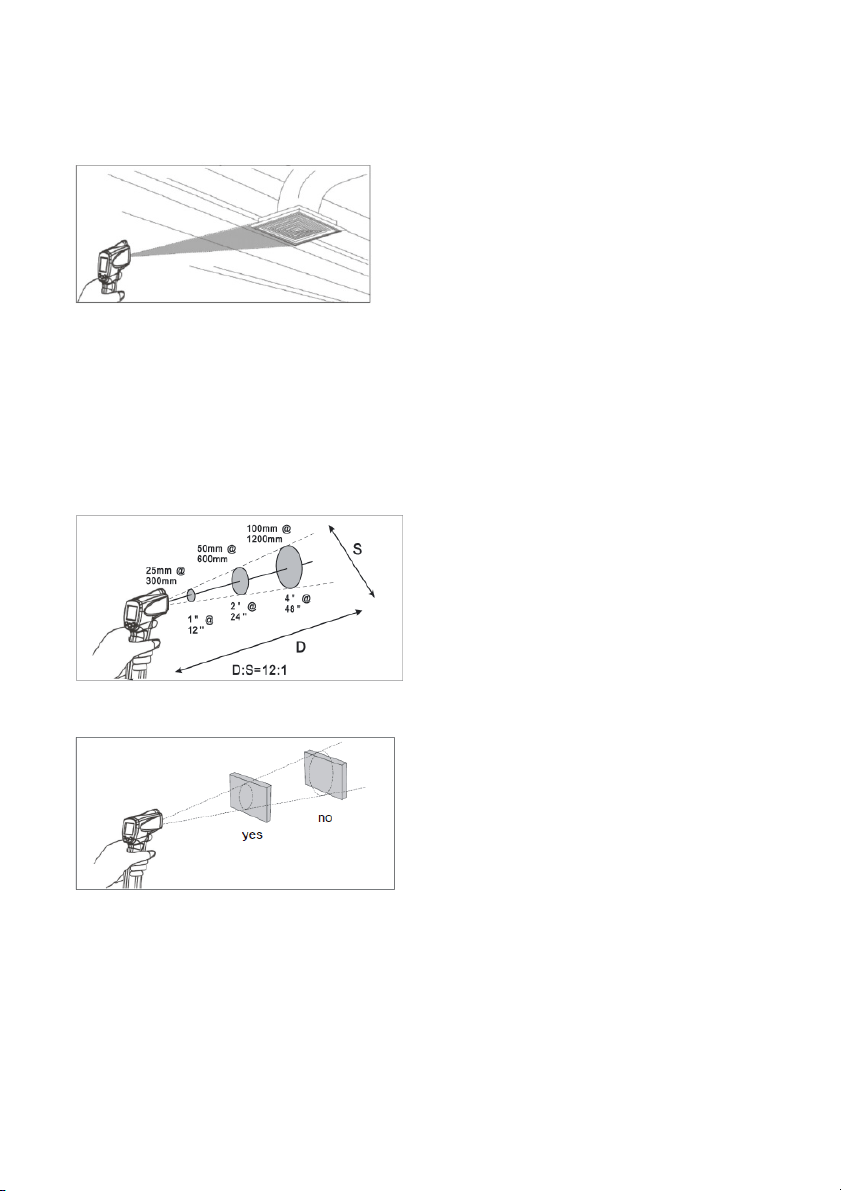
DistancetoSpotRatio(FieldofView)
Themeter’s fieldof view is12:1(distance to spotratio). For example,ifthemeter is 24inches
fromthetarget(spot),thediameterofthetargetmustbeatleast2inches.Otherdistancesare
shownbelowinthefieldofviewdiagram.
Notethatmeasurementsshouldnormallybe
madecloserthan2feetfromthetarget.Themeter
canmeasurefromfurther distances but the measurementmaybeaffectedbyexternalsources
oflight.Inaddition,thespotsizemaybesolargethatitencompassessurfaceareasnotintended
tobemeasured.
Itisnecessary to ensurethatthe size ofthe target islarger thanthespot size. Thesmaller the
target,thecloserthedistanceshouldbe.Seetheaccompanyingdiagram.
Emissivity
Emissivityrepresents the energy reflectivity ofa material. Mostorganicmaterialsand painted
oroxidizedsurfaceshaveanemissivity ofapproximately0.95. If possible, masking tape or flat
blackpaintshouldbeappliedtocoverthemeasuredsurface.
Waitaperiodoftimetoallowthetapeorpainttoreach
thermalequilibriumwiththesurface
ofthecoveredobject.Measurethetemperatureofthesurfacecoveredwithtapeorpaintonly
afterequilibriumhasbeenachieved.

EXTECHINSTRUMENTS
7IRT25‐en‐GB_V1.02/17
MeasurementNotes
1. Theobjectundertestshouldbelargerthanthespot(target)sizecalculatedbythefieldof
viewdiagram.
2. Ifthesurfaceoftheobjectundertestiscoveredwithfrost,oil,grime,etc.,cleanbefore
takingmeasurements.
3. Ifanobject'ssurfaceishighlyreflectiveapplymaskingtape
orflatblackpainttothesurface
beforemeasuring.
4. Themetermaynotmakeaccuratemeasurementsthroughtransparentsurfacessuchas
glass.
5. Steam,dust,smoke,etc.canobscuremeasurements.
6. Themetercompensatesfordeviationsinambienttemperature.Itcan,however,takeupto
30minutesforthe
metertoadjusttoextremelywideambienttemperaturechanges.
7. Tofindahotspot,aimthemeteroutsidetheareaofinterestthenscanacross(inanupand
downmotion)untilthehotspotislocated.
Maintenance
Cleaning
Tocleanthelensesusecompressedairtocleardustandotherparticles,thencarefullyclean
withawetcottonswab.Thecottonswabshouldbemoistenedwithcleanwater.
Tocleanthemeterhousing,wipewithadamp,softcloth.Donotusesolventsorabrasives.Do
notimmersetheIRT25inwaterorotherliquid.
Troubleshooting
Symptom Problem Action
OLdisplay Targettemperatureexceedsrange Selectatargetwithinrange
‐OLdisplay Targettemperatureunder‐range Selectatargetwithinrange
Batteryiconflashes LowBatterypower ReplaceBatteries
Blankdisplayscreen Lowbatterypower Checkand/orreplacebatteries
NoLaserpointer
Lowbatteryorenvironmental
temperaturehigherthan40°C(104°F)
Replacethebatteries ormovethe
IRT25toanareawithalower
ambienttemperature

EXTECHINSTRUMENTS
8IRT25‐en‐GB_V1.02/17
ReplacingBatteries
Whenthebatteryiconflashes,orwhenthemeterdoesn’tswitchON,replacethebatteries.
Thebatterycompartmentislocatedinthehandlegrip.Thebatterycompartmentlidislocated
justbelowthetrigger.Prythecompartmentlidofftoreachthecompartment.
Replacethe1.5VAAbatteriesfollowingcorrectpolarity
andthenclosethebatterycompartment
lid.
BatterySafetyNotes:Pleasedisposeofbatteriesresponsibly;neverdisposeofbatteriesinafire,
batteriesmayexplodeorleak.Ifthemeterisnottobeusedfor60daysormore,removethe
batteryandstoreseparately.Donotmixbattery
typesorfreshnesslevels;pleaseusebatteries
ofthesametypeandofthesamefreshnesslevel.
Neverdisposeofusedbatteriesorrechargeablebatteriesinhouseholdwaste.
Asconsumers,usersarelegallyrequiredtotakeusedbatteriestoappropriatecollection
sites,theretailstorewherethebatterieswerepurchased,
orwhereverbatteriesaresold.
Disposal:Donotdisposeofthisinstrumentinhouseholdwaste.Theuserisobligatedtotake
end‐of‐lifedevicestoadesignatedcollectionpointforthedisposalofelectricalandelectronic
equipment.

EXTECHINSTRUMENTS
9IRT25‐en‐GB_V1.02/17
Specifications
InfraredThermometerSpecifications
Range/Resolution‐20.0to371.0
o
C(‐4.0to700.0
o
F)
Accuracy
‐20~0
o
C(‐4~32
o
F):±5°C(9°F)
0~371
o
C(32~700
o
F)±2°C(3.6°F)or2%ofreading(whicheverisgreater)
Note:Accuracyisspecifiedforthefollowingambienttemperaturerange:
21to25°C(70to77°F)
Emissivity Adjustablefrom0.10to1.00
FieldofView 12:1DistancetoSpotratio
Laserpower Lessthan1mW,630to670nm(wavelength)
Spectralresponse 8to14µm(wavelength)
GeneralSpecifications
Display BacklitLCDdisplaywithfunctionindicators
Displayrate 500msapprox.
OperatingTemperature 0°Cto40°C(32°Fto104°F)
OperatingHumidity Max.75%RH
PowerSupply Two1.5VAAAlkalinebatteries
AutomaticPowerOff Metershutsoffautomaticallyafter9seconds
Weight 226g(8.0oz.)
Dimensions 172x97x46mm(6.8x3.8x1.8”)
Copyright©2017FLIRSystems,Inc.
Allrightsreservedincludingtherightofreproductioninwholeorinpartinanyform
ISO‐9001Certified
www.extech.com