
Quick Start Guide
Thank you for your Polk purchase. If you have a question
or comment, please feel free to call or email us.
Technical Assistance
In North America, call Polk Customer Service at
800-377-POLK(7655) (M–F, 9 a.m.–5:30 p.m. EST)
Outside the US, call +1-410-358-3600
email polkcs@polkaudio.com
Polk Audio
1 Viper Way
Vista, CA 92081
The complete owner’s manual can be found online
at www.polkaudio.com
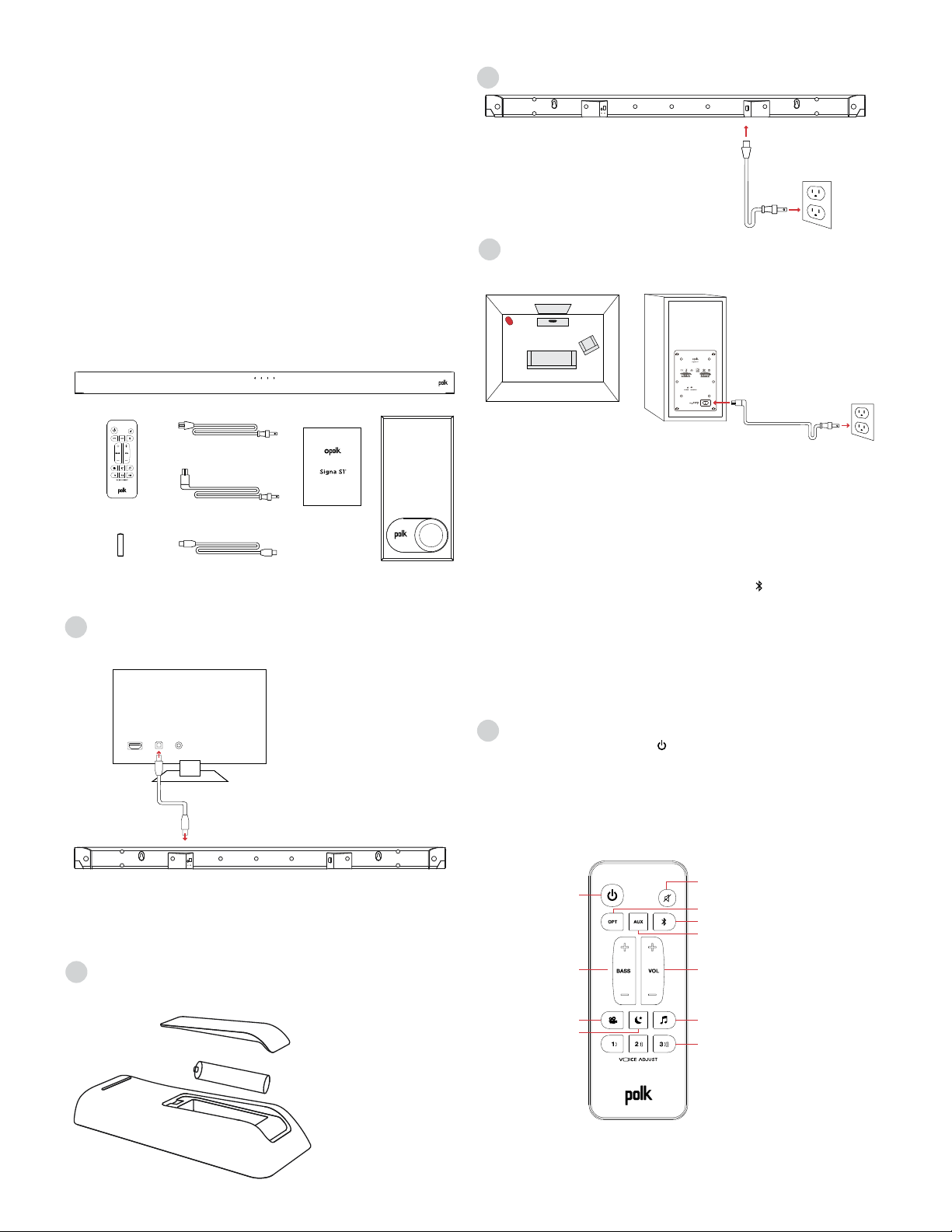
What’s in the Box
Sound bar
Remote control
Battery
Sound bar power cord
4' Optical cable
Subwoofer power cord
AAA
Literature
Subwoofer
Important Product Information
Barre de son
Télécommande
Pile
Câble d’alimentation
de la barre de son
Câble optique 4 po
Cordon d’alimentation
du caisson de basse
AAA
Documentation
Caisson de basse
Important Product Information
Barra de sonido
Control remoto
Pila
Cable de energía de
la barra de sonido
Cable óptico de 1,2 m (4 pies)
Cable de energía
del subwoofer
AAA
Manual
Subwoofer
Important Product Information
Barra sonora
Telecomando
Batteria
Cavo alimentazione
barra sonora
Cavo ottico da 1,2 m
Cavo alimentazione
subwoofer
AAA
Manuale
Subwoofer
Important Product Information
Sound bar
Fernbedienung
Batteri
Soundbar-Netzkabel
4' Optisches Kabel
Subwoofer-Netzkabel
AAA
Literatur
Subwoofer
Important Product Information
电视回音壁音箱
远程控制
Battery
电视回音壁音箱电源线
4' 光纤线
低音炮电源线
AAA
印刷资料
低音炮
Important Product Information
english
french
spanish
italian
german
chinese
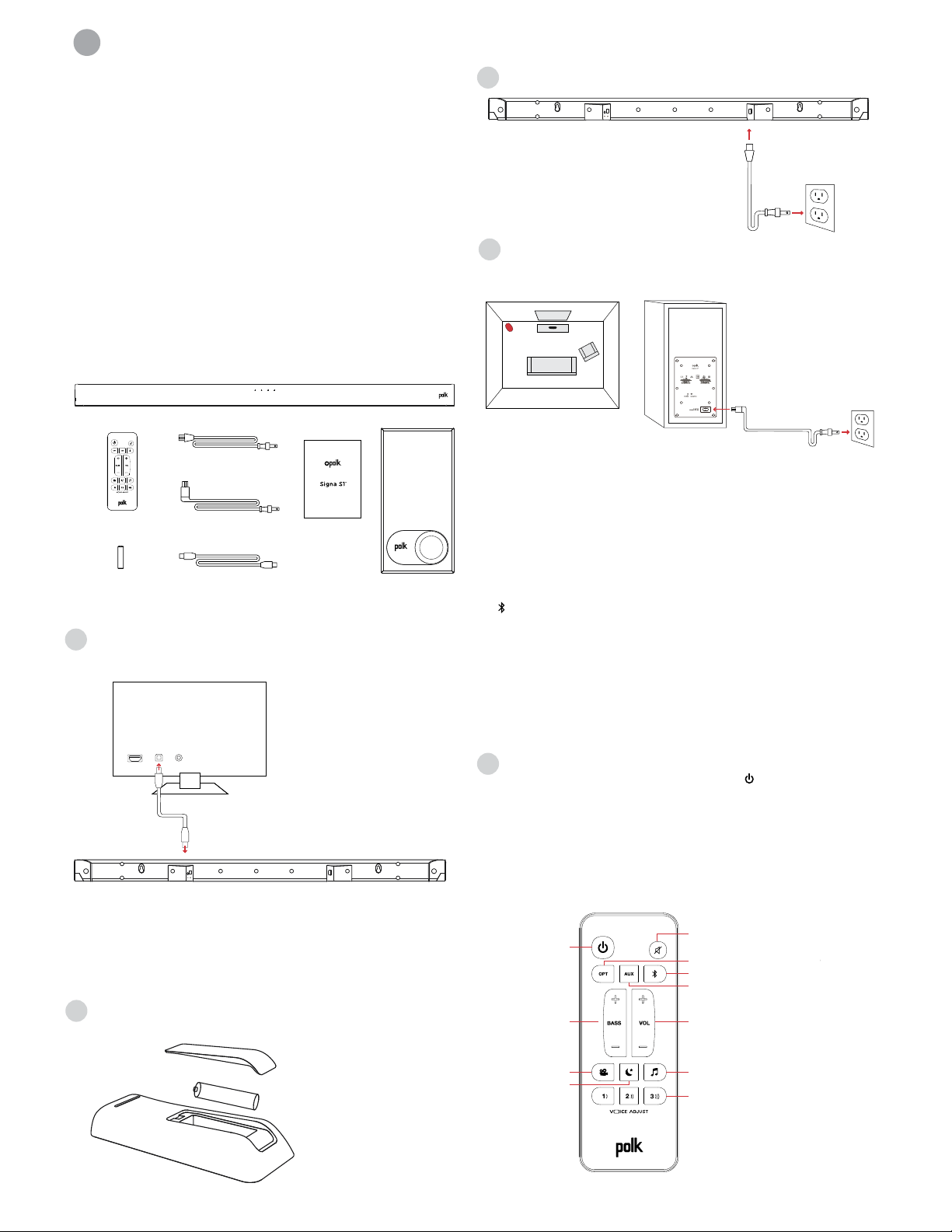
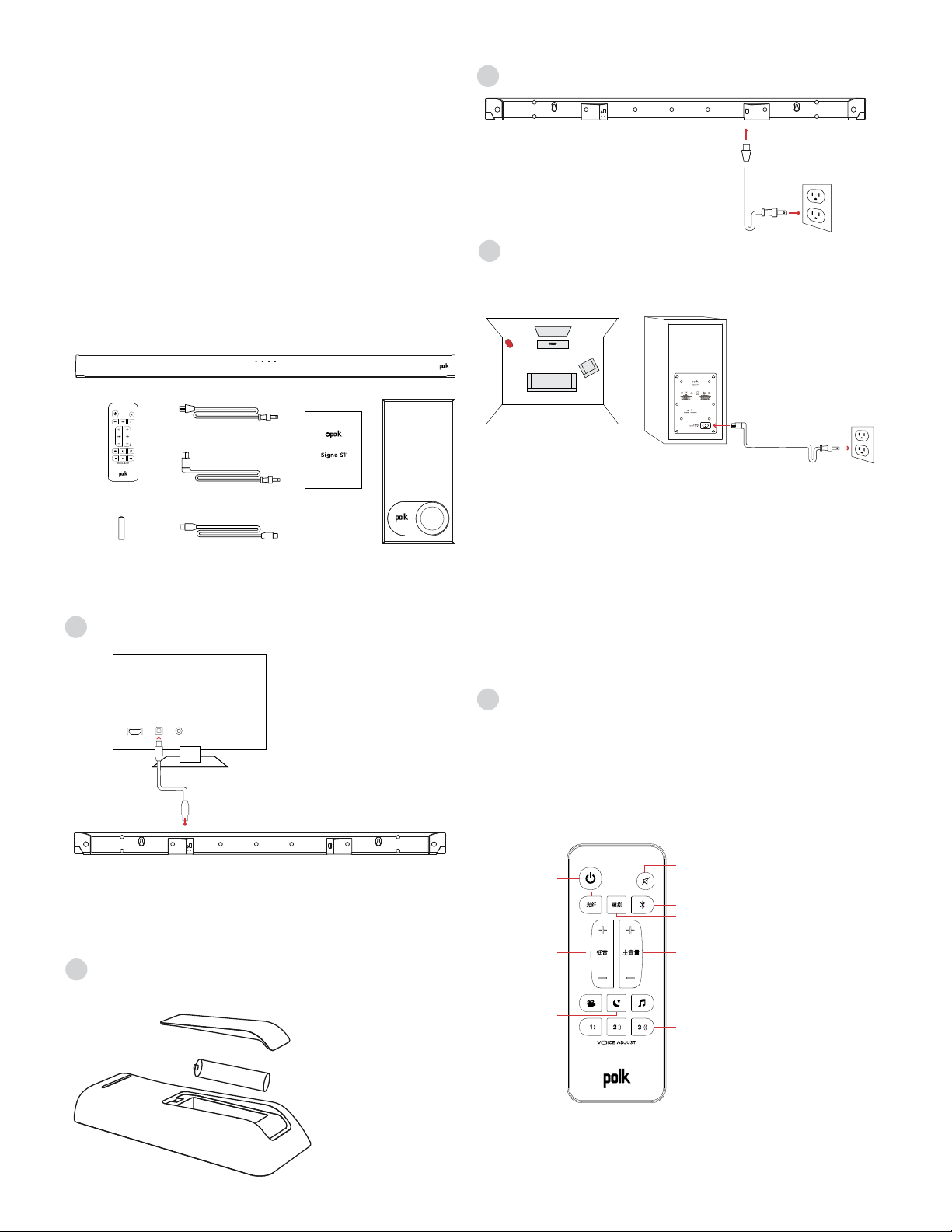
Connecting Your Signa S1 to Your TV
1. Use the provided Optical cable to connect the
sound bar to the TV.
TV
AUXOPTHDMI
If your TV does not have an Optical output, connect the sound
bar to the TV with an AUX cable (not included).
NOTE: Only optical supports Dolby 5.1 decoding.
2. Remote battery installation:
Insert the provided AAA battery.
3. Connect the sound bar power cord to an AC outlet
4. Position subwoofer and connect to an AC outlet
(for best performance place on the same wall as the TV)
TV
This device complies with Part 15 of the FCC Rules. Operations are subject to the following conditions: (1) this device
may not cause harmful interference, and (2) this device must accept any interference received, including interference
that may cause undesired operation.
MODEL: SIGNA S1 FCC ID: WLQAM9117RX IC: 7956A-AM9117RX CAN ICES-3 (B)/NMB-3(B)
DESIGNED IN THE USA MANUFACTURED IN CHINA
NOTE: The Signa S1 sound bar and wireless subwoofer are
preset at the factory to work together. Should your wireless
subwoofer stop receiving an audio signal, follow these
instructions to re-establish the connection:
1. Turn on your sound bar.
2. Press and hold the LINK button on the back of the
subwoofer for 3 seconds.
3. Simultaneously press and hold Bluetooth and VOL +
buttons on the sound bar for 5 seconds.
The sound bar will search for a connection while the first and
second LEDs on the sound bar will flash intermittently. The
lights will stop flashing when the sound bar and subwoofer
connect. If the sound bar and subwoofer fail to connect, the
first and second LEDs will flash together 5 times. Repeat steps
above to establish a connection.
5. Turn on your sound bar
Press the Power button on the sound bar or remote.
NOTE: Make sure TV internal speakers are o when using
optical and aux inputs.
Remote Control
Mute
AUX
Bluetooth
Master Volume
Power
Up/Down
Optical
Bass
Up/Down
Night Eect
Music Mode
VoiceAdjust Levels
Movie Mode
Muto
AUX
Bluetooth
Volume principale
Accensione
Su/Giù
Ottico
Bassi
Su/Giù
Eetto notte
Modalità musica
VoiceAdjust Regolazione
Modalità film
Sourdine
AUX
Bluetooth
Volume maître
Alimentation
+/-
Optique
Basse
+/-
Eet nocturne
Mode musical
Réglage de VoiceAdjust
Mode cinéma
Mute
AUX
Bluetooth
Gesamtlautstärke
Power
(Betriebstaste)
Auf / Ab
Optisch
Bass
Auf / Ab
Nachteekt
Musikmodus
Spracheinstellung
Filmmodus
Silenciar
AUX
Bluetooth
Volumen maestro
Encendido
Subir/Bajar
Óptico
Bajo
Subir/Bajar
Efecto nocturno
Modo música
Niveles VoiceAdjust
Modo película
静音
AUX
主音量
电源
向上/向下
光纤
低音
向上/向下
夜间效果
音乐模式
声音调节水平
电影模式
Bluetooth
english
french
spanish
italian
german
chinese
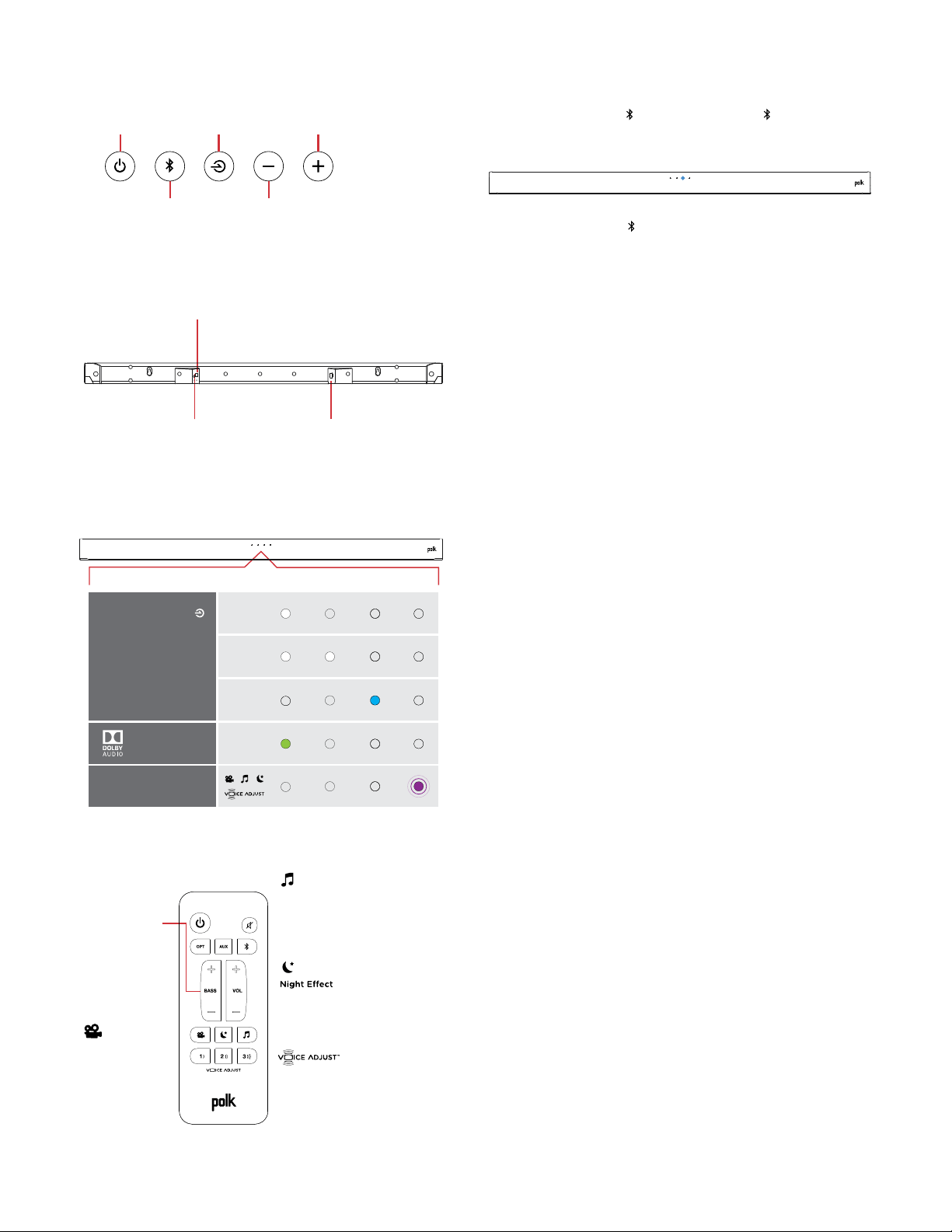
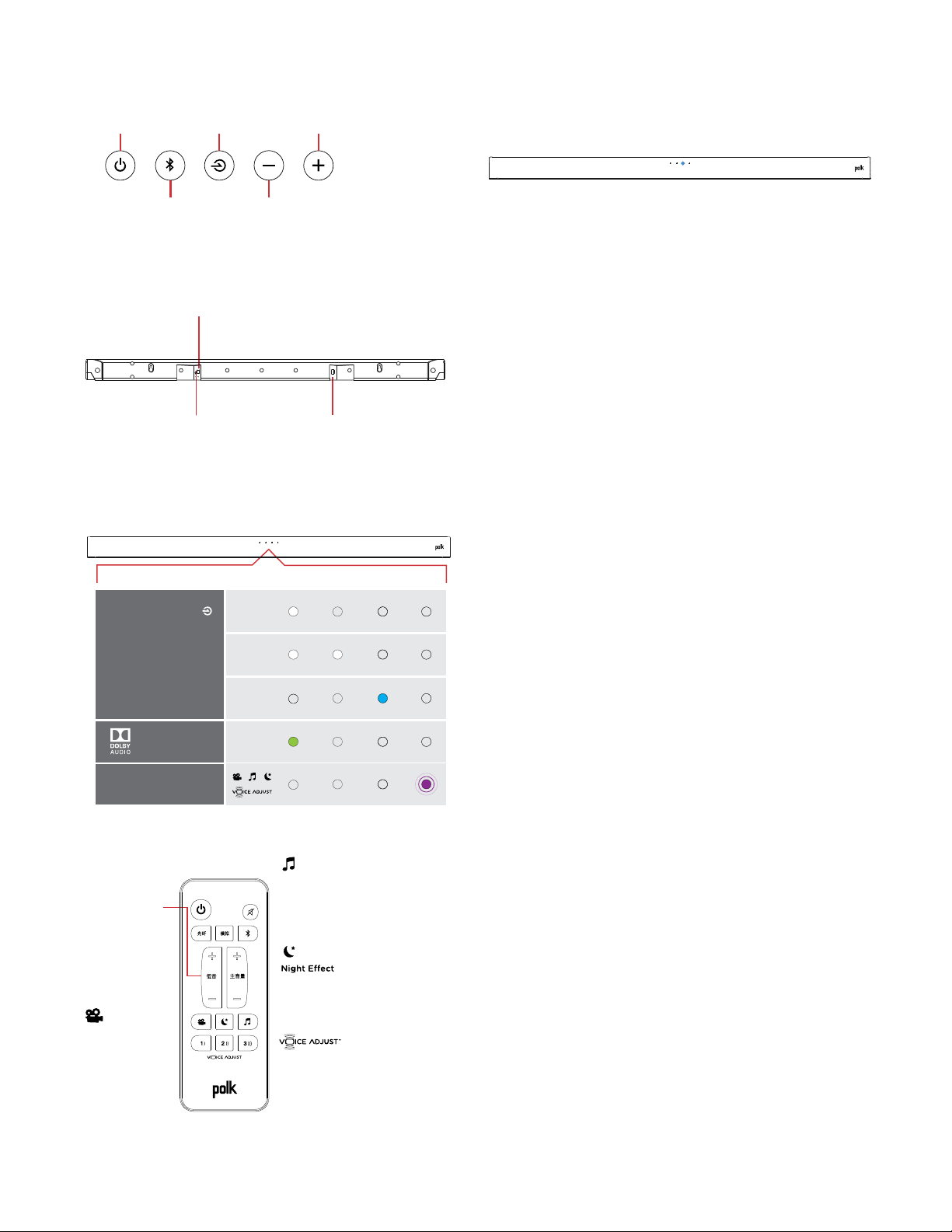
Sound Bar Top Panel
Power
Source
Volume Down
Volume Up
Bluetooth
®
On/O
Sorgente
Volume -
Volume +
Bluetooth
®
Accensione
Source
Volume -
Volume +
Bluetooth
®
Alimentation
Power
Quelle
Lautstärke
Lautstärke hoch
Bluetooth
®
An/Aus
Encendido
Fuente
volumen -
volumen +
Bluetooth
®
电源
来源
蓝牙 减少音量
增加音量
开启/关闭
english
french
spanish
italian
german
chinese
Sound Bar Back Panel
光纤
Power
Optical
AUX
Alimentation
Optique
AUX
Accensione
Ottico
AUX
Power
Optisch
AUX
Encendido
Óptico
AUX
电源AUX
english
french
spanish
italian
german
chinese
Sound Bar LEDs
The Signa S1 has a horizontal row of LED lights that provide
status indications, like source, volume and listening modes.
OPT
AUX
Bluetooth
Dolby
Content
SOURCE INDICATORS
MODE CHANGE
OPT
AUX
Bluetooth
Dolby
Content
INDICATORI FONTE
MODALITÀ
OPT
AUX
Bluetooth
Dolby
Contenu
INDICATEURS
DE SOURCE
CHANGEMENT DE MODE
OPT
AUX
Bluetooth
Dolby-
Inhalt
QUELLENANZEIGER
MODUS-ÄNDERNUNG
OPT
AUX
Bluetooth
Dolby
Contenido
INDICADORES
DE FUENTE
CAMBIO DE MODO
OPT
AUX
Bluetooth
Dolby
Content
来源指示器
模式变更
english
french
spanish
italian
german
chinese
Optimizing Your Listening Experience
Bass Control
Control Bass
Volume Levels
Easily adjust bass
volume for more or
less impact.
Movie Mode
Enhances audio
reproduction in TV
and movies.
Reduces bass and volume
dynamics while improving
voice intelligibility for
low-volume listening.
Music Mode
Enhances audio whenever
you’re listening to music, or
watching TV or movies that
have music playing in them.
Control Dialogue
Volume Levels
Isolate and adjust the
voice channel level to
reproduce clear, crisp
dialogue.
Controllo
bassi
Controllo bassi
Livelli volume
Regola facilmente
il volume dei bassi
per un impatto
maggiore o minore.
Modalità film
Migliora la
riproduzione del
suono per TV e film.
Riduce le dinamiche di bassi
e volume, migliorando la c
omprensione della voce, per
un ascolto a volume basso.
Modalità musica
Migliora l’audio quando
ascolti la musica o guardi
TV o film che contengono
tracce musicali.
Controllo dialoghi
Livelli volume
Isola e regola il livello di
volume del canale della
voce per riprodurre i
dialoghi in maniera
limpida e chiara.
Réglage de
la basse
Réglage du
volume de la basse
Réglez facilement
le niveau de la bass
e pour un impact
plus ou moins grand.
Mode cinéma
Rehausse le rendu
sonore des films
et des émissions
télévisées.
Réduit la basse et les
variations de volume tout
en améliorant l’intelligibilité
de la voix lors de l’écoute à
faible volume.
Mode musical
Améliore la qualité sonore
lorsque vous écoutez de
la musique ou que vous
regardez des émissions
télévisées ou des films qui
comportent de la musique.
Réglage de la voix
Réglage du volume des
dialogues. Isolez et réglez
le volume de la piste vocale
pour un rendu net et précis
des dialogues.
Basssteuerung
Einstellen des
Basslautstärke-Levels
Einfaches Einstellen
der Basslautstärke
für mehr oder
weniger Bass.
Filmmodus
Verbessert die
Audio-Wiedergabe
in TV und Filmen.
Reduziert Bass- und
Lautstärken-Dynamik
bei gleichzeitiger Verbesserung
der Sprachverständlichkeit bei
geringer Lautstärke.
Musikmodus
Verbessert das Audio,
wann immer Sie Musik hören,
fernsehen oder Filme mit
Musik anschauen.
Nachteekt
Kontrollieren Sie die
Lautstärke des Lautstärkereglers
Isolieren und justieren
Sie den Sprachkanalpegel,
um klaren, scharfen
Dialog wiederzugeben.
Control
de bajos
Controla los niveles
de volumen de bajos
Ajusta fácilmente
los bajos para más
o menos impacto.
Modo película
Mejora la
reproducción de
sonido en TV y
películas.
Reduce el bajo y el volumen
mejorando al mismo tiempo
la inteligibilidad de la voz
para escuchar a bajo volumen.
Modo música
Mejora el sonido cuando
está escuchando música
o viendo el TV o películas
que tiene música en ellas.
Controla los niveles de
volumen de los diálogos
Aísla y ajusta el nivel del
canal de voz para reproducir
diálogos claros y nítidos.
低音控制
控制低音
音量水平
轻松调节低音音量以
获得更多或者更少的
冲击力。
电影模式
增强电视和电影中的
音频再现
在提高低音量聆听的语音可懂
度的同时降低低音和音量力
度。
音乐模式
在您任何时候聆听音乐或者观看
有音乐播放的电视或电影时增强
音频。
控制对话
音量水平
隔离和调节语音通道水
平,再现清晰、清脆的
对话。
english
french
spanish
italian
german
chinese
Eet nocturne
Efecto nocturno
Music Listening
How to Set Up Bluetooth
1. To enable Bluetooth
, press the Bluetooth button on
the sound bar or remote control. A blue LED will pulse on the
sound bar.
2. Go to the Bluetooth devices section on your phone, tablet or
computer and select Polk Signa S1. The LED is solid blue when
Bluetooth is connected.
NOTE: To take control when another device is connected, press
Bluetooth button.
How to hear your TV again: When you are finished using
Bluetooth, press the source button on the sound bar or remote
(OPT, AUX).
fr
Merci de votre achat de ce produit Polk. Si vous avez des
questions ou des commentaires, vous pouvez nous appeler
ou communiquer avec nous par courriel.
Assistance technique
En Amérique du Nord, contactez le service à la clientèle de
Polk au 800-377-POLK (7655) (L–V, 9 h à 17 h 30, HNE)
À l’extérieur des US, composez le +1-410-358-3600
Courriel polkcs@polkaudio.com
Polk Audio
1 Viper Way
Vista, CA 92081
Vous trouverez le manuel complet de l’utilisateur au
www.polkaudio.com
Ce qu’il y a dans la boîte
Sound bar
Remote control
Battery
Sound bar power cord
4' Optical cable
Subwoofer power cord
AAA
Literature
Subwoofer
Important Product Information
Barre de son
Télécommande
Pile
Câble d’alimentation
de la barre de son
Câble optique 4 po
Cordon d’alimentation
du caisson de basse
AAA
Documentation
Caisson de basse
Important Product Information
Barra de sonido
Control remoto
Pila
Cable de energía de
la barra de sonido
Cable óptico de 1,2 m (4 pies)
Cable de energía
del subwoofer
AAA
Manual
Subwoofer
Important Product Information
Barra sonora
Telecomando
Batteria
Cavo alimentazione
barra sonora
Cavo ottico da 1,2 m
Cavo alimentazione
subwoofer
AAA
Manuale
Subwoofer
Important Product Information
Sound bar
Fernbedienung
Batteri
Soundbar-Netzkabel
4' Optisches Kabel
Subwoofer-Netzkabel
AAA
Literatur
Subwoofer
Important Product Information
电视回音壁音箱
远程控制
Battery
电视回音壁音箱电源线
4' 光纤线
低音炮电源线
AAA
印刷资料
低音炮
Important Product Information
english
french
spanish
italian
german
chinese
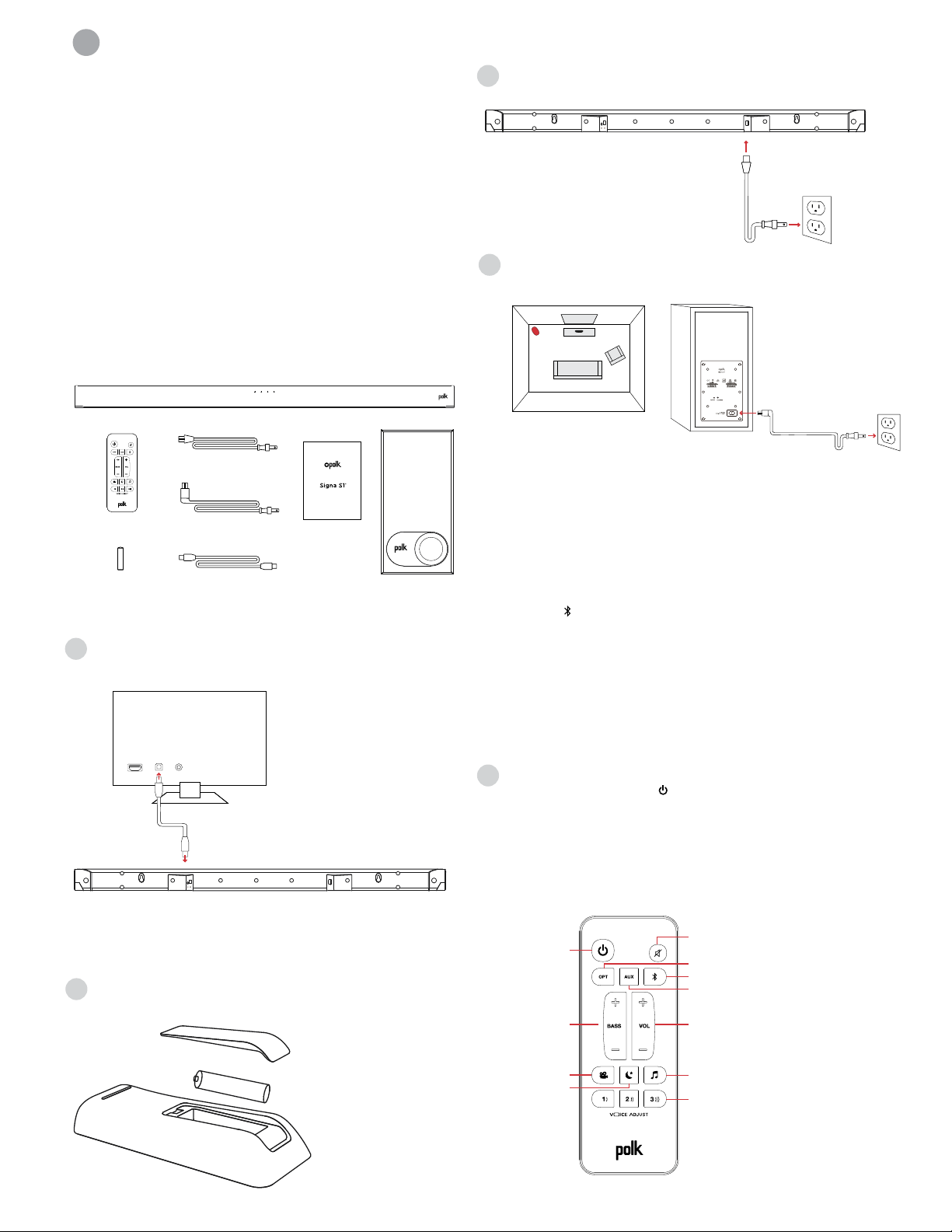
Connecter votre Signa S1 à votre téléviseur
1. Utilisez le câble optique fourni pour connecter
la barre de son à votre téléviseur.
TV
AUXOPTHDMI
Si votre téléviseur n’est pas muni d’une sortie optique,
connectez la barre de son au téléviseur avec un câble
auxiliaire (non compris).
REMARQUE : Seule la sortie optique prend en charge
le décodage Dolby 5.1.
2. Installation de la pile de la télécommande :
Insérez la pile AAA.
3. Connectez la barre de son à une prise de courant CA
4. Positionnez le caisson de basse et connectez-le à une prise
CA (pour les meilleurs résultats, positionnez le caisson face
au même mur que le téléviseur)
TV
This device complies with Part 15 of the FCC Rules. Operations are subject to the following conditions: (1) this device
may not cause harmful interference, and (2) this device must accept any interference received, including interference
that may cause undesired operation.
MODEL: SIGNA S1 FCC ID: WLQAM9117RX IC: 7956A-AM9117RX CAN ICES-3 (B)/NMB-3(B)
DESIGNED IN THE USA MANUFACTURED IN CHINA
REMARQUE : La barre de son et le caisson de basse sans fil
Signa S1 sont préréglés pour fonctionner ensemble. Si votre
caisson de basse cesse de recevoir un signal audio, suivez les
instructions suivantes pour rétablir la connexion :
1. Allumez la barre de son.
2. Appuyez et maintenez le bouton LIEN à l’arrière du caisson
d’extrêmes graves pendant 3 secondes.
3. Appuyez et maintenez simultanément la touche Bluetooth
et la touche VOL + sur la barre de son pendant 5 secondes.
La barre de son cherchera à établir une connexion. Pendant
ce temps, la première et la seconde DEL de la barre de son
clignoteront de manière intermittente. Les DEL cesseront de
clignoter lorsque la connexion sera établie entre la barre de
son et le caisson de basse. Si la connexion entre la barre de son
et le caisson de basse échoue, la première et la seconde DEL
clignoteront ensemble 5 fois. Répétez les étapes ci-dessus pour
établir une connexion.
5. Allumez votre barre de son
Appuyez sur le bouton d’alimentation de la barre de son
ou de la télécommande.
REMARQUE : Veillez à ce que les haut-parleurs internes de
téléviseur soient éteints lorsque vous utilisez les entrées
optiques ou les entrées auxiliaires.
Télécommande
Mute
AUX
Bluetooth
Master Volume
Power
Up/Down
Optical
Bass
Up/Down
Night Eect
Music Mode
VoiceAdjust Levels
Movie Mode
Muto
AUX
Bluetooth
Volume principale
Accensione
Su/Giù
Ottico
Bassi
Su/Giù
Eetto notte
Modalità musica
VoiceAdjust Regolazione
Modalità film
Sourdine
AUX
Bluetooth
Volume maître
Alimentation
+/-
Optique
Basse
+/-
Eet nocturne
Mode musical
Réglage de VoiceAdjust
Mode cinéma
Mute
AUX
Bluetooth
Gesamtlautstärke
Power
(Betriebstaste)
Auf / Ab
Optisch
Bass
Auf / Ab
Nachteekt
Musikmodus
Spracheinstellung
Filmmodus
Silenciar
AUX
Bluetooth
Volumen maestro
Encendido
Subir/Bajar
Óptico
Bajo
Subir/Bajar
Efecto nocturno
Modo música
Niveles VoiceAdjust
Modo película
静音
AUX
主音量
电源
向上/向下
光纤
低音
向上/向下
夜间效果
音乐模式
声音调节水平
电影模式
Bluetooth
english
french
spanish
italian
german
chinese
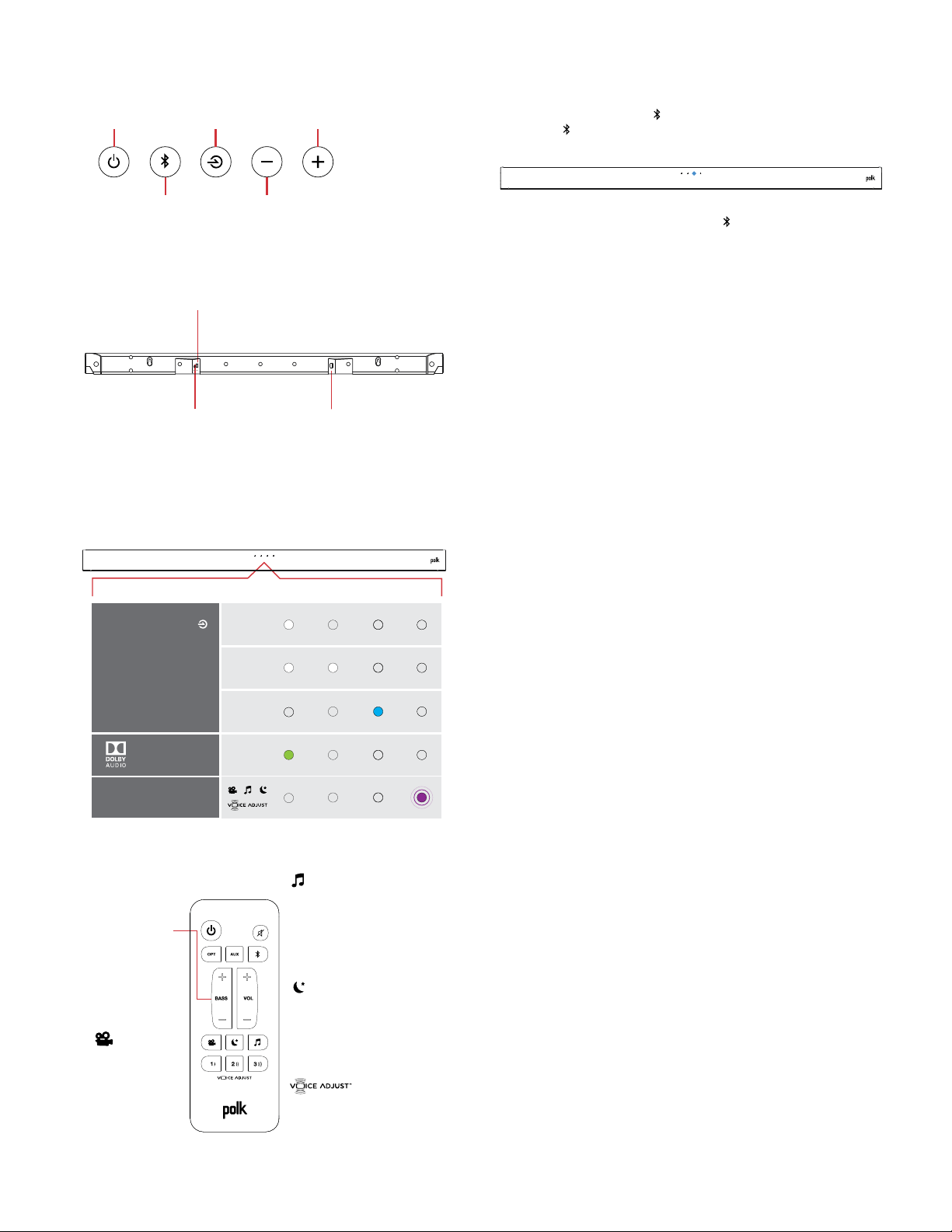
Panneau supérieur de la barre de son
Power
Source
Volume Down
Volume Up
Bluetooth
®
On/O
Sorgente
Volume -
Volume +
Bluetooth
®
Accensione
Source
Volume -
Volume +
Bluetooth
®
Alimentation
Power
Quelle
Lautstärke
Lautstärke hoch
Bluetooth
®
An/Aus
Encendido
Fuente
volumen -
volumen +
Bluetooth
®
电源
来源
蓝牙 减少音量
增加音量
开启/关闭
english
french
spanish
italian
german
chinese
Panneau arrière de la barre de son
光纤
Power
Optical
AUX
Alimentation
Optique
AUX
Accensione
Ottico
AUX
Power
Optisch
AUX
Encendido
Óptico
AUX
电源AUX
english
french
spanish
italian
german
chinese
DEL de la barre de son
Le Signa S1 est muni d’une rangée horizontale de feux DEL qui
indiquent l’état de plusieurs composants, comme la source, le
volume et les modes d’écoute.
OPT
AUX
Bluetooth
Dolby
Content
SOURCE INDICATORS
MODE CHANGE
OPT
AUX
Bluetooth
Dolby
Content
INDICATORI FONTE
MODALITÀ
OPT
AUX
Bluetooth
Dolby
Contenu
INDICATEURS
DE SOURCE
CHANGEMENT DE MODE
OPT
AUX
Bluetooth
Dolby-
Inhalt
QUELLENANZEIGER
MODUS-ÄNDERNUNG
OPT
AUX
Bluetooth
Dolby
Contenido
INDICADORES
DE FUENTE
CAMBIO DE MODO
OPT
AUX
Bluetooth
Dolby
Content
来源指示器
模式变更
english
french
spanish
italian
german
chinese
Optimisation de votre expérience d’écoute
Bass Control
Control Bass
Volume Levels
Easily adjust bass
volume for more or
less impact.
Movie Mode
Enhances audio
reproduction in TV
and movies.
Reduces bass and volume
dynamics while improving
voice intelligibility for
low-volume listening.
Music Mode
Enhances audio whenever
you’re listening to music, or
watching TV or movies that
have music playing in them.
Control Dialogue
Volume Levels
Isolate and adjust the
voice channel level to
reproduce clear, crisp
dialogue.
Controllo
bassi
Controllo bassi
Livelli volume
Regola facilmente
il volume dei bassi
per un impatto
maggiore o minore.
Modalità film
Migliora la
riproduzione del
suono per TV e film.
Riduce le dinamiche di bassi
e volume, migliorando la c
omprensione della voce, per
un ascolto a volume basso.
Modalità musica
Migliora l’audio quando
ascolti la musica o guardi
TV o film che contengono
tracce musicali.
Controllo dialoghi
Livelli volume
Isola e regola il livello di
volume del canale della
voce per riprodurre i
dialoghi in maniera
limpida e chiara.
Réglage de
la basse
Réglage du
volume de la basse
Réglez facilement
le niveau de la bass
e pour un impact
plus ou moins grand.
Mode cinéma
Rehausse le rendu
sonore des films
et des émissions
télévisées.
Réduit la basse et les
variations de volume tout
en améliorant l’intelligibilité
de la voix lors de l’écoute à
faible volume.
Mode musical
Améliore la qualité sonore
lorsque vous écoutez de
la musique ou que vous
regardez des émissions
télévisées ou des films qui
comportent de la musique.
Réglage de la voix
Réglage du volume des
dialogues. Isolez et réglez
le volume de la piste vocale
pour un rendu net et précis
des dialogues.
Basssteuerung
Einstellen des
Basslautstärke-Levels
Einfaches Einstellen
der Basslautstärke
für mehr oder
weniger Bass.
Filmmodus
Verbessert die
Audio-Wiedergabe
in TV und Filmen.
Reduziert Bass- und
Lautstärken-Dynamik
bei gleichzeitiger Verbesserung
der Sprachverständlichkeit bei
geringer Lautstärke.
Musikmodus
Verbessert das Audio,
wann immer Sie Musik hören,
fernsehen oder Filme mit
Musik anschauen.
Nachteekt
Kontrollieren Sie die
Lautstärke des Lautstärkereglers
Isolieren und justieren
Sie den Sprachkanalpegel,
um klaren, scharfen
Dialog wiederzugeben.
Control
de bajos
Controla los niveles
de volumen de bajos
Ajusta fácilmente
los bajos para más
o menos impacto.
Modo película
Mejora la
reproducción de
sonido en TV y
películas.
Reduce el bajo y el volumen
mejorando al mismo tiempo
la inteligibilidad de la voz
para escuchar a bajo volumen.
Modo música
Mejora el sonido cuando
está escuchando música
o viendo el TV o películas
que tiene música en ellas.
Controla los niveles de
volumen de los diálogos
Aísla y ajusta el nivel del
canal de voz para reproducir
diálogos claros y nítidos.
低音控制
控制低音
音量水平
轻松调节低音音量以
获得更多或者更少的
冲击力。
电影模式
增强电视和电影中的
音频再现
在提高低音量聆听的语音可懂
度的同时降低低音和音量力
度。
音乐模式
在您任何时候聆听音乐或者观看
有音乐播放的电视或电影时增强
音频。
控制对话
音量水平
隔离和调节语音通道水
平,再现清晰、清脆的
对话。
english
french
spanish
italian
german
chinese
Eet nocturne
Efecto nocturno
Écoute de musique
Configuration de Bluetooth
1. 1. Pour activer Bluetooth , appuyez sur la touche
Bluetooth de la barre de son ou de la télécommande.
Une DEL bleue clignotera sur la barre de son.
2. Rendez-vous à la section Bluetooth de votre téléphone,
de votre tablette ou de votre ordinateur et sélectionnez
Polk Signa S1. La DEL bleue cessera de clignoter lorsque la
connexion Bluetooth sera établie.
REMARQUE : Pour prendre les commandes lorsqu’un autre
appareil est connecté, appuyez sur la touche Bluetooth.
Comment entendre votre téléviseur à nouveau : Lorsque vous
aurez terminé d’utiliser Bluetooth, appuyez sur la touche source
de la barre de son ou de la télécommande (OPT, AUX).
es
¡Gracias por su compra de Polk. Si tiene alguna pregunta o
comentario, por favor, no dude en llamarnos o enviarnos un
e-mail.
Asistencia técnica
En Norteamérica, llame al Servicio al cliente de Polk
800-377-POLK(7655) (L-V, 9 a.m. - 5:30 p.m. EST)
Fuera de EE. UU., llame al +1-410-358-3600
email polkcs@polkaudio.com
Polk Audio
1 Viper Way
Vista, CA 92081
Puede encontrar el manual del propietario completo
online en www.polkaudio.com
Qué incluye la caja
Sound bar
Remote control
Battery
Sound bar power cord
4' Optical cable
Subwoofer power cord
AAA
Literature
Subwoofer
Important Product Information
Barre de son
Télécommande
Pile
Câble d’alimentation
de la barre de son
Câble optique 4 po
Cordon d’alimentation
du caisson de basse
AAA
Documentation
Caisson de basse
Important Product Information
Barra de sonido
Control remoto
Pila
Cable de energía de
la barra de sonido
Cable óptico de 1,2 m (4 pies)
Cable de energía
del subwoofer
AAA
Manual
Subwoofer
Important Product Information
Barra sonora
Telecomando
Batteria
Cavo alimentazione
barra sonora
Cavo ottico da 1,2 m
Cavo alimentazione
subwoofer
AAA
Manuale
Subwoofer
Important Product Information
Sound bar
Fernbedienung
Batteri
Soundbar-Netzkabel
4' Optisches Kabel
Subwoofer-Netzkabel
AAA
Literatur
Subwoofer
Important Product Information
电视回音壁音箱
远程控制
Battery
电视回音壁音箱电源线
4' 光纤线
低音炮电源线
AAA
印刷资料
低音炮
Important Product Information
english
french
spanish
italian
german
chinese
Conectar su Signa S1 a su TV
1. Utilice el cable óptico proporcionado para conectar
la barra de sonido al TV.
TV
AUXOPTHDMI
Si su TV no tiene una salida óptica, conecte la barra de sonido
al TV con un cable AUX (no incluido).
NOTA: Solo el cable óptico soporta la descodificación
Dolby 5.1.
2. Instalación de la pila del control remoto:
Introduzca la pila AAA proporcionada.
3. Conecte el cable de energía de la barra de sonido
a una toma AC
4. Coloque el subwoofer y conéctelo a una toma AC (para el
mejor rendimiento, colóquelo en la misma pared del TV)
TV
This device complies with Part 15 of the FCC Rules. Operations are subject to the following conditions: (1) this device
may not cause harmful interference, and (2) this device must accept any interference received, including interference
that may cause undesired operation.
MODEL: SIGNA S1 FCC ID: WLQAM9117RX IC: 7956A-AM9117RX CAN ICES-3 (B)/NMB-3(B)
DESIGNED IN THE USA MANUFACTURED IN CHINA
NOTA: La barra de sonido Signa S1 y el subwoofer inalámbrico
están preconfigurados de fábrica para funcionar juntos. En
caso de que su subwoofer inalámbrico deje de recibir señal de
audio, siga estas instrucciones para restablecer la conexión:
1. Encienda su barra de sonido.
2. Pulsa y mantén pulsado el botón de “LINK” de la parte de
atrás del subwoofer durante 3 segundos.
3. Pulse simultáneamente y deje pulsados los botones
Bluetooth y VOL +en la barra de sonido durante 5
segundos.
La barra de sonido buscará una conexión mientras la primera
y segunda luz LED de la barra de sonido parpadearán
intermitentemente. Las luces dejarán de parpadear cuando
la barra de sonido y el subwoofer se conecten. Si la barra de
sonido y el subwoofer no se conectan, la primera y segunda luz
LED parpadearán juntas 5 veces. Repita los pasos anteriores
para establecer una conexión.
5. Encienda su barra de sonido.
Pulse el botón Encendid en la barra de sonido o en el
control remoto.
NOTA: Asegúrese de que los altavoces internos del TV están
apagados al utilizar entradas ópticas y aux.
Control remoto
Mute
AUX
Bluetooth
Master Volume
Power
Up/Down
Optical
Bass
Up/Down
Night Eect
Music Mode
VoiceAdjust Levels
Movie Mode
Muto
AUX
Bluetooth
Volume principale
Accensione
Su/Giù
Ottico
Bassi
Su/Giù
Eetto notte
Modalità musica
VoiceAdjust Regolazione
Modalità film
Sourdine
AUX
Bluetooth
Volume maître
Alimentation
+/-
Optique
Basse
+/-
Eet nocturne
Mode musical
Réglage de VoiceAdjust
Mode cinéma
Mute
AUX
Bluetooth
Gesamtlautstärke
Power
(Betriebstaste)
Auf / Ab
Optisch
Bass
Auf / Ab
Nachteekt
Musikmodus
Spracheinstellung
Filmmodus
Silenciar
AUX
Bluetooth
Volumen maestro
Encendido
Subir/Bajar
Óptico
Bajo
Subir/Bajar
Efecto nocturno
Modo música
Niveles VoiceAdjust
Modo película
静音
AUX
主音量
电源
向上/向下
光纤
低音
向上/向下
夜间效果
音乐模式
声音调节水平
电影模式
Bluetooth
english
french
spanish
italian
german
chinese
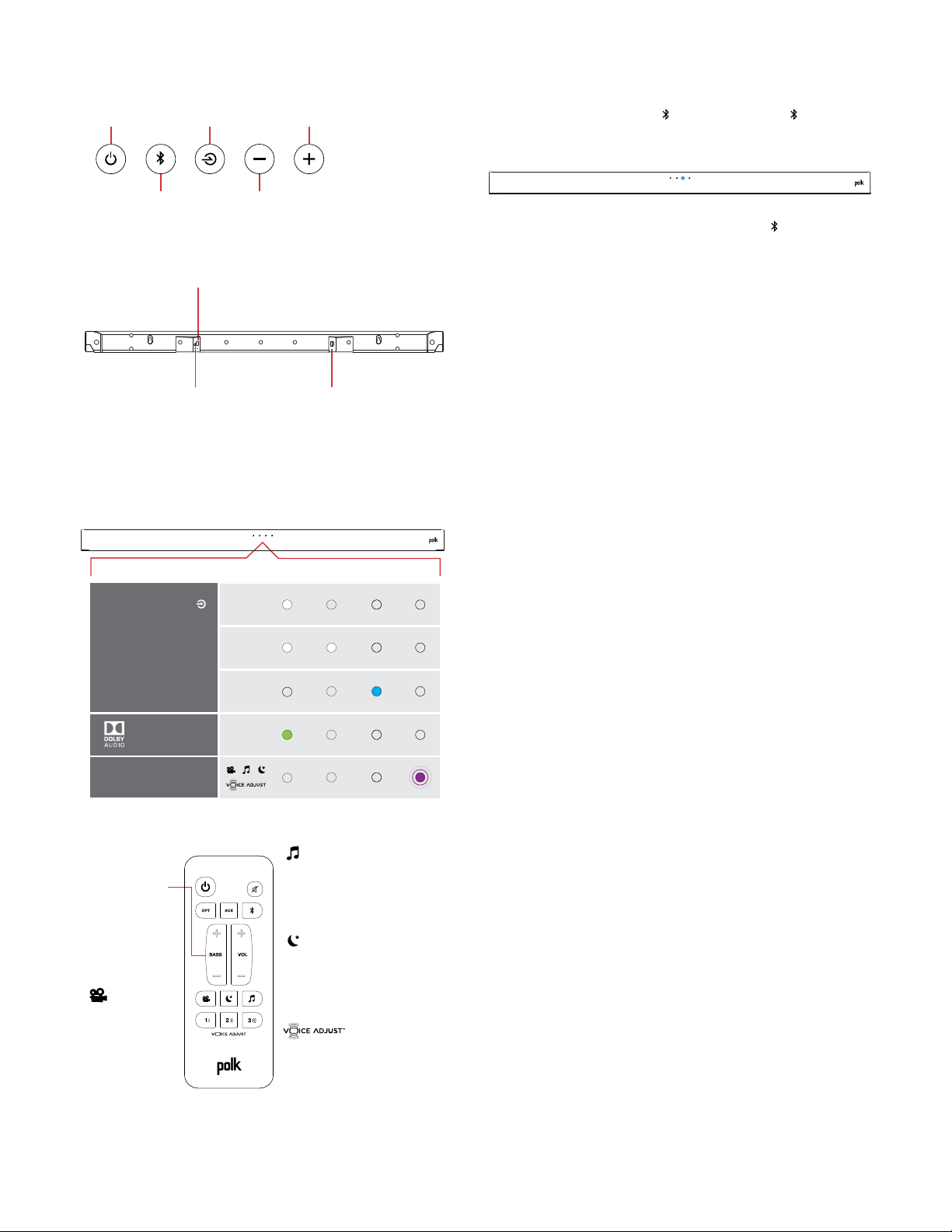
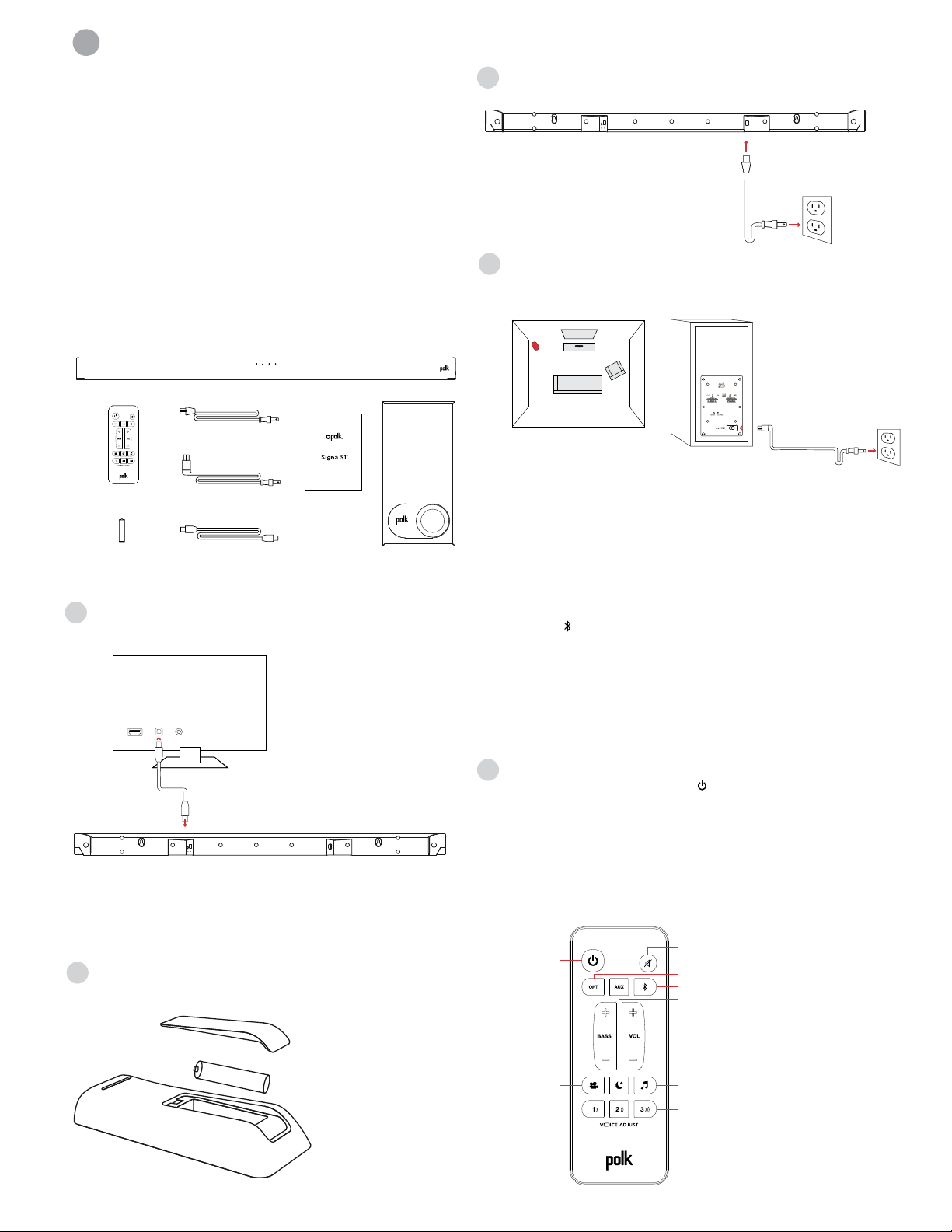
Panel superior de la barra de sonido
Power
Source
Volume Down
Volume Up
Bluetooth
®
On/O
Sorgente
Volume -
Volume +
Bluetooth
®
Accensione
Source
Volume -
Volume +
Bluetooth
®
Alimentation
Power
Quelle
Lautstärke
Lautstärke hoch
Bluetooth
®
An/Aus
Encendido
Fuente
volumen -
volumen +
Bluetooth
®
电源
来源
蓝牙 减少音量
增加音量
开启/关闭
english
french
spanish
italian
german
chinese
Panel posterior de la barra de sonido
光纤
Power
Optical
AUX
Alimentation
Optique
AUX
Accensione
Ottico
AUX
Power
Optisch
AUX
Encendido
Óptico
AUX
电源AUX
english
french
spanish
italian
german
chinese
Luces LED de la barra de sonido
La Signa S1 tiene una fila horizontal de luces
LED que proporcionan indicaciones del estado
como fuente, volumen y los modos de sonido.
OPT
AUX
Bluetooth
Dolby
Content
SOURCE INDICATORS
MODE CHANGE
OPT
AUX
Bluetooth
Dolby
Content
INDICATORI FONTE
MODALITÀ
OPT
AUX
Bluetooth
Dolby
Contenu
INDICATEURS
DE SOURCE
CHANGEMENT DE MODE
OPT
AUX
Bluetooth
Dolby-
Inhalt
QUELLENANZEIGER
MODUS-ÄNDERNUNG
OPT
AUX
Bluetooth
Dolby
Contenido
INDICADORES
DE FUENTE
CAMBIO DE MODO
OPT
AUX
Bluetooth
Dolby
Content
来源指示器
模式变更
english
french
spanish
italian
german
chinese
Optimizar su experiencia de sonido
Bass Control
Control Bass
Volume Levels
Easily adjust bass
volume for more or
less impact.
Movie Mode
Enhances audio
reproduction in TV
and movies.
Reduces bass and volume
dynamics while improving
voice intelligibility for
low-volume listening.
Music Mode
Enhances audio whenever
you’re listening to music, or
watching TV or movies that
have music playing in them.
Control Dialogue
Volume Levels
Isolate and adjust the
voice channel level to
reproduce clear, crisp
dialogue.
Controllo
bassi
Controllo bassi
Livelli volume
Regola facilmente
il volume dei bassi
per un impatto
maggiore o minore.
Modalità film
Migliora la
riproduzione del
suono per TV e film.
Riduce le dinamiche di bassi
e volume, migliorando la c
omprensione della voce, per
un ascolto a volume basso.
Modalità musica
Migliora l’audio quando
ascolti la musica o guardi
TV o film che contengono
tracce musicali.
Controllo dialoghi
Livelli volume
Isola e regola il livello di
volume del canale della
voce per riprodurre i
dialoghi in maniera
limpida e chiara.
Réglage de
la basse
Réglage du
volume de la basse
Réglez facilement
le niveau de la bass
e pour un impact
plus ou moins grand.
Mode cinéma
Rehausse le rendu
sonore des films
et des émissions
télévisées.
Réduit la basse et les
variations de volume tout
en améliorant l’intelligibilité
de la voix lors de l’écoute à
faible volume.
Mode musical
Améliore la qualité sonore
lorsque vous écoutez de
la musique ou que vous
regardez des émissions
télévisées ou des films qui
comportent de la musique.
Réglage de la voix
Réglage du volume des
dialogues. Isolez et réglez
le volume de la piste vocale
pour un rendu net et précis
des dialogues.
Basssteuerung
Einstellen des
Basslautstärke-Levels
Einfaches Einstellen
der Basslautstärke
für mehr oder
weniger Bass.
Filmmodus
Verbessert die
Audio-Wiedergabe
in TV und Filmen.
Reduziert Bass- und
Lautstärken-Dynamik
bei gleichzeitiger Verbesserung
der Sprachverständlichkeit bei
geringer Lautstärke.
Musikmodus
Verbessert das Audio,
wann immer Sie Musik hören,
fernsehen oder Filme mit
Musik anschauen.
Nachteekt
Kontrollieren Sie die
Lautstärke des Lautstärkereglers
Isolieren und justieren
Sie den Sprachkanalpegel,
um klaren, scharfen
Dialog wiederzugeben.
Control
de bajos
Controla los niveles
de volumen de bajos
Ajusta fácilmente
los bajos para más
o menos impacto.
Modo película
Mejora la
reproducción de
sonido en TV y
películas.
Reduce el bajo y el volumen
mejorando al mismo tiempo
la inteligibilidad de la voz
para escuchar a bajo volumen.
Modo música
Mejora el sonido cuando
está escuchando música
o viendo el TV o películas
que tiene música en ellas.
Controla los niveles de
volumen de los diálogos
Aísla y ajusta el nivel del
canal de voz para reproducir
diálogos claros y nítidos.
低音控制
控制低音
音量水平
轻松调节低音音量以
获得更多或者更少的
冲击力。
电影模式
增强电视和电影中的
音频再现
在提高低音量聆听的语音可懂
度的同时降低低音和音量力
度。
音乐模式
在您任何时候聆听音乐或者观看
有音乐播放的电视或电影时增强
音频。
控制对话
音量水平
隔离和调节语音通道水
平,再现清晰、清脆的
对话。
english
french
spanish
italian
german
chinese
Eet nocturne
Efecto nocturno
Escuchar música
Cómo configurar el Bluetooth
1. Para habilitar el Bluetooth
, pulse el Bluetooth en la barra de
sonido o el control remoto. Parpadeará una luz LED azul en la
barra de sonido
2. Vaya a la sección de dispositivos Bluetooth de su teléfono,
tablet u ordenador y seleccione Polk Signa S1. La luz LED será
azul fija cuando se conecte el Bluetooth.
NOTA: Para tomar el control cuando se conecta otro dispositivo,
pulse el botón Bluetooth.
Cómo escuchar su TV de nuevo: Cuando haya finalizado de usar
el Bluetooth, pulse el botón de fuente en la barra de sonido o en
el control remoto (OPT, AUX).
it
Grazie per aver acquistato un prodotto Polk. Per domande
o commenti, chiamateci o inviateci un’email.
Assistenza tecnica
Nel Nord America, chiamate il servizio Clienti POLK al
numero 800-377-POLK(7655) (L–V, 9:00–17:30 EST)
Al di fuori degli USA, chiamate al +1-410-358-3600
email polkcs@polkaudio.com
Polk Audio
1 Viper Way
Vista, CA 92081
Il manuale utente completo è disponibile online all’indirizzo
www.polkaudio.com
Contenuto della confezione
Sound bar
Remote control
Battery
Sound bar power cord
4' Optical cable
Subwoofer power cord
AAA
Literature
Subwoofer
Important Product Information
Barre de son
Télécommande
Pile
Câble d’alimentation
de la barre de son
Câble optique 4 po
Cordon d’alimentation
du caisson de basse
AAA
Documentation
Caisson de basse
Important Product Information
Barra de sonido
Control remoto
Pila
Cable de energía de
la barra de sonido
Cable óptico de 1,2 m (4 pies)
Cable de energía
del subwoofer
AAA
Manual
Subwoofer
Important Product Information
Barra sonora
Telecomando
Batteria
Cavo alimentazione
barra sonora
Cavo ottico da 1,2 m
Cavo alimentazione
subwoofer
AAA
Manuale
Subwoofer
Important Product Information
Sound bar
Fernbedienung
Batteri
Soundbar-Netzkabel
4' Optisches Kabel
Subwoofer-Netzkabel
AAA
Literatur
Subwoofer
Important Product Information
电视回音壁音箱
远程控制
Battery
电视回音壁音箱电源线
4' 光纤线
低音炮电源线
AAA
印刷资料
低音炮
Important Product Information
english
french
spanish
italian
german
chinese
Collegamento di Signa S1 alla TV
1. Utilizzare il cavo ottico in dotazione per collegare la
barra sonora alla TV.
TV
AUXOPTHDMI
Se la TV non dovesse avere un ingresso per il cavo ottico,
collegare la barra sonora alla TV tramite un cavo AUX
(non incluso).
NOTA: solo il collegamento ottico supporta la
decodifica Dolby 5.1.
2. Installazione batteria telecomando: inserire la batteria
AAA in dotazione.
3. Collegare il cavo di alimentazione della barra sonora ad una
presa elettrica
4. Posizionare il subwoofer e collegarlo ad una presa elettrica
(per dei risultati migliori, posizionarlo ella stessa parete
della TV)
TV
This device complies with Part 15 of the FCC Rules. Operations are subject to the following conditions: (1) this device
may not cause harmful interference, and (2) this device must accept any interference received, including interference
that may cause undesired operation.
MODEL: SIGNA S1 FCC ID: WLQAM9117RX IC: 7956A-AM9117RX CAN ICES-3 (B)/NMB-3(B)
DESIGNED IN THE USA MANUFACTURED IN CHINA
NOTA: la barra sonora ed il subwoofer wireless Signa S1 sono
configurati per funzionare congiuntamente. Se il subwoofer
wireless smettesse di ricevere il segnale audio, seguire queste
istruzioni per ristabilire il collegamento:
1. Accendere la barra sonora.
2. Premere e tenere premuto il tasto LINK sul retro del
subwoofer per 3 secondi.
3. Premere e tenere premuto simultaneamente i tasti
Bluetooth e VOL + nella barra sonora per 5 secondi.
La barra sonora cercherà un collegamento, mentre il primo ed
il secondo LED della barra lampeggeranno ad intermittenza.
Le luci smetteranno di lampeggiare quando la barra ed il
subwoofer saranno accoppiati. Se il collegamento tra la
barra ed il subwoofer non riesce, il primo ed il secondo LED
lampeggeranno congiuntamente per 5 volte. Ripetere i
passaggi sopraindicati per stabilire un collegamento.
5. Accendere la barra sonora
Premere il tasto di accensione nella barra sonora o nel
telecomando.
NOTA: assicurarsi che gli altoparlanti interni della TV siano
muti quando si utilizzano gli ingressi ottici e AUX.
Telecomando
Mute
AUX
Bluetooth
Master Volume
Power
Up/Down
Optical
Bass
Up/Down
Night Eect
Music Mode
VoiceAdjust Levels
Movie Mode
Muto
AUX
Bluetooth
Volume principale
Accensione
Su/Giù
Ottico
Bassi
Su/Giù
Eetto notte
Modalità musica
VoiceAdjust Regolazione
Modalità film
Sourdine
AUX
Bluetooth
Volume maître
Alimentation
+/-
Optique
Basse
+/-
Eet nocturne
Mode musical
Réglage de VoiceAdjust
Mode cinéma
Mute
AUX
Bluetooth
Gesamtlautstärke
Power
(Betriebstaste)
Auf / Ab
Optisch
Bass
Auf / Ab
Nachteekt
Musikmodus
Spracheinstellung
Filmmodus
Silenciar
AUX
Bluetooth
Volumen maestro
Encendido
Subir/Bajar
Óptico
Bajo
Subir/Bajar
Efecto nocturno
Modo música
Niveles VoiceAdjust
Modo película
静音
AUX
主音量
电源
向上/向下
光纤
低音
向上/向下
夜间效果
音乐模式
声音调节水平
电影模式
Bluetooth
english
french
spanish
italian
german
chinese
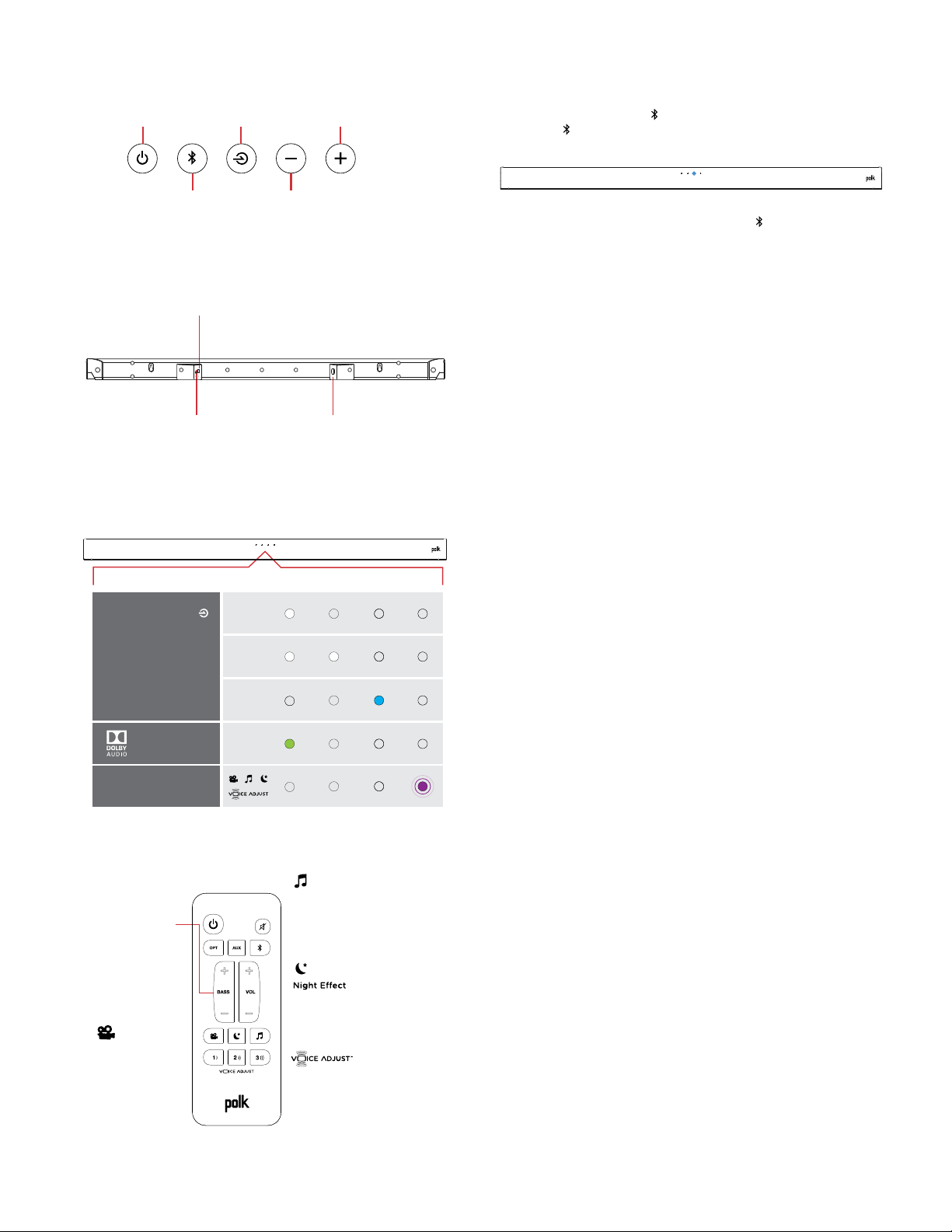
Pannello superiore della barra sonora
Power
Source
Volume Down
Volume Up
Bluetooth
®
On/O
Sorgente
Volume -
Volume +
Bluetooth
®
Accensione
Source
Volume -
Volume +
Bluetooth
®
Alimentation
Power
Quelle
Lautstärke
Lautstärke hoch
Bluetooth
®
An/Aus
Encendido
Fuente
volumen -
volumen +
Bluetooth
®
电源
来源
蓝牙 减少音量
增加音量
开启/关闭
english
french
spanish
italian
german
chinese
Pannello posteriore della barra sonora
光纤
Power
Optical
AUX
Alimentation
Optique
AUX
Accensione
Ottico
AUX
Power
Optisch
AUX
Encendido
Óptico
AUX
电源AUX
english
french
spanish
italian
german
chinese
LED barra sonora
Signa S1 è dotato di una fila orizzontale di luci a LED che indicano
lo stato, come la sorgente, il volume e le modalità di ascolto.
OPT
AUX
Bluetooth
Dolby
Content
SOURCE INDICATORS
MODE CHANGE
OPT
AUX
Bluetooth
Dolby
Content
INDICATORI FONTE
MODALITÀ
OPT
AUX
Bluetooth
Dolby
Contenu
INDICATEURS
DE SOURCE
CHANGEMENT DE MODE
OPT
AUX
Bluetooth
Dolby-
Inhalt
QUELLENANZEIGER
MODUS-ÄNDERNUNG
OPT
AUX
Bluetooth
Dolby
Contenido
INDICADORES
DE FUENTE
CAMBIO DE MODO
OPT
AUX
Bluetooth
Dolby
Content
来源指示器
模式变更
english
french
spanish
italian
german
chinese
Ottimizzazione dell’esperienza di ascolto
Bass Control
Control Bass
Volume Levels
Easily adjust bass
volume for more or
less impact.
Movie Mode
Enhances audio
reproduction in TV
and movies.
Reduces bass and volume
dynamics while improving
voice intelligibility for
low-volume listening.
Music Mode
Enhances audio whenever
you’re listening to music, or
watching TV or movies that
have music playing in them.
Control Dialogue
Volume Levels
Isolate and adjust the
voice channel level to
reproduce clear, crisp
dialogue.
Controllo
bassi
Controllo bassi
Livelli volume
Regola facilmente
il volume dei bassi
per un impatto
maggiore o minore.
Modalità film
Migliora la
riproduzione del
suono per TV e film.
Riduce le dinamiche di bassi
e volume, migliorando la c
omprensione della voce, per
un ascolto a volume basso.
Modalità musica
Migliora l’audio quando
ascolti la musica o guardi
TV o film che contengono
tracce musicali.
Controllo dialoghi
Livelli volume
Isola e regola il livello di
volume del canale della
voce per riprodurre i
dialoghi in maniera
limpida e chiara.
Réglage de
la basse
Réglage du
volume de la basse
Réglez facilement
le niveau de la bass
e pour un impact
plus ou moins grand.
Mode cinéma
Rehausse le rendu
sonore des films
et des émissions
télévisées.
Réduit la basse et les
variations de volume tout
en améliorant l’intelligibilité
de la voix lors de l’écoute à
faible volume.
Mode musical
Améliore la qualité sonore
lorsque vous écoutez de
la musique ou que vous
regardez des émissions
télévisées ou des films qui
comportent de la musique.
Réglage de la voix
Réglage du volume des
dialogues. Isolez et réglez
le volume de la piste vocale
pour un rendu net et précis
des dialogues.
Basssteuerung
Einstellen des
Basslautstärke-Levels
Einfaches Einstellen
der Basslautstärke
für mehr oder
weniger Bass.
Filmmodus
Verbessert die
Audio-Wiedergabe
in TV und Filmen.
Reduziert Bass- und
Lautstärken-Dynamik
bei gleichzeitiger Verbesserung
der Sprachverständlichkeit bei
geringer Lautstärke.
Musikmodus
Verbessert das Audio,
wann immer Sie Musik hören,
fernsehen oder Filme mit
Musik anschauen.
Nachteekt
Kontrollieren Sie die
Lautstärke des Lautstärkereglers
Isolieren und justieren
Sie den Sprachkanalpegel,
um klaren, scharfen
Dialog wiederzugeben.
Control
de bajos
Controla los niveles
de volumen de bajos
Ajusta fácilmente
los bajos para más
o menos impacto.
Modo película
Mejora la
reproducción de
sonido en TV y
películas.
Reduce el bajo y el volumen
mejorando al mismo tiempo
la inteligibilidad de la voz
para escuchar a bajo volumen.
Modo música
Mejora el sonido cuando
está escuchando música
o viendo el TV o películas
que tiene música en ellas.
Controla los niveles de
volumen de los diálogos
Aísla y ajusta el nivel del
canal de voz para reproducir
diálogos claros y nítidos.
低音控制
控制低音
音量水平
轻松调节低音音量以
获得更多或者更少的
冲击力。
电影模式
增强电视和电影中的
音频再现
在提高低音量聆听的语音可懂
度的同时降低低音和音量力
度。
音乐模式
在您任何时候聆听音乐或者观看
有音乐播放的电视或电影时增强
音频。
控制对话
音量水平
隔离和调节语音通道水
平,再现清晰、清脆的
对话。
english
french
spanish
italian
german
chinese
Eet nocturne
Efecto nocturno
Ascolto della musica
Come configurare il Bluetooth
1. Per abilitare il Bluetooth , premere il tasto
Bluetooth nella barra sonora o nel telecomando.
Una luce blu a LED lampeggerà nella barra sonora.
2. Andare alla sezione dispositivi Bluetooth di telefono, tablet
o computer e selezionare Polk Signa S1. Quando il Bluetooth è
connesso, viene mostrata una luce blu a LED fissa.
NOTA: per controllare un altro dispositivo connesso, premere il
tasto Bluetooth.
Come sentire nuovamente l’audio dalla TV: quando il Bluetooth
non è più in funzione, premere il tasto sorgente nella barra
sonora o nel telecomando (OPT, AUX).

de
Vielen Dank für Ihren Einkauf. Wenn Sie eine Frage oder
einen Kommentar haben, zögern Sie nicht uns anzurufen
oder eine E-Mail zu schicken.
Technical Assistance
In Nordamerika erreichen Sie den Polk-Kundendienst unter
der folgenden Nummer: 800-377-POLK (7655) (M-F, 9.00
bis 17.00 Uhr, EST)
Außerhalb der USA, wählen Sie bitte + 1-410-358-3600
E-Mail: polkcs@polkaudio.com
Polk Audio
1 Viper Way
Vista, CA 92081
Die komplette Betriebsanleitung finden Sie im Internet
unter www.polkaudio.com
Was ist in der Box
Sound bar
Remote control
Battery
Sound bar power cord
4' Optical cable
Subwoofer power cord
AAA
Literature
Subwoofer
Important Product Information
Barre de son
Télécommande
Pile
Câble d’alimentation
de la barre de son
Câble optique 4 po
Cordon d’alimentation
du caisson de basse
AAA
Documentation
Caisson de basse
Important Product Information
Barra de sonido
Control remoto
Pila
Cable de energía de
la barra de sonido
Cable óptico de 1,2 m (4 pies)
Cable de energía
del subwoofer
AAA
Manual
Subwoofer
Important Product Information
Barra sonora
Telecomando
Batteria
Cavo alimentazione
barra sonora
Cavo ottico da 1,2 m
Cavo alimentazione
subwoofer
AAA
Manuale
Subwoofer
Important Product Information
Sound bar
Fernbedienung
Batteri
Soundbar-Netzkabel
4' Optisches Kabel
Subwoofer-Netzkabel
AAA
Literatur
Subwoofer
Important Product Information
电视回音壁音箱
远程控制
Battery
电视回音壁音箱电源线
4' 光纤线
低音炮电源线
AAA
印刷资料
低音炮
Important Product Information
english
french
spanish
italian
german
chinese
Anschließen Ihres Signa S1 an Ihr Fernsehgerät
1. Benutzen Sie das mitgelieferte optische Kabel, um die
Soundbar mit dem Fernsehgerät zu verbinden.
TV
AUXOPTHDMI
Wenn Ihr Fernsehgerät keinen optischen Ausgang hat,
schließen Sie die Soundbar mit einem AUX-Kabel (nicht
im Lieferumfang enthalten) an das Fernsehgerät an.
HINWEIS: Nur ein optischer Ausgang unterstützt Dolby
5.1-Decodierung.
2. Installation der Fernbatterie:
Legen Sie die mitgelieferte AAA-Batterie ein.
3. Schließen Sie das Soundbar-Netzkabel an eine
Netzsteckdose an
4. Stellen Sie den Subwoofer auf und verbinden Sie ihn mit
einer Steckdose (Für die beste Leistung, platzieren Sie ihn
an der gleichen Wand wie den Fernseher)
TV
This device complies with Part 15 of the FCC Rules. Operations are subject to the following conditions: (1) this device
may not cause harmful interference, and (2) this device must accept any interference received, including interference
that may cause undesired operation.
MODEL: SIGNA S1 FCC ID: WLQAM9117RX IC: 7956A-AM9117RX CAN ICES-3 (B)/NMB-3(B)
DESIGNED IN THE USA MANUFACTURED IN CHINA
HINWEIS: Die Signa S1 Soundbar und der kabellose Subwoofer
sind werksseitig voreingestellt. Sollte Ihr drahtloser Subwoofer
kein Audiosignal empfangen, befolgen Sie diese Anweisungen,
um die Verbindung wiederherzustellen:
1. Schalten Sie die Soundbar ein.
2. Drücken und halten Sie den LINK-Button auf der Rückseite
des Subwoofers 3 Sekunden lang gedrückt.
3. Halten Sie gleichzeitig die Bluetooth und VOL + Tasten an
der Soundbar für 5 Sekunden gedrückt.
Die Soundbar wird nach einer Verbindung suchen, während
die erste und die zweite LED auf der Soundbar intermittierend
blinken. Die Lampen hören auf zu blinken, wenn die Soundbar
und der Subwoofer angeschlossen sind. Wenn die Soundbar
und der Subwoofer nicht angeschlossen werden, blinken die
erste und die zweite LED 5 Mal zusammen. Wiederholen Sie die
obigen Schritte, um eine Verbindung herzustellen.
5. Schalten Sie die Soundbar ein
Drücken Sie die Betriebstaste auf der Soundbar oder der
Fernbedienung.
HINWEIS: Vergewissern Sie sich, dass die internen
Lautsprecher des Fernsehgeräts ausgeschaltet sind, wenn
Sie optische und Aux-Eingänge verwenden.
Fernbedienung
Mute
AUX
Bluetooth
Master Volume
Power
Up/Down
Optical
Bass
Up/Down
Night Eect
Music Mode
VoiceAdjust Levels
Movie Mode
Muto
AUX
Bluetooth
Volume principale
Accensione
Su/Giù
Ottico
Bassi
Su/Giù
Eetto notte
Modalità musica
VoiceAdjust Regolazione
Modalità film
Sourdine
AUX
Bluetooth
Volume maître
Alimentation
+/-
Optique
Basse
+/-
Eet nocturne
Mode musical
Réglage de VoiceAdjust
Mode cinéma
Mute
AUX
Bluetooth
Gesamtlautstärke
Power
(Betriebstaste)
Auf / Ab
Optisch
Bass
Auf / Ab
Nachteekt
Musikmodus
Spracheinstellung
Filmmodus
Silenciar
AUX
Bluetooth
Volumen maestro
Encendido
Subir/Bajar
Óptico
Bajo
Subir/Bajar
Efecto nocturno
Modo música
Niveles VoiceAdjust
Modo película
静音
AUX
主音量
电源
向上/向下
光纤
低音
向上/向下
夜间效果
音乐模式
声音调节水平
电影模式
Bluetooth
english
french
spanish
italian
german
chinese
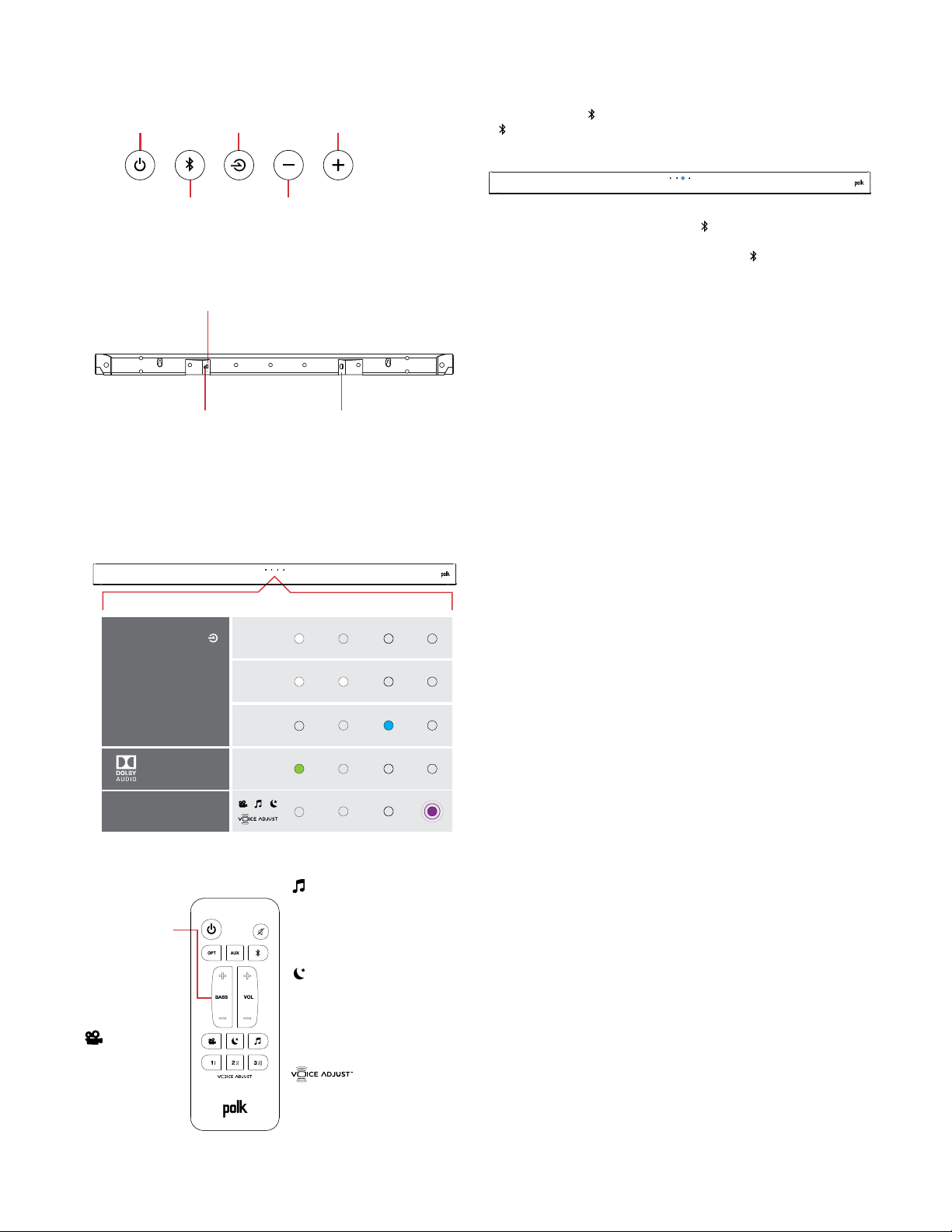
Soundbar-Oberseite
Power
Source
Volume Down
Volume Up
Bluetooth
®
On/O
Sorgente
Volume -
Volume +
Bluetooth
®
Accensione
Source
Volume -
Volume +
Bluetooth
®
Alimentation
Power
Quelle
Lautstärke
Lautstärke hoch
Bluetooth
®
An/Aus
Encendido
Fuente
volumen -
volumen +
Bluetooth
®
电源
来源
蓝牙 减少音量
增加音量
开启/关闭
english
french
spanish
italian
german
chinese
Soundbar-Rückseite
光纤
Power
Optical
AUX
Alimentation
Optique
AUX
Accensione
Ottico
AUX
Power
Optisch
AUX
Encendido
Óptico
AUX
电源AUX
english
french
spanish
italian
german
chinese
Sound Bar LEDs
Die Signa S1 verfügt über eine horizontale Reihe von LED-
Leuchten, die Statusanzeigen wie Quelle, Lautstärke und
Hörmodus bieten.
OPT
AUX
Bluetooth
Dolby
Content
SOURCE INDICATORS
MODE CHANGE
OPT
AUX
Bluetooth
Dolby
Content
INDICATORI FONTE
MODALITÀ
OPT
AUX
Bluetooth
Dolby
Contenu
INDICATEURS
DE SOURCE
CHANGEMENT DE MODE
OPT
AUX
Bluetooth
Dolby-
Inhalt
QUELLENANZEIGER
MODUS-ÄNDERNUNG
OPT
AUX
Bluetooth
Dolby
Contenido
INDICADORES
DE FUENTE
CAMBIO DE MODO
OPT
AUX
Bluetooth
Dolby
Content
来源指示器
模式变更
english
french
spanish
italian
german
chinese
Optimieren Sie Ihr Hörerlebnis
Bass Control
Control Bass
Volume Levels
Easily adjust bass
volume for more or
less impact.
Movie Mode
Enhances audio
reproduction in TV
and movies.
Reduces bass and volume
dynamics while improving
voice intelligibility for
low-volume listening.
Music Mode
Enhances audio whenever
you’re listening to music, or
watching TV or movies that
have music playing in them.
Control Dialogue
Volume Levels
Isolate and adjust the
voice channel level to
reproduce clear, crisp
dialogue.
Controllo
bassi
Controllo bassi
Livelli volume
Regola facilmente
il volume dei bassi
per un impatto
maggiore o minore.
Modalità film
Migliora la
riproduzione del
suono per TV e film.
Riduce le dinamiche di bassi
e volume, migliorando la c
omprensione della voce, per
un ascolto a volume basso.
Modalità musica
Migliora l’audio quando
ascolti la musica o guardi
TV o film che contengono
tracce musicali.
Controllo dialoghi
Livelli volume
Isola e regola il livello di
volume del canale della
voce per riprodurre i
dialoghi in maniera
limpida e chiara.
Réglage de
la basse
Réglage du
volume de la basse
Réglez facilement
le niveau de la bass
e pour un impact
plus ou moins grand.
Mode cinéma
Rehausse le rendu
sonore des films
et des émissions
télévisées.
Réduit la basse et les
variations de volume tout
en améliorant l’intelligibilité
de la voix lors de l’écoute à
faible volume.
Mode musical
Améliore la qualité sonore
lorsque vous écoutez de
la musique ou que vous
regardez des émissions
télévisées ou des films qui
comportent de la musique.
Réglage de la voix
Réglage du volume des
dialogues. Isolez et réglez
le volume de la piste vocale
pour un rendu net et précis
des dialogues.
Basssteuerung
Einstellen des
Basslautstärke-Levels
Einfaches Einstellen
der Basslautstärke
für mehr oder
weniger Bass.
Filmmodus
Verbessert die
Audio-Wiedergabe
in TV und Filmen.
Reduziert Bass- und
Lautstärken-Dynamik
bei gleichzeitiger Verbesserung
der Sprachverständlichkeit bei
geringer Lautstärke.
Musikmodus
Verbessert das Audio,
wann immer Sie Musik hören,
fernsehen oder Filme mit
Musik anschauen.
Nachteekt
Kontrollieren Sie die
Lautstärke des Lautstärkereglers
Isolieren und justieren
Sie den Sprachkanalpegel,
um klaren, scharfen
Dialog wiederzugeben.
Control
de bajos
Controla los niveles
de volumen de bajos
Ajusta fácilmente
los bajos para más
o menos impacto.
Modo película
Mejora la
reproducción de
sonido en TV y
películas.
Reduce el bajo y el volumen
mejorando al mismo tiempo
la inteligibilidad de la voz
para escuchar a bajo volumen.
Modo música
Mejora el sonido cuando
está escuchando música
o viendo el TV o películas
que tiene música en ellas.
Controla los niveles de
volumen de los diálogos
Aísla y ajusta el nivel del
canal de voz para reproducir
diálogos claros y nítidos.
低音控制
控制低音
音量水平
轻松调节低音音量以
获得更多或者更少的
冲击力。
电影模式
增强电视和电影中的
音频再现
在提高低音量聆听的语音可懂
度的同时降低低音和音量力
度。
音乐模式
在您任何时候聆听音乐或者观看
有音乐播放的电视或电影时增强
音频。
控制对话
音量水平
隔离和调节语音通道水
平,再现清晰、清脆的
对话。
english
french
spanish
italian
german
chinese
Eet nocturne
Efecto nocturno
Musik Hören
So Richten Sie Bluetooth Ein
1. Um Bluetooth zu aktivieren, drücken Sie die Bluetooth-Taste
auf der Sounbar oder Fernbedienung. Ein blaues LED-Licht
leuchtet auf.
2. Gehen Sie zum Bluetooth-Gerät auf Ihrem Telefon, Tablet
oder Computer und wählen Sie Polk Signa S1 aus. Das LED-
Licht leuchtet blau, wenn das Bluetooth angeschlossen ist.
HINWEIS: Um die Kontrolle zu übernehmen, wenn ein anderes
Gerät angeschlossen ist, drücken Sie die Bluetooth-Taste.
So hören Sie Ihr Fernsehgerät wieder: Wenn Sie die Bluetooth-
Funktion beendet haben, drücken Sie die Quellentaste auf der
Soundbar oder der Fernbedienung (OPT, AUX).
感谢您购买 Polk。若有任何疑问或者评论,
请随时致电或者发邮件给我们。
技术援助
北美:致电 Polk 客服:800-377-POLK(7655)
(周一至周五,9:00–17:30,东部标准时间)
美国以外:致电 +1-410-358-3600
电子邮箱 [email protected]
Polk Audio
1 Viper Way
Vista, CA 92081
可以在 www.polkaudio.com 在线获取完整的用户手册
装箱内容
Sound bar
Remote control
Battery
Sound bar power cord
4' Optical cable
Subwoofer power cord
AAA
Literature
Subwoofer
Important Product Information
Barre de son
Télécommande
Pile
Câble d’alimentation
de la barre de son
Câble optique 4 po
Cordon d’alimentation
du caisson de basse
AAA
Documentation
Caisson de basse
Important Product Information
Barra de sonido
Control remoto
Pila
Cable de energía de
la barra de sonido
Cable óptico de 1,2 m (4 pies)
Cable de energía
del subwoofer
AAA
Manual
Subwoofer
Important Product Information
Barra sonora
Telecomando
Batteria
Cavo alimentazione
barra sonora
Cavo ottico da 1,2 m
Cavo alimentazione
subwoofer
AAA
Manuale
Subwoofer
Important Product Information
Sound bar
Fernbedienung
Batteri
Soundbar-Netzkabel
4' Optisches Kabel
Subwoofer-Netzkabel
AAA
Literatur
Subwoofer
Important Product Information
电视回音壁音箱
远程控制
Battery
电视回音壁音箱电源线
4' 光纤线
低音炮电源线
AAA
印刷资料
低音炮
Important Product Information
english
french
spanish
italian
german
chinese
将您的Signa S1连接至您的电视
1. 使用所提供的光纤线 将电视回音壁音箱连接至电视。
TV
AUXOPTHDMI
若您的电视没有光纤输出,请将电视回音壁音箱 连接至配有AUX电缆
(不含)的电视上。
注意:仅光纤支持杜比5.1解码。
2. 远程电池安装:
装入所提供的AAA电池。
3. 将电视回音壁音箱电源线连接至一个交流电源插座
4. 放置好低音炮并连接至一个交流电源插座
(为了达到最佳效果,放置在与电视相同的墙上)
TV
This device complies with Part 15 of the FCC Rules. Operations are subject to the following conditions: (1) this device
may not cause harmful interference, and (2) this device must accept any interference received, including interference
that may cause undesired operation.
MODEL: SIGNA S1 FCC ID: WLQAM9117RX IC: 7956A-AM9117RX CAN ICES-3 (B)/NMB-3(B)
DESIGNED IN THE USA MANUFACTURED IN CHINA
注意:Signa S1 电视回音壁音箱和无线低音炮在工厂预设为两者共同使
用。若您的无线低音炮不再接收音频信号,请遵循这些指示重新创建连
接:
1. 开启您的电视回音壁音箱。
2. 按住低音炮背面的Link 按纽 3秒
3. 同时长按电视回音壁音箱上的蓝牙 和音量 + 按钮5秒钟。
电视回音壁音箱会搜索连接,同时,电视回音壁音箱上的第一和第二个
LED会断断续续地闪烁。当电视回音壁音箱和低音炮连接时,灯光会停
止闪烁。若电视回音壁音箱和低音炮未能连接,则第一和第二个LED会
一起闪烁5次。重复上述步骤以创建一个连接。
5. 开启您的电视回音壁音箱
按下电视回音壁音箱或者遥控器上的电源按钮 。
注意:在使用光纤和AUX输入时,请务必关闭电视的内置扬声器。
遥控器
Mute
AUX
Bluetooth
Master Volume
Power
Up/Down
Optical
Bass
Up/Down
Night Eect
Music Mode
VoiceAdjust Levels
Movie Mode
Muto
AUX
Bluetooth
Volume principale
Accensione
Su/Giù
Ottico
Bassi
Su/Giù
Eetto notte
Modalità musica
VoiceAdjust Regolazione
Modalità film
Sourdine
AUX
Bluetooth
Volume maître
Alimentation
+/-
Optique
Basse
+/-
Eet nocturne
Mode musical
Réglage de VoiceAdjust
Mode cinéma
Mute
AUX
Bluetooth
Gesamtlautstärke
Power
(Betriebstaste)
Auf / Ab
Optisch
Bass
Auf / Ab
Nachteekt
Musikmodus
Spracheinstellung
Filmmodus
Silenciar
AUX
Bluetooth
Volumen maestro
Encendido
Subir/Bajar
Óptico
Bajo
Subir/Bajar
Efecto nocturno
Modo música
Niveles VoiceAdjust
Modo película
静音
AUX
主音量
电源
向上/向下
光纤
低音
向上/向下
夜间效果
音乐模式
声音调节水平
电影模式
Bluetooth
english
french
spanish
italian
german
chinese
电视
电视回音壁音箱顶部面板
Power
Source
Volume Down
Volume Up
Bluetooth
®
On/O
Sorgente
Volume -
Volume +
Bluetooth
®
Accensione
Source
Volume -
Volume +
Bluetooth
®
Alimentation
Power
Quelle
Lautstärke
Lautstärke hoch
Bluetooth
®
An/Aus
Encendido
Fuente
volumen -
volumen +
Bluetooth
®
电源
来源
蓝牙 减少音量
增加音量
开启/关闭
english
french
spanish
italian
german
chinese
电视回音壁音箱背面面板
光纤
Power
Optical
AUX
Alimentation
Optique
AUX
Accensione
Ottico
AUX
Power
Optisch
AUX
Encendido
Óptico
AUX
电源AUX
english
french
spanish
italian
german
chinese
电视回音壁音箱LED
Signa S1 拥有一行水平LED灯,提供诸如来源、
音量和聆听模式等的状态指示。
OPT
AUX
Bluetooth
Dolby
Content
SOURCE INDICATORS
MODE CHANGE
OPT
AUX
Bluetooth
Dolby
Content
INDICATORI FONTE
MODALITÀ
OPT
AUX
Bluetooth
Dolby
Contenu
INDICATEURS
DE SOURCE
CHANGEMENT DE MODE
OPT
AUX
Bluetooth
Dolby-
Inhalt
QUELLENANZEIGER
MODUS-ÄNDERNUNG
OPT
AUX
Bluetooth
Dolby
Contenido
INDICADORES
DE FUENTE
CAMBIO DE MODO
OPT
AUX
Bluetooth
Dolby
Content
来源指示器
模式变更
english
french
spanish
italian
german
chinese
优化您的聆听体验
Bass Control
Control Bass
Volume Levels
Easily adjust bass
volume for more or
less impact.
Movie Mode
Enhances audio
reproduction in TV
and movies.
Reduces bass and volume
dynamics while improving
voice intelligibility for
low-volume listening.
Music Mode
Enhances audio whenever
you’re listening to music, or
watching TV or movies that
have music playing in them.
Control Dialogue
Volume Levels
Isolate and adjust the
voice channel level to
reproduce clear, crisp
dialogue.
Controllo
bassi
Controllo bassi
Livelli volume
Regola facilmente
il volume dei bassi
per un impatto
maggiore o minore.
Modalità film
Migliora la
riproduzione del
suono per TV e film.
Riduce le dinamiche di bassi
e volume, migliorando la c
omprensione della voce, per
un ascolto a volume basso.
Modalità musica
Migliora l’audio quando
ascolti la musica o guardi
TV o film che contengono
tracce musicali.
Controllo dialoghi
Livelli volume
Isola e regola il livello di
volume del canale della
voce per riprodurre i
dialoghi in maniera
limpida e chiara.
Réglage de
la basse
Réglage du
volume de la basse
Réglez facilement
le niveau de la bass
e pour un impact
plus ou moins grand.
Mode cinéma
Rehausse le rendu
sonore des films
et des émissions
télévisées.
Réduit la basse et les
variations de volume tout
en améliorant l’intelligibilité
de la voix lors de l’écoute à
faible volume.
Mode musical
Améliore la qualité sonore
lorsque vous écoutez de
la musique ou que vous
regardez des émissions
télévisées ou des films qui
comportent de la musique.
Réglage de la voix
Réglage du volume des
dialogues. Isolez et réglez
le volume de la piste vocale
pour un rendu net et précis
des dialogues.
Basssteuerung
Einstellen des
Basslautstärke-Levels
Einfaches Einstellen
der Basslautstärke
für mehr oder
weniger Bass.
Filmmodus
Verbessert die
Audio-Wiedergabe
in TV und Filmen.
Reduziert Bass- und
Lautstärken-Dynamik
bei gleichzeitiger Verbesserung
der Sprachverständlichkeit bei
geringer Lautstärke.
Musikmodus
Verbessert das Audio,
wann immer Sie Musik hören,
fernsehen oder Filme mit
Musik anschauen.
Nachteekt
Kontrollieren Sie die
Lautstärke des Lautstärkereglers
Isolieren und justieren
Sie den Sprachkanalpegel,
um klaren, scharfen
Dialog wiederzugeben.
Control
de bajos
Controla los niveles
de volumen de bajos
Ajusta fácilmente
los bajos para más
o menos impacto.
Modo película
Mejora la
reproducción de
sonido en TV y
películas.
Reduce el bajo y el volumen
mejorando al mismo tiempo
la inteligibilidad de la voz
para escuchar a bajo volumen.
Modo música
Mejora el sonido cuando
está escuchando música
o viendo el TV o películas
que tiene música en ellas.
Controla los niveles de
volumen de los diálogos
Aísla y ajusta el nivel del
canal de voz para reproducir
diálogos claros y nítidos.
低音控制
控制低音
音量水平
轻松调节低音音量以
获得更多或者更少的
冲击力。
电影模式
增强电视和电影中的
音频再现
在提高低音量聆听的语音可懂
度的同时降低低音和音量力
度。
音乐模式
在您任何时候聆听音乐或者观看
有音乐播放的电视或电影时增强
音频。
控制对话
音量水平
隔离和调节语音通道水
平,再现清晰、清脆的
对话。
english
french
spanish
italian
german
chinese
Eet nocturne
Efecto nocturno
音乐聆听
如何设置蓝牙
1. 若要启用蓝牙 ,按电视回音壁音箱或者遥控器上的蓝牙 按钮
条形音箱上会跳动一盏蓝色LED。
2. 前往您的手机、平板电脑或者计算机上的蓝牙 设备部分,选择 Polk
Signa S1。连接了蓝牙后,LED为纯蓝色光。
注意:若要在另一部设备连接时进行控制,按蓝牙按钮。
如何重听您的电视:用完蓝牙后,按电视回音壁音箱或者控制
器上的来源按钮(OPT,AUX)。



1 Viper Way
Vista, CA 92081
800 377 7655
www.polkaudio.com HBP3755A
72-BM9214-QSGB2