Quick Start Guide

2
Thank you for your Polk purchase. If you have a question
or comment, please feel free to call or email us.
Technical Assistance
In North America, call Polk Customer Service at
800-377-POLK(7655) (M–F, 9 a.m.–5:30 p.m. EST)
Outside the US, call +1-410-358-3600
email polkcs@polkaudio.com
Polk Audio
1 Viper Way
Vista, CA 92081
What’s in the Box
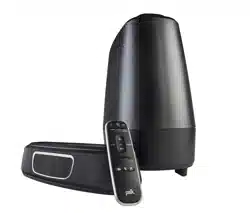
Sound bar
Remote control
Sound bar power adapter
4' Optical cable
Literature
Quick Start Guide
Barre de son
Télécommande
Bloc d'alimentation
de la barre de son
Câble optique 4 po
Documentation
Important Product Information
Barra de sonido
Control remoto
adaptador de corriente
de la barra de sonido
Cable óptico de 1,2 m (4 pies)
Manual
Important Product Information
Barra sonora
Telecomando
alimentatore
barra sonora
Cavo ottico da 1,2 m
Manuale
Important Product Information
Sound bar
Fernbedienung
Soundbar Netzteil
4' Optisches Kabel
Literatur
Important Product Information
english
french
spanish
italian
german
Signa Solo GE
™
Signa Solo GE
™
Signa Solo GE
™
Signa Solo GE
™
Signa Solo GE
™
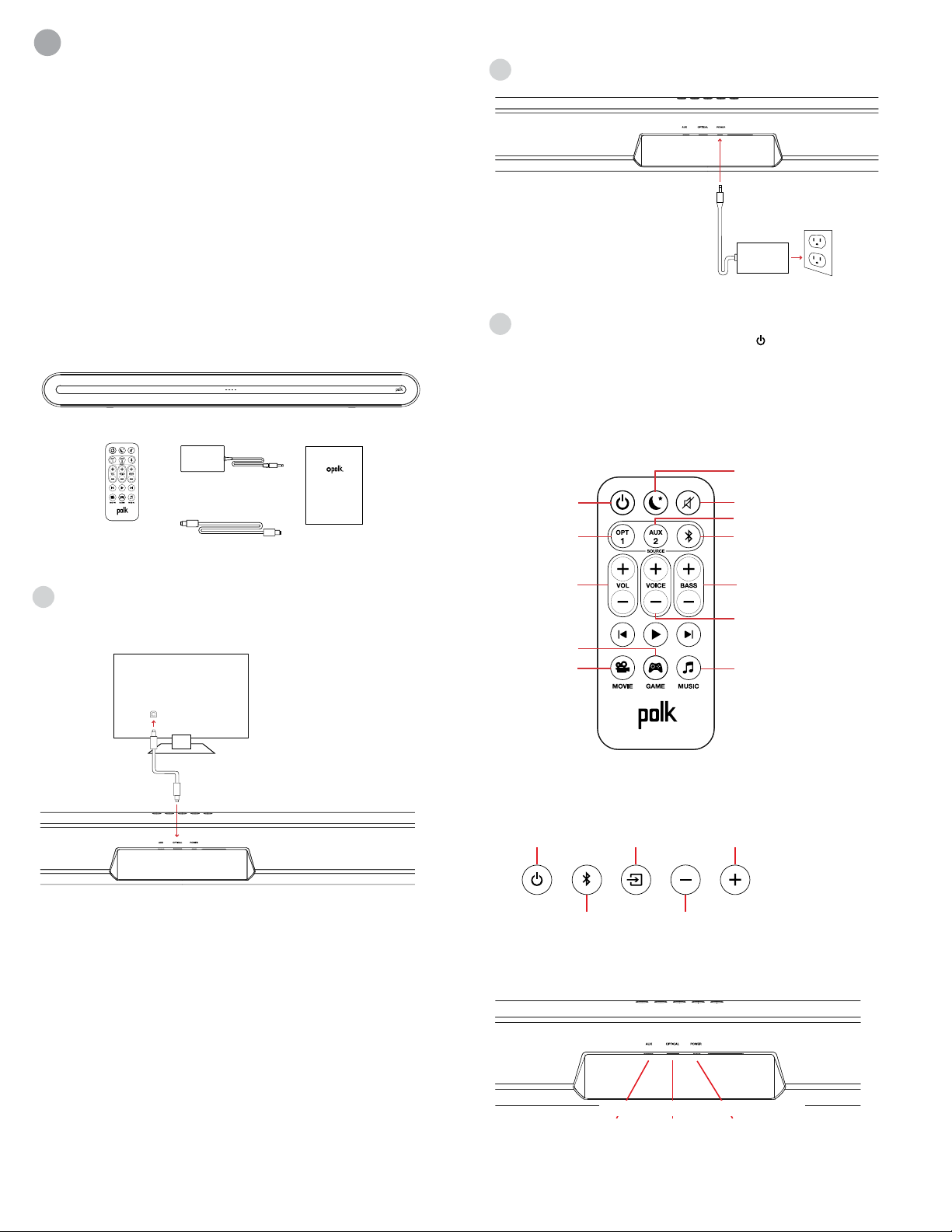
Connecting Your Signa Solo to Your TV
1. Use the provided Optical cable to connect the
sound bar to the TV.
TV
OPT
If your TV does not have an Optical output, connect the sound
bar to the TV with an AUX cable (not included).
NOTE: Only optical supports Dolby 5.1 decoding.
2. Connect the sound bar power cord to an AC outlet
3. Turn on your sound bar
Press the Power button on the sound bar or remote.
NOTE: Make sure TV internal speakers are o when using
optical and aux inputs.
Remote Control
Mute
Night Eect
Bluetooth
AUX
Music Mode
Optical
Movie Mode
Gaming Mode
Power
VoiceAdjust
Bass
Up/Down
Master Volume
Up/Down
english
french
spanish
italian
german
Muto
Eetto notte
Bluetooth
AUX
Modalità musica
Ottico
Modalità film
Gaming Mode
Accensione
VoiceAdjust
Bassi
Su/Giù
Volume principale
Su/Giù
Sourdine
Eet nocturne
Bluetooth
AUX
Mode musical
Optique
Mode cinéma
Gaming Mode
Alimentation
VoiceAdjust
Basse
+/-
Volume maître
+/-
Silenciar
Efecto nocturno
Bluetooth
AUX
Modo música
Óptico
Modo película
Gaming Mode
Encendido
VoiceAdjust
Bajo
+/-
Volumen maestro
+/-
Mute
Nachteekt
Bluetooth
AUX
Musikmodus
Optisch
Filmmodus
Gaming Mode
Power
(Betriebstaste)
VoiceAdjust
Bass
Auf / Ab
Gesamtlautstärke
Auf / Ab
Sound Bar Top Panel
Power
Source
Volume Down
Volume Up
Bluetooth
®
On/O
Sorgente
Volume -
Volume +
Bluetooth
®
Accensione
Source
Volume -
Volume +
Bluetooth
®
Alimentation
Power
Quelle
Lautstärke
Lautstärke hoch
Bluetooth
®
An/Aus
Encendido
Fuente
volumen -
volumen +
Bluetooth
®
english
french
spanish
italian
german
Sound Bar Back Panel
AUX OPTICAL POWER
3
fr
Merci de votre achat de ce produit Polk. Si vous avez des
questions ou des commentaires, vous pouvez nous appeler
ou communiquer avec nous par courriel.
Assistance technique
En Amérique du Nord, contactez le service à la clientèle de
Polk au 800-377-POLK (7655) (L–V, 9 h à 17 h 30, HNE)
À l’extérieur des US, composez le +1-410-358-3600
Courriel polkcs@polkaudio.com
Polk Audio
1 Viper Way
Vista, CA 92081
Ce qu’il y a dans la boîte
Sound bar
Remote control
Sound bar power adapter
4' Optical cable
Literature
Quick Start Guide
Barre de son
Télécommande
Bloc d'alimentation
de la barre de son
Câble optique 4 po
Documentation
Important Product Information
Barra de sonido
Control remoto
adaptador de corriente
de la barra de sonido
Cable óptico de 1,2 m (4 pies)
Manual
Important Product Information
Barra sonora
Telecomando
alimentatore
barra sonora
Cavo ottico da 1,2 m
Manuale
Important Product Information
Sound bar
Fernbedienung
Soundbar Netzteil
4' Optisches Kabel
Literatur
Important Product Information
english
french
spanish
italian
german
Signa Solo GE
™
Signa Solo GE
™
Signa Solo GE
™
Signa Solo GE
™
Signa Solo GE
™
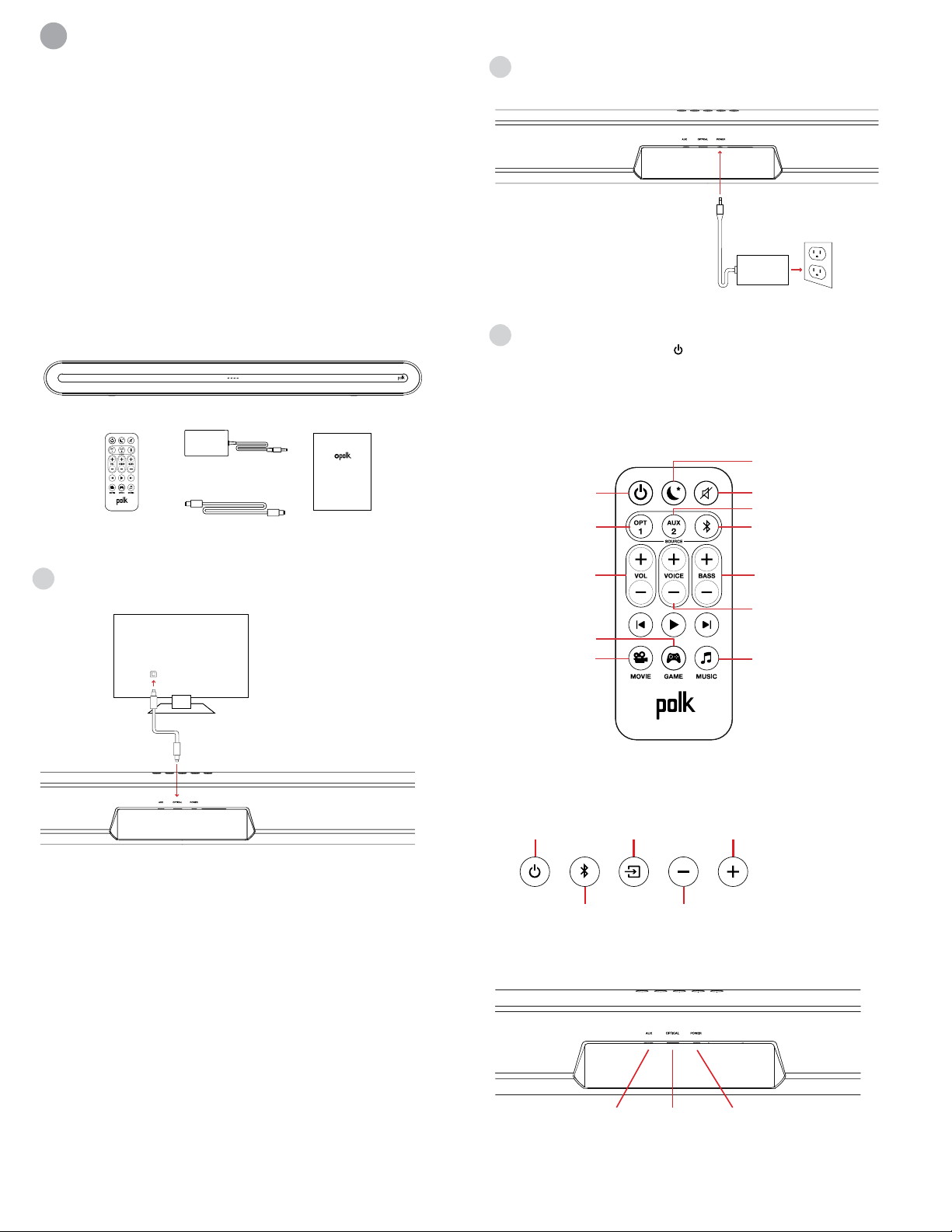
Connecter votre Signa Solo à votre téléviseur
1. Utilisez le câble optique fourni pour connecter
la barre de son à votre téléviseur.
TV
OPT
Si votre téléviseur n’est pas muni d’une sortie optique, connectez
la barre de son au téléviseur avec un câble auxiliaire (non compris).
REMARQUE : Seule la sortie optique prend en charge
le décodage Dolby 5.1.
2. Connectez la barre de son à une prise de courant CA
3. Allumez votre barre de son
Appuyez sur le bouton d’alimentation de la barre de son
ou de la télécommande.
REMARQUE : Veillez à ce que les haut-parleurs internes de
téléviseur soient éteints lorsque vous utilisez les entrées
optiques ou les entrées auxiliaires.
Télécommande
Mute
Night Eect
Bluetooth
AUX
Music Mode
Optical
Movie Mode
Gaming Mode
Power
VoiceAdjust
Bass
Up/Down
Master Volume
Up/Down
english
french
spanish
italian
german
Muto
Eetto notte
Bluetooth
AUX
Modalità musica
Ottico
Modalità film
Gaming Mode
Accensione
VoiceAdjust
Bassi
Su/Giù
Volume principale
Su/Giù
Sourdine
Eet nocturne
Bluetooth
AUX
Mode musical
Optique
Mode cinéma
Gaming Mode
Alimentation
VoiceAdjust
Basse
+/-
Volume maître
+/-
Silenciar
Efecto nocturno
Bluetooth
AUX
Modo música
Óptico
Modo película
Gaming Mode
Encendido
VoiceAdjust
Bajo
+/-
Volumen maestro
+/-
Mute
Nachteekt
Bluetooth
AUX
Musikmodus
Optisch
Filmmodus
Gaming Mode
Power
(Betriebstaste)
VoiceAdjust
Bass
Auf / Ab
Gesamtlautstärke
Auf / Ab
Panneau supérieur de la barre de son
Power
Source
Volume Down
Volume Up
Bluetooth
®
On/O
Sorgente
Volume -
Volume +
Bluetooth
®
Accensione
Source
Volume -
Volume +
Bluetooth
®
Alimentation
Power
Quelle
Lautstärke
Lautstärke hoch
Bluetooth
®
An/Aus
Encendido
Fuente
volumen -
volumen +
Bluetooth
®
english
french
spanish
italian
german
Panneau arrière de la barre de son
AUX OPTICAL POWER
AUX OPTIQUE ALIMENTATION
4
es
¡Gracias por su compra de Polk. Si tiene alguna pregunta o
comentario, por favor, no dude en llamarnos o enviarnos un e-mail.
Asistencia técnica
En Norteamérica, llame al Servicio al cliente de Polk
800-377-POLK(7655) (L-V, 9 a.m. - 5:30 p.m. EST)
Fuera de EE. UU., llame al +1-410-358-3600
email polkcs@polkaudio.com
Polk Audio
1 Viper Way
Vista, CA 92081
Qué incluye la caja
Sound bar
Remote control
Sound bar power adapter
4' Optical cable
Literature
Quick Start Guide
Barre de son
Télécommande
Bloc d'alimentation
de la barre de son
Câble optique 4 po
Documentation
Important Product Information
Barra de sonido
Control remoto
adaptador de corriente
de la barra de sonido
Cable óptico de 1,2 m (4 pies)
Manual
Important Product Information
Barra sonora
Telecomando
alimentatore
barra sonora
Cavo ottico da 1,2 m
Manuale
Important Product Information
Sound bar
Fernbedienung
Soundbar Netzteil
4' Optisches Kabel
Literatur
Important Product Information
english
french
spanish
italian
german
Signa Solo GE
™
Signa Solo GE
™
Signa Solo GE
™
Signa Solo GE
™
Signa Solo GE
™
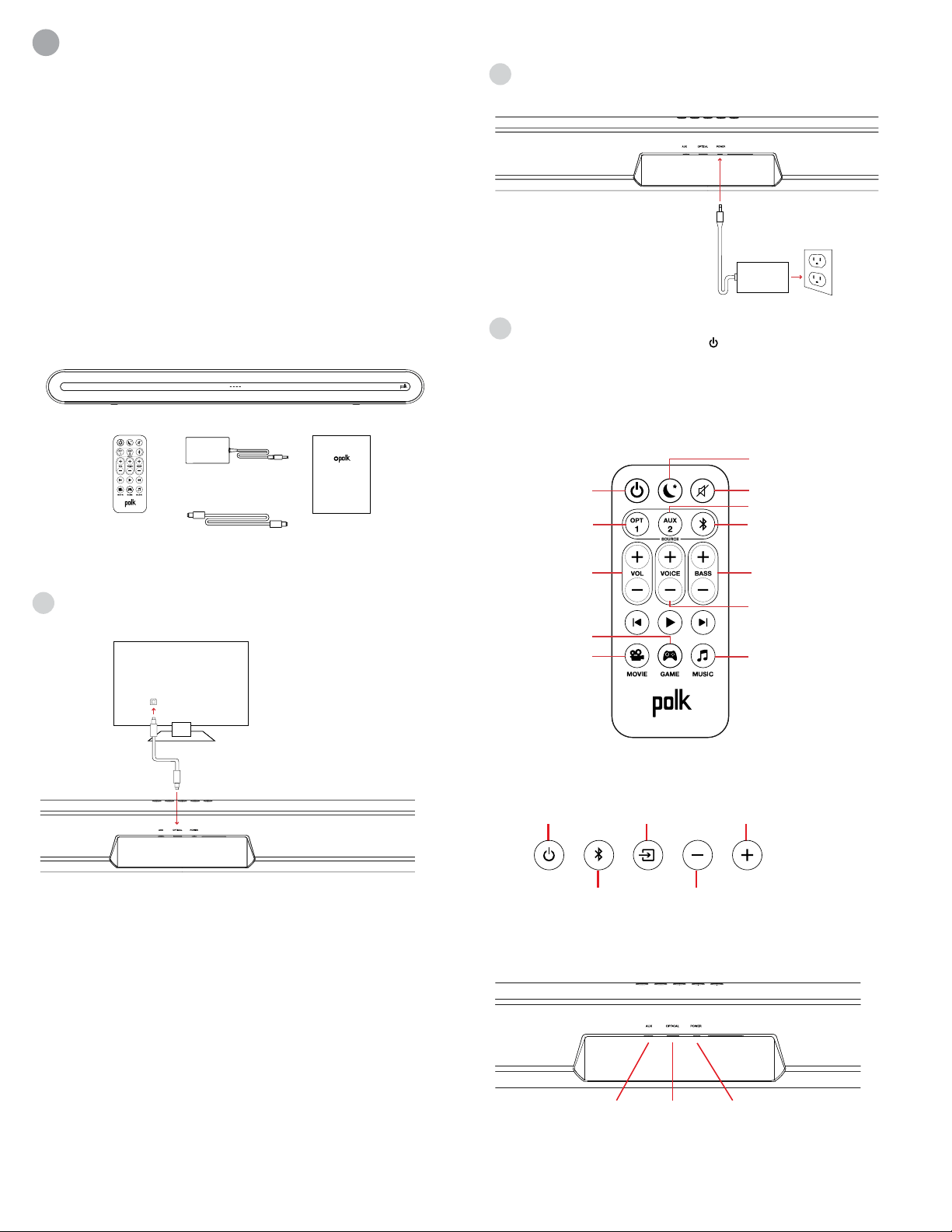
Conectar su Signa Solo a su TV
1. Utilice el cable óptico proporcionado para conectar
la barra de sonido al TV.
TV
OPT
Si su TV no tiene una salida óptica, conecte la barra de sonido
al TV con un cable AUX (no incluido).
NOTA: Solo el cable óptico soporta la descodificación
Dolby 5.1.
2. Conecte el cable de energía de la barra de sonido
a una toma AC
3. Encienda su barra de sonido.
Pulse el botón Encendid en la barra de sonido
o en el control remoto.
NOTA: Asegúrese de que los altavoces internos del TV
están apagados al utilizar entradas ópticas y aux.
Control Remoto
Mute
Night Eect
Bluetooth
AUX
Music Mode
Optical
Movie Mode
Gaming Mode
Power
VoiceAdjust
Bass
Up/Down
Master Volume
Up/Down
english
french
spanish
italian
german
Muto
Eetto notte
Bluetooth
AUX
Modalità musica
Ottico
Modalità film
Gaming Mode
Accensione
VoiceAdjust
Bassi
Su/Giù
Volume principale
Su/Giù
Sourdine
Eet nocturne
Bluetooth
AUX
Mode musical
Optique
Mode cinéma
Gaming Mode
Alimentation
VoiceAdjust
Basse
+/-
Volume maître
+/-
Silenciar
Efecto nocturno
Bluetooth
AUX
Modo música
Óptico
Modo película
Gaming Mode
Encendido
VoiceAdjust
Bajo
+/-
Volumen maestro
+/-
Mute
Nachteekt
Bluetooth
AUX
Musikmodus
Optisch
Filmmodus
Gaming Mode
Power
(Betriebstaste)
VoiceAdjust
Bass
Auf / Ab
Gesamtlautstärke
Auf / Ab
Panel superior de la barra de sonido
Power
Source
Volume Down
Volume Up
Bluetooth
®
On/O
Sorgente
Volume -
Volume +
Bluetooth
®
Accensione
Source
Volume -
Volume +
Bluetooth
®
Alimentation
Power
Quelle
Lautstärke
Lautstärke hoch
Bluetooth
®
An/Aus
Encendido
Fuente
volumen -
volumen +
Bluetooth
®
english
french
spanish
italian
german
Panel posterior de la barra de sonido
AUX OPTICAL POWER
AUX OPTICO ENCENDIDO
5
Grazie per aver acquistato un prodotto Polk. Per domande
o commenti, chiamateci o inviateci un’email.
Assistenza tecnica
Nel Nord America, chiamate il servizio Clienti POLK al
numero 800-377-POLK(7655) (L–V, 9:00–17:30 EST)
Al di fuori degli USA, chiamate al +1-410-358-3600
email polkcs@polkaudio.com
Polk Audio
1 Viper Way
Vista, CA 92081
Contenuto della confezione
Sound bar
Remote control
Sound bar power adapter
4' Optical cable
Literature
Quick Start Guide
Barre de son
Télécommande
Bloc d'alimentation
de la barre de son
Câble optique 4 po
Documentation
Important Product Information
Barra de sonido
Control remoto
adaptador de corriente
de la barra de sonido
Cable óptico de 1,2 m (4 pies)
Manual
Important Product Information
Barra sonora
Telecomando
alimentatore
barra sonora
Cavo ottico da 1,2 m
Manuale
Important Product Information
Sound bar
Fernbedienung
Soundbar Netzteil
4' Optisches Kabel
Literatur
Important Product Information
english
french
spanish
italian
german
Signa Solo GE
™
Signa Solo GE
™
Signa Solo GE
™
Signa Solo GE
™
Signa Solo GE
™
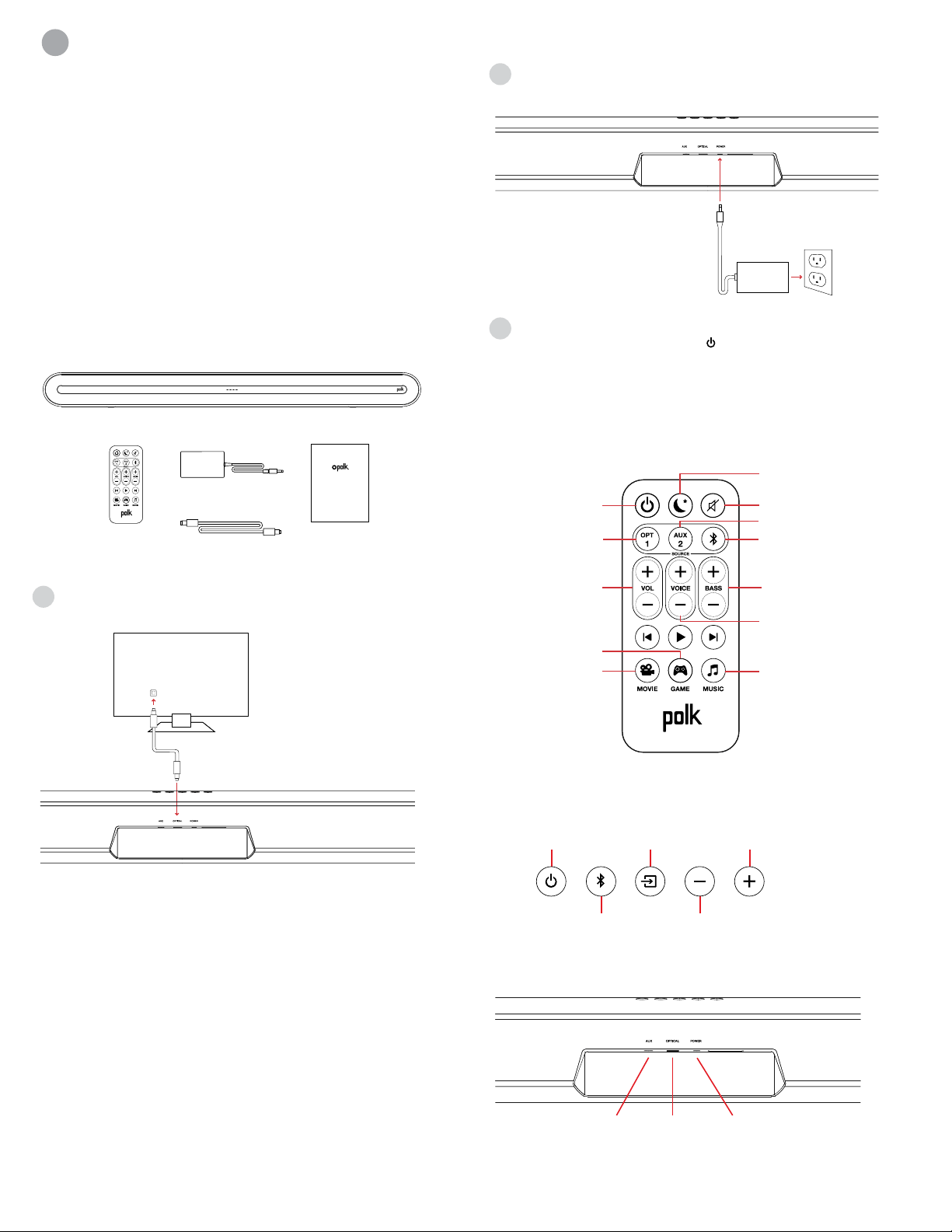
Collegamento di Signa Solo alla TV
1. Utilizzare il cavo ottico in dotazione per collegare la
barra sonora alla TV.
TV
OPT
Se la TV non dovesse avere un ingresso per il cavo ottico,
collegare la barra sonora alla TV tramite un cavo AUX
(non incluso).
NOTA: solo il collegamento ottico supporta la
decodifica Dolby 5.1.
2. Collegare il cavo di alimentazione della barra sonora ad una
presa elettrica
3. Accendere la barra sonora
Premere il tasto di accensione nella barra sonora o nel
telecomando.
NOTA: assicurarsi che gli altoparlanti interni della TV siano muti
quando si utilizzano gli ingressi ottici e AUX.
Telecomando
Mute
Night Eect
Bluetooth
AUX
Music Mode
Optical
Movie Mode
Gaming Mode
Power
VoiceAdjust
Bass
Up/Down
Master Volume
Up/Down
english
french
spanish
italian
german
Muto
Eetto notte
Bluetooth
AUX
Modalità musica
Ottico
Modalità film
Gaming Mode
Accensione
VoiceAdjust
Bassi
Su/Giù
Volume principale
Su/Giù
Sourdine
Eet nocturne
Bluetooth
AUX
Mode musical
Optique
Mode cinéma
Gaming Mode
Alimentation
VoiceAdjust
Basse
+/-
Volume maître
+/-
Silenciar
Efecto nocturno
Bluetooth
AUX
Modo música
Óptico
Modo película
Gaming Mode
Encendido
VoiceAdjust
Bajo
+/-
Volumen maestro
+/-
Mute
Nachteekt
Bluetooth
AUX
Musikmodus
Optisch
Filmmodus
Gaming Mode
Power
(Betriebstaste)
VoiceAdjust
Bass
Auf / Ab
Gesamtlautstärke
Auf / Ab
Pannello superiore della barra sonora
Power
Source
Volume Down
Volume Up
Bluetooth
®
On/O
Sorgente
Volume -
Volume +
Bluetooth
®
Accensione
Source
Volume -
Volume +
Bluetooth
®
Alimentation
Power
Quelle
Lautstärke
Lautstärke hoch
Bluetooth
®
An/Aus
Encendido
Fuente
volumen -
volumen +
Bluetooth
®
english
french
spanish
italian
german
Pannello posteriore della barra sonora
AUX OPTICAL POWER
it
HBP3830
AUX OTTICO ACCENSIONE
6
2. Schließen Sie das Soundbar-Netzkabel an eine
Netzsteckdose an
3. Schalten Sie die Soundbar ein
Drücken Sie die Betriebstaste auf der Soundbar oder der
Fernbedienung.
HINWEIS: Vergewissern Sie sich, dass die internen Lautsprecher
des Fernsehgeräts ausgeschaltet sind, wenn Sie optische und
Aux-Eingänge verwenden.
Fernbedienung
Mute
Night Eect
Bluetooth
AUX
Music Mode
Optical
Movie Mode
Gaming Mode
Power
VoiceAdjust
Bass
Up/Down
Master Volume
Up/Down
english
french
spanish
italian
german
Muto
Eetto notte
Bluetooth
AUX
Modalità musica
Ottico
Modalità film
Gaming Mode
Accensione
VoiceAdjust
Bassi
Su/Giù
Volume principale
Su/Giù
Sourdine
Eet nocturne
Bluetooth
AUX
Mode musical
Optique
Mode cinéma
Gaming Mode
Alimentation
VoiceAdjust
Basse
+/-
Volume maître
+/-
Silenciar
Efecto nocturno
Bluetooth
AUX
Modo música
Óptico
Modo película
Gaming Mode
Encendido
VoiceAdjust
Bajo
+/-
Volumen maestro
+/-
Mute
Nachteekt
Bluetooth
AUX
Musikmodus
Optisch
Filmmodus
Gaming Mode
Power
(Betriebstaste)
VoiceAdjust
Bass
Auf / Ab
Gesamtlautstärke
Auf / Ab
Soundbar-Oberseite
Power
Source
Volume Down
Volume Up
Bluetooth
®
On/O
Sorgente
Volume -
Volume +
Bluetooth
®
Accensione
Source
Volume -
Volume +
Bluetooth
®
Alimentation
Power
Quelle
Lautstärke
Lautstärke hoch
Bluetooth
®
An/Aus
Encendido
Fuente
volumen -
volumen +
Bluetooth
®
english
french
spanish
italian
german
Soundbar-Rückseite
AUX OPTICAL POWER
Vielen Dank für Ihren Einkauf. Wenn Sie eine Frage oder
einen Kommentar haben, zögern Sie nicht uns anzurufen
oder eine E-Mail zu schicken.
Technical Assistance
In Nordamerika erreichen Sie den Polk-Kundendienst
unter der folgenden Nummer: 800-377-POLK (7655)
(M-F, 9.00 bis 17.00 Uhr, EST)
Außerhalb der USA, wählen Sie bitte + 1-410-358-3600
E-Mail: polkcs@polkaudio.com
Polk Audio
1 Viper Way
Vista, CA 92081
Die komplette Betriebsanleitung finden Sie im Internet
unter www.polkaudio.com
Was ist in der Box
Sound bar
Remote control
Sound bar power adapter
4' Optical cable
Literature
Quick Start Guide
Barre de son
Télécommande
Bloc d'alimentation
de la barre de son
Câble optique 4 po
Documentation
Important Product Information
Barra de sonido
Control remoto
adaptador de corriente
de la barra de sonido
Cable óptico de 1,2 m (4 pies)
Manual
Important Product Information
Barra sonora
Telecomando
alimentatore
barra sonora
Cavo ottico da 1,2 m
Manuale
Important Product Information
Sound bar
Fernbedienung
Soundbar Netzteil
4' Optisches Kabel
Literatur
Important Product Information
english
french
spanish
italian
german
Signa Solo GE
™
Signa Solo GE
™
Signa Solo GE
™
Signa Solo GE
™
Signa Solo GE
™
Anschließen Ihres Signa Solo an Ihr Fernsehgerät
1. Benutzen Sie das mitgelieferte optische Kabel, um
die Soundbar mit dem Fernsehgerät zu verbinden.
TV
OPT
Wenn Ihr Fernsehgerät keinen optischen Ausgang hat, schließen
Sie die Soundbar mit einem AUX-Kabel (nicht im Lieferumfang
enthalten) an das Fernsehgerät an.
HINWEIS: Nur ein optischer Ausgang unterstützt
Dolby 5.1-Decodierung.
de
AUX OPTISCH POWER