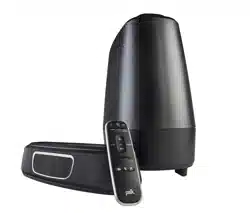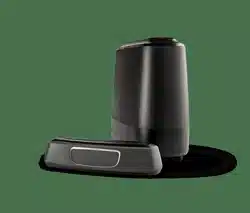

mini
Quick Start Guide
Home Theater Sound Bar System
™

2
Thank you for your Polk purchase. If you have a question or
comment, please feel free to call or email us.
Technical Assistance
In North America, call Polk Customer Service at
800-377-POLK(7655) (M–F, 9 a.m.–5:30 p.m. EST)
Outside the US, call +1-410-358-3600
email polkcs@polkaudio.com
Polk Audio
1 Viper Way, Vista, CA 92081
The complete owner’s manual can be found online at
www.polkaudio.com
3
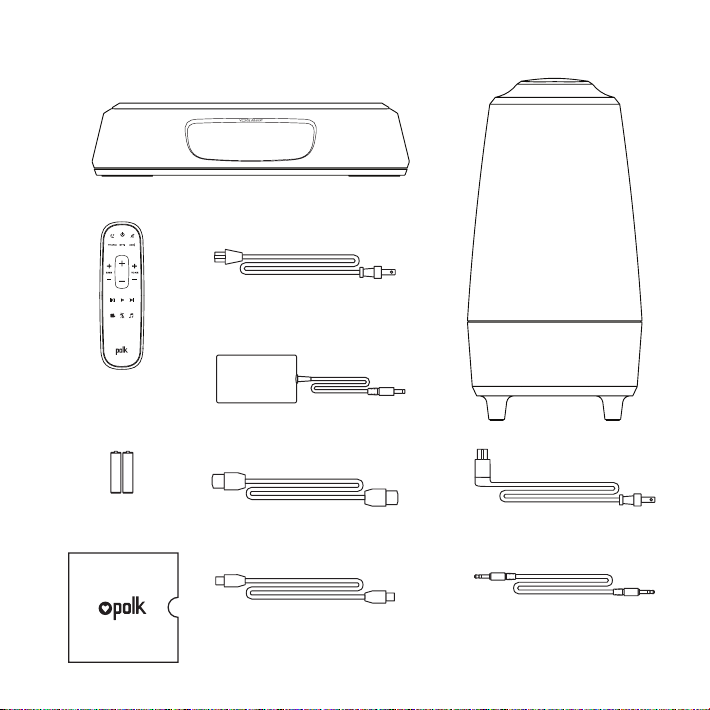
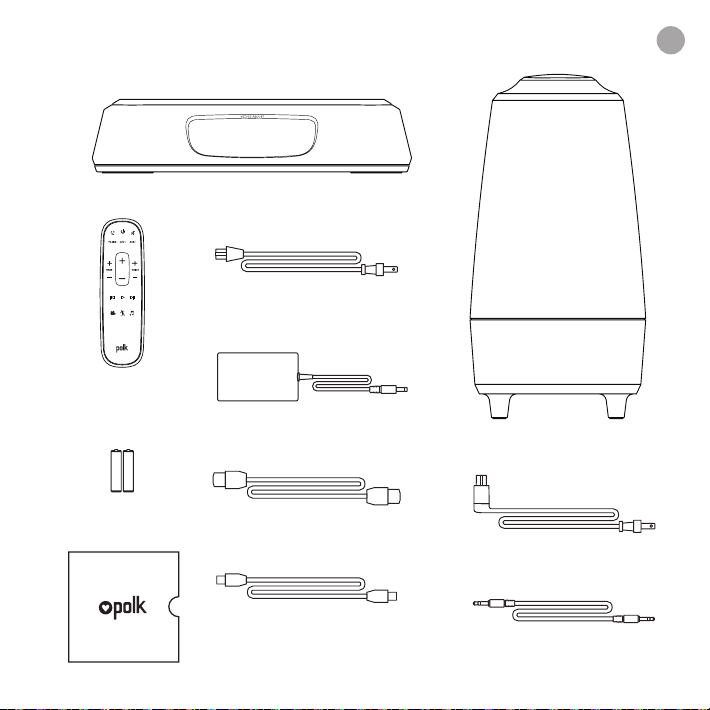
What’s in the Box
Sound bar
Remote
control
Batteries
Subwoofer
Sound bar power cord
6’ Optical cable
6.5’ HDMI cable
6’ AUX cable
Literature
Subwoofer power cord
Sound bar power supply
AAA
AAA
4
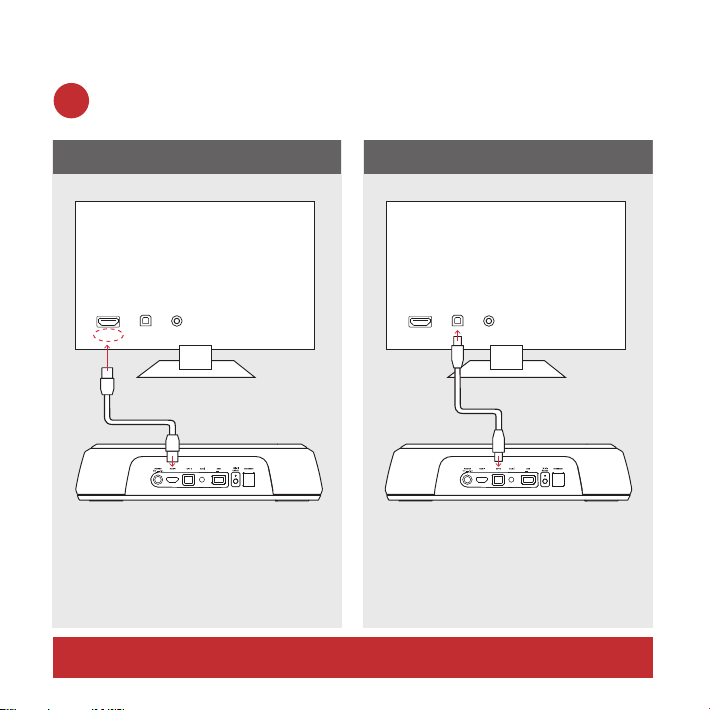
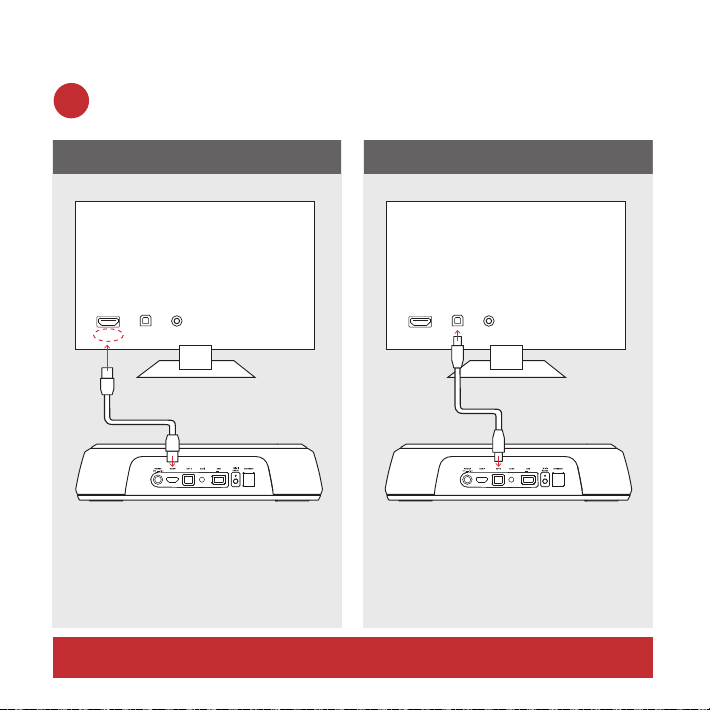
Connecting Your MagniFi Mini to Your TV
Is an HDMI input jack on your TV labeled “ARC”?
Use the provided
HDMI cable to connect the
sound bar to the TV.
Use the provided
Optical cable to connect
the sound bar to the TV.
YES NO
TV ARC 5V 500mA
TV ARC 5V 500mA
TV
AUXOPTHDMI
AUXOPT
ARC
HDMI
TV
TV ARC 5V 500mA
TV ARC 5V 500mA
TV
AUXOPTHDMI
AUXOPT
ARC
HDMI
TV
1a.
*You MUST have an HDMI ARC input on your TV to use HDMI.
5
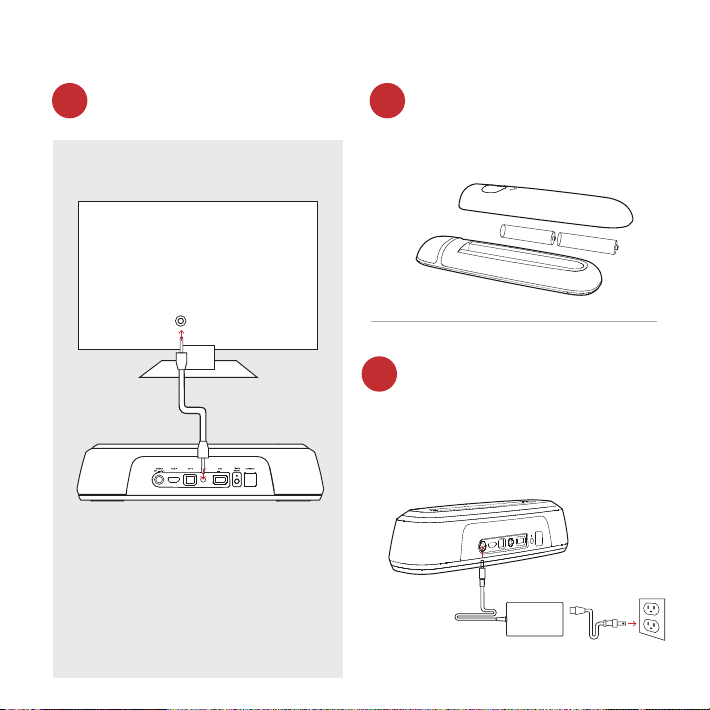
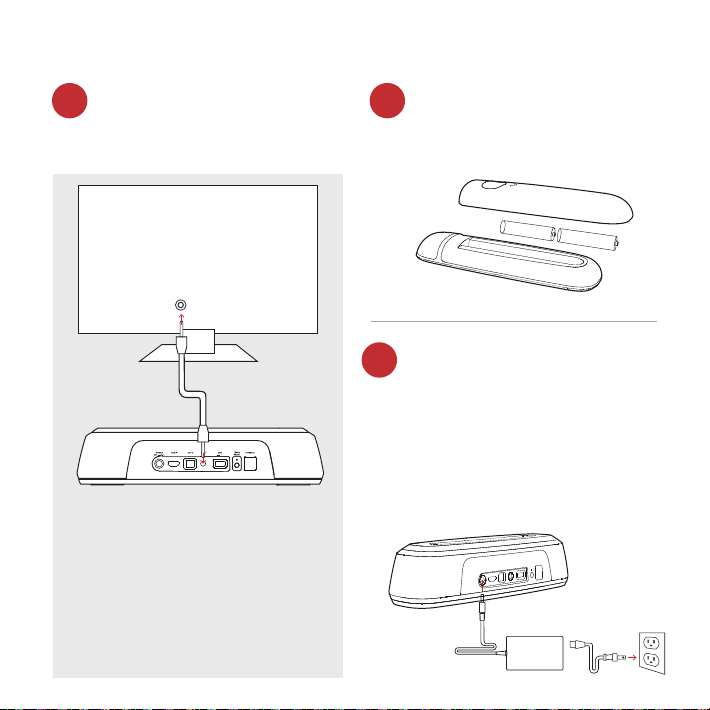
Don’t have HDMI or Optical
input available on your TV?
Remote battery installation
Connect the sound bar
power cord to an AC outlet
Insert the provided AAA
batteries.
A red LED will pulse on
the front of the sound bar
indicating boot up.
If your TV does not have
an HDMI ARC or optical
output, connect the sound
bar to the TV with the
provided AUX cable.
(Only HDMI and optical inputs
support Dolby 5.1 decoding)
TV ARC 5V 500mA
TV ARC 5V 500mA
TV
AUX
AUXOPT
ARC
HDMI
TV
1b. 2.
3.
6
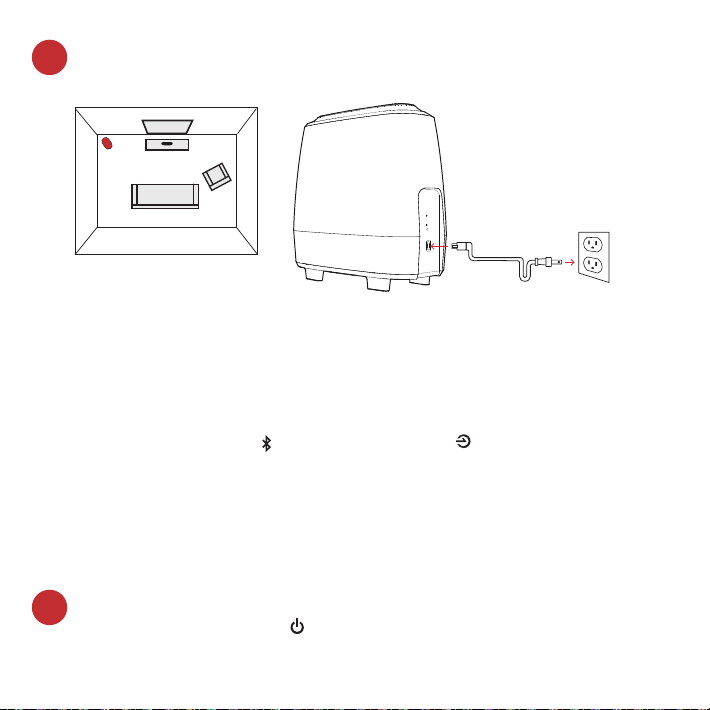
Position subwoofer and connect to an AC outlet
(for best performance place on the same wall as the TV)
Turn on your sound bar
Press the Power button on the sound bar or remote.
NOTE: make sure TV internal speakers are o when using
optical and aux inputs.
NOTE: The MagniFi Mini sound bar and wireless subwoofer are
preset at the factory to work together. Should your wireless
subwoofer stop receiving an audio signal, follow these instructions
to re-establish the connection:
1. Turn on your sound bar. On the sound bar simultaneously press and hold
the Bluetooth button and the source button for 3 seconds.
2. Press and hold the SYNC button on the back of the subwoofer for
3 seconds.
3. The green LED on the back of the subwoofer will start flashing at a faster
rate, indicating that the sound bar and the subwoofer are connecting, the
LED is solid green when connected.
Subwoofer
TV
4.
5.
7
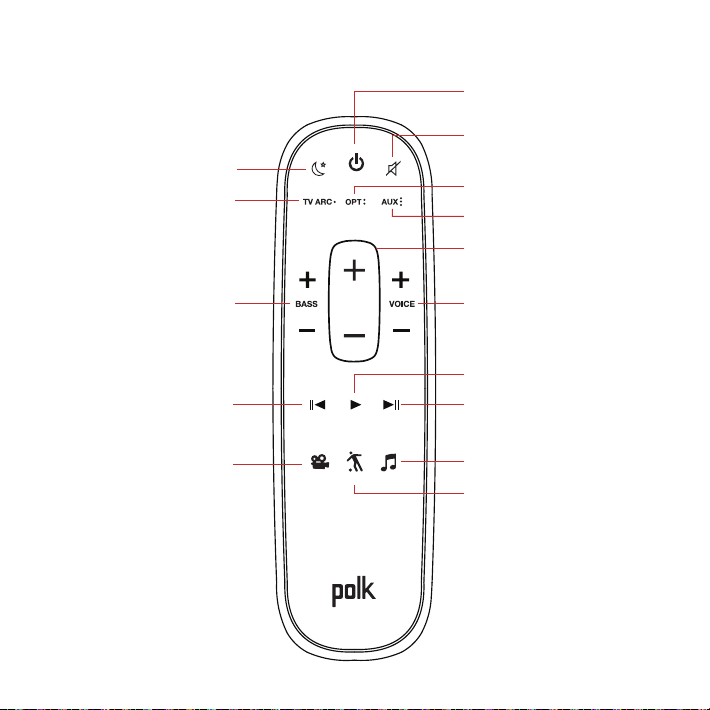
Remote Control
Power on/o
Mute
*Play/Pause
Sport Mode
AUX
VoiceAdjust
Up/Down
Optical
Night Eect
HDMI
*Previous Track
*For music only
Bass
Up/Down
Movie Mode
*Next Track
Master Volume
Up/Down
Music Mode
8
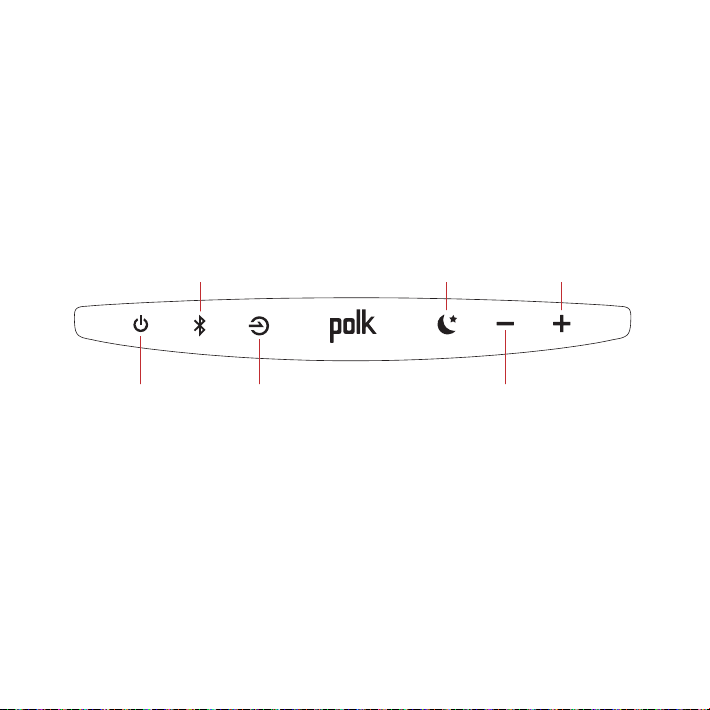
Sound Bar Top Panel
Power
on/o
Source
Master
Volume Down
Master
Volume Up
Night Eect
Bluetooth
9
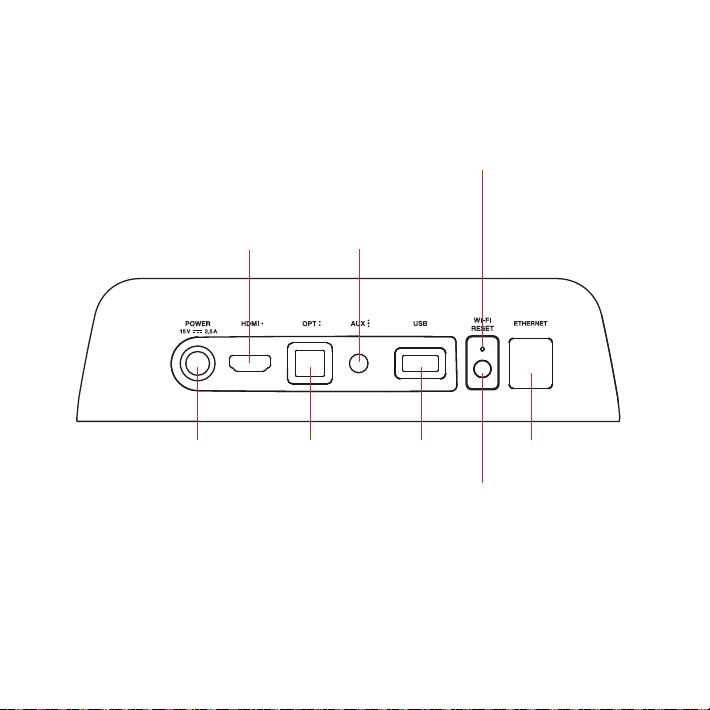
Sound Bar Back Panel
Power Optical USB*
HDMI
(ARC)
AUX
WIFI LED
Solid LED when connected
to your Wi-Fi network.
Flashing LED when NOT
connected to your Wi-Fi
network.
Reset
Wi-Fi reset
hold for
8 seconds
Ethernet
TV ARC
(Service Only)
*Factory use only
10
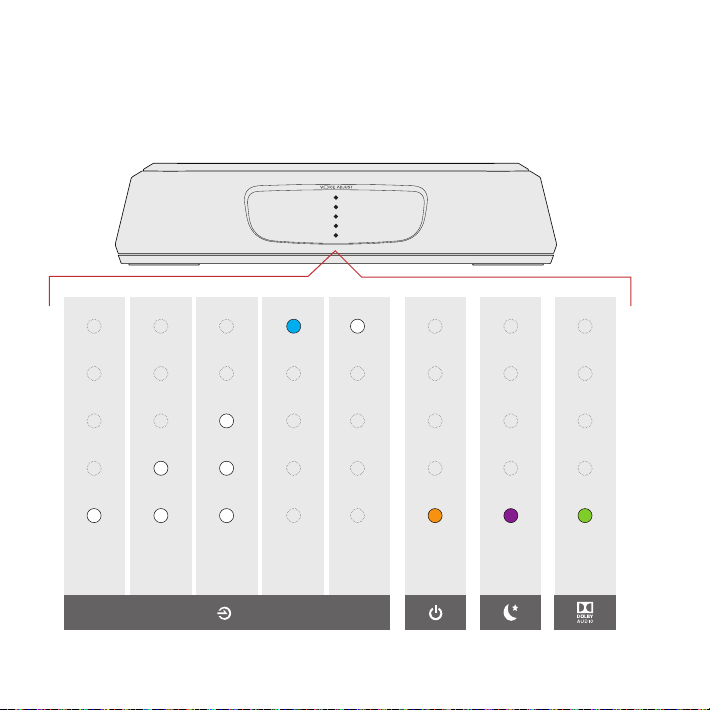
Sound Bar LEDs
The MagniFi Mini has a vertical row of LED lights that provide
status indications, like source, volume and listening modes.
HDMI
(TV ARC)
OPT AUX
Bluetooth
Google
Cast
Dolby
Content
Night
Eect
ON
SOURCE INDICATORS
Using Your TV or Cable/Satellite Remote (IR only)
to Control the MagniFi Mini
The MagniFi Mini works best with the included remote, however you
can also teach it to respond to your favorite TV or cable IR remote
by following these steps:
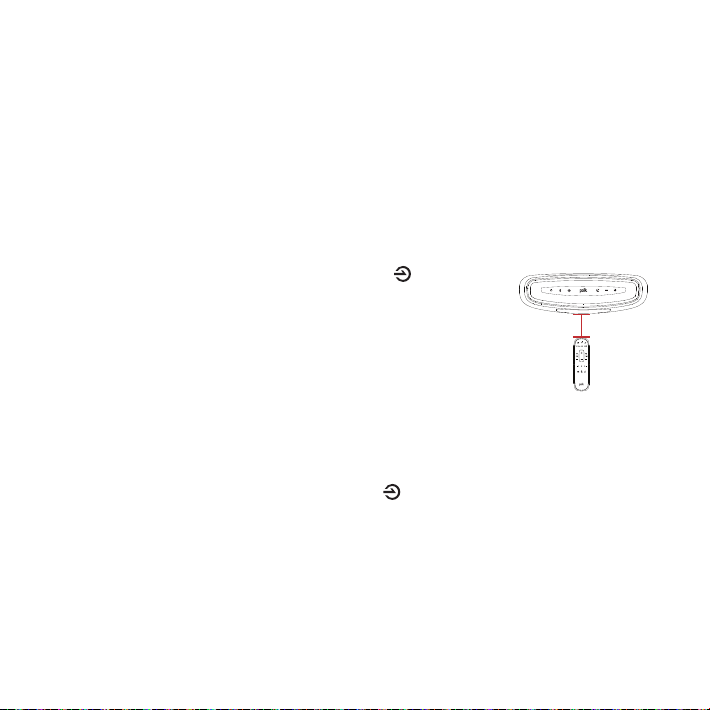
1. Enter learn mode by pressing and holding the Source
button on the sound bar until you hear a tone and the lights
on the front of the sound bar pulse up and down.
2. Press and release the button on the MagniFi Mini remote that
you want to learn (ex: Volume Up).
3. Press and Release the corresponding button on YOUR
remote repeatedly until you hear a two note ascending tone.
NOTE: Make sure you wait at least 1 second between button presses!
4. Repeat steps 2 and 3 to learn Volume Down, Mute, and Power buttons from your
remote.
5. Exit learn mode by pressing and holding the Source button on the sound
bar again until you hear a tone and the lights on the front of the sound bar stop
pulsing.
6. Verify that your remote can control the buttons you programmed (ex: Volume up)
on the MagniFi Mini.
IMPORTANT: Hold both remotes about 12” (30cm) directly in front of the MagniFi Mini
when pressing their respective buttons, make sure you wait at least 1 second between
button presses, make sure your remotes have fresh batteries
12” (30cm)
NOTE:
•You will hear a dierent (descending) tone if the command failed to learn. Please try again.
•MagniFi Mini will exit Learn mode after 1 minute of in activity, saving any learned codes
12
Optimizing Your Listening Experience
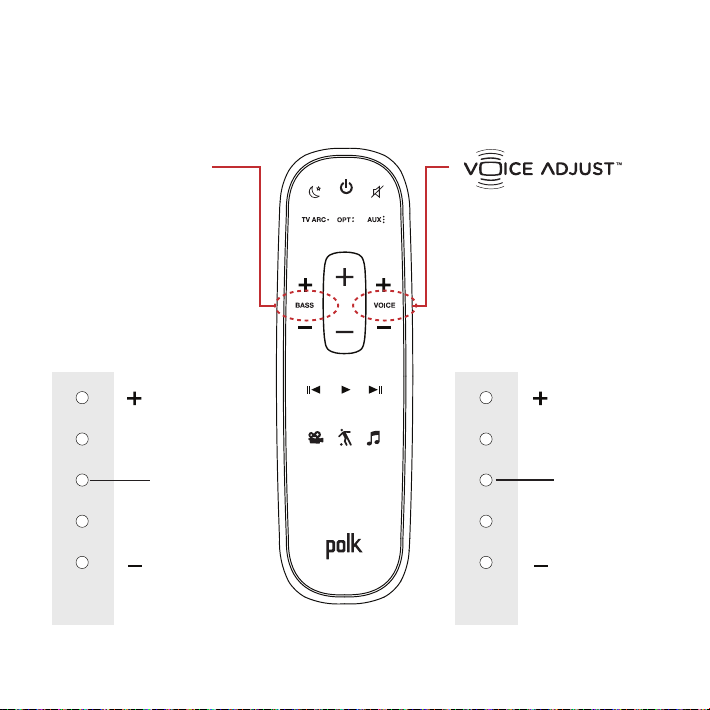
Control Dialogue
Volume Levels
Isolate and adjust the
voice channel level to
reproduce clear, crisp
dialogue.
Bass Control
Control Bass
Volume Levels
Easily adjust bass
volume for more or
less impact.
Louder VoiceMore Bass
Softer VoiceLess Bass
DEFAULT LEVEL
DEFAULT LEVEL
Sound Bar
LEDs
Sound Bar
LEDs

13
Sport Mode
Enhances audio whenever
you’re watching sporting
events, news and talk shows.
Night Eect
Reduces bass and volume
dynamics while improving
voice intelligibility for
low-volume listening.
Movie Mode
Enhances audio reproduction
in TV and movies.
Music Mode
Enhances audio whenever
you’re listening to music, or
watching TV or movies that
have music playing in them.
14
Music Services
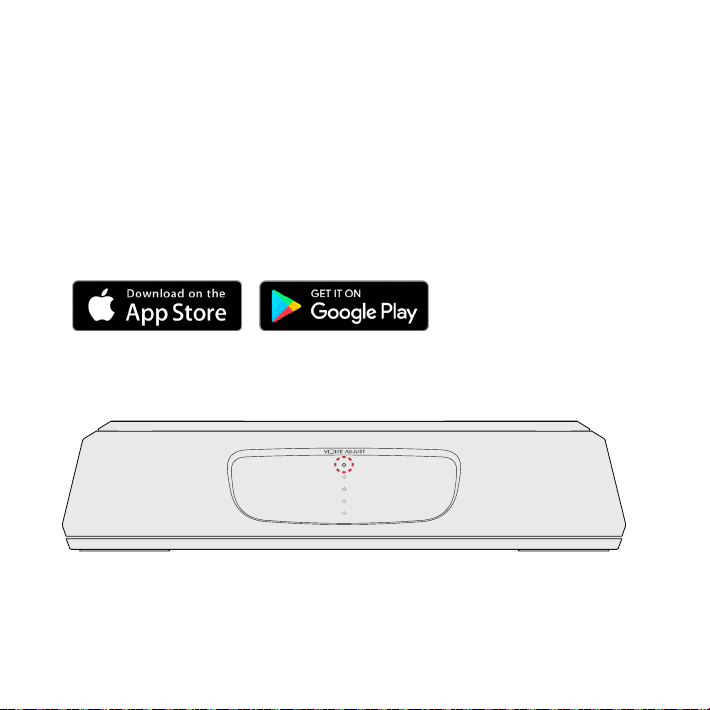
How to Set Up Google Cast™
1. Power on the sound bar.
2. From your phone, tablet or computer visit:
chromecast.com/setup
3. Download the Google Home app, click on the devices tab within
the app and select MagniFi Mini. Follow in app setup intructions.
4. When you’re streaming Google Cast, a white LED will
appear on the sound bar.
How to hear your TV again: When you are finished using Google Cast, press
the source button on the sound bar or remote (TV ARC, OPT, AUX).
15
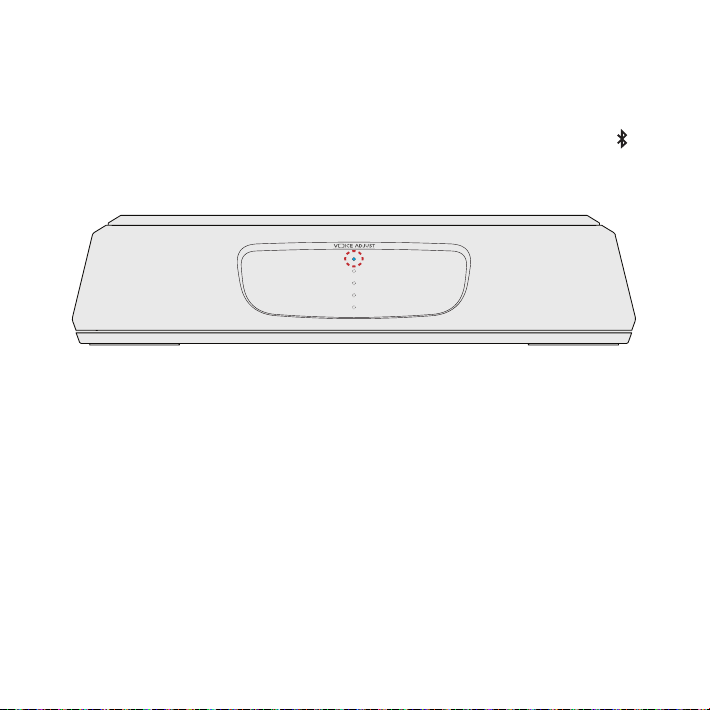
How to Set Up Bluetooth®
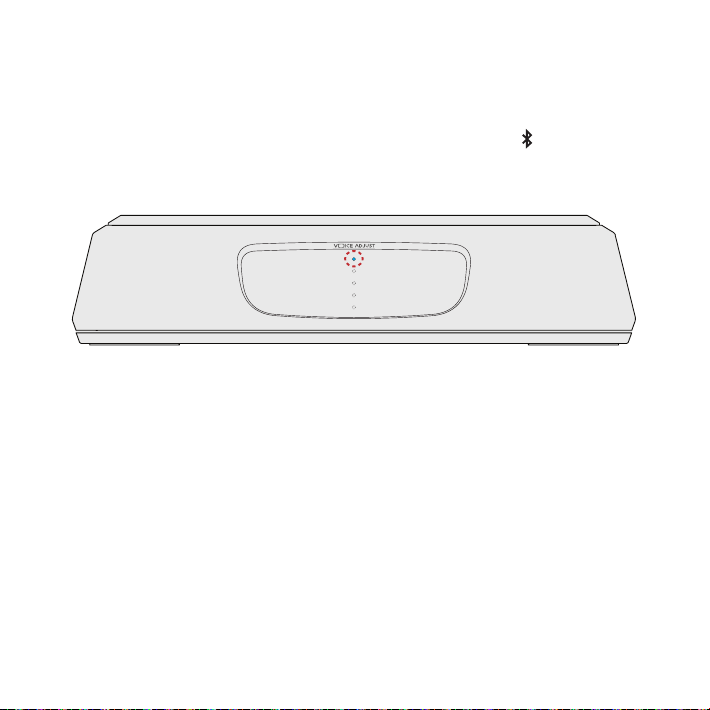
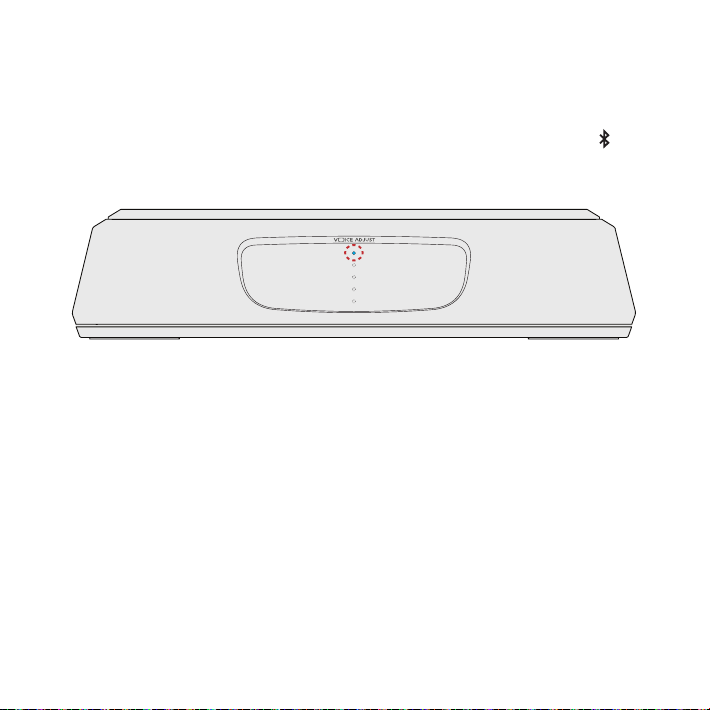
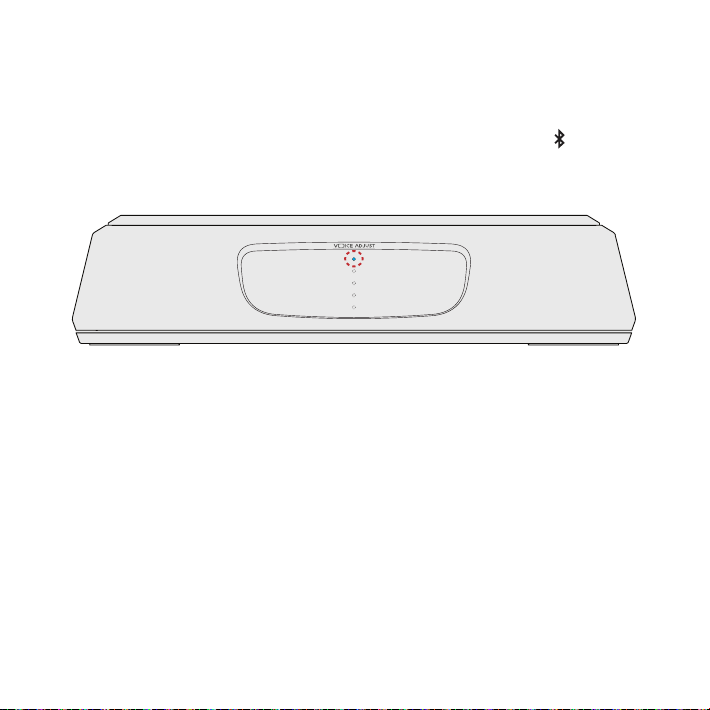
1. To enable Bluetooth, press the Bluetooth button on the sound
bar. A blue LED will slowly pulse on the sound bar.
2. Go to the Bluetooth devices section on your phone, tablet or
computer and select Polk MagniFi Mini. The LED is solid blue
when Bluetooth is connected.
Note: To take control when another device is connected, press the Bluetooth button.
How to hear your TV again: When you are finished using Bluetooth, press the source
button on the sound bar or remote (TV ARC, OPT, AUX).

16
Merci de votre achat d’un produit Polk. Pour toute question
ou tout commentaire, veuillez nous appeler ou nous écrire par
courriel sans hésiter.
Assistance technique
En Amérique du Nord, appelez le service à la clientèle de Polk au
800-377-POLK(7655) (L-V, 9 h – 17 h 30 HNE)
Hors des É.-U., appelez au +1-410-358-3600
courriel polkcs@polkaudio.com
Polk Audio
1 Viper Way, Vista, CA 92081
Le manuel du propriétaire complet est disponible en ligne à
www.polkaudio.com
17
Dans la boîte
Barre de son
Télécommande
Batteries
Caisson d’extrêmes
graves sans-fils
Barre de son cordon
d’alimentation
Câble optique
de 6 pi (1,8 m)
Câble HDMI de
6,5 po (2 m)
Câble AUX de
6 pi (1,8 m)
Littérature
Subwoofer cordon
d'alimentation
Alimentation de la
barre sonore
AAA
AAA
fr
18
Connexion votre MagniFi Mini à votre télé
Est-ce qu’un un connecteur d’entrée HDMI sur votre télé est
nommé «ARC»?
Utilisez le câble HDMI
fourni pour connecter la
barre de son à la télé.
Utilisez le câble optique
fourni pour connecter la
barre de son à la télé.
OUI NON
TV ARC 5V 500mA
TV ARC 5V 500mA
TV
AUXOPTHDMI
AUXOPT
ARC
HDMI
TV
TV ARC 5V 500mA
TV ARC 5V 500mA
TV
AUXOPTHDMI
AUXOPT
ARC
HDMI
TV
1a.
*Vous DEVEZ avoir une entrée HDMI ARC sur votre télé pour utiliser le HDMI.
19
Vous n’avez pas d’entrée
HDMI ou optique disponible
sur votre télé?
Installation des piles de la
télécommande
Connecter le cordon
d’alimentation barre de son
the sound bar power cord to
an AC outlet
Insérer les piles AAA fournies.
Un indicateur à DEL rouge
clignotera à l’avant de la barre
de son pour indiquer la phase
de réchauement.
Si votre télé n’a pas
d’entrée HDMI ARC ou
optique, connectez la barre
de son à la télé avec le
câble AUX fourni.
(Seules les entrées HDMI et
optiques sont compatibles pour
le décodage Dolby 5.1)
TV ARC 5V 500mA
TV ARC 5V 500mA
TV
AUX
AUXOPT
ARC
HDMI
TV
1b. 2.
3.
20
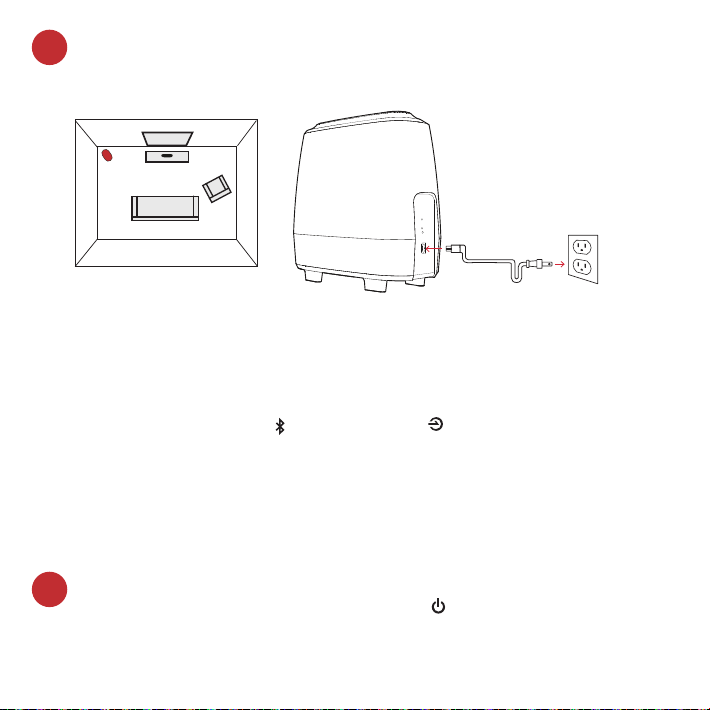
Positionnement du caisson d’extrêmes graves et connexion
à une prise de courant (pour de meilleures performances,
placez-le sur le même mur que la télé)
NOTE : La barre de son MagniFi Mini et le caisson d’extrêmes
graves sans fil sont configurés à l’usine pour fonctionner
ensemble. Si votre caisson d’extrêmes graves cesse de recevoir le
signal audio, suivez ces instructions pour rétablir la connexion:
1. Allumez votre barre de son. Sur la barre de son, appuyez simultanément et
tenez le bouton Bluetooth et le bouton Source pendant 3 secondes.
2. Appuyez et tenez le bouton SYNC à l’arrière du caisson
d’extrêmes graves pendant 3 secondes.
3. La DEL verte à l’arrière du caisson d’extrêmes graves commencera à
clignoter à un rythme plus rapide indiquant que la barre de son et le caisson
d’extrêmes graves se connectent la DEL est verte en continu lorsque
celui-ci est connecté.
Caisson d’extrêmes
graves
TV
4.
Allumez votre barre de son
Appuyez sur le bouton de mise sous tension sur la barre de son
ou la télécommande.
Note : assurez-vous que les haut-parleurs internes de la télévision sont
éteints lorsque vous utilisez les entrées optique et auxiliaire.
5.
21
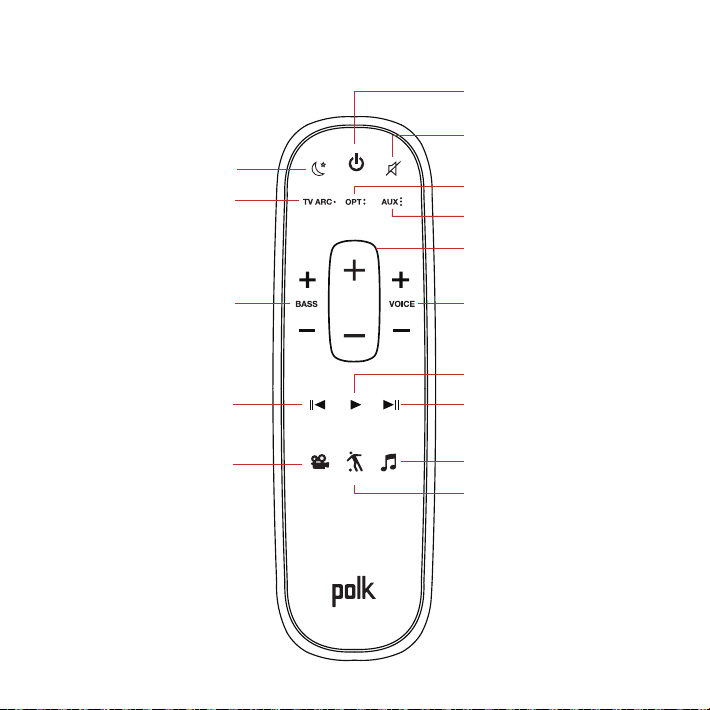
Télécommande
Mise sous/hors tension
Sourdine
*Lecture/Pause
Mode sport
AUX
Ajustement de la voix
Augmenter/Diminuer
Optique
Eet de soir
HDMI
*Piste précédente
*Pour la musique seulement
Basses fréquences
Augmenter/Diminuer
Mode film
*Piste suivante
Volume principal
Augmenter/Diminuer
Mode musique
22
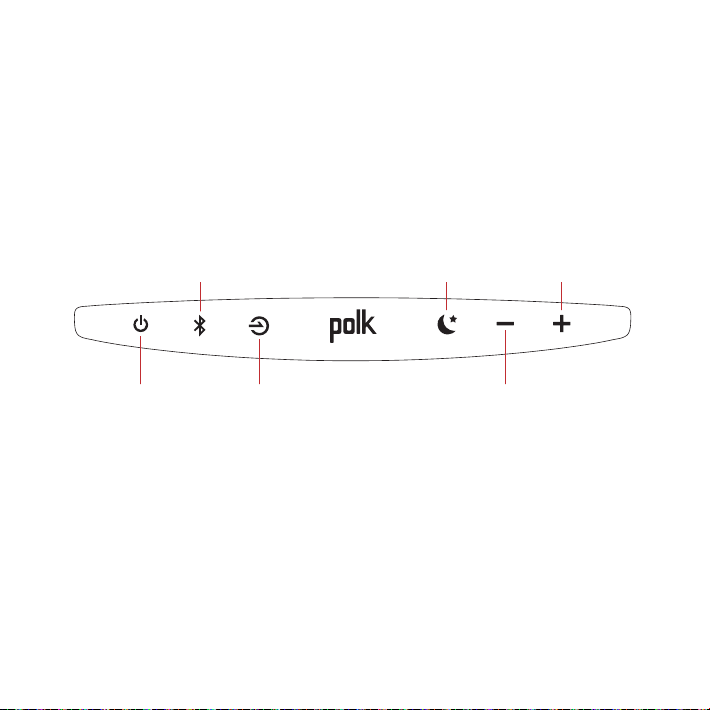
Panneau supérieur de la barre de son
Mise sous/hors
tension
Source
Diminuer le volume
principal
Augmenter le
volume
principal
Eet de soir
Bluetooth
23
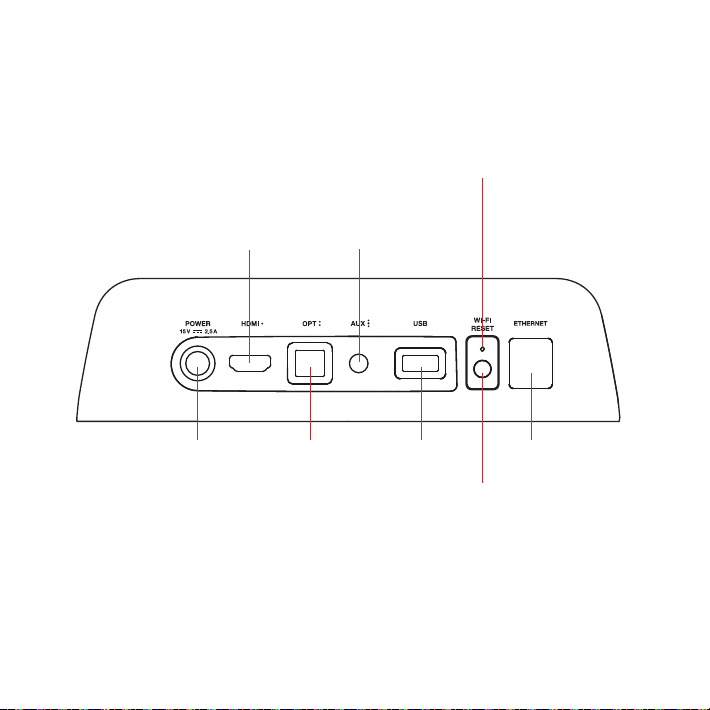
Panneau arrière de la barre de son
Mise sous/hors
tension
Optique USB*
Réinitialiser
Wi-Fi reset tenir
pour 8 secondes
HDMI
(ARC)
AUX
DEL WI-FI
La DEL sera allumée lorsque
l’appareil est connecté à votre
réseau sans fil. La DEL clignotera
lorsque l’appareil N’EST PAS
connecté à votre réseau sans fil.
Ethernet
TV ARC
(Service Only)
*Utilisation en usine seulement
24
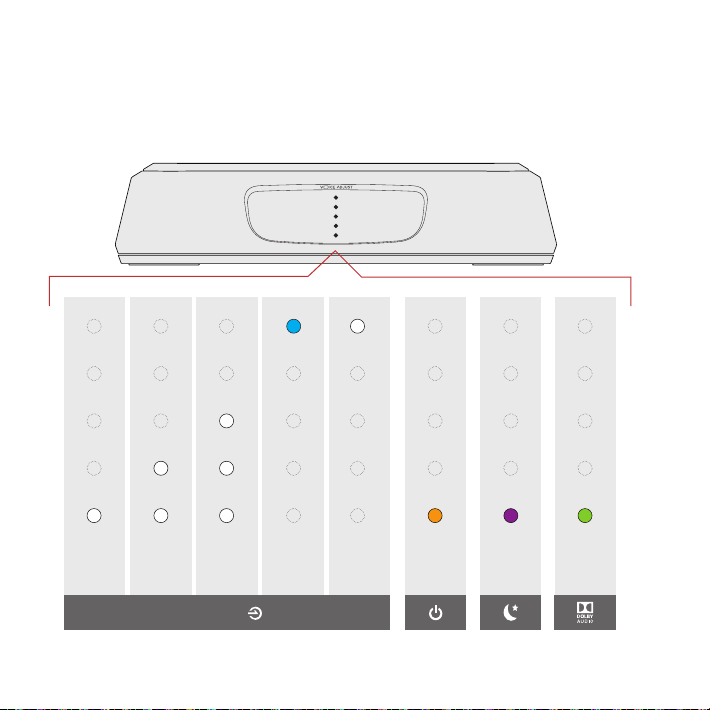
Indicateurs à DEL de la barre de son
Le MagniFi Mini comporte une colonne d’indicateurs à DEL qui fournit des
indications de statut, comme la source, le volume et les modes d’écoute.
HDMI
(TV ARC)
OPT AUX
Bluetooth
Google
Cast
Contenu
Dolby
Eet de
soir
ON
INDICATEURS DE SOURCES
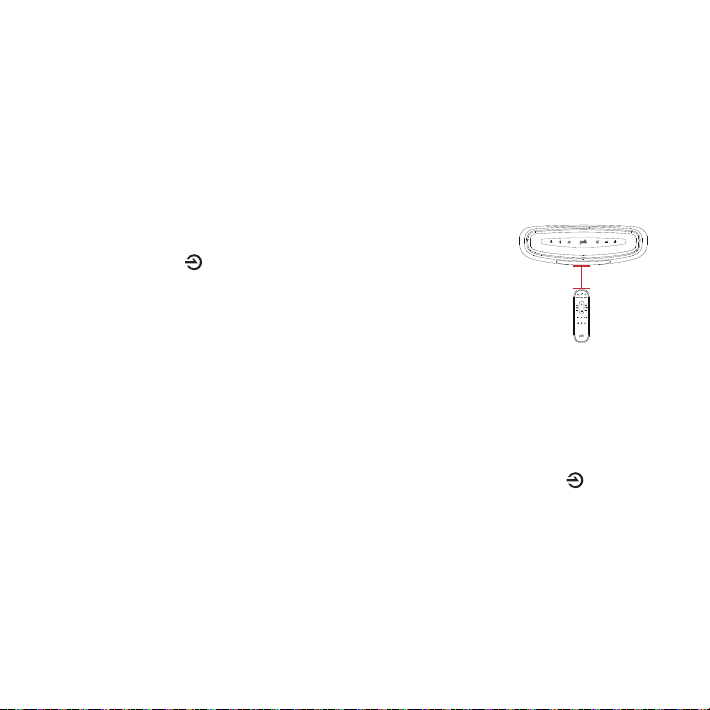
Utilisez votre Télécommande de TV ou de câble pour
controler le MagniFi Mini
Le MagniFi Mini fonctionne mieux avec la télécommande fournie, cependant, vous
pouvez aussi le programmer pour fonctionner avec votre télécommande Infrarouge de
TV ou de câble en suivant les étapes suivantes :
IMPORTANT : Tenez les deux télécommandes à environ 30 cm (12”) du MagniFi Mini tout
en appuyant sur leur bouton respectif., Assurez-vous d’attendre au moins 1 seconde entre
chaque utilisation d’un bouton, Assurez-vous que les batteries des télécommandes sont
neuves.
1. Entrez dans le mode Apprentissage en restant appuyé sur le
bouton Source de la barre jusqu’à ce que vous entendiez
un son et que les lumières situées sur la façade de la barre de
son clignotent.
2. Appuyez sur le bouton de la télécommande du MagniFi Mini
que vous souhaitez apprendre (ex : monter le son).
3. Pressez et relâchez le bouton correspondant sur VOTRE TÉLÉCOMMANDE à plusieurs
reprises jusqu’à ce que vous entendiez deux sons. REMARQUE : Assurez-vous
d’attendre au moins 1 seconde entre chaque pression !
4. Répétez les étapes 2 et 3 pour programmer les fonctions des boutons « Baisser le son
», « Couper le Son » et « Allumer/Éteindre » de votre télécommande.
5. Sortez du mode apprentissage en restant appuyé sur le bouton Source de la barre
de son jusqu’à ce que vous entendiez un son et que les lumières situées sur la façade
de la barre de son ne clignotent plus.
6. Vérifiez que votre télécommande contrôle bien les boutons que vous avez
programmés (ex : monter le son) sur le MagniFi Mini.
REMARQUES :
• Vous entendrez un son diérent (descendant) si la commande n’a pas été apprise.
Veuillez alors réessayer.
• Le MagniFi Mini quittera le mode Apprentissage au bout d’une minute d’inactivité et
enregistrera les codes appris.
12” (30cm)
26
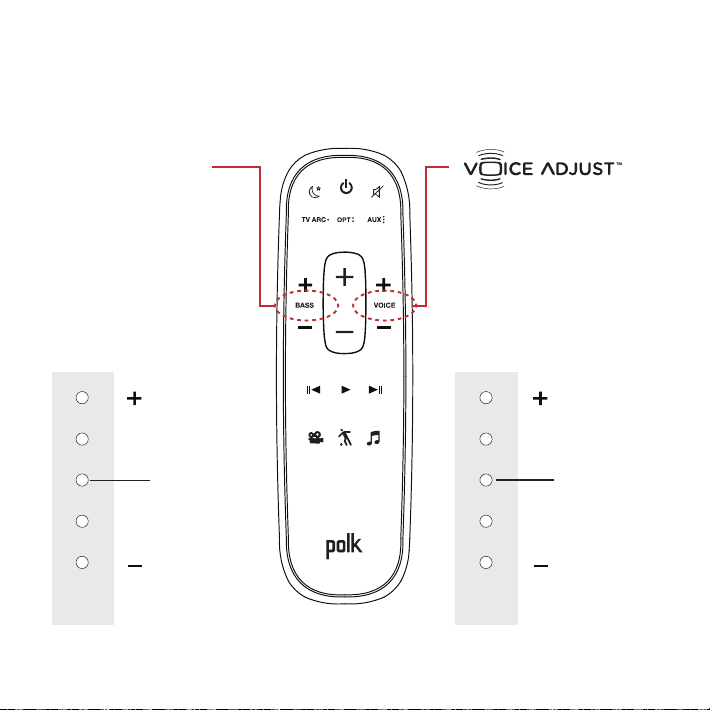
Optimisation de votre expérience d’écoute
Contrôlez le volume
des dialogues
Isolez et ajustez le
canal de la voix afin de
reproduire des dialogues
clairs et nets.
Contrôle
des basses
fréquences
Contrôlez le volume
des basse fréquences
Réglez facilement le
volume de la basse
pour plus ou moins
d’impact.
Volume de la voix
plus élevé
Volume des
basses plus élevé
Volume de la voix
plus bas
Volume des
basses moins
élevé
NIVEAU PAR DÉFAUT
NIVEAU PAR DÉFAUT
Indicateurs
à DEL de la
barre de son
Indicateurs
à DEL de la
barre de son

27
Mode sport
Améliore l’audio lorsque vous
regardez des événements
sportifs, les nouvelles et des
émissions d’interview-variétés.
Eet de soir
Réduit les basses et la
dynamique du volume tout
en améliorant l’intelligibilité
de la voix pour les écoutes à
bas volume.
Mode film
Améliore la reproduction audio
pour la télé et les films.
Mode musique
Améliore l’audio lorsque vous
écoutez de la musique ou
que vous regardez la télé ou
visionnez un film contenant
de la musique.
28
Services de musique
Comment configurer Google Cast™
1. Allumez la barre de son.
2. À partir de votre téléphone, tablette ou ordinateur, visitez :
chromecast.com/setup
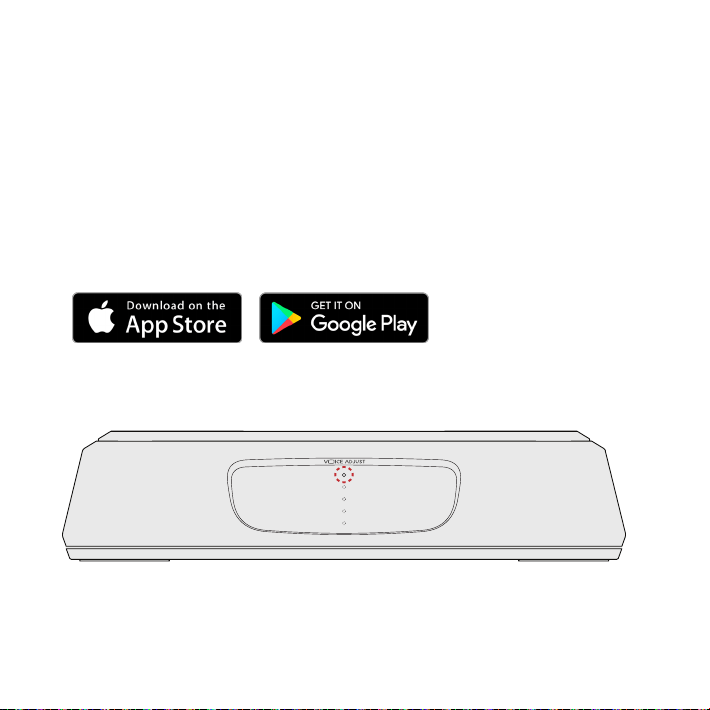
3. Téléchargez l’appli Cast, cliquez sur l’onglet des appareils
dans l’appli et sélectionner MagniFi Mini. Suivez les
intructions de configuration dans l’appli.
4. Lorsque vous diusez en continu via Google Cast, une DEL
blanche apparaît sur la barre de son.
Comment entendre votre télé de nouveau : Lorsque vous avez terminé
d’utiliser Google Cast, appuyez sur le bouton source sur la barre de son ou sur
la télécommande (TV ARC, OPT, AUX).
29
Comment configurer le Bluetooth®
1. Pour activer le Bluetooth, appuyez sur le bouton Bluetooth
sur la barre de son. Une DEL bleue clignotera lentement sur la
barre de son.
Allez dans la section des appareils Bluetooth de votre téléphone,
tablette ou ordinateur et sélectionnez Polk MagniFi Mini. La DEL
bleue s’allume alors en continu lorsque le Bluetooth est connecté.
Note : pour prendre le contrôle lorsqu’un autre dispositif est connecté, appuyez sur le
bouton Bluetooth.
Comment entendre votre télé de nouveau : Lorsque vous avez terminé d’utiliser
Google Cast, appuyez sur le bouton source sur la barre de son ou sur la télécommande
(TV ARC, OPT, AUX).

30
Gracias por su compra de Polk. Si tiene alguna duda o
comentario, por favor, llame o envíenos un e-mail.
Asistencia ténica
En Norteamérica, llame al servicio de atención al cliente de Polk:
800-377-POLK(7655) (L–V, 9 a.m.–5:30 p.m. EST)
Desde fuera de EE. UU., llame al +1-410-358-3600
e-mail polkcs@polkaudio.com
Polk Audio
1 Viper Way, Vista, CA 92081
El manual de usuario completo puede verse online en
www.polkaudio.com
31
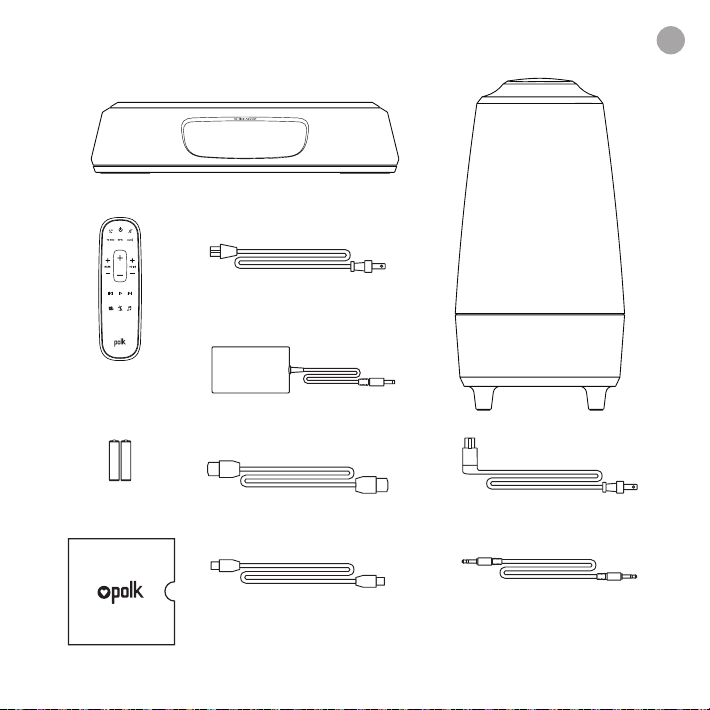
Qué hay en la caja
Barra de sonido
Mando a
distancia
Pilas
Subwoofer
Cable de alimentación princip.
Cable óptico 1,8 m
Cable 2 m HDMI
Cable AUX 1,8 m
Literatura
Cable de alim. subwoofer
Suministro eléctrico princip.
AAA
AAA
es
32
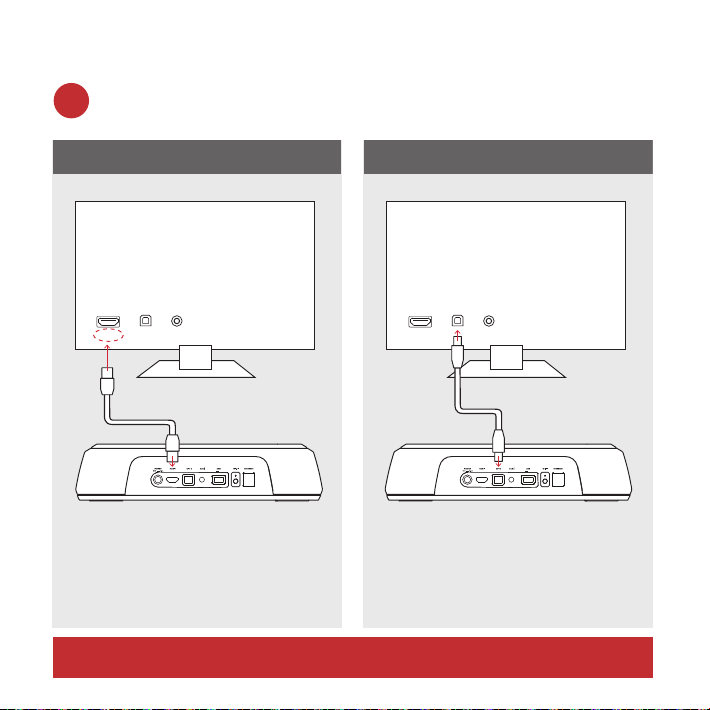
Conectar el MagniFi Mini a la TV
¿Hay un puerto de HDMI en su TV llamado «ARC»?
Use el cable HDMI incluido
para conectar la barra de
sonido a la TV.
Use el cable óptico
incluido para conectar la
barra de sonido a la TV.
SÍ NO
TV ARC 5V 500mA
TV ARC 5V 500mA
TV
AUXOPTHDMI
AUXOPT
ARC
HDMI
TV
TV ARC 5V 500mA
TV ARC 5V 500mA
TV
AUXOPTHDMI
AUXOPT
ARC
HDMI
TV
1a.
*DEBE tener un puerto HDMI ARC en la TV para usar HDMI.
33
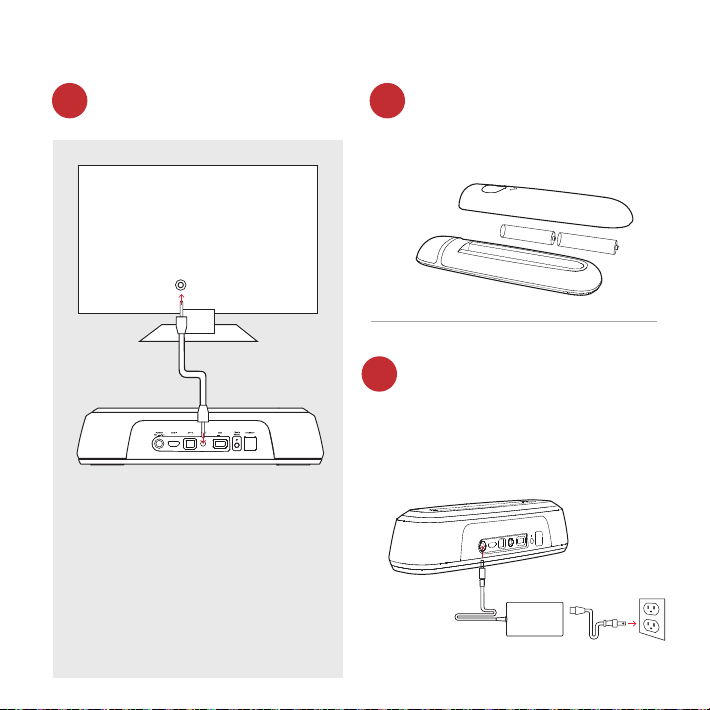
¿No tiene un puerto HDMI u
óptico disponible en su TV?
Instalar las pilas del mando
Conecte el cable eléc. de la
barra de sonido al enchufe
Inserte las pilas AAA
incluidas.
Parpadeará una luz LED
roja en la parte frontal de la
barra de sonido (calentam.).
Si su TV no tiene un
puerto HDMI ARC u
óptico, conecte la barra
a la TV con el cable AUX
proporcionado.
(Tan solo las entradas
HDMI y las ópticas soportan
decodificación Dolby 5.1)
TV ARC 5V 500mA
TV ARC 5V 500mA
TV
AUX
AUXOPT
ARC
HDMI
TV
1b. 2.
3.
34
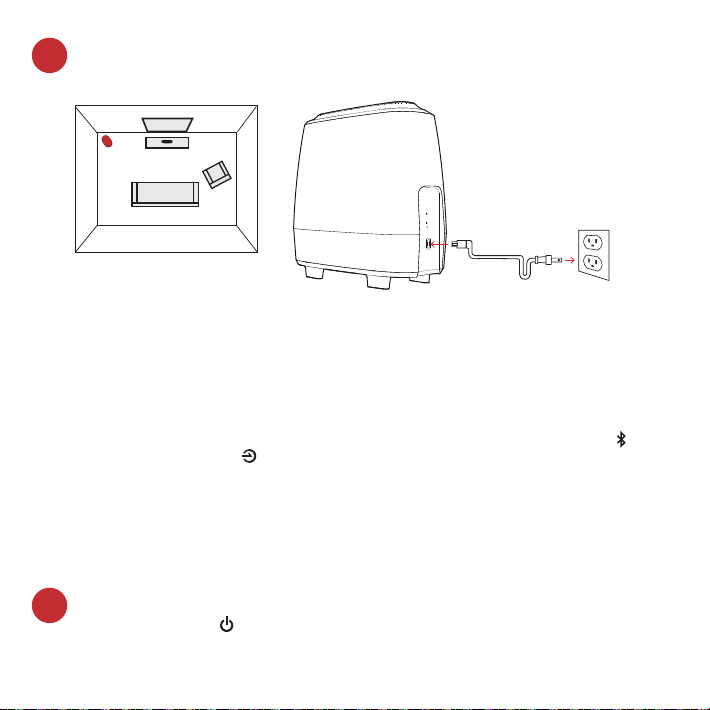
Coloque el subwoofer y conecte al enchufe
(para un mejor rendim., coloque en la misma pared que TV)
Encienda la barra de sonido
Presione Power en la barra de sonido o mando a dist.
Nota: asegúrese de que los altavoces internos de su TV estén
apagados cuando utilice entradas ópticas y auxiliares.
NOTA: la barra de sonido MagniFi Mini y el subwoofer inalámbrico
están preajustadas para funcionar al mismo tiempo. En caso de
que el subwoofer inalámbrico dejara de recibir una señal de audio,
siga estas instrucciones para reestablecer la conexión:
1. Encienda su barra de sonido. En la barra de sonido, presione
simultáneamente y mantenga apretados los botones de Bluetooth y el
botón de la fuente durante 3 segundos.
2. Presione y mantenga apretado el botón SYNC en la parte trasera del
subwoofer durante 3 segundos.
3. El LED verde en la parte trasera del subwoofer empezará a parpadear más
rápidamente, lo que indica que la barra de sonido y el subwoofer están
conectando, el LED será verde y fijo cuando estén conectados.
Subwoofer
TV
4.
5.
35
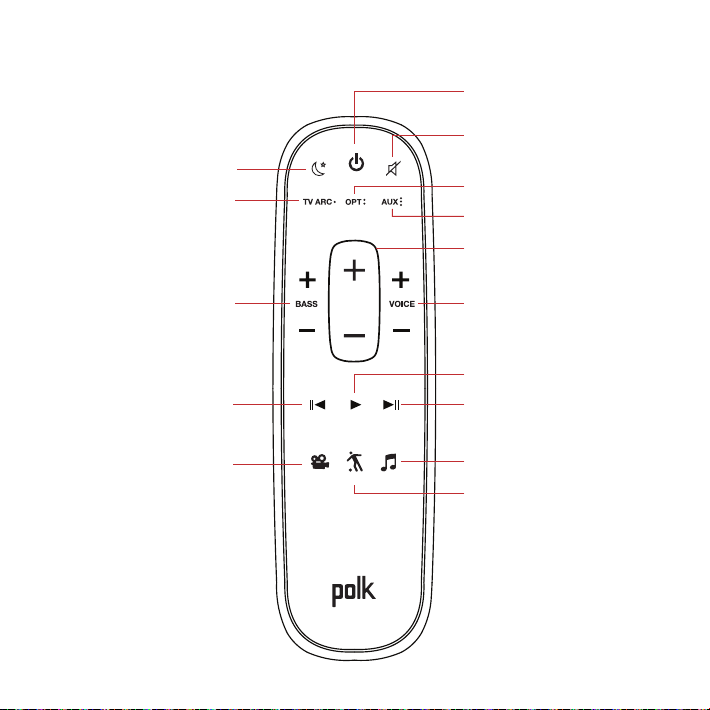
Mando a distancia
Encender/apagar
Silencio
*Play/parar
Modo deporte
AUX
Ajuste de voz
Más/menos
Cable óptico
Efecto noche
HDMI
*Canción previa
*Solo para música
Bajo
Más/menos
Modo película
*Siguiente canción
Volumen princip.
Más/menos
Modo música
36
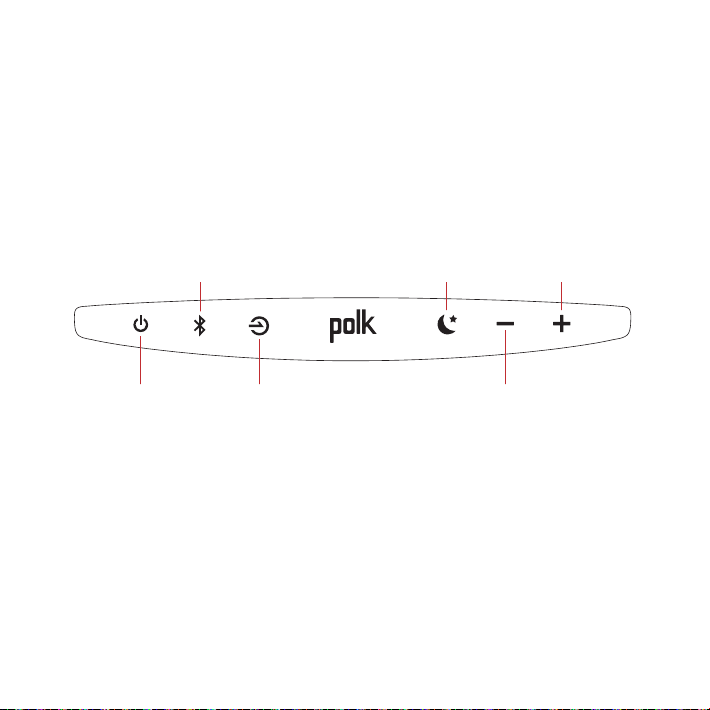
Panel superior de la barra de sonido
Encen. /
apagar
Fuente
Bajar volumen
Subir
volumen
Efecto noche
Bluetooth
37
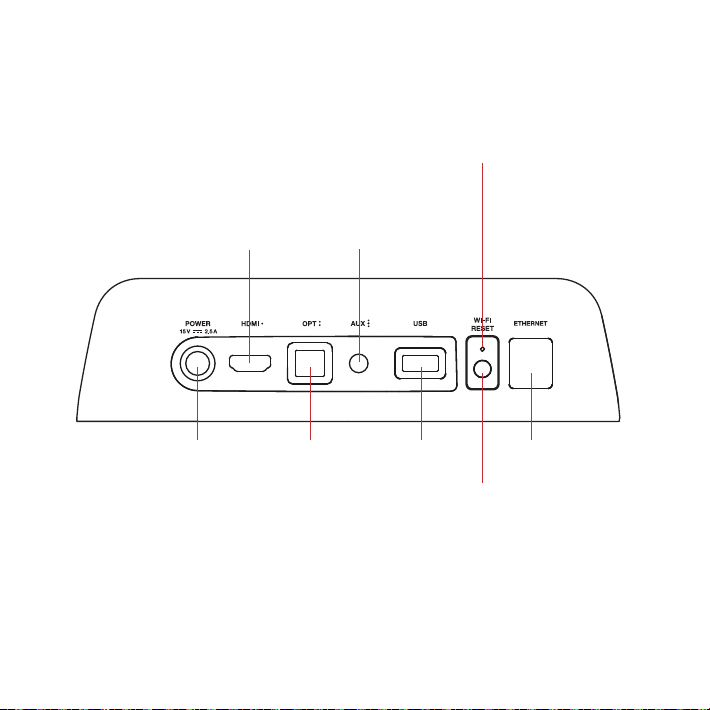
Panel trasero de la barra de sonido
Corriente Cable
óptico
USB*
Reinicio
reinicio Wi-Fi
mantener durante
8 segundos
HDMI
(ARC)
AUX
LED del WiFi
LED fijo cuando esté
conectado a su red wifi.
LED parpadeando cuando
NO esté conectado a su
red wifi.
Ethernet
TV ARC
(Service Only)
*Solo uso en fábrica
38
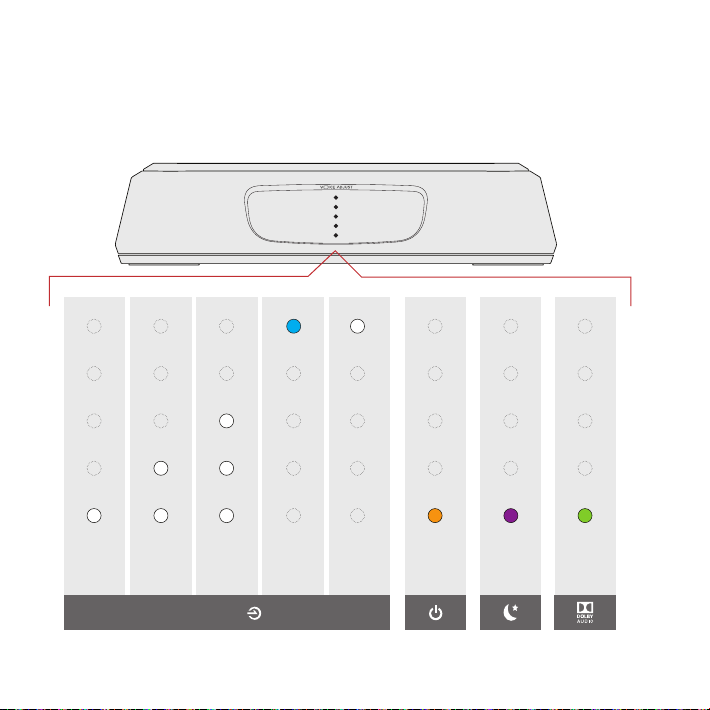
LEDs de la barra de sonido
MagniFi Mini tiene una fila vertical de LEDs que informan del
estado, como la fuente, el volumen y los modos de escucha.
HDMI
(ARC TV)
ÓPT AUX
Bluetooth
Google
Cast
Conten.
Dolby
Efecto
noche
ON
INDICADORES DE FUENTE
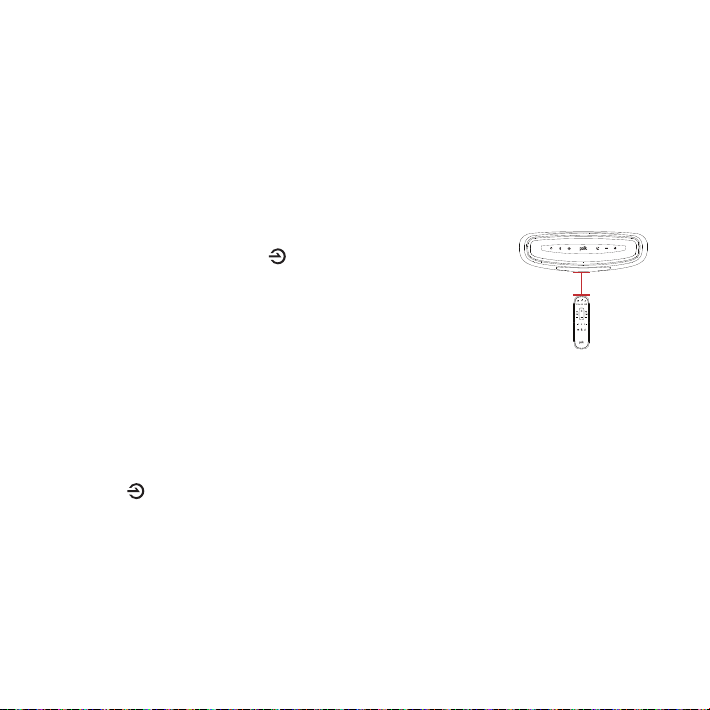
12” (30cm)
Uso de su control remoto de TV o cable para operar el
MagniFi Mini
El MagniFi Mini funciona mejor con el control remoto incluido, aunque también puede
enseñarle a responder a su control remoto IR de TV o de cable siguiendo estos pasos:
IMPORTANTE: Sostenga ambos controles remotos a unos 12” (30 cm) directamente
enfrente del MagniFi Mini y pulse sus botones respectivos, Asegúrese de esperar al
menos 1 segundo entre pulsar un botón y el otro, Asegúrese de que ambos controles
remotos tienen pilas nuevas.
1. Entre en el modo de aprendizaje pulsando y manteniendo
pulsado el botón de Fuente (Source) en la barra de sonido
hasta que escuche un tono y las luces enfrente de la barra de
sonido se enciendan arriba y abajo.
2. Pulse y suelte el botón del control remoto MagniFi Mini que
desee aprender (p. ej., subir el volumen).
3. Pulse y suelte el botón correspondiente en SU control
remoto repetidamente hasta que escuche un tono ascendente de dos notas. NOTA:
¡Asegúrese de esperar al menos 1 segundo entre pulsar un botón y el otro!
4. Repita los pasos 2 y 3 para aprender los botones de bajar el volumen, silenciar y de
encendido de su control remoto.
5. Salga del modo de aprendizaje pulsando y manteniendo pulsado el botón de
Fuente (Source) en la barra de sonido de nuevo hasta que escuche un tono y las
luces enfrente de la barra de sonido dejen de encenderse.
6. Verifique que su control remoto puede operar los botones que ha programado (p.
ej., subir el volumen) en el MagniFi Mini.
NOTA:
• Escuchará un tono diferente (descendente) si el comando no ha aprendido. Por
favor, inténtelo de nuevo.
• MagniFi Mini saldrá del modo de aprendizaje tras 1 minuto de inactividad, guardando
cualquier código aprendido.
40
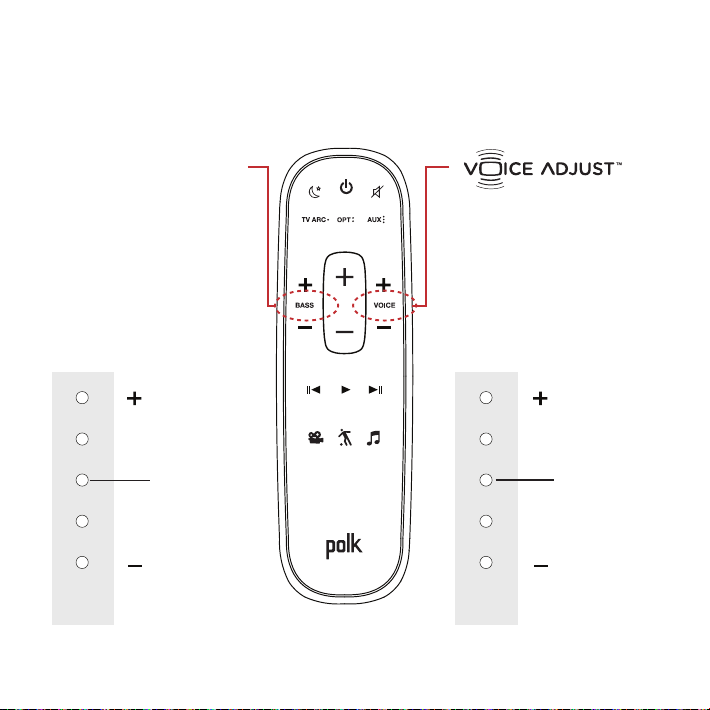
Optimice su experiencia de escucha
Controle el volumen de
los diálogos
Separe y ajuste el nivel
del canal de voz para
reproducir un diálogo
claro y nítido.
Control de bajo
Controle el volumen
de bajo
Ajuste de volumen de
bajo fácil para más o
menos impacto.
Más vozMás bajo
Menos vozMenos bajo
NIVEL NORMAL
NIVEL NORMAL
LEDs barra
sonido
LEDs barra
sonido

41
Modo deporte
Mejora el audio cuando esté
viendo eventos deportivos,
noticias y talk shows.
Efecto noche
Reduce el bajo y las dinámicas
de volumen mientras mejora
la inteligibilidad de la voz para
una escucha a volumen bajo.
Modo película
Mejora la reproducción de
audio en TV y películas.
Modo música
Mejora el audio cuando esté
escuchando música o viendo
la TV o películas que tienen
música en ellas.
42
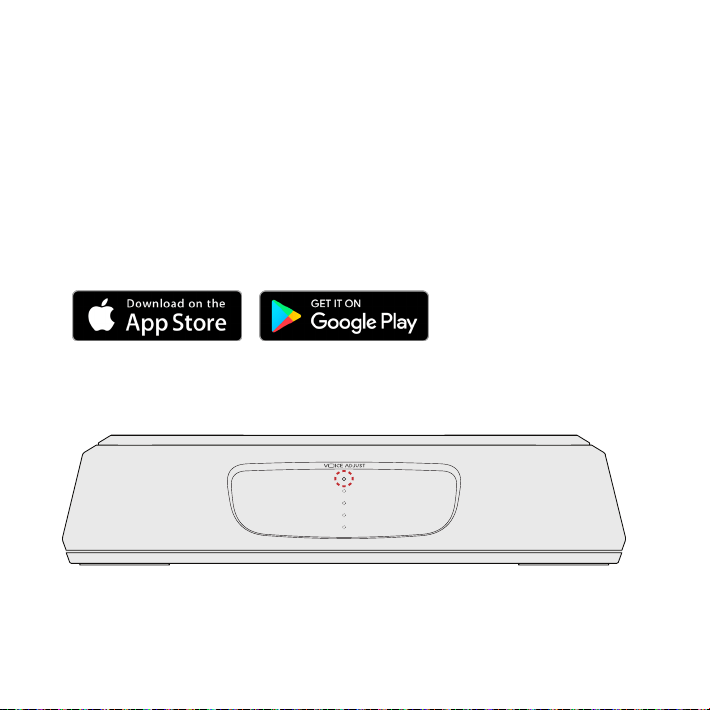
Servicios de música
Cómo configurar Google Cast™
1. Encienda la barra de sonido.
2. Desde su teléfono, tableta u ordenador visite:
chromecast.com/setup
3. Descargue la aplicación Cast, haga clic en la pestaña de
dispositivos en la aplicación y seleccione MagniFi Mini. Siga
las instrucciones de configuración de la aplicación.
4. Cuando esté reproduciendo Google Cast, un LED blanco
aparecerá en la barra de sonido.
Cómo volver a oír la TV: cuando haya acabado de usar Google Cast, presione el
botón de fuente en la barra de sonido o el mando a dist. (TV ARC, OPT, AUX).
43
Cómo configurar el Bluetooth®
1. Para activar el Bluetooth, presione el botón de Bluetooth en la
barra de sonido. Una LED azul parpadeará despacio en la barra.
2. Vaya a la sección de dispositivos Bluetooth de su móvil, tableta
u ordenador y seleccione MagniFi Mini. La LED será azul fijo
cuando el Bluetooth esté conectado.
Nota: para tomar el control cuando otro dispositivo esté conectado, pulse el
botón Bluetooth.
Cómo oir su TV de nuevo: Cuando haya acabado con el Bluetooth, apriete el botón de
fuente en la barra de sonido o el mando a distancia (TV ARC, ÓPT, AUX).

44
Vielen Dank, dass Sie sich für ein Produkt von Polk entschieden
haben. Sollten Sie Fragen zu Ihrem Gerät haben, nehmen Sie bitte
per Telefon oder E-Mail mit uns Kontakt auf.
Technische Fragen
In Nordamerika bitte den Polk-Kundendienst unter folgender
Nummer anrufen
800-377-POLK(7655) (Mo. bis Fr. zwischen 9:00 und
17:30UhrEST)
Außerhalb der USA bitte folgende Nummer anrufen
+1-410-358-3600
oder eine E-Mail schicken an: polkcs@polkaudio.com
Polk Audio
1 Viper Way, Vista, CA 92081
USA
Die vollständige Bedienungsanleitung finden Sie im Internet unter:
www.polkaudio.com
45
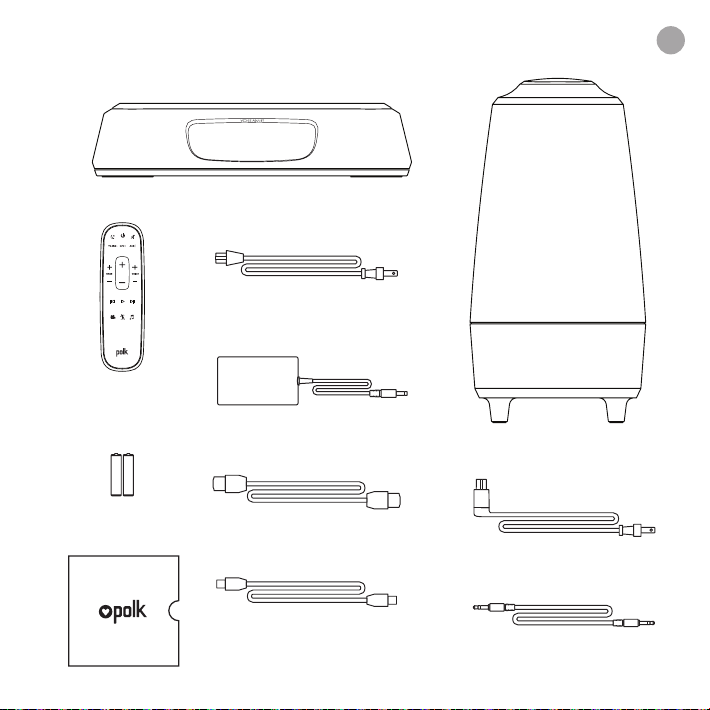
LIEFERUMFANG
Soundbar
Fernbedienung
Batterie
Drahtloser Subwoofer
Soundbar
elektrische anschlusskabel
6’ (1,8m) Optisches
Verbindungskabel
6,5' (2m) HDMI-Kabel
6' (1,8m) AUX-Kabel
Literatur
Subwoofer elektrische
anschlusskabel
Soundbar
Stromversorgung
AAA
AAA
de
46
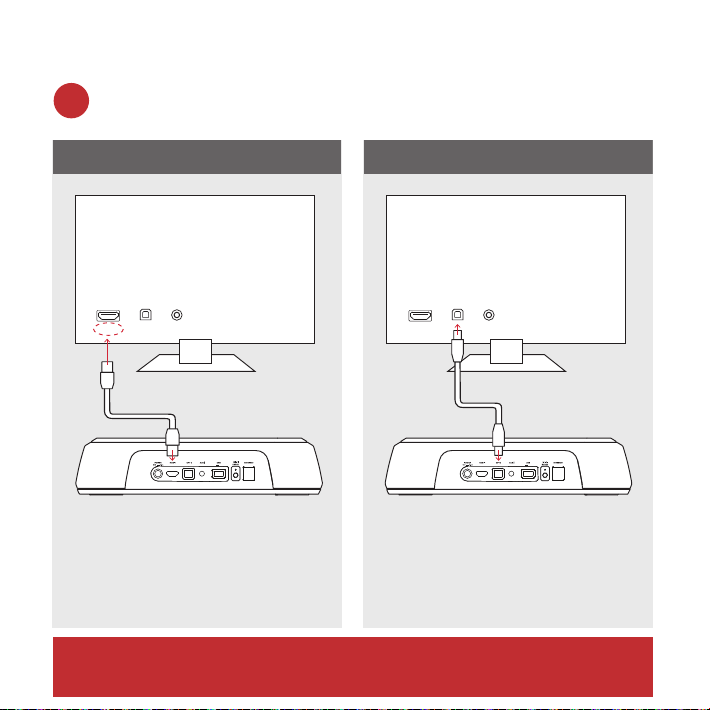
So schließen Sie Ihr MagniFiMini an Ihren Fernseher an
Befindet sich an Ihrem Fernsehgerät ein HDMI-Eingang mit
der BeschriftungARC?
Verwenden Sie das
mitgelieferte HDMI-Kabel,
um die Soundbar an Ihren
Fernseher anzuschließen.
Verwenden Sie
das mitgelieferte
optischeKabel, um
die Soundbar an Ihren
Fernseher anzuschließen.
JA NEIN
TV ARC 5V 500mA
TV ARC 5V 500mA
TV
AUXOPTHDMI
AUXOPT
ARC
HDMI
TV
TV ARC 5V 500mA
TV ARC 5V 500mA
TV
AUXOPTHDMI
AUXOPT
ARC
HDMI
TV
1a.
*UM HDMI nutzen zu können, MUSS Ihr Gerät über einen HDMIARC-
Eingang verfügen.
47
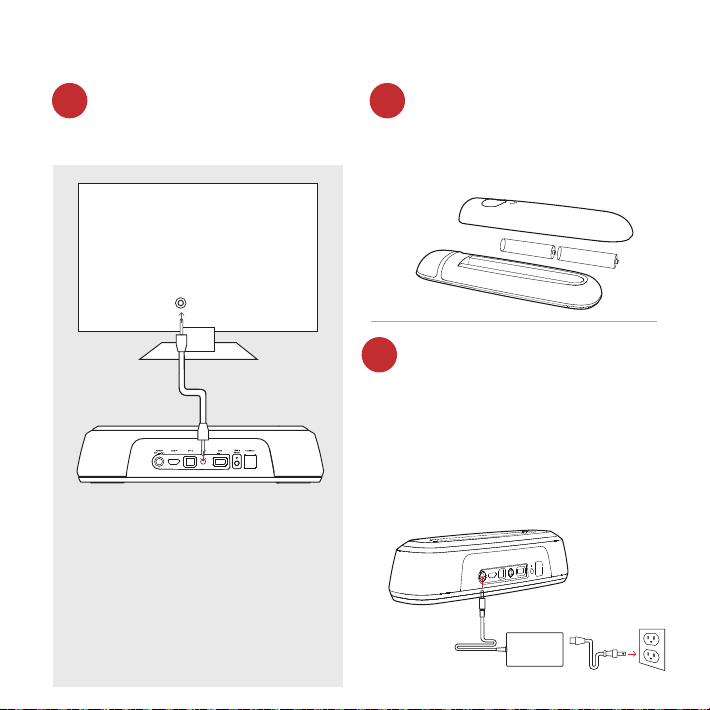
Ihr Fernsehgerät ist nicht mit
einem HDMI- oder optischen
Eingang ausgestattet?
Batterien in Fernbedienung
einsetzen
Das Netzkabel der
Soundbar an die Steckdose
anschließen
Setzen Sie die mitgelieferten
AAA-Batterien ein.
Auf der Vorderseite der
Soundbar blinkt eine rote
LED auf. Dies bedeutet,
dass sich das Gerät in der
Aufwärmphase befindet.
Wenn Ihr Fernsehgerät über
keinen HDMI-ARC oder
optischen Ausgang verfügt,
schließen Sie die Soundbar
mit dem mitgelieferten AUX-
Kabel an den Fernseher an.
(Nur HDMI und optische Eingänge
unterstützen Dolby 5.1-Dekodierung)
TV ARC 5V 500mA
TV ARC 5V 500mA
TV
AUX
AUXOPT
ARC
HDMI
TV
1b. 2.
3.
48
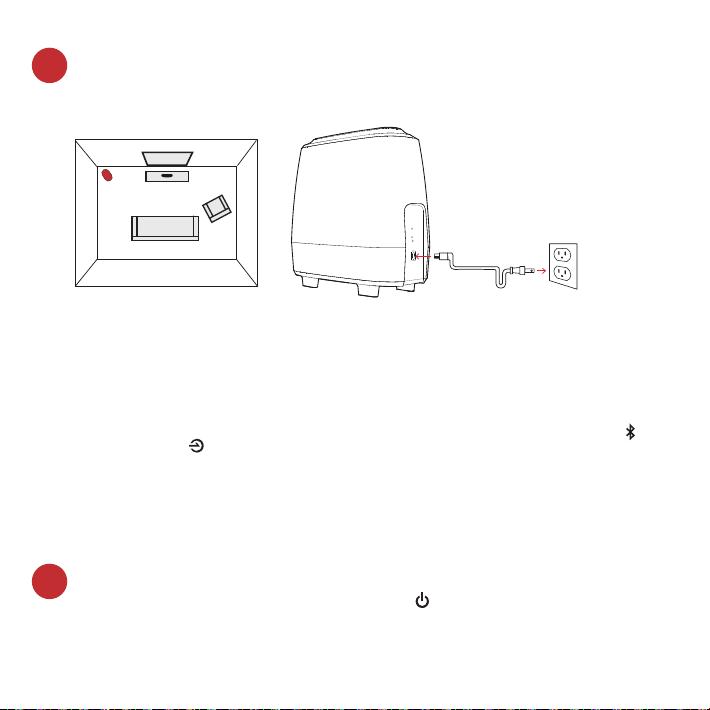
Den Subwoofer aufstellen und an eine Steckdose anschließen
(beste Klangergebnisse erzielen Sie, wenn das Gerät an derselben
Wand wie der Fernseher aufgestellt wird)
Ihre Soundbar einschalten
Drücken Sie auf den Ein/Aus-Schalter auf der Soundbar oder
der Fernbedienung. Hinweis: Stellen Sie sicher, dass TV-interne
Lautsprecher ausgeschaltet sind, wenn optische und Aux-
Eingänge verwendet werden.
HINWEIS: Die MagniFi Mini Soundbar und der drahtlos verbundene
Subwoofer werden werkseitig so voreingestellt, dass sie
miteinander kommunizieren. Sollte Ihr Subwoofer das drahtlos
übertragene Audiosignal nicht empfangen, befolgen Sie bitte
folgende Anweisungen, um die Verbindung wieder herzustellen:
1. Schalten Sie Ihre Soundbar ein. Drücken auf der Soundbar gleichzeitig die Bluetooth-Taste und
die Quelle-Taste und halten Sie beide Tasten 3Sekunden lang gedrückt.
2. Drücken Sie die SYNC-Taste auf der Rückseite des Subwoofers und halten Sie diese 3Sekunden
lang gedrückt.
3. Daraufhin beginnt die grüne LED auf der Rückseite des Subwoofers schneller zu blinken, womit
angezeigt wird, dass die Verbindung zwischen Soundbar und Subwoofer aufgebaut wird. Sobald
die Verbindung steht, leuchtet die LED dauerhaft grün.
Subwoofer
Fernseher
4.
5.
49
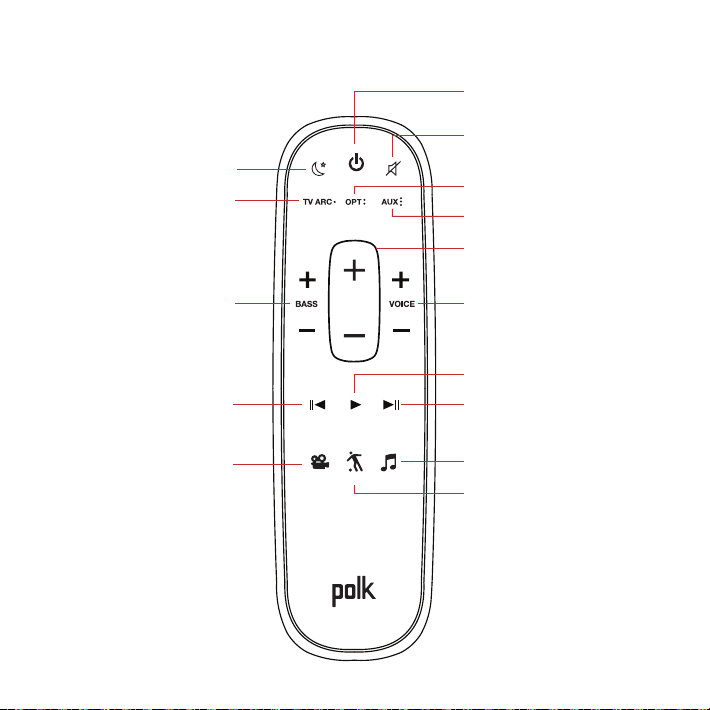
Fernbedienung
Ein/Aus-Schalter
Stumm
*Wiedergabe/Pause
Sportmodus
AUX
Stimme anpassen
Erhöhen/Verringern
Optisch
Nachtmodus
HDMI
*Vorheriger Titel
*Nur für Musik
Bass
Erhöhen/Verringern
Filmmodus
*Nächster Titel
Gesamt-Lautstärke
Erhöhen/Verringern
Musikmodus
50
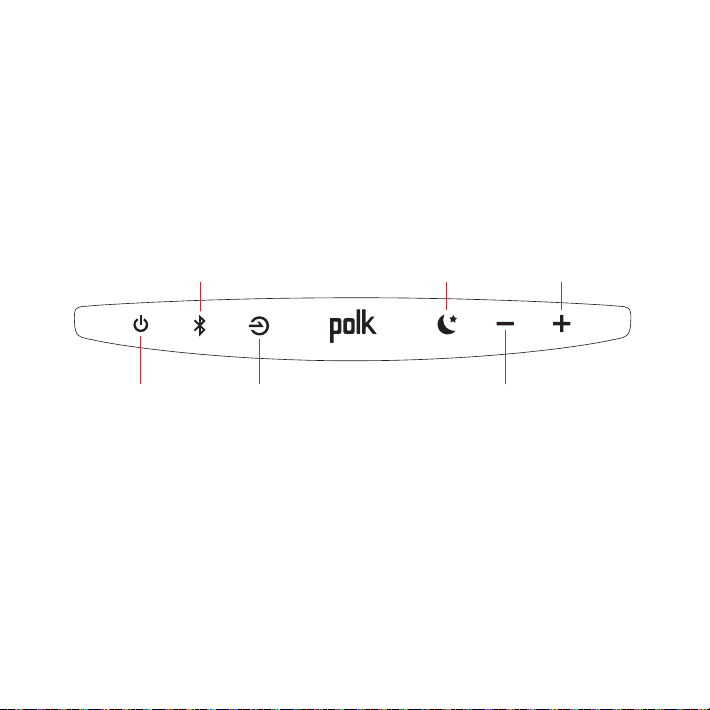
Bedienelemente auf der Oberseite der Soundbar
Stromversorgung
ein-/ausschalten
Quelle
Gesamt-
Lautstärke verringern
Gesamt-
Lautstärke
erhöhen
Nachtmodus
Bluetooth
51
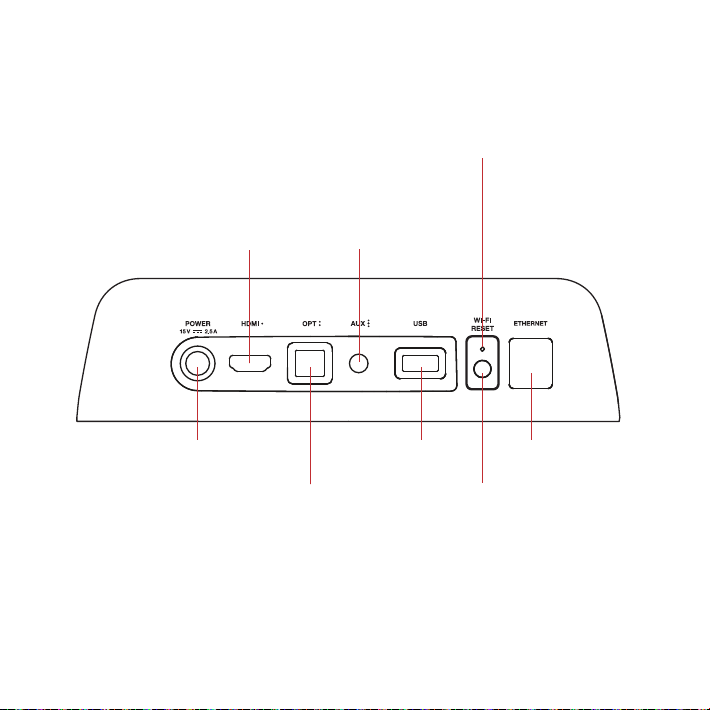
Anschlüsse und Bedienelemente auf der
Rückseite der Soundbar
Stromversorgung
Optisch
USB*
Zurückstellen
Wi-Fi-Reset halten
für 8 Sekunden
HDMI
(ARC)
AUX
WLAN-LED
Solide LED bei Anschluss
an Wi-Fi-Netzwerk.
Blinkende LED, wenn KEINE
Verbindung mit Ihrem
Wi-Fi-Netzwerk besteht.
Ethernet
TV ARC
(Service Only)
*Wird nur im Werk verwendet
52
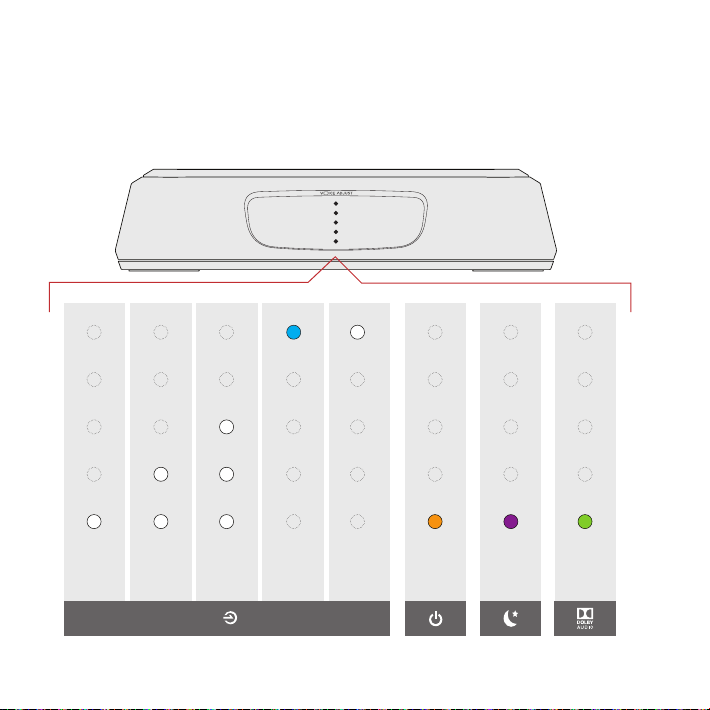
LEDs der Soundbar
MagniFiMini verfügt über eine Reihe vertikal angebrachter LEDs,
über die bestimmte Statusmeldungen für die Quelle, Lautstärke,
Wiedergabemodi usw. angezeigt werden.
HDMI
(TVARC)
OPT AUX
Bluetooth
Google
Cast
Dolby
Inhalt
Nacht-
modus
AN
ANZEIGE DER QUELLE
Die Verwendung Ihrer TV- oder Kabelfernbedienung zur
Steuerung der MagniFi Mini
Die MagniFi Mini funktioniert am besten mit der mitgelieferten Fernbedienung, aber Sie
können sie auch so einstellen, dass sie auf Ihre Lieblings-TV- oder Kabel-IR-Fernbedienung
reagiert, indem Sie die folgende Schritte ausführen:
WICHTIG: Halten Sie beide Fernbedienungen im Abstand von 12“ (30 cm) vor die MagniFi
Mini, wenn Sie die entsprechenden Tasten drücken, Stellen Sie sicher, dass Sie zwischen
dem Drücken der Tasten mindestens 1 Sekunde warten, Vergewissern Sie sich, dass Ihre
Fernbedienungen frische Batterien haben
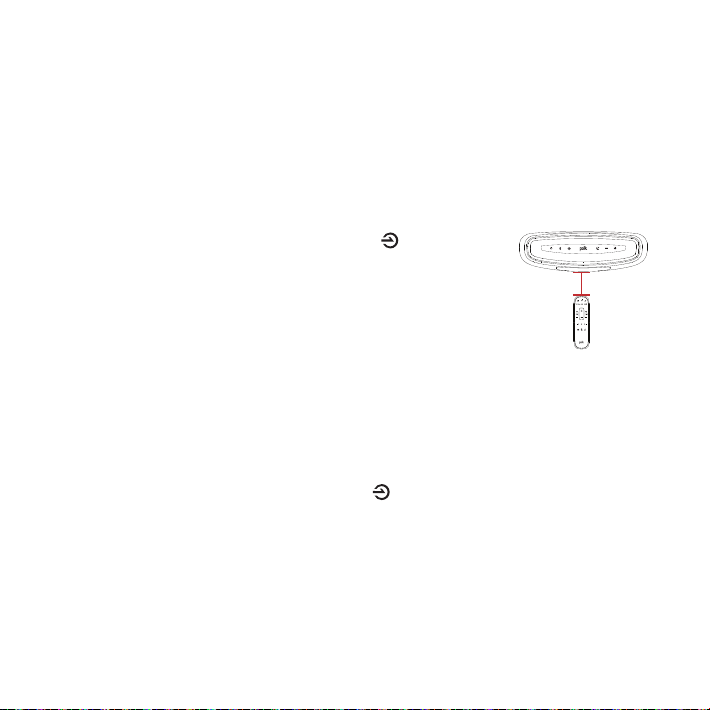
1. Geben Sie den Lernmodus ein, indem Sie die Source-Taste
auf der Soundbar gedrückt halten, bis Sie einen Ton hören und
die Lichter an der Vorderseite der Soundbar nach oben und
unten pulsieren.
2. Drücken Sie kurz die Taste der MagniFi Mini-Fernbedienung,
die Sie einstellen möchten [z. B. „Volume Up“ (Lautstärke
erhöhen) ] und lassen Sie diese wieder los.
3. Drücken Sie wiederholt die entsprechende Taste auf IHRER Fernbedienung, bis ein
zweifach aufsteigender Ton ertönt, und lassen Sie diese wieder los. HINWEIS: Warten
Sie mindestens 1 Sekunde zwischen dem Drücken der Tasten!
4. Wiederholen Sie die Schritte 2 und 3, um die Tasten „Volume Down“ (Lautstärke
reduzieren), „Mute“ (Stummschaltung) und „Power“ einzustellen.
5. Beenden Sie den Lernmodus, indem Sie die Source-Taste auf der Soundbar erneut
drücken, bis Sie einen Ton hören und die Lichter an der Vorderseite der Soundbar
aufhören zu pulsieren.
6. Vergewissern Sie sich, dass Ihre Fernbedienung die von Ihnen programmierten Tasten
(z. B. Lautstärke erhöhen) am MagniFi Mini steuern kann.
ACHTUNG:
• Sie hören einen anderen (absteigenden) Ton, wenn der Befehl fehlgeschlagen ist. Bitte
versuchen Sie es erneut.
• Die MagniFi Mini beendet den Lernmodus nach einer Minute Inaktivität und speichert
alle erlernten Codes.
12” (30cm)
54
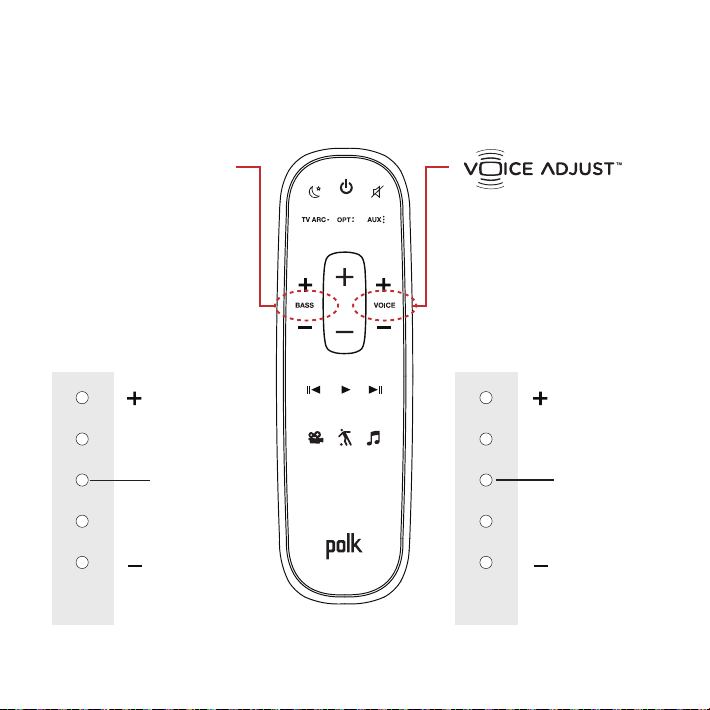
Optimierung des Hörerlebnisses
Lautstärke der Sprech-
Stimmen einstellen
Den Sprachkanalpegel
isolieren und anpassen,
um Dialoge glasklar zu
hören.
Tiefenregelung
Lautstärke der
Bässe einstellen
Je nach Geschmack
mehr oder weniger
Bassklang einstellen.
Lautere
Stimmen
Mehr Bass
Leisere
Stimmen
Weniger Bass
STANDARD-NIVEAU
STANDARD-NIVEAU
LEDs der
Soundbar
LEDs der
Soundbar

55
Sportmodus
Bessere Audio-Wiedergabe
beim Schauen von
Sportereignissen, Nachrichten
und Talkshows.
Nachtmodus
Weniger Bass- und
Lautstärke-Dynamik bei
gleichzeitiger Verbesserung
der Sprachverständlichkeit bei
geringer Gesamtlautstärke.
Filmmodus
Bessere Audio-
Wiedergabe bei Filmen und
Fernsehprogrammen.
Musikmodus
Bessere Audio-Wiedergabe
beim Hören von Musik oder
beim Schauen von Filmen oder
Fernsehprogrammen, in denen
Musik gespielt wird.
56
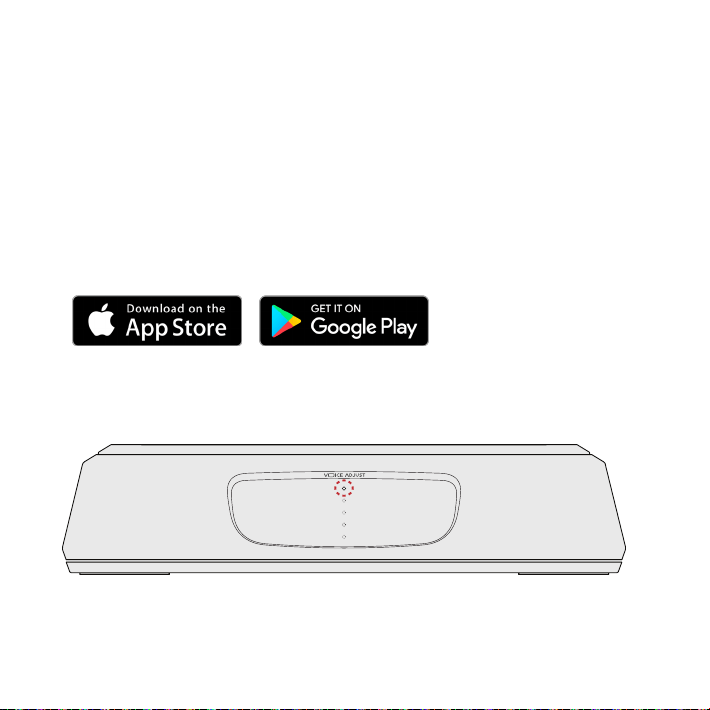
Musikdienste
GoogleCast™ einstellen
1. Schalten Sie die Soundbar ein.
2. Rufen Sie mit dem Smartphone, Tablet oder Computer
folgende Seite auf: chromecast.com/setup
3. Laden Sie die Cast-App herunter, tippen Sie in der App
auf die Registerkarte Geräte und wählen Sie MagniFiMini.
Befolgen Sie die Einrichtungsanweisungen der App.
4. Das Streamen über GoogleCast wird durch eine weiße LED
auf der Soundbar angezeigt.
Wieder auf Audio-Wiedergabe des Fernsehers umschalten: Wenn Sie keine
weiteren Inhalte über GoogleCast hören möchten, drücken Sie die Quelle-
Taste auf der Soundbar oder der Fernbedienung (TV ARC, OPT, AUX).
57
Bluetooth® einrichten
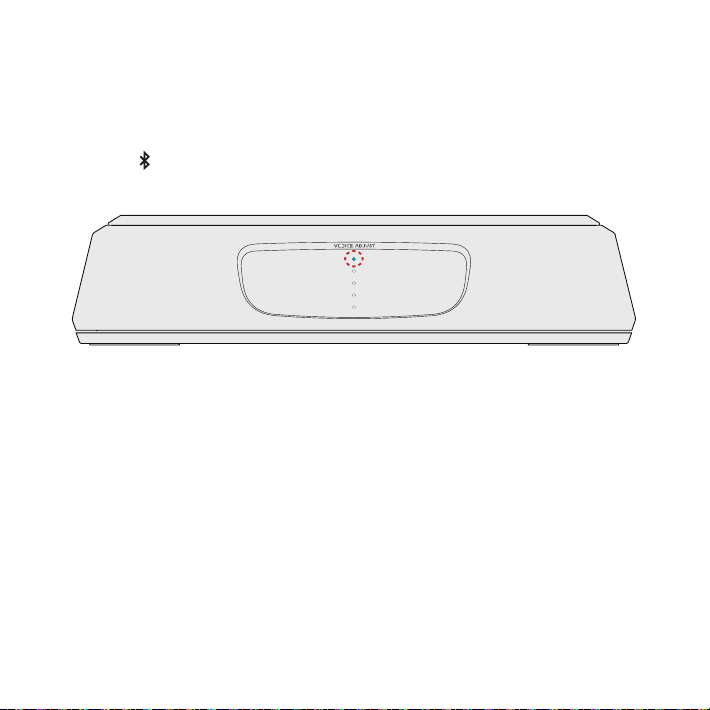
1. Drücken Sie zum Aktivieren von Bluetooth die entsprechende
Taste auf der Soundbar. Daraufhin beginnt auf der Soundbar
eine blaue LED langsam zu blinken.
2. Önen Sie auf Ihrem Smartphone, Tablet oder Computer den
Bereich zum Anbinden von Bluetooth-Geräten und wählen Sie
Polk MagniFiMini. Die LED leuchtet durchgehend blau,
sobald eine Bluetooth-Verbindung besteht.
Hinweis: Um die Kontrolle zu übernehmen, wenn ein anderes Gerät angeschlossen ist,
drücken Sie die Bluetooth-Taste.
Wieder auf Audio-Wiedergabe des Fernsehers umschalten: Wenn Sie keine weiteren
Inhalte über die Bluetooth-Verbindung hören möchten, drücken Sie die Quelle-Taste
auf der Soundbar oder der Fernbedienung (TV ARC, OPT, AUX).

58
Grazie per avere acquistato un prodotto Polk. Per qualsiasi
domanda o commento non estare a contattarci via telefono
o email.
Assistenza tecnica
In Nord America, Chiama il Polk Customer Service al
800-377-POLK(7655) (M–F, 9 a.m.–5:30 p.m. EST)
Fuoru dagli USA, chiama il +1-410-358-3600
email polkcs@polkaudio.com
Polk Audio
1 Viper Way, Vista, CA 92081
Il manuale completo è disponibile online su
www.polkaudio.com
59
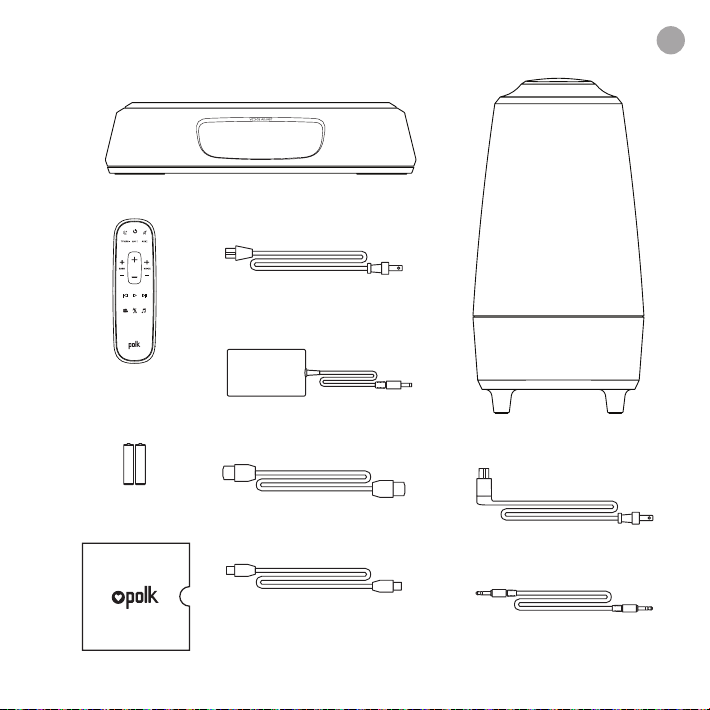
Contenuto
Sound bar
Telecomando
Batterie
Subwoofer
Cavo di alimentazione
sound bar
Cavo ottico da 6’ (1,8 m)
Cavo HDMI da 6.5’ (2 m)
Cavo AUX da 6’ (1,8 m)
Materiale illustrativo
Cavo di alimentazione
Subwoofer
Alimentatore sound bar
AAA
AAA
it
60
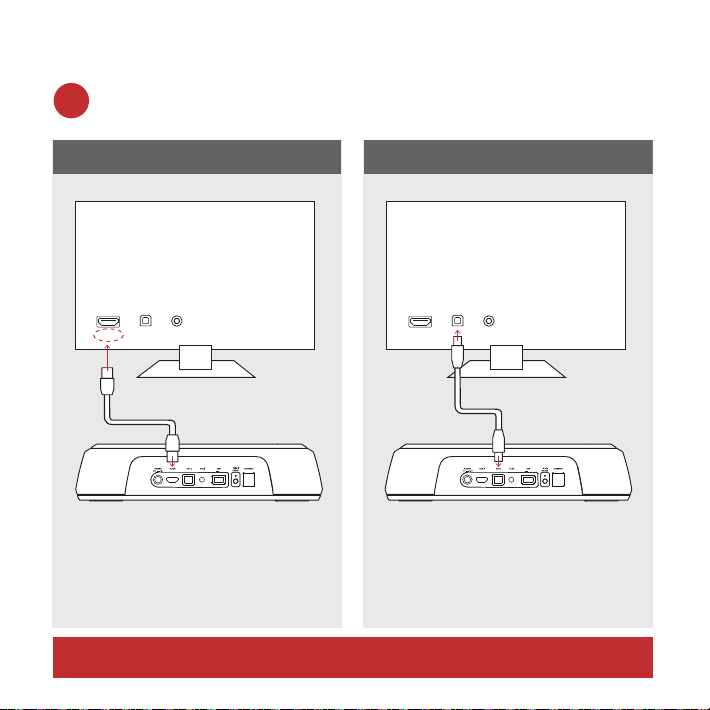
Connettere il tuo MagniFi Mini alla tua TV
C’è un jack di ingresso HDMI indicato come “ARC” sulla tua TV?
Usa il cavo HDMI in
dotazione per connettere
la sound bar alla TV.
Usa il cavo ottico in
dotazione per connettere
la sound bar alla TV.
S Ì NO
TV ARC 5V 500mA
TV ARC 5V 500mA
TV
AUXOPTHDMI
AUXOPT
ARC
HDMI
TV
TV ARC 5V 500mA
TV ARC 5V 500mA
TV
AUXOPTHDMI
AUXOPT
ARC
HDMI
TV
1a.
*DEVI avere un ingresso HDMI ARC sulla tua TV per usare l’HDMI.
61
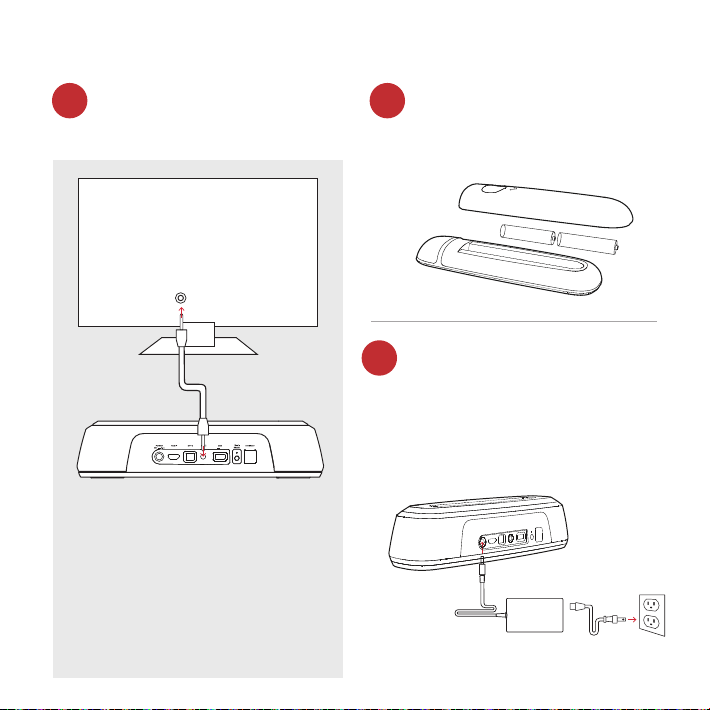
Non hai ingressi HDMI o
ottici disponibili sulla tua
TV?
Installazione batterie
Connetti il cavo di
alimentazione della sound
bar ad una presa AC
Inserisci le batterie AAA in
dotazione.
Un LED rosso lampeggerà
sulla sound bar indicando
l’accensione.
Se la tua TV non ha un
uscita ottica o HDMI ARC,
college la sound bar alla
TV con il cavo AUX in
dotazione.
(La decodifica Dolby 5.1 è
supportata solo su ingressi
ottici o HDMI)
TV ARC 5V 500mA
TV ARC 5V 500mA
TV
AUX
AUXOPT
ARC
HDMI
TV
1b. 2.
3.
62
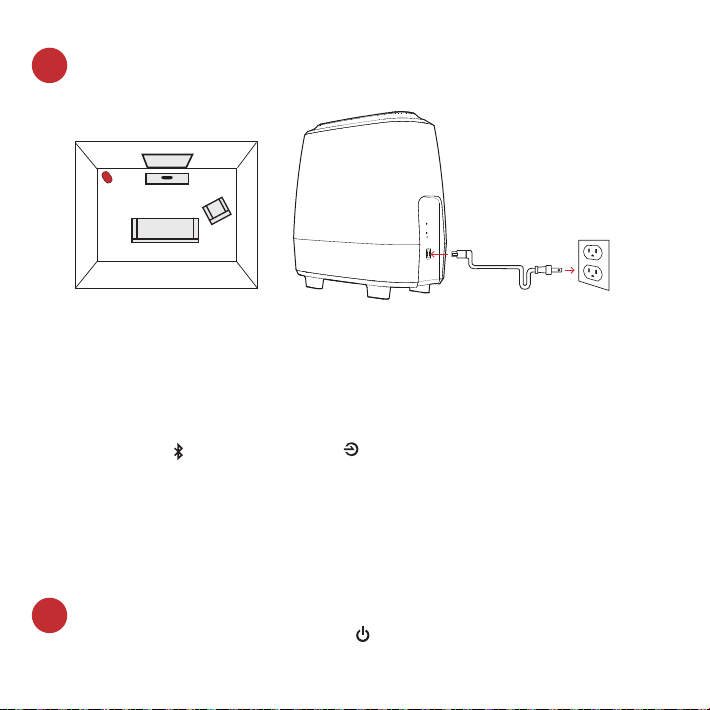
Posiziona il subwoofer e connettilo ad una presa AC
(Per migliori prestazioni posizionalo sullo stesso muro su cui
c’è la TV)
Accendi la tua sound bar
Premi il pulsante di accensione sulla sound bar o sul telecomando.
Nota: assicurati che gli altoparlanti interni della TV siano spenti
quando usi gli ingressi ottici o AUX.
NOTA: la sound bar ed il subwoofer wireless MagniFi Mini sono
impostate dalla fabbrica per lavorare insieme. Nel caso in cui il
subwoofer wireless dovesse smettere di ricevere il segnale audio,
segui queste istruzoni per ristabilire la connessione:
1. Accendi la tua sound bar. Premi contemporaneamente il pulsante
Bluetooth e il pulsante source per 3 secondi.
2. Tieni premuto il pulsante SYNC sul retro del subwoofer per 3 secondi.
3. Il LED verde sul retro del subwoofer comincerà a lampeggiare più
velocemente, per indicare che la sound bar ed il subwoofer si stanno
connettendo, a connessione avvenuta il LED verde resterà acceso.
Subwoofer
TV
4.
5.
63
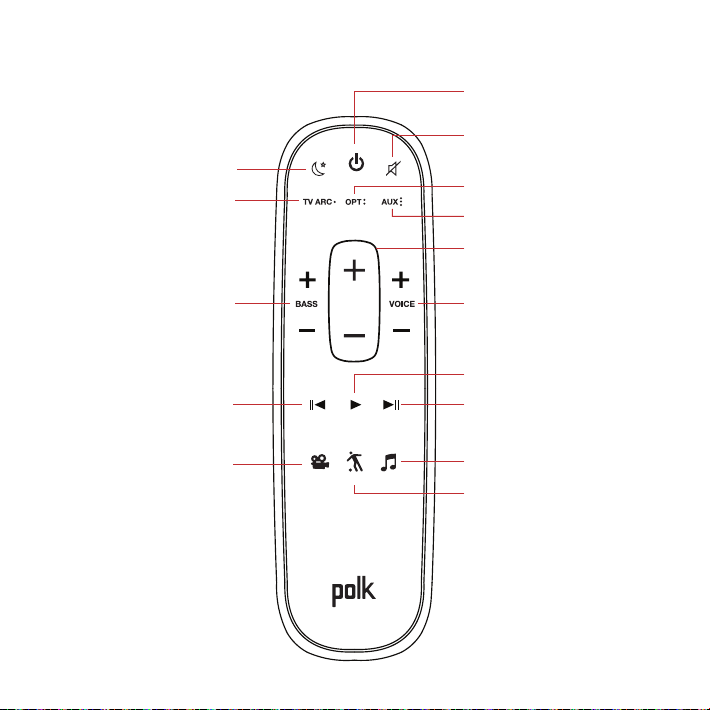
Telecomando
Accensione/
spegnimento
Muto
*Play/Pausa
Modalità Sport
AUX
Voce
Su/Giù
Ottico
Eetto notte
HDMI
*Traccia precendente
*Solo per la musica
Bassi
Su/Giù
Modalità Film
*Traccia Successiva
Volume
Su/Giù
Modalità Musica
64
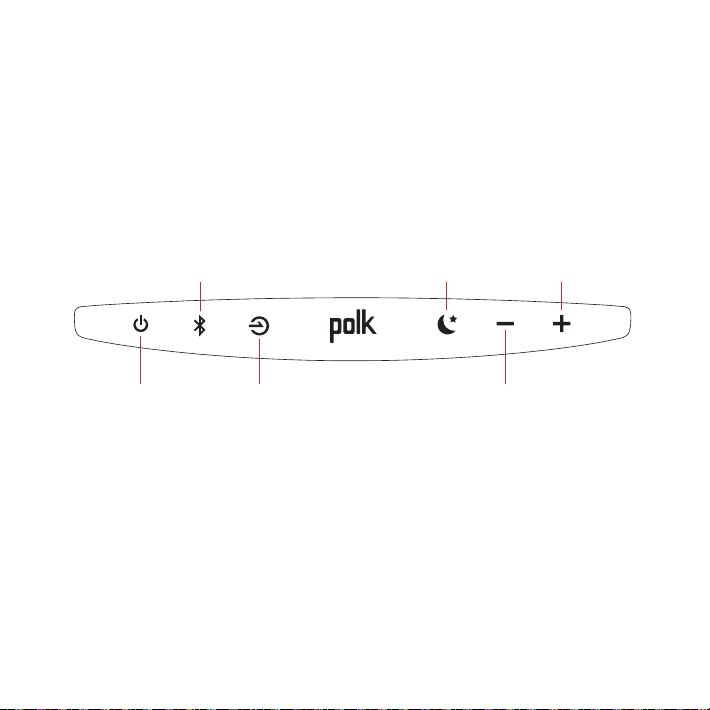
Pannello superiore sound bar
Accensione /
spegnimento
Fonte
Volume Master giù
Volume
master su
Eetto notte
Bluetooth
65
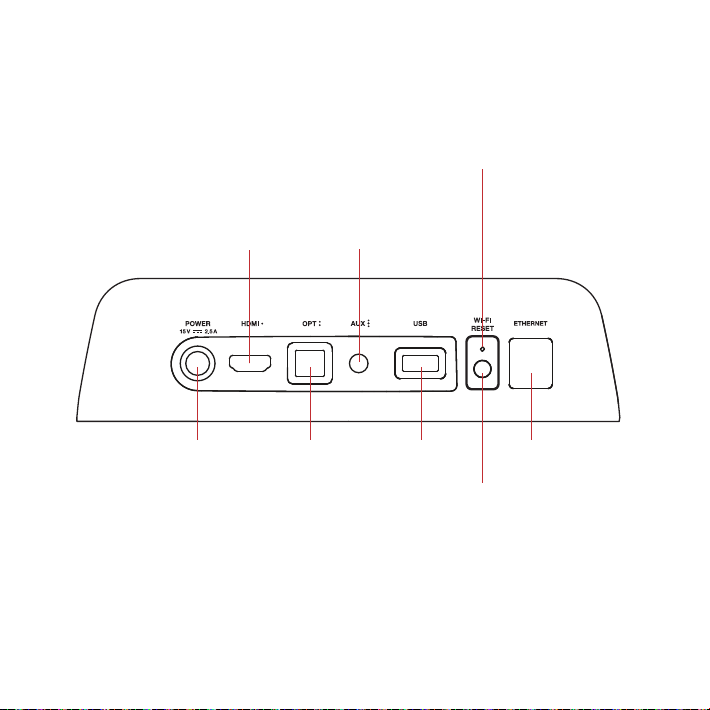
Pannello posteriore sound bar
Power Ottico USB*
Reset
Reset Wi-Fi
tenere premuto
per 8 secondi
HDMI
(ARC)
AUX
LED WIFI
Il LED sarà acceso quando
connesso alla tua rete
Wi-Fi. Il LED lampeggerà
quando NON connesso
alla tua rete Wi-Fi.
Ethernet
TV ARC
(Service Only)
*Solo per uso di fabbrica
66
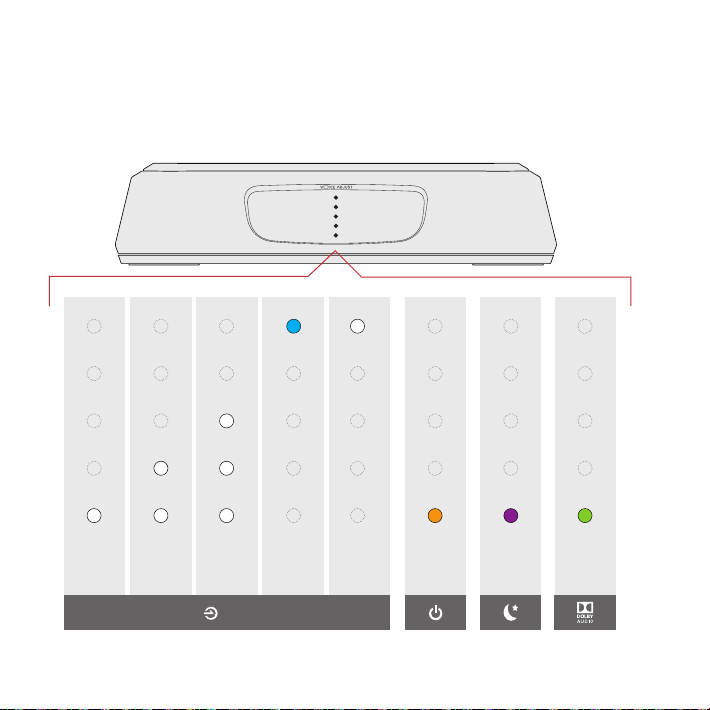
LED sound bar
MagniFi Mini ha una linea verticale di luci LED che indicano
lo stato, come la fonte, il volume e modalità d’ascolto.
HDMI
(TV ARC)
OTT AUX
Bluetooth
Google
Cast
Contenuto
Dolby
Eetto
Notte
ON
INDICATORI FONTE
67
12” (30cm)
Usare il telecomando TV o via cavo per controllare il
MagniFi Mini
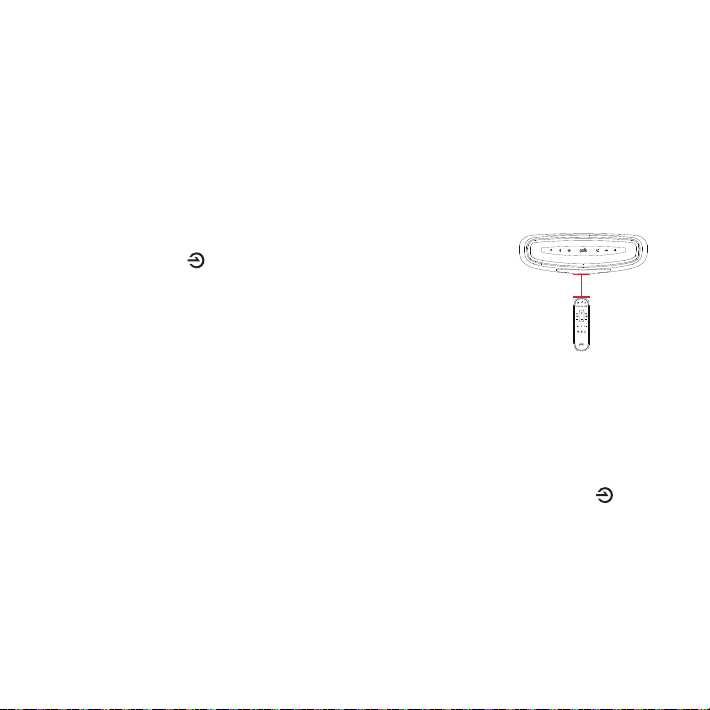
Il MagniFi Mini funziona in maniera ottimale con il suo telecomando incluso, tuttavia, puoi
anche programmarlo anché funzioni con il tuo telecomando TV o via cavo, seguendo i
i passaggi sottoindicati:
IMPORTANTE: Tieni entrambi i telecomandi a una distanza di 30 cm, direttamente
difronte al MagniFi Mini, quando premi i rispettivi tasti, Attendi almeno 1 secondo da
quando premi un tasto a quando premi l’altro, Assicurati che i telecomandi siano dotati
di batterie nuove.
1. Entra nella modalità di apprendimento, premendo e tenendo
premuto il tasto Source nella barra del suono, fino a
quando senti un suono e la luce nella parte anteriore della
barra del suono lampeggia su e giù.
2. Premi e rilascia il tasto del telecomando MagniFi Mini che vuoi
associare (es: volume up).
3. Premi e rilascia il tasto corrispondente sul TUO telecomando,
ripetutamente, fino a quando viene prodotto un suono di due note in sequenza
ascendente. NOTA: attendi almeno 1 secondo da quando premi un tasto a quando
premi l’altro!
4. Ripeti i passaggi 2 e 3 per far imparare i tasti Volume down, Mute, e Power al tuo
telecomando.
5. Esci dalla modalità di apprendimento premendo e tenendo premuto il tasto Source
nella barra del suono, fino a quando senti un suono e le luci nella parte anteriore della
barra del suono smettono di lampeggiare.
6. Verifica che il tuo telecomando riesca a controllare i tasti che hai programmato (es:
Volume up) sul MagniFi Mini.
NOTA:
• Sentirai un suono diverso (discendente), se il comando non viene imparato. In tal
caso, riprova.
• MagniFi Mini uscirà dalla modalità di apprendimento dopo 1 minuto di inattività,
salvando eventuali codici imparati.
68
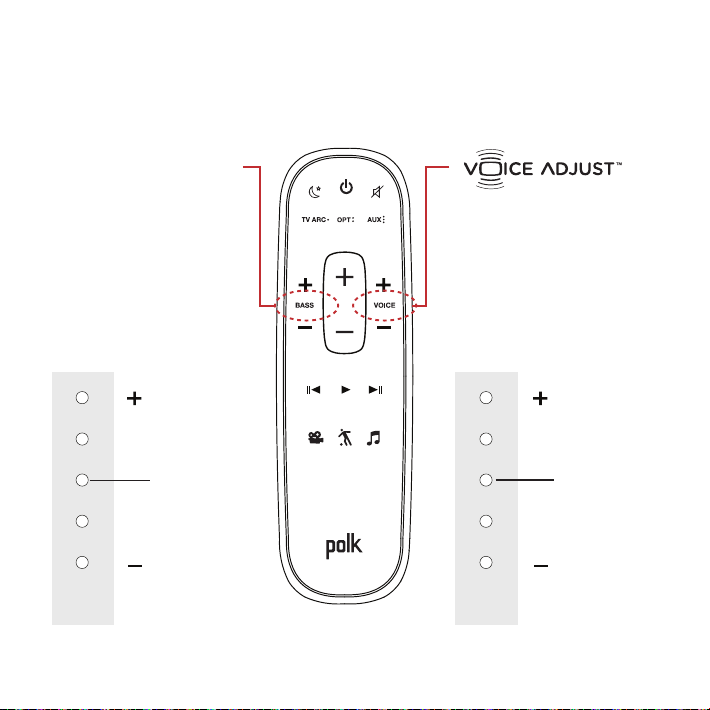
Ottimizza la tua esperienza d’ascolto
Controllla i livelli di
volme dei dialighi
Isola e regola i livelli
dei canali vocali per
riprodurre dialoghi
limpidi e cristallini.
Controllo Bassi
Controlla i livelli di
volume dei bassi
Regola il volume dei
bassi per un impatto
maggiore o minore.
Voce più altaPiù Bassi
Voce più bassaMeno Bassi
LIVELLO DI DEFAULT
LIVELLO DI DEFAULT
LED
Sound Bar
LED
Sound Bar

69
Modalità sport
Migliora l’audio quando guardi
sport, telegiornali e talk show.
Eetto notte
Riduce le dinamiche di bassi
e volume mentre aumenta la
comprensibilità della voce per
ascolti a basso volume.
Modalità Film
Migliora la riproduzione audio
per TV e film.
Modaltà Musica
Migliora l’audio quando ascolti
la musica, o guardando la TV o
dei film in cui ci sia musica.
70
Servizi musicali
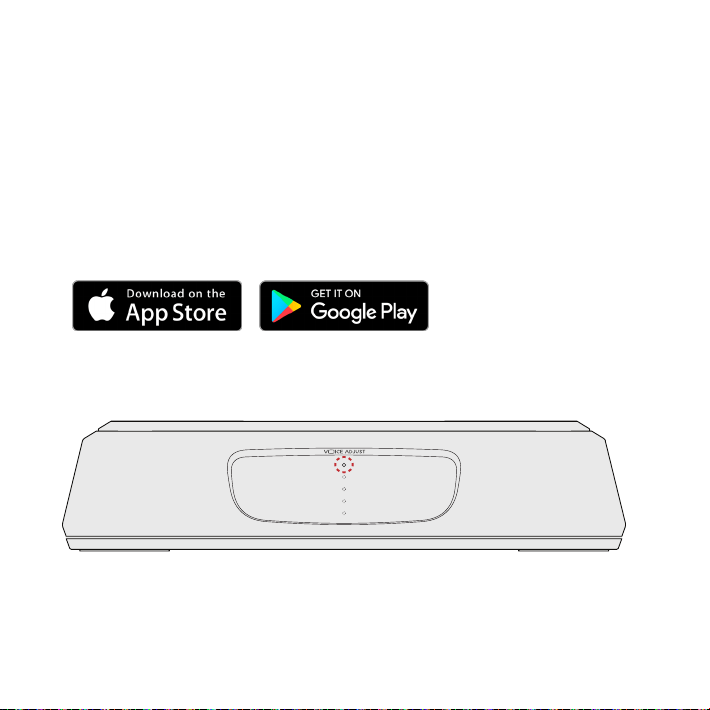
Come impostare Google Cast™
1. Accendi la sound bar.
2. Dal tuo telefono, tablet o computer visita:
chromecast.com/setup
3. Scarica la app Cast, fai clic sul tasto dispositivi nella app e
seleziona MagniFi Mini. Segui le istruzioni di setup nella app.
4. Quando fai lo straming da Google Cast, une LED bianco
comparirà sulla sound bar.
Come sentire la tua TV in seguito: Quando avrai finito di usare Google Cast,
premi il pulsante fonte sulla sound bar o sul telecomando (TV ARC, OPT, AUX).
71
Come impostare il Bluetooth®
1. Per attivare il Bluetooth, premi il pulsante Bluetooth sulla sound
bar. Un LED blu lampeggerà lentamente sulla sound bar.
2. Vai alla sezione dispositivi Bluetooth sul tuo telefono, tablet o
computer e seleziona Polk MagniFi Mini. Il LED diventerà blu
fisso quando connesso al Bluetooth.
Nota: per prendere il controllo quando è connesso un altro dispositivo, premi il
pulsante Bluetooth.
Come sentire la tua TV in seguito: Quando avrai finito di usare il Bluetooth, premi il
pulsante fonte sulla sound bar o sul telecomando (TV ARC, OPT, AUX).

1 Viper Way
Vista, CA 92081
800-3777655
www.polkaudio.com
HBP3656E