INSTRUCTION MANUAL • ENGLISH
3-YEAR
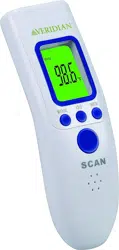
Non-Contact
Infrared Thermometer
Model # JXB-183
Reference # 09-183
Please read this instruction manual completely
before operating this unit.
1 • ENGLISH 2 • ENGLISH 3 • ENGLISH 4 • ENGLISH
INTRODUCTION & INTENDED USE
Thank you for purchasing this Non-Contact Infrared Thermometer. Please read this
instruction manual completely before using your unit to ensure safe use, accurate
results and long life of the thermometer.
This device is an infrared thermometer that is intended to measure the forehead
temperature of individuals of all ages without making contact with the individual
whose temperature is being taken. It can be used by consumers in household
environment and doctor in clinic as reference.
The infrared technology used in this thermometer takes the temperature of people
and objects without any physical contact between the thermometer and the person
or object. The thermometer measures body temperature from approximately
1.2” – 2” from the forehead, making it less invasive and threatening than other
thermometers, as well as more sanitary. It can even be used when the patient is
sleeping. This thermometer also measures the temperature of objects and liquids,
making it useful for determining if a baby’s milk or bathwater is ready.
All people and objects emit infrared energy. The Non-Contact Infrared Thermometer
measures that energy, taking multiple readings quickly and converting those data to
a single peak temperature, which appears on the display.
WARNINGS & CAUTIONS
NOTE: Read all instructions carefully before use. The following basic precautions are
needed when using an electrical product.
CAUTION: Failure to read and observe all precautions could result in personal injury
or equipment damage.
• Use as directed in this manual; misuse may void the warranty.
• This thermometer may be used for professional purposes or for personal home
use.
WARNINGS & CAUTIONS -- CONTINUED
• Measurement results should be discussed with your physician or healthcare
professional; never self-diagnose, attempt treatment or alter medications this may
be dangerous.
• The patient is the intended operator of this device.
• Wait approximately 30 minutes before measurement after strenuous physical
activity, bathing, spending time outdoors or other activity which may artificially
affect temperatures.
• Operation outside of stated operating temperature may result in measurement
error or device malfunction; operation environment temperature is 50°F –104°F
(10°C – 40°C); Humidity: ≤85%RH max.
• If the thermometer is stored outside of operating temperature range, allow at
least 30 minutes in correct range before taking a measurement.
• Keep in a clean, dry area; do not store the thermometer in direct sunlight, dusty or
humid environments, or extreme temperatures.
• Clean the lens before use; do not touch the lens directly with your fingers.
• Do not expose this thermometer to electric shocks.
• Do not drop this thermometer.
• Follow the included cleaning and storage instructions; do not submerge the
thermometer or wet.
• Do not use this thermometer if it is damaged.
• Do not disassemble the unit or attempt to repair it; substitution of a component
different from that supplied may result in measurement error and will void
manufacturer warranty.
• Remove the batteries if you do not wish to use the unit for an extended period of
time.
• Keep the thermometer away from electromagnetic fields produced by objects
such as microwave ovens, arc welders or induction heaters.
• A control measurement using a conventional stick thermometer is recommended
in the following cases:
1. If the reading is surprisingly low.
2. For new-born infants up to 100 days old.
3. For children under three years of age who have a weakened immune system or
who react unusually in the presence or absence of fever.
4. If you are using the thermometer for the first time or want to familiarise yourself
with it.
Includes:
Thermometer
2 AAA Batteries
1 User Guide
NOTE:
You must read this instruction manual completely before use and follow all instructions. Keep
the instructions for later use. You must check the device functions according to this instruction
manual prior to each use and only use this device if it is in proper working condition.
TIPS FOR MEASURING BODY TEMPS
• Wait at least one minute between consecutive readings to help ensure accuracy.
• Attempting to take temperature readings from sites on the body other than the
forehead may produce inaccurate results.
• The patient should remain still while the reading is being taken.
• If “Lo,” “Hi,” or another error message appears, see the Troubleshooting section of
this manual for instructions on how to resolve the problem.
• Readings taken while asleep should not be compared directly to readings taken
while awake, as body temperature while asleep is typically lower.
• Do not take body temperature readings within 30 minutes of being outdoors,
exercising or bathing.
• Level of activity, time of day, and other factors may affect body temperature. Keep
records of your individual body temperature to use as a reference when judging a
fever.
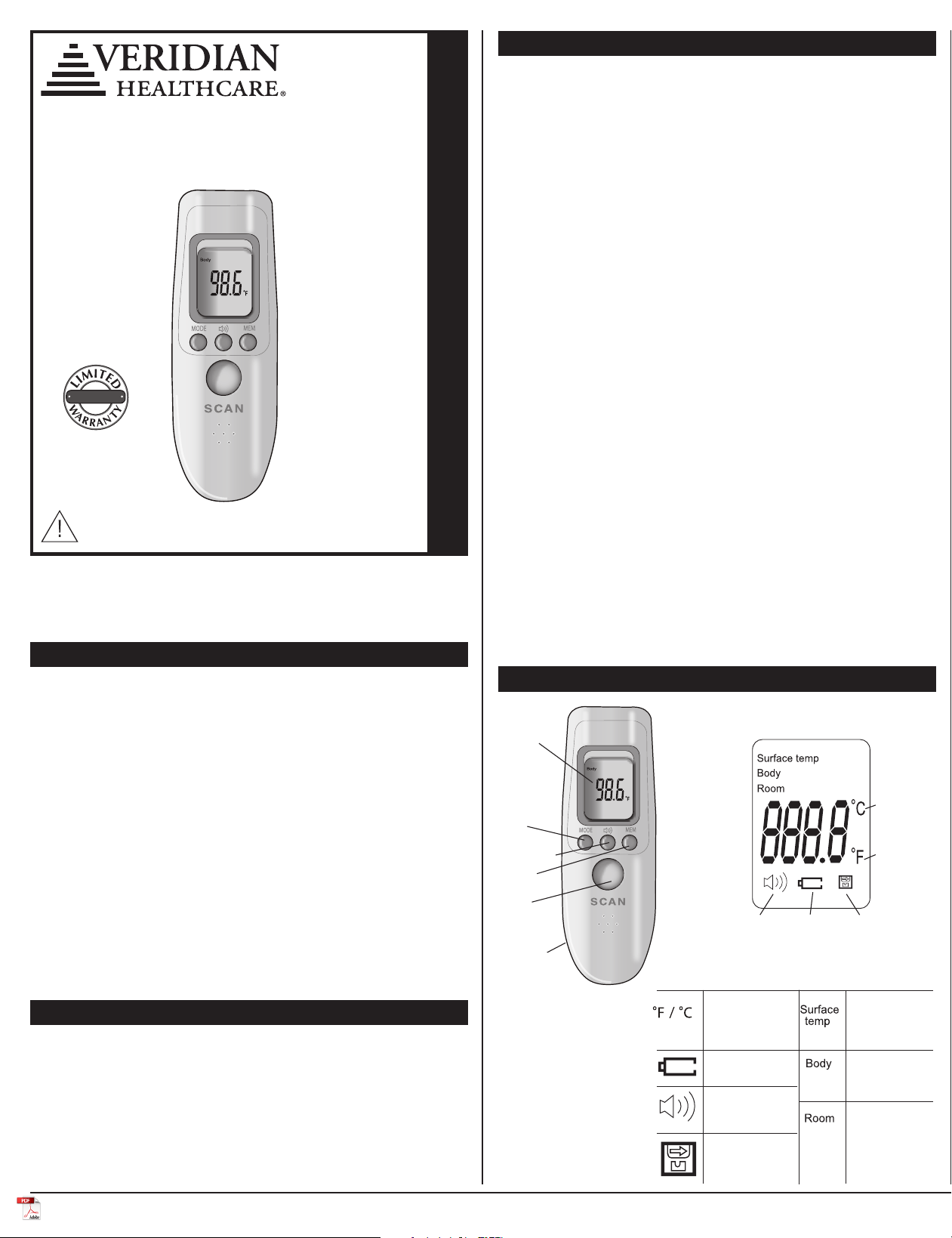
FAHRENHEIT
OR CELSIUS
TEMPERATURE
MODE
LOW BATTERY
SPEAKER IS ON
WHEN SHOWN
MEMORY
RECALL
SURFACE / OBJECT
MEASUREMENT
MODE
BODY/PERSON
MEASUREMENT
MODE
AMBIENT
/ ROOM
MEASUREMENT
MODE
PRODUCT FEATURES & DISPLAY SYMBOLS
LCD
Display
POWER /
SCAN
Speaker
Memory
Mode
Battery Cover
Underside
Celsius
Fahrenheit
Buzzer Low
Power
Memory
MEASUREMENT MODES DEFINITION & USE
The Non-Contact Infrared Thermometer offers a selection of settings for use on
people, objects or ambient air temperature.
When powered on, the device will default to the last mode used.
To toggle between modes, when the device is ON, press and release the MODE
button to select the desired measurement type. The words indicating the type will
appear on the display:
• Surface temp — used for checking baby bottles, bathwater, food or similar
items. Always use caution when checking the temperature of food or beverages.
• Body — used for body temperature measurements taken at the forehead.
• Room —used for determining the ambient (air) temperature of a room.
SWITCHING BETWEEN ºF / ºC
Your thermometer can display results in either degrees Fahrenheit (°F) or degrees
Celsius (°C).
To switch between Fahrenheit and Celsius, while the unit is on press and hold
MODE. The display will flash F-1 and the current degree in use °F (°C). Press and
release MODE to toggle between °F / °C. Press MEM to confirm selection. The
thermometer is now ready for measurement.
SETTING NIGHT/SLEEPING MODE
Night Mode is a convenient way to conduct measurements without an audible beep
indicating the thermometer has powered on or a measurement is complete.
The Speaker button on the front of the device can be pressed at any time while
the device is powered ON.
The small speaker icon on the bottom left of the display screen will appear when the
sound is on, and will not show on the display when the sound is off.
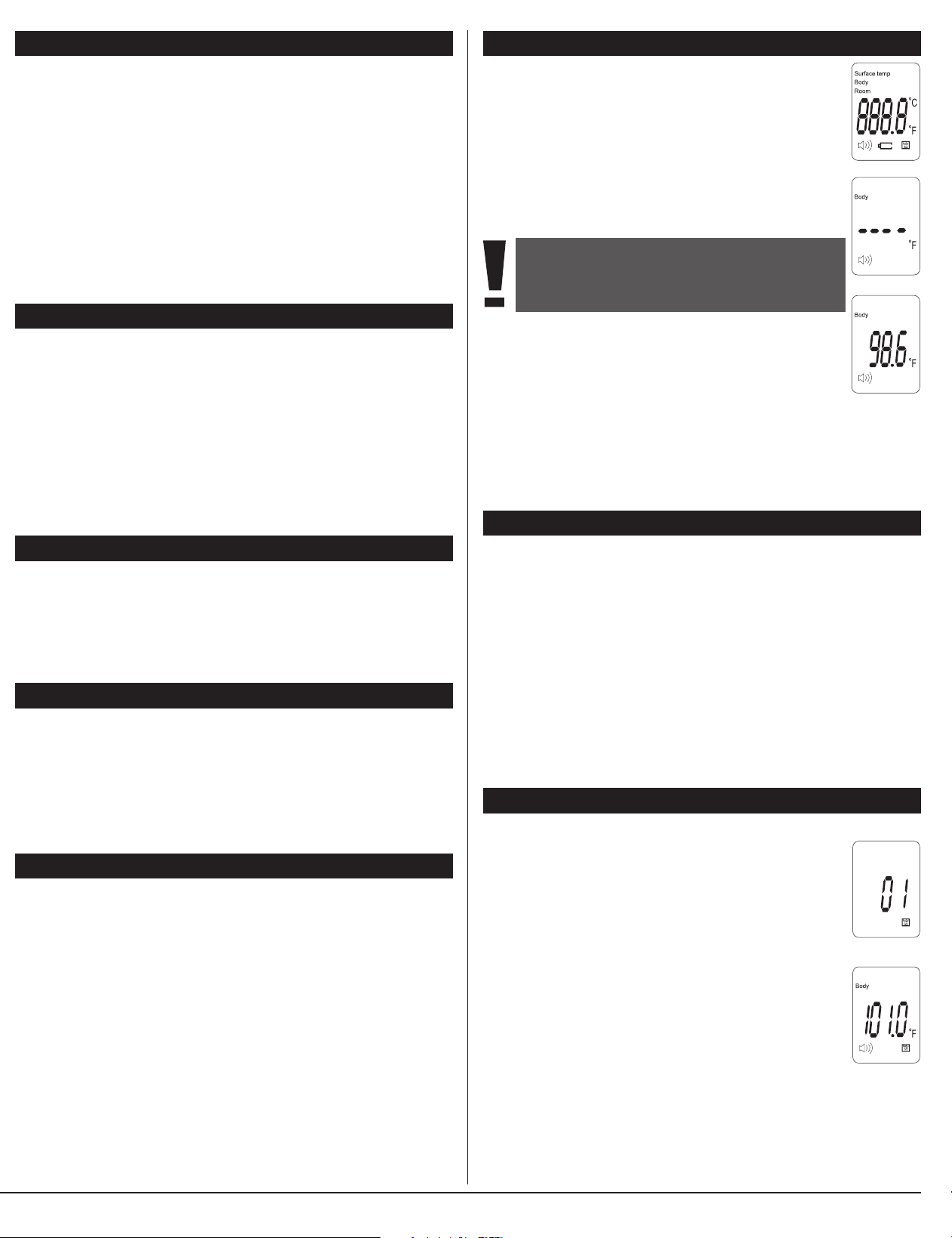
4. Press and release the SCAN button.
5. The thermometer will emit a single beep and the temperature
reading will be displayed and the fever alert back light will
illuminate, Fig. 3.
6. The display will illuminate, indicating if a fever may be present:
GREEN — ≤ 99.1°F (37.3°C); no fever is present
ORANGE — 99.2°F ~ 100.2°F (37.4°C ~ 37.9°C); mild fever is present
RED — ≥ 100.3°F (≥ 38.0°C); high fever is present
7. After 30-seconds of non-use, the thermometer will automatically shut off.
MEASURING BODY TEMPERATURE
To measure body temperature using your Non-Contact Infrared
Thermometer, follow the below steps.
1. Press and release the SCAN button to turn the thermometer
on. The unit will run a self-test and all symbols on the display will
momentarily appear, Fig. 1.
2. The display will show dashed lines, the selected mode, the speaker
icon (if audio beeps are active) and the temperature mode (°F/°C).
The thermometer is ready for measurement.
3. Aim the infrared lens at the individual’s forehead, holding the
thermometer approximately 1.2” – 2.0” away.
Fig. 1
NOTE: Proper placement and position of the sensor is
crucial for eective and accurate measurement.
The forehead should be clean and clear of excessive
lotion or oil.
Fig. 2
Fig. 3
MEASURING SURFACE/OBJECT TEMPS
The Non-Contact Infrared Thermometer can measure objects and liquids from 32°F
to 140°F (0°C - 60°C). To measure the temperature of an object or liquid using your
Non-Contact Infrared Thermometer, follow these steps:
CAUTION: Surface mode measures the temperature at the surface of the object
measured. Use common sense caution when testing food, drink or bathwater to
protect against possible burns.
1. Press and release the SCAN button to turn the thermometer on. The unit will run
a self-test and all symbols on the display will momentarily appear.
2. Press and release the MODE button to scroll through and select Surface temp to
measure an object.
3. Aim the infrared lens at the object, holding the thermometer approximately 1.2” –
2.0” away.
4. The thermometer will emit a single beep and the temperature results will be
displayed.
5. After 30-seconds of non-use, the thermometer will automatically shut off.
MEASURING AMBIENT/ROOM TEMPS
The Non-Contact Infrared Thermometer can measure the ambient air in a room
from 32°F to 104°F (0°C - 40°C). To measure the temperature of the room using your
Non-Contact Infrared Thermometer, follow these steps:
1. Press and release the SCAN button to turn the thermometer on. The unit will run
a self-test and all symbols on the display will momentarily appear.
2. Press and release the MODE button to scroll through and select Room to
measure an object.
3. Aim the infrared lens away from you or other persons into the air. Take care not to
point at a heat or cool air flow source such as a vent or fan..
4. The thermometer will emit a single beep and the temperature results will be
displayed.
5. After 30-seconds of non-use, the thermometer will automatically shut off.
RECALLING & CLEARING READINGS
Your Non-Contact Infrared Thermometer automatically stores the last 32 readings
taken. To view the readings stored in memory, follow these steps:
1. Press the SCAN button to turn the thermometer on.
2. Press the Memory button (marked, “MEM”) to recall the most
recent measurement.
3. Press and release the MEM button scroll through the readings from
newest to oldest.
The index number will briefly flash on the display indicating the
sequential number of the stored reading and the memory icon will
show on the bottom right of the display, Fig 1.
4. The display will indicate the recalled temperature, the mode
method, and if it is a Body measurement, will illuminate the
corresponding color if a fever was present or not, Fig 2.
After 32 measurements have been stored in the memory, the oldest
reading will be automatically deleted.
To clear all records from the memory, hold the MEM button down until you hear a
beep and three dashes appear on the display. The memory bank is now empty.
INSTRUCTION MANUAL • ENGLISH
3-YEAR
Non-Contact
Infrared Thermometer
Model # JXB-183
Reference # 09-183
Please read this instruction manual completely
before operating this unit.
1 • ENGLISH 2 • ENGLISH 3 • ENGLISH 4 • ENGLISH
INTRODUCTION & INTENDED USE
Thank you for purchasing this Non-Contact Infrared Thermometer. Please read this
instruction manual completely before using your unit to ensure safe use, accurate
results and long life of the thermometer.
This device is an infrared thermometer that is intended to measure the forehead
temperature of individuals of all ages without making contact with the individual
whose temperature is being taken. It can be used by consumers in household
environment and doctor in clinic as reference.
The infrared technology used in this thermometer takes the temperature of people
and objects without any physical contact between the thermometer and the person
or object. The thermometer measures body temperature from approximately
1.2” – 2” from the forehead, making it less invasive and threatening than other
thermometers, as well as more sanitary. It can even be used when the patient is
sleeping. This thermometer also measures the temperature of objects and liquids,
making it useful for determining if a baby’s milk or bathwater is ready.
All people and objects emit infrared energy. The Non-Contact Infrared Thermometer
measures that energy, taking multiple readings quickly and converting those data to
a single peak temperature, which appears on the display.
WARNINGS & CAUTIONS
NOTE: Read all instructions carefully before use. The following basic precautions are
needed when using an electrical product.
CAUTION: Failure to read and observe all precautions could result in personal injury
or equipment damage.
• Use as directed in this manual; misuse may void the warranty.
• This thermometer may be used for professional purposes or for personal home
use.
WARNINGS & CAUTIONS -- CONTINUED
• Measurement results should be discussed with your physician or healthcare
professional; never self-diagnose, attempt treatment or alter medications this may
be dangerous.
• The patient is the intended operator of this device.
• Wait approximately 30 minutes before measurement after strenuous physical
activity, bathing, spending time outdoors or other activity which may artificially
affect temperatures.
• Operation outside of stated operating temperature may result in measurement
error or device malfunction; operation environment temperature is 50°F –104°F
(10°C – 40°C); Humidity: ≤85%RH max.
• If the thermometer is stored outside of operating temperature range, allow at
least 30 minutes in correct range before taking a measurement.
• Keep in a clean, dry area; do not store the thermometer in direct sunlight, dusty or
humid environments, or extreme temperatures.
• Clean the lens before use; do not touch the lens directly with your fingers.
• Do not expose this thermometer to electric shocks.
• Do not drop this thermometer.
• Follow the included cleaning and storage instructions; do not submerge the
thermometer or wet.
• Do not use this thermometer if it is damaged.
• Do not disassemble the unit or attempt to repair it; substitution of a component
different from that supplied may result in measurement error and will void
manufacturer warranty.
• Remove the batteries if you do not wish to use the unit for an extended period of
time.
• Keep the thermometer away from electromagnetic fields produced by objects
such as microwave ovens, arc welders or induction heaters.
• A control measurement using a conventional stick thermometer is recommended
in the following cases:
1. If the reading is surprisingly low.
2. For new-born infants up to 100 days old.
3. For children under three years of age who have a weakened immune system or
who react unusually in the presence or absence of fever.
4. If you are using the thermometer for the first time or want to familiarise yourself
with it.
Includes:
Thermometer
2 AAA Batteries
1 User Guide
NOTE:
You must read this instruction manual completely before use and follow all instructions. Keep
the instructions for later use. You must check the device functions according to this instruction
manual prior to each use and only use this device if it is in proper working condition.
TIPS FOR MEASURING BODY TEMPS
• Wait at least one minute between consecutive readings to help ensure accuracy.
• Attempting to take temperature readings from sites on the body other than the
forehead may produce inaccurate results.
• The patient should remain still while the reading is being taken.
• If “Lo,” “Hi,” or another error message appears, see the Troubleshooting section of
this manual for instructions on how to resolve the problem.
• Readings taken while asleep should not be compared directly to readings taken
while awake, as body temperature while asleep is typically lower.
• Do not take body temperature readings within 30 minutes of being outdoors,
exercising or bathing.
• Level of activity, time of day, and other factors may affect body temperature. Keep
records of your individual body temperature to use as a reference when judging a
fever.
FAHRENHEIT
OR CELSIUS
TEMPERATURE
MODE
LOW BATTERY
SPEAKER IS ON
WHEN SHOWN
MEMORY
RECALL
SURFACE / OBJECT
MEASUREMENT
MODE
BODY/PERSON
MEASUREMENT
MODE
AMBIENT
/ ROOM
MEASUREMENT
MODE
PRODUCT FEATURES & DISPLAY SYMBOLS
LCD
Display
POWER /
SCAN
Speaker
Memory
Mode
Battery Cover
Underside
Celsius
Fahrenheit
Buzzer Low
Power
Memory
MEASUREMENT MODES DEFINITION & USE
The Non-Contact Infrared Thermometer offers a selection of settings for use on
people, objects or ambient air temperature.
When powered on, the device will default to the last mode used.
To toggle between modes, when the device is ON, press and release the MODE
button to select the desired measurement type. The words indicating the type will
appear on the display:
• Surface temp — used for checking baby bottles, bathwater, food or similar
items. Always use caution when checking the temperature of food or beverages.
• Body — used for body temperature measurements taken at the forehead.
• Room —used for determining the ambient (air) temperature of a room.
SWITCHING BETWEEN ºF / ºC
Your thermometer can display results in either degrees Fahrenheit (°F) or degrees
Celsius (°C).
To switch between Fahrenheit and Celsius, while the unit is on press and hold
MODE. The display will flash F-1 and the current degree in use °F (°C). Press and
release MODE to toggle between °F / °C. Press MEM to confirm selection. The
thermometer is now ready for measurement.
SETTING NIGHT/SLEEPING MODE
Night Mode is a convenient way to conduct measurements without an audible beep
indicating the thermometer has powered on or a measurement is complete.
The Speaker button on the front of the device can be pressed at any time while
the device is powered ON.
The small speaker icon on the bottom left of the display screen will appear when the
sound is on, and will not show on the display when the sound is off.
4. Press and release the SCAN button.
5. The thermometer will emit a single beep and the temperature
reading will be displayed and the fever alert back light will
illuminate, Fig. 3.
6. The display will illuminate, indicating if a fever may be present:
GREEN — ≤ 99.1°F (37.3°C); no fever is present
ORANGE — 99.2°F ~ 100.2°F (37.4°C ~ 37.9°C); mild fever is present
RED — ≥ 100.3°F (≥ 38.0°C); high fever is present
7. After 30-seconds of non-use, the thermometer will automatically shut off.
MEASURING BODY TEMPERATURE
To measure body temperature using your Non-Contact Infrared
Thermometer, follow the below steps.
1. Press and release the SCAN button to turn the thermometer
on. The unit will run a self-test and all symbols on the display will
momentarily appear, Fig. 1.
2. The display will show dashed lines, the selected mode, the speaker
icon (if audio beeps are active) and the temperature mode (°F/°C).
The thermometer is ready for measurement.
3. Aim the infrared lens at the individual’s forehead, holding the
thermometer approximately 1.2” – 2.0” away.
Fig. 1
NOTE: Proper placement and position of the sensor is
crucial for eective and accurate measurement.
The forehead should be clean and clear of excessive
lotion or oil.
Fig. 2
Fig. 3
MEASURING SURFACE/OBJECT TEMPS
The Non-Contact Infrared Thermometer can measure objects and liquids from 32°F
to 140°F (0°C - 60°C). To measure the temperature of an object or liquid using your
Non-Contact Infrared Thermometer, follow these steps:
CAUTION: Surface mode measures the temperature at the surface of the object
measured. Use common sense caution when testing food, drink or bathwater to
protect against possible burns.
1. Press and release the SCAN button to turn the thermometer on. The unit will run
a self-test and all symbols on the display will momentarily appear.
2. Press and release the MODE button to scroll through and select Surface temp to
measure an object.
3. Aim the infrared lens at the object, holding the thermometer approximately 1.2” –
2.0” away.
4. The thermometer will emit a single beep and the temperature results will be
displayed.
5. After 30-seconds of non-use, the thermometer will automatically shut off.
MEASURING AMBIENT/ROOM TEMPS
The Non-Contact Infrared Thermometer can measure the ambient air in a room
from 32°F to 104°F (0°C - 40°C). To measure the temperature of the room using your
Non-Contact Infrared Thermometer, follow these steps:
1. Press and release the SCAN button to turn the thermometer on. The unit will run
a self-test and all symbols on the display will momentarily appear.
2. Press and release the MODE button to scroll through and select Room to
measure an object.
3. Aim the infrared lens away from you or other persons into the air. Take care not to
point at a heat or cool air flow source such as a vent or fan..
4. The thermometer will emit a single beep and the temperature results will be
displayed.
5. After 30-seconds of non-use, the thermometer will automatically shut off.
RECALLING & CLEARING READINGS
Your Non-Contact Infrared Thermometer automatically stores the last 32 readings
taken. To view the readings stored in memory, follow these steps:
1. Press the SCAN button to turn the thermometer on.
2. Press the Memory button (marked, “MEM”) to recall the most
recent measurement.
3. Press and release the MEM button scroll through the readings from
newest to oldest.
The index number will briefly flash on the display indicating the
sequential number of the stored reading and the memory icon will
show on the bottom right of the display, Fig 1.
4. The display will indicate the recalled temperature, the mode
method, and if it is a Body measurement, will illuminate the
corresponding color if a fever was present or not, Fig 2.
After 32 measurements have been stored in the memory, the oldest
reading will be automatically deleted.
To clear all records from the memory, hold the MEM button down until you hear a
beep and three dashes appear on the display. The memory bank is now empty.
5 • ENGLISH 6 • ENGLISH 7 • ENGLISH 8 • ENGLISH
THREE-YEAR LIMITED WARRANTY
The warrantor guarantees that its Non-Contact Infrared Thermometer will be free from
manufacturing defects for a period of three years from the date of purchase. This warranty does
not cover batteries or other power sources that may be provided with or used with the Non-
Contact Infrared Thermometer. This warranty is voided if the Non-Contact Infrared Thermometer
is misused or abused in any manner.
If the Non-Contact Infrared Thermometer fails to operate during the time the original purchaser
owns it, return it postage prepaid to: Attn: Repair Department, 1175 Lakeside Drive, Gurnee,
IL, 60031. When returning a product, please also include your name, address, phone number
and brief description of the specific problem with your unit. Take care to carefully package the
product to avoid any damage that may occur while in transit; shipping insurance with returned
receipt is recommended. The warrantor will repair or replace the defective unit at our option.
Repair or replacement of the defective unit, at the warrantor’s option, is the sole remedy under
this warranty.
ANY IMPLIED WARRANTIES WHICH THE PURCHASER MAY HAVE ARE LIMITED IN DURATION TO
THE TIME THAT THE ORIGINAL CONSUMER PURCHASER OWNS THE PRODUCT. Some states do not
allow limitations or how long an implied warranty lasts, so the above limitation may not apply
to you.
This warranty constitutes the warrantor’s only reasonability and obligation to repair and/
or replace materials or components, or refund the purchase price. The warrantor will not be
responsible for any indirect, incidental, special consequential or punitive damages or other loss,
including, but not limited to damage to or loss of other property or liable to the purchaser for any
amount in excess of the cost of repair and/or replacement of the unit, or the purchaser for any
amount in excess of the cost of repair and/or replacement of the unit, or the purchase price of the
unit. Some states do not allow the exclusive or limitation of incidental or consequential damages,
so the above limitation or exclusion may not apply to you.
This warranty gives you specific legal rights, and you may also have other rights which vary from
state to state.
Toll-Free Customer Care Help Line:
1-866-326-1313
Monday – Friday 8:30 a.m. – 4:30 p.m. CST
Distributed by:
Veridian Healthcare
1175 Lakeside Drive
Gurnee, IL 60031
www.VeridianHealthcare.com
Made in China
#93-1500 07/20
©2020 Veridian Healthcare, LLC
FCC STATEMENT
IMPORTANT INFORMATION REQUIRED BY THE FCC
This device complies with Part 15 of the FCC Rules. Operation is subject to the following two
conditions: (1) this device may not cause harmful interference; and (2) this device must accept
any interference received, including interference that may cause undesirable operation.
NOTE: This equipment has been tested and found to comply with the limits for a Class B digital
device, pursuant to Part 15 of the FCC Rules. These limits are designed to provide reasonable
protection against harmful interference in a residential installation. This equipment generates,
uses, and can radiate radio frequency energy, and if not installed and used in accordance with
the instructions, may cause harmful interference to radio communications. However, there is
no guarantee that interference will not occur in a particular installation. If this equipment does
cause harmful interference to radio or television reception, which can be determined by turning
the equipment o and on, the user is encouraged to try to correct the interference by one or
more of the following measures:
Reorient or relocate the receiving antenna.
Increase the separation between the equipment and receiver.
Connect the equipment into an outlet on a circuit dierent from that to which the receiver is
connected.
Consult the dealer or an experienced radio/TV technician for help.
CAUTION: Changes or modications not expressly approved by the party responsible for compli-
ance could void the user’s authority to operate the equipment.
Name Non-Contact Infrared Thermometer
Model Number JXB-183
Reference Number 09-183
Display System Liquid Crystal Display with 0.1° F (0.1° C) resolution
Measuring Range Human body: 89.6°F–109.4°F; (32°C–43.0°C)
Surface: 32°F–140°F (0°C–60°C)
Room Temp: 32°F–104°F (0°C–40°C)
Accuracy 32.0°C~34.9°C(89.6°F~94.8°F) ±0.3°C(±0.6°F)
35.0°C~42.1°C(95°F~107.6°F) ±0.2°C(±0.4°F)
42.1°C~43°C (107.8°F-109.4°F)±0.3°C (±0.6°F)
Memory Automatically stores up to 32 readings.
Tone One beep will sound when changing modes. One beep
will sound indicating results. Thermometer beeps once
for each memory recall and when unit automatically
turns off. Device does NOT beep when in Night Mode.
Operating 50.0° F to 104.0° F (10.0° C to 40.0° C)
with relative humidity up to 85% (non condensing)
Storage -4.0° F to 131° F (-20.0° C to 55.0° C)
Temperature with relative humidity up to 95% (non condensing)
Shut-Off Powered-off automatically after every
30 seconds of non-use
Battery 2 X 1.5v alkaline AAA size
Unit Dimensions 5.1” (L) x 1.75” (W) x 2” (H) (130mm x 45mm x 55mm)
Weight
2.65 ounces (75 grams) without battery
Accessories Instruction Manual, two AAA size batteries
Specifications are subject to change without notice.
Table 1 EMISSIONS
Guidance and manufacturer’s declaration - electromagnetic emissions
The JXB-183 Non-contact Infrared Thermometer is intended for use in the electromagnetic environment specied below. The
customer or the user of the JXB-183 Non-contact Infrared Thermometer should assure that it is used in such an environment.
Emissions Test Compliance Electromagnetic
Environment Guidance
Group 1
Group B
Not Applicable
Not Applicable
The JXB-183 Non-contact Infrared Thermometer uses RF energy only for its
internal function. Therefore, its RF emissions are very low and are not likely
to cause any interference in nearby electronic equipment.
The JXB-183 Non-contact Infrared Thermometer is suitable for use in
all establishments, including domestic establishments and those directly
connected to the public low-voltage power supply network that supplies
buildings used for
domestic purposes.
RF emissions
CISPR 11
RF emissions
CISPR 11
Harmonic emissions
IEC 61000-3-2
Voltage uctuations and
icker emissions IEC
61000-3-3
Table 4 EMISSIONS
Recommended separation distances between portable and mobile RF communications equipment and the
JXB-183 Non-contact Infrared Thermometer
The JXB-183 Non-contact Infrared Thermometer is intended for use in an electromagnetic environment in which radiated RF
disturbances are controlled. The customer or the user of the JXB-183 Non-contact Infrared Thermometer can help prevent
electromagnetic interference by maintaining a minimum distance between portable and mobile RF communications equipment
(transmitters) and the JXB-183 Non-contact Infrared Thermometer as recommended below, according to the maximum output
power of the communications equipment.
150 kHz to 80 MHz
Rated
maximum
output power
of transmitter
(W)
Separation distance according to frequency of transmitter (m)
80 MHz to 800 MHz 800 MHz to 2.7 GHz
0.01
0.1
1
10
100
0.12
0.38
1.2
3.8
12
0.12
0.38
1.2
3.8
12
0.23
0.73
2.3
7.3
23
For transmitters rated at a maximum output power not listed above, the recommended separation distance d in metres (m) can be
estimated using the equation applicable to the frequency of the transmitter, where P is the maximum output power rating of the transmitter
in watts (W) according to the transmitter manufacturer.
NOTE 1 At 80 MHz and 800 MHz, the separation distance for the higher frequency range applies.
NOTE 2 These guidelines may not apply in all situations. Electromagnetic propagation is affected by absorption and reection from structures,
objects and people
Table 3 EMISSIONS
Guidance and manufacturer’s declaration - electromagnetic immunity
The JXB-183 Non-contact Infrared Thermometer is intended for use in the electromagnetic environment specied below. The
customer or the user of the JXB-183 Non-contact Infrared Thermometer should assure that it is used in such an environment.
Emissions IEC 60601 Compliance Electromagnetic
Test test level level Environment Guidance
3 V/m
80 MHz to
2,5 GHz
3 V/m Portable and mobile RF communications equipment should be used no
closer to any part of the JXB-183 Non-contact Infrared Thermometer in-
cluding cables, than the recommended separation distance calculated from
the equation applicable to the frequency of the transmitter. Recommended
separation distance
80 MHz to 800 MHz
800 MHz to 2,5 GHz
where P is the maximum output power rating of the transmitter in watts
(W) according to the transmitter manufacturer and d is the recommended
separation distance in metres (m). Field strengths from xed RF transmit-
ters, as determined by an electromagnetic site survey,
a
should be less than
the compliance level in each frequency range.
b
Interference may occur in
the vicinity of equipment marked with the following symbol:
Radiated RF
IEC 61000-4-3
NOTE 1 At 80 MHz and 800 MHz, the higher frequency range applies.
NOTE 2 These guidelines may not apply in all situations. Electromagnetic propagation is affected by
absorption and reection from structures, objects and people.
a Field strengths from xed transmitters, such as base stations for radio (cellular/cordless) telephones and land mobile radios,
amateur radio, AM and FM radio broadcast and TV broadcast cannot be predicted theoretically with accuracy. To assess
the electromagnetic environment due to xed RF transmitters, an electromagnetic site survey should be considered. If the mea-
sured eld strength in the location in which the JXB-183 IR Thermometer is used exceeds the applicable RF compliance level
above, the JXB-183 IR Thermometer should be observed to verify normal operation. If abnormal performance is observed,
additional measures may be necessary, such as reorienting or relocating the JXB-183 IR Thermometer.
b Over the frequency range 150 kHz to 80 MHz, eld strengths should be less than 3 V/m.
1
d = 2.
1
d = 2.
d = 2.3
Table 2 EMISSIONS
Guidance and manufacturer’s declaration - electromagnetic immunity
The JXB-183 Non-contact Infrared Thermometer is intended for use in the electromagnetic environment specied below. The
customer or the user of the JXB-183 Non-contact Infrared Thermometer should assure that it is used in such an environment.
Emissions Test IEC 60601 Compliance Electromagnetic
test level level Environment Guidance
± 6 kV contact
± 8 kV air
3 A/m
± 6 kV contact
± 8 kV air
3 A/m
Floors should be wood, concrete or ceramic tile. If oors are
covered with synthetic material, the relative humidity should be
at least 30 %.
Power frequency magnetic elds should be at levels charac-
teristic of a typical location in a typical commercial or hospital
environment.
Electrostatic
discharge (ESD)
IEC 61000-4-2
Power frequency
(50/60 Hz)
magnetic eld
IEC 61000-4-8
ELECTROMAGNETIC COMPATIBILITY
ELECTROMAGNETIC COMPATIBILITY
SPECIFICATIONS
TROUBLE SHOOTING
Performance may be degraded should one or more of the following occur:
• Operation outside stated temperature and humidity range.
• Storage outside state temperature and humidity range.
• Mechanical shock.
• Patient temperature is below ambient temperature.
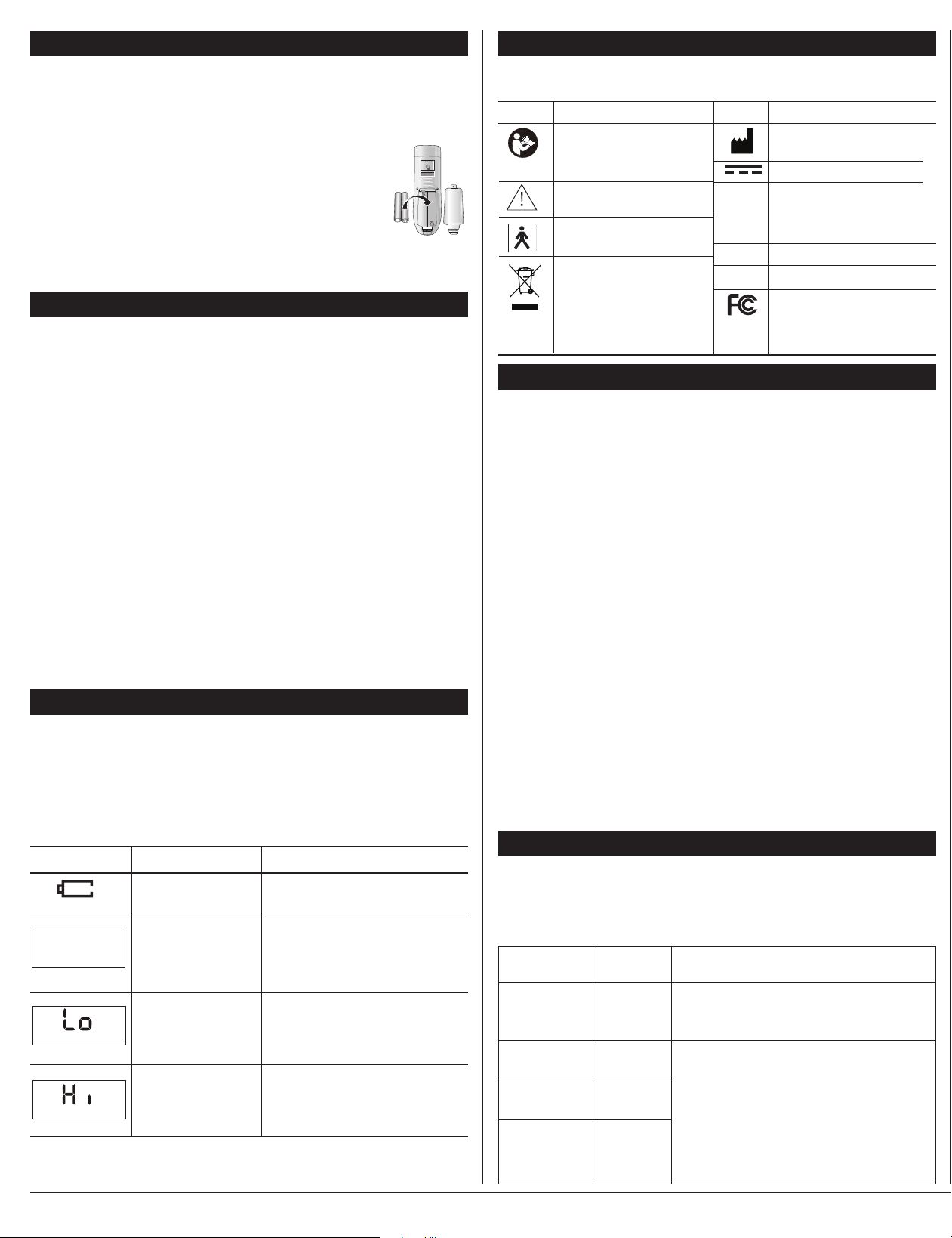
The following chart indicates error messages that may appear on your display, why
they appear, and how you may solve the problem.
Low battery.
Unit turned off or
battery problem.
Temperature
measurement is below
typical temperature
range.
Temperature
measurement is above
typical temperature
range.
Replace battery before using
thermometer again.
Press Power button to activate unit.
Check battery type or polarity (position
in the unit).
Replace battery.
Ensure the mode selection is correct for
type of measurement attempted.
Reposition the thermometer and try
again.
Ensure the mode selection is correct for
type of measurement attempted.
Reposition the thermometer and try
again.
Error Symbol Problem or Cause Solution
(blank display)
Follow the instructions in this manual to ensure proper use. Dependent upon selected mode,
events such as a drafty or too hot room may affect the results. Device should only be stored and
operated in the stated environmental ranges on the specifications page of this manual.
Lot
DEVICE & LABEL SYMBOLS
These symbols may appear on your device, instructions or packaging and may vary
by make and model.
Read This Manual: All included
manuals should be read prior
to first use
Warning
Typ e BF Applied Parts
Environment Protection:
Dispose of this product
properly; consult with your local
recycling ordinances for proper
recycling and disposal
Symbol Meaning
IP22
SN
Manufacturer
EC 60417-5031 Direct current
IP22: Protected against access to
hazardous parts with a finger and
against vertically falling water drops
when enclosure tilted up to 15°
Serial number
Batch Number
This equipment has been tested
and found to comply with the limits
for a Class B digital device, pursuant
to part 15 of the FCC Rules.
Symbol Meaning
REPLACING BATTERY
When the battery power becomes low, the low battery symbol will appear on the
display. Replace the batteries as soon as possible.
The batteries used in the Non-Contact Infrared Thermometer are two AAA batteries.
Rechargeable batteries are not recommended for this device. To replace the
batteries, follow these steps:
1. Carefully remove the battery cover.
2. Remove the old batteries. Do not use a metal-pointed tool.
3. Insert the new batteries, ensuring that the positive and negative
ends are aligned correctly.
4. Replace the battery cover.
5. Dispose of the expired batteries in accordance with local
environmental policies.
CLEANING & STORAGE
The lens should be cleaned before and after each use, to eliminate dirt and
fingerprints and ensure the accuracy of your readings. Proper storage will prevent
degradation and damage to the unit.
CLEANING:
• An alcohol swab, or a soft cotton cloth moistened with 95% alcohol, should be
used to gently cleanse the lens. Do not use water to wash the thermometer.
• The body of the thermometer can be cleaned with a soft, dry cloth.
• Never use a paper towel to clean the probe tip, as it may scratch the lens.
• Do not immerse the thermometer or allow liquid to enter the casing.
• Do not use cleaning agents other than alcohol to clean the thermometer;
abrasives, thinners or gasoline will damage the unit.
• Do not use the thermometer again until it is completely dry and keep it stand still
at least 30 minutes.
STORAGE:
• Store the unit in an area away from sunlight, dust and humidity.
• Protect the thermometer from mechanical shock or heavy impact.
• Avoid extended exposure to extreme temperatures. The thermometer should be
stored in an environment between -4°F and 131°F (-20°C—55°C), and with relative
humidity of 95% or lower.
• Remove the batteries during extended storage.
5 • ENGLISH 6 • ENGLISH 7 • ENGLISH 8 • ENGLISH
THREE-YEAR LIMITED WARRANTY
The warrantor guarantees that its Non-Contact Infrared Thermometer will be free from
manufacturing defects for a period of three years from the date of purchase. This warranty does
not cover batteries or other power sources that may be provided with or used with the Non-
Contact Infrared Thermometer. This warranty is voided if the Non-Contact Infrared Thermometer
is misused or abused in any manner.
If the Non-Contact Infrared Thermometer fails to operate during the time the original purchaser
owns it, return it postage prepaid to: Attn: Repair Department, 1175 Lakeside Drive, Gurnee,
IL, 60031. When returning a product, please also include your name, address, phone number
and brief description of the specific problem with your unit. Take care to carefully package the
product to avoid any damage that may occur while in transit; shipping insurance with returned
receipt is recommended. The warrantor will repair or replace the defective unit at our option.
Repair or replacement of the defective unit, at the warrantor’s option, is the sole remedy under
this warranty.
ANY IMPLIED WARRANTIES WHICH THE PURCHASER MAY HAVE ARE LIMITED IN DURATION TO
THE TIME THAT THE ORIGINAL CONSUMER PURCHASER OWNS THE PRODUCT. Some states do not
allow limitations or how long an implied warranty lasts, so the above limitation may not apply
to you.
This warranty constitutes the warrantor’s only reasonability and obligation to repair and/
or replace materials or components, or refund the purchase price. The warrantor will not be
responsible for any indirect, incidental, special consequential or punitive damages or other loss,
including, but not limited to damage to or loss of other property or liable to the purchaser for any
amount in excess of the cost of repair and/or replacement of the unit, or the purchaser for any
amount in excess of the cost of repair and/or replacement of the unit, or the purchase price of the
unit. Some states do not allow the exclusive or limitation of incidental or consequential damages,
so the above limitation or exclusion may not apply to you.
This warranty gives you specific legal rights, and you may also have other rights which vary from
state to state.
Toll-Free Customer Care Help Line:
1-866-326-1313
Monday – Friday 8:30 a.m. – 4:30 p.m. CST
Distributed by:
Veridian Healthcare
1175 Lakeside Drive
Gurnee, IL 60031
www.VeridianHealthcare.com
Made in China
#93-1500 07/20
©2020 Veridian Healthcare, LLC
FCC STATEMENT
IMPORTANT INFORMATION REQUIRED BY THE FCC
This device complies with Part 15 of the FCC Rules. Operation is subject to the following two
conditions: (1) this device may not cause harmful interference; and (2) this device must accept
any interference received, including interference that may cause undesirable operation.
NOTE: This equipment has been tested and found to comply with the limits for a Class B digital
device, pursuant to Part 15 of the FCC Rules. These limits are designed to provide reasonable
protection against harmful interference in a residential installation. This equipment generates,
uses, and can radiate radio frequency energy, and if not installed and used in accordance with
the instructions, may cause harmful interference to radio communications. However, there is
no guarantee that interference will not occur in a particular installation. If this equipment does
cause harmful interference to radio or television reception, which can be determined by turning
the equipment o and on, the user is encouraged to try to correct the interference by one or
more of the following measures:
Reorient or relocate the receiving antenna.
Increase the separation between the equipment and receiver.
Connect the equipment into an outlet on a circuit dierent from that to which the receiver is
connected.
Consult the dealer or an experienced radio/TV technician for help.
CAUTION: Changes or modications not expressly approved by the party responsible for compli-
ance could void the user’s authority to operate the equipment.
Name Non-Contact Infrared Thermometer
Model Number JXB-183
Reference Number 09-183
Display System Liquid Crystal Display with 0.1° F (0.1° C) resolution
Measuring Range Human body: 89.6°F–109.4°F; (32°C–43.0°C)
Surface: 32°F–140°F (0°C–60°C)
Room Temp: 32°F–104°F (0°C–40°C)
Accuracy 32.0°C~34.9°C(89.6°F~94.8°F) ±0.3°C(±0.6°F)
35.0°C~42.1°C(95°F~107.6°F) ±0.2°C(±0.4°F)
42.1°C~43°C (107.8°F-109.4°F)±0.3°C (±0.6°F)
Memory Automatically stores up to 32 readings.
Tone One beep will sound when changing modes. One beep
will sound indicating results. Thermometer beeps once
for each memory recall and when unit automatically
turns off. Device does NOT beep when in Night Mode.
Operating 50.0° F to 104.0° F (10.0° C to 40.0° C)
with relative humidity up to 85% (non condensing)
Storage -4.0° F to 131° F (-20.0° C to 55.0° C)
Temperature with relative humidity up to 95% (non condensing)
Shut-Off Powered-off automatically after every
30 seconds of non-use
Battery 2 X 1.5v alkaline AAA size
Unit Dimensions 5.1” (L) x 1.75” (W) x 2” (H) (130mm x 45mm x 55mm)
Weight
2.65 ounces (75 grams) without battery
Accessories Instruction Manual, two AAA size batteries
Specifications are subject to change without notice.
Table 1 EMISSIONS
Guidance and manufacturer’s declaration - electromagnetic emissions
The JXB-183 Non-contact Infrared Thermometer is intended for use in the electromagnetic environment specied below. The
customer or the user of the JXB-183 Non-contact Infrared Thermometer should assure that it is used in such an environment.
Emissions Test Compliance Electromagnetic
Environment Guidance
Group 1
Group B
Not Applicable
Not Applicable
The JXB-183 Non-contact Infrared Thermometer uses RF energy only for its
internal function. Therefore, its RF emissions are very low and are not likely
to cause any interference in nearby electronic equipment.
The JXB-183 Non-contact Infrared Thermometer is suitable for use in
all establishments, including domestic establishments and those directly
connected to the public low-voltage power supply network that supplies
buildings used for
domestic purposes.
RF emissions
CISPR 11
RF emissions
CISPR 11
Harmonic emissions
IEC 61000-3-2
Voltage uctuations and
icker emissions IEC
61000-3-3
Table 4 EMISSIONS
Recommended separation distances between portable and mobile RF communications equipment and the
JXB-183 Non-contact Infrared Thermometer
The JXB-183 Non-contact Infrared Thermometer is intended for use in an electromagnetic environment in which radiated RF
disturbances are controlled. The customer or the user of the JXB-183 Non-contact Infrared Thermometer can help prevent
electromagnetic interference by maintaining a minimum distance between portable and mobile RF communications equipment
(transmitters) and the JXB-183 Non-contact Infrared Thermometer as recommended below, according to the maximum output
power of the communications equipment.
150 kHz to 80 MHz
Rated
maximum
output power
of transmitter
(W)
Separation distance according to frequency of transmitter (m)
80 MHz to 800 MHz 800 MHz to 2.7 GHz
0.01
0.1
1
10
100
0.12
0.38
1.2
3.8
12
0.12
0.38
1.2
3.8
12
0.23
0.73
2.3
7.3
23
For transmitters rated at a maximum output power not listed above, the recommended separation distance d in metres (m) can be
estimated using the equation applicable to the frequency of the transmitter, where P is the maximum output power rating of the transmitter
in watts (W) according to the transmitter manufacturer.
NOTE 1 At 80 MHz and 800 MHz, the separation distance for the higher frequency range applies.
NOTE 2 These guidelines may not apply in all situations. Electromagnetic propagation is affected by absorption and reection from structures,
objects and people
Table 3 EMISSIONS
Guidance and manufacturer’s declaration - electromagnetic immunity
The JXB-183 Non-contact Infrared Thermometer is intended for use in the electromagnetic environment specied below. The
customer or the user of the JXB-183 Non-contact Infrared Thermometer should assure that it is used in such an environment.
Emissions IEC 60601 Compliance Electromagnetic
Test test level level Environment Guidance
3 V/m
80 MHz to
2,5 GHz
3 V/m Portable and mobile RF communications equipment should be used no
closer to any part of the JXB-183 Non-contact Infrared Thermometer in-
cluding cables, than the recommended separation distance calculated from
the equation applicable to the frequency of the transmitter. Recommended
separation distance
80 MHz to 800 MHz
800 MHz to 2,5 GHz
where P is the maximum output power rating of the transmitter in watts
(W) according to the transmitter manufacturer and d is the recommended
separation distance in metres (m). Field strengths from xed RF transmit-
ters, as determined by an electromagnetic site survey,
a
should be less than
the compliance level in each frequency range.
b
Interference may occur in
the vicinity of equipment marked with the following symbol:
Radiated RF
IEC 61000-4-3
NOTE 1 At 80 MHz and 800 MHz, the higher frequency range applies.
NOTE 2 These guidelines may not apply in all situations. Electromagnetic propagation is affected by
absorption and reection from structures, objects and people.
a Field strengths from xed transmitters, such as base stations for radio (cellular/cordless) telephones and land mobile radios,
amateur radio, AM and FM radio broadcast and TV broadcast cannot be predicted theoretically with accuracy. To assess
the electromagnetic environment due to xed RF transmitters, an electromagnetic site survey should be considered. If the mea-
sured eld strength in the location in which the JXB-183 IR Thermometer is used exceeds the applicable RF compliance level
above, the JXB-183 IR Thermometer should be observed to verify normal operation. If abnormal performance is observed,
additional measures may be necessary, such as reorienting or relocating the JXB-183 IR Thermometer.
b Over the frequency range 150 kHz to 80 MHz, eld strengths should be less than 3 V/m.
1
d = 2.
1
d = 2.
d = 2.3
Table 2 EMISSIONS
Guidance and manufacturer’s declaration - electromagnetic immunity
The JXB-183 Non-contact Infrared Thermometer is intended for use in the electromagnetic environment specied below. The
customer or the user of the JXB-183 Non-contact Infrared Thermometer should assure that it is used in such an environment.
Emissions Test IEC 60601 Compliance Electromagnetic
test level level Environment Guidance
± 6 kV contact
± 8 kV air
3 A/m
± 6 kV contact
± 8 kV air
3 A/m
Floors should be wood, concrete or ceramic tile. If oors are
covered with synthetic material, the relative humidity should be
at least 30 %.
Power frequency magnetic elds should be at levels charac-
teristic of a typical location in a typical commercial or hospital
environment.
Electrostatic
discharge (ESD)
IEC 61000-4-2
Power frequency
(50/60 Hz)
magnetic eld
IEC 61000-4-8
ELECTROMAGNETIC COMPATIBILITY
ELECTROMAGNETIC COMPATIBILITY
SPECIFICATIONS
TROUBLE SHOOTING
Performance may be degraded should one or more of the following occur:
• Operation outside stated temperature and humidity range.
• Storage outside state temperature and humidity range.
• Mechanical shock.
• Patient temperature is below ambient temperature.
The following chart indicates error messages that may appear on your display, why
they appear, and how you may solve the problem.
Low battery.
Unit turned off or
battery problem.
Temperature
measurement is below
typical temperature
range.
Temperature
measurement is above
typical temperature
range.
Replace battery before using
thermometer again.
Press Power button to activate unit.
Check battery type or polarity (position
in the unit).
Replace battery.
Ensure the mode selection is correct for
type of measurement attempted.
Reposition the thermometer and try
again.
Ensure the mode selection is correct for
type of measurement attempted.
Reposition the thermometer and try
again.
Error Symbol Problem or Cause Solution
(blank display)
Follow the instructions in this manual to ensure proper use. Dependent upon selected mode,
events such as a drafty or too hot room may affect the results. Device should only be stored and
operated in the stated environmental ranges on the specifications page of this manual.
Lot
DEVICE & LABEL SYMBOLS
These symbols may appear on your device, instructions or packaging and may vary
by make and model.
Read This Manual: All included
manuals should be read prior
to first use
Warning
Typ e BF Applied Parts
Environment Protection:
Dispose of this product
properly; consult with your local
recycling ordinances for proper
recycling and disposal
Symbol Meaning
IP22
SN
Manufacturer
EC 60417-5031 Direct current
IP22: Protected against access to
hazardous parts with a finger and
against vertically falling water drops
when enclosure tilted up to 15°
Serial number
Batch Number
This equipment has been tested
and found to comply with the limits
for a Class B digital device, pursuant
to part 15 of the FCC Rules.
Symbol Meaning
REPLACING BATTERY
When the battery power becomes low, the low battery symbol will appear on the
display. Replace the batteries as soon as possible.
The batteries used in the Non-Contact Infrared Thermometer are two AAA batteries.
Rechargeable batteries are not recommended for this device. To replace the
batteries, follow these steps:
1. Carefully remove the battery cover.
2. Remove the old batteries. Do not use a metal-pointed tool.
3. Insert the new batteries, ensuring that the positive and negative
ends are aligned correctly.
4. Replace the battery cover.
5. Dispose of the expired batteries in accordance with local
environmental policies.
CLEANING & STORAGE
The lens should be cleaned before and after each use, to eliminate dirt and
fingerprints and ensure the accuracy of your readings. Proper storage will prevent
degradation and damage to the unit.
CLEANING:
• An alcohol swab, or a soft cotton cloth moistened with 95% alcohol, should be
used to gently cleanse the lens. Do not use water to wash the thermometer.
• The body of the thermometer can be cleaned with a soft, dry cloth.
• Never use a paper towel to clean the probe tip, as it may scratch the lens.
• Do not immerse the thermometer or allow liquid to enter the casing.
• Do not use cleaning agents other than alcohol to clean the thermometer;
abrasives, thinners or gasoline will damage the unit.
• Do not use the thermometer again until it is completely dry and keep it stand still
at least 30 minutes.
STORAGE:
• Store the unit in an area away from sunlight, dust and humidity.
• Protect the thermometer from mechanical shock or heavy impact.
• Avoid extended exposure to extreme temperatures. The thermometer should be
stored in an environment between -4°F and 131°F (-20°C—55°C), and with relative
humidity of 95% or lower.
• Remove the batteries during extended storage.