
USER MANUAL
WEB VERSION

2
3
|
TABLE OF CONTENTS
04
07
08
10
12
20
21
22
23
24
25
26
27
28
29
TABLE OF CONTENTS
WARNINGS AND SAFETY INSTRUCTIONS
MEMBER SUPPORT
LABELS
NOTICES
SPECIFICATIONS
SETTING UP THE TREAD
Location requirements
Leveling
Moving the Tread
Storage
Plugging in and powering on / off
Mounting
Adjusting the touchscreen
Safety key
USING THE TREAD
31
31
32
33
33
33
34
36
40
43
47
GETTING STARTED
Logging in
Tread lock
Selecting a class
Class types
Adding a prole
CLASS SCREEN
MAINTENANCE AND CARE
TROUBLESHOOTING
ASSEMBLY
LIMITED HOME USE WARRANTY
WARNING
:
Read all precautions and instructions in this manual before using this
equipment. Improper use or maintenance can void the warranty. Keep this manual for
future reference. The information in this manual may not reect recent updates as we
continue to improve our product. Please see onepeloton.com/manuals for the latest
version of the manual.
WEB VERSION

4
WARNINGS AND SAFETY INSTRUCTIONS
5
|
WARNINGS AND SAFETY INSTRUCTIONS
Read and follow all warnings, instructions,
and procedures before using the Peloton
Tread. It is the owner’s responsibility
to ensure that all users are aware of all
warnings and precautions. Use only as
described. Misuse of this equipment may
result in serious injury or death. Peloton
is not responsible for damage or injury
caused by inappropriate use.
Keep children, pets, and objects away
from the Tread at all times.
Users must not be under 105 lb/48 kg or
over 300 lb/136 kg.
Do not write down or share the Tread Lock
passcode with people under the age of 16
or persons with reduced physical, sensory
or mental capabilities that impair the safe
use of the equipment.
Keep the area around the Tread clear
of furniture, exercise equipment or
other objects, and abide by clearance
requirements at all times. Never put
anything under the Tread or reach under
the Tread while it is powered on.
Consult a physician before beginning a new
tness plan. Incorrect or excessive training
can result in serious injury.
If you experience faintness, chest pain,
or shortness of breath, stop exercising
immediately and consult a physician.
Metrics on the screen, including heart rate
monitoring, may be inaccurate. Use values
for reference only.
People under the age of 16 and persons
with reduced physical, sensory, or mental
capabilities that impair the safe use of the
equipment must not use the Tread. People
over the age of 16 and persons with a lack
of experience and knowledge must be given
supervision or instruction before using the
Tread. Do not allow children of any age to
perform maintenance or to play with
the Tread.
Inspect the Tread for loose, worn, damaged,
or incorrect parts before using. Do not use
before parts are replaced, repaired,
or tightened.
Always keep the running surface clean
and dry.
Do not wear loose or dangling clothing
while using the Tread. Keep towels and
loose clothing away from the belt. Make
sure your shoelaces don’t extend past
the soles of your shoes.
Be careful when mounting and
dismounting. Never mount or dismount
while the belt is moving. Use handrails
for support, but avoid resting your whole
weight on the handrails.
If an error occurs during operation, the
Tread belt may come to a gradual or
sudden stop, depending on the error and
your speed. Always remain alert while
using the Tread.
Ensure that the power supply is plugged
into a dedicated outlet that supports 15
amps in the US and Canada, 13 amps in the
UK or 16 amps in Germany and complies
with local building codes. Avoid GFCI
outlets. Never plug any power cord directly
into the Touchscreen.
The power cord must never pass under
the Tread.
Always use the safety key when using the
Tread. After nishing your workout, always
make sure the console has entered Tread
Lock mode and always remove the safety
key. Always store the safety key away from
the Tread and out of the reach of children.
Familiarize yourself with emergency stop
procedures before using the Tread.
The Tread is for indoor use only. Do not
store or operate the Tread outdoors, at high
humidity levels, or in damp or wet locations.
The Tread is designed for home use. Do not
use in a commercial or rental setting.
Set up and operate the Tread on a solid,
level surface and in an area not accessible
to children, pets, or anyone else who should
not have access to the Tread.
Make sure you have at least 78.7 in/2 m of
clearance directly behind the Tread, and 24
in/60 cm of clearance on each side of the
Tread. Keep the area around the Tread clear
of furniture, equipment, and accessories.
WEB VERSION

*
To access the Tread ID/serial number
from the touchscreen, tap the menu icon
at the lower right, and select About.
6
7
|
MEMBER SUPPORT
Use only original parts from Peloton.
Unauthorized changes or modications to
this equipment could damage the Tread,
impair its operation, void your warranty, and
result in serious injury.
Do not attempt to service the Tread
yourself other than performing the
basic maintenance described in this
manual. Service other than basic
maintenance should be performed
by authorized personnel.
Keep hands away from moving parts.
Never touch the moving belt or reach
under the Tread while it is powered on.
Never put items under the deck.
Never operate the Tread if it isn’t working
properly, or if the power cord has been
damaged. Keep power cord away from
heated surfaces, sharp edges, and water.
Do not attempt to transport the Tread with
fewer than two people.
Do not start the Tread before stepping onto
the running surface.
Cleaning: Always switch power off, unplug
the Tread, and remove the safety key before
cleaning and when the Tread is not in use.
Do not soak or spray Tread surfaces with
liquid. Clean using a damp cloth.
SAVE THESE INSTRUCTIONS.
WARNINGS AND
SAFETY INSTRUCTIONS
CONTINUED
MEMBER SUPPORT
Member satisfaction is a top priority for
Peloton. If you require assistance or are
experiencing issues with your Peloton
Tread, please contact member support for
additional help.
US 1.866.679.9129
CAN 1.833.821.0099
UK +44.808.169.6469
DE +49 32211001778
support.onepeloton.com
When you contact member support, have
the following information ready:
1 Tread ID/serial number
*
2 Purchase Date
3 Your order number or the email address
associated with your Tread purchase
WEB VERSION
8
LABELS
9
|
LABELS
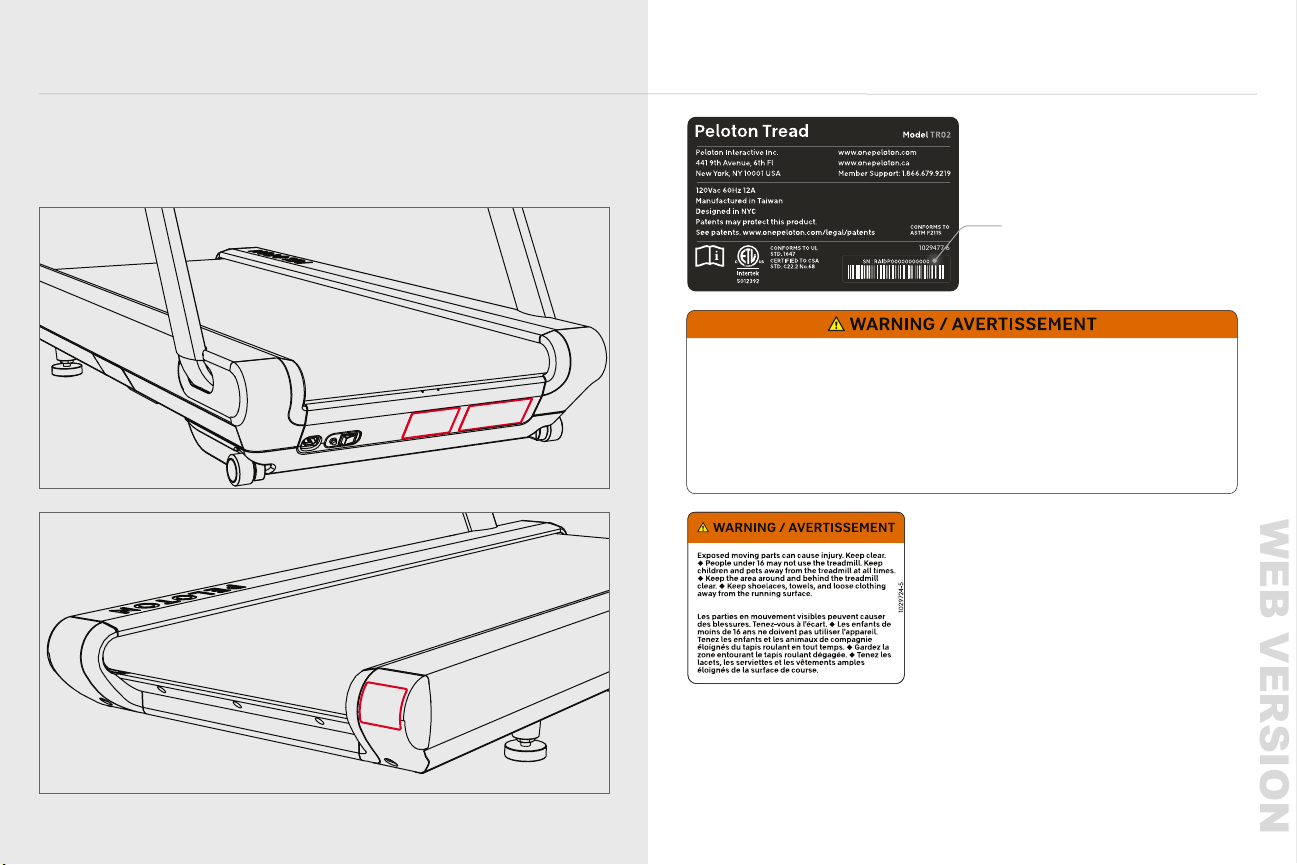
Familiarize yourself with all warnings on the Tread before use.
If any label is damaged or lost, contact member support for a replacement immediately.
The serial number indicates this unit’s date of construction. For example,
‘RAIDP1200417xxxx’ would mean that the unit was constructed on 17 April 2020.
*
A
B
C
A
1029477-6
C
WARNING / AVERTISSEMENT
B
*
Misuse of this equipment may result in serious injury or death. Read and
understand the user manual prior to use.
Follow all warnings and
instructions in the manual and on the equipment.
Unplug the treadmill
and remove the safety key before servicing and when it is not in use. Always
store the safety key away from the treadmill and out of the reach of children.
Do not share the Tread Lock passcode with people under the age of 16 or
others who should not use the Tread.
Inspect the equipment before use. Do
not use if it is worn or damaged.
Exposed moving parts can cause injury.
Keep clear.
Use caution when stepping on and off the treadmill. If you feel
faint or dizzy, or experience pain while exercising, stop immediately.
User
weight must not exceed 300 lb/136 kg.
Do not touch moving parts. Keep
shoelaces, loose clothing, and accessories away from the running surface.
Metrics on the screen, including heart rate monitoring, may be inaccurate. Use
values for reference only.
For consumer use only.
Une utilisation inadéquate de l'équipement pourrait entraîner des
blessures sérieuses ou la mort.
Lisez le guide d'utilisation et
assurez-vous de le comprendre avant d'utiliser le Tread.
Suivez tous les
avertissements et toutes les instructions figurant dans le manuel et sur
l'équipement.
Débranchez l'appareil et retirez la clé de sécurité avant
d'effectuer un entretien et lorsqu'il est inutilisé. Rangez toujours la clé de
sécurité loin de l'appareil et hors de portée des enfants.
Ne communiquez
pas le code d'accès Tread Lock aux enfants de moins de 16 ans ou à d'autres
personnes qui ne devraient pas utiliser le Tread.
Inspectez l'équipement
avant chaque utilisation. Ne l'utilisez pas s'il est usé ou endommagé.
Les
parties mobiles apparentes peuvent causer des blessures. Tenez-vous à
l'écart.
Faites preuve de prudence lorsque vous montez et descendez du
tapis roulant.
Si vous vous sentez faible ou étourdi, ou si vous éprouvez des
douleurs, cessez immédiatement l'entraînement.
Le poids de l'utilisateur ne
doit pas dépasser 300 lb/136 kg.
Ne touchez pas les pièces mobiles.
Maintenez les lacets, les vêtements amples et les accessoires éloignés de la
surface de course.
Les mesures affichées à l'écran, y compris le rythme
cardiaque, pourraient être inexactes. Utilisez ces valeurs à titre indicatif
seulement.
L'équipement est destiné à une utilisation privée seulement.
1029476-5
WEB VERSION
10
NOTICES
11
|
This device complies with part 15 of the
FCC Rules. Operation is subject to the
following two conditions: (1) this device
must not cause harmful interference,
and (2) this device must not accept any
interference received, including interference
that may cause undesired operation.
NOTE
:
This equipment has been tested
and found to comply with the limits for
a Class B digital device, pursuant to
Part 15 of the FCC Rules. These limits
are designed to provide reasonable
protection against harmful interference in
a residential installation. This equipment
generates, uses and can radiate radio
frequency energy and, if not installed and
used in accordance with the instructions,
may cause harmful interference to radio
communications. However, there is no
guarantee that interference will not occur
in a particular installation. If this equipment
does cause harmful interference to radio
or television reception, which can be
determined by turning the equipment off
and on, the user is encouraged to try to
correct the interference by one or more
of the following measures:
1 Reorient or relocate the
receiving antenna.
2 Increase the separation between the
equipment and receiver.
3 Connect the equipment to an outlet on a
circuit different from that to which the
receiver is connected.
4 Consult the dealer or an experienced
radioTV technician for help.
CAUTION
:
1 To comply with FCC RF exposure
compliance requirements, a separation
distance of at least 20 cm must be
maintained between the antenna of
this device and all persons.
2 This transmitter must not be co-located
or operating in conjunction with
any other antenna or transmitter.
NOTICES
Waste electrical products should not
be disposed of with household
waste. Please recycle where facilities
exist. Check with your local authority
or retailer for recycling advice.
This product is ANT+™ certied and
is compatible with ANT+ sensors
that support heart rate monitoring.
DISTRIBUTED BY:
US/CANADA
Peloton Interactive, Inc.
441 9th Ave, 6th Floor
New York, NY 10001
UK
Peloton Interactive UK Limited
110 Long Acre
Covent Garden
London WC2E 9LH
United Kingdom
DE
Peloton Interactive Deutschland GmbH
c/o WeWork Neue Schönhauser Str. 3-5
Neue Schönhauser Straße 3-5
10178 Berlin
Germany
WEB VERSION
12
13
|
SPECIFICATIONS
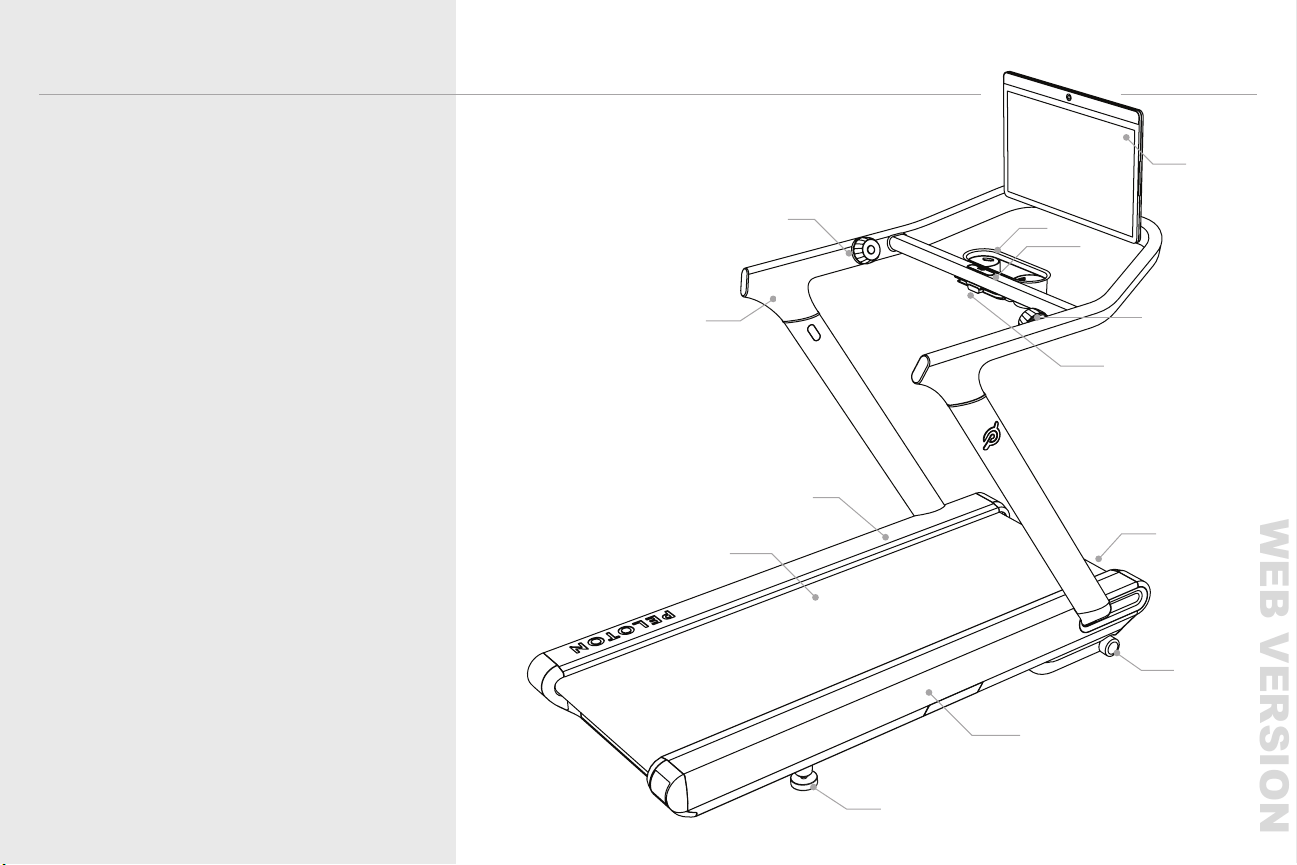
SPECIFICATIONS
A
B
C
D
E
F
G
H
I
J
K
L
M
TOUCHSCREEN
TRAY
STOP BUTTON
SPEED KNOB
SAFETY KEY
POWER SWITCH
INCLINE WHEELS
DECK
FEET
BELT
FOOTRAILS
HANDRAIL
INCLINE KNOB
C
B
L
K
H
J
G
F
I
E
M
D
A
WEB VERSION

14
15
|
SPECIFICATIONS
SPECIFICATIONS CONTINUED
N
O
P
Q
R
SLEEP BUTTON
AUDIO JACK
POWER / DATA INPUT
NETWORK / CHARGING PORT
VOLUME CONTROLS
N
O
P
Q
R
WEB VERSION

16
17
|
SPECIFICATIONS
DIMENSIONS
Total : 68” L x 33” W x 62” H (173 cm L x 84 cm W x 157 cm H)
Screen : 23.8” diagonal
Belt : 59” L x 20” W (150 cm L x 51 cm W)
Step-up height : 8”/20 cm
Weight : 290 lb/132kg
TECHNOLOGY
Screen : 23.8” 1080p HD touchscreen
Camera : 8MP still photo/1080P video camera with privacy cover
USB-C network/charging port
3.5 mm headphone jack
4 Digital Microphone Array
User Controls :
One-touch wake/stop/sleep button
Speed and Incline knobs with jump buttons
On-screen speed and incline shortcuts
Volume up/down buttons
Sound :
Front-facing stereo speakers, 2.2 channel with rear-facing woofers
80Hz to 20KHz frequency response
Weighted emission sound pressure at runner’s ear: <65dbA*
Connection :
WiFi 802.11 a/b/g/n/ac, MIMO 2x2 Antenna
ANT+™ wireless
Bluetooth® 5.0
100 Mbps Ethernet via network/charging port
SPECIFICATIONS CONTINUED
Noise emission under load is higher than without load.*
WEB VERSION

SPECIFICATIONS
19
|
18
SPECIFICATIONS
Power Requirements :
US/Canada : 120Vac, 60Hz, 12A
UK/Germany : 230V 50Hz, 10A
Avoid GFCI/RCD/RCBO outlets
CONTINUED
PERFORMANCE
Speed : 0-12.5 mph/0-20 kph
Incline : 0-12.5% grade
Motor : 3 HP DC*
Screen Adjustment : 0-50 degree vertical tilt
Safety : Removable safety key
USER REQUIREMENTS
Height : 4’11” - 6’4”/150 - 193 cm
Weight : 105 - 300 lb/48 - 136 kg
Age : 16 years or older
Horsepower (HP) ratings are certied by the motor manufacturer and provided to
consumers for comparison purposes. The rating does not reect the actual operating
power of the treadmill. Many factors affect actual operating power and the treadmill
does not operate at the rated HP.
*
WEB VERSION
20
SETTING UP YOUR TREAD
21
|
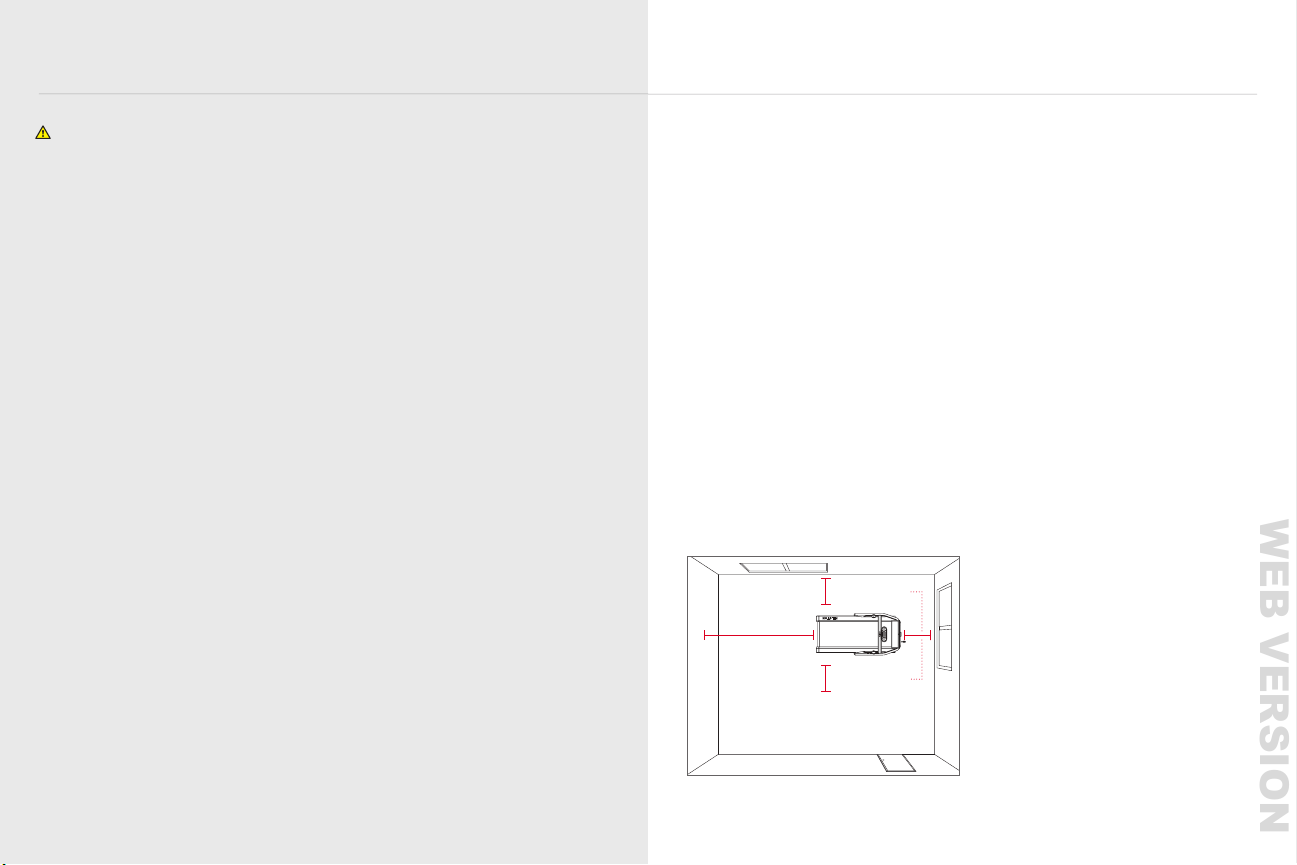
y Make sure you have at least 78.7 in/2m of clearance behind the Tread and
24 in/60 cm of clearance on each side of the Tread.
y Install the Tread in an area not accessible to children or pets.
y Always keep the area around the Tread clear of exercise equipment, furniture
and other objects.
y Store the Tread in a dry, indoor area.
y Install the Tread on a hard, at, stable surface. Avoid high pile carpets. If you put a mat
under the Tread, choose a hard, thick mat that won’t curl up or interfere with the
incline mechanism.
y Bootcamp and Floor classes take place off or partially off the Tread. Make sure that you
have adequate space to work out behind or alongside the Tread.
y The Tread deck can incline to a height of 15 in/38 cm. Make sure that the area above
your Tread is free of obstructions and that the ceiling height is at least 20 in/51 cm
greater than the height of your tallest Tread user.
y Make sure the Tread is situated within 5 ft/152 cm of an outlet. The provided power cord
must be able to reach the outlet at minimum and maximum incline, with some slack. The
power cord must never pass under the Tread.
LOCATION REQUIREMENTS
SETTING UP YOUR TREAD
WARNINGS AND SAFETY INSTRUCTIONS
Keep the area around the Tread clear of furniture, exercise equipment or other objects,
and abide by clearance requirements at all times.
Never put anything under the Tread or reach under the Tread while it is powered on.
Comply with all local codes and ordinances for electrical installation when
installing the Tread. Consult an electrician if you are not sure whether your outlet can
support the Tread.
Do not use extension cords or adapters. Do not attach other appliances to the same circuit.
Avoid GFCI and RCBO outlets. If no suitable outlet is available, contact an electrician.
Changes or modications to this unit not expressly approved by Peloton could void the
warranty, result in damage to the Tread, or cause injury to the user.
Use a dedicated, grounded circuit capable of carrying 15 or more amps (US/CAN), 13 or
more amps (UK) or 16 or more amps (DE). If the circuit is not properly grounded there is a
risk of electric shock.
Never put anything under the Tread or reach under the Tread while it is powered on. Keep
the area around the Tread free of obstructions.
24
i n /60c m
24 i n /60c m
BACK
7 8 . 7 i n / 2 m
WEB VERSION
22
23
|
SETTING UP YOUR TREAD
SETTING UP YOUR TREAD CONTINUED
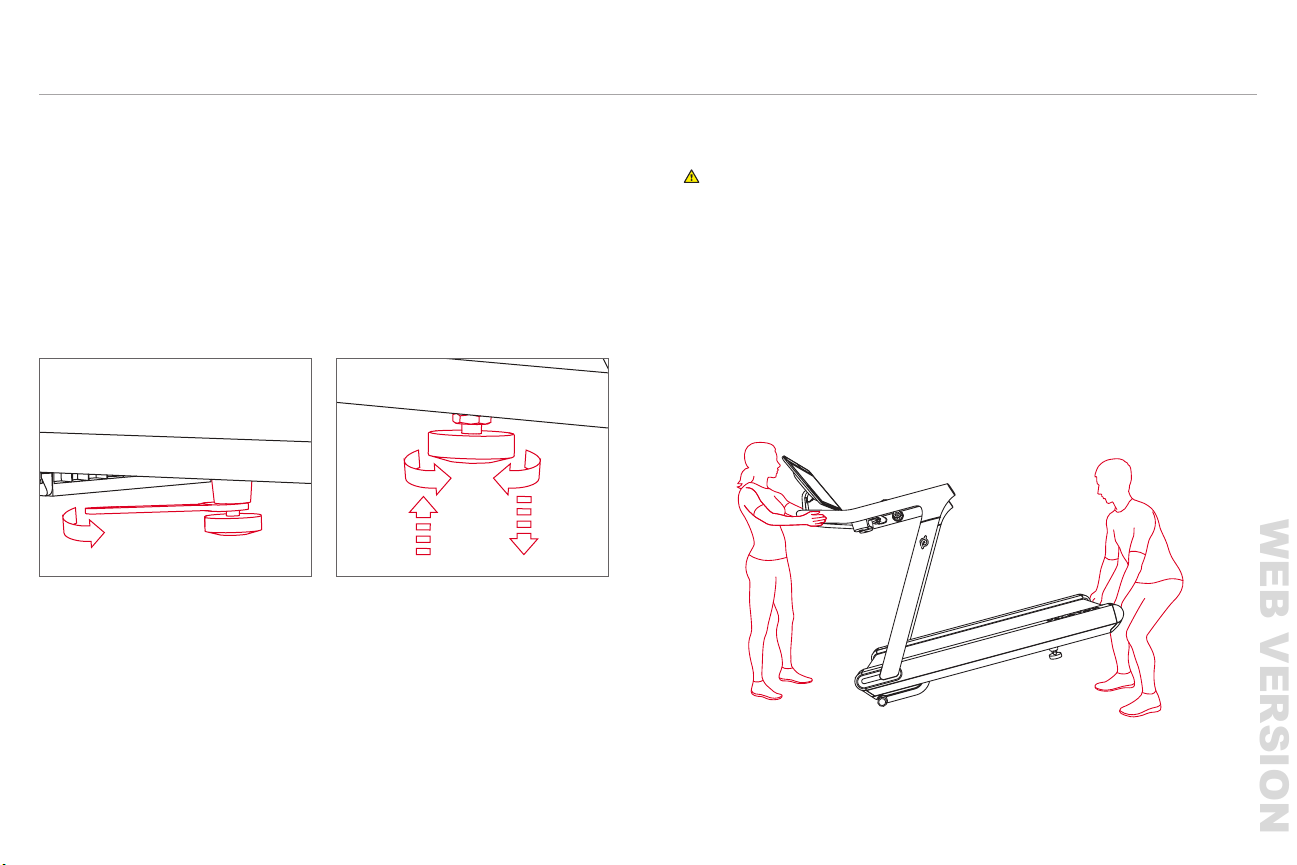
LEVELING
1 Use a 27mm wrench or an adjustable wrench to loosen the nut at the top of
each back leg.
2 Turn one or both feet clockwise until all feet rest rmly on the ground.
3 Tighten the locking nuts.
y Make sure to power down and unplug the Tread before moving it.
y One person stands at front, holding the handrail.
y One person lifts from the back.
y Tilt the Tread forward.
y Slowly and carefully roll the Tread backwards or forwards.
For more information on transporting the Tread to a new location, contact
member support.
CAUTION: Do not attempt to move the Tread with fewer than two people.
MOVING THE TREAD
1 2
If the Tread rocks or wobbles, stabilize it by adjusting the back feet.
WEB VERSION
24
25
|
SETTING UP YOUR TREAD
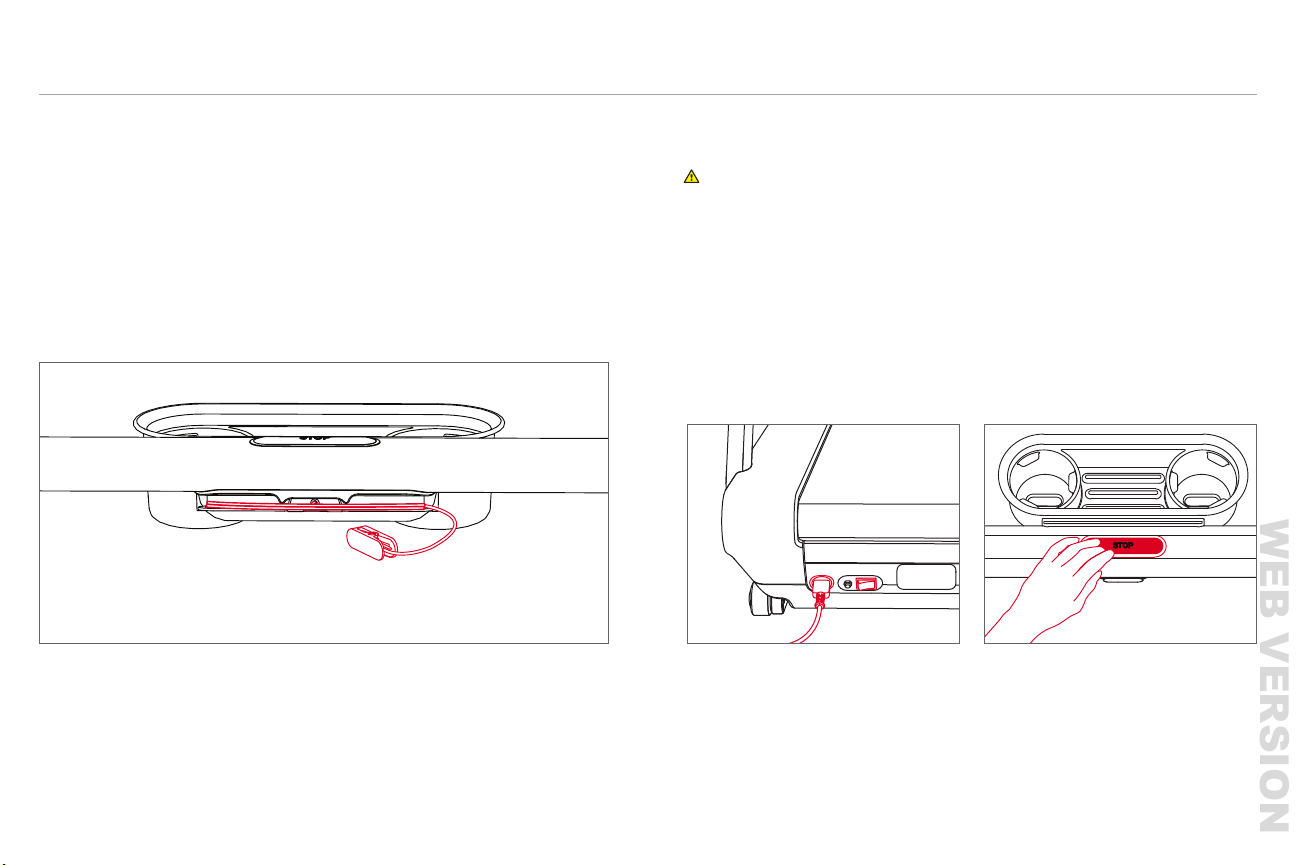
1 Plug in the power cord.
2 Switch the Tread on.
3 Press the center button to wake the Tread.
SETTING UP YOUR TREAD CONTINUED
STORAGE
y Store the Tread in a dry, indoor area.
y Remove the Safety Key and store it in a separate location when the Tread is not in use.
y To reattach the Safety Key, t the magnet into the notch under the center button. Wrap
the cord around the cleat twice and place the clip on the magnet.
POWERING OFF
1 Press and hold the center button.
2 Switch the Tread off.
PLUGGING IN AND POWERING ON
WARNING: Always switch power off, unplug the Tread, and remove the safety key
before cleaning and when the Tread is not in use.
WEB VERSION
26
27
|
SETTING UP YOUR TREAD
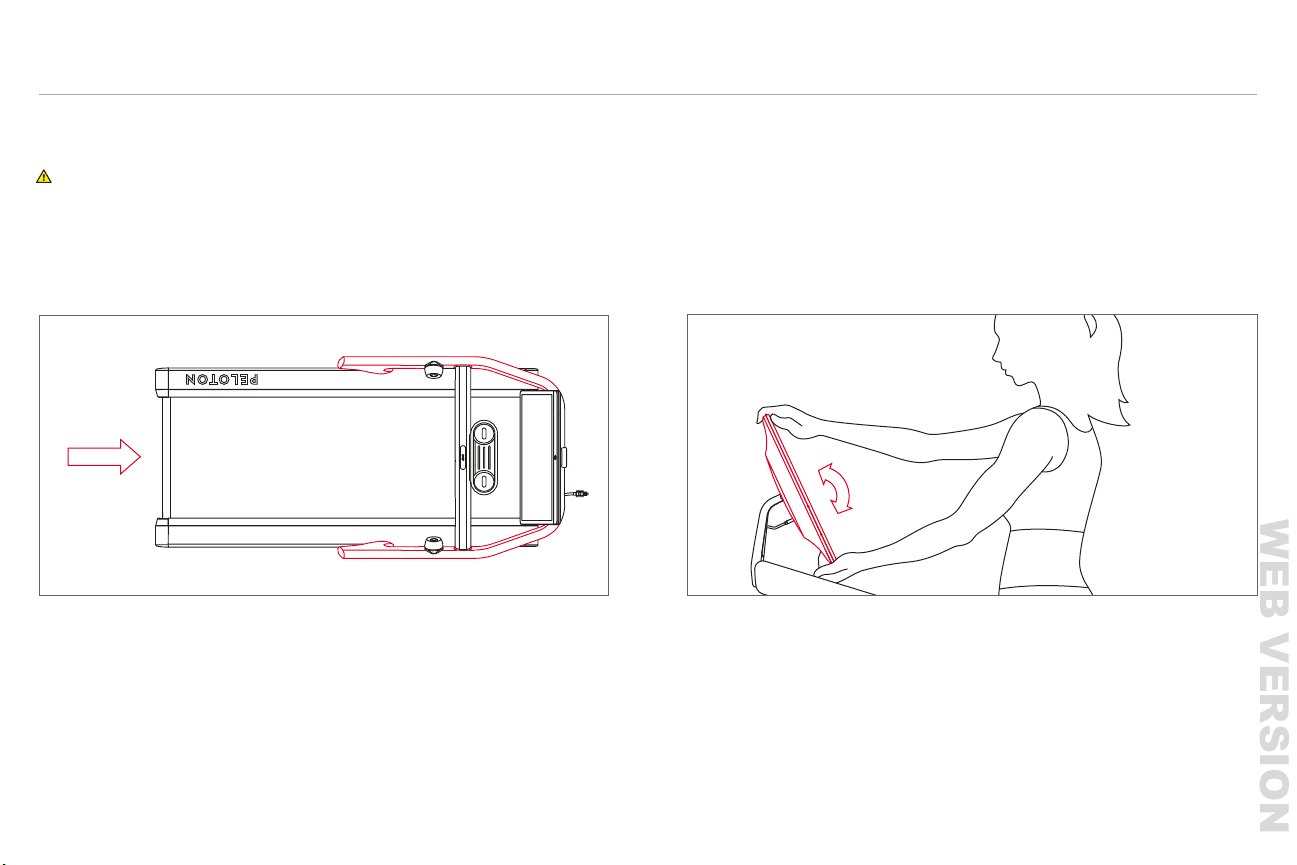
ADJUSTING THE TOUCHSCREEN
y Hold the top and bottom of the screen and tilt back or forward.
y You should be able to look at the screen comfortably from the center of the deck.
SETTING UP YOUR TREAD CONTINUED
MOUNTING
WARNING: Do not start the Tread before stepping onto the running surface. Step
onto the Tread from the rear, using handrails for balance. Avoid putting your full weight
on the handrails.
NOTE: Do not try to rotate the touchscreen horizontally or it could break.
WEB VERSION
28
USING THE TREAD
29
|
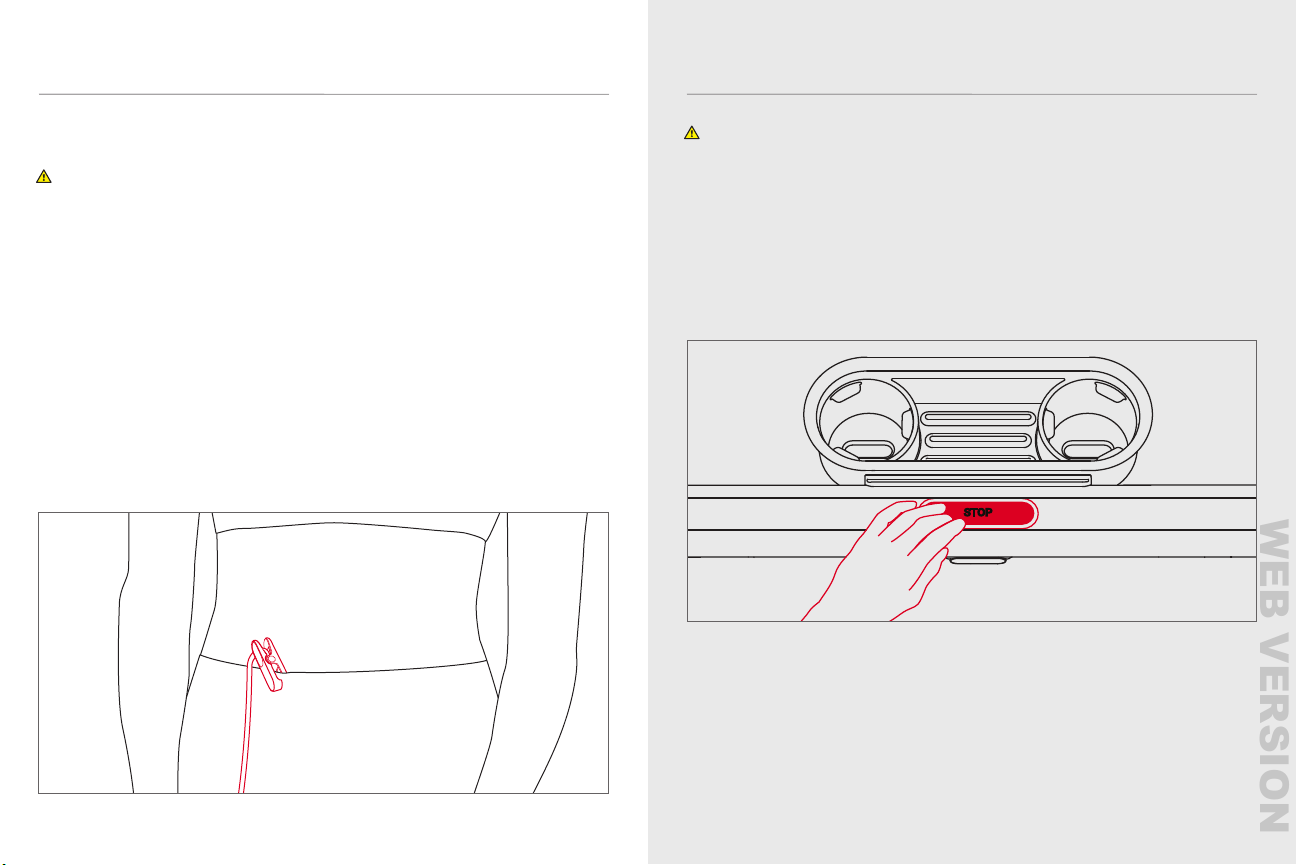
y Detach the magnetized clip from the center rail and clip it to a tight-tting
piece of clothing.
y If the Safety Key is detached, the belt will immediately stop moving and the Tread
will lock.
y The Tread will be disabled until the Key is reattached.
y To start running again, reattach the Safety Key.
y Always remove the Safety Key and store it in a separate location out of the reach of
children when the Tread is not in use.
y To reattach the Safety Key, insert the magnet end into the gap under the center button,
run the cord through the groove around the center button, and place the clip next to
the magnet.
SETTING UP YOUR TREAD CONTINUED
SAFETY KEY
CAUTION: The Tread will function only when the Safety Key is present and fully
engaged. Do not lose the Safety Key. Always store the Safety Key away from the Tread
and out of reach of children.
USING THE TREAD
WARNING
:
Do not start the Tread before stepping onto the running surface.
Step onto the Tread from the rear, using handrails for balance. Avoid putting your
full weight on the handrails.
CENTER BUTTON
y When the running surface is in motion, press to stop.
y When the Tread is powered on, but inactive, press to wake.
y When the Tread is active, press and hold for three seconds to sleep.
WEB VERSION
30
GETTING STARTED
31
|
31
USING THE TREAD CONTINUED
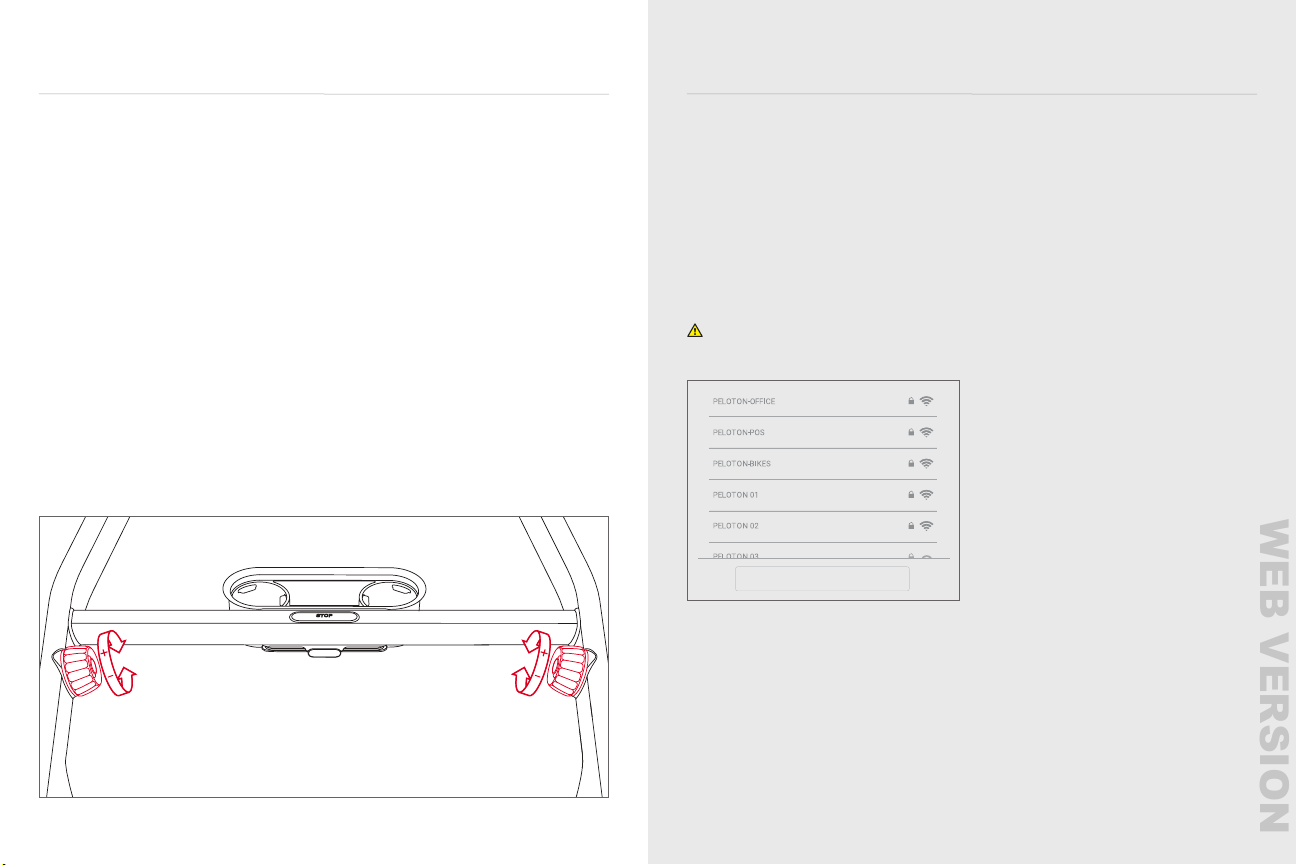
SPEED
y Turn the speed knob forward to increase speed in increments of 0.1.
y Turn the knob backward to decrease speed in increments of 0.1.
y Press the jump button at the center of the knob to increase speed to the next
whole number.
y Tap Speed to change your speed using on-screen shortcuts. Tap the screen and select
Customize Shortcuts to put in your own shortcut speeds.
INCLINE
y Turn the incline knob forward to increase incline in increments of 0.5 percent grade.
y Turn the knob backward to decrease incline in increments of 0.5 percent grade.
y Press the jump button at the center of the knob to increase incline speed to the next
whole percent grade.
y Tap Incline to change your incline using on-screen shortcuts. Tap the screen and select
Customize Shortcuts to put in your own shortcut incline settings.
GETTING STARTED
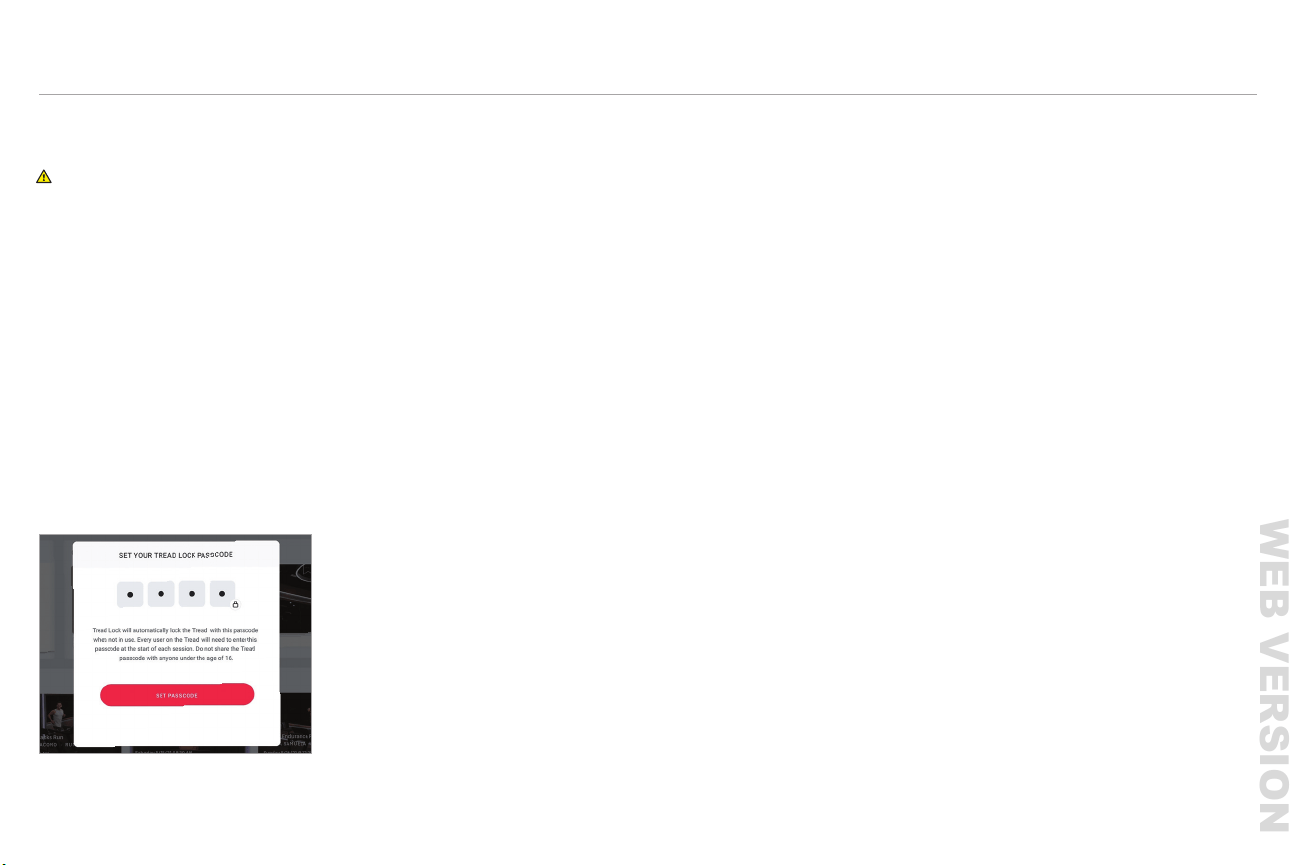
CONNECTING TO THE INTERNET
y Select your Wi-Fi
®
network and enter the password. Tap Connect.
y If a Wi-Fi network is not available, you can connect to a wired network. Use an adapter
to connect an Ethernet cable to the network port on the back of the touchscreen.
The Tread will connect to the network automatically.
y To turn off Wi-Fi, tap the upper right corner of the touchscreen and select Wi-Fi. On the
Wi-Fi screen, toggle the radio button at the upper right.
LOGGING IN
y When logging in for the rst time, please have available your Subscription Activation Key
or the login information you set up when you purchased the Peloton Tread.
y Once a subscription is activated and associated with this Tread, any user can log in and
access subscription content.
CAUTION: Ethernet cable must not pass underneath the Tread or touch the
running surface.
Don’t Have Wireless?
Advanced Settings
WEB VERSION
32
33
|
GETTING STARTED
GETTING STARTED CONTINUED
SELECTING A CLASS
y Select live classes from the schedule or choose from on-demand classes.
y Filter by instructor, class length, class type, and more.
y Your instructor will guide you through your workout. If the workout does not include a
warmup and cooldown, warmup and cooldown classes are available separately.
y Select More for a Scenic Run or Just Run experience.
CLASS TYPES
Peloton’s schedule includes a variety of different kinds of classes. Class types may
include the following:
y Running/Walking: cardio-focused classes taking place entirely on the Tread.
y Bootcamp: a combination of cardio segments taking place on the Tread and strength
segments taking place off the Tread.
y Strength/Yoga/Cardio: classes taking place off the Tread.
y For more information on classes, go to onepeloton.com/tread/classes.
ADDING A PROFILE
To let another person use your Tread, tap the icon next to your username at the lower left
of the screen and select Add/Remove Proles. The new user can log in with an existing
Peloton account or tap Create an Account to set up a new one.
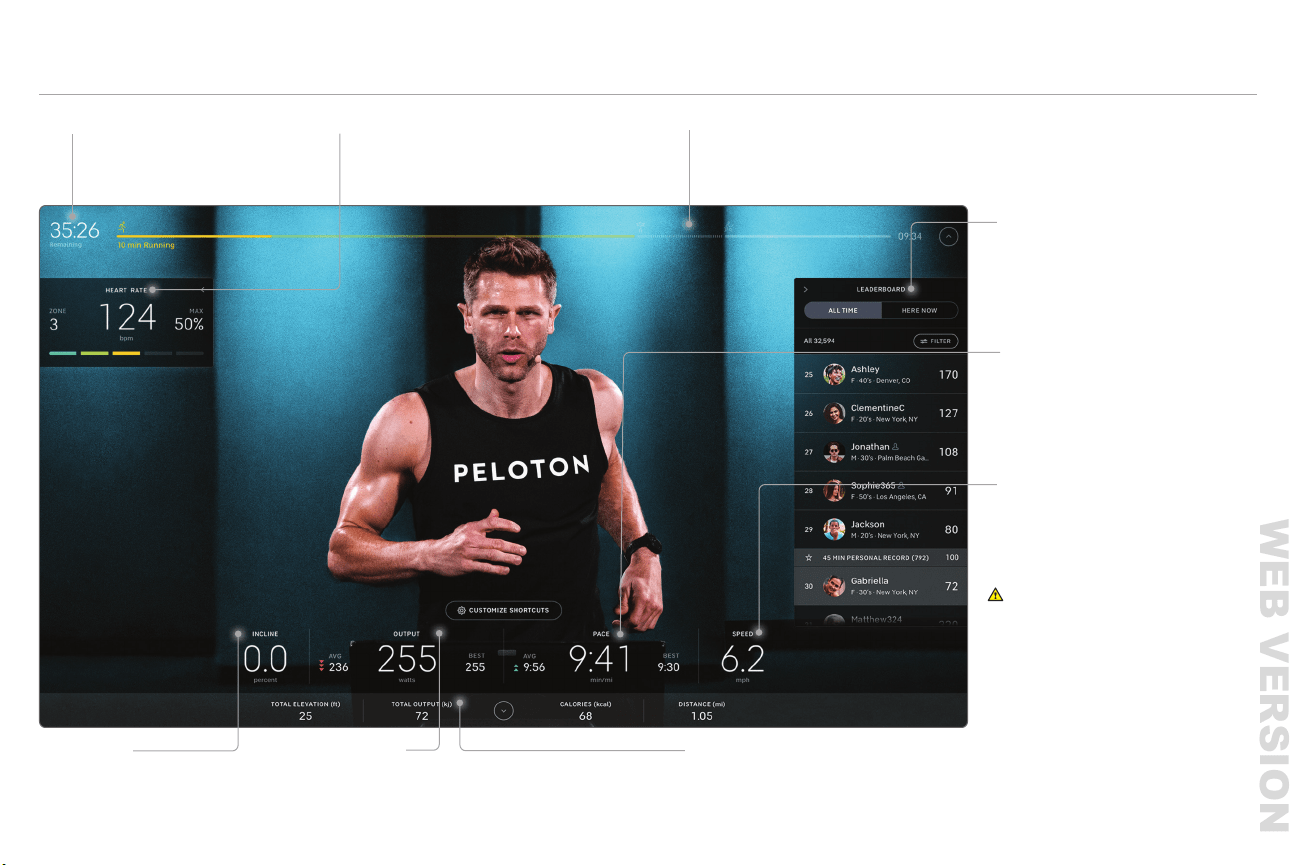
TREAD LOCK
WARNING: Hide the Tread Lock passcode from people under the age of 16 or
persons with reduced physical, sensory or mental capabilities that impair the safe
use of the equipment.
y Tread Lock is an additional safety feature that requires a passcode to unlock the Tread.
y Setting up a 4-digit passcode will be required when using your Tread for the rst time.
All users will be required to enter this passcode after 45 seconds of inactivity except
during a workout.
NOTE: all user proles associated with the Tread will be required to enter the same 4-digit
passcode.To change an existing passcode:
y Tap the
...
icon at the bottom right of the home screen and select Tread Lock.
y Follow the prompts to reset the 4-digit passcode.
y If you forget the Tread Lock passcode, you can reset it by going to
support.onepeloton.com and following the instructions for passcode reset.
WEB VERSION
34
35
CLASS SCREEN
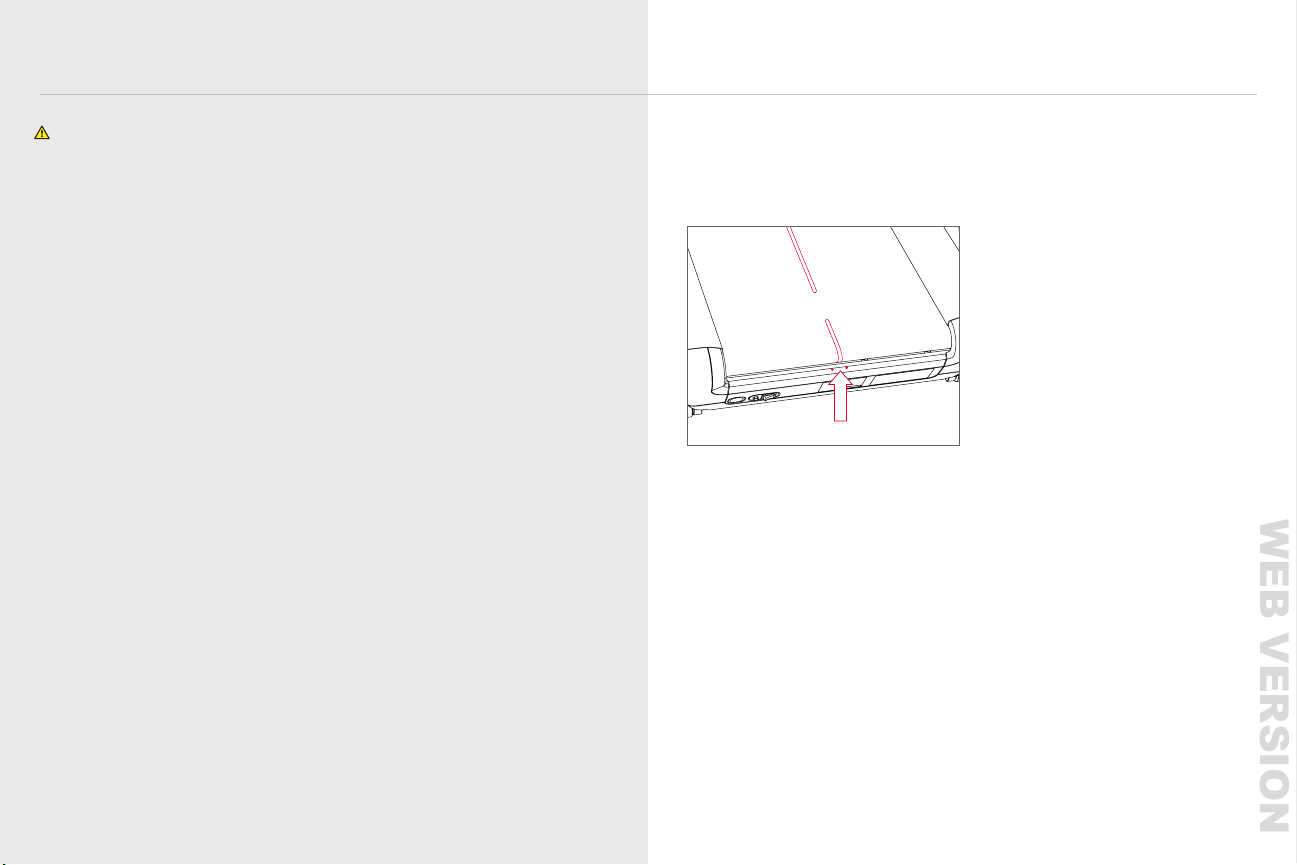
CLASS SCREEN
TIMELINE
Your Timeline shows class segments
and your progress within the class
HEART RATE
Heart rate is measured when you
connect a heart rate monitor
LEADERBOARD
INCLINE
Your current Incline, in percent grade
OUTPUT
Your Output, in watts, is a combination
of Speed and Incline
TIME REMAINING
Time remaining in the class
PACE
Your current Pace, in
minutes per mile
SPEED
Your current Speed
TOTAL OUTPUT
y The Leaderboard shows all
participants in a class
y Filter by Friends, Tags, or users
who are Here Now
WARNING
:
Heart rate monitoring
systems may be inaccurate.
Over-exercising may result in serious
injury or death. If you feel faint stop
exercising immediately. Use metrics on
the screen for reference only.
WEB VERSION
MAINTENANCE AND CARE
37
|
36
MAINTENANCE AND CARE
WARNINGS AND SAFETY INSTRUCTIONS
Always power down and unplug the Tread before cleaning or performing maintenance.
The safety and integrity of the Tread can only be maintained when it is regularly examined
for damage and repaired.
It is the owner’s sole responsibility to ensure that regular maintenance is performed.
Replace worn or damaged parts immediately. Do not use the Tread until repairs are made.
Use only original parts from Peloton. Changes or modications to this unit not expressly
approved by Peloton could void the warranty, result in damage to the Tread, or cause injury
to the user.
Service other than the procedures described here must be performed by an
authorized technician.
MAINTENANCE SCHEDULE
CLEANING THE TREAD
y Clean the Tread regularly for optimal performance and longevity.
y Clean surfaces with a damp cloth and mild, soapy water.
y Never use abrasive cleaners.
y Never spray or pour liquid directly on Tread surfaces. Never allow liquid to drip into
any opening on the Tread.
y Always power off and unplug the Tread before cleaning.
Before every class:
Weekly:
y Clean Tread surfaces.
y Check power cord for damage.
y Clean the area underneath the Tread.
y Check the area around and underneath the Tread for potential obstructions.
y Check the entire Tread for wear and damage.
y Test the safety key by pulling it out while walking on the Tread.
y Make sure the belt is centered.
Yearly:
y Lubricate the belt.
Monthly:
WEB VERSION
38
39
|
MAINTENANCE AND CARE
CENTERING OR TENSIONING THE BELTLUBRICATING THE BELT
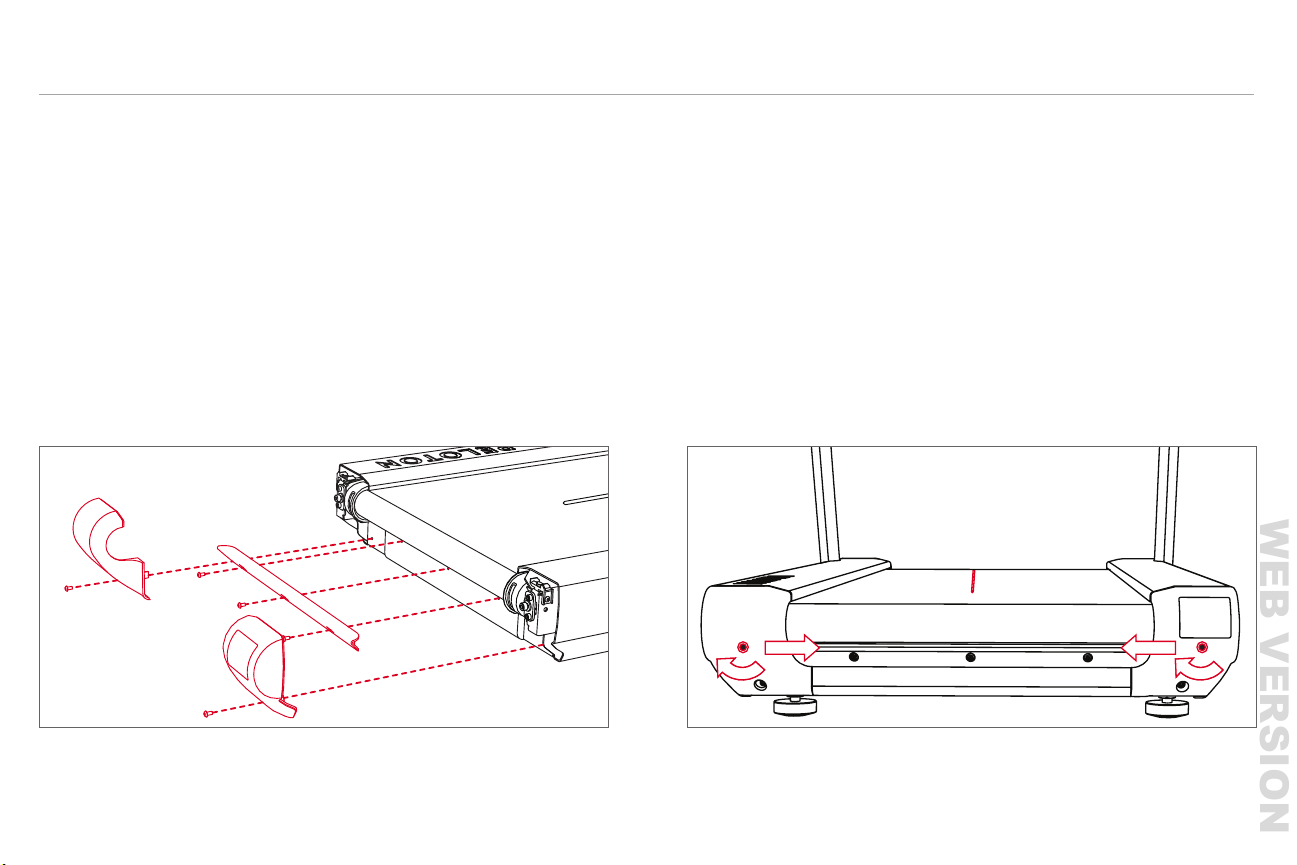
1 Power down and unplug the Tread.
2 Use a 3mm Allen wrench to remove one screw from each rear end cap and three from
the rear belt guard.
3 Using a 6mm Allen wrench, turn both tensioning screws seven turns counterclockwise,
so you can reach underneath the belt.
4 Apply a bead of silicone lubricant to the deck board.
5 Tighten the two screws to their original tension. Make sure the red center line on the
belt still sits between the two centering dots at the front of the Tread. See page 39 for
help centering or tensioning the belt.
6 Reinstall the belt guard and end caps.
MAINTENANCE AND CARE CONTINUED
1 Power down and unplug the Tread.
2 Use a 6mm Allen key to tighten the tensioning screws on one or both sides of the belt
y To pull the belt to the right, tighten the left screw one quarter turn
y To pull the belt to the left, tighten the right screw one quarter turn
y To add tension to a loose belt, tighten each screw one quarter turn
y For centering adjustments, run the Tread for 30 seconds to let the belt adjust.
y For tensioning adjustments, briey walk and run on the Tread to make sure the
belt isn’t slipping.
3 Turn on the Tread and test.
4 Repeat the adjustments as needed until the belt is tensioned and centered.
For more detailed instructions, visit support.onepeloton.com.
NOTE: Use only the lubricant provided in your Peloton toolkit.
WEB VERSION

40
TROUBLESHOOTING
41
|
Problem: The Tread does not register heart rate data.
Solution: Check your heart rate monitor.
y Is the sensor receiving data? You may need to tighten the strap or moisten the
electrodes to help the monitor pick up your heart rate.
y Is the heart rate monitor paired with a different device?
y Does the monitor battery need to be replaced?
Keep in mind that the Tread will only display heart rate data when a class is in progress.
Problem: The Tread won’t turn on.
Solution: First make sure that the power cord is securely attached to the Tread and the
outlet, and that the Tread is switched on. Then press and hold the center button for a
few seconds. The control lights should turn on. If the Tread is still unresponsive, contact
member support.
Problem: The Speed and/or Incline knob does not work.
Solution: If the Tread is awake and the controls are not working, check the control lights.
The Tread will function only when the safety key is present and fully engaged. Solid red
lights indicate that the safety key is not connected. Try detaching and reattaching it.
Blinking red lights indicate an error. Follow the instructions on the screen, or, if there are no
instructions, use the power switch on the front of the deck next to the power cord plug-in to
turn the Tread off and then on. If the issue persists after power cycling, contact
member support.
Problem: The touchscreen has trouble connecting to Wi-Fi.
Solution: Peloton recommends a minimum of 10-15 mbps download and 2.5 mbps
upload speed for your touchscreen. Wi-Fi extenders and boosters, distance from the router,
and obstructions like walls and furniture can weaken your Wi-Fi signal. If you continue to
have trouble with your Wi-Fi connection, you can connect to a Local Area Network (LAN).
Use an adapter to connect an Ethernet cable to the USB-C network port on the back of
the touchscreen.
Problem: The Tread is producing an unusual noise.
Solution: Immediately stop the belt and set the incline to zero. Power down and unplug the
Tread and contact member support.
Problem: The belt won’t move.
Solution: First, make sure the Tread is awake. If the screen is dark, the Tread is asleep and
will not work. If the Tread is awake, try detaching and reattaching the safety key. If you
are still unable to start the belt, use the power switch at the front of the deck to turn the
Tread off and then on. If you are unable to start the belt after power cycling, contact
member support.
Problem: Control lights are on, but the touchscreen is blank.
Solution: If you have just turned on the Tread, wait a few moments for the system to boot.
If the screen still doesn’t turn on, try to wake the system by touching the screen or by
pressing and holding the center button for a few seconds. If the screen is still unresponsive,
contact member support.
CAUTION
:
Any repair or troubleshooting procedure other than those described in
this section must be performed by authorized personnel.
TROUBLESHOOTING
WEB VERSION

PARTS
Box 1:
Deck
Power Cord
Box 2:
Tray
Safety Key
Uprights x 2
Handrail
M5x10 button head screws x 4
M6x10 low prole cap head screws x 2
M6x10 at head cap screws x 2
M10x16 cap head screws with washers x 14
Box 3:
Touchscreen
TOOLS REQUIRED
3mm Allen wrench
4mm Allen wrench
8mm Allen wrench
27mm wrench
Torque wrench with 4mm
and 8mm hex bits
4.7 N.m preset torque tool used by your
Peloton moving professional
43
|
ASSEMBLY
ASSEMBLY
42
WARNING
:
The Peloton Tread was not designed for assembly and installation by
consumers. The Peloton Tread assembly instructions are intended to assist trained,
professional installers, using specialized tools, in assembling the Peloton Tread.
The Peloton Tread weighs 290 lb/132 kg and requires more than one person to
assemble and/or move. Do not attempt to move the Tread with fewer than two
people. Improper assembly of the Peloton Tread can lead to serious injury. Damage
or equipment failure resulting from the improper or negligent assembly will not
be covered under Peloton’s warranties. If you use these assembly instructions to
assemble, disassemble, or move the Peloton Tread, you do so entirely at your own
risk. By undertaking assembly of your Peloton Tread, you agree to waive and release
Peloton from any and all claims that you may have resulting from the assembly of the
Peloton Tread by anyone other than a trained professional.
WARNING
:
Perform a complete visual inspection of the Peloton Tread and test all
features and functions prior to use.
TROUBLESHOOTING CONTINUED
Problem: The belt comes to a stop during a workout.
Solution: If an error occurs during operation, the Tread belt will come to a stop. The stop
may be gradual or more sudden, depending on the error and your speed.
Errors could include:
y The safety key disconnecting
y The Tread not registering the presence of a user below the minimum user weight
y A temporary issue with the touchscreen software
If an error occurs, follow the instructions on the screen. If there are no instructions, use the
power switch on the front of the deck next to the power cord plug-in to turn the Tread off
and then on. Wait 30 seconds before switching it back on. See support.onepeloton.com for
more information on possible errors.
Problem: Control lights are red.
Solution:
y Solid red lights indicate that the safety key is not connected. The Tread will
function only when the safety key is present and fully engaged. Try detaching
and reattaching it.
y Blinking red lights indicate an error. Follow the instructions on the screen, or,
if there are no instructions, use the power switch on the front of the deck next to the
power cord plug-in to turn the Tread off and then on. See support.onepeloton.com for
more information on possible errors.
WEB VERSION
44
45
|
ASSEMBLY
ASSEMBLY CONTINUED
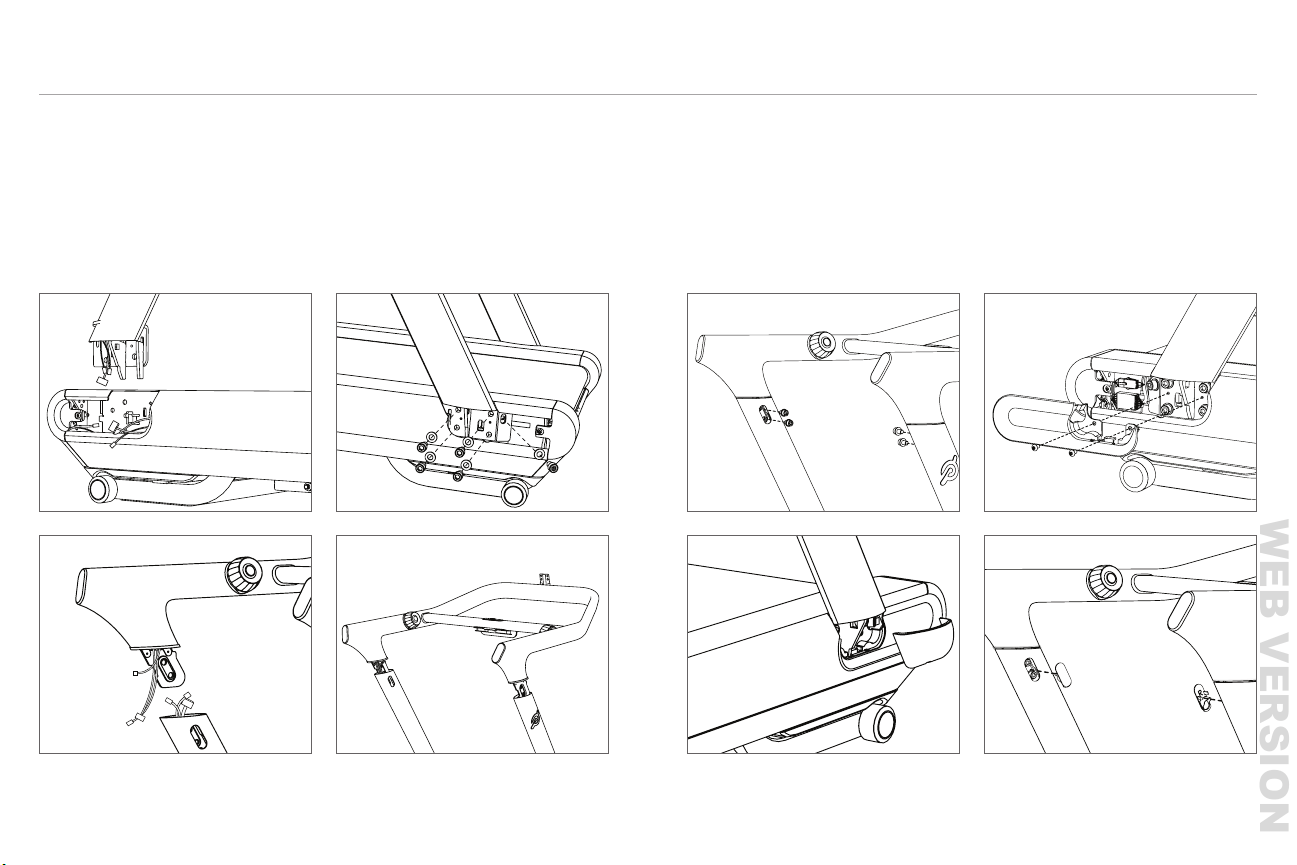
5 Add handrail screws. Torque screws to
35 lb-ft/47 N•m
6 Torque upright screws to
35 lb-ft/47 N•m
7 Attach upright bolt covers
8 Snap on upright caps
9 Add handrail bolt covers
5
8 9
6-7
1 Connect left upright cable
2 Add right and left uprights
3 Connect three handrail cables
4 Push the handrail all the way into
the uprights
1
3 4
2
WEB VERSION
46
WARRANTY
47
|
LIMITED HOME USE WARRANTY
Peloton Interactive, Inc. (“Peloton”) extends
the following Limited Warranty to U.S.
purchasers, which applies only to non-
commercial, in-home, indoor use of the
Peloton Tread. Any other use of the Peloton
Tread shall void this Limited Warranty. During
the applicable Limited Warranty periods
described below, the covered components
of the Peloton Tread will be free of defects
or malfunctions during normal use. Certain
exclusions apply, as further described in this
Limited Warranty.
The Limited Warranty applies for the
following components of the Peloton Tread
only, for the time period indicated. The
Limited Warranty applies only against defects
discovered within the applicable Limited
Warranty period and only so long as the
Peloton Tread remains in the possession of
the original purchaser, or for gifted Peloton
Treads, the owner of the original Subscription
attached to that Peloton Tread
FRAME: FIVE YEARS
Peloton warrants the platform frame, which
is dened as the steel structural portion of
the Tread deck excluding any moving parts
attached to the structural frame, against
defects in workmanship and materials for
a period of ve years from the date of
original delivery.
MOTOR: THREE YEARS
Peloton warrants the motor and its
components against defects in workmanship
and materials for a period of three years from
the date of original delivery.
WALKING BELT: THREE YEARS
Peloton warrants the walking belt against
defects in workmanship and materials for a
period of three years from the date of
original delivery.
HD TOUCHSCREEN: 12 MONTHS
Peloton warrants the touchscreen against
defects in workmanship and materials for
a period of 12 months from the date of
original delivery.
TREAD COMPONENTS:
12 MONTHS
Peloton warrants the components and all
original parts of the Peloton Tread (other
than the frame, motor, and walking belt)
against defects in workmanship and
USA
10 11
1312
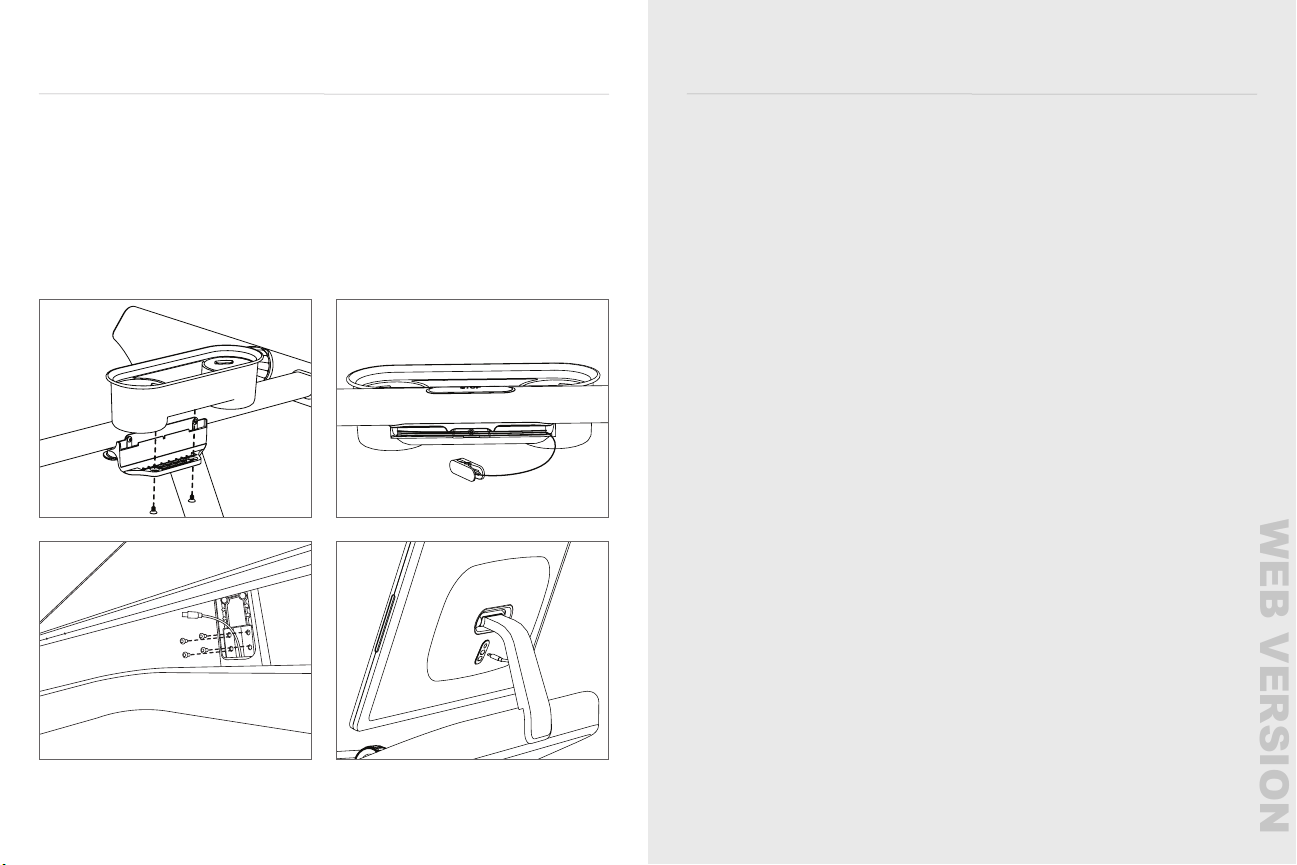
10 Attach tray
11 Install safety key
12 Add touchscreen, making sure the
cable does not get pinched. Torque
screws to 4.7 N-m. Replace neck cover.
13 Plug in power/data cable
14 Plug in and power on
15 The Home Installer App will
run automatically and perform
speed and incline calibration
ASSEMBLY CONTINUED
WEB VERSION

48
49
|
WARRANTY
the U.S. or Canada, and units missing
serial numbers.
Software, even if sold with or embedded in
the Peloton Tread, or Internet connectivity.
Peloton does not warrant that the operation
of the Peloton Tread will be uninterrupted
or error-free.
Damage or equipment failure due to
normal wear and tear, improper or negligent
assembly, maintenance, installation,
relocation, or repair (other than that caused
by a Peloton authorized service technician),
use of the Peloton Tread with parts or
accessories from third parties, or with parts
or accessories not originally intended for
or compatible with the Peloton Tread, or
any use contrary to the instructions in the
Peloton Tread User Manual.
Damage or equipment failure due to
accident, abuse, improper or abnormal
use, neglect, corrosion, discoloration of
paint or plastic (or any other change in
cosmetic appearance that does not affect
performance), theft, vandalism, re, ood,
wind, lightning, freezing or other natural
disasters or acts of God of any kind,
electrical wiring, power reduction, power
uctuation or power failure from whatever
cause, unusual atmospheric conditions,
collision, introduction of foreign objects, or
modications that are unauthorized or not
recommended by Peloton.
Incidental or consequential damages.
Peloton is not responsible or liable for
indirect, special, incidental or consequential
damages, economic loss, loss of property
or prots, loss of enjoyment or use, or
other consequential damages of any
nature whatsoever in connection with
the purchase, use, repair or maintenance
of equipment or parts. Peloton does not
provide monetary or other compensation
for any such repairs or replacement parts
costs, including but not limited to gym
membership fees, work time lost, cost of
substitute equipment, diagnostic visits,
maintenance visits or transportation.
Equipment used for commercial purposes
or for any use other than a single family
or household.
Any attempt to move within your home,
transport to another location outside your
home, or repair the Peloton Tread creates a
risk of injury and property damage. Peloton
is not responsible or liable for any damage
or injury incurred during, or as a result of,
LIMITED HOME USE WARRANTY CONTINUED
USA
materials for a period of 12 months from
the date of original delivery.
LABOR: 12 MONTHS
For Peloton Treads originally assembled by
an authorized Peloton technician, Peloton
will cover the labor cost for the repair or
replacement made under this Limited
Warranty for a period of 12 months from
the date of original delivery. Except where
applicable law requires otherwise, repair
labor is not covered for locations where
Peloton did not originally assemble the
Peloton Tread or if the Peloton Tread is
moved to a location that is outside of
Peloton’s service area.
* Limited Home-Use Warranty valid only in
the United States.
EXCLUSIONS AND LIMITATIONS
WHO AND WHAT IS COVERED:
The original owner of the Peloton Tread.
The Peloton Tread must remain in the
possession of the original purchaser, or
for gifted Peloton Treads, the owner of
the original Subscription attached to that
Peloton Tread. This Limited Warranty is
not transferable.
If a defect arises in the Peloton Tread or a
warranted component within the applicable
Limited Warranty period, the purchaser’s
sole and exclusive remedy is for Peloton
to, at Peloton’s discretion to the extent
permitted by law, either replace or repair
the defective or malfunctioning Peloton
Tread or component with the same or a
comparable model.
Any replacement or repaired component
shall be warranted for the remainder of the
original Limited Warranty period or 30 days,
whichever is longer, or for any additional
period that is required by applicable law.
Where permitted by law, replacement
units, parts and electronic components
reconditioned to as-new condition by
Peloton or its vendors may sometimes
be supplied as warranty replacement and
constitute fulllment of warranty terms.
WHAT IS NOT COVERED:
Any other Peloton products or services,
non-Peloton products, or labor not approved
in advance by Peloton member support,
units that are, or that Peloton reasonably
believes to be, stolen, counterfeit, or
purchased from an unauthorized distributor
or reseller, units purchased or used outside
WEB VERSION

50
51
|
WARRANTY
WHAT IF I HAVE QUESTIONS
OR CONCERNS?
You may direct any questions or
concerns to member support.
1.866.679.9129
Any disputes between you and Peloton
related to this Limited Warranty or the
Peloton Tread will be governed by the
then-current dispute resolution procedures
in Peloton’s Terms of Service, available at
onepeloton.com/terms-of-service.
WHAT IF I WANT
MORE COVERAGE?
Extended warranty coverage is available for
purchase. See support.onepeloton.com for
more details.
LIMITED HOME USE WARRANTY CONTINUED
USA
any move, transport, repair or attempt to
move, transport, or repair the Peloton Tread
by anyone other than a Peloton authorized
service technician. All moves, transport or
repairs of the Peloton Tread attempted by
you or your agents are undertaken AT YOUR
OWN RISK and Peloton will have no liability
for any injury to persons or property arising
from such attempted moves, transport or
repairs. In addition, labor may no longer be
covered if you transport the Peloton Tread
outside of Peloton’s service area.
THIS LIMITED WARRANTY IS THE
EXCLUSIVE WARRANTY GIVEN BY PELOTON
AND SUPERSEDES ANY PRIOR, CONTRARY
OR ADDITIONAL REPRESENTATIONS.
ALL OTHER WARRANTIES, EXPRESS OR
IMPLIED, INCLUDING ANY STATUTORY
WARRANTY OR CONDITION OF
MERCHANTABILITY OR FITNESS FOR A
PARTICULAR PURPOSE, ARE DISCLAIMED
EXCEPT TO THE EXTENT PROHIBITED BY
LAW. IN SUCH EVENT, SUCH WARRANTY
IS LIMITED TO THE DURATION OF THE
WARRANTY PERIODS SET FORTH ABOVE.
THIS EXCLUSION APPLIES EVEN IF THIS
WARRANTY FAILS OF ITS ESSENTIAL
PURPOSES AND REGARDLESS OF
WHETHER DAMAGES ARE SOUGHT FOR
BREACH OF WARRANTY, BREACH OF
CONTRACT, NEGLIGENCE, OR STRICT
LIABILITY IN TORT OR UNDER ANY OTHER
LEGAL THEORY. SOME JURISDICTIONS
DO NOT ALLOW THE EXCLUSION
OR LIMITATION OF INCIDENTAL OR
CONSEQUENTIAL DAMAGES, SO THE
ABOVE LIMITATION MAY NOT APPLY TO
YOU. THIS LIMITED WARRANTY GIVES YOU
SPECIFIC LEGAL RIGHTS, AND YOU MAY
ALSO HAVE OTHER LEGAL RIGHTS, WHICH
VARY FROM
STATE TO STATE.
HOW DO I OBTAIN
WARRANTY SERVICE?
Contact member support if you believe
you need service.
1.866.679.9129
onepeloton.com
Peloton Interactive, Inc.
441 9th Ave, 6th Floor
New York, NY 10001
Attention: Limited Warranty Claims
To be eligible for service under this Limited
Warranty you must provide Peloton with the
serial number of your Peloton Tread and the
dated receipt, or other proof of purchase
indicating the date purchased, upon
discovering any nonconformity or defect.
Claims must be made within the specied
warranty period.
WEB VERSION

52
WARRANTY
53
|
Your acceptance of this Limited Warranty
is voluntary and is NOT a condition to
the purchase of the Peloton Tread or any
Membership. You agree to be bound by this
Limited Warranty and You expressly agree
to the receipt of electronic communication
from Us for purposes consistent with Your
rights and responsibilities contained in this
Limited Warranty (which You may opt out of
at any time by contacting us at
onepeloton.ca/company/contact).
It is fully understood by You that the
Services available under this Limited
Warranty apply only to the specic Peloton
Tread purchased. Your cancellation rights
relating to this Limited Warranty are set out
in Part E below.
We extend this Limited Warranty to You,
which applies only to the non-commercial,
in-home, indoor use of the Peloton Tread.
Any other use of the Peloton Tread shall void
this Limited Warranty. This Limited Warranty
applies only to defects discovered within the
applicable Term. Additional exclusions and
limitations apply, as further described in this
Limited Warranty. There is no cost to You for
this Limited Warranty.
If You wish to purchase an extended
warranty for the Peloton Tread, see
support.onepeloton.ca. The purchase of an
extended warranty is completely optional
and is not required in order for this Limited
Warranty to apply.
A. DEFINITIONS
In this Limited Warranty, capitalized words in
bold type have the following denitions:
“Applicable Provinces” means the
provinces in Canada in which this Limited
Warranty applies, being British Columbia,
Alberta, Saskatchewan, Manitoba and
Ontario, so long as the Peloton Tread is
delivered and used in such provinces.
“Cancellation Rights” means the rights to
cancel this Limited Warranty, as set out in
Part E below.
“Customer”, “You” and “Your” means the
customer who purchased the Peloton Tread
to which this Limited Warranty applies.
“Frame” means the steel structural portion
of the Peloton Tread deck, excluding any
moving parts attached thereto.
“Membership” means the monthly
membership subscription to Peloton’s
digital-only product(s) that may be
purchased along with the Peloton Tread.
“Obligor”, “Our”, “We”, “Us”, “Our” and
“Peloton” means Peloton Interactive, Inc.,
and its successors and assigns.
“Peloton Tread” means the treadmill that
this Limited Warranty applies to.
“Service” means the repair or replacement
completed in accordance with this
Limited Warranty.
“Term” is as described in Part B below
(i.e., 12 months for the HD Touchscreen,
Tread Components (except the Frame), and
Labour (if the Peloton Tread was originally
assembled by an authorized Peloton
technician), and 5 years for the Frame),
each from the date of original delivery of
the Peloton Tread.
B. APPLICABLE TERM
AND SERVICES
This Limited Warranty applies to the below
components of the Peloton Tread only, for
the applicable Term indicated below:
TWELVE MONTH TERM:
HD TOUCHSCREEN: Peloton warrants
the touchscreen against defects in
workmanship and materials for a period of
12 months from the date of original delivery
of the Peloton Tread.
TREAD COMPONENTS: Peloton
warrants the components and all original
parts of the Peloton Tread other than the
Frame against defects in workmanship and
materials for a period of 12 months from the
date of original delivery of the Peloton Tread.
LABOUR: For Peloton Treads originally
assembled by an authorized Peloton
technician, Peloton will cover the labour
cost for a repair or replacement made under
and pursuant to the terms of this Limited
Warranty for a period of 12 months from the
date of original delivery of the Peloton Tread.
Repair labour is not included for locations
where an authorized Peloton technician did
not originally assemble the Peloton Tread or
if the Peloton Tread is moved to a location
that is outside the Applicable Provinces
or outside of Our service area within the
Applicable Provinces.
LIMITED HOME USE WARRANTY
CANADA
WEB VERSION

WARRANTY
55
|
54
FIVE YEAR TERM:
FRAME: Peloton warrants the Frame
of the Peloton Tread against defects in
workmanship and materials for a period of 5
years from the date of original delivery of the
Peloton Tread.
EXCLUSIONS AND LIMITATIONS
The original owner of the Peloton Tread. The
Peloton Tread must remain in the possession
of the original purchaser, or, for gifted Peloton
Treads, the owner of the original Membership
attached to that Peloton Tread. This Limited
Warranty is not transferable.
If a defect arises in the Peloton Tread or a
warranted component within the applicable
Term, Your sole and exclusive remedy is
for Peloton to, at Peloton’s discretion to the
extent permitted by law, either replace or
repair the defective or malfunctioning Peloton
Tread or component with the same or a
comparable model.
Any replacement or repaired component
shall be warranted for the remainder of the
original Term or 30 days, whichever is longer,
or for any additional period that is required by
applicable law.
Where permitted by law, replacement
units, parts and electronic components
reconditioned to as-new condition by
Peloton or its vendors may sometimes
be supplied as warranty replacement and
constitute fullment of warranty terms.
WHAT IS NOT COVERED:
Any other Peloton products or services, non-
Peloton products, or labour not approved in
advance by the Peloton Member Support
team (see Part C below), units that are,
or that Peloton reasonably believes to be,
stolen, counterfeit, or purchased from an
unauthorized distributor or reseller, a Peloton
Tread purchased outside of the U.S. or
Canada or used outside of the Applicable
Provinces, and units missing serial numbers.
Software, even if sold with or embedded in
the Peloton Tread, or Internet connectivity.
Peloton does not warrant that the operation
of the Peloton Tread will be uninterrupted
or error-free.
Damage or equipment failure due to normal
wear and tear, improper or negligent
assembly, maintenance, installation,
relocation, or repair (other than that caused
by a Peloton authorized service technician),
use of the Peloton Tread with parts or
LIMITED HOME USE WARRANTY CONTINUED
CANADA
accessories from third parties, or with parts
or accessories not originally intended for
or compatible with the Peloton Tread, or
any use contrary to the instructions in the
Peloton Tread Manual provided to You upon
the purchase of Your Peloton Tread. If
You did not receive the Peloton Tread
Manual, please contact us at
onepeloton.ca/company/contact.
Damage or equipment failure due to
accident, abuse, improper or abnormal
use, lack of proper maintenance,
neglect, corrosion, discoloration of
paint or plastic (or any other change in
cosmetic appearance that does not affect
performance), theft, vandalism, re, ood,
wind, lightning, freezing or other natural
disasters or weather events, acts of God
or acts of war or terrorism of any kind,
electrical wiring, power reduction, power
uctuation or power failure from whatever
cause, unusual atmospheric conditions,
collision, introduction of foreign objects, or
modications that are unauthorized or
not recommended by Peloton.
Incidental or consequential damages.
Peloton is not responsible or liable for
indirect, special, incidental, punitive
or consequential damages, economic
loss, loss of property or prots, loss of
enjoyment or use, or other consequential
damages of any nature whatsoever in
connection with the purchase, use, repair
or maintenance of equipment or parts.
Peloton does not provide monetary or
other compensation for any such repairs
or replacement part costs, including but
not limited to gym membership fees, work
time lost, cost of substitute equipment,
diagnostic visits, maintenance visits
or transportation.
If the Peloton Tread is used for
commercial purposes or for any use
other than household use.
Any attempt to move or repair tness
equipment creates a risk of injury
and property damage. Peloton is not
responsible or liable for any damage or
injury incurred during, or as a result of,
any move, repair or attempted repair of
equipment by anyone other than a Peloton
authorized service technician. All moves
or repairs attempted by You or anyone
acting as Your agent are undertaken
AT YOUR OWN RISK and Peloton shall
have no liability for any injury to person or
property arising from such attempted
moves or repairs.
WEB VERSION

56
57
|
WARRANTY
Labour may not be included if the Peloton
Tread is moved outside of Our service area
within the Applicable Provinces.
Components of the Peloton Tread that
are inaccessible due to the addition of
after-market equipment, or where such
after-market equipment or the installation
thereof has altered the original Peloton
Tread conguration.
If You or any person on Your behalf falsely
swears or commits any fraudulent act with
respect to any request for Service.
C. HOW TO OBTAIN A REPAIR
OR REPLACEMENT
To be eligible for Service under this
Limited Warranty, upon the discovery of
any nonconformity or defect within the
applicable Term, You must:
(i) contact the Peloton Member Support
team by:
y calling us at 1.833.821.0099; or
y chatting with one of Our Member Sup-
port Agents at support.onepeloton.ca;
and
(ii) provide Peloton with the serial number
of the Peloton Tread and the dated
receipt, or other proof indicating the date
purchased and the date delivered.
Requests for Service must be made within
the applicable Term and must be approved
in advance by the Peloton Member
Support team.
D. GENERAL TERMS
Any fraudulent activity on the part of the
Customer under this Limited Warranty will
be prosecuted to the full extent of the law.
The sections and paragraph headings
used in this Limited Warranty are used for
convenience only and do not in any way
affect the interpretation of this
Limited Warranty.
Any disputes between You and Peloton
related to this Limited Warranty will
be governed by the then-current dispute
resolution procedures in Peloton’s
Terms of Service, available at
onepeloton.ca/terms-of-service.
You may direct any questions or
concerns to Our Member Support team
by calling 1.866.679.9129, by emailing
[email protected], or by writing
to Us at:
Peloton Interactive, Inc.
441 9th Ave, 6th Floor
New York, NY 10001
Attention: Limited Warranty
This Limited Warranty, Peloton’s Terms
of Service, Peloton’s Privacy Policy and
Peloton’s Tread Manual constitute the entre
agreement between You and Us relating to
the subject matter hereof.
You are not required to pay a deductible for
any Services under this Limited Warranty.
This Limited Warranty is not an
insurance contract.
THIS LIMITED WARRANTY (i) IS THE
EXCLUSIVE WARRANTY GIVEN BY
PELOTON, (ii) SETS OUT THE FULL EXTENT
OF OUR RESPONSIBILITIES AND (iii)
SUPERSEDES ANY PRIOR, CONTRARY
OR ADDITIONAL REPRESENTATIONS. WE
EXPRESSLY DISCLAIM AND SHALL NOT BE
BOUND BY ANY OTHER REPRESENTATION,
CONDITION, STATEMENT OR WARRANTY,
WHETHER EXPRESS OR IMPLIED,
STATUTORY OR OTHERWISE, INCLUDING,
WITHOUT LIMITATION, ANY WARRANTY
OF MERCHANTABILITY OR FITNESS
FOR A PARTICULAR PURPOSE. THIS
EXCLUSION APPLIES EVEN IF THIS
LIMITED WARRANTY FAILS OF ITS
ESSENTIAL PURPOSES AND REGARDLESS
OF WHETHER DAMAGES ARE SOUGHT
FOR BREACH OF WARRANTY, BREACH
OF CONTRACT, NEGLIGENCE, OR STRICT
LIABILITY IN TORT OR UNDER ANY OTHER
LEGAL THEORY. IN NO EVENT SHALL WE
BE LIABLE FOR ANY SPECIAL, INDIRECT,
OR CONSEQUENTIAL DAMAGES. THIS
LIMITED WARRANTY GIVES YOU SPECIFIC
LEGAL RIGHTS, AND YOU MAY ALSO HAVE
OTHER LEGAL RIGHTS, WHICH VARY
FROM PROVINCE TO PROVINCE.
E. CANCELLATION RIGHTS
You may cancel this Limited Warranty
at any time by contacting Us at
1.833.821.0099 and the cancellation will
be deemed to be effective on the date
You contact us.
We can only cancel this Limited
Warranty in the case of fraud, material
misrepresentation, or if required to do so
by a regulatory authority. Notice of such
LIMITED HOME USE WARRANTY CONTINUED
CANADA
WEB VERSION

58
cancellation will be sent to You at least
thirty (30) days prior to cancellation and
will include the effective date of
such cancellation and the reason for
such cancellation.
F. PRIVACY NOTICE
In connection with this Limited Warranty,
We will collect and use the following
personal information about You:
name, email address, phone number,
mailing address and the details of your
purchase(s). Such information will be used
for the purposes of administering this
Limited Warranty, including evaluating and
processing any request(s) for Service from
You. Certain personal information will be
collected by and/or shared with Our service
providers, which currently include third
party organizations providing some of the
services stated in Section 3.2 of Peloton’s
Privacy Policy. Your personal information
may also be collected, used or disclosed
(including collection from and disclosure to
third parties), as needed, for other purposes
permitted by law, including to comply
with legal and regulatory requirements,
investigate potential breaches of contract
or the law, and to detect or prevent fraud.
Peloton and/or its service providers transfer
and store Your personal information in
countries other than Canada, and therefore,
such information will be accessible to
courts, law enforcement, and national
authorities in such other countries. You
may contact Peloton’s Privacy Team at
(i) You have any questions about Peloton’s
collection of Your personal information or
the collection, use, disclosure or storage of
personal information by Peloton’s service
providers outside Canada; (ii) You wish
to obtain access to written information
about Peloton’s policies or practices
with respect to service providers outside
Canada; and/or (iii) You wish to access,
update or rectify your personal information.
You may also obtain information about
Our general policies and practices with
respect to processing and storing personal
information by reviewing Peloton’s Privacy
Policy, which is available at:
onepeloton.ca/privacy-policy.
LIMITED HOME USE WARRANTY CONTINUED
CANADA
WEB VERSION

© Peloton 2021, Peloton Interactive, Inc. All rights reserved.
onepeloton.com
TR02 000313.0
WEB VERSION