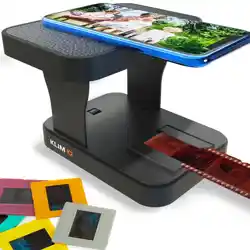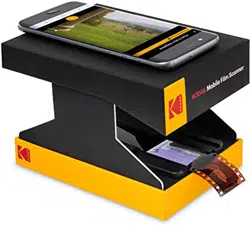
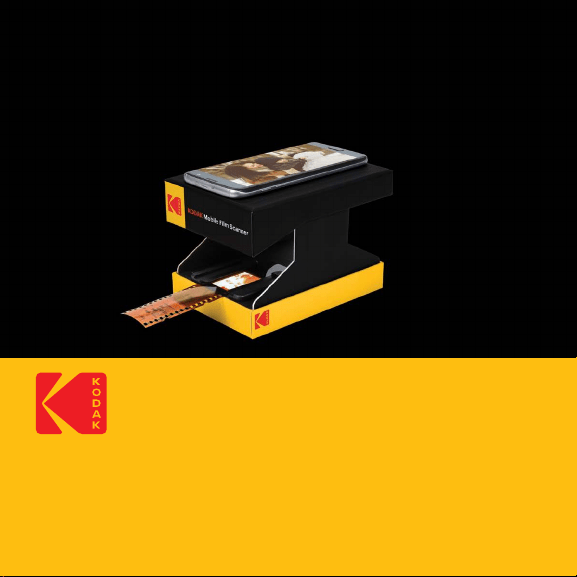
KODAK Mobile Film Scanner
For Color and B&W 35mm Negatives and 35mm Slides
Scanner de ilm pellicules mobile pour diapositives et négatifs couleur et N&B 35 mm
Escáner móvil para película Para diapositivas a color/blanco y negro y negativos de 35 mm
User Manual
Manuel de l’utilisateur
Manual del usuario


3
ENGLISH
FRANÇAIS
ESPAÑOL
4
12
20
4
IMPORTANT: THE SPACE BETWEEN THE FILM AND THE CAMERA
LENS IS 8CM. ONLY PHONES THAT ARE CAPABLE OF FOCUSING
AT THAT DISTANCE ARE COMPATIBLE WITH THIS SCANNER.
1. INTRODUCTION
Thank you for purchasing the KODAK Mobile Film Scanner. This User Guide
is intended to provide you with guidelines to ensure that operation of this
product is safe and does not pose risk to the user. Any use that does not
conform to the guidelines described in this User Guide may void the
limited warranty.
Please read all directions before using the product and retain this guide for
reference. This product is intended for household use only.
This product is covered by a limited one-year warranty. Coverage is
subject to limits and exclusions. See warranty for details.
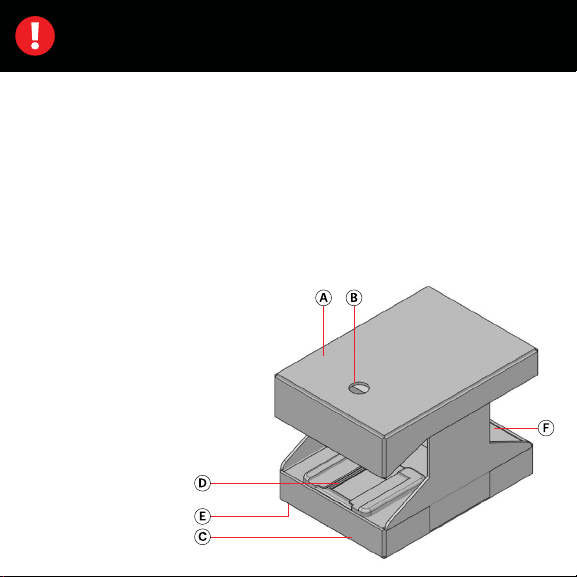
2. PRODUCT OVERVIEW
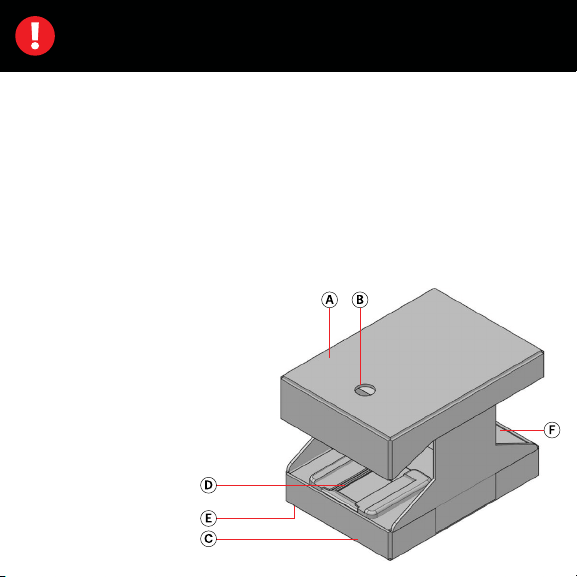
A. Phone Seat
B. Lens Hole
C. Scanner Base
D. Negative/Slide Tray
E. Light Switch (on Bottom)
F. Battery Compartment
for two (2) AA Batteries
(Not Included)

5
3. BOX CONTENTS
KODAK mobile ilm scanner
User manual
4. SAFETY PRECAUTIONS
• This device is designed to scan ilm negatives and slides only. It is not
meant to develop unexposed ilm, and using it in this way could
permanently and irreversibly damage or destroy your photos. Use this
device only in the way it was intended.
• Never use batteries that have been damaged, have torn wrappers, or
appear swollen or abnormal. Swelling is a sign of internal damage and
shows that the battery needs to be disposed of correctly.
• Do not mix batteries of dierent brands.
• Always use new batteries to power this device. Do not mix old and
new batteries.
• Do not store the scanner in a place where it may become wet or damp.
• Do not store the scanner in places that are exposed to high humidity.
5. SETUP
Please review these instructions carefully before using the Mobile Film
Scanner. Do not attempt to use negatives or slides before the unit is
properly set up.
6
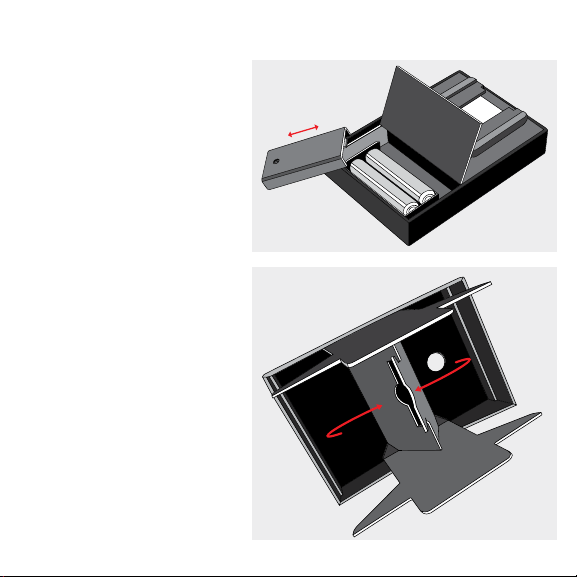
5A. INSTALL THE BATTERIES
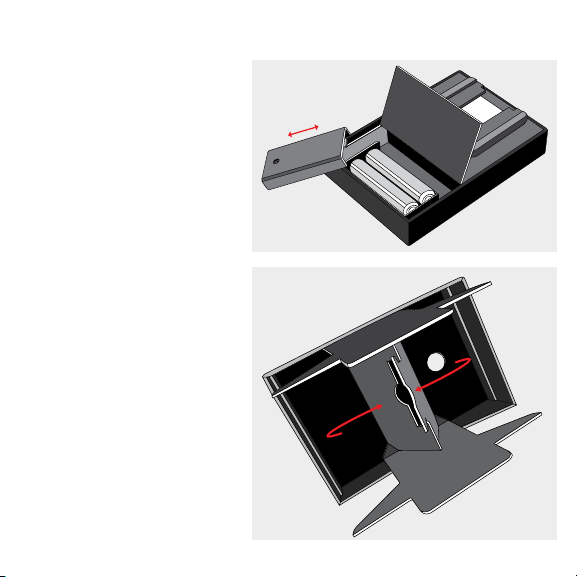
1. Open the battery
compartment, located on
the base of the scanner.
2. Remove the cover and
insert two (2) AA batteries,
matching the
indicated polarities.
3. Replace the cover and
close the compartment.
5B. ASSEMBLE THE
MOBILE FILM
SCANNER
1. Unfold the legs located
inside the top lid of the
scanner, revealing the
wings underneath. Then
pull the wings inward, so
that the tab on one sits in
the slot of the other,
as illustrated.
7
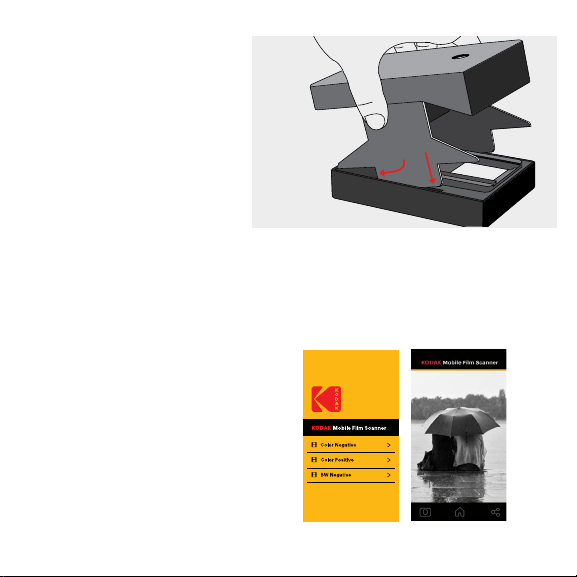
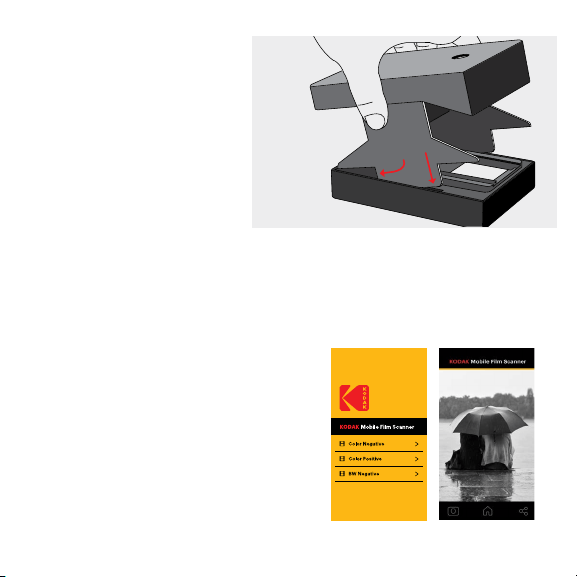
2. Slide the tabs of the legs
into the slits on either side
of the base.
6. OPERATION
Read all of the below instructions before attempting to scan negatives or
slides. Please note that a smart phone is required in order to use the ilm
scanner, and the quality of the scan will depend on the quality of your
phone’s camera.
6A. DOWNLOAD THE MOBILE
FILM SCANNER APP
1. Open the Apple App Store or the
Google Play Store.
2. Search for KODAK Mobile Film
Scanner app.
3. Download the app.
8
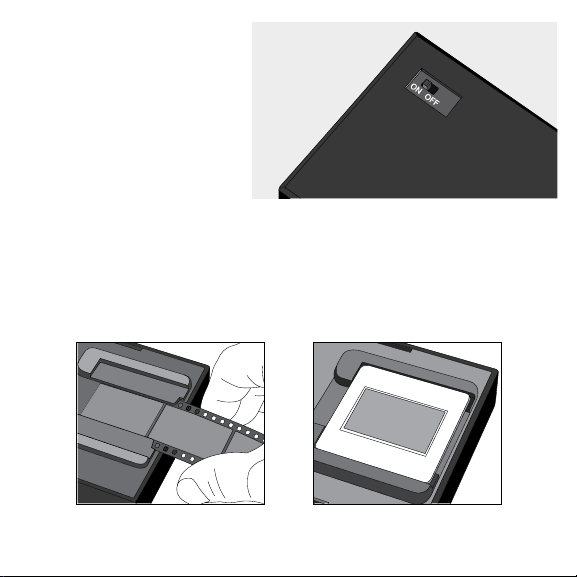
6B. POWER ON
THE SCANNER
1. Flip the power switch on
the bottom of the scanner
to the “ON” position. This
will turn on the internal light.
6C. SCAN NEGATIVES AND SLIDES
1. Open the app.
2. Select the desired negative or slide type from the menu.
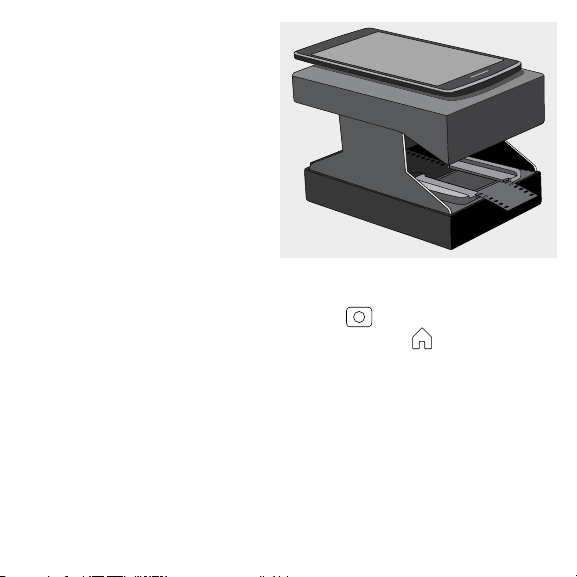
3. If using negatives, feed it through the tray as shown.
4. If using slides, place it on the tray as shown.
Negatives Slides
9
5. Place a phone on the phone
seat with the camera lens
sitting over the lens hole.
6. Adjust the image and phone
as needed, then take a picture
to scan your photo
6D. EDIT AND
SHARE PHOTOS
1. Use the built-in editing
features to crop, rotate, adjust, and add ilters to your photo.
2. When you inish editing, tap the “Done” button”
3. To save the photo, tap the “CAMERA” icon .
4. To return to the home screen, tap the “HOME” icon .
5. To share the photo to social media or any other sharing app, tap the
“SHARE” icon.
NOTE: For best results, we recommend editing scanned photos in a
separate photo processing program.
7. CUSTOMER SERVICE
Should you experience any problems with your product, please contact us
before returning the item to the place of purchase. We’re here to help!
U.S. Support: k[email protected], 8445161539
International Support: kodakintl@camarketing.com, 8445161540

10
8. WARRANTY
LIMITED WARRANTY ON KODAK MOBILE FILM SCANNER
THIS LIMITED WARRANTY GIVES YOU SPECIFIC LEGAL RIGHTS AND YOU MAY ALSO HAVE
OTHER RIGHTS, WHICH VARY FROM STATE TO STATE.
WE WARRANT THAT DURING THE WARRANTY PERIOD, THE PRODUCT WILL BE FREE
FROM DEFECTS IN MATERIALS AND WORKMANSHIP.
LIMITATION OF LIABILITY
TO THE EXTENT NOT PROHIBITED BY LAW, THIS WARRANTY IS EXCLUSIVE AND IN LIEU
OF ALL OTHER WARRANTIES, ORAL, WRITTEN, STATUTORY, EXPRESS OR IMPLIED. EXCEPT
FOR THE EXPRESS WARRANTIES CONTAINED IN THIS LIMITED WARRANTY STATEMENT
AND TO THE EXTENT NOT PROHIBITED BY LAW, WE DISCLAIM ALL OTHER WARRANTIES,
EXPRESSED OR IMPLIED, STATUTORY OR OTHERWISE, INCLUDING WITHOUT LIMITATION,
THE WARRANTIES OF MERCHANTABILITY AND FITNESS FOR A PARTICULAR PURPOSE.
SOME STATES DO NOT ALLOW DISCLAIMERS OF IMPLIED WARRANTIES, SO THIS
DISCLAIMER MAY NOT APPLY TO YOU. TO THE EXTENT SUCH WARRANTIES CANNOT
BE DISCLAIMED UNDER THE LAWS OF YOUR JURISDICTION, WE LIMIT THE DURATION
AND REMEDIES OF SUCH WARRANTIES TO THE DURATION OF THIS EXPRESS LIMITED
WARRANTY.
OUR RESPONSIBILITY FOR DEFECTIVE GOODS IS LIMITED TO REPAIR, REPLACEMENT OR
REFUND AS DESCRIBED BELOW IN THIS WARRANTY STATEMENT.
WHO MAY USE THIS WARRANTY? C&A Marketing, Inc. located at 114 Tived Lane
East, Edison, NJ (“we”) extend this limited warranty only to the consumer who originally

11
purchased the product (“you”). It does not extend to any subsequent owner or other
transferee of the product.
WHAT DOES THIS WARRANTY COVER? This limited warranty covers defects in materials
and workmanship of the KODAK Mobile Film Scanner (the “product”) for the Warranty
Period as deined below.
WHAT DOES THIS WARRANTY NOT COVER? This limited warranty does not cover
any damage due to: (a) transportation; (b) storage; (c) improper use; (d) failure to follow
the product instructions or to perform any preventive maintenance; (e) modiications; (f)
unauthorized repair; (g) normal wear and tear; or (h) external causes such as accidents,
abuse, or other actions or events beyond our reasonable control.
WHAT IS THE PERIOD OF COVERAGE? This limited warranty starts on the date of your
purchase and lasts for one year (the “Warranty Period”). The Warranty Period is not extended
if we repair or replace the product. We may change the availability of this limited warranty at
our discretion, but any changes will not be retroactive.
WHAT ARE YOUR REMEDIES UNDER THIS WARRANTY? With respect to any defective
product during the Warranty Period, we will, at our sole discretion, either: (a) repair or
replace such product (or the defective part) free of charge or (b) refund the purchase price
of such product if an exchange unit cannot be provided.
HOW DO YOU OBTAIN WARRANTY SERVICE? To obtain warranty service, you must
contact us at 8445161539 or by email at kodak@camarketing.com during the Warranty
Period to obtain a Defective Merchandise Authorization (“DMA”) number. No warranty
service will be provided without a DMA number and return shipping costs to our facilities
shall be assumed by you, the purchaser. Shipping costs of the replacement unit to you shall
be assumed by us.
12
IMPORTANT : LA DISTANCE SÉPARANT LA PELLICULE DE LA LENTILLE
DE LA CAMÉRA EST 8 CM. SEULS LES TÉLÉPHONES DE DISTANCE
FOCALE CORRESPONDANTE SONT COMPATIBLES AVEC CE SCANNER.
1. PRÉSENTATION
Nous vous remercions de votre acquisition d’un scanner de pellicules mobile
KODAK. Ce manuel contient des instructions assurant une utilisation correcte et en
toute sécurité du produit, sans présenter de risque pour l’utilisateur. Toute utilisation
non conforme aux instructions igurant dans ce Manuel de l’utilisateur peut annuler
la garantie limitée.
Veuillez lire attentivement toutes les instructions avant d’utiliser le produit et
conserver ce manuel aux ins de consultation ultérieure. Ce produit est uniquement
destiné à un usage domestique. Ce produit dispose d’une garantie limitée d’une
durée de un an. La portée de cette garantie est soumise à certaines limites et
exclusions. Consultez la garantie pour plus de détails.
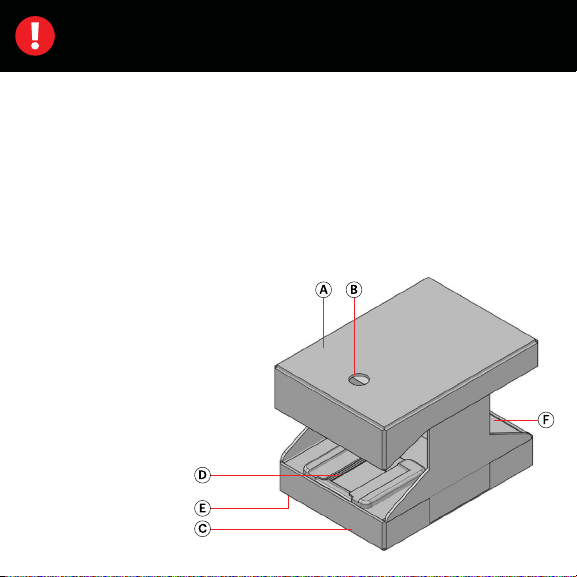
2. VUE D’ENSEMBLE
A. Emplacement du smartphone
B. Oriice pour objectif
C. Socle du scanner
D. Tiroir à diapositives ou négatifs
E. Interrupteur de la lampe
(en partie inférieure)
F. Compartiment des
deux piles (2 piles
AA, non incluses)

13
3. CONTENU DE LA BOÎTE
Scanner de pellicules mobile KODAK
Manuel de l’utilisateur
4. CONSIGNES DE SÉCURITÉ
• Cet appareil est uniquement prévu pour la lecture de négatifs de pellicules
et de diapositives. Il n’est pas prévu pour le développement de pellicules
non exposées ; l’utiliser de cette manière risque d’endommager vos photos
de manière permanente et irréversible. N’utiliser cet appareil que de la
manière pour laquelle il a été conçu.
• Ne jamais utiliser de piles endommagées, dont l’emballage n’est pas intact,
ou qui ont un aspect gonlé ou anormal. Le gonlement d’une pile est un
signe de dommages internes ; une telle pile doit être éliminée selon les
procédures prescrites.
• Ne pas utiliser ensemble des piles de marques diérentes.
• Toujours utiliser des piles neuves pour l’alimentation de cet appareil. Ne pas
mélanger piles neuves et usées.
• Ne jamais entreposer le scanner dans un endroit où il pourrait entrer en
contact avec des liquides.
• Ne jamais entreposer le scanner dans des lieux exposés à une forte humidité.
5. INSTALLATION
Lire attentivement ces instructions avant d’utiliser le scanner de pellicules
mobile. Ne pas tenter d’utiliser des négatifs ou des diapositives avant que
l’appareil n’ait été correctement installé.
14
5A. INSTALLATION DES PILES
1. Ouvrir le compartiment des
piles qui se trouve dans le
socle du scanner.
2. Retirer le couvercle et insérer
deux (2) piles AA en
respectant les signes de
polarité indiqués.
3. Remettre le couvercle en
place et le refermer.
5B. AESSEMBLAGE DU
SCANNER DE
PELLICULES MOBILE
1. Déployer les supports repliés
à l’intérieur du couvercle
supérieur du scanner ; en
dessous d’eux se trouvent
deux panneaux. Tirer les
panneaux vers l’intérieur, de
sorte que la languette de l’un
des panneaux s’engage dans
la fente prévue sur l’autre,
comme indiqué.
15
2. Insérer les languettes des
supports du scanner dans
les fentes ménagées de
chaque côté du socle.
6. FONCTIONNEMENT
Avant d’essayer de scanner des négatifs ou des diapositives, lire les instructions
ci-dessous. Veuillez noter qu’un smartphone est nécessaire pour pouvoir
utiliser le scanner de pellicules, et que la qualité des scans va dépendre de la
qualité de l’appareil photo intégré dans votre téléphone.
6A. TÉLÉCHARGEMENT DE
L’APPLICATION DU SCANNER
DE PELLICULES MOBILE
1. Ouvrir l’Apple App Store ou le Google
Play Store.
2. Faire une recherche pour l’application
Scanner de film mobile KODAK.
3. Télécharger l’application.
16
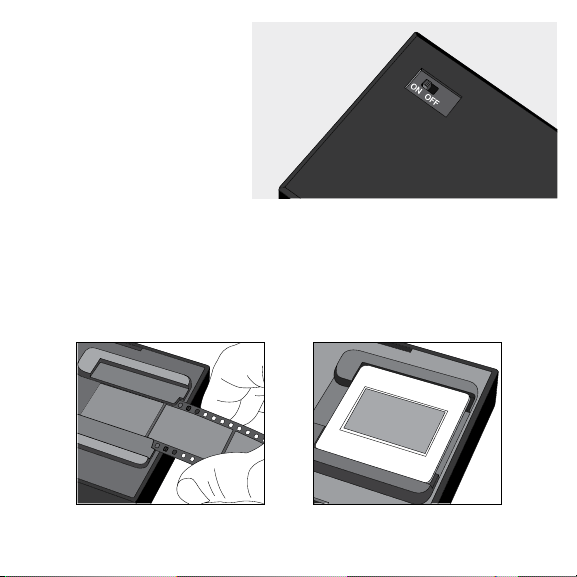
6B. ALLUMAGE DU
SCANNER
1. Sur le socle du scanner,
mettre l’interrupteur en
position « ON ». La lampe
interne s’allume.
6C. SCANNAGE DE NÉGATIFS ET DE DIAPOSITIVES
1. Ouvrir l’appli.
2. Sur le menu, sélectionner le type de négatif ou de diapositive désiré.
3. S’il s’agit de négatifs, les introduire dans le « tiroir » comme indiqué.
4. S’il s’agit de diapositives, les introduire dans le tiroir comme indiqué.
Négatifs Diapositives
17
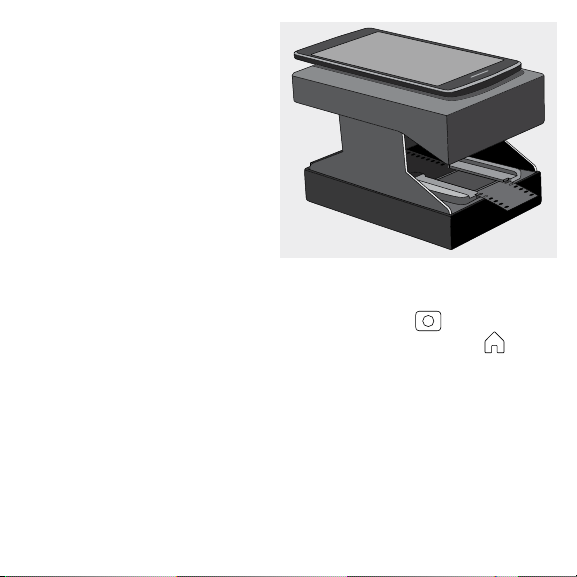
5. Placer votre téléphone mobile
sur le plateau du scanner
comme indiqué, en faisant
correspondre son objectif
avec l’oriice.
6. Ajuster l’image et la position
du smartphone, puis prendre
une photo pour scanner l’image.
6D. RETOUCHE ET PARTAGE
DES PHOTOS
1. Utiliser les fonctions intégrées
pour recadrer, orienter et ajouter des iltres à votre photo.
2. Une fois terminé, eleurer le bouton « Done », terminé.
3. Pour enregistrer la photo, eleurer l’icône « CAMERA » .
4. Pour revenir à l’écran d’accueil, eleurer l’icône ACCUEIL (HOME) .
5. Pour envoyer la photo à des correspondants sur les médias sociaux ou une
autre appli, eleurer l’icône SHARE (partager).
REMARQUE : pour obtenir les meilleurs résultats, éditer les photos sur un
programme de traitement séparé.
7. SERVICE À LA CLIENTÈLE
Si vous rencontrez des problèmes avec votre produit, veuillez nous contacter
avant de ramener le produit au point de vente. Nous sommes là pour vous aider !
Support technique aux USA : kodak@camarketing.com, 8445161539
Support technique international : kodakintl@camarketing.com, 8445161540

18
8. GARANTIE
GARANTIE LIMITÉE DU SCANNER DE PELLICULES MOBILE KODAK
CETTE GARANTIE LIMITÉE VOUS CONFÈRE DES DROITS SPÉCIFIQUES RECONNUS PAR
LA LOI. VOUS POURRIEZ DISPOSER DE DROITS SUPPLÉMENTAIRES QUI VARIENT D’UN
PAYS À UN AUTRE.
NOUS GARANTISSONS QUE CE PRODUIT SERA EXEMPT DE TOUT DÉFAUT DE
FABRICATION ET DE MATÉRIAUX PENDANT LA PÉRIODE DE GARANTIE.
LIMITATION DE RESPONSABILITÉ
Dans la mesure où le droit ne l’interdit pas, cette garantie est exclusive et vient en lieu et
place de toute autre garantie écrite, orale, légale, expresse ou implicite. À L’EXCEPTION
DES GARANTIES EXPRESSES CONTENUES DANS LA DÉCLARATION DE GARANTIE LIMITÉE
ET DANS LA MESURE OÙ CELA NE CONTREVIENT PAS À LA LOI, NOUS DÉCLINONS
TOUTES LES AUTRES GARANTIES, EXPLICITES OU IMPLICITES, LÉGALES OU AUTRES,
INCLUANT, SANS LIMITATION, LES GARANTIES COMMERCIALES ET D’USAGE POUR
UN BUT PARTICULIER. DANS LA MESURE OÙ CERTAINES JURIDICTIONS N’AUTORISENT
PAS LA LIMITATION DES GARANTIES TACITES, CES INFORMATIONS PEUVENT NE PAS
S’APPLIQUER À VOTRE CAS. DANS LA MESURE OÙ DE TELLES GARANTIES NE PEUVENT
ÊTRE EN CONTRADICTION AVEC LES LOIS EN VIGUEUR SOUS VOTRE JURIDICTION,
NOUS LIMITONS LA DURÉE ET LA PRISE EN CHARGE À LA DURÉE DE CETTE GARANTIE
LIMITÉE EXPRESSE.
NOTRE RESPONSABILITÉ QUANT AUX ARTICLES DÉFECTUEUX SE LIMITE À LA
RÉPARATION, AU REMPLACEMENT OU AU REMBOURSEMENT COMME DÉCRIT CI-
DESSOUS DANS LA DÉCLARATION DE GARANTIE.
QUI PEUT BÉNÉFICIER DE CETTE GARANTIE ? C&A Marketing, Inc., situé 114 Tived Lane
East, Edison, NJ, USA (« nous ») n’accorde cette garantie limitée qu’au client d’origine du

19
produit (« vous »). Elle ne s’étend pas au propriétaire suivant ni au bénéiciaire d’un transfert
éventuel du produit.
QUE COUVRE CETTE GARANTIE ? Cette garantie limitée couvre toutes les défectuosités
de matériels et de fabrication éventuelles du scanner de pellicules mobile KODAK (le «
produit ») pendant la période de garantie déinie ci-dessous.
QU’EST-CE QUI N’EST PAS COUVERT PAR CETTE GARANTIE ? Cette garantie limitée ne
couvre pas les dégâts dus aux cas suivants : (a) transport ; (b) entreposage ; (c) mauvaise
utilisation ; (d) non-respect des consignes d’utilisation du produit ou omission des
opérations d’entretien préventif ; (e) modiications; (f) réparation non autorisée ; (g) usure
normale ; ou (h) causes externes comme des accidents, usage abusif ou toute autre action
ou événement au-delà de notre contrôle.
QUELLE EST LA PÉRIODE DE COUVERTURE ? Cette garantie limitée commence le jour
de votre achat et dure pendant un an (la « Période de garantie »). La Période de garantie
ne se prolonge pas si nous réparons ou remplaçons le produit. Nous pouvons changer à
notre discrétion la disponibilité de cette garantie limitée, mais les changements ne seront
pas rétroactifs.
QUELS SONT VOS RECOURS SOUS CETTE GARANTIE ? En cas de défectuosité du
produit pendant la période de garantie, nous pourrons, à notre entière discrétion : (a)
réparer ou remplacer le produit (ou la pièce défectueuse) gratuitement ou (b) rembourser
le prix d’achat du produit si une unité de remplacement ne peut être fournie.
COMMENT BÉNÉFICIER DE LA GARANTIE ? Pour bénéicier du service de garantie, vous
devez nous contacter au +1 8445161539 ou par courriel à l’adresse kodak@camarketing.
com pendant la Période de garantie pour obtenir un numéro d’autorisation de marchandise
défectueuse (« DMA », Defective Marchandise Authorization). Aucun service de garantie
ne sera eectué sans numéro DMA et les frais de retour vers nos installations doivent être
pris en charge par vous, l’acheteur. Nous prendrons à notre charge les frais d’expédition de
l’unité de remplacement.
20
IMPORTANTE: EL ESPACIO ENTRE LA PELÍCULA Y EL LENTE DE LA
CÁMARA ES DE 8 CM. SOLO LOS TELÉFONOS CON CAPACIDAD DE
ENFOQUE A ESA DISTANCIA SON COMPATIBLES CON ESTE ESCÁNER.
1. INTRODUCCIÓN
Gracias por adquirir el Escáner móvil para película KODAK. Esta Guía para el
usuario tiene como objeto brindarle pautas para asegurar que la operación de
este producto sea segura y no plantee riesgos para el usuario. Todo uso que
no guarde conformidad con las pautas descritas en esta Guía para el usuario
podrá anular la garantía limitada.
Lea todas las indicaciones antes de usar el producto, y guarde esta guía para
referencia futura. Este producto es solo para uso doméstico. Este producto está
cubierto por una garantía limitada de un año. La cobertura está sujeta a límites
y exclusiones. Ver la garantía para obtener más detalles.
2. DESCRIPCIÓN GENERAL
DEL PRODUCTO
A. Soporte para el teléfono
B. Oriicio del lente
C. Base del escáner
D. Bandeja para negativos/
diapositivas
E. Interruptor de luz (en
parte inferior)
F. Compartimiento
para dos (2) pilas
AA (no incluidas)

21
3. CONTENIDO DE LA CAJA
Escáner móvil para película KODAK
Manual del usuario
4. PRECAUCIONES DE SEGURIDAD
• Este dispositivo está diseñado para escanear únicamente negativos de
películas y diapositivas. No deberá utilizarse para revelar película sin
revelar, y hacerlo podría dañar o destruir sus fotos de manera
permanente e irreversible. Utilice este dispositivo solamente según
se indica.
• No utilice pilas dañadas, con envoltorio roto o que parezcan hinchadas
o anormales. La hinchazón es un signo de daño interno e indica que la
pila deberá desecharse correctamente.
• No mezcle pilas de diferentes marcas.
• Siempre utilice pilas nuevas para este dispositivo. No mezcle pilas
nuevas y antiguas.
• No guarde el escáner en un lugar donde pueda humedecerse o mojarse.
• No guarde el escáner en lugares expuestos a mucha humedad.
5. CONFIGURACIÓN
Lea estas instrucciones con detenimiento antes de usar el escáner móvil
para película. No intente usar los negativos o las diapositivas antes de
conigurar correctamente la unidad.
22
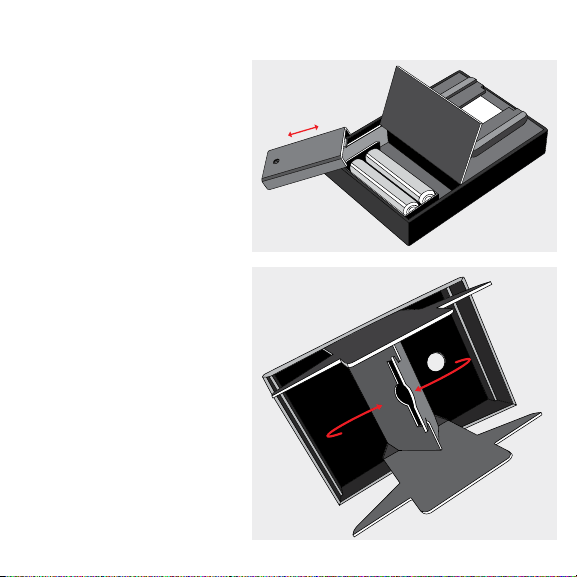
5A. INSTALACIÓN DE LAS PILAS
1. Abra el compartimiento de
las pilas, ubicado en la base
del escáner.
2. Quite la tapa y coloque
dos (2) pilas AA,
asegurándose de que
coincidan las polaridades.
3. Vuelva a colocar la cubierta
y cierre el compartimiento.
5B. ARMADO DEL
ESCÁNER MÓVIL
PARA PELÍCULA
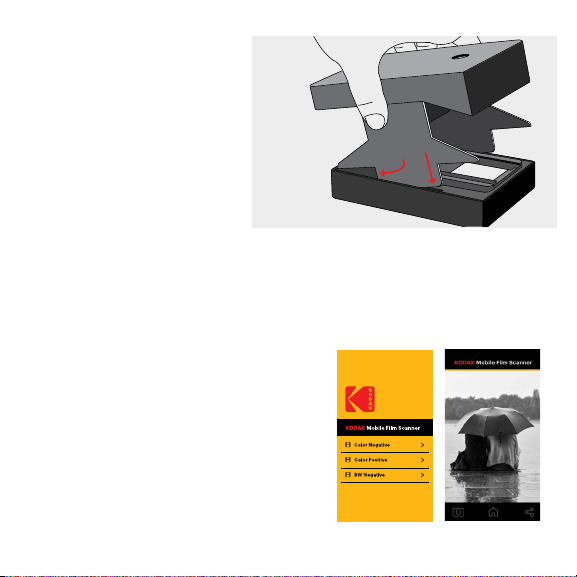
1. Despliegue las patas
ubicadas dentro de la
tapa superior del escáner
para dejar ver las aletas
que tiene por debajo.
Luego, tire de ellas hacia
adentro, de modo que la
lengüeta de una se ajuste
en la ranura de la otra,
según se muestra en
el dibujo.
23
2. Desice las lengüetas de las
patas en las hendiduras a
cada lado de la base.
6. FUNCIONAMIENTO
Lea las instrucciones a continuación antes de intentar escanear negativos o
diapositivas. Tenga en cuenta que se requiere de un teléfono inteligente para
usar el escáner para película, y que la calidad del escaneo dependerá de la
calidad de la cámara de su teléfono.
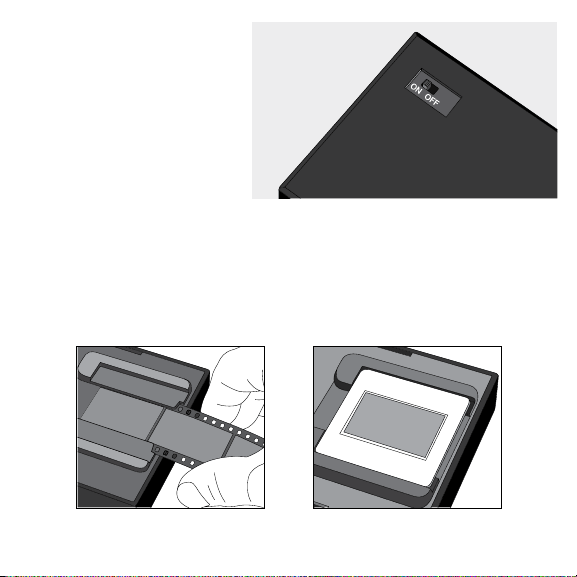
6A. DESCARGA DE LA APLICACIÓN
DEL ESCÁNER MÓVIL PARA
PELÍCULA
1. Abra la App Store de Apple o la Play
Store de Google.
2. Busque la aplicación para
Escáner móvil para película de KODAK.
3. Descargue la aplicación.
24
6B. ENCENDIDO DEL
ESCÁNER
1. Active el interruptor de
encendido en la parte
inferior del escáner y
colóquelo en la posición
“ON” (Encendido). Esto
encenderá una luz interna.
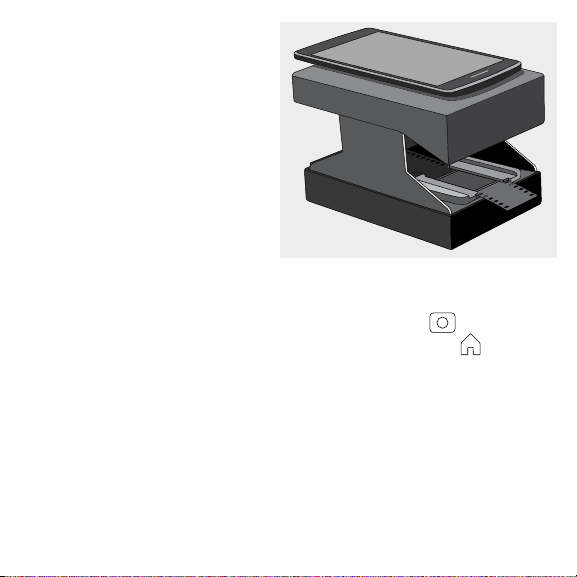
6C. ESCANEO DE NEGATIVOS Y DIAPOSITIVAS
1. Abra la aplicación.
2. Seleccione el tipo de negativo o diapositiva del menú.
3. Si utiliza negativos, insértelos en la bandeja como se muestra en el dibujo.
4. Si utiliza diapositivas, colóquelas en la bandeja como se muestra en el dibujo.
Negativos Diapositivas
25
5. Coloque un téléfono en el
soporte para teléfonos con el
lente de la cámara sobre el
oriicio del lente.
6. Ajuste la imagen y el teléfono
según sea necesario, luego
tome una fotografía para
escanear su foto.
6D. EDITAR Y
COMPARTIR FOTOS
1. Utilice las funciones de edición
integradas para recortar, rotar, ajustar y agregar iltros a su foto.
2. Una vez que inalice la edición, toque el botón “Done” (Listo).
3. Para guardar la fotografía, toque el ícono de la CÁMARA .
4. Para voler a la pantalla de inicio, toque el ícono de INICIO .
5. Para compartir la foto en las redes sociales u otra aplicación, toque el ícono
SHARE (COMPARTIR).
NOTA: Para obtener merjores resultados, recomendamos editar las fotografías
escaneadas mediante un programa de procesamiento fotográico separado.
7. ATENCIÓN AL CLIENTE
En caso de experimentar problemas con su producto, comuníquese con nosotros
antes de devolver el artículo al lugar de compra. ¡Estamos aquí para ayudarle!
Soporte en EE. UU.: k[email protected], 8445161539
Soporte internacional: kodakintl@camarketing.com, 8445161540

26
8. GARANTÍA
GARANTÍA LIMITADA PARA EL ESCÁNER MÓVIL PARA PELÍCULA KODAK
ESTA GARANTÍA LIMITADA LE OTORGA DERECHOS LEGALES ESPECÍFICOS Y ES POSIBLE
QUE TAMBIÉN TENGA OTROS DERECHOS, QUE VARÍAN DE UN ESTADO A OTRO.
GARANTIZAMOS QUE, DURANTE EL PERÍODO DE LA GARANTÍA, EL PRODUCTO NO
PRESENTARÁ FALLAS DE MATERIALES O DE MANO DE OBRA.
LIMITACIÓN DE LA RESPONSABILIDAD
EN LA MEDIDA EN QUE NO LO PROHÍBA LA LEY, ESTA GARANTÍA ES EXCLUSIVA Y
REEMPLAZA TODA OTRA GARANTÍA, SEA VERBAL, ESCRITA, LEGAL, EXPRESA O IMPLÍCITA.
CON EXCEPCIÓN DE LAS GARANTÍAS EXPRESAS QUE FIGURAN EN ESTA DECLARACIÓN
DE GARANTÍA LIMITADA Y EN LA MEDIDA EN QUE NO LO PROHÍBA LA LEY, NOS EXIMIMOS
DE TODA OTRA GARANTÍA, EXPRESA O IMPLÍCITA, LEGAL O DE OTRA ÍNDOLE,
INCLUIDAS ENTRE OTRAS, LAS GARANTÍAS DE COMERCIABILIDAD E IDONEIDAD
PARA UN FIN DETERMINADO. ALGUNOS ESTADOS NO PERMITEN DESCARGOS DE
RESPONSABILIDAD DE GARANTÍAS IMPLÍCITAS, DE MODO QUE ES POSIBLE QUE
ESTE DESCARGO NO SEA APLICABLE EN SU CASO. EN LA MEDIDA EN QUE DICHAS
GARANTÍAS NO PUEDAN EXIMIRSE CONFORME A LAS LEYES DE SU JURISDICCIÓN,
LIMITAMOS LA DURACIÓN Y LOS RECURSOS DE DICHAS GARANTÍAS A LA DURACIÓN DE
ESTA GARANTÍA LIMITADA EXPRESA.
NUESTRA RESPONSABILIDAD POR PRODUCTOS DEFECTUOSOS SE LIMITA A
LA REPARACIÓN, LA SUSTITUCIÓN O EL REEMBOLSO SEGÚN SE DESCRIBE A
CONTINUACIÓN EN ESTA DECLARACIÓN DE GARANTÍA.
¿QUIÉN PUEDE USAR ESTA GARANTÍA? C&A Marketing, Inc., ubicado en 114 Tived
Lane East, Edison, Nueva Jersey (“nosotros”) extendemos la presente garantía limitada
únicamente al consumidor que adquirió originalmente el producto (“usted”). No abarca a
ningún propietario posterior u a otra persona a quien se le transiera el producto.

27
¿QUÉ CUBRE ESTA GARANTÍA? Esta garantía limitada cubre las fallas de materiales o de
mano de obra del escáner móvil para película KODAK (el “producto”) durante el período de
garantía que se deine debajo.
¿QUÉ NO CUBRE ESTA GARANTÍA? Esta garantía limitada no cubre ningún daño que
se deba a: (a) transporte; (b) almacenamiento; (c) uso inadecuado; (d) incumplimiento de
las instrucciones del producto o falta de mantenimiento preventivo; (e) modiicaciones;
(f) reparación no autorizada; (g) uso y desgaste normales; o (h) causas externas, como
accidentes, uso indebido u otras acciones o sucesos más allá de nuestro control razonable.
¿CUÁL ES EL PERÍODO DE COBERTURA? La garantía limitada comienza en la fecha
de compra y se extiende por un año (el “Período de garantía”). El período de garantía
no se extiende si reparamos o sustituimos el producto. Es posible que cambiemos la
disponibilidad de esta garantía limitada a nuestro criterio, pero ningún cambio se aplicará
de modo retroactivo.
¿CUÁLES SON LOS RECURSOS DISPONIBLES CONFORME A ESTA GARANTÍA? En
lo que respecta a cualquier producto que resulte defectuoso durante el período de la
garantía, aplicaremos, a nuestro criterio exclusivo, una de las siguientes opciones: (a)
reparar o sustituir el producto (o la pieza defectuosa) sin cargo o (b) reembolsar el precio de
compra del producto si no se proporciona una unidad de cambio.
¿CÓMO SE OBTIENE EL SERVICIO POR LA GARANTÍA? Para obtener el servicio por
la garantía, debe comunicarse con nosotros al 8445161539 o por correo electrónico a
kodak@camarketing.com durante el Período de la garantía para obtener un número de
Autorización de producto defectuoso (“DMA”, por sus siglas en inglés). No se brindará
servicio alguno por la garantía si no tiene un número de DMA y será usted, el comprador,
quien deba asumir los costos de envío por devolución a nuestras instalaciones. Nosotros
asumiremos los costos de envío de la unidad de sustitución.

www.kodakphotoplus.com
Distributed by: C&A Marketing, Inc., 114 Tived Lane East, Edison, NJ 08837 USA;
C&A Marketing UK LTD, 167 Hermitage Road, Crusader Industrial Estate,
London N4 1LZ, UK ©2018, C&A Marketing LTD. All Rights Reserved. Made in China.
Distribué par : C&A Marketing, Inc., 114 Tived Lane East, Edison, NJ 08837 USA;
C&A Marketing UK LTD, 167 Hermitage Road, Crusader Industrial Estate, London N4 1LZ, UK
©2018, C&A Marketing LTD. Tous droits réservés. Fabriqué en Chine.
Distribuido por: C&A Marketing, Inc., 114 Tived Lane East, Edison, NJ 08837 EE. UU.;
C&A Marketing UK LTD, 167 Hermitage Road, Crusader Industrial Estate, Londres N4 1LZ, Reino Unido
©2018, C&A Marketing LTD. Todos los derechos reservados. Fabricado en China.
Kodak and the Kodak trade dress are trademarks of Kodak, used under license. Made for and Distributed by
C&A Marketing, Inc. under license from Kodak. All other products, brand names, company names and logos are
trademarks of their respective owners, used merely to identify their respective products, and are not meant to
connote any sponsorship, endorsement or approval.
Kodak et la coniguration de produit Kodak sont des marques de commerce appartenant à Kodak et sont utilisées
sous licence. Fabriqué et distribué par C&A Marketing, Inc., sous licence Kodak. Tous les autres produits, noms de
produits, noms de sociétés ainsi que les logos sont des marques de commerce ou des marques déposées de
leur détenteurs respectifs, et ne signiient aucun parrainage, autorisation ou approbation.
Kodak y la imagen de Kodak son marcas comerciales de Kodak y se utilizan bajo licencia. Fabricado para y
distribuido por C&A Marketing, Inc. bajo licencia de Kodak. Todos los otros productos, nombres de marcas,
nombres de compañías y logotipos son marca registrada de sus respectivos propietarios, se utilizan solo para
identiicar sus correspondientes productos y no pretenden connotar patrocinio, aprobación o autorización.


30