www.lg.com
Printed in Korea
Copyright © 2020 LG Electronics Inc. All Rights Reserved.
MR20GA
(2002-REV02)
*MFL69375635*
QUICK START GUIDE
Magic Remote
2
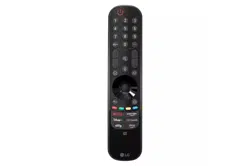
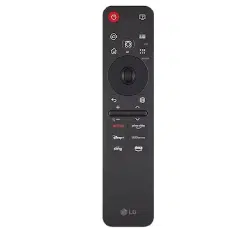
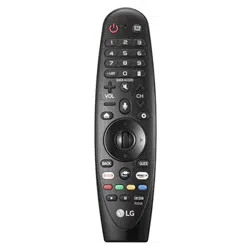
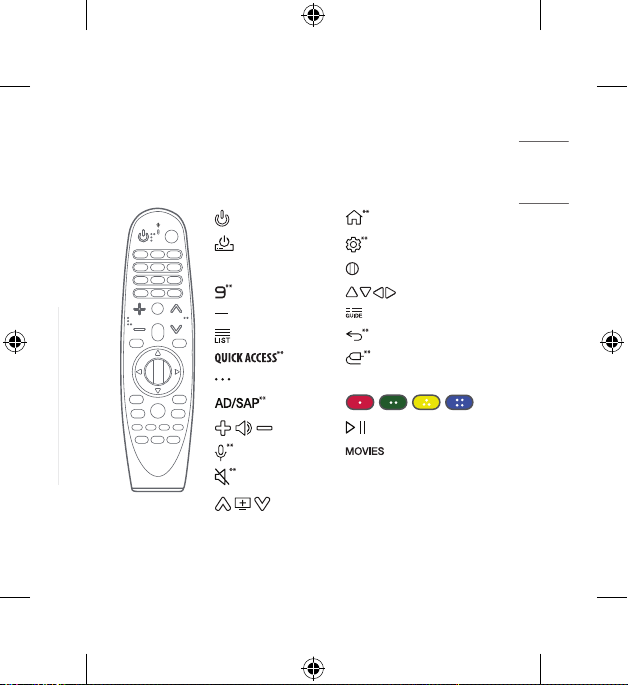
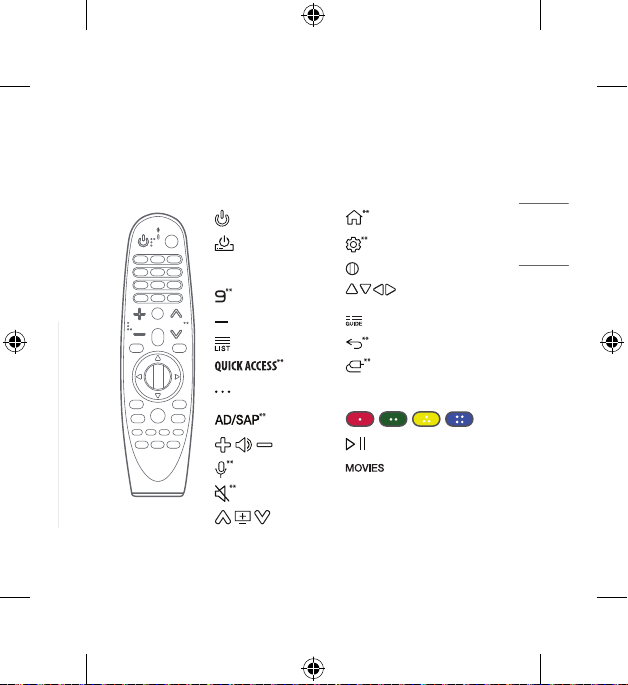
REMOTE DESCRIPTION
• Theremotecontrolimageshownmaydifferfromtheactualproduct.
• Theorderofdescriptionmaydifferfromtheactualproduct.
• Somebuttonsandservicesmaynotbeprovideddependingonmodelsorregions.
(POWER)
(HOME)
(Q. Settings)
Number buttons
Wheel (OK)
(up/down/left/right)
(DASH)
(INPUT)
(MORE ACTIONS) Streaming Service buttons
, , ,
(VOL)
, (Control buttons)
(Voice recognition)
(MUTE)
(CH/P)
**Tousethebutton,pressandholdformorethan1second.
• Contentsinthismanualmaybechangedwithoutpriornoticeduetoupgradeofproductfunctions.
• Completeinstructionsareincludedintheowner’smanual.
ACCESSORIES
(Dependinguponcountry)
-
MagicRemoteandAlkalineBatteries(AA)
-
Owner’smanual
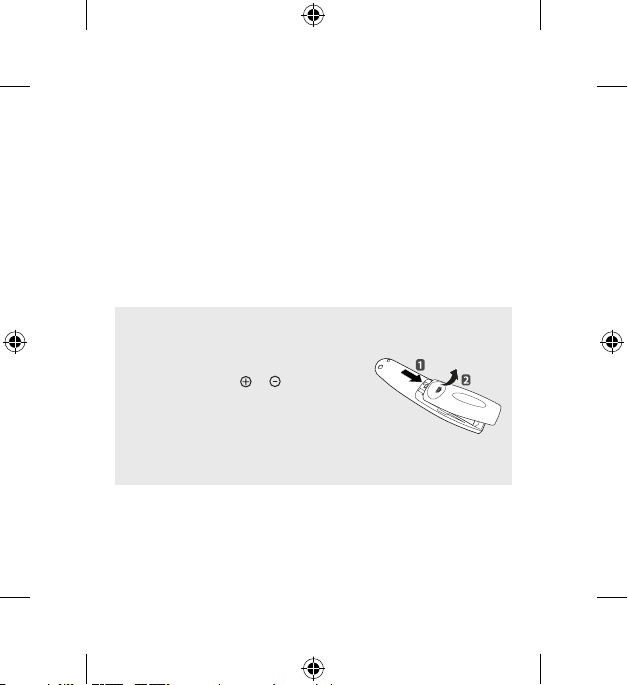
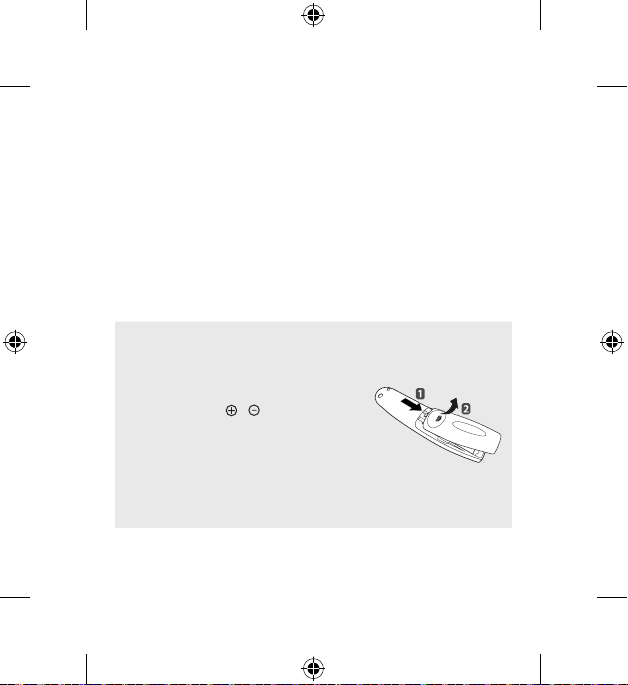
INSTALLING BATTERIES
• Pleasereadthismanualcarefully.
• Pressthetopofthebatterycover,slideitback,andliftthecover
asshownbelow.
• Toreplacebatteries,openthebatterycover,replacealkaline
batteries(1.5V,AA)matching and endstothelabelinside
thecompartment,andclosethebatterycover.Besuretopoint
theremotecontrolattheremotecontrolsensorontheTV.
• Toremovethebatteries,performtheinstallationactionsin
reverse.Don’tmixoldorusedbatterieswithnewones.Closethe
coversecurely.
• Open the battery cover to find the label.
3
ENGLISH
ENGLISH_Index
REMOTE DESCRIPTION
• Theremotecontrolimageshownmaydifferfromtheactualproduct.
• Theorderofdescriptionmaydifferfromtheactualproduct.
• Somebuttonsandservicesmaynotbeprovideddependingonmodelsorregions.
(POWER)
(HOME)
(Q. Settings)
Number buttons
Wheel (OK)
(up/down/left/right)
(DASH)
(INPUT)
(MORE ACTIONS) Streaming Service buttons
, , ,
(VOL)
, (Control buttons)
(Voice recognition)
(MUTE)
(CH/P)
**Tousethebutton,pressandholdformorethan1second.
• Contentsinthismanualmaybechangedwithoutpriornoticeduetoupgradeofproductfunctions.
• Completeinstructionsareincludedintheowner’smanual.
ACCESSORIES
(Dependinguponcountry)
-
MagicRemoteandAlkalineBatteries(AA)
-
Owner’smanual
INSTALLING BATTERIES
• Pleasereadthismanualcarefully.
• Pressthetopofthebatterycover,slideitback,andliftthecover
asshownbelow.
• Toreplacebatteries,openthebatterycover,replacealkaline
batteries(1.5V,AA)matching and endstothelabelinside
thecompartment,andclosethebatterycover.Besuretopoint
theremotecontrolattheremotecontrolsensorontheTV.
• Toremovethebatteries,performtheinstallationactionsin
reverse.Don’tmixoldorusedbatterieswithnewones.Closethe
coversecurely.
• Open the battery cover to find the label.
4
USING
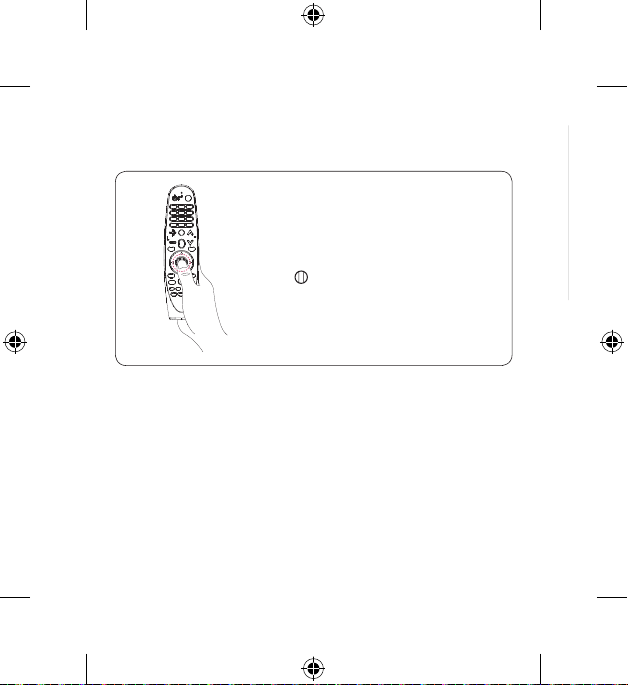
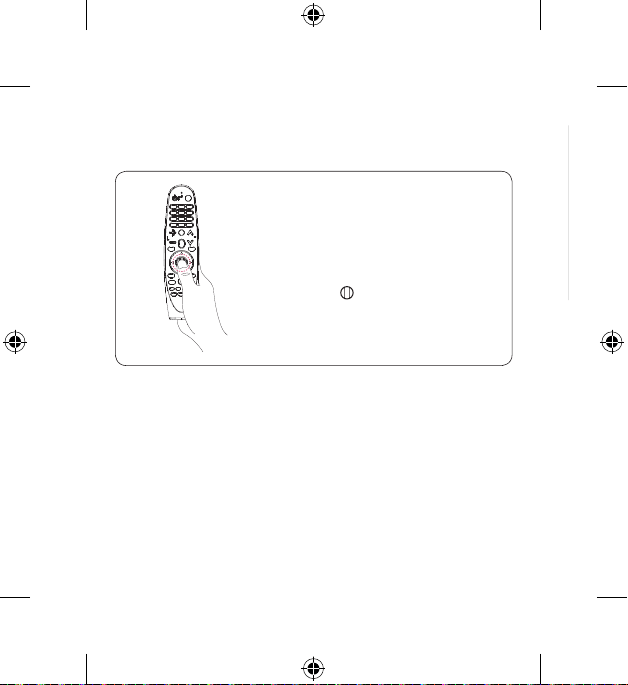
1. How to register (pair) or deregister (unpair)
How to register (pair) the Magic Remote
TousetheMagicRemote,rstpairitwithyourTV.
1. PutbatteriesintotheMagicRemoteandturntheTVon.
2. PointtheMagicRemoteatyourTVandpressthe
Wheel (OK)ontheremotecontrol.
-
IftheTVfailstoregistertheMagicRemote,tryagainafter
turningtheTVoffandbackon.
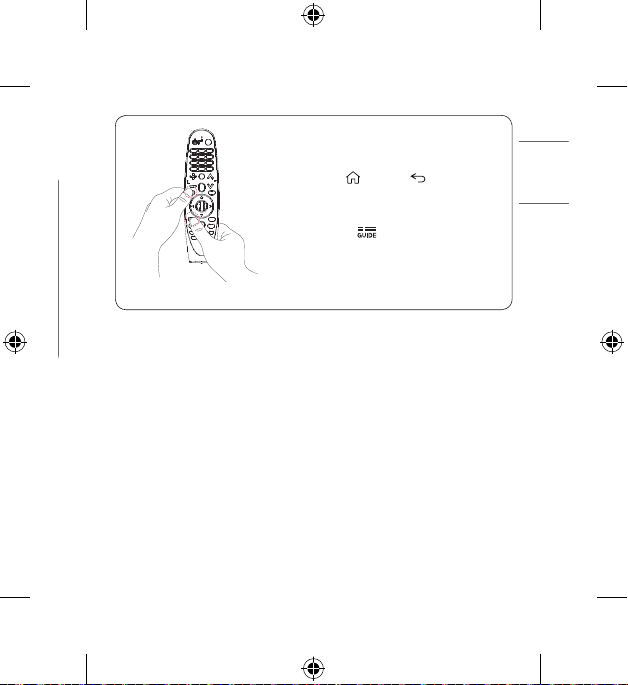
How to deregister (unpair) the Magic Remote
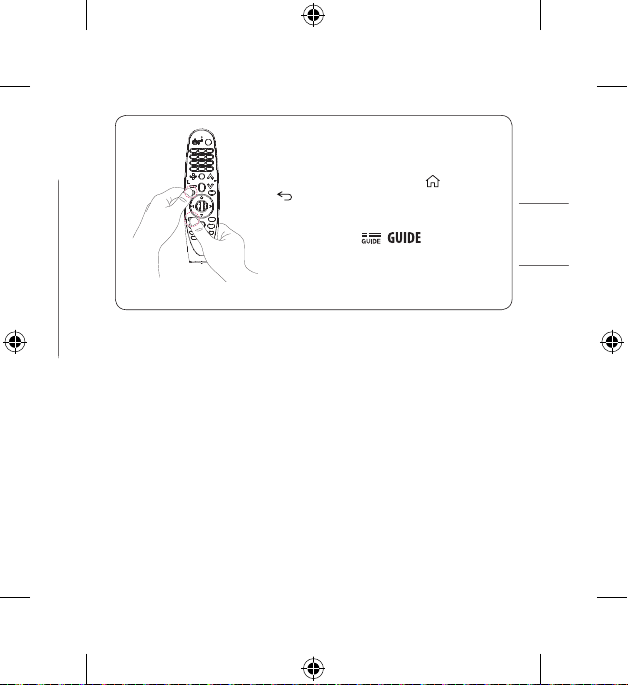
Pressandholdthe (HOME)and buttonsatthe
sametimeforveseconds,tounpairtheMagicRemote
withyourTV.
-
Pressandholdthe
buttonformorethan5secondsto
disconnectandre-registertheMagicRemoteatthesame
time.
5
ENGLISH
ENGLISH_Index
USING
1. How to register (pair) or deregister (unpair)
How to register (pair) the Magic Remote
TousetheMagicRemote,rstpairitwithyourTV.
1. PutbatteriesintotheMagicRemoteandturntheTVon.
2. PointtheMagicRemoteatyourTVandpressthe
Wheel (OK)ontheremotecontrol.
-
IftheTVfailstoregistertheMagicRemote,tryagainafter
turningtheTVoffandbackon.
How to deregister (unpair) the Magic Remote
Pressandholdthe (HOME)and buttonsatthe
sametimeforveseconds,tounpairtheMagicRemote
withyourTV.
-
Pressandholdthe
buttonformorethan5secondsto
disconnectandre-registertheMagicRemoteatthesame
time.
6
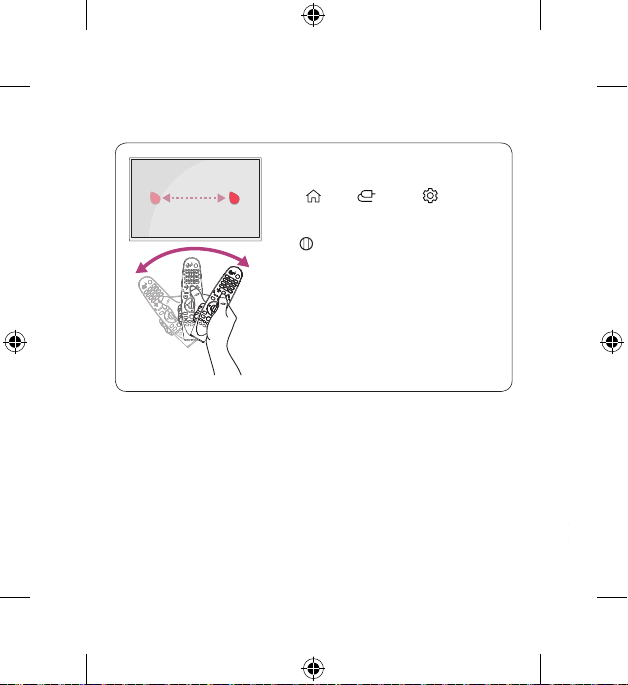
2. How to use
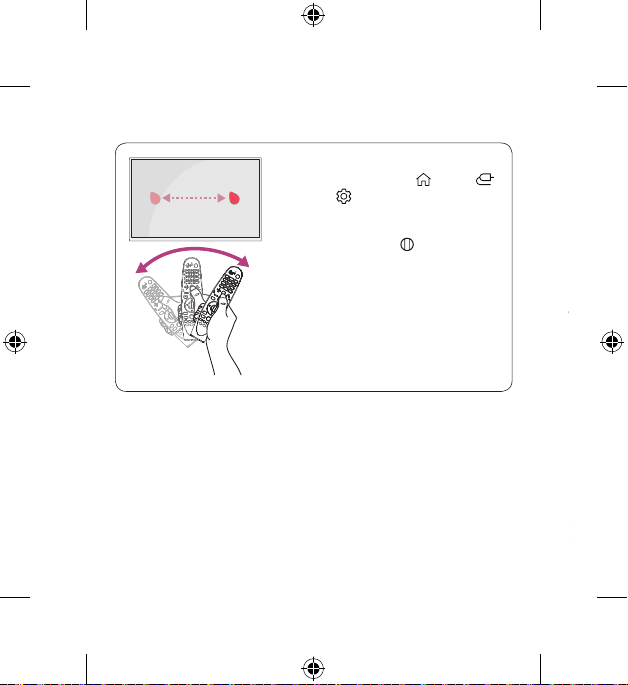
• ShaketheMagicRemoteslightlytotherightandleftor
press
(HOME), (INPUT),or (Q. Settings)
buttonstomakethepointerappearonthescreen.
(InsomeTVmodels,thepointerwillappearwhenyouturn
the
Wheel (OK) button.)
• Ifthepointerhasnotbeenusedforacertainperiodoftime
orMagicRemoteisplacedonaflatsurface,thenthepointer
willdisappear.
• Ifthepointerisnotrespondingsmoothly,youcanresetthe
pointerbymovingittotheedgeofthescreen.
• TheMagicRemotedepletesbatteriesfasterthananormal
remoteduetotheadditionalfeatures.
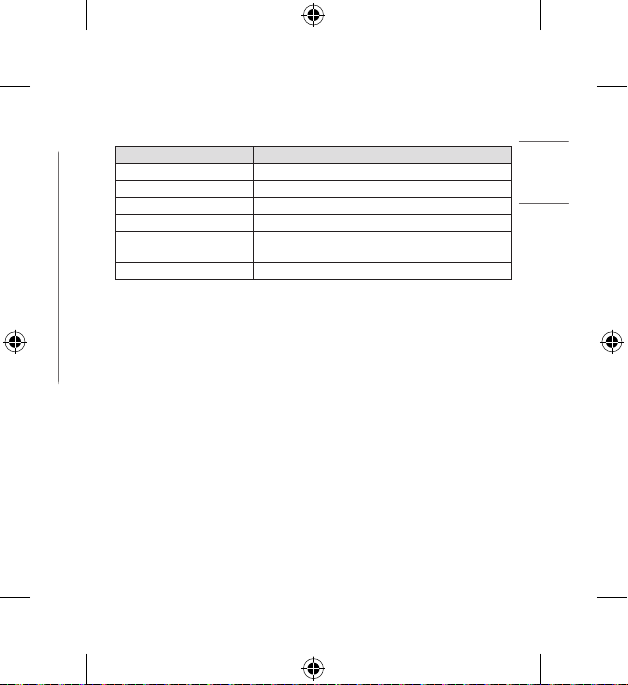
SPECIFICATIONS
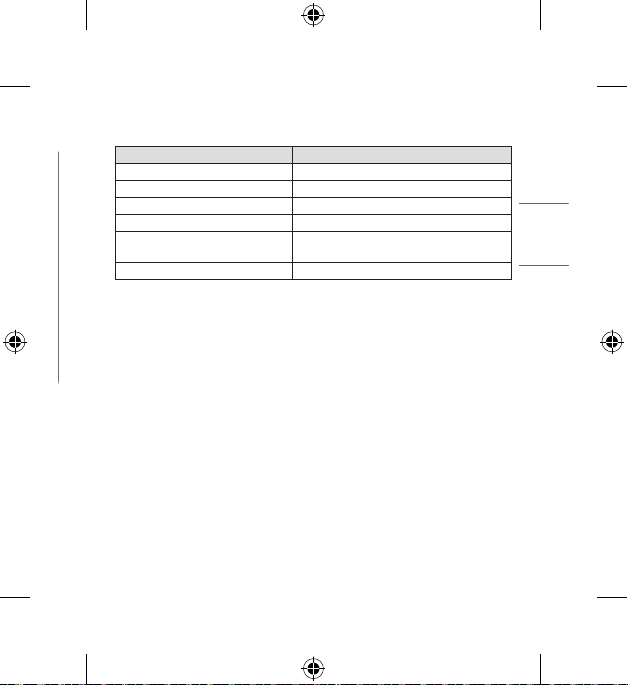
CATEGORIES DETAILS
ModelNo. MR20GA
Rangeoffrequency 2.400GHzto2.4835GHz
OutputPower(Max.) 10dBm
Channel 40channels
Powersource
AA1.5V,
2alkalinebatteriesareused
Operationaltemperaturerange 0°Cto40°C(32°Fto104°F)
Supported LG TVs
• 2018TVs/2017TVs
-
W8/G8/E8/C8/B8/A8/SK9*/SK8*/SK7*/UK9*/UK8*/UK7*
-
W7/G7/E7/C7/B7/SJ9*/SJ8*/SJ7*/UJ9*/UJ8*/UJ7*
-
UK6*/LK6*/LK5*/UJ6*/LJ6*/LJ5*(PleaseverifywhethertheTVBluetooth)
• 2019TVs
-
W9/E9/C9/B9/SM9*/SM8*/UM8*/UM7*(PleaseverifywhethertheTVBluetooth)
• 2020TVs
-
ZX/WX/GX/CX/BX/NANO9*/NANO8*
-
UN8*/UN7*(PleaseverifywhethertheTVBluetooth)
* 2017TVscanbeusedaftertheirsoftwarehasbeenupdated.
* Notallmodelslistedaresupportedinallcountries.
* Modelslistedaresubjecttochangewithoutpriornotice.
7
ENGLISH
ENGLISH_Index
2. How to use
• ShaketheMagicRemoteslightlytotherightandleftor
press
(HOME), (INPUT),or (Q. Settings)
buttonstomakethepointerappearonthescreen.
(InsomeTVmodels,thepointerwillappearwhenyouturn
the
Wheel (OK) button.)
• Ifthepointerhasnotbeenusedforacertainperiodoftime
orMagicRemoteisplacedonaflatsurface,thenthepointer
willdisappear.
• Ifthepointerisnotrespondingsmoothly,youcanresetthe
pointerbymovingittotheedgeofthescreen.
• TheMagicRemotedepletesbatteriesfasterthananormal
remoteduetotheadditionalfeatures.
SPECIFICATIONS
CATEGORIES DETAILS
ModelNo. MR20GA
Rangeoffrequency 2.400GHzto2.4835GHz
OutputPower(Max.) 10dBm
Channel 40channels
Powersource
AA1.5V,
2alkalinebatteriesareused
Operationaltemperaturerange 0°Cto40°C(32°Fto104°F)
Supported LG TVs
• 2018TVs/2017TVs
-
W8/G8/E8/C8/B8/A8/SK9*/SK8*/SK7*/UK9*/UK8*/UK7*
-
W7/G7/E7/C7/B7/SJ9*/SJ8*/SJ7*/UJ9*/UJ8*/UJ7*
-
UK6*/LK6*/LK5*/UJ6*/LJ6*/LJ5*(PleaseverifywhethertheTVBluetooth)
• 2019TVs
-
W9/E9/C9/B9/SM9*/SM8*/UM8*/UM7*(PleaseverifywhethertheTVBluetooth)
• 2020TVs
-
ZX/WX/GX/CX/BX/NANO9*/NANO8*
-
UN8*/UN7*(PleaseverifywhethertheTVBluetooth)
* 2017TVscanbeusedaftertheirsoftwarehasbeenupdated.
* Notallmodelslistedaresupportedinallcountries.
* Modelslistedaresubjecttochangewithoutpriornotice.
8
• Lecontenuduprésentmanuelpeutêtremodifiésanspréavisenraisond’unemiseàniveaudesfonctions
duproduit.
• Pourdeplusamplesrenseignements,reportez-vousaumanueld’utilisation.
ACCESSOIRES
(Selonlepays)
-
TélécommandeMagicetpilesalcalines(AA)
-
Manueld’utilisation
INSERTION DES PILES
• Veuillezlireattentivementlemanuel.
• Appuyezsurledessusducouvercleducompartimentdespiles,
faites-leglisseretsoulevez-lecommesurl’illustrationci-contre.
• Pourchangerlespiles,ouvrezlecouvercledeleurcompartiment
etinsérezdespilesalcalines(AAde1,5volt)enfaisant
correspondreleursbornes et conformémentaux
indicationsdel’étiquetteàl’intérieurducompartiment,puis
remettezlecouvercleenplace.Assurez-vousd’orienterla
télécommandeverslecapteurdetélécommandedutéléviseur.
• Pourretirerlespiles,suivezleprocessusci-dessusdansl’ordre
inverse.Nemélangezpasdevieillespilesoudespilesusagéeset
despilesneuves.Fermezsoigneusementlecouvercle.
• Ouvrez le couvercle des piles pour voir l’étiquette.
DESCRIPTION DE LA TÉLÉCOMMANDE
• L’imageaffichéedelatélécommandepeutdifférerduproduitréel.
• L’ordredeladescriptionpeutdifférerdevotreproduit.
• Certainsboutonsetservicespeuventnepasêtreoffertsselonlemodèleoularégion.
(ALIMENTATION)
(ACCUEIL)
(Réglages rapides)
Boutons numériques
Molette (OK)
(haut/bas/gauche/
droite)
(TIRET)
(SOURCE)
(AUTRES ACTIONS)
Boutons des services de diusion
en continu
, , ,
(VOL)
, (Boutons de contrôle)
(Reconnaissance vocale)
(SOURDINE)
(CH/P)
**Pourutiliserlebouton,maintenez-leenfoncépendantplusd’uneseconde.
9
ENGLISH
FRANÇAIS
• Lecontenuduprésentmanuelpeutêtremodifiésanspréavisenraisond’unemiseàniveaudesfonctions
duproduit.
• Pourdeplusamplesrenseignements,reportez-vousaumanueld’utilisation.
ACCESSOIRES
(Selonlepays)
-
TélécommandeMagicetpilesalcalines(AA)
-
Manueld’utilisation
INSERTION DES PILES
• Veuillezlireattentivementlemanuel.
• Appuyezsurledessusducouvercleducompartimentdespiles,
faites-leglisseretsoulevez-lecommesurl’illustrationci-contre.
• Pourchangerlespiles,ouvrezlecouvercledeleurcompartiment
etinsérezdespilesalcalines(AAde1,5volt)enfaisant
correspondreleursbornes et conformémentaux
indicationsdel’étiquetteàl’intérieurducompartiment,puis
remettezlecouvercleenplace.Assurez-vousd’orienterla
télécommandeverslecapteurdetélécommandedutéléviseur.
• Pourretirerlespiles,suivezleprocessusci-dessusdansl’ordre
inverse.Nemélangezpasdevieillespilesoudespilesusagéeset
despilesneuves.Fermezsoigneusementlecouvercle.
• Ouvrez le couvercle des piles pour voir l’étiquette.
DESCRIPTION DE LA TÉLÉCOMMANDE
• L’imageaffichéedelatélécommandepeutdifférerduproduitréel.
• L’ordredeladescriptionpeutdifférerdevotreproduit.
• Certainsboutonsetservicespeuventnepasêtreoffertsselonlemodèleoularégion.
(ALIMENTATION)
(ACCUEIL)
(Réglages rapides)
Boutons numériques
Molette (OK)
(haut/bas/gauche/
droite)
(TIRET)
(SOURCE)
(AUTRES ACTIONS)
Boutons des services de diusion
en continu
, , ,
(VOL)
, (Boutons de contrôle)
(Reconnaissance vocale)
(SOURDINE)
(CH/P)
**Pourutiliserlebouton,maintenez-leenfoncépendantplusd’uneseconde.
10
UTILISATION
1. Enregistrement (synchronisation) et annulation de l’enregistrement (désynchronisation)
Enregistrement (synchronisation) de la
télécommandeMagic
AvantdepouvoirutiliserlatélécommandeMagic,vousdevez
lasynchroniseravecvotretéléviseur.
1. InsérezdespilesdanslatélécommandeMagicetallumez
letéléviseur.
2. PointezlatélécommandeMagicversvotretéléviseuret
appuyezsur Molette (OK)surlatélécommande.
-
Siletéléviseurn’arrivepasàenregistrerla
télécommandeMagic,éteignez-leetrallumez-le,puis
réessayez.
Annulation de l’enregistrement (désynchronisation) de
la télécommandeMagic
Appuyezsimultanémentsurlesboutons (ACCUEIL)et
pendantcinqsecondespourannulerlasynchronisation
entrevotretéléviseuretlatélécommandeMagic.
• Maintenezlatouche
/ enfoncéependant
plusdecinqsecondespoursimultanémentdéconnecteret
enregistrerdenouveaulatélécommandeMagic.
11
ENGLISH
FRANÇAIS
UTILISATION
1. Enregistrement (synchronisation) et annulation de l’enregistrement (désynchronisation)
Enregistrement (synchronisation) de la
télécommandeMagic
AvantdepouvoirutiliserlatélécommandeMagic,vousdevez
lasynchroniseravecvotretéléviseur.
1. InsérezdespilesdanslatélécommandeMagicetallumez
letéléviseur.
2. PointezlatélécommandeMagicversvotretéléviseuret
appuyezsur Molette (OK)surlatélécommande.
-
Siletéléviseurn’arrivepasàenregistrerla
télécommandeMagic,éteignez-leetrallumez-le,puis
réessayez.
Annulation de l’enregistrement (désynchronisation) de
la télécommandeMagic
Appuyezsimultanémentsurlesboutons (ACCUEIL)et
pendantcinqsecondespourannulerlasynchronisation
entrevotretéléviseuretlatélécommandeMagic.
• Maintenezlatouche
/ enfoncéependant
plusdecinqsecondespoursimultanémentdéconnecteret
enregistrerdenouveaulatélécommandeMagic.
12
2. Utilisation
• RemuezdoucementlatélécommandeMagicdegauche
àdroiteouappuyezsurlesboutons
(ACCUEIL),
(SOURCE)ou
(Réglages rapides)pourafficherle
pointeuràl’écran.
(Pourcertainsmodèlesdetéléviseur,lepointeurapparaît
lorsquevoustournezlebouton
Molette (OK).)
• Sivousn’avezpasutilisélepointeurdepuisuncertaintemps
ousilatélécommandeMagicestposéesurunesurface
plane,lepointeurdisparaîtra.
• Silepointeurnerépondpascorrectement,vouspouvezle
réinitialiserenledéplaçantversleborddel’écran.
• LespilesdelatélécommandeMagicsedéchargentplus
rapidementquecellesd’unetélécommandenormaleen
raisondesesfonctionssupplémentaires.
CARACTÉRISTIQUES
CATÉGORIES DÉTAILS
N°demodèle MR20GA
Plagedefréquences De2,400GHzà2,4835GHz
Puissancedesortie(maximale) 10dBm
Chaîne 40chaînes
Sourced’alimentation
2pilesalcalinesAAde1,5V
sontutilisées
Plagedetempératuresdefonctionnement De0°Cà40°C(de32°Fà104°F)
Téléviseurs LG pris en charge
• Téléviseurs2018/Téléviseurs2017
-
W8/G8/E8/C8/B8/A8/SK9*/SK8*/SK7*/UK9*/UK8*/UK7*
-
W7/G7/E7/C7/B7/SJ9*/SJ8*/SJ7*/UJ9*/UJ8*/UJ7*
-
UK6*/LK6*/LK5*/UJ6*/LJ6*/LJ5*(VérifiezsiletéléviseurprendenchargeleBluetooth)
• Téléviseurs2019
-
W9/E9/C9/B9/SM9*/SM8*/UM8*/UM7*(VérifiezsiletéléviseurprendenchargeleBluetooth)
• Téléviseurs2020
-
ZX/WX/GX/CX/BX/NANO9*/NANO8*
-
UN8*/UN7*(VérifiezsiletéléviseurprendenchargeleBluetooth)
* Lestéléviseurs2017peuventêtreutilisésaprèslamiseàjourdeleurlogiciel.
* Certainsmodèlesindiquésnesontpasprisenchargedanstouslespays.
* Lesmodèlesindiquéspeuventfairel’objetdemodicationssanspréavis.
13
ENGLISH
FRANÇAIS
2. Utilisation
• RemuezdoucementlatélécommandeMagicdegauche
àdroiteouappuyezsurlesboutons
(ACCUEIL),
(SOURCE)ou
(Réglages rapides)pourafficherle
pointeuràl’écran.
(Pourcertainsmodèlesdetéléviseur,lepointeurapparaît
lorsquevoustournezlebouton
Molette (OK).)
• Sivousn’avezpasutilisélepointeurdepuisuncertaintemps
ousilatélécommandeMagicestposéesurunesurface
plane,lepointeurdisparaîtra.
• Silepointeurnerépondpascorrectement,vouspouvezle
réinitialiserenledéplaçantversleborddel’écran.
• LespilesdelatélécommandeMagicsedéchargentplus
rapidementquecellesd’unetélécommandenormaleen
raisondesesfonctionssupplémentaires.
CARACTÉRISTIQUES
CATÉGORIES DÉTAILS
N°demodèle MR20GA
Plagedefréquences De2,400GHzà2,4835GHz
Puissancedesortie(maximale) 10dBm
Chaîne 40chaînes
Sourced’alimentation
2pilesalcalinesAAde1,5V
sontutilisées
Plagedetempératuresdefonctionnement De0°Cà40°C(de32°Fà104°F)
Téléviseurs LG pris en charge
• Téléviseurs2018/Téléviseurs2017
-
W8/G8/E8/C8/B8/A8/SK9*/SK8*/SK7*/UK9*/UK8*/UK7*
-
W7/G7/E7/C7/B7/SJ9*/SJ8*/SJ7*/UJ9*/UJ8*/UJ7*
-
UK6*/LK6*/LK5*/UJ6*/LJ6*/LJ5*(VérifiezsiletéléviseurprendenchargeleBluetooth)
• Téléviseurs2019
-
W9/E9/C9/B9/SM9*/SM8*/UM8*/UM7*(VérifiezsiletéléviseurprendenchargeleBluetooth)
• Téléviseurs2020
-
ZX/WX/GX/CX/BX/NANO9*/NANO8*
-
UN8*/UN7*(VérifiezsiletéléviseurprendenchargeleBluetooth)
* Lestéléviseurs2017peuventêtreutilisésaprèslamiseàjourdeleurlogiciel.
* Certainsmodèlesindiquésnesontpasprisenchargedanstouslespays.
* Lesmodèlesindiquéspeuventfairel’objetdemodicationssanspréavis.

14
15
ENGLISH
FRANÇAIS