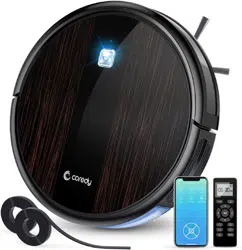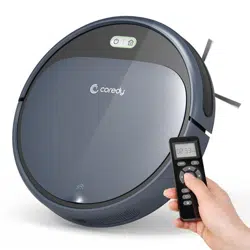

R300 High Suction Vacuuming Cleaning Robot
Owner’s Manual

1
Table of Contents
1.1 Use Restrictions ............................................................................................................
1.2 Battery and Charging ..................................................................................................
Important Safety Information
2.1 Robot ...............................................................................................................................
2.2 Accessories ....................................................................................................................
2.3 Charging Dock ..............................................................................................................
2.4 Remote Control .............................................................................................................
2.5 Dust Bin ..........................................................................................................................
3.1 Notes Before Cleaning ................................................................................................
3.2 Quick Start .....................................................................................................................
3.3 How Coredy R300 Clean Your Home ......................................................................
3.4 Cleaning Schedule .......................................................................................................
4.1 Emptying Robot’s Bin ..................................................................................................
4.2 Cleaning Robot’s Filter ................................................................................................
4.3 Cleaning Robot’s Side Brush ....................................................................................
4.4 Cleaning Robot’s Cliff Sensors and Charging Contacts .....................................
4.5 Cleaning Robot’s Floor Tracking Sensor ................................................................
4.6 Battery and Charging Information ............................................................................
01
02
04
06
07
08
09
10
11
13
15
18
18
19
19
20
21
2
Product Diagram
3
Operating and Programming
4
Regular Robot Care
5
Troubleshooting
01
04
10
17
23
6
Specifications
26
7
Customer Service
27

1.1 Use Restrictions
1 Important Safety Information
This appliance can be used by children aged from 8 years and above and persons with reduced physical, sensory or mental
capabilities or lack of experience and knowledge if they have been given supervision or instruction concerning use of the
appliance in a safe way and understand the hazards involved. Children shall not play with the appliance. Cleaning and user
maintenance shall not be made by children without supervision.
The robot must be used in accordance with the directions in this Instruction Manual. Coredy inc cannot be held liable or
responsible for any damages or injuries caused by improper use.
Do not dispose of electrical appliances as unsorted municipal waste, use separate collection facilities. Contact your local
authority for information regarding the collection systems available. If electrical appliances are disposed of in landfills or dumps,
hazardous substances can leak into the groundwater and get into the food chain, damaging your health and well-being. Please
contact your local or regional waste authority for more information on collection, reuse and recycling programs.
To reduce the risk of injury or damage, keep these safety precautions in mind when setting up, using and maintaining your
robot:
Your robot is for indoor use only. Do not use the robot outdoor, commercial or industrial environments.
Before using this device, pick up objects like clothing, loose papers, pull cords for blinds or curtains, power cords, and any
fragile objects. If the device passes over a power cord and drags it, there is a chance an object could be pulled or a table or
shelf.
Read all safety and operating instructions before operating your robot.
Retain the safety and operating instructions for future reference.
Heed all warnings on your robot, battery, charging Dock and in the owner’s manual.
Follow all operating and use instructions.
The symbol on the product or its packaging indicates:
01

1.2 Battery and Charging
Your robot is not a toy. Do not sit or stand on this device. Small children and pets should be supervised when your robot is
operating.
Store and operate your robot in room temperature environments only.
Do not use this device to pick up anything that is burning or smoking.
Do not use this device to pick up spills of bleach, paint, or other chemicals, or anything wet.
If the room to be cleaned contains a balcony, a physical barrier should be used to prevent access to the balcony and ensure
safe operation.
This appliance is not intended for use by persons (including children) with reduced physical, sensory or mental capabilities,
or lack of experience and knowledge, unless they have been given supervision or instruction concerning use of the
appliance by a person responsible for their safety.
Children should be supervised to ensure they do not play with the robot. Cleaning and maintenance shall not be performed
by children without supervision.
Do not place anything on top of your robot.
Be aware that the robot moves on its own. Take care when walking in the area that the robot is operating in to avoid stepping
on it.
Do not operate the robot in areas with exposed electrical outlets in the floor.
Use only rechargeable battery packs with the correct specification approved by Coredy.
Charge using a standard outlet only. Product may not be used with any type of power converter. Use of other power convert-
ers will immediately void the warranty.
Do not use a Charging Dock with a damaged cord or plug. If the cord or plug is damaged, it must be serviced by the manu-
facturer or similarly qualified persons.
Always charge and remove the battery from your robot and accessories before long-term storage or transportation.
Charge indoors only.
02

Your robot’s Charging Dock may be protected with a surge protector in the event of severe electrical storms.
Never handle the Charging Dock with wet hands.
Always disconnect your robot from the Charging Dock before cleaning or maintaining it.
Please ensure voltage rating for enclosed Charging Dock matches standard outlet voltage.
Used battery packs should be placed in a sealed plastic bag and disposed of safely according to local environmental regula-
tions.
Before every use, check the battery pack for any sign of damage or leakage. Do not charge damaged or leaking battery
packs.
If the battery pack is leaking, contact Coredy Customer Service for disposal.
The battery pack must be removed from the robot before disposal.
Do not crush or dismantle battery packs. Do not heat or place the battery pack near any heat source.
Do not incinerate the battery pack. Do not short-circuit the battery pack.
Do not immerse the battery pack in any liquid.
03
2 Product Diagram
2.1 Robot
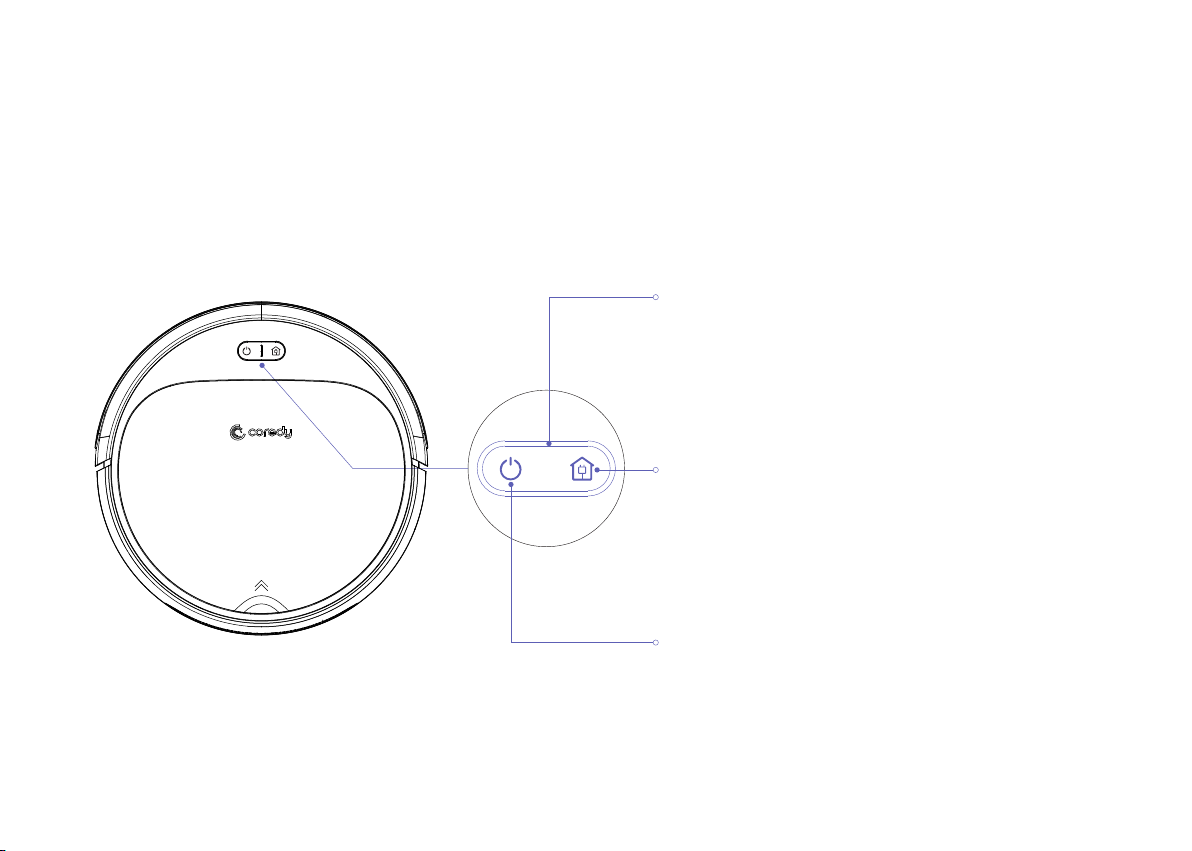
Power On / Cleaning
Press and Hold On to Power On or Power Off
Press to Start Cleaning
To send R300 Robot back to the Charging Dock, press on
robot or press the on Remote Control.
Indicator
Dock Button
Indicator Lights Orange: Low Power
Indicator Blinks Green: Charging
Indicator Lights Green: Full Charging/ Standby Mode/ Cleaning
Indicator Lights or Blinks Red: Troubleshooting
04
05
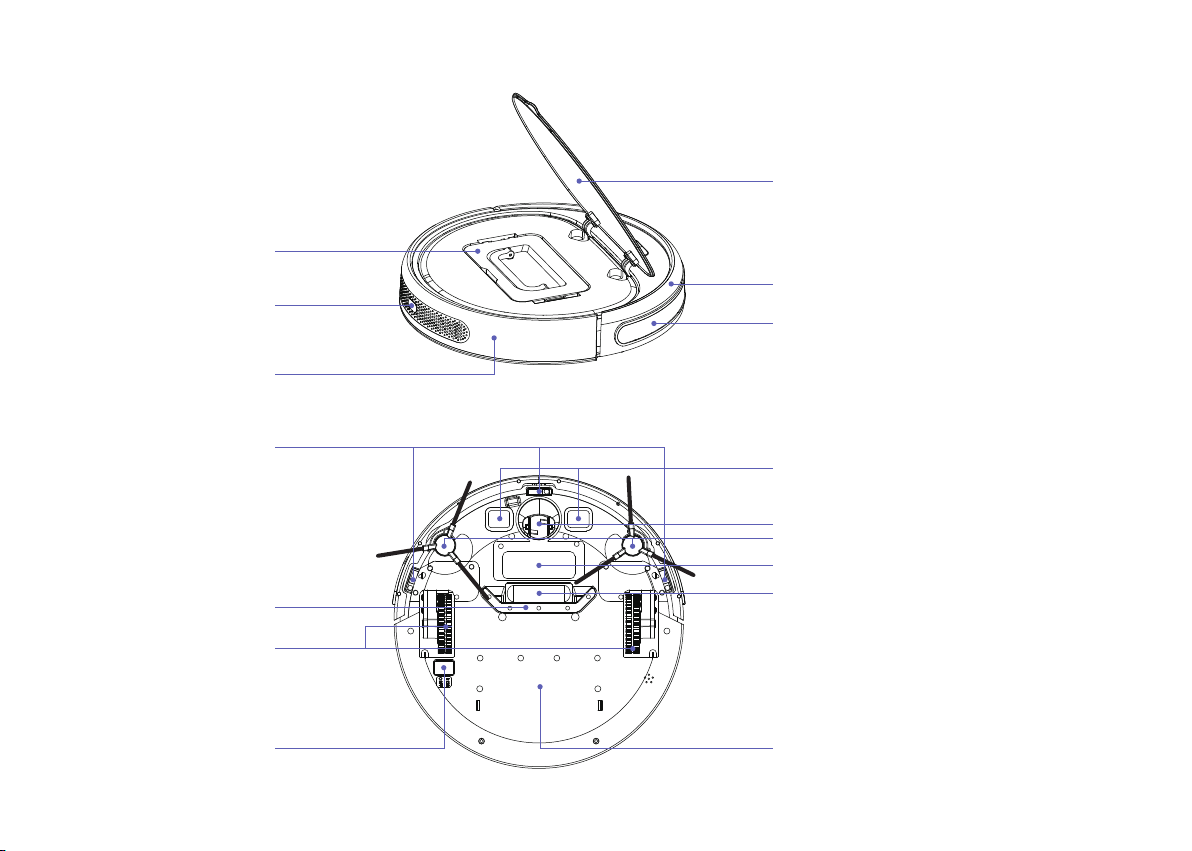
Anti-Collision Sensors
Middle Cover
Bumper
Dust Bin
Remote Control Receiver
Surface Case
Anti-Drop Sensors
Driving Wheels
Dust Scraping
Power Switch
Charging Contacts
Universal Wheel
Side Brushes
Battery Pack
Suction Channel
Bottom Case
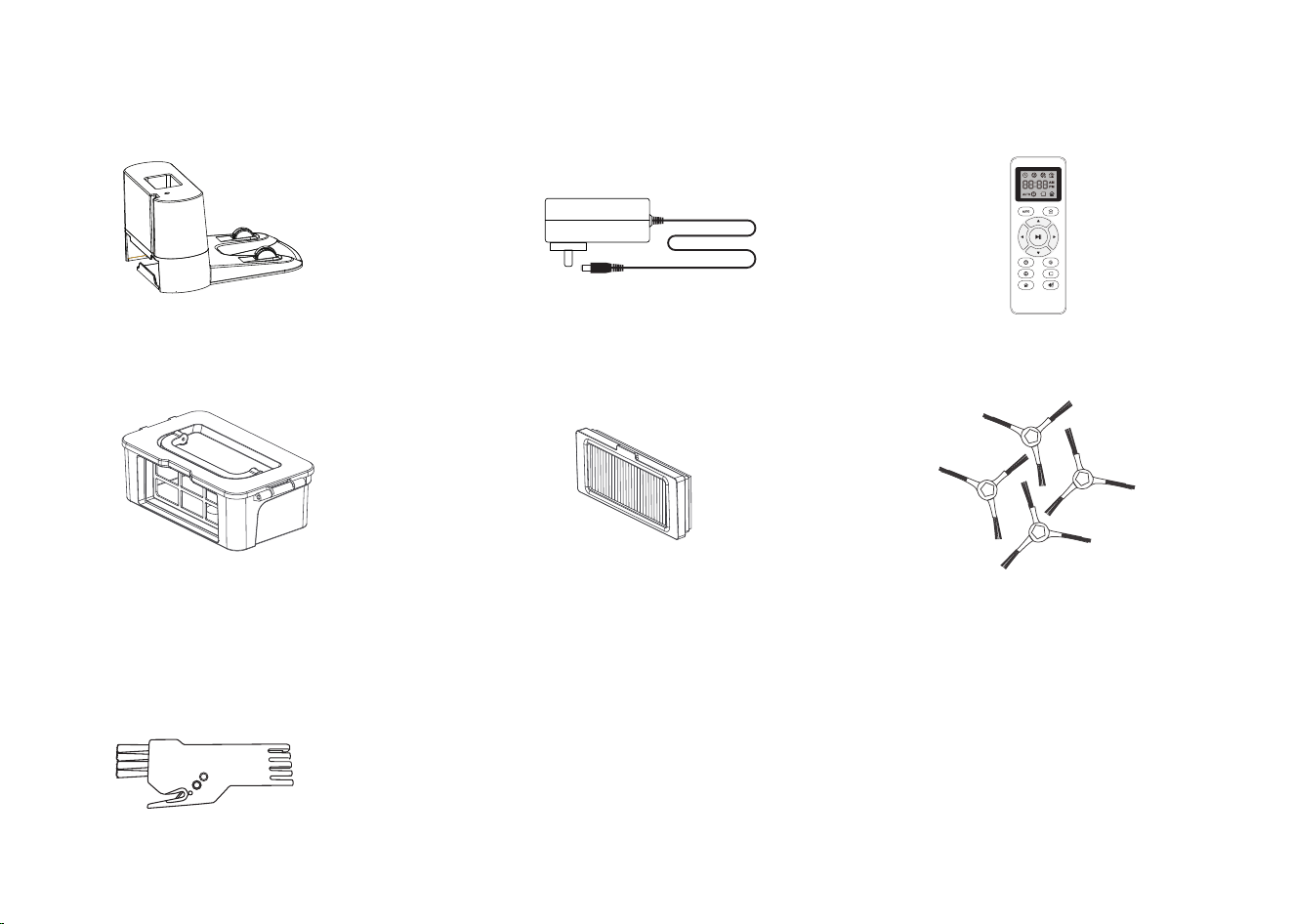
2.2 Accessories
Charging Dock
Adapter
Remote Control
(with batteries)
Dust Bin
4 x Side Brushes
Brush
High Efficiency Filter
06
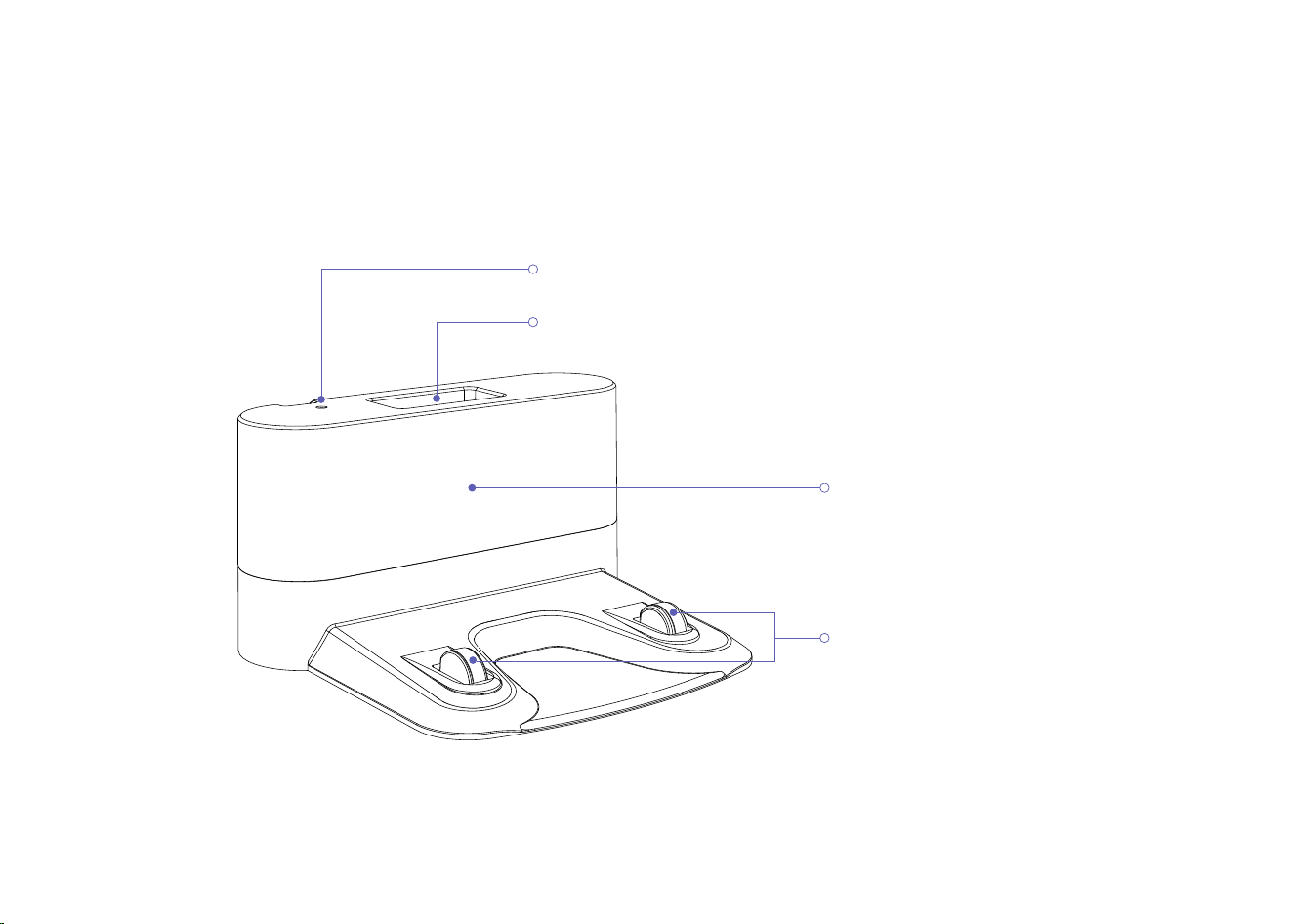
2.3 Charging Dock
07
Charging indicator
Location for remote control
Signal transmission area
Butting charging pole piece
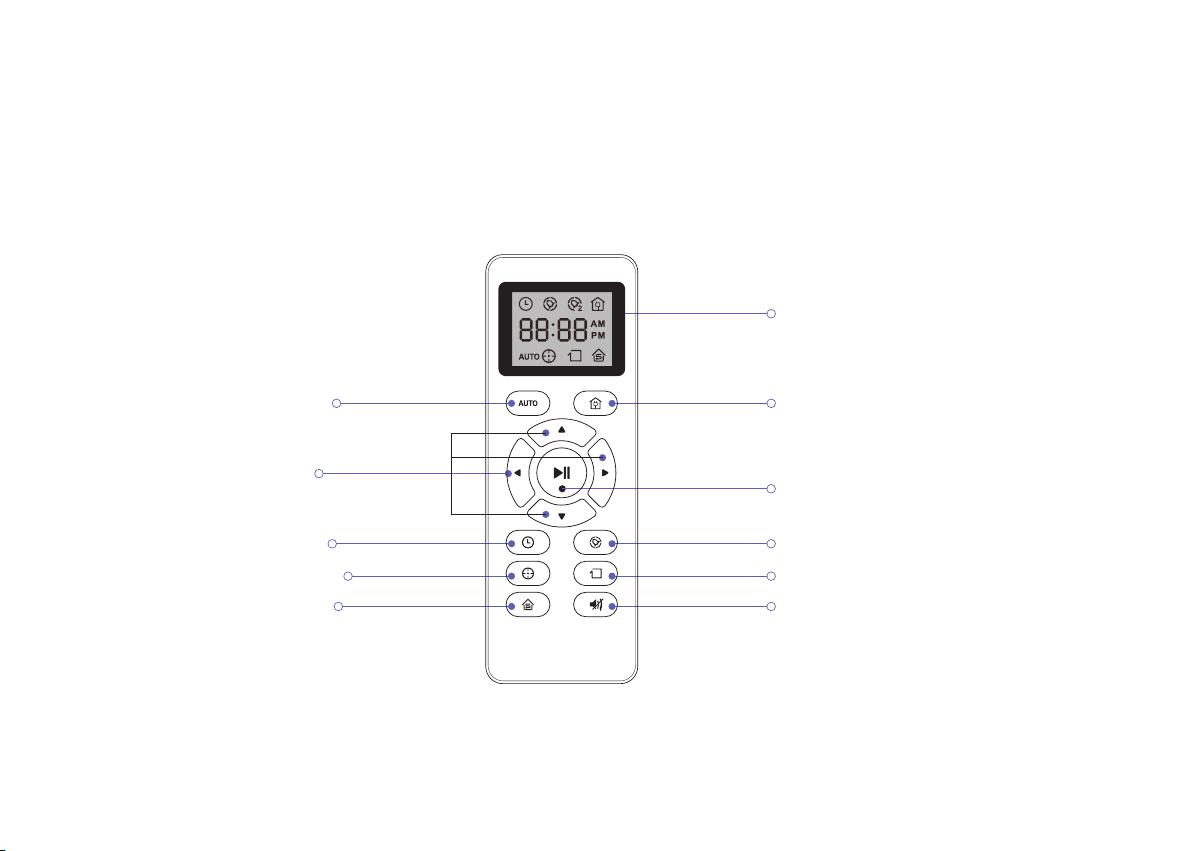
2.4 Remote Control
Mode and time display screen
Automatic re-charging button
Automatic cleaning
Direction buttons
Clock setup button
Scheduling button
Start / Pause button
Spot cleaning button
Edge cleaning button
Small-space button Lower Suction Cleaning Button
08
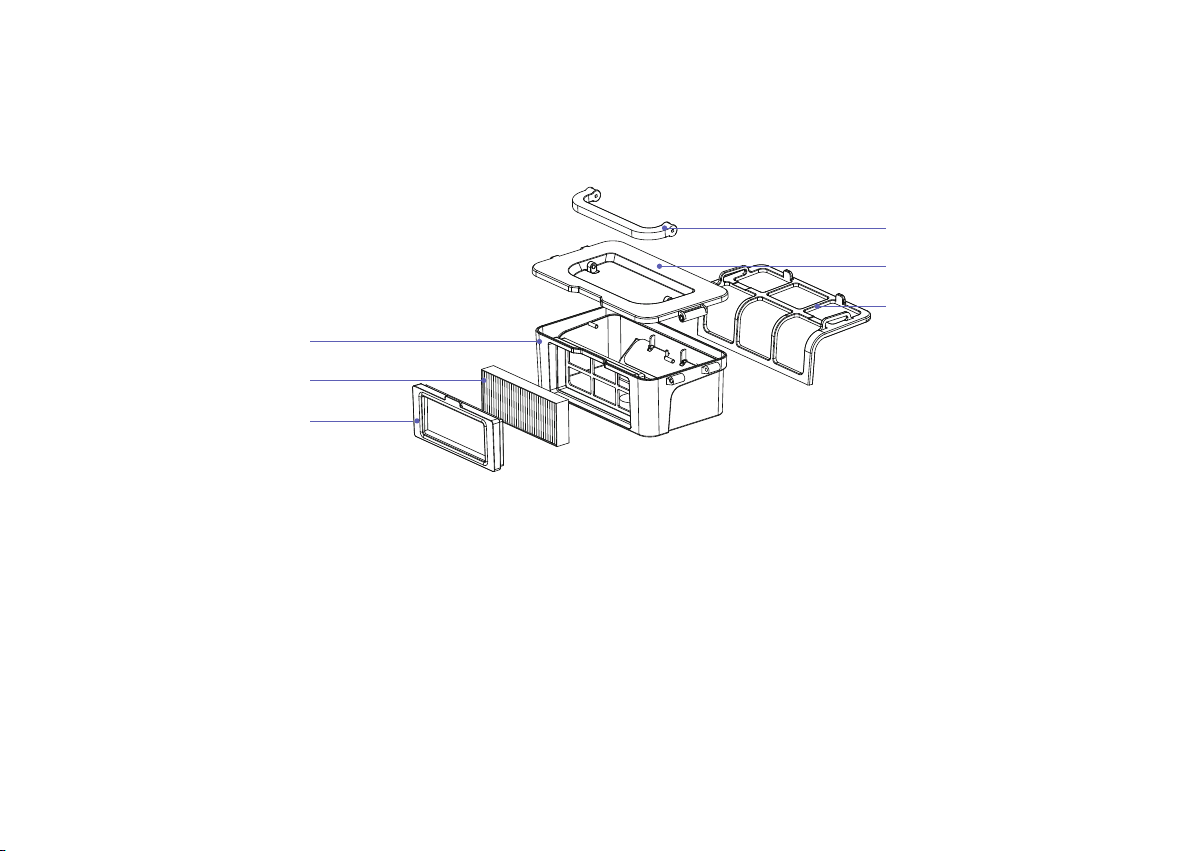
2.5 Dust Bin
09
Handle
Dust Bin Cover
Primary Holder
Dust Bin
High Efficient Filter
High Efficient Filter Frame
3 Operating and Programming
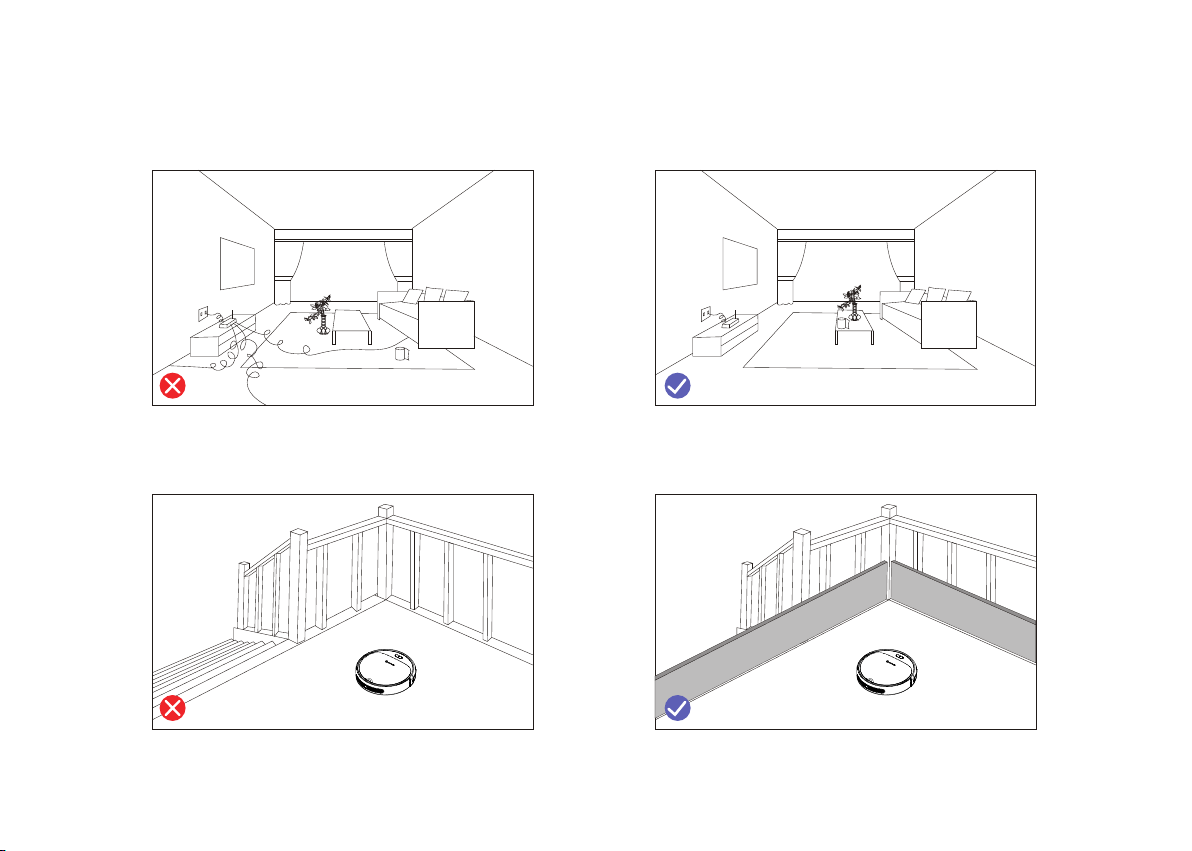
3.1 Notes Before Cleaning
Before using Robot, pick up objects like clothing, loose papers, pull cords for blinds or curtains, power cords,
and any fragile objects. If the Robot passes over a power cord and drags it, there is a chance an object could be
pulled off a table or shelf.
If the room to be cleaned contains a balcony, a physical barrier should be used to prevent access to the balcony
and ensure safe operation.
10
3.2 Quick Start
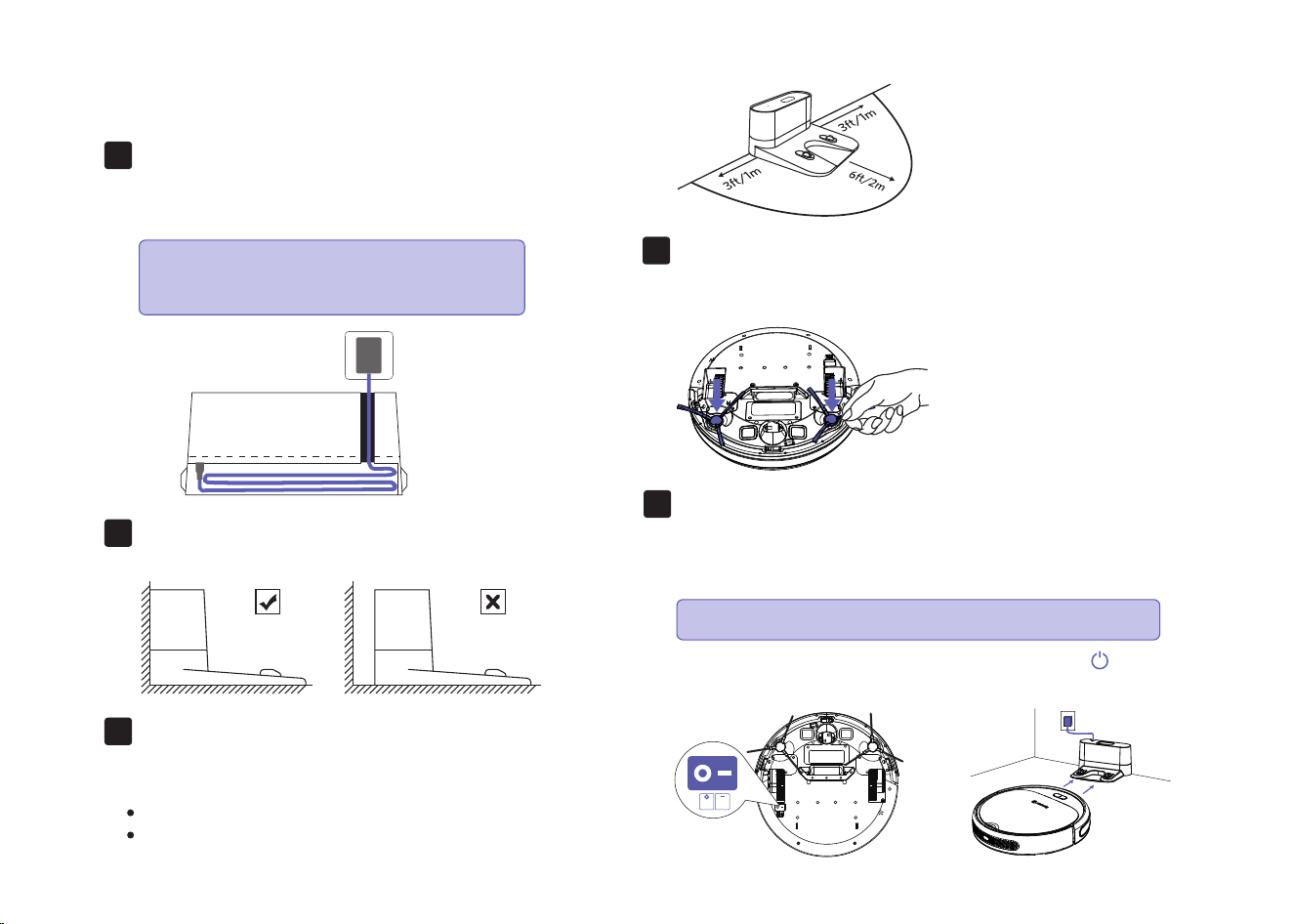
Place the Charging Dock on a hard
level surface and against a wall.
Plug in the Charging Dock and place
the remaining wire into the trunking
at the bottom of the Charging Dock
1.
2.
Charging Dock Position
Place the Charging Dock against the wall and make sure
it is in an open and uncluttered area leaving at least:
2 meters (6.5 feet) in the front of the Charging Dock.
1 meter (2.3 feet) on both sides of the Charging Dock.
3.
11
Attach Side Brushes to the bottom of Coredy R300 by pressing
a brush into each slot until it clicks.
Install Side Brushes
4.
Activate the Robot
Place Coredy R300 onto the Charging Dock, making sure the
metal charging contacts on the Charging Dock match up with
those underneath the robot.
If successful, you will hear a series of tones. Once the
Power button illuminates, Coredy R300 is ready for use.
5.
OFF
ON
Note: Failure to place the remaining wire
into the trunking, may cause Robot to
become stuck while charging or cleaning.
Initial Use, Switch on the Power Button on the Bottom.
Note:
If the Charging Dock is inaccessible, Robot will not be able to
recharge, please place the robot manually on Charging Dock for
charging. (Refer Activate the Robot)
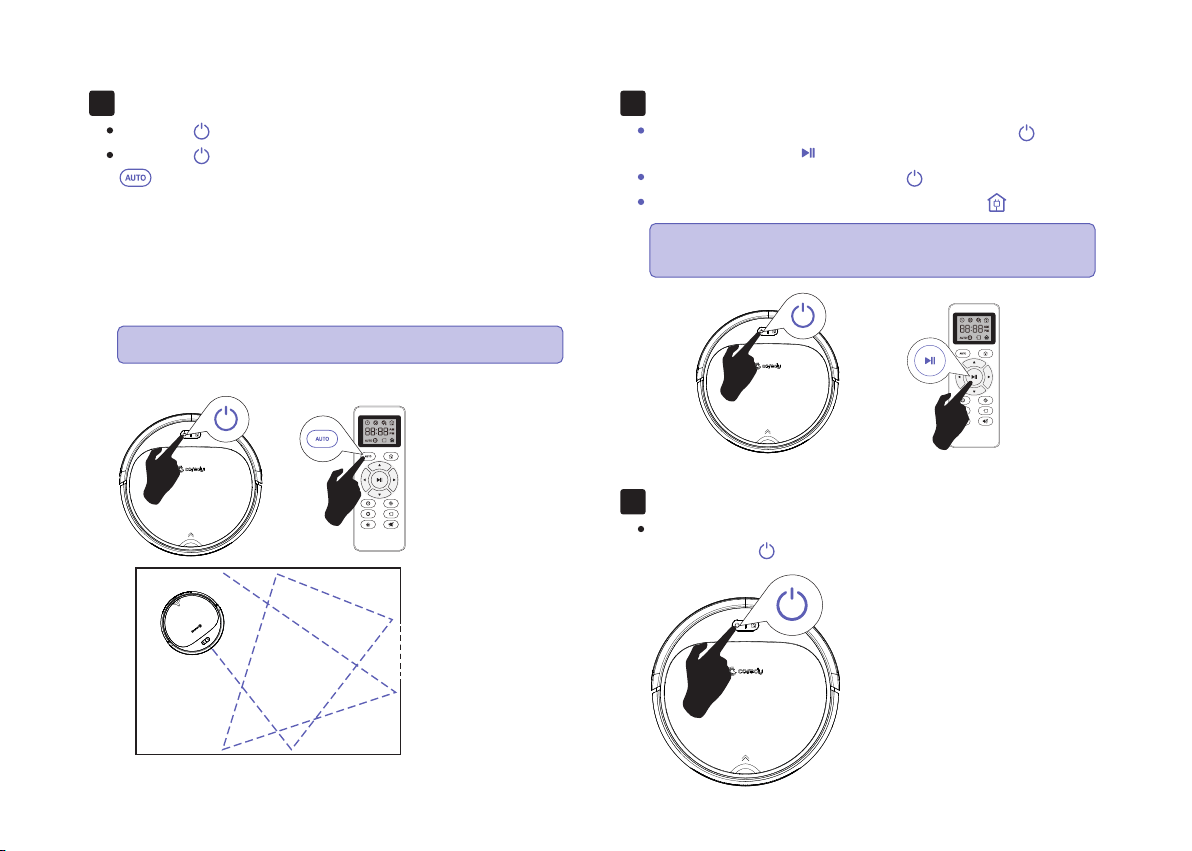
Start Cleaning Cycle
Press the power button once to wake up the robot.
Press the power button again to start a cleaning cycle (or
button on Remote Control).
If its battery gets low before finishing a cleaning cycle, robot
returns to the Charging Dock to recharge.
6.
Pause
To pause the robot during a cleaning cycle press the button
on robot or press the button on the Remote Control.
To resume the cleaning cycle, press button again.
To send robot back to the Charging Dock, press button.
7.
Power OFF
To end the cleaning cycle and put robot in standby mode,
press and hold button until robot’s indicators turn off.
8.
12
Please refer to section 3.3 for more Cleaning Mode.
Note:
Note: The actions listed above can also be managed from
the Remote Control.
3.3 How Coredy R300 Cleans Your Home
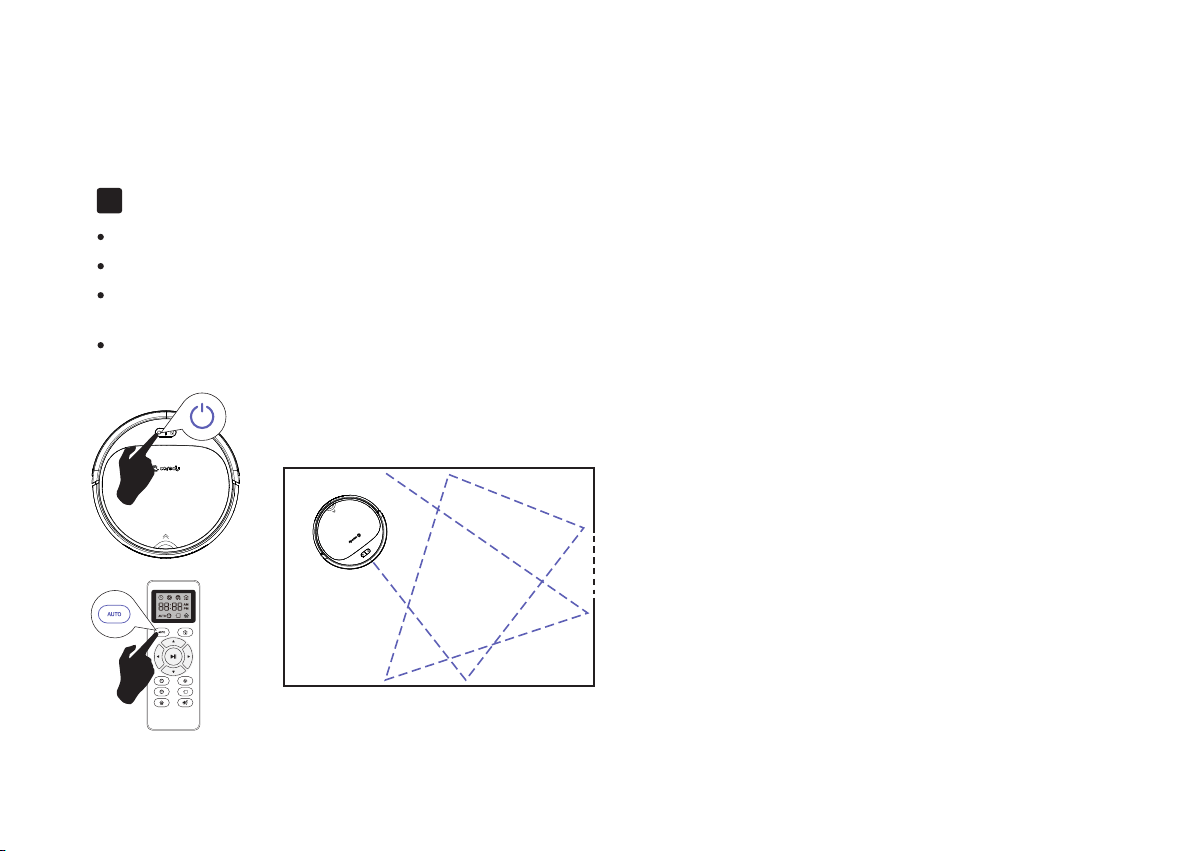
Auto Cleaning
Coredy R300 is designed to intelligently navigate and clean an entire level of your home. It's a multifunctional Robot with Cleaning-Sweeping,
Vacuuming function.
Working in random pattern for seamlessly and thoroughly clean.
At various times throughout the cleaning cycle, Coredy R300 touches up around the edges of the room, as well as chair legs and other furniture.
Coredy R300 continues this process until it has cleaned an entire level of your home. If its battery gets low before finishing a cleaning cycle,
Coredy R300 returns to the Charging Dock to recharge.
Once Coredy R300 finishes its cleaning cycle, Coredy R300 returns to the Charging Dock to recharge.
1.
13
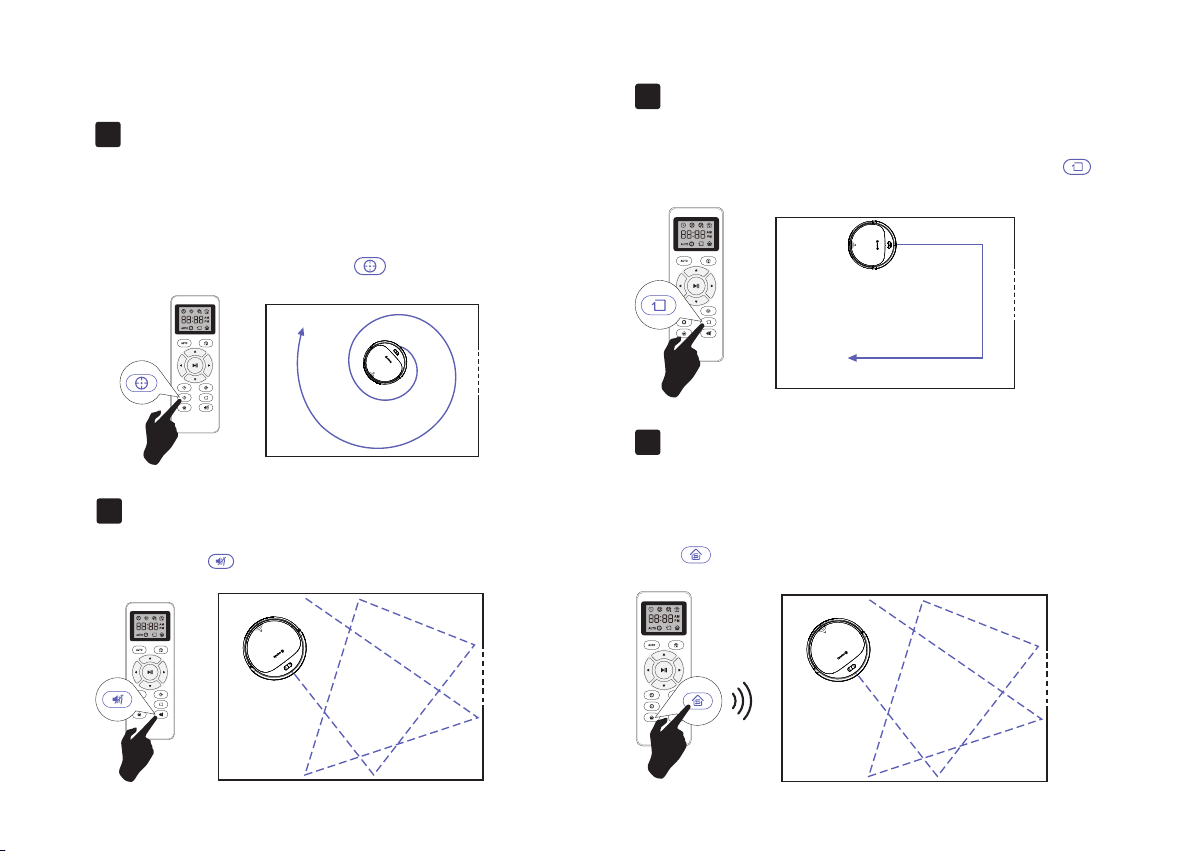
Cleaning Preferences
Edge Cleaning
After robot finishes cleaning the open areas of your floor, it uses
Edge Clean to ensure that it has cleaned along walls and around
furniture legs. If you prefer a quicker edge cleaning, press the
button on Remote Control.
4.
Spot Cleaning
When you select Spot Cleaning, robot intensely cleans a localized
area by spiraling outward about 3 feet (1 meter) in diameter and
then spiraling inward to where it started. When Spot Cleaning,
robot boosts its vacuum power to provide the best cleaning
possible where you need it. To use Spot Cleaning, place robot on
top of the localized debris and press (Spot) on the Remote
Control.
2.
Lower Suction Vacuuming Cleaning
Robot reduce its vacuum power to provide a lower suction clean
when press the button on Remote Control.
3.
14
Single Room Cleaning
Coredy R300 intensively cleans one single room and stops after 30
minutes. Select this mode only when one specific room needs to be
cleaned. Make sure to confine Coredy R300 to the room by closing
the door.
Press on the remote control to start cleaning in Single Room
Mode.
5.
MAX
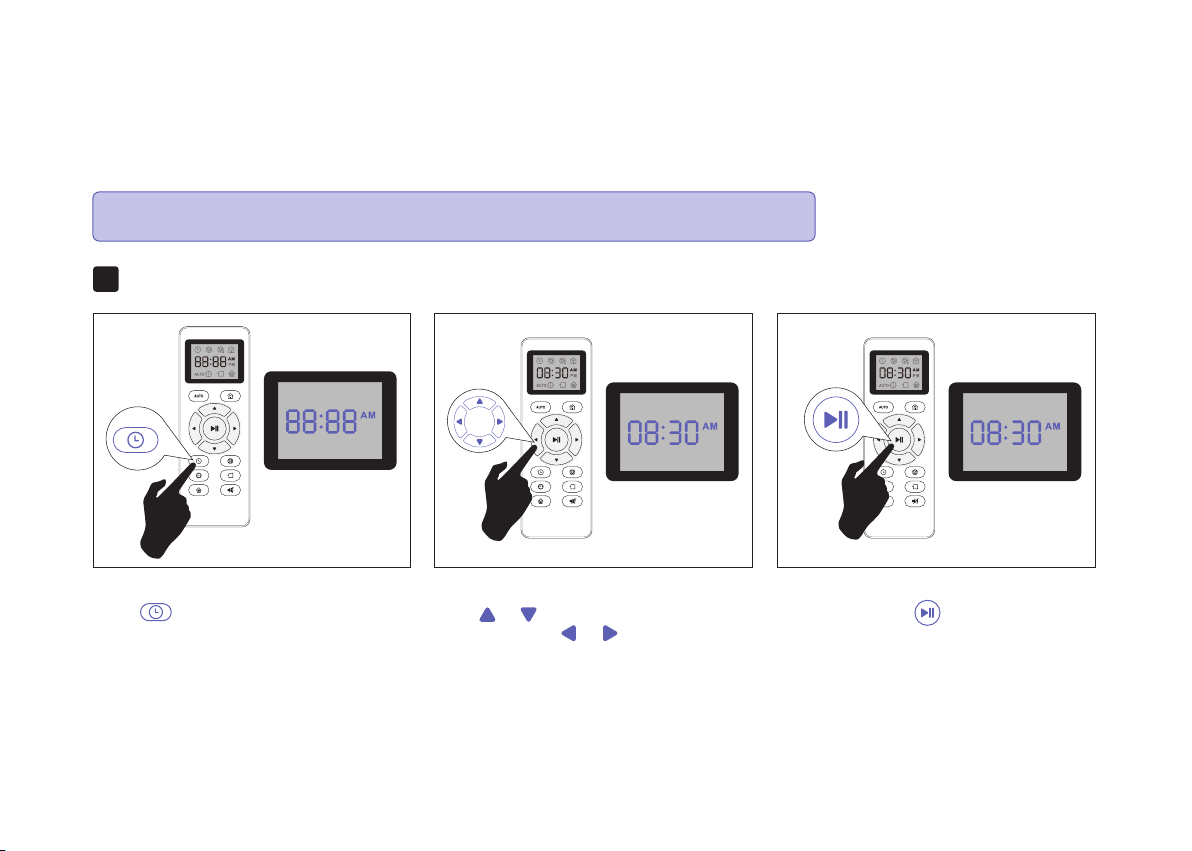
3.4 Cleaning Schedule
Coredy R300 has cleaning schedule settings which allow you to customize when Robot cleans your home. These settings are available only
through the Remote Control.
Press button on Remote Control, and
then the hour section begins to flash in the
clock display setting window.
Set the Remote Control’s Clock1.
Press or button to select the desired
figures. Press the or button to select
the minute or hour section.
And then press the button, the Robot will
“BEEP” when the clock setting completed.
15
Note: Please make sure the Remote Control near by the Robot while setting the Clock or Schedule.
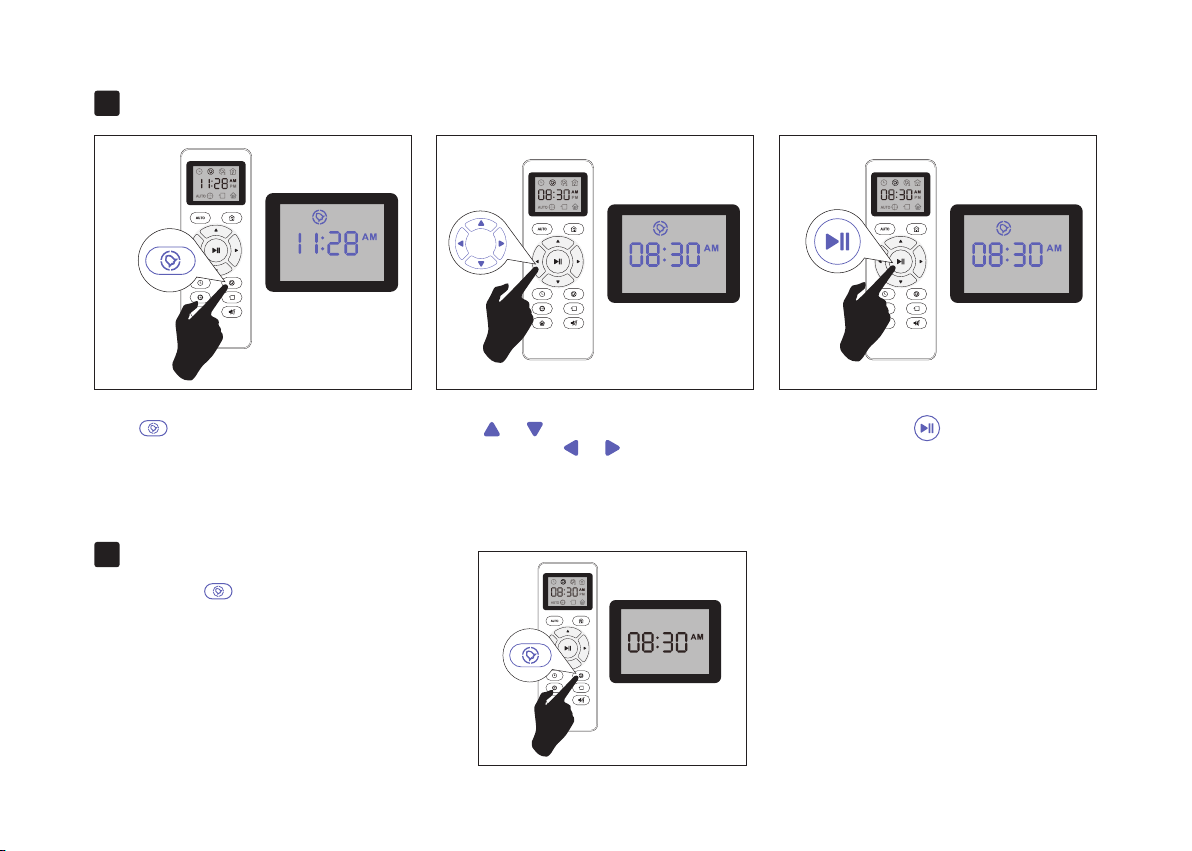
Setting Cleaning Schedule2.
Cancel the Cleaning Schedule
3.
Press button on Remote Control, and
then the hour section begins to flash in the
Cleaning Schedule display setting window.
Press or button to select the desired
figures. Press the or button to select
the minute or hour section.
And then press the button, the Robot will
“BEEP” when the Cleaning Schedule setting
completed.
Press and hold button approximately 4
seconds on Remote Control, the Robot will
“BEEP” when the Cleaning Schedule process
cancel completely.
16
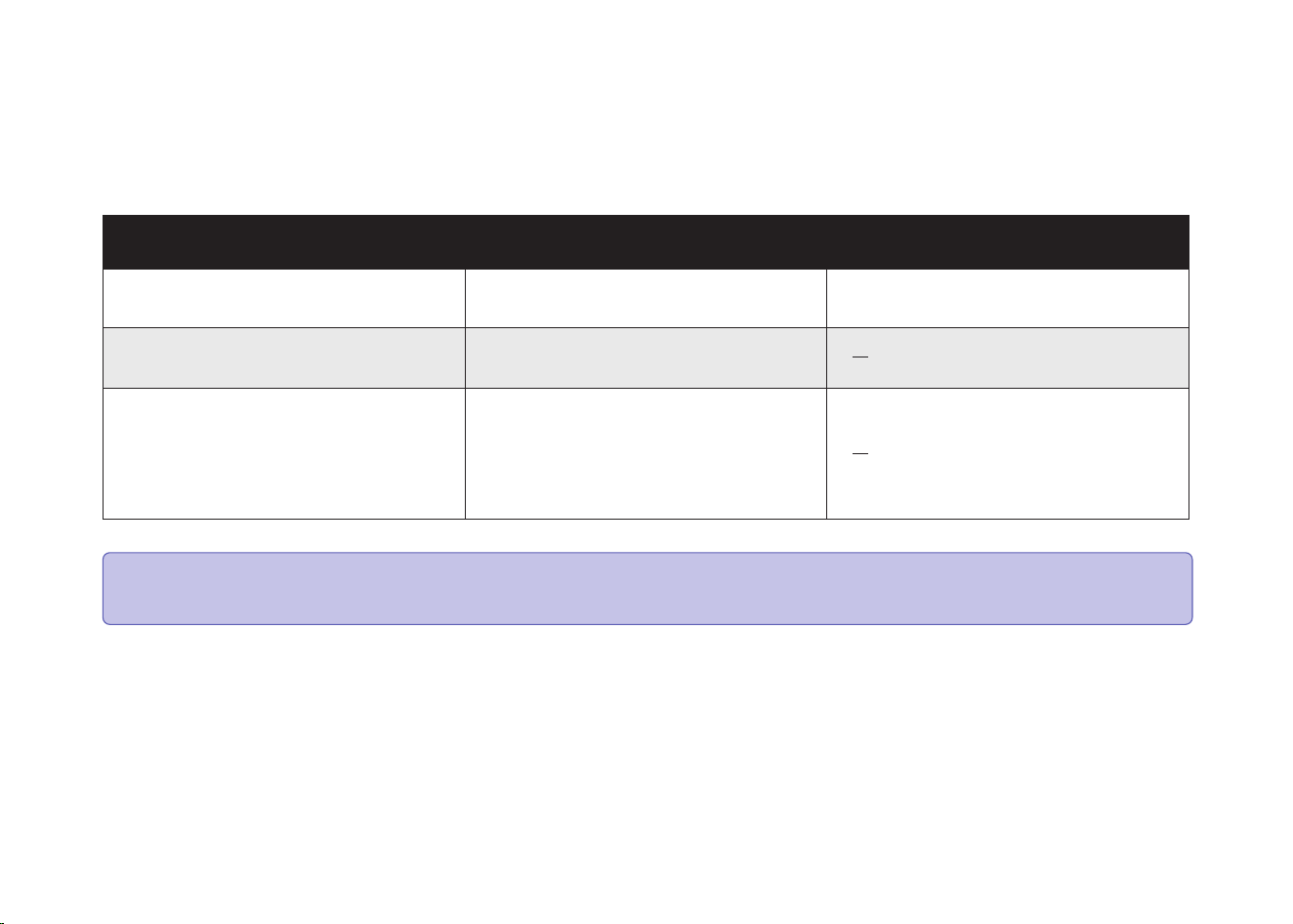
To keep robot running at peak performance, perform the following care procedures. If you notice robot picks up less debris from your floor, then
empty the bin, clean the filter.
4 Regular Robot Care
17
Robot Part Care Frequency Replacement Frequency
Front Caster Wheel
Side Brush
Cliff Sensors
Charging Contacts
Floor Tracking Sensor
Once per month
Filter
Once per week (twice per week in homes
with pets)
Every 2 months
Dust Bin After each use
Note: Coredy manufactures various replacement parts and assemblies. If you think you need a replacement part, please contact Coredy
Customer Care for more information.
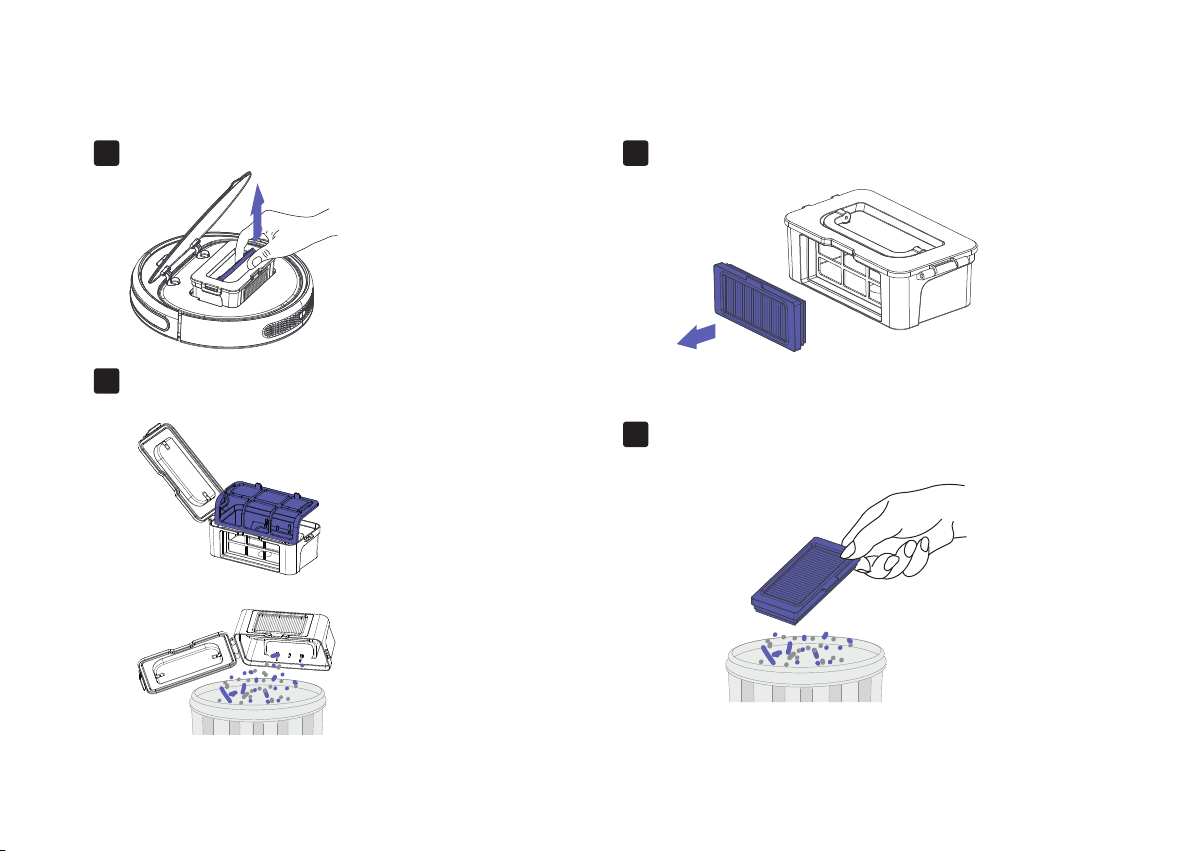
4.1 Emptying Robot’s Bin
Open the middle cover and remove the dust bin.
1.
4.2 Cleaning Robot’s Filter
Remove the filter.
1.
Shake off debris by tapping the filter against your trash container.
2.
Open dust bin door to empty it.
2.
18
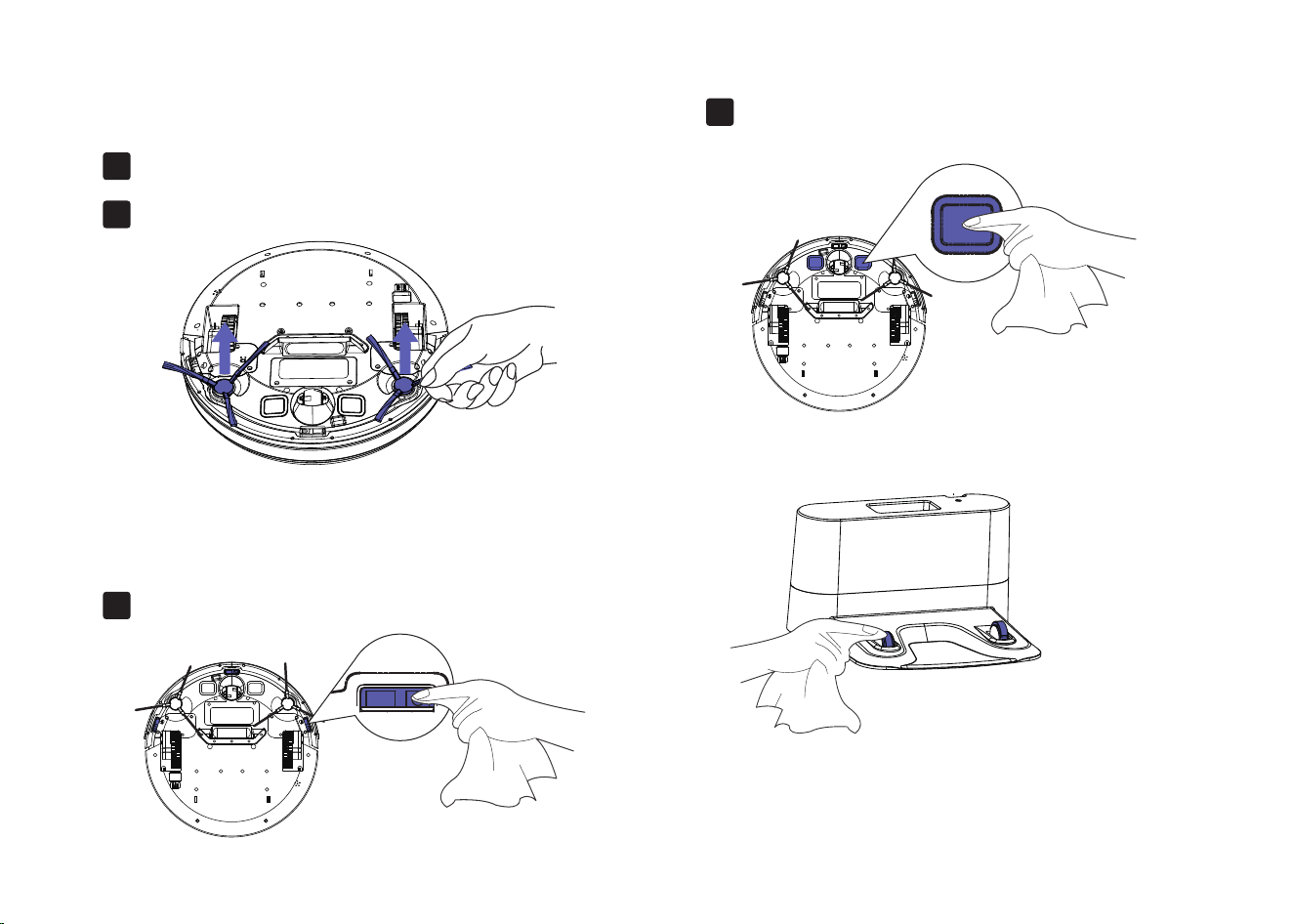
4.3 Cleaning Robot’s Side Brush
4.4 Cleaning Robot’s Cliff Sensors
and Charging Contacts
Remove the brush1.
Wipe Robot’s Cliff Sensors with a clean, dry cloth.
1.
Wipe the charging contacts on Robot and the Charging
Base with a clean, dry cloth.
2.
Clean the brush and the brush stand, and reinstall the brush.2.
19
4.5 Cleaning Robot’s Floor Tracking Sensor
Use a clean, dry microfiber or soft cotton cloth to wipe any debris that has accumulated in the round sensor opening
on the right side of the bottom surface.
Do not spray cleaning solution directly into the sensor entrance.
20

Lithium Ion Battery
Battery Charging
4.6 Battery and Charging Information
To extend battery life, always keep robot charged on the Home Base when not in use.
Battery Storage
If storing robot off of the Charging Dock, remove the battery first. Then store robot and the battery in a cool, dry place.
Battery Disposal
Contact your local waste management authority for battery recycling and disposal regulations in your area.
Battery Replacement
You can visit Coredy’s website www.coredy.com to purchase the battery or other accessories for the robot.
Remove the lithium ion battery from the product
Place a piece of tape over the battery’s metal charging contacts
Reinstall the battery (with the tape on it) in the product and secure the battery door
Package the product in its original packaging or in your own packaging that prevents any movement during transportation
Ship via ground transportation only (no air shipping)
Important: Lithium ion batteries and products that contain lithium ion batteries are subject to stringent transportation regulations.
If you need to ship this product (with the battery included) for service, travel or any other reason, you MUST comply with the following
shipping instructions:
21
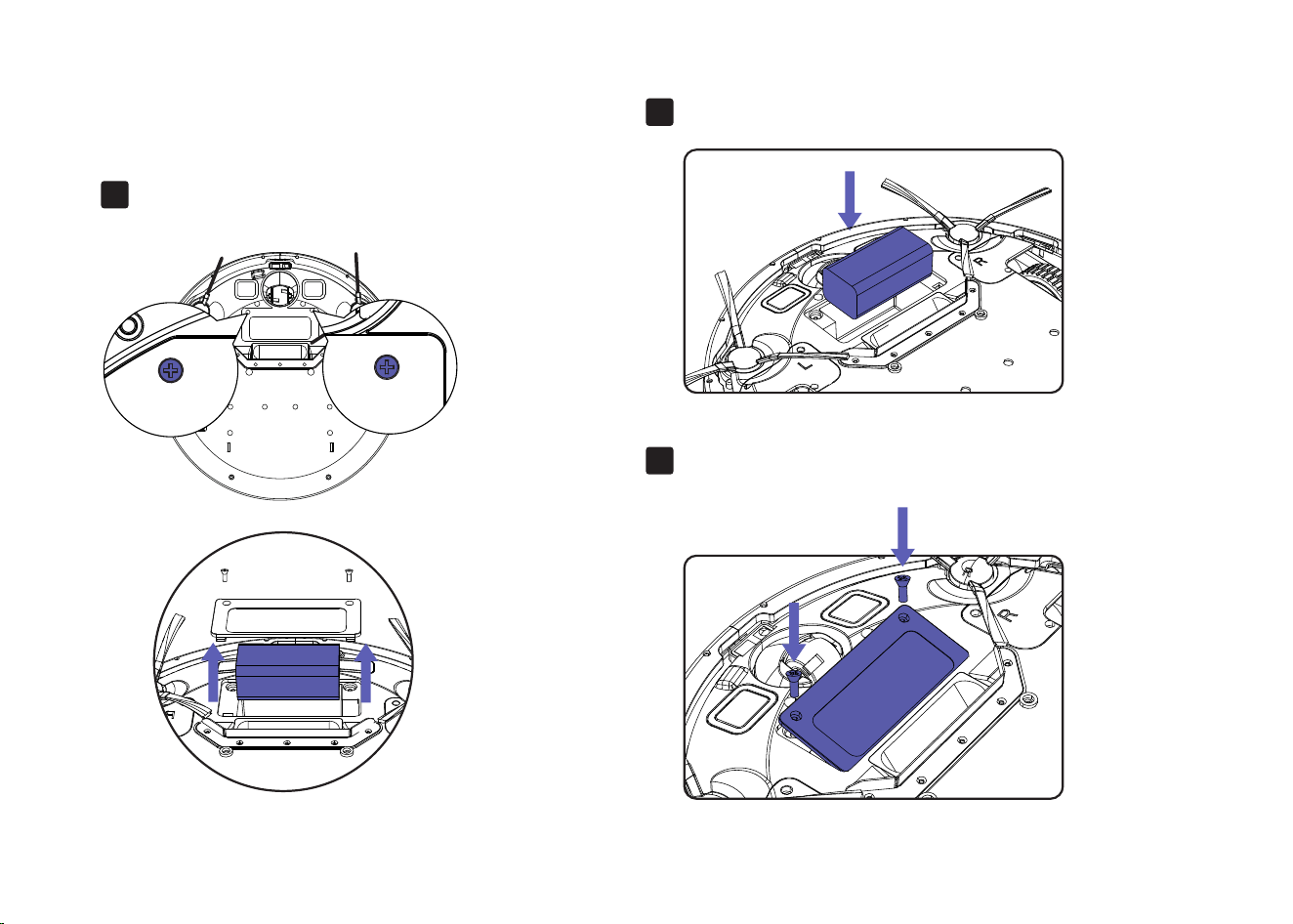
Follow these instructions to remove and reinstall robot’s battery:
Unscrew the door and the two battery.
screws on the battery door, then remove.
1.
Reinstall the battery with the battery label and tabs facing up.
2.
Reinstall the battery door and the two screws. Take care not to pinch
the side brush in the battery door when re-installing the battery.
3.
Battery Removal
22
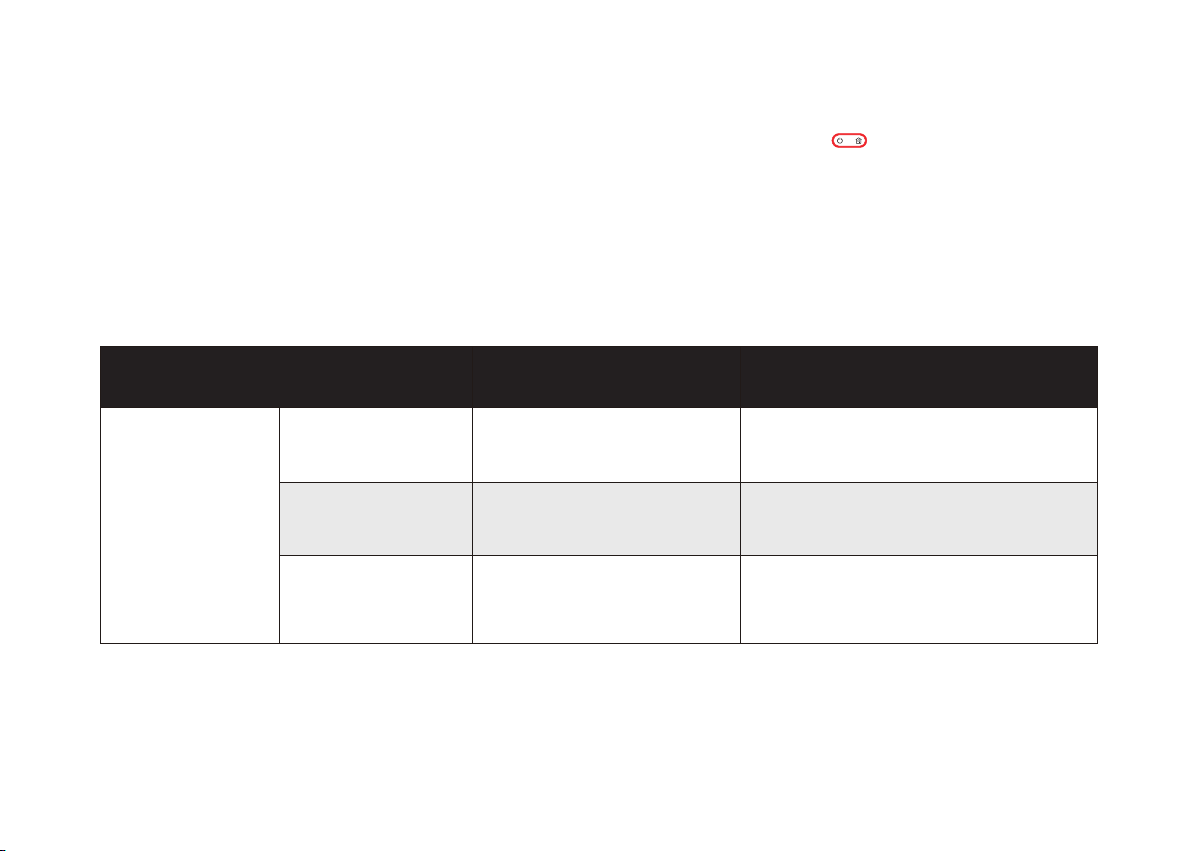
Rebooting Instructions
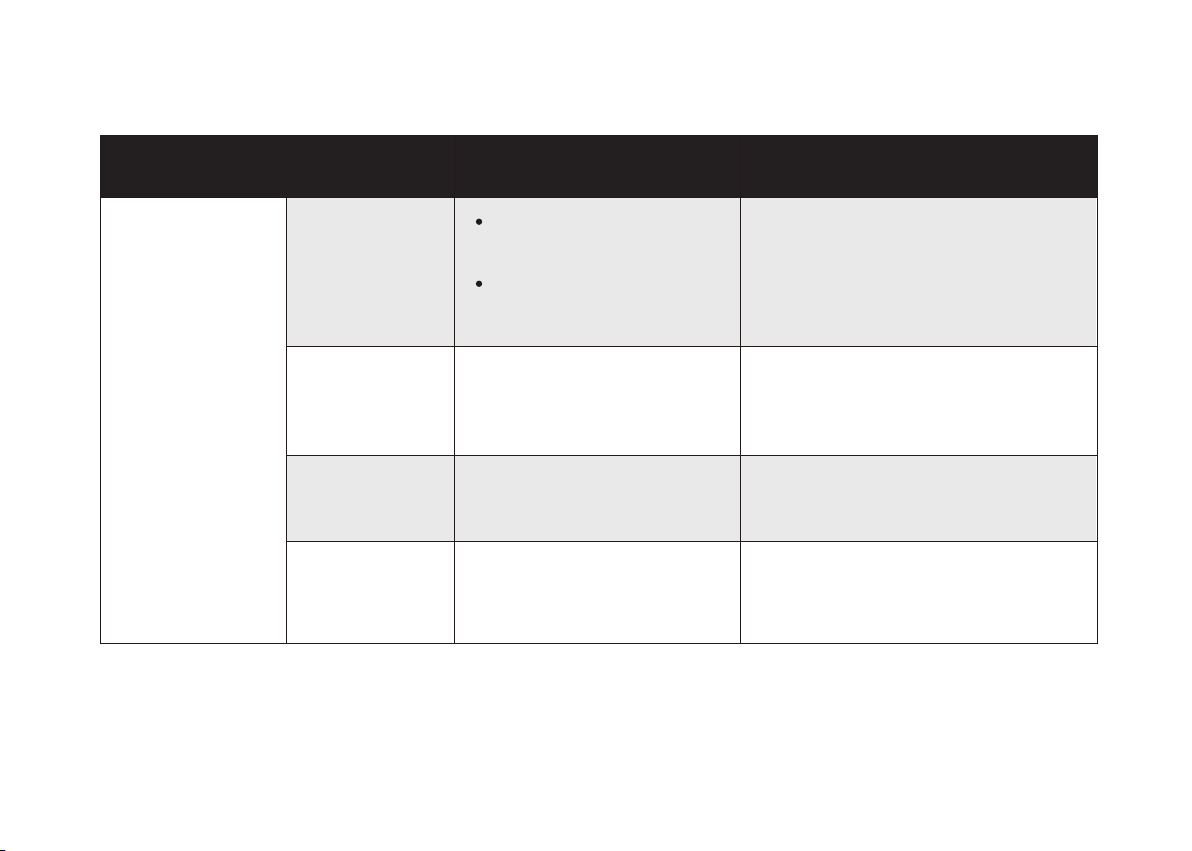
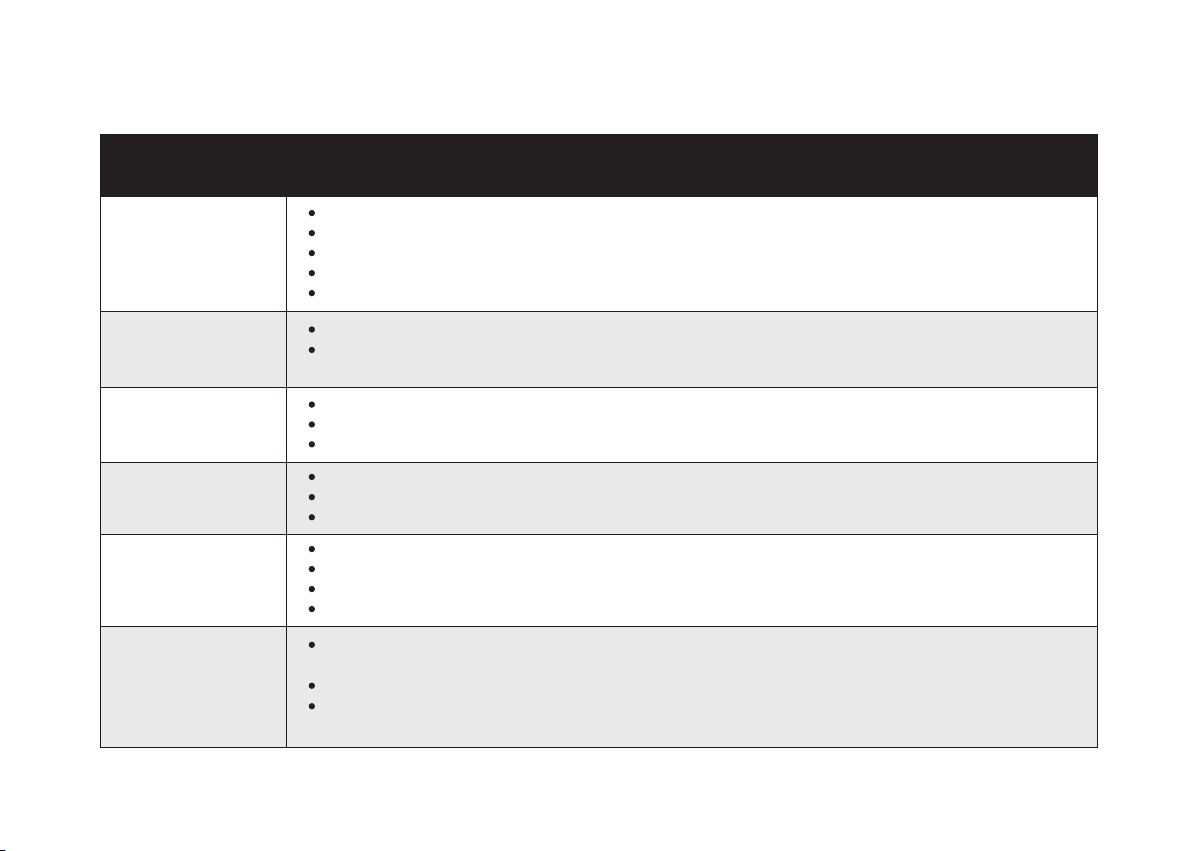
Robot will tell you something is wrong with a two-tone distress sound followed by message. The indicator will also blink or lit red. Refer to
the chart as below to resolve Robot’s problem. If the problem is not resolved, please contact our COST FREE customer service team for more
assistance.
For some errors, rebooting Robot may resolve the problem. To reboot Robot, press the power button on the bottom on Robot, you will hear an
audible tone signifying a successful reboot.
5 Troubleshooting
23
Indicator Lighting Red
Clean the front caster wheel and press the
power button to restart the Robot.
Front caster wheel is stuck
One beep
Clean the side brush and press the power
button to restart the Robot.
Robot’s side brush may stuck
Two beeps
Remove and empty Robot’s bin. Clean Robot’s
filter. Then, briskly tap the bin to loosen any
remaining trapped debris.
Robot’s vacuum fan is stuck
or its filter is clogged.
Three beeps
Indicator Lighting Red
Robot Blinks and Says Likely Cause What to Do
24
Indicator Flashing Red
If Robot is stuck, free it and start in a new
location. Clean Robot’s side wheels of hair and
debris. Push the wheels in and out, and check
that they both turn freely.
Robot is stuck.
Two beeps
Restart cleaning in a new location.
Robot is stuck and one of the
wheels is not making contact with
the floor(hanging in mid-air).
Robot may be in an extremely
large room and the bumper is not
registering obstacles.
One beep
If Robot is hanging over a drop, or on a dark
surface, start in a new location. Otherwise, wipe
its cliff sensors with a dry cloth.
Robot’s cliff sensors are dirty, it
is hanging over a drop, or it is
stuck on a dark surface.
Three beeps
Ensure there are no obstacles in front of the
Charging Dock or starting position. Wipe the
Charging contacts on both the Charging Dock
and robot with a clean, dry cloth.
Robot cannot return to its
Charging Dock or starting position.
Four beeps
Indicator Flashing Red
Robot Blinks and Says Likely Cause What to Do
25
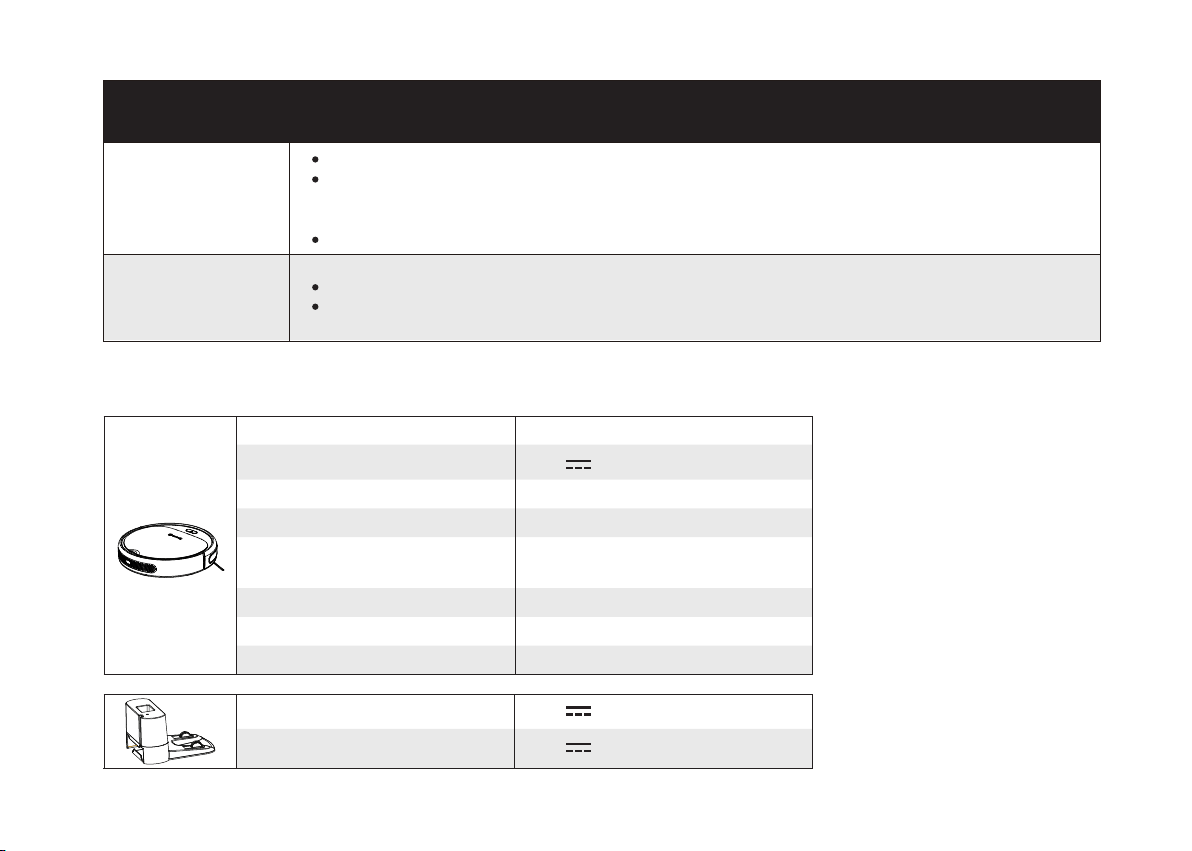
Frequently asked questions
Coredy R300 cannot
be activated.
Make sure the main power switch is in the ON position.
Make sure the battery is fully charged.
Replace the batteries (2 AAA) in the remote control.
Make sure the remote control is within range (16 ft/5 m) of Coredy R300.
If you still have trouble, turn off the main power switch and then turn it back on.
The remote control
does not work.
Replace the batteries in the remote control.
Make sure Coredy R300 is turned on and fully charged.
Note: Limited workable range distance is 5m/16.5ft.
Coredy R300 stops
working suddenly.
Check if Coredy R300 is trapped or stuck on an obstacle.
Check if the battery level is too low.
If you still have trouble, turn off the main power switch, wait for 2 seconds, and then turn it back on.
You cannot schedule
cleanings.
Make sure the main power switch on the bottom of Coredy R300 is turned on.
Make sure the time, time of day (AM/PM), and the scheduled time have been set correctly.
Check if Coredy R300’s power is too low to start cleaning.
Suction power is
weak.
Check if any obstructions are blocking the suction inlet.
Empty the dust collector.
Clean the filters with a vacuum cleaner or a cleaning brush.
Check if the filters are wet due to water or other liquid on the floor. Air-dry the filters completely before use.
Coredy R300 cannot
be charged.
Check if the indicator on the Charging Base lights up. If not, contact the Coredy service center to repair or
replace the Charging Base.
Dust off the charging contact pins with a dry cloth.
Check if you can hear a beep when Coredy R300 is docked onto the Charging Base. If not, contact
the Coredy service center to repair or replace the Charging Base.
Problems Solutions
26
6 Specifications
Product Model R300
Input
19 V
0.6 A
Battery Voltage DC 14.4 V
Power Consumption 28 W
Battery Type
DC 14.4 V
Li-ion 2600 mAh
Dust Collector Capacity 0.3 L
Cleaning Time Max. 110 mins
Charging Time 180-240 mins
Input
19 V
0.6 A
Output
19 V
0.6 A
Coredy R300 cannot
return to the Charging
Base.
Remove objects within 3 ft/1 m to the left and right side and within 6 ft/2 m of the front of the Charging Base.
When Coredy R300 is in the vicinity of the Charging Base (distance within 26ft/8M), it returns
more quickly. However, if the Charging Base is located far away (distance over 26ft/8M ), Coredy R300
needs more time to return. Please be patient as it walks back.
Clean the charging contact pins.
Coredy R300’s
movements or travel
path are abnormal.
Clean the sensors carefully with a dry cloth.
Restart Coredy R300 by turning the power switch off and on.
Problems Solutions

27
7 Customer Service
Website: www.coredy.com
E-mail: [email protected]
US COST FREE Tech Support:
+1 (800) 999 8470
UK COST FREE Tech Support:
+44 (808) 134 9909
@coredytech @CoredyTech @coredy_robot_vacuum @coredytechofficial
V2.4
MODEL: R300
Website: www.coredy.com
E-mail: [email protected]
US COST FREE Tech Support:
(PST Mon-Sun 06:00-24:00) (GMT Mon-Sun 14:00-08:00)
+1 (800) 999 8470
UK COST FREE Tech Support:
+44 (808) 134 9909