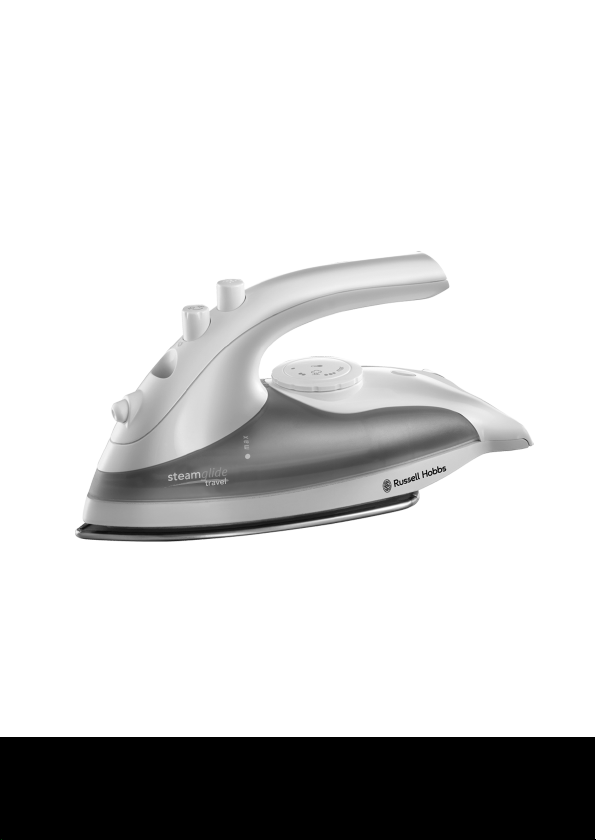
r
I www.russellhobbs.com
22470
Register online for an EXTRA year guarantee
Visit www.russellhobbs.co.uk/productregister/ You must register within 28 days of purchase
2
H B
e
max
f
g
ji
l m
k

3
Read the instructions, keep them safe, pass them on if you pass the iron on.
IMPORTANT SAFEGUARDS
Follow basic safety precautions, including:
This appliance can be used by children aged from 8
years and above and persons with reduced physical,
sensory or mental capabilities or lack of experience and
knowledge if they have been supervised/instructed and
understand the hazards involved. Children shall not play
with the appliance. Cleaning and user maintenance shall
not be done by children unless they are older than 8 and
supervised. Use and store the appliance out of reach of
children under 8 years.
Use the iron, or set it on its heel, on a stable, level,
heat-resistant surface.
Don’t leave the iron unattended while plugged in, or
while it’s standing on the ironing board.
Unplug the iron before filling, cleaning, and after use.
Don’t operate the appliance if it’s dropped or damaged,
or if it malfunctions or leaks.
If the cable is damaged, return the iron, to avoid hazard.
¬ The surfaces of the appliance will get hot.
b Do not use this appliance near bathtubs, showers, basins or other vessels
containing water.
• Don’t iron clothing while it’s being worn – you’ll injure the wearer.

4
• Don’t use the appliance for any purpose other than those described in these
instructions.
• Don’t scratch the soleplate – avoid buttons, zips, etc.
• Don’t wrap the cable round the appliance
• The appliance has a protective thermal fuse, which will blow if it overheats. If
this happens the appliance will stop working and must be returned for repair.
HOUSEHOLD USE ONLY
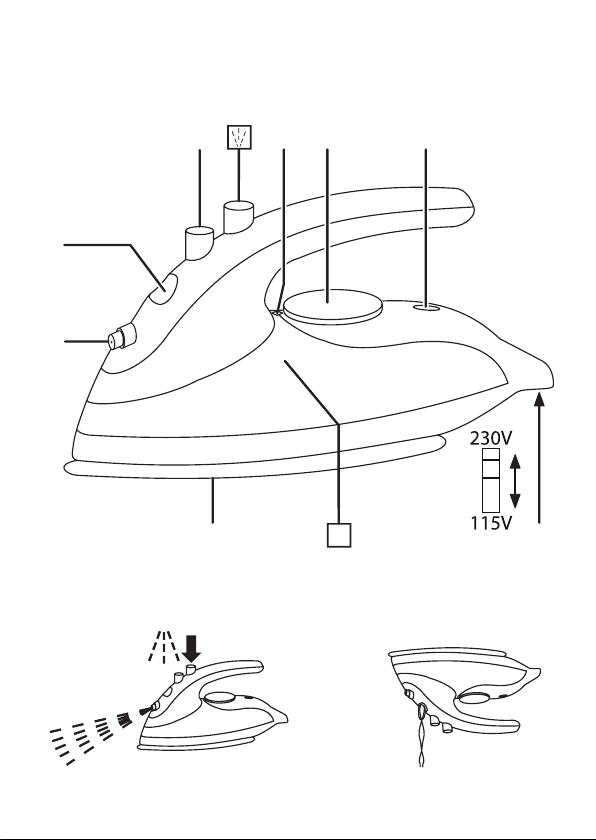
PARTS
1. Spray nozzle
2. Water inlet
3. Steam control
4. Mark
5. Temperature control
6. Ready light
7. Soleplate
8. Voltage switch
BEFORE USING FOR THE FIRST TIME
• Remove labels, stickers and packing from the iron and soleplate.
• Don’t worry if the iron smokes a bit at first because it will soon stop.
• Iron an old piece of cotton fabric, to clean the soleplate.
CHECK THE VOLTAGE BEFORE USE
1. Check the local voltage.
2. The voltage switch is under the rear of the iron.
3. Set the voltage switch to 115V for a local voltage of 100-120 volts a.c., set it to
230V for a local voltage of 220-240 volts a.c.
4. Using the wrong setting will probably damage the iron beyond repair.
• On lower voltages, the iron may take longer to heat up.
TRAVEL ADAPTOR
Use an earthed travel adaptor suitable for the wall sockets in the area you’re visiting.
PREPARATION
1. Check for textile care symbols (i j k l).
2. Iron fabrics needing low temperatures j first, then those that need medium
temperatures k, and finish with those needing high temperatures l.
5
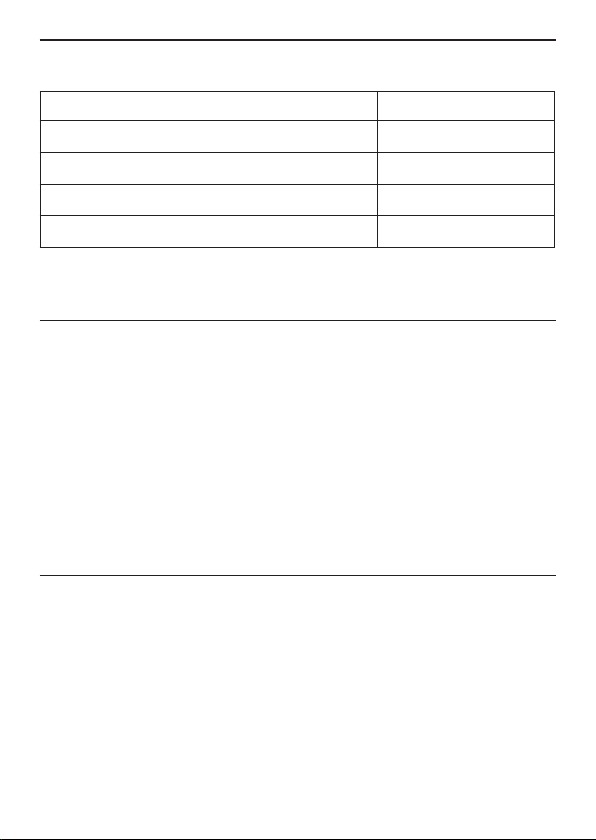
TEMPERATURE SETTING GUIDE
L
abel marking
Dot setting
j cool – nylon, acrylics, polyester
•
k warm – wool, polyester mixtures
• •
l hot – cotton, linen
• • •/max
i do not iron
If the instructions on the fabric label differ from this guide, follow the instructions on
the label.
FILLING
You may use the iron with tap-water, but if you live in a hard water area, you should
use distilled water (not chemically descaled or softened water).
If you buy distilled water, check that it’s suitable for use in irons.
1. Set the temperature control to • set the steam control to
S
.
2. Unplug the iron.
3. Pour water into the water inlet.
4. Pour slowly, and try to pour down one side of the inlet, to allow the air in the
reservoir to escape, otherwise you’ll cause an air lock and the water will
overflow.
5. Don’t fill past the max mark on the reservoir.
6. Wipe up any spillage.
SWITCH ON
1. Set the temperature control to • set the steam control to
S
.
2. Stand the iron on its heel.
3. Put the plug into the power socket (switch the socket on, if it’s switchable).
4. Turn the temperature control to bring the setting you want next to the mark.
The light will come on.
5. When the iron reaches the temperature you set, the light will go off. It’ll then
cycle on and off as the thermostat operates to maintain the temperature.

6
STEAM IRONING
1. Steam is available when the temperature control is at S or above.
2. Set the steam control to S .
3. Wait till the light goes off, then start ironing.
SPRAY
Water spotting can affect some fabrics. Test this out on a hidden part of the fabric.
1. Lift the iron off the fabric.
2. Aim the spray nozzle at the fabric.
3. Press the * button – you may have to press it 2 or 3 times to pump water
through the system.
DRY IRONING
1. Set the steam control to
S
.
2. Wait until the light goes off then start ironing.
• If you’re going to be dry ironing for 20 minutes or more, empty the iron
reservoir first, to avoid spontaneous bursts of steam.
AFTER USE
1. Set the temperature control to • set the steam control to
S
.
2. Unplug the iron.
3. Raise the side of the water inlet cover to open it.
4. Hold the iron over a sink, turn it upside down, and drain the water from the
reservoir.
5. Sit the iron on its heel, and leave it to cool down completely.
6. When cold, wipe off any moisture, and close the water inlet cover.
7. Wipe outer surfaces with a damp cloth.
8. Remove spots from the soleplate with a little vinegar – take care not to scratch it.
9. Store the iron on its heel, to avoid corrosion and damage to the soleplate.
DESCALING
As you may be using the iron in areas where you don’t know whether the water is
soft or hard, we suggest that you carry out this procedure fortnightly, or at the end of
each trip, if the trips are shorter than a fortnight. It only takes a few minutes.
1. Half fill the reservoir with water.
2. Turn the steam control to
S
, turn the temperature control to max.
3. Plug the iron into the power socket, and wait for the ready light to go out.
4. When the ready light goes out, unplug the iron.

7
5. Hold the iron over a sink with the soleplate facing down, into the sink.
6. Turn the steam control to S.
7. Hot water, steam, and any built up scale will issue from the soleplate, into the
sink.
8. Turn the steam control to
S
, plug the iron in again, and wait till the ready light
goes out.
9. Turn the steam control to S, and steam iron an old scrap of cloth, to clear out
any remaining scale.
10. When you’ve done, let the iron cool, then empty it, clean it, and pack it away.
RECYCLING
W
To avoid environmental and health problems due to
hazardous substances, appliances and rechargeable and
non-rechargeable batteries marked with one of these symbols
must not be disposed of with unsorted municipal waste.
Always dispose of electrical and electronic products and,
where applicable, rechargeable and non-rechargeable
batteries, at an appropriate official recycling/collection point.

SERVICE
If you ring, have the model number to hand, as we won’t be able to help without it.
It’s on the rating plate (usually underneath the product).
The product isn’t user-serviceable. If it isn’t working, read the instructions, check the
plug fuse and main fuse/circuit breaker. If it’s still not working, consult your retailer.
If that doesn’t solve the problem, ring Customer Service for advice.
If they tell you to return the product to us, pack it carefully, include a note with your
name, address, day phone number, and what’s wrong. If under guarantee, say where
and when purchased, and include proof of purchase (till receipt). Send it to:
Customer Service, Spectrum Brands (UK) Ltd, Fir Street, Failsworth, Manchester M35
0HS
email: [email protected]om
telephone: 0345 658 9700 (local rate number)
Please note: If you have purchased the product within the last 6 months, please
contact the retailer in the first instance to deal with any matters relating to warranty.
GUARANTEE
Defects affecting product functionality appearing within the guarantee period will
be corrected by replacement or repair at our option provided the product is used
and maintained in accordance with the instructions. Your statutory rights are not
affected.
Guarantee period = 2 years from first retail purchase.
To claim an extra 1 year guarantee, register your product online within 28 days of
purchase. Register at: www.russellhobbs.co.uk/productregister/
Consumables are guaranteed only for their recommended lifecycle. Replacement/
Spare parts* are excluded and are only covered by a 1 year warranty.
* Examples include filters, removable grill plates, drip trays/crumb trays etc.
J ONLINE
www.russellhobbs.com for more products
I REGISTER ONLINE
Register online for an EXTRA year guarantee*.
Visit www.russellhobbs.co.uk/productregister/
*You must register within 28 days of purchase.
T22-9001243