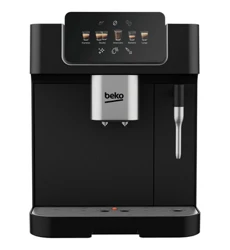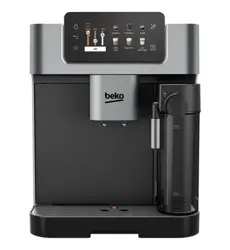
Full Automatic Espresso Machine
with Integrated Milk Cup and
TFT Touch Screen
User Manual
01M-8919253200-1525-02
CEG 7348 X
EN
Pentru a accesa rețetele, puteți
descărca gratuit aplicația
HomeDirect din Apple App Store
sau Google Play Store.

CONTENTS
ENGLISH 3-43
Please read this user manual first!
Dear Customer,
Thank you for selecting this Beko product. We hope that you get the best
results from your product, which has been manufactured to a high quality
with state-of-the-art technology. Please read this entire user manual and
all other accompanying documents carefully before using the product
and keep them as a reference for future use. If you pass on the product to
someone else, please give them the user manual as well. Please take into
consideration all warnings and information in the user manual.
Explanation of symbols
The following symbols are used in the various section of this manual:
Important information or useful hints about usage.
DANGER: This warning for dangerous situations with regard
to life and property.
WARNING: This warning indicates potentially dangerous
situations.
CAUTION: This warning indicates the potential for material
damage.
Materials are suitable for food contact

1 Important instructions for safety
and environment
4 / EN
Full Automatic Espresso Machine with Integrated Milk
Cup and TFT Touch Screen / User Manual
This section includes the safety instructions that will help provide protection
against risks of personal injury and material loss. Failure to follow these
instructions invalidates any warranty.
1.1 Danger of electric current
Danger to life due to electric current!
Contact with live wires or components could lead to serious injury or even
death!
Observe the following safety precautions to avoid electric shocks:
•
Do not use the product if the power cable or the appliance itself is
damaged. Contact the authorised service.
•
Do not open the housing of the coffee machine. There is a risk of electric
shock if live connections are touched and/or the electrical and mechanical
configuration is changed.
•
Before cleaning the bean container, unplug the appliance from the mains
socket. Danger from the coffee grinder rotating!
1.2 Danger of burning or scalding
Parts of the coffee machine can become very hot during operation!
Dispensed drinks and escaping steam are very hot!
Observe the following safety precautions to avoid burning/scalding yourself
and/or others:
•
Do not touch either of the metal sleeves on both coffee spouts.
•
Avoid direct contact of the skin with steam escaping the machine or hot
rinsing, cleaning or descaling water.
1.3 Basic safety precautions
Observe the following safety precautions to ensure safe handling of the
coffee machine:

1 Important instructions for safety
and environment
5 / EN
Full Automatic Espresso Machine with Integrated Milk
Cup and TFT Touch Screen / User Manual
•
Never play with packaging ma terial. There is a risk of suffocation. Keep all
packaging materials away from children.
•
Inspect the coffee machine for visible signs of damage before use. Do not
use a damaged coffee machine. Contact the authorised service.
•
If the connecting cable is damaged, it should only be replaced by a service
agent recommended by the manufacturer in order to prevent any danger!
Please contact the manufacturer or their customer service.
•
Repairs to the coffee machine must only be carried out by an authorised
specialist or customer service representative. Repairs by unauthorized
persons can lead to considerable danger for the user. These actions will
also void the warranty.
•
Repairs to the coffee machine during the warranty period may only be
carried out by service centres authorised by the manufacturer, otherwise
the warranty will become void in the event of subsequent damage.
•
Defective parts may only be replaced with original spare parts. Only
original spare parts guarantee that the safety requirements are met.
•
This appliance can be used by children aged from 8 years and above if they
have been given supervision or instruction concerning use of the appliance
in a safe way and if they understand the hazards involved. Cleaning and
user maintenance shall not be made by children unless they are older than
8 and supervised. Keep the appliance and its cord out of reach of children
aged less than 8 years.
•
Appliances can be used by persons with reduced physical, sensory or
mental capabilities or lack of experience and knowledge if they have been
given supervision or instruction concerning use of the appliance in a safe
way and understand the hazards involved.
•
Children shall not play with the appliance
•
Cleaning and user maintenance shall not be made by children without
supervision.

1 Important instructions for safety
and environment
6 / EN
Full Automatic Espresso Machine with Integrated Milk
Cup and TFT Touch Screen / User Manual
•
This appliance is intended to be used in household and similar applications
such as:
- staff kitchen areas in shops, offices and other working environments,
- farm houses,
- by customers in hotels, motels and other residential type environments,
- bed and breakfast type environments.
•
Protect the coffee machine against the effects of weather such as rain,
frost and direct sunlight. Do not use the coffee machine outdoors.
•
Never immerse the coffee machine itself, the mains cable or the mains
plug in water or other liquids.
•
Do not clean the coffee machine or accessories in a dishwasher.
•
Do not pour any liquids other than water or place foodstuffs into the water
tank.
•
Do not fill the water tank beyond the maximum mark.
•
Only operate the machine when the waste container, drip tray and the cup
tray are fitted.
•
Do not pull the cable to remove the plug from the mains socket or touch
with wet hands.
•
Do not hold the coffee machine by the mains cable.
•
Keep the appliance and its cord out of reach of children aged 8 or under.
•
The appliance can only be used to prepare coffee.
•
Children should be super vised to ensure that they do not play with the
appliance.
•
Unplug the appliance before each clean and when the appliance is not in
use.
•
Place the appliance in a way that the plug is always accessible.
•
Always use the appliance on a stable, flat, clean, dry and non-slip surface.

1 Important instructions for safety
and environment
7 / EN
Full Automatic Espresso Machine with Integrated Milk
Cup and TFT Touch Screen / User Manual
•
The appliance is not an integrated coffee machine and is not designed use
inside a cabinet. The coffee maker shall not be place in a cabinet while in
use.
•
Do not squeeze or bend the power cord and do not rub it on sharp edges
in order to prevent any damage to the power cord. Keep the power cord
away from hot surfaces and naked flames.
•
Ensure that the mains power supply complies with the information
supplied on the rating plate of the appliance.
•
Use the appliance only with a grounded socket.
•
Do not use the appliance with an extension cord.
•
Do not touch the appliance or its plug with wet or damp hands when the
appliance is plugged in.
•
CAUTION: In order to avoid a hazard due to inadvertent resetting of the
thermal cut-out, this appliance must not be supplied through an external
switching device, such as a timer, or connected to a circuit that is regularly
switched on and off by the utility.
-Warning: avoid spillage on the connector.
-Do not misuse the appliance to avoid potential injury.
•
If the supply cord is damaged, it must be replaced by the manufacturer or
its agent or similarly qualified person in order to avoid hazard.
•
Cleaning:. Do not use harsh, abrasive cleaners. See for the 6.1 to 6.4
detailed cleaning instructions.
•
The heating element surface is subject to residual heat after use.
1 Important instructions for safety
and environment
8 / EN
Full Automatic Espresso Machine with Integrated Milk
Cup and TFT Touch Screen / User Manual
1.4 Intended use
The Beko fully automatic coffee machine is intended for use in homes and
similar applications, such as in staff kitchens, shops, offices and similar
areas or by customers in bed & breakfast, hotels, motels and other living
accommodation. This coffee machine is not intended for commercial use.
The machine is only intended for preparing coffee and heating milk and water.
Any other use other than previously stated is considered as improper use.
Danger resulting from improper use!
If the coffee machine is not used for its intended purpose, it may become a
source of danger.
A
• Consequently, the coffee machine must only be used for
its intended purpose.
• Follow the procedures described in this user manual.
No claims of any kind will be accepted for damage or injury resulting from
the use of the coffee machine for purposes other than its intended use.
The risk must have been borne solely by the machine owner.
1.5 Limitation of liability
All technical information, data and instructions on installation, operation and
maintenance of the coffee machine contained in these operating instructions
represent the current status at the time of printing and are based on the best
possible knowledge gained by experience and knowhow.
No claims/demands can be inferred from the information, illustrations and
explanations in this user manual.
The manufacturer assumes no liability for damage or injury resulting from
failure to observe the user manual, use of the product for purposes other
than the intended use, unprofessional repairs, unauthorised modifications
or use of non-approved spare parts.
1 Important instructions for safety
and environment
9 / EN
Full Automatic Espresso Machine with Integrated Milk
Cup and TFT Touch Screen / User Manual
1.6 Compliance with the WEEE Directive and
Disposing of the Waste Product:
This product complies with EU WEEE Directive (2012/19/EU). This product
bears a classification symbol for waste electrical and electronic equipment
(WEEE).
This symbol indicates that this product shall not be disposed with
other household waste at the end of its service life. The used
device must be returned to an offical collection point for the
recycling of electrical and electronic devices. To find these
collection points, please contact your local authority or retailer
where the product was purchased. Each household performs an
important role in the restoring and recycling of old appliances. The
appropriate disposal of used appliance helps prevent potential negative
consequences for the environment and human health.
1 Important instructions for safety
and environment
10 / EN
Full Automatic Espresso Machine with Integrated Milk
Cup and TFT Touch Screen / User Manual
1.7 Compliance with RoHS Directive
The product you have purchased complies with EU RoHS Directive (2011/65/
EU). It does not contain harmful and prohibited materials specified in the
Directive.
1.8 Package information
The packaging materials of the product were manufactured from
recyclable materials in accordance with our National Environment
Regulations. Do not dispose of the packaging materials together
with domestic or other waste. Take them to the packaging
materials collection points designated by local authorities.
11 / EN
Full Automatic Espresso Machine with Integrated Milk
Cup and TFT Touch Screen / User Manual
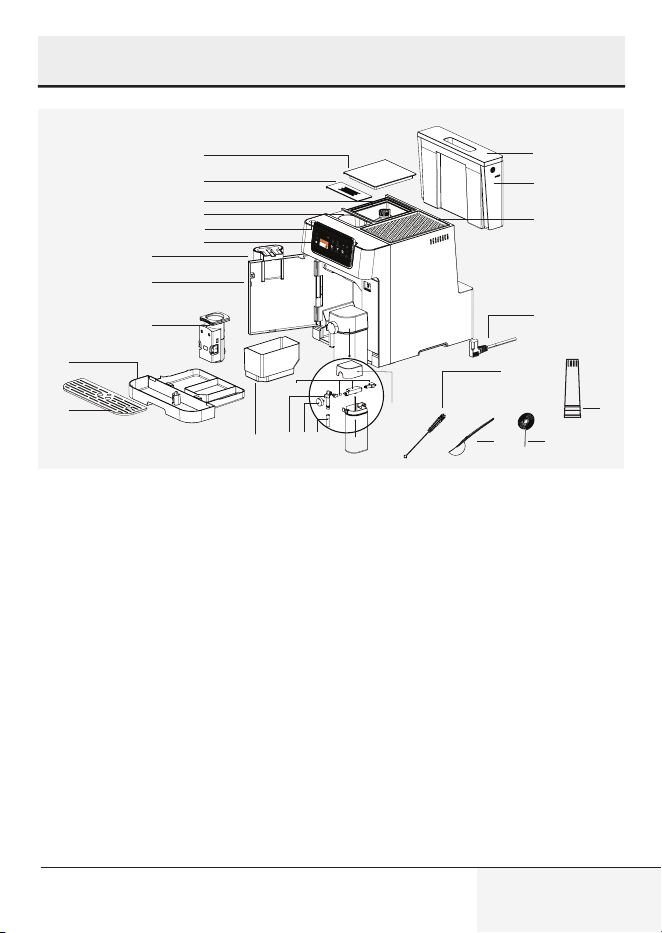
1. Coffee Bean Container Cover
2. Pre-ground Coffee Chute Cover
3. Coffee Bean Container
4. Pre-ground Coffee Chute
5. Power On/Off Button
6. Digital Control Panel
7. Adjustable Coffee Spout
8. Front Cover
9. Brewing Unit
10. Drip Tray
11. Cup Tray
12. Coffee Ground (Residual)
Container
13. Milk Cup Cover
14. Milk Cup Assembly Parts
15. Milk Cup Nozzle Internal Part
16. Milk Foam Adjustment Knob
17. Milk Cup Nozzle
18. Milk Cup
19. Water Tank Cover
20. Water Tank
21. Cup Holder
22. Power Cord
23. Cleaning Brush
24. Pre-ground Coffee Spoon
25. Cleaning Needle
26. Water filter
1
3
2
4
6
7
8
9
11
10
5
21
20
19
22
23
24 25
26
12
171615
14
18
13
Welcome
Favorites
More
Drinks
2 Your Fully Automatic Espresso Machine
12 / EN
Full Automatic Espresso Machine with Integrated Milk
Cup and TFT Touch Screen / User Manual
2 Your Fully Automatic Espresso Machine
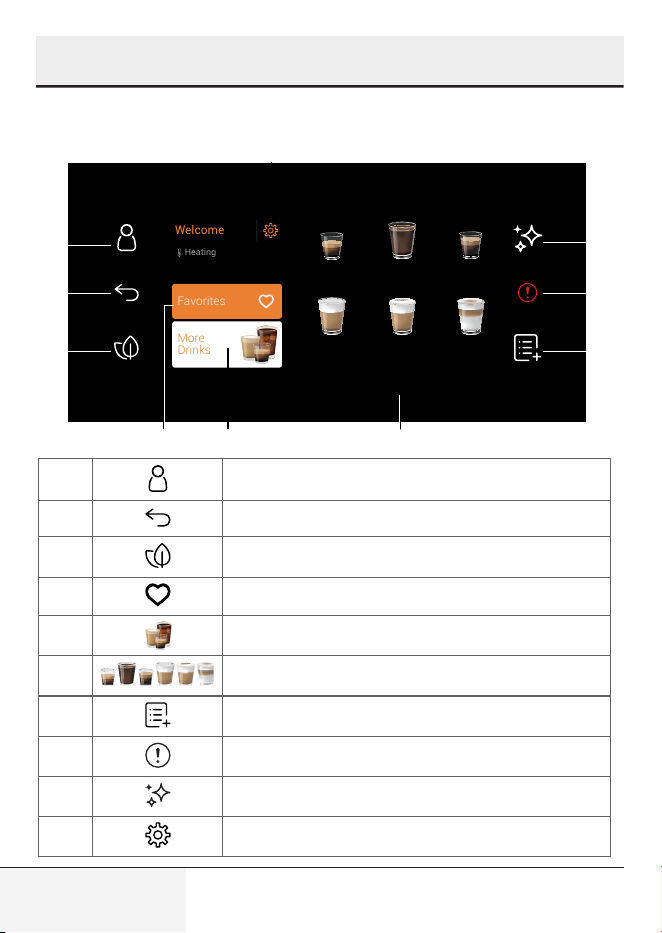
Control Panel
1 Profile section
2 Used for returning to the previous screen
3 Used for switching to the Eco Mode
4 Favorites section
5 More Drinks section
6 Popular beverages for fast access
7 Add extra section
8 General Error
9 Cleaning section
10 Settings
Lungo
Latte
Macchiato
CappuccinoCaffe
Latte
Americano
Espresso
Welcome
Heating
More
Drinks
Favorites
1
2
3
4 5
10
6
9
8
7

13 / EN
Full Automatic Espresso Machine with Integrated Milk
Cup and TFT Touch Screen / User Manual
2 Your Fully Automatic Espresso Machine
Technical data
Power supply:
220-240 V~, 50-60 Hz
Power: 1350 W
The right to make technical and
design changes is reserved.
All declared values on the product
and on the printed leaflets were
obtained from laboratory measure-
ments performed according to the
relevant standards. These values
may differ depending on usage and
ambient conditions.
Conformity declaration for CE
Arçelik A.Ş. hereby declares that this
appliance complies with Directive
2014/53/EU. The complete text of
the EU declaration of conformity is
available in the following internet
address: – Products, from :beko.
com The rights to make technical
and design changes are reserved.
Product Dimensions:
27,5 cm (Width) x 35,9 cm (Height)
x 41,2 cm (Depth)
Weight: 9.68±0.5kg
Cable Length: 95±5 cm
Ground Coffee Weight
(Bean Mode)
Soft: 7+-2g
Standard: 9±2g
Intense: 11±2g
Drip Tray Capacity: Up to 0.5 L
Coffee Ground (residual) Container
Capacity:
Up to 10 cups
Milk Cup Capacity: Up to 0.6L
Water Tank Capacity: 2.0±5%L
Coffee Bean Container Capacity:
250±5%g
Machine Pre-heating time: <50s
2.4G Wi-Fi frequency range: 2412-
2472 MHz
Supported Connections: WLAN
IEEE 802.11 b/g/n wireless
2.4G Wi-Fi maximum RF output
power: 20 dBm
RF exposure information: 2.4G Wi-
Fi maximum
14 / EN
Full Automatic Espresso Machine with Integrated Milk
Cup and TFT Touch Screen / User Manual
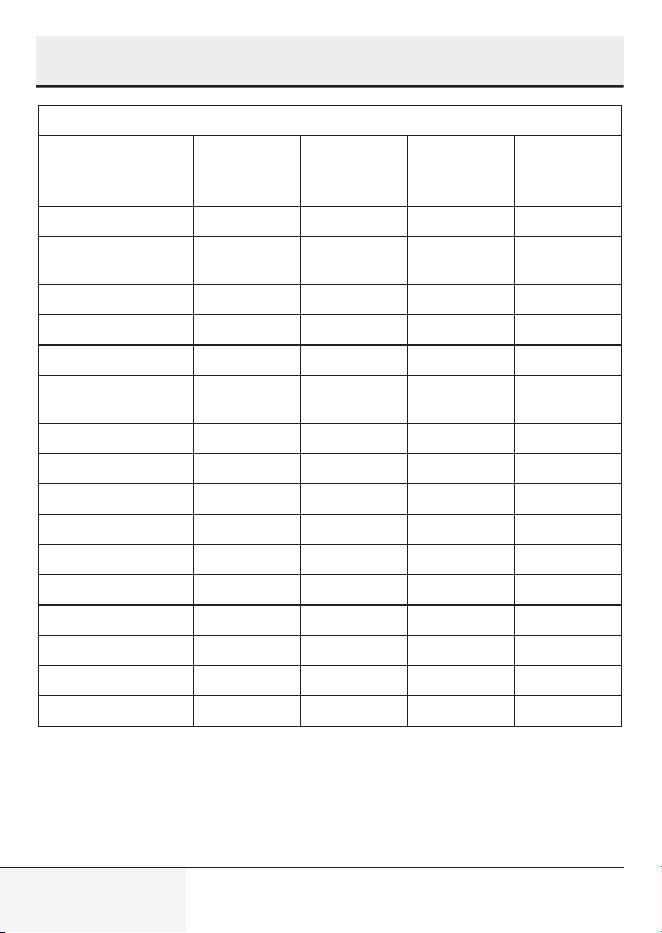
Beverage Quantity Table
Beverage Default
Coffee
Quantity
Program-
mable
Quantity
Default
Milk
Quantity
Program-
mable Milk
Quantity
Espresso 30 ml 25 - 45 ml N.A. N.A.
Doppio 30 ml + 30
ml
50 - 90 ml N.A. N.A.
Ristretto 20 ml 10 - 30 ml N.A. N.A.
Lungo 60 ml 50 - 90 ml N.A. N.A.
Americano 140 ml 80 - 160 ml N.A. N.A.
Espresso
Macchiato
30 ml 25 - 45 ml 10 ml 10 - 50 ml
Flat White 60 ml 50 - 90 ml 60 ml 40 - 80 ml
Cortado 60 ml 50 - 90 ml 60 ml 40 - 80 ml
Caffe Latte 60 ml 50 - 90 ml 190 ml 160 - 200 ml
Ristretto Bianco 40 ml 20 - 60 ml 110 ml 90 - 130 ml
Cappuccino 30 ml 25 - 45 ml 150 ml 130 - 170 ml
Latte Macchiato 30 ml 25 - 45 ml 220 ml 200 - 240 ml
Travel Mug 280 ml 200 - 320 ml N.A. N.A.
Iced Americano 30 ml + U.I. 25 - 45 ml N.A. N.A.
Iced Latte 30 ml 25 - 45 ml U.I. U.I.
Cold Brew 160 ml x1 OR x2 N.A. N.A.
*N.A. Not Applicable
*U.I. User Input
2 Your Fully Automatic Espresso Machine
15 / EN
Full Automatic Espresso Machine with Integrated Milk
Cup and TFT Touch Screen / User Manual
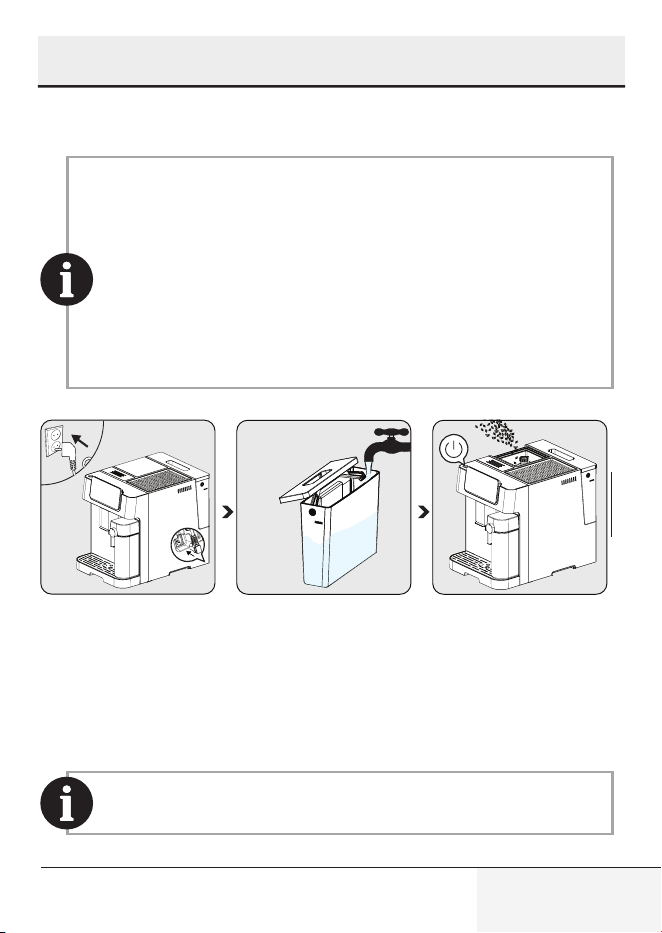
3.1 Installation
3 Preparation - Installation
• Remove any protective films, stickers and any other
packaging material from the appliance.
• If you spot any coffee traces in the grinder, they're the outcome
of tests done to set up the appliance before selling it.
• When you use the appliance for the first time, it's important
to rinse all the parts that touch water or milk - like the milk
carafe, drip tray, and water tank - with hot water. For cleaning
the milk carafes, using a dishwasher is our suggested
method.
.
2
1
3
Connect the appliance
to the mains supply
Press the flag corre-
sponding to the de-
sired language and
confirm the selection
by pressing “Done”.
Remove the water
tank and fill to the
MAX line with fresh
water then put the
tank back.
Fill the beans contain-
er.
Press the on/off but-
ton to turn on the ma-
chine.
To prevent water overflowing from the water tank, do not add
water directly into the appliance from another container.
16 / EN
Full Automatic Espresso Machine with Integrated Milk
Cup and TFT Touch Screen / User Manual
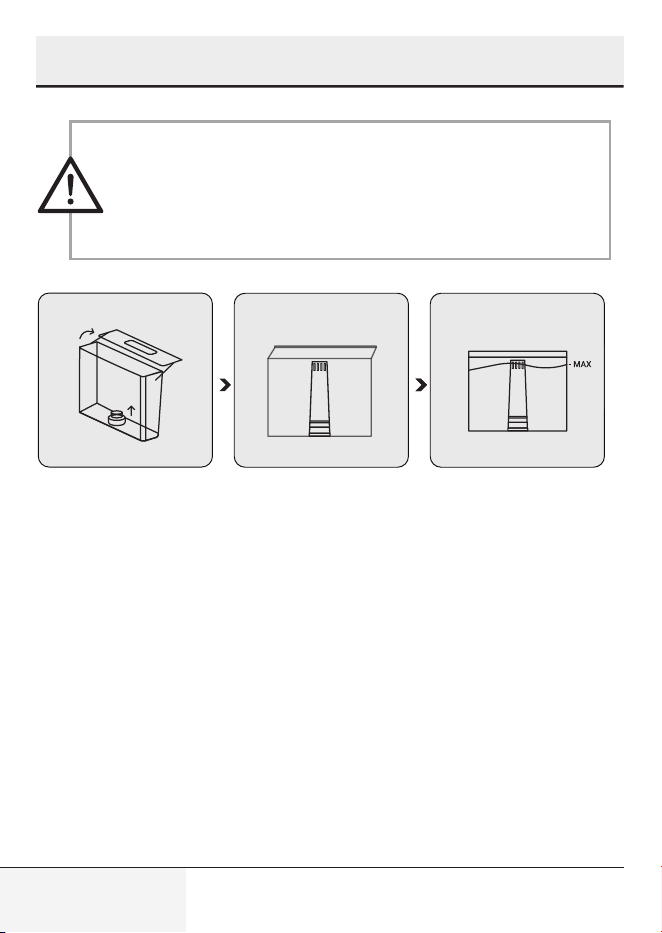
• Never fill the water tank with warm or hot water, sparkling
water or any other liquid that might damage the water tank
and the machine.
• When the Water Empty pop-up appears, the water tank is at
a low water level and requires filling.
.
In order to use water filter, Please remove the filter which inserted on water
tank and insert water filter instead as shown.
3 Preparation - Installation
17 / EN
Full Automatic Espresso Machine with Integrated Milk
Cup and TFT Touch Screen / User Manual
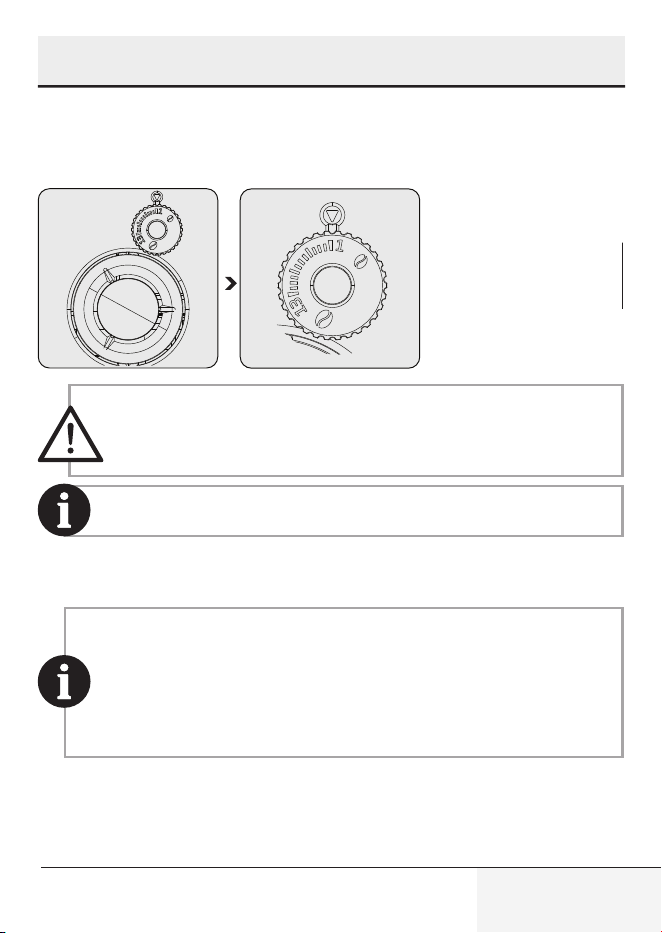
4.1 Grinding Adjustment
You can adjust the grinding coarseness by turning the adjustment knob on
the bean container:
Never do the grinding adjustment when the grinder is not
operating. It may damage the grinder.
The lines on the adjustment knob indicate the coarseness of the
grind. Bigger number means coarser grind level.
4.2 Filling the bean containers
• When the Bean Container Empty pop-up appears, the appliance
needs to be filled with coffee beans.
• Storing bean in its original vacuum pack is better to ensure
longer lasting freshness. Do not use the coffee bean container
for storage purposes for better results.
4 Operation
18 / EN
Full Automatic Espresso Machine with Integrated Milk
Cup and TFT Touch Screen / User Manual
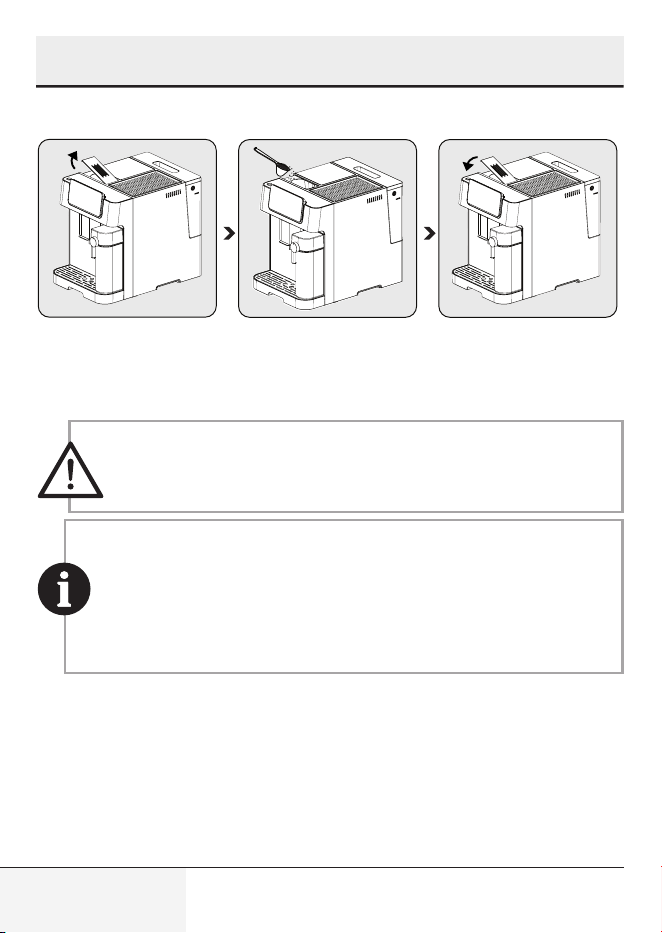
4.3 Using the pre-ground coffee container
Remove the pre-
ground coffee chute
lid.
Slowly put the pre-
ground coffee in the
pre-ground coffee
chute.
Place the chute lid back
on.
Pre-ground coffee chute is not a storage unit, it offers a one-
time usage (max 13g). Measurement spoon accessory can be
used for suggested amount of ground coffee.
• Ground coffee button should be pressed and selected from the
screen in order to activate this setting.
• Store your espresso grounds in an airtight container, and in a
cool, dry place to retain the flavor. Grounds should not be kept for
long periods of time as the flavor will be reduced.
• Espresso level ground coffee should be used.
4 Operation
19 / EN
Full Automatic Espresso Machine with Integrated Milk
Cup and TFT Touch Screen / User Manual
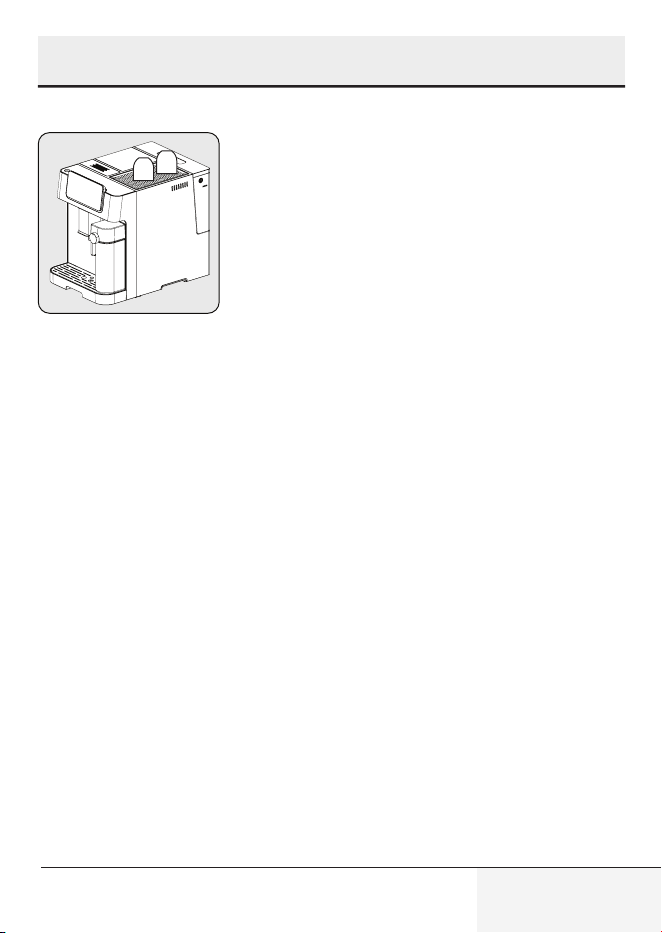
4.4 Using the Cup Holder
Cups should be placed
upside down to ensure
internal surface is kept
warm and clean (This
function uses the inter-
nal heat of the machine
and works in consec-
utive usage of the de-
vice).
4 Operation
20 / EN
Full Automatic Espresso Machine with Integrated Milk
Cup and TFT Touch Screen / User Manual
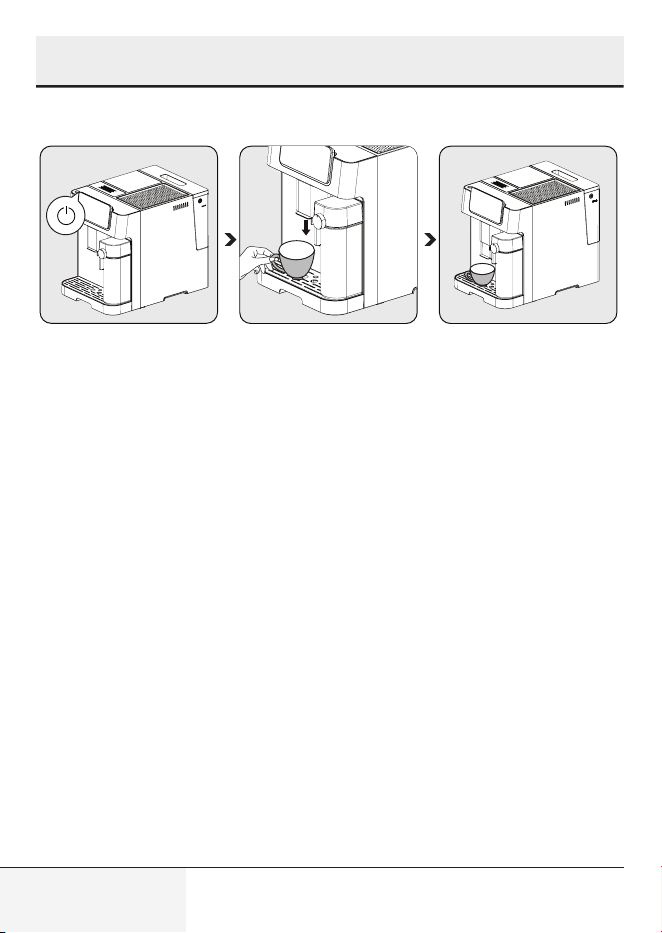
4.5 Preparing Your Coffee
Switch on the appli-
ance by pressing the
power on/off button.
The appliance turns
on, starts pre-heating
and auto-cleaning. It
is ready for use in idle
mode in which all icons
are lit.
Place a cup under the
coffee spout and ad-
just the height of the
spout according to the
cup.
Select your coffee by
pressing button and
the cup lighter will turn
on indicating that the
appliance is preparing
a cup of coffee. When
the appliance returns to
idle, the coffee is ready
to serve.
4 Operation
21 / EN
Full Automatic Espresso Machine with Integrated Milk
Cup and TFT Touch Screen / User Manual
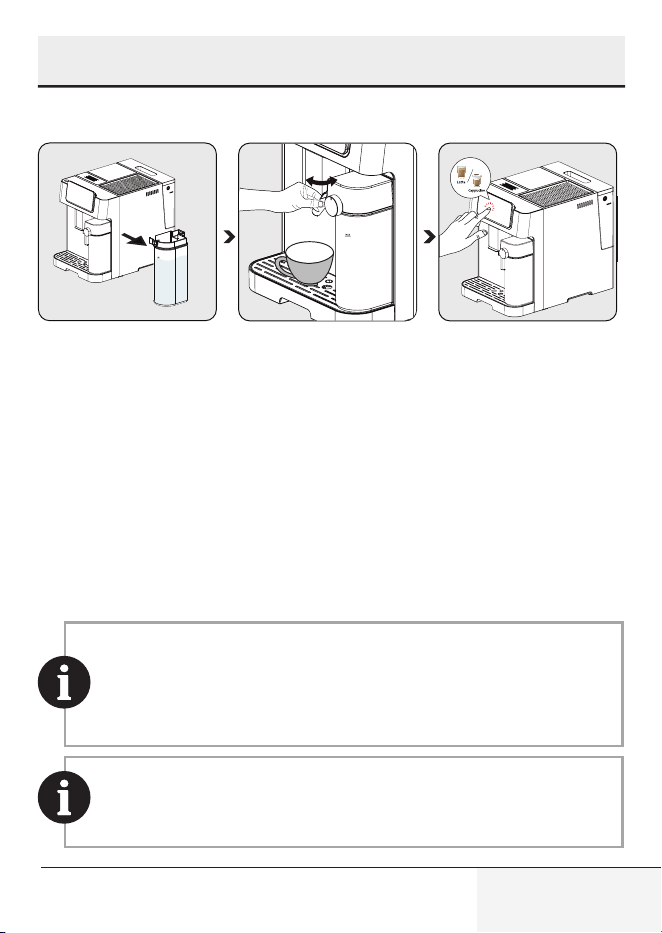
4.5.1 Preparing Coffee with Milk
.
1
Hold the milk cup with
one hand. Remove the
cover of the milk cup.
Add milk to the milk
cup. The milk amount
should not exceed the
max level. The recom-
mended temperature
for milk is 4-8 ° C (~
40-46 ° F). Close the
cover of milk cup.
Attach the milk cup
to the appliance, it
must click audibly into
place. Make sure that
the milk cup fits cor-
rectly. Adjust the angle
of the milk cup nozzle
over the cup. Adjust
the milk foam densi-
ty with the help of milk
foam adjustment knob
based on your prefer-
ences.
Select your desired milk
coffee from the screen
and the cup lighter will
turn on indicating that
the appliance is pre-
paring a cup of coffee.
When the appliance re-
turns to idle, the coffee
is ready to serve.
• To ensure your espresso stays at optimum temperature, we
recommend that you preheat your cups.
• In addition to the coffee used, using fresh cold water that is
free of chlorine, odors and other impurities will help ensure the
perfect espresso.
This machine allows the user to set the foam ratio by turning
the knob from Max to Min to enjoy the desired foam. Suggested
setting can be viewed by pressing the (i) button on the screen.
4 Operation
22 / EN
Full Automatic Espresso Machine with Integrated Milk
Cup and TFT Touch Screen / User Manual
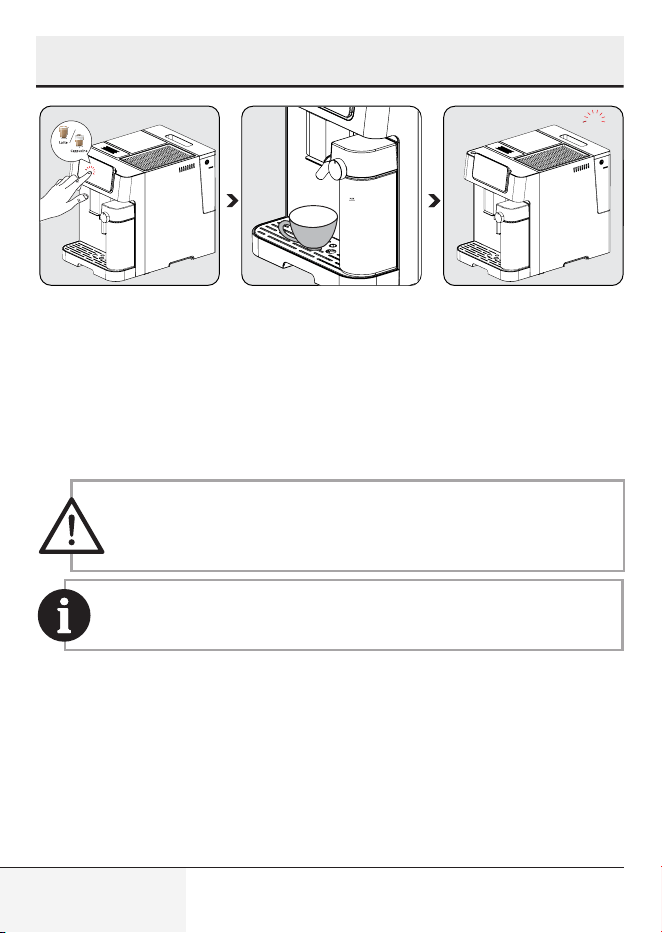
.
beeps
Press the button of
preferred coffee. Then
one beep sound will
be heard. The selected
beverage's button will
start blinky and brew-
ing will start.
The pump will work
intermittently as the
milk froth first enters
your cup. After the
milk froth is ready, the
device automatical-
ly starts to brew the
coffee.
When the unit beeps
once, the beverages is
ready enjoy!
- The machine will re-
vert to idle mode.
Always make sure the milk cup is placed correctly. If not fitted
well; the milk beverages will not be available. Buzzer will sound
as 3 beeps to indicate this.
The removal of the milk cup has no impact on the black coffee
presets, they can still be used.
4 Operation
23 / EN
Full Automatic Espresso Machine with Integrated Milk
Cup and TFT Touch Screen / User Manual
4 Operation
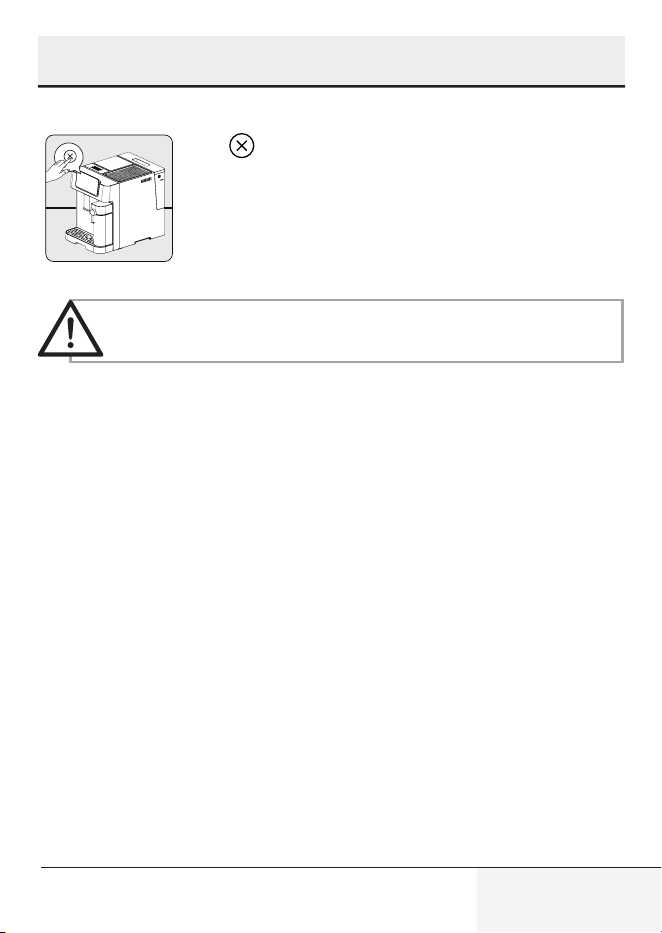
4.6 Cancelling
Press to cancel.
Pressing the on/off button 2 times will force-shut down the
device.
24 / EN
Full Automatic Espresso Machine with Integrated Milk
Cup and TFT Touch Screen / User Manual
5 Cleaning
5.1 Cleaning the appliance
1. Disconnect the power cord from the mains supply outlet.
2. Pour away all the water/coffee residual inside the drip tray and coffee
residual container.
3. Use a damp cloth or non-scratching cleaning agent to clean the liquid
stains on the appliance.
Never use any abrasive, vinegar or descaling agents not included
in the box to clean the appliance.
Timely cleaning and maintenance of the appliance is highly important in
prolonging its life.
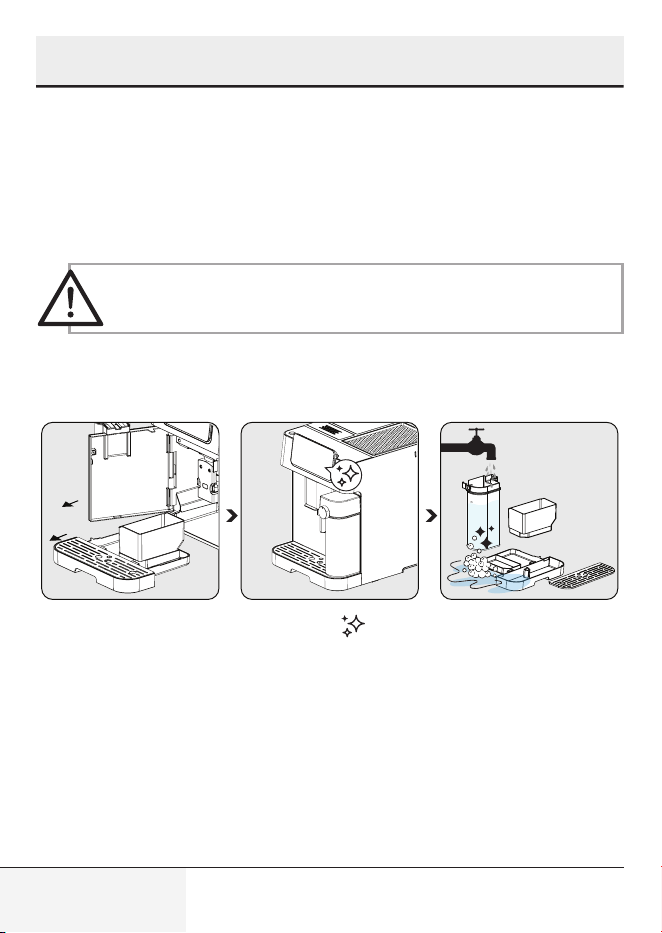
Open the front cover.
Remove the drip tray
and the coffee residu-
al container.
Press the ' ' icon
and click on the text
to initiate the 'Milk
Cup Cleaning' func-
tion from the screen.
Empty the coffee resid-
ual container, the drip
tray. Wash coffee re-
sidual container, drip
tray and milk cup with
warm running water
and use the needle or
the bristles of the brush
if needed in any parts to
clean. Dry them after-
wards.
25 / EN
Full Automatic Espresso Machine with Integrated Milk
Cup and TFT Touch Screen / User Manual
5 Cleaning
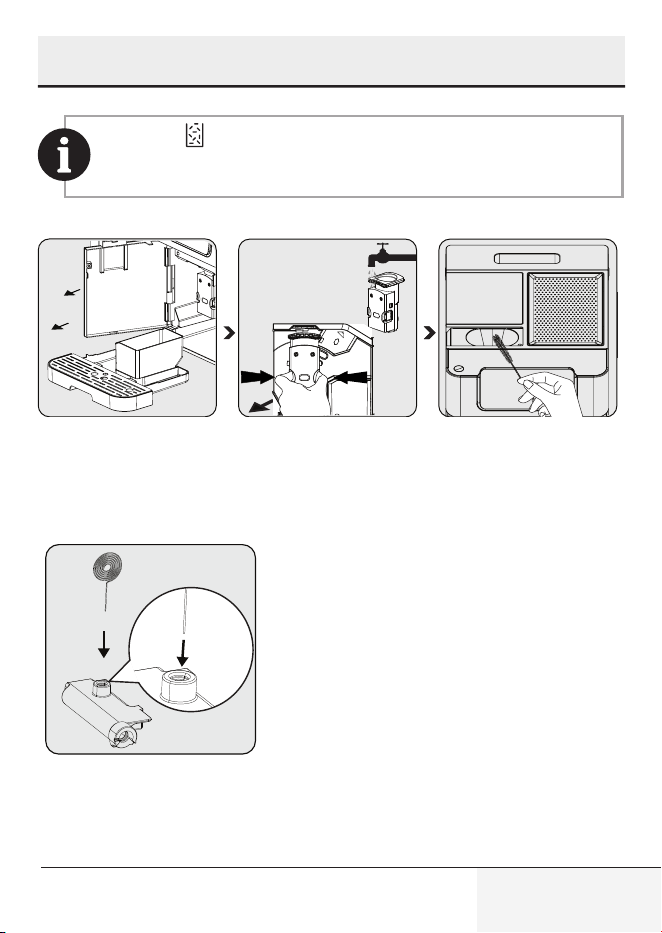
When the ' ' symbol appears on the screen, please follow the on-
screen instructions. This error will occur on the screen after every 10
coffee brews.
.
Hold the adjustable
coffee spout and pull
back slowly to open
the front cover.
Remove the brewing
unit. Wash with water
and dry afterwards.
Clean the coffee outlet
line with brush.
Use the cleaning needle (18)
to clean inside the milk frother inlet.
26 / EN
Full Automatic Espresso Machine with Integrated Milk
Cup and TFT Touch Screen / User Manual
5 Cleaning
• The drip tray should be emptied when the floating indicator
is visible.
• Powder coffee funnel should be cleaned after each use with
the cleaning brush.
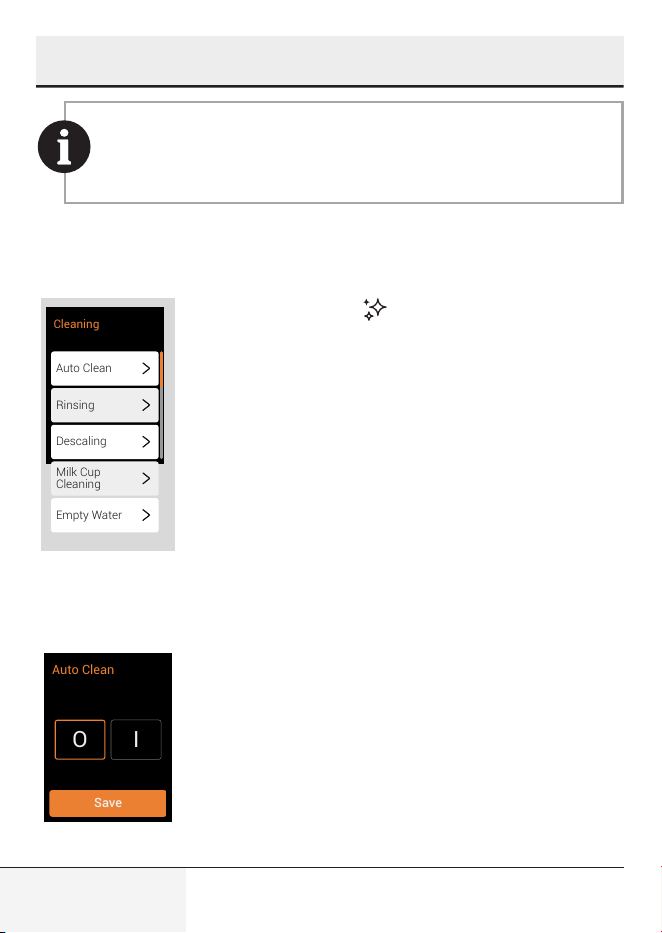
5.2 Cleaning Functions
Auto Clean
Rinsing
Descaling
Milk Cup
Cleaning
Empty Water
Cleaning
When you press on " " , you can easily access 5
different cleaning functions: Auto-Cleaning, Rinsing,
Descaling, Milk Cup Cleaning, Empty Water, all visible
on your screen.
5.2.1 Auto Clean Function
O
I
Save
Auto Clean
Your appliance cleans itself automatically before
and after each brewing operation. To deactivate the
automatic cleaning function, switch to the “ O “ icon on
the screen.
27 / EN
Full Automatic Espresso Machine with Integrated Milk
Cup and TFT Touch Screen / User Manual
5 Cleaning
We recommend that you use the auto-clean mode actively for
healthy use.
To cancel auto-clean for once;
Press on/off button while machine is turning on or off to bypass this function.
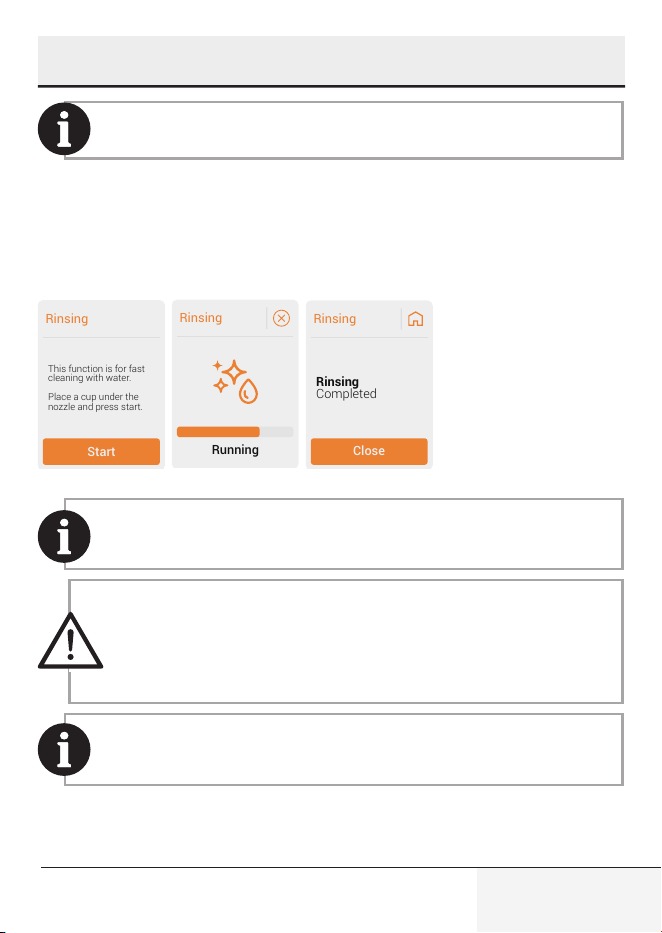
5.2.2 Rinsing Function
Rinsing
Start
This function is for fast
cleaning with water.
Place a cup under the
nozzle and press start.
Rinsing
Running
Rinsing
Close
Completed
Rinsing
This function is for fast cleaning with water. Follow the steps from
the screen.
• The water that comes out of the coffee nozzle is hot and
is collected in the drip tray underneath. Avoid contact as it
splashes around.
• If the appliance has not been used for a long period of time,
this function is suggested to be used.
Using this function before coffee preparation will also ensure
hotter coffee.
28 / EN
Full Automatic Espresso Machine with Integrated Milk
Cup and TFT Touch Screen / User Manual
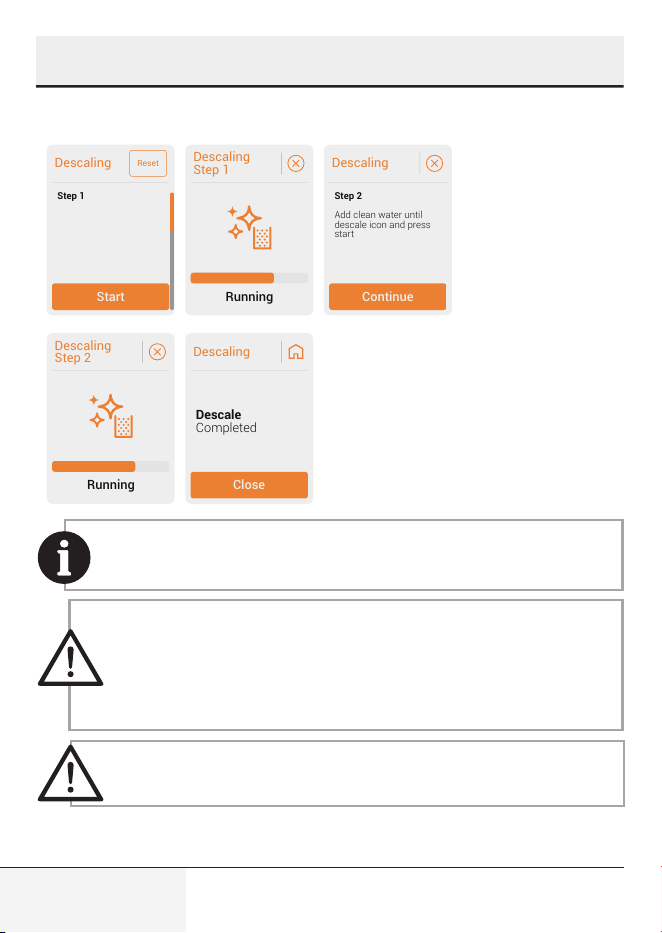
5.2.3 Descaling Function
Descaling
Start
Step 1
Reset
Add 1 pack of descaling
powder inside the water
tank, fill water until des-
cale icon. Place a cup
under the nozzle and
press start.
Descaling
Step 1
Running
Descaling
Continue
Add clean water until
descale icon and press
start
Step 2
Descaling
Step 2
Running
Descaling
Close
Completed
Descale
It is recommended to do descaling to maintain the best condition
of the device. Follow the steps from the screen.
• Descale is required after predefined brewing cycle.
• Do not use vinegar or other cleaning agents for the self-
cleaning of this appliance. Other cleaning agents may damage
the appliance.
• Keep the skin/body away from hot water.
Resetting descaling warning status is not suggested for
maintaining the best condition of the appliance.
5 Cleaning
29 / EN
Full Automatic Espresso Machine with Integrated Milk
Cup and TFT Touch Screen / User Manual
5 Cleaning
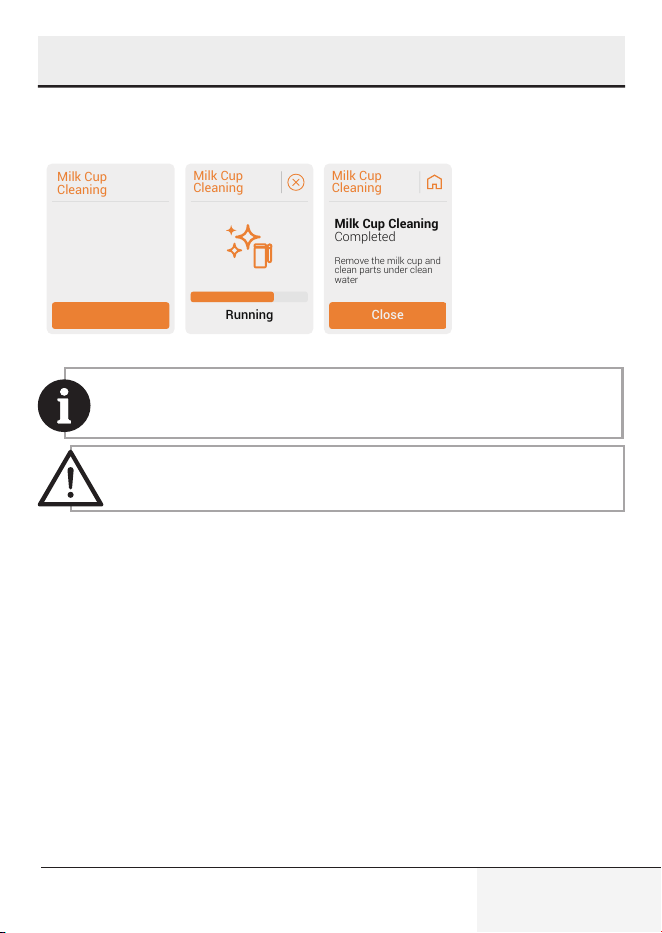
5.2.4 Milk Cup Cleaning
This function is for
cleaning the milk system.
Empty the milk cup and
press start.
Milk Cup
Cleaning
Start
Milk Cup
Cleaning
Running
Milk Cup
Cleaning
Close
Completed
Milk Cup Cleaning
Remove the milk cup and
clean parts under clean
water
This function is for cleaning the milk cup. Follow the steps from
the screen.
This function should be used after every milk related operation.
30 / EN
Full Automatic Espresso Machine with Integrated Milk
Cup and TFT Touch Screen / User Manual
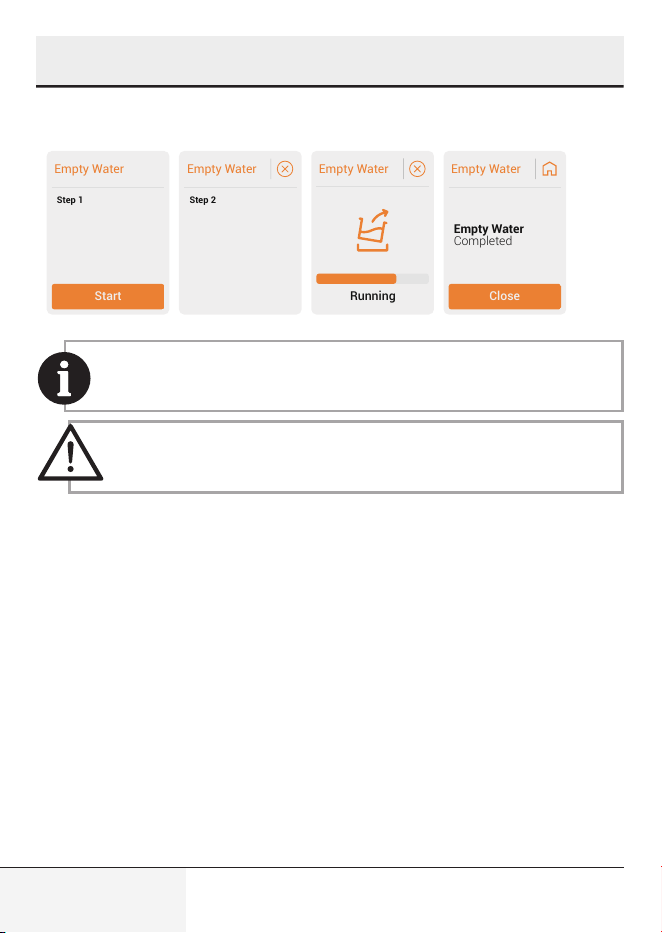
5.2.5 Empty Water
Empty Water
Start
Step 1
This function is for re-
moving all water inside
the device.
Place a cup under the
nozzle and press start.
Remove the water tank.
Once water tank is re-
moved, function will start
automatically.
Empty Water
Step 2
Empty Water
Running
Empty Water
Close
Completed
Empty Water
This function is for removing all water inside the device. Follow the
steps from the screen.
When the appliance is reused again for the first time after empty
system function is used; press the milk button until water comes
out of the spout.
5 Cleaning
31 / EN
Full Automatic Espresso Machine with Integrated Milk
Cup and TFT Touch Screen / User Manual
6 Control Panel Setting
6.1 Profile Function
6.1.1 Profile Selection
You can use this function to save beverage settings and favorites for each
profile seperately. (Orange-Violet-Blue-Green & Guest)
Device will boot into guest profile at first use.
Profile names can be adjusted from the mobile app. Check APP
UM for details.
6.1.2 Profile Settings
Device will remember last profile selected, and will select this on next boot.
(including guest)
Each profile has a different color to differentiate.
To reset the beverages settings or profiles settings press “Reset”.
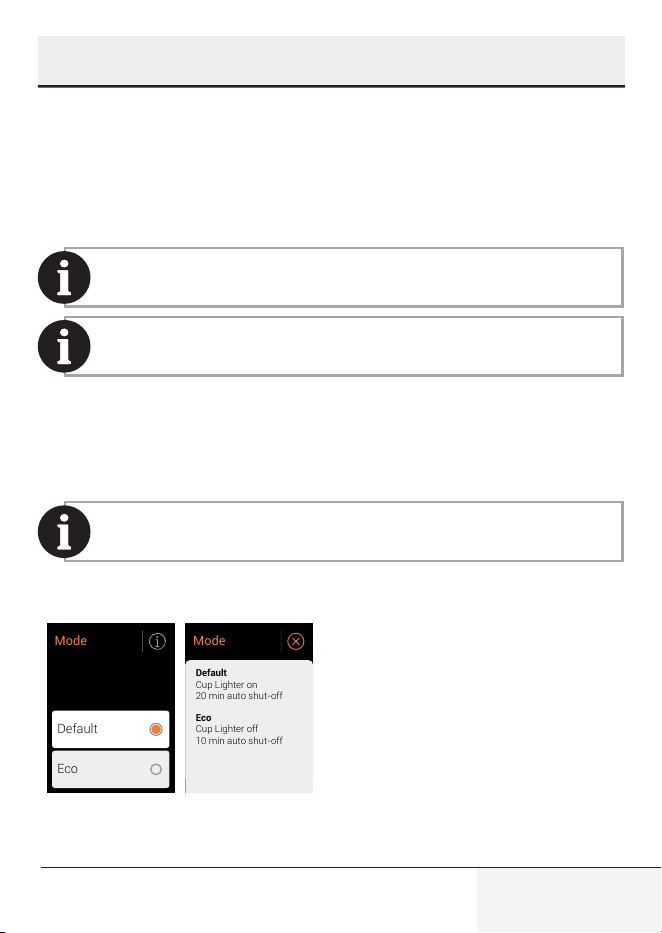
6.2 Mode Selection
Default
Eco
Mode
Cup Lighter on
20 min auto shut-off
Cup Lighter off
10 min auto shut-off
Default
Eco
Mode
32 / EN
Full Automatic Espresso Machine with Integrated Milk
Cup and TFT Touch Screen / User Manual
6 Control Panel Setting
When Eco Mode is selected. Mode selection LED will be turned
to green.
6.3 Beverage Settings
6.3.1 Add Favorite & Remove Favorite
To favorite a beverage press “ ” icon.
To remove a beverage from your favorites, press “ ” icon.
You can favorite up to four beverages.
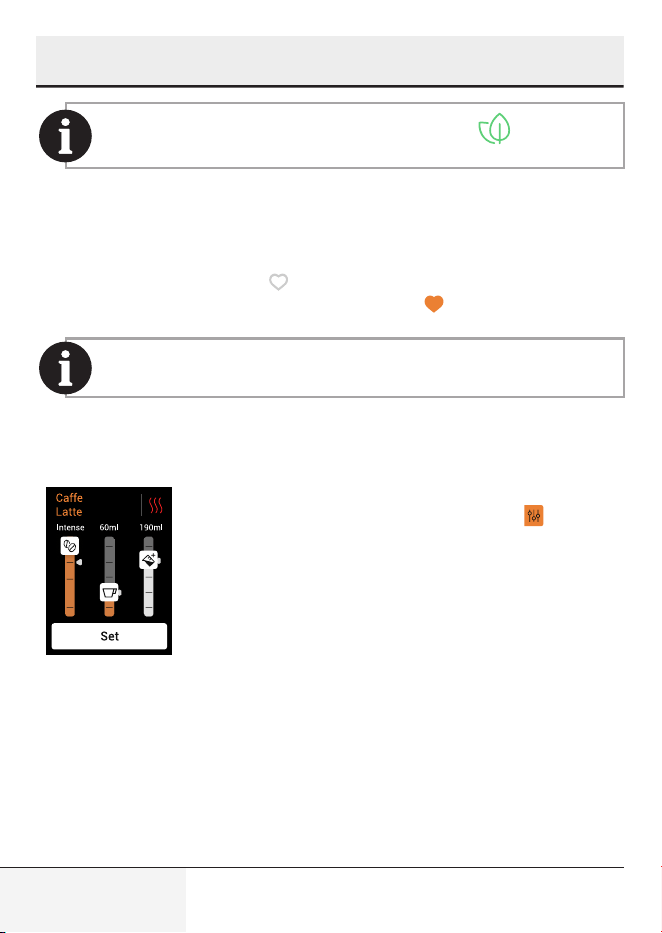
6.3.2 Beverage Customization
To customize a beverage - Coffee strenght, brewing
temperature, water & milk volumes- press “ ” icon.
33 / EN
Full Automatic Espresso Machine with Integrated Milk
Cup and TFT Touch Screen / User Manual
6 Control Panel Setting
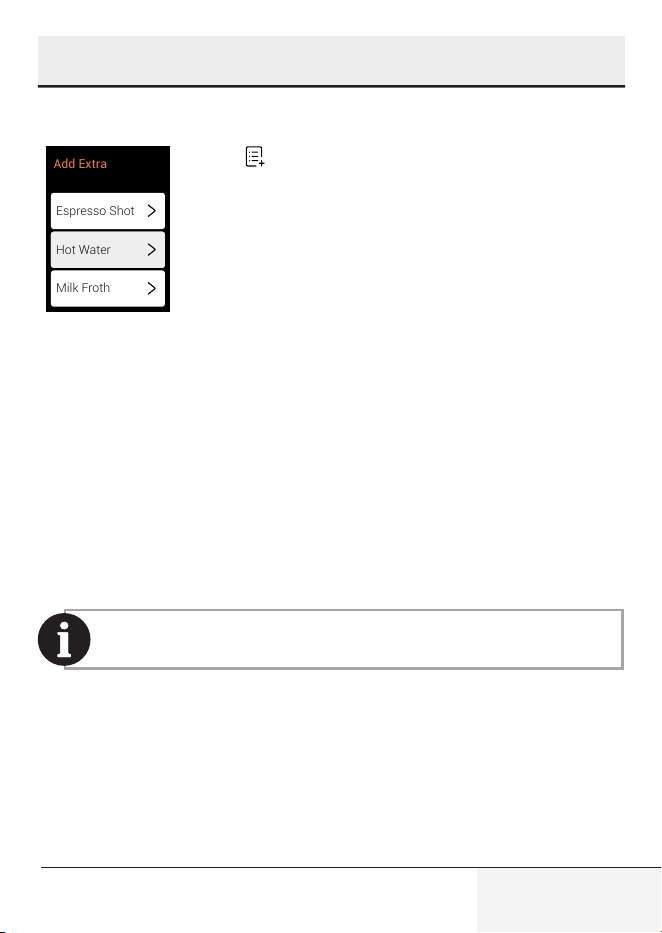
6.3.3 Add Extra
Espresso Shot
Milk Froth
Milk Froth
Add Extra
Hot Water
Press " " icon.
Espresso Shot
To add standard espresso shot to your beverage press “Espresso Shot” on
the screen. Follow the steps from the screen.
Water Dispensing
To dispense hot water, press “Hot Water” on the screen.
Milk Frothing
To add milk, press “Milk Froth” on the screen. After that function we suggest
milk cup cleaning.
Please refer to section 5.6 Milk Cup Cleaning.
34 / EN
Full Automatic Espresso Machine with Integrated Milk
Cup and TFT Touch Screen / User Manual
7 User Settings
You can access these features by clicking on the “ ” icon located in the
top right corner of the homepage.
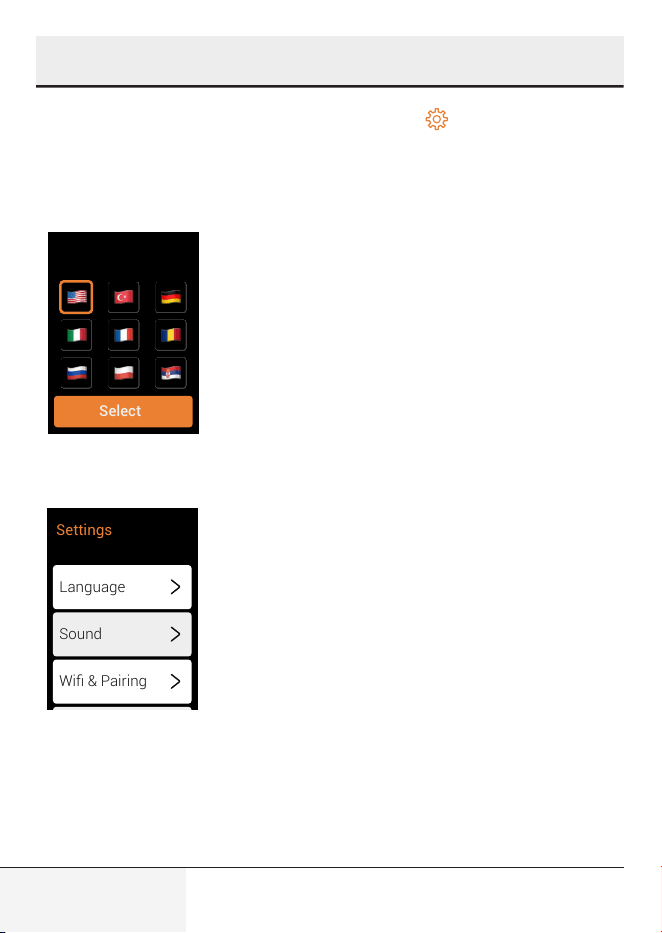
Language
Select
Language
To change the language, go to Settings > Language
and select the flag of the relevant language.
Sound
Language
Sound
Wifi & Pairing
Settings
35 / EN
Full Automatic Espresso Machine with Integrated Milk
Cup and TFT Touch Screen / User Manual
7 User Settings
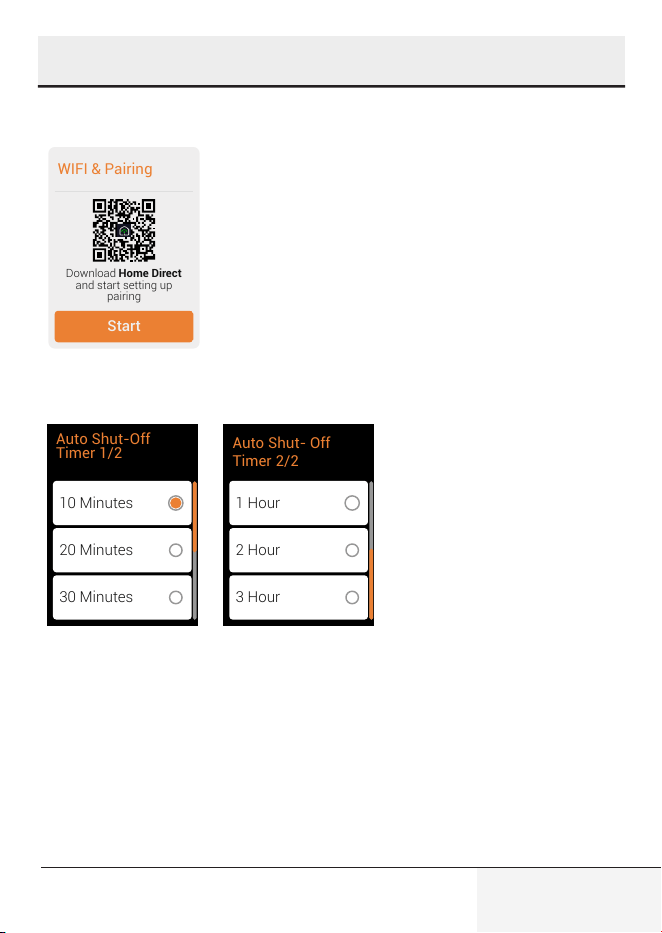
Wi-Fi & Pairing
WIFI & Pairing
Start
Download
and start setting up
pairing
Home Direct
To download the HomeDirect scan the QR code
and follow the required steps. (Please see the app
guide.)
Auto Shut-Off
10 Minutes
20 Minutes
30 Minutes
Auto Shut-Off
Timer 1/2
1 Hour
2 Hour
3 Hour
Auto Shut- Off
Timer 2/2
Select the desired time
interval (10 or 20 or 30
minutes, 1, 2 or 3 hours).
36 / EN
Full Automatic Espresso Machine with Integrated Milk
Cup and TFT Touch Screen / User Manual
7 User Settings
Water Hardness
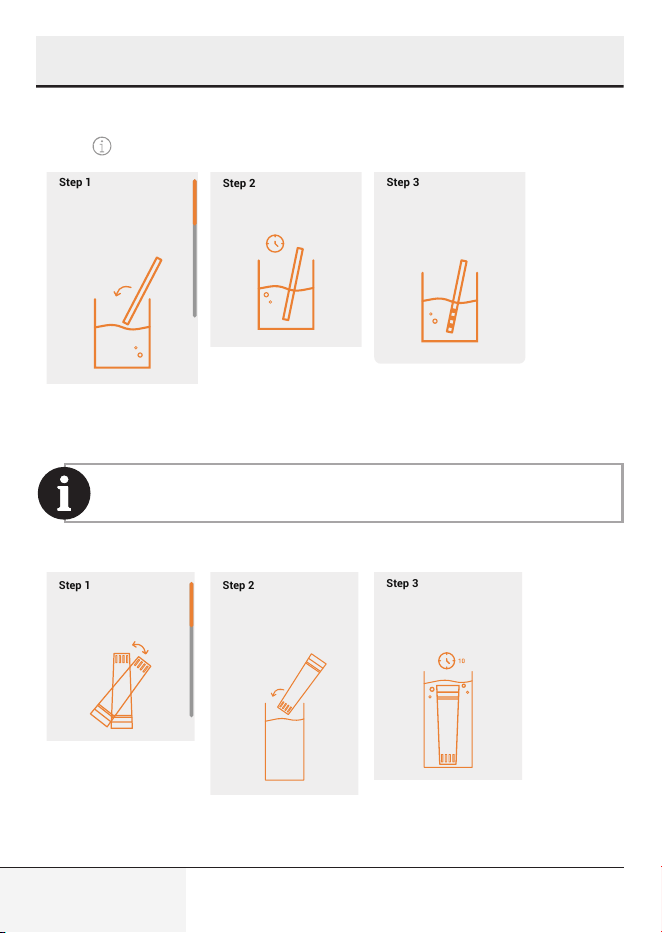
Press “ ” icon the follow the steps.
Immerse the
measurement strip
inside a cup of water
planned to be used in
the device.
Wait until the the color
changes.
The number of color
changing squares will
indicate the water
hardness.
Water Hardness
Step 1
Step 2
Step 3
Immerse the
measurement strip
inside a cup of water
planned to be used in
the device.
Wait until the the color
changes.
The number of color
changing squares will
indicate the water
hardness.
Water Hardness
Step 1
Step 2
Step 3
Immerse the
measurement strip
inside a cup of water
planned to be used in
the device.
Wait until the the color
changes.
The number of color
changing squares will
indicate the water
hardness.
Water Hardness
Step 1
Step 2
Step 3
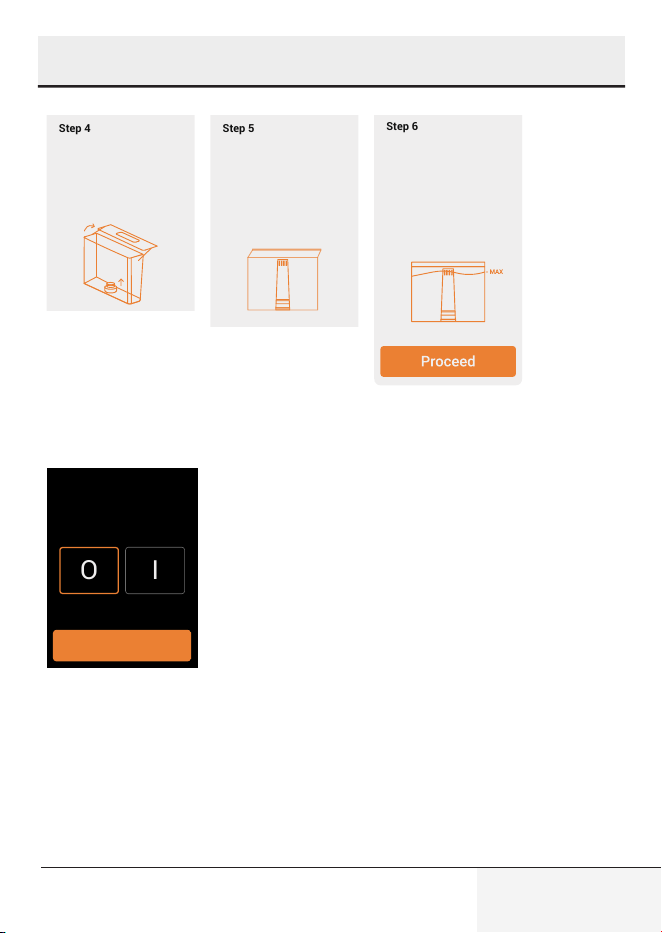
Water Filter Insert
When it is time to change the water filter, the quality of the water
can be maintained by installing a mechanical dust filter.
Press “Water Filter Insert” on the screen and follow the steps.
Unpack the water filter
and shake lightly.
Immerse the water filter
upside down into a cup
filled with clean water.
Fill the water tank with
clean water until MAX
level. Place the water
tank back onto the
device.
Press proceed to start
rinsing.
Then insert and push
the water filter
cartridge downwards
into the bottom socket
until it can not move
forward.
Take out the water
tank, then remove the
mechanical filter inside
by pulling it upwards.
Wait 10 minutes until no
more bubbles come out.
Water Filter
Insert
Step 1
Step 2
Step 3
Step 4
Step 5
Step 6
Unpack the water filter
and shake lightly.
Immerse the water filter
upside down into a cup
filled with clean water.
Fill the water tank with
clean water until MAX
level. Place the water
tank back onto the
device.
Press proceed to start
rinsing.
Then insert and push
the water filter
cartridge downwards
into the bottom socket
until it can not move
forward.
Take out the water
tank, then remove the
mechanical filter inside
by pulling it upwards.
Wait 10 minutes until no
more bubbles come out.
Water Filter
Insert
Step 1
Step 2
Step 3
Step 4
Step 5
Step 6
Unpack the water filter
and shake lightly.
Immerse the water filter
upside down into a cup
filled with clean water.
Fill the water tank with
clean water until MAX
level. Place the water
tank back onto the
device.
Press proceed to start
rinsing.
Then insert and push
the water filter
cartridge downwards
into the bottom socket
until it can not move
forward.
Take out the water
tank, then remove the
mechanical filter inside
by pulling it upwards.
Wait 10 minutes until no
more bubbles come out.
Water Filter
Insert
Step 1
Step 2
Step 3
Step 4
Step 5
Step 6
37 / EN
Full Automatic Espresso Machine with Integrated Milk
Cup and TFT Touch Screen / User Manual
7 User Settings
Unpack the water filter
and shake lightly.
Immerse the water filter
upside down into a cup
filled with clean water.
Fill the water tank with
clean water until MAX
level. Place the water
tank back onto the
device.
Press proceed to start
rinsing.
Then insert and push
the water filter
cartridge downwards
into the bottom socket
until it can not move
forward.
Take out the water
tank, then remove the
mechanical filter inside
by pulling it upwards.
Wait 10 minutes until no
more bubbles come out.
Water Filter
Insert
Step 1
Step 2
Step 3
Step 4
Step 5
Step 6
Unpack the water filter
and shake lightly.
Immerse the water filter
upside down into a cup
filled with clean water.
Fill the water tank with
clean water until MAX
level. Place the water
tank back onto the
device.
Press proceed to start
rinsing.
Then insert and push
the water filter
cartridge downwards
into the bottom socket
until it can not move
forward.
Take out the water
tank, then remove the
mechanical filter inside
by pulling it upwards.
Wait 10 minutes until no
more bubbles come out.
Water Filter
Insert
Step 1
Step 2
Step 3
Step 4
Step 5
Step 6
Unpack the water filter
and shake lightly.
Immerse the water filter
upside down into a cup
filled with clean water.
Fill the water tank with
clean water until MAX
level. Place the water
tank back onto the
device.
Press proceed to start
rinsing.
Then insert and push
the water filter
cartridge downwards
into the bottom socket
until it can not move
forward.
Take out the water
tank, then remove the
mechanical filter inside
by pulling it upwards.
Wait 10 minutes until no
more bubbles come out.
Water Filter
Insert
Step 1
Step 2
Step 3
Step 4
Step 5
Step 6
Pre-Brewing Setting
O
I
Save
Pre-Brewing
The pre-brewing function moistens the coffee
inside the brewing unit with a small amount of
water before full extraction. This expands the
coffee grounds to build up greater pressure in the
brewer, which helps extract all the oils and bring
out the full flavour of the beans.
38 / EN
Full Automatic Espresso Machine with Integrated Milk
Cup and TFT Touch Screen / User Manual
7 User Settings
Product Counter
"CaffeExperto V3" has Product Counter feature. It keeps track of how many
coffees you've made since you got the machine. This helps you see how
much you're using it.
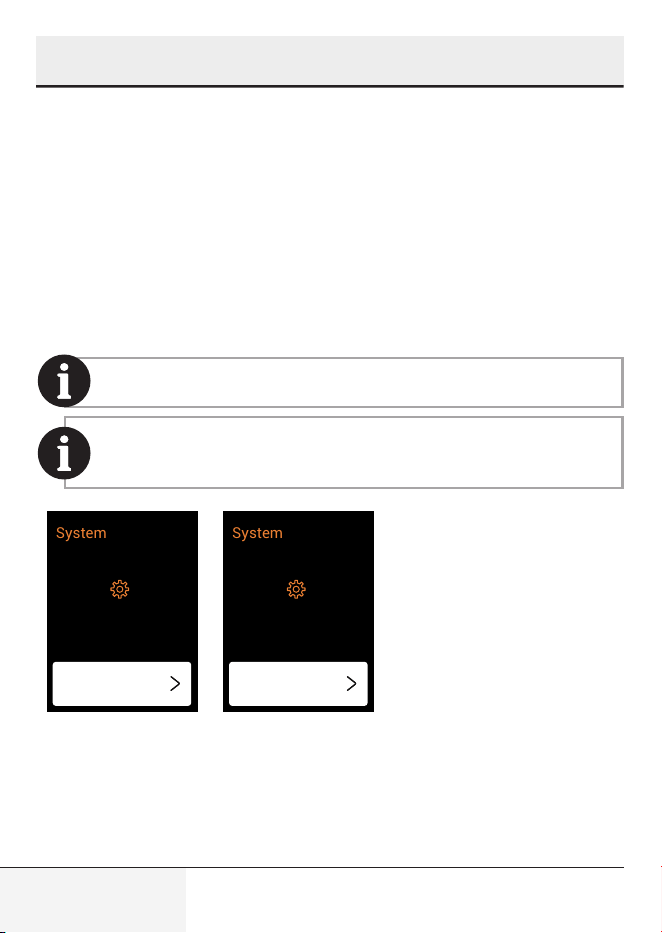
Software update
This product has remote software update functionality for potential new
additions. You can always look for new software versions from the settings
menu. Check for updates in the relevant section, if available, you will be
redirected to the "update" section.
Please follow the steps in the "HomeDirect, Audio Control and
Software Update" guide.
Make sure your phone is connected to the device and you have
a stable connection during the update. Do not turn off the device
while the update process is in progress.
System
Current Version: 1.1
Check for
updates
System
Current Version: 1.1
New Version: 1.2
Update
39 / EN
Full Automatic Espresso Machine with Integrated Milk
Cup and TFT Touch Screen / User Manual
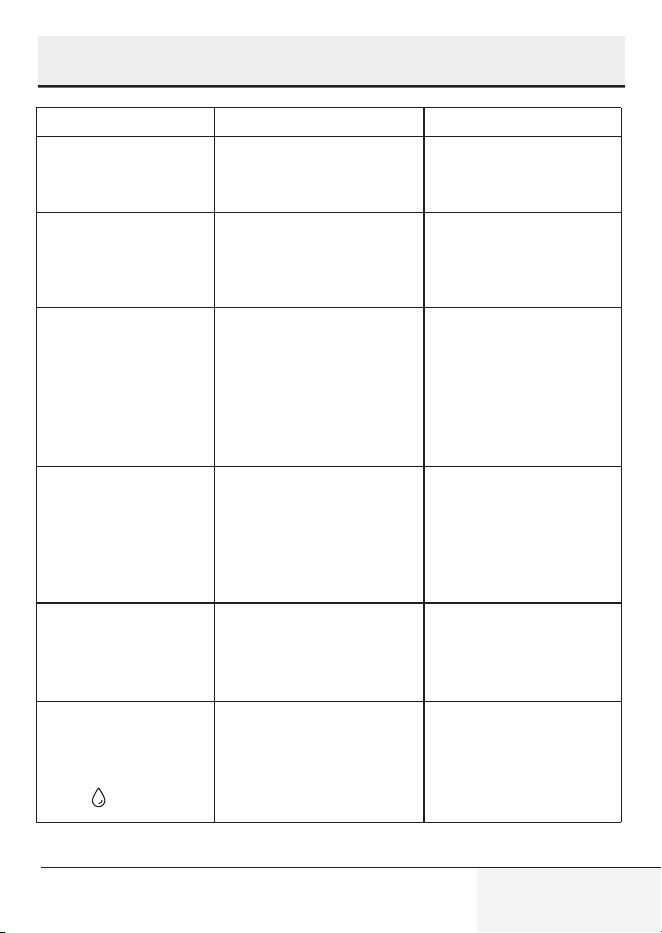
8 Troubleshooting
Problem Cause Solution
The appliance does not
work.
The appliance is not con-
nected to the mains.
Plug in and press the
switch. Check the cable
and the plug.
No or delayed response
in several attempts of
pressing a function key
on the panel
Appliance is under electro-
magnetic interference. The
panel is dirty.
Unplug the appliance.
Restart after a few minutes
Clean the panel with the
cloth provided.
The coffee is not hot
enough.
The cups have not been
preheated.
The brewing unit is too cold.
Place your cup on the
cup warmer facing down
or rinse the cup with hot
water.
Make sure that the water
in the water tank is not
too cold.
Coffee is not coming
out of the coffee spout.
The empty system function
may have been used previ-
ously.
The coffee spout may not
have been cleaned and is
blocked by coffee residues.
Press the cleaning button
until water comes out of
the spout.
Clean the coffee spout.
The first cup of coffee is
of poor quality.
The first running of the
grinder does not place a suf-
ficient quantity of coffee into
the brewing unit.
Throw the coffee away.
The next cups will be
better.
The water tank is
removed / the water
level is very low in the
water tank but there
is no " " alert.
The area near the water tank
connector could be wet.
Wipe off the water around
the water tank connector.
40 / EN
Full Automatic Espresso Machine with Integrated Milk
Cup and TFT Touch Screen / User Manual
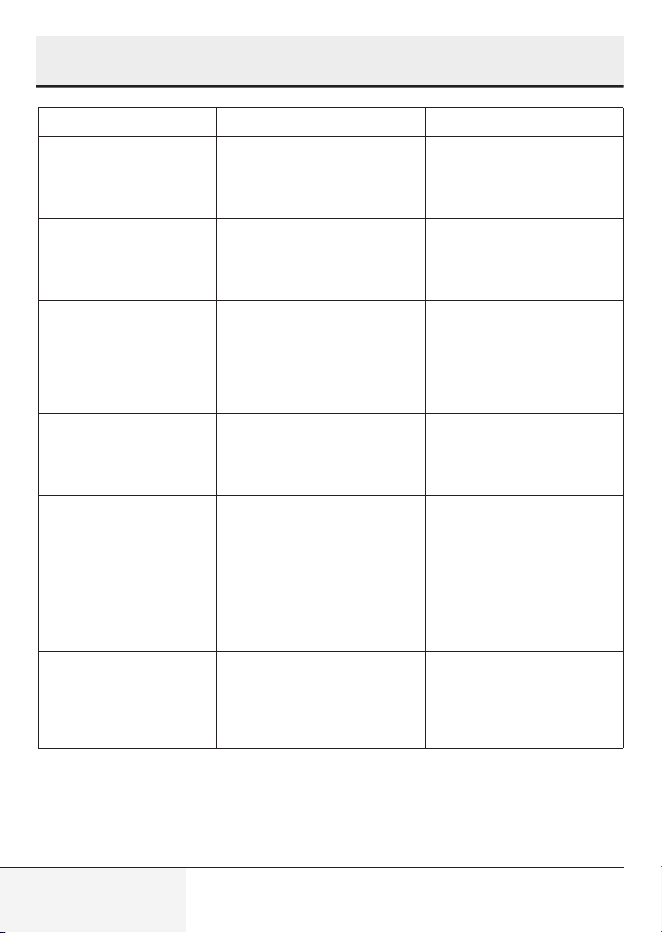
8 Troubleshooting
Problem Cause Solution
The internal drip tray is
filled with a lot of water.
The ground coffee is too fine,
which blocks the water from
coming out.
Adjust the coffee fineness
to larger grains for the
grinding process.
Coffee is delivered too
slowly or a drop at a
time.
Coffee grounds are too fine,
which blocks the water from
coming out.
Adjust the coffee fineness
to larger grains for the
grinding process.
The indicator flashes to
inform that there’s not
enough coffee beans,
but there are plenty
inside the container.
The internal coffee grounds
outlet is blocked.
Follow the steps described
for cleaning the coffee
grounds outlet.
The brewer or the coffee
ground tray is impos-
sible to remove.
The appliance did not finish
the self-cleaning process
and was switched off .
Please switch on the ma-
chine again and let it finish
its auto cleaning process.
The appliance no longer
performs the rinsing
cycle when switched
on or off.
Improper handling when
servicing the appliance may
be the cause.
1. When the appliance is
in idle condition, open the
front cover.
2. Press and hold the on/
off button until you hear
2 beeps.
3. Close the front cover.
The touch buttons are
not sensitive.
Not pressing the touch
button from the front of the
appliance.
Press the lower bottom
part of the symbol of the
touch button from the front
of the appliance.
41 / EN
Full Automatic Espresso Machine with Integrated Milk
Cup and TFT Touch Screen / User Manual
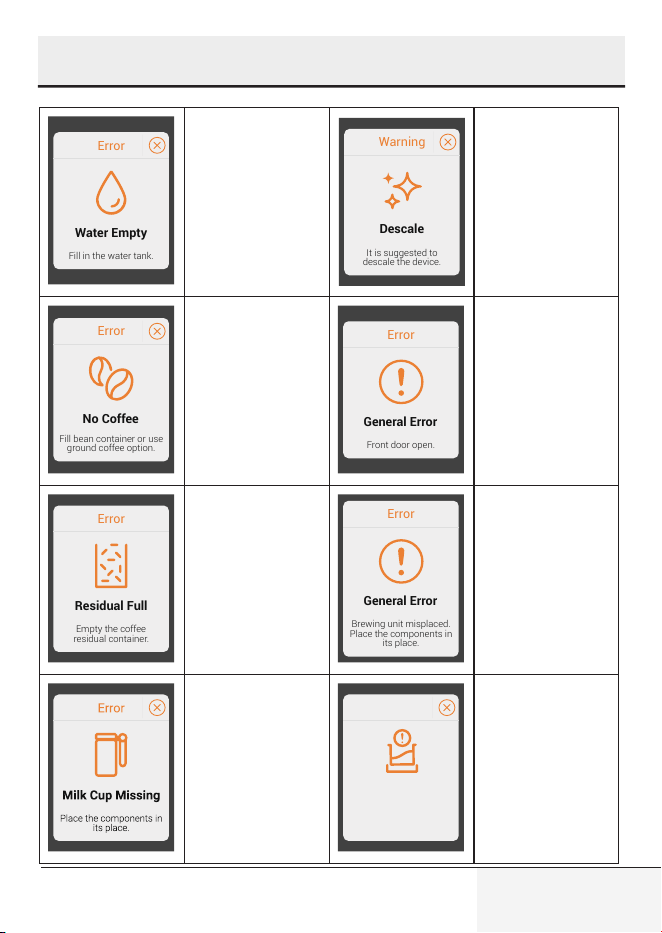
9 Pop-up
Error
Water Empty
Fill in the water tank.
Before filling
the tank, please
verify that it is
fully inserted. Once
confirmed, proceed
with filling the tank.
Warning
Descale
It is suggested to
descale the device.
Descaling program
recommended.
Follow on-screen
instructions. Ignor-
ing this pop-up
may compromise
appliance condi-
tion.
Error
No Coffee
Fill bean container or use
ground coffee option.
Select the correct
coffee type (beans
or ground) on the
screen, then fill the
container or chute
as preferred.
Error
General Error
Front door open.
Front door open.
Please ensure it is
closed securely.
Error
Residual Full
Empty the coffee
residual container.
After several
cups of beverage
consumption, a
pop-up notification
appears. Please
empty the residual
container.
Error
General Error
Brewing unit misplaced.
Place the components in
its place.
Brewing unit
displaced. Reinsert
brewing unit into
its place.
Missing milk cup
during bever-
age preparation
triggers a pop-up.
Replace milk cup.
Water Tank
Misplaced
Make sure the water tank
is positioned correctly.
Error
Make sure the
water tank is posi-
tioned correctly.
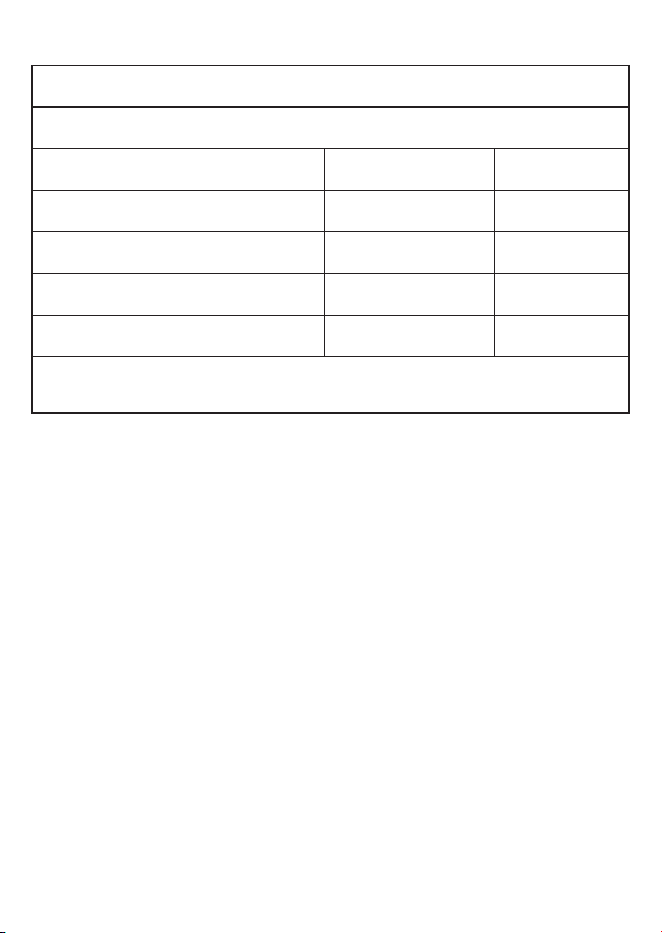
EN-Additional Information for User Manual:
Technical information on the operating Low Power Modes pursuant to EU Regulation 2023/826
Mode POWER CONSUMPTION(WATT) PERIOD(MINUTES)*
Off 0,3 20
Standby - -
Standby Mode with information or status display - -
Networked Standby - -
*:The period after which the equipment reaches automatically standby mode, off mode or networked standby in minutes
and rounded to the nearest minute.

55 Blanck Street, Ormeau Q 4208
P O Box 354, Ormeau Q 4208
p : 5549 3146 f : 5549 3546
ABN : 49 152 055 162
Sensitivity: Public
ORIGINAL MANUFACTURER’S WARRANTY
ADVICE FORM
BEKO COFFEE MACHINE
24 months warranty, full parts and labour warranty only.
WARRANTY CONDITIONS
The following conditions apply only in relations to the warranty expressly given on this Warranty Advice Form supplied with the product. This
warranty only applies to appliances purchased and used in Australia or New Zealand and is in addition to (and does not exclude, restrict or
modify in any way) other rights and remedies under a law to which the appliances relate, including any non-excludable statutory guarantees in
Australia and New Zealand. It applies to the original purchaser and for appliances used in domestic applications only.
1. This warranty does not apply:
(a) if the identification number attached to the appliance has been altered, rendered illegible or removed;
(b) to light globes;
(c) to paint and vitreous enamel finishes and glass;
(d) to surfaces damaged by use of aerosols or cleaners;
(e) if the appliance has been –
(i) subject to misuse, abuse, negligence, accident, fire or floods;
(ii) connected or improper, inadequate or faulty electricity, gas, water or drainage services or intake or exhaust
ducts or flues, or operated using incorrect or contaminated fuels or lubricants;
(iii) installed, maintained or operated otherwise than in accordance with the instructions furnished by Beko including the
improper use of detergents, bleaches, cleaners or other additives;
(iv) damaged by foreign objects in the appliance;
(v) serviced, repaired or altered otherwise than by Beko authorised service agents of Beko, or using other than Beko
approved replacement parts.
2. The purchaser shall be responsible for any expenses involved in making the appliances readily accessible for servicing, the purchaser
shall be responsible for any costs of transporting the appliance or parts thereof to and from the nearest Beko authorised service agent.
3. This warranty is the only expressed warranty given by Beko.
4. Beko reserves the right to determine whether or not the fault is caused by faulty workmanship or material or that any part is defective.
5. Where permitted by law, this warranty shall not apply to loss suffered through or resulting from the non-operation or the ineffective
operation of the appliance or any part of the appliance.
6. The purchaser must produce proof of the date of purchase together with this Warranty Advise Form when making a claim.
7. Subject to your statutory rights as to the merchantable quality of the product or accessory. In the event of a product or accessory being
replaced during the guarantee, the guarantee on the replacement will expire at the original date, i.e., 24 months from the original
purchase date.
8. Australia: For Appliances and services provided by Beko in Australia, Beko goods come with a guarantee by Beko that cannot be
excluded under the Australian Consumer Law. You are entitled to a replacement or refund for a major failure and for compensation for
any other reasonably foreseeable loss or damage. You are also entitled to have the Appliance repaired or replaced if the Appliance
fails to be of acceptable quality and the failure does not amount to a major failure. ‘Acceptable quality’ and ‘major failure’ have the
same meaning as referred to in the Australian Consumer Law.
9. New Zealand: For Appliances and services provided by Beko in New Zealand, the Appliances come with a guarantee by Beko
pursuant to the provisions of the Consumer Guarantees Act, the Sales of Goods Act and the Fair Trading Act. Where the Appliance
was purchased in New Zealand for commercial purposes the Consumer Guarantee Act does not apply.
These Warranty Conditions supersedes and excludes all other representations, conditions and warranties, except those implied
by legislation previously referred to.
For Service or Spare Parts: Aust 1300 282 356 NZ 0800 692 356

Beko A&NZ Pty Ltd
55 Blanck Street , Ormeau QLD, 4208
AUSTRALIA
www.beko.com.au