QUICK-START GUIDE
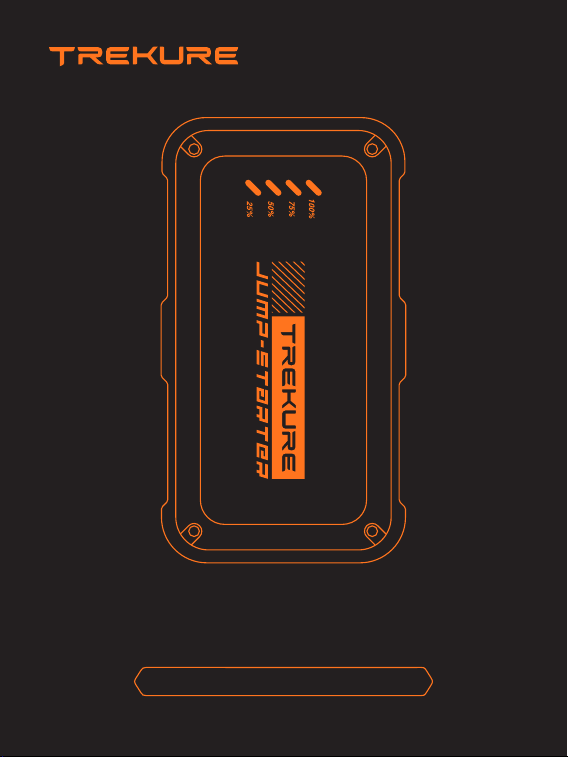
TK10 Portable Jump Starter
Ver.1.3

Language
English
España
Deutsch
Italia
Francais
01-07
08-14
15-21
22-28
29-35
EN
1
WARRANTY
TREKURE provides customers with warranty of 24 months from the
date of purchase.
For assistance or warranty cover claim, please contact us via email at
1. Please use the included USB-C cable and 5V/2A or above adapter
for charging.
2. Please make sure the device is fully charged before using the
product for the first time.
3. It is recommended to fully charge the device at least once every 3
months to help extend the life of the device.
PRECAUTIONS BEFORE USE
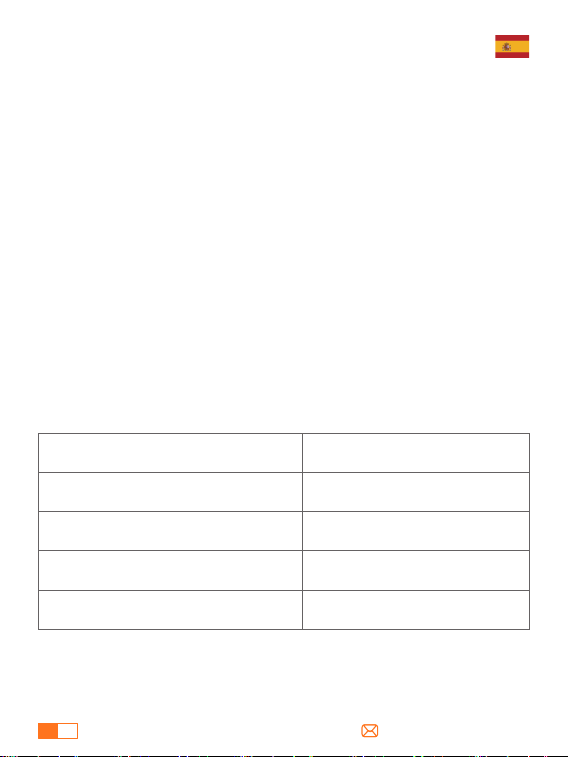
SPECIFICATIONS
Model
Capacity
USB-C Input
USB Output
Operation Temp
TK10
16800mAh, 62.16 Wh
5V/2A
5V/2.4A
-20°C~60°C
1
EN
2
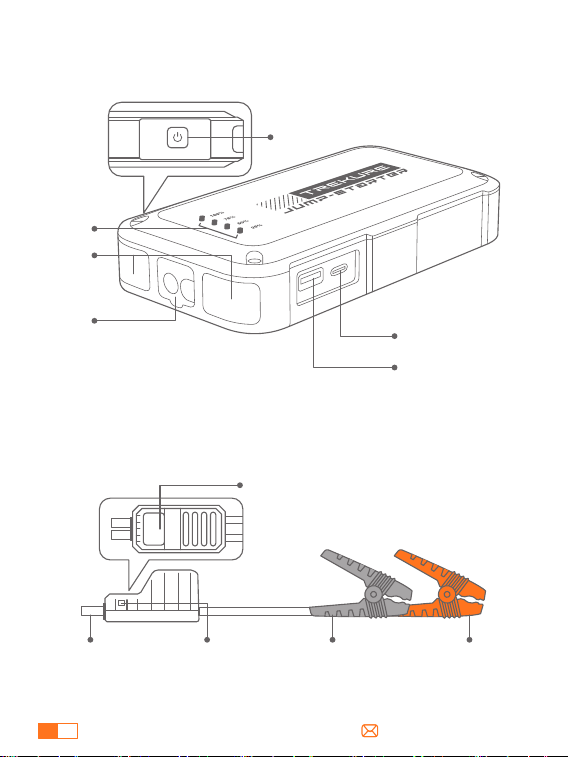
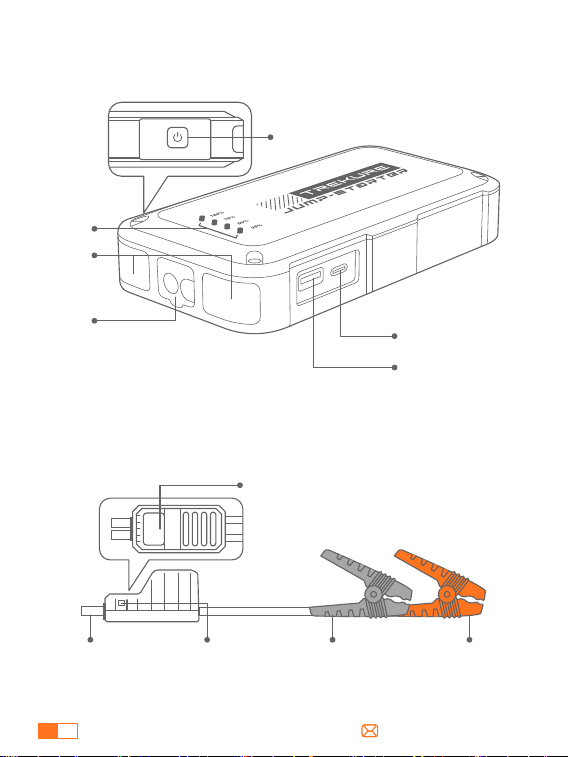
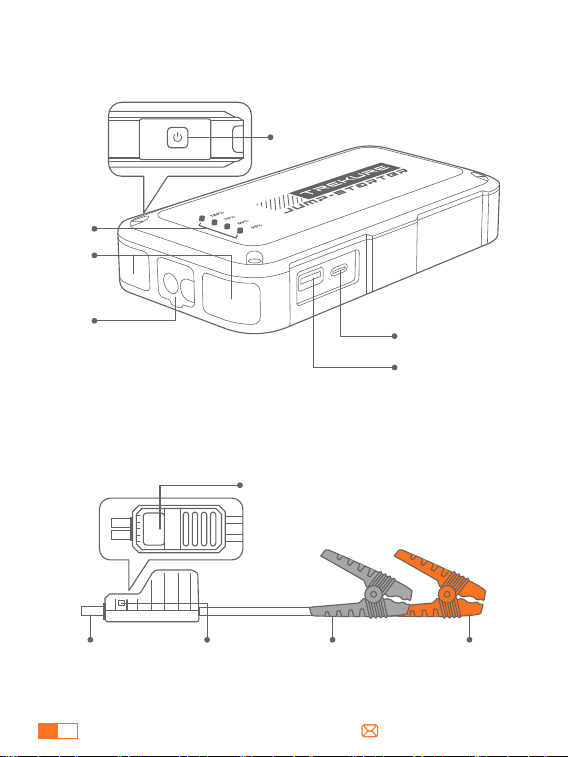
PRODUCT OVERVIEW
①
②
③
④
⑥
⑤
①
②
③
④
⑤
⑥
Power Button
Power Indicator
Lights
Jump-Start Port
USB Output
USB-C Input
Smart Clamp
Connector
Force Start
Button
Smart Clamp Indicator
Black Clamp
(Negative)
Red Clamp
(Positive)
EN
3
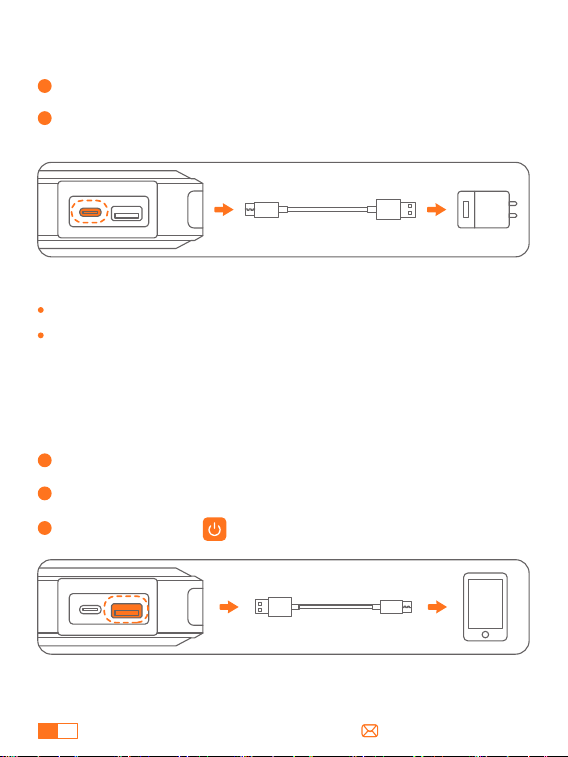
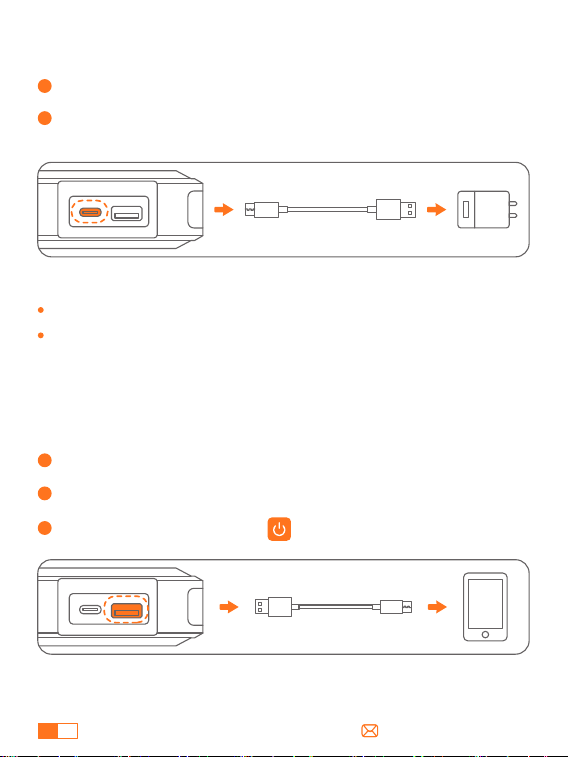
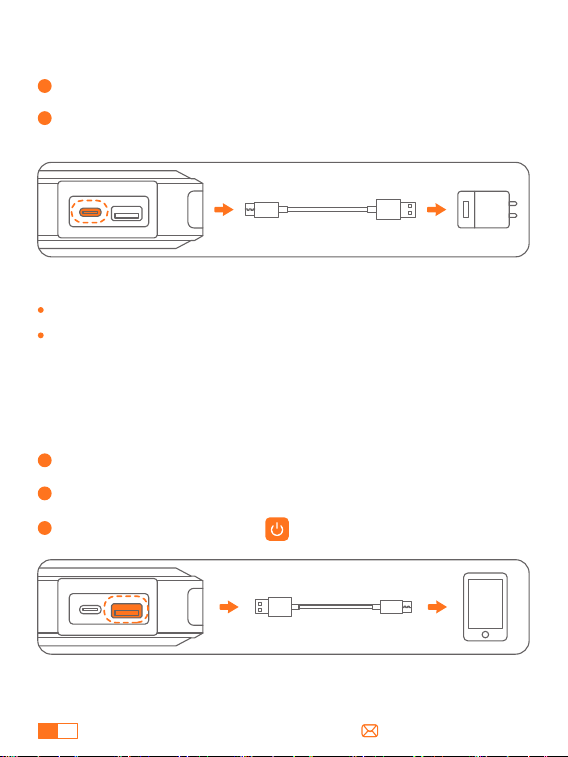
HOW TO CHARGE YOUR JUMP STARTER
HOW TO CHARGE ELECTRONIC DEVIDES
1
Insert the charging cable into USB-C port.
1 bar stands for 25% power.
Please make sure the device is fully charged before using it for the
first time.
2
Connect the charging cable to a 5V/2A or above adapter (adapter
not included).
1
Plug the cable into USB output port.
2
Connect to electronics, such as smart phones.
3
Press Power button.
Tips:
EN
4
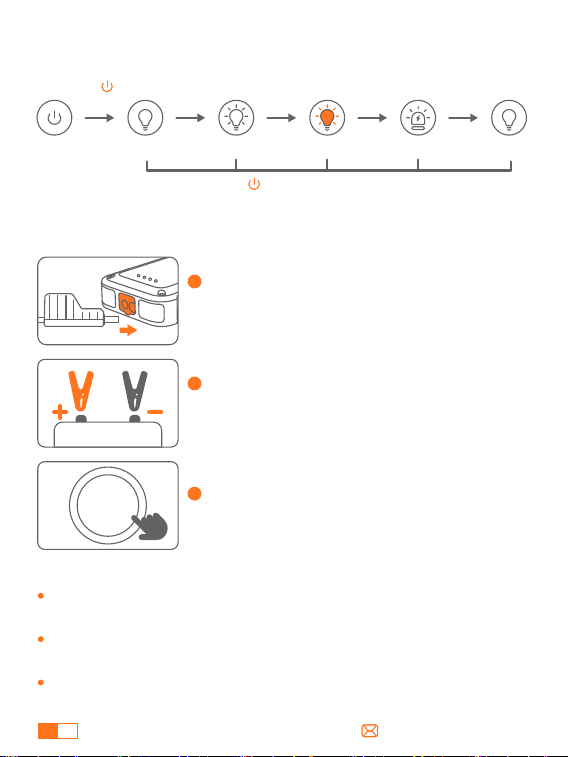
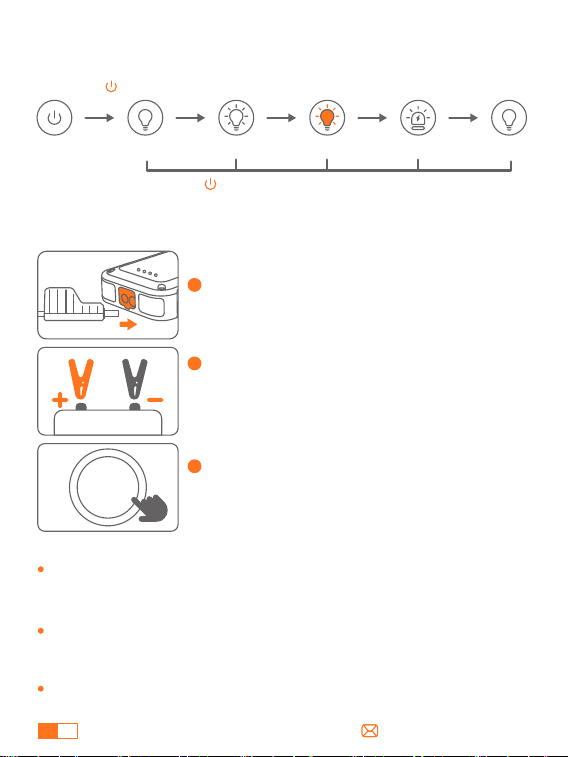
1
Connect the smart clamps to the jump
starter, and the indicator will flashing red and
green.
2
Connect the clamps to car battery (red to + ,
black to -). The indicator will turn solid green
if connected correctly.
3
Start the car engine within 30s of the
indicator turning solid green.
HOW TO JUMP START YOUR CAR
START
/STOP
Ensure the battery level shows at least two bars before use to avoid
low-voltage protection, which may result in a failed start.
When connected, it's normal that the jump starter screen is off. It's
not recommended to press the power button to turn it on.
Do not start the vehicle continuously, allow at least 30s to 1 min
between starts.
Note:
HOW TO USE THE LED EMERGENCY LIGHT
Lighting SOSStrobe Strobe(Orange) Lighting
Hold 2s
Press shortly Press shortly Press shortly Press shortly
Long press for 2s in any mode to turn off the light.
EN
5
START
/STOP
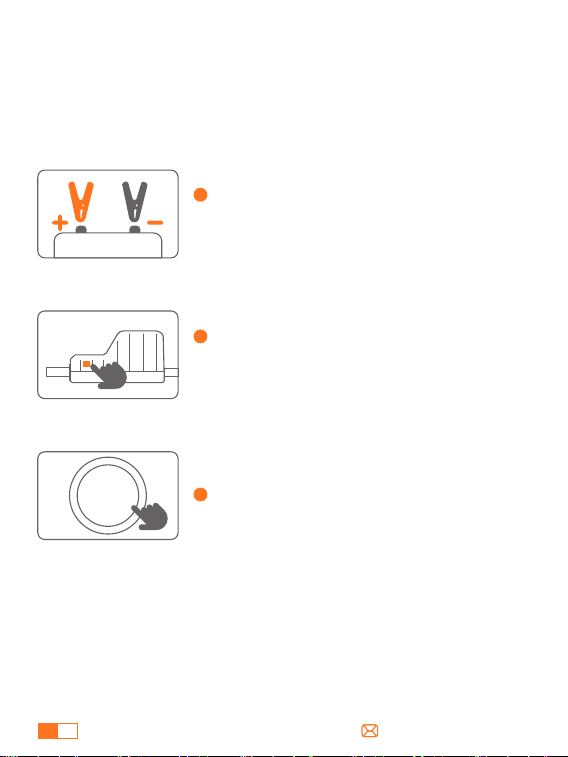
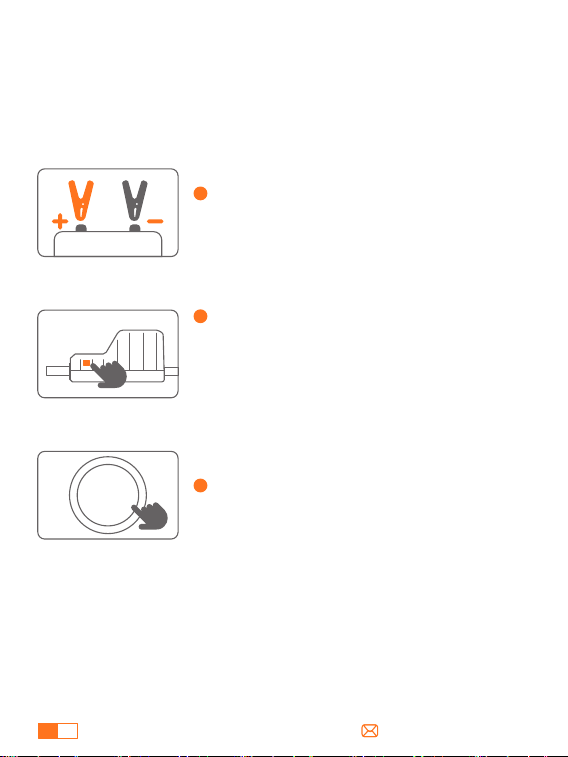
If the indicator light remains flashing red and green with properly
connected clamps, use Force Start:
Note: Force Start bypasses protective systems. Don't reverse or
short-circuit the clamps.
ABOUT THE FORCE START FUNCTION
1
Ensure that the smart clamps are correctly
connected to the car battery (red to +, black
to -).
2
Long press the Force Start Button on the
side of the smart clamp for 3 seconds, the
indicator light will turn solid green.
3
Start your car within 60 seconds.
EN
6
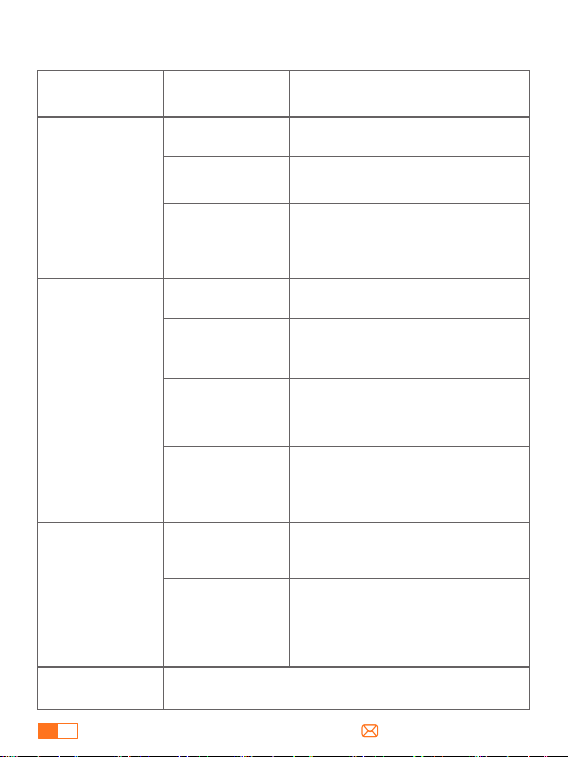
ABOUT TROUBLESHOOTING
Situations and Solutions
Connection
Status
Indicator
Standby status
Low voltage protection
---Recharge the jump starter.
Load error protection
---Reconnect and try again or use the
force start function.
---Contact support@trekure.com for
more assistance.
Smart clamps
connected to the
jump starter only
After ignition
Solid red with
regular beeps (one
long and two short )
Start-up timeout protection
--- Please remove the clamps and
reconnect to start the vehicle within 60
seconds.
Solid red and green
Reverse polarity protection
---Ensure the correct connection (red
to + pole, black to - pole).
Solid red with rapid
beeps
Short circuit protection
---Don't connect the clamps together
or to the same metal.
Solid red with
regular beeps (one
long and two short )
Overheat protection
---Remove the clamps to let it cool.
Solid red with rapid
beeps
Solid red
Flashing red and
green
Ready to start
Solid green with a
single beep
Please contact support@trekure.com with details
Smart clamps
connected to
both the jump
starter and the car
battery
Others
Clamps malfunction (usually occurs on
first use)
---Remove the clamps and contact
[email protected]om for a
replacement.
Solid red with rapid
beeps

EN
7
IMPORTANT SAFETY WARNING
ATTENTION Please read the following safety warning before using the
product and take safety protection measures to avoid malfunctions
caused by accidental operation.
1. Store in a cool and well-ventilated place out reach of children and pets.
2. Do not place the product in high temperature environment for a long
time. The operation temperature of this product is -4°F~140°F. The storage
temperature should not exceed 122°F.
Personal Safety
1. Only start vehicles with the smart jumper cable supplied by the
manufacturer.
2. Do not use the product if the clamp or cable is damaged.
3. Do not connect the red and black clamps together when the product is
outputting.
4. Do not connect the red and black clamps to the same piece of metal.
5. Do not disassemble or modify this product.
6. Do not use detergent to clean this product.
7. Do not abuse this product and avoid heavy dropping or repeatedly
hitting it.
8. Do not operate the product in explosive environments such as
flammable liquidsgases or dusts.
9. Do not immerse the product in water.
Electrical Safety
1. Do not litter the product and it should be safely recycled.
2. Do not incinerate the product or exposed to high temperaturesas they
may explode.
3. Only use replacement parts or accessories provided or recommended
by manufacturer.
Battery Safety
ES
8
GARANTÍA
TREKURE ofrece a los clientes una garantía de 24 meses a partir de la
fecha de compra.
Para asistencia o reclamaciones de garantía, por favor contáctenos
por correo electrónico a [email protected].
1. Por favor, utilice el cable USB-C suministrado y un adaptador de
5V/2A o superior para la carga.
2. Asegúrese de que el dispositivo está completamente cargado
antes de utilizar el producto por primera vez.
3. Se recomienda cargar completamente el dispositivo al menos una
vez cada 3 meses para ayudar a prolongar la vida útil del dispositivo.
PRECAUCIONES DE USO
ESPECIFICACIONES
Modelo
Capacidad
Entrada USB-C
Salida USB
Temperatura de Funcionamiento
TK10
16800mAh, 62.16Wh
5V/2A
5V/2.4A
-20°C~60°C
ES
9
RESUMEN DEL PRODUCTO
①
②
③
④
⑥
⑤
①
②
③
④
⑤
⑥
Botón de Encendido
Indicador de Encendido
Luces
Puerto de Arranque
Salida USB
Entrada USB-C
Conector de
Clip Inteligente
Indicador de Clip Inteligente
Pinza negra
(Negativa)
Pinza roja
(Positiva)
Botón de
Arranque
Forzado
ES
10
CÓMO CARGAR EL ARRANCADOR
CÓMO CARGAR DISPOSITIVOS ELECTRÓNICOS
1
Inserta el cable de carga en el puerto USB-C.
1 barra representa el 25% de potencia.
Por favor, asegúrese de que el dispositivo está completamente
cargado antes de usarlo por primera vez.
2
Conecte el cable de carga a un adaptador de 5V/2A o superior
(adaptador no incluido).
1
Conecta el cable al puerto de salida USB.
2
Conéctalo a dispositivos electrónicos, como teléfonos inteligentes.
3
Pulsa el botón de encendido.
Consejos:
ES
11
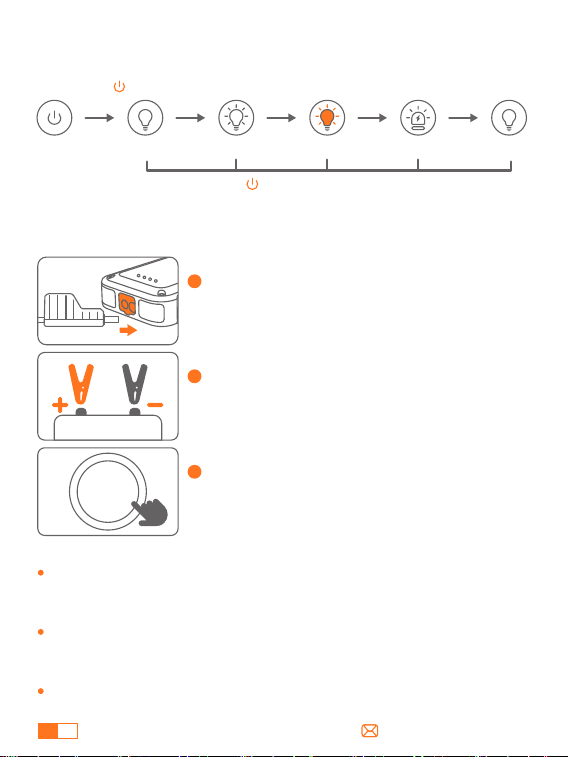
1
Conecte las pinzas inteligentes al arrancador
de puente, y el indicador parpadeará en rojo
y verde.
2
Conecta las pinzas a la batería del coche
(rojo a + , negro a -). Si la conexión es
correcta, el indicador se iluminará en verde.
3
Arranque el motor del coche antes de que
transcurran 30 segundos desde que el
indicador se ilumine en verde.
CÓMO ARRANCAR TU COCHE
START
/STOP
No arranque el vehículo continuamente, deje pasar al menos de
30s a 1 min entre arranques.
Cuando está conectado, es normal que la pantalla del arrancador
esté apagada. No se recomienda pulsar el botón de encendido
para encenderlo.
Asegúrese de que el nivel de la batería muestra al menos dos
barras antes de usarla para evitar la protección por bajo voltaje,
que puede provocar un arranque fallido.
Nota:
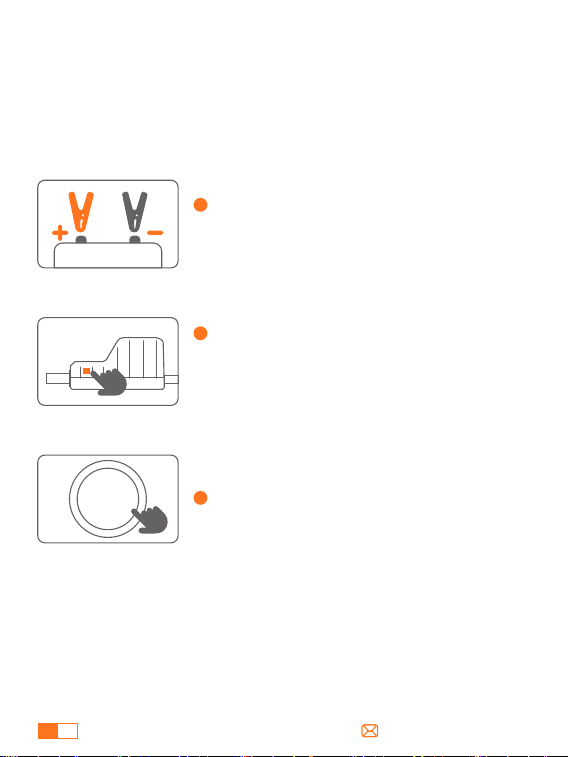
CÓMO UTILIZAR LA LUZ LED DE EMERGENCIA
Lluminación SOSStrobe Strobe(naranja) Lluminación
Mantener 2s
Pulsar
brevemente
Pulsar
brevemente
Pulsar
brevemente
Pulsar
brevemente
Mantenga pulsado durante 2s en cualquier modo para apagar la luz.
ES
12
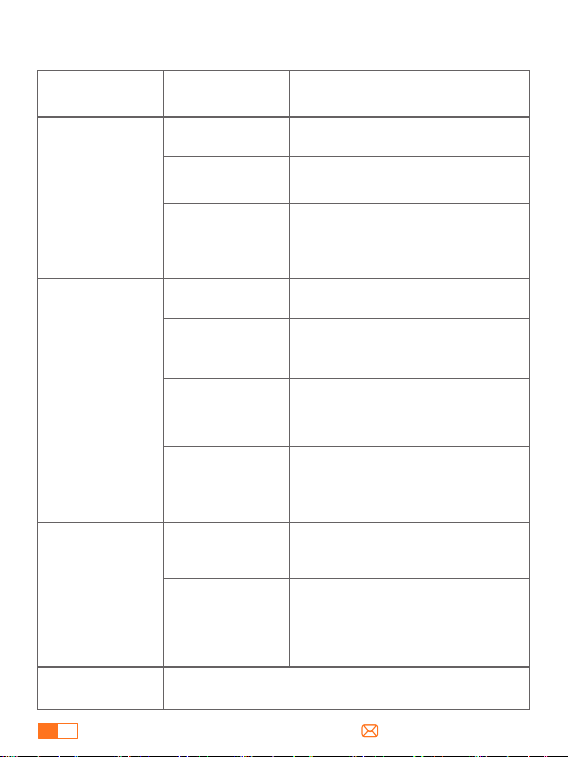
ACERCA DE LA FUNCIÓN DE ARRANQUE FORZADO
Si el indicador luminoso permanece parpadeando en rojo y verde
con las pinzas correctamente conectadas, utilice la función de
Arranque Forzado:
Nota: El arranque forzado anula los sistemas de protección. No
invierta ni cortocircuite las pinzas.
1
Asegúrese de que las pinzas smart están
correctamente conectadas a la batería del
coche (rojo a +,negro a -).
2
Presione durante 3 segundos el Botón de
Arranque Forzado situado en el lateral de la
pinza inteligente, el indicador luminoso se
iluminará en verde fijo.
3
Enciende tu coche en 60 segundos.
START
/STOP
ES
13
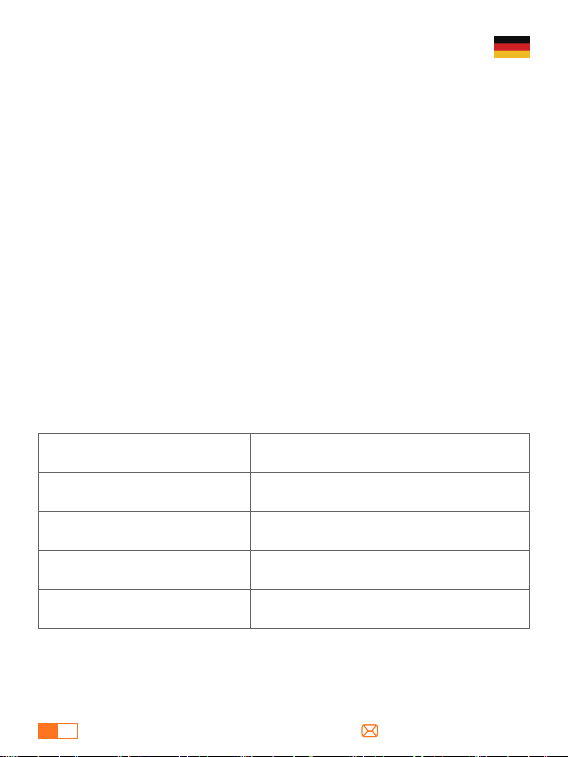
ACERCA DE LA SOLUCIÓN DE PROBLEMAS
Situaciones y Soluciones
Estado de
Conexión
Indicador
Estado de espera
Protección contra baja tensión
---Recarga el arrancador.
Protección contra errores de carga
---Reconecte y vuelva a intentarlo o
utilice la función de arranque forzado.
---Contacte con
[email protected]om para obtener
más ayuda.
Pinzas inteligentes
conectadas sólo
al arrancador de
emergencia
Después del
encendido
Rojo fijo con pitidos
regulares (uno largo
y dos cortos )
Protección de tiempo de espera de
arranque
--- Por favor, retire las abrazaderas y
vuelva a conectar para arrancar el
vehículo dentro de 60 segundos.
Rojo y verde sólidos
Protección contra polaridad inversa
---Asegure la conexión correcta (rojo al
polo +, negro al polo -).
Rojo fijo con pitidos
rápidos
Protección contra cortocircuitos
---No conecte las pinzas entre sí o al
mismo metal.
Rojo fijo con pitidos
regulares (uno largo
y dos cortos)
Protección contra sobrecalentamiento
---Retire las abrazaderas para dejarlo
enfriar.
Rojo fijo con pitidos
rápidos
Rojo fijo
Rojo y verde
intermitentes
Listo para empezar.
Verde fijo con un
solo pitido
Si desea más información, póngase en contacto con
Pinzas inteligentes
conectadas tanto
al arrancador
como a la batería
del coche
Otros
Mal funcionamiento de las abrazaderas
(suele ocurrir en el primer uso)
---Retire las abrazaderas y póngase en
contacto con support@trekure.com
para que se las cambien.
Rojo fijo con pitidos
rápidos

ES
14
ADVERTENCIA DE SEGURIDAD IMPORTANTE
ATENCIÓN Lea la siguiente advertencia de seguridad antes de utilizar el
producto y tome las medidas de protección necesarias para evitar fallos
de funcionamiento causados por un manejo accidental.
1. Almacene en un lugar fresco y bien ventilado fuera del alcance de niños
y mascotas.
2. No exponga el producto a altas temperaturas durante mucho tiempo.
La temperatura de funcionamiento de este producto es de -4°F~140°F. La
temperatura de almacenamiento no debe superar los 122°F.
Seguridad Personal
1. Arranque los vehículos únicamente con el cable de arranque inteligente
suministrado por el fabricante.
2. No utilice el producto si la pinza o el cable están dañados.
3. No conecte las pinzas roja y negra juntas cuando el producto esté
saliendo.
4. No conecte las pinzas roja y negra a la misma pieza de metal.
5. No desmonte ni modifique este producto.
6. No utilice detergente para limpiar este producto.
7. No abuse de este producto y evite dejarlo caer con fuerza o golpearlo
repetidamente.
8. No utilice el producto en entornos explosivos como líquidos, gases o
polvos inflamables.
9. No sumerja el producto en agua.
Seguridad Eléctrica
1. No tire el producto a la basura y debe reciclarse de forma segura.
2. No incinere el producto ni lo exponga a altas temperaturasya que
pueden explotar.
3. Utilice únicamente piezas de repuesto o accesorios suministrados o re-
comendados por el fabricante.
Seguridad de la Batería
DE
15
GARANTIE
TREKURE bietet seinen Kunden eine Garantie von 24 Monaten ab dem
Kaufdatum.
Für Unterstützung oder Garantieanspruch, kontaktieren Sie uns bitte
per E-Mail an [email protected].
1. Bitte verwenden Sie das mitgelieferte USB-C-Kabel und 5V/2A oder
höher Adapter zum Aufladen.
2. Bitte stellen Sie sicher, dass das Gerät vollständig aufgeladen ist,
bevor Sie das Produkt zum ersten Mal verwenden.
3. Es wird empfohlen, das Gerät mindestens einmal alle 3 Monate
vollständig aufzuladen, um die Lebensdauer des Geräts zu verlängern.
VORSICHTSMASSNAHMEN VOR DER BENUTZUNG
SPEZIFIKATIONEN
Modell
Kapazität
USB-C Eingang
USB-Ausgang
Betriebstemperatu
TK10
16800mAh, 62.16Wh
5V/2A
5V/2.4A
-20°C~60°C
DE
16
PRODUKTÜBERSICHT
①
②
③
④
⑥
⑤
①
②
③
④
⑤
⑥
Einschalttaste
Einschalt-Anzeige
Lichter
Jump-Start-Anschluss
USB-Ausgang
USB-C-Eingang
Smart Clamp
Verbinder
Smart Clamp Indikator
Schwarze Klemme
(Negativ)
Rote Klemme
(positiv)
Schaltfläche
„Start erzwingen“
DE
17
SO LADEN SIE IHRE STARTHILFE AUF
WIE MAN ELEKTRONISCHE GERÄTE AUFLÄDT
1
Stecken Sie das Ladekabel in den USB-C-Anschluss.
1 bar steht für 25% Leistung.
Bitte vergewissern Sie sich, dass das Gerät vollständig aufgeladen
ist, bevor Sie es zum ersten Mal benutzt wird.
2
Verbinden Sie das Ladekabel mit einem 5V/2A oder höher
Adapter (Adapter nicht enthalten).
1
Stecken Sie das Kabel in den USB-Ausgangsanschluss.
2
Schließen Sie es an ein elektronisches Gerät an, z. B. ein Smartphone.
3
Drücken Sie die Power-Taste.
Tipps:
DE
18
1
Schließen Sie die Smart-Klemmen an die
Starthilfe an. Die Anzeige blinkt rot und grün.
2
Schließen Sie die Klemmen an die Autobat-
terie an (rot an +, schwarz an -). Wenn die
Klemmen richtig angeschlossen sind,
leuchtet die Anzeige dauerhaft grün.
3
Starten Sie den Motor des Fahrzeugs
innerhalb von 30 Sekunden, nachdem die
Anzeige grün leuchtet.
STARTHILFE FÜR IHR AUTO
START
/STOP
Vergewissern Sie sich, dass der Batteriestand vor der Verwendung
mindestens zwei Balken anzeigt, um einen Unterspannungsschutz zu
vermeiden, der zu einem Fehlstart führen kann.
Starten Sie das Fahrzeug nicht ununterbrochen, sondern lassen Sie
mindestens 30 Sekunden bis 1 Minute zwischen den Starts verstreichen.
Nach dem Anschließen ist der Bildschirm der Starthilfe normalerweise
ausgeschaltet. Es wird nicht empfohlen, die Starthilfe durch Drücken der
Einschalttaste einzuschalten.
Hinweis:
WIE MAN DAS LED-NOTLICHT BENUTZT
Beleuchtung SOSStrobe Strobe(Orange) Beleuchtung
Halten 2s
kurz drücken kurz drücken kurz drücken kurz drücken
Halten Sie in einem beliebigen Modus 2 Sekunden lang gedrückt,
um das Licht auszuschalten.
DE
19
ÜBER DIE FORCE START-FUNKTION
Wenn die Kontrollleuchte bei korrekt angeschlossenen Klemmen
weiterhin rot und grün blinkt, verwenden Sie den Force Start:
Hinweis: Der Force Start umgeht Schutzsysteme. Vertauschen oder
kurzschließen Sie die Klemmen nicht.
1
Bitte stellen Sie sicher, dass die Smart-Klem-
men korrekt an die Fahrzeugbatterie
angeschlossen sind (rot an +, schwarz an -).
2
Bitte stellen Sie sicher, dass die Force
Start-Taste an der Seite der Smart-Klemme
3 Sekunden lang gedrückt gehalten wird.
Die Kontrollleuchte leuchtet dann
durchgehend grün.
3
Bitte stellen Sie sicher, dass das Fahrzeug
innerhalb von 60 Sekunden startet.)
START
/STOP
DE
20
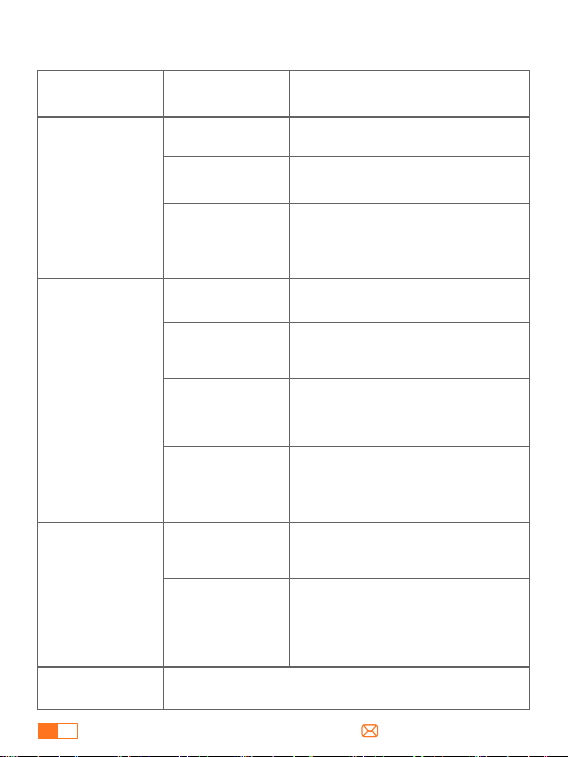
ZUR FEHLERSUCHE
Situationen und Lösungen
Verbind-
ungsstatus
Indikator
Standby-Modus
Unterspannungsschutz
---Starthilfe aufladen.
Ladefehlerschutz
---Verbinden Sie sich erneut und
versuchen Sie es erneut oder
verwenden Sie die Funktion
„Erzwungener Start“.
Intelligente
Klemmen, die nur
mit dem
Starthilfegerät
verbunden sind
Nach der
Zündung
Durchgängig rot
mit regelmäßigen
Pieptönen (ein
langer und zwei
kurze)
Start-Timeout-Schutz
--- Bitte entfernen Sie die Klemmen
und schließen Sie sie innerhalb von 60
Sekunden wieder an, um das Fahrzeug
zu starten.
Durchgängig rot
und grün
Verpolungsschutz
---Auf korrekten Anschluss achten (Rot
an Pluspol, Schwarz an Minuspol).
Durchgängig rot
mit schnellen
Pieptönen
Kurzschlussschutz
---Die Klemmen nicht miteinander
oder mit demselben Metall verbinden.
Durchgängig rot mit
regelmäßigen
Pieptönen (ein langer
und zwei kurze)
Überhitzungsschutz
---Entfernen Sie die Klemmen, um das
Gerät abkühlen zu lassen.
Durchgängig rot
mit schnellen
Pieptönen
Durchgehend rot
Blinkt rot und grün
Bereit zum Start
Durchgängig grün
mit einem
einzelnen Piepton
Bitte wenden Sie sich mit Einzelheiten an
Intelligente
Klemmen, die
sowohl an die
Starthilfe als auch
an die
Autobatterie
angeschlossen
werden
Andere
Fehlfunktion der Klemmen (meist beim
ersten Gebrauch)
---Entfernen Sie die Klemmen und
kontaktieren Sie [email protected]
für einen Ersatz.
Durchgängig rot
mit schnellen
Pieptönen

DE
21
WICHTIGER SICHERHEITSHINWEIS
ACHTUNG Bitte lesen Sie den folgenden Sicherheitshinweis, bevor Sie das
Produkt verwenden, und ergreifen Sie Sicherheitsmaßnahmen, um
Fehlfunktionen durch versehentliche Bedienung zu vermeiden.
1. Bewahren Sie das Gerät an einem kühlen und gut belüfteten Ort
außerhalb der Reichweite von Kindern und Haustieren auf.
2. Legen Sie das Produkt nicht über längere Zeit in eine Umgebung mit
hohen Temperaturen. Die Betriebstemperatur dieses Produkts beträgt
-20°C~60°C. Die Lagertemperatur sollte 50°C nicht überschreiten.
Persönliche Sicherheit
1. Starten Sie Fahrzeuge nur mit dem vom Hersteller gelieferten
intelligenten Starthilfekabel.
2. Verwenden Sie das Produkt nicht, wenn die Klemme oder das Kabel be-
schädigt ist.
3. Verbinden Sie die rote und die schwarze Klemme nicht miteinander,
wenn das Produkt in Betrieb ist.
4. Verbinden Sie die rote und die schwarze Klemme nicht mit demselben
Metallstück.
5. Zerlegen oder modifizieren Sie dieses Produkt nicht.
6. Verwenden Sie keine Reinigungsmittel, um dieses Produkt zu reinigen.
7. Missbrauchen Sie dieses Produkt nicht und vermeiden Sie es, es fallen zu
lassen oder wiederholt darauf zu schlagen.
8. Betreiben Sie das Produkt nicht in explosionsgefährdeten Umgebun-
gen, wie z.B. bei entflammbaren Flüssigkeiten, Gasen oder Stäuben.
9. Tauchen Sie das Produkt nicht in Wasser ein.
Elektrische Sicherheit
1. Werfen Sie das Produkt nicht in den Müll, sondern recyceln Sie es sicher.
2. Verbrennen Sie das Produkt nicht und setzen Sie es keinen hohen Tem-
peraturen aus, da es explodieren kann.
3. Verwenden Sie nur Ersatzteile oder Zubehör, die vom Hersteller
geliefert oder empfohlen werden.
Sicherheit der Batterie
IT
22
GARANZIA
TREKURE fornisce ai clienti una garanzia di 24 mesi dalla data di
acquisto.
Per assistenza o richiesta di copertura della garanzia, contattateci via
e-mail all'indirizzo [email protected].
1. Per la ricarica utilizzare il cavo USB-C incluso e l'adattatore da 5V/2A
o superiore.
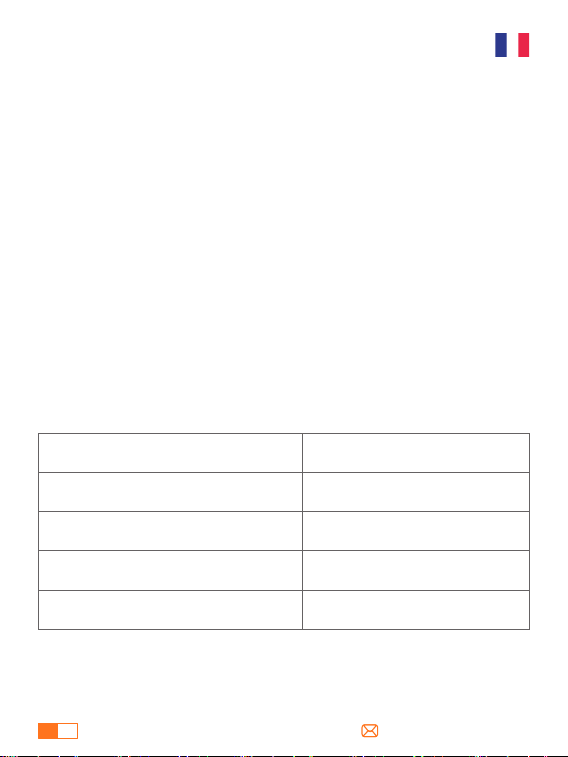
2. Assicurarsi che il dispositivo sia completamente carico prima di
utilizzare il prodotto per la prima volta.
3. Si consiglia di caricare completamente il dispositivo almeno una
volta ogni 3 mesi per prolungarne la durata.
PRECAUZIONI PRIMA DELL'USO
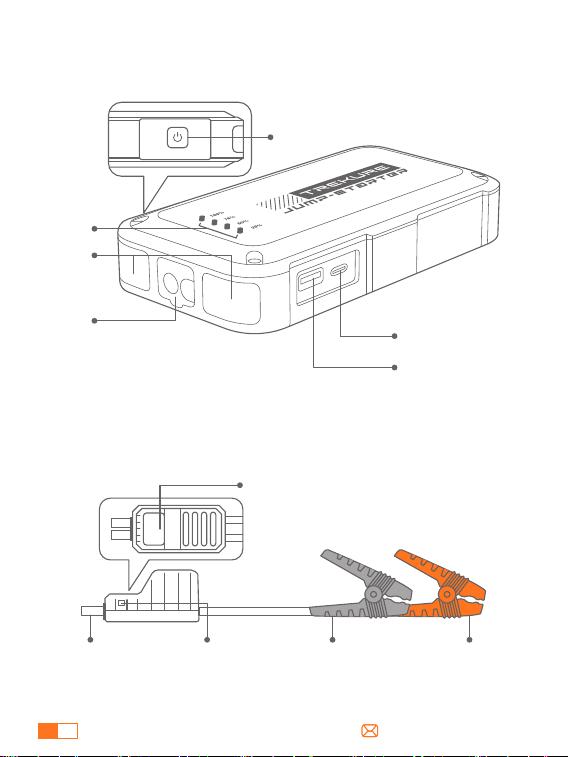
SPECIFICHE
Modello
Capacità
Ingresso USB-C
Uscita USB
Temperatura di funzionamento
TK10
16800mAh, 62.16Wh
5V/2A
5V/2.4A
-20°C~60°C
IT
23
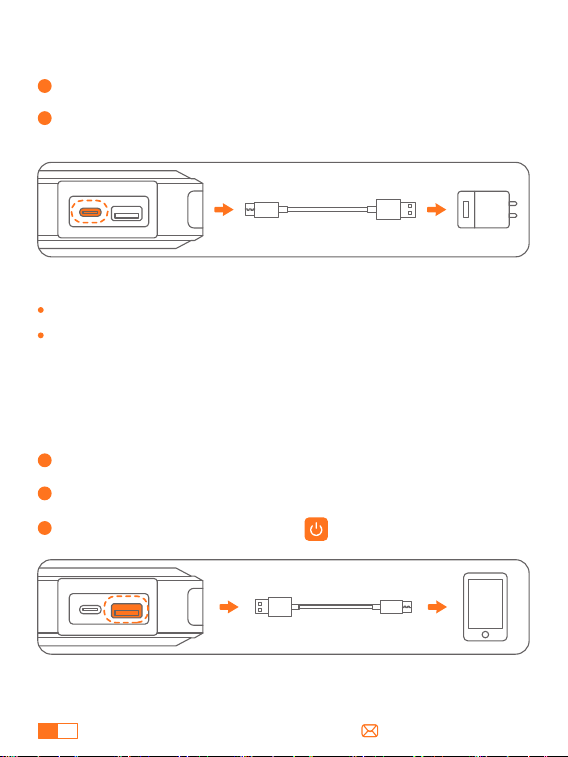
PANORAMICA DEL PRODOTTO
①
②
③
④
⑥
⑤
①
②
③
④
⑤
⑥
Pulsante di Accensione
Indicatore di Alimentazione
Luci
Porta di Avviamento A Salto
Uscita USB
Ingresso USB-C
Connettore
Morsetto
Intelligente
Indicatore Del
Morsetto Intelligente
Morsetto Nero
(negativo)
Morsetto Rosso
(positivo)
Pulsante di
avvio forzato
IT
24
COME CARICARE L'AVVIATORE
COME CARICARE I DISPOSITIVI ELETTRONICI
1
Inserire il cavo di ricarica nella porta USB-C.
Una spia corrisponde al 25% di potenza.
Assicurarsi che il dispositivo sia completamente carico prima di
utilizzarlo per la prima volta.
2
Collegare a un adattatore da 5V/2A o superiore (adattatore non
incluso).
1
Inserire il cavo nella porta di uscita USB.
2
Collegare il dispositivo elettronico, ad esempio lo smartphone.
3
Premere il pulsante di accensione.
Suggerimenti:
IT
25
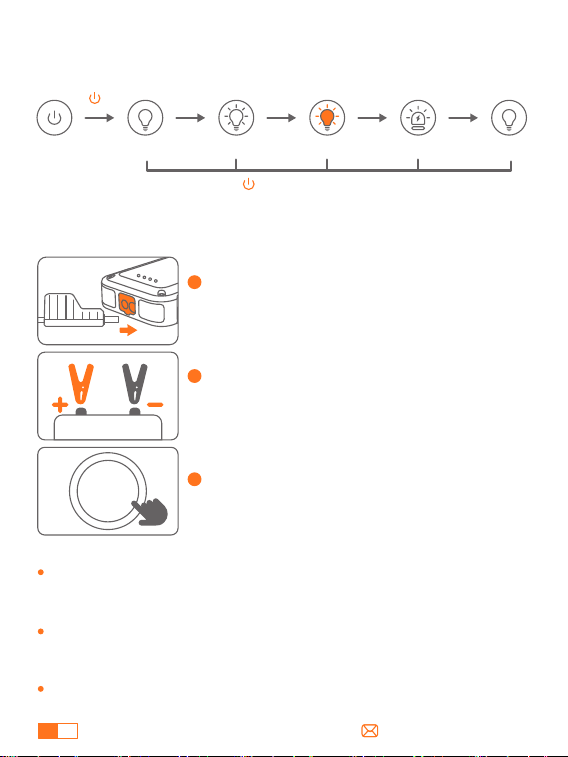
1
Collega i morsetti intelligenti all'avviatore di
emergenza e l'indicatore lampeggerà in rosso
e verde.
2
Collegare le morsetto alla batteria dell'auto
(rosso a +, nero a -). Se il collegamento è
corretto, l'indicatore diventa verde fisso.
3
Avviare il motore dell'auto entro 30 secondi
da quando l'indicatore diventa verde fisso.
AVVIAMENTO DELL'AUTO
START
/STOP
Assicurarsi che il livello della batteria mostri almeno due barre
prima dell'uso per evitare una protezione da bassa tensione che
potrebbe causare un mancato avviamento.
Non avviare il veicolo in modo continuo, attendere almeno 30
secondi a 1 minuto tra un avviamento e l'altro.
Una volta collegato, è normale che lo schermo dell'avviatore di
emergenza sia spento. Si sconsiglia di premere il pulsante di
accensione per accenderlo.
Nota:
COME UTILIZZARE LA LUCE DI EMERGENZA A LED
Illuminazione SOSStrobo Strobo (arancione) Illuminazione
Tenere premuto
2s
Premere
brevemente
Premere
brevemente
Premere
brevemente
Premere
brevemente
Premere a lungo per 2s in qualsiasi modalità per spegnere la luce.
IT
26
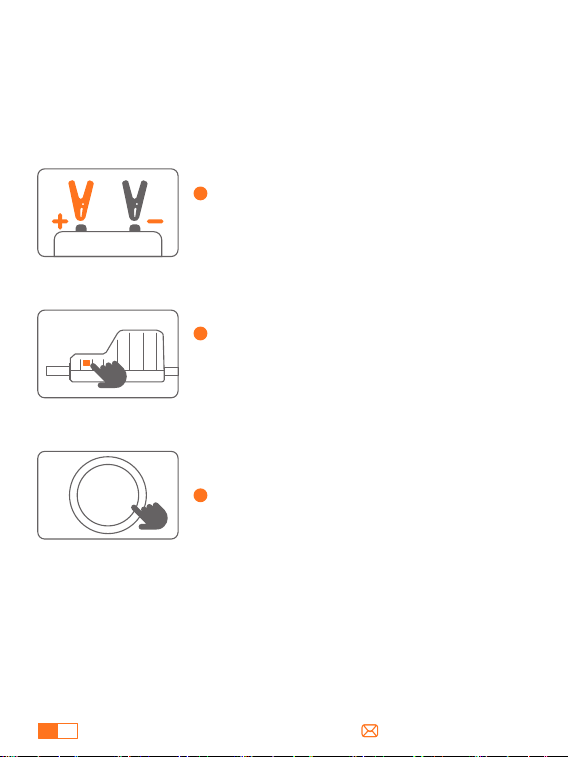
INFORMAZIONI SULLA FUNZIONE DI AVVIO FORZATO
Se la spia luminosa continua a lampeggiare in rosso e verde con i
morsetti correttamente collegati, utilizzare l'avvio forzato:
Nota: l'avvio forzato bypassa i sistemi di protezione. Non invertire o
cortocircuitare i morsetti.
1
Assicurarsi che i morsetti intelligenti siano
correttamente collegati alla batteria
dell'auto (rosso a +, nero a -).
2
Premere a lungo il pulsante di avvio forzato
sul lato del morsetto intelligente per 3
secondi, la spia diventerà verde fissa.
3
Avviare l'auto entro 60 secondi.
START
/STOP
IT
27
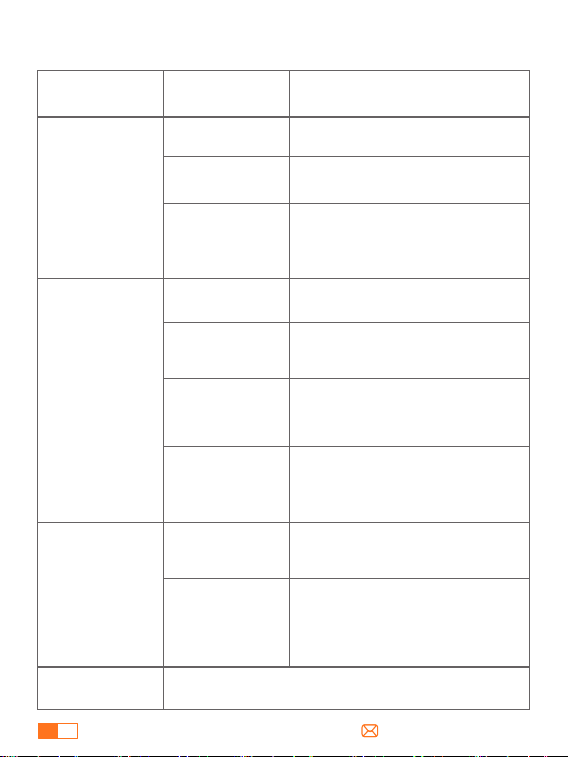
PER LA RICERCA GUASTI
Situazioni e Soluzioni
Stato di
Connessione
Indicatore
Stato di standby
Protezione da bassa tensione
---Ricaricare l'avviatore di emergenza.
Protezione da errori di caricamento
---Riconnettiti e riprova oppure utilizza
la funzione di avvio forzato
---Contatta support@trekure.com per
ulteriore assistenza.
Morsetti
intelligenti
collegati solo
all'avviatore di
emergenza
Dopo l'avvio
dell'auto
Rosso fisso con
segnali acustici
regolari (uno lungo
e due brevi)
Protezione timeout avviamento
--- Rimuovere i morsetti e ricollegarli
entro 60 secondi per avviare il veicolo.
Rosso e verde fissi
Protezione da polarità inversa
--- Invertire i morsetti e assicurarsi della
connessione corretta (rosso a +, nero a -).
Rosso fisso con
segnali acustici
rapidi
Protezione da cortocircuito
--- Non collegare i morsetti insieme o
allo stesso pezzo di metallo.
Rosso fisso con
segnali acustici
regolari (uno lungo
e due brevi)
Protezione da surriscaldamento
---Rimuovere i morsetti per lasciarlo
raffreddare.
Rosso fisso con
segnali acustici
rapidi
Rosso fisso
Lampeggiante
rosso e verde
Pronto per l'avvio
Verde fisso con un
singolo segnale
acustico
Per i dettagli, contattare support@trekure.com
Morsetti
intelligenti
collegati sia
all'avviatore che
alla batteria
dell'auto
Altro
Malfunzionamento dei morsetti (di solito
si verifica al primo utilizzo)
---Rimuovere i morsetti e contattare
[email protected]om per la
sostituzione.
Rosso fisso con
segnali acustici
rapidi

IT
28
IMPORTANTE AVVERTENZA DI SICUREZZA
ATTENZIONE Leggere le seguenti avvertenze di sicurezza prima di
utilizzare il prodotto e adottare misure di protezione per evitare
malfunzionamenti causati da operazioni accidentali.
1. Conservare in un luogo fresco e ben ventilato, fuori dalla portata di
bambini e animali domestici.
2. Non collocare il prodotto in ambienti ad alta temperatura per lungo
tempo. La temperatura di funzionamento di questo prodotto è di
-4°F~140°F. La temperatura di conservazione non deve superare i 122°F.
Sicurezza Personale
1. Avviare i veicoli solo con il cavo intelligente fornito dal costruttore.
2. Non utilizzare il prodotto se il morsetto o il cavo sono danneggiati.
3. Non collegare insieme i morsetti rosso e nero quando il prodotto è in
uscita.
4. Non collegare i morsetti rosso e nero allo stesso pezzo di metallo.
5. Non smontare o modificare il prodotto.
6. Non utilizzare detergenti per pulire il prodotto.
7. Non abusare del prodotto ed evitare di farlo cadere pesantemente o di
colpirlo ripetutamente.
8. Non utilizzare il prodotto in ambienti esplosivi come liquidi o polveri
infiammabili.
9. Non immergere il prodotto in acqua.
Sicurezza Elettrica
1. Non gettare il prodotto tra i rifiuti e riciclarlo in modo sicuro.
2. Non incenerire il prodotto e non esporlo ad alte temperature perché
potrebbe esplodere.
3. Utilizzare solo parti di ricambio o accessori forniti o raccomandati dal
produttore.
Sicurezza Della Batteria
FR
29
ASSURER
TREKURE offre à ses clients une garantie de 24 mois à compter de la
date d'achat.
Pour toute demande d'assistance ou de garantie, veuillez nous
contacter par E-Mail : [email protected].
1. Veuillez utiliser le câble USB-C inclus et l'adaptateur 5 V/2 A ou
supérieur pour charger.
2. Veuillez vous assurer que l'appareil est complètement chargé avant
d'utiliser le produit pour la première fois.
3. Il est recommandé de charger complètement l'appareil au moins
une fois tous les 3 mois pour prolonger la durée de vie de l'appareil.
PRÉCAUTIONS AVANT UTILISATION
CARACTÉRISTIQUES
Modèle
Capacité
Entrée USB-C
Sortie USB
Température de fonctionnement
TK10
16800mAh, 62.16Wh
5V/2A
5V/2.4A
-20°C~60°C
FR
30
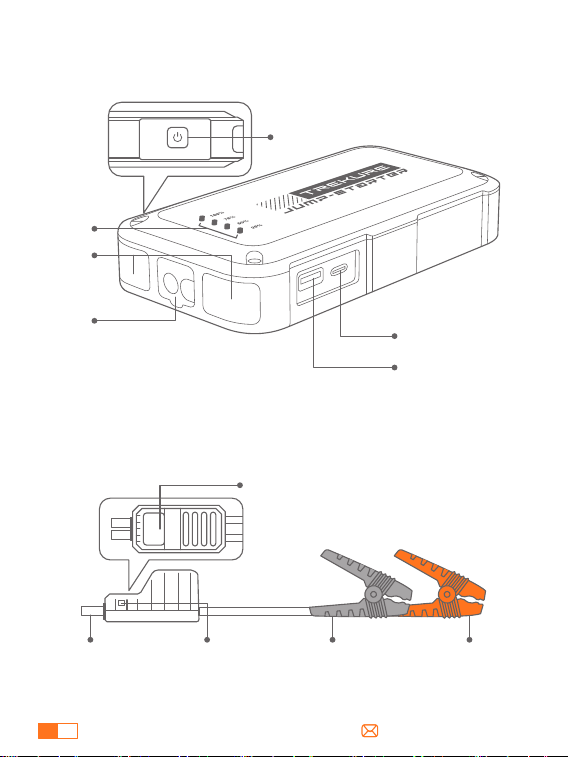
PRÉSENTATION DU PRODUIT
①
②
③
④
⑥
⑤
①
②
③
④
⑤
⑥
Bouton d'alimentation
Voyant d'alimentation
Voyants
Port de démarrage
Sortie USB
Entrée USB-C
Connexion
Smart Clamp
Affichage Smart Clamp
Pince noire
(négative)
Borne rouge
(positive)
Bouton de
démarrage forcé
FR
31
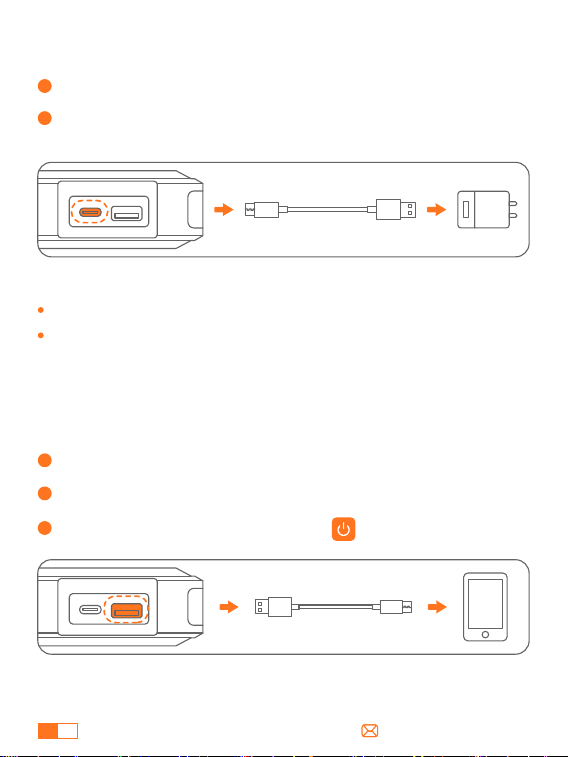
COMMENT CHARGER VOTRE DÉMARREUR DE SAUT
COMMENT CHARGER DES APPAREILS ÉLECTRONIQUES
1
Insérez le câble de chargement dans le port USB-C.
1 barre représente 25 % de puissance.
Veuillez vous assurer que l'appareil est complètement chargé avant
de l'utiliser pour la première fois.
2
Connectez le câble de chargement à un adaptateur 5 V/2 A ou
supérieur (adaptateur non inclus).
1
Branchez le câble sur le port de sortie USB.
2
Connectez-le à un appareil électronique, tel qu'un B. un smartphone.
3
Appuyez sur le bouton d'alimentation.
Conseils :
FR
32
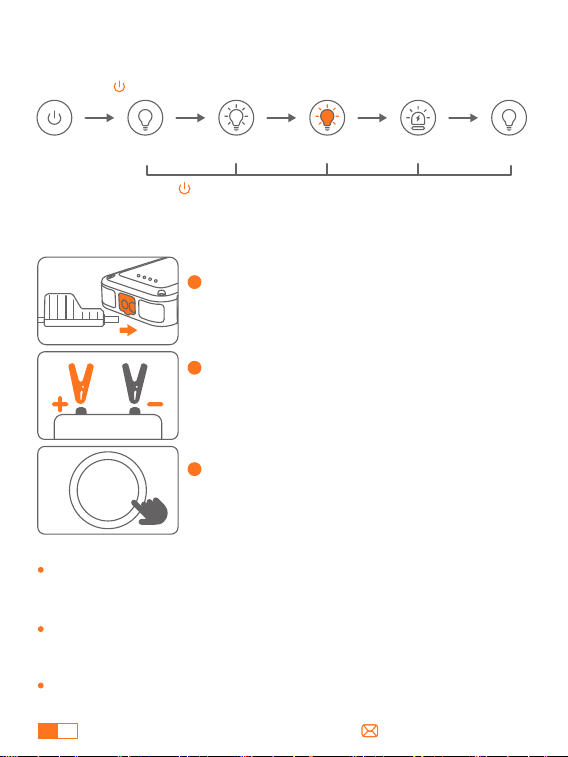
1
Connectez les pinces intelligentes au
démarreur portable, et l'indicateur clignotera
en rouge et vert.
2
Connectez les bornes à la batterie de la
voiture (rouge au +, noir au -). Si les bornes
sont correctement connectées, le voyant
s'allume en vert en permanence.
3
Démarrez le moteur de la voiture dans les 30
secondes suivant le passage du voyant vert
fixe.
DÉMARREUR POUR VOTRE VOITURE
START
/STOP
Assurez-vous que le niveau de la batterie affiche au moins deux
barres avant utilisation pour éviter une protection contre les
sous-tensions qui pourrait provoquer un faux démarrage.
Ne démarrez pas le véhicule en continu, mais attendez au moins 30
secondes à 1 minute entre les démarrages.
Lors de la connexion, il est normal que l'écran du démarreur reste
éteint. Il n'est pas recommandé d'appuyer sur le bouton d'alimen-
tation pour l'allumer.
Un avis :
COMMENT UTILISER LA LAMPE DE SECOURS À LED
Éclairage SOSStroboscope
Stroboscope
(orange)
Éclair
Maintenez 2 s
Appuyez
brièvement
Appuyez
brièvement
Appuyez
brièvement
Appuyez
brièvement
Appuyez longuement sur pendant 2 s dans n'importe quel mode pour éteindre la lumière.
FR
33
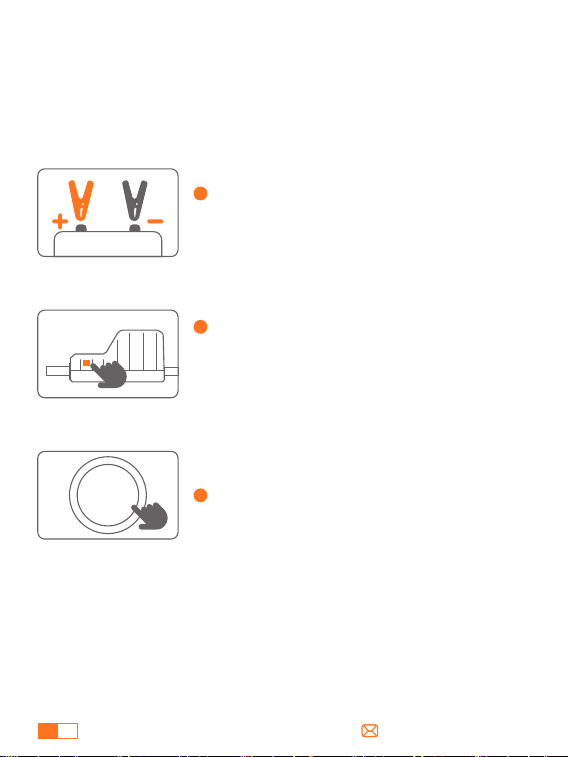
À PROPOS DE LA FONCTION DE DÉMARRAGE FORCÉ
Si le voyant reste rouge et vert clignotant alors que les pinces sont
correctement connectées, activez le démarrage forcé :
Remarque: Le démarrage forcé contourne les systèmes de
protection. N'inversez pas et ne court-circuitez pas les pinces.
1
Assurez-vous que les pinces intelligentes
sont correctement connectées à la batterie
de la voiture (rouge au +, noir au -).
2
Appuyez longuement sur le bouton de
démarrage forcé situé sur le côté des pinces
intelligentes pendant 3 secondes : le témoin
lumineux passera au vert fixe.
3
Démarrez votre voiture dans les 60 secondes.
START
/STOP
FR
34
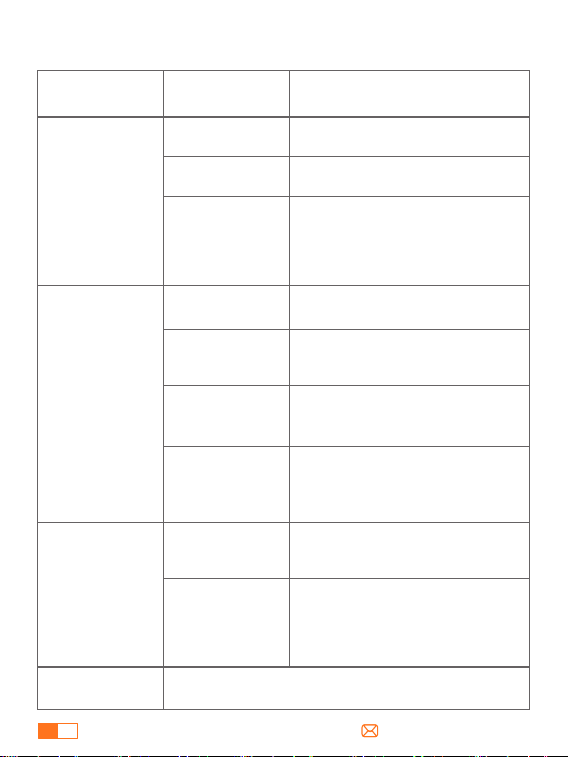
POUR LE DÉPANNAGE
Situations et Solutions
Statut de
Connexion
Indicateur
Mode veille
Protection contre les basse tensions
---Rechargez le démarreur.
Protection contre les erreurs de charge
---Reconnectez et réessayez ou utilisez
la fonction de démarrage forcé
---Contactez support@trekure.com
pour plus d'aide.
Pinces
intelligentes
connectées
uniquement au
démarreur
Après l'allumage
Rouge fixe avec
bips réguliers (un
long et deux courts)
Protection contre le délai de
démarrage dépassé
---Retirez les pinces et reconnectez-les
pour démarrer le véhicule dans les 60
secondes.
Rouge et vert fixes
Protection contre l'inversion de polarité
---Vérifiez la connexion correcte
(rouge au pôle +, noir au pôle -).
Rouge fixe avec
bips rapides
Protection contre les courts-circuits
---Ne connectez pas les pinces
ensemble ou au même métal.
Rouge fixe avec
bips réguliers (un
long et deux courts)
Protection contre la surchauffe
---Retirez les pinces pour refroidir
l'appareil.
Rouge fixe avec
bips rapides
Rouge fixe
Clignotant rouge et
vert
Prêt à démarrer
Vert fixe avec un bip
unique
Contactez support@trekure.com avec des détails
Pinces
intelligentes
connectées à la
fois au démarreur
et à batterie de
voiture
Autres
Dysfonctionnement des pinces
(généralement lors de la première
utilisation)
---Retirez les pinces et contactez
[email protected]om pour un
remplacement.
Rouge fixe avec bip
rapides

FR
35
AVERTISSEMENT DE SÉCURITÉ IMPORTANT
ATTENTION Veuillez lire l'avertissement de sécurité suivant avant d'utiliser
le produit et prenez des mesures de protection pour éviter les
dysfonctionnements causés par un fonctionnement accidentel.
1. Conservez l'appareil dans un endroit frais et bien ventilé, hors de portée
des enfants et des animaux domestiques.
2. Ne pas placer le produit dans un environnement à haute température
pendant une longue période. La température de fonctionnement de ce
produit est de -4°F~140°F. La température de stockage ne doit pas
dépasser 122°F.
Sécurité Personnelle
1. Ne démarrez les véhicules qu'avec le câble de démarrage intelligent
fourni par le fabricant.
2. Ne pas utiliser le produit si la pince ou le câble est endommagé.
3. Ne pas connecter les pinces rouge et noire ensemble lorsque le produit
est en cours de production.
4. Ne pas connecter les pinces rouge et noire à la même pièce de métal.
5. Ne pas démonter ou modifier ce produit.
6. Ne pas utiliser de détergent pour nettoyer ce produit.
7. N'abusez pas de ce produit et évitez de le faire tomber lourdement ou
de le heurter de manière répétée.
8. Ne pas utiliser le produit dans des environnements explosifs tels que
des liquides, des gaz ou des poussières inflammables.
9. Ne pas immerger le produit dans l'eau.
Sécurité Électrique
1. Ne pas jeter le produit dans les ordures et le recycler en toute sécurité.
2. Ne pas incinérer le produit ou l'exposer à des températures élevées, car
il risque d'exploser.
3. N'utiliser que les pièces de rechange ou les accessoires fournis ou
recommandés par le fabricant.
Sécurité de la Batterie

Federal Communication Commission Interference Statement
NOTE: This equipment has been tested and found to comply with the
limits for a Class B digital device, pursuant to part 15 of the FCC Rules.
These limits are designed to provide reasonable protection against
harmful interference in a residential installation. This equipment
generates, uses and can radiate radio frequency energy and, if not
installed and used in accordance with the instructions, may cause
harmful interference to radio communications. However, there is no
guarantee that interference will not occur in a particular installation. If
this equipment does cause harmful interference to radio or television
reception, which can be determined by turning the equipment off
and on, the user is encouraged to try to correct the interference by
one or more of the following measures:
· Reorient or relocate the receiving antenna.
· Increase the separation between the equipment and receiver.
· Connect the equipment into an outlet on a circuit different from that
to which the receiver is connected.
· Consult the dealer or an experienced radio/TV technician for help.
Caution: Changes or modifications not expressly approved by the
party responsible for compliance could void the user's authority to
operate this equipment.
This device complies with part 15 of the FCC Rules. Operation is
subject to the following two conditions:
(1) This device may not cause harmful interference, and
(2) This device must accept any interference received, including
interference that may cause undesired operation.

Declaration of Conformity
We (EU based importer is responsible for this declaration)
SUCCESS COURIER SL
(Company name)
CALLE RIO TORMES NUM.1, PLANTA 1, DERECHA, OFICINA 3,
Fuenlabrada, Madrid,28947 Spain
(Company address)
declare under our sole responsibility that the product
Trade name: TREKURE
Equipment: Jump Starter
Model No. : TK10
to which this declaration relates is in conformity with the essential
requirement set out in the Council Directive on the Approximation of
the laws of the Member States relating to LVD Directive(2014/35/EU) &
EMC Directive(2014/30/EU) & RoHS(2011/65/EU) product is responsible
to affix CE marking, the following standards were applied:
EN IEC 62368-1:2020+A11:2020
EN 55032:2015 AMD.1:2020+A11:2020
EN 55035:2017AMD.1:2020
EN IEC 61000-3-2:2019/A1:2021
EN 61000-3-3:2013AMD.1:2019+ AMD.2:2021
IEC62321-3-1:2013
IEC62321-4:2013
IEC62321-5:2013
IEC62321-6:2015
IEC62321-7-1:2015
IEC62321-7-2:2017
IEC62321-8:2017
Full Name: George.wang Position: Approbation Manager
Signature: Place/Date: Shenzhen,China/Nov.25-2024
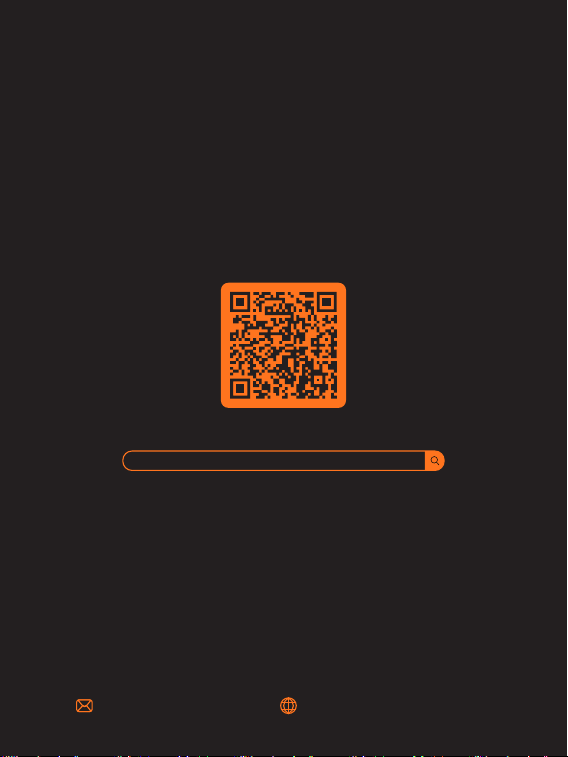
Scan And Download PDF Version Of User Manual
[email protected] https://www.trekure.com
WHERE TO GET MORE HELP
https://www.trekure.com/pages/manuals