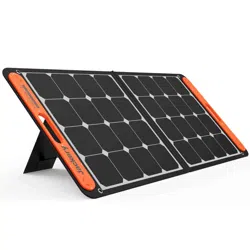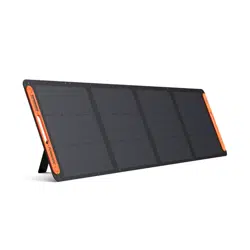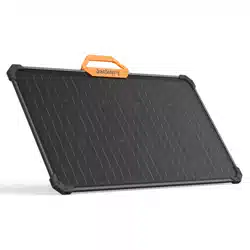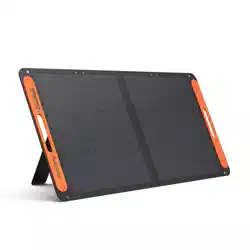
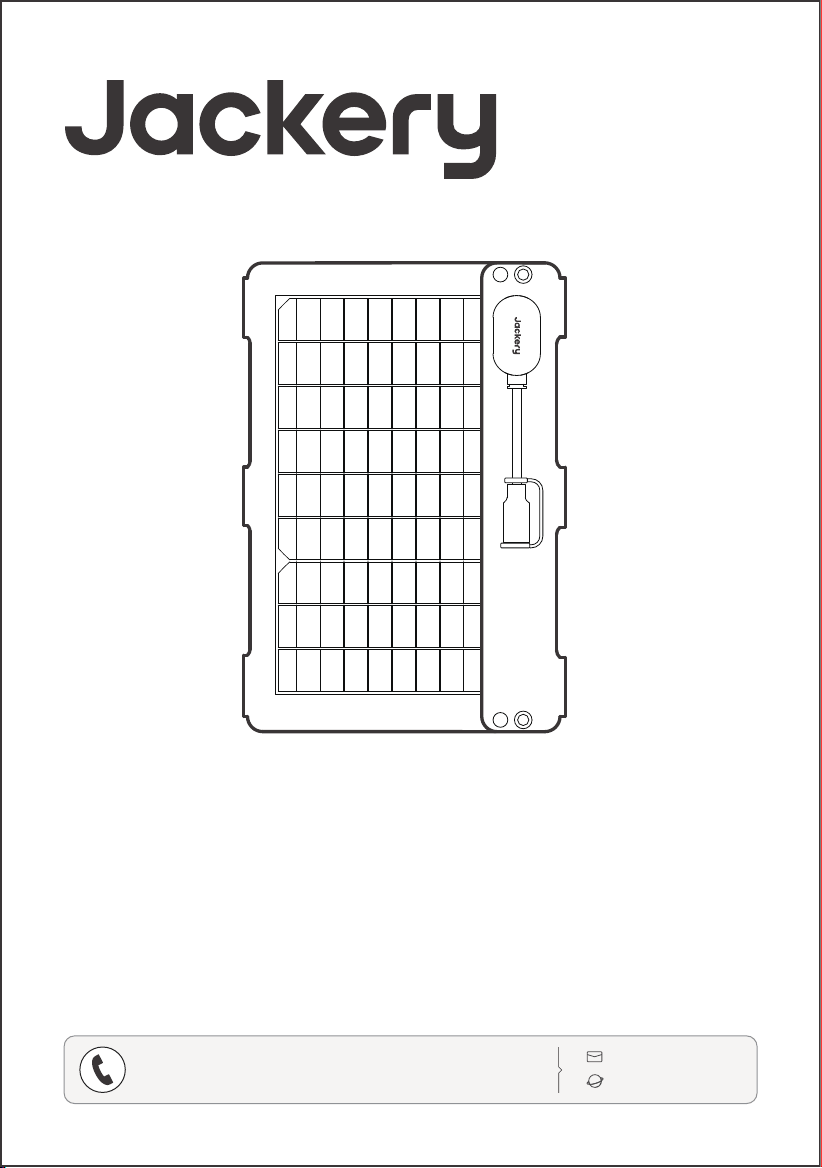
Model: JS-40B
USER MANUAL
Jackery SolarSaga 40 Air
www.jackery.com
1-888-502-2236 (US)
CONTACT US:
The image is for reference only.

01
02
02
05
06
07
TABLE OF CONTENTS
FR
Français
SAFETY TIPS
WHAT'S IN THE BOX
HOW TO USE
SOLAR PANEL STORAGE
TECHNICAL PARAMETERS
WARRANTY
08
09
09
12
13
14
CONSEILS DE SÉCURITÉ
CONTENU DE LA BOÎTE
CONSEILS D’UTILISATION
STOCKAGE DU PANNEAU SOLAIRE
CARACTÉRISTIQUES TECHNIQUES
GARANTIE
15
16
16
19
20
21
RECOMENDACIONES DE SEGURIDAD
CONTENIDO DEL PAQUETE
MODO DE EMPLEO
ALMACENAMIENTO DEL PANEL SOLAR
PARÁMETROS TÉCNICOS
GARANTÍA
US
English
01-07
08-14
ES
15-21
Español
01
SAFETY TIPS
• The solar panel is not intended for permanent
installation. Please store the solar panels during
strong winds, hail or other severe weather to avoid
damage or potential hazards.
• Under normal circumstances, solar panels may be
exposed to higher currents or voltages than those
under standard test conditions. When calculating
the rated voltage of components, the rated current
of conductors, and the size of the control device
connected to the PV output, multiply the
short-circuit current (I
sc
) and open-circuit voltage
(V
oc
) values indicated on the panel nameplate by a
factor of 1.25.
• Any damage to the product may lead to electric
shock or fire.
• Do not expose the solar panels to artificial spotlight.
• Do not connect the solar panel to other solar panels
or power sources unless the combination includes
protection against reverse current and overvoltage.
• Please read the user manual first before using
this product.
• Do not bend the solar panels.
• Do not place the solar panels under trees, buildings or
in other shaded areas for use.
• Do not submerge the solar panels in water or any
other liquid for extended periods.
• Use a damp cloth to gently wipe them clean.
• Do not use or store the solar panels near open flames
or flammable materials.
• Do not scratch the solar panels with sharp objects.
• Keep corrosive substances away from the solar panels.
• Do not step on or place heavy objects on the solar
panels.
• Do not disassemble the solar panels.
• The output circuit of solar panel must be connected to
the equipment properly, and reverse connection of
positive and negative poles is strictly prohibited.
• Check the connection status of all components, wires,
and plugs before use.
• Do not drop the product, as this may cause internal
damage and render it unusable.
This device complies with part 15 of the FCC Rules. Operation is subject to the following two conditions:
(1) This device may not cause harmful interference, and
(2) this device must accept any interference received, including interference that may cause undesired
operation.
NOTE: This equipment has been tested and found to comply with the limits for a Class B digital device,
pursuant to part 15 of the FCC Rules. These limits are designed to provide reasonable protection
against harmful interference in a residential installation. This equipment generates, uses and can
radiate radio frequency energy and, if not installed and used in accordance with the instructions, may
cause harmful interference to radio communications. However, there is no guarantee that interference
will not occur in a particular installation. If this equipment does cause harmful interference to radio or
television reception, which can be determined by turning the equipment o and on, the user is
encouraged to try to correct the interference by one or more of the following measures:
• Reorient or relocate the receiving antenna.
• Increase the separation between the equipment and receiver.
• Connect the equipment into an outlet on a circuit dierent from that to which the receiver is
connected.
• Consult the dealer or an experienced radio/TV technician for help.
MODIFICATION: Any changes or modifications not expressly approved by the grantee of this device
could void the user’s authority to operate the device.
02
Model: JS-40B
USER MANUAL
Jackery SolarSaga 40 Air
www.jackery.com
1-888-502-2236 (US)
CONTACT US:
The image is for reference only.
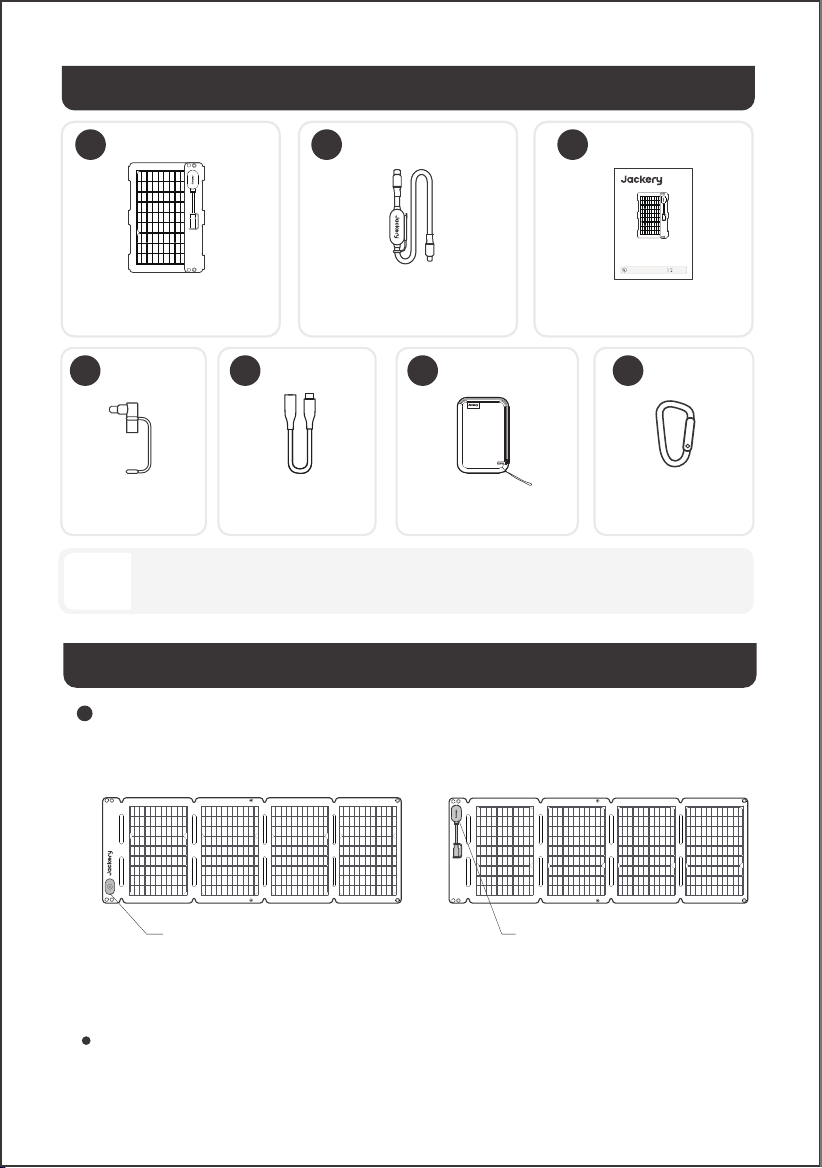
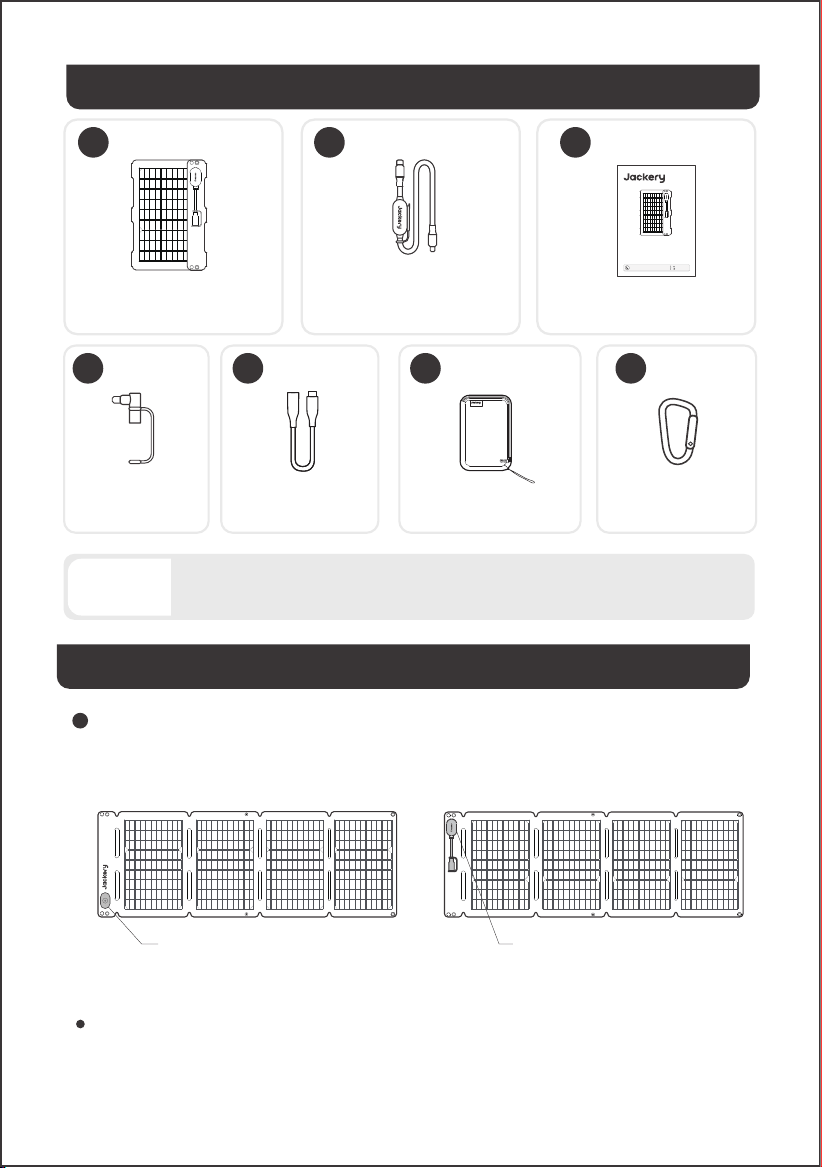
WHAT'S IN THE BOX
DC7909
DC8020
1 32
4 6 75
Multifunctional Solar
Charging Cable (5.9 ft/1.8m)
Jackery SolarSaga 40 Air User Manual
Carabiner ×2Accessories Bag
DC8020 to USB-C
Adapter Cable
(6.9 in/17 cm)
DC8020 to DC7909
Adapter
The cables are only compatible with the SolarSaga 40 Air (JS-40B) solar panel. Do not use them with
other solar panel models.
Note
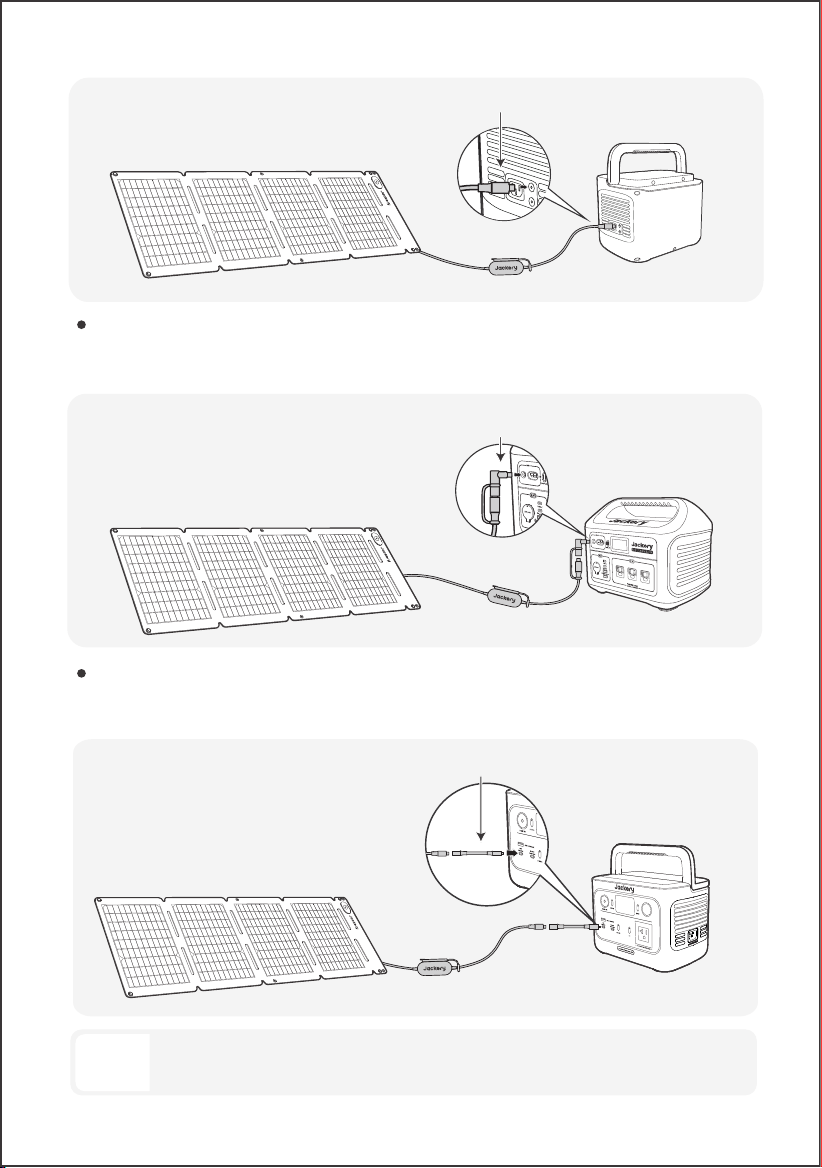
HOW TO USE
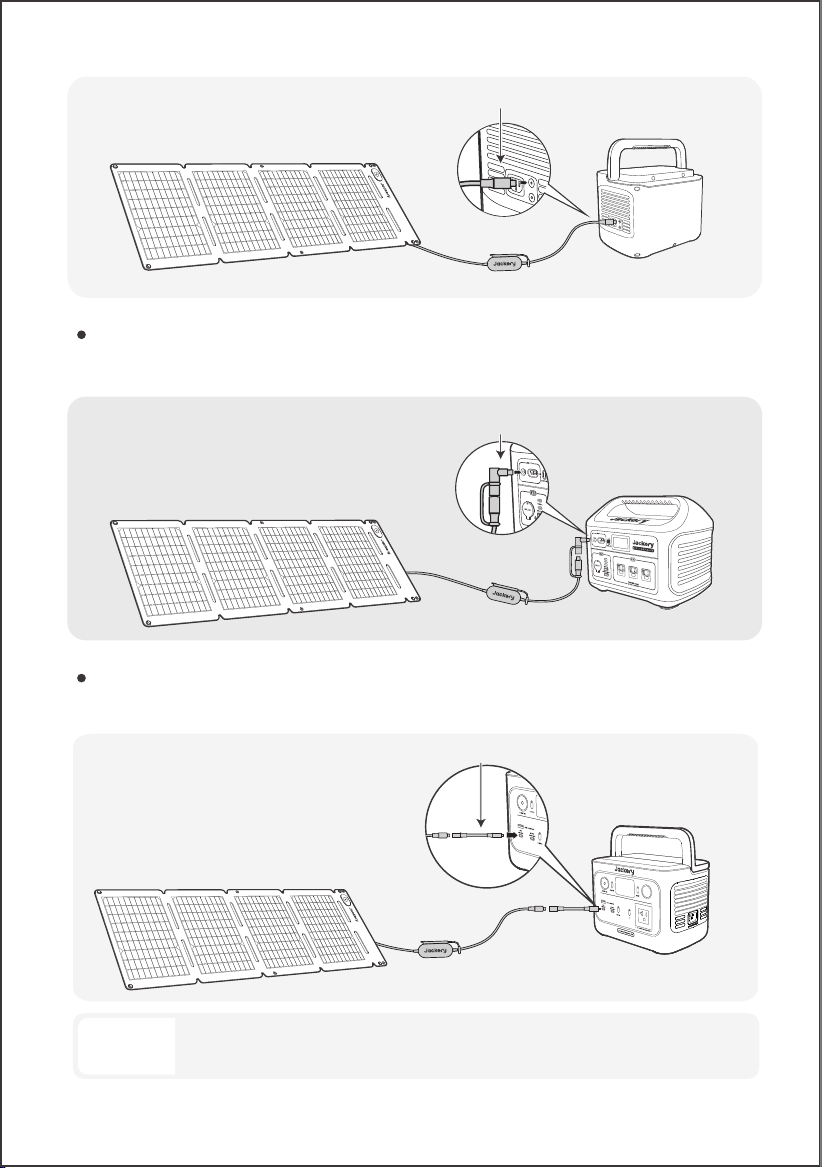
Connect the charging cable to the solar panel and the DC input port of the portable power station.
The product comes with adapters that allow it to connect to dierent Jackery portable power
stations via their DC input ports.
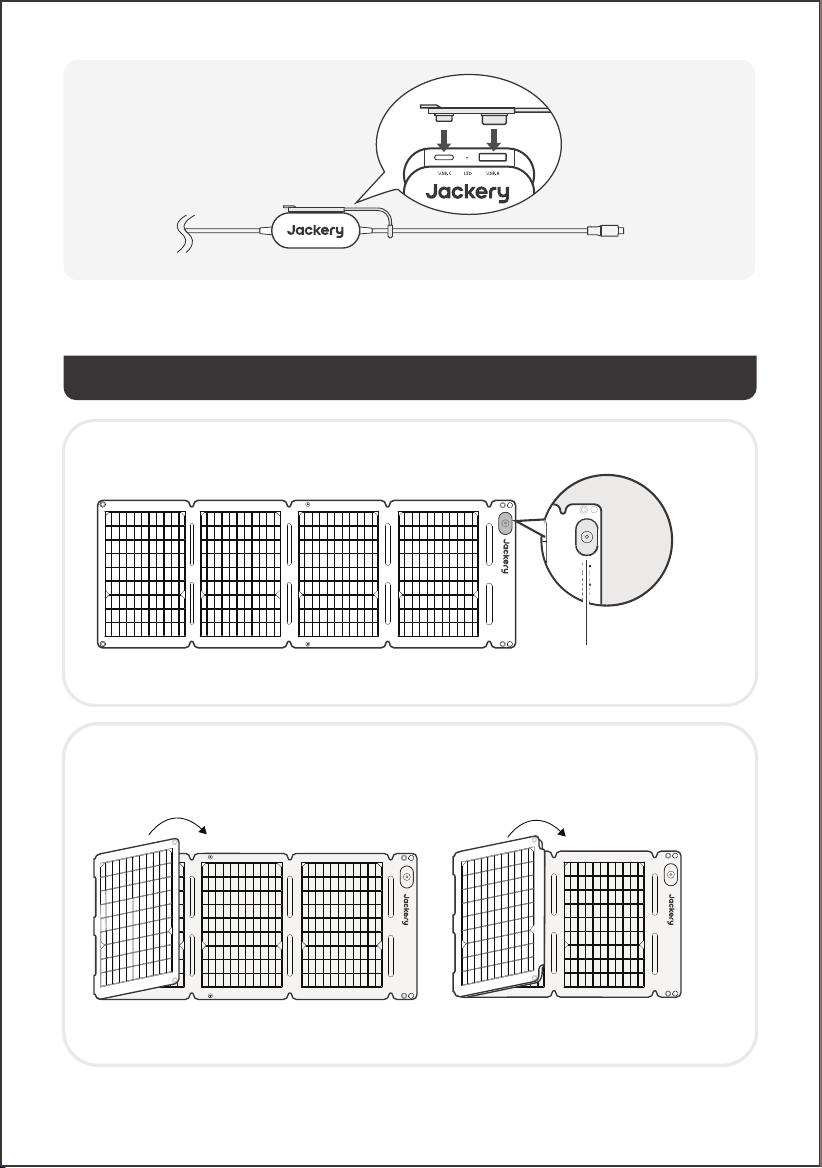
Sun Angle Indicator Junction Box
• Front View • Rear View
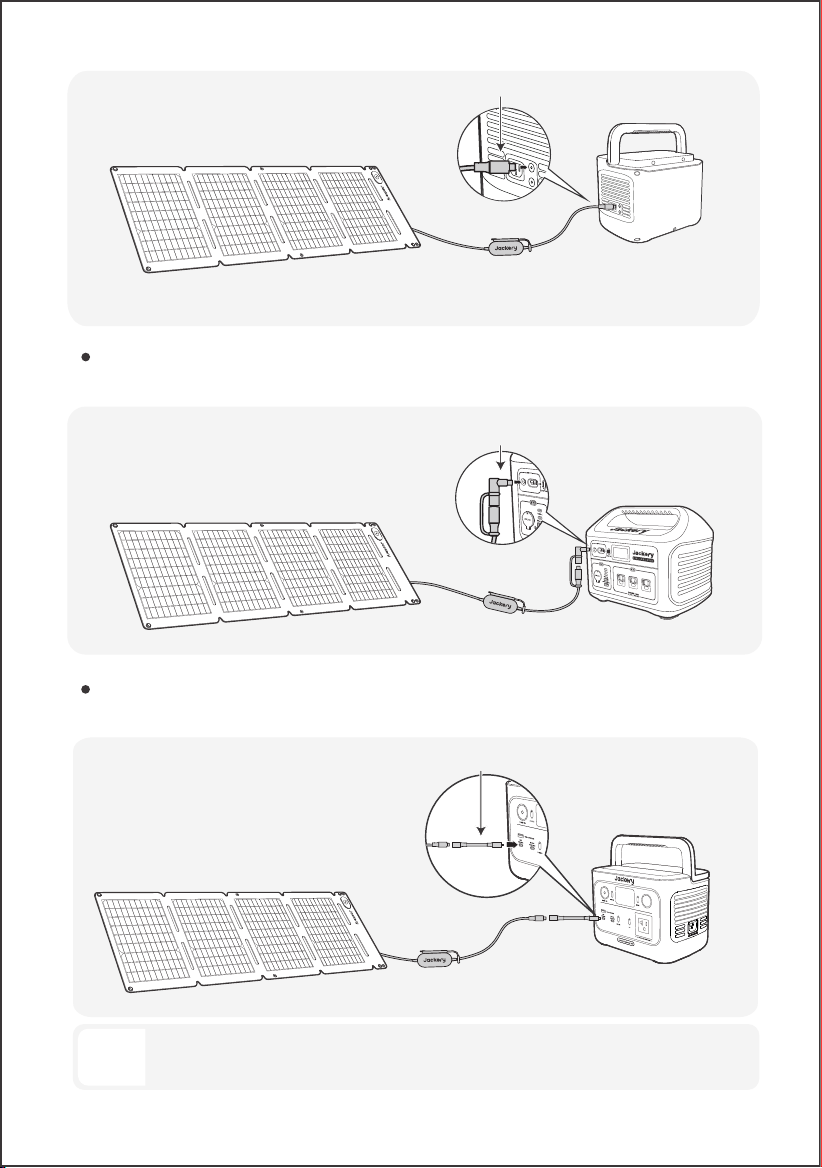
CHARGING JACKERY PORTABLE POWER STATION
DC8020 CONNECTOR
Compatible with Jackery portable power stations with DC8020 input port(s).
03
DC8020-DC7909 ADAPTER
Compatible with Jackery portable power stations with DC7909 input port(s).
DC8020 TO USB-C ADAPTER CABLE
Compatible with Jackery portable power stations with USB-C input port(s).
DC8020-DC7909 Adapter
DC8020 Male
DC8020 - USB-C
The DC8020 to USB-C Adapter Cable is used to charge Jakcery portable power station only. Do not
use it to charge any other devices.
Note
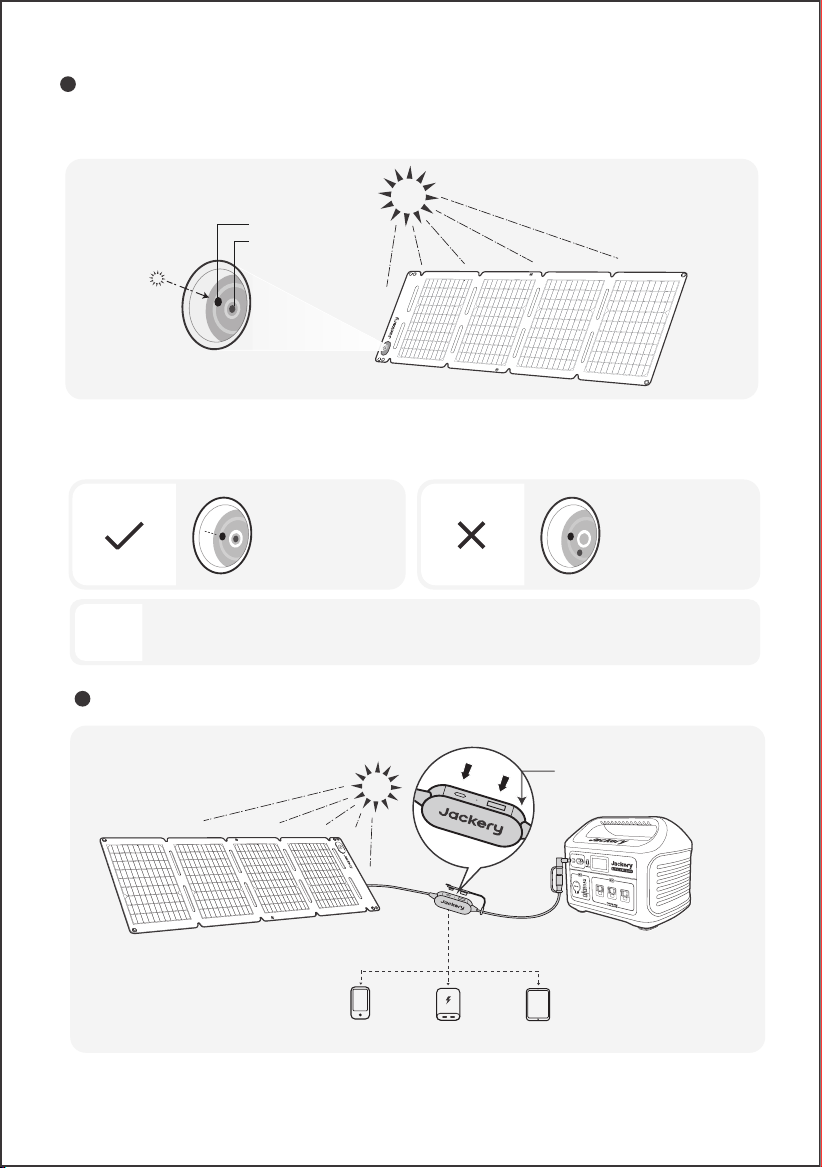
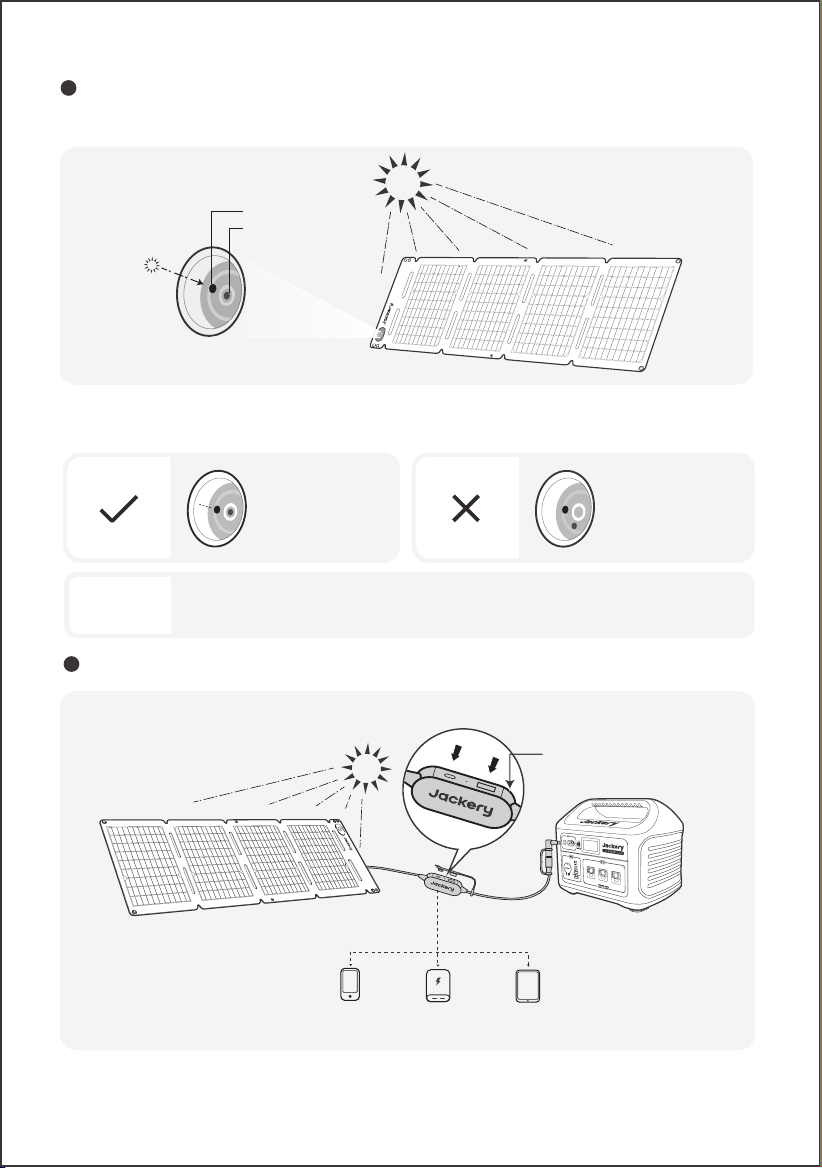
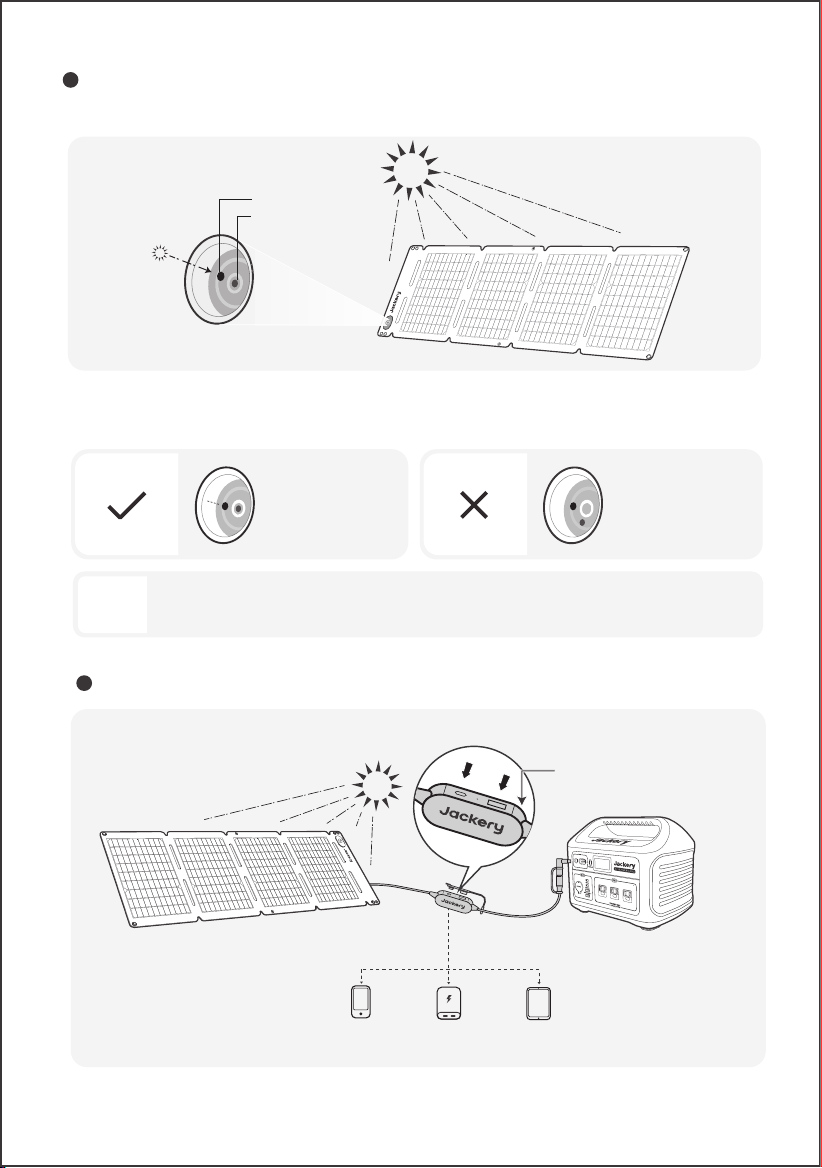
The carry handle has a sun angle indicator. When sunlight hits its surface, a shadow will appear at its
bottom.
If the shadow falls on the white inner circle at its bottom, it means that the solar panel is facing
directly towards the sun and you can get optimal power generation; if not, it is suggested to adjust
its angle until it does.
SUN ANGLE INDICATOR
POWER YOUR DEVICE
04
Shadow falls in the
white inner circle
Shadow does not fall in
the white inner circle
Cell Phone
Power Bank Tablet
SolarSaga 40 Air
Multifunctional Adapter
Shadow
Indicator point
Sun Angle Indicator
US
B
-
AUSB-
C
LED
U
SB
-AUSB
-C LED
To maximize the power generation, adjust the orientation of SolarSaga 40 Air throughout the day to
ensure full exposure of the panel surface to direct sunlight.
Note
05
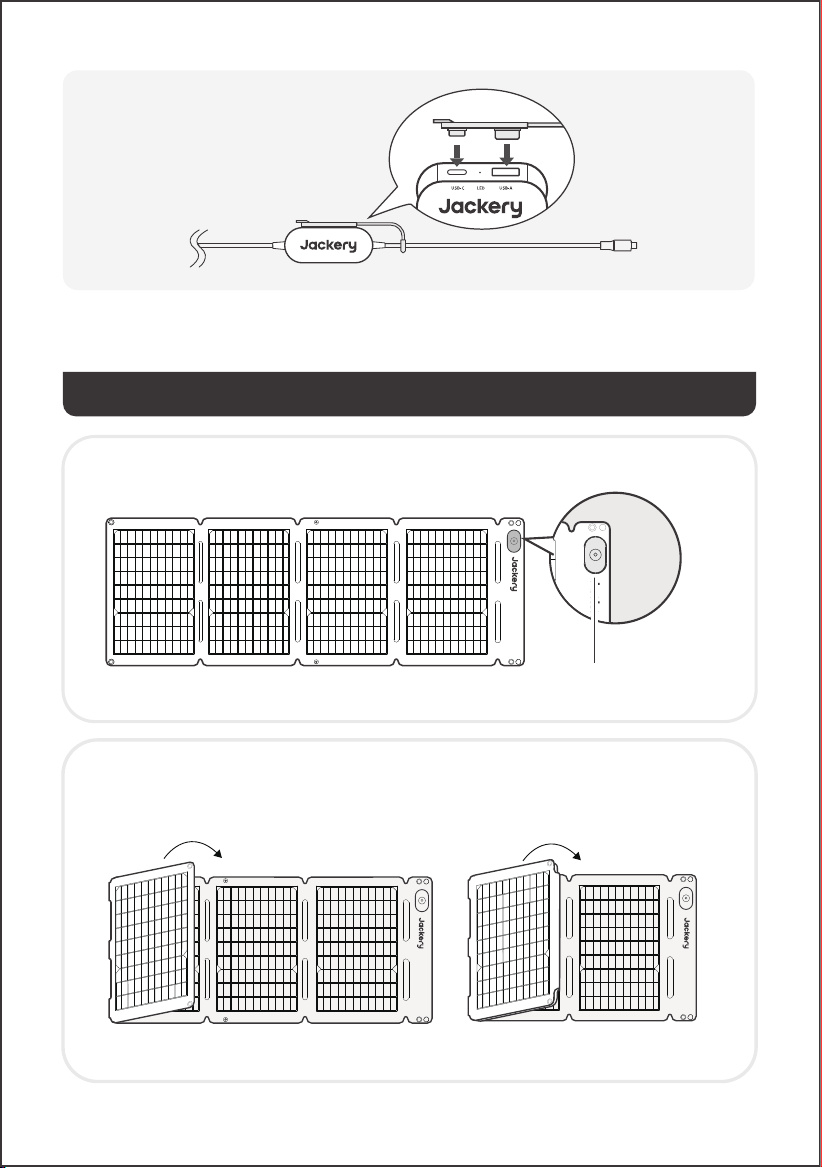
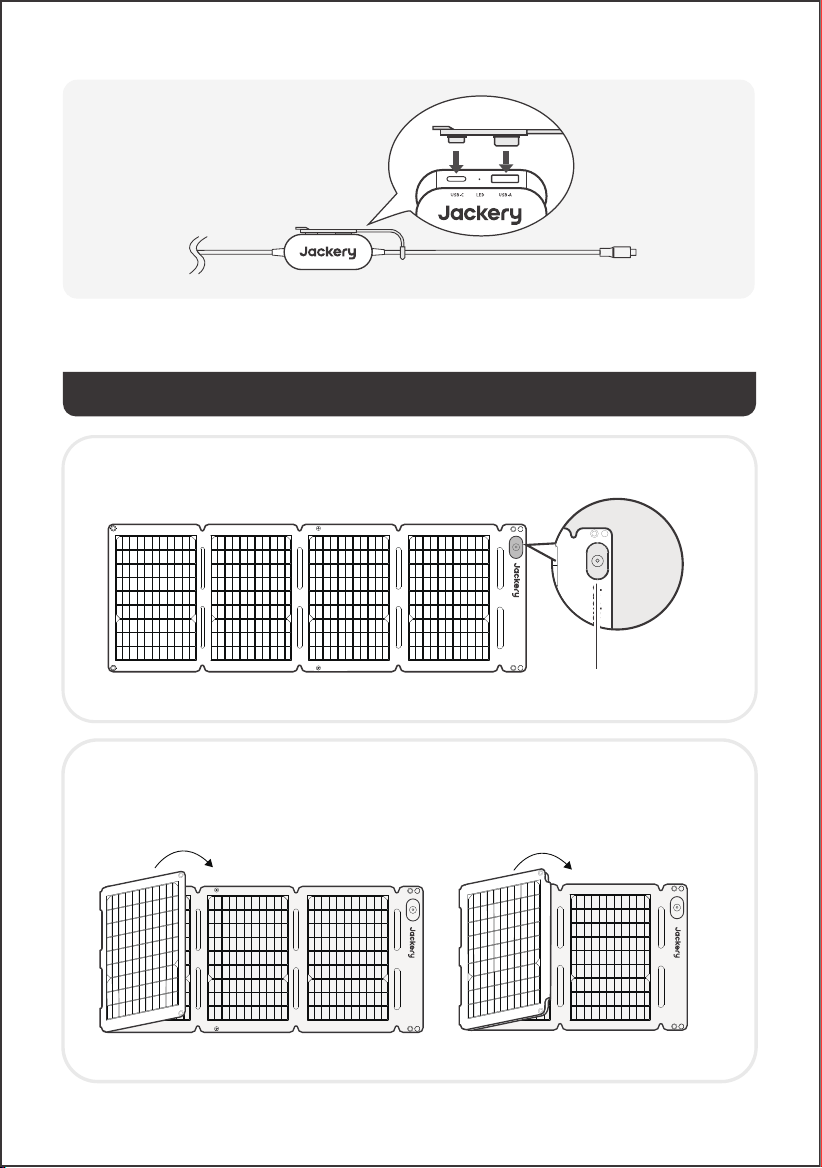
※ Insert the rubber plug when USB ports are not in use to prevent dust.
SOLAR PANEL STORAGE
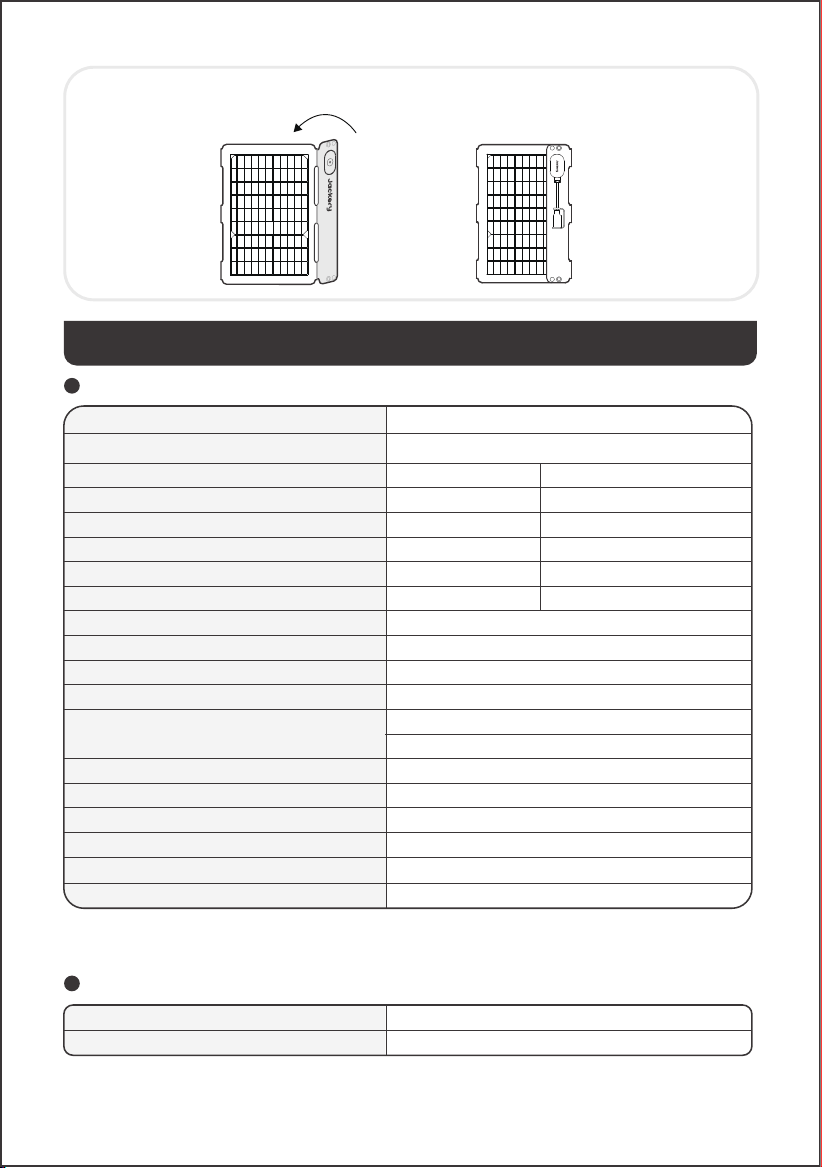
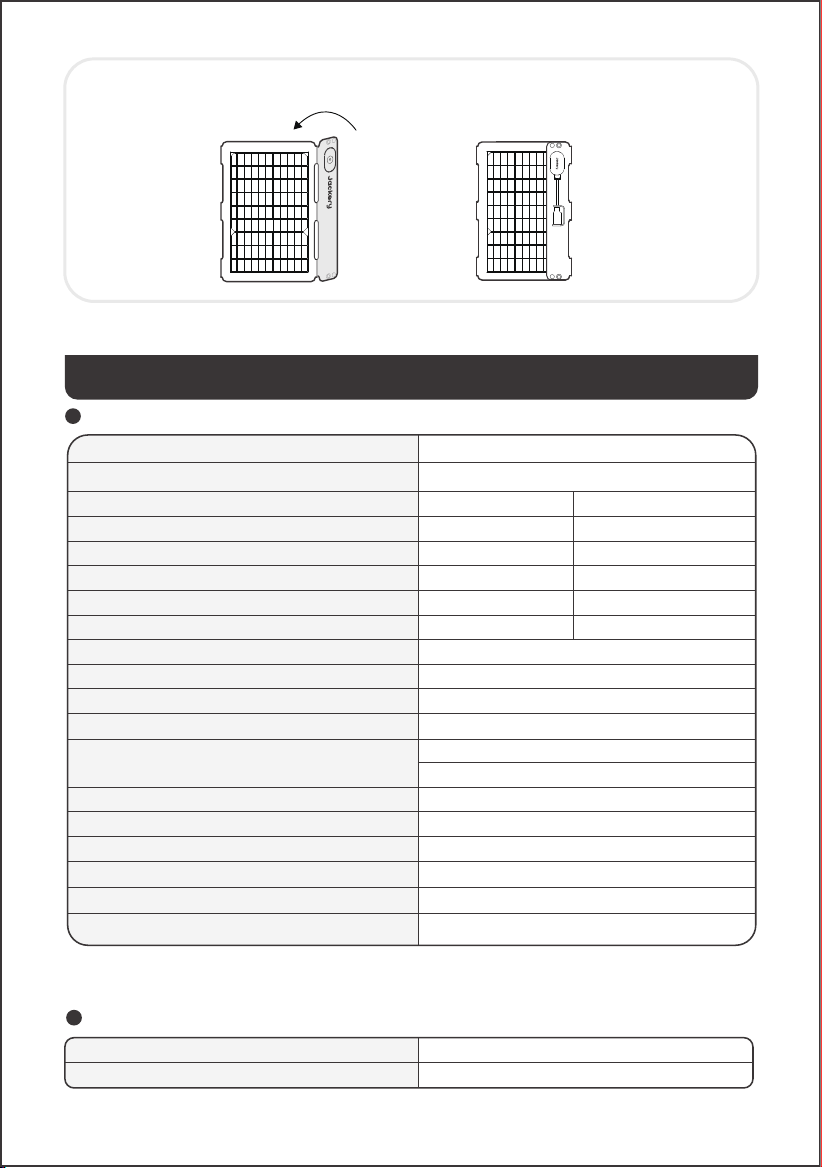
1. Keep the front side of the solar panel facing up.
2. Fold the solar panel along the creases from left to right as shown in the figure.
Handle with care. Do not pull or apply excessive force to the solar panel.
Sun Angle Indicator
06
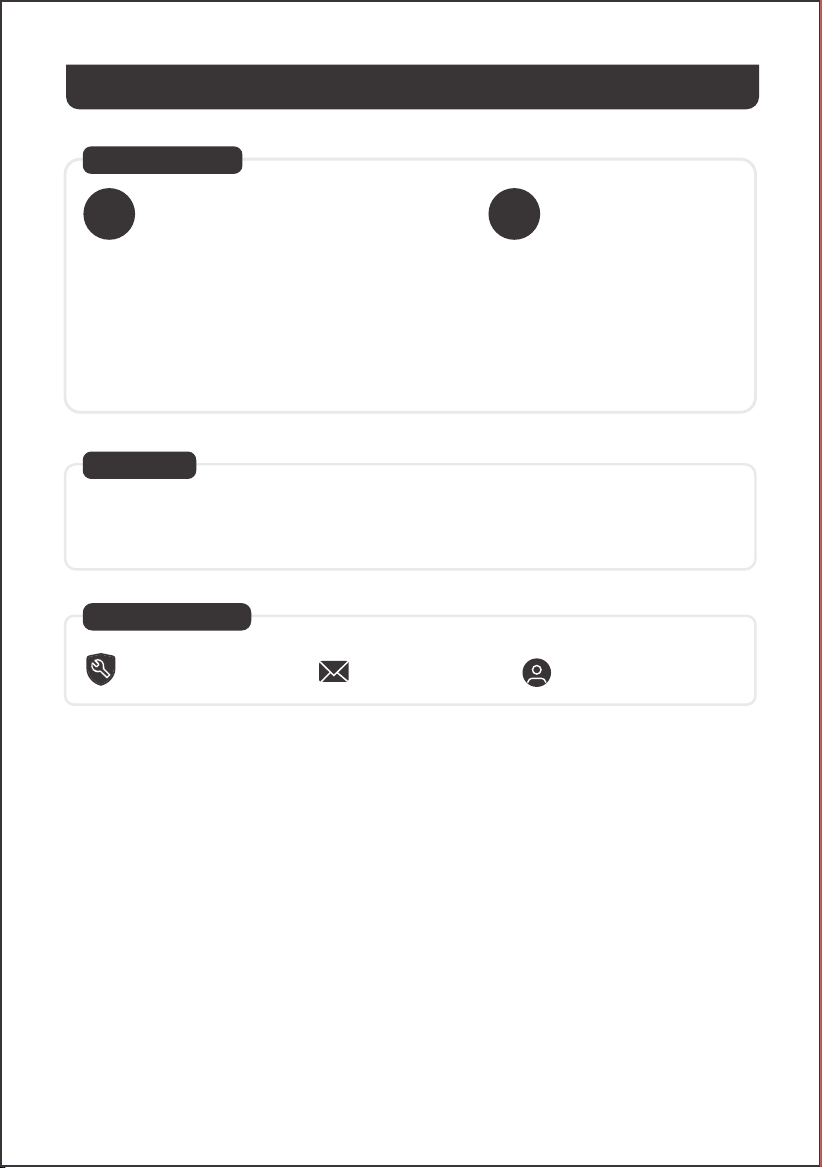
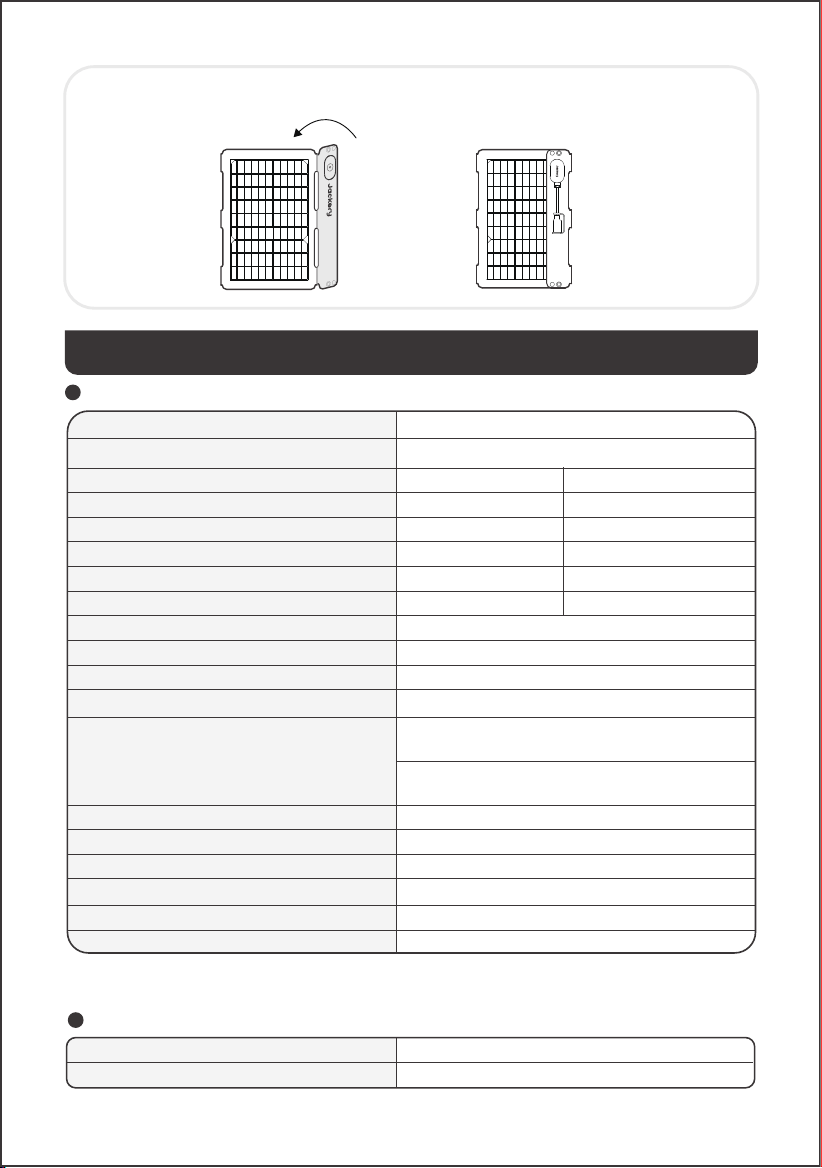
TECHNICAL PARAMETERS
Product Name
Model
Maximum Power (P
max
)
Open-Circuit Voltage (V
oc
)
Short-Circuit Current (I
sc
)
Maximum Power Voltage (V
mp
)
Maximum Power Current (I
mp
)
Maximum System Voltage
Maximum Reverse Current
Protection Class Against Electric Shock
IP Rating
Dimensions (Excluding Junction Box)
Weight
Operating Temperature Range
Bifaciality Coefficient (back/front)
Voltage Temperature Coefficient
Power Temperature Coefficient
Photovoltaic Consumer Products
* STC (Standard Test Conditions): 1000W/m2, 25°C, AM 1.5
* BNPI (Bifacial Nameplate Irradiance): Front 1000W/m2, Rear 135W/m2, 25°C, AM 1.5
Jackery SolarSaga 40 Air
JS-40B
STC*
BNPI*
Electrical Data
30V
6A
Class Ⅲ
IP68
Unfolded: 37.9 × 13.4 × 0.1 in / 962 × 339 × 2.5 mm
Folded: 9.1 × 13.4 × 0.8 in / 232 × 339 × 20 mm
1.98 lb ± 0.44 lb / 0.9 kg±0.2 kg
-4℉ to 149℉ / -20°C to 65°C
P
max
>65%, V
oc
>95%, I
sc
>65%
-0.3%/℃
-0.39%/℃
IEC TS 63163 Consumer Product Category 1
40W±5%
25V±5%
2.07A±5%
20.5V±5%
1.96A±5%
44W±5%
25V±5%
2.3A±5%
20.5V±5%
2.11A±5%
USB-A Output
Multifunctional Adapter
USB-C Output
5V⎓2.4A
5V⎓3A
Jackery SolarSaga 40 Air
3. After folding is complete, fasten the snap buttons to secure the solar panel.
07
WARRANTY
For any inquiries or comments concerning our products, please send an email to hello@jackery.com,
and we will respond to you as soon as possible. If there is any quality-related issue with the product,
you may request a replacement or refund by submitting a request form at www.jackery.com.
Contact Us
Customer Service
To activate the Warranty Extension, you
must register your product online or
contact our customer service team at
hello@jackery.com to extend the
standard warranty runtime.
The product is covered by a limited warranty from Jackery for
the original purchaser that covers the product from defects in
workmanship and materials for 12 months from the date of
purchase ( damages from normal wear and tear, alteration,
misuse, neglect, accident, service by anyone other than
authorized service center, or act of God are not included ).
During the warranty period and upon verification of defects,
this product will be replaced when returned with proper proof
of purchase.
Warranty Period
Standard Warranty
YEAR
1
Extended Warranty
YEARS
2
1-year limited warranty Lifetime technical support
hello@jackery.com
08
CONSEILS DE SÉCURITÉ
MODIFICATION: Tout changement ou modification non expressément approuvé par le titulaire de cet
appareil pourrait annuler l'autorisation de l'utilisateur à utiliser l'appareil.
Cet appareil est conforme à la partie 15 des règles de la FCC. Son fonctionnement est soumis aux
deux conditions suivantes :
(1) cet appareil ne doit pas causer d'interférences nuisibles, et
(2) cet appareil doit accepter toute interférence reçue, y compris les interférences pouvant entraîner
un fonctionnement indésirable.
REMARQUE : Cet équipement a été testé et déclaré conforme aux limites concernant les appareils
numériques de classe B, conformément à la partie 15 du règlement de la FCC. Ces limites sont
conçues pour orir une protection raisonnable contre les interférences dangereuses dans le cadre
d'une installation résidentielle. Cet équipement génère, utilise et émet des ondes radios qui peuvent,
si cet équipement n'est pas installé et utilisé conformément aux instructions, perturber les
communications radios. Toutefois, il n'y a aucune garantie qu'aucune interférence ne se produise lors
d'une installation particulière. Si cet équipement trouble la réception de la radio ou de la télévision, ce
qui peut être déterminé en éteignant et en allumant cet équipement, l'utilisateur est encouragé à
tenter de corriger ces interférences en essayant une ou plusieurs des mesures suivantes :
• Réorientez ou déplacez l'antenne de réception.
• Éloignez l'équipement du récepteur.
• Connectez l'équipement à une prise d'un autre circuit que celui auquel le récepteur est connecté.
• Consultez le revendeur ou bien demandez de l'aide à un technicien de radio/télévision
expérimenté.
• Veuillez lire le manuel d’utilisation avant d’utiliser ce
produit.
• Ne tordez pas les panneaux solaires.
• Ne placez pas les panneaux solaires près d’arbres, de
bâtiments ou autres zones ombragées lors de leur
utilisation.
• N’immergez pas les panneaux solaires dans l’eau ou
tout autre liquide.
• Utilisez un chion humide pour les essuyer délicate-
ment lors du nettoyage.
• N’utilisez pas ou ne stockez pas les panneaux solaires
près de flammes nues ou de matières inflammables.
• Ne rayez pas les panneaux solaires avec des objets
pointus.
• N’appliquez pas de substances corrosives sur les
panneaux solaires.
• Ne marchez pas et ne placez pas d’objets lourds sur
les panneaux solaires.
• Ne démontez pas les panneaux solaires.
• Le circuit de sortie du panneau solaire doit être
raccordé correctement à l’équipement, et un
branchement inversé des pôles positif et négatif est
strictement interdit.
• Vérifiez l’état de branchement de tous les composants,
câbles et fiches avant utilisation.
• Ne laissez pas tomber le produit, cela pourrait
l’endommager à l’intérieur et le rendre inutilisable.
• Le panneau solaire n’est pas destiné à une
installation permanente. Veuillez ranger les
panneaux solaires en cas de vents violents, de grêle
ou d'autres conditions météorologiques extrêmes
afin d’éviter tout dommage ou danger potentiel.
• Dans des conditions normales, les modules
photovoltaïques peuvent être exposés à des
tensions ou des courants plus élevés par rapport à
ceux en conditions d’essai standard. Par conséquent,
pour calculer la tension nominale du composant, le
courant nominal du conducteur et la taille du
dispositif de commande connecté à la sortie du
panneau solaire, il est nécessaire de multiplier par
1,25 les valeurs de l’intensité de court-circuit (I
sc
) et
• de la tension en circuit ouvert (V
oc
) marquées sur le
module.
• Toute détérioration du produit peut entraîner un
choc électrique ou un incendie.
• N'exposez pas les panneaux solaires à une lumière
artificielle intense.
• Ne connectez pas le panneau solaire à d'autres
panneaux solaires ou sources d’alimentation, sauf si
la combinaison comprend une protection contre les
courants inverses et les surtensions.
09
CONTENU DE LA BOÎTE
DC7909
DC8020
Model: JS-40B
USER MANUAL
Jackery SolarSaga 40 Air
www.jackery.com
1-888-502-2236 (US)
CONTACT US:
The image is for reference only.
1 32
4 6 75
Jackery SolarSaga 40 Air
Mousqueton ×2
Manuel D’utilisation
Trousse d'accessoires
Câble de recharge
solaire multifonctionnel
(5,9 pi/1,8 m)
Câble adaptateur
DC8020 vers USB-C
(6,9 po/17 cm)
Adaptateur DC8020
vers DC7909
CONSEILS D’UTILISATION
Branchez le câble de recharge solaire au panneau solaire et au port d’entrée CC de la station
d’énergie portable.
Remarque
Les câbles sont uniquement compatibles avec le panneau solaire SolarSaga 40 Air (JS-40B). Ne les
utilisez pas avec d’autres modèles de panneaux solaires.
• Vue de face
• Vue arrière
CHARGEMENT DE LA STATION D’ÉNERGIE PORTABLE JACKERY
Le produit est fourni avec des adaptateurs permettant de le connecter à diérentes stations
d’énergie portable Jackery via leurs ports d’entrée CC.
CONNECTEUR DC8020
Compatible avec les stations d’énergie portables Jackery disposant d’un ou plusieurs ports d’entrée
DC8020.
Indicateur d’orientation Boîte de jonction
10
ADAPTATEUR DC8020 VERS DC7909
Compatible avec les stations d’énergie portables Jackery équipées d’un ou plusieurs ports d’entrée
DC7909.
Adaptateur DC8020 vers DC7909
Connecteur DC8020 mâle
CÂBLE ADAPTATEUR DC8020 VERS USB-C
Compatible con estaciones de energía portátiles Jackery que cuentan con uno o más puertos de
entrada USB-C.
Le câble adaptateur DC8020 vers USB-C est uniquement destiné à la recharge des stations
Jackery. Ne pas l’utiliser pour d’autres appareils.
Remarque
Câble adaptateur DC8020 vers USB-C
11
Les poignées sont équipées d’un indicateur d’orientation. Lorsque les rayons du soleil touchent la
surface, une ombre apparaît sur l’indicateur.
Si elle est positionnée dans le cercle intérieur blanc, le panneau solaire est bien orienté face au soleil
et il peut produire de l’énergie de façon optimale. En revanche, si elle est positionnée à un autre
endroit, vous devez ajuster la position du panneau solaire jusqu’à ce que l’ombre pointe au centre.
INDICATEUR D’ORIENTATION
ALIMENTEZ VOTRE APPAREIL
L’ombre est
positionnée dans le
cercle intérieur blanc
L’ombre n’est pas
positionnée dans le
cercle intérieur blanc
Téléphone portable
Batterie externe
Tablette
Adaptateur multifonctionnel
Ombre
Point d’indication
Indicateur d’orientation
SolarSaga 40 Air
US
B
-
AUSB-
C
LED
U
SB
-AUSB
-C LED
Pour maximiser la production d’énergie, ajustez la position du SolarSaga 40 Air au cours de la
journée pour que la surface du panneau soit pleinement exposée aux rayons du soleil.
Remarque
12
※ Insérez le bouchon en caoutchouc lorsque les ports USB ne sont pas utilisés pour éviter la poussière.
STOCKAGE DU PANNEAU SOLAIRE
1. Maintenez la face avant du panneau solaire orientée vers le haut.
2. Pliez le panneau solaire le long des plis, de gauche à droite, comme illustré sur la figure.
Manipulez avec précaution. Ne tirez pas et n'exercez pas de force excessive sur le panneau solaire.
Indicateur d'angle solaire
Jackery SolarSaga 40 Air
JS-40B
STC*
BNPI*
30V
6A
IP68
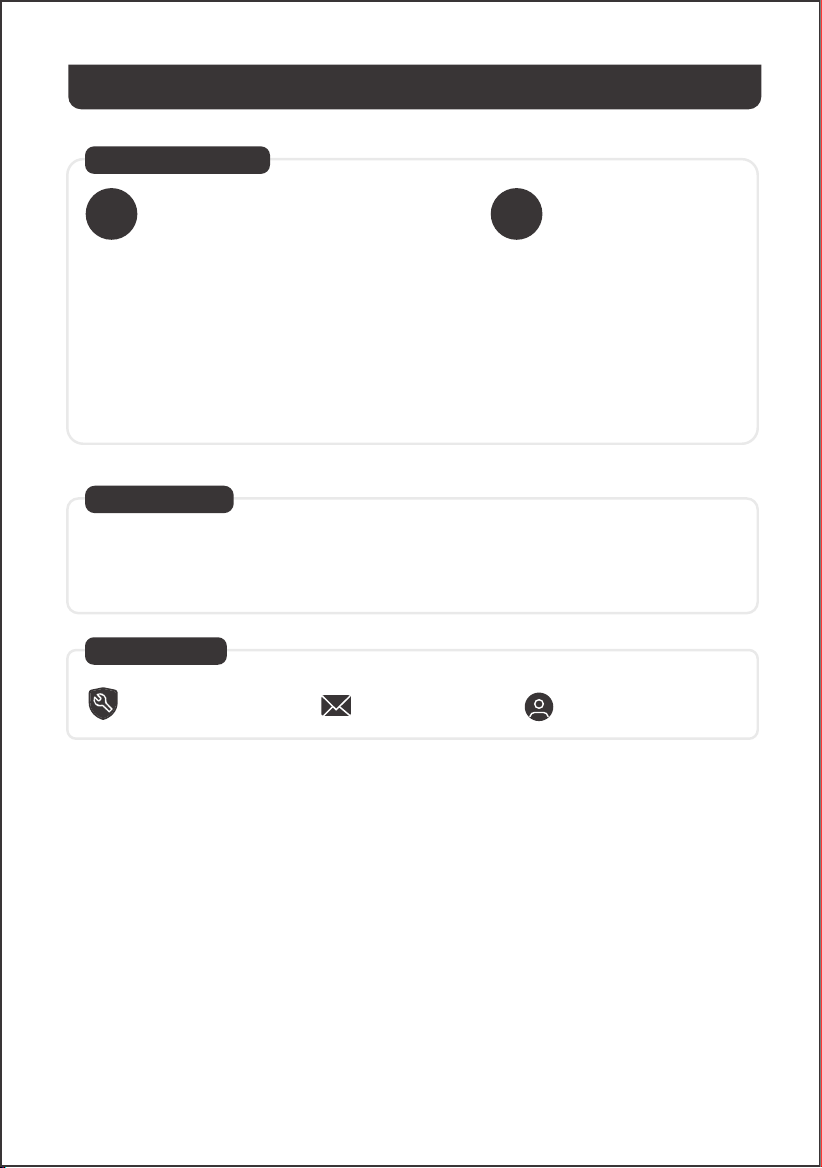
Classe Ⅲ
Déplié : 37,9 × 13,4 × 0,1 po / 962 × 339 × 2,5 mm
Plié : 9,1 × 13,4 × 0,8 po / 232 × 339 × 20 mm
1,98 lb ± 0,44 lb / 0,9 kg ± 0,2 kg
-4℉ à 149℉ / -20°C à 65°C
P
max
>65%, V
oc
>95%, I
sc
>65%
-0,3%/℃
-0,39%/℃
CARACTÉRISTIQUES TECHNIQUES
Adaptateur multifonctionnel
Nom du produit
Données électriques
Puissance maximale (P
max
)
Tension en circuit ouvert (V
oc
)
Intensité de court-circuit (I
sc
)
Tension au point de puissance maximale (V
mp
)
Courant au point de puissance maximale (I
mp
)
Classe de protection contre les chocs électriques
Indice de Protection (IP)
Courant maximal inverse
Tension maximale du système
Plage de température de fonctionnement
Dimensions (À l’exclusion de la boîte de jonction)
Poids
Coefficient de bifacialité (arrière/avant)
Coefficient de température de tension
Coefficient de température de puissance
Produits de consommation photovoltaïques
* STC - Conditions de test standard (1000W/m2, 25°C, AM 1,5)
* BNPI - Irradiance nominale bifaciale (Avant 1000W/m2, Arrière 135W/m2, 25°C, AM 1,5)
Modèle
IEC TS 63163 Catégorie de produits de consommation 1
Sortie USB-A
Sortie USB-C
5 V⎓2,4 A
5 V⎓3 A
13
Jackery SolarSaga 40 Air
40W±5%
25V±5%
2,07A±5%
20,5V±5%
1,96A±5%
44W±5%
25V±5%
2,3A±5%
20,5V±5%
2,11A±5%
3. Une fois le pliage terminé, fixez les boutons-pression pour sécuriser le panneau solaire.
14
GARANTIE
Pour toutes demandes ou observations relatives à nos produits, envoyez-nous un email à l’adresse
hello@jackery.com. Nous vous répondrons dans les meilleurs délais. Si vous rencontrez des problèmes
relatifs à la qualité avec le produit, vous pouvez demander son remplacement ou son rembourse-
ment en remplissant et soumettant le formulaire de demande à l’adresse www.jackery.com.
Nous Contacter
Service Client
Pour activer la prolongation de la
garantie, vous devez enregistrer votre
produit en ligne ou contacter le service
client à l’adresse hello@jackery.com.
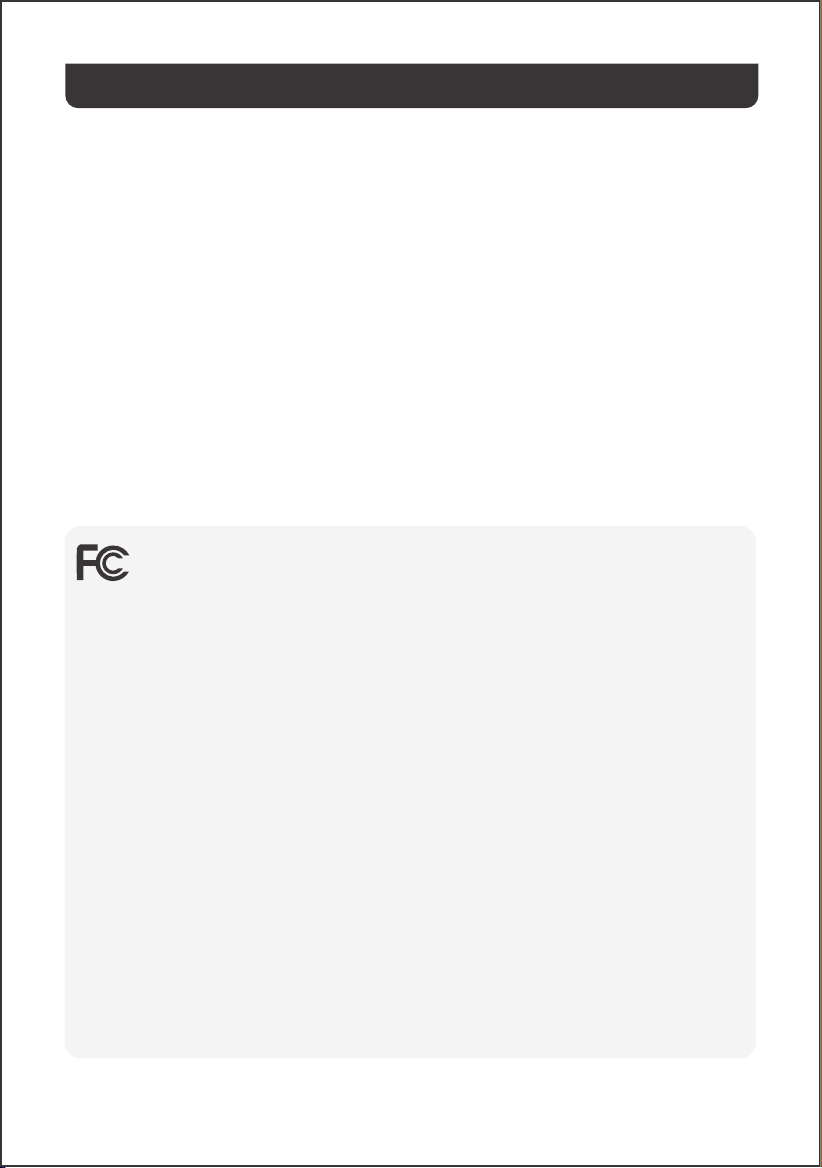
La garantie limitée de Jackery couvre le produit de l’acheteur
initial contre les défauts de matériaux et de fabrication pour
une durée de 12 mois à compter de la date d’achat. Les
dommages résultant d’une usure normale, d’une altération,
d’un usage abusif, d’une négligence, d’un accident, d’une
réparation effectuée par toute entité autre que le service
après-vente agréé ou de catastrophes naturelles ne sont pas
inclus.
Pendant la période de garantie et après vérification des
défauts, ce produit pourra être remplacé une fois qu’il aura
été renvoyé, accompagné de son justificatif d’achat.
Période de garantie
Garantie standard
AN
1
Garantie prolongée
ANS
2
Garantie limitée de 1 an
Assistance technique à vie
hello@jackery.com
RECOMENDACIONES DE SEGURIDAD
15
MODIFICACIÓN: Cualquier cambio o modificación no aprobado expresamente por el cesionario de
este dispositivo podría anular la autoridad del usuario para utilizar el dispositivo.
Este dispositivo cumple con la parte 15 de la normativa FCC. Su operación está sujeta a las siguientes
dos condiciones:
(1) este dispositivo no debe causar interferencias dañinas, y
(2) este dispositivo debe aceptar cualquier interferencia recibida, incluyendo interferencias que
puedan causar un funcionamiento no deseado.
Nota: Este aparato ha sido probado y cumple con los límites para un dispositivo digital de Clase B, de
acuerdo con el Apartado 15 de las Reglas de la FCC. Estos límites están diseñados para proporcionar
una protección razonable contra interferencias perjudiciales en una instalación residencial. Este
aparato genera, usa y puede irradiar energía de radiofrecuencia y, si no se instala y utiliza de
acuerdo con las instrucciones, puede causar interferencias perjudiciales en las comunicaciones por
radio. Sin embargo, no hay garantía de que no se produzcan interferencias en una instalación
concreta. Si este aparato causa interferencias dañinas en la recepción de radio o televisión, lo cual
puede determinarse encendiendo y apagando el equipo, se recomienda al usuario que intente
corregir la interferencia mediante una o varias de las siguientes medidas:
-- Reorientar o reubicar la antena receptora.
-- Aumentar la separación entre el equipo y el receptor.
-- Conecte el aparato a una toma de corriente en un circuito diferente al que está conectado el
receptor.
-- Consulte con el distribuidor o con un técnico de radio o TV experimentado para recibir ayuda.
• Lea el manual del usuario antes de utilizar este
producto.
• No doble los paneles solares.
• No coloque los paneles solares en árboles, edificios u
otras áreas sombreadas para su uso.
• No sumerja los paneles solares en agua ni en ningún
otro líquido.
• Use un paño húmedo para limpiarlos con suavidad.
• No use ni almacene los paneles solares cerca de
llamas o materiales inflamables.
• No raye los paneles solares con objetos afilados.
• No ponga sustancias corrosivas sobre los paneles
solares.
• No pise ni coloque objetos pesados sobre los paneles
solares.
• No desarme los paneles solares.
• El circuito de salida del panel solar debe conectarse
adecuadamente al equipo. La conexión inversa de los
polos positivo y negativo está estrictamente prohibida.
• Verifique el estado de conexión de todos los
componentes, cables y enchufes antes de usar.
• No deje caer el producto, ya que esto podría causar
daños internos y quedar inserbible.
• El panel solar no está diseñado para una instalación
permanente. Por favor guarde los paneles solares en
caso de vientos fuertes, granizo u otras condiciones
climáticas severas para evitar daños o riesgos
potenciales.
• En condiciones normales, los módulos fotovoltaicos
pueden estar expuestos a corrientes o voltajes más
altos que en condiciones de prueba estándar. Por lo
tanto, al calcular la tensión nominal del componente,
la corriente nominal del conductor y el tamaño del
dispositivo de control conectado a la salida
fotovoltaica, es necesario multiplicar los valores de
corriente de cortocircuito (I
sc
) y voltaje de circuito
abierto (V
oc
) marcados en el componente por un
factor de 1,25.
• Cualquier daño al producto puede provocar una
descarga eléctrica o un incendio.
• No exponga los paneles solares a focos de luz
artificial.
• No conecte el panel solar a otros paneles o fuentes
de energía, a menos que la combinación incluya
protección contra corriente inversa y sobretensión.
CONTENIDO DEL PAQUETE
16
DC7909
DC8020
Model: JS-40B
USER MANUAL
Jackery SolarSaga 40 Air
www.jackery.com
1-888-502-2236 (US)
CONTACT US:
The image is for reference only.
1 32
4 6 75
Jackery SolarSaga 40 Air
Mosquetón ×2
Cable de carga
solar multifuncional
(5,9 pies/1,8 m)
Bolsa de accesorios
Manual de Usuario
Cable adaptador de
DC8020 a USB-C
(6,9 pulgadas/17 cm)
Adaptador DC8020
a DC7909
MODO DE EMPLEO
Conecte el cable de carga al panel solar y al puerto de entrada de CC de la central eléctrica
portátil.
El producto viene con adaptadores que permiten conectarlo a diferentes estaciones de energía
portátiles Jackery a través de sus puertos de entrada de CC.
Nota
CONECTOR DC8020
Compatible con estaciones de energía portátiles Jackery que cuentan con uno o más puertos de
entrada DC8020.
Los cables son compatibles únicamente con el panel solar SolarSaga 40 Air (JS-40B). No los utilice con
otros modelos de paneles solares.
Indicador del ángulo solar Caja de conexiones
• Vista frontal
• Vista trasera
CARGA DE LA ESTACIÓN DE ENERGÍA PORTÁTIL JACKERY
ADAPTADOR DC8020-DC7909
Compatible con estaciones de energía portátiles Jackery que cuentan con uno o más puertos de
entrada DC7909.
Adaptador DC8020-DC7909
Macho DC8020
17
CABLE ADAPTADOR DC8020 A USB-C
Compatible con estaciones de energía portátiles Jackery que cuentan con uno o más puertos de
entrada USB-C.
El cable adaptador de DC8020 a USB-C está diseñado solo para cargar estaciones Jackery. No lo
use para otros dispositivos.
Nota
Cable adaptador de CD8020 a USB-C
18
El asa de transporte tiene un indicador del ángulo del sol. Cuando la luz del sol incide sobre su
superficie, aparece una sombra en su parte inferior.
Si la sombra cae sobre el círculo blanco interior en su parte inferior, significa que el panel solar está
orientado directamente hacia el sol y puede obtener una generación de energía óptima; si no es
así, se sugiere ajustar su ángulo hasta que lo haga.
INDICADOR DEL ÁNGULO SOLAR
ALIMENTA TU DISPOSITIVO
La sombra cae en el
círculo interior blanco
La sombra no cae en el
círculo interior blanco
Sombra
Indicador
Indicador del ángulo solar
Teléfono móvil
Banco de energía
Tablet
Adaptador Multifuncional
SolarSaga 40 Air
US
B
-
AUSB-
C
LED
U
SB
-AUSB
-C LED
Para maximizar la generación de energía, ajuste la orientación del SolarSaga 40 Air a lo largo del día
para garantizar la exposición total de la superficie del panel a la luz solar directa.
Nota
19
※ Inserte el tapón de goma cuando los puertos USB no estén en uso para evitar el polvo.
ALMACENAMIENTO DEL PANEL SOLAR
1. Mantenga el lado frontal del panel solar hacia arriba.
2. Doble el panel solar a lo largo de las líneas marcadas de izquierda a derecha tal como se
muestra en la figura.
Manipule con cuidado. No jale ni ejerza fuerza excesiva sobre el panel solar.
Indicador del ángulo solar
Jackery SolarSaga 40 Air
JS-40B
STC*
BNPI*
30V
6A
IP68
ClaseⅢ
Desplegado: 37,9 × 13,4 × 0,1 pulgadas /
962 x 339 x 2,5 mm
Plegado: 9,1 × 13,4 × 0,8 pulgadas /
232 x 339 x 20 mm
1,98 lb ± 0,44 lb / 0,9 kg±0,2 kg
-4℉ a 149℉ / -20°C a 65°C
P
max
>65%, V
oc
>95%, I
sc
>65%
-0,3%/℃
-0,39%/℃
20
PARÁMETROS TÉCNICOS
Nombre del producto
Datos eléctricos
Potencia pico (P
max
)
Voltaje de circuito abierto (V
oc
)
Corriente de cortocircuito (I
sc
)
Tensión en P
max
(V
mp
)
Corriente en P
max
(I
mp
)
Clase de protección contra choque eléctrico
Clasificación IP
Corriente máxima inversa
Tensión máxima del sistema
Rango de temperatura de funcionamiento
Dimensiones (Caja de conexiones no incluida)
Peso
Coeficiente de bifacialidad (trasero/frente)
Coeficiente de temperatura de voltaje
Coeficiente de temperatura de potencia
Productos fotovoltaicos de consumo
IEC TS 63163 Categoría de productos de consumo 1
* STC - Condiciones de prueba estándar (1000W/m2, 25°C, AM 1,5)
* BNPI - Irradiancia nominal bifacial (Frontal 1000W/m2, Trasera 135W/m2, 25°C, AM 1,5)
Modelo
Adaptador Multifuncional
Salida USB-A
Salida USB-C
5V⎓2,4A
5V⎓3A
Jackery SolarSaga 40 Air
40W±5%
25V±5%
2,07A±5%
20,5V±5%
1,96A±5%
44W±5%
25V±5%
2,3A±5%
20,5V±5%
2,11A±5%
3. Una vez terminado el doblado, asegure los botones de presión para fijar el panel solar.
21
GARANTÍA
Para cualquier consulta o comentario sobre nuestros productos, envíe un correo electrónico a
hello@jackery.com y le responderemos lo antes posible. Si hay algún problema relacionado con la
calidad del producto, puede solicitar un reemplazo o un reembolso enviando un formulario de
solicitud en www.jackery.com.
Contacto
Atención Al Cliente
Para activar la extensión de garantía,
debe registrar su producto en línea o
ponerse en contacto con nuestro equipo
de atención al cliente en
hello@jackery.com para ampliar la
duración de la garantía estándar.
Este producto está amparado por una garantía limitada por
parte de Jackery al comprador original, la cual cubre
defectos relativos al acabado y a los materiales durante 12
meses a partir de la fecha de compra (no se incluyen los
daños derivados de desgaste y rotura normal, alteración, uso
inadecuado, negligencia, accidente, servicio realizado por
personal o centro de servicio no autorizado ni fuerza mayor. )
Durante el periodo de garantía, y una vez verificados los
defectos, este producto será reemplazado cuando se
devuelva con las pruebas de compra correspondientes.
Período de garantía
Garantía Estándar
AÑO
1
Ampliación de garantía
AÑOS
2
Garantía limitada de 1 año
Soporte técnico de por vida
hello@jackery.com

5310 Bunche Dr., Fremont, CA 94538-8301
Tel:1-888-502-2236(US) E-mail:[email protected] Website:www.jackery.com
Jackery Inc.