
16
1
SAVE THIS INSTRUCTION MANUAL FOR FUTURE REFERENCE.
CONSERVE ESTE MANUAL PARA FUTURAS CONSULTAS.
© 2024 Baccus Global LLC
Boca Raton, FL 33432
(877) 571-2391
BC40BS
English page 5
Español pagina 9
BC
x
AUTOMATIC BATTERY CHARGER & MAINTAINER WITH ENGINE START
INSTRUCTION MANUAL
CARGADOR Y MANTENEDOR DE BATERÍAS AUTOMÁTICO CON ARRANQUE DE MOTOR
MANUAL DE INSTRUCCIÓN
2
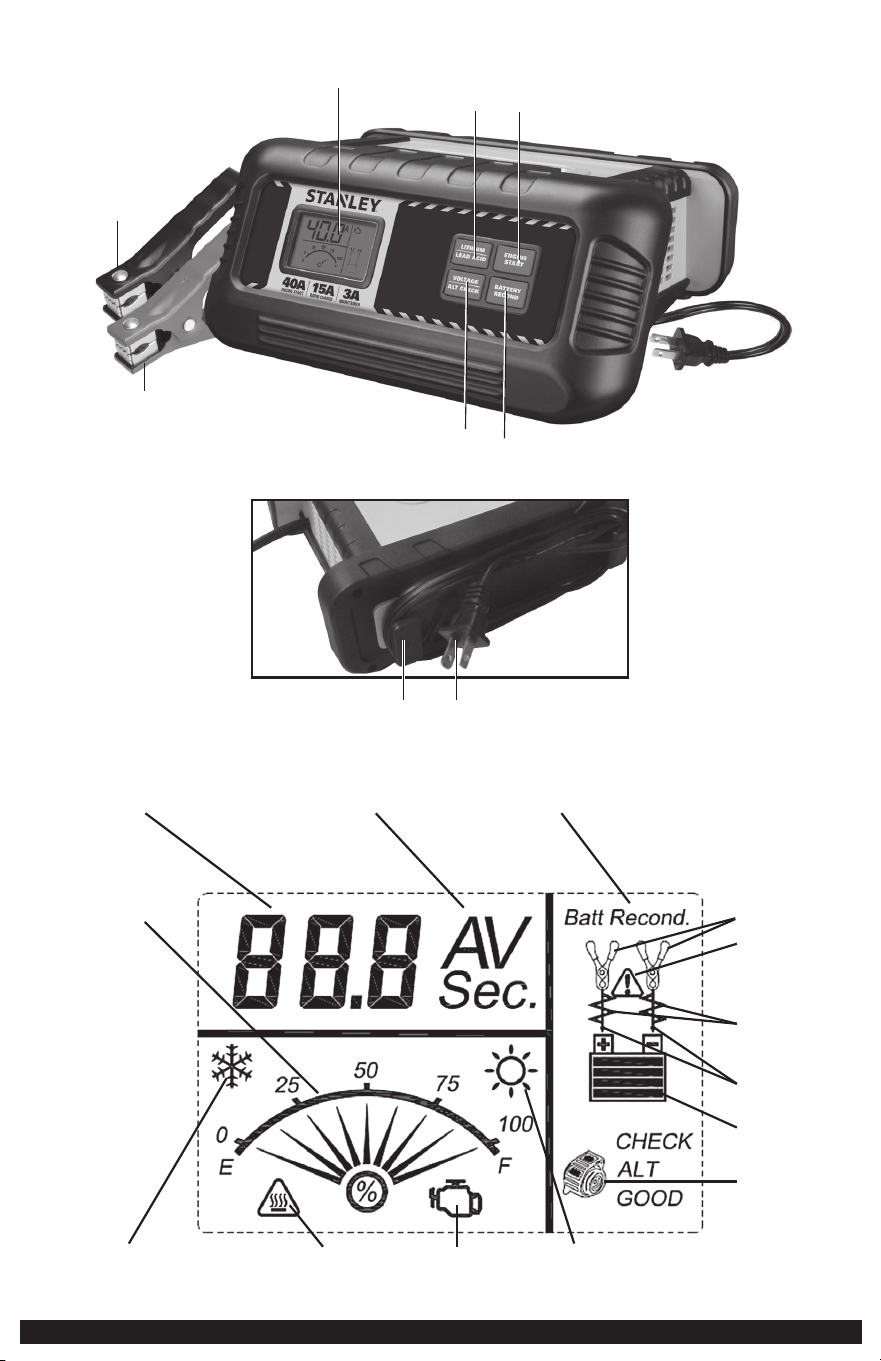
FEATURES / CARACTERÍSTICAS
1
2
3
4
5
7
6
8
9
DIGITAL LCD SCREEN / PANTALLA LCD DIGITAL
10 11 12
14
15
16
18
19
17
23
13
20
2221

3
FEATURES
1. LCD Screen
2. Lithium/Lead Acid Button
3. Engine Start Button
4. Voltage/Alternator Check Button
5. Battery Recondition Button
6. Positive (Red) Clamp
7. Negative (Black) Clamp
8. 120V AC Cord Storage Tabs
9. 120V AC Plug
10. Digital Display (varies by function)
11. Amperes / Voltage / Seconds Indicator
12. Battery Recondition Indicator
13. Battery Charge Gauge
14. Clamp Icons
15. Fault Icon
16. Battery Reconditioning Icons
17. Arrow Icons
18. Battery Icon
19. Alternator Icon
20. Low Surrounding Temperature Icon
21. Overheat Alarm Icon
22. Engine Start Icon
23. High Surrounding Temperature Icon
CARACTERÍSTICAS
1. Pantalla LCD
2. Botón de litio/plomo ácido
3. Botón de arranque del motor
4. Botón de verificación de voltaje/alternador
5. Botón de reacondicionamiento de la batería
6. Pinza del positivo (roja)
7. Pinza del negativo (negra)
8. Lengüetas de almacenamiento para el cable de 120V CA
9. Enchufe de 120V CA
10. Pantalla digital (varía por función)
11. Indicador de amperios / voltaje / segundos
12. Indicador de reacondicionamiento de la batería
13. Medidor de carga de batería
14. Iconos de las pinzas
15. Icono de fallo
16. Iconos de reacondicionamiento de la batería
17. Iconos de flecha
18. Icono de la batería
19. Icono de alternador
20. Icono de temperatura baja
21. Icono de la alarma de sobrecalentamiento
22. Icono de arranque del motor
23. Icono de temperatura alta
This device complies with part 15 of the FCC rules. Operation is subject to the following two conditions: (1) this device may not cause harmful interference, and (2) this device must accept any interference received, including
interference that may cause undesired operation.
This equipment has been tested and found to comply with the limits for a Class B digital device, pursuant to part 15 of the FCC Rules. These limits are designed to provide reasonable protection against harmful interference
in a residential installation. This equipment generates, uses and can radiate radio frequency energy and, if not installed and used in accordance with the instructions, may cause harmful interference to radio communications.
However, there is no guarantee that interference will not occur in a particular installation. If equipment does cause harmful interference to radio or television reception, which can be determined by turning the equipment off
and on, the user is encouraged to try to correct the interference by one or more of the following measures:
• Reorient or relocate the receiving antenna.
• Increase the separation between equipment and receiver.
• Connect the equipment into an outlet on a circuit different from that to which the receiver is connected.
• Consult the dealer or an experienced radio/TV technician for help.
Changes or modifications not approved by the party responsible for compliance could void user’s authority to operate the equipment.
Este dispositivo cumple con la parte 15 de las normas de la Comisión Federal de Comunicaciones de Estados Unidos (FCC). La operación está sujeta a las dos condiciones siguientes: (1) este dispositivo no puede causar
interferencia perjudicial y (2) este mecanismo debe aceptar cualquier interferencia recibida, incluida la in-terferencia que puede provocar una operación no deseada.
Este equipo ha sido probado y se encontró que cumple con los límites para dispositivo digital Clase B, según la parte 15 de las normas de la FCC. Estos límites están diseñados para brindar protección razonable contra
interferencia perjudicial en una instalación residencial. Este equipo genera, usa y puede irradiar energía en frecuencia de radio y, si no se instala y se usa de acuerdo con las instrucciones, puede provocar interferencia perjudicial
en las comunicaciones de radio. Sin embargo, no hay garantía de que la interferencia no ocurra en una instalación en particular. Si el equipo provoca interferencia perjudicial en la recepción de radio o televisión, lo que se
puede determinar al apagar y encender el equipo, el usuario debe tratar de corregir la interferencia mediante una o más de las siguientes medidas:
• Cambiar la orientación o la ubicación de la antena de recepción.
• Aumentar la separación entre el equipo y el receptor.
• Conectar el equipo a un tomacorriente sobre un circuito diferente de aquel al que está conectado el receptor.
• Consultar al vendedor o pedir la ayuda de un técnico en radio y televisión con experiencia.
Los cambios o las modificaciones no aprobados por el partido responsable de conformidad podían anular la autoridad del usuario para funcionar el equipo.

4
SAFETY GUIDELINES /
DEFINITIONS
DANGER: Indicates an imminently hazardous situation which, if not avoided, will
result in death or serious injury.
WARNING: Indicates a potentially hazardous situation which, if not avoided,
could result in death or serious injury.
CAUTION: Indicates a potentially hazardous situation which, if not avoided,
may result in injury.
CAUTION: Used without the safety alert symbol indicates potentially hazardous
situation which, if not avoided, may result in property damage.
RISK OF UNSAFE OPERATION. When using tools or equipment, basic safety
precautions should always be followed to reduce the risk of personal injury.
Improper operation, maintenance or modification of tools or equipment could
result in serious injury and property damage. There are certain applications for
which tools and equipment are designed. Manufacturer strongly recommends that
this product NOT be modified and/or used for any application other than for which
it was designed. Read and understand all warnings and operating instructions
before using any tool or equipment.
IMPORTANT SAFETY
INSTRUCTIONS
GENERAL SAFETY WARNINGS AND INSTRUCTIONS
• The unit was designed for household use only.
WARNING – TO REDUCE THE RISK OF FIRE, ELECTRIC SHOCK, BURST HAZARD,
OR INJURY TO PERSONS OR PROPERTY:
• Avoid dangerous environments. Don’t use the battery charger in damp or wet
locations. Do not expose the battery charger to rain or snow.
• Keep children away. Keep away from children. This is not a toy!
• Store indoors. When not in use, battery chargers should be stored indoors in dry,
and high or locked-up places – out of reach of children.
• Unplug the battery charger when not in use.
• Check for damaged parts. Do not use if damaged in any way.
READ ALL INSTRUCTIONS
WARNING: Read all instructions before operating the battery charger. Failure
to follow all instructions listed below may result in electric shock, fire and/or
serious injury.
SPECIFIC SAFETY INSTRUCTIONS FOR POWER CORDS
• Don’t abuse cord. Never carry appliance by cord or yank it to disconnect from
receptacle. Keep cord from heat, oil, and sharp edges. Pull by plug rather than
cord when unplugging the unit.
• Ground fault circuit interrupter (GFCI) protection should be provided on the circuits
or outlets to be used. Receptacles are available having built in GFCI protection and
may be used for this measure of safety.
DANGER – Never alter AC cord or plug provided. If it will not fit the outlet, have a
proper outlet installed by a qualified electrician. Improper connection can result in
a risk of an electric shock.
Extension Cords
• An extension cord should not be used unless absolutely necessary. Use of an
improper extension cord could result in a risk of fire and electric shock, and will
void warranty.
– If an extension cord must be used, make sure your extension cord is in good
condition. When using an extension cord, be sure to use one heavy enough to
carry the current your product will draw. An undersized cord will cause a drop
in line voltage resulting in loss of power and overheating. The following table
shows the correct size to use depending on cord length and nameplate ampere
rating. If in doubt, use the next heavier gauge. The smaller the gauge number,
the heavier the cord.
Recommended Minimum AWG Size for Extension Cords for Battery Chargers
AC Input Rating American Wire Gage (AWG) Size of Cord
Amperes Length of Cord, feet (m)
Equal to or But less 25 (7.6) 50 (15.2) 100 (30.5) 150 (45.6)
greater than than
0 2 18 18 18 16
2 3 18 18 16 14
3 4 18 18 16 14
4 5 18 18 14 12
5 6 18 16 14 12
6 8 18 16 12 10
8 10 18 14 12 10
10 12 16 14 10 8
12 14 16 12 10 8
14 16 16 12 10 8
16 18 14 12 8 8
18 20 14 12 8 6
Power Cord Safety
The unit has a polarized plug (one blade is wider than the other) as a safety
feature. This plug will fit into a polarized outlet only one way. If the plug does not
fit fully into the outlet, reverse the plug. If it still does not fit, contact a qualified
electrician. Do not attempt to defeat this safety feature.
SPECIFIC SAFETY INSTRUCTIONS FOR LEAD ACID
BATTERIES
WARNING – BURST HAZARD: Do not use the unit for charging dry-cell
batteries that are commonly used with home appliances. These batteries may burst
and cause injury to persons and damage property. Use the unit for charging/
boosting a 12 volt battery only. It is not intended to supply power to a low-voltage
electrical system other than in a starter-motor application.
• Use of accessories and attachments: the use of any accessory or attachment
not recommended by manufacturer for use with this battery charger could be
hazardous.
• Stay alert. Use common sense. Do not operate this equipment when you are tired
or impaired.
• Do not operate the battery charger near flammable liquids or in gaseous or
explosive atmospheres. Motors may spark, and the sparks might ignite fumes.
• Do not operate the battery charger if it has received a sharp blow, been dropped,
or has been otherwise damaged in any way.
WARNING – TO REDUCE THE RISK OF ELECTRIC SHOCK:
• Never immerse the battery charger in water or any other liquid, or use when wet.
WARNING: RISK OF EXPLOSIVE GASES
• WORKING IN THE VICINITY OF A LEAD ACID BATTERY IS DANGEROUS. BATTERIES
GENERATE EXPLOSIVE GASES DURING NORMAL BATTERY OPERATION. FOR THIS
REASON, IT IS OF THE UTMOST IMPORTANCE THAT EACH TIME BEFORE USING
THE BATTERY CHARGER YOU READ THIS MANUAL AND FOLLOW INSTRUCTIONS
EXACTLY.
• To reduce the risk of battery explosion, follow these instructions and those
published by the battery manufacturer and manufacturer of any equipment you
intend to use in the vicinity of the battery. Review cautionary markings on these
products and on the engine.
• This equipment employs parts (switches, relays, etc.) that produce arcs or sparks.
Therefore, if used in a garage or enclosed area, the unit MUST be placed not less
than 18 inches above the floor.
• THIS UNIT IS NOT FOR USE BY CHILDREN AND SHOULD ONLY BE OPERATED BY
ADULTS.
WARNING – TO REDUCE THE RISK OF FIRE:
• Do not operate near flammable materials, fumes or gases.
• Do not expose to extreme heat or flames.
Any of these actions may cause serious electrical damage and/or a fire.
CAUTION – TO REDUCE THE RISK OF INJURY OR PROPERTY DAMAGE:
• NEVER ATTEMPT TO CHARGE A FROZEN BATTERY.
• Do not charge the battery while the engine is operating.
• Stay clear of fan blades, belts, pulleys, and other parts that can cause injury to
persons.
• Vehicles that have on-board computerized systems may be damaged if vehicle
battery is jump-started. Before jump-starting, read the vehicle’s owner’s manual to
confirm that external-starting assistance is suitable.

5
• Never smoke or allow a spark or flame in vicinity of vehicle battery, engine or
battery charger.
• Be extra cautious to avoid dropping a metal tool onto the battery. It might spark
or short-circuit the battery or another electrical part, and that may cause an
explosion.
• Never allow battery acid to come in contact with this unit.
• Do not operate this unit in a closed area or restrict ventilation in any way.
• Always turn the battery charger off by unplugging it when not in use.
• Do not open the BATTERY CHARGER – there are no user-serviceable parts inside.
Opening the battery charger will void the manufacturer’s warranty.
• Operate battery charger only as described in this Instruction Manual.
• Check battery charger and components periodically for wear and tear.
SPECIFIC SAFETY INSTRUCTIONS FOR LITHIUM LIFEPO4
BATTERIES
Lithium charge mode is designed for lithium LiFePO4 batteries only.
WARNING: Use this mode with extreme care. This mode should only be used with
12V lithium LiFePO4 batteries that have a built-in battery management system
(BMS). Lithium LiFePO4 batteries are made and constructed in different ways and
some may or may not contain a battery management system (BMS). Consult the
lithium LiFePO4 battery manufacturer before charging and ask for recommended
charging rates and voltages. Some lithium LiFePO4 batteries may be unstable and
unsuitable for charging.
WARNING: To reduce the risk of fire, electric shock, burst hazard, or injury to
persons or property:
• Lithium LiFePO4 batteries must be used and charged properly. Improper use can
result in serious injury, fire, or death.
• Lithium LiFePO4 batteries can explode in the presence of a source of ignition. Do
not use lithium LiFePO4 battery in the presence of an open flame.
• Do not place this lithium LiFePO4 battery unit in fire or apply heat to it.
• Do not subject lithium LiFePO4 battery to strong impacts or shocks. Or it may
cause the battery to generate heat, rupture or ignite.
• Do not expose lithium LiFePO4 battery to water or salt water, or allow the battery
to get wet.
• Avoid storing lithium LiFePO4 battery in the basement, bathroom or other
areas of the house that are or may become wet or humid or where moisture may
concentrate.
• Do not leave lithium LiFePO4 battery in direct sunlight, or use or store it inside
cars in hot weather. Doing so may cause the battery to generate heat, rupture, or
ignite.
• Never charge lithium LiFePO4 battery near heat or flammable objects. WARNING:
NEVER THROW WATER ON A BURNING LITHIUM LiFePO4 BATTERY! If a lithium
LiFePO4 battery does catch on fire, it will burn even more violently if it comes in
contact with water or even moisture in the air. A fire extinguisher must be used.
FIRST AID
When working with lead acid batteries, always make sure someone is close enough
to provide immediate assistance in case of accident or emergency.
Always have protective eyewear when using this product: contact with battery acid
may cause blindness and/or severe burns. Be aware of first aid procedures in case of
accidental contact with battery acid.
Have plenty of fresh water and soap nearby in case battery acid contacts skin.
If battery acid contacts skin or clothing, wash immediately with soap and water for
at least 10 minutes and get medical attention immediately.
Remove personal metal items such as rings, bracelets, necklaces and watches when
working with a lead acid battery. A lead acid battery can produce a short circuit
current high enough to weld a ring, or similar metal object, to skin causing a severe
burn.
•
Skin: If battery acid comes in contact with skin, rinse immediately with water,
then wash thoroughly with soap and water. If redness, pain, or irritation occurs,
seek immediate medical attention.
•
Eyes: If battery acid comes in contact with eyes, flush eyes immediately, for a
minimum of 15 minutes and seek immediate medical attention.
•
LCD liquid crystal display: If liquid crystal comes in contact with your skin:
Wash area off completely with plenty of water. Remove contaminated clothing. If
liquid crystal gets into your eye: Flush the affected eye with clean water and then
seek medical attention. If liquid crystal is swallowed: Flush your mouth thoroughly
with water. Drink large quantities of water and induce vomiting. Then seek
medical attention.
WARNING – TO REDUCE THE RISK OF INJURY:
Follow these instructions and those published by the battery manufacturer and
manufacturer of any equipment you intend to use with this unit. Review cautionary
markings on this product and on engine.
SAVE THESE INSTRUCTIONS
INTRODUCTION
Congratulations on purchasing your Stanley
®
Battery Charger. Read this Instruction
Manual and follow the instructions carefully before using your new battery
charger.
PREPARING TO CHARGE A LEAD-
ACID BATTERY
1. Be sure area around battery is well ventilated while battery is being charged.
2. Remove battery completely from boat/airplane or any confined area before
charging.
3. If it is necessary to remove battery from vehicle to charge, or to clean terminals,
always remove grounded terminal from battery first. Make sure all accessories
in the vehicle are off, so as not to cause an arc.
4. Clean battery terminals, taking care to avoid getting corrosive material in eyes.
5. Add distilled water in each cell until battery acid reaches level specified
by battery manufacturer. This helps purge excessive gas from cells. Do not
overfill. For a battery without cell caps (maintenance free), carefully follow
manufacturer’s charging instructions.
6. Study all battery manufacturer’s specific precautions, such as removing or not
removing cell caps while charging, and recommended rates of charge.
7. Determine voltage of battery to be charged by referring to the vehicle manual.
The unit is for charging a 12 volt battery only.
Charger Location
• Locate charger as far away from battery as cables permit.
• Never place charger directly above battery being charged; gases from battery will
corrode and damage charger.
• Never allow battery acid to drip on charger when reading gravity or filling battery.
• Never operate charger in a closed-in area or restrict ventilation in any way.
• A marine (boat) battery must be removed and charged on shore. To charge it on
board requires equipment specifically designed for marine use. This unit is NOT
designed for such use.
• Do not set a battery on top of the charger.
Connection Precautions
• Never allow clamps to touch each other.
• Attach clamps to battery and chassis as indicated in “CHARGING A BATTERY
INSTALLED IN A VEHICLE” steps 5 and 6, or in “CHARGING A BATTERY THAT HAS
BEEN REMOVED FROM A VEHICLE” steps 2 to 5.
CHARGING A BATTERY INSTALLED IN A VEHICLE
WARNING – A spark near the battery may cause an explosion. To reduce risk of a
spark near the battery:
1. Position AC and clamp cords to reduce risk of damage by hood, door, or
moving engine part.
2. Stay clear of fan blades, belts, pulleys, and other parts that can cause injury
to persons.
3. Check polarity of battery posts. POSITIVE (POS, P, +) battery post usually has
larger diameter than NEGATIVE (NEG, N, –) post.
4. Determine which post of battery is grounded (connected) to the chassis. If
negative post is grounded to chassis (as in most vehicles), see 5. If positive post
is grounded to the chassis, see 6.
5. For negative-grounded vehicle, connect POSITIVE (RED) clamp from battery
charger to POSITIVE (POS, P, +) ungrounded post of battery. Connect NEGATIVE
(BLACK) clamp to vehicle chassis or engine block away from battery. Do not
connect clip to carburetor, fuel lines, or sheet-metal body parts. Connect to
heavy gauge metal part of the frame or engine block.
6. For positive-grounded vehicle, connect NEGATIVE (BLACK) clamp from battery
charger to NEGATIVE (NEG, N, –) ungrounded post of battery. Connect POSITIVE
(RED) clamp to vehicle chassis or engine block away from battery. Do not
6
connect clip to carburetor, fuel lines or sheet-metal body parts. Connect to a
heavy gauge metal part of the frame or engine block.
7. When disconnecting charger, disconnect AC cord, remove clamp from vehicle
chassis, and then remove clamp from battery terminal.
8. Do not charge the battery while the engine is operating.
9. See operating instructions for length of charge information.
CHARGING A BATTERY THAT HAS BEEN REMOVED
FROM A VEHICLE
WARNING – A spark near the battery may cause an explosion. To reduce risk of a
spark near the battery:
1. Check polarity of battery posts. The positive post (marked POS,P, +) usually has
a larger diameter than the negative battery post (marked NEG, N, –).
2. Attach a 24-inch (minimum length) AWG #6 insulated battery cable to the
negative battery post (marked NEG, N, –).
3. Connect the positive (red) battery clamp to the positive battery post (marked
POS, P, + or red).
4. Stand as far back from the battery as possible, and do not face battery when
making final connection.
5. Carefully connect the negative (black) charger clamp to the free end of the
battery cable connected to the negative terminal.
6. When disconnecting charger, always do so in reverse sequence of connecting
procedure and break first connection while as far away from battery as
practical.
PREPARING TO CHARGE A 12V
LITHIUM LIFEPO4 BATTERY
1. Be sure the area around battery is well ventilated while the battery is being
charged.
2. Charge 12V lithium LiFePO4 battery only. Any other uses may result in risk of
fire, electric shock or electrocution.
3. Do not expose the charger to rain or snow.
4. Study all battery manufacturer’s specific precautions, and recommended rates
of charge.
Charger Location
• Locate the charger as far away from the battery as cables permit.
• Never place the charger directly above the battery being charged; gases from the
battery will corrode and damage the charger.
• Never operate the charger in a closed-in area or restrict ventilation in any way.
Connecting the Charger
Connection Precautions
• Connect and disconnect output clamps only after removing AC Power Cord from
electric outlet.
• Never allow the clamps to touch each other.
• Attach the clamps to the lithium LiFePO4 battery respecting the polarity.
OPERATING INSTRUCTIONS
PREPARING TO CHARGE A 12V LITHIUM LIFEPO4
BATTERY
WARNING – TO REDUCE THE RISK OF INJURY OR PROPERTY DAMAGE:
• Always disconnect the AC plug from the AC outlet first before disconnecting the
charger from the battery to be charged.
• Ensure that all installation, operating instructions and safety precautions
are understood and observed; then follow the steps outlined in the section
“PREPARING TO CHARGE A 12V LITHIUM LiFePO4 BATTERY”.
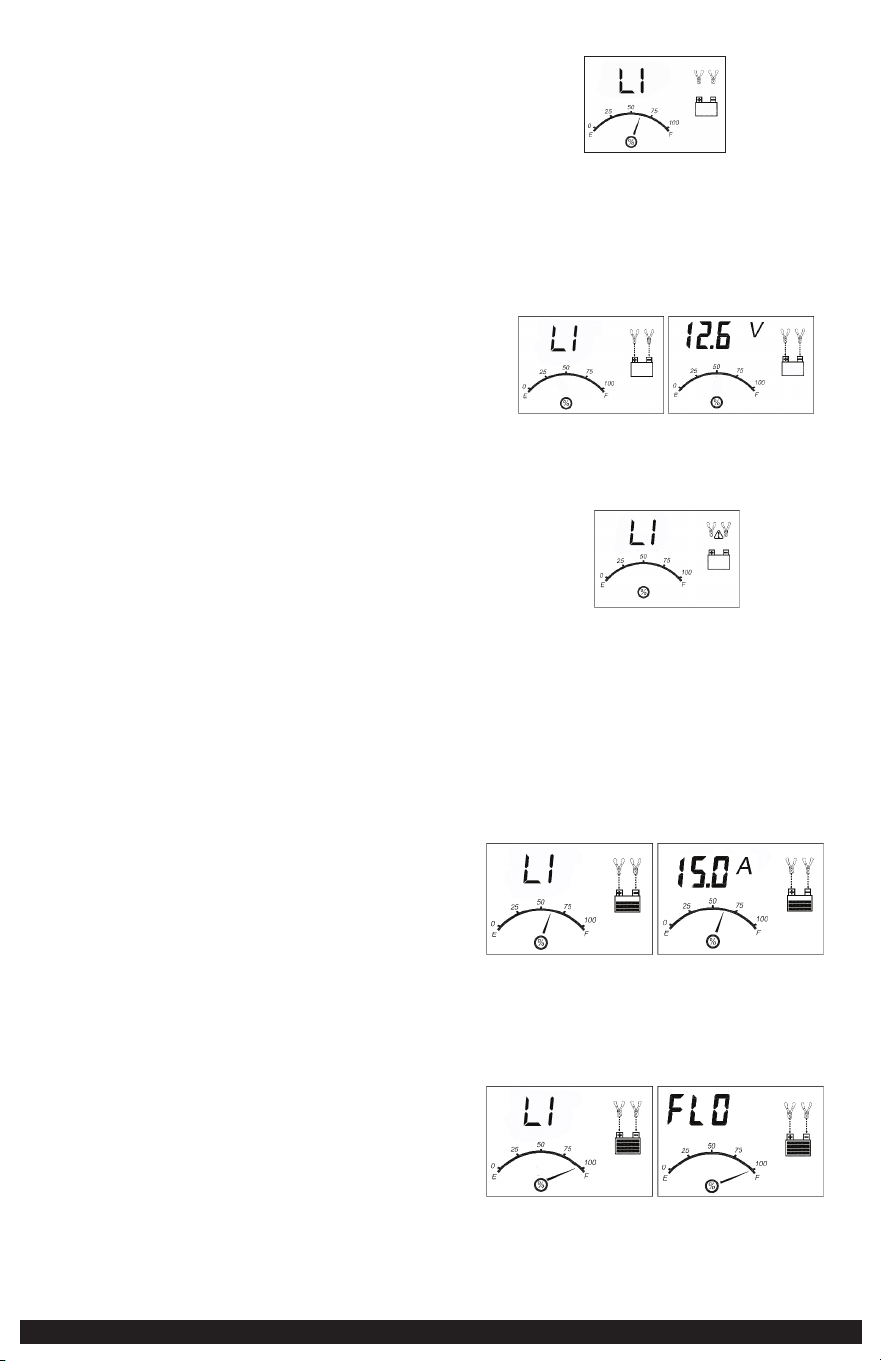
1. Plug the battery charger’s power cord into an AC outlet. The charger is now
in lithium charge mode. The LCD screen will display the following (the Clamp
Icon will flash. LI, the empty battery Icon and the Gauge without the pointer
will light):
2. The charger’s battery clamps are color-coded. Red is positive; black is negative.
Connect the battery clamps correctly to the corresponding connectors on
the battery posts following the steps outlined in the “IMPORTANT SAFETY
INSTRUCTION” section at the front of this manual.
IMPORTANT: If the clamps are correctly connected with regard to polarity and
the unit is properly connected to the AC outlet, the unit will be in lithium
charge mode and the LCD screen will display the following (the Clamp Icons,
Arrow Icons, the battery Icon and the Gauge without the pointer light solid);
the LI and battery voltage will display alternatively.
If the clamps are INCORRECTLY connected with regard to polarity, the LCD
screen will display the following (the “+” and “–” inside the battery Icon and
the Fault Icon will flash and the Clamp Icons, the battery Icon and the Gauge
without the pointer will light, as well as the LI), and a warning will sound until
the clamps are disconnected:
Unplug the charger, then remove the clamps. Reconnect the clamps properly.
3. When the unit is properly connected, the unit is default to LI charge mode.
The LCD screen will show LI and the current voltage of the connected battery
alternatively.
Note: Press “LITHIUM/LEAD ACID” button to toggle lithium charge mode and lead
acid charge mode.
After 10 seconds, the unit will automatically begin to charge the battery. The LCD
screen will show LI and the charging current alternatively. The gauge indicates the
charge status of the battery. The clamp icons and the battery icon light solid, the
bars on the battery icon will change from empty to solid (bottom to top) repeatedly
and the arrow icons will gradually and repeatedly move downward to the battery
icon.
IMPORTANT: If the unit is overheated, the overheat alarm icon and fault icon will
flash.
Disconnect the charger and allow the charger to cool for several minutes. Make sure
there is adequate ventilation around the unit before attempting to charge again.
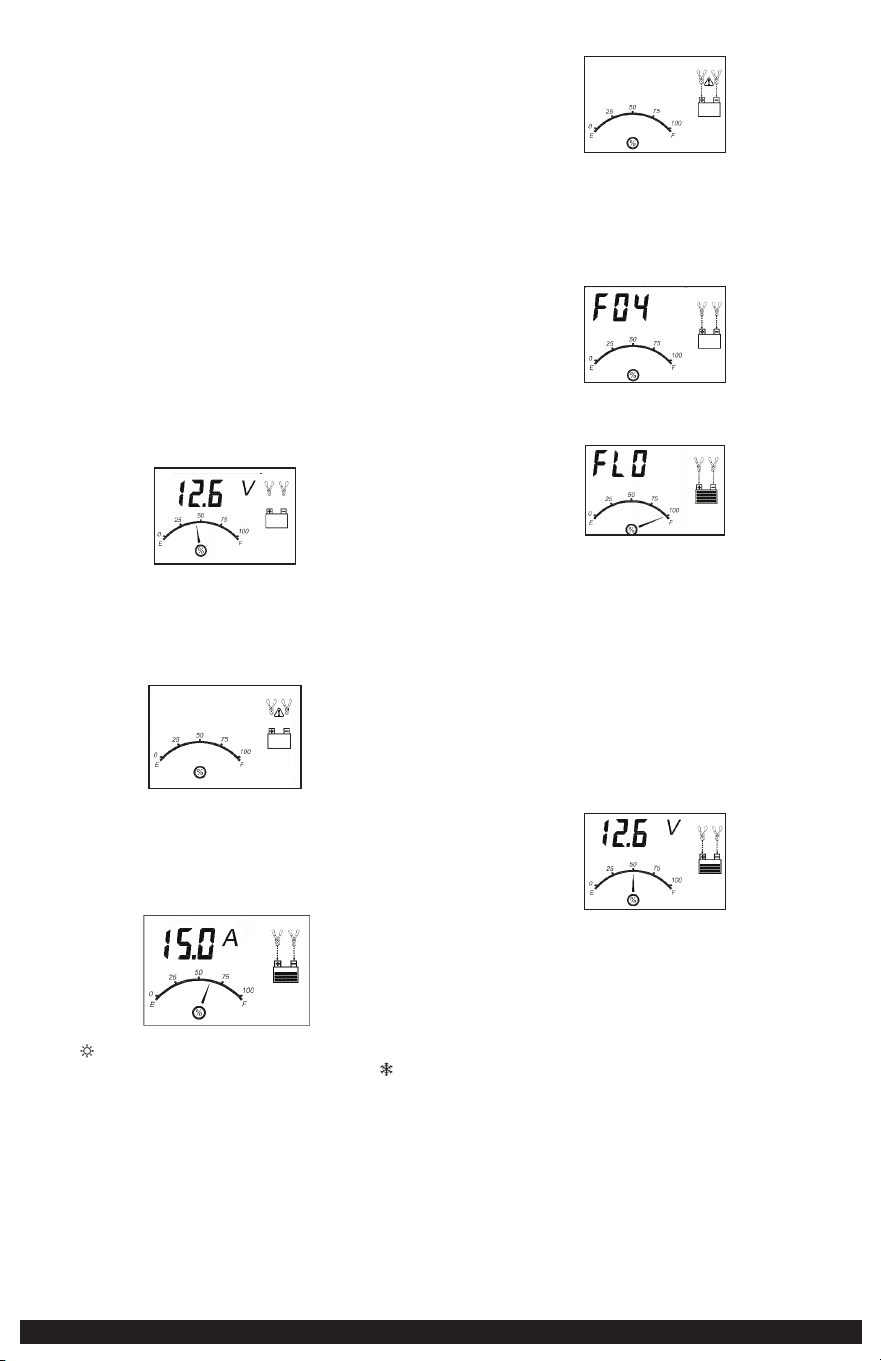
4. When the battery is completely charged, the LCD screen displays the following:
The digital display shows “FLO” and LI alternatively. The battery charge gauge
points to 100%, indicating a full charge. The clamp icon, battery icon with four
bars and the arrow icons light solid.
7
When disconnecting the charger, disconnect the AC cord, remove clamp from
the vehicle chassis, and then remove the clamp from the battery terminal.
CHARGING A LEAD ACID BATTERY
WARNING – TO REDUCE THE RISK OF INJURY OR PROPERTY DAMAGE:
• Always disconnect the AC plug from the AC outlet first before disconnecting the
charger from the battery to be charged.
• Ensure that all installation, operating instructions and safety precautions are
understood and observed; then follow the steps outlined in the appropriate section
(“CHARGING A BATTERY INSTALLED IN A VEHICLE” or “CHARGING A BATTERY THAT
HAS BEEN REMOVED FROM A VEHICLE”).
1. Plug the battery charger’s power cord into an AC outlet.
2. The charger’s battery clamps are color-coded. Red is positive; black is negative.
Connect the battery clamps correctly to the corresponding connectors on
the battery posts following the steps outlined in the “IMPORTANT SAFETY
INSTRUCTION” section at the front of this manual.
IMPORTANT: If the clamps are correctly connected with regard to polarity and the
unit is properly connected to the AC outlet, press the “LITHIUM/LEAD ACID” button
once to select LEAD ACID charge mode. The LCD screen will display the following
(the Clamp Icons, Arrow Icons, the battery Icon and the gauge, as well as the
battery voltage).
CAUTION: Please make sure you select proper charge mode to charge a 12V lithium
LiFePO4 battery or a 12V lead acid battery.
If the clamps are INCORRECTLY connected with regard to polarity, the LCD Screen
will display the following (the “+” and “–” inside the Battery Icon and the Fault Icon
will flash and the Clamp Icons, the Battery Icon and the Gauge without the pointer
will light), and a warning will sound until the clamps are disconnected:
Unplug the charger; then remove the clamps. Reconnect the clamps properly.
3. After 10 seconds, the unit will automatically begin to charge the battery. The
Digital Display shows the output current that is charging the battery. The Gauge
indicates the charge status of the battery. The Clamp Icons and the battery Icon
light solid, the bars on the battery Icon will change from empty to solid (bottom to
top) repeatedly and the Arrow Icons will gradually and repeatedly move downward
to the battery Icon.
Notes: The “ ” icon will appear at the top right of the Gauge section if the
surrounding ambient temperature is higher than approximate 40°C. The “ ” icon
will appear at the top left of the Gauge section if the surrounding ambient
temperature is lower than 0°C. This is not a fault code, but indicates that the unit’s
temperature compensation feature is operating.
IMPORTANT: If the unit is overheated, the overheat alarm icon and fault icon
will flash. Disconnect the charger and allow the charger to cool for several
minutes. Make sure there is adequate ventilation around the unit before
attempting to charge again.
IMPORTANT: The charger will automatically detect the battery condition. If
it detects a problem with the battery, the LCD screen will display the fault
indication icon (the Fault Icon and the battery Icon will flash; and the Clamp
Icons, Arrow Icons and the Gauge without the pointer will light):
Disconnect the charger. Have the battery checked by a qualified technician.
IMPORTANT: If the battery is not fully charged (the battery charge gauge does
not reach 100%) after 18 hours of continuous charging, the battery may have
internal damage and will not accept a charge. After 18 hours, the charging
process will automatically cut-off, the LCD screen will display the following (the
digital readout shows “F04”, the Clamp Icons, Arrow Icons, battery Icon and the
Gauge without the pointer will light solid):
Disconnect the charger. Have the battery checked by a qualified technician.
4. When the battery is completely charged, the unit automatically goes into float
charge mode and the LCD screen displays the following:
5. The digital display shows “FLO” to indicate that the unit is in float charge
mode. The battery charge gauge points to 100%, indicating a full charge. The
clamp icon and battery icon with four bars light solid, and the arrow icons will
gradually and repeatedly move downward to the battery icon. In this mode, the
unit monitors the battery voltage and charges as necessary to assure the battery
maintains full capacity. The unit remains in float charge mode as long as the
charger is connected to the battery and plugged into a functioning AC outlet.
When disconnecting the charger, disconnect the AC cord, remove clamp from the
vehicle chassis, and then remove the clamp from the battery terminal.
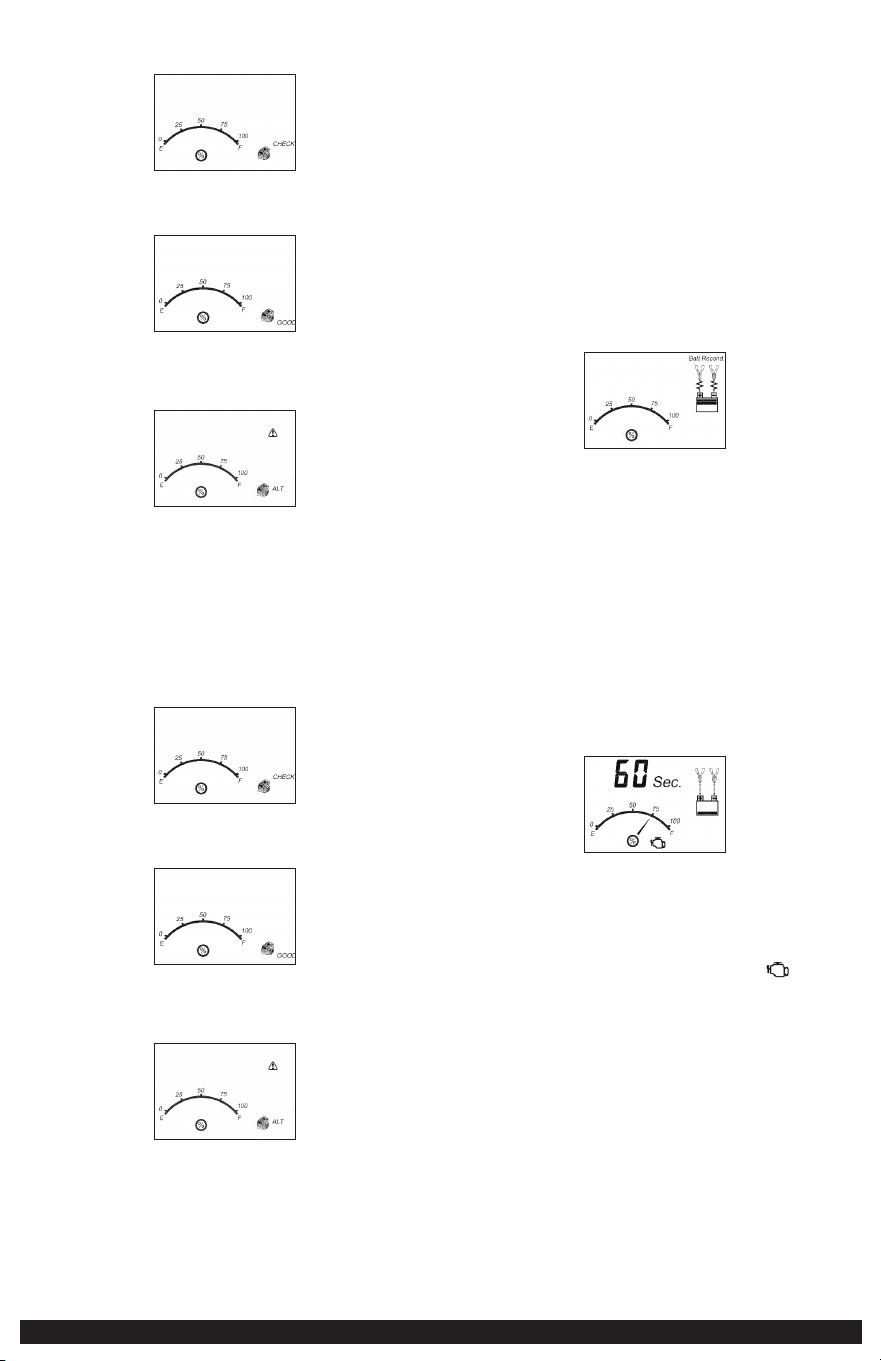
CHECKING THE BATTERY VOLTAGE
To Check the battery Voltage in Charging Mode:
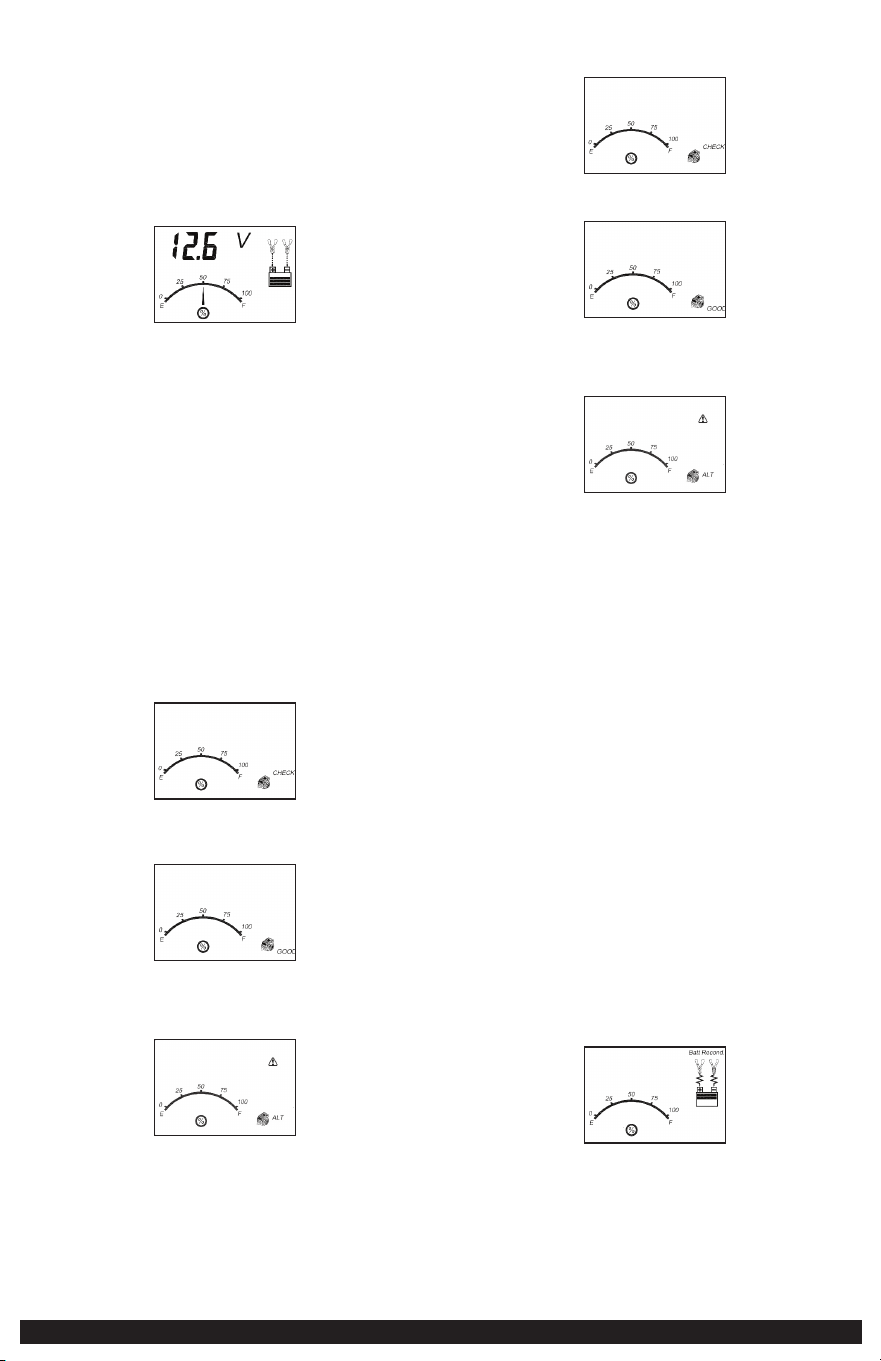
Press the Voltage/Alt Check button and the LCD screen will display the
following:
The digital display shows the current voltage of the connected battery and LI
alternatively for 10 seconds in lithium charge mode. The digital display shows
the current voltage of the connected battery for 10 seconds in lead acid charge
mode. The unit will automatically return to charging mode after 10 seconds.
When disconnecting the charger, disconnect the AC cord, remove clamp from the
vehicle chassis, and then remove the clamp from the battery terminal.
USING THE ALTERNATOR CHECK FUNCTION
IMPORTANT: Alternator Check function is only to be used with lead acid batteries.
Set up the battery charger and connect to the battery following steps 1 through 2
in the “CHARGING A LEAD ACID BATTERY” section.
Part 1
No Load (turn OFF all vehicle’s accessories): The battery must be fully charged
before testing the alternator. Run the engine long enough to achieve normal idle
speed and verify there is a no-load voltage.
8
1. Press and hold the Voltage/Alt Check button for 2 seconds to active the check.
The LCD screen will display the following to indicate the unit is analyzing the
alternator.
“CHECK” and the alternator icon will flash, and the Gauge without the pointer
will light solid.
2. If the unit detects that the alternator is good, the LCD screen will display the
following:
“GOOD”, the Alternator Icon and the Gauge without the pointer will light
solid.
3. If the unit detects that the alternator is out of typical voltage range, the LCD
screen will display the following:
The Fault Icon will flash; and the Alternator Icon, “ALT” and the Gauge without
the pointer will light solid.
4. Press and hold the Voltage/Alt Check button again for 2 seconds to exit
alternator check.
Part 2
Under Load (accessories ON): Next, load the alternator by turning on as many
accessories as possible (except for A/C and Defrost).
1. Press and hold the Voltage/Alt Check button for 2 seconds to active the check.
The LCD screen will display the following to indicate the unit is analyzing the
alternator.
“CHECK” and the alternator icon will flash, and the Gauge without the pointer
will light solid.
2. If the unit detects that the alternator is good, the LCD screen will display the
following:
“GOOD”, the Alternator Icon and the Gauge without the pointer will light
solid.
3. If the unit detects that the alternator is out of typical voltage range, the LCD
screen will display the following:
The Fault Icon will flash; and the Alternator Icon, “ALT” and the Gauge without
the pointer will light solid.
4. Press and hold the Voltage/Alt Check button again for 2 seconds to stop the
test.
Notes: The unit may detect that the alternator is out of typical voltage range
because someone has added a number of accessory loads on the charging
system, thereby increasing current demand from the alternator. MAKE SURE
THAT THE ALTERNATOR IS RATED TO SUPPORT THE APPLICATION.
This check may not be accurate for every make, manufacturer and model of
vehicle. Check only 12 volt systems.
When disconnecting the charger, disconnect the AC cord, remove clamp from the
vehicle chassis, and then remove the clamp from the battery terminal.
RECONDITIONING THE BATTERY
IMPORTANT: Reconditioning is only to be used with lead acid batteries.
Periodic reconditioning is recommended to maintain a battery’s optimum
performance. battery recondition sends a series of electrical pulses to break up
the crystalline form of lead sulfate and turn these chemicals into useful battery
electrolytes. The process will stop automatically after 24 hours. To stop the process
sooner, press the battery recondition button a second time. More than 24 hours may
be needed to restore performance on some batteries. If so, repeat the process.
1. Set up the battery charger and connect to the battery following steps 1
through 2 in the “CHARGING A LEAD ACID BATTERY” section.
2. Press the battery recondition button. The LCD screen will display the following:
The battery recondition indicator, the Clamp Icons, the battery Icon and the
Gauge without the pointer will light solid, the bars on the battery Icon will
change from solid to empty (top to bottom) repeatedly and the battery
recondition icons will flash.
3. To stop the reconditioning process, press the battery recondition button again.
IMPORTANT: If 5 cycles of reconditioning does not improve battery performance,
discontinue and recycle the battery. The battery charger will go into charging mode
after 24 hours automatically.
When disconnecting the charger, disconnect the AC cord, remove clamp from the
vehicle chassis, and then remove the clamp from the battery terminal.
USING THE ENGINE START FUNCTION
IMPORTANT: Engine Start is only to be used with lead acid batteries.
1. Set up the battery charger and connect to the battery following steps 1
through 2 in the “CHARGING A LEAD ACID BATTERY” section.
2. Press the engine start button. The LCD screen will display the following*:
The digital display shows the countdown.* The battery charge gauge will
indicate the battery’s current charge status. The engine start icon, Clamp Icons
and battery Icon light solid, and the bars on the battery Icon will change from
empty to solid (bottom to top) repeatedly and the Arrow Icons will gradually
and repeatedly move downward to the battery Icon.
*The countdown will commence from “60” to “00”.
3. When “00” is reached, a beep will sound, engine start icon (
) will begin
flashing. The vehicle is ready to start.
4. Crank the engine using manufacturer’s guidelines, typically in 3 to 5 second
bursts. The digital display shows “5 sec.” indicating a 5-second countdown.
5. After cranking, the unit will automatically adjust the charging current to about
3A for 5 minutes and then revert to charging mode.
IMPORTANT: The function requires a resting/cooling period between attempts. Wait
4 to 5 minutes before a second attempt at starting the engine, if needed.
To stop charging, disconnect AC cord, remove clamp from vehicle chassis, and
then remove clamp from battery terminal.
TROUBLESHOOTING
Unit will not charge
• Make sure all connections are secure.
• Check that the charger is properly connected to a live 120 volt AC outlet.
• If the battery to be charged has fallen below 2 volts, the battery cannot be
recharged with this charger.

9
CARE AND MAINTENANCE
To reduce the risk of electric shock, unplug the battery charger from the outlet
before attempting any maintenance or cleaning. Turning off the controls will not
reduce this risk.
CLEANING
• Clean the unit casing and cords (as necessary) with a dry cloth. Ensure that unit is
completely disconnected from battery and power source before cleaning.
• Do not immerse the appliance in water.
STORAGE
• Store the unit in a clean, dry, cool place when not in use.
• Clean the unit casing and cords (as necessary) with a dry (or slightly damp) cloth.
Ensure that unit is completely disconnected from battery and power source before
cleaning.
• To maintain the operating condition and maximize the life of the charger cords,
always coil them loosely for storage. Do not wrap them around the unit or crimp
them with a tight band.
ACCESSORIES
Recommended accessories for use with your tool may be available from the
manufacturer. If you need assistance regarding accessories, please contact the
manufacturer at (877) 571-2391.
WARNING: The use of any accessory not recommended for use with this
appliance could be hazardous.
TECHNICAL ASSISTANCE
For Customer Service or Technical Assistance, contact the manufacturer at (877)
571-2391.
ONE-YEAR LIMITED
MANUFACTURER’S WARRANTY
The manufacturer, Baccus Global LLC, warrants this product against defects in
materials and workmanship for a period of ONE (1) YEAR commencing from the
date of retail purchase by the original end-user purchaser or from the date of
delivery of the good, whichever occurs later (“Warranty Period”).
If there is a defect and a valid claim is received by the manufacturer within the
Warranty Period, the defective product can be replaced in the following ways: (1)
Return the product to the manufacturer for replacement. Proof of purchase may
be required by manufacturer. (2) Return the product to the retailer where product
was purchased for an exchange (provided that the store is a participating retailer).
Returns to retailer should be made within the time period of the retailer’s return
policy for exchanges only. Proof of purchase may be required. Please check with the
retailer for their specific return policy regarding returns that are beyond the time
set for exchanges.
This manufacturer’s warranty does not apply to accessories, bulbs, fuses and
batteries; defects resulting from normal wear and tear, accidents; damages sustained
during shipping; alterations; unauthorized use; neglect, misuse, abuse; and failure to
follow instructions for care and maintenance for the product.
This manufacturer’s warranty gives you, the original retail purchaser, specific legal
rights and you may have other rights which vary from state to state or province to
province. This product is not intended for commercial use. To register your product
with the manufacturer, please visit www.BaccusGlobal.com.
The photos in this manual may differ from the actual unit.
SPECIFICATIONS
Input: 120V AC, 60Hz, 270W
Output: 12V DC, 15A
40 Amp Engine Start (5 Seconds on, 5
Minutes off)
Imported by Baccus Global LLC,
225 NE Mizner Blvd., Suite 301, Boca Raton, FL 33432
www.Baccusglobal.com 1-877-571-2391
RD032724

10
NORMAS DE SEGURIDAD /
DEFINICIONES
PELIGRO: Indica una situación de peligro inminente que, si no se evita,
provocará la muerte o lesiones graves.
ADVERTENCIA: Indica una situación de peligro inminente que, si no se evita,
provocará la muerte o lesiones graves.
PRECAUCIÓN: Indica una situación de peligro potencial que, si no se evita,
puede resultar en lesiones.
PRECAUCIÓN: Utilizado sin el símbolo de alerta de seguridad indica una situación
de peligro potencial que, si no se evita, puede provocar daños a la propiedad.
RIESGO DE OPERACIÓN INSEGURA. Cuando se utilizan herramientas o
equipos, siempre se deben respetar las precauciones de seguridad para reducir el
riesgo de lesiones personales. La operación, el mantenimiento o la modificación
incorrectos de herramientas o equipos pueden provocar lesiones graves y daños a la
propiedad. Las herramientas y los equipos están diseñados para usos determinados.
Fabricante recomienda encarecidamente que NO se modifique este producto y que
NO se utilice para ningún otro uso que aquél para el que fue diseñado. Lea y
comprenda todas las instrucciones operativas y las advertencias antes de utilizar
cualquier herramienta o equipo.
INSTRUCCIONES IMPORTANTES DE
SEGURIDAD
ADVERTENCIAS E INSTRUCCIONES DE SEGURIDAD
GENERALES
• La unidad fue diseñada solo para uso doméstico.
ADVERTENCIA – PARA REDUCIR EL RIESGO DE INCENDIOS, DESCARGAS
ELÉCTRICAS, PELIGRO DE EXPLOSIÓN O LESIONES A PERSONAS O PROPIEDADES
• Evite las condiciones ambientales peligrosas. No utilice el cargador de batería
en zonas húmedas o mojadas. No exponga el cargador de baterías a la lluvia o
la nieve.
• Mantenga a los niños alejados. Guarde lejos de niños. ¡Esto no es un juguete!
• Almacene bajo techo. Cuando no esté en uso, los cargadores de batería deben ser
almacenados dentro en lugares secos, y altos o inmovilizados – fuera del alcance
de niños.
• Desenchufe el cargador de batería cuando no se está utilizando.
• Compruebe para saber si hay piezas dañadas. No utilice esta unidad si está
dañada de alguna manera.
LEA TODAS LAS INSTRUCCIONES
ADVERTENCIA: Lea todas las instrucciones antes de operar el puente auxiliar
de arranque o compresor. El incumplimiento de todas las instrucciones enumeradas
a continuación puede provocar una descarga eléctrica, un incendio o lesiones
graves.
INSTRUCCIONES DE SEGURIDAD ESPECÍFICAS PARA LOS
CABLES ELÉCTRICOS
• No tire del cable. Nunca transporte el aparato por el cable ni lo jale para
desconectarlo del tomacorriente. Mantenga el cable alejado del calor, el aceite y
los bordes afilados. Tire del enchufe y no del cable al desconectar la unidad.
• La protección del interruptor de corte por falla a tierra (GFCI) debe aplicarse a los
circuitos o los tomacorrientes que se utilizarán. Hay tomacorrientes con protección
GFCI incorporada que pueden utilizarse para tomar esta medida de seguridad.
PELIGRO: Nunca altere el cable o enchufe de CA suministrado – si no entra en
contacto, pida que un electricista calificado instale un tomacorriente adecuado. Una
conexión incorrecta puede resultar en un riesgo de descarga eléctrica.
Cables de extensión
• Un cable de extensión no debe ser utilizada a menos que absolutamente sea
necesario. El uso de un cable de extensión incorrecta podía dar lugar a un riesgo
de fuego y descarga eléctrica. Si se utiliza un cable de extensión, cerciórese de que
los pernos de la cuerda de extensión sean el mismo número, tamaño y forma que
ésos en el cargador.
– Asegúrese de que el cable de extensión esté en buenas condiciones. Cuando
utilice un cable de extensión, asegúrese de que tenga la capacidad para
conducir la corriente que su producto exige. Un cable de menor capacidad
provocará una disminución en el voltaje de la línea, lo cual producirá una
pérdida de potencia y sobrecalentamiento. La siguiente tabla muestra la
medida correcta que debe utilizar según la longitud del cable y la capacidad
nominal en amperios indicada en la placa. En caso de duda, utilice el calibre
inmediatamente superior. Cuanto menor es el número de calibre, más grueso
es el cable.
Tamaño mínimo recomendado del AWG para los cables de extensión para los cargadores de batería
Grado de la entrada de la CA Tamaño de las normas americanas de cableado (AWG) del cable
Amperios Longitud del cable, pies (m)
Igual a o Pero menos 25 (7.6) 50 (15.2) 100 (30.5) 150 (45.6)
mayor que que
0 2 18 18 18 16
2 3 18 18 16 14
3 4 18 18 16 14
4 5 18 18 14 12
5 6 18 16 14 12
6 8 18 16 12 10
8 10 18 14 12 10
10 12 16 14 10 8
12 14 16 12 10 8
14 16 16 12 10 8
16 18 14 12 8 8
18 20 14 12 8 6
Seguridad del cable eléctrico
La unidad tiene un enchufe polarizado (una pata es más ancha que la otra) como
característica de seguridad. Este enchufe se ajustará en un tomacorriente polarizado
de una sola manera. Si el enchufe no se conecta totalmente en el tomacorriente,
invierta el enchufe. Si aún así no se conecta, comuníquese con un electricista
calificado. No intente anular esta característica de seguridad.
INSTRUCCIONES DE SEGURIDAD ESPECÍFICAS PARA
BATERÍAS DE PLOMO-ÁCIDO
ADVERTENCIA, PELIGRO DE ESTALLIDO: No utilice la unidad para cargar
las baterías secas que se usan normalmente con los aparatos domésticos. Estas
baterías pueden estallar y provocar lesiones a las personas y daños a la propiedad.
Use la unidad para carga/refuerzo solamente de una batería de 12 voltios. No está
diseñada para proveer energía a un sistema eléctrico de bajo voltaje que no sea
para arrancar un motor.
• Uso de accesorios y dispositivos. El uso de accesorios o dispositivos no
recomendados para este aparato puede resultar peligroso.
• Manténgase alerta. Use el sentido común. No opere este equipo si está cansado
o con impedimentos.
• No funcione el cargador de batería cerca de líquidos inflamables o en atmósferas
gaseosas o explosivas. Los motores pueden chispear, y las chispas pudieron
encender gases inflamables.
• No funcione el cargador de batería si ha recibido un golpe fuerte, se ha caído o
dañado de cualquier manera.
ADVERTENCIA – PARA REDUCIR EL RIESGO DE DESCARGA ELÉCTRICA:
• Nunca sumerja la unidad en el agua ni en ningún otro líquido, ni la utilice cuando
esté húmeda.
ADVERTENCIA: RIESGO DE GASES EXPLOSIVOS
• TRABAJAR CERCA DE UNA BATERÍA DE PLOMO ÁCIDO ES PELIGROSO. LAS
BATERÍAS GENERAN GASES EXPLOSIVOS DURANTE SU FUNCIONAMIENTO
NORMAL. POR ESTA RAZÓN, ES MUY IMPORTANTE QUE LEA ESTE MANUAL
SIEMPRE ANTES DE UTILIZAR LA BATERÍA DE URGENCIA Y QUE SIGA LAS
INSTRUCCIONES CON EXACTITUD.
• Para reducir el riesgo de explosión de la batería, siga estas instrucciones y las
publicadas por el fabricante de la batería y el fabricante de cualquier equipo que
tenga la intención de utilizar cerca de la batería. Revise las indicaciones sobre
precauciones en estos productos y en el motor.
• Este equipo emplea piezas (interruptores y relés) que producen arcos o chispas. Por
lo tanto, si utiliza la unidad en una cochera o un área cerrada, DEBE colocarla a no
menos de 46 cm (18 pulgadas) por encima del piso.
• PARA REDUCIR EL RIESGO DE LESIONES, ESTA UNIDAD SÓLO DEBE SER OPERADA
POR ADULTOS, NO FUE DISEÑADA PARA QUE LA UTILICEN LOS NIÑOS.
ADVERTENCIA – PARA REDUCIR EL RIESGO DE INCENDIO:
• No opere cerca de materiales, vapores o gases inflamables.
• No lo exponga al calor extremo o a llamas.
Cualquiera de estas acciones puede causar daños eléctricos graves y/o un incendio.
PRECAUCIÓN – PARA REDUCIR EL RIESGO DE LESIONES O DAÑO A LA
PROPIEDAD:
• NUNCA INTENTE CARGAR UNA BATERÍA CONGELADA.
• No cargue la batería mientras el motor está en marcha.

11
• Manténgase alejado de las paletas de ventilador, correas, poleas y otras partes que
pueden provocar lesiones a las personas.
• Los vehículos que tienen sistemas computarizados incorporados pueden resultar
dañados si la batería del vehículo se arranca mediante puente. Antes de arrancar
mediante puente, lea el manual del cliente del vehículo para confirmar que la
ayuda externa para arrancar es adecuada.
• Nunca fume, ni permita que hayan chispas o llamas cerca de la batería del
vehículo, del motor o del cargador.
• Sea extremadamente cuidadoso para evitar dejar caer una herramienta de metal
sobre la batería. Podría chispa o un cortocircuito en la batería o en otra parte
eléctrica, y esto puede provocar una explosión.
• Nunca permita que el ácido de la batería entre en contacto con esta unidad.
• No opere esta unidad en un área cerrada ni restrinja la ventilación de alguna forma.
• Apague siempre el cargador de batería desenchufándolo al no ser utilizado.
• No abra el cargador de batería: no hay piezas que el usuario pueda reparar en su
interior. Abrir el cargador de batería anulará la garantía del fabricante.
• Opere la unidad solamente como se describe en este manual de instrucciones.
• Revise el cargador de batería y sus componentes periódicamente por uso y
desgaste.
INSTRUCCIONES ESPECÍFICAS DE SEGURIDAD PARA
BATERÍAS DE LITIO LIFEPO4
El modo de carga de litio está diseñado exclusivamente para baterías de litio
LiFePO4.
ADVERTENCIA: Utilice este modo con extrema precaución. Este modo solo debe
utilizarse con baterías de litio LiFePO4 de 12V que tengan un sistema de gestión
de baterías (BMS) integrado. Las baterías de litio LiFePO4 se fabrican y construyen
de diferentes maneras y algunas pueden contener o no un sistema de gestión
de baterías (BMS). Consulte al fabricante de la batería de litio LiFePO4 antes de
cargarla y pregunte por las tasas y voltajes de carga recomendados. Algunas baterías
de litio LiFePO4 pueden ser inestables y no aptas para la carga.
ADVERTENCIA: – Para reducir el riesgo de incendio, descarga eléctrica, riesgo de
explosión o lesiones a personas o propiedades:
• Las baterías de litio LiFePO4 deben usarse y cargarse correctamente. El uso
inadecuado puede resultar en lesiones graves, incendio o muerte.
• Las baterías de litio LiFePO4 pueden explotar en presencia de una fuente de
ignición. No use la batería de litio LiFePO4 en presencia de llama abierta.
• No coloque esta unidad de batería de litio LiFePO4 en el fuego ni aplique calor.
• No someta la batería de litio LiFePO4 a impactos fuertes o golpes. Esto podría
causar que la batería genere calor, se rompa o se encienda.
• No exponga la batería de litio LiFePO4 al agua o agua salada, ni permita que la
batería se moje.
• Evite almacenar la batería de litio LiFePO4 en el sótano, baño o en otras áreas
de la casa que sean o puedan volverse húmedas o donde pueda concentrarse la
humedad.
• No deje la batería de litio LiFePO4 bajo la luz directa del sol, ni la use ni la
almacene dentro de automóviles en climas calurosos. Hacerlo puede causar que la
batería genere calor, se rompa o se encienda.
• Nunca cargue la batería de litio LiFePO4 cerca de calor u objetos inflamables.
ADVERTENCIA: ¡NUNCA ARROJE AGUA SOBRE UNA BATERÍA DE LITIO LiFePO4
ARDIENDO! Si una batería de litio LiFePO4 se incendia, arderá aún más
violentamente si entra en contacto con agua o incluso con la humedad del aire.
Debe usarse un extintor de incendios.
PRIMEROS AUXILIOS
Cuando se trabaja con baterías de ácido de plomo, siempre asegúrese de que
alguien es suficientemente cerca como para proporcionar asistencia inmediata en
caso de accidente o emergencia.
Utilice siempre protección para los ojos al emplear este producto; el contacto con
el ácido de la batería puede producir ceguera o quemaduras graves. Conozca los
procedimientos de primeros auxilios para el caso de contacto accidental con el ácido
de la batería.
Mantenga cerca suficiente agua fresca y jabón en caso que el ácido de la batería
entre en contacto con la piel.
Si el ácido de la batería entra en contacto con la piel o la ropa, enjuáguese
inmediatamente con agua y jabón durante por lo menos 10 minutos. Busque
asistencia médica de inmediato.
Quítese todos los artículos personales que sean de metal, como anillos, pulseras y
relojes cuando trabaje con una batería de ácido de plomo. Una batería de plomo
puede producir un cortocircuito lo suficientemente alto como para soldar un anillo
o un objeto metálico a la piel causando quemaduras graves.
•
Piel: Si el ácido de la batería entra en contacto con la piel, enjuáguese
inmediatamente con agua, luego lávese con agua y jabón. Si se presenta
enrojecimiento, dolor o irritación, busque asistencia médica de inmediato.
•
Ojos: Si el ácido de la batería entra en contacto con los ojos, lávese los ojos
inmediatamente durante 15 minutos como mínimo y busque asistencia médica
de inmediato.
•
LCD pantalla de cristal líquido: Si el cristal líquido entra en contacto con la
piel: Lave el área por completo con agua abundante. Quítese la ropa contaminada.
Si el cristal líquido entra en contacto con los ojos: Lavar los ojos con agua limpia
y busque atención médica. Si se ingiere el cristal líquido: Lávese la boca con agua.
Tome grandes cantidades de agua e induzca el vómito. Luego busque atención
médica.
ADVERTENCIA – PARA REDUCIR EL RIESGO DE LESIONES:
Siga estas instrucciones y las publicadas por el fabricante de la batería y el fabricante
de cualquier equipo que tenga la intención de utilizar con esta unidad. Revise las
indicaciones sobre precauciones en estos productos y en el motor.
CONSERVE ESTAS INSTRUCCIONES
INTRODUCCIÓN
Felicitaciones por adquirir su cargador de batería de Stanley
®
. Lea el manual de
instrucción y siga las instrucciones cuidadosamente antes de utilizar su cargador
de batería.
PREPARACIÓN PARA CARGAR
UNA BATERÍA DE PLOMO ÁCIDO
1. Asegure que el área alrededor de la batería es bien ventilada mientras la
batería se esta cargando.
2. Retire la batería totalmente del barco o del aeronave o cualquier espacio
cerrado antes de cargar.
3. Si es necesario retirar la batería del vehículo para cargarla, o para limpiar los
terminales, retire siempre primero de la batería el terminal puesto a tierra.
Asegúrese de que todos los accesorios del vehículo estén apagados, para no
causar un arco eléctrico.
4. Limpie las terminales de la batería, tenga cuidado y evite material corrosivo
en los ojos.
5. Agregue agua destilada en cada celda hasta que el ácido de la batería alcance
el nivel especifico en el manual del fabricante. Esto ayuda a purgar el exceso de
gas de las celdas. No llene en exceso. Para una batería sin tapas de celda (que
no requiere mantenimiento), siga cuidadosamente las instrucciones de carga
del fabricante.
6. Estudie todas las precauciones específicas del fabricante de la batería, tales
como si retirar o no las tapas de las celdas mientras se carga, y la velocidad de
carga recomendada.
7. Compruebe el voltaje de la batería que se cargará refiriendo al manual del
vehículo. Esta unidad es para cargar una batería de 12 voltios solamente.
Ubicación del cargador
• Ubique el cargador tan lejos de la batería como lo permitan los cables.
• Nunca ubique el cargador directamente sobre la batería que se está cargando; los
gases de la batería producirán corrosión y daños al cargador.
• Nunca permita que el ácido de la batería gotee sobre el cargador cuando lee la
gravedad o llena la batería.
• Nunca opere el cargador en un área cerrada ni restrinja la ventilación de manera
alguna.
• Una batería marina (de bote) se debe retirar y cargar en tierra. Cargarla a bordo
exige equipos diseñados especialmente para uso marino. Esta unidad NO está
diseñada para tal uso.
• No coloque una batería sobre el cargador.
Precauciones con la conexión
• Nunca permita que las pinzas se toquen entre sí.
• Conecte las pinzas de la batería y el chasis, tal como se indica en “CARGA DE UNA
BATERÍA INSTALADA EN UN VEHÍCULO” los pasos 5 y 6, o en “CARGA DE UNA
BATERÍA QUE SE HA REMOVIDO DE UN VEHÍCULO” los pasos 2 a 5.
12
CARGANDO UNA BATERÍA INSTALADA EN UN
VEHÍCULO
ADVERTENCIA – Una chispa cerca de la batería puede causar una explosión. Para
reducir riesgo de una chispa cerca de la batería:
1. Mantenga los cables de CA y CC alejados del capó, la puerta y las partes
moviles del motor.
2. Manténgase alejado de las paletas del ventilador, correas, poleas y otras partes
que pueden provocar lesiones a las personas.
3. Controle la polaridad de los bornes de la batería. El borne POSITIVO (POS, P,
+) de la batería generalmente tiene mayor diámetro que el borne NEGATIVO
(NEG, N, –).
4. Determine qué borne de la batería está puesto a tierra (conectado) al bastidor.
Si el borne negativo está puesto a tierra en el bastidor (como en la mayoría
de los vehículos), vea 5. Si el borne positivo está puesto a tierra en el bastidor,
vea 6.
5. Para un vehículo con tierra negativa, conecte la pinza del POSITIVO (ROJA)
del cargador de batería al borne sin conexión a tierra POSITIVO (POS, P, +) de
la batería. Conecte la pinza del NEGATIVO (NEGRA) al bastidor del vehículo o
al bloque del motor, lejos de la batería. No conecte la pinza al carburador, las
cañerías de combustible o a las partes de chapa de la carrocería. Conecte a una
pieza de metal sólida del bastidor o del bloque del motor.
6. Para un vehículo con tierra positivo, conecte la pinza del NEGATIVO (NEGRA)
del cargador de batería al borne sin conexión a tierra NEGATIVO (NEG, N, –)
de la batería. Conecte la pinza del POSITIVO (ROJA) al bastidor del vehículo o
al bloque del motor, lejos de la batería. No conecte la pinza al carburador, las
cañerías de combustible o a las partes de chapa de la carrocería. Conecte a una
pieza de metal sólida del bastidor o del bloque del motor.
7. Cuando desconecte el cargador, coloque todos los interruptores en apagado
(Off), desconecte el cable de CA, retire la pinza del bastidor del vehículo, y
luego retire la pinza del terminal de la batería.
8. No cargue la batería mientras el motor está en marcha.
9. Vea las instrucciones de operación para obtener información sobre la duración
de la carga.
CARGA DE UNA BATERÍA QUE SE HA REMOVIDO DE UN
VEHÍCULO
ADVERTENCIA: Una chispa cerca de la batería puede causar una explosión. Para
reducir riesgo de una chispa cerca de la batería:
1. Verifique la polaridad de los bornes de la batería. El borne positivo (marcado
POS, P, +) generalmente tiene mayor diámetro que el borne negativo de la
batería (marcado NEG, N, –).
2. Conecte un cable de 60 cm (24 pulgadas)(longitud mínima) Nº 6 AWG aislado,
para batería al borne negativo de la batería (marcado NEG, N, –).
3. Conecte la pinza positiva (roja) de la batería al borne positivo de la batería
(marcado POS, P, + o rojo).
4. Conecte cuidadosamente la pinza negativa (negra) del cargador al extremo
libre del cable de la batería conectado al terminal negativo.
5. Párese tan lejos de la batería como sea posible, y no se acerque a la batería
hasta que haya hecho la conexión final.
6. Cuando desconecta el cargador, hágalo siempre en la secuencia inversa del
procedimiento de conexión y se acerque la primera conexión estando tan lejos
de la batería como resulte posible.
PREPÁRESE PARA CARGAR UNA
BATERÍA DE LITIO LIFEPO4 DE 12 V
1. Asegúrese de que el área alrededor de la batería esté bien ventilada mientras
se carga la batería.
2. Cargue únicamente la batería de Litio LiFePO4 de 12V. Cualquier otro uso
puede resultar en riesgo de incendio, descarga eléctrica o electrocución.
3. No exponga el cargador a la lluvia o la nieve.
4. Estudie todas las precauciones específicas del fabricante de la batería y las tasas
de carga recomendadas.
Ubicación del cargador
• Ubique el cargador tan lejos de la batería como lo permitan los cables.
• Nunca coloque el cargador directamente sobre la batería que se está cargando; los
gases de la batería pueden corroer y dañar el cargador.
• Nunca opere el cargador en un área cerrada ni restrinja la ventilación de ninguna
manera.
Conectando el Cargador
Precauciones de Conexión
• Conecte y desconecte las abrazaderas de salida solo después de retirar el cable de
alimentación de AC del tomacorriente.
• Nunca permita que las abrazaderas se toquen entre sí.
• Fijar las abrazaderas a la batería de Litio LiFePO4 respetando la polaridad.
INSTRUCCIONES DE OPERACIÓN
CARGANDO UNA BATERÍA DE LITIO LIFEPO4 DE 12 V
ADVERTENCIA – PARA REDUCIR EL RIESGO DE LESIONES O DAÑO A LA
PROPIEDAD:
• Desconecte siempre el enchufe de la CA del enchufe de la CA primero antes de
desconectar el cargador de la batería que se cargará.
• Asegúrese de que toda la instalación, instrucciones de funcionamiento y
precauciones de seguridad son comprendidos y respetados; a continuación, siga los
pasos descritos en la sección “PREPÁRESE PARA CARGAR UNA BATERÍA DE LITIO
LiFePO4 DE 12 V”.
1. Conecte el cable eléctrico del cargador de batería en un enchufe de la CA. El
cargador está ahora en modo de carga de litio. La pantalla del LCD exhibirá el
siguiente (el ícono de la abrazadera parpadeará. LI, el ícono de la batería vacía
y el medidor sin el puntero se iluminarán).
2. Las pinzas del cargador de batería están codificadas de color. El rojo es positivo;
el negro es negativo. Conecte las abrazaderas de la batería correctamente con
los conectadores correspondientes en los postes de la batería después de los
pasos contorneados en el “instrucciones importantes sobre seguridad“ sección
en el frente de este manual.
IMPORTANTE: Si las pinzas están conectadas correctamente respetando la
polaridad y la unidad está correctamente conectada al tomacorriente de CA,
la unidad estará en modo de carga de litio y la pantalla mostrará lo siguiente
(los iconos de las pinzas, los iconos de flecha, el icono de batería y el medidor
sin el puntero sólido iluminar); el LI y el voltaje de la batería se mostrarán
alternativamente:
Si las abrazaderas están conectadas INCORRECTAMENTE con respecto a
polaridad, la pantalla del LCD demostrará lo siguiente (el signo “+” y el signo
“–” dentro del icono de la batería y el ícono de fallo destellará y los iconos de
la pinza, la icono de la batería y el medidor sin el puntero se iluminan) y una
advertencia sonará hasta que las pinzas sean separado:
Desenchufe el cargador; entonces quite las abrazaderas. Vuelva a conectar las
pinzas correctamente.
3. Cuando la unidad está correctamente conectada, la unidad está
predeterminada en el modo de carga LI. La pantalla LCD mostrará LI y el voltaje
actual de la batería conectada alternativamente.
Nota: Presione el botón “LITHIUM/LEAD ACID” para cambiar el modo de carga
de litio y el modo de carga de plomo ácido.
Después de 10 segundos, la unidad comenzará automáticamente a cargar la
batería. La pantalla LCD mostrará LI y la corriente de carga alternativamente. El
indicador indica el estado de carga de la batería. Los íconos de abrazadera y el
ícono de la batería se iluminan de manera continua, las barras en el ícono de
la batería cambiarán de vacías a sólidas (de abajo hacia arriba) repetidamente
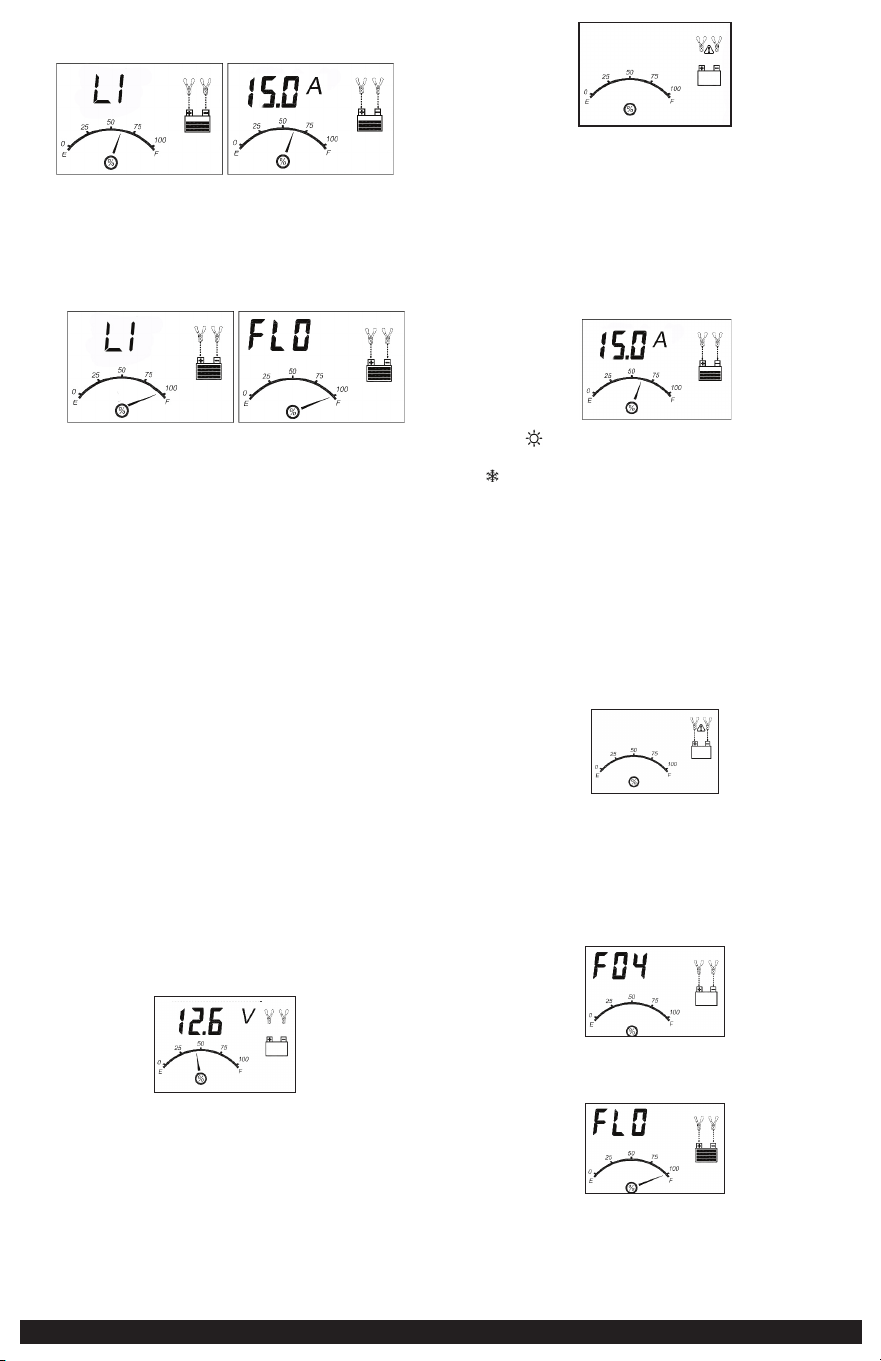
13
y los íconos de flecha se moverán gradual y repetidamente hacia abajo hasta el
ícono de la batería.
IMPORTANTE: Si la unidad se sobrecalienta, el ícono de alarma de
sobrecalentamiento y el ícono de falla parpadearán. Desconecte el cargador y
deje que el cargador se enfríe durante varios minutos. Asegúrese de que haya
una ventilación adecuada alrededor de la unidad antes de intentar cargar de
nuevo.
4. Cuando la batería está completamente cargada, la pantalla LCD muestra lo
siguiente:
La pantalla digital muestra “FLO” y “LI” alternativamente. El indicador de carga
de la batería señala al 100%, indicando una carga completa. El ícono de la
abrazadera, el ícono de la batería con cuatro barras y los íconos de flechas se
iluminan de forma continua.
Al desconectar el cargador, desconecte el cable de AC, retire la abrazadera del
chasis del vehículo y luego retire la abrazadera del terminal de la batería.
CARGA DE UNA BATERÍA DE PLOMO ÁCIDO
ADVERTENCIA: PARA REDUCIR EL RIESGO DE LESIONES O DAÑOS A LA PROPIEDAD
• Desconecte siempre el enchufe de AC de la toma de AC antes de desconectar el
cargador de la Batería que se va a cargar.
• Asegúrese de que todas las instrucciones de instalación, funcionamiento y
precauciones de seguridad se comprendan y observen; luego siga los pasos
descritos en la sección correspondiente (“CARGA DE UNA BATERÍA INSTALADA
EN UN VEHÍCULO ” o “CARGA DE UNA BATERÍA QUE SE HA REMOVIDO DE UN
VEHÍCULO”).
1. Enchufe el cable de alimentación del Cargador de Batería en un tomacorriente
de AC.
2. Las abrazaderas de la Batería del cargador están codificadas por colores. El rojo es
positivo; el negro es negativo Conecte las abrazaderas de la Batería correctamente
a los conectores correspondientes en los postes de la Batería siguiendo los pasos
descritos en la sección “INSTRUCCIONES DE SEGURIDAD IMPORTANTES” al principio
de este manual.
IMPORTANTE: Si las abrazaderas están correctamente conectadas con respecto a la
polaridad y la unidad está correctamente conectada a la toma de AC, presione el
botón “LITIO/PLOMO ÁCIDO” una vez para seleccionar el modo de carga PLOMO
ÁCIDO. La pantalla LCD mostrará lo siguiente (los Íconos de Abrazadera, los Íconos
de Flecha, el Ícono de la Batería y el Medidor sin el puntero se iluminará de forma
continua, así como el voltaje de la batería).
PRECAUCIÓN: asegúrese de seleccionar el modo de carga adecuado para cargar una
batería de Lithium LiFePO4 de 12V o una de plomo ácido de 12V.
Si las abrazaderas están INCORRECTAMENTE conectadas con respecto a la polaridad,
la pantalla LCD mostrará lo siguiente (los “+” y “–” dentro del Ícono de la Batería y
el Ícono de Falla parpadearán y los Íconos de la Abrazadera, el Ícono de la Batería
y el Medidor sin el puntero se iluminará) y sonará una advertencia hasta que se
desconecten las pinzas.
Desenchufe el cargador; luego retire las abrazaderas. Vuelva a conectar las
abrazaderas correctamente.
3. Después de 10 segundos, la unidad comenzará automáticamente a cargar
la batería. La Pantalla Digital muestra la corriente de salida que está cargando
la batería. El Medidor indica el estado de carga de la batería. Los Íconos de
Abrazadera y el Ícono de la Batería se encienden de manera continua, las barras
en el Ícono de la Batería cambiarán de vacías a sólidas (de abajo hacia arriba)
repetidamente y los iconos de flecha se moverán gradual y repetidamente hacia
abajo hasta el ícono de la batería:
Notas: El icono aparecerá en la parte superior derecha de la sección del medidor
si la temperatura ambiente circundante es superior a aproximadamente 40 °C. El
icono “
” aparecerá en la parte superior izquierda de la sección del medidor si la
temperatura ambiente circundante es inferior a 0 °C. Este no es un código de falla,
pero indica que la función de compensación de temperatura de la unidad está
funcionando.
IMPORTANTE: Si la unidad se sobrecalienta, la pantalla LCD mostrará lo siguiente (el
ícono de alarma de sobrecalentamiento y el ícono de falla parpadearán. Desconecte
el cargador y deje que se enfríe durante varios minutos. Asegúrese de que haya
una ventilación adecuada alrededor de la unidad antes de intentar cargarla
nuevamente.
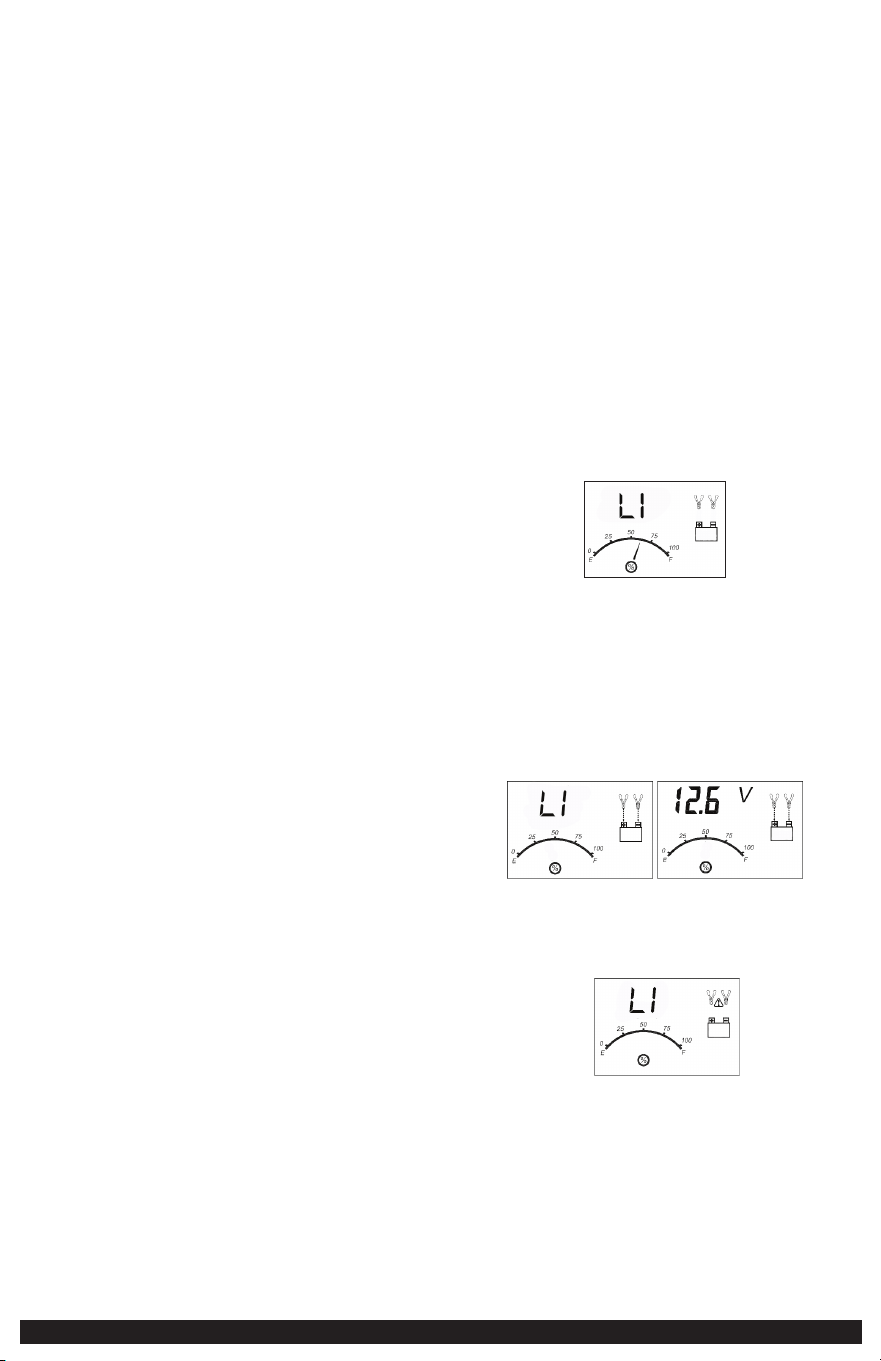
IMPORTANTE: El cargador detectará automáticamente el estado de la batería. Si
detecta un problema con la batería, la pantalla LCD mostrará el ícono de indicación
de falla (el ícono de falla y el ícono de la batería parpadearán; y los íconos de
abrazadera, los íconos de flecha y el medidor sin el puntero se iluminarán):
Desconecte el cargador. Haga revisar la batería por un técnico calificado.
IMPORTANTE: Si la batería no está completamente cargada (el medidor de carga
de la batería no llega al 100 %) después de 18 horas de carga continua, la batería
puede tener daños internos y no aceptará una carga. Después de 18 horas, el
proceso de carga se interrumpirá automáticamente, la pantalla LCD mostrará lo
siguiente (la lectura digital muestra “F04”, los íconos de abrazadera, los íconos
de flecha, el ícono de la batería y el indicador sin el puntero se iluminarán sin
parpadear):
Desconecte el cargador. Haga revisar la batería por un técnico calificado.
4. Cuando la batería está completamente cargada, la unidad entra automáticamente
en el modo de carga flotante y la pantalla LCD muestra lo siguiente:
5. La pantalla digital muestra “FLO” para indicar que la unidad está en modo de
carga flotante. El indicador de carga de la batería apunta al 100 %, lo que indica
una carga completa. El ícono de la abrazadera y el ícono de la batería con cuatro
barras se iluminan de manera continua, y los íconos de flecha se moverán gradual
y repetidamente hacia abajo hasta el ícono de la batería. En este modo, la unidad
14
controla el voltaje de la batería y se carga según sea necesario para garantizar que
la batería mantenga su capacidad máxima. La unidad permanece en modo de carga
flotante siempre que el cargador esté conectado a la batería y enchufado a un
tomacorriente de AC que funcione.
Al desconectar el cargador, desconecte el cable de AC, retire la abrazadera del
chasis del vehículo y luego retire la abrazadera del terminal de la batería.
COMPROBACIÓN DEL VOLTAJE DE LA BATERÍA
Para comprobar el voltaje de la batería en modo de carga:
Pulse el botón Voltage/Alt Check y la pantalla LCD mostrará lo siguiente:
La pantalla digital muestra el voltaje actual de la batería conectada y LI
alternativamente durante 10 segundos en modo de carga de litio. La pantalla
digital muestra el voltaje actual de la batería conectada durante 10 segundos
en el modo de carga de plomo ácido. La unidad volverá automáticamente al
modo de carga después de 10 segundos.
Al desconectar el cargador, desconecte el cable de la CA, quite la abrazadera de
chasis del vehículo, y después quite la abrazadera del terminal de la batería.
USANDO LA FUNCIÓN DEL CHEQUE DEL ALTERNADOR
IMPORTANTE: La Función de Verificación del Alternador (Voltage/Alt Check) solo
debe usarse con Baterías de Plomo Ácido. Fije el cargador de batería y conecte con
la batería después de los pasos 1 a 2 en la sección “CARGA DE UNA BATERÍA DE
PLOMO ÁCIDO”.
Parte 1
Sin carga (apague todos los accesorios del vehículo): La batería debe ser cargada
completamente antes de probar el alternador. Funcione con el motor bastante
tiempo para alcanzar velocidad ociosa normal y verificar allí es un voltaje sin carga.
1. Presione el botón Voltage/Alt Check para iniciar la comprobación. La pantalla
LCD exhibirá lo siguiente para indicar que la unidad está analizando el
alternador:
“CHECK” y el icono del alternador destellará y el medidor sin el puntero se
iluminará sólido.
2. Si la unidad detecta que el alternador es bueno, la pantalla del LCD exhibirá
lo siguiente:
“GOOD”, el icono del alternador y el medidor sin el puntero se iluminará
sólido.
3. Si la unidad detecta que el alternador está fuera de rango típico de voltaje, la
pantalla LCD exhibirá lo siguiente:
El Icono de fallo destellará; y el icono de alternador,“ALT” y el medidor sin el
puntero se iluminará sólido.
4. Presione el botón de verificación del alternador otra vez para la prueba.
Parte 2
Bajo carga (accesorios encendidos): Después, cargar el alternador girando tantos
accesorios como sea posible (a excepción del aire acondicionado y desempañador
de ventanas).
1. Mantenga presionado el botón Voltaje/Alt Check durante 2 segundos para
comenzar el chequeo. La pantalla LCD exhibirá lo siguiente para indicar que la
unidad está analizando el alternador:
“CHECK” destellará y el medidor sin el puntero se iluminará sólido.
2. Si la unidad detecta que el alternador es bueno, la pantalla del LCD exhibirá
lo siguiente:
“GOOD”, el icono del alternador y el medidor sin el puntero se iluminará
sólido.
3. Si la unidad detecta que el alternador está fuera de rango típico de voltaje, la
pantalla del LCD exhibirá lo siguiente:
El Icono de fallo destellará; y el icono de alternador, “ALT” y el medidor sin el
puntero se iluminará sólido.
4. Presione y mantenga presionado el botón de Voltage/Alt Checknuevamente
durante 2 segundos para detener la prueba.
Notas: Todos los botones excepto el botón de verificación del alternador están
desactivados en el modo de comprobación del alternador.
La unidad puede detectar que el alternador está fuera de rango típico de
voltaje porque alguien ha agregado un número de cargas del accesorio
en el sistema de carga, de tal modo aumentando demanda actual del
alternador. CERCIÓRESE DE QUE EL ALTERNADOR ESTÉ CLASIFICADO PARA
APOYAR EL USO. Esta exanimación no puede ser exacta para cada marca,
modelo o fabricante de vehículo. Comprobar en sistemas de 12 voltios
solamente.
Al desconectar el cargador, desconecte el cable de la CA, quite la abrazadera de
chasis del vehículo, y después quite la abrazadera del terminal de la batería.
REACONDICIONAMIENTO DE LA BATERÍA
IMPORTANT: El reacondicionamiento solo debe usarse con Baterías de Plomo Ácido.
El reacondicionamiento periódico se recomienda para mantener un rendimiento
óptimo de una batería. Reacondicionar una batería envía una serie de pulsos
eléctricos para romper para arriba la forma cristalina de sulfato del plomo y para
dar vuelta estos productos químicos en los electrólitos de batería útiles. El proceso
parará automáticamente después de 24 horas. Para parar el proceso más pronto,
presione la batería reacondicionan el botón una segunda vez. Más de 24 horas
pueden ser necesarias restaurar funcionamiento en algunas baterías. Si es así, repita
el proceso.
1. Fije el cargador de batería y conecte a la batería después de los pasos 1 a 2 en
la sección de “CARGA DE UNA BATERÍA DE PLOMO ÁCIDO”.
2. Presione el botón de reacondicionar la batería. La pantalla LCD demostrará lo
siguiente:
Los iconos de reacondicionamiento de la batería, el icono de las pinzas, el icono
de batería se iluminarán sólido y el medidor sin el puntero se iluminará sólido;
y las barras en el icono de la batería cambian de sólida a vacío (arriba a abajo)
repetidamente y los iconos de reacondicionamiento de la batería parpadearán.
3. Para detener el proceso de reacondicionamiento, presione nuevamente el
botón de reacondicionamiento de la batería.
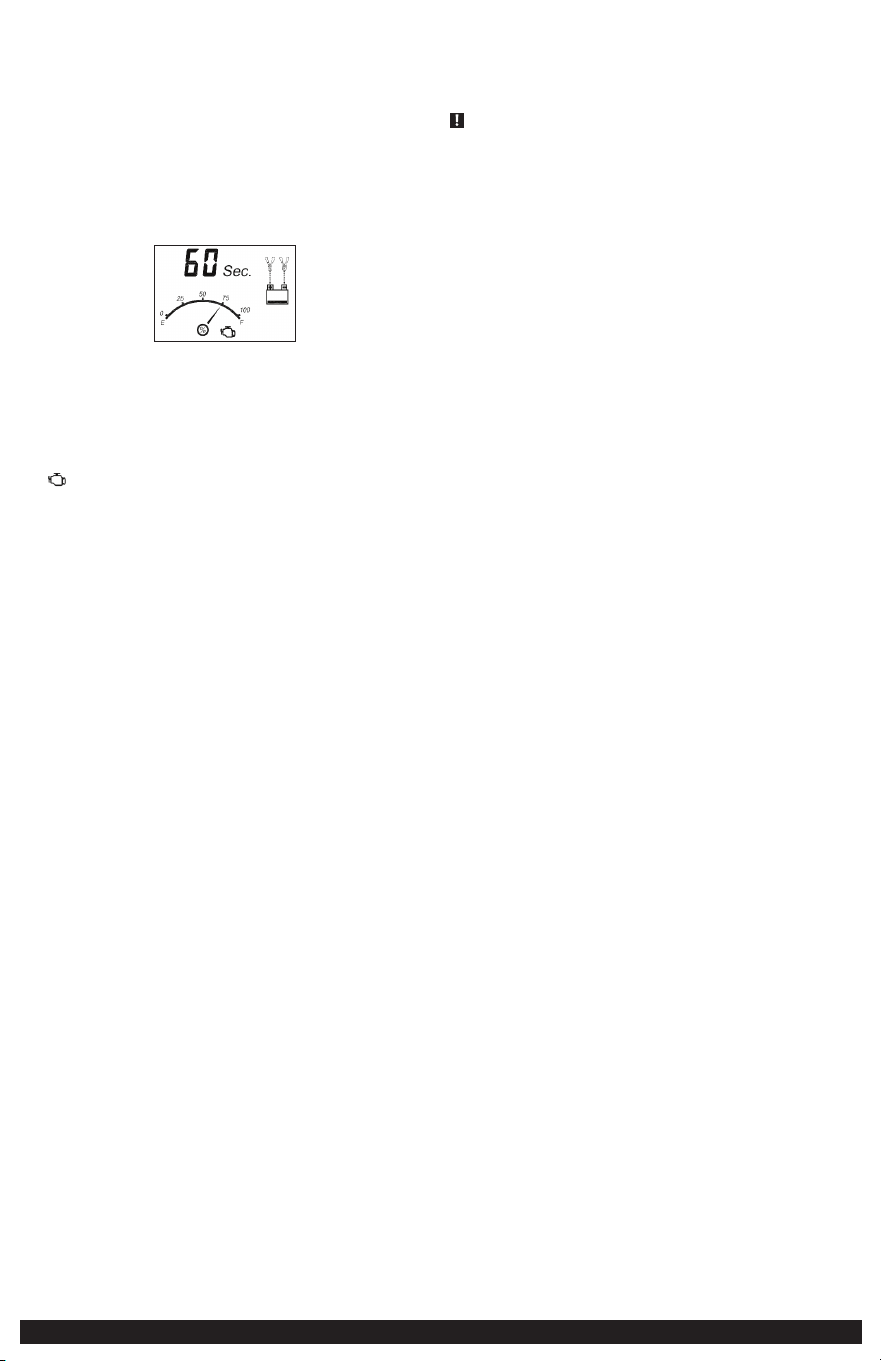
15
IMPORTANTE: Si 5 ciclos de reacondicionamiento no mejoran el funcionamiento
de la batería, suspender y recicle la batería. El cargador pasará al modo de carga
después de 24 horas automáticamente.
Al desconectar el cargador, desconecte el cable de la CA, quite la abrazadera de
chasis del vehículo, y después quite la abrazadera del terminal de la batería.
USANDO LA FUNCIÓN DEL COMIENZO DEL MOTOR
IMPORTANTE: El arranque del motor solo debe usarse con Baterías de Plomo Ácido.
1. Fije el cargador de batería y conecte con la batería después de los pasos 1 a 2
en la sección de “CARGA DE UNA BATERÍA DE PLOMO ÁCIDO”.
2. Presione el botón del contador de tiempo de arranque del motor. La pantalla
LCD demostrará lo siguiente:
El indicador digital muestra la cuenta descendiente regresiva.* El manómetro
indica el estado de carga de la batería. El icono de las pinzas y el icono de
batería se iluminará sólido; las barras en el icono de la batería cambian de vacío
a sólida (abajo a arriba) repetidamente y los iconos de flecha gradualmente y
repetidamente mover abajo hacia en el icono de la batería.
*La cuenta atrás se iniciará a partir de “60” a “00”.
3. Cuando se alcanza “00”, sonará un pitido, el icono de arranque del motor
(
) comenzarán a parpadear. El vehículo está listo para comenzar.
4. Haga girar el motor según las directrices del fabricante, habitualmente en
tandas de 3 a 5 segundos. La pantalla digital muestra “5 sec.”, indicando a 5
segundos de cuenta atrás
5. Después de poner, la unidad ajustará automáticamente la corriente de carga a
3A para que haya 5 minutos y después invertirá al modo de carga. Para detener
la carga, presione el botón de la carga.
IMPORTANTE: La función requiere un período de descanso/refrigeración entre
intentos. Espere de 4 a 5 minutos antes de un segundo intento de arrancar el motor,
si es necesario.
Para detener el proceso de carga, desconecte el cable de la CA, quite la
abrazadera de chasis del vehículo, y después quite la abrazadera del terminal de
la batería.
DETECCIÓN DE PROBLEMAS
La unidad no carga
• Asegúrese de que todas las conexiones son seguras.
• Controle que el cargador esté conectado correctamente a un tomacorriente de 120
voltios CA que funcione.
• Si la batería que se cargará ha caído debajo de 2 voltios, la batería no se puede
recargar con este cargador.
CUIDADO Y MANTENIMIENTO
Para reducir el riesgo de choque eléctrico, desconecte el cargador de batería del
enchufe antes de intentar cualquier mantenimiento o limpieza. Apagar los controles
no reducirá este riesgo.
LIMPIEZA
• Limpie la cubierta y los cables de la unidad con un paño seco. Asegúrese de que
la unidad este totalmente desconectada de la batería y de la fuente de energía
antes de limpiar.
• No sumerja el aparato en agua.
ALMACENAMIENTO
• Almacene la unidad en un lugar limpio, seco, fresco cuando no este en uso.
• Limpie la carcasa de la unidad y los cables (según sea necesario) con un paño
seco (o ligeramente húmedo). Asegúrese de que la unidad esté completamente
desconectada de la batería y de la fuente de alimentación antes de limpiarla.
• Para mantener la condición de funcionamiento y maximizar la vida de los cables
del cargador, arróllelas siempre libremente para el almacenaje. No las envuelva
alrededor de la unidad ni prénselas con una venda apretada.
ACCESORIOS
Accesorios recomendados para uso con esta unidad puede ser disponibles a través
del fabricante. Si necesita ayuda con respecto a los accesorios, por favor póngase en
contacto con el fabricante al 1-877-571-2391.
ADVERTENCIA: El uso de cualquier accesorio no recomendado para el uso con
esta unidad podía ser peligroso.
ASISTENCIA TÉCNICA
Para servicio al cliente o asistencia técnica, comuníquese con el fabricante al 1-877-
571-2391.
GARANTÍA LIMITADA DEL
FABRICANTE DE UN AÑO
El fabricante, Baccus Global LLC, ofrece garantía por este producto contra defectos
de materiales y de mano de obra por un período de UN (1) AÑO a partir de la fecha
de compra minorista por parte del comprador que sea el usuario final original o
desde la fecha de entrega del bien, cualquiera que sea la fecha que ocurra más
tarde (“Período de Garantía”).
Cuando haya un defecto y el fabricante reciba un reclamo válido dentro del
Período de Garantía, el producto defectuoso se podrá reemplazar de las siguientes
maneras: (1) Devolviendo el producto al fabricante para reemplazarlo. Es posible
que el fabricante solicite un comprobante de compra. (2) Devolviendo el producto
al minorista donde se compró para un cambio (siempre que la tienda sea una
tienda minorista participante). Las devoluciones al minorista deben realizarse dentro
del período de tiempo de la política de devolución del minorista para cambios
únicamente. Es posible que se requiera prueba de compra. Consulte con el minorista
su política de devolución específica con respecto a las devoluciones que superan el
tiempo establecido para los cambios.
Esta garantía del fabricante no se aplicará a accesorios, bombillas, fusibles y baterías;
a defectos resultantes del desgaste normal, a accidentes; a daños sufridos durante el
envío; a alteraciones; a uso no autorizado; a negligencia, al mal uso, al abuso; y al
incumplimiento de las instrucciones de cuidado y mantenimiento del producto.
Esta garantía del fabricante le otorga a usted, el comprador minorista original,
derechos legales específicos y usted puede tener otros derechos que pueden variar
de un estado a otro o de una provincia a otra. Este producto no está diseñado para
uso comercial. Para registrar su producto con el fabricante, visite www.BaccusGlobal.
com.
Las fotos de este manual pueden diferir de la unidad real.
ESPECIFICACIONES
Entrada: 120V CA, 60Hz, 270W
Salida: 12V CC, 15A
40A comienzo del motor (5 segundos
encendido, 5 minutos apagado)
Importados por Baccus Global LLC,
225 NE Mizner Blvd., Suite 301, Boca Raton, FL 33432
www.Baccusglobal.com 1-877-571-2391
RD032724