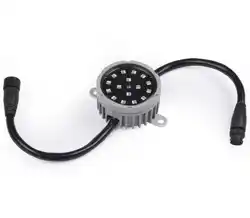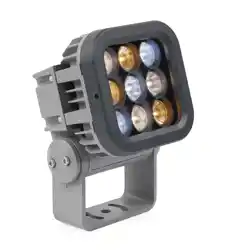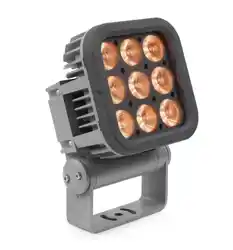
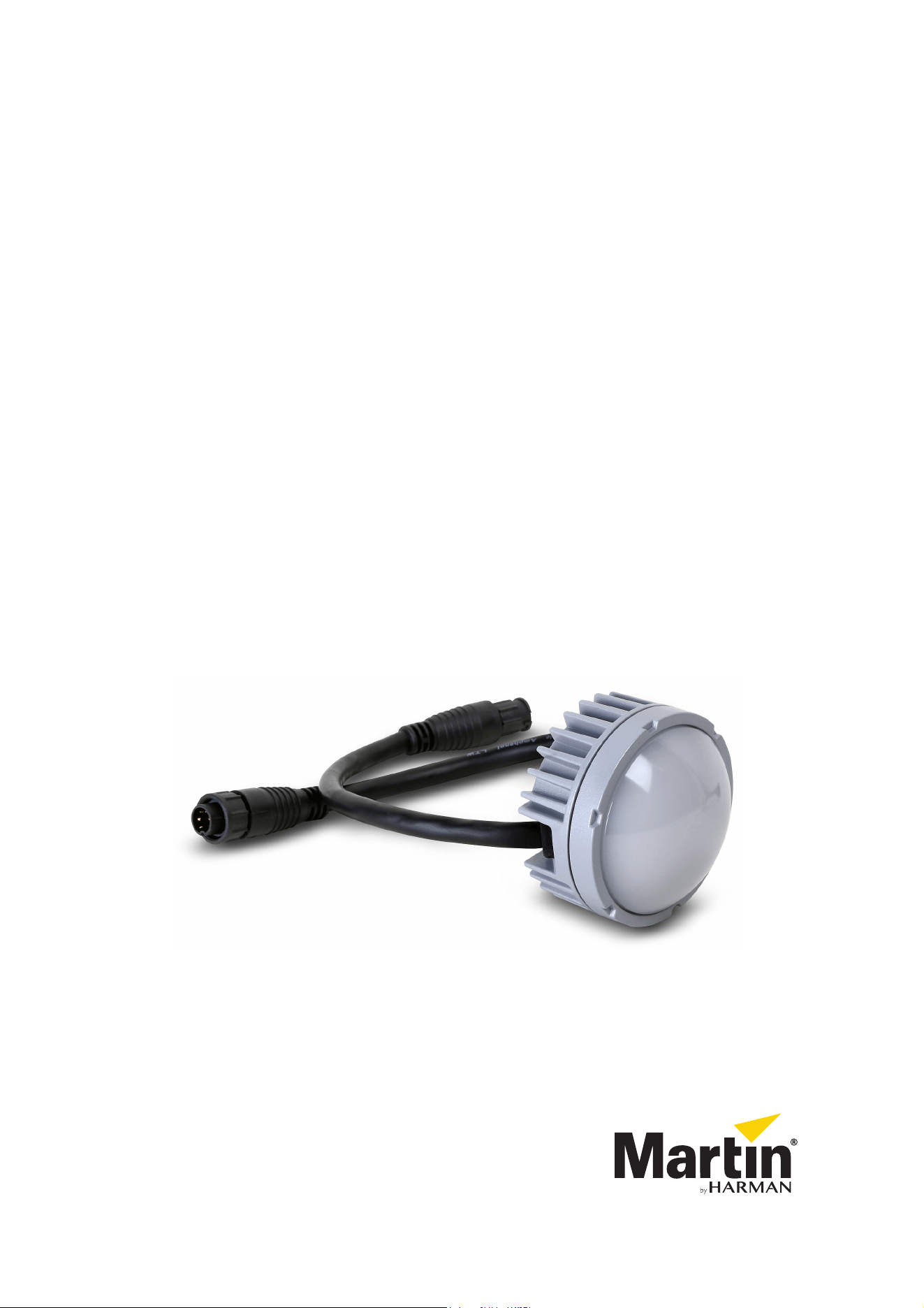
Exterior Dot-HP
User Manual
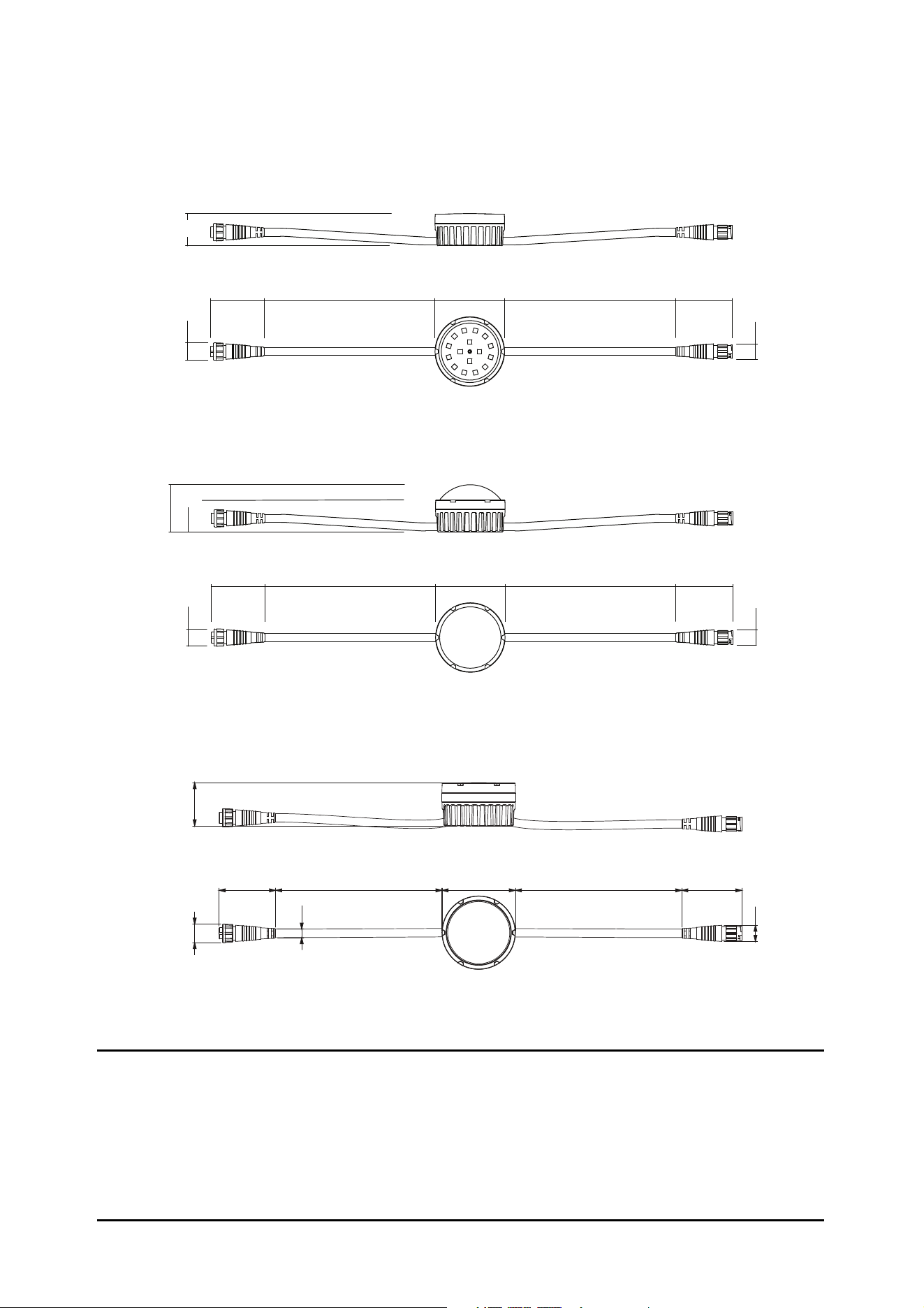
Dimensions
Direct Dot-to-Dot connection allows up to 0.5 m (19.6 in.) pixel pitch. All dimensions are in millimeters.
Input Throughput
Exterior Dot-HP, diffuser dome front
33
49
Input Throughput
55
Ø18
Ø72 177 55
Ø16
55
Ø18
177 Ø72 177 55
Ø16
34
43
Input Throughput
177
55
Ø18
Ø72 177 55
Ø16
177
Exterior Dot-HP, directional front
Exterior Dot-HP, clear front
©2015-2021 HARMAN PROFESSIONAL DENMARK ApS. All rights reserved. Features, specifications and appearance are subject
to change without notice. HARMAN PROFESSIONAL DENMARK ApS and all affiliated companies disclaim liability for any injury,
damage, direct or indirect loss, consequential or economic loss or any other loss occasioned by the use of, inability to use or reliance
on the information contained in this document. Martin is a registered trademark of HARMAN PROFESSIONAL DENMARK ApS
registered in the United States and/or other countries.
HARMAN PROFESSIONAL DENMARK ApS
, Olof Palmes Alle 44, 8200 Aarhus N, Denmark
HARMAN PROFESSIONAL SOLUTIONS U.S.
, 8500 Balboa Blvd., Northridge CA 91329, USA
www.martin.com
Exterior Dot-HP User Manual P/N 5080227 Rev. D
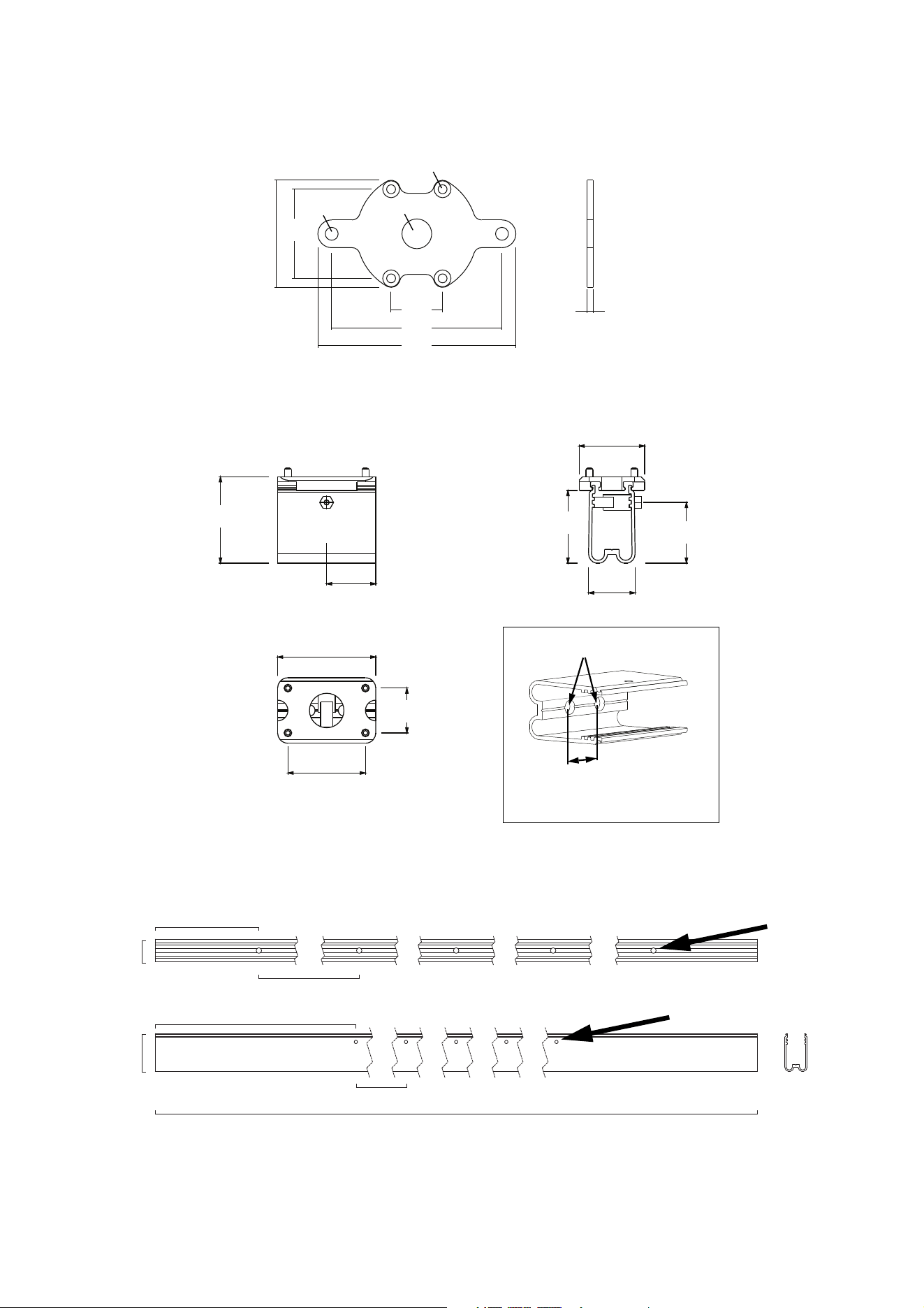
Dimensions
3
28.5
27
All dimensions are in millimeters
54 45
26
86
100
Ø6.5
Ø15
3
Exterior Dot-HP mounting plate
Exterior Dot-HP mounting profile, 57 mm (12.6 in.)
Ø4.5
51
43
36
38
57
45
26
Profile with Dot bracket installed
20
Ø6.5
258
124
1280
27
45
Ø 6.5
Exterior Dot-HP mounting profile, 1280 mm (50.4 in.)
Profile without Dot bracket
240
200
Ø 4

4
Exterior Dot-HP User Manual
Contents
Dimensions . . . . . . . . . . . . . . . . . . . . . . . . . . . . . . . . . . . . . . . . . . . . . . . . . . . . . . . . . . . . . . . . . . . . . . . . 2
Safety information . . . . . . . . . . . . . . . . . . . . . . . . . . . . . . . . . . . . . . . . . . . . . . . . . . . . . . . . . . . . . . . . . . 5
Introduction . . . . . . . . . . . . . . . . . . . . . . . . . . . . . . . . . . . . . . . . . . . . . . . . . . . . . . . . . . . . . . . . . . . . . . . 10
Precautions to avoid damage . . . . . . . . . . . . . . . . . . . . . . . . . . . . . . . . . . . . . . . . . . . . . . . . . . . . . . . . 11
Exterior Dot-HP overview . . . . . . . . . . . . . . . . . . . . . . . . . . . . . . . . . . . . . . . . . . . . . . . . . . . . . . . . . . 12
Physical installation . . . . . . . . . . . . . . . . . . . . . . . . . . . . . . . . . . . . . . . . . . . . . . . . . . . . . . . . . . . . . . . 13
Avoiding damage . . . . . . . . . . . . . . . . . . . . . . . . . . . . . . . . . . . . . . . . . . . . . . . . . . . . . . . . . . . . . . . . . . 13
Mounting on a surface or structure . . . . . . . . . . . . . . . . . . . . . . . . . . . . . . . . . . . . . . . . . . . . . . . . . . . . 14
Installing using mounting profile . . . . . . . . . . . . . . . . . . . . . . . . . . . . . . . . . . . . . . . . . . . . . . . . . . . . . . 15
System installation . . . . . . . . . . . . . . . . . . . . . . . . . . . . . . . . . . . . . . . . . . . . . . . . . . . . . . . . . . . . . . . . 18
Installing a P3 system . . . . . . . . . . . . . . . . . . . . . . . . . . . . . . . . . . . . . . . . . . . . . . . . . . . . . . . . . . . . . . 18
Installing a DMX-controlled system . . . . . . . . . . . . . . . . . . . . . . . . . . . . . . . . . . . . . . . . . . . . . . . . . . . . 20
System setup . . . . . . . . . . . . . . . . . . . . . . . . . . . . . . . . . . . . . . . . . . . . . . . . . . . . . . . . . . . . . . . . . . . . . 25
Setting up for P3 display . . . . . . . . . . . . . . . . . . . . . . . . . . . . . . . . . . . . . . . . . . . . . . . . . . . . . . . . . . . . 25
Setting up for DMX control. . . . . . . . . . . . . . . . . . . . . . . . . . . . . . . . . . . . . . . . . . . . . . . . . . . . . . . . . . . 25
RDM . . . . . . . . . . . . . . . . . . . . . . . . . . . . . . . . . . . . . . . . . . . . . . . . . . . . . . . . . . . . . . . . . . . . . . . . . . . . . 27
Using the Exterior Dot-HP . . . . . . . . . . . . . . . . . . . . . . . . . . . . . . . . . . . . . . . . . . . . . . . . . . . . . . . . . 28
Thermal regulation. . . . . . . . . . . . . . . . . . . . . . . . . . . . . . . . . . . . . . . . . . . . . . . . . . . . . . . . . . . . . . . . . 28
P3 display . . . . . . . . . . . . . . . . . . . . . . . . . . . . . . . . . . . . . . . . . . . . . . . . . . . . . . . . . . . . . . . . . . . . . . . 28
DMX control . . . . . . . . . . . . . . . . . . . . . . . . . . . . . . . . . . . . . . . . . . . . . . . . . . . . . . . . . . . . . . . . . . . . . . 28
Magnetic ‘control button’ . . . . . . . . . . . . . . . . . . . . . . . . . . . . . . . . . . . . . . . . . . . . . . . . . . . . . . . . . . . . 29
Service and maintenance. . . . . . . . . . . . . . . . . . . . . . . . . . . . . . . . . . . . . . . . . . . . . . . . . . . . . . . . . . 32
Cleaning. . . . . . . . . . . . . . . . . . . . . . . . . . . . . . . . . . . . . . . . . . . . . . . . . . . . . . . . . . . . . . . . . . . . . . . . . 32
Condensation and pressure relief valve . . . . . . . . . . . . . . . . . . . . . . . . . . . . . . . . . . . . . . . . . . . . . . . . 32
LED performance. . . . . . . . . . . . . . . . . . . . . . . . . . . . . . . . . . . . . . . . . . . . . . . . . . . . . . . . . . . . . . . . . . 32
Installing new software . . . . . . . . . . . . . . . . . . . . . . . . . . . . . . . . . . . . . . . . . . . . . . . . . . . . . . . . . . . . . 33
Troubleshooting . . . . . . . . . . . . . . . . . . . . . . . . . . . . . . . . . . . . . . . . . . . . . . . . . . . . . . . . . . . . . . . . . . 34
DMX protocols . . . . . . . . . . . . . . . . . . . . . . . . . . . . . . . . . . . . . . . . . . . . . . . . . . . . . . . . . . . . . . . . . . . . 35
Exterior Dot-HP RGB. . . . . . . . . . . . . . . . . . . . . . . . . . . . . . . . . . . . . . . . . . . . . . . . . . . . . . . . . . . . . . . 35
Exterior Dot-HP CW. . . . . . . . . . . . . . . . . . . . . . . . . . . . . . . . . . . . . . . . . . . . . . . . . . . . . . . . . . . . . . . . 37
Specifications . . . . . . . . . . . . . . . . . . . . . . . . . . . . . . . . . . . . . . . . . . . . . . . . . . . . . . . . . . . . . . . . . . . . . 38
Safety information
5
Safety information
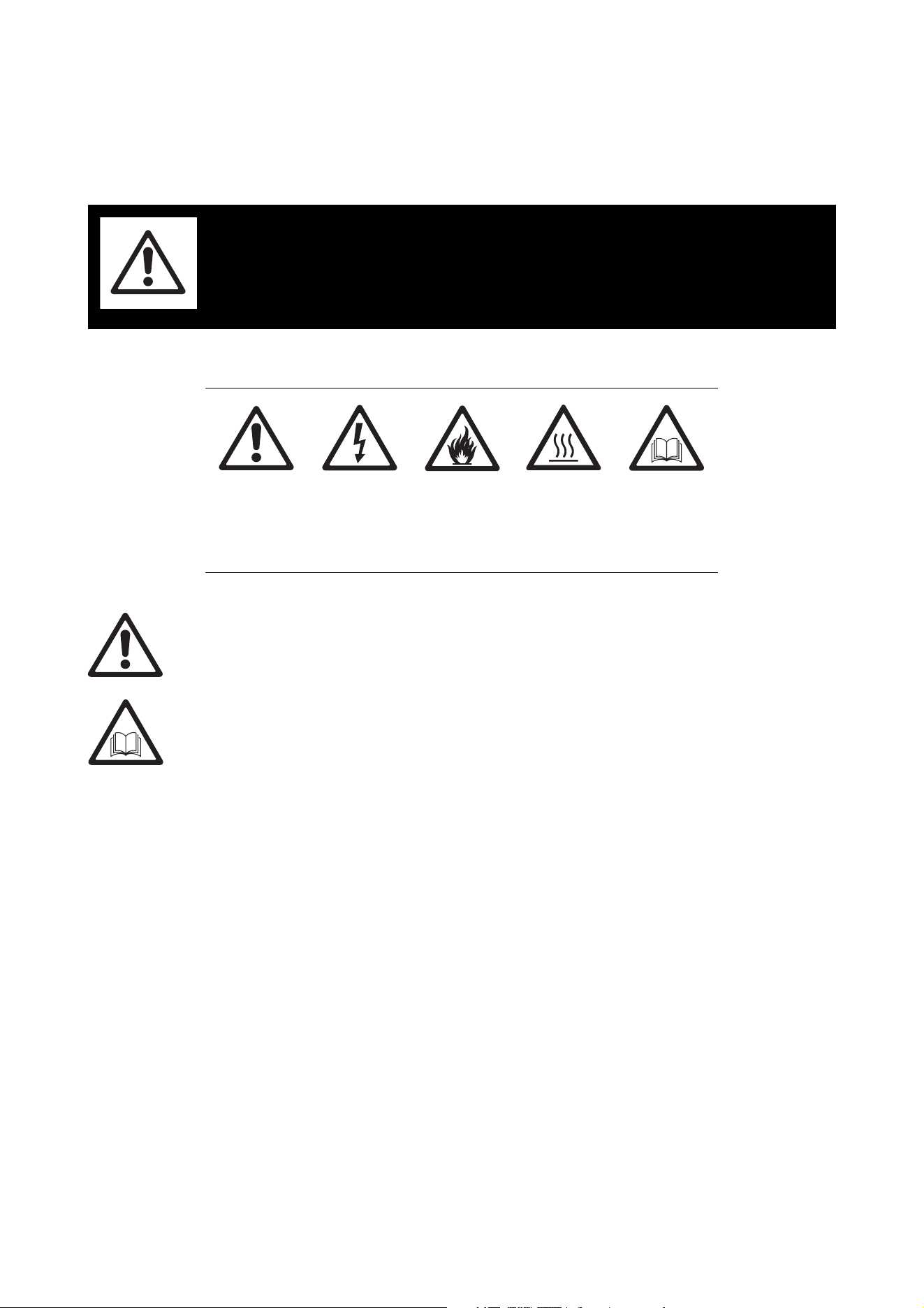
The following symbols are used to identify important safety information on the product and in this document:
Warning!
• Check the Exterior Dot-HP Product Support / Tech Docs page on the Martin® website at
www.martin.com and make the sure that you have the latest user documentation for the product.
Martin user manual revisions are identified at the bottom of page 2.
• Read the latest revision of the user manual before installing, operating or servicing the Martin
Exterior Dot-HP.
• Follow the safety precautions given in this user manual and in the manuals of all the devices you
connect to the product. Observe all warnings given in manuals and printed on devices. Make sure
that everyone who is involved in working on or using the product has read and understood these
safety precautions and warnings.
• Install, connect, operate and service devices only as described in this user manual and in
connected devices’ user documentation and only in accordance with local laws and regulations.
All Martin user documentation is supplied with devices and available for download from
www.martin.com.
• This product is not for household use. It presents risks of severe injury or death due to fire and
burn hazards, electric shock and falls. It must be installed by qualified technicians only.
• This product does not have user-serviceable parts. Refer any operation not described in this
manual to Martin Global Service or a Martin authorized service agent.
If you have any questions about how to operate this product safely, please contact your Martin supplier or
call the Martin 24-hour service hotline on +45 8740 0000, or in the USA on 1-888-tech-180.
WARNING!
Read the safety precautions in this section before
installing, powering, operating or servicing this
product.
Warning!
Safety hazard.
Risk of severe
injury or
death.
Warning!
Hazardous
voltage. Risk
of severe or
lethal electric
shock.
Warning!
Fire hazard.
Warning!
Burn hazard.
Hot surface
with risk of
burns.
Warning!
Refer to user
manual.
6
Exterior Dot-HP User Manual
PROTECTION FROM ELECTRIC SHOCK
• Read and respect the directions given in the user documentation of all the devices that you intend to
connect to the Exterior Dot-HP, particularly the instructions, warnings and limits that apply to:
- system layout,
- connections to other devices,
- specified cables,
- maximum cable lengths, and
- maximum number of devices that can be connected.
• Use only the cables specified in this manual and on the Martin website at www.martin.com to interconnect
devices in the installation. If the specified cables are not long enough for an intended cable run, consult
Martin for assistance in finding or creating a safe alternative solution.
• Provide a means of locking out AC mains power so that power to the installation can be shut down and
made impossible to reapply, even accidentally, during work on the installation.
• Shut down power to the installation during service and when it is not in use.
• Before applying power to the installation, check that all power distribution equipment and cables are in
perfect condition and rated for the current requirements of all connected devices.
• Isolate the installation from power immediately if any product, power cable or power plug is in any way
damaged, defective, or if it shows signs of overheating.
• Do not immerse the Exterior Dot-HP in water.
• If you supply a chain of Exterior Dot-HP Dots with DC power from a generic 48 VDC external PSU and
the DC output used does not have constant overcurrent protection that limits current to 7.5 A, install an
inline fuseholder with a 7.5 A fuse on the circuit that you connect to that DC output.
• Do not allow the total number of Dots in a linked chain of Exterior Dot-HP Dots to exceed the safe limits
given in the tables in the following section of this manual.
Safety limits for connecting devices
Do not exceed the maximum safety limits given below and in the following tables.:
• The maximum permitted total length of a chain of Exterior Dot-HP Dots is 115 m (377 ft.). When you
calculate the total length of the chain, include the cable tails on Dots (2 x 25 cm or 2 x 10 ins. per Dot) plus
the lead-in cable (cable between the DC power source and the first Exterior Dot-HP Dot), plus all
extension cable added between Dots.
• The maximum permitted length of a lead-in cable is 100 m (328 ft.).
• The maximum permitted length of cable between two Exterior Dot-HP Dots is 20 m (65 ft.). If you need to
position two Dots with a distance longer than 20 m between them, do not connect them on one power +
data cable, as you will exceed the maximum of 20 m cable between Dots. Instead, install the two Dots on
two separate power + data cables: each cable must draw DC power from its own separate 48 VDC power
outlet.
• The maximum number of Exterior Dot-HP Dots that you can connect in one chain depends on the
following:
- type of device used as DC power source
- length of chain from DC power source to last Exterior Dot-HP Dot in chain
- calibration mode of Exterior Dot-HP Dots: uncalibrated or calibrated mode.
Do not exceed the limits given in the following sections.
Martin P3 PowerPort 1500 safety limits
If you supply Exterior Dot-HP Dots with DC power from a Martin P3 PowerPort 1500:
• Do not connect more than one chain of Dots per DC output on the P3 PowerPort 1500. Since the P3
PowerPort 1500 has four DC outputs, you can connect a maximum of four chains of Dots to one P3
PowerPort 1500.
• Check whether there is a possibility that the Dots may be used in uncalibrated mode or whether the Dots
will be used in calibrated mode only:
- If there is a possibility that the Dots may be used in uncalibrated mode, consult the figures for
‘Uncalibrated mode or mixed calibrated and uncalibrated modes’ in Table 1.
- If the Dots will be used in calibrated mode only, consult the figures for ‘Calibrated mode only’ in Table 1.
Safety information
7
• Do not exceed the maximum total number of Dots that you can include in one chain for the total cable
lengths listed in Table 1. If the total cable length is not given in the table, respect the maximum total
number of Dots given for the next highest length. In other words, if you create a cable with a total length of
46 m, do not exceed the maximum total number of Dots for a chain with a 70 m cable length.
Martin P3 PowerPort 1000 IP safety limits
If you supply Exterior Dot-HP Dots with DC power from an output on a Martin P3 PowerPort 1000 IP:
• Do not connect more than one linked chain of Exterior Dot-HP Dots to one DC output. Since the P3
PowerPort 1000 IP has four DC outputs, you can connect a maximum of four chains of Dots to one P3
PowerPort 1000 IP.
• Check whether there is a possibility that the Dots may be used in uncalibrated mode or whether the Dots
will be used in calibrated mode only:
- If there is a possibility that the Dots may be used in uncalibrated mode, consult the figures for
‘Uncalibrated mode or mixed calibrated and uncalibrated modes’ in Table 2.
- If the Dots will be used in calibrated mode only, consult the figures for ‘Calibrated mode only’ in Table 2.
• Do not exceed the maximum total number of Dots that you can include in one chain for the total cable
lengths listed in Table 2. If the total cable length is not given in the table, respect the maximum total
number of Dots given for the next highest length. In other words, if you create a cable with a total length of
46 m, do not exceed the maximum total number of Dots for a chain with a 70 m cable length.
Maximum permitted
number of Dots in
chain
Uncalibrated mode or
mixed calibrated and
uncalibrated modes
(7 W per Dot)
Up to 45 m (147 ft.) total cable length 44
45 - 70 m (147 - 230 ft.) total cable length 41
70 - 115 m (230 - 377 ft.) total cable length 33
Calibrated mode only
(5 W per Dot)
Up to 45 m (147 ft.) total cable length 63
45 - 70 m (147 - 230 ft.) total cable length 58
70 - 115 m (230 - 377 ft.) total cable length 48
Table 1: Max. number of Exterior Dot-HP Dots per P3 PowerPort 1500 output
Maximum permitted
number of Dots in
chain
Uncalibrated mode or
mixed calibrated and
uncalibrated modes
(7 W per Dot)
Up to 45 m (147 ft.) total cable length 30
45 - 70 m (147 - 230 ft.) total cable length 29
70 - 115 m (230 - 377 ft.) total cable length 25
Calibrated mode only
(5 W per Dot)
Up to 45 m (147 ft.) total cable length 45
45 - 70 m (147 - 230 ft.) total cable length 42
70 - 115 m (230 - 377 ft.) total cable length 37
Table 2: Max. number of Exterior Dot-HP Dots per P3 PowerPort 1000 IP output

8
Exterior Dot-HP User Manual
Martin IP66 PSU 240W safety limits
If you supply Exterior Dot-HP Dots with DC power from a Martin IP66 PSU 240W external power supply
unit:
• Do not connect more than one linked chain of Exterior Dot-HP Dots to the DC power output of the Martin
IP66 PSU 240W.
• Check whether there is a possibility that the Dots may be used in uncalibrated mode or whether the Dots
will be used in calibrated mode only:
- If there is a possibility that the Dots may be used in uncalibrated mode, consult the figures for
‘Uncalibrated mode or mixed calibrated and uncalibrated modes’ in Table 3.
- If the Dots will be used in calibrated mode only, consult the figures for ‘Calibrated mode only’ in Table 3.
• Do not exceed the maximum total number of Dots that you can include in one chain for the total cable
lengths listed in Table 3. If the total cable length is not given in the table, respect the maximum total
number of Dots given for the next highest length. In other words, if you create a cable with a total length of
46 m, do not exceed the maximum total number of Dots for a chain with a 70 m cable length.
Generic 48 VDC external PSU safety limits
If you supply a chain of Exterior Dot-HP Dots with DC power from a 48 VDC external PSU (power supply
unit) that is not manufactured by Martin, you must not exceed the maximum power rating of the
output from the PSU. Follow these instructions:
• Check whether there is a possibility that the Dots may be used in uncalibrated mode or whether the Dots
will be used in calibrated mode only:
- If there is a possibility that the Dots may be used in uncalibrated mode, allow a power consumption of 7
watts per Dot.
- If the Dots will be used in calibrated mode only, allow a power consumption of 5 watts per Dot.
• Calculate the total power consumption in watts of the Dots in each chain you plan to create. Do not create
a chain that will exceed the maximum power rating of the PSU output used to supply that chain with
power. Each time the total power consumption in watts for one chain reaches the PSU output’s maximum
power rating, you must create a new chain of Dots that is connected to a new 48 VDC power output.
• Do not exceed the maximum total number of Dots that you can include in one chain for the total cable
lengths listed in Table 4. If the total cable length is not given in the table, respect the maximum total
number of Dots given for the next highest length. In other words, if you create a cable with a total length of
46 m, do not exceed the maximum total number of Dots for a chain with a 70 m cable length.
Maximum permitted
number of Dots in
chain
Uncalibrated mode or
mixed calibrated and
uncalibrated modes
(7 W per Dot)
Up to 45 m (147 ft.) total cable length 29
45 - 70 m (147 - 230 ft.) total cable length 28
70 - 115 m (230 - 377 ft.) total cable length 24
Calibrated mode only
(5 W per Dot)
Up to 45 m (147 ft.) total cable length 42
45 - 70 m (147 - 230 ft.) total cable length 40
70 - 115 m (230 - 377 ft.) total cable length 36
Table 3: Max. number of Exterior Dot-HP Dots per Martin IP66 PSU 240W
Safety information
9
PROTECTION FROM BURNS AND FIRE
• The Exterior Dot-HP is cooled by convection. Provide free airflow and a minimum clearance of 10 mm (0.4
in.) around the product.
• Do not operate the Exterior Dot-HP if the ambient temperature (Ta) exceeds 55° C (131° F).
• The surface of the product can become hot when in use. Take precautions to avoid accidental skin
contact.
• Do not modify the Exterior Dot-HP in any way not described in this manual or install other than genuine
Martin parts. Use only accessories approved by Martin.
PROTECTION FROM INJURY
• Read carefully the chapter “Physical installation” on page 13 and respect the limits and instructions given
in that chapter.
• Ensure that the installation hardware and supporting surface or structure can hold at least 10 times the
weight of all the devices they support.
• Block access below the work area and work from a stable platform whenever installing, servicing or
moving the Exterior Dot-HP.
• Make sure that all items are securely installed, taking into consideration all possible environmental
conditions including temperature variation and wind. Make sure that it is impossible for items to fall and
cause injury or damage.
• Use grade 8.8 strength fasteners that are suitable for their purpose and for the installation environment.
• Fasten Exterior Dot-HP products to the supporting surface or structure with a minimum of two fasteners
(screws, bolts, etc.) per product.
• Either use self-locking nuts or use lockwashers with standard nuts on all machine screws and bolts.
Maximum permitted
number of Dots in
chain
Uncalibrated mode or
mixed calibrated and
uncalibrated modes
(7 W per Dot)
Up to 45 m (147 ft.) total cable length 29
45 - 70 m (147 - 230 ft.) total cable length 28
70 - 115 m (230 - 377 ft.) total cable length 24
Calibrated mode only
(5 W per Dot)
Up to 45 m (147 ft.) total cable length 42
45 - 70 m (147 - 230 ft.) total cable length 40
70 - 115 m (230 - 377 ft.) total cable length 36
Table 4: Max. number of Exterior Dot-HP Dots per generic 240 watt external PSU

10
Exterior Dot-HP User Manual
Introduction
Thank you for selecting a product from the Martin® Exterior Dot-HP family. These compact LED-based
display fixtures are designed to integrate into a Martin P3 video system, where they can display video from
a variety of sources. Each fixture forms one pixel in the video display. As well as video, the Exterior Dot-HP
can be controlled using a DMX lighting controller. Use of an RDM-compliant DMX controller also allows
two-way communication and remote management of Exterior Dot-HP fixtures from the controller.
The Exterior Dot-HP has an array of LEDs in a circular cast aluminum housing with a front cover that is
permanently sealed onto the unit to give a rugged IP66-rated Dot. Dots are supplied in clear front, diffuser
dome and directional front versions. All versions are available as either RGB or CW (cool white) models,
and various mounting options are available from Martin (see “Accessories” on page 40).
A hybrid (combined power and data) cabling system allows Exterior Dot-HP Dots to be daisy-chained for
easy setup and minimal cabling.
The Exterior Dot-HP system offers the following features:
• IP66-rated Dots and connectors
• Fast, flexible mounting options
• Range of optical variants
• Individually controllable red, green and blue pixel groups in RGB Dots
• High-quality 16-bit per color RGB image processing technology in RGB Dots
• Pixel-level brightness and color calibration for optimal image quality
• Choice of calibrated and uncalibrated DMX modes
• P3 video and DMX lighting control with automatic protocol detection
• Intuitive pixel mapping and addressing using a controller from the Martin P3 system controller range
• Single hybrid cable carrying both power and data
• External power and data processor from the Martin P3 PowerPort range and simple cabling system
• Corrosion resistance to C5-M (very high corrosivity environments including marine / coastal / offshore
according to ISO 12944).
• Electrostatic powder-coated finish, custom RAL colors available by special order
For detailed dimensions drawings in various file formats of all the products in the Exterior Dot-HP family,
please see the Exterior Dot-HP Tech Docs / Product Support pages on the Martin website at
www.martin.com
Martin user documentation is supplied with products and available for download from www.martin.com,
where you can also find the latest specifications, firmware updates and support information for all Martin
products. Before you install or use the Exterior Dot-HP, please check www.martin.com and make sure that
you have the latest user documentation for this product. Martin user documentation revisions are identified
at the bottom of page 2.

Introduction
11
Precautions to avoid damage
Important! To get the best out of the Exterior Dot-HP and avoid causing damage that is not covered by the
product warranty, make sure that everyone who is involved in installing, working on or using the Exterior
Dot-HP has read and understood the following information.
Cleaning
Excessive dirt buildup causes overheating and may lead to damage that is not covered by the product
warranty. Clean the product at regular intervals (see “Cleaning” on page 32).
Harsh environments
The Exterior Dot-HP has a rugged construction and is designed to withstand such outdoor conditions as
very high and very low temperatures, very heavy rain, etc. However, it is not designed for use in extreme
environments such as air with a high content of salt, chlorine, acid or other corrosive agents. Exposure to
harsh environmental conditions like these may result in deterioration of the product that is not covered by
the product warranty.
Operating temperature precautions
• Do not operate the Exterior Dot-HP in an ambient temperature that exceeds the specified maximum of
55° C (131° F) for showing average video content.
• Exterior Dot-HP Dots have an internal thermal sensor. If the sensor measures excessive temperature, a
thermal protection cutout shuts down the Dot. The Dot will not function normally again until the
temperature has fallen to a safe level.
• When using a Martin P3 System Controller you can enable "thermal throttling" functionality. This feature
gradually dims Dots if they get hot, avoiding full thermal shutdowns.
• Avoid installing at temperatures below freezing point, as the stress placed on cables by flexing increases
at very low temperatures.
Sealing unused connectors with blanking caps
Blanking caps for female BBD connectors can be ordered separately in sets of 10 (see “Loose connectors”
on page 40). Install blanking caps on all unused female BBD connectors to seal them against water and dirt,
otherwise short-circuits and damage may occur.
Maintaining IP66 protection
The Exterior Dot-HP is supplied as a sealed unit. Do not try to remove optical components or disassemble
the product in any other way or you will affect the product’s IP66-rated weatherproofing, which may cause
the product to malfunction and lead to damage.
Pressure relief vent
A vent with a Gore-Tex membrane in the base of the product equalizes pressure by allowing air to pass
through it when the product heats up and cools down, but at the same time it acts as a barrier to water in
liquid form. The expulsion of warm air (with a slightly higher water vapor content) and intake of cool air (with
a slightly lower water vapor content) prevents humidity buildup over time, provided that the vent works
correctly and that the product is correctly sealed.
Vents become blocked over time as the micropores in the membrane fill with particles. If a vent becomes
blocked by dirt – or by water if it has formed a pool over the vent – excess pressure can damage seals or
cause air and even water to be sucked into the product along cables. Vents cannot be cleaned and must be
replaced if not in perfect condition. Vent replacement intervals depend on the amount of airborne dirt and
dust in the installation location. Please contact an authorized Martin service agent for vent replacement.
• Any water that reaches the base of an Exterior Dot-HP will normally drain away, so there is normally no
risk of water forming a pool on a vent. However, do not install a Dot in any way that prevents rainwater,
condensation etc. from draining away from the base of the Dot.
• Contact an authorized Martin service agent for vent replacement if the vent shows signs of contamination
or is not in perfect condition.
• Vents must be replaced by an authorized Martin service agent after an extended period of use. Intervals
for vent replacement depend on the installation environment.
12
Exterior Dot-HP User Manual
Exterior Dot-HP overview
A
B
E
D
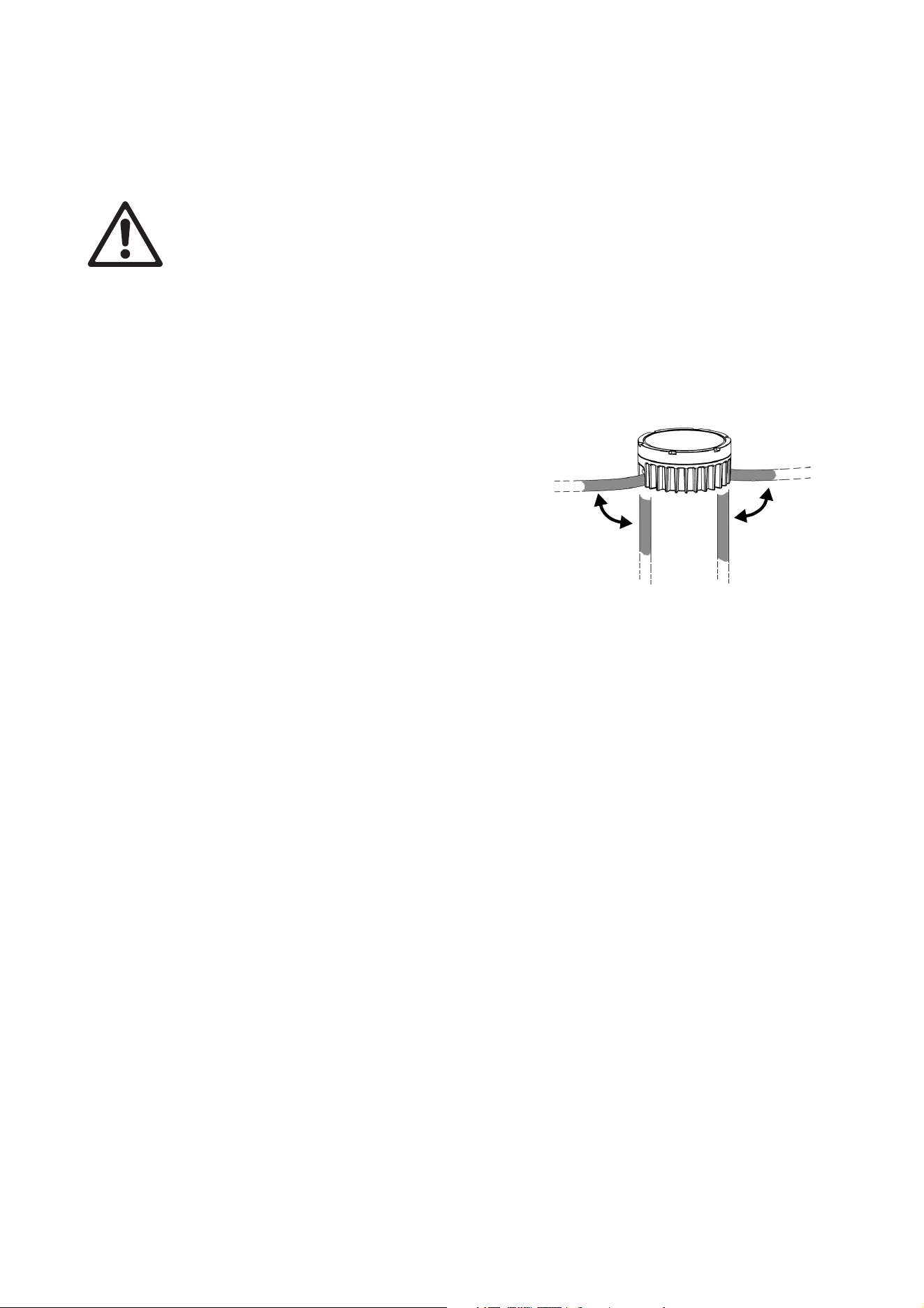
Figure 1: Overview
A - DC power + data male BBD-type input
connector
B - DC power + data female BBD-type output
(thru) connector
C - Magnetic sensor (inside Dot)
D - Pressure relief vent
E - Mounting plate (optional accessory)
C
Physical installation
13
Physical installation
Warning! Read “Safety information” on page 5 before installing the Exterior Dot-HP and read all of
this ‘Physical installation’ chapter before starting work.
You can install the Exterior Dot-HP on a surface or structure using one of two methods:
• You can fasten Exterior Dot-HP Dots to mounting plates and then fasten the mounting plates to the
surface or structure.
• You can fasten Exterior Dot-HP mounting profile to a flat surface or structure first and then clip and lock
Exterior Dot-HP Dots onto the mounting profile. This option lets you conceal up to two cable runs inside
the profile, giving a clean appearance.
The Exterior Dot-HP can be installed in any orientation.
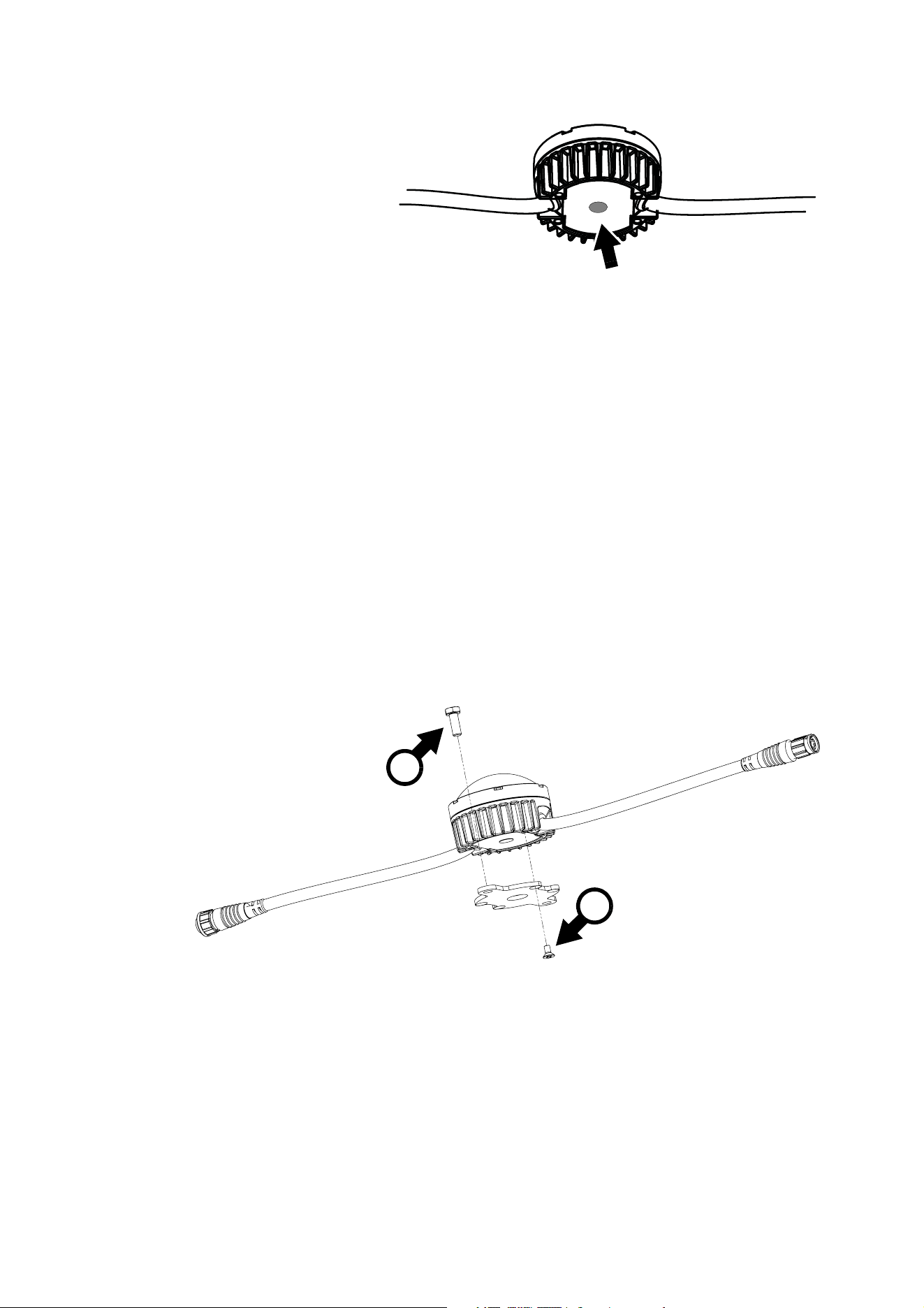
See Figure 2. The Exterior Dot-HP’s cable tails exit the
rear of the Dot at a 45° angle. This gives the option of
running cables towards the rear or towards the sides of
the Dot, catering for a range of cable installation options.
Do not install Exterior Dot-HP Dots with a cable run
longer than 20 m (65 ft.) between any two Dots.
Allow free airflow around the product and at least 10 mm
(0.4 in.) of clearance around the front surface.
The Exterior Dot-HP is designed to withstand water
projections such as rainfall and low-pressure water jets
and can be installed outdoors, but do not submerge it and
do not install it in a location where water can build up
around the Dot or under the base of the Dot. If necessary,
provide drainage at the installation location.
Avoiding damage
Avoid causing damage that is not covered by the product warranty by following these instructions carefully.
Keeping connections dry
Moisture on connectors can cause short circuits and damage to products. Check that all connectors are
perfectly dry before you connect them. Do not install the Exterior Dot-HP during wet weather conditions or if
condensation is visible on any surfaces.
Avoiding shocks and stress
Do not expose the Exterior Dot-HP to physical shocks (by dropping onto a hard surface, for example).
Do not apply pressure to or otherwise stress diffusers or lenses.
Do not stress cables (by bending them sharply, for example). Protect cables from sharp edges. Note that
sub-zero temperatures cause stress in cable materials.
Protecting from galvanic corrosion
Exterior Dot-HP Dots are powder-coated, but take precautions to avoid direct contact between aluminum
and other metals, as this can cause galvanic corrosion:
• Use an electrically insulating material (such as rubber or plastic) or a protective coating between
aluminum mounting profiles and any other metal.
• Use a non-conductive coating such as Delta Seal on fasteners (screws, bolts, washers, etc.) where they
come into contact with Dots or mounting profiles.
Figure 2: Cable tails
14
Exterior Dot-HP User Manual
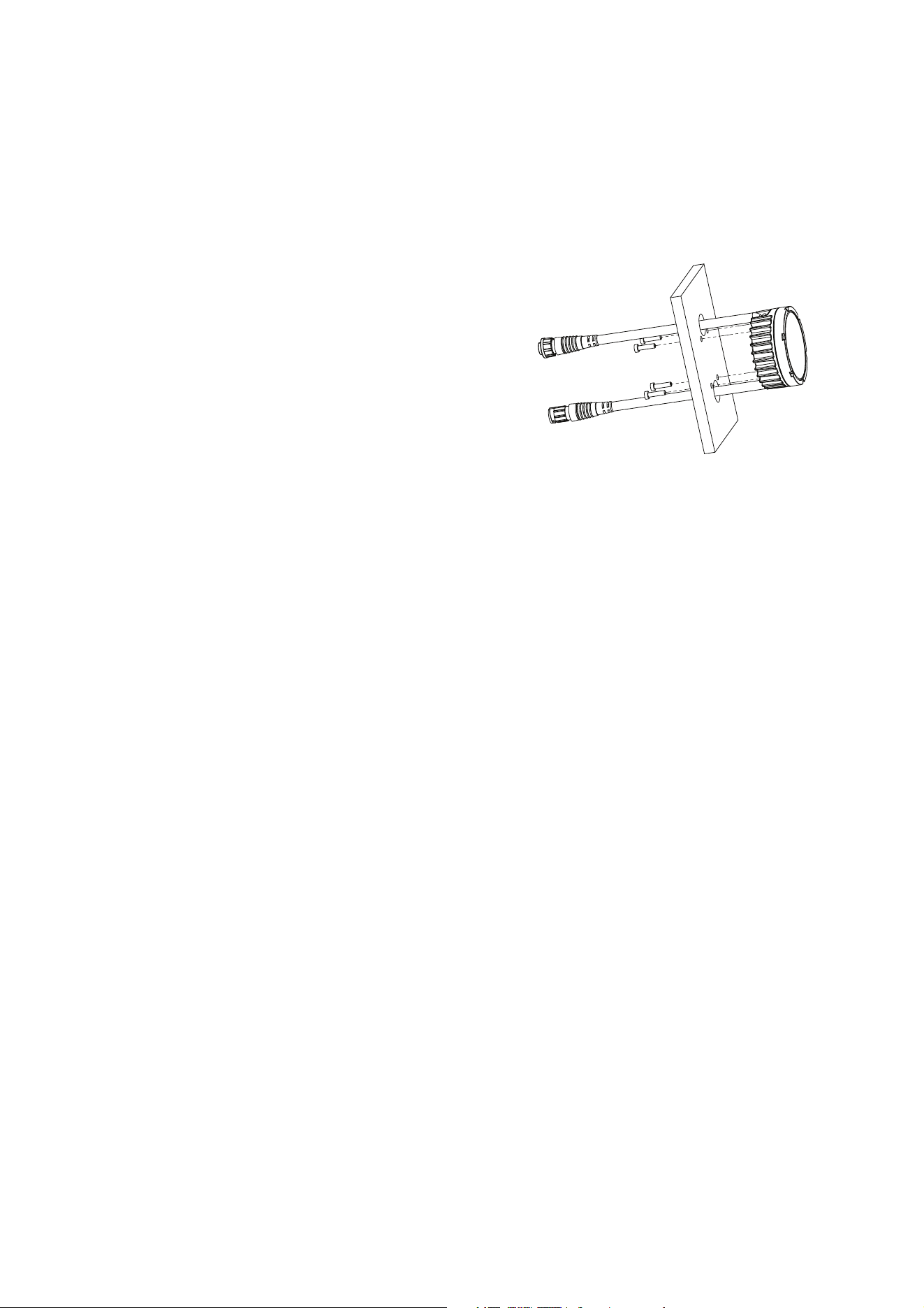
Pressure relief vent
The air inside Dots expands and
contracts as components warm
up and cool down. See Figure 3.
To equalize the resulting pressure
variations without allowing water
into the Dot, the Exterior Dot-HP
features a pressure relief vent
(arrowed) with a Gore-Tex
membrane.
The vent is visible in the center of
the Dot when you look from the
front of the Dot. This is not a
mistake – it is a design feature
that minimizes any risk of condensation.
Do not allow pressure relief vents to become submerged in water or blocked.
If a vent is not in perfect condition, do not operate the Dot. Contact Martin Service for replacement.
Mounting on a surface or structure
Installing using mounting plates
The mounting plates available from Martin as optional accessories for the Exterior Dot-HP (see
“Accessories” on page 40) are recommended for installation on a flat surface or structure.
All fasteners must be suitable for the application and environment. Steel fasteners must be grade 8.8
minimum. Stainless steel fasteners must be grade 304 (A2) or better,. In marine environments, stainless
steel fasteners must be grade 316 (A4) or better.
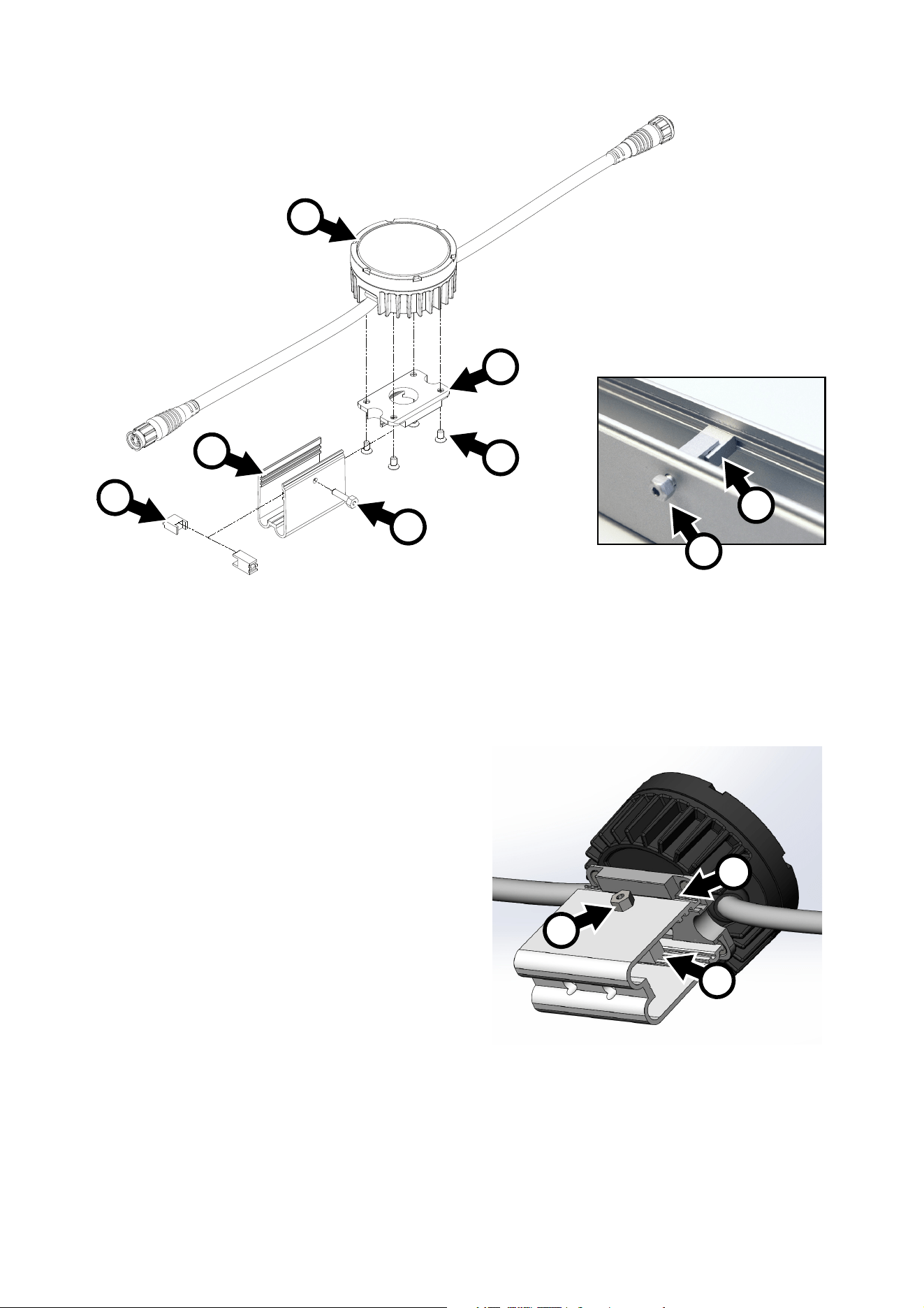
To install an Exterior Dot-HP using a mounting plate:
1. To reduce galvanic corrosion, apply a non-conductive coating such as Delta Seal to all parts of the bolts
that will come into contact with the Dot.
2. See illustration above. Fasten the mounting plate to the base of the Dot using the four M4 x 8 mm
countersunk Torx screws A supplied with the mounting plate.
3. For each Dot, obtain two grade 8.8 or better M6 (quarter-inch) fasteners (screws, screwbolts, etc.) and
screw plugs. You can use M6 machine screws and self-locking nuts if you have access to the back of the
installation surface. Check that fasteners are suitable for the application and have appropriate corrosion
resistance.
4. With reference to “Dimensions” on page 2 and page 3, prepare two holes with centers 86 mm (3.39 in.)
apart in the installation surface to accept two fasteners passed through the holes in the mounting plate.
Use screw plugs if necessary to ensure a secure installation.
Figure 3: Pressure relief vent
Figure 4: Installing using a mounting plate
B
A
Physical installation
15
5. Fasten the Exterior Dot-HP and mounting plate assembly securely to the surface using two fasteners B
per mounting plate.
6. Connect the Dot’s input connector to the output connector of the previous device on the link, either
directly or via a patch cable. Make sure that all connectors are correctly fastened together with locking
rings twisted to ensure a seal.
7. Check that the Dot is held securely before you leave it.
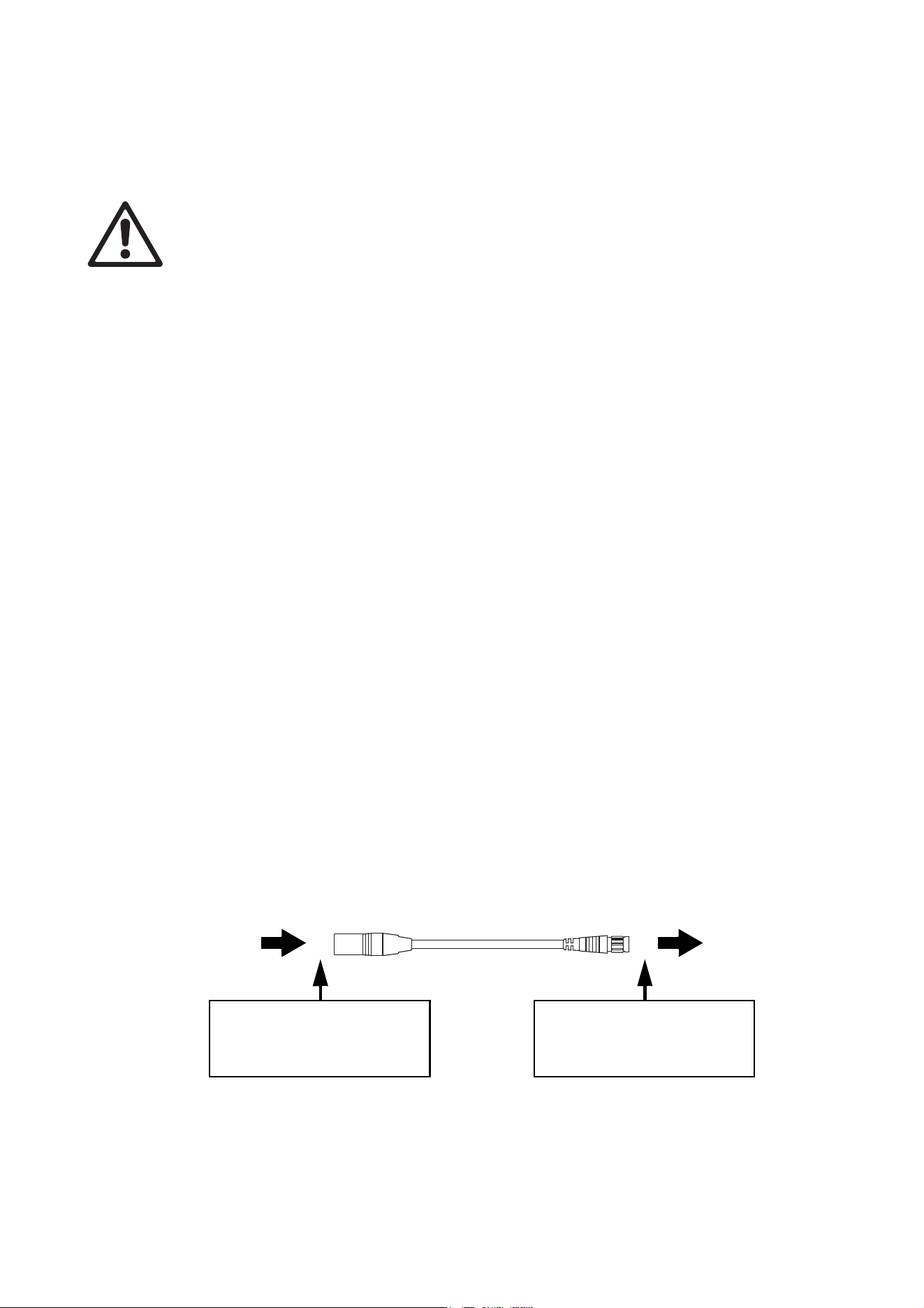
Installing directly on a surface
It is also possible to install the Exterior Dot-HP directly
on a surface if you have access to the back of the
surface (if you do not have access, use a mounting
plate as described above).
To install an Exterior Dot-HP on a surface:
1. See Figure 5. Pre-drill the surface with six suitably
positioned holes: two holes to accept the Exterior
Dot-HP’s cable tails, and four holes to accept M8
mounting screws.
2. Obtain four grade 8.8 steel or similar M8 machine
screws or bolts of a suitable length to pass through
the surface and into the Dot. Obtain suitable
washers.
3. Apply a small amount of medium-strength Loctite to
the threads of the screws or bolts, then pass them
through the washers and through the surface, then
fasten them into the back of the Dot.
Installing using mounting profile
To simplify installation on a surface, Martin can supply aluminum mounting profiles and brackets for the
Exterior Dot-HP as optional accessories (see “Mounting hardware” on page 40). Installers can fasten the
mounting profiles to the surface and then fasten Exterior Dot-HP Dots into the profiles using mounting
brackets. Mounting profile is available in 57 mm (2.25 in.) lengths that are suitable for one Dot as well as
320 mm (12.6 in.) and 1280 mm (50.4 in.) lengths that can be cut into shorter sections if required.
The mounting profile is deep enough to hold two cable runs behind a Dot.
See Figure 6. Installing in a mounting profiles involves the following items:
• Mounting profile D
• Locking blocks E and M4 locking bolt F
• Dot bracket B
• M4 x 8 mm screws C for fastening Dots to brackets, four screws per Dot
• Loctite 243 or equivalent thread locking compound.
Installing in 57 mm profile
To install an Exterior Dot-HP on a surface using a 57 mm (2.25 in.) mounting profile:
1. See Figure 6. Fasten each Dot A to a mounting profile bracket B using four screws C. Apply a small
quantity of Loctite 243 to the screw threads, and use a torque driver to tighten to a torque of 2.5 Nm.
2. For each mounting profile, obtain two grade 8.8 or better M6 (quarter-inch) fasteners (screws,
screwbolts, etc.) and screw plugs. Check that fasteners are of suitable type and length for the application
and have appropriate corrosion resistance. Apply an electrically insulating coating such as Delta Seal to
fasteners to prevent contact between the aluminum profile and the fasteners. If necessary, use
electrically insulating material to prevent contact between the aluminum profile and any other metals
when the profile is installed.
3. With reference to the mounting profile dimensions drawing on page 3, prepare two holes with centers
20 mm (0.55 in.) apart to accept the fasteners for each mounting profile. Use screw plugs if necessary
for a secure installation.
Figure 5: Installing directly on a surface
16
Exterior Dot-HP User Manual
4. Fasten each mounting profile D securely to the surface or structure using two fasteners per profile.
5. If you are going to install the Dot now, apply a small quantity of Loctite 243 to the threads of the locking
bolt F (if you are going to install the Dot in the profile later, apply the Loctite when you install the Dot).
With the locking blocks E assembled as shown in Figure 6 and located in the grooves in the mounting
profile, tighten the bolt F through the mounting profile and into the lock finger-tight only.
6. Connect the Dot’s input connector to the
output connector of the previous device on
the link, either directly or via a patch cable.
Make sure that all connectors are correctly
fastened together with locking rings twisted
to ensure a seal.
7. See Figure 7. Clip the Dot onto the mounting
profile so that the lips on the mounting
bracket engage in the channels on both
sides of the profile as shown at G.
8. Tighten the locking bolt F to expand the
locking blocks E and secure the Dot in the
profile. The M4 locking bolt accepts a
2.5 mm Allen key or a 7 mm wrench. Tighten
the bolt to a torque of 1 Nm (0.75 ft.-lbs.)
using a torque driver or torque wrench.
When you have tightened the bolt, check
that the head of the bolt sits flat against the
mounting profile.
9. Check that the Dot is held securely before
you leave it.
Figure 6: Installation in a 57 mm mounting profile
A
B
C
F
E
D
E
F
Figure 7: Installing a Dot on a mounting profile
G
F
E

Physical installation
17
Installing in long mounting profile
To install Dots on a surface using the 320 mm and 1280 mm lengths of mounting profile available from
Martin, follow the directions given above for 57 mm profiles, but note the following:
• You can cut profile to custom lengths with a hacksaw or angle grinder. Use a file to clean up sharp edges.
• 6.5 mm (quarter inch) diameter holes are provided at 258 mm (10.2 in.) intervals in the base of the profile
for fastening the profile to the mounting surface. You can drill more holes if required.
• 4 mm (0.16 in.) diameter holes for locking bolts F are provided at 200 mm (7.87 in.) intervals in the
mounting profile (see “Dimensions” on page 2), but it is possible to drill more holes if required to match
the spacing between Dots.
18
Exterior Dot-HP User Manual
System installation
Warning! Read “Safety information” on page 5 and “Precautions to avoid damage” on page 11
carefully before installing an Exterior Dot-HP system.
Warning! Connect the Exterior Dot-HP only to the devices and using only the Martin cables specified
in this manual.
Warning! Do not exceed the maximum numbers of devices that can be connected in chains and
maximum cable lengths specified in ”Protection from electric shock” starting on page 6 and in the
manuals of the other devices in the system.
Important! If using DMX, make sure that the DMX console and DC power source are at the same
earth (ground) potential, or the data signal may become saturated.
The Exterior Dot-HP is designed to display either Martin P3 video or DMX-controlled lighting effects. It
automatically recognizes and responds to either a Martin P3 or a DMX data signal. The next sections
explain how to create an Exterior Dot-HP installation to display P3 video data or DMX-controlled lighting
effects.
Installing a P3 system
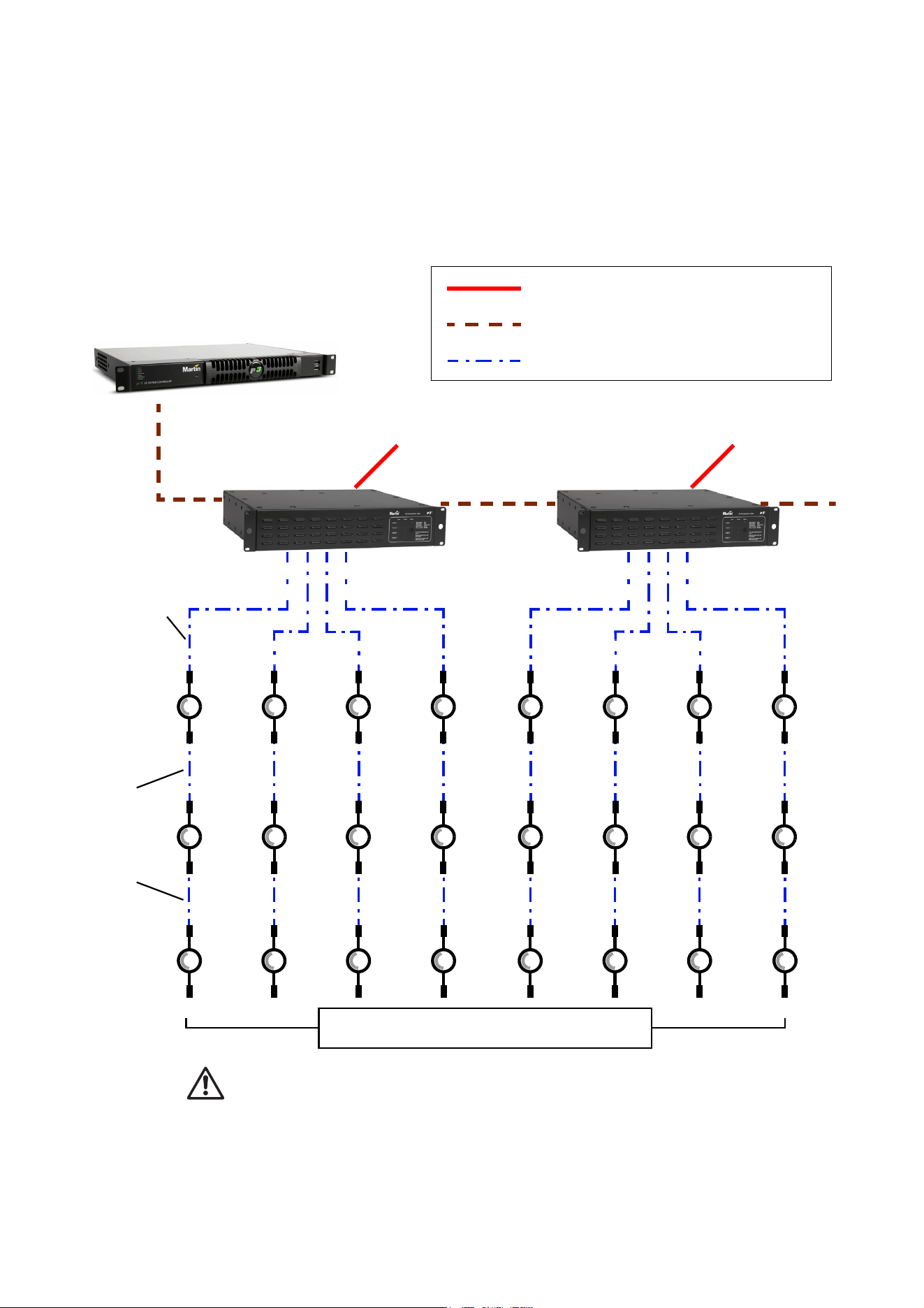
See Figure 9 for an overview of the elements and layout of a Martin P3 video display system.
To install a system that displays P3 video on Exterior Dot-HP Dots, see the overview in Figure 9 and follow
these directions:
1. Make sure that no devices in the installation can be connected to AC mains power until all installation
work is complete.
2. Read “Safety information” on page 5 and “Precautions to avoid damage” on page 11.
3. Connect Exterior Dot-HP Dots together in chains either directly using the Dots’ cable tails and BBD
connectors or by adding Martin hybrid cables with BBD connectors (see “Input adapter cables” on
page 40).
Warning! Do not exceed the maximum number of Dots per chain given in “Safety limits for connecting
devices” on page 6.
4. Install a blanking cap (see “Loose connectors” on page 40) on the output connector of the last Dot on
each chain to protect from water, dirt etc.
5. Connect each chain of Exterior Dot-HP Dots to one of the four 4-pin female XLR hybrid (48 VDC power
+ P3 data) outputs on a P3 PowerPort 1500 using a Martin hybrid 4-pin male XLR to BBD adapter cable,
P/N 91616046 (see Figure 8). Alternatively, connect each chain of Exterior Dot-HP Dots to one of the 4
outputs on a P3 PowerPort 1000 IP.
6. If necessary, add a BBD-to-BBD extension cable between the first Dot and the P3 PowerPort. Suitable
extension cables are available from Martin in various lengths. See “Input adapter cables” on page 40.
7. Create a P3 video data link from a Martin P3 system controller such as the P3-050, P3-150, P3-300 or
P3 PC to the P3 PowerPort 1500 or P3 PowerPort 1000 IP (see the products’ user manuals for details).
Figure 8: Power and P3 video data input
4-pin male XLR Female BBD
4-pin XLR-to-BBD Input Cable, P/N 91616046
DC power and
data from P3
PowerPort 1500
DC power and
data to Exterior
Dot-HP chain
Insert 4-pin XLR hybrid
extension cable here if
required
Insert 4-pin XLR hybrid
extension cable here if
necessary
Insert BBD-to-BBD hybrid
extension cable here if
necessary
System installation
19
8. It is possible to connect P3 PowerPort devices in daisy-chains in a P3 network, but if you are using
multiple P3 PowerPorts in a fixed installation we recommend that you distribute the P3 signal by
connecting an unmanaged Gigabit Ethernet switch to the P3 System Controller and then connecting
each P3 PowerPort directly to the switch. This eliminates the risk of one P3 PowerPort signal failing and
causing loss of signal to the P3 PowerPorts daisy-chained behind it.
9. Connect the P3 PowerPort to AC mains power at 100 - 240 V, 50/60 Hz as described in its user manual.
10. connect the P3 system controller to AC mains power and power the controller on.
You can now configure the system at the P3 controller. See”System setup” on page 25.
Max. 4 chains per
P3 PowerPort
AC mains
power
P3 System Controller
P3 PowerPort P3 PowerPort
AC mains
power
AC mains power
P3 video data link (Ethernet cable)
Hybrid (DC power and data) link
Figure 9: P3 system layout
4-pi
n X
LR
-to-B
B
D
input c
ab
le
BBD-to-BBD extension
cables (if needed)
See “Safety limits for connecting devices” on page 6 before creating a chain
Install blanking caps on all unused
female connectors at end of chains

20
Exterior Dot-HP User Manual
Installing a DMX-controlled system
In a DMX-controlled system, an RDM-compliant DMX lighting controller sends a DMX control data signal
over a DMX link to the installation, and then over the hybrid link to the Exterior Dot-HP Dots.
The DMX link requires DMX cable. It can be maximum 300 m (1000 ft.) in length and must run in one single
daisy-chain, but it can be extended or split into branches using an RDM-compliant amplifier/splitter such as
the Martin RDM 5.5 Splitter (P/N 90758150). Alternatively, you can run the DMX signal from the controller
over Ethernet cable using Art-Net protocol and convert it to a DMX-compliant signal with an Art-Net to DMX
converter.
If you would like assistance with creating a DMX link, your Martin supplier will be glad to advise.
The number of Exterior Dot-HP Dots that you can control on one DMX link is limited by the number of DMX
channels the Dots will use and the 512 DMX channels available in one DMX universe at the DMX controller.
Each time you have used 512 channels, you must create a new DMX link that is connected to a new DMX
universe on the controller. Note that this limit applies to the DMX link. The maximum safety limits that apply
to the chain of Dots and cable (see “Safety limits for connecting devices” on page 6) take priority and must
be respected in all cases.
If you need to take the DMX signal from the end of a chain of Exterior Dot-HP Dots, connect a DMX
Lead-out Cable (see “Input adapter cables” on page 40) to the output connector of the last Dot on the chain.
The Lead-Out Cable has a 5-pin female XLR connector with standard DMX pinout (pin 1 = shield, pin 2 =
data cold/negative, pin 3 = data hot/positive, pins 4 and 5 are not used) that lets you draw off the DMX
signal.
DC Power options in DMX installations
A DMX-controlled Exterior Dot-HP installation can be supplied with DC power from the Martin IP66 PSU
240W external power supply unit (previously called the Martin Tripix Power IP66) or from a generic external
PSU (the Mean Well SP-480 48, for example).
The hardware and cables required are slightly different depending on which type of PSU you use to supply
the installation with DC power. The two different types of installation are covered in the next two sections:
• If you are using a Martin IP66 PSU 240W, see ”Installing a DMX system using the Martin IP66 PSU
240W” on page 21.
• If you are using a generic 48 VDC PSU, see ”Installing a DMX system using a generic external 48
VDC PSU” on page 23.
System installation
21
Installing a DMX system using the Martin IP66 PSU 240W
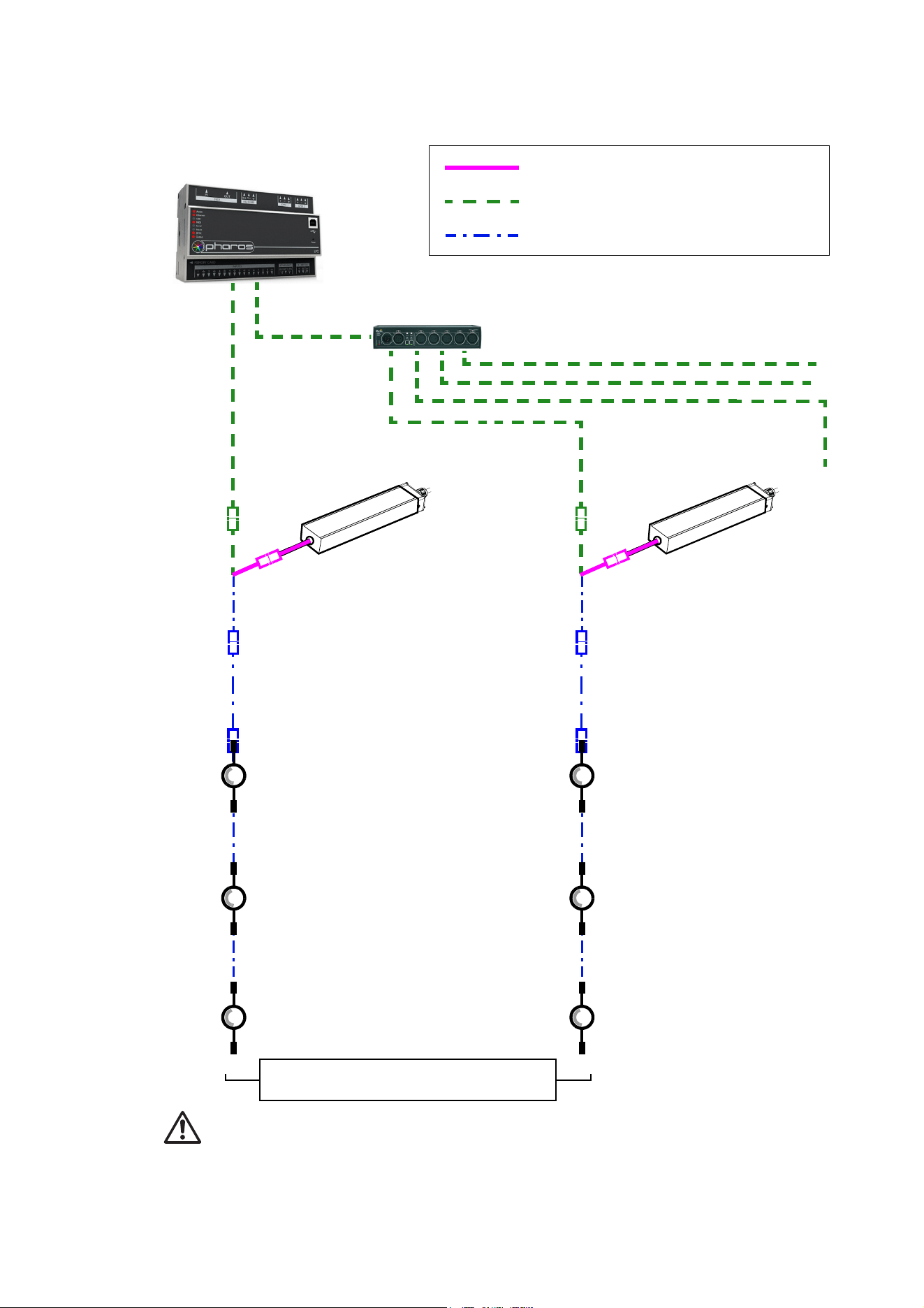
Hybrid
DMX/RDM Controller
48 VDC power
DMX link (DMX cable)
Hybrid (DC power and data) link
Figure 10: DMX-controlled system using the Martin IP66 PSU 240W
lead-in cable,
DMX/RDM Splitter (if used)
Martin IP66 PSU
Hybrid
lead-in cable,
Martin IP66 PSU
BBD-to-BBD
extension cable
(if needed)
BBD-to-BBD
extension cable
(if needed)
See “Safety limits for connecting devices” on page 6 before creating a chain
Install blanking caps on all unused
female connectors at end of chains
BBD-to-BBD
extension cable
(if needed)
BBD-to-BBD
extension cable
(if needed)
BBD-to-BBD
extension cable
(if needed)
BBD-to-BBD
extension cable
(if needed)
Martin IP66 PSU 240W Martin IP66 PSU 240W
240W 240W
22
Exterior Dot-HP User Manual
To create a DMX-controlled installation that draws DC power from the Martin IP66 PSU 240W external
power supply unit:
1. See Figure 10 on page 21 for an overview of this type of installation
2. Make sure that no devices in the installation can be connected to AC mains power until all installation
work is complete.
3. Read “Safety information” on page 5 and “Precautions to avoid damage” on page 11.
4. Connect Exterior Dot-HP Dots together in chains either directly using the BBD connectors on the Dots’
cable tails or by adding Martin hybrid BBD-to-BBD extension cables (see “Input adapter cables” on
page 40).
Warning! Do not exceed the maximum number of Dots per chain given in “Martin IP66 PSU 240W
safety limits” on page 8.
5. Install a blanking cap (see “Loose connectors” on page 40) on the output connector of the last Dot on
each chain to protect from water, dirt etc. There is no need to install DMX termination plugs, as Dots
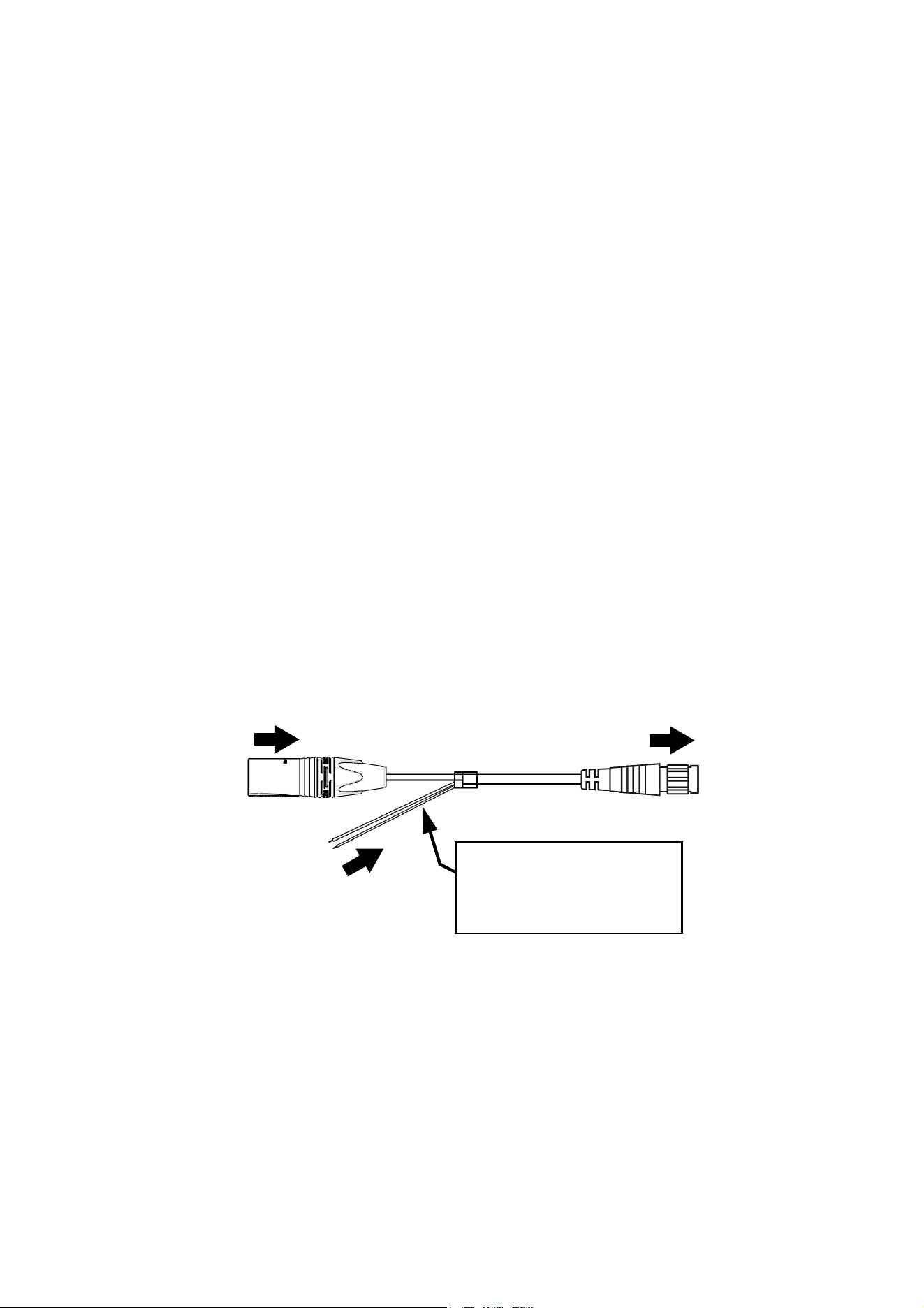
have integral DMX termination.
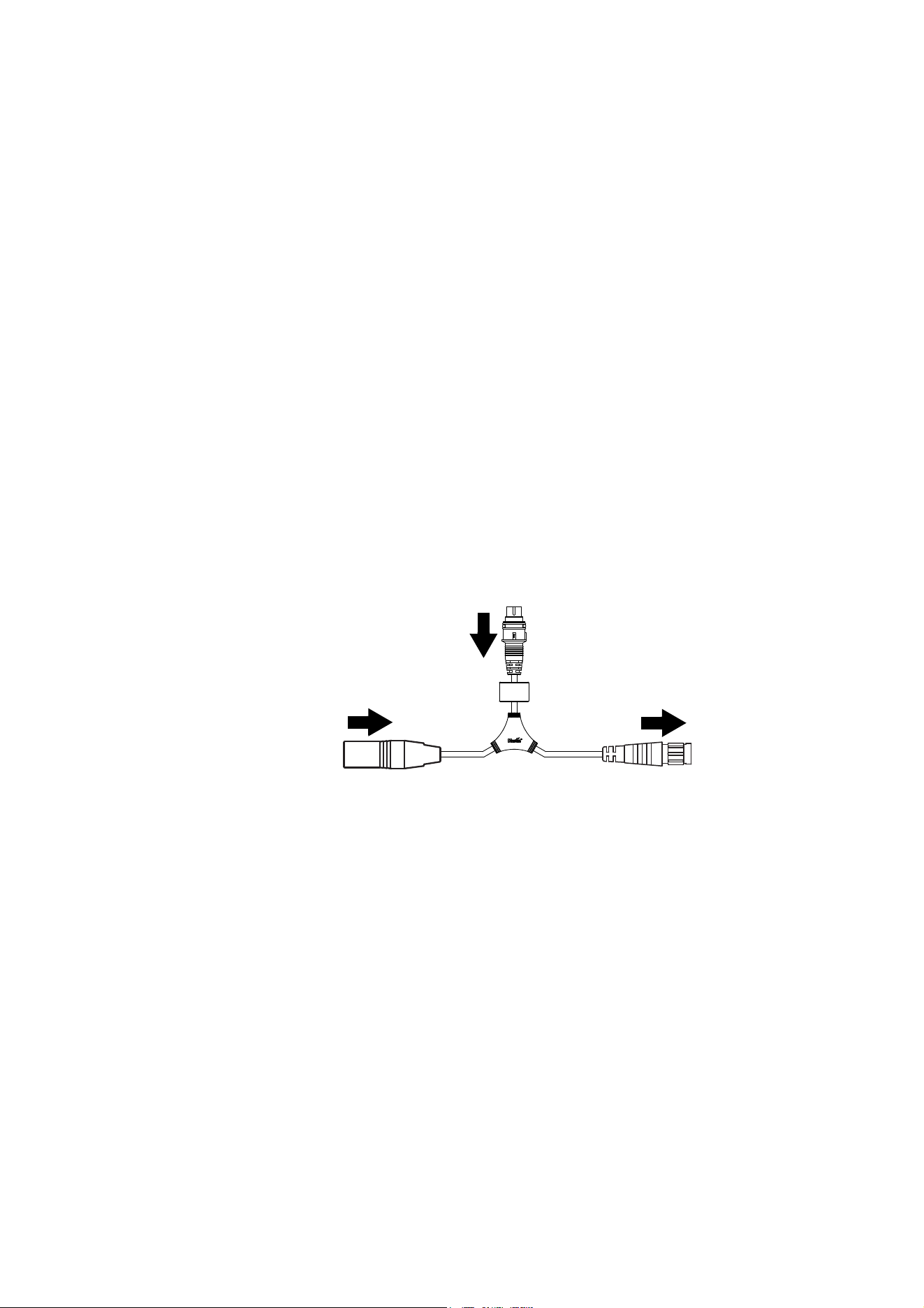
6. See Figure 11. Connect a Martin 5-pin XLR and Martin IP66 PSU to BBD adapter cable (P/N 91616050)
to the start of each chain.
• Connect the 5-pin male XLR connector on the adapter cable to a DMX link that carries a DMX signal
from an RDM-compliant DMX controller.
• Connect the male Martin IP66 PSU connector on the adapter cable to the DC output of a Martin IP66
PSU 240W external power supply unit.
• Connect the female BBD connector on the adapter cable to the male BBD connector at the start of the
chain of Exterior Dot-HP Dots.
7. Install a mains power cable on the Martin IP66 Power Supply Unit and connect it to AC mains power.
8. Apply AC mains power to the DMX controller.
You can now configure the system. See ”System setup”on page 25.
Figure 11: Martin IP66 PSU and DMX connections to an Exterior Dot-HP chain
DC power input from
To Exterior Dot-HP
chain
5-pin male XLR
Female BBD
XLR5+Martin IP66 PSU-to-BBD Input Cable, 0.25 m, P/N 91616050
Martin IP66 PSU
DMX from DMX/RDM
controller
Martin IP66 PSU
male connector
connector
System installation
23
Installing a DMX system using a generic external 48 VDC PSU
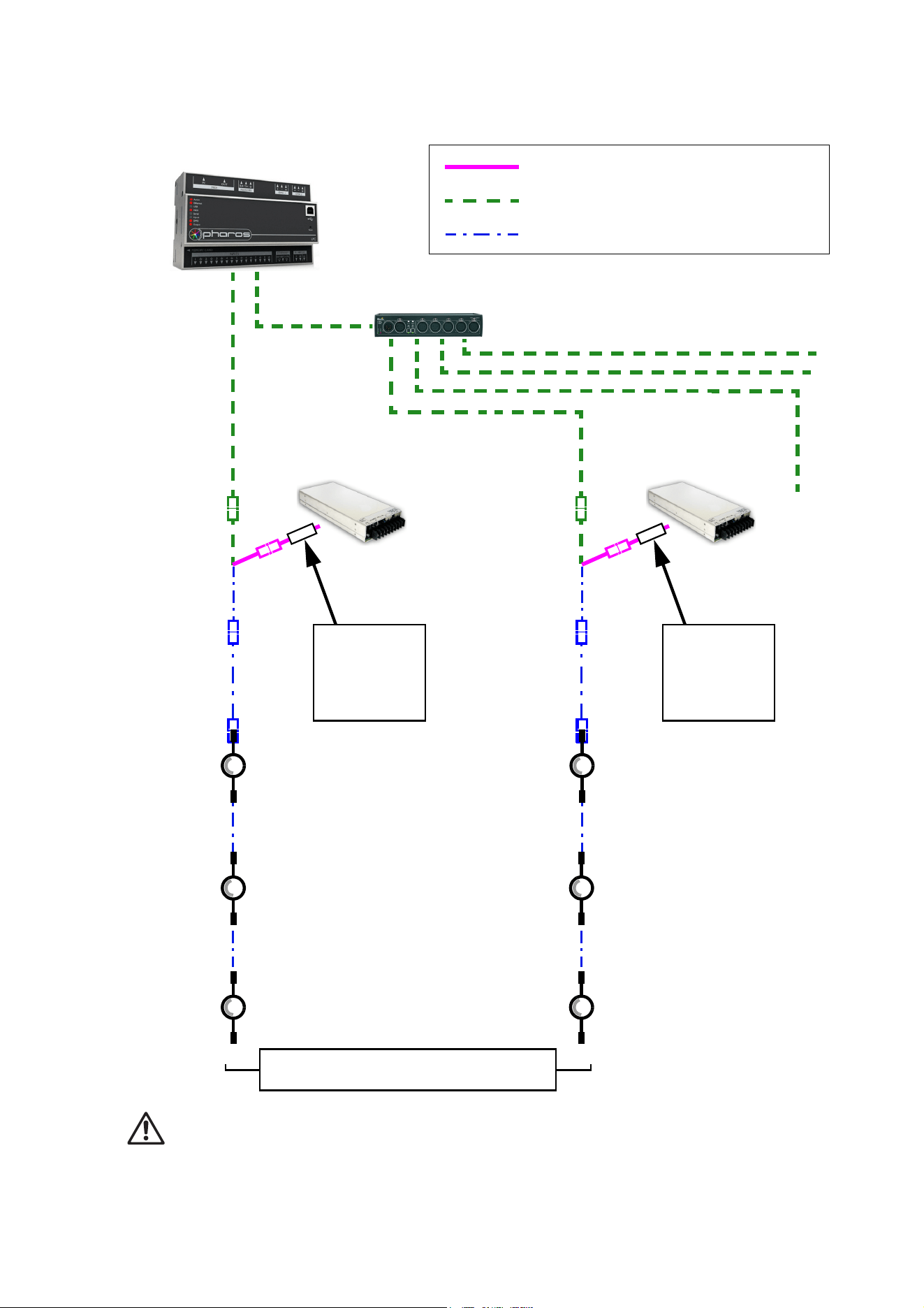
Hybrid DC
DMX/RDM Controller
48 VDC power
DMX link (DMX cable)
Hybrid (DC power and data) link
Figure 12: DMX-controlled system using a generic PSU
lead-in cable
DMX/RDM Splitter (if used)
Hybrid DC
lead-in cable
External PSU
Inline fuse
required if PSU
does not have
8 A overcurrent
protection
External PSU
Inline fuse
required if PSU
does not have
8 A overcurrent
protection
See “Safety limits for connecting devices” on page 6 before creating a chain. Do not exceed
PSU output rating.
BBD-to-BBD
extension cable
(if needed)
BBD-to-BBD
extension cable
(if needed)
Install blanking caps on all unused
female connectors at end of chains
BBD-to-BBD
extension cable
(if needed)
BBD-to-BBD
extension cable
(if needed)
BBD-to-BBD
extension cable
(if needed)
BBD-to-BBD
extension cable
(if needed)
24
Exterior Dot-HP User Manual
Warning! If you decide to use any other external PSU than the Martin devices listed earlier in this section,
you must verify that the combination of equipment used is compliant with all applicable safety and
electromagnetic compatibility regulations.
To create a DMX-controlled installation that draws DC power from a generic PSU:
1. See Figure 12 on page 23 for an overview of this type of installation.
2. Make sure that no devices in the installation can be connected to AC mains power until all installation
work is complete.
3. Read ”Safety information” starting on page 5 and “Precautions to avoid damage” on page 11.
4. Connect Exterior Dot-HP Dots together in chains either directly using the BBD connectors on the Dots’
cable tails or by adding Martin BBD-to-BBD hybrid extension cables (see “Input adapter cables” on
page 40).
Warning! Check the PSU’s DC output power rating in watts and the power consumption figures in watts for
Exterior Dot-HP Dots with reference to “Generic 48 VDC external PSU safety limits” on page 8. Do not
create a chain of Exterior Dot-HP Dots that will exceed the power rating of the DC output on the PSU.
5. Install a blanking cap (see “Loose connectors” on page 40) on the output connector of the last Dot on
each chain to protect from water, dirt etc.
6. See Figure 13:
• If the PSU does not have constant overcurrent protection that will limit current to 7.5 A on the DC
output used, install an inline fuseholder with a 7.5 A fuse on the white (+ve) power wire of a Martin
Power and data adapter cable, XLR5 + power - BBD, 0.25 m (P/N 91616048). You can use a 30 amp
automotive-type inline fuseholder with a 7.5 A blade fuse.
• Connect the 5-pin male XLR connector on the power and data adapter cable to a DMX link that carries
a DMX signal from an RDM-compliant DMX controller.
• Connect the power wires on the power and data adapter cable to a DC output on the PSU. Connect
the white wire to positive (+ve) and the black wire to negative (-ve).
• Connect the female BBD connector on the adapter cable to the male BBD connector at the start of the
chain of Exterior Dot-HP Dots.
7. Apply AC mains power to the external PSU.
8. Apply AC mains power to the DMX controller.
You can now configure the system. See ”System setup”on page 25.
Figure 13: Generic PSU and DMX connections to an Exterior Dot-HP chain
DC power from
white to +ve, black to -ve
To Exterior Dot-HP
Power + Data Input Cable, XLR5 + Power to BBD, 0.25 m, P/N 91616048
chain
5-pin male XLR
Female BBD
generic 48 VDC PSU
Insert 7.5 A inline fuse here if
PSU does not have 7.5 A
overcurrent protection
DMX from DMX/RDM
controller
System setup
25
System setup
Warning! Read “Safety information” on page 5 and “Precautions to avoid damage” on page 11
before applying power to an Exterior Dot-HP installation.
Setting up for P3 display
A Martin P3 system allows video to be displayed on an installation that consists of or includes Exterior
Dot-HP Dots. When a P3 controller is connected to the installation and the installation is powered on, you
can set up all the devices in the installation from the P3 controller. See the P3 controller user manual for
details.
Setting up for DMX control
A DMX system gives 0 - 100% variable intensity control. Varying the intensity of red, blue and green LEDs in
RGB products gives RGB color mixing.
You can set up and control an Exterior Dot-HP installation over the data link using an RDM-compatible DMX
controller.
DMX control channels
DMX controllers send control data to devices over DMX control channels in DMX universes. One DMX
universe has 512 channels available. Multiple Dots can share the same DMX channels if you want grouped
control and identical Dot behavior.
Warning! The maximum permitted number of Exterior Dot-HP Dots in one chain is lower when Dots
are set to uncalibrated mode than when they are set to calibrated mode. Check “Safety limits for
connecting devices” on page 6 and make sure that you will not exceed the maximum permitted
number of Dots in a chain before you set Dots from calibrated to uncalibrated mode.
Exterior Dot-HP RGB
The Exterior Dot-HP RGB can be controlled using any of the following four DMX modes (see “DMX
protocols” on page 35):
• In RGB calibrated mode, each Dot uses three DMX channels.
• In RGB uncalibrated mode, each Dot uses three DMX channels.
• In Basic calibrated mode, each Dot uses ten DMX channels.
• In Basic uncalibrated mode, each Dot uses ten DMX channels.
Different modes can be mixed in an installation. For example, some Exterior Dot-HP Dots can be set to RGB
mode and others to Basic mode. You will need to take care to set up Dots, DMX addresses and DMX
channel allocation correctly.
It is possible to change Dots’ DMX modes using RDM.
Exterior Dot-HP CW
The Exterior Dot-HP CW can be controlled using any of the following two DMX modes
• In Intensity calibrated mode, each Dot uses one DMX channel
• In Intensity uncalibrated mode, each Dot uses one DMX channel
Both modes give control of cool white output intensity on one DMX channel.
DMX addresses
To prepare an installation for DMX control, you set it up using an RDM-compliant DMX controller so that
Dots or pixels receive instructions from the controller on their own DMX channels. The DMX address (also
known as the control address or start channel) is the first of these channels. An Exterior Dot-HP Dot or pixel

26
Exterior Dot-HP User Manual
uses more than one channel, so it uses the DMX address channel and the channels immediately above it.
For example, one Exterior Dot-HP Dot set to RGB mode and set to DMX address 1 will use DMX channels
1 - 3. Channel 4 will be available for use as a DMX address for the next device.
RDM
27
RDM
Using an RDM-compliant DMX controller, you can communicate with the Exterior Dot-HP Dots on the DMX
data link via RDM. You can:
• Retrieve data from Dots
• Set the DMX addresses of the Dots and set their DMX mode
• Reset Dots
The Exterior Dot-HP responds to the RDM parameter IDs (PIDs) listed in Table 5.
RDM parameter IDs
GET
allowed
SET
allowed
Category – Network Management
DISC_UNIQUE_BRANCH
DISC_MUTE
DISC_UN_MUTE
Category - DMX512 Setup
DMX_PERSONALITY
DMX_PERSONALITY_DESCRIPTION
DMX_START_ADDRESS
SLOT_DESCRIPTION
Category - Control
IDENTIFY_DEVICE
RESET_DEVICE
Category - Product Information
SUPPORTED_PARAMETERS
DEVICE_INFO
DEVICE_MODEL_DESCRIPTION
MANUFACTURER_LABEL
DEVICE_LABEL
SOFTWARE_VERSION_LABEL
Category - Product status
DEVICE_HOURS
DEVICE_POWER_CYCLES
Table 5: RDM communication with the Exterior Dot-HP
28
Exterior Dot-HP User Manual
Using the Exterior Dot-HP
Warning! Read “Safety information” on page 5 and “Precautions to avoid damage” on page 11
before applying power to the Exterior Dot-HP.
Do not use the Exterior Dot-HP if the ambient temperature exceeds 55° C (131° F) or falls below -20° C
(-4° F).
Thermal regulation
The Exterior Dot-HP Dot has a protective thermal shutdown feature that blacks out the Dot if it exceeds its
permitted maximum operating temperature.
To avoid unexpected blackouts due to thermal shutdowns but also avoid overheating that may damage the
product, the Exterior Dot-HP offers various options for managing temperature:
• During P3 video operation, you can enable the thermal regulation feature available in the software of all
Martin P3 system controllers. When this feature is active, Exterior Dot-HP Dots begin to reduce their light
output when the ambient temperature reaches 45° C in order to control Dot temperature. Output is
reduced gradually as the ambient temperature rises above 45° C. Dots will still light at the maximum
ambient temperature of 55° C, but output will be considerably reduced. This option avoids blackouts due
to protective thermal shutdowns.
• During P3 video operation, you can disable the P3 controller thermal regulation feature. If you choose to
do this, Exterior Dot-HP Dots will not reduce their light output when the ambient temperature reaches 45°
C, but if you drive Dots hard when the ambient temperature approaches or exceeds 55° C, Dots may
black out completely due to protective thermal shutdown.
• During DMX operation, the Exterior Dot-HP Dots begin to reduce their light output when the ambient
temperature reaches 45° C in order to control Dot temperature. Output is reduced gradually as the
ambient temperature rises above 45° C. Dots will still light at the maximum ambient temperature of 55° C,
but output will be considerably reduced. This option avoids blackouts due to protective thermal
shutdowns.
P3 display
The Exterior Dot-HP can display video from all common video sources. The video signal must be sent to a
Martin P3 controller and then distributed to Dots. The P3 controller lets you map, configure and control an
installation containing Exterior Dot-HP Dots (and other Martin P3 video display products if you have them).
See the P3 controller documentation for details.
DMX control
The Exterior Dot-HP can display effects controlled by DMX. See “DMX protocols” on page 35 for full details
of DMX control.
An RDM-compatible DMX controller is required so that you can address and configure the Dots. See the
DMX/RDM controller documentation for details.
RGB Dots
Four DMX modes are available in RGB Dots:
• RGB mode (calibrated) uses three DMX channels and gives RGB color mixing of all the pixels on a Dot.
Dots are optimized for evenness of color. A slight reduction in light output intensity and extremes of color
saturation may be visible.
• RGB mode (uncalibrated) uses three DMX channels and gives RGB color mixing of all the pixels on a
Dot. Dots are optimized for brightness and extreme color saturation. A slight reduction in evenness of
color between Dots may be visible.
• Basic mode (calibrated) uses ten DMX channels and gives RGB color mixing, strobe effects and
pre-programmed dynamic effects. Dots are optimized for evenness of color. A slight reduction in light
output intensity and extremes of color saturation may be visible.
Using the Exterior Dot-HP
29
• Basic mode (uncalibrated) uses ten DMX channels and gives RGB color mixing, strobe effects and
pre-programmed dynamic effects. Dots are optimized for brightness and extreme color saturation. A slight
reduction in evenness of color between Dots may be visible.
CW Dots
Two DMX modes are available in CW Dots:
• Intensity mode (calibrated) uses one DMX channel to control cool white output intensity of all the pixels
on a Dot. Dots are optimized for evenness of intensity. A slight reduction in light output intensity may be
visible.
• Intensity mode (uncalibrated) uses one DMX channel to control cool white output intensity of all the
pixels on a Dot. Dots are optimized for brightness. A slight reduction in evenness of intensity between
Dots may be visible.
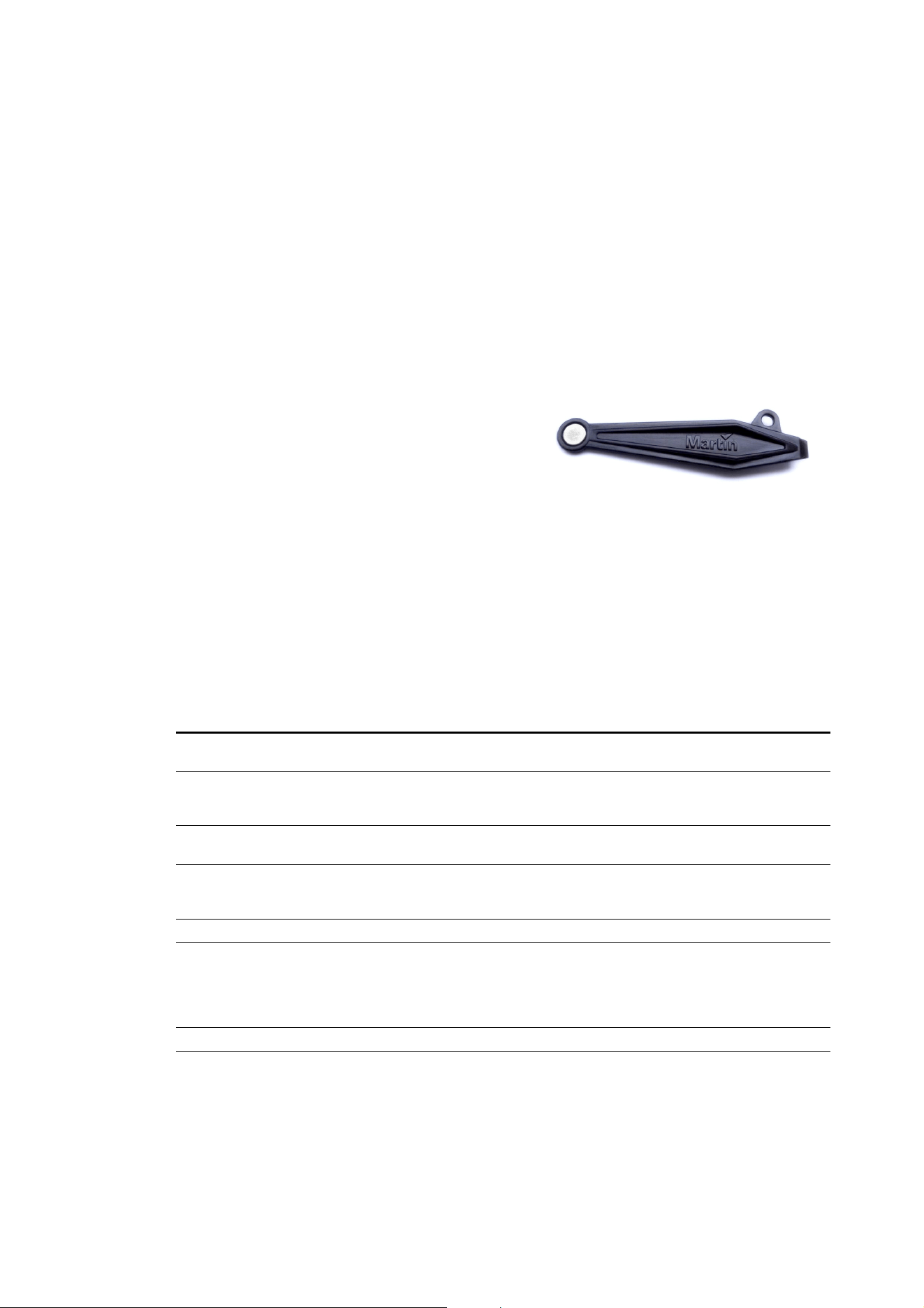
Magnetic ‘control button’
A magnetic sensor is embedded inside the Exterior
Dot-HP on the side of the Dot, just above the input cable
and just under the front ring (see C in Figure 1 on page
12). The sensor acts as a control button. To activate the
sensor, swipe a magnet past the side of the Dot near
where the input cable tail enters the Dot.
You may find it convenient to use the Martin Test Tool (see
“Accessories” on page 40), which contains a magnet.
Activating the magnetic sensor lets you display the
product’s status, test the LEDs and reset the Exterior
Dot-HP as explained in the following table.
Status display
To display a Exterior Dot-HP Dot’s status, swipe the magnet over the sensor once. The LEDs on the Dot will
give one of the indications listed in the tables below for a few seconds.
Exterior Dot-HP RGB
Color Output Indication Action required
Blue Constant
Busy (e.g. booting up or writing to
flash memory).
Wait a moment for normal operation
to be resumed.
Red Constant
Error. The Exterior Dot-HP has
encountered a fatal error and can
not run.
Perform a factory reboot, followed by
a firmware upload if necessary.
Red Flashing No control source detected.
Connect a P3 system controller or
DMX controller to the network.
Green Flashing
Ready. Exterior Dot-HP connected
to P3 controller but not mapped onto
the canvas.
Set up the P3 controller to use the
Exterior Dot-HP.
Green Constant Running normally in P3 mode. None.
Cyan Flashing
Ready. Exterior Dot-HP in DMX
mode but not receiving valid DMX
data signal.
Send DMX data (if flashing cyan
continues although you are sending
data, check that DMX controller is
connected and configured with Dot’s
DMX address).
Cyan Constant Running normally in DMX mode. None.
Table 6: Status information, Exterior Dot-HP RGB
Figure 14: Test Tool with magnet

30
Exterior Dot-HP User Manual
Exterior Dot-HP CW
Testing, rebooting and returning to defaults
The tables below list the functions of the magnetic ‘control button’ on each Exterior Dot-HP Dot.
Test patterns are stored in onboard memory. This lets you test the LEDs without an external controller, but
test patterns can also be called up on P3 system controllers, the P3 PowerPort 1500 and the P3 PowerPort
1000 IP.
Exterior Dot-HP RGB
No. of
LEDs
Output Indication Action required
1 Constant
Error. The Exterior Dot-HP has
encountered a fatal error and can
not run.
Perform a factory reboot, followed by
a firmware upload if necessary.
1 Flashing No control source detected.
Connect a P3 system controller or
DMX controller to the network.
2 Constant Running normally in P3 mode. None.
2 Flashing
Ready. Exterior Dot-HP connected
to P3 controller but not mapped onto
the canvas.
Set up the P3 controller to use the
Exterior Dot-HP.
3 Constant Running normally in DMX mode. None.
3 Flashing
Ready. Exterior Dot-HP in DMX
mode but not receiving valid DMX
data signal.
Send DMX data (if flashing
continues although you are sending
data, check that DMX controller is
connected and configured with Dot’s
DMX address).
4 Constant
Busy (e.g. booting up or writing to
flash memory)
None.
Table 7: Status information, Exterior Dot-HP CW
Action Function
Quick swipe The first swipe displays status as shown in Table 6 for a few seconds.
The next swipes display the following test patterns on the LEDs (each
swipe scrolls to the next pattern):
- Calibrated white
- Full red
- Full green
- Full blue
- Scrolling gradient
- Dimmed (20% uncalibrated white)
Hold magnet over
‘button’ until LEDs
light blue
Reboot the Exterior Dot-HP.
Hold magnet over
‘button’ until LEDs
light white
Return the Exterior Dot-HP to its default factory firmware.
Table 8: Magnetic ‘control button’ functions, Exterior Dot-HP RGB

Using the Exterior Dot-HP
31
Exterior Dot-HP CW
Action Function
Quick swipe The first swipe displays status as shown in Table 6 for a few seconds.
The next swipes display the following test patterns on the LEDs (each
swipe scrolls to the next pattern):
- Calibrated white
- Full white (tests driver on red channel)
- Full white (tests driver on green channel)
- Full white (tests driver on blue channel)
- Scrolling gradient
- Dimmed (20% uncalibrated white)
Hold magnet over
‘button’ until 4 LEDs
light
Reboot the Exterior Dot-HP.
Hold magnet over
‘button’ until 3 LEDs
light
Return the Exterior Dot-HP to its default factory firmware.
Table 9: Magnetic ‘control button’ functions, Exterior Dot-HP CW
32
Exterior Dot-HP User Manual
Service and maintenance
Warning! Read “Safety information” on page 5 and “Precautions to avoid damage” on page 11
before carrying out service on the Exterior Dot-HP.
Warning! Lock out AC mains power to the installation before servicing.
Warning! Refer any service operation not described in this manual to a qualified service technician.
Important! Excessive dirt buildup causes overheating and may damage the product. Damage
caused by inadequate cleaning is not covered by the product warranty.
The user will need to clean the Exterior Dot-HP periodically. All other service operations on the Exterior
Dot-HP must be carried out by Martin Professional or its approved service agents.
Installation, on-site service and maintenance can be provided worldwide by the Martin Professional Global
Service organization and its approved agents, giving owners access to Martin’s expertise and product
knowledge in a partnership that will ensure the highest level of performance throughout the product’s
lifetime. Please contact your Martin supplier for details.
Cleaning
Cleaning schedules vary depending on the operating environment. It is therefore impossible to specify
precise cleaning intervals for the Exterior Dot-HP. Environmental factors that may result in a need for
frequent cleaning include airborne dust and pollution.
Inspect products frequently to see whether cleaning is necessary. If in doubt, consult your Martin dealer
about a suitable maintenance schedule.
To clean the product, use warm water and a soft brush or a low-pressure or medium-pressure water jet. Use
car shampoo to help remove dirt and grease. If possible, dry with a soft cloth to avoid streaking. Do not use
a stiff brush or scouring pad. Do not use solvents or abrasives.
Condensation and pressure relief valve
Under certain conditions, condensation may become visible under optical components. This is normal and
harmless. Any condensation will gradually be expelled by the Dot's Gore-Tex pressure relief valve (see
Figure 3 on page 14) as the Dot goes through power off/on cycles.
Make sure that the pressure relief valve is clean and unblocked. The valve must be able to breathe freely so
that it can equalize pressure and expel water vapor. If a valve becomes blocked, excessive pressure can
damage seals or cause air and water to be sucked along cables and into the Dot.
Water on the valve membrane will block the membrane's micropores. Do not allow water to collect on or
near valves. If you suspect that a valve has become blocked with dirt, contact your Martin supplier.
LED performance
Martin use the best components available, but the characteristics of all LEDs change gradually over many
thousands of hours of use. Not all colors change at the same rate, and rates of change vary depending on
factors such as temperature and how intensively a particular color is used. Because of the changes, overall
light output and the exact hues obtained from specific color mixes in all LED-based products can be
expected to shift slightly over time.
To help you obtain consistent output despite these changes, Martin P3 software from version 4.1.0 contains
the P3 Dot Adjuster tool. This feature lets you compensate for changes in LED characteristics and restore
initial output and color authenticity levels. Please contact Martin for more details.

Service and maintenance
33
Installing new software
It may be necessary to upload new software (i.e. device firmware) to the Exterior Dot-HP if it appears to
have a software-related fault or if you want to update to a newer software version.
Software for Martin products is available from the Martin website. The Exterior Dot-HP software can be
installed from the P3 System Controller over the P3 data link. You will need a Martin P3 PowerPort 1500 or
a Martin P3 PowerPort 1000 IP for this. See the P3 System Controller user manual for software installation
instructions.
34
Exterior Dot-HP User Manual
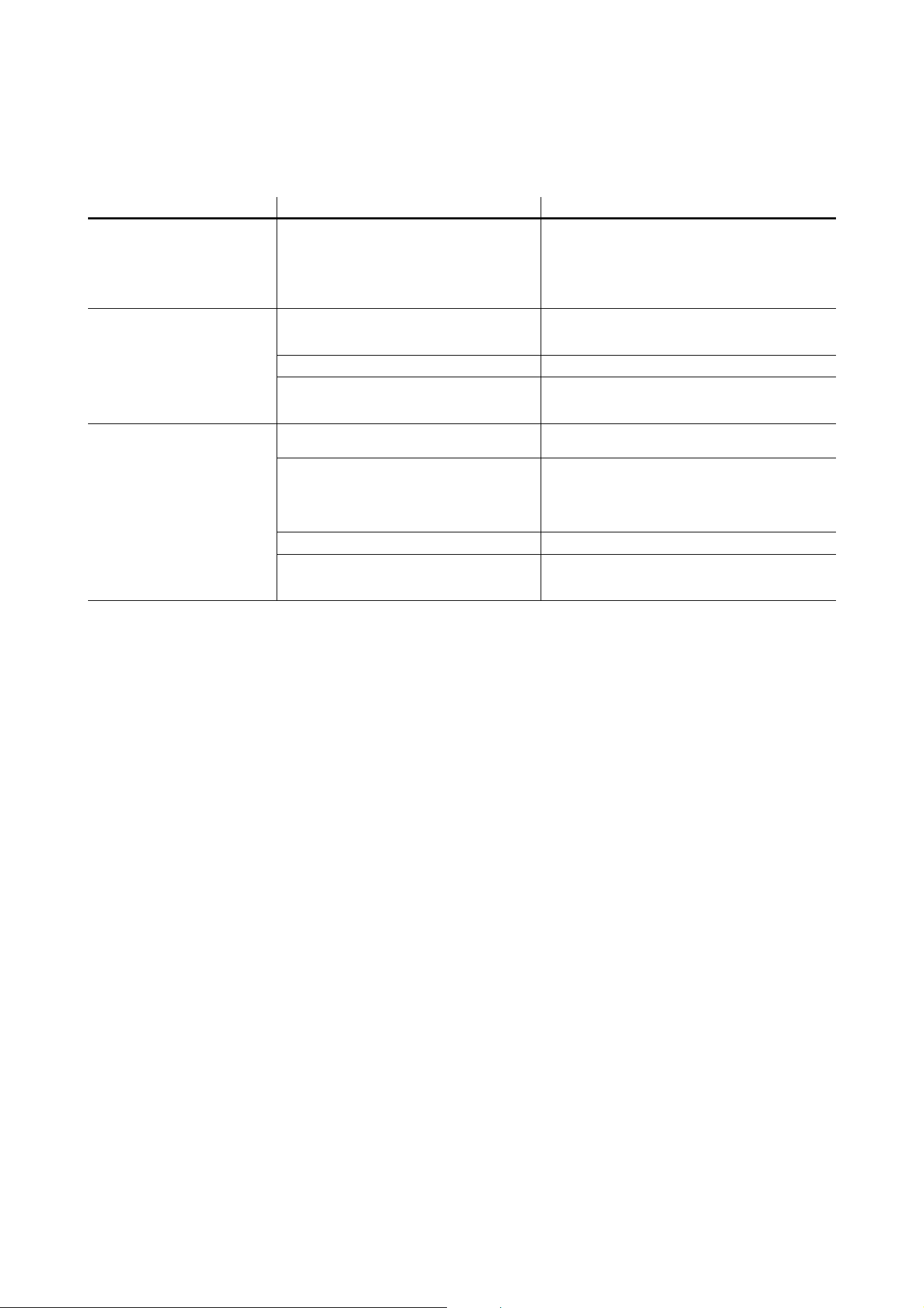
Troubleshooting
Problem Probable cause(s) Remedy
Control is lost and activating
magnetic ‘control button’ causes
Exterior Dot-HP to show
constant or flashing red status
indication.
Error has occurred.
Check that system is correctly connected, set up
and running.
Hold magnet over ‘control button’ until LEDs 1 - 4
turn blue, then move magnet away, to reboot
Exterior Dot-HP.
Restart P3 or DMX controller.
Product seems completely
dead.
Product has gone into thermal protection
shutdown.
Check product temperature readouts on P3 system
controller. Reduce ambient temperature by
providing ventilation or fan cooling, for example.
No DC power to product. Check 48 VDC power supply and cables.
Internal fault.
Disconnect from power. Do not attempt repairs
yourself. Contact Martin Service or an authorized
Martin service partner for assistance.
Exterior Dot-HP does not
display as intended.
Fault in 48 VDC power transmission.
Inspect connections and cables. Correct poor
connections. Repair or replace damaged cables.
Fault in data transmission.
Inspect connections and cables. Correct poor
connections. Repair or replace damaged cables.
If using DMX, check that DMX console and DC
power supply unit are at same earth (ground)
potential.
Incorrect mapping or addressing of products. Check product address and controller settings.
Product in installation is defective and is
disturbing data transmission.
Substitute known good products one at a time until
normal operation is regained. Have faulty product
serviced by Martin Service.
Table 10: Troubleshooting
DMX protocols
35
DMX protocols
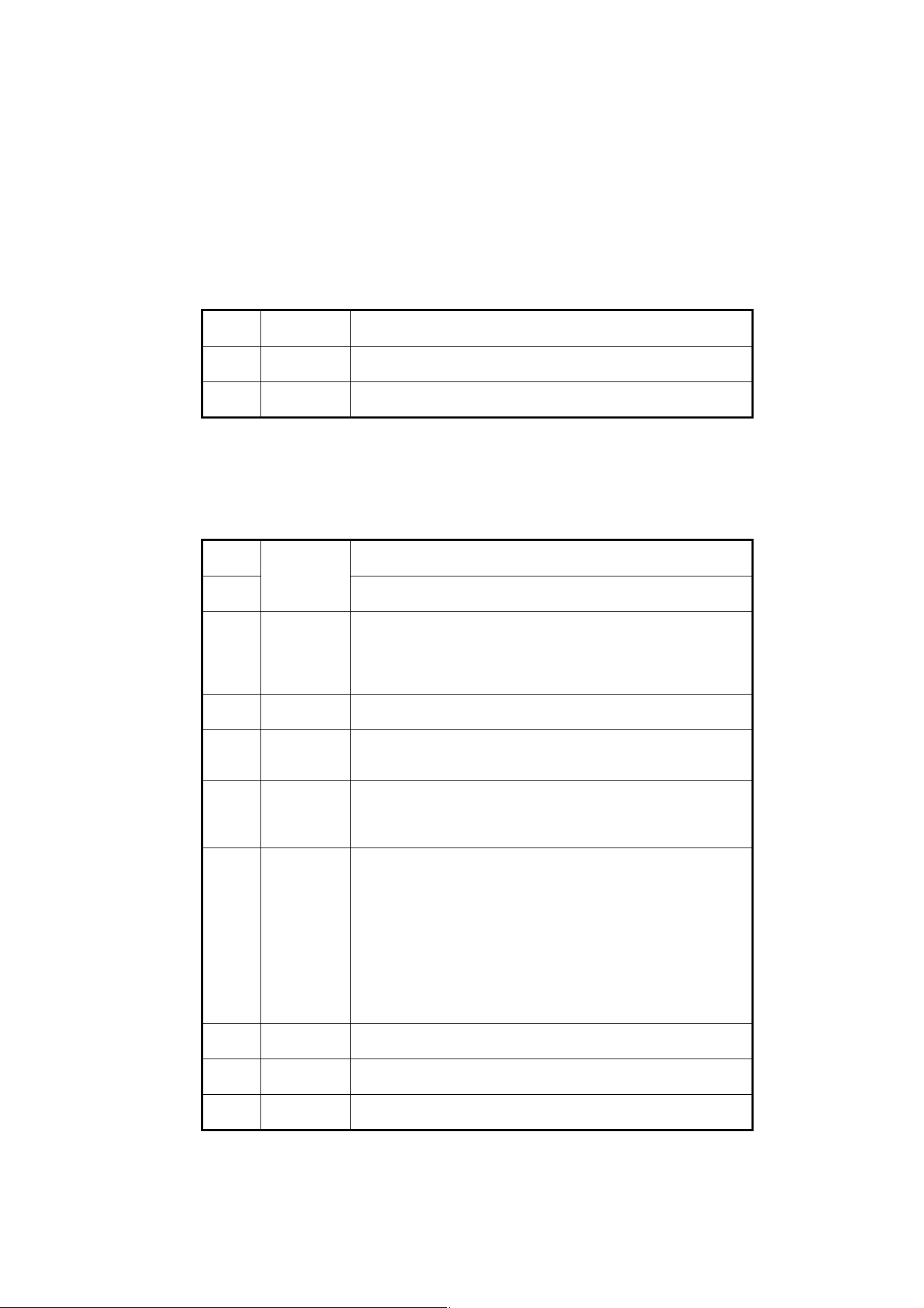
Exterior Dot-HP RGB
RGB Modes (calibrated and uncalibrated)
Basic Modes (calibrated and uncalibrated)
Channel DMX Value Function
1
0 - 255
Red
0 → 100%
2
0 - 255
Green
0 → 100%
3
0 - 255
Blue
0 → 100%
Table 11: DMX Protocol, RGB Mode
Channel DMX Value Function
1
0 - 65535
Dimmer fade (MSB)
8-bit coarse control, closed 0% → open 100%
2
Dimmer fade (LSB)
16-bit fine adjustment, closed → open
3
0 - 49
50 - 200
201 - 210
211 - 255
Strobe
No strobe
Strobe, slow → fast
No strobe
Random strobe, slow → fast
4
0 - 255
Strobe duration
0 → 1 second
5
0 - 7
8 - 255
FX selection
No FX: output controlled on RGB channels
FX selection (see “Pre-programmed FX” on page 36)
6
0 - 126
127 - 128
129 - 255
FX speed / modifier (depending on effect)
Fast → slow
Stop
Slow → fast
7
0
1
2
3 - 34
35
36
37 - 100
101 - 120
121 - 140
141 - 255
FX synchronization
No sync
Dot offset 10°
Dot offset 10°
...
Dot offset 350°
Synchronized
No function (reserved for future use)
Random start
Random duration
No function (reserved for future use)
8
0 - 255
Red
0 → 100%
9
0 - 255
Green
0 → 100%
10
0 - 255
Blue
0 → 100%
Table 12: DMX Protocol, Basic Mode
36
Exterior Dot-HP User Manual
Pre-programmed FX
Select the FX in this table on channel 5 in Basic Mode.
Set FX execution speed on channel 6.
Synchronize and set offsets between Dots on channel 7.
Channel DMX Value Function
5
0
1
2
3
4
5
6
7
8
9
10
11
12
13
14
15
16
17 - 19
20
21
22
23
24
25
26
27
28
29
30
31
32 - 50
51
52
53
54
55
56
57
58
59
60
61
62
63 - 68
69
70
71
72
73
74
75
76
77
78
79 - 86
No FX
Intensity FX
Wave
Step
Pulse
Blackout strobe
2x strobe
3x strobe
4x strobe
Up, down flash
Up, flash, down, flash
Random levels
Pixel killer
Noise overlay
Random pixel buildup / breakdown
In / out wave
In / out step
In / out pulse
No function (reserved for future use)
Movie flicker
Electric arc
Atomic lightning
Thunderstorm
Sonar (1 pixel)
Sonar (2 pixels)
Sonar (3 pixels)
Sonar (6 pixels)
Sonar (9 pixels)
Pie slice chase
Random chase
Water drop
No function (reserved for future use)
Color FX
Rainbow wave
Rainbow step
Rainbow pulse
RGB wave
RGB step
RGB pulse
CMY wave
CMY step
CMY pulse
Random mix wave
Random mix step
Random mix pulse
No function (reserved for future use)
Solid
Spectrum shifter
RGB to white wave
RGB to white step
RGB to white pulse
RGB to white strobe
Normal to white wave
Normal to white step
Normal to white pulse
Normal to white strobe
No function (reserved for future use)
Table 13: Pre-programmed FX
DMX protocols
37
Exterior Dot-HP CW
Intensity Modes (calibrated and uncalibrated)
87
88
89
90 - 100
101
102
103
104
105
106
107
108
109
110
111
112-255
Normal to inverted color in / out wave
Normal to inverted color in / out step
Normal to inverted color in / out pulse
No function (reserved for future use)
Special FX
Police chase
Nightrider
Stars
Fiberoptic white
Fiberoptic mix
Plasma
Starfield
Colorwave
Noise
Snowflakes
Rain
No function (reserved for future use)
Channel DMX Value Function
1
0 - 255
Intensity
0 → 100%
Table 14: DMX Protocol, Intensity Mode (CW Dots only)
Channel DMX Value Function
Table 13: Pre-programmed FX

38
Exterior Dot-HP User Manual
Specifications
Physical
Diameter . . . . . . . . . . . . . . . . . . . . . . . . . . . . . . . . . . . . . . . . . . . . . . . . . . . . . . . . . . . . . . . .72 mm (2.9 in.)
Height with clear front . . . . . . . . . . . . . . . . . . . . . . . . . . . . . . . . . . . . . . . . . . . . . . . . . . . . . .34 mm (1.4 in.)
Height with dome front. . . . . . . . . . . . . . . . . . . . . . . . . . . . . . . . . . . . . . . . . . . . . . . . . . . . . . . 49 mm (2 in.)
Height with directional front . . . . . . . . . . . . . . . . . . . . . . . . . . . . . . . . . . . . . . . . . . . . . . . . . .43 mm (1.7 in.)
Weight, clear front and dome front models . . . . . . . . . . . . . . . . . . . . . . . . . . . . . . . . . . . . . .300 g (0.7 lbs.)
Weight, directional front models. . . . . . . . . . . . . . . . . . . . . . . . . . . . . . . . . . . . . . . . . . . . . . . 350 g (0.8 lbs.)
Control and Programming
Control options. . . . . . . . . . . . . . . . . . . . . . Martin P3 System Controller (via Martin P3 PowerPort 1500 or
P3 PowerPort 1000 IP) and/or DMX/RDM
Protocol detection . . . . . . . . . . . . . . . . . . . . . . . . . . . . . . . . . . . . . . . . . . . . . . . . . . . . . . . . . . . . . Automatic
Control modes . . . . . . . . . . . . . . . . . . . . . . . . . . . RGB (RGB variants) white intensity (CW variants), basic
Control resolution. . . . . . . . . . . . . . . . . . . . . . . . . . 16-bit (P3) or 8-bit (DMX) control of each color channel
Setting and addressing . . . . . . . . . . . . . . . Martin P3 System controller or RDM-compliant DMX controller
DMX channels . . . . . . . . . . . . . . . . . . . . . . . . . . . . . . . . . . . . . . . . . . . . . . . . . . . . . . . . . . . . . . . . . . . . 3/10
Calibration . . . . . . . . . . . . . . . . . . . . . . . . . . . . . . . . . . . . . . . . . . . . . . . . . .Color and intensity for each Dot
DMX compliance . . . . . . . . . . . . . . . . . . . . . . . . . . . . . . . . . . . . . . . . . . . . . . . . . . . . . . . USITT DMX512-A
RDM compliance . . . . . . . . . . . . . . . . . . . . . . . . . . . . . . . . . . . . . . . . . . . . . . . . . . . . . . . ANSI/ESTA E1.20
Control/User Interface
Device status . . . . . . . . . . . . . . . . . . . . . . . . . . . . . . . . . . . . . . . . . . . . . . . . . . . Multi-color visual indication
Device test and reset . . . . . . . . . . . . . . . . . . . . . . . Magnetic button to call up fixture status and test fixture
Optics
Options
Clear front
Dome front
Directional front (TIR lens)
LED manufacturer, Exterior Dot-HP RGB . . . . . . . . . . . . . . . . . . . . . . . . . . . . . . . . . . . . . . . . . . . . . Osram
LED manufacturer, Exterior Dot-HP CW . . . . . . . . . . . . . . . . . . . . . . . . . . . . . . . . . . . . . . . . . . . . . . . Seoul
Minimum LED lifetime . . . . . . . . . . . . . . . . . . . . . . . . . . . . . . . . . 50 000 hours (to >70% luminous output)*
*Figure obtained under manufacturer's test conditions
Viewing angle
Clear front . . . . . . . . . . . . . . . . . . . . . . . . . . . . . . . . . . . . . . . . . . . . . . . . . . . . . . . . . . . . . . . . . 103° x 103°
Dome front . . . . . . . . . . . . . . . . . . . . . . . . . . . . . . . . . . . . . . . . . . . . . . . . . . . . . . . . . . . . . . . . . 125° x 125°
Directional front . . . . . . . . . . . . . . . . . . . . . . . . . . . . . . . . . . . . . . . . . . . . . . . . . . . . . . . . . . . . . . . 22° x 22°
All angles are stated as half-peak
Photometric Data
Color resolution . . . . . . . . . . . . . . . . . . . . . . . . . . . . . . . . . . . . . . . . . . . . .16 bits per color (48 bit per pixel)
Dot pitch. . . . . . . . . . . . . . . . . . . . . . . . . . . . . . . . . . . . . . . . . . . . . . . . . 72 mm - 500 mm (center-to-center)
Color Temperature
Cool white (CW). . . . . . . . . . . . . . . . . . . . . . . . . . . . . . . . . . . . . . . . . . . . . . . . . . . . . . . . . . 6700 K ± 300 K
RGB . . . . . . . . . . . . . . . . . . . . . . . . . . . . . . . . . . . . . . . . . . . . .2000 – 10 000 K (adjustable via P3 or DMX)
Total output, RGB Dots, calibrated mode
Clear front . . . . . . . . . . . . . . . . . . . . . . . . . . . . . . . . . . . . . . . . . . . . . . . . . . . . . . . . . . . . . 90 lumens, 36 cd
Dome front . . . . . . . . . . . . . . . . . . . . . . . . . . . . . . . . . . . . . . . . . . . . . . . . . . . . . . . . . . . . . 62 lumens, 18 cd
Directional front . . . . . . . . . . . . . . . . . . . . . . . . . . . . . . . . . . . . . . . . . . . . . . . . . . . . . . . . 72 lumens, 270 cd
Total output, RGB Dots, non-calibrated mode
Clear front . . . . . . . . . . . . . . . . . . . . . . . . . . . . . . . . . . . . . . . . . . . . . . . . . . . . . . . . . . . . 120 lumens, 48 cd
Dome front . . . . . . . . . . . . . . . . . . . . . . . . . . . . . . . . . . . . . . . . . . . . . . . . . . . . . . . . . . . . . 80 lumens, 24 cd
Directional front . . . . . . . . . . . . . . . . . . . . . . . . . . . . . . . . . . . . . . . . . . . . . . . . . . . . . . . . 96 lumens, 360 cd
Specifications
39
Total output, CW Dots, calibrated mode
Clear front . . . . . . . . . . . . . . . . . . . . . . . . . . . . . . . . . . . . . . . . . . . . . . . . . . . . . . . . . . . . 160 lumens, 62 cd
Dome front . . . . . . . . . . . . . . . . . . . . . . . . . . . . . . . . . . . . . . . . . . . . . . . . . . . . . . . . . . . . 110 lumens, 32 cd
Directional front . . . . . . . . . . . . . . . . . . . . . . . . . . . . . . . . . . . . . . . . . . . . . . . . . . . . . . . 120 lumens, 590 cd
Total output, CW Dots, non-calibrated mode
Clear front . . . . . . . . . . . . . . . . . . . . . . . . . . . . . . . . . . . . . . . . . . . . . . . . . . . . . . . . . . . . 210 lumens, 82 cd
Dome front . . . . . . . . . . . . . . . . . . . . . . . . . . . . . . . . . . . . . . . . . . . . . . . . . . . . . . . . . . . . 142 lumens, 41 cd
Directional front . . . . . . . . . . . . . . . . . . . . . . . . . . . . . . . . . . . . . . . . . . . . . . . . . . . . . . . 160 lumens, 775 cd
Video Processing
Brightness control
Gamma correction and control
Color temperature control
Color space control
Calibration processing
Synchronization
Signal Protocol
Martin P3 system (via Martin P3 PowerPort) or DMX/RDM
Construction
Color . . . . . . . . . . . . . . . . . . . . . . . Electrostatic powder-coated (custom colors available by special order)
Base. . . . . . . . . . . . . . . . . . . . . . . . . . . . . . . . . . . . . . . . . . . . . . . . . . . . . . . . . . . . . . . . . . . . Cast aluminum
Protection rating. . . . . . . . . . . . . . . . . . . . . . . . . . . . . . . . . . . . . . . . . . . . . . . . . . . . . . . . . . . . . . . . . . . IP66
Impact resistance. . . . . . . . . . . . . . . . . . . . . . . . . . . . . . . . . . . . . . . . . . . . . . . . . . . . . . . . . . . . . . . . . . IK08
Corrosion resistance . . . . . . . . . . . . . . . . . . . . . . . . . . . . C5-M (very high corrosivity / marine, ISO 12944)
Vibration resistance . . . . . . . . . . . 1.0 g sinusoidal (IEC 60068-2-6), 0.7 g RMS random (IEC 60068-2-64)
RoHS compliant
Installation
Mounting options . . . . . . . . . . . Direct surface mount, optional mounting plate or optional mounting profile
Orientation . . . . . . . . . . . . . . . . . . . . . . . . . . . . . . . . . . . . . . . . . . . . . . . . . . . . . . . . . . . . . . . . . . . . . . . .Any
Connections
Power and data input . . . . . . . . . . . . . . . . . . . . . . . . . . . . . . . . . . . . . . . . . .6-pin custom (BBD), IP66-rated
Power and data thru. . . . . . . . . . . . . . . . . . . . . . . . . . . . . . . . . . . . . . . . . . .6-pin custom (BBD), IP66-rated
Hot-pluggable
Electrical
Nominal input voltage . . . . . . . . . . . . . . . . . . . . . . . . . . . . . . . . . . . . . . . . . . . . . . . . . . . . . . 48 VDC +/- 4%
Power supply options . . . . . . . . . . . . . . . . . . . . . Martin P3 PowerPort 1500, Martin P3 PowerPort 1000 IP,
Martin IP66 PSU or generic 48 VDC PSU
Typical total power consumption, calibrated mode . . . . . . . . . . . . . . . . . . . . . 5 W at full intensity, full white
Typical total power consumption, uncalibrated mode . . . . . . . . . . . . . . . . . . . 7 W at full intensity, full white
Surge protection . . . . . . . . . . . . . . . . . . . . . . . . . . . . . . . . . . . . . . . . . . . . . . . . . . . . . . . . . . . . . . . . . . 4 kV
Allow for +/-10% variation in power consumption figures
Thermal
Cooling. . . . . . . . . . . . . . . . . . . . . . . . . . . . . . . . . . . . . . . . . . . . . . . . . . . . . . . . . . . . . . . . . . . . . Convection
Maximum ambient temperature (Ta max.) for typical video content. . . . . . . . . . . . . . . . . . . . 55° C (131° F)
Minimum ambient temperature (Ta min.) . . . . . . . . . . . . . . . . . . . . . . . . . . . . . . . . . . . . . . . . . -20° C (-4° F)
Max. total heat dissipation (calculated, +/- 10%) . . . . . . . . . . . . . . . . . . . . . . . . . . . . . . . . . . . . . 20 BTU/hr.
Approvals
EU safety . . . . . . . . . . . . . . . . . . . . . . . . . . . . . . .EN 60950-1, EN 60950-22
EU EMC . . . EN 55024, EN 55032 (Class A), EN 61000-3-2, EN 61000-3-3
US safety . . . . . . . . . . . . . . . . . . . . . . . . . . . . . . . UL 60950-1, UL 60950-22
US EMC . . . . . . . . . . . . . . . . . . . . . . . . . . . . . .CFR Title 47 Part 15 Class A
Canadian safety . . . . . . . . . . . . . . . . CSA C22.2 No. 60950-1, No. 60950-22
Canadian EMC . . . . . . . . . . . . . . . . . . . . . . . . . . . . . . . . . ICES-003 Class A
Australia/NZ . . . . . . . . . . . . . . . . . . . . . . . . . . . . . . . . . . . . . . . . . . . . . .RCM

40
Exterior Dot-HP User Manual
Accessories
Magnetic Test Tool, set of 10 . . . . . . . . . . . . . . . . . . . . . . . . . . . . . . . . . . . . . . . . . . . . . . . . . P/N 91610139
Mounting hardware
Brackets with Flanges, set of 9, Exterior Dot-HP. . . . . . . . . . . . . . . . . . . . . . . . . . . . . . . . . . P/N 91606020
Mounting Profile Kit incl. Dot bracket, screws and lock, Exterior Dot-HP, 57 mm (2.25 in.) . . P/N 91606021
Mounting Profile, Exterior Dot-HP / Pixline, 320 mm (12.6 in.) . . . . . . . . . . . . . . . . . . . . . . . P/N 91611620
Mounting Profile, Exterior Dot-HP / Pixline, 1280 mm (50.4 in.) . . . . . . . . . . . . . . . . . . . . . . P/N 91611610
Mounting Profile Locks, Exterior Dot-HP / Pixline, set of 10 . . . . . . . . . . . . . . . . . . . . . . . . . P/N 91611725
Input adapter cables
Power + Data Input Adapter Cable, 4-pin male XLR (for P3 PowerPort)
to female BBD, 0.25 m (9.8 in.). . . . . . . . . . . . . . . . . . . . . . . . . . P/N 91616046
Power + Data Input Adapter Cable, 5-pin male XLR (for DMX) + wire tails (for PSU)
to female BBD, 0.25 m (9.8 in.). . . . . . . . . . . . . . . . . . . . . . . . . . P/N 91616048
Power + Data Input Adapter Cable, 5-pin male XLR (for DMX) + 4-pin male XLR (for
P3 PowerPort) to female BBD, 0.25m (9.8 in.) . . . . . . . . . . . . . . P/N 91616049
Power + Data Input Adapter Cable, 5-pin male XLR (for DMX) + male Tripix type (for
Martin IP66 PSU 240W) to female BBD, 0.25 m (9.8 in.) . . . . . . P/N 91616050
Output adapter cables
Power + Data Output Cable, male BBD
to 4-pin female XLR, 0.25m (9.8 in.). . . . . . . . . . . . . . . . . . . . . . P/N 91616047
DMX Lead-out Cable, male BBD to 5-pin female XLR, 0.25 m (9.8 in.) . . . . . . . . . . . . . . . . P/N 91616051
Extension cables, CMX type
Power + Data Extension Cable, Installation Type, CMX, BBD to BBD 1 m (3.3 ft.) . . . . . . . . P/N 91616055
Power + Data Extension Cable, Installation Type, CMX, BBD to BBD, 2.5 m (8.2 ft.) . . . . . . P/N 91616056
Power + Data Extension Cable, Installation Type, CMX, BBD to BBD, 5 m (16.4 ft.). . . . . . . P/N 91616057
Power + Data Extension Cable, Installation Type, CMX, BBD to BBD, 10 m (32.8 ft.). . . . . . P/N 91616058
Power + Data Extension Cable, Installation Type, CMX, BBD to BBD, 25 m (82.1 ft.). . . . . . P/N 91616059
Power + Data Extension Cable, Installation Type, CMX,
without connectors, 100 m (328 ft.) . . . . . . . . . . . . . . . . . . . . . . P/N 91616060
Extension Cables, Low Smoke Zero Halogen Type
Power + Data Extension Cable, Installation type LSZH, BBD to BBD, 1 m (3.2 ft.) . . . . . . . . P/N 91616012
Power + Data Extension Cable, Installation type LSZH, BBD to BBD, 2.5 m (8.2 ft.) . . . . . . P/N 91616013
Power + Data Extension Cable, Installation type LSZH, BBD to BBD, 5 m (16.4 ft.) . . . . . . . P/N 91616014
Power + Data Extension Cable, Installation type LSZH, BBD to BBD, 10 m (32.8 ft.) . . . . . . P/N 91616015
Power + Data Extension Cable, Installation type LSZH, BBD to BBD, 25 m (82 ft.) . . . . . . . P/N 91616016
Power + Data Extension Cable, Installation type LSZH,
without connectors, 100 m (328 ft.) . . . . . . . . . . . . . . . . . . . . . . P/N 91616017
Loose connectors
Power + Data Cable Connector, BBD, male. . . . . . . . . . . . . . . . . . . . . . . . . . . . . . . . . . . . . . P/N 91611750
Power + Data Cable Connector, BBD, female . . . . . . . . . . . . . . . . . . . . . . . . . . . . . . . . . . . . P/N 91611751
Blanking Caps for unused female BBD connectors, set of 10 . . . . . . . . . . . . . . . . . . . . . . . . P/N 91616052
Related Items
Martin P3 PowerPort 1500. . . . . . . . . . . . . . . . . . . . . . . . . . . . . . . . . . . . . . . . . . . . . . . . . . . P/N 90721040
Martin P3 PowerPort 1000 IP Installation . . . . . . . . . . . . . . . . . . . . . . . . . . . . . . . . . . . . . . . P/N 90721080
Martin IP66 PSU 240W external power supply unit. . . . . . . . . . . . . . . . . . . . . . . . . . . . . . . . P/N 90760330
Martin P3-050 System Controller. . . . . . . . . . . . . . . . . . . . . . . . . . . . . . . . . . . . . . . . . . . . . . P/N 90721090
Martin P3-150 System Controller. . . . . . . . . . . . . . . . . . . . . . . . . . . . . . . . . . . . . . . . . . . . . . P/N 90721015
Martin P3-300 System Controller. . . . . . . . . . . . . . . . . . . . . . . . . . . . . . . . . . . . . . . . . . . . . . P/N 90721060
Martin P3-PC System Controller . . . . . . . . . . . . . . . . . . . . . . . . . . . . . . . . . . . . . . . . . . . . . . P/N 90721030
Specifications
41
Ordering Information
Exterior Dot-HP RGB, Aluminum, Clear Front . . . . . . . . . . . . . . . . . . . . . . . . . . . . . . . . . . . . P/N 90357683
Exterior Dot-HP RGB, Aluminum, Diffuser Dome Front. . . . . . . . . . . . . . . . . . . . . . . . . . . . . P/N 90357685
Exterior Dot-HP RGB, Aluminum, Directional Front (TIR Lens). . . . . . . . . . . . . . . . . . . . . . . P/N 90357686
Exterior Dot-HP CW, Aluminum, Clear Front . . . . . . . . . . . . . . . . . . . . . . . . . . . . . . . . . . . . . P/N 90357688
Exterior Dot-HP CW, Aluminum, Diffuser Dome Front. . . . . . . . . . . . . . . . . . . . . . . . . . . . . . P/N 90357687
Exterior Dot-HP CW, Aluminum, Directional Front (TIR Lens). . . . . . . . . . . . . . . . . . . . . . . . P/N 90357689
Dots in the Exterior Dot-HP range are supplied in cardboard boxes containing multiples of 9 Dots. Remain-
ing Dots (and orders that consist of less than 9 Dots total) are supplied in individual packs
Specifications subject to change without notice. For the latest product specifications, see www.martin.com
Disposing of this product
Martin® products are supplied in compliance with Directive 2002/96/EC of the European Parliament and of the
Council of the European Union on WEEE (Waste Electrical and Electronic Equipment), as amended by Directive
2003/108/EC, where applicable.
Help preserve the environment! Ensure that this product is recycled at the end of its life. Your supplier can give
details of local arrangements for the disposal of Martin products.
FCC Compliance
This device complies with Part 15 of the FCC Rules. Operation is subject to the following two conditions: (1) This device may not
cause harmful interference, and (2) this device must accept any interference received, including interference that may cause
undesired operation.
Canadian Interference-Causing Equipment Regulations - Règlement sur le Matériel Brouilleur du Canada
This Class A digital apparatus meets all requirements of the Canadian Interference-Causing Equipment Regulations.
Cet appareil numérique de la classe A respecte toutes les exigences du Règlement sur le Matériel Brouilleur du Canada.
EU EMC
Warning! Class A ITE product. Operation of this equipment in a residential environment could cause radio interference.
Not for use in a computer room as defined in the Standard for the Protection of Information Technology Equipment, ANSI/NFPA 75.
Ne peut être utilisé dans une salle d'ordinateurs telle que définie dans la norme ANSI/NFPA 75 Standard for the Protection of
Information Technology Equipment.



www.martin.com