Operating Instructions
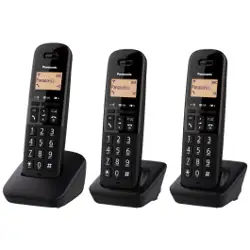
Digital Cordless Phone
Model No.
KX-TGC410E
KX-TGC412E
KX-TGC413E
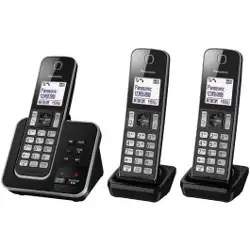
Digital Cordless Answering System
Model No.
KX-TGC420E
KX-TGC422E
KX-TGC423E
KX-TGC424E
KX-TGC425E
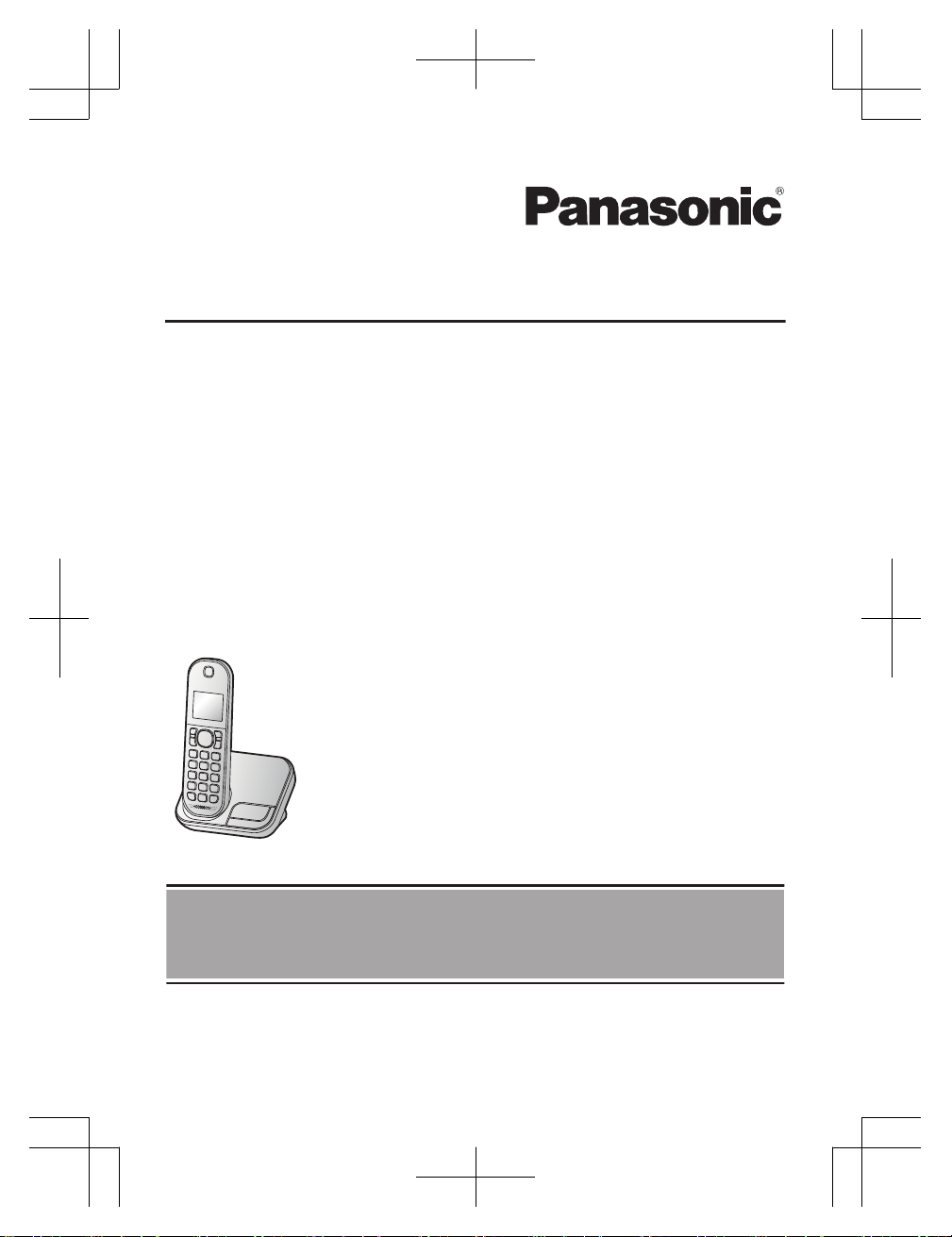
Model shown is KX-TGC410.
Before initial use, see “Getting Started”
on page 11.
Thank you for purchasing a Panasonic product.
Please read these operating instructions before using the unit and save them for
future reference.
TGC41x_42xE(en)_0229_ver011.pdf 1 2016/02/29 15:10:36

Introduction
Model composition .......................................3
Accessory information ..................................3
General information ......................................5
Graphical Symbols for Use on Equipment and
Their Descriptions ........................................6
Important Information
For your safety .............................................7
Important safety instructions ........................8
For best performance ...................................8
Other information .........................................9
Specifications ...............................................9
Getting Started
Setting up ...................................................11
Controls ......................................................13
Display icons ..............................................14
Turning the power on/off ............................15
Language setting ........................................15
Date and time .............................................15
Recording your greeting message .............15
Other settings .............................................16
Making/Answering Calls
Making calls ...............................................17
Answering calls ..........................................17
Useful features during a call .......................17
Intercom .....................................................19
Key lock ......................................................19
Phonebook
Phonebook .................................................20
Speed dial ..................................................21
Programming
Menu list .....................................................23
Alarm ..........................................................27
Nuisance call block ....................................27
Other programming ....................................28
Caller ID Service
Using Caller ID service ...............................31
Caller list ....................................................31
Answering System
Answering system ......................................33
Turning the answering system on/off .........33
Greeting message ......................................33
Listening to messages ...............................34
Remote operation .......................................35
Answering system settings .........................36
Useful Information
Voicemail service .......................................38
Character entry ..........................................38
Error messages ..........................................40
Troubleshooting .........................................40
Conditions of guarantee .............................45
Index
Index...........................................................46
2
Table of Contents
TGC41x_42xE(en)_0229_ver011.pdf 2 2016/02/29 15:10:36
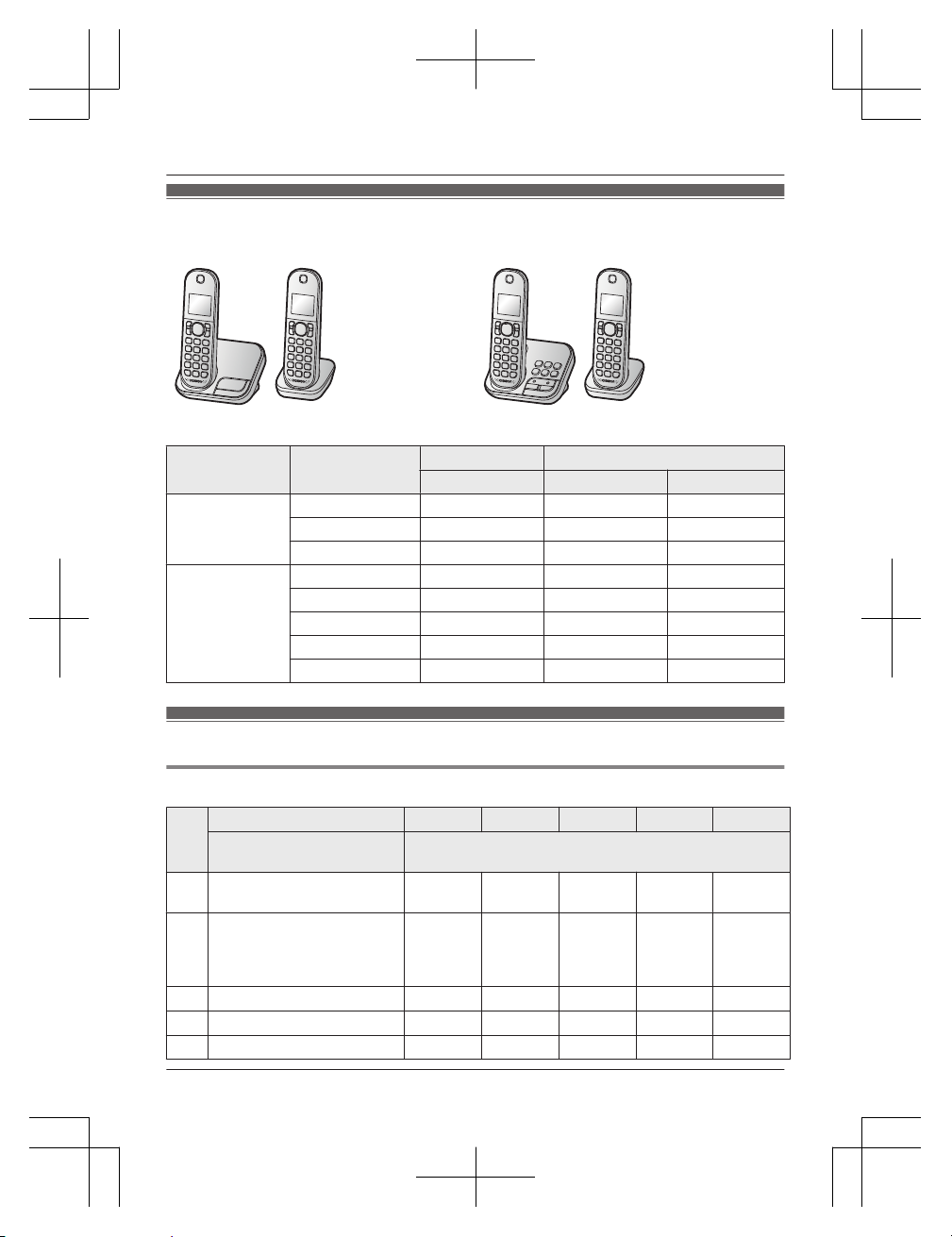
Model composition
n KX-TGC410 series n KX-TGC420 series
R Model shown is KX-TGC412. R Model shown is KX-TGC422.
Series Model No.
Base unit Handset
Part No. Part No. Quantity
KX-TGC410
series
KX-TGC410 KX-TGC410 KX-TGCA41 1
KX-TGC412 KX-TGC410 KX-TGCA41 2
KX-TGC413 KX-TGC410 KX-TGCA41 3
KX-TGC420
series
KX-TGC420 KX-TGC420 KX-TGCA41 1
KX-TGC422 KX-TGC420 KX-TGCA41 2
KX-TGC423 KX-TGC420 KX-TGCA41 3
KX-TGC424 KX-TGC420 KX-TGCA41 4
KX-TGC425 KX-TGC420 KX-TGCA41 5
Accessory information
Supplied accessories
No.
Supplied handset qty.
1 unit
*1
2 units
*2
3 units
*3
4 units
*4
5 units
*5
Accessory item/
Part number
Accessory quantity
A AC adaptor for base unit/
PNLV226E0X
1 1 1 1 1
B Telephone line cord/
PNJA1113Y (Black/for U.K.)
or PNJA1037Z
(Transparence/for U.K.)
1 1 1 1 1
C
Rechargeable batteries
*6
2 4 6 8 10
D
Handset cover
*7
1 2 3 4 5
E Charger/PNLC1074ZB – 1 2 3 4
Helpline Tel. No.: U.K. 0344 844 3899 Ireland 01289 8333
3
Introduction
TGC41x_42xE(en)_0229_ver011.pdf 3 2016/02/29 15:10:36
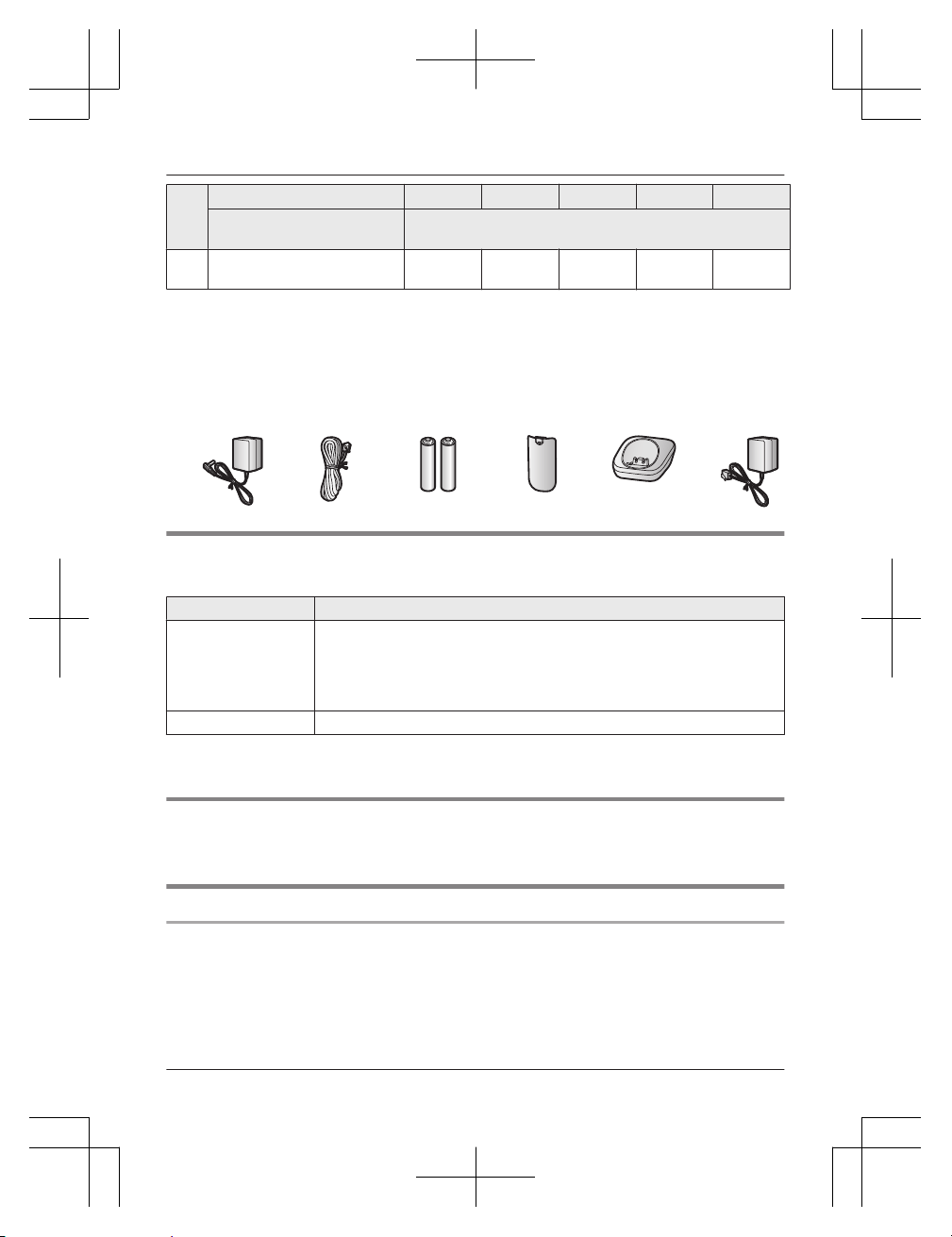
No.
Supplied handset qty.
1 unit
*1
2 units
*2
3 units
*3
4 units
*4
5 units
*5
Accessory item/
Part number
Accessory quantity
F AC adaptor for charger/
PNLV233EKX
– 1 2 3 4
*1 KX-TGC410/KX-TGC420
*2 KX-TGC412/KX-TGC422
*3 KX-TGC413/KX-TGC423
*4 KX-TGC424
*5 KX-TGC425
*6 See page 4 for replacement battery information.
*7 The handset cover comes attached to the handset.
A B C D E F
Additional/replacement accessories
Please contact your nearest Panasonic dealer for sales information.
Accessory item Model number/Specifications
Rechargeable
batteries
*1
Battery type:
– Nickel metal hydride (Ni-MH)
– 2 x AAA (R03) size for each handset
– 1.2 V
– Minimum amperage of 550 mAh
DECT repeater KX-A405, KX-A406
*1 Replacement batteries may have a different capacity from that of the supplied batteries.
We recommend using Panasonic rechargeable batteries.
Other information
R Design and specifications are subject to change without notice.
R The illustrations in these instructions may vary slightly from the actual product.
Sales and support information
Customer Communications Centre
R For customers within the U.K.: 0344 844 3899
R For customers within Ireland: 01289 8333
R For further support on your product, please visit our website: www.panasonic.co.uk
4
Helpline Tel. No.: U.K. 0344 844 3899 Ireland 01289 8333
Introduction
TGC41x_42xE(en)_0229_ver011.pdf 4 2016/02/29 15:10:37

Direct Sales at Panasonic U.K.
R O
rder accessory and consumable items for your product with ease and confidence by phoning
our Customer Communications Centre Monday - Friday 9:00am - 5:00pm (Excluding public
holidays).
R Go on line through our Internet Accessory ordering application at www.pas-europe.com
R Most major credit and debit cards accepted.
R All enquiries transactions and distribution facilities are provided directly by Panasonic U.K.
R Also available through our Internet is direct shopping for a wide range of finished products.
Take a browse on our website for further details.
shop.panasonic.co.uk/
General information
R T
his equipment is designed for use on the U.K. and Ireland analogue telephone network.
R In the event of problems, you should contact your equipment supplier in the first instance.
Declaration of Conformity:
R Panasonic Corporation declares that the radio equipment type (KX-TGC410 series/
KX-TGC420 series: page 3) is in compliance with Directive 2014/53/EU. The full text of the EU
declaration of conformity is available at the following internet address:
http://www.ptc.panasonic.eu/doc
Contact to Authorised Representative:
Panasonic Testing Centre
Panasonic Marketing Europe GmbH
Winsbergring 15, 22525 Hamburg, Germany
Ecodesign information
E
codesign information under EU Regulation (EC) No. 1275/2008 amended by (EU) Regulation
No. 801/2013. From 1 January 2015.
Please visit here: http://www.ptc.panasonic.eu/erp
Click [Downloads]
a Energy related products information (Public)
Power consumption in networked standby and guidance are mentioned in the web site above.
Helpline Tel. No.: U.K. 0344 844 3899 Ireland 01289 8333
5
Introduction
TGC41x_42xE(en)_0217_ver201.pdf 5 2017/02/17 17:27:17
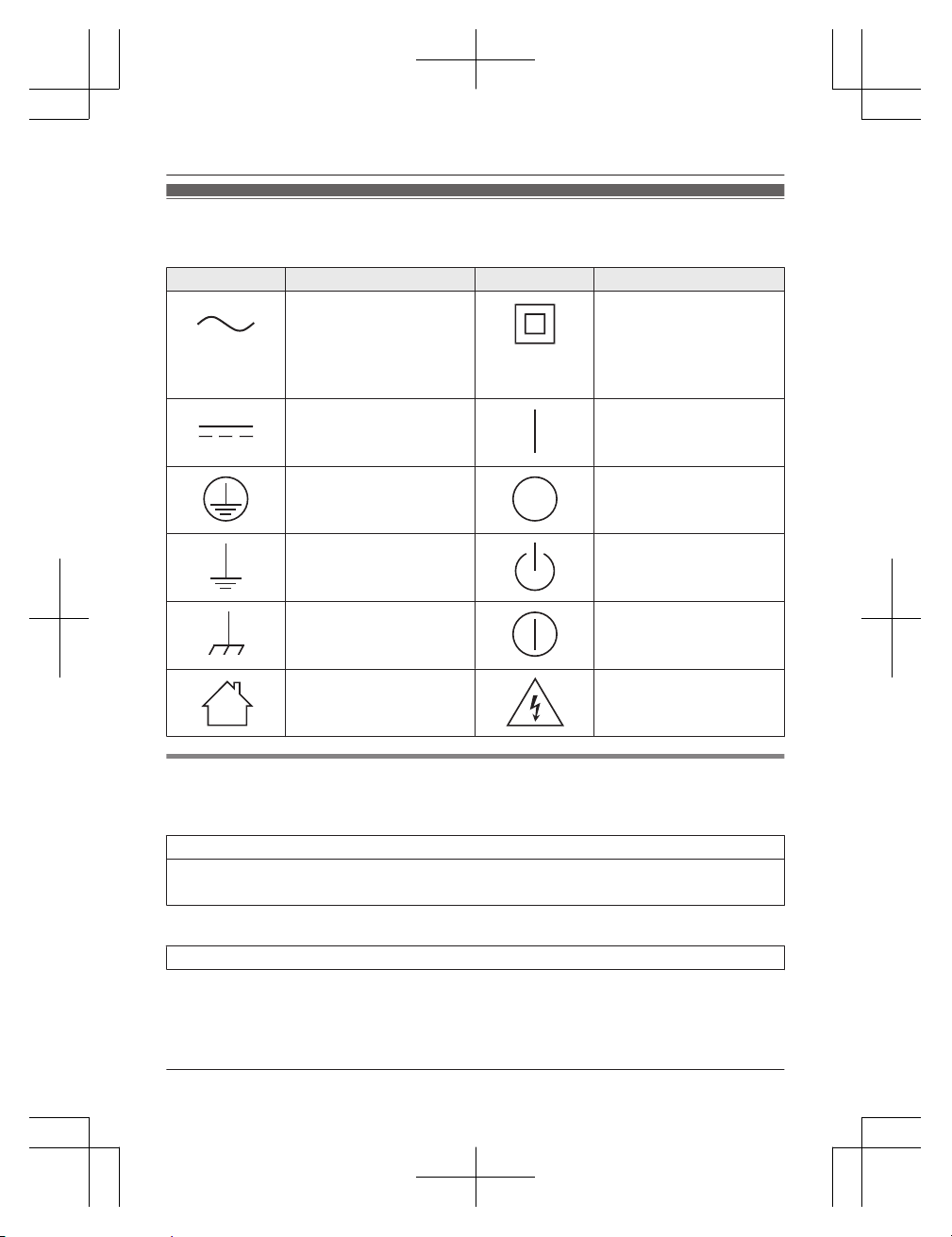
Graphical Symbols for Use on Equipment and Their
Descriptions
Symbol Explanation Symbol Explanation
Alternating current (A.C.) Class P equipment
(equipment in which
protection against electric
shock rely on Double
Insulation or Reinforced
Insulation.)
Direct current (D.C.) “ON” (power)
Protective earth “OFF” (power)
Protective bonding earth Stand-by (power)
Functional earth “ON”/“OFF” (power ;
push-push)
For indoor use only Caution, risk of electric
shock
For your future reference
We recommend keeping a record of the following information to assist with any repair under
warranty.
Serial No. Date of purchase
(found on the bottom of the base unit)
Name and address of dealer
Attach your purchase receipt here.
6
Helpline Tel. No.: U.K. 0344 844 3899 Ireland 01289 8333
Introduction
TGC41x_42xE(en)_0229_ver011.pdf 6 2016/02/29 15:10:37
For your safety
To prevent severe injury and loss of life/
property, read this section carefully before
using the product to ensure proper and safe
operation of your product.
WARNING
Power connection
R Use only the power source marked on the
product.
R Do not overload power outlets and
extension cords. This can result in the risk
of fire or electric shock.
R Completely insert the AC adaptor/power
plug into the power outlet. Failure to do so
may cause electric shock and/or excessive
heat resulting in a fire.
R Regularly remove any dust, etc. from the
AC adaptor/power plug by pulling it from
the power outlet, then wiping with a dry
cloth. Accumulated dust may cause an
insulation defect from moisture, etc.
resulting in a fire.
R Unplug the product from power outlets if it
emits smoke, an abnormal smell, or makes
an unusual noise. These conditions can
cause fire or electric shock. Confirm that
smoke has stopped emitting and contact an
authorised service centre.
R Unplug from power outlets and never touch
the inside of the product if its casing has
been broken open.
R Never touch the plug with wet hands.
Danger of electric shock exists.
Installation
R To prevent the risk of fire or electrical
shock, do not expose the product to rain or
any type of moisture.
R Do not place or use this product near
automatically controlled devices such as
automatic doors and fire alarms. Radio
waves emitted from this product may cause
such devices to malfunction resulting in an
accident.
R Do not allow the AC adaptor or telephone
line cord to be excessively pulled, bent or
placed under heavy objects.
Operating safeguards
R Unplug the product from power outlets
before cleaning. Do not use liquid or
aerosol cleaners.
R Do not disassemble the product.
R Do not spill liquids (detergents, cleansers,
etc.) onto the telephone line cord plug, or
allow it to become wet at all. This may
cause a fire. If the telephone line cord plug
becomes wet, immediately pull it from the
telephone wall jack, and do not use.
Medical
R Consult the manufacturer of any personal
medical devices, such as pacemakers or
hearing aids, to determine if they are
adequately shielded from external RF
(radio frequency) energy. (The product
operates in the frequency range of
1.88 GHz to 1.90 GHz, and the RF
transmission power is 250 mW (max.).)
R Do not use the product in health care
facilities if any regulations posted in the
area instruct you not to do so. Hospitals or
health care facilities may be using
equipment that could be sensitive to
external RF energy.
CAUTION
Installation and location
R Never install telephone wiring during an
electrical storm.
R Never install telephone line jacks in wet
locations unless the jack is specifically
designed for wet locations.
R Never touch uninsulated telephone wires or
terminals unless the telephone line has
been disconnected at the network interface.
R Use caution when installing or modifying
telephone lines.
R The AC adaptor is used as the main
disconnect device. Ensure that the AC
outlet is installed near the product and is
easily accessible.
Helpline Tel. No.: U.K. 0344 844 3899 Ireland 01289 8333
7
Important Information
TGC41x_42xE(en)_0229_ver011.pdf 7 2016/02/29 15:10:37
R This product is unable to make calls when:
– the handset batteries need recharging or
have failed.
– there is a power failure.
– the key lock feature is turned on.
Battery
R We recommend using the batteries noted
on page 4. USE ONLY rechargeable
Ni-MH batteries AAA (R03) size.
R Do not mix old and new batteries.
R Do not open or mutilate the batteries.
Released electrolyte from the batteries is
corrosive and may cause burns or injury to
the eyes or skin. The electrolyte is toxic and
may be harmful if swallowed.
R Exercise care when handling the batteries.
Do not allow conductive materials such as
rings, bracelets, or keys to touch the
batteries, otherwise a short circuit may
cause the batteries and/or the conductive
material to overheat and cause burns.
R Charge the batteries provided with or
identified for use with this product only, in
accordance with the instructions and
limitations specified in this manual.
R Only use a compatible base unit (or
charger) to charge the batteries. Do not
tamper with the base unit (or charger).
Failure to follow these instructions may
cause the batteries to swell or explode.
Important safety
instructions
When using your product, basic safety
precautions should always be followed to
reduce the risk of fire, electric shock, and
injury to persons, including the following:
1. Do not use this product near water for
example, near a bathtub, washbowl,
kitchen sink, or laundry tub, in a wet
basement or near a swimming pool.
2. Avoid using a telephone (other than a
cordless type) during an electrical storm.
There may be a remote risk of electric
shock from lightning.
3. Do not use the telephone to report a gas
leak in the vicinity of the leak.
4. Use only the power cord and batteries
indicated in this manual. Do not dispose of
batteries in a fire. They may explode.
Check with local codes for possible special
disposal instructions.
SAVE THESE INSTRUCTIONS
For best performance
Base unit location/avoiding noise
The base unit and other compatible Panasonic
units use radio waves to communicate with
each other.
R For maximum coverage and noise-free
communications, place your base unit:
– at a convenient, high, and central
location with no obstructions between
the handset and base unit in an indoor
environment.
– away from electronic appliances such as
TVs, radios, personal computers,
wireless devices, or other phones.
– facing away from radio frequency
transmitters, such as external antennas
of mobile phone cell stations. (Avoid
putting the base unit on a bay window or
near a window.)
R Coverage and voice quality depends on the
local environmental conditions.
R If the reception for a base unit location is
not satisfactory, move the base unit to
another location for better reception.
Environment
R Keep the product away from electrical noise
generating devices, such as fluorescent
lamps and motors.
R The product should be kept free from
excessive smoke, dust, high temperature,
and vibration.
R The product should not be exposed to
direct sunlight.
R Do not place heavy objects on top of the
product.
R When you leave the product unused for a
long period of time, unplug the product from
the power outlet.
R The product should be kept away from heat
sources such as radiators, cookers, etc. It
8
Helpline Tel. No.: U.K. 0344 844 3899 Ireland 01289 8333
Important Information
TGC41x_42xE(en)_0229_ver011.pdf 8 2016/02/29 15:10:37
should not be placed in rooms where the
temperature is less than 0 °C or greater
than 40 °C. Damp basements should also
be avoided.
R The maximum calling distance may be
shortened when the product is used in the
following places: Near obstacles such as
hills, tunnels, underground, near metal
objects such as wire fences, etc.
R Operating the product near electrical
appliances may cause interference. Move
away from the electrical appliances.
Routine care
R Wipe the outer surface of the product
with a soft moist cloth.
R Do not use benzine, thinner, or any
abrasive powder.
Other information
CAUTION: Risk of explosion if battery is
replaced by an incorrect type. Dispose of used
batteries according to the instructions.
Notice for product disposal, transfer,
or return
R This product can store your private/
confidential information. To protect your
privacy/confidentiality, we recommend that
you erase information such as phonebook
or caller list entries from the memory before
you dispose of, transfer, or return the
product.
Disposal of Old Equipment and
Batteries (Only for European Union
and countries with recycling systems)
1
2
These symbols (A, B) on the products,
packaging, and/or accompanying documents
mean that used electrical and electronic
products and batteries must not be mixed with
general household waste. For proper
treatment, recovery and recycling of old
products and batteries, please take them to
applicable collection points in accordance with
your national legislation.
By disposing of them correctly, you will help to
save valuable resources and prevent any
potential negative effects on human health
and the environment.
For more information about collection and
recycling, please contact your local
municipality. Penalties may be applicable for
incorrect disposal of this waste, in accordance
with national legislation.
For business users in the European
Union
If you wish to discard electrical and electronic
equipment, please contact your dealer or
supplier for further information.
Information on Disposal in other
Countries outside the European Union
These symbols (A, B) are only valid in the
European Union. If you wish to discard these
items, please contact your local authorities or
dealer and ask for the correct method of
disposal.
Note for the battery symbol
This symbol (B) might be used in
combination with a chemical symbol. In this
case it complies with the requirement set by
the Directive for the chemical involved.
Note for the battery removal
procedure
Refer to “Battery installation” on page 11.
Specifications
R Standard:
Helpline Tel. No.: U.K. 0344 844 3899 Ireland 01289 8333
9
Important Information
TGC41x_42xE(en)_0229_ver011.pdf 9 2016/02/29 15:10:37

DECT (Digital Enhanced Cordless
Telecommunications),
GAP (Generic Access Profile)
R Frequency range:
1.88 GHz to 1.90 GHz
R RF transmission power:
Approx. 10 mW (average power per
channel)
250 mW (max.)
R Power source:
100–240 V AC, 50/60 Hz
R Power consumption:
Base unit:
Standby: Approx. 0.5 W
Maximum: Approx. 2.5 W
Charger:
Standby: Approx. 0.1 W
Maximum: Approx. 1.5 W
R Operating conditions:
0 °C–40 °C, 20 %–80 % relative air
humidity (dry)
10
Helpline Tel. No.: U.K. 0344 844 3899 Ireland 01289 8333
Important Information
TGC41x_42xE(en)_0229_ver011.pdf 10 2016/02/29 15:10:37
Setting up
Connections
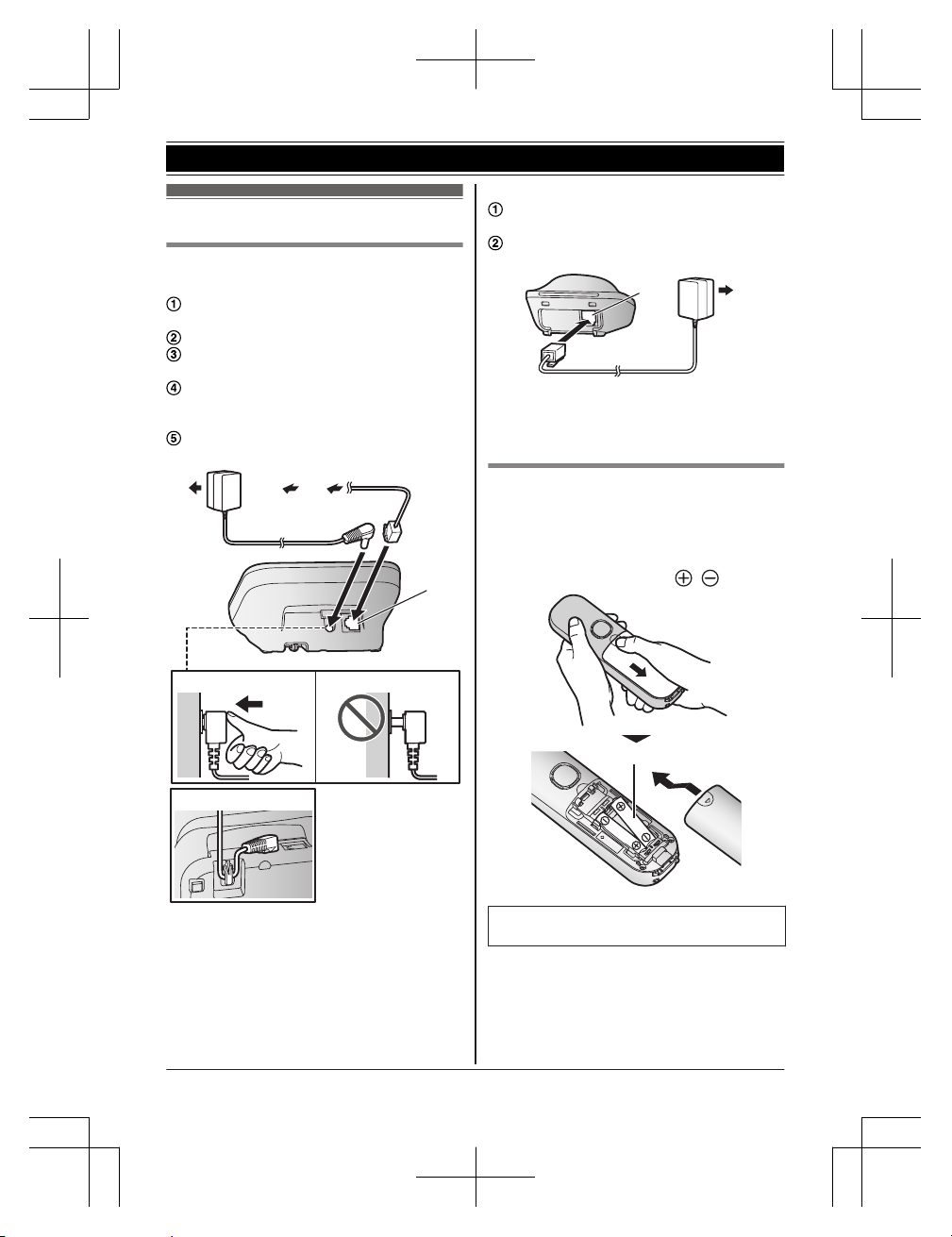
n Base unit
Connect the AC adaptor to the unit by
pressing the plug firmly.
Fasten the cord by hooking it.
Connect the AC adaptor to the power
outlet.
Connect the telephone line cord to the
unit, then to the telephone line jack until
you hear a click.
A DSL/ADSL filter (not supplied) is
required if you have a DSL/ADSL service.
4
5
4
3
1
2
Note:
R Use only the supplied Panasonic AC
adaptor PNLV226E.
R Use only the supplied telephone line cord.
n Charger
Connect the AC adaptor plug to the unit
until you hear a click.
Connect the AC adaptor to the power
outlet.
1
2
Note:
R Use only the supplied Panasonic AC
adaptor PNLV233E.
Battery installation
R USE ONLY rechargeable Ni-MH batteries
AAA (R03) size (
1
).
R Do NOT use alkaline/manganese/Ni-Cd
batteries.
R Confirm correct polarities (
, ).
1
R Follow the directions on the display to set
up the unit.
Helpline Tel. No.: U.K. 0344 844 3899 Ireland 01289 8333
11
Getting Started
TGC41x_42xE(en)_0229_ver011.pdf 11 2016/02/29 15:10:37
Battery charging
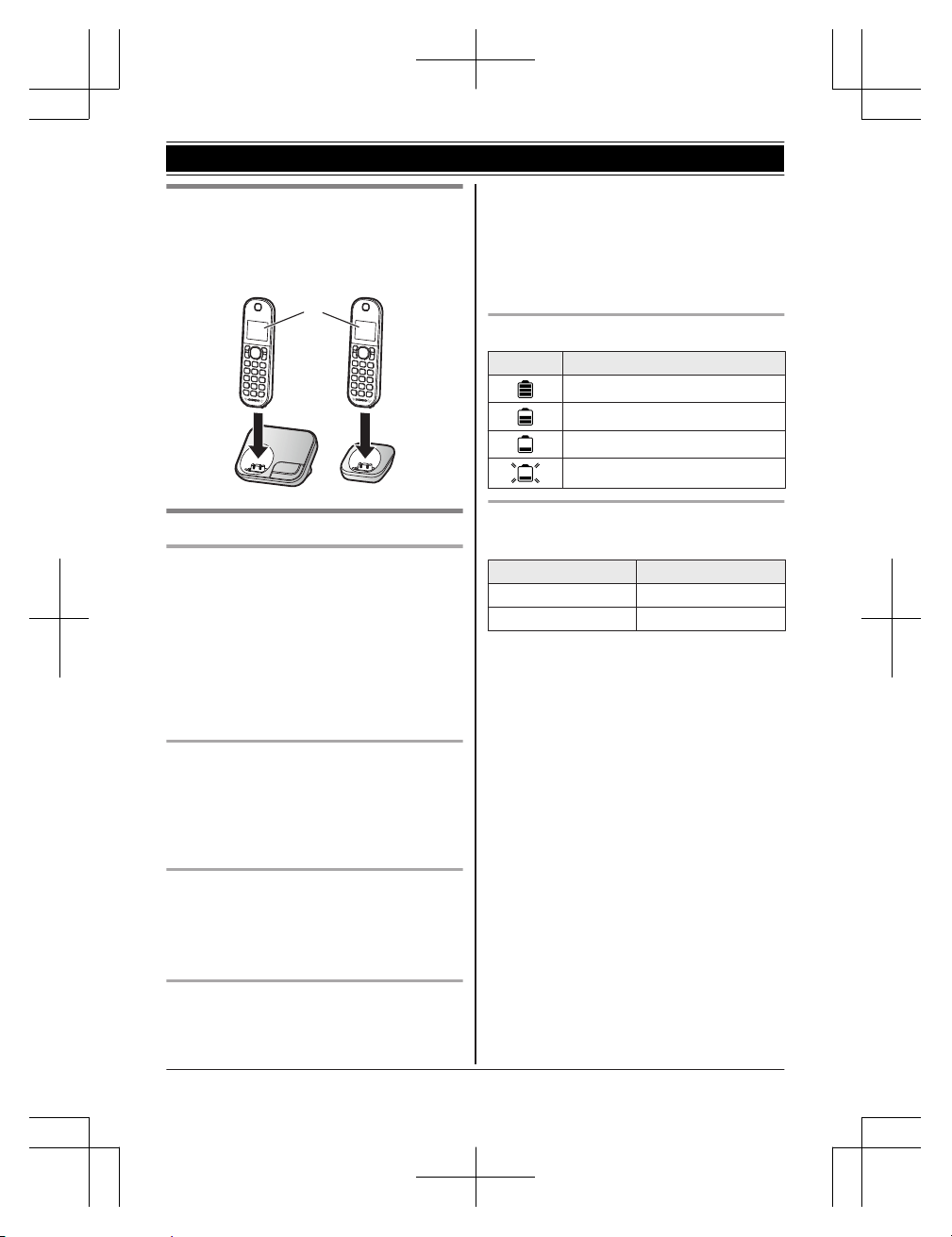
Charge for about 7 hours.
R Confirm “Charging” is displayed (
1
).
R When the batteries are fully charged,
“Fully Charged” is displayed.
1
Note when setting up
Note for connections
R The AC adaptor must remain connected at
all times. (It is normal for the adaptor to feel
warm during use.)
R The AC adaptor should be connected to a
vertically oriented or floor-mounted AC
outlet. Do not connect the AC adaptor to a
ceiling-mounted AC outlet, as the weight of
the adaptor may cause it to become
disconnected.
During a power failure
R The unit cannot be used to make or receive
calls during a power failure. We
recommend connecting a corded-type
telephone that does not use an AC adaptor
to your telephone line.
Note for battery installation
R Use the supplied rechargeable batteries.
For replacement, we recommend using the
Panasonic rechargeable batteries noted on
page 4, 8.
Note for battery charging
R It is normal for the handset to feel warm
during charging.
R Clean the charge contacts of the handset,
base unit, and charger with a soft and dry
cloth once a month. Before cleaning the
unit, disconnect from power outlets and any
telephone line cords. Clean more often if
the unit is exposed to grease, dust, or high
humidity.
Battery level
Icon Battery level
High
Medium
Low
Needs charging.
Panasonic Ni-MH battery
performance (supplied batteries)
Operation Operating time
In continuous use 18 hours max.
Not in use (standby) 200 hours max.
Note:
R Actual battery performance depends on
usage and ambient environment.
R When eco mode is set to “Eco Plus”, the
base unit stops communicating with the
handset while it is in standby mode. As a
result, the handset uses more power than
usual to search for the base unit and
therefore battery usage time is shortened
(page 16). (KX-TGC420 series: page 3)
12
Helpline Tel. No.: U.K. 0344 844 3899 Ireland 01289 8333
Getting Started
TGC41x_42xE(en)_0229_ver011.pdf 12 2016/02/29 15:10:37
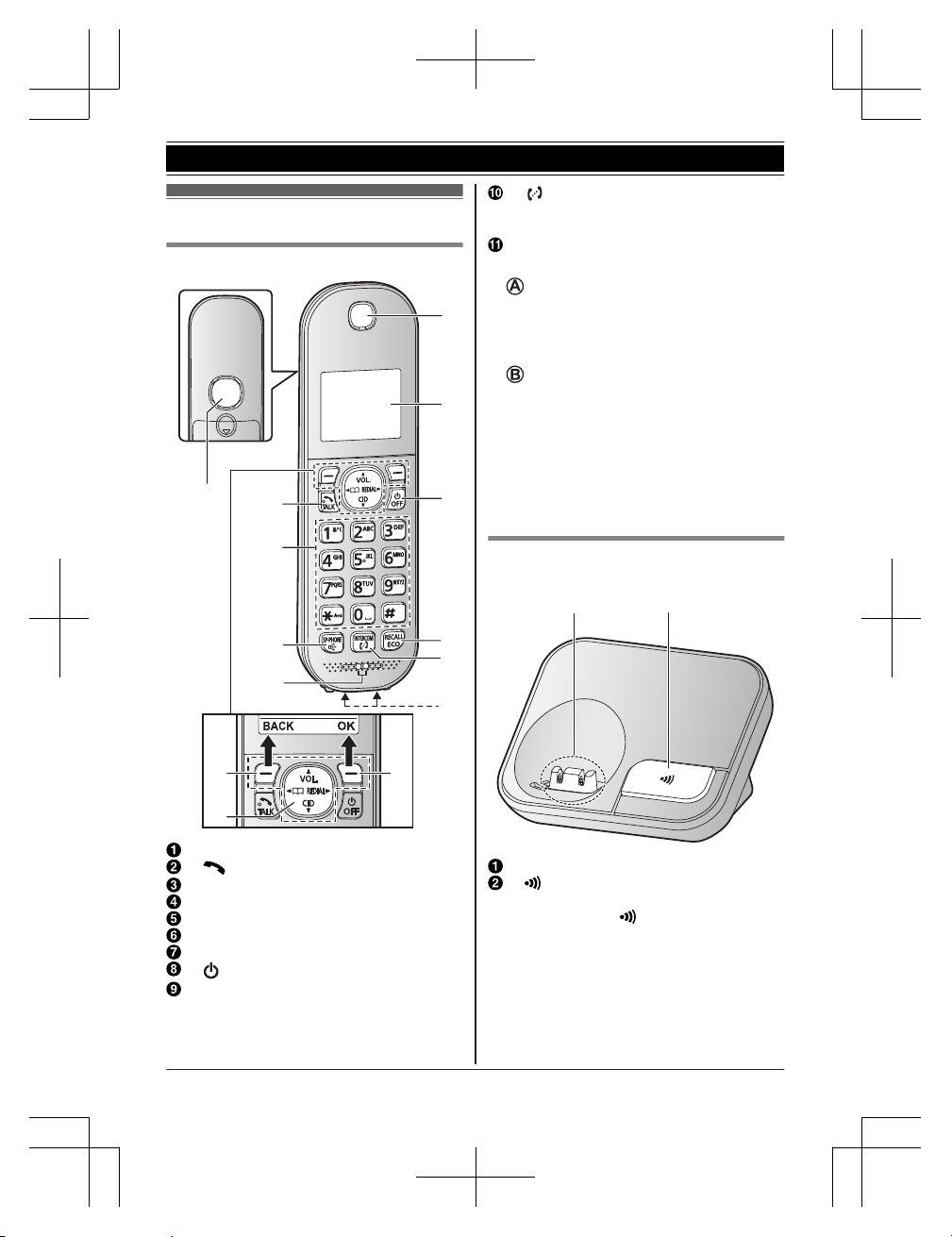
Controls
Handset
A A
B
B
G
H
I
J
F
K
D
C
A
E
Speaker
M N (Talk)
Dial keypad
MZN (SP-PHONE: Speakerphone)
Microphone
Receiver
Display
M N (Power) MOFFN
MRECALLN MECON
ECO: Eco mode shortcut key
M
N (INTERCOM)
R This feature is available between 2
handsets.
Charge contacts
n Control type
Soft keys
By pressing a soft key, you can select the
feature shown directly above it on the
display.
(Example: MENU, OK, etc.)
Navigator key
Navigator keys functions as follows.
– MDN, MCN, MFN, or MEN: Scroll through
various lists and items.
– VOL. (Volume: MDN or MCN): Adjust the
receiver or speaker volume while talking.
– MFN W: View the phonebook entry.
– MEN REDIAL: View the redial list.
– MCN CID (Caller ID): View the caller list.
Base unit
n KX-TGC410 series: page 3
BA
Charge contacts
M N (Locator)
R You can locate a misplaced handset
by pressing M
N.
Helpline Tel. No.: U.K. 0344 844 3899 Ireland 01289 8333
13
Getting Started
TGC41x_42xE(en)_0229_ver011.pdf 13 2016/02/29 15:10:37
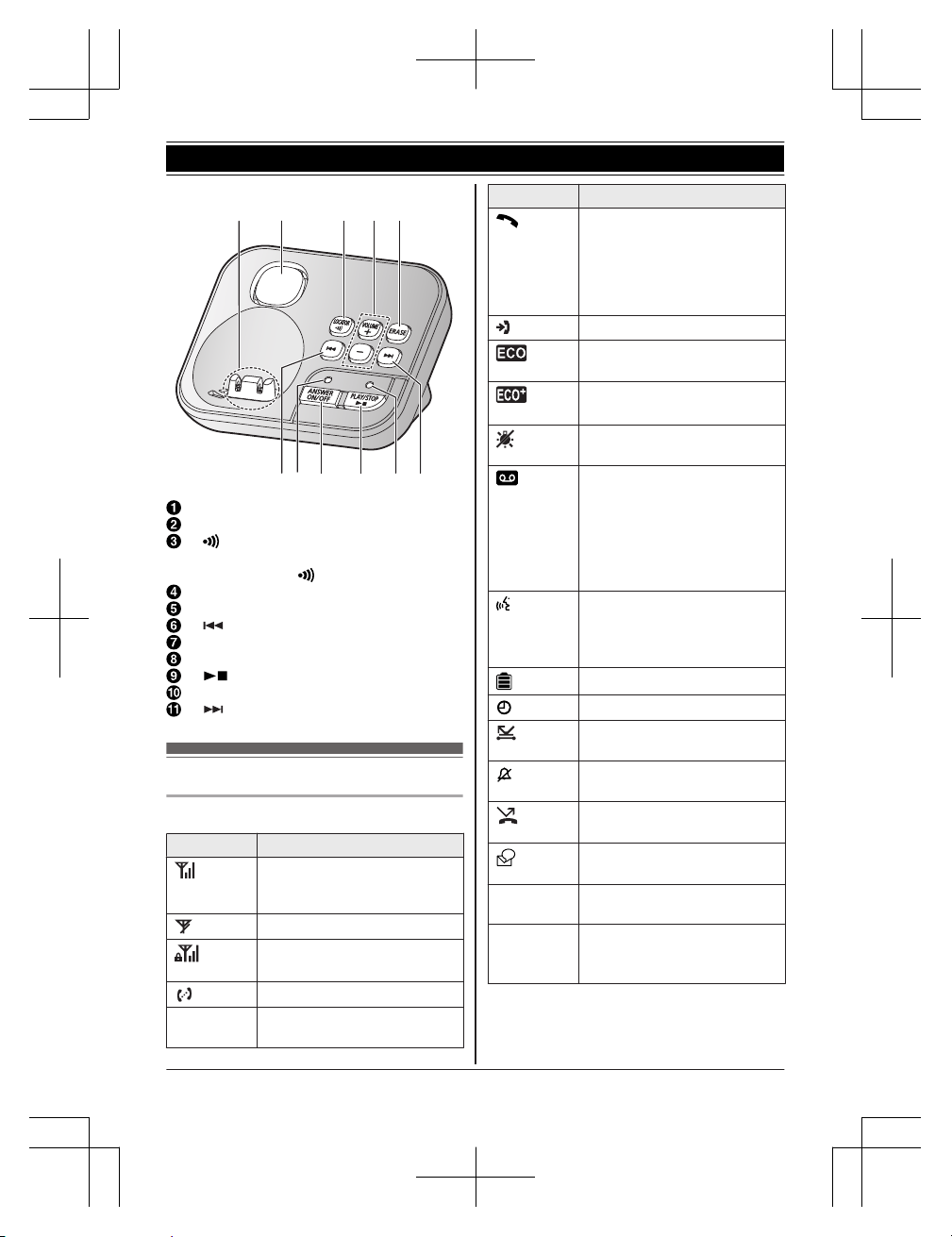
n KX-TGC420 series: page 3
C D E
H I KF
B
A
G
J
Charge contacts
Speaker
M N (LOCATOR)
R You can locate a misplaced handset
by pressing M
N.
MjN/MkN (VOLUME: Volume up/down)
MERASEN
M N (Repeat)
ANSWER ON/OFF indicator
MANSWER ON/OFFN
M N (PLAY/STOP)
Message indicator
M N (Skip)
Display icons
Handset display items
Item Meaning
Range status: The more bars
visible, the closer the handset
is to the base unit.
Out of base unit range
Security for phone calls is set
to “Enhanced”.
*1
(page 29)
Paging, intercom mode
*2
Z
Speakerphone is on.
(page 17)
Item Meaning
The line is in use.
R When flashing slowly: The
call is put on hold.
R When flashing rapidly: An
incoming call is now being
received.
Missed call
*3
(page 31)
Eco mode is set to “Eco”.
(page 16)
Eco mode is set to “Eco
Plus”.
*1
(page 16)
The LCD backlight is off.
(page 25)
R When displayed next to the
battery icon: Answering
system is on.
*1
(page 33)
R When displayed with a
number: New messages
have been recorded.
*1
(page 34)
“Greeting Only” is
selected. Caller messages
are not recorded.
*1
(page 37)
Battery level
Alarm is on. (page 27)
Privacy mode is on.
*2
(page 25)
Ringer volume is off.
(page 24)
Nuisance call blocked.
*3
(page 27)
New voicemail message
received.
*4
(page 38)
Line in
use
Someone is using the line.
*2
IN USE
Answering system is being
used by another handset
*5
or
the base unit.
*1
*1 KX-TGC420 series: page 3
*2 KX-TGC412/KX-TGC413/KX-TGC422/
KX-TGC423/KX-TGC424/KX-TGC425
*3 Caller ID subscribers only
14
Helpline Tel. No.: U.K. 0344 844 3899 Ireland 01289 8333
Getting Started
TGC41x_42xE(en)_0229_ver011.pdf 14 2016/02/29 15:10:37
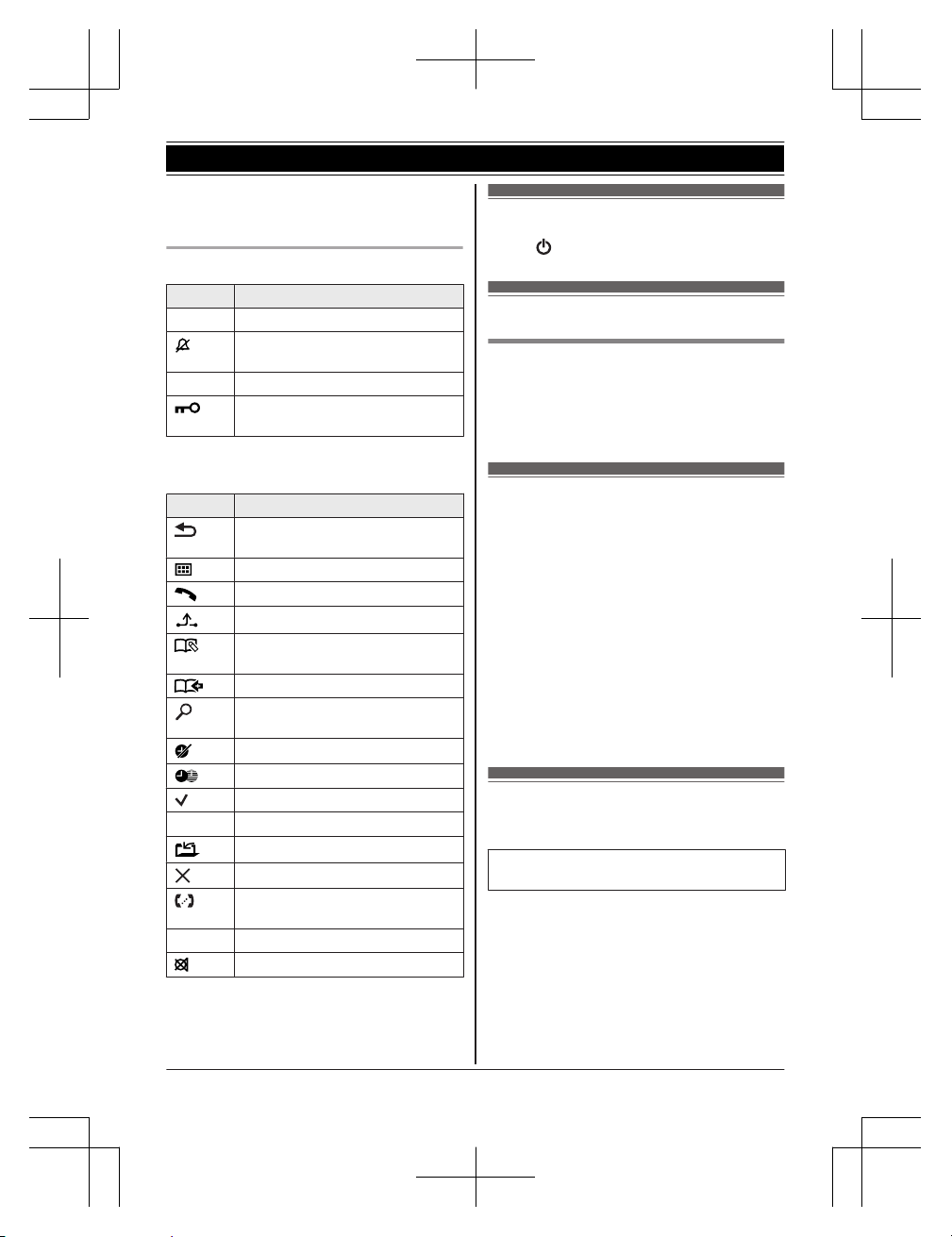
*4 Voicemail subscribers only
*5 KX-TGC422/KX-TGC423/KX-TGC424/
KX-TGC425
Handset soft key icons
Icon Action
OK Accepts the current selection.
Temporarily turns off the ringer
for incoming calls. (page 17)
W Opens the phonebook.
Turns the key lock feature off.
(page 19)
n When you select a language other than
English
Icon Action
Returns to the previous screen or
outside call.
Displays the menu.
Makes a call.
Places a call on hold.
*1
Allows you to edit phone
numbers.
Adds new entry.
Displays the phonebook search
menu.
Stops alarm.
Snooze button on the alarm.
Selects entries or handsets.
n
Stops recording or playback.
*2
Stores phone numbers.
Erases the selected item.
Allows you to make an intercom
call.
C Erases a number/character.
Puts the call on mute.
*1 KX-TGC412/KX-TGC413/KX-TGC422/
KX-TGC423/KX-TGC424/KX-TGC425
*2 KX-TGC420 series: page 3
Turning the power on/off
Press M N for about 2 seconds.
Language setting
Display language
1 MMENUN#110
2 MbN: Select your desired language. a
MOKN a MOFFN
Date and time
1 MMENUN#101
2 Enter the current date, month, and year.
a MOKN
Example: 12 July, 2016
12 07 16
3 Enter the current hour and minute.
Example: 9:30
09 30
R You can select 24-hour or 12-hour
clock format (“AM” or “PM”) by
pressing *.
4 MOKN a MOFFN
Recording your greeting
message
Available for:
KX-TGC420 series (page 3)
You can record your own greeting message
instead of using a pre-recorded greeting
message. See page 33 for details.
1 MMENUN#302
2 MbN: “Yes” a MOKN
3 Record a greeting message. a MSTOPN
a MOFFN
Helpline Tel. No.: U.K. 0344 844 3899 Ireland 01289 8333
15
Getting Started
TGC41x_42xE(en)_0229_ver011.pdf 15 2016/02/29 15:10:37
Other settings
Eco mode setting
You can select the desired eco mode setting
by pressing MECON.
The following settings are available for eco
mode.
– “Eco”: Reduces the base unit transmission
power by up to 90 % in standby mode.
When this setting is selected, is
displayed on the handset display instead of
.
– “Eco Plus”
*1
: Reduces the base unit
transmission power completely in standby
mode.
When this setting is selected,
is
displayed on the handset display instead of
.
– “Eco Off” (default setting): Turns off eco
mode.
When this setting is selected,
/
*1
are not displayed in the handset display.
*1 KX-TGC420 series: page 3
Note:
R When there is another cordless phone in
use nearby, the base unit transmission
power may not be reduced. (KX-TGC412/
KX-TGC413/KX-TGC422/KX-TGC423/
KX-TGC424/KX-TGC425)
R When eco mode is active, the range of the
base unit is reduced in standby mode.
R If you set repeater mode to “On”
(page 29):
– Eco mode is disabled.
– “Eco Mode” is not displayed in the
display menu (page 25).
Note for KX-TGC420 series (page 3):
R If there is a handset that is not compatible
with Eco Plus registered to the base unit,
“Eco Plus” is not available. If that
handset is registered while “Eco Plus”
was already selected, the setting changes
to “Eco Off”.
R When eco mode is set to “Eco Plus”,
there is a delay between when calls are
received and when the handset starts
ringing.
R When eco mode is set to “Eco Plus”,
battery usage time is shortened (page 12).
16
Helpline Tel. No.: U.K. 0344 844 3899 Ireland 01289 8333
Getting Started
TGC41x_42xE(en)_0229_ver011.pdf 16 2016/02/29 15:10:37
Making calls
1 Lift the handset and dial the phone
number.
R To correct a digit, press MCLEARN.
2 M
N
3 When you finish talking, press MOFFN or
place the handset on the base unit or
charger.
Using the speakerphone
1 Dial the phone number and press MZN.
R Speak alternately with the other party.
2 When you finish talking, press MOFFN.
Note:
R To switch back to the receiver, press MZN/
M
N.
Adjusting the receiver or speaker
volume
Press MDN or MCN repeatedly while talking.
Making a call using the redial list
The last 10 phone numbers dialled are stored
in the redial list (each 24 digits max.).
1 MEN REDIAL
2 MbN: Select the desired entry.
3 M
N
Erasing a number in the redial list
1 MEN REDIAL
2 MbN: Select the desired entry. a
MERASEN
3 MbN: “Yes” a MOKN a MOFFN
Pause (for PBX/long distance service
users)
A pause is sometimes required when making
calls using a PBX or long distance service.
When storing a calling card access number
and/or PIN in the phonebook, a pause is also
needed (page 21).
Example: If you need to dial the line access
number “0” when making outside calls with a
PBX:
1 0 a MDN (Pause)
2 Dial the phone number. a M
N
Note:
R A 3 second pause is inserted each time MDN
(Pause) is pressed.
Answering calls
1 Lift the handset and press M
N or MZN
when the unit rings.
2 When you finish talking, press MOFFN or
place the handset on the base unit or
charger.
Any key answer: You can answer the call by
pressing any dial key.
Auto talk: You can answer calls simply by
lifting the handset (page 25).
Temporary handset ringer off: You can turn
the ringer off temporarily by pressing M
N.
Adjusting the ringer volume
Handset
Press MDN or MCN repeatedly to select the
desired volume while ringing.
Base unit
*1
*1 KX-TGC420 series: page 3
Press MjN or MkN repeatedly to select the
desired volume while ringing.
R To turn the ringer off, press and hold MkN
until the unit beeps.
Useful features during a
call
Hold
1 Press MMENUN during an outside call.
2 MbN: “Hold” a MOKN
Helpline Tel. No.: U.K. 0344 844 3899 Ireland 01289 8333
17
Making/Answering Calls
TGC41x_42xE(en)_0229_ver011.pdf 17 2016/02/29 15:10:37
3 To release hold, press M N.
Note:
R After holding for 10 minutes, the call is
disconnected.
Mute
1 Press MMUTEN during a call.
2 To return to the call, press MMUTEN.
Note:
R MMUTEN is a soft key visible on the display
during a call.
Recall/flash
MRECALLN allows you to use the special
features of your host PBX such as transferring
an extension call, or accessing optional
telephone services.
Note:
R To change the recall/flash time, see
page 25.
For call waiting or Call Waiting
Caller ID service users
To use call waiting or Call Waiting Caller ID,
you must first subscribe with your phone
service provider.
This feature allows you to receive calls while
you are already talking on the phone. If you
receive a call while on the phone, you will hear
a call waiting tone.
If you subscribe to both Caller ID and Call
Waiting with Caller ID services, the 2nd
caller’s information is displayed on the unit
that is in use after you hear the call waiting
tone.
1 Press MRECALLN to answer the 2nd call.
2 To switch between calls, press
MRECALLN.
Note:
R Please contact your phone service provider
for details and availability of this service in
your area.
Call share
Available for:
KX-TGC412/KX-TGC413/KX-TGC422/
KX-TGC423/KX-TGC424/KX-TGC425
You can join an existing outside call.
To join the conversation, press M N when
the other handset is on an outside call.
Note:
R To prevent other users from joining your
conversations with outside callers, turn the
privacy mode on (page 25).
Transferring calls, conference
calls
Available for:
KX-TGC412/KX-TGC413/KX-TGC422/
KX-TGC423/KX-TGC424/KX-TGC425
Outside calls can be transferred or a
conference call with an outside party can be
made between 2 handsets.
1 During an outside call, press M
N.
When 3 or more handsets are
registered:
MbN: Select the desired unit. a MOKN
2 Wait for the paged party to answer.
R If the paged party does not answer,
press MBACKN to return to the outside
call.
3 To complete the transfer:
Press MOFFN.
To establish a conference call:
MMENUN a MbN: “Conference” a
MOKN
R To leave the conference, press MOFFN.
The other 2 parties can continue the
conversation.
R To put the outside call on hold:
MMENUN a MbN: “Hold” a MOKN
To resume the conference: MMENUN
a MbN: “Conference” a MOKN
R To cancel the conference: MMENUN a
MbN: “Stop Conference” a MOKN
You can continue the conversation
with the outside caller.
18
Helpline Tel. No.: U.K. 0344 844 3899 Ireland 01289 8333
Making/Answering Calls
TGC41x_42xE(en)_0229_ver011.pdf 18 2016/02/29 15:10:37
Intercom
Available for:
KX-TGC412/KX-TGC413/KX-TGC422/
KX-TGC423/KX-TGC424/KX-TGC425
Intercom calls can be made between
handsets.
Note:
R When paging the handset, the paged
handset beeps for 1 minute.
R If you receive an outside call while talking
on the intercom, the interrupt tone sounds.
To finish intercom, press MOFFN. To answer
the call, press M N.
Making an intercom call
1 M
N
When 3 or more handsets are
registered:
MbN: Select the desired unit. a MOKN
2 When you finish talking, press MOFFN.
Answering an intercom call
1 Press M
N to answer the page.
2 When you finish talking, press MOFFN.
Key lock
The handset can be locked so that no calls or
settings can be made. Incoming calls can be
answered, but all other functions are disabled
while key lock is on.
To turn key lock on, press MMENUN for about 3
seconds.
R To turn key lock off, press M
N for about
3 seconds.
Note:
R Calls to emergency numbers cannot be
made until key lock is turned off.
Helpline Tel. No.: U.K. 0344 844 3899 Ireland 01289 8333
19
Making/Answering Calls
TGC41x_42xE(en)_0229_ver011.pdf 19 2016/02/29 15:10:37
Phonebook
n KX-TGC410 series: page 3
You can add 50 names (16 characters
max.) and phone numbers (24 digits max.)
to the phonebook.
n KX-TGC420 series: page 3
You can add 120 names (16 characters
max.) and phone numbers (24 digits max.)
to the phonebook, and assign each
phonebook entry to the desired category
(page 20).
Important:
R All entries can be shared by any registered
handset.
Adding phonebook entries
1 MFN W a MMENUN
2 MbN: “New Entry” a MOKN
3 Enter the party’s name. a MOKN
R You can change the character entry
mode by pressing MECON (page 38).
4 Enter the party’s phone number. a MOKN
R KX-TGC410 series: Go to step 6.
5 MbN: Select the desired category. a MOKN
6 MOKN a MOFFN
Storing a redial list number to the
phonebook
1 MEN REDIAL
2 MbN: Select the desired entry. a MSAVEN
3 To store the name, continue from step 3,
“Editing entries”, page 21.
Storing caller information to the
phonebook
1 MCN CID
2 MbN: Select the desired entry. a MMENUN
3 MbN: “Save Phonebook” a MOKN
4 To store the name, continue from step 3,
“Editing entries”, page 21.
Categories
Available for:
KX-TGC420 series (page 3)
Categories can help you find entries in the
phonebook quickly and easily. You can
change the names of categories (“Friends”,
“Family”, etc.). By assigning different ringer
tones for different categories of callers, you
can identify who is calling (category ringer
tone), if you have subscribed to Caller ID
service.
Changing category names/setting
category ringer tone
1 MFN W a MMENUN
2 MbN: “Category” a MOKN
3 MbN: Select the desired category. a MOKN
4 To change category names
MbN: “Category Name” a MOKN a
Edit the name (10 characters max.). a
MOKN
To set category ringer tone
MbN: Select the current setting of the
category ringer tone. a MOKN a MbN:
Select the desired ringer tone. a MOKN
5 MOFFN
Finding and calling from a
phonebook entry
1 MFN W
2 To scroll through all entries
MbN: Select the desired entry.
To search by first character
Press the dial key (0 to 9, or #)
which contains the character you are
searching for (page 38).
MbN: Scroll through the phonebook if
necessary.
To search by category
*1
MSEARCHN a MbN: “Category”
a MOKN
MbN: Select the desired category. a
MOKN
20
Helpline Tel. No.: U.K. 0344 844 3899 Ireland 01289 8333
Phonebook
TGC41x_42xE(en)_0229_ver011.pdf 20 2016/02/29 15:10:37
MbN: Scroll through the phonebook if
necessary.
3 M
N
*1 KX-TGC420 series: page 3
Editing entries
1 Find the desired entry (page 20). a
MMENUN
2 MbN: “Edit” a MOKN
3 Edit the name if necessary. a MOKN
4 Edit the phone number if necessary. a
MOKN
R KX-TGC410 series: Go to step 6.
5 MbN: Select the desired category
(page 20). a MOKN
6 MOKN a MOFFN
Erasing entries
Erasing an entry
1 Find the desired entry (page 20). a
MMENUN
2 MbN: “Erase” a MOKN
3 MbN: “Yes” a MOKN a MOFFN
Erasing all entries
1 MFN W a MMENUN
2 MbN: “Erase All” a MOKN
3 MbN: “Yes” a MOKN
4 MbN: “Yes” a MOKN a MOFFN
Chain dial
This feature allows you to dial phone numbers
in the phonebook while you are on a call. This
feature can be used, for example, to dial a
calling card access number or bank account
PIN that you have stored in the phonebook,
without having to dial manually.
1 During an outside call, press MFN W.
2 MbN: Select the desired entry.
3 Press MCALLN to dial the number.
Note:
R When storing a calling card access number
and your PIN in the phonebook as one
phonebook entry, press MDN (Pause) to add
pauses after the number and PIN as
necessary (page 17).
Speed dial
You can assign 1 phone number to each of
the dial keys (1 to 9) on the handset.
Adding phone numbers to speed
dial keys
n By entering phone numbers:
1 Press and hold the desired speed dial
key (1 to 9). a MADDN
2 MbN: “Manual” a MOKN
3 Enter the party’s name (16 characters
max.). a MOKN
4 Enter the party’s phone number (24
digits max.). a MOKN 2 times a
MOFFN
n From the phonebook:
1 Press and hold the desired speed dial
key (1 to 9). a MADDN
2 MbN: “Phonebook” a MOKN
3 MbN: Select the desired entry. a MOKN
a MOFFN
Note:
R If you edit a phonebook entry which is
assigned to a speed dial key, the edited
entry does not transfer to the speed dial
key.
Editing an entry
1 Press and hold the desired speed dial key
(1 to 9). a MMENUN
2 MbN: “Edit” a MOKN
3 Edit the name if necessary. a MOKN
4 Edit the phone number if necessary. a
MOKN 2 times a MOFFN
Helpline Tel. No.: U.K. 0344 844 3899 Ireland 01289 8333
21
Phonebook
TGC41x_42xE(en)_0229_ver011.pdf 21 2016/02/29 15:10:38
Erasing an entry
1 Press and hold the desired speed dial key
(1 to 9). a MMENUN
2 MbN: “Erase” a MOKN
3 MbN: “Yes” a MOKN a MOFFN
Viewing an entry/Making a call
1 Press and hold the desired speed dial key
(1 to 9).
2 To make a call, press M
N.
22
Helpline Tel. No.: U.K. 0344 844 3899 Ireland 01289 8333
Phonebook
TGC41x_42xE(en)_0229_ver011.pdf 22 2016/02/29 15:10:38
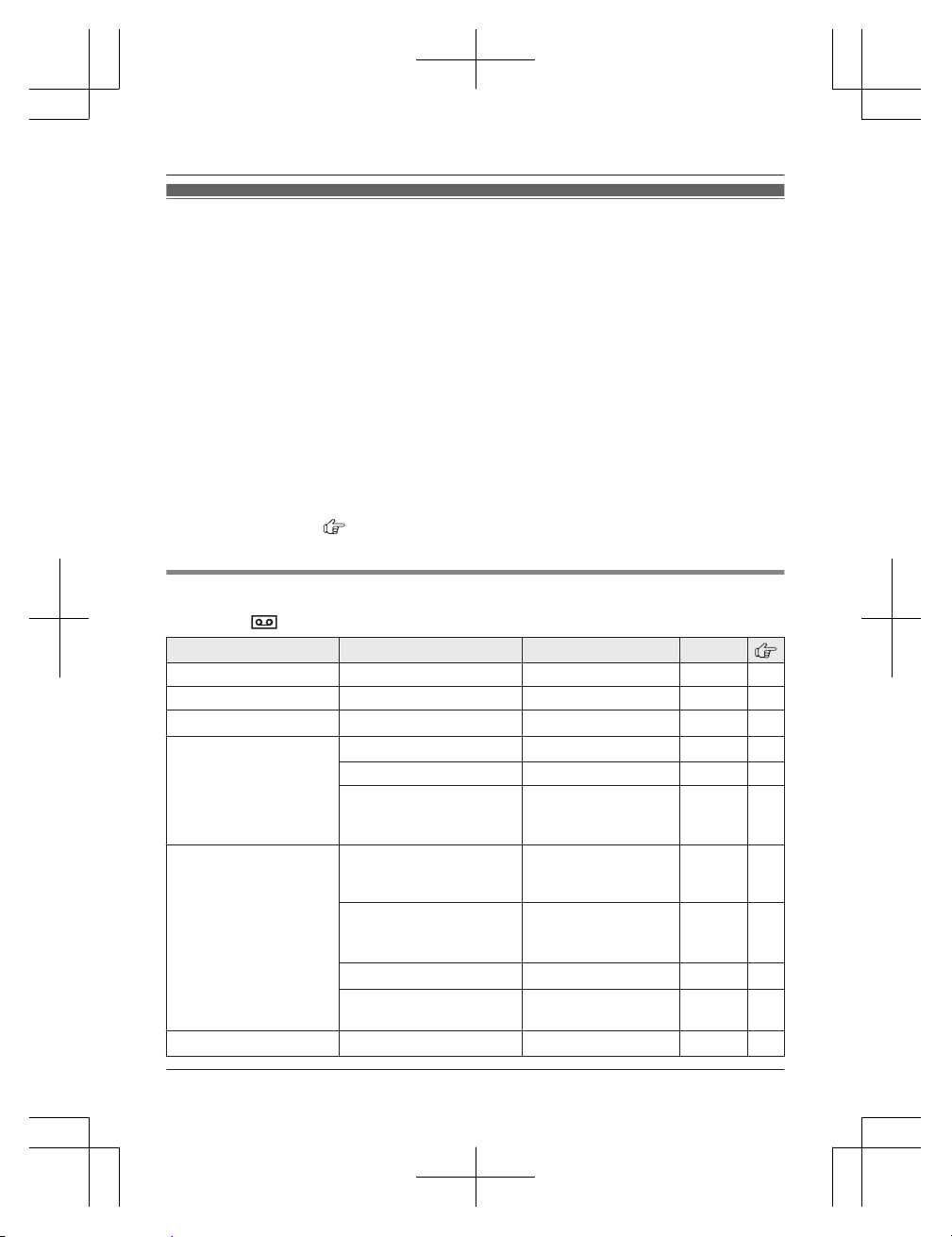
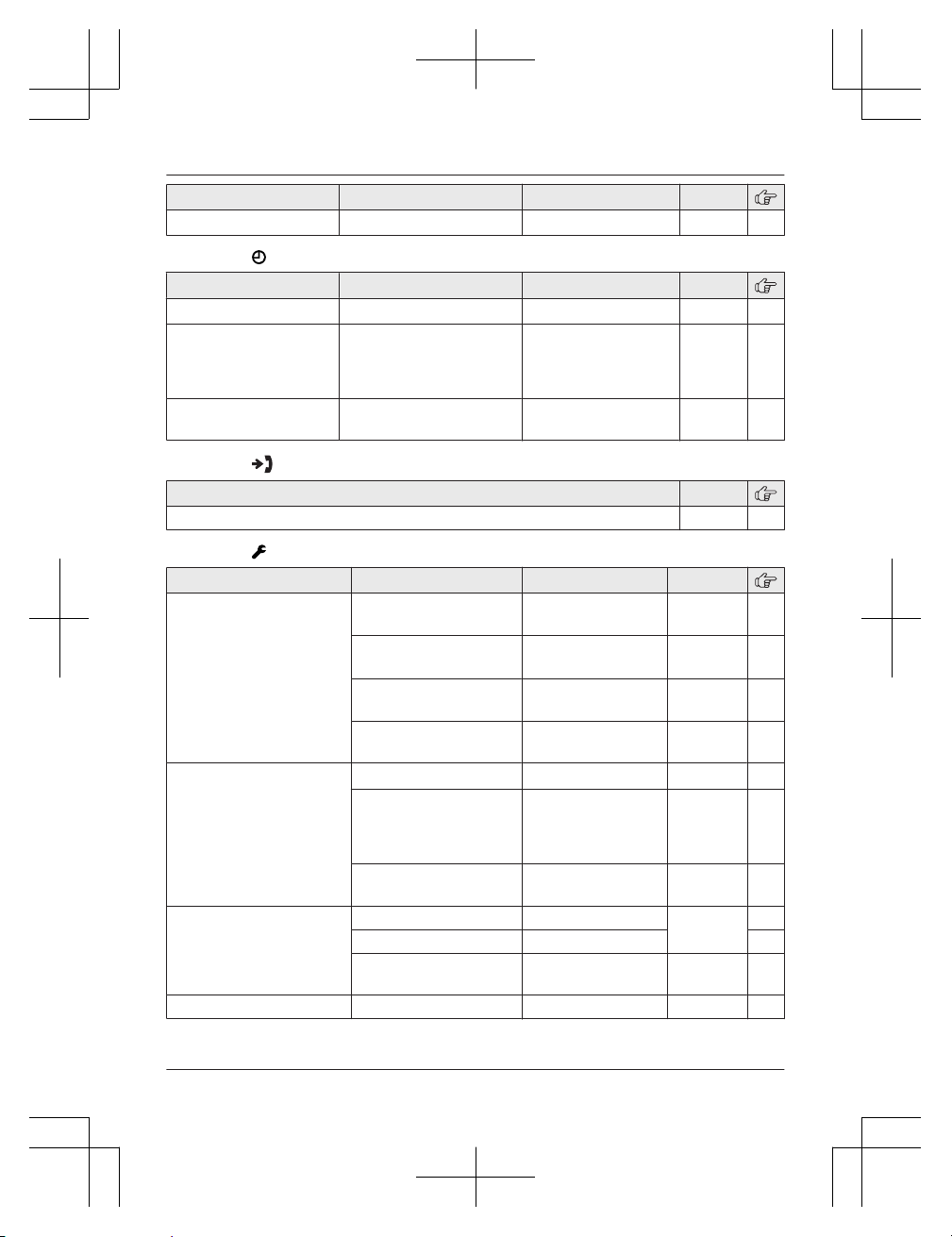
Menu list
To access the features, there are 2 methods.
n Scrolling through the display menus
1 MMENUN
2 Press MCN, MDN, MEN, or MFN to select the desired main menu. a MOKN
3 Press MCN or MDN to select the desired item from the next sub-menus. a MOKN
4 Press MCN or MDN to select the desired setting. a MOKN
n Using the direct command code
1 MMENUN a Enter the desired code.
Example: Press MMENUN#101.
2 Select the desired setting. a MOKN
Note:
R To exit the operation, press MOFFN.
R In the following table, < > indicates the default settings.
R In the following table,
indicates the reference page number.
R Display menu order and sub-menu may vary depending on your model.
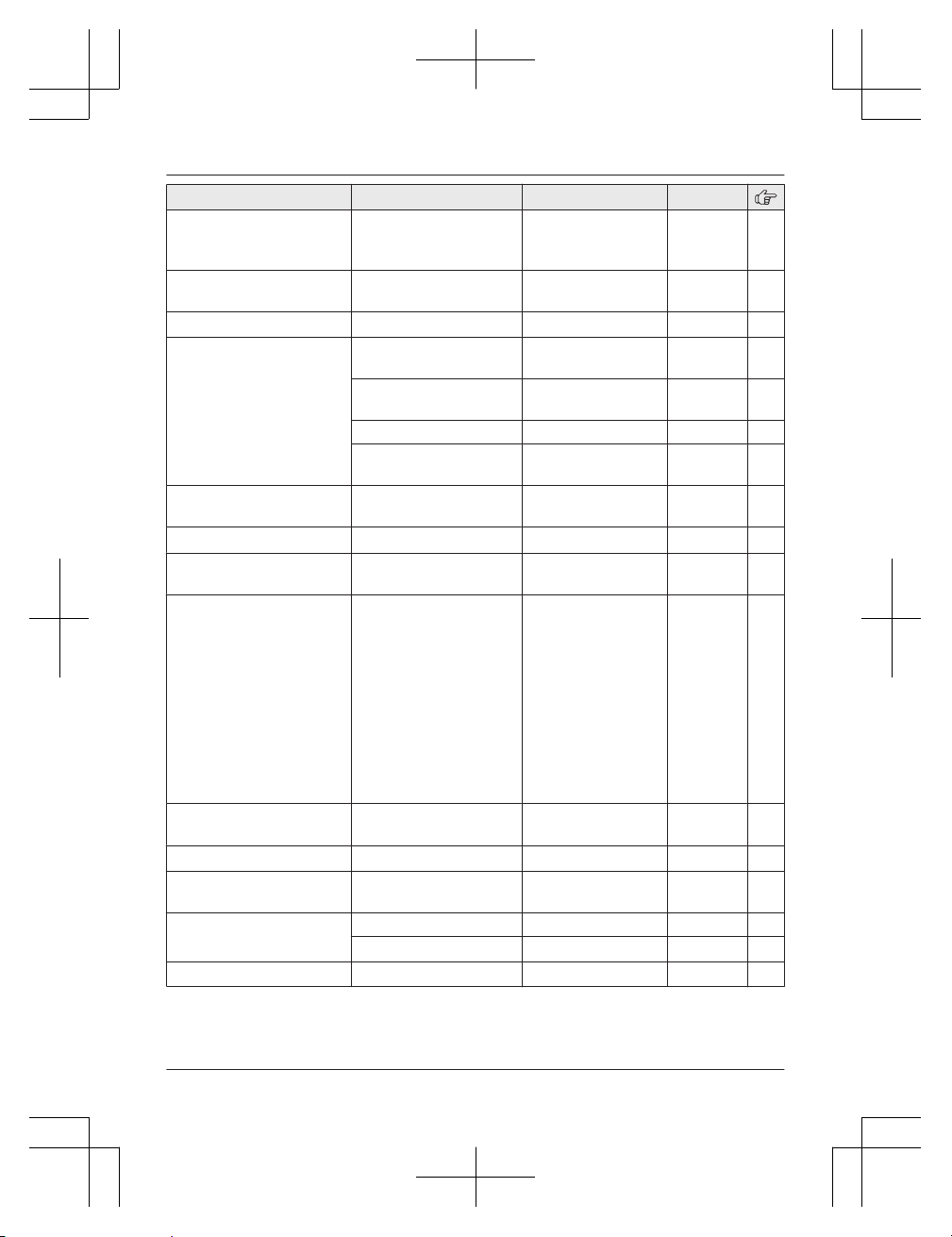
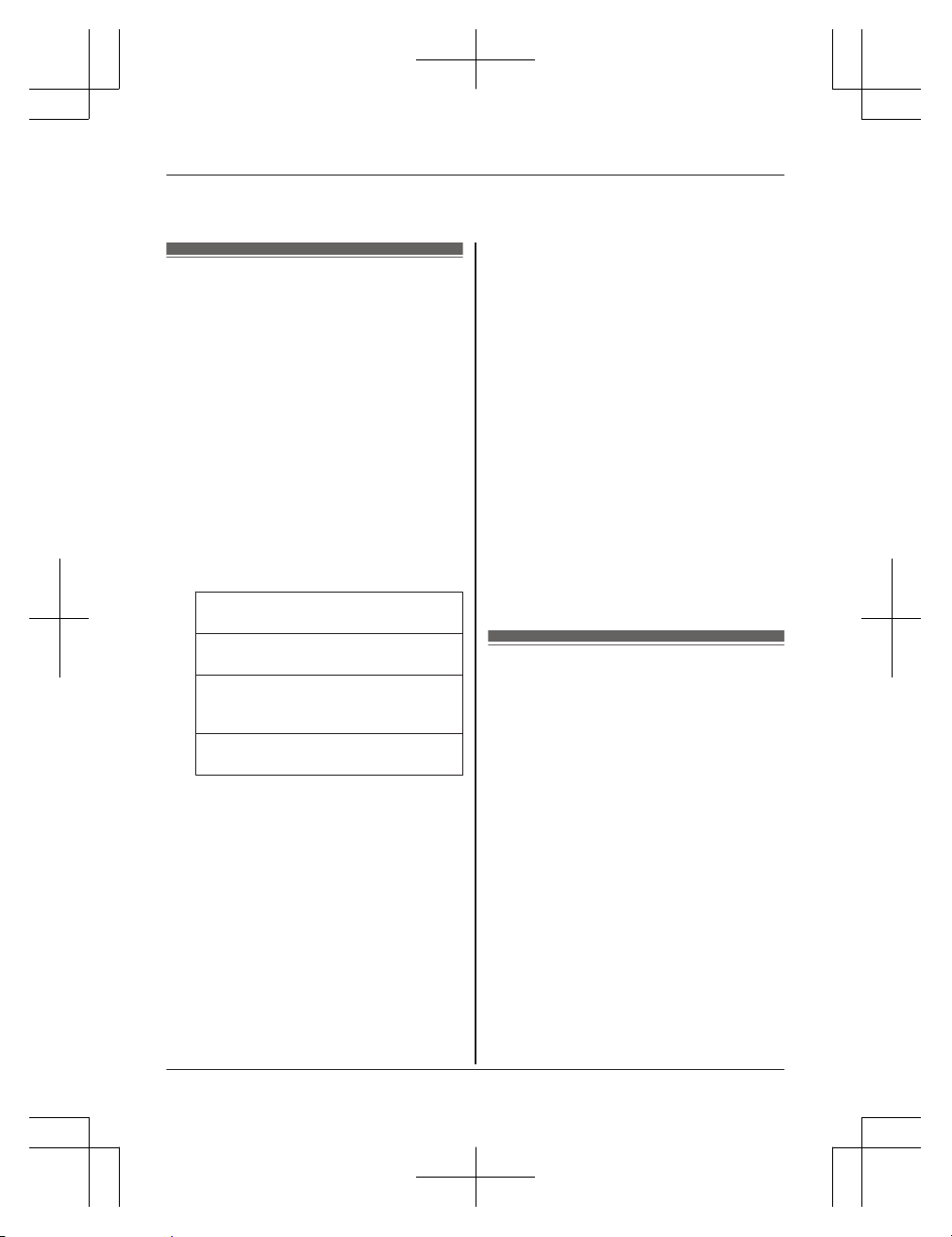
Display the menu tree and direct command code table
Main menu: “Answer System”
*1
Sub-menu 1 Sub-menu 2 Settings Code
Play New Message
– – #323 34
Play All Message
– – #324 34
Erase All Message
*2
– – #325 35
Greeting
Record Greeting
*2
– #302 33
Play Greeting
– #303 34
Default
*2
(Reset to pre-recorded
greeting)
– #304 34
Settings
Number of Rings
*2
Auto
2-9 Rings
<5 Rings>
#211 36
Recording Time
*2
<3 Minutes>
1 Minute
Greeting Only
*3
#305 36
Remote Code
*2
– #306 35
Call Screening
<On>
Off
#310 36
Answer On
*2
– – #327 33
Helpline Tel. No.: U.K. 0344 844 3899 Ireland 01289 8333
23
Programming
TGC41x_42xE(en)_0229_ver011.pdf 23 2016/02/29 15:10:38
Sub-menu 1 Sub-menu 2 Settings Code
Answer Off
*2
– – #328 33
Main menu: “Time Settings”
Sub-menu 1 Sub-menu 2 Settings Code
Set Date/Time
*2
– – #101 15
Memo Alarm Alarm1-3
<Off>
Once
Daily
Weekly
#720 27
Time Adjustment
*2,
*4
– <Caller ID>
Manual
#226 –
Main menu: “Caller List”
Operation Code
Viewing the caller list. #213 31
Main menu: “Initial Setup”
Sub-menu 1
Sub-menu 2 Settings Code
Ringer Setup
Ringer Volume
– Handset
Off-6 <6> #160 –
Ringer Volume
– Base Unit
*1,
*2
Off-6 <3> #G160 –
Ringtone
*5
(Handset)
<Ringtone 1> #161 –
First Ring
*2, *6
<On>
Off
#173 –
Time Settings
Set Date/Time
*2
– #101 15
Memo Alarm
– Alarm1-3
<Off>
Once
Daily
Weekly
#720 27
Time
Adjustment
*2,
*4
<Caller ID>
Manual
#226 –
Nuisance Call
Block
*2
Single Number
– #217 28
Range of Numbers
– 28
Withheld On
<Off>
#240 28
Speed Dial
– – #261 21
24
Helpline Tel. No.: U.K. 0344 844 3899 Ireland 01289 8333
Programming
TGC41x_42xE(en)_0229_ver011.pdf 24 2016/02/29 15:10:38
Sub-menu 1 Sub-menu 2 Settings Code
Eco Mode
*2,
*7
– <Off>
Eco
Eco Plus
*1
#725 16
Security
*1,
*2,
*7
– <Normal>
Enhanced
#729 29
Record Greeting
*1,
*2
– – #302 33
Display Setup Backlight
<On>
Off
#276 –
Contrast
(Display contrast)
Level 1–4
<2>
#145 –
Handset Name
– #104 28
Display Name On
<Off>
#105 29
Keytones – <On>
Off
#165 –
Call Restrict
*2
– – #256 29
Auto Talk
*8
–
On
<Off>
#200 17
Line Setup
Recall/Flash
*2,
*9
80 msec.
90 msec.
<100 msec.>
110 msec.
160 msec.
200 msec.
250 msec.
300 msec.
400 msec.
600 msec.
700 msec.
900 msec.
#121 18
Privacy Mode
*2,
*10
–
On
<Off>
#194 –
Base Unit PIN
*2
– <0000> #132 29
Repeater Mode
*2
–
On
<Off>
#138 29
Register Register Handset
– #130 44
Cancel Register
*3
– #131 44
Language Display
<English> #110 15
Helpline Tel. No.: U.K. 0344 844 3899 Ireland 01289 8333
25
Programming
TGC41x_42xE(en)_0229_ver011.pdf 25 2016/02/29 15:10:38
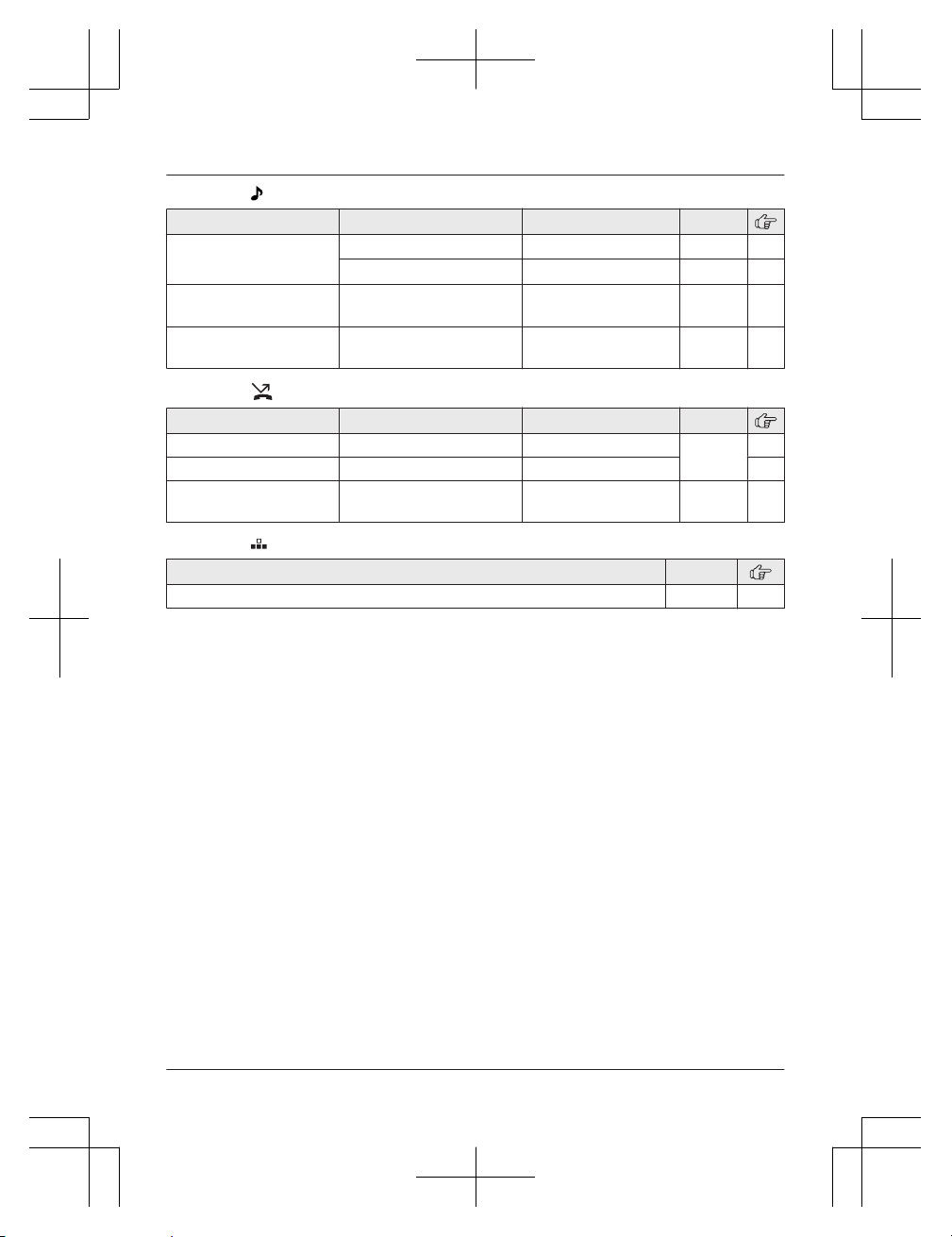
Main menu: “Ringer Setup”
Sub-menu 1 Sub-menu 2 Settings Code
Ringer Volume Handset
Off-6 <6> #160 –
Base Unit
*1,
*2
Off-6 <3> #G160 –
Ringtone
*5
(Handset)
– <Ringtone 1> #161 –
First Ring
*2,
*6
– <On>
Off
#173 –
Main menu: “Nuisance Call Block”
*2
Sub-menu 1 Sub-menu 2 Settings Code
Single Number
– – #217 28
Range of Numbers
– – 28
Withheld
–
On
<Off>
#240 28
Main menu: “Speed Dial”
*11
Operation Code
Viewing the speed dial entry. #261 21
*1 KX-TGC420 series: page 3
*2 If you program these settings using one of the handsets, you do not need to program the
same item using another handset. (KX-TGC412/KX-TGC413/KX-TGC422/KX-TGC423/
KX-TGC424/KX-TGC425)
*3 This menu is not displayed when scrolling through the display menus. It is only available in
direct command code.
*4 This feature allows the unit to automatically adjust the date and time each time caller
information including date and time is received.
To turn this feature on, select “Caller ID”. To turn this feature off, select “Manual”.
(Caller ID subscribers only)
To use this feature, set the date and time first (page 15).
*5 The preset melodies in this product are used with the following permission:
– “Ringtone 3”: © 2014 Copyrights Vision Inc.
– “Ringtone 4” - “Ringtone 15”: © 2012 Copyrights Vision Inc.
*6 If you do not want the unit to ring before the caller information is received, set to “Off”.
(Caller ID subscribers only)
You can only remove the first ring if the unit rings 2 times or more by default, which depends
on your phone service provider.
*7 This menu is not displayed when repeater mode is set to “On”.
*8 If you subscribe to a Caller ID service and want to view the caller’s information after lifting up
the handset to answer a call, turn off this feature.
*9 The recall/flash time depends on your telephone exchange or host PBX. Contact your PBX
supplier if necessary.
*10 To prevent other users from joining your conversations with outside callers, turn this feature
on. (KX-TGC412/KX-TGC413/KX-TGC422/KX-TGC423/KX-TGC424/KX-TGC425)
26
Helpline Tel. No.: U.K. 0344 844 3899 Ireland 01289 8333
Programming
TGC41x_42xE(en)_0229_ver011.pdf 26 2016/02/29 15:10:38
*11 KX-TGC410 series: page 3
Alarm
An alarm sounds at the set time for 1 minute
and is repeated 5 times at 5 minute intervals
(snooze function). A text memo can also be
displayed for the alarm. A total of 3 separate
alarm times can be programmed for each
handset. You can set one of 3 different alarm
options (once, daily, or weekly) for each alarm
time.
Important:
R Make sure the unit’s date and time setting
is correct (page 15).
1 MMENUN#720
2 MbN: Select the desired alarm. a MOKN
3 MbN: Select the desired alarm option. a
MOKN
“Off”
Turns alarm off. Go to step 9.
“Once”
An alarm sounds once at the set time.
“Daily”
An alarm sounds daily at the set time.
Go to step 5.
“Weekly”
Alarm sounds weekly at the set time(s).
4 Proceed with the operation according to
your selection in step 3.
n Once:
Enter the desired date and month. a
MOKN
n Weekly:
MbN: Select the desired day of the week
and press MSELECTN. a MOKN
5 Set the desired time. a MOKN
6 Enter a text memo (10 characters max.).
a MOKN
7 MbN: Select the desired alarm tone. a
MOKN
R We recommend selecting a different
ringer tone from the one used for
outside calls.
8 MbN: Select the desired snooze setting.
a MOKN
9 MOKN a MOFFN
Note:
R Press MSTOPN to stop the alarm completely.
R When the handset is in use, the alarm will
not sound until the handset is in standby
mode.
R Press any dial key or MSNOOZEN to stop
the sound but keep the snooze function
activated.
R If you want to make an outside call when
the snooze function is activated, please
stop the snooze function before making the
call.
Nuisance call block
This feature blocks calls from unwanted
callers (Caller ID subscribers only). The
following items are available when storing
phone numbers in the call block list.
– “Single Number”: The unit blocks calls
from specific phone numbers.
– “Range of Numbers”: The unit blocks
calls that begin with a number stored in the
call block list, such as a toll-free phone
number prefix or certain area codes.
Single phone numbers and ranges of numbers
can be stored in the call block list:
– up to 30 items in total. (KX-TGC410 series:
page 3)
– up to 50 items in total. (KX-TGC420 series:
page 3)
You can also set the unit to block calls that
have no phone number.
When a call is received, the unit does not ring
while the caller is being identified. If the
caller’s phone number matches an entry in the
Helpline Tel. No.: U.K. 0344 844 3899 Ireland 01289 8333
27
Programming
TGC41x_42xE(en)_0229_ver011.pdf 27 2016/02/29 15:10:38
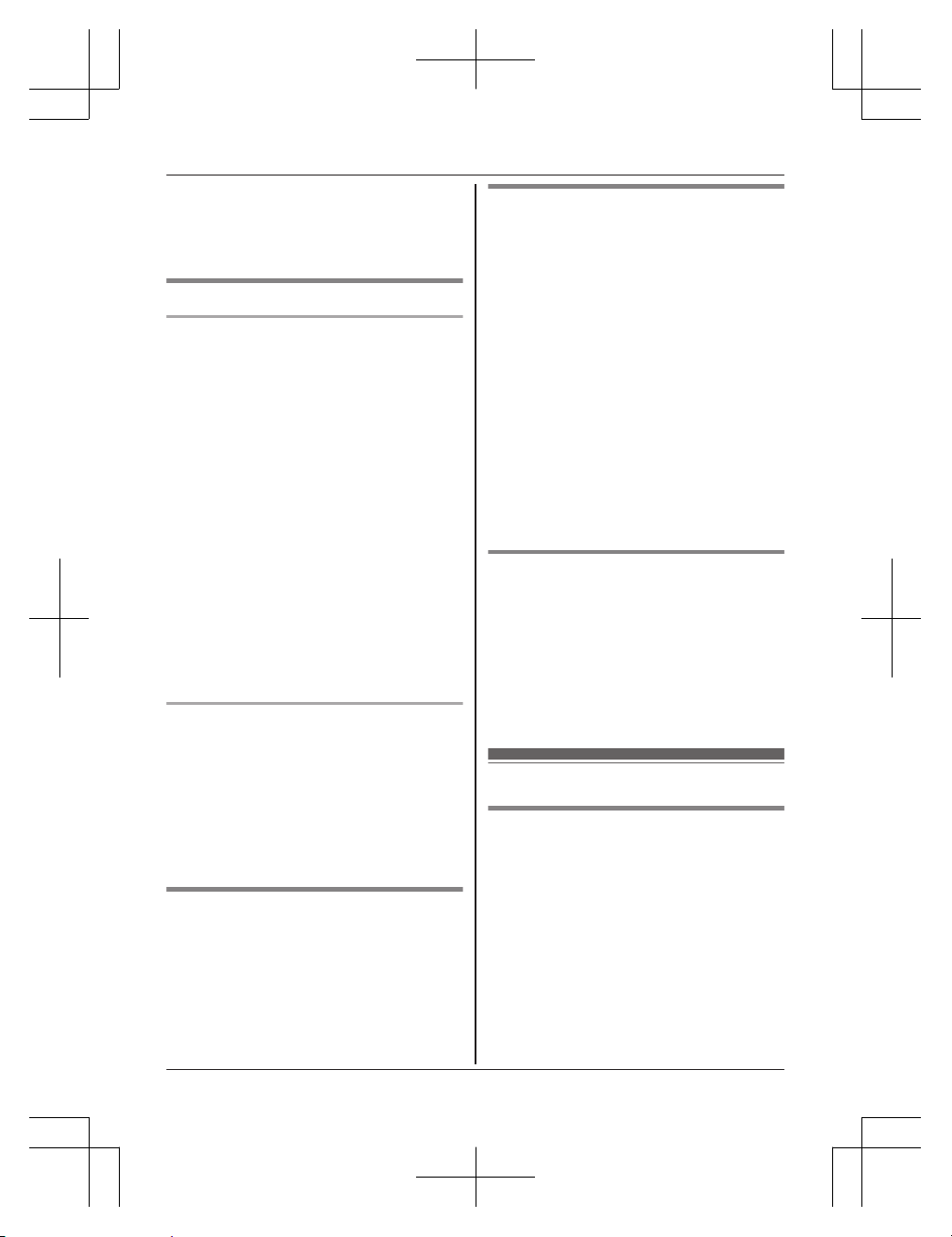
call block list, the unit emits no sound to the
caller, and disconnects the call.
Important:
R Blocked calls are logged in the caller list.
Storing unwanted callers
Storing a single phone number
Important:
R You must include the area code when
storing phone numbers in the call block list.
n From the caller list:
1 MCN CID
2 MbN: Select the entry to be blocked. a
MMENUN
3 MbN: “Save Call Block” a MOKN
4 MbN: “Yes” a MOKN a MOFFN
n By entering phone numbers:
1 MMENUN#217
2 MbN: “Single Number” a MOKN
3 MMENUN a MbN: “Add” a MOKN
4 Enter the phone number (24 digits max.).
R To erase a digit, press MCLEARN.
5 MOKN a MOFFN
Storing a range of numbers
1 MMENUN#217
2 MbN: “Range of Numbers” a MOKN
3 MMENUN a MbN: “Add” a MOKN
4 Enter the desired number (2-8 digits).
R To erase a digit, press MCLEARN.
5 MOKN a MOFFN
Blocking incoming calls that
have no phone number
You can block calls when no phone number is
provided, such as private callers.
1 MMENUN#240
2 MbN: Select the desired setting. a MOKN
3 MOFFN
Viewing/editing/erasing call
block numbers
1 MMENUN#217
2 MbN: “Single Number” or “Range of
Numbers” a MOKN
3 MbN: Select the desired entry.
R To exit, press MOFFN.
4 To edit a number:
MEDITN a Edit the number. a MOKN a
MOFFN
To erase a number:
MERASEN a MbN: “Yes” a MOKN a
MOFFN
Note:
R When editing, press the desired dial key to
add digits and press MCLEARN to erase
digits.
Erasing all call block numbers
1 MMENUN#217
2 MbN: “Single Number” or “Range of
Numbers” a MOKN
3 MMENUN a MbN: “Erase All” a MOKN
4 MbN: “Yes” a MOKN
5 MbN: “Yes” a MOKN a MOFFN
Other programming
Changing the handset name
The default handset name is “Handset 1” to
“Handset 5”. You can customise the name
of each handset (“Bob”, “Kitchen”, etc.). This is
useful when you make intercom calls between
handsets. To display the handset name in
standby mode, turn on the handset name
display feature (page 29).
1 MMENUN#104
2 Enter the desired name (10 characters
max.). a MOKN a MOFFN
28
Helpline Tel. No.: U.K. 0344 844 3899 Ireland 01289 8333
Programming
TGC41x_42xE(en)_0229_ver011.pdf 28 2016/02/29 15:10:38
Displaying the handset name
You can select whether or not the handset
name is displayed in standby mode. The
default setting is “Off”.
1 MMENUN#105
2 MbN: Select the desired setting. a MOKN
a MOFFN
Call restriction
You can restrict selected handsets from
dialling certain numbers. You can assign up to
6 phone numbers to be restricted, and select
which handsets are to be restricted. Storing
area codes here prevents the restricted
handsets from dialling any phone number in
that area code.
1 MMENUN#256
2 Enter the base unit PIN (default: “0000”).
R If you forget your PIN, see page 41.
3 MbN: Select the handsets to be restricted.
a MSELECTN
R “
” is displayed next to the selected
handset numbers.
R To cancel the selected handsets:
MbN: Select the handset. a Press
MSELECTN again. “
” disappears.
4 MOKN
5 MbN: Select a memory location. a MOKN
6 Enter the phone number or area code to
be restricted (8 digits max.). a MOKN a
MOFFN
Enhancing security for phone
calls
Available for:
KX-TGC420 series (page 3)
You can increase the security of phone
conversations by setting this feature to
“Enhanced”. When “Enhanced” is selected,
is displayed. The default setting is
“Normal”.
1 MMENUN#729
2 MbN: Selected the desired setting. a
MOKN a MOFFN
Note:
R If you set repeater mode to “On”
(page 29):
– Security is set to “Normal” and
is
displayed.
– “Security” is not displayed in the
display menu (page 25).
R When enhanced security is enabled, sound
may cut in and out during conversations.
Changing the base unit PIN
Important:
R If you change the PIN (Personal
Identification Number), please make note of
your new PIN. The unit will not reveal the
PIN to you. If you forget your PIN, see
page 41.
1 MMENUN#132
2 Enter the current 4-digit base unit PIN
(default: “0000”).
3 Enter the new 4-digit base unit PIN. a
MOKN
4 MbN: “Yes” a MOKN a MOFFN
Increasing the range of the base
unit
You can increase the signal range of the base
unit by using a DECT repeater. Please use
only the Panasonic DECT repeater noted on
page 4. Contact your Panasonic dealer for
details.
Important:
R Before registering the repeater to this base
unit, you must turn the repeater mode on.
R Do not use more than one repeater at a
time.
Setting the repeater mode
1 MMENUN#138
2 MbN: Select the desired setting. a MOKN
a MOFFN
Helpline Tel. No.: U.K. 0344 844 3899 Ireland 01289 8333
29
Programming
TGC41x_42xE(en)_0229_ver011.pdf 29 2016/02/29 15:10:38
Registering the DECT repeater
(KX-A405/KX-A406) to the base unit
Note:
R Please use a repeater that has not yet been
registered to another unit. If the repeater is
registered to another unit, deregister it first,
referring to the Installation Guide for the
DECT repeater.
1 Base unit:
Press and hold M
N for about 5 seconds.
2 DECT repeater:
Connect the AC adaptor, then wait until
the
indicator and indicator light
green.
3 Base unit:
To exit the registration mode, press M
N.
30
Helpline Tel. No.: U.K. 0344 844 3899 Ireland 01289 8333
Programming
TGC41x_42xE(en)_0229_ver011.pdf 30 2016/02/29 15:10:38
Using Caller ID service
Important:
R This unit is Caller ID compatible. To use
Caller ID features, you must subscribe to a
Caller ID service. Contact your phone
service provider for details.
Caller ID features
When an outside call is being received, the
caller information is displayed.
Caller information for the last 50 callers is
logged in the caller list from the most recent
call to the oldest.
R If the unit cannot receive caller information,
the following is displayed:
– “Out of Area”: The caller dials from
an area which does not provide a Caller
ID service.
– “Private Caller”: The caller
requests not to send caller information.
R If the unit is connected to a PBX system,
caller information may not be properly
received. Contact your PBX supplier.
Missed calls
If a call is not answered, the unit treats it as a
missed call and
is displayed. This lets you
know if you should view the caller list to see
who called while you were away.
Even if only one missed call in the caller list is
viewed (page 31),
disappears from the
display. When you receive another new call,
is displayed again.
Note:
R Even when there are unviewed missed
calls,
disappears from the standby
display if the following operation is
performed by one of the registered
handsets:
– Being replaced on the base unit or
charger.
– Pressing MOFFN.
Phonebook name display
When caller information is received and it
matches a phone number stored in the
phonebook, the stored name in the
phonebook is displayed and logged in the
caller list.
Caller list
Important:
R Make sure the unit’s date and time setting
is correct (page 15).
Viewing the caller list and calling
back
1 MCN CID
2 Press MCN to search from the most recent
call, or press MDN to search from the
oldest call.
3 To call back, press M
N.
To exit, press MOFFN.
Note:
R If
is displayed in step 2, not all of the
information is shown. To see the remaining
information, press MEN. To return to the
previous screen, press MFN.
R If the entry has already been viewed or
answered, “ ” is displayed.
Editing a caller’s phone number
1 MCN CID
2 MbN: Select the desired entry. a MMENUN
3 MbN: “Edit & Call” a MOKN
4 Edit the number.
5 M
N
Erasing selected caller
information
1 MCN CID
2 MbN: Select the desired entry.
3 MERASEN a MbN: “Yes” a MOKN a
MOFFN
Helpline Tel. No.: U.K. 0344 844 3899 Ireland 01289 8333
31
Caller ID Service
TGC41x_42xE(en)_0229_ver011.pdf 31 2016/02/29 15:10:38

Erasing all caller information
1 MCN CID
2 MERASEN a MbN: “Yes” a MOKN a
MOFFN
32
Helpline Tel. No.: U.K. 0344 844 3899 Ireland 01289 8333
Caller ID Service
TGC41x_42xE(en)_0229_ver011.pdf 32 2016/02/29 15:10:38
Answering system
Available for:
KX-TGC420 series (page 3)
The answering system can answer and record
calls for you when you are unavailable to
answer the phone.
You can also set the unit to play a greeting
message but not to record caller messages by
selecting “Greeting Only” as the recording
time setting (page 36).
Important:
R Make sure the unit’s date and time setting
is correct (page 15).
Memory capacity (including your
greeting message)
The total recording capacity is about 30
minutes. A maximum of 64 messages can be
recorded.
Note:
R When message memory becomes full:
– “Messages Full” is shown on the
handset display.
– The ANSWER ON/OFF indicator on the
base unit flashes rapidly if the answering
system is turned on.
–
and the total number of new
messages are not displayed on the
handset even if the answering system is
turned on.
– If you use the pre-recorded greeting
message, the unit automatically switches
to another pre-recorded greeting
message asking callers to call again
later.
– If you recorded your own greeting
message, the same message is still
announced to callers even though their
messages are not recorded.
Turning the answering
system on/off
The answering system is preset to on.
Base unit
Press MANSWER ON/OFFN to turn on/off the
answering system.
Handset
1 To turn on:
MMENUN#327
To turn off:
MMENUN#328
2 MOFFN
Note for base unit and handset:
R When the answering system is turned on:
– the ANSWER ON/OFF indicator on the
base unit lights up.
–
is displayed on the handset.
Greeting message
When the unit answers a call, a greeting
message is played to callers.
You can use either:
– your own greeting message
– a pre-recorded greeting message
Recording your greeting message
1 MMENUN#302
2 MbN: “Yes” a MOKN
3 After a beep sounds, hold the handset
about 20 cm away and speak clearly into
the microphone (2 minutes and 30
seconds max.).
4 Press MSTOPN to stop recording. a
MOFFN
Using a pre-recorded greeting
message
The unit provides 2 pre-recorded greeting
messages:
Helpline Tel. No.: U.K. 0344 844 3899 Ireland 01289 8333
33
Answering System
TGC41x_42xE(en)_0229_ver011.pdf 33 2016/02/29 15:10:38
– If you erase or do not record your own
greeting message, the unit plays a
pre-recorded greeting asking callers to
leave a message.
– If the message recording time (page 36)
is set to “Greeting Only”, callers’
messages are not recorded and the unit
plays a different pre-recorded greeting
message asking callers to call again.
Resetting to a pre-recorded greeting
message
Use this procedure to erase your greeting
message and use a pre-recorded one.
1 MMENUN#304
2 MOKN a MOFFN
Playing back the greeting
message
1 MMENUN#303
2 MOFFN
Listening to messages
Using the base unit
When new messages have been recorded,
message indicator on the base unit flashes.
Press M
N.
R During playback, message indicator on the
base unit lights.
R If new messages have been recorded, the
base unit plays back new messages.
R If there are no new messages, the base
unit plays back all messages.
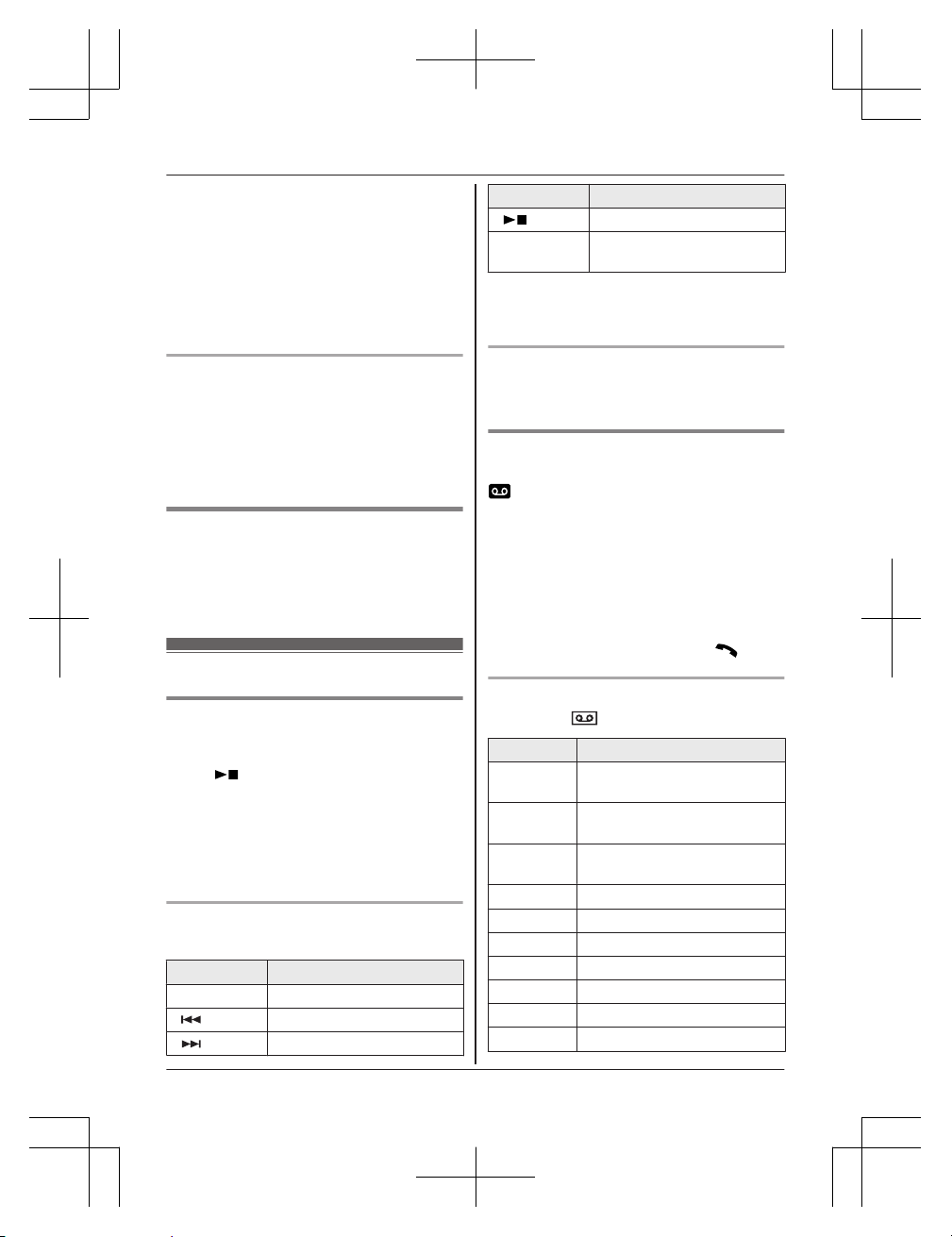
Operating the answering system
during playback
Key Operation
MjN or MkN Adjust the speaker volume
M N
Repeat message
*1
M N Skip message
Key Operation
M N Stop playback
MERASEN Erase currently playing
message
*1 If pressed within the first 5 seconds of a
message, the previous message is
played.
Erasing all messages
Press MERASEN 2 times while the unit is not in
use.
Using the handset
When new messages have been recorded,
is displayed on the handset with the total
number of new messages.
1 To listen to new messages:
MMENUN#323
To listen to all messages:
MMENUN#324
2 When finished, press MOFFN.
Note:
R To switch to the receiver, press M
N.
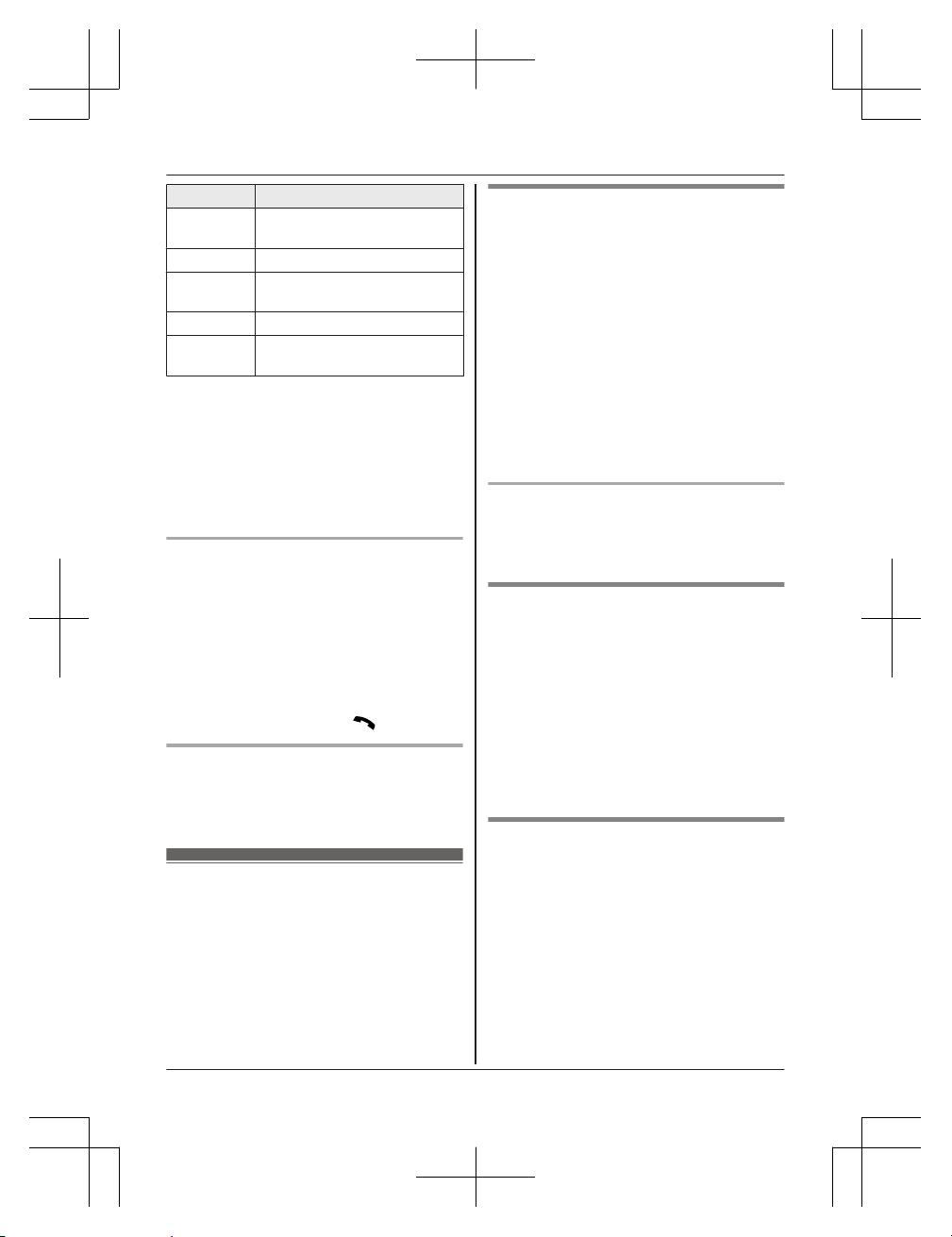
Operating the answering system
MMENUN a
a MOKN
Key Operation
MDN or MCN Adjust the receiver or speaker
volume (during playback)
1 or MFN Repeat message
(during playback)
*1
2 or MEN Skip message
(during playback)
3 Enter the “Settings” menu
4 Play new messages
5 Play all messages
6 Play greeting message
76 Record greeting message
8 Turn answering system on
MMENUN
Pause message
*2
34
Helpline Tel. No.: U.K. 0344 844 3899 Ireland 01289 8333
Answering System
TGC41x_42xE(en)_0229_ver011.pdf 34 2016/02/29 15:10:38
Key Operation
9 or
MSTOPN
Stop recording
Stop playback
0 Turn answering system off
*4
*3
Erase currently playing
message
*5 Erase all messages
*6 Reset to a pre-recorded
greeting message
*1 If pressed within the first 5 seconds of a
message, the previous message is
played.
*2 To resume playback:
MbN: “Play” a MOKN
*3 You can also erase as follows:
MMENUN a MbN: “Erase” a MOKN a
MbN: “Yes” a MOKN
Calling back (Caller ID subscribers
only)
1 Press MMENUN during playback.
2 MbN: “Call Back” a MOKN
n Editing the number before calling back
1 Press MMENUN during playback.
2 MbN: “Edit & Call” a MOKN
3 Edit the number. a M
N
Erasing all messages
1 MMENUN#325
2 MbN: “Yes” a MOKN a MOFFN
Remote operation
Using a touch-tone phone, you can call your
phone number from outside and access the
unit to listen to messages or change
answering system settings. The unit’s voice
guidance prompts you to press certain dial
keys to perform different operations.
Remote access code
A 3-digit remote access code must be entered
when operating the answering system
remotely. This code prevents unauthorised
parties from listening to your messages
remotely.
Important:
R In order to operate the answering system
remotely, you must first set a remote
access code.
1 MMENUN#306
2 To turn on remote operation, enter the
desired 3-digit remote access code. a
MOKN a MOFFN
Deactivating remote operation
Press * in step 2 on “Remote access code”,
page 35.
R The entered remote access code is deleted.
Using the answering system
remotely
1 Dial your phone number from a
touch-tone phone.
2 After the greeting message starts, enter
your remote access code.
3 Follow the voice guidance prompts as
necessary or control the unit using
remote commands (page 36).
4 When finished, hang up.
Voice guidance
During remote operation, the unit’s voice
guidance starts and prompts you to press 1
to perform a specific operation, or press 2 to
listen to more available operations.
Note:
R If you do not press any dial keys within 10
seconds after a voice guidance prompt, the
unit disconnects your call.
Helpline Tel. No.: U.K. 0344 844 3899 Ireland 01289 8333
35
Answering System
TGC41x_42xE(en)_0229_ver011.pdf 35 2016/02/29 15:10:38
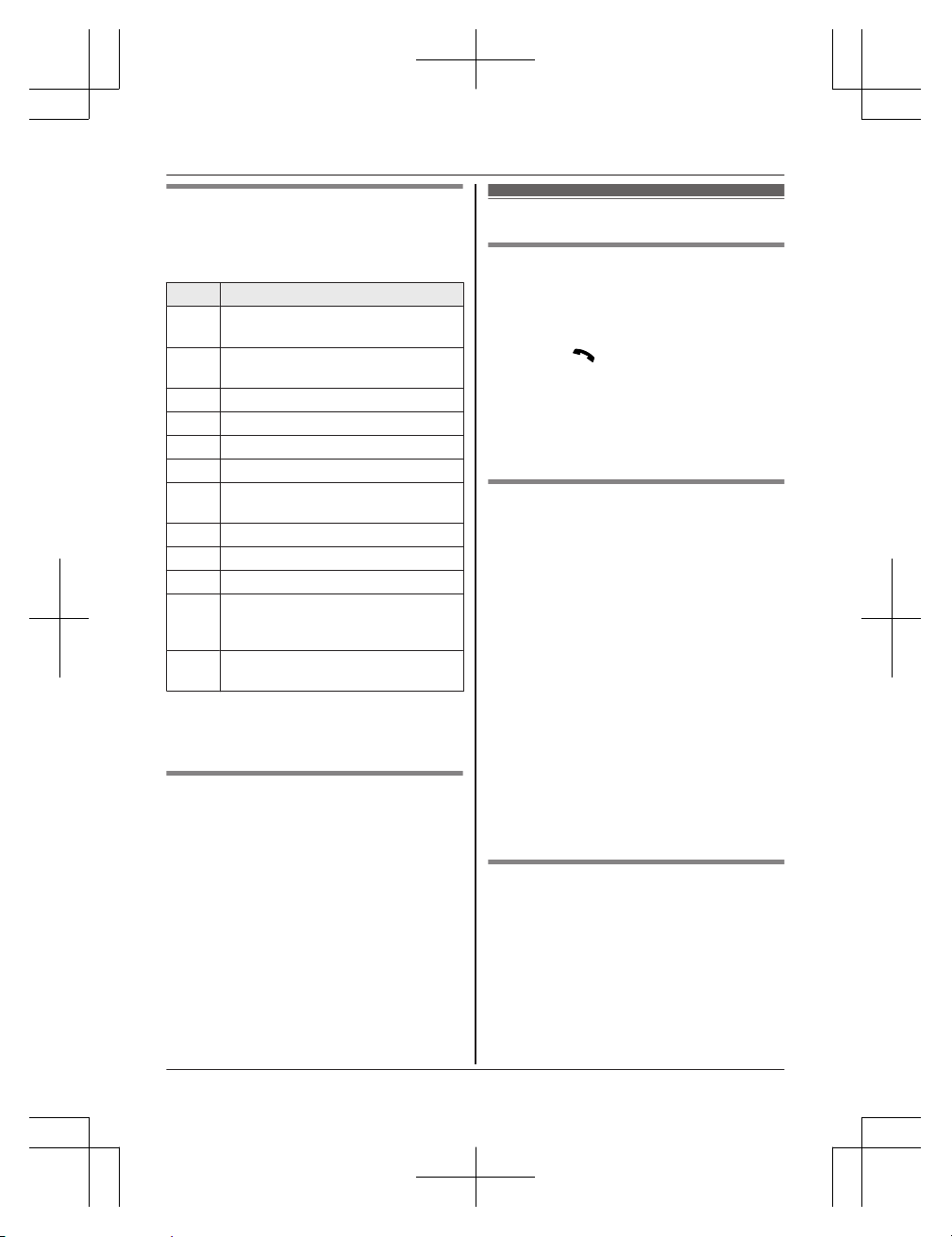
Remote commands
You can press dial keys to access certain
answering system functions without waiting for
the voice guidance to prompt you.
Key Operation
1 Repeat message
(during playback)
*1
2 Skip message
(during playback)
4 Play new messages
5 Play all messages
6 Play greeting message
7 Record greeting message
9 Stop recording
Stop playback
0 Turn answering system off
*4 Erase currently playing message
*5 Erase all messages
*6 Reset to a pre-recorded greeting
message (during greeting message
playback)
*# End remote operation
(or hang up)
*1 If pressed within the first 5 seconds of a
message, the previous message is
played.
Turning on the answering system
remotely
1 Dial your phone number from a
touch-tone phone.
2 Let the phone ring 20 times.
R A long beep is heard.
3 Enter your remote access code within 10
seconds after the long beep.
R The greeting message is played back.
R You can either hang up, or enter your
remote access code again and begin
remote operation (page 35).
Answering system settings
Call screening
While a caller is leaving a message, you can
listen to the call through the handset’s
speaker. To adjust the speaker volume, press
MDN or MCN repeatedly. You can answer the call
by pressing M
N on the handset. Call
screening can be set for each handset. The
default setting is “On”.
1 MMENUN#310
2 MbN: Select the desired setting. a MOKN
a MOFFN
Number of rings before the unit
answers a call
You can change the number of times the
phone rings “Number of Rings” before the
unit answers a call. You can select 2 to 9
rings, or “Auto”.
The default setting is “5 Rings”.
“Auto”: The unit’s answering system answers
at the end of the 2nd ring when new
messages have been recorded, or at the end
of the 5th ring when there are no new
messages. If you call your phone from outside
to listen to new messages (page 35), you
know that there are no new messages when
the phone rings for the 3rd time. You can then
hang up without being charged for the call.
1 MMENUN#211
2 MbN: Select the desired setting. a MOKN
a MOFFN
Caller’s recording time
You can change the maximum message
recording time allowed for each caller. The
default setting is “3 Minutes”.
1 MMENUN#305
2 MbN: Select the desired setting. a MOKN
a MOFFN
36
Helpline Tel. No.: U.K. 0344 844 3899 Ireland 01289 8333
Answering System
TGC41x_42xE(en)_0229_ver011.pdf 36 2016/02/29 15:10:38

Selecting “Greeting Only”
You can select “Greeting Only” which sets
the unit to announce a greeting message to
callers but not record messages.
Select “Greeting Only” in step 2 on
“Caller’s recording time”, page 36.
Note:
R When you select “Greeting Only”:
– If you do not record your own message,
the unit will play the pre-recorded
greeting-only message asking callers to
call again later.
– If you use your own message, record the
greeting-only message asking callers to
call again later (page 33).
Helpline Tel. No.: U.K. 0344 844 3899 Ireland 01289 8333
37
Answering System
TGC41x_42xE(en)_0229_ver011.pdf 37 2016/02/29 15:10:39
Voicemail service
In addition to your unit’s answering system you may also have voicemail service from
your phone service provider. Voicemail is an answering service that may be offered by your
phone service provider. This service can also record calls when you are unavailable to answer
the phone or when your line is busy. Messages are recorded on the phone company system and
not on the unit’s answering system.
R To use the voicemail service rather than the unit’s answering system, turn off the answering
system (page 33).
If you have unit’s answering system set to on and also the voicemail enabled, the system with
least amount of rings will record the message first.
Example:
If the unit’s answering system is set to 5 rings (page 36) and the voicemail answering system
provided by your phone company is set to 6 rings (call your service provider), the unit’s
answering system will record the incoming call first.
When you have new messages,
is displayed on the handset if message indication service is
available. Please contact your phone service provider for details of this service.
Important:
R If
still remains on the display even after you have listened to new messages, turn it off by
pressing and holding # for 2 seconds.
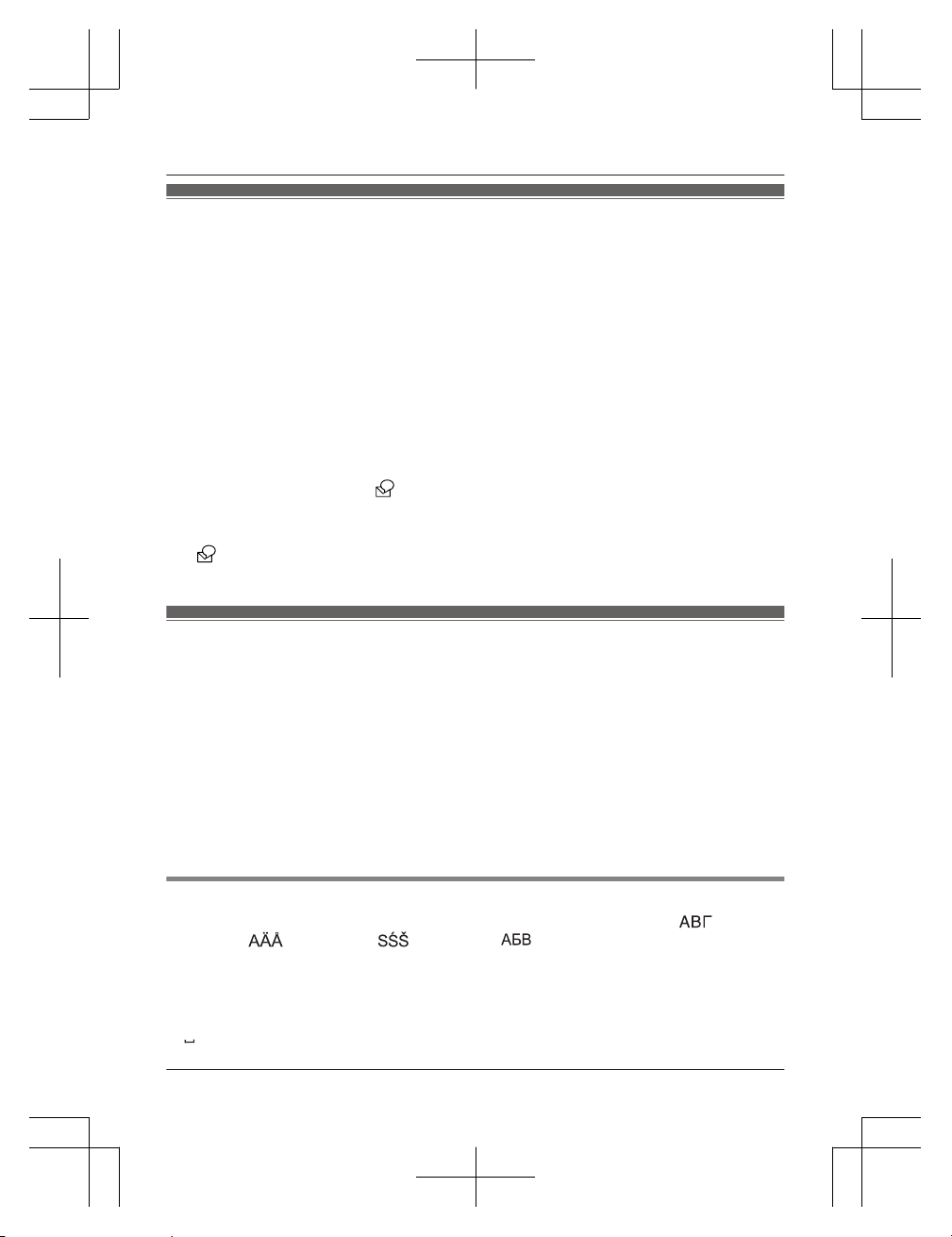
Character entry
The dial keys are used to enter characters and numbers. Each dial key has multiple characters
assigned to it. The characters that can be entered depend on the character entry mode
(page 38).
– Press MFN or MEN to move the cursor left or right.
– Press dial keys to enter characters and numbers.
– Press MCLEARN to erase the character or number highlighted by the cursor. Press and hold
MCLEARN to erase all characters or numbers.
– Press * (Aaa) to switch between uppercase and lowercase.
– To enter another character located on the same dial key, press MEN to move the cursor to the
next space, then press the appropriate dial key.
– If you do not press any dial key within 2 seconds after entering a character, the character is
fixed and the cursor moves to the next space.
Character entry modes
The available character entry modes are Alphabet (ABC), Numeric (0-9), Greek (
),
Extended 1 (
), Extended 2 ( ), and Cyrillic ( ). When in these entry modes except
Numeric, you can select which character is entered by pressing a dial key repeatedly.
When the unit displays the character entry screen:
MECON a MbN: Select a character entry mode. a MOKN
Note:
R
in the following tables represents a single space.
38
Helpline Tel. No.: U.K. 0344 844 3899 Ireland 01289 8333
Useful Information
TGC41x_42xE(en)_0229_ver011.pdf 38 2016/02/29 15:10:39
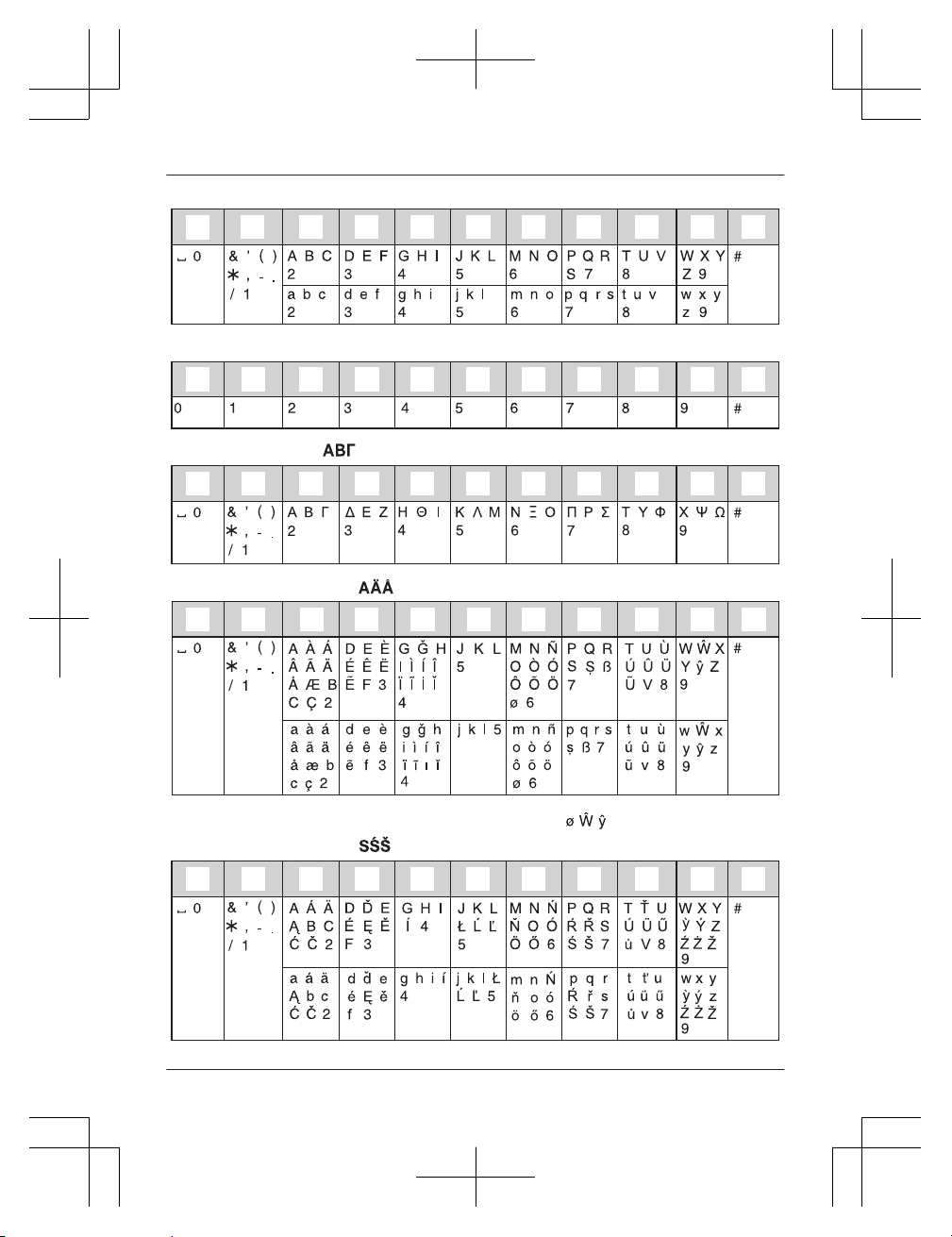
Alphabet character table (ABC)
z
y
1
2 3 4 5 6 7 8 9
Numeric entry table (0-9)
z
y
1
2
3
4 5 6 7 8 9
Greek character table ( )
z y
1
2 3 4 5 6 7 8 9
Extended 1 character table ( )
z
y
1
2 3 4 5 6 7 8
9
R The following are used for both uppercase and lowercase:
Extended 2 character table ( )
z
y
1
2 3 4 5 6 7 8 9
Helpline Tel. No.: U.K. 0344 844 3899 Ireland 01289 8333
39
Useful Information
TGC41x_42xE(en)_0229_ver011.pdf 39 2016/02/29 15:10:39
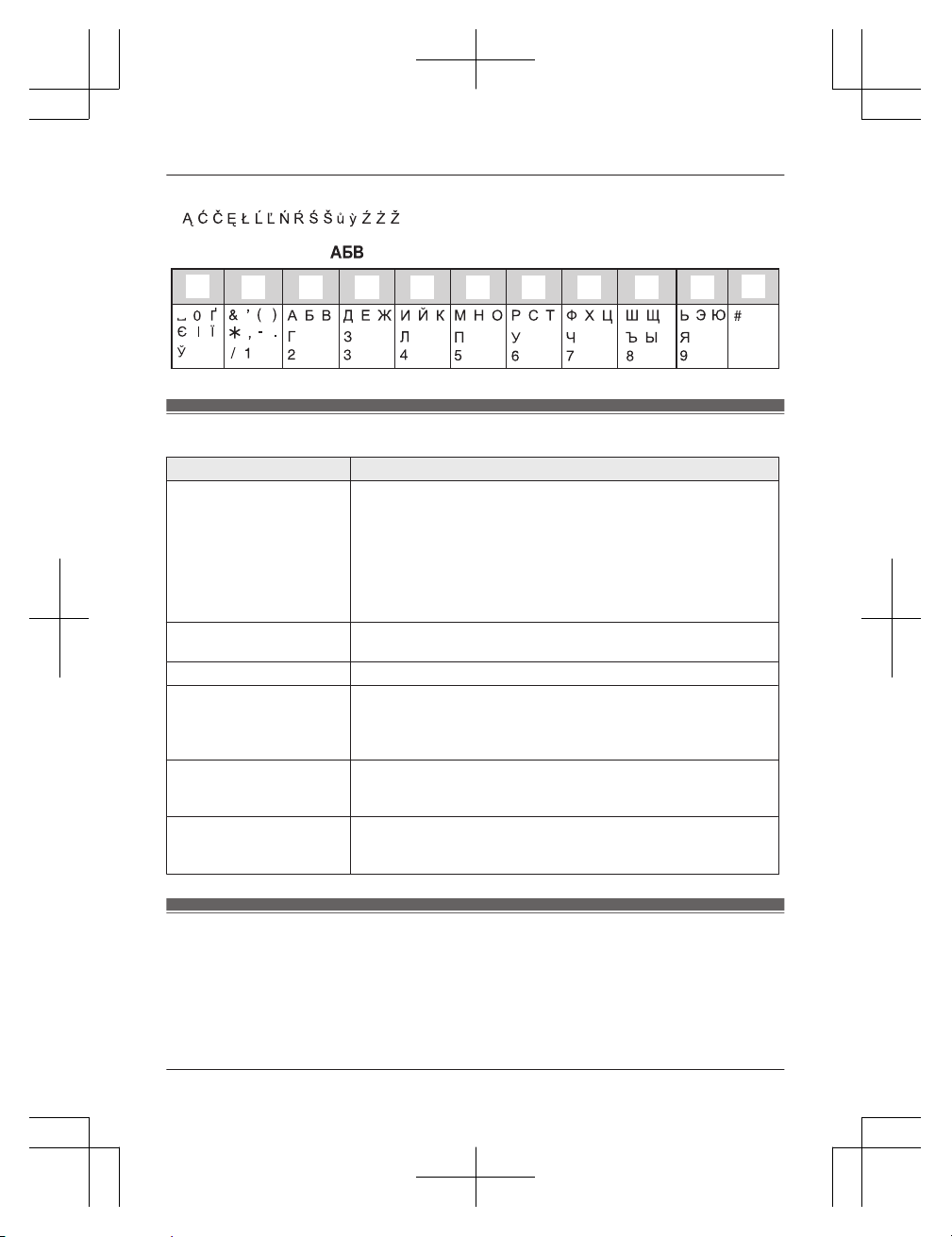
R The following are used for both uppercase and lowercase:
Cyrillic character table ( )
z
y
1
2 3 4 5 6 7 8 9
Error messages
Display message Cause/solution
Base no power
or
No link.
Reconnect
AC adaptor.
R Confirm the base unit’s AC adaptor is connected to the unit
and the power outlet correctly.
R The handset has lost communication with the base unit. Move
closer to the base unit and try again.
R Unplug the base unit’s AC adaptor to reset the unit.
Reconnect the adaptor and try again.
R The handset’s registration may have been cancelled.
Re-register the handset (page 44).
Check
Phone Line
R The supplied telephone line cord has not been connected yet
or not connected properly. Check the connections (page 11).
Error
R Recording was too short. Try again.
Memory Full
R The phonebook memory is full. Erase unwanted entries
(page 21).
R The call block list memory is full. Erase unwanted entries
(page 28).
Use
rechargeable
battery.
R A wrong type of battery such as alkaline or manganese was
inserted. Use only the rechargeable Ni-MH batteries noted on
page 4, 8.
You must first
subscribe
to Caller ID.
R You must subscribe to a Caller ID service. Once you receive
caller information after subscribing to a Caller ID service, this
message will not be displayed.
Troubleshooting
If you still have difficulties after following the instructions in this section, disconnect the base unit’s
AC adaptor and turn off the handset, then reconnect the base unit’s AC adaptor and turn on the
handset.
40
Helpline Tel. No.: U.K. 0344 844 3899 Ireland 01289 8333
Useful Information
TGC41x_42xE(en)_0229_ver011.pdf 40 2016/02/29 15:10:39
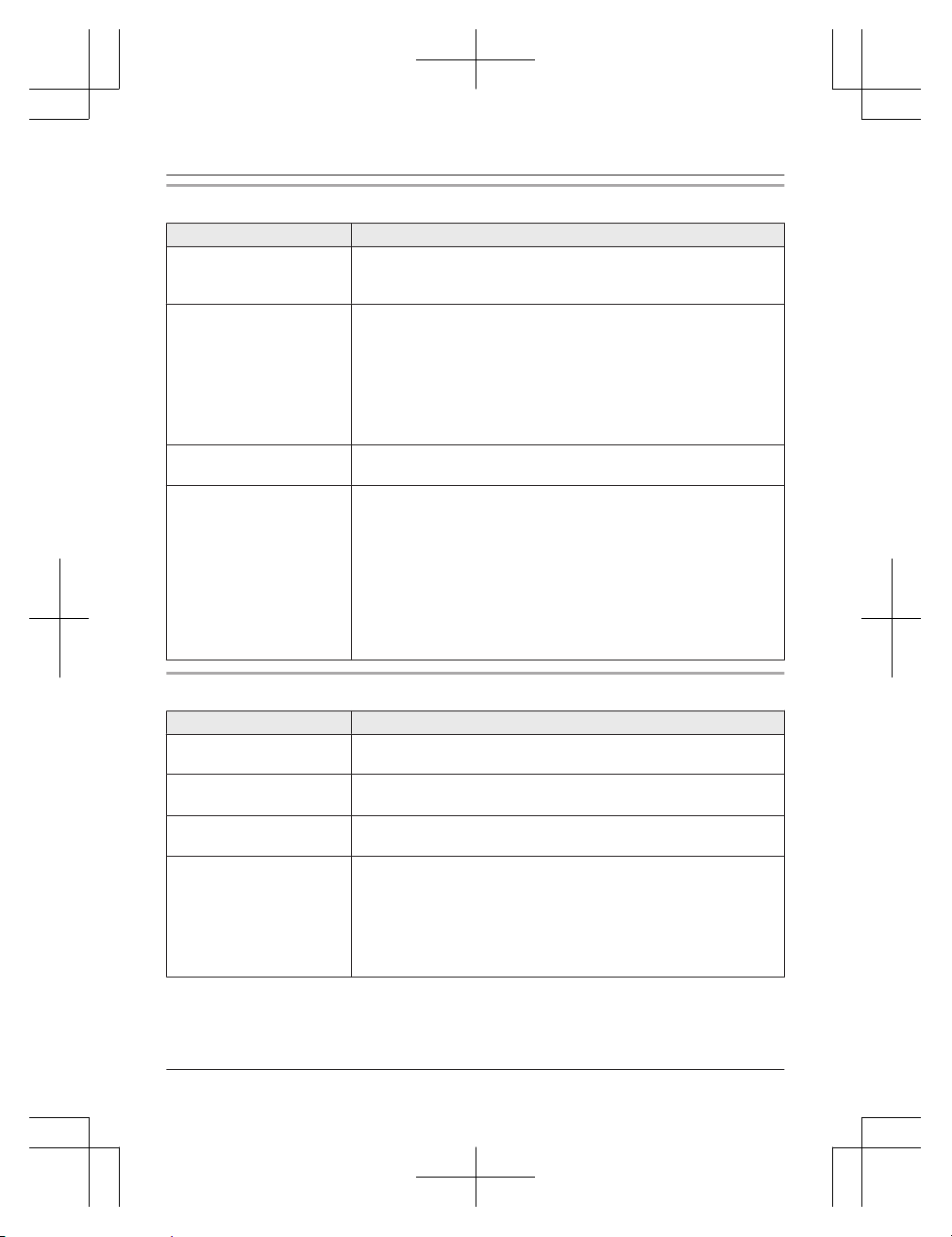
General use
Problem Cause/solution
The handset does not turn
on even after installing
charged batteries.
R Place the handset on the base unit or charger to turn on the
handset.
The unit does not work. R Make sure the batteries are installed correctly (page 11).
R Fully charge the batteries (page 12).
R Check the connections (page 11).
R Unplug the base unit’s AC adaptor to reset the unit and turn off
the handset. Reconnect the adaptor, turn on the handset and
try again.
R The handset has not been registered to the base unit. Register
the handset (page 44).
The handset display is
blank.
R The handset is not turned on. Turn the power on (page 15).
I cannot hear a dial tone. R Make sure that you are using the supplied telephone line cord.
Your old telephone line cord may have a different wiring
configuration.
R The base unit’s AC adaptor or telephone line cord is not
connected. Check the connections.
R Disconnect the base unit from the telephone line and connect
the line to a known working telephone. If the working
telephone operates properly, contact our service personnel to
have the unit repaired. If the working telephone does not
operate properly, contact your phone service provider.
Menu list
Problem Cause/solution
The display is in a
language I cannot read.
R Change the display language (page 15).
I cannot activate the eco
mode.
R You cannot set eco mode when you set the repeater mode
“On”. If required, set the repeater mode to “Off” (page 29).
I cannot register a handset
to a base unit.
R You entered the wrong PIN. If you forget your PIN, see “I
cannot remember the PIN.” (page 41).
I cannot remember the
PIN.
R Change the PIN using the following method.
1 MMENUN#132
2 *7000
3 Enter the new 4-digit base unit PIN. a MOKN
4 MbN: “Yes” a MOKN a MOFFN
Helpline Tel. No.: U.K. 0344 844 3899 Ireland 01289 8333
41
Useful Information
TGC41x_42xE(en)_0229_ver011.pdf 41 2016/02/29 15:10:39
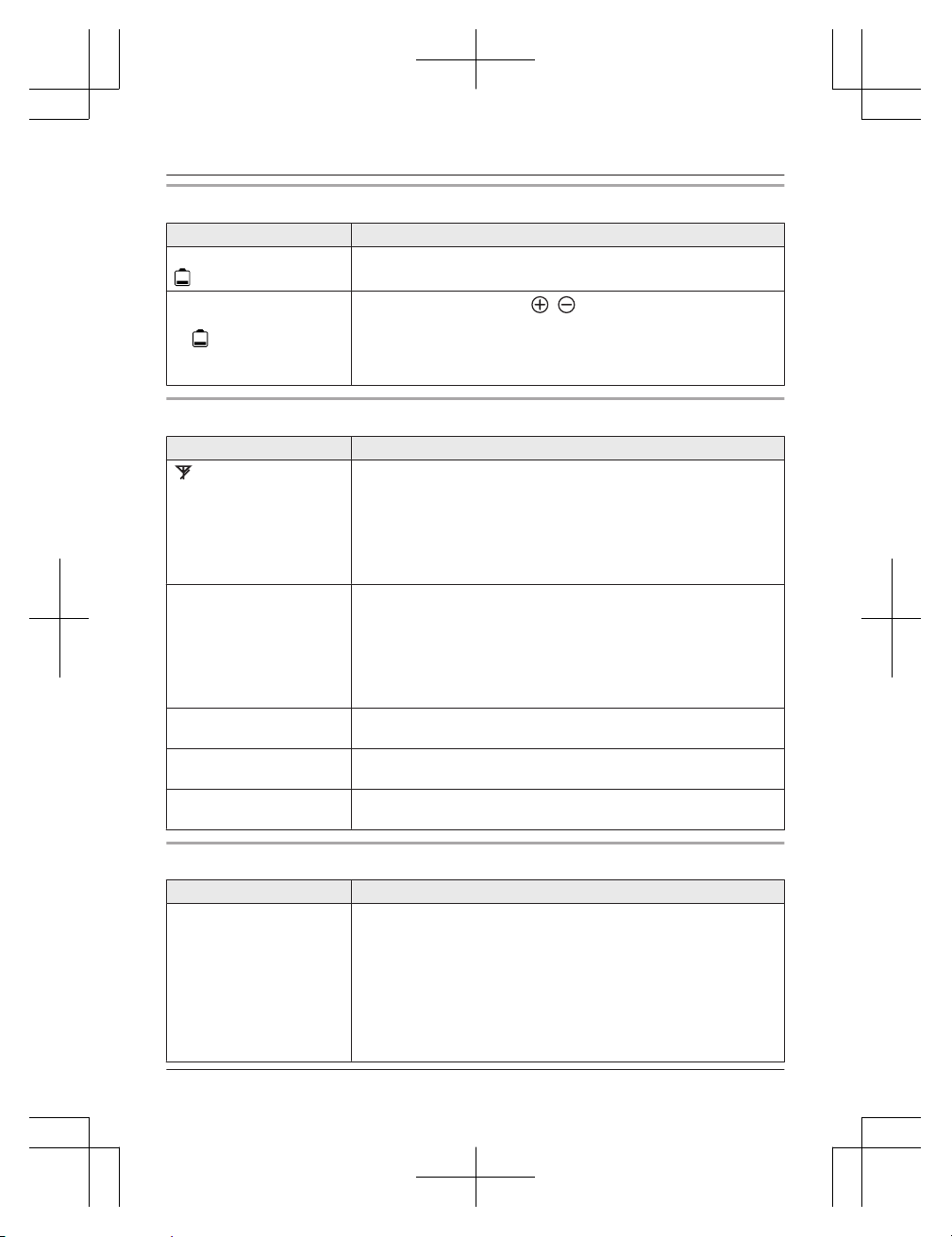
Battery recharge
Problem Cause/solution
The handset beeps and/or
flashes.
R Battery charge is low. Fully charge the batteries (page 12).
I fully charged the
batteries, but
– still flashes or
– the operating time
seems to be shorter.
R Clean the battery ends ( , ) and the charge contacts with
a dry cloth and charge again.
R It is time to replace the batteries (page 11).
Making/answering calls, intercom
Problem Cause/solution
is displayed.
R The handset is too far from the base unit. Move closer.
R The base unit’s AC adaptor is not properly connected.
Reconnect AC adaptor to the base unit.
R The handset is not registered to the base unit. Register it
(page 44).
R Activating eco mode reduces the range of the base unit in
standby mode. If required, turn eco mode off (page 16).
Noise is heard, sound cuts
in and out.
R You are using the handset or base unit in an area with high
electrical interference. Re-position the base unit and use the
handset away from sources of interference.
R Move closer to the base unit.
R If you use a DSL/ADSL service, we recommend connecting a
DSL/ADSL filter between the base unit and the telephone line
jack. Contact your DSL/ADSL provider for details.
The handset does not ring. R The ringer volume is turned off. Adjust ringer volume (page 17,
24).
The base unit does not
ring.
R The ringer volume is turned off. Adjust ringer volume (page 17,
24).
I cannot make a call. R You dialled a call restricted number (page 29).
R The key lock feature is turned on. Turn it off (page 19).
Caller ID
Problem Cause/solution
Caller information is not
displayed.
R You must subscribe to a Caller ID service. Contact your phone
service provider for details.
R If your unit is connected to any additional telephone
equipment, remove and plug the unit directly into the wall jack.
R If you use a DSL/ADSL service, we recommend connecting a
DSL/ADSL filter between the base unit and the telephone line
jack. Contact your DSL/ADSL provider for details.
R Other telephone equipment may be interfering with this unit.
Disconnect the other equipment and try again.
42
Helpline Tel. No.: U.K. 0344 844 3899 Ireland 01289 8333
Useful Information
TGC41x_42xE(en)_0229_ver011.pdf 42 2016/02/29 15:10:39
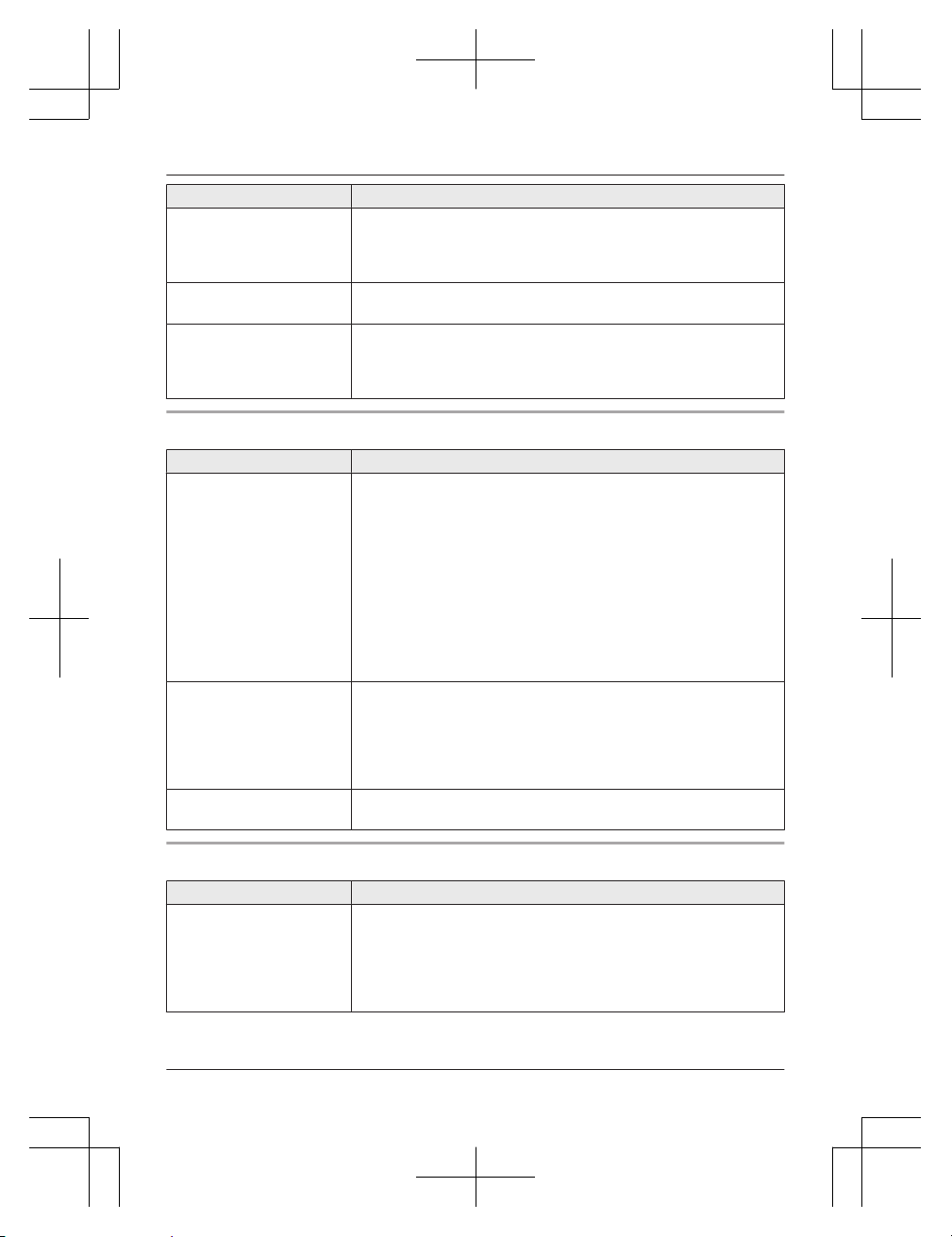
Problem Cause/solution
Caller information is slow
to display.
R Depending on your phone service provider, the unit may
display the caller’s information at the 2nd ring or later. Set the
first ring to “Off” (page 24).
R Move closer to the base unit.
Time on the unit has
shifted.
R Incorrect time information from incoming Caller ID changes the
time. Set the time adjustment to “Manual” (off) (page 24).
The name stored in the
phonebook is not fully
displayed while an outside
call is being received.
R Edit the phonebook entry name to fit in 1 line of text (page 21).
Answering system
Problem Cause/solution
The unit does not record
new messages.
R The answering system is turned off. Turn it on (page 33).
R The message memory is full. Erase unwanted messages
(page 34).
R The recording time is set to “Greeting Only”. Change the
setting (page 36).
R Your phone service provider’s voicemail service may be
answering your calls before the unit’s answering system can
answer your calls. Change the unit’s number of rings setting
(page 36) to a lower value, or contact your phone service
provider.
R The answering system will not answer incoming calls while the
other devices such as handsets are engaged in a call.
I cannot operate the
answering system
remotely.
R The remote access code is not set. Set the remote access
code (page 35).
R You are entering the wrong remote access code. If you have
forgotten your remote access code, enter the remote access
code setting to check your current code (page 35).
R The answering system is turned off. Turn it on (page 36).
The unit does not emit the
specified number of rings.
R If the first ring is turned off (page 24), the number of rings
decreases by 1 from the specified number of rings.
Liquid damage
Problem Cause/solution
Liquid or other form of
moisture has entered the
handset/base unit.
R Disconnect the AC adaptor and telephone line cord from the
base unit. Remove the batteries from the handset and leave to
dry for at least 3 days. After the handset/base unit are
completely dry, reconnect the AC adaptor and telephone line
cord. Insert the batteries and charge fully before use. If the unit
does not work properly, contact an authorised service centre.
Caution:
R To avoid permanent damage, do not use a microwave oven to speed up the drying process.
Helpline Tel. No.: U.K. 0344 844 3899 Ireland 01289 8333
43
Useful Information
TGC41x_42xE(en)_0229_ver011.pdf 43 2016/02/29 15:10:39
Registering a handset to the base unit
1 Handset:
MMENUN#130
2 Base unit:
Press and hold M
N for about 5 seconds.
R If all registered handsets start ringing, press M
N again to stop, then repeat this step.
(KX-TGC412/KX-TGC413/KX-TGC422/KX-TGC423/KX-TGC424/KX-TGC425)
3 Handset:
MOKN a Wait until “Base PIN” is displayed. a Enter the base unit PIN (default: “0000”).
a MOKN
R If you forget your PIN, see page 41.
Deregistering a handset
1 MMENUN#131
R All handsets registered to the base unit are displayed.
2 MbN: Select the handset you want to cancel. a MOKN
3 MbN: “Yes” a MOKN a MOFFN
44
Helpline Tel. No.: U.K. 0344 844 3899 Ireland 01289 8333
Useful Information
TGC41x_42xE(en)_0229_ver011.pdf 44 2016/02/29 15:10:39
Conditions of guarantee
Receipt No. Date of purchase
Model No. Serial No.
This guarantee is in addition to and does not in any way affect any statutory or other rights of
consumer purchasers. If within the applicable guarantee period, the product proves to be
defective by reason of faulty design, workmanship or materials, we undertake subject to the
following conditions to have the defective product (or any part or parts there of) repaired or
replaced free of charge.
1. The product shall have been purchased and used solely within either the U.K. or Ireland
and in accordance with standard operating instructions and the technical and/or Safety
Standards required in the U.K.
2. On being found defective, please consult with the retailer from where it was purchased for
assistance.
3.
This guarantee shall not apply to damage caused through fire, accident, lightning, misuse,
wear and tear, neglect, incorrect adjustment or repair, to damage caused through
installation, adaption, modification or use in an improper manner or inconsistent with the
technical and/or safety standards required in the country where this product is used, or to
damage occurred during transit to or from the purchaser.
4. If at any time during the guarantee period any part or parts of the product are replaced
with a part or parts not supplied or approved by us or of an objective quality safe and
suitable for the product, or the product has been dismantled or repaired by any person not
authorised by us, we shall have the right to terminate this guarantee in whole or in part
immediately without further notice.
5. The purchaser’s sole and exclusive remedy under this guarantee against us is for the
repair or replacement of the product or any defective part or parts and no other remedy,
including, but not limited to, incidental or consequential damage or loss of whatsoever
nature shall be available to the purchaser.
6. This guarantee shall not apply to batteries and any other items of limited natural life.
7. Our decision on all matters relating to complaints shall be final. Any product or defective
part which has been replaced shall become our property.
8. The guarantee period applicable to this product shall be 12 months.
Please keep these operating instructions with your receipt.
Panasonic U.K. a branch of Panasonic Marketing Europe GmbH
Helpline Tel. No.: U.K. 0344 844 3899 Ireland 01289 8333
45
Useful Information
TGC41x_42xE(en)_0229_ver011.pdf 45 2016/02/29 15:10:39
Index
A Alarm: 27
Answering calls: 17
Answering system: 33
Call screening: 36
Erasing messages: 34, 35, 36
Greeting message: 33
Greeting only: 36
Listening to messages: 34, 35
Number of rings: 36
Recording time: 36
Remote access code: 35
Remote operation: 35
Turning on/off: 33
Auto talk: 17, 25
B Battery: 11, 12
C Call restriction: 29
Call share: 18
Call waiting: 18
Call Waiting Caller ID: 18
Caller ID service: 31
Caller list: 31
Caller list edit: 31
Category: 20
Chain dial: 21
Character entry: 38
Conference calls: 18
Control type: 13
D Date and time: 15
Direct command code: 23
Display
Contrast: 25
Language: 15
E Eco mode: 16
Error messages: 40
F First ring: 24
H Handset
Deregistration: 44
Locator: 13
Name: 28
Registration: 44
Hold: 17
I Intercom: 19
K Key lock: 19
Keytones: 25
M Making calls: 17
Missed calls: 31
Mute: 18
N Nuisance call block: 27
O OK Key: 13
P Pause: 17
Phonebook: 20
PIN: 29
Power failure: 12
Power on/off: 15
Privacy mode: 25
R Recall/flash: 18
Redialling: 17
Repeater: 29
Ringer tone: 24
S Security for phone calls: 29
Speakerphone: 17
Speed dial: 21
T Time adjustment: 24
Transferring calls: 18
Troubleshooting: 40
V Voicemail: 38
Volume
Receiver: 17
Ringer (Base unit): 17, 24
Ringer (Handset): 17, 24
Speaker: 17
46
Index
TGC41x_42xE(en)_0229_ver011.pdf 46 2016/02/29 15:10:39

47
Notes
TGC41x_42xE(en)_0229_ver011.pdf 47 2016/02/29 15:10:39
1 Reconnect AC adaptor to the base unit.
2 Check if telephone line cord is connected.
3 Use rechargeable Ni-MH batteries.
(Alkaline/Manganese/Ni-Cd batteries CANNOT be used.)
4 Read troubleshooting page in the Operating Instructions.
If your product is not working properly. . .
IMPORTANT!
If you still have any problems, please call the Panasonic
DECT Helpline
0344 844 3899 (U.K.)
01289 8333 (Ireland)
or contact us through our website:
www.panasonic.co.uk
Sales Department:
Panasonic House, Willoughby Road, Bracknell, Berkshire, RG12 8FP
© Panasonic Corporation 2016
*PNQX7807XA*
*PNQX7807XA*
PNQX7807XA PT0316MU2027
TGC41x_42xE(en)_0217_ver201.pdf 48 2017/02/17 17:27:19