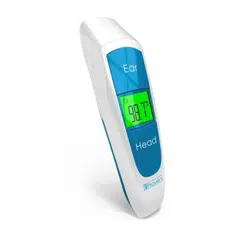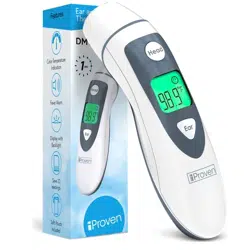
DMT-77BT
The sensor of the DMT-77BT is basically like a
little camera that ‘sees’ temperature. To make sure
it’s able to read your temperature correctly, it is
important to keep the lens clean. An obstructed
lens can make your reading inaccurate.
Warning:
Don’t use any abrasive cleaning products. Do not immerse the device in liquid. If you want to
use a disinfectant, we recommend Isopropyl alcohol solution (concentration: 70%) or Medicinal
alcohol (concentration: 75%).
How to clean the lens:
Before cleaning, always remove the batteries from the device. Take a microfiber cloth and make it
slightly wet. Carefully remove any dirt off the lens surface. You can use a cotton swab or the corner
of the cloth to cautiously remove any dirt stuck to the edges of the lens.
More advice on accuracy
The warranty covers any defects in materials and workings of the product under normal use during
the warranty period. iProven will either replace or repair the product at no charge, using new or
refurbished replacement parts. The warranty of this product covers the first 2 years from the date
of purchase. In case of repair or replacement, the warranty period is the remaining warranty of the
original product purchase. The warranty does NOT cover batteries or packaging, nor any problem
that is caused by conditions, malfunctions or damage not resulting from defects in material or
workings. Contact our friendly customer support at support@iproven.com
Warranty
iProven Premium Dual Mode Thermometer
Forehead measurements
Since forehead temperature fluctuates and can be influenced by outside factors, the DMT-77BT
carefully calculates the ambient temperature before measuring. It takes a second longer to receive
your first result, and then gives you the most accurate measurement possible.
Why does forehead temperature fluctuate?
Your forehead is not protected from outside influences. Walking outside on a cold winter day or
a hot summer day can change the temperature of your forehead very easily, way easier than the
temperature inside your ear. Washing your face will also influence the temperature. This is why we
are so proud that this device can measure your body temperature via the forehead. The DMT-77BT
calibrates first, to get the most accurate reading possible.
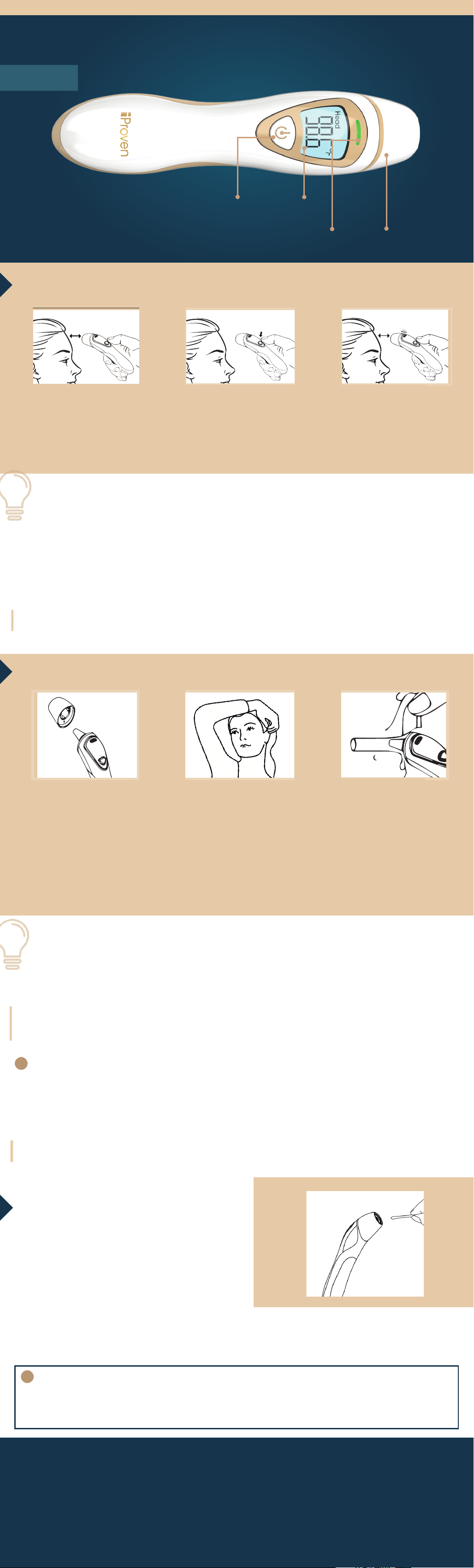
Point the forehead
thermometer towards
the middle of the
forehead at around
1 inch distance.
Detachable cap
to switch to ear mode
Ear measurements
The sensor measures the temperature of your eardrum. Since your eardrum lays deep inside your
ear it is a great place to measure your body temperature. It does not get influenced by outside
factors. The thermometer does not need to be calibrated for an ear measurement. Earwax might
obstruct the infrared reading of your eardrum. If you have a lot of earwax, take a forehead measure-
ment for a more accurate result. If you have an ear infection there is a high chance the temperature
of your eardrum will be warmer than your actual body temperature. In case of an ear infection, do a
forehead measurement instead.
Things that can influence your body temperature:
- Taking a shower or bath
- Exercising
- Powerful emotions
- Sunbathing
- Being outside in wind and/or rainy weather
To make sure you measure your true body temperature when any of the above occurs, relax
and wait 20 minutes before measuring.
Start Button
Colored alert &
memory button
The device is intended for measuring body temperature
via forehead and ear, and measuring ambient/object temperature.
Do not use this device for anything other than its intended purpose.
How to do a forehead measurement:
How to do an ear measurement:
Ear temperature measurement is recognized as highly accurate by doctors and used in hos-
pitals around the world. At iProven we decided to combine this clinically accurate way of
measuring with the quick and easy no-touch forehead method.
!
Measure forehead and ear temperature accurately with the same device
Need help? Turn over the manual for contact details
LCD screen
Press the main button.
1
Want to be 100% sure no external factors have influenced your temperature reading?
Do an ear measurement as well!
Take off the cap of the
thermometer to switch
to ear mode. Press the
main button.
Pull the ear up and
hold it to straighten
the ear canal. Do not
use the ear-mode on
babies under the
age of 6 months.
Insert the sensor and
press the button. Wait
a second till you feel
it buzz and read your
result.
2
!
The thermometer will
take a second to calibrate
before measuring your
forehead temperature.
The thermometer will
buzz once your results
are ready.
3
1 2
3

Frequently Asked Questions
How do you access the memory files?
The colored light is also a button. Press it to check your
last result and press it again to see the result
before that. The DMT-77BT remembers 20 measurements.
Caution
Don’t shake or drop the device, this can cause irreversible damage to the device.
Store the device at room temperature for best accuracy.
Never hold the device underwater nor submerge it in liquid.
If the device won’t be used for a while, remove the batteries.
Do not give the device to children under the age of 3. It can be used to measure their
temperature, but only by adults.
Do not let children under the age of 3 hold it. The device has small parts that can be a choking
hazard. Do not use on babies under 6 months old.
Maintenance & preventive inspection of the DMT-77BT
Make sure the thermometer is safe to use and regularly check the device for
potential safety hazards. For example: if the lens is broken, the shell has cracks or the lens is dirty.
Do not use the device if it has a potential safety hazard. Clean the device itself if it will not be
used for a while.
After an ear measurement, clean the lens of the device following the method
described in the section “How to clean the device” found in this manual.
Store the thermometer ideally in your living area, to have it adjusted to the same ambient
temperature as the user. It should be a dry, dust-free, and well-ventilated place. Make sure that
the thermometer is not exposed to sunlight.
Vibration/Alert and LED color,
what do they mean
The DMT-77BT has several temperature alerts to help you classify the temperature. There is the
visual alert, the light above the screen changes colors, and the vibrating alert. It’s silent, so you can
use it to measure your baby’s temperature without waking them up.
The DMT-77BT registers and warns you of elevated temperature, fever, and hypothermia. The light
will change to green, orange, or red, depending on the measured temperature. See the table for
which alert activates when and what it means.
How do you switch between F and C?
You can use the DMT-77BT in Fahrenheit and in
Celsius. To switch between the two temperature scales:
take off the battery cover on the back of the device.
You can do so by sliding it downwards. Underneath the
batteries you will find a little black switch that will
change the temperature scale if you flip it.
How do I measure the temperature of an object?
Use the forehead mode. Point the thermometer
towards the object at around one inch distance and
press the button.
What batteries does it need?
Two pieces of AAA-type alkaline batteries you will
find at your local grocery store. Place the batteries as
shown at the bottom of the battery compartment.
Problem Possible Cause Solution
The thermometer fails to
turn on
Low battery
Polarities of the batteries are
reversed
The thermometer is damaged
Change the batteries
Make sure that the batteries are
installed correctly
Contact customer support at
support@iproven.com
“Er1” is displayed on
screen
The measured temperature
is lower than 50°F (10°C) or
higher than 104°F (40°C)
Take a measurement within the tem-
perature range of 50°F (10°C) and
104°F (40°C).
The temperature reading
is lower than the typical
body temperature range
The lens is dirty
The thermometer lens cannot
see the eardrum well
The thermometer has been
taken from a cold environment
and used immediately
Clean the lens using a damp towel
or cotton swab
Make sure you pull your ear upwards
to straighten the ear canal
(for babies, pull the ear to the back
carefully)
Let the thermometer acclimate for
20 minutes before measuring
The temperature reading
is higher than the typical
body temperature range
The thermometer is stored in a
particularly warm environment
The thermometer lens is
damaged
Let the thermometer acclimate for
20 minutes before measuring
Contact customer support at
support@iproven.com
Temperature range Vibration Indicator light What does it mean?
97.7°F - 99.5°F/36.5°C - 37.5°C 1 buzz Steady green light Normal temperature
95.9°F - 97.5°F/35.5°C - 36.4°C 1 buzz Steady orange light Low temperature
99.7°F - 100.2°F/37.6°C - 37.9°C 1 buzz Steady orange light Elevated temprature
86.0°F - 95.7°F/30.0°C - 35.4°C 4 buzzes Steady red light Hypothermia
100.4°F - 111.2°F/38.0°C - 44.0°C 4 buzzes Steady red light Fever
32.0°F - 85.8°F/0°C - 29.9°C 1 buzz No indicator light Ambient/Object temperature
111.4°F - 212°F/44.1°C - 100°C 1 buzz No indicator light Ambient/Object temperature
Troubleshooting:
Manufactured for iProven
Burgemeester de Raadtsingel 67B
3311 JG Dordrecht
The Netherlands
Version 112022