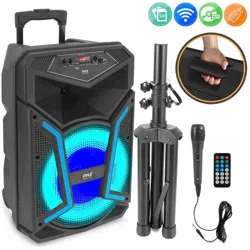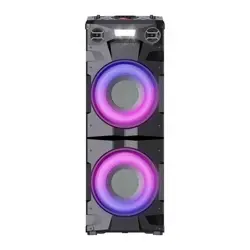
983918 - MAXISOUND
Party Speaker
Enceinte de fête
Party Speaker
Altavoz de fiesta
INSTRUCTIONS FOR USE ....................02
CONSIGNES D'UTILISATION ....................16
GEBRUIKSAANWIJZINGEN ....................30
INSTRUCCIONES DE USO ....................44
09/2023-V3
2/2
2
EN
Thank you!
Thank you for choosing this EDENWOOD product.
EDENWOOD products are chosen, tested, and
recommended by ELECTRO DEPOT, so you can be sure
you are getting a top-quality, easy-to-use product
that won’t let you down.
We’re confident your new device will be a pleasure
to use every day!
Welcome to ELECTRO DEPOT.
3
EN
Table of Contents
A
Product overview
C
Cleaning and
maintenance
B
Product usage
Connections
Operation
Cleaning and maintenance
Troubleshooting
Storage
Parts
Product overview
Intended use
Specifications
Declaration of conformity
4
EN
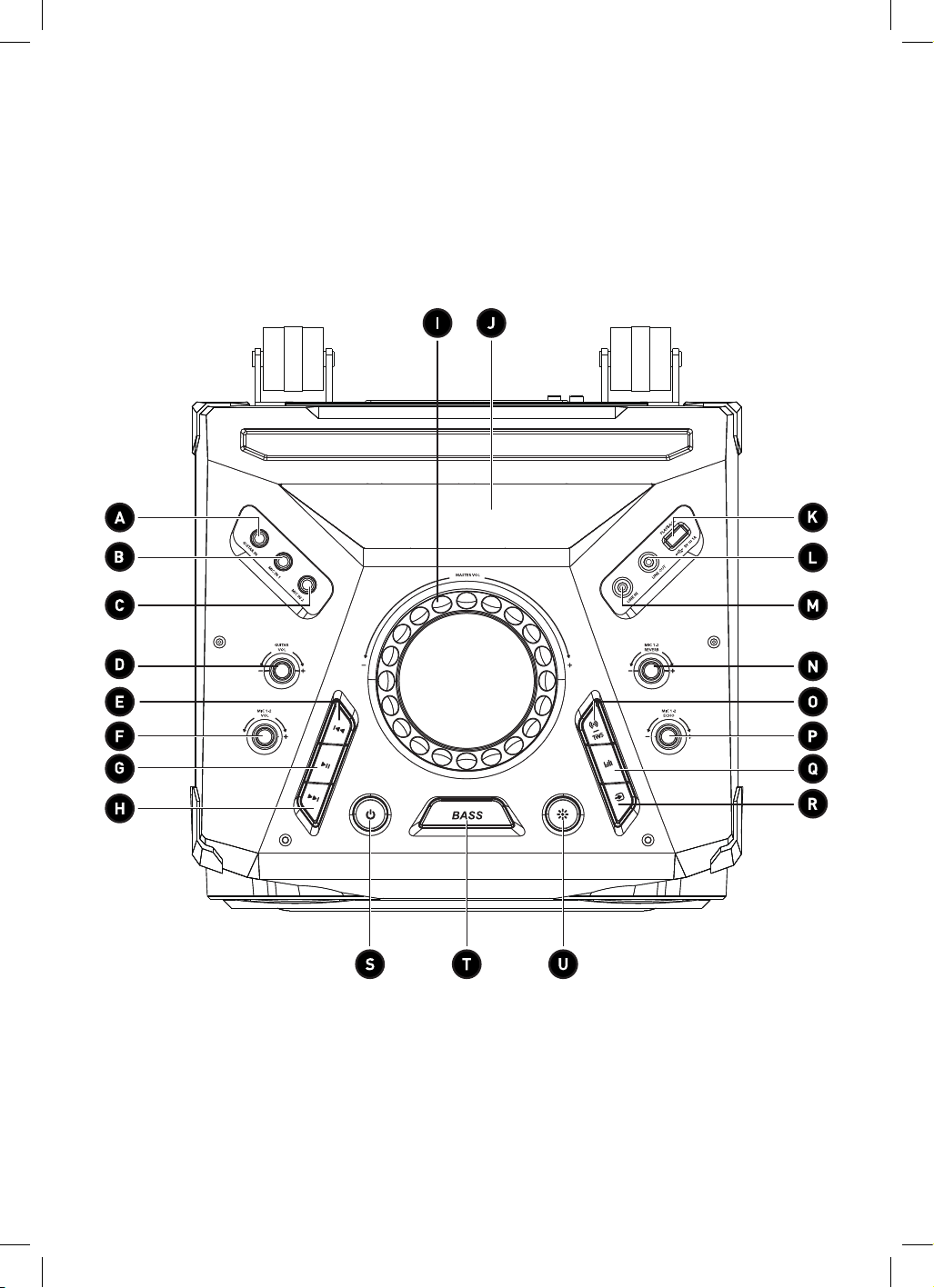
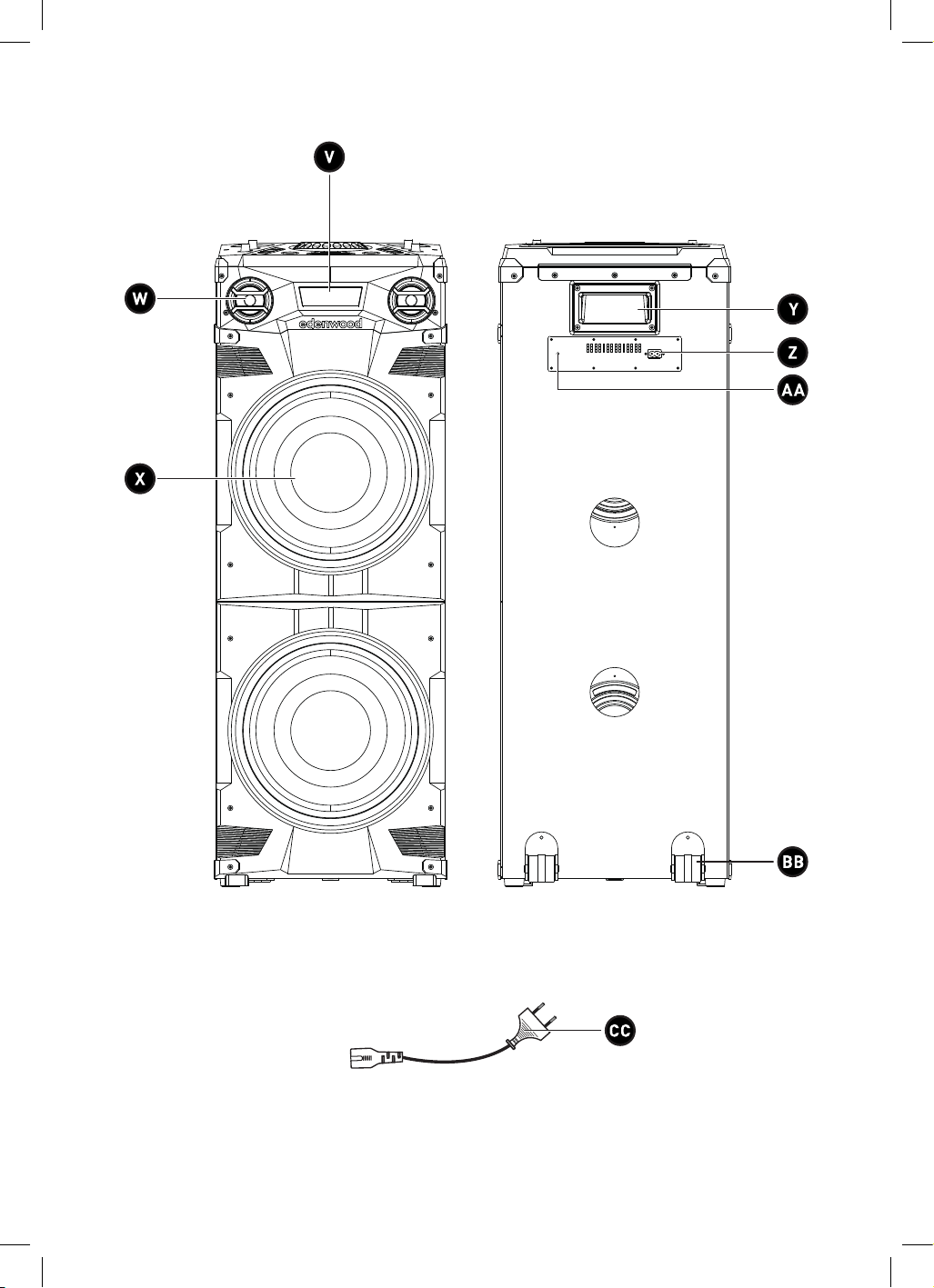
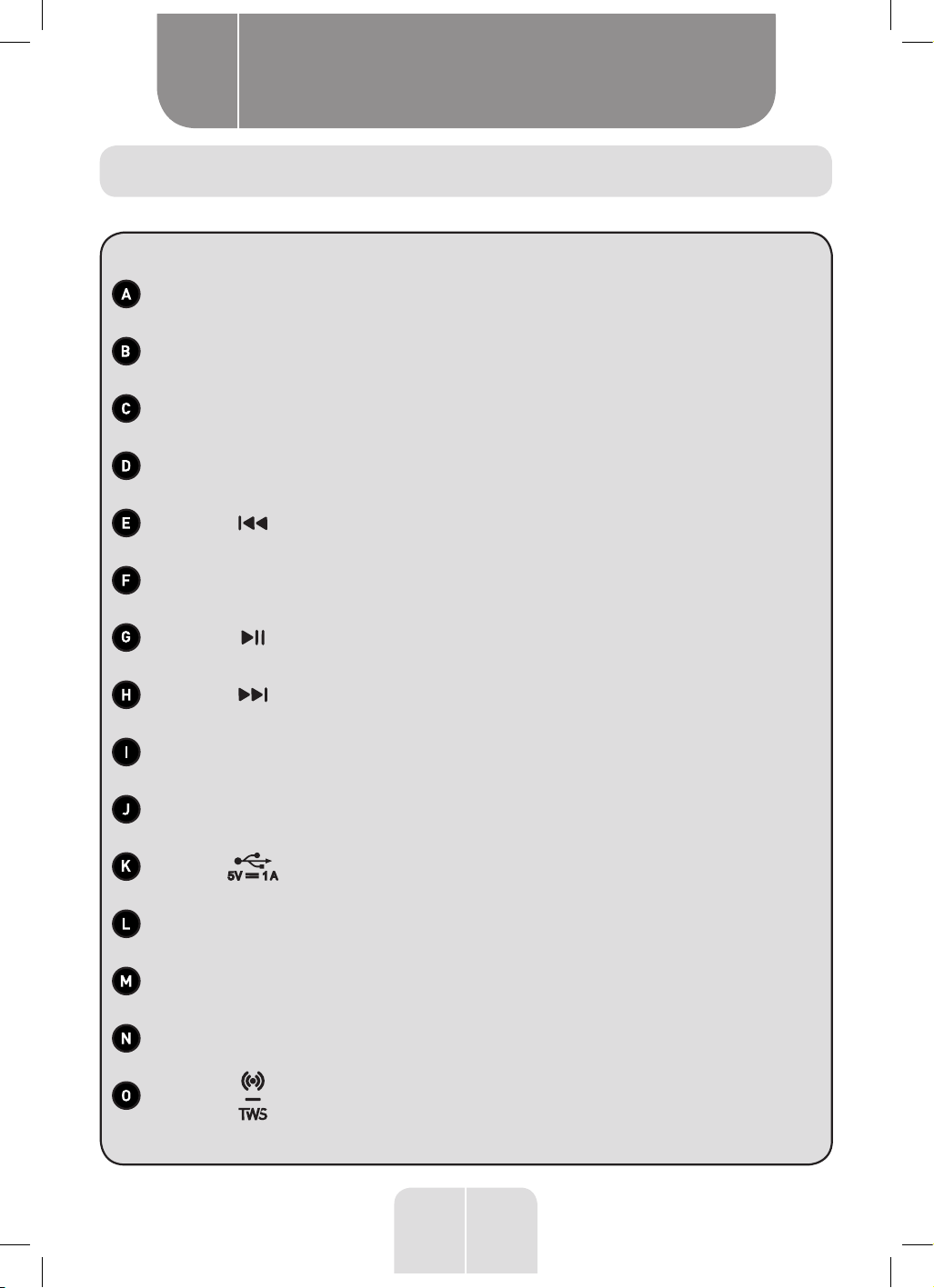
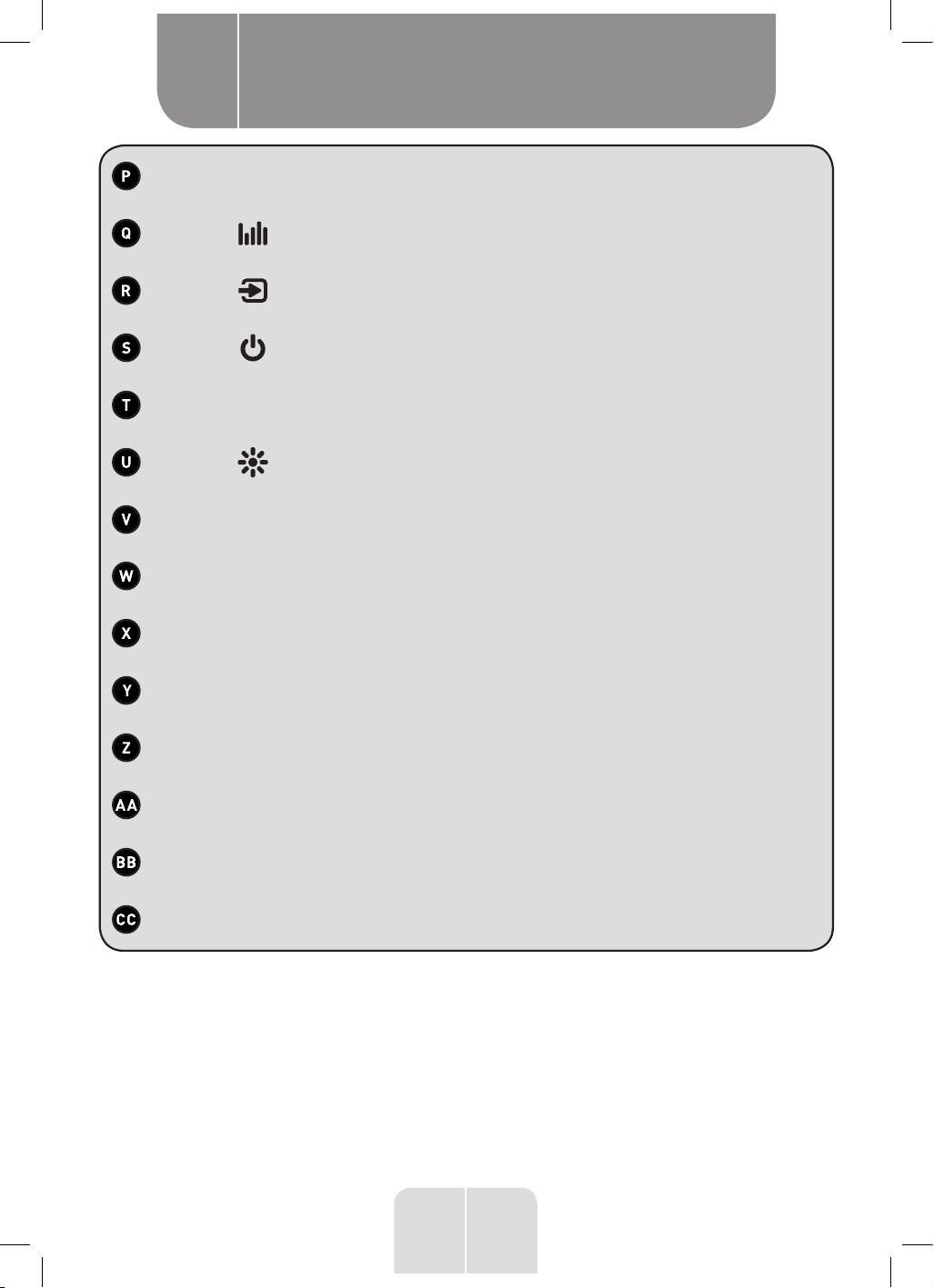
Parts
Product overview
A
Description
GUITAR IN input socket
MIC IN 1 input socket
MIC IN 2 input socket
GUITAR VOL knob
Skip to previous track button
MIC VOL knob
Play/pause button
Skip to next track button
Master VOLUME knob
Display screen
USB PLAYBACK socket
LINE OUT output socket
LINE IN input socket
MIC REVERB knob
BLUETOOTH/TWS button
5
EN
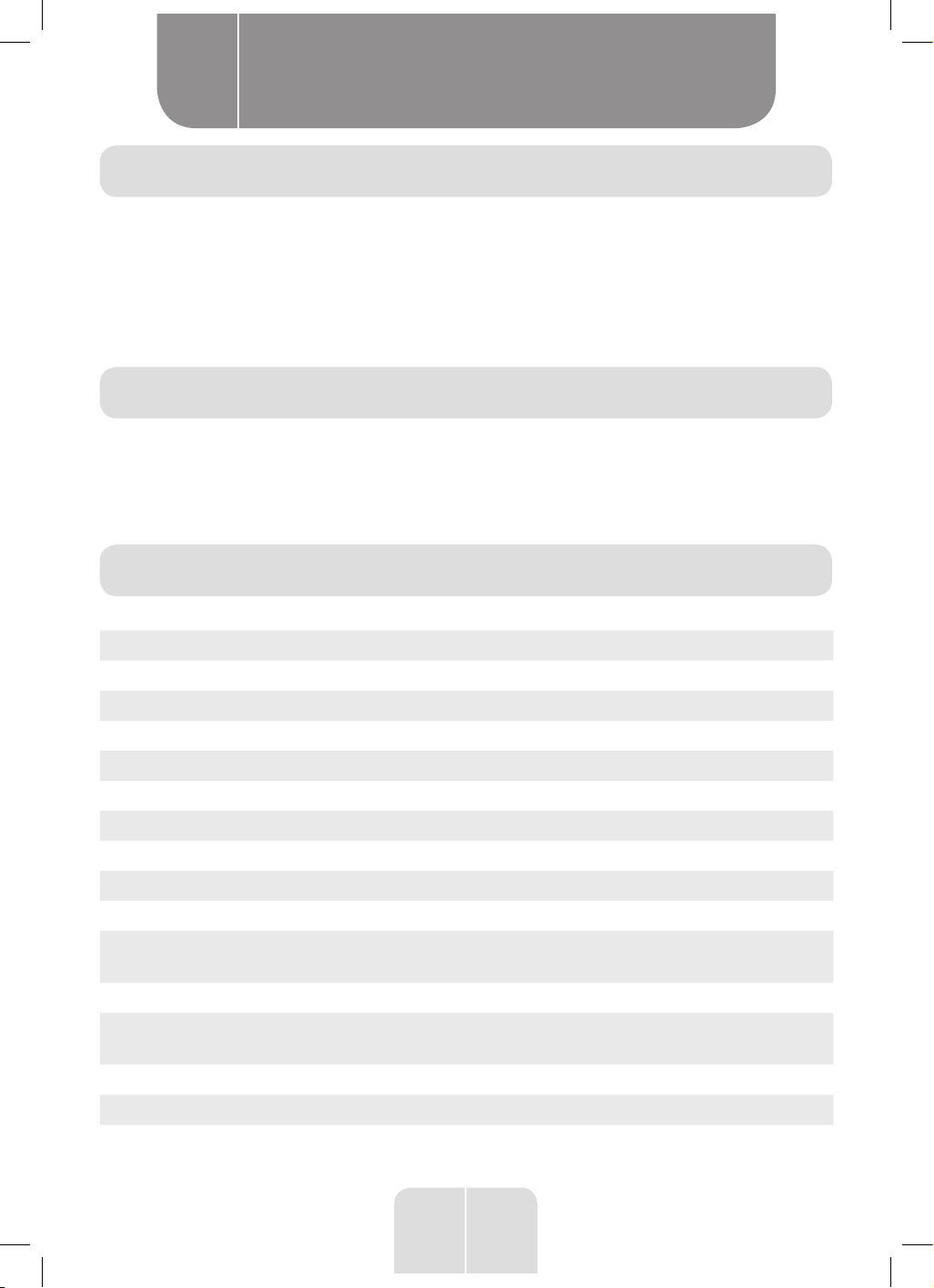
MIC ECHO knob
EQ button
SOURCE button
ON/OFF button
BASS button
LIGHT button
Strobe light
Speakers
Speakers with lights
Handle
Power socket
FM antenna
Wheel (x2)
AC power cord
Product overview
A
6
EN
Product overview
A
Product overview
Intended use
•
Unpack the product. Remove all the labels from the product. Check that it is complete
and in a good condition. If the unit is damaged or faulty, do not use it and take it to your
retailer or after-sales service centre.
•
Keep all packaging out of the reach of children. There is a risk of accidents if children
play with packaging materials.
•
This product has been designed exclusively for playing audio files and is intended for
domestic use only. It may not be used for commercial purposes.
• Any other use may damage the product or cause injury.
Specifications
Model: 983918-MAXISOUND
Voltage: AC – 100-240V~, 50/60Hz
Power consumption: 200W
Main unit size: 350(W) x 370(D) x 972(H) mm
Net weight: 15.3kg
Gross weight: 19.4kg
Operating temperature: 0 to 35°C
Storage temperature: -20 to 60°C
Speaker power: 4 x 100W RMS - 1000W Max
Relative humidity: 5 to ~90%
Speaker output power:
4 x 100W (Bass 100W x 2 / Treble
100W x 2)
Frequency response: 50Hz-20kHz (-12dB)
FM frequency range:
87.5 to 108MHz (FM antenna only, AM
radio not available)
LINE IN input: 3.5mm jack
LINE OUT: 3.5mm jack
Microphone 1 and 2 input: 6.35mm jack
7
EN
Product overview
A
Guitar input: 6.35mm jack
Bluetooth name:
EDENWOOD MAXISOUND
Bluetooth frequency: 2.4GHz
Bluetooth range: Up to 10 metres
USB connection (PLAYBACK): Output: 5V, 1A
USB compatibility: Up to 32GB
Compatible formats: MP3
Frequency bands: 2402 to 2480MHz
Maximum power output: 4.12dBm
Protection class: Class II
Due to constant developments and improvements in the design of our products, changes to
the specifications below are likely to occur without notice.
Compatibility disclaimer
Wireless performance is dependent on your device’s Bluetooth wireless technology.
Please check with the manufacturer. ELECTRO DÉPÔT cannot be held responsible for any
data loss or leaks resulting from the use of these devices.
Declaration of conformity
In this document, ELECTRO DÉPÔT declares that this unit complies with the essential
requirements and other relevant provisions of Directive 2014/53/EU. The declaration of
conformity can be viewed on the following website: http://www.electrodepot.fr/sav/notices/
8
EN
Product usage
B
IMPORTANT!
•
Before plugging in and starting the speaker system, make sure that all controls
are turned off or set to a low level.
Connections
Connect your device to the speaker using the cables and sockets detailed below:
Device Connection (cables not provided) Speaker Socket
Phone, iPad or
tablet
CD/DVD player
MP3 player
Record player
TV
VCR
Use a 3.5mm plug to connect to LINE IN.
The other end of the cable must fit your
audio device.
LINE IN
USB memory
stick
Plug in a USB memory stick to play MP3
files.
USB PLAYBACK
Microphone/
guitar
Use a microphone/guitar cable with a
6.35mm plug to connect a microphone.
MIC IN 1 / MIC IN 2 /
GUITAR IN
NOTE:
• For best playback, make sure only compatible MP3 audio files are stored on
the USB memory stick.
Connecting the speaker to an additional speaker
• Connect a 3.5mm plug to the LINE OUT socket on the speaker.
• Connect the other end of the cable to an additional speaker.
NOTE: Please turn the volume of the LINE IN speaker to the loudest, and adjust
the volume via the LINE OUT speaker after connection.
Pairing a Bluetooth device
To connect the speaker to a Bluetooth device, you must first pair the speaker with the device.
1. Turn on the Bluetooth device (such as your phone or tablet):
• Go to settings on your device.
• Select Bluetooth and turn it on.
9
EN
Product usage
B
2.
Plug the power cord into the wall socket and press the button to turn on the speaker. A
sound prompt will play, and HELLO will display on the screen. The speaker will automatically
start searching for a Bluetooth device and BT will flash on the display to confirm it is
searching.
3.
If the speaker does not automatically start searching for a Bluetooth device, press and
hold button. The speaker will then automatically start searching for a new or existing
Bluetooth device.
4.
When the Bluetooth device displays the speaker’s Bluetooth name, EDENWOOD
MAXISOUND, select the name and confirm the connection. When pairing is successful,
a sound prompt will play, and BT will display constantly.
NOTE:
• If the speaker’s Bluetooth name does not appear on your Bluetooth device,
move the devices closer together. If that does not work, turn the devices off
and then on again before starting the pairing process again.
•
When pairing the devices, make sure they are not more than 10 metres apart
and there are no physical obstructions between the devices.
•
If you experience problems with connecting the devices, remove any existing
connections on your Bluetooth device and restart the pairing process.
•
Once you have paired a device, the units should remember the connection
and you will not need to pair them again.
Disconnecting a Bluetooth connection
•
In Bluetooth mode, press and hold the button or turn off the Bluetooth connection
on your device to disconnect. BT will flash and a sound prompt will play to confirm they
have been disconnected.
Connecting two speakers (TWS)
You can connect one MAXISOUND speaker to another MAXISOUND speaker via a Bluetooth
connection.
1.
Place the speakers near to each other. The speakers must be within 10 metres when
using the TWS function.
2. Turn on both speakers and make sure they are in BT mode (BT will show on the screen).
3. Press and hold the button on one speaker. Both speakers will enter TWS mode. TWS
PAIRING will display.
4.
When they are successfully connected, the master speaker will display HOST and the
secondary speaker will display SLAVE.
5.
Connect the external Bluetooth device through its Bluetooth settings to the speakers.
Choose the pairing name of the master speaker (HOST). When the Bluetooth is connected,
a sound prompt will play.
6. Press and hold the button on either speaker to exit TWS mode.
10
EN
Product usage
B
NOTE:
• If you change the music source, the TWS function will be disconnected.
•
If you want to make a TWS connection with a different speaker, remove previous
connections before attempting to connect the new speaker.
Operation
WARNING! Before plugging in and starting the speaker system, make sure that
all controls are turned off or set to a low level.
Playing music
1. Plug the power cord into the back of the speaker and the wall socket.
2.
Press the button to turn on the speaker. HELLO will display on the screen and the
speaker lights will briefly turn on. (Press the button again at any time to turn off the
speaker, BYE will display, and all lights will turn off.)
3. Connect to your audio source as described in the Connections section.
4.
To select the playback source, press the button continuously to select BT, USB, RADIO or
LINE. You can also press the on the control panel to directly access the Bluetooth mode.
NOTE:
• USB will only display when the USB is plugged in. When you connect a USB
memory stick the speaker will immediately enter this mode and start to play
the music.
• Make sure the volume is turned up on both the speaker and external device
it is connected to.
5.
To control playback of the audio, you can either use your external device’s controls (if
available), or you can use the following buttons on the speaker control panel:
Button Mode Action
Master VOLUME
knob
All modes
Turn anticlockwise to lower the volume.
Turn clockwise to increase the volume.
Volume range is V00 to V40.
BT/USB Press to play or pause the track or file.
BT/USB Press to go to the previous track or file.
BT/USB Press to go to the next track or file.
11
EN
Product usage
B
BASS All modes
Press to turn the bass on or off. BASS ON will display
when the bass is on, and BASS OFF will display when it
is off.
All modes
Press repeatedly to select either ROCK, JAZZ, SAMBA,
POP or BALAN (balance) sound reproduction.
6.
When the speaker is not used for 15 minutes it will automatically turn off. Press the
button to turn it on again.
7. Press the button to turn off the speaker.
8. Unplug the speaker to turn it off fully.
FM Radio
• Unwind the FM antenna (at the back of the speaker).
• Press the button repeatedly to select RADIO mode. The frequency will display on the
screen, for example 90.30.
• Press and hold the button to automatically scan. The number of the stored station will
show on the display, for example P - - 01.
• Press and hold the button again at any time to stop auto scanning.
• Press button to switch between preset station and frequency.
• When the stored station (for example P - - 01) is displayed on the screen, press or
to skip to the next or previous station.
•
When auto scanning has stopped and the radio frequency (for example 90.30) is displayed,
press and hold the or button to fine tune the radio channel.
NOTE: You can store up to 30 stations. The actual number of stored stations
depends on the reception in your area. Once stored, the stations will be saved
even if you turn off the speaker.
Microphone
You can connect up to 2 microphones (not provided) to sing karaoke or create a loudspeaker
system to communicate with a large audience.
• Connect a microphone cable (not provided).
• Turn the MIC VOL knob to adjust the microphone volume.
• If there is an echo when using the microphone, adjust the MIC ECHO knob until there is
little or no echo.
• Turn the MIC REVERB knob to adjust sound reverberations from the environment.
• When you have finished using the microphone, unplug the cable from the speaker.
WARNING:
•
Never hold the microphone too close to the speaker as this may cause feedback.
12
EN
Guitar
You can connect an electric guitar to the speaker to play along to the music of your favourite
songs.
• Connect the cable (not provided).
• Turn the GUITAR VOL knob to adjust the guitar volume.
• When you have finished using the guitar, unplug the cable from the speaker.
Changing the lighting effects
•
Press the button repeatedly to select 1 of the 5 different lighting effects (LED1 to LED5)
or turn the lights off (OFF will show on the display).
• Press and hold the button to turn the strobe light on or off.
Product usage
B
13
EN
Cleaning and maintenance
C
Cleaning and maintenance
WARNING! Before cleaning, always unplug the unit.
• Clean the outside with a soft, dry cloth.
•
Do not use flammable or abrasive detergents such as benzene
or white spirit to clean the unit.
•
Never immerse the speaker or cables in water and do not allow
any liquid to enter any part of the unit.
Troubleshooting
Problem Possible Cause Solution
The speaker does
not work.
• The plug is loose or
not connected.
•
Check the power cord and make sure it
is firmly connected to the wall socket.
•
Check the ON/OFF button is turned on
and working.
There is no sound. • The volume is set
too low.
• The devices
are incorrectly
connected.
•
Increase the speaker volume and check
that the audio source is not on mute or
low volume.
•
In LINE IN mode, check the cable is
connected and the external device is
working properly.
•
When using the microphone/guitar,
check the cable, make sure the
microphone/guitar is switched on and
the volume is turned up on the speaker.
•
In USB mode, check compatible files
are on the USB memory stick and that
they are not corrupted. Try reloading
the files onto the USB memory stick or
use another USB memory stick.
14
EN
Problem Possible Cause Solution
The Bluetooth
name cannot be
found.
• Your Bluetooth
device may not have
Bluetooth turned
on.
• You are too far away
from the speaker.
• Another Bluetooth
connection is
preventing you from
pairing with the
speaker.
•
Make sure the Bluetooth function is
activated on your Bluetooth device.
•
Move the Bluetooth device to within 10
metres of the speaker.
•
Remove any existing Bluetooth
connections and then try again to pair
the devices.
The control panel
buttons are not
working.
• Static electricity
is affecting the
speaker.
•
Turn the speaker off. Then unplug
the unit and wait 10 seconds before
plugging it in again and turning it on.
Storage
• Always unplug the unit before storing it.
•
Store the unit in a fresh, dry and dust-free place, out of the
reach of children and pets.
• Please retain the packaging and use it to store your unit when
it is not in use for an extended period of time.
Cleaning and maintenance
C

15
EN
16
FR
Merci !
Merci d’avoir choisi ce produit EDENWOOD.
Choisis, testés et recommandés par ELECTRO DEPOT,
les produits de la marque EDENWOOD vous assurent
une utilisation simple, une performance fiable et
une qualité irréprochable.
Grâce à cet appareil, vous savez que chaque utilisation
vous apportera satisfaction.
Bienvenue chez ELECTRO DEPOT.
Visitez notre site Internet: www.electrodepot.fr
www.electrodepot.be
V
O
TRE A
VIS
COMPTE !
PARTAGEZ
VOTRE EXPERIENCE
SUR LES PRODUITS
Parce que votre satisfaction est notre priorité, nous vous proposons
de donner votre avis sur ce produit. Il sera transmis et analysé par
nos équipes afin d’améliorer continuellement le produit.
Donnez votre avis sur http://www.electrodepot.fr/avis-client
17
FR
Table des matières
Les notices sont aussi disponibles sur le site
http://www.electrodepot.fr/sav/notices/
http://www.electrodepot.be/fr/sav/notices
A
Aperçu de l’appareil
C
Nettoyage et
entretien
B
Utilisation de
l’appareil
Branchements
Fonctionnement
Nettoyage et entretien
Dépannage
Rangement
Description des pièces
Aperçu de l’appareil
Utilisation prévue
Caractéristiques
Déclaration de conformité
18
FR
Description des pièces
Aperçu de l’appareil
A
Description
Prise d’entrée GUITAR IN
Prise d’entrée MIC IN1
Prise d’entrée MIC IN2
Bouton GUITAR VOL
Bouton Piste précédente
Bouton MIC VOL
Bouton Lecture/Pause
Bouton Piste suivante
Bouton du VOLUME principal
Écran d’affichage
Prise PLAYBACK (lecture) USB
Prise de sortie LINE OUT
Prise d’entrée LINE IN
Bouton MIC REVERB
Bouton BLUETOOTH/TWS
19
FR
Bouton MIC ECHO
Bouton EQ
Bouton SOURCE
Bouton Marche/Arrêt
Bouton BASS
Bouton LIGHT
Lumière stroboscopique
Haut-parleurs
Haut-parleurs avec lumières
Poignée
Prise d’alimentation
Antenne FM
Roulette (x2)
Cordon d’alimentation secteur
Aperçu de l’appareil
A
20
FR
Aperçu de l’appareil
A
Aperçu de l’appareil
Utilisation prévue
•
Déballez l’appareil et inspectez-le. Retirez toutes les étiquettes de l'appareil. Vérifiez qu’il
est au complet et en bon état. Si l’appareil est endommagé ou défectueux, ne l’utilisez
pas et rapportez-le à votre revendeur ou au service après-vente.
•
Conservez tous les emballages hors de la portée des enfants. Il existe un risque d’accident
si les enfants jouent avec les matériaux d’emballage.
•
Ce produit a été exclusivement conçu pour lire des fichiers audio et est destiné à un usage
domestique uniquement. Il ne peut pas être utilisé à des fins commerciales.
•
Toute autre utilisation est susceptible d’endommager l’appareil ou de provoquer des
blessures.
Caractéristiques
Modèle: 983918-MAXISOUND
Tension: AC – 100-240V~, 50/60Hz
Consommation électrique: 200W
Taille de l'unité principale: 350 (l) x 370 (P) x 972 (H)mm
Poids net: 15,3kg
Poids brut: 19,4kg
Température de fonctionnement: 0 à 35°C
Température de rangement: -20 à +60°C
Puissance du haut-parleur: 4 x 100 W RMS -1000 W max.
Humidité relative: 5 à ~90%
Puissance de sortie du haut-parleur:
4 x 100W (Basses 100W x 2 / Aigus
100W x 2)
Réponse en fréquence: 50Hz-20kHz (-12dB)
Plage de fréquence FM:
87.5 à 108MHz (antenne FM
uniquement, radio AM non disponible)
Entrée LINE IN: Jack 3,5mm
LINE OUT: Jack 3,5mm
Entrée des microphones 1 et 2: Jack 6,35mm
21
FR
Aperçu de l’appareil
A
Entrée guitare: Jack 6,35mm
Nom Bluetooth:
EDENWOOD MAXISOUND
Fréquence Bluetooth: 2,4GHz
Portée Bluetooth: Jusqu’à 10mètres
Connexion USB (PLAYBACK/LECTURE): Sortie: 5V DC, 1A
Compatibilité USB: Jusqu’à 32Go
Formats compatibles: MP3
Bandes de fréquence: 2402 à 2480MHz
Puissance max émise : 4,12dBm
Classe de protection: Classe II
Puisque nous développons et améliorons constamment le design de nos produits, les
caractéristiques mentionnées ci-dessous sont susceptibles d’être modifiées sans préavis.
Avis de non-responsabilité relatif à la compatibilité:
Les performances du mode sans fil dépendent de la technologie sans fil Bluetooth de votre
appareil.
Veuillez vérifier auprès du fabricant. ELECTRO DÉPÔT ne peut être tenu responsable de toute
perte ou fuite de données résultant de l’utilisation de ces appareils.
Déclaration de conformité
Dans ce document, ELECTRO DEPÔT déclare que cet appareil est conforme aux exigences
essentielles et aux autres dispositions pertinentes de la directive 2014/53/UE. La déclaration
de conformité peut être consultée sur le site web suivant: http://www.electrodepot.fr/sav/
notices/.
22
FR
Utilisation de l’appareil
B
IMPORTANT!
•
Avant de brancher l'enceinte et de la mettre en marche, vérifiez que toutes
les commandes sont désactivées ou réglées sur le niveau minimum.
Branchements
Connectez votre appareil à l’enceinte à l’aide des câbles et prises détaillés ci-après:
Appareil Connexion (câbles non fournis) Prise de l’enceinte
Téléphone, iPad
ou tablette
Lecteur CD/DVD
Lecteur MP3
Tourne-disque
TÉLÉVISEUR
VCR
Utilisez une fiche 3,5mm pour brancher
à la prise LINE IN. L’autre extrémité du
câble doit pouvoir être branchée à votre
appareil audio.
LINE IN
Clé USB Connectez une clé USB pour lire des
fichiers MP3.
LECTURE USB
Microphone/
guitare
Utilisez un câble microphone/guitare
avec une fiche de 6,35mm pour
brancher un microphone.
MIC IN 1 / MIC IN 2 /
GUITAR IN
REMARQUE:
• Pour une meilleure lecture, assurez-vous que seuls des fichiers audio MP3
compatibles sont stockés sur la clé USB.
Connexion de l’enceinte à une enceinte supplémentaire
• Branchez une fiche de 3,5mm à la prise LINE OUT sur l’enceinte.
• Branchez l’autre extrémité du câble à une autre enceinte.
REMARQUE: Réglez le volume de l’enceinte LINE IN au maximum et réglez le
volume via l’enceinte LINE OUT après la connexion.
Appairage à un appareil Bluetooth
Pour connecter l’enceinte à un appareil Bluetooth, vous devez d’abord associer l’enceinte à
l’appareil.
1. Mettez l’appareil Bluetooth (votre téléphone ou votre tablette, par exemple) en marche:
• Accédez aux paramètres de votre périphérique.
• Sélectionnez Bluetooth et activez-le.
23
FR
Utilisation de l’appareil
B
2.
Branchez le cordon d’alimentation à la prise secteur et appuyez sur le bouton pour
mettre l’enceinte en marche. Une notification sonore se fait entendre et HELLO s’affiche
à l'écran. L’enceinte se met alors automatiquement à rechercher un appareil Bluetooth
et BT clignote à l’écran pour confirmer que la recherche est en cours.
3.
Si l’enceinte ne démarre pas automatiquement la recherche d’un appareil Bluetooth,
appuyez longuement sur le bouton . L’enceinte se met alors automatiquement à
rechercher un appareil Bluetooth, nouveau ou existant.
4.
Lorsque l’appareil Bluetooth affiche le nom Bluetooth de l’enceinte, EDENWOOD
MAXISOUND, sélectionnez ce nom et confirmez la connexion. Une fois l’appairage réussi,
une notification sonore se fait entendre, et BT reste affiché.
REMARQUE:
•
Si le nom Bluetooth de l'enceinte n’apparaît pas sur votre périphérique
Bluetooth, rapprochez les deux appareils. Si cela ne fonctionne pas, éteignez
les appareils, puis mettez-les à nouveau en marche avant de recommencer
le processus d’association.
•
Lors de l’appairage des appareils, vérifiez que ces derniers ne sont pas situés
à plus de 10mètres l’un de l’autre et qu’il n’y a pas d’obstacles physiques
entre eux.
• Si vous rencontrez des problèmes pour connecter les appareils, supprimez
toute connexion existante sur votre appareil Bluetooth et relancez le processus
d’appairage.
•
Une fois l’appairage effectué, les deux appareils mémorisent la connexion
et il ne sera pas nécessaire de les appairer à nouveau.
Déconnexion d'une connexion Bluetooth
•
En mode Bluetooth, maintenez le bouton appuyé ou désactivez la connexion Bluetooth
de votre appareil pour le déconnecter. BT clignote alors, une notification sonore se fait
entendre et les lumières bleues de l’enceinte s’éteignent pour confirmer la déconnexion.
Connexion de deux enceintes (TWS)
Vous pouvez connecter une enceinte MAXISOUND à une autre enceinte MAXISOUND via une
connexion Bluetooth.
1.
Placez les enceintes l’une près de l’autre. Les enceintes doivent être à moins de 10mètres
lorsque la fonction TWS est utilisée.
2.
Mettez les deux enceintes en marche en vous assurant qu’elles sont en mode BT (BT
s’affichera à l’écran).
3.
Appuyez et maintenez le bouton pressé sur l’une des enceintes. Les deux enceintes se
mettront en mode TWS. TWS PAIRING s’affichera à l’écran.
4.
Une fois les enceintes connectées avec succès, l’enceinte principale affichera HOST et
l’enceinte secondaire affichera SLAVE.
5.
Connectez l’appareil Bluetooth externe aux enceintes via ses paramètres Bluetooth.
Sélectionnez le nom d’appairage de l’enceinte principale (HOST). Lorsque la connexion
Bluetooth est établie, une notification sonore se fait entendre.
6.
Maintenez le bouton appuyé sur l’une ou l’autre des enceintes pour sortir du mode TWS.
24
FR
Utilisation de l’appareil
B
REMARQUE:
• Si vous changez de source musicale, la fonction TWS sera déconnectée.
•
Si vous voulez connecter une enceinte différente en mode TWS, supprimez les
connexions précédentes avant d’essayer de connecter la nouvelle enceinte.
Fonctionnement
AVERTISSEMENT! Avant de brancher l'enceinte et de la mettre en marche, vérifiez
que toutes les commandes sont désactivées ou réglées sur le niveau minimum.
Lecture de musique
1. Branchez le cordon d’alimentation à la prise au dos de l’enceinte et à la prise secteur.
2.
Appuyez sur le bouton pour mettre l’enceinte en marche. HELLO s’affiche alors à l’écran
et les lumières de l’enceinte s’allument brièvement. (Appuyez à nouveau sur le bouton
à tout moment pour éteindre l’enceinte; BYE s’affiche et toutes les lumières s’éteignent.)
3. Connectez votre source audio comme décrit dans la section Branchements.
4.
Pour sélectionner la source de lecture, appuyez en continu sur le bouton pour
sélectionner BT, USB, RADIO ou LINE. Vous pouvez également appuyer sur sur le
panneau de commande pour accéder directement au mode Bluetooth.
REMARQUE:
•
USB ne s’affichera que lorsqu’un périphérique USB sera connecté. Lorsque
vous connectez une clé USB, l’enceinte entre immédiatement en mode USB
et commence à lire la musique.
•
Vérifiez que le volume est activé sur l’enceinte et sur l’appareil externe auquel
elle est connectée.
5.
Pour contrôler la lecture audio, vous pouvez soit utiliser les commandes de votre appareil
externe (si elles sont disponibles), soit utiliser les boutons du panneau de commandes
de l’enceinte:
Bouton Mode Action
Bouton du
VOLUME
principal
Tous les
modes
Faites tourner le bouton dans le sens inverse des
aiguilles d’une montre pour réduire le volume.
Faites-le tourner dans le sens des aiguilles d’une
montre pour augmenter le volume.
La plage de volume va de V00 à V40.
BT/USB
Appuyez sur ce bouton pour lire la piste ou le fichier ou
les mettre en pause.
25
FR
Utilisation de l’appareil
B
BT/USB
Appuyez sur ce bouton pour passer à la piste ou au
fichier précédent.
BT/USB
Appuyez sur ce bouton pour passer à la piste ou au
fichier suivants.
BASS
Tous les
modes
Appuyez sur ce bouton pour activer ou désactiver
les basses. BASS ON s'affiche lorsque les basses
sont activées et BASS OFF s'affiche lorsqu'elles sont
désactivées.
Tous les
modes
Appuyez plusieurs fois sur ce bouton pour sélectionner
une reproduction du son ROCK, JAZZ, SAMBA, POP ou
BALAN (balance).
6.
Si l’enceinte n’est pas utilisée pendant 15minutes, elle s’éteindra automatiquement.
Appuyez sur le bouton pour la remettre en marche.
7. Appuyez sur le bouton pour éteindre l’enceinte.
8. Débranchez l’enceinte pour l’éteindre complètement.
Radio FM
• Déployez l’antenne FM (au dos de l’enceinte).
• Appuyez plusieurs fois sur le bouton pour sélectionner le mode RADIO. La fréquence
s’affichera alors à l’écran: 90.30, par exemple.
•
Maintenez le bouton appuyé pour lancer un balayage automatique. Le numéro de la
station enregistrée s’affichera à l’écran: P - - 01, par exemple.
•
Maintenez à nouveau le bouton appuyé à tout moment pour arrêter le balayage
automatique.
• Appuyez sur le bouton pour passer de la station préréglée à la fréquence.
• Lorsque la station enregistrée (par exemple P - - 01) est affichée à l'écran, appuyez sur
ou pour passer à la station suivante ou précédente.
•
Lorsque le balayage automatique s'est arrêté et que la fréquence radio (par exemple
90.30) s’affiche, maintenez le bouton ou appuyé pour régler plus précisément la
station radio.
REMARQUE: Vous pouvez enregistrer jusqu’à 30stations. Le nombre réel
de stations enregistrées dépend de la réception dans votre région. Une fois
mémorisées, les stations seront sauvegardées même si vous éteignez l’enceinte.
Microphone
Vous pouvez brancher jusqu’à 2microphones (non fournis) pour chanter en karaoké ou créer
un système d’enceintes pour communiquer avec un public large.
• Branchez un câble de microphone (non fourni).
• Tournez le bouton MIC VOL pour régler le volume du microphone.
• En cas d’écho lors de l’utilisation du microphone, ajustez le bouton MIC ECHO jusqu’à ce
qu’il n’y ait plus ou peu d’écho.
•
Tournez le bouton MIC REVERB pour ajuster les réverbérations sonores de l’environnement.
• Lorsque vous avez fini d’utiliser le microphone, débranchez le câble de l’enceinte.
26
FR
AVERTISSEMENT:
•
Ne tenez jamais le microphone trop près de l’enceinte, car cela pourrait causer
du larsen.
Guitar (Guitares)
Vous pouvez connecter une guitare électrique à l’enceinte pour jouer en même temps que la
musique vos morceaux préférés.
• Branchez le câble (non fourni).
• Tournez le bouton GUITAR VOL pour régler le volume de la guitare.
• Lorsque vous avez fini d’utiliser la guitare, débranchez le câble de l’enceinte.
Changement des effets de lumière
•
Appuyez plusieurs fois sur le bouton pour sélectionner 1 des 5effets de lumière différents
(LED1 à LED5) ou éteindre les lumières (OFF s'affichera alors à l'écran).
• Maintenez le bouton appuyé pour activer ou désactiver la lumière stroboscopique.
Utilisation de l’appareil
B
27
FR
Nettoyage et entretien
C
Nettoyage et entretien
AVERTISSEMENT! Débranchez toujours le système avant
de le nettoyer.
• Nettoyez l’extérieur à l’aide d’un chiffon doux et sec.
•
N’utilisez pas de détergents inflammables ou abrasifs, tels
que du benzène ou du white-spirit, pour nettoyer le système.
•
Ne plongez jamais l’enceinte ou les câbles dans l’eau et ne
laissez aucun liquide entrer dans une partie du système, quelle
qu’elle soit.
Dépannage
Problème Cause possible Solution
L’enceinte ne
fonctionne pas.
•
La fiche n’est pas
bien insérée ou n’est
pas branchée.
•
Vérifiez le cordon d’alimentation et
assurez-vous qu’il est bien branché à
la prise murale.
•
Vérifiez que le bouton Marche/Arrêt est
sur Marche et fonctionne correctement.
Il n’y a pas de son. • Le volume est trop
bas.
• Les appareils
ne sont pas
correctement
branchés.
• Augmentez le volume de l’enceinte et
vérifiez que la source audio n’est pas
en mode sourdine ou réglée sur un
volume bas.
•
En mode LINE IN, vérifiez que le câble
est bien branché et que l’appareil
externe fonctionne correctement.
•
Lorsque vous utilisez le microphone/
guitare, vérifiez le câble, assurez-
vous que le microphone/guitare est
allumé et que le volume est activé sur
l’enceinte.
•
En mode USB, vérifiez que des fichiers
compatibles se trouvent sur la clé
USB et qu’ils ne sont pas corrompus.
Essayez de recharger les fichiers sur la
clé USB ou utilisez une autre clé USB.
28
FR
Problème Cause possible Solution
Le nom Bluetooth
est introuvable.
• La fonction
Bluetooth n’est
peut-être pas
activée sur le
périphérique
Bluetooth.
• Vous êtes trop loin
de l’enceinte.
• Une autre
association
Bluetooth vous
empêche d’associer
votre périphérique
Bluetooth à
l’enceinte.
•
Assurez-vous que la fonction Bluetooth
est activée sur votre périphérique
Bluetooth.
•
Placez le périphérique Bluetooth à
moins de 10mètres de l’enceinte.
•
Supprimez toute association Bluetooth
existante et essayez à nouveau
d’associer les appareils.
Les boutons
du panneau de
commandes ne
fonctionnent pas.
• L’enceinte est
affectée par
l’électricité statique.
•
Éteignez l’enceinte. Débranchez
ensuite l’appareil et attendez
10secondes avant de le rebrancher et
de le remettre en marche.
Rangement
• Débranchez toujours l’appareil avant de le ranger.
• Rangez l’appareil dans un endroit frais, sec et sans poussière,
hors de portée des enfants et des animaux domestiques.
•
Veuillez conserver l’emballage et l’utiliser pour y ranger
l’appareil lorsqu’il est prévu de ne pas l’utiliser pendant une
période prolongée.
Nettoyage et entretien
C

29
FR
Bedankt!
Proficiat met uw keuze voor een product van
EDENWOOD.
De selectie en de testen van de toestellen van
EDENWOOD gebeuren volledig onder controle en
supervisie van ELECTRO DEPOT. We staan garant voor
de kwaliteit van de toestellen van EDENWOOD, die
uitmunten in hun eenvoudig gebruik, hun betrouwbare
werking en hun onberispelijke kwaliteit.
ELECTRO DEPOT beveelt de EDENWOOD toestellen
aan en is ervan overtuigd dat u uiterst tevreden zal
zijn bij elk gebruik van het toestel.
Welkom bij ELECTRO DEPOT.
Bezoek onze website: www.electrodepot.be
30
NL
Inhoudstafel
31
NL
A
Overzicht van het
toestel
C
Reiniging en
onderhoud
B
Gebruik van het
toestel
Onderdelen
Overzicht van het product
Beoogd gebruik
Technische gegevens
Conformiteitsverklaring
Aansluitingen
Werking
Reiniging en onderhoud
Probleemoplossing
Opslag
32
NL
Onderdelen
Overzicht van het toestel
A
Beschrijving
GUITAR IN-ingangsaansluiting
MIC IN 1-ingangsaansluiting
MIC IN 2-ingangsaansluiting
GUITAR VOL-knop
Naar de vorige track gaan-knop
MIC VOL-knop
Afspelen/pauze-knop
Naar de volgende track gaan-knop
Master VOLUME-knop
Scherm
USB PLAYBACK-aansluiting
LINE OUT-uitgangsaansluiting
LINE IN-ingangsaansluiting
MIC REVERB-knop
BLUETOOTH/TWS-knop
33
NL
MIC ECHO-knop
EQ-knop
BRON-knop
AAN/UIT-knop
BASS-knop
LICHT-knop
Stroboscoop
Luidsprekers
Luidsprekers met verlichting
Handgreep
Stroomaansluiting
FM-antenne
Wiel (x2)
Netsnoer
Overzicht van het toestel
A
34
NL
Overzicht van het toestel
A
Overzicht van het product
Beoogd gebruik
•
Pak het product uit. Verwijder alle labels van het product. Controleer of het product
volledig en in een goede staat is. Als het apparaat beschadigd of defect is, gebruik het
niet en breng het naar uw winkel of klantenservice.
• Houd alle verpakking uit de buurt van kinderen. Er is risico op een ongeval als kinderen
met het verpakkingsmateriaal spelen.
•
Dit product is exclusief ontworpen voor het afspelen van audiobestanden en is alleen
bedoeld voor huishoudelijk gebruik. Het mag niet worden gebruikt voor commerciële
doeleinden.
• Elk ander gebruik kan het product beschadigen of verwondingen veroorzaken.
Technische gegevens
Model: 983918-MAXISOUND
Spanning: AC – 100-240V~, 50/60Hz
Stroomverbruik: 200 W
Grootte hoofdeenheid: 350 (B) x 370 (D) x 972 (H) mm
Nettogewicht: 15,3kg
Brutogewicht: 19,4kg
Bedrijfstemperatuur: 0 tot 35°C
Opslagtemperatuur: -20 tot 60 °C
Vermogen luidspreker: 4 x 100 W RMS - 1000 W max.
Relatieve vochtigheid: 5 tot ~ 90%
Uitgangsvermogen luidspreker:
4 x 100 W (lage tonen 100 W x 2/hoge
tonen 100 W x 2)
Frequentierespons: 50Hz-20kHz (-12dB)
FM-frequentiebereik:
87.5 tot 108 MHz (alleen FM-antenne,
AM-radio niet beschikbaar)
LINE IN-ingang: 3,5 mm-aansluiting
LINE OUT: 3,5 mm-aansluiting
35
NL
Overzicht van het toestel
A
Microfoon 1 en 2-ingang: 6,35 mm-aansluiting
Gitaar-ingang: 6,35 mm-aansluiting
Bluetooth-naam:
EDENWOOD MAXISOUND
Bluetooth-frequentie: 2.4 GHz
Bluetooth-bereik: Tot 10 meter
USB-aansluiting (PLAYBACK): Uitgang: 5V, 1A
USB-compatibiliteit: Tot 32 GB
Compatibele formaten: MP3
Frequentiebanden: 2402 tot 2480 MHz
Max uitzendvermogen: 4,12 dBm
Beschermingsklasse: Klasse II
Als gevolg van voortdurende ontwikkelingen en verbeteringen in het ontwerp van onze
producten, kunnen er wijzigingen in de onderstaande specificaties zonder voorafgaande
kennisgeving plaatsvinden.
Disclaimer over de compatibiliteit
De draadloze prestaties zijn afhankelijk van de draadloze Bluetooth-technologie van uw
apparaat.
Neem contact op met de fabrikant. ELECTRO DÉPÔT kan niet verantwoordelijk worden gehouden
voor gegevensverlies of lekken als gevolg van het gebruik van deze apparaten.
Conformiteitsverklaring
ELECTRO DÉPÔT verklaart in dit document dat dit toestel voldoet aan de essentiële vereisten
en andere relevante bepalingen van Richtlijn 2014/53/EU. De conformiteitsverklaring kan
worden geraadpleegd op de volgende website: http://www.electrodepot.fr/sav/notices/
36
NL
Gebruik van het toestel
B
BELANGRIJK!
•
Voordat u het luidsprekersysteem aansluit en inschakelt, zorg ervoor dat alle
bedieningselementen zijn uitgeschakeld of op een laag niveau zijn ingesteld.
Aansluitingen
Sluit uw apparaat aan op de luidspreker met behulp van de hieronder aangegeven kabels en
aansluitingen:
Apparaat Aansluiting (kabels niet inbegrepen) Luidsprekeraansluiting
Telefoon, iPad of
tablet
Cd/dvd-speler
MP3-speler
Platenspeler
TV
VCR
Gebruik een 3,5 mm-stekker voor
aansluiting op de LINE IN. Het ander
uiteinde van de kabel moet op uw
audioapparaat passen.
LINE IN
USB-
geheugenstick
Sluit een USB-geheugenstick aan om
MP3-bestanden af te spelen.
USB PLAYBACK
Microfoon/gitaar Gebruik een microfoon-/gitaarkabel met
een 6,35 mm-stekker om een microfoon
aan te sluiten.
MIC IN 1 / MIC IN 2 /
GUITAR IN
OPMERKING:
•
Voor de beste afspeelprestaties, zorg dat alleen compatibele MP3-
audiobestanden op de USB-geheugenstick zijn opgeslagen.
De luidspreker aansluiten op een extra luidspreker
• Sluit een 3,5 mm-stekker aan op de LINE OUT-aansluiting van de luidspreker.
• Sluit het ander uiteinde van de kabel aan op een extra luidspreker.
OPMERKING: stel het volume van de LIJNINGANG-luidspreker in op het luidst en
pas het volume aan via de LIJNUITGANG-luidspreker na aansluiting.
Een Bluetooth-apparaat koppelen
Om de luidspreker aan te sluiten op een Bluetooth-apparaat, koppel eerst de luidspreker
aan het apparaat.
1. Schakel het Bluetooth-apparaat (zoals uw telefoon of tablet) in:
• Ga naar instellingen op uw apparaat.
• Selecteer Bluetooth en schakel deze in.
37
NL
Gebruik van het toestel
B
2.
Steek de stekker van het netsnoer in het stopcontact en druk op de knop om de
luidspreker in te schakelen. Er wordt een geluidsmelding afgespeeld en HELLO wordt
op het scherm weergegeven. De luidspreker begint automatisch te zoeken naar een
Bluetooth-apparaat en BT knippert op het scherm om het zoeken te bevestigen.
3.
Als de luidspreker niet automatisch begint met zoeken naar een Bluetooth-apparaat,
houd dan de knop ingedrukt. De luidspreker start vervolgens automatisch met zoeken
naar een nieuw of bestaand Bluetooth-apparaat.
4.
Wanneer het Bluetooth-apparaat de Bluetooth-naam van de luidspreker, EDENWOOD
MAXISOUND, weergeeft, selecteer de naam en bevestig de verbinding. Na een geslaagde
koppeling zal er een geluid weerklinken en zal BT constant worden weergegeven
OPMERKING:
•
Als de Bluetooth-naam van de luidspreker niet wordt weergegeven op uw
Bluetooth-apparaat, plaats de apparaten dichter bij elkaar. Als dit niet werkt,
schakel de apparaten uit en opnieuw aan voordat u het koppelingsproces
opnieuw start.
•
Zorg er bij het koppelen van de apparaten voor dat ze niet meer dan 10 meter
van elkaar verwijderd zijn en dat er zich geen fysieke obstakels tussen de
apparaten bevinden.
•
Als u problemen ondervindt bij het verbinden van de apparaten, verwijder
alle bestaande verbindingen op uw Bluetooth-apparaat en start het
koppelingsproces opnieuw.
•
Na het koppelen van het apparaat wordt de verbinding door de toestellen
onthouden zodat u ze niet opnieuw dient te koppelen.
Een Bluetooth-verbinding verbreken
•
Houd in de Bluetooth-modus de knop ingedrukt of schakel de Bluetooth-verbinding
op uw apparaat uit om de verbinding te verbreken. BT knippert, een geluidsmelding
wordt afgespeeld en de blauwe luidsprekerverlichting dooft om de verbreking van de
verbinding te bevestigen.
Twee luidsprekers met elkaar verbinden (TWS)
U kunt een MAXISOUND-luidspreker aansluiten op een andere MAXISOUND-luidspreker via
een Bluetooth-verbinding.
1.
Plaats de luidsprekers dicht bij elkaar. Bij gebruik van de TWS-functie moeten de
luidsprekers zich binnen 10 meter bevinden.
2. Schakel beide luidsprekers in en zorg ervoor dat ze in de BT-modus staan (BT wordt op
het scherm weergegeven).
3.
Houd de knop op een luidspreker ingedrukt. Beide luidsprekers openen de TWS-modus.
TWS PAIRING wordt weergegeven.
4. Wanneer ze met elkaar zijn verbonden, geeft de primaire luidspreker HOST weer en de
secundaire luidspreker SLAVE weer.
5.
Sluit het extern Bluetooth-apparaat aan op de luidsprekers via de Bluetooth-instellingen.
Kies de koppelingsnaam van de hoofdluidspreker (HOST). Wanneer Bluetooth is verbonden,
wordt er een geluidsmelding afgespeeld.
6. Houd de knop op een van de luidsprekers ingedrukt om de TWS-modus af te sluiten.
38
NL
Gebruik van het toestel
B
OPMERKING:
• Als u de muziekbron wijzigt, wordt de TWS-functie losgekoppeld.
•
Als u een TWS-verbinding met een andere luidspreker wilt maken, verwijder
de vroegere verbindingen voordat u een verbinding met de nieuwe luidspreker
probeert te maken.
Werking
WAARSCHUWING! Voordat u het luidsprekersysteem aansluit en inschakelt, zorg
ervoor dat alle bedieningselementen zijn uitgeschakeld of op een laag niveau zijn
ingesteld.
Muziek afspelen
1.
Sluit het netsnoer aan op de achterkant van de luidspreker en steek de stekker in het
stopcontact.
2. Druk op de knop om de luidspreker in te schakelen. HELLO verschijnt op het scherm
en de luidsprekerverlichting brandt kortstondig. (Druk op elk moment nogmaals op de
knop om de luidspreker uit te schakelen, BYE wordt weergegeven en de verlichting dooft.)
3. Maak een verbinding met uw audiobron, zoals beschreven in de sectie Aansluitingen.
4.
Om de afspeelbron te selecteren, druk herhaaldelijk op de knop om BT, USB, RADIO of
LINE te selecteren. U kunt ook op van het bedieningspaneel drukken om rechtstreeks
toegang tot de Bluetoothmodus te krijgen.
OPMERKING:
•
USB wordt alleen weergegeven wanneer er een USB-apparaat is aangesloten.
Wanneer u een USB-stick aansluit, gaat de luidspreker onmiddellijk naar
deze modus en wordt de aanwezige muziek afgespeeld.
• Zorg ervoor dat het volume is ingeschakeld op zowel de luidspreker als het
externe apparaat waarmee het is verbonden.
5.
Om het afspelen van de audio te regelen, kunt u de bedieningselementen van uw
externe apparaat gebruiken (indien beschikbaar) of kunt u de volgende knoppen op het
bedieningspaneel van de luidspreker gebruiken:
Knop Modus Actie
Master
VOLUME-knop
Alle modi
Draai tegen de klok in om het volume te verlagen.
Draai met de klok mee om het volume te verhogen.
Volumebereik is V00 tot V40.
BT/USB
Druk om de track of het bestand af te spelen of te
pauzeren.
39
NL
Gebruik van het toestel
B
BT/USB Druk om naar de vorige track of bestand te gaan.
BT/USB Druk op om naar de volgende track of bestand te gaan.
BASS Alle modi
Druk om de lage tonen in of uit te schakelen. BASS
ON wordt weergegeven wanneer de lage tonen zijn
ingeschakeld en BASS OFF wordt weergegeven
wanneer deze zijn uitgeschakeld.
Alle modi
Druk herhaaldelijk op om een van de volgende
geluidsweergaven te selecteren: ROCK, JAZZ, SAMBA,
POP of BALAN (balans).
6.
Wanneer de luidspreker 15 minuten niet wordt gebruikt, wordt deze automatisch
uitgeschakeld. Druk op de knop om de luidspreker opnieuw in te schakelen.
7. Druk op de knop om de luidspreker uit te schakelen.
8. Haal de stekker uit het stopcontact om de luidspreker volledig uit te schakelen.
FM-radio
• Rol de FM-antenne volledig af (aan de achterkant van de luidspreker).
•
Druk herhaaldelijk op de knop om de RADIO-modus te selecteren. De frequentie wordt
op het scherm weergegeven, bijvoorbeeld 90.30.
•
Houd de knop ingedrukt om automatisch te scannen. Het nummer van het opgeslagen
station wordt op het scherm weergegeven, bijv. P - - 01.
•
Houd de knop op elk moment opnieuw ingedrukt om het automatisch scannen te stoppen.
• Druk op de knop om tussen voorkeuzestation en frequentie te schakelen.
• Wanneer het opgeslagen station (bijv. P - - 01) op het scherm wordt weergegeven, druk
op of om naar het volgende of vorige station te gaan.
•
Wanneer het automatisch scannen is gestopt en de radiofrequentie (bijv. 90.30) wordt
weergegeven, houd de of knop ingedrukt om het radiokanaal fijn af te stemmen.
OPMERKING: U kunt tot 30 stations opslaan. Het werkelijk aantal opgeslagen
stations is afhankelijk van de ontvangst in uw regio. Eenmaal opgeslagen, worden
de zenders bewaard, zelfs als u de luidspreker uitschakelt.
Microfoon
U kunt maximaal 2 microfoons (niet inbegrepen) aansluiten om karaoke te zingen of een
luidsprekersysteem te maken om met een groot publiek te communiceren.
• Sluit een microfoonkabel (niet inbegrepen) aan.
• Draai aan de MIC VOL-knop om het microfoonvolume te regelen.
•
Als er een echo wordt gehoord bij het gebruik van de microfoon, regel de MIC ECHO-knop
totdat er weinig of geen echo is.
• Draai aan de MIC REVERB-knop om de nagalm vanuit de omgeving te regelen.
•
Wanneer u klaar bent met het gebruiken van de microfoon, ontkoppel de kabel van de
luidspreker.
40
NL
WAARSCHUWING:
•
Houd de microfoon nooit te dicht bij de luidspreker, dit kan feedback
veroorzaken.
Gitaar
U kunt een elektrische gitaar op de luidspreker aansluiten om mee te spelen op de muziek
van uw favoriete liedjes.
• Sluit de kabel (niet inbegrepen) aan.
• Draai aan de GUITAR VOL-knop om het gitaarvolume te regelen.
•
Wanneer u klaar bent met het gebruiken van de gitaar, ontkoppel de kabel van de
luidspreker.
De lichteffecten wijzigen
•
Druk herhaaldelijk op de knop om 1 van de 5 verschillende lichteffecten (LED1 tot
LED5) te selecteren of schakel de verlichting uit (OFF wordt weergegeven op het scherm).
• Houd de knop ingedrukt om de stroboscoop in of uit te schakelen.
Gebruik van het toestel
B
41
NL
Reiniging en onderhoud
C
Reiniging en onderhoud
WAARSCHUWING! Haal de stekker uit het stopcontact
voordat u het apparaat reinigt.
• Maak de buitenkant schoon met een zachte, droge doek.
•
Gebruik geen brandbare of schurende reinigingsmiddelen zoals
benzeen of terpentine om het toestel te reinigen.
• Dompel de luidspreker of kabels nooit onder in water en zorg
dat er geen vloeistof in het apparaat binnendringt.
Probleemoplossing
Probleem Mogelijke oorzaak Oplossing
De luidspreker
werkt niet.
•
De stekker zit los of
is niet aangesloten.
•
Controleer het netsnoer en zorg ervoor
dat de stekker stevig in het stopcontact
zit.
•
Controleer of de AAN/UIT-knop is
ingeschakeld en werkt.
Er is geen geluid. • Het volume is te
laag ingesteld.
• De apparaten
zijn verkeerd
aangesloten.
•
Verhoog het volume van de luidspreker
en controleer of de audiobron niet op
demping of een laag volume staat.
• Controleer in de LINE IN-modus of de
kabel is aangesloten en of het externe
apparaat juist werkt.
•
Controleer de kabel bij gebruik van
de microfoon/gitaar, zorg dat de
microfoon/gitaar is ingeschakeld en
dat het volume op de luidspreker
ingeschakeld is.
•
Controleer in de USB-modus of er zich
compatibele bestanden op de USB-
geheugenstick bevinden en of deze niet
beschadigd zijn. Probeer de bestanden
opnieuw op de USB-geheugenstick te
laden of gebruik een andere USB-
geheugenstick.
42
NL
Probleem Mogelijke oorzaak Oplossing
De Bluetooth-naam
kan niet worden
gevonden.
• Bluetooth is
mogelijk niet
ingeschakeld op uw
Bluetooth-apparaat.
• U bevindt zich te
ver weg van de
luidspreker.
• Een andere
Bluetooth-
verbinding
verhindert dat u
met de luidspreker
kunt koppelen.
•
Zorg ervoor dat de Bluetooth-functie op
uw Bluetooth-apparaat is geactiveerd.
• Breng het Bluetooth-apparaat binnen
10 meter van de luidspreker.
•
Verwijder alle bestaande Bluetooth-
verbindingen en probeer de apparaten
opnieuw te koppelen.
De knoppen op het
bedieningspaneel
werken niet.
•
Statische elektriciteit
heeft een impact op
de luidspreker.
•
Schakel de luidspreker uit. Haal de
stekker uit het stopcontact, wacht 10
seconden, steek de stekker opnieuw
in het stopcontact en schakel het
apparaat in.
Opslag
•
Haal de stekker altijd uit het stopcontact voordat u het apparaat
opbergt.
•
Bewaar het toestel in een koele, droge en stofvrije ruimte, buiten
het bereik van kinderen en huisdieren.
• Bewaar de verpakking en gebruik deze om uw apparaat op te
bergen wanneer u denkt deze langere tijd niet te gebruiken.
Reiniging en onderhoud
C

43
NL
Muchas gracias por haber elegido nuestro producto
EDENWOOD. Seleccionados, testados y recomendados
por ELECTRO DEPOT, los productos de la marca
EDENWOOD le aseguran una utilización sencilla,
un rendimiento fiable y una calidad incuestionable.
Con este dispositivo puede estar seguro de que
siempre quedará satisfecho al utilizarlo.
Le damos la bienvenida a ELECTRO DEPOT.
Visite nuestra página web: www.electrodepot.es
¡Muchas gracias!
44
ES
Índice
45
ES
A
Descripción del
aparato
C
Limpieza y
mantenimiento
B
Utilización del
aparato
Conexiones
Funcionamiento
Limpieza y mantenimiento
Solución de problemas
Almacenamiento
Partes
Descripción general del producto
Uso previsto
Especificaciones
Declaración de conformidad
46
ES
Partes
Descripción del aparato
A
Descripción
Toma de entrada GUITAR IN
Toma de entrada MIC IN 1
Toma de entrada MIC IN 2
Mando GUITAR VOL
Ir al botón de pista anterior
Mando MIC VOL
Botón Reproducir/Pausar
Ir al botón de pista siguiente
Mando principal VOLUME
Pantalla de visualización
Toma PLAYBACK USB
Toma de salida LINE OUT
Toma de entrada LINE IN
Mando MIC REVERB
Botón BLUETOOTH/TWS
47
ES
Mando MIC ECHO
Botón EQ
Botón SOURCE
Botón de encendido/apagado
Botón BASS
Botón LIGHT
Luz estroboscópica
Altavoces
Altavoces con luces
Asa
Toma de corriente
Antena FM
Rueda (x2)
Cable de alimentación de CA
Descripción del aparato
A
48
ES
Descripción del aparato
A
Descripción general del producto
Uso previsto
•
Desembale el producto. Retire todas las etiquetas del producto. Compruebe que está
completo y en buen estado. Si el aparato está dañado o defectuoso, no lo utilice y llévelo
a su distribuidor o centro de servicio postventa.
•
Mantener todos los envases fuera del alcance de los niños. Existe el riesgo de sufrir
accidentes si los niños juegan con los materiales de embalaje.
• Este producto ha sido diseñado exclusivamente para reproducir archivos de audio y está
destinado únicamente a un uso doméstico. No se deberá utilizar para fines comerciales.
• Cualquier otro uso podría dañar el producto o provocar lesiones.
Especificaciones
Modelo: 983918-MAXISOUND
Voltaje: ~100-240 VCA, 50/60 Hz
Consumo de energía: 200 W
Tamaño de la unidad principal: 350 (An) x 370 (Fo) x 972 (Al) mm
Peso neto: 15,3kg
Peso bruto: 19,4kg
Temperatura de funcionamiento: 0 a 35°C
Temperatura de almacenamiento: -20 °C a 60 °C
Potencia del altavoz: 4 x 100 W RMS - 1000 W máx
Humedad relativa: 5 a ~90%
Potencia de salida del altavoz:
4 x 100 W (graves 100 W x 2 / agudos
100 W x 2)
Respuesta de frecuencia: 50Hz-20kHz (-12dB)
Rango de frecuencia FM:
87,5 a 108 MHz (solo para antena FM,
radio AM no disponible)
Entrada de línea: Conector jack de 3,5 mm
Salida de línea: Conector jack de 3,5 mm
Entrada de micrófono 1 y 2: Conector jack de 6,35 mm
49
ES
Descripción del aparato
A
Entrada de guitarra: Conector jack de 6,35 mm
Nombre Bluetooth:
EDENWOOD MAXISOUND
Frecuencia Bluetooth: 2,4 GHz
Alcance de Bluetooth: Hasta 10 metros
Conexión USB (REPRODUCCIÓN): Salida: 5 V, 1 A
Compatibilidad USB: Hasta 32 GB
Formatos compatibles: MP3
Bandas de frecuencia: 2402 a 2480 MHz
Potencia máxima emitida: 4,12 dBm
Clase de protección: Clase II
Debido a los constantes desarrollos y mejoras en el diseño de nuestros productos, es posible
que se produzcan cambios en las siguientes especificaciones sin previo aviso.
Exención de responsabilidad de compatibilidad
El rendimiento inalámbrico depende de la tecnología inalámbrica Bluetooth de su dispositivo.
Consulte con el fabricante. ELECTRO DÉPÔT no se responsabilizará de ninguna pérdida o
fuga de datos resultante del uso de estos dispositivos.
Declaración de conformidad
En este documento, ELECTRO DÉPÔT declara que este equipo cumple con los requisitos
esenciales y otras disposiciones relevantes de la Directiva 2014/53/UE. La declaración de
conformidad se puede consultar en el siguiente sitio web: http://www.electrodepot.fr/sav/
notices/
50
ES
Utilización del aparato
B
¡IMPORTANTE!
•
Antes de enchufar y encender el sistema de altavoces, asegúrese de que todos
los controles estén apagados o ajustados a un nivel bajo.
Conexiones
Conecte su dispositivo al altavoz utilizando los cables y las tomas que se indican a continuación:
Dispositivo Conexión (cables no incluidos) Toma del altavoz
Teléfono, iPad o
tablet
Reproductor de
CD/DVD
Reproductor de
MP3
Tocadiscos
TV
VCR
Utilice un conector de 3,5 mm para
conectarlo a la toma LINE IN. El otro
extremo del cable deberá encajar en su
dispositivo de audio.
LINE IN
Dispositivo de
memoria USB
Conecte una memoria USB para
reproducir archivos MP3.
USB PLAYBACK
Micrófono/
guitarra
Utilice un cable de micrófono/guitarra
con un conector de 6,35 mm para
conectar un micrófono.
MIC IN 1 / MIC IN 2 /
GUITAR IN
NOTA:
• Para una mejor reproducción, asegúrese de que solo haya guardados en la
memoria USB archivos de audio MP3 compatibles.
Conexión del altavoz a un altavoz adicional
• Conecte un conector de 3,5 mm a la toma LINE OUT del altavoz.
• Conecte el otro extremo del cable a un altavoz adicional.
NOTA: Suba el volumen del altavoz de entrada de línea (LINE IN) al máximo y
ajuste el volumen desde el altavoz de salida de línea (LINE OUT) después de
establecer la conexión.
Emparejamiento de un dispositivo Bluetooth
Para conectar el altavoz a un dispositivo Bluetooth, primero deberá emparejar el altavoz con
el dispositivo.
1. Encienda el dispositivo Bluetooth (como su teléfono o tablet):
51
ES
Utilización del aparato
B
• Vaya a los ajustes de su dispositivo.
• Seleccione Bluetooth y enciéndalo.
2.
Enchufe el cable de alimentación en la toma de corriente y presione el botón para
encender el altavoz. Se reproducirá un sonido de aviso y aparecerá HELLO en la pantalla.
El altavoz empezará a buscar automáticamente un dispositivo Bluetooth y BT parpadeará
en la pantalla para confirmar que está buscando.
3. Si el altavoz no empieza a buscar automáticamente un dispositivo Bluetooth, mantenga
presionado el botón . El altavoz comenzará automáticamente a buscar un dispositivo
Bluetooth nuevo o existente.
4.
Cuando el dispositivo Bluetooth muestre el nombre de Bluetooth del altavoz, EDENWOOD
MAXISOUND, seleccione el nombre y confirme la conexión. Cuando se hayan emparejado
correctamente, sonará un sonido de aviso y BT permanecerá encendido en la pantalla.
NOTA:
•
Si el nombre de Bluetooth del altavoz no aparece en su dispositivo Bluetooth,
acerque los dispositivos entre sí. Si esto no funciona, apague los dispositivos y
enciéndalos de nuevo antes de volver a iniciar el proceso de emparejamiento.
•
Cuando empareje los dispositivos, asegúrese de que no estén separados entre
sí más de 10 metros y que no haya obstáculos físicos entre ellos.
•
Si tiene problemas para conectar los dispositivos, elimine cualquier
conexión existente en su dispositivo Bluetooth y vuelva a iniciar el proceso
de emparejamiento.
• Una vez haya emparejado un dispositivo, las unidades deberían recordar la
conexión y ya no necesitará volver a emparejarlas.
Desconectar una conexión Bluetooth
• En el modo Bluetooth, mantenga presionado el botón o apague la conexión Bluetooth
en su dispositivo para desconectarse. BT parpadeará, se reproducirá un sonido de aviso
y las luces azules de los altavoces se apagarán para confirmar que se han desconectado.
Conectar dos altavoces (TWS)
Puede conectar un altavoz MAXISOUND a otro altavoz MAXISOUND a través de una conexión
Bluetooth.
1. Coloque los altavoces uno cerca del otro. Los altavoces deberán estar en un rango de 10
metros cuando se utilice la función TWS.
2.
Encienda los dos altavoces y asegúrese de que estén en el modo BT (BT aparecerá en
la pantalla).
3. Mantenga presionado el botón en un altavoz. Los dos altavoces entrarán en el modo
TWS. Se mostrará TWS PAIRING.
4.
Cuando estén correctamente conectados, el altavoz principal mostrará HOST y el altavoz
secundario mostrará SLAVE.
5.
Conecte el dispositivo Bluetooth externo mediante sus ajustes de Bluetooth con los
altavoces. Elija el nombre de emparejamiento del altavoz principal (HOST). Cuando el
Bluetooth esté conectado, se reproducirá un sonido de aviso.
6.
Mantenga presionado el botón en cualquiera de los altavoces para salir del modo TWS.
52
ES
Utilización del aparato
B
NOTA:
• Si cambia la fuente de la música, la función TWS se desconectará.
•
Si desea establecer una conexión TWS con un altavoz distinto, elimine las
conexiones anteriores antes de intentar conectar el nuevo altavoz.
Funcionamiento
¡ADVERTENCIA! Antes de enchufar y encender el sistema de altavoces, asegúrese
de que todos los controles estén apagados o ajustados a un nivel bajo.
Reproducción de música
1.
Enchufe el cable de alimentación en la parte trasera del altavoz y en la toma de corriente.
2.
Pulse el botón para encender el altavoz. HELLO aparecerá en la pantalla y las luces del
altavoz se encenderán brevemente. (Vuelva a pulsar el botón en cualquier momento
para apagar el altavoz, se mostrará BYE en la pantalla y todas las luces se apagarán).
3. Conéctese a su fuente de audio tal y como se describe en el apartado Conexiones.
4.
Para seleccionar la fuente de reproducción, presione el botón de forma continuada
para seleccionar BT, USB, RADIO o LINE. También puede pulsar el botón en el panel
de control para acceder directamente al modo Bluetooth.
NOTA:
• USB solo se mostrará cuando el USB esté conectado. Cuando conecte una
memoria USB, el altavoz entrará inmediatamente en este modo y empezará
a reproducir la música.
•
Asegúrese de que ha subido el volumen tanto en el altavoz como en el
dispositivo externo al que esté conectado.
5.
Para controlar la reproducción del sonido, puede usar los controles de su dispositivo
externo (si están disponibles) o los siguientes botones del panel de control del altavoz:
Botón Modo Acción
Mando principal
VOLUME
Todos los
modos
Gírelo en el sentido contrario a las agujas del reloj para
bajar el volumen.
Gírelo en el sentido de las agujas del reloj para subir el
volumen.
El rango del volumen es V00 a V40.
BT/USB Púlselo para reproducir o pausar la pista o el archivo.
BT/USB Púlselo para ir a la pista o archivo anterior.
BT/USB Púlselo para ir a la siguiente pista o archivo.
53
ES
Utilización del aparato
B
BASS
Todos los
modos
Púlselo para activar o desactivar los graves. BASS ON
se mostrará en la pantalla cuando estén activados los
graves, y aparecerá BASS OFF en la pantalla cuando
estén desactivados.
Todos los
modos
Púlselo repetidamente para seleccionar la
reproducción del sonido ROCK, JAZZ, SAMBA, POP o
BALAN (balance).
6. Cuando no se utilice el altavoz durante 15 minutos, se apagará automáticamente. Pulse
el botón para volver a encenderlo.
7. Pulse el botón para apagar el altavoz.
8. Desenchufe el altavoz para apagarlo completamente.
Radio FM
• Desenrolle la antena FM (en la parte trasera del altavoz).
•
Pulse repetidamente el botón para seleccionar el modo RADIO. La frecuencia se
mostrará en la pantalla, por ejemplo, 90.30.
•
Mantenga presionado el botón para buscar automáticamente. El número de la emisora
guardada se mostrará en la pantalla, por ejemplo, P - - 01.
•
Mantenga presionado el botón de nuevo en cualquier momento para detener la búsqueda
automática.
• Pulse el botón para alternar entre frecuencia y emisora preajustada.
• Cuando la emisora guardada (por ejemplo, P - - 01) aparezca en la pantalla, presione
o para ir a la emisora siguiente o anterior.
•
Cuando se haya detenido la búsqueda automática y se muestre la frecuencia de radio
(por ejemplo, 90.30), mantenga presionado el botón o para sintonizar de forma
precisa el canal de radio.
NOTA: Puede guardar hasta 30 emisoras. El número real de emisoras guardadas
dependerá de la recepción en su zona. Una vez haya guardado las emisoras, estas
permanecerán guardadas aunque apague el altavoz.
Micrófono
Puede conectar hasta 2 micrófonos (no incluidos) para cantar karaoke o crear un sistema de
altavoces para comunicarse con un gran público.
• Conecte un cable de micrófono (no incluido).
• Gire el mando MIC VOL para ajustar el volumen del micrófono.
• Si se escucha eco al usar el micrófono, ajuste el mando MIC ECHO hasta que haya poco
o ningún eco.
• Gire el mando MIC REVERB para ajustar las reverberaciones del sonido del entorno.
• Cuando haya terminado de usar el micrófono, desenchufe el cable del altavoz.
ADVERTENCIA:
•
Nunca sujete el micrófono demasiado cerca del altavoz ya que podría acoplarse
el sonido.
54
ES
Guitarra
Puede conectar una guitarra eléctrica al altavoz para tocar la música de sus canciones favoritas.
• Conecte el cable (no incluido).
• Gire el mando GUITAR VOL para ajustar el volumen de la guitarra.
• Cuando haya terminado de usar la guitarra, desenchufe el cable del altavoz.
Cambiar los efectos de iluminación
•
Pulse repetidamente el botón para seleccionar 1 de los 5 efectos de iluminación
diferentes (LED1 a LED5) o apagar las luces (OFF aparecerá en la pantalla).
• Mantenga presionado el botón para encender o apagar la luz estroboscópica.
Utilización del aparato
B
55
ES
Limpieza y mantenimiento
C
Limpieza y mantenimiento
¡ADVERTENCIA! Antes de limpiar, desenchufe siempre
la unidad.
• Limpie el exterior con un paño suave y seco.
• No use detergentes inflamables o abrasivos, como el benceno
o la gasolina blanca, para limpiar la unidad.
•
Nunca sumerja el altavoz ni los cables en el agua ni permita
que ningún líquido entre en ninguna parte de la unidad.
Solución de problemas
Problema Causa posible Solución
El altavoz no
funciona.
• El enchufe está flojo
o no está conectado.
•
Compruebe el cable de alimentación
y asegúrese de que esté firmemente
enchufado en la toma de corriente.
•
Compruebe que el botón de encendido/
apagado esté encendido y funcionando.
No se escucha el
sonido.
• El volumen ajustado
es demasiado bajo.
• Los dispositivos
están mal
conectados.
•
Suba el volumen del altavoz y
asegúrese de que la fuente del sonido
no esté silenciada o con un volumen
bajo.
•
En el modo LINE IN, compruebe
que el cable esté conectado y que el
dispositivo externo esté funcionando
correctamente.
•
Cuando utilice el micrófono/guitarra,
compruebe el cable, asegúrese de que
el micrófono/guitarra esté encendido/a
y que se haya subido el volumen en el
altavoz.
•
En el modo USB, asegúrese de que
haya archivos compatibles en la
memoria USB y que no estén dañados.
Intente volver a cargar los archivos en
la memoria USB o utilice otra memoria
USB.
56
ES
Problema Causa posible Solución
No se puede
encontrar el
nombre de
Bluetooth.
• Es posible que
su dispositivo
Bluetooth no
tenga el Bluetooth
activado.
• Está demasiado
lejos del altavoz.
• Otra conexión
Bluetooth está
impidiendo el
emparejamiento
con el altavoz.
•
Asegúrese de que la función Bluetooth
esté activada en su dispositivo
Bluetooth.
•
Acerque el dispositivo Bluetooth a
menos de 10 metros del altavoz.
• Elimine cualquier conexión Bluetooth
existente y, a continuación, intente
emparejar de nuevo los dispositivos.
Los botones del
panel de control no
funcionan.
•
La electricidad
estática está
afectando al altavoz.
•
Apague el altavoz. A continuación,
desenchufe la unidad y espere 10
segundos antes de volver a enchufarla
y encenderla.
Almacenamiento
• Desenchufe siempre la unidad antes de guardarla.
•
Guarde la unidad en un lugar fresco, seco y libre de polvo, y
fuera del alcance de los niños y los animales de compañía.
•
Conserve el embalaje y utilícelo para guardar su unidad cuando
no la utilice durante un período prolongado de tiempo.
Limpieza y mantenimiento
C

57
ES
ELECTRO DEPOT
1 route de Vendeville
59155 FACHES-THUMESNIL - FRANCE
NOT OK OK
EN 50419 :2006 LOGO
EN
WARRANTY CONDITIONS
This product is guaranteed against faults caused by defects in manufacturing or the
materials used for a period of two years, starting from the date of purchase.* This
warranty does not cover defects or damage caused by failure to install the device
correctly, incorrect use of the product, or excessive wear and tear.
*proof of purchase required.
FR
CONDITION DE GARANTIE
Ce produit est garanti pour une période de 2 ans à partir de la date d’achat*, contre
toute défaillance résultant d’un vice de fabrication ou de matériau. Cette garantie ne
couvre pas les vices ou les dommages résultant d’une mauvaise installation, d’une
utilisation incorrecte ou de l’usure anormale du produit.
*sur présentation du ticket de caisse.
NL
GARANTIEVOORWAARDEN
Dit product wordt gegarandeerd voor een periode van 2 jaar vanaf de aankoopdatum*,
voor elke storing die het gevolg is van een fabricagefout of het materiaal. Gebreken of
schade door slechte installatie, onjuist gebruik of abnormale slijtage van het product
worden niet gedekt door deze garantie.
*op vertoon van kassabon.
ES
CONDICIONES DE GARANTÍA
El certificado de garantía de este producto tiene una duración de 2 años a partir de la
fecha de compra* que se limita a los defectos de fabricación y averías del material.
Se excluyen de la garantía deficiencias o daños originados por una mala instalación,
errores en la manipulación o por un uso inadecuado.
*previa presentación del comprobante de compra.