Visit Our Website
SCAN ME
PyleUSA.com
USER GUIDE
PPHP26JBL - PPHP26JBLBG
Compact BT PA Party Speaker System
Questions or Comments?
We are here to help!
Phone: 1.718.535.1800
PyleUSA.com/ContactUs
www.PyleUSA.com2 www.PyleUSA.com 3
READ ALL INSTRUCTIONS CAREFULLY BEFORE USING THIS PRODUCT.
RETAIN THIS OWNER’S MANUAL FOR FUTURE REFERENCE.
Features:
• True Wireless Stereo System
• Dual 6.5" Two-Way Speakers
• Bluetooth for Wireless Streaming
• Rugged, Molded Cabinet Design
• Karaoke Function with Adjustable Microphone Volume Control
• Long-Lasting Built-in Rechargeable Battery
• Multiple Input Options Including Bluetooth, USB/ SD, Audio Input,
6.5mm Microphone Input, and FM Radio
• Mic Priority Function For Clear Vocals
• Compatible with Various Music Streaming Apps
• Equipped with Protective Speaker Grill
• 6.5mm Microphone Input
• Audio Input: Connect and Stream External Device Audio
• User-Friendly Controls for Volume and Playback
• Dynamic LED Lights Synced with Music
• LED Display for Clear Visibility of Settings
• Sturdy Handle for Easy Transportation
• Echo and Mic Volume Controls for Karaoke
• Mic Recording Function
• Bass and Treble Controls
• Ideal for Parties, Karaoke Nights, and Outdoor Events
• Suitable for Indoor/Outdoor Use
Bluetooth Wireless Streaming:
• Built-in Bluetooth Receiver for Wireless Music Streaming
• Easy and Quick Pairing Setup
• Works with Today's Latest Devices (Smartphones, Tablets, Laptops, Computers, etc.)
• Bluetooth Network Name: PYLEUSA
• Bluetooth Version: 5.0
• Wireless Range: 50 ft.
What's in the Box:
• Compact PA Party Speaker System
• Power Adapter
• Remote Control
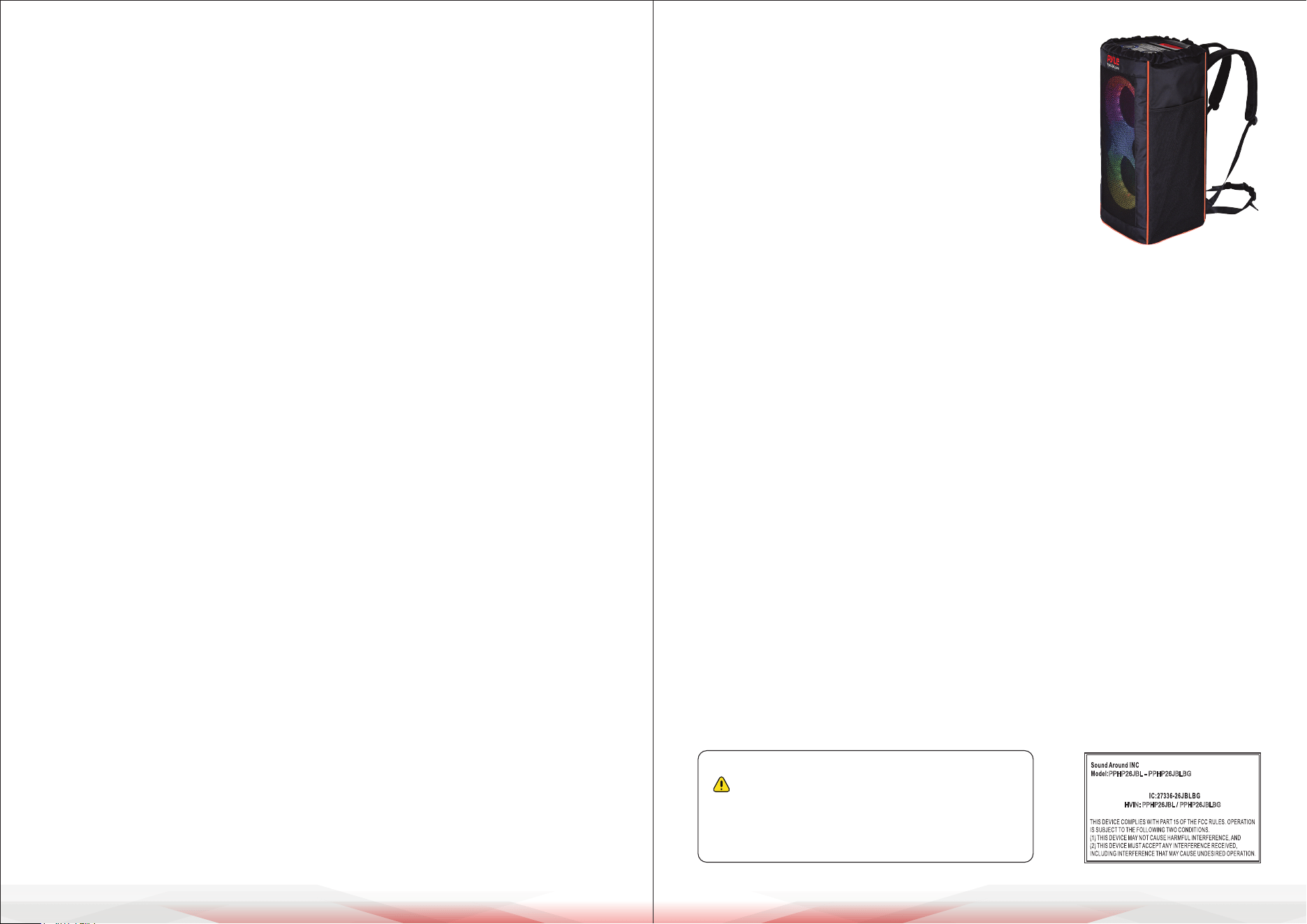
• Speaker Bag (for PPHP26JBLBG model only)
Technical Specs:
• Construction Material: ABS+PP
• Recommended Power Output: 160W
• RMS Power: 40W
• Sound System: 6.5”-inches Woofer x 2 + 2”-inches Tweeter x 2
• Impedance 3.6 ohm
• USB Interface Type: 2.0
• Digital Audio File Support: MP3、MWA、FLAC
• Maximum USB Flash Support: 64G
• Remote Control Battery Operated, Requires AAA x 2 Batteries, (Not included).
• Battery Type: Lithium-ion Battery
• Battery Working Time: 2-8 hours (Vary with Volume)
• Battery Construction Material: 18650 (6) Battery Cell
• Battery Wattage: 39.96WH
• Battery Weight: 0.6 lbs.
• Weight Amount Lithium Battery (If the Battery is Lithium): 0.6 lbs.
• PPHP26JBL Item Weight: 15.6 lbs.
PPHP26JBLBG Item Weight: 17.46 lbs.
• Power Supply: DC 9V/2A Power Adapter
• Product Dimension (L x W x H)
PPHP26JBL: 11.6" x 11.6" x 25.2" –inches
PPHP26JBLBG: 11.8" x 11.8" x 26.4" –inches
California Prop 65 Warning
WARNING:
This product contains “Lead and lead compounds” which is
known to the state of California to cause cancer birth defects
and other reproductive harm. Do not ingest.
For more info go to: www.P65warnings.ca.gov
PPHP26JBL - PPHP26JBLBG
HVIN: PPHP26JBL / PPHP26JBLBG
www.PyleUSA.com4 www.PyleUSA.com 5
Illegal operation may cause personal injury, which could be fatal.
Illegal operation may cause damage to property.
Important Safety Instructions:
1. Read these instructions carefully.
2. Read all warnings
3. Follow all instructions.
4. Do not expose this apparatus to water, corrosive liquids, or gas.
Store the apparatus in a dry and clean place.
5. Do not install the speaker system near windows or any heat sources such as
radiators, heat registers, gas stoves, or other apparatuses that produce heat.
6. Do not place any naked ame sources, such as lit candles, on or near the
apparatus.
7. Clean only with a dry cloth.
8. Do not place objects lled with any kind of liquid on the speakers.
9. To reduce the risk of re or electric shock, do not expose this product to rain
or moisture. Liquids can cause a failure and/or re hazard.
10. Do not insert metal bars, wires, or any other objects into the speaker hole.
11. Protect the power cord from being walked on or pinched, particularly at
plugs and the point where they exit from the apparatus.
12. To reduce the risk of electric shock, do not handle the plug with wet hands.
13. Before moving the speakers, pull out the power adapter and disconnect
from any other equipment.
14. Do not block any ventilation openings of the device, as this will cause a rise
in the internal temperature of the apparatus and potentially damage the
circuit.
15. Do not press the switches or other keys with force.
16. Unplug the power cable immediately if your device emits smoke or acts
abnormally. Seek professional help from your nearest service center.
17. Only use attachments recommended by the manufacturer.
Use of other attachments may be hazardous.
18. Do not throw used batteries in with your household rubbish.
Follow instructions from your local council about safe disposal.
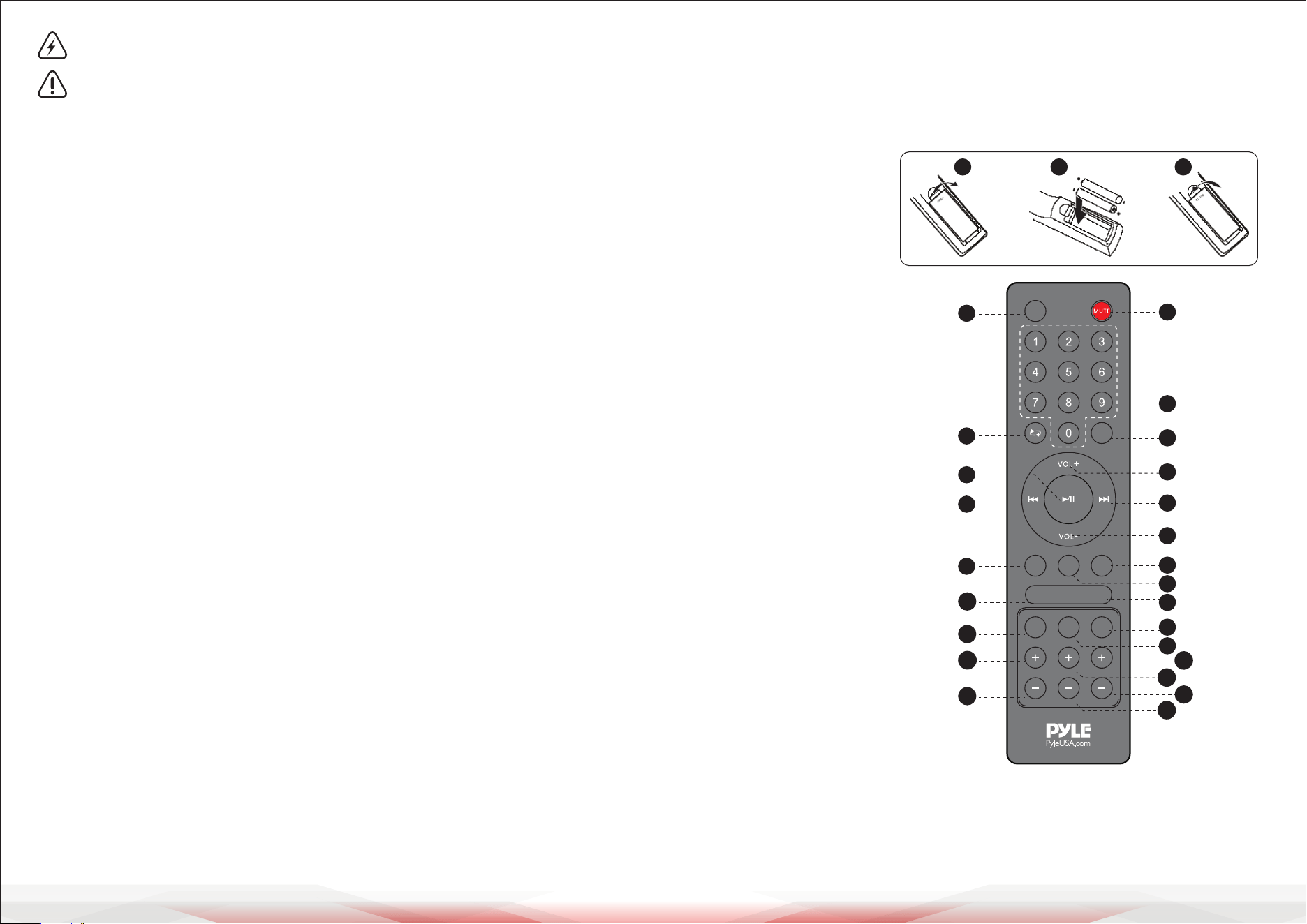
Using the Remote Control
Installing the Batteries
Remove the battery cover from the back of the Remote Control as shown
and insert 2xAAA size batteries ensuring correct polarity.
1. Mute
2. Fm radio
3. 0-9 keys
4. Repeat
5. Tws
6. Play/pause
7. Previous song
8. VoIume+
9. Next song
10. Volume-
11. Record key
12. Mic Priority
13. Record play
14. Mic vol-
15. Mic voI+
16. Wireless BT
17. Bass+
18. Bass-
19. Aux
20. Echo+
21. Echo-
22. USB
23. TrebIe+
24. Treble-
Note for remote:
The remote control should be used within 6m from the device, around 30
degree on the left/right side, pointed directly tow ards the speaker system.
1 2 3
AUX
- +
TWS
FM
REPREC
PRIOR
MIC VOL
BT
BASS
USB
TREBLE ECHO
1
2
3
5
8
9
12
13
15
19
22
20
23
21
24
4
6
7
11
14
16
17
18
10
www.PyleUSA.com6 www.PyleUSA.com 7
OVERVIEW
CONNECTING WIRED MICROPHONE (microphone not supplied)
Connect the microphone to MIC IN input and switch ON.
Note:
If you are playing music from any other input, connecting the microphone
will not mute the sound output.
Voiceover Function
The voiceover function is available with any input.
Play a track through AUX/USB/Wireless BT;
connect a microphone to MIC IN and sing along for a "karaoke"eect.
Built-in Recording Function
1. Plug in a microphone to the MIC IN input.
2. Insert a USB into the corresponding port; press the Mode button and select
USB mode.
3. If the USB is plugged into the speaker for the rst time, the system will
automatically create a folder named RECORDM to save recorded les
(FAT32 USB le system is supported).
4. When you are ready to record, press “REC” on the remote control to start
recording, and press “REC” on the remote control again to save the recording.
5. Press the "REP" button on the remote control to play recorded les. Press the
"REP" button again on the remote control to quit recording. While playing
recorded les, press the "REC" button to delete the current recording.
USB
Keep the speaker away from high temperatures, high magnetic elds, and high
frequency interference. If the speaker hangs, switch it o and on again, or unplug
the USB and re-plug it. The speaker will work normally again. The maximum size
of USB device that can be connected is 64GB. Supported music formats: MP3,
WMA, FLAC.
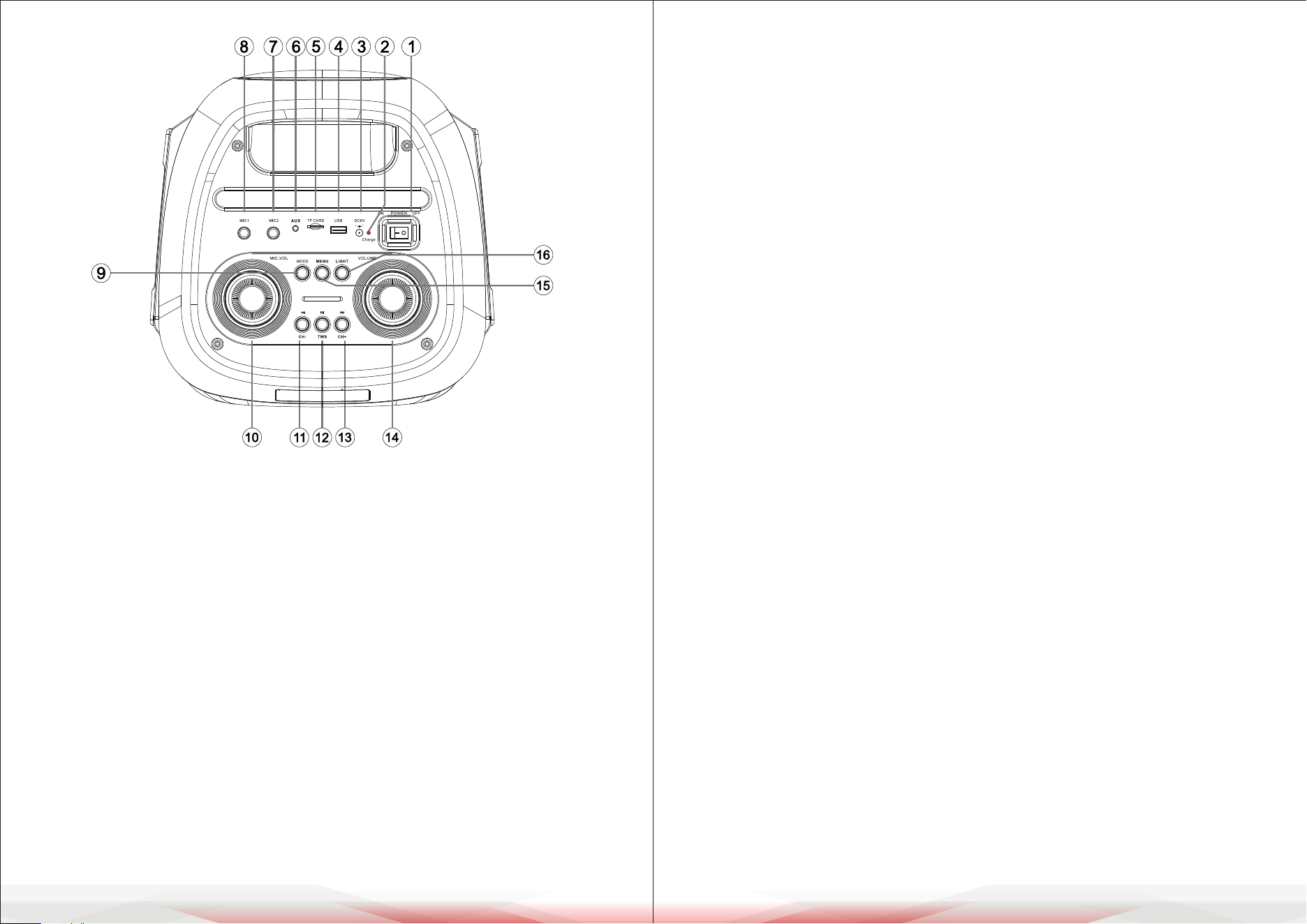
1. Power ON/OFF
2. Red - Charging/Green - Fully charged
3. DC Charging Port
4. USB input
5. Micro SD Jack
6. AUX input
7. Microphone 2 Input
8. Microphone 1 Input
9. Short press to select Mode (BT/USB/
FM/AUX/Micro SD). Press and hold to
turn ON/OFF voice prompt.
10. Microphone volume control
11. Short press for Previous song/
Previous FM station. Press and hold
for Fast rewind/Fast rewind searching
FM station.
12. Short press to Play/Pause
(in BT, USB, Micro SD mode).
Short press for automatic searching
FM station (in FM radio mode).
Press and hold for TWS ON/OFF.
13. Short press for Next song/Next
FM station. Press and hold for
Fast forward/Fast forward
searching FM station.
14. Main volume control/MENU
volume control
15. Short press to select Music
Treble/Bass/Microphone Echo,
and then rotate main volume knob
to adjust.
16. Short press to select LED1, LED2,
LED3, LED4, LED5, LED6, LED7,
LED8, OFF.
www.PyleUSA.com8 www.PyleUSA.com 9
Troubleshooting
Users may try to solve common problems by following these guidelines. If the
problem persists and cannot be resolved, please contact Customer Service for
assistance. Before seeking repair, please check the following problems rst:
MUSIC FORMAT SUPPORT MP3, WMA, FLAC
1. USB port: plug and play.
2. Mode key: Choose input source from these options: AUX/USB/Bluetooth.
3. Play/pause key: when playing, press this key to pause, press the key again to
play.
4. Previous/Next key: when playing, a single press of this key will play the
next/previous song.
5. Repeat key: when playing, pressing this key can replay the current song or
all songs. Press once for repeat single; press twice for all repeat.
BLUETOOTH OPERATION
1. Turn on the machine and press the MODE button on the unit, or the BT button
on the remote control to select Bluetooth mode.
2. In Bluetooth mode, the system automatically enters search mode.
Button lights ash slowly.
3. Activate the Bluetooth feature on the external device to be coupled.
4. Initiate a search for devices. The device shows up as "PYLEUSA”.
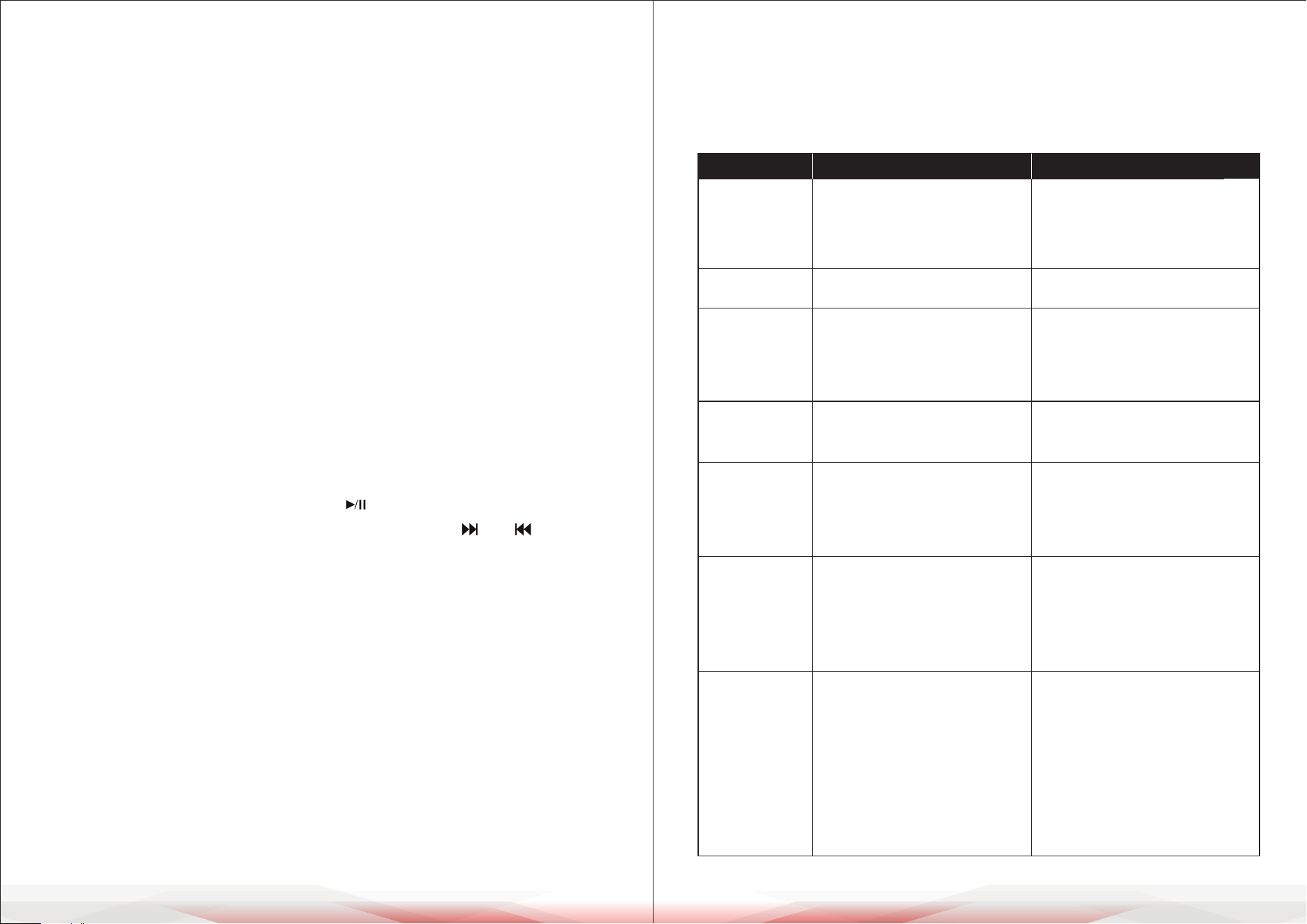
5. Press the PLAY button on the unit or the key on the remote control to start
playing, and use the buttons NEXT and PREV, or the keys and for the
selection of songs.
TWS Function
For enhanced sound eect, our unit provides TWS (True Wireless Stereo)
function as follows:
1. Make sure two identical units are in Bluetooth mode.
2. Turn on BT mode on your device and connect to one of the units.
3. Press and hold the TWS button on each unit, and the two units will pair
automatically.
Remark: After the two units have paired, press and hold the TWS button
again to quit pairing.
Symptom May caused by Solution
No sound when
powered ON
1. No input sound source
2. Volume knob is in the lowest
position
3. Voice switch OFF
4. USB not plugged
1. Input AUX signal
2. Adjust volume
3. Turn on voice switch
4. Plug USB then pIay MP3
Sound Distortion
1. Volume is too loud
2. Audio le error
1. Turn the volume down
2. Check and change the audio le
No sound
comes from the
Microphone
1. Microphone socket may not be
plugged properly.
2. Microphone switch may not be on
3. Microphone volume is on lowest
mode.
1. Ensure the microphone is correctly
plugged into the socket.
2. Turn on the microphone
3. Adjust the microphone volume
as desired.
No sound comes
after inserting USB
1. Incorrect le format
2. USB may not be plugged in
properly.
1. File format should be MP3
2. Plug USB correctly
Charging adapter is not inserted
properly.
It will not aect the speaker system.
The light is only used for indicating
whether the unit is charging.
Charging
indication red
light ashing
when there is
low charge
1. Connect power cord to charge
2. Battery not fully charged
3. Old batteries.
1. Check if the power cord is
connected properly
2. Extend charging time; normaIIy
it takes 6-8 hour to fully charge
3. Replace old batteries with ones
of the same specication.
Unable to
charge or the
battery works
only for short
duration
1. Mic switched ON but too close to
the speaker
2. Microphone switched ON but is
not being used.
3. Microphone volume is too loud
4. Mobile phone is being used too
close to the speaker.
5. Other wireless equipment is
placed very close to the speaker.
1. Keep the mic 2 meters away
from the speaker
2. Turn o the microphone if not in
use.
3. Adjust the microphone volume
to a lower mode.
4.
Keep the mobile phone away from
the speaker while attending a call.
5. Keep speaker away from other
wireless equipment.
Speaker makes
loud noises

www.PyleUSA.com8 www.PyleUSA.com 9
Register Product
Thank you for choosing PyleUSA. By registering your product,
you ensure that you receive the full benets of our exclusive
warranty and personalized customer support. Complete the
form to access expert support and to keep your PyleUSA
purchase in perfect condition.
FCC INFORMATION
WARNING:
Changes or modications not expressly approved by the party responsible for
compliance could void the user’s authority to operate the equipment.
NOTE: This equipment has been tested and found to comply with the limits for a
Class B digital device, pursuant to Part 15 of the FCC Rules. These limits are
designed to provide reasonable protection against harmful interference in a
residential installation. This unit generates, uses, and can radiate radio frequency
energy, and if not installed and used in accordance with the instructions, may
cause harmful interference to radio communications.
However, there is no guarantee that interference will not occur in a particular
installation. If this equipment does cause harmful interference to radio or
television reception, which can be determined by turning the equipment o
and on, the user is encouraged to try and correct the interference by one or
more of the following measures:
• Reorient or relocate the receiving antenna.
• Increase the separation between the equipment and receiver.
• Connect the equipment to an outlet on a circuit different from that to which
the receiver is connected.
• Consult the dealer or an experienced radio/TV technician for help.
This device complies with Part 15 of the FCC Rules. Operation is subject to the
following two conditions:
1. This device may not cause harmful interference.
2. This device must accept any interference received, including interference that
may cause undesired operation.
CHARGING INSTRUCTIONS
1. This speaker has a high-capacity 7.4V battery. Please connect to the AC port
with the power adapter to charge. The speaker has an indicator light that will
illuminate red when charging. When fully charged, the indicator light will
turn green. It takes around 6-8 hours to fully charge the speakers.
Disconnect the power adapter as soon as the battery is fully charged.
Note: Overcharging will damage the battery.
2. Please fully charge the speakers if they have not been used for a long time.
Charge the speakers every 2 months; otherwise, the battery may get damaged.
Note: When the battery is low, the button lights will ash quickly and a “Low
Battery” voice prompt will sound. Please charge the unit promptly.
IC Warning
- English:
This device complies with Industry Canada licence-exempt RSS standard(s).
Operation is subject to the following two conditions:
(1) This device may not cause interference, and (2) This device must accept any
interference, including interference that may cause undesired operation of the
device.
- French:
L’émetteur/récepteur exempt de licence contenu dans le présent appareil est
conforme aux CNR d’Innovation, Sciences et Développement économique
Canada applicables aux appareils radio exempts de licence.
L’exploitation est autorisée aux deux conditions suivantes:
(1) L’appareil ne doit pas produire de brouillage; (2)L’appareil doit accepter tout
brouillage radioélectrique subi, même si le brouillage est susceptible d’en
compromettre le fonctionnement.
This equipment complies with IC RSS-102 radiation exposure limits set forth for
an uncontrolled environment. This equipment should be installed and operated
with minimum distance 20cm between the radiator & your body.
Cet équipement est conforme aux limites d'exposition aux rayonnements IC
établies pour un environnement non contrôlé. Cet équipement doit être installé
et utilisé avec un minimum de 20cm de distance entre la source de rayonnement
et votre corps.