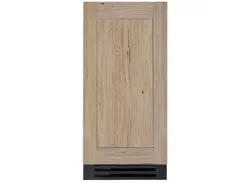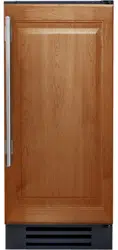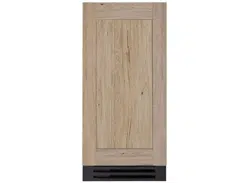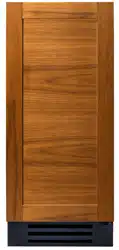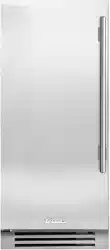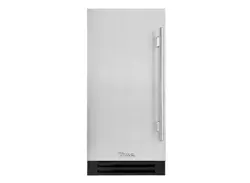
15" TRUE ICE
®
MACHINE INSTALL GUIDE09/05/24
TEC_TM_155 | REV. H | EN
15 INCH TRUE ICE
®
MACHINE
INSTALL GUIDE AND USER'S MANUAL
TRUE RESIDENTIAL
®
PRESERVE THE MOMENT
®

TRUE RESIDENTIAL
®
TEC_TM_155 | REV. H | EN09/05/24Page 2 of 68 P#829867
INSTALLATION CHECKLIST
To ensure no part of the installation process has been overlooked, complete the checklist below.
☐ Has an authorized True dealer or licensed installer inspected stainless steel surfaces
for imperfection?
(Cosmetic defects are covered by a limited 30-day warranty)
☐ Have all packaging materials been removed?
☐ Is the unit properly leveled with all leveling legs contacting the floor?
☐ Has the water filter been installed? Has the water supply been turned on?
☐ Have the water supply and drain connections been made?
☐ Has the drain line been checked for kinks?
☐ Is the water supply temperature always between 40-100˚F (4.4-7.8˚C)?
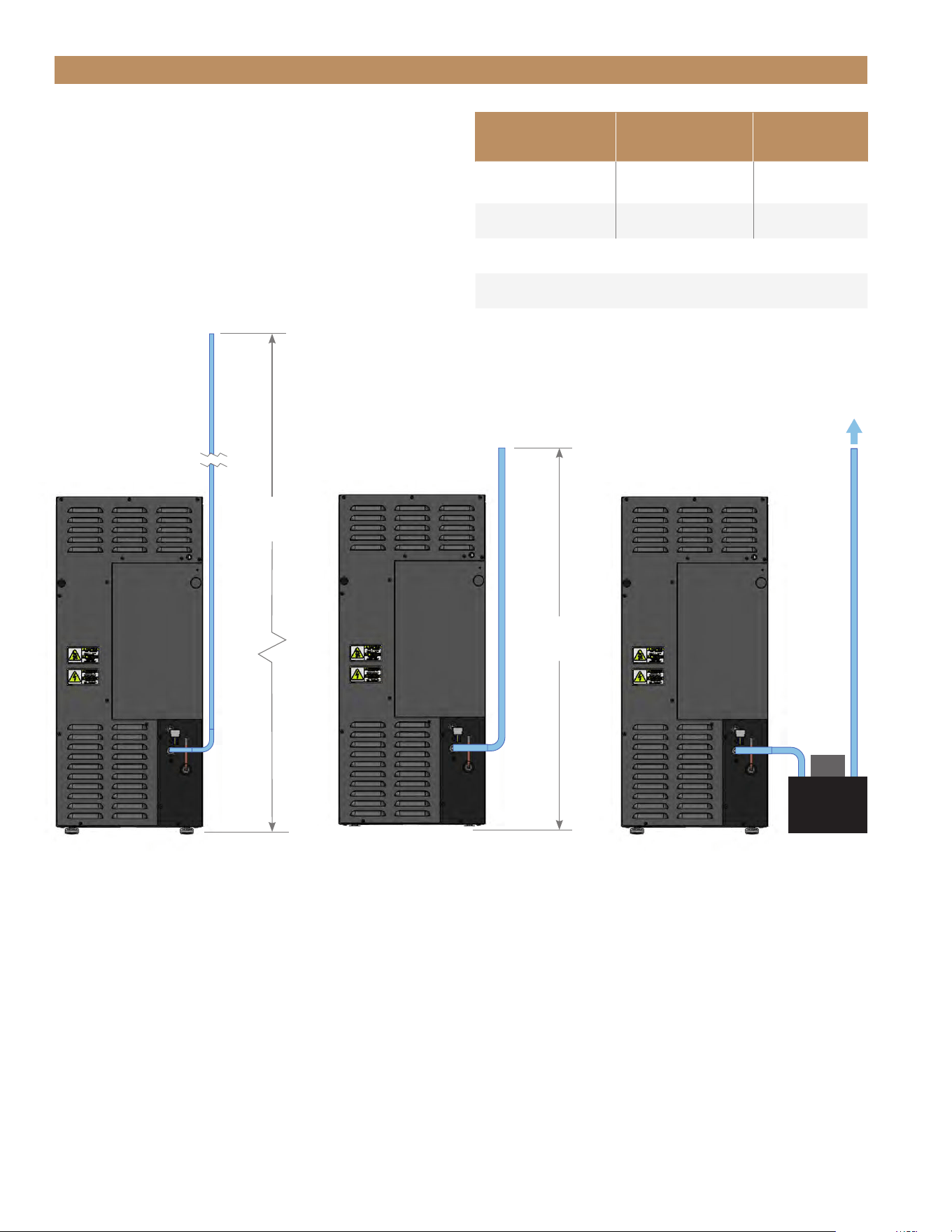
☐ Has the ice machine drain line been routed into an open drain with no more than 84"
(2,133.6 mm) vertical rise for 3/8" O.D. tubing and no more than 100’ (30.48 m) run?
☐ Has the provided check valve been installed in the drain hose?
☐ Has the water supply been turned on?
☐ Is the power cord plugged into a properly grounded three-prong outlet in accordance with all
applicable electrical codes?
☐ Have all connections been checked for water leaks? If not, pour water directly into the ice
storage bin to ensure drain pump operation and inspect for leaks.
☐ Were the ice machine and storage bin disinfected prior to use? If not, see “Sanitize" (pg. 55).
☐ Has the ice machine been turned on? During the initial fill, can you hear the water valve turn on
and see water filling the reservoir tank?
☐ After the first ice cycle, did all 24 ice cubes fall into the bin during harvest?
☐ Has the ice produced in the first hour of operation been discarded?
☐ Has the customer reviewed the unit’s operation in this manual?
☐ Has the customer reviewed the schedule of maintenance of the machine?
TRUE'S TECHNICAL SERVICE YOUTUBE CHANNEL
For more in-depth installation and service information,
see our Technical Service YouTube Channel at
https://www.youtube.com/@TrueManufacturingService.

15" TRUE ICE
®
MACHINE INSTALL GUIDETEC_TM_155 | REV. H | EN 09/05/24 Page 3 of 68
CONTENTS
THANK YOU
FOR YOUR PURCHASE
INSTALLATION CHECKLIST 2
TRUE'S TECHNICAL SERVICE YOUTUBE
CHANNEL 2
15 INCH TRUE ICE
®
MACHINE MODELS 6
SAFETY INFORMATION & OWNERSHIP
FEATURES OF THE TRUE ICE
®
MACHINE 8
OWNERSHIP 9
REFRIGERANT SAFETY & WARNING
INFORMATION 9
SAFETY LABELS & LOCATIONS 9
BASIC SAFETY PRECAUTIONS & WARNINGS 11
PROPER DISPOSAL OF THE APPLIANCE 11
APPLIANCE LOCATION & SPECIFICATIONS 12
CONTACT US 12
OUTDOOR USE 12
PRIOR TO INSTALLATION
ROUGH OPENING 14
ANTI-SWEAT FOAM END PANELS 14
WATER LINE, DRAIN LINE, & POWER
CORD LOCATIONS 14
PLAN VIEWS 15
CUSTOM PANEL SPECIFICATIONS 17
CUSTOM PANEL INSTALLATION 19
ELECTRICAL INSTALLATION & SAFETY 21
DRAIN CONNECTION 22
WATER SUPPLY 27
INSTALLATION
UNCRATING 30
LEVELING LEGS 31
LEVELING 31
KICKPLATE INSTALLATION 31
WATER FILTER INSTALLATION 32

TRUE RESIDENTIAL
®
TEC_TM_155 | REV. H | EN09/05/24Page 4 of 68 P#829867
CONTENTS
APPLIANCE SETUP
ICE SCOOP 34
90˚ DOORSTOP INSTALLATION
(OPTIONAL ACCESSORY) 34
APPLIANCE OPERATION
BEFORE OPERATING 36
BREAKER RESET 36
POWER SEQUENCE 36
ICE MAKING SEQUENCE 37
ELECTRONIC CONTROL OPERATION 38
MAINTENANCE & SERVICING
GENERAL MAINTENANCE 46
ICE QUALITY TROUBLESHOOTING 47
WATER FILTER REPLACEMENT 48
CONDENSER COIL CLEANING 49
APPLIANCE CARE & CLEANING 50
DESCALING & SANITIZING 52
INTERIOR COMPONENTS 56
WINTERIZING 59
SERVICING, REPLACING COMPONENTS
& ADJUSTMENTS
SERVICING & REPLACING COMPONENTS 62
REVERSING DOOR 62
DOOR ADJUSTMENT 65
HANDLE TIGHTENING 65
CONTACT US 65
WARRANTY
LIMITED ICE MACHINE WARRANTY 66
15" TRUE ICE
®
MACHINE INSTALL GUIDETEC_TM_155 | REV. H | EN 09/05/24 Page 5 of 68
LUXURY REFRIGERATION WITH COMMERCIAL DNA
PRESERVE THE MOMENT
®
TRUE RESIDENTIAL
®
TEC_TM_155 | REV. H | EN09/05/24Page 6 of 68 P#829867
15 INCH TRUE ICE
®
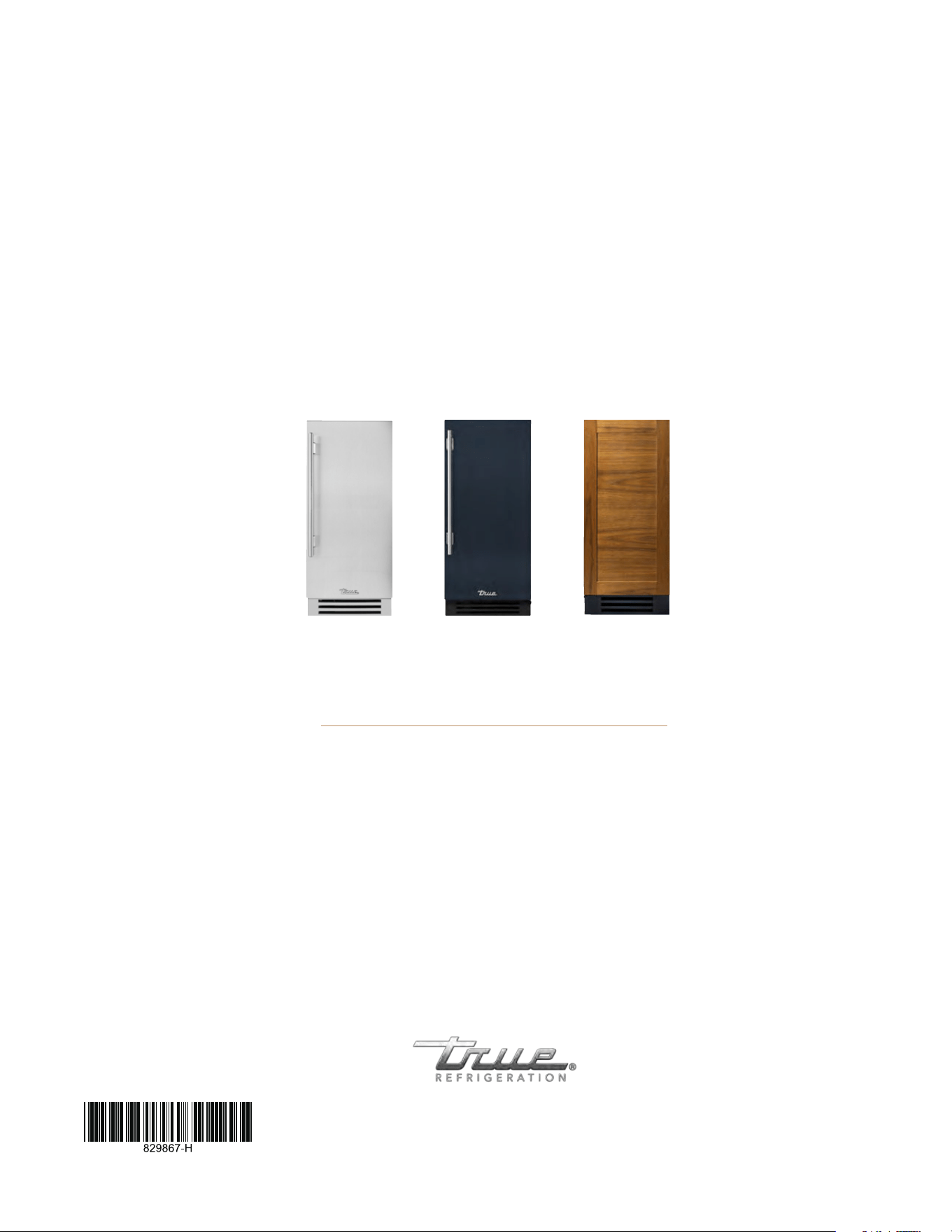
MACHINE MODELS
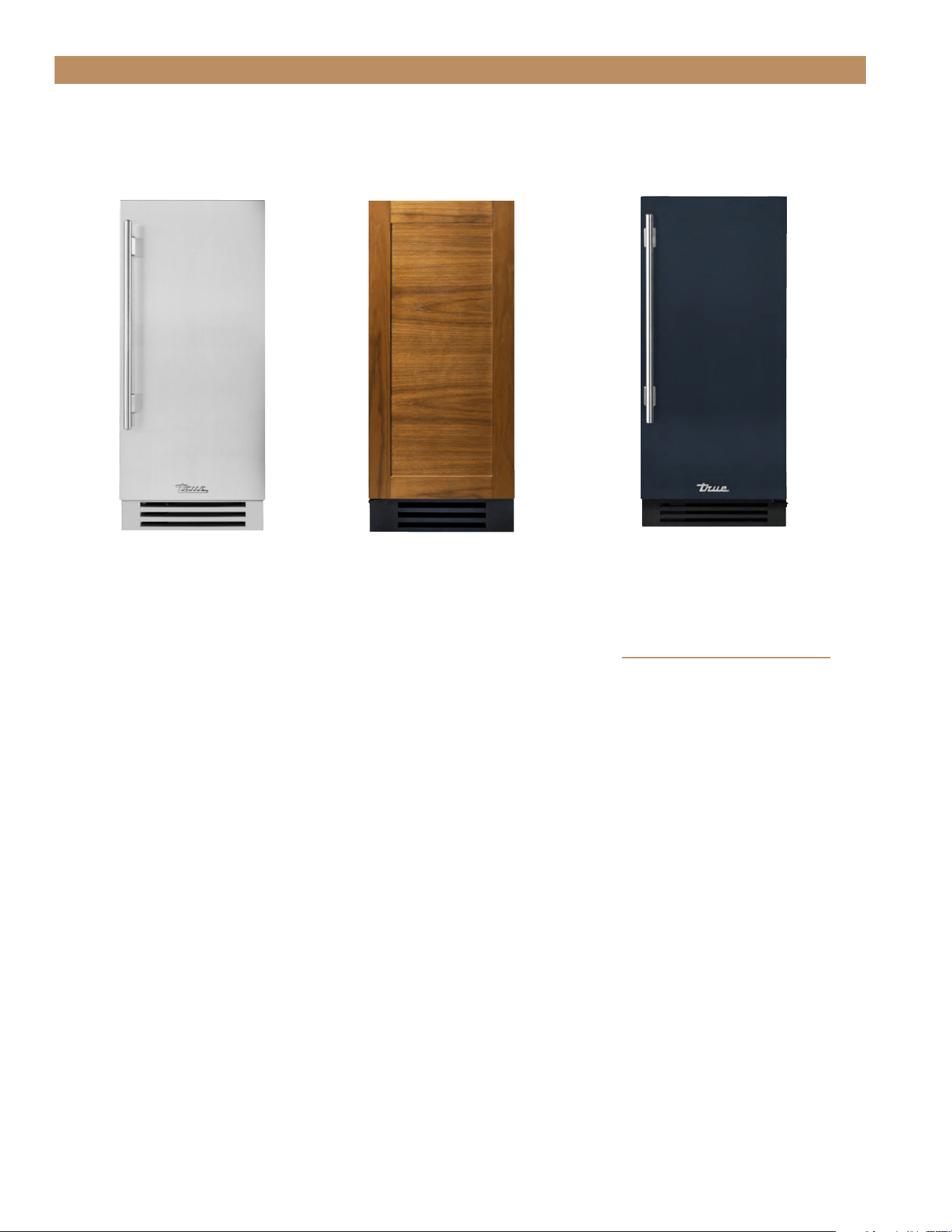
15" STAINLESS STEEL
15" OVERLAY PANEL 15" CUSTOM FINISH
TUI-15-R/L-SS-D TUI-15-R/L-OP-D TUI-15-R/L-OP-D-DSK-103-H08
Customize your True with a variety of finish and hardware options at true-residential.com/custom/

15" TRUE ICE
®
MACHINE INSTALL GUIDETEC_TM_155 | REV. H | EN 09/05/24 Page 7 of 68
FEATURES OF THE TRUE ICE
®
MACHINE
OWNERSHIP
REFRIGERANT SAFETY & WARNING INFORMATION
SAFETY LABELS & LOCATIONS
BASIC SAFETY PRECAUTIONS & WARNINGS
PROPER DISPOSAL OF THE APPLIANCE
APPLIANCE LOCATION & SPECIFICATIONS
CONTACT US
OUTDOOR USE
PRESERVE THE MOMENT
®
SAFETY INFORMATION & OWNERSHIP
TRUE RESIDENTIAL
®
TEC_TM_155 | REV. H | EN09/05/24Page 8 of 68 P#829867
SAFETY INFORMATION & OWNERSHIP
FEATURES OF THE TRUE ICE MACHINE
• Produces up to 85 lb (38.5 kg) of ultra-clear
gourmet ice cubes per day.
• Stores 28 lb (12.7 kg) of ice cubes.
• Precision Ice-Size control for adjusting to the
perfect cube size.
• Time-of-Flight technology allows for adjusting the ice
level with the push of a button.
• Three-Character LED display tells you what your
machine is doing.
• Auto-clean sequence for walk-away cleaning
simplicity.
• Drain Pump standard on all models.
• Built-in water filter with automatic filter change
reminders.
• Fourteen-Color LED bin light.
• High quality True magnetic ice scoop.
• Advanced diagnostics for safe reliable operation.
• Reversible Soft-Close hinges for installation
flexibility.
• U.L. approved for outdoor use.
• Industry-leading True Warranty.
Performance Specifications
*Max Ice Production 85 lb (38.5 kg) / day
**Rated Ice Production 75 lb (34 kg) / day
**Rated Water Consumption 25 gal / 100 lb
**Rated Electrical Consumption 6.95 kwH / 100 lb
*Performance rated at 70˚F (21.1˚C) air / 50˚F (10˚C) water / 30 psig (206.8 kPa) water pressure
**Performance rated at 90˚F (32.2˚C) air / 70˚F (21.1˚C) water / 30 psig (206.8 kPa) water pressure
15" TRUE ICE
®
MACHINE INSTALL GUIDETEC_TM_155 | REV. H | EN 09/05/24 Page 9 of 68
• DO NOT use mechanical devices to accelerate the
defrost process or to clean.
• DO NOT puncture, pierce, or burn refrigerant
tubing.
• Be aware that refrigerants may not contain an
odor.
• Store the appliance in a room without continuously
operating ignition sources.
• Follow handling instructions carefully.
• To be repaired only by trained service personnel.
• Consult repair manual/owner's guide before
attempting to service this product. All safety
precautions must be followed.
• Dispose of properly in accordance with local and
federal regulations. Follow all safety precautions.
CAUTION! Keep all ventilation openings
clear of obstruction in the appliance
enclosure or in the structure housing
the appliance.
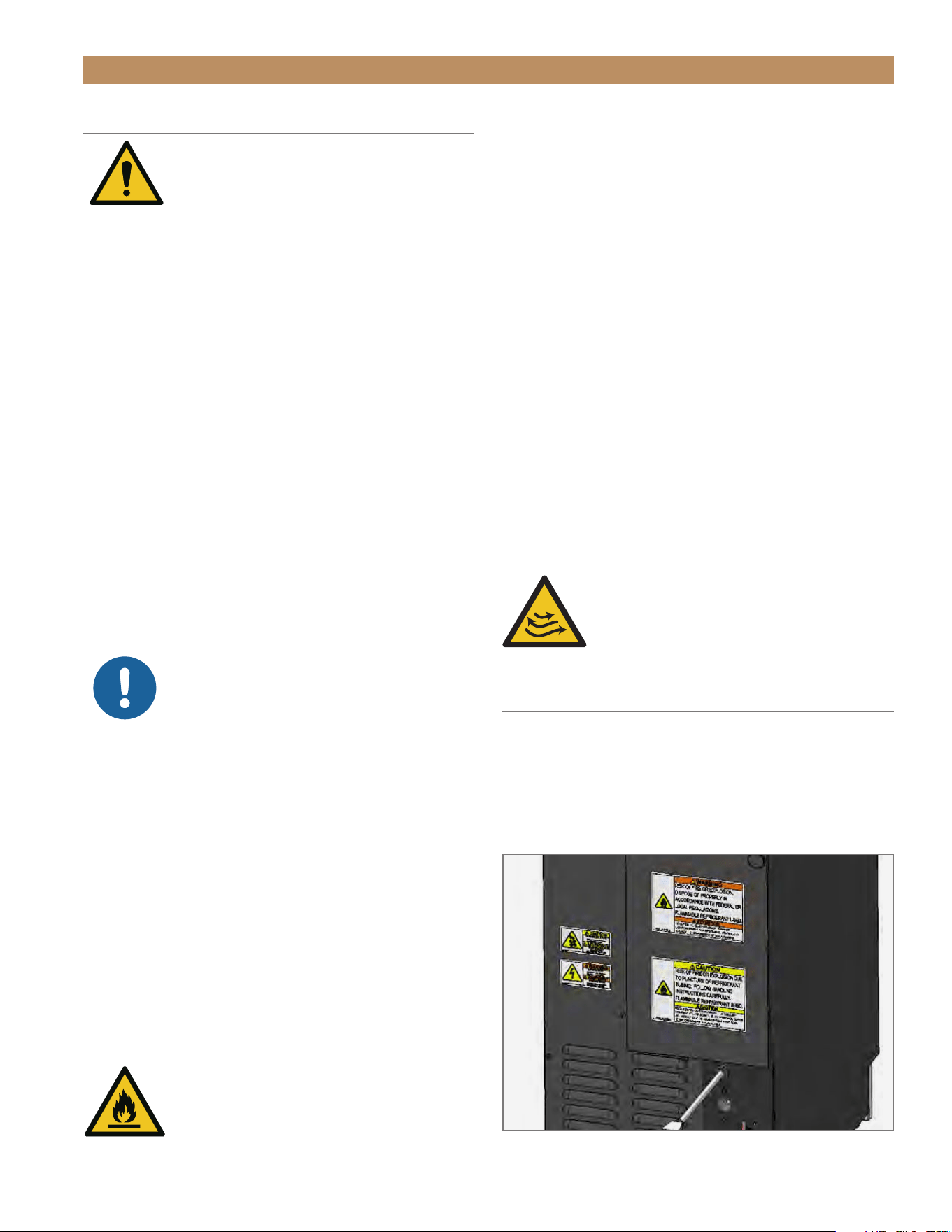
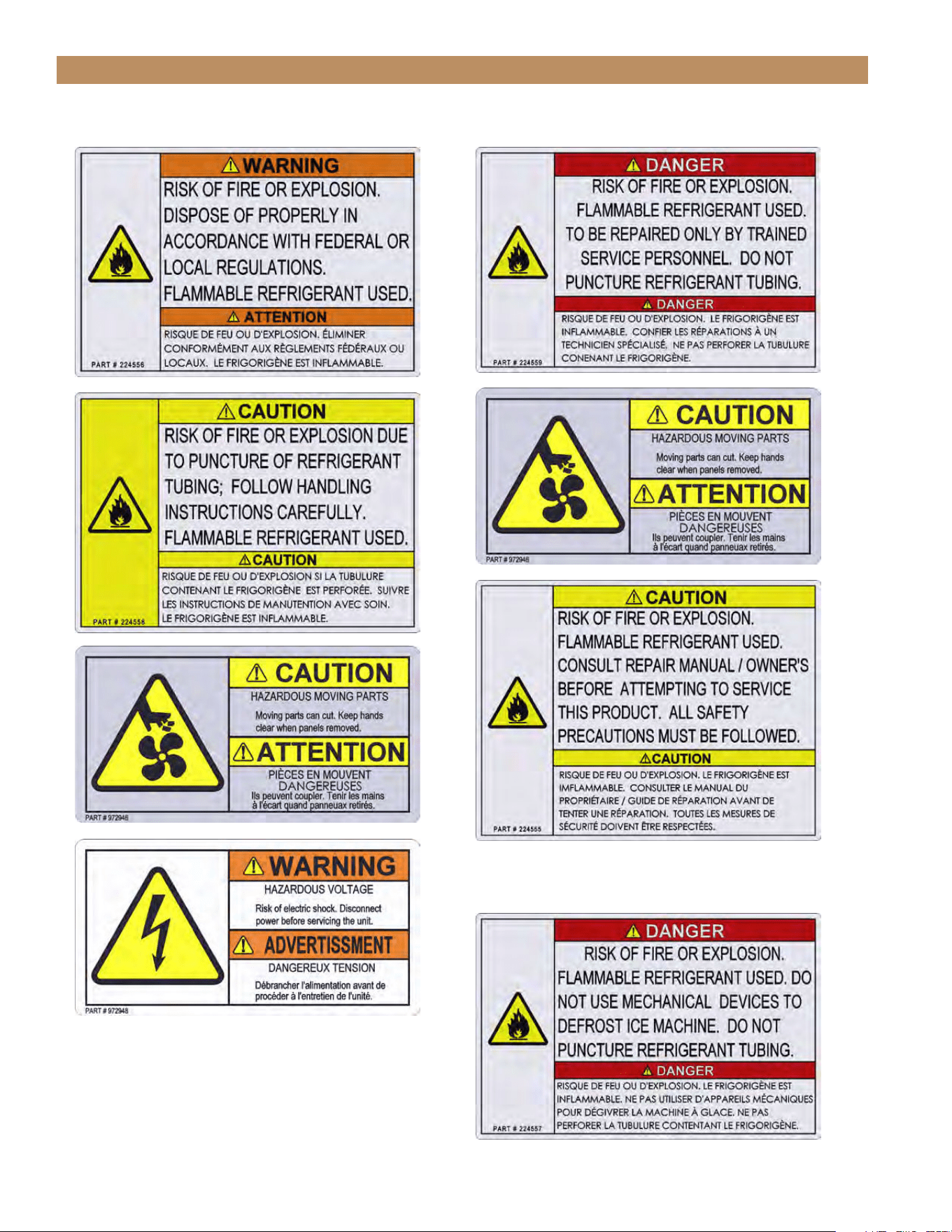
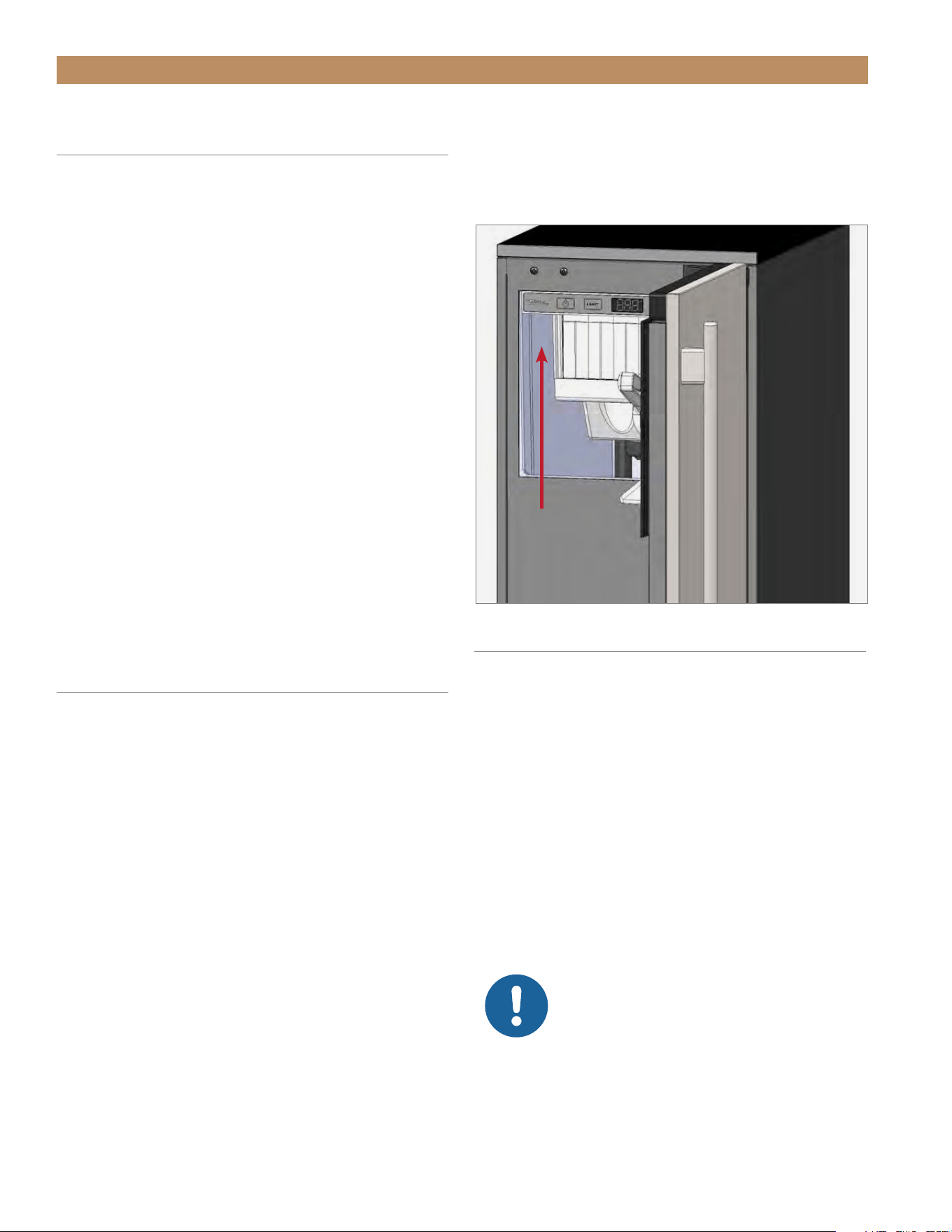
SAFETY LABELS & WARNING
Your new ice machine has labels placed in specific
locations throughout the appliance which identify
important safety information. Please take a moment
to familiarize yourself with the content and label
locations.
SAFETY INFORMATION & OWNERSHIP
OWNERSHIP
WARNING! Use this appliance for its
intended purepose as described in this
Installation Manual
To ensure that your unit works properly from the
first day, it must be installed properly. We highly
recommend a trained refrigeration mechanic and
electrician install your True equipment. The cost of a
professional installation is money well spent.
Before you start to install your TRUE unit, carefully
inspect it for freight damage. If damage is discovered,
DO NOT INSTALL THE UNIT or put it in service. Notify
True customer service, and immediately file a claim
with the delivery freight carrier.
TRUE is not responsible for damage incurred
during shipment.
For any questions about installation, please contact
your True dealer or True Residential Technical Support
at 844-746-9423 or TrueResidentialService@TrueMfg.com.
Please have your model and serial number available.
NOTICE: PROPER INSTALLATION
REQUIRES A CONNECTION TO THE
WATER SUPPLY, A DRAIN, AND A
DEDICATED ELECTRICAL CIRCUIT.
THESE CONNECTIONS ARE THE
RESPONSIBILITIES OF THE INSTALLER.
IMPROPER CONNECTIONS CAN RESULT IN
PERSONAL INJURY, PROPERTY DAMAGE AND
IMPROPER OPERATION. THE ICE MACHINE
MUST BE INSTALLED ACCORDING TO ALL
APPLICABLE NATIONAL, STATE AND LOCAL
CODES AND REGULATIONS.
REFRIGERANT SAFETY & WARNING
INFORMATION
See the serial label inside the appliance for the units
refrigeration type. For Hydrocarbon Refrigeration
(R-600a only), see below:
DANGER! Risk of fire or explosion.
Flammable refrigerant used.
FIG. 1.
Example of safety label locations. Not all labels or locations shown.
TRUE RESIDENTIAL
®
TEC_TM_155 | REV. H | EN09/05/24Page 10 of 68 P#829867
SAFETY INFORMATION & OWNERSHIP
INSIDE THE COMPRESSOR COMPARTMENTON THE REAR PANEL
BENEATH THE EVAPORATOR COVER’S TOP PANEL
15" TRUE ICE
®
MACHINE INSTALL GUIDETEC_TM_155 | REV. H | EN 09/05/24 Page 11 of 68
• DO NOT use electrical appliances inside the food
storage compartments of the units unless the
appliances are of the type recommended by the
manufacturer.
NOTE: ALL SERVICING MUST BE
PERFORMED BY A QUALIFIED TECHNICIAN.
PROPER DISPOSAL OF THE
APPLIANCE
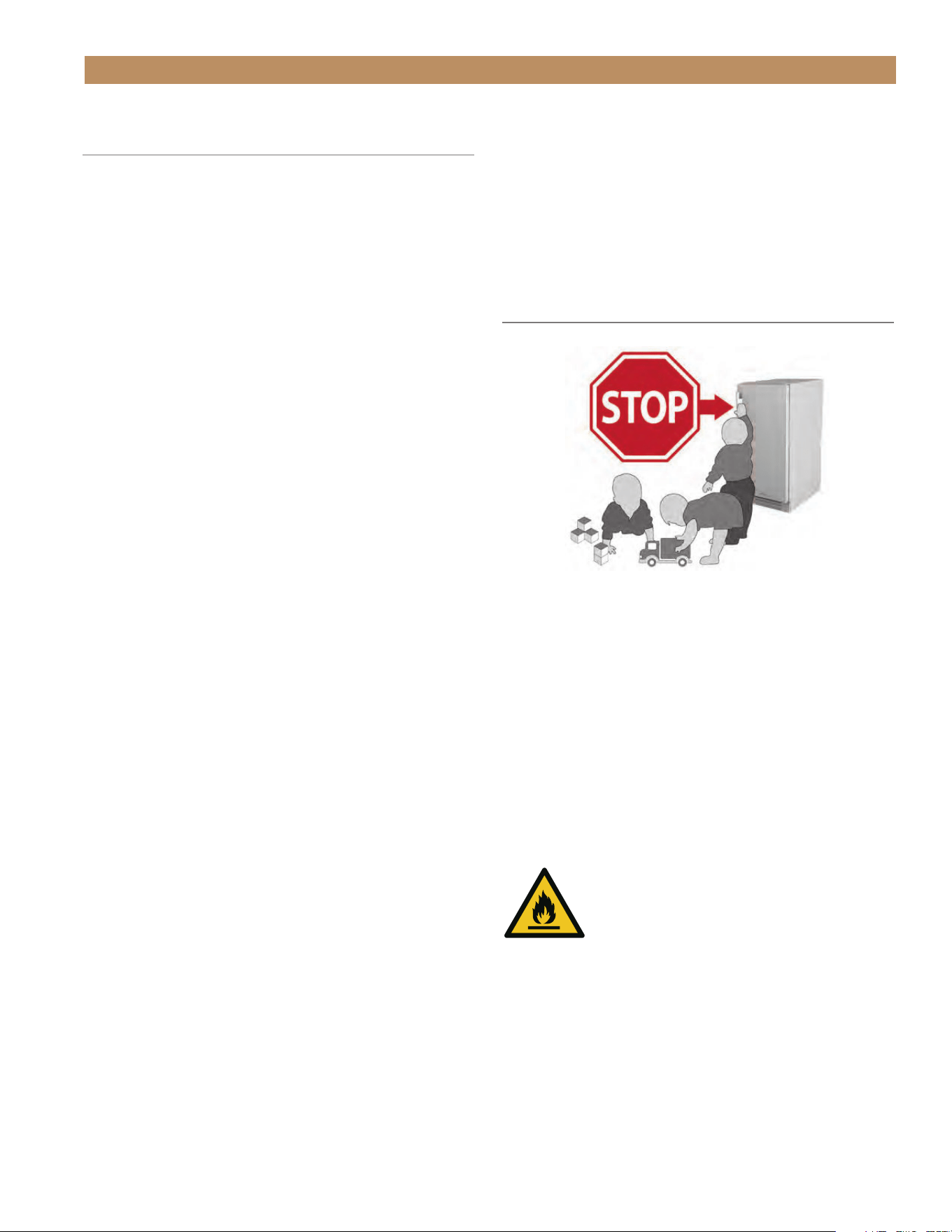
DANGER! RISK OF CHILD
ENTRAPMENT
Child entrapment and suffocation are not problems
of the past. Junked or abandoned appliances are still
dangerous, even if they will sit for "just a few days." If
you are getting rid of your old appliance, please follow
the instructions below to help prevent accidents.
Before throwing away your old ice machine:
Take off the door.
DANGER! Risk of fire or explosion.
Flammable insulation and/or refrigerant
used. Dispose of all in accordance with
local and federal regulations. Follow all
safety precautions.
BASIC SAFETY & WARNING
PRECAUTIONS
• Take care during operation, maintenance or repairs
to avoid cuts or pinching from any part/component
of the appliance.
• Units may pose a tipping hazard while uncrating,
during installation, or when moving the unit.
• Ensure the unit is properly installed and located in
accordance with the Installation Instructions before
use.
• This appliance is not to be used, cleaned or
maintained by persons (including children) with
reduced physical, sensory or mental capabilities or
lack of experience and knowledge, unless they have
been given supervision or instruction.
• DO NOT allow children to play with the appliance
or climb, stand, or hang on the unit’s shelves to
prevent damage to the refrigerator and personal
injury.
• DO NOT touch the cold surfaces in the freezer
compartment when hands are damp or wet. Skin
may stick to these extremely cold surfaces.
• Unplug the ice machine before cleaning and
making repairs.
• Powering off the ice machine will not remove
power from all components (e.g., light circuit and
drain pump).
• DO NOT store or use gasoline, or other flammable
vapors and liquids, in the vicinity of this or any
other appliance.
• DO NOT store explosive substances such as aerosol
cans with a flammable propellant in this appliance.
• Keep fingers out of the "pinch point" areas;
clearances between the doors and appliance are
necessarily small; be careful closing doors when
children are in the area.
SAFETY INFORMATION & OWNERSHIP
TRUE RESIDENTIAL
®
TEC_TM_155 | REV. H | EN09/05/24Page 12 of 68 P#829867
SERIAL LABEL LOCATION
Your serial label contains important information such
as your model and serial number. The label is located
on the upper left interior wall.
OUTDOOR USE
All True undercounter ice machines are rated for
outdoor use.
• The unit must be covered or otherwise protected
from direct exposure to rain.
• For the safest possible outdoor installation, build
the unit into an undercounter kitchenette area
within stone, brick, wood, etc.
• If the unit is expected to be exposed to low air
temperatures for a prolonged period of time,
please turn the unit off and winterize the unit.
See “Winterizing" (pg. 59).
NOTICE: DO NOT ALLOW THE ICE
MACHINE TO BE EXPOSED TO
TEMPERATURES BELOW 32˚F (0˚C)
WITHOUT WINTERIZING THE UNIT
AS THIS WILL CAUSE ANY WATER IN THE
MACHINE TO FREEZE. FAILURES CAUSED BY
EXPOSURE TO FREEZING TEMPERATURES ARE
NOT COVERED BY THE WARRANTY.
APPLIANCE LOCATION &
SPECIFICATIONS
For more information regarding the installation location
or appliance specifications, please see “Prior to
Installation" starting on pg. 13.
• Appliance is certified to NSF Standard 12.
• Appliance is UL rated for outdoor use.
• Appliance is not suitable for an area where a
pressure washer or hose may be used.
• Ensure the location will provide adequate
clearances and sufficient airflow for the appliance.
• Ensure the power supply for the appliance matches
the appliance specification sheet or appliance data
plate and is within the rated voltage (±5%) Also,
ensure the amperage rating of the circuit is correct
and the circuit is properly grounded.
• The appliance should always be plugged into its
own individual dedicated electrical circuit. The use
of adapter plugs and extension cords is prohibited.
CONTACT US
For any questions about installation, please contact
your TRUE dealer or TRUE Residential Technical
Support. Please have your model and serial number
(see serial label location) available so we can better
assist you with your service- or parts-related inquiries.
Customer Service
Phone: 888-616-8783
info@true-residential.com
Warranty Department
Phone: 844-849-6179
TrueResidentialWarranty@truemfg.com
Technical Support Department
Phone: 844-746-9423
TrueResidentialService@truemfg.com
SAFETY INFORMATION & OWNERSHIP

15" TRUE ICE
®
MACHINE INSTALL GUIDETEC_TM_155 | REV. H | EN 09/05/24 Page 13 of 68
PRIOR TO INSTALLATION
ROUGH OPENING
ANTI-SWEAT FOAM END PANELS
WATER LINE, DRAIN LINE, AND POWER CORD LOCATIONS
PLAN VIEWS
CUSTOM PANEL SPECIFICATIONS
CUSTOM PANEL INSTALLATION
ELECTRICAL INSTALLATION & SAFETY
DRAIN CONNECTION
WATER SUPPLY
PRESERVE THE MOMENT
®
TRUE RESIDENTIAL
®
TEC_TM_155 | REV. H | EN09/05/24Page 14 of 68 P#829867
BACK
PRIOR TO INSTALLATION
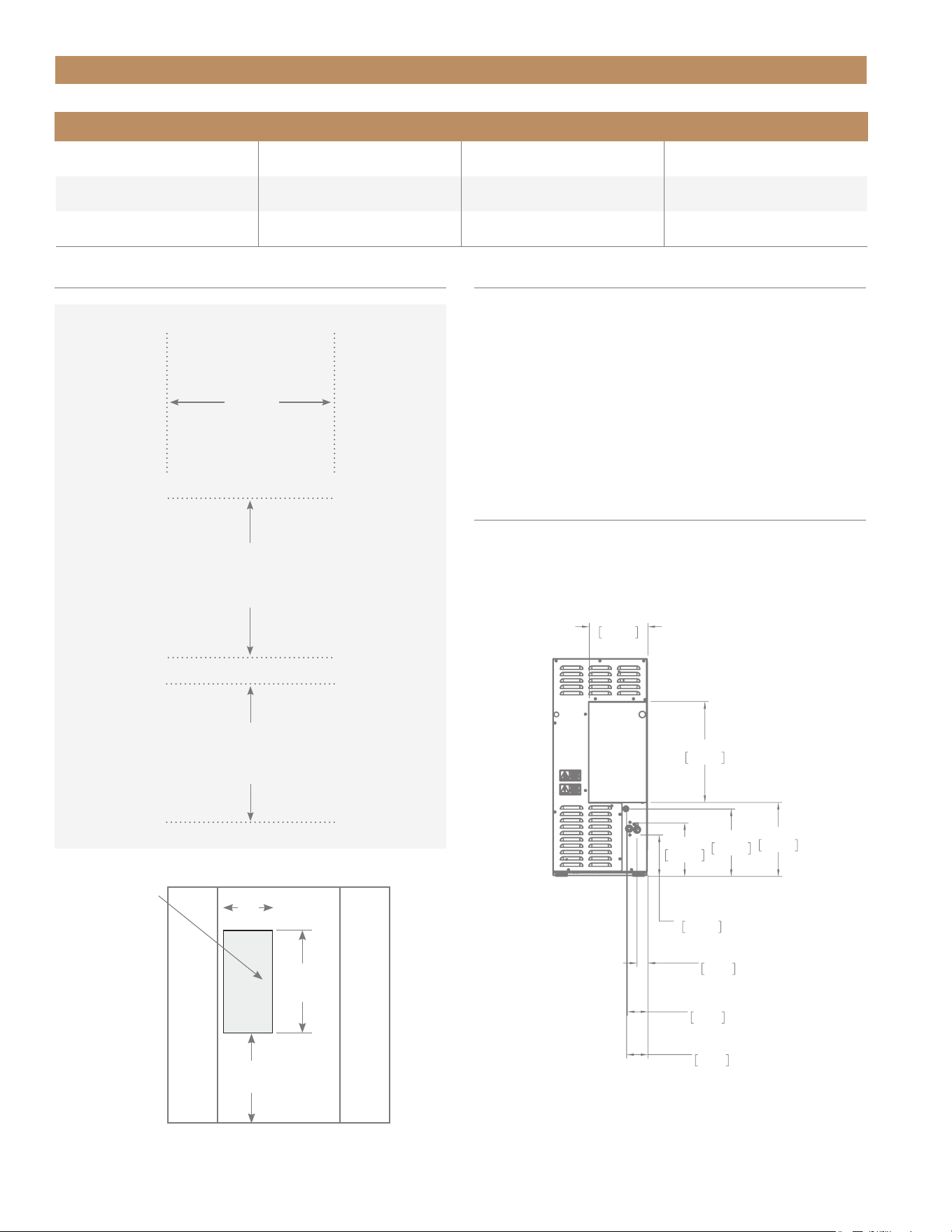
Allowable Air and Water Temperatures and Pressures
Air Temperature Water Temperature Water Pressure
Minimum 40˚F (4.4˚C) 40˚F (4.4˚C) 20 psig (1.4 bar)
Maximum 100˚F (37.8˚C) 100˚F (37.8˚C) 80 psig (5.5 bar)
Avoid running
wires or
plumbing in
this area.
SURROUNDING CABINETRY
SURROUNDING CABINETRY
9"
(228.6 mm)
16"
(406.4 mm)
11
½
"
(292.1 mm)
FRONT VIEW OF CABINETRY OPENING
ANTI-SWEAT FOAM END PANELS
When installing two or more True units side-by-
side, TRUE recommends installing one (1) foam
pad between the appliances (on either appliance) to
prevent moisture from developing.
To order foam pads, contact our parts department at
844-849-6226 or TrueResidentialParts@TrueMfg.com.
WATER LINE, DRAIN LINE, & POWER
CORD LOCATIONS
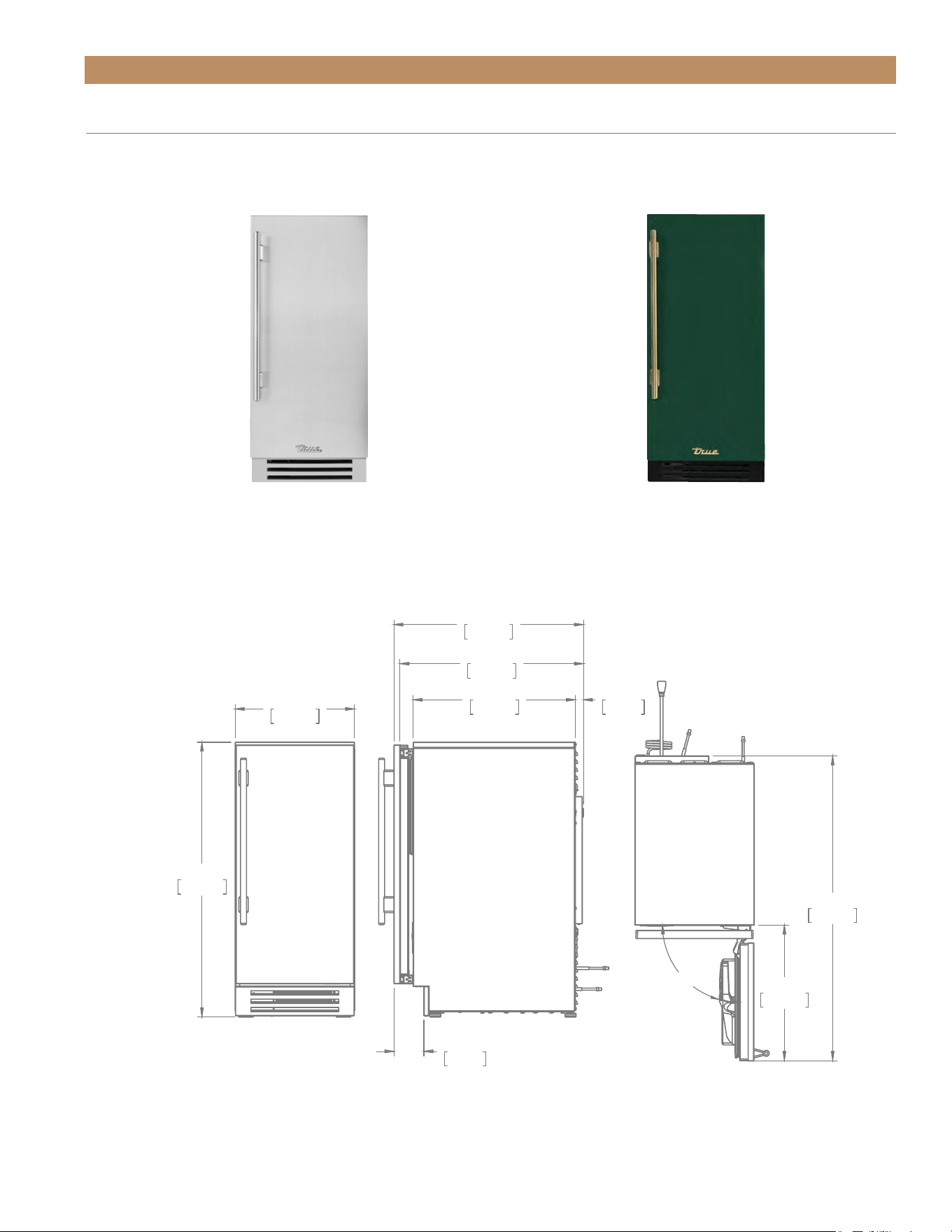
The ice machine must be installed with adequate
clearance for water and drain connections at the rear
of the unit.
ROUGH
OPENING
HEIGHT
34½" min
(876.3 mm)
ROUGH
OPENING
WIDTH
15" min
(381 mm)
ROUGH
OPENING
DEPTH
24" min
(609 mm)
9 7/32"
234mm
15 27/32"
402mm
11 5/8"
295mm
10 19/32"
269mm
8 13/32"
214mm
6 17/32"
166mm
1 23/32"
44mm
WATER LINE
3 7/32"
82mm
DRAIN LINE
3 11/32"
85mm
POWER CORD
ROUGH OPENING
15" TRUE ICE
®
MACHINE INSTALL GUIDETEC_TM_155 | REV. H | EN 09/05/24 Page 15 of 68
PRIOR TO INSTALLATION
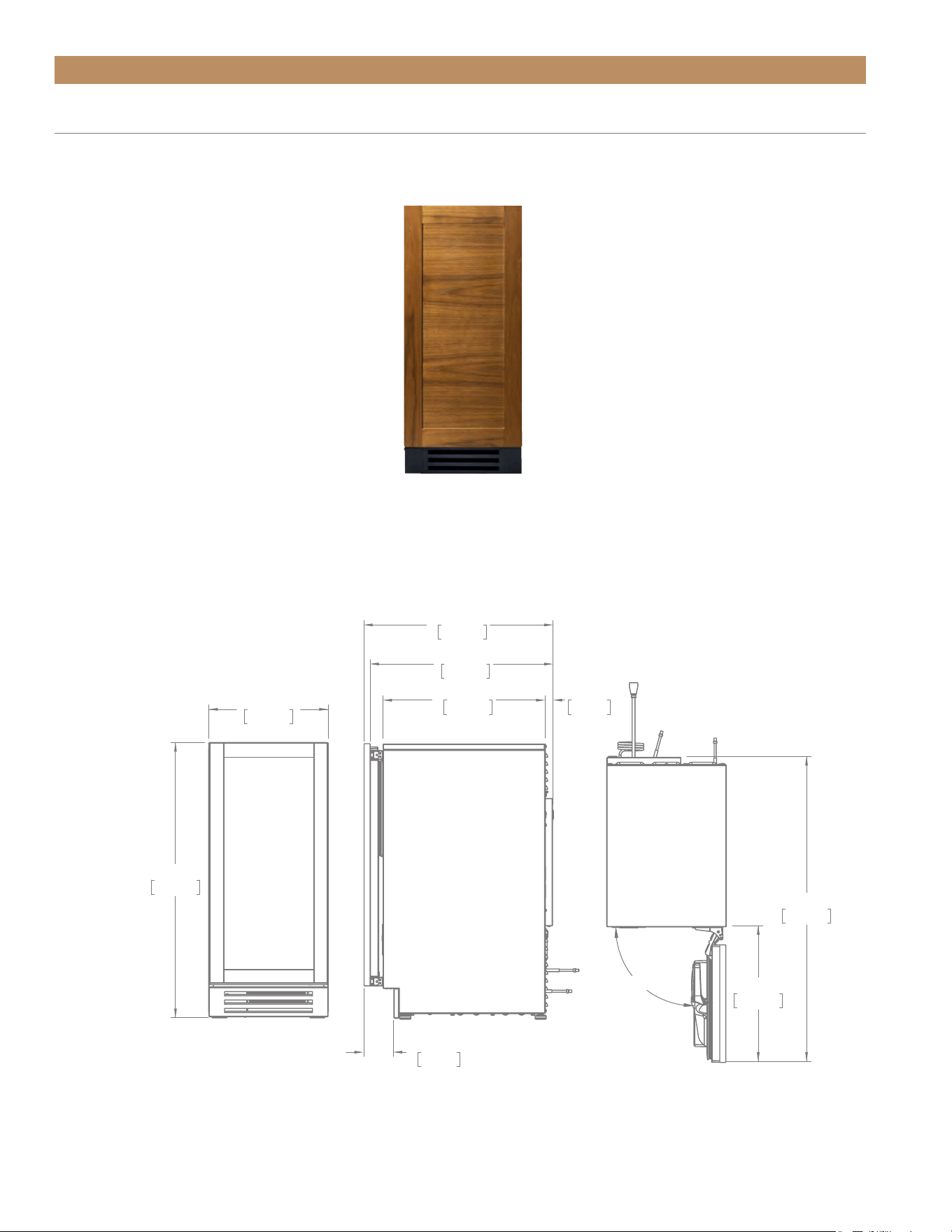
PLAN VIEW DIMENSIONS
STAINLESS STEEL DOOR
STAINLESS & FINISHED SOLID UNITS
Dimensions may vary by ± 1/8" (3.2 mm)
CUSTOM FINISH (DSK)
TUI-15-R/L-OP-D-DSK-103-H08
TUI-15-R/L-SS-D
SIDE TOPFRONT
34 7/32"
869mm
14 7/8"
377mm
3 3/4"
95mm
22 13/16"
580mm
23 19/32"
599mm
20 3/16"
513mm
1"
25mm
16 7/8"
429mm
37 15/16"
964mm
90°
TRUE RESIDENTIAL
®
TEC_TM_155 | REV. H | EN09/05/24Page 16 of 68 P#829867
*Measures include 3/4" (19 mm) thick panel (not provided by True) • Dimensions may vary by ± 1/8" (3.2 mm)
TUI-15-R/L-OP-D
PRIOR TO INSTALLATION
SOLID OVERLAY UNITS
PLAN VIEW DIMENSIONS
SOLID PANEL – READY DOOR (OP)
NOTE: Unit shown with overlay panel provided by others.
SIDE TOPFRONT
*
*
34 7/32"
869mm
14 7/8"
377mm
3 23/32"
94mm
23 9/16"
599mm
21 13/16"
554mm
1"
25mm
20 3/16"
513mm
16 7/8"
429mm
37 15/16"
964mm
90°
15" TRUE ICE
®
MACHINE INSTALL GUIDETEC_TM_155 | REV. H | EN 09/05/24 Page 17 of 68
PRIOR TO INSTALLATION
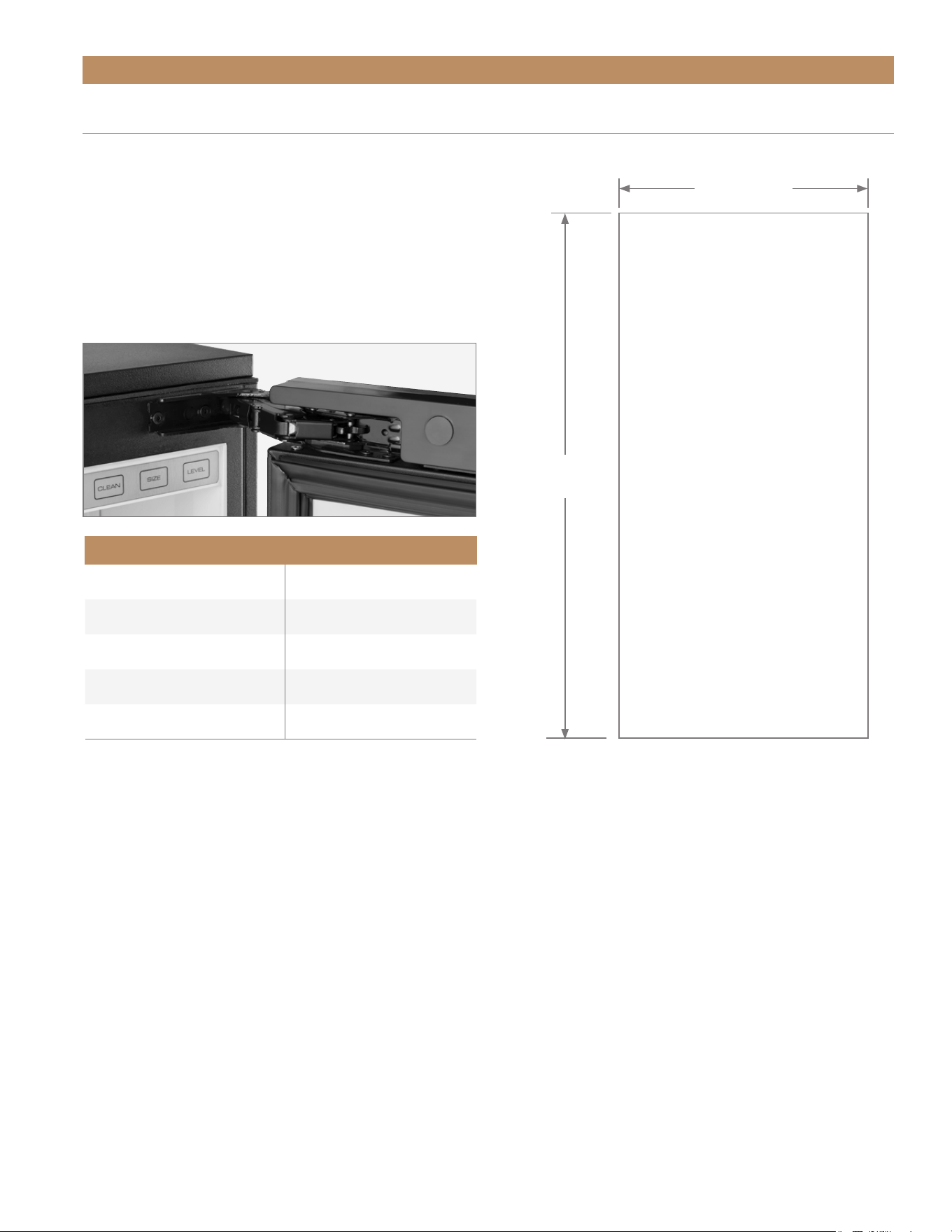
Overlay units can be fitted with custom panels to
match adjacent cabinetry. The integrated panel option
extends above the door to conceal the hinge assembly
to match full overlay appliance doors.
See the picture below for reference. For installation
instructions, please see “Custom Panel Installation".
(pg. 19).
CUSTOM PANEL SPECIFICATIONS
Specifications
Panel Width 14-5/8" (371.5 mm)
Panel Height 30-1/8" (765.2 mm)
Panel Depth 3/4" (19 mm) max
Panel Weight 10 lb (4.5 kg) max
Rail Style Dimension 2" (50.8 mm) min
30-1/8"
(765.2 mm)
14-5/8"
(371.5 mm)
TRUE RESIDENTIAL
®
TEC_TM_155 | REV. H | EN09/05/24Page 18 of 68 P#829867
PRIOR TO INSTALLATION
0"
0mm
7/8"
22mm
1 7/8"
48mm
3 5/8"
92mm
0"
0mm
7 5/16"
186mm
14 5/8"
371mm
7 5/16"
186mm
1/2"
13mm
3/4"
19mm
1 5/16"
33mm
3/4"
19mm
2X
.1250
.1250
3X .5000 X 11.1250 THRU
BACK VIEW
4" GRILL TEMPLATE
0"
0mm
7/8"
22mm
1 7/8"
48mm
3 5/8"
92mm
0"
0mm
7 5/16"
186mm
14 5/8"
371mm
7 5/16"
186mm
1/2"
13mm
3/4"
19mm
1 5/16"
33mm
3/4"
19mm
2X
.1250
.1250
3X .5000 X 11.1250 THRU
BACK VIEW
4" GRILL TEMPLATE
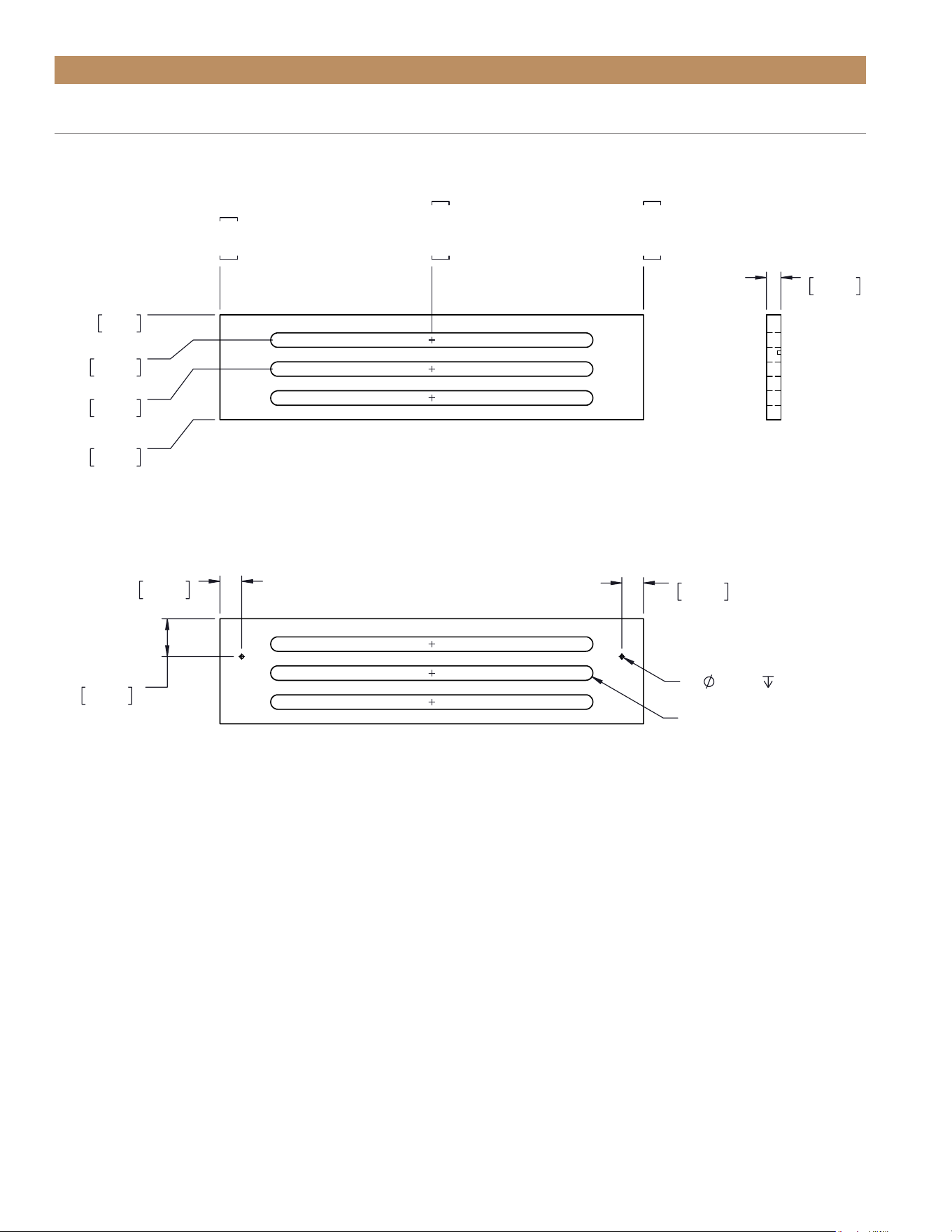
CUSTOM PANEL SPECIFICATIONS
If so desired, you can replace the kickplate with a custom overlay louver grill. Please see the template below.

15" TRUE ICE
®
MACHINE INSTALL GUIDETEC_TM_155 | REV. H | EN 09/05/24 Page 19 of 68
PRIOR TO INSTALLATION
CUSTOM PANEL INSTALLATION
Your new ice machine comes with articulating, or soft-
closing, hinges. The hinges can be installed on either
the left of right to change the direction the door opens.
Before installing panels, be sure the door assembly is
oriented as desired. See “Reversing Door" (pg. 62).
Please closely read all instructions before installing
your panels.
REQUIRED TOOLS
Required tools include (but may not be limited to)
the following:
• Surface protection*
• 2+ Clamps ≥ 2" (51 mm)
• 1/8" Hex Head Allen Wrench
• Phillips Screwdriver or Bit Driver
• 1/8" Drill Bit
• (Qty 6) #6 x 1/2" Screws**
• Drill
*Cardboard, moving blanket, foam padding, etc.
**Screw type varies by panel material.
INSTALLATION
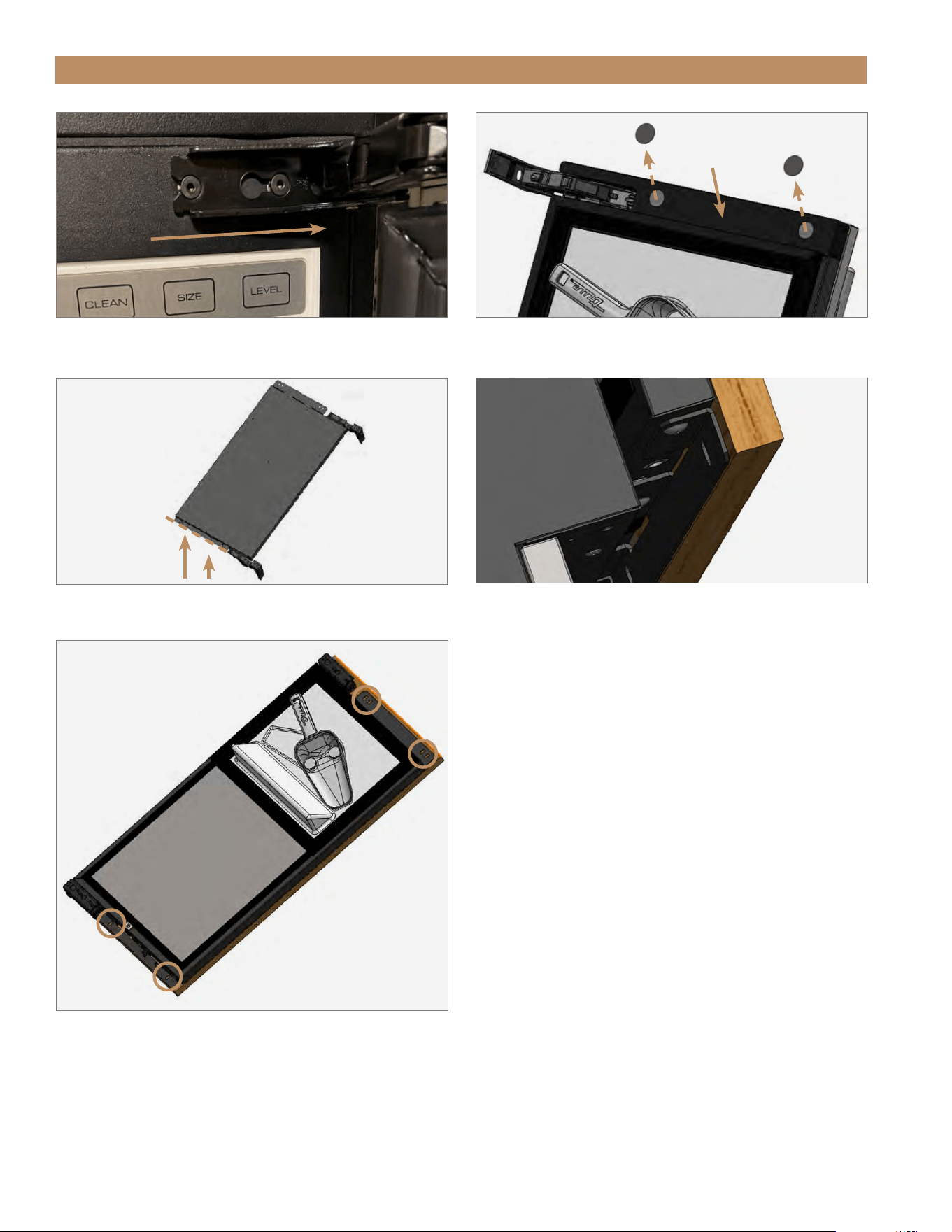
1. Carefully lay the door overlay panel face down on
a protected surface.
2. With a 1/8" hex head Allen wrench, loosen the
appliance hinge bolts. Then, remove the door.
See fig. 1.
NOTE: DO NOT REMOVE THE HINGE FROM
THE DOOR ASSEMBLY.
3. If NSF cover is present, carefully pry screw caps
from the cover to access the door bracket screws.
See fig. 2.
NOTE: THE CAPS ARE INSTALLED WITH
A TACKY GLUE THAT CAN BE EASILY
REMOVED AND REINSTALLED.
4. Place the door front face down on the overlay
panel. Then, align the bottom door bracket’s
bottom edge with the overlay panel’s bottom edge.
See figs. 3 and 4.
5. Clamp the door assembly panel.
NOTE: IF THE CLAMP JAWS ARE NOT
PADDED, INSERT PADDING BETWEEN THE
CLAMP AND THE OVERLAY TO PROTECT
THE PANEL’S FINISH.
6. If desired, install a handle before proceeding to the
next step. For best installation, fasten the handle
with recessed screws.
7. With a 1/8" drill bit, carefully drill pilot holes into
the door front. See fig. 5.
NOTE: TAKE CARE TO NOT DRILL THROUGH
THE FRONT OF THE PANEL.
8. With the appropriate hardware, fasten the overlay
panel to the door front. Then, remove the clamps.
9. Install the door assembly. Be sure to fully tighten
the hinge screws.
10. Verify the door closes correctly and seals without
gaps. Adjust the door as needed; see “Door
Adjustment" (pg. 65).
TRUE RESIDENTIAL
®
TEC_TM_155 | REV. H | EN09/05/24Page 20 of 68 P#829867
PRIOR TO INSTALLATION
FIG. 1.
Slide the door off the hinge bolts through the keyhole slots.
FIG. 3.
Align along the bottom door bracket edge. Front of door assembly
shown.
FIG. 4.
The bottom edge of the panel should align with the bracket
as shown.
FIG. 2.
Remove the NSF cover screw caps.
NSF Cover
Screw cap
Align along
this edge
FIG. 5.
Carefully fasten the overlay panel to the door front.
15" TRUE ICE
®
MACHINE INSTALL GUIDETEC_TM_155 | REV. H | EN 09/05/24 Page 21 of 68
The unit is approved by UL for outdoor installation.
USE OF ADAPTER PLUGS
NEVER USE AN ADAPTER PLUG! An
adapter plug alters the original OEM
plug configuration when connecting it
to a power source.
TRUE will not warranty any ice machine that has been
connected to an adapter plug.
USE OF EXTENSION CORDS
NEVER USE AN EXTENSION CORD! An
extension cord is determined to be
any component that adds length to
the original OEM power cord when
connecting it to a power source.
TRUE will not warranty any ice machine that has been
connected to an extension cord.
HOW TO CONNECT ELECTRICITY
• The ice machine should always be plugged into a
dedicated electrical circuit. This provides the best
performance and prevents building wiring circuits
from being overloaded, which could cause
a fire hazard from overheated wires.
• Before your new unit is connected to a power
supply, check the incoming voltage with a voltmeter.
If the recorded voltage is less than the rated voltage
for operation (+/-5%) and amp rating, correct
immediately. Refer to appliance data plate for this
voltage requirement.
• The electrical outlet must be within 36" (914.4 mm)
of the center of the back wall of the ice machine’s
final location. Outlet must be flush with wall and
comply with local electrical codes.
• The wall outlet and circuit should be checked by
a licensed electrician to make sure the outlet is
properly grounded.
PRIOR TO INSTALLATION
• The power cord of this appliance is equipped
with a 3-prong (grounding) plug which mates
with a standard 3-prong (grounding) wall outlet to
minimize the possibility of electric shock hazard
from this appliance. A 115V AC, 60 Hz, 15 amp
circuit breaker and electrical supply are required.
• If the outlet is a standard 2-prong outlet, it is your
personal responsibility and obligation to have it
replaced with the properly grounded wall outlet.
• DO NOT, under any circumstances, cut or remove
the ground prong from the power cord. For personal
safety, this appliance must be properly grounded.
• When moving the ice machine, for any reason, be
careful not to roll over or damage the power cord.
• Repair or replace immediately all power cords that
have become frayed or otherwise damaged. DO NOT
use a power cord that shows cracks or abrasion
damage along its length or at either end.
• If the supply power cord is damaged, it should be
replaced with original equipment manufacturer
(OEM) components. To avoid hazard this should be
done by a licensed service provider.
• NEVER unplug your ice machine by pulling on the
power cord. Always grip plug firmly and pull straight
out from the outlet.
ELECTRICAL INSTALLATION & SAFETY
TRUE RESIDENTIAL
®
TEC_TM_155 | REV. H | EN09/05/24Page 22 of 68 P#829867
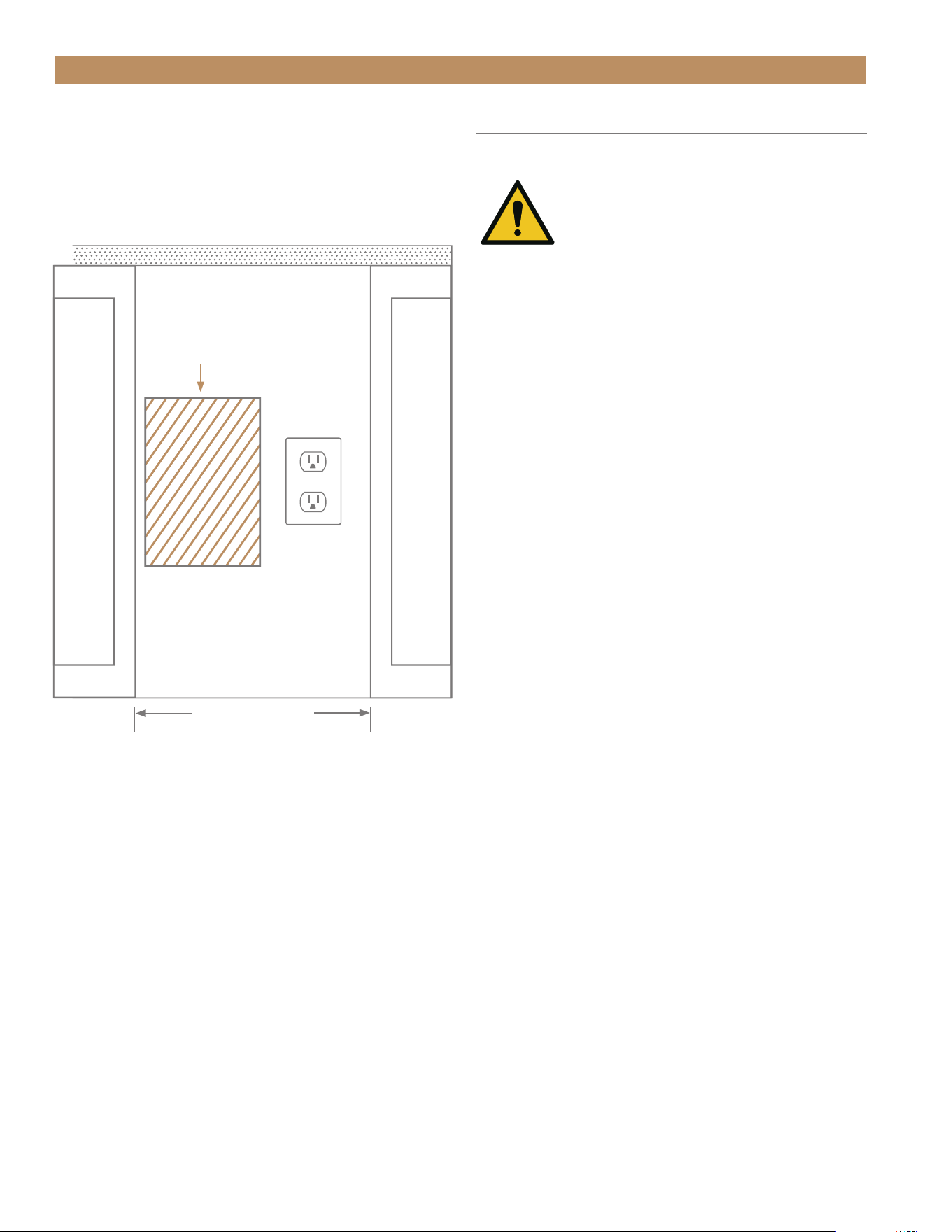
Rear wall of cut out
DO NOT INSTALL
OUTLET IN THIS AREA!
Countertop
PRIOR TO INSTALLATION
ELECTRICAL OUTLET LOCATION
To minimize the depth of the cutout opening, the
electrical outlet must be positioned as shown below or
on pg. 14. Outlet must be flush with wall.
15" (381 mm)
opening
DRAIN CONNECTION
The True Ice
®
machine has a built-in drain pump.
WARNING! PROPER INSTALLATION
REQUIRES CONNECTION TO THE
WATER SUPPLY AND A DRAIN.
THESE CONNECTIONS ARE THE
RESPONSIBILITIES OF THE INSTALLER. TRUE
WILL NOT WARRANT LEAKS OR DAMAGE
CAUSED BY IMPROPER INSTALLATION.
IMPROPER CONNECTIONS CAN RESULT IN
PERSONAL INJURY, PROPERTY DAMAGE AND
IMPROPER OPERATION. THE ICE MACHINE
MUST BE INSTALLED ACCORDING TO ALL
APPLICABLE NATIONAL, STATE AND LOCAL
CODES AND REGULATIONS.
• DO NOT reduce drain connections any smaller than
1/4" I.D.
• 96" (2,438.4 mm) 3/8" O.D. x 1/4" I.D. clear PVC
drain hose, 90° 1/2" male NPT x 1/4" O.D. barbed
drain fitting, and hose clamp provided by True.
• CHECK VALVE REQUIRED. Check valve and adapter
provided by True. See "Check Valve Installation"
(pg. 24).
• Using hose larger than 1/2" I.D. may require a
larger pump.
• Be sure to use the correct I.D. hose for your vertical
rise to ensure the proper flowrate and prevent drain
time alarms. For more information, see “Drain Time
Alarm" (pg. 40).
15" TRUE ICE
®
MACHINE INSTALL GUIDETEC_TM_155 | REV. H | EN 09/05/24 Page 23 of 68
PRIOR TO INSTALLATION
DRAIN LINE INSTALLATION
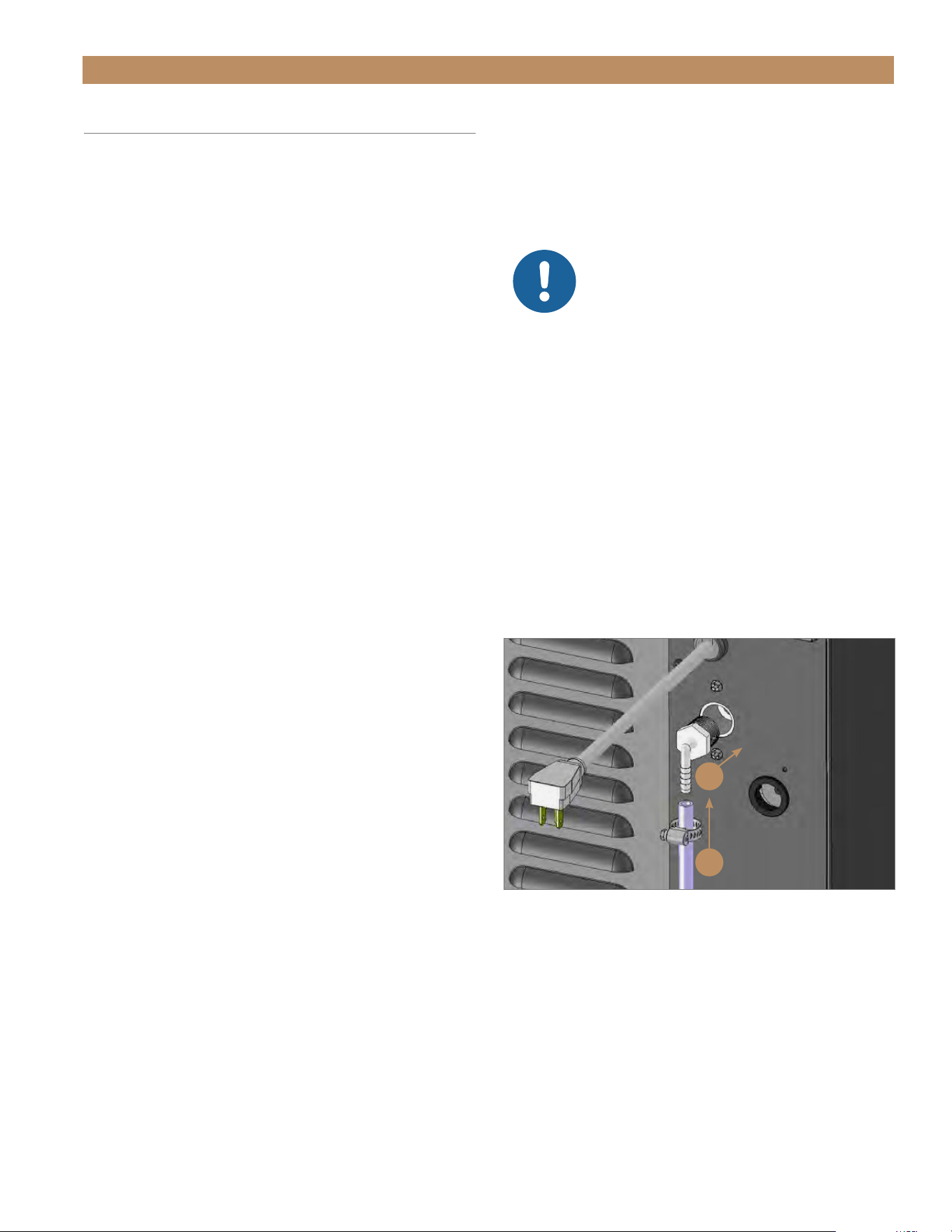
1. Thread the 1/2" NPT connector into the drain
fitting. See fig. 1.
NOTE: THREAD SEALANT REQUIRED AND
TO BE SUPPLIED BY INSTALLER.
NOTICE: DO NOT OVERTIGHTEN
THE NPT CONNECTOR! DO NOT
TORQUE THE CONNECTOR MORE
THAT 50 IN-LB (5.65 NM). THIS
MAY CAUSE THE FITTING TO CRACK.
CHECK
THE DRAIN FITTING FOR LEAKS BEFORE
COMPLETING THE INSTALLATION.
2. With the clamp on the hose, connect the clear
drain hose to the barbed fitting. See fig. 1.
3. Tighten the hose clamp.
NOTE: VERIFY THE ICE MACHINE DRAINS
THROUGH TWO CYCLES WITHOUT ANY
DRAIN ALARM DURING INSTALLATION.
For more information, see “Drain Time Alarm"
(pg. 40).
FIG. 1.
Be sure to tightly clamp the drain line onto the barbed fitting.
Thread sealant required.
1
2
DRAIN CONNECTION (CONT.)
• If the installation requires a vertical rise greater than
84" (2,133.6 mm) include an external drain pump
to cover the additional required pumping height.
Connect the drain tube outlet from the ice machine
to the external drain pump inlet. Do not remove the
internal drain pump provided with the ice machine.
Altering the internal components in any way will
void the warranty.
• DO NOT USE HOSE SMALLER THAN 1/4" I.D.
• The floor drain must be large enough to
accommodate additional drainage.
• The drain pump discharge line must terminate at an
open site drain.
• Be sure to thoroughly inspect all connections after
installation to ensure there are no leaks. Use of
thread sealant required.
TRUE RESIDENTIAL
®
TEC_TM_155 | REV. H | EN09/05/24Page 24 of 68 P#829867
PRIOR TO INSTALLATION
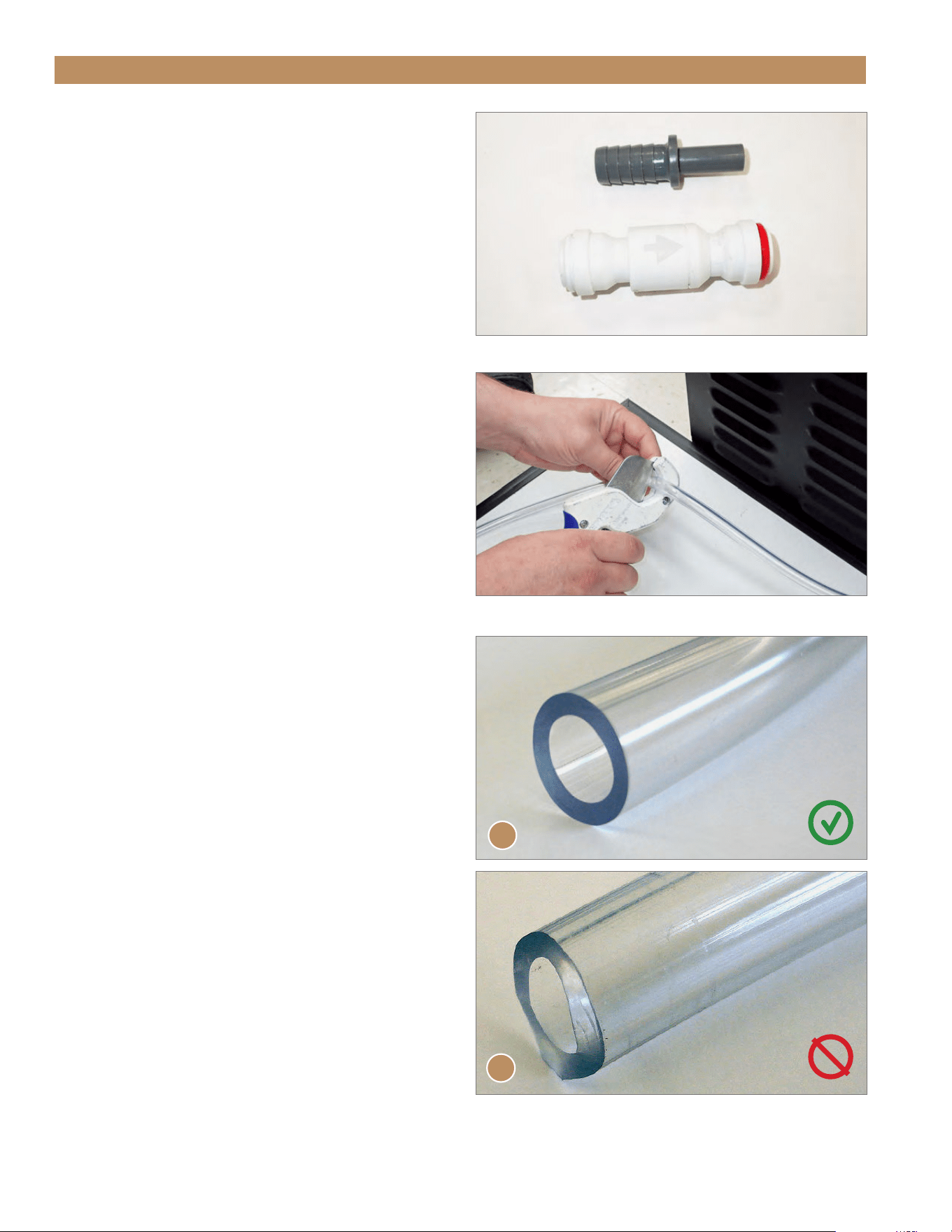
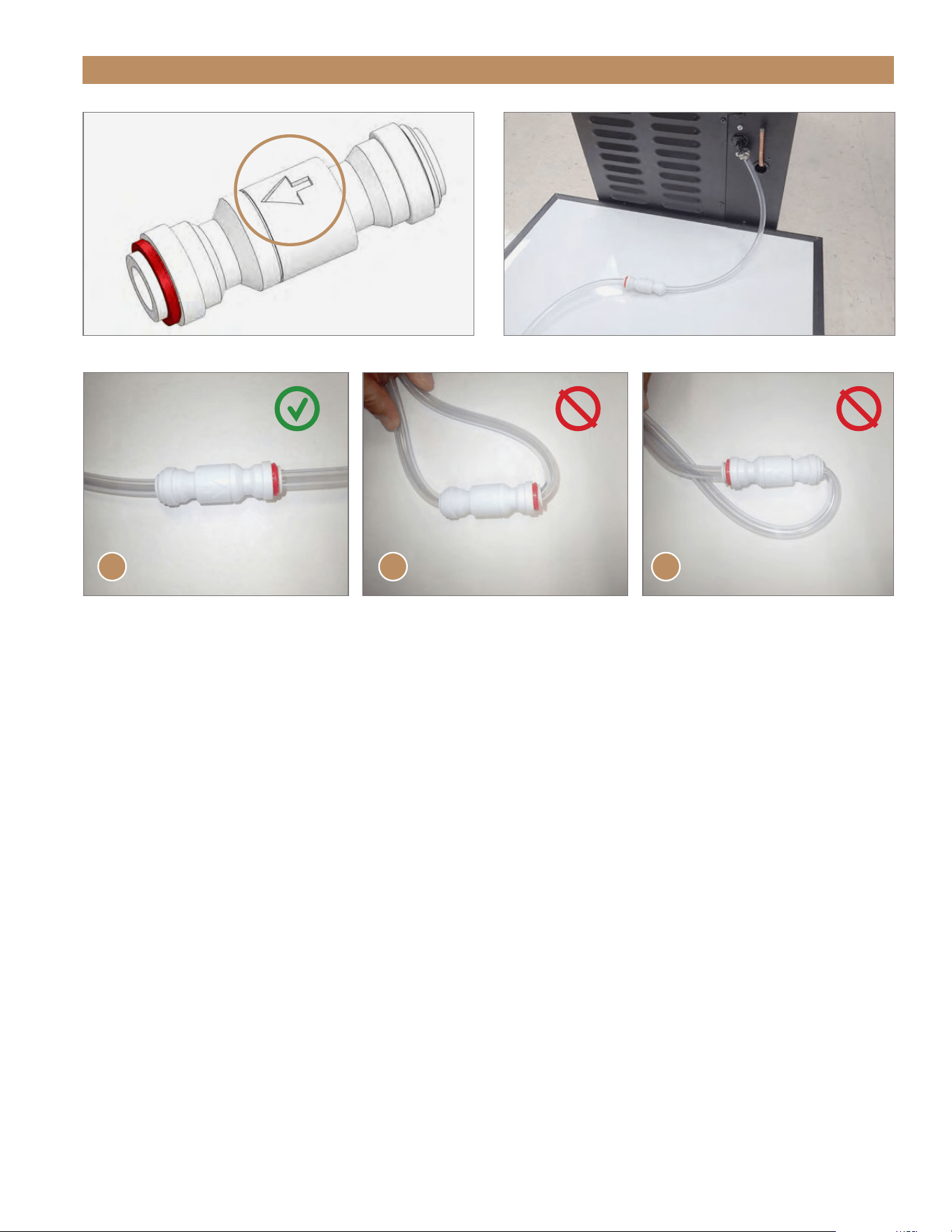
CHECK VALVE INSTALLATION (REQUIRED)
1. Locate provided check valve components.
See fig. 2.
2. With tubing cutters, cut the drain line at
approximately 24” (609.6 mm) from the connection
point. See fig. 3.
NOTE: BE SURE THE CUT IS WITHOUT
BURRS OR JAGGED EDGES. SEE FIG. 4.
3. With the water flow arrow (see fig. 5) pointing away
from the ice machine, connect the cut drain line
to the check valve.See fig. 6. Use the provided
adapter if needed.
NOTE: BE SURE THE DRAIN LINE IS FULLY
SEATED IN THE CHECK VALVE AND ON THE
DRAIN FITTING.
4. Check the drain system for leaks before and after
positioning the unit in the final installation location.
NOTE: ENSURE THE DRAIN TUBES AROUND
THE CHECK VALVE DO NOT BEND OR
CREASE TO PREVENT LEAKS. SEE FIG 7.
NOTE: TRUE WILL NOT WARRANT LEAKS
OR DAMAGE CAUSED BY IMPROPER
INSTALLATION.
FIG. 2.
Check valve and adapter shipped inside the ice machine.
FIG. 3.
Cut the drain line with tubing cutters.
FIG. 4.
A: Correct, square cut; B: Incorrect, jagged cut.
A
B
15" TRUE ICE
®
MACHINE INSTALL GUIDETEC_TM_155 | REV. H | EN 09/05/24 Page 25 of 68
PRIOR TO INSTALLATION
FIG. 7.
Correct (A) and incorrect (B and C) check valve drain hose connection.
FIG. 5.
Water flow arrow on the check valve.
FIG. 6.
Installed check valve.
A B C
TRUE RESIDENTIAL
®
TEC_TM_155 | REV. H | EN09/05/24Page 26 of 68 P#829867
Maximum
Vertical Rise
Max Run
3/8" O.D. Hose
(provided by TRUE)
84" (2,133.6 mm) 100’ (30.84 m)
1/2" I.D. Hose 48" (1,219.2 mm) 100’ (30.84 m)
Hose larger than 1/2" I.D. may require an external pump.
Vertical rise higher that 84"
will require external pump.
48" MAX
(1,219.2 mm)
84" MAX
(2,133.6 mm)
E xternal
Pump
1/2" I.D. Hose
(Not provided
by TRUE)
E x t e r n a l
Pump
3/8" O.D. Hose
(Provided by
TRUE)
PRIOR TO INSTALLATION
PUMP HEIGHTS
Do not exceed the maximum vertical rise.

15" TRUE ICE
®
MACHINE INSTALL GUIDETEC_TM_155 | REV. H | EN 09/05/24 Page 27 of 68
PRIOR TO INSTALLATION
WARNING! ONLY CONNECT YOUR
ICE MACHINE TO A POTABLE
WATER SUPPLY.
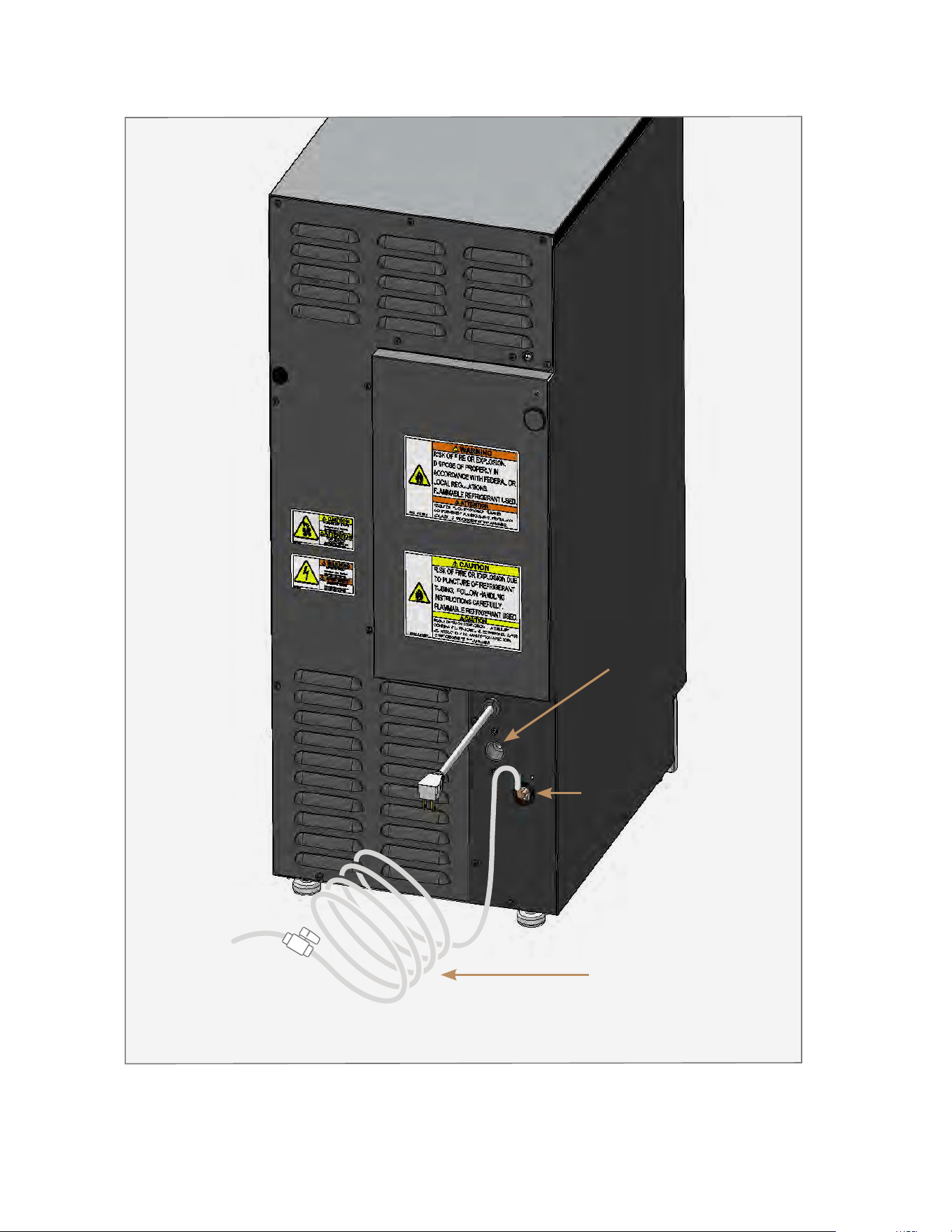
• The ice machine comes with a 1/4" O.D. copper
tube for connecting the water supply. See fig. 1. for
water inlet location.
• Water pressure must be between 20-80 psig
(1.4 - 5.5 bar). If the water pressure exceeds
the maximum pressure, install a water pressure
regulator.
• A reverse osmosis system can be used if there is
constant water pressure of 20-80 psig (1.4-5.5 bar).
• Copper is not recommended for applications with
a reverse osmosis system. TRUE recommends
replacing copper with PEX tubing. When switching
to PEX, the tubing must be rated for 150 psi (10.3
bar) burst pressure minimum and 180˚F (82.2˚C).
• Cold water supply required. Incoming water
temperature must remain 40-100˚F (4.4-7.8˚C).
• Never connect to a hot water supply. Be sure all
hot water restrictors installed for other equipment
are working, such as check valves on sink faucets,
dishwashers, etc.
• Water regulating valve recommended for pressures
higher than 80 psig (5.5 bar). If so desired,
installing a water hammer valve can reduce the
noise and shock from the valve closing.
• Use tight-fitting, leak-proof permanent connections
for the water supply. Soldered connections are
always best. In the absence of soldering, use
compression-type fittings for more reliability.
• While push fittings are acceptable, they are prone
to leaks when installed incorrectly and/or not
according to the manufacturer’s specifications.
• TRUE recommends coiling extra length of supply
hose behind the machine to allow proper servicing
of the unit. See fig. 1.
Water
Temperature
Water
Pressure
Minimum 40˚F (4.4˚C) 20 psig (1.4 bar)
Maximum 100˚F (37.8˚C) 80 psig (5.5 bar)
Plumbing Material
Water Supply
1/4" O.D. copper (not recommended)
braided stainless steel
PEX tubing and compression fittings
(1/4" lines and fittings not provided by TRUE)
Drain Connection 1/2" O.D. Female NPT Fitting (see fig. 1.)
• Connect the water supply line to the house supply
with an easily accessible shut-off valve in your
installation. See fig. 1.
• Insulate the supply line to prevent condensation.
• When switching to PEX, the tubing must be rated
for 150 psi (10.3 bar) burst pressure minimum and
180˚F (82.2˚C).
• Your ice quality is only as good as the water supply
quality and routine maintenance. See general
maintenance starting on pg. 46.
• Hard water softened by a water softener can result
in white, mushy cubes that stick together. For other
potential causes (and solutions) for poor ice quality,
see the “Ice Quality Troubleshooting” (pg. 47).
• Deionized water is not recommended by TRUE. Use
of deionized water can result in appliance damage.
WATER SUPPLY
TRUE RESIDENTIAL
®
TEC_TM_155 | REV. H | EN09/05/24Page 28 of 68 P#829867
FIG. 1.
Example of a water supply installation. Your application may differ.
Water
Inlet
Drain
Fitting
Coiled extra
supply hose
for proper
servicing
To water
supply
Shut-off
valve

09/05/2024 Page 29 of 68TEC_TM_155 | REV. H | EN
PRESERVE THE MOMENT
®
15" TRUE ICE
®
MACHINE INSTALL GUIDE
UNCRATING
LEVELING LEGS
LEVELING
KICKPLATE INSTALLATION
WATER FILTER INSTALLATION
INSTALLATION
TRUE RESIDENTIAL
®
TEC_TM_155 | REV. H | EN09/05/24Page 30 of 68 P#829867
INSTALLATION
UNCRATING
NOTE: IF THE APPLIANCE IS DAMAGED,
NOTE ALL DAMAGE ON THE DELIVERY
RECEIPT, IMMEDIATELY FILE A CLAIM
WITH THE DELIVERY FREIGHT CARRIER,
AND CONTACT TRUE. DO NOT INSTALL
THE APPLIANCE OR PUT IT IN SERVICE.
REQUIRED TOOLS
Required tools include (but may not be limited to)
the following:
• Cut ting Tool
• Crowbar OR
• Hammer
• Floor Protection
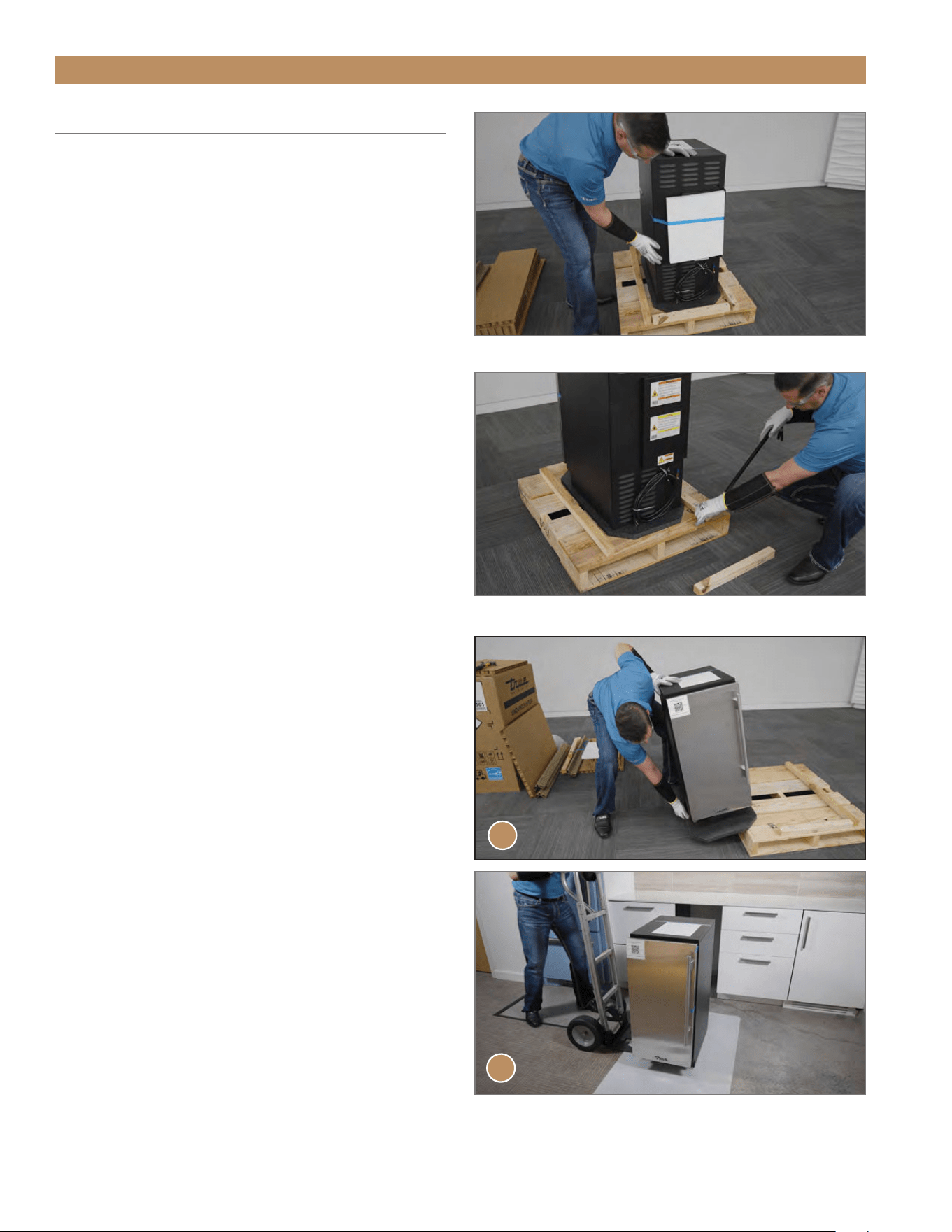
PROCEDURE
1. Inspect the exterior packaging for damage.
Immediately file a claim with the freight carrier if
there is damage.
2. Remove the exterior packaging.
3. Inspect the appliance (exterior and interior) for
concealed damage. See fig. 1. Immediately file a
claim with the freight carrier if there is damage.
4. Move the unit as close as possible to the final
installation location.
5. Remove the outer shipping tape and foam.
6. Remove runner boards from the skid. See fig. 2.
7. Carefully work the unit off the skid’s side and onto
floor protection. See fig. 3.
NOTE: DO NOT MOVE THE UNIT BY DOORS,
HANDLES, OR HINGES.
NOTE: DO NOT REMOVE THE INTERIOR
PACKAGING UNTIL THE UNIT IS
POSITIONED IN THE FINAL INSTALLATION
LOCATION.
FIG. 1.
Inspect the unit for concealed damage.
FIG. 2.
Pry the runner boards off the skid.
FIG. 3.
Move the unit off the skid from the side (A) and position the unit
on floor protection (B).
A
B
15" TRUE ICE
®
MACHINE INSTALL GUIDETEC_TM_155 | REV. H | EN 09/05/24 Page 31 of 68
INSTALLATION
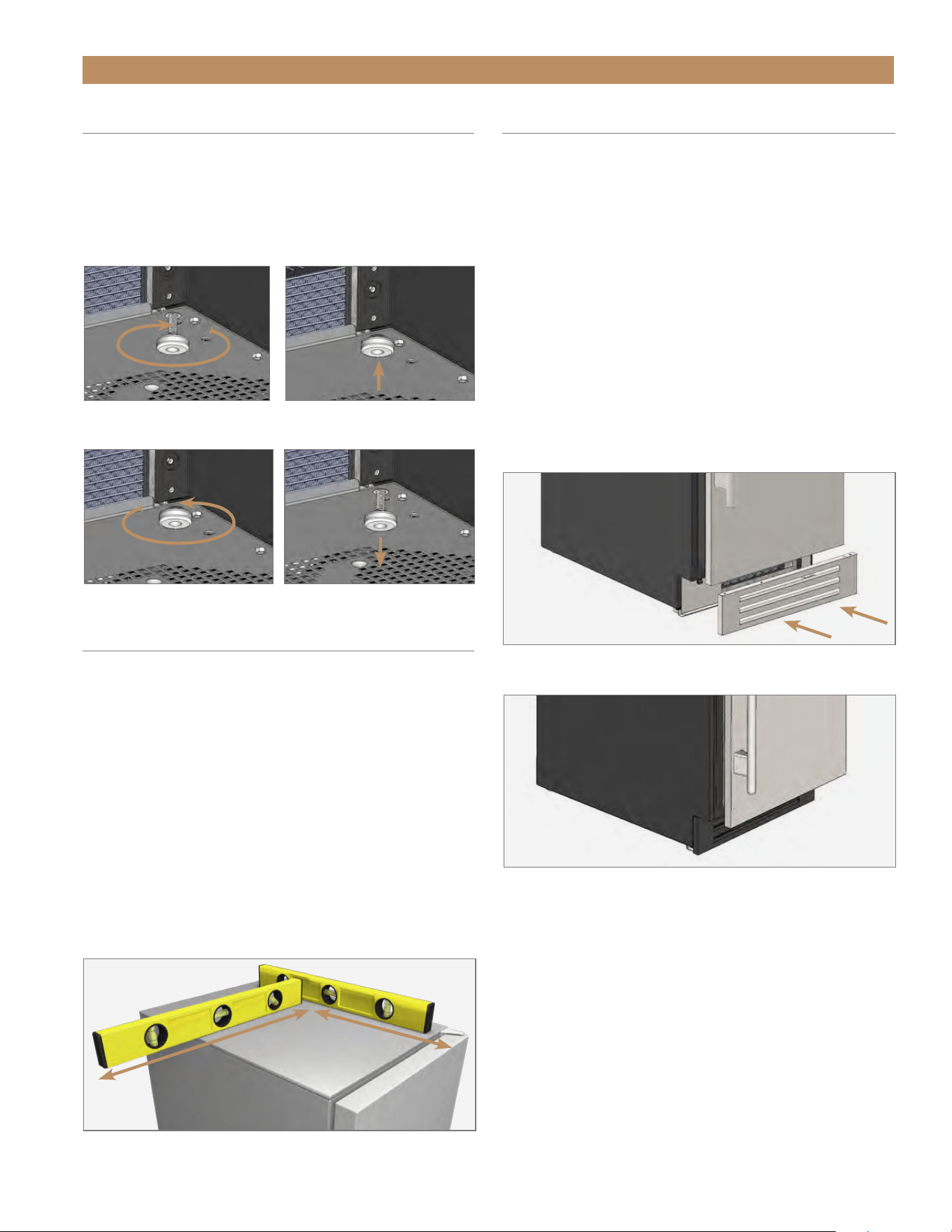
FIG. 1.
Check the level from the top of the unit.
FIG. 1.
Attach the kickplate to the magnets below the door.
FIG. 2.
Adjust the kickplate as needed.
FIG. 1.
Turn the leveling legs clockwise to lower the unit.
FIG. 2.
Turn the leveling legs counterclockwise to raise the unit.
KICKPLATE INSTALLATION
The kickplate is shipped unattached to the unit to allow
easy access for levelling. The kickplate attaches to the
unit with magnets at the bottom of the unit.
INSTALLATION
1. After leveling the unit, position the kickplate below
the door. See figs. 1 and 2.
2. Verify the kickplate is correctly aligned. Adjust
as needed.
REMOVAL
Pull the kickplate away from the unit.
LEVELING LEGS
PROCEDURE
With access to the bottom of the appliance, turn the
leveling legs to adjust the level as needed.
See figs. 1 and 2.
LEVELING
Proper leveling of your ice machine is critical to
operating success. Leveling effects drainage and door
operation.
PROCEDURE
1. Set the unit in its final location. Be sure there is
adequate ventilation in your room.
2. Verify the unit’s level. On the unit’s top, check the
level front-to-back and side-to-side. See fig. 1.
3. Turn the leveling legs as needed to adjust the level.
See “Leveling Legs" (pg. 31).
TRUE RESIDENTIAL
®
TEC_TM_155 | REV. H | EN09/05/24Page 32 of 68 P#829867
WATER FILTER INSTALLATION
The built-in water filter removes any unpleasant
taste/odor, as well as inhibiting scale. The filter life
expectancy is 12 months for low-scale water and 6
months for high-scale water. The ice machine monitors
how long the filter has been in operation; the display
will show rtr and the water droplet icon will flash when the
filter needs to be replaced. See "Water Filter Relacement"
(pg. 48).
CAUTION! Install the water filter before
turning on the water supply to the
machine. DO NOT install the water filter
while the water supply is pressurized.
ALWAYS relieve the water pressure before changing
the filter.
NOTICE: DO NOT ALLOW THE ICE
MACHINE TO BE EXPOSED TO
TEMPERATURES BELOW 32˚F (0˚C)
WITHOUT WINTERIZING THE
MACHINE AS THIS WILL CAUSE ANY WATER
IN THE MACHINE TO FREEZE. FAILURES
CAUSED BY EXPOSURE TO FREEZING
TEMPERATURES ARE NOT COVERED BY
THE WARRANTY.
To order a replacement water filter, go to https://
store.trueresidential.com/collections/maintenance-1/
products/replacement-water-filter or contact
our parts department at 844-849-6226 or
TrueResidentialParts@TrueMfg.com.
INSTALLATION
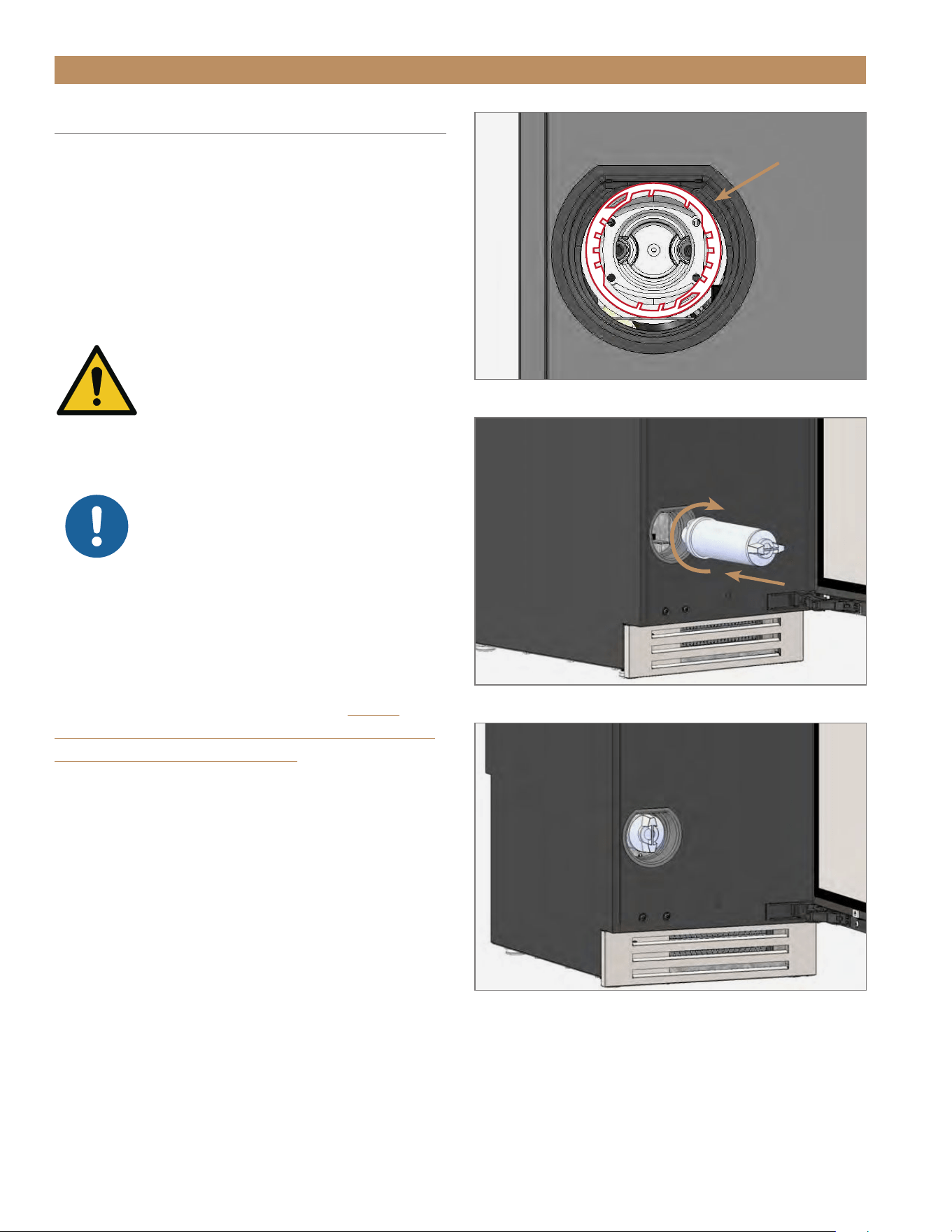
1. Align the filter with the filter head’s teeth inside the
machine. See fig. 1.
2. Insert the water filter and rotate the water filter
clockwise. See figs. 2 and 3.
INSTALLATION
FIG. 1.
Teeth inside the filter head.
FIG. 2.
Insert the water filter and rotate it clockwise.
FIG. 3.
Installed water filter.

09/05/2024 Page 33 of 68TEC_TM_155 | REV. H | EN
PRESERVE THE MOMENT
®
15" TRUE ICE
®
MACHINE INSTALL GUIDE
ICE SCOOP
90° DOORSTOP INSTALLATION (OPTIONAL ACCESSORY)
APPLIANCE SETUP
TRUE RESIDENTIAL
®
TEC_TM_155 | REV. H | EN09/05/24Page 34 of 68 P#829867
APPLIANCE SETUP
ICE SCOOP
For easy storage, position the ice scoop on the door’s
interior. See fig. 1.
1. Orient the door as desired. See “Reversing Door".
(pg. 62).
2. Locate the ice scoop in the interior packaging.
3. Position the ice scoop on the door’s interior.
See fig. 1.
FIG. 1.
Attach the ice scoop to the door.
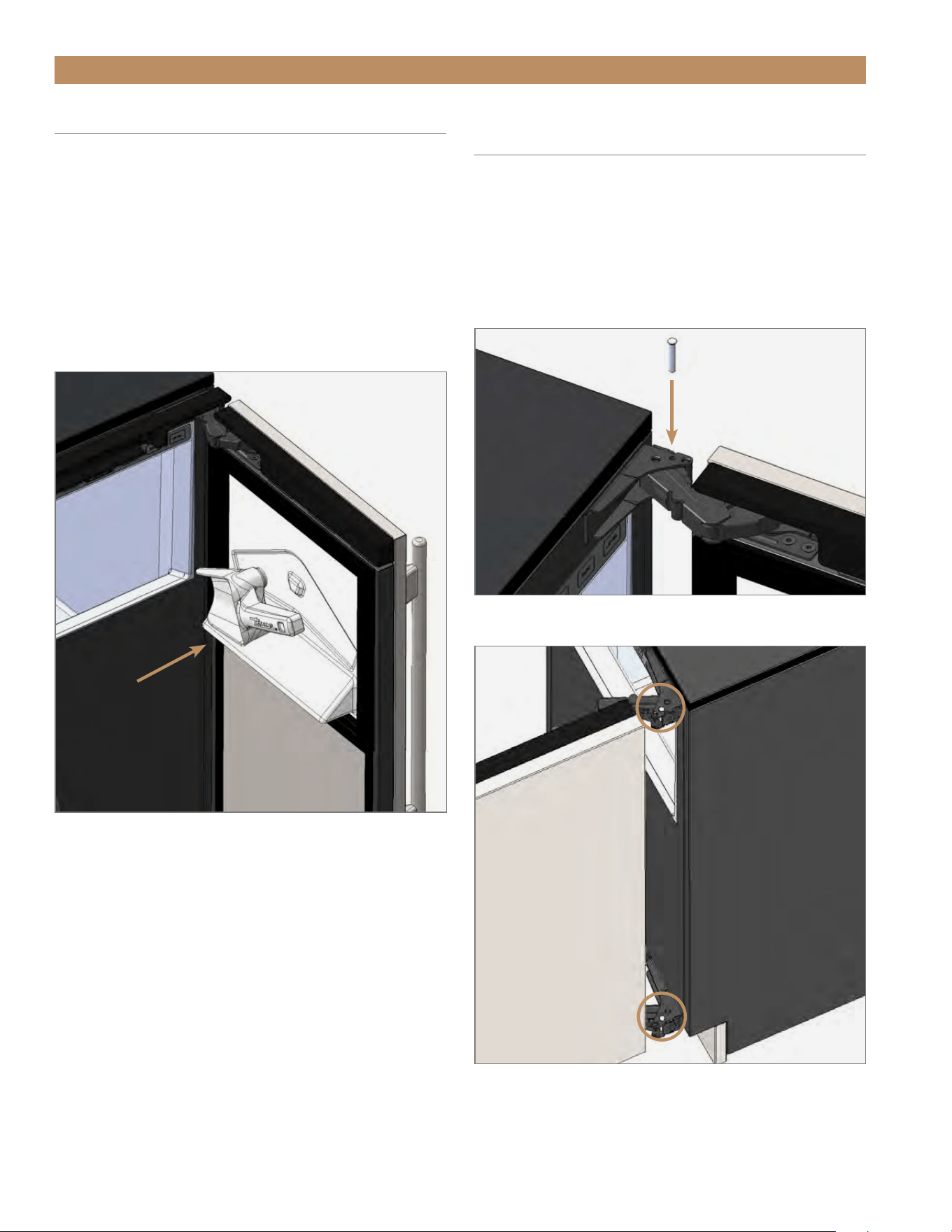
90° DOORSTOP INSTALLATION
(OPTIONAL ACCESSORY)
The doorstop restricts the door from opening past
approximately 90˚ to prevent damage to surrounding
cabinets.
NOTE: BE SURE TO PUT A DOORSTOP PIN IN BOTH
THE TOP AND BOTTOM HINGES. SEE FIGS. 1 AND 2.
FIG. 1.
Drop the doorstop pin into the articulated hinge.
FIG. 2.
Install a doorstop pin in both hinges.

09/05/2024 Page 35 of 68TEC_TM_155 | REV. H | EN
PRESERVE THE MOMENT
®
15" TRUE ICE
®
MACHINE INSTALL GUIDE
BEFORE OPERATING
BREAKER RESET
POWER SEQUENCE
ICE MAKING SEQUENCE
ELECTRONIC CONTROL OPERATION
APPLIANCE OPERATION
TRUE RESIDENTIAL
®
TEC_TM_155 | REV. H | EN09/05/24Page 36 of 68 P#829867
APPLIANCE OPERATION
BEFORE OPERATING
To ensure ice quality, please clean and sanitize this
machine prior to first use. See “Descaling & Sanitizing"
(pg. 52). To ensure proper operation, follow the
installation checklist at the front of this manual.
NOTE: COSTS ASSOCIATED WITH
ADJUSTMENTS, CLEANING AND SANITIZING
PROCEDURES IN THIS GUIDE ARE NOT
COVERED BY THE WARRANTY.
WARNING! DO NOT USE THE ICE
MACHINE TO STORE ANYTHING
OTHER THAN ICE.
WARNING! DO NOT OPERATE
EQUIPMENT THAT HAS BEEN MISUSED,
NEGLECTED, DAMAGED, ALTERED OR MODIFIED
IN ANY WAY.
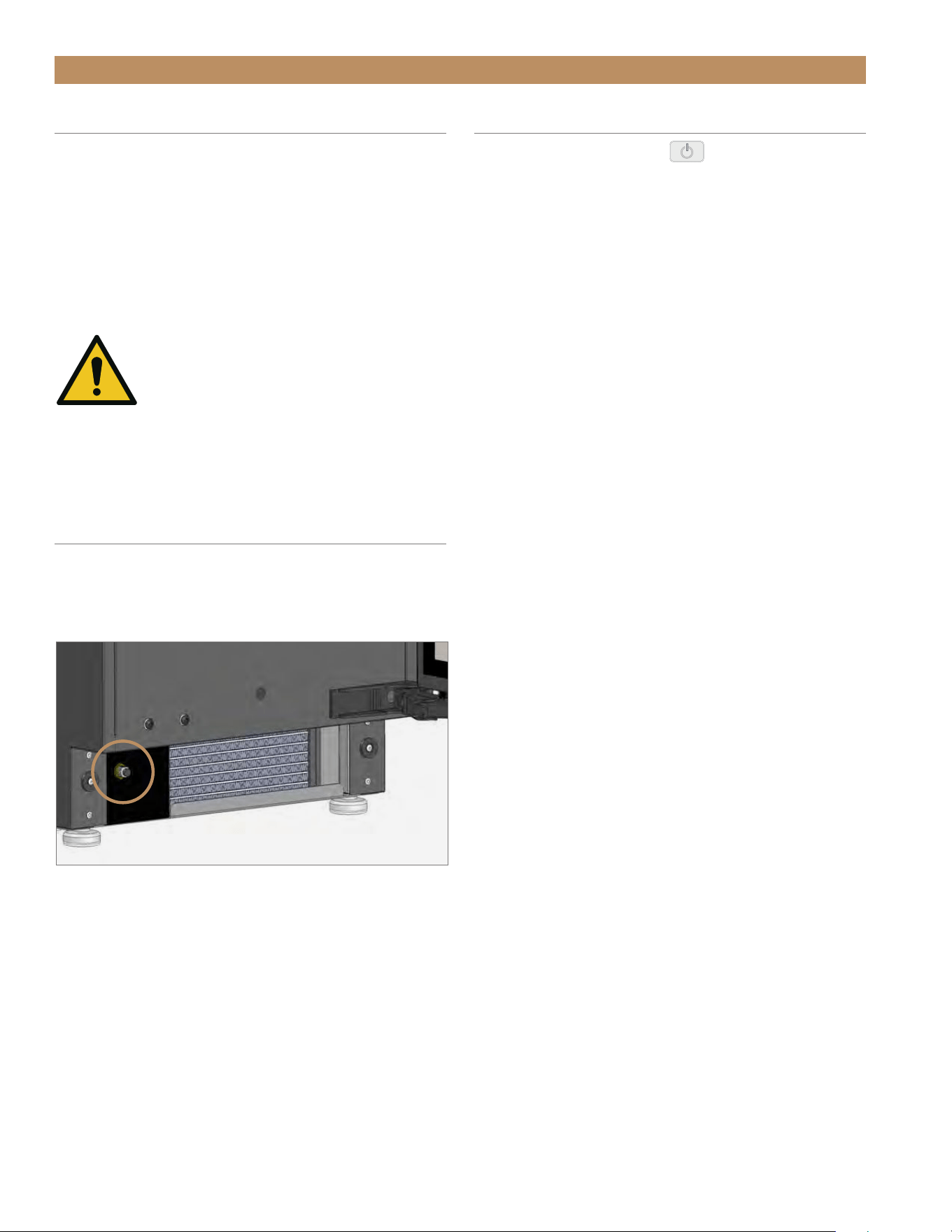
BREAKER RESET
The breaker switch is located behind the kickplate
(see fig. 1). If the unit trips, press the breaker to reset
the switch.
FIG. 1.
Breaker switch location.
POWER SEQUENCE
• Press the power button once to begin ice
making operation. Press the button a second time
to turn the ice machine off.
• When unit is plugged in, the control board goes
through a sequence of checks to verify all sensors
are working properly.
• The drain system is energized when power is
supplied to the unit. It automatically turns on when
it senses water in the drain tube.
• Display will show oFF until the power button is
pressed.
• If the unit powers the drain pump but the drain remains
clogged for five min., the display will show drn and cut
power to the unit.
• If unit is too cold / too hot, or if the temperature probe is
unplugged / failed, the unit shuts down and displays an
error message.

15" TRUE ICE
®
MACHINE INSTALL GUIDETEC_TM_155 | REV. H | EN 09/05/24 Page 37 of 68
APPLIANCE OPERATION
ICE MAKING SEQUENCE
Your TRUE Ice
®
machine will produce one batch of ice
(24 cubes) approximately every 20 min. The following
steps occur during ice making:
1. INITIAL FILL / INITIAL HARVEST
The ice machine always begins in Fill mode.
During Fill or Harvest modes–
• The display will read FiL (Fill mode) or hAr
(Harvest mode).
• The reservoir fills with water (for 2–3 min.)
• Excess / residual water drains.
• Any residual ice cubes from a previous cycle are
melted free from the evaporator by warming the
evaporator with a warm refrigerant (Harvest mode).
2. ICE MAKING
When making ice:
• The display will read ICE
• Water sprays into the inverted ice cups as the
evaporator cools, forming ultra-clear ice cubes in
each cup
• The compressor, condenser fan motor, and water
pump operate.
• As ice is produced on the evaporator, the reservoir's
water level will lower.
• Adjusting the ice cube size alters the water level
needed for completing the cycle.
• The ice making cycle ends when
○ The reservoir's water level has dropped to a
sufficient level based on the ice cube size
setting AND
○ When the t1 evaporator probe detects the
minimum temperature threshold.
3. ICE HARVEST
When harvesting ice:
• The display will read hAr
• The compressor remains on, but the condenser fan
motor and pump turn off. The hot gas bypass and
water valves open.
• As the evaporator warms, ice cubes begin to fall
into the ice bin.
• The reservoir refills with water and overflows to
flush impurities down to the drain pump.
• The harvest cycle ends when the evaporator
reaches 47˚F (8.3˚C) and then a completion
timer expires.
• All 24 ice cubes should fall into the ice storage bin
before the next ice making cycle begins.
4. FULL BIN
When the ice bin is full:
• The display will read FUL
• The ice machine shuts off automatically when
the ice level sensor determines the amount of ice
has reached the set level (see "Adjust Ice Level",
pg. 41).
• The condenser fan will turn on in reverse to clean
the condenser; this removes any built-up dust or
debris, which prolongs the time needed between
full condenser coil cleanings.
• The drain pump will periodically run to remove any
residual water in the bin from melted ice cubes.
• The ice machine turns back on when the ice level
sensor determines the amount of ice has decreased
to below the set level (see "Adjust Ice Level",
pg. 41).
TRUE RESIDENTIAL
®
TEC_TM_155 | REV. H | EN09/05/24Page 38 of 68 P#829867
APPLIANCE OPERATION
ELECTRONIC CONTROL OPERATION
Water Filter Reminder
Cleaning Reminder
Air Filter Reminder
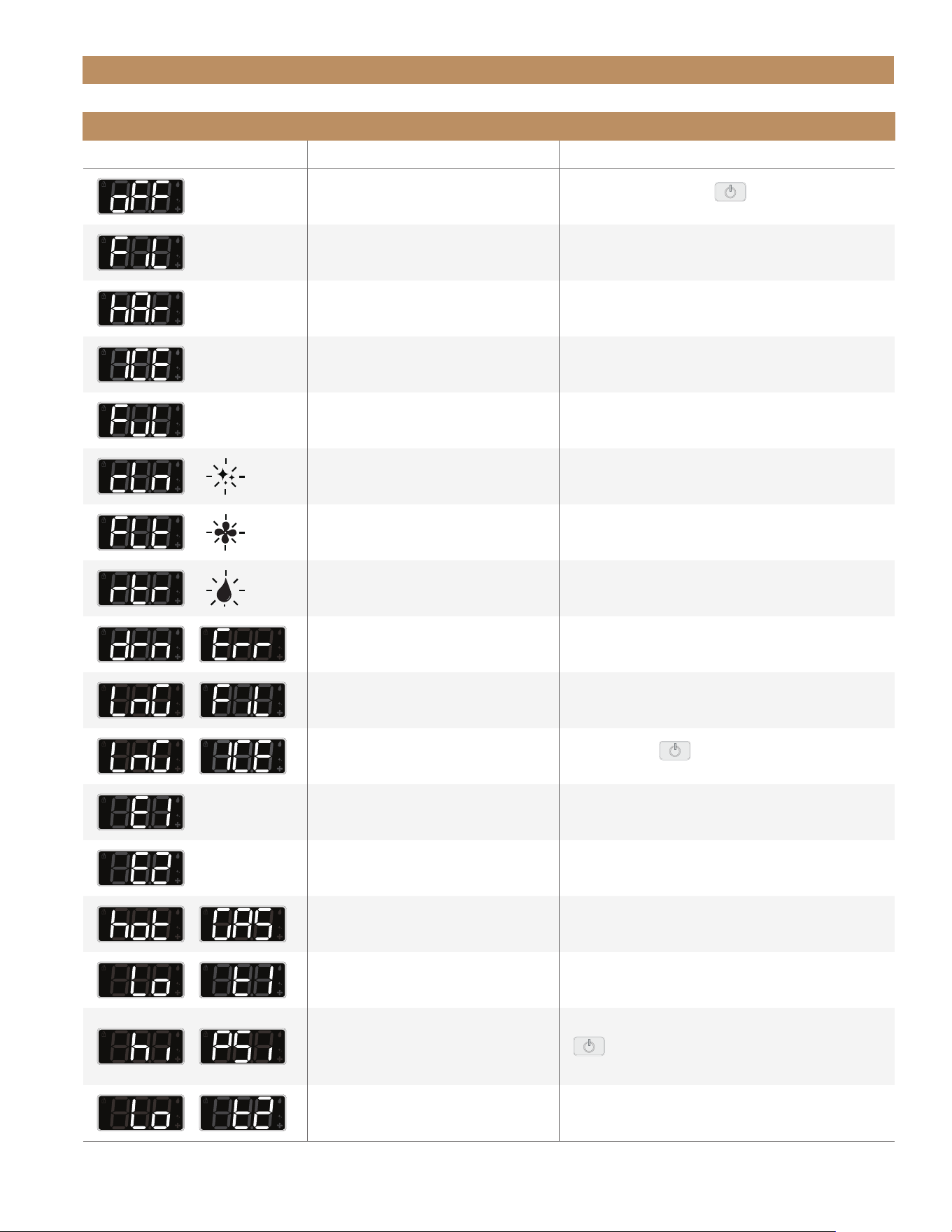
ELECTRONIC CONTROL LEGEND
A. Menu / Enter
B. Toggles Power/Standby
C. Toggles Bin Light Colors/
Scroll Down (In Menu Mode)
D. Display
E. Initiate Automatic Clean/
Scroll Up (In Menu Mode)
F. Adjust Cube Size
G. Adjust Bin Ice Level
BA C D E F G
LOCK/UNLOCK THE ELECTRONIC CONTROL
Your appliance ships unlocked.
LOCK
Press and hold the True logo and LEVEL for 10 sec. The unlock
icon will flash.
TEMPORARILY UNLOCK
Press any button on the electronic control twice (2x). The unlock
icon becomes solid. The electronic control is now operational and
will relock after 3 min.
PERMANENTLY UNLOCK
1. Press any button on the electronic control twice (2x).
The unlock becomes solid.
2. Press and hold the True logo and LEVEL for 10 sec.
The unlock icon turns off.
The control will remain unlocked until you lock the control.
15" TRUE ICE
®
MACHINE INSTALL GUIDETEC_TM_155 | REV. H | EN 09/05/24 Page 39 of 68
APPLIANCE OPERATION
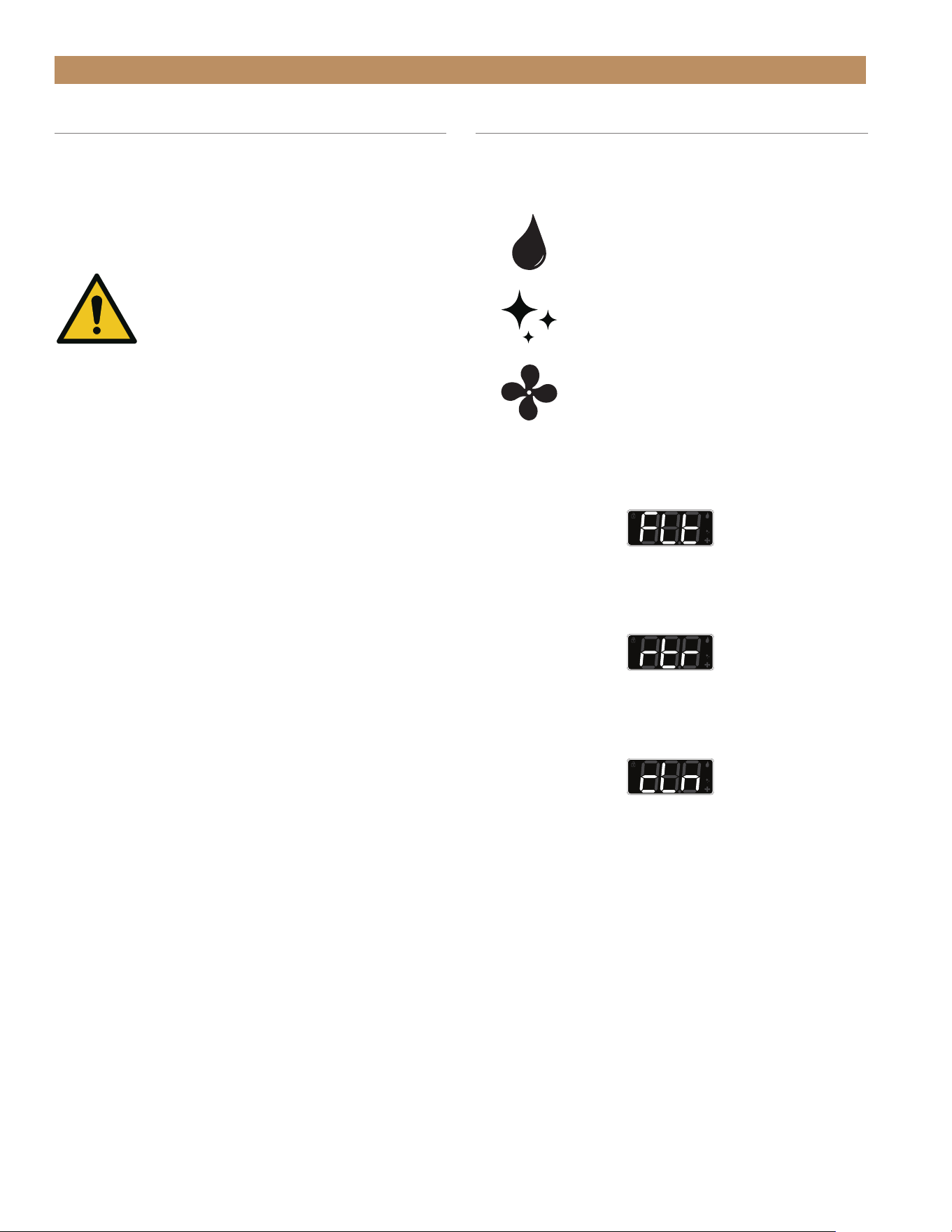
ELECTRONIC DISPLAY CODES
Display Description Action Needed
Appliance is off – some components
still have power
Press and hold
POWER
for 3 sec. to turn the
appliance on.
Fill mode – reservoir fills with water Normal operation; no action.
Harvest mode – clears ice (or residual ice)
from the ice mold in the storage bin
Normal operation; no action.
Ice mode – making ice Normal operation; no action.
Full Mode – ice storage bin is full
and unit is in standby
Normal operation; no action.
or
Cleaning reminder
Descale / sanitize appliance – reminder will reset
after completed cleaning cycle.
or
Condenser coil cleaning reminder
Clean condenser coil (see pg. 49) – hold LIGHT +
CLEAN to reset reminder.
or
Water filter reminder
Replace water filter (see pg. 48) – hold LIGHT +
CLEAN to reset reminder.
+
Drain error – appliance not able to
drain in 5 min. of operation
Check drain line for kinks and clogs.
+
Long fill – appliance unable to fill
reservoir within allotted time
Verify water filter is installed and water supply
is turned on.
+
Long Ice – extended freeze time
Press
POWER twice to reset the machine –
if error code persists, contact a service company.
Temperature thermistor 1 failure Contact a service company.
Temperature thermistor 2 failure Contact a service company.
+
Hot gas valve failure Contact a service company.
+
Evaporator thermistor fell below 14° F
(-10° C) within first 5 min. of freeze time
Verify water pump sprays and spray nozzles are
not clogged.
+
Refrigerator pressure too high
Clean condenser coil (see pg. 49) – press
POWER
twice to reset the machine – if error code
persists, contact a service company.
+
Ambient temperature too cold
Wait for ambient temperature to rise – winterize the
appliance to prevent damage (see pg. 59).
TRUE RESIDENTIAL
®
TEC_TM_155 | REV. H | EN09/05/24Page 40 of 68 P#829867
APPLIANCE OPERATION
DRAIN TIME ALARM
If the drain does not clear within 5 min. of running,
the display will show drn Err to signal a clogged /
kinked drain line or a drain pump failure. The control
automatically shut off the water supply. If a clogged
drain clears, the display will show drn and oFF.
CAUTION! ADHERE TO LOCAL AND
STATE PLUMBING CODES. DO NOT
EXCEED THE MAXIMUM PLUMBING
HEIGHTS FOR THE GIVEN SETUP.
SEE "DRAIN CONNECTION" (PG. 22). THE
DRAIN ALARM IS INITIATED BY THE CONTROL
BOARD IN THE EVENT OF IMPROPER
DRAINAGE.
NOTE: VERIFY THE ICE MACHINE DRAINS
THROUGH TWO CYCLES WITHOUT ANY ALARM
DURING INSTALLATION.
CONDENSER CLEANING REMINDER
Days elapsed since last condenser coil cleaning.
WATER FILTER REMINDER
Days elapsed since last water filter replacement.
AUTOMATIC CLEANING REMINDER
Days elapsed since last performed automatic cleaning.
RESET REMINDERS
Press both LIGHT and CLEAN.
NOTE: RESETTING THE REMINDERS RESETS
BOTH THE CONDENSER CLEANING AND THE
WATER FILTER REPLACEMENT REMINDERS.
NOTE: THE AUTOMATIC CLEAN REMINDER
CAN ONLY BE RESET BY COMPLETING THE
AUTOMATIC CLEANING CYCLE.
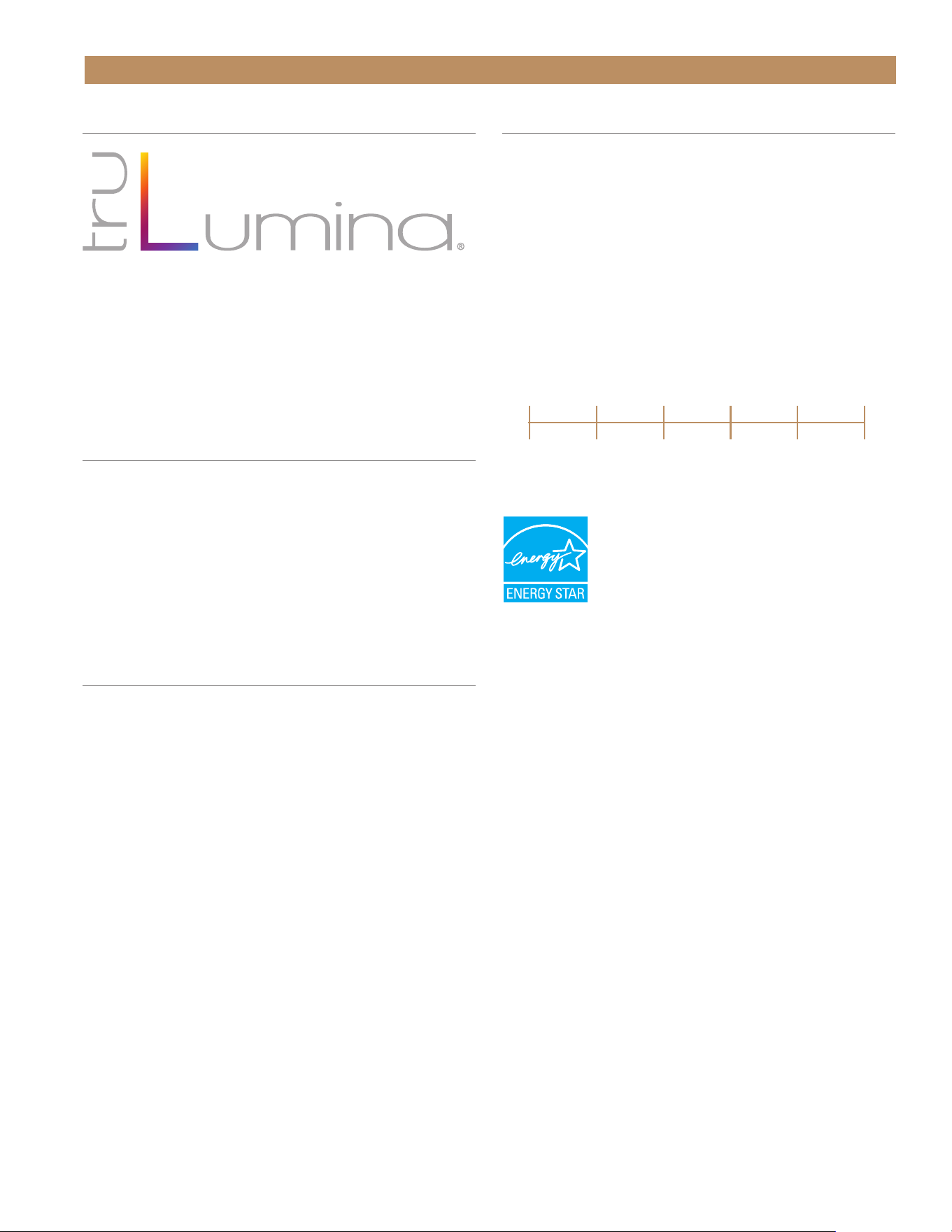
MAINTENANCE REMINDERS
Your ice machine will remind you when to perform the
automatic clean, when to clean condenser coil, and
when to replace your water filter.
Water Filter Reminder (flashing)
Cleaning Reminder (flashing)
Condenser Cleaning Reminder (flashing)
15" TRUE ICE
®
MACHINE INSTALL GUIDETEC_TM_155 | REV. H | EN 09/05/24 Page 41 of 68
BIN LIGHT
Press LIGHT to control the bin light.
• Press LIGHT repeatedly to cycle through the 14
preset designer light colors
• Press and hold LIGHT for 5 sec. to toggle the bin
light on or off.
ADJUST CUBE SIZE
The ice cube size is easily adjustable to meet
your usage.
The available cube sizes range from -6 (smallest) to
+6 (largest). The default is 0.
To adjust the cube size, press SIZE until the display
shows the desired setting.
ADJUST ICE LEVEL
The ice bin level determines how much ice will be in
the storage bin before the ice level sensor considers
full. The default setting is 100%. the level adjusts in
5% increments.
To adjust the ice level, press LEVEL until the display
shows the desired setting.
APPLIANCE OPERATION
FIG. 1.
Water quality setting range.
ADJUST FOR WATER QUALITY
The water quality setting allows your ice machine to
easily accommodate different levels of water quality /
hardness / scale. The available settings range from 0
(soft water / low scale) to 5 (hard water / high scale).
The default setting is 0. Please see fig. 1.
If you are unsure of your water quality, check your
water with a water quality test kit (not provided
by TRUE).
To adjust for water quality, press both LIGHT and SIZE.
0
Soft water/
low scale
5
Hard water/
high scale
1 2 3 4
TRUE RESIDENTIAL
®
TEC_TM_155 | REV. H | EN09/05/24Page 42 of 68 P#829867
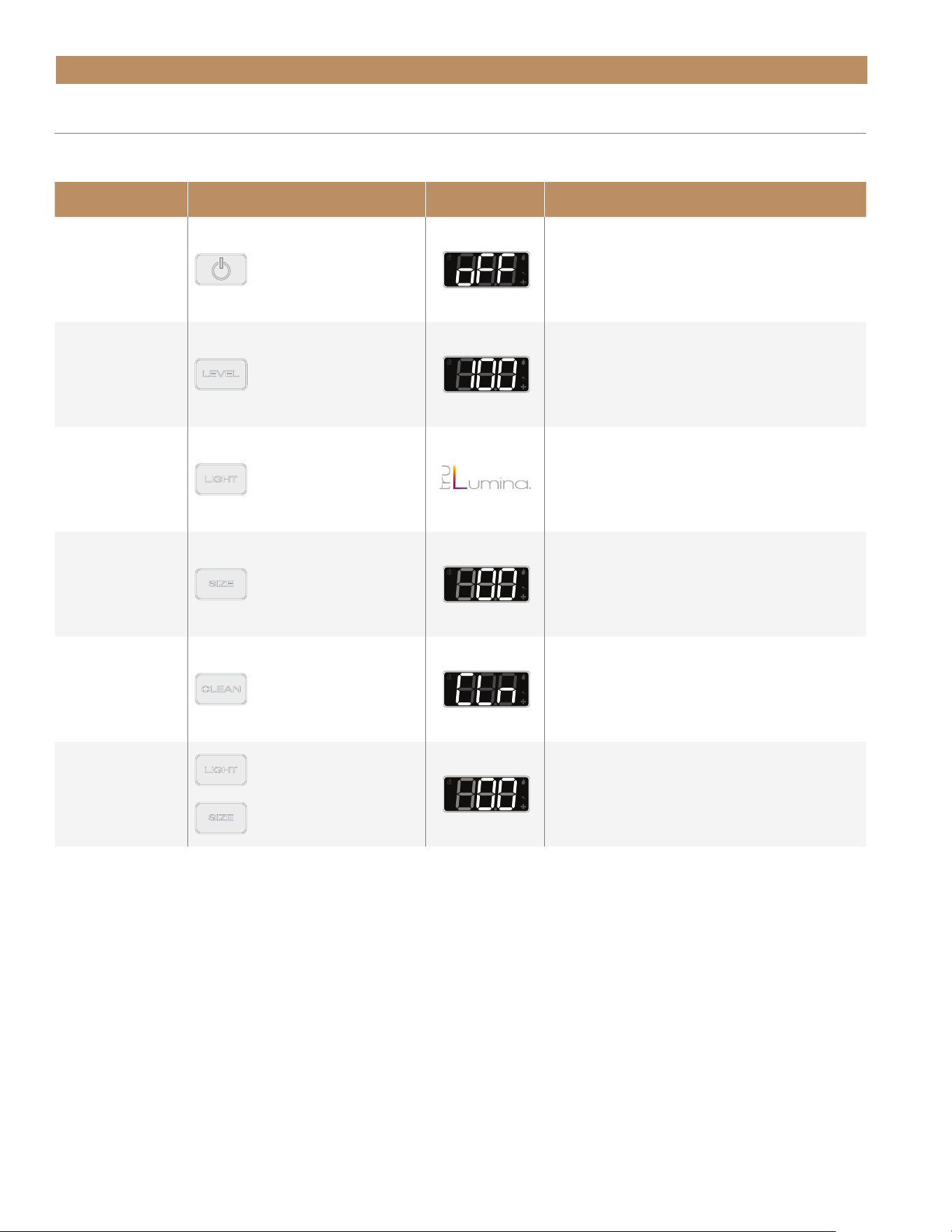
Command
Key Combination
Display Code Detailed Description
Power unit on / off
Press and hold POWER
button for 3 sec.
Turns the unit on and off.
Adjust ice level
Press LEVEL until the
display shows the
desired setting
Digitally adjust your "full" ice level. The ice
storage bin will be considered full at that value.
Default 100%.
Change light color
Press LIGHT. Switch between the 14 LED colors.
Adjust cube size
Press SIZE until the
display shows the
desired setting.
Adjusts cube size in increments from 1 to 6 for
larger cubes, then -6 to -1 for smaller cubes.
Ice size default is 0.
Clean Mode
Press and hold CLEAN
for 3 sec.
Press and hold CLEAN for 3 sec. to begin the
automatic cycle. Follow the prompts to select the
settings and start the cycle.
Adjust for water
quality
+
Press both LIGHT
and SIZE
Soft water / low scale setting is 0. Hard water /
high scale setting is 5. Adjusting the value
higher flushes more water between cycles,
resulting in clearer ice cubes.
APPLIANCE OPERATION
COMMANDS AND KEY COMBINATIONS
See the table below for commands and their corresponding key combinations.
15" TRUE ICE
®
MACHINE INSTALL GUIDETEC_TM_155 | REV. H | EN 09/05/24 Page 43 of 68
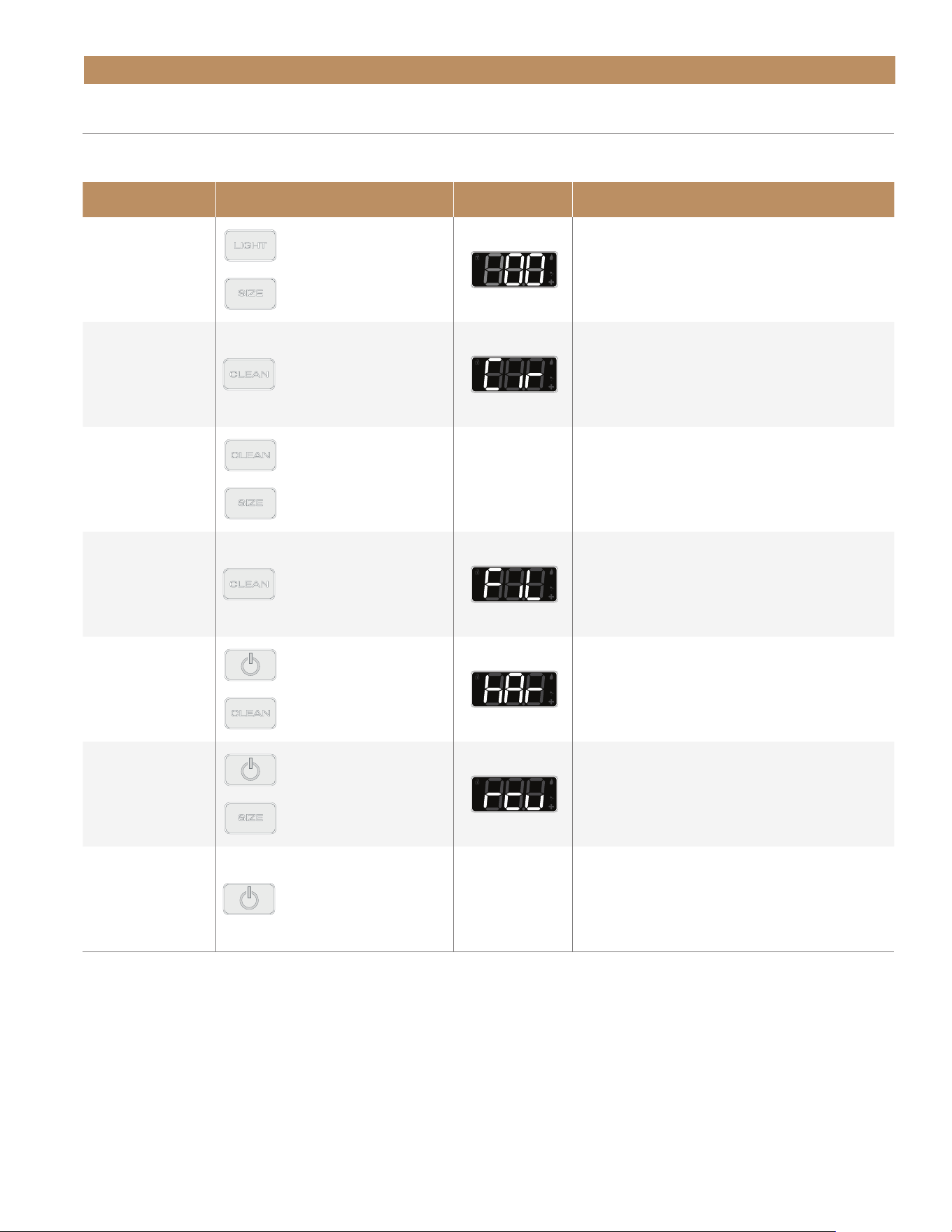
Command
Key Combination
Display Code Detailed Description
Reset Maintenance
Reminders
+
Press both LIGHT
and CLEAN.
Resets the condenser cleaning and water filter
replacement reminders. Both are reset when
pressed. See "Maintenance Reminders"
(pg. 40).
Circulate Pump Motor
Press CLEAN twice (2x).
In Standby: Circulates the Pump motor
(on / off).
Initiate Manual Drain
Pump Operation
+
Press and hold both
CLEAN and SIZE.
N/A
Bypasses the background operations and runs the
drain pump
only while buttons are held.
Initiate Manual Fill
Press CLEAN 3 times
(3x).
In Standby: Starts a Manual Fill Routine.
Initiate Manual
Harvest
+
Press and hold both
POWER and CLEAN
for 3 sec.
In Standby of Freeze: Starts a Manual Harvest
Cycle.
Initiate Reverse
Condenser Cleaning
+
Press and hold
POWER and SIZE
for 3 sec.
In Standby: Starts a Reverse Condenser
Cleaning.
Clear The Alarm
History
Press POWER twice (2x). N/A
Removes any alarms from the machine's memory.
COMMANDS AND KEY COMBINATIONS (CONT.)
See the table below for commands and their corresponding key combinations.
APPLIANCE OPERATION

NOTES
09/05/2024Page 44 of 68 TRUE RESIDENTIAL
®
TEC_TM_155 | REV. H | EN

09/05/2024 Page 45 of 68TEC_TM_155 | REV. H | EN
PRESERVE THE MOMENT
®
15" TRUE ICE
®
MACHINE INSTALL GUIDE
MAINTENANCE & SERVICING
GENERAL MAINTENANCE
ICE QUALITY TROUBLESHOOTING
WATER FILTER REPLACEMENT
CONDENSER COIL CLEANING
APPLIANCE CARE AND CLEANING
DESCALING & SANITIZING
INTERIOR COMPONENTS
WINTERIZING

TRUE RESIDENTIAL
®
TEC_TM_155 | REV. H | EN09/05/24Page 46 of 68 P#829867
MAINTENANCE & SERVICING
GENERAL MAINTENANCE
You are responsible for maintaining the ice machine
in accordance with the instructions in this manual.
Maintenance procedures are not covered by warranty.
True recommends performing the following
maintenance procedures a minimum of once every six
months to ensure reliable, trouble-free operation.
WARNING! IF YOU DO NOT
UNDERSTAND THE NECESSARY
PROCEDURES OR SAFETY
PRECAUTIONS, CALL YOUR LOCAL
TRUE SERVICE REPRESENTATIVE TO PERFORM
MAINTENANCE PROCEDURES FOR YOU.
WARNING! TAKE CARE DURING
OPERATION, MAINTENANCE, OR
REPAIRS TO AVOID CUTS OR
PINCHING FROM ANY APPLIANCE
PART/COMPONENT.
EXTERIOR CLEANING
Clean the exterior as needed. Follow stainless steel
cleaning recommendations (pg. 50) to ensure your
machine always looks like new.
DESCALING & SANITIZING
Descale and sanitize every 6 months. See "Descaling
& Sanitizing" (pg. 52).
WATER FILTER REPLACEMENT
Replace the water filter at least once every 12 months.
More frequent replacement may be required based on
your water quality. See "Water Filter Replacement"
(pg. 48)
CONDENSER COIL CLEANING
For optimum operation, clean your condenser coil
every 6 months. See "Condenser Coil Cleaning"
(pg. 49).
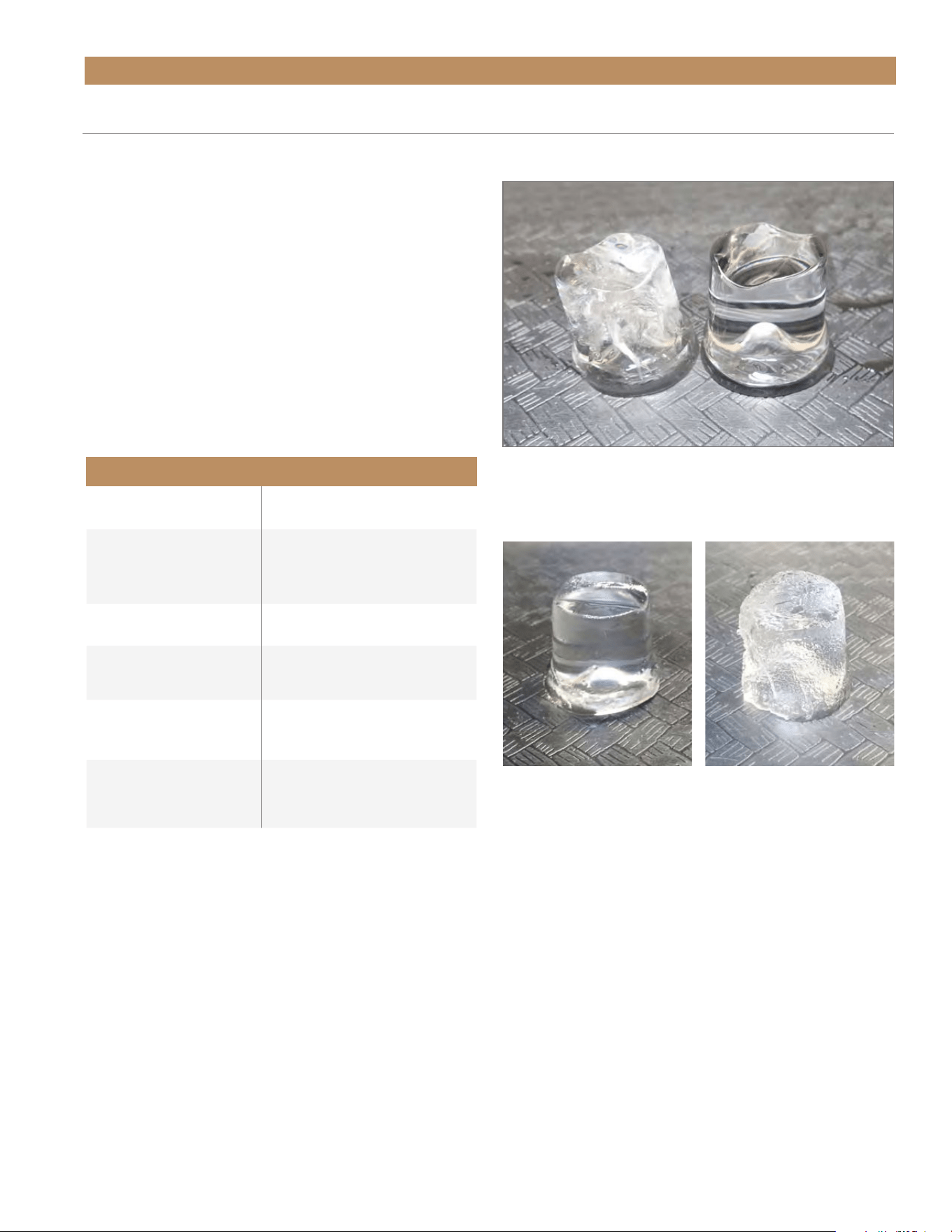
Maintenance Weekly Semi-Annual Annual After Prolonged Shutdown At Start-Up
Clean Appliance Exterior X X X X X
Sanitize Ice Machine X X X X
Descale Ice Machine X X X X
Clean Condenser Coil X X X
Change The Water Filter X X X
Check Ice Quality X X X X X
15" TRUE ICE
®
MACHINE INSTALL GUIDETEC_TM_155 | REV. H | EN 09/05/24 Page 47 of 68
MAINTENANCE & SERVICING
Your ice quality is only as good as the water supply
quality and routine maintenance. See water supply
requirements on pg. 27.
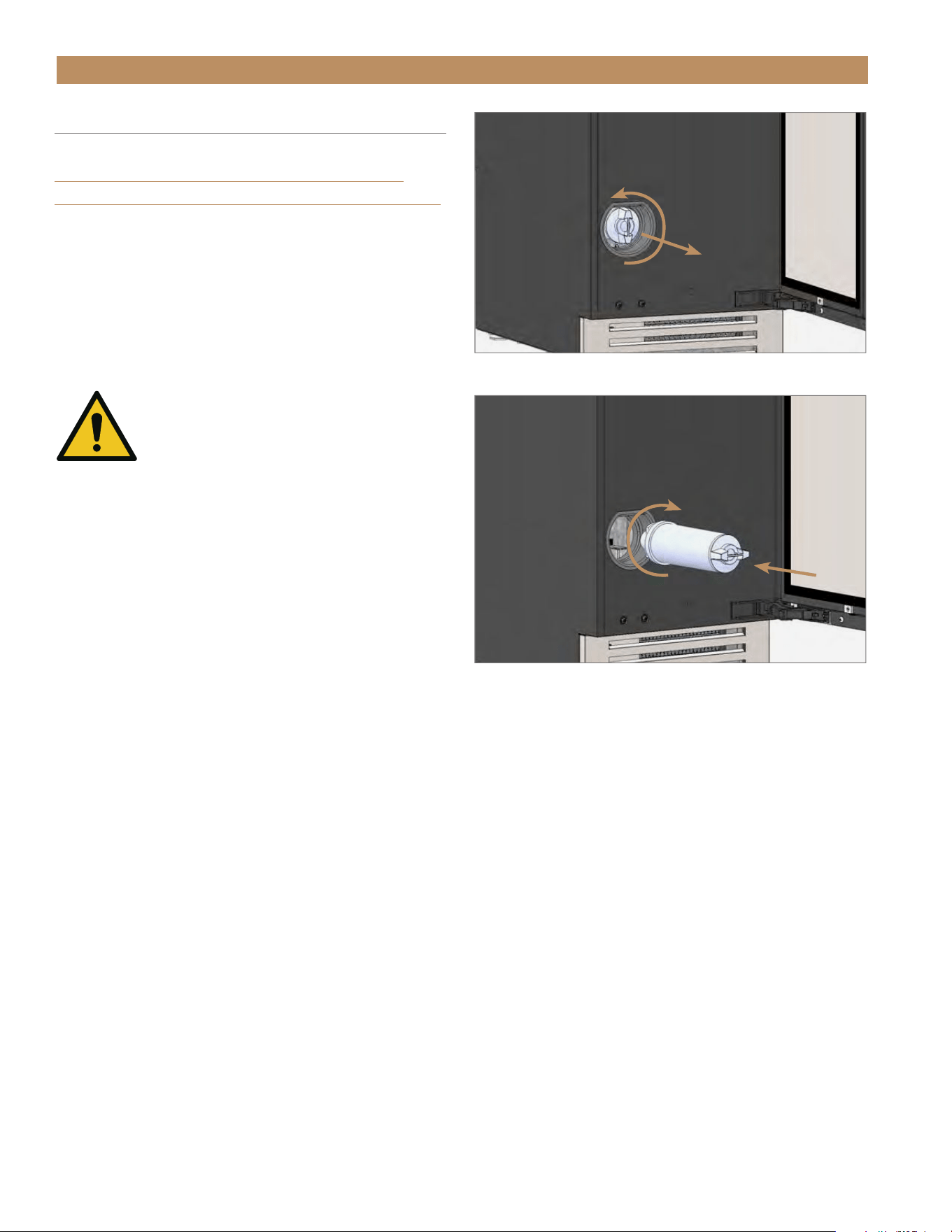
NOTE: THE ICE STORAGE BIN IS NOT
REFRIGERATED AND THE ICE WILL SLOWLY
MELT; ICE CUBES NATURALLY DETERIORATE
AND ROUGHEN AS THEY AGE. SEE
FIGS. 1 AND 2.
Hard water softened by a water softener can result
in white, mushy cubes that stick together. For other
potential causes (and solutions) for poor ice quality,
see the “Ice Quality Troubleshooting” table.
ICE QUALITY TROUBLESHOOTING
Ice Quality Troubleshooting
Potential Cause Solution
Dirty ice machine
Descale and sanitize ice
machine (recommended every
six (6) months)
Poor water filtration Replace water filter
Poor water supply quality
Have a qualified professional
test the water
Incorrect water
softener operation
Have a qualified professional
inspect water softener
Reverse osmosis system
requires maintenance
Have a qualified professional
inspect reverse osmosis system
FIG. 1.
Recently produced ice cubes may have cracks through the ice
(see left cube). This is normal ice production.
FIG. 2.
Ice deteriorates and roughens as it ages.
NEW ICE
AGED ICE
TRUE RESIDENTIAL
®
TEC_TM_155 | REV. H | EN09/05/24Page 48 of 68 P#829867
WATER FILTER REPLACEMENT
To order a replacement water filter, go to:
https://store.trueresidential.com/collections/
maintenance-1/products/replacement-water-filter
or contact our parts department at:
844-849-6226 or
TrueResidentialParts@TrueMfg.com.
NOTE: BE SURE TO RESET THE WATER FILTER
REPLACEMENT REMINDER AFTER REPLACING
THE WATER FILTER. SEE "MAINTENANCE
REMINDERS" (PG. 40).
CAUTION! DO NOT install the
water filter while the water supply
is pressurized. ALWAYS relieve the
water pressure before changing
the filter.
1. Press and hold CLEAN and LIGHT to reset the
water filter reminder.
2. If on, press and hold the power button until the
display shows oFF.
3. Press and hold the power button until the display
shows FiL. This relieves the water pressure.
4. Rotate the water filter counterclockwise and pull
the existing filter from the unit. See fig. 1.
NOTE: IF YOU HAVE DIFFICULTY REMOVING
THE WATER FILTER, TURN OFF THE WATER
SUPPLY.
5. Press and hold the power button until the display
shows oFF.
6. Locate the provided lubricant. Then, apply the
provided lubricant to both o-rings.
7. Insert the replacement water filter and rotate the
filter clockwise. See fig. 2.
8. If turned off, turn the water supply on.
MAINTENANCE & SERVICING
FIG. 1.
Rotate the existing water filter counterclockwise.
FIG. 2.
Insert the replacement water filter and rotate it clockwise.
15" TRUE ICE
®
MACHINE INSTALL GUIDETEC_TM_155 | REV. H | EN 09/05/24 Page 49 of 68
MAINTENANCE & SERVICING
FIG. 1.
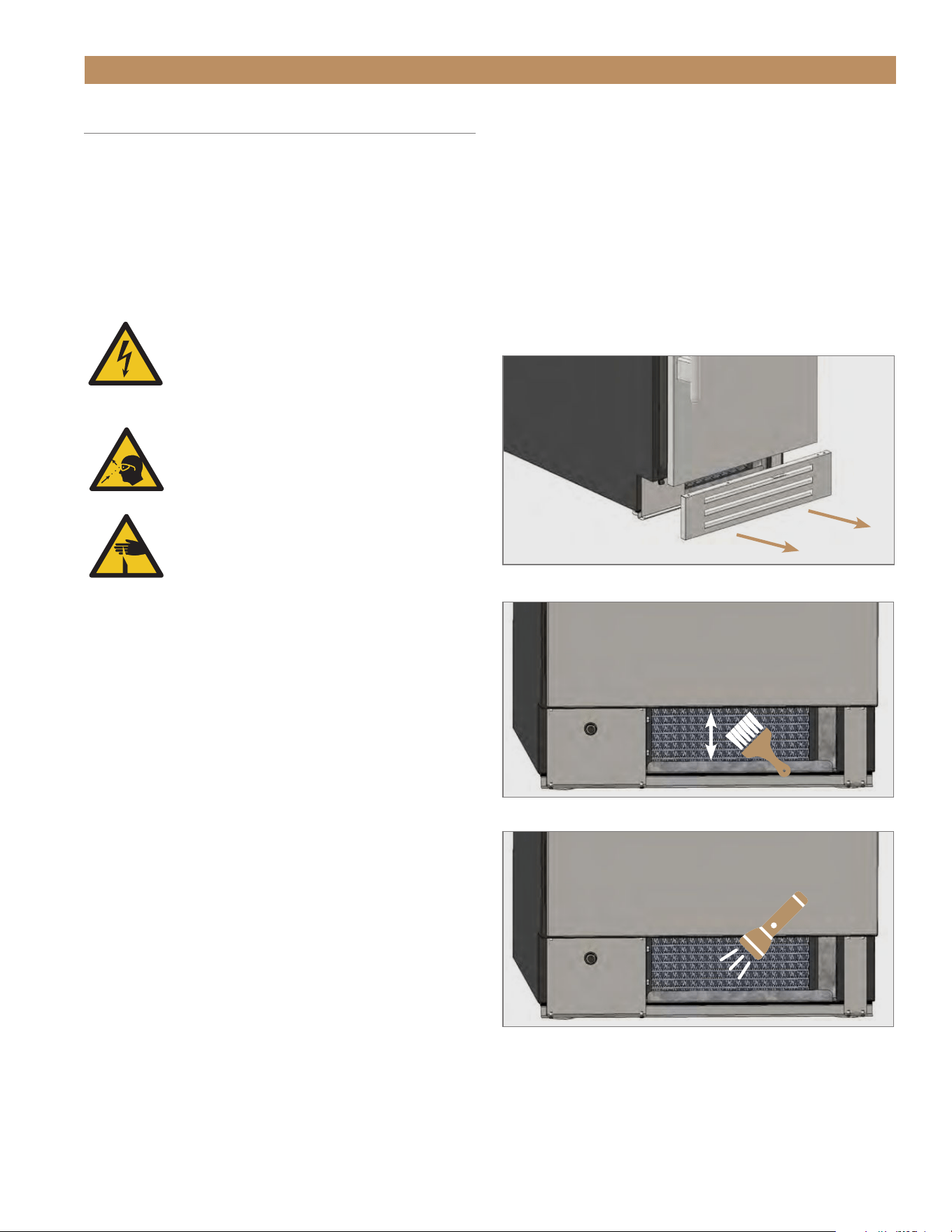
Pull the kickplate off the magnets.
CONDENSER COIL CLEANING
Keeping the condenser coil clean minimizes required
servicing and lowers electrical cost. Warranty does not
cover cleaning the condenser coil.
NOTE: BE SURE TO RESET THE CONDENSER
COIL CLEANING REMINDER AFTER CLEANING
THE CONDENSER COIL. SEE "MAINTENANCE
REMINDERS" (PG. 40).
WARNING! Electrical shock or burn
hazard. Unplug the unit or turn off the
power supply before proceeding. DO NOT
clean appliance with a pressure washer
or hose.
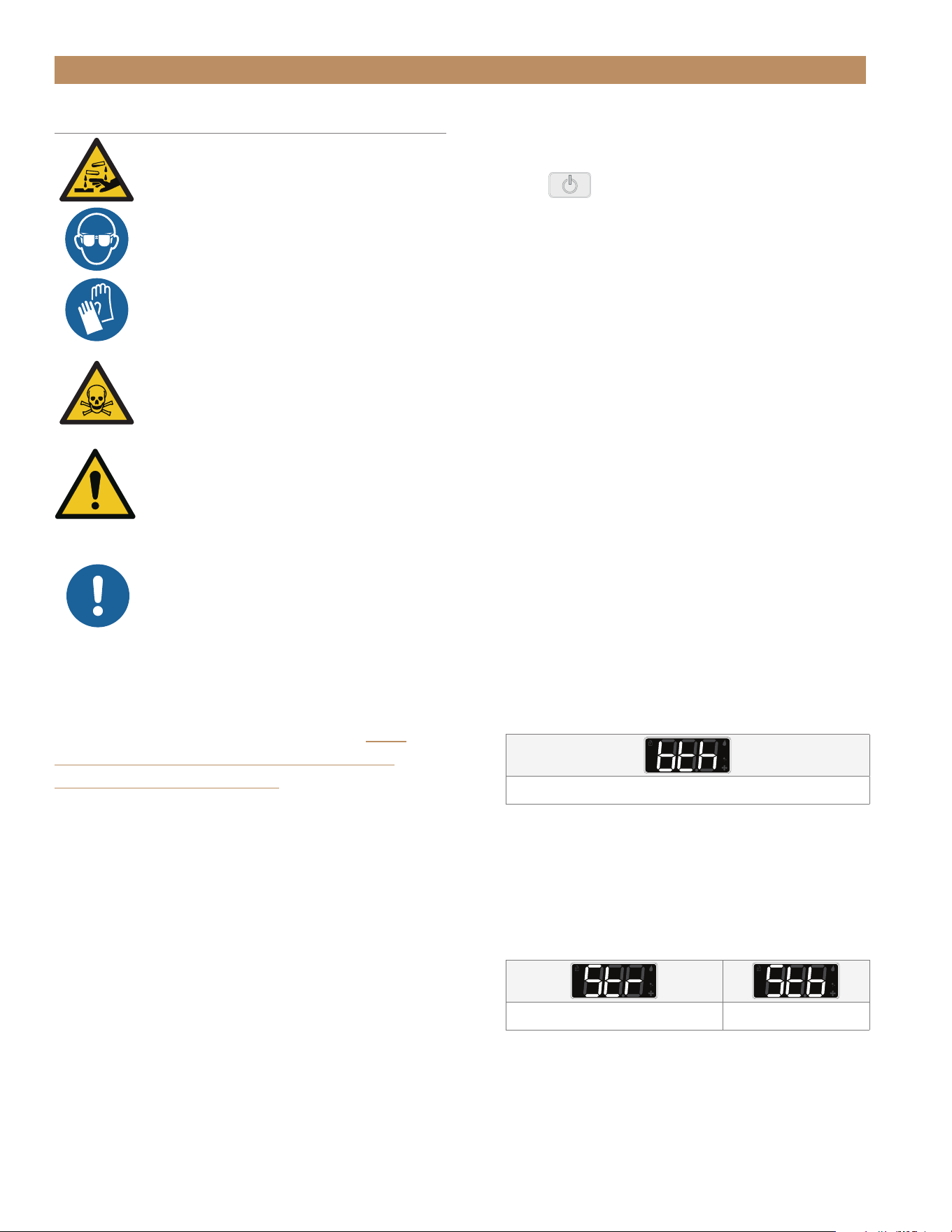
CAUTION! Risk of eye injury from debris.
Eye protection is recommended.
CAUTION! Coil fins are sharp. Gloves are
recommended.
REQUIRED TOOLS
Required tools include (but may not be limited to) the
following.
• Gloves
• Eye Protection
• Stiff Bristle Brush
• Vacuum Cleaner
• Flashlight
• Tank of Compressed Air
PROCEDURE
1. Unplug the unit or disconnect power.
2. Remove the kickplate. See fig. 1.
3. With a stiff bristle brush, carefully clean
accumulated dirt from the front coil fins.
4. With the dirt removed from the surface of the coil,
use a flashlight to verify you can see through the
coil. See fig. 3.
FIG. 2.
Never brush across the coil fins.
FIG. 3.
Verify all blockages have been removed.
5. If the view is clear, reinstall the kickplate, restore
power, and verify correct operation.
6. If the view is not clear, gently blow compressed air
or CO
2
through the coil until it is clean.
7. Carefully vacuum any dirt around the condensing
unit area.
8. Reinstall the kickplate, restore power, and verify
correct operation.

TRUE RESIDENTIAL
®
TEC_TM_155 | REV. H | EN09/05/24Page 50 of 68 P#829867
MAINTENANCE & SERVICING
NOTICE! DO NOT USE ANY STEEL
WOOL, ABRASIVE OR CHLORINE
BASED PRODUCTS TO CLEAN
STAINLESS STEEL SURFACES.
STAINLESS STEEL OPPONENTS
There are three basic things which can break down
your stainless steel’s passivity layer and allow corrosion
to form.
• Scratches from wire brushes, scrapers, and steel
pads are just a few examples of items that can be
abrasive to stainless steel’s surface.
• Deposits left on your stainless steel can leave spots.
You may have hard or soft water depending on what
part of the country you live in. Hard water can leave
spots. Hard water that is heated can leave deposits
if left to sit too long. These deposits can cause the
passive layer to break down and rust your stainless
steel. All deposits left from food prep or service
should be removed as soon as possible.
• Chlorides are present in table salt, food, and water.
Household and industrial cleaners are the worst
type of chlorides to use.
STAINLESS STEEL CLEANING & RESTORATION
Stainless steel cleaners must be free of phosphates,
chlorine, chloride, and ammonia.
TRUE offers environmentally-friendly cleaner and
polish through our True Store at https://store.
trueresidential.com/products/stainless-steel-clean-
polish-kit
CUSTOM PAINTED APPLIANCES & HARDWARE
For painted doors and other surfaces, use a mild
solution of soap and water with a soft microfiber cloth.
APPLIANCE CARE & CLEANING

15" TRUE ICE
®
MACHINE INSTALL GUIDETEC_TM_155 | REV. H | EN 09/05/24 Page 51 of 68
MAINTENANCE & SERVICING
8 TIPS TO HELP PREVENT RUST ON STAINLESS STEEL
• Maintain the Cleanliness of Your Equipment – Avoid
build-up of hard stains by cleaning frequently. Use
cleaners at the recommended strength (alkaline
chlorinated or non-chloride).
• Use the Correct Cleaning Tools – Use non-abrasive
tools when cleaning your stainless steel products.
The stainless steel’s passive layer will not be
harmed by soft cloths and plastic scouring pads.
• Clean Along Polishing Lines – Polishing lines ("grain")
are visible on some stainless steels. Always scrub
parallel to polishing lines when visible. Use a plastic
scouring pad or soft cloth when you cannot see the
grain.
• Use Alkaline, Alkaline-Chlorinated or Non-Chloride
Cleaners – While many traditional cleaners are
loaded with chlorides, the industry is providing an
ever increasing choice of non-chloride cleaners. If
you are not sure of your cleaner’s chloride content,
contact your cleaner supplier. If they tell you that
your present cleaner contains chlorides, ask if
they have an alternative. Avoid cleaners containing
quaternary salts, as they can attack stainless steel,
causing pitting and rusting.
• Rinse – When using chlorinated cleaners, you must
rinse and wipe dry immediately. It is better to wipe
standing cleaning agents and water as soon as
possible. Allow the stainless steel equipment to air
dry. Oxygen helps maintain the passivity film on
stainless steel.
• Never Use Hydrochloric Acid (Muriatic Acid) on
Stainless Steel – Even diluted, hydrochloric acid
can cause corrosion, pitting and stress corrosion
cracking of stainless steel.
• Water Treatment – To reduce deposits, soften hard
water when possible. Installation of certain filters
can remove corrosive and distasteful elements.
Salts in a properly maintained water softener can
also be to your advantage. Contact a treatment
specialist if you are not sure of the proper water
treatment.
• Regularly Restore & Passivate Stainless Steel –
Stainless steel gets its stainless properties from
the protective chromium oxides on its surface.
If these oxides are removed by scouring, or by
reaction with harmful chemicals, then the iron in
the steel is exposed and can begin to oxidize, or
rust. Passivation is a chemical process that removes
free iron and other contaminants from the surface
of stainless steel, allowing the protective chromium
oxides to re-form.
APPLIANCE CARE & CLEANING
TRUE RESIDENTIAL
®
TEC_TM_155 | REV. H | EN09/05/24Page 52 of 68 P#829867
MAINTENANCE & SERVICING
DESCALING & SANITIZING
DANGER! HIGHLY CORROSIVE
CLEANING CHEMICALS.
AVOID CONTACT WITH EYES AND
SKIN. WEAR EYE PROTECTION AND
CHEMICAL-RESISTANT RUBBER
GLOVES WHEN HANDLING.
WARNING! TOXIC MATERIAL
HAZARD!
DO NOT MIX DESCALER
WITH SANITIZER. HARMFUL
FUMES MAY BE GENERATED.
WARNING! AFTER CLEANING,
BEFORE CONSUMING ICE, LET THE
ICE MACHINE MAKE ICE FOR ONE
(1) HOUR AND DISCARD ALL THE
PRODUCED ICE.
ONLY USE TRUE MANUFACTURING
APPROVED ICE MACHINE DESCALER
AND SANITIZER TO DESCALE AND
SANITIZE YOUR ICE MACHINE.
ANY DAMAGE FROM USING OTHER DESCALER
OR SANITIZER WILL NOT BE COVERED UNDER
MANUFACTURER’S WARRANTY.
To order TRUE Ice Machine Descaler, go to store.
trueresidential.com/collections/maintenance-1/
products/ice-machine-descaler or contact
our parts department at 844-849-6226 or
TrueResidentialParts@TrueMfg.com.
You should fully descale and sanitize your ice machine
every six (6) months. Descaling involves removing key
ice machine parts, as well as rinsing the parts and the
inside of the machine with ice machine descaler.
Sanitizing the ice machine removes potential biological
contaminations and molding. For sanitizing only, see
“Sanitize” (pg. 55).
NOTE: IF NECESSARY, CANCEL THE CLEANING
CYCLE BY SELECTING
non AT THE FIRST
SELECTION MENU OR PRESSING AND HOLDING
POWER
DURING PRECLEAN.
REQUIRED TOOLS
Required tools include (but may not be limited to) the
following:
• Chemical-resistant rubber gloves
• Safety glasses
• Large container (1 gal. capacity minimum)
• TRUE ice machine descaler
• Chlorine Bleach (5.25% sodium hypochlorite
solution)
• Measuring spoons
• Soft-bristled brush
• Rags
• Spray bottle (optional)
DESCALE & SANITIZE
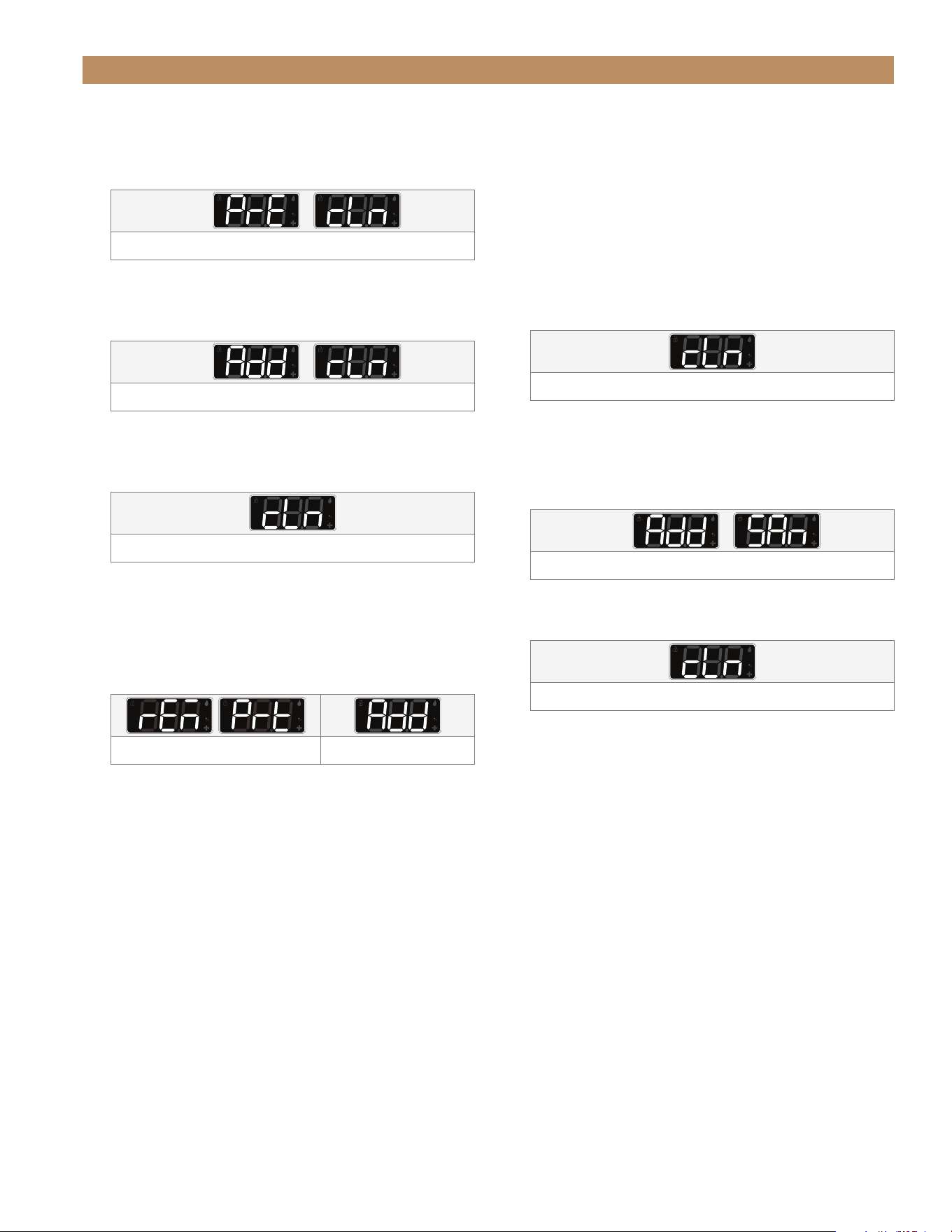
1. Press and hold CLEAN for three (3) sec. The
display will show dES.
2. Press
LIGHT and/or CLEAN until the display
shows bth.
Run both descale and sanitize cycles
3. With the display showing
bth, press the TRUE logo.
The display will show Str.
4. Press
LIGHT and/or CLEAN until the display shows
either Str (start) or Stb (standby). This determines
the ice machine’s action upon completion of the
cleaning cycle.
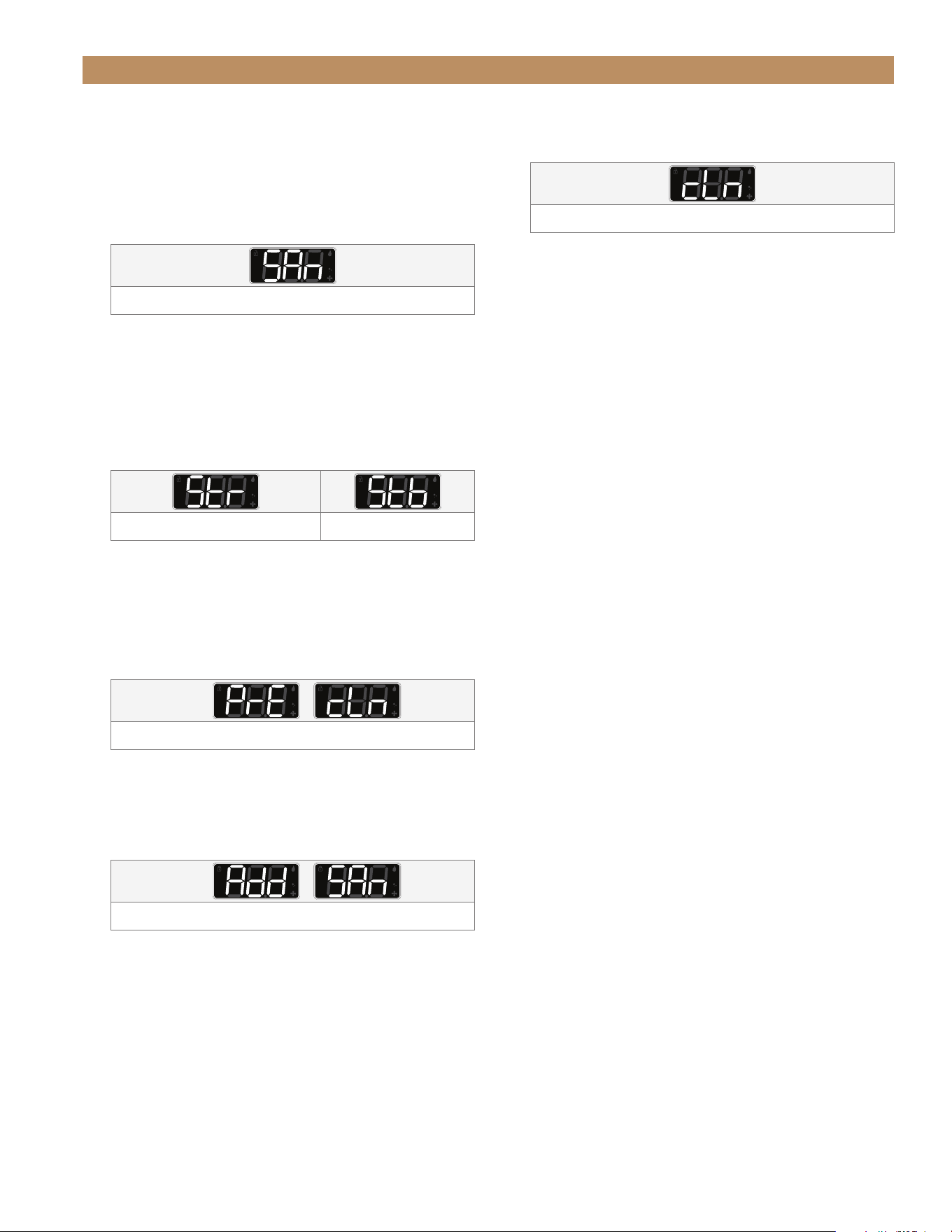
Machine will begin ice making sequence Machine will enter standby
5. With the display showing the desired action, press
the
TRUE logo. The selected cleaning cycle will
begin.
15" TRUE ICE
®
MACHINE INSTALL GUIDETEC_TM_155 | REV. H | EN 09/05/24 Page 53 of 68
MAINTENANCE & SERVICING
DESCALE & SANITIZE (CONT.)
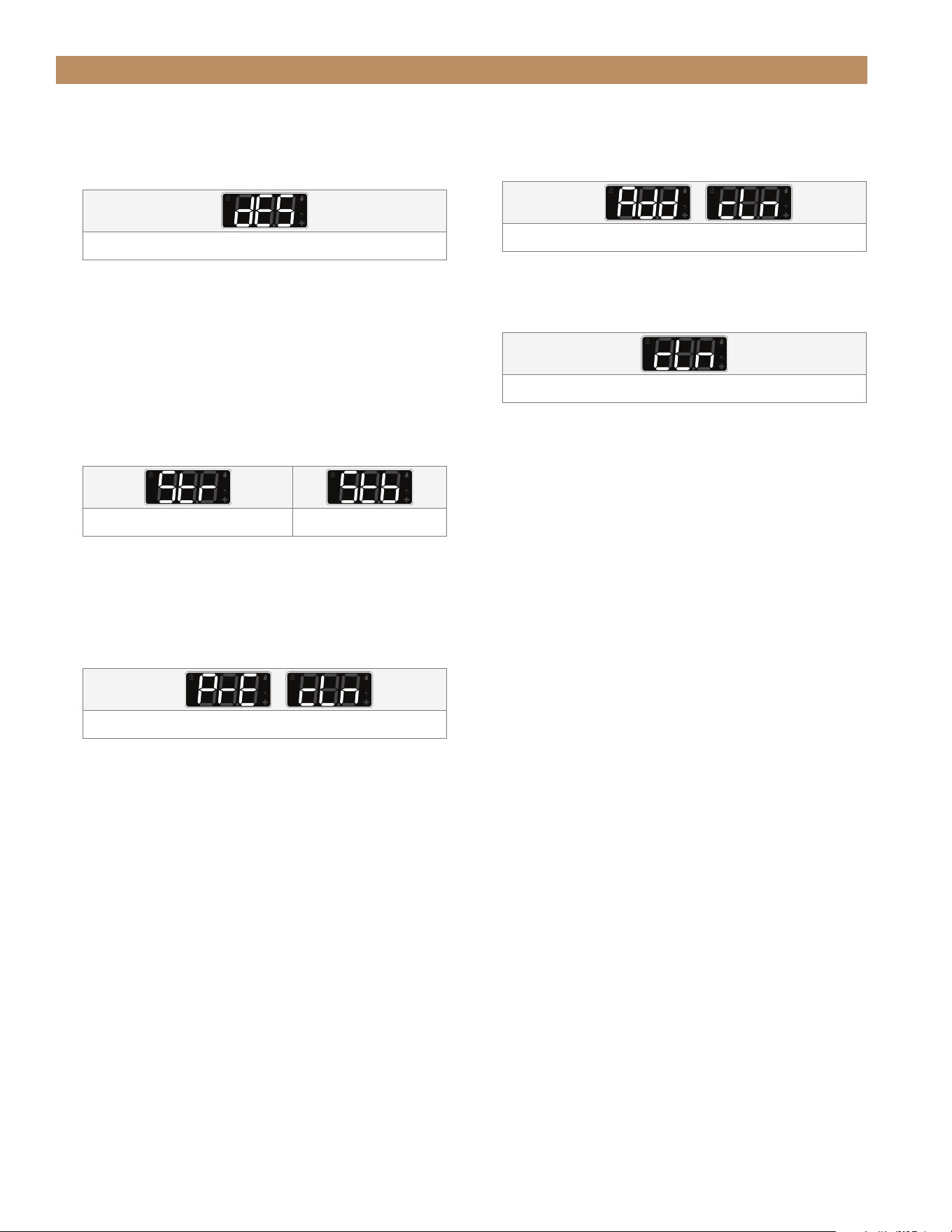
6. Wait while the display alternates between PrE and
CLn (preclean) for approximately three (3) min.
Preclean stage
7. When the display shows
Add cLn, pour 6 fl. oz.
of undiluted True Ice Machine Descaler into the
spray compartment behind the water shutters.
Add cleaning chemicals
8. After adding the descaler, press the
TRUE logo.
The automatic clean cycle will continue; the
display will show cLn.
While running the automatic cleaning cycle
9. Wait for the rinse and drain cycles to complete.
10. When the display shows
rEm Prt and Add, remove
the water shutters, ice guide, spray bar, water
supply hose, and pump clean-out cap. See
“Interior Components” (pg. 56).
Remove parts from the ice machine Reinstall parts (later step)
11. Mix a descaling solution of 10 fl. oz. undiluted
TRUE Ice Machine Descaler and 1 gal. of water.
NOTE: ALWAYS ADD THE CLEANING
CHEMICALS TO THE WATER; NEVER ADD
WATER TO THE CLEANING CHEMICALS.
12. With approximately half the descaling solution,
soak the removed parts in the descaling solution
for 10-15 min.
13. With the remaining descaling solution, descale the
ice storage bin, door’s interior, door gasket, and
spray compartment.
NOTE: TAKE CARE TO AVOID SPLASHING
OR SPILLING THE DESCALING SOLUTION
ONTO THE MACHINE’S EXTERIOR OR
SURROUNDINGS.
14. After letting the components soak, brush off any
built-up scale.
15. Rinse all descaled parts and areas with clean
water.
16. Discard remaining descaling solution.
17. Reinstall the descaled interior components.
See “Interior Components” (pg. 56). Press the
TRUE logo to advance the clean cycle. The display
will show cLn.
While running the automatic cleaning cycle
18. Wait for the rinse and drain cycles to complete.
19. When the display shows
Add SAn, pour 2 tsp
chlorine bleach (5.25% hypochlorite solution) into
the spray compartment behind the water shutters.
Add cleaning chemicals
20. Press the
TRUE logo. The automatic clean cycle
will continue.
While running the automatic cleaning cycle
21. Mix 1.5 fl. oz. (3 tbsp) of chlorine bleach (5.25%
hypochlorite solution) with 1 gal. of warm water.
22. Sanitize the ice scoop, interior surfaces of the
ice machine, the ice storage bin, and the door’s
interior.
DO NOT rinse the sanitized areas.
NOTE: TRUE RECOMMENDS USING A SPRAY
BOTTLE FOR HARD-TO-REACH AREAS.
23. Pour the remaining sanitizing solution into the ice
storage bin. This will sanitize the drain system.
24. Wait for the sanitizing cycle to finish. Rinse and
dry any exterior areas where cleaning solutions
may have spilled.
25. After the automatic clean cycle is complete,
discard the ice the ice machine has produced
in one (1) hour.
TRUE RESIDENTIAL
®
TEC_TM_155 | REV. H | EN09/05/24Page 54 of 68 P#829867
MAINTENANCE & SERVICING
DESCALE
1. Press and hold CLEAN for three (3) sec.
The display will show dES.
Run descale cycle only
2. Press
LIGHT and/or CLEAN until the display shows
dES.
3. With the display showing
dES, press the TRUE logo
The display will show Str.
4. Press
LIGHT and/or CLEAN until the display shows
either Str (start) or Stb (standby). This determines
the ice machine’s action upon completion of the
cleaning cycle.
Machine will begin ice making sequence Machine will enter standby
5. With the display showing the desired action, press
the
TRUE logo. The selected cleaning cycle will
begin.
6. Wait while the display alternates between
PrE and
CLn (preclean) for approximately three (3) min.
Preclean stage
7. When the display shows Add cLn, pour 6 fl. oz.
of undiluted True Ice Machine Descaler into the
spray compartment behind the water shutters.
Add cleaning chemicals
8. After adding the descaler, press the
TRUE logo.
The automatic clean cycle will continue; the
display will show cLn.
While running the automatic cleaning cycle
9. Wait for the rinse and drain cycles to complete.
10. After the automatic clean cycle is complete,
discard the ice the ice machine has produced in
one (1) hour.
15" TRUE ICE
®
MACHINE INSTALL GUIDETEC_TM_155 | REV. H | EN 09/05/24 Page 55 of 68
MAINTENANCE & SERVICING
SANITIZE
1. Press and hold CLEAN for three (3) sec. The
display will show dES.
2. Press
LIGHT and/or CLEAN until the display shows
SAn.
Run sanitize cycle only
3. With the display showing
SAn, press the TRUE
logo. The display will show Str.
4. Press
LIGHT and/or CLEAN until the display shows
either Str (start) or Stb (standby). This determines
the ice machine’s action upon completion of the
cleaning cycle.
Machine will begin ice making sequence Machine will enter standby
5. With the display showing the desired action, press
the
TRUE logo. The selected cleaning cycle will
begin.
6. Wait while the display alternates between
PrE and
CLn (preclean) for approximately three (3) min.
Preclean stage
7. Wait for the rinse and drain cycles to complete.
8. When the display shows
Add SAn, pour 2 tsp
chlorine bleach (5.25% hypochlorite solution) into
the spray compartment behind the water shutters.
Add cleaning chemicals
9. Press the TRUE logo. The automatic clean cycle
will continue.
While running the automatic cleaning cycle
10. Mix 1.5 fl. oz. (3 tbsp) of chlorine bleach (5.25%
hypochlorite solution) with 1 gal. of warm water.
11. Sanitize the ice scoop, interior surfaces of the
ice machine, the ice storage bin, and the door’s
interior.
DO NOT rinse the sanitized areas.
NOTE: TRUE RECOMMENDS USING A SPRAY
BOTTLE FOR HARD-TO-REACH AREAS.
12. Pour the remaining sanitizing solution into the ice
storage bin. This will sanitize the drain system.
13. Wait for the sanitizing cycle to finish. Rinse and
dry any exterior areas where cleaning solutions
may have spilled.
14. After the automatic clean cycle is complete,
discard the ice the ice machine has produced in
one (1) hour.
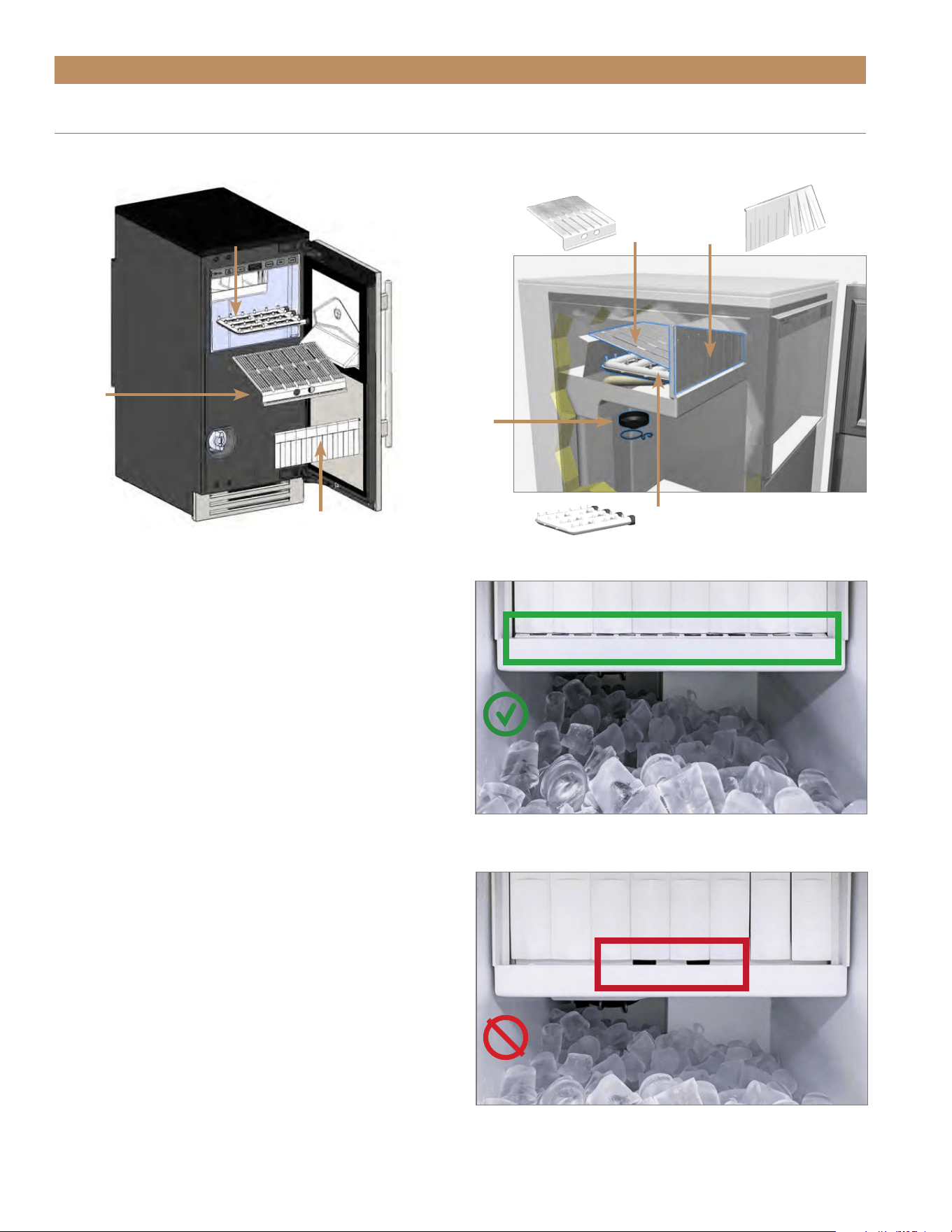
TRUE RESIDENTIAL
®
TEC_TM_155 | REV. H | EN09/05/24Page 56 of 68 P#829867
MAINTENANCE & SERVICING
WATER SHUTTER
The water shutter hangs in front of the spray bar and
ice guide. It prevents spraying water from escaping the
evaporator compartment.
REMOVAL
Lift the shutter rod's ends from the recesses in the
sidewall.
INSTALLATION
Insert the shutter rod's ends into the recesses in the
sidewall. To be correctly installed, the water shutter
must–
• Hang from a shutter rod fully seated in the recessed
end supports.
• Conceal the ice guide finger holes.
INCORRECT.
Ice guide finger holes are visible.
CORRECT.
Ice guide finger holes are hidden; ice guide slotted holes are
visible.
INTERIOR COMPONENTS
See the following for the removal and correct installation of the interior components.
Water
Shutters
Spray
Bar
Ice
Guide
Water
Shutters
Spray
Bar
Pump
Clean-Out
Cap
Ice
Guide
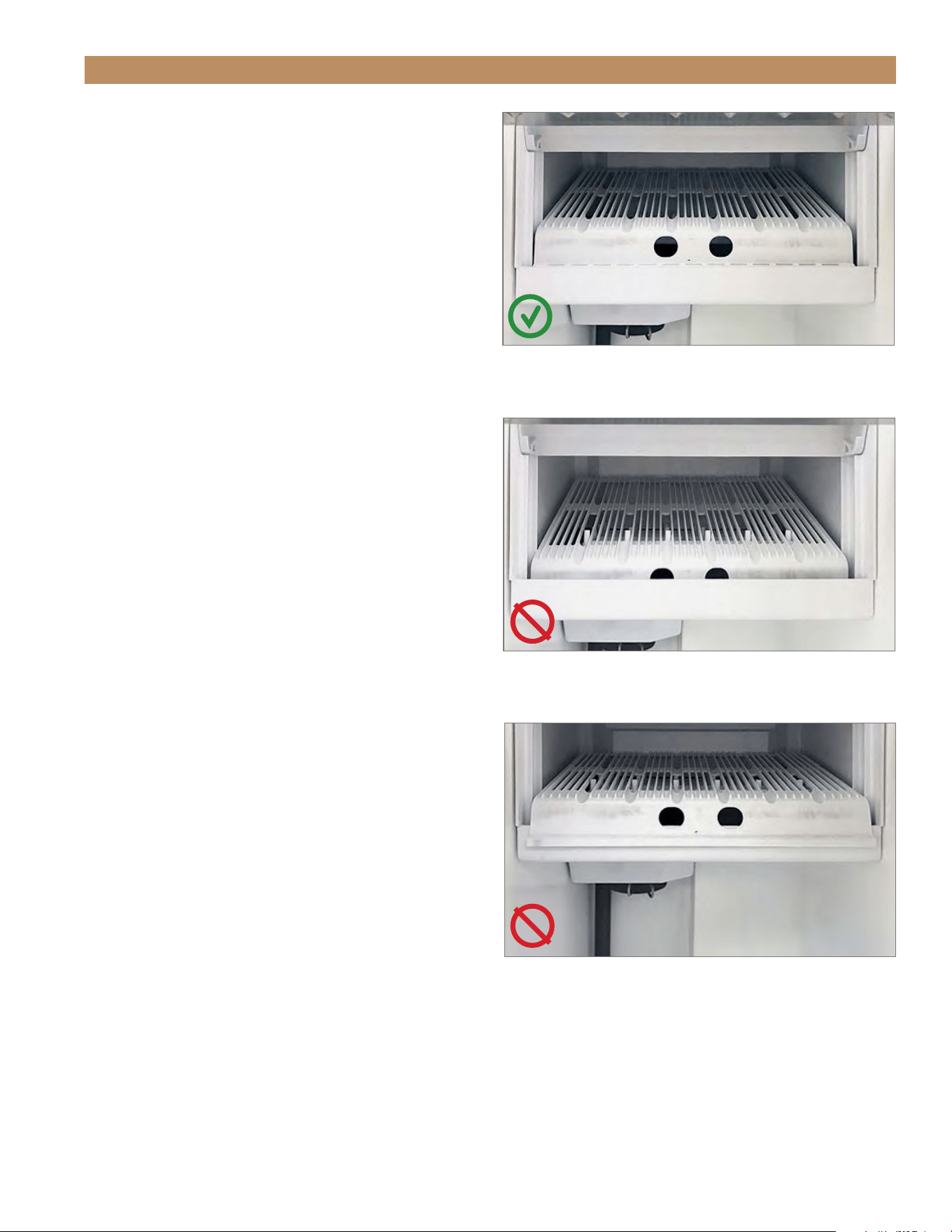
15" TRUE ICE
®
MACHINE INSTALL GUIDETEC_TM_155 | REV. H | EN 09/05/24 Page 57 of 68
MAINTENANCE & SERVICING
INCORRECT.
Ice guide positioned too far inside the water trough.
INCORRECT.
Ice guide positioned outside the water trough.
CORRECT.
Ice guide positioned in the guide channel and flush against the
back side of the water trough opening.
ICE GUIDE
The ice guide sits over the spray nozzles and directs
falling ice into the bin.
REMOVAL
Lift the front of the guide and pull the guide forward.
INSTALLATION
Position the ice guide over the spray bar. To be
correctly installed, the ice guide must–
• Be firmly positioned over the spray bar.
• Sit with its front edge inside the water trough.
• Have its slots aligned with the spray nozzles.
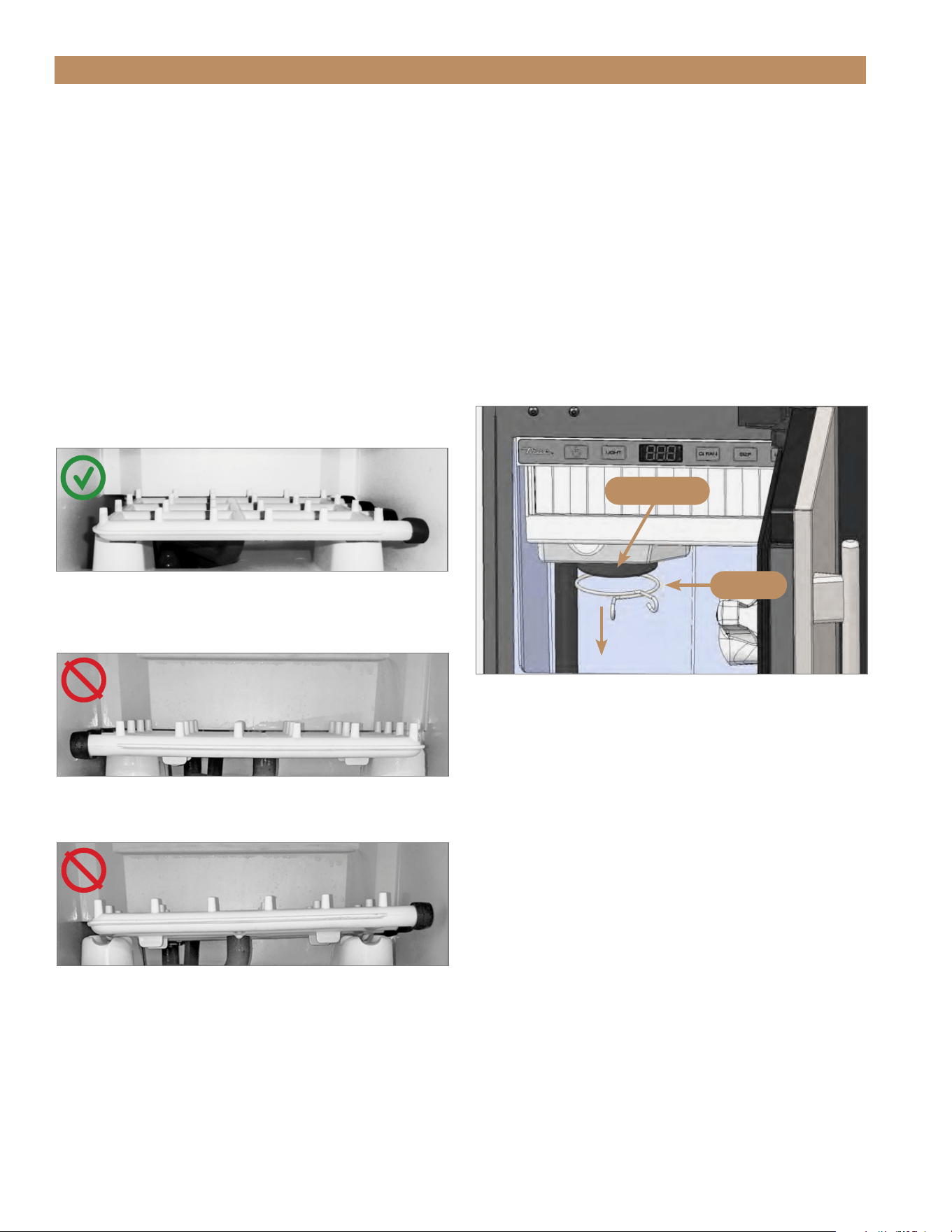
TRUE RESIDENTIAL
®
TEC_TM_155 | REV. H | EN09/05/24Page 58 of 68 P#829867
INCORRECT.
Spray bar positioned with clean-out caps on the left.
INCORRECT.
Spray bar is not fully seated or level.
CORRECT.
Spray bar is fully seated, level, and positioned with the clean-
out caps on the right..
SPRAY BAR
REMOVAL
Carefully pull the spray bar from the water supply
hose.
INSTALLATION
The spray bar, located in the water trough, supplies
water to the individual ice cube cups. To be correctly
installed, the spray bar must–
• Be positioned with the clean-out caps on the right.
• Sit fully seated and horizontally level.
MAINTENANCE & SERVICING
PUMP CLEAN-OUT CAP
REMOVAL
1. Remove the pump clamp. See fig. 1.
2. Pull the clean-out cap down.
INSTALLATION
1. Slide the clean-out cap over the hole beneath
the pump.
2. Reinstall the pump cap clamp.
FIG. 1.
Pump cap and clamp locations.
Pump cap
Clamp

15" TRUE ICE
®
MACHINE INSTALL GUIDETEC_TM_155 | REV. H | EN 09/05/24 Page 59 of 68
MAINTENANCE & SERVICING
RESTARTING
Use the following instructions to restart your ice
machine after winterization:
1. Install a new water filter in the unit. See "Water
Filter Installation" (pg. 32).
2. Reconnect the incoming water line and turn on
the water supply.
3. Plug in the unit or turn on the circuit breaker.
4. Sanitize the ice machine. See "Sanitize"
(pg. 55).
5. Press power to start ice making.
NOTE: THE FRESH WATER THAT IS
INTRODUCED DURING SANITIZING AND START-
UP WILL FLUSH THE PROPYLENE GLYCOL
DOWN THE DRAIN.
WINTERIZING
NOTICE: DO NOT ALLOW THE ICE
MACHINE TO BE EXPOSED TO
TEMPERATURES BELOW 32˚F (0˚C)
WITHOUT WINTERIZING THE UNIT
AS THIS WILL CAUSE ANY WATER IN THE
MACHINE TO FREEZE. FAILURES CAUSED BY
EXPOSURE TO FREEZING TEMPERATURES ARE
NOT COVERED BY THE WARRANTY.
USE THE FOLLOWING INSTRUCTIONS TO
PREPARE YOUR ICE MACHINE FOR STORAGE
OR WINTERIZATION:
1. Descale and sanitize the ice machine. See
"Descaling & Sanitizing" (pg. 52).
2. Turn off the water supply to the machine.
3. Disconnect the incoming water line from the back
of the unit.
4. Remove and discard the water filter. See "Water
Filter Replacement" step 1 (pg. 48).
5. Press power until the display shows FiL.
Leave the machine on for 20 sec., and then press
power to turn the unit off.
6. Drain the evaporator compartment by removing the
pump clean-out cap. See "Pump Clean-out Cap"
(pg. 58).
7. Pour 1 gallon of propylene glycol (RV antifreeze)
into the bin drain to fill the drain pump.
8. Once the drain pump shuts off and all the
propylene glycol is drained, unplug the unit or turn
off the circuit breaker.
9. Wipe down the interior bin with a dry clean cloth.
10. Re-install the pump clean-out cap.

NOTES
09/05/2024Page 60 of 68 TRUE RESIDENTIAL
®
TEC_TM_155 | REV. H | EN

09/05/2024 Page 61 of 68TEC_TM_155 | REV. H | EN
PRESERVE THE MOMENT
®
15" TRUE ICE
®
MACHINE INSTALL GUIDE
SERVICING & REPLACING COMPONENTS
REVERSING DOOR
DOOR ADJUSTMENT
HANDLE TIGHTENING
CONTACT US
SERVICING, REPLACING COMPONENTS & ADJUSTMENTS

TRUE RESIDENTIAL
®
TEC_TM_155 | REV. H | EN09/05/24Page 62 of 68 P#829867
SERVICING, REPLACING COMPONENTS & ADJUSTMENTS
SERVICING & REPLACING
COMPONENTS
NOTE: ANY APPLIANCE ADJUSTMENTS ARE TO
BE MADE AFTER THE APPLIANCE HAS BEEN
VERIFIED LEVEL AND PROPERLY SUPPORTED.
• Replace component parts with original equipment
manufacturer (OEM) components.
• Contact the dealer or our parts department at
844-849-6226 or TrueResidentialParts@truemfg.com
for replacement parts.
• Have a licensed service provider service your unit
to minimize the risk of possible ignition due to
incorrect parts or improper service and to ensure
the operator’s health and safety.
• Unplug the ice machine before cleaning or making
any repairs. Powering off an electronic control may
not remove power from all components
(e.g., light circuits, perimeter heaters, and
evaporator fans).
REVERSING DOOR
The new TUI-15 models come with articulating, soft-
close hinges. The hinges can be installed on either the
left-hand or right-hand orientation.
To order additional spacers of NSF cover screw caps,
contact our parts department at 844-849-6226 or
TrueResidentialParts@TrueMfg.com.
REQUIRED TOOLS
Required tools include (but may not be limited to) the
following:
• 1/8" Hex Head Allen Wrench
• Putty Knife (if NSF cover present)
PROCEDURE
NOTE: FIGURES SHOW CONVERTING A RIGHT-
HINGED DOOR TO A LEFT-HINGED DOOR.
1. Loosen the hinge bolts and remove the door.
See fig. 1.
2. If NSF Cover is present, carefully pry screw caps
from the cover to access the door bracket screws.
See fig. 2.
3. If present, remove the door skin. See fig. 3.
4. Remove the existing spacer. See fig. 3.
5. Remove the hinge assemblies from the door
assembly. See fig. 4.
6. Shift the door brackets to the opposite side.
See fig. 5.
7. Install the bottom hinge at the top and the top
hinge on the bottom. See figs. 6 and 7.
8. Install the door skin. If present, reinstall the NSF
cover screw caps.
9. Move the remaining door hardware to the opposite
sides. See fig. 8.
10. Install the reversed door. Be sure to fully tighten
the hinge screws.
NOTE: BE SURE TO INSTALL THE CORRECT
SPACER FOR YOUR DOOR ORIENTATION.
11. Verify the door closes correctly and the gasket
seals without gaps. Adjust the door as needed.
See "Door Adjustment" (pg. 65).
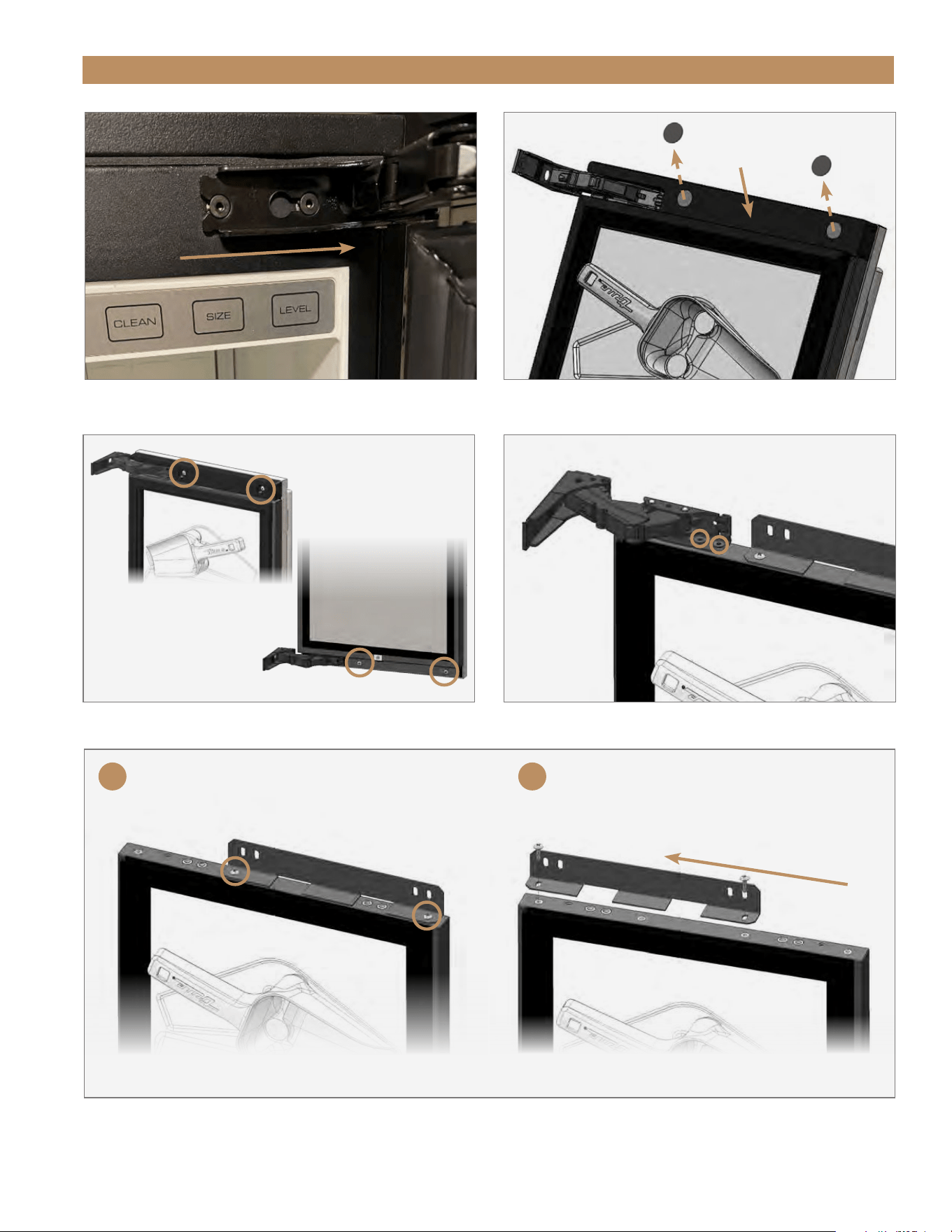
15" TRUE ICE
®
MACHINE INSTALL GUIDETEC_TM_155 | REV. H | EN 09/05/24 Page 63 of 68
FIG. 1.
Slide the door off the hinge bolts through the keyhole slots.
SERVICING, REPLACING COMPONENTS & ADJUSTMENTS
FIG. 3.
Spacer and door bracket screw locations.
FIG. 4.
Hinge door screw locations. Top hinge shown.
FIG. 5.
Top Bracket shown. A: Door Skin bracket screw locations. B: Move the door skin bracket to the opposite side.
FIG. 2.
Remove the NSF cover screw caps.
NSF Cover
Screw cap
Screw cap
Bottom
Top
A B
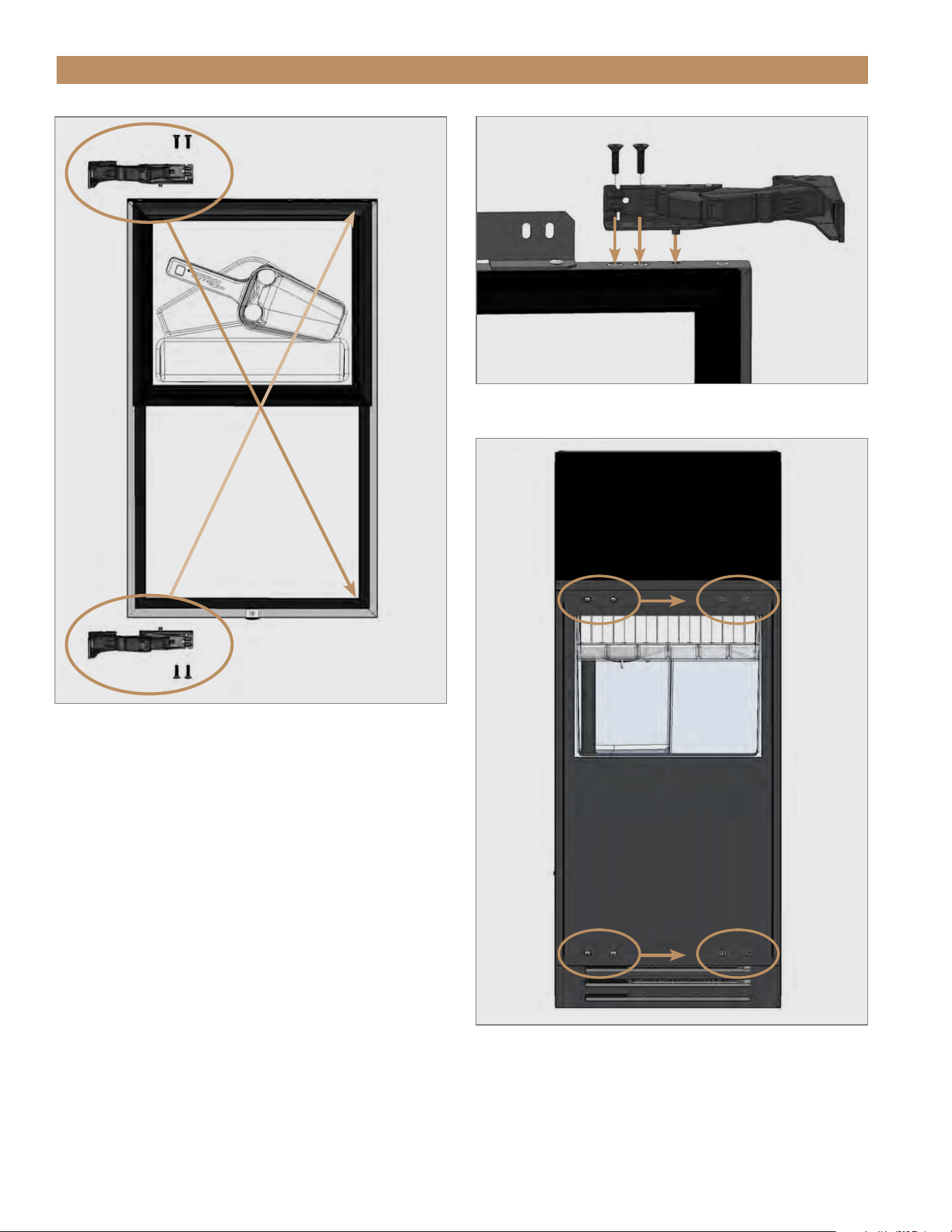
TRUE RESIDENTIAL
®
TEC_TM_155 | REV. H | EN09/05/24Page 64 of 68 P#829867
SERVICING, REPLACING COMPONENTS & ADJUSTMENTS
FIG. 6.
Switch the top and bottom hinge assemblies with each other.
FIG. 8.
Move the remaining door hardware to the opposite side.
FIG. 7.
Install the hinge assembly.
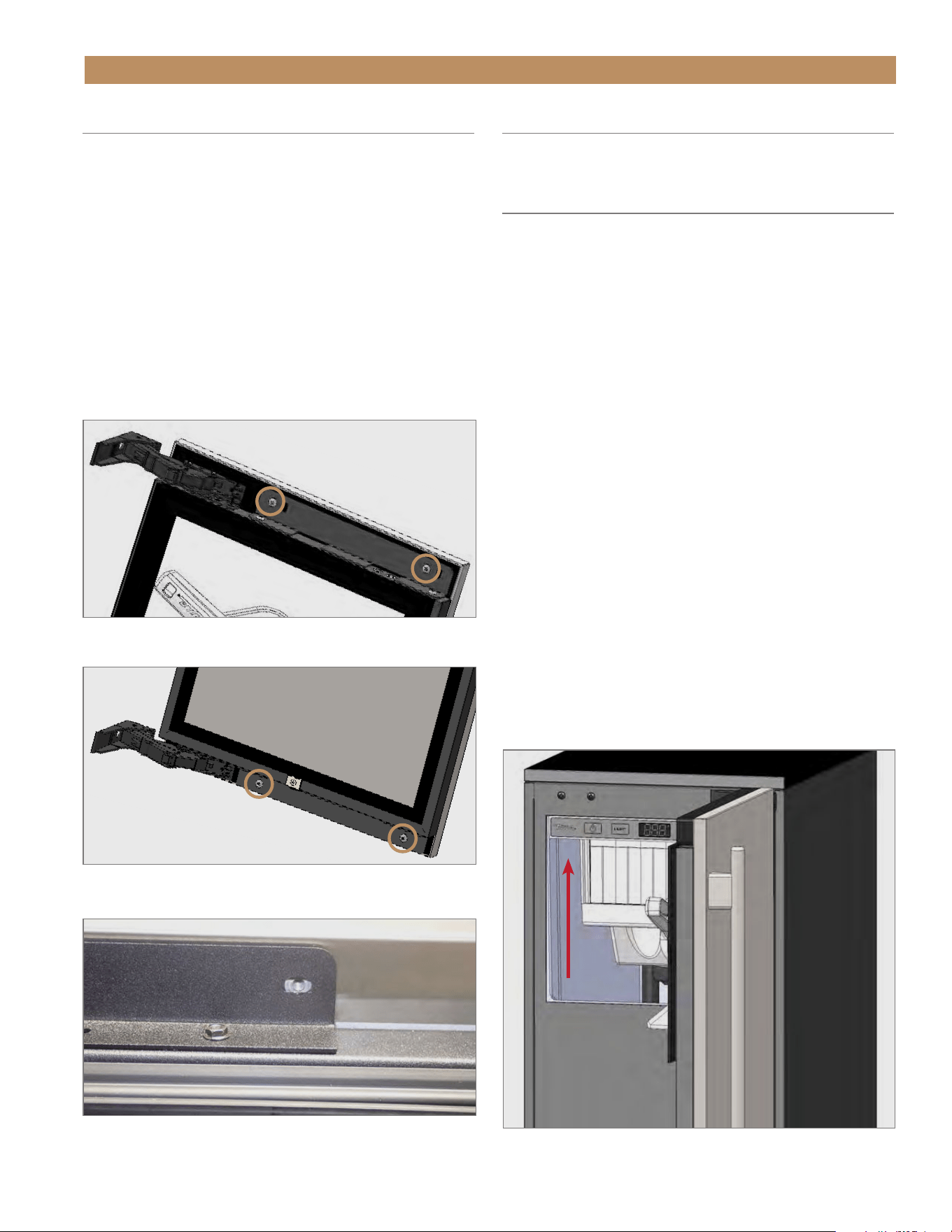
15" TRUE ICE
®
MACHINE INSTALL GUIDETEC_TM_155 | REV. H | EN 09/05/24 Page 65 of 68
SERVICING, REPLACING COMPONENTS & ADJUSTMENTS
DOOR ADJUSTMENT
Door skin bracket screw holes are slotted to assist with
door adjustment. See figs. 1–3.
1. If applicable, remove the NSF cover screw caps.
2. Loosen the door skin bracket and spacer screws.
See figs. 1–3.
3. Adjust the door skin / panel as needed.
4. Tighten the door skin bracket and spacer screws.
5. If applicable, reinstall NSF cover screw caps.
FIG. 1.
Spacer / top door bracket screw locations.
FIG. 2.
Bottom door bracket screw locations.
FIG. 3.
Bracket screw holes are slotted for easy adjustment. Screw
removed for illustration.
HANDLE TIGHTENING
Tighten the handle with a 3/32" Allen wrench.
CONTACT US
For any questions about installation, please contact
your TRUE dealer or TRUE Residential Technical
Support. Please have your model and serial number
(see serial label location below) available so we can
better assist you with your service- or parts-related
inquires.
Customer Service
Phone: 888-616-8783
info@true-residential.com
Warranty Department
Phone: 844-849-6179
TrueResidentialWarranty@truemfg.com
Technical Support Department
Phone: 844-746-9423
TrueResidentialService@truemfg.com
SERIAL LABEL LOCATION
Your serial label contains important information such
as your model and serial number. The label is located
on the upper left interior wall.

09/05/2024Page 66 of 68 TRUE RESIDENTIAL
®
TEC_TM_155 | REV. H | EN
TRUE RESIDENTIAL
®
SERIES LIMITED WARRANTY STATEMENT
TO VIEW AND DOWNLOAD THE WARRANTY INFORMATION
FOR USA & CANADA, PLEASE SCAN THE QR CODE BELOW.

15" TRUE ICE
®
MACHINE INSTALL GUIDETEC_TM_155 | REV. H | EN 09/05/24 Page 67 of 68
NOTES
09/05/24TRUE RESIDENTIAL
®
TEC_TM_155 | REV. H | EN
BP_238073_09.24
CONTACT US
true-residential.com
636.240.2400
|
toll free 888.616.8783
PRESERVE THE MOMENT
®