10033246 10033247
Subi 88 MKII
Keyboard
Teclado
Clavier
Tastiera

3
Sehr geehrter Kunde,
wir gratulieren Ihnen zum Erwerb Ihres Gerätes. Lesen Sie die folgenden
Hinweise sorgfältig durch und befolgen Sie diese, um möglichen Schäden
vorzubeugen. Für Schäden, die durch Missachtung der Hinweise und
unsachgemäßen Gebrauch entstehen, übernehmen wir keine Haftung.
Scannen Sie den QR-Code, um Zugriff auf die aktuellste Bedienungsanleitung
und weitere Informationen rund um das Produkt zu erhalten.
INHALT
Technische Daten 3
Sicherheitshinweise 4
Tasten und Anschlüsse 5
Montage 8
Inbetriebnahme und Bedienung 10
Funktionsmenü 19
Liedertabelle 26
Stiltabelle 28
Spezielle Entsorgungshinweise für Verbraucher in Deutschland 31
Hinweise zur Entsorgung 33
Hersteller & Importeur (UK) 33
TECHNISCHE DATEN
Artikelnummer 10033246 10033247
Tastatur 88-Tasten-Standard-Pianoklaviatur
Anzeige LED-Anzeige
Klangfarben 360 verschiedene Instrumente
Stile 160 Stile
Demo 80 Demolieder
Effekte Anschlagsempndlichkeit, Hall, Chor, Dual, Aufteilen, Funktionsmenü,
Soundkonsole
Aufnahme Einzelspur, mehrere Spuren, kombinierte Aufnahme
Begleitung Start/Stop, Synchronisieren, Einfüllen, Geschwindigkeit
Akkord ABC-Auto-Akkord
Pedale Linkes Pedal (Pianopedal), rechtes Pedal (Haltepedal)
Externe Anschlüsse USB (MP3), USB (MIDI), MIDI IN/OUT
Netzgerät 220 V~, 12-15 V
Spannungseingang 12-15 V , 2-3 A

4
SICHERHEITSHINWEISE
• Lesen Sie sich die Bedienungsanleitung vor der Verwendung des Geräts aufmerksam durch, um Sach-
und/oder Personenschäden zu vermeiden.
• Schließen Sie das Gerät ausschließlich mit dem im Lieferumfang enthaltenen Netzstromadapter an eine
Steckdose an. Durch die Verwendung von anderen Netzstromadaptern könnte Ihr Gerät beschädigt
werden.
• Öffnen Sie keinesfalls das Gehäuse des Instruments.
• Versuchen Sie nicht, dass Gerät selbst auseinanderzubauen oder Teile im Geräteinneren selbst
auszutauschen. Sollten während der Verwendung Fehlfunktionen auftreten, verwenden Sie das Gerät
nicht weiter und setzen Sie sich mit dem Kundendienst in Verbindung.
• Stellen Sie das Gerät nicht an Orten ab, wo es extremem Staub, Vibrationen, niedrigen oder hohen
Temperaturen (wie beispielsweise Orte mit direkter Sonneneinstrahlung, in der Nähe von Wärmequellen,
im Auto, wenn dieses in der Sonne steht etc.), da dadurch sowohl das äußere Erscheinungsbild so wie die
inneren Gerätekomponenten beschädigt werden könnten.
• Stellen Sie das Gerät niemals auf instabilen oder unebenen Flächen ab, da es dadurch umfallen/
herunterfallen und beschädigt werden könnte.
• Stellen Sie niemals mit Flüssigkeit gefüllte Behälter auf dem Gerät ab, da diese Umfallen könnten und die
Flüssigkeit dadurch ins Geräteinnere gelangen könnte.
• Drehen Sie, vor dem Einschalten des Geräts, die Lautstärke auf 0 herunter. Passen Sie die Lautstärke
anschließend stufenweise an, damit die Lautsprecher nicht beschädigt werden.
• Drehen Sie die Lautstärke niemals auf „Maximum“, um zu verhindern, dass Sie durch das Spielen einen
Hörverlust erleiden.
• Wenden Sie niemals extreme Gewalt gegen das Gerät, die Spieltasten, den Einschaltknopf und die
Anschlüsse an und stellen Sie auch keine schweren Objekte auf dem Gerät ab.
• Das Gerät muss von einem Erwachsenen ausgepackt werden, da durch die Verpackungsmaterialien für
Babys und Kleinkinder Erstickungsgefahr besteht. Lagern Sie die Plastikverpackung an einem sicheren
Ort oder entsorgen Sie diese fachgerecht.
• Die kleinen Komponenten im Inneren können für Kinder unter 3 Jahren eine Gefahr darstellen und sind
für diese nicht geeignet.
• Die technischen Eigenschaften des Geräts können ohne Vorankündigung geändert werden.
• Dieses Gerät kann in allen Klimazonen, außer in tropischem Klima, verwendet werden.
• Das Gerät kann nur in Gegenden verwendet werden, welche unterhalb von 2000 Metern über dem
Meeresspiegel liegen.
• Achten Sie darauf, dass keine Wassertropfen oder Spritzwasser auf den Netzstromstecker oder das
Netzstromkabel gelangen.
5
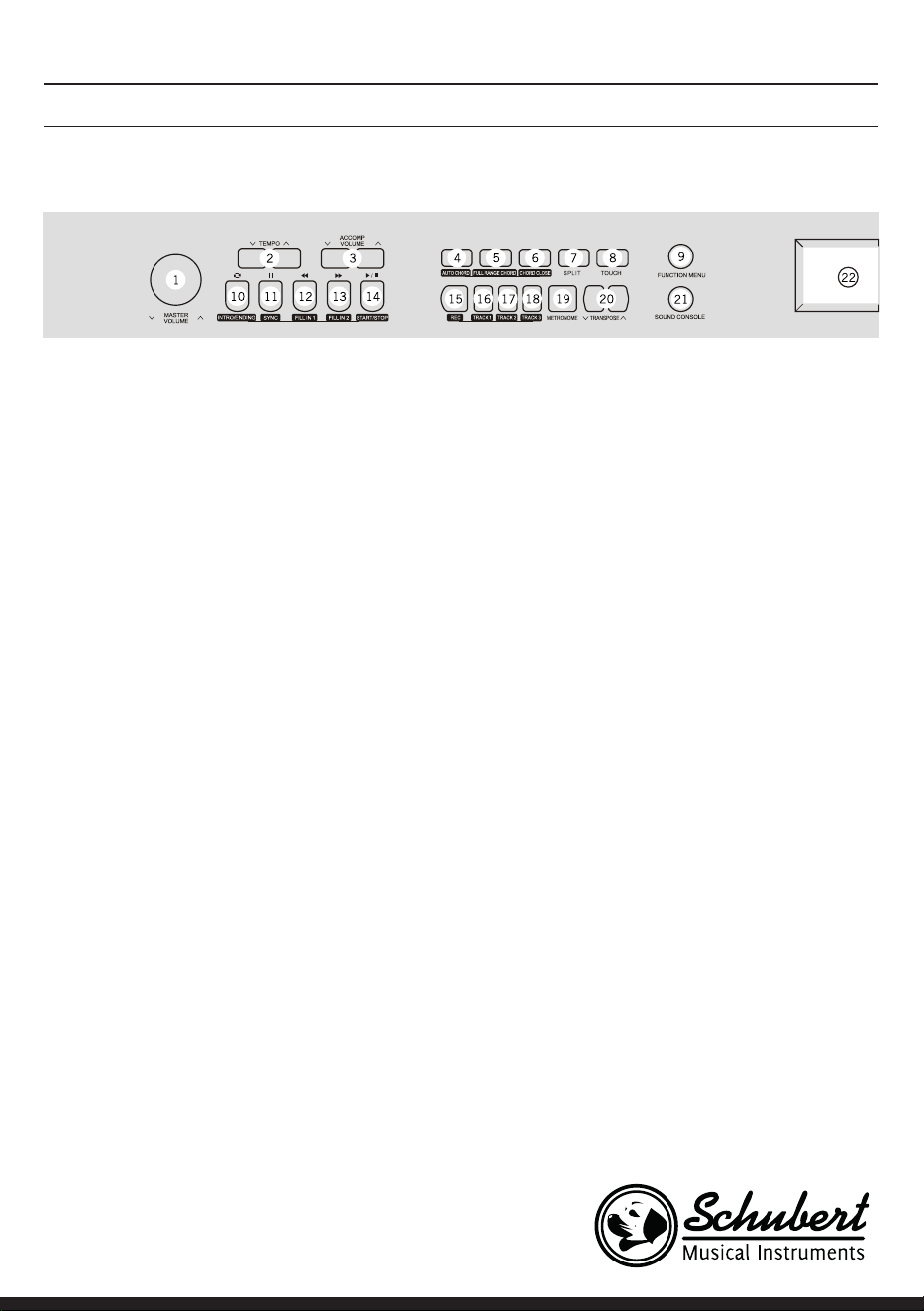
1 MASTER VOLUME – Hauptlautstärkeregler
2 TEMPO ∨/∧– Das aktuelle Tempo anpassen
3 ACCOMP VOLUME ∨/∧ Begleitlautstärke
4 AUTO CHORD – Automatischer Akkord
5 FULL RANGE CHORD – Alle Akkorde
6 CHORD CLOSE - Akkordschluß
7 SPLIT – Teilen
8 TOUCH – Tastatur-Touchkurve wählen
9 FUNCTION MENU - Funktionsmenü
Im Liedmodus
10 Anfang/ Ende eines Liedabsatzes festlegen
11 Pausetaste
12 Schnell zurückspulen
13 Schnell vorspulen
14 Liedwiedergabe starten/ stoppen
Im Stilmodus
10 Intro/ Ending – Das Intro/ Ende der
automatischen Begleitung abspielen
11 SYNC – Synchronisierungsfunktion öffnen/
schließen
12 FILL IN 1 – Variation 1 einfügen
13 FILL IN 2 – Variation 2 einfügen
14 START/ STOP – Die Wiedergabe der
Begleitung starten/ stoppen
15 REC – Aufnahmefunktion starten
16 TRACK 1 – Für die Aufnahme Spur 1
auswählen
17 TRACK 2 – Für die Aufnahme Spur 2
auswählen
18 TRACK 3 – Für die Aufnahme Spur 3
auswählen
19 METRONOME – Taktvorgabefunktion öffnen/
schließen
20 TRANSPONSE ∨/∧ – Transponierung
21 SOUND CONSOLE – Das Schaltpultmenü
öffnen
22 LCD-Bildschirm – zeigt allen wichtigen
Informationen an
TASTEN UND ANSCHLÜSSE
Linkes Bedienfeld
6
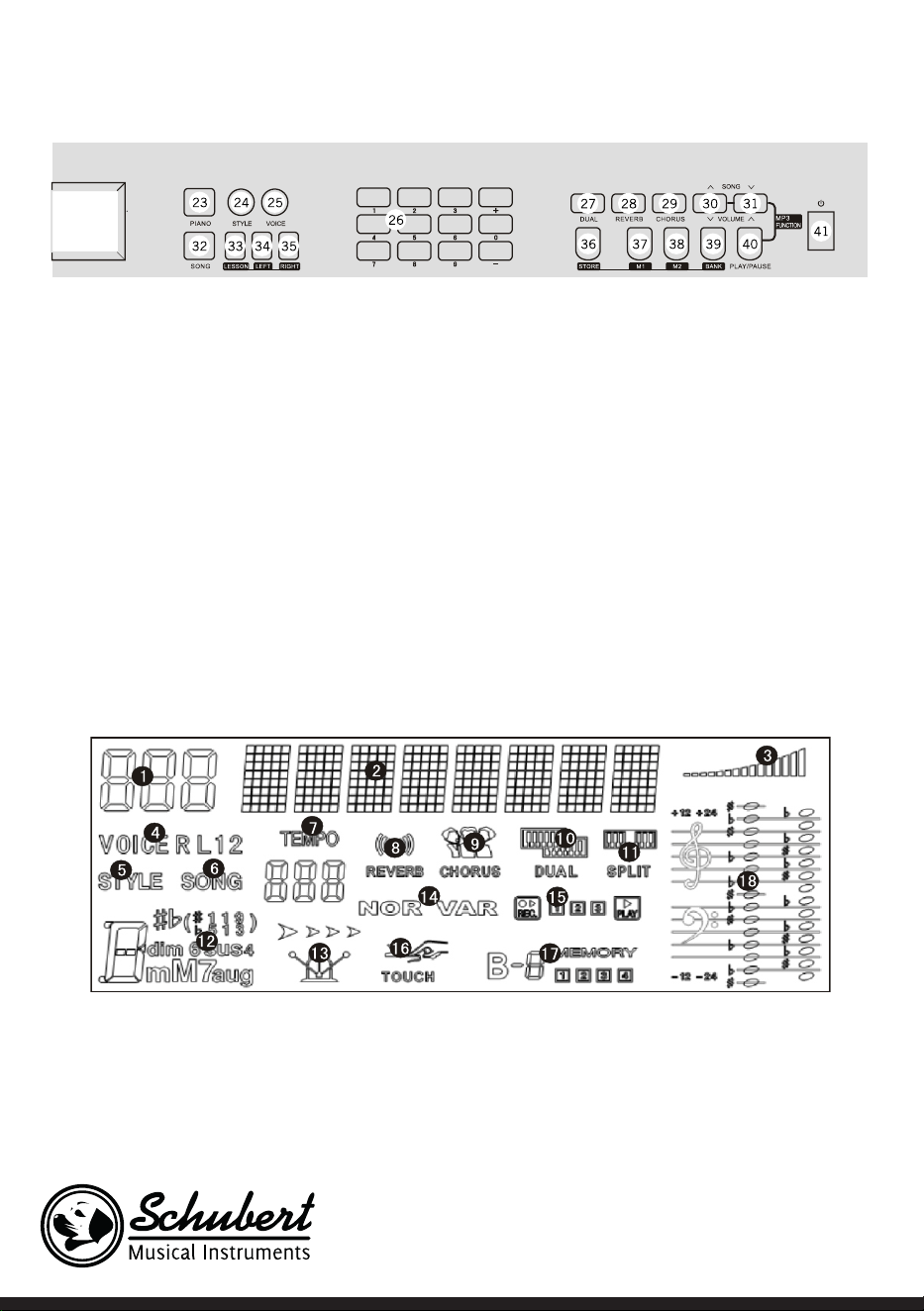
Rechtes Bedienfeld
23 PIANO – Klavierspielmodus öffnen/schließen
24 STYLE – Stilfunktionen öffnen
25 VOICE – Klangfunktionen öffnen
26 Ziffern +/-– Einstellungen anpassen
27 DUAL – Zweistimmigkeit ein/aus
28 REVERB - Halleffekt
29 CHORUS – Chor
30 SONG/ VOLUME – Zum nächsten MP3-Lied
wechseln/ Lautstärke im MP3-Modus senken
31 SONG ∨/∧ / VOLUME ∨/∧ – zum vorherigen
MP3-Lied wechseln/ Lautstärke im MP3-
Modus erhöhen
32 SONG – In den Liedfunktionsmodus wechseln
33 LESSON – Den Unterrichtsmodus starten
34 LEFT – Stimme der linken Hand auswählen
35 RIGHT – Stimme der rechten Hand auswählen
36 STORE – Speichertaste
37 M1 – Die Bedienfeldeinstellung 1 direkt
abrufen
38 M2 – Die Bedienfeldeinstellung 2 direkt
abrufen
39 BANK – Datenspeicher wechseln
40 PLAY/PAUSE – Wiedergabe/ Pause im MP3-
Modus
41 Ein/Ausschalten
LCD-Bildschirm
1 Digitalanzeige
2 Notenanzeige
3 Lautstärke
4 Klangauswahl
5 Stilauswahl
6 Lieder
7 Tempo
8 Hallefekt
9 Chorus
10 Zweistimmigkeit
11 Tastaturteilung
12 Akkordanzeige
13 Takt
14 FILL IN1/FILL IN2
15 Aufnahme/ Wiedergabe
16 Anschlag
17 Speicher
18 Notenschlüssel
7
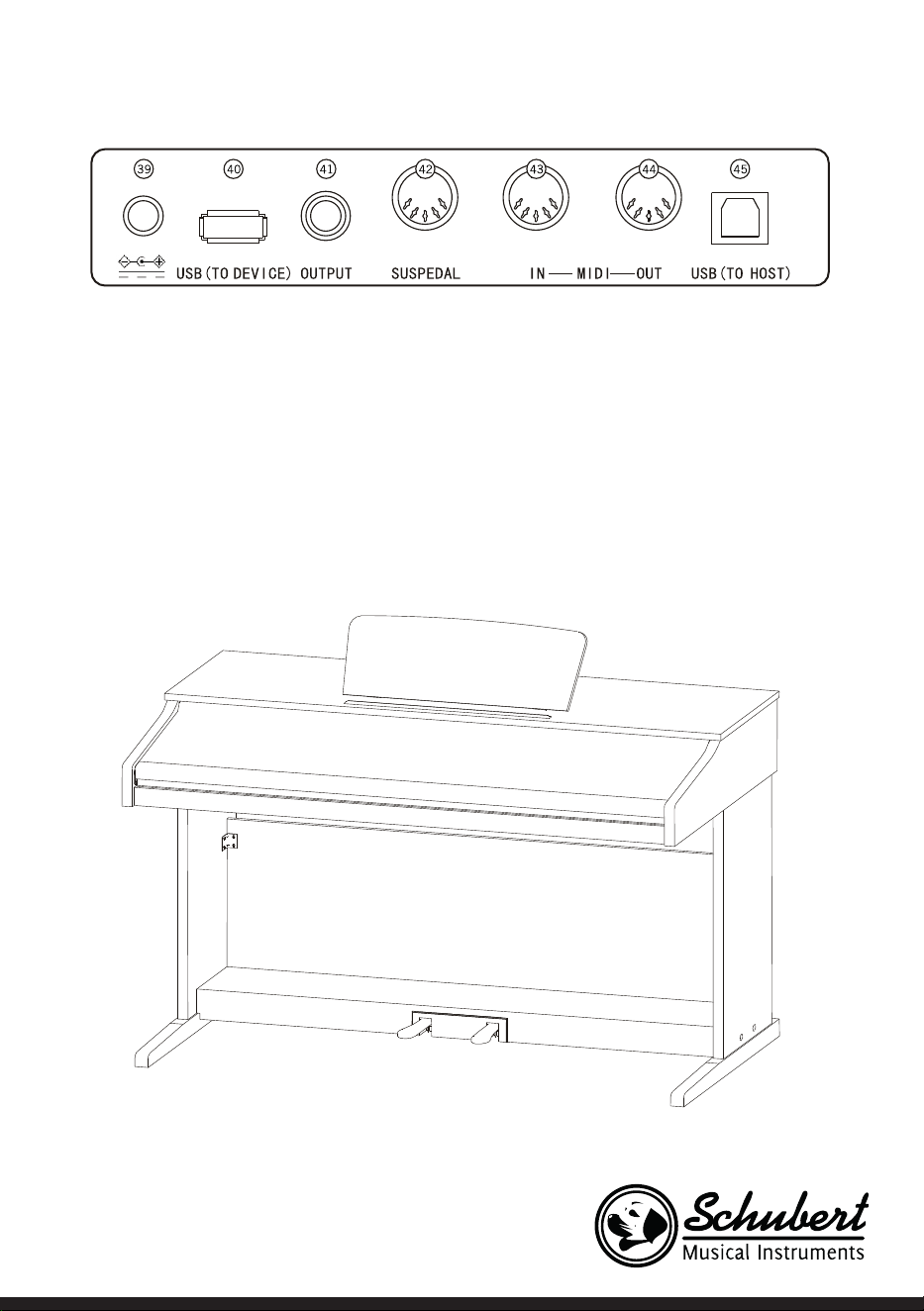
Rückseite
39 Externer Stromanschluss
40 USB (TO DEVICE) - USB-Anschluss
41 OUTPUT – Audioanschluss für externes Audioequipment
42 PEDAL-Anschluss
43 MIDI IN Anschluss – Empfangen von MIDI-Informationen, welche von externem MIDI-Equipment oder
Computern gesendet wurden
44 MIDI OUT Anschluss – Informationen des Geräts über diesen Anschluss an Computer oder andere
MIDI-Geräte senden
45 USB (MIDI)-Anschluss
8
MONTAGE
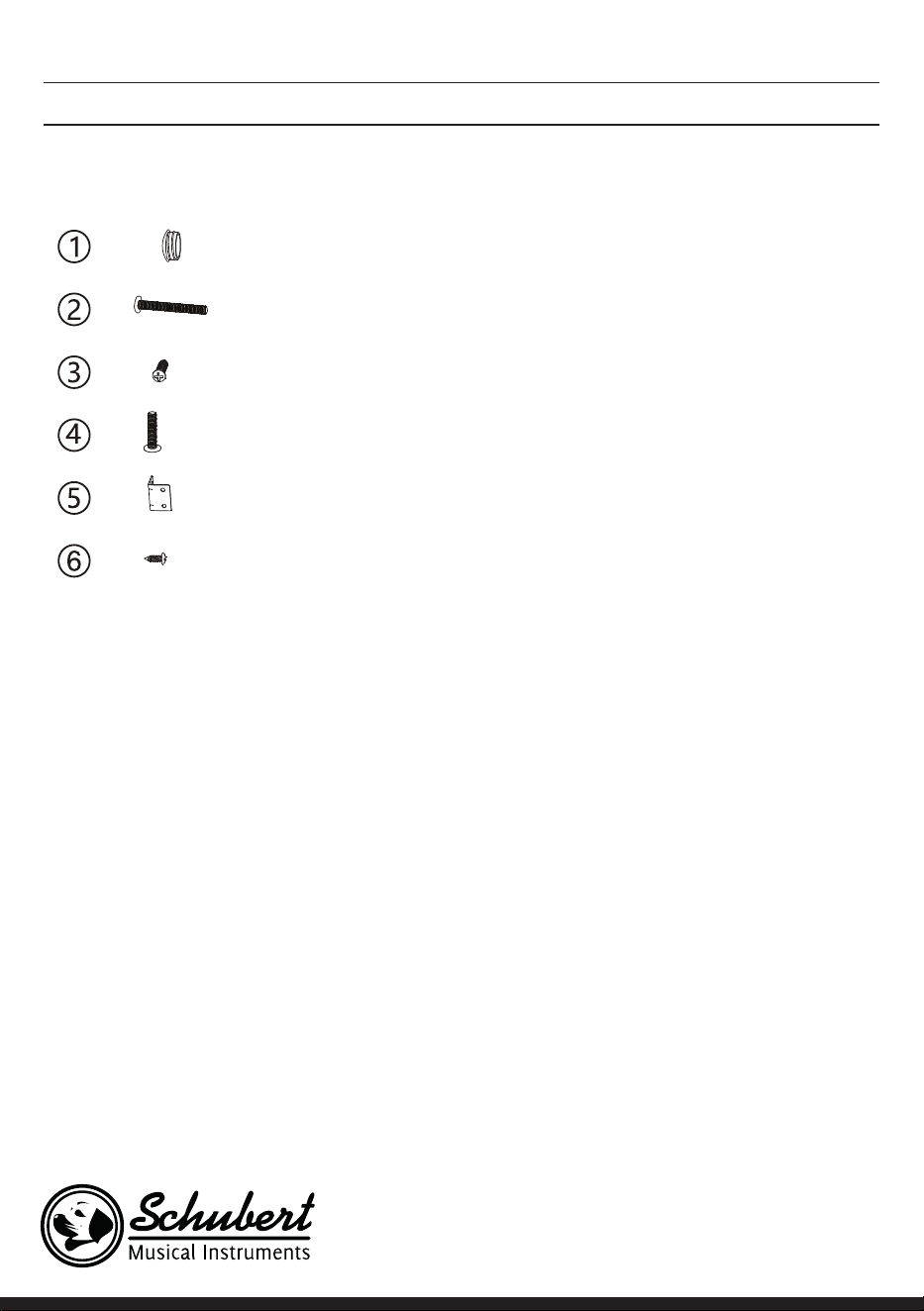
Braune Plastikabdeckung 4
4
6
4
2
8
Bezeichnung Stückzahl
M6*50 Schrauben
PA4*16 Schrauben
M6*20 Schrauben
Eckverbindung der Klavierhalterung
BA3*8 Schrauben
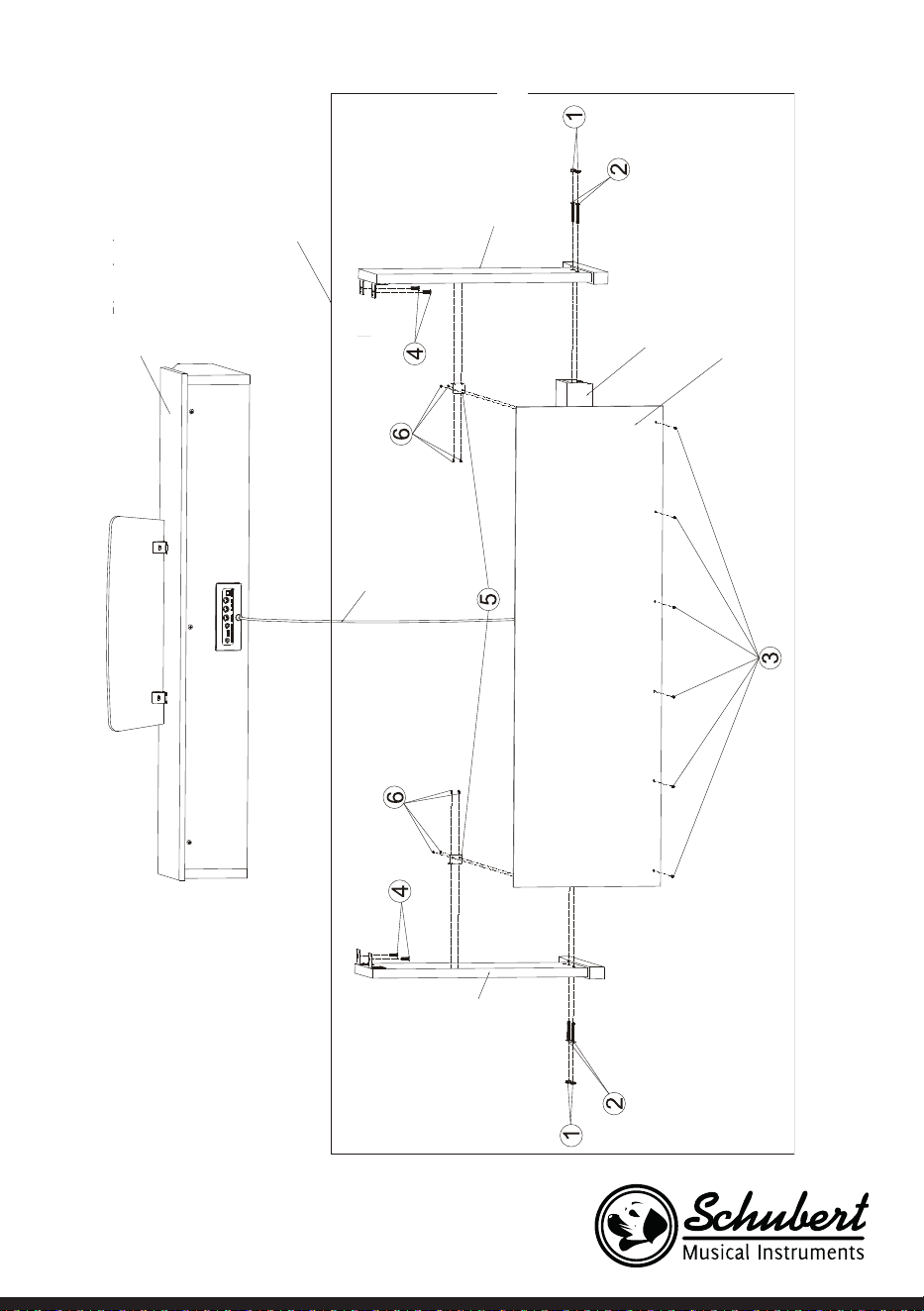
Montage des Gerätekorpus
1. Verwenden Sie die 4 M6*50 Schrauben, um die linke und die rechte Stehplatte mit der Pedalbox zu ver-
binden.
2. Verwenden Sie die 4 PA3*8 Schrauben, um eine der beiden Eckverbindungen an die Rückwand des Ge-
räts zu schrauben.
3. Verwenden Sie die BA3*8 Schrauben, um die andere Eckverbindung an den linken und rechten Stehplat-
ten zu xieren.
4. Verwenden Sie die 6 PA4*16 Schrauben, um die Unterseite der Rückwand des Geräts mit der Pedalbox
zu verbinden.
5. Legen Sie den Klavierkorpus auf die linke und die rechte Stehplatte und xieren Sie diesen mit 4 M6*20
Schrauben.
6. Decken Sie die Schraubenlöcher mit den 4 braunen Plastikabdeckungen ab.
7. Verbinden Sie den Pedalanschlussstecker mit dem Pedalanschluss.
9
Klavierkörper
Klavierhalterung
Linkes Standbein
Rechtes Standbein
Pedaleinheit
Rückverkleidung
Anschlussverkleidung
10
INBETRIEBNAHME UND BEDIENUNG
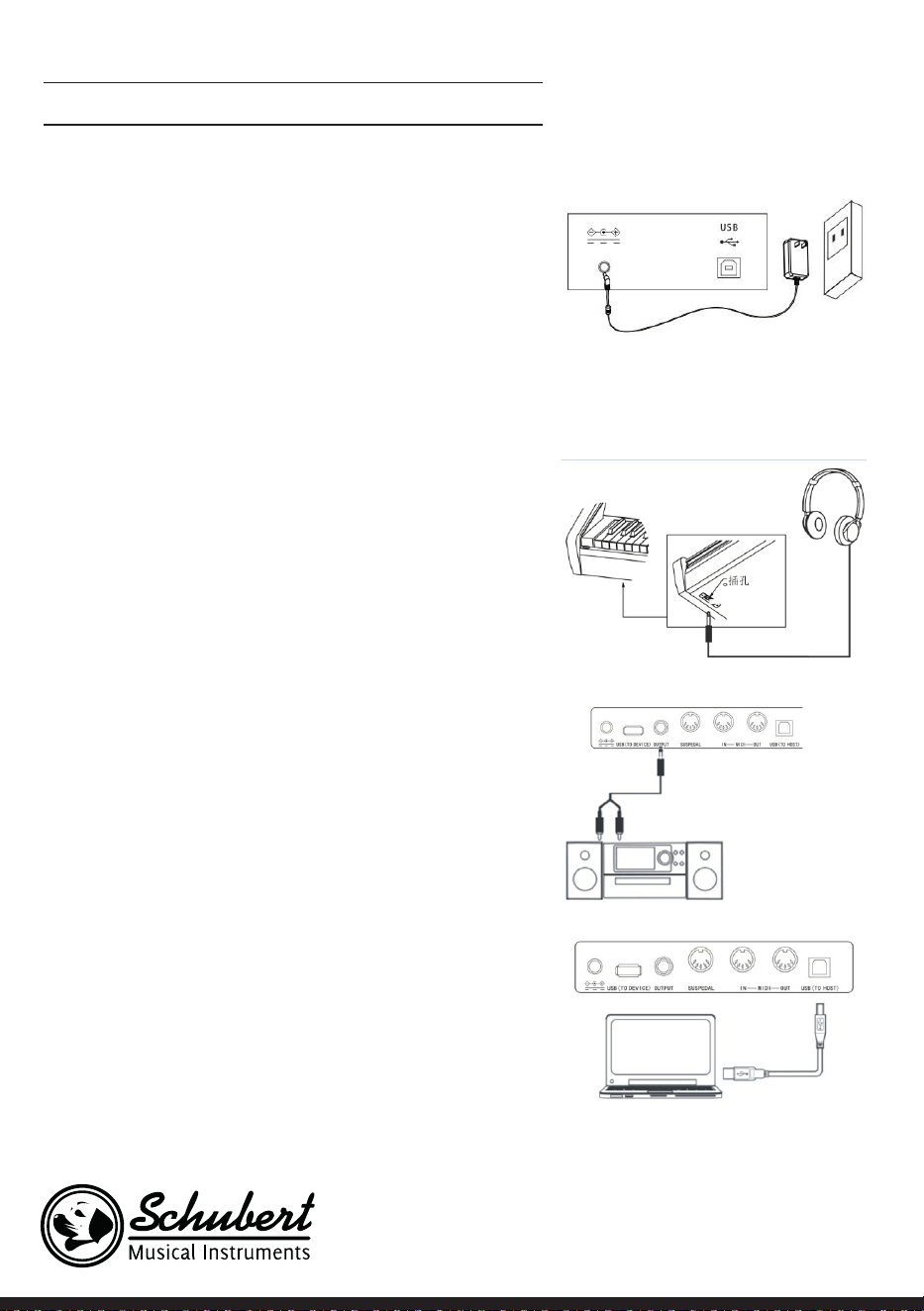
Stromversorgung
1. Vergewissern Sie sich, dass das Gerät ausgeschaltet ist,
wenn Sie es an die Stromverbindung anschließen.
2. Verbinden Sie den Anschlussstecker des Netzstromadap-
ters mit dem DC-Anschluss des Geräts.
3. Stecken Sie den Netzstromstecker in die Steckdose.
4. Wenn Sie die Taste POWER drücken, zeigt der LCD-Bild-
schirm „Loading“ an, was bedeutet, dass das Klavier geöff-
net wurde.
Hinweis: Schalten Sie, zu Ihrer eigenen Sicherheit, das Gerät
bei Gewittern oder wenn Sie es über einen längeren Zeitraum
nicht verwenden, aus.
Kopfhörer anschließen
• Sie können, wenn Sie alleine oder spät nachts üben
möchten, Stereo-Kopfhörer mit dem Kopfhöreranschluss
Ihres Geräts verbinden.
• Die Lautsprecher des Instruments werden automatisch
deaktiviert, sobald Kopfhörer angeschlossen werden und
der Ton wird nur noch über die Kopfhörer wiedergegeben.
Hinweis: Das Verwenden von zu laut eingestellten
Kopfhörern über einen längeren Zeitraum kann zu
Hörschäden führen.
Audiozubehör mit dem Gerät verbinden
• Durch das Anschließen von externem Audiozubehör
können bessere Musikeffekte erreicht werden.
• Über den AUDIO-OUT-Anschluss auf der Rückseite
des Geräts können Verstärker, Stereoakustiksysteme,
Tonpulte, Aufnahmegeräte etc. über ein Kabel mit dem
Gerät verbunden werden.
Hinweis: Stellen Sie sicher, dass das Gerät ausgeschaltet
und die Lautstärke auf den niedrigsten Wert eingestellt
wurde, bevor Sie andere Geräte mit dem Klavier
verbinden.
Anschluss an Computer
• Dieses Gerät verfügt über einen USB-Anschluss.
• Über ein USB-Kabel können Sie das Gerät mit Ihrem
Computer verbinden und in beide Richtungen
Informationen senden und empfangen.
11
• Sie können beispielsweise Lieder, welche Sie auf dem Klavier
gespielt haben, auf dem Computer speichern oder MIDI-
Dokumente Ihres Computers über das Gerät abzuspielen.
Hinweis: Das USB-Audiozubehör kann nicht zur
gleichzeitig für Audio-Eingang und Audio-Ausgang
eingestellt werden.
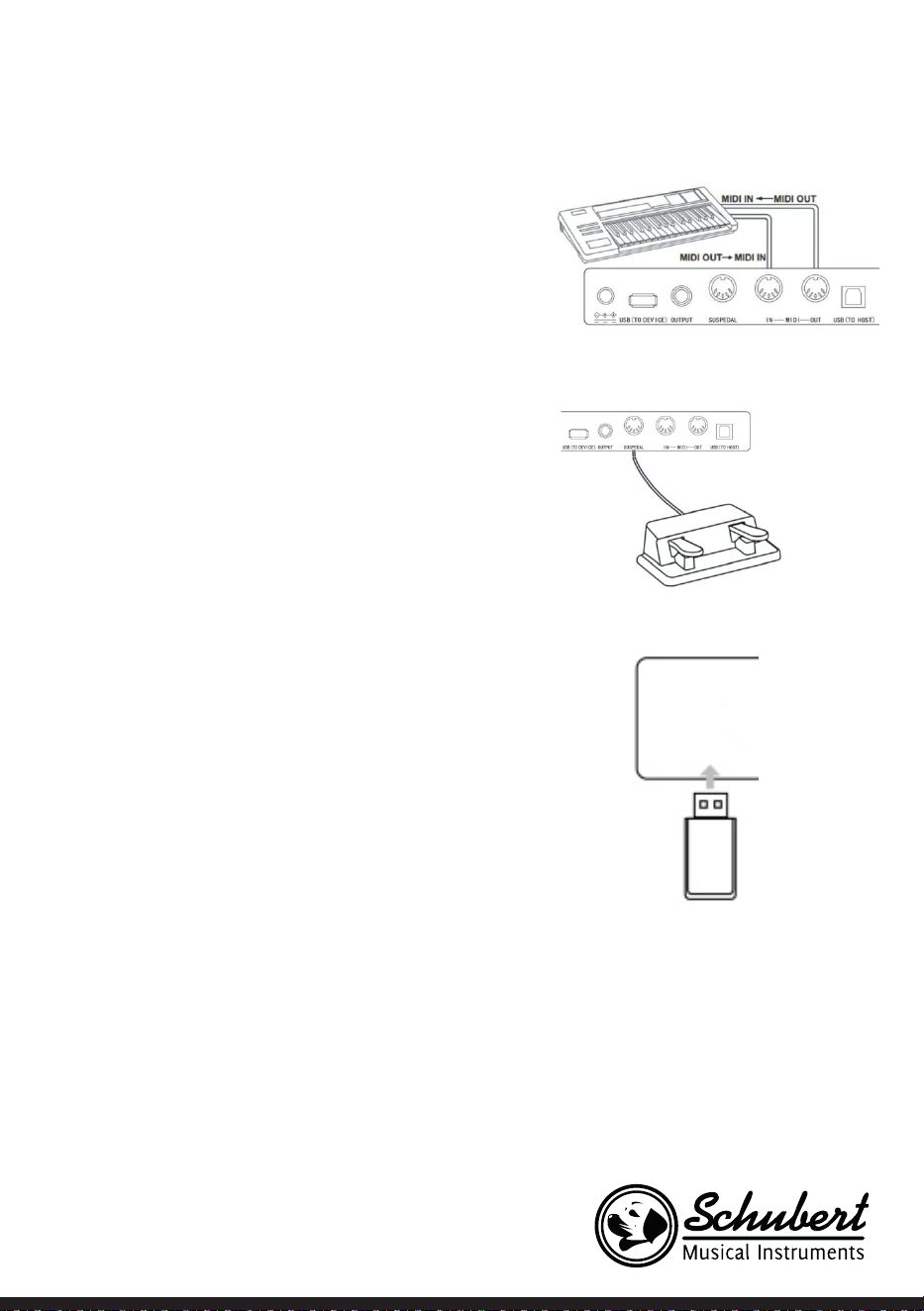
Anschluss an andere Geräte
• Wenn Sie den MIDI IN Anschluss Ihres Geräts mit dem
MIDI OUT Anschluss anderer Geräte verbinden, können
Sie das Klavier als Tonquelle nutzen.
• Wenn Sie den MIDI OUT Anschluss dieses Geräts mit dem
MIDI IN Anschluss anderer Geräte verbinden, kann das
Instrument als MIDI-Steuerung verwendet werden.
Pedalanschluss
Wenn die Pedale mit dem Pedalanschluss auf der Rückseite
des Instruments verbunden wurden, verfügt dieses Gerät
über zwei verschiedene Pedalfunktionen:
1. Wenn Sie dieses Pedal während des Spielens heruntertre-
ten, werden alle Töne leiser wiedergegeben.
2. Wenn Sie dieses Pedal während des Spielens heruntertre-
ten, hallen die gespielten Töne nach.
Anschluss von USB-Geräten
• Das Gerät unterstützt USB-Geräte bis zu 32 GB.
• MP3-Dateien auf dem USB-Stick können über das Gerät
wiedergegeben werden.
Hinweis: Ziehen Sie das USB-Gerät während der
Wiedergabe nicht heraus. Andernfalls kann es zu
Fehlermeldungen oder Schäden am USB-Gerät kommen.
12
Netzschalter
1. Vergewissern Sie sich zunächst, dass der Netzstromadapter richtig ange-
schlossen wurde.
2. Wenn Sie die Taste POWER drücken, wird der LCD-Bildschirm heller und
zeigt den Startbildschirm an.
Hinweis: Wenn der LCD-Bildschirm nicht erleuchtet wird, nachdem Sie die
Taste POWER gedrückt haben, überprüfen Sie, ob der Netzstromadapter
richtig angeschlossen wurde.
Lautstärkeanpassung
• Drehen Sie, nachdem das Instrument geöffnet wurde, den Knopf MASTER
VOLUME nach rechts, um die Lautstärke zu erhöhen und nach links, um die
Lautstärke zu senken.
• Sie können die Lautstärke auf Ihre Bedürfnisse anpassen.
Verschiedene Arten von Instrumentenstimmen einstellen
• Dieses Instrument verfügt über hunderte Arten von Instrumentenstimmen,
einschließlich dem Klang chinesischer Volksmusik, Schlagzeug etc.
• Schauen Sie sich, zum Erhalten von genaueren Informationen, die Klangtabelle
an.
• Das Instrument ist des Weiteren mit einer Effektfunktion ausgestattet,
welche relativ zu dem jeweiligen Klang ist so dass die gespielte Stimme besser
klingt.
Klang auswählen und abspielen
1. Durch Drücken der Taste TONE gelangen Sie in den Klangauswahlmodus. Das
Erinnerungssymbol „R1“, der Name des aktuellen Klangs sowie dessen Num-
mer, werden auf dem LCD-Bildschirm angezeigt.
2. Verwenden Sie zur Auswahl des gewünschten Klanges die Zifferntasten und
die Tasten + und -.
3. Spielen Sie die Tasten und genießen Sie die wundervollen Klänge.
Hinweis: Drücken Sie zum Ändern der Klangquelle erneut die Taste VOICE.
Die Zweistimmigkeitsfunktion wird nun geöffnet. Die jeweils entsprechende
Anzeige „R1/R2/L“ wird auf dem LCD-Bildschirm angezeigt.
Zweistimmigkeit
Dieses Instrument verfügt über eine Zweistimmigkeitsfunktion. Dadurch
können zwei Klänge gleichzeitig überlagert abgespielt werden. Durch diesen
Effekt werden die Musikebenen bereichert und es wirkt so, als würden zwei
Instrumente zur gleichen Zeit abgespielt. Die erste Stimme „R1“ ist bereits vor
13
Beginn der Funktion präsent. Nach dem Aktivieren der Funktion ist zusätzlich
die Stimme „R2“ vorhanden.
1. Drücken Sie zum Öffnen der Funktion die Taste DUAL. „R2“ erscheint auf
dem LCD-Bildschirm. Zusätzlich werden der Klangname und die Nummer
des zusätzlichen Klangs angezeigt.
2. Wählen Sie die von Ihnen gewünschte Zweitstimme mit der Taste VOICE
und den Tasten + und - aus.
3. Dadurch, dass beide Stimmen synchron abgespielt werden, wirkt es so, als
ob zwei verschiedene Instrumente gleichzeitig gespielt werden würden.
4. Die Funktion kann durch erneutes Drücken der Taste DUAL beendet wer-
den. Die Anzeige „R2“ verschwindet vom Bildschirm und dieses kehrt in sei-
nen vorherigen zustand zurück.
Hinweis: Wenn die Tastatur des Instruments geteilt wurde, ist die
Zweistimmigkeitsfunktion nur für die Tasten der rechten Hand verfügbar.
Die Tasten der linken Hand verfügen nicht über diese Funktion.
Touchfunktion (Anschlagsempndlichkeit)
Das Bedienfeld des Instruments verfügt über eine Touchfunktion, welche
es ermöglicht, Ihrer Darbietung mehr Ausdruck zu verleihen. Sie können
zwischen drei verschiedenen Touchfunktionen auswählen.
1. Drücken Sie zum Aktivieren der Funktion die Taste TOUCH. Die voreinge-
stellte Touchfunktion ist „002“ und wird auf dem LCD-Bildschirm angezeigt.
2. Sie können durch mehrfaches Drücken der Taste Touch, um in der Reihenfol-
ge „001-003; OFF“ eine der Funktionen auswählen.
3. Wenn der LCD-Bildschirm „OFF“ anzeigt, ist die Touchfunktion deaktiviert.
Transponierung
Durch Verwenden der Transponierungsfunktion können Sie die Tastatur um
einen Halbton nach oben/unten anpassen und müssen dadurch nicht Ihre
Spielweise verändern.
1. Drücken Sie zum Aktivieren der Funktion die Taste TRANSPOSE ∧ oder
TRANSPOSE∨, um die Tastatur um jeweils einen Halbton nach oben oder
unten anzupassen. Der aktuelle Transponierungswert „xxx Transpose“ wird
zeitweise auf dem LCD-Bildschirm angezeigt.
2. Sie können die Tastatur um maximal 12 Halbtöne anpassen.
3. Wenn Sie die Tasten TRANSPOSE ∧ und TRANSPOSE ∨ gedrückt halten,
wird die Tastatur auf den werkseitig eingestellten Wert „000 Transpose“
zurückgesetzt.
Hinweis: Wenn Sie ein Stück in „G“ spielen möchten, aber nicht
mit der entsprechenden Tastatur vertraut sind, können Sie den
Transponierungswert auf -05 oder 007 einstellen, so dass Sie die
Tastatur für „C“ verwenden können, diese aber so klingt, als ob Sie in „G“
14
spielen würden. Diese Funktion ist nur für die gesamte Tastatur und die
automatische Akkordbegleitung verfügbar.
Klavierspielmodus
Durch diese Funktion, können Sie die gesamte Tastatur mit dem Klang eines
Klaviers verwenden.
1. Drücken Sie zum Aktivieren/ Deaktivieren der Funktion die Taste PIANO.
2. Die Auswahl der Begleitung funktioniert genauso wie in anderen Modi. Es
kann allerdings nur eine Schlagzeugbegleitung ausgewählt werden und kei-
ne harmonische.
Hinweis: In diesem Modus können Sie sowohl die Klangkonsole als auch
das Funktionsmenü öffnen. Die Akkordfunktion wird beim Aktivieren
dieses Modus automatisch geschlossen.
Metronom (Taktvorgabe)
Wenn Sie sich beim Üben nicht sicher sind, ob Sie den Takt richtig spielen,
können Sie sich diesen über die Metronomfunktion vorgeben lassen.
1. Drücken Sie zum Aktivieren der Funktion die Taste METRONOME. Der Takt
wird dann vorgegeben. Drücken Sie zum Deaktivieren der Funktion erneut
die Taste METRONOME.
2. Wählen Sie die Taktarteneinstellung im Funktionsmenü aus, um die ver-
schiedenen Einstellungen anzuzeigen.
Hinweis: Wenn Sie Funktion im Spielverlauf geöffnet wird, ertönt das
Taktgeräusch zu Beginn des nächsten Takt und richtet sich nach dem
jeweiligen Stil.
• Wenn die Funktion zuerst geöffnet wird, passt das Instrument dieses
automatisch an den von Ihnen ausgewählten Stil an.
• Die Funktion kann auch während der Aufnahme aktiviert werden, da es
nicht in den gespeicherten Daten zu hören sein wird.
Begleitung
Automatische Begleitung
• Durch das Aktivieren dieser Funktion können Sie einfach nur Klavier
spielen und die Begleitung, beispielsweise in Form eines Orchesters, wird
automatisch dazu wiedergegeben. Sie müssen lediglich eine Begleitung aus
der Stiltabelle auswählen und mit Ihrer linken Hand die Akkorde spielen.
• Dieses Instrument verfügt über mehrere automatische Begleitungen,
welche Sie in der Stiltabelle einsehen können. Wählen Sie einfach die
passende aus und genießen Sie es.

15
Automatische Begleitung wiedergeben (nur den Perkussionsteil abspielen)
1. Drücken Sie die Taste STYLE, um in den Stilmodus zu gelangen. In der oberen linken Ecke des LCD-Bild-
schirms leuchtet die Anzeige „STYLE“ auf. Der Bildschirm zeigt außerdem zeitgleich den Namen und die
Ziffer des aktuell ausgewählten Stils an.
2. Sie können den gewünschten Stil durch Drücken der Zifferntasten oder der Tasten + und -auswählen.
3. Der Perkussionsteil des Stils kann durch Drücken der Taste START/STOP sofort wiedergegeben werden.
Sie können außerdem die Taste SYNC drücken, um den Stil zu synchronisieren. Der Taktpunkt leuchtet
ebenfalls auf dem LCD-Bildschirm auf. Sie können eine beliebige Taste spielen, um die Performance zu
starten.
Begleitabschnitte
Die automatische Begleitung dieses Instruments beinhaltet viele unterschiedliche Begleitabschnitte, so
dass es empfehlenswert ist, Ihre eigenen Begleitungen speziell anzuordnen. Die Abschnitte beinhalten:
Hauptwerk (A, B), Intro, Ende. Wenn Sie die Begleitung abspielen können Sie durch Verwendung der
Abschnitte eine professionellere Darbietung erreichen.
1. Intro: Die Auswahl des Intros eignet sich zu Beginn eines Stücks. Nach dem Beenden des Intros wechselt
die Begleitung zu den Einstellungen zum Hauptwerk. Die Länge des Intros ist unterschiedlich und hängt
davon ab, welcher Stil ausgewählt wurde.
2. HauptprogrammDie Auswahl von „Main Play“ eignet sich dann, wenn der Hauptteil eines Liedes gespielt
wird. Das Hauptprogramm wird so lange abgespielt, bis eine andere Taste gedrückt wird.
3. Einfügen
Durch das Einfügen von Abschnitt 1 oder 2 können Sie Ihre Darbietung professioneller gestalten. Nach
dem Abspielen der eingefügten Abschnitte wechselt die Begleitung wieder zum Hauptprogramm.
4. Ende
Das Drücken dieser Taste eignet sich am Ende eines Stücks. Das Stück wird automatisch beendet, wenn die
Endsequenz abgespielt wurde. Die Länge der Endsequenz hängt von dem ausgewählten Stil ab und kann
variieren.
Hinweis: Wenn Sie die Taste FILL IN 1 oder FILL IN 2 gedrückt halten, wird die Variation so lange in
die Begleitung eingefügt, bis Sie die Taste loslassen. Die Begleitung wechselt dann wieder in das
Hauptprogramm. Das Drücken der Taste FILL IN ändert das voreingestellte Hauptprogramm.
Wenn Die Begleitung stoppt, zeigt der LCD-Bildschirm dies an.
Unterschiedliche Begleitabschnitte wiedergeben
1. Durch Drücken der Taste STYLE gelangen Sie in den Stilauswahlmodus. Wählen Sie den gewünschten
Stil durch Drücken der Zifferntasten oder + und - aus.
2. Drücken Sie die Taste AUTO CHORD, um die automatische Akkordfunktion zu aktivieren.
3. Drücken Sie zum Öffnen der Synchronisierungsfunktion die Taste SYNC.
4. Drücken Sie zur Auswahl der Hauptwiedergabe 1 die Taste FILL IN 1.
5. Wenn Sie die Taste INTRO/ ENDING drücken, zeigt der Bildschirm „NOR“ an, was bedeutet, dass sich
das Instrument im Spielvorbereitungsmodus bendet.
6. Die automatische Begleitung startet sofort, wenn Sie einen Akkord im Tastaturbereich der linken Hand
spielen. Die Begleitung wechselt nach dem Intro zum Hauptprogramm.
7. Wenn Sie die Taste FILL IN 2 drücken, wird eine kleine Variation in die Begleitung eingefügt. Die Beglei-

16
tung wechselt nach dem Beenden der Variation wieder automatisch zum Hauptprogramm.
8. Wenn Sie die Taste INTRO/ENDING drücken, spielt die Begleitung eine Endsequenz ab und stoppt an-
schließend.
Einstellung der Begleitlautstärke
Die Begleitlautstärke kann für die gesamte Begleitung angepasst werden. Diese Funktion führt zu einem
ausgewogenen Verhältnis zwischen Tastenlautstärke und Begleitlautstärke.
1. Durch Drücken der Taste ACCOMP VOLUME ∧/∨ wird auf dem LCD-Bildschirm die aktuelle Einstellung
der Begleitlautstärke angezeigt. Drücken Sie zum Erhöhen der Lautstärke die Taste ACCOMP VOLUME
∧ und zum Senken die Taste ACCOMP VOLUME ∨ Einstellungsbereich: 0 – 127.
2. Wenn Sie die Tasten ACCOMP VOLUME ∧ und ACCOMP VOLUME ∨ gleichzeitig gedrückt halten, wird
die Begleitlautstärke geschlossen. Der LCD-Bildschirm zeigt dann „Accompaniment volume: OFF“ an.
Drücken Sie zum Öffnen erneut gleichzeitig die beiden Tasten ACCOMP VOLUME ∧ und ACCOMP VO-
LUME ∨ gleichzeitig.
Tempo
Jeder Stil hat einen anderen besten Geschwindigkeitswert. Sie können den Wert abhängig von Ihren
Fähigkeiten und den Anforderungen der jeweiligen Stücke anpassen.
1. Über die Tasten TEMPO ∧ und TEMPO ∨ kann der voreingestellte Geschwindigkeitswert angepasst
werden.
2. Durch gleichzeitiges Drücken der Tasten TEMPO ∧ und TEMPO ∨ wird die Geschwindigkeit auf den ur-
sprünglichen Wert zurückgesetzt.
Hinweis: Die Geschwindigkeit wird für jeden Stil automatisch festgelegt. Während des Spielens in einem
bestimmten Stil bleibt die Geschwindigkeit gleich.
Akkorde
Automatischer Akkord
Wenn Sie die Taste AUTO CHORD drücken, beginnt die automatische Akkordbegleitung der linken Hand.
Gesamtbereichsakkord
Wenn Sie die Taste FULL RANGE CHORD drücken, werden alle angetippten Tasten als Akkorde gespielt.
Akkordbegleitung beenden
Wenn Sie die Taste CHORD CLOSE drücken wird die Akkordbegleitung beendet. Der Stil wird weiterhin
beibehalten.

17
Akkordtabelle
Bezeichnung Abkürzung Notation
Dur M 1 - 3- 5
Große Sexte M6 1 - 3 - 5 - 6
Große Septime M7 1 - 3 - (5) - 7
Dur-Sieben-Elf M7 #11 1 -2 -3 -5
Dur mit None 9 Madd9 1-2 - 3- 4- 5
Große None M9 1 - 2 - 3 - (5) - 7
Große Sexte mit None 9 69 1 - 2 - 3 - (5) - 6
Erhöhtet Akkord aug 1 - 3 -
#
5
Moll m 1 -
b
3 - 5
Kleine Sexte m6 1 -
b
3 - 5 - 6
Kleine Septime m7 1 -
b
3 - (5) - 7
Kleine Septime mit verminderter Quinte m7
b
5 1 - 3- 5 - 7
Moll mit None 9 madd9 1 -2 - 3- 5
Moll-Neun m9 1 - 2 - 3 - 5
Moll-Septakkord mit None und Undezime m11 1 - 3 - (5) - 7
Dominantseptakkord mM7 1 -2 -3 - (5) - 7
Dominantnonakkord mM9 1 - 2 - 3 - (5) - 7
Verminderter Akkord dim 1 - 3 - 5
Verminderte Septime dim7 1 - 3- 5 - 7
Septime 7 1 - 3 - (5) - 7
Septime mit hängender 4 7sus4 1 - 4 - 5 - 7
Septime mit None 9 79 1 -2 - 3- (5) - 7
Moll Sieben-Elf 7
#
11 1 - 2 - 3 - (5) -
b
7
Moll Sieben-Dreizehn 713 1 - 3- (5) - 7 / 2 - 3 - 5 - 6 - 7
Dominantseptakkord mit kleiner None 7
b
9 1 - 2 - 3- (5)- 7- 9
Erhöhte Septime M7aug (1) - 3 -
#
5 - 7
Sus4-Akord sus4 1 - 4 - 5
Ein-plus-zwei-plus-fünf-Akkord 1+2+5 1 - 2 - 5
18
Halleffekt
• Durch Drücken der Taste REVERB, kann der Halleffekt aktiviert/ deaktiviert werden.
• Wenn der Halleffekt aktiviert wurde, leuchtet die Anzeige „Reverb“ auf.
• Wenn der Halleffekt deaktiviert wurde, erlischt die Anzeige „Reverb“.
Chor
• Durch Drücken der Taste CHORUS, kann der Choreffekt aktiviert/ deaktiviert werden.
• Wenn der Choreffekt aktiviert wurde, leuchtet die Anzeige „Chorus“ auf.
• Wenn der Choreffekt deaktiviert wurde, erlischt die Anzeige „Chorus“.
Toneinstellung
• Über die Toneinstellung kann die Lautstärke jedes Titels eingestellt werden.
• Drücken Sie die Taste SOUND CONSOLE, um in das Toneinstellungsmenü zu gelangen. Der LCD-
Bildschirm zeigt den entsprechenden Wert an. Wenn Sie im Toneinstellungsmenü sind, können Sie die
einzelnen Wert einstellen, indem Sie die Taste SOUND CONSOLE mehrfach drücken.
• Die Lautstärke kann für jeden einzelnen Wert, durch Drücken der Tasten + und -, separat eingestellt
werden.
Einstellungswerte
Anpassungsinhalt LCD-Anzeige Anpassungsbereich
Perkussionsmusiklautstärke XXX Rhythm 0 - 127
Basslautstärke XXX Bass 0 - 127
Harmonielautstärke XXX Chord 0 - 127
Abschnittlautstärke XXX Phrase 0 - 127
Lautstärke linker Handabschnitt XXX Lower 0 - 127
Lautstärke rechter Handabschnitt XXX Upper 0 – 127
Hinweis: Wenn innerhalb von 5 Sekunden keine Toneinstellung vorgenommen wird, wird das
Toneinstellungsmenü automatisch verlassen
19
FUNKTIONSMENÜ
Funktionsmenü
Drücken Sie die Taste FUNCTION MENU, um in das Funktionsmenü zu gelangen. Der LCD-Bildschirm
zeigt den entsprechenden Wert an. Im Funktionsmenü können Sie die einzelnen Werte durch Drücken der
Tasten + und - einstellen.
Nr. Inhalt LCD-Anzeige Anpassungsbereich voreingestellter Wetrt
1 Melodie XXX Tune -50 - +50 000
2 Tastaturteilung XXX KeySplit 1 – 88 034
3 Takt XXX BeatType 0, 2 – 9 004
4 Metronomlautstärke XXX 0 – 127 080
5 Halltiefe XXX 0 – 127 050t
6 Chortiefe XXX 0 – 127 000
7 MIDI Empfand XXX 1 – 16, ALL ALL
8 MIDI Sendung XXX 1 – 16 001
Hinweis: Wenn innerhalb von 5 Sekunden keine Einstellung vorgenommen wird, wird das Funktionsmenü
automatisch verlassen.
Melodieeinstellung
Mit dieser Einstellung kann die Tonhöhe detailliert angepasst werden.
1. Drücken Sie zur Auswahl des Melodiemenüs zunächst die Taste FUNCTION MENU. Wählen Sie dort
„tune menu“ aus. Der Bildschirm zeigt zeitweise „XXX Tune“ an. Durch Drücken der Tasten + und - kann
die Tonhöhe, jeweils um einen Halbton, im Bereich von 50 angepasst werden
2. Wenn Sie die Tasten + und - gleichzeitig drücken, wird die Tonhöhe auf den voreingestellten Wert 000
zurückgesetzt. Diese Parametereinstellung gilt für die Tastatur und alle Stile.
Tastatur teilen
Der Punkt, an welchem der automatische Akkordbereich und die Tastatur der rechten Hand geteilt werden
heißt „KEYBOARD SPLIT POINT“.
Wenn die automatische Akkordfunktion deaktiviert ist, kann der linke Tastaturbereich auch zum Spielen
von Musik verwendet werden.
1. Drücken Sie zum Teilen der Tastatur zunächst die Taste FUNCTION MENU und wählen Sie „Keyboard
Split“ aus. Der LCD-Bildschirm zeigt „XXX KeySplit“ an. Sie können zum Festlegen des Punktes die Tasten
+ und - drücken oder direkt über das Ziffernfeld eine Zahl eingeben.
2. Durch gleichzeitiges Drücken der Tasten + und – wird der Tastaturteilungspunkt auf den voreingestell-
ten Wert „F#3 (34)“ zurückgesetzt.

20
Taktart
1. Drücken Sie zur Auswahl der Taktart zunächst die Taste FUNCTION MENU und wählen Sie „Beat-Type“
aus. Der LCD-Bildschirm zeigt „XXX BeatType“ an. Sie können zur Auswahl der Taktart die Tasten + und
– drücken. Insgesamt stehen 9 Taktarten (0, 2-9) zur Verfügung.
2. Durch gleichzeitiges Drücken der Tasten + und – wird die Taktart auf den voreingestellten Wert „004“
zurückgesetzt.
Einstellung der Metronomlautstärke
1. Drücken Sie zum Einstellen der Metronom2lautstärke zunächst die Tasten FUNCTION MENU + oder
FUNCTION MENU - und wählen Sie dort „MetronomeVolume“ aus. Der LCD-Bildschirm zeigt zeitweise
„XXX MetroVol“ an. Zum Einstellen der Metronomlautstärke können Sie die Tasten + und - drücken. An-
passungsbereich: 0 – 127.
2. Durch gleichzeitiges Drücken der Tasten + und – wird die Metronomlautstärke auf den voreingestellten
Wert „080“ zurückgesetzt.
Einstellung der Halltiefe
1. Drücken Sie zur Auswahl der Halltiefe zunächst die Taste FUNCTION MENU und wählen Sie „Reverb
Level“ aus. Der LCD-Bildschirm zeigt „XXX ReverbLev“ an. Sie können zur Einstellung der Halltiefe die
Tasten + und – drücken. Anpassungsbereich: 0 – 127.
2. Durch gleichzeitiges Drücken der Tasten + und – wird die Halltiefe auf den voreingestellten Wert „050“
zurückgesetzt.
Einstellung der Chorlautstärke
1. Drücken Sie zur Auswahl der Chorlautstärke zunächst die Taste FUNCTION MENU und wählen Sie
„Chorus Level“ aus. Der LCD-Bildschirm zeigt „XXX ChorusLev“ an. Sie können zur Einstellung der Chor-
lautstärke die Tasten + und – drücken. Anpassungsbereich: 0 – 127.
2. Durch gleichzeitiges Drücken der Tasten + und – wird die Chorlautstärke auf den voreingestellten Wert
„000“ zurückgesetzt.
MIDI Empfangseinstellung
1. Drücken Sie zur Auswahl des MIDI-Empfangseinstellungsmenüs zunächst die Taste FUNCTION MENU
und wählen Sie „MIDI receiving channel setting menu“ aus. Der LCD-Bildschirm zeigt „XXX MidiIn“ an.
Sie können zur Einstellung der Empfangskanäle die Tasten + und – drücken. Anpassungsbereich: 1 – 16,
ALL.
2. Durch gleichzeitiges Drücken der Tasten + und – wird der Empfangskanal auf den voreingestellten Wert
„ALL“ zurückgesetzt.
MIDI Sendungseinstellung
1. Drücken Sie zur Auswahl des MIDI-Sendungseinstellungsmenüs zunächst die Taste FUNCTION MENU
und wählen Sie „MIDI sendinng channel setting menu“ aus. Der LCD-Bildschirm zeigt „XXX MidiOut“ an.
Sie können zur Einstellung der Empfangskanäle die Tasten + und – drücken. Anpassungsbereich: 1 – 16.
2. Durch gleichzeitiges Drücken der Tasten + und – wird der Empfangskanal auf den voreingestellten Wert
„001“ zurückgesetzt.

21
Zurücksetzen auf Werkseinstellung
Drücken Sie, während das Gerät ausgeschaltet ist, gleichzeitig die Tasten + und -. Das Gerät wird auf
Werkseinstellung zurückgesetzt und löscht alle Nutzerdaten, inklusive: Nutzerlieder, Registrierung,
Speicher. Der LCD-Bildschirm zeigt in dieser Zeit „Wait…!“ an. Nachdem das Gerät zurückgesetzt wurde,
kann es ganz normal verwendet werden.
Bedienfeldregistrierungsspeichereinstellung
Dieses Instrument verfügt über eine Bedienfeldregistrierungsspeichereinstellung. Diese kann dazu
verwendet werden, die am häugsten genutzten Einstellungen zu speichern und dadurch schneller
verwenden zu können, wenn Sie diese brauchen, wodurch das Spielen auf dem Instrument erleichtert
werden kann. Mit dieser Funktion können fast alle Einstellungen des Bedienfelds gespeichert werden, so
dass Ihre Lieblingseinstellungen durch nur einen Tastendruck eingestellt werden können.
Einstellungen speichern
1. Dieses Instrument verfügt über vier Speicherbänke. Jede Speicherbank hat jeweils 2 Speicherzustände.
2. Wenn Sie die Taste STORE drücken und gleichzeitig eine der Tasten M1 oder M2 gedrückt halten, kann
die aktuelle Einstellung gespeichert werden.
Hinweis: Durch das Speichern der aktuellen Einstellung wird der vorherige Speicherstand überschrieben.
Wenn Sie die Tasten STORE und M1 zur gleichen Zeit gedrückt halten werden alle gespeicherten
Einstellungen gelöscht und der Speicher auf Werkseinstellung zurückgesetzt.
Abspielen von gespeicherten Einstellungen
Drücken Sie zum Abspielen von gespeicherten Einstellungen die Tasten M1 oder M2.
Auswahl einer Speicherbank
1. Wenn Sie die Taste BANK drücken, zeigt der LCD-Bildschirm zeitweise die Nummer der aktuell ausge-
wählten Speicherbank an.
2. Wenn Sie die Taste BANK erneut drücken, können Sie den Speicher auswählen. Auswahlbereich:1 – 2.
3. Folgende Inhalte können in den Speichern M1 und M2 gespeichert werden:
• Klangeinstellungen: Hauptstimme, Zweistimmigkeit, Tastaturteilungspunkt, digitale Effekte, Tonpult.
• Begleitungseinstellungen: Stil, Geschwindigkeit, Automatische Akkorde aktivieren/ deaktivieren,
Abschnittauswahl
• Funktionseinstellungen: Touch, Einstellungen im Funktionsmenü
22
Musiksteuerung
1. Taktleitfunktion
• Ein Lied verfügt bereits über einen leitenden Takt bevor das Intro gespielt wird.
2. Vor- und Zurückspulen, Wiedergabe-/Pause- und Stoppfunktion von Liedern
• Durch Drücken der Taste werden Lieder während der Wiedergabe vorgespult.
• Durch Drücken der Taste werden Lieder während der Wiedergabe zurückgespult.
• Durch Drücken der Taste / können Lieder pausiert und durch erneutes Drücken der Taste fortgesetzt
werden.
• Wenn die Taste gedrückt wird, wird die Wiedergabe gestoppt.
3. Abschnittswiederholung
• Durch Drücken der Taste kann der Anfang und das Ende eines Abschnitts festgelegt werden, welcher
anschließend in Dauerschleife, bis zum Beenden der Funktion wiedergegeben wird.
• Wenn Sie die Taste das erste Mal drücken, wird der Abschnittsanfang festgelegt und das Abschnittsende
wird festgelegt, wenn die Taste ein zweites Mal gedrückt wird.
• Ein erneutes Drücken der Taste beendet die Funktion und die Lieder werden wieder vollständig
abgespielt.
Musik aufnehmen
Vor dem Beginn der Aufnahme und der Auswahl einer Spur,
muss ein Lied ausgewählt werden.
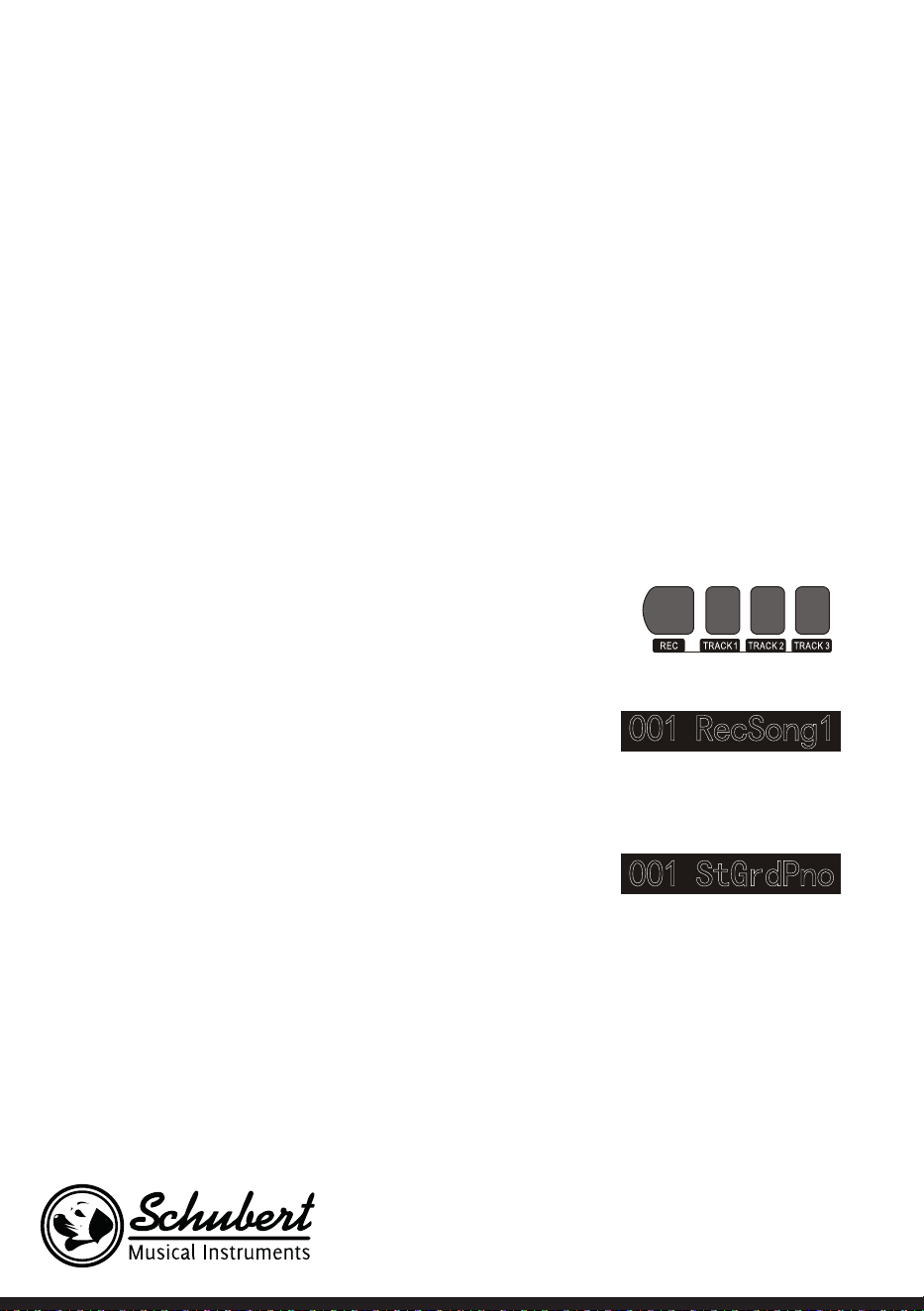
1. Drücken Sie die Taste RECORD, um zu Ihrer Liedauswahl zu
gelangen. Auf der oberen linken Seite des LCD-Bildschirms,
wird die Nummer des Lieds angezeigt. Der voreingestellte
Name Ihres aufzunehmenden Liedes ist „RecSong 1“. Sie
können das Lied, welches Sie speichern möchten, über die
Tasten + und – auswählen.
2. Wenn Sie nun die Taste RECORD drücken, gelangen Sie in
den Aufnahmevorbereitungsmodus. Auf der unteren Seite
des LCD-Bildschirms wird in roten Buchstaben „REC“ an-
gezeigt und 4 Taktpunkte erscheinen zur gleichen Zeit im
Taktanzeigebereich. Das Instrument wählt automatisch
eine Spur aus, welche noch keine gespeicherten Daten ent-
hält, um Ihre Aufnahme automatisch zu speichern. Die ver-
wendete Tonspur wird auf dem LCD-Bildschirm angezeigt
und bezieht sich auf die aktuelle Aufnahme, welche dort
gespeichert wird.
3. Sie können im Vorbereitungsmodus Klang, Stil Geschwindigkeit etc. anpassen. Sie können die Tonspur,
auf welcher Ihre Aufnahme gespeichert werden soll, durch Drücken der Tasten TRACK 1, TRACK 2 oder
TRACK 3 auswählen. Begleitungsspur und Melodiespur können zur gleichen Zeit aufgenommen werden
während 2 verschiedene Melodiespuren nicht gleichzeitig aufgenommen werden können.
4. Drücken Sie zum Starten der Aufnahme die Taste START/STOP oder Beginnen Sie das Spielen auf der
Tastatur, nachdem Sie eine Aufnahmespur ausgewählt haben. Nachdem die Begleitung und die automa-
tische Akkordfunktion ausgewählt wurden, um die Akkorde im linken Handbereich effektiv zu spielen,
kann die Aufnahme ebenfalls gestartet werden.

23
Hinweise:
• Die Stildaten können nur in der Begleitspur aufgenommen werden. Die Aufnahmeanzeige verfügt über
drei verschiedene Status: „Shine, Light, Go out.“
• „Shine“ bedeutet, dass diese Spur für die Aufnahme ausgewählt wurde. Wenn auf der Spur bereits Daten
vorhanden sind, werden diese durch die aktuelle Aufnahme überschrieben, wenn Sie fortfahren.
• „Light“ bedeutet, dass die auf der Spur vorhandenen Daten im Aufnahmeprozess synchron überschrieben
werden.
• „Go Out“ bedeutet, dass diese Spur keine Daten hat oder über Daten verfügt, deren Wiedergabe
während der Aufnahme aber verboten wurde.
• Die Aufnahmespur kann im Vorbereitungsmodus noch verändert werden.
• Das Gerät wählt im Vorbereitungsmodus automatisch eine leere Aufnahmespur aus (in der Reihenfolge
von klein nach groß, wie beispielsweise: wenn Spur 2 über Daten verfügt, wird das Instrument für die
Aufnahme Spur 3 auswählen).
Spur 1: Begleitungsspur
Spur 2/ Spur 3: Melodiespuren
Aufnahme stoppen
1. Wenn Sie während der Aufnahme die Taste START/
STOP drücken, wird die Aufnahme sofort unterbro-
chen. Durch Drücken der Tasten STYLE oder VOICE
können andere Funktionen ausgewählt werden.
2. Wenn der innere Speicher voll ist, wird die Aufnahme
gestoppt und automatisch gespeichert. Der LCD-Bild-
schirm zeigt dann „Rec_Full“ an.
3. Die Aufnahme stoppt automatisch, wenn das Lied be-
endet ist oder Sie eine Begleitung ausgewählt haben.
Aufgenommene Lieder abspielen
1. Wenn während der Aufnahme die Taste RECORD gedrückt wird, wird die aktuelle Aufnahme unterbro-
chen und in Dauerschleife die bisher aufgenommenen Lieder abgespielt.
2. Drücken Sie die Taste SONG, um in den Liedmodus zu gelangen. Alle Lieder werden automatisch in Dau-
erschleife abgespielt. Die Nummer der von Ihnen gespeicherten Lieder kann durch Drücken der Tasten
+ und - direkt ausgewählt werden. Wenn Sie keine gespeicherten Lieder haben zeigt der Bildschirm „No-
File!“ an. Die Wiedergabe in Dauerschleife wird dadurch unterbrochen.
3. Wählen Sie, falls vorhanden, ein von Ihnen gespeichertes Lied aus und drücken Sie die Taste START/
STOP, um dieses in Dauerschleife wiedergeben zu lassen.
Aufgenommene Lieder löschen
1. Drücken Sie, wenn das Instrument ausgeschaltet ist, gleichzeitig die Tasten RECORD und SONG, um alle
von ihnen gespeicherten Aufnahmen zu löschen.
2. Drücken Sie für 2 Sekunden die Taste RECORD, um im Vorbereitungsmodus Aufnahmen zu löschen.
Der LCD-Bildschirm zeigt dann „Delete“ an. Drücken Sue anschließend die Tasten der jeweiligen Spur
(TRACK 1, TRACK 2, TRACK 3), von welcher Sie die Aufnahme löschen möchten. Wenn Die Anzeige

24
einer Spur erleuchtet wird, bedeutet dies, dass die Daten gelöscht werden. Wenn die Anzeige ausgeht,
bedeutet dies, dass die Daten behalten werden. Wenn die Anzeigen aller Spuren aueuchten, bedeu-
tet dies, dass alle aufgenommenen Lieder gelöscht werden, wenn der Löschvorgang von Ihnen, durch
Drücken der Taste +, autorisiert wird. Der Löschvorgang kann durch Drücken der Taste - abgebrochen
werden.
MP3-Wiedergabe
MP3-Anschluss:Über diesen Anschluss können Lieder im MP3-Format abgespielt werden.
• Durch Drücken der Taste PLAY/PAUSE können Lieder wiedergegeben/pausiert werden.
• Durch Drücken der Taste SONG ∧ wird das vorherige Lied ausgewählt und durch Drücken der Taste
VOLUME ∨ wird die Lautstärke reduziert.
• Durch Drücken der Taste SONG ∨ wird das nächste Lied ausgewählt und durch Drücken der Taste
VOLUME ∧ wird die Lautstärke erhöht.
Lieder abspielen
Dieses Instrument verfügt über viele verschiedene Lieder (Siehe Liedtabelle). Jedes der Lieder verfügt
über eine Unterrichtsfunktion.
Lieder genießen
1. Drücken Sie die Taste SONG, um in den Liedmodus zu gelangen. Der LCD-Bildschirm zeigt „SONG“ an.
Alle Lieder werden nun in Dauerschleife abgespielt.
2. Sie können zur Liedauswahl entweder die Ziffer des gewünschten Lieds oder die Tasten + und – ver-
wenden.
3. Drücken Sie zum Unterbrechen der Liedwiedergabe die Taste START/STOP. Wenn Sie die Wiedergabe
fortsetzen möchten, drücken Sie die Taste erneut.
4. Wenn Sie den Liedmodus beenden möchten, drücken Sie die Tasten STYLE, RECORD, VOICE, DUAL-
VOICE etc., sobald ein Lied beendet ist.
Lernmodus
Die Unterrichtsfunktion des Instruments besteht aus den drei Tasten LESSON, LEFT und RIGHT, welche
ausschließlich im Liedmodus verwendet werden können. Alle Lieder können in drei verschiedenen Modi
geübt werden: Dauer, Tonhöhen und Spielmodus. Das Instrument verfügt über eine Bewertungsfunktion,
welche Ihnen hilft, im Lernprozess Fortschritte zu machen.
1. Drücken Sie zum Aktivieren des Unterrichtsmodus die Taste LESSON.
2. Wählen Sie nun über die Tasten LEFT und RIGHT aus, ob Sie das Lied mit der linken oder rechten Hand
üben möchten. Wenn Sie keine Auswahl treffen wird automatisch die rechte Hand ausgewählt.
Hinweis: Die Lerninhalte der linken Hand können, abhängig vom ausgewählten Lied, unterschiedlich
sein. Bei einigen Liedern werden mit der linken Hand Akkorde geübt und bei anderen Liedern Melodien.
Während des Unterrichtsmodus werden die Melodien und Akkorde auf dem LCD-Bildschirm angezeigt,
was das Üben erleichtern soll.

25
Lernmodus 1: Dauer
1. Drücken Sie die Taste LESSON, um den Lernmodus 1 zu aktivieren. Aktuell wiedergegebene Lieder wer-
den gestoppt. Der LCD-Bildschirm zeigt „Les1 R“ an. Das Gerät wird die Übungsdauer schätzen. Das
richtige Spielen der Akkorde und Noten wird in diesem Lernmodus nicht berücksichtigt.
2. Drücken Sie die Taste START/STOP, um mit dem Lernmodus 1 zu beginnen. Wenn Sie die rechte Hand
auswählen, werden die Melodien der rechten Hand angezeigt. Sie müssen lediglich die Dauer korrekt
abspielen, das richtige Spielen der Akkorde und Noten wird nicht berücksichtigt. Die Melodie ertönt
im Hintergrund. Wenn Sie die linke Hand auswählen werden die Akkorde oder Melodieteile der linken
Hand angezeigt. Sie müssen lediglich die Dauer korrekt abspielen, das richtige Spielen der Akkorde und
Noten wird nicht berücksichtigt. Wenn Sie die Tasten LEFT und RIGHT gleichzeitig drücken, kann mit
rechter und linker Hand gleichzeitig geübt werden. Das System schätzt selbst ein, wann das Üben be-
endet ist.
Lernmodus 2: Tonhöhe
1. Drücken Sie mehrfach die Taste LEARN, um Lernmodus 2 zu aktivieren. Die aktuelle Liedwiedergabe
wird unterbrochen. Der LCD-Bildschirm zeigt „Les2 R“ an. Das System schätzt die richtige Tonhöhe ein,
was bedeutet, dass Sie die richtigen Töne spielen müssen. Ein Liedabschnitt kann von vorne beginnen,
wenn falsche Noten gespielt werden. Das Lied bendet sich dann so lange im Wartemodus, bis die rich-
tigen Töne gespielt wurden.
2. Wenn Sie vor Beginn des Lieds die Taste START/STOP drücken, wird das Gerät nach dem Beenden des
Lieds eine Einschätzung abgeben.
Lernmodus 3: Spielmodus
1. Drücken Sie mehrfach die Taste LEARN, um Lernmodus 3 zu aktivieren. Die aktuelle Liedwiedergabe
wird unterbrochen. Der LCD-Bildschirm zeigt „Les3 R“ an. Das System schätzt die richtige Dauer und
Tonhöhe ein, was bedeutet, dass Sie die richtigen Töne und die Originaldauer des Lieds spielen müssen.
2. Wenn Sie vor Beginn des Lieds die Taste START/STOP drücken, wird das Gerät nach dem Beenden des
Lieds eine Einschätzung abgeben.
26
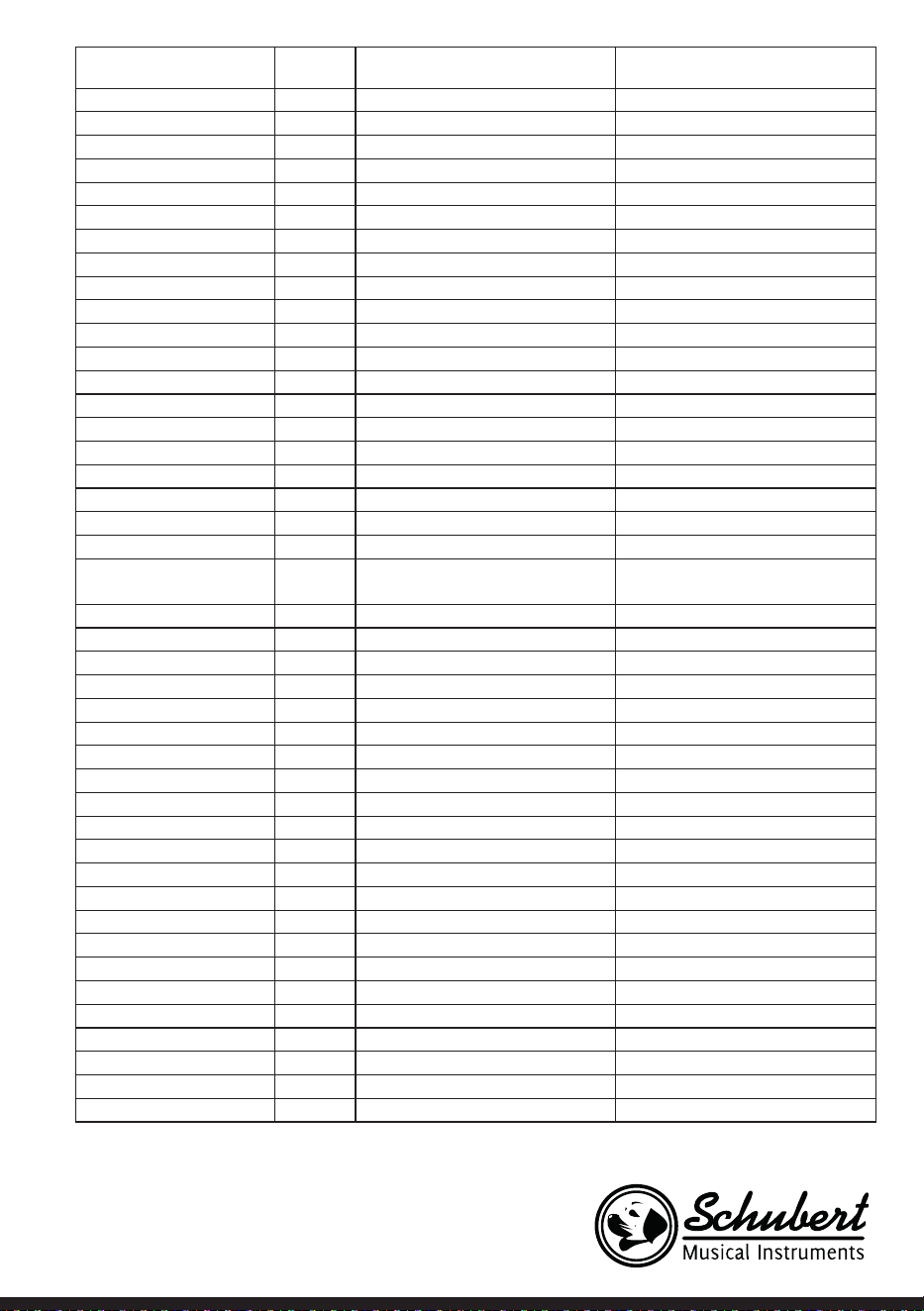
LIEDERTABELLE
Musikstil Nr. Englischer Name Englische Abkürzung
FOLK & COUNTRY 1 Jambalaya Jambalaya
FOLK & COUNTRY 2 Ding! Dong! Merril on High DingDong
FOLK & COUNTRY 3 Battle Hymne of the Republic Battle
FOLK & COUNTRY 4 The Old Gray Mare GrayMare
FOLK & COUNTRY 5 American Patrol USPatrol
FOLK & COUNTRY 6 Christmas is Coming IsComing
FOLK & COUNTRY 7 Sippin/Cider through a Stray SCTStraw
FOLK & COUNTRY 8 Christmas Sound Sound
GOLDEN & POP 9 On London Bridge LdBridge
GOLDEN & POP 10 Are You Lonesome Tonight Lonesome
GOLDEN & POP 11 Der Deitcher’s Dog DerDDog
GOLDEN & POP 12 Joy to the World JoyWordl
GOLDEN & POP 13 Silent Night Sltnight
GOLDEN & POP 14 Ave Maria AveMaria
GOLDEN & POP 15 Five Hundred Miles FHMiles
GOLDEN & POP 16 Happy New Year HappyNY
GOLDEN & POP 17 It’s beginning to look a lot like
Christmas
LikeXmas
GOLDEN & POP 18 Jeanie with the light brown hair LightHair
GOLDEN & POP 19 My Bonnie MyBonnie
GOLDEN & POP 20 Song oft he Pearlsher SongOfTP
CLASSICAL 21 Swan Swan
CLASSICAL 22 Prelude to Act 2 (Swan Lake) SwanLak1
CLASSICAL 23 Valse (Swan Lake) SwanLak2
CLASSICAL 24 The Happy Farmer HpFarmer
CLASSICAL 25 The Sleeping Beauty SleepBty
CLASSICAL 26 La Traviata LaTravia
CLASSICAL 27 Wiegenlied Wiegenli
CLASSICAL 28 Mov.2 Adagio Non Troppo
Piano Sonata No. 9 D
Sonata 9
CLASSICAL 29 Mov.1 Andante Grazioso Piano
Sonata No. 11 in A
Sonata 11
CLASSICAL 30 Prelude in C Prelude
CLASSICAL 31 Chinese Dance CHDance
CLASSICAL 32 Emperors Waltz EmprWaltz
CLASSICAL 33 March Militaire MilMar1
CLASSICAL 34 Symphony No.40 Symphony
JAZZ & FUSION 35 ShanZhaShu ShanZaS
JAZZ & FUSION 36 You are my sunshine MySun
JAZZ & FUSION 37 June Samba JunSamba
27
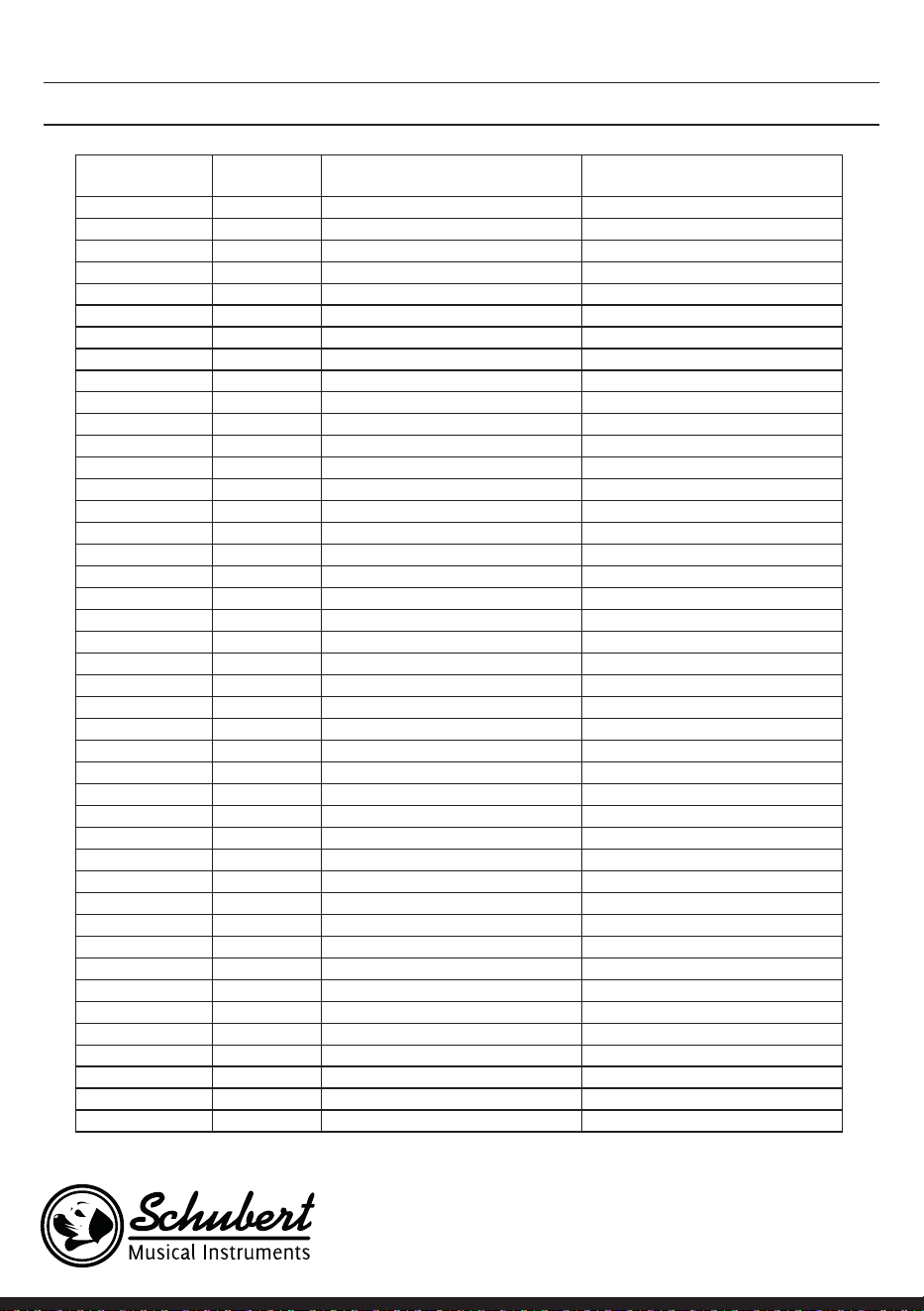
Musikstil Nr. Englischer Name Englische Abkürzung
JAZZ & FUSION 38 Funk Funk
JAZZ & FUSION 39 I Can… I Can…
JAZZ & FUSION 40 Sea Shore SeaShore
JAZZ & FUSION 41 Guitar & Saxphone Gt&Sax
JAZZ & FUSION 42 The Hip Hop’s Night HipHopNt
JAZZ & FUSION 43 Blue Lunch BlueLunch
JAZZ & FUSION 44 Cobweb Cobweb
JAZZ & FUSION 45 Wine Wine
JAZZ & FUSION 46 Jazz Old Man JzOldMan
JAZZ & FUSION 47 Dark Eyes DarkEyes
JAZZ & FUSION 48 Carlos Carlos
JAZZ & FUSION 49 Sad Sad
JAZZ & FUSION 50 The Jazz TheJazz
PIANO 51 Für Elise FürElise
PIANO 52 Military March Mmarch
PIANO 53 Habanera Habanera
PIANO 54 Minuet Minuet
PIANO 55 Austria Variation Avariati
PIANO 56 Old Macdonald had a Farm OldAFarm
PIANO 57 Wedding March Wedding
PIANO 58 2-Part Invention #13 In A
Minor. B.W. Iii
Invention
PIANO 59 Minuet in G MinuetG
PIANO 60 Turkish March TurkishM
PIANO 61 Hey Diddle Diddle HeDiddle
PIANO 62 Italian Polka ItaPolka
PIANO 63 Moseta Dance MosetaDn
PIANO 64 Bulie Dance BulieDn
PIANO 65 Waltz in A Flat Op.39 No. 15 Waltz 1
PIANO 66 Wild Rose WildRose
PIANO 67 Away in A Manger AwayInAM
PIANO 68 Jack & Jill JackJill
PIANO 69 Angels We Have Heard on High Angels
PIANO 70 Waltz Waltz
PIANO 71 Did you ever see a Lassie Lassie
PIANO 72 Chopsticks Chopstick
PIANO 73 Four Little Swans FLSwans
PIANO 74 Old France OldFrance
PIANO 75 Jesus Saviour pilot Me PilotMe
PIANO 76 Eclogue Eclogue
PIANO 77 Santa Claus is coming to towen SantaCT
PIANO 78 Brave Cavalier Cavalier
PIANO 79 America The Beautiful USFair
PIANO 80 Music Box Dancer Dancer
28
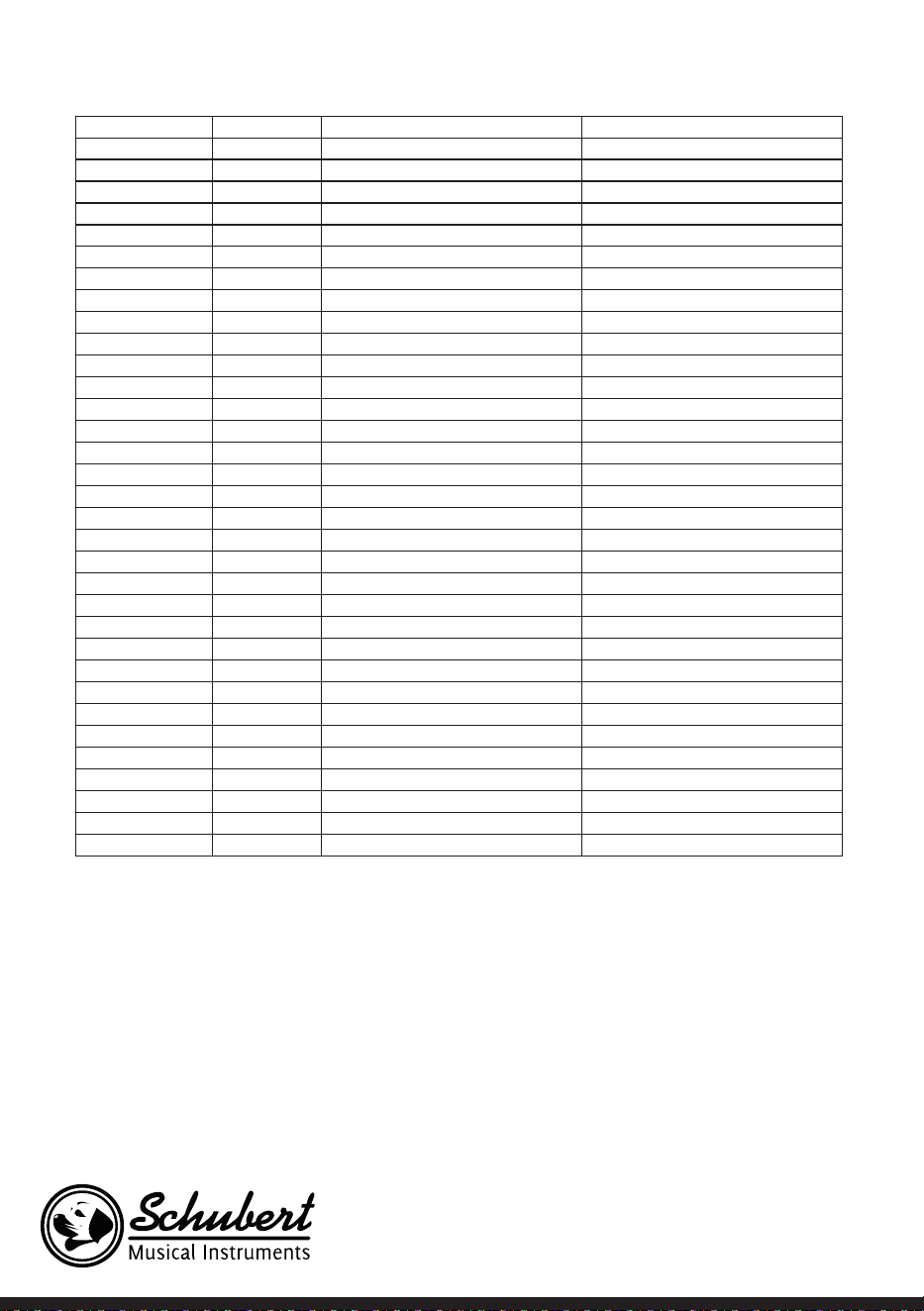
STILTABELLE
Bezeichnung Nr. Englischer Name Englische Abkürzung
8 BEAT 1 8 Beat Piano 8BtPiano
8 BEAT 2 8 Beat 1 8Beat1
8 BEAT 3 8 Beat Shufe 8BtShu
8 BEAT 4 Guitar Pop 1 GtPop1
8 BEAT 5 8 Beat Hip Hop 8BtHiHop
8 BEAT 6 8 Beat R&B 8BeatR&B
8 BEAT 7 8 Beat Pop 8BtPop
8 BEAT 8 Pop Funk 1 PopFunk1
8 BEAT 9 Rhythm & Beat 1 Rhy&Bt1
8 BEAT 10 8 Beat Disco 1 8BtDisc1
8 BEAT 11 8 Beat Rock 8BtRock
8 BEAT 12 8 Beat 2 8Bt2
8 BEAT 13 Sweet Beat SweetBt
8 BEAT 14 8 Beat Dance 8BtDance
8 BEAT 15 8 Beat 3 8Bt3
8 BEAT 16 60’s 8 Beat 60’s8Bt
16 BEAT 17 16 Beat 1 16Beat1
16 BEAT 18 16 Beat Funk 1 16BtFuk1
16 BEAT 19 16 Beat Ballad 1 16BtBld1
16 BEAT 20 16 Beat R&B 16BtR&B
16 BEAT 21 Pop 16 Beat 1 Pop16Bt1
16 BEAT 22 16 Beat Dance 16BDanc
16 BEAT 23 16 Beat 2 16Beat2
16 BEAT 24 Modern 16 Beat Modrn16B
16 BEAT 25 16 Beat Hot 16BtHot
16 BEAT 26 16 Beat Modern 16BtModr
16 BEAT 27 16 Beat 3 16Beat3
16 BEAT 28 Cool Beat CoolBeat
16 BEAT 29 16 Beat Ballad 2 A6BtBld2
16 BEAT 30 16 Beat 4 16Beat4
16 BEAT 31 Pop Shufe PopShu
POP 32 Pop Rock 1 PopRock1
POP 33 Pop Dance 1 PopDanc1
POP 34 Pop Fusion PopFusn
POP 35 Analog Night 1 AnalgNt1
POP 36 6/8 Pop 6/8Pop
POP 37 Brit. Pop 1 BritPop1
POP 38 Brit. Pop 2 BritPop2
POP 39 Pop Hit PopHit
POP 40 Fusion Shufe FusShu
POP 41 Pop Beat PopBeat
POP 42 Soft Beat SoftBeat
POP 43 60’s Pop 60’sPop

29
POP 44 Sting Latin StigLatn
BALLAD 45 R&B Ballad 1 R&BBad1
BALLAD 46 Guitar Ballad GtBallad
BALLAD 47 Ballad Rock BalladRk
BALLAD 48 Piano pop PianoPop
BALLAD 49 Soft Ballad SoftBald
BALLAD 50 Natural Ballad NatuBld
BALLAD 51 Love Ballad LoveBld
BALLAD 52 Easy Ballad EasyBld
BALLAD 53 Slow Ballad SlowBald
BALLAD 54 Folk Ballad FolkBld
BALLAD 55 Pop Ballad 1 PopBld1
BALLAD 56 EP Ballad EPBallad
ROCK 57 Rock Rock
ROCK 58 New Wave NewWave
ROCK 59 Ska Ska
ROCK 60 Slow Rock SlowRock
ROCK 61 70’s Rock & Roll 70’s Rock
ROCK 62 Folk Rock FolkRock
ROCK 63 Soft Rock SoftRock
ROCK 64 Easy Rock EasyRock
ROCK 65 New Shufe NewShu
ROCK 66 Rock Hip Hop RkHipHop
ROCK 67 Rock & Roll 1 R’N’R1
ROCK 68 Rock & Roll 2 R’N’R2
BALLROOM 69 Tango 1 Tango1
BALLROOM 70 Spain Matador Matador
BALLROOM 71 Twist 1 Twist1
BALLROOM 72 Big Band Fox BandFox
BALLROOM 73 Tango 2 Tango2
BALLROOM 74 Slow Fox SlowFox
BALLROOM 75 Slow Waltz 1 SlowWlz1
BALLROOM 76 Swing Fox SwingFox
BALLROOM 77 Salsa 1 Salsa1
BALLROOM 78 Cha Cha 1 ChaCha1
BALLROOM 79 Cha Cha 2 ChaCha2
BALLROOM 80 Beguine 1 Beguine1
BALLROOM 81 Beguine 2 Beguine2
BALLROOM 82 Rumba 1 Rumba1
BALLROOM 83 Samba 1 Samba1
BALLROOM 84 Jive Jive
BALLROOM 85 Fox Trot FoxTrot
DANCE 86 Techno 1 Techno1
DANCE 87 Hip Hop 1 HipHop1
DANCE 88 Dream Dance DrmDance
DANCE 89 House House
DANCE 90 Down Beat DownBeat
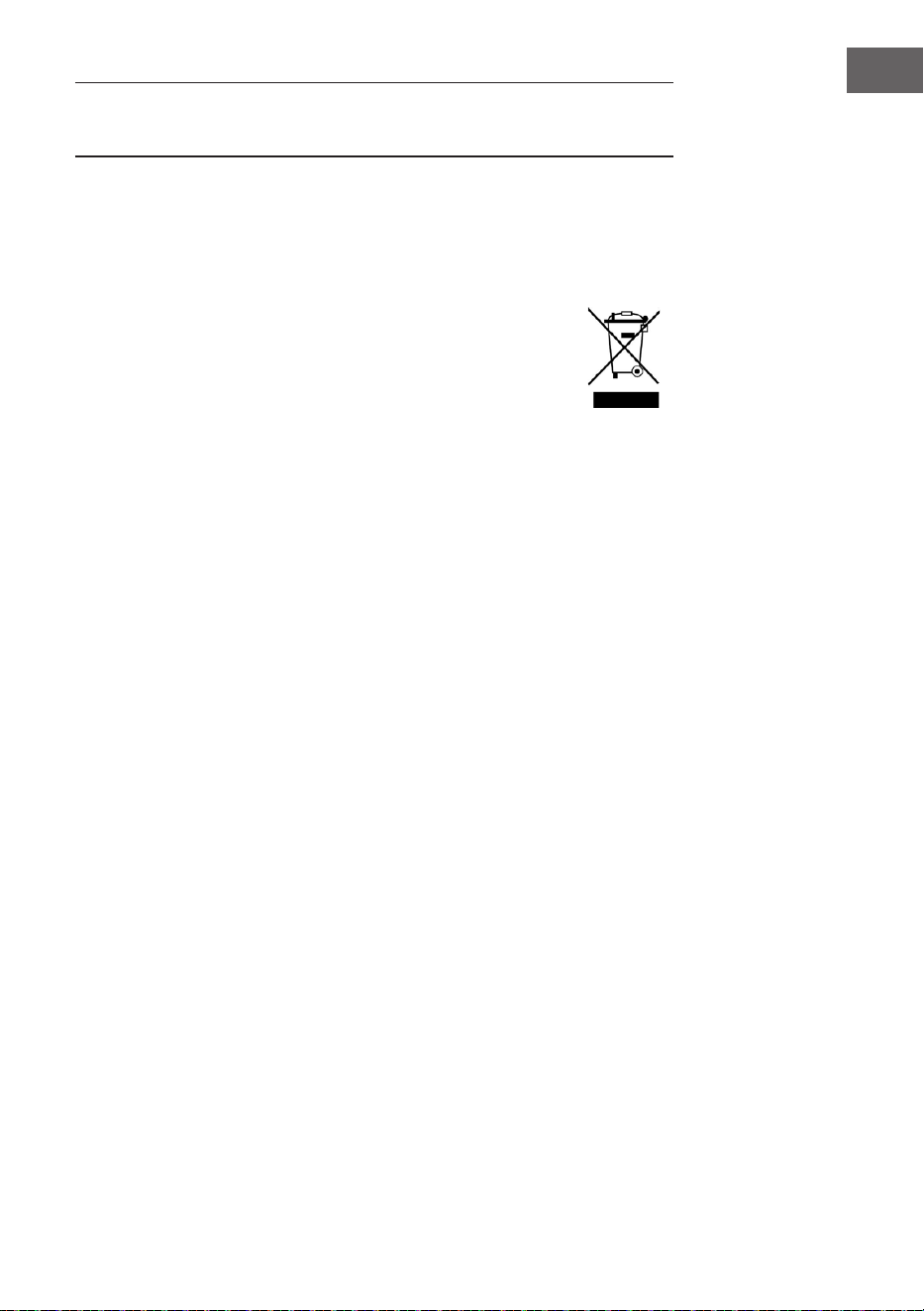
30
DANCE 91 Progressive Progress
DANCE 92 Rap 1 Rap1
DANCE 93 Disco Disco
DANCE 94 Soft Disco SoftDisc
DANCE 95 Disco Party DscParty
DANCE 96 70’s Disco 70’sDisc
DANCE 97 Club Dance ClubDanc
DANCE 98 Euro Dance EuroDanc
DANCE 99 Hip Hop 2 HipHop2
SOUL & FUNK 100 Funk 1 Funk1
SOUL & FUNK 101 Classic Funk ClasFunk
SOUL & FUNK 102 Gospel Swing GopSwing
SOUL & FUNK 103 Gospel Gospel
SOUL & FUNK 104 Funk 2 Funk2
SOUL & FUNK 105 Electric Funk ElecFunk
SOUL & FUNK 106 Groove Funk GrooveFk
SOUL & FUNK 107 Cool Funky ColFunky
SOUL & FUNK 108 Jazz Funk JazzFunk
SOUL & FUNK 109 Groove Groove
SOUL & FUNK 110 Soul Soul
SOUL & FUNK 111 Hip Hop Beat HipHopBt
SOUL & FUNK 112 R&B R&B
SOUL & FUNK 113 Soul Beat SoulBeat
SWING & JAZZ 114 Latin Jazz 1 LatinJz1
SWING & JAZZ 115 Big Band BigBand
SWING & JAZZ 116 Dixieland 1 Dixland1
SWING & JAZZ 117 Broadway Big Bang BwayBand
SWING & JAZZ 118 Swing Swing
SWING & JAZZ 119 Latin Jazz 2 LatinJz2
SWING & JAZZ 120 Fusion Fusion
SWING & JAZZ 121 Acid Jazz AcidJazz
SWING & JAZZ 122 Cool Jazz Ballad CoolJzBd
SWING & JAZZ 123 Swing Shufe SwingS
SWING & JAZZ 124 Big Band Medium BandMid
31
DE
SPEZIELLE ENTSORGUNGSHINWEISE FÜR
VERBRAUCHER IN DEUTSCHLAND
Entsorgen Sie Ihre Altgeräte fachgerecht. Dadurch wird gewährleistet, dass die
Altgeräte umweltgerecht verwertet und negative Auswirkungen auf die Umwelt
und menschliche Gesundheit vermieden werden. Bei der Entsorgung sind
folgende Regeln zu beachten:
• Jeder Verbraucher ist gesetzlich verpichtet, Elektro- und Elek-
tronikaltgeräte (Altgeräte) sowie Batterien und Akkus getrennt
vom Hausmüll zu entsorgen. Sie erkennen die entsprechenden
Altgeräte durch folgendes Symbol der durchgestrichene Müll-
tonne (WEEE-Symbol).
• Sie haben Altbatterien und Altakkumulatoren, die nicht vom Altgerät
umschlossen sind, sowie Lampen, die zerstörungsfrei aus dem Altgerät
entnommen werden können, vor der Abgabe an einer Entsorgungsstelle vom
Altgerät zerstörungsfrei zu trennen.
• Bestimmte Lampen und Leuchtmittel fallen ebenso unter das Elektro- und
Elektronikgesetz und sind dementsprechend wie Altgeräte zu behandeln.
Ausgenommen sind Glühbirnen und Halogenlampen. Entsorgen Sie
Glühbirnen und Halogenlampen bitte über den Hausmüll, sofern sie nicht das
WEEE-Symbol tragen.
• Jeder Verbraucher ist für das Löschen von personenbezogenen Daten auf dem
Elektro- bzw. Elektronikgerät selbst verantwortlich.
Rücknahmepicht der Vertreiber
Vertreiber mit einer Verkaufsäche für Elektro- und Elektronikgeräte von
mindestens 400 Quadratmetern sowie Vertreiber von Lebensmitteln mit einer
Gesamtverkaufsäche von mindestens 800 Quadratmetern, die mehrmals im
Kalenderjahr oder dauerhaft Elektro- und Elektronikgeräte anbieten und auf dem
Markt bereitstellen, sind verpichtet,
1. bei der Abgabe eines neuen Elektro- oder Elektronikgerätes an einen Endnutzer
ein Altgerät des Endnutzers der gleichen Geräteart, das im Wesentlichen die
gleichen Funktionen wie das neue Gerät erfüllt, am Ort der Abgabe oder in
unmittelbarer Nähe hierzu unentgeltlich zurückzunehmen und
2. auf Verlangen des Endnutzers Altgeräte, die in keiner äußeren Abmessung
größer als 25 Zentimeter sind, im Einzelhandelsgeschäft oder in unmittelbarer
Nähe hierzu unentgeltlich zurückzunehmen; die Rücknahme darf nicht an den
Kauf eines Elektro- oder Elektronikgerätes geknüpft werden und ist auf drei
Altgeräte pro Geräteart beschränkt.

32
DE
• Bei einem Vertrieb unter Verwendung von Fernkommunikationsmitteln
ist die unentgeltliche Abholung am Ort der Abgabe auf Elektro- und
Elektronikgeräte der Kategorien 1, 2 und 4 gemäß § 2 Abs. 1 ElektroG, nämlich
„Wärmeüberträger“, „Bildschirmgeräte“ (Oberäche von mehr als 100 cm²)
oder „Großgeräte“ (letztere mit mindestens einer äußeren Abmessung
über 50 Zentimeter) beschränkt. Für andere Elektro- und Elektronikgeräte
(Kategorien 3, 5, 6) ist eine Rückgabemöglichkeit in zumutbarer Entfernung
zum jeweiligen Endnutzer zu gewährleisten.
• Altgeräte dürfen kostenlos auf dem lokalen Wertstoffhof oder in folgenden
Sammelstellen in Ihrer Nähe abgegeben werden: www.take-e-back.de
• Für Elektro- und Elektronikgeräte der Kategorien 1, 2 und 4 bieten wir auch die
Möglichkeit einer unentgeltlichen Abholung am Ort der Abgabe. Beim Kauf
eines Neugeräts haben Sie die Möglichkeit, eine Altgerätabholung über die
Webseite auszuwählen.
• Batterien können überall dort kostenfrei zurückgegeben werden, wo sie
verkauft werden (z. B. Super-, Bau-, Drogeriemarkt). Auch Wertstoff- und
Recyclinghöfe nehmen Batterien zurück. Sie können Batterien auch per Post
an uns zurücksenden. Altbatterien in haushaltsüblichen Mengen können Sie
direkt bei uns von Montag bis Freitag zwischen 08:00 und 16:00 Uhr unter der
folgenden Adresse unentgeltlich zurückgeben:
Chal-Tec Fulllment GmbH
Norddeutschlandstr. 3
47475 Kamp-Lintfort
• Wichtig zu beachten ist, dass Lithiumbatterien aus Sicherheitsgründen vor der
Rückgabe gegen Kurzschluss gesichert werden müssen (z. B. durch Abkleben
der Pole).
• Finden sich unter der durchgestrichenen Mülltonne auf der Batterie zusätzlich
die Zeichen Cd, Hg oder Pb ist das ein Hinweis darauf, dass die Batterie
gefährliche Schadstoffe enthält. (»Cd« steht für Cadmium, »Pb« für Blei und
»Hg« für Quecksilber).
Hinweis zur Abfallvermeidung
Indem Sie die Lebensdauer Ihrer Altgeräte verlängern, tragen Sie dazu bei,
Ressourcen ezient zu nutzen und zusätzlichen Müll zu vermeiden. Die
Lebensdauer Ihrer Altgeräte können Sie verlängern, indem Sie defekte Altgeräte
reparieren lassen. Wenn sich Ihr Altgerät in gutem Zustand bendet, könnten Sie
es spenden, verschenken oder verkaufen.
33
DE
HINWEISE ZUR ENTSORGUNG
Wenn es in Ihrem Land eine gesetzliche Regelung
zur Entsorgung von elektrischen und elektronischen
Geräten gibt, weist dieses Symbol auf dem Produkt oder
auf der Verpackung darauf hin, dass dieses Produkt
nicht im Hausmüll entsorgt werden darf. Stattdessen
muss es zu einer Sammelstelle für das Recycling von
elektrischen und elektronischen Geräten gebracht
werden. Durch regelkonforme Entsorgung schützen
Sie die Umwelt und die Gesundheit Ihrer Mitmenschen
vor negativen Konsequenzen. Informationen zum
Recycling und zur Entsorgung dieses Produkts,
erhalten Sie von Ihrer örtlichen Verwaltung oder Ihrem
Hausmüllentsorgungsdienst.
HERSTELLER & IMPORTEUR (UK)
Hersteller:
Chal-Tec GmbH, Wallstraße 16, 10179 Berlin, Deutschland.
Importeur für Großbritannien:
Berlin Brands Group UK Limited
PO Box 42
272 Kensington High Street
London, W8 6ND
United Kingdom
34
Dear Customer,
Congratulations on purchasing this equipment. Please read this manual
carefully and take care of the following hints to avoid damages. Any failure
caused by ignoring the items and cautions mentioned in the instruction
manual are not covered by our warranty and any liability. Scan the QR code to
get access to the latest user manual and other information about the product.
TECHNICAL DATA
Item number 10033246 10033247
Keyboard 88-key standard keyboard with touch response
Display LED
Voice 360 kinds of voices
Style 160 styles
Demo 80 demo songs
Effect control Touch, reverb, chorus, dual, split, function menu, sound console
Record Single track, multi tracks, combined record
Accompaniment control Accompaniment volume, transpose control, MP3 function
Chord control ABC, auto akkord
Pedal Soft pedal, sustain pedal
External function USB (MP3), USB (MIDI), MIDI IN/OUT
Power adapter 220 V~, 12-15 V
Power input 12-15 V , 2-3 A
CONTENTS
Technical Data 34
Safety Instructions 35
Panel Control and Display Illustration 36
Installation 39
Getting Stated & Operation 41
Function menu 50
Song List 57
Style List 59
Disposal Considerations 62
Manufacturer & Importer (UK) 62

35
SAFETY INSTRUCTIONS
• Lesen Sie sich die Bedienungsanleitung vor der Verwendung des Geräts aufmerksam durch, um Sach-
Please read this cautions carefully before use
• Please read carefully the following notice(but are not limited to the following notice) so as to prevent the
possible hurt to yourself or others and possible damages of this instrument and external parts of other
equipment.
• Do not open the case of this instrument .Do not try to disassemble any part of it, nor change any interior
parts.Should any abnormal function occur in use, please stop it immediately and send it to qualied
personnel for maintenance service.
• Never leave the instrument in circumstance with excessive dust, vibration , low or high temperature(such
as place under the direct sunlight, close to other source of heat, inside the car which under the direct
sunlight)to prevent damages of both appearance and internal components of instrument.
• Never leave the instrument in an unstable place to avoid falling down and cause the damages.
• Never place any container with liquid on the instrument to prevent the liquid ow into the instrument.
• Stellen Sie niemals mit Flüssigkeit gefüllte Behälter auf dem Gerät ab, da diese Umfallen könnten und die
Flüssigkeit dadurch ins Geräteinnere gelangen könnte.
• Turn the master volume to ‘00’ before connecting the power and adjust the volume gradually to the
proper volume to prevent the damage of speakers.
• Never turn the volume to Max. Or the position that heard uncomfortable when you play, to prevent your
hearing loss.
• Never apply excessive force or place heavy objects on instrument nor apply excessive force to press
keyboard , power button and jack.
• The instrument must be unpacked by the adults before use to prevent baby or children form choking
hazard. Please keep and store or discard the plastic packing .
• Properly store or discard after unpacking .The inside small components are not suitable for the children
under 3 years old.
36
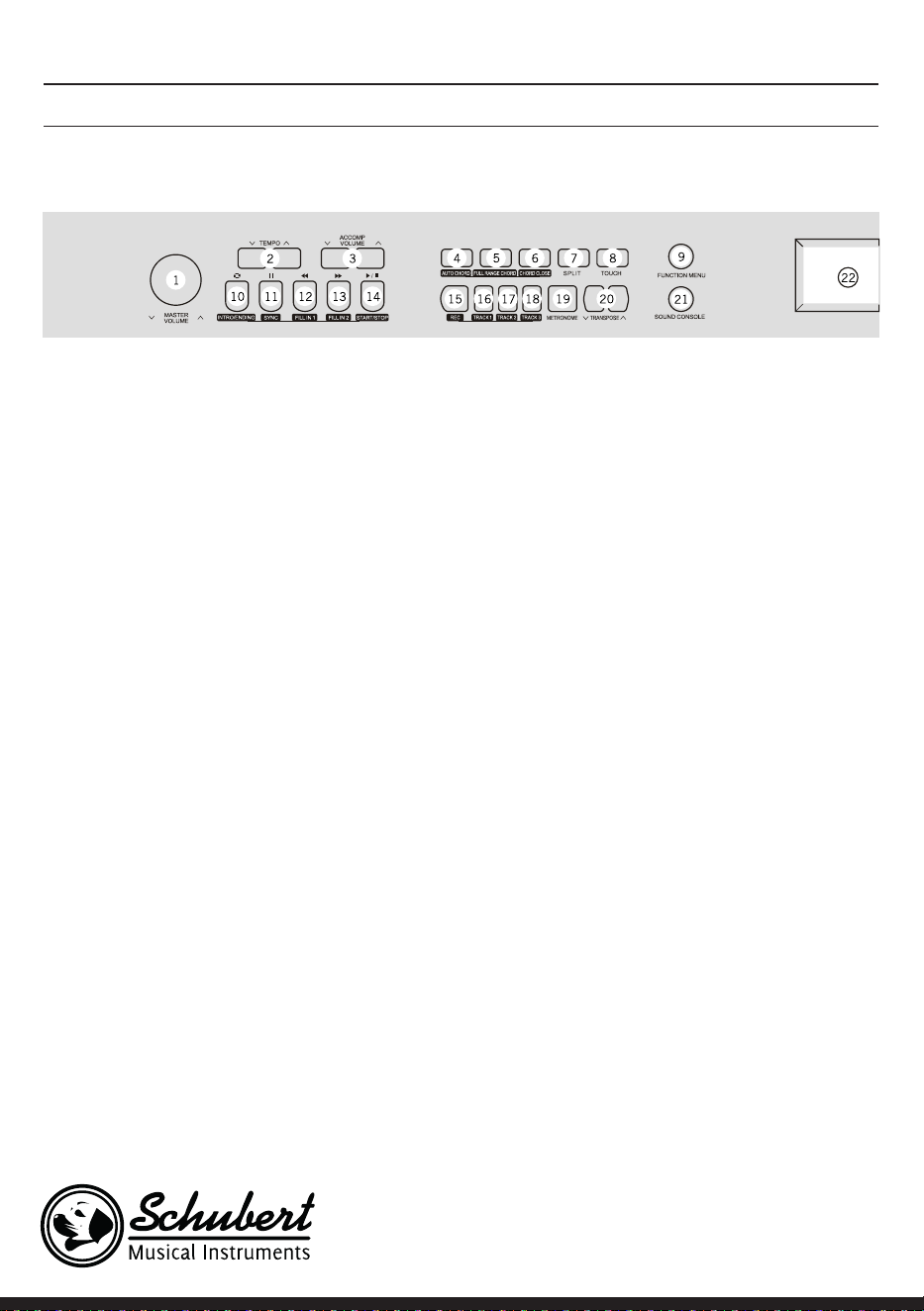
1 MASTER VOLUME – Adjust volume size
2 TEMPO ∨/∧– Adjust present tempo
3 ACCOMP VOLUME ∨/∧ Adjust
accompaniment volume
4 AUTO CHORD
5 FULL RANGE CHORD
6 CHORD CLOSE
7 SPLIT
8 TOUCH Choose keyboard touch curve
9 FUNCTION MENU Enter into function menu
In the song mode
10 Set the beginning and ending position of song
paragraph loop
11 Pausetaste Pause to play or continue to play
the songs
12 To play songs fast backward
13 To play songs fast forward
14 Start or stop to play the songs
In style mode
10 Intro/ Ending – Play the intro/ending of auto
accompaniment
11 SYNC – Open/Close sync function
12 FILL IN 1 – Fill in variation1
13 FILL IN 2 – Fill in variation2
14 START/ STOP – Start or stop to play
accompaniment
15 REC – Start the record function
16 TRACK 1 – Choose track 1 in record
17 TRACK 2 – Choose Track 2 in record
18 TRACK 3 – Choose Track 3 in record
19 METRONOME – Open or Close metronome
20 TRANSPONSE ∨/∧ – Transposing
21 SOUND CONSOLE – Enter into sound console
menu
22 LCD-Bildschirm – Display all important setting
information about this equipment
PANEL CONTROL AND DISPLAY ILLUSTRATION
Left control panel
37
Right control panel
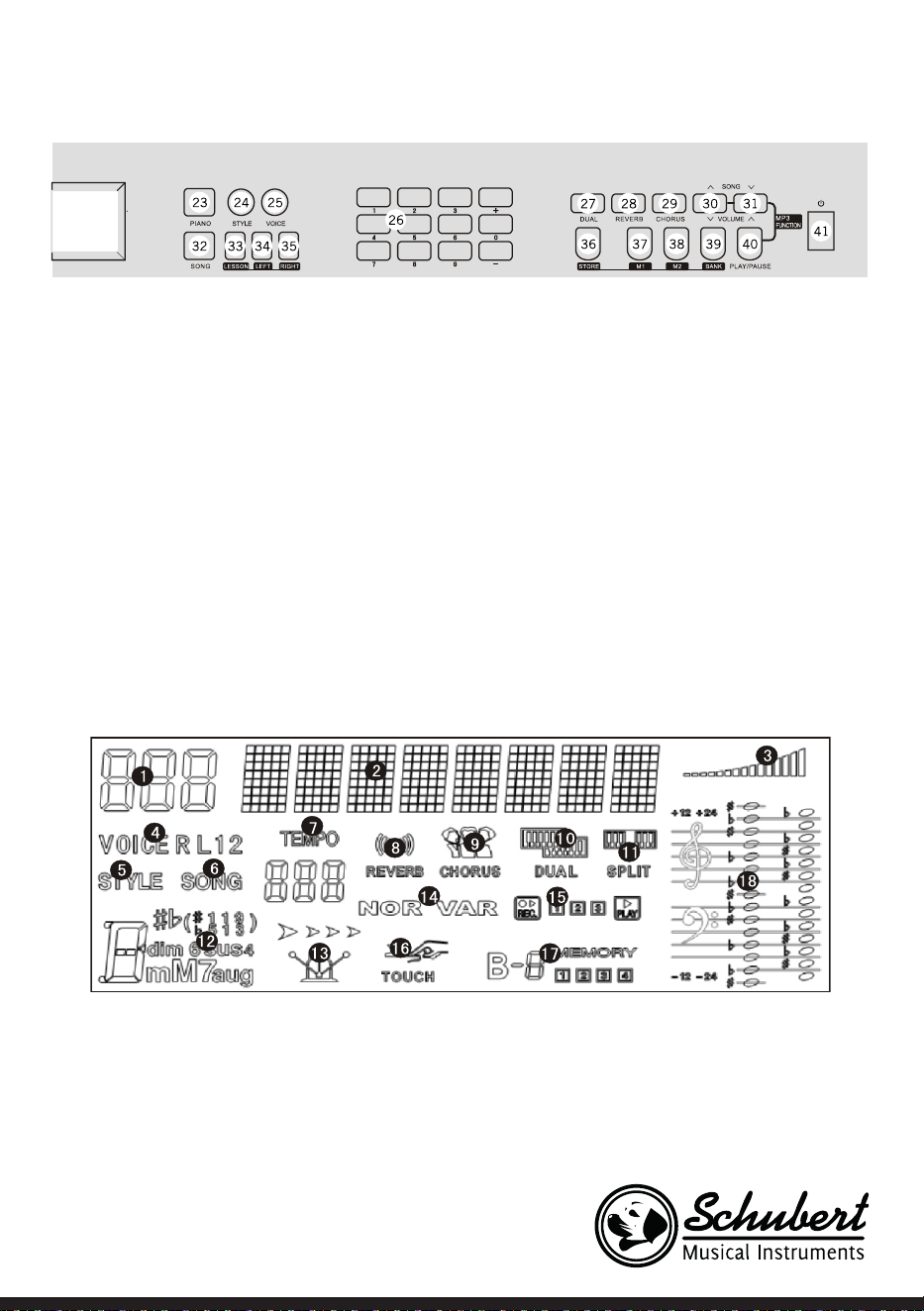
23 PIANO – Open or close piano performance mode
24 STYLE – Switch to style function state
25 VOICE – Switch to voice function state
26 Number/ +, - Adjust parameters
27 DUAL – Open or close dual voice function
28 REVERB
29 CHORUS
30 SONG ∧/ VOLUME ∨ – Switch to previous song
MP3
Press this button longer time to reduce MP3 play
volume
31 SONG ∨ / VOLUME ∧ – Switch to next song MP3
Press this button longer time to increase MP3
play volume
32 SONG – Switch to song function state
33 LESSON – Enter into learning mode
34 LEFT – Choose left hand voice part of learning
songs
35 RIGHT – Choose right hand voice part of learning
songs
36 STORE
37 M1 – To tune out panel setting1 promptly
38 M2 – To tune out panel setting2 promptly
39 BANK – Switch memory bank
40 PLAY/PAUSE – Play/ Pause MP3
41 Open/close power
LCD-Bildschirm
1 Digital code display area
2 Characters display area
3 Volume
4 Voice selection
5 Style selection
6 Songs
7 Tempo
8 Reverb
9 Chorus
10 Dual voice
11 Keyboard split
12 Chord display area
13 Metronome
14 FILL IN1/FILL IN2
15 Record/Play 16.Touch
16 State memory
17 Staff display area
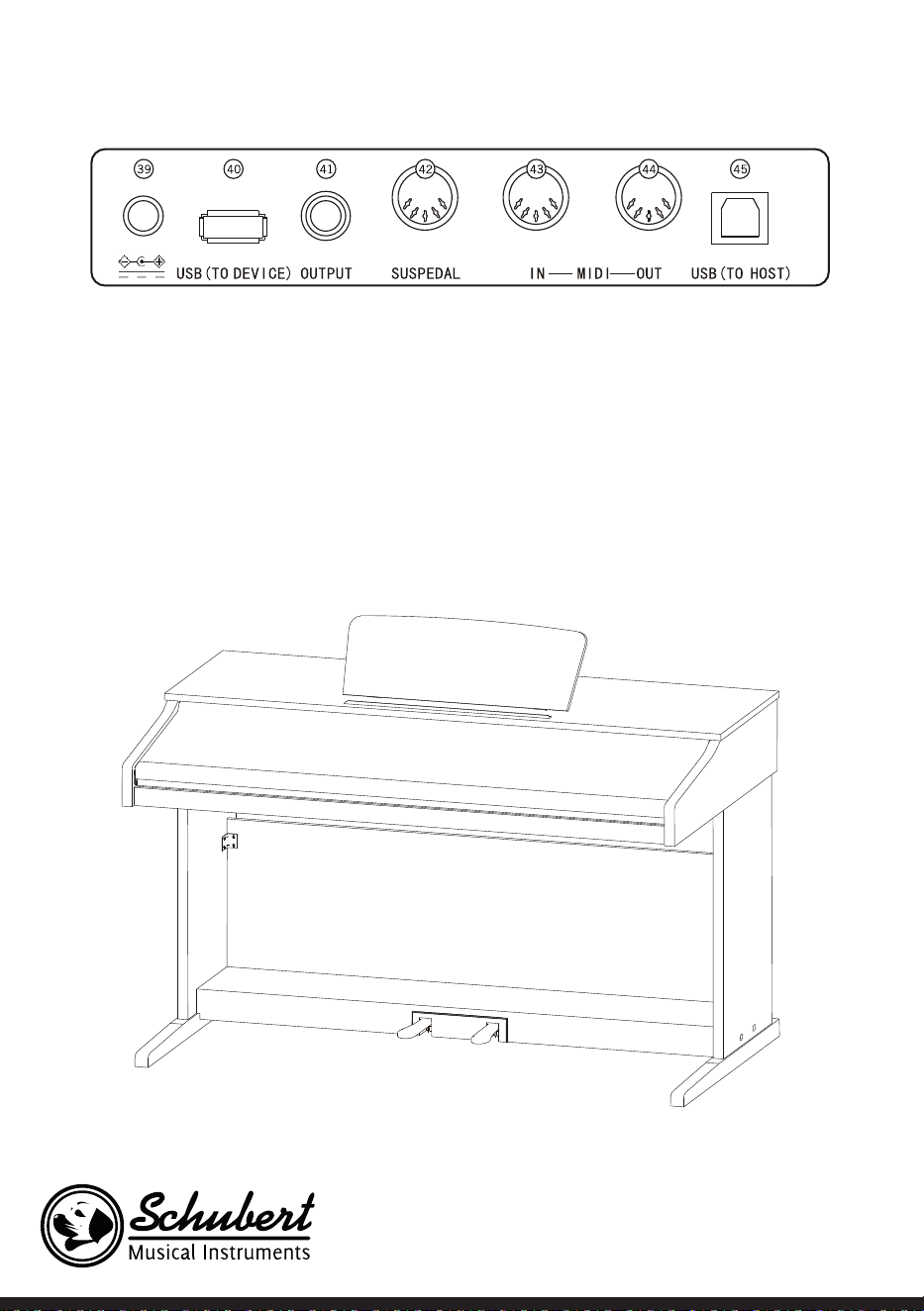
38
Rückseite
39. External power jack
40. Connect to external power adaptor 40.USB(MP3) equipment jack
41. Connect USB equipment 41.Audio out jack
42. Connect to external audio equipment 42.Pedal input jack
43. Connect to pedal 43.MIDI IN jack
44. Receiving MIDI information that was sent out by external MIDI equipment or computer 44.MIDI OUT
jack
45. Sending data of this piano to computer or MIDI equipment by this jack 45.USB(MIDI) jack
39
INSTALLATION
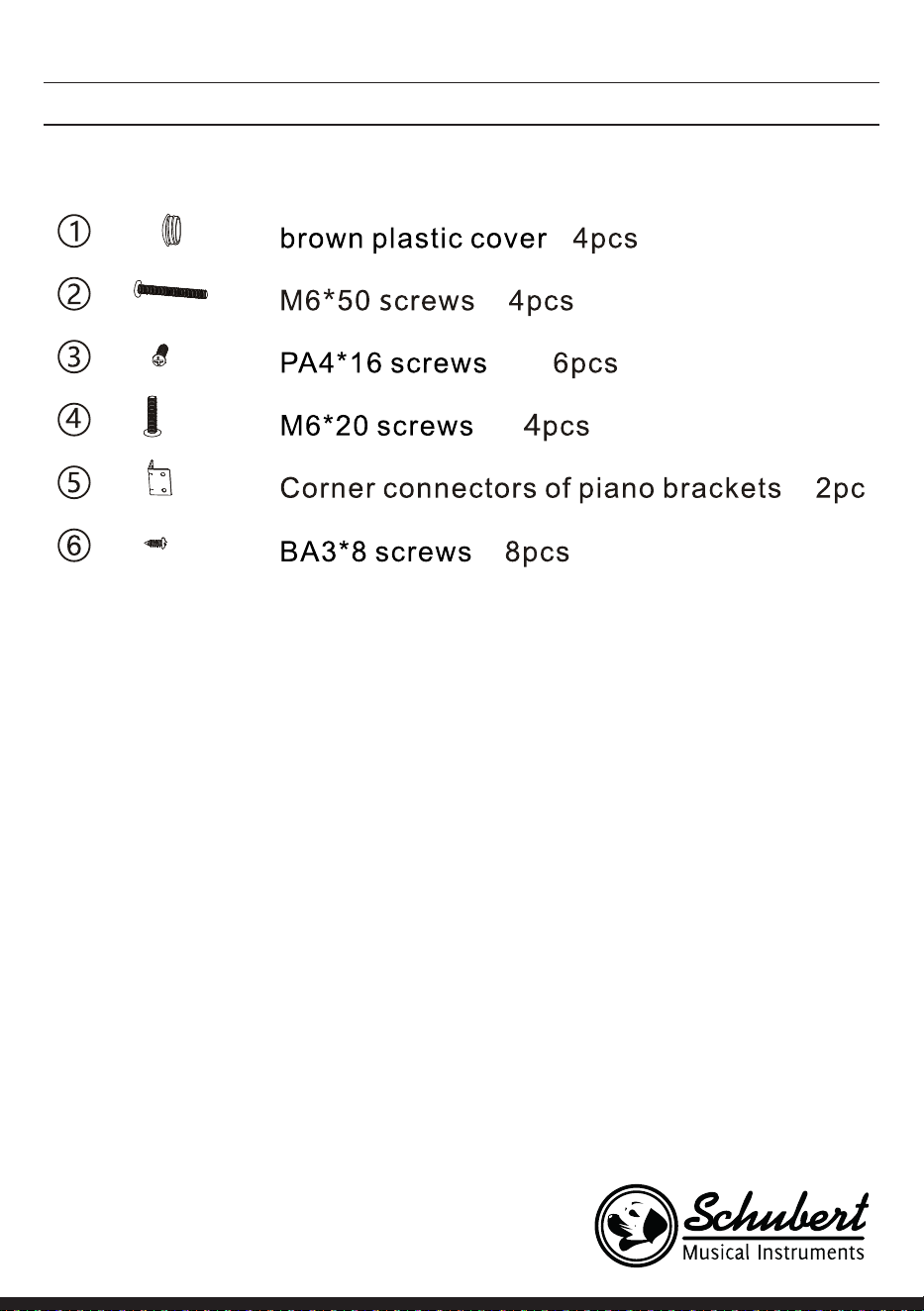
Assembly parts
Piano body assembly
1. Using 4pcs of M6*50 screws to connect left&right stand boards with pedal box.
2. Using 4pcs of PA3*8 screws to x one side of two corner connectors onto the back panel board.
3. Using 4pcs of BA3*8screws to x another side of the two corner into the left&right stand boards.
4. Using 6pcs of PA4*16 screws to x the bottom of back panel board to the pedal box. 5.Put the piano
body on the left&right stand boards, x it with 4 pcs of M6*20 screws.
5. Cover with 4 pcs brown plastic covers on the screws holes.
6. Put the pedal connect line midi plug into the piano body pedal jack.
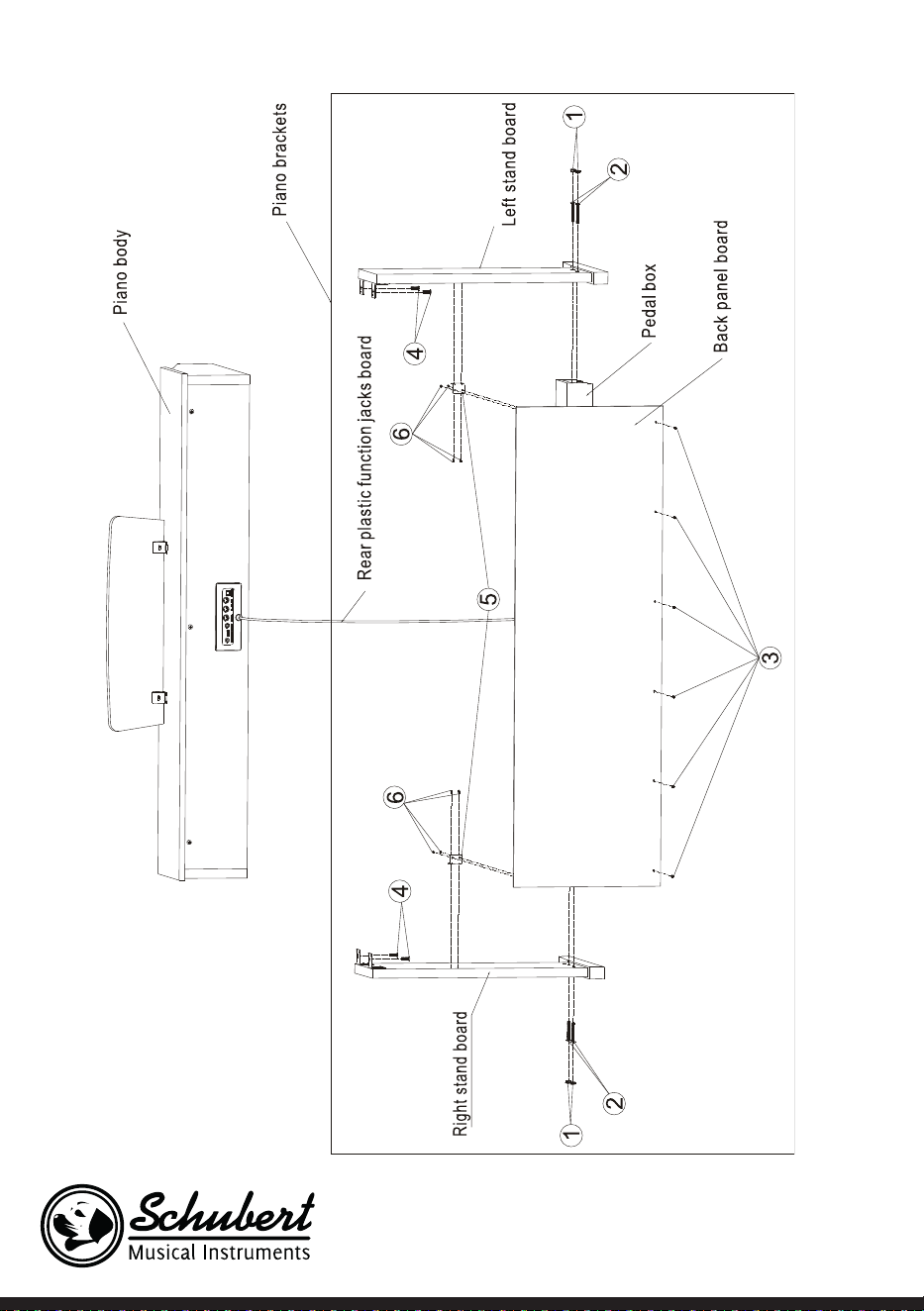
40
41
GETTING STATED & OPERATION
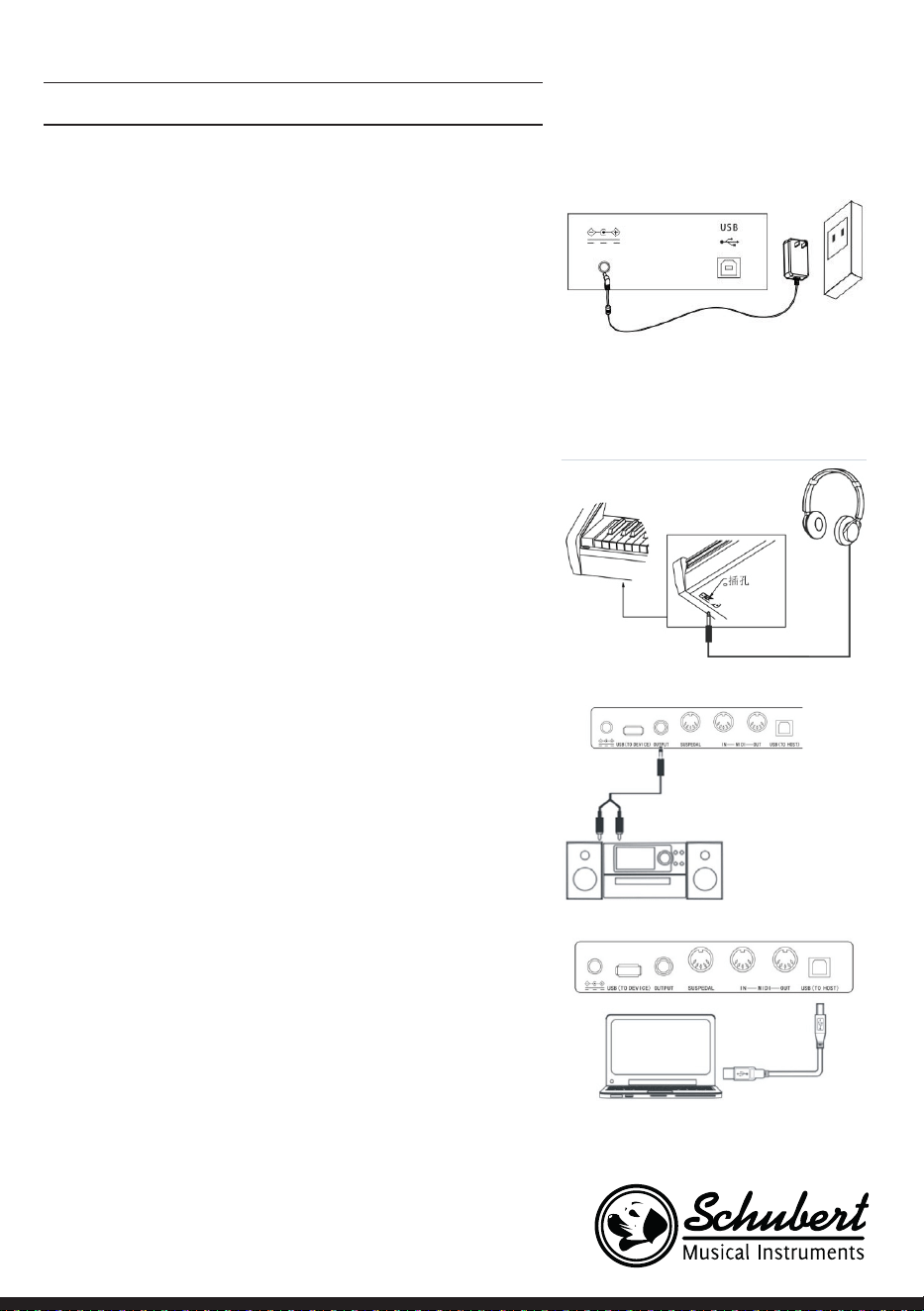
Power supply
1. Please make sure that this instrument is at off state before
connecting power.
2. Connect power adaptor to the DC jack of this instrument.
3. Insert plugs of power adaptor into AC power socket.
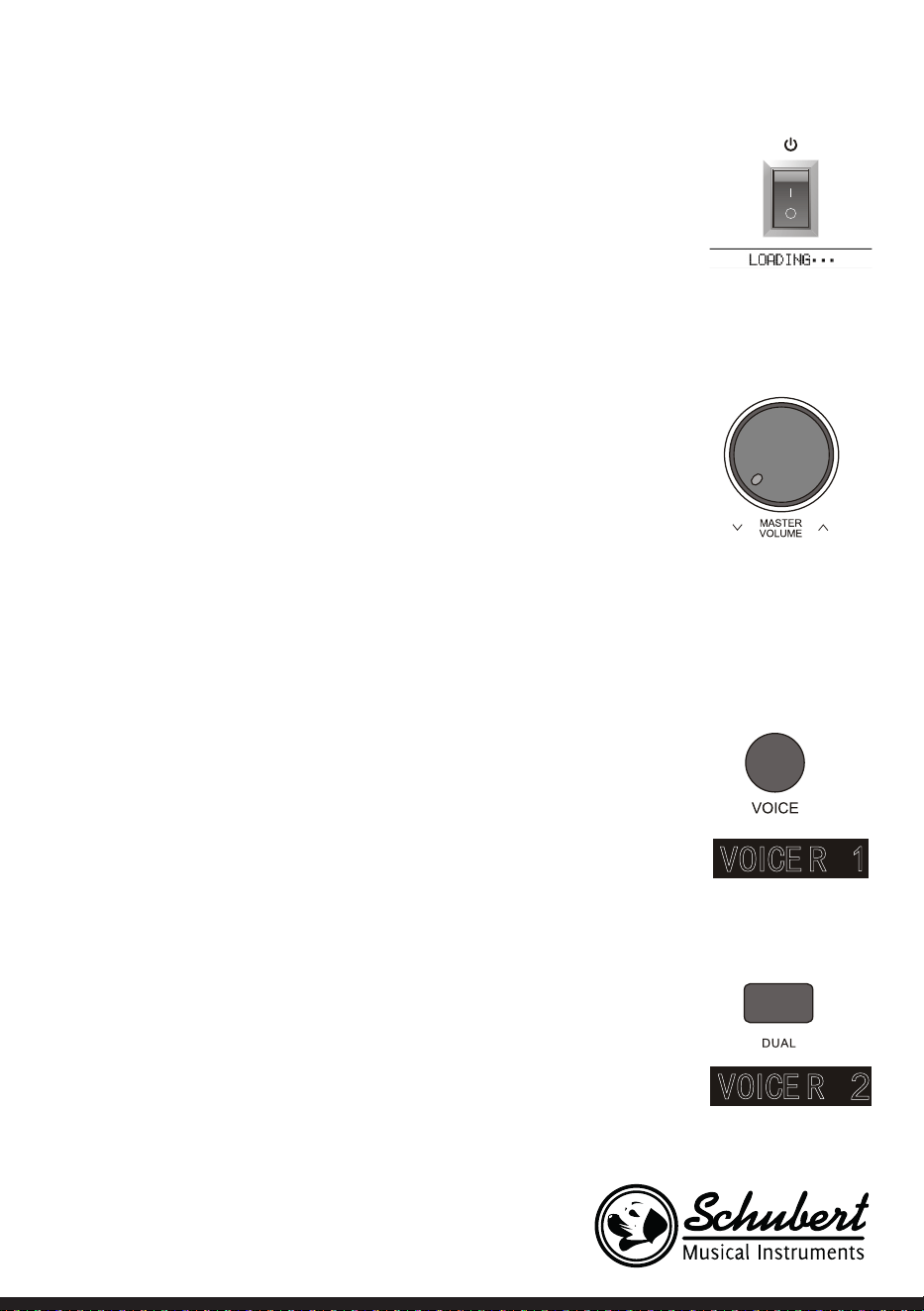
4. Pressing down [power] button, LCD screen displays “Load-
ing.” Indicating that this piano has been opened.
Notice For safety purpose, please cut off the power of this
instrument when you don‘t use it or suffer thunderstorm
weather.
Connect headphone
• You can insert stereo headphone into phone jack of this pi-
ano when you need exercise alone or play it late at night .
• The speakers of this instrument will cut off automatically af-
ter headphone was entered into phone jack, the sound can
only be heard from headphone, You can play as much as you
can, you aren’t afraid to disturb others.
Notice: Please avoid using headphone for long time high
volume, or else, it will cause human ear fatigue, moreover,
hearing damage.
Connect audio equipment
• Connecting this piano with external acoustics equipment,
better music effect can be got. The audio out jack in rear
panel can be used to connect to keyboard volume amplier,
Stereo acoustics systems, Sound console, Recorder or oth-
er equipment Using audio line to connect audio equipment
to audio out jack of rear panel, Connecting another end to
audio input jack of other equipment.
Note: Before connecting other equipment, please make
sure that the power of all equipment had been closed,
moreover, please make sure that volume setting of every
parts had been adjusted to lowest value before opening
power of equipment at the same time.
Connect computer
• This pian supplies one USB jack, it can be connected to per-
sonal computer. You only need one USB line, one end was
inserted into USB jack of this piano, other end was inserted
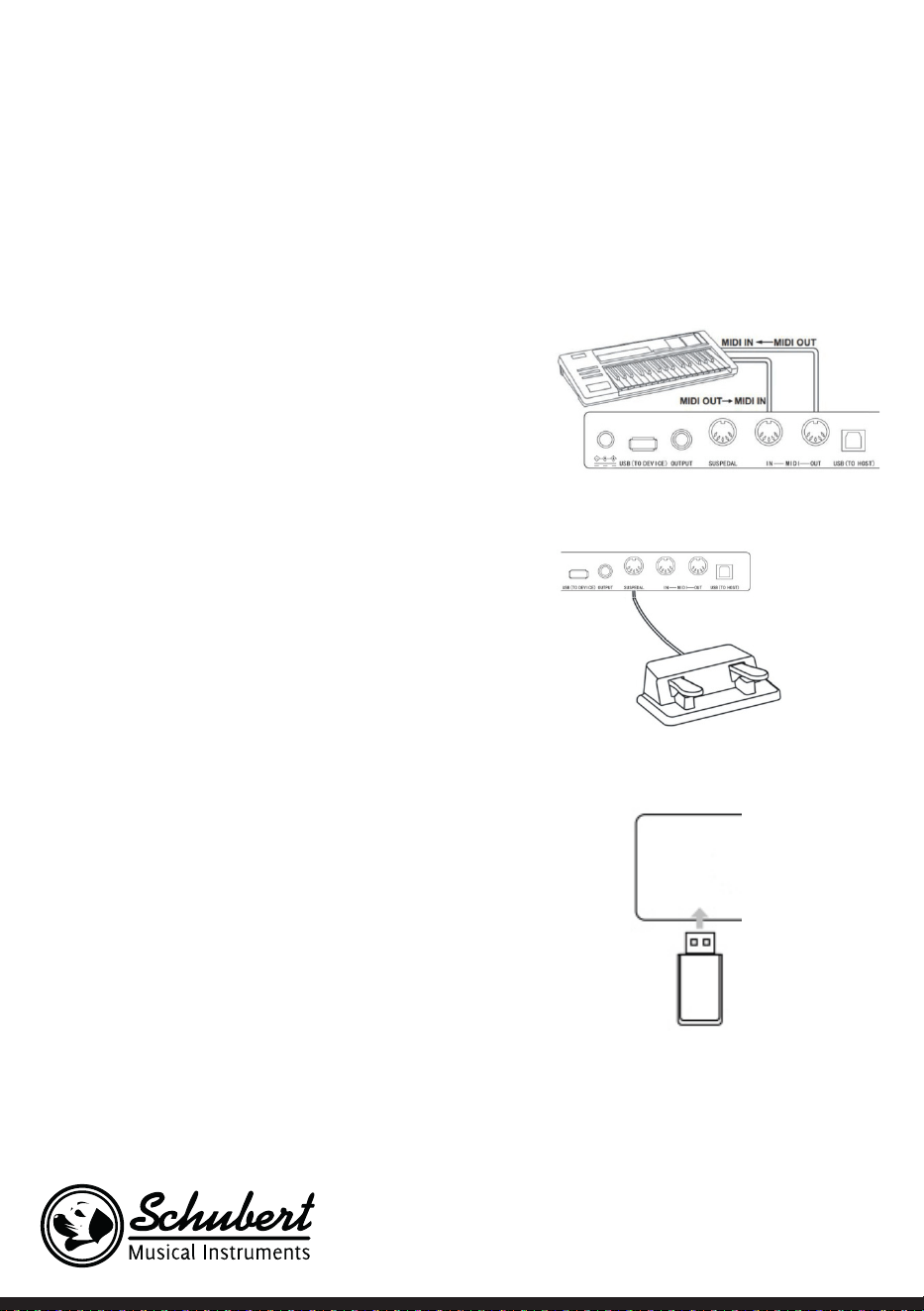
42
into USB port of computer, it can transfer information with
computer in both direction Such as you can store the music
that you had played on this piano to the computer, you also
can play MIDI document of your computer by this piano as
well.
Note: The USB audio equipment cannot be set for input
and output at the same time when you do the setting of
the computer softwa or else the sound will be overlap-
ping when you play the keys.
Connect to other equipments
• Connecting MIDI IN of this instrument to MIDI OUT of oth-
er equipment, you can use this instrument as sound source.
• Connecting MIDI OUT of this instrument to MIDI IN of
other equipment, you can use this instrument as MIDI con-
troller.
Connect pedal
Three pedals group parts was connected to SUSPEDAL jack
of rear panel of piano, then, this piano can own three different
function pedal: Soft Pedal, Sustain Pedal:
1. Soft Pedal
The soft pedal was stepped on, the played notes will occur
pianissimo effect.
2. Sustain Pedal
The sustain pedal was stepped on, the played notes will
occur sustain effect.
Connect USB equipment
• The piano support to connect largest 32G USB equipment,
such as U plate etc.
• The MP3 les in USB equipment can be played.
Note: Do not not pull out USB equipment in playing
process, or else it will cause mistake or USB equipment
damage.
43
Power switch
1. Firstly, Please make sure that the power had been connected correctly.
2. Press down Power button, LCD display screen will become lighter, displaying
boot screen, indicating that the piano had been opened.
Note: The LCD screen hasn’t been lighted if you had press down.
Adjust volume
To rotate Master Volumeknob to the right after the piano was opened, the
overall volume will become larger from
smaller, to rotate Master Volume knob to the left, the overall volume will become
smaller from larger.You can adjust the volume based on your requirement.
Play various kinds of instruments voice
• This piano has built-in hundreds kinds of vivid voice, including the timbre of
chinese folk music, percussion tone etc.
• The detailed information, please see voice list.We also supply the effect
function that it is relative to voice for your better playing voice.
Choose and play voice (Master voice)
1. Pressing Tone button, The voice selection mode can be entered into, the
reminding mark “R1”lights in LCD at the same time, moreover, the present
voice name and no. display as well.
2. Using number button and +/- button to choose the voice that you need.
3. To play keys to start play and appreciate wonderful voice.
To change voice selection sourcing you can press Voice button again and
again if you had opened dual voice function. The corresponding R1/R2/L
cursor will switch to light to display in LCD display screen.
Play two kinds of voice Dual voice
This piano has dual voice function, The casual two kinds of voice can be super-
posed and sounded at the same time by this function, The new voice effect will
occur to enrich the layers of music. It seems that two kinds of instruments play
at the same time. The voice will be st “R1”voice before the dual voice function
was started, The choosen voice will be second “R2”after dual voice function had
been started.
1. Pressing Dual voice button to open dual voice function, The “R2”mark lights
in LCD, the present dual voice name and No. Display as well at the same time.
2. To choose the dual voice that you want to play by number buttons and
+/-buttons.
44
3. The voice effect that was superposed by two kinds of different voices can
be heared when you play the keyboard, it seems that two kinds of instru-
ments are playing at the same time.
4. Press Dual voice button again, the dual voice effect can be closed,
“R2”cursor goes out in LCD, LCD display screen recovers previous state.
.When the music range of keyboard was divided, Only the keyboard in right
hand area has dual voice function, the keyboard in left hand area doesn’t
have this function.
Touch Response
The keyboard of this piano has touch response function, It can help to enrich
performance expression. It can reect the touch that you had used to every
notes correctly, It seems that you are playing real instrument. This piano has
three pcs touch curves for choosing.
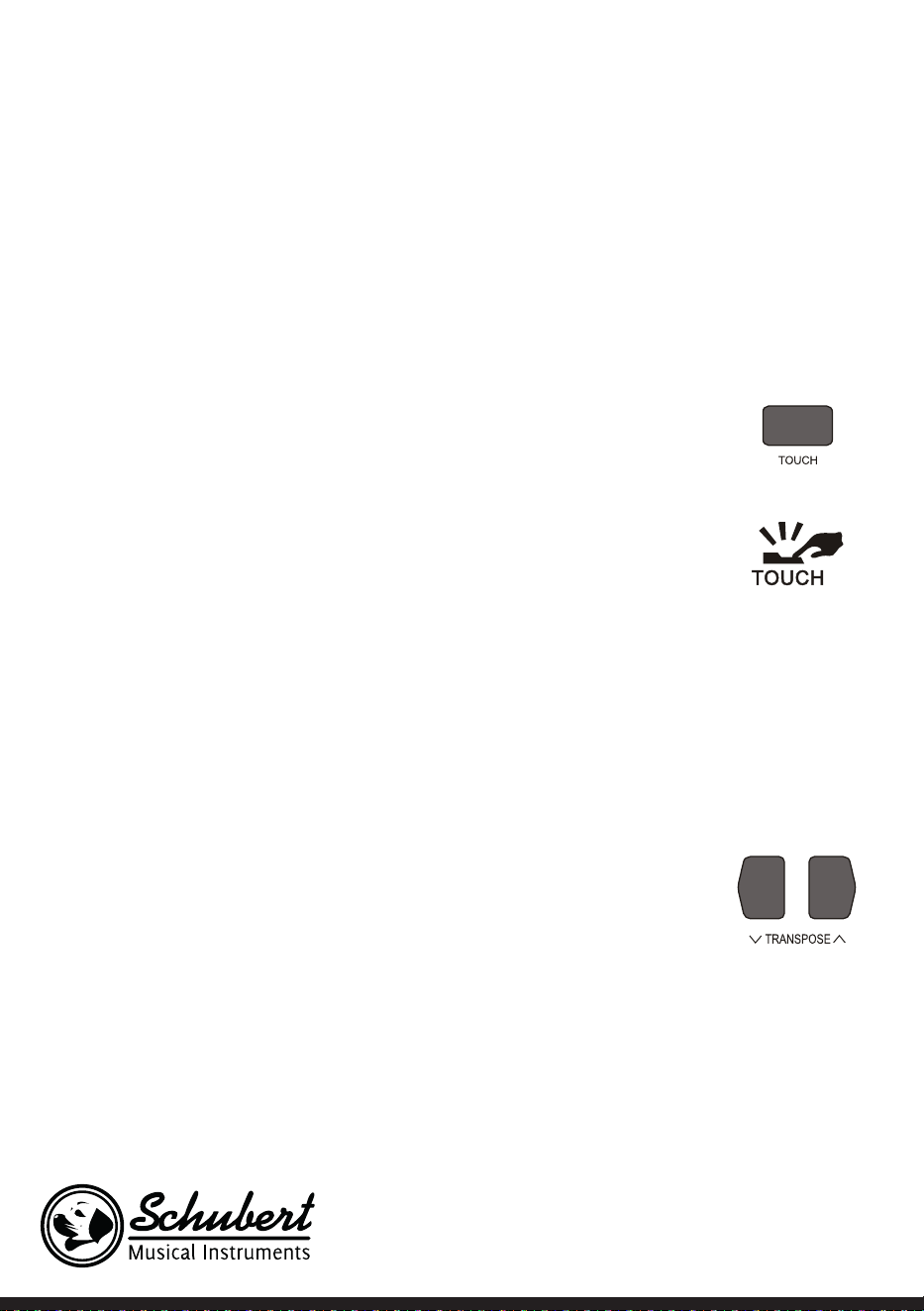
1. Press Touch button to enter into touch function choosing state. The touch
curve no of present keyboard displays in LCD screen temporarily , The de-
fault touch curve is second one in Boot-Up State, there are three pcs touch
curves in total(001-003).
2. Choose touch curve In the state of touch curve that displays in LCD screen
temporarily, you can choose different touch curves by press Touch button
continuously.
3. Close touch response
The present touch displays “OFF” in LCD, The relative “Touch” state mark
goes out in LCD, it indicates that present keyboard is without touch rep-
sonse state.
Transpose
To use transpose function, you do not need to change play way, you can adjust
the pitch of full keyboard in the unit of semitone.
1. Press down Transpose or Transpose button to enter into transpose setting
state, The present transpose value“xxx Transpos”displays in LCD temporar-
ily.
2. Adjust transpose value
When transpose value “xxx Transpose”displays in LCD screen temporarily,
you can press Transpose ∧/∨ button continuously to adjust keyboard pitch,
the largest adjusting scope is ±12 pcs seminote.
3. The transpose value will recover to default “000 Transpose” if you press
down Transpose ∧/∨ button at the same time.
Note: If you want to play one G tone music,but you aren’t familiar with
G tone keyboard,you can set transpose parameter for -05 or 007 at this
time,you can use C tone pitch to play to produce G tone real pitch at this
time,This parameter adjustment is valid for full keyboard and auto chord
accompaniment.
45
Piano performance mode
This piano designs this function specially,you can tune out piano tone of full
keyboard promptly in other state.
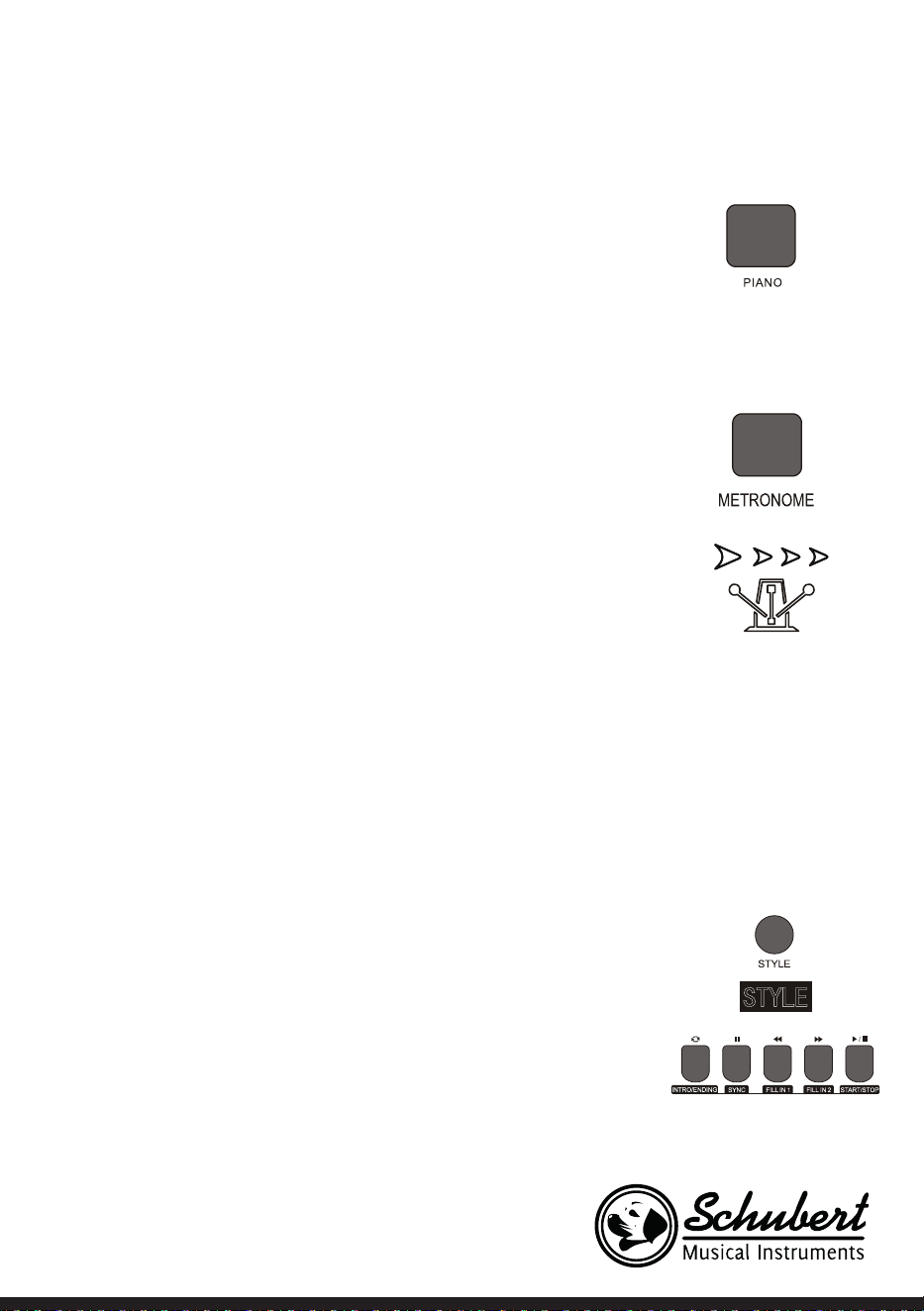
1. Pressing Piano button,the piano performance mode can be entered into or
exited directly.
2. Choosing and starting style in piano performance mode. The accompani-
ment control can be operated same other mode,but style only play percus-
sion music part,there is no harmony accompaniment part.
Note: The sound console function and function menu can be entered into in
piano performance mode. The chord function will be closed automatically
after the piano performance mode was entered into.
Metronome
If you are afraid that you are’t sure about beat when you are practing music
or recording,you can get special metronome reminder by metronome function.
1. Open Metronome
Pressing Metronome button to open metronome function, beat sounds,
Pressing Metronome button again to close metronome function.
2. Metronome style setting
Please jump to beat type setting in funtion menu to see setting method.
Notes:
• If the metronome was opened in style playing process,the beat sound will
be responsed to at the beginning of next beat, the beat point will change fol-
lowed styles.
• If the metronome was opened stly,then,play style,this piano will adjust met-
ronome automatically at the same time that the rst beat of style sounded
to make it match with styles.
• The metronome can be opened in recording,but the sound of metronome
wasn’t stored as recorded data
Accompaniments
Playing various kinds of style accompaniments
Using auto accompaniment function,you play piano alone and you can enjoy
the accompaniment effect of whole band,moreover, the Orchestra,you only
need to start the different styles of accompaniment that you had choosed and
use left hand to play suitable chord,the music will go ahead all the time.
This instrument has built in various kinds of auto accompaniment (The detailed
information,please see style appendix list),you can choose your favorite
accompaniment style and enjoy the pleasure that accompaniments bring to
you as much as you can.

46
Play auto accompaniment (Only play percussion music voice part)
1. Pressing Style button to enter into style mode. The top-left “STYLE”reminder marking lights in LCD and
displays present style name and seria no.at the same time.
2. Choose style
You can choose the styles you need by number buttons or +/-buttons.
3. Start style
The percussion music part of style can be played immediately by pressing Start/Stop button,you also
can press Sync button to make the style to be in sync stat. .The beat point shines in LCD at the same
time, then, play any keys to start style percussion music performance
Accompaniment Paragraphs
The auto accompaniment itself of this piano contains many kinds of different accompaniment paragraphs,it
is convenient that you arrange your own accompaniments in various kinds of ways. These paragraphs
including:Main play(A B) FILL IN(1 2) Intro Ending. When you play accompaniment,you can make more pro-
fessional performance effect easily by simple switch of these paragraphs.
1. Intro part
Intro is suitable for the beginning of one music,when the intro was played over,the accompaniment will
enter into preset main play part. The length of intro will be different based on the difference of chosen
style type.
2. Main play part
Main play is suitable to the main part of one song,the main play will loop play all the time before you
had pressed other style control button.
3. FILL IN PART
It can produce various kinds of rich change for songs by FILLING IN paragraph 1 or 2,It enables your
performance to be more professional. The accompaniment will switch to relative main play part auto-
matically when FILL IN paragraphs had been played over.
4. Ending sound part
Ending sound is suitable to the ending of one song,The song will stop immediately when the ending
sound was played over,the length of ending is relative to chosen styles.
Note: Holding one of FILL IN1,FILL IN2 button when the accompaniment are going on,the variation will be loop
lled in ,until releasing this button to enter into relative main play part. Pressing FILL IN button will change initial
default main play paragraph in the state that the accompaniment has stopped,LCD display screen will display
relative marking.
Play different accompaniment paragraphes
1. Pressing STYLE button,the styles can be chosen by pressing +/- button,numbers buttons at this time.
2. Pressing AUTO CHORD button to enter into auto bass chord mode.
3. Pressing SYNC button to open sync start function.
4. Pressing FILL IN 1 to choose main play 1.
5. Pressing INTRO/ENDING button,FILL IN -”NOR” marking continue to shine in LCD. The style is in play
preparation state at this time.
6. The auto accompaniment will start immediately when you pressed one chord in left hand area of
keyboard.
The accompaniment will switch to relative main play part when intro part was played over.

47
7. Pressing FILL IN 2 button,one small paragraph of variation will be lled in the accompaniment that are
playing at this time.
The accompaniment will switch to relative main play 2 automatically when the variation was played
over.
8. Pressing INTRO/ENDING button,the accompaniment will enter into ending part at this time,the auto
accompaniment will be stopped when the ending was played over.
Accompaniment volume control
The accompaniment volume is used for adjusting the overall volume of auto accompaniment. This function
can get balance between auto accompaniment part and the volume of keyboard tone.
1. Pressing ACCOMP VOLUME ∧/∨ the LCD display screen. will displays present accompaniment volume
size temporarily, the accompaniment volume size can be adjusted by pressing ACCOMPANIMENT
VOLUME ∧/ACCOMPANIMENT
2. VOLUME again at this time. Adjustment range:0~127.
3. Pressing ACCOMPANIMENT VOLUME∨ and ACCOMPANIMENT VOLUME ∧ buttons at the same
time, the accompaniment volume can be closed. LCD display screen displays“Accompaniment volume
OFF”.The accompaniment volume can be opened by pressing ACCOMPANIMENT VOLUME ∨ and AC-
COMPANIMENT VOLUME∧ buttons again at the same time.
Tempo
Every style has different best tempo value,you can change tempo value based on your hobby and songs
requirement.
1. The initial default tempo value can be changed byTempo∨ /Tempo∧ button.
2. The tempo can recover initial default value by pressing Tempo∨ /Tempo∧ buttons at the same time.
Note: The tempo will be set for the preset value of present style automatically if you choose style when the
styles stopped,The tempo will keep same if you switch style when the style are playing.
Chords
Auto chord
Pressing Auto Chord button to start auto accompaniment, The left hand will be automatic chord area at
this time.
Full rang chord
Pressing FULL RANGE CHORD button,all keyboard can be played chord sound at this time.
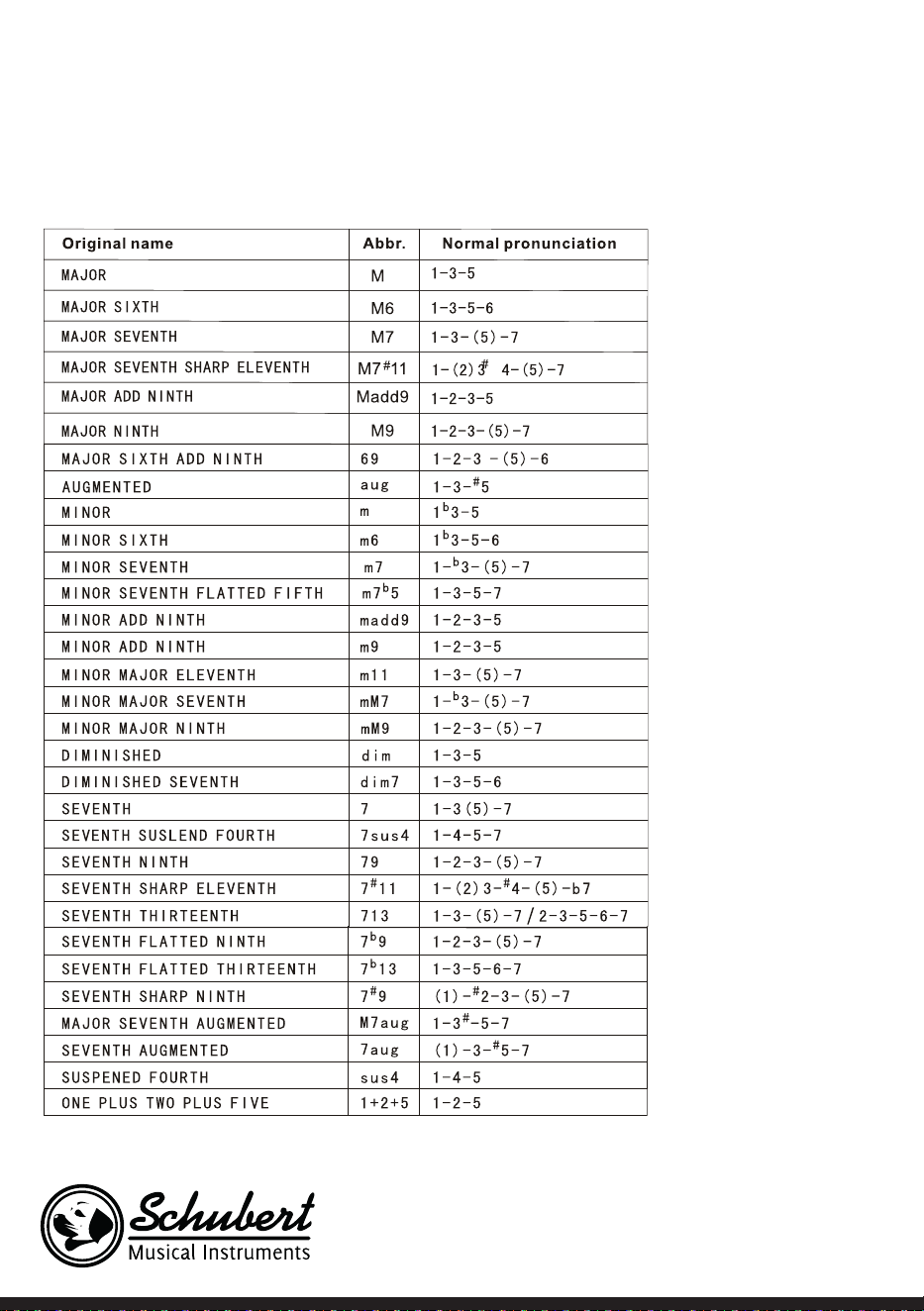
48
Chord close
Pressing CHORD CLOSE button,the chord accompaniment sound stops,the style continue to play.
Chord list
49
Reverb
• Pressing REVERB button, the reverb effect can be opened or closed.
• The reverb effect was opened, the reverb cursor will light.
• The reverb effect was closed, the reverb cursor will go out
Chorus
• Pressing CHORUS button,the chorus effect can be opened or closed.
• The chorus effect was opened,the chorus cursor will light. The chorus effect was closed,the chorus
cursor wil go out.
Sound console
• The played volume of every tracks can be controlled solely by sound console function.
1. Pressing SOUND CONSOLE button to enter into sound console function menu. LCD will display
corresponding value temporarily.The st time to enter into the sound console menu when the power
is on,The rst option is “Percussion music track volume”of sound console menu,The option that was
entered into again later is same as the option that exited from last time.
2. Pressing SOUND CONSOLE button again and again to choose the track item that you want to do the
setting,then,pressing -/+ buttons to set parameters.
Concrete function items and parameters range are as following list
Adjustment content LCD display Adjustment range
Percussion music track volume XXX Rhythm 0 - 127
Bass track volume XXX Bass 0 - 127
Harmony track volume XXX Chord 0 - 127
Phrase track volume XXX Phrase 0 - 127
left hand track volume XXX Lower 0 - 127
Right hand track volume XXX Upper 0 – 127
Note
If there is no any setting operation in 5 seconds in sound console setting state,the sound console
function state wil exit automatically.
50
FUNCTION MENU
Pressing FUNCTION MENU button to enter into function menu, LCD displays present function menu
option temporarily, to set the parameters of present menu by pressing -/+ buttons.
Concrete function items and parameters range are as following list
Serial
no.
Adjustment content LCD Display Adjustment range Presetting value
1 Tune XXX Tune -50 - +50 000
2 Keyboard split XXX KeySplit 1 – 88 034
3 Beat type XXX BeatType 0, 2 – 9 004
4 Metronome volume XXX 0 – 127 080
5 Reverb depth XXX 0 – 127 050t
6 Chorus depth XXX 0 – 127 000
7 MIDI Receiving XXX 1 – 16, ALL ALL
8 MIDI Sending XXX 1 – 16 001
Note: If there is no any setting operation in 5 seconds in sound console setting state, the sound console
function state wil exit automatically.
Tune setting
This function is used to adjust pitch detailedly.
1. Pressing FUNCTIN MENU button to select tune menu, LCD displays “xxx Tune” temporarily. You can
press + / - buttons to adjust pitch, the largest adjustment range is ±50 it is to rise or reduce one half-
tone.
2. Pressing + and - buttons at the same time, the pitch will recover to presetting value 000. This parameter
adjustment is valid for keyboard and style.
Keyboard split setting
The position to split auto bass chord area and right hand area in keyboard is called "KEYBOARD SPLIT
POINT". The keyboard in left hand area are used for controlling auto bass chord accompaniment generally
when auto bass chord function was opened, the keyboard in left hand area also can be used for playing
voice.
1. Pressing [FUNCTION MENU] button to choose keyboard split point setting menu.LCD displays "xxx
KeySplit"temporarily,You can press [-]/[+]buttons to set keyboard split point at this time, you also can
play keys directly to do prompt setting. The adjustment range:1-88.
2. Pressing [-]and[+]buttons at the same time.the keyboard split point will recover to presetting value:F#3
( 34).

51
Beat type setting
1. Pressing FUNCTION MENU button to choose keyboard split point setting menu, LCD displays “xxx
KeySplit”temporarily, You can press -/+buttons to set keyboard split point at this time, you also can play
keys directly to do prompt setting. The adjustment range:1~88.
2. Pressing - and + buttons at the same time, the keyboard split point will recover to presetting value:F#3
Metronome volume setting
1. Pressing FUNCTION MENU+ or FUNCTION MENU- button to choose metronome volume setting
menu, LCD displays “xxx MetroVol” temporarily, You can press +/-button to set metronome volume at
this time, range:0~127. 2.Pressing + and - buttons at the same time, metronome volume will recover to
presetting value:080.
Reverb depth setting
1. Pressing FUNCTION MENU button to choose reverb depth setting menu, LCD displays “xxx
ReverbLev” temporarily, You can press -/+ button to set reverb depth at this time.Range:0~127.
2. Pressing -/+ buttons at the same time, reverb depth will recover to presetting value: 050.
Chorus depth setting
1. Pressing FUNCTION MENU button to choose chorus depth setting menu, LCD displays “xxx
ChorusLev” temporarily.You can press -/+ button to set chorus depth at this time.Range:0~127.
2. Pressing - and + buttons at the same time, Chorus depth will recover to presetting value:000.
MIDI Sending setting
1. Pressing FUNCTION MENU button to choose MIDI sending channel setting menu, LCD displays “xxx
Midi Out” temporarily.You can press -/+ button to set MIDI sending channels at this time.Range:1~16
2. Pressing - and + buttons at the same time, MIDI channel will recover to presetting value:001.
MIDI Sendungseinstellung
1. Drücken Sie zur Auswahl des MIDI-Sendungseinstellungsmenüs zunächst die Taste FUNCTION MENU
und wählen Sie „MIDI sendinng channel setting menu“ aus. Der LCD-Bildschirm zeigt „XXX MidiOut“
an. Sie können zur Einstellung der Empfangskanäle die Tasten + und – drücken. Anpassungsbereich:
1 – 16.
2. Durch gleichzeitiges Drücken der Tasten + und – wird der Empfangskanal auf den voreingestellten
Wert „001“ zurückgesetzt.
Factory reset
Pressing - and + buttons when power is off, then, open the power, the system will recover to factory rest,
and delete all users'data in this piano, including:Users'songs, users'registration memory.The LCD will
display “Wait..!”.The system will be entered into automatically after deletion was nished, then recover to
normal open state.

52
Panel registration memory setting
This instrument has panel registration memory function, it can be used for saving your most favorite
setting as to the setting can be tuned out easily and promptly when you need it, moreover, it can enable
your performance to be more efcient. Panel registration memory function can almost store all setting
of panel, you only need to press one button simply, the setting can be tuned out immediately .
Save setting to storage
1. This instrument has 4pcs registration memory banks, every registration bank includes 2 groups storage
memory state ( M1~M2).
2. When you press STORE button, press one of M1 - M2 button at the same time, present panel can
be set to registration memory.Please notice:This operation will cover previous stored registration
memory.
Note: Holding STORE and M1 buttons at the same time, open the power again, all registration memory
will all recover to factory reset state at this time.
Tune out registration memory
Pressing one of M1 - M2 button to tune out one group setting to replace present state.
Choose memory bank
1. Pressing BANK button, LCD displays memory bank serial no.temporarily.
2. Pressing BANK button again and again at this time, you can choose to set memory bank. Range:1~2.
3. The following content can be stored in M1-M2 storage memory state.
• Voice parameters: Main voice Dual voice, Keyboard split, point voice, Digital effect, Sound console.
• Accompaniment parameters: Style tempo Auto bass chord open/close paraghraphs selection.
• Function parameters: Touch partial parameters in function menu.
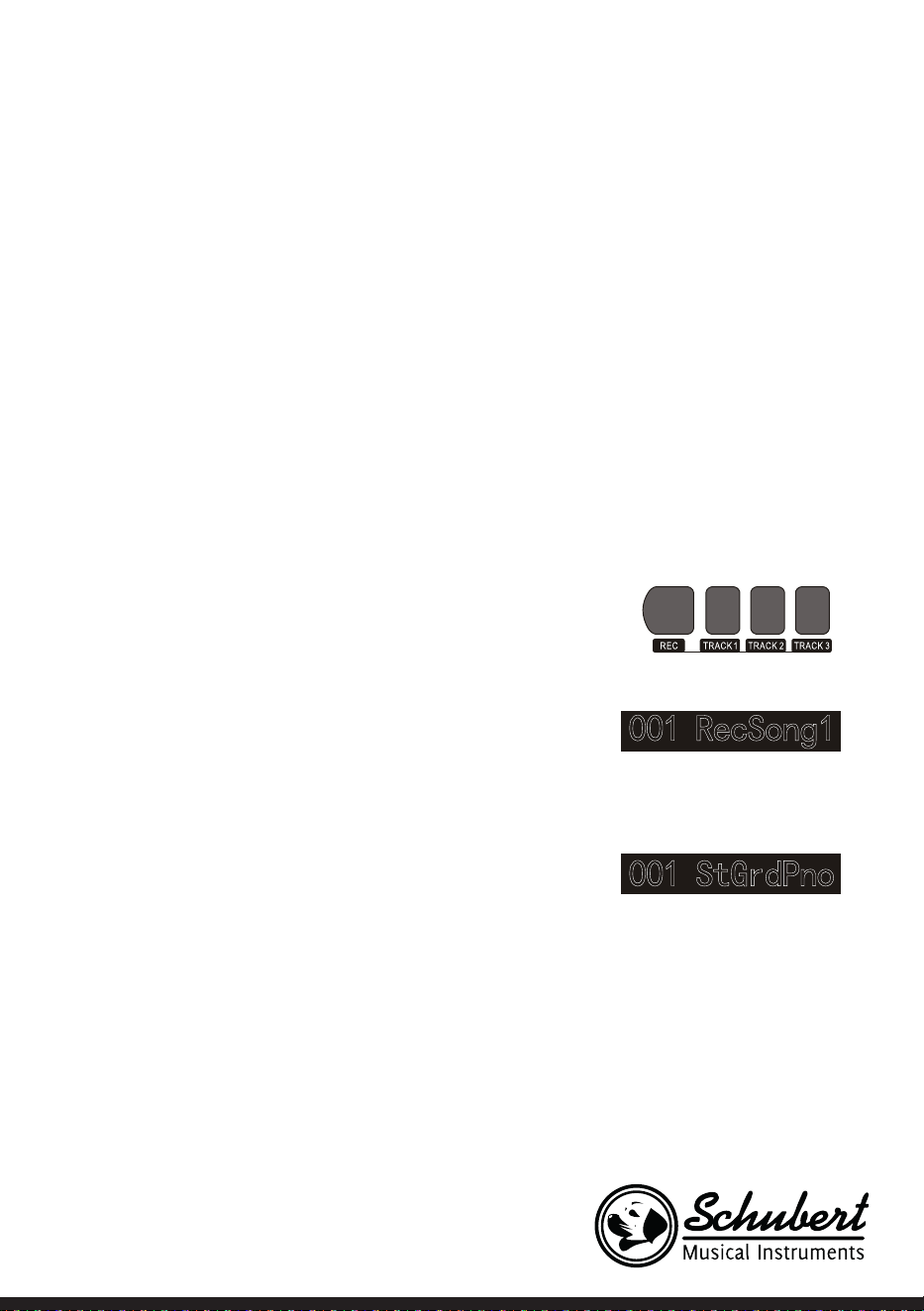
53
Song control
1. Guiding beat function
The song will have guiding beat instructions before intro was played formally.
2. Fast forward Fast backward
Play/Pause and stop functions of songsn
• Pressing down button can speed up to play songs when songs are playing, pressing down button
can return back songs.
• Pressing down / button again to continue to play songs.
• Pressing down stops playing present songs.
3. The fragment loop function of song
• Pressing down kbutton can set starting point and ending point of loop play when the song are
playing, pressing this button rst time to set loop starting point, pressing this button second time to set
loop ending point, when ending point was nished setting, the song will loop play the content between
the two points.
• Pressing down button can exit loop and continue to play songs in the state of fragment loop.
Record your own songs
The record function of this piano can record/replay your
performance, you can appreciate your
own opus by replaying.You can record many pieces of
users'songs in this piano, every song can record 3pcs tracks at
most, it is 1pc accompaniment track and 2pcs melody tracks.
The accompaniment track was used for recording style, it
is songs'accompaniment, The melody track was used for
recording playing melody.The accompaniment track and
melody track can
record at the same time, but, it cann't record 2pcs melody
tracks at the same time, of course, you also can only record
melody or accompaniment separately;The accompaniment
track and
melody track can replay at the same time.
The users'song has storage function if there is power-fail, the
data cann't loss when the power is off.
Start record
You need to choose one pc user's song that will be used for storing record before the record was starting
and set record tracks.
1. Pressing RECORD button to enter into users'songs selection interface.The left top of LCD displays
serial no. of users'songs, The characters display area displays users' songs name, The default name is
“RecSong1”.You can choose users'songs that need to store record by -/+ buttons.

54
2. Pressing RECORD button to enter into record preparation state, "REC" marking leights in booth part
of LCD . 4 pcs beat pints shine at the same time in beat display area. This piano will choose one melody
track that has not data to store your rcord autimatically. The track cursor shines in LCS. I refers to the
present track that stored record.
3. You can choose voice style adjustment tempo etc.
that you want to record in record preparation state.
You can press TRACK1, TRACK2, TRACK3 button to
choose the tracks that you want to record, it means
that the track was chosen when cursor shines.The
accompaniment track and melody track can record at
the same time, but cann't record 2pcs melody tracks at
the same time.
4. To press START/STOP button or play piano's keys
directly to start record after the record tracks were choosed.When the record accompaniment was
choosed and the auto bass chord accompaniment function was opened, to play one effective chord in
keyboard left hand area, the record can be started as well.
Notes
• The style data can only be recorded in accompaniment track
• „The record track cursor has three kinds of state:Shine, Light, Go out.
• Shining, it means that this track has been choosed for record, if this track has already have data, the
original data will be covered if you continue to record in this track.Lighting, it means that this track has
data, It wil replay recorded data synchronously in record process.Going out, it means that this track has
no data or has data, but has been prohibited to replay when the record was going on.The tracks state can
be switched by pressing TRACK1 ~ TRACK3 again and again in record preparation state.
• This piano will choose one empty melody track to store record automatically (the system will choose
automatically in the order of small to large.such as:if track2 has data, then, the system will choose track3
to store this time record)in record preparation state, if two tracks had already have data, then, it will
choose track2 to store record.
• Track1: Accompaniment track
• Track2/Track3: Melody track
Stop record
1. Pressing Start/Stop button can stop record immediately in record process. Pressing Style or Voice
selection button can enter into other function.
2. If the internal memory is full, the record will stop and store automatically in record process, “Rec_
ull”will display in LCD temporarily to remind that the internal memory has been recorded full.
3. The record will stop automatically after the style had played ending over if you had choosed record
ccompaniment.
Replay recorded songs
1. The record wil stop and enter into songs state automatically and loop play previous recorded
users'songs immediately if RECORD button was pressed in record process.
2. Pressing SONG button to enter into song state in standby mode, all songs will loop play automatically.
The serial no.of users' songs can be selected directly by pressing -/+ buttons, such as:If there is no

55
recorded data in one user's songs, “NoFile!”will display in LCD display screen , reminding that there is
no recorded data in present les, moreover, the loop play will stop.
3. Choosing one user's song that has data in the state that songs has stopped. Pressing START/STOP
button to start loop play this song.
Delete recorded songs
1. Pressing RECORD and SONG at the same time when the power is off, then, open the power, all
users'songs will be cleared.
2. Pressing RECORD button for 2 seconds to enter into tracking deleting state in record preparation
state, The LCD displays “Delete?”.Pressing TRACK1, TRACK2, TRACK3 to choose the track you want
to delete in deleting state, when the cursor of one certain track lights, it indicates that the data of
this track will be deleted, when the cursor of track goes out, it indicates that the data of this track will
be kept.If the cursors of all tracks light, the data of complete song will be deleted when the deleting
operation was carried out.
3. Pressing + button to carry out deleting operation after the tracks that you want to delete was choosed,
it will return to record preparation state automatically after the operation was nished, Pressing -
button to cancel deleting operation and return to record preparation state.
MP3 Play
MP3 Jack:MP3 song can play by this jack
• Pressing Play/Pause button can switch present state of songs Pressing Song button , one song goes
backward, pressing
• Volume button for longer time, the volume will reduce small. Pressing Song button , one song goes
forward, pressing
• Volume button for longer time, the volume will increase large.
Play and control songs
This instrument has presetting many kinds of different types
songs.Every song has learning function. (For detailed information, please see songs list).
Appreciate songs
1. Pressing SONG button to enter into song mode, LCD lights “SONG”marking, All songs will begin with
loop play now.
2. You can choose the songs that you want to appreciate by numbers button or -/+ buttons.
3. To press START/STOP button to stop playing in the state that songs are playing, but doesn't exit song
state, pressing START/STOP button again, the present song will loop play.
4. Pressing STYLE, RECORD, VOICE, DUAL VOICE etc function buttons, the song mode can be exited
when the song has stopped playing.

56
Song learning mode
The learning function of song are consist of Lesson Left Right these three buttons, these three buttons are
valid only in song mode.All songs can be learned by three mode:Durationlearning, Pitch learning and play
mode. This piano can give score based on your learning situation when the learning was over, it helps you to
make progress continously in learning process .
1. Enter into song learning mode Pressing Lesson button to enter into song learning mode in the state of
the song had been stopped play.
2. Choose left hand or right hand to learn songs. The songs of this instrument can be choosed for three
different kinds of way to learn.You can choose the learning part you need by Left or Right buttons, if
you haven't proceed with selection, the system will choose right hand learning for you automatically.
The content of left hand learning will aslo be different based on different songs type.For style type songs,
the left hand will be used for learning chords;For piano songs, the left hand will be used for learning part
melody of left hand.The MIDI type songs doesn't support left hand learning function.The staff and chord
display area in LCD will display melody or chords of songs when the songs are playing, It is convenient for
following learning.
Learning mode1: Duration learning
1. Pressing Lesson button to enter into learning mode1 in the state that the songs were stopped
playing.“Les1 R”will displays in LCD temporarily.The system will estimate the played duration of learner,
it doesn't estimate the correctness of notes and chords in learning mode1, the song plays normally.
2. Pressing Start/Stop button to begin with songs learning. If you choose right hand to learn songs, the
melody part of right hand will be concealed.The learner only needs to play correct duration, the melody
will sound in the process of song playing, it is no need to consider that the played notes are correct
or wong. If you choose left hand to learn songs, the chords of songs or left hand melody part will be
concealed, the learner only need to play correct duration, it is no need to consider that the played.
Learning mode2: Pitch learning
1. Pressing Learn button repeatly to enter into learning mode2 in the state that song has been stopped
play.“Les2 R”reminder marking lights in LCD .The system only estimates the correctness of pitch of
notes that learner has played,The song can go ahead backwards when it needs learner to play correct
notes. If the pitch of played notes is wrong,the song will be in waiting state until the correct notes was
played.
2. Pressing Start/Stop button to begin to learn song,it will give estimation after the learning was over.
Learning mode3 Play mode
1. Pressing Learn button repeatly to enter into learning mode3 in the state that song has been stopped
play.“Les3 R”reminder marking lights in LCD .The system only estimate the correctness of duration and
pitch that learner are playing comprehensively. The song plays normally,learner must play correct pitch
based on originalduration of song,then,it can be estimated correct by system.
2. Pressing Start/Stop button to begin to learn song,it wil give estimation after the learning was over .
57
SONG LIST
Classify No. Full English Name English Abbreviation
FOLK & COUNTRY 1 Jambalaya Jambalaya
FOLK & COUNTRY 2 Ding! Dong! Merril on High DingDong
FOLK & COUNTRY 3 Battle Hymne of the Republic Battle
FOLK & COUNTRY 4 The Old Gray Mare GrayMare
FOLK & COUNTRY 5 American Patrol USPatrol
FOLK & COUNTRY 6 Christmas is Coming IsComing
FOLK & COUNTRY 7 Sippin/Cider through a Stray SCTStraw
FOLK & COUNTRY 8 Christmas Sound Sound
GOLDEN & POP 9 On London Bridge LdBridge
GOLDEN & POP 10 Are You Lonesome Tonight Lonesome
GOLDEN & POP 11 Der Deitcher’s Dog DerDDog
GOLDEN & POP 12 Joy to the World JoyWordl
GOLDEN & POP 13 Silent Night Sltnight
GOLDEN & POP 14 Ave Maria AveMaria
GOLDEN & POP 15 Five Hundred Miles FHMiles
GOLDEN & POP 16 Happy New Year HappyNY
GOLDEN & POP 17 It’s beginning to look a lot like
Christmas
LikeXmas
GOLDEN & POP 18 Jeanie with the light brown hair LightHair
GOLDEN & POP 19 My Bonnie MyBonnie
GOLDEN & POP 20 Song oft he Pearlsher SongOfTP
CLASSICAL 21 Swan Swan
CLASSICAL 22 Prelude to Act 2 (Swan Lake) SwanLak1
CLASSICAL 23 Valse (Swan Lake) SwanLak2
CLASSICAL 24 The Happy Farmer HpFarmer
CLASSICAL 25 The Sleeping Beauty SleepBty
CLASSICAL 26 La Traviata LaTravia
CLASSICAL 27 Wiegenlied Wiegenli
CLASSICAL 28 Mov.2 Adagio Non Troppo
Piano Sonata No. 9 D
Sonata 9
CLASSICAL 29 Mov.1 Andante Grazioso Piano
Sonata No. 11 in A
Sonata 11
CLASSICAL 30 Prelude in C Prelude
CLASSICAL 31 Chinese Dance CHDance
CLASSICAL 32 Emperors Waltz EmprWaltz
CLASSICAL 33 March Militaire MilMar1
CLASSICAL 34 Symphony No.40 Symphony
JAZZ & FUSION 35 ShanZhaShu ShanZaS
JAZZ & FUSION 36 You are my sunshine MySun
JAZZ & FUSION 37 June Samba JunSamba
58
Classify No. Full English Name English Abbreviation
JAZZ & FUSION 38 Funk Funk
JAZZ & FUSION 39 I Can… I Can…
JAZZ & FUSION 40 Sea Shore SeaShore
JAZZ & FUSION 41 Guitar & Saxphone Gt&Sax
JAZZ & FUSION 42 The Hip Hop’s Night HipHopNt
JAZZ & FUSION 43 Blue Lunch BlueLunch
JAZZ & FUSION 44 Cobweb Cobweb
JAZZ & FUSION 45 Wine Wine
JAZZ & FUSION 46 Jazz Old Man JzOldMan
JAZZ & FUSION 47 Dark Eyes DarkEyes
JAZZ & FUSION 48 Carlos Carlos
JAZZ & FUSION 49 Sad Sad
JAZZ & FUSION 50 The Jazz TheJazz
PIANO 51 Für Elise FürElise
PIANO 52 Military March Mmarch
PIANO 53 Habanera Habanera
PIANO 54 Minuet Minuet
PIANO 55 Austria Variation Avariati
PIANO 56 Old Macdonald had a Farm OldAFarm
PIANO 57 Wedding March Wedding
PIANO 58 2-Part Invention #13 In A
Minor. B.W. Iii
Invention
PIANO 59 Minuet in G MinuetG
PIANO 60 Turkish March TurkishM
PIANO 61 Hey Diddle Diddle HeDiddle
PIANO 62 Italian Polka ItaPolka
PIANO 63 Moseta Dance MosetaDn
PIANO 64 Bulie Dance BulieDn
PIANO 65 Waltz in A Flat Op.39 No. 15 Waltz 1
PIANO 66 Wild Rose WildRose
PIANO 67 Away in A Manger AwayInAM
PIANO 68 Jack & Jill JackJill
PIANO 69 Angels We Have Heard on High Angels
PIANO 70 Waltz Waltz
PIANO 71 Did you ever see a Lassie Lassie
PIANO 72 Chopsticks Chopstick
PIANO 73 Four Little Swans FLSwans
PIANO 74 Old France OldFrance
PIANO 75 Jesus Saviour pilot Me PilotMe
PIANO 76 Eclogue Eclogue
PIANO 77 Santa Claus is coming to towen SantaCT
PIANO 78 Brave Cavalier Cavalier
PIANO 79 America The Beautiful USFair
PIANO 80 Music Box Dancer Dancer
59
STYLE LIST
Classify No. Full English Name English Abbreviation
8 BEAT 1 8 Beat Piano 8BtPiano
8 BEAT 2 8 Beat 1 8Beat1
8 BEAT 3 8 Beat Shufe 8BtShu
8 BEAT 4 Guitar Pop 1 GtPop1
8 BEAT 5 8 Beat Hip Hop 8BtHiHop
8 BEAT 6 8 Beat R&B 8BeatR&B
8 BEAT 7 8 Beat Pop 8BtPop
8 BEAT 8 Pop Funk 1 PopFunk1
8 BEAT 9 Rhythm & Beat 1 Rhy&Bt1
8 BEAT 10 8 Beat Disco 1 8BtDisc1
8 BEAT 11 8 Beat Rock 8BtRock
8 BEAT 12 8 Beat 2 8Bt2
8 BEAT 13 Sweet Beat SweetBt
8 BEAT 14 8 Beat Dance 8BtDance
8 BEAT 15 8 Beat 3 8Bt3
8 BEAT 16 60’s 8 Beat 60’s8Bt
16 BEAT 17 16 Beat 1 16Beat1
16 BEAT 18 16 Beat Funk 1 16BtFuk1
16 BEAT 19 16 Beat Ballad 1 16BtBld1
16 BEAT 20 16 Beat R&B 16BtR&B
16 BEAT 21 Pop 16 Beat 1 Pop16Bt1
16 BEAT 22 16 Beat Dance 16BDanc
16 BEAT 23 16 Beat 2 16Beat2
16 BEAT 24 Modern 16 Beat Modrn16B
16 BEAT 25 16 Beat Hot 16BtHot
16 BEAT 26 16 Beat Modern 16BtModr
16 BEAT 27 16 Beat 3 16Beat3
16 BEAT 28 Cool Beat CoolBeat
16 BEAT 29 16 Beat Ballad 2 A6BtBld2
16 BEAT 30 16 Beat 4 16Beat4
16 BEAT 31 Pop Shufe PopShu
POP 32 Pop Rock 1 PopRock1
POP 33 Pop Dance 1 PopDanc1
POP 34 Pop Fusion PopFusn
POP 35 Analog Night 1 AnalgNt1
POP 36 6/8 Pop 6/8Pop
POP 37 Brit. Pop 1 BritPop1
POP 38 Brit. Pop 2 BritPop2
POP 39 Pop Hit PopHit
POP 40 Fusion Shufe FusShu
POP 41 Pop Beat PopBeat
POP 42 Soft Beat SoftBeat
POP 43 60’s Pop 60’sPop
60
POP 44 Sting Latin StigLatn
BALLAD 45 R&B Ballad 1 R&BBad1
BALLAD 46 Guitar Ballad GtBallad
BALLAD 47 Ballad Rock BalladRk
BALLAD 48 Piano pop PianoPop
BALLAD 49 Soft Ballad SoftBald
BALLAD 50 Natural Ballad NatuBld
BALLAD 51 Love Ballad LoveBld
BALLAD 52 Easy Ballad EasyBld
BALLAD 53 Slow Ballad SlowBald
BALLAD 54 Folk Ballad FolkBld
BALLAD 55 Pop Ballad 1 PopBld1
BALLAD 56 EP Ballad EPBallad
ROCK 57 Rock Rock
ROCK 58 New Wave NewWave
ROCK 59 Ska Ska
ROCK 60 Slow Rock SlowRock
ROCK 61 70’s Rock & Roll 70’s Rock
ROCK 62 Folk Rock FolkRock
ROCK 63 Soft Rock SoftRock
ROCK 64 Easy Rock EasyRock
ROCK 65 New Shufe NewShu
ROCK 66 Rock Hip Hop RkHipHop
ROCK 67 Rock & Roll 1 R’N’R1
ROCK 68 Rock & Roll 2 R’N’R2
BALLROOM 69 Tango 1 Tango1
BALLROOM 70 Spain Matador Matador
BALLROOM 71 Twist 1 Twist1
BALLROOM 72 Big Band Fox BandFox
BALLROOM 73 Tango 2 Tango2
BALLROOM 74 Slow Fox SlowFox
BALLROOM 75 Slow Waltz 1 SlowWlz1
BALLROOM 76 Swing Fox SwingFox
BALLROOM 77 Salsa 1 Salsa1
BALLROOM 78 Cha Cha 1 ChaCha1
BALLROOM 79 Cha Cha 2 ChaCha2
BALLROOM 80 Beguine 1 Beguine1
BALLROOM 81 Beguine 2 Beguine2
BALLROOM 82 Rumba 1 Rumba1
BALLROOM 83 Samba 1 Samba1
BALLROOM 84 Jive Jive
BALLROOM 85 Fox Trot FoxTrot
DANCE 86 Techno 1 Techno1
DANCE 87 Hip Hop 1 HipHop1
DANCE 88 Dream Dance DrmDance
DANCE 89 House House
DANCE 90 Down Beat DownBeat

61
DANCE 91 Progressive Progress
DANCE 92 Rap 1 Rap1
DANCE 93 Disco Disco
DANCE 94 Soft Disco SoftDisc
DANCE 95 Disco Party DscParty
DANCE 96 70’s Disco 70’sDisc
DANCE 97 Club Dance ClubDanc
DANCE 98 Euro Dance EuroDanc
DANCE 99 Hip Hop 2 HipHop2
SOUL & FUNK 100 Funk 1 Funk1
SOUL & FUNK 101 Classic Funk ClasFunk
SOUL & FUNK 102 Gospel Swing GopSwing
SOUL & FUNK 103 Gospel Gospel
SOUL & FUNK 104 Funk 2 Funk2
SOUL & FUNK 105 Electric Funk ElecFunk
SOUL & FUNK 106 Groove Funk GrooveFk
SOUL & FUNK 107 Cool Funky ColFunky
SOUL & FUNK 108 Jazz Funk JazzFunk
SOUL & FUNK 109 Groove Groove
SOUL & FUNK 110 Soul Soul
SOUL & FUNK 111 Hip Hop Beat HipHopBt
SOUL & FUNK 112 R&B R&B
SOUL & FUNK 113 Soul Beat SoulBeat
SWING & JAZZ 114 Latin Jazz 1 LatinJz1
SWING & JAZZ 115 Big Band BigBand
SWING & JAZZ 116 Dixieland 1 Dixland1
SWING & JAZZ 117 Broadway Big Bang BwayBand
SWING & JAZZ 118 Swing Swing
SWING & JAZZ 119 Latin Jazz 2 LatinJz2
SWING & JAZZ 120 Fusion Fusion
SWING & JAZZ 121 Acid Jazz AcidJazz
SWING & JAZZ 122 Cool Jazz Ballad CoolJzBd
SWING & JAZZ 123 Swing Shufe SwingS
SWING & JAZZ 124 Big Band Medium BandMid
62
DISPOSAL CONSIDERATIONS
If there is a legal regulation for the disposal of electrical and electronic devices in your country,
this symbol on the product or on the packaging indicates that this product must not be disposed of
with household waste. Instead, it must be taken to a collection point for the recycling of electrical
and electronic equipment. By disposing of it in accordance with the rules, you are protecting
the environment and the health of your fellow human beings from negative consequences. For
information about the recycling and disposal of this product, please contact your local authority
or your household waste disposal service.
MANUFACTURER & IMPORTER (UK)
Manufacturer:
Chal-Tec GmbH, Wallstrasse 16, 10179 Berlin, Germany.
Importer for Great Britain:
Berlin Brands Group UK Limited
PO Box 42
272 Kensington High Street
London, W8 6ND
United Kingdom
63
Chère cliente, cher client,
Toutes nos félicitations pour l’acquisition de ce nouvel appareil. Veuillez lire
attentivement et respecter les instructions de ce mode d’emploi an d’éviter
d’éventuels dommages. Nous ne saurions être tenus pour responsables des
dommages dus au non-respect des consignes et à la mauvaise utilisation de
l’appareil. Scannez le QR-Code pour obtenir la dernière version du mode
d'emploi et à d'autres informations concernant le produit.
FICHE TECHNIQUE
Numéro d'article 10033246 10033247
Clavier Clavier de piano standard 88 touches
Afchage Afchage LED
Sons 360 instruments différents
Styles 160 styles
Démo 80 titres démo
Effets Sensibilité au toucher, Reverb, Chor, Dual, Division, Menu de fonctions,
console de mixage
Enregistrement Piste unique, multipistes, enregistrement combiné
Accompagnement Start/Stop, Synchronisation, Ajout, Vitesse
Accord Accord auto ABC
Pédales Pédale de gauche (Pédale de piano), pédale de droite (pédale de maintien)
Connexions externes USB (MP3), USB (MIDI), MIDI IN/OUT
Adaptateur secteur 220 V~, 12-15 V
Tension d'alimentation 12-15 V , 2-3 A
SOMMAIRE
Fiche technique 63
Consignes de sécurité 64
Touches et connexions 65
Montage 68
Mise en marche et utilisation 70
Menu des fonctions 79
Table des morceaux 86
Stiltabelle 88
Informations sur le recyclage 91
Fabricant et importateur (UK) 91

64
CONSIGNES DE SÉCURITÉ
• Lisez attentivement le mode d'emploi avant d'utiliser l'appareil pour éviter des dommages matériels et/
ou des blessures.
• Ne branchez l'appareil sur une prise électrique qu'à l'aide de l'adaptateur secteur fourni. L'utilisation
d'autres adaptateurs secteur pourrait endommager votre appareil.
• Ne pas ouvrir le boîtier de l'appareil.
• N'essayez pas de démonter l'appareil ou de remplacer des pièces à l'intérieur. Si des dysfonctionnements
surviennent pendant l'utilisation, cessez d'utiliser l'appareil et contactez le service clientèle.
• Ne placez pas l'appareil dans un endroit avec de la poussière extrême, des vibrations, des températures
basses ou élevées (comme les lieux avec ensoleillement directe, à proximité de sources de chaleur, dans
la voiture lorsque celle-ci est au soleil, etc.), car cela pourrait à la fois nuire à l'apparence externe et en-
dommager les composants internes de l'appareil.
• Ne placez jamais l'appareil sur des surfaces instables ou inégales, car il pourrait se renverser ou tomber
et être endommagé.
• Ne placez jamais de récipients remplis de liquide sur l'appareil car ils pourraient tomber et faire pénétrer
le liquide dans l'appareil.
• Baissez le volume à 0 avant d’allumer l’appareil. Ajustez ensuite progressivement le volume an que les
enceintes ne soient pas endommagées.
• Ne tournez jamais le volume au maximum pour éviter une perte auditive.
• N'exercez jamais une force extrême sur l'appareil, les touches du clavier, le bouton d'alimentation ou les
ports, et ne placez pas non plus d'objets lourds dessus.
• L'appareil doit être déballé par un adulte, car les matériaux d'emballage peuvent provoquer la suffocation
chez les bébés et enfants en bas âge. Rangez l'emballage en plastique dans un endroit sûr ou jetez-le
conformément aux règles de recyclage.
• Les petits composants à l'intérieur peuvent présenter un danger pour les enfants de moins de 3 ans.
• Les caractéristiques techniques de l'appareil sont susceptibles d'être modiées sans préavis.
• Cet appareil peut être utilisé sous tous les climats, sauf sous les climats tropicaux.
• L'appareil ne peut être utilisé que dans des zones situées à moins de 2000 mètres d'altitude.
• Assurez-vous qu’aucune goutte d’eau ou éclaboussure n’entre en contact avec la che ou le cordon d’ali-
mentation.
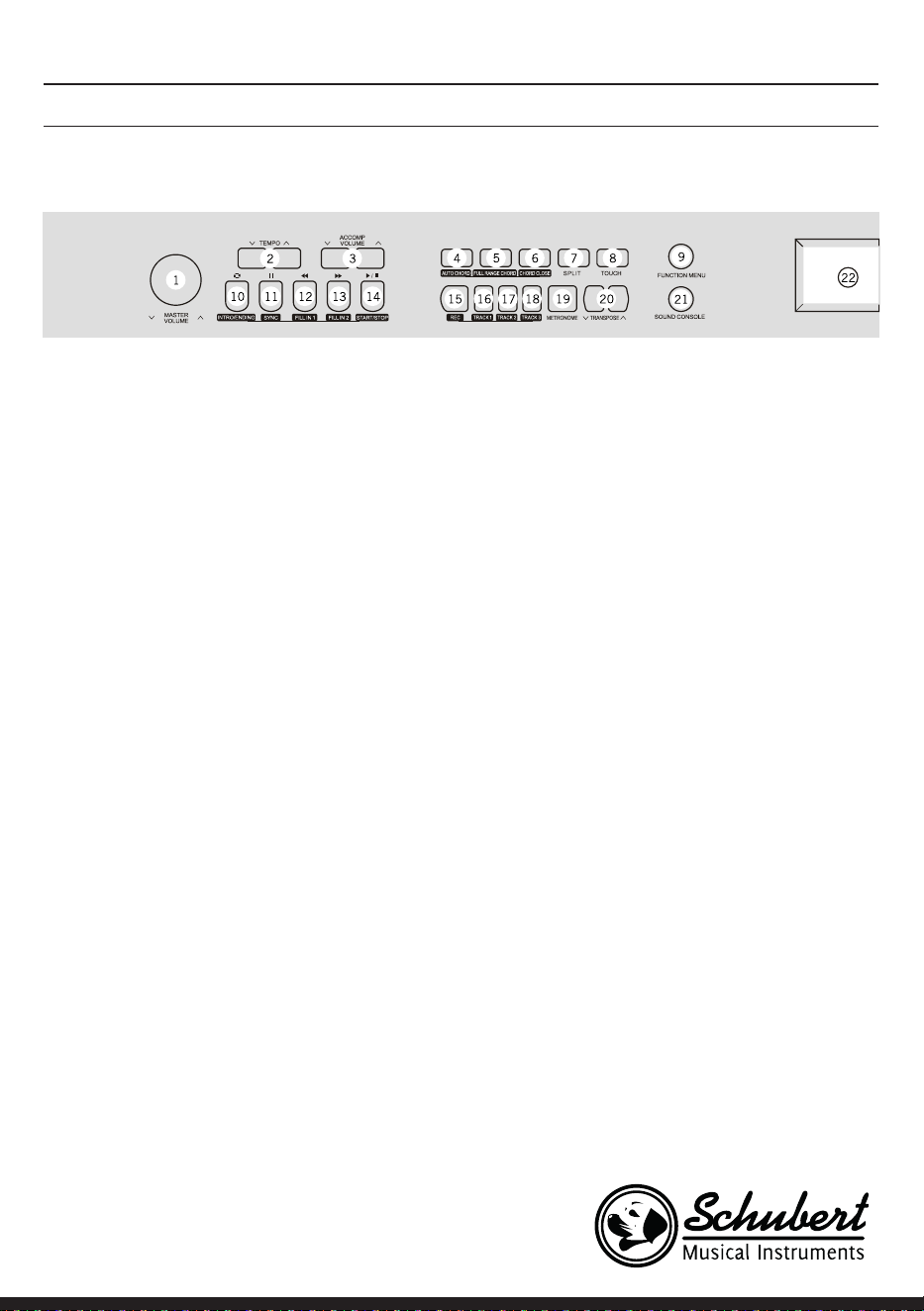
65
1 MASTER VOLUME – réglage du volume
principal
2 TEMPO ∨/∧– ajuster le tempo actuel
3 ACCOMP VOLUME ∨/∧ volume de l'accompa-
gnement
4 AUTO CHORD – Accord automatique
5 FULL RANGE CHORD – tous les accords
6 CHORD CLOSE - accord nal
7 SPLIT – diviser
8 TOUCH – Sélectionnez la courbe de toucher
du clavier
9 FUNCTION MENU - menu fonction
En mode morceau
10 Début/ n dénir un passage de morceau
11 Touche pause
12 Retour rapide
13 Avance rapide
14 Démarrer / arrêter la lecture d'un morceau
En mode style
10 Intro/ Ending – lire / arrêter l'intro / la n de
l'accompagnement automatique
11 SYNC – ouvrir / fermer la fonction de synchro-
nisation
12 FILL IN 1 – ajouter la variation
13 FILL IN 2 – ajouter la variation
14 START/ STOP – démarrer/arrêter la lecture de
l'accompagnement
15 REC – démarrer la fonction enregistrement
16 TRACK 1 – sélectionnez pour enregistrer la
piste 1
17 TRACK 2 – sélectionnez pour enregistrer la
piste 2
18 TRACK 3 – sélectionnez pour enregistrer la
piste 3
19 METRONOME – ouvrir/fermer la fonction
métronome
20 TRANSPONSE ∨/∧ – Transposition
21 SOUND CONSOLE – ouvrir le menu du pu-
pitre de commande
22 Ecran LCD – afche toutes les informations
importantes
TOUCHES ET CONNEXIONS
Panneau de commande gauche
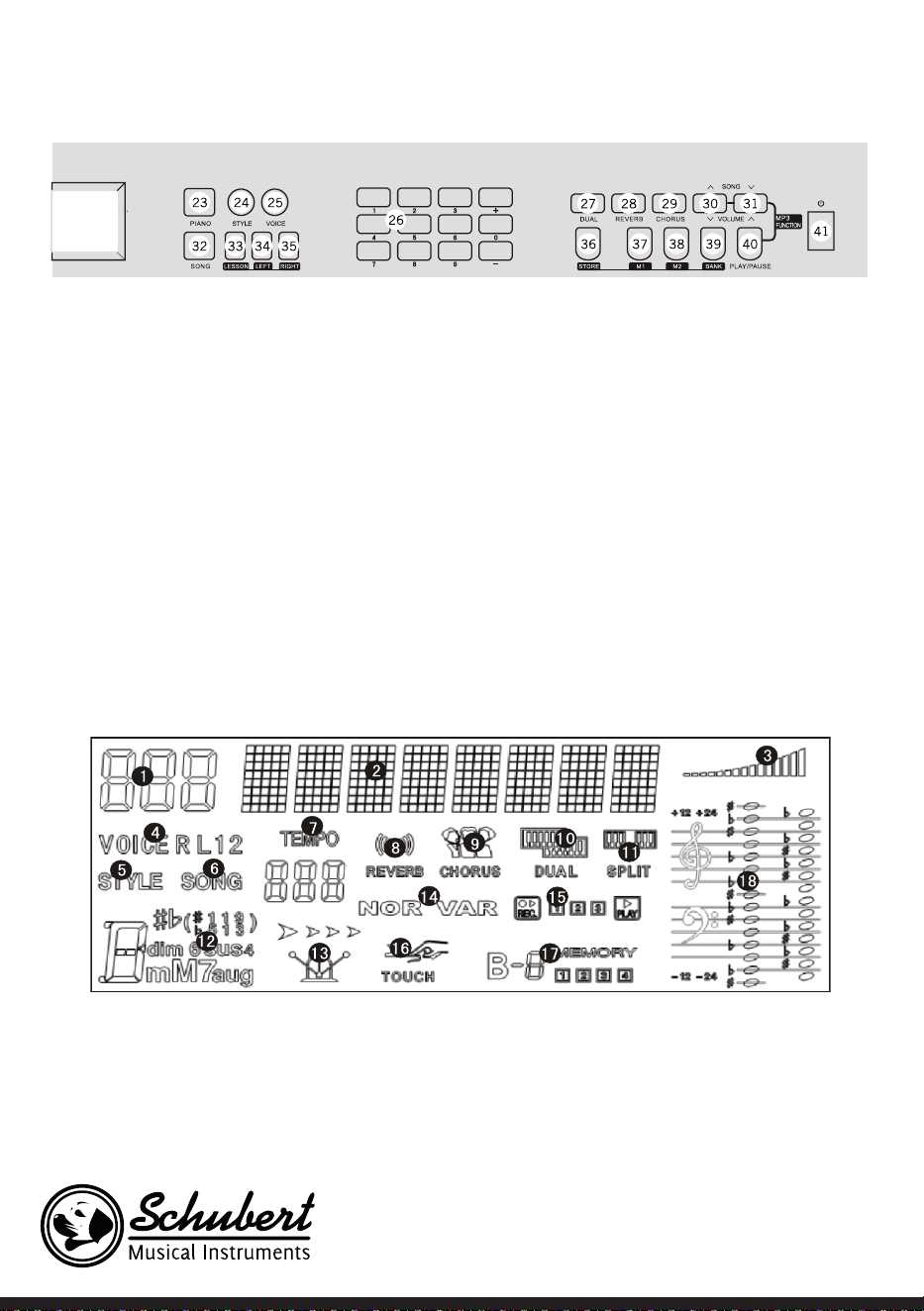
66
Panneau de commande de droite
23 PIANO – ouvrir/Fermer le mode piano
24 STYLE – ouvrir les fonctions de style
25 VOICE – ouvrir les fonctions instruments
26 Chiffres +/-– ajuster les paramètres
27 DUAL – Deux voix activées / désactivées
28 REVERB - effet réverbération
29 CHORUS
30 SONG/ VOLUME – passer au morceau MP3
suivant / réduire le volume en mode MP3
31 SONG ∨/∧ / VOLUME ∨/∧ – retour au mor-
ceau précédent MP3 / augmenter le volume
en mode MP3
32 SONG – passer en mode morceau
33 LESSON – démarrer le mode apprentissage
34 LEFT – sélectionnez la partie main gauche
35 RIGHT – sélectionnez la partie main droite
36 STORE – touche mise en mémoire
37 M1 – récupérer directement le panneau de
commande de réglage 1
38 M2 – récupérer directement le panneau de
commande de réglage 2
39 BANK – changer de banque de mémoire
40 PLAY/PAUSE – lecture/ pause en mode MP3
41 Marche /Arrêt
Ecran LCD
1 Zone d'afchage numé-
rique
2 Zone d'afchage des notes
3 Volume
4 Sélection des sons
5 Sélection du style
6 Morceaux
7 Tempo
8 Effet réverbération
9 Chorus
10 Deux voix
11 Division du clavier
12 Afchage des accords
13 Rythme
14 FILL IN1/FILL IN2
15 Enregistrement / lecture
16 Attaque
17 Mémoire
18 Clef musicale
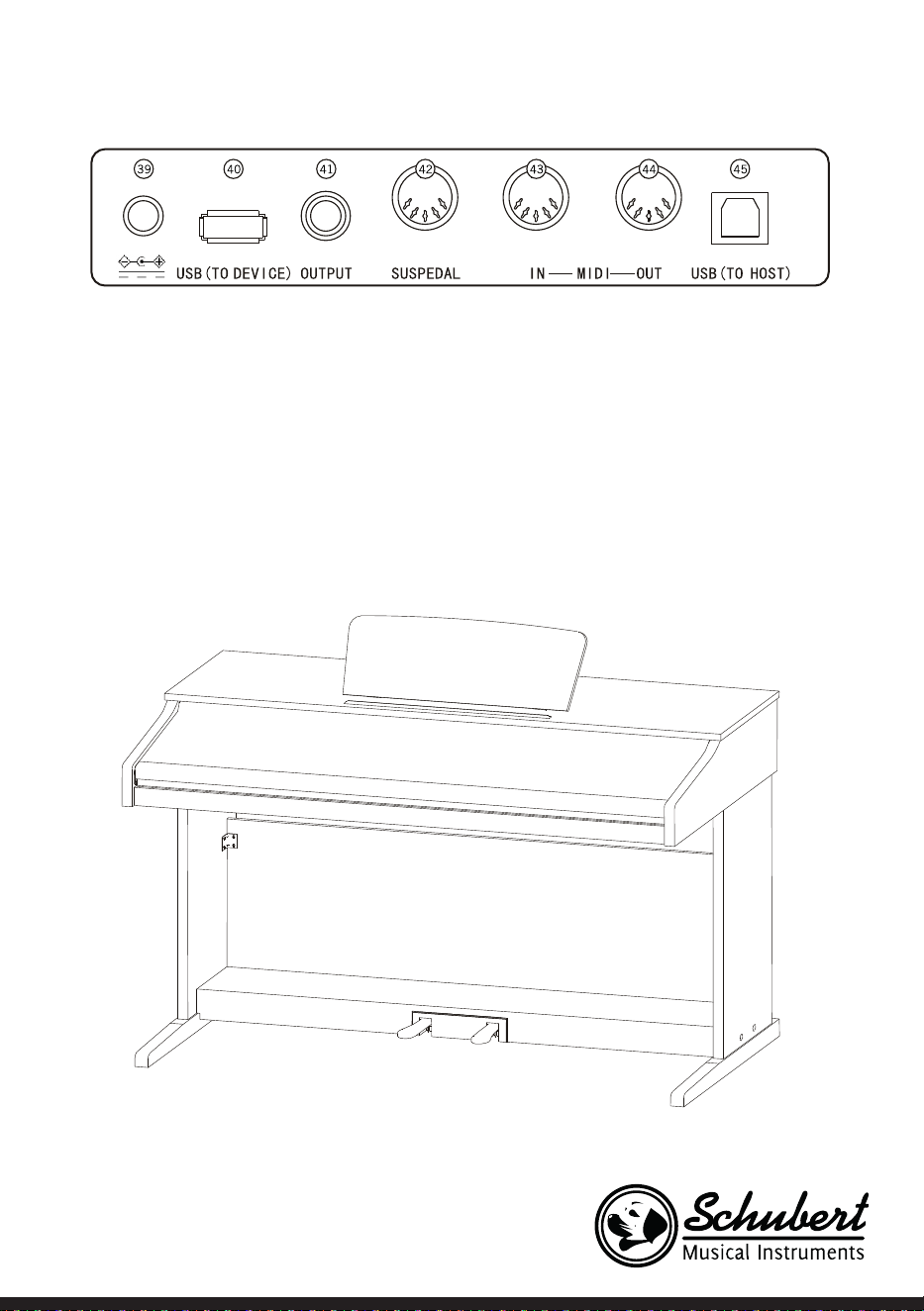
67
Dos de l'appareil
39 Prise d'alimentation externe
40 USB (TO DEVICE) – port USB
41 OUTPUT – prise audio pour les équipements audio externes
42 PEDAL- prise de la pédale
43 MIDI IN prise MIDI IN – réception des informations MIDI, envoyées par les appareils MIDI externes ou
par le PC.
44 MIDI OUT prise – envoi d'informations depuis cet appareil vers un PC ou d'autres appareils MIDI par
cette prise.
45 Port USB (MIDI)
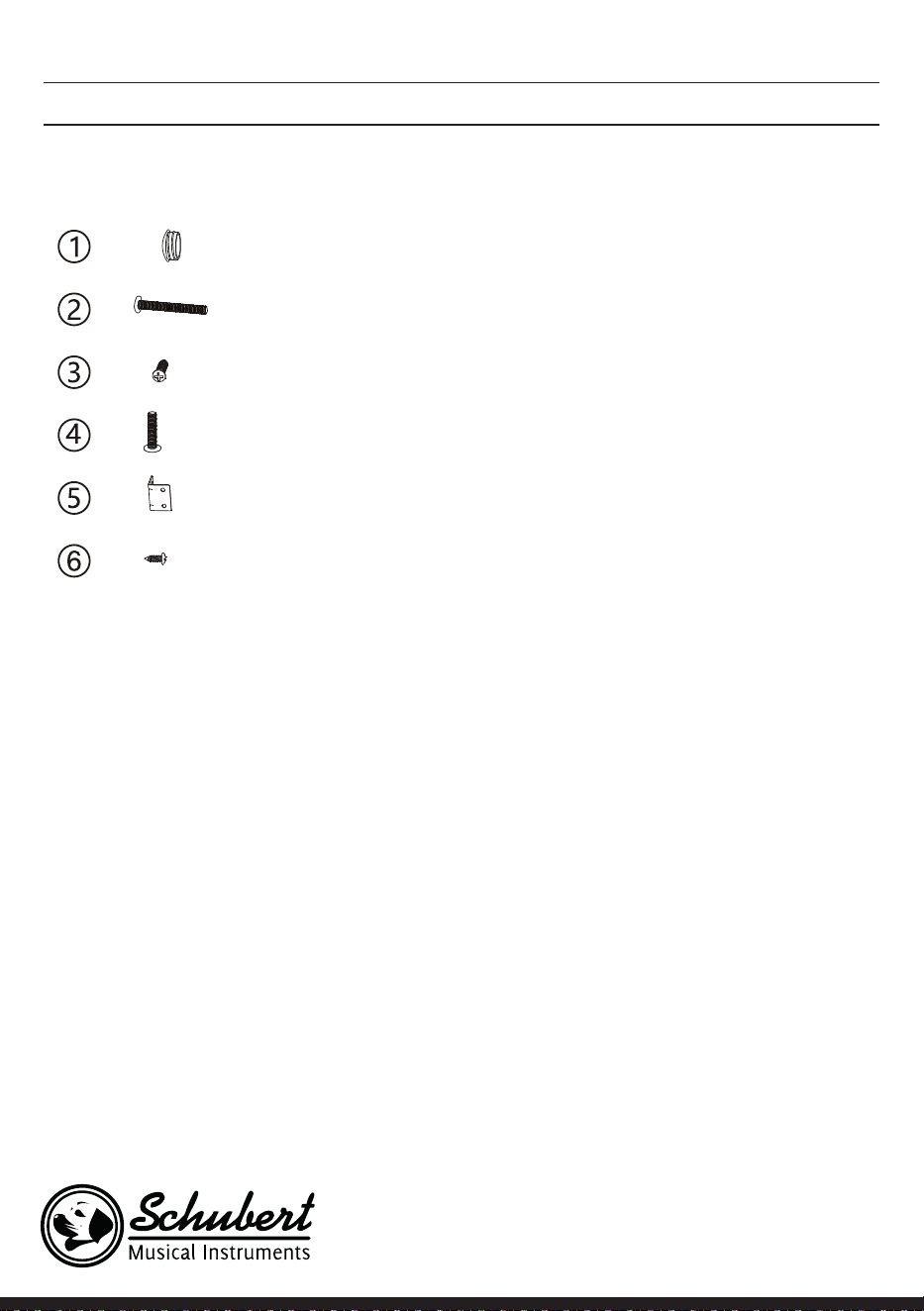
68
MONTAGE
Cache plastique marron 4
4
6
4
2
8
Description Quantité
Vis M6*50
Vis PA4*16
Vis M6*20
Raccord d'angle du support de piano
Vis BA3*8
Montage du corps de l'appareil
1. Utilisez les 4 vis M6 * 50 pour connecter les panneaux montants gauche et droit au boîtier de pédale.
2. Utilisez les 4 vis PA3 * 8 pour visser l‘une des deux connexions d‘angle sur le panneau arrière de l‘appareil.
3. Utilisez les vis BA3 * 8 pour xer l‘autre connexion d‘angle aux panneaux montants gauche et droit.
4. Utilisez les 6 vis PA4 * 16 pour connecter le bas du panneau arrière de l‘appareil au boîtier de pédale.
5. Placez la carcasse de piano sur les plaques de gauche et de droite et xez-les avec 4 vis M6 * 20.
6. Couvrez les trous des vis avec les 4 caches en plastique marron.
7. Branchez la che du connecteur de la pédale dans la prise de la pédale.
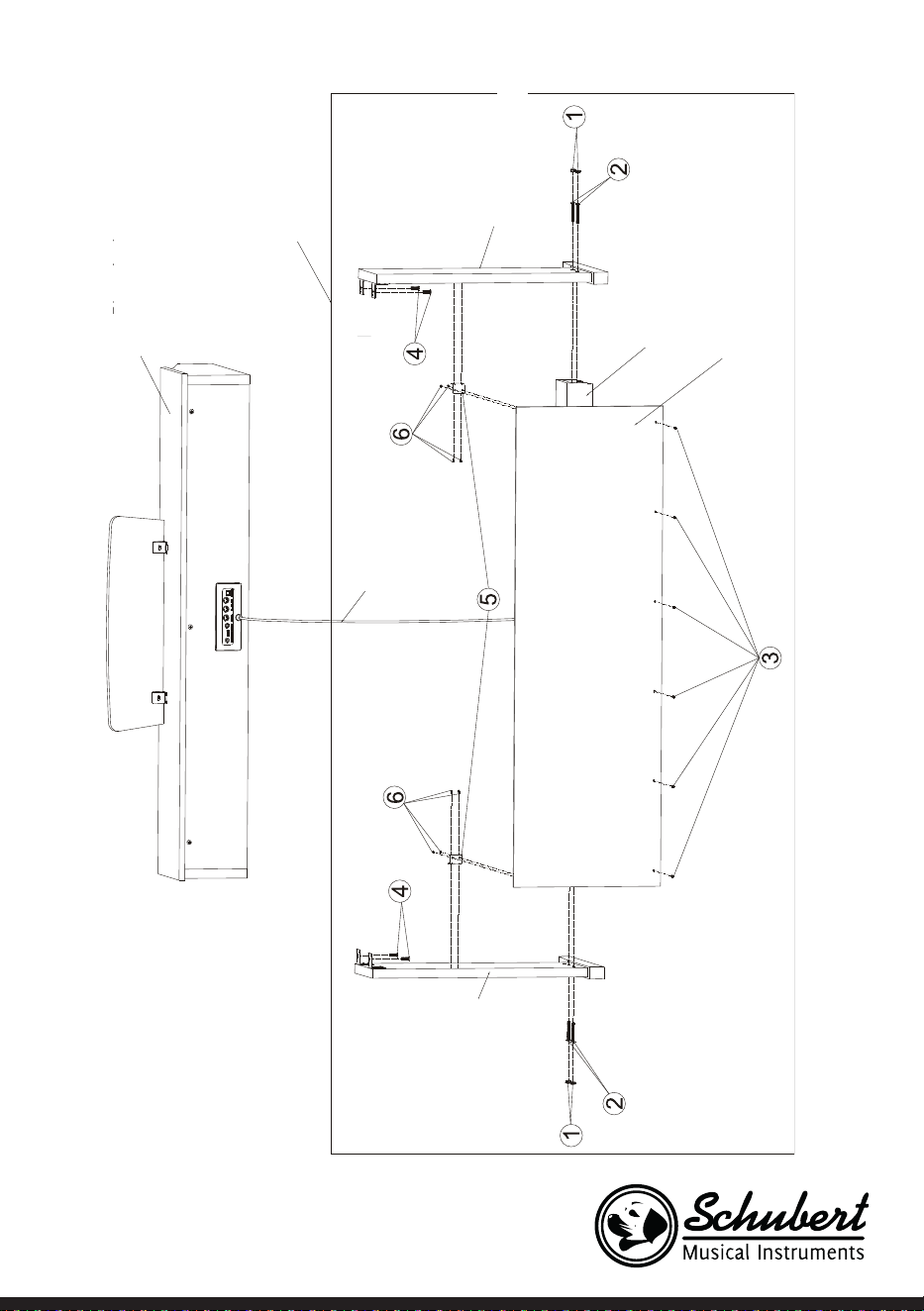
69
Corps du piano
Support du piano
Pied gauche
Pied droit
Ensemble de pédales
Panneau arrière
Cache des connexions
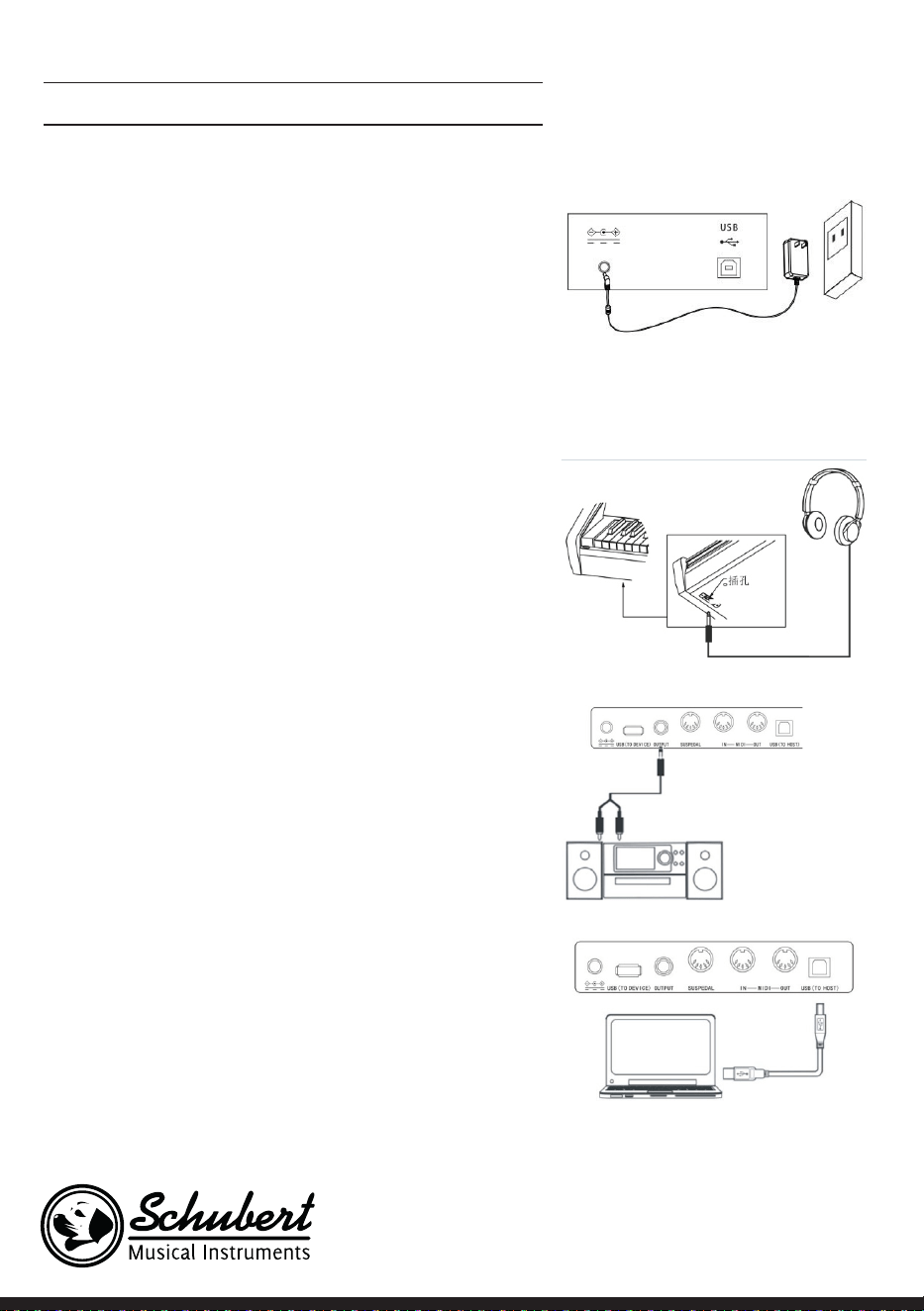
70
MISE EN MARCHE ET UTILISATION
Alimentation
1. Vériez que l‘appareil est éteint lorsque vous branchez le
bloc d‘alimentation.
2. Connectez la che de l‘adaptateur secteur au port DC de
l‘appareil.
3. Branchez la che secteur dans la prise.
4. Lorsque vous appuyez sur le bouton POWER, l‘écran LCD
afche „Loading“, ce qui indique que le piano a été ouvert.
Remarque : Pour votre propre sécurité, éteignez l'appareil
pendant les orages ou si vous ne l'utilisez pas pendant une
longue période.
Branchement du casque
• Si vous souhaitez vous exercer seul ou tard le soir, vous pou-
vez brancher un casque stéréo à la prise casque de votre
appareil.
• Les enceintes de l'instrument sont automatiquement dé-
sactivées lorsqu'un casque est branché, et le son n'est re-
produit que par le casque.
Remarque : L'utilisation d'un casque à volume élevé pen-
dant une période prolongée peut causer des dommages
auditifs.
Connexion d'accessoires audio avec l'appareil
• En connectant des accessoires audio externes, vous pouvez
obtenir de meilleurs effets musicaux.
• Le connecteur AUDIO OUT situé à l'arrière de l'appareil
vous permet de brancher des amplicateurs, des chaînes
stéréo audio, des tables de mixage audio, des enregistreurs,
etc. à l'appareil via un câble.
Remarque : Veillez à éteindre l’appareil et à régler le vo-
lume au niveau le plus bas avant de connecter d’autres
appareils au piano.
Branchement sur un PC
• Cet appareil dispose d'un port USB.
• Un câble USB vous permet de connecter l'appareil à votre
ordinateur et d'envoyer et recevoir des informations.
• Par exemple, vous pouvez enregistrer sur votre ordinateur
des morceaux joués sur le piano ou lire des documents
MIDI depuis votre ordinateur via l'appareil.
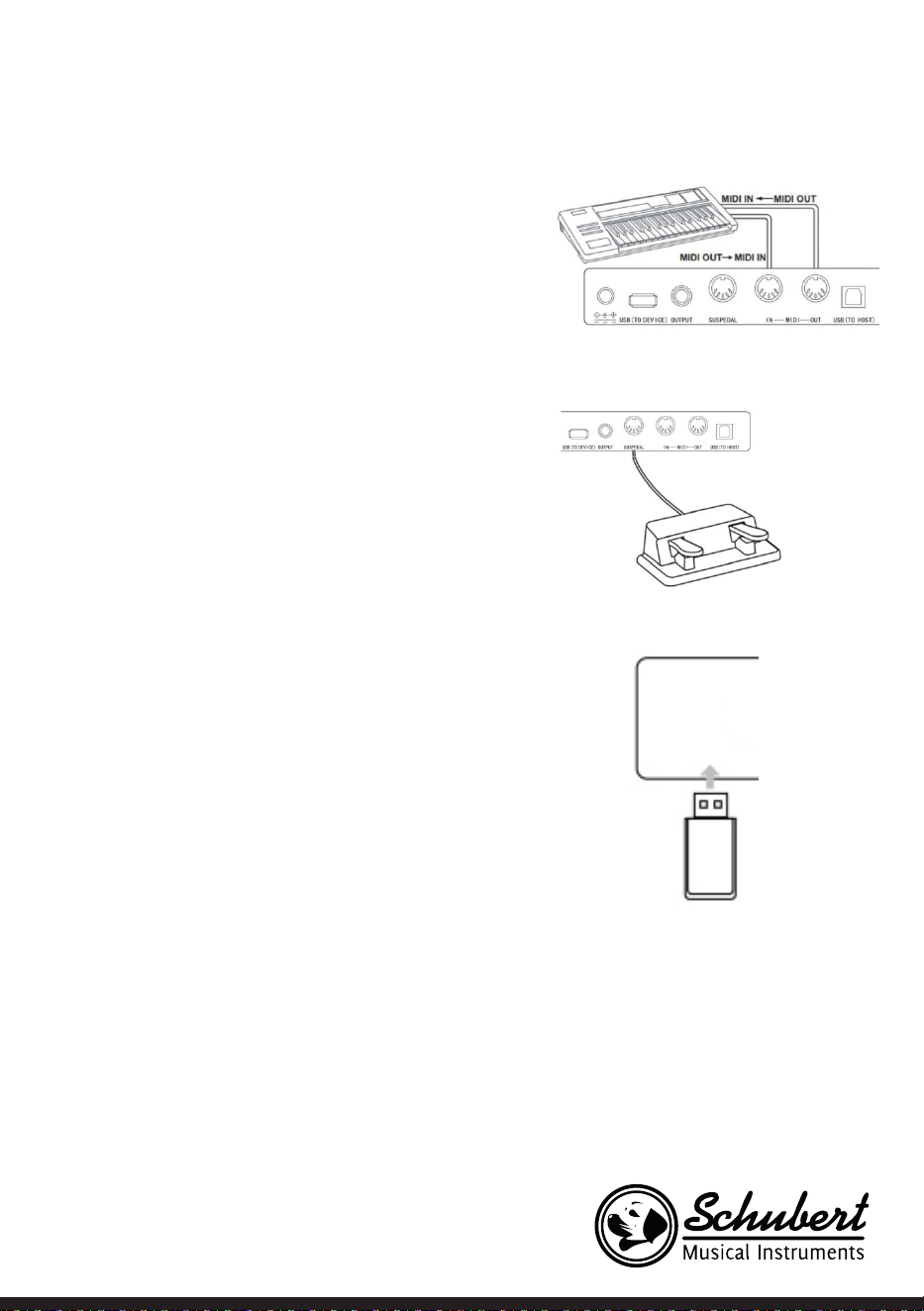
71
Remarque : L'accessoire audio USB ne peut pas être réglé
simultanément pour l'entrée audio et la sortie audio.
Branchement sur d'autres appareils
• Si vous connectez la prise MIDI IN de votre appareil à la
prise MIDI OUT d'un autre appareil, vous pouvez utiliser le
piano comme source audio.
• Si vous connectez la prise MIDI OUT de cet appareil à la
prise MIDI IN d’un autre appareil, l’instrument peut être
utilisé comme contrôleur MIDI.
Branchement des pédales
Lorsque les pédales sont connectées à la prise des pédales à
l’arrière de l’appareil, cet appareil dispose de deux fonctions
de pédales différentes :
1. Si vous appuyez sur cette pédale pendant que vous jouez,
tous les sons seront atténués.
2. Si vous appuyez sur cette pédale pendant que vous jouez,
les notes jouées auront de la résonance.
Branchement d'appareils USB
• L'appareil prend en charge les périphériques USB jusqu'à 32
Go.
• Les chiers MP3 sur la clé USB peuvent être lus via l'appa-
reil.
Remarque : Ne débranchez pas le périphérique USB pen-
dant la lecture. Sinon, il pourrait y avoir des messages
d'erreur ou des dommages au périphérique USB.
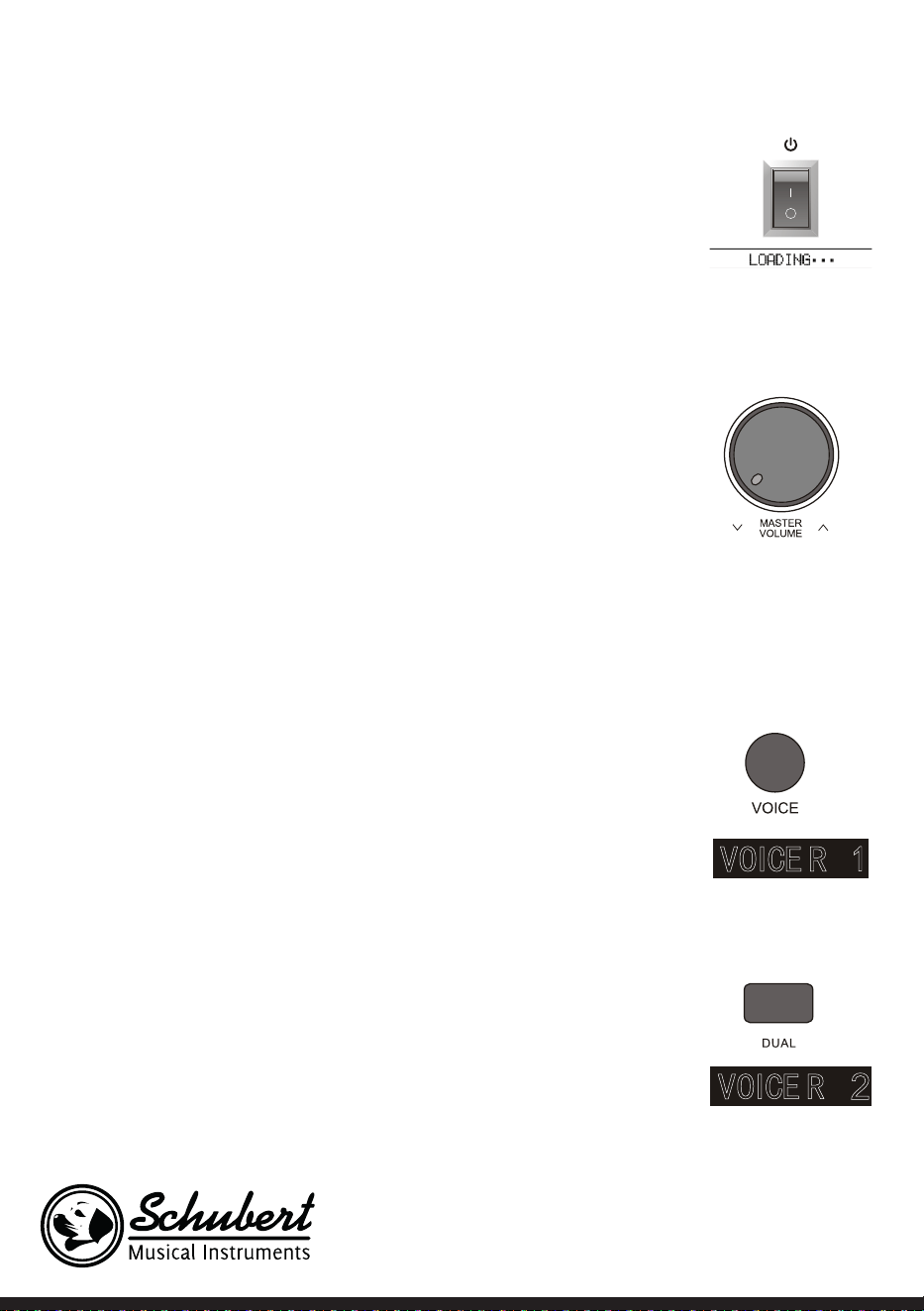
72
Interrupteur secteur
1. Tout d‘abord, assurez-vous que l‘adaptateur secteur est correctement bran-
ché.
2. Lorsque vous appuyez sur le bouton POWER, l’écran LCD s’éclaire et afche
l’écran de démarrage.
Remarque: Si l'écran LCD ne s'allume pas après avoir appuyé sur le bouton
POWER, vériez que l'adaptateur secteur est correctement connecté.
Réglage du volume
• Après avoir ouvert l’instrument, tournez le bouton MASTER VOLUME vers la
droite pour augmenter le volume et vers la gauche pour le diminuer.
• Vous pouvez ajuster le volume selon vos besoins.
Réglez différents types de sons d'instruments
• Cet instrument dispose de centaines de types de sons d'instruments, y com-
pris le son de la musique folklorique chinoise, de la batterie, etc.
• Pour obtenir des informations plus précises, consultez la table des sons.
• L'instrument est en outre équipé d'une fonction d'effets qui s'applique au son
utilisé pour l'améliorer.
Sélection et lecture d'un son
1. Appuyez sur le bouton TONE pour accéder au mode de sélection du son.
L‘icône de rappel „R1“, le nom du son actuel et son numéro sont afchés sur
l‘écran LCD.
2. Utilisez les touches numériques et les touches + et - pour sélectionner le son
souhaité.
3. Jouez les touches et appréciez les sons merveilleux.
Remarque : Pour changer la source sonore, appuyez à nouveau sur la touche
VOICE. La fonction deux voix est maintenant activée. L'indicateur "R1 / R2 /
L" correspondant s'afche sur l'écran LCD.
A deux voix
Cet instrument dispose d'une fonction deux voix. Deux sons peuvent être lus
simultanément et superposés. Cet effet permet d'enrichir les niveaux de mu-
sique et de donner l'impression que deux instruments jouent en même temps. La
première voix "R1" est déjà présente avant le début de la fonction. Après avoir
activé la fonction la voix de "R2" est aussi disponible..
1. Appuyez sur le bouton DUAL pour ouvrir la fonction. „R2“ apparaît sur l‘écran
LCD. De plus, le nom et le numéro du son supplémentaire d‘afchent.
2. Sélectionnez la seconde voix souhaitée à l‘aide du bouton VOICE et des bou-
73
tons + et -.
3. En jouant les deux voix de manière synchrone, on a l‘impression que deux
instruments différents jouent simultanément.
4. Vous pouvez désactiver la fonction en appuyant à nouveau sur le bouton
DUAL. L‘afchage „R2“ disparaît de l‘écran et l‘appareil retourne à son état
précédent.
Remarque : Si le clavier de l'instrument a été divisé, la fonction en deux
parties est uniquement disponible pour les touches de droite. Les touches
de gauche n'ont pas cette fonction.
Fonction tactile (sensibilité de l'attaque)
Le panneau de contrôle de l'instrument dispose d'une fonction tactile qui per-
met à votre performance d'être plus expressive. Vous pouvez choisir entre
trois fonctions tactiles différentes.
1. Appuyez sur le bouton TOUCH pour activer la fonction. La fonction tactile
par défaut est „002“ et s‘afche sur l‘écran LCD.
2. Vous pouvez appuyer sur la touche tactile plusieurs fois pour sélectionner
l‘une des fonctions dans l‘ordre „001-003 ; OFF“.
3. Lorsque l‘écran LCD afche „OFF“, la fonction tactile est désactivée.
Transposition
En utilisant la fonction de transposition, vous pouvez ajuster le clavier d'un
demi-ton vers le haut / bas et ainsi ne pas avoir à changer votre style de jeu..
1. Pour activer la fonction, appuyez sur la touche TRANSPOSE ∧ ou TRANS-
POSE∨, pour régler le clavier vers le haut ou le bas. La valeur de transposi-
tion actuelle „xxx Transpose“ est temporairement afchée sur l‘écran LCD.
2. Vous pouvez ajuster le clavier d‘un maximum de 12 demi-tons.
3. Lorsque vous maintenez les touches TRANSPOSE ∧ et TRANSPOSE ∨ le cla-
vier est réinitialisé à la valeur par défaut de „000 Transpose“..
Remarque : Si vous voulez jouer un morceau en "G" mais que vous ne
connaissez pas le clavier, vous pouvez dénir la valeur de transposition sur
-05 ou 007 pour pouvoir utiliser le clavier pour "C", le morceau sonnera
comme si vous jouiez dans "G". Cette fonctionnalité est disponible unique-
ment pour l’ensemble du clavier et l’accompagnement automatique des
accords.
Mode piano
Cette fonctionnalité vous permet d'utiliser tout le clavier avec le son d'un pia-
no.
1. Appuyez sur le bouton PIANO pour activer / désactiver la fonction.
2. La sélection de l‘accompagnement fonctionne de la même manière que dans
74
les autres modes. Cependant, seul un accompagnement de batterie peut
être sélectionné et aucune harmonique.
Remarque : dans ce mode, vous pouvez ouvrir la console audio et le menu
des fonctions. La fonction accord est automatiquement fermée lorsque ce
mode est activé.
Métronome (rythme préréglé)
Lorsque vous vous entraînez, si vous n'êtes pas sûr de bien jouer dans le rythme,
vous pouvez vous faire aider par la fonction de métronome.
1. Appuyez sur le bouton METRONOME pour activer la fonction. Le rythme
vous est alors donné. Pour désactiver la fonction, appuyez à nouveau sur le
bouton METRONOME.
2. Sélectionnez la signature temporelle dans le menu Fonction pour afcher les
différents paramètres.
Remarque : Si vous ouvrez cette fonction pendant le jeu, le son du métro-
nome débute à la mesure suivante, et s'adapte en fonction du style.
• Lorsque vous ouvrez la fonction pour la première fois, l’instrument ajuste
automatiquement le style que vous avez sélectionné.
• La fonction peut également être activée pendant un enregistrement car elle
ne sera pas entendue dans le chier enregistré.
Accompagnement
Accompagnement automatique
• En activant cette fonction, vous pouvez simplement jouer du piano et l'ac-
compagnement, par exemple sous la forme d'un orchestre, sera joué au-
tomatiquement. Il vous suft de sélectionner un style d'accompagnement
dans la table et de jouer vos accords de la main gauche.
• Cet instrument dispose de plusieurs accompagnements automatiques, que
vous pouvez voir dans la table de style. Il suft de choisir le vôtre et d'en
proter.
Lecture de l'accompagnement automatique (lire uniquement la partie
percussions)
1. Appuyez sur le bouton STYLE pour accéder au mode Style. L‘indicateur
„STYLE“ s‘allume dans le coin supérieur gauche de l‘écran LCD. L‘écran af-
che également le nom et le numéro du style actuellement sélectionné en
même temps.
2. Vous pouvez sélectionner le style souhaité en appuyant sur les touches nu-
mériques ou les touches + et -.
3. La partie percussion du style peut être lue immédiatement en appuyant
sur le bouton START / STOP. Vous pouvez également appuyer sur le bouton

75
SYNC pour synchroniser le style. Le point du métronome s‘allume également sur l‘écran LCD. Vous pou-
vez jouer n‘importe quelle touche pour lancer la performance
Sections d'accompagnement
L'accompagnement automatique de cet instrument implique plusieurs sections d'accompagnement de
sorte qu'il est recommandé, d'organiser vos propres accompagnements. Les sections comprennent : ac-
compagnement principal (A, B), intro, n. Lorsque vous jouez l'accompagnement, vous pouvez utiliser les
sections pour obtenir une performance plus professionnelle.
1. Intro : La sélection de l‘intro est appropriée au début d‘un morceau. Après avoir terminé l‘intro, l‘accom-
pagnement passe aux réglages de l‘accompagnement principal. La longueur de l‘intro varie selon le style
sélectionné.
2. Programme principal : la sélection de „Lecture principale“ est utile lors de la lecture de la partie princi-
pale d‘un morceau est lue. Le programme principal est joué jusqu‘à ce qu‘une autre touche soit pressée.
3. Ajout
En ajoutant la section 1 ou 2, vous pouvez rendre votre performance plus professionnelle. Après la
lecture des sections ajoutées, l‘accompagnement retourne au programme principal.
4. Fin
Appuyez sur ce bouton est situé à la n d'un morceau. Le morceau est terminé automatiquement lorsque la
séquence de n a été joué. La longueur de la séquence nale dépend du style choisi et peut varier.
Remarque : Si vous maintenez le bouton FILL IN 1 ou FILL IN 2, la variation sera ajoutée à l'accom-
pagnement jusqu'à ce que vous relâchiez le bouton. L'accompagnement retourne ensuite au pro-
gramme principal. Appuyez sur le bouton FILL IN pour modier le programme principal prédéni.
Lorsque l'accompagnement s'arrête, l'écran LCD l'afche.
Jouer différentes sections d'accompagnement
1. Appuyez sur le bouton STYLE pour accéder au mode de sélection de style. Sélectionnez le style souhaité
en appuyant sur les touches numériques ou sur + et -.
2. Appuyez sur le bouton AUTO CHORD pour activer la fonction d‘accord automatique.
3. Appuyez sur le bouton SYNC pour ouvrir la fonction de synchronisation.
4. Pour sélectionner la lecture principale 1, appuyez sur le bouton FILL IN 1.
5. Lorsque vous appuyez sur le bouton INTRO / ENDING, l‘écran afche „NOR“, ce qui indique que l‘instru-
ment est en mode de préparation du jeu.
6. L‘accompagnement automatique commence immédiatement lorsque vous jouez un accord dans la zone
du clavier de la main gauche. L‘accompagnement passe au programme principal après l‘intro.
7. Lorsque vous appuyez sur le bouton FILL IN 2, une petite variation est ajoutée à l‘accompagnement.
L‘accompagnement retourne automatiquement au programme principal après avoir terminé la variation.
8. Lorsque vous appuyez sur le bouton INTRO / ENDING, l‘accompagnement joue une séquence de n, puis
s‘arrête.
Réglage du volume de l'accompagnement
Le volume d'accompagnement peut être réglé pour l'accompagnement entier. Cette fonction équilibre le
volume des touches avec le volume d'accompagnement.

76
1. Appuyez sur la touche ACCOMP VOLUME ∧/∨ pour afcher le réglage actuel du volume de l‘accompa-
gnement sur l‘écran LCD. Appuyez sur le bouton ACCOMP VOLUME ∧ pour augmenter le volume et sur
le bouton ACCOMP VOLUME ∧ pour le réduire. La plage de réglage est : 0 – 127.
2. Si vous appuyez simultanément sur les touches ACCOMP VOLUME ∧ et ACCOMP VOLUME ∨ le vo-
lume de l‘accompagnement se coupe. L‘écran LCD afche „Volume d‘accompagnement : OFF“. Appuyez
à nouveau sur les deux touches ACCOMP VOLUME ∧ et ACCOMP VOLUME ∨ pour réactiver le son.
Tempo
Chaque style possède sa valeur de vitesse adaptée. Vous pouvez ajuster la valeur en fonction de vos capa-
cités et des exigences de chaque morceau.
1. La valeur de vitesse préréglée peut être ajustée à l‘aide des boutons TEMPO ∧ et TEMPO ∨ .
2. En appuyant simultanément sur les boutons TEMPO ∧ et TEMPO ∨ la vitesse revient à la valeur d‘origine.
Remarque : la vitesse est dénie automatiquement pour chaque style. Si vous ne changez pas de style, la
vitesse reste la même.
Accords
Accord automatique
Lorsque vous appuyez sur le bouton AUTO CHORD, l'accompagnement automatique de l'accord de la main
gauche commence.
Accord de portée totale
Si vous appuyez sur la touche FULL RANGE CHORD, toutes les touches sont jouées en temps qu'accords.
Quitter l'accompagnement par accords
Si vous appuyez sur la touche CHORD CLOSE, vous quittez l'accompagnement des accords. Le style reste
maintenu.

77
Table des accords
Description Abréviation Notation
Majeur M 1 - 3- 5
Sixte majeure M6 1 - 3 - 5 - 6
Septième majeure M7 1 - 3 - (5) - 7
Majeur sept onze M7 #11 1 -2 -3 -5
Majeur avec neuvième ajoutée Madd9 1-2 - 3- 4- 5
Neuvième majeure M9 1 - 2 - 3 - (5) - 7
Sixte majeure avec neuvième 69 1 - 2 - 3 - (5) - 6
Accord augmenté aug 1 - 3 -
#
5
Mineur m 1 -
b
3 - 5
Petite sixte m6 1 -
b
3 - 5 - 6
Petite septième m7 1 -
b
3 - (5) - 7
Petite septième avec quinte diminuée m7
b
5 1 - 3- 5 - 7
Mineur avec neuvième ajoutée madd9 1 -2 - 3- 5
Neuvième mineur m9 1 - 2 - 3 - 5
Septième mineur avec neuvième et un dixième m11 1 - 3 - (5) - 7
Accord mineur, majeure 7 mM7 1 -2 -3 - (5) - 7
accord mineur, majeure 9 mM9 1 - 2 - 3 - (5) - 7
Accord diminué dim 1 - 3 - 5
Septième diminué dim7 1 - 3- 5 - 7
Septième 7 1 - 3 - (5) - 7
Septième avec quarte 7sus4 1 - 4 - 5 - 7
Septième avec neuvième 79 1 -2 - 3- (5) - 7
Septième mineure onzième 7
#
11 1 - 2 - 3 - (5) -
b
7
Accord de treizième 713 1 - 3- (5) - 7 / 2 - 3 - 5 - 6 - 7
Accord de septième avec neuvième bémol 7
b
9 1 - 2 - 3- (5)- 7- 9
Septième majeure M7aug (1) - 3 -
#
5 - 7
Accord de quarte sus4 1 - 4 - 5
Accord de seconde 1+2+5 1 - 2 - 5
78
Effet Réverbération
• En appuyant sur le bouton REVERB, vous pouvez activer / désactiver l'effet réverbération.
• Lorsque l'effet réverbération a été activé, la "réverbération" s'allume.
• Lorsque l'effet réverbération est désactivé, "Reverb" disparaît de l'afchage.
Chorus
• En appuyant sur le bouton CHORUS, vous pouvez activer / désactiver l'effet de chorus.
• Lorsque l'effet de chorus est activé, le voyant "Chorus" s'allume.
• Lorsque l'effet de chorus est désactivé, le voyant "Chorus" s'éteint“.
Réglage du son
• Vous pouvez utiliser le réglage du son pour régler le volume de chaque piste.
• Appuyez sur le bouton SOUND CONSOLE pour accéder au menu des paramètres du son. L'écran LCD af-
che la valeur correspondante. Lorsque vous êtes dans le menu Son, vous pouvez ajuster chaque valeur
individuellement en appuyant plusieurs fois sur le bouton SOUND CONSOLE.
• Le volume peut être réglé séparément pour chacune des valeurs en appuyant sur les touches + et -.
Valeurs de réglage
Contenu à ajuster Afchage LCD Plage de réglage
Volume de musique de percussion XXX Rhythm 0 - 127
Volume de basses XXX Bass 0 - 127
Volume d'harmonie XXX Chord 0 - 127
Volume de la section XXX Phrase 0 - 127
Volume de la partie main gauche XXX Lower 0 - 127
Volume de la partie main droite XXX Upper 0 – 127
Remarque : Si vous n'effectuez aucun réglage de son dans les 5 secondes, le menu de réglage du son est
automatiquement quitté
79
MENU DES FONCTIONS
Menu des fonctions
Appuyez sur la touche MENU FONCTION pour accéder au menu des fonctions. L'écran LCD afche la va-
leur correspondante. Dans le menu Fonctions vous pouvez régler les valeurs individuelles en appuyant sur
les touches + et -.
N° Contenu Afchage LCD Plage de réglage Valeur par défaut
1 Mélodie XXX Tune -50 - +50 000
2 Division du clavier XXX KeySplit 1 – 88 034
3 Métronome XXX BeatType 0, 2 – 9 004
4 Volume du métronome XXX 0 – 127 080
5 Réverbération profonde XXX 0 – 127 050t
6 Chœur profond XXX 0 – 127 000
7 Réception MIDI XXX 1 – 16, ALL ALL
8 Emission MIDI XXX 1 – 16 001
Remarque : Si vous n'effectuez aucun réglage dans les 5 secondes, vous quittez automatiquement le menu
des fonctions.
Réglage de la mélodie
Ce réglage vous permet d'ajuster précisément la hauteur du son.
1. Pour sélectionner le menu Mélodie, appuyez d‘abord sur la touche FUNCTION MENU. Sélectionnez
„Tune menu“. L‘écran afche temporairement „XXX Tune“. En appuyant sur les boutons + et - vous pouvez
régler la hauteur par demi-ton, dans une plage de 50.
2. Si vous appuyez simultanément sur les boutons + et -, la hauteur sera réinitialisée à la valeur par défaut
de 000. Ce paramètre s‘applique au clavier et à tous les styles.
Division du clavier
Le point de séparation de la section des accords automatiques et du clavier de droite est appelé "POINT DE
DIVISION DU CLAVIER". Si la fonction d'accord automatique est désactivée, la zone de clavier gauche peut
également être utilisée pour jouer de la musique.
1. Pour diviser le clavier, appuyez d‘abord sur le bouton FUNCTION MENU et sélectionnez „Keyboard
Split“. L‘écran LCD afche „XXX KeySplit“. Vous pouvez appuyer sur les boutons + et - pour dénir le point
ou entrer directement un numéro à l‘aide du clavier.
2. Appuyez simultanément sur les boutons + et - pour réinitialiser le point-clé à la valeur prédénie „F#3
(34)“.

80
Signature temporelle
1. Pour sélectionner la signature temporelle, appuyez d‘abord sur le bouton FUNCTION MENU et sélec-
tionnez „Beat Type“. L‘écran LCD afche „XXX BeatType“. Vous pouvez appuyer sur les boutons + et - pour
sélectionner la signature temporelle. Un total de 9 types de métronomes (0, 2-9) sont disponibles.
2. Appuyez simultanément sur les boutons + et - pour rétablir la valeur par défaut de „004“.
Réglage du volume du métronome
1. Pour régler le volume du métronome, appuyez d‘abord sur les boutons FUNCTION MENU + ou FUNC-
TION MENU et sélectionnez „MetronomeVolume“. L‘écran LCD afche temporairement „XXX MetroVol“.
Pour régler le volume du métronome, appuyez sur les boutons + et -. Plage de réglage : 0 - 127.
2. Appuyez simultanément sur les boutons + et - pour ramener le volume du métronome à la valeur par
défaut „080“.
Réglage de la profondeur de réverbération
1. Pour sélectionner la profondeur de réverbération, appuyez d‘abord sur le bouton FUNCTION MENU et
sélectionnez „Reverb Level“. L‘écran LCD afche „XXX ReverbLev“. Vous pouvez appuyer sur les boutons
+ et - pour régler la profondeur de la réverbération. Plage de réglage : 0 - 127.
2. En appuyant simultanément sur les touches + et -, la profondeur de réverbération est réinitialisée à la
valeur préréglée „050“.
Réglage du volume du chorus
3. Pour sélectionner le volume du chorus, appuyez d‘abord sur le bouton FUNCTION MENU et sélection-
nez „Chorus Level“. L‘écran LCD afchera „XXX ChorusLev“. Vous pouvez appuyer sur les boutons + et
- pour régler le volume du chorus. Plage de réglage : 0 - 127.
4. Appuyez simultanément sur les boutons + et - réinitialise le volume du chorus à la valeur par défaut de
„000“.
Réglage de la réception MIDI
1. Pour sélectionner le menu de réglage de la réception MIDI, appuyez d‘abord sur le bouton FUNCTION
MENU et sélectionnez „Menu de réglage du canal de réception MIDI“. L‘écran LCD afche „XXX MidiIn“.
Vous pouvez appuyer sur les boutons + et - pour dénir les canaux de réception. Plage de réglage : 1 - 16,
ALL.
2. Appuyez simultanément sur les boutons + et - pour réinitialiser le canal de réception à la valeur par dé-
faut „ALL“.
Réglage de l'émission MIDI
1. Pour sélectionner le menu MIDI Program Setup, appuyez d‘abord sur le bouton FUNCTION MENU et sé-
lectionnez „Menu de réglage des canaux MIDI sending“. L‘écran LCD afche „XXX MidiOut“. Vous pouvez
appuyer sur les boutons + et - pour dénir les canaux de réception. Plage de réglage : 1 - 16.
2. Appuyez simultanément sur les boutons + et - pour réinitialiser le canal de réception à la valeur par dé-
faut „001“.

81
Réinitialisation aux paramètres d'usine
Lorsque l'appareil est hors tension, appuyez simultanément sur les touches + et -. L'appareil est réinitialisé
aux paramètres d'usine et supprime toutes les données utilisateur, y compris les morceaux utilisateur, le
registre et la mémoire. Pendant ce temps, l'écran LCD afche "Wait ...!". Une fois l'appareil réinitialisé, il
peut être utilisé normalement.
Réglage de la mémoire d'enregistrement du panneau de commande
Cet instrument dispose d'un paramètre mémoire d'enregistrement du panneau de commande. Vous pou-
vez l'utiliser pour stocker les paramètres les plus fréquemment utilisés, ce qui les rend plus rapides à uti-
liser lorsque vous en avez besoin, facilitant ainsi la lecture sur l'instrument. Presque tous les paramètres
du panneau de contrôle peuvent être enregistrés avec cette fonctionnalité, de sorte que vos paramètres
favoris peuvent être ajustés d'une simple pression sur un bouton.
Mémorisation des réglages
1. Cet instrument dispose de quatre banques de mémoire. Chaque banque de mémoire a 2 états de mé-
moire chacune.
2. Si vous appuyez sur le bouton STORE tout en maintenant l’un des boutons M1 ou M2, le réglage actuel
peut être enregistré.
Remarque : L'enregistrement du paramètre actuel écrase la mémoire précédente. Si vous appuyez simul-
tanément sur les touches STORE et M1, tous les paramètres enregistrés seront supprimés et la mémoire
sera réinitialisée aux paramètres d'usine.
Lecture des paramètres sauvegardés
Pour lire les réglages mémorisés, appuyez sur les boutons M1 ou M2.
Sélection d'une banque de mémoire
1. Lorsque vous appuyez sur le bouton BANK, l’écran LCD afche temporairement le numéro de la banque
de mémoire actuellement sélectionnée.
2. Si vous appuyez à nouveau sur le bouton BANK, vous pouvez sélectionner la mémoire. Plage de sélection
: 1 - 2.
3. Les contenus suivants peuvent être stockés dans les mémoires M1 et M2.
• Réglages du son : voix principale, deux voix, point de division du clavier, effets numériques, table de
mixage.
• Paramètres d'accompagnement : Style, Vitesse, Activer / Désactiver les accords automatiques, Sélection
de section
• Réglages de fonction : Appuyez sur Options du menu.
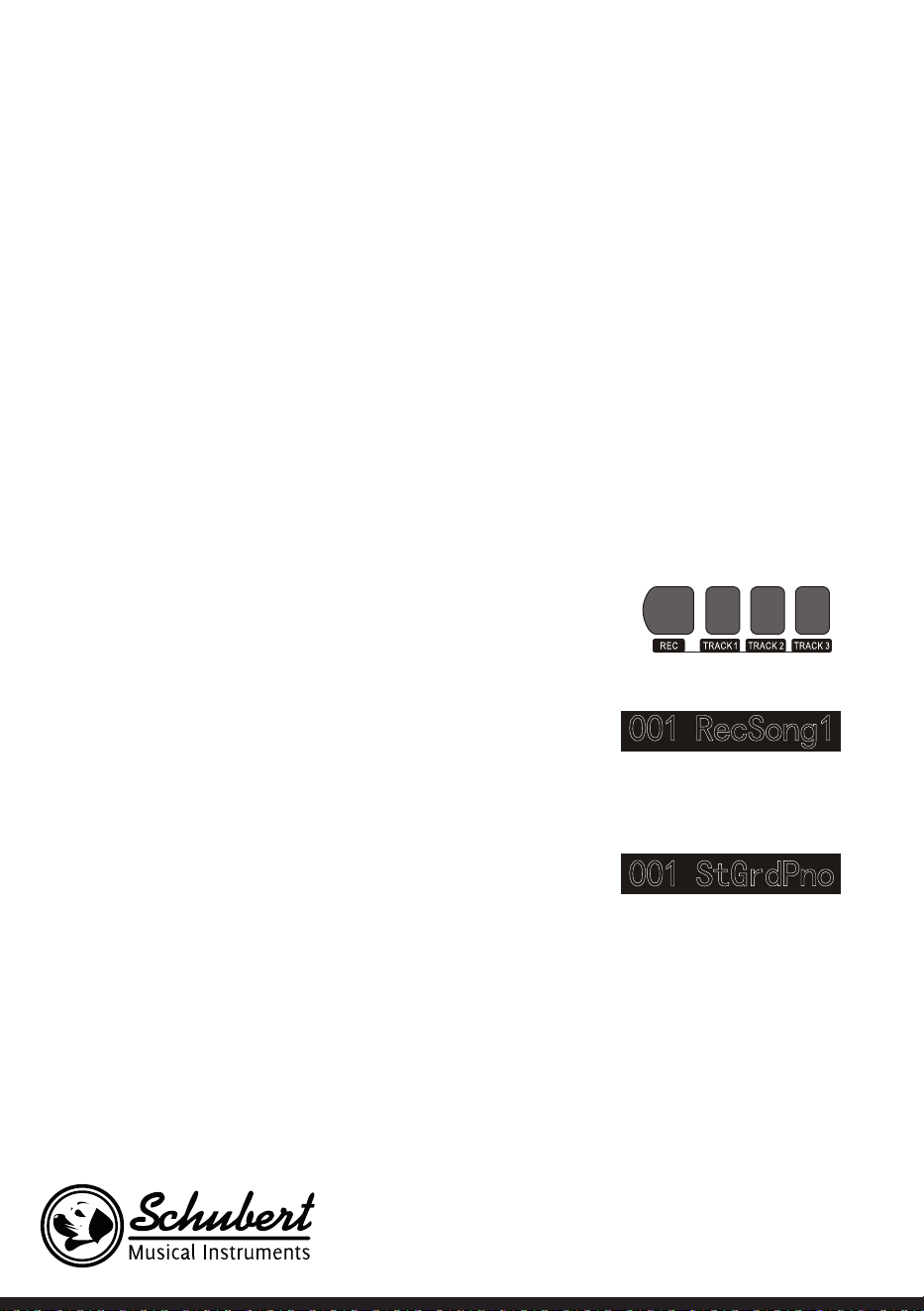
82
Contrôle de la musique
1. Fonction de tempo maître
• Un morceau dispose déjà d'un tempo avant que l'intro ne soit jouée. .
2. Avance et retour rapides, lecture / pause et fonction stop des chansons
• Appuyez sur le bouton pendant la lecture d'un morceau pour l'avancer rapidement.
• Appuyez sur le bouton pendant la lecture d'un morceau pour le rembobiner en arrière rapidement.
• En appuyant sur le bouton / vous pouvez mettre en pause la lecture d'un morceau et la reprendre en
appuyant de nouveau sur le bouton.
• Lorsque vous appuyez sur le bouton , la lecture s'arrête.
3. Répétition d'un passage
• En appuyant sur la touche vous pouvez dénir le début et la n d'une section, qui est ensuite jouée
en boucle continue jusqu'à la n de la fonction.
• Lorsque vous appuyez sur le bouton pour la première fois, vous dénissez le début de la section, et la n
de la section est dénie lorsque vous appuyez une seconde fois sur le bouton
• Appuyez à nouveau sur le bouton stops pour arrêter la fonction, les morceaux sont de nouveau lus
entièrement.
Enregistrement de musique
Avant de commencer l'enregistrement et la sélection d'une
piste, vous devez sélectionner un morceau.
1. Appuyez sur le bouton RECORD pour accéder à votre sé-
lection de morceaux. Dans la partie supérieure gauche de
l‘écran LCD, le numéro du morceau s‘afche. Le nom par dé-
faut de votre morceau à enregistrer est „RecSong 1“. Vous
pouvez sélectionner le morceau que vous souhaitez enre-
gistrer en utilisant les boutons + et -.
2. Si vous appuyez sur le bouton RECORD, vous accédez au
mode de préparation à l‘enregistrement. Sur la partie infé-
rieure de l‘écran LCD, „REC“ s‘afche en lettres rouges et 4
points de tempo apparaissent simultanément dans la zone
d‘afchage de la barre. L‘instrument sélectionne automa-
tiquement une piste qui ne contient aucune donnée stoc-
kée pour enregistrer automatiquement votre morceau. La
bande son utilisée est afchée sur l‘écran LCD et fait réfé-
rence au morceau actuel qui y est enregistré.
3. Vous pouvez régler le son, le style, la vitesse, etc. en mode préparation. Vous pouvez sélectionner la
bande son pour enregistrer votre morceau en appuyant sur les boutons TRACK 1, TRACK 2 ou TRACK
3. La piste d‘accompagnement et la piste mélodique peuvent être enregistrées simultanément, tandis
que 2 pistes mélodiques différentes ne peuvent pas être enregistrées simultanément.
4. Appuyez sur le bouton START / STOP pour démarrer l‘enregistrement, ou commencez à jouer au clavier
après avoir sélectionné une piste d‘enregistrement. Une fois que l‘accompagnement et la fonction d‘ac-
cord automatique ont été sélectionnés pour jouer efcacement les accords de la partie gauche, vous
pouvez lancer l‘enregistrement.

83
Remarques :
• Les données de style ne peuvent être enregistrés sur la piste d'accompagnement. L'indicateur d'enregis-
trement a trois états différents : "Shine, Light, Go out".
• "Shine" signie que cette piste a été sélectionnée pour l'enregistrement. Si des données existent déjà sur
la piste, elles seront écrasées par l'enregistrement en cours si vous continuez.
• "Light" signie que les données de la piste sont écrasées de manière synchrone lors du processus d'en-
registrement.
• "Go out" signie que cette piste ne contient aucune donnée ou donnée interdite pendant l'enregistre-
ment.
• La piste d'enregistrement peut toujours être modiée en mode de préparation.
• L'appareil sélectionne automatiquement une piste d'enregistrement vide en mode de préparation (de
petite à grande taille, par exemple : si la piste 2 contient des données, l'instrument sélectionne la piste 3
pour l'enregistrement).
Piste 1: piste d'accompagnement
Piste 2/ Piste 3: piste de mélodie
Arrêt d'un enregistrement
1. Si vous appuyez sur le bouton START / STOP pendant
l‘enregistrement, l‘enregistrement s‘arrête immédiate-
ment. D‘autres fonctions peuvent être sélectionnées
en appuyant sur les touches STYLE ou VOICE.
2. Lorsque la mémoire interne est pleine, l‘enregistrement
est arrêté et automatiquement enregistré. L‘écran LCD
afche alors „Rec_Full“.
3. L‘enregistrement s‘arrête automatiquement lorsque le
morceau est terminé ou lorsque vous avez sélectionné un accompagnement.
Lecture des morceaux enregistrés
1. Si vous appuyez sur le bouton RECORD pendant l‘enregistrement, l‘enregistrement en cours est inter-
rompu et les morceaux précédemment enregistrés sont joués en boucle continue.
2. Appuyez sur le bouton SONG pour accéder au mode morceau. Tous les morceaux sont automatiquement
lus en boucle continue. Le nombre de morceaux que vous avez enregistrés peut être directement sélec-
tionné en appuyant sur les boutons + et -. Si vous n‘avez pas de morceaux sauvegardés, l‘écran afche
„NoFile!“. La lecture en boucle continue est interrompue.
3. Si disponible, sélectionnez un morceau que vous avez enregistré et appuyez sur le bouton START / STOP
pour le lire en boucle continue.
Effacement des morceaux enregistrés
1. Lorsque l‘appareil est éteint, appuyez simultanément sur les boutons RECORD et SONG pour effacer
tous les enregistrements précédemment effectués.
2. Appuyez sur le bouton RECORD pendant 2 secondes pour supprimer les enregistrements en mode de
préparation. L‘écran LCD afche „Supprimer“. Appuyez ensuite sur les boutons de la piste correspon-
dante (TRACK 1, TRACK 2, TRACK 3) à partir desquelles vous souhaitez supprimer l‘enregistrement.
Lorsque l‘afchage d‘une piste est allumé, cela signie que les données sont en cours de suppression.

84
Lorsque le voyant s‘éteint, cela signie que les données seront conservées. Si les voyants de toutes les
pistes s‘allument, cela signie que toutes les chansons enregistrées seront supprimées si vous conrmez
la suppression en appuyant sur le bouton +. Le processus de suppression peut être annulé en appuyant
sur -.
Lecture des MP3
Connexion MP3: cette connexion permet de lire les chansons au format MP3.
• Vous pouvez lire / mettre en pause des morceaux en appuyant sur le bouton PLAY / PAUSE.
• Appuyez sur la touche SONG ∧ pour sélectionner le morceau précédent et appuyez sur la touche VO-
LUME ∨ pour diminuer le volume.
• Appuyez sur le bouton SONG ∨ pour sélectionner le morceau suivant et appuyez sur le bouton VOLUME
∧ pour augmenter le volume.
Lecture des morceaux
Cet instrument dispose de nombreux morceaux différents (voir le tableau des morceaux). Chacun des mor-
ceaux a une fonction de leçon.
Apprécier les morceaux
1. Appuyez sur le bouton SONG pour accéder au mode morceau. L‘écran LCD afche „SONG“. Tous les mor-
ceaux sont maintenant joués en boucle.
2. Vous pouvez utiliser le numéro du morceau de votre choix ou les boutons + et - pour sélectionner un
morceau.
3. Pour interrompre la lecture du morceau, appuyez sur le bouton START / STOP. Si vous souhaitez re-
prendre la lecture, appuyez à nouveau sur le bouton.
4. Si vous souhaitez quitter le mode de morceau, appuyez sur les boutons STYLE, RECORD, VOICE, DUAL-
VOICE etc. dès que la n du morceau.
Mode apprentissage
La fonction d'apprentissage de l'instrument se compose des trois touches LESSON, LEFT et RIGHT, qui ne
peuvent être utilisées qu'en mode morceau. Tous les morceaux peuvent être pratiqués dans trois modes
différents : durée, hauteur et mode de lecture. L'instrument a une fonction d'évaluation pour vous aider à
progresser dans le processus d'apprentissage.
1. Appuyez sur le bouton LESSON pour activer le mode de cours.
2. Utilisez maintenant les touches GAUCHE et DROITE pour choisir si vous voulez pratiquer la chanson
avec votre main gauche ou droite. Si vous ne faites pas de sélection, la main droite est automatiquement
sélectionnée.
Remarque : le contenu d'apprentissage de la main gauche peut varier en fonction du morceau sélection-
née. Dans certains morceaux, les accords sont joués avec la main gauche et dans d'autres ce sont les
mélodies. Pendant le cours, les mélodies et les accords sont afchés sur l'écran LCD, ce qui devrait faciliter
la pratique.

85
Mode apprentissage 1: durée
1. Appuyez sur le bouton LESSON pour activer le mode apprentissage 1. Les chansons en cours de lecture
sont arrêtées. L‘écran LCD afche „Les1 R“. L‘appareil estime la durée de l‘exercice. Le bon jeu des accords
et des notes n‘est pas pris en compte dans ce mode d‘apprentissage.
2. Appuyez sur le bouton START / STOP pour lancer le mode apprentissage 1. Si vous sélectionnez la main
droite, les mélodies de la main droite sont afchées. Tout ce que vous avez à faire est de jouer correc-
tement la durée, le jeu correct des accords et des notes ne sera pas pris en compte. Vous entendez la
mélodie en arrière-plan. Lorsque vous sélectionnez la main gauche, les accords ou parties mélodiques de
la main gauche sont afchés. Tout ce que vous avez à faire est de jouer correctement la durée, le jeu cor-
rect des accords et des notes ne sera pas pris en compte. Si vous appuyez simultanément sur les touches
GAUCHE et DROITE, vous pouvez vous entraîner avec les mains droite et gauche en même temps. Le
système estime lui-même lorsque l‘exercice est terminé.
Mode apprentissage 2: hauteur du son
1. Appuyez plusieurs fois sur le bouton LEARN pour activer le mode apprentissage 2. La lecture de la chan-
son en cours est interrompue. L‘écran LCD afche „Les2 R“. Le système estime la hauteur correcte, ce qui
signie que vous devez jouer les bonnes notes. Une partie de morceau peut recommencer lorsque vous
avez joué de mauvaises notes. La chanson est alors en attente jusqu’à ce que les bonnes notes aient été
jouées.
2. Si vous appuyez sur le bouton START / STOP avant de lancer le morceau, l’appareil procédera à une éva-
luation après la n du morceau.
Mode apprentissage 3: mode jeu
1. Appuyez plusieurs fois sur le bouton LEARN pour activer le mode apprentissage 3. La lecture de la chan-
son en cours est interrompue. L‘écran LCD afche „Les3 R“. Le système estime la durée et la hauteur
correctes, ce qui signie que vous devez jouer les bonnes notes et la durée originale de la chanson.
2. Si vous appuyez sur le bouton START / STOP avant de lancer le morceau, l’appareil procédera à une éva-
luation après la n du morceau.
86
TABLE DES MORCEAUX
Style de musique N° Appellation anglaise Abréviation anglaise
FOLK & COUNTRY 1 Jambalaya Jambalaya
FOLK & COUNTRY 2 Ding! Dong! Merril on High DingDong
FOLK & COUNTRY 3 Battle Hymne of the Republic Battle
FOLK & COUNTRY 4 The Old Gray Mare GrayMare
FOLK & COUNTRY 5 American Patrol USPatrol
FOLK & COUNTRY 6 Christmas is Coming IsComing
FOLK & COUNTRY 7 Sippin/Cider through a Stray SCTStraw
FOLK & COUNTRY 8 Christmas Sound Sound
GOLDEN & POP 9 On London Bridge LdBridge
GOLDEN & POP 10 Are You Lonesome Tonight Lonesome
GOLDEN & POP 11 Der Deitcher’s Dog DerDDog
GOLDEN & POP 12 Joy to the World JoyWordl
GOLDEN & POP 13 Silent Night Sltnight
GOLDEN & POP 14 Ave Maria AveMaria
GOLDEN & POP 15 Five Hundred Miles FHMiles
GOLDEN & POP 16 Happy New Year HappyNY
GOLDEN & POP 17 It’s beginning to look a lot like
Christmas
LikeXmas
GOLDEN & POP 18 Jeanie with the light brown hair LightHair
GOLDEN & POP 19 My Bonnie MyBonnie
GOLDEN & POP 20 Song oft he Pearlsher SongOfTP
CLASSICAL 21 Swan Swan
CLASSICAL 22 Prelude to Act 2 (Swan Lake) SwanLak1
CLASSICAL 23 Valse (Swan Lake) SwanLak2
CLASSICAL 24 The Happy Farmer HpFarmer
CLASSICAL 25 The Sleeping Beauty SleepBty
CLASSICAL 26 La Traviata LaTravia
CLASSICAL 27 Wiegenlied Wiegenli
CLASSICAL 28 Mov.2 Adagio Non Troppo Pia-
no Sonata No. 9 D
Sonata 9
CLASSICAL 29 Mov.1 Andante Grazioso Piano
Sonata No. 11 in A
Sonata 11
CLASSICAL 30 Prelude in C Prelude
CLASSICAL 31 Chinese Dance CHDance
CLASSICAL 32 Emperors Waltz EmprWaltz
CLASSICAL 33 March Militaire MilMar1
CLASSICAL 34 Symphony No.40 Symphony
JAZZ & FUSION 35 ShanZhaShu ShanZaS
JAZZ & FUSION 36 You are my sunshine MySun
JAZZ & FUSION 37 June Samba JunSamba
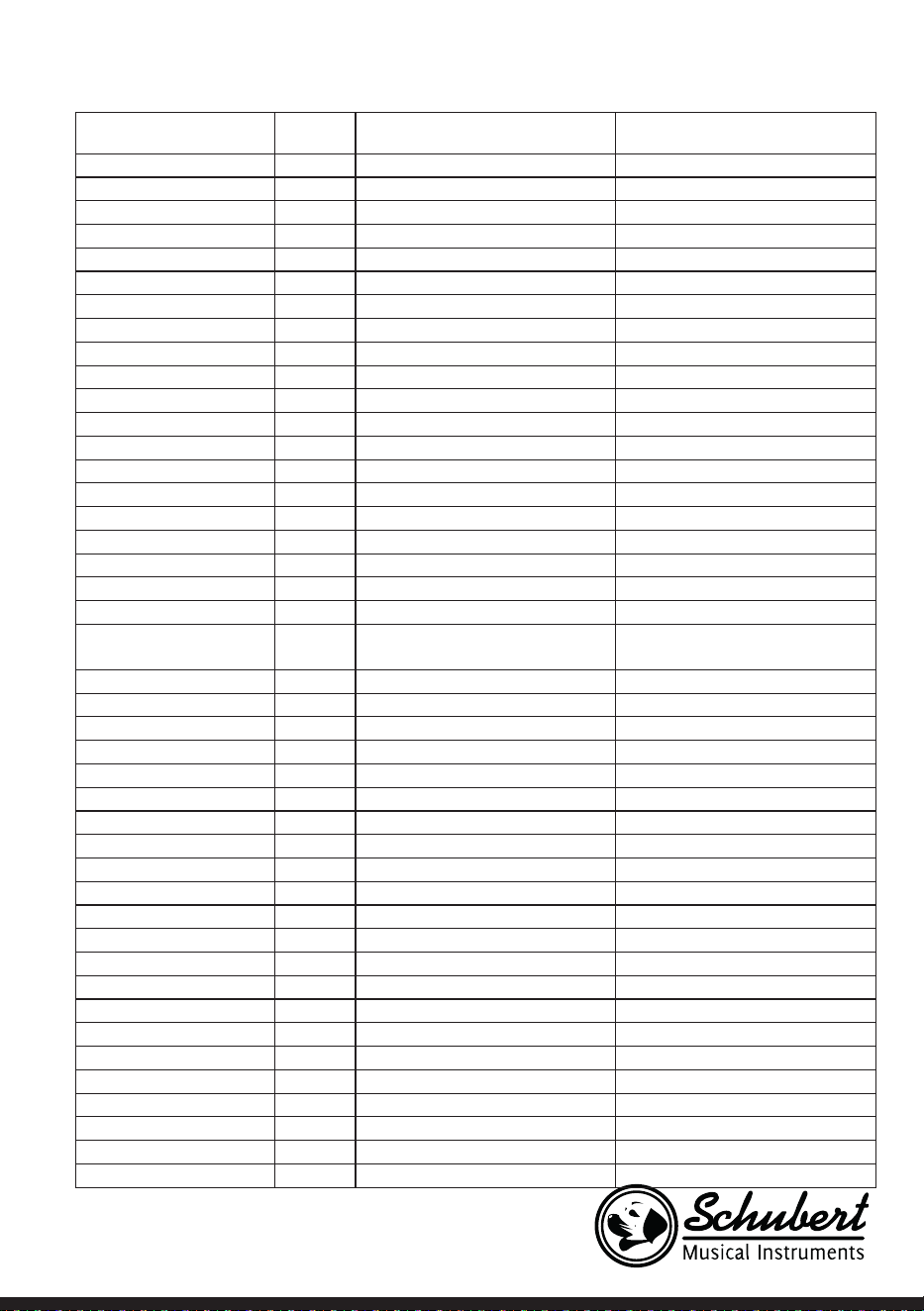
87
Style de musique N° Appellation anglaise Abréviation anglaise
JAZZ & FUSION 38 Funk Funk
JAZZ & FUSION 39 I Can… I Can…
JAZZ & FUSION 40 Sea Shore SeaShore
JAZZ & FUSION 41 Guitar & Saxphone Gt&Sax
JAZZ & FUSION 42 The Hip Hop’s Night HipHopNt
JAZZ & FUSION 43 Blue Lunch BlueLunch
JAZZ & FUSION 44 Cobweb Cobweb
JAZZ & FUSION 45 Wine Wine
JAZZ & FUSION 46 Jazz Old Man JzOldMan
JAZZ & FUSION 47 Dark Eyes DarkEyes
JAZZ & FUSION 48 Carlos Carlos
JAZZ & FUSION 49 Sad Sad
JAZZ & FUSION 50 The Jazz TheJazz
PIANO 51 Für Elise FürElise
PIANO 52 Military March Mmarch
PIANO 53 Habanera Habanera
PIANO 54 Minuet Minuet
PIANO 55 Austria Variation Avariati
PIANO 56 Old Macdonald had a Farm OldAFarm
PIANO 57 Wedding March Wedding
PIANO 58 2-Part Invention #13 In A Mi-
nor. B.W. Iii
Invention
PIANO 59 Minuet in G MinuetG
PIANO 60 Turkish March TurkishM
PIANO 61 Hey Diddle Diddle HeDiddle
PIANO 62 Italian Polka ItaPolka
PIANO 63 Moseta Dance MosetaDn
PIANO 64 Bulie Dance BulieDn
PIANO 65 Waltz in A Flat Op.39 No. 15 Waltz 1
PIANO 66 Wild Rose WildRose
PIANO 67 Away in A Manger AwayInAM
PIANO 68 Jack & Jill JackJill
PIANO 69 Angels We Have Heard on High Angels
PIANO 70 Waltz Waltz
PIANO 71 Did you ever see a Lassie Lassie
PIANO 72 Chopsticks Chopstick
PIANO 73 Four Little Swans FLSwans
PIANO 74 Old France OldFrance
PIANO 75 Jesus Saviour pilot Me PilotMe
PIANO 76 Eclogue Eclogue
PIANO 77 Santa Claus is coming to towen SantaCT
PIANO 78 Brave Cavalier Cavalier
PIANO 79 America The Beautiful USFair
PIANO 80 Music Box Dancer Dancer
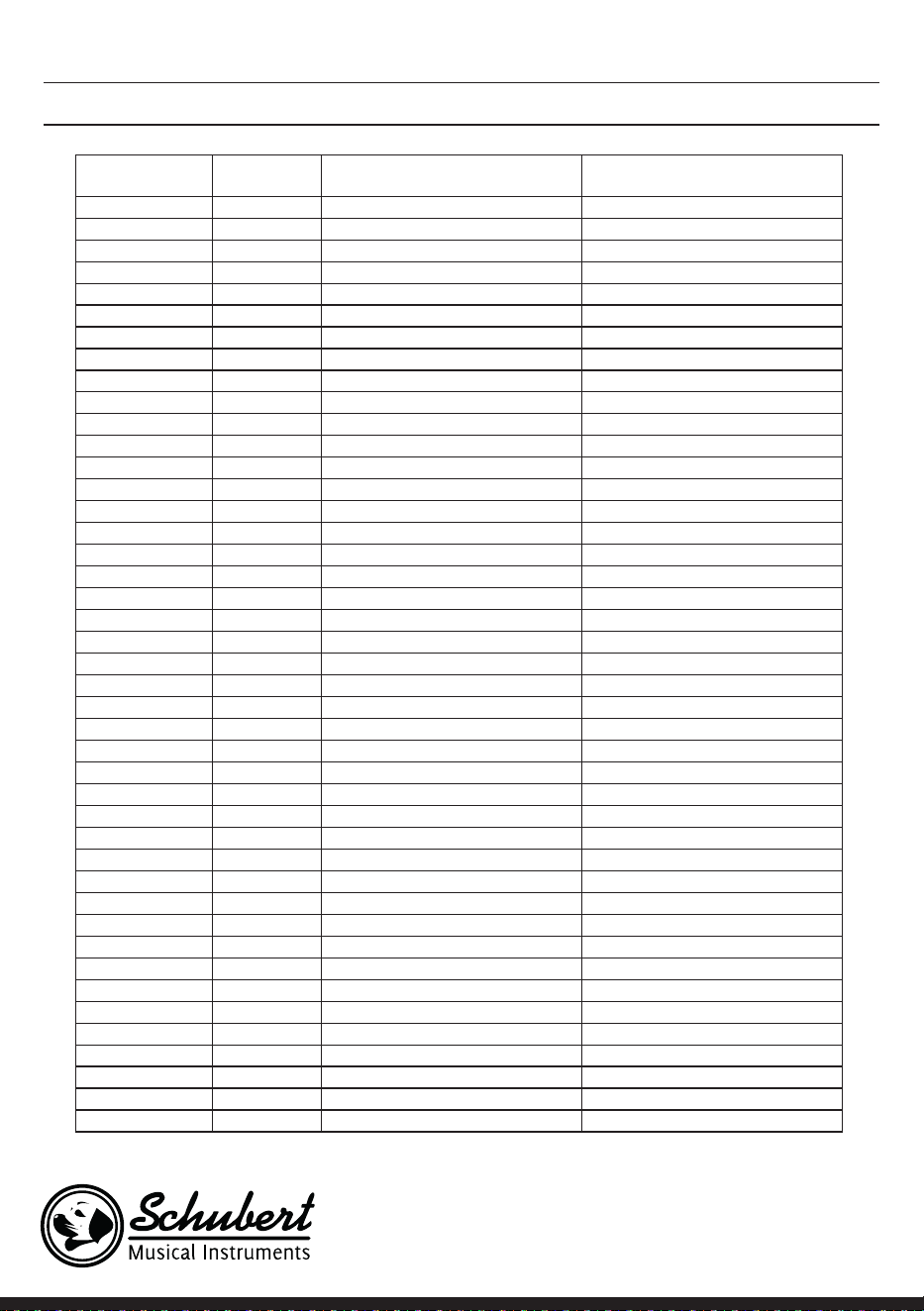
88
STILTABELLE
Description N° Appellation anglaise Abréviation anglaise
8 BEAT 1 8 Beat Piano 8BtPiano
8 BEAT 2 8 Beat 1 8Beat1
8 BEAT 3 8 Beat Shufe 8BtShu
8 BEAT 4 Guitar Pop 1 GtPop1
8 BEAT 5 8 Beat Hip Hop 8BtHiHop
8 BEAT 6 8 Beat R&B 8BeatR&B
8 BEAT 7 8 Beat Pop 8BtPop
8 BEAT 8 Pop Funk 1 PopFunk1
8 BEAT 9 Rhythm & Beat 1 Rhy&Bt1
8 BEAT 10 8 Beat Disco 1 8BtDisc1
8 BEAT 11 8 Beat Rock 8BtRock
8 BEAT 12 8 Beat 2 8Bt2
8 BEAT 13 Sweet Beat SweetBt
8 BEAT 14 8 Beat Dance 8BtDance
8 BEAT 15 8 Beat 3 8Bt3
8 BEAT 16 60’s 8 Beat 60’s8Bt
16 BEAT 17 16 Beat 1 16Beat1
16 BEAT 18 16 Beat Funk 1 16BtFuk1
16 BEAT 19 16 Beat Ballad 1 16BtBld1
16 BEAT 20 16 Beat R&B 16BtR&B
16 BEAT 21 Pop 16 Beat 1 Pop16Bt1
16 BEAT 22 16 Beat Dance 16BDanc
16 BEAT 23 16 Beat 2 16Beat2
16 BEAT 24 Modern 16 Beat Modrn16B
16 BEAT 25 16 Beat Hot 16BtHot
16 BEAT 26 16 Beat Modern 16BtModr
16 BEAT 27 16 Beat 3 16Beat3
16 BEAT 28 Cool Beat CoolBeat
16 BEAT 29 16 Beat Ballad 2 A6BtBld2
16 BEAT 30 16 Beat 4 16Beat4
16 BEAT 31 Pop Shufe PopShu
POP 32 Pop Rock 1 PopRock1
POP 33 Pop Dance 1 PopDanc1
POP 34 Pop Fusion PopFusn
POP 35 Analog Night 1 AnalgNt1
POP 36 6/8 Pop 6/8Pop
POP 37 Brit. Pop 1 BritPop1
POP 38 Brit. Pop 2 BritPop2
POP 39 Pop Hit PopHit
POP 40 Fusion Shufe FusShu
POP 41 Pop Beat PopBeat
POP 42 Soft Beat SoftBeat
POP 43 60’s Pop 60’sPop

89
POP 44 Sting Latin StigLatn
BALLAD 45 R&B Ballad 1 R&BBad1
BALLAD 46 Guitar Ballad GtBallad
BALLAD 47 Ballad Rock BalladRk
BALLAD 48 Piano pop PianoPop
BALLAD 49 Soft Ballad SoftBald
BALLAD 50 Natural Ballad NatuBld
BALLAD 51 Love Ballad LoveBld
BALLAD 52 Easy Ballad EasyBld
BALLAD 53 Slow Ballad SlowBald
BALLAD 54 Folk Ballad FolkBld
BALLAD 55 Pop Ballad 1 PopBld1
BALLAD 56 EP Ballad EPBallad
ROCK 57 Rock Rock
ROCK 58 New Wave NewWave
ROCK 59 Ska Ska
ROCK 60 Slow Rock SlowRock
ROCK 61 70’s Rock & Roll 70’s Rock
ROCK 62 Folk Rock FolkRock
ROCK 63 Soft Rock SoftRock
ROCK 64 Easy Rock EasyRock
ROCK 65 New Shufe NewShu
ROCK 66 Rock Hip Hop RkHipHop
ROCK 67 Rock & Roll 1 R’N’R1
ROCK 68 Rock & Roll 2 R’N’R2
BALLROOM 69 Tango 1 Tango1
BALLROOM 70 Spain Matador Matador
BALLROOM 71 Twist 1 Twist1
BALLROOM 72 Big Band Fox BandFox
BALLROOM 73 Tango 2 Tango2
BALLROOM 74 Slow Fox SlowFox
BALLROOM 75 Slow Waltz 1 SlowWlz1
BALLROOM 76 Swing Fox SwingFox
BALLROOM 77 Salsa 1 Salsa1
BALLROOM 78 Cha Cha 1 ChaCha1
BALLROOM 79 Cha Cha 2 ChaCha2
BALLROOM 80 Beguine 1 Beguine1
BALLROOM 81 Beguine 2 Beguine2
BALLROOM 82 Rumba 1 Rumba1
BALLROOM 83 Samba 1 Samba1
BALLROOM 84 Jive Jive
BALLROOM 85 Fox Trot FoxTrot
DANCE 86 Techno 1 Techno1
DANCE 87 Hip Hop 1 HipHop1
DANCE 88 Dream Dance DrmDance
DANCE 89 House House
DANCE 90 Down Beat DownBeat
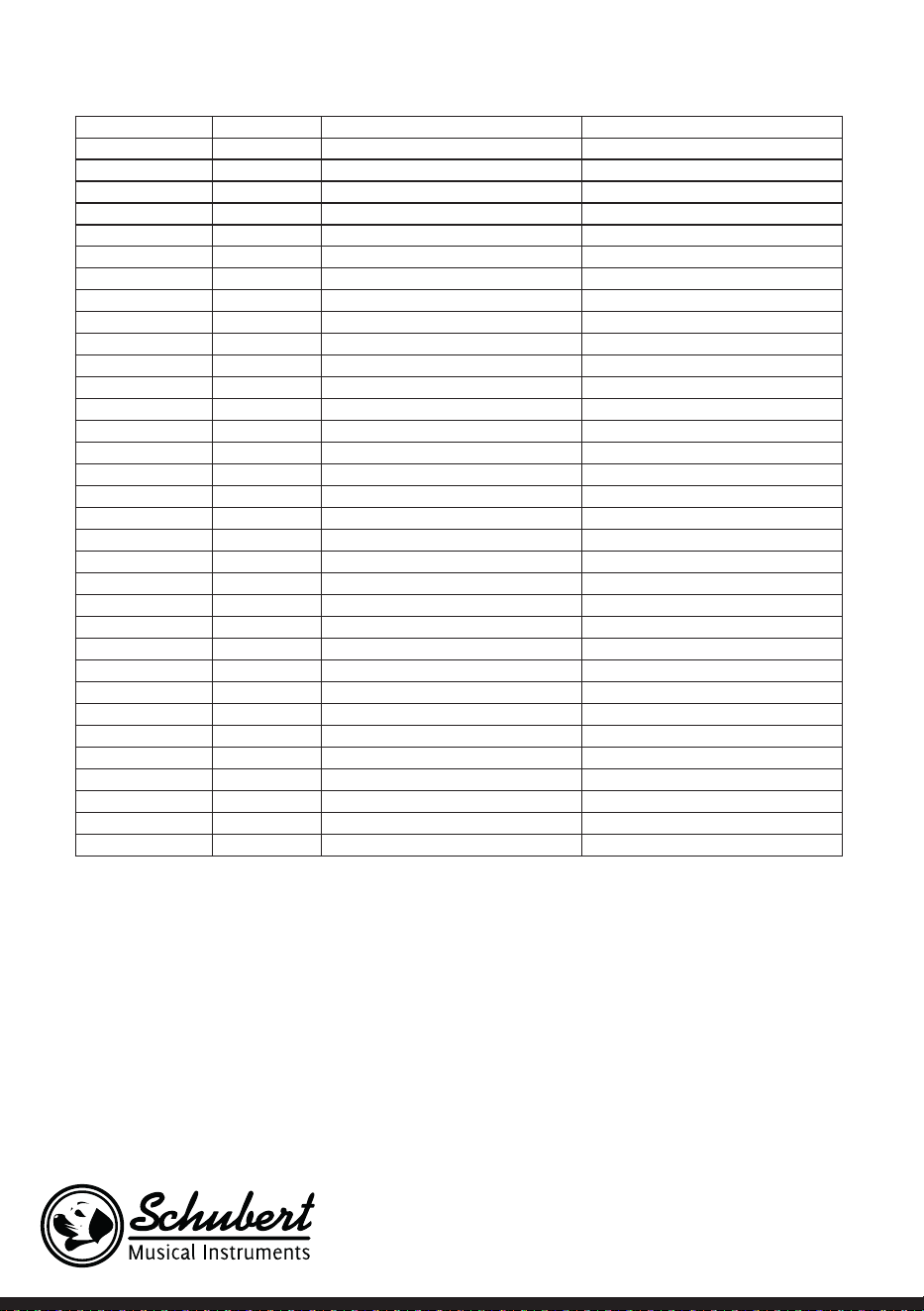
90
DANCE 91 Progressive Progress
DANCE 92 Rap 1 Rap1
DANCE 93 Disco Disco
DANCE 94 Soft Disco SoftDisc
DANCE 95 Disco Party DscParty
DANCE 96 70’s Disco 70’sDisc
DANCE 97 Club Dance ClubDanc
DANCE 98 Euro Dance EuroDanc
DANCE 99 Hip Hop 2 HipHop2
SOUL & FUNK 100 Funk 1 Funk1
SOUL & FUNK 101 Classic Funk ClasFunk
SOUL & FUNK 102 Gospel Swing GopSwing
SOUL & FUNK 103 Gospel Gospel
SOUL & FUNK 104 Funk 2 Funk2
SOUL & FUNK 105 Electric Funk ElecFunk
SOUL & FUNK 106 Groove Funk GrooveFk
SOUL & FUNK 107 Cool Funky ColFunky
SOUL & FUNK 108 Jazz Funk JazzFunk
SOUL & FUNK 109 Groove Groove
SOUL & FUNK 110 Soul Soul
SOUL & FUNK 111 Hip Hop Beat HipHopBt
SOUL & FUNK 112 R&B R&B
SOUL & FUNK 113 Soul Beat SoulBeat
SWING & JAZZ 114 Latin Jazz 1 LatinJz1
SWING & JAZZ 115 Big Band BigBand
SWING & JAZZ 116 Dixieland 1 Dixland1
SWING & JAZZ 117 Broadway Big Bang BwayBand
SWING & JAZZ 118 Swing Swing
SWING & JAZZ 119 Latin Jazz 2 LatinJz2
SWING & JAZZ 120 Fusion Fusion
SWING & JAZZ 121 Acid Jazz AcidJazz
SWING & JAZZ 122 Cool Jazz Ballad CoolJzBd
SWING & JAZZ 123 Swing Shufe SwingS
SWING & JAZZ 124 Big Band Medium BandMid
91
INFORMATIONS SUR LE RECYCLAGE
S‘il existe une réglementation pour l‘élimination ou le
recyclage des appareils électriques et électroniques dans
votre pays, ce symbole sur le produit ou sur l‘emballage
indique que cet appareil ne doit pas être jeté avec les
ordures ménagères. Vous devez le déposer dans un point
de collecte pour le recyclage des équipements électriques
et électroniques. La mise au rebut conforme aux règles
protège l‘environnement et la santé de vos semblables des
conséquences négatives. Pour plus d‘informations sur le
recyclage et l‘élimination de ce produit, veuillez contacter
votre autorité locale ou votre service de recyclage des
déchets ménagers.
Ce produit contient des piles. S‘il existe une réglementation
pour l‘élimination ou le recyclage des piles dans votre pays,
vous ne devez pas les jeter avec les ordures ménagères.
Renseignez-vous sur les dispositions locales relatives à la
collecte des piles usagées. La mise au rebut conforme aux
règles protège l‘environnement et la santé de vos semblables
des conséquences négatives.
FABRICANT ET IMPORTATEUR (UK)
Fabricant :
Chal-Tec GmbH, Wallstraße 16, 10179 Berlin, Allemagne.
Importateur pour la Grande Bretagne :
Berlin Brands Group UK Limited
PO Box 42
272 Kensington High Street
London, W8 6ND
United Kingdom

93
Estimado cliente:
Le felicitamos por la adquisición de este producto. Lea atentamente el
siguiente manual y siga cuidadosamente las instrucciones de uso con el
n de evitar posibles daños. La empresa no se responsabiliza de los daños
ocasionados por un uso indebido del producto o por haber desatendido las
indicaciones de seguridad. Escanee el siguiente código QR para tener acceso
al manual de instrucciones más actualizado y a información adicional sobre
el producto.
.
DATOS TÉCNICOS
Número de artículo 10033246 10033247
Teclado Teclado de piano estándar con 88 teclas
Pantalla Display LED
Tonalidad 360 instrumentos diferentes
Estilos 160 estilos
Demo 80 canciones demo
Efectos Sensibilidad del toque, reverberación, coro, dual, división, menú de
funciones, panel de sonido
Grabación Una pista, varias pistas, grabación combinada
Acompañamiento Start/stop, sincronización, relleno, velocidad
Acorde Acorde auto ABC
Pedales Pedal izquierdo (Pedal de piano), pedal derecho (pedal de sostenido)
Conexiones externas USB (MP3), USB (MIDI), MIDI IN/OUT
Cable de alimentación 220 V~, 12-15 V
Tensión de entrada 12-15 V , 2-3 A
ÍNDICE
Datos técnicos 93
Indicaciones de seguridad 94
Botones y conexiones 95
Montaje 98
Puesta en marcha y uso 100
Menú de funciones 109
Tabla de canciones 116
Tabla de estilos 118
Indicaciones sobre la retirada del aparato 121
Fabricante e importador (Reino Unido) 121

94
INDICACIONES DE SEGURIDAD
• Lea atentamente el manual de instrucciones antes del uso del aparato para evitar daños personales y
materiales.
• Conecte el aparato exclusivamente a la toma de corriente con el adaptador incluido. Con el uso de otros
adaptadores de red, su aparato podría dañarse.
• En ningún caso abra del instrumento.
• No intente desmontar usted mismo el aparato ni sustituir piezas de su interior. Si aparece un fallo durante
el uso, no continúe utilizando el aparato y contacte con el servicio de atención al cliente.
• No coloque el aparato en lugares donde exista polvo y vibraciones extremas o temperaturas demasiado
altas o bajas (como lugares donde el sol incida directamente, cerca de fuentes de calor, en el coche
cuando se encuentre expuesto al sol, etc.) pues la apariencia exterior del aparato y sus componentes
internos podrían dañarse.
• Nunca coloque el aparato sobre supercies inestables o irregulares, pues podría caerse/volcarse y
averiarse.
• Nunca coloque recipientes llenos de líquido sobre el aparato, pues este podría caer y el líquido ltrarse
a su interior.
• Antes de encender el aparato, regule el volumen a 0. A continuación, adapte el volumen de manera
progresiva para evitar dañar los altavoces.
• Nunca regule el volumen al máximo para evitar pérdida auditiva mientras toca el instrumento.
• Nunca ejerza violencia extrema contra el aparato, las teclas, el botón de encendido y las conexiones ni
tampoco coloque objetos pesados sobre el aparato.
• El aparato debe ser desembalado por un adulto, pues existe riesgo de asxia para niños y bebés debido
a los materiales de embalaje. Coloque el embalaje de plástico en un lugar seguro y deséchelo conforme
a la normativa.
• Los componentes pequeños del interior pueden representar un riesgo para niños menores de 3 años, por
lo que no son aptos para ellos.
• Las características técnicas del aparato pueden variar sin previo aviso.
• Este aparato puede utilizarse en todas las zonas climáticas excepto en las tropicales.
• El aparato solo puede utilizarse en zonas que se sitúen por debajo de los 2000 metros de altitud con
respecto al nivel mar.
• Asegúrese de que no se ltre agua ni gotas en la toma de red ni en el cable de alimentación.
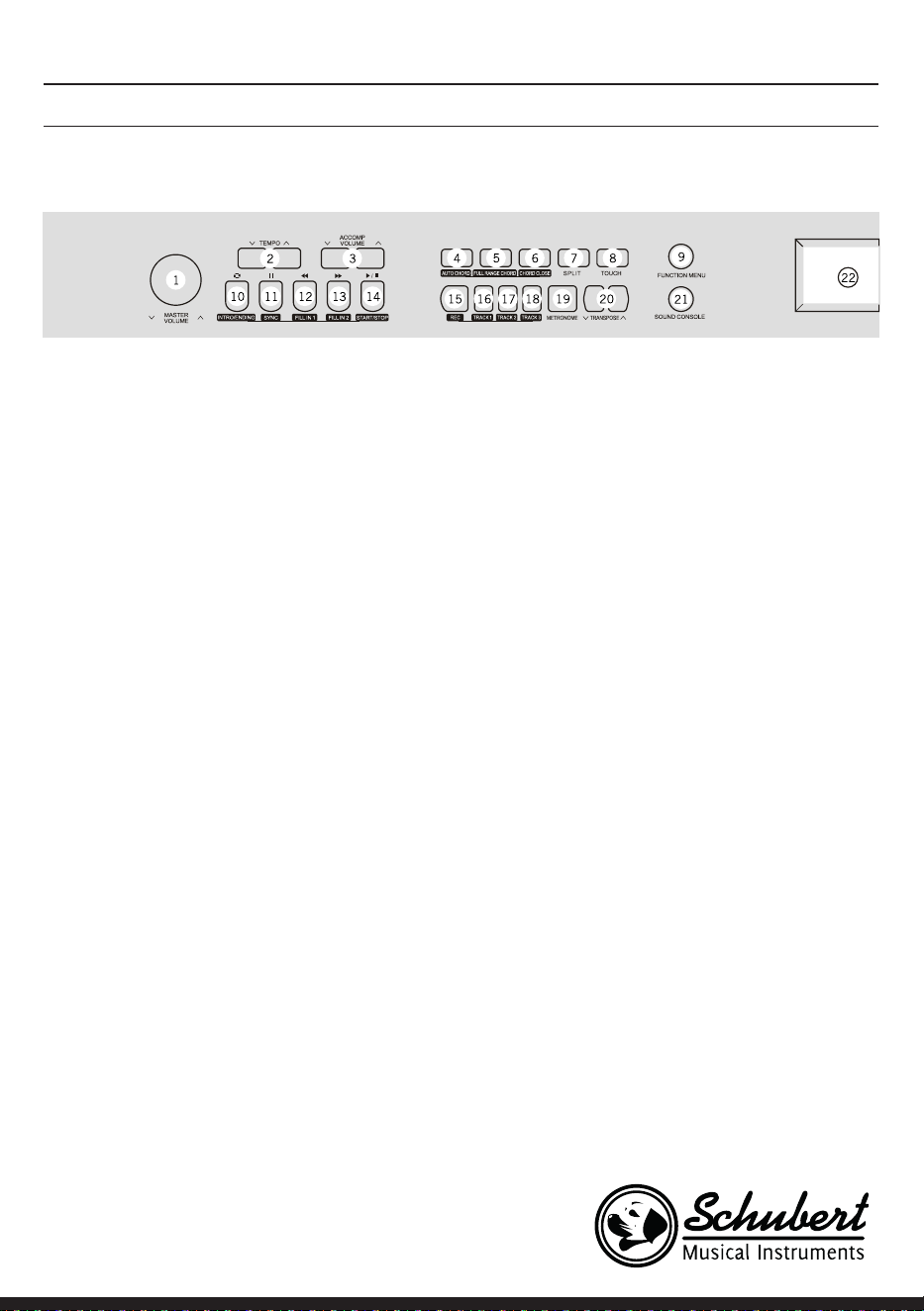
95
1 MASTER VOLUME – Regulador de volumen
principal
2 TEMPO ∨/∧– Regular el tempo actual
3 ACCOMP VOLUME ∨/∧ Volumen de
acompañamiento
4 AUTO CHORD – Acorde automático
5 FULL RANGE CHORD – Todos los acordes
6 CHORD CLOSE - Cierre de acorde
7 SPLIT – Dividir
8 TOUCH – Elegir una curva táctil del teclado
9 FUNCTION MENU - Menú de funciones
En modo canción
10 Establecer inicio/n de un bucle en una
canción
11 Botón de pausa
12 Rebobinar rápidamente
13 Avanzar rápidamente
14 Iniciar/detener reproducción de canción
En modo estilo
10 Intro/ending - Cerrar el intro/nal automático
11 SYNC – ouvrir / fermer la fonction de
synchronisation
12 FILL IN 1 - Añadir variación 1
13 FILL IN 2 - Añadir variación 2
14 START/ STOP – Iniciar/detener la
reproducción del acompañamiento
15 REC – Iniciar función de grabación
16 TRACK 1 – Seleccionar pista 1 para la
grabación
17 TRACK 2 – Seleccionar pista 2 para la
grabación
18 TRACK 3 – Seleccionar pista 3 para la
grabación
19 METRONOME – Abrir/cerrar función de
selección de compás
20 TRANSPONSE ∨/∧ – Transposición
21 SOUND CONSOLE – Abrir el menú de la mesa
de mezclas
22 Monitor LCD - muestra toda la información
importante
BOTONES Y CONEXIONES
Panel de control izquierdo
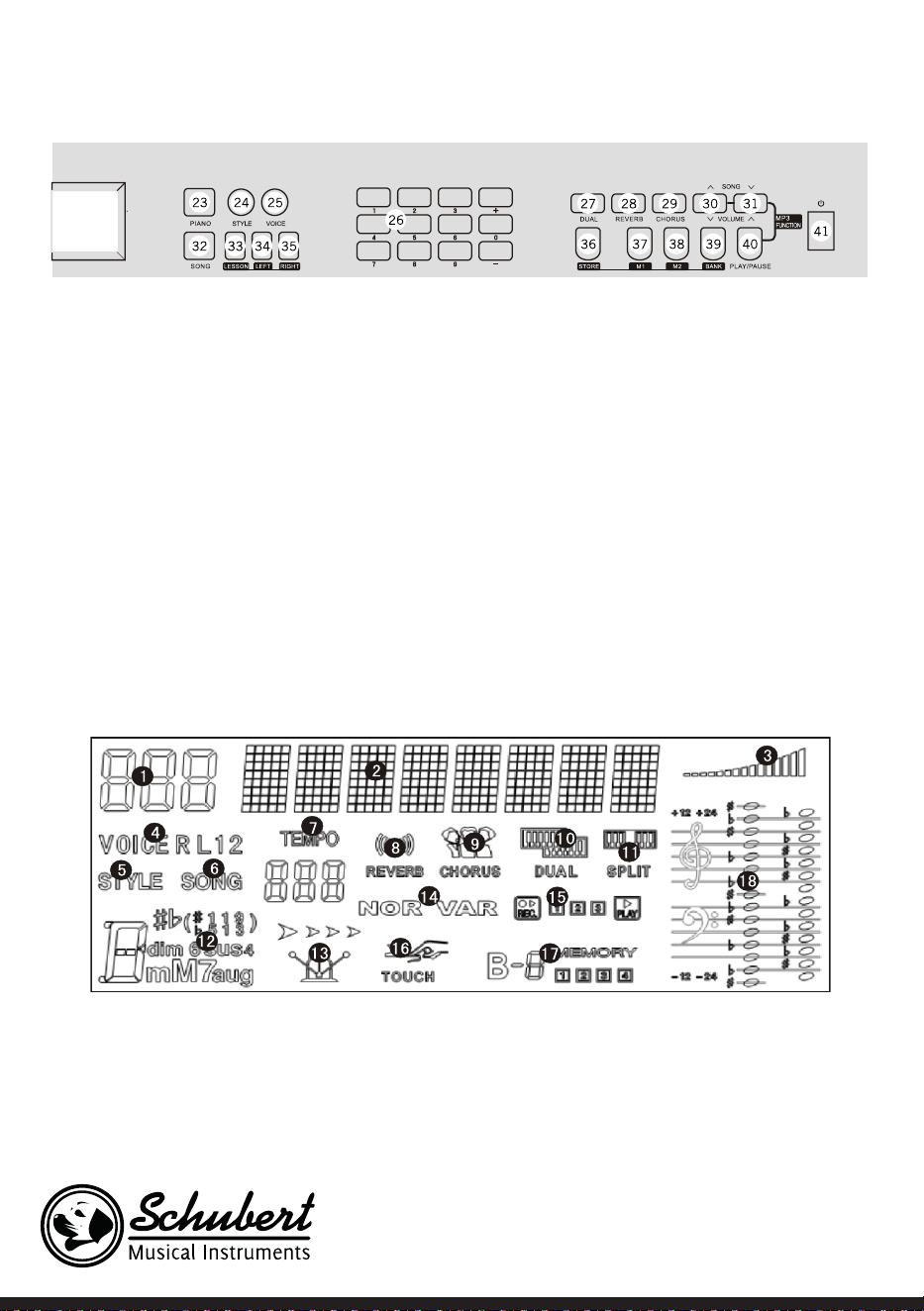
96
Panel de control derecho
23 PIANO – Abrir/cerrar modo piano
24 STYLE – Abrir función de estilo
25 VOICE – Abrir función de tono
26 Ziffern +/-– Regular conguración con
números, +/-
27 DUAL – Activar/desactivar dos voces
28 REVERB - Reverberación
29 CHORUS - Coro
30 SONG/ VOLUME – Cambiar a la siguiente
canción MP3/reducir el volumen en modo
MP3
31 SONG ∨/∧ / VOLUME ∨/∧ – pasar a la canción
anterior en MP3/ aumentar volumen en modo
MP3
32 SONG – Cambiar al modo de función de
canción
33 LESSON – Iniciar modo aprendizaje
34 LEFT – Seleccionar voz de mano izquierda
35 RIGHT – Seleccionar voz de mano derecha
36 STORE – Botón de memoria
37 M1 – Acceder directamente a la conguración
del panel de control 1
38 M2 – Acceder directamente a la conguración
del panel de control 2
39 BANK – Cambiar a la memoria de datos
40 PLAY/PAUSE – Reproducción/pausa en modo
MP3
41 Encender / apagar
Monitor LCD
1 Pantalla digital LED
2 Indicador de notas
3 Volumen
4 Selección de tono
5 Selección de estilo
6 Canciones
7 Ritmo
8 Efecto reverberación
9 Coro
10 Dos voces
11 División del teclado
12 Visualización de acordes
13 Compás
14 FILL IN1/FILL IN2
15 Grabación / reproducción
16 Pulsación
17 Memoria
18 Claves
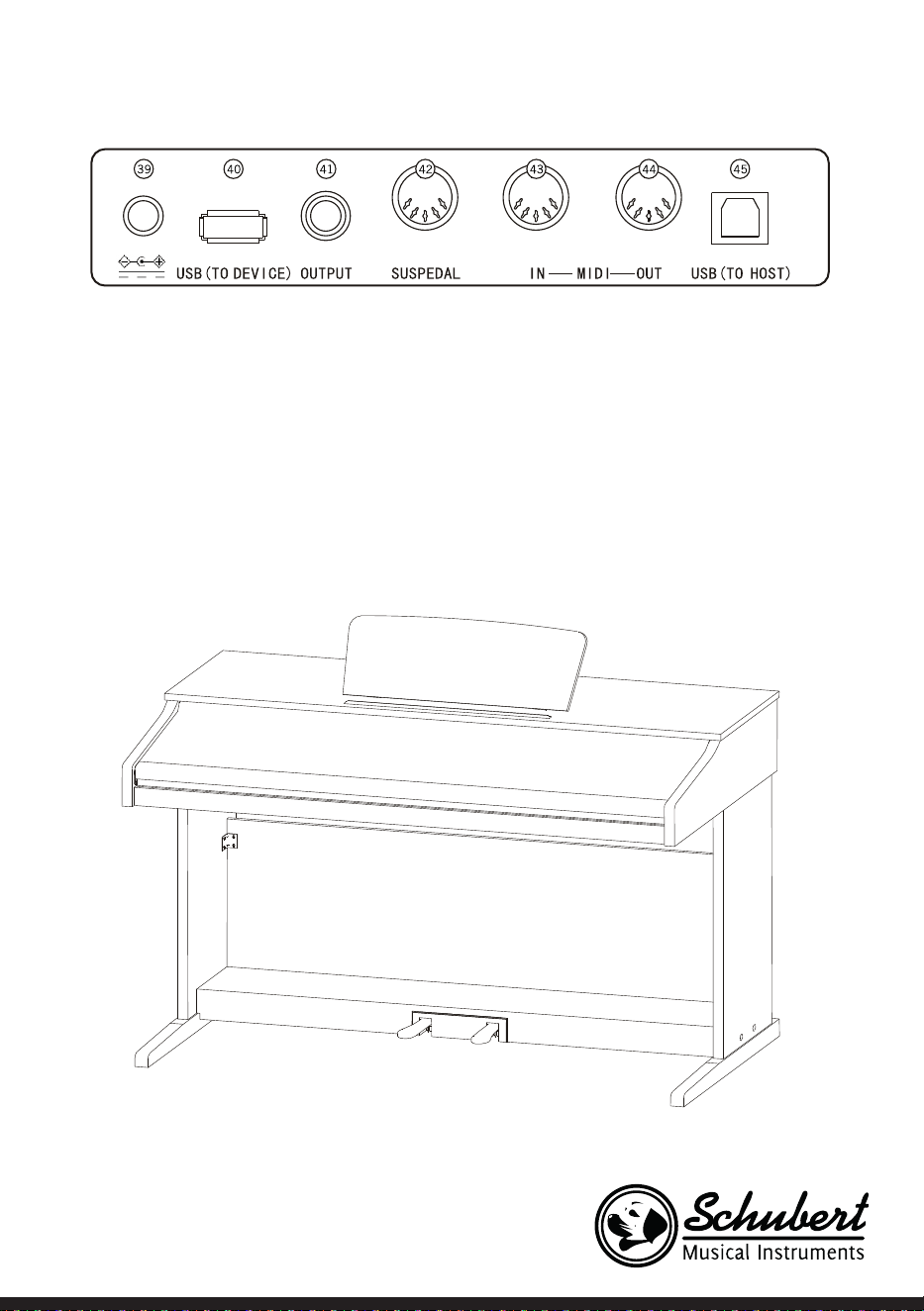
97
Parte trasera
39 Conexión eléctrica externa
40 USB (TO DEVICE) - Conexión USB
41 OUTPUT - Conexión de audio al equipo externo de audio
42 Conexión de PEDAL
43 Conexión MIDI IN - Recibir información MIDI, las cuales se envían desde equipos externos MIDI u
ordenadores..
44 Conexión MITI OUT - Enviar información del aparato mediante esta conexión al ordenador o a otros
dispositivos MIDI.
45 Conexión USB (MIDI)
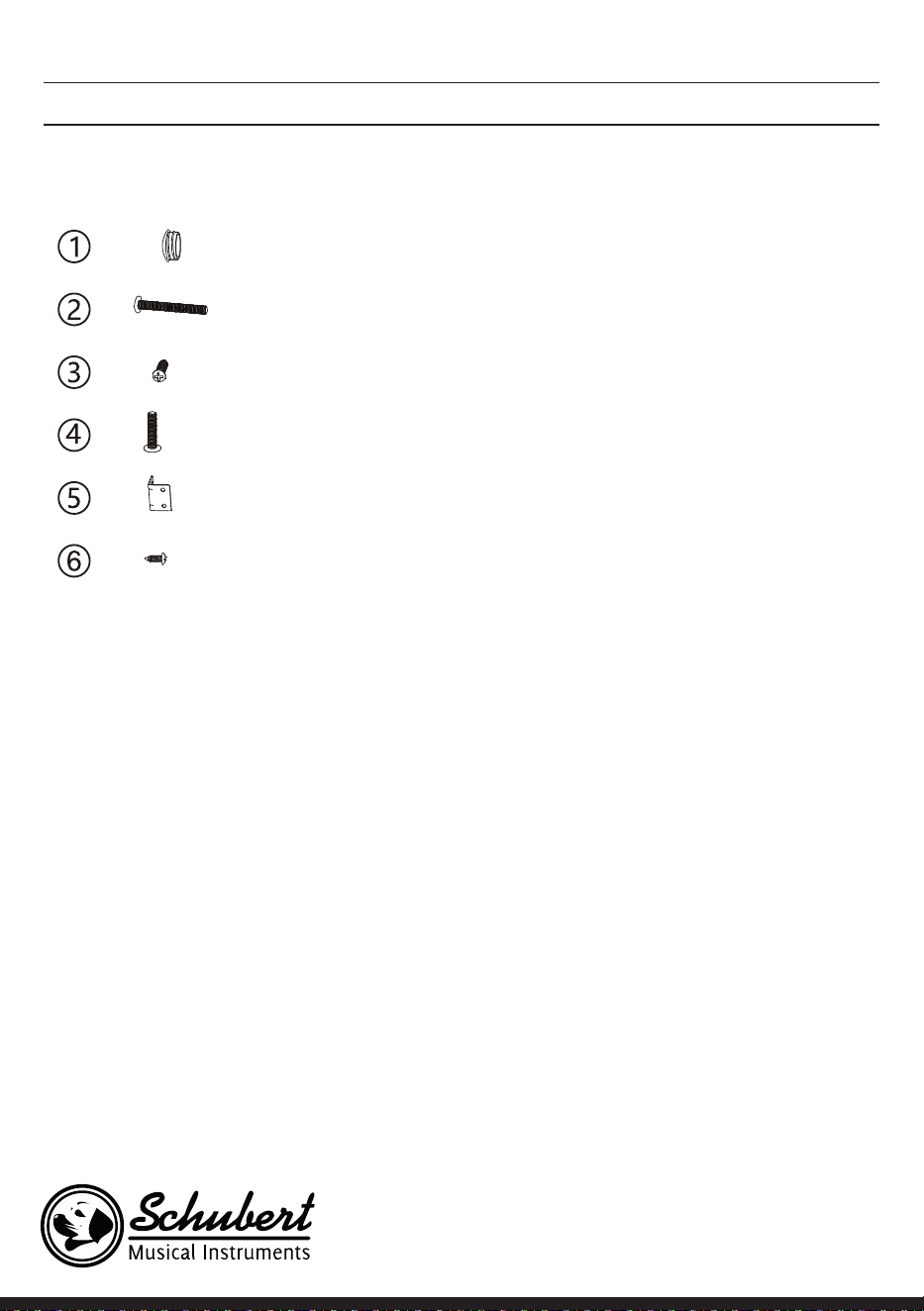
98
MONTAJE
Cubierta marrón de
plástico
4
4
6
4
2
8
Denominación Número de piezas
Tornillos M6*50
Tornillos PA4*16
Tornillos M6*20
Conexión de esquina al soporte del
teclado
Tornillos BA3*8
Montaje de la estructura del aparato
1. Utilice los 4 tornillos M6x50 para unir la placa de soporte izquierda y derecha a la caja de pedales.
2. Utilice los 4 tornillos PA3x8 para atornillar ambas uniones a la pared trasera del aparato.
3. Utilice los tornillos BA3x8 para jar la otra junta de esquina a las placas de soporte izquierda y derecha.
4. Utilice los 6 tornillos PA4x16 para unir la parte inferior de la pared trasera del aparato a la caja de pe-
dales.
5. Coloque la estructura del piano en la placa de soporte izquierda y derecha y fíjela con 4 tornillos M6x20.
6. Cubra los oricios del tornillo con las 4 cubiertas de plástico marrones.
7. Conecte la toma del pedal a su conexión.
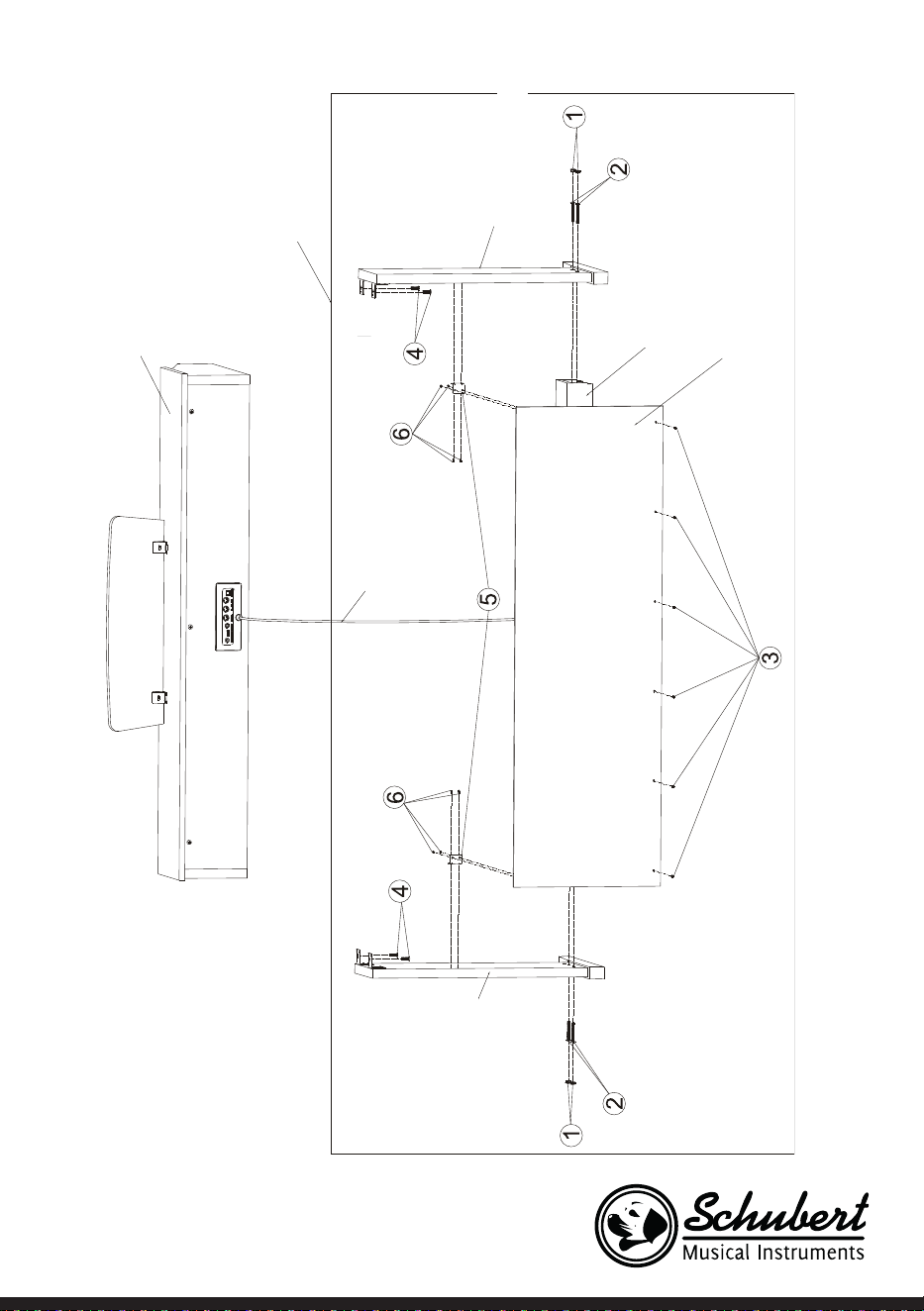
99
Estructura del piano
Soporte del
teclado
Soporte izquierdo
Soporte derecho
Pedales
Recubrimiento
trasero
Recubrimiento de la conexión
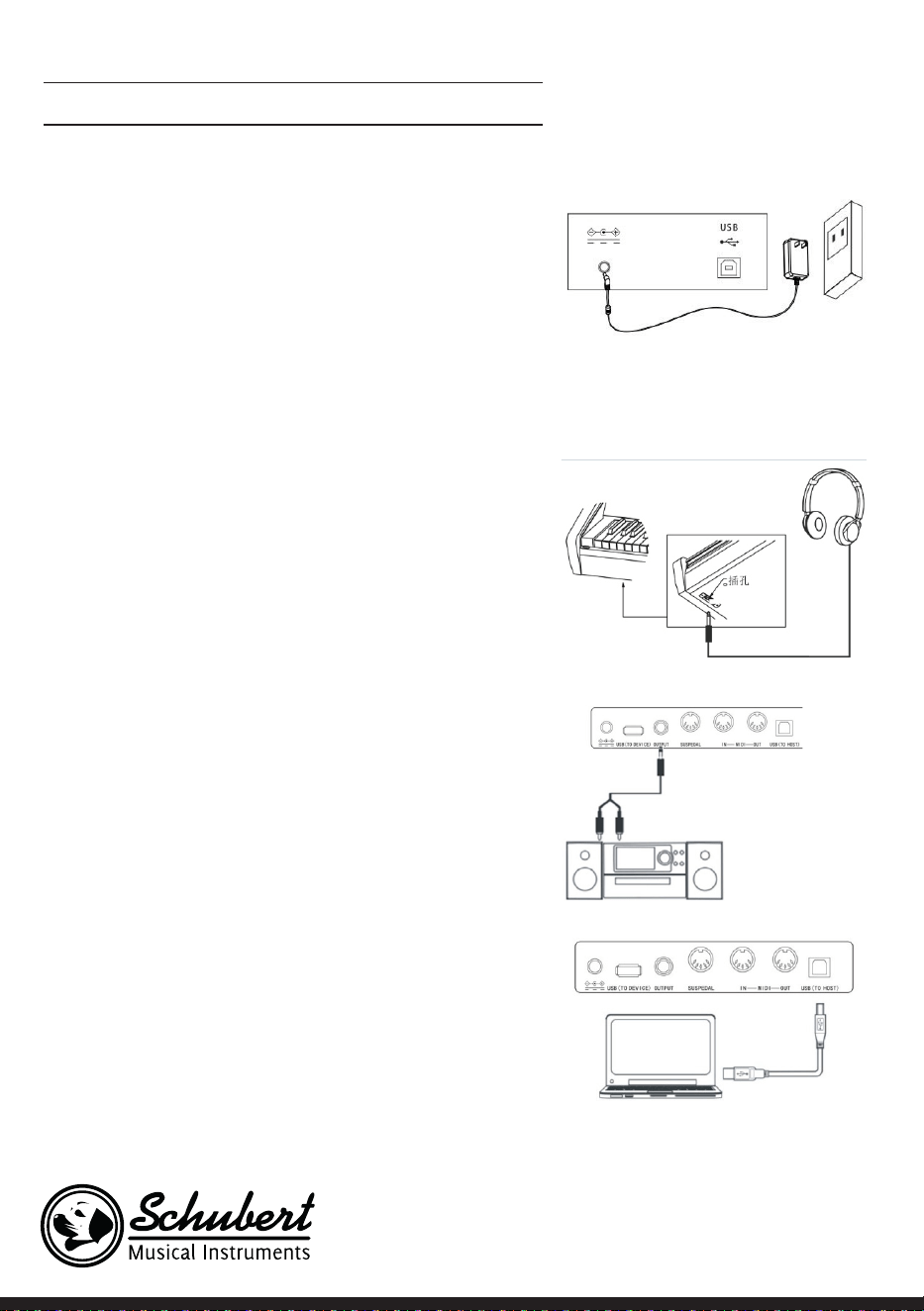
100
PUESTA EN MARCHA Y USO
Suministro eléctrico
1. Asegúrese de que el aparato esté apagado cuando lo conec-
te a la red eléctrica.
2. Una el enchufe del adaptador de red a una conexión CC del
aparato.
3. Conecte el enchufe en la toma de corriente.
4. Si pulsa el botón POWER, el monitor LCD muestra „loa-
ding“, lo que signica que el piano se ha abierto.
Nota: Por su propia seguridad, apague el aparato en caso de
tormentas o si no lo utiliza durante un periodo de tiempo
prolongado.
Conectar auriculares
• Si desea tocar en solitario o durante la noche, puede
conectar auriculares estéreo a la toma de auriculares de su
aparato.
• Los altavoces del instrumento se desactivan
automáticamente en cuanto se conecten los auriculares y
el sonido solo se reproduce a través de los mismos.
Nota: El uso de los auriculares a demasiado volumen
durante un periodo de tiempo prolongado puede
conllevar daños auditivos.
Conectar los accesorios de audio al aparato
• Al conectar accesorios de audio externos se pueden obtener
mejores efectos de música.
• Con la conexión AUDIO-OUT situada en la parte trasera
del aparato se pueden conectar amplicadores, equipos
estéreo, mesas de mezclas, dispositivos de grabación, etc. a
través de un cable al aparato.
Nota: Asegúrese de que el aparato esté apagado y el
volumen al nivel mínimo antes de conectar cualquier
otro dispositivo al teclado.
Conexión al ordenador
• Este aparato dispone de una conexión USB.
• A través de un cable USB puede conectar el aparato a un
ordenador y enviar y recibir información en ambos sentidos.
• Por ejemplo, puede almacenar canciones que se toquen en
el teclado en el ordenador o reproducir documentos MIDI
de su ordenador a través del aparato.
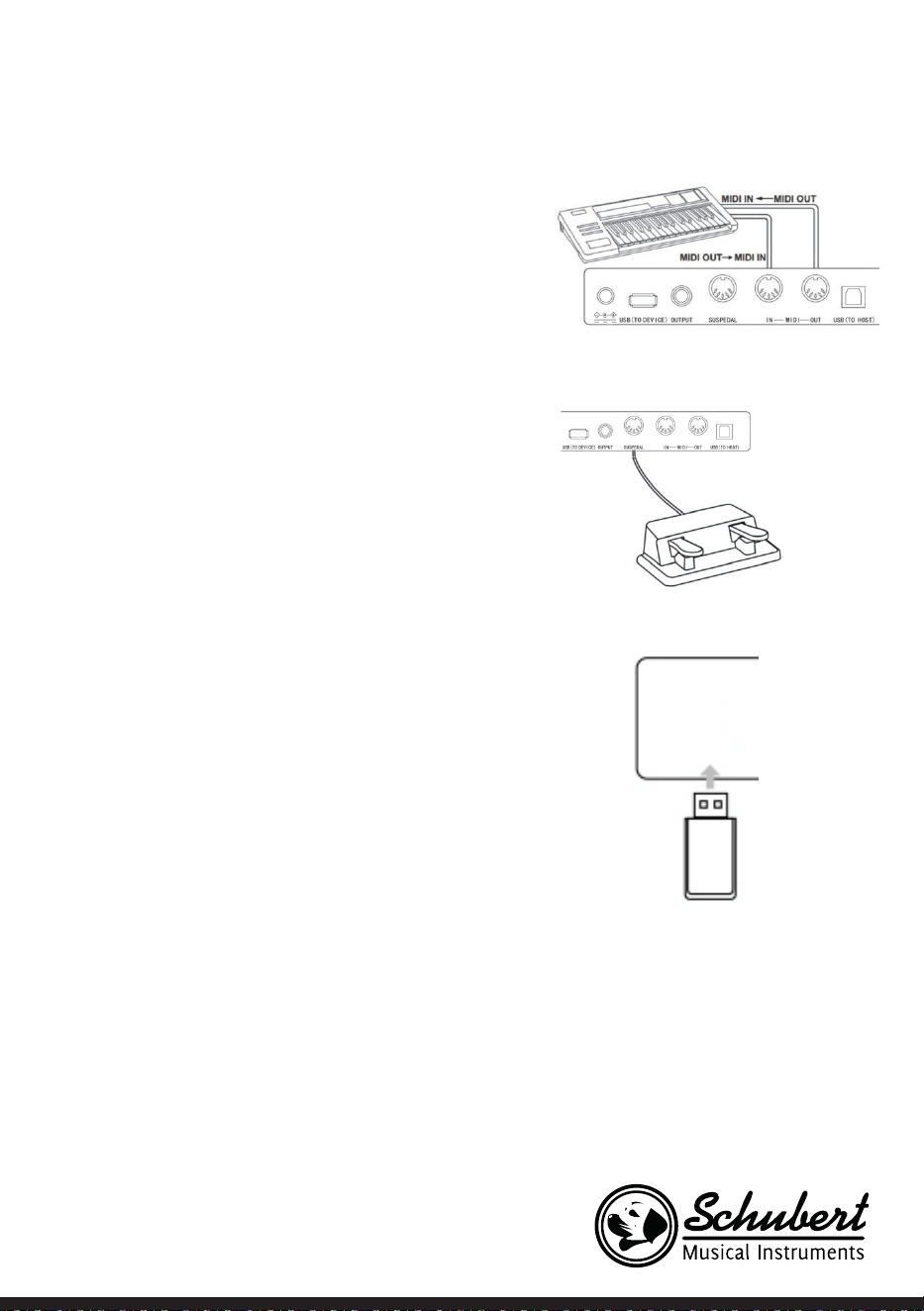
101
Nota: El accesorio de audio USB no puede regularse
simultáneamente para una entrada de audio y una salida
de audio.
Conectar a otros aparatos
• Si conecta la conexión MIDI IN de su aparato a la conexión
MIDI OUT de otros dispositivos, puede utilizar el teclado
como fuente de audio.
• Si conecta la conexión MIDI OUT de su aparato a la conexión
MIDI IN de otros dispositivos, puede utilizar el teclado
como control de MIDI.
Conexión del pedal
Si conecta los pedales a la conexión del pedal de la parte
trasera del instrumento, el aparato dispone de dos funciones
de pedal diferentes:
1. Si pisa el pedal mientras toca, todos los tonos se reprodu-
cirán más suaves.
2. Si pisa este pedal mientras toca, los tonos se reproducen
con reverberación.
Conexión de dispositivos USB
• El aparato es compatible con dispositivos USB de hasta 32
GB.
• Los archivos MP3 del dispositivo USB se pueden reproducir
a través del aparato.
Nota: No desconecte el dispositivo USB durante la
reproducción. De lo contrario, pueden producirse errores
o daños en el dispositivo USB.
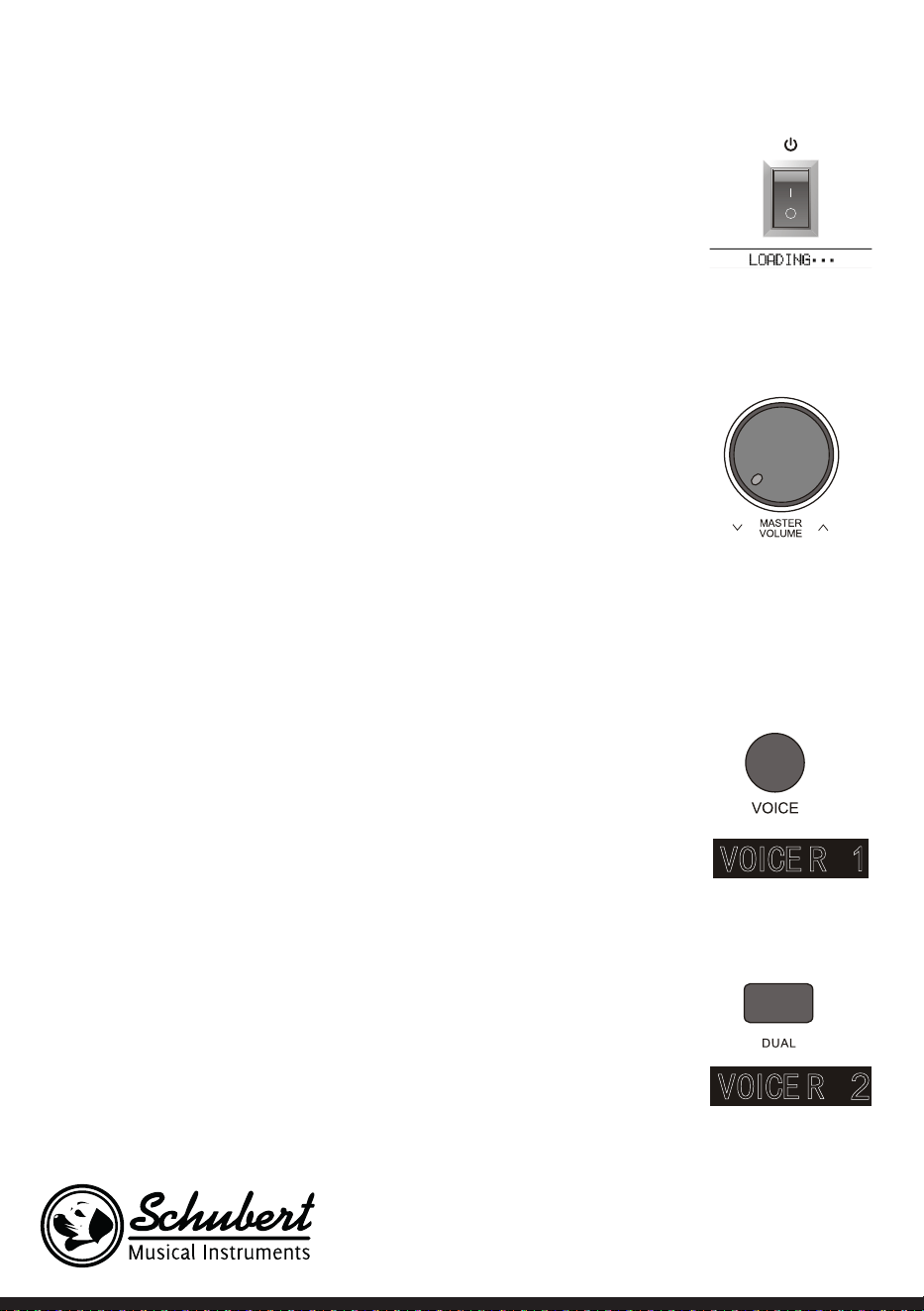
102
Fuente de alimentación
1. Primero asegúrese de que la fuente de alimentación esté correctamente
conectada.
2. Si pulsa el botón POWER, la pantalla LCD se ilumina y muestra la pantalla de
inicio.
Nota: Si no se ilumina la pantalla LCD después de haber pulsado en botón
POWER, compruebe si la fuente de alimentación está bien conectada.
Regulación de volumen
• Después de abrir el instrumento, gire el botón MASTER VOLUME hacia la
derecha para aumentar el volumen, y a la izquierda para reducirlo.
• Puede regular el volumen según sus necesidades.
Regular distintos tipos de voces de instrumentos
• Este instrumento dispone de cientos de tipos de tonos de instrumentos,
incluido el tono de música popular china, percusión, etc.
• Para obtener más información, consulte la tabla de tonos.
• El instrumento también está equipado con una función de efectos que es
relativa al tono correspondiente para que la voz reproducida suene mejor.
Seleccionar y reproducir tono
1. Pulsando el botón TONE accederá al modo de selección de tono. El símbolo de
recuerdo „R1“, el nombre del tono actual y su número aparecen en el monitor
LCD.
2. Para seleccionar el tono deseado, utilice el teclado numérico y los botones +
y -.
3. Toque los botones y disfrute de tonos maravillosos.
Nota: Para modicar la fuente del tono, pulse de nuevo VOICE. La función
a dos voces se activa. El indicador correspondiente "R1/R2/L" aparece en el
monitor LCD.
Dos voces
Este instrumento dispone de una función a dos voces. Así puede reproducir dos
tonos simultáneamente superpuestos. Con este efecto se enriquecen los niveles
musicales y se crea el efecto de dos instrumentos tocando al mismo tiempo. La
primera voz "R1" está presente desde el comienzo de la función. Tras activar la
función existe una segunda voz "R2".
1. Para abrir la función, pulse el botón DUAL. „R2“ aparece en el monitor LCD.
Además se muestran el nombre y el número del tono adicional.
2. Seleccione la segunda voz deseada con el botón VOICE y los botones + y -.
103
3. Así, ambas voces se reproducen de manera sincronizada y parece que están
sonando dos instrumentos diferentes al mismo tiempo.
4. La función se puede desactivar pulsando de nuevo DUAL. El indicador „R2“
desaparece de la pantalla y esta regresa a su estado anterior.
Nota: Cuando el teclado del instrumento se divide, la función a dos voces
solo está disponible para los botones de la mano derecha. Los botones de la
mano izquierda no disponen de esta función.
Fonction tactile (sensibilité de l'attaque)
El panel de control del instrumento dispone de una función táctil que le permite
dar a su actuación más expresión. Puede escoger entre tres distintas funciones
táctiles.
1. Para activar la función, pulse el botón TOUCH. La función táctil predeter-
minada es „002“ y se muestra en la pantalla LCD.
2. Puede elegir una de las tres funciones pulsando varias veces el botón Touch
en el orden „001-003; OFF“.
3. Cuando en el monitor LCD aparezca „OFF“, la función táctil queda desactiva-
da.
Transposición
Al utilizar la función de transposición puede ajustar el teclado en medio tono
más/menos y debe modicar su forma de tocar en consonancia.
1. Para activar la función, pulse el botón TRANSPOSE ∧ o TRANSPOSE ∨,
para regular el teclado en un semitono hacia arriba o hacia abajo. El valor
de transposición actual „xxx Transpose“ se muestra intermitentemente en
el monitor LCD
2. Puede regular el teclado en un máximo de 12 semitonos.
3. Si mantiene pulsado el botón TRANSPOSE ∧ y TRANSPOSE ∨ el teclado re-
gresa al valor ajustado por fábrica „000 Transpose“.
Nota: Si desea tocar una pieza en "G" pero no está familiarizado con el
teclado correspondiente, puede regular el valor de transposición a -05
o 007 para que el teclado se ajuste a "C", pero sonaría como si tocara
en "G". Esta función solo está disponible para todo el teclado y para el
acompañamiento automático de acordes.
Modo piano
Con esta función puede utilizar todo el teclado con el tono de un piano
1. Para activar/desactivar la función, pulse el botón PIANO.
2. La selección del acompañamiento funciona igual que en el resto de modos.
No obstante, solo se puede seleccionar un acompañamiento de percusión y
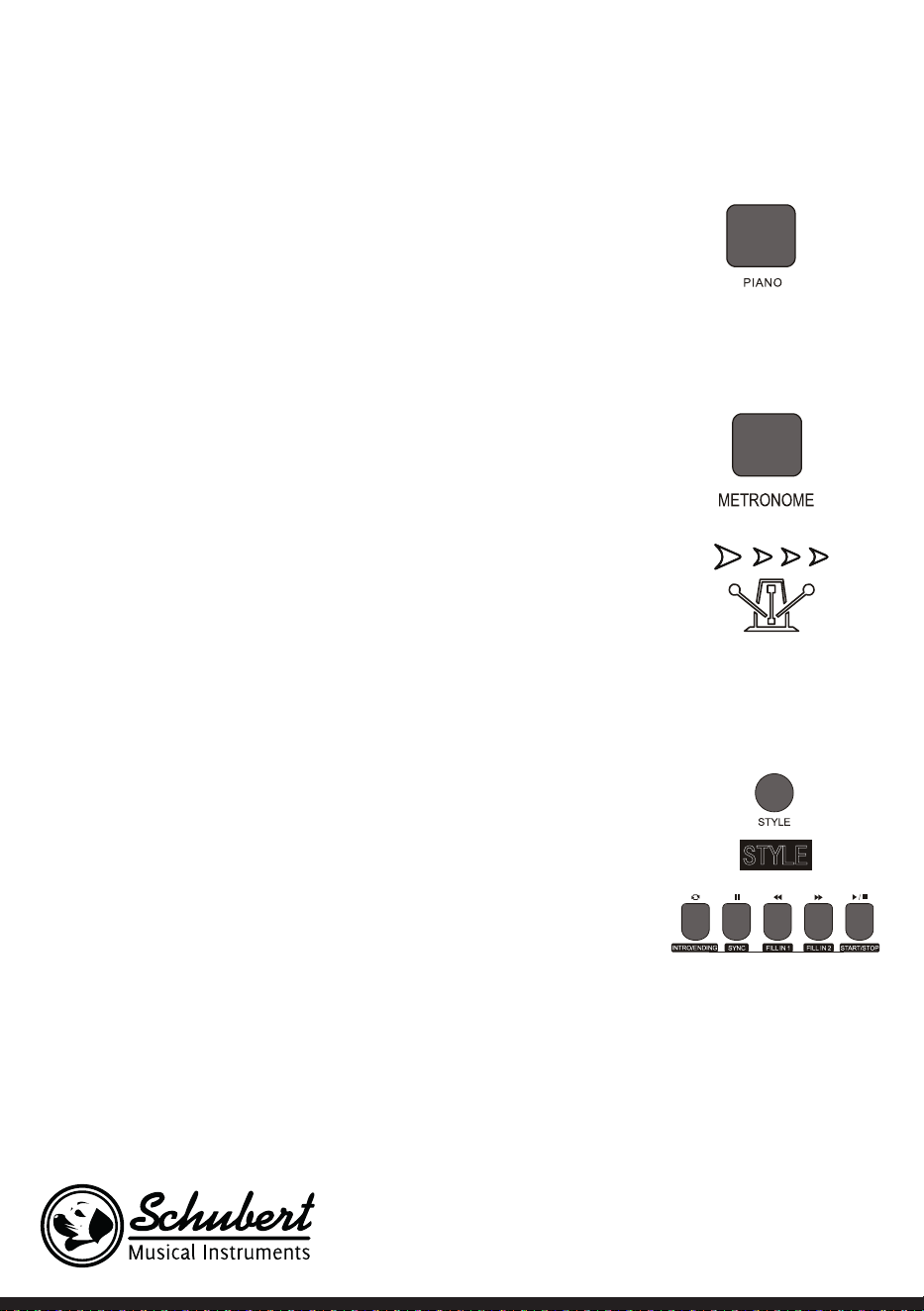
104
ningún armónico.
Nota: En este modo puede abrir tanto la consola de tonos como el menú
de funciones. La función de acorde se cierra automáticamente al activar
este modo.
Metrónomo (indicación de compás)
Si cuando toca no tiene claro si está siguiendo bien el compás, puede utilizar la
función del metrónomo.
1. Para activar la función, pulse el botón METRONOME. En ese momento se
marca el compás. Para desactivar la función, pulse el botón METRONOME.
2. Seleccione una conguración de tipo de compás en el menú de las funciones
para mostrar los distintos ajustes.
Nota: Si abre la función mientras toca, el sonido del compás suena al
comenzar el siguiente compás y se guía según el estilo correspondiente..
• Si activa la función al principio, el instrumento se ajusta automáticamente al
estilo que haya seleccionado.
• La función también se puede activar durante la grabación, pues no se
escuchará en el archivo guardado.
Acompañamiento
Acompañamiento automático
• Al activar esta función puede tocar simplemente el piano y el
acompañamiento, por ejemplo en forma de orquesta, se reproducirá
automáticamente. Solamente debe seleccionar un acompañamiento de la
tabla de estilos y tocar los acordes con la mano izquierda.
• Este instrumento dispone de varios acompañamientos automáticos que
puede consultar en la tabla de estilos. Solamente tiene que seleccionar el
que desee y disfrutarlo.
Reproducir acompañamiento automático (solo reproducir la parte de
percusión)
1. Pulse el botón STYLE para acceder al modo estilo. En la esquina superior iz-
quierda del monitor LCD se ilumina el indicador „STYLE“. El monitor también
muestra simultáneamente los nombres y los números del estilo selecciona-
do en el momento.
2. Puede seleccionar el estilo deseado pulsando el teclado numérico o los bo-
tones + y -.
3. La parte de la percusión del estilo puede reproducirse inmediatamente pul-
sando el botón START/STOP. También puede pulsar el botón SYNC para sin-
cronizar el estilo. El punto de compás se ilumina igualmente en el monitor
LCD. Puede tocar cualquier botón para iniciar la actuación.

105
Secciones de acompañamiento
El acompañamiento automático de este instrumento contiene muchas secciones diferentes de
acompañamiento, por lo que es recomendable asignar especialmente su propio acompañamiento. Las
secciones incluyen: Pieza principal (A, B), introducción, nal. Si toca el acompañamiento, puede lograr
representaciones más profesionales utilizando las secciones.
1. Intro: La selección de la introducción es ideal para comenzar una pieza musical. Tras nalizar la introduc-
ción, el acompañamiento cambia a los ajustes de la pieza principal. La longitud de la introducción varía y
depende del estilo que haya escogido.
2. Programa principal. La selección de „Main Play“ es ideal cuando se toca la pieza principal de una canción.
El programa principal se tocará hasta que se pulse otro botón.
3. Rellenar
Con el relleno de la sección 1 o 2 puede ejecutar su representación de un modo más profesional. Tras
reproducir las secciones añadidas, el acompañamiento pasa de nuevo al programa principal..
4. Final
Esta función se utiliza para cerrar una pieza musical. La pieza se naliza automáticamente cuando
se haya reproducido la secuencia nal. La longitud de la secuencia nal depende del estilo que
haya seleccionado.
Nota: Si mantiene pulsados los botones FILL IN 1 o FILL IN 2, la variación se añade al acompañamiento
hasta que suelte dicho botón. El acompañamiento cambia entonces al programa principal. Al pulsar el
botón FILL IN se modica el programa principal predeterminado. Cuando el acompañamiento se detiene,
el monitor LCD lo muestra.
Reproducir distintas secciones de acompañamiento
1. Pulsando el botón STYLE accederá al modo de selección de estilo. Seleccione el estilo deseado pulsando
el teclado numérico o + y -.
2. Pulse el botón AUTO CHORD para activar la función acorde automático.
3. Para abrir la función de sincronización, pulse el botón SYNC.
4. Para seleccionar la reproducción principal 1, pulse el botón FILL IN 1.
5. Si pulsa el botón INTRO/ENDING, el monitor muestra „NOR“, indicando que el instrumento se encuentra
en el modo de preparación para tocar.
6. El acompañamiento automático comienza en cuanto toque un acorde en la zona izquierda del tecla-
do. El acompañamiento cambia al programa principal tras la introducción.
7. Si pulsa el botón FILL IN 2 se añade una pequeña variación en el acompañamiento. El acompañamien-
to cambia la variación tras la nalización al programa principal.
8. Si pulsa el botón INTRO/ENDING, el acompañamiento toca una secuencia nal y se detiene a con-
tinuación.
Ajuste del volumen de acompañamiento
El volumen de acompañamiento se puede ajustar para todo el acompañamiento. Esta función lleva a una
relación equilibrada entre el volumen de las teclas y el volumen de acompañamiento.
1. Pulsando el botón ACCOMP VOLUME ∧/∨ en el monitor LCD aparece la conguración actual del volu-
men de acompañamiento. Para aumentar el volumen, pulse el botón ACCOMP VOLUME ∧ y para reducir

106
pulse el botón ACCOMP VOLUME ∨ . Rango de ajuste: 0 – 127.
Si mantiene pulsados los botones ACCOMP VOLUME ∧ y ACCOMP VOLUME ∨ simultáneamente, se
cierra el volumen de acompañamiento. El display LCD muestra „Accompaniment volume: OFF“. Para abrirlo
de nuevo, pulse simultáneamente ambos botones ACCOMP VOLUME ∧ y ACCOMP VOLUME ∨.
Tempo
Cada estilo tiene un nivel de velocidad idóneo. Puede regular el valor en función de sus capacidades y de las
necesidades de cada pieza musical.
1. Con los botones TEMPO ∧ et TEMPO ∨ se puede regular el valor de velocidad predeterminado.
2. Pulsando simultáneamente los botones TEMPO ∧ et TEMPO ∨ la velocidad se restablece al valor origi-
nal.
Nota: La velocidad se establece para cada estilo automáticamente. Mientras toca en un determinado
estilo, la velocidad se mantiene.
Acordes
Acorde automático
Si pulsa el botón AUTO CHORD, el acompañamiento automático del acorde comienza con la mano
izquierda.
Acorde en rango completo
Si pulsa el botón FULL RANGE CHORD todas las teclas que toque se reproducen como acordes.
Finalizar acompañamiento de acordes
Si pulsa el botón CHORD CLOSE se naliza el acompañamiento de acordes. El estilo se mantiene.
107
Tabla de acordes
Denominación Abreviatura Notación
Tono mayor M 1 - 3- 5
Sexta mayor M6 1 - 3 - 5 - 6
Séptima mayor M7 1 - 3 - (5) - 7
Séptima mayor con 11 M7 #11 1 -2 -3 -5
Novena mayor añadida Madd9 1-2 - 3- 4- 5
Novena mayor M9 1 - 2 - 3 - (5) - 7
Sexta mayor con 9 69 1 - 2 - 3 - (5) - 6
Acorde aumentado aug 1 - 3 -
#
5
Tono menor m 1 -
b
3 - 5
Sexta menor m6 1 -
b
3 - 5 - 6
Séptima menor m7 1 -
b
3 - (5) - 7
Séptima menor con quinta reducida m7
b
5 1 - 3- 5 - 7
Novena menor añadida madd9 1 -2 - 3- 5
Novena menor m9 1 - 2 - 3 - 5
Acorde de séptima menor con novena y
undécima
m11 1 - 3 - (5) - 7
Acorde de séptima dominante mM7 1 -2 -3 - (5) - 7
Acorde de novena dominante mM9 1 - 2 - 3 - (5) - 7
Acorde reducido dim 1 - 3 - 5
Séptima reducida dim7 1 - 3- 5 - 7
Séptima 7 1 - 3 - (5) - 7
Séptima con 4 suspendida 7sus4 1 - 4 - 5 - 7
Séptima con novena 79 1 -2 - 3- (5) - 7
Séptima menor con 11 7
#
11 1 - 2 - 3 - (5) -
b
7
Séptima menor con 13 713 1 - 3- (5) - 7 / 2 - 3 - 5 - 6 - 7
Acorde de séptima dominante con novena
menor
7
b
9 1 - 2 - 3- (5)- 7- 9
Séptima aumentada M7aug (1) - 3 -
#
5 - 7
Acorde sostenido 4 sus4 1 - 4 - 5
Acorde 1-2-5 1+2+5 1 - 2 - 5
108
Efecto reverberación
• Pulsando el botón REVERB se puede activar/desactivar el efecto reverberación
• Si se activa el efecto reverberación, se ilumina el indicador "Reverb".
• Si se desactiva el efecto reverberación, se apaga el indicador "Reverb".
Choro
• Al pulsar el botón CHORUS se puede activar o desactivar el efecto coro.
• Si se activa el efecto coro, se ilumina el indicador "Chorus".
• Si se desactiva el efecto choro, se apaga el indicador "Chorus".
Ajuste de tono
• Con la regulación de tono se puede congurar el volumen de cada pista.
• Pulse el botón SOUND CONSOLE para acceder al menú de regulación de tono. El monitor LCD muestra
el valor correspondiente. Si se encuentra en el menú de conguración de tono puede regular cada valor
pulsando varias veces el botón SOUND CONSOLE.
• El volumen puede regularse por separado para cada valor pulsando los botones + y -.
Valor de ajuste
Contenido del ajuste Monitor LCD Rango de ajuste
Volumen de la percusión XXX Rhythm 0 - 127
Volumen de graves XXX Bass 0 - 127
Volumen de armónicos XXX Chord 0 - 127
Volumen de la sección XXX Phrase 0 - 127
Volumen de la sección de la mano
izquierda
XXX Lower 0 - 127
Volumen de la sección de la mano
derecha
XXX Upper 0 – 127
Nota: Si en 5 segundos no se establece ningún ajuste de tono, se abanona el menú de conguración de
tono automáticamente.
109
MENÚ DE FUNCIONES
Menú de funciones
Pulse el botón FUNCTION MENU para acceder al menú de funciones. El monitor LCD muestra el valor
correspondiente. En el menú de funciones se puede ajustar cada valor pulsando los botones + y -.
Núm. Contenido Monitor LCD Rango de ajuste valor predeterminado
1 Melodía XXX Tune -50 - +50 000
2 División del teclado XXX KeySplit 1 – 88 034
3 Compás XXX BeatType 0, 2 – 9 004
4 Volumen del metrónomo XXX 0 – 127 080
5 Profundidad de reverbe-
ración
XXX 0 – 127 050t
6 Profundidad de coro XXX 0 – 127 000
7 Recepción MIDI XXX 1 – 16, ALL ALL
8 Emisión MIDI XXX 1 – 16 001
Nota: Si dentro de 5 segundos no se establece ningún ajuste, se sale del menú de función automáticamente.
Conguración de melodía
Con este ajuste se puede regular la altura del tono en detalle.
1. Pulse el botón FUNCTION MENU para seleccionar el modo de la melodía. Seleccione „tune menu“ allí. El
monitor muestra parcialmente „XXX Tune“. Pulsando los botones + y - se puede regular el alto del tono
en un semitono en un rango de 50.
2. Si pulsa simultáneamente los botones + y - se restablece el tono al valor predeterminado 000. Estos
ajustes de parámetros se aplican para el teclado y todos los estilos.
Dividir teclado
El punto en el que el rango automático de acordes y el teclado de la mano derecha se divide se llama
"KEYBOARD SPLIT POINT".
Si se desactiva la función automática del acorde, el rango del teclado izquierdo también se puede utilizar
para reproducir música.
1. Para dividir el teclado pulse el botón FUNCTION MENU y seleccione "Keyboard Split". El monitor LCD
muestra "XXX KeySplit". Para determinar el punto, puede utilizar los botones + y - o introducir directa-
mente un número con el teclado numérico.
2. Al pulsar simultáneamente los botones + y - el punto de división del teclado se restablece al valor prede-
terminado "F#3 (34)".
Tipo de compás
1. Para seleccionar el tipo de compás, pulse primero el botón FUNCTION MENU y seleccione „Beat-Type“.

110
El monitor LCD muestra „XXX BeatType“. Para elegir el tipo de compás puede pulsar los botones + y -. En
total hay disponibles 9 tipos de compás (0, 2-9).
2. Al pulsar simultáneamente los botones + y - el tipo de compás se restablece al valor predeterminado
„004“.
Ajuste del volumen del metrónomo
1. Para congurar el volumen del metrónomo pulse los botones FUNCTION MENU + o FUNCTION MENU
- y seleccione „MetronomeVolume“. El monitor muestra temporalmente „XXX MetroVol“. Para congurar
el volumen del metrónomo puede pulsar los botones + y -. Rango de ajuste: 0 – 127.
2. Al pulsar simultáneamente los botones + y - el volumen del metrónomo se restablece al valor predeter-
minado „080“.
Conguración de los graves de reverberación
1. Para seleccionar el grave de reverberación, pulse primero el botón FUNCTION MENU y seleccione „Re-
verb Level“. El monitor LCD muestra „XXX ReverbLev“. Para congurar los graves de reverberación pue-
de pulsar los botones + y -. Rango de ajuste: 0 – 127.
2. Al pulsar simultáneamente los botones + y - los graves de reverberación se restablecen al valor prede-
terminado „050“.
Ajuste del volumen de coro
1. Para seleccionar el volumen de coro, pulse primero el botón FUNCTION MENU y seleccione "Chorus
Level". El monitor LCD muestra "XXX ChorusLev". Para congurar el volumen de coro puede pulsar los
botones + y -. Rango de ajuste: 0 – 127.
2. Al pulsar simultáneamente los botones + y - el volumen del coro se restablece al valor predeterminado
"000".
Ajustes de recepción MIDI
1. Para seleccionar el menú de conguración de recepción MIDI pulse primero el botón FUNCTION MENU
y seleccione „MIDI receiving channel setting menu“. El monitor LCD muestra „XXX MidIn“. Para congu-
rar los canales de recepción puede pulsar los botones + y -. Rango de ajuste: 1 – 16, ALL.
2. Al pulsar simultáneamente los botones + y - el canal de recepción se restablece al valor predeterminado
„ALL“.
Ajustes de recepción MIDI
1. Para seleccionar el menú de conguración de emisión MIDI pulse primero el botón FUNCTION MENU y
seleccione „Midi sending channel setting menu“. El monitor LCD muestra „XXX MidiOut“. Para congurar
los canales de recepción puede pulsar los botones + y -. Rango de ajuste: 1 – 16.
2. Al pulsar simultáneamente los botones + y - el canal de recepción se restablece al valor predeterminado
„001“.
Restablecer los valores de fábrica
Pulse los botones + y - simultáneamente con el aparato apagado. El aparato se restablece a los valores de
fábrica y elimina todos los datos del usuario, incluidos: Canciones del usuario, registro, memoria. El monitor
LCD muestra en este tiempo "Wait...!". Después de haber reiniciado el aparato se puede utilizar de manera

111
normal.
Conguración de memoria de registro de panel de control
Este instrumento dispone de una conguración de memoria de registro del panel de control. Esta se puede
utilizar también para guardar los ajustes más utilizados y para poder utilizarlos más rápidamente cuando
los necesite para facilitarle la labor mientras toca el instrumento. Con esta función se pueden guardar casi
todos los ajustes del panel de control para que se puedan activar sus ajustes favoritos al pulsar un botón.
Guardar ajustes
1. Este instrumento dispone de un banco de memoria. Cada banco de memoria tiene 2 estados de memoria.
2. Cuando mantiene pulsados simultáneamente el botón STORE y los botones M1 o M2 se puede guardar
la conguración actual.
Nota: Al guardar la conguración actual se sobrescribe el estado de memoria previa. Si mantiene
pulsados los botones STORE y M1 al mismo tiempo se eliminan todos los ajustes guardados y la memoria
se restablece a los valores de fábrica.
Reproducir ajustes guardados
Para reproducir los ajustes guardados, pulse los botones M1 o M2.
Selección de un banco de memoria
1. Si pulsa el botón BANK, el monitor LCD muestra temporalmente el número del banco de memoria selec-
cionado actualmente.
2. Si pulsa de nuevo el botón BANK puede seleccionar la memoria. Área de selección: 1 -2.
3. Los siguientes contenidos se pueden guardar en las memorias M1 y M2.
• Ajustes de tono: Voz principal, dos voces, punto de división de teclado, efectos digitales, mesa de mezclas.
• Conguración de acompañamiento: Estilo, velocidad, activar/desactivar acordes automáticos, selección
de sección
• Ajustes de función: Táctil, conguración y menú de funciones
Control de la reproducción musical
1. Función de la marca del compás
• Una canción dispone de un compás marcado antes de que se reproduzca la introducción.
2. Retroceder y avanzar, función de reproducción/pausa y detención de canciones
• Al pulsar el botón se avanza en las canciones durante la reproducción.
• Al pulsar el botón se retrocede en las canciones durante la reproducción.
• Pulsando el botón/ se pueden pausar canciones y al pulsar de nuevo se continúa con la reproducción.
•Si se pulsa el botón , se detiene la reproducción.
3. Repetición de la sección
• Al pulsar el botón se puede establecer el principio y nal de una sección que se reproducirá en
bucle hasta que nalice la función.
• Si pulsa el botón por primera vez se determina el comienzo de la sección y su nal cuando pulsa el botón
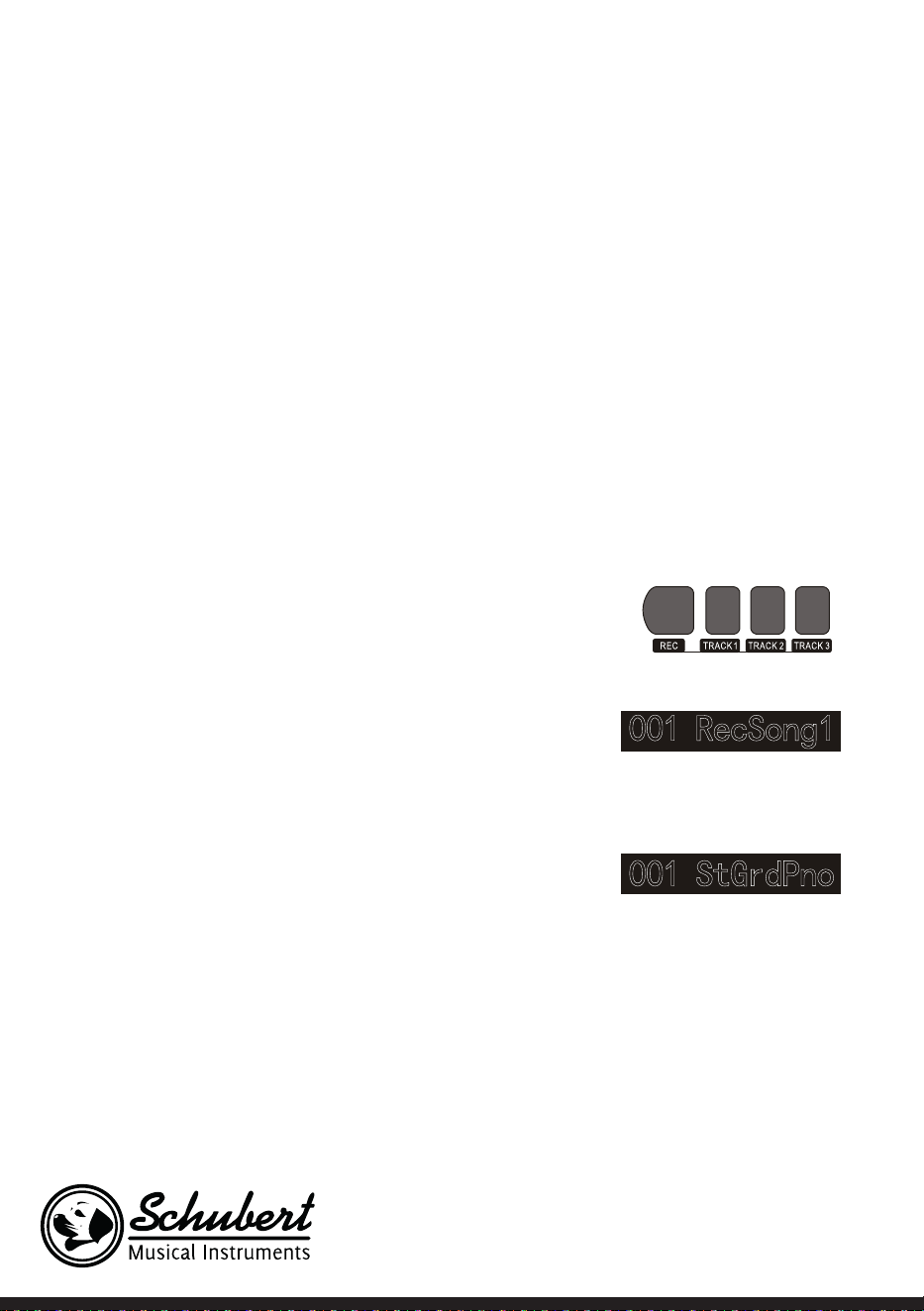
112
una segunda vez.
• Si pulsa de nuevo el botón se termina la función y las canciones se repiten completamente.
Grabar música
Antes de comenzar la grabación y de seleccionar una pista, debe seleccionarse una canción.
1. Pulse el botón RECORD para acceder a la selección de canciones. En la parte superior izquierda del mo-
nitor LCD se muestra el número de la canción. El número predeterminado de su canción a grabar es „Rec-
Song 1“. Puede seleccionar la canción que desea guardar con los botones + y ´-.
2. Si pulsa el botón RECORD accederá al modo de preparación de grabación. En la página inferior del dis-
play LCD se muestra en letras rojas „REC“ y 4 puntos de compás aparecen al mismo tiempo en la zona
de compás. El instrumento selecciona automáticamente una pista que todavía no tenga datos guardados
para guardar automáticamente su grabación. La marca utilizada de tono se muestra en la pantalla LCD y
se reere a la grabación actual que se guarda ahí.
3. Puede regular el tono, estilo, velocidad, etc. en el modo preparación. Puede seleccionar la marca de tono
en la que debe guardarse la grabación pulsando los botones TRACK 1, TRACK 2 o TRACK 3. La marca de
acompañamiento y la marca de melodía se pueden guardar simultáneamente mientras que 2 pistas de
melodía diferentes no se pueden grabar al mismo tiempo.
4. Para iniciar la grabación, pulse el botón START/STOP o comience a tocar en el teclado después de haber
seleccionado una pista de grabación. Después de haber seleccionado el acompañamiento y la función
de acordes automáticos para tocar de manera ecaz acordes en la zona izquierda se puede iniciar igual-
mente la grabación.
Observaciones :
• Los datos de estilo solo se pueden grabar en la pista de
acompañamiento. El indicador de grabación dispone de tres
estados diferentes: "Shine, Light, Go out".
• "Shine" signica que se ha seleccionado esta pista para
la grabación. Si ya hay datos en la grabación, estos se
sobrescribirán por la grabación actual si continúa.
• "Light" signica que los datos existentes en la pista se
sobrescribirán de manera síncrona en el proceso de
grabación.
• "Go Out" signica que esta pista no tiene ningún dato o
contiene datos cuya reproducción durante la grabación no
está permitida.
• La pista de grabación todavía se puede guardar en modo
preparación.
• El aparato selecciona en modo preparación automáticamente una pista vacía de grabación (en el orden
de menor a mayor, como: si la pista tiene 2 datos, se escoge el instrumento para la grabación de la pista 3).
Pista 1: Pista de acompañamiento
Pista 2/Pista 3: Pistas de melodía

113
Detener grabación
1. Si durante la grabación pulsa el botón START/ STOP se interrumpe enseguida la grabación. Pulse los bo-
tones STYLE o VOICE para seleccionar otras funciones.
2. Cuando la memoria interna esté llena se detiene la grabación y se guarda automáticamente. El monitor
LCD muestra „Rec_Full“.
3. La grabación se detiene automáticamente cuando se naliza la canción o si selecciona un acompaña-
miento.
Reproducir canciones grabadas
1. Si durante la grabación mantiene pulsado el botón RECORD se interrumpe la grabación actual y se re-
producen en bucle las canciones grabadas hasta el momento.
2. Pulse el botón SONG para acceder al modo canción. Todas la canciones se reproducen automáticamente
en bucle. El número de canciones que ha guardado puede seleccionarse pulsando los botones + y -. Si no
tiene ninguna canción guardada, el monitor muestra „NoFile!“. Se interrumpe la reproducción en bucle.
3. Si está disponible, escoja una canción que ha guardado y presione el botón START/STOP para reprodu-
cirla en bucle.
Eliminar canciones grabadas
1. Con el instrumento apagado, pulse simultáneamente
los botones RECORD y SONG para eliminar todas las
grabaciones guardadas.
2. Pulse el botón RECORD durante 2 segundos para eli-
minar las grabaciones en modo preparación. El monitor
LCD muestra „Delete“. Pulse a continuación los boto-
nes de cada pista (TRACK 1, TRACK 2, TRACK 3) de los
que desee eliminar la grabación. Cuando en el indica-
dor se ilumina una pista, esto quiere decir que los datos se eliminan. Cuando en el indicador se apaga,
esto quiere decir que los datos se conservan. Si en el indicador se iluminan todas las pistas, esto quiere
decir que todas las canciones grabadas se eliminan, si el proceso de borrado es autorizado pulsando el
botón +. El proceso de eliminación se puede interrumpir pulsando el botón -.
Reproducción MP3
Conexión MP3: con esta conexión puede reproducir canciones en formato MP3.
• Pulsando el botón PLAY/PAUSE puede reproducir/pausar canciones.
• Pulsando el botón SONG ∧ se selecciona la canción anterior y pulsando el botón VOLUME X se reduce
el volumen.
• Pulsando el botón SONG ∨ se selecciona la canción siguiente y pulsando el botón VOLUME ∧ se aumenta
el volumen.
Reproducir canciones
Este instrumento dispone de distintas canciones (véase tabla de canciones). Cada canción dispone de una
función de aprendizaje.

114
Disfrutar de canciones
1. Pulse el botón SONG para acceder al modo canción. El monitor LCD muestra „SONG“. Todas las cancio-
nes se reproducen en bucle.
2. Puede utilizar para seleccionar canciones el número de la canción deseada o los botones + y -.
3. Pulse el botón START/STOP para detener la reproducción de la canción. Pulse de nuevo el botón para
continuar con la reproducción.
4. Si quiere nalizar el modo canción, pulse los botones STYLE, RECORD, VOICE, DUALVOICE, etc. en cu-
anto se haya terminado la canción.
Modo aprendizaje
La función de aprendizaje del instrumento está compuesta de tres botones LESSON, LEFT y RIGHT, las
cuales se pueden utilizar exclusivamente en modo canción. Todas las canciones se pueden practicar en tres
modos diferentes: Duración, altura de tono y modo concierto. El instrumento dispone de una función de
valoración que le ayuda a hacer progresos en el aprendizaje.
1. Para activar el modo de la lección, pulse el botón LESSON.
2. Con los botones LEFT y RIGHT, seleccione si desea practicar la canción con la mano izquierda o derecha.
Si no toma ninguna decisión, se elegirá por defecto la mano derecha.
Nota: Los contenidos de aprendizaje de la mano izquierda pueden, independientemente de la canción
seleccionada, ser diferentes. En algunas canciones se practican acordes con la mano izquierda y en otras,
melodías. Durante el modo aprendizaje se muestran melodías y acordes en el monitor LCD, lo cual debe
facilitar el aprendizaje.
Modo aprendizaje 1: Duración
1. Pulse el botón LESSON para activar el modo de aprendizaje 1. Las canciones reproducidas en ese mo-
mento se detienen. El monitor LCD muestra „Les1 R“. El aparato estima la duración del ejercicio. La reali-
zación correcta de los acordes y notas no se tiene en cuenta en este modo de aprendizaje.
2. Pulse el botón START/STOP para comenzar con el modo de aprendizaje 1. Si selecciona la mano derecha
se muestran las melodías de la mano derecha. Solamente debe realizar bien la duración, la realización de
los acordes y notas no se tiene en cuenta. La melodía suena de fondo. Si selecciona la mano izquierda se
muestran los acordes o partes de melodías de la mano izquierda. Solamente debe realizar bien la duraci-
ón, la realización de los acordes y notas no se tiene en cuenta. Si pulsa simultáneamente los botones LEFT
y RIGHT, se puede practicar simultáneamente con la mano derecha e izquierda. El sistema estima por sí
solo cuándo se termina el ejercicio.
Modo aprendizaje 2: Tono
1. Pulse varias veces el botón LEARN para activar el modo de aprendizaje 2. La reproducción actual de la
canción se interrumpe. El monitor LCD muestra „Les2 R“. El sistema estima el tono, lo que signica que
debe tocar los tonos correctos. Una sección de la canción empezará desde el principio si toca una nota
incorrecta. La canción se encuentra en ese momento en modo de espera hasta que toque el tono correc-
to.de mauvaises notes.
2. Si al empezar la canción pulsa el botón START/STOP, el aparato ofrece una reproducción de la canción
al nalizar.

115
Modo aprendizaje 3: Modo concierto
1. Pulse varias veces el botón LEARN para activar el modo de aprendizaje 3. La reproducción actual de la
canción se interrumpe. El monitor LCD muestra „Les3 R“. El sistema estima el tono y la duración del mis-
mo, lo que signica que debe tocar los tonos correctos y su duración original.
2. Si al empezar la canción pulsa el botón START/STOP, el aparato ofrece una reproducción de la canción
al nalizar.
116
TABLA DE CANCIONES
Estilo de música Núm. Nombre en inglés Abreviatura en inglés
FOLK & COUNTRY 1 Jambalaya Jambalaya
FOLK & COUNTRY 2 Ding! Dong! Merril on High DingDong
FOLK & COUNTRY 3 Battle Hymne of the Republic Battle
FOLK & COUNTRY 4 The Old Gray Mare GrayMare
FOLK & COUNTRY 5 American Patrol USPatrol
FOLK & COUNTRY 6 Christmas is Coming IsComing
FOLK & COUNTRY 7 Sippin/Cider through a Stray SCTStraw
FOLK & COUNTRY 8 Christmas Sound Sound
GOLDEN & POP 9 On London Bridge LdBridge
GOLDEN & POP 10 Are You Lonesome Tonight Lonesome
GOLDEN & POP 11 Der Deitcher’s Dog DerDDog
GOLDEN & POP 12 Joy to the World JoyWordl
GOLDEN & POP 13 Silent Night Sltnight
GOLDEN & POP 14 Ave Maria AveMaria
GOLDEN & POP 15 Five Hundred Miles FHMiles
GOLDEN & POP 16 Happy New Year HappyNY
GOLDEN & POP 17 It’s beginning to look a lot like
Christmas
LikeXmas
GOLDEN & POP 18 Jeanie with the light brown hair LightHair
GOLDEN & POP 19 My Bonnie MyBonnie
GOLDEN & POP 20 Song oft he Pearlsher SongOfTP
CLASSICAL 21 Swan Swan
CLASSICAL 22 Prelude to Act 2 (Swan Lake) SwanLak1
CLASSICAL 23 Valse (Swan Lake) SwanLak2
CLASSICAL 24 The Happy Farmer HpFarmer
CLASSICAL 25 The Sleeping Beauty SleepBty
CLASSICAL 26 La Traviata LaTravia
CLASSICAL 27 Wiegenlied Wiegenli
CLASSICAL 28 Mov.2 Adagio Non Troppo
Piano Sonata No. 9 D
Sonata 9
CLASSICAL 29 Mov.1 Andante Grazioso Piano
Sonata No. 11 in A
Sonata 11
CLASSICAL 30 Prelude in C Prelude
CLASSICAL 31 Chinese Dance CHDance
CLASSICAL 32 Emperors Waltz EmprWaltz
CLASSICAL 33 March Militaire MilMar1
CLASSICAL 34 Symphony No.40 Symphony
JAZZ & FUSION 35 ShanZhaShu ShanZaS
JAZZ & FUSION 36 You are my sunshine MySun
JAZZ & FUSION 37 June Samba JunSamba
117
Estilo de música Núm. Nombre en inglés Abreviatura en inglés
JAZZ & FUSION 38 Funk Funk
JAZZ & FUSION 39 I Can… I Can…
JAZZ & FUSION 40 Sea Shore SeaShore
JAZZ & FUSION 41 Guitar & Saxphone Gt&Sax
JAZZ & FUSION 42 The Hip Hop’s Night HipHopNt
JAZZ & FUSION 43 Blue Lunch BlueLunch
JAZZ & FUSION 44 Cobweb Cobweb
JAZZ & FUSION 45 Wine Wine
JAZZ & FUSION 46 Jazz Old Man JzOldMan
JAZZ & FUSION 47 Dark Eyes DarkEyes
JAZZ & FUSION 48 Carlos Carlos
JAZZ & FUSION 49 Sad Sad
JAZZ & FUSION 50 The Jazz TheJazz
PIANO 51 Für Elise FürElise
PIANO 52 Military March Mmarch
PIANO 53 Habanera Habanera
PIANO 54 Minuet Minuet
PIANO 55 Austria Variation Avariati
PIANO 56 Old Macdonald had a Farm OldAFarm
PIANO 57 Wedding March Wedding
PIANO 58 2-Part Invention #13 In A
Minor. B.W. Iii
Invention
PIANO 59 Minuet in G MinuetG
PIANO 60 Turkish March TurkishM
PIANO 61 Hey Diddle Diddle HeDiddle
PIANO 62 Italian Polka ItaPolka
PIANO 63 Moseta Dance MosetaDn
PIANO 64 Bulie Dance BulieDn
PIANO 65 Waltz in A Flat Op.39 No. 15 Waltz 1
PIANO 66 Wild Rose WildRose
PIANO 67 Away in A Manger AwayInAM
PIANO 68 Jack & Jill JackJill
PIANO 69 Angels We Have Heard on High Angels
PIANO 70 Waltz Waltz
PIANO 71 Did you ever see a Lassie Lassie
PIANO 72 Chopsticks Chopstick
PIANO 73 Four Little Swans FLSwans
PIANO 74 Old France OldFrance
PIANO 75 Jesus Saviour pilot Me PilotMe
PIANO 76 Eclogue Eclogue
PIANO 77 Santa Claus is coming to towen SantaCT
PIANO 78 Brave Cavalier Cavalier
PIANO 79 America The Beautiful USFair
PIANO 80 Music Box Dancer Dancer
118
TABLA DE ESTILOS
Denominación Núm. Nombre en inglés Abreviatura en inglés
8 BEAT 1 8 Beat Piano 8BtPiano
8 BEAT 2 8 Beat 1 8Beat1
8 BEAT 3 8 Beat Shufe 8BtShu
8 BEAT 4 Guitar Pop 1 GtPop1
8 BEAT 5 8 Beat Hip Hop 8BtHiHop
8 BEAT 6 8 Beat R&B 8BeatR&B
8 BEAT 7 8 Beat Pop 8BtPop
8 BEAT 8 Pop Funk 1 PopFunk1
8 BEAT 9 Rhythm & Beat 1 Rhy&Bt1
8 BEAT 10 8 Beat Disco 1 8BtDisc1
8 BEAT 11 8 Beat Rock 8BtRock
8 BEAT 12 8 Beat 2 8Bt2
8 BEAT 13 Sweet Beat SweetBt
8 BEAT 14 8 Beat Dance 8BtDance
8 BEAT 15 8 Beat 3 8Bt3
8 BEAT 16 60’s 8 Beat 60’s8Bt
16 BEAT 17 16 Beat 1 16Beat1
16 BEAT 18 16 Beat Funk 1 16BtFuk1
16 BEAT 19 16 Beat Ballad 1 16BtBld1
16 BEAT 20 16 Beat R&B 16BtR&B
16 BEAT 21 Pop 16 Beat 1 Pop16Bt1
16 BEAT 22 16 Beat Dance 16BDanc
16 BEAT 23 16 Beat 2 16Beat2
16 BEAT 24 Modern 16 Beat Modrn16B
16 BEAT 25 16 Beat Hot 16BtHot
16 BEAT 26 16 Beat Modern 16BtModr
16 BEAT 27 16 Beat 3 16Beat3
16 BEAT 28 Cool Beat CoolBeat
16 BEAT 29 16 Beat Ballad 2 A6BtBld2
16 BEAT 30 16 Beat 4 16Beat4
16 BEAT 31 Pop Shufe PopShu
POP 32 Pop Rock 1 PopRock1
POP 33 Pop Dance 1 PopDanc1
POP 34 Pop Fusion PopFusn
POP 35 Analog Night 1 AnalgNt1
POP 36 6/8 Pop 6/8Pop
POP 37 Brit. Pop 1 BritPop1
POP 38 Brit. Pop 2 BritPop2
POP 39 Pop Hit PopHit
POP 40 Fusion Shufe FusShu
POP 41 Pop Beat PopBeat
POP 42 Soft Beat SoftBeat
POP 43 60’s Pop 60’sPop

119
POP 44 Sting Latin StigLatn
BALLAD 45 R&B Ballad 1 R&BBad1
BALLAD 46 Guitar Ballad GtBallad
BALLAD 47 Ballad Rock BalladRk
BALLAD 48 Piano pop PianoPop
BALLAD 49 Soft Ballad SoftBald
BALLAD 50 Natural Ballad NatuBld
BALLAD 51 Love Ballad LoveBld
BALLAD 52 Easy Ballad EasyBld
BALLAD 53 Slow Ballad SlowBald
BALLAD 54 Folk Ballad FolkBld
BALLAD 55 Pop Ballad 1 PopBld1
BALLAD 56 EP Ballad EPBallad
ROCK 57 Rock Rock
ROCK 58 New Wave NewWave
ROCK 59 Ska Ska
ROCK 60 Slow Rock SlowRock
ROCK 61 70’s Rock & Roll 70’s Rock
ROCK 62 Folk Rock FolkRock
ROCK 63 Soft Rock SoftRock
ROCK 64 Easy Rock EasyRock
ROCK 65 New Shufe NewShu
ROCK 66 Rock Hip Hop RkHipHop
ROCK 67 Rock & Roll 1 R’N’R1
ROCK 68 Rock & Roll 2 R’N’R2
BALLROOM 69 Tango 1 Tango1
BALLROOM 70 Spain Matador Matador
BALLROOM 71 Twist 1 Twist1
BALLROOM 72 Big Band Fox BandFox
BALLROOM 73 Tango 2 Tango2
BALLROOM 74 Slow Fox SlowFox
BALLROOM 75 Slow Waltz 1 SlowWlz1
BALLROOM 76 Swing Fox SwingFox
BALLROOM 77 Salsa 1 Salsa1
BALLROOM 78 Cha Cha 1 ChaCha1
BALLROOM 79 Cha Cha 2 ChaCha2
BALLROOM 80 Beguine 1 Beguine1
BALLROOM 81 Beguine 2 Beguine2
BALLROOM 82 Rumba 1 Rumba1
BALLROOM 83 Samba 1 Samba1
BALLROOM 84 Jive Jive
BALLROOM 85 Fox Trot FoxTrot
DANCE 86 Techno 1 Techno1
DANCE 87 Hip Hop 1 HipHop1
DANCE 88 Dream Dance DrmDance
DANCE 89 House House
DANCE 90 Down Beat DownBeat
120
DANCE 91 Progressive Progress
DANCE 92 Rap 1 Rap1
DANCE 93 Disco Disco
DANCE 94 Soft Disco SoftDisc
DANCE 95 Disco Party DscParty
DANCE 96 70’s Disco 70’sDisc
DANCE 97 Club Dance ClubDanc
DANCE 98 Euro Dance EuroDanc
DANCE 99 Hip Hop 2 HipHop2
SOUL & FUNK 100 Funk 1 Funk1
SOUL & FUNK 101 Classic Funk ClasFunk
SOUL & FUNK 102 Gospel Swing GopSwing
SOUL & FUNK 103 Gospel Gospel
SOUL & FUNK 104 Funk 2 Funk2
SOUL & FUNK 105 Electric Funk ElecFunk
SOUL & FUNK 106 Groove Funk GrooveFk
SOUL & FUNK 107 Cool Funky ColFunky
SOUL & FUNK 108 Jazz Funk JazzFunk
SOUL & FUNK 109 Groove Groove
SOUL & FUNK 110 Soul Soul
SOUL & FUNK 111 Hip Hop Beat HipHopBt
SOUL & FUNK 112 R&B R&B
SOUL & FUNK 113 Soul Beat SoulBeat
SWING & JAZZ 114 Latin Jazz 1 LatinJz1
SWING & JAZZ 115 Big Band BigBand
SWING & JAZZ 116 Dixieland 1 Dixland1
SWING & JAZZ 117 Broadway Big Bang BwayBand
SWING & JAZZ 118 Swing Swing
SWING & JAZZ 119 Latin Jazz 2 LatinJz2
SWING & JAZZ 120 Fusion Fusion
SWING & JAZZ 121 Acid Jazz AcidJazz
SWING & JAZZ 122 Cool Jazz Ballad CoolJzBd
SWING & JAZZ 123 Swing Shufe SwingS
SWING & JAZZ 124 Big Band Medium BandMid
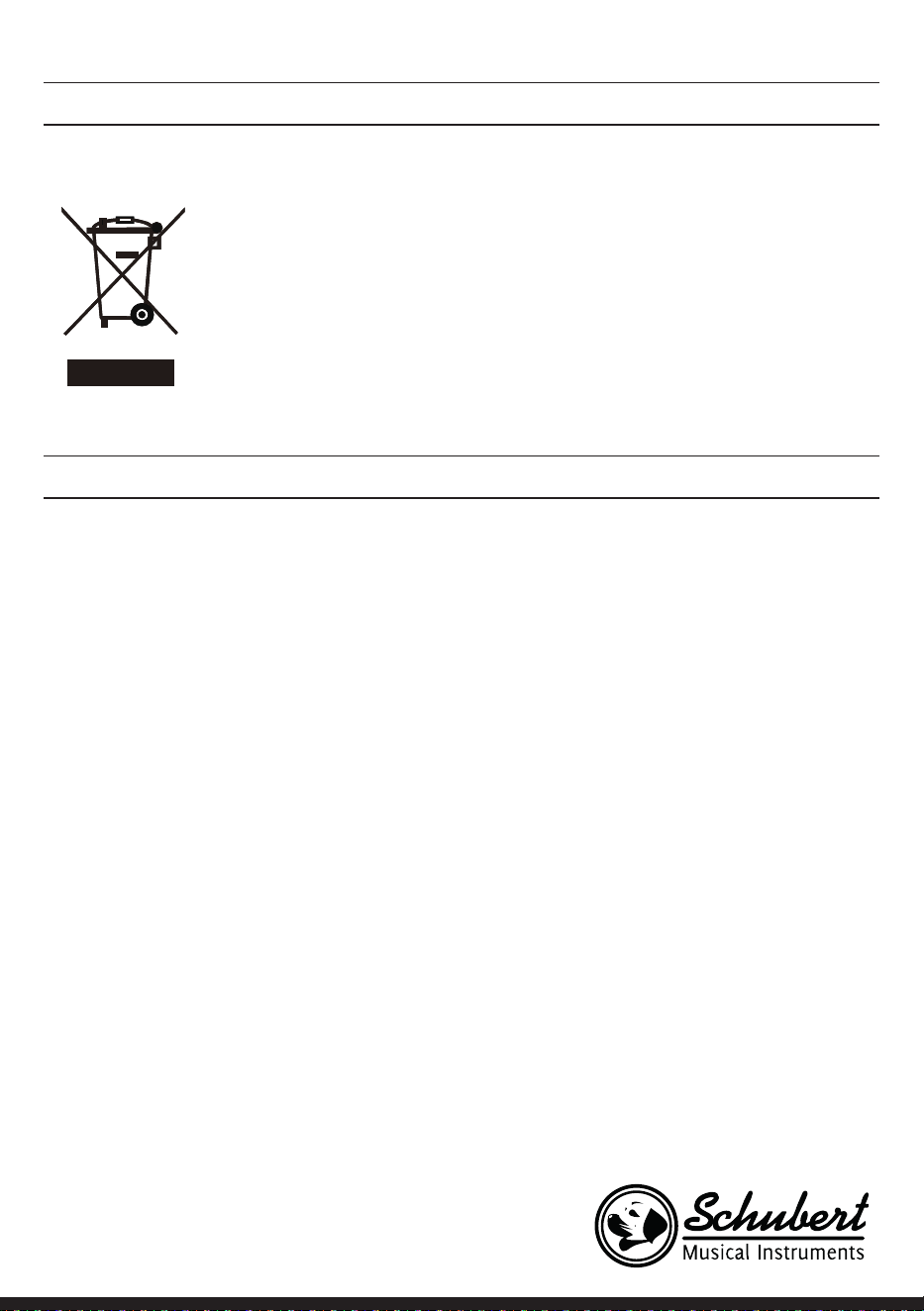
121
INDICACIONES SOBRE LA RETIRADA DEL APARATO
Si en su país existe una disposición legal relativa a la
eliminación de aparatos eléctricos y electrónicos, este
símbolo estampado en el producto o en el embalaje
advierte que no debe eliminarse como residuo doméstico.
En lugar de ello, debe depositarse en un punto de recogida
de reciclaje de aparatos eléctricos y electrónicos. Una
gestión adecuada de estos residuos previene consecuencias
potencialmente negativas para el medio ambiente y la salud
de las personas. Puede consultar más información sobre el
reciclaje y la eliminación de este producto contactando con
su administración local o con su servicio de recogida de
residuos.
FABRICANTE E IMPORTADOR (REINO UNIDO)
Fabricante:
Chal-Tec GmbH, Wallstraße 16, 10179 Berlín, Alemania.
Importador para Gran Bretaña:
Berlin Brands Group UK Limited
PO Box 42
272 Kensington High Street
London, W8 6ND
United Kingdom

123
La ringraziamo per aver acquistato il dispositivo. La preghiamo di leggere
attentamente le seguenti istruzioni per l’uso e di seguirle per evitare possibili
danni tecnici. Non ci assumiamo alcuna responsabilità per danni scaturiti da
una mancata osservazione delle avvertenze di sicurezza e da un uso improprio
del dispositivo. Scansionare il codice QR seguente, per accedere al manuale
d’uso più attuale e per ricevere informazioni sul prodotto..
DATI TECNICI
Numero articolo 10033246 10033247
Tastiera Tastiera da pianoforte standard con 88 tasti
Schermo LED
Tonalità 360 strumenti diversi
Stili 160 stili
Demo 80 brani demo
Effetti Sensibilità di pressione, risonanza, coro, dual, dividere, menu funzioni,
consolle sound
Registrazione Traccia singola, diverse tracce, registrazione combinata
Accompagnamento Start/Stop, sincronizzare, inserire, velocità
Accordo Accordo automatico ABC
Pedali Pedale destro (pedale piano), pedale destro (pedale risonanza)
Connessioni esterne USB (MP3), USB (MIDI), MIDI IN/OUT
Trasformatore 220 V~, 12-15 V
Ingresso tensione 12-15 V , 2-3 A
INDICE
Dati tecnici 123
Avvertenze di sicurezza 124
Tasti e connessioni 125
Montaggio 128
Messa in funzione e utilizzo 130
Menu funzioni 139
Tabella delle canzoni 145
Tabella dello stile 148
Avviso di smaltimento 151
Produttore e importatore (UK) 151

124
AVVERTENZE DI SICUREZZA
• Leggere attentamente il manuale d’uso prima dell’utilizzo per evitare danni a cose e/o persone.
• Collegare il dispositivo a una presa elettrica utilizzando esclusivamente l’adattatore incluso in consegna.
L’utilizzo di altri adattatori può danneggiare il dispositivo.
• Non aprire in nessun caso l’alloggiamento dello strumento.
• Non cercare di smontare autonomamente il dispositivo o di sostituire componenti al suo interno. Se
compaiono malfunzionamenti durante l’utilizzo, smettere di usare il dispositivo e contattare il servizio
di assistenza ai clienti.
• Non posizionare il dispositivo in luoghi estremamente polverosi, dove sono presenti vibrazioni, basse o
alte temperature (come ad es. luoghi esposti alla luce solare, vicino a fonti di calore, in auto se si trova al
sole), dato che potrebbero rovinarsi l’aspetto e componenti interni.
• Non posizionare mai il dispositivo su superci instabili o sconnesse, altrimenti il dispositivo potrebbe
cadere e danneggiarsi.
• Non poggiare mai oggetti pieni di liquidi sopra al dispositivo, dato che potrebbero cadere e il liquido
potrebbe nire all’interno del dispositivo.
• Impostare il volume su 0 prima di accendere il dispositivo. Procedere poi a regolare progressivamente il
volume, in modo da non danneggiare gli altoparlanti.
• Non impostare mai il volume su “Massimo” per evitare di perdere l’udito mentre si suona.
• Non esercitare forza eccessiva sul dispositivo, sui tasti, sul tasto di accensione, sulle connessioni e non
poggiare oggetti pesanti sul dispositivo.
• Il dispositivo deve essere disimballato da un adulto, dato che bambini e bebè corrono il rischio di
soffocamento a causa dei materiali d’imballaggio. Conservare l’imballaggio in plastica in un luogo sicuro
o smaltirlo nel rispetto delle leggi.
• I piccoli componenti all’interno del dispositivo possono essere pericolosi per bambini sotto ai 3 anni e
non sono adatti a loro.
• Le caratteristiche tecniche del dispositivo possono essere modicate senza preavviso.
• Questo dispositivo può essere utilizzato in tutte le zone climatiche, tranne in zone tropicali.
• Il dispositivo può essere utilizzato solo in luoghi che si trovano al di sotto di 2000 metri sopra al livello
del mare.
• Assicurarsi che gocce e spruzzi d’acqua non niscano sulla spina o sul cavo di alimentazione.
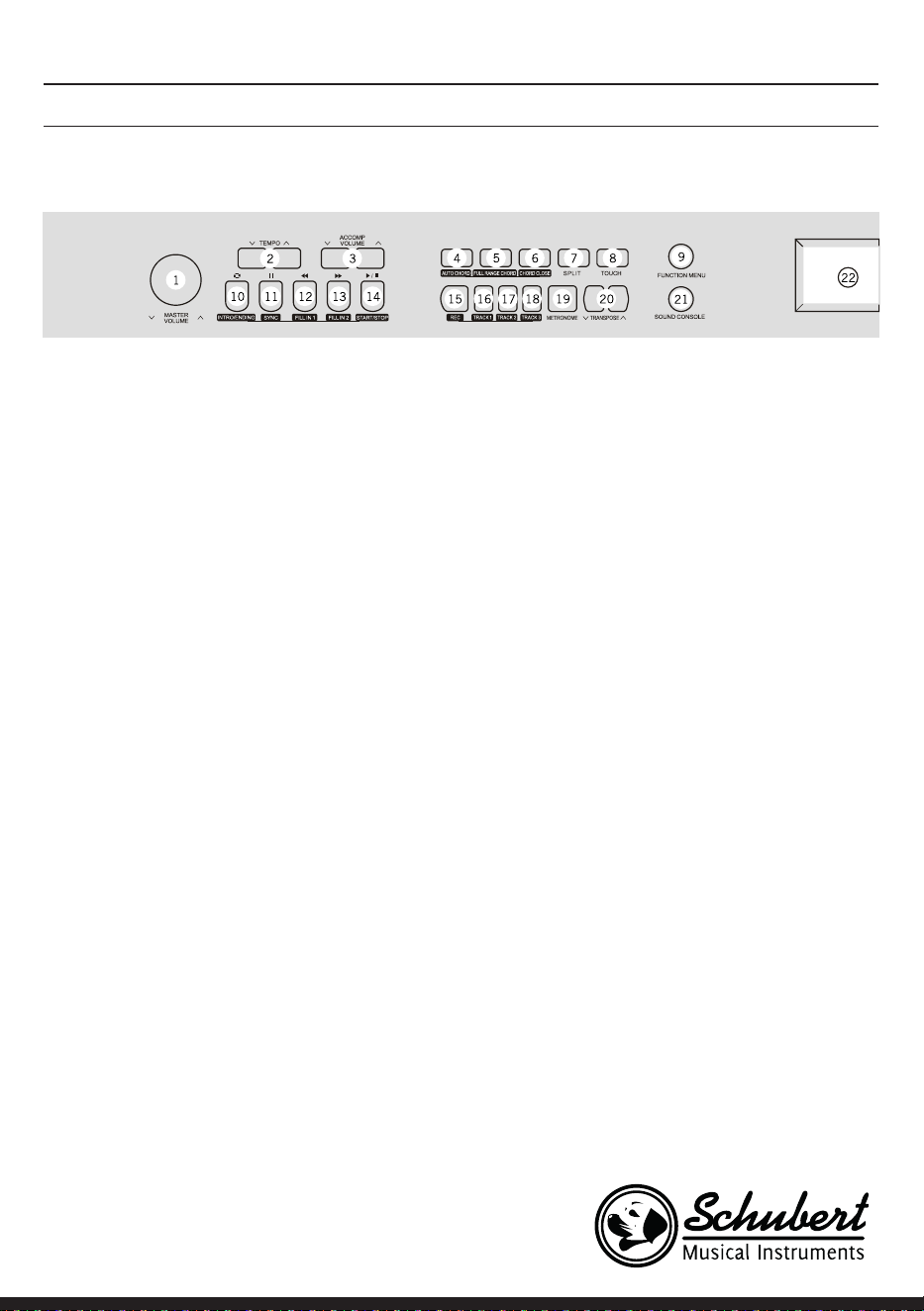
125
1 MASTER VOLUME – Volume principale
2 TEMPO ∨/∧– Regular el tempo actual
3 ACCOMP VOLUME ∨/∧ Volume
accompagnamento
4 AUTO CHORD – Accordo automatico
5 FULL RANGE CHORD – Tutti gli accordi
6 CHORD CLOSE - Fine accordo
7 SPLIT – Dividere
8 TOUCH – Selezionare curva touch della
tastiera
9 FUNCTION MENU - Menu funzioni
In modalità canzone
10 Denire l’inizio/la ne di una porzione di
brano
11 Pausa
12 Tornare indietro rapidamente
13 Avanzare rapidamente
14 Avviare/fermare la riproduzione del brano
In modalità stile
10 Intro/Ending – Riprodurre l’intro/la ne
dell’accompagnamento automatico
11 SYNC – Aprire/chiudere la funzione di
sincronizzazione
12 FILL IN 1 - Inserire variazione 1
13 FILL IN 2 - Inserire variazione 2
14 START/ STOP – Avviare/fermare la
riproduzione dell’accompagnamento
15 REC – Avviare la funzione di registrazione
16 TRACK 1 – Selezionare traccia 1 per la
registrazione
17 TRACK 2 – Selezionare traccia 2 per la
registrazione
18 TRACK 3 – Selezionare traccia 3 per la
registrazione
19 METRONOME – Aprire/chiudere la funzione
metronomo
20 TRANSPONSE ∨/∧ – Trasposizione
21 SOUND CONSOLE – Aprire la consolle di
regolazione del suono
22 Schermo LCD - Mostra tutte le informazioni
importanti
TASTI E CONNESSIONI
Pannello di controllo sinistro
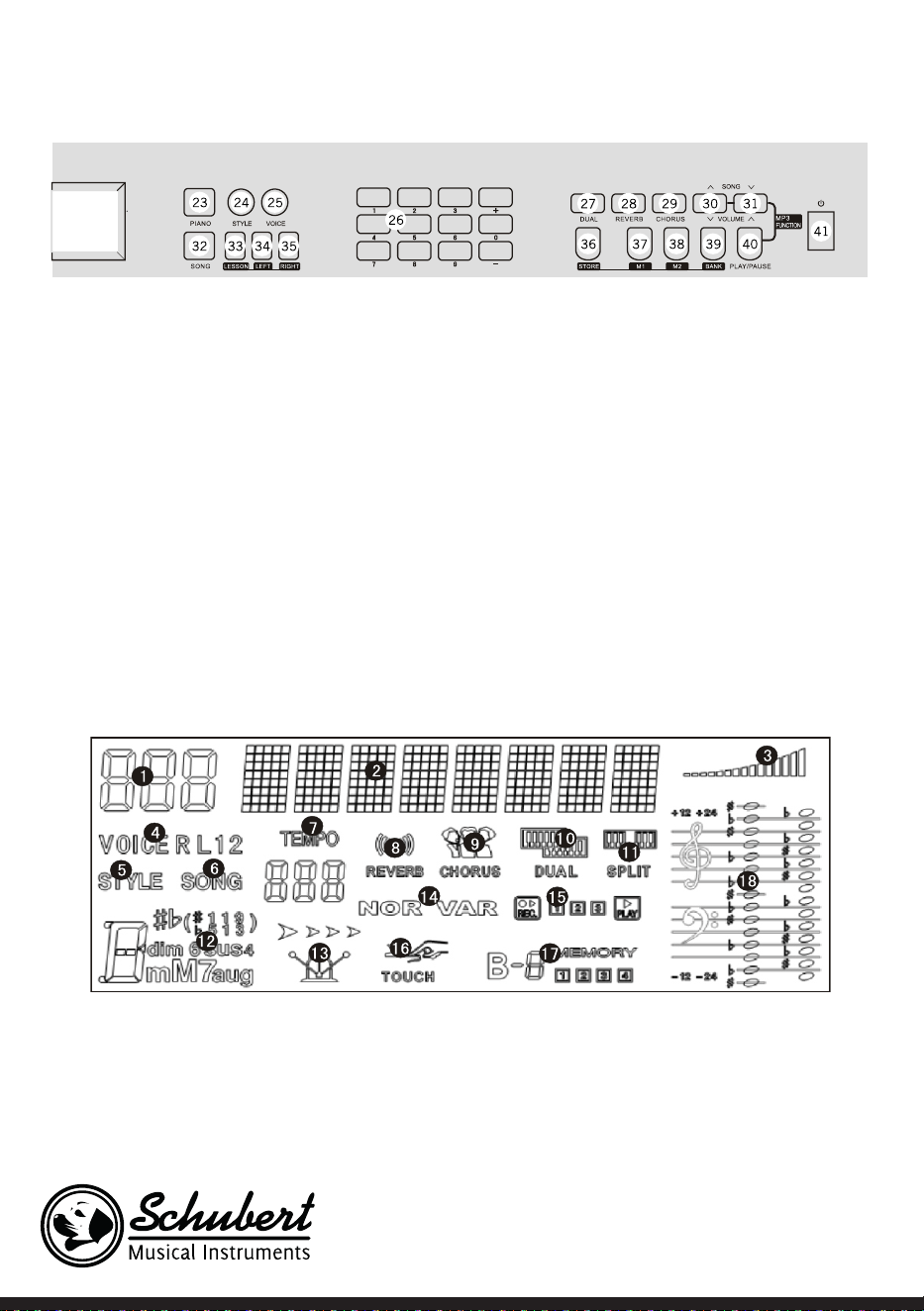
126
Pannello di controllo destro
23 PIANO – Aprire/chiudere la modalità
pianoforte
24 STYLE – Aprire le funzioni stile
25 VOICE – Aprire le funzioni suono
26 Cifre +/-– Regolare le impostazioni
27 DUAL – Doppia voce on/off
28 REVERB - Risonanza
29 CHORUS - Coro
30 SONG/ VOLUME – Passare al brano MP3
successivo/Abbassare il volume in modalità
MP3
31 SONG ∨/∧ / VOLUME ∨/∧ – Passare al brano
MP3 precedente/Alzare il volume in modalità
MP3
32 SONG – Passare in modalità funzione canzone
33 LESSON – Avviare la modalità di
apprendimento
34 LEFT – Selezionare la voce della mano sinistra
35 RIGHT – Selezionare la voce della mano destra
36 STORE – Tasto memoria
37 M1 – Aprire direttamente l’impostazione 1 del
pannello di controllo
38 M2 – Aprire direttamente l’impostazione 2
del pannello di controllo
39 BANK – Cambiar a la memoria de datos
40 PLAY/PAUSE – Play/pausa in modalità MP3
41 On/Off
Schermo LCD
1 Indicazione digitale
2 Indicazione note
3 Volume
4 Selezione suono
5 Selezione stile
6 Canzoni
7 Ritmo
8 Efecto reverberación
9 Coro
10 Doppia voce
11 Suddivisione tastiera
12 Indicazione accordo
13 Metronomo
14 FILL IN1/FILL IN2
15 Registrazione/
Riproduzione
16 Pressione sul tasto
17 Memoria
18 Chiavi musicali
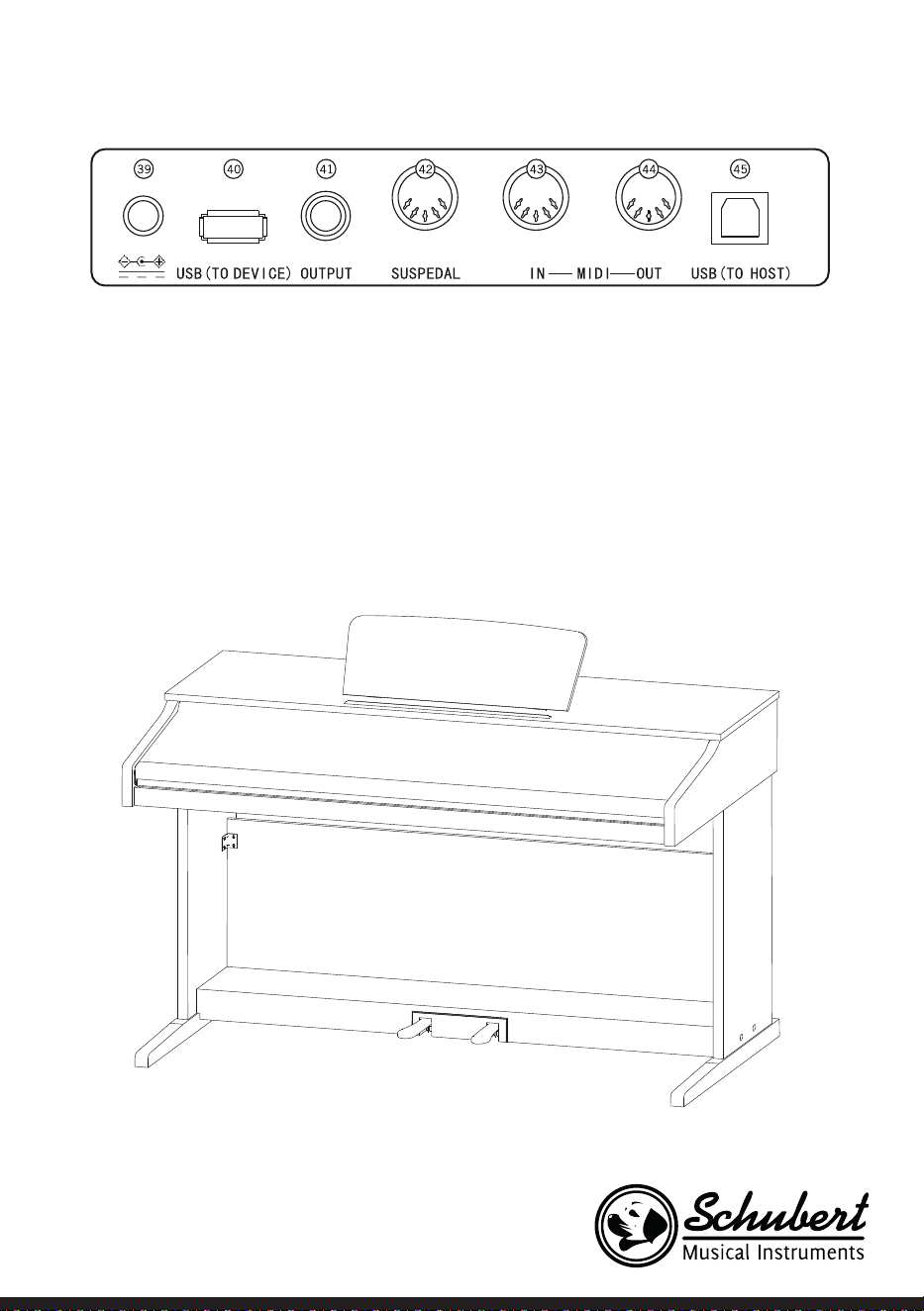
127
Lato posteriore
39 Connessione di alimentazione esterna
40 USB (TO DEVICE) – Connessione USB
41 OUTPUT – Connessione audio per equipaggiamento esterno
42 Connessione PEDALE
43 Connessione MIDI IN – Ricezione di informazioni MIDI, trasmesse da equipaggiamento MIDI esterno o
da computer
44 Connessione MIDI OUT – Inviare informazioni del dispositivo a computer o altri dispositivi MIDI tramite
questa connessione
45 Connessione USB (MIDI)
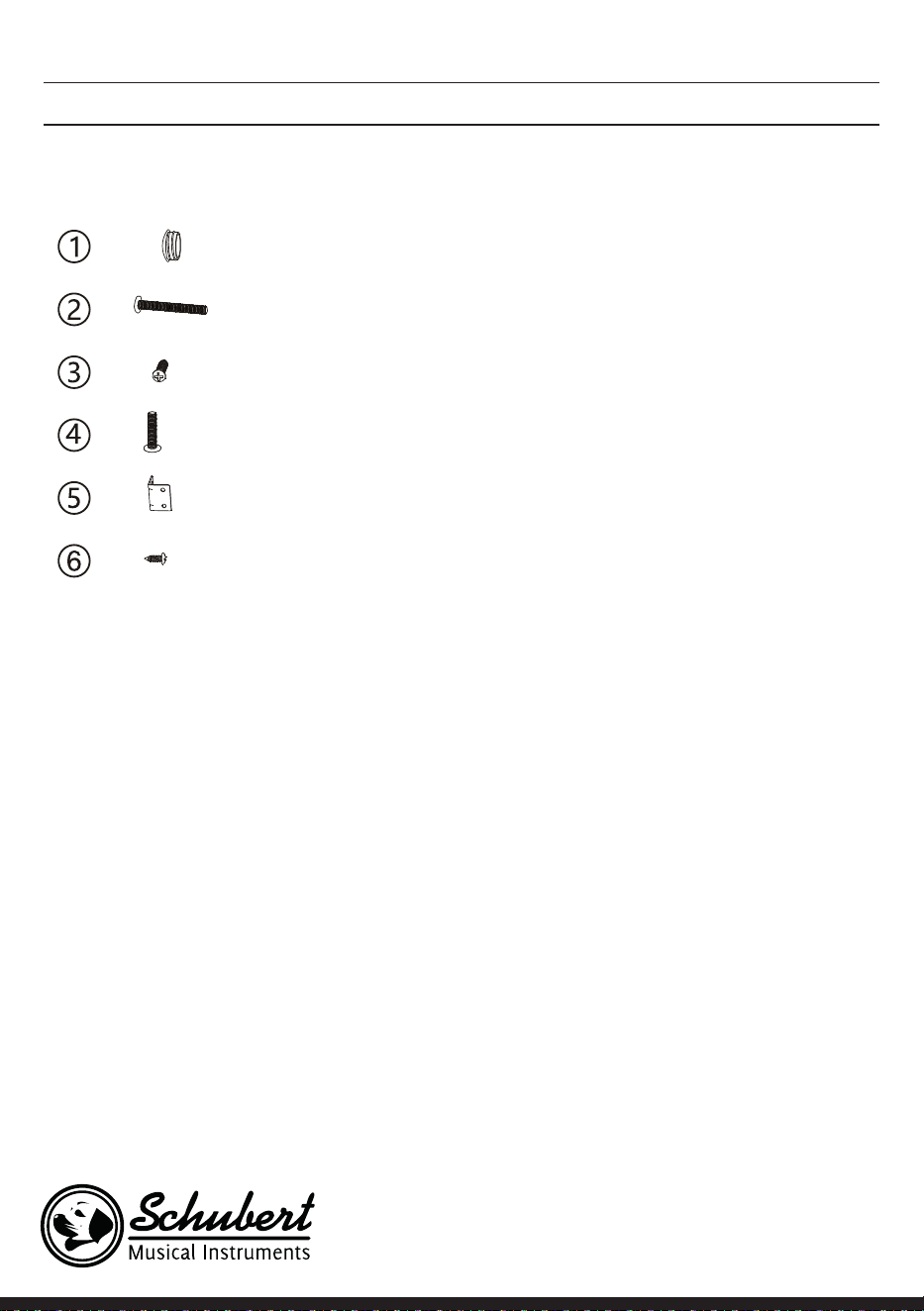
128
MONTAGGIO
Copertura in plastica
marrone
4
4
6
4
2
8
Denizione Numero di pezzi
Viti M6*50
Viti PA4*16
Viti M6*20
Angolare di collegamento del supporto
del pianoforte
Viti BA3*8
Montaggio del corpo principale del dispositivo
1. Utilizzare le 4 viti M5*50 per collegare i pannelli di posizionamento destro e sinistro alla scatola dei
pedali.
2. Utilizzare le 4 viti PA3*8 per avvitare uno dei due angolari di collegamento alla parete posteriore del
dispositivo.
3. Utilizzare le viti BA3*8 per ssare l’altro angolare di collegamento ai pannelli di posizionamento destro
e sinistro.
4. Utilizzare le 5 viti PA4*16 per collegare il lato inferiore della parete posteriore del dispositivo alla scatola
dei pedali.
5. Posizionare il corpo principale del pianoforte sui pannelli di posizionamento destro e sinistro e ssarlo
con 4 viti M6*20.
6. Collegare lo spinotto di collegamento dei pedali con la connessione dei pedali.
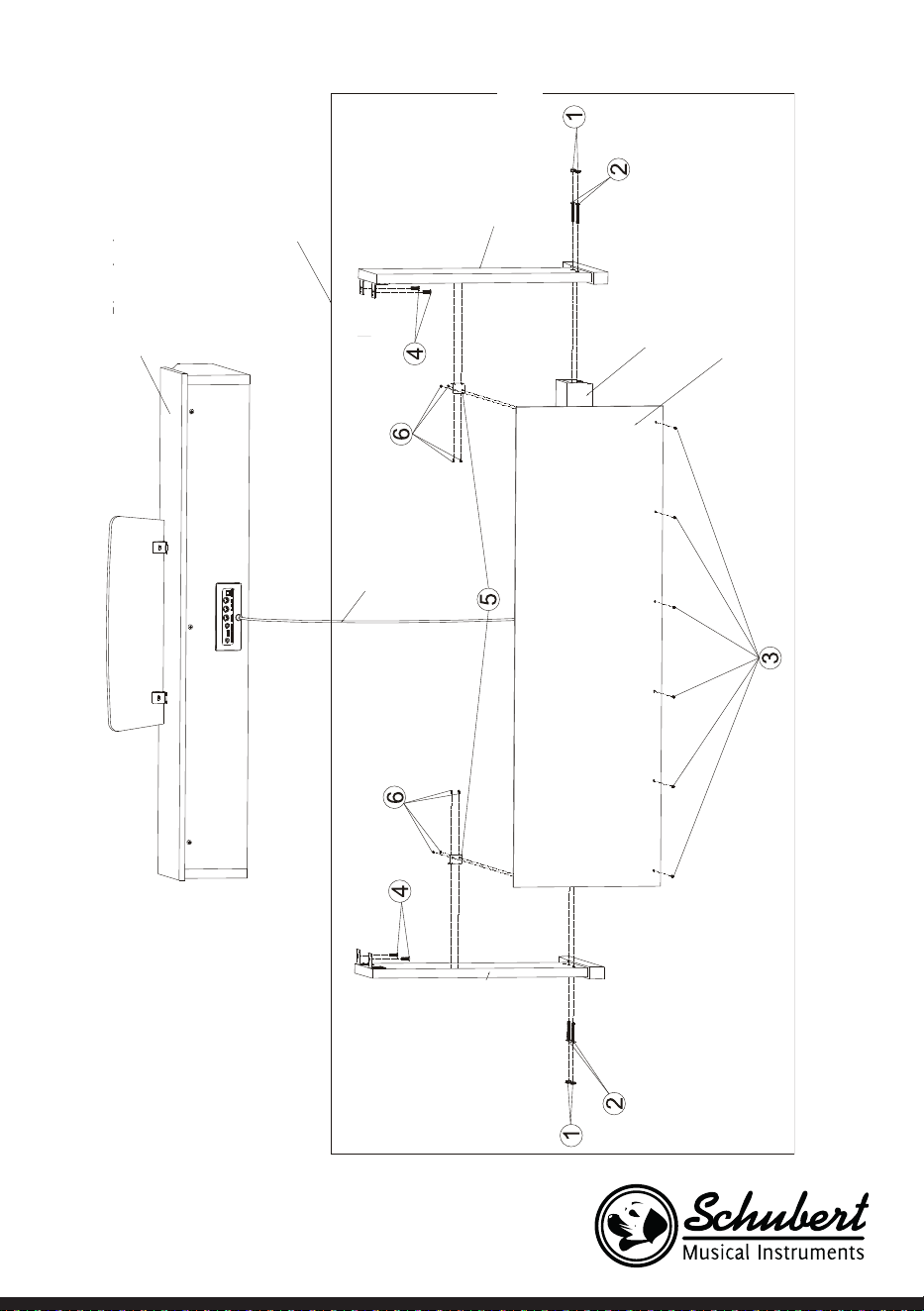
129
Corpo del pianoforte
Supporto del
pianoforte
Gamba di appoggio
sinistra
Gamba di appoggio
destra
Pedali
Rivestimento
posteriore
Rivestimento connessione
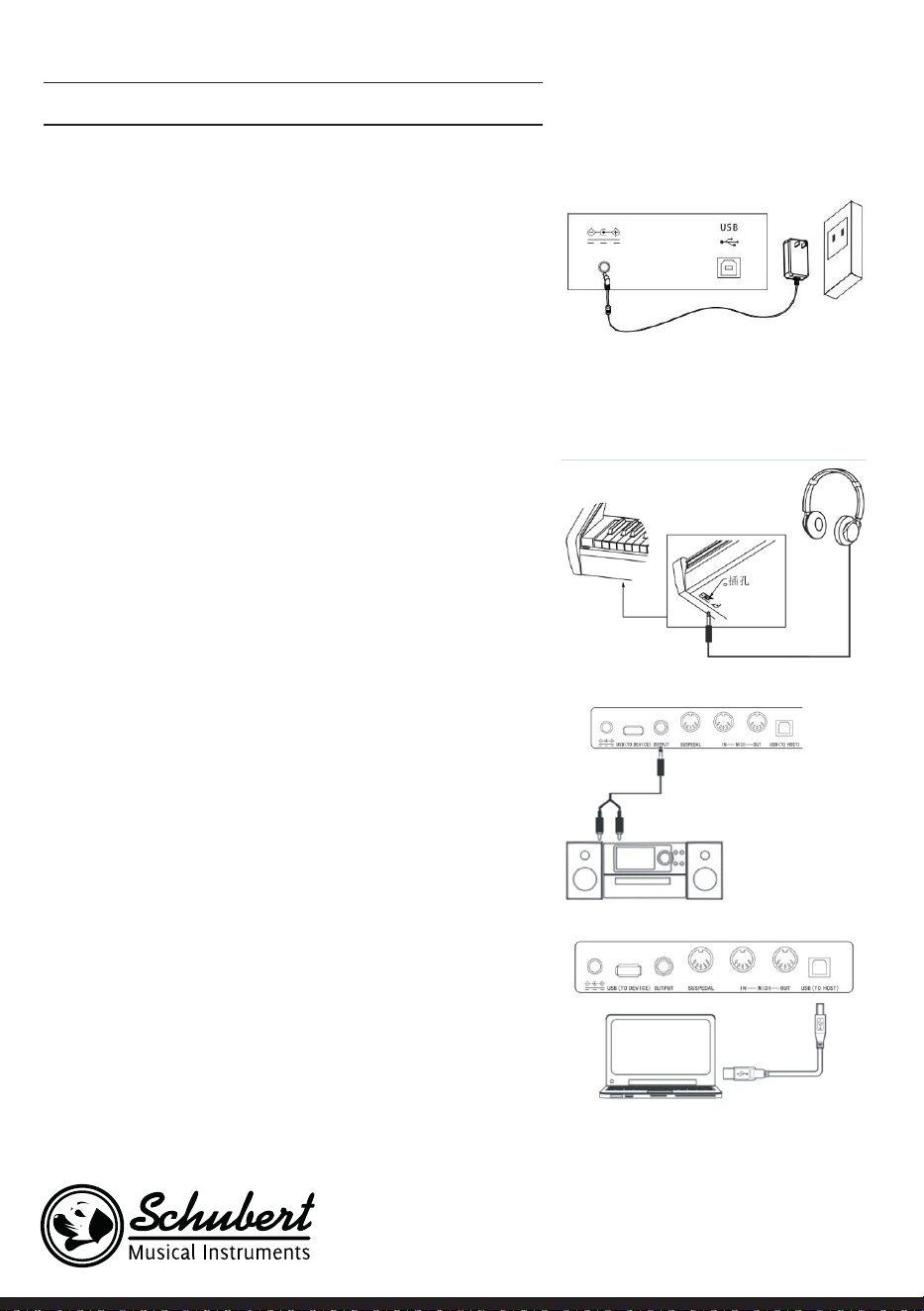
130
MESSA IN FUNZIONE E UTILIZZO
Alimentazione
1. Assicurarsi che il dispositivo sia spento quando lo si collega
all’alimentazione.
2. Collegare lo spinotto dell’adattatore con la connessione DC
del dispositivo.
3. Inserire la spina nella presa elettrica.
4. Quando si preme il tasto POWER, lo schermo LCD mostra
“Loading”, a indicare che il pianoforte è stato acceso.
Nota: per la vostra sicurezza, spegnere il dispositivo durante
temporali e in caso non venga utilizzato per lunghi periodi.
Collegare le cufe
• Se si desidera esercitare da soli o di notte, è possibile
collegare delle cufe stereo tramite l’apposita connessione
del dispositivo.
• Gli altoparlanti dello strumento vengono disattivati
automaticamente non appena vengono collegate le cufe e
l’audio viene riprodotto solo attraverso le cufe.
Nota: l’utilizzo di volume troppo elevato in cufa per
temi prolungati può danneggiare l’udito.
Collegare accessori audio al dispositivo
• Collegando accessori audio esterni è possibile ottenere
migliori effetti musicali.
• Con la connessione AUDIO-OUT sul retro del dispositivo
è possibile collegare con un cavo amplicatori, impianti
stereo, mixer, registratori, ecc.
Nota: assicurarsi che il dispositivo sia spento e il volume
sia al minimo prima di collegare altri dispositivo al
pianoforte.
Collegamento al computer
• Questo dispositivo è dotato di connessione USB.
• Con un cavo USB è possibile collegare il dispositivo
al computer e trasmettere e ricevere informazioni in
entrambe le direzioni.
• Ad esempio, è possibile salvare sul computer brani suonati
al pianoforte o riprodurre le MIDI del computer tramite il
dispositivo.
Nota: gli accessori audio USB non possono essere
impostati contemporaneamente per ingresso e uscita
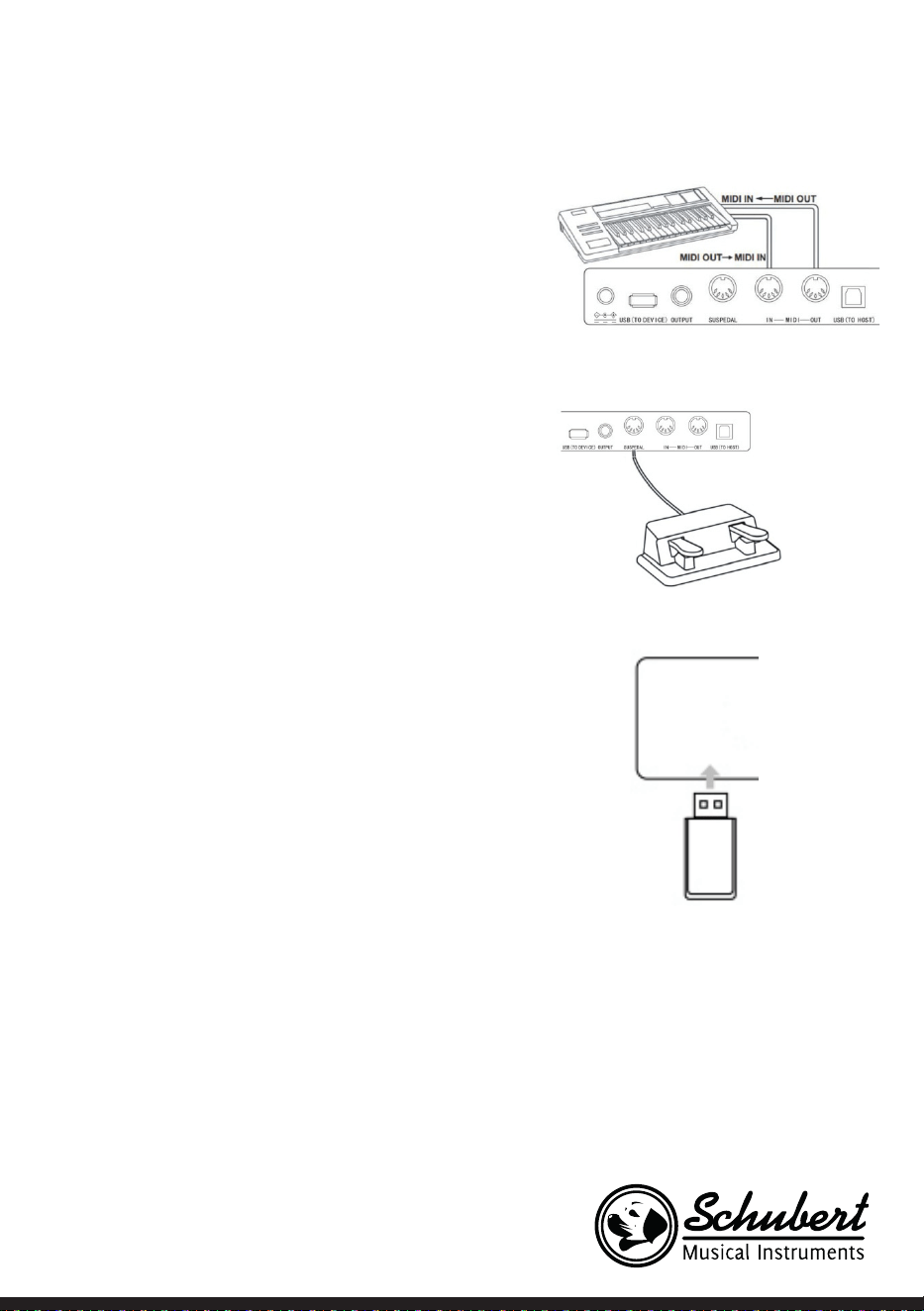
131
audio.
Connessione ad altri dispositivi
• Se si collegano la connessione MIDI IN del dispositivo con
la connessione MIDI OUT di altri dispositivi, è possibile
utilizzare il pianoforte come fonte sonora.
• Se si collegano la connessione MIDI OUT del dispositivo
con la connessione MIDI IN di altri dispositivi, è possibile
utilizzare l’istrumento come controllo MIDI.
Connessione pedali
Quando i pedali vengono collegati all’apposita connessione sul
retro dello strumento, il dispositivo è dotato di due funzioni
per i pedali:
1. Premendo questo pedale mentre si suona, tutte le note
vengono suonate a volume più basso.
2. Premendo questo pedale mentre si suona, le note risuonano.
Connessione di dispositivi USB
• Lo strumento supporta dispositivi USB no a 32 GB.
• File MP3 sulla chiavetta USB possono essere riprodotti
attraverso lo strumento.
Avvertenza: non scollegare il dispositivo USB durante
la riproduzione, altrimenti potrebbero risultare avvisi di
errore o danni al dispositivo USB.
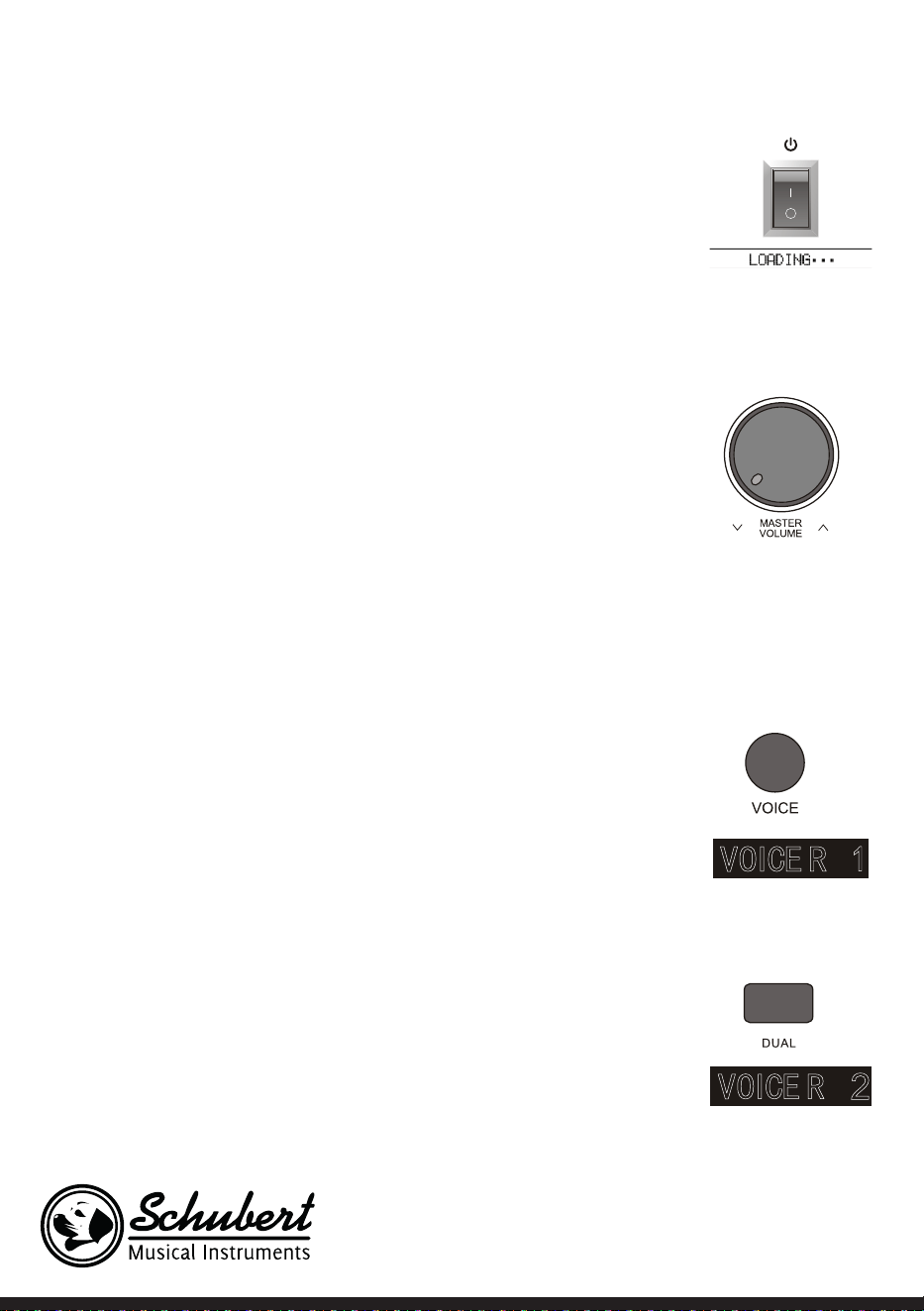
132
Fonte di alimentazione
1. Assicurarsi prima di tutto che l’adattatore sia ben collegato.
2. Quando si preme POWER, lo schermo LCD si illumina e mostra la schermata
iniziale.
Nota: se lo schermo LCD non si illumina dopo aver premuto POWER,
controllare se l’adattatore è ben collegato.
Regolazione del volume
• Dopo aver acceso lo strumento, ruotare la manopola MASTER VOLUME verso
destra per alzare il volume e verso sinistra per abbassarlo.
• Il volume può essere regolato in base alle singole necessità e preferenze.
Impostare diversi tipi di strumenti
• Questo strumento è dotato di centinaia di suoni di strumenti, incluso il suono
di musica popolare cinese, batteria, ecc.
• Per informazioni più dettagliate, guardare la tabella de suoni.
• Lo strumento è dotato inoltre di un effetto, che è relativo al rispettivo suono,
in modo che la voce abbia un suono migliore.
Selezionare e suonare un suono
1. Premendo NOTE si raggiunge la modalità di selezione del suono. Il simbolo
promemoria “R1”, il nome del suono attuale e il suo numero vengono mostrati
sullo schermo LCD.
2. Utilizzare i tasti numerici e +/- per selezionare il suono desiderato.
3. Premete i tasti e godetevi suoni meravigliosi.
Nota: premere VOICE per cambiare la fonte sonora. Viene aperta la funzione
a doppia voce. Le relative indicazioni “R1/R2/L” compaiono sullo schermo.
Doppia voce
Questo strumento è dotato di funzione a doppia voce. Con questa funzione è
possibile suonare contemporaneamente due suoni sovrapposti. Con questo
effetto e possibile arricchire i livelli musicali, dando l’impressione che vengano
suonati due strumenti al contempo. La prima voce “R1” è presente già prima
dell’inizio della funzione. Dopo aver attivato la funzione è presente anche la voce
“R2”.
1. Premere DUAL per aprire la funzione. “R2” compare sullo schermo LCD.
Inoltre vengono mostrati il nome e il numero del suono aggiuntivo.
2. Selezionare la seconda voce desiderata con VOICE e +/-.
3. Suonando entrambe le voci in sincronia, sembra che vengano suonati due
strumenti contemporaneamente.
133
4. La funzione viene disattivata premendo di nuovo DUAL. L’indicazione “R2”
scompare dallo schermo e questo torna allo stato precedente..
Nota: se la tastiera dello strumento è stata divisa, la funzione a doppia voce
è disponibile solo per i tasti della mano destra. I tasti della mano sinistra
non sono dotati di tale funzione.
Funzione touch (sensibilità di pressione)
Il pannello di controllo dello strumento è dotato di una funzione touch, che
permette di dare maggiore espressività alla performance. Possono essere
selezionate tre diverse funzioni touch.
1. Premere TOUCH per attivare la funzione. La funzione touch predenita è
“002” e viene mostrato sullo schermo.
2. Premendo più volte TOUCH è possibile selezionare una delle funzioni nella
sequenza”001-003: OFF”.
3. Quando lo schermo LCD mostra “OFF”, la funzione touch è disattivata.
Trasposizione
Utilizzando la funzione di trasposizione, è possibile impostare la tastiera su
mezza tonalità superiore/inferiore, senza cambiare il modo in cui si suona.
1. Premere TRANSPOSE ∧ o TRANSPOSE ∨ per attivare la funzione, per
impostare la tastiera su mezza tonalità superiore o inferiore. L’attuale valore
di trasposizione “xxx Transpose” viene mostrato sullo schermo LCD.
2. Possono essere regolate sulla tastiera no a 12 mezze tonalità.
3. Tenendo premuti TRANSPOSE ∧ o TRANSPOSE∨, la tastiera viene riportata
al valore di fabbrica “000 Transpose”.
Nota: se si desidera suonare un pezzo in “Sol”, ma non si ha condenza
con la relativa tastiera, è possibile impostare il valore di trasposizione su
-05 o 007, in modo da utilizzare la tastiera per “Do”, che suona però come
se fosse in “Sol”. Questa funzione è disponibile solo per l’intera tastiera e
l’accompagnamento automatico con accordi.
Modalità pianoforte
Questa funzione permette di utilizzare tutta la tastiera con il suono di un
pianoforte.
1. Para activar/desactivar la función, pulse el botón PIANO.
2. La selección del acompañamiento funciona igual que en el resto de modos.
No obstante, solo se puede seleccionar un acompañamiento de percusión y
ningún armónico.
Nota: in questa modalità è possibile aprire sia la consolle di regolazione
del suono, che il menu funzioni. La funzione accordo viene chiusa
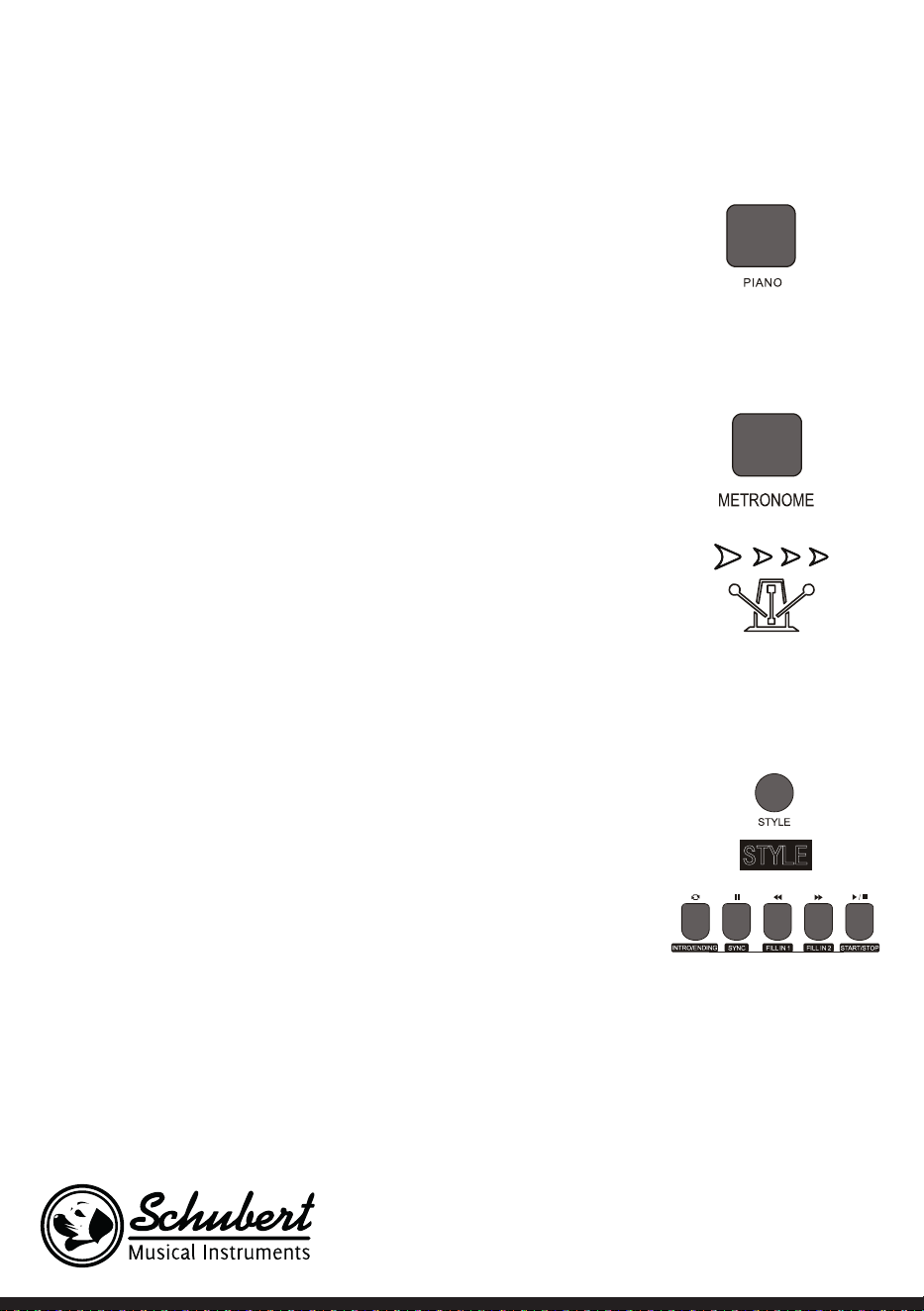
134
automaticamente quando si attiva questa modalità.
Metronomo
Se non si è sicuri che il ritmo sia giusto quando ci si esercita, è possibile attivare
la funzione metronomo.
1. Premere METRONOME per attivare la funzione. Viene dato il ritmo.
Premere di nuovo METRONOME per disattivare la funzione.
2. Selezionare l’impostazione ritmica nel menu funzioni per visualizzare
diverse impostazioni.
Nota: se la funzione viene aperta mentre si suona, il suono del ritmo viene
emesso dalla prossima battuta e si adegua al relativo stile.
• Quando viene aperta la funzione, lo strumento la adatta automaticamente
allo stile selezionato.
• La funzione può essere attivata anche durante la registrazione, dato che il
suono del metronomo non sarà udibile sul le registrato.
Accompagnamento
Accompagnamento automatico
• Attivando questa funzione, è possibile suonare solo il piano e
l’accompagnamento, ad es. sotto forma di orchestra, viene riprodotto
automaticamente. Bisogna solo selezionare un accompagnamento dalla
tabella dello stile e suonare gli accordi con la mano sinistra.
• Questo strumento è dotato di diversi accompagnamenti automatici, visibili
nella tabella dello stile. Sceglietene uno adeguato e godetevelo.
Riprodurre accompagnamento automatico (riprodurre solo la parte delle
percussioni)
1. Premere STYLE per passare in modalità Stile. Nell’angolo in alto a sinistra
dello schermo LCD si illumina l’indicazione “STYLE”. Lo schermo mostra
contemporaneamente anche il nome e il numero dello stile attualmente
selezionato.
2. Selezionare lo stile desiderato con i tasti numerici o con +/-.
3. La parte delle percussioni dello stile può essere riprodotta subito premendo
START/STOP. Inoltre, è possibile premere SYNC per sincronizzare lo stile.
Sullo schermo LCD si illumina anche il punto della battuta. Basta premere un
tasto a piacere per iniziare la performance.
Sezioni di accompagnamento
L’accompagnamento automatico di questo strumento comprende numerose
sezioni di accompagnamento diverse, per questo, si consiglia di organizzare

135
appositamente i propri accompagnamenti. Le sezioni comprendono: opera principale (A, B), intro, ne. Se
è possibile riprodurre l’accompagnamento, utilizzando le sezioni è possibile realizzare una performance
professionale.
1. Intro: la selezione dell’intro è adatta all’inizio di un pezzo. Finito l’intro, l’accompagnamento passa alle
impostazioni dell’opera principale. La lunghezza dell’intro può essere diversa in base allo stile selezionato.
2. Programma principale: la seleziona di “Main Play” è adatta quando viene suonata la parte principale di un
brano. Il programma principale viene riprodotto no a quando viene premuto un altro tasto.
3. Inserire: L’inserimento di Sezione 1 o 2 permette di dare professionalità alla performance. Dopo aver
riprodotto le sezioni inserite, l’accompagnamento torna al programma principale.
4. Fine: questo tasto può essere premuto alla ne di un pezzo. Il pezzo viene concluso automaticamente
quando è stata suonata la sequenza nale. La lunghezza della sequenza nale dipende dallo stile
selezionato e può variare.
Nota: tenendo premuto FILL IN 1 o FILL IN 2, la variazione viene inserita nell’accompagnamento no a
quando si rilascia il tasto. L’accompagnamento torna poi al programma principale. Premendo FILL IN si
cambia il programma principale predenito. Quando l’accompagnamento si ferma viene mostrato sullo
schermo LCD.
Riprodurre diverse sezioni di accompagnamento
1. Premendo STYLE si raggiunge la modalità stile. Selezionare lo stile desiderato con i tasti numerici o con
+/-.
2. Premere AUTO CHORD per attivare la funzione di accordo automatico.
3. Premere SYNC per aprire la funzione di sincronizzazione.
4. Premere FILL IN 1 per selezionare la riproduzione principale 1.
5. Se si preme INTRO/ENDING, lo schermo mostra “NOR”. Questo signica che lo strumento si trova
in modalità di preparazione.
6. L’accompagnamento inizia non appena si suona un accordo nel settore della tastiera della mano
sinistra. Dopo l’intro, l’accompagnamento passa al programma principale.
7. Se si preme FILL IN 2, viene inserita una piccola variazione nell’accompagnamento. Finita la
variazione, l’accompagnamento torna automaticamente al programma principale.
8. Se si preme INTRO/ENDING, l’accompagnamento suona una sequenza conclusiva e poi si arresta.
Impostare il volume dell’accompagnamento ACCOMP VOLUME ∧/∨
Il volume può essere regolato per l’intero accompagnamento. Questa funzione permette di avere un
rapporto equilibrato tra volume dei tasti e dell’accompagnamento.
1. Premendo ACCOMP VOLUME ∧/∨, sullo schermo LCD viene mostrata l’attuale impostazione del
volume dell’accompagnamento. Premere ACCOMP VOLUME ∧ per alzare il volume e ACCOMP VOLUME
∨ per abbassarlo. Intervallo di regolazione: 0- 127.
2. Premendo contemporaneamente ACCOMP VOLUME ∧ e ACCOMP VOLUME ∨, viene chiuso il volume
dell’accompagnamento. Lo schermo LCD mostra “Accompaniment volume: OFF”. Premere di nuovo
ACCOMP VOLUME ∧ e ACCOMP VOLUME ∨ contemporaneamente per aprirlo di nuovo.
Velocità

136
Ogni stile ha una velocità diversa. Il valore può essere regolato in relazione alle capacità e alle necessità
dettate dei singoli brani.
1. Con los botones TEMPO ∧ et TEMPO ∨ se puede regular el valor de velocidad predeterminado.
2. Pulsando simultáneamente los botones TEMPO ∧ et TEMPO ∨ la velocidad se restablece al valor original.
Nota: La velocidad se establece para cada estilo automáticamente. Mientras toca en un determinado
estilo, la velocidad se mantiene.
Accordi
Accordo automatico
Se si preme AUTO CHORD, comincia l’accompagnamento automatico della mano sinistra.
Accordo settore complessivo
Se si preme FULL RANGE ACCORD, tutti i tasti premuti vengono suonati come un accordo.
Terminare l’accompagnamento con accordo
Premendo CHORD CLOSE, viene terminato l’accompagnamento con accordo. Lo stile viene mantenuto.
137
Tabella accordi
Nome Abbreviazione Annotazione
Modo maggiore M 1 - 3- 5
Sesta maggiore M6 1 - 3 - 5 - 6
Settima maggiore M7 1 - 3 - (5) - 7
Settima maggiore undicesima M7 #11 1 -2 -3 -5
Maggiore con nona 9 Madd9 1-2 - 3- 4- 5
Nona maggiore M9 1 - 2 - 3 - (5) - 7
Sesta maggiore con nona 9 69 1 - 2 - 3 - (5) - 6
Accordo aumentato aug 1 - 3 -
#
5
Bemolle m 1 -
b
3 - 5
Sesta minore m6 1 -
b
3 - 5 - 6
Settima minore m7 1 -
b
3 - (5) - 7
Settima minore con quinta diminuita m7
b
5 1 - 3- 5 - 7
Bemolle con nona 9 madd9 1 -2 - 3- 5
Nove bemolle m9 1 - 2 - 3 - 5
Accordo di settima bemolle con nona e
undicesima
m11 1 - 3 - (5) - 7
Accordo di settima dominante mM7 1 -2 -3 - (5) - 7
Accordo di nona dominante mM9 1 - 2 - 3 - (5) - 7
Accordo diminuito dim 1 - 3 - 5
Settima diminuita dim7 1 - 3- 5 - 7
Settima 7 1 - 3 - (5) - 7
Settima con 4 sospeso 7sus4 1 - 4 - 5 - 7
Settima con nona 9 79 1 -2 - 3- (5) - 7
Bemolle sette-undici 7
#
11 1 - 2 - 3 - (5) -
b
7
Bemolle sette-tredici 713 1 - 3- (5) - 7 / 2 - 3 - 5 - 6 - 7
Accordo di settima dominante con nona minore 7
b
9 1 - 2 - 3- (5)- 7- 9
Settima aumentata M7aug (1) - 3 -
#
5 - 7
Accordo sus4 sus4 1 - 4 - 5
Accordo uno-più-due-più-cinque 1+2+5 1 - 2 - 5
138
Effetto risonanza
• Premendo REVERB è possibile attivare/disattivare l’effetto risonanza.
• Quando la risonanza è attiva, si illumina l’indicazione “Reverb”.
• Quando viene spenta la risonanza, scompare l’indicazione “Reverb”.
Coro
• Premendo CHORUS è possibile attivare/disattivare l’effetto coro.
• Quando la risonanza è attiva, si illumina l’indicazione “Chorus”.
• Quando viene spenta la risonanza, scompare l’indicazione “Chorus”.
Regolazione suono
• Con la regolazione del suono è possibile impostare il volume di ogni titolo.
• Premere SOUND CONSOLE per raggiungere il menu di regolazione del suono. Lo schermo LCD mostra
il valore. Quando ci si trova nel menu di regolazione del suono è possibile impostare i singoli valori
premendo più volte SOUND CONSOLE.
• Il volume di ogni singolo valore può essere regolato separatamente con + e -.
Valori di impostazione
Contenuto da regolare Schermo LCD Intervallo di regolazione
Volume percussioni XXX Rhythm 0 - 127
Volume basso XXX Bass 0 - 127
Volume armonia XXX Chord 0 - 127
Volume sezione XXX Phrase 0 - 127
Volume sezione mano sinistra XXX Lower 0 - 127
Volume sezione mano destra XXX Upper 0 – 127
Nota: se non vengono effettuate regolazioni del suono entro 5 secondi, il menu viene abbandonato
automaticamente.
139
MENU FUNZIONI
Menu funzioni
Premere FUNCTION MENU per raggiungere questo menu. Lo schermo LCD mostra i valori. Nel menu
funzioni possono essere impostati i singoli valori con + e -.
N° Contenuto Schermo LCD Intervallo di regola-
zione
Valore predenito
1 Melodia XXX Tune -50 - +50 000
2 Suddivisione tastiera XXX KeySplit 1 – 88 034
3 Tipo di base XXX BeatType 0, 2 – 9 004
4 Volume metronomo XXX 0 – 127 080
5 Profondità risonanza XXX 0 – 127 050t
6 Profondità coro XXX 0 – 127 000
7 Ricezione MIDI XXX 1 – 16, ALL ALL
8 Trasmissione MIDI XXX 1 – 16 001
Nota: se non vengono effettuate regolazioni entro 5 secondi, il menu viene abbandonato
automaticamente..
Impostazione melodia
Con questa impostazione è possibile regolare in modo dettagliato l’altezza del suono.
1. Premere FUNCTION MENU per selezionare il menu melodia. Selezionare qui “tune menu”. Lo schermo
mostra temporaneamente “XXX Tune”. Premendo + e – è possibile regolare l’altezza del suono di mezza
tonalità in un intervallo di 50.
2. Premendo contemporaneamente + e -, l’altezza del suono torna al valore predenito di 000.
L’impostazione di questo parametro vale per la tastiera e per tutti gli stili.
Dividere la tastiera
Il punto in cui vengono divisi il settore di accordo automatico e la tastiera della mano destra si chiama
“KEYBOARD SPLIT POINT”.
Se la funzione di accordo automatico è disattivata, anche il settore sinistro della tastiera può essere
utilizzato per suonare musica.
1. Per dividere la tastiera, premere FUNCTION MENU e selezionare “Keyboard split”. Lo schermo LCD
mostra “XXX KeySplit”. Per determinare il punto, premere + e – o inserire direttamente un numero con
i tasti numerici.
2. Premendo + e – contemporaneamente, il punto di divisione della tastiera torna al valore predenito di
“F#3 (34)”.

140
Tipo di base
1. Per selezionare il tipo di base, premere FUNCTION MENU e selezionare “Beat-Type”. Lo schermo LCD
mostra “XXX BeatType”. Il tipo di base può essere selezionato con + e -. Sono disponibili complessivamente
9 tipi di base (0,2-9).
2. Premendo + e – contemporaneamente, il tipo di base torna al valore predenito di “004”.
Impostare il volume del metronomo
1. Per impostare il volume del metronomo, premere FUNCTION MENU + o FUNCTION MENU - e
selezionare “MetronomeVolume”. Lo schermo LCD mostra temporaneamente “XXX MetroVol”. Utilizzare
+ e – per impostare il volume del metronomo. Intervallo di regolazione: 0-127.
2. Premendo + e – contemporaneamente, il volume del metronomo torna al valore predenito di “080”.
Impostare il livello della risonanza
1. Per impostare il livello della risonanza, premere FUNCTION MENU e selezionare “Reverb Level”. Lo
schermo LCD mostra “XXX ReverbLev”. Utilizzare + e – per impostare il livello della risonanza. Intervallo
di regolazione: 0-127.
2. Premendo + e – contemporaneamente, il livello della risonanza torna al valore predenito di “050”.
Impostare il volume del coro
1. Per impostare il volume del coro, premere FUNCTION MENU e selezionare “Chorus Level”. Lo schermo
LCD mostra “XXX ChorusLev”. Utilizzare + e – per impostare il volume del coro. Intervallo di regolazione:
0-127.
2. Premendo + e – contemporaneamente, il volume del coro torna al valore predenito di “000”.
Impostazione ricezione MIDI
1. Para seleccionar el menú de conguración de recepción MIDI pulse primero el botón FUNCTION
MENU y seleccione „MIDI receiving channel setting menu“. El monitor LCD muestra „XXX MidIn“. Para
congurar los canales de recepción puede pulsar los botones + y -. Rango de ajuste: 1 – 16, ALL.
2. Al pulsar simultáneamente los botones + y - el canal de recepción se restablece al valor predeterminado
„ALL“.
Impostazione trasmissione MIDI
1. Per selezionare il menu di trasmissione ricezione MIDI, premere FUNCTION MENU e selezionare “MIDI
sending channel setting men”. Lo schermo LCD mostra “XXX MidiOut”. Utilizzare + e – per impostare i
canali di trasmissione. Intervallo di regolazione: 1-16.
2. Premendo + e – contemporaneamente, il canale di trasmissione torna al valore predenito di “001”.
Tornare alle impostazioni di fabbrica
Premere contemporaneamente + e – a dispositivo spento. Il dispositivo torna alle impostazioni di fabbrica
e cancella tutti i dati dell’utente, inclusi: brani dell’utente, registrazione, memoria. Lo schermo LCD mostra
in questo lasso di tempo “Wait…!”. Una volta resettato il dispositivo, è possibile tornare a utilizzarlo
normalmente.

141
Impostazione memoria registrazione pannello di controllo
Questo strumento è dotato di impostazione memoria registrazione pannello di controllo. Questa può
essere utilizzata per salvare le impostazioni usate con maggiore frequenza e per poterle utilizzare più
rapidamente quando se ne ha bisogno, in modo da facilitare l’utilizzo dello strumento. Con questa funzione
è possibile salvare quasi tutte le impostazioni del pannello di controllo, in modo da poter risalire alle
impostazioni preferite semplicemente premendo un tasto.
Salvare le impostazioni
1. Questo dispositivo è dotato di 4 memorie. Ogni memoria ha 2 stati.
2. Premendo STORE e tenendo premuti contemporaneamente M1 o M2 è possibile salvare l’impostazione
attuale.
Nota: quando si salva l’impostazione attuale, lo stato precedente della memoria viene sovrascritto.
Tenendo premuti allo stesso tempo STORE e M1 vengono cancellate tutte le impostazioni salvate e la
memoria torna alle impostazioni di fabbrica.
Riprodurre impostazioni salvate
Premere M1 o M2 per riprodurre le impostazioni salvate.
Selezionare una memoria
1. Quando si preme BANK, lo schermo mostra il numero della memoria attualmente selezionata.
2. Premendo di nuovo BANK, è possibile scegliere la memoria. Intervallo di selezione: 1-2.
3. I seguenti contenuti possono essere salvati nelle memorie M1 e M2.
• Impostazioni sonore: voce principale, doppia voce, punto di divisione della tastiera, effetti digitali, mixer.
• Impostazioni dell’accompagnamento: stile, velocità, attivare/disattivare accordi automatici, selezionare
la sezione.
• Impostazioni delle funzioni: touch, impostazioni nel menu funzioni.
Controllo della musica
1. Funzione base guida
• Un brano è già dotato di una base guida prima che venga suonato l’intro.
2. Avanzare/Retrocedere rapidamente, Play/Pausa e Stop delle canzoni
• Premere per avanzare rapidamente nei brani durante la riproduzione.
• Premere per tornare indietro rapidamente nei brani durante la riproduzione.
• Premere/ per mettere in pausa i brani. Premere una seconda volta per riprendere la riproduzione.
•Premendo , si arresta la riproduzione.
3. Ripetere una sezione
• Premendo è possibile determinare l’inizio e la ne di una sezione, che può poi essere riprodotta in
loop no a quando viene terminata la funzione.
• Quando si preme il tasto per la prima volta, viene denito l’inizio della sezione. Premendo una seconda
volta si determina la ne.
• Premendo di nuovo si termina la funzione e i brani vengono di nuovo riprodotti completamente.
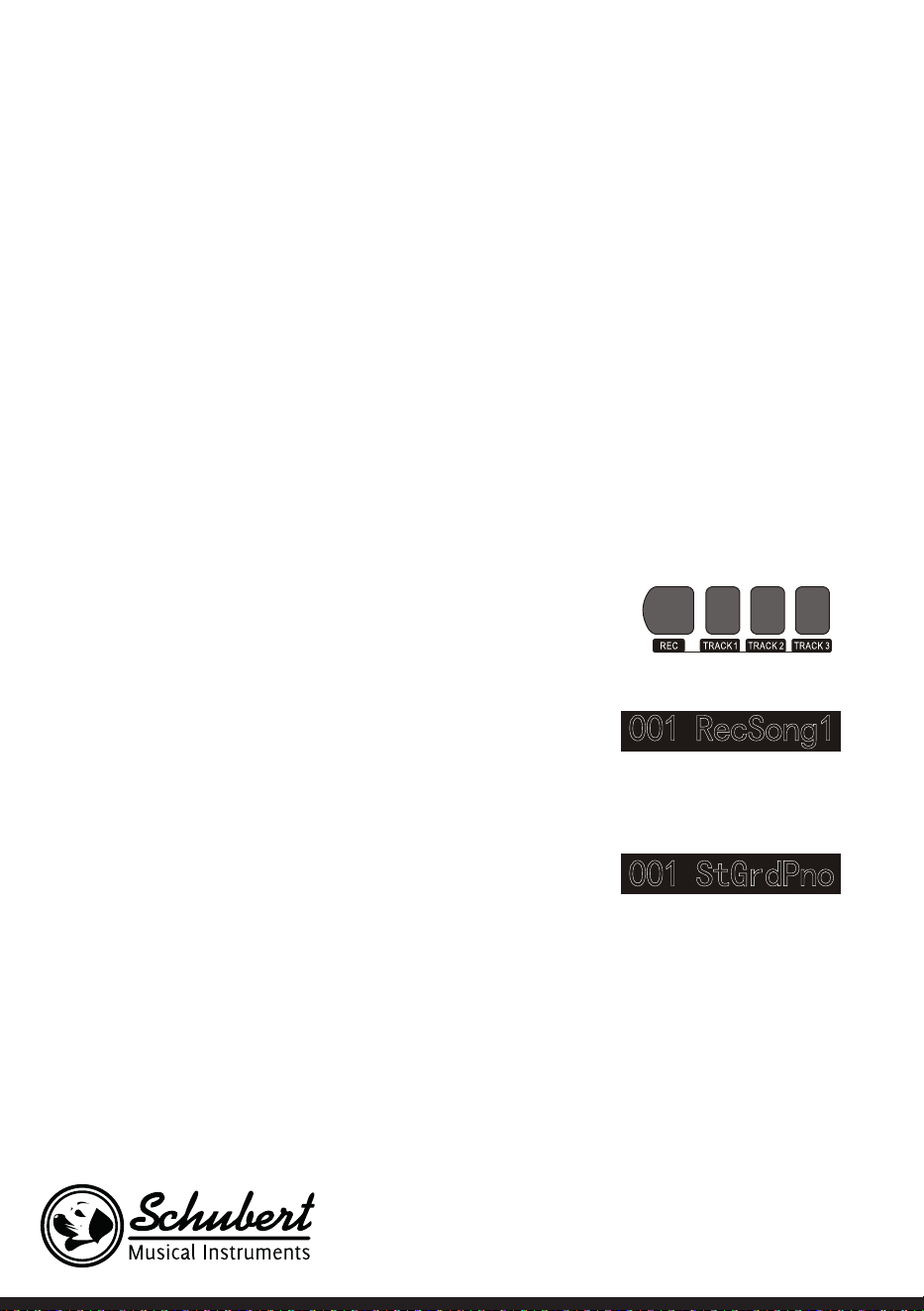
142
Registrare musica
Prima di iniziare la registrazione e di selezionare una traccia, è necessario scegliere un brano.
1. Premere RECORD per raggiungere la selezione dei brani. Sul lato in alto a sinistra dello schermo LCD
viene mostrato il numero del brano. Il nome predenito del brano da registrare è “RecSong1”. Utilizzare
+ e – per selezionare il brano che si desidera salvare.
2. Premendo ora RECORD, si raggiunge la modalità di preparazione della registrazione. Sul lato inferiore
dello schermo LCD compare “REC” in rosso e vengono mostrati contemporaneamente 4 punti della
base nel settore di indicazione della base. Lo strumento seleziona automaticamente una traccia che non
contiene le salvati per salvare automaticamente la registrazione. La traccia utilizzata viene mostrata
sullo schermo LCD e si riferisce alla registrazione attuale, che viene salvata qui.
3. In modalità di preparazione è possibile regolare suono, stile, velocità, ecc. Premendo TRACK 1, TRACK 2
o TRACK 3 è possibile scegliere la traccia su cui salvare la registrazione. Traccia di accompagnamento e
traccia della melodia possono essere registrate contemporaneamente, mentre non è possibile registrare
contemporaneamente due tracce della melodia diverse.
4. Premere START/STOP per iniziare la registrazione o iniziare a suonare sulla tastiera, dopo aver
selezionato una traccia di registrazione. Dopo aver selezionato l’accompagnamento e la funzione di
accordo automatico, per suonare in modo efcace gli accordi nel settore della mano sinistra, è possibile
iniziare la registrazione.
Note :
• I dati di stile possono essere registrati solo sulla traccia di accompagnamento. L’indicazione di registrazione
è dotata di tre stati diversi: “Shine, Light, Go out”.
• “Shine” signica che questa traccia è stata selezionata
per la registrazione. Se sono già presenti dati sulla traccia e
si procede, questi vengono sovrascritti con la nuova
registrazione.
• "Light” signica che i dati presenti sulla traccia vengono
sovrascritti in modo sincronizzato nel processo di
registrazione.
• “Go out” signica che questa traccia non presenta alcun
dato o non ha dati a disposizione, la cui riproduzione è
stata vietata durante la registrazione.
• Il dispositivo seleziona automaticamente una traccia vuota
in modalità di preparazione (nella sequenza da piccola
a grande, ad esempio: se la traccia 2 presenta dati, lo
strumento sceglierà la traccia 3 per la registrazione).
Traccia 1: traccia di accompagnamento
Traccia 2/Traccia 3: tracce della melodia.
Arrestare la registrazione
1. Premendo START/STOP durante la registrazione, questa viene interrotta immediatamente. Premendo
STYLE o VOICE è possibile selezionare altre funzioni.
2. Quando la memoria è piena, la registrazione viene fermata e salvata automaticamente. Lo schermo LCD
mostra quindi “Rec_Full”.
3. La registrazione si ferma automaticamente, quando un brano è nito e se è stato selezionato un

143
accompagnamento.
Riprodurre brani registrati
1. Se si preme RECORD durante la registrazione, la registrazione attuale viene interrotta e vengono
riprodotti in loop i brani registrati no a quel momento.
2. Premere SONG per raggiungere la modalità canzone. Tutti i brani vengono riprodotti automaticamente
in loop. Il numero del brano salvato può essere selezionato con + e -. Se non ci sono brani salvati, lo
schermo mostra “NoFile!”. La riproduzione in loop viene interrotta.
3. Selezionare, se presente, un brano salvato e premere START/STOP per iniziarne la riproduzione in loop.
Cancellare brani registrati
1. Premere contemporaneamente RECORD e SONG a dispositivo spento per cancellare tutte le
registrazioni salvate.
2. Premere RECORD per 2 secondi per cancellare registrazioni in modalità di preparazione. Lo schermo
LCD mostra quindi “Delete”. Premere poi i tasti della traccia (TRACK 1, TRACK 2, TRACK 3), da cui si
desidera cancellare la registrazione. Quando l’indicazione di una traccia si illumina sullo schermo, signica
che vengono cancellati i dati. Quando l’indicazione si spegne, signica che i dati vengono conservati.
Quando le indicazioni di tutte le tracce si illuminano,
signica che vengono cancellati tutti i brani registrati,
se la cancellazione viene autorizzata premendo +. La
cancellazione può essere interrotta premendo -.
Riproduzione di MP3
Connessione MP3: tramite questa connessione è
possibile riprodurre brani in formato MP3.
• Premendo PLAY/PAUSA è possibile riprodurre/mettere in pausa i brani.
• Premendo SONG ∨ viene selezionato il brano precedente e con VOLUME ∨ si abbassa il volume.
• Premendo SONG ∨ viene selezionato il brano successivo e con VOLUME ∧ si alza il volume.
Riprodurre brani
Questo strumento è dotato di numerosi brani (v. tabella delle canzoni). Ogni canzone è dotata di funzione
di apprendimento.
Ascoltare le canzoni
1. Premere SONG per raggiungere la modalità canzone. Lo schermo LCD mostra “SONG”. Tutti i brani
vengono riprodotti in loop.
2. Per selezionare una canzone è possibile utilizzare il numero del brano desiderato o + e -.
3. Premere START/STOP per interrompere la riproduzione della canzone. Premere di nuovo il tasto per
riprenderla.
4. Se si desidera terminare la modalità canzone, premere STYLE, RECORD, VOICE, DUALVOICE, ecc., non
appena è nito il brano.

144
Modalità di apprendimento
La funzione di apprendimento dello strumento è composta dai tre tasti LESSON, LEFT, RIGHT, che possono
essere utilizzati solo in modalità canzone. È possibile esercitarsi su tutti i brani in tre modalità diverse:
durata, altezza tonalità e modalità di esecuzione. Lo strumento è dotato di una funzione di valutazione, che
aiuta a fare progressi nel processo di apprendimento.
1. Premere LESSON per attivare la modalità di apprendimento.
2. Selezionare con LEFT e RIGHT, se si desidera eseguire l’esercizio con la mano sinistra o destra. Se non si
effettua alcuna selezione, viene scelta automaticamente la mano destra.
Nota: i contenuti di apprendimento della mano sinistra, possono essere diversi indipendentemente dal
brano scelto. In alcune canzoni si allenano accordi con la mano sinistra e in altre canzoni le melodie.
Durante la modalità di apprendimento, le melodie e gli accordi vengono mostrati sullo schermo LCD, in
modo da facilitare l’esercizio.
Modalità di apprendimento 1: durata
1. Premere LESSON per attivare la modalità di apprendimento 1. Le canzoni in riproduzione vengono
fermate. Lo schermo LCD mostra “Les1 R”. Il dispositivo fa una stima della durata dell’esercizio. La
corretta esecuzione di accordi e note non viene tenuta in considerazione in questa modalità.
2. Premere START/STOP per iniziare la modalità di apprendimento 1. Se si seleziona la mano destra,
vengono mostrate le melodie della mano destra. Ora è sufciente suonare correttamente la durata,
mentre la correttezza di note e accordi viene ignorata. La melodia risuona in sottofondo. Se si seleziona
la mano sinistra, vengono mostrati accordi e parti di melodia della mano sinistra. Ora è sufciente
suonare correttamente la durata, mentre la correttezza di note e accordi viene ignorata. Premendo
contemporaneamente LEFT e RIGHT, è possibile esercitarsi contemporaneamente con la mano destra e
con quella sinistra. Il sistema fa una stima di quando l’esercizio è concluso.
Modalità di apprendimento 2: altezza tonalità
1. Premere più volte LEARN per attivare la modalità di apprendimento 2. L’attuale riproduzione della
canzone viene interrotta. Lo schermo LCD mostra “Les2 R”. Il sistema fa dunque una stima della corretta
altezza della tonalità e ciò signica che sarà necessario suonare le tonalità giuste. Una sezione di un brano
può ricominciare da capo se viene suonata una nota sbagliata. Il brano si trova in modalità di attesa, no a
quando vengono suonate le tonalità corrette.
2. Premendo START/STOP prima dell’inizio di un brano, il dispositivo fornirà una stima alla ne della
canzone.
Modalità di apprendimento 3: modalità di esecuzione
1. Premere più volte LEARN per attivare la modalità di apprendimento 3. L’attuale riproduzione della
canzone viene interrotta. Lo schermo LCD mostra “Les3 R”. Il sistema fa dunque una stima della corretta
durata e altezza della tonalità e ciò signica che sarà necessario suonare le tonalità giuste e la durata
originale del brano.
2. Premendo START/STOP prima dell’inizio di un brano, il dispositivo fornirà una stima alla ne della
canzone.
145
TABELLA DELLE CANZONI
Genere musicale N° Nome inglese Abbreviazione inglese
FOLK & COUNTRY 1 Jambalaya Jambalaya
FOLK & COUNTRY 2 Ding! Dong! Merril on High DingDong
FOLK & COUNTRY 3 Battle Hymne of the Republic Battle
FOLK & COUNTRY 4 The Old Gray Mare GrayMare
FOLK & COUNTRY 5 American Patrol USPatrol
FOLK & COUNTRY 6 Christmas is Coming IsComing
FOLK & COUNTRY 7 Sippin/Cider through a Stray SCTStraw
FOLK & COUNTRY 8 Christmas Sound Sound
GOLDEN & POP 9 On London Bridge LdBridge
GOLDEN & POP 10 Are You Lonesome Tonight Lonesome
GOLDEN & POP 11 Der Deitcher’s Dog DerDDog
GOLDEN & POP 12 Joy to the World JoyWordl
GOLDEN & POP 13 Silent Night Sltnight
GOLDEN & POP 14 Ave Maria AveMaria
GOLDEN & POP 15 Five Hundred Miles FHMiles
GOLDEN & POP 16 Happy New Year HappyNY
GOLDEN & POP 17 It’s beginning to look a lot like
Christmas
LikeXmas
GOLDEN & POP 18 Jeanie with the light brown hair LightHair
GOLDEN & POP 19 My Bonnie MyBonnie
GOLDEN & POP 20 Song oft he Pearlsher SongOfTP
CLASSICAL 21 Swan Swan
CLASSICAL 22 Prelude to Act 2 (Swan Lake) SwanLak1
CLASSICAL 23 Valse (Swan Lake) SwanLak2
CLASSICAL 24 The Happy Farmer HpFarmer
CLASSICAL 25 The Sleeping Beauty SleepBty
CLASSICAL 26 La Traviata LaTravia
CLASSICAL 27 Wiegenlied Wiegenli
CLASSICAL 28 Mov.2 Adagio Non Troppo
Piano Sonata No. 9 D
Sonata 9
CLASSICAL 29 Mov.1 Andante Grazioso Piano
Sonata No. 11 in A
Sonata 11
CLASSICAL 30 Prelude in C Prelude
CLASSICAL 31 Chinese Dance CHDance
CLASSICAL 32 Emperors Waltz EmprWaltz
CLASSICAL 33 March Militaire MilMar1
CLASSICAL 34 Symphony No.40 Symphony
JAZZ & FUSION 35 ShanZhaShu ShanZaS
JAZZ & FUSION 36 You are my sunshine MySun
JAZZ & FUSION 37 June Samba JunSamba
146
Genere musicale N° Nome inglese Abbreviazione inglese
JAZZ & FUSION 38 Funk Funk
JAZZ & FUSION 39 I Can… I Can…
JAZZ & FUSION 40 Sea Shore SeaShore
JAZZ & FUSION 41 Guitar & Saxphone Gt&Sax
JAZZ & FUSION 42 The Hip Hop’s Night HipHopNt
JAZZ & FUSION 43 Blue Lunch BlueLunch
JAZZ & FUSION 44 Cobweb Cobweb
JAZZ & FUSION 45 Wine Wine
JAZZ & FUSION 46 Jazz Old Man JzOldMan
JAZZ & FUSION 47 Dark Eyes DarkEyes
JAZZ & FUSION 48 Carlos Carlos
JAZZ & FUSION 49 Sad Sad
JAZZ & FUSION 50 The Jazz TheJazz
PIANO 51 Für Elise FürElise
PIANO 52 Military March Mmarch
PIANO 53 Habanera Habanera
PIANO 54 Minuet Minuet
PIANO 55 Austria Variation Avariati
PIANO 56 Old Macdonald had a Farm OldAFarm
PIANO 57 Wedding March Wedding
PIANO 58 2-Part Invention #13 In A
Minor. B.W. Iii
Invention
PIANO 59 Minuet in G MinuetG
PIANO 60 Turkish March TurkishM
PIANO 61 Hey Diddle Diddle HeDiddle
PIANO 62 Italian Polka ItaPolka
PIANO 63 Moseta Dance MosetaDn
PIANO 64 Bulie Dance BulieDn
PIANO 65 Waltz in A Flat Op.39 No. 15 Waltz 1
PIANO 66 Wild Rose WildRose
PIANO 67 Away in A Manger AwayInAM
PIANO 68 Jack & Jill JackJill
PIANO 69 Angels We Have Heard on High Angels
PIANO 70 Waltz Waltz
PIANO 71 Did you ever see a Lassie Lassie
PIANO 72 Chopsticks Chopstick
PIANO 73 Four Little Swans FLSwans
PIANO 74 Old France OldFrance
PIANO 75 Jesus Saviour pilot Me PilotMe
PIANO 76 Eclogue Eclogue
PIANO 77 Santa Claus is coming to towen SantaCT
PIANO 78 Brave Cavalier Cavalier
PIANO 79 America The Beautiful USFair

147
Genere musicale N° Nome inglese Abbreviazione inglese
PIANO 80 Music Box Dancer Dancer
148
TABELLA DELLO STILE
Nome N° Nome inglese Abbreviazione inglese
8 BEAT 1 8 Beat Piano 8BtPiano
8 BEAT 2 8 Beat 1 8Beat1
8 BEAT 3 8 Beat Shufe 8BtShu
8 BEAT 4 Guitar Pop 1 GtPop1
8 BEAT 5 8 Beat Hip Hop 8BtHiHop
8 BEAT 6 8 Beat R&B 8BeatR&B
8 BEAT 7 8 Beat Pop 8BtPop
8 BEAT 8 Pop Funk 1 PopFunk1
8 BEAT 9 Rhythm & Beat 1 Rhy&Bt1
8 BEAT 10 8 Beat Disco 1 8BtDisc1
8 BEAT 11 8 Beat Rock 8BtRock
8 BEAT 12 8 Beat 2 8Bt2
8 BEAT 13 Sweet Beat SweetBt
8 BEAT 14 8 Beat Dance 8BtDance
8 BEAT 15 8 Beat 3 8Bt3
8 BEAT 16 60’s 8 Beat 60’s8Bt
16 BEAT 17 16 Beat 1 16Beat1
16 BEAT 18 16 Beat Funk 1 16BtFuk1
16 BEAT 19 16 Beat Ballad 1 16BtBld1
16 BEAT 20 16 Beat R&B 16BtR&B
16 BEAT 21 Pop 16 Beat 1 Pop16Bt1
16 BEAT 22 16 Beat Dance 16BDanc
16 BEAT 23 16 Beat 2 16Beat2
16 BEAT 24 Modern 16 Beat Modrn16B
16 BEAT 25 16 Beat Hot 16BtHot
16 BEAT 26 16 Beat Modern 16BtModr
16 BEAT 27 16 Beat 3 16Beat3
16 BEAT 28 Cool Beat CoolBeat
16 BEAT 29 16 Beat Ballad 2 A6BtBld2
16 BEAT 30 16 Beat 4 16Beat4
16 BEAT 31 Pop Shufe PopShu
POP 32 Pop Rock 1 PopRock1
POP 33 Pop Dance 1 PopDanc1
POP 34 Pop Fusion PopFusn
POP 35 Analog Night 1 AnalgNt1
POP 36 6/8 Pop 6/8Pop
POP 37 Brit. Pop 1 BritPop1
POP 38 Brit. Pop 2 BritPop2
POP 39 Pop Hit PopHit
POP 40 Fusion Shufe FusShu
POP 41 Pop Beat PopBeat
POP 42 Soft Beat SoftBeat
POP 43 60’s Pop 60’sPop

149
POP 44 Sting Latin StigLatn
BALLAD 45 R&B Ballad 1 R&BBad1
BALLAD 46 Guitar Ballad GtBallad
BALLAD 47 Ballad Rock BalladRk
BALLAD 48 Piano pop PianoPop
BALLAD 49 Soft Ballad SoftBald
BALLAD 50 Natural Ballad NatuBld
BALLAD 51 Love Ballad LoveBld
BALLAD 52 Easy Ballad EasyBld
BALLAD 53 Slow Ballad SlowBald
BALLAD 54 Folk Ballad FolkBld
BALLAD 55 Pop Ballad 1 PopBld1
BALLAD 56 EP Ballad EPBallad
ROCK 57 Rock Rock
ROCK 58 New Wave NewWave
ROCK 59 Ska Ska
ROCK 60 Slow Rock SlowRock
ROCK 61 70’s Rock & Roll 70’s Rock
ROCK 62 Folk Rock FolkRock
ROCK 63 Soft Rock SoftRock
ROCK 64 Easy Rock EasyRock
ROCK 65 New Shufe NewShu
ROCK 66 Rock Hip Hop RkHipHop
ROCK 67 Rock & Roll 1 R’N’R1
ROCK 68 Rock & Roll 2 R’N’R2
BALLROOM 69 Tango 1 Tango1
BALLROOM 70 Spain Matador Matador
BALLROOM 71 Twist 1 Twist1
BALLROOM 72 Big Band Fox BandFox
BALLROOM 73 Tango 2 Tango2
BALLROOM 74 Slow Fox SlowFox
BALLROOM 75 Slow Waltz 1 SlowWlz1
BALLROOM 76 Swing Fox SwingFox
BALLROOM 77 Salsa 1 Salsa1
BALLROOM 78 Cha Cha 1 ChaCha1
BALLROOM 79 Cha Cha 2 ChaCha2
BALLROOM 80 Beguine 1 Beguine1
BALLROOM 81 Beguine 2 Beguine2
BALLROOM 82 Rumba 1 Rumba1
BALLROOM 83 Samba 1 Samba1
BALLROOM 84 Jive Jive
BALLROOM 85 Fox Trot FoxTrot
DANCE 86 Techno 1 Techno1
DANCE 87 Hip Hop 1 HipHop1
DANCE 88 Dream Dance DrmDance
DANCE 89 House House
DANCE 90 Down Beat DownBeat
150
DANCE 91 Progressive Progress
DANCE 92 Rap 1 Rap1
DANCE 93 Disco Disco
DANCE 94 Soft Disco SoftDisc
DANCE 95 Disco Party DscParty
DANCE 96 70’s Disco 70’sDisc
DANCE 97 Club Dance ClubDanc
DANCE 98 Euro Dance EuroDanc
DANCE 99 Hip Hop 2 HipHop2
SOUL & FUNK 100 Funk 1 Funk1
SOUL & FUNK 101 Classic Funk ClasFunk
SOUL & FUNK 102 Gospel Swing GopSwing
SOUL & FUNK 103 Gospel Gospel
SOUL & FUNK 104 Funk 2 Funk2
SOUL & FUNK 105 Electric Funk ElecFunk
SOUL & FUNK 106 Groove Funk GrooveFk
SOUL & FUNK 107 Cool Funky ColFunky
SOUL & FUNK 108 Jazz Funk JazzFunk
SOUL & FUNK 109 Groove Groove
SOUL & FUNK 110 Soul Soul
SOUL & FUNK 111 Hip Hop Beat HipHopBt
SOUL & FUNK 112 R&B R&B
SOUL & FUNK 113 Soul Beat SoulBeat
SWING & JAZZ 114 Latin Jazz 1 LatinJz1
SWING & JAZZ 115 Big Band BigBand
SWING & JAZZ 116 Dixieland 1 Dixland1
SWING & JAZZ 117 Broadway Big Bang BwayBand
SWING & JAZZ 118 Swing Swing
SWING & JAZZ 119 Latin Jazz 2 LatinJz2
SWING & JAZZ 120 Fusion Fusion
SWING & JAZZ 121 Acid Jazz AcidJazz
SWING & JAZZ 122 Cool Jazz Ballad CoolJzBd
SWING & JAZZ 123 Swing Shufe SwingS
SWING & JAZZ 124 Big Band Medium BandMid
151
AVVISO DI SMALTIMENTO
Se nel proprio paese si applicano le regolamentazioni inerenti lo smaltimento di dispositivi
elettrici ed elettronici, questo simbolo sul prodotto o sulla confezione segnala che questi prodotti
non possono essere smaltiti con i riuti normali e devono essere portati a un punto di raccolta di
dispositivi elettrici ed elettronici. Grazie al corretto smaltimento dei vecchi dispositivi si tutela il
pianeta e la salute delle persone da possibili conseguenze negative. Informazioni riguardanti il
riciclo e lo smaltimento di questi prodotti si ottengono presso l’amministrazione locale oppure il
servizio di gestione dei riuti domestici.
PRODUTTORE E IMPORTATORE (UK)
Produttore:
Chal-Tec GmbH, Wallstraße 16, 10179 Berlino, Germania.
Importatore per la Gran Bretagna:
Berlin Brands Group UK Limited
PO Box 42
272 Kensington High Street
London, W8 6ND
United Kingdom