10031457
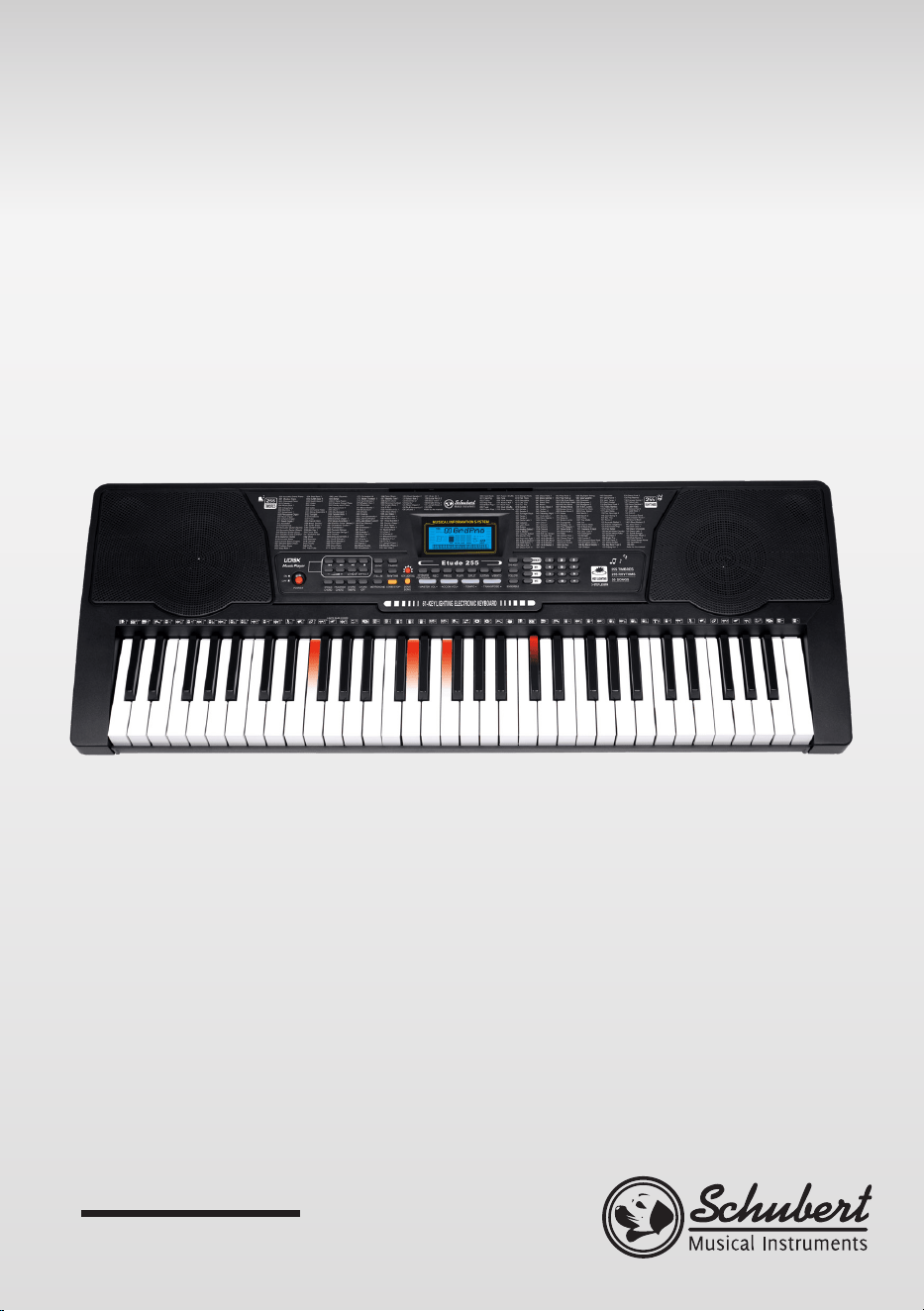
Etude 255 USB
Keyboard
Clavier
Teclado
Tastiera

3
DE
Sehr geehrter Kunde,
wir gratulieren Ihnen zum Erwerb Ihres Gerätes.
Lesen Sie die folgenden Hinweise sorgfältig durch und
befolgen Sie diese, um möglichen Schäden vorzubeugen.
Für Schäden, die durch Missachtung der Hinweise und
unsachgemäßen Gebrauch entstehen, übernehmen wir
keine Haftung. Scannen Sie den folgenden QR-Code,
um Zugriff auf die aktuellste Bedienungsanleitung
und weitere Informationen rund um das Produkt zu
erhalten.
INHALTSVERZEICHNIS
Sicherheitshinweise 4
Geräteübersicht 5
Anschlüsse 6
Bedienung und Funktionen 7
Auto-Rhythmen 8
Akkordbegleitung 9
Statusspeicher 10
Effekt-Kontrolle 10
Aufnahmefunktion 11
Rhythmen programmieren 11
Training und Übungen 12
Klangtabelle 13
Rhythmustabelle 15
Spezielle Entsorgungshinweise für Verbraucher in Deutschland 17
Hinweise zur Entsorgung 19
Konformitätserklärung 19
English 21
Français 37
Español 53
Italiano 69

4
DE
SICHERHEITSHINWEISE
• Benutzen Sie nur den mitgelieferten Adapter. Sollte er kaputt gehen,
ersetzen Sie ihn umgehend.
• Das Keyboard darf nur von geschulten Fachkräften auseinander gebaut
werden. Falls es nicht ordnungsgemäß funktioniert, spielen Sie nicht
weiter und wenden Sie sich an einen Fachbetrieb in Ihrer Nähe.
• Wenn Sie das Keyboard mit anderen Geräten verbinden, versichern Sie
sich dass beide Geräte vor der Verbindung ausgeschaltet sind.
• Achten Sie darauf, die Lautstärke nicht über einen längeren Zeitraum auf
die maximale Einstellung zu drehen.
• Halten Sie das Keyboard fern von Wärmequellen, damit das Gerät und die
Geräteteile nicht beschädigt werden.
• Achten Sie darauf, dass keine Flüssigkeit, Staub, kleine Gegenstände oder
ähnliches ins Keyboard eindringt, es könnte sonst zu einem Kurzschluss
kommen.
• Ziehen Sie den Stecker, bevor Sie das Gerät reinigen. Fassen Sie den
Stecker nicht mit nassen Händen an.
• Reinigen Sie das Keyboard mit einem trockenen, weichen Lappen.
Verwenden Sie keine üssigen Reiniger oder Lösemittel, da sie die
Oberäche beschädigen können.
• Ziehen Sie nach der Benutzung den Stecker aus der Steckdose.
5
DE
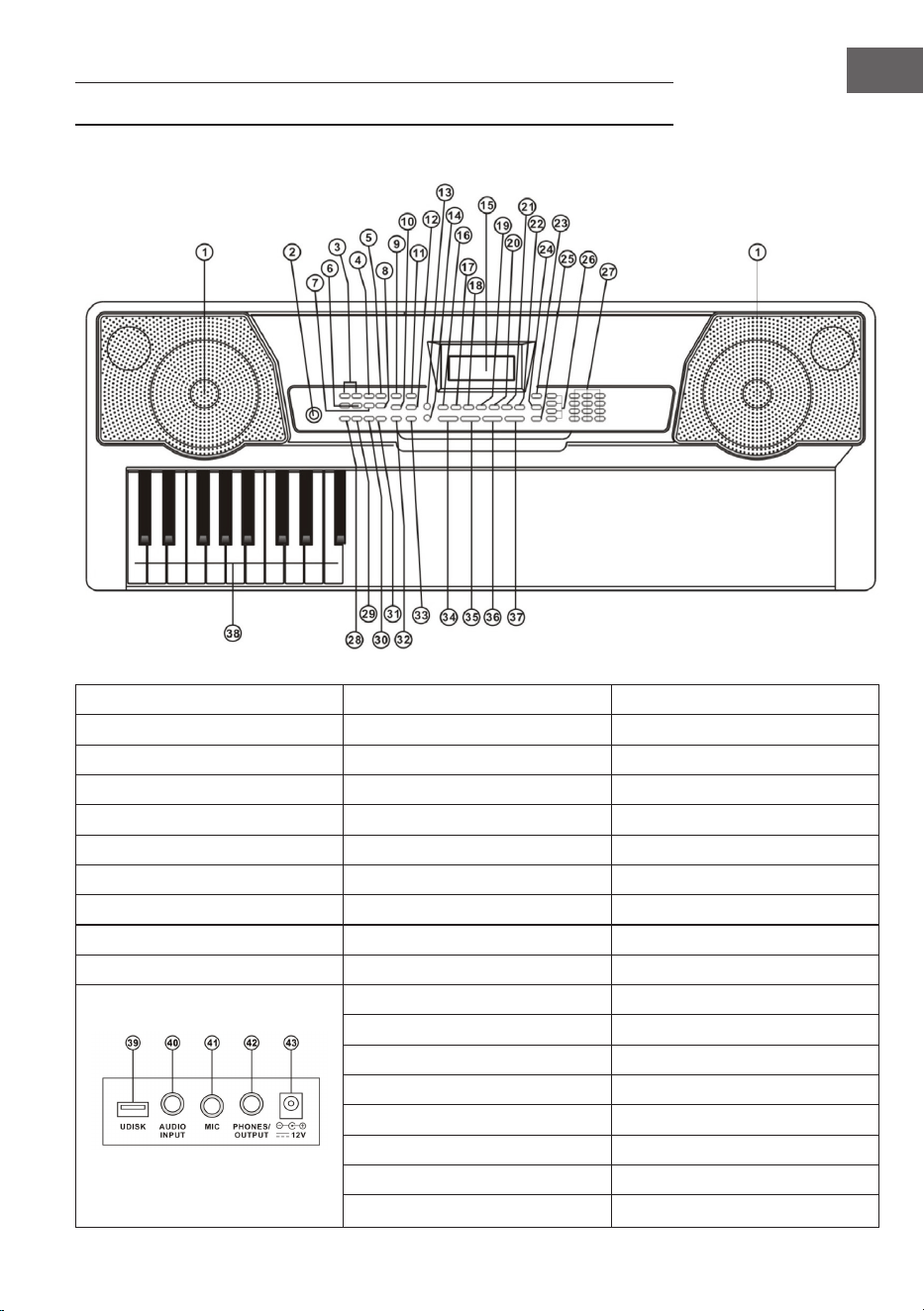
GERÄTEÜBERSICHT
1 Lautsprecher 9 Sync 27 Nummerntasten
2 Power 10 Fill-in 28 Eintelakkord
11 Timbre 29 Fingerakkord
MP3-Steuerung 12 Rhythm 30 Chord Timbre
3 Zurück/Vor 13 Tastenbeleuchtung 31 Chord OFF
4 Play/Pause 14 Demo Song 32 Metronom
5 Stop 15 LCD Display 33 Start/Stop
6 MP3 Laustärkeregler 16 Keyboard Percussion 34 Master Laustärke
7 Sequenz/Zufall/Einzeltitel 17 Aufnahme 35 Accom Lautstärke
8 Soundeffekte 18 Programm 36 Tempo
19 Play 37 Transpose
20 Split 38 Chord Zone
21 Sustain 39 UDISK
22 Vibrato 40 AUDIO INPUT
23 One Key 41 MIC
24 Follow 42 Kopfhörer/OUTPUT
25 Ensemble 43 DC 12V Netzeingang
26 Memory

6
DE
ANSCHLÜSSE
Netzteil
Verwenden Sie nur das mitgelieferten Netzteil. Verbinden Sie das Ende des
Netzteils mit dem Netzanschluss auf der Rückseite des Keyboards und stecken
Sie dann den Stecker in die Steckdose.
Hinweis: Die Eingangsspannung des Adapters muss mit der Versorgungs-
spannung übereinstimmen.
Audioausgang / Externer Kopfhörer
• Audioausgang: Schalten Sie zuerst die Tastatur und die externen
Audiogeräte aus und verbinden Sie dann ein Ende des Audiokabels mit
dem Anschluss PHONES/OUTPUT auf der Rückseite des Keyboards.
Verbinden Sie das andere Ende mit dem Audioeingang des Audiogeräts.
• Kopfhöreranschluss: Wenn Sie einen Kopfhörer an die Buchse PHONES/
OUTPUT auf der Rückseite des Keyboards anschließen, wird der
Lautsprecher automatisch abgeschaltet. Auf diese Weise können Sie
Keyboard spielen, ohne andere zu stören.
Hinweis: Wenn Sie einen Kopfhörer verwenden, halten Sie die Lautstärke
nicht für längere Zeit auf maximalem Pegel, andernfalls kann es zu einem
Hörverlust kommen.
Mic-Eingang und Audioeingang
• Mic-Eingang: Schließen Sie ein Mikrofon an den MIC-Port an, dann
können Sie während dem Keyboardspiel mitsingen.
• Mit der Stereoeingabefunktion können Tonsignale von Mobiltelefon,
MP3-Player, Computer und anderen Audiogeräten zur Wiedergabe in
das Keyboard eingespielt werden. Schalten Sie zuerst das Keyboard
aus und verbinden Sie dann ein Ende des Audiokabels mit dem Ausgang
eines Audiogeräts. Stecken Sie das andere Ende mit den AUDIO INPUT-
Anschluss auf der Rückseite des Keyboards und schalten Sie anschließend
das Keyboard ein.
MP3s abspielen
Stecken Sie einen USB-Stick in den UDISK-Anschluss an der Rückseite des
Geräts. Es werden Sticks mit maximal 32GB unterstützt.
• Drücken Sie auf die [+] und [-] Taste der MP3-Steuerung, um die Laustärke
einzustellen.

7
DE
• Drücken Sie auf die Taste der MP3-Steuerung, um zum vorherigen
Titel zu wechseln. Drücken Sie um zum nächsten Titel zu wechseln.
Drücken Sie , um einen Titel abzuspielen oder anzuhalten. Drücken Sie
, um einen Titel abzubrechen. Benutzen Sie Taste (7), um zwischen den
folgenden 3 Modi zu wechseln: Sequenz/Zufall/Einzeltitel.
• Drücken Sie auf die Effekt-Taste (8), um einen der folgenden Soundeffekte
auszuwählen: Allgemein, Pop, Rock, Jazz and Klassik. Standardeinastellung
ist „Allgemein“.
BEDIENUNG UND FUNKTIONEN
Drücken Sie Power-Taste, der LCD-Bildschirm schaltet sich ein und zeigt
den aktuellen Ton, Tempo, Lautstärke und anderen Einstellungen an. Die
Hintergrundbeleuchtung ist standardmäßig aktiviert.
Tastenbeleuchtung
Wenn Sie die Modi Drei-Schritt-Training, Demo-Song-Wiedergabe oder
USB-MIDI-Eingang wählen, leuchtet die Tastatur nach dem Einschalten
auf. Drücken Sie [KEY LIGHT], um die Leuchtfunktion zu aktivieren oder zu
deaktivieren.
Master-Lautstärke einstellen
Drücken Sie [Master VOL +/-], um die Masterlautstärke hoch- oder runter zu
regeln. Drücken Sie gleichzeitig auf [Master VOL +] und [Master VOL -], um die
Tastatur auf die Standardwerte zurückzusetzen. Mit der Master-Lautstärke
steuern Sie auch die Begleit-Lautstärke.
Begleitlautstärke einstellen
Drücken Sie [ACCOM VOL +/-], um die Masterlautstärke hoch- oder runter zu
regeln. Drücken Sie gleichzeitig auf [ACCOM VOL +] und [ACCOM VOL -], um
die Tastatur auf die Standardwerte zurückzusetzen.
Timbre einstellen
Auf dem Keyboard stehen 255 Timbres (Klangfarben) zur Auswahl, von „000“
bis „254“. Beim Starten des Keyboards wird die Timbre-Auswahl automatisch
aktiviert und auf dem Bildschirm wird „Tone“ angezeigt. Falls „Tone“ nicht
angezeigt wird, drücken Sie [TIMBRE], um die Timbre-Auswahl zu aktivieren.
Der Timbre ist standardmäßig auf „000“ eingestellt und kann durch Drücken
der entsprechenden Nummerntasten oder durch Drücken der [+] und [-]
Tasten eingestellt werden.

8
DE
Schlagzeug aktivieren
Drücken Sie [Keyboard Percussion], um die Schlagzeug-Funktion zu aktivieren.
In diesem Modus können Benutzer die Tastatur des Keyboards nutzen, um
bestimmte Schlaginstrumente zu spielen. Drücken Sie diese Taste erneut, um
die Schlagzeug-Funktion zu deaktivieren.
Demos abspielen
Zur Auswahl stehen 50 Demo-Songs, von „000“ bis „049“. Drücken Sie [Demo
Song], und die Demo-Songs werden nacheinander abgespielt. Dazu leuchten
die entsprechenden Tasten auf der Tastatur auf und der aktuelle Song und
die Titelnummer werden im Display angezeigt. Drücken Sie auf die [+] oder
[-] Taste, um den gewünschten Song auszuwählen. Wenn Sie während der
Wiedergabe auf [TIMBRE] und innerhalb von 3 Sekunden auf die [+] oder
[-] Taste drücken können Sie eine Klangfarbe für den Demosong auswählen.
Drücken Sie auf [Start/Stop] oder erneut auf [Demo Song], um die Wiedergabe
zu beenden.
AUTO-RHYTHMEN
Rhythmusauswahl
Das Keyboard bietet 255 Rhythmen, von „000“ bis „254“. Der Standard-
Rhythmus ist „000“. Drücken Sie [Rhythm], um die Rhythmus-Auswahlfunktion
zu aktivieren, und „RHYM“ erscheint auf dem Bildschirm. Drücken Sie dann die
Nummerntasten oder [+] und [-], um andere Rhythmen auszuwählen.
Rhythmussteuerung
Rhythmus aktivieren
Drücken Sie [Start/Stop], um die Begleitung zu starten. Drücken Sie auf
[SYNC], die Anzeige „SYNC“ erscheint im Display und die 4 Beat-Punkte
blinken gleichzeitig. Spielen Sie eine beliebige Taste in der Akkord-Tastenzone
(die 1. bis 19. Taste von links) und der Begleit-Rhythmus wird aktiviert.
Intermezzo
Nachdem der Rhythmus aktiviert ist, drücken Sie [Fill-In], um ein Intermezzo
während der Stilwiedergabe einzufügen. Halten Sie die Taste [Fill-in] für ein
dauerhaftes Intermezzo gedrückt.
Begleit-Rhythmus starten und stoppen
Drücken Sie während der Begleit-Rhythmus läuft [Start/Stop], um den Begleit-
Rhythmus zu stoppen.

9
DE
Metronom
Das Metronom enthält vier Tempi: 1/4, 2/4, 3/4 und 4/4. Drücken Sie
[Metronome], um vier Tempi nacheinander auszuwählen. Drücken Sie erneut
auf [Metronome], um das Metronom zu stoppen.
Tempoeinstellung
Drücken Sie [Tempo+] oder [Tempo-], um die Rhythmusgeschwindigkeit zu
erhöhen oder zu verringern. Drücken Sie gleichzeitig auf beide Tasten, um die
Standardeinstellung wiederherzustellen.
AKKORDBEGLEITUNG
Einzelakkord
Drücken Sie [Single], um die Einzelakkord-Funktion zu aktivieren, und „SIN“
erscheint auf dem Bildschirm. Im Rhythmus-aktivierten Modus können Sie in
der Akkord-Tastenzone (die 1. bis 19. Taste von links) eine Taste drücken, um
eine automatische Akkordbegleitung zu erhalten.
Fingerakkord
Drücken Sie [Fingered], um die Fingerakkord-Funktion zu aktivieren, und „FIN“
wird auf dem Bildschirm angezeigt. Im dem Rhythmus-aktivierten Modus
können Sie in der Akkord-Tastenzone (die 1. bis 19. Taste von links) eine Taste
drücken, um eine automatische Akkordbegleitung zu erhalten.
Akkorde ausschalten
Drücken Sie auf [CHORD OFF], um die Einzel- und Fingerakkorde
auszuschalten.
Akkord Timbre
Drücken Sie während Einzelakkorden und Fingerakkorden auf [CHORD
TIMBRE], um die Klangfarbe des Akkords zu ändern. Drücken Sie die Taste
erneut, um zur ursprünglichen Klangfarbe zurückzukehren.
10
DE
STATUSSPEICHER
Mit der Funktion „Statusspeicher“ können Sie Ton, Tempo, Geschwindigkeit
und andere während der Wiedergabe eingestellte Parameter speichern. Diese
Tastatur ist mit 4 Statusspeichern ausgestattet, die während der Wiedergabe
jederzeit exibel aufgerufen werden können.
Speicherung im Statusspeicher
Stellen Sie bei Ton, Rhythmus und Tempo ein und drücken Sie [Memory 1 ] bis
[Memory 3], um den aktuellen Status zu speichern.
Aufruf des Statusspeichers
Drücken Sie eine der Tasten [Memory 1] bis [Memory 3], um die unter diesem
Speicherplatz gespeicherten Parameter aufzurufen und den aktuellen Status
zu ersetzen.
HINWEIS: Für den gespeicherten Inhalt ist kein Stromausfallschutz
vorhanden, so dass der gespeicherte Inhalt bei einem Neustart nach
Stromunterbrechung verloren geht.
EFFEKT-KONTROLLE
Transposing
Mit der Transpositionsfunktion können Sie die Tonhöhe bis zu 6 Stufen
anheben oder absenken. Drücken Sie [Transpose -], um den Ton um eine
halben Stufe abzusenken, die Melodie wechselt von der C-Stimmung in die
zu B-Stimmung. Drücken Sie [Transpose +], um den Ton um eine halbe Stufe
anzuheben, und die Melodie wechselt von der C-Stimmung in die #C-Stimmung
oder bD-Stimmung. Durch zweimaliges Drücken von [Transpose -] wird von
C-Stimmung auf BB-Stimmung gewechselt. Durch fünfmaliges Drücken von
[Transpose +] wird von C-Stimmung in die F-Stimmung gewechselt. Drücken
Sie gleichzeitig [Transpose +] und [Transpose -], um die Stimmung wieder auf
C-Stimmung „0“ zurückzusetzen. Drücken Sie [Transpose +] oder [Transpose -],
um den Pegel von [-6] bis [6] einzustellen.
Sustain-Effekt
Drücken Sie [Sustain], „SUS“ erscheint auf dem Bildschirm und der Sustain-
Effekt wird aktiviert. Drücken Sie erneut [Sustain], um die Sustain-Funktion zu
deaktivieren und „SUS“ verschwindet vom Bildschirm.
11
DE
Vibrato
Drücken Sie auf [Vibrato] und „VIB“ erscheint im Display. Drücken Sie die Taste
erneut, um die Funktion wieder zu deaktivieren.
SPLIT-Funktion
Wenn Sie die Funktion SPLIT aktivieren, wird „SPLIT“ auf dem Bildschirm
angezeigt. So können Sie die rechte Seite des Keyboards mit einer
anderen Instrumentenstimme belegen. Die linken Tasten behalten die
vorher eingestellte Instrumentenstimme. So können Soe gleichzeitig in
unterschiedlichen Tonlagen spielen. Drücken Sie die Taste erneut, um die
Funktion wieder zu deaktivieren.
AUFNAHMEFUNKTION
Aufnahme starten
Drücken Sie auf die Taste [Record], um die Aufnahmefunktion zu starten. Auf
dem Display erscheint die Anzeige „REC“. Wenn der Speicher voll ist blinkt
„REC“ im Display und die Aufnahme stoppt automatisch.
• Drücken Sie während der Aufnahme auf [PLAY], um die Aufnahme zu
stoppen und abzuspielen.
• Drücken Sie während der Aufnahme auf [START/STOP] oder [REC] um die
Aufnahme abzubrechen und die aufgenommenen Töne zu löschen.
RHYTHMEN PROGRAMMIEREN
So programmieren Sie Rhythmen
Drücken Sie auf [PROG], um die Programmierfunktion für Rhythmen zu
starten. Das Display zeigt „PRG“ an und die Schlagzeug-Tastatur wird aktiviert.
In diesem Modus können Sie eigene Rhythmen einspielen, indem Sie auf die
entsprechenden Tasten drücken.
• Sie können bis zu 32 Rhythmen einprogrammieren, danach blinkt „PRG“ im
Display und die Rhythmusaufzeichnung stoppt automatisch.
• Drücken Sie während der Programmierung auf [PLAY], um die
Programmierung zu stoppen und die Rhythmen abzuspielen. Drücken Sie
erneut auf [PLAY], um neue Rhythmen aufzunehmen.
• Drücken Sie während der Programmierung auf [START/STOP] oder
[PROG], um die Programmierung abzubrechen und die aufgenommenen
Rhythmen zu löschen.

12
DE
TRAINING UND ÜBUNGEN
Schritt 1: Einzelne Töne üben
Drücken Sie [One Key], um die Einzelton-Trainingsfunktion zu aktivieren.
Auf dem Display erscheint „LEARN“. „SONG“ und die Titelnummer. Mit
den Tasten [+] und [-] können Sie den gewünschten Song auswählen. Das
Einzelton-Training eignet sich zum Üben einzelner Töne und der zugehörigen
Tasten. Korrektheit spielt hier noch keine Rolle, der Modus erlaubt Fehler
beim Anspielen der Tasten. Während das Keyboard einen bestimmten Ton
abspielt, leuchtet die korrekte Taste auf der Tastatur auf und zeigt wo die
entsprechende Note angeschlagen wird. Folgen sie den beleuchteten Tasten,
während Sie in der Tastenzone im Display die korrekten Noten mitlesen.
Drücken Sie [START/STOP] oder [One Key], um die Trainingsfunktion zu
deaktivieren.
Schritt 2: Melodien üben
Drücken Sie [Follow], um die Follow-Trainingsfunktion zu aktivieren. Auf
dem Display erscheint „LEARN“. „SONG“ und die Titelnummer. Drücken
Sie die Nummerntasten oder die [+] / [-] Taste, um den zu lernenden Song
auszuwählen. Die Leuchttasten leuchten nach den Noten der Melodie auf
und zeigen die korrekte Taste, die angespielt werden soll. Lassen Sie sich
beim Spielen von den Leuchttaste leiten oder lernen Sie spielen , indem Sie
den Indikatoren in der Tastenzone im Display folgen. Falls Sie sich verspielen
stoppt die Melodie, bis Sie die richtige Taste anschlagen. Drücken Sie [START/
STOP] oder [Follow], um Trainingsfunktion zu deaktivieren.
Schritt 3: Spielen im Ensemble
Drücken Sie [Ensemble], um die Ensemble-Trainingsfunktion zu aktivieren.
Auf dem Display erscheint „LEARN“. „SONG“ und die Titelnummer. Drücken
Sie die Nummerntasten oder die [+] / [-] Tasten, um den zu lernenden Song
auszuwählen. Das Ensemble-Training zielt auf das Lernen von kompletten
Songs und die Wiedergabe der korrekten Noten ab. Der Schlüsselton wird
dabei verborgen. Sie müssen die richtige Taste entsprechend zur Note über
die gesamte Dauer des Songs abspielen. Wenn Sie innerhalb von 3 Sekunden
keine Taste spielen, spielt die Tastatur automatisch die richtige Note. Die
entsprechende Taste auf Leuchttastatur leuchtet auf und zeigt die zu spielende
Taste an. Nachdem Sie die Taste angeschlagen haben können Sie bis zum Ende
des Songs den Leuchttasten folgen. Die Tastatur-Zone auf dem Display zeigt
die Note und das Tempo an. Drücken Sie [START/STOP] oder [Ensemble], um
die Ensemble-Trainingsfunktion zu deaktivieren.

13
DE
KLANGTABELLE
000 Acoustic Grand Piano 040 Tenor Sax 080 Ocarina 120 Wood Barafon 2
001 Rhodes Piano 041 Baritone Sax 081 Lead (Sawtooth)1 121 Music Box 2
002 Chorused Piano 042 Oboe 082 Lead (Calliope)1 122 Marimba 2
003 Celesta 1 043 Bassoon 083 Lead (Bass+Lead)1 123 Santur
004 Music Box 1 044 Clarinet 084 Pad (Warm)1 124 Reed Organ 2
005 Vibraphone 045 Piccolo 085 Sitar 125 Puff Harmonica 1
006 Marimba 1 046 Flute 086 Shamisen 1 126 Ukulele 1
007 Xylophone 1 047 Pan Flute 087 Koto 1 127 12-str. Gt 1
008 Percussive Organ 048 Lead (Square) 088 Kalimba 1 128 Guitar Pinch 2
009 Rock Organ 049 Banjo 089 Bag Pipe 1 129 Slow Violin 1
010 Church Organ 050 E-Tone Piano 090 Fiddle 1 130 Bright String 1
011 Reed Organ 1 051 Electric Grand Piano 091 Shanai 1 131 Jungle Bass 2
012 Accordion 052 Honky-tonk Piano 092 Tinkle Bell 132 Indian Flute 1
013 Harmonica 053 Harpsichord 1 093 Agogo 1 133 Clavi 3
014 Acoustic Guitar (Nylon) 054 Clavi 1 094 Steel Drums 134 Celesta 3
015 Acoustic Guitar (Steel) 055 Glockenspiel 1 095 Woodblock 1 135 Church Bells
016 Electric Guitar (Jazz) 056 Tubular Bells 1 096 Taiko Drum 136 Marimba 3
017 Electric Guitar (Clean)1 057 Dulcimer 1 097 Melodic Tom 1 137 Dulcimer 2
018 Distortion Guitar 058 Drawbar Organ 1 098 Synth Drum 138 Reed Organ 3
019 Acoustic Bass 059 Tango Accordion 1 099 Reverse Cymbal 139 Electric Guitar (Clean)2
020 Electric Bass (Finger) 060 Electric Guitar (Muted)1 100 Jungle Bass 1 140 Koto 2
021 Electric Bass (Pick) 061 Overdriven Guitar 1 101 Pi Pa 1 141 Xylophone 2
022 Fretless Bass 062 Contrabass 1 102 Feedback Gt. 1 142 Shanai 2
023 Slap Bass 1 063 Tremolo Strings 103 Uillean Harp 1 143 Dulcimer 3
024 Slap Bass 2 064 Pizzicato Strings 1 104 Jazz Bass 1 144 English Horn 2
025 Synth Bass 1 065 Timpani 105 Flugel Horn 1 145 Electric Guitar (Clean)3
026 Synth Bass 2 066 String Ensemble 2 106 Muted Horn 1 146 Shamisen 2
027 Violin 067 Synth Strings 1 107 Wood Barafon 1 147 Koto 3
028 Viola 068 Synth Strings 2 108 Electric Piano 1 148 Kalimba 2
029 Cello 069 Choir Aahs 109 Multi Reed 1 149 Steel Bell 1
030 Orchestral Harp 070 Voice Oohs 110 Guitar Pinch 1 150 Alto Sax 2
031 String Ensemble 1 071 Synth Voice 111 Multi Wind 1 151 Woodblock 2
032 Trumpet 072 Orchestra Hit 112 Clavi 2 152 Synth Harpsi. 1
033 Trombone 073 Muted Trumpet 1 113 Celesta 2 153 Attack Clav. 1
034 Tuba 074 Synth Brass 2 114 Harpsichord 2 154 Crystal 1
035 French Horn 075 English Horn 1 115 Mellow Fm 1 155 Bag Pipe 2
036 Brass Section 076 Recorder 116 Pi Pa 2 156 Barafon 1
037 Synth Brass 1 077 Blown Bottle 1 117 Upright Piano 1 157 Organ Flute 1
038 Soprano Sax 078 Shakuhach 118 Electric Piano 2 158 Kalimba 3
039 Alto Sax 1 079 Whistle 119 Hard Vibe 1 159 Reed Horn 1

14
DE
160 Hard Vibe 2 200 Lead (Bass+Lead)2 240 Barafon 2
161 Twin Trombones 1 201 Melodic Tom 2 241 Wind Organ 2
162 Synth Harpsi. 2 202 Grow Guitar 2 242 12-str. Gt 2
163 Attack Clav. 2 203 Lead (Sawtooth)2 243 Attack Barafon 2
164 Chorus Guitar 1 204 Jazz Bass 2 244 Lead (Calliope)2
165 Steel Bell 2 205 Chorus Guitar 2 245 Viola Attack 2
166 Tsugaru 206 Feedback Gt. 2 246 Pad (Warm)2
167 Oct Harp 1 207 Fiddle 2 247 Oct Harp 2
168 Bodhran 1 208 Organ Flute 2 248 Bari & Tenor 2
169 Tubular Bells 2 209 Flugel Horn 2 249 Agogo 2
170 Suona 210 Crystal 2 250 Flugel Horn 3
171 Castanets 211 Soft Clav. 2 251 Organ Flute 3
172 Attack Harp 1 212 Overdriven Guitar 2 252 Fiddle 3
173 Electric Vibraphone 1 213 Ukulele 2 253 Feedback Gt. 3
174 Soft Sax 1 214 Tango Accordion 2 254 Chorus Guitar 3
175 Soft Clav. 1 215 Twin Trombones 2
176 Soft Guitar 1 216 Jazz Organ 2
177 Grow Guitar 1 217 Bright String 2
178 Didgeridoo 1 218 Reed Horn 2
179 Attack Barafon 1 219 Glockenspiel 2
180 Mute Barafon 1 220 Drawbar Organ 2
181 Nay 1 221 Muted Horn 2
182 Soft Santur 222 Pizzicato Strings 2
183 Dual Horns 1 223 Nay 2
184 Hard Barsoon 1 224 Puff Harmonica 2
185 Tron Flute 1 225 Muted Trumpet 2
186 Kawala 1 226 Upright Piano 2
187 Jazz Organ 1 227 Soft Accord 2
188 Soft Accord 1 228 Uillean Harp 2
189 Wind Organ 1 229 Tron Flute 2
190 Viola Attack 1 230 Blown Bottle 2
191 Bari & Tenor 1 231 Indian Flute 2
192 Soft Sax 2 232 Slow Violin 2
193 Attack Harp 2 233 Electric Guitar (Muted)2
194 Didgeridoo 2 234 Multi Wind 2
195 Dual Horns 2 235 Electric Vibraphone 2
196 Hard Barsoon 2 236 Bodhran 2
197 Kawala 2 237 Mellow Fm 2
198 Soft Guitar 2 238 Multi Reed 2
199 Mute Barafon 2 239 Contrabass 2

15
DE
RHYTHMUSTABELLE
000 Hard Rock 040 Disco Soul 080 Dance Pop 1 120 Trip Hop
001 Club Pop 041 Disco Trot 081 Dance Pop 2 121 Rave 2
002 Fusion 042 Rave 1 082 Euro Beat 122 Acoustic Ballad 1
003 Rap Pop 043 Funky Disco 1 083 Euro House 123 India's Indigenous
004 British Pop 1 044 Techno 1 084 Hip Hop 124 Indonesian Pop
005 Twist 045 Techno 2 085 Swing 125 Pop Ballad
006 8 Beat Pop 1 046 Saturday Night 1 086 Big Band Swing 126 South Africa Country
007 Fusion Shufe 047 Club Latin 1 087 Jazz Quartet 127 South Africa Polka
008 Funk 048 Disco Hands 1 088 Dixieland 128 Tarantella 1
009 Funk Shufe 049 Country 089 Bluegrass 1 129 Bright Pop
010 Rock'n Roll 1 050 China 1 090 Bluegrass 2 130 Pub Piano 1
011 Rock Pop 051 China 2 091 8 Bt Country 131 West Shufe
012 Rock Shufe 052 China 3 092 Country Rock 132 Big Band Fast 2
013 Rock Cha Cha 053 China 4 093 Cntry Ballad 133 Espag Nol 1
014 Straight Rock 054 China 5 094 March 1 134 Disco Funk 2
015 Folk Rock 055 8 Bt Up Tempo 095 March 2 135 Pop Mambo
016 Pasodoble 056 16 Beat Pop 096 Polka 136 Europe Swing 1
017 Cha Cha 057 16 Bt Shufe 1 097 Pop Waltz 137 Tricks Latin
018 Fox Trot 058 16 Bt Shufe 2 098 Jive 138 Disco Samba 2
019 Rumba 1 059 16 Bt Ballad 1 099 Vienna Waltz 139 Latin Waltz
020 Samba 1 060 16 Bt Ballad 2 100 8 Beat Soul 140 Dance Pop 3
021 Samba 2 061 Soul 101 Classical 8 Beat 141 Jazz Rock 1
022 Schlager Rock 062 Pop Rock 1 102 Jazz Latin 1 142 Detroit
023 Tango 1 063 Pop Rock 2 103 Unplugged 143 Fanatical Sand
024 Tango 2 064 8 Bt Rock Balld 104 Boogie 144 European Rock 1
025 Disco Latin 1 065 16 Bt Rock Balld 105 Cumbia 2 145 Ground Beat
026 Calypso 066 6/8 Hvy Rock 106 Classical Slow Rock 146 8 Beat Modern 2
027 Latin Rock 067 16 Beat Rock 107 European Disco 1 147 Jazz Disco 1
028 Bolero 068 Bossa Nova 1 108 Big Band Middle 1 148 Dixie Jazz 1
029 Analog Ballad 1 069 Bossa Nova 2 109 Chrlston 149 Disco Chocolate
030 E_Ballad 070 Salsa 110 Pasodobl 150 Disco Latin 2
031 Country Ballad 071 Mambo 111 Cat Groove 1 151 Synth Boogie
032 Electro Pop 072 Beguine 112 Jazz Tango 1 152 Saturday Night 2
033 Pop New Age 1 073 Bolero Lento 113 Fast Gospel 153 Club Dance 1
034 8 Beat Modern 1 074 Espagnole 114 Big Band Fast 1 154 Tricks Bossa Nova
035 R&B Ballad 1 075 Reggae 12 115 Tricks Mambo 155 Tarantella 2
036 Disco Fox 1 076 Pop Reggae 1 116 Funky Disco 2 156 USA March
037 Disco Funk 1 077 Slow Rock 1 117 Latin Salsa 157 Espag Nol 2
038 Disco Party 1 078 Slow Rock 2 118 Pop New Age 2 158 Club Latin 2
039 Disco Samba 1 079 R&B 119 Jazz Swing 1 159 Jazz Cha Cha 1

16
DE
160 Country Cha Cha 200 Guad Dance 1 240 Hip Waltz 2
161 Disco Party 2 201 Jazz Cha Cha 2 241 Jazz Swing 2
162 Modern R&B 1 202 Country Waltz 242 Party Pop
163 8 Beat Pop 2 203 European Rock 2 243 Jazz Club
164 Country Jazz 204 Caribbean Dance 2 244 Guad Dance 2
165 Soul Rock 1 205 Jazz Disco 2 245 Jazz Bo 2
166 Rumba 2 206 Medium Jazz 246 Dixie Jazz 2
167 Samba 3 207 Piano Ballad 247 Acoustic Ballad 2
168 Modern R&B 2 208 70's Disco 248 Jazz Slow Rock
169 Club Dance 2 209 Jazz Rock 2 249 16 Beat Shufe 2
170 Country Bossa Nova 210 Europe 8 Beat 1 250 Polka Pop
171 Jazz Bo 1 211 Seville 2 251 Latin Party Pop
172 Modern Cha Cha 1 212 Rumba 3 252 Parranda
173 Pop Reggae 2 213 Soul Rock 2 253 Carnival
174 Rock Samba 1 214 European Disco 2 254 60's Vintage Pop
175 Jazz 8 Beat 1 215 Analog Ballad 2
176 Disco 216 Pub Piano 2
177 Seville 1 217 Europe Rumba
178 Disco Hands 2 218 Rock'n Roll 2
179 Rock Ballad 219 Disco Trop
180 Mixed Bossa Nova 220 Rock Salsa 1
181 Jazz 16 Beat 1 221 Europe 8 Beat 2
182 Single 16 Beat 1 222 Europe Samba
183 Love Song 223 Show Tune 2
184 Single 16 Beat 2 224 Jazz 16 Beat 2
185 Disco Fox 2 225 Rock Samba 2
186 Pop Rock 3 226 Jazz Waltz 2
187 Tijuana Waltz 227 Europe Reggae
188 British Pop 2 228 Modern Cha Cha 2
189 Show Tune 1 229 R&B Ballad 2
190 Schlager Alp 230 Rock Boogie
191 Single Rock 231 Jazz Bossa Nova
192 Swing Waltz 232 Rock Salsa 2
193 Slow Waltz 233 Slow & Easy
194 Cat Groove 2 234 Hip Waltz 1
195 Country Slow Rock 235 Jazz Latin 2
196 Rock Disco 1 236 Rock Disco 2
197 16 Beat Shufe 1 237 Jazz Tango 2
198 Jazz 8 Beat 2 238 Analog Ballad 3
199 Casa 239 Europe Swing 2
17
DE
SPEZIELLE ENTSORGUNGSHINWEISE FÜR
VERBRAUCHER IN DEUTSCHLAND
Entsorgen Sie Ihre Altgeräte fachgerecht. Dadurch wird gewährleistet, dass
die Altgeräte umweltgerecht verwertet und negative Auswirkungen auf die
Umwelt und menschliche Gesundheit vermieden werden. Bei der Entsorgung
sind folgende Regeln zu beachten:
• Jeder Verbraucher ist gesetzlich verpichtet, Elektro- und
Elektronikaltgeräte (Altgeräte) sowie Batterien und Akkus
getrennt vom Hausmüll zu entsorgen. Sie erkennen die
entsprechenden Altgeräte durch folgendes Symbol der
durchgestrichene Mülltonne (WEEE Symbol).
• Sie haben Altbatterien und Altakkumulatoren, die nicht vom Altgerät
umschlossen sind, sowie Lampen, die zerstörungsfrei aus dem Altgerät
entnommen werden können, vor der Abgabe an einer Entsorgungsstelle
vom Altgerät zerstörungsfrei zu trennen.
• Bestimmte Lampen und Leuchtmittel fallen ebenso unter das Elektro- und
Elektronikgesetz und sind dementsprechend wie Altgeräte zu behandeln.
Ausgenommen sind Glühbirnen und Halogenlampen. Entsorgen Sie
Glühbirnen und Halogenlampen bitte über den Hausmüll, sofern Sie nicht
das WEEE Symbol tragen.
• Jeder Verbraucher ist für das Löschen von personenbezogenen Daten auf
dem Elektro- bzw. Elektronikgerät selbst verantwortlich.
Rücknahmepicht der Vertreiber
Vertreiber mit einer Verkaufsäche für Elektro- und Elektronikgeräte von
mindestens 400 Quadratmetern sowie Vertreiber von Lebensmitteln mit einer
Gesamtverkaufäche von mindestens 800 Quadratmetern, die mehrmals im
Kalenderjahr oder dauerhaft Elektro- und Elektronikgeräte anbieten und auf
dem Markt bereitstellen, sind verpichtet,
1 bei der Abgabe eines neuen Elektro- oder Elektronikgerätes an einen
Endnutzer ein Altgerät des Endnutzers der gleichen Geräteart, das
im Wesentlichen die gleichen Funktionen wie das neue Gerät erfüllt,
am Ort der Abgabe oder in unmittelbarer Nähe hierzu unentgeltlich
zurückzunehmen und
2 auf Verlangen des Endnutzers Altgeräte, die in keiner äußeren
Abmessung größer als 25 Zentimeter sind, im Einzelhandelsgeschäft
oder in unmittelbarer Nähe hierzu unentgeltlich zurückzunehmen; die
Rücknahme darf nicht an den Kauf eines Elektro- oder Elektronikgerätes
geknüpft werden und ist auf drei Altgeräte pro Geräteart beschränkt.

18
DE
• Bei einem Vertrieb unter Verwendung von Fernkommunikationsmitteln
ist die unentgeltliche Abholung am Ort der Abgabe auf Elektro- und
Elektronikgeräte der Kategorien 1, 2 und 4 gemäß § 2 Abs. 1 ElektroG,
nämlich „Wärmeüberträger“, „Bildschirmgeräte“ (Oberäche von mehr
als 100 cm²) oder „Großgeräte“ (letztere mit mindestens einer äußeren
Abmessung über 50Zentimeter) beschränkt. Für andere Elektro- und
Elektronikgeräte (Kategorien 3, 5, 6) ist eine Rückgabemöglichkeit in
zumutbarer Entfernung zum jeweiligen Endnutzer zu gewährleisten.
• Altgeräte dürfen kostenlos auf dem lokalen Wertstoffhof oder in
folgenden Sammelstellen in Ihrer Nähe abgegeben werden:
www.take-e-back.de
• Für Elektro- und Elektronikgeräte der Kategorien 1, 2 und 4 an bieten
wir auch die Möglichkeit einer unentgeltlichen Abholung am Ort der
Abgabe. Beim Kauf eines Neugeräts haben sie die Möglichkeit eine
Altgerätabholung über die Webseite auszuwählen.
• Batterien können überall dort kostenfrei zurückgegeben werden, wo sie
verkauft werden (z. B. Super-, Bau-, Drogeriemarkt). Auch Wertstoff- und
Recyclinghöfe nehmen Batterien zurück. Sie können Batterien auch per
Post an uns zurücksenden. Altbatterien in haushaltsüblichen Mengen
können Sie direkt bei uns von Montag bis Freitag zwischen 08:00 und
16:00 Uhr unter der folgenden Adresse unentgeltlich zurückgeben:
Chal-Tec Fulllment GmbH
Norddeutschlandstr. 3
47475 Kamp-Linort
• Wichtig zu beachten ist, dass Lithiumbatterien aus Sicherheitsgründen
vor der Rückgabe gegen Kurzschluss gesichert werden müssen (z. B. durch
Abkleben der Pole).
• Finden sich unter der durchgestrichenen Mülltonne auf der Batterie
zusätzlich die Zeichen Cd, Hg oder Pb ist das ein Hinweis darauf, dass die
Batterie gefährliche Schadstoffe enthält. (»Cd« steht für Cadmium, »Pb«
für Blei und »Hg« für Quecksilber).
Hinweis zur Abfallvermeidung
Indem Sie die Lebensdauer Ihrer Altgeräte verlängern, tragen Sie dazu
bei, Ressourcen efzient zu nutzen und zusätzlichen Müll zu vermeiden.
Die Lebensdauer Ihrer Altgeräte können Sie verlängern indem Sie defekte
Altgeräte reparieren lassen. Wenn sich Ihr Altgerät in gutem Zustand bendet,
könnten Sie es spenden, verschenken oder verkaufen.

19
DE
HINWEISE ZUR ENTSORGUNG
Wenn es in Ihrem Land eine gesetzliche Regelung
zur Entsorgung von elektrischen und elektronischen
Geräten gibt, weist dieses Symbol auf dem Produkt
oder auf der Verpackung darauf hin, dass dieses
Produkt nicht im Hausmüll entsorgt werden darf.
Stattdessen muss es zu einer Sammelstelle für das
Recycling von elektrischen und elektronischen Geräten
gebracht werden. Durch regelkonforme Entsorgung
schützen Sie die Umwelt und die Gesundheit
Ihrer Mitmenschen vor negativen Konsequenzen.
Informationen zum Recycling und zur Entsorgung
dieses Produkts, erhalten Sie von Ihrer örtlichen
Verwaltung oder Ihrem Hausmüllentsorgungsdienst.
KONFORMITÄTSERKLÄRUNG
Hersteller:
Chal-Tec GmbH, Wallstraße 16, 10179 Berlin,
Deutschland.
Importeur für Großbritannien:
Berlin Brands Group UK Limited
PO Box 42
272 Kensington High Street
London, W8 6ND
United Kingdom
Hiermit erklärt Chal-Tec GmbH, dass der
Funkanlagentyp Etude 255 Keyboard der Richtlinie
2014/53/EU entspricht. Der vollständige Text der
EU-Konformitätserklärung ist unter der folgenden
Internetadresse verfügbar: use.berlin/10031457


21
EN
Dear Customer,
Congratulations on purchasing this device. Please read
the following instructions carefully and follow them to
prevent possible damages. We assume no liability for
damage caused by disregard of the instructions and
improper use. Scan the QR code to get access to the
latest user manual and more product information.
CONTENTS
Safety Instructions 22
Product Description 23
Connections 24
Operation and Functions 25
Auto Rhythmn 26
Auto Bass Chord 27
Status Memory 27
Effect Control 28
Recording 29
Rhythm Programming 29
Intelligent Three-Step Training 30
Timbre Table 31
Rhythm Table 33
Disposal Considerations 35
Declaration of Conformity 35

22
EN
SAFETY INSTRUCTIONS
• Dedicated power adapter shall be used, and in case of adaptor damage,
replace it immediately
• The keyboard can only be disassembled by professionals, and no
change can be made to the internal structure. In case of any functional
abnormality during performance, stop performing immediately and send
the keyboard to professionals for maintenance.
• When connecting the keyboard to other device, ensure both the keyboard
and the device to be connected are powered off before connection.
• Do not turn and keep the volume to the maximum or to an uncomfortable
degree for a long time when performing .
• Keep the keyboard away from heat source to protect its parts from
damage.
• Prevent liquid, dust, small particle and other foreign matters from entering
the case of the keyboard, for which may result in element short circuit.
• Pull out the plug before cleaning the keyboard, and do not pull out the plug
with wet hand.
• Please use dry and soft cloth to clean the keyboard. Paint, alcohol or other
chemical solvents shall not be used for cleaning, for which may damage the
keyboard surface.
• Please pull out the plug after performing or when the keyboard is left
unused for a long time.
23
EN
PRODUCT DESCRIPTION
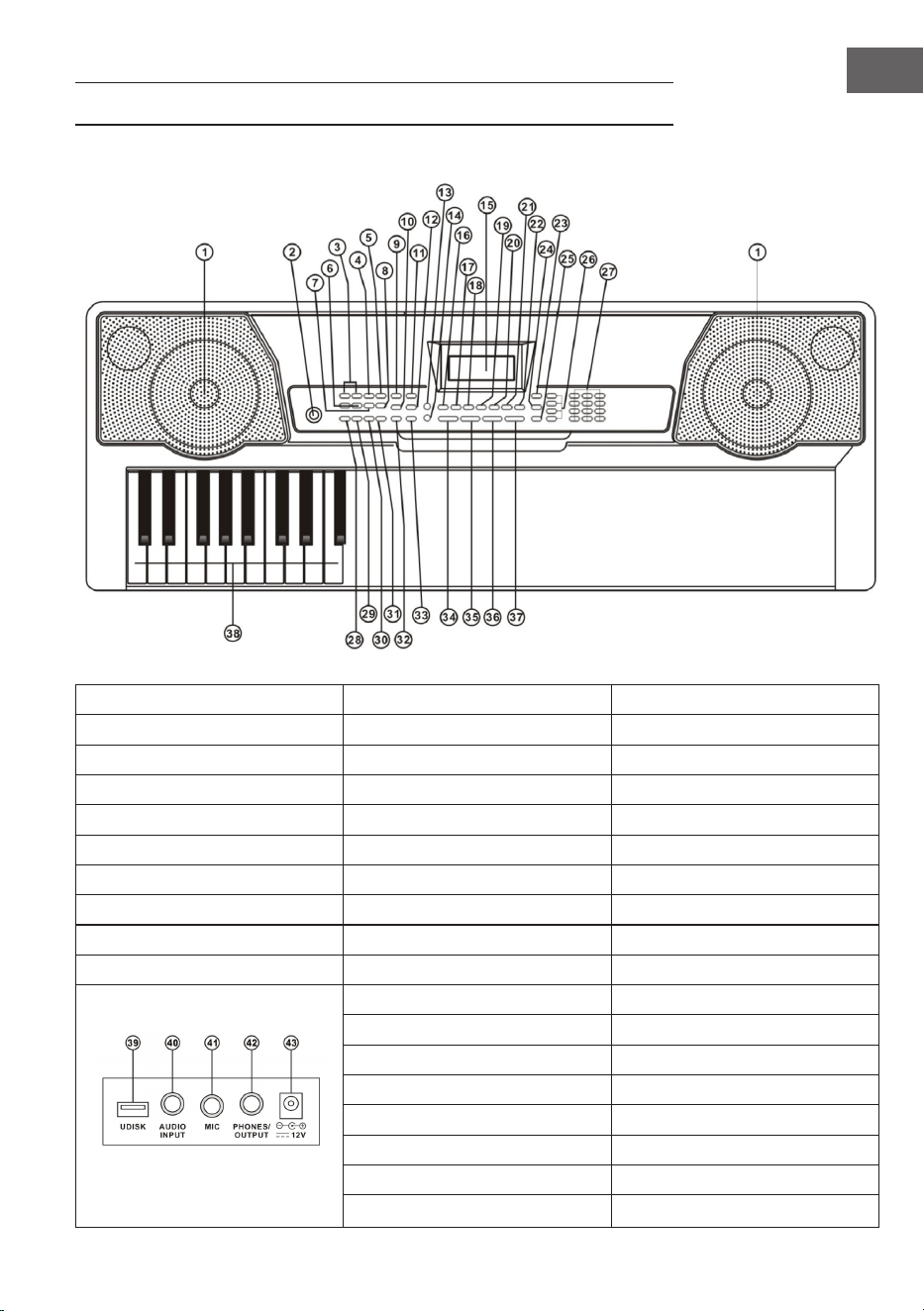
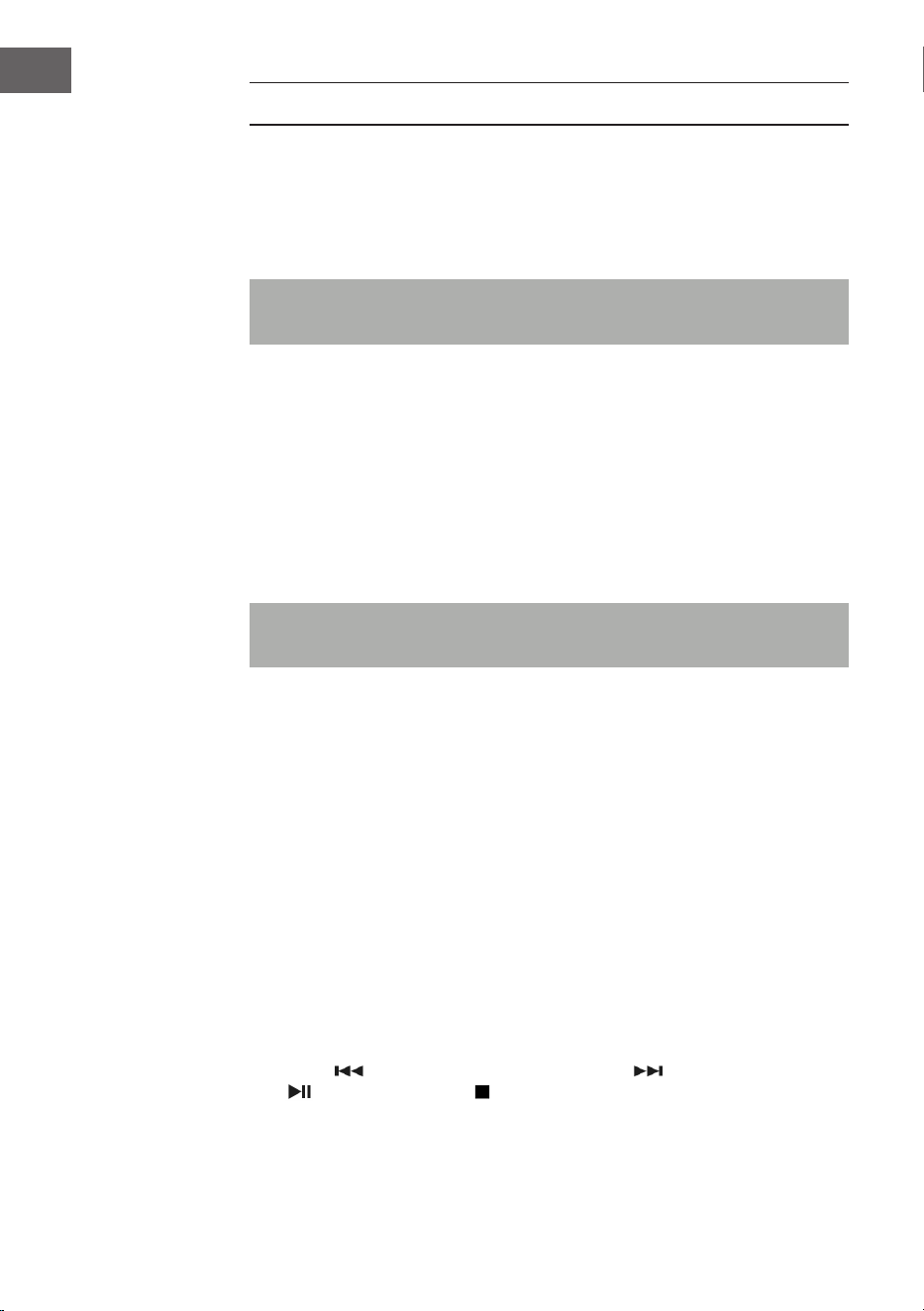
1 Loudspeaker 9 Sync 27 Numbers
2 Power 10 Fill-in 28 Single Chord
11 Timbre 29 Fingered Chord
MP3 Control 12 Rhythm 30 Chord Timbre
3 Previous/Next 13 Key Lighting 31 Chord OFF
4 Play/Pause 14 Demo Song 32 Metronome
5 Stop 15 LCD display 33 Start/Stop
6 MP3 Volume Control 16 Keyboard Percussion 34 Master Volume
7 Sequence/Random/Single 17 Recording 35 Accom Volume
8 Sound effect 18 Program 36 Tempo
19 Play 37 Transpose
20 Split 38 Chord Zone
21 Sustain 39 UDISK
22 Vibrato 40 AUDIO INPUT
23 One Key 41 MIC
24 Follow 42 PHONES/OUTPUT
25 Ensemble 43 DC 12V
26 Memory
24
EN
CONNECTIONS
AC/DC Power adaptor
A dedicated AC/DC power adapter shall be used. Connect the output end of
the adaptor to the power port on the rear panel of the keyboard, and then the
other end to the power socket.
Note: The input voltage of the adaptor shall be compatible with the power
supply voltage)
Audio Output / External Headphone
• Audio output: rstly, turn off the keyboard and the external audio devices,
secondly, connect one end of the audio cable to the PHONES/OUTPUT
port on the rear panel of the keyboard, and then connect the other end to
the audio input port of the audio device.
• Headphone connection: When connecting a headphone to the PHONES/
OUTPUT port on the rear panel of the keyboard, the loudspeaker will be
disabled automatically. In this way, you can play the keyboard without
disturbing others.
Note: When using headphone, do not turn up and keep the volume to the
maximum for a long time, for which may cause hearing loss.
Mic Input and Audio Input
• Mic input: connect a microphone to the MIC port, and then you can sing
while playing the keyboard.
• With the stereo input function, sound signals from mobile phone, MP3
player, computer and other audio devices can be input into the keyboard
system for playing. Firstly turn off the Keyboard, then, connect one end of
audio cable to the output port of an audio device, and the other end to the
AUDIO INPUT port on the rear panel of the Keyboard, nally, turn on the
keyboard.
Playing MP3 music
Insert a U disk into the UDISK port on the rear panel of the Keyboard for MP3
music playing. Support up to 32G (max.).
• Press the [-/+ ] bottons at the MP3 Controls to adjust the volume.
• Press [ ] to go to the previous track, press [ ] to go to the next track,
[ ] Play/Pause a track, [ ] stop a playing track. Press Button (7) to cycle
through the repeat modes for: continuous, random, or single playback.

25
EN
• Press [Effect] to adjust the effect among Common, Pop, Rock, Jazz and
Classic. The keyboard is defaulted to be in common effect.
OPERATION AND FUNCTIONS
Press [Power On/Off], and the keyboard will light up from both sides, and the
LCD display will turn on and show the current Tone, tempo and other status.
Then you may operate the Keyboard as required.
Key lighting
The Keyboard has luminous function, under the mode of playing, training and
playing demo song, the light hint will be provided. The luminous function is
defaulted to be enabled, press [KEY LIGHTING] to enable or disenable the
luminous function.
Master volume adjustment
Press [MASTER VOL +/–] to turn up or turn down the master volume.
“VOLUME” and the current volume level will be shown on the display. Press
[MASTER VOL +/–] simultaneously to reset to the default value.
The master volume can also control the accompaniment volume.
Accompaniment volume adjustment
Press [ACCOM VOL +/–] to turn up or turn down the master volume.
“RC-VOLUME” and the current volume level will show on the display. Press
[ACCOM VOL +/–] simultaneously to reset to the default value.
Timbre selection
The Keyboard provides 255 timbres, from “000” to “254”, for your selection.
When turning on the keyboard, the timbre selection function will be enabled
automatically, and “TONE” and current timbre number will show on the
displays. When under other states, press [TIMBRE ] to enable the Tone
selection function. The Tone is defaulted to be “000”, and it can be adjusted by
pressing the corresponding number buttons or pressing the “+” /“-”button.
Playing Percussion
This Keyboard provides 61 kinds of keyboard percussions. Press [KEYBOARD
PERCUSSION] to convert the key to percussion key. Each key corresponds to
one percussion instrument. Press this button again to disenable the keyboard
percussion function.

26
EN
Playing demonstration songs
50 demo songs have been stored in the Keyboard, from “000” to “049”, for
your selection. Press [DEMO SONG] to play all demonstration songs in order,
the luminous key will ash to the melody, and “SONG” and current demo song
number will show on the display. Press the number buttons or“+”/“-” buttons
to select the demonstration song. When pressing [TIMBRE] during the
demonstration song playing process, “TONE” will show on the display, press
the number buttons or the“+”/“-”button within 3 seconds to select other Tones
for playing the demonstration song. Press [START / STOP] or press [DEMO
SONG] again to stop playing the demonstration song.
AUTO RHYTHMN
Rhythm selection
This Keyboard provides 255 rhythms, from “000” to “254”, for your selection,
and the rhythm is defaulted to be “000”. Press [RHYTHM] to enable the
rhythm selection function. “RHYM” and current rhythm number will show on
the display. Then you can press the number buttons or the “+”/“-” buttons to
select other rhythms.
Rhythm control
Rhythm enabling
Press [START/STOP] to start accompaniment rhythm. Press [SYNC], “SYN”
will show on the display and the four beat points will ash simultaneously,
then play any key in the chord key zone (the 1st-19th key, from left), the
accompaniment rhythm will be enable.
Interlude
After the accompaniment rhythm is activated, press [FILL-IN] to have a
temporary rhythm play during the accompaniment rhythm. If press and hold
[FILL-IN], the temporary rhythm will continuous.
Stop rhythm
During the accompaniment rhythm, press [START/STOP] the stop the
accompaniment rhythm.
Metronome
The metronome contains four tempos, 1/4, 2/4, 3/4 and 4/4, respectively.
Press the [METRONOME] continuously to select the four tempos. Press the
[METRONOME] bottom again to stop the tempo.
Tempo adjustment
Press [TEMPO +/ –] to increase or decrease the rhythm speed. Press the two
buttons simultaneously to reset to the default value.

27
EN
AUTO BASS CHORD
Single chord
Under the state that the rhythm is enabled, press [SINGLE CHORD], and “SIN”
will show on the display, and then you can play a single chord on the keys in the
chord zone of the keyboard.
Fingered chord
Under the state that the rhythm is enabled, press the [FINGERED CHORD]
button. “FIN” will show on the display, and then you can play a ngered chord
on the keys in the chord zone of the keyboard.
Chord OFF
Press [CHORD OFF] to disenable the single chord or the ngered chord
function.
Chord Timbre
During single chord or ngered chord accompaniment, you can press [CHORD
TIMBRE] to change the chord tone, and press [CHORD TIMBRE] again to
resume the original chord tone.
STATUS MEMORY
With the status memory function, you can save the tone, rhythm, tempo and
other parameters to be changed during playing, for fast shifting. This keyboard
is equipped with 3 status memories, which can be exibly called at any time
during playing.
Storage of status memory
Set the tone, rhythm, tempo and chord as required, and then press the
[MEMORY] bottom and one of [MEMORY 1] to [MEMORY 3] to save the
current status.
Calling of status Memory
Press any one of [MEMORY 1] to [MEMORY 3] to call the setting parameters
saved under this memory to replace the current status.
NOTE: No power failure protection is provided for the saved contents, and the
saved contents will loss after the electronic keyboard is restarted after power
cut.

28
EN
EFFECT CONTROL
Transposing function
With the transposing function, you can play music of other tunes with C-tune
ngering method. Press the [TRANSPOSE-] to decrease the tone by half-tone
(minor second), and the tune in C-tune keyboard zone will change to B-tune.
Press the [TRANSPOSE-] to increase the tone by half-tone (minor second), and
the tune in C-tune keyboard zone will change to #C tune or bD tune. When
pressing the [TRANSPOSE-] for twice, C-tune will shift to bB-tune, when
pressing the [TRANSPOSE +] for ve times, C-tune will shift to F-tune. Press
[TRANSPOSE+] and [TRANSPOSE-] simultaneously to recover to C-tune
“00”. Press [TRANSPOSE +] and [TRANSPOSE -] to adjust the level from “P-6”
to“P06”.
Sustain function
Press [SUSTAIN], “SUS” will show on the display, and the sustain effect will be
activated. Press this button again to disenable the sustain effect.
Vibrato function
Press [VIBRATO], “VIB” will show on the display, and the vibrato effect will be
activated. Press this button again to disenable the vibrato effect.
Keyboard splitting function
Press [SPLIT] to enable the keyboard splitting function, “SPLIT” will show on
the display. 24 keys on the left of the keyboard will split with the remaining
keyboard. While the left keyboard zone will increase by one octave and
maintain the original tone, the right keyboard zone will decrease by one octave
to maintain the same pitch with the left keyboard zone. The tone of the right
keyboard zone can be set as needed so different tones can be played by the left
and right keyboard zones at the same time. Press [SPLIT] again to disenable
this function.

29
EN
RECORDING
Start recording
Press [REC] to enable the recording function, “REC” will show on the display.
Under this mode all playing notes will be recorded. When the storage is full,
“REC” will show on the display, and recording will stop automatically.
• Press [PLAY] to playback the recorded notes, and “PLAY” will show on the
display. On completion of playback, it will enter to the recording mode and
“REC” will show on the display. You can record a new rhythm, or you can
press [PLAY] to playback the recorded rhythm.
• Press [START/STOP] or press [REC] again to disenable the recording
function, and all recorded rhythm will be removed.
RHYTHM PROGRAMMING
How to program rhythms
Press [PROG] to enable the rhythm programming function, “PRG” will show on
the display, and the keyboard percussion will be activated. Under this mode,
you can create custom rhythms by playing the corresponding percussion key.
• 32 percussions can be recorded at maximum, after that “PRG” will ash on
the display, and programming will stop automatically.
• Press [PLAY] to playback the programming rhythm. Press [PLAY] again to
stop playback, “PRG” will show on the display and programming function
will be enabled. You can re-program rhythms or you can press [PLAY] again
to playback.
• Press [START/STOP] or press [PROG] again to disenable the programming
function, and all recorded rhythm will be removed.

30
EN
INTELLIGENT THREE-STEP TRAINING
Training I: One Key
Press [ONE KEY] to enable the One Key training function, “LEARN”, “SONG”
and the song number will show on the display, and then press “+”/“-” button to
select the song to be learned. The luminous keyboard will light on according
to the main melody notes, indicating the note to be played, and you can
perform by following the guidance of the lighted key. Single Key training aims
at duration learning, and there is no requirement for pitch or correctness. This
mode allows mistakes when playing the keys, but the keyboards still plays
correct notes, and the luminous keys will light on according to the correct
notes while the key zone in the display will also show the correct notes. After
one song is nished, repeat the current song to be learned.
Press [Start/Stop] or press [ONE KEY] to disenable the training function.
Training II: Follow
Press [FOLLOW] to enable the follow function, “LEARN”, “SONG” and the
song number will show on the display, and then press “+”/“-” button to select
the song to be learned. With [FOLLOW] function, you can learn by following
the correctly playing notes. You can play according to the demonstration song,
the key will light on according to the melody notes, indicating the notes to
be played, and you can play correctly by following the guidance. You can also
learn how to play by following the indicators in the key zone of the display.
It will wait for you to play the correct note before it moves to the next one.
Notes: Under this state, the Keyboard plays only the correct notes, and gives
no response to the wrong notes. Press t [START/STOP] or press [FOLLOW] to
disenable the training function.
Training III: Ensemble
Press [ENSEMBLE] to enable the Ensemble training function, “LEARN”,
“SONG” and the song number will show on the display, and then press “+”/“-”
button to select the song to be learned. The Ensemble training aims at the
correct and comprehensive learning of the song duration and notes. The
keynote will be shielded for ensemble. The luminous keyboard will light on
according to the main melody notes, indicating the note to be played, and you
can perform by following the guidance of the lighted key. You need to play
the correct note according the correct duration of the song. If you fail to play
within 3 seconds, the keyboard will automatically play the keynote, and the
keyboard zone in the screen will display the correct note and tempo.
After one song is nished, repeat the current song to be learned. Press
[START/STOP] or press [ENSEMBLE] to disenable the training function.

31
EN
TIMBRE TABLE
000 Acoustic Grand Piano 040 Tenor Sax 080 Ocarina 120 Wood Barafon 2
001 Rhodes Piano 041 Baritone Sax 081 Lead (Sawtooth)1 121 Music Box 2
002 Chorused Piano 042 Oboe 082 Lead (Calliope)1 122 Marimba 2
003 Celesta 1 043 Bassoon 083 Lead (Bass+Lead)1 123 Santur
004 Music Box 1 044 Clarinet 084 Pad (Warm)1 124 Reed Organ 2
005 Vibraphone 045 Piccolo 085 Sitar 125 Puff Harmonica 1
006 Marimba 1 046 Flute 086 Shamisen 1 126 Ukulele 1
007 Xylophone 1 047 Pan Flute 087 Koto 1 127 12-str. Gt 1
008 Percussive Organ 048 Lead (Square) 088 Kalimba 1 128 Guitar Pinch 2
009 Rock Organ 049 Banjo 089 Bag Pipe 1 129 Slow Violin 1
010 Church Organ 050 E-Tone Piano 090 Fiddle 1 130 Bright String 1
011 Reed Organ 1 051 Electric Grand Piano 091 Shanai 1 131 Jungle Bass 2
012 Accordion 052 Honky-tonk Piano 092 Tinkle Bell 132 Indian Flute 1
013 Harmonica 053 Harpsichord 1 093 Agogo 1 133 Clavi 3
014 Acoustic Guitar (Nylon) 054 Clavi 1 094 Steel Drums 134 Celesta 3
015 Acoustic Guitar (Steel) 055 Glockenspiel 1 095 Woodblock 1 135 Church Bells
016 Electric Guitar (Jazz) 056 Tubular Bells 1 096 Taiko Drum 136 Marimba 3
017 Electric Guitar (Clean)1 057 Dulcimer 1 097 Melodic Tom 1 137 Dulcimer 2
018 Distortion Guitar 058 Drawbar Organ 1 098 Synth Drum 138 Reed Organ 3
019 Acoustic Bass 059 Tango Accordion 1 099 Reverse Cymbal 139 Electric Guitar (Clean)2
020 Electric Bass (Finger) 060 Electric Guitar (Muted)1 100 Jungle Bass 1 140 Koto 2
021 Electric Bass (Pick) 061 Overdriven Guitar 1 101 Pi Pa 1 141 Xylophone 2
022 Fretless Bass 062 Contrabass 1 102 Feedback Gt. 1 142 Shanai 2
023 Slap Bass 1 063 Tremolo Strings 103 Uillean Harp 1 143 Dulcimer 3
024 Slap Bass 2 064 Pizzicato Strings 1 104 Jazz Bass 1 144 English Horn 2
025 Synth Bass 1 065 Timpani 105 Flugel Horn 1 145 Electric Guitar (Clean)3
026 Synth Bass 2 066 String Ensemble 2 106 Muted Horn 1 146 Shamisen 2
027 Violin 067 Synth Strings 1 107 Wood Barafon 1 147 Koto 3
028 Viola 068 Synth Strings 2 108 Electric Piano 1 148 Kalimba 2
029 Cello 069 Choir Aahs 109 Multi Reed 1 149 Steel Bell 1
030 Orchestral Harp 070 Voice Oohs 110 Guitar Pinch 1 150 Alto Sax 2
031 String Ensemble 1 071 Synth Voice 111 Multi Wind 1 151 Woodblock 2
032 Trumpet 072 Orchestra Hit 112 Clavi 2 152 Synth Harpsi. 1
033 Trombone 073 Muted Trumpet 1 113 Celesta 2 153 Attack Clav. 1
034 Tuba 074 Synth Brass 2 114 Harpsichord 2 154 Crystal 1
035 French Horn 075 English Horn 1 115 Mellow Fm 1 155 Bag Pipe 2
036 Brass Section 076 Recorder 116 Pi Pa 2 156 Barafon 1
037 Synth Brass 1 077 Blown Bottle 1 117 Upright Piano 1 157 Organ Flute 1
038 Soprano Sax 078 Shakuhach 118 Electric Piano 2 158 Kalimba 3
039 Alto Sax 1 079 Whistle 119 Hard Vibe 1 159 Reed Horn 1

32
EN
160 Hard Vibe 2 200 Lead (Bass+Lead)2 240 Barafon 2
161 Twin Trombones 1 201 Melodic Tom 2 241 Wind Organ 2
162 Synth Harpsi. 2 202 Grow Guitar 2 242 12-str. Gt 2
163 Attack Clav. 2 203 Lead (Sawtooth)2 243 Attack Barafon 2
164 Chorus Guitar 1 204 Jazz Bass 2 244 Lead (Calliope)2
165 Steel Bell 2 205 Chorus Guitar 2 245 Viola Attack 2
166 Tsugaru 206 Feedback Gt. 2 246 Pad (Warm)2
167 Oct Harp 1 207 Fiddle 2 247 Oct Harp 2
168 Bodhran 1 208 Organ Flute 2 248 Bari & Tenor 2
169 Tubular Bells 2 209 Flugel Horn 2 249 Agogo 2
170 Suona 210 Crystal 2 250 Flugel Horn 3
171 Castanets 211 Soft Clav. 2 251 Organ Flute 3
172 Attack Harp 1 212 Overdriven Guitar 2 252 Fiddle 3
173 Electric Vibraphone 1 213 Ukulele 2 253 Feedback Gt. 3
174 Soft Sax 1 214 Tango Accordion 2 254 Chorus Guitar 3
175 Soft Clav. 1 215 Twin Trombones 2
176 Soft Guitar 1 216 Jazz Organ 2
177 Grow Guitar 1 217 Bright String 2
178 Didgeridoo 1 218 Reed Horn 2
179 Attack Barafon 1 219 Glockenspiel 2
180 Mute Barafon 1 220 Drawbar Organ 2
181 Nay 1 221 Muted Horn 2
182 Soft Santur 222 Pizzicato Strings 2
183 Dual Horns 1 223 Nay 2
184 Hard Barsoon 1 224 Puff Harmonica 2
185 Tron Flute 1 225 Muted Trumpet 2
186 Kawala 1 226 Upright Piano 2
187 Jazz Organ 1 227 Soft Accord 2
188 Soft Accord 1 228 Uillean Harp 2
189 Wind Organ 1 229 Tron Flute 2
190 Viola Attack 1 230 Blown Bottle 2
191 Bari & Tenor 1 231 Indian Flute 2
192 Soft Sax 2 232 Slow Violin 2
193 Attack Harp 2 233 Electric Guitar (Muted)2
194 Didgeridoo 2 234 Multi Wind 2
195 Dual Horns 2 235 Electric Vibraphone 2
196 Hard Barsoon 2 236 Bodhran 2
197 Kawala 2 237 Mellow Fm 2
198 Soft Guitar 2 238 Multi Reed 2
199 Mute Barafon 2 239 Contrabass 2

33
EN
RHYTHM TABLE
000 Hard Rock 040 Disco Soul 080 Dance Pop 1 120 Trip Hop
001 Club Pop 041 Disco Trot 081 Dance Pop 2 121 Rave 2
002 Fusion 042 Rave 1 082 Euro Beat 122 Acoustic Ballad 1
003 Rap Pop 043 Funky Disco 1 083 Euro House 123 India's Indigenous
004 British Pop 1 044 Techno 1 084 Hip Hop 124 Indonesian Pop
005 Twist 045 Techno 2 085 Swing 125 Pop Ballad
006 8 Beat Pop 1 046 Saturday Night 1 086 Big Band Swing 126 South Africa Country
007 Fusion Shufe 047 Club Latin 1 087 Jazz Quartet 127 South Africa Polka
008 Funk 048 Disco Hands 1 088 Dixieland 128 Tarantella 1
009 Funk Shufe 049 Country 089 Bluegrass 1 129 Bright Pop
010 Rock'n Roll 1 050 China 1 090 Bluegrass 2 130 Pub Piano 1
011 Rock Pop 051 China 2 091 8 Bt Country 131 West Shufe
012 Rock Shufe 052 China 3 092 Country Rock 132 Big Band Fast 2
013 Rock Cha Cha 053 China 4 093 Cntry Ballad 133 Espag Nol 1
014 Straight Rock 054 China 5 094 March 1 134 Disco Funk 2
015 Folk Rock 055 8 Bt Up Tempo 095 March 2 135 Pop Mambo
016 Pasodoble 056 16 Beat Pop 096 Polka 136 Europe Swing 1
017 Cha Cha 057 16 Bt Shufe 1 097 Pop Waltz 137 Tricks Latin
018 Fox Trot 058 16 Bt Shufe 2 098 Jive 138 Disco Samba 2
019 Rumba 1 059 16 Bt Ballad 1 099 Vienna Waltz 139 Latin Waltz
020 Samba 1 060 16 Bt Ballad 2 100 8 Beat Soul 140 Dance Pop 3
021 Samba 2 061 Soul 101 Classical 8 Beat 141 Jazz Rock 1
022 Schlager Rock 062 Pop Rock 1 102 Jazz Latin 1 142 Detroit
023 Tango 1 063 Pop Rock 2 103 Unplugged 143 Fanatical Sand
024 Tango 2 064 8 Bt Rock Balld 104 Boogie 144 European Rock 1
025 Disco Latin 1 065 16 Bt Rock Balld 105 Cumbia 2 145 Ground Beat
026 Calypso 066 6/8 Hvy Rock 106 Classical Slow Rock 146 8 Beat Modern 2
027 Latin Rock 067 16 Beat Rock 107 European Disco 1 147 Jazz Disco 1
028 Bolero 068 Bossa Nova 1 108 Big Band Middle 1 148 Dixie Jazz 1
029 Analog Ballad 1 069 Bossa Nova 2 109 Chrlston 149 Disco Chocolate
030 E_Ballad 070 Salsa 110 Pasodobl 150 Disco Latin 2
031 Country Ballad 071 Mambo 111 Cat Groove 1 151 Synth Boogie
032 Electro Pop 072 Beguine 112 Jazz Tango 1 152 Saturday Night 2
033 Pop New Age 1 073 Bolero Lento 113 Fast Gospel 153 Club Dance 1
034 8 Beat Modern 1 074 Espagnole 114 Big Band Fast 1 154 Tricks Bossa Nova
035 R&B Ballad 1 075 Reggae 12 115 Tricks Mambo 155 Tarantella 2
036 Disco Fox 1 076 Pop Reggae 1 116 Funky Disco 2 156 USA March
037 Disco Funk 1 077 Slow Rock 1 117 Latin Salsa 157 Espag Nol 2
038 Disco Party 1 078 Slow Rock 2 118 Pop New Age 2 158 Club Latin 2
039 Disco Samba 1 079 R&B 119 Jazz Swing 1 159 Jazz Cha Cha 1

34
EN
160 Country Cha Cha 200 Guad Dance 1 240 Hip Waltz 2
161 Disco Party 2 201 Jazz Cha Cha 2 241 Jazz Swing 2
162 Modern R&B 1 202 Country Waltz 242 Party Pop
163 8 Beat Pop 2 203 European Rock 2 243 Jazz Club
164 Country Jazz 204 Caribbean Dance 2 244 Guad Dance 2
165 Soul Rock 1 205 Jazz Disco 2 245 Jazz Bo 2
166 Rumba 2 206 Medium Jazz 246 Dixie Jazz 2
167 Samba 3 207 Piano Ballad 247 Acoustic Ballad 2
168 Modern R&B 2 208 70's Disco 248 Jazz Slow Rock
169 Club Dance 2 209 Jazz Rock 2 249 16 Beat Shufe 2
170 Country Bossa Nova 210 Europe 8 Beat 1 250 Polka Pop
171 Jazz Bo 1 211 Seville 2 251 Latin Party Pop
172 Modern Cha Cha 1 212 Rumba 3 252 Parranda
173 Pop Reggae 2 213 Soul Rock 2 253 Carnival
174 Rock Samba 1 214 European Disco 2 254 60's Vintage Pop
175 Jazz 8 Beat 1 215 Analog Ballad 2
176 Disco 216 Pub Piano 2
177 Seville 1 217 Europe Rumba
178 Disco Hands 2 218 Rock'n Roll 2
179 Rock Ballad 219 Disco Trop
180 Mixed Bossa Nova 220 Rock Salsa 1
181 Jazz 16 Beat 1 221 Europe 8 Beat 2
182 Single 16 Beat 1 222 Europe Samba
183 Love Song 223 Show Tune 2
184 Single 16 Beat 2 224 Jazz 16 Beat 2
185 Disco Fox 2 225 Rock Samba 2
186 Pop Rock 3 226 Jazz Waltz 2
187 Tijuana Waltz 227 Europe Reggae
188 British Pop 2 228 Modern Cha Cha 2
189 Show Tune 1 229 R&B Ballad 2
190 Schlager Alp 230 Rock Boogie
191 Single Rock 231 Jazz Bossa Nova
192 Swing Waltz 232 Rock Salsa 2
193 Slow Waltz 233 Slow & Easy
194 Cat Groove 2 234 Hip Waltz 1
195 Country Slow Rock 235 Jazz Latin 2
196 Rock Disco 1 236 Rock Disco 2
197 16 Beat Shufe 1 237 Jazz Tango 2
198 Jazz 8 Beat 2 238 Analog Ballad 3
199 Casa 239 Europe Swing 2

35
EN
DISPOSAL CONSIDERATIONS
If there is a legal regulation for the disposal of electrical
and electronic devices in your country, this symbol
on the product or on the packaging indicates that this
product must not be disposed of with household waste.
Instead, it must be taken to a collection point for the
recycling of electrical and electronic equipment. By
disposing of it in accordance with the rules, you are
protecting the environment and the health of your
fellow human beings from negative consequences. For
information about the recycling and disposal of this
product, please contact your local authority or your
household waste disposal service.
DECLARATION OF CONFORMITY
Manufacturer:
Chal-Tec GmbH, Wallstrasse 16, 10179 Berlin,
Germany.
Importer for Great Britain:
Berlin Brands Group UK Limited
PO Box 42
272 Kensington High Street
London, W8 6ND
United Kingdom
type Etude 255 Keyboard is in compliance with Directive
2014/53/EU. The full text of the EU declaration of
conformity is available at the following internet address:
use.berlin/10031457
For Great Britain: Hereby, Chal-Tec GmbH declares
that the radio equipment type Etude 255 Keyboard is in
compliance with the relevant statutory requirements. The
full text of the declaration of conformity is available at the
following internet address: use.berlin/10031457

37
FR
Chère cliente, cher client,
Toutes nos félicitations pour l’acquisition de ce nouvel
appareil. Veuillez lire attentivement et respecter
les instructions de ce mode d’emploi an d’éviter
d’éventuels dommages. Nous ne saurions être tenus
pour responsables des dommages dus au non-respect
des consignes et à la mauvaise utilisation de l’appareil.
Scannez le QR-Code pour obtenir la dernière version
du mode d‘emploi et des informations supplémentaires
concernant le produit.
SOMMAIRE
Consignes de sécurité 38
Aperçu de l’appareil 39
Branchements 40
Utilisation et fonctions 41
Rythmes auto 42
Accompagnement d’accords 43
Mémorisation de statut 44
Contrôle des effets 44
Fonction d’enregistrement 45
Programmer des rythmes 45
Entraînement et exercices 46
Tableau des sons 47
Tableau des rythmes 49
Conseils pour le recyclage 51
Déclaration de conformité 51

38
FR
CONSIGNES DE SÉCURITÉ
• Utiliser uniquement l’adaptateur fourni. S’il se casse, le remplacer
immédiatement.
• Le synthétiseur doit être démonté uniquement par des techniciens
qualiés. S’il ne fonctionne pas correctement, ne pas continuer à en jouer
et contacter une entreprise spécialisée à proximité.
• Avant de connecter le clavier à d’autres appareils, s’assurer que les deux
appareils sont éteints.
• Veiller à ne pas régler le volume au maximum pendant une période
prolongée.
• Maintenir le synthétiseur à l’écart des sources de chaleur pour éviter
d’endommager l’appareil et ses composants.
• S’assurer que les liquides, la poussière, les petits objets ou équivalent ne
s’inltre dans le synthétiseur, car cela pourrait provoquer un court-circuit.
• Débrancher l’appareil avant de le nettoyer. Ne pas toucher la che avec
des mains humides.
• Nettoyer le synthétiseur avec une éponge sèche et souple. Ne pas
utiliser de produit nettoyant liquide ou de solvant, car cela pourrait en
endommager le revêtement.
• Débrancher l’appareil après utilisation.
39
FR
APERÇU DE L’APPAREIL
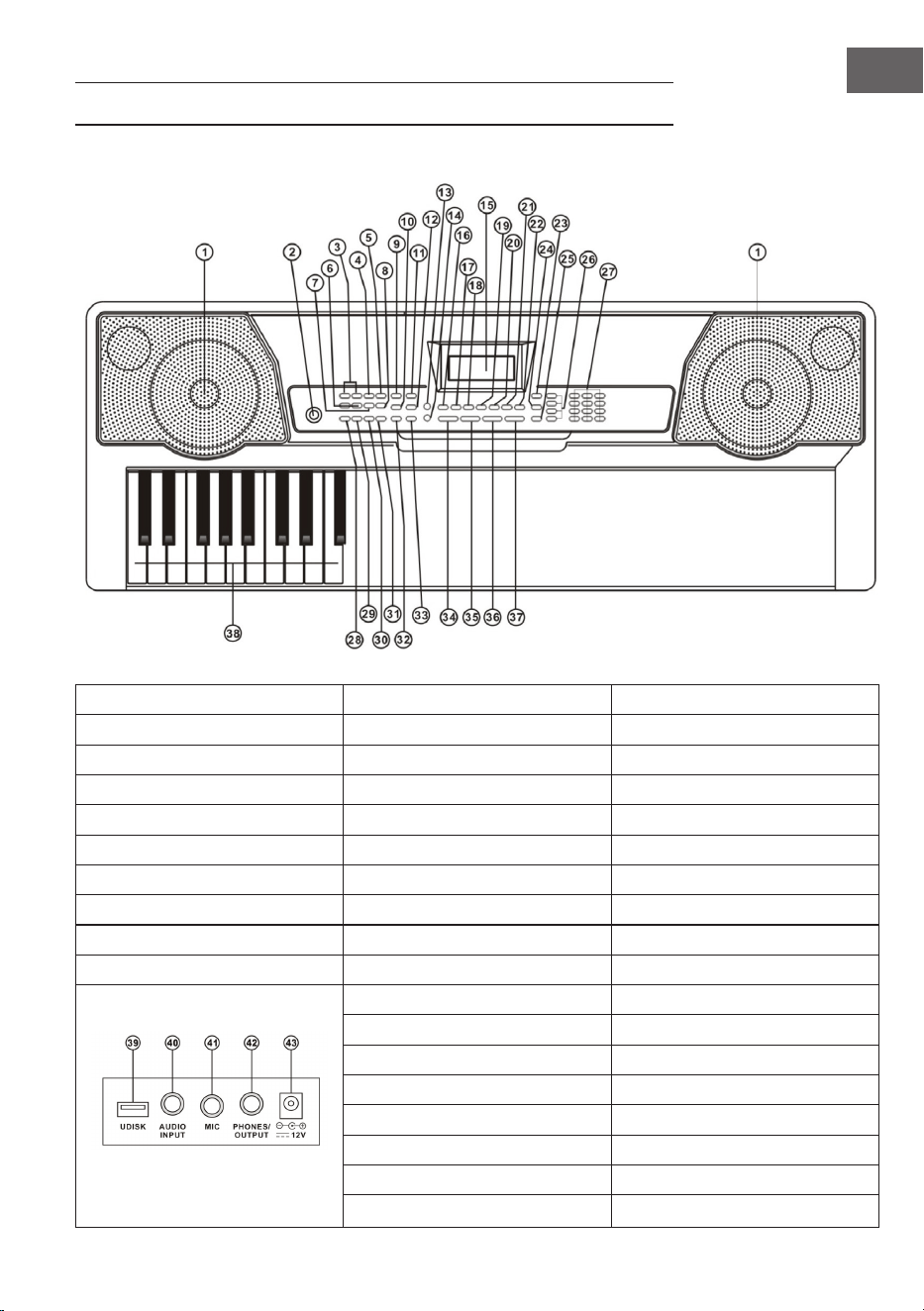
1 Enceintes 9 Sync 27 Touches numérotées
2 Marche/arrêt 10 Fill-in 28 Accord simple
11 Timbre 29 Accord arpégé
Commande MP3 12 Rythme 30 Timbre d’accord
3 Suivant/précédent 13 Éclairage des touches 31 Chord OFF
4 Lecture/pause 14 Morceau de démo 32 Métronome
5 Arrêt 15Écran LCD 33 Start/Stop
6 Bouton de volume MP3 16 Percussion clavier 34 Volume master
7 Séquence / aléatoire / titre unique 17 Enregistrement 35 Volume des accords
8 Effets sonores 18 Programme 36 Tempo
19 Lecture 37 Transposition
20 Split 38 Zone d’accords
21 Soutien 39 UDISK
22 Vibrato 40 AUDIO INPUT
23 One Key 41 MIC
24 Follow 42 Casque/OUTPUT
25 Ensemble 43 Entrée secteur DC 12 V
26 Mémoire

40
FR
BRANCHEMENTS
Adaptateur secteur
Utiliser uniquement l’adaptateur secteur fourni. Brancher une des extrémités
de l’adaptateur secteur à l’arrière du synthétiseur puis brancher la che sur la
prise.
Remarque : La tension d’entrée de l’adaptateur doit correspondre à la
tension d’alimentation.
Sortie audio / casque externe
• Sortie audio : éteindre tout d’abord le clavier et les appareils audio
externes puis brancher une des extrémités du câble audio à la prise
PHONES/OUTPUT à l’arrière du synthétiseur. Brancher l’autre extrémité
à l’entrée audio de l’appareil audio.
• Prise casque : si un casque est branché à la prise PHONES/OUTPUT à
l’arrière du synthétiseur, les enceintes s’éteignent automatiquement. Cela
permet de jouer du synthétiseur sans déranger personne.
Remarque : en cas d’utilisation d’un casque, ne pas garder le volume au
niveau maximal pendant une période prolongée, sinon cela peut conduire à
des pertes auditives.
Entrée Mic et entrée audio
• Entrée Mic : brancher un microphone à un port MIC pour pouvoir chanter
tout en jouant du synthétiseur.
• La fonction source stéréo permet au synthétiseur de diffuser des
sonneries depuis un téléphone portable, un lecteur MP3, un ordinateur
et d’autres appareils audio. Tout d’abord, éteindre le synthétiseur et
connecter une extrémité du câble audio avec la sortie d’un appareil
audio. Brancher l’autre extrémité à la prise AUDIO INPUT à l’arrière du
synthétiseur brancher enn celui-ci.
Lecture de MP3
Introduire une clé USB dans la prise UDISK à l’arrière de l’appareil. L’appareil
peut lire les clés d’une capacité maximale de 32 GB.
• Appuyer sur les touches [+] et [-] de la commande MP3 pour régler le
volume.
41
FR
• Appuyer sur la touche de la commande MP3 pour passer au titre
précédent. Appuyer sur pour passer au titre suivant. Appuyer sur
pour lire un titre ou le mettre en pause. Appuyer sur pour arrêter
un titre. Utiliser la touche (7) pour basculer entre les modes suivants :
séquence / aléatoire / titre unique.
• Appuyer sur la touche d’effet (8) pour sélectionner un des effets sonores
suivants : général, pop, rock, jazz et classique. Le réglage par défaut est «
général ».
UTILISATION ET FONCTIONS
Appuyer sur le bouton marche, l’écran LCD s’allume et afche le son, le tempo
et le volume actuel ainsi que d’autres paramètres. L’éclairage de fond est activé
par défaut.
Éclairage des touches
Lorsque les modes entraînement en 3 étapes, lecture de morceau démo ou
entrée USB-MIDI sont sélectionnés, le clavier s’allume après le démarrage.
Appuyer sur [KEY LIGHT] pour activer ou désactiver la fonction d’éclairage.
Réglage du volume master
Appuyer sur [Master Vol +/-] pour augmenter ou diminuer le volume master.
Appuyer simultanément sur [Master Vol +] et [Master Vol -] pour rétablir les
paramètres par défaut du clavier. Le volume master permet également de
contrôler le volume de l’accompagnement.
Réglage du volume d’accompagnement
Appuyer sur [ACCOM VOL +/-] pour augmenter ou diminuer le volume master.
Appuyer simultanément sur [ACCOM VOL +] et [ACCOM VOL -] pour rétablir
les paramètres par défaut du clavier.
Réglage du timbre
Le synthétiseur dispose de 255 timbres (couleurs sonores), numérotés de
« 000 » à « 254 ». La sélection de timbre est automatiquement activée au
démarrage du synthétiseur et l’indication « Tone » s’afche à l’écran. Si « Tone »
n’est pas afché, appuyer sur [TIMBRE] pour activer la sélection de timbre. Le
timbre est réglé par défaut sur « 000 » et peut être modié en appuyant sur les
touches numérotés correspondantes ou en appuyant sur les touches [+] et [-].

42
FR
Activation de la batterie
Appuyer sur [Keyboard Percussion] pour activer la fonction batterie. Ce
mode permet à l’utilisateur d’utiliser le clavier du synthétiseur pour jouer des
instruments de percussion précis. Appuyer de nouveau sur cette touche pour
désactiver la fonction batterie.
Lecture des démos
50 morceaux de démo sont mis à disposition, numérotés de « 000 » à « 049
». Appuyer sur [Demo Song] pour lire les morceaux de démo les uns après
les autres. De plus, les touches correspondantes du clavier s’allument et le
morceau et le numéro du titre actuels sont afchés à l’écran. Appuyer sur la
touche [+] ou [-] pour sélectionner le morceau souhaité. Si la touche [TIMBRE]
est appuyée pendant la lecture et que la touche [+] ou [-] est appuyée en
l’espace de 3 secondes, il est possible de sélectionner une couleur sonore pour
le morceau de démo. Appuyer sur [Start/Stop] ou de nouveau sur [Demo Song]
pour arrêter la lecture.
RYTHMES AUTO
Sélection des rythmes
Le synthétiseur propose 255 rythmes, numérotés de « 000 » à « 254 ». Le
rythme par défaut est « 000 ». Appuyer sur [Rhythm] pour activer la fonction
de sélection des rythmes, et « RHYM » s’afche alors à l’écran. Appuyer ensuite
sur les touches numérotées ou sur [+] et [-] pour sélectionner d’autres rythmes.
Commande des rythmes
Activer un rythme
Appuyer sur [Start/Stop] pour démarrer l’accompagnement. Appuyer sur
[SYNC], « SYNC » apparaît à l’écran et trois points de battement clignotent en
même temps. Jouer une des touches de la zone d’accord (les touches 1 à 19 en
partant de la gauche) pour que le rythme d’accompagnement soit activé.
Interlude
Une fois le rythme activé, appuyer sur [Fill-In] pour ajouter un interlude
pendant la diffusion d’un style. Rester appuyer sur la touche [Fill-in] pour un
interlude continu.
Démarrer et arrêter le rythme d’accompagnement
Appuyer sur [Start/Stop] pendant la diffusion du rythme d’accompagnement
pour arrêter celui-ci.

43
FR
Métronome
Le métronome comprend quatre tempos : 1/4, 2/4, 3/4, 4/4. Appuyer sur
[Metronome] pour sélectionner les quatre tempos l’un après l’autre. Appuyer
de nouveau sur [Metronome] pour arrêter le métronome.
Réglage du tempo
Appuyer sur [Tempo+] ou [Tempo-] pour augmenter ou diminuer le tempo.
Appuyer simultanément sur les deux touches pour revenir aux paramètres par
défaut.
ACCOMPAGNEMENT D’ACCORDS
Accord simple
Appuyer sur [Single] pour activer l’accord simple, et « SIN » apparaît à l’écran.
Quand le mode rythme est activé, il est possible d’appuyer sur une touche
située dans la zone d’accord (de la touche 1 à 19 en partant de la gauche] pour
obtenir un accompagnement d’accords automatique.
Accord arpégé
Appuyer sur [Fingered] pour activer la fonction accord arpégé, et « FIN »
s’afche à l’écran. Quand le mode rythme est activé, il est possible d’appuyer
sur une touche située dans la zone d’accord (de la touche 1 à 19 en partant de
la gauche] pour obtenir un accompagnement d’accords automatique.
Désactiver les accords
Appuyer sur [CHORD OFF] pour désactiver les accords simples et arpégés.
Timbre des accords
Pendant les accords simples et les accords arpégés, appuyer sur [CHORD
TIMBRE] pour modier la couleur sonore de l’accord. Appuyer de nouveau sur
cette touche pour revenir à la couleur sonore d’origine.
44
FR
MÉMORISATION DE STATUT
La fonction « mémorisation de statut » permet de mémoriser le son, le tempo,
la vitesse et d’autres paramètres effectués pendant la lecture. Ce clavier
dispose de 4 mémoires de statut qu’il est possible d’activer simplement à tout
moment de la lecture.
Enregistrement dans la mémoire de statut
Régler le son, le rythme et le tempo et appuyer sur [Memory 1] à [Memory 3]
pour mémoriser le statut actuel.
Activer une mémoire de statut
Appuyer une des touches de [Memory 1] à [Memory 3] pour activer les
paramètres mémorisés sur l’emplacement de mémoire sélectionné et
remplacer le statut actuel.
REMARQUE : le contenu mémorisé n’est pas protégé contre les pannes de
courant, de sorte que le contenu enregistré est perdu au redémarrage suivant
une coupure d’électricité.
CONTRÔLE DES EFFETS
Transposition
La fonction de transposition permet de monter ou de descendre en tonalité
sur 6 niveaux. Appuyer sur [Transpose -] pour baisser la tonalité d’un demi-
ton, la mélodie est alors transposée de la tonalité C (Do) à B (Si). Appuyer sur
[Transpose +] pour monter la tonalité d’un demi-ton, la mélodie passe alors de
la tonalité C (Do) à #C (Do #) ou bD (Ré b). Appuyer deux fois sur [Transpose
-] pour passer de la tonalité C (Do) à bB (Si b). Appuyer cinq fois sur la touche
[Transpose +] pour passer de la tonalité C (Do) à la tonalité F (Fa). Appuyer
simultanément sur [Transpose +] et [Transpose -] pour rétablir la tonalité C à
« 0 ». Appuyer sur [Transpose+] ou [Transpose -] pour régler le niveau de [-6] à
[6].
Effet de soutien
Appuyer sur [Sustain], « SUS » apparaît à l’écran et l’effet de soutien est activé.
Appuyer de nouveau sur [Sustain] pour désactiver la fonction de soutien et «
SUS » disparaît de l’écran.

45
FR
Vibrato
Appuyer sur [Vibrato] et « VIB » s’afche à l’écran. Appuyer de nouveau sur
cette touche pour désactiver de nouveau cette fonction.
Fonction SPLIT
Si la fonction SPLIT est activée, « SPLIT » s’afche à l’écran. Il est ainsi possible
d’attribuer un autre son d’instrument à la partie droite du clavier. Les touches
de gauche conservent les sons d’instruments préalablement enregistrés. Il est
ainsi possible de jouer sur des registres différents. Appuyer de nouveau sur
cette touche pour désactiver de nouveau la fonction.
FONCTION D’ENREGISTREMENT
Démarrer l’enregistrement
Appuyer sur la touche [Record] pour démarrer la fonction d’enregistrement.
« REC » apparaît à l’écran. Lorsque la mémoire est pleine, « REC » clignote à
l’écran et l’enregistrement s’arrête automatiquement.
• Appuyer sur [PLAY] pendant l’enregistrement pour arrêter et lire
l’enregistrement.
• Appuyer sur [START/STOP] pendant l’enregistrement pour annuler
l’enregistrement et supprimer les sons enregistrés.
PROGRAMMER DES RYTHMES
Comment programmer des rythmes
Appuyer sur [PROG] pour démarrer la fonction de programmation de rythmes.
L’écran afche « PRG » et le clavier de batterie est activé. Dans ce mode,
il est possible de jouer ses propres rythmes en appuyant sur les touches
appropriées.
• Il est possible de programmer jusqu’à 32 rythmes, après quoi l’écran
afche « PRG » et n’autorise plus l’enregistrement de nouveaux rythmes.
• Appuyer sur [PLAY] pendant la programmation pour arrêter la
programmation et diffuser le rythme. Appuyer de nouveau sur [PLAY] pour
enregistrer de nouveaux rythmes.
• Appuyer sur [START/STOP] ou [PROG] pendant la programmation pour
annuler la programmation et supprimer les rythmes enregistrés.

46
FR
ENTRAÎNEMENT ET EXERCICES
Étape 1 : s’exercer sur des notes uniques
Appuyer sur [One Key] pour activer la fonction d’entraînement avec notes
uniques. « LEARN » s’afche à l’écran, ainsi que « SONG » et le numéro
du morceau. Les touches [+] et [-] permettent de sélectionner le morceau
souhaité. L’entraînement sur notes uniques est adapté pour s’entraîner sur des
notes uniques et leurs touches correspondantes. La justesse ne joue ici aucun
rôle, car ce mode autorise les erreurs lors de la pression sur les touches. Tandis
que le synthétiseur joue une note précise, la touche correspondante s’allume
sur le clavier et afche où la note correspondante doit être jouée. Suivre
les touches éclairées tandis que les notes correctes peuvent être lues sur
l’écran dans la zone d’accords. Appuyer sur [START/STOP] ou [One Key] pour
désactiver la fonction d’entraînement.
Étape 2 : s’exercer sur des mélodies
Appuyer sur [Follow] pour activer la fonction d’entraînement guidée. « LEARN
» s’afche à l’écran ainsi que « SONG » et le numéro du morceau. Appuyer
sur les touches numérotées ou sur les touches [+] / [-] pour sélectionner le
morceau à apprendre. Les touches lumineuses s’allument après les notes de la
mélodie et indiquent les touches correctes à jouer. Il s’agit alors de se laisser
guider par les touches lumineuses ou d’apprendre à les jouer en suivant les
indicateurs sur la zone d’accords de l’écran. Si une erreur est commise, la
mélodie s’arrête jusqu’à ce que la bonne touche soit actionnée. Appuyer sur
[START/STOP] ou [Follow] pour désactiver la fonction d’entraînement.
Étape 3 : jouer en totalité
Appuyer sur [Ensemble] pour activer la fonction d’entraînement en totalité.
« LEARN » s’afche sur l’écran ainsi que « SONG » et le numéro du morceau.
Appuyer sur les touches numérotées ou sur les touches [+] / [-] pour
sélectionner le morceau à apprendre. L’entraînement en totalité a pour but
d’apprendre des morceaux dans leur totalité et de lire les notes correctes.
La tonalité ne s’applique pas ici. Il s’agit de jouer les touches correctes
correspondant à chaque note sur la durée totale du morceau. Si aucune touche
n’est actionnée en l’espace de 3 minutes, le clavier joue automatiquement
la note juste. La touche correspondante sur le clavier lumineux s’allume et
afche la touche à jouer. Une fois la touche actionnée, il est possible de suivre
les touches lumineuses jusqu’à la n du morceau. La zone d’accords de l’écran
afche les notes et le tempo. Appuyer sur [START/STOP] ou [Ensemble] pour
désactiver la fonction d’entraînement en totalité.

47
FR
TABLEAU DES SONS
000 Acoustic Grand Piano 040 Tenor Sax 080 Ocarina 120 Wood Barafon 2
001 Rhodes Piano 041 Baritone Sax 081 Lead (Sawtooth)1 121 Music Box 2
002 Chorused Piano 042 Oboe 082 Lead (Calliope)1 122 Marimba 2
003 Celesta 1 043 Bassoon 083 Lead (Bass+Lead)1 123 Santur
004 Music Box 1 044 Clarinet 084 Pad (Warm)1 124 Reed Organ 2
005 Vibraphone 045 Piccolo 085 Sitar 125 Puff Harmonica 1
006 Marimba 1 046 Flute 086 Shamisen 1 126 Ukulele 1
007 Xylophone 1 047 Pan Flute 087 Koto 1 127 12-str. Gt 1
008 Percussive Organ 048 Lead (Square) 088 Kalimba 1 128 Guitar Pinch 2
009 Rock Organ 049 Banjo 089 Bag Pipe 1 129 Slow Violin 1
010 Church Organ 050 E-Tone Piano 090 Fiddle 1 130 Bright String 1
011 Reed Organ 1 051 Electric Grand Piano 091 Shanai 1 131 Jungle Bass 2
012 Accordion 052 Honky-tonk Piano 092 Tinkle Bell 132 Indian Flute 1
013 Harmonica 053 Harpsichord 1 093 Agogo 1 133 Clavi 3
014 Acoustic Guitar (Nylon) 054 Clavi 1 094 Steel Drums 134 Celesta 3
015 Acoustic Guitar (Steel) 055 Glockenspiel 1 095 Woodblock 1 135 Church Bells
016 Electric Guitar (Jazz) 056 Tubular Bells 1 096 Taiko Drum 136 Marimba 3
017 Electric Guitar (Clean)1 057 Dulcimer 1 097 Melodic Tom 1 137 Dulcimer 2
018 Distortion Guitar 058 Drawbar Organ 1 098 Synth Drum 138 Reed Organ 3
019 Acoustic Bass 059 Tango Accordion 1 099 Reverse Cymbal 139 Electric Guitar (Clean)2
020 Electric Bass (Finger) 060 Electric Guitar (Muted)1 100 Jungle Bass 1 140 Koto 2
021 Electric Bass (Pick) 061 Overdriven Guitar 1 101 Pi Pa 1 141 Xylophone 2
022 Fretless Bass 062 Contrabass 1 102 Feedback Gt. 1 142 Shanai 2
023 Slap Bass 1 063 Tremolo Strings 103 Uillean Harp 1 143 Dulcimer 3
024 Slap Bass 2 064 Pizzicato Strings 1 104 Jazz Bass 1 144 English Horn 2
025 Synth Bass 1 065 Timpani 105 Flugel Horn 1 145 Electric Guitar (Clean)3
026 Synth Bass 2 066 String Ensemble 2 106 Muted Horn 1 146 Shamisen 2
027 Violin 067 Synth Strings 1 107 Wood Barafon 1 147 Koto 3
028 Viola 068 Synth Strings 2 108 Electric Piano 1 148 Kalimba 2
029 Cello 069 Choir Aahs 109 Multi Reed 1 149 Steel Bell 1
030 Orchestral Harp 070 Voice Oohs 110 Guitar Pinch 1 150 Alto Sax 2
031 String Ensemble 1 071 Synth Voice 111 Multi Wind 1 151 Woodblock 2
032 Trumpet 072 Orchestra Hit 112 Clavi 2 152 Synth Harpsi. 1
033 Trombone 073 Muted Trumpet 1 113 Celesta 2 153 Attack Clav. 1
034 Tuba 074 Synth Brass 2 114 Harpsichord 2 154 Crystal 1
035 French Horn 075 English Horn 1 115 Mellow Fm 1 155 Bag Pipe 2
036 Brass Section 076 Recorder 116 Pi Pa 2 156 Barafon 1
037 Synth Brass 1 077 Blown Bottle 1 117 Upright Piano 1 157 Organ Flute 1
038 Soprano Sax 078 Shakuhach 118 Electric Piano 2 158 Kalimba 3
039 Alto Sax 1 079 Whistle 119 Hard Vibe 1 159 Reed Horn 1

48
FR
160 Hard Vibe 2 200 Lead (Bass+Lead)2 240 Barafon 2
161 Twin Trombones 1 201 Melodic Tom 2 241 Wind Organ 2
162 Synth Harpsi. 2 202 Grow Guitar 2 242 12-str. Gt 2
163 Attack Clav. 2 203 Lead (Sawtooth)2 243 Attack Barafon 2
164 Chorus Guitar 1 204 Jazz Bass 2 244 Lead (Calliope)2
165 Steel Bell 2 205 Chorus Guitar 2 245 Viola Attack 2
166 Tsugaru 206 Feedback Gt. 2 246 Pad (Warm)2
167 Oct Harp 1 207 Fiddle 2 247 Oct Harp 2
168 Bodhran 1 208 Organ Flute 2 248 Bari & Tenor 2
169 Tubular Bells 2 209 Flugel Horn 2 249 Agogo 2
170 Suona 210 Crystal 2 250 Flugel Horn 3
171 Castanets 211 Soft Clav. 2 251 Organ Flute 3
172 Attack Harp 1 212 Overdriven Guitar 2 252 Fiddle 3
173 Electric Vibraphone 1 213 Ukulele 2 253 Feedback Gt. 3
174 Soft Sax 1 214 Tango Accordion 2 254 Chorus Guitar 3
175 Soft Clav. 1 215 Twin Trombones 2
176 Soft Guitar 1 216 Jazz Organ 2
177 Grow Guitar 1 217 Bright String 2
178 Didgeridoo 1 218 Reed Horn 2
179 Attack Barafon 1 219 Glockenspiel 2
180 Mute Barafon 1 220 Drawbar Organ 2
181 Nay 1 221 Muted Horn 2
182 Soft Santur 222 Pizzicato Strings 2
183 Dual Horns 1 223 Nay 2
184 Hard Barsoon 1 224 Puff Harmonica 2
185 Tron Flute 1 225 Muted Trumpet 2
186 Kawala 1 226 Upright Piano 2
187 Jazz Organ 1 227 Soft Accord 2
188 Soft Accord 1 228 Uillean Harp 2
189 Wind Organ 1 229 Tron Flute 2
190 Viola Attack 1 230 Blown Bottle 2
191 Bari & Tenor 1 231 Indian Flute 2
192 Soft Sax 2 232 Slow Violin 2
193 Attack Harp 2 233 Electric Guitar (Muted)2
194 Didgeridoo 2 234 Multi Wind 2
195 Dual Horns 2 235 Electric Vibraphone 2
196 Hard Barsoon 2 236 Bodhran 2
197 Kawala 2 237 Mellow Fm 2
198 Soft Guitar 2 238 Multi Reed 2
199 Mute Barafon 2 239 Contrabass 2

49
FR
TABLEAU DES RYTHMES
000 Hard Rock 040 Disco Soul 080 Dance Pop 1 120 Trip Hop
001 Club Pop 041 Disco Trot 081 Dance Pop 2 121 Rave 2
002 Fusion 042 Rave 1 082 Euro Beat 122 Acoustic Ballad 1
003 Rap Pop 043 Funky Disco 1 083 Euro House 123 India's Indigenous
004 British Pop 1 044 Techno 1 084 Hip Hop 124 Indonesian Pop
005 Twist 045 Techno 2 085 Swing 125 Pop Ballad
006 8 Beat Pop 1 046 Saturday Night 1 086 Big Band Swing 126 South Africa Country
007 Fusion Shufe 047 Club Latin 1 087 Jazz Quartet 127 South Africa Polka
008 Funk 048 Disco Hands 1 088 Dixieland 128 Tarantella 1
009 Funk Shufe 049 Country 089 Bluegrass 1 129 Bright Pop
010 Rock'n Roll 1 050 China 1 090 Bluegrass 2 130 Pub Piano 1
011 Rock Pop 051 China 2 091 8 Bt Country 131 West Shufe
012 Rock Shufe 052 China 3 092 Country Rock 132 Big Band Fast 2
013 Rock Cha Cha 053 China 4 093 Cntry Ballad 133 Espag Nol 1
014 Straight Rock 054 China 5 094 March 1 134 Disco Funk 2
015 Folk Rock 055 8 Bt Up Tempo 095 March 2 135 Pop Mambo
016 Pasodoble 056 16 Beat Pop 096 Polka 136 Europe Swing 1
017 Cha Cha 057 16 Bt Shufe 1 097 Pop Waltz 137 Tricks Latin
018 Fox Trot 058 16 Bt Shufe 2 098 Jive 138 Disco Samba 2
019 Rumba 1 059 16 Bt Ballad 1 099 Vienna Waltz 139 Latin Waltz
020 Samba 1 060 16 Bt Ballad 2 100 8 Beat Soul 140 Dance Pop 3
021 Samba 2 061 Soul 101 Classical 8 Beat 141 Jazz Rock 1
022 Schlager Rock 062 Pop Rock 1 102 Jazz Latin 1 142 Detroit
023 Tango 1 063 Pop Rock 2 103 Unplugged 143 Fanatical Sand
024 Tango 2 064 8 Bt Rock Balld 104 Boogie 144 European Rock 1
025 Disco Latin 1 065 16 Bt Rock Balld 105 Cumbia 2 145 Ground Beat
026 Calypso 066 6/8 Hvy Rock 106 Classical Slow Rock 146 8 Beat Modern 2
027 Latin Rock 067 16 Beat Rock 107 European Disco 1 147 Jazz Disco 1
028 Bolero 068 Bossa Nova 1 108 Big Band Middle 1 148 Dixie Jazz 1
029 Analog Ballad 1 069 Bossa Nova 2 109 Chrlston 149 Disco Chocolate
030 E_Ballad 070 Salsa 110 Pasodobl 150 Disco Latin 2
031 Country Ballad 071 Mambo 111 Cat Groove 1 151 Synth Boogie
032 Electro Pop 072 Beguine 112 Jazz Tango 1 152 Saturday Night 2
033 Pop New Age 1 073 Bolero Lento 113 Fast Gospel 153 Club Dance 1
034 8 Beat Modern 1 074 Espagnole 114 Big Band Fast 1 154 Tricks Bossa Nova
035 R&B Ballad 1 075 Reggae 12 115 Tricks Mambo 155 Tarantella 2
036 Disco Fox 1 076 Pop Reggae 1 116 Funky Disco 2 156 USA March
037 Disco Funk 1 077 Slow Rock 1 117 Latin Salsa 157 Espag Nol 2
038 Disco Party 1 078 Slow Rock 2 118 Pop New Age 2 158 Club Latin 2
039 Disco Samba 1 079 R&B 119 Jazz Swing 1 159 Jazz Cha Cha 1

50
FR
160 Country Cha Cha 200 Guad Dance 1 240 Hip Waltz 2
161 Disco Party 2 201 Jazz Cha Cha 2 241 Jazz Swing 2
162 Modern R&B 1 202 Country Waltz 242 Party Pop
163 8 Beat Pop 2 203 European Rock 2 243 Jazz Club
164 Country Jazz 204 Caribbean Dance 2 244 Guad Dance 2
165 Soul Rock 1 205 Jazz Disco 2 245 Jazz Bo 2
166 Rumba 2 206 Medium Jazz 246 Dixie Jazz 2
167 Samba 3 207 Piano Ballad 247 Acoustic Ballad 2
168 Modern R&B 2 208 70's Disco 248 Jazz Slow Rock
169 Club Dance 2 209 Jazz Rock 2 249 16 Beat Shufe 2
170 Country Bossa Nova 210 Europe 8 Beat 1 250 Polka Pop
171 Jazz Bo 1 211 Seville 2 251 Latin Party Pop
172 Modern Cha Cha 1 212 Rumba 3 252 Parranda
173 Pop Reggae 2 213 Soul Rock 2 253 Carnival
174 Rock Samba 1 214 European Disco 2 254 60's Vintage Pop
175 Jazz 8 Beat 1 215 Analog Ballad 2
176 Disco 216 Pub Piano 2
177 Seville 1 217 Europe Rumba
178 Disco Hands 2 218 Rock'n Roll 2
179 Rock Ballad 219 Disco Trop
180 Mixed Bossa Nova 220 Rock Salsa 1
181 Jazz 16 Beat 1 221 Europe 8 Beat 2
182 Single 16 Beat 1 222 Europe Samba
183 Love Song 223 Show Tune 2
184 Single 16 Beat 2 224 Jazz 16 Beat 2
185 Disco Fox 2 225 Rock Samba 2
186 Pop Rock 3 226 Jazz Waltz 2
187 Tijuana Waltz 227 Europe Reggae
188 British Pop 2 228 Modern Cha Cha 2
189 Show Tune 1 229 R&B Ballad 2
190 Schlager Alp 230 Rock Boogie
191 Single Rock 231 Jazz Bossa Nova
192 Swing Waltz 232 Rock Salsa 2
193 Slow Waltz 233 Slow & Easy
194 Cat Groove 2 234 Hip Waltz 1
195 Country Slow Rock 235 Jazz Latin 2
196 Rock Disco 1 236 Rock Disco 2
197 16 Beat Shufe 1 237 Jazz Tango 2
198 Jazz 8 Beat 2 238 Analog Ballad 3
199 Casa 239 Europe Swing 2

51
FR
CONSEILS POUR LE RECYCLAGE
S‘il existe une réglementation pour l‘élimination ou le
recyclage des appareils électriques et électroniques
dans votre pays, ce symbole sur le produit ou sur
l‘emballage indique que cet appareil ne doit pas
être jeté avec les ordures ménagères. Vous devez le
déposer dans un point de collecte pour le recyclage des
équipements électriques et électroniques. La mise au
rebut conforme aux règles protège l‘environnement
et la santé de vos semblables des conséquences
négatives. Pour plus d‘informations sur le recyclage
et l‘élimination de ce produit, veuillez contacter votre
autorité locale ou votre service de recyclage des
déchets ménagers.
DÉCLARATION DE CONFORMITÉ
Fabricant :
Chal-Tec GmbH, Wallstraße 16, 10179 Berlin,
Allemagne.
Importateur pour la Grande Bretagne :
Berlin Brands Group UK Limited
PO Box 42
272 Kensington High Street
London, W8 6ND
United Kingdom
Le soussigné, Chal-Tec GmbH, déclare que l’équipement
radioélectrique du type Etude 255 Keyboard est
conforme à la directive 2014/53/UE. Le texte complet de
la déclaration UE de conformité est disponible à l’adresse
internet suivante : use.berlin/10031457


53
ES
Estimado cliente:
Le felicitamos por la adquisición de este producto.
Lea atentamente las siguientes instrucciones y sígalas
para evitar posibles daños. No asumimos ninguna
responsabilidad por los daños causados por el
incumplimiento de las instrucciones y el uso inadecuado.
Escanee el siguiente código QR para obtener acceso a
la última guía del usuario y más información sobre el
producto.
ÍNDICE
Indicaciones de seguridad 54
Descripción del aparato 55
Conexiones 56
Funcionamiento y funciones 57
Melodías automáticas 58
Acompañamiento de acordes 59
Memoria de estado 59
Control de efectos 60
Función de grabación 61
Programar ritmos 61
Práctica y ejercicios 62
Tabla de tonos 63
Tabla de melodías 65
Retirada del aparato 67
Declaración de conformidad 67

54
ES
INDICACIONES DE SEGURIDAD
• Utilice solamente el adaptador incluido. Si se avería, sustitúyalo
inmediatamente.
• El teclado solo debe desmontarse por parte de personal especializado. Si el
aparato está averiado, no siga tocando y contacte con un servicio técnico
de la zona.
• Si conecta el teclado a otros dispositivos, asegúrese de que ambos
aparatos estén apagados antes de la conexión.
• Asegúrese de no regular el volumen a la máxima potencia durante un
periodo prolongado de tiempo.
• Mantenga el teclado alejado de fuentes de calor para que el aparato y sus
piezas no se vean dañadas.
• Asegúrese de que ni líquidos, polvo, objetos ni similares se ltren al
interior del teclado, podrían provocar un cortocircuito.
• Desconecte el enchufe antes de limpiar el aparato. No toque el enchufe
con las manos mojadas.
• Limpie el teclado utilizando solamente un paño seco y suave. No utilice
limpiadores líquidos ni disolventes, puedan dañar la supercie.
• Desconecte el enchufe de la toma de corriente tras utilizar el aparato.
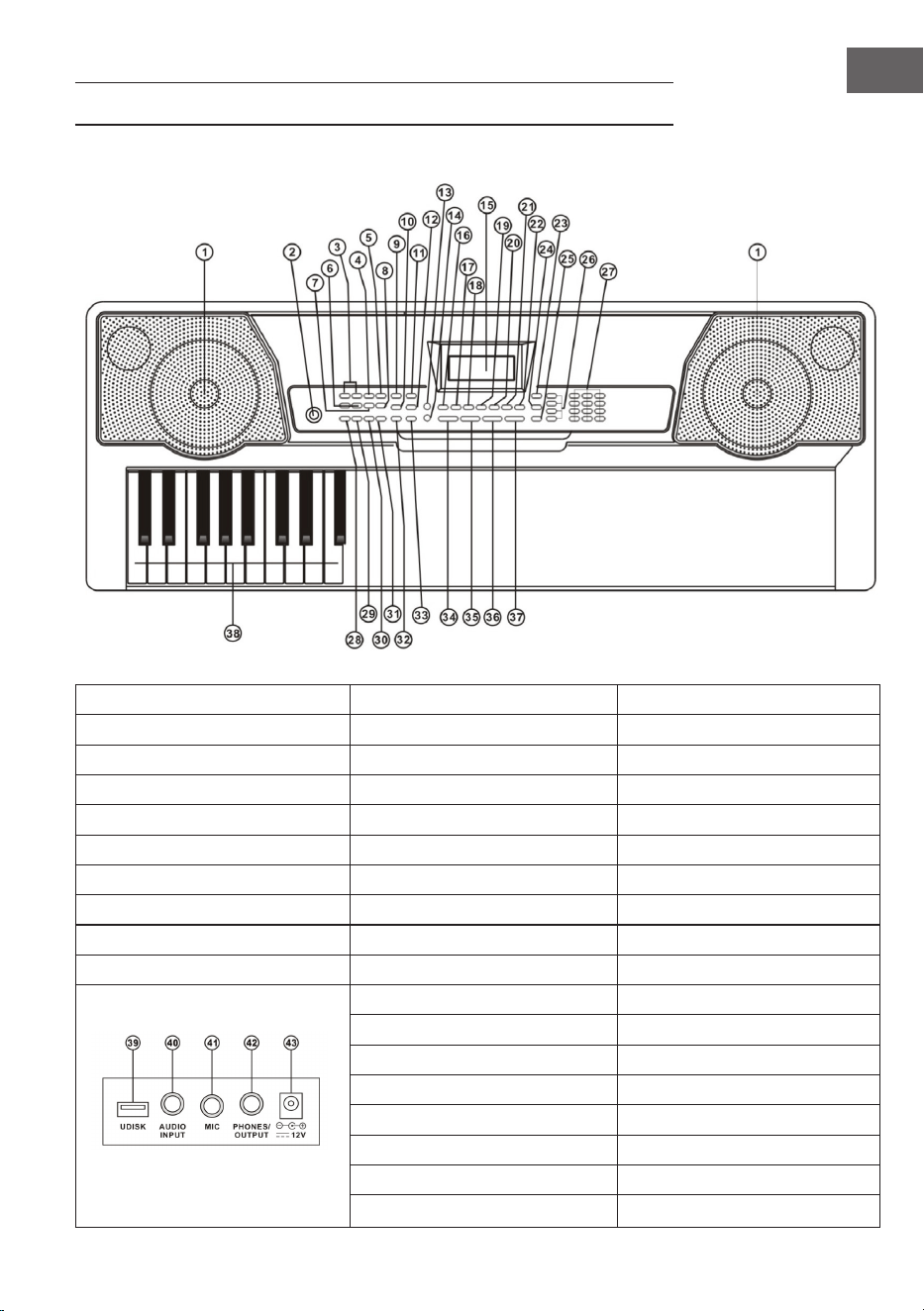
55
ES
DESCRIPCIÓN DEL APARATO
1 Altavoz 9 Sincronización 27 Teclado numérico
2 Encendido 10 Fill-in 28 Acorde único
11 Timbre 29 Acorde digitado
Control MP3 12 Melodía 30 Timbre del acorde
3 Anterior / siguiente 13 Iluminación del teclado 31 Chord OFF
4 Play/Pause 14 canciones de prueba 32 Metrónomo
6 Regulador volumen MP3 15 Display LCD 33 Start/Stop
7 Secuencia/aleatorio/pista individual 16 Percusión del teclado 34 Volumen general
8 Efectos de sonido 17 Grabación 35 Volumen acompañamiento
8 Soundeffekte 18 Programación 36 Tempo
19 Play 37 Transpose
20 Split 38 Chord Zone
21 Sostenido 39 UDISK
22 Vibrato 40 AUDIO INPUT
23 One Key (una tecla) 41 MIC
24 Follow (practicar) 42 Auriculares/OUTPUT
25 Ensemble (banda) 43 Toma de red DC 12V
26 Memoria

56
ES
CONEXIONES
Cable de alimentación
Utilice exclusivamente la fuente de alimentación incluida. Conecte el extremo
de la fuente de alimentación a la toma de red situada en la parte trasera del
teclado y conecte el enchufe a la toma de corriente.
Nota: La tensión de entrada del adaptador debe coincidir con la tensión de
suministro.
Salida de audio /auriculares externos
• Salida de audio: Apague primero el teclado y los dispositivos de audio
externos y conecte un extremo del cable de audio a la toma PHONES/
OUTPUT situada en la parte trasera del teclado. Conecte el otro extremo a
la entrada de audio del dispositivo de audio.
• Conexión para auriculares: Si conecta unos auriculares a la toma
PHONES/OUTPUT situada en la parte trasera del aparato, el altavoz se
silenciará automáticamente. De este modo, puede tocar el teclado sin
molestar a otros.
Nota: Si utiliza unos auriculares, no mantenga el volumen al máximo
durante un periodo prolongado de tiempo; de lo contrario, podría tener
pérdidas auditivas.
Entrada de micrófono y entrada de audio
• Entrada de micrófono: Conecte un micrófono al puerto MIC, así podrá
cantar mientras toca el teclado.
• Con la función estéreo puede importar sonidos procedentes de teléfonos
móviles, reproductores MP3, ordenadores y otros dispositivos de audio
para reproducirlos en el teclado. Apague primero el teclado y conecte un
extremo del cable de audio a la salida del dispositivo de audio. Conecte
el otro extremo a la toma AUDIO INPUT situada en la parte trasera del
aparato y encienda a continuación el teclado.
Reproducir MP3
Introduzca un dispositivo USB en la toma UDISK situada en la parte trasera del
aparato. El aparato es compatible con dispositivos de hasta 32 GB.
• Pulse las teclas [+] y [-] del control MP3 para regular el volumen.
57
ES
• Pulse el botón del control MP3 para pasar a la pista anterior. Pulse
para cambiar a la pista siguiente. Pulse para reproducir o detener
una pista. Pulse para interrumpir una pista. Utilice el botón (7) para
elegir entre los siguientes 3 modos: Secuencia/ aleatorio/ pista única.
• Pulse el botón efectos (8) para seleccionar uno de los siguientes efectos de
sonido: General, pop, rock, jazz y clásico. El ajuste estándar es «general».
FUNCIONAMIENTO Y FUNCIONES
Pulse el botón power, el monitor LCD se enciende y muestra el tono, tempo y
volumen actual junto con otros ajustes. La iluminación de fondo está activada
por defecto.
Iluminación del teclado
Si selecciona los modos de práctica en tres pasos, reproducción de canción de
prueba o entrada USB MIDI, el teclado se ilumina tras encenderse. Pulse [KEY
LIGHT] para desactivar o activar la función de iluminación.
Regular volumen total
Pulse [Master Vol +/-] para reducir o aumentar el volumen principal. Pulse
simultáneamente [Master Vol +/- ] para restablecer el teclado a los valores
normales. Con el volumen principal controla el volumen de la melodía y el de
los acordes.
Regular volumen de acompañamiento
Pulse [ACCOM VOL +/-] para reducir o aumentar el volumen de
acompañamiento. Pulse simultáneamente [ACCOM VOL + ] y [ACCOM VOL - ]
para restablecer el teclado a los valores normales.
Ajustar el timbre
En el teclado existen 255 timbres a elegir, desde «0» a «254». Al encender el
teclado, se activa automáticamente la selección de timbre y en el monitor
aparece «Tone». Si «Tone» no aparece, pulse [TIMBRE] para activar la selección
de timbre. El timbre está ajustado por defecto a «000» y puede regularse
pulsando las teclas numéricas correspondientes o los botones [+] y [-].
Activar percusión
Pulse [Keyboard Percussion] para activar la función de percusión. En este
modo, los usuarios pueden utilizar el teclado del aparato para tocar distintos
instrumentos de percusión. Pulse de nuevo el botón para desactivar la función
percusión.

58
ES
Reproducir canciones de prueba
Tiene a su disposición 50 canciones de prueba (demos), desde «0» hasta «49».
Pulse [Demo Song] y las canciones de prueba se reproducirán de manera
consecutiva. Se iluminan las teclas correspondientes en el teclado y se muestra
la canción actual y el número de pista en el display. Pulse las teclas [+] o [-] para
seleccionar la canción deseada. Si pulsa [TIMBRE] durante la reproducción y
en los siguientes 3 segundos las teclas [+] o [-], puede seleccionar el tono para
la canción de prueba. Pulse [Start/stop] o de nuevo [Demo Song] para nalizar
la reproducción.
MELODÍAS AUTOMÁTICAS
Selección de melodías
El teclado ofrece 255 melodías, desde «0» hasta «254». La melodía estándar
es «000». Pulse [Rhythm] para activar la función de selección de melodía, y
«RHYM» aparece en el display. Pulse los botones del teclado numérico o [+] y
[-] para seleccionar otras melodías.
Control de melodías
Activar ritmo
Pulse [Start/Stop] para comenzar con el acompañamiento. Si la función de
melodía está desactivada, pulse [Sync] y el metrónomo parpadea en el display.
Toque cualquier tecla en la zona de acordes (de la tecla 1 a la 19 desde la
izquierda) para activar la melodía de acompañamiento.
Interludio
Una vez se haya activado la melodía, pulse [Fill-in] para añadir un interludio de
percusión durante la reproducción de la pista. A continuación, la pieza musical
continuará en el estilo original.
Iniciar y detener melodía de acompañamiento
Pulse [Start/stop] mientras el ritmo de acompañamiento suena para detenerlo.
Metrónomo
El metrónomo tiene cuatro tiempos: 1/4, 2/4, 3/4 y 4/4. Pulse [Metronome]
para seleccionar cuatro tiempos uno por uno. Pulse de nuevo [Metronome]
para detener el metrónomo.
Conguración del tempo
Pulse [Tempo+] o [Tempo-] para aumentar o reducir la velocidad del ritmo.
Pulse simultáneamente ambas teclas para restablecer los ajustes estándar.

59
ES
ACOMPAÑAMIENTO DE ACORDES
Acorde único
Pulse [Single] para activar la función de acorde único y «SIN» aparece en el
display. En el modo de ritmo activado, puede pulsar una tecla de la zona de
acordes (las teclas 1 a 19 desde la izquierda) para obtener un acompañamiento
automático de acordes.
Acorde digitado
Pulse [Fingered] para activar la función de acorde digitado y «FIN» aparece en
el display. En el modo de ritmo activado, puede pulsar una tecla de la zona de
acordes (las teclas 1 a 19 desde la izquierda) para obtener un acompañamiento
automático de acordes.
Desactivar acordes
Pulse [CHORD OFF] para desactivar los acordes únicos y digitados.
Timbre de acorde
Pulse [CHORD TIMBRE] durante un acorde único o digitado para modicar su
timbre. Pulse de nuevo la tecla para regresar al tono original.
MEMORIA DE ESTADO
Con la función «memoria de estado» puede memorizar el tono, tempo,
velocidad y otros parámetros presentes durante la reproducción. Este teclado
está equipado con 4 memorias de estado a las que se puede acceder en
cualquier momento durante la reproducción.
Almacenamiento en la memoria de estado
Congure el tono, ritmo y tempo y pulse [Memory] y [M1] a [4] para guardar el
estado actual.
Acceder a la memoria de estado
Pulse una de las teclas [Memmory 1] a [Memory 4] para acceder a los
parámetros guardados en cada de uno de los espacios de memoria y sustituir el
estado actual.
NOTA: Para el contenido guardado no existe protección contra corte de
suministro eléctrico, por lo que el contenido almacenado se perderá al reiniciar
el aparato o cuando se interrumpa la alimentación.

60
ES
CONTROL DE EFECTOS
Transposing
Con la función de transposición puede elevar o bajar la notación hasta 6
niveles. Pulse [Transpose - ] para reducir medio tono, la melodía cambia de la
notación Do a la notación Si. Pulse [Tranpose +] para aumentar medio tono y la
melodía pasa de la notación Do a la notación do sostenido o re. Pulsando una
segunda vez [Tranpose - ], se cambia de notación Do a notación si sostenido.
Pulsando cinco veces [Tranpose + ], se cambia de notación Do a notación
Fa. Pulse simultáneamente [Transpose +] y [Transpose -] para restablecer la
notación de nuevo en Do. Pulse [Tranpose +] y [Transpose -] para regular el
nivel de [-6] a [+6].
Efecto sostenido
Pulse [Sustain], «SUS» aparece en pantalla y se activa dicho efecto. Pulse de
nuevo [Sustain] para desactivar la función de sostenido y «SUS» desaparece la
pantalla.
Vibrato
Pulse [Vibrato] y «VIB» aparece en el display. Pulse de nuevo el botón para
desactivar la función.
Función SPLIT
Si activa la función SPLIT, aparece «split» en el display. Así puede acompañar
la parte derecha del teclado con otra anación de instrumento. Las teclas de
la izquierda se comportan como la anación anteriormente congurada. Así
puede tocar simultáneamente distintos tonos. Pulse de nuevo el botón para
desactivar la función.

61
ES
FUNCIÓN DE GRABACIÓN
Iniciar grabación
Pulse la tecla [Record] para iniciar la función de grabación. En el display
aparece la indicación «REC». Si la memoria está llena, el display muestra «REC»
y la grabación se detiene automáticamente.
• Pulse [PLAY] durante la grabación para detener y reproducir la grabación.
• Pulse [START/STOP] o [REC] durante la grabación para interrumpirla y
eliminar la melodía registrada.
PROGRAMAR RITMOS
Cómo programar los ritmos
Pulse [PROG] para iniciar la función de programación para ritmos. El display
muestra «PRG» y se activa el
teclado de percusión. En este modo puede tocar sus propias melodías pulsando
las teclas correspondientes.
• Puede programar hasta 32 ritmos, a continuación el display muestra
«PRG» y detiene el registro del ritmo.
• Pulse [PLAY] durante la programación para detenerla y reproducir los
ritmos. Pulse [PLAY] para grabar nuevas melodías.
• Pulse [START/STOP] o [PROG] durante la programación para interrumpirla
y eliminar las melodías grabadas.

62
ES
PRÁCTICA Y EJERCICIOS
Paso 1: Practicar tonos por separado
Pulse [One Key] para activar la función de práctica de tonos por separado.
En el display aparece «LEARN». «SONG» y el número de pista. Con las teclas
[+] y [-] puede seleccionar la canción deseada. La práctica de tono a tono
se aconseja para practicar tonos por separado y sus respectivas teclas. La
corrección no es importante de momento, el modo le permite tener fallos al
pulsar las teclas. Mientras el teclado reproduzca un determinado tono, se
ilumina la tecla correcta en el teclado y le indica dónde se ha tocado la nota
correspondiente. Siga las teclas iluminadas mientras lea las notas correctas en
la zona del teclado. Pulse [START/STOP] o [One Key] para desactivar la función
de práctica.
Paso 2: Practicar melodías
Pulse [Follow] para activar la función de práctica Follow. En el display aparece
«LEARN». «SONG» y el número de pista. Pulse el teclado numérico o las teclas
[+] o [-] para seleccionar qué canción desea aprender. Las teclas iluminadas
se encienden después de las notas de la melodía y muestran la tecla correcta
que debe pulsarse. Déjese guiar por la iluminación de las teclas mientras toca
siguiendo los indicadores de la zona del teclado del display. Si se confunde, la
melodía se detiene hasta que pulse la tecla correcta. Pulse [START/STOP] o
[Follow] para desactivar la función de práctica.
Paso 3: Tocar en banda
Pulse de nuevo [Ensemble] para activar la función de práctica en grupo. En
el display aparece «LEARN». «SONG» y el número de pista. Pulse el teclado
numérico o las teclas [+] o [-] para seleccionar qué canción desea aprender. La
práctica en grupo tiene como objetivo aprender a tocar canciones completas
y reproducir las notas correctas. Aquí se ocultará la pista del tono. Debe tocar
la tecla correcta que corresponda con la nota durante toda la duración de la
canción. Si no pulsa ninguna tecla durante 3 segundos, el teclado reproducirá
automáticamente la nota correcta. La tecla correspondiente se ilumina en el
teclado y muestra qué tecla debe pulsar. Después de haber pulsado la tecla,
puede continuar hasta el nal de la canción con las teclas iluminadas. La zona
del teclado en el display muestra las notas y el tempo. Pulse [START/STOP] o
[Ensemble] para desactivar la función de práctica en grupo.

63
ES
TABLA DE TONOS
000 Acoustic Grand Piano 040 Tenor Sax 080 Ocarina 120 Wood Barafon 2
001 Rhodes Piano 041 Baritone Sax 081 Lead (Sawtooth)1 121 Music Box 2
002 Chorused Piano 042 Oboe 082 Lead (Calliope)1 122 Marimba 2
003 Celesta 1 043 Bassoon 083 Lead (Bass+Lead)1 123 Santur
004 Music Box 1 044 Clarinet 084 Pad (Warm)1 124 Reed Organ 2
005 Vibraphone 045 Piccolo 085 Sitar 125 Puff Harmonica 1
006 Marimba 1 046 Flute 086 Shamisen 1 126 Ukulele 1
007 Xylophone 1 047 Pan Flute 087 Koto 1 127 12-str. Gt 1
008 Percussive Organ 048 Lead (Square) 088 Kalimba 1 128 Guitar Pinch 2
009 Rock Organ 049 Banjo 089 Bag Pipe 1 129 Slow Violin 1
010 Church Organ 050 E-Tone Piano 090 Fiddle 1 130 Bright String 1
011 Reed Organ 1 051 Electric Grand Piano 091 Shanai 1 131 Jungle Bass 2
012 Accordion 052 Honky-tonk Piano 092 Tinkle Bell 132 Indian Flute 1
013 Harmonica 053 Harpsichord 1 093 Agogo 1 133 Clavi 3
014 Acoustic Guitar (Nylon) 054 Clavi 1 094 Steel Drums 134 Celesta 3
015 Acoustic Guitar (Steel) 055 Glockenspiel 1 095 Woodblock 1 135 Church Bells
016 Electric Guitar (Jazz) 056 Tubular Bells 1 096 Taiko Drum 136 Marimba 3
017 Electric Guitar (Clean)1 057 Dulcimer 1 097 Melodic Tom 1 137 Dulcimer 2
018 Distortion Guitar 058 Drawbar Organ 1 098 Synth Drum 138 Reed Organ 3
019 Acoustic Bass 059 Tango Accordion 1 099 Reverse Cymbal 139 Electric Guitar (Clean)2
020 Electric Bass (Finger) 060 Electric Guitar (Muted)1 100 Jungle Bass 1 140 Koto 2
021 Electric Bass (Pick) 061 Overdriven Guitar 1 101 Pi Pa 1 141 Xylophone 2
022 Fretless Bass 062 Contrabass 1 102 Feedback Gt. 1 142 Shanai 2
023 Slap Bass 1 063 Tremolo Strings 103 Uillean Harp 1 143 Dulcimer 3
024 Slap Bass 2 064 Pizzicato Strings 1 104 Jazz Bass 1 144 English Horn 2
025 Synth Bass 1 065 Timpani 105 Flugel Horn 1 145 Electric Guitar (Clean)3
026 Synth Bass 2 066 String Ensemble 2 106 Muted Horn 1 146 Shamisen 2
027 Violin 067 Synth Strings 1 107 Wood Barafon 1 147 Koto 3
028 Viola 068 Synth Strings 2 108 Electric Piano 1 148 Kalimba 2
029 Cello 069 Choir Aahs 109 Multi Reed 1 149 Steel Bell 1
030 Orchestral Harp 070 Voice Oohs 110 Guitar Pinch 1 150 Alto Sax 2
031 String Ensemble 1 071 Synth Voice 111 Multi Wind 1 151 Woodblock 2
032 Trumpet 072 Orchestra Hit 112 Clavi 2 152 Synth Harpsi. 1
033 Trombone 073 Muted Trumpet 1 113 Celesta 2 153 Attack Clav. 1
034 Tuba 074 Synth Brass 2 114 Harpsichord 2 154 Crystal 1
035 French Horn 075 English Horn 1 115 Mellow Fm 1 155 Bag Pipe 2
036 Brass Section 076 Recorder 116 Pi Pa 2 156 Barafon 1
037 Synth Brass 1 077 Blown Bottle 1 117 Upright Piano 1 157 Organ Flute 1
038 Soprano Sax 078 Shakuhach 118 Electric Piano 2 158 Kalimba 3
039 Alto Sax 1 079 Whistle 119 Hard Vibe 1 159 Reed Horn 1

64
ES
160 Hard Vibe 2 200 Lead (Bass+Lead)2 240 Barafon 2
161 Twin Trombones 1 201 Melodic Tom 2 241 Wind Organ 2
162 Synth Harpsi. 2 202 Grow Guitar 2 242 12-str. Gt 2
163 Attack Clav. 2 203 Lead (Sawtooth)2 243 Attack Barafon 2
164 Chorus Guitar 1 204 Jazz Bass 2 244 Lead (Calliope)2
165 Steel Bell 2 205 Chorus Guitar 2 245 Viola Attack 2
166 Tsugaru 206 Feedback Gt. 2 246 Pad (Warm)2
167 Oct Harp 1 207 Fiddle 2 247 Oct Harp 2
168 Bodhran 1 208 Organ Flute 2 248 Bari & Tenor 2
169 Tubular Bells 2 209 Flugel Horn 2 249 Agogo 2
170 Suona 210 Crystal 2 250 Flugel Horn 3
171 Castanets 211 Soft Clav. 2 251 Organ Flute 3
172 Attack Harp 1 212 Overdriven Guitar 2 252 Fiddle 3
173 Electric Vibraphone 1 213 Ukulele 2 253 Feedback Gt. 3
174 Soft Sax 1 214 Tango Accordion 2 254 Chorus Guitar 3
175 Soft Clav. 1 215 Twin Trombones 2
176 Soft Guitar 1 216 Jazz Organ 2
177 Grow Guitar 1 217 Bright String 2
178 Didgeridoo 1 218 Reed Horn 2
179 Attack Barafon 1 219 Glockenspiel 2
180 Mute Barafon 1 220 Drawbar Organ 2
181 Nay 1 221 Muted Horn 2
182 Soft Santur 222 Pizzicato Strings 2
183 Dual Horns 1 223 Nay 2
184 Hard Barsoon 1 224 Puff Harmonica 2
185 Tron Flute 1 225 Muted Trumpet 2
186 Kawala 1 226 Upright Piano 2
187 Jazz Organ 1 227 Soft Accord 2
188 Soft Accord 1 228 Uillean Harp 2
189 Wind Organ 1 229 Tron Flute 2
190 Viola Attack 1 230 Blown Bottle 2
191 Bari & Tenor 1 231 Indian Flute 2
192 Soft Sax 2 232 Slow Violin 2
193 Attack Harp 2 233 Electric Guitar (Muted)2
194 Didgeridoo 2 234 Multi Wind 2
195 Dual Horns 2 235 Electric Vibraphone 2
196 Hard Barsoon 2 236 Bodhran 2
197 Kawala 2 237 Mellow Fm 2
198 Soft Guitar 2 238 Multi Reed 2
199 Mute Barafon 2 239 Contrabass 2

65
ES
TABLA DE MELODÍAS
000 Hard Rock 040 Disco Soul 080 Dance Pop 1 120 Trip Hop
001 Club Pop 041 Disco Trot 081 Dance Pop 2 121 Rave 2
002 Fusion 042 Rave 1 082 Euro Beat 122 Acoustic Ballad 1
003 Rap Pop 043 Funky Disco 1 083 Euro House 123 India's Indigenous
004 British Pop 1 044 Techno 1 084 Hip Hop 124 Indonesian Pop
005 Twist 045 Techno 2 085 Swing 125 Pop Ballad
006 8 Beat Pop 1 046 Saturday Night 1 086 Big Band Swing 126 South Africa Country
007 Fusion Shufe 047 Club Latin 1 087 Jazz Quartet 127 South Africa Polka
008 Funk 048 Disco Hands 1 088 Dixieland 128 Tarantella 1
009 Funk Shufe 049 Country 089 Bluegrass 1 129 Bright Pop
010 Rock'n Roll 1 050 China 1 090 Bluegrass 2 130 Pub Piano 1
011 Rock Pop 051 China 2 091 8 Bt Country 131 West Shufe
012 Rock Shufe 052 China 3 092 Country Rock 132 Big Band Fast 2
013 Rock Cha Cha 053 China 4 093 Cntry Ballad 133 Espag Nol 1
014 Straight Rock 054 China 5 094 March 1 134 Disco Funk 2
015 Folk Rock 055 8 Bt Up Tempo 095 March 2 135 Pop Mambo
016 Pasodoble 056 16 Beat Pop 096 Polka 136 Europe Swing 1
017 Cha Cha 057 16 Bt Shufe 1 097 Pop Waltz 137 Tricks Latin
018 Fox Trot 058 16 Bt Shufe 2 098 Jive 138 Disco Samba 2
019 Rumba 1 059 16 Bt Ballad 1 099 Vienna Waltz 139 Latin Waltz
020 Samba 1 060 16 Bt Ballad 2 100 8 Beat Soul 140 Dance Pop 3
021 Samba 2 061 Soul 101 Classical 8 Beat 141 Jazz Rock 1
022 Schlager Rock 062 Pop Rock 1 102 Jazz Latin 1 142 Detroit
023 Tango 1 063 Pop Rock 2 103 Unplugged 143 Fanatical Sand
024 Tango 2 064 8 Bt Rock Balld 104 Boogie 144 European Rock 1
025 Disco Latin 1 065 16 Bt Rock Balld 105 Cumbia 2 145 Ground Beat
026 Calypso 066 6/8 Hvy Rock 106 Classical Slow Rock 146 8 Beat Modern 2
027 Latin Rock 067 16 Beat Rock 107 European Disco 1 147 Jazz Disco 1
028 Bolero 068 Bossa Nova 1 108 Big Band Middle 1 148 Dixie Jazz 1
029 Analog Ballad 1 069 Bossa Nova 2 109 Chrlston 149 Disco Chocolate
030 E_Ballad 070 Salsa 110 Pasodobl 150 Disco Latin 2
031 Country Ballad 071 Mambo 111 Cat Groove 1 151 Synth Boogie
032 Electro Pop 072 Beguine 112 Jazz Tango 1 152 Saturday Night 2
033 Pop New Age 1 073 Bolero Lento 113 Fast Gospel 153 Club Dance 1
034 8 Beat Modern 1 074 Espagnole 114 Big Band Fast 1 154 Tricks Bossa Nova
035 R&B Ballad 1 075 Reggae 12 115 Tricks Mambo 155 Tarantella 2
036 Disco Fox 1 076 Pop Reggae 1 116 Funky Disco 2 156 USA March
037 Disco Funk 1 077 Slow Rock 1 117 Latin Salsa 157 Espag Nol 2
038 Disco Party 1 078 Slow Rock 2 118 Pop New Age 2 158 Club Latin 2
039 Disco Samba 1 079 R&B 119 Jazz Swing 1 159 Jazz Cha Cha 1

66
ES
160 Country Cha Cha 200 Guad Dance 1 240 Hip Waltz 2
161 Disco Party 2 201 Jazz Cha Cha 2 241 Jazz Swing 2
162 Modern R&B 1 202 Country Waltz 242 Party Pop
163 8 Beat Pop 2 203 European Rock 2 243 Jazz Club
164 Country Jazz 204 Caribbean Dance 2 244 Guad Dance 2
165 Soul Rock 1 205 Jazz Disco 2 245 Jazz Bo 2
166 Rumba 2 206 Medium Jazz 246 Dixie Jazz 2
167 Samba 3 207 Piano Ballad 247 Acoustic Ballad 2
168 Modern R&B 2 208 70's Disco 248 Jazz Slow Rock
169 Club Dance 2 209 Jazz Rock 2 249 16 Beat Shufe 2
170 Country Bossa Nova 210 Europe 8 Beat 1 250 Polka Pop
171 Jazz Bo 1 211 Seville 2 251 Latin Party Pop
172 Modern Cha Cha 1 212 Rumba 3 252 Parranda
173 Pop Reggae 2 213 Soul Rock 2 253 Carnival
174 Rock Samba 1 214 European Disco 2 254 60's Vintage Pop
175 Jazz 8 Beat 1 215 Analog Ballad 2
176 Disco 216 Pub Piano 2
177 Seville 1 217 Europe Rumba
178 Disco Hands 2 218 Rock'n Roll 2
179 Rock Ballad 219 Disco Trop
180 Mixed Bossa Nova 220 Rock Salsa 1
181 Jazz 16 Beat 1 221 Europe 8 Beat 2
182 Single 16 Beat 1 222 Europe Samba
183 Love Song 223 Show Tune 2
184 Single 16 Beat 2 224 Jazz 16 Beat 2
185 Disco Fox 2 225 Rock Samba 2
186 Pop Rock 3 226 Jazz Waltz 2
187 Tijuana Waltz 227 Europe Reggae
188 British Pop 2 228 Modern Cha Cha 2
189 Show Tune 1 229 R&B Ballad 2
190 Schlager Alp 230 Rock Boogie
191 Single Rock 231 Jazz Bossa Nova
192 Swing Waltz 232 Rock Salsa 2
193 Slow Waltz 233 Slow & Easy
194 Cat Groove 2 234 Hip Waltz 1
195 Country Slow Rock 235 Jazz Latin 2
196 Rock Disco 1 236 Rock Disco 2
197 16 Beat Shufe 1 237 Jazz Tango 2
198 Jazz 8 Beat 2 238 Analog Ballad 3
199 Casa 239 Europe Swing 2

67
ES
RETIRADA DEL APARATO
Si en su país existe una disposición legal relativa a la
eliminación de aparatos eléctricos y electrónicos, este
símbolo estampado en el producto o en el embalaje
advierte que no debe eliminarse como residuo
doméstico. En lugar de ello, debe depositarse en un
punto de recogida de reciclaje de aparatos eléctricos y
electrónicos. Una gestión adecuada de estos residuos
previene consecuencias potencialmente negativas
para el medio ambiente y la salud de las personas.
Puede consultar más información sobre el reciclaje y
la eliminación de este producto contactando con su
administración local o con su servicio de recogida de
residuos.
DECLARACIÓN DE CONFORMIDAD
Fabricante:
Chal-Tec GmbH, Wallstraße 16, 10179 Berlín,
Alemania.
Importador para Gran Bretaña:
Berlin Brands Group UK Limited
PO Box 42
272 Kensington High Street
London, W8 6ND
United Kingdom
Por la presente, Chal-Tec GmbH declara que el tipo de
equipo radioeléctrico Etude 255 Keyboard es conforme
con la Directiva 2014/53/UE. El texto completo de la
declaración UE de conformidad está disponible en la
dirección Internet siguiente: use.berlin/10031457

69
IT
Gentile cliente,
La ringraziamo per aver acquistato il dispositivo.
La preghiamo di leggere attentamente le seguenti
istruzioni per l’uso e di seguirle per evitare possibili
danni. Non ci assumiamo alcuna responsabilità per
danni scaturiti da una mancata osservazione delle
avvertenze di sicurezza e da un uso improprio del
dispositivo. Scansionare il codice QR seguente, per
accedere al manuale d’uso più attuale e per ricevere
informazioni sul prodotto.
INDICE
Avvertenze di sicurezza 70
Descrizione del prodotto 71
Collegamenti 72
Utilizzo e funzioni 73
Auto-ritmi 74
Accompagnamento accordo 75
Memoria stato 75
Controllo effetto 76
Funzione di registrazione 77
Programmare i ritmi 77
Training ed esercizi 78
Tabella timbri 79
Tabella ritmi 81
Smaltimento 83
Dichiarazione di conformità 83

70
IT
AVVERTENZE DI SICUREZZA
• Utilizzare solo l´adattatore incluso nella consegna. In caso di rottura
dell´adattatore, sostituirlo immediatamente.
• La tastiera può essere smontata solo da personale specializzato. Se la
tastiera non funziona correttamente, non utilizzarla e rivolgersi ad un
tecnico.
• Prima di collegare la tastiera ad altri dispositivi, assicurarsi che entrambi i
dispositivi siano spenti.
• Non alzare il volume al massimo per un tempo prolungato.
• Tenere la tastiera lontano da fonti di calore per evitare che i componenti si
danneggino.
• Assicurarsi che non penetrino liquidi, polvere o simili nella tastiera per
evitare il pericolo di corto circuito.
• Staccare la spina dalla presa prima di pulire la tastiera. Non toccare la
spina con le mani bagnate.
• Pulire la tastiera con un panno asciutto e morbido. Non utilizzare
detergenti liquidi o solventi poiché possono danneggiare le superci.
• Dopo l´uso staccare la spina dalla presa.
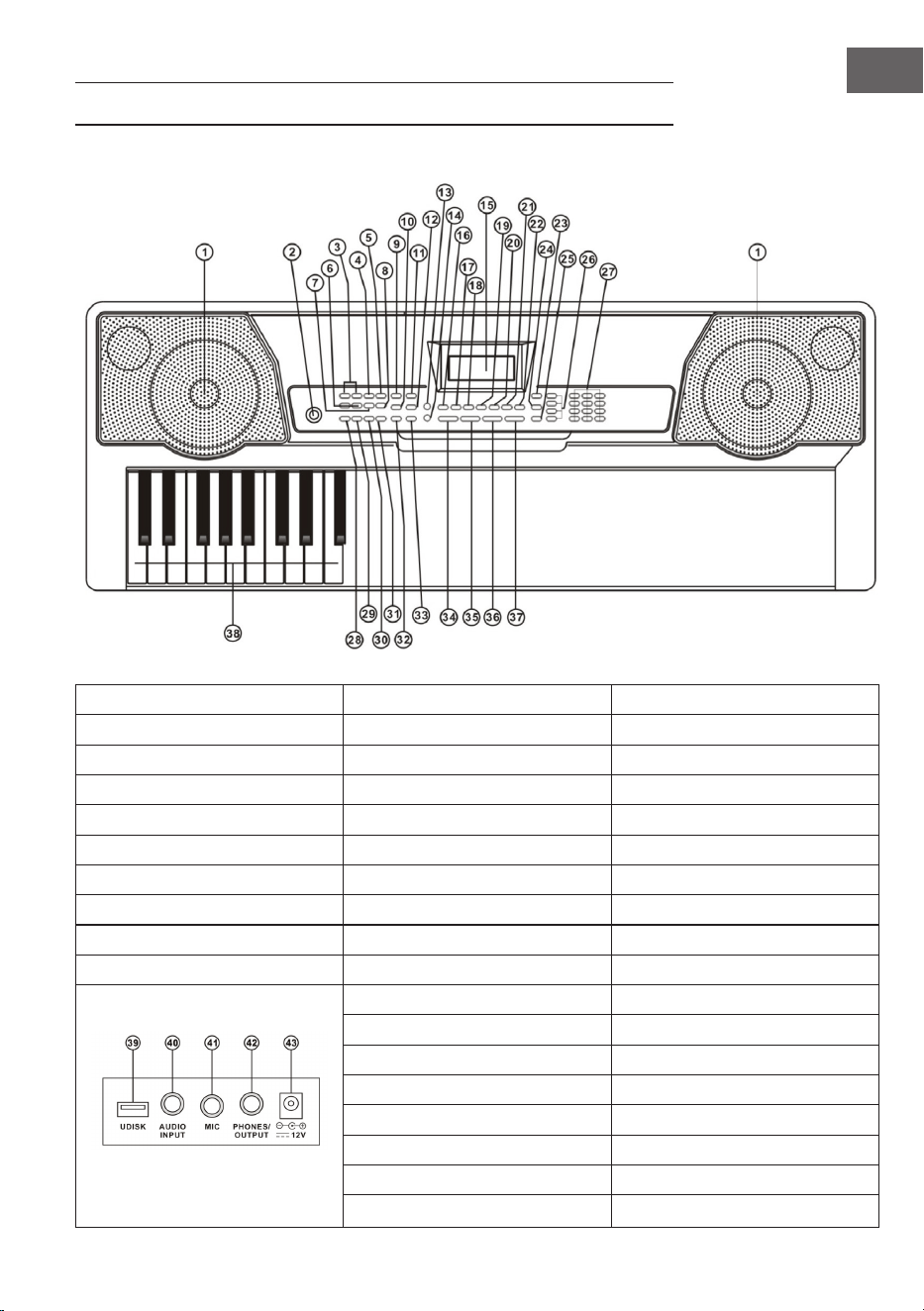
71
IT
DESCRIZIONE DEL PRODOTTO
1 Altoparlanti 9 Sync 27 Tasti numerici
2 Power 10 Fill-in 28 Single
11 Timbro 29 Fingered
Comandi MP3 12 Ritmo 30 Chord Timbre
3 Indietro/Avanti 13 Illuminazione tasti 31 Chord OFF
4 Play/Pause 14 Demo Song 32 Metronomo
5 Stop 15 Display LCD 33 Start/Stop
6 Manopola volume MP3 16 Percussioni 34 Volume Master
7 Sequenza/Casuale/brano singolo 17 Registrazione 35 Volume accompagnamento
8 Effetti suono 18 Programma 36 Tempo
19 Play 37 Transpose
20 Split 38 Chord Zone
21 Sustain 39 UDISK
22 Vibrato 40 AUDIO INPUT
23 One Key 41 MIC
24 Follow 42 Cufe/OUTPUT
25 Ensemble 43 Ingresso alimentazione DC 12 V
26 Memory
72
IT
COLLEGAMENTI
Alimentatore
Utilizzare solo l´adattatore incluso nella consegna. Collegare l’estremità
dell´alimentatore all´attacco posto sul retro della tastiera e inserire la spina
nella presa.
Nota: la tensione di ingresso dell´adattatore deve corrispondere alla
tensione di alimentazione.
Uscita audio / cufe esterne
• Uscita audio: spegnere per prima cosa la tastiera e i dispositivi audio
esterni e collegare un´estremità del cavo audio all´attacco PHONES/
OUTPUT posto sul retro della tastiera. Collegare l´altra estremità
all´ingresso audio del dispositivo audio.
• Attacco cufe: se si collegano le cufe all´attacco PHONES/
OUTPUT posto sul retro della tastiera, gli altoparlanti si spengono
automaticamente. In questo modo è possibile utilizzare la tastiera senza
disturbare.
Nota: evitare l´utilizzo prolungato delle cufe con volume al massimo
poiché ciò può comportare il pericolo di perdita dell´udito.
Ingresso Mic e ingresso audio
• Ingresso microfono: collegare un microfono alla porta MIC per cantare
mentre si suona con la tastiera.
• Con la funzione di ingresso stereo, è possibile riprodurre nella tastiera
l´audio da telefoni cellullari, lettori MP3, computer e altri dispositivi audio.
Spegnere per prima cosa la tastiera e collegare un’estremità del cavo audio
all´uscita di un dispositivo audio. Inserire l´altra estremità all´attacco
AUDIO INPUT posto sul retro della tastiera e inne accendere la tastiera.
Riprodurre gli MP3
Inserire un dispositivo MP3 nell´attacco UDISK posto sul retro del dispositivo.
Sono supportati dispositivi MP3 no a 32 GB.
• Premere il tasto [+] e [-] dei comandi MP3 per impostare il volume.
• Premere il tasto “ ” dei comandi MP3 per passare al brano precedente.
Premere “ ” per passare al brano successivo. Premere “ ” per
riprodurre o arrestare un brano. Premere “ ” per interrompere un brano.
Utilizzare il tasto (7) per passare ad una delle seguenti modalità: sequenza/
casuale/brano singolo.

73
IT
• Premere il tasto effetto (8) per selezionare uno dei seguenti effetti sonori:
generale, pop, rock, jazz e classic. L´impostazione predenita è “generale”.
UTILIZZO E FUNZIONI
Premere il tasto Power, il display LCD si accende e indica il tono attuale,
il tempo, il volume e altre impostazioni. La retroilluminazione è attiva per
impostazione predenita.
Illuminazione dei tasti
Selezionando le modalità training a tre fasi, riproduzione Demo Song e USB-
MIDI, i tasti si illuminano. Premere [KEY LIGHT] per attivare o disattivare la
funzione di illuminazione.
Impostare il volume Master
Premere [Master VOL +/-] per regolare il volume master. Premere
contemporaneamente [Master Vol +] e [Master Vol -] per ritornare alle
impostazioni predenite. Con il volume Master è possibile regolare anche il
volume di accompagnamento.
Impostare il volume di accompagnamento
Premere [ACCOM VOL +/-] per regolare il volume Master. Premre
contemporaneamente [ACCOM VOL +] e [ACCOM VOL -] per ritornare alle
impostazioni predenite.
Impostare il timbro
Sulla tastiera sono disponibili 255 timbri (toni), da “000” no a “254”. Quando si
avvia la tastiera, la selezione del timbro viene attivata automaticamente e sul
display appare “Tone”. Se “Tone” non appare, premere [TIMBRE] per attivare la
scelta del timbro. Il timbro è impostato per impostazione predenita su “000”
e può essere modicato premendo i tasti numerici corrispondenti oppure
premendo i tasti [+] e [-].
Attivare le percussioni
Premere [Keyboard Percussion] per attivare la funzione percussioni. In questa
modalità si può utilizzare la tastiera per riprodurre determinate percussioni.
Premere di nuovo questo tasto per disattivare la funzione percussioni.

74
IT
Riprodurre i demo
Sono disponibili 50 demo song da “000” no a “049”. Premere [Demo Song]
per riprodurre le demo song in sequenza. Inoltre i tasti corrispondenti si
illuminano sulla tastiera e sul display compaiono il brano attuale e il numero
del brano. Premere il tasto [+] oppure [-] per selezionare il brano desiderato.
Premere [TIMBRE] durante la riproduzione e il tasto [+] o [-] entro 3 secondi,
è possibile selezionare una tonalità per la demo song. Premere [Start/Stop]
oppure [Demo Song] per terminare la riproduzione.
AUTO-RITMI
Selezione del ritmo
La tastiera offre 255 ritmi (da “000” a “254”). Il ritmo standard è “000”.
Premere [Rhythm] per attivare la funzione di selezione ritmo e sul display
compare “RHYM”. Premere i tasti numerici oppure [+] e [-] per selezionare altri
ritmi.
Gestione del ritmo
Attivare il ritmo
Premere [Start/Stop] per avviare l´accompagnamento. Premere [SYNC] e
sul display compare “SYNC. Premere un tasto a scelta nell´area dei tasti per
l´accordo (tasti da 1 a 19 da sinistra) e il ritmo di accompagnamento viene
attivato.
Intermezzo
Una volta attivato il ritmo, premere [Fill-In] e aggiungere un intermezzo
durante la riproduzione dello stile. Tenere premuto il tasto [Fill-In] per un
intermezzo continuo.
Avviare e arrestare il ritmo di accompagnamento
Mentre il ritmo di accompagnamento è in corso, premere [Start/Stop] per
arrestarlo.
Metronomo
Il metronomo dispone di quattro tempi: 1/4, 2/4, 3/4 e 4/4. Premere
[Metronome] per selezionare quattro tempi consecutivi. Premere di nuovo
[Metronome] per arrestare il metronomo.
Impostazione del tempo
Premere [Tempo+] oppure [Tempo-] per aumentare o diminuire la velocità
del ritmo. Premere contemporaneamente entrambi i tasti per ritornare
all´impostazione standard.

75
IT
ACCOMPAGNAMENTO ACCORDO
Single
Premere [Single] per attivare la funzione di accordo singolo. “SIN” compare
sul display. In modalità ritmo, è possibile premere un tasto nell´area dei tasti
per l´accordo (tasti da 1 a 19 da sinistra) per ottenere un accompagnamento
dell´accordo automatico.
Fingered
Premere [Fingered] per attivare la funzione accordo Fingered e “FIN” appare
sul display. In modalità ritmo, è possibile premere un tasto nell´area dei tasti
per l´accordo (tasti da 1 a 19 da sinistra) per ottenere un accompagnamento
dell´accordo automatico.
Disattivare gli accordi
Premere [CHORD OFF] per disattivare gli accordi Single e Fingered.
Chord Timbre
Durante gli accordi Single e Fingered, premere [CHORD TIMBRE] per
modicare la tonalità dell´accordo. Premere di nuovo il tasto per tornare alla
tonalità originale.
MEMORIA STATO
Con la funzione “memoria stato”, è possibile memorizzare il suono, il tempo,
la velocità e altri parametri. Questa tastiera è dotata di 3 memorie alle quali è
possibile accedere in ogni momento.
Memorizzazione nello stato della memoria
Impostare il suono, il ritmo e la velocità e premere [Memory 1] e no a
[Memory 3] per memorizzare lo stato attuale.
Accedere allo stato della memoria
Premere uno dei tasti [Memory 1] no a [Memory 3] per accedere ai parametri
memorizzati in questa postazione di memoria e sostituire lo stato attuale.
NOTA: per il contenuto memorizzato, non è presente protezione da black
out: il contenuto memorizzato viene perduto al riavvio dopo l´interruzione di
corrente.

76
IT
CONTROLLO EFFETTO
Transposing
Con la funzione di trasposizione, è possibile aumentare o abbassare i toni no a
6 livelli. Premere [Transpose -] per abbassare il tono di mezzo livello, la melodia
passa dal tono C al tono B. Premere [Transpose +] per aumentare il tono di
mezzo livello e la melodia passa dal tono C a #C oppure al tono bD. Premendo
due volte [Transpose -], si passa dal tono C al tono BB. Premendo 5 volte
[Transpose +] si passa dal tono C al tono F. Premere contemporaneamente
[Transpose +] e [Transpose -] per riportare di nuovo il tono C su “0”. Premere
[Transpose +] e [Transpose -] per impostare il livello da [-6] a [6].
Effetto Sustain
Premere [Sustain], sul display appare „SUS“ e l´effetto Sustain si attiva.
Premere di nuovo [Sustain] per disattivare la funzione Sustain e “SUS” non
appare più sul display.
Vibrato
Premere [Vibrato] e sul display compare „VIB“. Premere di nuovo il tasto per
disattivare la funzione.
Funzione SPLIT
Quando si attiva la funzione SPLIT, sul display compare “Split”. I 24 tasti a
sinistra sono ora separati dal resto dei tasti, mentre i tasti di destra aumentano
di un ottavo e mantengono il tono originale. In questo modo è possibile
suonare contemporaneamente diversi registri. Premere di nuovo il tasto per
disattivare la funzione.
77
IT
FUNZIONE DI REGISTRAZIONE
Avviare la registrazione
Premere il tasto [Record] per avviare la funzione di registrazione. Sul
display appare “REC”. Se la memoria è piena, sul display lampeggia “REC” e la
registrazione si arresta automaticamente.
• Durante la registrazione premere [PLAY] per arrestare ed riprodurre la
registrazione.
• Durante la registrazione premere [START/STOP] oppure [REC] per
interrompere la registrazione e i toni registrati.
PROGRAMMARE I RITMI
Come programmare i ritmi
Premere [PROG] per avviare la funzione di programmazione dei ritmi. Sul
display compare “PRG” e si attivano le percussioni. In questa modalità è
possibile accordare i propri ritmi, premendo i tasti corrispondenti.
• E´ possibile programmare no a 32 ritmi, in seguito sul display lampeggia
“PRG” e la registrazione del ritmo si arresta automaticamente.
• Durante la programmazione premere [PLAY] per arrestare la
programmazione e riprodurre i ritmi. Premere di nuovo [PLAY] per
registrare nuovi ritmi.
• Premere [START/STOP] oppure [PROG] durante la programmazione per
interrompere la programmazione e cancellare i ritmi registrati.

78
IT
TRAINING ED ESERCIZI
Fase 1: esercitarsi con i singoli suoni
Premere [One Key] per attivare la funzione di training tono singolo. Sul display
appare „Step 1“. Usare i tasti [+] e [-] per selezionare il brano da imparare.
Il training tono singolo è adatto per esercitarsi con i singoli toni e i tasti
corrispondenti. Questa modalità consente di fare gli errori mentre si suona: in
questa fase non è importante eseguire tutto correttamente. Mentre la tastiera
riproduce un determinato suono, il tasto corretto si illumina. Seguire i tasti
illuminati mentre sul display si leggono le note giuste. Premere di nuovo [One
Key] per disattivare la funzione di training.
Fase 2: esercitarsi con le melodie
Premere [Follow] per attivare la funzione di training Follow. Sul display
compare „Step 2“. Premere i tasti numerici oppure [+] / [-] per selezionare
la canzone da imparare. I tasti illuminati si accendono in base alle note della
melodia e indicano il tasto corretto da suonare. L´utente può imparare
lasciandosi guidare dai tasti illuminati oppure seguendo gli indicatori sul
display. In caso di errore, interrompere la melodia no a quando non si suona la
nota corretta. Premere di nuovo [Follow] per disattivare la funzione di training.
Fase 3: suonare in ensemble
Premere [Ensemble] per abilitare la funzione di training Ensemble. Sul display
compare „Step 3“. Premere i tasti numerici oppure [+] / [-] per selezionare la
canzone da imparare. Il training ensemble è nalizzato ad imparare ad eseguire
brani completi e a suonare le note giuste. La nota corretta non viene indicata:
in questa fase l´utente deve suonare la nota corretta. Se non si preme un
tasto entro 3 secondi, la tastiera suona automaticamente la nota corretta.
Il tasto corrispondente si illumina ed indica il tasto da premere. Dopo aver
premuto il tasto, è possibile seguire i tasti illuminati no alla ne del brano. Sul
display vengono indicati la nota e il tempo. Premere di nuovo [Ensemble] per
disabilitare la funzione di training Ensemble.

79
IT
TABELLA TIMBRI
000 Acoustic Grand Piano 040 Tenor Sax 080 Ocarina 120 Wood Barafon 2
001 Rhodes Piano 041 Baritone Sax 081 Lead (Sawtooth)1 121 Music Box 2
002 Chorused Piano 042 Oboe 082 Lead (Calliope)1 122 Marimba 2
003 Celesta 1 043 Bassoon 083 Lead (Bass+Lead)1 123 Santur
004 Music Box 1 044 Clarinet 084 Pad (Warm)1 124 Reed Organ 2
005 Vibraphone 045 Piccolo 085 Sitar 125 Puff Harmonica 1
006 Marimba 1 046 Flute 086 Shamisen 1 126 Ukulele 1
007 Xylophone 1 047 Pan Flute 087 Koto 1 127 12-str. Gt 1
008 Percussive Organ 048 Lead (Square) 088 Kalimba 1 128 Guitar Pinch 2
009 Rock Organ 049 Banjo 089 Bag Pipe 1 129 Slow Violin 1
010 Church Organ 050 E-Tone Piano 090 Fiddle 1 130 Bright String 1
011 Reed Organ 1 051 Electric Grand Piano 091 Shanai 1 131 Jungle Bass 2
012 Accordion 052 Honky-tonk Piano 092 Tinkle Bell 132 Indian Flute 1
013 Harmonica 053 Harpsichord 1 093 Agogo 1 133 Clavi 3
014 Acoustic Guitar (Nylon) 054 Clavi 1 094 Steel Drums 134 Celesta 3
015 Acoustic Guitar (Steel) 055 Glockenspiel 1 095 Woodblock 1 135 Church Bells
016 Electric Guitar (Jazz) 056 Tubular Bells 1 096 Taiko Drum 136 Marimba 3
017 Electric Guitar (Clean)1 057 Dulcimer 1 097 Melodic Tom 1 137 Dulcimer 2
018 Distortion Guitar 058 Drawbar Organ 1 098 Synth Drum 138 Reed Organ 3
019 Acoustic Bass 059 Tango Accordion 1 099 Reverse Cymbal 139 Electric Guitar (Clean)2
020 Electric Bass (Finger) 060 Electric Guitar (Muted)1 100 Jungle Bass 1 140 Koto 2
021 Electric Bass (Pick) 061 Overdriven Guitar 1 101 Pi Pa 1 141 Xylophone 2
022 Fretless Bass 062 Contrabass 1 102 Feedback Gt. 1 142 Shanai 2
023 Slap Bass 1 063 Tremolo Strings 103 Uillean Harp 1 143 Dulcimer 3
024 Slap Bass 2 064 Pizzicato Strings 1 104 Jazz Bass 1 144 English Horn 2
025 Synth Bass 1 065 Timpani 105 Flugel Horn 1 145 Electric Guitar (Clean)3
026 Synth Bass 2 066 String Ensemble 2 106 Muted Horn 1 146 Shamisen 2
027 Violin 067 Synth Strings 1 107 Wood Barafon 1 147 Koto 3
028 Viola 068 Synth Strings 2 108 Electric Piano 1 148 Kalimba 2
029 Cello 069 Choir Aahs 109 Multi Reed 1 149 Steel Bell 1
030 Orchestral Harp 070 Voice Oohs 110 Guitar Pinch 1 150 Alto Sax 2
031 String Ensemble 1 071 Synth Voice 111 Multi Wind 1 151 Woodblock 2
032 Trumpet 072 Orchestra Hit 112 Clavi 2 152 Synth Harpsi. 1
033 Trombone 073 Muted Trumpet 1 113 Celesta 2 153 Attack Clav. 1
034 Tuba 074 Synth Brass 2 114 Harpsichord 2 154 Crystal 1
035 French Horn 075 English Horn 1 115 Mellow Fm 1 155 Bag Pipe 2
036 Brass Section 076 Recorder 116 Pi Pa 2 156 Barafon 1
037 Synth Brass 1 077 Blown Bottle 1 117 Upright Piano 1 157 Organ Flute 1
038 Soprano Sax 078 Shakuhach 118 Electric Piano 2 158 Kalimba 3
039 Alto Sax 1 079 Whistle 119 Hard Vibe 1 159 Reed Horn 1

80
IT
160 Hard Vibe 2 200 Lead (Bass+Lead)2 240 Barafon 2
161 Twin Trombones 1 201 Melodic Tom 2 241 Wind Organ 2
162 Synth Harpsi. 2 202 Grow Guitar 2 242 12-str. Gt 2
163 Attack Clav. 2 203 Lead (Sawtooth)2 243 Attack Barafon 2
164 Chorus Guitar 1 204 Jazz Bass 2 244 Lead (Calliope)2
165 Steel Bell 2 205 Chorus Guitar 2 245 Viola Attack 2
166 Tsugaru 206 Feedback Gt. 2 246 Pad (Warm)2
167 Oct Harp 1 207 Fiddle 2 247 Oct Harp 2
168 Bodhran 1 208 Organ Flute 2 248 Bari & Tenor 2
169 Tubular Bells 2 209 Flugel Horn 2 249 Agogo 2
170 Suona 210 Crystal 2 250 Flugel Horn 3
171 Castanets 211 Soft Clav. 2 251 Organ Flute 3
172 Attack Harp 1 212 Overdriven Guitar 2 252 Fiddle 3
173 Electric Vibraphone 1 213 Ukulele 2 253 Feedback Gt. 3
174 Soft Sax 1 214 Tango Accordion 2 254 Chorus Guitar 3
175 Soft Clav. 1 215 Twin Trombones 2
176 Soft Guitar 1 216 Jazz Organ 2
177 Grow Guitar 1 217 Bright String 2
178 Didgeridoo 1 218 Reed Horn 2
179 Attack Barafon 1 219 Glockenspiel 2
180 Mute Barafon 1 220 Drawbar Organ 2
181 Nay 1 221 Muted Horn 2
182 Soft Santur 222 Pizzicato Strings 2
183 Dual Horns 1 223 Nay 2
184 Hard Barsoon 1 224 Puff Harmonica 2
185 Tron Flute 1 225 Muted Trumpet 2
186 Kawala 1 226 Upright Piano 2
187 Jazz Organ 1 227 Soft Accord 2
188 Soft Accord 1 228 Uillean Harp 2
189 Wind Organ 1 229 Tron Flute 2
190 Viola Attack 1 230 Blown Bottle 2
191 Bari & Tenor 1 231 Indian Flute 2
192 Soft Sax 2 232 Slow Violin 2
193 Attack Harp 2 233 Electric Guitar (Muted)2
194 Didgeridoo 2 234 Multi Wind 2
195 Dual Horns 2 235 Electric Vibraphone 2
196 Hard Barsoon 2 236 Bodhran 2
197 Kawala 2 237 Mellow Fm 2
198 Soft Guitar 2 238 Multi Reed 2
199 Mute Barafon 2 239 Contrabass 2

81
IT
TABELLA RITMI
000 Hard Rock 040 Disco Soul 080 Dance Pop 1 120 Trip Hop
001 Club Pop 041 Disco Trot 081 Dance Pop 2 121 Rave 2
002 Fusion 042 Rave 1 082 Euro Beat 122 Acoustic Ballad 1
003 Rap Pop 043 Funky Disco 1 083 Euro House 123 India's Indigenous
004 British Pop 1 044 Techno 1 084 Hip Hop 124 Indonesian Pop
005 Twist 045 Techno 2 085 Swing 125 Pop Ballad
006 8 Beat Pop 1 046 Saturday Night 1 086 Big Band Swing 126 South Africa Country
007 Fusion Shufe 047 Club Latin 1 087 Jazz Quartet 127 South Africa Polka
008 Funk 048 Disco Hands 1 088 Dixieland 128 Tarantella 1
009 Funk Shufe 049 Country 089 Bluegrass 1 129 Bright Pop
010 Rock'n Roll 1 050 China 1 090 Bluegrass 2 130 Pub Piano 1
011 Rock Pop 051 China 2 091 8 Bt Country 131 West Shufe
012 Rock Shufe 052 China 3 092 Country Rock 132 Big Band Fast 2
013 Rock Cha Cha 053 China 4 093 Cntry Ballad 133 Espag Nol 1
014 Straight Rock 054 China 5 094 March 1 134 Disco Funk 2
015 Folk Rock 055 8 Bt Up Tempo 095 March 2 135 Pop Mambo
016 Pasodoble 056 16 Beat Pop 096 Polka 136 Europe Swing 1
017 Cha Cha 057 16 Bt Shufe 1 097 Pop Waltz 137 Tricks Latin
018 Fox Trot 058 16 Bt Shufe 2 098 Jive 138 Disco Samba 2
019 Rumba 1 059 16 Bt Ballad 1 099 Vienna Waltz 139 Latin Waltz
020 Samba 1 060 16 Bt Ballad 2 100 8 Beat Soul 140 Dance Pop 3
021 Samba 2 061 Soul 101 Classical 8 Beat 141 Jazz Rock 1
022 Schlager Rock 062 Pop Rock 1 102 Jazz Latin 1 142 Detroit
023 Tango 1 063 Pop Rock 2 103 Unplugged 143 Fanatical Sand
024 Tango 2 064 8 Bt Rock Balld 104 Boogie 144 European Rock 1
025 Disco Latin 1 065 16 Bt Rock Balld 105 Cumbia 2 145 Ground Beat
026 Calypso 066 6/8 Hvy Rock 106 Classical Slow Rock 146 8 Beat Modern 2
027 Latin Rock 067 16 Beat Rock 107 European Disco 1 147 Jazz Disco 1
028 Bolero 068 Bossa Nova 1 108 Big Band Middle 1 148 Dixie Jazz 1
029 Analog Ballad 1 069 Bossa Nova 2 109 Chrlston 149 Disco Chocolate
030 E_Ballad 070 Salsa 110 Pasodobl 150 Disco Latin 2
031 Country Ballad 071 Mambo 111 Cat Groove 1 151 Synth Boogie
032 Electro Pop 072 Beguine 112 Jazz Tango 1 152 Saturday Night 2
033 Pop New Age 1 073 Bolero Lento 113 Fast Gospel 153 Club Dance 1
034 8 Beat Modern 1 074 Espagnole 114 Big Band Fast 1 154 Tricks Bossa Nova
035 R&B Ballad 1 075 Reggae 12 115 Tricks Mambo 155 Tarantella 2
036 Disco Fox 1 076 Pop Reggae 1 116 Funky Disco 2 156 USA March
037 Disco Funk 1 077 Slow Rock 1 117 Latin Salsa 157 Espag Nol 2
038 Disco Party 1 078 Slow Rock 2 118 Pop New Age 2 158 Club Latin 2
039 Disco Samba 1 079 R&B 119 Jazz Swing 1 159 Jazz Cha Cha 1

82
IT
160 Country Cha Cha 200 Guad Dance 1 240 Hip Waltz 2
161 Disco Party 2 201 Jazz Cha Cha 2 241 Jazz Swing 2
162 Modern R&B 1 202 Country Waltz 242 Party Pop
163 8 Beat Pop 2 203 European Rock 2 243 Jazz Club
164 Country Jazz 204 Caribbean Dance 2 244 Guad Dance 2
165 Soul Rock 1 205 Jazz Disco 2 245 Jazz Bo 2
166 Rumba 2 206 Medium Jazz 246 Dixie Jazz 2
167 Samba 3 207 Piano Ballad 247 Acoustic Ballad 2
168 Modern R&B 2 208 70's Disco 248 Jazz Slow Rock
169 Club Dance 2 209 Jazz Rock 2 249 16 Beat Shufe 2
170 Country Bossa Nova 210 Europe 8 Beat 1 250 Polka Pop
171 Jazz Bo 1 211 Seville 2 251 Latin Party Pop
172 Modern Cha Cha 1 212 Rumba 3 252 Parranda
173 Pop Reggae 2 213 Soul Rock 2 253 Carnival
174 Rock Samba 1 214 European Disco 2 254 60's Vintage Pop
175 Jazz 8 Beat 1 215 Analog Ballad 2
176 Disco 216 Pub Piano 2
177 Seville 1 217 Europe Rumba
178 Disco Hands 2 218 Rock'n Roll 2
179 Rock Ballad 219 Disco Trop
180 Mixed Bossa Nova 220 Rock Salsa 1
181 Jazz 16 Beat 1 221 Europe 8 Beat 2
182 Single 16 Beat 1 222 Europe Samba
183 Love Song 223 Show Tune 2
184 Single 16 Beat 2 224 Jazz 16 Beat 2
185 Disco Fox 2 225 Rock Samba 2
186 Pop Rock 3 226 Jazz Waltz 2
187 Tijuana Waltz 227 Europe Reggae
188 British Pop 2 228 Modern Cha Cha 2
189 Show Tune 1 229 R&B Ballad 2
190 Schlager Alp 230 Rock Boogie
191 Single Rock 231 Jazz Bossa Nova
192 Swing Waltz 232 Rock Salsa 2
193 Slow Waltz 233 Slow & Easy
194 Cat Groove 2 234 Hip Waltz 1
195 Country Slow Rock 235 Jazz Latin 2
196 Rock Disco 1 236 Rock Disco 2
197 16 Beat Shufe 1 237 Jazz Tango 2
198 Jazz 8 Beat 2 238 Analog Ballad 3
199 Casa 239 Europe Swing 2

83
IT
SMALTIMENTO
Se nel proprio paese si applicano le regolamentazioni
inerenti lo smaltimento di dispositivi elettrici ed
elettronici, questo simbolo sul prodotto o sulla
confezione segnala che questi prodotti non possono
essere smaltiti con i riuti normali e devono essere
portati a un punto di raccolta di dispositivi elettrici ed
elettronici. Grazie al corretto smaltimento dei vecchi
dispositivi si tutela il pianeta e la salute delle persone
da possibili conseguenze negative. Informazioni
riguardanti il riciclo e lo smaltimento di questi prodotti
si ottengono presso l’amministrazione locale oppure il
servizio di gestione dei riuti domestici.
DICHIARAZIONE DI CONFORMITÀ
Produttore:
Chal-Tec GmbH, Wallstraße 16, 10179 Berlino,
Germania.
Importatore per la Gran Bretagna:
Berlin Brands Group UK Limited
PO Box 42
272 Kensington High Street
London, W8 6ND
United Kingdom
Il fabbricante, Chal-Tec GmbH, dichiara che il tipo di
apparecchiatura radio Etude 255 Keyboard è conforme
alla direttiva 2014/53/UE. Il testo completo della
dichiarazione di conformità UE è disponibile al seguente
indirizzo Internet: use.berlin/10031457