85.71 mm
120 mm
多功能居家无线充蓝牙时钟小夜灯
产品使用说明
非常感谢您选择我司产品,
请在使用产品前认真阅读好产品使用说明
Wireless Charging Bluetooth Clock
Product Instructions
Thank you very much for choosing our product.
Please read the product instructions carefully before use.
产品特点
造型简易精致。
无线快充。
小夜灯。
时钟/双闹钟。
蓝牙音箱(连接后同步手机时间)。
便携式,可脱离电源线使用。
·
·
·
·
·
·
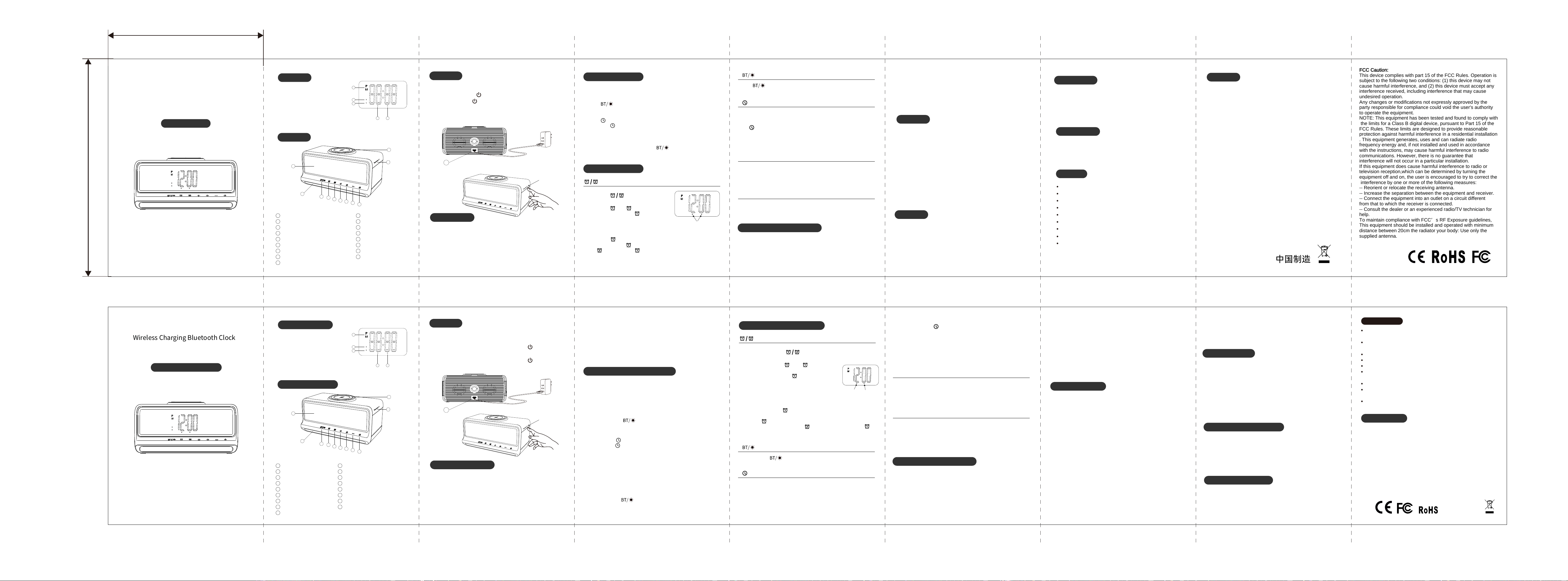
外观按键
11
10
1
2
3
4
5
6
7
8
12
13
14
15 16
9
1
2
3
4
5
6
7
8
9
10
11
12
13
14
15
16
17
蓝牙/亮度键
闹钟�键
闹钟�键
加键
时钟键
减键
电源键
贪睡/灯光键
无线充电区域
LED显示屏
灯条
PM(下午)
内置电池充电指示灯
蓝牙/无线充电指示灯
闹钟�指示灯
闹钟�指示灯
Type-C充电输入口
操作方法
�.将USB数据线接入电源适配器,数据线Type-C端口接入产品插口。
�.在关机状态下,长按【 】�秒开机,有开机提示音。
�.开机状态下,长按【 】�秒关机,有关机提示音。
17
灯光触摸功能
· 短触摸【 SNOOZE/☼ 】开启夜灯,长触摸【 SNOOZE/☼ 】关闭夜灯。
· 夜灯开启状态下,短按灯光键可使夜灯在:
低亮一中亮一高亮�种状态间循环切换。
· 夜灯开启状态下长按【 SNOOZE/☼ 】�秒关闭夜灯。
下次开启夜灯时恢复关闭时的档位。
蓝牙音箱的使用方法
时钟闹钟的使用方法
�.开机后自动开启蓝牙功能,蓝牙指示灯闪烁蓝色并发出提示音。
打开手机蓝牙功能,搜索并选中“ W��� ”设备名称,进入配对状态。
成功连接手机后,蓝牙指示灯长亮(时钟自动与手机同步)。
�.长按【 】可控制蓝牙功能开启或关闭,并发出蓝牙提示音。
· 短按两次→
屏幕闹钟指示灯长亮为闹钟生效状态。
· 短按 调节屏幕亮度,高/中/低/关闭 依次循环。
· 连接蓝牙后可自动同步手机时间。
· 蓝牙模式下短按【 】减少音量;长按【 】切换上一曲。
· 调整模式下短按【 】减少数字;长按【 】快速减少数字。
· 短按一次→ 进入 显示模式,
指示灯闪烁,再次长按→ 进入设置模式。
闹钟设置模式:
�.此时屏幕数值闪烁,短按【 】→减少数值;短按【 】→增加数值。
长按可快速增加/减少数值。
�.再次短按→ 依次设置分钟,闹铃声,闹铃音量;
设置完毕后,短按→ 保存并退出闹钟设置。
�.闹钟 设置方法与闹钟 相同。
�.设置过程中��秒无按键动作将自动保存并退出设置模式。
打开或关闭闹钟。
在音箱播放状态时:
�.短按【 】→播放/暂停;
快速双击【 】可断开当前连接重新进入配对状态。
�.短按【 】→减少音量;长按【 】→切换上一曲。
�.短按【 】→增加音量;长按【 】→切换下一曲。
�.蓝牙断开连接后超过��分钟未连接会自动关闭蓝牙功能。
�.蓝牙功能关闭/开启的状态下长按【 】蓝牙键�秒可开启/关闭
蓝牙功能,并发出提示音。
━
+
━
━
+
+
+
+
+
+
+
+
(闹钟)
How to Use a Bluetooth Speaker
How to Use a Clock and Alarm
�. After powering on, Bluetooth will automatically turn on;
the Bluetooth indicator will flash blue and a beep will sound.
Turn on Bluetooth on your phone, search for and select the
device named “ W��� ” to enter pairing mode.
Once successfully connected to your phone, the Bluetooth
indicator will remain lit
(the clock will automatically sync with your phone).
�. Press and hold [ ] to turn Bluetooth on or off;
a Bluetooth beep will sound.
· Press twice briefly → to turn the alarm on or off.
A steady light on the screen indicates that the alarm is active.
· Press once briefly → Enter Display mode,
The indicator light flashes;
press and hold again → Enter setup mode.
Alarm Setup Mode:
�. The display will flash. Press and release [ ] to decrease the
value; press and release [ ] to increase the value.
Press and hold to quickly increase or decrease the value.
�. Press and release [ ] again to set the minutes, alarm tone,
and alarm volume in sequence; Once finished, press and
release [ ] to save and exit the alarm setup.
�. The setup method for Alarm [ ] is the same as for Alarm [ ].
�. If no buttons are pressed for �� seconds during setup, the settings
will be automatically saved and the setup mode will exit.
While the speaker is playing:
�. Short press [ ] → Play/Pause;
Double-tap [ ] quickly to disconnect the current connection
and return to pairing mode.
�. Short press [ ] → Decrease volume;
Long press [ ] → Skip to the previous track.
�. Short press [ ] → Increase volume;
long press [ ] → Skip to the next track.
�. If the Bluetooth connection is disconnected and remains
unconnected for more than �� minutes, the Bluetooth function
will automatically turn off.
�. Whether the Bluetooth function is on or off,
long-press the [ ] Bluetooth button for � seconds to turn
the Bluetooth function on or off, and a beep will sound.
━
+
━
━
+
+
(Alarm clock)
(屏幕亮度)
(时钟设置)
操作方法
�. Connect the USB cable to the power adapter,
and plug the Type-C end of the cable into the device’s port.
�. With the device powered off, press and hold [ ] for � seconds
to turn it on; you will hear a startup chime.
�. With the device powered on, press and hold [ ]for � seconds
to turn it off; you will hear a shutdown chime.
17
Light Touch Function
· Tap the [ SNOOZE/☼ ] button briefly to turn on the night light;
press and hold the [ SNOOZE/☼ ] button to turn off the night light.
· While the night light is on, a short press of the light button cycles
the night light through three brightness levels:
Low, Medium, and High.
· While the night light is on, press and hold [ SNOOZE/☼ ] for
� seconds to turn off the night light.
The next time you turn on the night light, it will resume at the
brightness level it was at when it was turned off.
Simple yet elegant design.
Night light.
Alarm Clock.
Bluetooth speaker.
Portable; can be used without a power cord.
Product Features
·
·
Wireless fast charging.
·
·
·
·
Apperance Buttons
11
10
1
2
3
4
5
6
7
8
12
13
14
15 16
9
1
2
3
4
5
6
7
8
9
10
11
12
13
14
15
16
17
Bluetooth/Brightness button
Alarm � button
Alarm � button
Increase button
Clock button
Decrease button
Power button
Snooze/Light button
Wireless charging area
LED Display
Light Strip
PM (Afternoon)
Built-in Battery Charge Indicator
Bluetooth/Wireless Charging Indicator
Alarm � Indicator
Alarm � Indicator
Type-C Charging Port
(向下/减少)
手动设置时钟:
长按 键两秒进入时钟设置模式,此时屏幕数值闪烁,
短按【 】→减少数值;短按【 】→增加数值,长按可快速增减数值。
依次分别调节��/��小时制→时钟→分钟→保存并退出时钟设置。
━
━
━
━
━
━
━
· 蓝牙模式下短按【 】增加音量;长按【 】切换下一曲。
· 调整模式下短按【 】增加数字;长按【 】快速增加数字。
(向上/增加)
+
· Press briefly [ ] to adjust the screen brightness;
the settings cycle through High/Medium/Low/Off.
· Once connected via Bluetooth, the time will sync automatically
with your phone.
(Screen brightness)
(Clock Settings)
Setting the clock manually:
Press and hold the button for two seconds to enter clock setup
mode. The display will begin to flash.
Press [ ] briefly to decrease the value;
press [ ] briefly to increase the value;
press and hold to adjust the value quickly.
Adjust the ��/��-hour format, then the hour, then the minutes,
and finally save and exit the clock setup.
━
+
无线充电
注意事项:
· 连接电源后,产品自动检测充电线和充电器,检测过程约需要�秒。
如果支持快充,则充电指示灯(红色)点亮�秒后熄灭。
不支持则闪�下后熄灭
(以此提醒用户更换充电器或电源线以获得良好的使用体验)。
· 无线充在充电时,充电指示灯长亮。
有异物或过热保护时指示灯持续闪烁。充电结束后,指示灯熄灭。
· 部分手机充电时有弹窗提示。
· 有温升和异物检测(能检测到�美分硬币)功能,
能过CE/FCC认证和IEC�����现行标准测试。
�.无线充电只在连接外部电源时才可使用。
�.电源输入支持PD快充协议,最少需要使用PD��W以上的适配器。
Wireless charging
Notes:
· After connecting to a power source, the product automatically
detects the charging cable and charger; this process takes
approximately � seconds.
If fast charging is supported, the charging indicator light (red)
will illuminate for � seconds and then turn off.
If not supported, it will flash � times and then turn off
(This is to remind users to replace the charger or power cable for
an optimal user experience).
· The charging indicator light remains steady while the
wireless charger is charging.
The light will flash continuously if a foreign object is detected or
if overheating protection is triggered. The light turns off when
charging is complete.
· Some smartphones display a pop-up notification during charging.
· Features temperature rise and foreign object detection
(capable of detecting a �-cent coin), and passes CE/FCC certification
and current IEC ����� standard testing.
�. Wireless charging is only available when connected to an
external power source.
�. The power input supports the PD fast charging protocol;
an adapter with at least ��W PD output is required.
请勿长时间在阳光直射或高温的地方使用、存放该产品。
请勿在离磁卡、磁记录媒体和精密的仪器太近的地方充电。
请勿分解或者改造本产品。
请勿用湿手触碰交流适配器。
请将本产品远离水或其它液体。
如果您想清洁本产品,请断开电源。
产品工作环境温度范围:-��~��℃。
如果处理不当或损坏,设备中使用的电池可能会爆炸。
请勿私自拆卸该产品电池或在火中丢弃电池。
恢复出厂设置
规格参数
· 开机状态下,同时长按【 】和【 】�秒以上不松开,
显示屏以最高亮度全显。
+
━
Restore facto settings
· While the device is powered on, press and hold the [ ] and [ ]
buttons simultaneously for at least � seconds without releasing
them, and the display will light up at maximum brightness.
注意事项
结束响闹 / 贪睡模式 SNOOZE/☼
· 闹钟停止响闹:
当时钟与设置的闹钟时间一致时,闹铃响起,小夜灯以高亮档位点亮,
对应的闹钟指示灯闪烁。如果无人干预,�分钟后自动停止响闹,
小夜灯恢复响闹前的状态,对应的闹钟指示停止闪烁。
· 闹钟贪睡模式:
响闹时按一下【 SNOOZE/☼ 】贪睡键进入贪睡状态。
(停止响闹,小夜灯恢复响闹前的状态,对应的闹钟指示灯继续闪烁)
�分钟之后再次响起,此操作最多可重复�次。
贪睡期间,按对应的闹钟键可以退出贪睡状态,结束响闹。
响闹时按除【贪睡键】以外的任意按键结束响闹。
· In Bluetooth mode, press and release [ ] to lower the volume;
press and hold [ ] to skip to the previous track.
· In adjustment mode, press [ ] briefly to decrease the number;
press and hold [ ] to decrease the number rapidly.。
+
+
+
+
+
(Down/Decrease)
━
━
━
━
━
· In Bluetooth mode, press and release [ ] to increase the volume;
press and hold [ ] to skip to the next track.
· In adjustment mode, press [ ] briefly to increase the number;
press and hold [ ] to increase the number rapidly.
(Up/Increase)
Turn off the alarm or SNOOZE/☼
· Alarm stops ringing:
When the clock reaches the set alarm time, the alarm sounds,
the night light turns on at the brightest setting,
and the corresponding alarm indicator flashes. If no action is taken,
the alarm will automatically stop ringing after � minute,
the night light will return to its pre-alarm state,
and the corresponding alarm indicator will stop flashing.
· Alarm Snooze Mode:
Press the [SNOOZE/☼] button once when the alarm sounds to
enter snooze mode.
(The alarm stops, the night light returns to its pre-alarm state,
and the corresponding alarm indicator continues to flash)
The alarm will sound again after � minutes; this operation can be
repeated up to � times.
During the snooze period, press the corresponding alarm button
to exit snooze mode and stop the alarm.
Press any button other than the [SNOOZE/☼] button while the
alarm is sounding to stop it.
低电提示
· 开机时检测一次,以后每�分钟检测�次电池电量。
电池电压低于�.�V即判为低电量。
· 开机时检测到电池电压低于�.�V, 发出低电提示音(嘟-嘟-嘟), 不开机。
· 开机后每次检测到电量低,发出低电提示音(嘟-嘟-嘟)�次,
提示第�次后自动关机。
· 外接电源供电时,不检测电量。
Low battery alert
· The battery level is checked once at startup,
and then every � minutes thereafter.
A battery voltage below �.�V is considered low.
· If the battery voltage is detected to be below �.�V during startup,
a low-battery alert tone will sound, and the device will not power on.
· After startup, whenever low battery is detected,
a low-battery alert tone sounds once,
The device will automatically shut down after the third warning.
· When powered by an external power source,
the battery level is not monitored.
内置电池充电
· 内置电池最大充电流�A,充电时红色指示灯点亮,充满后熄灭。
· 当无线充工作时,降低内置电池充电电流,通常降到���mA,
优先保证无线充供电。
Charging the built-in battery
· The built-in battery supports a maximum charging current of �A.
The red indicator light turns on during charging and turns off
when fully charged.
· When the wireless charger is in use, the charging current to the
built-in battery is reduced—typically to ���mA—to prioritize
power supply to the wireless charger.
Made in China
产品材料:PMMA+ABS
电源输入:DC�V/�A �V/�A
无线充电效率:≥��%
无线充功率:�W/�.�W/��W/��W
电池容量:����mAh
产品重量:���g
LED灯功率:�.�W
扬声器功率:�Ω�W*�
产品尺寸:���x��x��mm
电源充电口为国际通用Type-C端口
Specications
Product Materials: PMMA + ABS
Power Input: DC �V/�A, �V/�A
Wireless Charging Efficiency: ≥��%
Wireless Charging Power: �W/�.�W/��W/��W
Battery Capacity: ����mAh
Product Weight: ���g
LED Power: �.�W
Speaker Power: �Ω �W x �
Product Dimensions: ��� x �� x �� mm
The charging port is a universally compatible Type-C port
Do not use or store this product for extended periods
in direct sunlight or high-temperature environments.
Do not charge near magnetic cards, magnetic recording
media, or precision instruments.
Do not disassemble or modify this product.
Do not touch the AC adapter with wet hands.
Keep this product away from water or other liquids.
If you wish to clean this product, please disconnect it
from the power source.
Product operating temperature range: -20 to 45°C.
If mishandled or damaged, the batteries used in the
device may explode.
Do not disassemble the product's battery or dispose
of the battery in fire.
Important Notes
FCC Caution:
This device complies with part 15 of the FCC Rules. Operation is
subject to the following two conditions: (1) this device may not
cause harmful interference, and (2) this device must accept any
interference received, including interference that may cause
undesired operation.
Any changes or modifications not expressly approved by the
party responsible for compliance could void the user's authority
to operate the equipment.
NOTE: This equipment has been tested and found to comply with
the limits for a Class B digital device, pursuant to Part 15 of the
FCC Rules. These limits are designed to provide reasonable
protection against harmful interference in a residential installation
. This equipment generates, uses and can radiate radio
frequency energy and, if not installed and used in accordance
with the instructions, may cause harmful interference to radio
communications. However, there is no guarantee that
interference will not occur in a particular installation.
If this equipment does cause harmful interference to radio or
television reception,which can be determined by turning the
equipment off and on, the user is encouraged to try to correct the
interference by one or more of the following measures:
-- Reorient or relocate the receiving antenna.
-- Increase the separation between the equipment and receiver.
-- Connect the equipment into an outlet on a circuit different
from that to which the receiver is connected.
-- Consult the dealer or an experienced radio/TV technician for
help.
To maintain compliance with FCC’s RF Exposure guidelines,
This equipment should be installed and operated with minimum
distance between 20cm the radiator your body: Use only the
supplied antenna.