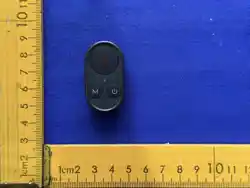
M
封面
Bluetooth Remote Control
蓝牙遥控
USER MANUAL/用户手册
Contents
目录
中文
EN
DE
FR
IT
ES
JP
RU
PL
1
6
13
18
23
28
33
38
43
M
1
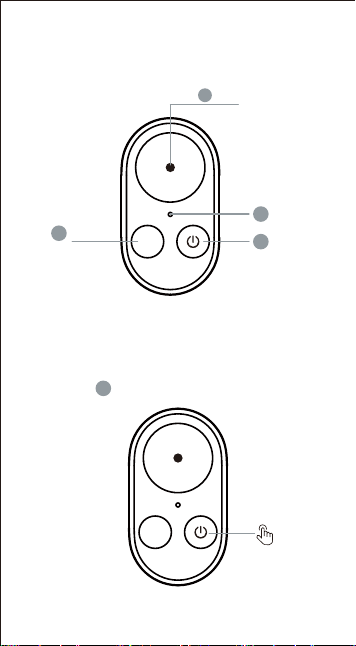
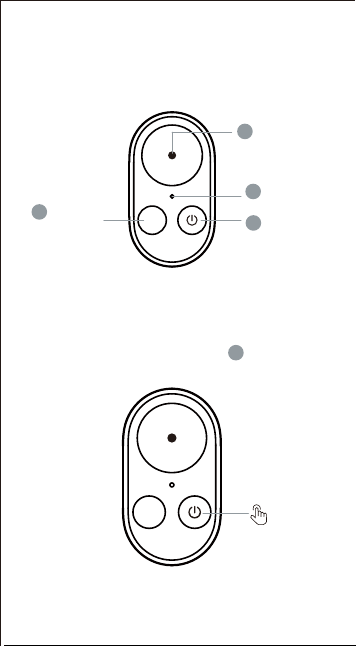
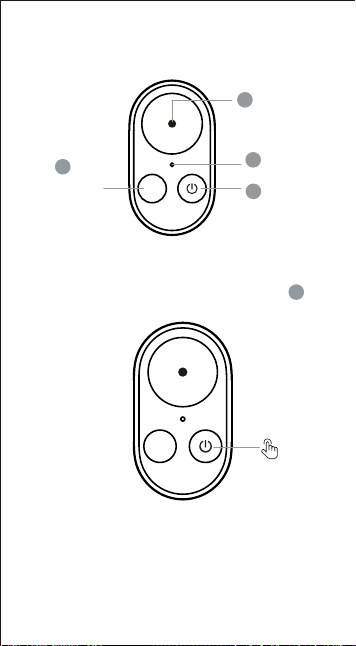
蓝牙遥控器使用说明
蓝牙连接说明
拍摄键
2
指示灯
3
电源键
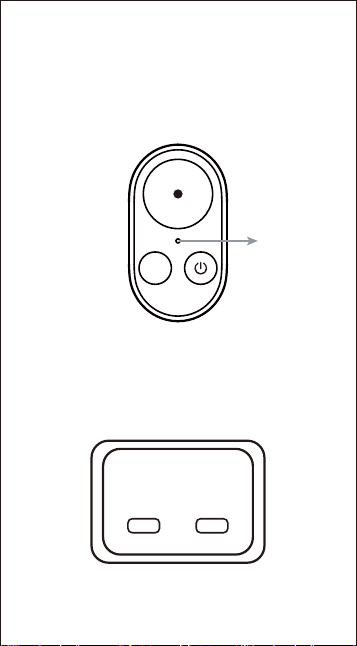
1.遥控开机
模式键
4
1
长按电源键 3秒,遥控器开机。
3
M
3S
M
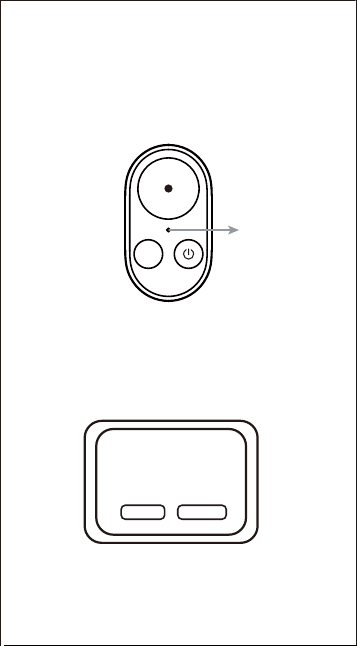
绿灯闪烁
*首次连接时,须同时长按拍摄键+模式键 3秒进
入蓝牙强制配对模式
*设备断开连接后,遥控自动关机
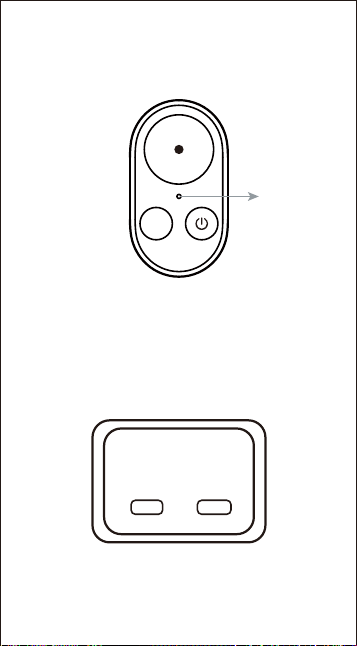
2.蓝牙设备搜寻
3.设备蓝牙连接操作
绿灯闪烁,等待设备连接
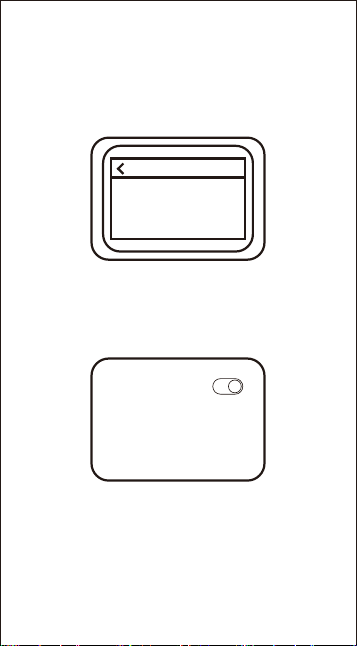
(1)DJI运动相机设备连接:如首次连接DJI运动
相机,需在相机端手动确认验证
2
新设备请求连接
验证码
****
拒绝
接受
4.重置蓝牙配对操作
切换不同设备之前,需要同时长按拍摄键+模式键3
秒,重置蓝牙配对后,再进行连接操作
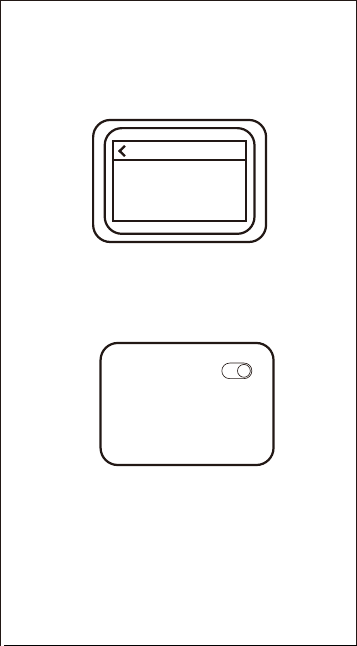
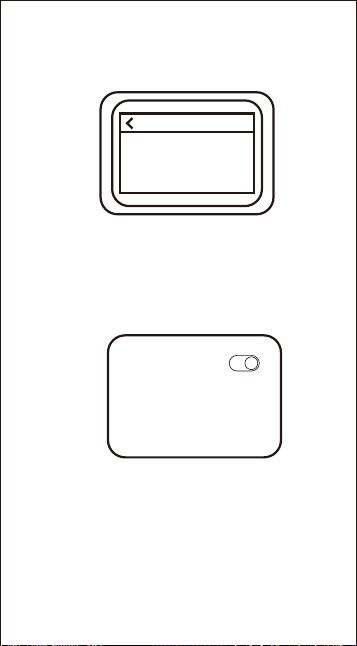
(3)手机设备连接:
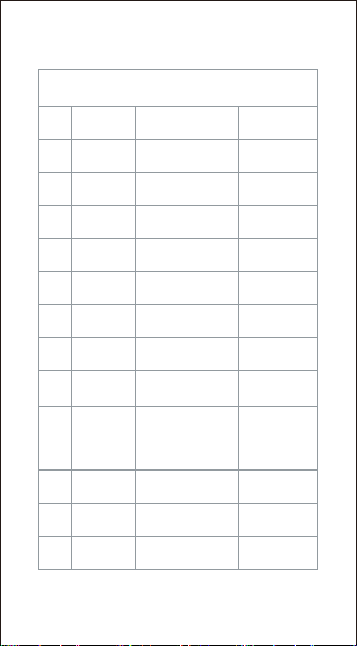
手机蓝牙连接页面中找到对应的蓝牙名称
(TELESIN_RC1)->点击配对->手动接受设备后
即可正常使用
*蓝牙遥控控制GoPro相机关机后, 使用遥控唤醒相
机需在3米内。
*手机仅支持拍照/录像功能
(2)GoPro运动相机设备连接:连接GoPro运动相机,
蓝牙配对需要在配对设置窗口连接。
3
设备
正在搜索
准备好与GoPro应用或其他蓝牙兼容设备配对。
确保您的设备处于配对模式并且在范围内。
蓝牙
我的设备
TELESIN_RC1
适用于DJI/ GoPro运动相机
5.遥控操作状态
*首次连接时,需在相机端手动同意配对请求。
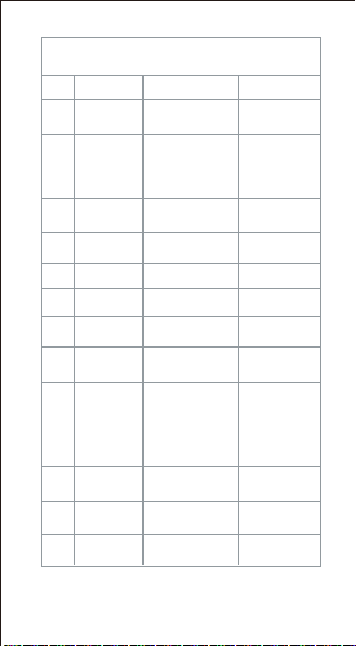
功能操作指南
1
序号 功能 操作 指示灯
2
3
4
5
6
7
8
9
10
11
12
4
开机/寻找
配对
设备连接
首次连接,需要在设
备上手动接受配对
长按电源键3秒
绿灯慢闪(2
秒/次)
绿灯常亮3秒
后熄灭
关机 长按电源键2秒
绿灯快闪3次
后熄灭
模式切换 短按模式键 绿灯闪1次
拍摄控制 短按拍摄键
绿灯闪1次
标记高光 短按电源键 绿灯闪1次
遥控关主机
长按电源键2秒
(已连接时)
熄灭
快速拍摄
遥控关主机 后,
短按拍摄键
*GoPro运动相
机模式无此功能
绿灯闪1次
连接成功
自动完成
绿灯常亮3秒
后熄灭
低电量提醒
自动提示(电量
<20%)
红灯亮
充电中
接入Type-C电
源
红灯呼吸慢闪
充电完成
自动识别
绿灯常亮

规格参数
充电参数:5V 1A
充电时间:2.5小时
蓝 牙:蓝牙未连接2分钟进入关机状态
(1)打开彩焦相机 APP → 点击左上角「+」→ 选
择「添加新设备」,搜索并连接 Vlog 遥控自拍
杆。
(2)连接成功后,若有新固件,连接页右上角会出
现提示,点击即可完成升级,使用最新功能。
6.遥控固件升级
5
免责声明
请仔细阅读本声明,一旦使用本产品,即视为对本声明
的全部认可和接受。每次使用前,请仔细检查产品,若
出现破损、变形,请勿使用。使用本产品,就意味着您
认可并同意,您将对使用本产品的行为和可能产生的后
果负全部责任。您承诺仅会出于正当合法的目的使用本
产品。您理解并同意,对于直接或间接因使用本产品而
造成的滥用、不利影响、损害、伤害、惩罚或者其他法
律后果,泰迅数码有限公司(以下简称 “Telesin”)将
不承担任何责任。用户应遵循包括但不限于本文提及的
使用注意事项。在国家法律法规范围内,本承诺解释权
、修改权归 Telesin 所有。
泰迅保修期从您收到货物后的当日起计算,享有6 个月
保修服务。
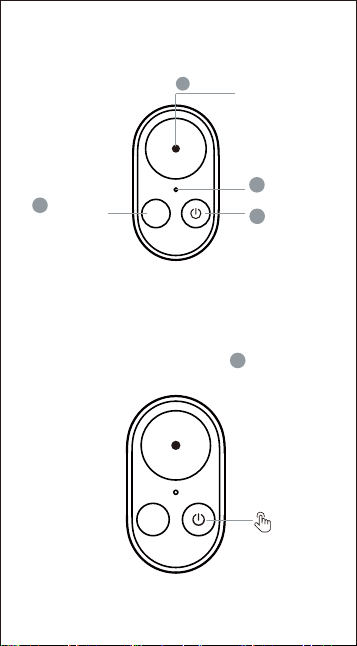
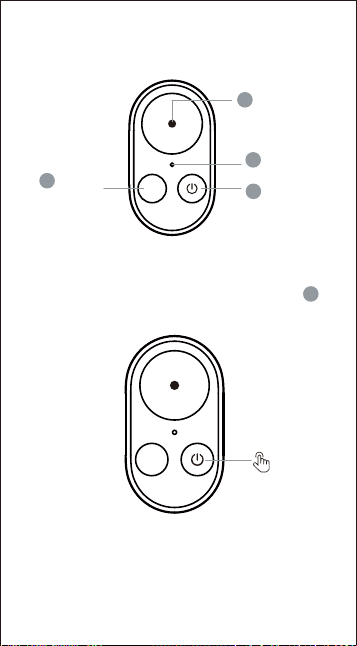
Mode Button
Indicator
light
Power
button
英文
M
1
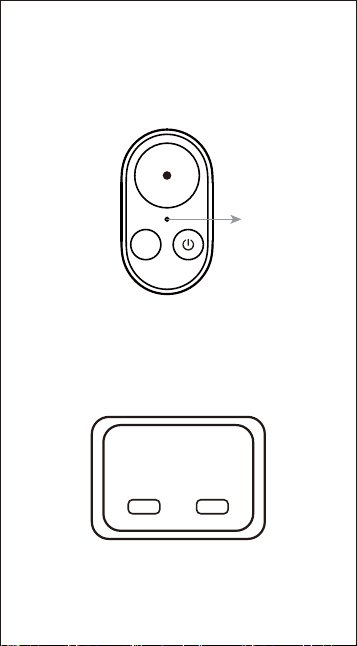
Bluetooth Remote Control Instructions
Bluetooth Connection Instructions
Shutter Button
2
3
1.Remote power on
4
6
Press and hold the power button for 3
seconds to turn on the remote control.
3
M
3S
M
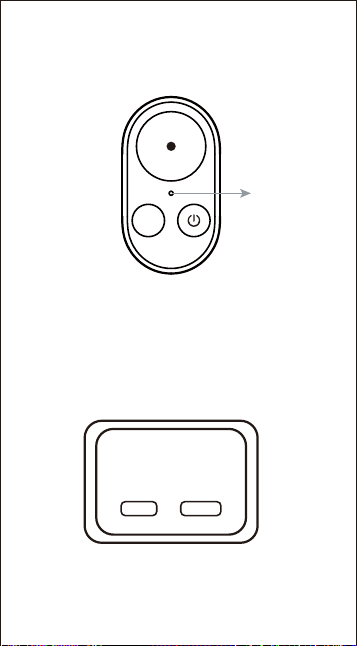
Green light
ashing
*For rst-time connection, simultaneously
press and hold the Shutter button + Mode
button for 3 seconds to enter forced
Bluetooth pairing mode.
2.Bluetooth device search
3.Device Bluetooth connection operation
7
The green light ashes, waiting for device
connection.
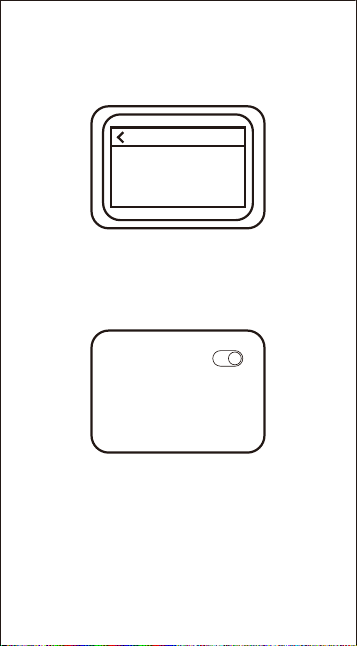
(1) Connecting to DJI action camera: For
rst-time connection to a DJI action camera,
manual conrmation is required on the
camera side.
(2) Connecting to GoPro action camera: When
connecting to a GoPro action camera,
Bluetooth pairing must be peormed in the
pairing settings window.
*After the device disconnects, the remote
control will automatically shut down.
New device
requesting connection
Verication code
****
Reject
Accept
8
4.Resetting Bluetooth pairing
(3) Connecting to a mobile phone: Find the
corresponding Bluetooth name (TELESIN_RC1)
in the phone's Bluetooth connection page ->
tap Pair -> manually accept the device, then it
can be used normally.
Before switching to a dierent device,
simultaneously press and hold the Shutter
button + Mode button for 3 seconds to reset
Bluetooth pairing, then proceed with the new
connection.
*After using the Bluetooth remote to turn
o a GoPro camera, the remote must be
within 3 meters to wake the camera.
*The phone only suppos photo/video
functions.
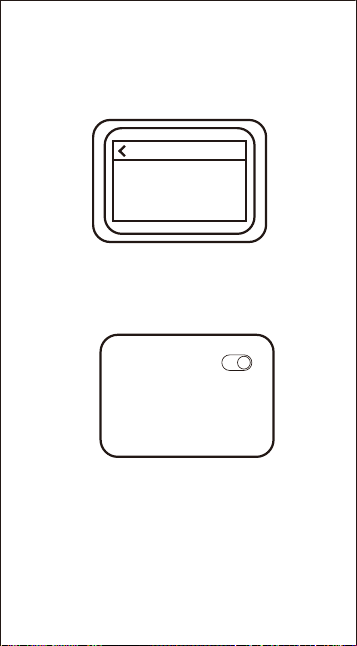
Devices
Searching
Ready to pair with the GoPro app or other
Bluetooth-compatible devices. Make sure your
device is in pairing mode and within range.
Bluetooth
My devices
TELESIN_RC1
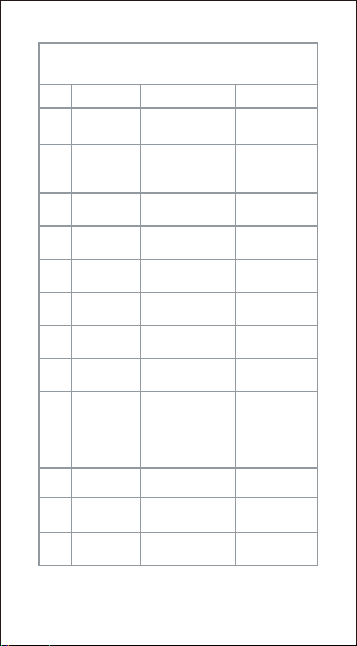
*For the rst connection, you need to manually
agree to the pairing request on the camera.
9
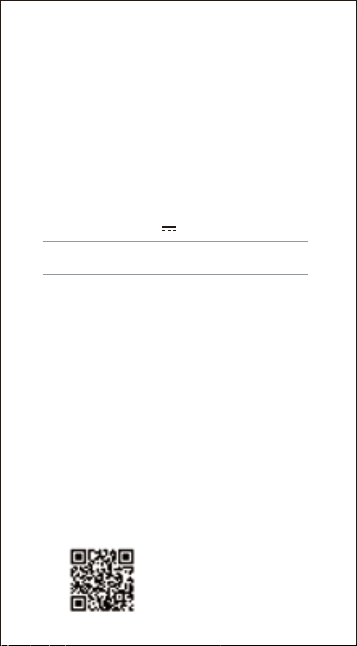
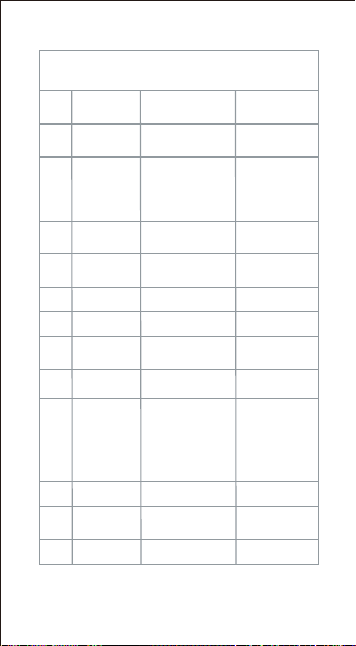
Function Operating Guide
1
No. Function Operation Indicator Light
2
3
4
5
6
7
8
9
10
11
12
Power On /
Search for
Pairing
Device
connection
First connection
requires manually
accepting the pairing
on the device
Press and hold
Power Button for
3 seconds
Green light slow
blink (once per 2
seconds)
The green light
stays on for 3
seconds, then
ashes slowly.
Green light quick
ashes 3 times,
then o
Power O
Press and hold
Power Button for
2 seconds
Mode
Switching
Press Mode
Button briey
Green light
ashes once
Press Shutter
Button briey
Green light
ashes once
Press Power
Button briey
Green light
ashes once
Green light
ashes once
Shooting
Control
Mark
Highlight
Remotely Turn
O Host
Press and hold Power
Button for 2 seconds
(when connected)
Turns o
Quick Shot
Press Shutter Button
briey after remotely
turning o host
*This function is not
available in GoPro
Action Camera
mode.
Low Batte
Warning
Automatic prompt
(batte <20%)
Red light on
Connection
Successful
Automatically
completed
Green light steady
for 3 seconds,
then o
Charging
Connect to Type-C
power source
Red light
breathing slow
blink
Charging
Complete
Automatically
detected
Green light
steady
Compatible with DJI/GoPro Action Cameras
5.Remote control operation status
*For the rst connection, you need to manually
agree to the pairing request on the camera.
Speci ications
Input voltage: 5V 1A
Charging time: Approx. 2.5 hours
Bluetooth: The remote will shut down if no Bluetooth
connection is established within 2 minutes.
10
Declaration of Conformity
(1) Open the ReefColor APP → Tap the 「+」 icon
in the upper left corner → Select "Add New
Device", search for and connect the Vlog Remote
Sele Stick.
(2) After successful connection, if a new rmware
is available, a prompt will appear in the upper
right corner of the connection page. Tap it to
complete the upgrade and enjoy the latest
features.
6.Remote Firmware Upgrade
Disclaimer
Please read this statement carefully. Once you use this
product, it is deemed that you fully acknowledge and accept
this statement. Before each use, please carefully inspect the
product. If there is any damage or deformation, do not use
it. Using this product means that you acknowledge and
agree that you will be fully responsible for your actions and
any possible consequences arising from the use of this
product. You promise to use this product only for legitimate
and lawful purposes. You understand and agree that Telesin
Digital Co., Ltd. (hereinafter referred to as "Telesin") will not
be liable for any abuse, adverse eects, damages, injuries,
penalties, or other legal consequences directly or indirectly
caused by the use of this product. Users should follow the
precautions mentioned in this document, including but not
limited to. Within the scope of national laws and regulations,
Telesin resees the right to interpret and modify this
commitment. The warranty period for Telesin products stas
from the day you receive the goods and lasts for 6 months.

11
FCC Caution
15.19 Labelling requirements.
This device complies with pa 15 of the
FCC Rules. Operation is subject to the following two
conditions: (1) This device may not cause harmful
inteerence, and (2) this device must accept any
inteerence received, including inteerence that may cause
undesired operation.
15.21 Information to user.
Any changes or modications not expressly approved by the
payresponsible for compliance could void the user's
authority to operate the equipment.
15.105 Information to the user.
Note: This equipment has been tested and found to comply
with the limitsfor a Class B digital device, pursuant to pa 15
of the FCC Rules. These limits are designed to provide
reasonable protection against harmful inteerence in a
residential installation. This equipment generates uses and
can radiate radio frequency energy and, if not installed and
used in accordance with the instructions, may cause harmful
inteerence to radio communications. However, there is no
guarantee that inteerence will not occur in a paicular
installation. If this equipment does cause harnnful
inteerence to radio or television reception, which can be
determined by turning the equipment o and on, the user is
encouraged to t to correct the inteerence by one or more
of the following measures:
-Reorient or relocate the receiving antenna.
-Increase the separation between the equipment and
receiver.
-Connect the equipment into an outlet on a circuit dierent
from that to which the receiver is
connected.
-Consult the dealer or an experienced radio/TV technician for
help.
*RF warning for Poable device:
The device has been evaluated to meet general RF exposure
requirement. The device can be used in poable exposure
conditions without restriction.

12
IC Statement
This device contains licence-exempt transmitter(s)/receiv-
er(s) that comply with Innovation, Science and Economic
Development Canada’s licence-exempt RSS(s). Operation is
subject to the following two conditions:
(1) This device may not cause inteerence.
(2) This device must accept any inteerence, including
inteerence that may cause undesired operation of the
device.
Any changes or modications not expressly approved by the
pay responsible for compliance could void the user's
authority to operate the equipment.
RF exposure statement:
The device was evaluated to meet general RF exposure
requirements. The device can be used in poable exposure
condition without restriction.
- French:
Cet appareil contient des émetteurs / récepteurs exemptés
de licence conformes aux RSS (RSS) d'Innovation, Sciences
et Développement économique Canada. Le fonctionnement
est soumis aux deux conditions suivantes:
(1) Cet appareil ne doit pas causer d'inteérences.
(2) Cet appareil doit accepter toutes les inteérences, y
compris celles susceptibles de provoquer un
fonctionnement indésirable de l'appareil.
Tout changement ou modication non expressément
approuvé par la paie responsable de la conformité pourrait
annuler l'autorité de l'utilisateur à utiliser l'équipement.
Déclaration d'exposition RF:
L’appareil a été évalué pour répondre aux exigences
générales en matière d’exposition aux RF. L’appareil peut
être utilisé en condition d’exposition poable sans
restriction.
德语
Modustaste
Auslöse-
taste
Kontroll-
leuchte
Ein-/Aus-
Taste
M
Bedienungsanleitung für die
Bluetooth-Fernbedienung
Bluetooth-Verbindungsanleitung
2
3
1.Fernbedienung einschalten
4
13
1.Halten Sie den Ein-/Ausschalter gedrückt, um in
den DJI-Kamera-Pairing-Modus zu gelangen.
1
3
M
3S
M
Grünes Licht
blinkt
*Bei der ersten Verbindung beide Tasten
(Auslöser + Modus) gleichzeitig 3 Sekunden
lang gedrückt halten, um den erzwungenen
Bluetooth-Kopplungsmodus zu aktivieren.
2.Bluetooth-Gerätesuche
*Nachdem die Verbindung getrennt wurde,
schaltet sich die Fernbedienung automatisch
aus.
3.Bluetooth-Verbindung herstellen
14
Die grüne LED blinkt und waet auf eine
Geräteverbindung.
(1)Verbindung mit einer DJI Action-Kamera: Bei
der ersten Verbindung muss die Verbindung
auf der Kamera manuell bestätigt werden.
(2)Verbindung mit einer GoPro Action-Kamera: Die
Bluetooth-Kopplung muss im Kopplungseinstel-
lungsfenster der Kamera durchgefüh werden.
Neues Gerät forde
Verbindung an
Bestätigungscode
****
Ablehnen
Annehmen
*Wird die GoPro-Kamera über die
Bluetooth-Fernbedienung ausgeschaltet,
muss die Fernbedienung zum Aufwecken
innerhalb von 3 Metern sein.
4.Bluetooth-Kopplung zurücksetzen
15
Bevor Sie zu einem anderen Gerät wechseln,
halten Sie gleichzeitig die Auslösetaste und die
Modustaste 3 Sekunden lang gedrückt, um die
Bluetooth-Kopplung zurückzusetzen, und
stellen Sie dann die neue Verbindung her.
(3) Verbindung mit einem Smaphone: Suchen Sie
auf der Bluetooth-Seite des Telefons nach dem
Namen (TELESIN_RC1) -> tippen Sie auf
„Koppeln“ -> akzeptieren Sie das Gerät manuell
– danach kann es normal verwendet werden.
*Das Telefon unterstützt nur Foto-/Video-
aufnahmen.
Geräte
Suche läuft
Bereit zur Kopplung mit der GoPro-App oder
anderen Bluetooth-kompatiblen Geräten. Stellen
Sie sicher, dass Ihr Gerät sich im Kopplungsmodus
bendet und in Reichweite ist.
Bluetooth
Meine Geräte
TELESIN_RC1
*Bei der erstmaligen Verbindung muss die
Pairing-Anfrage auf der Kamera manuell
bestätigt werden.
16
Funktionsbedienungsanleitung
1
Nr. Funktion Bedienung Statusanzeige
2
3
4
5
6
7
8
9
10
11
12
Einschalten /
Paarung
suchen
Verbindung
eolgreich
Automatisch
abgeschlossen
Taste 3 Sek.
gedrückt halten
Grünes langsames
Blinken (2
Sek./Zyklus)
Dauerhaft grün
für 3 Sek., dann
aus
3x schnelles
grünes Blinken,
dann aus
Ausschalten
Taste 2 Sek.
gedrückt halten
Mo-
duswechsel
Kurzes Drücken
der Modustaste
1x grünes Blinken
Kurzes Drücken der
Aufnahmetaste
1x grünes Blinken
Kurzes Drücken der
Ein-/Ausschalttaste
1x grünes Blinken
Aufnahmes-
teuerung
Highlight
markieren
Host per
Fernbedienung
ausschalten
Taste 2 Sek.
gedrückt halten
(bei Verbindung)
Erlischt
Schnellauf-
nahme
Taste kurz drücken,
nachdem Host
remote
ausgeschaltet wurde
*Diese Funktion ist
im GoPro
Action-Cam-Modus
nicht veügbar.
1x grünes Blinken
Geräte-
verbindung
Bei der ersten
Verbindung muss
die Kopplung am
Gerät manuell
bestätigt werden
Die grüne LED
leuchtet 3
Sekunden lang
kontinuierlich
und blinkt
danach langsam.
Warnung bei
niedrigem
Akku
Automatischer
Hinweis (Akku
<20%)
Rotes Dauerlicht
Wird
aufgeladen
Type-C-Lade-
gerät anschließen
Rotes
atmendes/le-
ichtes Blinken
Auadung
abgeschlossen
Automatisch
erkannt
Dauerhaft
grünes Licht
Kompatibel mit DJI-/GoPro-Actionkameras
5.Betriebsstatus der Fernbedienung

Technische Daten
Eingangsspannung: 5V 1A
Ladezeit: ca. 2.5 Stunde
Bluetooth: Die Fernbedienung schaltet sich aus,
wenn innerhalb von 2 Minuten keine
Bluetooth-Verbindung hergestellt wird.
17
6.Fern-Firmware-Upgrade
(1) Önen Sie die ReefColor APP → Tippen Sie oben
links auf das „+"-Symbol → Wählen Sie „Neues Gerät
hinzufügen", suchen Sie den
Vlog-Fernauslöser-Selestick und verbinden Sie ihn.
(2) Nach eolgreicher Verbindung erscheint oben
rechts auf der Verbindungsseite ein Hinweis, falls
eine neue Firmware veügbar ist. Tippen Sie darauf,
um das Upgrade abzuschließen und die neuesten
Funktionen zu nutzen.
Haftungsausschluss
Bitte lesen Sie diese Erklärung sorgfältig und durch die
Verwendung dieses Produktes werden Sie als vollständig
anerkannt und akzeptie worden. Bitte überprüfen Sie die
Produkt vorsichtig vor jedem Gebrauch und verwenden Sie es
nicht, wenn es beschädigt oder veormt ist.
Durch die Verwendung dieses Produkts erkennen Sie an und
stimmen zu, dass Sie verantwolich für Ihre Handlungen und
die möglichen Folgen dieser Nutzung Produkt. Sie
verpichten sich, dieses Produkt nur für legitime und
rechtmäßige Zwecke zu verwenden Zwecke. Sie verstehen
und stimmen zu, dass ("Telesin") keine Haftung für
Missbrauch, Nebenwirkungen, Schäden, Verletzungen,
Strafen oder andere rechtliche Folgen, die sich direkt oder
indirekt aus der Verwendung dieses Produkts ergeben. Die
Benutzer sollten die Vorsichtsmaßnahmen befolgen,
einschließlich, aber nicht beschränkt auf hier erwähnt. Soweit
Telesin sich das Recht vorbehält, die diese Verpichtung im
Rahmen der nationalen Gesetze und Vorschriften zu ändern.
Die Garantiefrist für TELESIN Produkte beginnt 6 Monate am
Tag, an dem Sie das Produkt erhalten.
法语
Bouton
de mode
Bouton de
Prise de Vue
Voyant
lumineux
Bouton
d'alimen-
tation
M
Instructions d'utilisation de la
télécommande Bluetooth
Instructions de Connexion Bluetooth
2
3
4
18
1
3
*Lors de la première connexion, maintenez
enfoncés simultanément le bouton de prise
de vue + le bouton de mode pendant 3
1.Allumage à distance
Maintenez enfoncé le bouton d'alimentation
pendant 3 secondes pour allumer la télécom-
mande.
M
3S
2.Recherche de périphérique Bluetooth
secondes pour entrer en mode d'appairage
Bluetooth forcé.
19
*Lors de la première connexion, maintenez
enfoncés simultanément le bouton de prise
de vue + le bouton de mode pendant 3
M
Voyant ve
clignotant
*Une fois l'appareil déconnecté, la
télécommande s'éteint automatiquement.
3.Opération de connexion Bluetooth
de l'appareil
Le voyant ve clignote, en attendant la
connexion de l'appareil.
(1)Connexion à une caméra spoive DJI : lors de
la première connexion à une caméra DJI, une
conrmation manuelle est requise sur la
caméra.
(2)Connexion à une caméra spoive GoPro : pour
connecter une GoPro, l'appairage Bluetooth doit
être eectué dans la fenêtre des paramètres
d'appairage.
Nouvel appareil
demande une connexion
Code de vérication
****
Refuser
Accepter
secondes pour entrer en mode d'appairage
Bluetooth forcé.
20
*Après avoir éteint une GoPro via la
télécommande Bluetooth, celle-ci doit se
trouver à moins de 3 mètres pour réveiller
la caméra.
4.Réinitialisation de l'appairage Bluetooth
Avant de passer à un autre appareil, maintenez
enfoncés simultanément le bouton de prise de
vue + le bouton de mode pendant 3 secondes
pour réinitialiser l'appairage Bluetooth, puis
eectuez la nouvelle connexion.
(3)Connexion à un téléphone mobile : Dans la
page Bluetooth du téléphone, trouvez le nom
correspondant (TELESIN_RC1) -> appuyez sur «
Associer » -> acceptez manuellement l'appareil,
puis il pourra être utilisé normalement.
*Le téléphone ne prend en charge que les
fonctions photo/vidéo.
Appareils
Recherche en cours
Prêt à être associé à l'application GoPro ou à
d'autres appareils compatibles Bluetooth.
Assurez-vous que votre appareil est en mode
appairage et à poée.
Bluetooth
Mes appareils
TELESIN_RC1
*Lors de la première connexion, vous devez
manuellement accepter la demande de
jumelage sur l'appareil photo.
21
Guide de Fonctionnement
1
N° Fonction Opération
2
3
4
5
6
7
8
9
10
11
12
Allumage /
Recherche de
jumelage
Connexion
réussie
Terminé
automatiquement
Bouton enfoncé 3
sec.
Voyant
Lumineux
Clignotement lent
ve (2 sec./cycle)
Voyant ve xe
pendant 3 sec.,
puis éteint
3 clignotements
ves rapides
puis éteint
Extinction
Bouton enfoncé 2
sec.
Changement
de mode
Appui cou sur la
touche de mode
1 clignotement
ve
Appui cou sur le
déclencheur
1 clignotement
ve
Appui cou sur
le bouton
d'alimentation
1 clignotement
ve
1 clignotement
ve
Contrôle de
prise de vue
Marquer un
moment fo
Éteindre l'hôte
à distance
Bouton enfoncé 2
sec. (si connecté)
Éteint
Prise de vue
rapide
Bouton enfoncé
brièvement après
extinction distante
de l'hôte
*Cette fonction n'est
pas disponible en
mode caméra
d'action GoPro.
Alee
batterie faible
Alee automatique
(batterie <20%)
Voyant rouge xe
Connexion
de l'appareil
Lors de la première
connexion, vous
devez accepter
manuellement
l'appairage sur
l'appareil
Le voyant ve
reste allumé
pendant 3
secondes, puis
clignote
lentement.
En charge
Brancher sur
chargeur Type-C
Clignotement
lent/respirant
rouge
Charge
terminée
Détection
automatique
Voyant ve xe
Compatible avec les caméras d'action DJI/GoPro
5.État de fonctionnement de la télécommande
S
péci ications techniques
Tension d'entrée : 5V 1A
Temps de charge : Environ 2.5 heures
Bluetooth : la télécommande s'éteint si aucune
connexion Bluetooth n'est établie dans les 2 minutes.
22
6.Mise à jour du rmware à distance
(1) Ouvrez l'application ReefColor → Appuyez
sur l'icône «+» en haut à gauche → Sélectionnez
« Ajouter un nouvel appareil », recherchez et
connectez la perche sele télécommandée Vlog.
(2) Après une connexion réussie, si un nouveau
rmware est disponible, une notication
apparaît en haut à droite de la page de
connexion. Appuyez dessus pour terminer la
mise à jour et proter des dernières
fonctionnalités.
Aveissement et clause de non-re-
sponsabilité
Veuillez lire attentivement la présente clause. Dès que vous
utilisez ce produit, cela signie que vous en acceptez et en
reconnaissez pleinement tous les termes. Avant chaque
utilisation, inspectez soigneusement le produit. Ne l’utilisez pas
s’il est endommagé ou déformé. En utilisant ce produit, vous
reconnaissez et acceptez d’être pleinement responsable de vos
actions lors de l’utilisation du produit et de toutes les
conséquences qui pourraient en découler. Vous vous engagez à
n’utiliser le produit qu’à des ns légitimes et légales. Vous
comprenez et acceptez que Telesin Digital Co., Ltd. (ci-après
dénommée « Telesin ») ne pourra être tenue responsable de tout
abus, eet indésirable, dommage, blessure, sanction ou autre
conséquence juridique découlant directement ou indirectement
de l’utilisation de ce produit. L’utilisateur doit se conformer aux
précautions d’utilisation, y compris, mais sans s’y limiter, celles
mentionnées dans le présent document. Dans le cadre des lois et
règlements nationaux, Telesin se résee le droit d’interprétation
et de modication nale de la présente clause.
意大利语
Pulsante
Modalità
Pulsante di
Scatto
Spia
luminosa
Pulsante di
accensione
M
Istruzioni per l'uso del Telecomando
Bluetooth
Istruzioni per la Connessione Bluetooth
2
3
*Al primo collegamento, tenere premuti
contemporaneamente il pulsante di scatto + il
pulsante modalità per 3 secondi per entrare
4
23
Tenere premuto il pulsante di accensione per
3 secondi per accendere il telecomando.
1
3
1.Accensione remota
M
3S
2.Ricerca dispositivi Bluetooth
nella modalità di associazione Bluetooth
forzata.
*Al primo collegamento, tenere premuti
contemporaneamente il pulsante di scatto + il
pulsante modalità per 3 secondi per entrare
24
M
Luce verde
lampeggiante
*Dopo la disconnessione del dispositivo, il
telecomando si spegne automaticamente.
3.Operazione di connessione Bluetooth
del dispositivo
La luce verde lampeggia, in attesa della
connessione del dispositivo.
(1)Connessione alla fotocamera spoiva DJI: se
è la prima connessione a una fotocamera DJI,
è necessaria la conferma manuale sul lato
della fotocamera.
(2)Connessione alla fotocamera spoiva GoPro:
per connettere una GoPro, l'associazione
Bluetooth deve essere eettuata nella nestra
delle impostazioni di associazione.
Nuovo dispositivo
richiede connessione
Codice di verica
****
Riuta
Accetta
nella modalità di associazione Bluetooth
forzata.
25
*Dopo aver spento la GoPro tramite il
telecomando Bluetooth, per riattivarla il
telecomando deve trovarsi entro 3 metri.
4.Ripristino dell'associazione Bluetooth
Prima di passare a un altro dispositivo, tenere
premuti contemporaneamente il pulsante di
scatto + il pulsante modalità per 3 secondi per
reimpostare l'associazione Bluetooth, quindi
procedere con la nuova connessione.
(3)Connessione a un telefono cellulare: Nella
pagina Bluetooth del telefono, trovare il nome
corrispondente (TELESIN_RC1) -> toccare
"Associa" -> accettare manualmente il
dispositivo, dopodiché sarà possibile utilizzarlo
normalmente.
*Il telefono suppoa solo le funzioni
foto/video.
Dispositivi
Ricerca in corso
Pronto per l'associazione con l'app GoPro o altri
dispositivi compatibili Bluetooth. Assicurati che il
tuo dispositivo sia in modalità di associazione e
nel raggio d'azione.
Bluetooth
I miei dispositivi
TELESIN_RC1
*Per la prima connessione, è necessario
accettare manualmente la richiesta di
associazione sulla fotocamera.
26
Guida alle Funzioni
1
No. Funzione Operazione
2
3
4
5
6
7
8
9
10
11
12
Accensione /
Ricerca
associazione
Connessione
riuscita
Completamento
automatico
Pulsante premuto
per 3 sec.
Spia
Luminosa
Luce verde a
lampeggio lento
(2 sec./ciclo)
Luce verde ssa
per 3 sec., poi si
spegne
3 lampeggi verdi
veloci, poi si
spegne
Spegnimento
Bouton enfoncé 2
sec.
Cambio
modalità
Pressione breve
del tasto modalità
1 lampeggio
verde
Pressione breve
del tasto di scatto
1 lampeggio
verde
Pressione breve del
tasto di accensione
1 lampeggio
verde
1 lampeggio
verde
Controllo
ripresa
Segna
momento
saliente
Spegni host
da remoto
Pulsante premuto
per 2 sec. (se
connesso)
Si spegne
Ripresa
rapida
Pulsante premuto
brevemente dopo
aver spento host da
remoto
*Questa funzione
non è disponibile in
modalità action
camera GoPro.
Avviso
batteria
scarica
Avviso automatico
(batteria <20%)
Luce rossa ssa
Connessione
dispositivo
Al primo
collegamento è
necessario accettare
manualmente
l'associazione sul
dispositivo
La luce verde
rimane ssa per 3
secondi, quindi
lampeggia
lentamente.
In carica
Collegare a
alimentatore
Type-C
Luce rossa a
respiro/lento
lampeggio
Carica
completata
Riconoscimento
automatico
Luce verde ssa
Compatibile con action cam DJI/GoPro
5.Stato operativo del telecomando
Sp
eci iche tecniche
Tensione di ingresso: 5V 1A
Tempo di ricarica: Circa 2.5 ore
Bluetooth: il telecomando si spegne se non
viene stabilita alcuna connessione Bluetooth
entro 2 minuti.
27
6.Aggiornamento rmware remoto
(1) Apri l'app ReefColor → Tocca l'icona «+»
nell'angolo in alto a sinistra → Seleziona
"Aggiungi nuovo dispositivo", cerca e connetti il
bastone da sele remoto Vlog.
(2) Dopo la connessione riuscita, se è
disponibile un nuovo rmware, apparirà un
avviso nell'angolo in alto a destra della pagina di
connessione. Toccalo per completare
l'aggiornamento e utilizzare le ultime
funzionalità
Dichiarazione di non responsabilità
Si prega di leggere attentamente la presente dichiarazione.
L'utilizzo di questo prodotto implica l'accettazione integrale di
tutti i termini della presente dichiarazione. Prima di ogni utilizzo,
ispezionare attentamente il prodotto. Non utilizzarlo in caso di
danni o deformazioni. L'uso di questo prodotto signica che
l'utente riconosce e accetta di essere pienamente responsabile
delle proprie azioni nell'utilizzo del prodotto e di qualsiasi
conseguenza che possa derivarne. L'utente si impegna a
utilizzare il prodotto solo per scopi legittimi e leciti. L'utente
comprende e accetta che Telesin Digital Co., Ltd. (di seguito
“Telesin”) non sarà in alcun modo responsabile per abusi, eetti
avversi, danni, lesioni, sanzioni o altre conseguenze legali
derivanti direttamente o indirettamente dall'uso di questo
prodotto. Gli utenti devono attenersi alle precauzioni d'uso,
incluse, a titolo esemplicativo, quelle menzionate nel presente
documento. Nei limiti delle leggi e dei regolamenti nazionali,
Telesin si risea il diritto di interpretazione e modica nale della
presente dichiarazione.
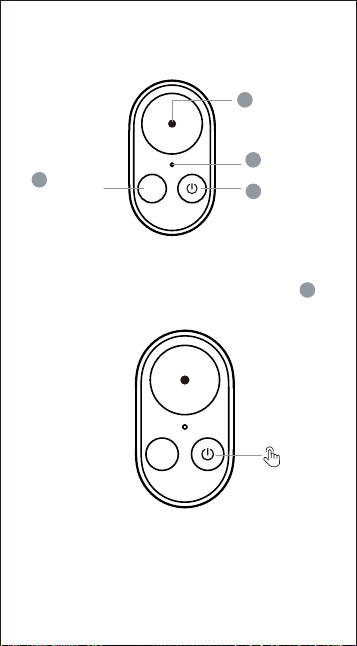
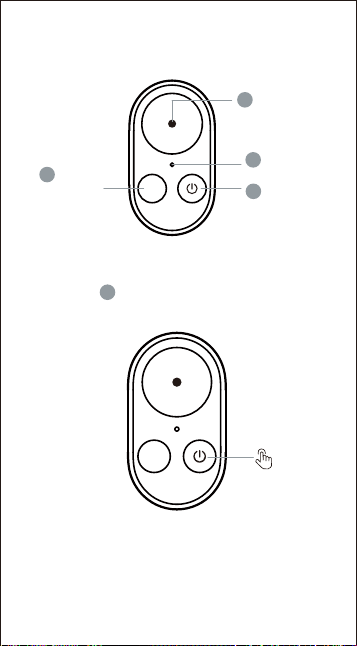
Botón de
modo
Botón de
Disparo
Indicador
luminoso
Botón de
encendi-
do
M
Instrucciones de uso del mando a
distancia Bluetooth
Instrucciones de conexión Bluetooth
2
3
*En la primera conexión, mantenga
presionados simultáneamente el botón de
disparo + el botón de modo durante 3
1.Encendido remoto
4
28
Mantenga presionado el botón de encendido
durante 3 segundos para encender el mando.
1
3
M
3S
2.Búsqueda de dispositivos Bluetooth
segundos para entrar en el modo de
emparejamiento Bluetooth forzado.
*En la primera conexión, mantenga
presionados simultáneamente el botón de
disparo + el botón de modo durante 3
29
M
Luz verde
parpadeando
3.Operación de conexión Bluetooth del
dispositivo
La luz verde parpadea, esperando la conexión del
dispositivo.
(1) Conexión a cámara depoiva DJI: si es la
primera conexión a una cámara DJI, se
requiere conrmación manual en la cámara.
(2) Conexión a cámara depoiva GoPro: para
conectar una GoPro, el emparejamiento
Bluetooth debe realizarse en la ventana de
conguración de emparejamiento.
*Después de que el dispositivo se desconecte,
el mando se apagará automáticamente.
Nuevo dispositivo
solicitando conexión
Código de vericación
****
Rechazar
Aceptar
segundos para entrar en el modo de
emparejamiento Bluetooth forzado.
30
4.Restablecimiento del emparejamiento
Bluetooth
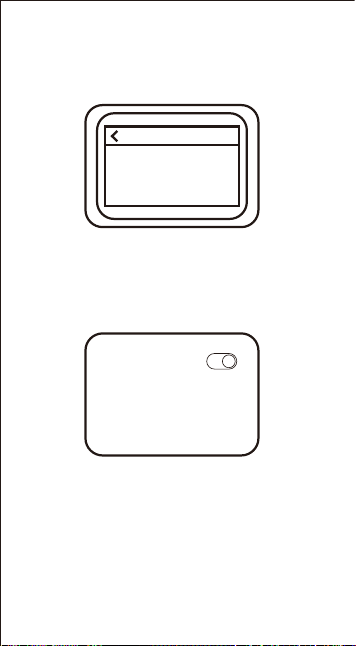
(3) Conexión a un teléfono móvil: En la página
Bluetooth del teléfono, busque el nombre
correspondiente (TELESIN_RC1) -> pulse
"Emparejar" -> acepte manualmente el
dispositivo, y luego podrá usarlo con
normalidad.
Antes de cambiar a otro dispositivo, mantenga
presionados simultáneamente el botón de
disparo + el botón de modo durante 3
segundos para restablecer el emparejamiento
Bluetooth, luego realice la nueva conexión.
*Después de apagar una GoPro con el
mando Bluetooth, este debe estar a menos
de 3 metros para reactivar la cámara.
*El teléfono solo admite funciones de
foto/video.
Dispositivos
Buscando
Listo para emparejar con la aplicación GoPro u
otros dispositivos compatibles con Bluetooth.
Asegúrate de que tu dispositivo esté en modo de
emparejamiento y dentro del alcance.
Bluetooth
Mis dispositivos
TELESIN_RC1
*Para la primera conexión, debe aceptar
manualmente la solicitud de emparejamiento
en la cámara.
31
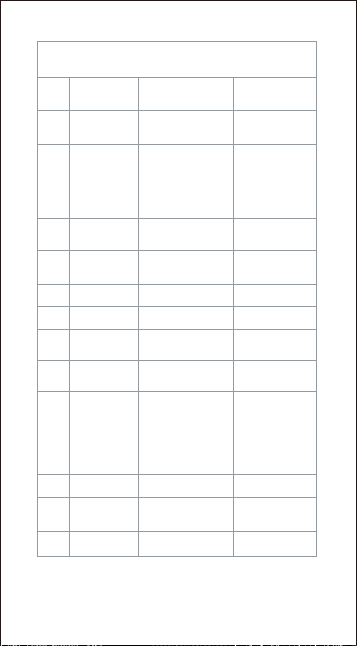
Guía de Funciones
1
No. Función Operación
2
3
4
5
6
7
8
9
10
11
12
Encendido /
Buscar
emparejamiento
Conexión
exitosa
Completamento
automatico
Botón pulsado 3
seg.
Luz
Indicadora
Luz verde
intermitente lenta
(2 seg./ciclo)
Luce verde ssa
per 3 sec., poi si
spegne
3 lampeggi verdi
veloci, poi si
spegne
Apagado
Bouton enfoncé 2
sec.
Cambio de
modo
Pulse brevemente
el botón de modo
1 lampeggio
verde
Pulse brevemente
el botón de disparo
1 destello verde
Pulse brevemente el
botón de encendido
1 destello verde
1 destello verde
Control de
captura
Marcar
momento
destacado
Apagar host
por control
remoto
Botón pulsado 2
seg. (si está
conectado)
Se apaga
Captura
rápida
Botón pulsado
brevemente tras
apagar host
remotamente
*Esta función no
está disponible en
el modo cámara de
acción GoPro.
Alea de
batería baja
Aviso automático
(batería <20%)
Luz roja continua
Conexión del
dispositivo
En la primera
conexión, debe
aceptar
manualmente el
emparejamiento en
el dispositivo
La luz verde
permanece
encendida
durante 3
segundos, luego
parpadea
lentamente.
Cargando
Conectar a
cargador Type-C
Luz roja
intermitente
lenta/respirante
Carga
completada
Reconocimiento
automático
Luz verde
continua
Compatible con cámaras de acción DJI/GoPro
5.Estado de funcionamiento del mando
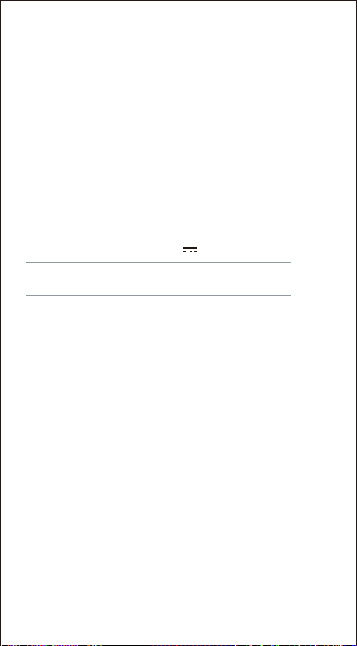
Especi icaciones técnicas
Tensión de entrada: 5V 1A
Tiempo de carga: Aproximadamente 2.5 horas
Bluetooth: el mando se apaga si no se establece
ninguna conexión Bluetooth en 2 minutos.
32
6.Actualización remota del rmware
(1) Abra la aplicación ReefColor → Toque el ícono
«+» en la esquina superior izquierda → Seleccione
"Agregar nuevo dispositivo", busque y conecte el
palo sele remoto Vlog.
(2) Después de una conexión exitosa, si hay un
nuevo rmware disponible, aparecerá un aviso en
la esquina superior derecha de la página de
conexión. Tóquelo para completar la actualización
y usar las funciones más recientes.
Descargo de responsabilidad
Lea atentamente este descargo de responsabilidad. Al utilizar
este producto, se entiende que acepta y reconoce en su
totalidad los términos de este descargo. Antes de cada uso,
inspeccione cuidadosamente el producto. No lo utilice si está
dañado o deformado. Al usar este producto, usted reconoce y
acepta que es plenamente responsable de sus acciones al usar el
producto y de cualquier consecuencia que pueda surgir. Usted se
compromete a utilizar el producto solo con nes legítimos y
legales. Usted comprende y acepta que Telesin Digital Co., Ltd.
(en adelante, “Telesin”) no será responsable de ningún abuso,
efecto adverso, daño, lesión, sanción u otra consecuencia legal
que surja directa o indirectamente del uso de este producto. Los
usuarios deben cumplir con las precauciones de uso, incluidas,
entre otras, las mencionadas en este documento. Dentro del
ámbito de las leyes y reglamentos nacionales, Telesin se resea
el derecho de interpretación y modicación nal de este
descargo de responsabilidad.
日语
モードボタ
ン
シャッターボ
タン
インジケー
ターランプ
電源ボタ
ン
M
Bluetoothリモコンの使用方法
Bluetooth接続方法
2
3
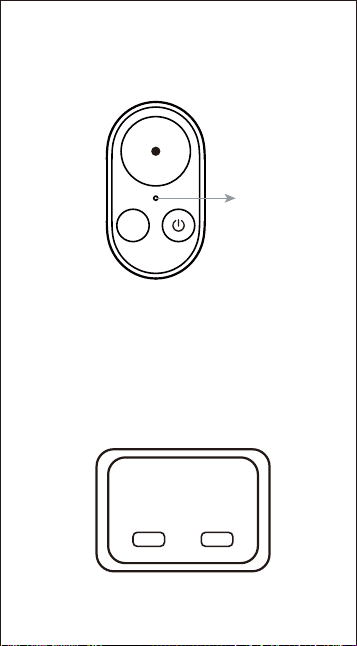
*初回接続時は、シャッターボタン+モードボ
タンを同時に3秒間長押しして、強制ペアリン
グモードに入ります。
4
33
電源ボタン を3秒間長押しして、リモコンの電
源を入れます。
1
3
M
3S
1.リモコン電源ON
2.Bluetooth機器検索
34
M
緑色ランプ点滅
*機器の接続が切断されると、リモコンは
自動的にオフになります。
3.機器のBluetooth接続操作
緑色のランプが点滅し、機器の接続を待ちます。
(1)DJIアクションカメラとの接続:初めてDJIア
クションカメラと接続する場合、カメラ側で
手動確認が必要です。
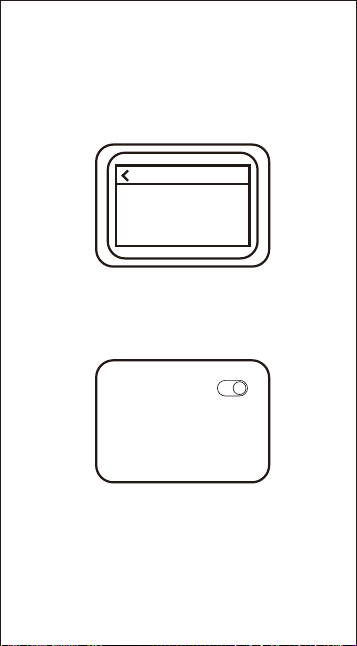
新しいデバイスが
接続を要求しています
認証コード
****
拒否
許可
35
4.Bluetoothペアリングのリセット操作
別のデバイスに切り替える前に、シャッターボタン
+モードボタンを同時に3秒間長押しして
Bluetoothペアリングをリセットしてから、新しい
接続を行ってください。
(3)スマートフォンとの接続: スマートフォンの
Bluetooth接続ページで該当のBluetooth名(
TELESIN_RC1)を見つけ→「ペアリング」をタ
ップ→手動でデバイスを受け入れると、通常通
り使用できます。
*BluetoothリモコンでGoProカメラの電源を切った
後、リモコンでカメラを起動するには3メートル以内
である必要があります。
*スマートフォンは写真・動画撮影機能のみ対応し
ています。
(2)GoProアクションカメラとの接続:GoProアクショ
ンカメラと接続するには、ペアリング設定ウィンド
ウでBluetoothペアリングを行う必要があります。
デバイス
検索中
GoProアプリまたは他のBluetooth互換デバイスと
ペアリングする準備ができました。デバイスがペ
アリングモードで範囲内にあることを確認してく
ださい。
Bluetooth
マイデバイス
TELESIN_RC1
*初回接続時、カメラ側でペアリングリクエスト
を手動で承認する必要があります。
36
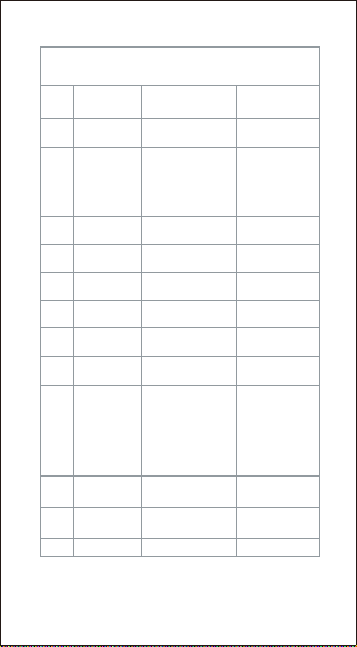
機能操作ガイド
1
番号 機能 操作
2
3
4
5
6
7
8
9
10
11
12
電源オン / ペ
アリング検索
接続成功 自動的に完了
電源ボタンを3秒
長押し
緑灯がゆっくり
点滅 (2秒/回)
緑灯が3秒間
点灯後消灯
電源オフ
電源ボタンを2
秒長押し
緑灯が速く3
回点滅後消灯
モード切替
モードボタンを
短押し
緑灯が1回点滅
緑灯が1回点滅
緑灯が1回点滅
撮影制御
シャッターボタ
ンを短押し
ハイライト
マーク
電源ボタンを短
押し
リモートでホ
ストをオフ
電源ボタンを2秒
長押し(接続時)
消灯
クイック
ショット
ホストをリモート
でオフにした後、
シャッターボタン
を短押し
*GoProアクショ
ンカメラモードで
はこの機能は利用
できません。
緑灯が1回点滅
デバイス接
続
初回接続時は、
デバイス側で手
動でペアリング
を受け入れる必
要があります
緑色のランプが
3秒間点灯した
後、ゆっくり点
滅します。
低電池警告
自動警告(バッ
テリー<20%)
赤灯が点灯
充電中
Type-C充電器
に接続
赤灯がスロー
呼吸点滅
充電完了 自動認識
緑灯が点灯
インジケー
ターライト
DJI・GoPro アクションカメラに対応
5.リモコンの動作状態
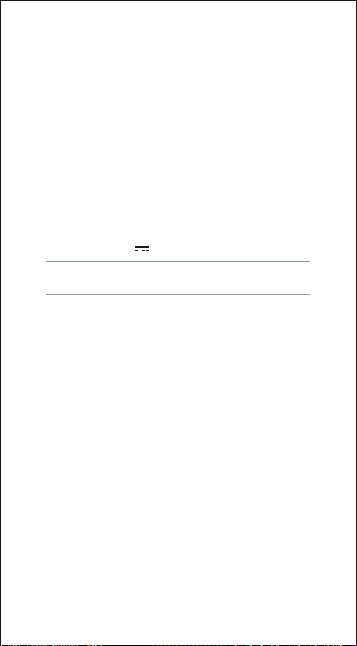
充電時間: 約2.5時間
Bluetooth:2分間Bluetooth接続がない場合、
自動的に電源が切れます。
37
6.リモートファームウェアアップグレード
(
1) ReefColor APPを開く → 左上の「+」アイコ
ンをタップ → 「新しいデバイスを追加」を選択
し、Vlogリモート自撮り棒を検索して接続しま
す。
(2) 接続成功後、新しいファームウェアがある場
合、接続ページの右上に通知が表示されます。そ
れをタップしてアップグレードを完了し、最新機
能をご利用いただけます。
仕様パラメータ
入力電圧: 5V 1A
本免責事項をよくお読みください。本製品を使用された時
点で、本免責事項の全ての内容を認め、受け入れたものと
みなされます。使用のたびに、製品をよく点検してくださ
い。破損や変形がある場合は、使用しないでください。本
製品を使用することにより、お客様は、本製品の使用に伴
うご自身の行為および生じ得るあらゆる結果について全責
任を負うことを認め、同意したものとみなされます。お客
様は、正当かつ合法的な目的でのみ本製品を使用すること
を約束します。お客様は、本製品の使用に起因または関連
して直接的または間接的に生じた、滥用、不利益な影響、
損害、傷害、罰則その他の法的結果について、泰迅数码有
限公司(以下「Telesin」)が一切の責任を負わないことを
理解し、同意するものとします。ユーザーは、本文書に記
載されている使用上の注意を含む(ただしこれらに限定さ
れない)注意事項に従うものとします。国の法令の範囲内
で、本免責事項の最終的な解釈権および改正権はTelesinに
帰属します。
免責事項
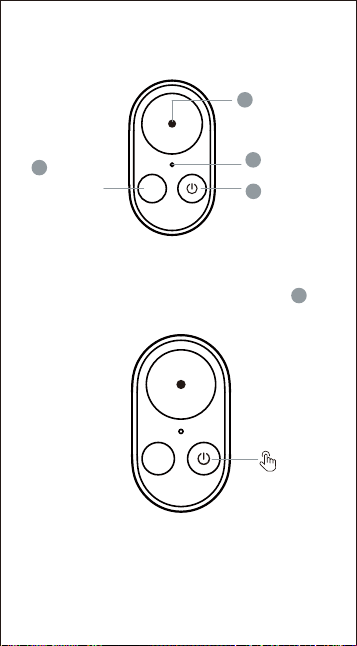
俄语
Кнопка
режима
Кнопка
спуска
Индикатор
Кнопка
питания
M
Инструкция по использованию
Bluetooth-пульта
Инструкция по подключению Bluetooth
2
3
*При первом подключении одновременно
нажмите и удерживайте кнопку спуска +
кнопку режима в течение 3 секунд для
4
38
Нажмите и удерживайте кнопку питания в
течение 3 секунд, чтобы включить пульт.
1
3
M
3S
1.Дистанционное включение
2.Поиск устройств Bluetooth
входа в режим принудительного
сопряжения Bluetooth.
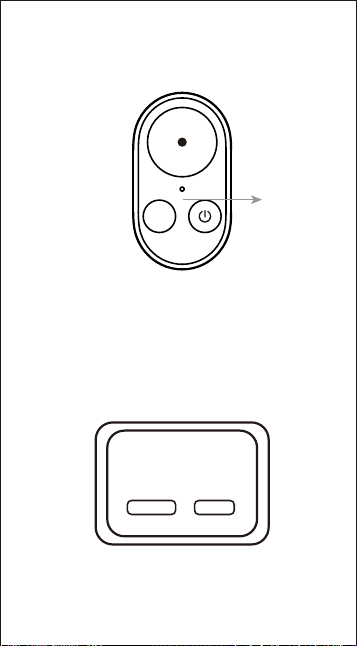
*При первом подключении одновременно
нажмите и удерживайте кнопку спуска +
кнопку режима в течение 3 секунд для
39
M
Зеленый
индикатор
мигает
*После отключения устройства пульт
автоматически выключается.
3.Операция подключения устройства по
Bluetooth
Зеленый индикатор мигает, ожидая
подключения устройства.
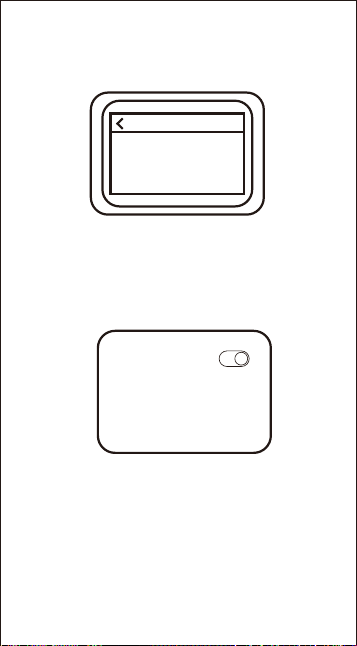
(1)Подключение к экшн-камере DJI:
при
первом подключении к камере DJI
требуется ручное подтверждение на
стороне камеры.
Новое устройство
запрашивает подключение
Код подтверждения
****
Отклонить
Принять
(2)Подключение к экшн-камере GoPro: для
подключения к камере GoPro необходимо
выполнить сопряжение Bluetooth в окне
настроек сопряжения.
входа в режим принудительного
сопряжения Bluetooth.
40
4.Сброс сопряжения Bluetooth
Перед переключением на другое устройство
одновременно нажмите и удерживайте кнопку
спуска + кнопку режима в течение 3 секунд,
чтобы сбросить сопряжение Bluetooth, а затем
выполните новое подключение.
(3)Подключение к мобильному телефону: На
странице Bluetooth телефона найдите
соответствующее имя (TELESIN_RC1) ->
нажмите «Сопряжение» -> вручную примите
устройство, после чего его можно будет
использовать в обычном режиме.
*После выключения камеры GoPro с помощью
Bluetooth-пульта, для ее пробуждения пульт
должен находиться в радиусе 3 метров.
*Телефон поддерживает только функции
фото/видеосъемки.
Устройства
Поиск
Готово к сопряжению с приложением GoPro или
другими Bluetooth-совместимыми устройствами.
Убедитесь, что ваше устройство находится в
режиме сопряжения и в зоне действия.
Bluetooth
Мои устройства
TELESIN_RC1
*При первом подключении необходимо
вручную подтвердить запрос на сопряжение
на камере.
41
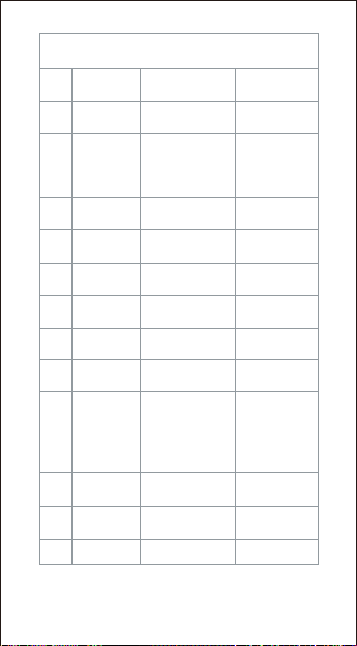
Руководство по функциям
1
№ Функция Действие
2
3
4
5
6
7
8
9
10
11
12
Вкл. / Поиск
сопряжения
Сопряжение
успешно
Завершается
автоматически
Удерживать
кнопку 3 сек.
Световой
индикатор
Медленное
мигание зеленым
(1 раз в 2 сек.)
Постоянный
зеленый 3 сек.,
затем гаснет
3 быстрых
зеленых мигания,
затем гаснет
Выкл.
Удерживать
кнопку 2 сек.
Смена
режима
Кратковременное
нажатие кнопки
режима
1 зеленое
мигание
Кратковременное
нажатие кнопки
спуска
1 зеленое
мигание
Кратковременное
нажатие кнопки
питания
1 зеленое
мигание
1 зеленое
мигание
Управление
съемкой
Отметить
момент
Выкл.
устройство с
пульта
Удерживать кнопку
2 сек. (при
подключении)
Гаснет
Быстрая
съемка
Кратко нажать
кнопку после выкл.
устройства с пульта
*Эта функция
недоступна в
режиме
экшн-камеры
GoPro.
Оповещение
о низком
заряде
Автооповещение
(заряд <20%)
Постоянный
красный
Подключени
е устройства
При первом
подключении
необходимо
вручную принять
сопряжение на
устройстве
Зеленый
индикатор горит
3 секунды, а
затем медленно
мигает.
Зарядка
Подключить
кабель Type-C
Медленное
"дыхательное"
мигание красным
Зарядка
завершена
Автораспознава
ние
Постоянный
зеленый
Совместимо с экшн-камерами DJI/GoPro
5.Состояние работы пульта

Технические характеристики
Входное напряжение: 5В 1А
Время зарядки: около 2.5 часа
Bluetooth: пульт выключается, если в течение
2 минут не установлено соединение Bluetooth.
42
6.Удалённое обновление прошивки
(1) Откройте приложение ReefColor → Нажмите
значок «+» в левом верхнем углу → Выберите
«Добавить новое устройство», найдите и
подключите пульт дистанционного управления
для селфи-палки Vlog.
(2) После успешного подключения, если
доступна новая прошивка, в правом верхнем
углу страницы подключения появится
подсказка. Нажмите на неё, чтобы завершить
обновление и использовать новейшие функции.
本免責事項をよくお読みください。本製品を使用された時
点で、本免責事項の全ての内容を認め、受け入れたものと
みなされます。使用のたびに、製品をよく点検してくださ
い。破損や変形がある場合は、使用しないでください。本
製品を使用することにより、お客様は、本製品の使用に伴
うご自身の行為および生じ得るあらゆる結果について全責
任を負うことを認め、同意したものとみなされます。お客
様は、正当かつ合法的な目的でのみ本製品を使用すること
を約束します。お客様は、本製品の使用に起因または関連
して直接的または間接的に生じた、滥用、不利益な影響、
損害、傷害、罰則その他の法的結果について、泰迅数码有
限公司(以下「Telesin」)が一切の責任を負わないことを
理解し、同意するものとします。ユーザーは、本文書に記
載されている使用上の注意を含む(ただしこれらに限定さ
れない)注意事項に従うものとします。国の法令の範囲内
で、本免責事項の最終的な解釈権および改正権はTelesinに
帰属します。
Отказ от ответственности
Внимательно прочтите настоящее уведомление. С началом
использования данного продукта считается, что вы
полностью признаёте и принимаете все условия
настоящего отказа. Перед каждым использованием
тщательно проверяйте продукт. Не используйте его, если
он повреждён или деформирован. Используя данный
продукт, вы признаёте и соглашаетесь, что несёте полную
ответственность за свои действия при использовании
продукта и за любые последствия, которые могут
возникнуть. Вы обязуетесь использовать продукт только в
законных целях. Вы понимаете и соглашаетесь, что Telesin
Digital Co., Ltd. (далее «Telesin») не несёт ответственности
за любое неправильное использование, неблагоприятные
последствия, ущерб, травмы, штрафы или другие
правовые последствия, возникшие прямо или косвенно в
результате использования данного продукта.
Пользователи должны соблюдать меры предосторожности
при использовании, включая, но не ограничиваясь
указанными в данном документе. В рамках национальных
законов и нормативных актов Telesin оставляет за собой
право окончательного толкования и изменения
настоящего отказа.
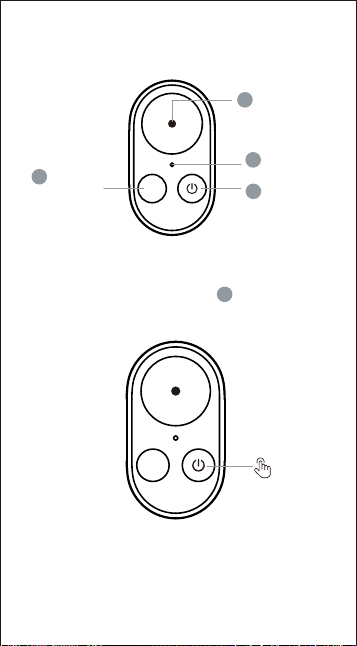
波兰
Przycisk
tbu
Przycisk
migawki
Wskaźnik
świetlny
Przycisk
zasilania
M
Instrukcja obsługi Pilota Bluetooth
Instrukcja Połączenia Bluetooth
2
3
*Przy pierwszym połączeniu należy
jednocześnie przytrzymać przycisk migawki
+ przycisk tbu przez 3 sekundy, aby wejść
w tb wymuszonego parowania Bluetooth.
4
43
Przytrzymaj przycisk zasilania przez 3
sekundy, aby włączyć pilot.
1
3
M
3S
1.Zdalne włączanie
2.Wyszukiwanie urządzeń Bluetooth
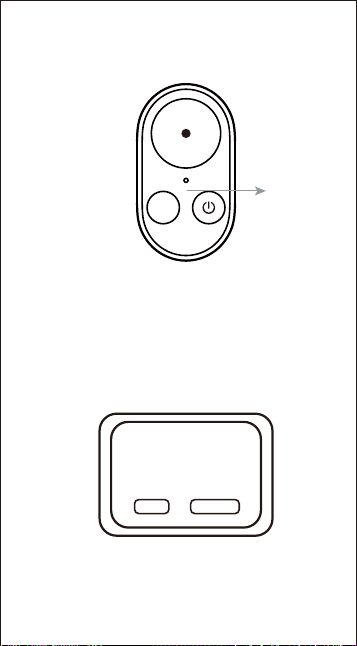
44
M
Zielona
dioda
miga
*Po rozłączeniu urządzenia pilot
automatycznie się wyłącza.
3.Operacja podłączania urządzenia przez
Bluetooth
Zielona dioda miga, oczekując na połączenie
urządzenia.
(1)Podłączanie do kame spoowej DJI: przy
pierwszym podłączeniu do kame DJI
wymagane jest ręczne potwierdzenie po
stronie kame.
Nowe urządzenie
żąda połączenia
Kod wekacyjny
****
Odrzuć
Zaakceptuj
(2)Podłączanie do kame spoowej GoPro: aby
podłączyć kamerę GoPro, parowanie Bluetooth
musi zostać wykonane w oknie ustawień
parowania.
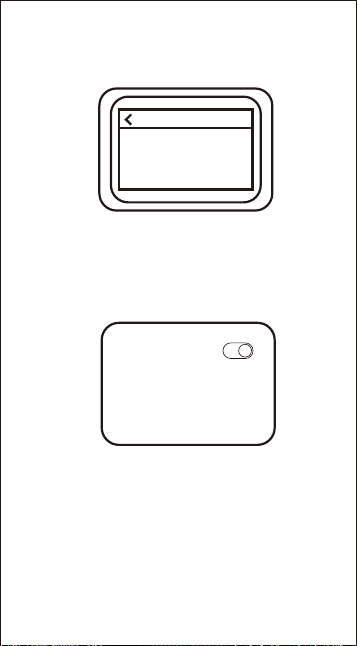
45
4.Resetowanie parowania Bluetooth
Przed przełączeniem na inne urządzenie należy
jednocześnie przytrzymać przycisk migawki +
przycisk tbu przez 3 sekundy, aby zresetować
parowanie Bluetooth, a następnie wykonać nowe
połączenie.
(3)Podłączanie do telefonu komórkowego: Na
stronie Bluetooth telefonu znajdź odpowiednią
nazwę Bluetooth (TELESIN_RC1) -> dotknij
„Paruj” -> ręcznie zaakceptuj urządzenie, a
następnie będzie można go normalnie używać.
*Po wyłączeniu kame GoPro za pomocą pilota
Bluetooth, aby ją obudzić, pilot musi znajdować
się w odległości do 3 metrów.
*Telefon obsługuje tylko funkcje zdjęć/nagrań
wideo.
Urządzenia
Wyszukiwanie
Gotowe do parowania z aplikacją GoPro lub
innymi urządzeniami kompatybilnymi z Bluetooth.
Upewnij się, że Twoje urządzenie jest w tbie
parowania i znajduje się w zasięgu.
Bluetooth
Moje urządzenia
TELESIN_RC1
*Podczas pierwszego połączenia należy ręcznie
zaakceptować żądanie parowania na kamerze.
46
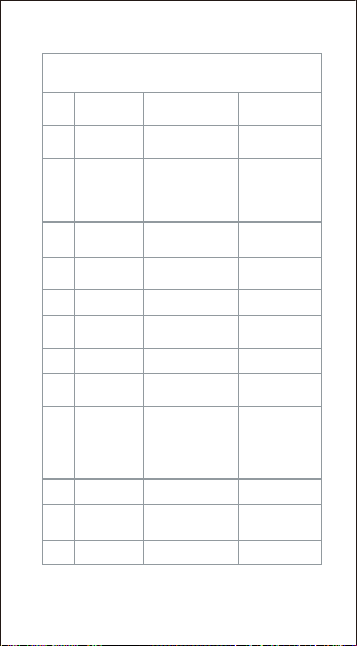
Instrukcja Obsługi Funkcji
1
Lp. Funkcja Operacja
2
3
4
5
6
7
8
9
10
11
12
Włącz. /
Wyszukiwanie
parowania
Połączenie
pomyślne
Automatyczne
Przycisk
przytrzymany 3 sek.
Wskaźnik
Wolno miga na
zielono (co 2 sek.)
Światło zielone
stale przez 3 sek.,
potem zgaś
3 szybkie zielone
mignięcia, potem
zgaś
Wyłącz.
Przycisk
przytrzymany 2 sek.
Zmiana tbu
Krótkie naciśnięcie
przycisku tbu
1 mignięcie
zielonym
1 mignięcie
zielonym
1 mignięcie
zielonym
Кратковременное
нажатие кнопки
спуска
Krótkie naciśnięcie
przycisku migawki
1 mignięcie
zielonym
Sterowanie
nagw.
Zaznacz
moment
Zdalne wyłącz.
hosta
Przycisk
przytrzymany 2
sek. (po poł.)
Zgaś
Szybkie
nagwanie
Krótko nacisnąć
przyc. po zdalnym
wył. hosta
*Ta funkcja nie jest
dostępna w tbie
kame spoowej
GoPro.
Ale nisk.
naładow.
Auto. ostrzeżenie
(bateria <20%)
Światło czerwone
stale
Podłączanie
urządzenia
Przy pierwszym
połączeniu należy
ręcznie
zaakceptować
parowanie na
urządzeniu
Zielone światło
świeci się przez 3
sekundy, a
następnie powoli
miga.
Ładowanie
Podłącz ładowarkę
Type-C
Czerwone
pulsujące/wolno
migające
Ładowanie
zakończ.
Auto. rozpoznanie
Światło zielone
stale
Kompatybilne z kamerami spoowymi DJI/GoPro
5.Stan pracy pilota
Parametr techniczne
Napięcie wejściowe: 5V 1A
Czas ładowania: około 2.5 godziny
Bluetooth: pilot wyłącza się, jeśli w ciągu 2 minut
nie zostanie nawiązane połączenie Bluetooth.
47
6.Zdalna aktualizacja oprogramowania
układowego (rmware)
(1) Otwórz aplikację ReefColor → Kliknij ikonę
«+» w lewym górnym rogu → Wybierz „Dodaj
nowe urządzenie", wyszukaj i połącz kijek do
sele Vlog z pilotem.
(2) Po pomyślnym połączeniu, jeśli dostępne
jest nowe oprogramowanie, pojawi się
komunikat w prawym górnym rogu strony
połączenia. Kliknij go, aby zakończyć
aktualizację i korzystać z najnowszych funkcji.
Zrzeczenie się odpowiedzialności
Proszę uważnie przeczytać niniejsze zrzeczenie. Rozpoczęcie
użytkowania tego produktu oznacza pełną akceptację
wszystkich warunków niniejszego zrzeczenia. Przed każdym
użyciem dokładnie sprawdź produkt. Nie używaj go, jeśli jest
uszkodzony lub odkształcony. Korzystając z tego produktu,
uznajesz i zgadzasz się, że ponosisz pełną odpowiedzialność
za swoje działania związane z używaniem produktu oraz za
wszelkie mogące powstać konsekwencje. Zobowiązujesz się
używać produktu wyłącznie w uzasadnionych i legalnych
celach. Rozumiesz i zgadzasz się, że Telesin Digital Co., Ltd.
(zwana dalej „Telesin”) nie ponosi odpowiedzialności za
jakiekolwiek nadużycia, niekorzystne skutki, szkody,
obrażenia, ka lub inne konsekwencje prawne wynikające
bezpośrednio lub pośrednio z używania tego produktu.
Użytkownicy powinni przestrzegać środków ostrożności
związanych z użytkowaniem, w tym, między innymi,
wymienionych w niniejszym dokumencie. W granicach
przepisów krajowych, Telesin zastrzega sobie prawo do
ostatecznej interpretacji i modykacji niniejszego zrzeczenia.

www.telesin.com
封底