尺寸:280×110mm
材质:
MK2022RGB键鼠套装-说明书
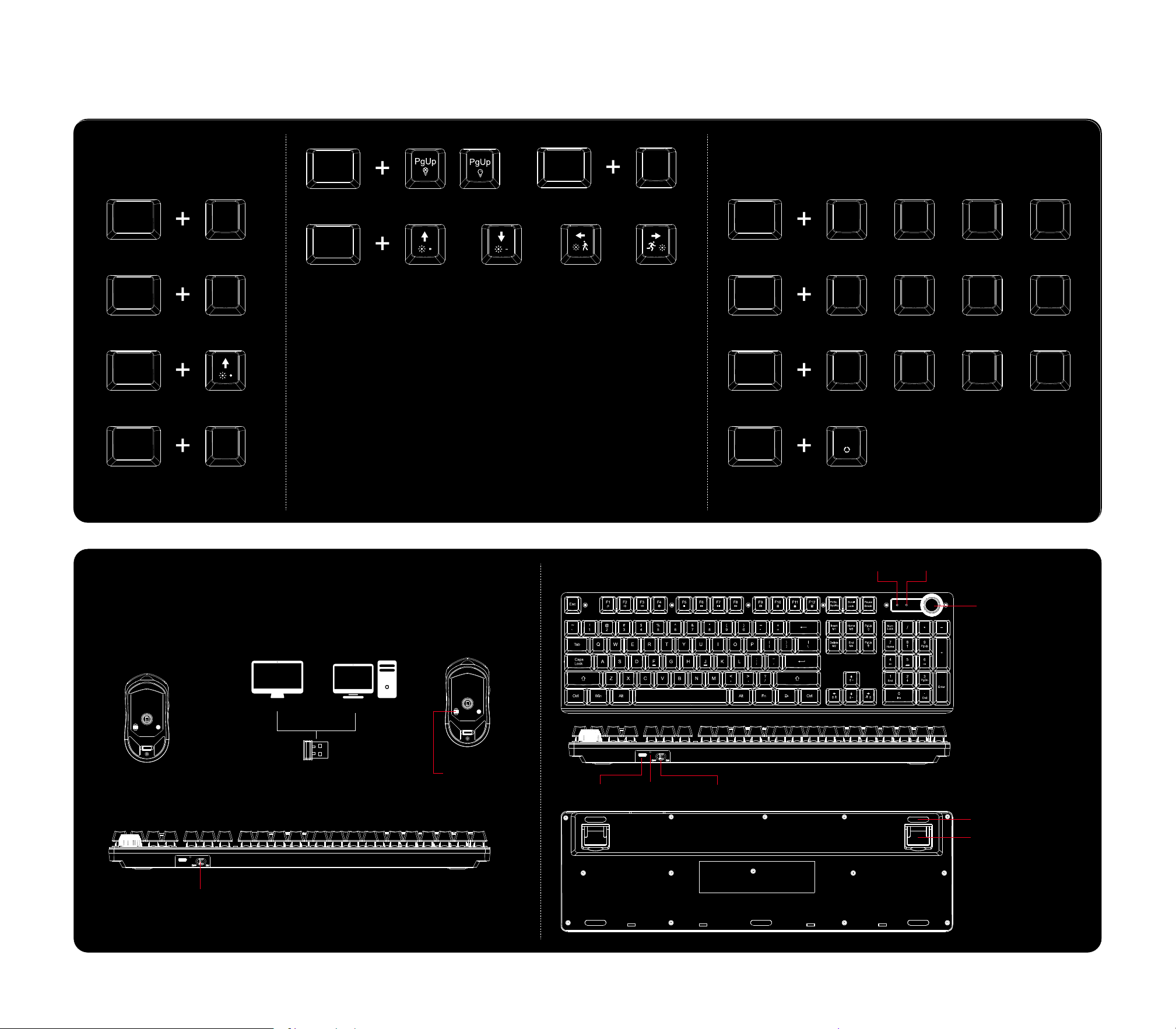
Light Function Adjustment Multi-media keys
Light Function 1
Fn lns
Light Function 2
Fn
Home
Light Function 4
Fn
Del
Light Function 5
Fn
End
Fn
Media
F1
Volume Down
F2
Volume Up
F3
Mute
F4
Fn
Stop
F5
Previous Track
F6
Play/Pause
F7
Next Track
F8
Fn
E-mail
F9
Home
F10
Keyboard Lockout
F11
Calculators
F12
Fn
Long press 3 seconds to restore factory settings
Esc
Light Function 3
Fn
Backlight On/Off Switch
Fn
Backlight Brightness+
Fn
Backlight Brightness- Backlight Speed- Backlight Speed+
Quick Operation Procedure
Silicone Foot Pads
USB Receiver Port
Type-c Port Charging
Indicator Light
On/Off Switch
Switch to ON
2.4g Connection
(Only wireless 2.4G mode,
the Type-C cable is only for charging.)
Take out the USB receiver
Switch to ON
Then connect to the computer successfully.
Put the USB receiver on the USB port
WindowiOS
RGB MODE
RGB MODE
If there is a problem with the connection of the keyboard and mouse, please try the following
steps.
Keyboard re-pairing method:
Remove the USB receiver, turn on the keyboard switch, keep the distance between the
keyboard and the USB receiver within 10 centimeters, and simultaneously press "Esc" + "=" for
three seconds. The third indicator light on the keyboard will light up. Then insert the USB into
the USB interface. After successful pairing, the indicator light will go out.
Mouse re-pairing Method:
Remove the USB receiver, turn on the mouse, place the USB device within 10 centimeters of
the mouse, and simultaneously press and hold the "left mouse button + scroll wheel button +
right mouse button" for 3 seconds. Then insert the USB receiver into the USB port.
Service Email: [email protected]
Service Email: [email protected]
Num Lock Caps Lock
Rotary Button
Turn the knob left to volume down
Turn the knob right to volume up
Press the knob to mute

FCC Statement
This device complies with part 15 of the FCC Rules. Operation is subject to the following two
conditions: (1) This device may not cause harmful interference, and (2) this device must accept any interference received, including
interference that may cause undesired operation. This equipment has been tested and found to comply with the limits for a Class B
digital device, pursuant to part 15 of the FCC Rules. These limits are designed to provide reasonable protection against harmful
interference in a residential installation. This equipment generates, uses and can radiate radio frequency energy and, if not
installed and used in accordance with the instructions, may cause harmful interference to radio communications. However, there is
no guarantee that interference will not occur in a particular installation. If this equipment does cause harmful interference to radio or
television reception, which can be determined by turning the equipment off and on, the user is encouraged to try to correct the
interference by one or more of the following measures:
•Reorient or relocate the receiving antenna.
•Increase the separation between the equipment and receiver.
•Connect the equipment into an outlet on a circuit different from that to which the receiver is connected.
•Consult the dealer or an experienced radio/TV technician for help.
Caution: Any changes or modifications to this device not explicitly approved by manufacturer could void your authority to operate
this equipment.
RF Exposure Information
The device has been evaluated to meet general RF exposure requirement. The device can be used in portable exposure condition
without restriction.