
VT1931
Wonder Tap Reading Pen
使用说明书
用户手册 · 中文版
Wonder Early Learning
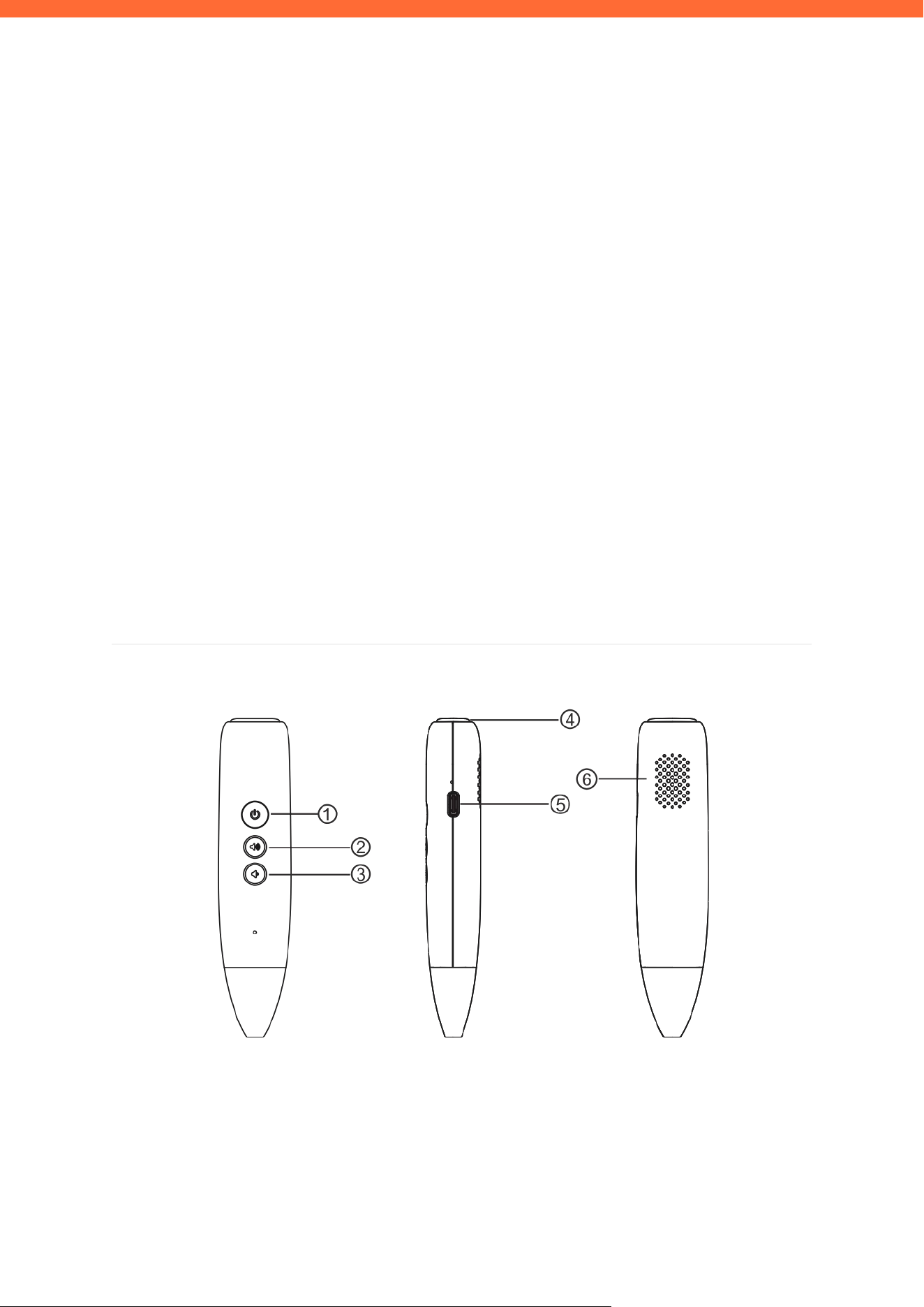
1 开关机 2 音量加 3 音量减 4 指示灯 5 USB 孔 6 喇叭孔

VT1931 Wonder Tap Reading Pen · 使用说明书
Wonder Early Learning |
2
一、产品规格
产品名称
智能点读笔
产品型号
VT1931
产品尺寸
123.3 × 27 × 21 mm
外观材质
ABS+PC、PC
电池容量
500 mAh / 3.7V
输入规格
5V / 1A
充电接口
Type-C
充电时间
约 2 小时
持续工作
约 4 小时
供电方式
Type-C
以上数据来自新创深蓝实验室,实际参数会因产品或其它因素而有所差异。
二、按键使用说明
电源键
长按开机 / 关机;播放状态下短按暂停/播放
音量加 (+)
短按音量增大
音量减 (-)
短按音量减小;WIFI 模式下长按打开 WIFI 模块
指示灯
开机后指示灯在不同状态显示不同颜色
USB 孔
Type-C 接口,用于充电或联机
三、使用方法
| 3.1 开机 / 关机

VT1931 Wonder Tap Reading Pen · 使用说明书
Wonder Early Learning |
3
1. 开机
长按电源键,听到开机提示音后松开即可开机。
2. 关机
开机状态下,长按电源键,听到关机提示音后松开即可关机。
3. 自动关机
机器无操作 5 分钟后将自动关机,以节省电量。
4. 重置
长按电源键 10 秒可重置设备,恢复出厂设置。
4. 重置设备
长按电源键 10 秒,听到提示音后松开,设备将恢复出厂设置。
| 3.2 点读
开机状态下,手握笔,笔头朝下,将笔头孔垂直放置于图书或卡片的感应区域上,即可听到对应的语音
内容。
| 3.3 音量调节
• 短按【音量加】键,音量逐步增大。
• 短按【音量减】键,音量逐步减小。
| 3.4 MP3 播放
通过点读卡片 / 书本上的功能图标来控制音乐播放:
• 点 MP3 图标 → 进入或退出 MP3 模式
• 点 上一曲 图标 → 切换至上一首
• 点 下一曲 图标 → 切换至下一首
• 点 播放/暂停 图标,或短按电源键 → 播放 / 暂停
| 3.5 录音功能
录音功能默认关闭。点击对应的【开启功能码】后,即可进行奇偶录音。
| 3.6 WIFI 配网

VT1931 Wonder Tap Reading Pen · 使用说明书
Wonder Early Learning |
4
WIFI 功能默认关闭,按如下步骤开启与配网:
1. 开启 WIFI 功能
在 2 秒内依次点击点码 64576 + 64577 即可开启 WIFI 功能;再次执行相同操作可关闭。
2. 打开 WIFI 模块
WIFI 功能开启后,长按【音量减】键,待指示灯闪烁后,WIFI 模块正式启动。
3. 扫码配网
用手机扫描说明书内的二维码,进入微信小程序,按以下步骤操作:
- 在弹出界面点【直接进入】,然后点【蓝牙配网】
- 输入当前手机连接热点的密码
- 点【搜索蓝牙设备】,搜到点读笔后会自动填入设备栏
- 点【蓝牙设备配网】,连接成功后将听到提示音:网络连接成功,你可以唤醒我了;同时指示灯
颜色发生变化
注:关机后如需再次联网,须重新长按【音量减】打开 WIFI 模块。已配网设备重启后会自动重连;未配网设备需
重新扫码操作。
四、充电说明
• 使用随附的 Type-C 数据线连接 5V/1A 的充电器进行充电。
• 充电时请轻插、轻拔充电线,避免用力过猛损坏接口。
• 充电过程中指示灯亮起;充电完成后指示灯熄灭或变色。
• 闲置不用时,建议将电量充满后再存放,以延长电池寿命。
五、保修服务政策
• 正常保修范围:
- 消费者通过合法渠道购买的产品,出现非人为损坏的性能故障,享受包修 / 包退 / 包换(三
包)服务。
• 以下情况不在三包范围内:
- 未经授权的维修、误用、碰撞、疏忽、滥用、进液、事故、改动或不正确使用。
- 撕毁 / 涂改产品标贴。

VT1931 Wonder Tap Reading Pen · 使用说明书
Wonder Early Learning |
5
六、安全及注意事项
• 请勿在高温或高湿度环境中使用本产品。
• 使用和存放时注意防水、防潮、防摔。
• 请勿擅自拆解或维修本产品,否则将丧失保修资格。
• 本公司持续改善产品品质,规格如有变更恕不另行通知,请以实物为准。

VT1931 Wonder Tap Reading Pen · 使用说明书
Wonder Early Learning |
6
七、保修卡
保 修 卡
/ WARRANTY CARD
姓 名
Name
联 系 方 式
Contact
电 话
Phone
购 买 日 期
Purchase Date
机 身 编 号
Serial Number
产 品 型 号
Model Number
VT1931
购 买 地 点
Purchase
Location
购 买 价 格
Purchase Price
家 庭 住 址
Address
邮 编
ZIP / Postal Code
VT1931 Wonder Tap Reading Pen · 使用说明书
Wonder Early Learning |
7
VT1931
Wonder Tap Reading Pen
User Manual
English Edition
Wonder Early Learning
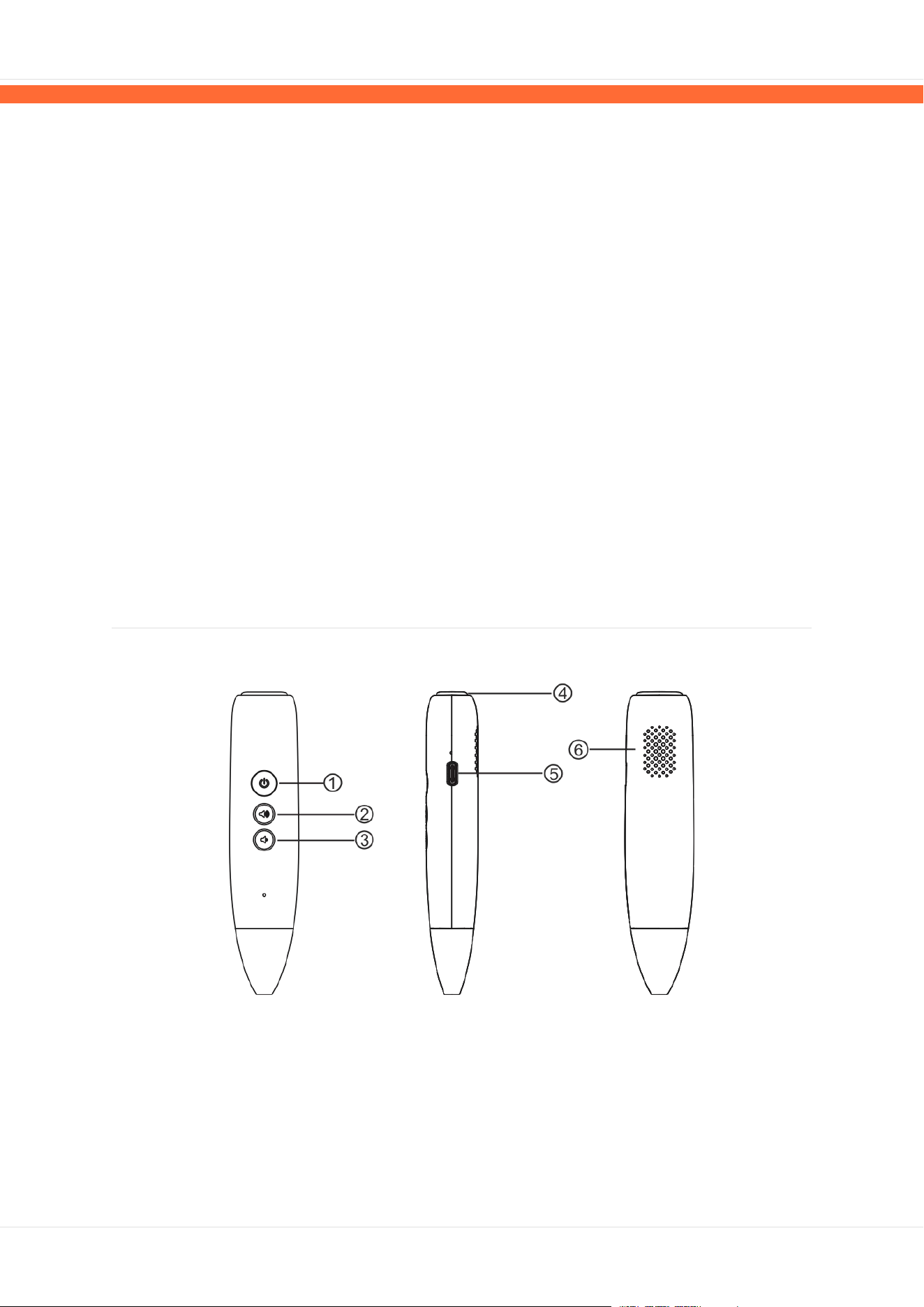
1 Power Button 2 Volume Up (+) 3 Volume Down (-)
4 Indicator Light 5 USB Port 6 speaker

VT1931 Wonder Tap Reading Pen | User Manual
Wonder Early Learning |
8
1. Product Specifications
Product Name
Smart Reading Pen
Model Number
VT1931
Dimensions
123.3 x 27 x 21 mm
Material
ABS+PC, PC
Battery Capacity
500 mAh / 3.7V
Input Specs
5V / 1A
Charging Port
Type-C
Charging Time
Approx. 2 hours
Continuous Use
Approx. 4 hours
Power Supply
Type-C
Specifications are based on Xinchuang Shenlan Lab testing. Actual performance may vary depending on usage
conditions.
2. Button Guide
Power Button
Long press to power on/off; short press to pause/play during playback
Volume Up (+)
Short press to increase volume
Volume Down (-)
Short press to decrease volume; long press to activate Wi-Fi module
Indicator Light
Displays different colors depending on device status
USB Port
Type-C port for charging or PC connection
3. How to Use
| 3.1 Powering On / Off
1. Power On
Press and hold the Power button until you hear the startup sound, then release.
2. Power Off
While powered on, press and hold the Power button until you hear the shutdown sound, then
release.
3. Auto Power-Off
The device will automatically shut down after 5 minutes of inactivity to conserve battery.
4. Reset

VT1931 Wonder Tap Reading Pen | User Manual
Wonder Early Learning |
9
Press and hold the Power button for 10 seconds to reset the device to factory settings.
4. Factory Reset
Press and hold the Power button for 10 seconds. Release when you hear the prompt tone. The
device will reset to factory settings.
| 3.2 Point-Reading
While powered on, hold the pen with the tip pointing downward. Place the tip perpendicularly onto the
designated area of a compatible book or card to hear the corresponding audio.
| 3.3 Volume Control
• Short press the Volume Up (+) button to increase volume.
• Short press the Volume Down (-) button to decrease volume.
| 3.4 MP3 Playback
Use the function icons on compatible cards or books to control music playback:
• Tap the MP3 icon to enter or exit MP3 mode.
• Tap the Previous Track icon to go to the previous song.
• Tap the Next Track icon to go to the next song.
• Tap the Play/Pause icon, or short press the Power button, to play or pause.
| 3.5 Recording Function
Recording is disabled by default. Tap the corresponding activation code on a compatible card to
enable the recording feature.
| 3.6 Wi-Fi Setup
Wi-Fi is disabled by default. Follow the steps below to connect:
1. Enable Wi-Fi
Within 2 seconds, tap point codes 64576 then 64577 to enable Wi-Fi. Repeat to disable.
2. Activate Wi-Fi Module
Once Wi-Fi is enabled, long press the Volume Down (-) button. The indicator light will flash when
the Wi-Fi module is active.
3. Pair via QR Code
Scan the QR code in this manual with your smartphone to open the WeChat Mini Program, then
follow these steps:
- Tap "Enter Directly" then select "Bluetooth Pairing."
- Enter the password for the Wi-Fi network your phone is connected to.
- Tap "Search Bluetooth Devices." The pen will appear and auto-fill in the device field.
- Tap "Bluetooth Device Pairing." On success, you will hear: "Network connected. You can wake
me now." The indicator light will also change color.
Note: After powering off, you must long press Volume Down (-) again to reactivate the Wi-Fi module. Previously
paired networks will reconnect automatically; new networks require re-pairing via the QR code.

VT1931 Wonder Tap Reading Pen | User Manual
Wonder Early Learning |
10
4. Charging Instructions
• Use the included Type-C cable with a 5V/1A charger.
• Insert and remove the charging cable gently to avoid damaging the port.
• The indicator light stays on while charging and turns off or changes color when fully charged.
• For long-term storage, fully charge the device before putting it away to preserve battery health.
5. Warranty Policy
• Covered under warranty:
- Products purchased through authorized channels that experience non-user-induced
performance failures are covered by our Return, Repair, and Replacement (3R) guarantee.
• Not covered under warranty:
- Unauthorized repairs, misuse, impact damage, negligence, abuse, liquid damage, accidents,
modifications, or incorrect usage.
- Removal or defacement of product labels or serial number stickers.
6. Safety & Precautions
• Do not use this product in high-temperature or high-humidity environments.
• Keep the device away from water, moisture, and physical impacts.
• Do not attempt to disassemble or repair the device yourself. Doing so will void the warranty.
• Product specifications are subject to change without prior notice. Please refer to the physical
product for the most accurate information.
FCC Warning
This device complies with Part 15 of the FCC Rules. Operation is subject to the following two conditions:
(1) This device may not cause harmful interference, and (2) this device must accept any interference
received, including interference that may cause undesired operation.
NOTE 1: This equipment has been tested and found to comply with the limits for a Class B digital device,
pursuant to part 15 of the FCC Rules. These limits are designed to provide reasonable protection against
harmful interference in a residential installation. This equipment generates, uses and can radiate radio
frequency energy and, if not installed and used in accordance with the instructions, may cause harmful
interference to radio communications. However, there is no guarantee that interference will not occur in a
particular installation. If this equipment does cause harmful interference to radio or television reception,
which can be determined by turning the equipment off and on, the user is encouraged to try to correct the
interference by one or more of the following measures:
- Reorient or relocate the receiving antenna.
- Increase the separation between the equipment and receiver.
-Connect the equipment into an outlet on a circuit different from that to which the receiver is connected.
-Consult the dealer or an experienced radio/TV technician for help.

VT1931 Wonder Tap Reading Pen | User Manual
Wonder Early Learning |
11
NOTE 2: Any changes or modifications to this unit not expressly approved by the party responsible for
compliance could void the user's authority to operate the equipment.
The device has been evaluated to meet general RF exposure requirement. The device can be used in
portable exposure condition without restriction.