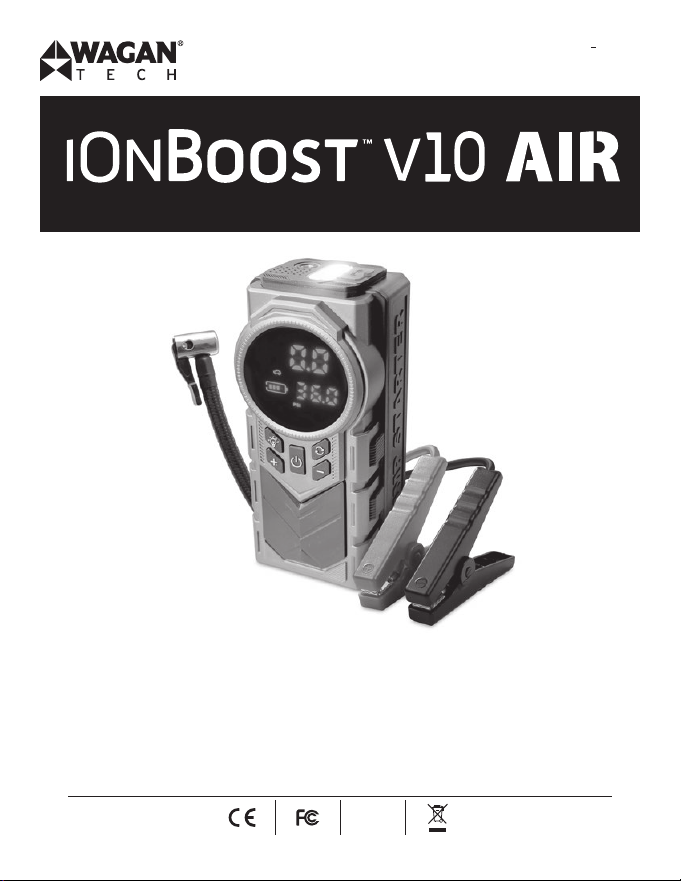
Item No. / Artículo N
o
: 7603
User’s Manual / Manual de Usuario
We are constantly improving our products so specifications are subject to change
without notice. Visit our website for the latest product information.
Estamos mejorando nuestros productos constantemente, por lo tanto, las
especificaciones están sujetas a cambios sin previo aviso. Visite nuestro sitio
web para obtener la información más reciente de los productos.
RoHS
compliant
iOnBoost
™
V10 Air by Wagan Tech
®
1
www.wagan.com
Thank you for purchasing the iOnBoost
™
V10 Air by Wagan Tech
®
. With normal
care and proper treatment, it will provide years of reliable service. Please read
all operating instructions carefully before use.
IMPORTANT SAFETY INSTRUCTION
READ AND SAVE THIS OWNER’S GUIDE FOR FUTURE REFERENCE.
This guide contains important safety instructions that must be followed during
installation, operation, maintenance, and troubleshooting.
Read these instructions carefully and look at the equipment to become familiar
with the device before installing, operating, configuring, maintaining, and
troubleshooting it. The following special messages may appear throughout
this documentation or on the equipment to warn of potential hazards or to call
attention to information that clarifies or simplifies a procedure.
This is a safety alert symbol. It is used to alert you to potential personal
injury hazards. Obey all safety messages that follow this symbol to avoid
possible injury or death.
� DANGER
DANGER indicates a hazardous situation which, if not avoided, will result in
death or serious injury.
� WARNING
WARNING indicates a hazardous situation which, if not avoided, could result
in death or serious injury.
� CAUTION
CAUTION indicates a hazardous situation which, if not avoided, could result in
minor or moderate injury.
�

©2025 Wagan Corporation. All Rights Reserved.
Wagan Tech and wagan.com are trademarks of Wagan Corporation.
User’s Manual—Read before using this equipment
2
NOTICE
NOTICE is used to address practices not related to physical injury.
PRODUCT SAFETY INFORMATION
� WARNING
Read the instruction manual carefully before using this unit.
Jump for 12V vehicles, using it on other vehicles could be hazardous.
If the clamp is not intelligent jumper cable, don't connect the wrong
battery terminal, reverse polarity will cause short circuit and battery
overheating catch fire.
Do not use this unit if any cable clamp or cord is damaged.
Do not use in place of a vehicle battery.
Never leave the unit connected to the car battery after successfully starting
the engine.
Make sure to check all the battery connections are CLEAN before Jump
Starting! Make sure the battery clamps are well connected! If the battery
terminals on the vehicle are dirty or corroded, the power of the unit will be
lessened.
Do not Jump Start more than 3 times in a row. It could damage the unit by
overheating. When starting up multiple times, each start-up interval is two
minutes.
Remove the product from the vehicle battery within 30 seconds of Jump
Starting. If not, it could lead to damage.
Do not connect the two clamps together.
Do not use without supervision it if you are young or infirm.
Do not use as a toy.
Keep the product dry; do not expose it to water.

iOnBoost
™
V10 Air by Wagan Tech
®
3
www.wagan.com
Do not immerse the product in water.
Do not operate the product in explosive atmospheres, such as in the
presence of flammable liquids, gases or dust.
Do not modify or disassemble the iOnBoost. Only a repair technician may
repair this unit.
Do not expose product to extreme heat or fire.
Make sure someone should be within range of your voice or close enough
to come to your aid when working with batteries.
Remove personal metal items like rings, bracelets, necklaces, etc. When
using the products.
Do not drop unit. If unit receives a sharp blow or is otherwise damaged in
any way have it checked by a qualified battery technician.
Do not store in locations where the temperature may exceed 140°F/60°C.
Charge only at ambient temperature between 32°F/0°C and 131°F/55°C.
Charge only using the charger provided with this unit or the same
standard with the host input port.
Do not use the unit to jump start a vehicle while charging the internal
battery.
This product contains lithium based battery. Dispose of it according to
local regulations at the end of its lifespan.
After jump starting the car, do not charge the unit immediately.
Do not use the jumper cable to charge other equipments.
Failure to follow these instructions can result in death, serious injury, or
equipment damage.
©2025 Wagan Corporation. All Rights Reserved.
Wagan Tech and wagan.com are trademarks of Wagan Corporation.
User’s Manual—Read before using this equipment
4
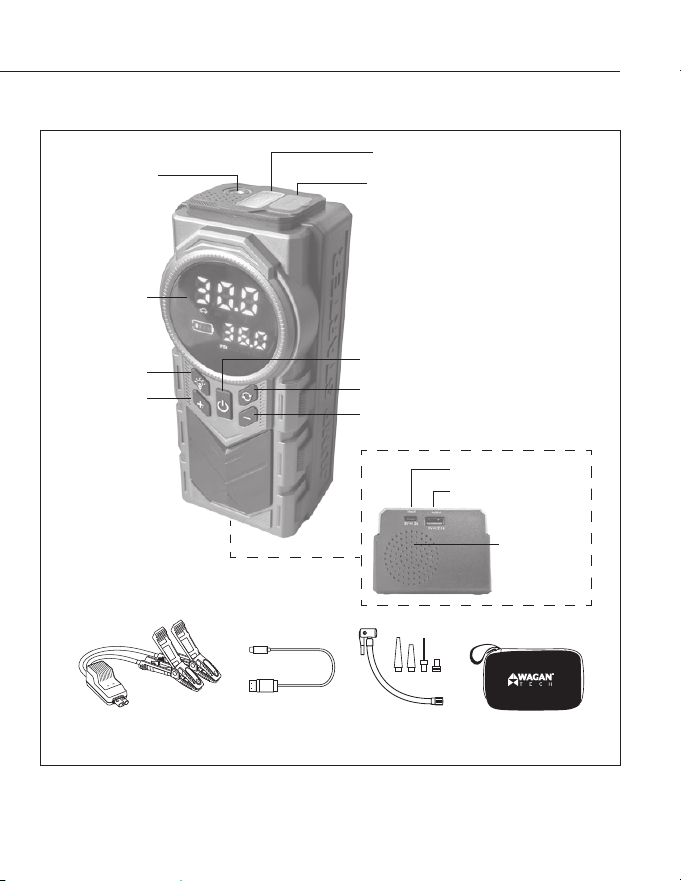
DIAGRAM
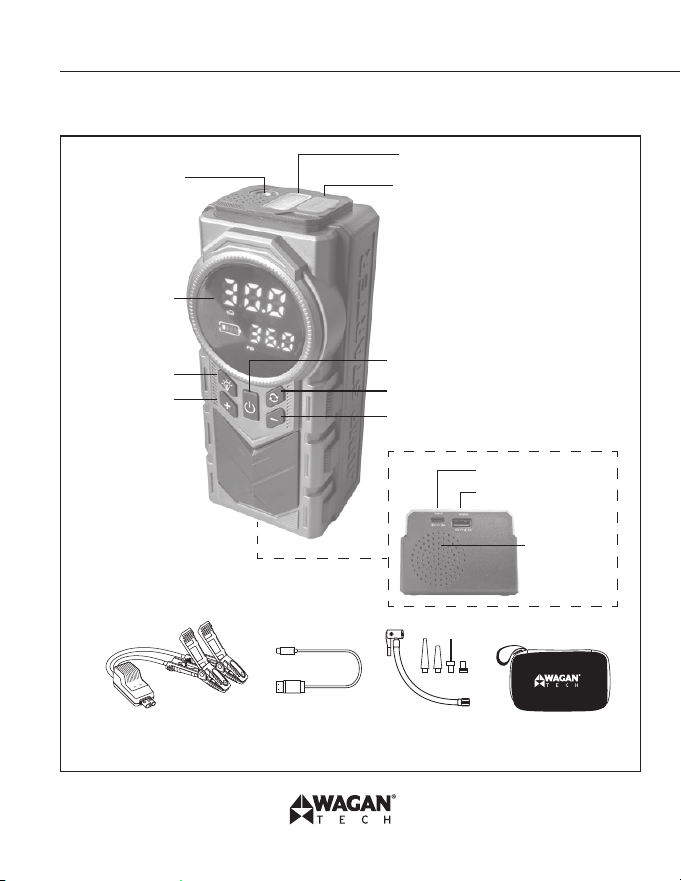
Intelligent Jumper
Cable
USB-A to
USB-C Cable
Inflator Hose
and nozzle kits
EVA Bag
Aerated
Flashlight
Jump start socket
Setting button
Pressure decrease
USB-C Input port
USB-A Output port
Heat
Dissipation
Power switch/ Pump start button
LCD display
Light switch
Pressure
increase
Heat
Dissipation

iOnBoost
™
V10 Air by Wagan Tech
®
5
www.wagan.com
FEATURES
Jump Starter
• 1500 peak Amps auto jump starter—ideal for cars, vans, SUVs, trucks, and
more
• Powerful, rechargeable, 37 Wh Lithium-ion Polymer battery
• Heavy duty booster clamps
Tire Inflator
• Mutiple options available for car, motorcycle, bicycle and ball.
USB Power Source
• 1 USB-A power port with 5V 2.1A output to power and recharge most USB
devices such as tablets/e-readers, mobile phones, and more.
Safety Features
• Over-current protection
• Overheat protection
• Over-discharging protection
• Over-voltage protection
• Over-charging protection
• Short-circuit protection
• AI software protection
• Reverse charging protection
• Reverse polarity protection
• Ultimate low electricity consumption protection
©2025 Wagan Corporation. All Rights Reserved.
Wagan Tech and wagan.com are trademarks of Wagan Corporation.
User’s Manual—Read before using this equipment
6
Other Features
• LED flashlight: Solid White, Slow Flashing Red, Quick Flashing Red
• Battery status indicators
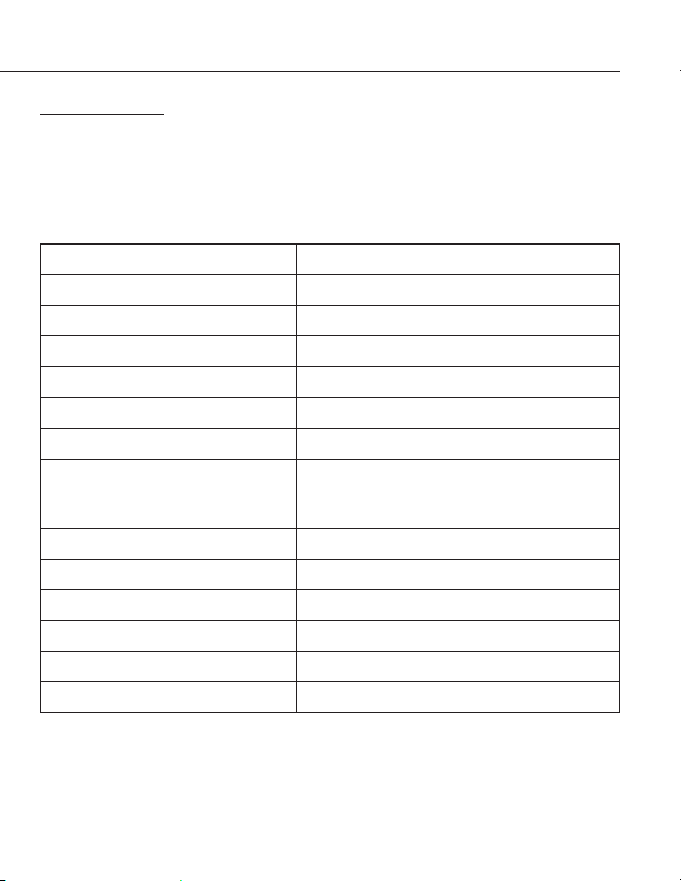
SPECIFICATIONS
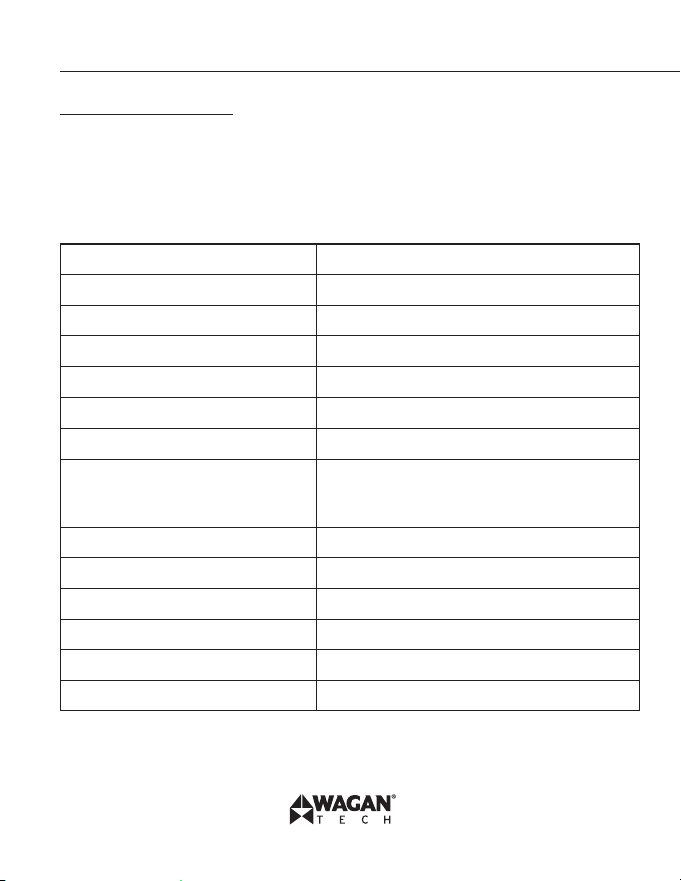
Battery type Lithium-ion Polymer
Battery capacity (4× 3.7V) 14.8V 10,000mAh (37 Wh)
Peak amps 1500 A
Jumper cables 10 AWG
Air Pressure 150psi max
Air Flow 30 L/min.
USB-A output port 5V, 2.1A
Flashlight LED with 3 lighting modes
(
Solid White, Slow Flashing Red, Quick
Flashing Red)
Operating temperatures -4°F–131°F (-20°C–55°C)
Storage temperatures -4°F–140°F (-20°C–60°C)
Input USB−C 5V, 2A
Recharging time (USB) 4−5 hours
Weight 1.65 lbs
Dimension 7.11 × 3.19 × 2.48 in.
iOnBoost
™
V10 Air by Wagan Tech
®
7
www.wagan.com
CARE & MAINTENANCE
This unit may be stored in any position. Make sure the clamps are secured inside
the booster cable storage compartment and store at room temperature. If the
iOnBoost
™
V10 Air is not used for a prolonged period of time, recharge every 3
months.
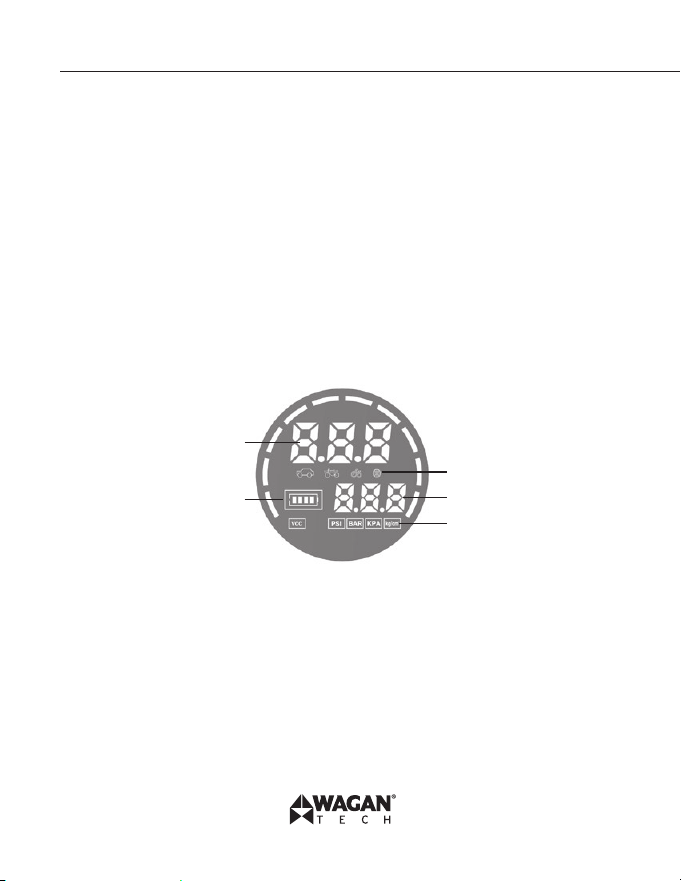
INSTRUCTIONS OF BUTTONS AND DISPLAY SCREEN
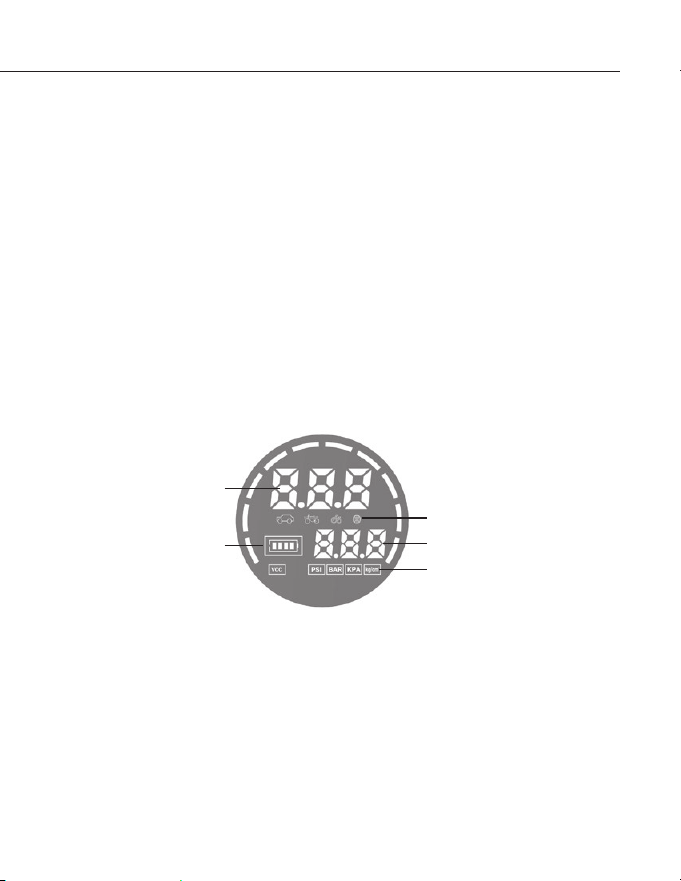
1. Long press the power button for 2 seconds, (1) static air pressure value, (2)
car or motorcycle, or bicycle, or basketball icons are appeared on center
row of the screen, (3) battery meter, (4) preset tire pressure value (5) PSI,
or BAR, or KPA, or Kg/cm2 icons are appeared on the display screen. The
power is displayed according to the battery grid at bottom left corner of
screen and the unit is in pumping mode simultaneously.
3
1
2
4
5
2. Shortly press the light button to switch on the LED light. The white light
will stay on. Pressing button again to enter slow red flashing light mode.
Continue press button to enter quick red flashing light mode. Pressing button
again to switch off lighting function.
3. When the load is off for 30 seconds, the product will enter to a dormant
status.

©2025 Wagan Corporation. All Rights Reserved.
Wagan Tech and wagan.com are trademarks of Wagan Corporation.
User’s Manual—Read before using this equipment
8
4. "SET" button editing mode sequences:
Repeat short press and release "SET" button to select pumping category
in a repeat sequence of None (Open Category) =>Car=> Motorcycle=>
Bicycle => Basketball.
Repeat long press and release "SET" button to select pressure unit in a
repeat sequence of PSI => BAR=> KPA => Kg/cm
2
.
5. In standby and normal working mode, long press the "SET" button to select
desired pressure unit. Short press button to select pumping category. After
pressure unit and pumping category are selected, a preset pressure value
appears on the display. By pressing "+" and "–" button to increase or
decrease pressure value.
Preset pressure value list:
Preset value is for reference only, please adjust pressure value according to
the actual needed.
Car: 36 PSI
Motorcycle: 35 PSI
Bicycle: 45 PSI
Basketball: 8 PSI
iOnBoost
™
V10 Air by Wagan Tech
®
9
www.wagan.com
CHARGING THE IONBOOST
™
V10 AIR
This product may arrive partially charged from the manufacturer. It is
recommended to fully charge the unit immediately after purchase and before
using for the first time. Prior to charging the unit, read and understand all
instructions in this manual.
In order to prolong the life of the iOnBoost
™
, be sure to fully recharge the unit
after each use and every 3 months even if the iOnBoost
™
has not been used.
USB−C CHARGING
1. Plug the USB−C cable into the USB−C input port on the iOnBoost.
2. Plug the other end into a USB power source such as a USB wall charger or
computer (not included).
a. While the unit is in charging mode, the battery meter will be flashing.
3. When charging is complete, unplug the USB cable.
Note: when power is less than 10%, the corresponding power indicator flashes.
JUMPSTARTER
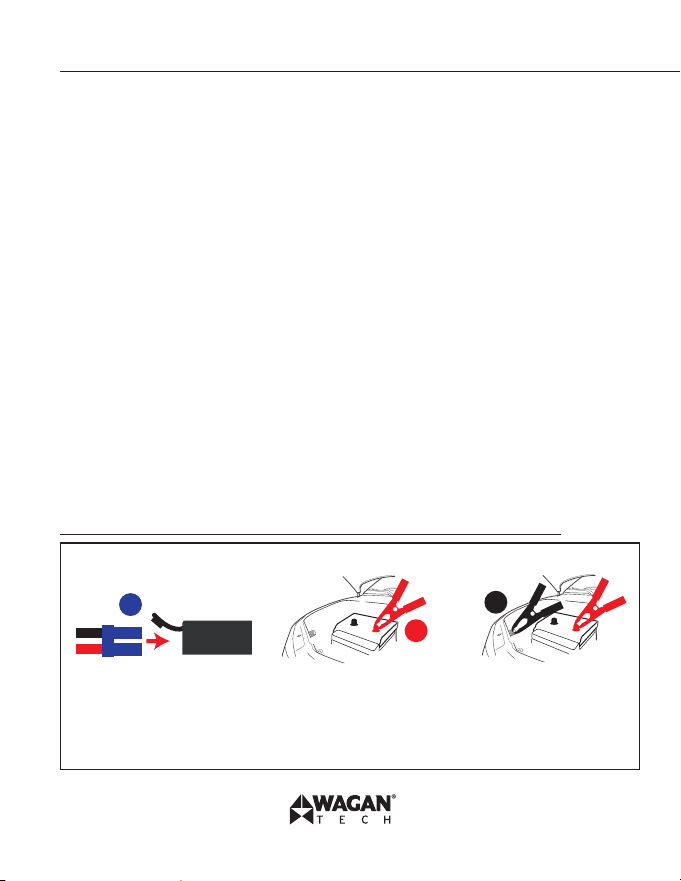
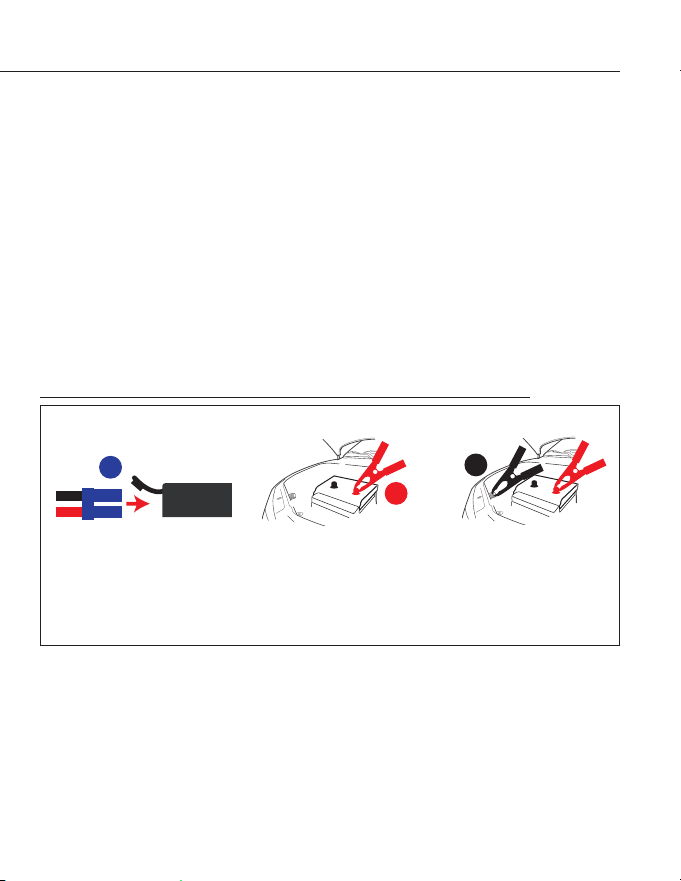
Brief Recap of Sequences for Connection and Disconnection
2
3
1
ORDER OF CONNECTION
2. Connect positive (red)
clamp to positive battery
terminal.
1. Connect cables to
iOnBoost.
3. Connect negative
(black) clamp to solid
metal ground on engine
or frame, away from
battery.
©2025 Wagan Corporation. All Rights Reserved.
Wagan Tech and wagan.com are trademarks of Wagan Corporation.
User’s Manual—Read before using this equipment
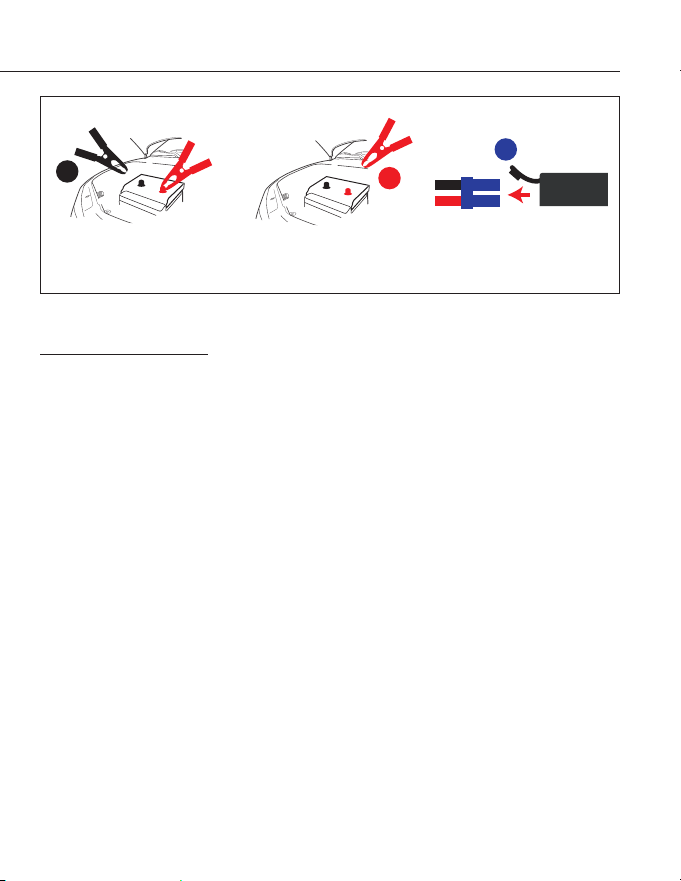
10
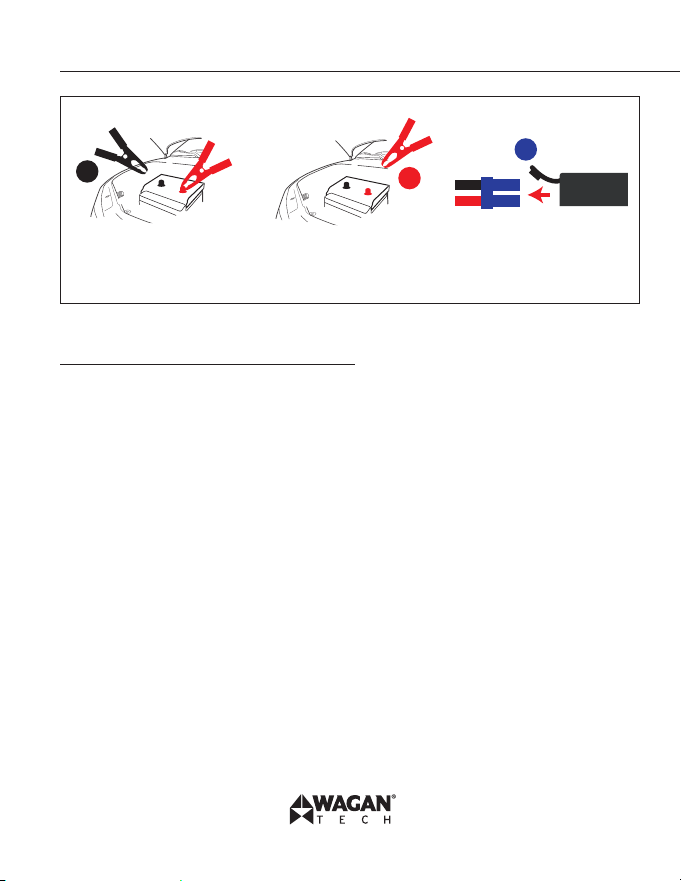
1
2
3
ORDER OF DISCONNECTION
2. Disconnect positive
(red) clamp from positive
battery terminal.
1. Disconnect negative
(black) clamp
from frame.
3. Disconnect cables from
iOnBoost.
Read the remainder of the instructions before using the iOnBoost!
Jumpstart Procedure
1. Turn off the vehicle ignition and all accessories (radios, lights, air
conditioners), and disconnect electronic devices.
2. Set the emergency brake and put vehicles with automatic transmission in
park position.
3. Determine the polarity of the vehicle’s battery terminals. The positive (POS,
P, +) battery terminal usually is red and larger in diameter than the negative
(NEG, N, −) terminal. If you are unsure, first refer to the vehicle owner’s
manual. Make sure the negative battery terminal is also connected to the
vehicle frame.
4. If engine was recently cranked, use a non conductive material (cardboard
or a folded newspaper) to wave away (dispel) explosive gases. Do this for
a few minutes before any vehicle connections.
5. Insert the blue plug of the jumper cables into the iOnBoost’s jumper
terminal, and make sure the cable indicator is off.
� Never allow clamps (positive & negative terminals) to touch together or
contact the same piece of metal to prevent short-circuits and arcing.
6. Securely connect the positive (+) red clamp to the positive (POS,
P, +) terminal of the vehicle battery or the remote positive (+) terminal if
iOnBoost
™
V10 Air by Wagan Tech
®
11
www.wagan.com
equipped.
7. Securely connect the negative (−) black clamp to a non-moving, metal part
of the engine or frame as far away from the vehicle battery as possible.
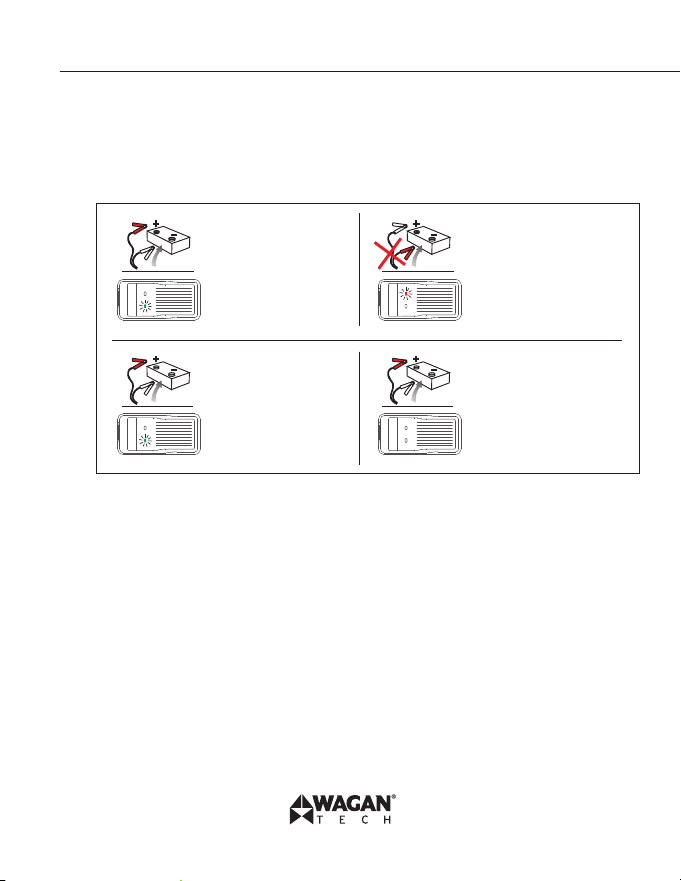
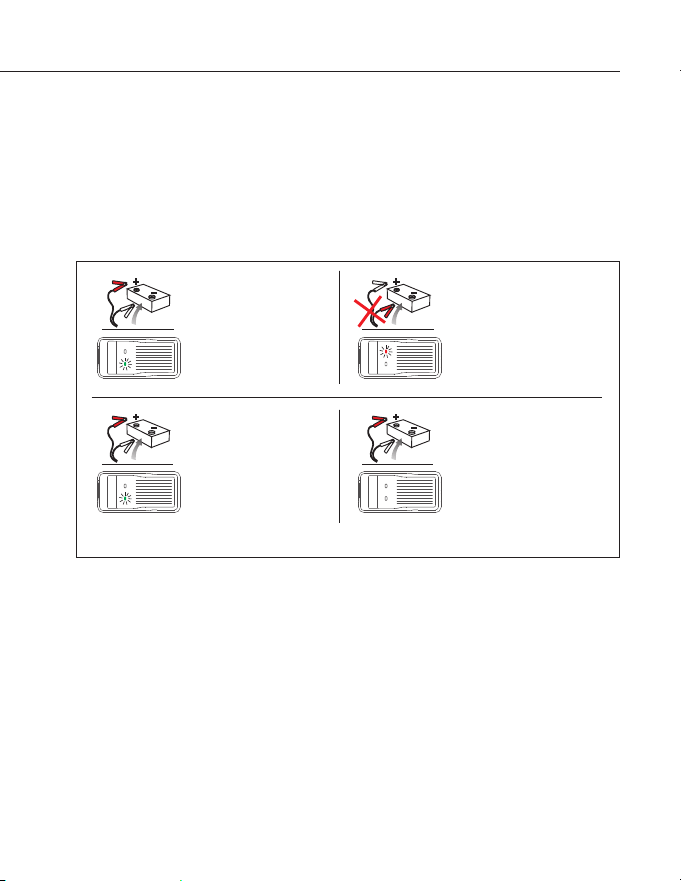
8. Operate following the instruction of the cable indicator:
GREEN LIGHT on:
Telling the connection
is correct and the
circuit is working, you can turn
on the engine to jump-start
directly.
REVERSE RED LIGHT on: Telling
the connection is wrong, to correct
the clamps as step 2 mentioned
above, wait until the GREEN LIGHT
is on to turn on the engine.
GREEN LIGHT blinking: Saying
the vehicle battery is low, wait
GREEN LIGHT becomes solid,
then turn on the engine within
30s.
No Lights on: Saying the vehicle's
battery maybe damaged, after
confirm the clamps connection is
correct, wait GREEN LIGHT is on,
and then turn on the engine within
30s.
9. Place unit on a secure surface away from moving parts.
10. Start vehicle engine. Stop if the vehicle does not start after 3 to 4 seconds
of engine cranking. Wait 3 to 4 minutes, then try again. If engine does not
start after second attempt, discontinue cranking and consult a professional.
11. The internal safety timer will automatically disconnect the circuit after 30
seconds to prevent the vehicle battery from reverse charging the unit. Both
the red and green lights will illuminate steady. If your vehicle still has not
started, disconnect the cables and try the procedure again.
12. When finished, disconnect the clamps in reverse sequence of connecting
procedure—first disconnect negative (black), then positive (red) clamps. Do
not let the clamps touch each other.
13. Disconnect the jumper cable assembly from the unit.
©2025 Wagan Corporation. All Rights Reserved.
Wagan Tech and wagan.com are trademarks of Wagan Corporation.
User’s Manual—Read before using this equipment
12
14. When convenient, completely charge the iOnBoost battery.
15. Store the unit in a cool, dry environment, away from flammable materials.
Remember to fully charge the unit every three months.
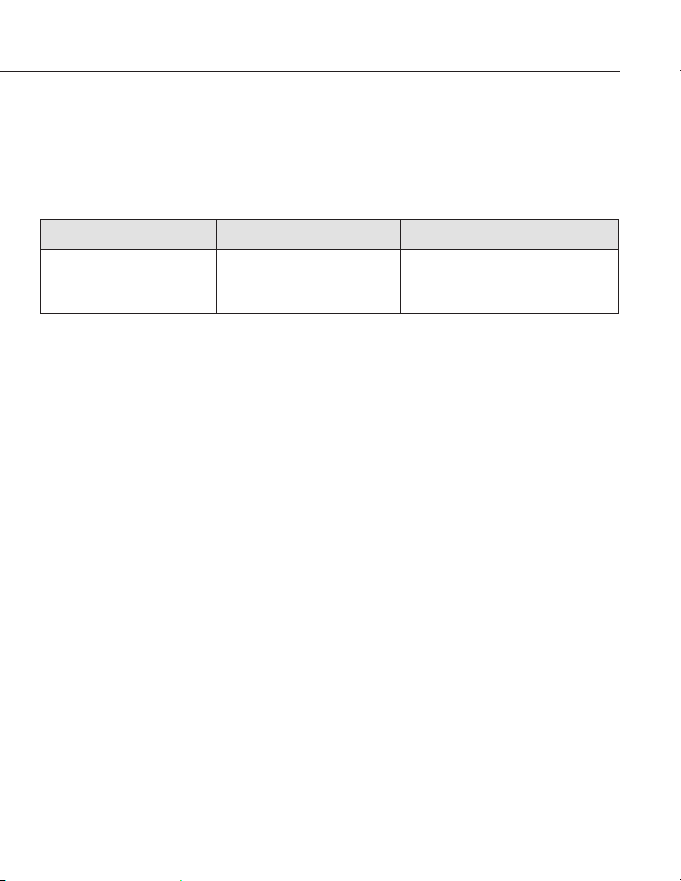
TROUBLESHOOTING
Finding Cause Solution
No response when
pressing the switch button.
Low voltage protection of
the iOnBoost has been
activated.
Plug the adapter into the USB-C
input port to activate.
USING THE USB PORT
If the battery in the iOnBoost
™
V10 Air is low, the USB port will shut off to prevent
damage to the iOnBoost
™
V10 Air. Recharge the iOnBoost
™
V10 Air as soon as
convenient.
1. Connect the USB device to the iOnBoost
™
V10 Air with a USB cable.
2. Turn on the master switch
3. When your mobile device is fully charged, disconnect your device from the
iOnBoost
™
V10 Air and turn off the master switch.

iOnBoost
™
V10 Air by Wagan Tech
®
13
www.wagan.com
FAQ
1. How to turn off this unit?
a. This unit will power off automatically when no load or charging is
complete.
b. Press and hold master power button to shut off the unit.
2. How long does it need to fully charge the iOnBoost V10 Air?
It takes about 4-5 hours to be fully charged via USB-C input.
3. How many times can this unit charge for my cell phone?
Approx. 15 times for iPhone 11.
4. How many times can this unit jump start the vehicle if it is in full battery?
Approx. 25 times
5. What's the lifetime?
Usually 3-5 years in normal condition.
6. How long the battery will be self drain off after fully charged?
6-12 months, however, we suggest to recharge it every 3 months.
PROPER DISPOSAL
• This product has no consumer serviceable parts.
• Do not attempt to remove or replace the battery used in this device. When
the battery has reached the end of its lifetime, please take the entire unit to
a battery recycling facility.

The WAGAN Corporation warranty is limited to products sold only in
the United States.
Warranty Duration:
Product is warranted to the original purchaser for one (1) year from covering defects
in material and workmanship. WAGAN Corporation disclaims any liability for
consequential damages. In no event will WAGAN Corporation be responsible for
any amount of damages beyond the amount paid for the product at retail.
Warranty Performance:
During the warranty period, a product with a defect will be replaced with a
comparable model when the product is returned to WAGAN Corporation with an
original store receipt. WAGAN Corporation will, at its discretion, replace or repair
the defective part. The replacement product will be warranted for the balance of the
original warranty period. This warranty does not extend to any units which have
been used in violation of written instructions furnished.
Warranty Disclaimers:
This warranty is in lieu of all warranties expressed or implied and no representative
or person is authorized to assume any other liability in connection with the sale of our
products. There shall be no claims for defects or failure of performance or product
failure under any theory of tort, contract or commercial law including,but not limited
to negligence, gross negligence, strict liability, breach of warranty, and breach of
contract.
Returns:
WAGAN Corporation is not responsible for any item(s) returned without an official
Return Authorization number (RA#). Please contact our customer service team by
phone or email to obtain an RA#. You can also visit our website and chat with our team
during our normal business hours. For more details and instructions on how to process
a warranty claim, please read the “Returns” section under the “Contact” page on our
website. WAGAN Corporation is not responsible for any shipping charges incurred in
returning the item(s) back to the company for repair or replacement.
Register your product online at http://tinyurl.com/wagan-registration to be added to
our email list. You will receive previews on our upcoming products, promotions, and
events.
©2025
WAGAN Corp. Limited Warranty
iOnBoost
™
V10 Air de Wagan Tech
®
15
www.wagan.com
Gracias por adquirir el iOnBoost
™
V10 Air de Wagan Tech
®
. Con un cuidado
normal y el uso adecuado, le proporcionará años de servicio confiable. Lea
atentamente todas las instrucciones de funcionamiento antes de usarlo por
primera vez.
INSTRUCCIONES DE SEGURIDAD IMPORTANTES
LEA Y GUARDE ESTA GUÍA DEL PROPIETARIO PARA FUTURAS CONSULTAS.
Esta guía contiene instrucciones de seguridad importantes que deben seguirse
durante la instalación, el funcionamiento, el mantenimiento y la solución de
problemas relacionados con este producto.
Lea atentamente estas instrucciones y observe el equipo para familiarizarse
con el dispositivo antes de instalarlo, operarlo, configurarlo, realizar tareas
de mantenimiento y solucionar problemas. Los siguientes mensajes especiales
pueden aparecer en este documento o en el equipo para advertir sobre posibles
peligros o para llamar la atención sobre información que aclara o simplifica un
procedimiento.
Este es un símbolo de alerta de seguridad. Se utiliza para advertir sobre
posibles peligros y/o lesiones personales. Obedezca todos los mensajes
de seguridad que siguen a este símbolo para evitar posibles lesiones o
la muerte.
� PELIGRO
PELIGRO indica una situación peligrosa que, si no se evita, provocaría la
muerte o lesiones graves.
� ADVERTENCIA
ADVERTENCIA indica una situación peligrosa que, si no se evita, podría
provocar la muerte o lesiones graves.
�
© Corporación Wagan 2025. Todos los derechos reservados.
Wagan Tech y wagan.com son marcas registradas de la Corporación Wagan.
Manual de Usuario—Leer antes de utilizar este equipo
16
� PRECAUCIÓN
PRECAUCIÓN indica una situación peligrosa que, si no se evita, podría
provocar lesiones leves o moderadas.
AVISO
AVISO se utiliza para referirse a prácticas no relacionadas con lesiones
físicas.
INFORMACIÓN DE SEGURIDAD DEL PRODUCTO
� ADVERTENCIA
Lea atentamente el manual de instrucciones antes de utilizar este
dispositivo por primera vez.
Utilice cables puente para vehículos de 12 V. Su uso en otros vehículos
puede ser peligroso.
Si la pinza no es un cable puente inteligente, no conecte la terminal de
batería incorrecta, ya que la polaridad inversa provocará un cortocircuito
y un sobrecalentamiento de la batería, incluso un incendio.
No utilice este dispositivo si alguna pinza o cable está dañado.
No lo utilice en lugar de la batería de un vehículo.
Nunca deje este dispositivo conectado a la batería del vehículo después
de haber arrancado el motor.
Asegúrese de comprobar que todas las conexiones de la batería estén
LIMPIAS antes de arrancar con cables puente. Asegúrese de que las
pinzas de la batería estén bien conectadas. Si las terminales de la batería
del vehículo están sucias o corroídas, la potencia del dispositivo se
reducirá.

iOnBoost
™
V10 Air de Wagan Tech
®
17
www.wagan.com
No arranque el dispositivo con cables más de 3 veces seguidas. Podría
dañarlo por sobrecalentamiento. Cuando arranque varias veces, el
intervalo de arranque deberá ser de dos minutos.
Retire el dispositivo de la batería del vehículo dentro de los 30 segundos
posteriores al arranque con cables. De lo contrario, podría dañarlo.
No conecte las dos pinzas.
No lo use sin supervisión si es un niño o sufre de algún transtorno que le
impida el manejo de esta unidad.
No lo use como juguete.
Mantenga el dispositivo seco; no lo exponga al agua.
No sumerja el dispositivo en agua.
No opere el dispositivo en atmósferas explosivas, como en presencia de
líquidos, gases o polvo flamables.
No modifique ni desarme el iOnBoost. Solo un técnico puede reparar este
dispositivo.
No exponga el dispositivo a calor extremo o fuego.
Asegúrese de que alguien esté lo suficientemente cerca para escuchar su
voz o acudir en su ayuda cuando trabaje con baterías.
Quítese los artículos personales de metal como anillos, pulseras, collares,
etc. Cuando utilice el dispositivo. No deje caer la unidad. Si la unidad
recibe un golpe fuerte o sufre algún daño, solicite a un técnico calificado
en baterías que lo revise.
No lo guarde en lugares donde la temperatura pueda superar los
140°F/60 °C.
Cargue el dispositivo únicamente a una temperatura ambiente de entre
32°F/0 °C y 131 °F/55 °C.
Cargue el dispositivo únicamente con el cargador incluido en el empaque
o con el mismo estándar del puerto de entrada del host.
No utilice el dispositivo para arrancar un vehículo mientras esté cargando
la batería interna.
© Corporación Wagan 2025. Todos los derechos reservados.
Wagan Tech y wagan.com son marcas registradas de la Corporación Wagan.
Manual de Usuario—Leer antes de utilizar este equipo
18
Este producto contiene una batería de litio. Deséchela de acuerdo con las
normas locales al final de su vida útil.
Después de arrancar el automóvil, no cargue el dispositivo
inmediatamente.
No utilice el cable puente para cargar otros equipos.
El incumplimiento de estas instrucciones puede provocar la muerte, lesiones
graves o daños al equipo.
iOnBoost
™
V10 Air de Wagan Tech
®
19
www.wagan.com
DIAGRAMA
Cable puente
inteligente
Cable USB-A
a USB-C
Kit de mangueras
y boquillas para infladores
Bolsa EVA
Ventilación
Linterna
Toma de corriente de arranque
Botón de configuración
Disminución de presión
Puerto de entrada USB-C
Puerto de salida USB-A
Botón de encendido del compresor
de aire
Pantalla LCD
Botón
encendido
de luz
Aumento
de presión
Disipación
de calor

© Corporación Wagan 2025. Todos los derechos reservados.
Wagan Tech y wagan.com son marcas registradas de la Corporación Wagan.
Manual de Usuario—Leer antes de utilizar este equipo
20
CARACTERÍSTICAS
Arrancador Auxiliar
• Arrancador auxiliar de 1500 Amp pico—ideal para automóviles,
camionetas, vehículos utilitarios, furgonetas y más
• Batería de polímero de iones de litio de 37 Wh potente y recargable
• Pinzas de contacto resistentes
Inflador de neumáticos
• Múltiples opciones disponibles para automóvil, motocicletas, bicicletas y
balones.
Fuente de Alimentación USB
• 1 puerto de alimentación USB-A con salida de 5V 2,1A para alimentar
y recargar la mayoría de dispositivos USB, como tabletas/escáneres
electrónicos, teléfonos móviles y más.
Características de seguridad
• Protección por sobrecorriente
• Protección por sobrecalentamiento
• Protección por sobredescarga
• Protección por sobretensión
• Protección por sobrecarga
• Protección por cortocircuito
• Protección de software de IA
• Protección de carga inversa
• Protección de polaridad inversa
• Protección máxima de bajo consumo eléctrico
iOnBoost
™
V10 Air de Wagan Tech
®
21
www.wagan.com
Otras Características
• Linterna LED: Blanco fijo, Rojo intermitente lento, Rojo intermitente rápido.
• Indicadores del estado de la batería
ESPECIFICACIONES
Tipo de batería Polímero de iones de litio
Capacidad de la batería (4× 3.7V) 14.8V 10,000mAh (37 Wh)
Amp pico 1500 A
Cables de puente 10 AWG
Presión de aire 150psi máx
Flujo de aire 30 L/min.
Puerto de salida USB-A 5V, 2.1A
Linterna LED con 3 modos de iluminación
(Blanco fijo, Rojo intermitente lento, Rojo
intermitente rápido)
Temperatura de funcionamiento -4°F–131°F (-20°C–55°C)
Temperatura de almacenamiento -4°F–140°F (-20°C–60°C)
Entrada USB−C 5V, 2A
Tiempo de carga (USB) 4−5 horas
Peso 747 g
Dimensiones 181 × 81 × 63 mm
© Corporación Wagan 2025. Todos los derechos reservados.
Wagan Tech y wagan.com son marcas registradas de la Corporación Wagan.
Manual de Usuario—Leer antes de utilizar este equipo
22
CUIDADO Y MANTENIMIENTO
Este dispositivo puede almacenarse en cualquier posición. Asegúrese de que las
abrazaderas estén bien sujetas dentro del compartimento del cable de arranque
y guárdelo a temperatura ambiente. Si no utiliza el iOnBoost
™
V10 Air durante
un periodo prolongado, recárguelo cada 3 meses.
INSTRUCCIONES PARA EL USO DE LOS BOTONES Y LA
PANTALLA/MONITOR
1. Mantenga presionado el botón de encendido durante 2 segundos. En
la fila central de la pantalla aparecen (1) el valor de la presión de aire
estática, (2) los iconos de automóvil, motocicleta, bicicleta o balón, (3)
el indicador de batería, (4) el valor preestablecido de la presión de los
neumáticos y (5) los iconos de PSI, BAR, KPA o kg/cm². La carga se muestra
según la cuadrícula de la batería en la esquina inferior izquierda de la
pantalla y la unidad se activa simultáneamente en modo de bombeo.
3
1
2
4
5
2. Presione suavemente el botón del interruptor de luz para encender la luz
LED. La luz blanca permanecerá encendida. Vuelva a presionar el botón
para activar el modo de parpadeo lento de luz roja. Continue presionando
el botón para activar el modo de parpadeo rápido de luz roja. Vuelva a
presionar el botón para desactivar la función de iluminación.
3. Cuando la carga esté apagada durante 30 segundos, el dispositivo entrará
en un estado inactivo.

iOnBoost
™
V10 Air de Wagan Tech
®
23
www.wagan.com
4. Secuencias del modo de edición del botón "SET":
Pulse y suelte repetidamente el botón "SET" para seleccionar la unidad
de presión en una secuencia repetida: Ninguno (Categoría abierta) =>
Automóvil => Motocicleta =>Bicicleta => Balón.
Pulse y suelte repetidamente el botón "SET" para seleccionar la unidad de
presión en una secuencia repetida: PSI => BAR => KPA => Kg/cm².
5. En modo de espera y funcionamiento normal, mantenga pulsado el botón
"SET" para seleccionar el valor de la presión deseada. Pulse brevemente el
botón para seleccionar la categoría de bombeo. Tras seleccionar el valor
de la presión y la categoría de bombeo, aparecerá un valor preestablecido
de presión en la pantalla. Pulse los botones "+" y "–" para aumentar o
disminuir el valor de presión.
Lista de valores preestablecido de presión:
El valor preestablecido es solo de referencia; ajuste el valor de presión
según sus necesidades.
Automóvil: 36 PSI
Motocicleta: 35 PSI
Bicicleta: 45 PSI
Balón: 8 PSI.
CARGA DEL IONBOOST
™
V10 AIR
Este producto podría estar parcialmente cargado de fábrica. Se recomienda
realizar una carga completa de la unidad inmediatamente después de comprarla
y antes de utilizarlo por primera vez. Antes de cargar la unidad, lea y comprenda
todas las instrucciones en este manual.
Para prolongar la duración del iOnBoost, recargue completamente el dispositivo
después de cada uso o cada 3 meses, incluso si el iOnBoost no se ha utilizado.
© Corporación Wagan 2025. Todos los derechos reservados.
Wagan Tech y wagan.com son marcas registradas de la Corporación Wagan.
Manual de Usuario—Leer antes de utilizar este equipo
24
CARGA POR USB-C
1. Conecte el cable USB−C al puerto de entrada USB−C del iOnBoost.
2. Conecte el otro extremo a una fuente de alimentación USB, como un
cargador de pared USB o una computadora (no incluida).
a. Mientras la unidad esté en modo de carga, el indicador de batería
parpadeará.
3. Cuando se complete la carga, desconecte el cable USB.
Nota: cuando la carga de la batería es inferior al 10%, el indicador de energía
parpadeará.
ARRANCADOR AUXILIAR
Breve resumen de la secuencia de conexión y desconexión
2
3
1
SECUENCIA DE CONEXIÓN
1. Conecte los cables al
iOnBoost
3. Conecte la pinza
negativa (negra) a una
parte metálica sólida de
descarga en el motor o
carrocería, lejos de la
batería.
2. Conecte la pinza
positiva (roja) a la terminal
positiva de la batería.
iOnBoost
™
V10 Air de Wagan Tech
®
25
www.wagan.com
1
2
3
SECUENCIA DE DESCONEXIÓN
2. Desconecte la pinza
positiva (roja) de la
terminal positiva.
1. Desconecte la pinza
negativa (negra) de
la carrocería.
3. Desconecte los cables
del iOnBoost
Leer el resto de las instrucciones antes de usar el iOnBoost!
Procedimiento de arranque auxiliar
1. Apague el vehículo y todos los accesorios (radio, luces, aire
acondicionado) y desconecte los dispositivos electrónicos.
2. Ponga el freno de mano, los vehículos con transmisión automática deben
estar en posición de estacionamiento (P).
3. Determine la polaridad de las terminales de la batería del vehículo. La
terminal positiva (POS, P, +) generalmente es roja y tiene mayor diámetro
que la terminal negativa (NEG, N, −). Si no está seguro, consulte primero
el manual del fabricante del vehículo. Verifique que la terminal negativa de
la batería esté conectada a la carrocería del vehículo.
4. Si el motor se ha puesto en marcha recientemente, use un material
no conductor (cartón o periódico) para disipar (dispersar) los gases
explosivos. Haga esto durante unos minutos antes de realizar cualquier
conexión en el vehículo.
5. Inserte el enchufe azul de los cables puente en la terminal puente del
iOnBoost y asegúrese de que el indicador del cable esté apagado.
� Nunca junte las pinzas (terminales positivo y negativo) y evite que
entren en contacto con una misma pieza de metal, a fin de prevenir
cortocircuitos y arcos voltaicos.
© Corporación Wagan 2025. Todos los derechos reservados.
Wagan Tech y wagan.com son marcas registradas de la Corporación Wagan.
Manual de Usuario—Leer antes de utilizar este equipo
26
6. Conecte firmemente la pinza positiva roja (+) a la terminal positiva (POS,
P, +) de la batería del vehículo o a la terminal positiva remota (+) si
corresponde.
7. Conecte firmemente la pinza negativa negra (−) a una parte metálica no
móvil del motor o de la carrocería, lo más lejos posible de la batería del
vehículo.
8. Opere siguiendo las instrucciones del indicador de cable:
LUZ VERDE encendida:
Esto indica que la conexión es
correcta, que el circuito está
funcionando y puede encender
el motor para arrancarlo.
LUZ ROJA DE REVERSA encendida:
Para corregir la posición de las
pinzas, siga el paso 2 mencionado
anteriormente, espere hasta que
la LUZ VERDE se encienda para
encender el motor.
LUZ VERDE parpadeando: indica
que la batería del vehículo está
baja, presione el botón
“BOOST”, espere hasta que la
LUZ VERDE se vuelva fija y
luego encienda el motor antes
de siguientes 30 segundos.
Sin luces encendidas: indica que la
batería del vehículo puede estar
dañada. Después de confirmar que
la conexión de las pinzas es
correcta, presione el botón
“BOOST”, espere hasta que la LUZ
VERDE se encienda y luego encienda
el motor antes de siguientes 30
segundos.
9. Coloque la unidad sobre una superficie segura, alejada de partes en
movimiento.
10. Arranque el motor del vehículo. Si el motor del vehículo no arranca
después de 3 o 4 segundos, deténgase. Espere 3 o 4 minutos y vuelva a
intentarlo. Si el motor no arranca después del segundo intento, suspenda el
procedimiento y consulte a un experto.
11. El temporizador de seguridad interno desconectará automáticamente
el circuito después de 30 segundos para evitar la carga inversa del
dispositivo de la batería del vehículo. Las luces roja y verde permanecerán
iOnBoost
™
V10 Air de Wagan Tech
®
27
www.wagan.com
encendidas. Si su vehículo todavía no está en marcha, desconecte los
cables y realice el procedimiento nuevamente.
12. Al finalizar, desconecte las pinzas en orden inverso al procedimiento
de conexión—primero desconecte la pinza negativa (negra) y luego, la
positiva (roja). Evite que las pinzas hagan contacto entre sí.
13. Desconecte el conjunto de cables de puente de la unidad.
14. De preferencia, mantenga la carga de la batería del iOnBoost completa.
15. Guarde el dispositivo en un ambiente fresco y seco, lejos de materiales
flamables.
SOLUCIÓN DE PROBLEMAS
Problema Causa Solución
No hay respuesta al
presionar el botón del
interruptor de encendido.
Se ha activado la protección
de bajo voltaje del
iOnBoost.
Conecte el adaptador al puerto
de entrada USB-C para activarlo.
USO DE LA CONEXIÓN USB
Si la bateria del iOnBoost
™
V10 Air está baja, el puerto USB se desactivará
para evitar daños al iOnBoost
™
V10 Air. Recargue el iOnBoost
™
V10 Air lo antes
posible.
1. Conecte el dispositivo USB al iOnBoost con un cable USB.
2. Encienda el botón principal del dispositivo.
3. Cuando su dispositivo móvil esté completamente cargado, desconéctelo del
iOnBoost y apague el botón principal.

© Corporación Wagan 2025. Todos los derechos reservados.
Wagan Tech y wagan.com son marcas registradas de la Corporación Wagan.
Manual de Usuario—Leer antes de utilizar este equipo
28
LINTERNA LED
Si la carga del iOnBoost está baja, la luz se apagará para evitar daños al
iOnBoost. Recargue el iOnBoost tan pronto como sea posible.
1. Presione el botón de encendido para encender la pantalla y presione el
botón de luz para encender la luz.
2. Presione suavemente para recorrer los modos de iluminación: 1 = luz
sólida, 2 = estroboscópica (luz roja), 3 = S.O.S. (luz roja), 4 = apagado o
presione prolongadamente para apagar desde cualquier modo.
3. Apague el botón principal al finalizar.
4. Recargue la batería lo antes posible.
PREGUNTAS FRECUENTES
1. ¿Cómo apagar este dispositivo?
a. Este dispositivo se apagará automáticamente cuando no haya carga
o cuando la carga esté completa.
b. Mantenga presionado el botón de encendido para apagar el
dispositivo.
2. ¿Cuánto tiempo se necesita para cargar completamente el iOnBoost V10
Air?
Se necesitan aproximadamente de 4 a 5 horas para cargarse por completo
a través de la entrada USB-C.
3. ¿Cuántas veces puede cargar mi teléfono celular este dispositivo?
Aproximadamente 15 veces para el iPhone 11.
4. ¿Cuántas veces puede arrancar un vehículo este dispositivo si la batería
está completamente cargada?
Aproximadamente 25 veces.
5. ¿Cuál es la vida útil?
Alrededor, de 3 a 5 años en condiciones normales..

iOnBoost
™
V10 Air de Wagan Tech
®
29
www.wagan.com
6. ¿Cuanto tiempo tardaría la batería en descargase si no se utiliza después
de una carga completa?
De 6 a 12 meses, sin embargo, sugerimos recargarla cada 3 meses.
DESECHO ADECUADO DEL DISPOSITIVO
• Este producto no contiene piezas reparables por el usuario.
• No intente quitar o reemplazar la batería de este dispositivo. Cuando
la batería haya alcanzado su vida útil, lleve toda la unidad a un
establecimiento de reciclado de baterías.

La garantía de WAGAN Corporation se limita exclusivamente a los
productos vendidos en Estados Unidos.
Duración de la garantía:
Se extiende la garantía del producto para el comprador original por el periodo de
un (1) año a partir de la fecha de compra original, declarando que está libre de
defectos por materiales y mano de obra. WAGAN Corporation no asume ninguna
responsabilidad por daños consecuentes derivados por mal uso. Bajo ninguna
circunstancia WAGAN Corporation asumirá responsabilidad por daños que excedan
el importe pagado por el producto en una tienda minorista.
Cumplimiento de la garantía:
Durante el periodo de la garantía, un producto defectuoso será reemplazado por un
modelo equivalente cuando el producto sea devuelto a WAGAN Corporation con
un recibo original de la tienda. WAGAN Corporation, a su criterio, reemplazará o
reparará la parte defectuosa. El producto de reemplazo quedará cubierto por el resto
del periodo de la garantía original. Esta garantía no se extiende a las unidades cuyo
uso haya violado las instrucciones suministradas por escrito.
Exclusiones de la garantía:
Esta garantía reemplaza toda otra garantía expresa o implícita y ningún representante
o persona están autorizados a asumir responsabilidad alguna en relación con la
venta de nuestros productos. No se aceptarán reclamos por defectos o falla de
funcionamiento o falla del producto bajo ninguna interpretación del derecho de
responsabilidad civil, contractual o comercial, sin limitarse a negligencia, negligencia
grave, responsabilidad objetiva, violación de garantía y violación de contrato.
Devoluciones:
WAGAN Corporation no se responsabiliza por cualquier elemento(s) devuelto(s) sin
un número de Autorización de devolución (#AD). Por favor póngase en contacto con
nuestro equipo de servicio al cliente por teléfono o correo electrónico para obtener
un #AD. También puede visitar nuestro sitio web y hablar con nuestro equipo en
nuestro horario normal de trabajo. Para más detalles e instrucciones sobre cómo
procesar un reclamo de garantía, por favor lea la sección “Devoluciones” de la página
de “Contacto” en nuestro sitio web. WAGAN Corporation no se responsabiliza por
cualquier cargo por envío que resulte de la devolución de el/los elemento(s) a la
compañía para reparaciones o reemplazo.
Registre su producto en línea en http://tinyurl.com/wagan-registration para ser
agregado a nuestra lista de correo electrónico. Recibirá reseñas sobre nuestros
próximos productos, promociones y eventos.
©2025
Garantía Limitada de la Corporación Wagan
13073 166
th
Street
Cerritos, CA 90703, U.S.A.
Tel: +1.888.714.9316
customerservice@wagan.com
www.wagan.com
©2025 Wagan Corporation. All Rights Reserved
Wagan Tech and wagan.com are trademarks of Wagan Corporation
© Corporación Wagan 2025. Todos los derechos reservados
Wagan Tech y wagan.com son marcas registradas de la Corporación Wagan
REV20251016-ES