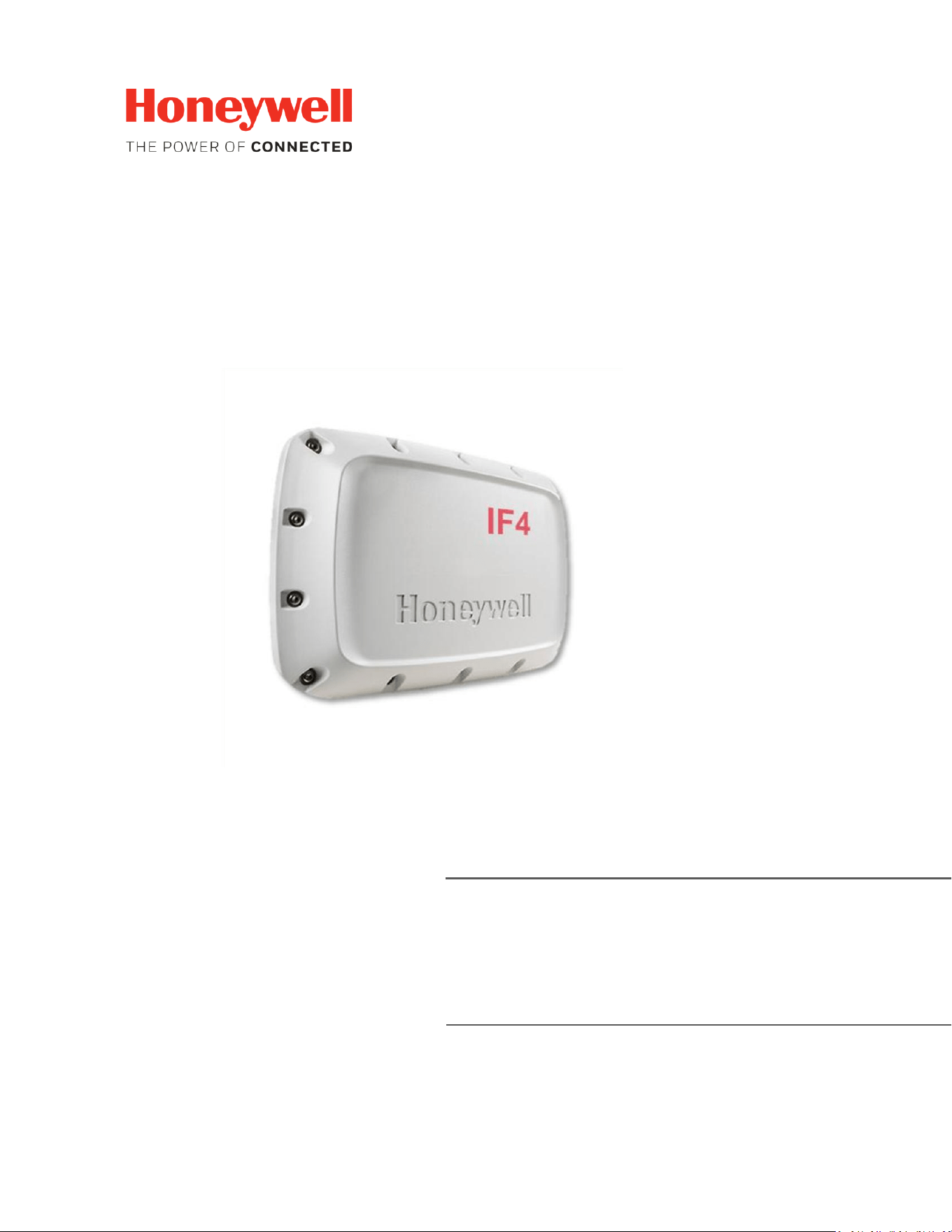
IF4 – FIXED UHF RFID
READER
USER GUIDE
(V1-EN)

IF4 – Fixed RFID Reader Series User Guide (EN) - 2
Disclaimer
Honeywell International Inc. (“HII”) reserves the right to make changes in specifications and other
information contained in this document without prior notice, and the reader should in all cases consult
HII to determine whether any such changes have been made. The information in this publication does
not represent a commitment to the part of HII.
HII shall not be liable for technical or editorial errors or omissions contained herein; nor for incidental or
consequential damage resulting from the furnishing, performance, or use of this material. HII disclaims
all responsibility for the selection and use of software and/or hardware to achieve intended results.
This document contains proprietary information that is protected by copyright. All rights are reserved.
No part of this document may be photocopied, reproduced, or translated into another language without
the prior written consent of HII.
Warning: warranty will be voided if you open the device enclosure.
Cybersecurity Information
This section describes the cybersecurity posture and operational guidance for an RFID UHF reader. The
reader does not store sensitive information or cryptographic keys, implements authentication and
authorization, provides password reset mechanisms, complies with ISO/IEC 18000-6 for the air interface,
and supports Telnet over LAN (use of Telnet is the end-user's responsibility). The reader supports SSH
connection.
1. Scope and purpose.
This document applies only to the RFID reader device (edge reader). The customer server and
customer backend systems are out of scope; the device (reader) includes its own access server
to enable interaction.
2. Product overview.
The reader interrogates UHF tags using the ISO/IEC 18000-6 air interface and forwards tag
identifiers to a configured server. Security layer for tags is customer’s responsibility. The device
is designed to avoid persistent storage of tag identifiers and does not retain cryptographic keys
in non-volatile memory.
3. Data handling and key management.
• No sensitive data storage: Tag identifiers are held only in transient buffers for transmission
and are not logged persistently unless explicitly enabled by the customer. Honeywell is not a
controller nor a processor of this information.
• No cryptographic key storage: The reader firmware contains no persistent cryptographic key
material.

IF4 – Fixed RFID Reader Series User Guide (EN) - 3
4. Authentication, authorization and password.
• Authentication: The reader supports multiple accounts protected by a password.
o Web Server: Administrator account and Operator account
o USB: account used only for network configuration
o SSH: only admin is allowed. SSH is disabled by default, user must enable it on the web
page.
o BRI TCP Ports: BRI TCP Ports are disabled by default, user must enable it on the web
page before use.
• Authorization: This applies for the web server where we have an Administrator account and
Operator account.
5. Air interphase compliance.
The reader implements the parameters and procedures defined in ISO/IEC 18000-6 for UHF RFID
communications to ensure interoperability with compliant tags and readers.
6. Network access and Telnet
Telnet is available for local LAN management. Telnet transmits credentials in clear text and is
considered insecure on untrusted networks; its risks are well documented. The device ships with
Telnet enabled by default because it is the primary management channel. End users are
responsible for network-level mitigations (segmentation, ACLs, VPNs) and for deciding whether
to disable Telnet in their environment. Web login will block after 5 wrong attempts for 15
minutes.
7. Deployment recommendations and operational control
• Change default admin password at first use.
• Segment the reader on a management VLAN and restrict access via ACLs.
• Ensure the customer’s backend server implements TLS and secure storage.
• Limit physical access to the device and control reset procedures.
8. Residual risk and responsibilities
Residual risks include exposure of tag identifiers in transit if the backend does not apply
encryption, and risks from Telnet use on untrusted networks. Even if reader implement
encryption mechanisms, it is customer’s responsibility the backend security, network controls,
and operational procedures.
9. References
• IEC 62443 overview and guidance.
• ISO/IEC 18000-6 standard and RFID Gen2 guidance.
• Telnet security considerations and risks.

IF4 – Fixed RFID Reader Series User Guide (EN) - 4
Regulatory
Do not operate the equipment outside the configured/certified region.
Each Country has its own regulatory requirements.
Check local rules and limits before setting up/operating the equipment.
RAIN
RAIN-compatible fixed reader.

IF4 – Fixed RFID Reader Series User Guide (EN) - 5
CONTENTS
1) ABOUT THE RFID READER ..................................................................................................................... 8
1.1) IF4 MODELS ................................................................................................................................. 9
1.2) READER PORTS AND CONNECTIONS ......................................................................................... 10
1.3) LED INDICATORS ........................................................................................................................ 11
1.4) GROUNDING THE READER ......................................................................................................... 12
1.5) POWERING THE READER ........................................................................................................... 13
1.6) READER CONNECTION – ETHERNET .......................................................................................... 15
1.7) READER CONNECTION – USB ..................................................................................................... 16
1.8) READER CONNECTION RS232 .................................................................................................... 18
1.9) QUICK START.............................................................................................................................. 19
2) WEB USER INTERFACE ......................................................................................................................... 20
2.1) MAIN ................................................................................................................................................ 21
2.2) NETWORK CONFIGURATIONS .......................................................................................................... 22
2.2.1) ETHERNET IPv4 / IPv6 ............................................................................................................... 22
2.3) RFID SETTINGS ........................................................................................................................... 24
2.3.1) BRI SESSIONS ............................................................................................................................. 24
2.3.2) RFID ATTRIBUTES ...................................................................................................................... 25
2.4) RFID TOOLS ................................................................................................................................ 27
2.4.1) BRI TOOLS ................................................................................................................................. 27
2.4.2) RFID READINGS ......................................................................................................................... 29
2.5) SYSTEM TOOLS........................................................................................................................... 31
2.5.1) GPIO TOOLS .............................................................................................................................. 31
2.5.2) SYSTEM LOG .............................................................................................................................. 32
2.5.3) FIRMWARE UPGRADE ............................................................................................................... 33
2.5.4) SYSTEM CONFIGURATION ......................................................................................................... 34
2.5.5) CERTIFICATES ............................................................................................................................ 35
2.5.6) READER IDENTIFICATION .......................................................................................................... 36
2.5.7) REBOOT ..................................................................................................................................... 37
2.5.8) PASSWORDS .............................................................................................................................. 38
2.5.9) RESTORE FACTORY DEFAULTS .................................................................................................. 39
3) GPIO PORTS. ................................................................................................................................... 40
4) TROUBLESHOOT - BASIC. .................................................................................................................... 42

IF4 – Fixed RFID Reader Series User Guide (EN) - 6
4.1) POWER PROBLEMS. ......................................................................................................................... 42
4.2) CONNECTIVITY PROBLEMS. ............................................................................................................. 42
4.2.1) ETHERNET CONNECTION. ......................................................................................................... 42
4.2.2) SERIAL CONNECTION – RS232. ................................................................................................. 42
4.2.3) SERIAL CONNECTION – USB. ..................................................................................................... 43
4.3) READINGS PROBLEMS - RFID. .......................................................................................................... 43
5) PRODUCT SPECIFICATIONS. ........................................................................................................... 45
5.1) INTEGRATED ANTENNA PARAMETERS. ........................................................................................... 47
6) CONNECTIONS..................................................................................................................................... 48
6.1) ETHERNET PORT. .............................................................................................................................. 48
6.2) GPIO PORT. ...................................................................................................................................... 48
6.3) ANTENNA PORTS.............................................................................................................................. 49
IF4 – Fixed RFID Reader Series User Guide (EN) - 7
Before You Begin
This section provides you with safety information, technical support information, and sources for
additional product information.
Safety Information
Your safety is extremely important. Read and follow all warnings and cautions in this document before
handling and operating Intermec equipment. You can be seriously injured, and equipment and data can
be damaged if you do not follow the safety warnings and cautions.
Who Should Read This Manual
This document is for the person who is responsible for installing, configuring, and maintaining the
Honeywell IF4 RFID fixed Reader.
This document provides you with information about the features of the IF4, and how to install,
configure, operate, maintain, and troubleshoot it.
Before you work with the IF4, you should be familiar with your network and general networking terms,
such as IP address.
A caution alerts you to an operating procedure, practice, condition, or statement that
must be strictly observed to prevent equipment damage or destruction, or corruption or
loss of data.
Note: Notes either provide extra information about a topic or contain special instructions
for handling a particular condition or set of circumstances.
ATTENTION:
DO NOT OPERATE THE EQUIPMENT OUTSIDE THE CONFIGURED REGION.
EACH COUNTRY HAS ITS OWN REGULATORY REQUIREMENTS.
CHECK LOCAL RULES AND LIMITS BEFORE SETTING UP/OPERATING THE EQUIPMENT.
IF4 – Fixed RFID Reader Series User Guide (EN) - 8
1) ABOUT THE RFID READER
This chapter introduces the IF4 Fixed Mount RFID Reader Series and includes descriptions of the reader
features and basic operation.
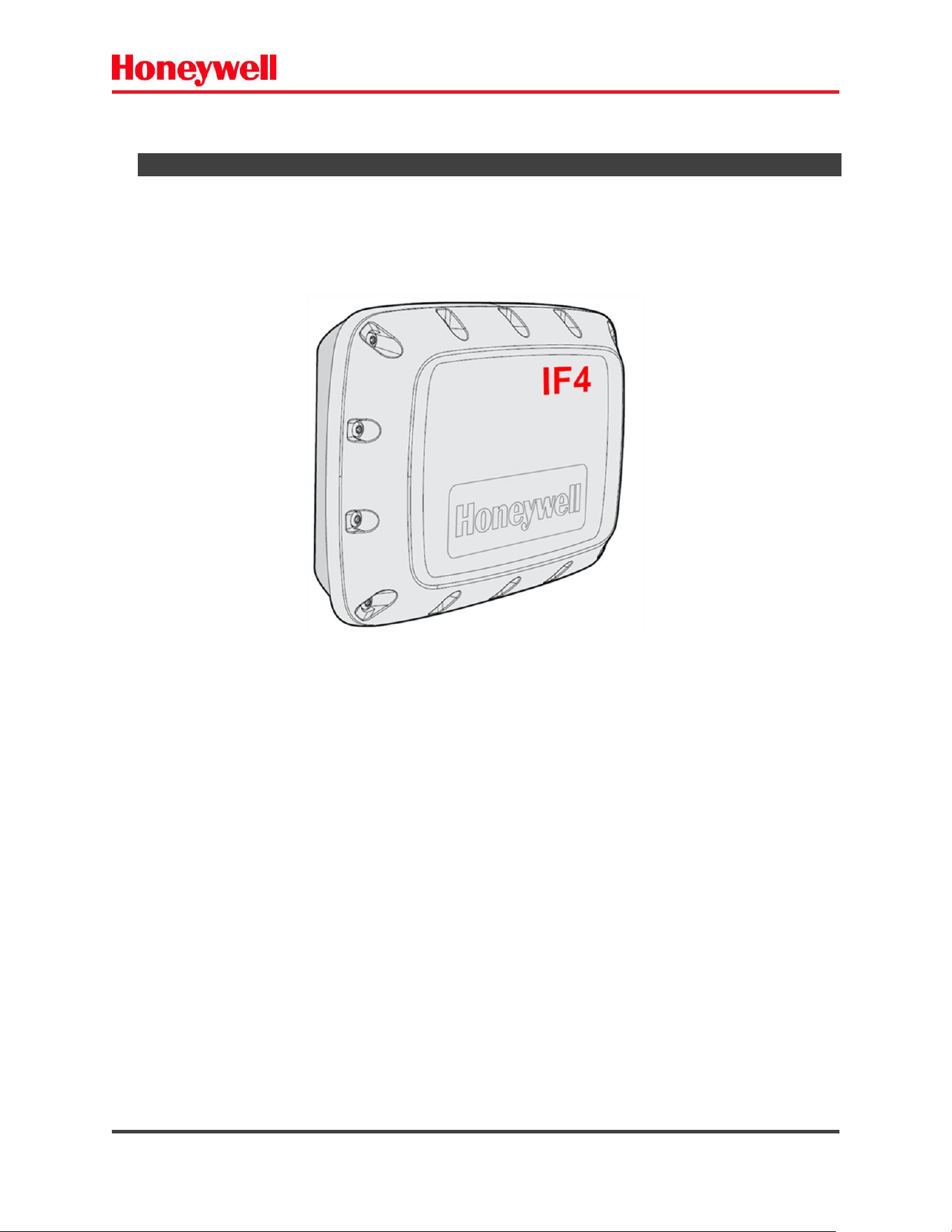
The IF4 Fixed RFID Reader is an RFID reader with an integrated antenna that provides connectivity
between tag data and an enterprise system.
Features of the RFID reader include:
• Integrated antenna or two external antenna port options*.
• 1 GHz high performance processor.
• 1GByte RAM.
• 8 GByte Flash eMMC.
• Web browser interface for easy configuration.
• Support for EPCglobal Gen-2 tag types.
• IP65 seal rating for outdoor installations*.
• Support for Power Over Ethernet.
• VESA mount compatibility.
• Optional GPIO port – 4 inputs + 2 outputs*.
* Depends on part number.
Fig. 1 – IF4 Fixed RFID reader – integrated antenna.
IF4 – Fixed RFID Reader Series User Guide (EN) - 9
1.1) IF4 MODELS
Table 1 shows the IF4 PN models - SKUs:
• PART NUMBER GENERATION RULE
* WiFi card not supported by IF4 model.
Part Number
RFID Protocol
Antenna
GPIO
RS232
BRI
Aux
12V
out
DC power
10~30VDC
input
Integrated
External
ports
IF4A1LH75F00XX
GEN2+ARTEFATO
Yes
1
No
No
No
No
IF4A1LH75FE0XX
GEN2+ARTEFATO
Yes
1
Yes
Yes
Yes
Yes
IF4A200000E0XX
GEN2+ARTEFATO
No
2
Yes
Yes
Yes
Yes
Table 1 - IF4 SKUs
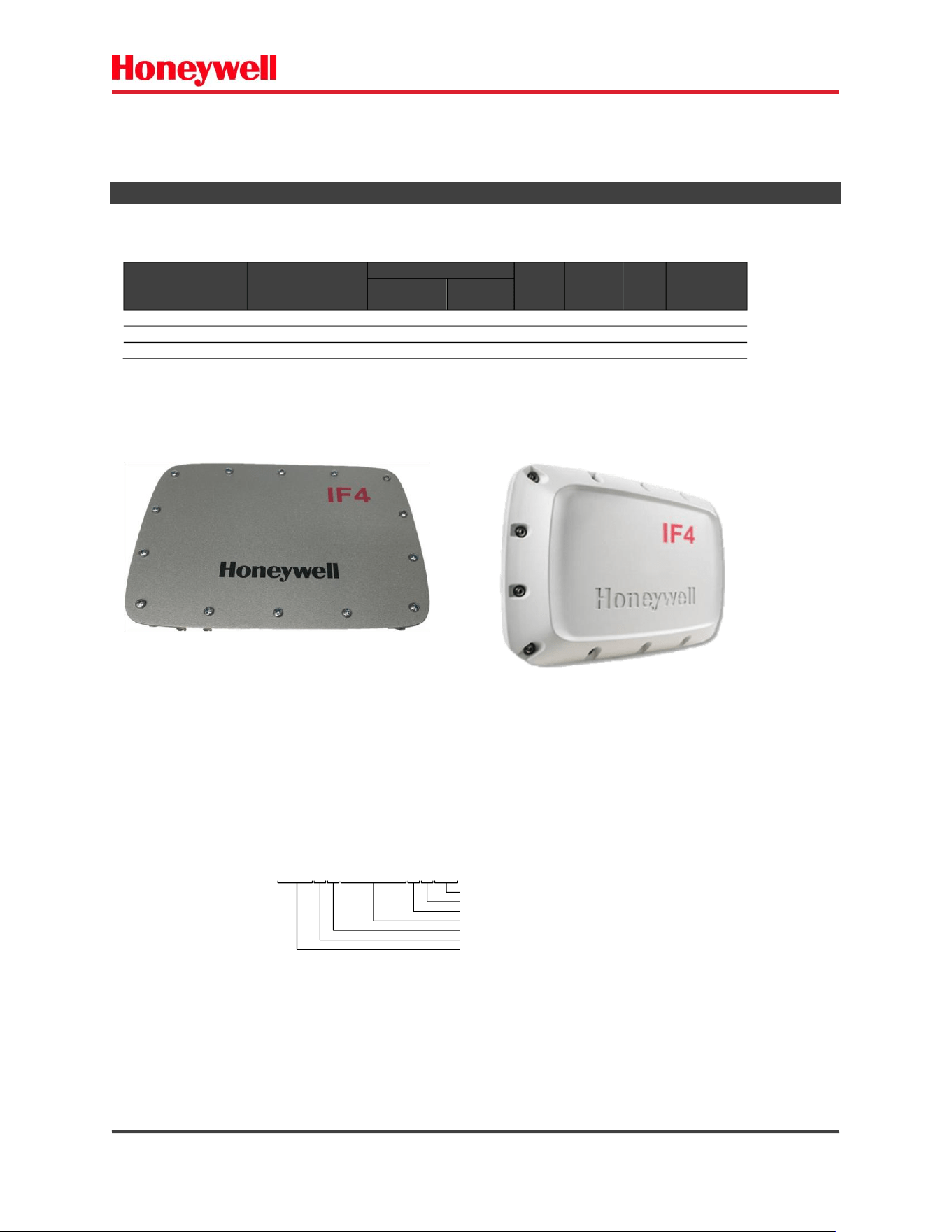
Fig 1- IF4 a) Without integrated antenna. b) With integrated antenna.
IF4 – Fixed RFID Reader Series User Guide (EN) - 10
• IF4 ACCESORIES.
You can use these accessories (sold and ordered separately) with the
IF4. To order accessories, contact your local sales representative.
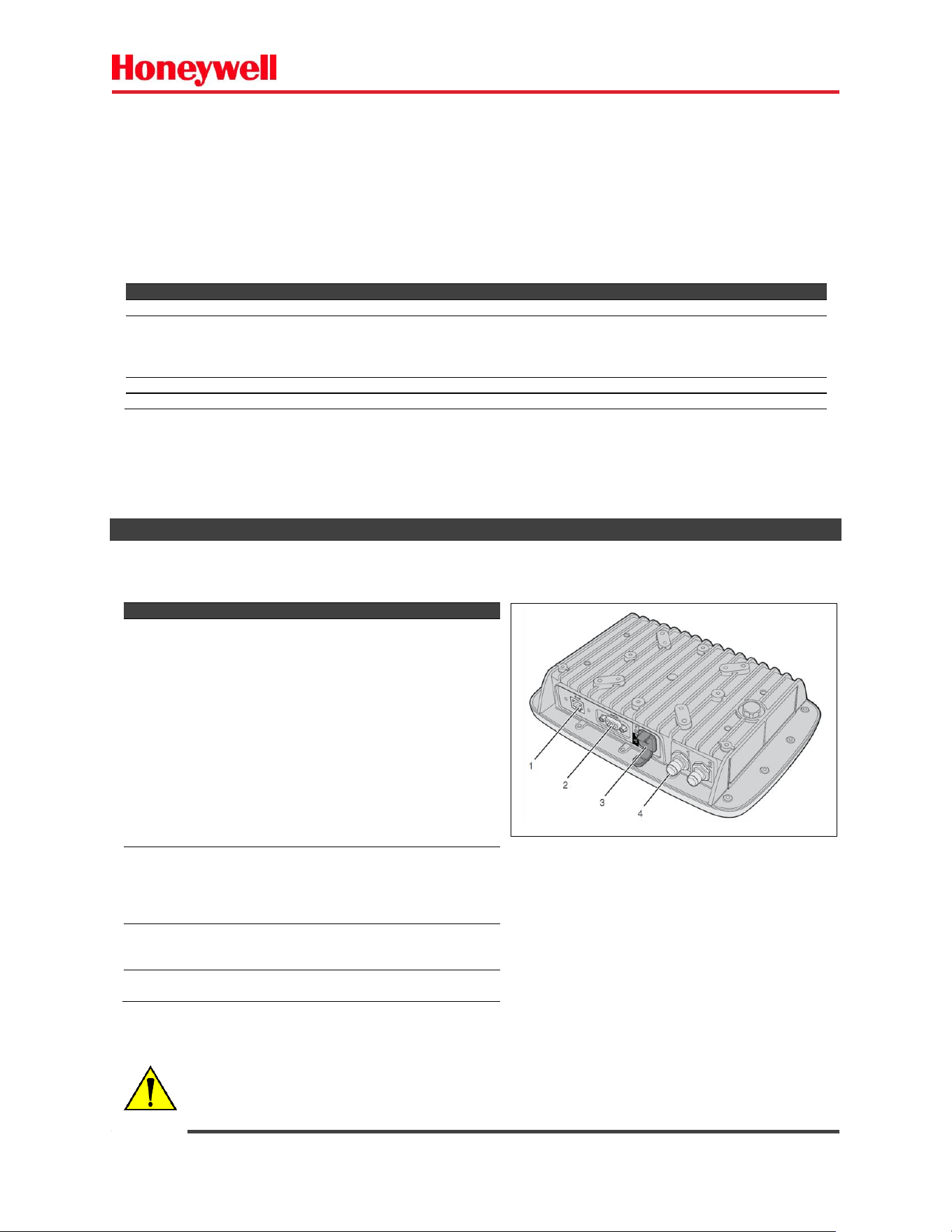
1.2) READER PORTS AND CONNECTIONS
Depending on your configuration, the ports that are available on the IF4 may be different.
C
Port
Description
Type
1
Ethernet
10Base/100Base-T port that
connects the reader to your
Ethernet network. The
reader auto-negotiates with
the server to set the best data
rate. This port uses MDI/ MDI-
X auto-switching so you can
connect either a standard
Ethernet cable or a crossover
cable.
The port also supports Power
Over Ethernet (POE). To power
the reader, you need an
802.3at-compliant power
supply.
RJ 45 F
2
GPIO
(optional)
General purpose GPIO
input/output ports
that connects the reader to
industrial controls such as
relays or indicator
DB 15 F
3
USB
Connects the reader to a
desktop PC for configuration
only.
USB B F
4
Antenna
Connects an external antenna
to reader.
TNC F Rev
Fig. 2 – IF4 Reader – back view.
Accessory
Description
Part Number
Mounting Bracket
Antenna mounting bracket without the fixing “U”
655-600-001
Ethernet Cable connector kit
The Ethernet Connector Kit provides a secure connection from your
Ethernet cable to the IF4 and is required if you need to maintain the
IP65 rating of the IF4.
213-030-001
PoE Injector 802.3af/at
The PoE injector provides the power supply with ethernet cable.
BT-CAT6E-P1-HP-48W
Power Supply 24V
The external power supply (AC/DC) provides the power supply.
LRS-35-24
IS STRONGLY RECOMMENDED TO USE SHIELDED CABLES FOR ETHERNET, SERIAL RS232
AND GPIO CONNECTIONS.
IF4 – Fixed RFID Reader Series User Guide (EN) - 11
1.3) LED INDICATORS
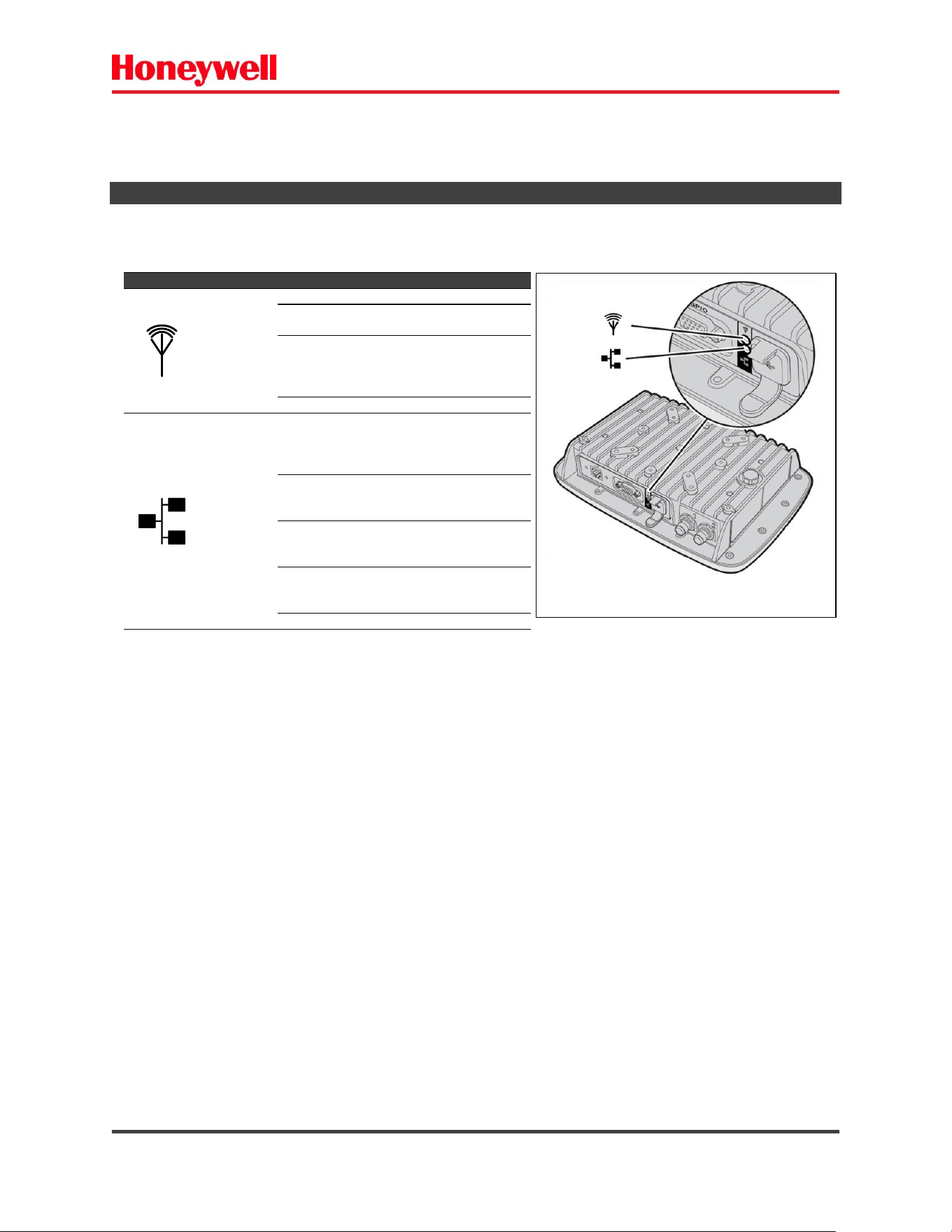
The Honeywell IF4 fixed RFID Reader has two LEDs to indicate its status during operation.
Symbol
Name
Color
Description
RFID
antenna
Solid Green
RF field is active
Blinking
Green
A tag is being interrogated.
Blinking Red
The reader cannot output
the requested RF power
level, or an RF fault is
detected.
Off
The reader is not powered.
Ethernet
network
Solid Green
The reader is powered, an
Ethernet link is
established, and the host is
connected.
Flickering
Green
Packets of information are
being sent through the
Ethernet port.
Blinking
Green and
Orange
An Ethernet link is
established, but there is no
host connection.
Blinking Red
The reader is powered, but
an Ethernet link is not
established.
Off
The reader is not powered.
Fig. 3 – IF4 – LED indicators.
IF4 – Fixed RFID Reader Series User Guide (EN) - 12
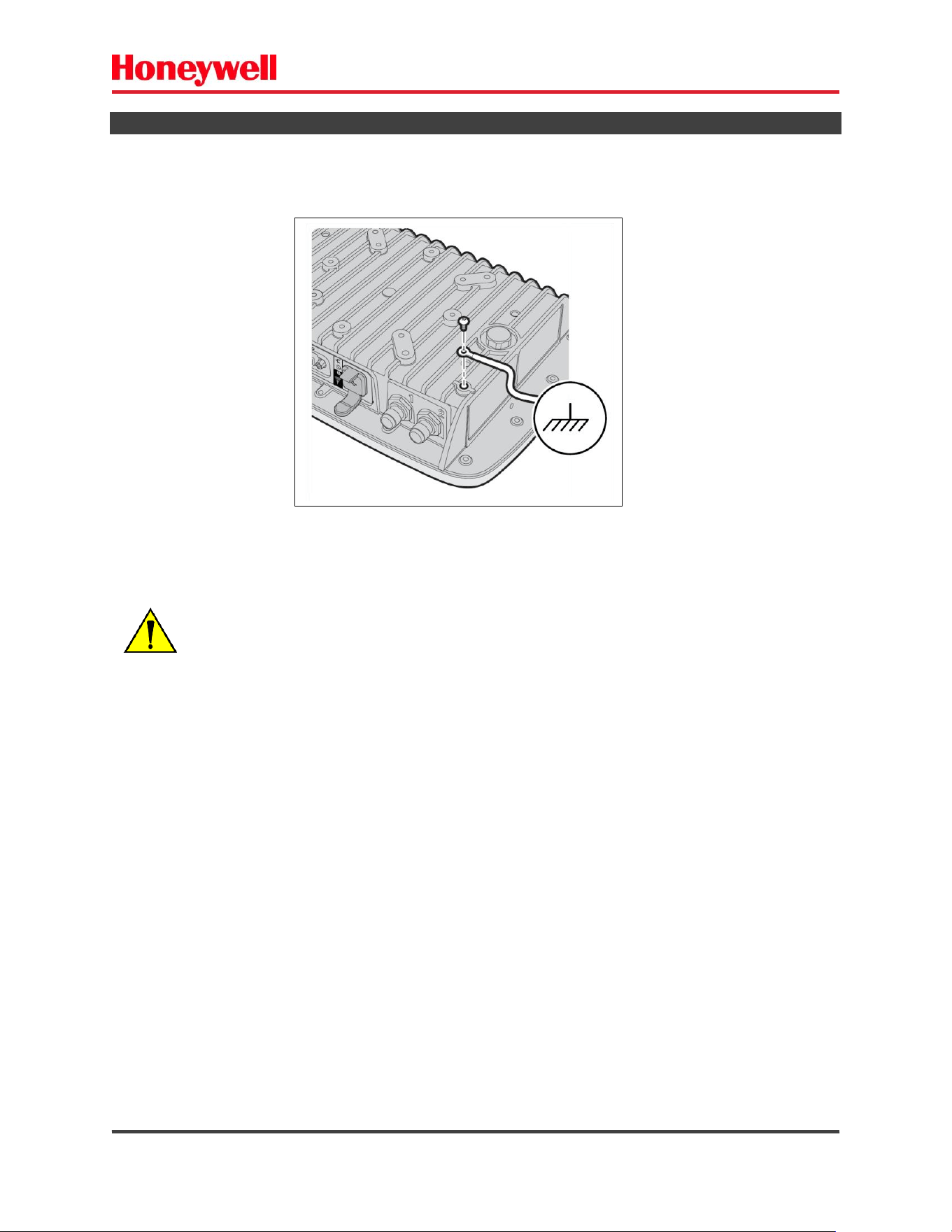
1.4) GROUNDING THE READER
It is strongly recommended to properly ground the IF4 fixed RFID reader.
The figure below shows this implementation.
Recommended: Flexible wire #2.5 [mm
2
] (#14[AWG]).
Fig. 4 – Grounding the IF4.
PROFESSIONAL INSTALLATION REQUIRED!
It must be installed only by a trained professional.
IF4 – Fixed RFID Reader Series User Guide (EN) - 13
1.5) POWERING THE READER
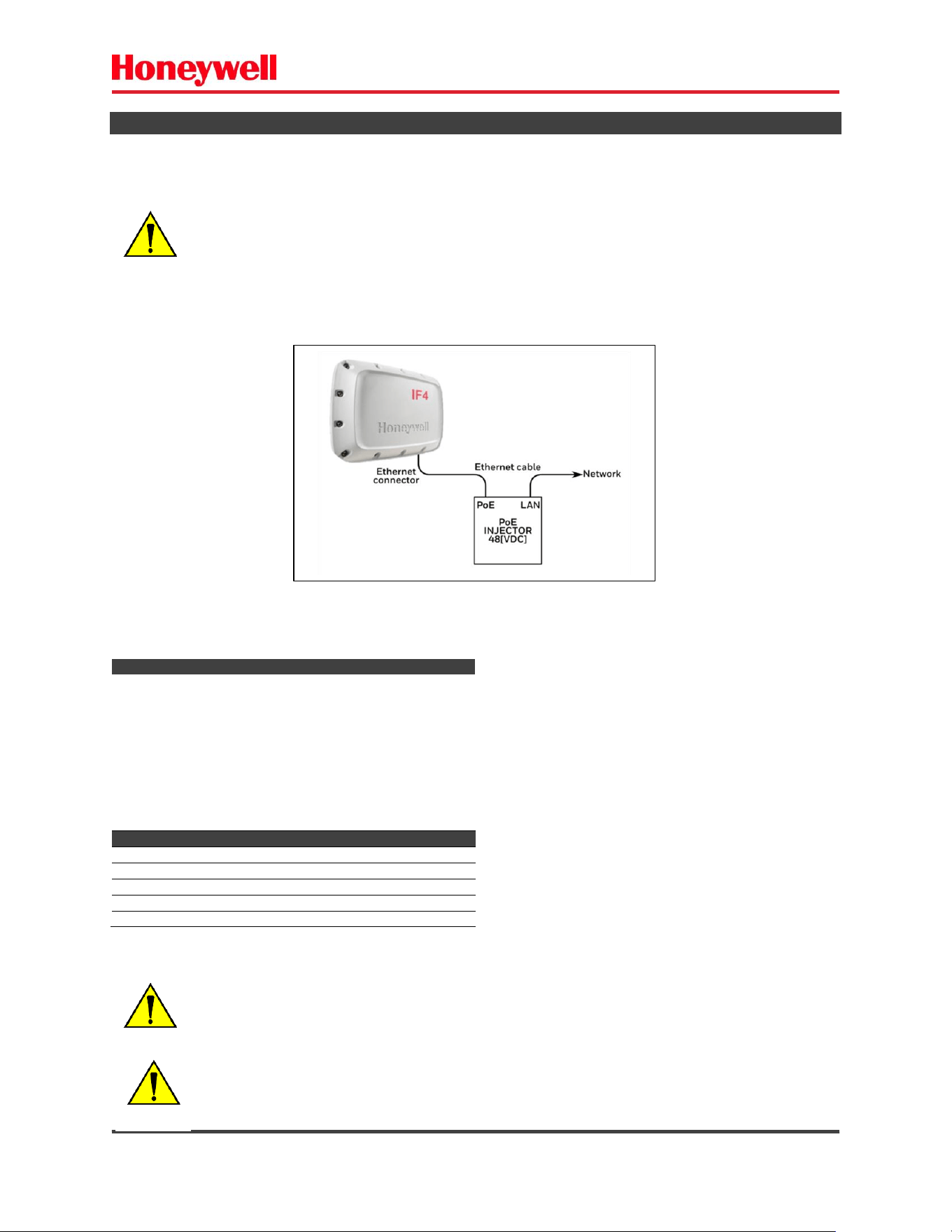
The Honeywell IF4 fixed RFID reader is powered by PoE (Power Over Ethernet) or External DC power
supply.
a) Powering with PoE.
You can use a P0E injector accessory or connect to a PoE switch - 48 [VDC] x 20 [W] min.
PoE injector characteristics
Param
Description
PoE Standard
802.3af type 1 class 0
802.3af type 1 class 3
802.3at type 1 class 0
802.3at type 1 class 3
802.3at type 2 class 4
Voltage [V
DC
]
48
Power [W]
30 (min)
IF4 ethernet connector pinout – 4 pair
Pin
Function
4,5
DC+
7,8
DC-
1,2
DC+ (shared)
3,6
DC- (shared)
Fig. 5 – Powering IF4 with PoE injector.
IS STRONGLY RECOMMENDED TO USE SHIELDED CABLES FOR ETHERNET, SERIAL RS232
AND GPIO CONNECTIONS.
PROFESSIONAL INSTALLATION REQUIRED!
It must be installed only by a trained professional.
CAUTION: SHOCK RISK!
USE ONLY ONE OPTION FOR POWER – PoE OR DC EXTERNAL INPUT.
IF4 – Fixed RFID Reader Series User Guide (EN) - 14
b) Powering with external DC power supply.
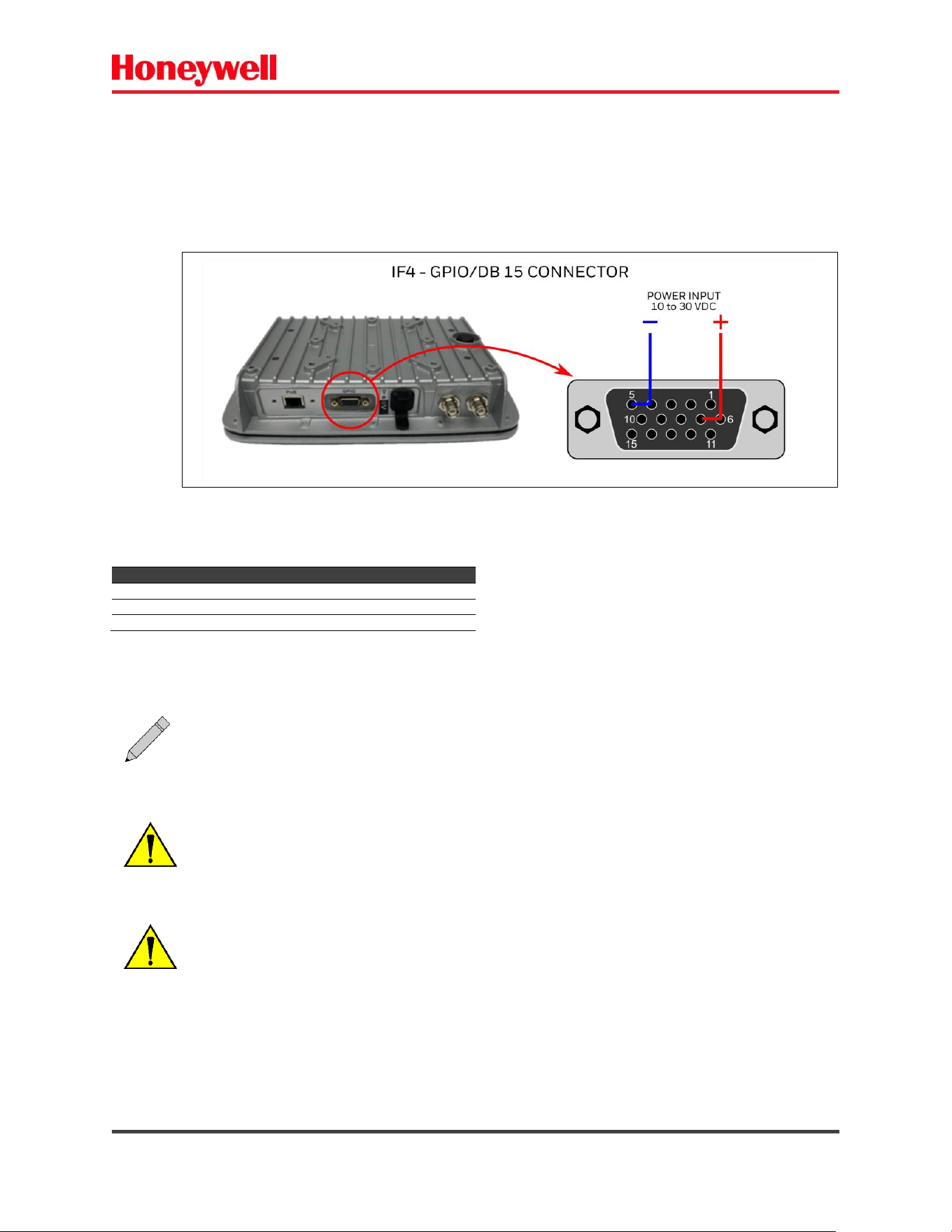
You can use a power supply (10 to 30 [VDC] x 20[W] min).
The GPIO Connector/Board is optional.
IF4 GPIO connector pinout – DC Input
Pin
Function
4,5
DC- (GND no isolated)
6,7
DC+
The IF4 reader is ready to operate after the boot.
Fig. 6 – Powering IF4 with external DC power supply.
The powering with external DC power supply is available only for models with the GPIO
board/connector (DB15).
IS STRONGLY RECOMMENDED TO USE SHIELDED CABLES FOR THE POWER
CONNECTIONS.
PROFESSIONAL INSTALLATION REQUIRED!
It must be installed only by a trained professional.
CAUTION: SHOCK RISK!
IF4 – Fixed RFID Reader Series User Guide (EN) - 15
1.6) READER CONNECTION – ETHERNET
By default, the IF4 fixed RFID reader has the following network basic configurations:
DHCP – disabled.
IP – 192.168.10.10
These settings can be changed via the web browser interface.
a) Power the IF4 reader.
b) Connect the ethernet cable to the reader.
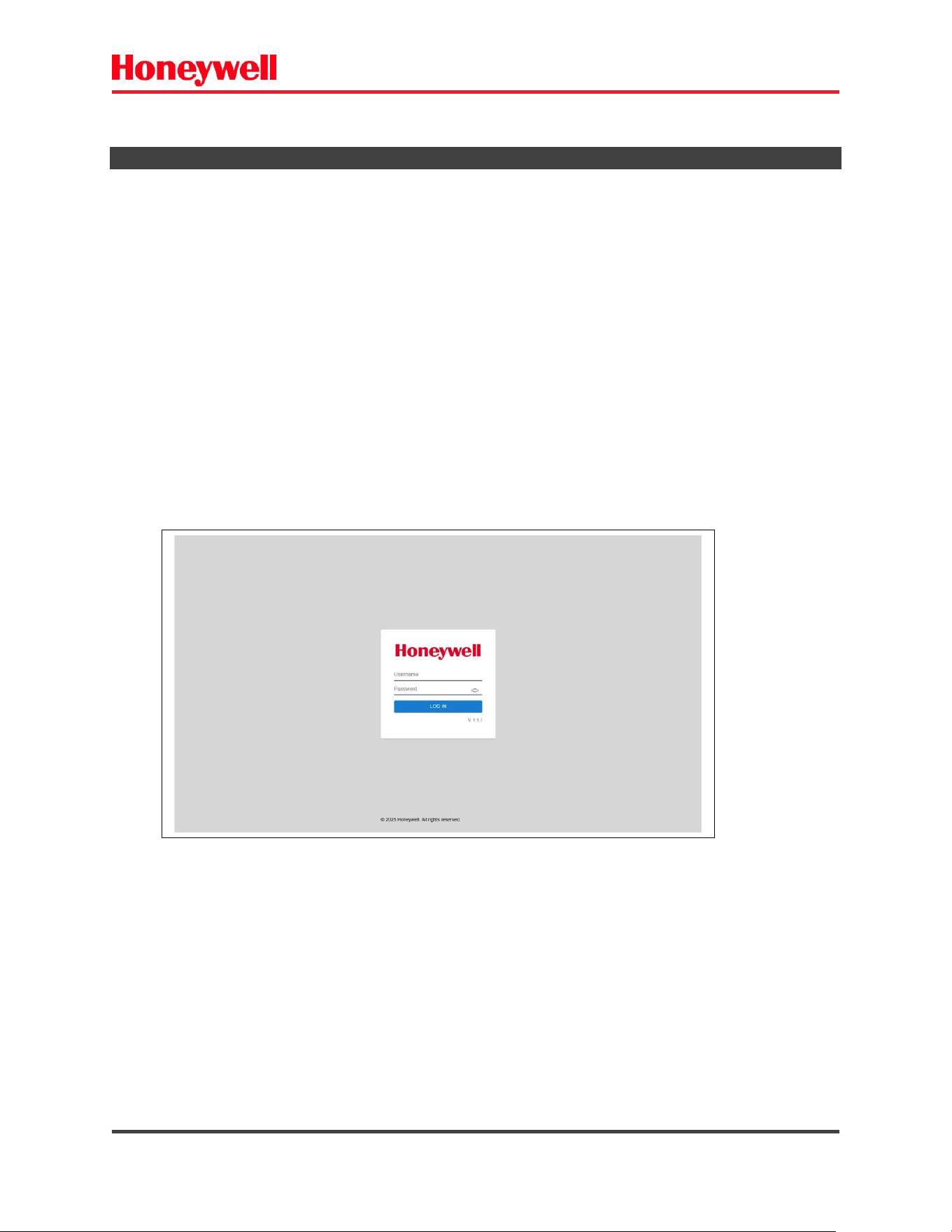
c) Open your web browser on 192.168.10.10 (default IP).
d) Use the default username and password as follows:
Username: admin
Default Password: honeywell
Fig. 7 – IF4 – Login screen.
IF4 – Fixed RFID Reader Series User Guide (EN) - 16
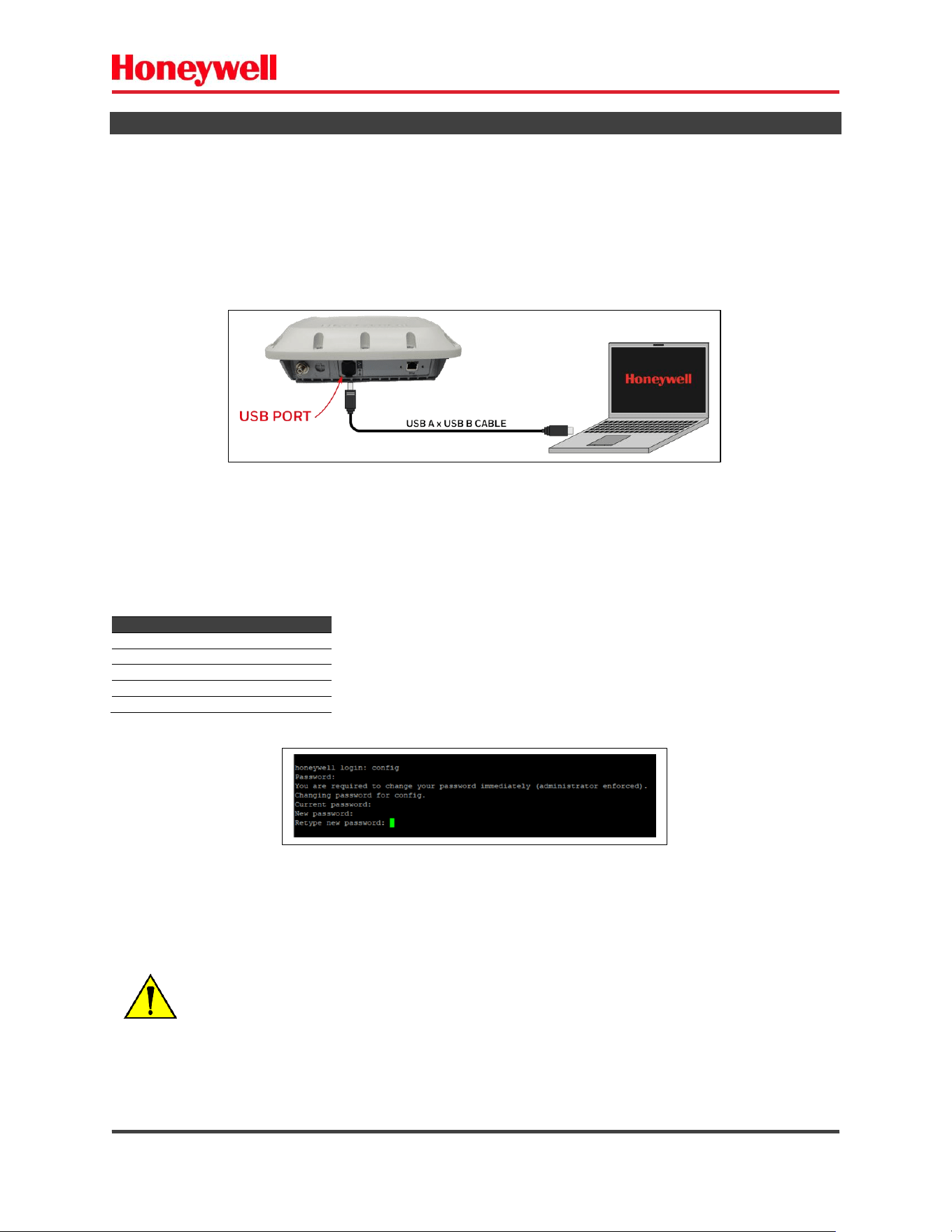
1.7) READER CONNECTION – USB
The USB connections allow you to configure the network settings, if necessary.
To connect the IF4 reader via USB follow the steps:
a) Power the IF4 reader via Ethernet POE as explained.
b) Connect the USB cable from the reader to your PC.
The figure below shows this connection
c) Wait for automatic driver installation (Windows 7 or higher). Your PC needs an internet
connection for this driver’s installation.
d) Locate a COM PORT created by the OS and open a serial connection with settings:
Field
Value
Unit
Baud rate
115200
[bps]
Data bits
8
[bits]
Stop bits
1
[bit]
Parity
None
-
Flow control
None
-
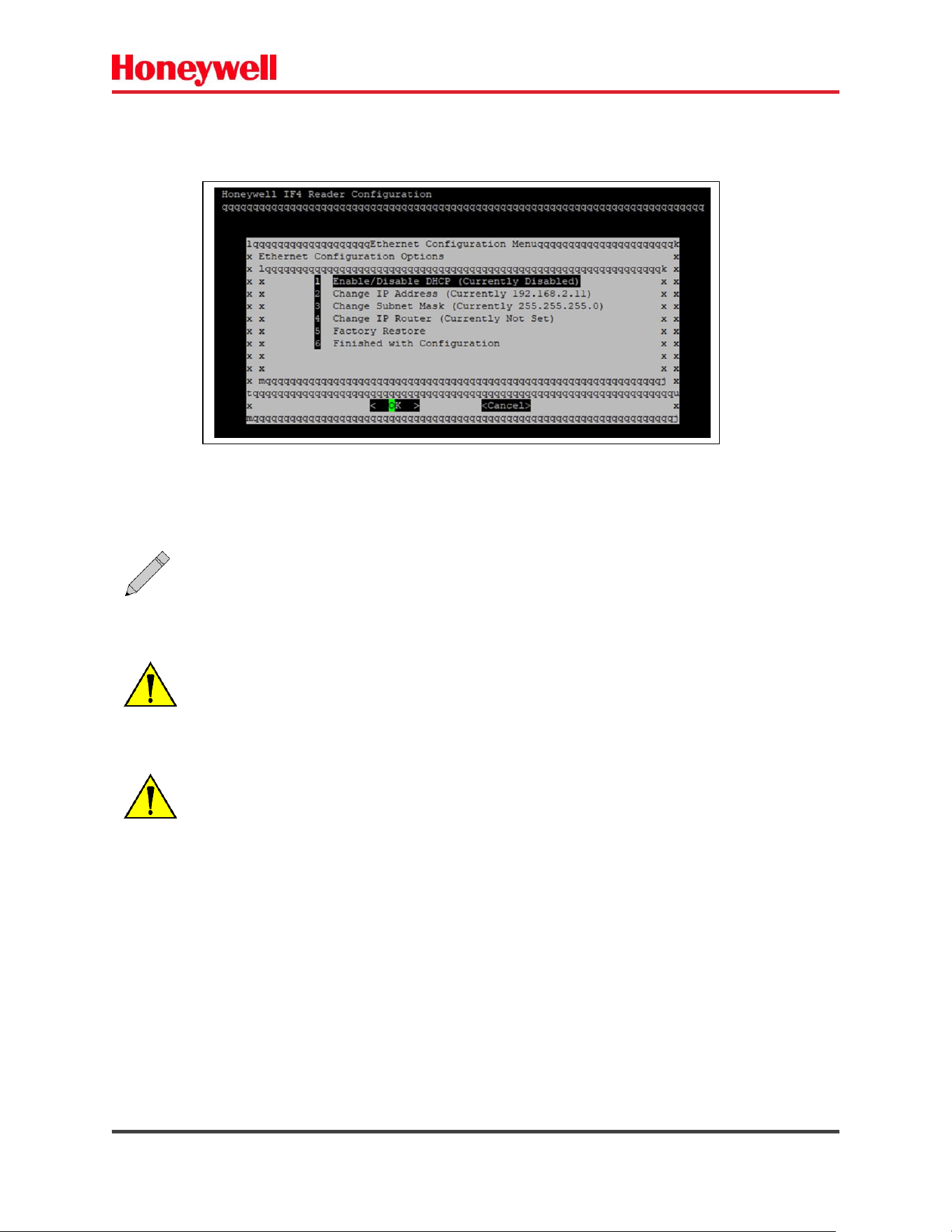
Default login: config
Default password: config
Fig. 8 – USB connection / COM PORT.
Fig. 9 – IF4 – Serial connection – Login.
ATTENTION!
If the password is entered incorrectly 3 times in a row, the device will be restored to
factory settings.
IF4 – Fixed RFID Reader Series User Guide (EN) - 17
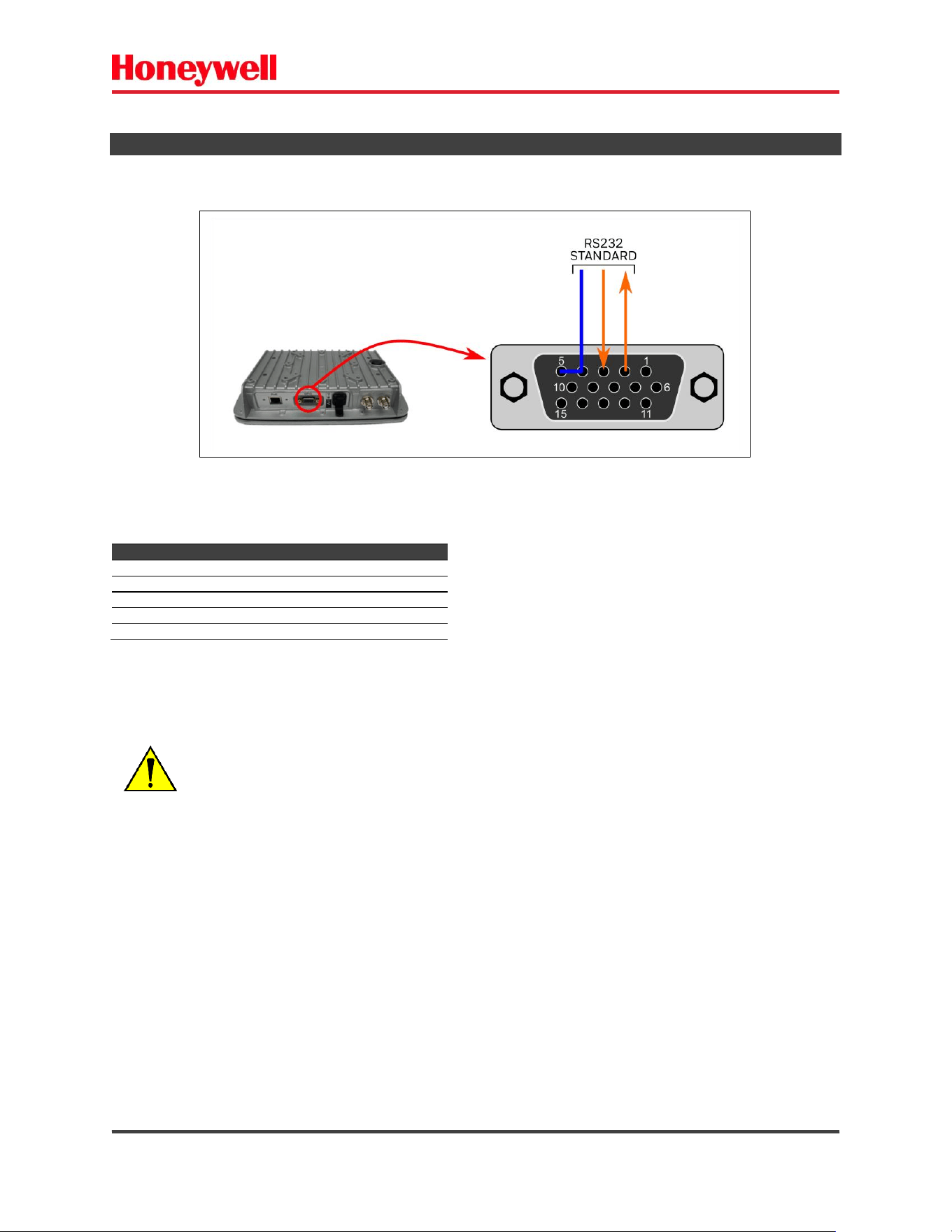
e) Choose the settings.
The menu shows the options for initial settings.
Fig. 10 – IF4 – Config settings menu.
The USB/Serial connection is used for IF4 configurations only.
PROFESSIONAL INSTALLATION REQUIRED!
It must be performed only by a trained professional.
ATTENTION:
The factory restore operation is IRREVERSIBLE.
All passwords (Web/USB) will be restored to default.
IF4 – Fixed RFID Reader Series User Guide (EN) - 18
1.8) READER CONNECTION RS232
The RS232 is available in the GPIO connector – optional.
RS232 configuration – default
Field
Value
Unit
Baud rate (default)
115200
[bps]
Data bits
8
[bits]
Stop bits
1
[bit]
Parity
None
-
Flow control
None
-
Fig. 11 - RS232 Connection.
PROFESSIONAL INSTALLATION REQUIRED!
It must be performed only by a trained professional.

IF4 – Fixed RFID Reader Series User Guide (EN) - 19
1.9) QUICK START
To operate the IF4 reader just follow the steps below:
a) Mount the reader.
Install the reader and the RFID antennas in the location.
b) Connect ethernet/PoE.
Connect the ethernet cable and the PoE injector.
c) Open browser 192.168.10.10
d) Login as administrator/change password
To change the reader settings, you need to be logged as an administrator.
e) Configure the RFID settings
Configure the RFID parameters according to your needs.
f) Enable BRI TCP ports
The BRI TCP ports are disabled by default. They must be enabled to use them.
g) Perform readings
Perform a test read using a reliable TAG.
ATTENTION:
DO NOT OPERATE THE EQUIPMENT OUTSIDE THE CONFIGURED REGION.
EACH COUNTRY HAS ITS OWN REGULATORY REQUIREMENTS.
CHECK LOCAL RULES AND LIMITS BEFORE SETTING UP/OPERATING THE EQUIPMENT.
IF4 – Fixed RFID Reader Series User Guide (EN) - 20
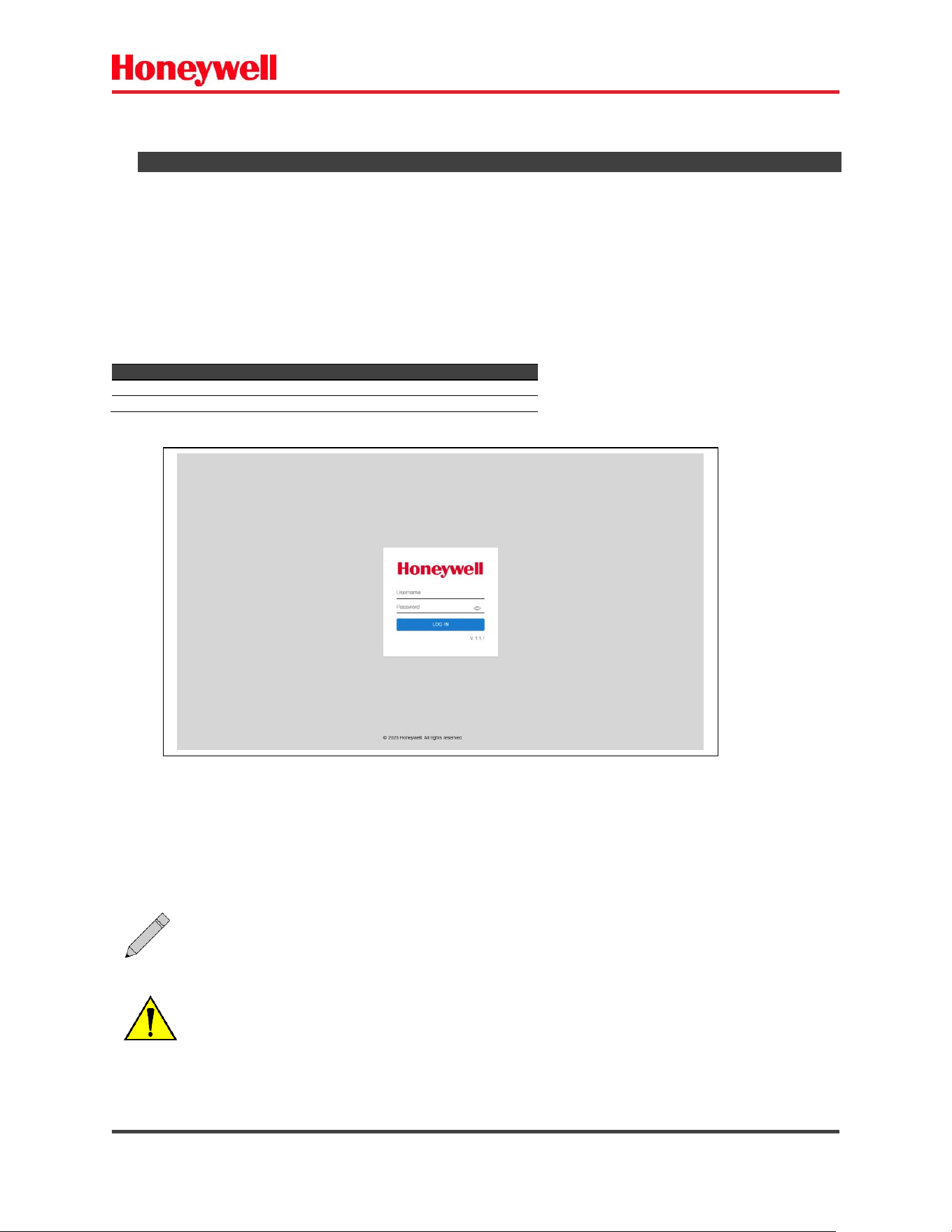
2) WEB USER INTERFACE
These settings can be changed via the web browser interface.
a) Power the IF4 reader.
b) Connect the ethernet cable to the reader.
c) Open your web browser on 192.168.10.10 (default).
d) Use the default username and password as follows:
Default login access:
Privilege
Username
Password
Access
Administrator
admin
honeywell
Full access
Operator
operator
operator
Read Only access
* APIPA = Automatic Private IP Addressing.
Fig. 12 – IF4 – Login page.
The APIPA* mode can be used. Connect the reader with your computer peer-to-peer
and use link local IP address (169.254.1.1).
PROFESSIONAL OPERATION REQUIRED!
It must be performed only by a trained professional.
IF4 – Fixed RFID Reader Series User Guide (EN) - 21
2.1) MAIN
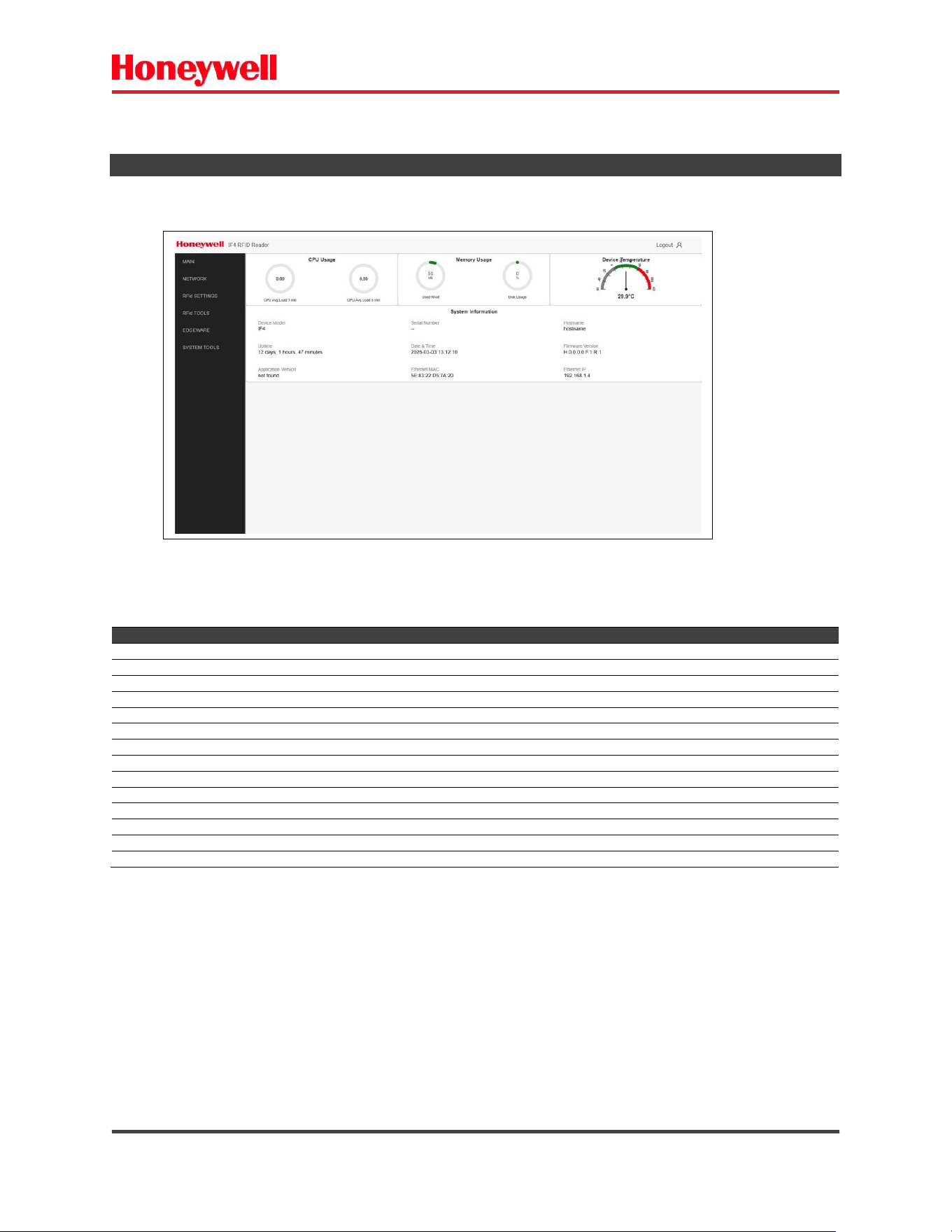
The main page displays information about RFID reader status and parameters.
Parameter
Description
CPU Usage 1 minutes
CPU load during last 1 minute
CPU Usage 5 minutes
CPU load during last 5 minutes
Memory Usage RAM
Memory used – RAM
Memory Usage Disk
Memory used – Disk
Temperature
Module temperature
Device Model
Device model identification
Serial Number
Serial number
Host Name
Host name – Reader name
Uptime
Uptime in minutes
Date & Time
Current date & time
Firmware version
Firmware installed version
Application version
Application installed version
Ethernet MAC address
MAC address – ethernet adapter
Ethernet IP address
IP address – ethernet adapter
Fig. 13 – IF4 – Main page.
IF4 – Fixed RFID Reader Series User Guide (EN) - 22
2.2) NETWORK CONFIGURATIONS
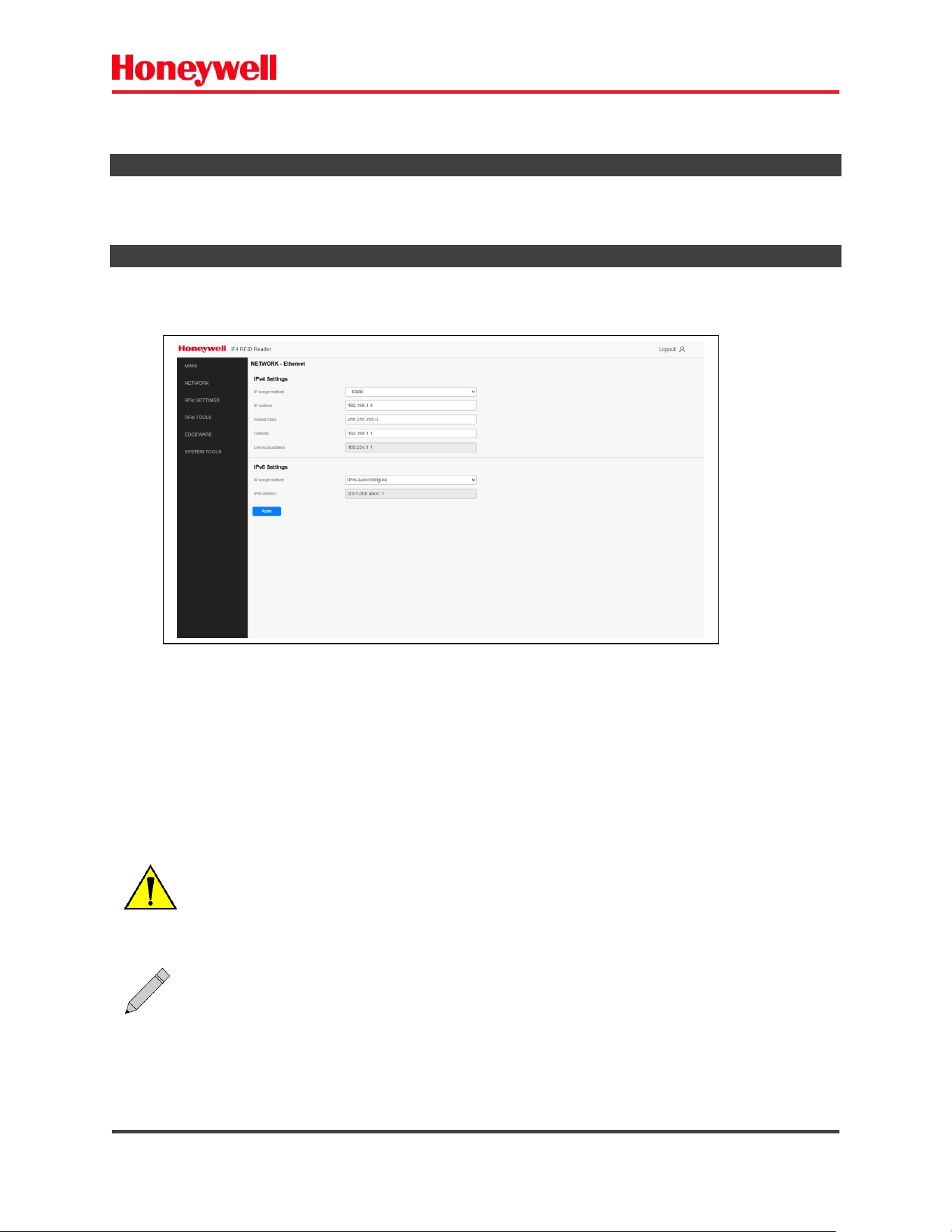
To use IF4 RFID fixed reader, you need to configure its parameters as follows.
2.2.1) ETHERNET IPv4 / IPv6
- Choose Network Configuration - Ethernet.
After configuring, click on “Apply” button.
Fig. 14 – Network Configuration – Ethernet.
ATTENTION: After configurations, the connection may be lost.
Your computer and IF4 reader must be on the same network.
Note: If DHCP is enabled, you may not need to configure Ethernet settings. For more
information, contact your network administrator.

IF4 – Fixed RFID Reader Series User Guide (EN) - 23
Network Configuration – Ethernet Settings
Setting
Description
Enable DHCP
Select this field if you want the reader to get its IP address from a DHCP server.
If this field is not selected, you need to specify the IP address, subnet mask, and IP router for your network.
Default is disabled.
IP Address
The IP address of the reader. The IP address has the form XXX.XXX.XXX.XXX, were XXX is a number from 0 to
255. The default MAC address is on the label on the side of the reader.
If DHCP is enabled, the currently assigned IP address appears in this field.
If DHCP is disabled, specify the IP address in the entry field. Default is 192.168.10.10
Subnet Mask
The subnet mask for this network. The subnet mask has the form XXX.XXX.XXX.XXX, where XXX is a number
from 0 to 255.
If DHCP is enabled, the currently assigned subnet mask appears in this field.
If DHCP is disabled, specify the subnet mask in the entry field. Default is 255.255.255.0
IP Router (Gateway)
The IP address of the router. The IP address has the form XXX.XXX.XXX.XXX, were XXX is a number from 0 to
255.
If DHCP is enabled, the currently assigned router address appears in this field.
If DHCP is disabled, specify the router address in the entry field.
Link Local IP Address
The IP address of the reader is only routable on the local IP subnet.
The reader auto-negotiates with other devices on its Ethernet segment to obtain a unique address, so no user
configuration of the Link Local IP Address is necessary.
The reader always has a Link Local IP Address, even if another address is assigned through DHCP or statically
via user configuration.
IPv6 Autoconfigure
Enables IPv6 automatic configuration. Auto-configuration is enabled by default.
If you disable auto-configuration, you need to specify an IPv6 address, subnet mask, and router.
IPv6 Address
128 [bit] IPv6 address for the reader.
IPv6 Subnet Mask
Value of IPv6 Subnet Mask from 0 to 128.
IPv6 Router (Gateway)
128 [bit] address for the IPv6 router.
IF4 – Fixed RFID Reader Series User Guide (EN) - 24
2.3) RFID SETTINGS
The RFID settings set the BRI sessions and RFID protocol attributes.
BRI Sessions – Basic Reader Interface attributes.
RFID Settings – RFID protocol attributes.
2.3.1) BRI SESSIONS
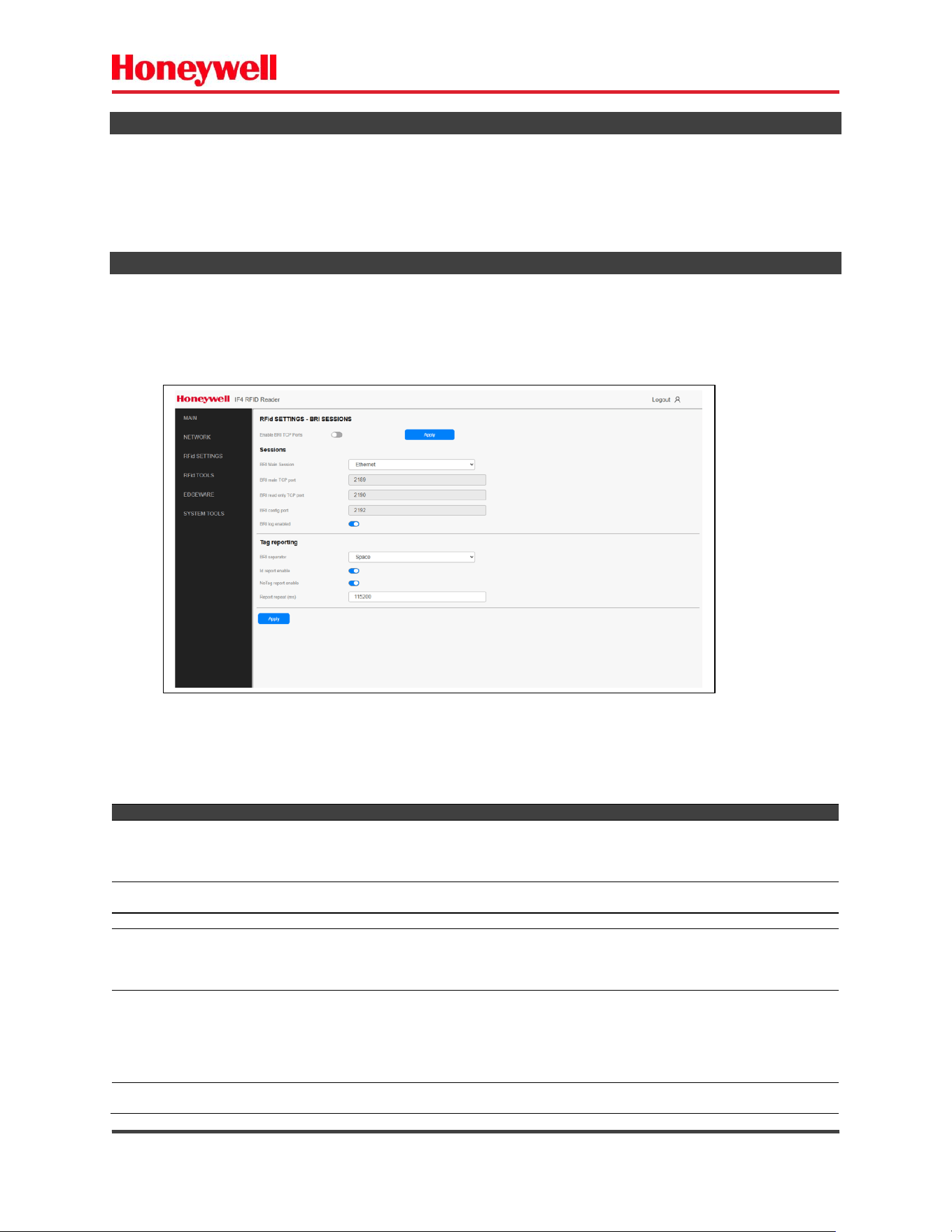
Configure the BRI Sessions to handle communication between your application and IF4 reader.
- Choose the RFID Settings – BRI Sessions.
After configuring, click on “Apply” button.
Parameter
Description
BRI MAIN TCP Port
Specifies the TCP port used for incoming connections to the BRI server. This port must be unique
for all TCP services running on the reader. The BRI MAIN port can perform configuration and RFID
readings.
Default is 2189.
BRI READ ONLY TCP Port
Specifies the TCP port used for readings only. This port does not accept attribute commands.
Default is 2190.
BRI CONFIG TCP Port
Specifies the TCP port used for configuration only. Default is 2192.
Field Separator
The character used for separating fields in tag data. Choose from
space ( ), comma (,), colon (:), semicolon (;), tab, caret (^), or tilde (~).
Default is space ( ).
This setting is equivalent to the FIELDSEP BRI attribute.
ID Report Enable
Enables tag ID reporting after a Read, Write, or Lock command is
executed:
• For ISO tags, the tag identifier corresponds to TAGID.
• For EPC tags, the identifier corresponds to EPCID.
Default is enabled.
This setting is equivalent to the IDREPORT BRI attribute.
No TAG Report
Enables a NOTAG message, which is sent when no tags are found
during execution of a Read, Write, or Lock command. Default is
Fig. 15 – RFID Settings – BRI Sessions.
IF4 – Fixed RFID Reader Series User Guide (EN) - 25
enabled.
This setting is equivalent to the NOTAGRPT BRI attribute.
Report Repeat Timeout
The timeout (in ms) for delays in tag reporting when the RFID reader
is in continuous read mode. Valid range is 0 to 65534. Default is 0.
This setting is equivalent to the RPTTIMEOUT BRI attribute.
BRI Enable Logging
Enables logging of BRI server events. Default is disable.
2.3.2) RFID ATTRIBUTES
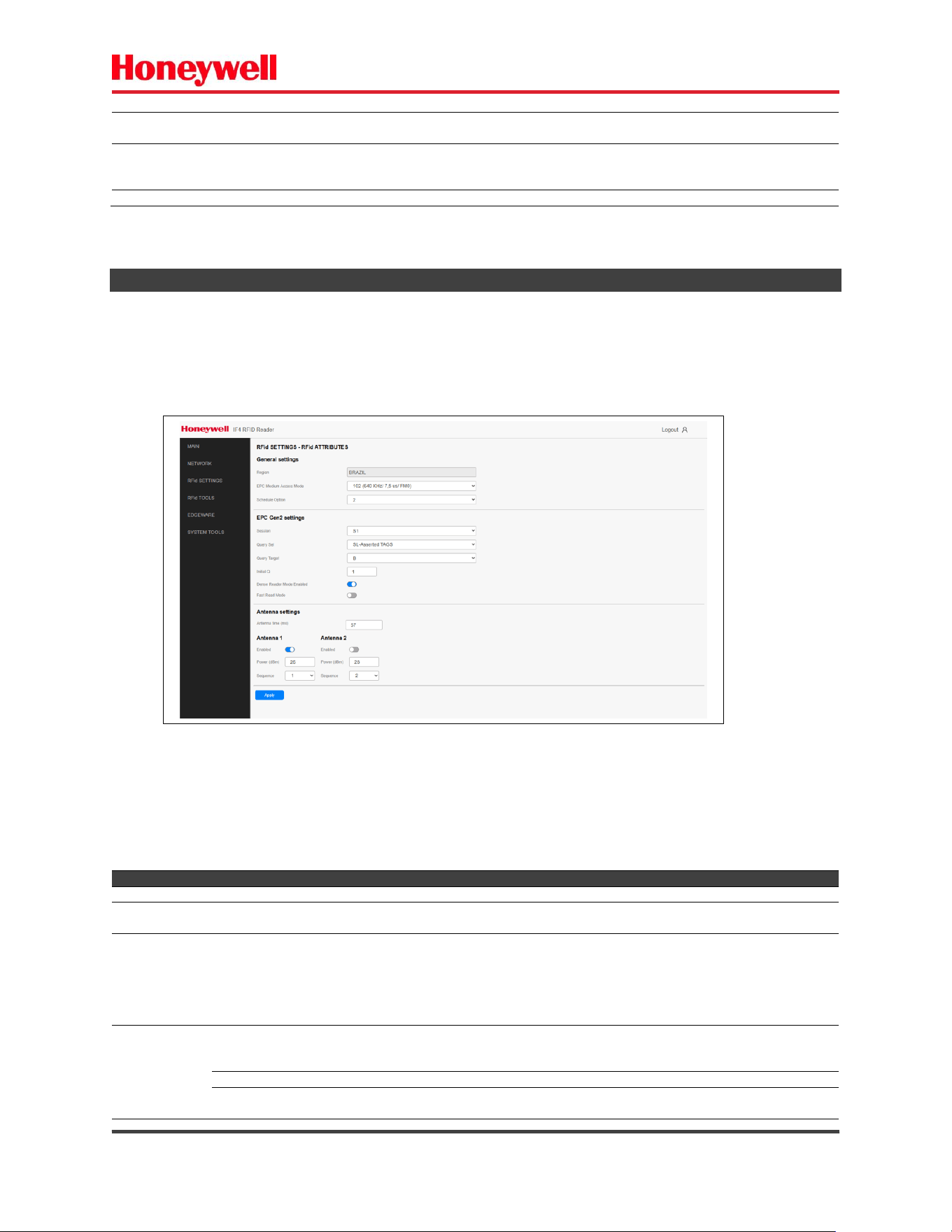
The RFID attributes control how the reader operates and reads RFID TAGs.
- Choose the RFID Settings – RFID Attributes.
After configuring, click on “Apply” button.
Setting
Description
Region
Indicates the operation Region (factory defined). The user cannot change this parameter.
EPCC1G2 Medium Access Mode
Defines the Backscatter Link Frequency (BLF), Codding, Tari and PIE settings.
Default is 16 (320 KHz, FM0, 6.25us,1.5).
Schedule Option
Determines how antennas are switched during the inventory process:
0 – Legacy BRI operations – Operates the antenna for the defined time. Complete the
inventory round.
1 – Perform one inventory round. If there are no readings, switches to the next antenna – if
there is one.
This setting is equivalent to the SCHEDULEOPT BRI attribute. Default is 0.
TAG Singulation
Session
EPCGlobal protocol - chooses a session for the inventory round. Valid range is 0 to 3. Default is
2 -> S2.
This setting is equivalent to the SESSION BRI attribute.
Query Sel
EPCGlobal protocol - chooses which Tags respond to the Query command. Default is all.
Query Target
EPCGlobal protocol - Selects whether Tags whose inventoried flag is A or B participate in the
inventory round. Default is A.
Fig. 16 – RFID Settings – RFID Attributes.
IF4 – Fixed RFID Reader Series User Guide (EN) - 26
Setting
Description
Initial Q
EPCGlobal protocol - Sets the number of slots in the round.
Valid range is 1 to 15. Default is 1.
This setting is equivalent to the INITIALQ BRI attribute.
Medium Access
Options
Dense Reader Mode
Enables/Disables the dense reader mode operation.
This setting is equivalent to the DENSEREADERMODE BRI attribute.
Default is disabled.
Fast Read Mode
Enables/Disables the FAST read mode operation. Default is disabled.
Antenna
Settings
Enable
Enable/Disable Antenna. Default is enabled for antenna 1, others disabled.
Field Strength
The RF power level (in [dBm]) for antenna. The valid range is 1 to 30. Default is 30.
This setting is equivalent to the FIELDSTRENGTH BRI attribute.
Sequence
Antenna operation sequence. Default is the number of the antenna.
Time
The antenna operation time (ms). The valid range is 10 to 10000 (ms). Default is 50.
After configuring, click on “Apply” button.
EPC Class 1 Gen 2 Parameter Set - EPCC1G2 Medium Access Mode.
ID
Application
BLF
[KHz]
CODING
TARI [µs]
PIE
MODULATION
103
FCC Read Rate
640
FM0
6.25
1.5
DSB-ASK
102
ETSI UB+*
640
FM0
7.5
2
PR-ASK
120
FCC
640
M2
6.25
1.5
DSB-ASK
203
Japan Read Rate
426
FM0
12.5
1.5
PR-ASK
124
ETSI UB+ Hybrid*
640
M2
7.5
2
PR-ASK
226
Japan Hybrid
426
M2
12.5
1.5
PR-ASK
202
ETSI LB Read Rate
426
FM0
15
2
PR-ASK
225
ETSI LB Hybrid
426
M2
15
2
PR-ASK
148
ETSI UB Hybrid*
640
M4
7.5
1.5
PR-ASK
147
ETSI UB DRM*
640
M4
7.5
2
PR-ASK
125
ETSI LB Hybrid
320
M2
15
2
PR-ASK
123
ETSI LB+
320
M2
20
2
PR-ASK
141
ETSI LB+
320
M4
20
2
PR-ASK
146
ETSI LB+
250
M4
20
2
PR-ASK
185
ETSI LB+
160
M8
20
2
PR-ASK
104
FCC Read Rate
320
FM0
6.25
1.5
DSB-ASK
ATTENTION:
DO NOT OPERATE THE EQUIPMENT OUTSIDE THE CONFIGURED REGION.
EACH COUNTRY HAS ITS OWN REGULATORY REQUIREMENTS.
CHECK LOCAL RULES AND LIMITS BEFORE SETTING UP/OPERATING THE EQUIPMENT.
IF4 – Fixed RFID Reader Series User Guide (EN) - 27
2.4) RFID TOOLS
The RFID tools allow you to:
- Send BRI command to the reader.
- Auto-start BRI ARTEFATO reading.
- Perform RFID readings.
The RFID tools all use the same internal BRI session. You can only use one of these resources at a time.
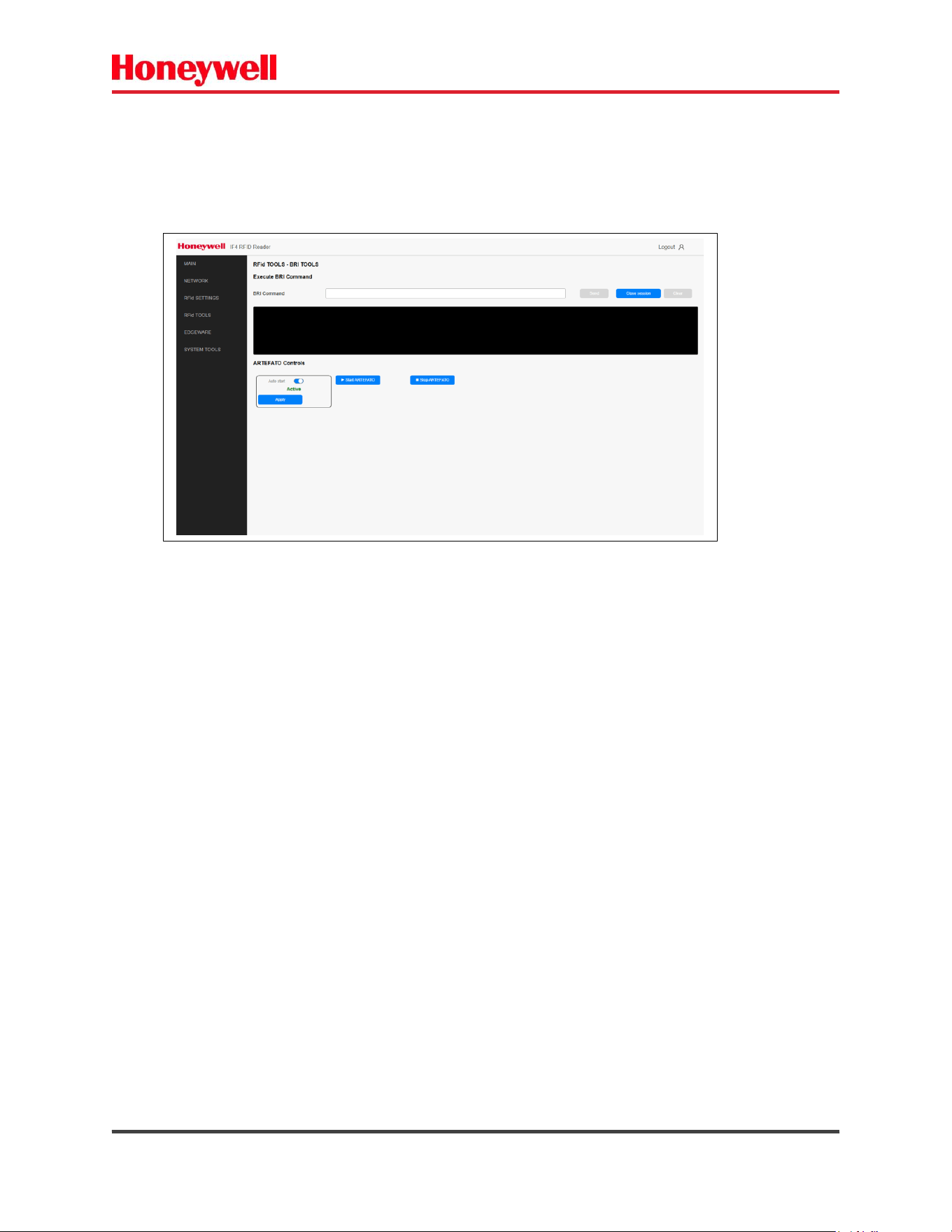
2.4.1) BRI TOOLS
a) Send BRI command.
This option allows you to execute a BRI command and get the response.
Enter the BRI command at the field.
Click “SEND” button -> Opens Internal BRI session.
The results are displayed on the textbox.
Click “STOP” button -> Close internal BRI session.
Click “CLEAR” button -> Clear the response list.
Fig. 17 – Send BRI command.
IF4 – Fixed RFID Reader Series User Guide (EN) - 28
b) ARTEFATO protocol control.
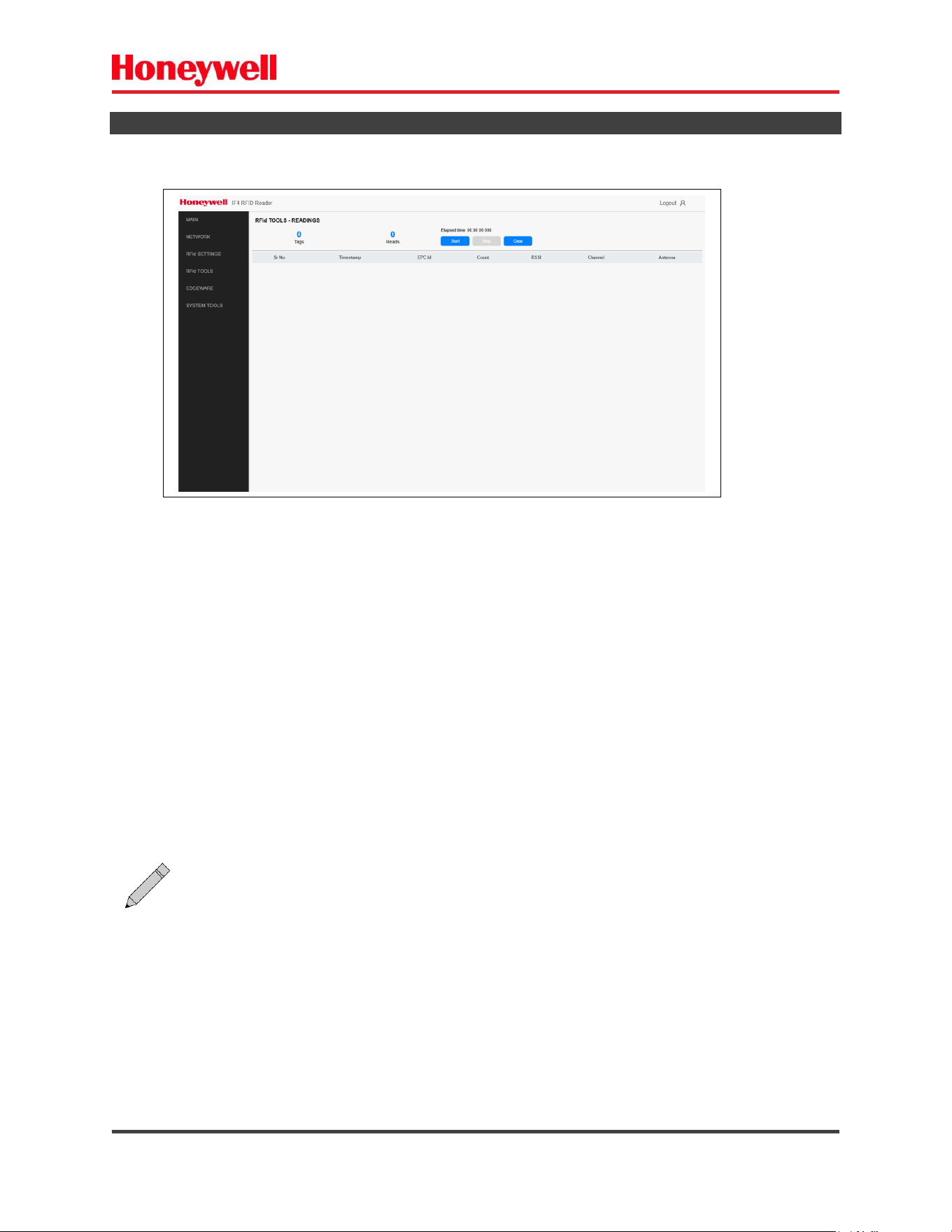
This option allows you to run the ARTEFATO protocol reading command in the continuous mode
(REPORT=EVENTALL).
- Click on the “RUN ARTEFATO” button.
The BRI legacy equivalent ARTEFATO readings:
SINIAV SJ5511AUTH RSSI CHAN ANT REPORT=EVENTALL
Auto Start -> Start the ARTEFATO readings automatically – after boot.
To Stop the ARTEFATO readings, when running:
Click “STOP ARTEFATO” button.
After configuring, click on “Apply” button.
Fig. 18 – Upload BRI Script File.
IF4 – Fixed RFID Reader Series User Guide (EN) - 29
2.4.2) RFID READINGS
This page allows you to perform RFID readings for simple verification. The protocol is EPC-GEN2.
Start button – Starts readings.
Stop button – Stop readings.
Clear button
Fig. 19 – RFID Readings.
Note: The BRI command and RFID readings all use the same internal BRI session. You can
only use one of these resources at a time.
IF4 – Fixed RFID Reader Series User Guide (EN) - 30
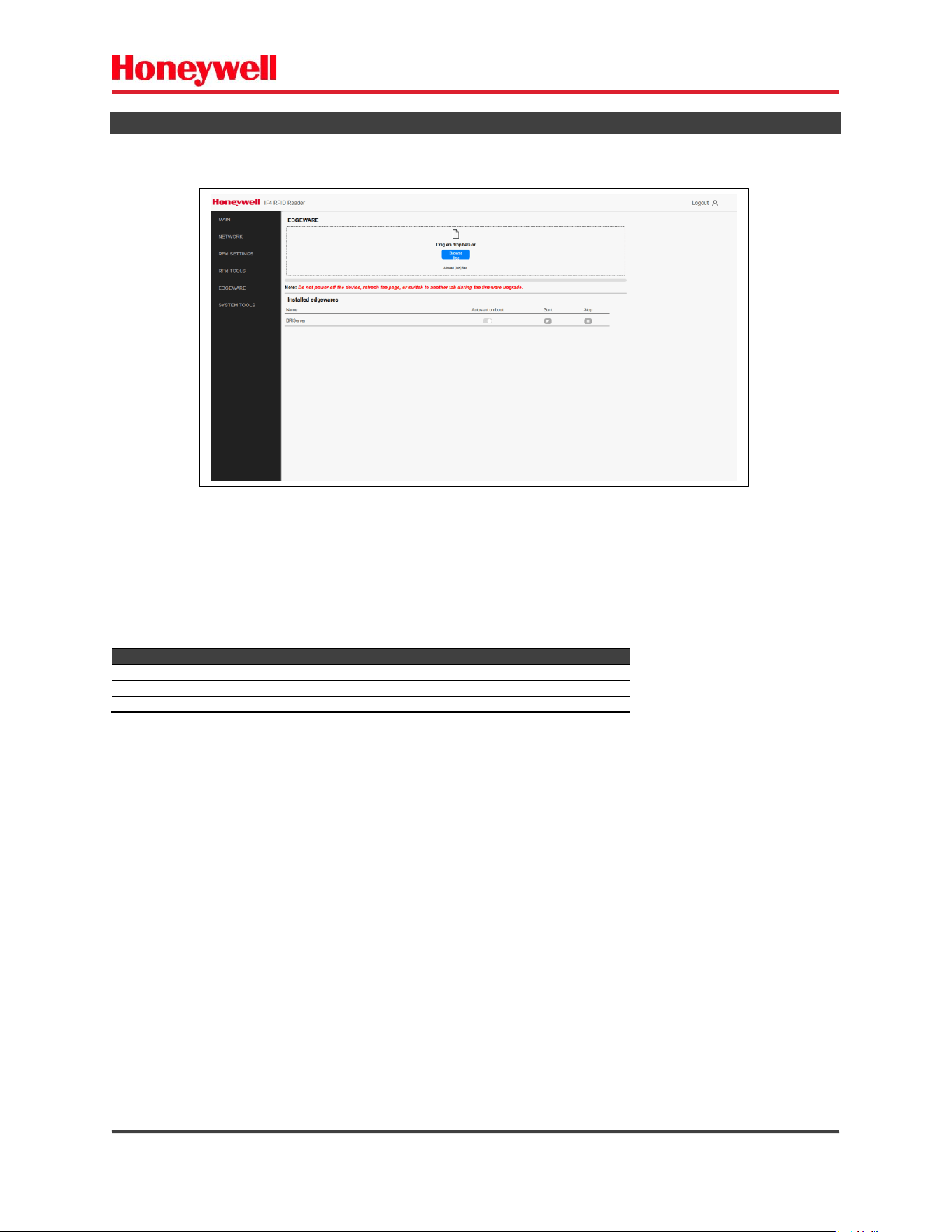
2.5) EDGEWARE
The edgeware feature makes it possible to run an application on the reader.
To install an application:
a) Click on browse files.
b) Select file you want to install.
Parameter
Description
Autostart on boot
The edgeware application will run automatically after reader boot.
Start
Starts edgeware – if not running.
Stop
Stops edgeware – if running.
Fig. 20 – Edgeware.
IF4 – Fixed RFID Reader Series User Guide (EN) - 31
2.6) SYSTEM TOOLS
The system tools and settings allow you to configure, monitor and operate:
- GPIO – digital inputs and outputs status and control.
- System LOG – operational system LOGs.
- Firmware upgrade.
- System configuration.
- Reader identification.
- Reboot.
- Password settings.
- Restore factory defaults.
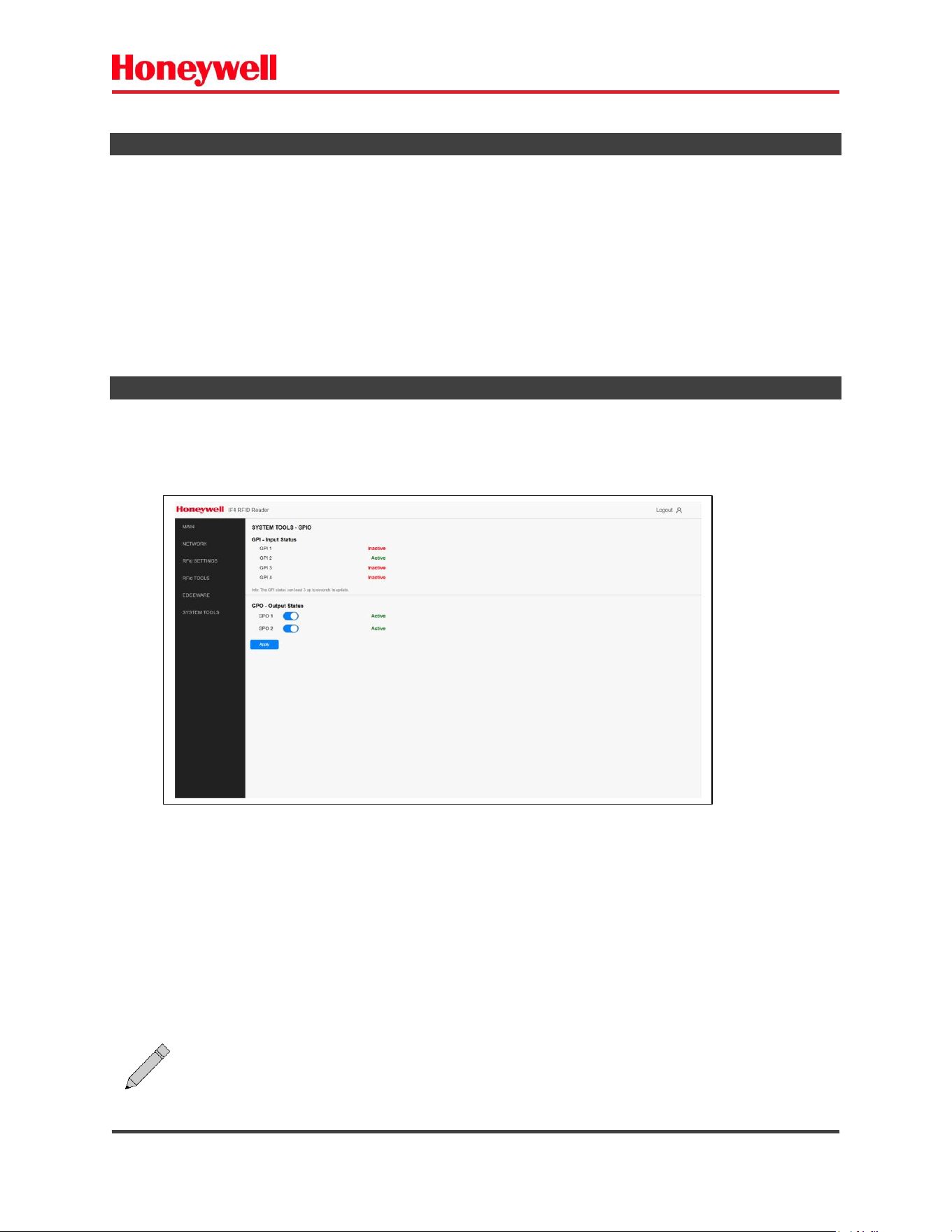
2.6.1) GPIO TOOLS
GPIO is an optional feature and allows it to:
- Check the digital input status – GPI (Activated / Deactivated).
- Set and check the digital output status – GPO (Activate / Deactivate).
The status of each input is updated/displayed in real time.
After selecting the Output status click on “Apply” button to make the changes effective.
Fig. 21 – GPIO.
Note: The digital outputs are open collector type. When the output is activated the
output pin is connected to the common.
IF4 – Fixed RFID Reader Series User Guide (EN) - 32
2.6.2) SYSTEM LOG
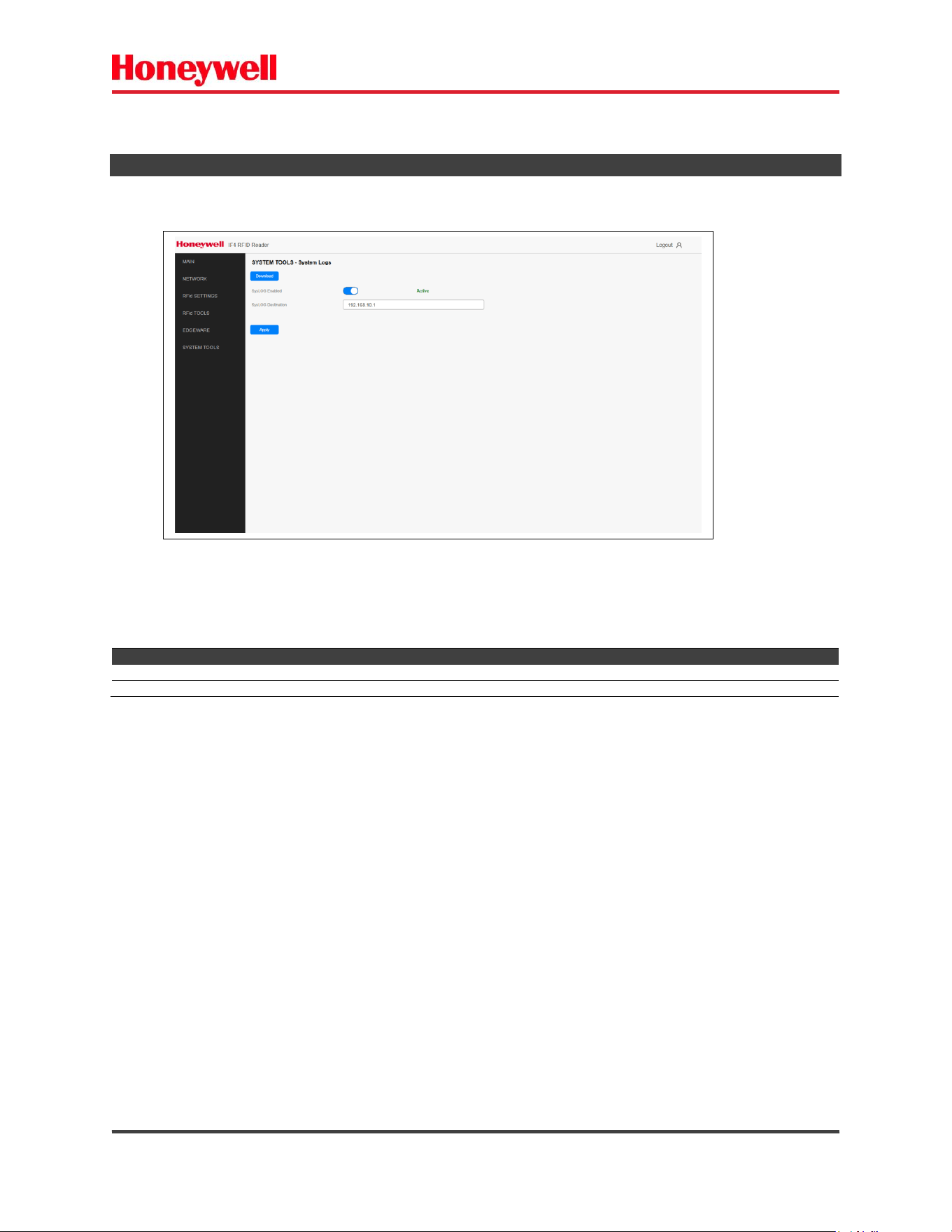
The system LOG presents the internal system LOGs.
Download button -> Downloads the LOG file (txt format).
Setting
Description
Syslog Enabled
Send the LOGs registers to an external syslog server. Default is disabled.
Syslog destination address
Defines the IP address of the external syslog server. Syslog port: 514.
After configuring, click on “Apply” button.
Fig. 22- System LOGs.
IF4 – Fixed RFID Reader Series User Guide (EN) - 33
2.6.3) FIRMWARE UPGRADE
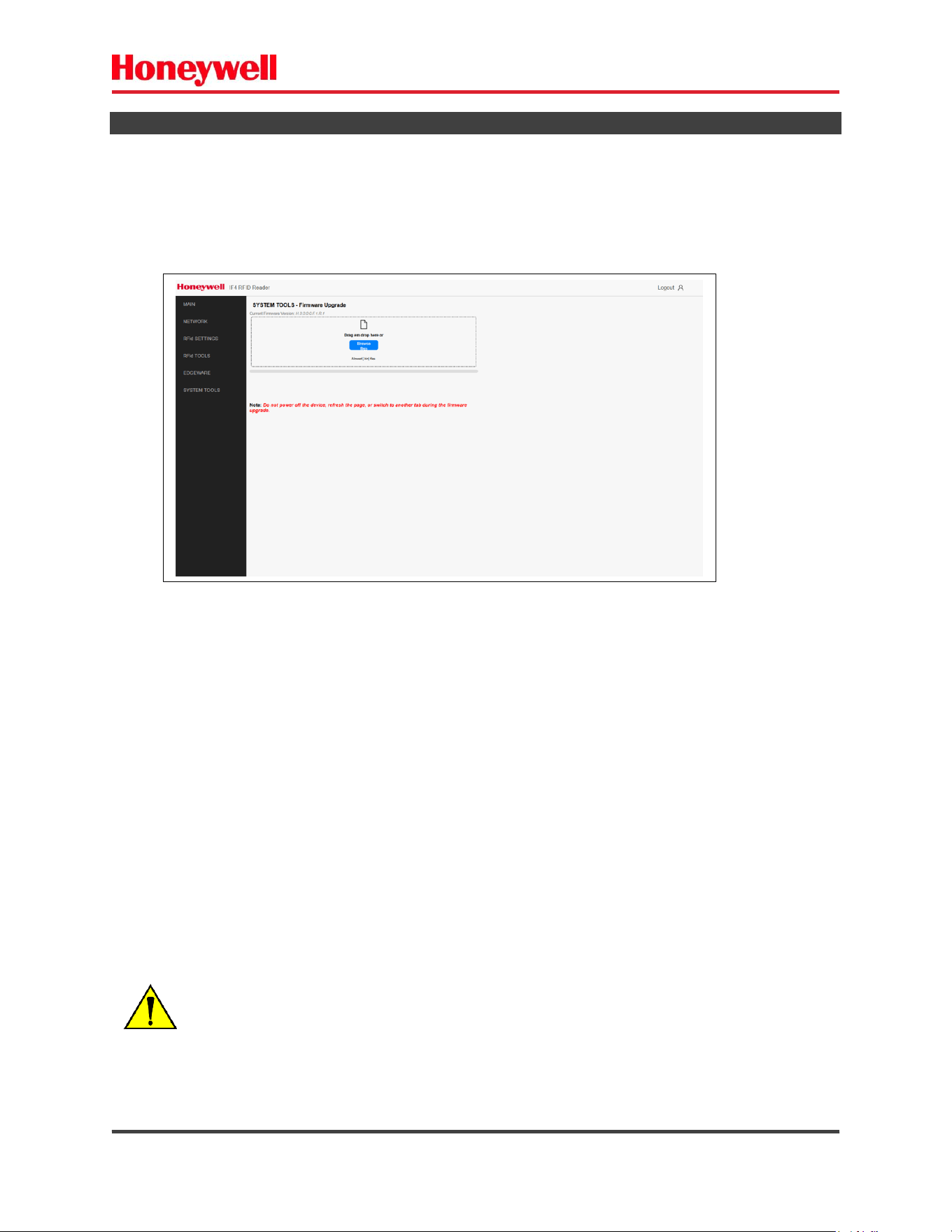
The firmware upgrade allows the entire system firmware upgrade.
a) Select the firmware file.
b) Click “UPGRADE” button.
c) Wait for upgrade process.
Fig. 23 – Firmware Upgrade.
PROFESSIONAL OPERATION REQUIRED!
It must be performed only by a trained professional.
Do not power off or disconnect the equipment while the firmware upgrade process is
running.
IF4 – Fixed RFID Reader Series User Guide (EN) - 34
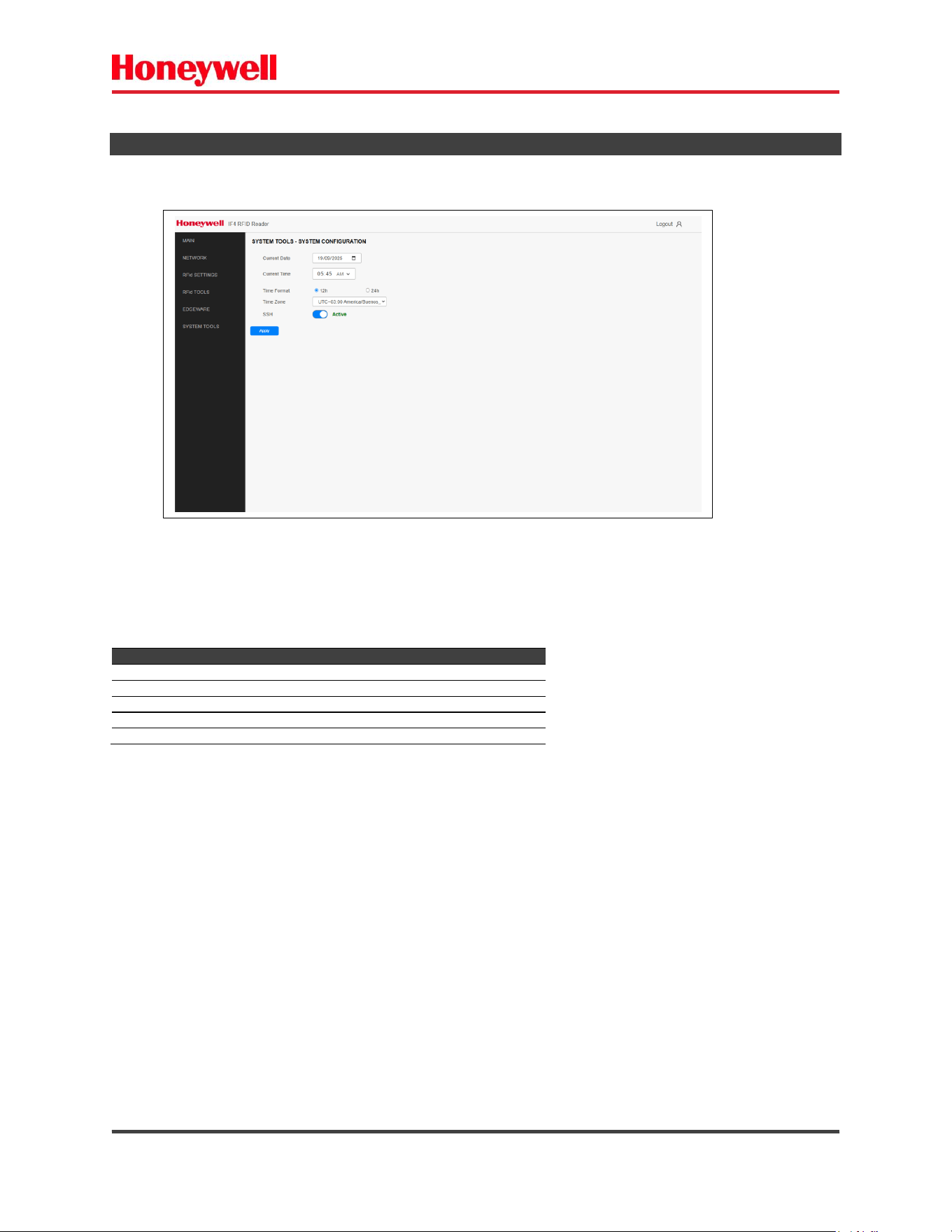
2.6.4) SYSTEM CONFIGURATION
Parameter
Description
Current Date
Displays the current reader system date
Current Time
Displays the current reader system time
Time Format
Time Format (12H/24H). Default is 24H.
Time Zone
Time Zone. Default is Brazil time.
SSH Enable/Disable
SSH service enable/disable. Default is disabled.
After changes click “Apply” button.
Fig. 24 – System Configuration.
IF4 – Fixed RFID Reader Series User Guide (EN) - 35
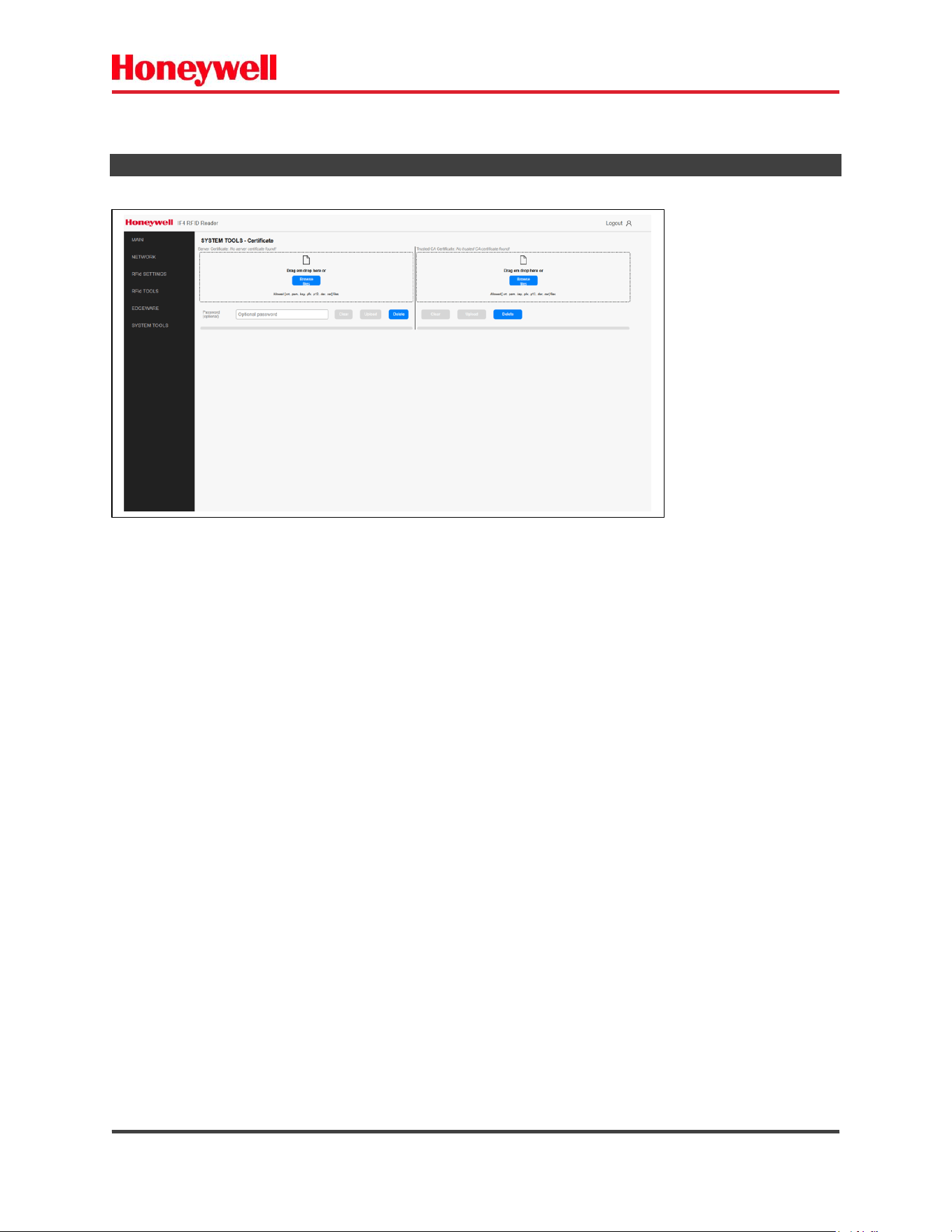
2.6.5) CERTIFICATES
After selecting the certificate file click Upload Button to install.
File format allowed: .crt .pem .key .p12 .der . cer.
To delete the installed certificate click Delete button.
Fig. 25 – Install Certificates.
IF4 – Fixed RFID Reader Series User Guide (EN) - 36
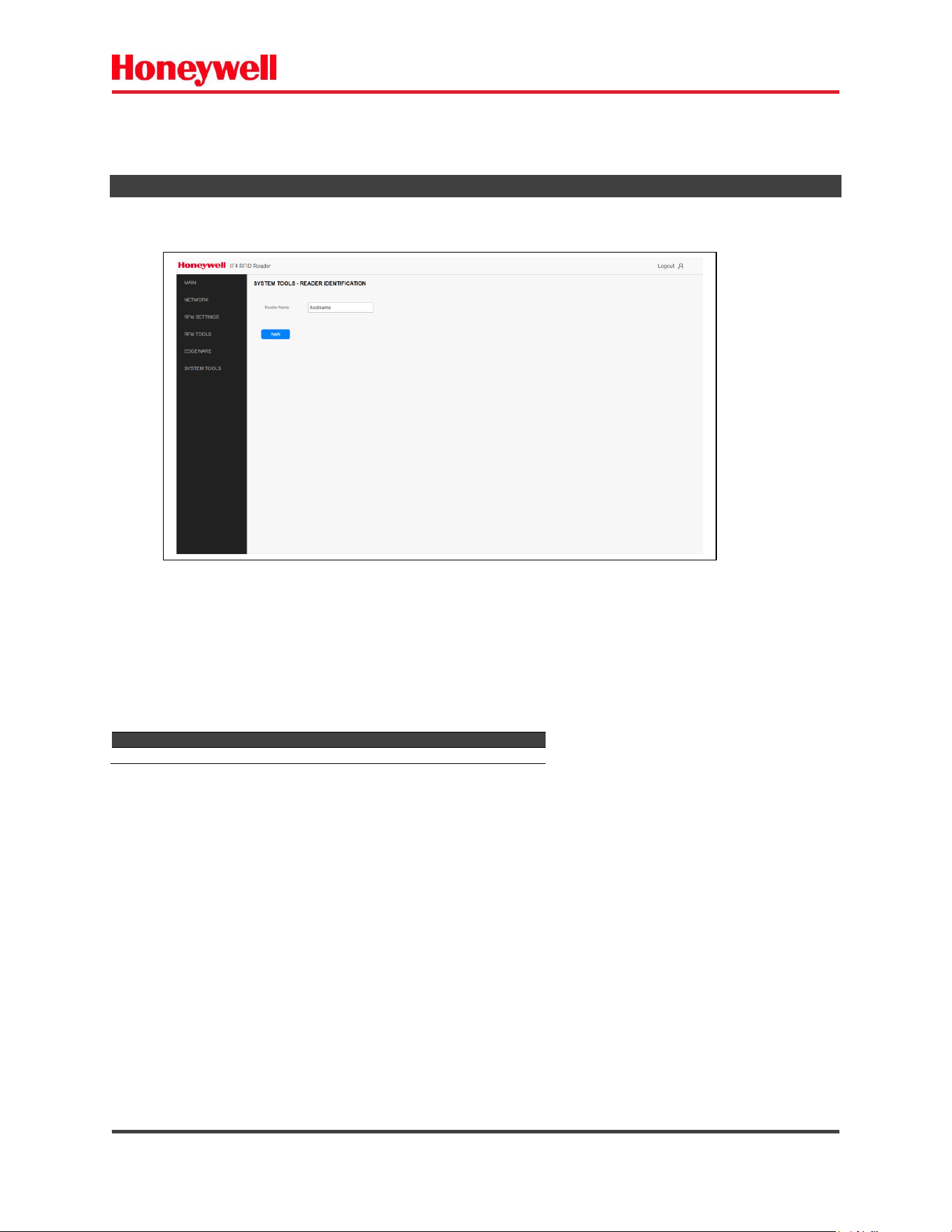
2.6.6) READER IDENTIFICATION
Parameter
Description
Reader name
Reader Identification.
After changes click “Apply” button.
Fig. 26 – Reader Identification.
IF4 – Fixed RFID Reader Series User Guide (EN) - 37
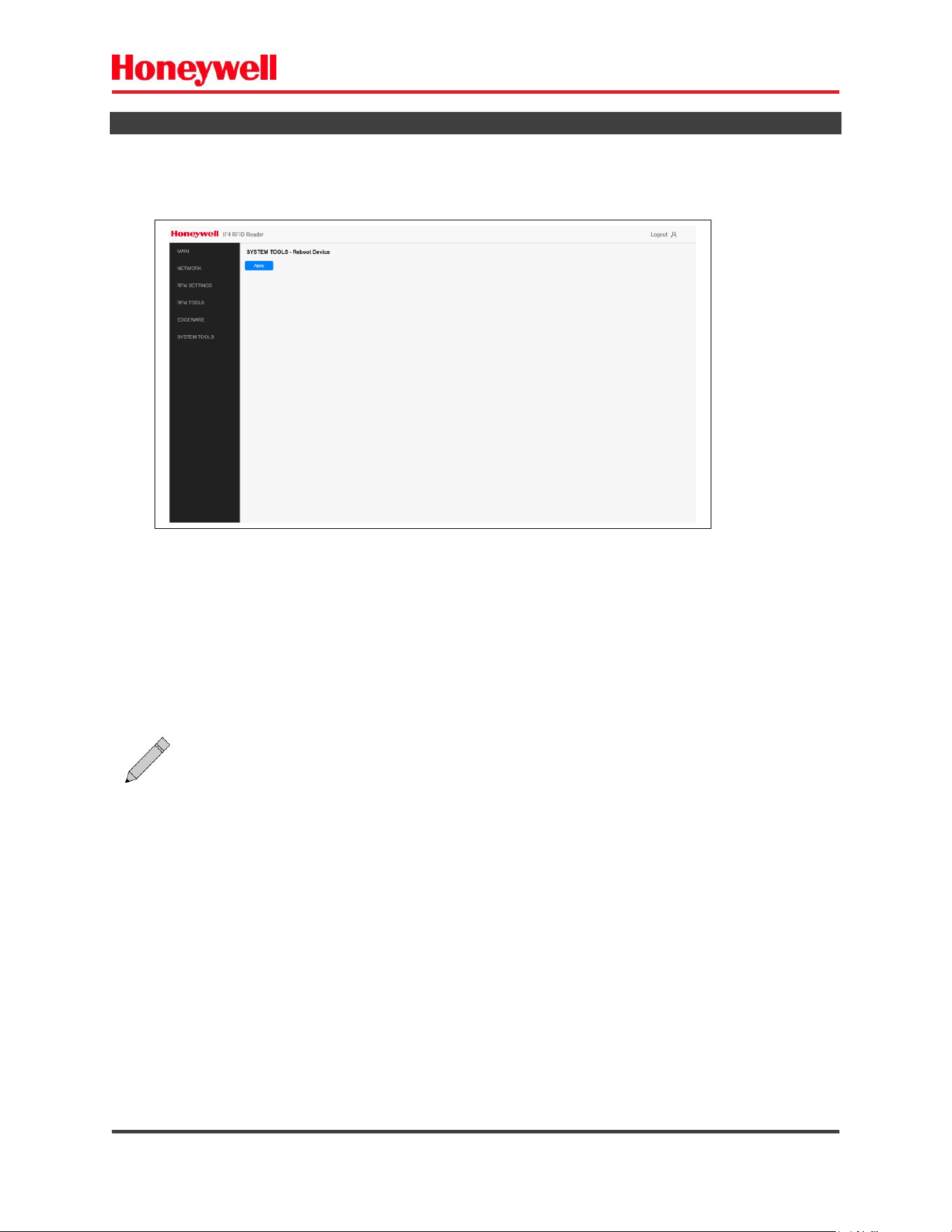
2.6.7) REBOOT
After clicking “Apply” button you need to confirm.
Fig. 27 – Reboot.
Note: During startup, the reader does not work
.
IF4 – Fixed RFID Reader Series User Guide (EN) - 38
2.6.8) PASSWORDS
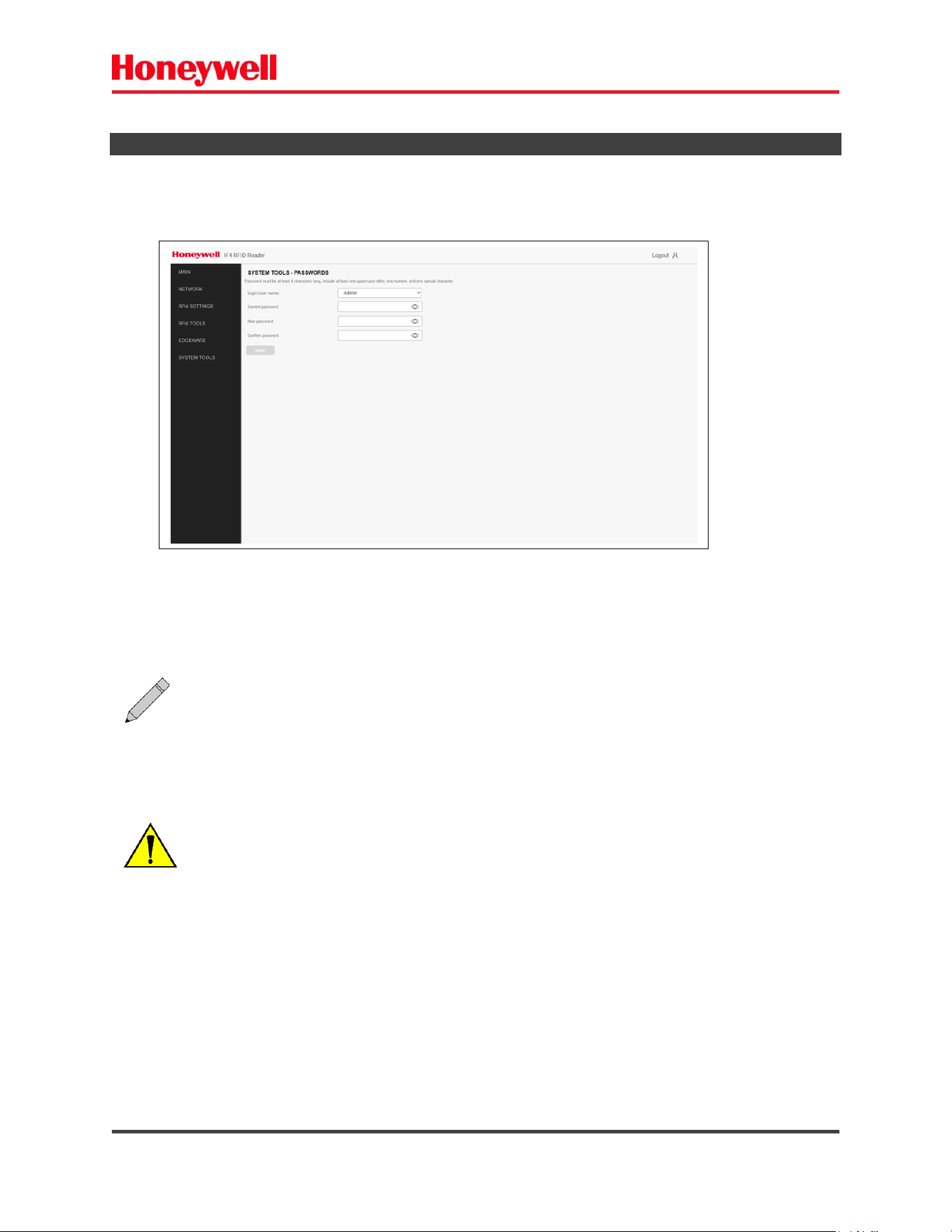
- Administrator password – the administrator can change any parameters of the reader.
- Operator password – The operator has read only access. It cannot modify parameters and settings.
Fig. 28 – Passwords.
Note:
You need to set the hard password.
Password must be at least 8 characters long, include at least one uppercase letter, one
number, and one special character.
ATTENTION: Setting the password is a secure and IRREVERSIBLE operation.
Do not forget the password you set.
IF4 – Fixed RFID Reader Series User Guide (EN) - 39
2.6.9) RESTORE FACTORY DEFAULTS
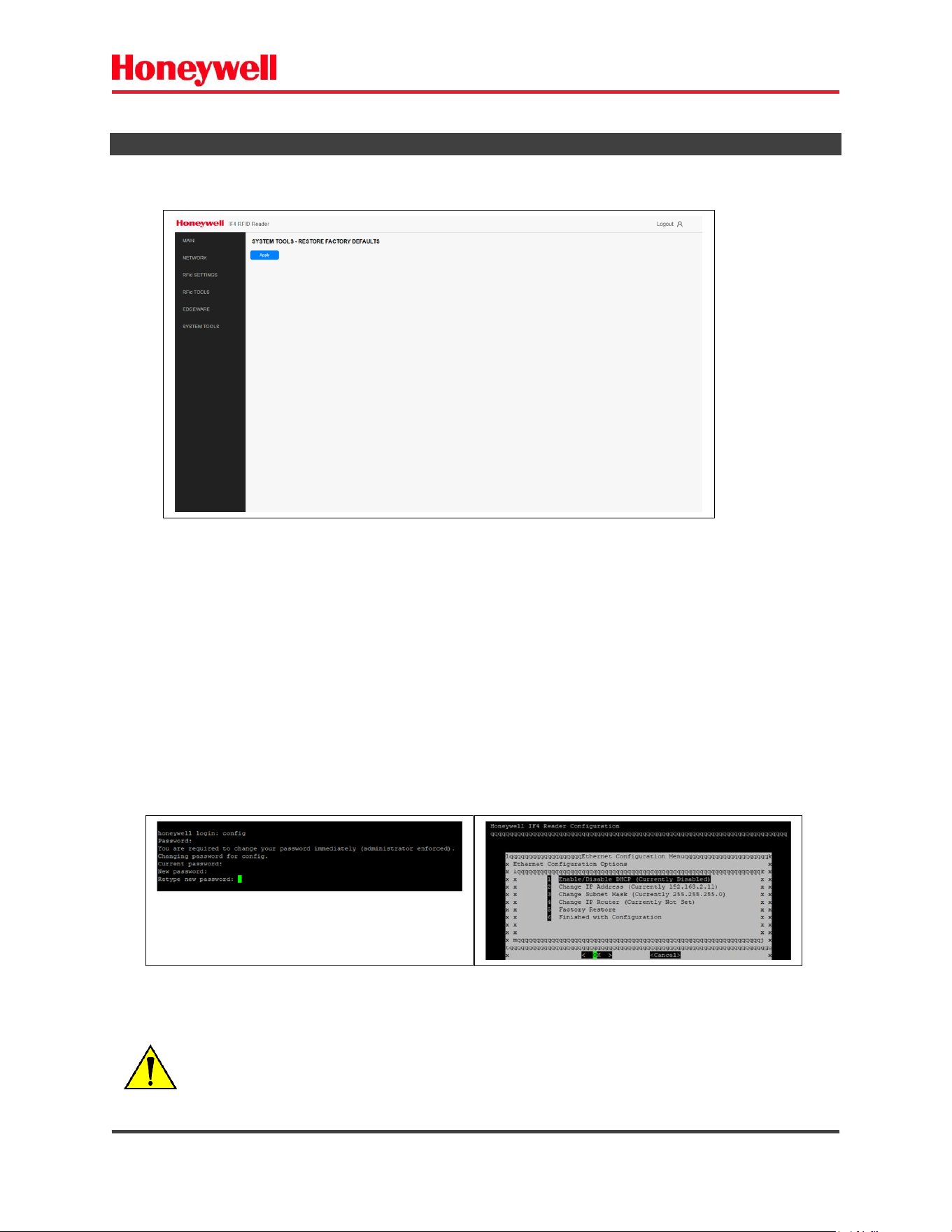
Via Web page
After clicking “Apply” button you need to confirm.
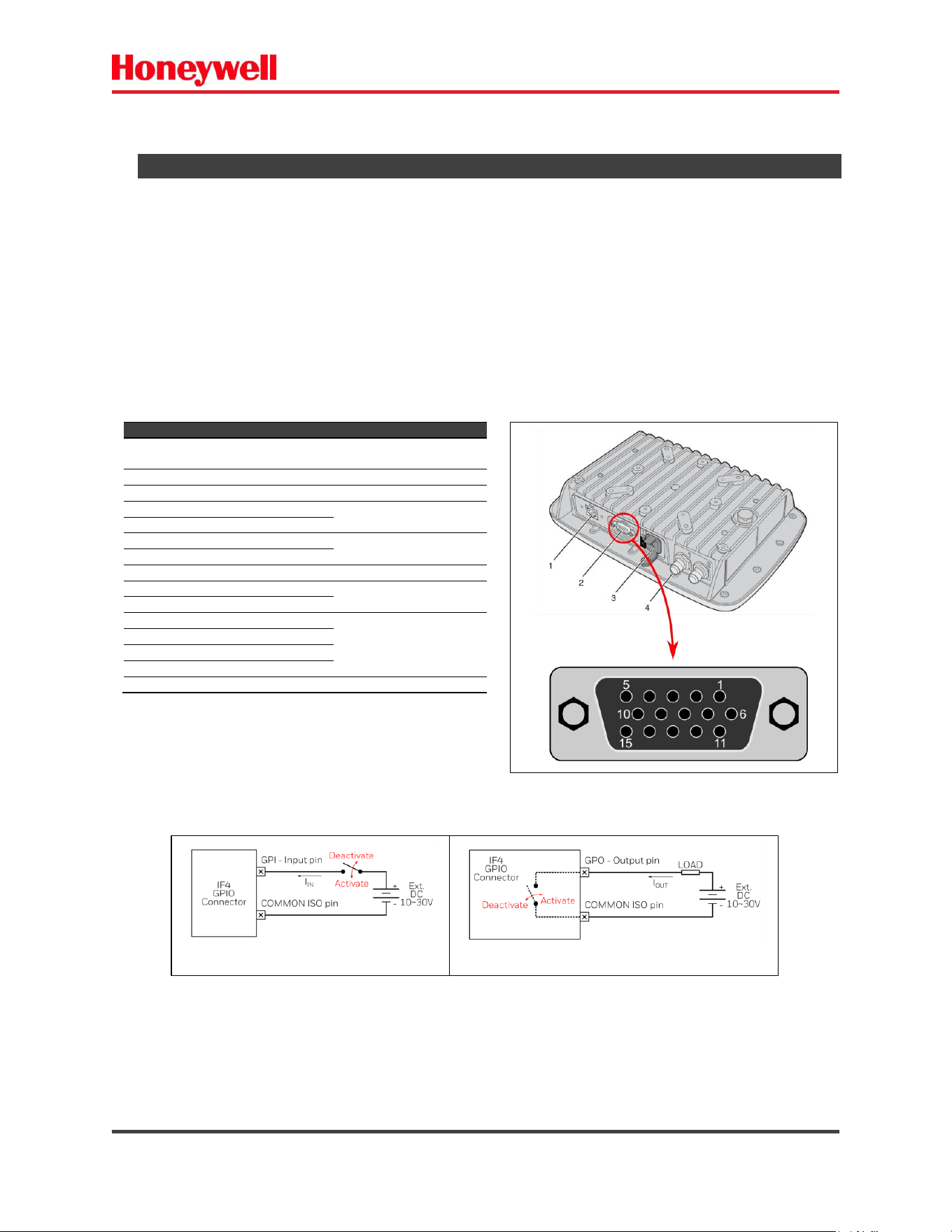
You can restore to factory defaults by USB/COM port.
Follow the instructions:
a) Connect the reader USB port to computer.
b) Locate and open the COMPORT related (Putty or equivalent).
c) Login (default login = config/config).
d) Change the password (if default).
e) Factory Restore Option (5).
f) Confirm the operation (Yes).
Fig. 29 – Restore to factory defaults.
ATTENTION:
The factory restore operation is IRREVERSIBLE.
All passwords (Web/USB) will be restored to default.
Fig. 30 – Factory Restore – USB/COMPORT.
IF4 – Fixed RFID Reader Series User Guide (EN) - 40
3) GPIO PORTS.
The reader has four general purpose input and two output (GPIO) digital interfaces.
You connect external controls such as motion sensors or indicator lamps to the GPIO interfaces, which
can then trigger reader operations.
Each interface is electrically isolated from the reader and designed for low voltage
DC loads. The IF4 reader can also supply 12 [V
DC
] at 0.20 [A] to external devices.
How the inputs and outputs are used depends on the RFID application software being used in the
system. You need to coordinate input and output control wiring with the software developer. The GPIO
is an optional board.
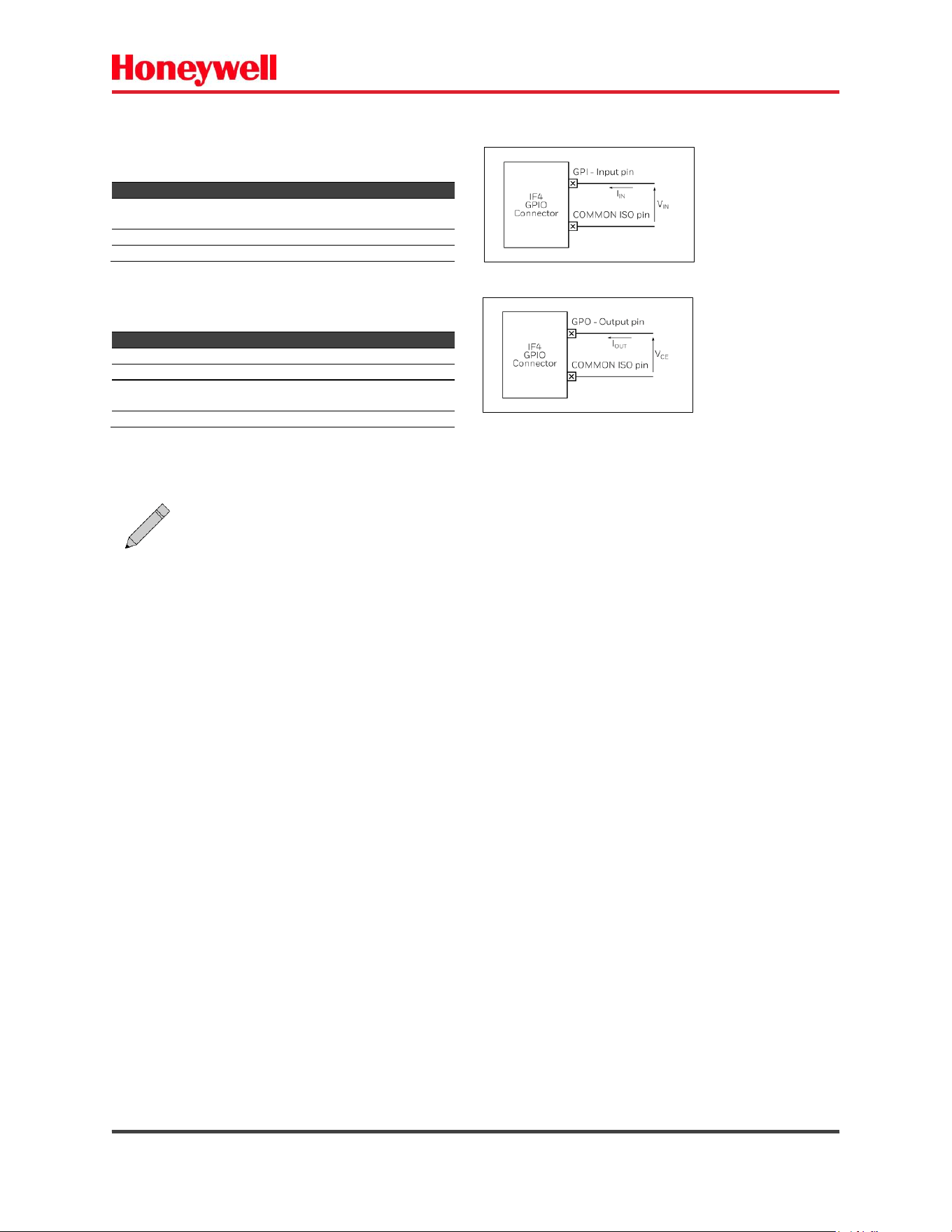
The GPIO inputs and outputs are available on the DB-15 connector of the IF4 RFID fixed reader. This is an
optional connector, which depends on the reader model.
Pins 4 and 5 (GND) are internally shorted.
Pins 6 and 7 (+PWR) are internally shorted.
The digital outputs are OPEN COLLECTOR type.
Pin
Description
Direction/Function
1
+12 [VDC] output – not
isolated (200 [mA] Max).
OUTPUT
2
RS232 TX not isolated
OUTPUT
3
RS232 RX not isolated
INPUT
4
GND not isolated
GND
5
GND not isolated
6
+ VCC POWER not isolated
POWER VCC
10 to 30 VDC
7
+ VCC POWER not isolated
8
GPIO COMMON isolated
COMMON isolated
9
GPO OUT 1 isolated
Open Collector OUTPUTS
isolated
10
GPO OUT 2 isolated
11
GPI INPUT 1 isolated
GPI INPUTS isolated
12
GPI INPUT 2 isolated
13
GPI INPUT 3 isolated
14
GPI INPUT 4 isolated
15
GPO pullup - isolated
OUT pull up isolated
Fig. 31 – IF4 – GPIO Connector – front view.
Fig. 32 - GPIO operation. a) Inputs. b) Outputs.
IF4 – Fixed RFID Reader Series User Guide (EN) - 41
GPIO electrical characteristics:
Digital Inputs – isolated
Parameter
Min.
Max.
Unit
I
IN
6.5
@ 10 [V]
20
@ 30 [V]
[mA]
V
IN
10
30
[V]
Isolation
-
4000
[V]
Digital Outputs – isolated
Parameter
Min.
Max.
Unit
I
OUT
-
50
[mA]
V
CE
-
30
[V]
V
CESAT
-
1.0
@ 50 [mA]
[V]
Isolation
-
3750
[V
AC
]
Note: The GPIO is an optional board - depends on the reader model.

IF4 – Fixed RFID Reader Series User Guide (EN) - 42
4) TROUBLESHOOT - BASIC.
This section includes lists of problems, their causes and possible solutions.
4.1) POWER PROBLEMS.
Power problems are related to the reader's power source and connections.
Problem
Cause (s)
Solution
Reader does not turn on
– LEDs OFF
Lack of energy
Check the electrical installation.
Intermittent power
Check the electrical installation.
Power supply
problem
Check the output voltage of power supply- must have 48
[V
DC
].
Connections of
power supply
Check the power cables and connections between power
supply and the reader – Power injector.
4.2) CONNECTIVITY PROBLEMS.
Connection problems are related to the reader’s connection.
4.2.1) ETHERNET CONNECTION.
The reader is connected via the ethernet network.
Problem
Cause (s)
Solution
Connection failure –
loop back OFF.
Ethernet connections
Check the ethernet cables and connections between the
reader and the computer.
Ethernet connections
Check the ethernet cables and connections of the Power
Injection – POE.
You assigned a static IP
address to the reader
but cannot connect the
reader over your
network.
Network settings
Make sure that DHCP is disabled and that your network
TCP/IP parameters are set correctly.
Network settings
If you access the Internet through a proxy server, make sure
you add the IP address of the reader to the Exceptions list.
You cannot connect to
the reader using a web
browser – Ping fail.
Incorrect IP/Mask
settings
Verify that you have the correct IP address for the reader.
Incorrect IP/Mask
settings
Verify the ethernet and network settings in your computer.
The reader displays the
message NOSESSIONS
Number of sessions
limit reached
Close one or more BRI-Telnet session.
You cannot load a
security certificate.
Secure browser
connection
You must use a secure web browser connection to load
certificates.
The reader does not
respond to your RFID
BRI application.
BRI application
If your application is running on a desktop PC, you
need to enable external BRI connections to the
reader.
4.2.2) SERIAL CONNECTION – RS232.
The reader is connected via Serial – RS232.

IF4 – Fixed RFID Reader Series User Guide (EN) - 43
Problem
Cause (s)
Solution
Connection failure
Serial connections
Verify the RS232 cable and connectors.
RS232 settings
Verify that your serial connection is configured to
115200, N, 8, 1, no flow control.
Wrong COM PORT
Verify the port you use for this connection.
4.2.3) SERIAL CONNECTION – USB.
The reader is connected via Serial – USB. In this case a COM PORT – Serial – is opened in your computer.
Problem
Cause (s)
Solution
You cannot connect to
the reader through the
USB port.
USB connections
Verify the USB cable and connectors.
USB Driver
Make sure that the USB drivers for the reader have been
installed correctly.
Wrong COM PORT
Verify the port you use for this connection.
Serial settings
Verify that your COM PORT is configured to
115200, N, 8, 1, no flow control.
4.3) READINGS PROBLEMS - RFID.
Note:
The baud rate – 115200 is the default value. It can be changed by the user.

IF4 – Fixed RFID Reader Series User Guide (EN) - 44
You can solve many problems you may encounter when working with your RFID system by carefully
checking the RFID settings and changing them accordingly.
Problem
Cause (s)
Solution
The reader is unable to
read RFID tags or
seems to read TAGs
slowly or
inconsistently.
Antenna connections
Verify the antenna cables and connections.
Antenna polarization
Verify the correct polarization of the antenna – linear H / V or
circular.
Antenna positioning
Adjust for the correct positioning of the RFID antenna.
Damaged TAG
Check the TAG you are using.
RFID settings
Make sure you selected the correct tag types and RFID
settings for your application.
Operation power
Adjust the RF power value (Field Strength).
Note:
For help, contact your RFID system consultant.
.

IF4 – Fixed RFID Reader Series User Guide (EN) - 45
5) PRODUCT SPECIFICATIONS.
IF4 – fixed UHF RFID reader.
ELECTRICAL
Input Power PoE
802.3af/at – Power Over Ethernet
DC electrical rating PoE
48.0 [V
DC
] x 0.300 [A] max
DC external input
10 ~ 30 [VDC] / 1.2 [A] max @ 12 [VDC] / 0.62 [A] max @ 24 [VDC]
Power consumption DC ext sup
15 [W] max @ DC ext. Supply
Power consumption PoE
15 [W] max @ PoE
Power Standby
5.0 [W] max
RADIO FREQUENCY
Frequency ranges (UHF) Factory
configured
865.0 ~ 867.0 [MHz]
915.0 ~ 928.0 [MHz]
902.0 ~ 928.0 [MHz]
902.0 ~ 907.0 / 915.0 ~ 928 [MHz]
Transmit Power
Up to 30.0 [dBm] +- 1dBm – steps 0.5dBm
Reception Sensitivity
- 82.0 [dBm] max. @depending on the medium access mode
Read Rate
> 700 [reads/s]. @depending on the TAGs and environmental conditions
Antenna ports – External
1 – with integrated antenna models
2 – without integrated antenna models
Antenna (RF) connector type
RP-TNC female connector
Integrated antenna options
Linear 7.5 [dBiL] FCC / ETSI
External Antenna supported specs
Liner/CP Antenna with 5.9(dBi) FCC / ETSI
RFID PROTOCOLS
Air interface protocols
EPC Global UHF Class1 Gen2
ISO 18000-63
ARTEFATO SJ5511 PA (Brazil)
CONNECTIVITY
Ethernet port – RJ45
10/100 BaseT
RS232 – DB15
Optional – depends on model
USB – Type B female
For configuration only
GPIO – DB15
4 inputs isolated
2 outputs isolated
MECHANICAL
Dimensions LxWxH
With integrated antenna: 265 x 186 x 75 [mm] (10.2 x 7.3 x 3.0 [in])
Without integrated antenna: 265 x 186 x 59 [mm] (10.2 x 7.3 x 2.3 [in])
Weight
1.6 [Kg] (3.52 [lb])
ENVIRONMENTAL
Environmental
With integrated antenna: IP65 – Using suitable connectors.
Without integrated antenna: IP54
Operating Temperature
-25 ~ 65 [°C] (-13 ~ 149 [°F])
Storage Temperature
-30 ~ 75 [°C] (-22 ~ 167 [°F])
Humidity
10 ~ 95 [%] relative humidity, non-condensing
SOFTWARE
Operating System
Linux embedded
Application interfaces
Basic Reader Interface (BRI)
PROCESSOR
CPU
MCiMx7 – NXP @ 1GHz
RAM
DDR3 SDRAM 1 Gbyte
Flash
eMMC 8 GByte
Note:
Specifications listed may be different due to individual country regulations.

IF4 – Fixed RFID Reader Series User Guide (EN) - 46
Supported Regions
Region
Freq
(KHz)
Spacing
(KHz)
Channels
Max Power
(dBm)
FCC Part. 15247
902750~927250
500
50
30
Australia*
920250~924750
500
10
30
Brazil
902750~907250
915250~927250
500
35
30
China*
920625~923625
250
4
30
ETSI Lower EU
865700~867500
200
4
30
ETSI Upper EU*
916300~918700
400
3
30
India*
865100~866900
200
4
30
Indonesia*
920750~922250
500
4
30
Israel*
916250
500
1
30
Japan2*
916800~920400
200
4
30
Korea*
917300~920300
600
6
30
Malaysia*
919250~922750
500
8
30
New Zealand*
922250~926750
500
10
30
Peru*
916250~927250
500
23
30
Philippines*
918250~919750
500
4
30
Singapore*
920250~924750
500
10
30
South Africa*
915600~918800
200
17
30
Taiwan*
920750~927250
500
14
30
Thailand*
920250~924750
500
10
30
Uruguay*
916250~927250
500
50
30
Vietnam*
918750~922250
500
8
30
ETSI -> Countries of European Union – EU (865~867 MHz).
* Depends on local certification.
IF4 – Fixed RFID Reader Series User Guide (EN) - 47
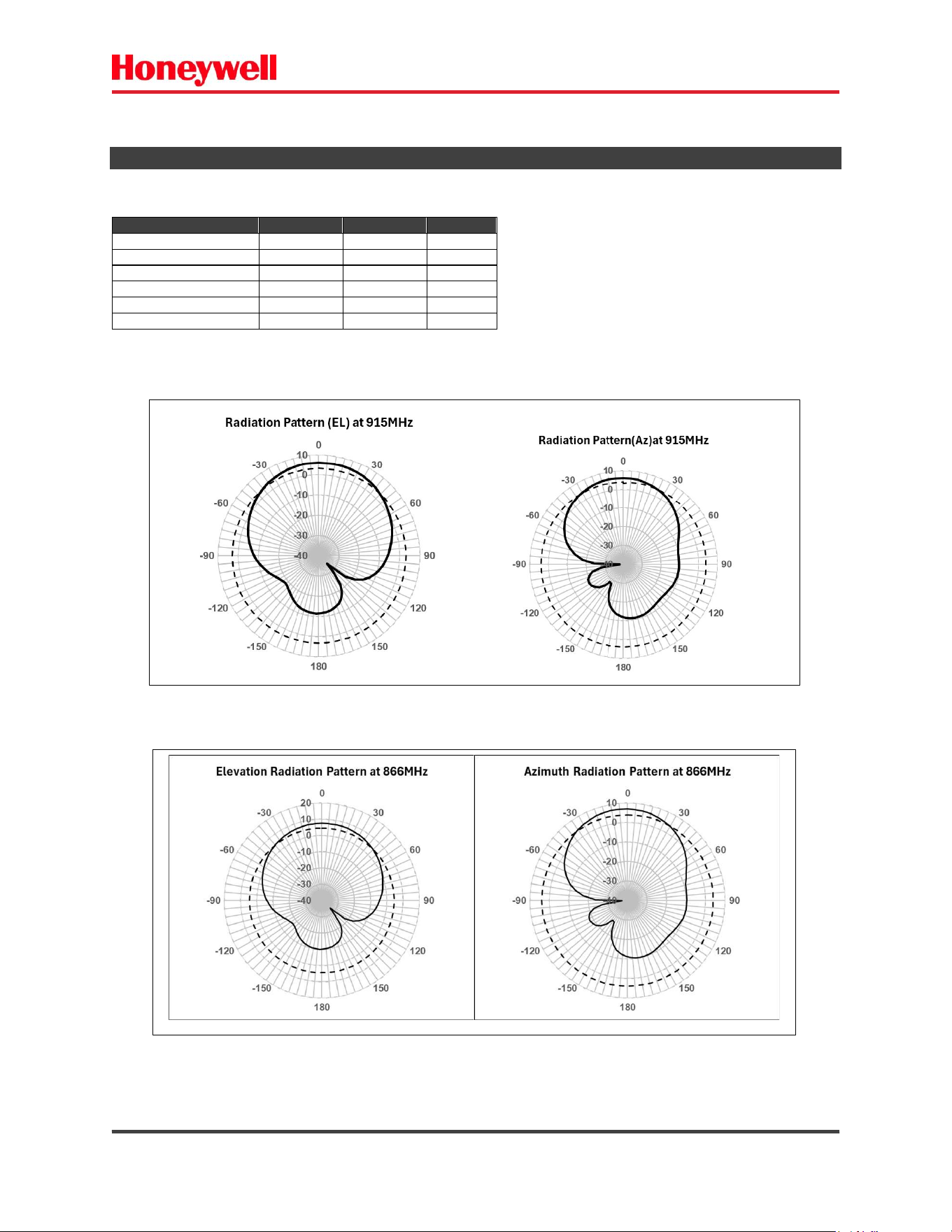
5.1) INTEGRATED ANTENNA PARAMETERS.
Parameter
FCC
ETSI
Unit
Frequency Range
902~928
865~867
MHz
Polarization
Linear
Linear
Gain (typical)
6.15
6.15
dBi
VSWR
1.6 : 1
1.6 : 1
-3dB EL Beamwidth
95
95
deg
-3dB AZ Beamwidth
65
65
deg
Radiation Pattern FCC
Radiation Pattern ETSI
IF4 – Fixed RFID Reader Series User Guide (EN) - 48
6) CONNECTIONS
The IF4 have the following external connections:
- Ethernet RJ45 (Network + PoE).
- GPIO connector DB-15.
- External antenna connector RP-TNC Female.
- USB port – configuration.
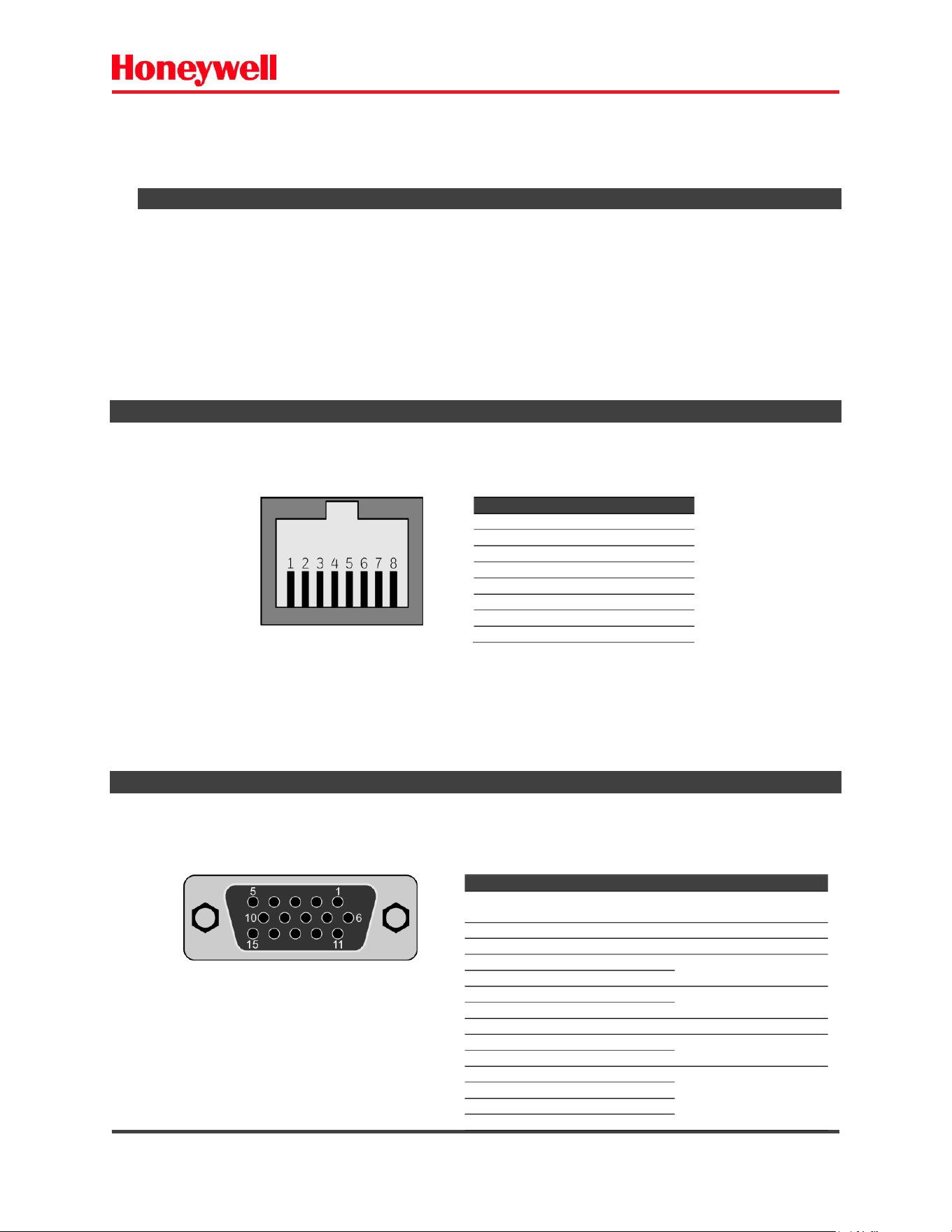
6.1) ETHERNET PORT.
The Ethernet port allows Ethernet communications and Power-Over-Ethernet. Use
the illustration to understand the port pin of RJ45 female connector assignments.
6.2) GPIO PORT.
The GPIO port allows GPIO communications with your reader. The GPIO port is standard with two-
antenna port options of the reader, and optional with the integrated antenna options of the reader.
Pin
Description
1
Ethernet TX+ / PoE+
2
Ethernet TX- / PoE+
3
Ethernet RX+ / PoE-
4
POE + 48 [V
DC
]
5
POE + 48 [V
DC
]
6
Ethernet RX- / PoE-
7
POE-
8
POE-
Fig. 33 – Ethernet port – RJ45.
Pin
Description
Direction/Function
1
+12 [VDC] output – not
isolated (200 [mA] Max).
OUTPUT
2
RS232 TX not isolated
OUTPUT
3
RS232 RX not isolated
INPUT
4
GND not isolated
GND
5
GND not isolated
6
+ VCC POWER not isolated
POWER VCC
10 to 30 VDC
7
+ VCC POWER not isolated
8
GPIO COMMON isolated
COMMON isolated
9
GPO OUT 1 isolated
Open Collector OUTPUTS
isolated
10
GPO OUT 2 isolated
11
GPI INPUT 1 isolated
GPI INPUTS isolated
12
GPI INPUT 2 isolated
13
GPI INPUT 3 isolated
14
GPI INPUT 4 isolated
15
GPO pullup - isolated
OUT pull up isolated
Fig. 34 – GPIO – 15 pin female connector.
IF4 – Fixed RFID Reader Series User Guide (EN) - 49
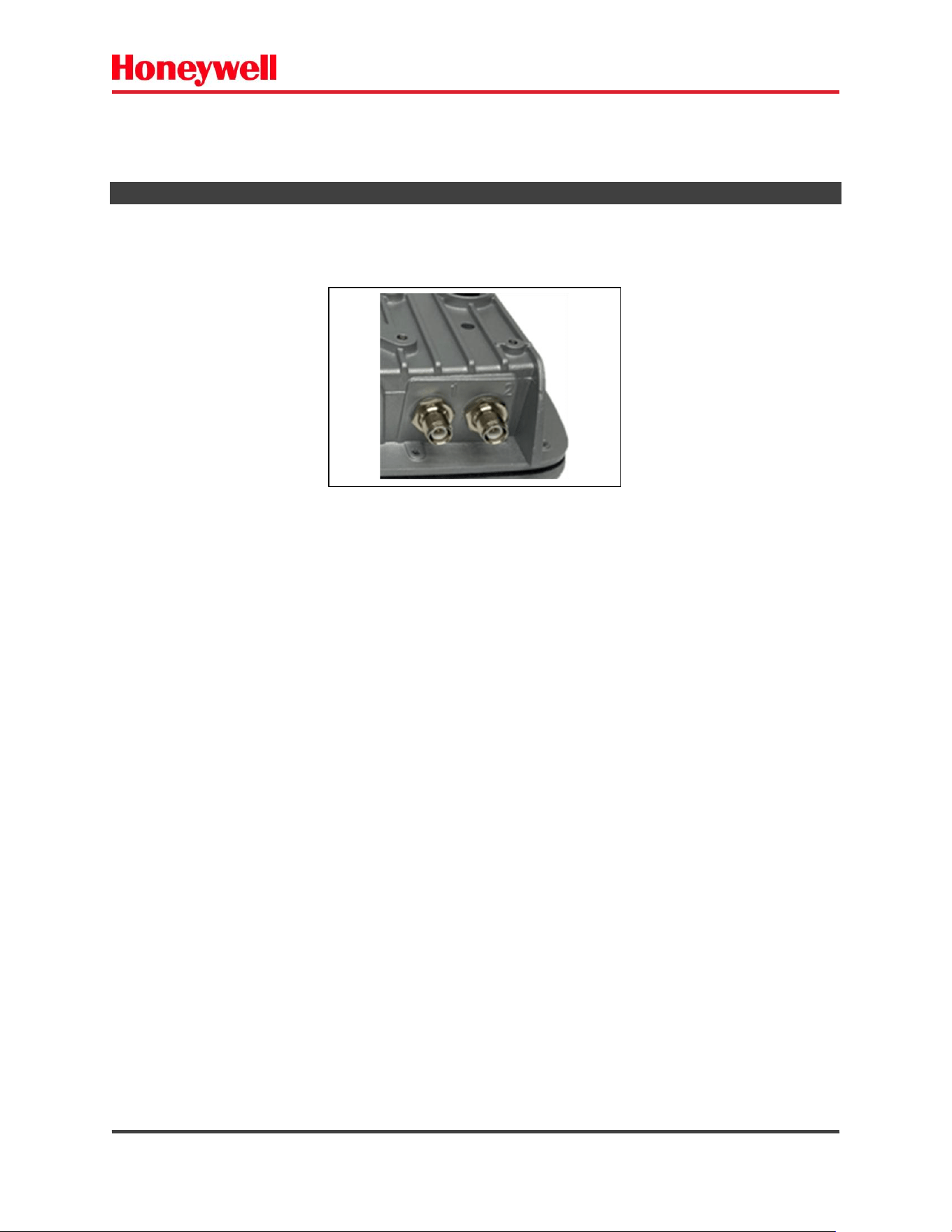
6.3) ANTENNA PORTS.
The antenna ports allow to connect external antenna(s).
The connector type is RP-TNC female – 50[Ω].
Fig. 35 – External antenna Connector.

IF4 – Fixed RFID Reader Series User Guide (EN) - 50
7) Agency Approvals
FCC Communications commission interface statement
Model: IF4
FCC ID: HD5-IF4
This device complies with Part 15 of the FCC Rules. Operation is subject to the following two
conditions:
1. This device may not cause harmful interference.
2. This device must accept any interference received, including, an interference that may
cause undesired operation.
This equipment has been tested and found to comply with the limits for a Class B digital device,
pursuant to Part 15 of the FCC Rules. These limits are designed to provide reasonable protection
against harmful interference in a residential installation. This equipment generates, uses and can
radiate radio frequency energy and, if not installed and used in accordance with the instructions, may
cause harmful interference to radio communications. However, there is no guarantee that interference
will not occur in a particular installation. If this equipment does cause harmful interference to radio or
television reception, which can be determined by turning the equipment off and on, the user is
encouraged to try to correct the interference by one or more of the following measures:
• Reorient or relocate the receiving antenna.
• Increase the separation between the equipment and receiver.
• Connect the equipment into an outlet on a circuit different from that to which the receiver is connected.

IF4 – Fixed RFID Reader Series User Guide (EN) - 51
• Consult the dealer or an experienced radio/TV technician for help.
FCC Caution: Any changes or modifications not expressly approved by the party responsible for
compliance could void the users authority to operate this equipment
This transmitter must not be co-located or operating in conjunction with any other antenna or
transmitter.
Radio exposure statement:
This equipment complies with FCC radiation exposure limits set fourth for an uncontrolled environment.
This equipment should be installed and operated with minimum distance 25cm between the radiator &
your body.

IF4 – Fixed RFID Reader Series User Guide (EN) - 52
Industry Canada
Model: IF4
IC: 1693B-IF4
This device complies with ISED's license-exempt RSSs. Operation is subject to the following
two conditions:
(1) this device may not cause harmful interference, and
(2) this device must accept any interference, including interference that may cause undesired operation
of the device.
Cet appareil est conforme aux RSS exemptés de licence de l’ISED. L’opération est soumise aux
deux conditions suivantes : (1) cet appareil peut ne pas causer d’interférences nocives, et (2)
cet appareil doit accepter toute interférence, y compris les interférences qui peuvent provoquer
un fonctionnement non désiré de l’appareil.
Radiation Exposure Statement:
This equipment complies with ISED radiation exposure limits set forth for an uncontrolled environment.
This equipment should be installed and operated with minimum distance 25cm between the radiator &
your body.
é s ’ xp s x m s :
Cet équipement est conforme aux limites d’exposition aux rayonnements ISED établies pour un
environnement non contrôlé. Cet équipement doit être installé et actionné avec la distance
minimale 25cm entre le radiateur et votre corps.

IF4 – Fixed RFID Reader Series User Guide (EN) - 53
DETACHABLE ANTENNA USAGE
This radio transmitter (IC: 1693B-IF4 / Model:IF4) has been approved by ISED to operate with the
antenna type listed below with maximum permissible gain indicated. Antenna types not included in this
list, having a gain greater than the maximum gain indicated for that type, are strictly prohibited for use
with this device.
Approved antenna’s list
Antenna Type
Gain
Part number
Manufacturer
Patch (Internal)
6.15 dBi
145-649-001
Honeywell
Patch (External)
5.92dBi
HON-Gemini
Honeywell
Cet émetteur radio (IC : 1693B-IF4 / Modèle :IF4PRT) a été approuvé par l’ISED pour
fonctionner avec le type d’antenne énuméré ci-dessous avec un gain maximal autorisé indiqué.
Les types d’antennes non inclus dans cette liste, ayant un gain supérieur au gain maximum
indiqué pour ce type, sont strictement interdits d’utilisation avec cet appareil.

IF4 – Fixed RFID Reader Series User Guide (EN) - 54
Revision Notes:
Version
Date
OBS
1.0
2026 – Jul
Init Deploy
While every effort has been made to ensure accuracy in this publication, no responsibility can be
accepted for errors or omissions. Data may change, as well as legislation, and you are strongly advised
to obtain copies of the most recently issued regulations, standards and guidelines. This publication is not
intended to form the basis of a contract.
Copyright Honeywell 2026.
User Manual 3018-7496-001
Language: English
Revision V1
PN: 3018-7496-001