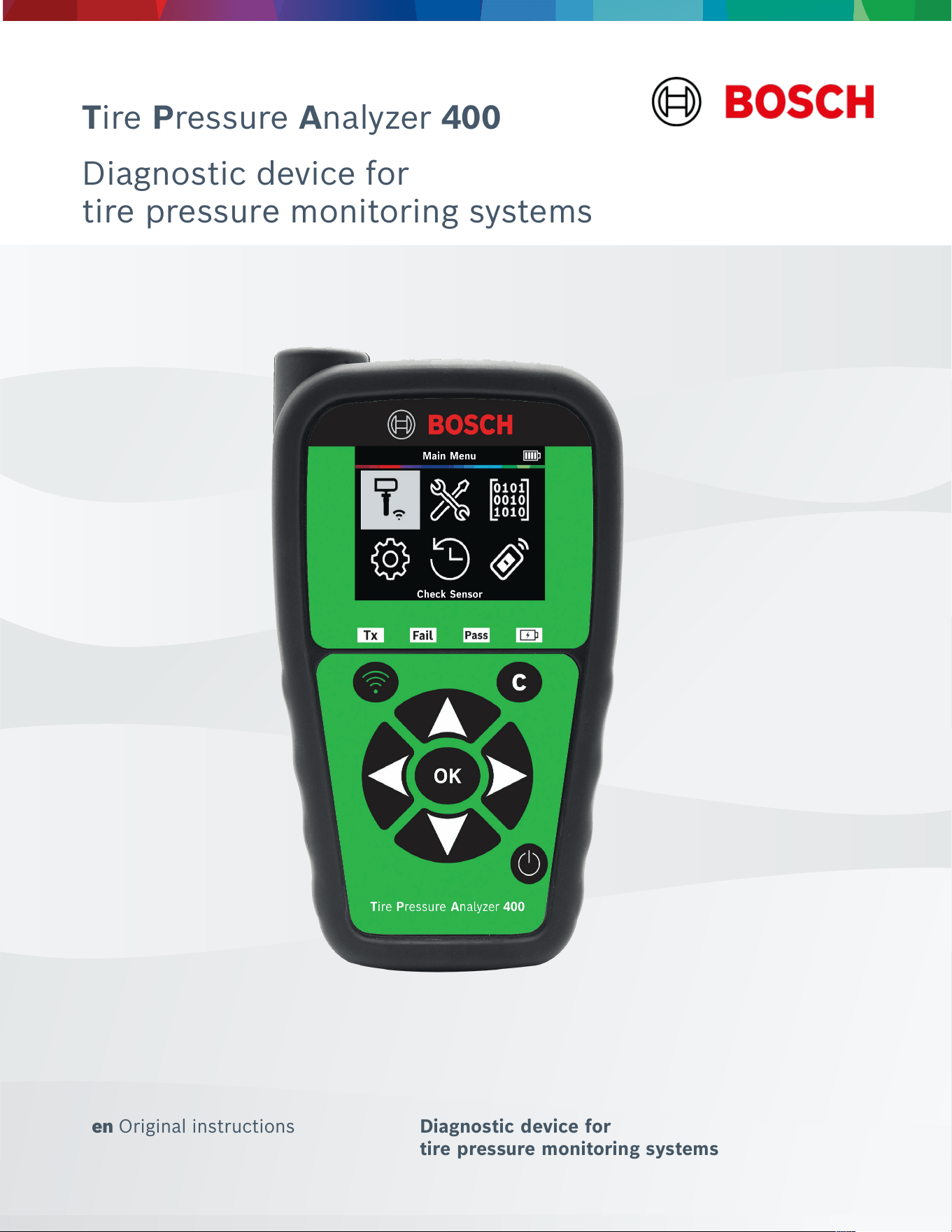
en Original instructions Diagnostic device for
tire pressure monitoring systems
Tire Pressure Analyzer 400
Diagnostic device for
tire pressure monitoring systems

en – Contents
Introduction
1. Specifications 3
2. Product Content 4
3. Important Safety Instructions 5
4. Overview 7
5. Function Keys 7
6. Header Icons 8
7. Footer Icons 8
8. Power On 8
9. Quick Start 9
10. Service Procedure 10
Usage
1. Check Sensors 12
2. Service TPMS 16
3. Program Sensor 20
4. Settings 31
5. History 41
6. RKE Test 42
Miscellaneous
1. Charging 43
2. Tool Update 44
3. Spare and wearing parts 52
4. Limited Warranty /
Certificates (USA/Canada) 53
5. Software Product License Agreement
(USA/Canada) 54
6. Important Notes 58
7. Information on battery safety and the
charging process 59
8. Disposal and scrapping 60
9. RED (Radio Equipment Directive) 60
10. Federal Communications Commission
Interference Statement 61
11. ISED Canada Statement 61
| 2 | Tire Pressure Analyzer 400 |en
1689989675_en 2025-05-01
|
Robert Bosch GmbH

Battery Type: 3.000 mAh rechargeable lithium-polymer battery
Battery Life: Approximately 300 activations per full charge
Dimensions
(H x W x D)
174 mm x 97 mm x 36 mm (6.850 in x 3.818 in x 1.417 in)
without rubber boot
176 mm x 109 mm x 43 mm (6.929 in x 4.291 in x 1.692 in)
with rubber boot
Case Material: High Impact ABS
Response Frequency: Main frequencies: 315 MHz, 433 MHz and 2,4 GHz
Weight:
280 g (0.617 lb) Tool without rubber boot
449 g (0.989 lb) Tool with rubber boot
Temperatures:
Operating: -20° C to +55° C (-4° F to 131° F)
Storage: -40° C to +60° C (-40° F to 140° F)
Operating Altitude: Up to 2000 m (6560 ft)
Screen: 71 mm display
(2.8”)
1. Specifications
Introduction
Introduction | Tire Pressure Analyzer 400 | 3 | en
1689989675_en 2025-05-01
|
Robert Bosch GmbH
| 4 | Tire Pressure Analyzer 400 | Introductionen
1 689 989 675_en 2025-05-01
|
Robert Bosch GmbH
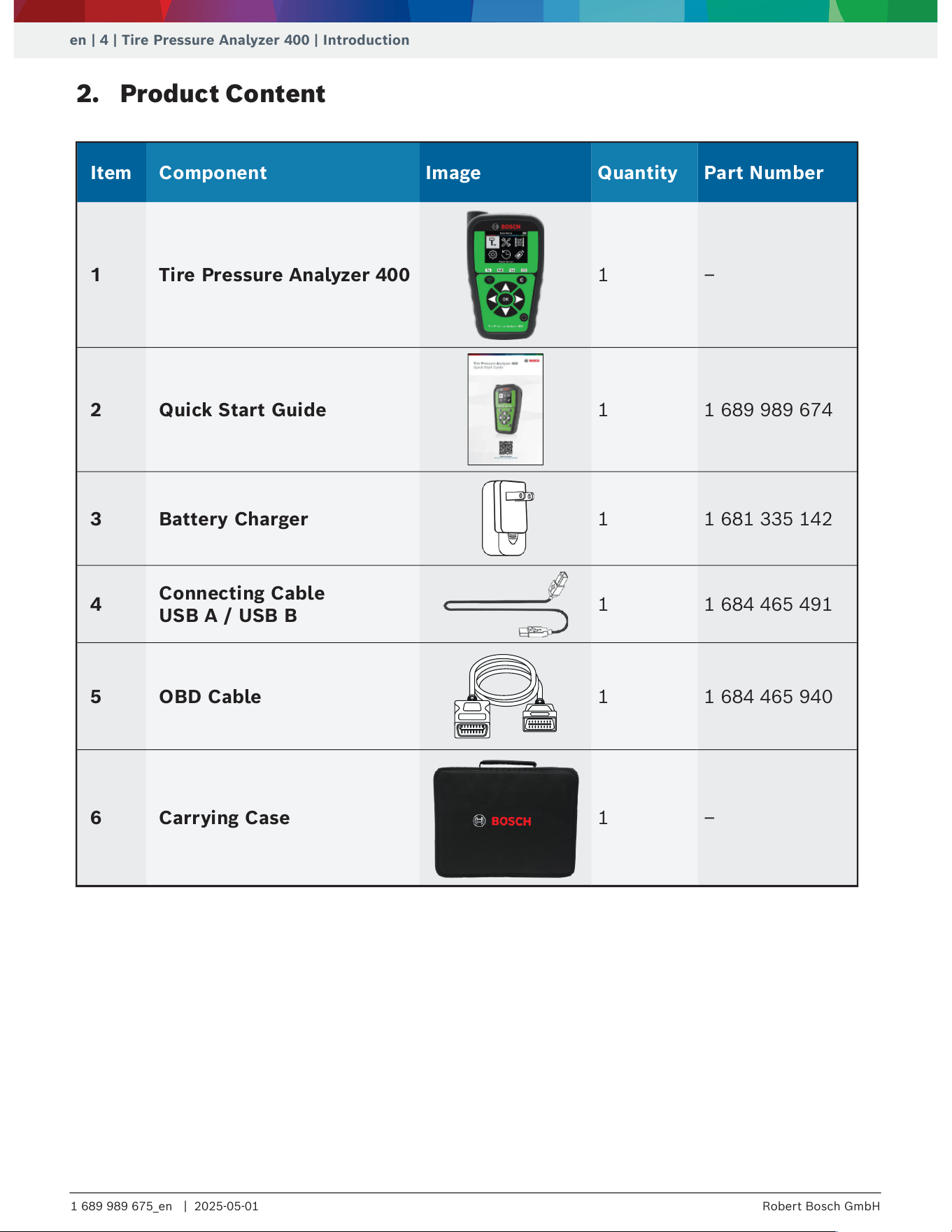
Item Component Image Quantity Part Number
1 Tire Pressure Analyzer 400
1 –
2 Quick Start Guide
1 1 689 989 674
3 Battery Charger
1 1 681 335 142
4
Connecting Cable
USB A / USB B
1 1 684 465 491
5 OBD Cable
1 1 684 465 940
6 Carrying Case
1 –
2. Product Content
Introduction | Tire Pressure Analyzer 400 | 5 |
1 689 989 675_en 2025-05-01
|
Robert Bosch GmbH
en
3. Important Safety Instructions
Do not discard. Retain for future reference.
Please note that changes or modications not expressly approved by the party
responsible for compliance could void the user’s authority to operate the equipment.
Note: This equipment has been tested and found to comply with the limits for a Class B
digital device, pursuant to Part 15 of the FCC Rules. These limits are designed to provide
reasonable protection against harmful interference in a residential installation. This
equipment generates, uses and can radiate radio frequency energy and, if not installed
and used in accordance with the instructions, may cause harmful interference to radio
communications. However, there is no guarantee that interference will not occur in a
particular installation. If this equipment does cause harmful interference to radio or
television reception, which can be determined by turning the equipment off and on, the user
is encouraged to try to correct the interference by one or more of the following measures:
- Reorient or relocate the receiving antenna.
- Increase the separation between the equipment and receiver.
- Connect the equipment into an outlet on a circuit different from that to which
the receiver is connected.
- Consult the dealer or an experienced radio/TV technician for help.
This device complies with:
- Part 15 of the FCC Rules (FCC ID under “Settings / Certications” visible).
- CE / CEM standards
- ROHS standards
Operation is subject to the following two conditions:
(1) This device will not cause harmful interference, and
(2) This device will accept any interference received, including interference that may
cause undesired or improper operation.
Other applicable documents
General safety notes for Bosch Mobility Aftermarket can be found here:
https://help.boschdiagnostics.com/generalsafetynotes
| 6 | Tire Pressure Analyzer 400 | Introductionen
1 689 989 675_en 2025-05-01
|
Robert Bosch GmbH
Tire Pressure Analyzer 400 has been designed to be durable, safe, and reliable when
properly used.
Tire Pressure Analyzer 400 is intended for use only by qualied and trained automotive
technicians or in a light industrial repair shop environment. Please read all instructions
below before use. Always follow these safety instructions. If you have any questions
pertaining to the safe or reliable use of this tool, please call your local dealer.
1. Read All Instructions
All warnings on the tool and in this manual should be adhered to. All operating
instructions should be followed.
2. Retain Instructions
The safety and operating instructions should be retained for future reference.
3. Heed Warnings
Users and bystanders must wear safety glasses and must read instructions before use.
Do not use on live electrical circuits, risk of entanglement.
4. Cleaning
Clean with a soft dry cloth, or if necessary, a soft damp cloth. Do not use any harsh
chemical solvents such as acetone, thinner, brake cleaner, alcohol… as this may damage
the plastic surface.
5. Water & Moisture
Do not use this tool where contact or immersion in water is a possibility. Never spill
liquid of any kind onto the tool.
6. Storage
Do not use or store the tool in an area where it is exposed to direct sunlight or excessive
moisture.
7. Usage
To reduce the risk of re, do not operate the tool in the vicinity of open containers or
ammable liquids. Do not use if the potential for explosive gas or vapors exists. Keep the
tool away from heat generating sources.
Tire Pressure Analyzer 400 emits electromagnetic and electronically
generated waves that may interfere with the safe operation of
pacemakers.
Individuals with a pacemaker should never use this product.
Always read these operating instructions before use.
Read the information of safety and charging the battery (page 59).
Read the warranty, safety and recycling information at the end of the
operating instructions.
Warning:
Introduction | Tire Pressure Analyzer 400 | 7 |
1 689 989 675_en 2025-05-01
|
Robert Bosch GmbH
en
4. Overview
Bottom
Side
Side
Front
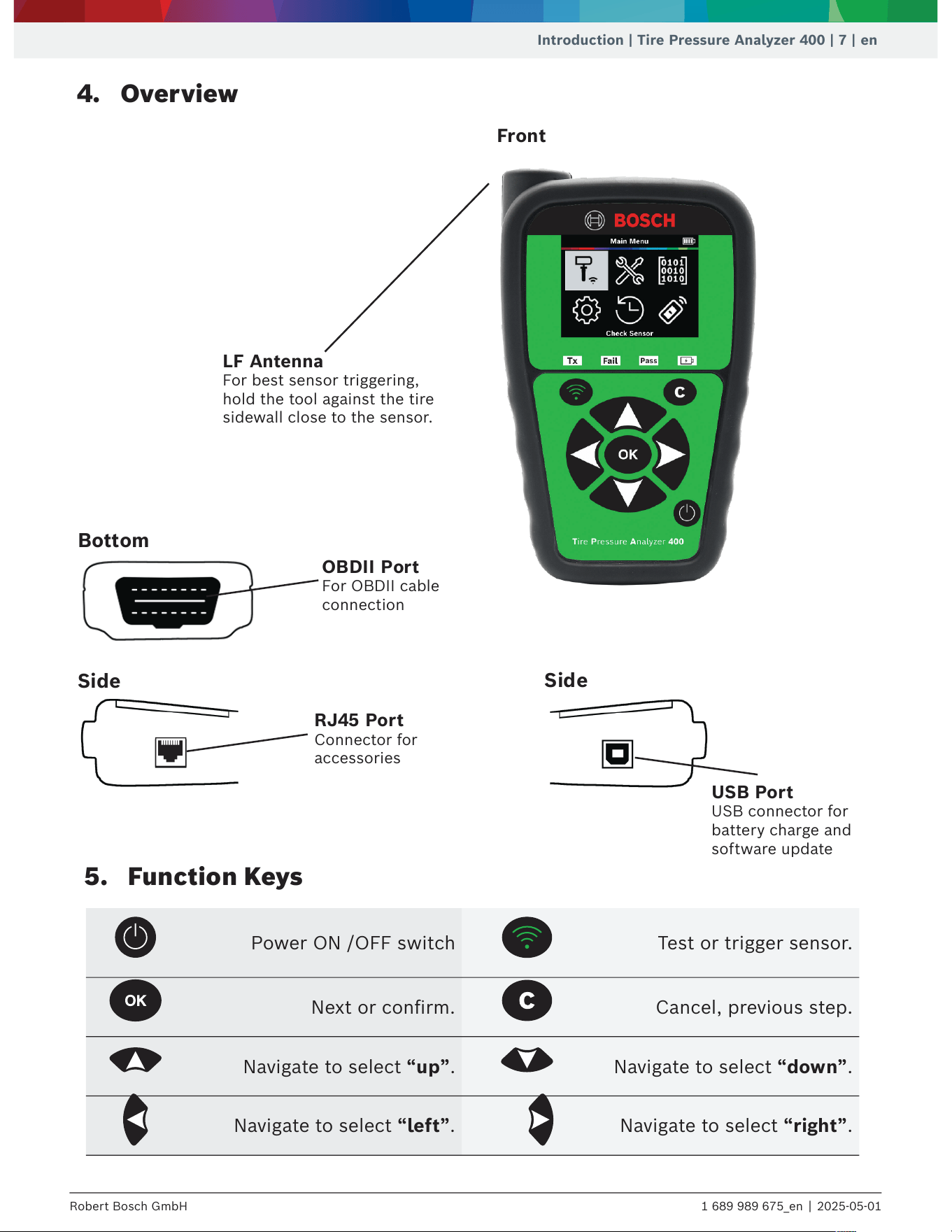
OBDII Port
For OBDII cable
connection
RJ45 Port
Connector for
accessories
USB Port
USB connector for
battery charge and
software update
LF Antenna
For best sensor triggering,
hold the tool against the tire
sidewall close to the sensor.
Power ON /OFF switch Test or trigger sensor.
Next or conrm. Cancel, previous step.
Navigate to select “up”. Navigate to select “down”.
Navigate to select “left”. Navigate to select “right”.
5. Function Keys
| 8 | Tire Pressure Analyzer 400 | Introductionen
1 689 989 675_en 2025-05-01
|
Robert Bosch GmbH
6. Header Icons
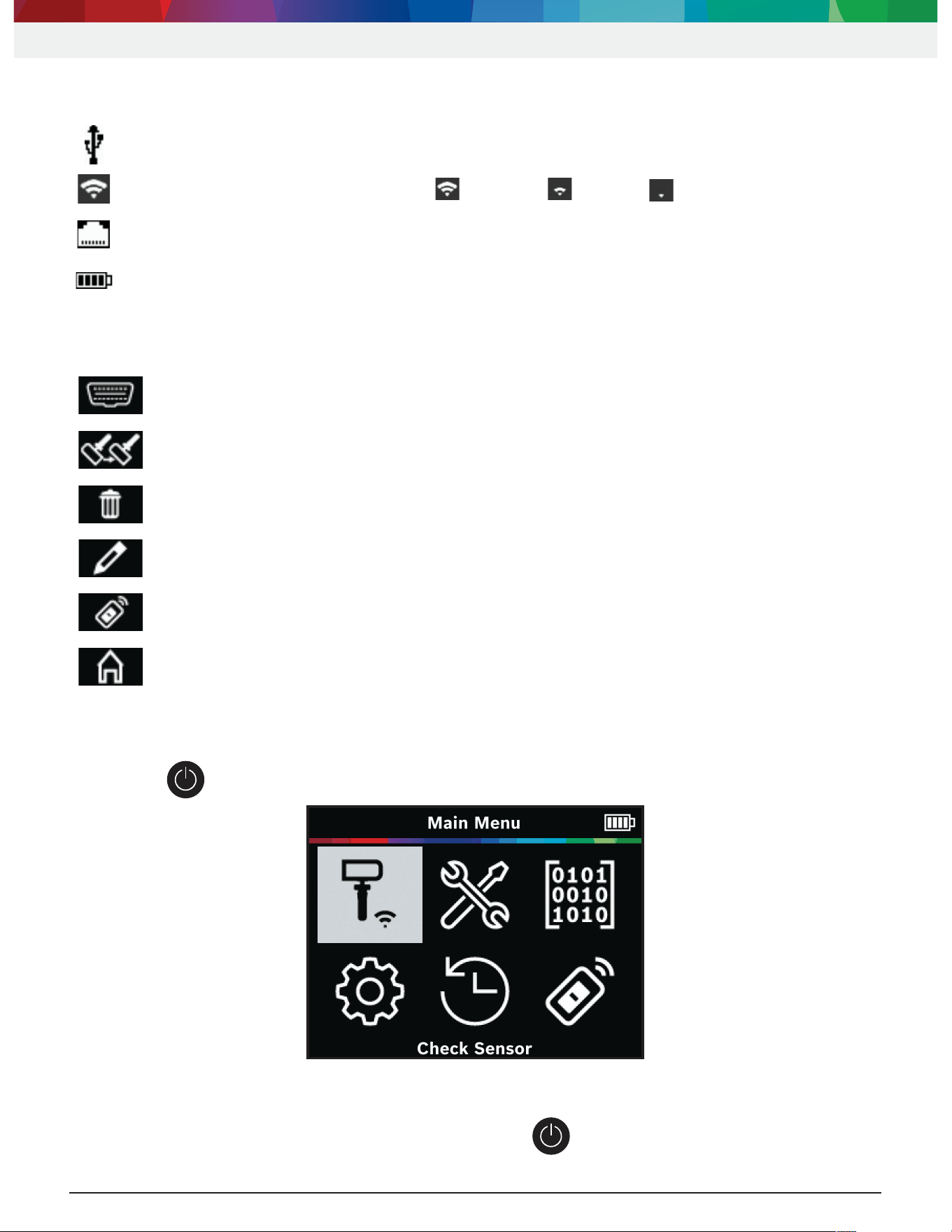
The tool is connected to PC via USB cable.
The Wi is on, Wi signal strength = 100 %; = 66 %; = 33 %
The tool is connected to an optional module (not available).
Battery status.
Go to the Main Menu after recording the data displayed.
Delete the sensor data displayed.
Input the client detail information.
Jump to the Program Sensor function.
Jump to the OBDII Relearn function.
Jump to the RKE test function.
7. Footer Icons
8. Power On
Press the button to turn on the TPMS TOOL.
This tool has an auto-off feature – time duration is adjustable in settings.
To power off the tool manually, press and hold the button for about 3 seconds.
Introduction | Tire Pressure Analyzer 400 | 9 |
1 689 989 675_en 2025-05-01
|
Robert Bosch GmbH
en
9. Quick Start
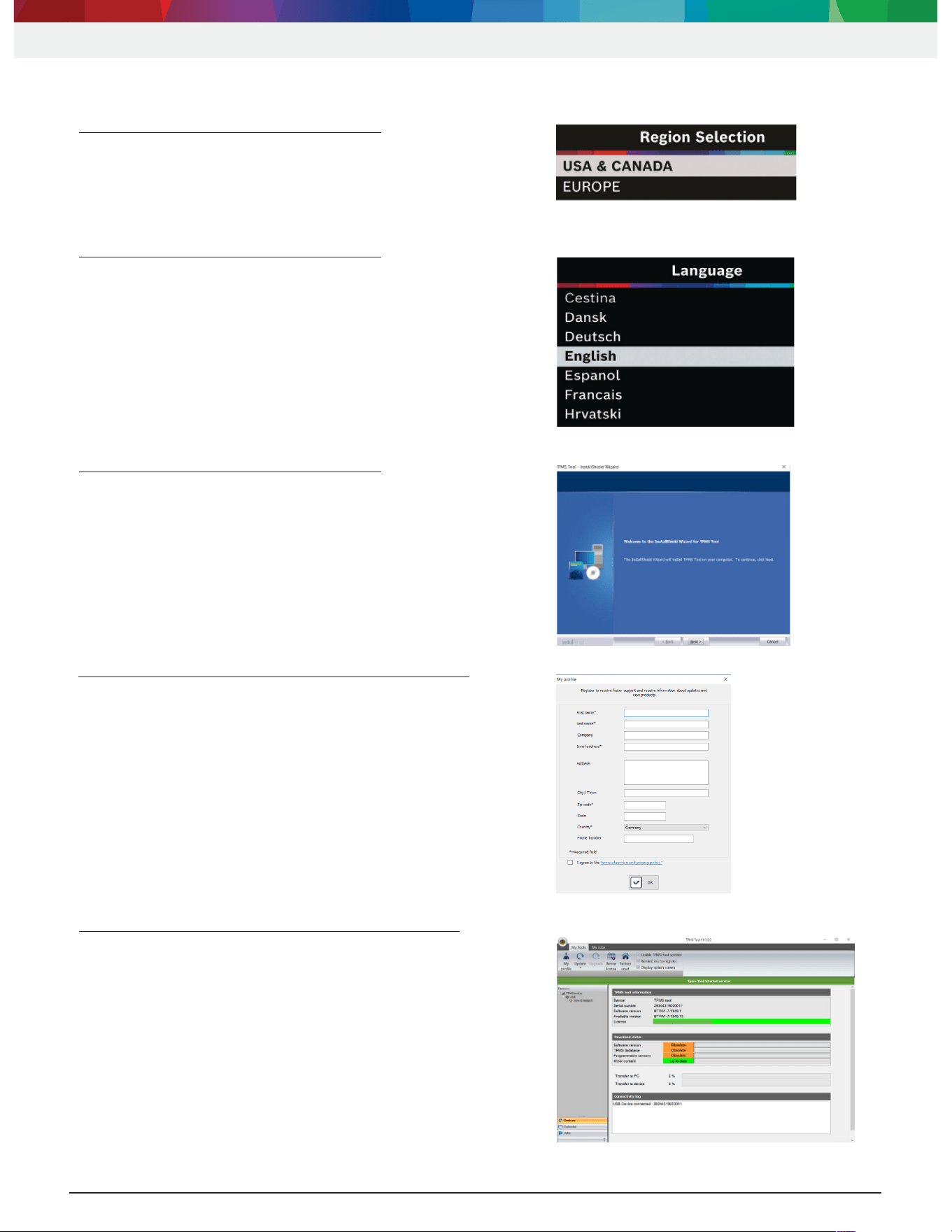
Check if the correct region
is set (see page 32).
Set the required language
(see page 32).
Download the "TPMS Tool" PC software
and install it (see page 44).
Register the Tire Pressure Analyzer 400 in
the "TPMS Tool" PC software (see page 49).
Update the Tire Pressure Analyzer 400
to include current vehicles and sensors
(see page 50).
1. Check the region
2. Set the language
3. Install the PC software
4. Register the Tire Pressure Analyzer 400
5. Update the Tire Pressure Analyzer 400
16February2028

| 10 | Tire Pressure Analyzer 400 | Introductionen
1 689 989 675_en 2025-05-01
|
Robert Bosch GmbH
Follow this TPMS service procedure each time before and after servicing tires/wheels.
10.1 Test Sensors
Following the instructions in the CHECK SENSOR menu of your TPMS TOOL. Trigger
each of the vehicle’s sensors, to ensure they work properly.
This procedure allows damaged or defective sensors to be identied quickly, as some
vehicles may not indicate a poor sensor condition in the vehicle’s instrument cluster
until more than 20 minutes have passed.
Testing the sensors before any service also eliminates the liability associated with
replacing previously damaged or defective sensors.
Note: If the sensors do not respond to trigger, please refer to the Troubleshooting
section of this guide.
10.2 Replace Sensors
Faulty sensors must be replaced to allow the vehicle’s TPM system to work properly.
Use the SERVICE TPMS of your TPMS TOOL to nd the original equipment replacement
sensor or a universal aftermarket sensor.
Universal sensors must be programmed before use. Follow the instructions in
PROGRAM SENSOR to create or clone universal sensors.
10.3 Relearn the TPM System
Once a replacement sensor has been installed, the new sensor ID must be registered
by TPMS ECU, to allow communication between the sensor and the vehicle.
The SERVICE TPMS menu indicates which relearn method is required: MANUAL
RELEARN, OBD RELEARN or AUTO RELEARN. Follow the on-screen instructions.
When the relearn procedure requires to trigger the sensors, always begin with the Left
Front (LF) wheel sensor. Proceed to the next wheel sensor in clockwise rotation, until
ALL sensors have been retrained. Example : LF (Left Front), RF (Right Front), RR (Right
Rear), LR (Left Rear). If the spare wheel is TPMS equipped, this must be trigger at last.
Some vehicles provide an audible beep conrming that the sensor ID has been learned
by the TPMS ECU.
For vehicles that do not require retraining, it is recommended to trigger each wheel sensor,
one final time, to ensure they are working properly prior to releasing the vehicle to the
customer.
10. Service Procedure

Introduction | Tire Pressure Analyzer 400 | 11 |
1 689 989 675_en 2025-05-01
|
Robert Bosch GmbH
en
10.4 Troubleshooting
If the TPMS TOOL is unable to trigger one or more of the sensors, please use the
following troubleshooting guide:
1) The sensor itself may be damaged or defective.
3) Wrong make, model, year is selected.
4) Your TPMS TOOL may require a software update.
5) Your TPMS TOOL is damaged or defective.
Please contact your tool supplier for further assistance.
| 12 | Tire Pressure Analyzer 400 | Usageen
1 689 989 675_en 2025-05-01
|
Robert Bosch GmbH
Important:
Vehicle specic information in this manual is used as an example and may not
represent specic instructions each make and model may require. When performing
various functions with the tool, it is important to refer to the on-screen prompts and/or
manual information.
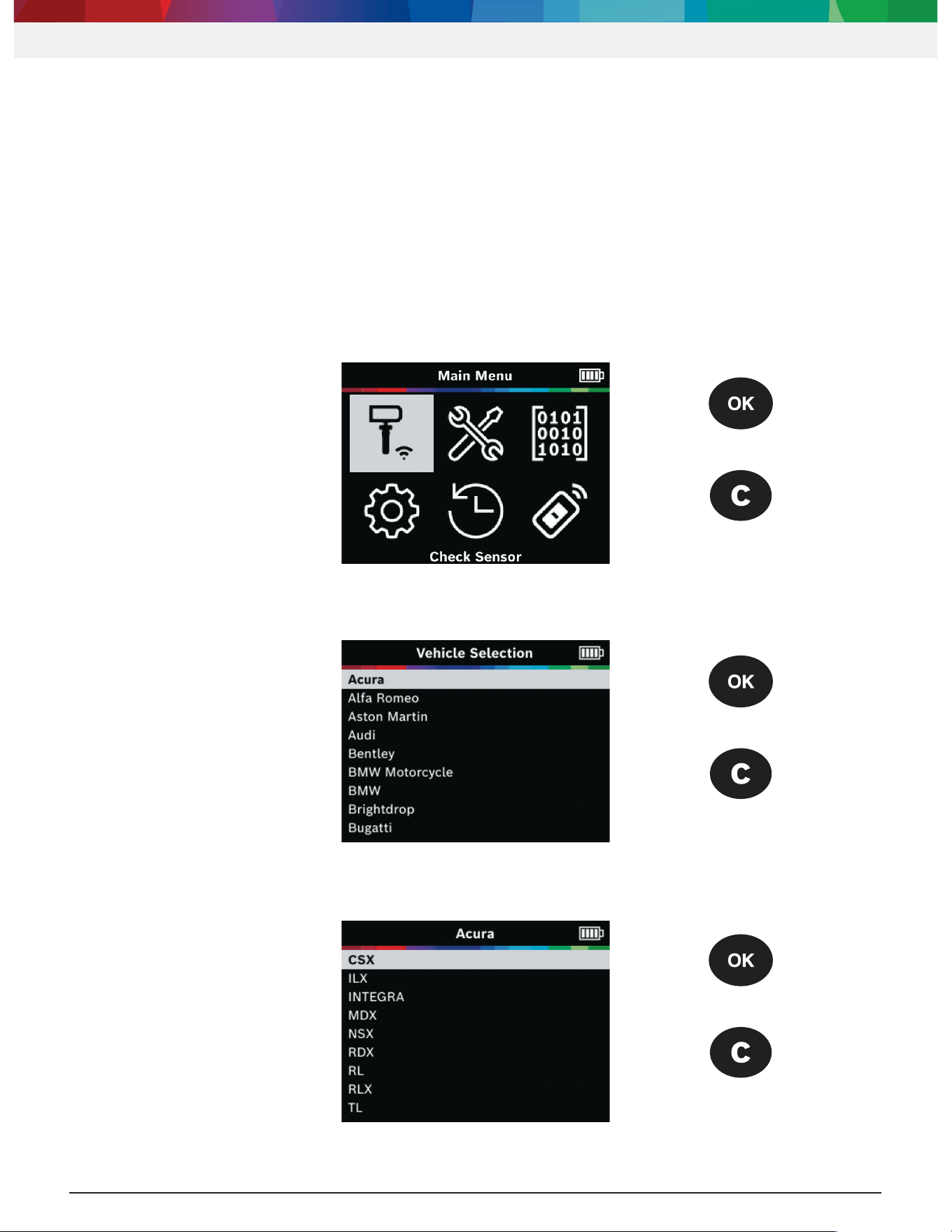
Select Vehicle
Manufacturer.
Select Vehicle Model.
1. Check Sensors
Select “Check Sensor”
function.
= Continue
= Previous
= Continue
= Previous
= Continue
= Previous
Usage
Usage | Tire Pressure Analyzer 400 | 13 |
1 689 989 675_en 2025-05-01
|
Robert Bosch GmbH
en
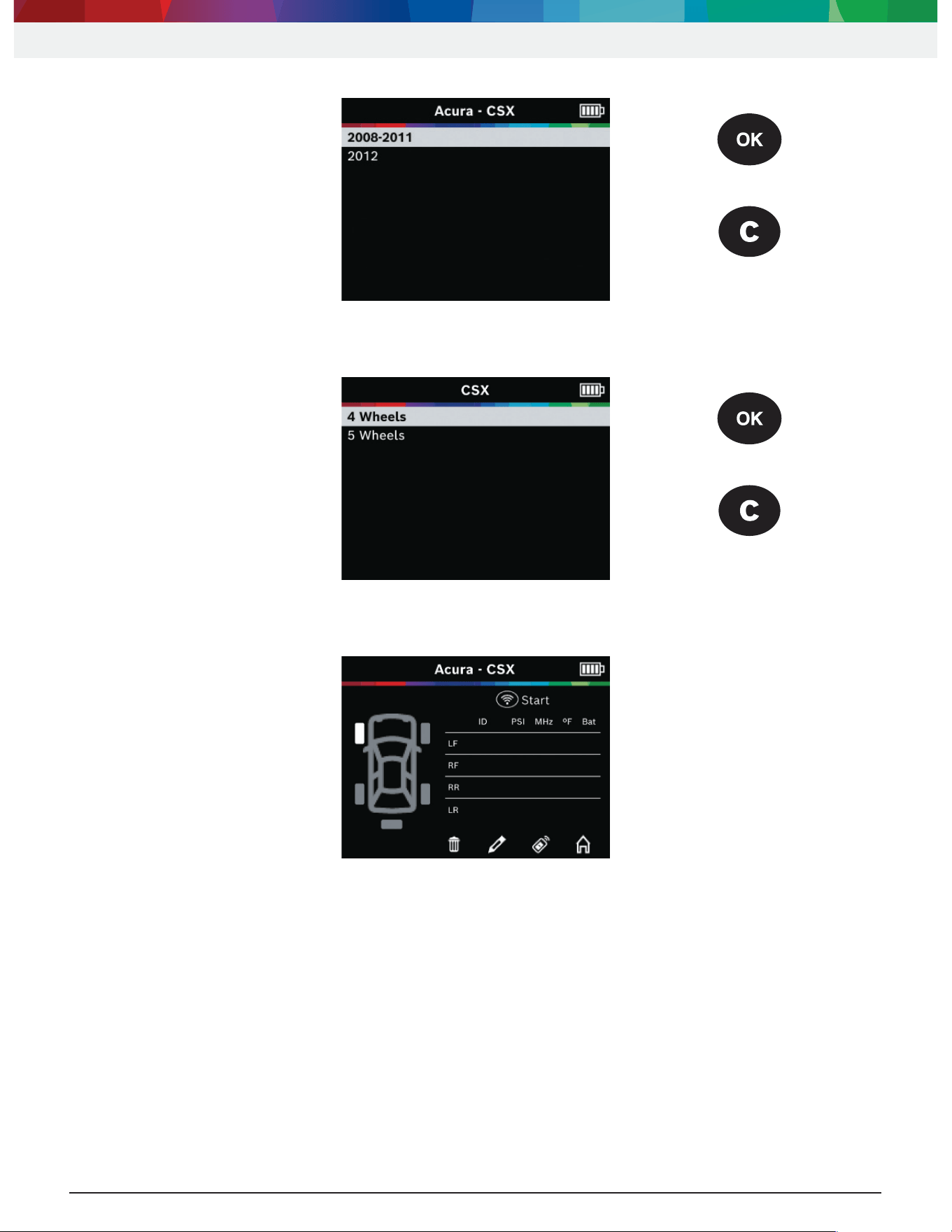
Select Vehicle Year.
Select number of wheels
and select tire.
This option does not
appear for all vehicles.
This rst selected tire is
highlighted in white.
= Continue
= Previous
= Continue
= Previous
| 14 | Tire Pressure Analyzer 400 | Usageen
1 689 989 675_en 2025-05-01
|
Robert Bosch GmbH
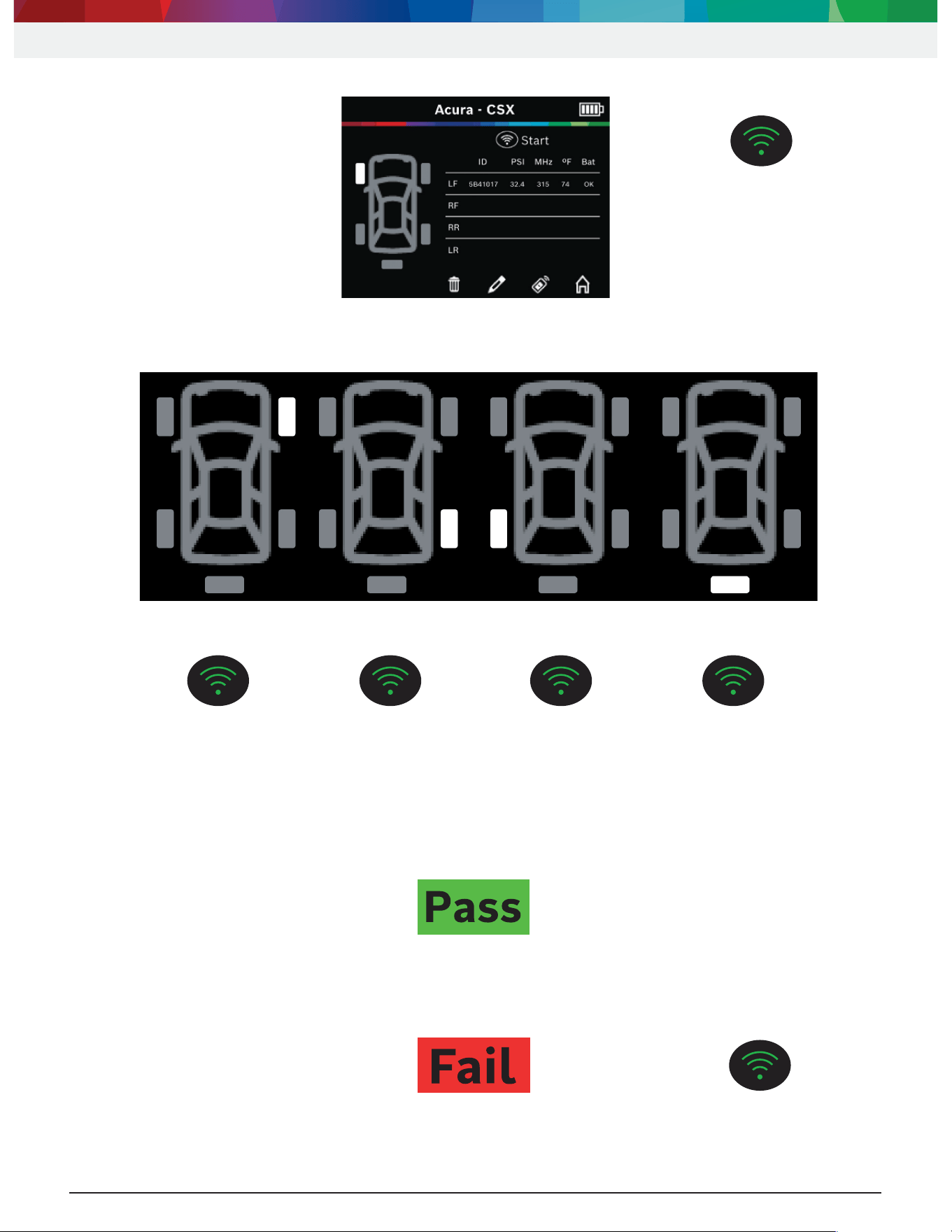
Test Sensors
Right Front Right Rear Left Rear Spare
Press the trigger button
to read the sensor and
press OK or use the arrow
buttons to select next tire
to read.
Trigger if the car
is equipped with
a TPMS sensor
tted into the
spare wheel.
If the tool does not detect
a sensor press
Sensor triggered
successfully.
to test again.
Usage | Tire Pressure Analyzer 400 | 15 |
1 689 989 675_en 2025-05-01
|
Robert Bosch GmbH
en
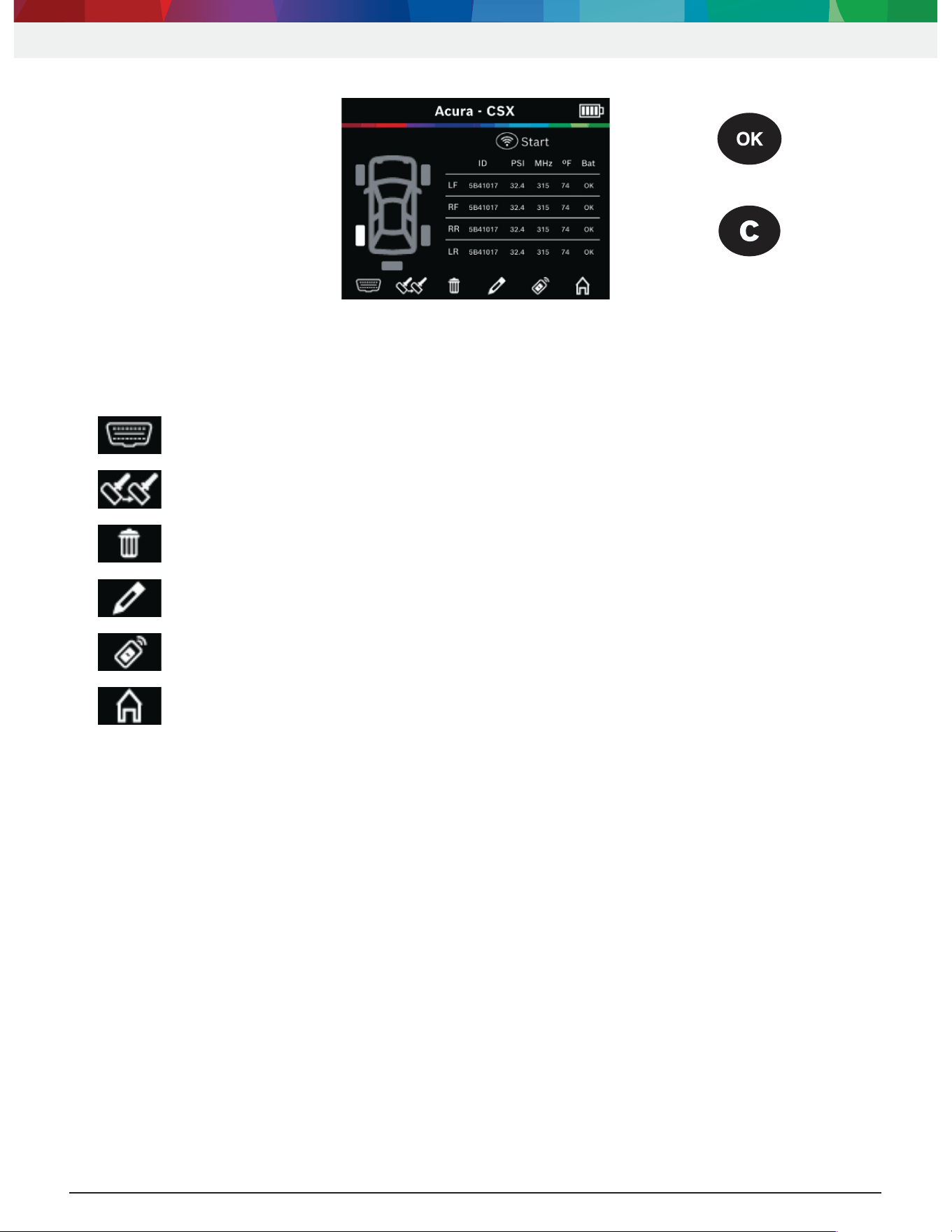
When all sensors have been read, jump directly to other functions with the icon bar
located at the very bottom of the screen.
Bottom Icons
= Continue
= Exit and record the job
Go to the Main Menu after recording the data displayed.
Delete the sensor data displayed.
Input the client detail information.
Jump to the Program Sensor function.
Jump to the OBDII Relearn function.
Jump to the RKE test function.
| 16 | Tire Pressure Analyzer 400 | Usageen
1 689 989 675_en 2025-05-01
|
Robert Bosch GmbH
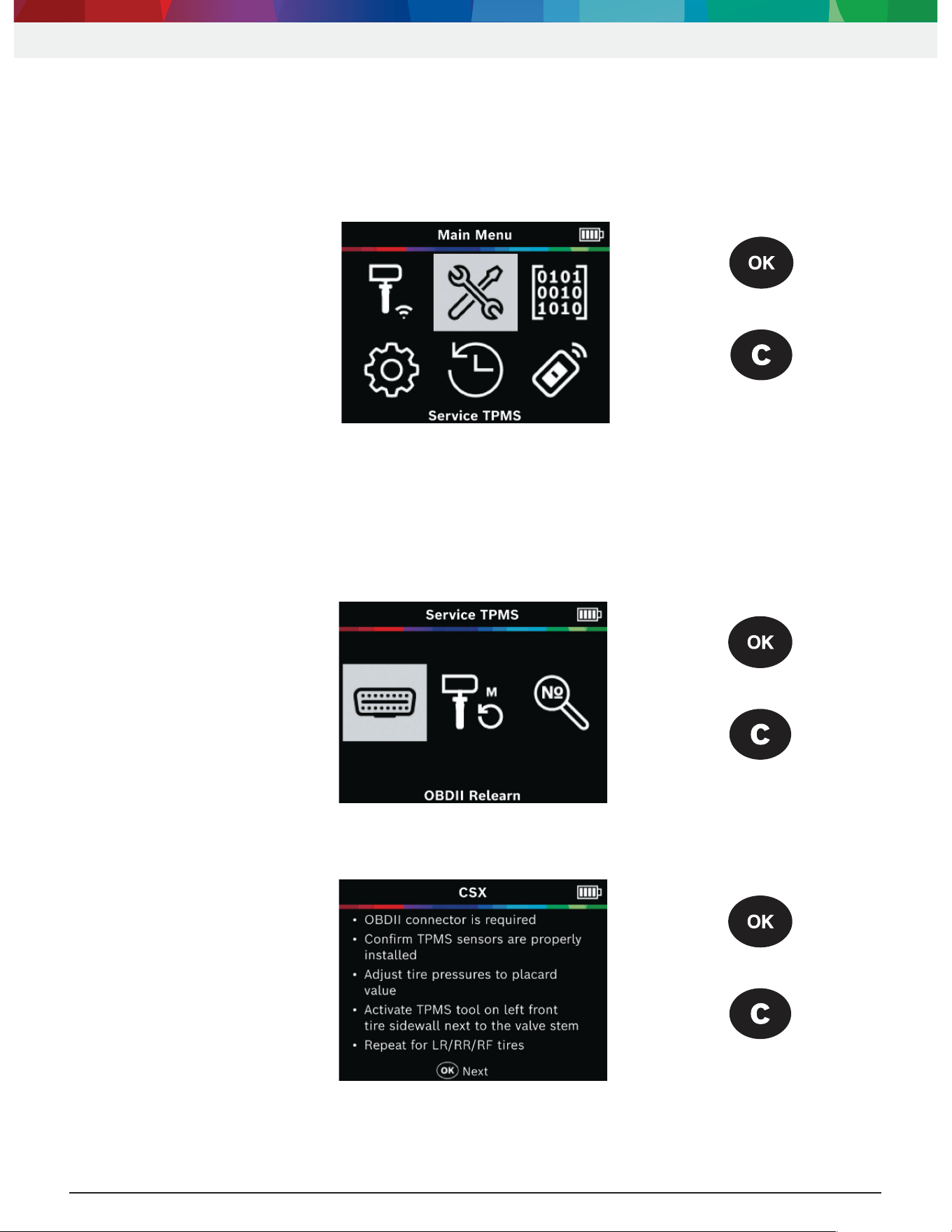
This menu has two main functions. One is to relearn the ID of the 4 sensors into the ECU.
The other function aims at reading the spare part for all the sensors available by vehicle.
▶ Select car manufacturer.
▶ Select car model.
▶ Select year.
Select “Service TPMS”
function.
= Continue
= Previous
2.1
OBDII Relearn
This is for ID relearn to
the ECU through the
OBDII port.
OBDII Relearn
Instructions.
= Continue
= Previous
= Continue
= Previous
▶ Select the number of wheels (if applicable).
2. Service TPMS
Usage | Tire Pressure Analyzer 400 | 17 |
1 689 989 675_en 2025-05-01
|
Robert Bosch GmbH
en
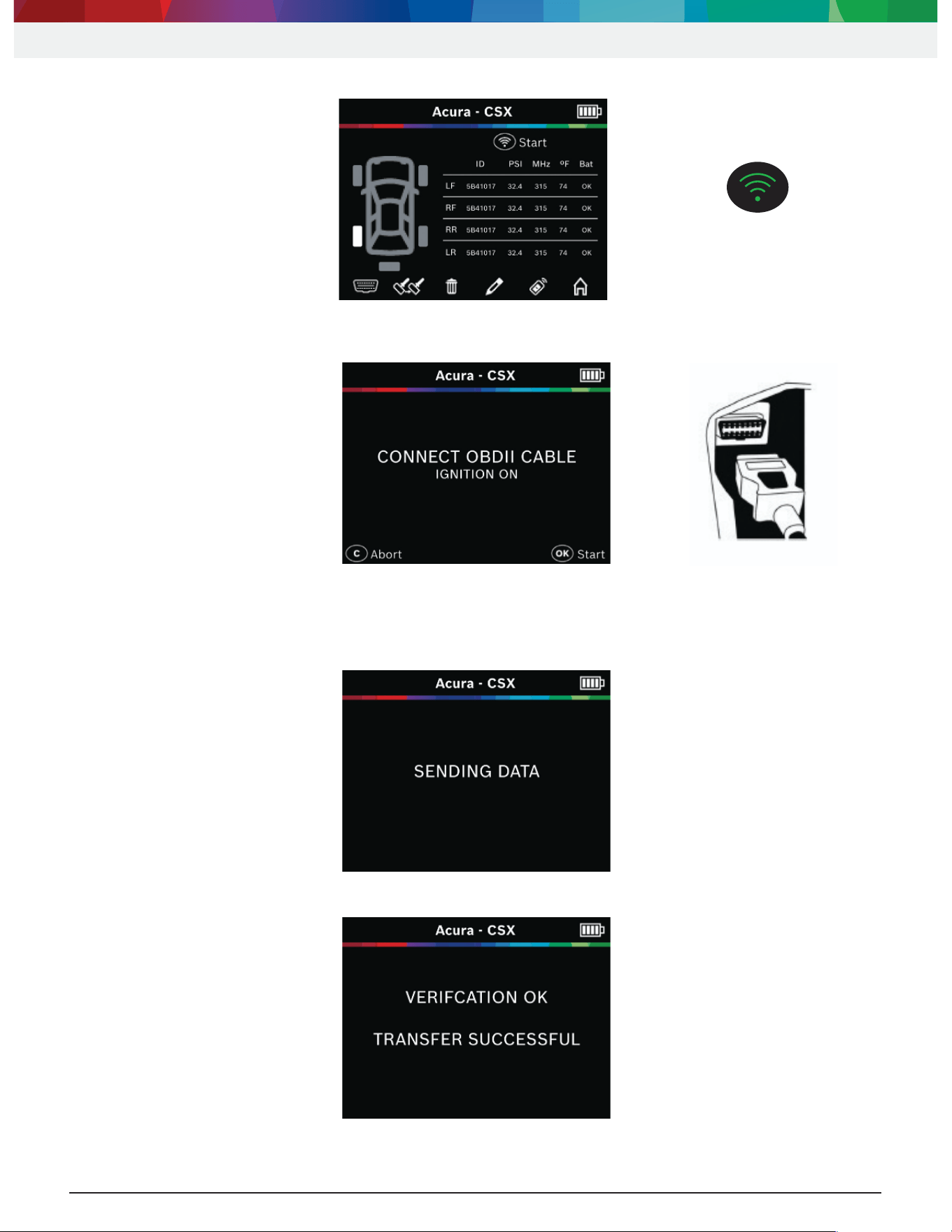
= Trigger Sensor
Read all the sensors.
Note: this following screen message is displayed when all the sensors are triggered and
the OBDII cable is connected to the TPMS TOOL.
Plug OBDII cable to the
tool and the vehicle.
Wait a few seconds
during the data upload.
The data is successfully
transferred to the ECU.
The OBDII cable can be
unplugged from the ECU
to the tool.
| 18 | Tire Pressure Analyzer 400 | Usageen
1 689 989 675_en 2025-05-01
|
Robert Bosch GmbH
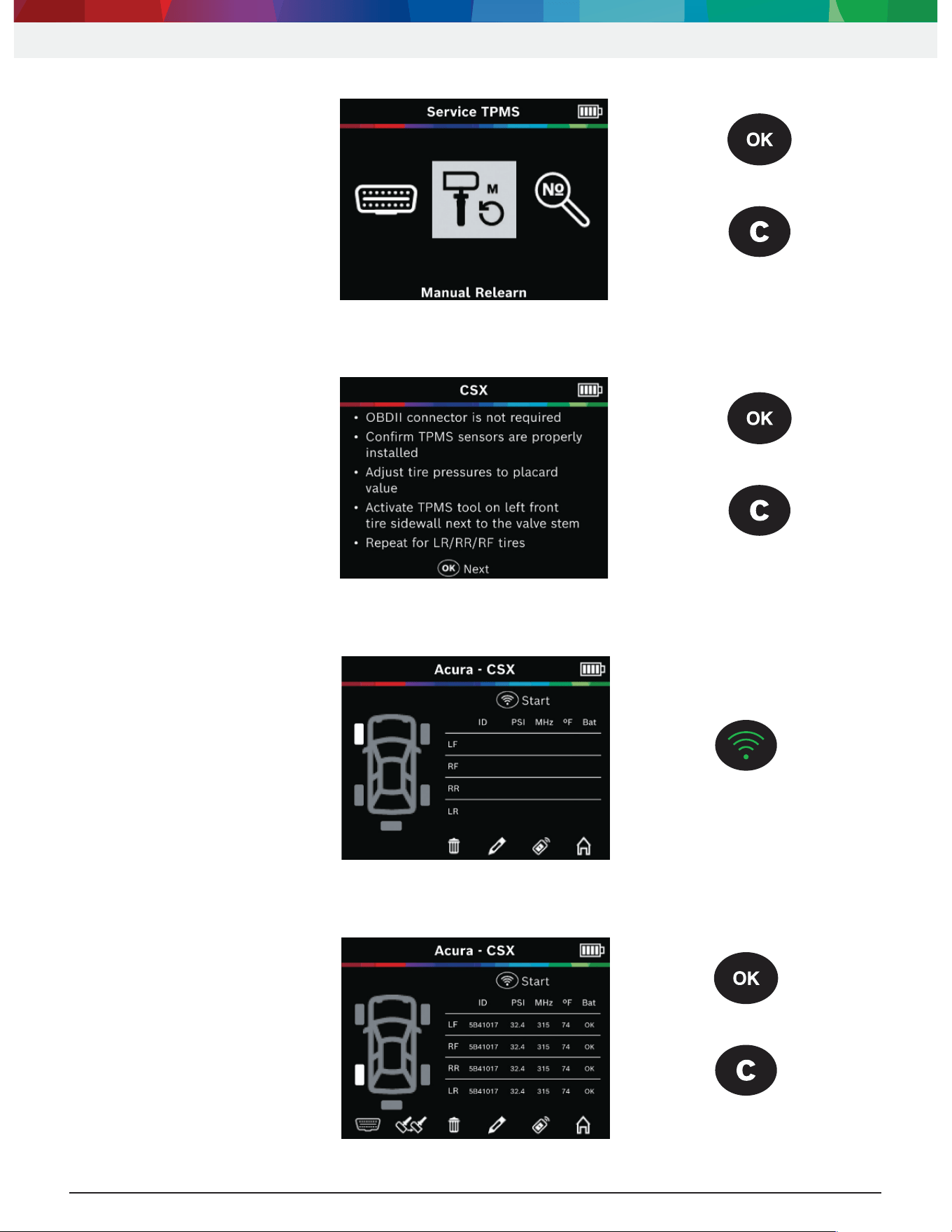
2.2
Manual Relearn
Program the vehicle’s
ECU to recognize new
or reset tire sensors by
following specic steps.
Manual Relearn
Instructions.
= Continue
= Previous
= Continue
= Previous
Trigger Sensors
= Trigger Sensor
Follow instructions
according to the vehicle
procedure.
= Continue
= Previous
Usage | Tire Pressure Analyzer 400 | 19 |
1 689 989 675_en 2025-05-01
|
Robert Bosch GmbH
en
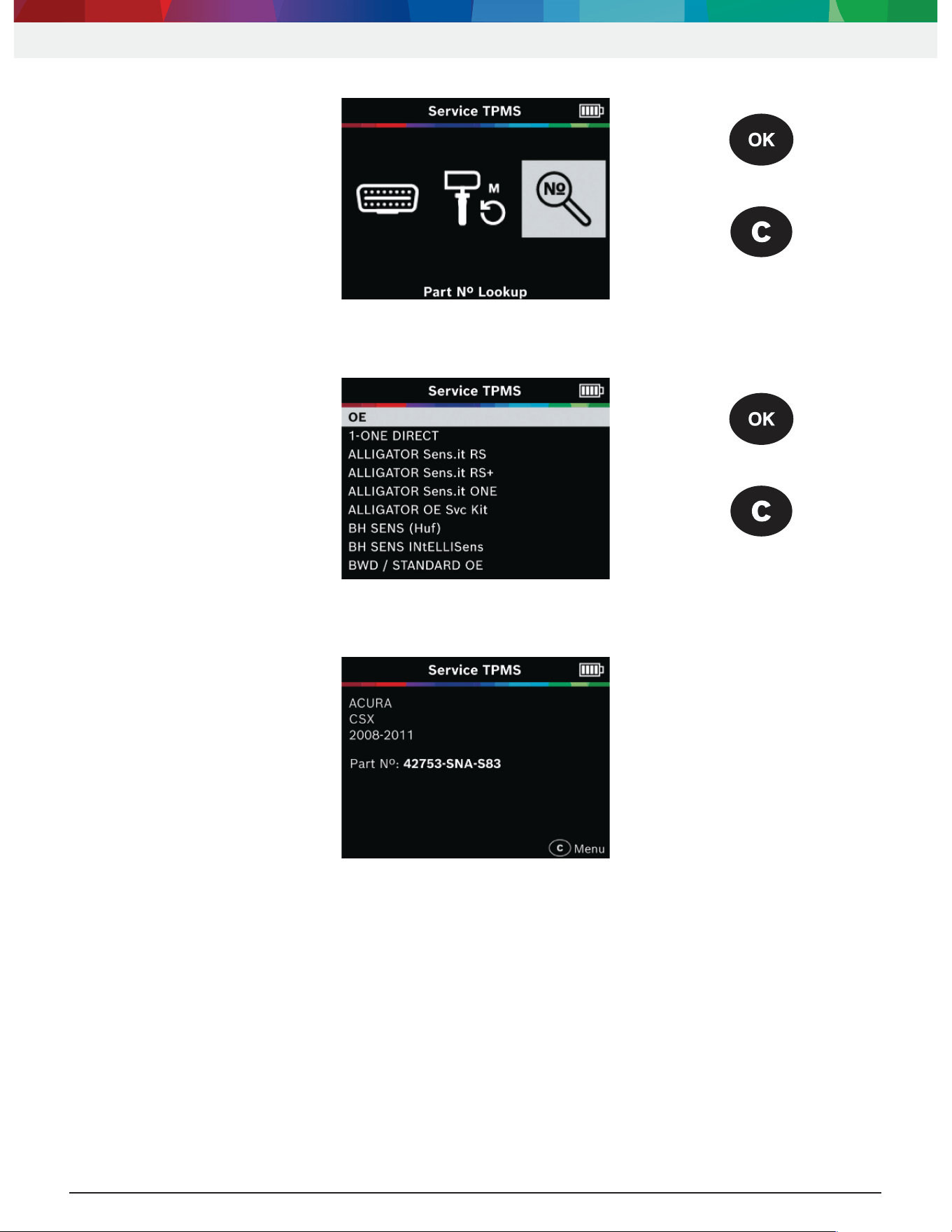
2.3
Part Number lookup
This is a spare parts
database which indicates
all the sensors references
available for each car.
Select Sensor
Sensor part number
displayed
= Continue
= Previous
= Continue
= Previous
| 20 | Tire Pressure Analyzer 400 | Usageen
1 689 989 675_en 2025-05-01
|
Robert Bosch GmbH
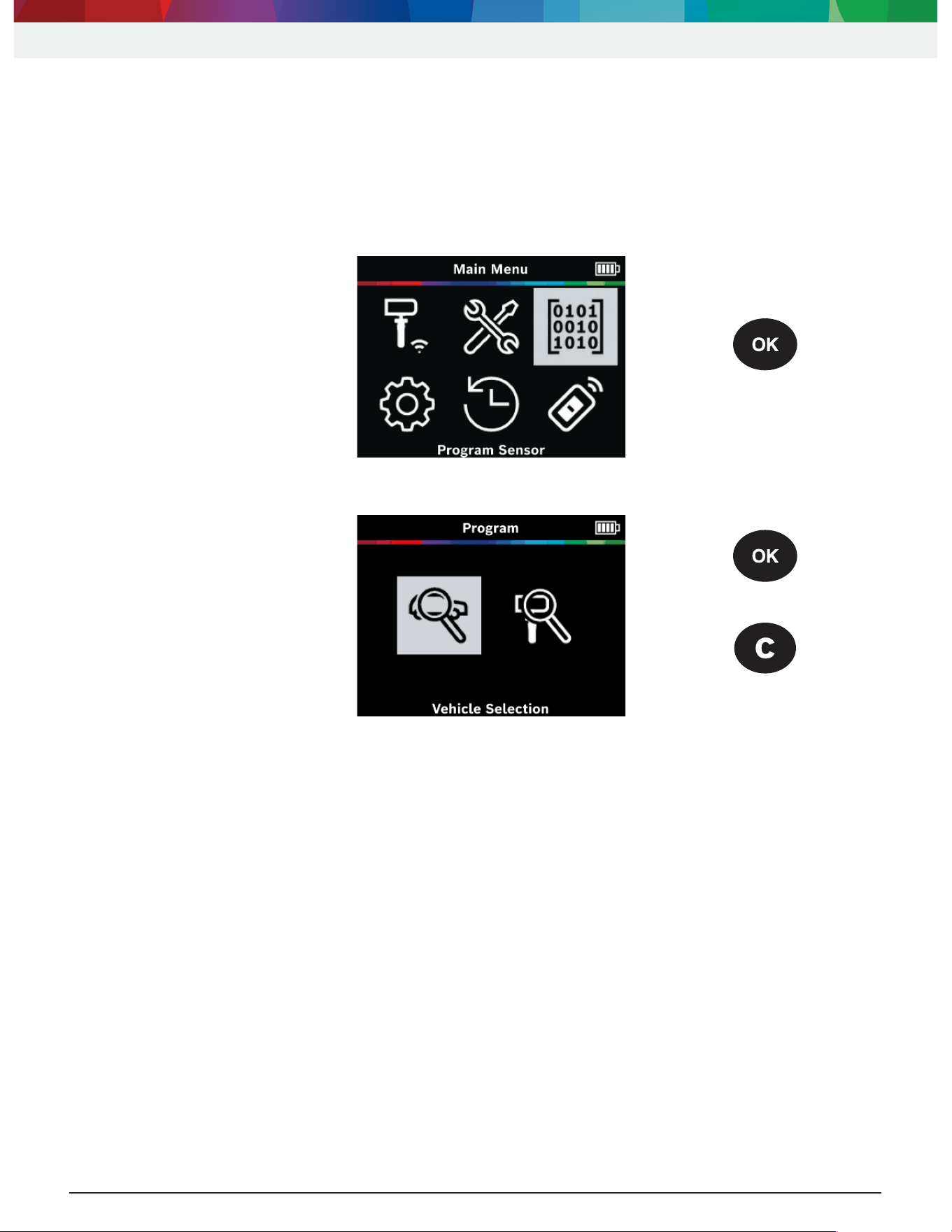
Select the "Program
Sensor" function.
Select either "Vehicle
Selection" or “Sensor
Selection”.
= Continue
This section explains how to get a sensor ID in order to enter it in a universal sensor. If
the "old" sensor can be read, use the COPY ORIGINAL SENSOR section to recover the ID.
If it cannot be read, use the CREATE NEW SENSOR section to create a new ID.
= Continue
= Previous
3. Program Sensor
Usage | Tire Pressure Analyzer 400 | 21 |
1 689 989 675_en 2025-05-01
|
Robert Bosch GmbH
en
3.1
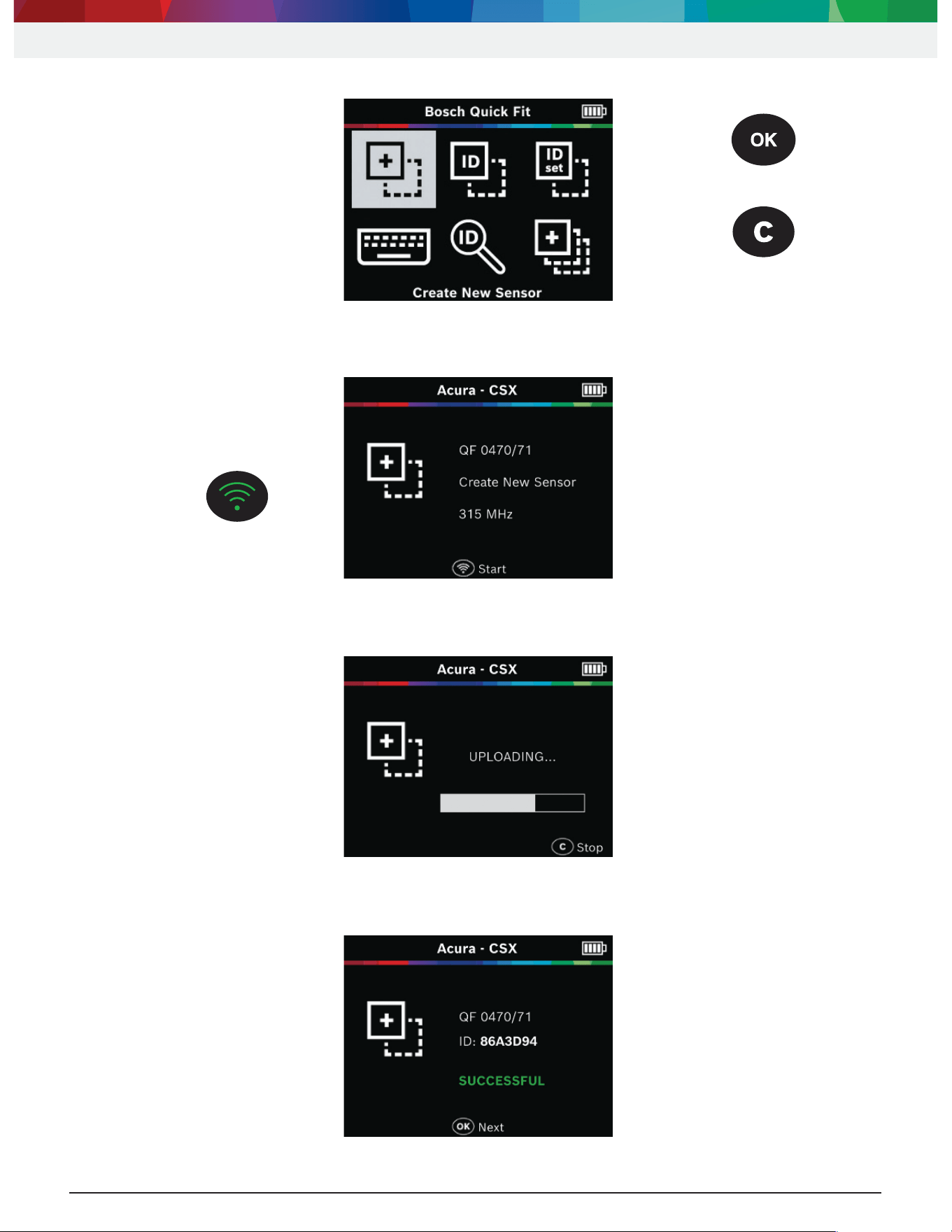
Create New Sensor
= Continue
= Previous
Hold the new
programmable sensor
near the device antenna.
to upload data to
blank sensor.
Wait a few seconds.
The data has been
successfully uploaded to
the sensor.
Press
*It is also possible
to overwrite a
programmable sensor
already used.
| 22 | Tire Pressure Analyzer 400 | Usageen
1 689 989 675_en 2025-05-01
|
Robert Bosch GmbH
3.2
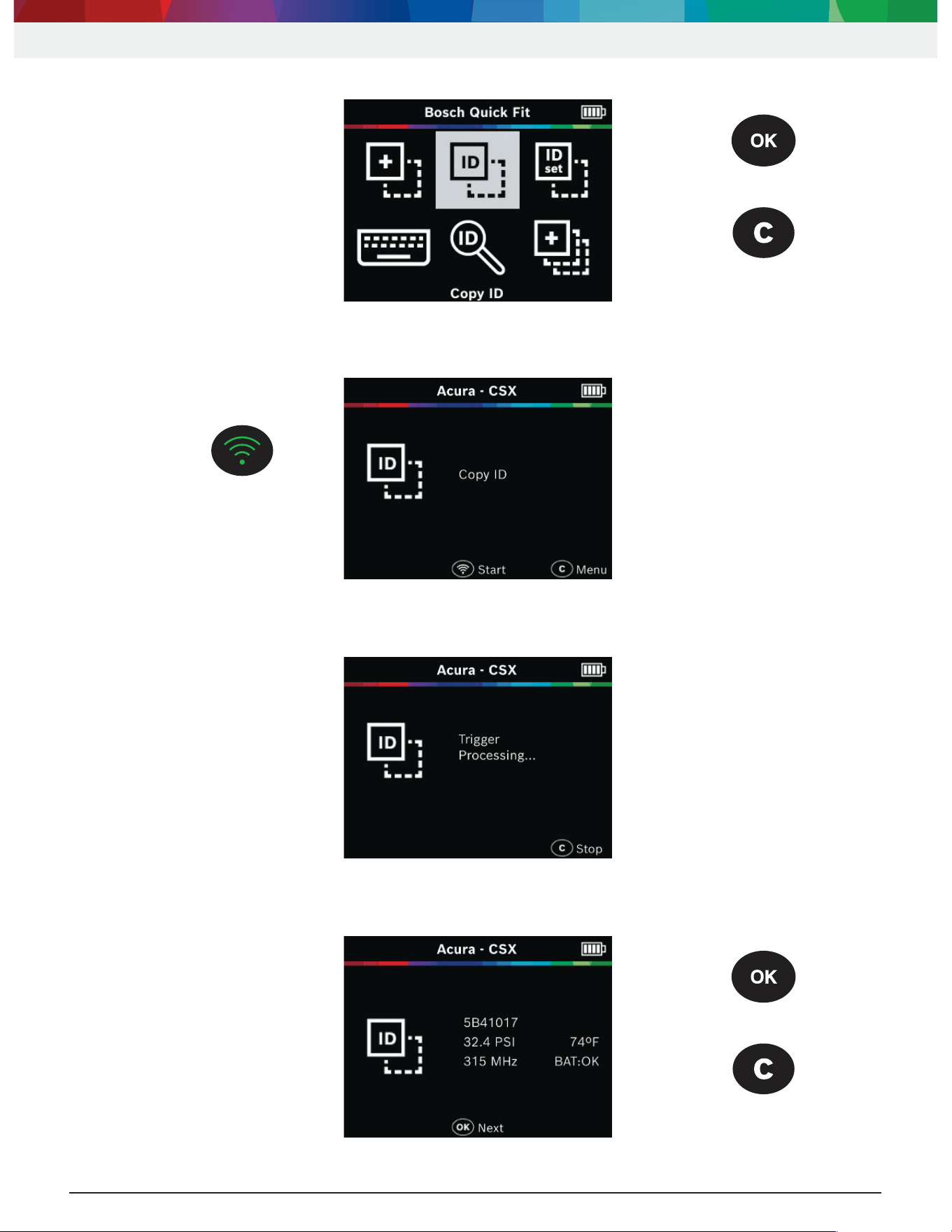
Copy ID
= Continue
= Previous
= Continue
= Previous
to trigger the
original sensor.
Wait a few seconds.
The ID of the old sensor
is displayed.
Press
Usage | Tire Pressure Analyzer 400 | 23 |
1 689 989 675_en 2025-05-01
|
Robert Bosch GmbH
en
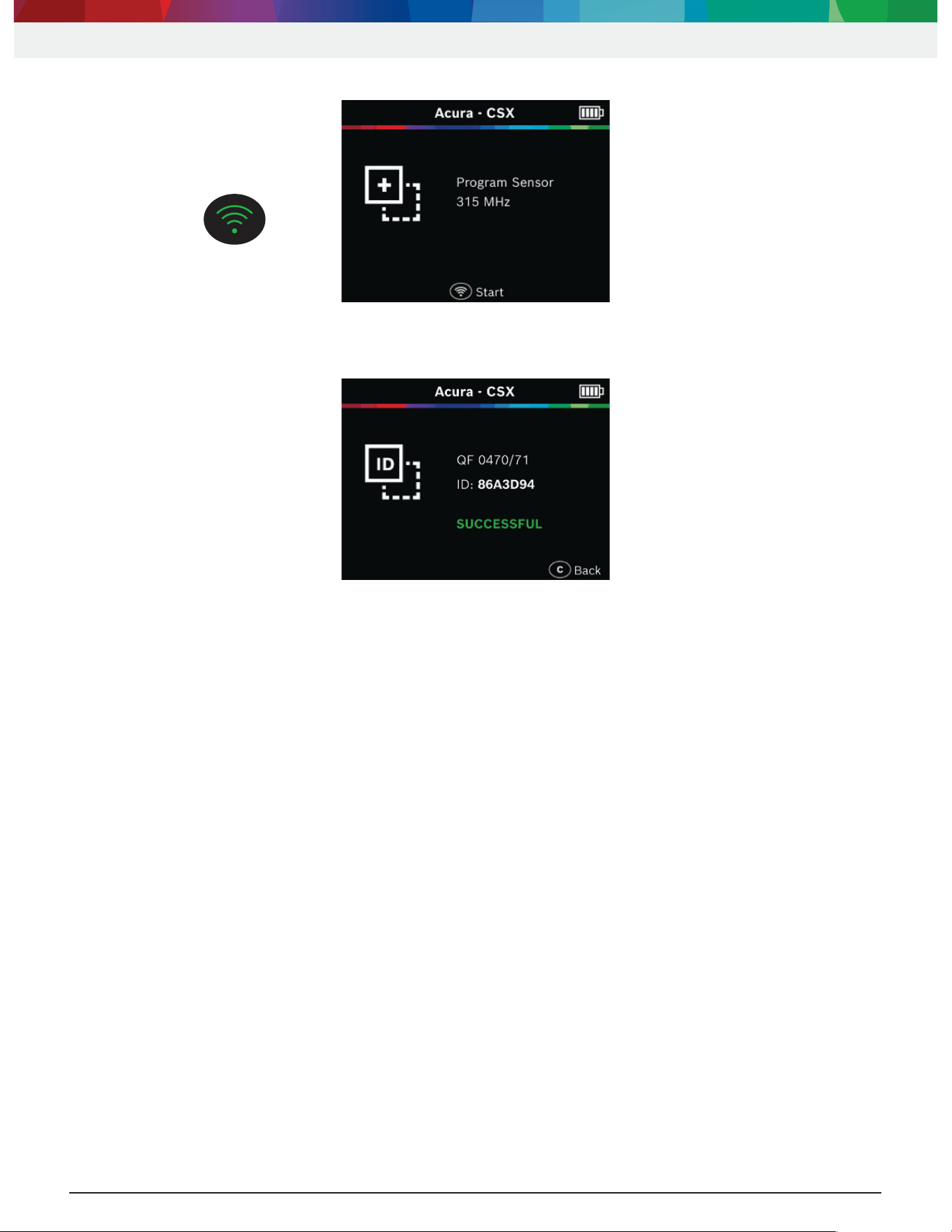
Hold the new
programmable sensor
near the device antenna.
to upload data to
blank sensor.
The data has been
successfully transferred
to the sensor.
Press
Please wait during the
programming process.
| 24 | Tire Pressure Analyzer 400 | Usageen
1 689 989 675_en 2025-05-01
|
Robert Bosch GmbH
3.3
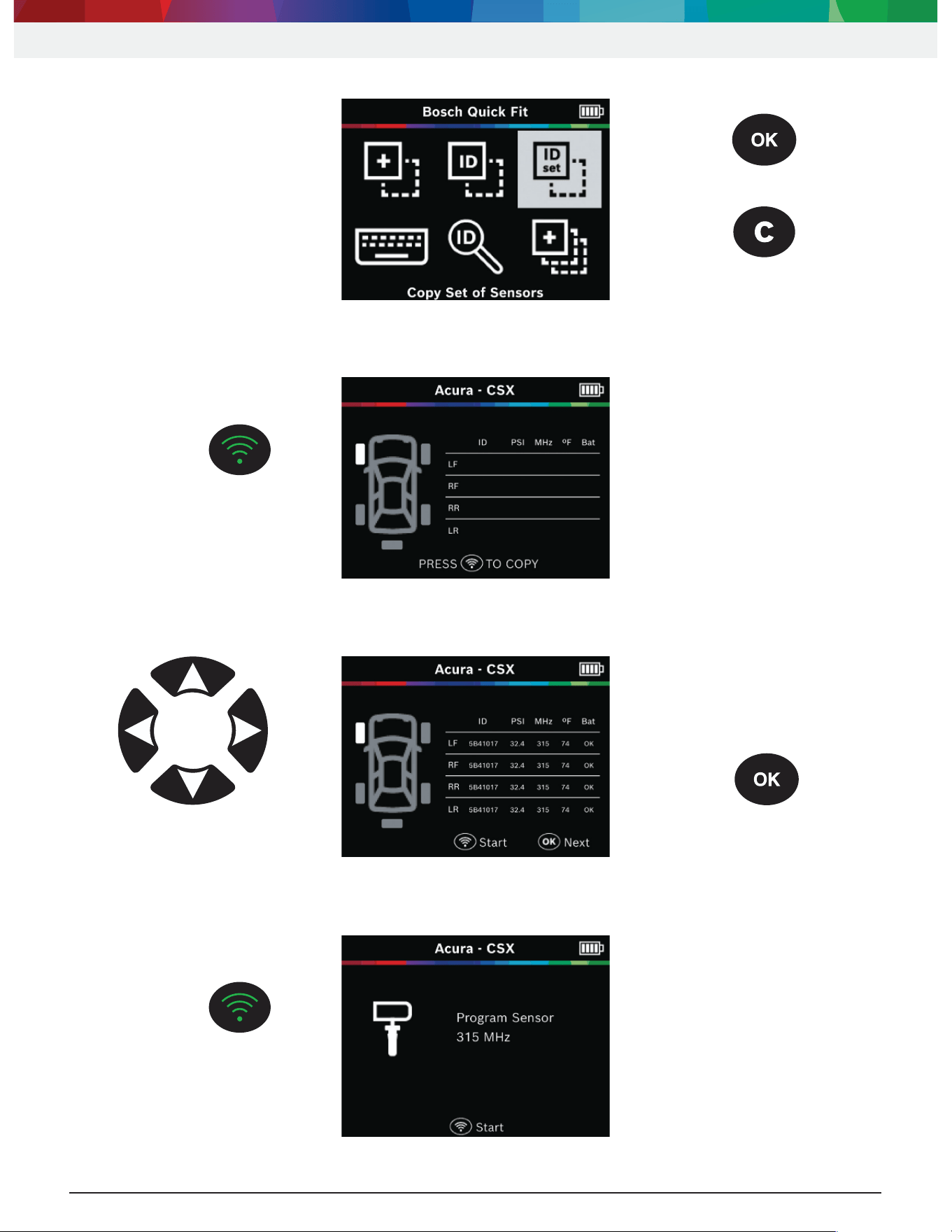
Copy Set of Sensors
= Continue
= Previous
to read the rst sensor.
to program the
rst sensor.
Use the keyboard to
select the next wheel.
Read all the sensors.
Finish by pressing
Press
Press
Usage | Tire Pressure Analyzer 400 | 25 |
1 689 989 675_en 2025-05-01
|
Robert Bosch GmbH
en
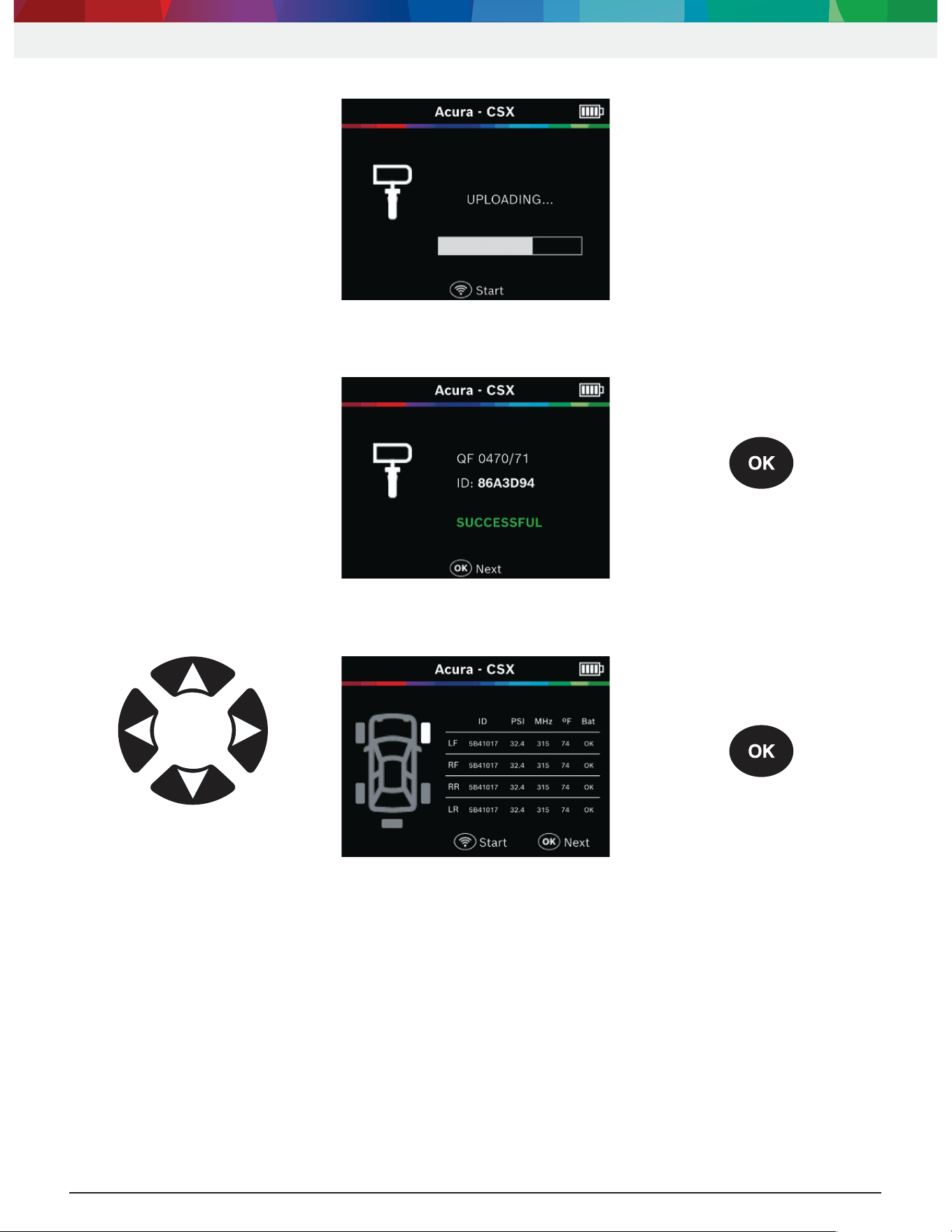
Use the keyboard to
select the next wheel.
Wait a few seconds.
The data has been
successfully uploaded to
the sensor.
= Continue
to program the next
sensor.
Press
| 26 | Tire Pressure Analyzer 400 | Usageen
1 689 989 675_en 2025-05-01
|
Robert Bosch GmbH
3.4
Manual ID
= Continue
= Previous
= Continue
= Previous
= Continue
= Previous
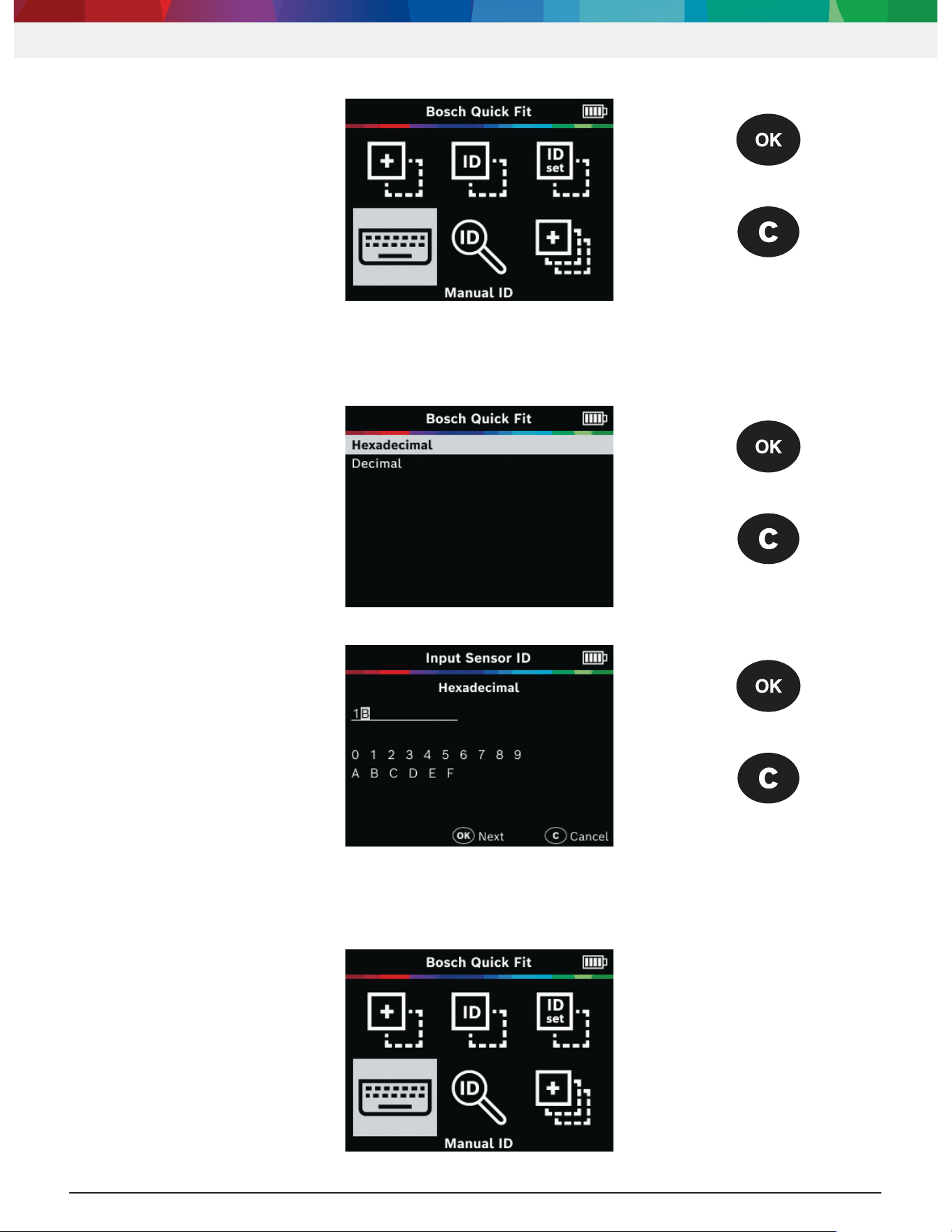
This function - only available for certain programmable sensors brands - enables the ID’s
from a damaged sensor to be entered manually. Be careful to enter only a valid sensor ID
in the correct format (decimal or hexadecimal) who depends of the type of sensor.
Choose the correct
sensor format
(hexadecimal or decimal).
Use the virtual keyboard
to enter the sensor ID of
the damaged sensor.
Position the blank sensor in front of the tool antenna to send the ID to the new sensor.
Wait a few seconds during the programming process.
The tool is now ready to
program a new sensor
(if applicable).
Usage | Tire Pressure Analyzer 400 | 27 |
1 689 989 675_en 2025-05-01
|
Robert Bosch GmbH
en
3.5
Retrieve ID
= Continue
= Previous
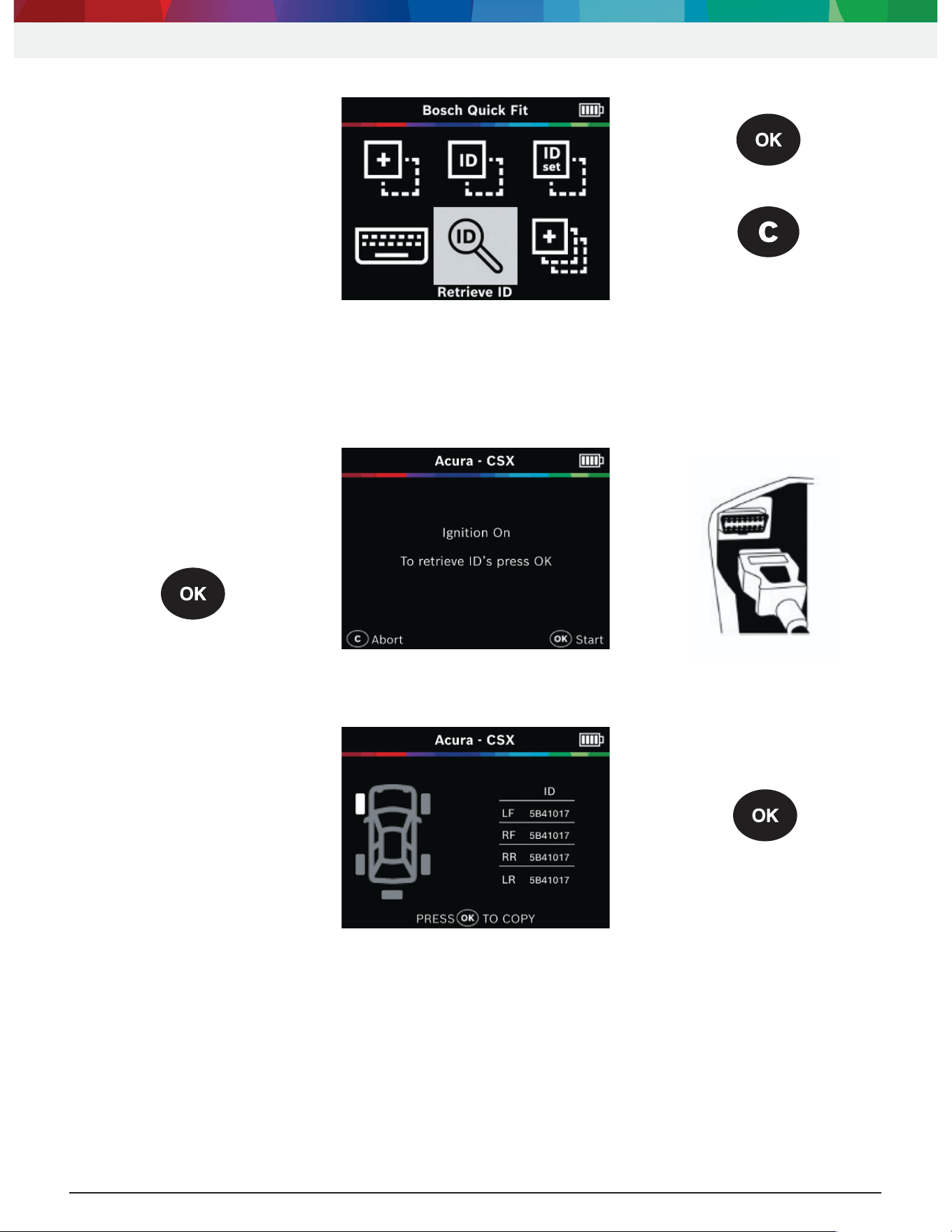
The Retrieve ID function reads and displays the unique identication numbers of the
TPMS sensors installed on the vehicle. This feature allows you to verify sensor IDs for
diagnostics, programming, or troubleshooting purposes.
Plug OBDII cable to the
tool and to the vehicle.
Press
when you are ready.
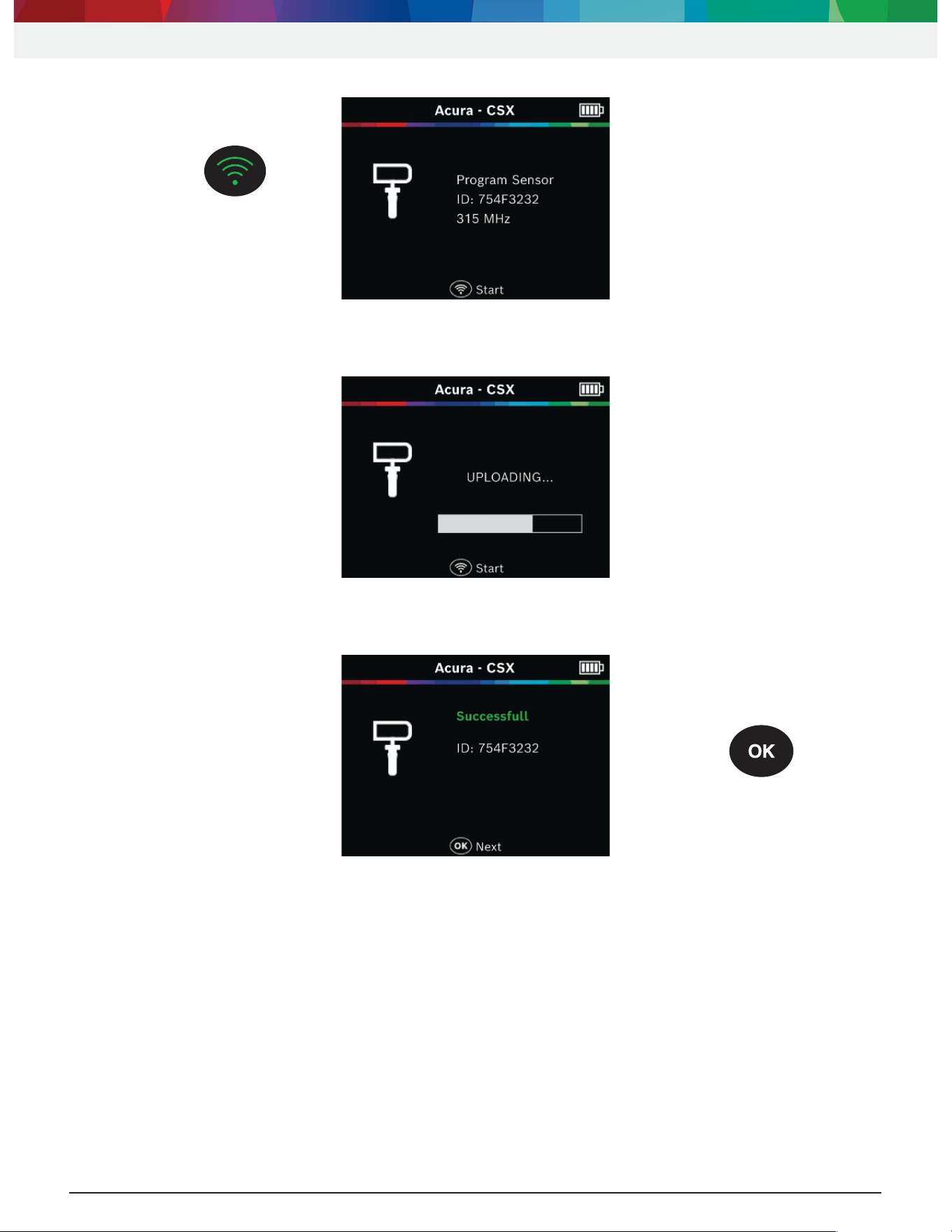
You are ready to program
the rst sensor with the
actual ID from the car.
= Continue
| 28 | Tire Pressure Analyzer 400 | Usageen
1 689 989 675_en 2025-05-01
|
Robert Bosch GmbH
to program the
rst sensor.
Press
Wait a few seconds.
The data is successfully
uploaded to the sensor.
to program the next
sensor.
Press
Usage | Tire Pressure Analyzer 400 | 29 |
1 689 989 675_en 2025-05-01
|
Robert Bosch GmbH
en
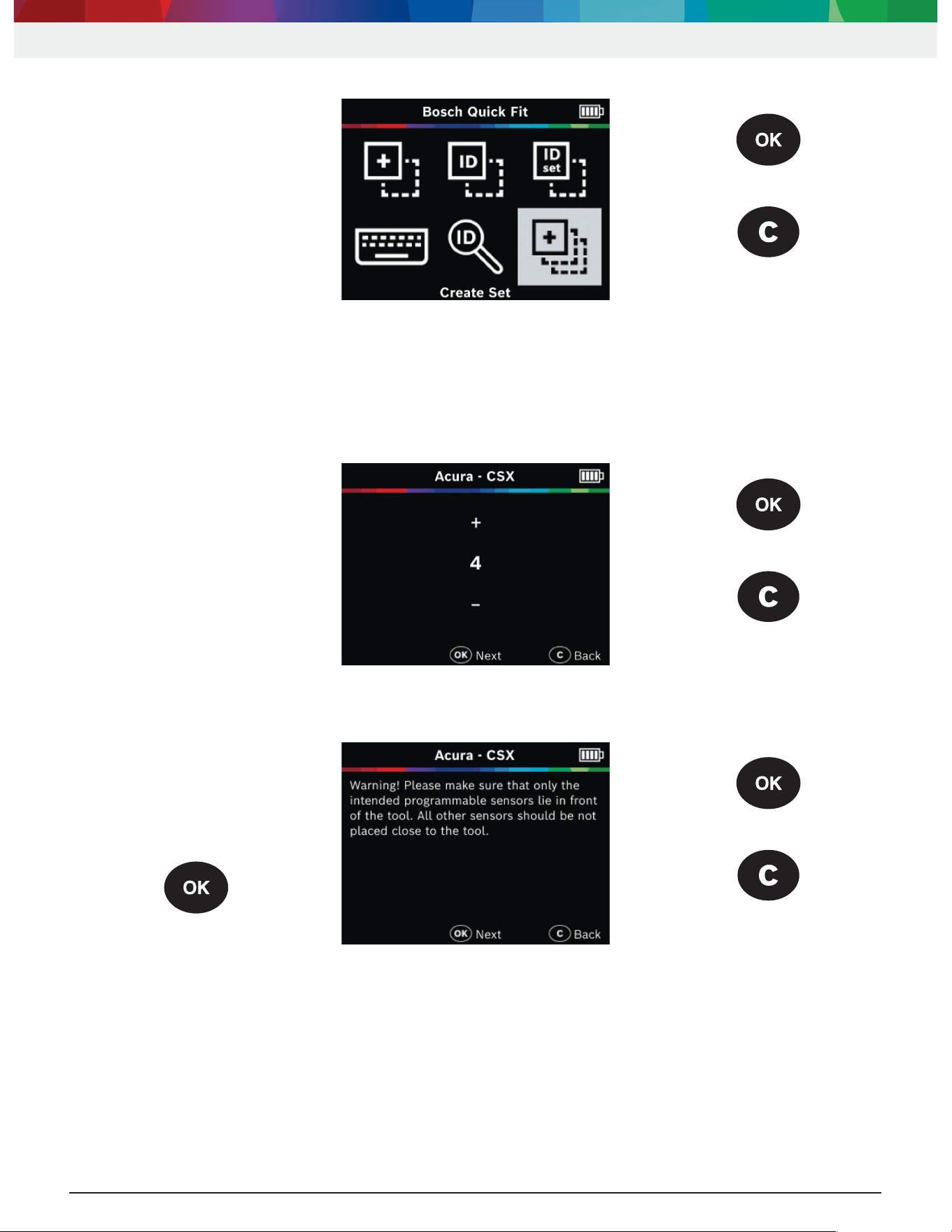
Select the number
of sensors.
A warning text will be
displayed.
3.6
Create Set
= Continue
= Previous
= Continue
= Previous
= Continue
= Previous
Create Set programs several blank TPMS sensors simultaneously with unique IDs. This
is ideal for quickly preparing multiple replacement sensors for installation or inventory.
Press
to continue.
| 30 | Tire Pressure Analyzer 400 | Usageen
1 689 989 675_en 2025-05-01
|
Robert Bosch GmbH
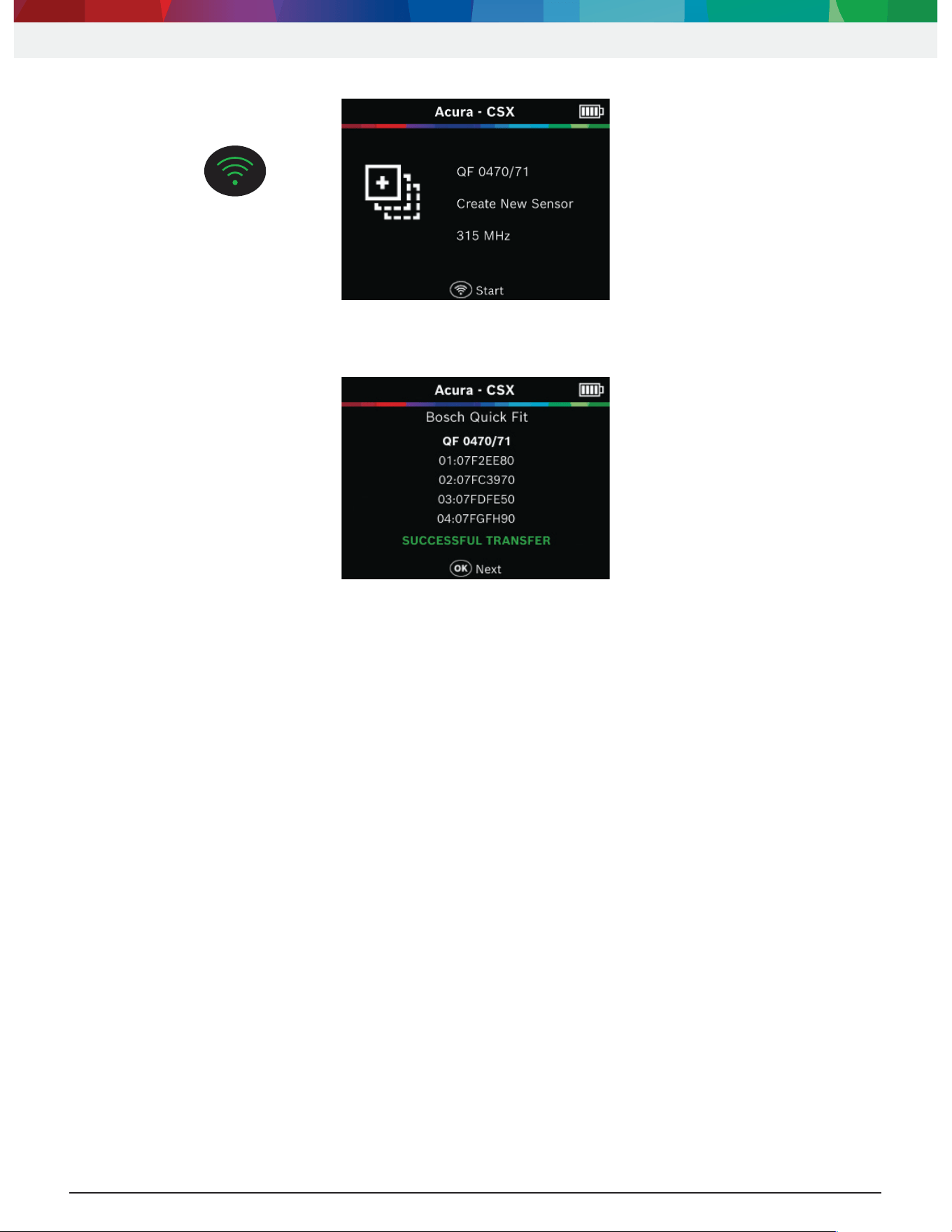
to program multiple
sensors.
Press
The data is successfully
uploaded to the sensors.
Usage | Tire Pressure Analyzer 400 | 31 |
1 689 989 675_en 2025-05-01
|
Robert Bosch GmbH
en
4. Settings
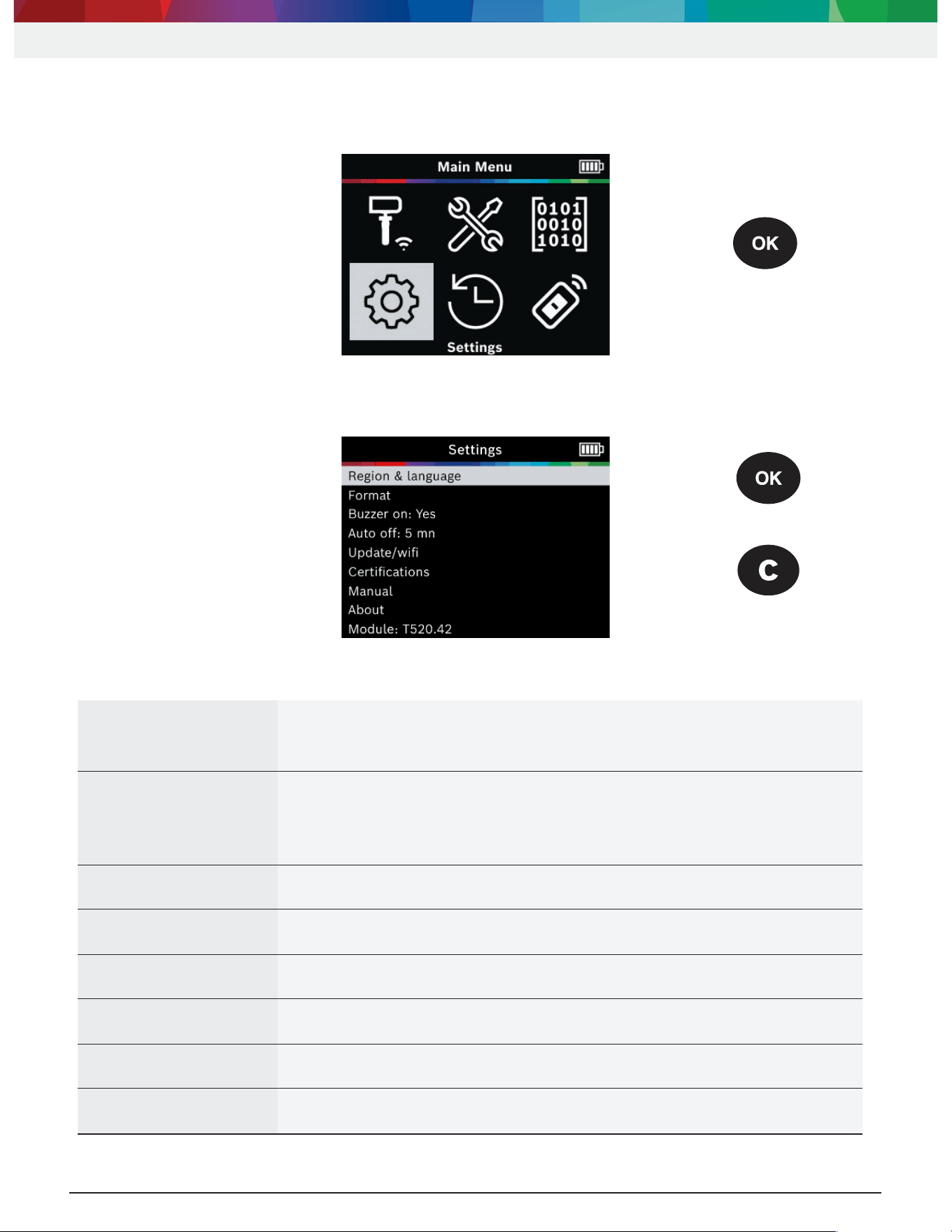
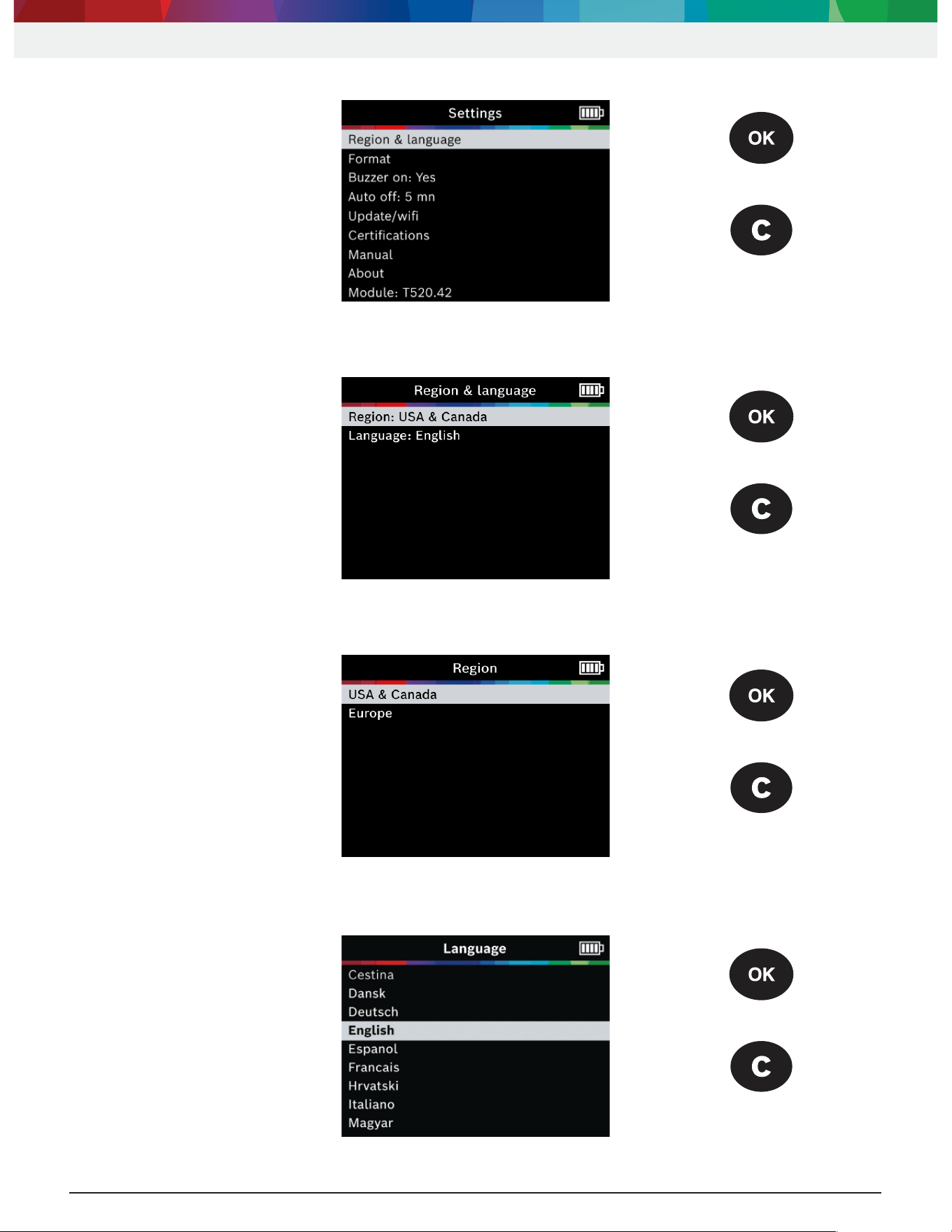
Enter Settings Menu
Select the
various settings.
Region
&
Language
Select the working region.
Select desired language.
ID Format
&
Units
Change the format of sensor ID display.
Change the air pressure and temperature display
(kPa, Bar or PSI and F° or C°).
Buzzer
Turn buzzer to ON or OFF.
Auto Off
Set the time to turn off the device automatically after not being
operated.
Update/WiFi
Change WiFi settings, and update the tool wirelessly.
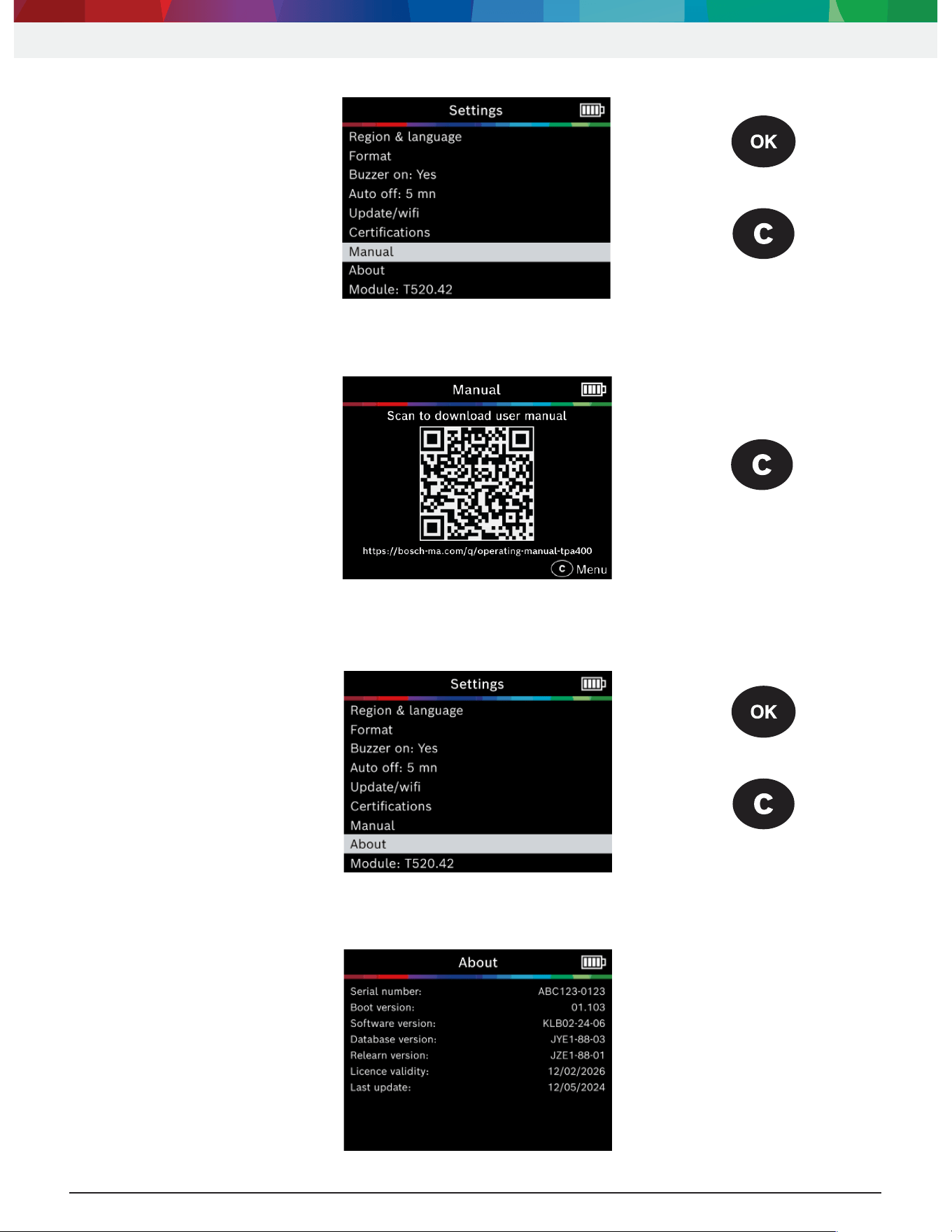
Certifications
Shows the approvals e.g. for the US (FCC) and possible other
countries.
User Manuals
Shows a QR code that can be scanned to view the current manuals.
About
Displays the current software version and information about the
license validity.
= Continue
= Continue
= Previous
| 32 | Tire Pressure Analyzer 400 | Usageen
1 689 989 675_en 2025-05-01
|
Robert Bosch GmbH
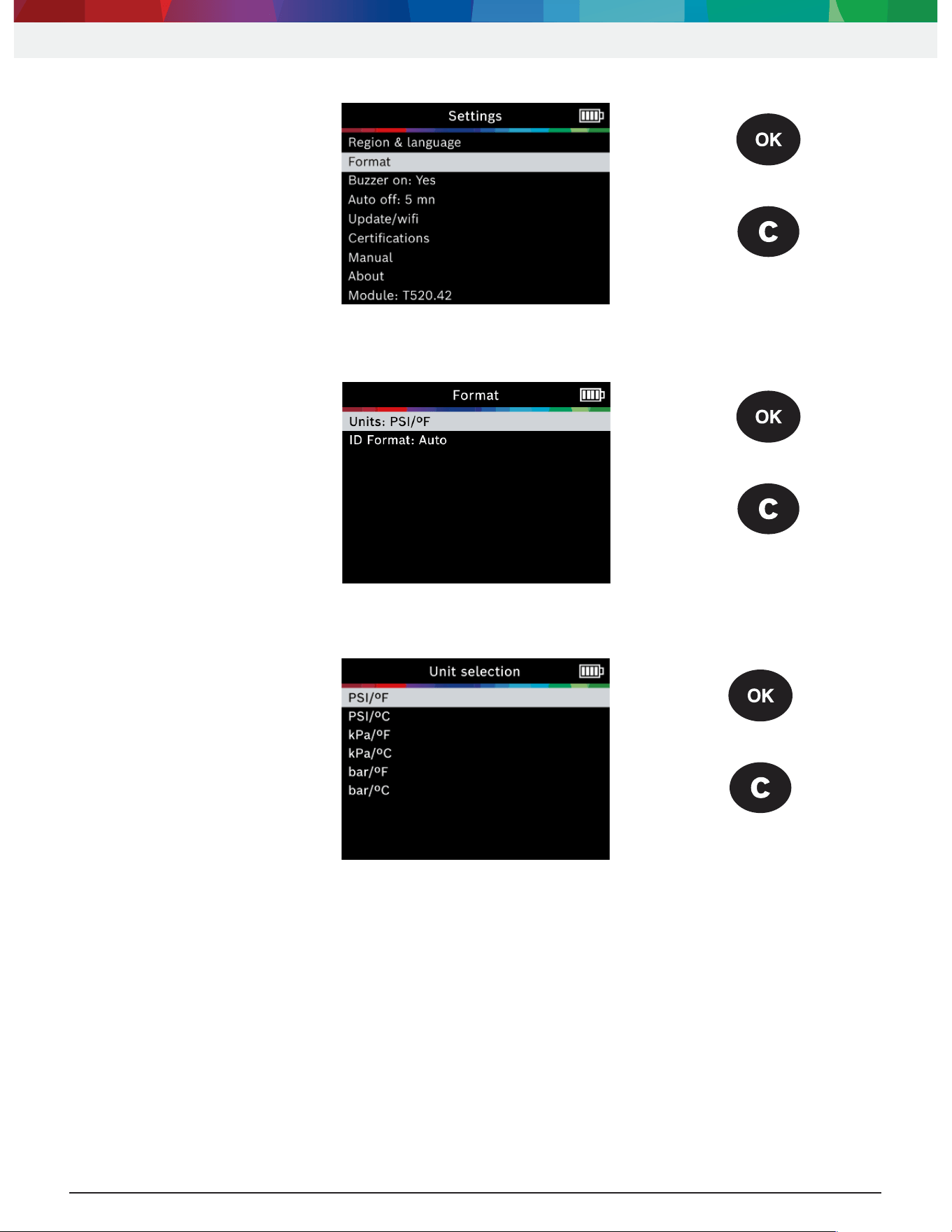
Scroll up and down
to select Region or
Language.
Language
Select the language
choice.
After choosing a new
language, please wait
until the language is
loaded.
4.1
Region & Language
Region
Select the region choice.
After choosing a new
region, please wait until
the new vehicle database
is loaded.
= Continue
= Previous
= Continue
= Previous
= Continue
= Previous
= Continue
= Previous
Usage | Tire Pressure Analyzer 400 | 33 |
1 689 989 675_en 2025-05-01
|
Robert Bosch GmbH
en
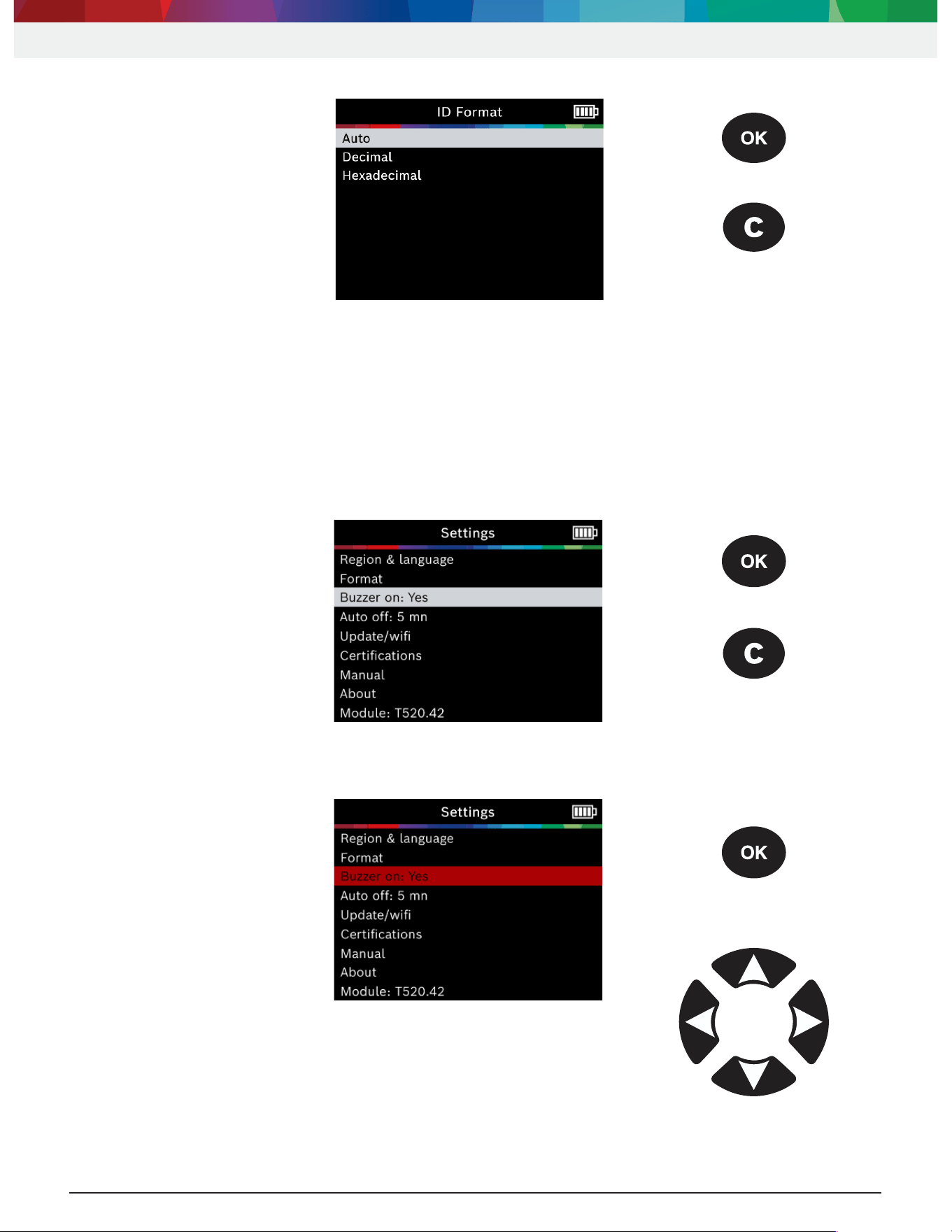
4.2
ID Format & Units
Scroll up and down to
select Units or ID Format.
= Continue
= Previous
= Continue
= Previous
Units
Scroll up and down to
select the units.
= Continue
= Previous
| 34 | Tire Pressure Analyzer 400 | Usageen
1 689 989 675_en 2025-05-01
|
Robert Bosch GmbH
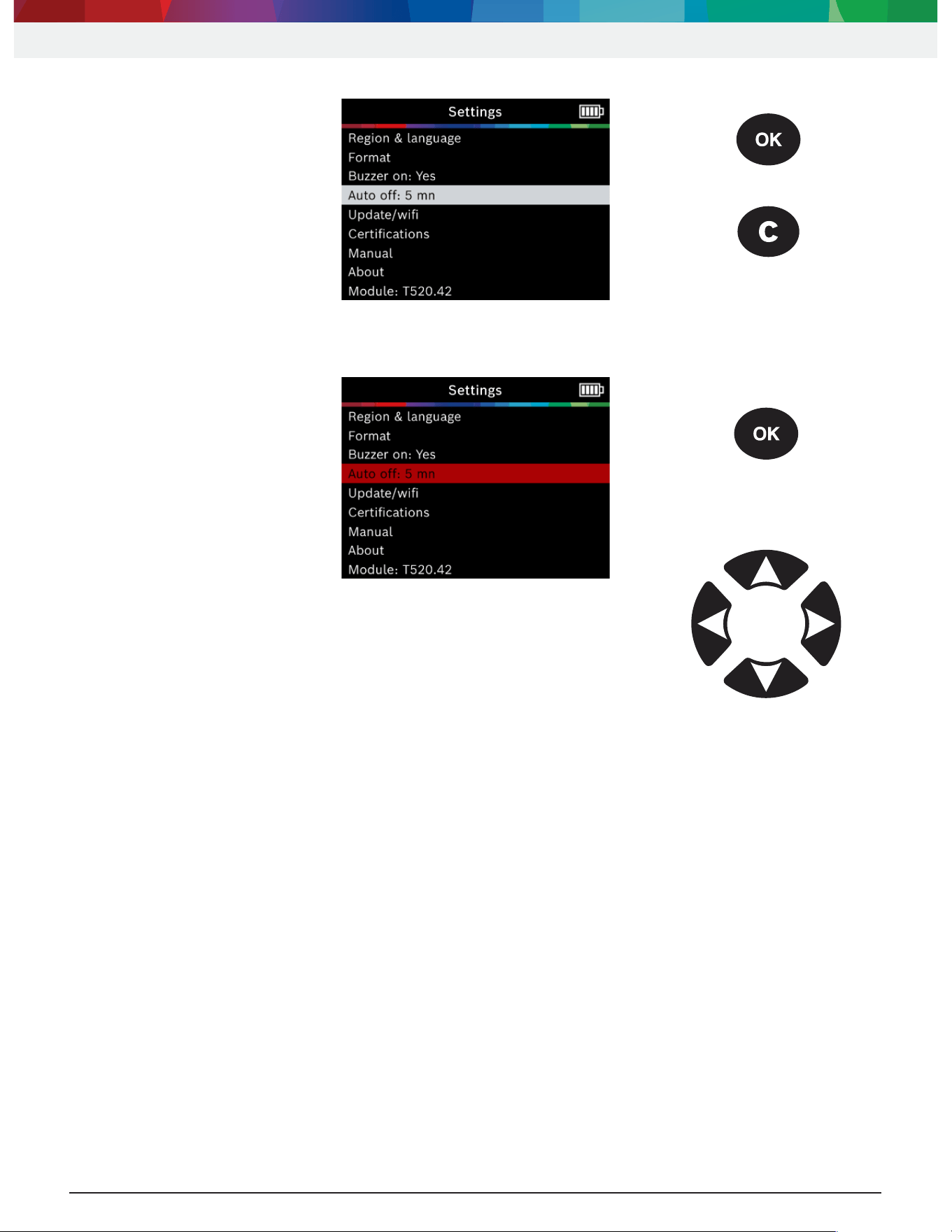
4.3
Buzzer
Turn buzzer to On or Off.
(Yes or No). When buzzer
is set to Yes, a beep is
triggered when the sensor
ID is detected.
= Continue
= Previous
Press
to select buzzer setting.
The selection turns red.
Use the up and down
arrows to select
Yes or No.
Auto: Display sensor IDs in the way sensor is transmitting.
Decimal: Display sensor IDs in decimal (0-9).
Hexadecimal: Display sensor ID in hexadecimal (0-9 & A-F).
NOTE: Some OE sensors manufacturers print sensor ID at housing in decimal format. In this
case, you can easily set your tool to display IDs in decimal format to verify the reading done
with the TPMS tool.
ID Format
Scroll up and down to
select the units.
= Continue
= Previous
Usage | Tire Pressure Analyzer 400 | 35 |
1 689 989 675_en 2025-05-01
|
Robert Bosch GmbH
en
Change by 60 min
(maximum) to
Disabled (Never).
4.4
Auto Off
= Continue
= Previous
Press
to select Auto Off
setting. The selection
turns red.
Use the up and down
arrows to set to set
Change from 60 min
(maximum) to Disabled
(never).
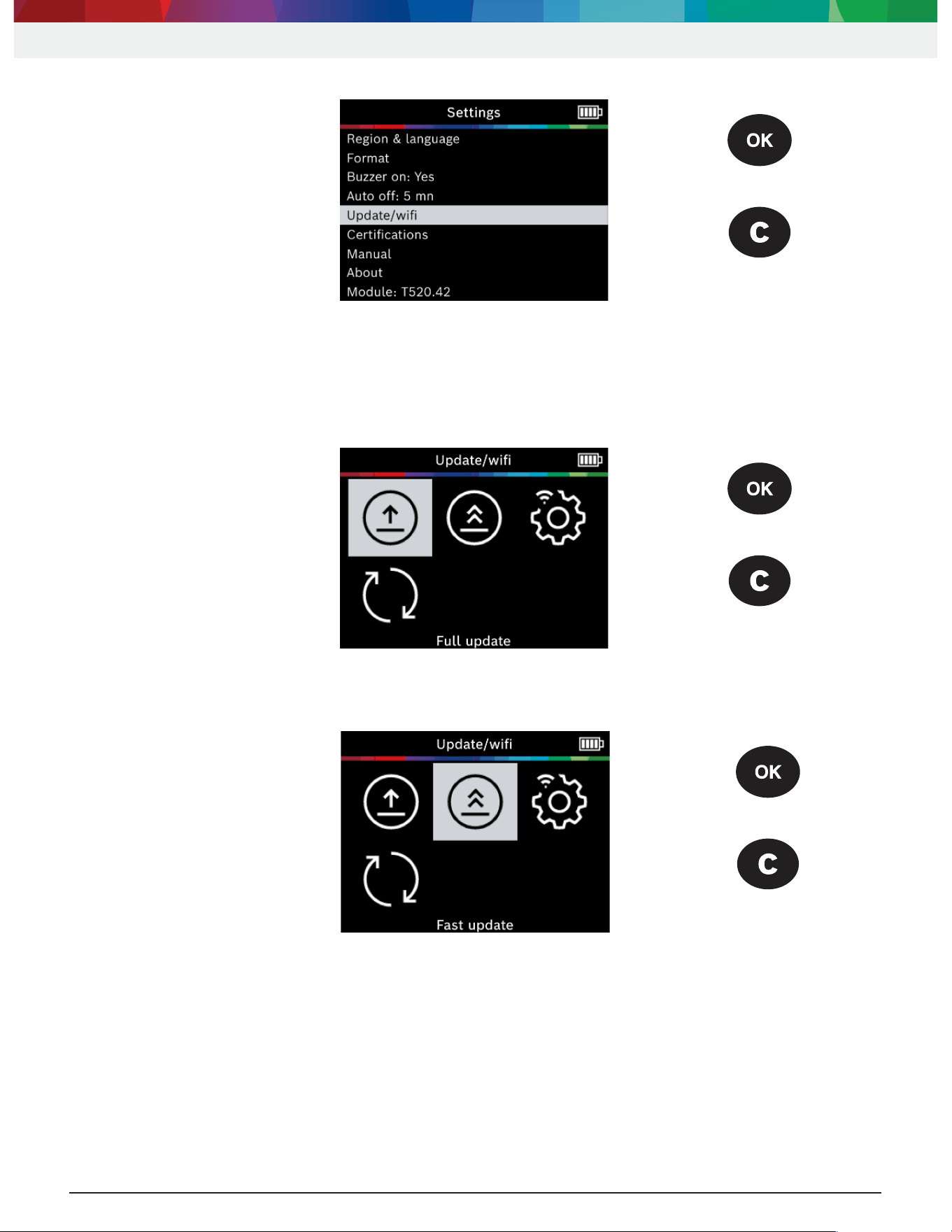
| 36 | Tire Pressure Analyzer 400 | Usageen
1 689 989 675_en 2025-05-01
|
Robert Bosch GmbH
Full Update
Overwrites all les in the
tool regardless of version.
Can be used to validate
an update if any issues
are suspected with the
current les installed.
4.5
Update/WiFi
Update tool, WiFi settings
and Renew license found
here.
= Continue
= Previous
= Continue
= Previous
Fast Update
Only updates the les
which have a newer
version available, whether
it’s software, database.
or programmable sensor
packages.
= Continue
= Previous
Note: You must rst register your tool to be able to update it via WIFI. Please install the
“TPMS Tool” PC software (see page 44) to register your tool.
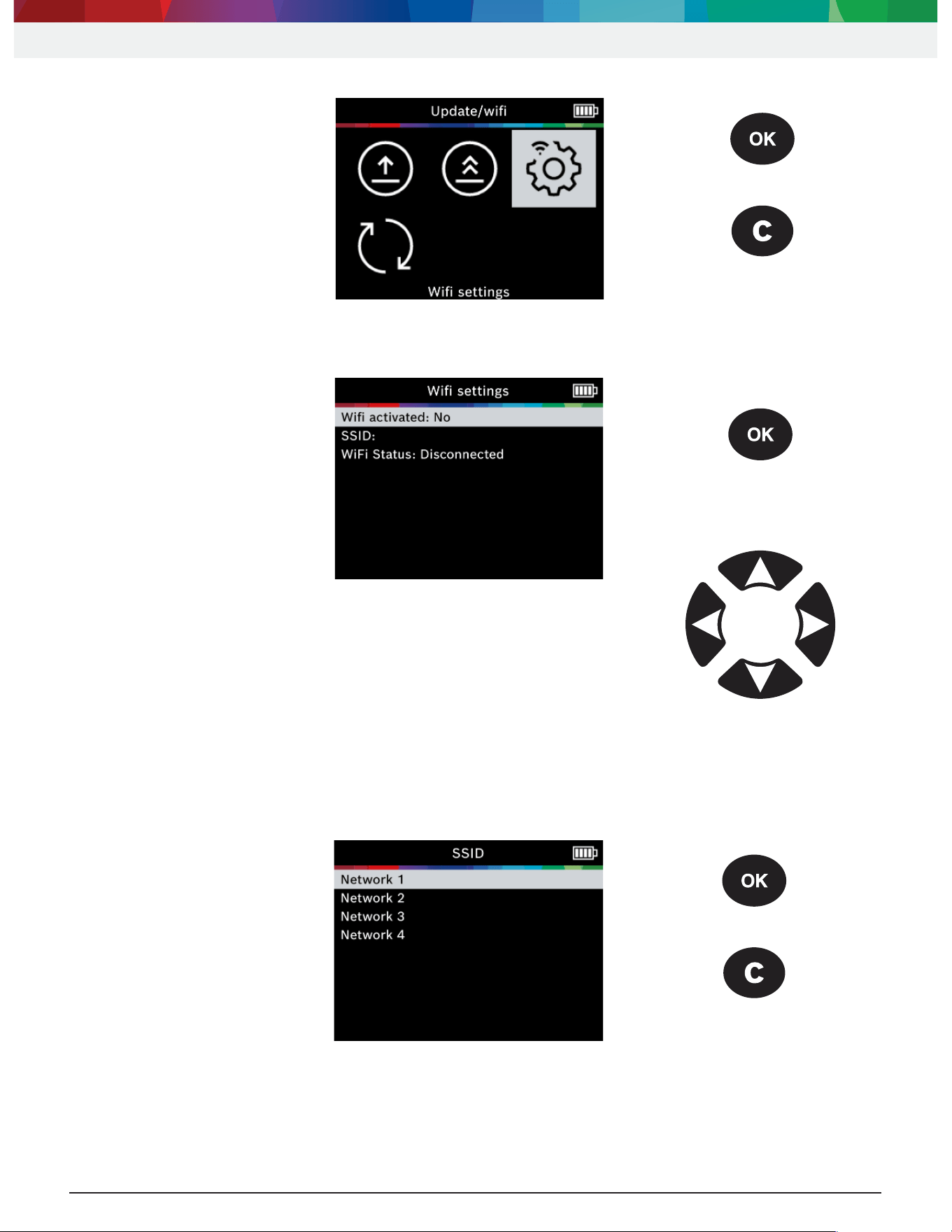
Usage | Tire Pressure Analyzer 400 | 37 |
1 689 989 675_en 2025-05-01
|
Robert Bosch GmbH
en
= Continue
= Previous
WiFi Settings
To begin searching for
a WiFi network, select
“WiFi Activated”, and
change the value to Yes.
Press
to select WiFi Activated
setting. The selection
turns red.
Use the up and down
arrows to select
Yes or No.
The tool will then display
all local WiFi networks.
Select the network you
wish to use.
= Continue
= Previous
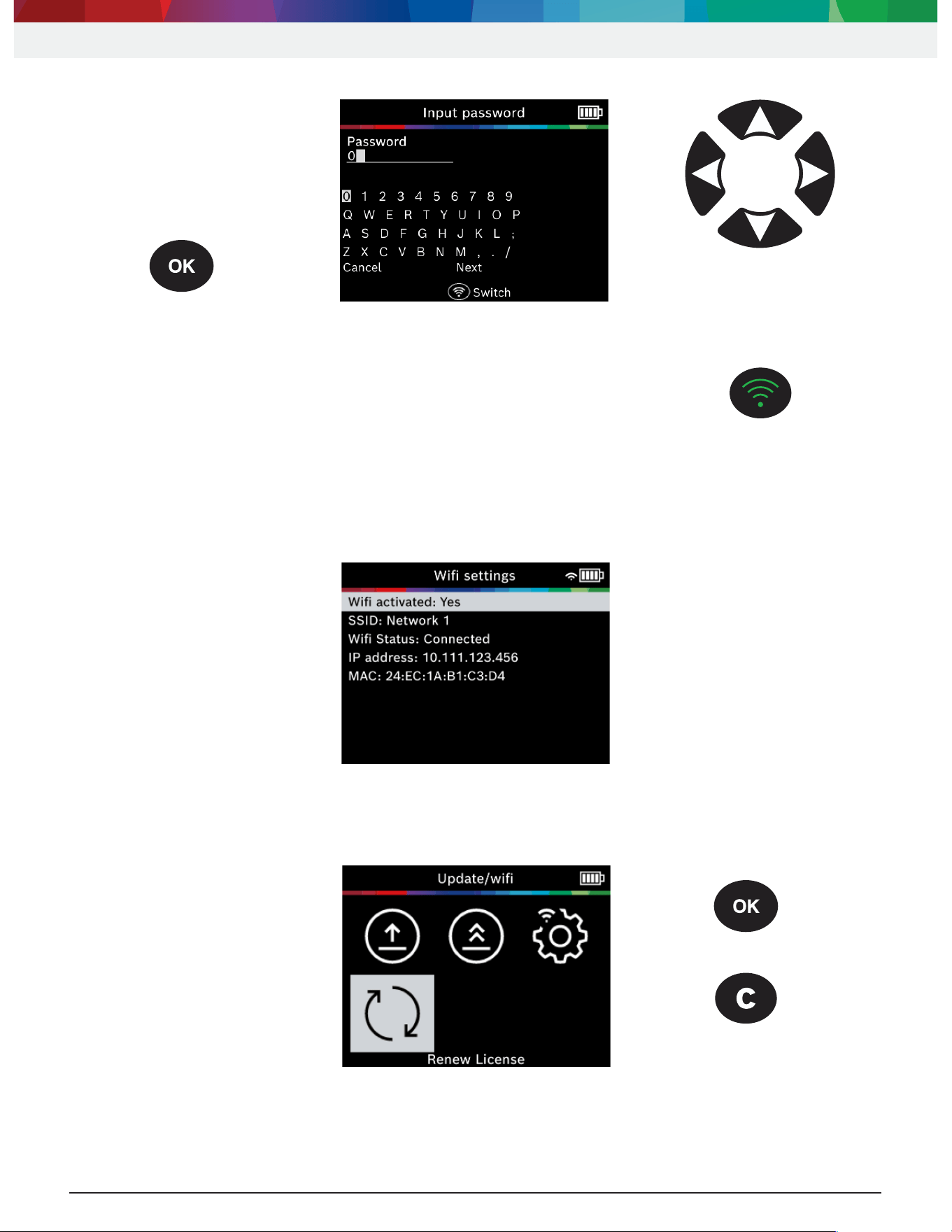
| 38 | Tire Pressure Analyzer 400 | Usageen
1 689 989 675_en 2025-05-01
|
Robert Bosch GmbH
The tool will then
connect to the selected
WiFi network, and all
information will be
displayed.
Renew License
Press
to select uppercase/
lowercase and special
characters.
Use the arrows to enter
the password.
= Continue
= Previous
Enter the password for
the selected network.
Once nished, select
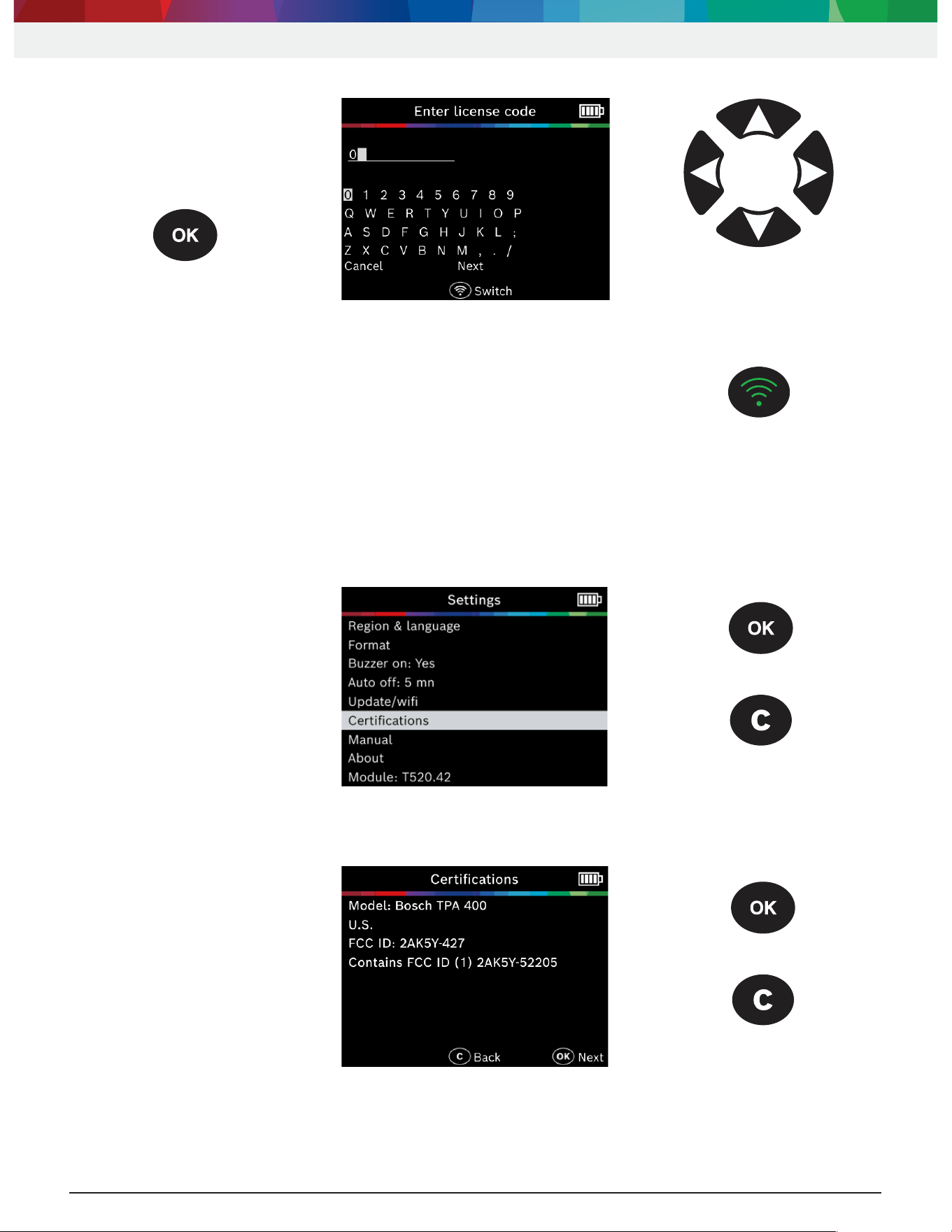
Usage | Tire Pressure Analyzer 400 | 39 |
1 689 989 675_en 2025-05-01
|
Robert Bosch GmbH
en
Press
to select uppercase/
lowercase and special
characters.
Use the arrows to enter
the license code.
Shows the approvals e.g.
for the US (FCC) and
possible other countries.
4.6
Certifications
= Continue
= Previous
= Continue
= Previous
Enter license code.
Once nished, select
| 40 | Tire Pressure Analyzer 400 | Usageen
1 689 989 675_en 2025-05-01
|
Robert Bosch GmbH
The tool displays the
software version and
license validity.
4.8
About
Displays the current
version and information
about the device.
= Continue
= Previous
Scan the QR code with a
mobile device to view the
operating instructions in
various languages.
4.7
User Manuals
Shows a QR code that
can be scanned to open
the current user manuals.
= Continue
= Previous
= Previous
Usage | Tire Pressure Analyzer 400 | 41 |
1 689 989 675_en 2025-05-01
|
Robert Bosch GmbH
en
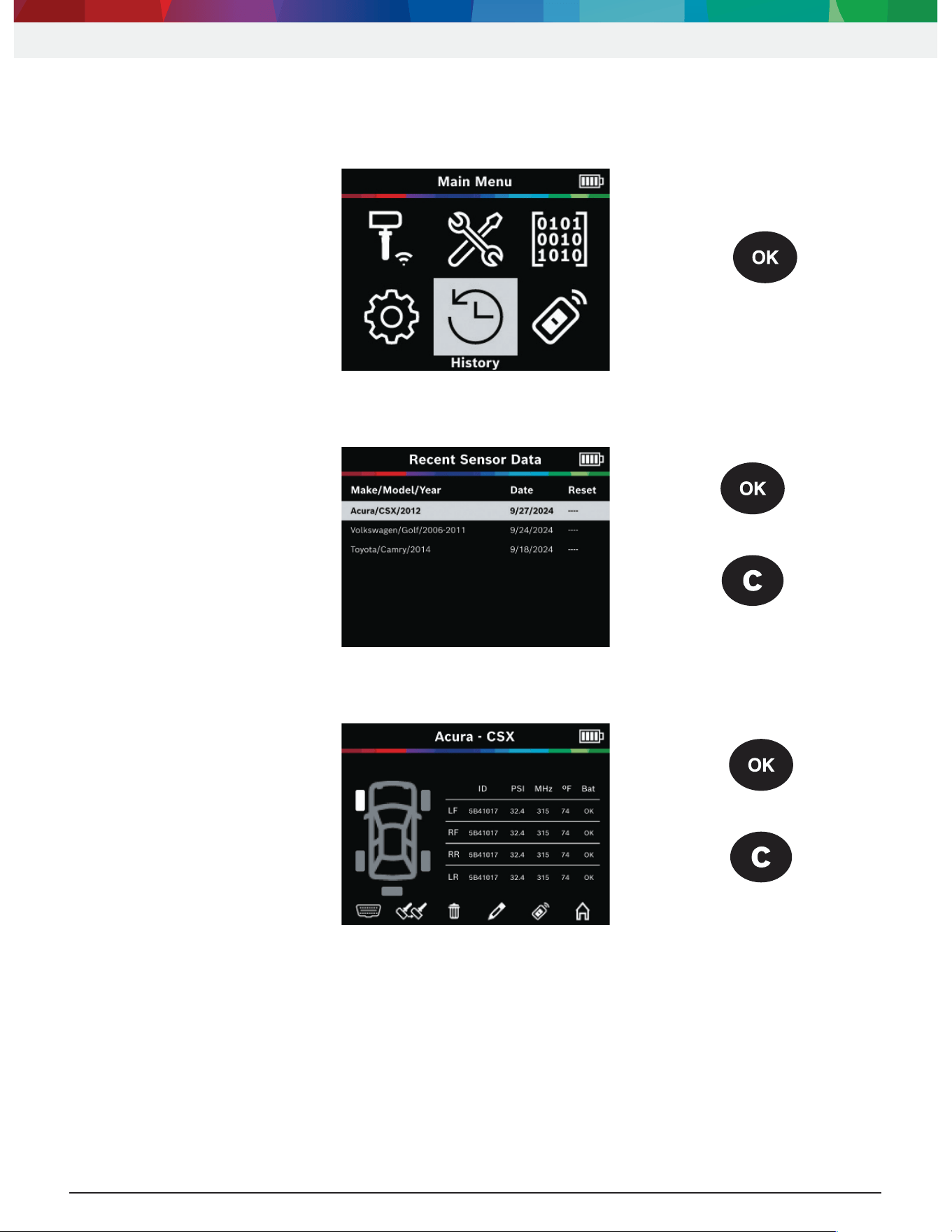
This feature is to list
all the TPMS activities
recorded in the tool.
A list of recent jobs can
be found here.
View sensor information
from past jobs.
= Continue
= Continue
= Previous
= Continue
= Previous
5. History
| 42 | Tire Pressure Analyzer 400 | Usageen
1 689 989 675_en 2025-05-01
|
Robert Bosch GmbH
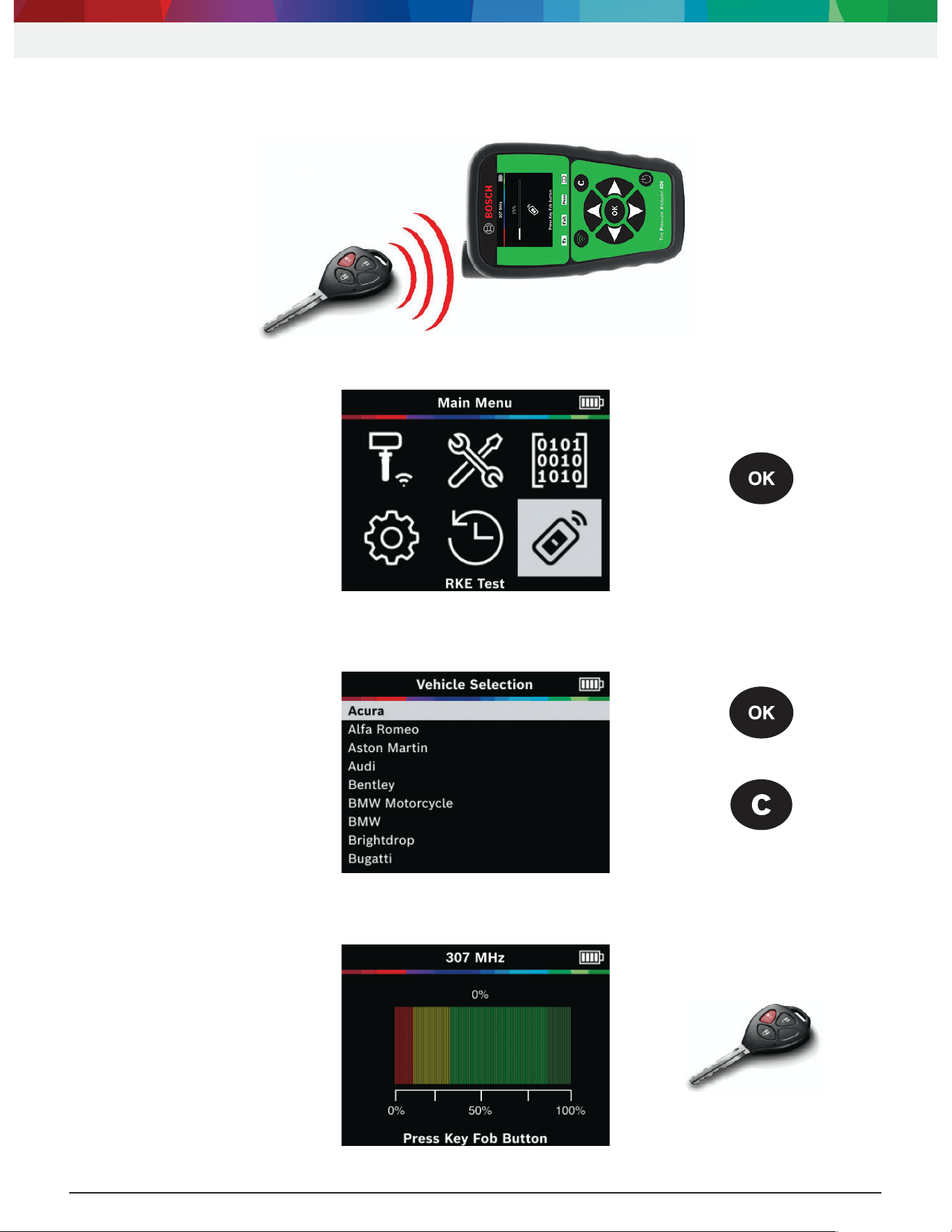
This function is to test
the strength of the
RF signal of the RKE.
Select car manufacturer.
Press and hold one of
the RKE buttons to test
signal.
= Continue
= Continue
= Previous
6. RKE Test
Miscellaneous | Tire Pressure Analyzer 400 | 43 |
1 689 989 675_en 2025-05-01
|
Robert Bosch GmbH
en
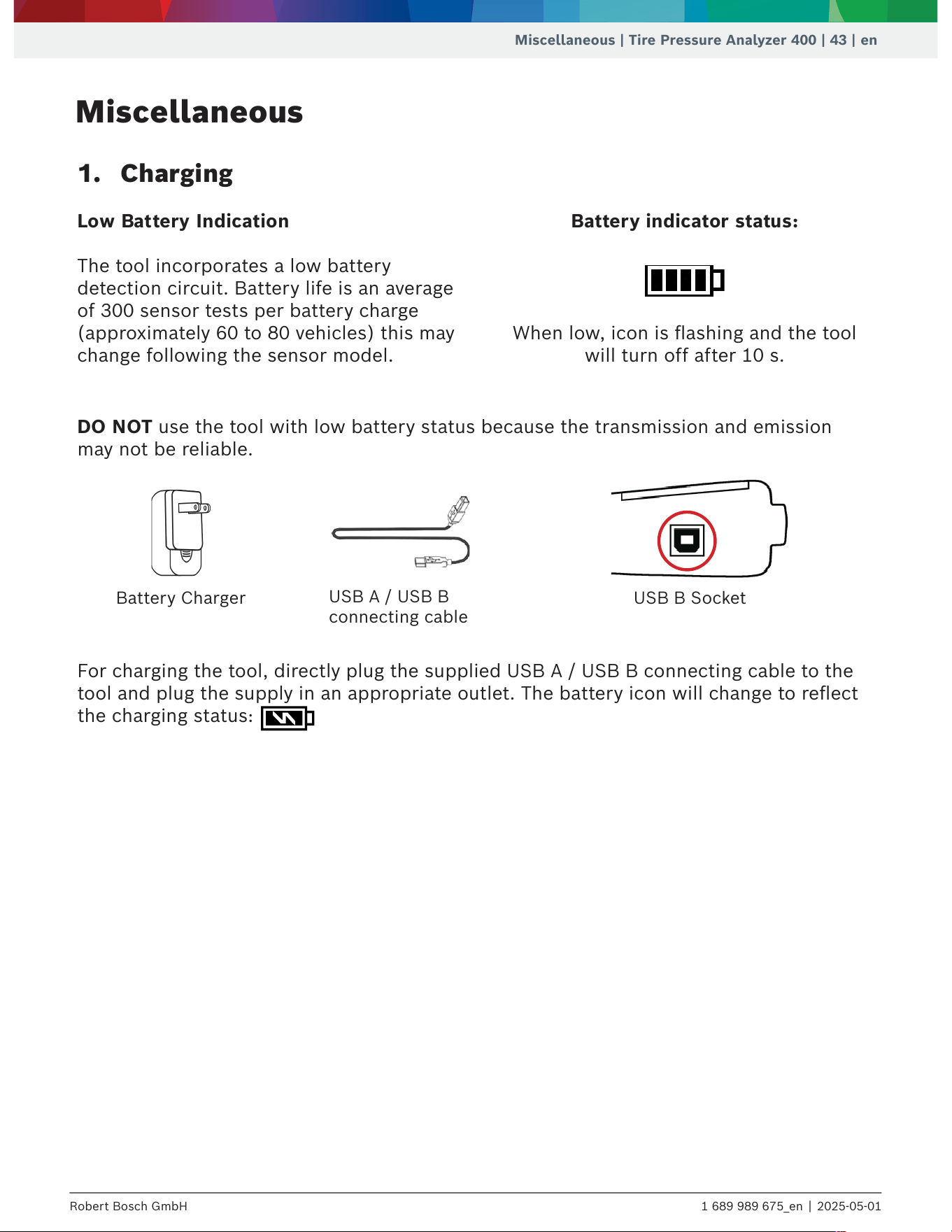
Low Battery Indication
The tool incorporates a low battery
detection circuit. Battery life is an average
of 300 sensor tests per battery charge
(approximately 60 to 80 vehicles) this may
change following the sensor model.
Miscellaneous
1. Charging
Battery indicator status:
When low, icon is ashing and the tool
will turn off after 10 s.
DO NOT use the tool with low battery status because the transmission and emission
may not be reliable.
Battery Charger
USB A / USB B
connecting cable
USB B Socket
For charging the tool, directly plug the supplied USB A / USB B connecting cable to the
tool and plug the supply in an appropriate outlet. The battery icon will change to reect
the charging status:
| 44 | Tire Pressure Analyzer 400 | Miscellaneousen
1 689 989 675_en 2025-05-01
|
Robert Bosch GmbH
Updating the TPMS Tool
As new coverage becomes available, it will become necessary to update the tool.
Follow these steps below:
Important: Temporarily turn off all of the anti-virus and spam blocking software on your
computer. This is necessary to ensure a successful update.
2. Tool Update
USB A / USB B
connecting cable
2.1 Install “TPMS Tool” PC software
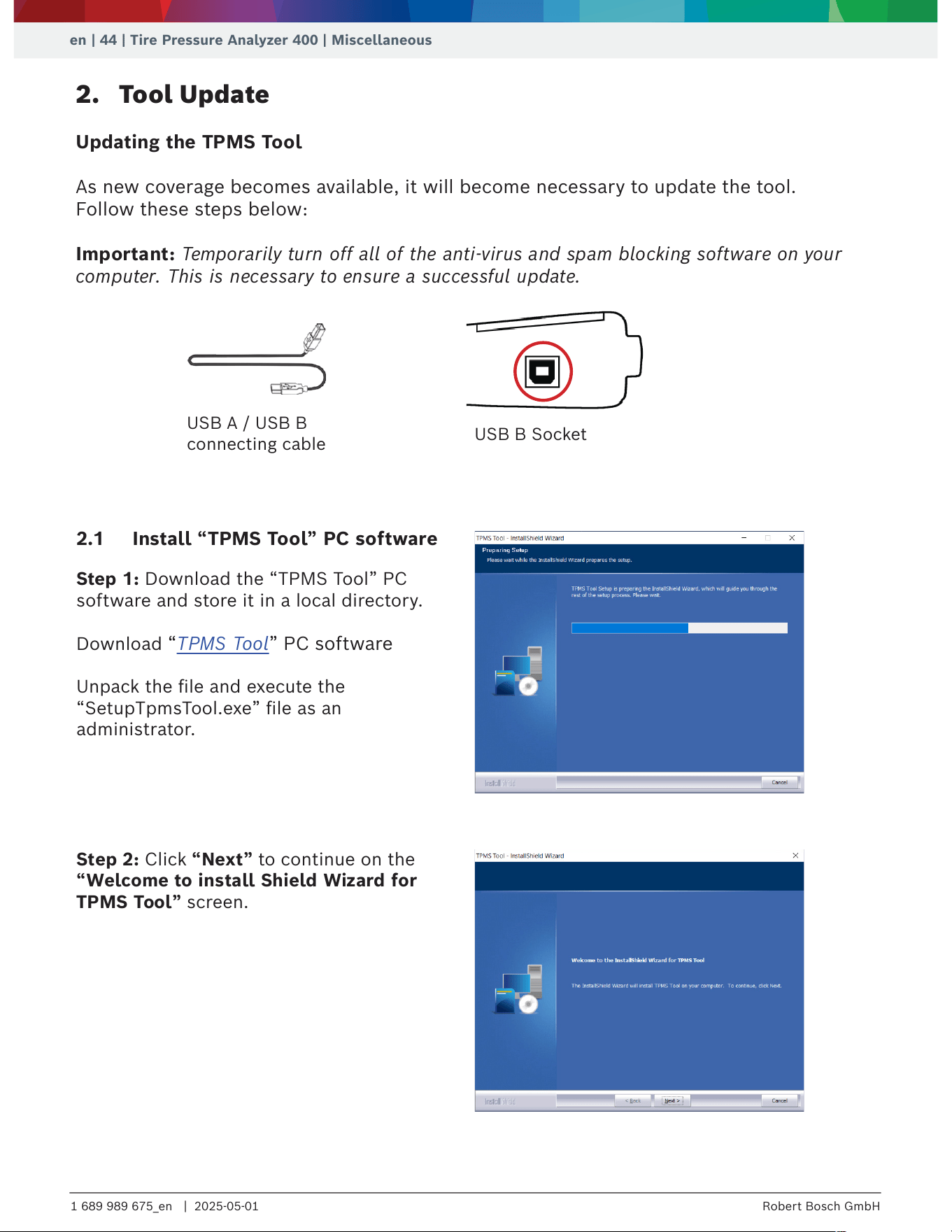
Step 1: Download the “TPMS Tool” PC
software and store it in a local directory.
Download “TPMS Tool” PC software
Unpack the le and execute the
“SetupTpmsTool.exe” le as an
administrator.
Step 2: Click “Next” to continue on the
“Welcome to install Shield Wizard for
TPMS Tool” screen.
USB B Socket
Miscellaneous | Tire Pressure Analyzer 400 | 45 |
1 689 989 675_en 2025-05-01
|
Robert Bosch GmbH
en
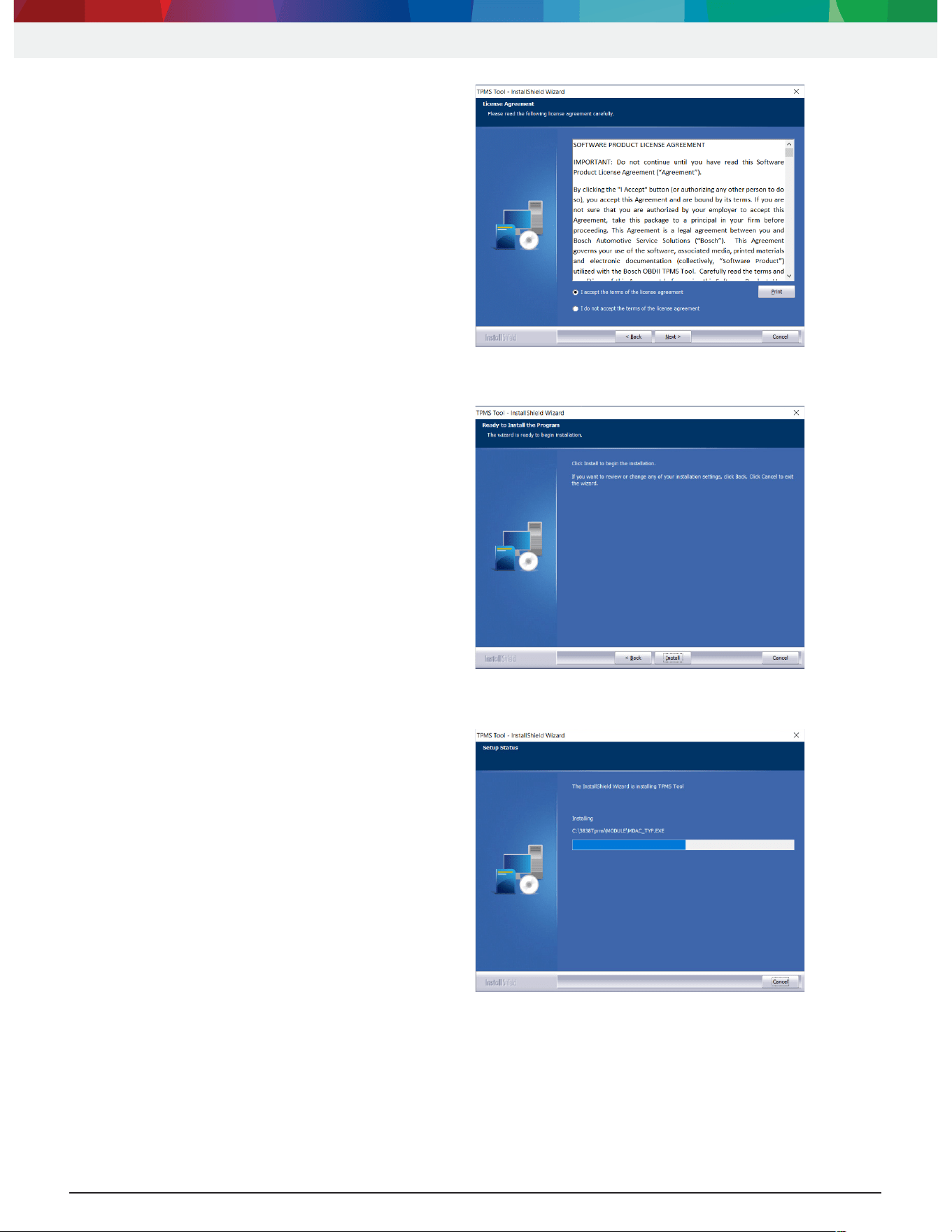
Step 3: Read the software product
license agreement, select “I accept the
terms of the license agreement” and
click “Next”.
Step 4: Click “Install” to start the
installation process.
Step 5: Wait until the software has
completed the installation.
| 46 | Tire Pressure Analyzer 400 | Miscellaneousen
1 689 989 675_en 2025-05-01
|
Robert Bosch GmbH
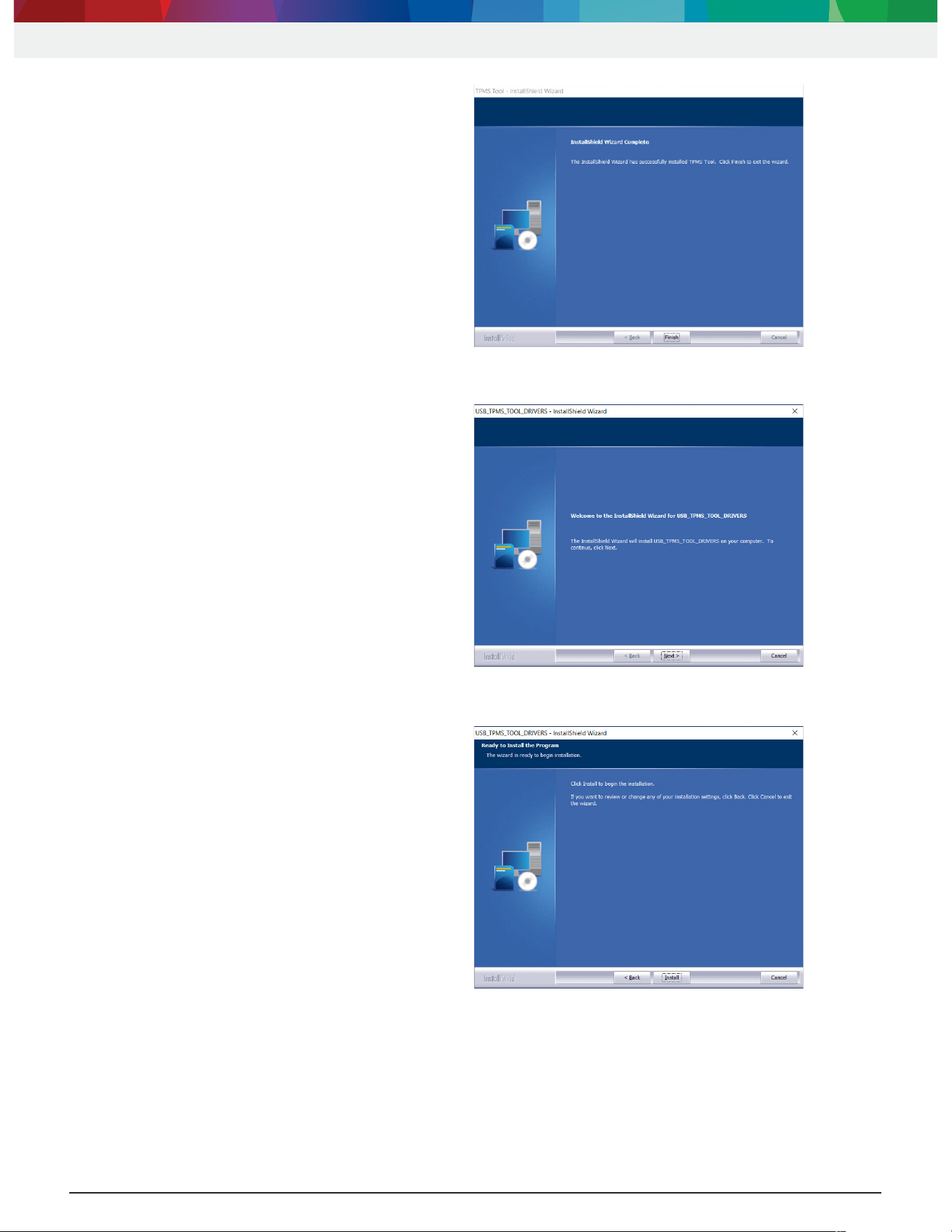
Step 6: Once installation is complete,
click “Finish”.
Step 7: Click “Next” to continue with
“Welcome to the InstallShield Wizard
for USB TPMS Tool Drivers”.
Step 8: Click “Install” to install
the USB driver.
Miscellaneous | Tire Pressure Analyzer 400 | 47 |
1 689 989 675_en 2025-05-01
|
Robert Bosch GmbH
en
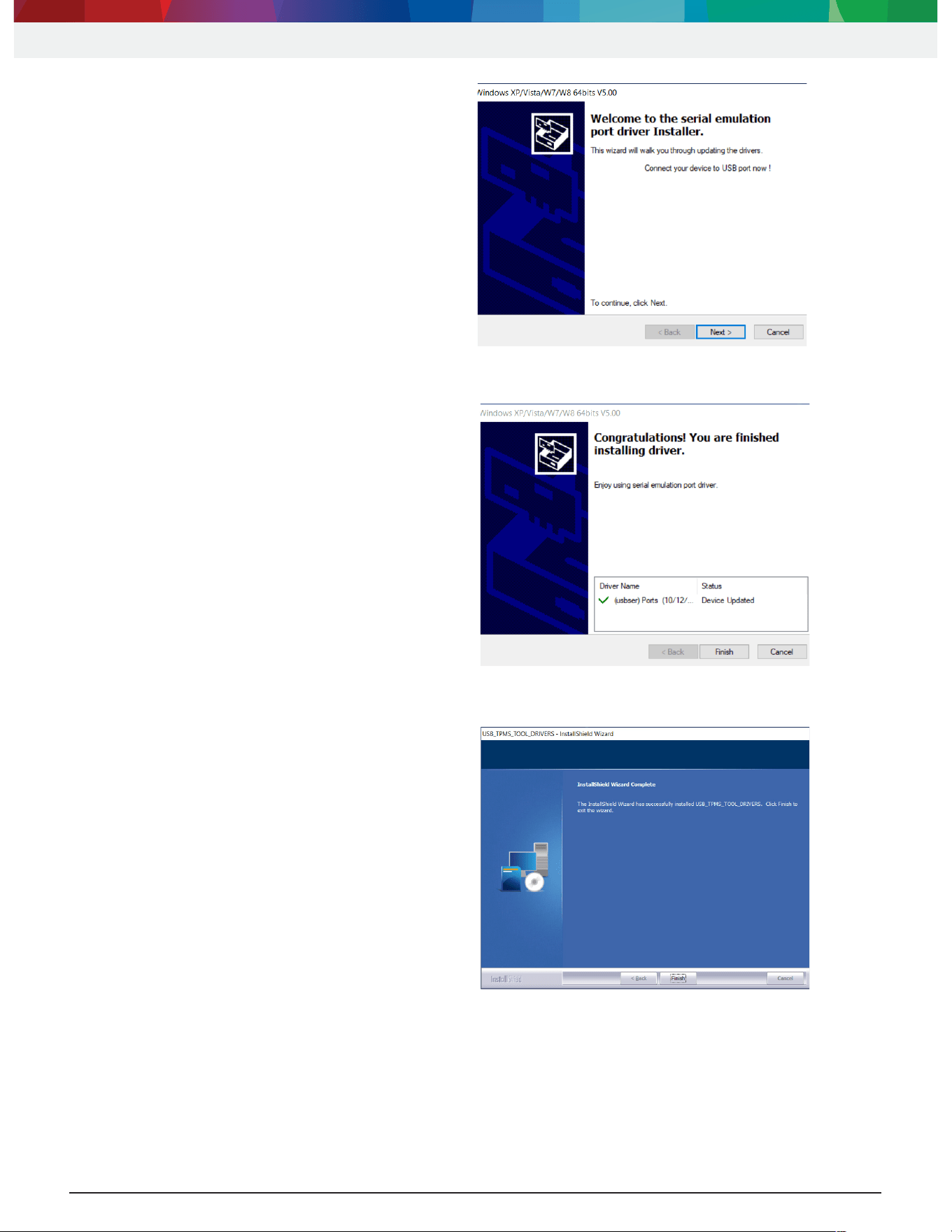
Step 9: Click “Next” to install the
USB/serial emulation port driver.
Step 10: The installation is complete,
your tool is ready to use, click on
“Finish”.
Step 11: Click “Finish” to close the
installation window.
Note: If prompted by Windows
©
security,
click “Continue anyway”.
| 48 | Tire Pressure Analyzer 400 | Miscellaneousen
1 689 989 675_en 2025-05-01
|
Robert Bosch GmbH
2.2 PC Software for Tire Pressure Analyzer 400 updates
Step 1: Connect the USB connecting cable from the TPMS Tool to the PC, and turn
the device on.
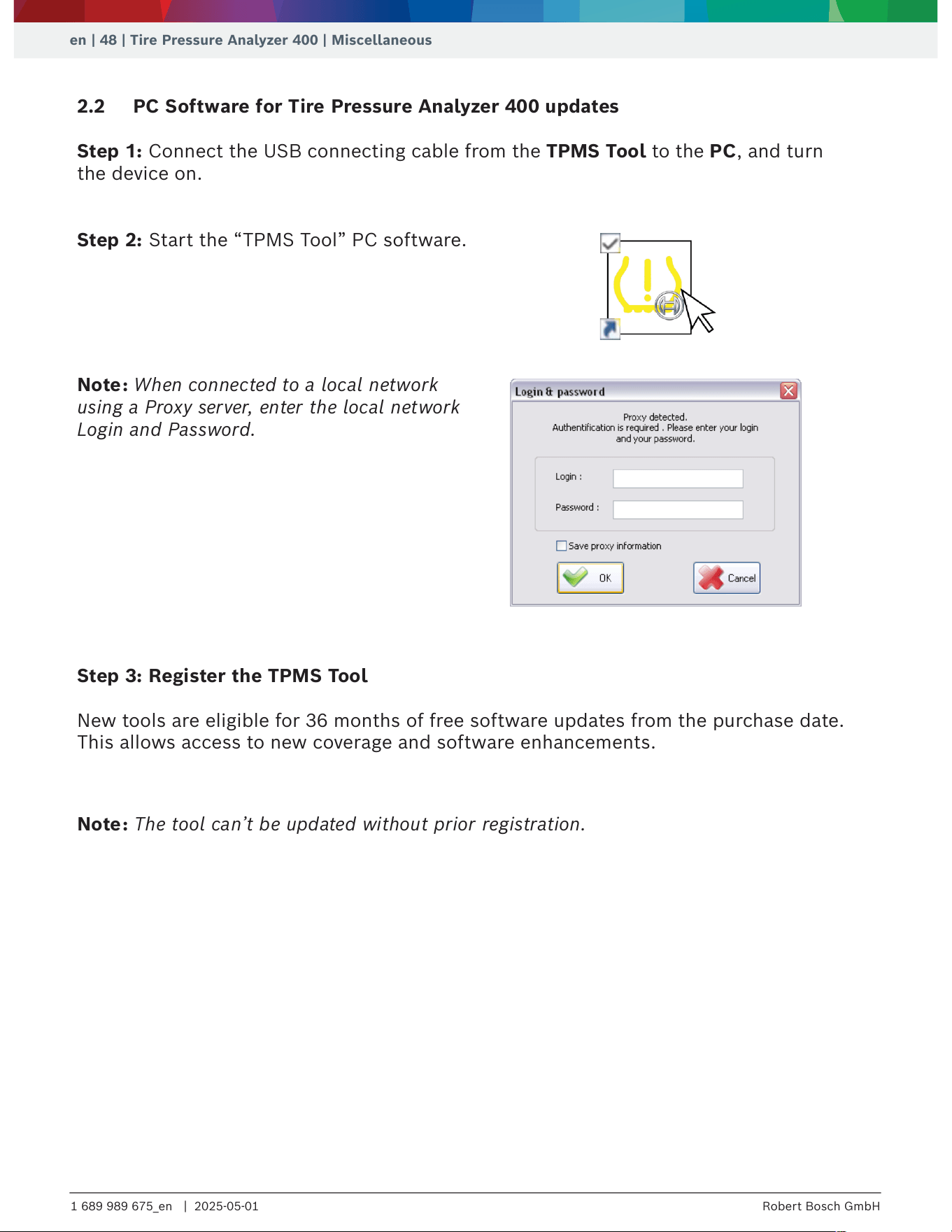
Step 2: Start the “TPMS Tool” PC software.
Note: When connected to a local network
using a Proxy server, enter the local network
Login and Password.
Step 3: Register the TPMS Tool
New tools are eligible for 36 months of free software updates from the purchase date.
This allows access to new coverage and software enhancements.
Note: The tool can’t be updated without prior registration.
Miscellaneous | Tire Pressure Analyzer 400 | 49 |
1 689 989 675_en 2025-05-01
|
Robert Bosch GmbH
en
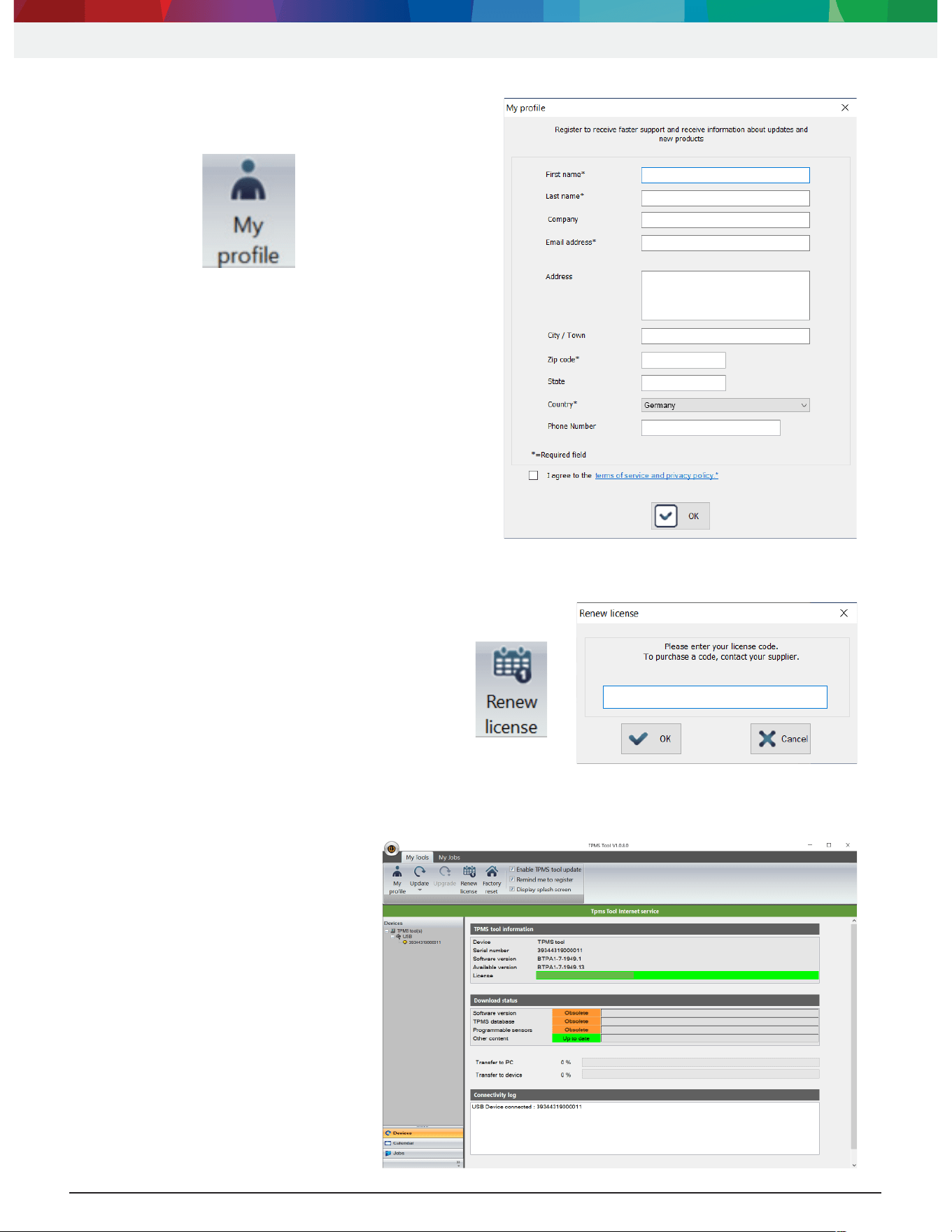
Step 4: Registration Information
To register the product, Enter
information in the elds, read the
terms of service and privacy policy,
then click “OK”. This information will
be paired with the connected tool.
Step 5: Renew Subscription
Call your distributor to purchase a new
subscription code.
To enter the new subscription code,
click on the Renew License button.
Step 6: Main windows in the
“My Tools” Tab
The software searches for
the connected device. Once
detected, the software
connects to the Internet
server and conrms if the
connection is established.
16February2028
| 50 | Tire Pressure Analyzer 400 | Miscellaneousen
1 689 989 675_en 2025-05-01
|
Robert Bosch GmbH
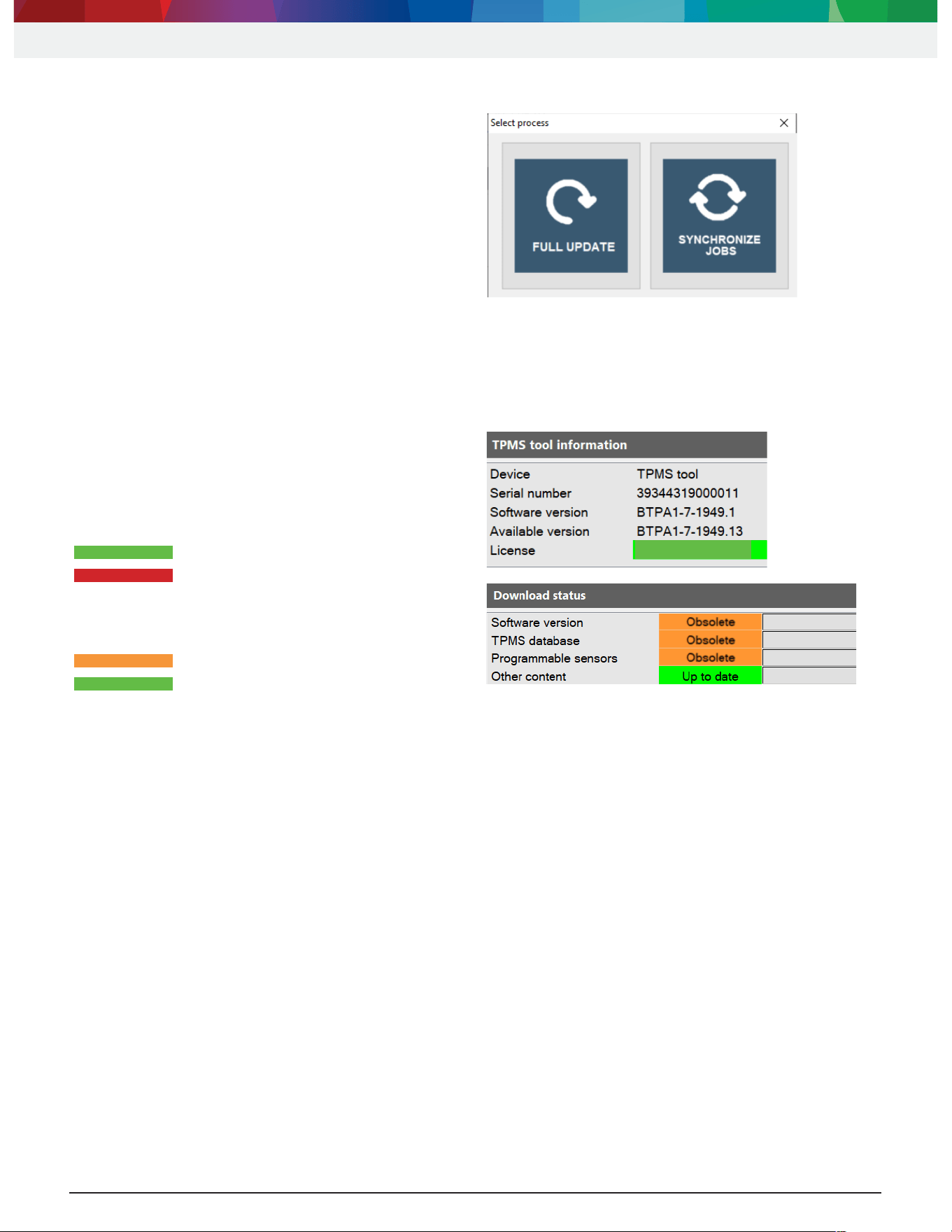
Step 7: TPMS Tool Update
When a device is detected, the
software prompts with two choices:
Full Update: to update the device to
the last version.
Synchronize jobs: to upload to the
PC all the recorded jobs with the
sensors data triggered.
Step 8: TPMS Tool Information
The license eld indicates the status of
the Tire Pressure Analyzer 400 software
license.
The tool license is valid.
The tool license is expired.
The Download status elds conrms the
current software version installed into the
Tire Pressure Analyzer 400 device.
The tool needs to be updated.
The tool is up to date.
Obsolete
Up to date
16 February 2028
Miscellaneous | Tire Pressure Analyzer 400 | 51 |
1 689 989 675_en 2025-05-01
|
Robert Bosch GmbH
en
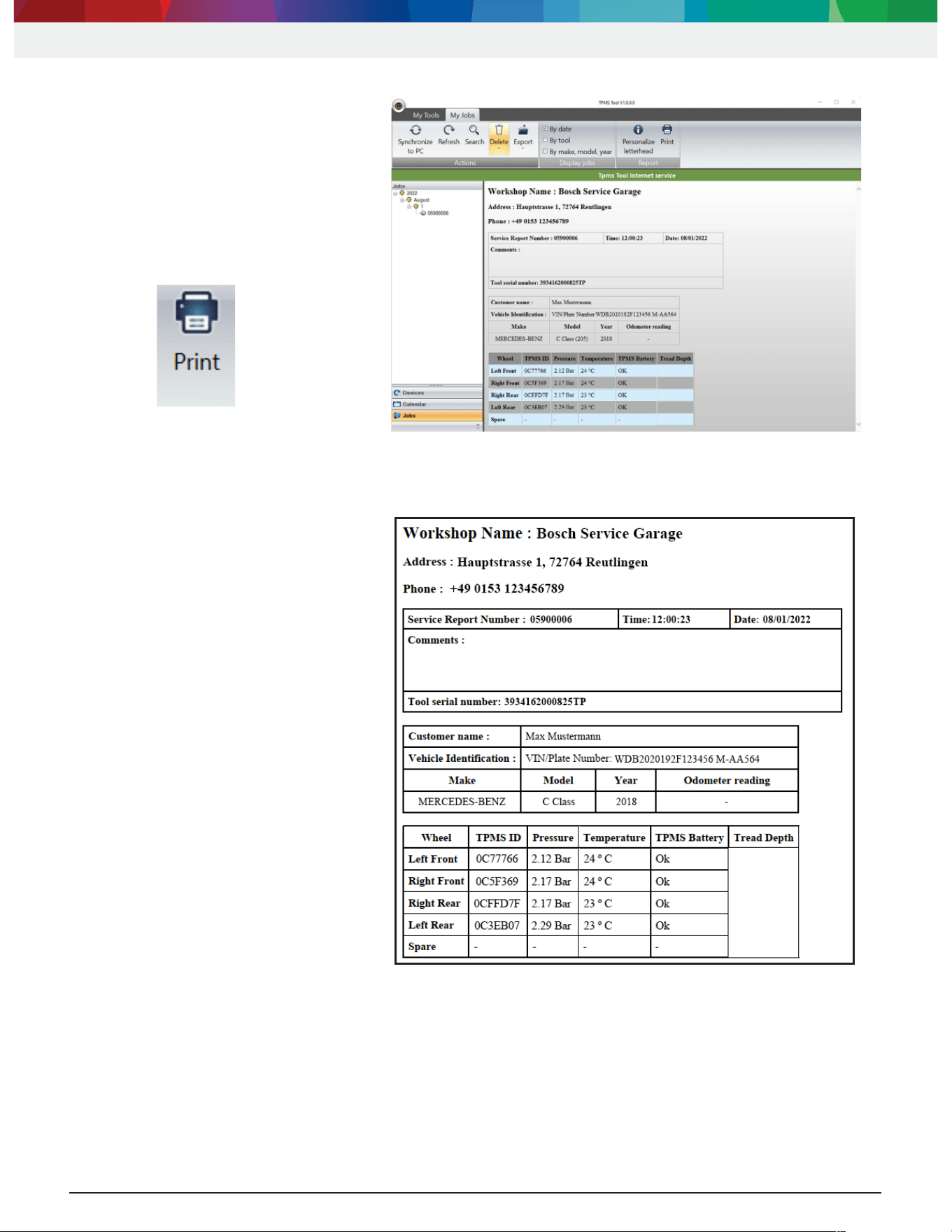
Step 9: Main windows in the
“My Jobs” Tab
This is to display the sensors
triggered by vehicle.
To print these results click on
the Print icon.
Print Example
The results will be printed like
the following example.
| 52 | Tire Pressure Analyzer 400 | Miscellaneousen
1 689 989 675_en 2025-05-01
|
Robert Bosch GmbH
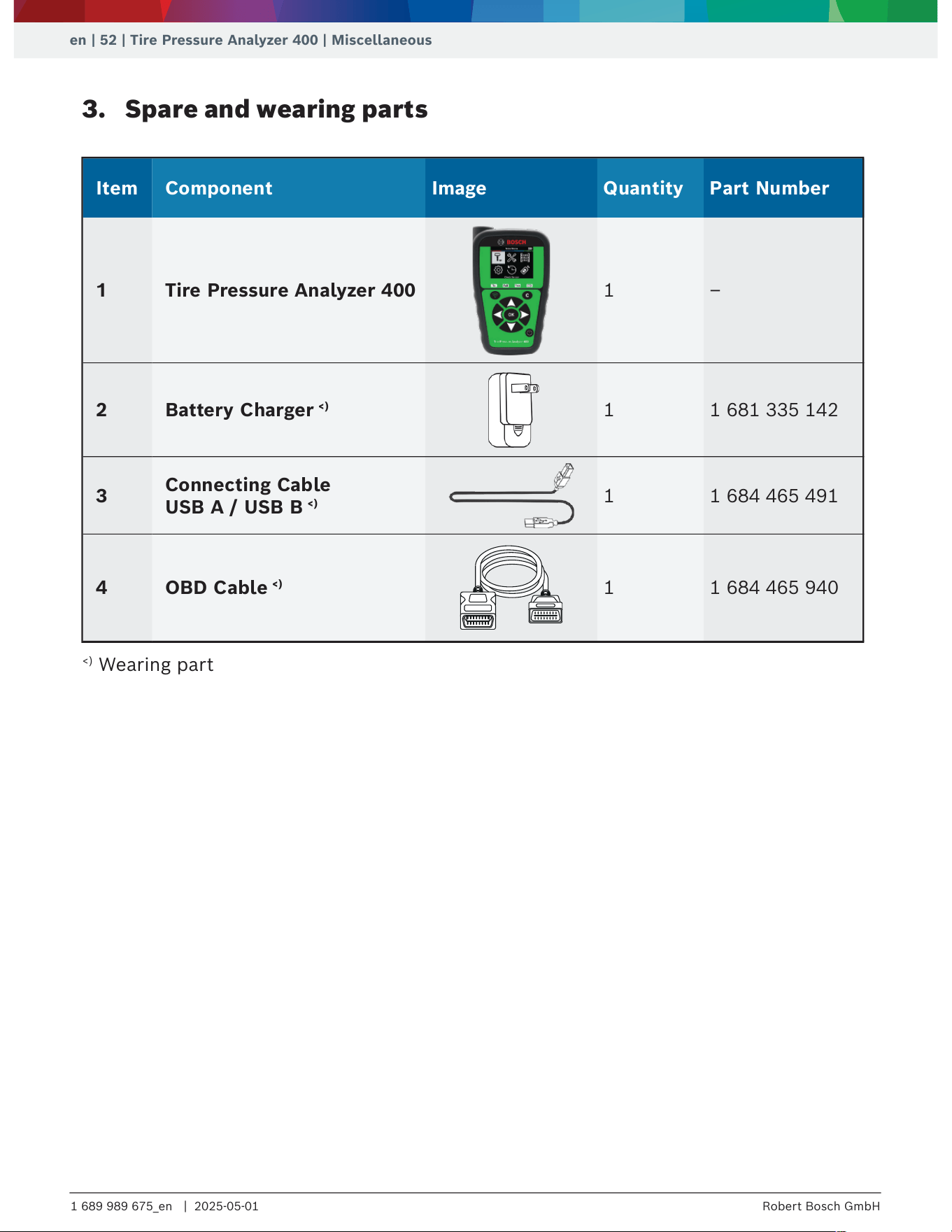
Item Component Image Quantity Part Number
1 Tire Pressure Analyzer 400
1 –
2 Battery Charger
<)
1 1 681 335 142
3
Connecting Cable
USB A / USB B
<)
1 1 684 465 491
4 OBD Cable
<)
1 1 684 465 940
3. Spare and wearing parts
<)
Wearing part

Miscellaneous | Tire Pressure Analyzer 400 | 53 |
1 689 989 675_en 2025-05-01
|
Robert Bosch GmbH
en
BOSCH® AUTOMOTIVE SERVICE SOLUTIONS
LIMITED WARRANTY – APPLICABLE TO THE
UNITED STATES and CANADA.
Bosch Automotive Service Solutions (“Bosch”)
warrants to the original retail buyer (“Buyer”)
the products listed below (“Products”) to be
free from defects in material or workmanship in
accordance with the following:
PRODUCT:
Tire Pressure Analyzer 400 TPMS Reset tool
New Bosch Diagnostic Products are warranted
against defects in materials and workmanship for
one year from the date of registration.
EXCLUSIONS AND RESTRICTIONS
This warranty is only valid to the original
purchaser of the Product and is not transferable
to subsequent owners of the Product. The
Buyer must register the Product. The warranty
period begins on the date of tool registration. I
your tool is not registered, no warranty services
are offered. All warranty claims must be made
within the warranty period and proof of purchase
must be supplied. This warranty does not cover
the cost of freight to return the Product to
Bosch.
This warranty does not cover consumable items,
including, without limitation, non-rechargeable
batteries. Specically excluded from this
warranty are Products that have been abused,
altered, opened, worn out, contaminated, used
for a purpose other than that for which it was
intended, or used in a manner inconsistent
with instructions. This warranty does not cover
battery leakage.
This warranty only covers Products manufactured
by Bosch. Bosch will pass through to the
original purchaser all manufacturers warranties.
No one is authorized to make any statement
or representation altering the terms of this
warranty.
REMEDIES
The sole and exclusive remedy for any Product
found to be defective is repair or replacement,
at the option of Bosch. The existence of a
warrantable defect shall be determined by Bosch
in accordance with procedures established by
Bosch.
4. Limited Warranty /
Certificates (USA/Canada)
DISCLAIMER
TO THE EXTENT PERMITTED BY APPLICABLE
LAW, THE ABOVE WARRANTY IS IN LIEU
OF ANY OTHER WARRANTY, EXPRESS OR
IMPLIED, INCLUDING ANY WARRANTY
OF MERCHANTABILITY OR FITNESS FOR
A PARTICULAR PURPOSE. IN NO EVENT
SHALL BOSCH BE LIABLE FOR ANY DIRECT,
INDIRECT, SPECIAL, INCIDENTAL OR
CONSEQUENTIAL DAMAGES (INCLUDING
LOST PROFIT) WHETHER BASED ON
WARRANTY, CONTRACT, TORT OR ANY OTHER
LEGAL THEORY EVEN IF BOSCH HAS BEEN
ADVISED OF THE POSSIBILITY OF SUCH
DAMAGES. Some States in the U.S. and some
Canadian provinces do not allow the disclaimer
of implied warranties, limitations on how long
implied warranties last, or the exclusion or
limitation of incidental or consequential damages
for some products so the above limitations or
exclusions many not apply. This warranty gives
the original retail buyer specic legal rights and
the original retail buyer may have other rights
which vary from state to state in the U.S., or
province to province in Canada.
SOFTWARE
The Product may contain an End User License
Agreement (EULA) that sets forth specic terms
and conditions, including warranties, relating
to the Product software. Product software is
proprietary, condential information protected
under copyright law. Users have no right in or
title to Product software other than a limited
right of use of revocable by Bosch. Product
software when correctly installed. Will execute
its programmed instructions. Bosch does not
warrant that software will operate uninterrupted
or error-free. Product software may not be
transferred or disclosed without the written
consent of Bosch. Product software may not be
copied except in ordinary backup procedures.
TECHNICAL SUPPORT
If you have any questions on the operation of
the Product or prior to sending in a product for
repair, call Bosch Technical Support at:
USA: 1 (855) 267-2483
MISCELLANEOUS (USA ONLY)
This warranty shall be governed by and construed
in accordance with the laws of the State of
Michigan U.S.A., exclusive of its conict of laws
principles. The U.N. Convention on Contracts for
the international Sales of Goods shall not apply.
Bosch reserves the right to amend this warranty
policy as required.

| 54 | Tire Pressure Analyzer 400 | Miscellaneousen
1 689 989 675_en 2025-05-01
|
Robert Bosch GmbH
IMPORTANT: Do not continue until you have
read this Software Product License Agreement
(“Agreement”).
By clicking the “I Accept” button (or authorizing
any other person to do so), you accept this
Agreement and are bound by its terms. If you are
not sure that you are authorized by your employer
to accept this Agreement, take this package to
a principal in your rm before proceeding. This
Agreement is a legal agreement between you
and Bosch Automotive Service Solutions Inc.
(“Bosch”). This Agreement governs your use of
the software, associated media, printed materials
and electronic documentation (collectively,
“Software Product”) utilized with the Bosch Tire
Pressure Analyzer 400. Carefully read the terms
and conditions of this Agreement before using
this Software Product. Use of this Software
Product indicates your acceptance of the
following terms and conditions. IF YOU DO NOT
AGREE TO THE TERMS OF THIS AGREEMENT,
DO NOT DOWNLOAD, INSTALL OR USE THE
PRODUCT SOFTWARE.
LICENSE. Subject to the terms and conditions of
this Agreement, Bosch grants to you a personal,
non-transferable (except as noted in Section 8
(Assignment)) and non-exclusive license
(without the right to sub-license) to use the
Software Product on a single tool at a time. This
Agreement will also govern any Software Product
updates, upgrades, and program additions for
the Software Product which has been provided
to you by Bosch, unless such upgrades, updates,
or additions are accompanied by a separate
agreement, in which case the terms of that
agreement will govern. Bosch is not obligated
to provide any updates, upgrades or program
additions to the Software Product.
RESTRICTIONS. Without Bosch’s written
permission, you shall not, and shall not permit
anyone else to: (a) copy, distribute, sub-license,
sell, or otherwise provide any portion of the
Software Product to any third party (including
leasing, renting, letting on loan or sub-licensing);
(b) modify, unbundle, translate, prepare
derivative works of, disassemble (except to the
extent that this restriction is expressly prohibited
by law), reverse compile, decompile, or reverse
engineer any part of the Software Product or
otherwise attempt to learn the source code,
structure or algorithms underlying the Software
Product; (c)
5. Software Product License
Agreement (USA/Canada)
use the Software Product in a computer-based
services business; (d) remove any proprietary
notices or labels relating to the Software Product
and will include such notices on any authorized
copies of the Software Produce; (e) use the
Software Product on more than one computer
at the same time; or (f) separate the Software
Product’s component parts for use on more
than one computer. You agree that the Software
Product belongs to Bosch and/or its suppliers.
You agree to keep condential and use your best
efforts to prevent and protect the contents of the
Software Product from unauthorized disclosure.
INTELLECTUAL PROPERTY. You acknowledge
that no title to the intellectual property in
the Software Product is transferred to you.
You further acknowledge that all right, title
and interest in and to the Software Product
shall remain the property of Bosch and/or its
suppliers, and you will not acquire any rights to
the Software Product, except for the limited right
to use as expressly set forth above. This includes
all copies (to the extent permitted herein) of
the Software Product made by you as well as
the related user manuals and other supporting
materials. The Software Product is protected by
copyright laws, international copyright treaties,
and other intellectual property laws and treaties.
All trademarks appearing in the Software Product
are the property of their respective owners.
CONSENT TO USE OF DATA. The Software
Product does not collect any personally
identiable information on its own. You may
wish to enter optional personally identiable
information.. All data generated by the Software
Product may be used by Bosch and/or its
supplier for any purpose, including but not
limited to, facilitating the provision of software
updates, product support and other services
related to the Software Product. You additionally
agree that Bosch and/or its supplier shall have
the right use the data generated by the Software
Product, in aggregated and depersonalized form,
for statistical, survey, product research, product
development, and marketing purposes, and as
part of such use, to make the aggregated and
depersonalized data available to third parties for
use by such third parties.
Through your use of the Software Product, Bosch
may collect the following types of data: (a)
registration data entered by you, including but
not limited to company name and address; (b)
technical data and related information, including

Miscellaneous | Tire Pressure Analyzer 400 | 55 |
1 689 989 675_en 2025-05-01
|
Robert Bosch GmbH
en
but not limited to technical information about
your device, system and application software,
and peripherals; and (c) vehicle data obtained
from a customer’s vehicle including but not
limited to make, model, year of manufacture,
equipment features, vehicle identication data,
repair, maintenance and wear related data
generated during use/repair, and odometer
reading. Bosch will not collect, process or use
any other personal information.
Bosch may use this data for the following
purposes:
• Completing this Agreement;
• Providing our products and services;
• Customer or supplier administration;
• Administering, maintaining, personalizing and
improving our products and services;
• Developing new products and services;
• Inquiries and customer service requests you
submit to Bosch;
• Statistical purposes and reporting;
• Compliance with legal, regulatory or contractual
requirements; and
• Other legitimate business purposes so long
as the data is anonymized in a way that cannot
reasonably be associated with you or a vehicle.
Bosch may share data collected through the use
of the Software Product for the uses described
above with: (a) our aliated entities, (b) service
providers, vendors, consultants, and other
partners performing work on our behalf, in order
to provide you with our products and services,
(c) third party business partners who you have
authorized Bosch to share data with, and/or
(d) relevant authorities in accordance with, and
as Bosch deems required by, applicable law,
regulation, court order or legal process. Bosch
may transfer your personal information to its
parent company in Germany, Robert Bosch
GmbH, and to any worldwide aliates when
processing data. Bosch may also transfer your
data to a third party outside your country of
origin.
You consent and agree to the above uses and
sharing of the data collected by the Software
Product.
You will provide notice to and acquire a consent
from each customer (or prospective customer) to
the collection of vehicle data obtained from a
customer’s vehicle using the device that this
Software Product is housed on and the sharing
with and use of such data by Bosch and third
parties in accordance with the this Agreement.
The Software Product is subject to U.S. laws,
including those governing the privacy and
security of your information. If you register and
use the Software Product, you are transferring
your information to Bosch in the United States.
By providing your information to Bosch through
the Software Product you consent to the transfer
of your personal information to the United
States, and our handling of your information in
accordance with applicable U.S. requirements.
All personal information will be treated by
Bosch as condential in accordance with data
protection regulations. In compliance with
applicable data protection regulations, you are
able to have your personal information rectied,
amended, deleted or made inaccessible. To this
effect, please send your request to:
Bosch Automotive Service Solutions Inc.
655 Eisenhower Drive
Owatonna, MN 55060
Phone: (855) 267-2483
Fax: (507) 455-7451
Bosch’s obligation to continuously store
(archive), make inaccessible, delete or share data
or information as required by law, ordered by
judge or state authority or as per this Agreement
remains unaffected.
TAXES. You will pay all taxes, including sales,
use, personal and property taxes, due to your use
of the Software Product.
DISCLAIMER OF WARRANTIES; LIMITATION
OF LIABILITY.
TO THE MAXIMUM EXTENT PERMITTED BY
APPLICABLE LAW, BOSCH AND IT AFFILIATES,
LICENSORS, SERVICE PROVIDERS, AND
SUPPLIERS OF THE SOFTWARE PRODUCT DO
NOT WARRANT THE SOFTWARE PRODUCT, ITS
CONTENT, USE OR ANY SUPPORT PROVIDED BY
BOSCH OR THIRD PARTIES, WHICH IS PROVIDED
“AS IS” AND WITHOUT WARRANTIES OF ANY
KIND, EITHER EXPRESS OR IMPLIED. BOSCH
DISCLAIMS ALL WARRANTIES, EXPRESS OR
IMPLIED, INCLUDING, BUT NOT LIMITED TO
WARRANTIES OF TITLE AND IMPLIED

| 56 | Tire Pressure Analyzer 400 | Miscellaneousen
1 689 989 675_en 2025-05-01
|
Robert Bosch GmbH
WARRANTIES OF MERCHANTABILITY, FITNESS
FOR A PARTICULAR PURPOSE, OF LACK
OF VIRUSES, LACK OF NEGLIGENCE OR
WORKMANLIKE EFFORT, COMPATABILITY,
SECURITY, ACCURACY, AND NON-
INFRINGEMENT.
NEITHER BOSCH, OR ANY OF ITS AFFILIATES,
NOR ANY OF BOSCH’S LICENSORS, SERVICE
PROVIDERS, OR SUPPLIERS WARRANT THAT THE
SOFTWARE PRODUCT WILL BE UNINTERRUPTED
OR ERROR-FREE OR THAT DEFECTS WILL BE
CORRECTED.
WE WILL NOT BE LIABLE FOR ANY LOSS OR
DAMAGE CAUSED BY DELAY IN FURNISHING
THE SOFTWARE PRODUCT OR ANY OTHER
PERFORMANCE UNDER THIS AGREEMENT.
YOUR USE OF THE SOFTWARE PRODUCT IS AT
YOUR SOLE RISK AND YOU WILL BE SOLELY
RESPONSIBLE FOR ANY DAMAGE TO YOUR
COMPUTER SYSTEM OR LOSS OF DATA THAT
RESULTS FROM SUCH USE.
NEITHER BOSCH OR ANY OF ITS AFFILIATES,
NOR ANY OF BOSCH’S LICENSORS, SERVICE
PROVIDERS OR SUPPLIERS WARRANT OR
MAKE ANY REPRESENTATIONS REGARDING
THE USE OR THE RESULTS OF THE USE OF
THE SOFTWARE PRODUCT IN TERMS OF ITS
CORRECTNESS, ACCURACY, COMPLETENESS,
SEQUENCE, RELIABILITY, OR OTHERWISE OR
THAT THE SOFTWARE PRODUCT WILL MEET
YOUR REQUIREMENTS. BOSCH MAKES NO
WARRANTY AND ASSUMES NO RESPONSIBILITY
FOR ANY THIRD PARTY HARDWARE, EQUIPMENT
OR SOFTWARE WITH WHICH THE SOFTWARE
PRODUCT MAY BE REQUIRED TO COMMUNICATE
OR OPERATE.
SOME STATES AND JURISDICTIONS DO NOT
ALLOW LIMITATIONS ON IMPLIED WARRANTIES,
SO SOME OR ALL OF THE ABOVE LIMITATIONS
MAY NOT APPLY TO YOU, IN WHICH EVENT THE
ABOVE LIMITATIONS WILL BE ENFORCEABLE
TO THE MAXIMUM EXTENT PERMITTED BY
APPLICABLE LAW. NO ORAL OR WRITTEN
INFORMATION OR ADVICE GIVEN BY BOSCH, ITS
AFFILIATES, LICENSORS, SERVICE PROVIDERS,
OR SUPPLIERS, OR THEIR RESPECTIVE AGENTS,
DISTRIBUTORS, DEALERS AND EMPLOYEES,
SHALL CREATE
A WARRANTY OR IN ANY WAY INCREASE THE
SCOPE OF THIS WARRANTY, AND YOU MAY NOT
RELY ON ANY SUCH INFORMATION OR ADVICE.
YOU EXPRESSLY UNDERSTAND AND AGREE
THAT BOSCH AND ITS AFFILIATES, LICENSORS,
SERVICE PROVIDERS AND SUPPLIERS, TO THE
MAXIMUM EXTENT PERMITTED BY APPLICABLE
LAW, SHALL NOT BE LIABLE TO YOU OR ANY
THIRD PARTIES FOR ANY DIRECT, INDIRECT,
INCIDENTAL, SPECIAL, CONSEQUENTIAL,
EXEMPLARY OR PUNITIVE DAMAGES, OR ANY
OTHER DAMAGES WHATSOEVER, FOR ANY
MATTER ARISING FROM OR RELATING TO THIS
AGREEMENT, ANY PRODUCTS OR SERVICES
PROVIDED HEREUNDER, THE SOFTWARE
PRODUCT OR THE INTERNET GENERALLY,
INCLUDING, WITHOUT LIMITATION, DAMAGES
FOR LOSS OF BUSINESS OR PROFITS,
BUSINESS INTERRUPTION, OR OTHER
PECUNIARY LOSS, YOUR USE OR INABILITY TO
ACCESS AND USE THE SOFTWARE PRODUCT,
ANY CHANGES TO OR INACCESSIBILITY OF
THE SOFTWARE PRODUCT, DELAY, FAILURE,
UNAUTHORIZED ACCESS TO OR ALTERATION OF
ANY TRANSMISSION OR DATA, ANY MATERIAL
OR DATA SENT OR RECEIVED OR NOT SENT OR
RECEIVED, OR THE ACCURACY OF ANY DATA
OR INFORMATION PROVIDED BY OR THROUGH
THE SOFTWARE PRODUCT, WHETHER SUCH
LIABILITY IS ASSERTED ON THE BASIS OF
CONTRACT, TORT OR OTHERWISE AND EVEN IF
BOSCH WAS INFORMED OF THE POSSIBILITY OF
SUCH DAMAGES.
OUR ENTIRE LIABILITY AND YOUR EXCLUSIVE
REMEDIES FOR LIABILITY OF ANY KIND
(INCLUDING LIABILITY FOR NEGLIGENCE) FOR
THE SOFTWARE PRODUCT COVERED BY THIS
AGREEMENT AND ALL OTHER PERFORMANCE
OR NONPERFORMANCE BY US UNDER OR
RELATED TO THIS AGREEMENT ARE LIMITED
TO THE REMEDIES SPECIFIED UNDER THIS
AGREEMENT.
INDEMNIFICATION. You shall indemnify, hold
harmless and, at Bosch’s option, defend us
and our aliates and our respective ocers,
directors, employees, agents and representatives
(each a “Bosch Indemnied Party”) from any and
all claims, liabilities, damages, losses, expenses

Miscellaneous | Tire Pressure Analyzer 400 | 57 |
1 689 989 675_en 2025-05-01
|
Robert Bosch GmbH
en
and/or costs (including, but not limited to,
reasonable attorneys’ fees) resulting from or
arising out of any claim, suit, action, arbitration
or proceeding brought or threatened by a third
party against a Bosch Indemnied Party relating
to: (i) a breach or alleged breach by you of any
of its representations, warranties, covenants
or obligations hereunder, (ii) your use, misuse
or failure to use the Software Product, or (iii)
infringement or misappropriation of any Bosch
intellectual property or the intellectual property
rights of any third party by you.
ASSIGNMENT. You may transfer and assign the
Software Product and this Agreement to another
party provided, you must transfer all of the
Software Product and all copies of the Software
Product to the successor, and the successor
must promptly notify us that the successor
will comply with the terms of this Agreement.
Otherwise, you may not transfer or assign the
Software Product and this Agreement.
TERMINATION. This Agreement and the license
granted hereunder are effective until terminated
by you or Bosch. You may terminate it at any
time by destroying the Software Product. Your
rights under this Agreement will also terminate
automatically without notice from Bosch if you
fail to comply with any term or condition of this
Agreement. Upon termination of this Agreement,
you shall cease all use of the Software Product
and destroy all copies, full or partial, of the
Software Product. The provisions of Sections 3,
4, 5, 6, 7, 10 and 12 shall survive any termination
of this Agreement.
EXPORT AND OTHER LAWS. You may not use
the Software Product in violation of any federal,
state or other applicable laws. You may not use
or otherwise export or re-export the Software
Product except as authorized by United States
law and the laws of the jurisdiction in which the
Software Product was obtained. In particular,
but without limitation, the Software Product
may not be exported or re-exported (a) into any
U.S. embargoed countries or (b) to anyone on
the U.S. Treasury Department’s list of Specially
Designated Nationals or the U.S. Department of
Commerce Denied Person’s List or Entity List.
By using the Software Product, you represent
and warrant that you are not located in any
such country or on any such list. You also agree
that you will not use the Software Product for
any purposes prohibited by United States law,
including, without limitation, the development,
design, manufacture or production of nuclear
missiles, or chemical or biological weapons.
GENERAL. You are solely responsible for
installation, management and operation of the
Software Product. Bosch’s failure to exercise or
enforce any right or provision of this Agreement
shall not operate as a waiver of such right
or provision. This Agreement and any other
documents referenced in this Agreement,
constitute the entire agreement between you and
Bosch pertaining to the subject matter thereof,
and supersedes in its entirety any and all written
or oral agreements previously existing between
us with respect to the Software Product.
The parties agree that each provision of this
Agreement is intended to be construed to be
enforceable to the fullest extent possible. If any
provision or part of a provision of this Agreement
is held to be unlawful, void, or unenforceable,
that provision or part of the provision shall be
deemed severable from this Agreement and
not affect the validity and enforceability of any
remaining provisions.
APPLICABLE LAW. This Agreement shall be
governed by and construed in accordance with
the laws of the State of Michigan, without giving
effect to any principles of conicts of laws. Both
parties submit to personal jurisdiction in the
State of Michigan and further agree that any
cause of action relating to this License shall be
brought in the state and federal courts in the
County of Oakland, State of Michigan. Your use
of the Software Product may also be subject to
other local, state, national or international laws.
Copyright © 2025, Bosch Automotive Service
Solutions. All Rights Reserved
| 58 | Tire Pressure Analyzer 400 | Miscellaneousen
1 689 989 675_en 2025-05-01
|
Robert Bosch GmbH
Before commissioning, connecting and
using Bosch products, it is essential to
go through the operating instructions
and the safety instructions, in particular,
with great care. By doing so, any uncertainties
about handling Bosch products and any safety
risks associated with them can be eliminated in the
interest of the user’s safety and in order to make
sure to prevent any damage to the product. Should
a Bosch product be passed on to another person,
the operating instructions as well as the safety
instructions and the information on its intended use
must be handed over as well.
6.1 User group
The product may only be used by trained and
instructed personnel. Personnel scheduled to be
trained, familiarized, instructed or to take part in
a general training course may only work with the
product under the supervision of an experienced
person.
All work on electrical and hydraulic equipment
may only be performed by persons with sucient
knowledge and experience of electrical and hydraulic
systems.
Children must be supervised to make sure they will
not play with the Tire Pressure Analyzer 400.
6. Important Notes
6.2 Agreement
By using the product, you agree to the following
terms:
Copyright
The software and data are the property of Robert
Bosch GmbH or its suppliers and protected against
copying by copyright laws, international agreements
and other national legal regulations. Copying or
selling of data and software or any part thereof is
impermissible and punishable; in the event of any
infringements Bosch reserves the right to proceed
with criminal prosecution and to claim for damages.
Liability
All data in this program is based – where possible
– on manufacturer and importer details. Bosch
does not accept liability for the correctness and
completeness of software and data; liability for
damage caused by faulty software and data is ruled
out. Regardless of the case, liability on the part of
Bosch is limited to the amount actually paid by the
customer for the product concerned. This exemption
from liability does not apply to willful damage or
damage arising from gross negligence on the part of
Bosch.
Warranty
The use of unapproved hardware and software will
result in a modication of our product and thus to
the exclusion of any liability or warranty, even if
such hardware and software have been removed or
deleted again in the meantime. No modications may
be made to our products. Our products may only be
used in conjunction with original accessories and
original spare parts. Failure to comply will void all
warranty claims. This product may only be operated
using operating systems approved by Bosch. If the
product is operated with an operating system other
than the approved one, our warranty becomes void.
The obligation arising from our terms of delivery is
thereby rendered void. Furthermore, we will not be
held liable for damage and consequential damage
incurred through the use of a non-released operating
system.

Miscellaneous | Tire Pressure Analyzer 400 | 59 |
1 689 989 675_en 2025-05-01
|
Robert Bosch GmbH
en
Read these safety instructions and warning
notices before using or charging the lithium
polymer storage batteries.
Operational environment
Tire Pressure Analyzer 400 if its use is forbidden
or if it could cause malfunctions or hazards. Only
use the Tire Pressure Analyzer 400 in its normal
operating settings. Tire Pressure Analyzer 400 and
its extensions may contain small parts. Keep them
out of the reach of small children.
About charging
Only use the battery charger supplied with the Tire
Pressure Analyzer 400. Using a different battery
charger can lead to malfunctions and/or hazards.
Once the red LED goes out, the charging process is
complete.
About the battery charger
Do not use the battery charger in an environment
with high humidity. Never touch the battery charger
with wet hands or feet. When using the battery
charger, make sure that there is adequate ventilation
around the Tire Pressure Analyzer 400. Do not cover
the battery charger with paper or other object
that may impair cooling. Do not use the battery
charger while it is inside a carrying case. Connect
the battery charger to a suitable power source. The
voltage requirements can be found on the product
housing and/or the packaging. Do not use the
battery charger if the wires are damaged. Do not try
to maintain the Tire Pressure Analyzer 400. There
are no maintenance parts on the inside. Replace the
Tire Pressure Analyzer 400 if it is damaged or has
been exposed to excessive humidity. This battery
charger is not a toy and should not be used by
children or inrm persons without adequate training
or supervision. Do not use it as a power source.
Disconnect the mains plug before attempting to
clean the Tire Pressure Analyzer 400.
7. Information on battery
safety and the charging
process
About the battery
CAUTION: The Tire Pressure Analyzer 400 contains
an internal lithium polymer storage battery. The
battery may burst or explode and release dangerous
chemicals. To reduce the risk of a fire or burns, do
not disassemble, crush or puncture the battery, or
throw the Tire Pressure Analyzer 400 into fire or
water, short-circuit the contacts, or short-circuit with
a metal object.
NOTE: For replacing the internal lithium polymer
storage battery get in contact with your local dealer.
Replacing the battery must done by trained service
technicans.
Opening the tool will void the warranty.
Use the specied battery charger supplied by
BOSCH for this Tire Pressure Analyzer 400.
Safe use of lithium polymer batteries
The Tire Pressure Analyzer 400 MUST be placed on a
reproof surface (ceramic plate or metal box) during
charging.
ONLY charge the lithium polymer storage battery
with the supplied battery charger.
NEVER use a Ni-MH type battery charger
(nickelmetal hydride) to charge a lithium polymer
storage battery.
If the battery starts to heat up to more than 60 °C
(140 °F), STOP the charging process IMMEDIATELY.
The battery temperature should NEVER exceed
60 °C (140 °F) during charging.
NEVER charge the storage battery directly after
using it and while it is still hot. Let it cool down to
ambient temperature.
If the storage battery emits smoke or liquid during
the charging process, stop charging immediately.
Disconnect the battery charger and place the Tire
Pressure Analyzer 400 in an isolated area for at
least 15 minutes. DO NOT CONTINUE TO USE
THE BATTERY and instead return the Tire Pressure
Analyzer 400 to the dealer.
Have a re extinguisher for electrical res ready
while charging the storage battery. In the unlikely
event that the lithium polymer storage battery
ignites, DO NOT use water to extinguish the re,
instead use sand or the re extinguisher described
above.
The lithium polymer battery must be neutralized. The
neutralization process must be carried out under
strict safety conditions. It is recommended to return
the Tire Pressure Analyzer 400 so that it can be
passed on to a specialist recycler.
| 60 | Tire Pressure Analyzer 400 | Miscellaneousen
1 689 989 675_en 2025-05-01
|
Robert Bosch GmbH
8. Disposal and scrapping
9. RED (Radio Equipment
Directive)
Dispose of used electrical and electronic devices,
including cables, accessories and batteries,
separately from household waste.
c Use local collection and return.
c Proper disposal of Tire Pressure Analyzer 400
prevents environmental pollution and possible
health hazards.
Hereby, the Robert Bosch GmbH declares that (the
radio equipment type) Tire Pressure Analyzer 400
conforms to the directive 2014/53/EU. The complete
text of the EU Declaration of Conformity is available
on the following Internet site:
Tire Pressure Analyzer 400: https://bosch-ma.com/doc-tpa400
The Tire Pressure Analyzer 400 is
subject to the European directive
2012/19/EC (WEEE).
The lithium polymer storage battery is not suitable
for children under 14 years of age. Keep the lithium
batteries out of the reach of children.
To avoid leakage or other hazards, do not store
batteries above 60° C (140° F). Never leave the
battery in a car (for example), where temperatures
can be very high, or in a location where the
temperature could exceed 60° C (140° F). Store
the battery in a dry location and avoid contact with
liquids of any kind. Only store the storage battery on
a reproof, heat-resistant, non-conductive surface
and away from all combustible materials or sources.
Always keep the battery out of the reach of children.
A lithium polymer storage battery should be stored
with a minimum charge of 30 %. If stored completely
empty, it will quickly become unusable.
If the battery is not used over an extended period
of time, charge it regularly (every 6 months) to
reach the minimum charge of 30 %. If these safety
precautions are not followed, serious personal
injury, property damage and even re may result.
BOSCH declines all responsibility for damage caused
by failure to follow these safety instructions.
The use of a lithium polymer battery carries a
high risk of re and can cause serious damage to
property and persons. The user agrees to assume
the risk and responsibility.
BOSCH cannot control the proper use of the battery
for each customer (charging, discharging, storage,
etc.); they cannot be held responsible for personal
injury or property damage.
Do not dispose of lithium polymer
batteries in general trash.

Miscellaneous | Tire Pressure Analyzer 400 | 61 |
1 689 989 675_en 2025-05-01
|
Robert Bosch GmbH
en
Radiation Exposure Statement:
This equipment complies with Canada radiation
exposure limits set forth for an uncontrolled
environment. This equipment should be installed and
operated with minimum distance 10 cm between the
radiator & your body.
Déclaration d’exposition aux radiations:
Cet équipement est conforme aux limites
d’exposition aux radiations dénies pour un
environnement non contrôlé. Cet équipement doit
être installé et utilisé à une distance minimale de
10 cm entre l’élément rayonnant et votre corps.
10. Federal Communications
Commission Interference
Statement
This equipment has been tested and found to comply
with the limits for a Class B digital device, pursuant
to Part 15 of the FCC Rules. These limits are
designed to provide reasonable protection against
harmful interference in a residential installation. This
equipment generates, uses and can radiate radio
frequency energy and, if not installed and used in
accordance with the instructions, may cause harmful
interference to radio communications. However,
there is no guarantee that interference will not occur
in a particular installation. If this equipment does
cause harmful interference to radio or television
reception, which can be determined by turning the
equipment off and on, the user is encouraged to try
to correct the interference by one of the following
measures:
- Reorient or relocate the receiving antenna.
- Increase the separation between the equipment
and receiver.
- Connect the equipment into an outlet on a
circuit different from that to which the receiver is
connected.
- Consult the dealer or an experienced radio/TV
technician for help.
FCC Caution: Any changes or modications not
expressly approved by the party responsible for
compliance could void the user’s authority to
operate this equipment.
This device complies with Part 15 of the FCC Rules.
Operation is subject to the following two conditions:
(1) This device may not cause harmful interference,
and (2) this device must accept any interference
received, including interference that may cause
undesired operation.
11. ISED Canada Statement
This device contains license-exempt transmitter(s)/
receiver(s) that comply with Innovation, Science and
Economic Development Canada’s license-exempt
RSS(s). Operation is subject to the following two
conditions:
(1) This device may not cause interference
(2) This device must accept any interference,
including interference that may cause undesired
operation of the device
L’émetteur/récepteur exempt de licence contenu
dans le présent appareil est conforme aux
CNR d’Innovation, Sciences et Développement
économique Canada applicables aux appareils radio
exempts de licence. L’exploitation est autorisée aux
deux conditions suivantes :
(1) L’appareil ne doit pas produire de brouillage
(2) L’appareil doit accepter tout brouillage
radioélectrique subi, même si le brouillage est
susceptible d’en compromettre le fonctionnement.

http://www.downloads.bosch-automotive.com
www.boschaftermarket.com
Robert Bosch GmbH
Automotive Service Solutions
Franz-Oechsle-Straße 4
73207 Plochingen
DEUTSCHLAND
1 689 989 675_en | 2025-05-01