Item No. 7610
1
www.wagan.com
IMPORTANT SAFETY INSTRUCTION
READ AND SAVE THIS OWNER'S GUIDE FOR FUTURE REFERENCE.
This guide contains important safety instructions that must be followed during
installation, operation, maintenance, and troubleshooting.
Read these instructions carefully and look at the equipment to become familiar
with the device before installing, operating, configuring, maintaining, and
troubleshooting it. The following special messages may appear throughout this
documentation or on the equipme
nt to warn of potential hazards or to call
attention to information that clarifies or simplifies a procedure.
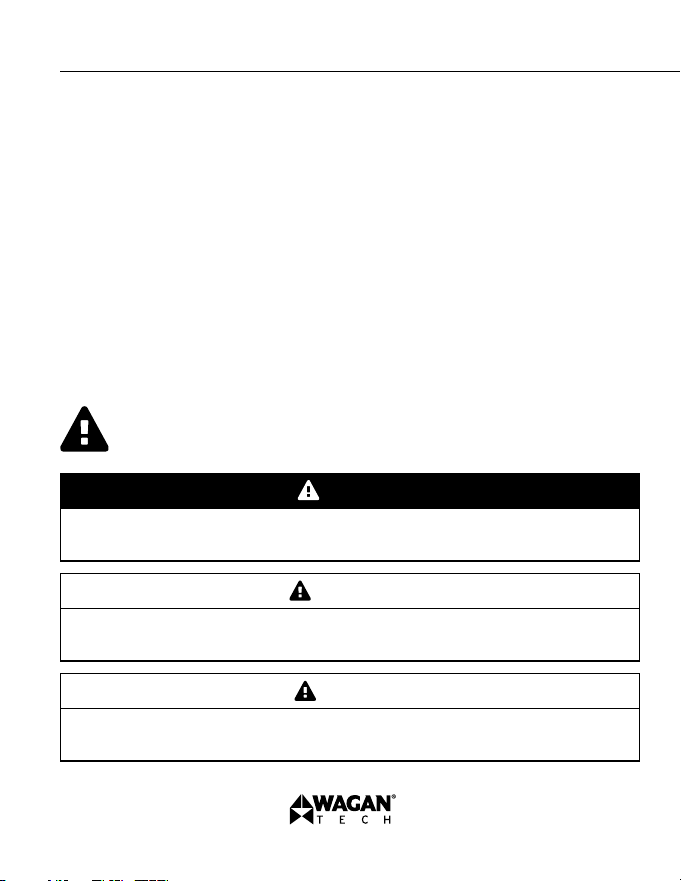
This is a safety alert symbol. It is used to alert you to potential personal
injury hazards. Obey all safety messages that follow this symbol to avoid
possible injury or death.
DANGER
DANGER indicates a hazardous situation which, if not avoided, will result in
death or serious injury.
CAUTION
CAUTION indicates a hazardous situation which, if not avoided, could result in
minor or moderate injury.
WARNING
WARNING indicates a hazardous situation which, if not avoided, could result
in death or serious injury.
iOnBoost
™
V8 JET by Wagan Tech
®
Thank you for purchasing the iOnBoost
™
V8 JET by Wagan Tech
®
. With proper
care and regular maintenance, your unit is designed to provide years of
dependable service. Please read all operating instructions carefully before use
to ensure safe and effective operation.
©2025 Wagan Corporation. All Rights Reserved.
Wagan Tech and wagan.com are trademarks of Wagan Corporation.
User’s Manual—Read before using this equipment
2
Read this instruction manual carefully before using the unit.
This device is designed for jump starting 12V vehicles only. Using it on
other types of vehicles may be hazardous.
If the unit does not include intelligent jumper cables, ensure correct polarity
when connecting to the battery. Reverse polarity may cause a short circuit,
overheating, or even fire.
Do not use the unit if any cable, clamp, or cord is damaged.
Do not use this unit as a replacement for a vehicle’s main battery.
Never leave the unit connected to the vehicle's battery after the engine
has been successfully started.
Before jump starting, inspect and clean the battery terminals. Corroded
or dirty terminals may reduce performance.
Ensure secure connection of the battery clamps to the terminals
before starting.
Do not attempt more than three jump starts consecutively. Allow at least
two minutes of rest between each attempt to prevent overheating and
potential damage.
Disconnect the unit within 30 seconds after the engine has started to
avoid possible damage.
Never connect the two clamps together.
This product should not be used without supervision by children or
individuals with physical or cognitive limitations.
NOTICE
NOTICE is used to address practices not related to physical injury.
PRODUCT SAFETY INFORMATION
WARNING
3
www.wagan.com
This is not a toy. Keep out of reach of children.
Keep the unit dry and do not expose it to water or moisture.
Do not immerse the product in water or expose it to rain or moisture.
Do not operate in explosive environments, such as near flammable liquids,
gases, or combustible dust.
Do not disassemble or modify the iOnBoost
™
. Repairs must be performed
by qualified technicians only.
Keep the product away from extreme heat, flames, and direct sunlight.
When working with batteries, ensure that someone is within earshot or
nearby in case of emergency.
Remove all personal metal accessories (rings, bracelets, necklaces, etc.)
before using the unit to avoid short circuits or injury.
Do not drop the unit. If it sustains a hard impact or shows signs of
damage, have it inspected by a certified technician.
Do not store the product in areas where temperatures exceed 140°F/60°C.
Only charge the unit in environments with ambient temperatures between
32°F/0°C and 131°F/55°C.
Use only the provided charger or one that meets the exact specifications
of the input port.
Do not attempt to jump start a vehicle while the unit is charging.
If the unit is leaking any liquid, dispose of it at an authorized battery
recycling facility immediately.
In the event of battery leakage, do not touch the fluid with bare hands.
If skin contact occurs, wash with soap and water. If it contacts your eyes,
rinse thoroughly with cold water for at least 10 minutes and seek medical
attention.
This product contains a lithium-based battery. Please dispose of it in
accordance with local laws and recycling regulations at the end of
its service life
iOnBoost
™
V8 JET by Wagan Tech
®
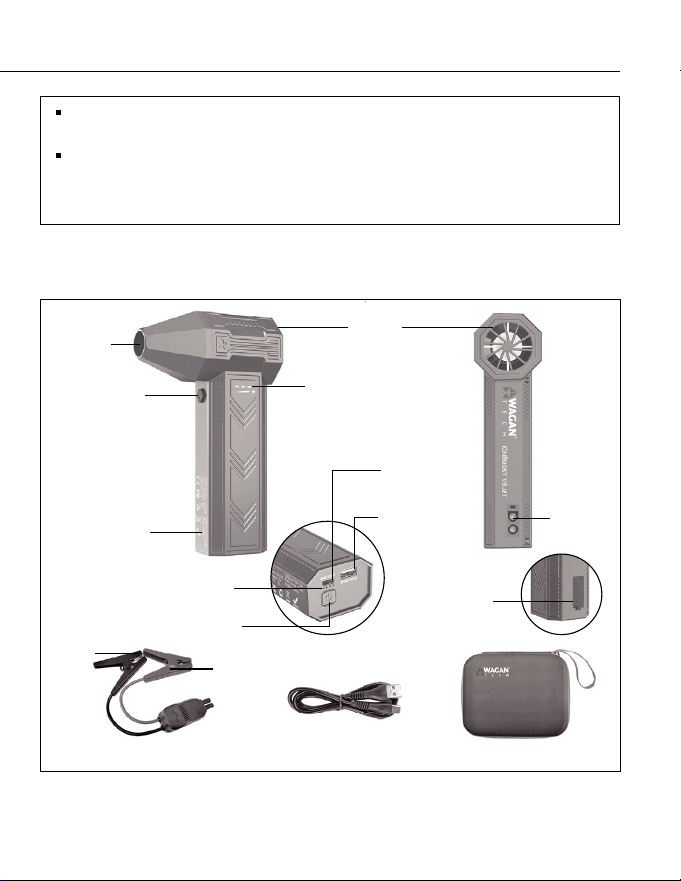
TYPE C
5V/2A Input
Black
Red
USB
5V/2A Output
Jump Starter
Socket
Air Outlet
Air Flow
Switch Button
Handle
Air Inlet
Air Volume
Indicator Light
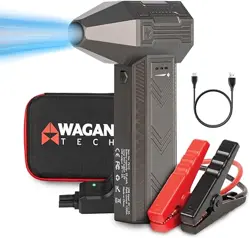
EVA CaseUSB CableIntelligent Jumper Cable
Silicone
Protective Cover
Power Indicator
Power Button
©2025 Wagan Corporation. All Rights Reserved.
Wagan Tech and wagan.com are trademarks of Wagan Corporation.
User’s Manual—Read before using this equipment
4
Do not charge the unit immediately after jump starting a vehicle. Allow
the device to cool down before charging.
Do not use the jumper cable to charge other electronic devices.
Failure to follow these safety instructions may result in serious injury, death, or
product damage.
DIAGRAM

5
www.wagan.com
iOnBoost
™
V8 JET by Wagan Tech
®
FEATURES
Jump Starter
• Delivers 1,200 Peak Amps — ideal for jump starting cars, vans, SUVs,
trucks, and more
• Equipped with a powerful 29.6 Wh rechargeable Lithium-ion Polymer battery
• Includes heavy-duty booster clamps for secure and reliable connection
• Turbo fan with 3-speed gear switch for adjustable airflow
• Battery status indicator lights for easy power level monitoring
• Features 1 USB port with 5V/2A output to power and recharge most USB
devices, including: Smartphones, Tablets and e-readers, Bluetooth devices,
and more
Turbo Fan
USB Power Source
• Over-current protection
• Overheat protection
• Over-discharge protection
• Over-voltage protection
• Overcharge protection
• Short-circuit protection
• Reverse charging protection
• Reverse polarity protection
• AI-enhanced software safety control
• Ultra-low standby power consumption management
Safety Features
User’s Manual—Read before using this equipment
©2025 Wagan Corporation. All Rights Reserved.
Wagan Tech and wagan.com are trademarks of Wagan Corporation.
6
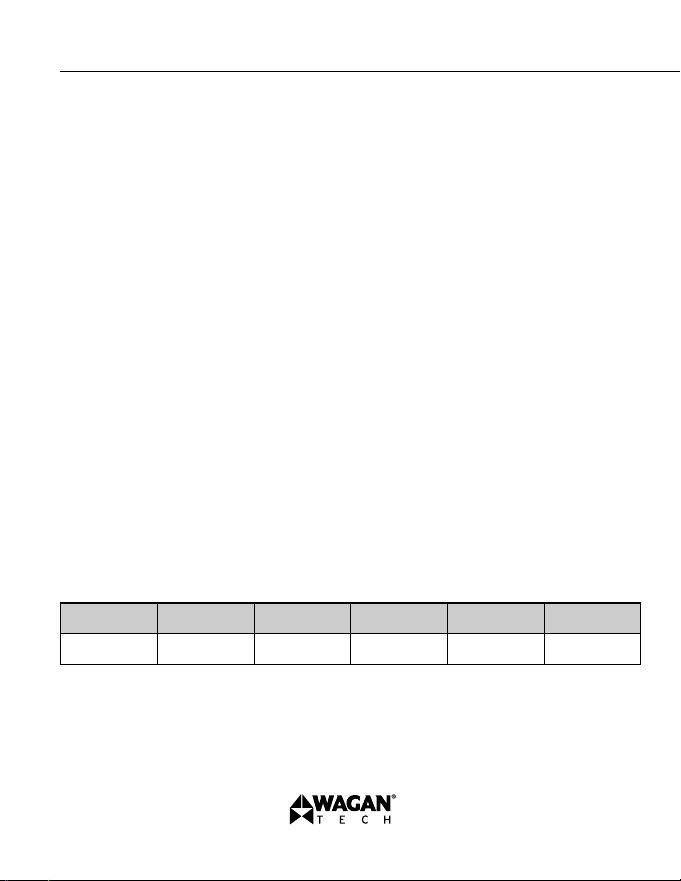
SPECIFICATIONS
Battery capacity 29.6Wh
Jump start output 12V
USB output 5V 2A
USB input 5V 2A
Peak current 1200A
Fan Three-Gear Switch
Fan Speed 95,000 rpm(Max)
Full charging time
Operating temperatures
≈6H
-4°F–131°F (-20°C–55°C)
Storage temperatures
-4°F–140°F (-20°C–60°C)
Product weight
1.96 lbs / 890g (all parts included)
Dimension
4.4 x 2.1 x 7.2 in.
(111.5 x 54 x 184 mm)
CARE & MAINTENANCE
1. The unit may be stored in any orientation, but ensure the booster clamps are
securely placed inside the storage covers.
2. Store the device in a cool, dry place at room temperature, away from direct
sunlight and heat sources.
3. If the iOnBoost
™
V8 JET is not used for an extended period, recharge it at
least once every 3 months to maintain battery health and performance.
7
www.wagan.com
iOnBoost
™
V8 JET by Wagan Tech
®
CHARGING THE IONBOOST
™
V8 JET
This product may arrive partially charged from the manufacturer. It is
recommended to fully charge the unit immediately after purchase and
before using for the first time. Prior to charging the unit, read and
understandall instructions in this manual.
In order to prolong the life of the iOnBoost
™
V8 JET, be sure to fully rechage
the unit after each use and every 3 months even if the iOnBoost
™
V8 JET has
not been used.
USB-C CHARGING
1. Plug the USB-C cable into the USB-C input port on the iOnBoost.
2. Plug the other end into a USB power source such as a USB wall charrger or
computer (not included). For charging in your vehicle, use the included USB
vehicle adapter.
3. The power Indicator lights will illuminate while the unit is charging.
4. Fully charge the unit (around 6 hours). Charging is complete when all
battery status indicator lights illuminate solid.
5. When charging is complete, unplug the USB cable.
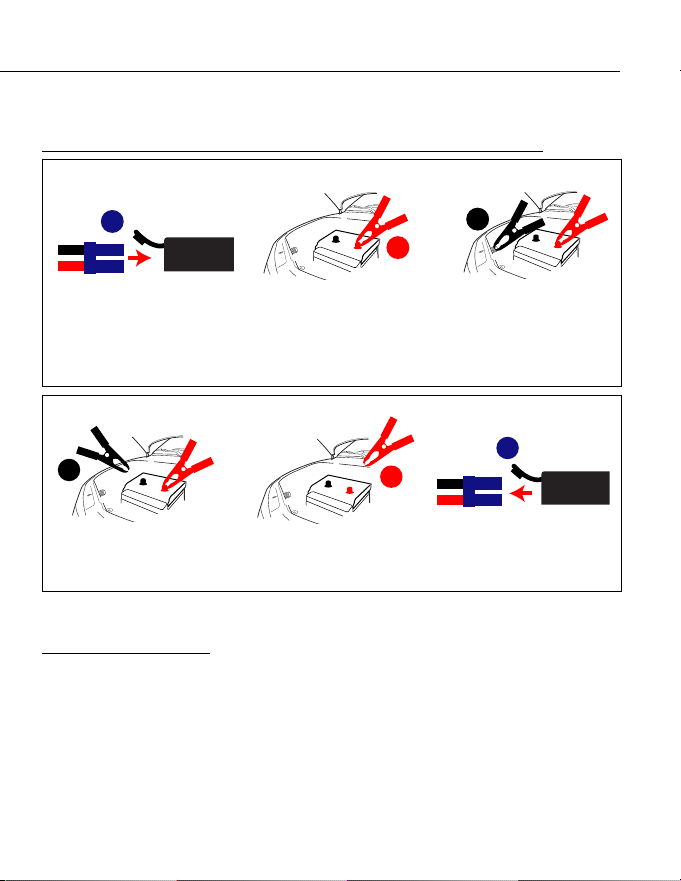
CHECKING BATTERY STATUS
Press the switch to check the storage level of the iOnBoost.
Indicator Unit 1 Lighting 2 Lighting 3 Lighting 4 Lighting
Storage Level 0% 25% 50% 75% 100%
Different numbers of lighting indicators show different storage level of iOnBoost.
JUMPSTARTER
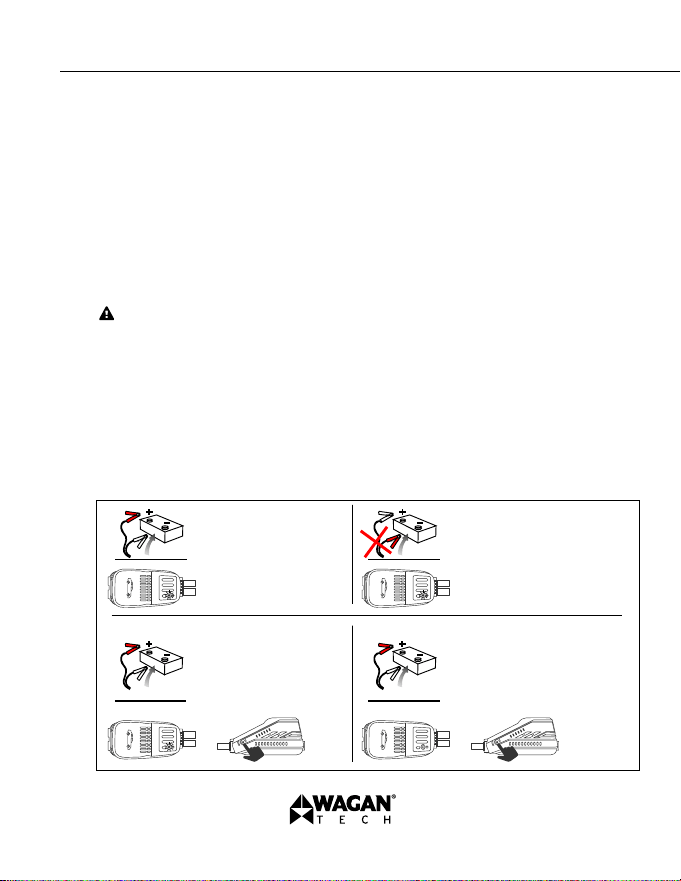
Brief Recap of Sequences for Connection and Disconnection
2
3
1
ORDER OF CONNECTION
2. Connect positive (red)
clamp to positive battery
terminal.
1. Connect cables to
iOnBoost.
3. Connect negative
(black) clamp to solid
metal ground on engine
or frame, away from
battery.
1
2
3
ORDER OF DISCONNECTION
2. Disconnect positive
(red) clamp from positive
battery terminal.
1. Disconnect negative
(black) clamp
from frame.
3. Disconnect cables from
iOnBoost.
Read the remainder of the instructions before using the iOnBoost!
Jumpstart Procedure
1. Turn off the vehicle ignition and all accessories (radios, lights, air
conditioners), and disconnect electronic devices.
2. Set the emergency brake and put vehicles with automatic transmission in
park position.
User’s Manual—Read before using this equipment
©2025 Wagan Corporation. All Rights Reserved.
Wagan Tech and wagan.com are trademarks of Wagan Corporation.
8
9
www.wagan.com
iOnBoost
™
V8 JET by Wagan Tech
®
3. Determine the polarity of the vehicle’s battery terminals. The positive (POS,
P, +) battery terminal usually is red and larger in diameter than the negative
(NEG, N, −) terminal. If you are unsure, first refer to the vehicle owner’s
manual. Make sure the negative battery terminal is also connected to the
vehicle frame.
4. If engine was recently cranked, use a non conductive material (cardboard
or a folded newspaper) to wave away (dispel) explosive gases. Do this for
a few minutes before any vehicle connections.
5. Insert the blue plug of the jumper cables into the iOnBoost’s jumper
terminal, and make sure the cable indicator is off.
Never allow clamps (positive & negative terminals) to touch together or
contact the same piece of metal to prevent short-circuits and arcing.
6. Securely connect the positive (+) red clamp to the positive (POS,
P, +) terminal of the vehicle battery or the remote positive (+) terminal if
equipped.
7. Securely connect the negative (−) black clamp to a non-moving, metal part
of the engine or frame as far away from the vehicle battery as possible.
8. Operate following the instruction of the cable indicator:
GREEN LIGHT on:
Telling the connection is correct
and the circuit is working, you
can turn on the engine to
jump-start directly.
REVERSE RED LIGHT on: Telling
the connection is wrong, to correct
the clamps as step 2 mentioned
above, wait until the GREEN LIGHT
is on to turn on the engine.
GREEN LIGHT blinking: Saying the
vehicle battery is low, press the
“BOOST” button, wait GREEN
LIGHT becomes solid, then turn
on the engine within 30s.
No Lights on: Saying the vehicle's battery
maybe damaged, after confirm the clamps
connection is correct, press the “BOOST”
button, wait GREEN LIGHT is on, and then
turn on the engine within 30s.
User’s Manual—Read before using this equipment
©2025 Wagan Corporation. All Rights Reserved.
Wagan Tech and wagan.com are trademarks of Wagan Corporation.
10
9. Place unit on a secure surface away from moving parts.
10. Start vehicle engine. Stop if the vehicle does not start after 3 to 4 seconds
of engine cranking. Wait 3 to 4 minutes, then try again. If engine does not
start after second attempt, discontinue cranking and consult a professional.
11. The internal safety timer will automatically disconnect the circuit after 30
seconds to prevent the vehicle battery from reverse charging the unit. Both
the red and green lights will illuminate steady. If your vehicle still has not
started, disconnect the cables and try the procedure again.
12. When finished, disconnect the clamps in reverse sequence of connecting
procedure—first disconnect negative (black), then positive (red) clamps. Do
not let the clamps touch each other.
13. Disconnect the jumper cable assembly from the unit.
14. When convenient, completely charge the iOnBoost battery.
15. Store the unit in a cool, dry environment, away from flammable materials.
Remember to fully charge the unit every three months.
TROUBLESHOOTING
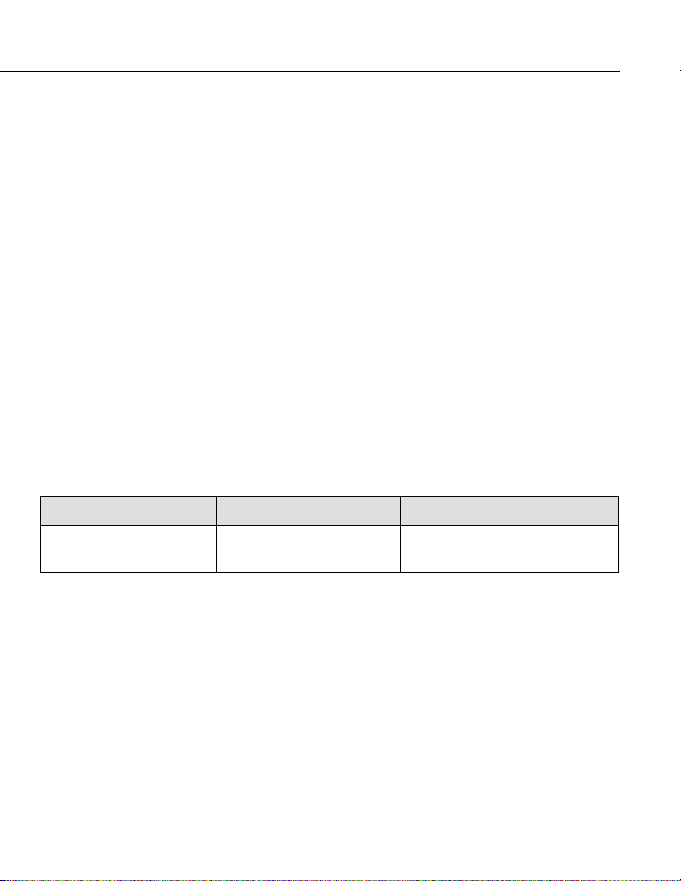
Finding Cause Solution
No response when
pressing the switch button.
Low voltage protection of
iOnBoost is started.
Plug the adapter into the USB-C
input port to activate.

11
www.wagan.com
iOnBoost
™
V8 JET by Wagan Tech
®
USING THE TURBO FAN
The iOnBoost
™
V8 JET features a built-in Turbo Fan with a 3-speed gear switch,
allowing you to adjust airflow for different usage scenarios.
• Maximum Air Pressure: 400g (Max)
• Maximum Speed: 95,000 RPM
Operating Instructions
1. Inspect Air Inlet and Outlet: Ensure that both the air inlet and outlet are
clean and free from any obstructions. A clear pathway is essential for
safe and effective operation.
2. Power On the Unit: Press the Power Button to activate the turbo fan.
3. Hold Securely: Grip the handle firmly and aim the air outlet at the target
area to blow off dust or direct airflow as needed.
4. Adjust Airflow:
Press the Air Flow Switch Button to cycle through the three airflow levels:
Press once: Low speed
Press twice: Medium speed
Press three times: High speed
Press a fourth time: Power off
5. Monitor the Indicator Lights: As you adjust airflow, the Air Volume
Indicator Lights will illuminate progressively to show the current
level—from low to high.

Important Notes
1. Jump Starter Function: The jump starter function cannot be used while the
fan is in operation.
2. Fan Use: The fan is intended for adult use only.
3. Safety Warning: Never point the fan’s air vents at your eyes or other
vulnerable parts of the body while in use.
4. After Use: After using the fan, please clean it and store it in the provided
EVA bag to keep it in good condition
User’s Manual—Read before using this equipment
©2025 Wagan Corporation. All Rights Reserved.
Wagan Tech and wagan.com are trademarks of Wagan Corporation.
12
USING THE USB OUTPUT
The iOnBoost
™
V8 JET features a USB output port for charging mobile devices.
To protect the unit, the USB port will automatically shut off when the internal
battery is low. In such cases, recharge the iOnBoost
™
V8 JET as soon as
possible.
Steps for USB Charging
1. Activate USB Output: Press and hold the Power Button to enable USB
output.
2. Begin Charging: Connect your device using a compatible charging cable
and plug it into the USB output port. Charging will begin automatically.
3. Check Power Level: Once the USB output is active, the Power Indicator
Lights will illuminate to display the current battery level of the
iOnBoost
™
V8 JET.

13
www.wagan.com
iOnBoost
™
V8 JET by Wagan Tech
®
PROPER DISPOSAL
• This product contains no user-serviceable parts.
• Do not attempt to open, remove, or replace the internal battery. When the
battery reaches the end of its service life, take the entire unit to a certified
battery recycling facility for proper disposal, in accordance with local
regulations.
FREQUENTLY ASKED QUESTIONS (FAQ)
1. How long does it take to fully charge the iOnBoost
™
?
It takes approximately 6 hours to fully charge the unit using the included adapter.
2. How many times can the iOnBoost
™
start a vehicle?
This depends on engine capacity and condition. As a general guideline, it can
start a 12V passenger vehicle up to 40 times on a full charge. Larger engines
will reduce the number of possible starts.
3. What happens if I use the iOnBoost
™
outside of its recommended temperature
range?
The iOnBoost
™
is equipped with thermal sensors and built-in protection. If the
device exceeds its safe operating temperature, it will automatically shut down
to prevent damage.
4. What is the expected lifetime of the iOnBoost
™
?
The lifespan is typically 3 to 5 years, depending on usage frequency and
storage conditions.
5. How long does the battery hold a charge?
When stored properly, it can retain up to 70% of its charge for 1 year. For
optimal performance, we recommend fully charging the unit every 3 months.
6. Can I use the USB port to charge multiple devices at the same time?
Yes, but when multiple devices are connected, the 5V/2A output will be
shared, and the current may be automatically reduced..
5. Can I use the iOnBoost
™
to start a 24V vehicle?
No. For safety reasons, this unit is designed only for 12V vehicles such as cars,
motorcycles, and small trucks.

The WAGAN Corporation warranty is limited to products sold only in
the United States.
Warranty Duration:
Product is warranted to the original purchaser for a period of one (1) year from
the original purchase date, to be free of defects in material and workmanship.
WAGAN Corporation disclaims any liability for consequential damages. In no event
will WAGAN Corporation be responsible for any amount of damages beyond the
amou
nt paid for the product at retail.
Warranty Performance:
During the warrant y period, a product with a defect will be replaced with a
comparable model when the product is returned to WAGAN Corporation with an
original store receipt. WAGAN Corporation will, at its discretion, replace or repair
the defective part. The replacement product will be warranted for the balance of the
original warranty period. This warranty does not ex
tend to any units which have
been used in violation of written instructions furnished.
Warranty Disclaimers:
This warranty is in lieu of all warranties expressed or implied and no representative
or person is authorized to assume any other liability in connection with the sale of our
products. There shall be no claims for defects or failure of performance or product
failure under any theory of tort, contract or commercia
l law including,but not limited
to negligence, gross negligence, strict liability, breach of warranty, and breach of
contract.
Returns:
WAGAN Corporation is not responsible for any item(s) returned without an official
Return Authorization number (RA#). Please contact our customer service team by
phone or email to obtain an RA#. You can also visit our website and chat with our team
during our normal business hours. For more details
and instructions on how to process
a warranty claim, please read the “Returns” section under the “Contact” page on our
website. WAGAN Corporation is not responsible for any shipping charges incurred in
returning the item(s) back to the company for repair or replacement.
Register your product online at http://tinyurl.com/wagan-registration to be added to
our email list. You will receive previews on our upcoming products, promotions, a
nd
events.
©2025
WAGAN Corp. Limited Warranty
13073 166
th
Street
Cerritos, CA 90703, U.S.A.
Tel: +1.888.714.9316
customerservice@wagan.com
www.wagan.com
©2025 Wagan Corporation. All Rights Reserved
Wagan Tech and wagan.com are trademarks of Wagan Corporation
REV20250530