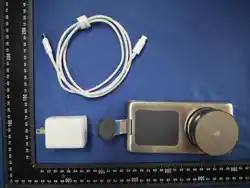

User Manual
取扱説明書
In order to bring you a better experience, please read this user manual
carefully before using this product and keep it properly for future reference.
01 02
03 04 05 06 07
08 09 10 11 12
13 14 15

Contents / 目次
Specifications
Compatible Devices
Overview
Instructions
Indicator Light Guide
Important Safety Instructions
01
01
02
03
06
07
EN
製品仕様
対応機種
製品概要
使用方法
インジケーターランプについて
重要な安全上のご注意
09
09
10
1 1
14
15
JA
01 02
03 04 05 06 07
08 09 10 11 12
13 14 15
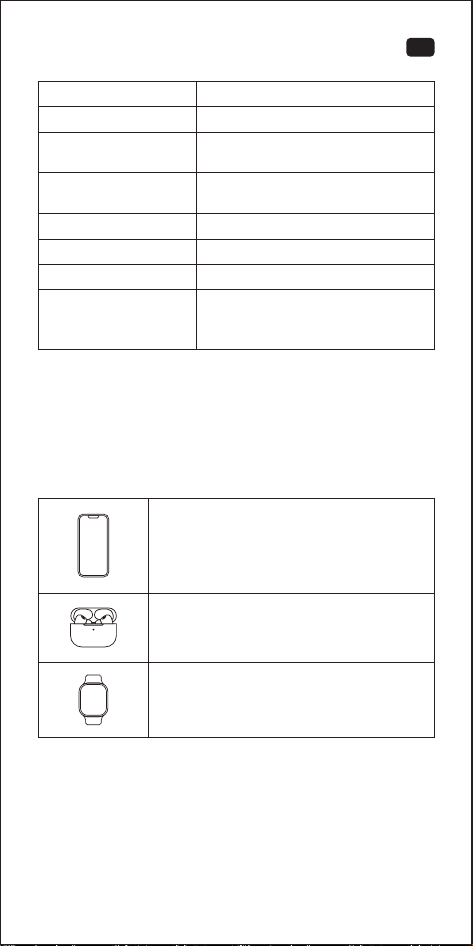
Specifications
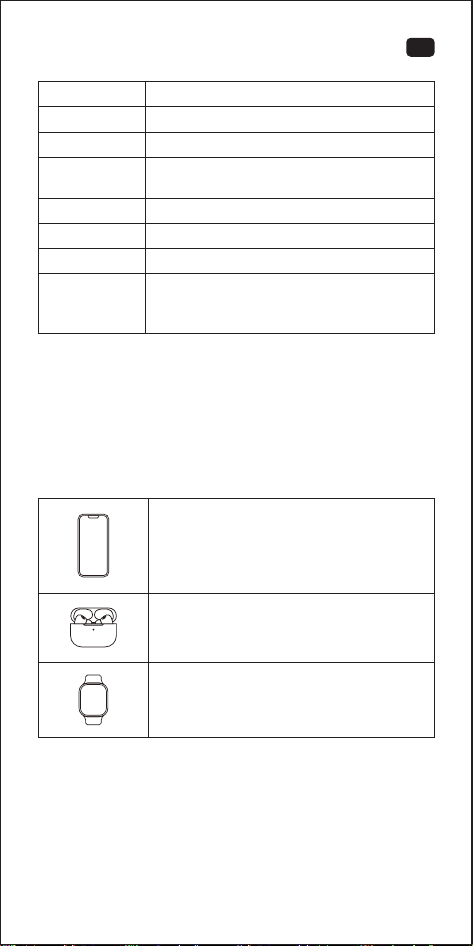
Compatible Devices
Product Name
Product Model
Total Output
Charge Sensing Distance
Working Temperature
45W MAX
≈4mm
0℃~35℃/32°F~95°F
Input
Package Contents
3-in-1 Wireless Charger ×1,
Charger (Optional) ×1, Charging
Cable (Optional) ×1, User Manual ×1
The parameters above are derived from the laboratory of TORRAS.
The image shown here is indicative only. Actual delivery is subject to
customer purchase style.
9V⎓3A/12V⎓3A/15V⎓3A/
20V⎓3.35A
3-in-1 Wireless Charger
WX11
iPhone 12 and later models
AirPods/AirPods Pro Series
(with Wireless Charging Case)
Apple Watch Series 6 and later models
Apple Watch Ultra/SE Series
Output
Phone 1: 25W MAX; Phone 2/Earbuds:
15W MAX; Watch: 5W MAX
EN
01 02
03 04 05 06 07
08 09 10 11 12
13 14 15
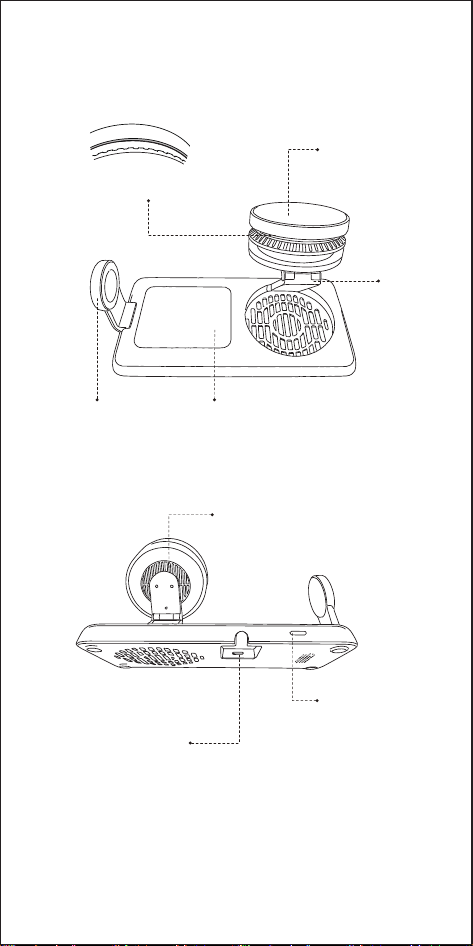
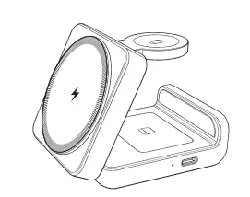
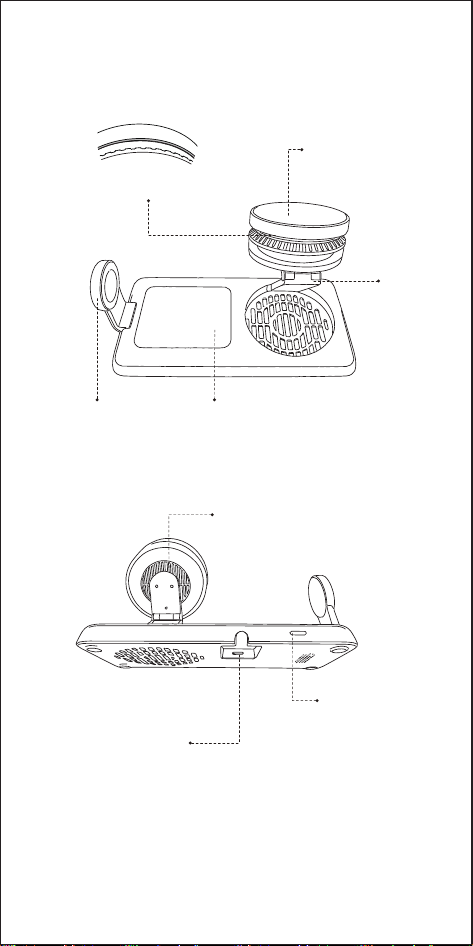
Overview
Wireless Charging
Area for iPhone
Wireless Charging
Area for Apple Watch
Wireless Charging
Area for AirPods
Cooling Vent
USB-C Port
Function Button
Stand
Indicator Light
01 02
03 04 05 06 07
08 09 10 11 12
13 14 15
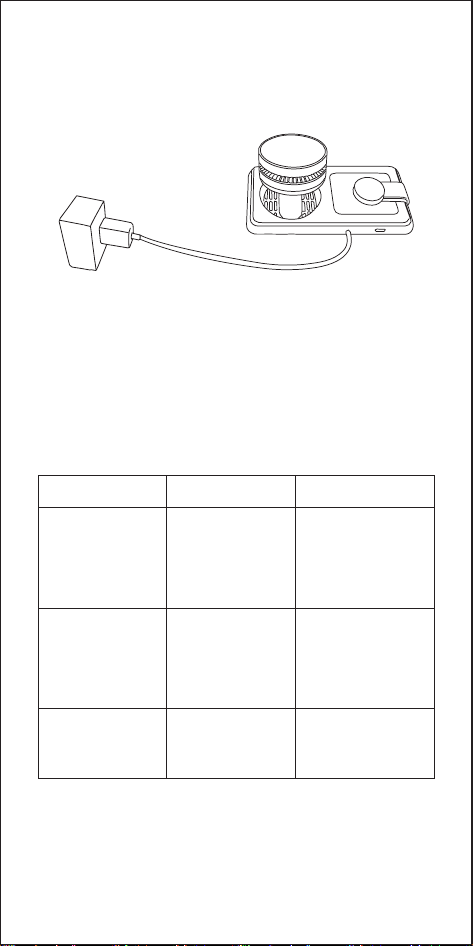
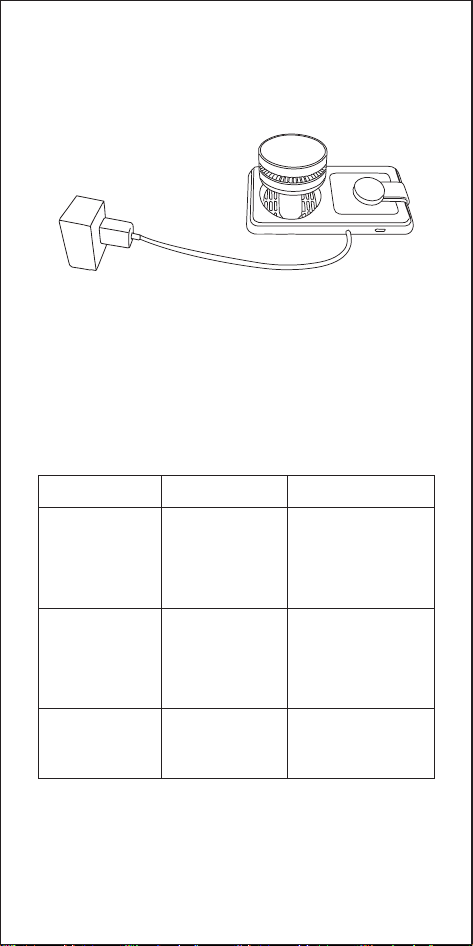
1. Connect the charger and charging cable to power on the device.
The fan and semiconductor cooling function are off by default.
2. Button and Function Guide
Note: Please use the charger (67W) included with this product. If
using a third-party charger block, ensure it supports USB-C
PD fast charging with an output power of at least 67W to
ensure the best charging experience.
Place your phone
on the charging
area (while
powered on)
Double-press
the Function
button
Press and hold
the Function
button for 3
seconds
Operation
Turn off the
indicator light.
Turn the fan and
semiconductor
cooling function
on or off.
The fan and
semiconductor
cooling function
turn on
automatically.
Function
The indicator
light turns off.
The indicator light
flashes 3 times,
turns off, then
returns to solid light
after 1 second.
The indicator light
flashes 3 times,
turns off, then
returns to solid
light after 1 second.
Indicator Light
Instructions
01 02
03 04 05 06 07
08 09 10 11 12
13 14 15
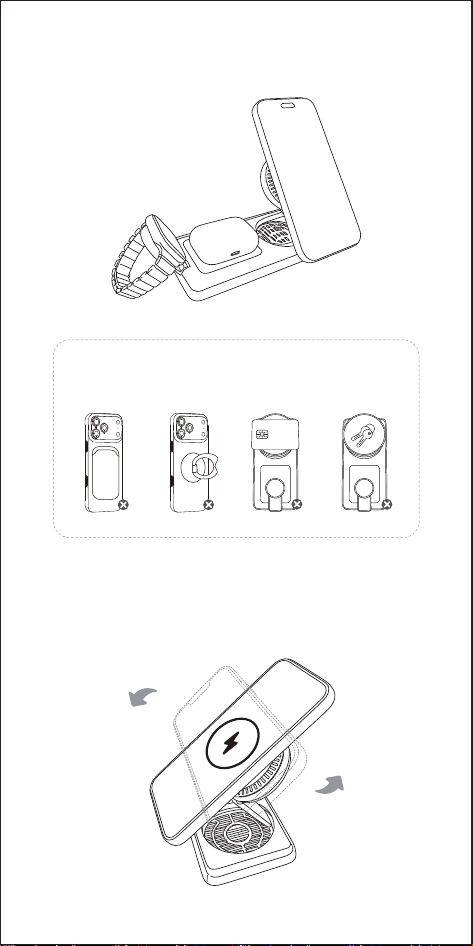
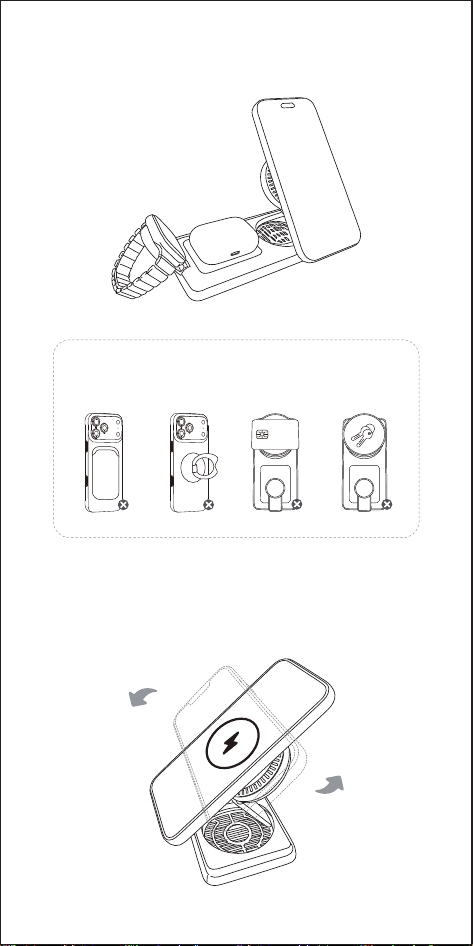
3. This product can wirelessly charge your iPhone, AirPods, and
Apple Watch simultaneously.
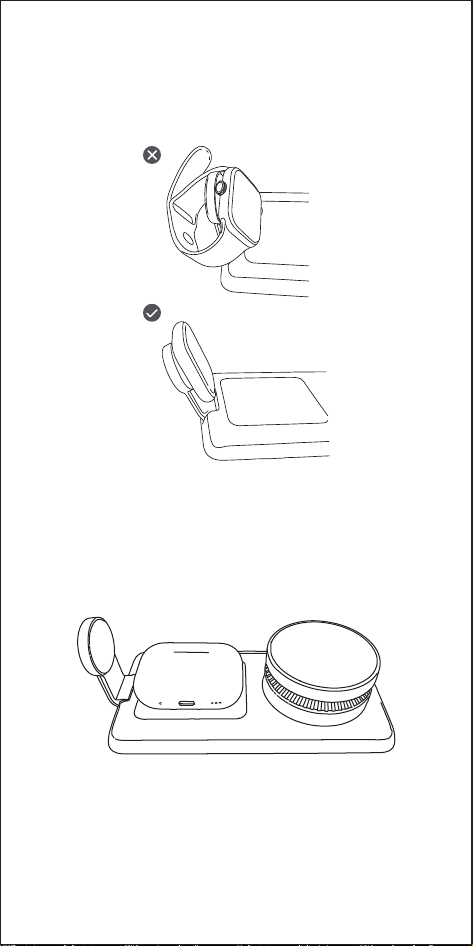
4. This wireless charger features a foldable metal stand. Pull up the
stand to unfold it, then adjust the viewing angle as needed. It
supports both portrait and landscape charging, making it ideal
for watching videos, working, and more.
Warning: The following scenarios are not supported.
Please remove any such items before charging.
01 02
03
04 05 06 07
08 09 10 11 12
13 14 15
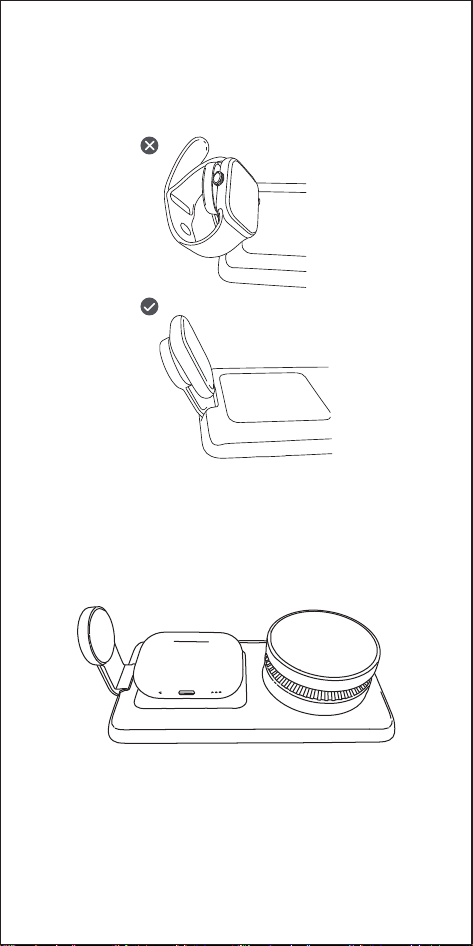
5. If your Apple Watch has a particularly thick metal band that
prevents magnetic alignment, please remove the band and
place the watch’s charging module onto the wireless charging
area for Apple Watch. Ensure it aligns properly for charging.
6. If your AirPods are not charging, adjust the AirPods case
position. Place it with the front facing up in the center of the
wireless charging area for AirPods. (If your charging case has a
protective cover, please remove it before charging.)
01 02
03 04
05 06 07
08 09 10 11 12
13 14 15
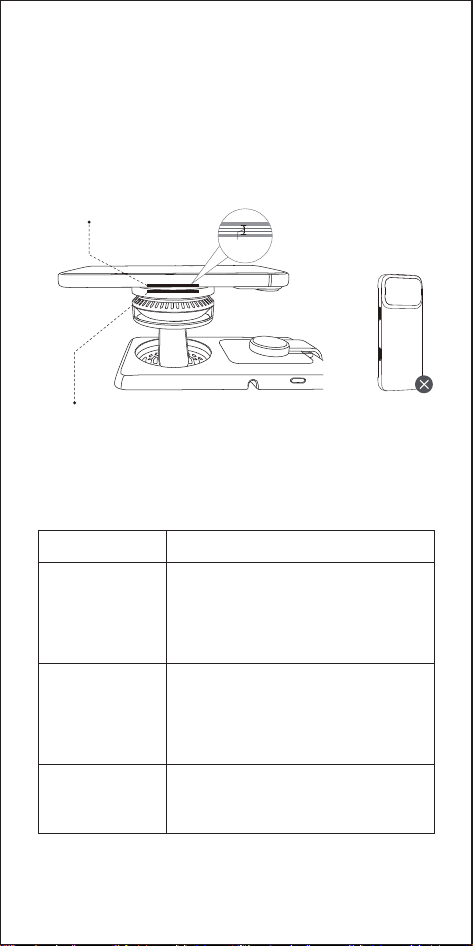
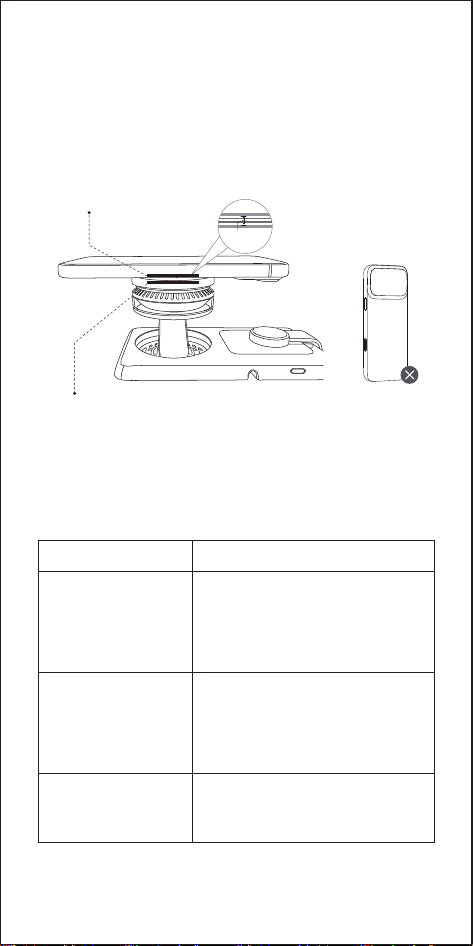
7. Note the charging detection distance, and avoid using too thick
phone cases.
The vertical distance between the internal sensing coil of the
phone and the wireless charger must be within about 4mm for
charging to occur. For the best wireless charging experience,
please avoid using phone cases thicker than 2mm or
non-magnetic cases, as they may affect charging efficiency.
The internal sensing
coil of the cell phone
The internal sensing coil
of the wireless charger
A thicker cell
phone case
≈4mm
Indicator Light Guide
The indicator
light stays on for
3 seconds, then
turns off.
Slow flashing
Fast flashing
Indicator Light
- Incompatible charger detected.
- Please use the charger (67W)
included with this product.
- Metal objects detected.
- Remove any metal objects from the
surface of the wireless charger to
ensure proper operation.
Power is connected.
Status Description
01 02
03 04 05
06 07
08 09 10 11 12
13 14 15

01. This product is designed for charging iPhone 12 and later
models, Apple Watch, and AirPods only. It is not compatible
with products from other brands.
02. Make sure your smartphone supports wireless charging.
Otherwise, it cannot be charged.
03. Do not use a phone case thicker than 2 mm, as this may
prevent wireless charging.
04. Do not place any foreign objects between your phone and the
wireless charger, including metal plates for car mounts, credit
cards, keys, coins, metal objects, or NFC cards. Doing so may
prevent wireless charging or cause overheating.
05. Do not disassemble, strike, crush, or throw this product into fire.
Improper reassembly may result in a risk of fire or personal injury.
06. Do not use this product in extremely hot, humid, or corrosive
environments, as this may damage the circuitry and cause
electrical leakage.
07. Do not spill water or other liquids on the wireless charger. If
cleaning is necessary, make sure the power is disconnected first.
08. When charging, keep the wireless charger more than 30 cm
away from implanted medical devices, such as pacemakers
and cochlear implants, to avoid potential interference.
09. When using a charger for power supply, use a charger that is
certified and complies with applicable safety standards.
10. Using power cables or chargers not recommended or sold by
the manufacturer of this product may result in a risk of fire or
personal injury.
11. This product requires a USB-C PD fast charger with an output
of at least 67 W.
12. High temperatures can reduce charging speed and limit power
output. This is a common characteristic of wireless charging.
We recommend charging your device in an environment below
25°C/ 77° F.
13. Your phone case and the position of your phone on the
wireless charger can affect charging speed. The farther your
phone is from the center of the wireless charger, the slower
the charging speed will be.
14. For optimal charging performance, align your phone's
charging coil with the center of the wireless charger. If the
charging icon does not appear, adjust the position of your
phone. Keep your phone centered on the wireless charger
during charging.
15. The product may become warm during charging. This is normal
and nothing to worry about. If it overheats, stop using it.
16. Improper use, dropping the product, or applying excessive
force may cause damage.
17. Do not use harmful chemicals or cleaning agents to clean this
product.
18. Store this product in a cool, dry place. Do not store it in hot or
humid environments.
19. Keep this product out of reach of children.
Important Safety Instructions
01 02
03 04 05 06
07
08 09 10 11 12
13 14 15
Changes or modifications not expressly approved by the
party responsible for compliance could void the user's
authority to operate the equipment.
This equipment has been tested and found to comply with the
limits for a Class B digital device, pursuant to Part 15 of the FCC
Rules. These limits are designed to provide reasonable protection
against harmful interference in a residential installation. This
equipment generates, uses and can radiate radio frequency
energy and, if not installed and used in accordance with the
instructions, may cause harmful interference to radio
communications. However, there is no guarantee that
interference will not occur in a particular installation. If this
equipment does cause harmful interference to radio or television
reception, which can be determined by turning the equipment off
and on, the user is encouraged to try to correct the interference
by one or more of the following measures:
-- Reorient or relocate the receiving antenna.
-- Increase the separation between the equipment and receiver.
-- Connect the equipment into an outlet on a circuit different from
that to which the receiver is connected.
-- Consult the dealer or an experienced radio/TV technician for help.
This device complies with Part 15 of the FCC Rules. Operation is
subject to the following two conditions: (1) this device may not
cause harmful interference, and (2) this device must accept any
interference received, including interference that may cause
undesired operation.
All products bearing this symbol are waste electrical and
electronic equipment which should not be mixed with
unsorted household waste. Instead, you should protect
human health and the environment by handing over your waste
equipment to a designated collection point for the recycling of
waste electrical and electronic equipment, appointed by the
government or local authorities. Correct disposaI and recycling
will help prevent potential negative consequences to the
environment and human health. Please contact the installer or
local authorities for more information about the location as well as
terms and conditions of such collection points.
01 02
03 04 05 06 07
08 09 10 11 12
13 14 15
FCC RF Radiation Exposure Statement:
1. This Transmitter must not be co-located or operating in conjunction with any other
antenna or transmitter.
2. This equipment complies with RF radiation exposure limits set forth for an uncontrolled
environment.
3. This equipment should be installed and operated with minimum distance 20cm between
the radiator and your body.
製品仕様
対応機種
品名
型番
入力
合計
充電可能距離
動作温度
最大 45W
約4mm
0℃~35℃
同梱品
3-in-1 ワイヤレス充電器 ×1、充電器(オプ
シ ョ ン )× 1 、充 電 ケ ー ブ ル( オ プ シ ョ ン )× 1 、
取扱説明書 ×1
上記の数値は、TORRAS社の製品開発段階で得られたデータに基づ
いたも の で す。掲 載 さ れてい る 画 像 はイメージ です。実 際 の 製 品 は 、
お客様のご購入の際の状況・仕様等により異なる場合があります。
3-in-1 ワイヤレス充電器
WX11
9V⎓3A/12V⎓3A/15V⎓3A/20V⎓3.35A
iPhone 12 以降の各モデル
AirPods/AirPods Proシリーズ
(ワイヤレス 充 電ケース使 用時 )
Apple Watch Ultra/SE シリーズ
出力
スマホ 1:最大 25W;スマホ 2/イヤホン:
最大 15W;ウォッチ:最大 5W
JA
01 02
03 04 05 06 07
08
09 10 11 12
13 14 15
ワイヤレス 充 電 エリア
(iPhone用)
ワイヤレス 充 電 エリア
(Apple Watch用)
ワイヤレス 充 電 エリア
(AirPods用)
冷却用通気口
USB-C ポート
機能ボタン
スタンド
インジケーターランプ
製品概要
01 02
03 04 05 06 07
08 09
10 11 12
13 14 15
1. 充電器と充電ケーブルを接続して電源を入れます。ファンおよび半
導体冷却機能は初期状態ではオフになっています。
2. ボタン操作と機能説明
*本製品は付属の67W充電アダプターを使用してください。市販の
充電アダプターを使用する場合は、USB-C PD(Power Delivery)
対応、出力67W以上のものを使用してください。出力が不足する
と 、正 常 に 充 電 で き な く な る こ と が あり ま す。
充電エリアにス
マートフォンを
置く(電源が入っ
ている状態)
機能ボタンを2回
短く押す
機能ボタンを3秒
間長押しする
操作
インジケーター
ランプを消灯し
ます。
ファンおよび半 導
体冷却機能のオ
ン/オフを切り替
えます。
ファンおよび半
導体冷却機能が
自動的にオンに
なります。
機能説明
消 灯しま す。
3回点 滅して消灯
し 、1 秒 後 に 再 び 点
灯しま す。
3回点 滅して消灯し、
1秒後に再び点灯し
ます。
インジケーターランプ
使用方法
01 02
03 04 05 06 07
08 09 10
11 12
13 14 15
4. 本製品は折りたたみ式の金属製スタンドを搭載しています。スタ
ン ド を 上 に 引 き 上 げ て 展 開 し 、お 好 み の 角 度 に 調 整 で き ま す 。横 向
き・縦向きのどちらでも充電でき、動画視聴や仕事など、さまざま
なシーン で 使 用 で きま す。
警告:以下の状態では充電できません。充電前に必ず
取り外してください。
3. 本製品は、iPhone・AirPods・Apple Watch を同時にワイヤレス充
電 することがで きます。
01 02
03 04 05 06 07
08 09 10 11
12
13 14 15
5. Apple Watch に厚みのある金属製バンドを装着している場合、背
面が磁気吸着できないことがあります。その場合はバンドを取り
外し、Apple Watch 本体の充電モジュールをApple Watch用ワイ
ヤレス充電部分に直接吸着させてください。正しく位置が合って
い れば 充 電 が 開 始 さ れます。
6. AirPodsが充電されない場合、AirPodsの充電ケースの位置を調
整してください。ケースの正面を上に向けて、AirPods用ワイヤレ
ス充電エリアの中央に置いてください。(保 護ケースを装着してい
る場合は、充電前に必ず外してください。)
01 02
03 04 05 06 07
08 09 10 11 12
13 14 15
7. 充電検出距離に注意し、厚みのあるスマートフォンケースの使用は
避 け てくだ さ い 。
スマートフォン内部の充 電コイルとワイヤレス充 電 器 のコイルとの
距離は、約4mm以内である必要があります。最適な充電性能を得
るた め に 、厚 さ 2 m m を 超 える ケースや 磁 気 非 対 応ケースの 使 用は
避 け てくだ さ い 。
スマートフォン 内 部
の受電コイル
ワイヤレス 充 電 器 内 部
の受電コイル
厚みのありすぎ
るスマートフォン
ケース は 非 推 奨
≈4mm
インジケーターラン
プが3秒間点灯した
後 、消 灯 し ま す。
低速点滅
高速点滅
インジケーターランプ
- 非対応の充電アダプターを検出
- 付属の67W充電アダプターをご
使用ください
- 金属異物を検出
- ワイヤレス充電器表面の金属を取
り除いてください
電源が接続されています
状態説明
インジケーターランプについて
01 02
03 04 05 06 07
08 09 10 11 12
13
14 15

重要な安全上のご注意
01. 本製品は iPhone 12 以降、Apple Watch、AirPods 専用です。
他社製品は充電できません。
02. ご使用のスマートフォンがワイヤレス充電に対応していることを
必ずご 確認ください。
03. 厚さ2mmを超えるケースを使用すると充電できません。
04. スマートフォンと充電器の間に異物(車載ホルダー用金属プレー
ト、クレジットカード、鍵、コイン、金 属 物、N FCカードなど)を挟
まないでください。故障や発熱の原因となります。
05. 分解、衝撃を与える、圧搾する、火中へ投入するなどの行為は絶
対にしないでください。また、誤った再組立ては火災やけがの原
因 に なりま す。
06. 高温・多湿・腐食性環境下では使用しないでください。基板の損
傷 や 漏 電 の 恐 れ があります。
07. 水やその他の液体をかけないでください。清掃時は必ず電源を
切ってから行ってください。
08. 充電中は、ワイヤレス充電器をペースメーカーや人工内耳などの
植込み型医療機器から30 cmを超える距離に保ってください。医
療機器に干渉するおそれがあります。
09. 電源供給には、認証を取得した安全規格準拠の充電アダプター
を 使 用してくだ さ い 。
10. メーカー推奨以外の電源ケーブルや充電器を使用すると、火災
やけ が の 原 因 に なる 場 合 があります。
11. 本製品には、USB-C PD対応67W以上の急速充電アダプターが
必 要 です。
12. 高温環境では充電速度が低下し、出力が制限されることがあり
ます。2 5 ℃ 以 下の 環 境 で の充 電を 推 奨します。
13. スマートフォンケースの材質や設置位置により、充電速度が変化
しま す。コイル の 中 心 から離 れるほど 充 電 速 度 は 遅くなりま す。
14. 最適な充電性能を得るために、スマートフォンのコイルを充電器
の中心に正確に合わせてください。充電アイコンが表示されな
い場合は位置を微調整してください。
15. 充電中に本体が発熱することがありますが、異常ではありません。
過熱が続く場合は使用を中止してください。
16. 落下させたり過 度な力を加えたりすると、破 損の原因になります。
17. 有機溶剤や強力な洗剤で清掃しないでください。
18. 高温多湿を避け、涼しく乾燥した場所で保管してください。
19. お子様の手の届かない場所に保管してください。
01 02
03 04 05 06 07
08 09 10 11 12
13 14
15

SHENZHEN TORRAS TECHNOLOGY CO., LTD.
Address: RM C1215, BLK C, Zhantao Technology BLDG,
Intersection Of Gongye East Road And Minzhi Road, Xinniu
Community, Minzhi ST, Longhua DIST, Shenzhen, China
Email: support@torraslife.com
©Shenzhen TORRAS Technology Co., Ltd. All Rights Reserved.
Made in China
01 02
03 04 05 06 07
08 09 10 11 12
13 14 15

01 02
03 04 05 06 07
08 09 10 11 12
13 14 15
YTPI01475A