
取扱説明書
USER MANUAL
In order to bring you a better experience, please read this user manual
carefully before using this product and keep it properly for future reference.
01 02 03 04 05 06
07 08 09 10 11 12 13 14
15 16
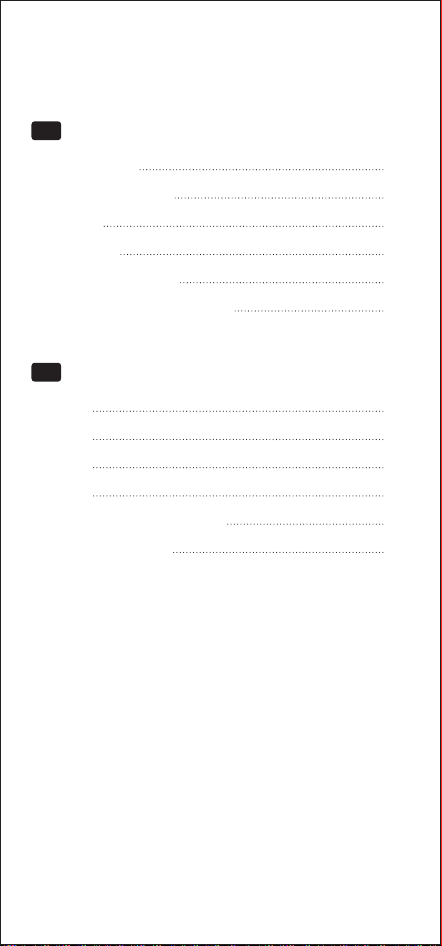
Specifications
Compatible Devices
Overview
Instructions
Indicator Light Guide
Important Safety Instructions
01
01
02
02
06
07
Contents / 目次
EN
製品仕様
対応機種
製品概要
使用方法
インジケーターランプについて
重要な安全上のご注意
10
10
11
11
15
16
JA
01 02 03 04 05 06
07 08 09 10 11 12 13 14
15 16
Specifications
Product Name
Product Model
Input
The parameters above are derived from the laboratory of
TORRAS. The actual parameters would be different due
to production processes and other factors. The image
shown here is indicative only.
Output
Phone: 25W MAX;
Watch: 5W MAX;
Earbuds: 5W MAX
3-in-1 Wireless Charger
WX7
12V⎓3A/15V⎓3A/20V⎓3A
Total Output
Charge Sensing
Distance
≈5mm
35W MAX
Working
Temperature
0℃-35℃/32°F-95°F
Package Contents
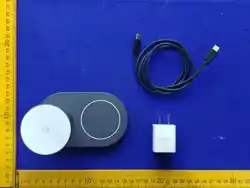
3-in-1 Wireless Charger×1,
Charger×1, Charging Cable×1,
User Manual×1
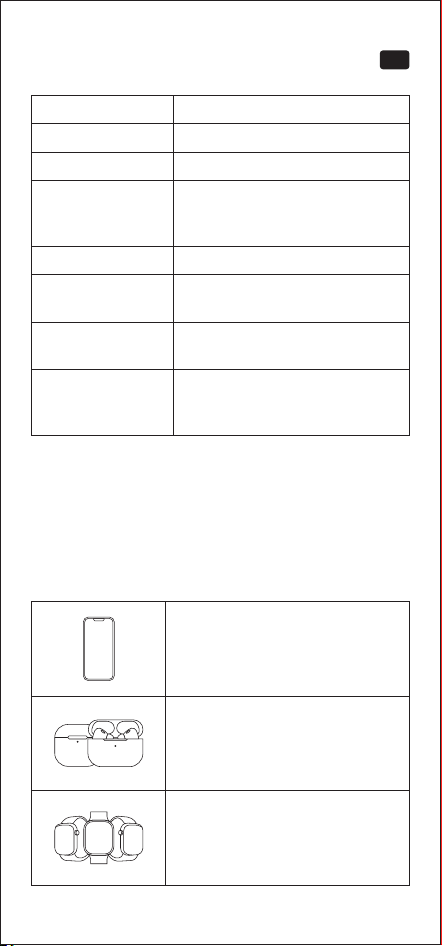
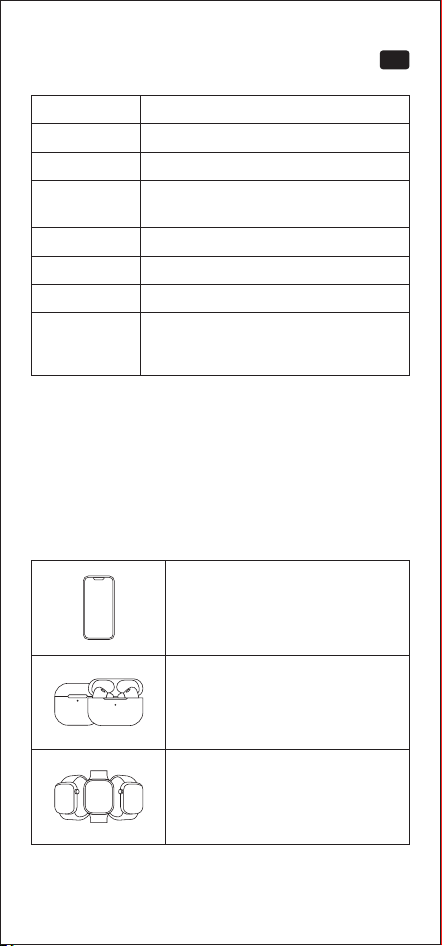
Compatible Devices
iPhone 12 and later models
AirPods/AirPods Pro Series
(with Wireless Charging Case)
Apple Watch Series 6 and
later models
Apple Watch Ultra/SE Series
EN
01 02 03 04 05 06
07 08 09 10 11 12 13 14
15 16
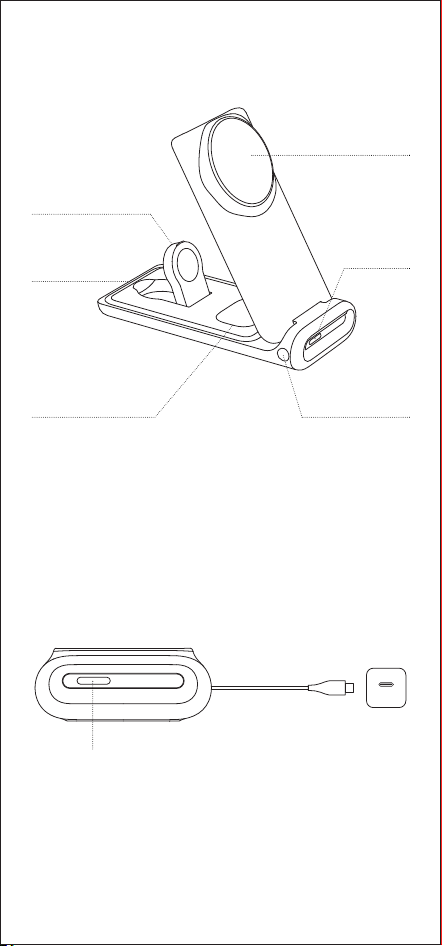
Overview
Instructions
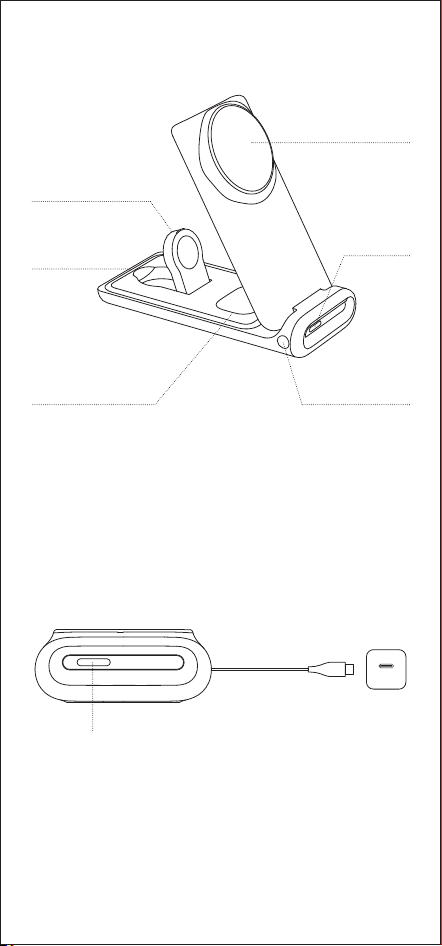
Wireless Charging
Area for Apple Watch
Wireless Charging
Area for AirPods
USB-C Port
Wireless Charging
Area for iPhone
Function
Button
Indicator Light
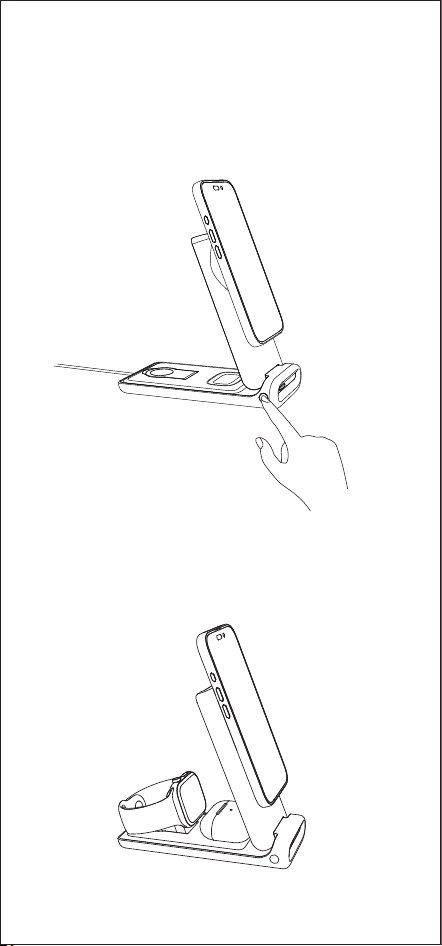
1. Insert the charger and connect the charging cable.
Once powered on, the fan and semiconductor cooling
function turn on by default, and the indicator light stays
on for 3 seconds before turning off.
Note: Please use the charger (67W) included with this
product. If using a third-party charger block, ensure it
supports USB-C PD fast charging with an output power
of at least 67W to ensure the best charging experience.
Indicator Light
USB-C
01 02 03 04 05 06
07 08 09 10 11 12 13 14
15 16
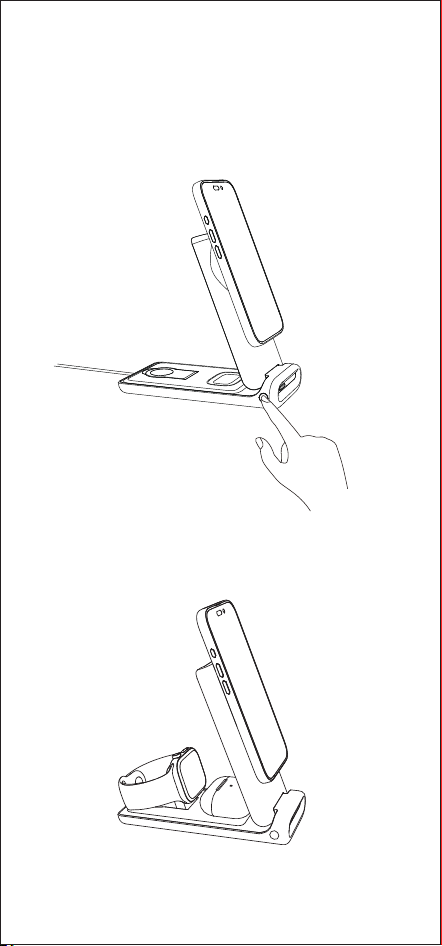
2. Press and hold the function button for 3 seconds to
turn off the fan and semiconductor cooling function.
The indicator light will flash rapidly for 3 seconds. When
the phone is reattached magnetically, the fan and
semiconductor cooling function will turn on automatically,
enabling intelligent heat dissipation and cooling.
3. This product can wirelessly charge your iPhone,
AirPods, and Apple Watch simultaneously.
01 02 03 04 05 06
07 08 09 10 11 12 13 14
15 16
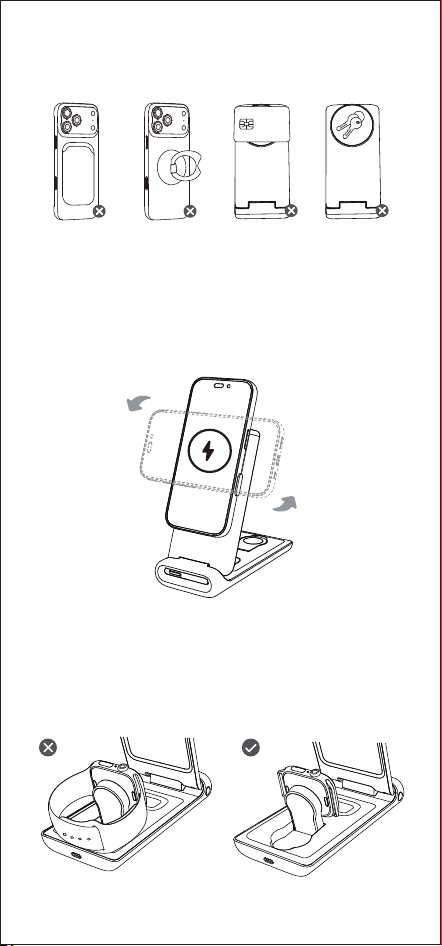
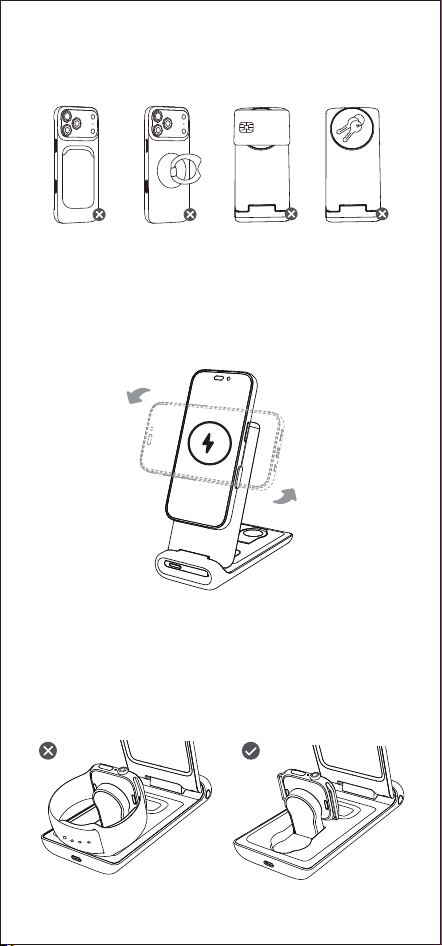
4. When unfolded as a stand, you can freely adjust the
angle from 45° to 62°, and it also supports charging
in both portrait and landscape modes.
① Portrait mode: convenient for video calls or chatting.
② Landscape mode: ideal for watching shows or
online classes.
5. If your Apple Watch has a particularly thick metal
band that prevents magnetic alignment, please
remove the band and place the watch’s charging
module onto the wireless charging area for Apple
Watch. Ensure it aligns properly for charging.
Warning: The following scenarios are not supported.
Please remove any such items before charging.
01 02 03 04 05 06
07 08 09 10 11 12 13 14
15 16
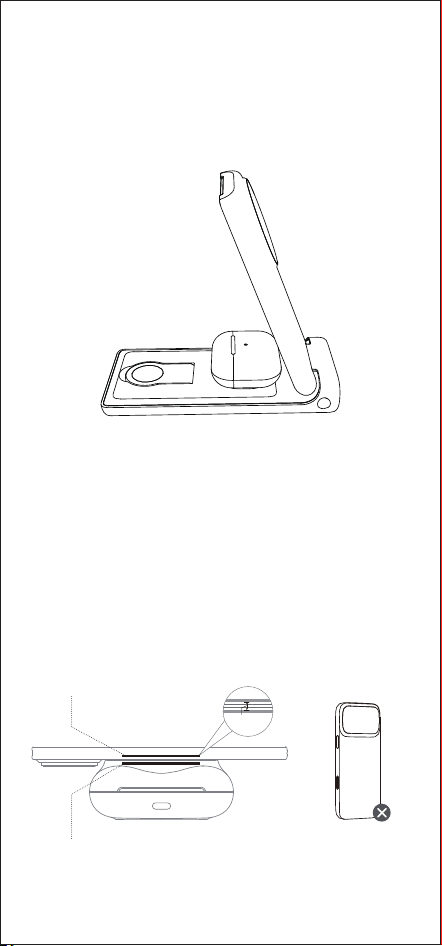
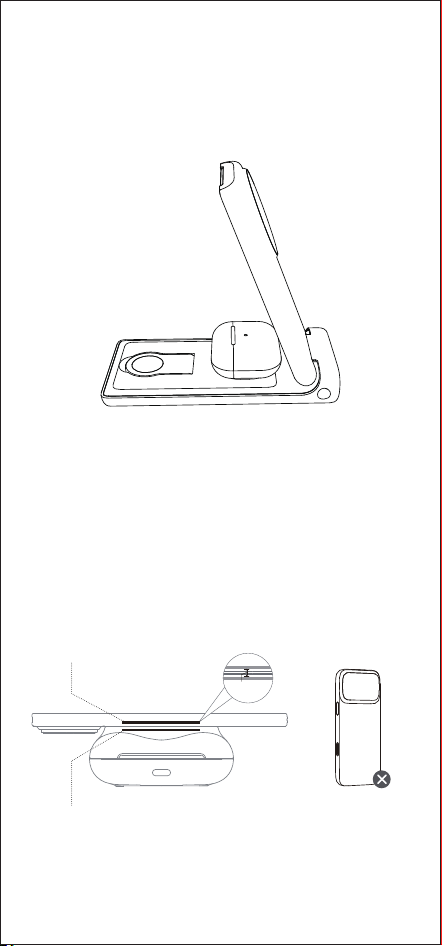
6. If your AirPods are not charging, adjust the AirPods
case position. Place it with the front facing up in the
center of the wireless charging area for AirPods. (If
your charging case has a protective cover, please
remove it before charging.)
7. Note the charging detection distance, and avoid
using too thick phone cases.
The vertical distance between the internal sensing
coil of the phone and the wireless charger must be
within about 5mm for charging to occur. For the best
wireless charging experience, please avoid using
phone cases thicker than 2mm or non-magnetic
cases, as they may affect charging efficiency.
The internal sensing
coil of the cell phone
The internal sensing coil
of the wireless charger
A thicker cell
phone case
≈5mm
01 02 03 04 05 06
07 08 09 10 11 12 13 14
15 16
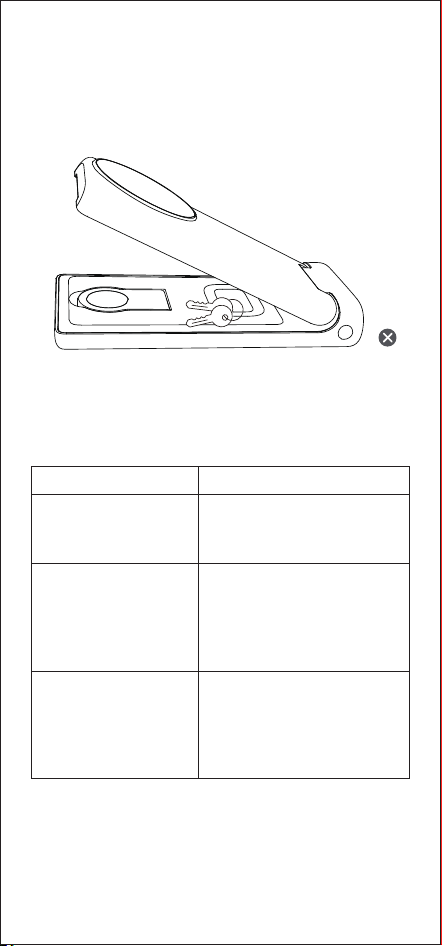
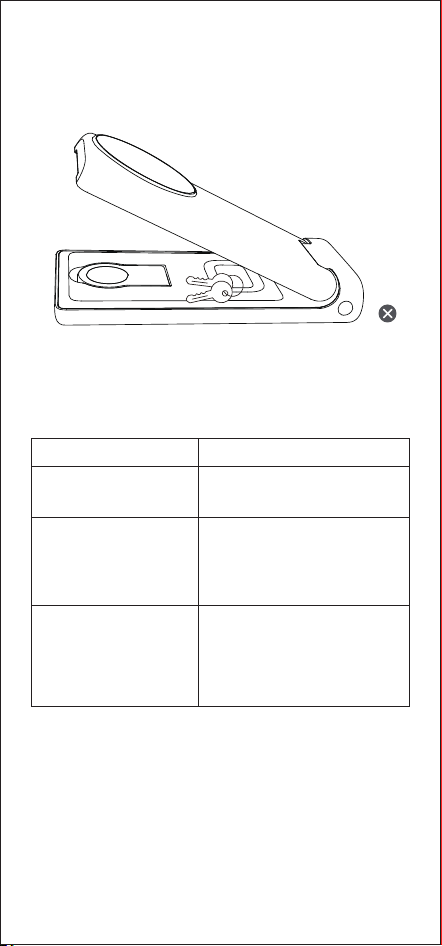
8. If there are foreign objects (e.g., coins or keys) in the
wireless charging area for the watch or earbuds, the
charger may not close properly. Please remove them
before closing.
Indicator Light Guide
Indicator Display Status
The indicator light will
turn off after staying
on for 3 seconds
Fast flashing
• Metal objects detected.
• Remove any metal objects
from the surface of the
wireless charger to ensure
proper operation.
Slow flashing
• Incompatible charger
detected.
• Please use the charger
(67W) included with this
product.
Power is connected.
01 02 03 04 05 06
07 08 09 10 11 12 13 14
15 16

Important Safety Instructions
01. This product is only suitable for iPhone 12 and above
models, Apple Watch, and AirPods. Not for charging
other brand products.
02. Please make sure your phone supports wireless
charging, otherwise it will not be able to charge.
03. Do not use a case that is more than 2mm thick or it
will not charge.
04. Do not place any foreign objects between your phone
and the wireless chargerʼs surface, including metal
plates on a car mount, credit cards, keys, coins, metal
objects, or NFC cards, which will make wireless
charging fail or cause overheating.
05. Do not disassemble, hit, crush or throw it into fire.
Incorrect reassembly may result in fire or make a risk
of injury.
06. Do not use this product under severe high temperature,
humidity or corrosive conditions to avoid damaging
the circuitry with leakage.
07. Do not spill water or other liquids on the wireless
charger. If you need to clean it, please make sure the
power is disconnected.
08. When charging, please keep the distance between
the wireless charger and the implanted medical device
(pacemaker, cochlear implant, etc.) at least 30cm to
avoid potential interference with the medical device.
09. When using a charger block for power supply,
please purchase or use a charger that has obtained
certification and meets the standard requirements.
10. Use of power cords or chargers other than those
recommended or sold by the manufacturer of this
product may result in a risk of fire or personal injury.
11. This product requires a USB-C PD fast charger block
with a minimum output of 67W.
12. High temperatures can reduce charging speed and
limit power, which is a common issue with all wireless
chargers. It is recommended to charge your device
in environments with temperatures below 25°C/77°F.
13. The phone case and the position of your device on
the wireless charger will affect the charging speed.
The further the device is from the center of the wireless
charger, the slower the charging speed will be.
14. For optimal charging performance, align your
smartphone with the coil in the center of the
wireless charger. If the charging icon does not
appear on your smartphone, adjust its placement.
Ensure the smartphone is always centered on the
wireless charger.
15. The product may become warm during charging. It
is a normal phenomenon, no need to worry. If
overheating occurs, please pause use.
16. Improper use, dropping or excessive force may cause
damage to this product.
17. Do not use harmful chemicals or detergents to clean
this product.
18. Please store this product in a cool and dry place, do
not store this product in a hot or humid environment.
19. Keep this product out of reach of children.
01 02 03 04 05 06
07 08 09 10 11 12 13 14
15 16

01. This product is only suitable for iPhone 12 and above
models, Apple Watch, and AirPods. Not for charging
other brand products.
02. Please make sure your phone supports wireless
charging, otherwise it will not be able to charge.
03. Do not use a case that is more than 2mm thick or it
will not charge.
04. Do not place any foreign objects between your phone
and the wireless chargerʼs surface, including metal
plates on a car mount, credit cards, keys, coins, metal
objects, or NFC cards, which will make wireless
charging fail or cause overheating.
05. Do not disassemble, hit, crush or throw it into fire.
Incorrect reassembly may result in fire or make a risk
of injury.
06. Do not use this product under severe high temperature,
humidity or corrosive conditions to avoid damaging
the circuitry with leakage.
07. Do not spill water or other liquids on the wireless
charger. If you need to clean it, please make sure the
power is disconnected.
08. When charging, please keep the distance between
the wireless charger and the implanted medical device
(pacemaker, cochlear implant, etc.) at least 30cm to
avoid potential interference with the medical device.
09. When using a charger block for power supply,
please purchase or use a charger that has obtained
certification and meets the standard requirements.
10. Use of power cords or chargers other than those
recommended or sold by the manufacturer of this
product may result in a risk of fire or personal injury.
11. This product requires a USB-C PD fast charger block
with a minimum output of 67W.
12. High temperatures can reduce charging speed and
limit power, which is a common issue with all wireless
chargers. It is recommended to charge your device
in environments with temperatures below 25°C/77°F.
13. The phone case and the position of your device on
the wireless charger will affect the charging speed.
The further the device is from the center of the wireless
charger, the slower the charging speed will be.
14. For optimal charging performance, align your
Changes or modifications not expressly
approved by the party responsible for compliance
could void the user's authority to operate the equipment.
This equipment has been tested and found to comply
with the limits for a Class B digital device, pursuant to
Part 15 of the FCC Rules. These limits are designed to
provide reasonable protection against harmful
interference in a residential installation. This equipment
generates, uses and can radiate radio frequency energy
and, if not installed and used in accordance with the
instructions, may cause harmful interference to radio
communications. However, there is no guarantee that
interference will not occur in a particular installation. If
this equipment does cause harmful interference to
radio or television reception, which can be determined
by turning the equipment off and on, the user is
encouraged to try to correct the interference by one or
more of the following measures:
-- Reorient or relocate the receiving antenna.
-- Increase the separation between the equipment and
receiver.
-- Connect the equipment into an outlet on a circuit
different from that to which the receiver is connected.
-- Consult the dealer or an experienced radio/TV
technician for help.
smartphone with the coil in the center of the
wireless charger. If the charging icon does not
appear on your smartphone, adjust its placement.
Ensure the smartphone is always centered on the
wireless charger.
15. The product may become warm during charging. It
is a normal phenomenon, no need to worry. If
overheating occurs, please pause use.
16. Improper use, dropping or excessive force may cause
damage to this product.
17. Do not use harmful chemicals or detergents to clean
this product.
18. Please store this product in a cool and dry place, do
not store this product in a hot or humid environment.
19. Keep this product out of reach of children.
This device complies with Part 15 of the FCC Rules.
Operation is subject to the following two conditions: (1)
this device may not cause harmful interference, and (2)
this device must accept any interference received,
including interference that may cause undesired operation.
01 02 03 04 05 06
07
08 09 10 11 12 13 14
15 16
Changes or modifications not expressly
approved by the party responsible for compliance
could void the user's authority to operate the equipment.
This equipment has been tested and found to comply
with the limits for a Class B digital device, pursuant to
Part 15 of the FCC Rules. These limits are designed to
provide reasonable protection against harmful
interference in a residential installation. This equipment
generates, uses and can radiate radio frequency energy
and, if not installed and used in accordance with the
instructions, may cause harmful interference to radio
communications. However, there is no guarantee that
interference will not occur in a particular installation. If
this equipment does cause harmful interference to
radio or television reception, which can be determined
by turning the equipment off and on, the user is
encouraged to try to correct the interference by one or
more of the following measures:
-- Reorient or relocate the receiving antenna.
-- Increase the separation between the equipment and
receiver.
-- Connect the equipment into an outlet on a circuit
different from that to which the receiver is connected.
-- Consult the dealer or an experienced radio/TV
technician for help.
This device complies with Part 15 of the FCC Rules.
Operation is subject to the following two conditions: (1)
this device may not cause harmful interference, and (2)
this device must accept any interference received,
All products bearing this symbol are waste
electrical and electronic equipment which
should not be mixed with unsorted household
waste. Instead, you should protect human health and
the environment by handing over your waste equipment
to a designated collection point for the recycling of
waste electrical and electronic equipment, appointed by
the government or local authorities. Correct disposaI
and recycling will help prevent potential negative
consequences to the environment and human health.
Please contact the installer or local authorities for more
information about the location as well as terms and
conditions of such collection points.
including interference that may cause undesired operation.
01 02 03 04 05 06
07 08
09 10 11 12 13 14
15 16
FCC RF Radiation Exposure Statement:
1. This Transmitter must not be co-located or operating in
conjunction with any other antenna or transmitter.
2. This equipment complies with RF radiation exposure
limits set forth for an uncontrolled environment.
3. This equipment should be installed and operated with
minimum distance 20cm between the radiator and your
body.
JA
製品仕様
対応機種
品名
型番
入力
出力
3-in-1 ワイヤレス充 電 器
WX7
12V⎓3A/15V⎓3A/20V⎓3A
合計
充電検知距離
動作温度
最大35W
約5mm
0°C-35°C/32°F-95°F
スマホ:最 大 2 5 W;ウォッチ:最 大 5 W;
イヤ ホ ン:最 大 5 W
同梱品
3-in-1 ワイヤレス充電器 ×1、
充電器 ×1、充電ケーブル ×1、
取扱説明書 ×1
上記の数値は、TORRAS社の製品開発段階で得られたデー
タ に 基 づ い た も の で す。実 際 の 数 値 は 、生 産 工 程 や そ の 他
の要因により異なる場合があります。掲載されている画像は
イメー ジ で す。
iPhone 12 以降の各モデル
AirPods/AirPods Proシリーズ
(ワイヤレス 充 電ケース使 用 時)
Apple Watch Series 6以降
Apple Watch Ultra/SEシリーズ
01 02 03 04 05 06
07 08 09
10 11 12 13 14
15 16
ワイヤレス充 電エリア
(Apple Watch用)
ワイヤレス充 電エリア
(AirPods用)
USB-C ポート
機能ボタン
ワイヤレス 充 電 エ
リ ア( i P h o n e 用 )
インジケータ
ーランプ
製品概要
使用方法
1. 充電器に充電ケーブルを接続し、電源コンセントに差し込
んで電源を入れてください。電源を入れると、ファンおよび
半導体冷却機能が自動的に起動し、インジケーターランプ
は約3秒間点灯した後、自動的に消灯します。
* 本製品は付属の67W充電アダプターを使用してください。
市販の充電アダプターを使用する場合は、USB-C PD
(Power Delivery)対応、出力67W以上のものを使用して
ください。出力が不足すると、正常に充電できなくなるこ
とが あります。
インジケーターランプ
USB-C
01 02 03 04 05 06
07 08 09 10
11 12 13 14
15 16
2. ファンクションボタンを3秒間長押しすると、冷却ファンお
よび半導体冷却機能がオフになります。この際、インジケ
ーターランプが高速点滅を約3秒間行います。その後、ス
マートフォン をマグネットで再度吸着させると、冷却ファ
ンおよび半導体冷却機能が自動的で再び動作し、充電中
の 温 度 状 態 に 応じ て自動 的に 放 熱・冷 却 を行 い ます。
3. 本製品は、iPhone・AirPods・Apple Watch を同時にワイ
ヤレス 充 電 することが できます。
01 02 03 04 05 06
07 08 09 10 11
12 13 14
15 16
4. スタンドとして展開すると、45°〜62°の範囲で角度調整が
可 能 で す。縦 置き・横 置き の両 方に 対 応してい ます。
① 縦置きモード:ビデオ通話やチャットに便利。
② 横置きモード:動画視聴やオンライン会議に最適。
5. Apple Watch に厚みのある金属製バンドを装着している
場合、背面が磁気吸着できないことがあります。その場合
はバンドを取り外し、Apple Watch 本体の充電モジュール
をApple Watch用ワイヤレス充電部分に直接吸着させてく
ださい。正しく位置が合っていれば充電が開始されます。
警 告:以下の状態では充電できません。充電前に必ず取り外
してくだ さい。
01 02 03 04 05 06
07 08 09 10 11 12
13 14
15 16
6. AirPodsが充電されない場合、AirPodsの充電ケースの位
置を調整してください。ケースの正面を上に向けて、AirPods
用ワイヤレス充 電エリアの中央に置いてください。(保護
ケースを装 着してい る場 合 は、充 電 前に 必ず外してくださ
い 。)
7. 充電検出距離に注意し、厚みのあるスマートフォンケース
の 使 用は 避け てくださ い。
スマートフォン内部の充電コイルとワイヤレス充電器のコ
イルとの距離は、約5mm以内である必要があります。最
適な充電性能を得るために、厚さ2mmを超えるケースや
磁 気 非 対 応ケースの 使 用 は 避 け てください 。
スマートフォン 内 部
の受電コイル
ワイヤレス充電器内部
の受電コイル
厚みのありすぎる
スマートフォン ケ
ースは 非 推 奨
≈5mm
01 02 03 04 05 06
07 08 09 10 11 12 13
14
15 16
8. Apple Watch または AirPods のワイヤレス充電エリアに、
硬貨・鍵などの異物がある場合、製品を正常に閉じることが
できません。閉じる前に、必ず異物を取り除いてください。
インジケーターランプについて
表示
約 3 秒 間 点 灯 後 、消 灯 電源が接続されています
高速点滅
状態
• 金属異物を検出
• ワイヤレス 充 電 器 表 面 の 金
属を取り除いてください
低速点滅
• 非対応の充電アダプター
を検出
• 付属の67W充電アダプタ
ーをご使用ください
01 02 03 04 05 06
07 08 09 10 11 12 13 14
15 16

重要な安全上のご注意
01. 本製品は iPhone 12 以降、Apple Watch、AirPods 専
用 で す 。他 社 製 品 は 充 電 で き ま せ ん 。
02. ご使用のスマートフォンがワイヤレス充電に対応してい
ることを必ずご確認ください。
03. 厚さ2mmを超えるケースを使用すると充電できません。
04. スマートフォンと充電器の間に異物(車載ホルダー用金
属プレート、クレジットカード、鍵、コイン、金 属 物、N F C
カードなど)を挟まないでください。故障や発熱の原因
となりま す。
05. 分解、衝撃を与える、圧搾する、火中へ投入するなどの
行為は絶対にしないでください。また、誤った再組立て
は火災やけがの原因になります。
06. 高温・多湿・腐食性環境下では使用しないでください。基
板 の 損 傷 や 漏 電の 恐 れ が あります。
07. 水やその他の液体をかけないでください。清掃時は必ず
電源を切ってから行ってください。
08. ペースメーカー、人工内耳などの医療機器を装着してい
る場合は、充電器との距離を30cm以上離してください。
干渉のおそれがあります。
09. 電源供給には、認証を取得した安全規格準拠の充電ア
ダ プター を 使 用してくださ い。
10. メーカー推奨以外の電源ケーブルや充電器を使用すると、
火災やけがの原因になる場合があります。
11. 本製品には、USB-C PD対応67W以上の急速充電アダプ
ターが 必 要で す。
12. 高温環境では充電速度が低下し、出力が制限されるこ
とが あります。2 5 ℃ 以下 の 環 境 で の 充 電 を 推 奨します。
13. スマートフォンケースの材質や設置位置により、充電速
度が変化します。コイルの中心から離れるほど充電速度
は 遅くなります。
14. 最適な充電性能を得るために、スマートフォンのコイル
を充電器の中心に正確に合わせてください。充電アイコ
ンが表示されない場合は位置を微調整してください。
15. 充電中に本体が発熱することがありますが、異常ではあ
りません。過熱が続く場合は使用を中止してください。
16. 落下させたり過度な力を加えたりすると、破損の原因に
なりま す。
17. 有機溶剤や強力な洗剤で清掃しないでください。
18. 高温多湿を避け、涼しく乾燥した場所で保管してください。
19. お子様の手の届かない場所に保管してください。
01 02 03 04 05 06
07 08 09 10 11 12 13 14
15
16

SHENZHEN TORRAS TECHNOLOGY CO., LTD.
Address: RM C1215, BLK C, Zhantao Technology BLDG,
Intersection Of Gongye East Road And Minzhi Road, Xinniu
Community, Minzhi ST, Longhua DIST, Shenzhen, China
Email: support@torraslife.com
©Shenzhen TORRAS Technology Co., Ltd. All Rights
Reserved.
Made in China
01 02 03 04 05 06
07 08 09 10 11 12 13 14
15 16

YTPI01417A
01 02 03 04 05 06
07 08 09 10 11 12 13 14
15 16