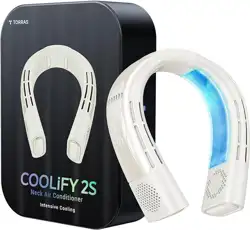
1. Overview
The TORRAS COOLIFY 2S is a wearable personal air conditioner and heater designed for year-round body temperature regulation. It is a portable, battery-powered device worn around the neck, providing targeted cooling or heating for indoor and outdoor activities.

2. Package Contents
- TORRAS COOLIFY 2S Wearable Air Conditioner x1
- Portable Carry Bag x1
- USB-C Charging Cable x1
3. Key Features
3.1 Year-Round Temperature Regulation
The device offers three primary operating modes:
- Cool: Provides active cooling for hot days.
- Fan: Circulates air without active temperature change.
- Heat: Provides warmth for cold days.

3.2 Coology Cooling Technology
The device uses a dual-layer design with four air ducts and two cooling plates to provide a 360° cooling effect around the neck and face. It is powered by a KU 2.0 Pro chip.

3.3 Battery and Charging
- Battery: 5000mAh lithium polymer battery.
- Run Time: Up to 28 hours in Eco setting, or 4 hours in Max cooling/heating setting.
- Charging: 18W fast charging via USB-C. Supports use while charging. Can charge to 80% in approximately 1.3 hours.
3.4 App Control
The device can be controlled via a Bluetooth app, allowing for mode selection, speed adjustment, and other settings.
3.5 Physical Design
- Style: Wearable neck fan.
- Material: Metal and plastic construction.
- Dimensions: 1.95"D x 7.28"W x 7.61"H.
- Weight: 1.9 Pounds.
- Feature: Foldable for portability.
4. Use Guide
4.1 Getting Started
- Remove the COOLIFY 2S and all accessories from the packaging.
- Fully charge the device using the provided USB-C cable before first use.
4.2 Wearing the Device
- Unfold the device if it is folded for storage.
- Place the device around your neck so the two cooling/heating plates rest on the back of your neck.
- Adjust for a comfortable and secure fit.

4.3 Basic Operation (Device Controls)
The device features touchpad controls. Specific button functions and sequences (e.g., power on/off, mode cycling, speed adjustment) should be detailed in the official User Guide (PDF).
General control principles include:
- Powering the device on/off.
- Cycling between Cool, Fan, and Heat modes.
- Adjusting the fan speed (3-speed settings).
4.4 Using the Mobile App
- Download the official TORRAS app from your device's app store.
- Enable Bluetooth on your smartphone.
- Open the app and follow the pairing instructions to connect to your COOLIFY 2S.
- Once connected, you can use the app interface to select modes, adjust settings, and monitor battery level.
4.5 Charging the Device
- Connect the provided USB-C cable to the charging port on the device.
- Connect the other end of the cable to a USB power adapter (not included) or a computer USB port.
- The device can be used while charging.
- A full charge is indicated when the battery LED (if present) shows solid or turns off. Consult the User Guide for specific charging indicators.
Note: Use only the provided USB-C cable or a certified equivalent. Using an incompatible charger may damage the battery.
5. Specifications
| Specification | Detail |
|---|
| Brand | TORRAS |
| Model Name / Number | COOLIFY 2S |
| Power Source | Battery Powered (5000mAh) |
| Charging | USB-C, 18W Fast Charging |
| Operating Modes | Cool / Fan / Heat |
| Number of Speeds | 3 |
| Control Method | Touchpad, Bluetooth App |
| Noise Level | 31 Decibels |
| Product Dimensions | 1.95"D x 7.28"W x 7.61"H |
| Item Weight | 1.9 Pounds |
| Special Feature | Foldable |
| Recommended Uses | Outdoor, Indoor |
6. Care and Maintenance
- Store the device in the provided carry bag when not in use.
- Clean the exterior with a soft, dry cloth. Do not use abrasive cleaners or submerge the device in water.
- Keep the air ducts free from obstructions like dust and hair.
- Store in a cool, dry place away from direct sunlight and extreme temperatures.
- For long-term storage, charge the battery to approximately 50%.
7. Troubleshooting
| Issue | Possible Solution |
|---|
| Device does not turn on. | Ensure the battery is charged. Connect to charger and attempt to power on. |
| Weak airflow or no cooling/heating. | Check if air ducts are blocked. Ensure you have selected the correct mode (Cool/Heat) and a sufficient speed setting. |
| Device does not connect to app. | Ensure Bluetooth is enabled on your phone. Ensure the device is powered on. Restart the app and/or your phone. |
| Battery drains quickly. | Using Max cooling/heating mode reduces battery life. Switch to a lower speed or Eco mode for extended runtime. The battery may degrade over time with normal use. |
| Device feels uncomfortable or warm. | Ensure it is worn correctly with plates on the back of the neck. If in Heat mode, this is normal. Switch to Fan or Cool mode if too warm. |
8. Warranty and Support
TORRAS provides the following support for the COOLIFY 2S:
- Limited Warranty: 180-day limited warranty.
- Technical Support: Lifetime technical support with a stated 12-hour response time.
For warranty claims or technical support, contact TORRAS customer service through the official TORRAS Store on Amazon or via the contact methods provided in the product packaging.