edgeRX Pro rev.1
Copyright © TDK SensEI; All Rights Reserved
►1
User Manual
edgeRX Pro
Model: SE3116308G-01
Edge AI Multi-Sensor Node for Advanced Condition Monitoring
Before using this product, please read this user manual carefully and keep it in a safe place for
future reference.

edgeRX Pro rev.1
Copyright © TDK SensEI; All Rights Reserved
►2
Contents
1. SAFETY INFORMATION ............................................................................... 3
2. REGULATORY COMPLIANCE ....................................................................... 5
3. PRODUCT OVERVIEW .................................................................................. 7
4. SYSTEM ARCHITECTURE ............................................................................. 8
5. PARTS DESCRIPTION ................................................................................. 10
6. INSTALLATION GUIDE ............................................................................... 13
7. POWER & BATTERY HANDLING ................................................................ 15
8. COMMUNICATION & CONNECTIVITY ...................................................... 17
9. OPERATING BEHAVIOR ............................................................................. 19
10. BUTTON OPERATION ................................................................................ 21
11. LED STATUS ................................................................................................ 23
12. MAINTENANCE & DISPOSAL .................................................................... 25
13. SPECIFICATIONS ........................................................................................ 28
14. OUTLINE DIMENSIONS ............................................................................. 29
15. TROUBLESHOOTING ................................................................................. 30
16. LEGAL & DISCLAIMER ............................................................................... 32
17. SERVICE CONTACT ..................................................................................... 34
18. COMPANY INFORMATION ........................................................................ 34
19. Revision History ......................................................................................... 35

edgeRX Pro rev.1
Copyright © TDK SensEI; All Rights Reserved
►3
1. SAFETY INFORMATION
Please read this section carefully before using the product.
1.1. WARNING
Failure to follow these instructions may result in serious injury, fire, explosion, or device damage.
This product contains a built-in lithium battery. Do not recharge, disassemble, crush, puncture,
incinerate, or expose the product to fire.
Do not expose the product to water, open flames, or temperatures above 85°C.
Do not expose the product to extremely low-pressure environments that may cause battery rupture.
Do not short-circuit battery terminals.
Do not modify, repair, or disassemble the product yourself. Contact authorized service personnel
for support.
If the product becomes deformed, abnormally hot, emits smoke, unusual odor, or shows any
abnormal condition, immediately stop using it and contact after-sales service.
If battery leakage occurs and comes into contact with skin or eyes, rinse immediately with clean
water and seek medical attention.
Do not use this product in environments containing explosive, flammable, or corrosive gases.
Do not expose the product to magnetic fields beyond the specified range.
Keep this product out of reach of children and infants.
1.2. CAUTION
The user is cautioned that changes or modifications not expressly approved by the party
responsible for compliance could void the user's authority to operate the equipment.
Failure to follow these instructions may result in minor injury or product malfunction.
Operate and store this product within the specified temperature range.
Avoid prolonged exposure to high humidity, condensation, direct sunlight, or rapid temperature
changes.
Do not drop, strike, or apply excessive force to the product or its connectors.
Do not install or use any unit that has been dropped, as internal damage may not be visible. Safety
and performance of dropped units are not guaranteed.
Do not open the enclosure or remove screws during operation.
The battery may only be replaced by authorized service personnel.
Use only manufacturer-approved accessories and cables. Use of non-approved accessories may
void warranty and violate local regulations.
When powered via USB or AC adapter, use certified power supplies that comply with applicable
safety standards.
The external connector is not waterproof unless a cable or protective cap is properly attached.
Secure the product using M6 screws with the specified tightening torque. Improper installation may
result in device malfunction or detachment.

edgeRX Pro rev.1
Copyright © TDK SensEI; All Rights Reserved
►4
1.3. RF AND WIRELESS SAFETY
Do not use wireless communication in locations where radio equipment is prohibited (e.g., aircraft
or hospitals).
Maintain at least 20 cm distance between this product and implantable medical devices such as
pacemakers.
This product operates in the 2.4 GHz ISM band, which is also used by Wi-Fi, microwave ovens, and
other industrial, scientific, and medical devices.
Wireless performance may be affected by radio interference, installation location, or environmental
conditions.
1.4. INSTALLATION AND USAGE PRECAUTIONS
This product is designed for industrial condition monitoring applications. It is not intended for
consumer use.
Install only on compatible machinery. Contact technical support for compatibility confirmation.
Deployment location and mounting method directly affect measurement accuracy.
Do not relocate or reinstall the device without proper evaluation.
Avoid installation in environments with heavy oil exposure, organic solvents, strong acids, strong
alkalis, ozone, salt spray, or excessive iron particles.
Do not use beyond specified environmental limits.
Always verify proper operation before full deployment.
1.5. BATTERY DISPOSAL
Do not remove the battery yourself. Contact authorized service personnel for battery replacement
or disposal.
Dispose of the product and batteries in accordance with local regulations.
Battery performance may degrade in extremely high or low temperature environments.

edgeRX Pro rev.1
Copyright © TDK SensEI; All Rights Reserved
►5
2. REGULATORY COMPLIANCE
2.1. Radio Equipment Compliance
This product is designed to comply with applicable radio equipment regulations in the regions
listed below. Final certification status may vary by region.
United States (FCC)
This product is designed to comply with Part 15 of the FCC Rules.
Operation is subject to the following three conditions:
1. This device may not cause harmful interference.
2. This device must accept any interference received, including interference that may cause
undesired operation.
3. This transmitter must not be co-located or operating in conjunction with any other antenna
or transmitter.
This equipment complies with FCC radiation exposure limits set forth for an uncontrolled
environment.
This device should be installed and operated with a minimum distance of 20 cm between the
radiator and the user.
This equipment has been tested and found to comply with the limits for a Class A digital device,
pursuant to part 15 of the FCC Rules. These limits are designed to provide reasonable protection
against harmful interference when the equipment is operated in a commercial environment. This
equipment generates, uses, and can radiate radio frequency energy and, if not installed and used
in accordance with the instruction manual, may cause harmful interference to radio
communications. Operation of this equipment in a residential area is likely to cause harmful
interference in which case the user will be required to correct the interference at his own
expense.
European Union (CE)
This product is designed to comply with the essential requirements and other relevant provisions
of the Radio Equipment Directive (RED).
A copy of the EU Declaration of Conformity is available upon request.
Japan (MIC)
This product is designed to comply with the technical standards specified in the Radio Law of
Japan.

edgeRX Pro rev.1
Copyright © TDK SensEI; All Rights Reserved
►6
China (SRRC)
This product is designed to comply with radio transmission requirements regulated by the State
Radio Regulation of China.
2.2. Bluetooth® Compliance
This product operates in the 2.4 GHz ISM band using Bluetooth® Low Energy (BLE).
Wireless performance may be affected by surrounding radio interference, installation environment,
and distance to the receiving device.
2.3. RF Exposure Information
This product is designed to comply with applicable RF exposure requirements.
To maintain compliance:
Maintain at least 20 cm distance between the device and the human body during operation.
Do not operate the device in close proximity to implantable medical devices such as pacemakers.
2.4. Environmental Compliance
This product complies with applicable environmental regulations regarding electronic equipment.
Disposal of this product and its battery must be performed in accordance with local regulations.
2.5. Perchlorate Material Statement (USA – California Only)
This product contains a lithium battery that may contain perchlorate material.
Perchlorate Material – special handling may apply.
For more information, visit:
https://dtsc.ca.gov/hazardous-waste/perchlorate/
This statement applies to products distributed within the State of California, USA.

edgeRX Pro rev.1
Copyright © TDK SensEI; All Rights Reserved
►7
3. PRODUCT OVERVIEW
edgeRX Pro is a high-performance, battery-powered multi-sensor node designed for advanced
industrial condition monitoring applications.
The device integrates multi-physics sensing capabilities, including high-resolution vibration
measurement, acoustic monitoring, magnetic field detection, and temperature sensing, enabling
comprehensive diagnostics of critical rotating and industrial assets.
Built around a dual-core MCU architecture, edgeRX Pro supports edge-level data processing,
feature extraction, and anomaly detection to reduce communication load and enable efficient
condition-based maintenance strategies.
With robust industrial enclosure design and long-life battery operation, the device is suitable for
deployment in harsh industrial environments. In addition, optional USB external power supply is
supported, enabling flexible power configurations for evaluation, permanent installation, or other
operating conditions.
Key Capabilities
3-axis acceleration measurement
3-axis gyroscope measurement
Magnetic field monitoring
Acoustic sensing
Temperature sensing
Single channel Analog Input
On-device feature extraction and anomaly detection
Local data buffering via integrated flash memory
Bluetooth® Low Energy communication
Replaceable long-life lithium battery
USB power supply option
Intended Use
This product is intended for industrial condition monitoring of rotating and critical machinery such
as motors, pumps, gearboxes, and fans.
The product is designed for professional and industrial use. It is not intended for consumer
applications.
Deployment location and installation method directly affect measurement performance and
diagnostic accuracy.

edgeRX Pro rev.1
Copyright © TDK SensEI; All Rights Reserved
►8
edgeRX Pro is positioned as the high-performance model within the edgeRX product family,
offering multi-physics sensing and edge AI capabilities
4. SYSTEM ARCHITECTURE
edgeRX Pro is designed as an integrated edge-sensing node combining multi-physics sensing, local
processing, and wireless communication within a compact industrial enclosure.
The system architecture consists of the following functional blocks:
4.1. Sensing Subsystem
The sensing subsystem includes:
3-axis accelerometer
3-axis gyroscope
3-axis Magnetometer
Digital microphone
Temperature sensor
Analog input
These sensors enable vibration, acoustic, magnetic, and thermal monitoring of industrial assets.
4.2. Processing Subsystem
The device is built around a dual-core MCU architecture.
The processing subsystem performs:
Sensor data acquisition
Digital calibration and processing
Feature extraction (KPIs)
Raw data streaming
Event detection and edge-AI based anomaly scoring
Power management control
This edge-level processing reduces communication load and enables efficient condition-based
monitoring.
4.3. Storage Subsystem
Integrated flash memory allows:
Temporary buffering of raw or processed data
Secure firmware update support

edgeRX Pro rev.1
Copyright © TDK SensEI; All Rights Reserved
►9
4.4. Communication Subsystem
The communication subsystem includes:
Bluetooth® Low Energy (BLE 5) radio
USB interface for configuration and service access
NFC interface for device provisioning (supported in future)
Wireless data transmission performance depends on installation environment and radio conditions.
4.5. Power Management Subsystem
The power subsystem includes:
• Built-in replaceable lithium battery
• USB power input (USB power takes priority when connected)
• Low-power sleep control
• Wake-on-event capability
Power consumption is dynamically managed based on sensing interval, communication frequency,
and event conditions.
edgeRX Pro rev.1
Copyright © TDK SensEI; All Rights Reserved
►10
5. PARTS DESCRIPTION
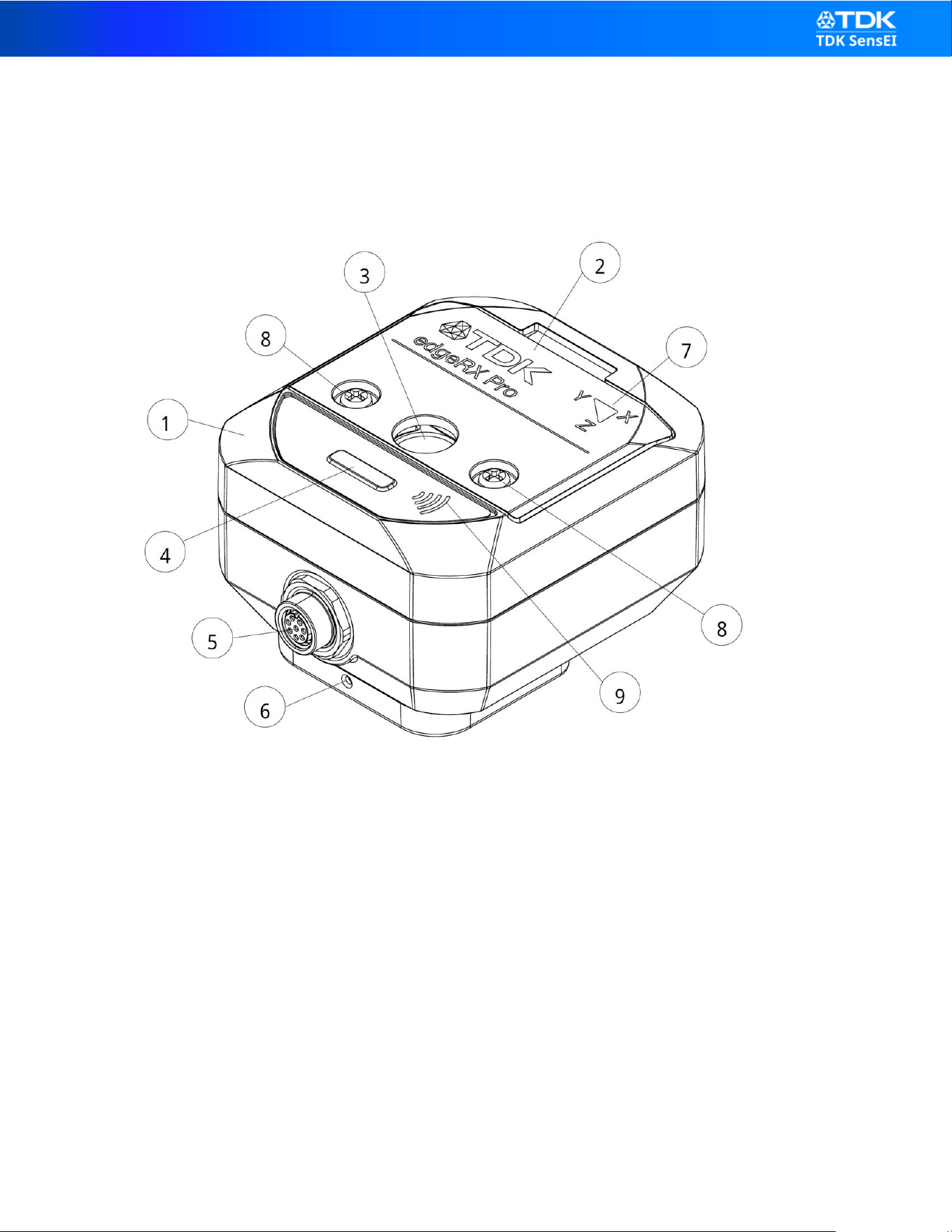
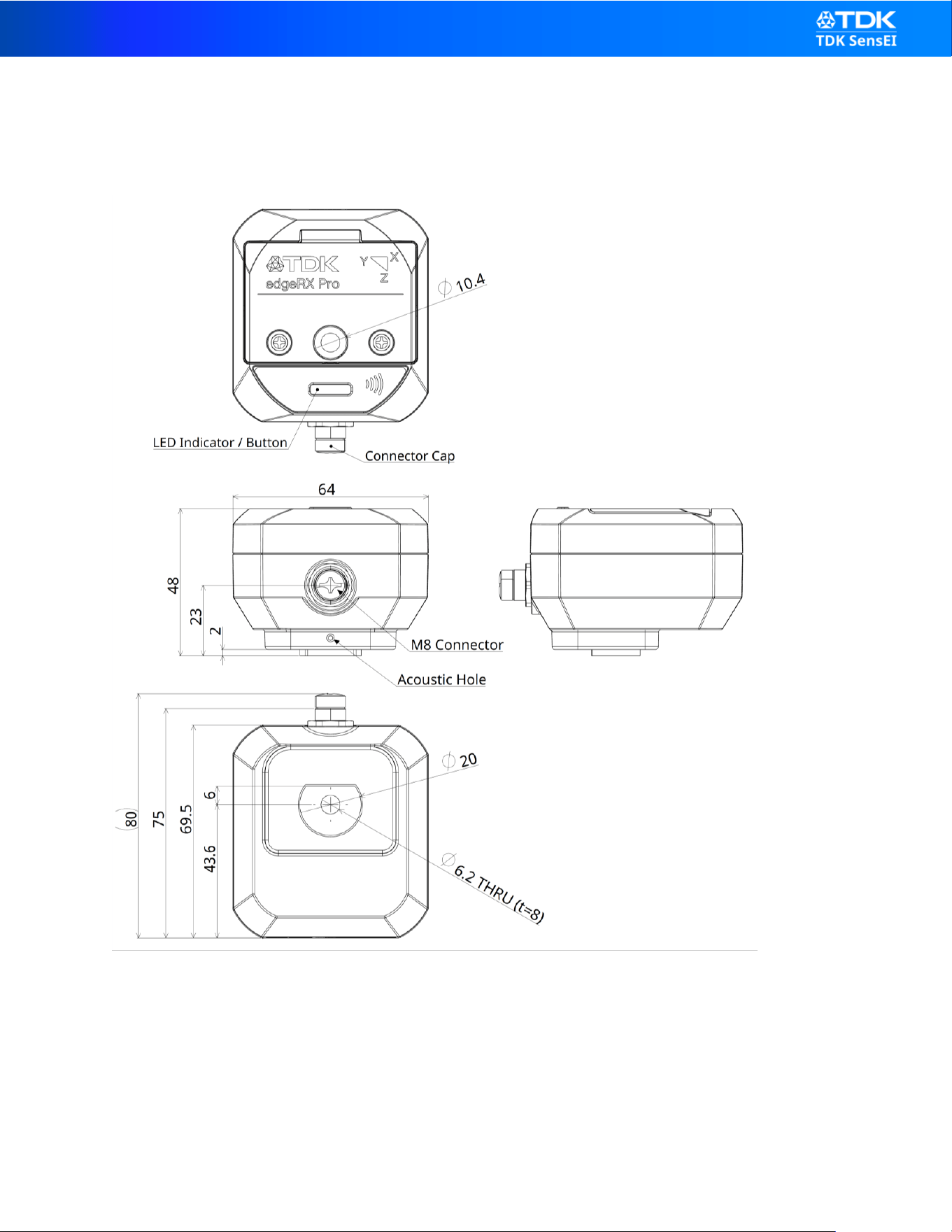
Refer to the external view diagram for component identification.
(1) Main Enclosure
Rugged industrial housing designed for harsh environments.
Provides protection against dust and water ingress (IP67).
(2) Battery Lid
Removable battery cover located on the top side of the device.
The battery lid allows access to the internal battery compartment for service replacement by
authorized personnel only.

edgeRX Pro rev.1
Copyright © TDK SensEI; All Rights Reserved
►11
Do not remove the battery lid unless instructed by authorized service personnel.
(3) Mounting Holes (M6 Clearance Holes)
Through-holes for M6 bolts.
The holes are clearance holes and are not internally threaded.
Use appropriate M6 bolts and tighten to the specified torque to ensure secure mechanical coupling.
(4) LED Indicator and Push Button
This interface combines a multi-color LED indicator and a push button in the same physical
location.
LED Indicator
Multi-color LED used to indicate device status.
Refer to the “LED Status” section for detailed behavior.
Push Button
Used for configuration and maintenance operations, including:
Transmit BLE broadcast signal
Factory reset
Entering to and Recovering from Deep Shutdown Mode
Refer to the “Button Operation” section for detailed instructions.
Avoid accidental pressing during installation.
(5) M8 Connector
Industrial M8 connector used for:
USB power supply
USB configuration and service access
Optional expansion interface (future support)
Through a separately sold expansion cable, extended interfaces such as Digital I/O and Analog
Input may be supported in future configurations.

edgeRX Pro rev.1
Copyright © TDK SensEI; All Rights Reserved
►12
⚠ The connector is not waterproof unless a compatible cable or protective cap is properly attached.
(6) Acoustic Hole
Acoustic inlet for the built-in digital microphone.
The sound port is protected by a waterproof acoustic membrane that allows sound transmission
while maintaining environmental protection performance.
Do not block, puncture, or remove the membrane.
Do not apply adhesive tape or labels over the sound port.
Avoid contamination with dust, oil, or liquids.
Damage to the membrane may degrade acoustic performance and waterproof protection.
(7) Axis Direction Markings (X / Y / Z)
Indicates the orientation of the three sensing axes.
Proper alignment is critical for accurate vibration analysis.
(8) Battery Lid Screws (×2)
Two screws secure the battery lid.
Do not loosen or remove these screws during normal operation.
Battery replacement must be performed by authorized service personnel only.
Improper handling may affect waterproof performance.
(9) NFC Area (Future Support)
Designated area for Near Field Communication (NFC).
Future system updates may enable NFC-based device provisioning using smartphones or
compatible tools.
Functionality may vary depending on system configuration.

edgeRX Pro rev.1
Copyright © TDK SensEI; All Rights Reserved
►13
6. INSTALLATION GUIDE
Proper installation is essential to ensure accurate measurement and safe operation.
6.1. Installation Requirements
Before installation, confirm the following:
The target equipment is compatible with this product.
The installation surface is clean, flat, and mechanically stable.
The installation area is within the specified environmental conditions.
The mounting location allows sufficient Bluetooth communication with the gateway.
Deployment location directly affects vibration measurement accuracy and diagnostic performance.
6.2. Orientation
edgeRX Pro measures vibration in three orthogonal axes (X, Y, Z).
Install the device with correct axis orientation based on the monitoring objective.
Ensure the sensing axes align appropriately with the direction of expected vibration.
Incorrect orientation may result in inaccurate diagnostic results.
Refer to the axis markings on the enclosure.
6.3. Mounting Methods
Proper mounting is essential for measurement accuracy and device safety.
Screw mounting is the recommended installation method for industrial applications.
(1) Screw Mounting (Recommended)
Use M6 screws. (clearance holes, not threaded).
Apply the specified tightening torque.
Ensure rigid mechanical coupling between the device and the target equipment.
Loose installation may reduce measurement accuracy.
(2) Magnetic Mount (Optional – Attachment Required)
Magnetic mounting requires a separate magnetic attachment.
The magnetic attachment must be secured to the device using M6 bolts or industrial adhesive.
Ensure the target surface is ferromagnetic and clean.

edgeRX Pro rev.1
Copyright © TDK SensEI; All Rights Reserved
►14
Verify that the magnetic holding force is sufficient under expected vibration conditions.
Not recommended for high-vibration or high-impact environments.
(3) Adhesive Mount (if applicable)
For direct adhesive installation:
Apply industrial-grade adhesive directly to the base surface of the device.
Ensure the adhesive is compatible with the operating temperature range.
Clean the mounting surface thoroughly before application.
Allow adequate curing time before operation.
Adhesive mounting may provide lower mechanical rigidity compared to screw mounting.
(4) Motor Fin Mount (Optional – Attachment Required)
Motor fin mounting requires a separate motor fin attachment.
The motor fin attachment must be secured to the device using M6 bolts or industrial adhesive.
Ensure proper alignment and secure fastening before operation.
Verify that the installation maintains sufficient mechanical rigidity for accurate vibration analysis.
6.4. Environmental Considerations
Do not install the device in environments with:
Prolonged exposure to oil or chemicals
Organic solvents, strong acids, or strong alkalis
Heavy salt exposure
Excessive iron particles
Condensation or rapid temperature fluctuations
Installation outside specified environmental conditions may reduce product lifetime or waterproof
performance.
6.5. Post-Installation Verication
After installation:
Confirm the device is securely attached.
Verify LED indication and normal startup.
Confirm Bluetooth® connectivity with the gateway.
Perform functional test measurement before full deployment.

edgeRX Pro rev.1
Copyright © TDK SensEI; All Rights Reserved
►15
6.6. Important Notes
Do not relocate the device without reassessing mounting stability and orientation.
Improper installation may result in measurement errors or device detachment.
Always follow local safety regulations when working near rotating machinery.
Magnetic field measurements may be affected by nearby ferromagnetic structures or high-
current conductors. Avoid installation near strong magnetic sources unless intended.
7. POWER & BATTERY HANDLING
7.1. Power Sources
edgeRX Pro operates using the following power sources:
Built-in replaceable lithium battery
USB power input
USB is primarily intended as an external power supply source.
It may also be used for configuration, maintenance, and service communication.
When connected, USB power takes priority over battery power.
7.2. Built-in Battery
This product contains a non-rechargeable lithium battery.
Do not attempt to recharge the battery.
When replacing the battery, always follow the specified replacement procedure.
Do not use unspecified batteries, install the battery incorrectly, or perform battery replacement
in an improper manner.
If you have any questions about the replacement procedure, contact authorized service
personnel or the designated support contact.
Improper handling may result in fire, explosion, or product damage.
7.3. Battery Life
Typical battery life is up to 5 years under low-duty monitoring conditions.
Battery life depends on:
Measurement frequency and reporting interval
Sensor configuration
Environmental temperature

edgeRX Pro rev.1
Copyright © TDK SensEI; All Rights Reserved
►16
Installation conditions
Battery life may be significantly reduced in extremely high or low temperature environments.
7.4. USB Power Usage
edgeRX Pro is equipped with an industrial M8 connector.
It does not use a standard USB connector.
When powered via USB:
Use only the dedicated cable supplied or approved by the manufacturer.
Do not connect standard USB cables directly to the device.
Use a certified power supply compliant with applicable safety standards.
Ensure the M8 connector is properly sealed when not in use to maintain waterproof
performance.
⚠ The external connector is not waterproof unless a compatible cable or protective cap is properly
attached.
Use of non-approved cables may result in device malfunction, loss of waterproof performance, or
safety hazards.
7.5. Storage Conditions
For long-term storage:
Store within –40°C to 85°C.
Avoid high humidity and condensation.
Avoid direct sunlight or heat sources.
If the device will not be used for an extended period, place the device into Deep Shutdown Mode
to minimize battery consumption.
Refer to the “Button Operation” section for instructions on entering Deep Shutdown Mode.
Improper storage conditions or prolonged storage without shutdown may reduce battery
performance.

edgeRX Pro rev.1
Copyright © TDK SensEI; All Rights Reserved
►17
7.6. Battery Disposal
• Do not remove the battery by yourself.
• Dispose of the product and battery in accordance with local regulations.
• Contact authorized service personnel for battery replacement or disposal support.
8. COMMUNICATION & CONNECTIVITY
edgeRX Pro supports wireless and wired communication interfaces for configuration, monitoring,
and service access.
8.1. Bluetooth Low Energy (BLE)
The primary communication method is Bluetooth Low Energy (BLE 5).
BLE is used for:
Device provisioning and pairing
Sensor data transmission to compatible edgeRX Gateway systems
Configuration updates
Status monitoring
FOTA (Over the Air device firmware update)
Wireless communication performance depends on:
Distance to the gateway
Installation environment
Presence of obstructions, especially metal structures
Radio interference in the 2.4 GHz band
For stable communication, install the device within recommended communication range of the
gateway.
8.2. USB Interface
The device is equipped with an industrial M8 connector that supports USB functionality.
The USB interface is primarily intended for external power supply.
USB communication is limited to service and diagnostic purposes only.
Supported functions may include:
Device configuration
Firmware update (service use)

edgeRX Pro rev.1
Copyright © TDK SensEI; All Rights Reserved
►18
Diagnostic access
When connected, USB power takes priority over battery power.
⚠ The external connector is not waterproof unless a compatible cable or protective cap is properly
attached.
USB communication is not supported by edgeRX Gateway systems.
The gateway communicates with the device exclusively via Bluetooth Low Energy (BLE). Future
system updates may provide dedicated tools for configuration or service operations via USB.
Availability and functionality may vary depending on system version.
8.3. NFC (Planned Feature)
The device includes a designated NFC area.
NFC functionality is not currently supported.
Future firmware and system updates may enable NFC-based device provisioning through
compatible tools, such as a smartphone application.
Planned NFC functionality may include:
Device identification
Simplified provisioning
Availability and functionality may vary depending on firmware version and system configuration.
8.4. Wireless Communication Considerations
This product operates in the 2.4 GHz ISM band.
Wireless performance may be affected by:
Wi-Fi networks
Microwave ovens
Industrial radio systems
Metal enclosures or obstacles

edgeRX Pro rev.1
Copyright © TDK SensEI; All Rights Reserved
►19
Communication stability should be verified after installation.
8.5. Connectivity Limitations
Wireless communication may not function correctly in high-interference environments.
Data transmission intervals depend on configuration and system design.
Temporary communication interruptions do not necessarily indicate device malfunction.
9. OPERATING BEHAVIOR
edgeRX Pro operates based on configurable triggering mechanisms designed to optimize
monitoring performance and power consumption.
The device supports scheduled operation and event-triggered operation, which may be used
independently or in combination.
9.1. Scheduled Operation (Normal Monitoring)
In scheduled operation, the device performs sensing at predefined time intervals.
At each scheduled interval, the device:
Acquires sensor data
Performs edge-level signal processing
Extracts diagnostic features (KPIs)
Executes AI inference (if enabled)
Reports processed data to the gateway
The following reporting intervals are configurable independently:
KPI reporting interval
Raw data reporting interval
AI inference result reporting interval
Between scheduled operations, the device automatically transitions to a low-power state.
The device wakes automatically at the next scheduled timing.
This mechanism is typically used for routine condition monitoring.

edgeRX Pro rev.1
Copyright © TDK SensEI; All Rights Reserved
►20
9.2. Event-Triggered Operation (Wake-on-Event)
When enabled, the device can wake from low-power state upon detecting specific events, such as
vibration activity.
Event-triggered operation is suitable for:
Intermittently operating machinery
Reducing unnecessary scheduled measurements
Improving energy efficiency
Event sensitivity and trigger conditions are configurable.
Event-triggered operation can be combined with scheduled operation.
In such configurations, scheduled intervals may be extended, while events trigger additional
measurements when necessary, improving overall power efficiency.
9.3. Automatic Low-Power Transition
To extend battery life, the device automatically enters a low-power sleep state when no
measurement or communication activity is required.
In low-power state:
Most subsystems are powered down
Only essential circuits remain active
Standby power consumption is minimized
The device wakes automatically based on scheduled timing or detected events.

edgeRX Pro rev.1
Copyright © TDK SensEI; All Rights Reserved
►21
10. BUTTON OPERATION
The push button is used for configuration and maintenance purposes.
Accidental operation during normal monitoring should be avoided.
10.1. Short Press
Press and release the button briefly.
Function:
Transmits a broadcast signal (only when the device is powered on)
Used to establish a connection with the gateway
If necessary, detect and register the sensor on the gateway side.
10.2. Long Press (Factory Reset)
Press and hold the button for more than 5 seconds.
Function:
Restore device to factory default settings
Clear user configuration parameters
Erase the edge AI models
⚠ Factory reset will erase configuration settings.
Reconfiguration is required before returning to normal operation.
10.3. Entering and Recovering from Deep Shutdown Mode
Deep Shutdown Mode completely powers down the device.
To enter Deep Shutdown Mode:
Press the button five times consecutively within a short interval.
To recover from Deep Shutdown Mode:
Press the button five times consecutively again.

edgeRX Pro rev.1
Copyright © TDK SensEI; All Rights Reserved
►22
LED indication confirms entry into and recovery from Deep Shutdown Mode.
In Deep Shutdown Mode:
All device functions are stopped
Wireless communication is disabled
NFC functionality is disabled
The device is in a fully powered-off state
The device is shipped in Deep Shutdown Mode.
Before first use, the device must be activated by performing the recovery procedure
described above.
10.4. Operational Notes
Avoid pressing the button during installation.
Do not press the button using sharp or metallic objects.
Excessive force may damage the button mechanism.
Button operation may be disabled depending on system configuration.
10.5. Safety Considerations
Perform configuration or reset procedures only when it is safe to do so.
Do not operate the button while working near moving machinery unless appropriate safety
precautions are taken.
edgeRX Pro rev.1
Copyright © TDK SensEI; All Rights Reserved
►23
11. LED STATUS
The multi-color LED indicator provides visual feedback on device status and operation.
LED behavior may vary depending on configuration and system state.
11.1. LED Color Overview
Color
Function
OFF
Idle / Deep Shutdown
Cyan
Power-on / Recovery from Deep Shutdown
Blue
BLE Broadcasting
Green
BLE connection / Data Transmission
Magenta
Entering Deep Shutdown
Yellow
Flash Erase Operation
Red
Factory Reset
11.2. Power-On Indication (Cyan)
When the device powers on or recovers from Deep Shutdown, the LED lights in Cyan.
The LED remains active for a short duration (a few seconds).
After initialization, the LED transitions to the appropriate operational state.
This confirms that the device has successfully powered on.
11.3. BLE Broadcasting (Blue)
When broadcasting is initiated by a button operation, the blue LED starts flashing.
Indicates that the device is transmitting signals to establish a connection with the gateway
Available only when the device is powered on (not functional during deep shutdown mode)
The Blue LED stops blinking when:
BLE Broadcasting is exited, or
A successful BLE connection is established.
11.4. BLE Connection & Data Transmission (Green)
When a BLE connection is established and data transmission is active:
The Green LED lights blinking.

edgeRX Pro rev.1
Copyright © TDK SensEI; All Rights Reserved
►24
The Green LED returns to idle state when:
The BLE connection is lost, or
Data transmission stops.
11.5. Entering Deep Shutdown (Magenta)
When five consecutive short presses are detected:
The Magenta LED lights up.
After indication:
All LEDs turn off.
The device enters Deep Shutdown state.
11.6. Flash Erase Operation (Yellow)
When a flash erase operation is initiated:
The Yellow LED blinks continuously during the erase process.
During this period:
The flash erase operation may take several minutes to complete.
All other user operations are disabled.
Button inputs and communication commands are ignored.
After completion:
The Yellow LED turns off.
The device returns to its normal operational state.
This blinking indication informs the user that a time-consuming flash erase process is in progress
and that the device is temporarily unavailable for other operations.
11.7. Factory Reset (Red)
When a valid long press is detected:
The Red LED blinks during reset.
edgeRX Pro rev.1
Copyright © TDK SensEI; All Rights Reserved
►25
During this period:
The flash erase operation may take several minutes to complete.
All other user operations are disabled.
Button inputs and communication commands are ignored.
After completion:
The LED may remain solid briefly before reboot.
The Red LED turns off.
The device returns to its normal operational state.
Factory reset clears user configuration settings.
12. MAINTENANCE & DISPOSAL
Proper maintenance and correct end-of-life handling ensure reliable operation, user safety, and
environmental protection.
12.1. Battery Handling and Replacement
The device contains a built-in non-rechargeable lithium battery.
When replacing the battery, take care not to damage the battery lid.
Do not attempt to disassemble the battery.
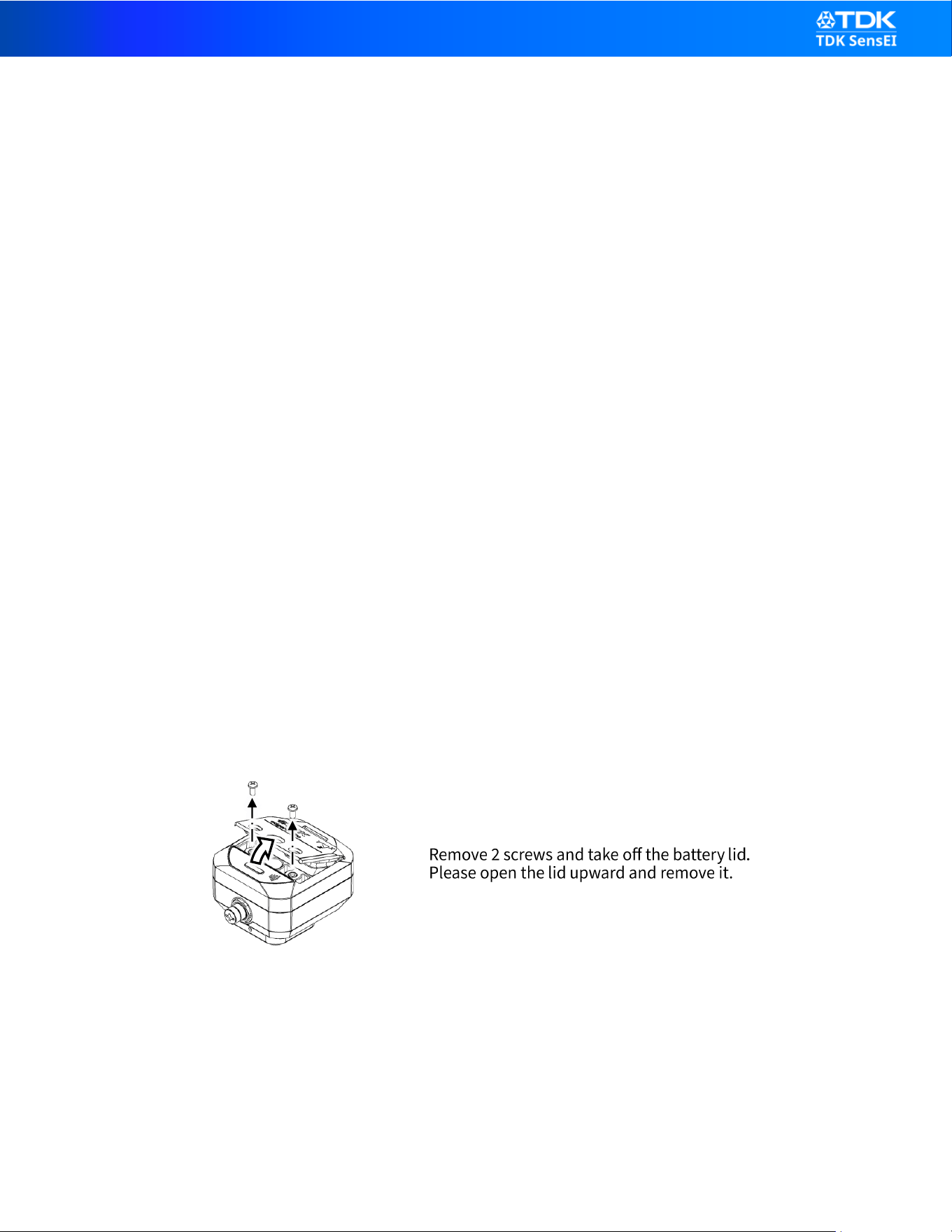
1
Remove 2 screws and take off the battery lid .
Please open the lid upward and remove it.
edgeRX Pro rev.1
Copyright © TDK SensEI; All Rights Reserved
►26
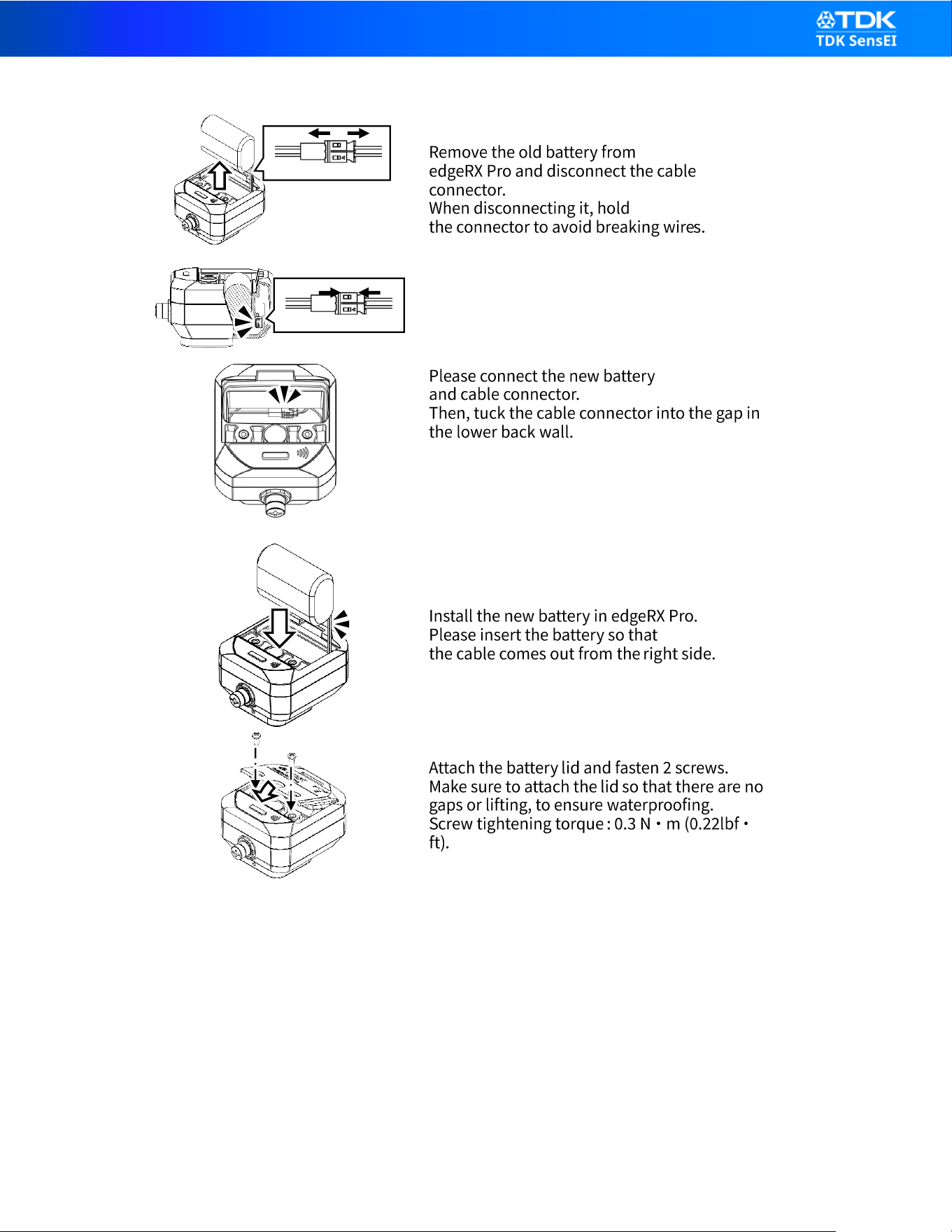
2
Remove the old battery from
edgeRX Pro and disconnect the cable
connector.
When disconnecting it, hold
the connector to avoid breaking wire s.
3
Please connect the new battery
and cable connector.
Then, tuck the cable connector into the gap in
the lower back wall.
4
Install the new battery in edgeRX Pro.
Please insert the battery so that
the cable comes out from the right side.
5
Attach the battery lid and fasten 2 screws.
Make sure to attach the lid so that there are no
gaps or lifting, to ensure waterproofing.
Screw tightening torque : 0.3 N ・ m (0.22lbf ・
ft).
Battery life depends on configuration, usage conditions, and environmental temperature.
Contact authorized service personnel if battery replacement is required or if battery performance
appears significantly degraded.
Improper battery handling may result in fire, explosion, or injury.
C

edgeRX Pro rev.1
Copyright © TDK SensEI; All Rights Reserved
►27
12.2. Handling Abnormalities
Contact authorized service personnel if:
The device becomes abnormally hot
The enclosure is cracked or damaged
Communication failure continues after restart
Battery performance appears significantly degraded
Internal malfunction is suspected
Do not attempt to disassemble or repair the product yourself.
Unauthorized modification may void the warranty and compromise safety.
12.3. Disposal and Recycling
This product contains electronic components and a built-in lithium battery.
Proper disposal is required to prevent environmental contamination and safety hazards.
Do not dispose of this product as household waste.
Dispose of the product in accordance with local regulations for electronic equipment.
Follow applicable environmental and recycling laws in your region.
The internal battery must not be removed by the user.
At the end of product life:
Contact authorized service personnel for disposal guidance.

edgeRX Pro rev.1
Copyright © TDK SensEI; All Rights Reserved
►28
13. SPECIFICATIONS
The following specifications describe the typical performance characteristics of edgeRX Pro.
Specifications are subject to change without notice.
Sensor
Range
Max ODR
3-Axis Accelerometer
±2, ±4, ±8 and ±16g
8kHz
3-Axis Gyroscope
±250, ±500, ±1000, and ±2000 dps
8kHz
3-Axis Magnetometer
±2.4 mT
290Hz
Microphone
-
51.2kHz
Skin Temperature Sensor
-40 ~ 85 °C
-
Items
Specification
Internal Storage
512 Mbit local data storage
Communication Interface
Bluetooth low energy
USB 2.0
NFC
Extension
Digital I/O
Analog Input (1ch)
Indicator
Full Color LED
Button
Push Button x 1
Power Supply
5400mAh Li battery
Battery life
Up to 5 years
Optional Power Supply
DC 5V USB Bus-power
Certification
FCC / CE / SRRC / MIC
IP Rating
IP67
Operating temperature
-40 ~ 85 °C
Mounting
• Screw mounting (M6 Screw)
• Magnet mount
• Adhesive mount
• Motor fin mount
Dimensions
Approx. 64.0 × 75.0 × 48.0 mm
Weight
165 g (including battery)
*1. Communication distance varies depending on obstructions between communication devices and the condition of radio
waves, as well as the usage conditions of the product.
*2. Battery life varies depending on communication environment, report intervals, and other product operational settings
and usage conditions.
*3. Measurement accuracy may vary depending on installation conditions, mechanical coupling, environmental noise, and
temperature. The device is not intended for precision metrology applications.
edgeRX Pro rev.1
Copyright © TDK SensEI; All Rights Reserved
►29
14. OUTLINE DIMENSIONS
(Unit: mm)
Mounting Screw: M6 Cap Screw
Tightening torque - Minimum 2.0 N·M, Maximum 12.0 N·M

edgeRX Pro rev.1
Copyright © TDK SensEI; All Rights Reserved
►30
15. TROUBLESHOOTING
If the device does not operate as expected, refer to the table below before contacting service
personnel.
15.1. Device Does Not Power On
Possible Cause
Action
Battery depleted
Contact authorized service personnel for
battery replacement
In Deep Shutdown mode
Press the button five times consecutively within
a short interval
USB power not properly
connected
Verify USB cable and power source
Internal malfunction
Contact service personnel
15.2. No Bluetooth Communication
Possible Cause
Action
Out of communication
range
Move device closer to gateway
In Deep Shutdown mode
Press the button five times consecutively within
a short interval
Radio interference
Check for nearby 2.4 GHz devices (Wi-Fi, etc.)
Gateway not powered
Verify gateway operation
Device not provisioned
Confirm device provisioning status
Wireless performance may vary depending on installation environment.
15.3. Intermittent Data Transmission
Possible Cause
Action
Weak signal due to metal
obstruction
Adjust installation location
High radio interference
Improve communication environment
Sleep mode operation
Confirm configured transmission interval
Temporary communication interruptions do not necessarily indicate malfunction.

edgeRX Pro rev.1
Copyright © TDK SensEI; All Rights Reserved
►31
15.4. Abnormal Measurement Data
Possible Cause
Action
Improper mounting
Verify rigid mechanical coupling
Incorrect axis orientation
Check X/Y/Z alignment
Loose mounting screws
Retighten to specified torque
Installation on unsuitable surface
Re-evaluate mounting location
Accurate measurement depends on proper installation conditions.
15.5. Factory Reset Required
If configuration is lost or communication repeatedly fails:
Perform a factory reset (press and hold the button for more than 5 seconds).
After factory reset, the device must be reconfigured before resuming operation.
Note:
Factory reset restores the device to its default configuration.
Firmware integrity is not affected. However, any stored edge AI models will be erased and must be
reloaded if required.
15.6. When to Contact Service
Contact authorized service personnel if:
The device becomes abnormally hot
The enclosure is cracked or damaged
Battery performance is significantly reduced
Communication cannot be restored after troubleshooting
Do not attempt to disassemble or repair the product.

edgeRX Pro rev.1
Copyright © TDK SensEI; All Rights Reserved
►32
16. LEGAL & DISCLAIMER
16.1. General Disclaimer
The information contained in this document is provided for reference purposes only and is subject
to change without notice due to product improvements or other reasons.
The manufacturer reserves the right to modify specifications or discontinue the product without
prior notice.
While reasonable efforts have been made to ensure accuracy, no warranty is made regarding the
completeness or correctness of the information.
16.2. Limitation of Liability
The manufacturer shall not be liable for any indirect, incidental, special, or consequential damages
arising from the use or inability to use this product.
The user is responsible for ensuring that the product is suitable for the intended application.
Improper installation, operation, or maintenance may result in reduced performance or equipment
damage.
The manufacturer shall not be liable for any loss or damage to stored or transmitted data resulting
from product use or malfunction.
16.3. Industrial & Restricted Applications
This product is designed for professional and industrial applications only.
It is not intended for consumer use or for applications requiring a higher level of safety or
reliability, including but not limited to:
Aerospace or aviation systems
Transportation control systems
Medical life-support equipment
Nuclear facilities
Military equipment
Other safety-critical systems where failure may cause serious damage to society, persons, or
property
Use in such applications is not permitted unless explicitly approved by the manufacturer.

edgeRX Pro rev.1
Copyright © TDK SensEI; All Rights Reserved
►33
16.4. Export Control
Export of this product may be subject to applicable export control laws and regulations. The user is
responsible for complying with such laws when exporting the product.
16.5. Installation Responsibility
The user is responsible for:
• Proper installation
• Compliance with local safety regulations
• Ensuring safe operation near rotating machinery
Failure to follow installation and safety guidelines may result in inaccurate measurements or device
damage.
16.6. Intellectual Property
All trademarks and registered trademarks mentioned in this document are the property of their
respective owners.
Bluetooth is a registered trademark owned by Bluetooth SIG, Inc., and any use of such marks by
TDK Corporation is under license.
16.7. Certication Status
This product is designed to comply with applicable regional regulations.
Final certification status may vary depending on region and production stage.
16.8. Warranty Notice
Warranty terms are defined separately in the official warranty documentation.
Use of non-approved accessories, modification, or disassembly may void warranty.

edgeRX Pro rev.1
Copyright © TDK SensEI; All Rights Reserved
►34
17. SERVICE CONTACT
For after-sales support, technical assistance, or service inquiries, please contact:
Service Website: https://sensei.tdk.com/contact-us-2/
After-Sales & Technical Support Email: support@tdk-sensei.com
Working Hours: Monday to Friday, 09:00–18:00 (Local Time)
18. COMPANY INFORMATION
Manufacturer: TDK SensEI (Dongguan) Ltd.
Room 2502-2505, Building 9A, Universal Commerce
Center, Dongguan City, Guangdong, China
Headquarters: TDK SensEI Pte. Ltd.
60 Paya Lebar Road
#08-52 Paya Lebar Square
Singapore 409051
Official Website: https://www.sensei.tdk.com

edgeRX Pro rev.1
Copyright © TDK SensEI; All Rights Reserved
►35
19. Revision History
Revision
Contents
Date
Updated by
1
Initial Release
July 5, 2026
N.Ueda